
MODEL
XG-PH80W-N
XG-PH80X-N
DATA PROJECTOR
SETUP MANUAL
Setting up the Screen ..........................................................................2
Screen Size and Projection Distance ................................................3
Connecting Pin Assignments ...........................................................14
RS-232C Specifi cations and Commands ........................................16
Setting up the Projector Network Environment .............................18
1. Connecting the Projector to a Computer ............................................. 19
2. Setting an IP Address for the Computer .............................................. 20
3. Setting up a Network Connection for the Projector .............................22
Controlling the Projector via LAN ....................................................24
Controlling the Projector Using Internet Explorer ..................................... 24
Controlling the Projector and Confi rming the Projector Status ................25
Making General Settings for the Network ................................................ 26
Operating the Projector Using the PJLink
TM
Protocol ...................27
Troubleshooting ................................................................................. 28
Dimensions ........................................................................................31

-2
Setting up the Screen
For optimal image quality, position the projector perpendicular to the screen with the
projector's feet fl at and level. Doing so will eliminate the need for Keystone correction
and provide the best image quality.
The projector lens should be centered in the middle of the screen. If the horizontal line passing through the
lens center is not perpendicular to the screen, the image will be distorted, making viewing diffi cult.
For an optimal image, position the screen so that it is not in direct sunlight or room light. Light falling
directly on the screen washes out the colors, making viewing diffi cult. Close the curtains and dim the
lights when setting up the screen in a sunny or bright room.
•
•
Note
Standard Setup (Front Projection)
Place the projector at the required distance from the screen
according to the desired picture size.
Example of standard setup
Side View Top View
H
Screen
Lens center
L
Upper lens shift
position
(Desktop setup)
H1
H2
Screen
Lens center
Lens center
Lower lens shift
position
(High mount setup)
L
[AN-PH808EX]
[AN-PH814EZ/AN-PH818EZ/AN-PH823EZ/AN-PH845EZ]
Screen
Center of screen
W
Lens center
Lens center
Leftmost lens shift
position
Rightmost lens shift
position
The distance from the screen to the projector may vary depending on the size of the screen.
The default setting can be used, when placing the projector in front of the screen. If the
projected image is reversed, readjust the setting to “Front” in the “PRJ Mode” menu. (See
page 49 of the projector's operation manual.)
Place the projector so that an imaginary horizontal line that passes through the center of the
lens is perpendicular to the screen.
•
•
•
■
-3
Screen Size and Projection Distance
The projection screen size varies according to the distance from the lens of the projector
to the screen. The optional lenses from Sharp are also available for specialized
application. Please see your nearest Sharp Authorized Projector Dealer to details on all
the lenses. (Refer to the lens operation manual when using a lens.)
Install the projector so that projected images are projected onto the screen at the
optimum size by referring to the table. Use the values in the table as a reference when
installing the projector.
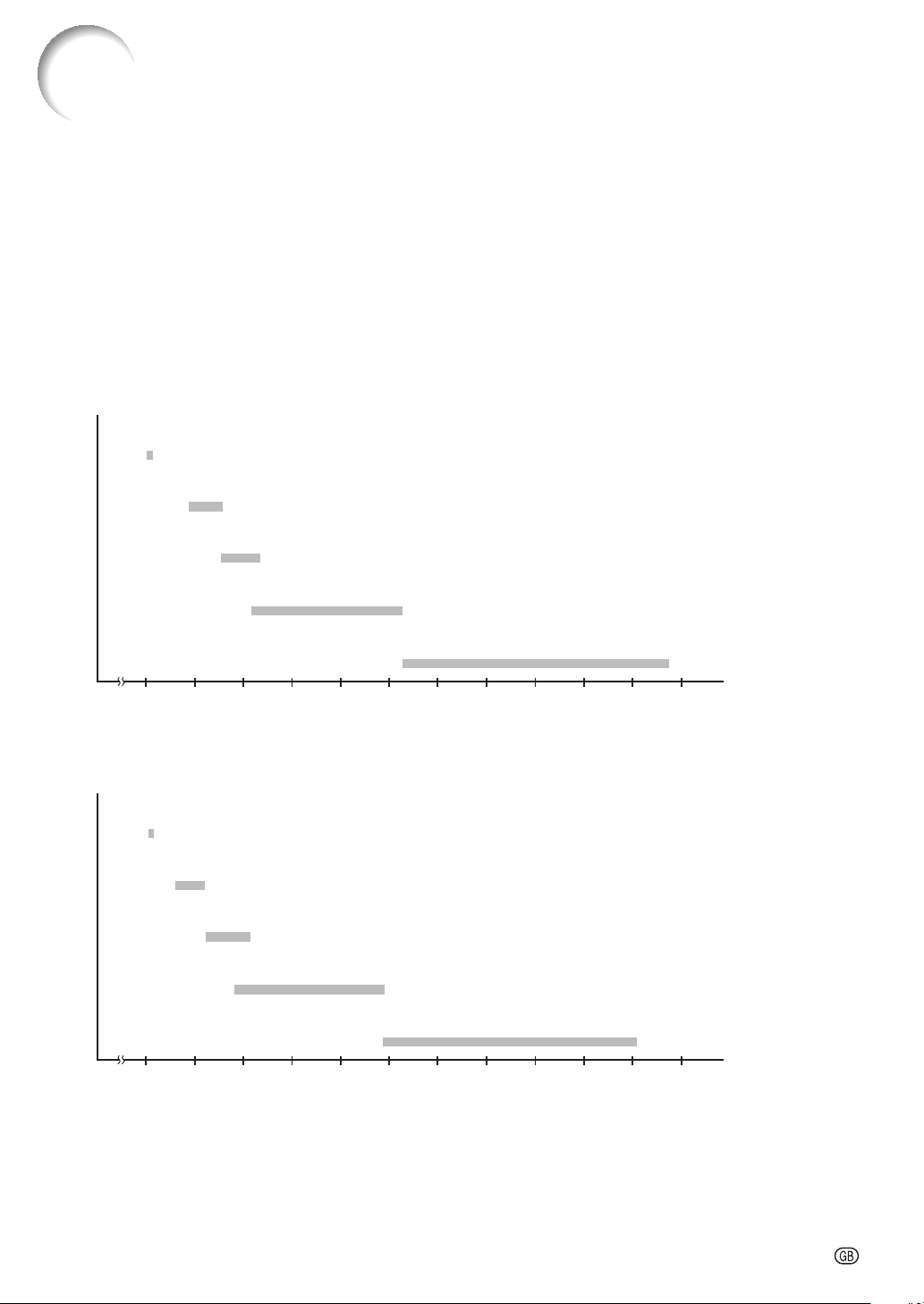
Throw Distance
XG-PH80W-N
The graph below is for 100-inch (254 cm) screen with 16:10 normal mode.
Screen
Fixed wide lens (AN-PH808EX): 5'6" (1.7 m)
Throw distance ratio 1:0.8
5 10 15 20 25 30 35 40 45 50 55 60 (ft)
Throw distance ratio 1:1.8–2.4
Tele-zoom lens (AN-PH823EZ): 15'8" – 31'4" (4.8 m – 9.5 m)
Throw distance ratio 1:2.2–4.4
Tele-zoom lens (AN-PH845EZ): 31'4" – 58'8" (9.5 m – 17.9 m)
Throw distance ratio 1:4.4–8.3
Wide-zoom lens (AN-PH814EZ): 9'5" – 12'8" (2.9 m – 3.9 m)
Throw distance ratio 1:1.3–1.8
Standard zoom lens (AN-PH818EZ): 12'7" – 16'7" (3.8 m – 5.1 m)
XG-PH80X-N
The graph below is for 100-inch (254 cm) screen with 4:3 normal mode.
Screen
Throw distance ratio 1:1.8–2.4
Fixed wide lens (AN-PH808EX): 5'2" (1.6 m)
Throw distance ratio 1:0.8
Tele-zoom lens (AN-PH823EZ): 14'10" – 29'6" (4.5 m – 9.0 m)
Throw distance ratio 1:2.2–4.4
Tele-zoom lens (AN-PH845EZ): 29'6" – 55'4" (9.0 m – 16.9 m)
Throw distance ratio 1:4.4–8.3
Wide-zoom lens (AN-PH814EZ): 8'10" – 11'11" (2.7 m – 3.6 m)
Throw distance ratio 1:1.3–1.8
Standard zoom lens (AN-PH818EZ): 11'10" – 15'8" (3.6 m – 4.8 m)
5 10 15 20 25 30 35 40 45 50 55 60 (ft)

-4
Screen Size and Projection Distance
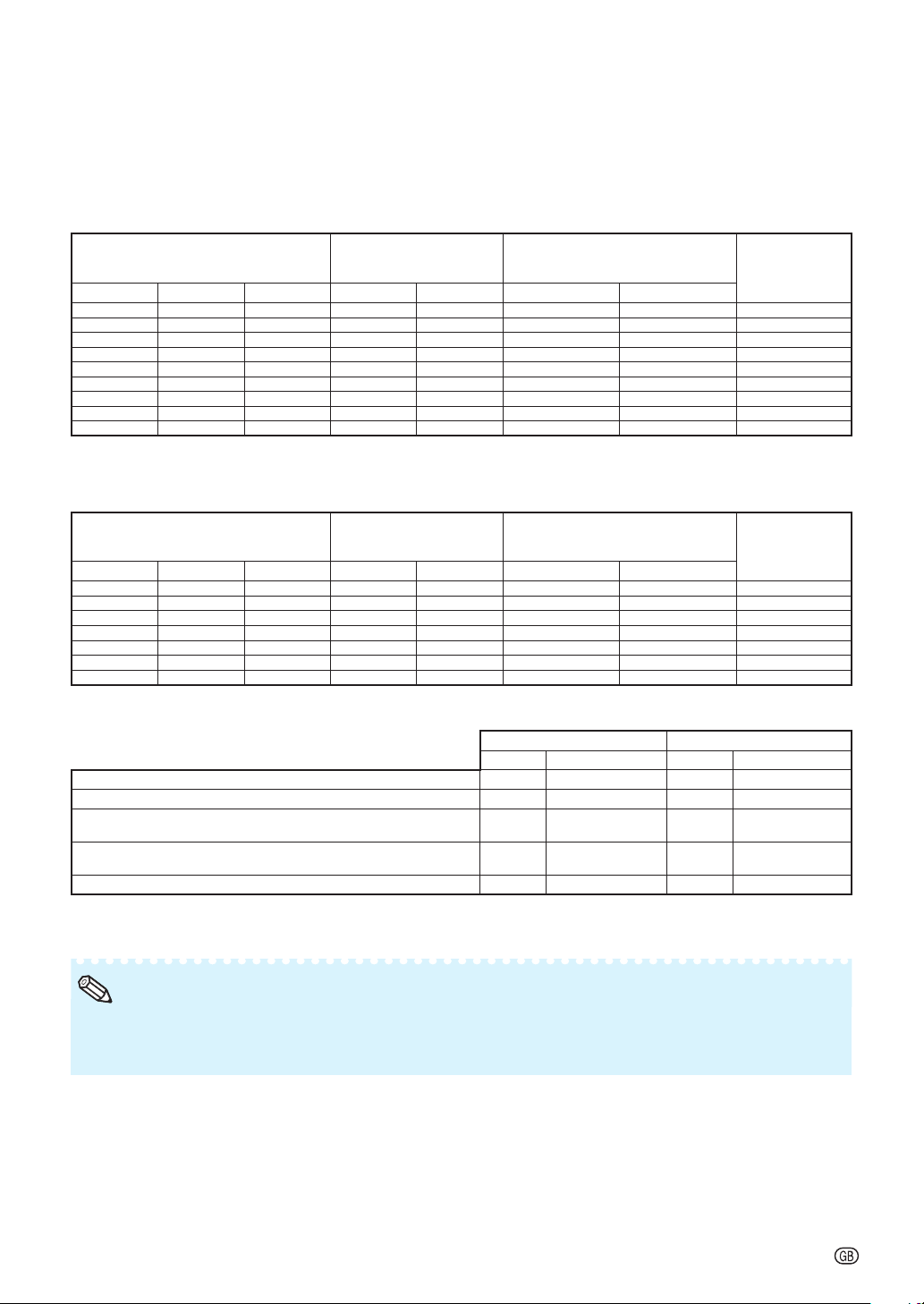
Standard Zoom Lens (AN-PH818EZ: For XG-PH80W-N)
F1.7-1.9, f = 26-34 mm
16:10 Signal Input (Normal Mode)
Picture (Screen) size Projection distance [L]
Distance from the lens center to
the bottom of the image [H]
Distance from the
lens center to the
center of the image
[W]
Diag. [
F
]
Width Height Minimum [L1]
Maximum [L2
] Lower [H1] Upper [H2]
500" (
1270
cm)
1077
cm (424") 673 cm (265") 19.2 m (62' 11") 25.3 m (83' 0") -336.6 cm (-132
1
/
2
") 0.0 cm (0") ± 107.7 cm (42
13
/
32
")
300" (762 cm) 646 cm (254") 404 cm (159") 11.5 m (37' 9") 15.2 m
(49' 10")
-201.9 cm (-79
1
/
2
") 0.0 cm (0") ± 64.6 cm (25
7
/
16
")
200" (508 cm) 431 cm (170") 269 cm (106") 7.7 m (25' 2") 10.1 m (33' 3") -134.6 cm (-53") 0.0 cm (0") ± 43.1 cm (16
61
/
64
")
150" (381 cm) 323 cm (127") 202 cm (79") 5.8 m (18' 10") 7.6 m (24' 11") -101.0 cm (-39
3
/
4
") 0.0 cm (0") ± 32.3 cm (12
23
/
32
")
100" (254 cm) 215 cm (85") 135 cm (53") 3.8 m (12' 7") 5.1 m (16' 7") -67.3 cm (-26
1
/
2
") 0.0 cm (0") ± 21.5 cm (8
31
/
64
")
80" (203 cm) 172 cm (68") 108 cm (42") 3.1 m (10' 1") 4.0 m (13' 3") -53.8 cm (-21
13
/
64
") 0.0 cm (0") ± 17.2 cm (6
25
/
32
")
70" (178 cm) 151 cm (59") 94 cm (37") 2.7 m (8' 10") 3.5 m (11' 8") -47.1 cm (-18
35
/
64
") 0.0 cm (0") ± 15.1 cm (5
15
/
16
")
60" (152 cm) 129 cm (51") 81 cm (32") 2.3 m (7' 7") 3.0 m (10' 0") -40.4 cm (-15
29
/
32
") 0.0 cm (0") ± 12.9 cm (5
3
/
32
")
40" (102 cm) 86 cm (34") 54 cm (21") 1.5 m (5' 0") 2.0 m (6' 8") -26.9 cm (-10
19
/
32
") 0.0 cm (0") ± 8.6 cm (3
25
/
64
")
4:3 Signal Input (Normal Mode)
Picture (Screen) size Projection distance [L]
Distance from the lens center to
the bottom of the image [H]
Distance from the
lens center to the
center of the image
[W]
Diag. [
F
]
Width Height Minimum [L1] Maximum [L2] Lower [H1] Upper [H2]
300" (762 cm) 610 cm (240") 457 cm (180") 13.0 m (42' 9") 17.2 m (56' 5") -228.6 cm (-90") 0.0 cm (0") ± 69.0 cm (27
11
/
64
")
200" (508 cm) 406 cm (160") 305 cm (120") 8.7 m (28' 6") 11.5 m (37' 7") -152.4 cm (-60") 0.0 cm (0") ± 46.0 cm (18
7
/
64
")
150" (381 cm) 305 cm (120") 229 cm (90") 6.5 m (21' 4") 8.6 m (28' 2") -114.3 cm (-45") 0.0 cm (0") ± 34.5 cm (13
37
/
64
")
120" (305 cm) 244 cm (96") 183 cm (72") 5.2 m (17' 1") 6.9 m (22' 7") -91.4 cm (-36") 0.0 cm (0") ± 27.6 cm (10
7
/
8
")
100" (254 cm) 203 cm (80") 152 cm (60") 4.3 m (14' 3") 5.7 m (18' 10") -76.2 cm (-30") 0.0 cm (0") ± 23.0 cm (9
1
/
16
")
80" (203 cm) 163 cm (64") 122 cm (48") 3.5 m (11' 5") 4.6 m (15' 1") -61.0 cm (-24") 0.0 cm (0") ± 18.4 cm (7
1
/
4
")
60" (152 cm) 122 cm (48") 91 cm (36") 2.6 m (8' 7") 3.4 m (11' 3") -45.7 cm (-18") 0.0 cm (0") ± 13.8 cm (5
7
/
16
")
When using the projector with screen sizes not listed in the above charts, calculate the values according to the formulas.
16:10 Signal 4:3 Signal
[m/cm] [Feet/inches] [m/cm] [Feet/inches]
L1: Minimum projection distance (m/ft)
0.03834
F
0.03834
F
/ 0.3048 0.0434
F
0.0434
F
/ 0.3048
L2: Maximum projection distance (m/ft)
0.05062
F
0.05062
F
/ 0.3048 0.05731
F
0.05731
F
/ 0.3048
H1: Lower distance from the lens center to the bottom of the image
(cm/in)
-0.6731
F
-0.673
1
F
/ 2.54 -0.762
F
-0.762
F
/ 2.54
H2: Upper distance from the lens center to the bottom of the image
(cm/in)
0
F
0
F
/ 2.54 0
F
0
F
/ 2.54
W: Distance from the lens center to the center of the image (cm/in)
±0.21539
F
±0.21539
F
/ 2.54 ±0.23004
F
±0.23004
F
/ 2.54
F
: Picture diagonal size: 40" – 500" (16:10)
60" – 300" (4:3)
Allow a margin of error in the values in the diagrams above.
When the distance from the lens center to the bottom of the image [H] is a negative number, this indicates
that the bottom of the image is below the lens center.
•
•
Note
-5
Screen Size and Projection Distance
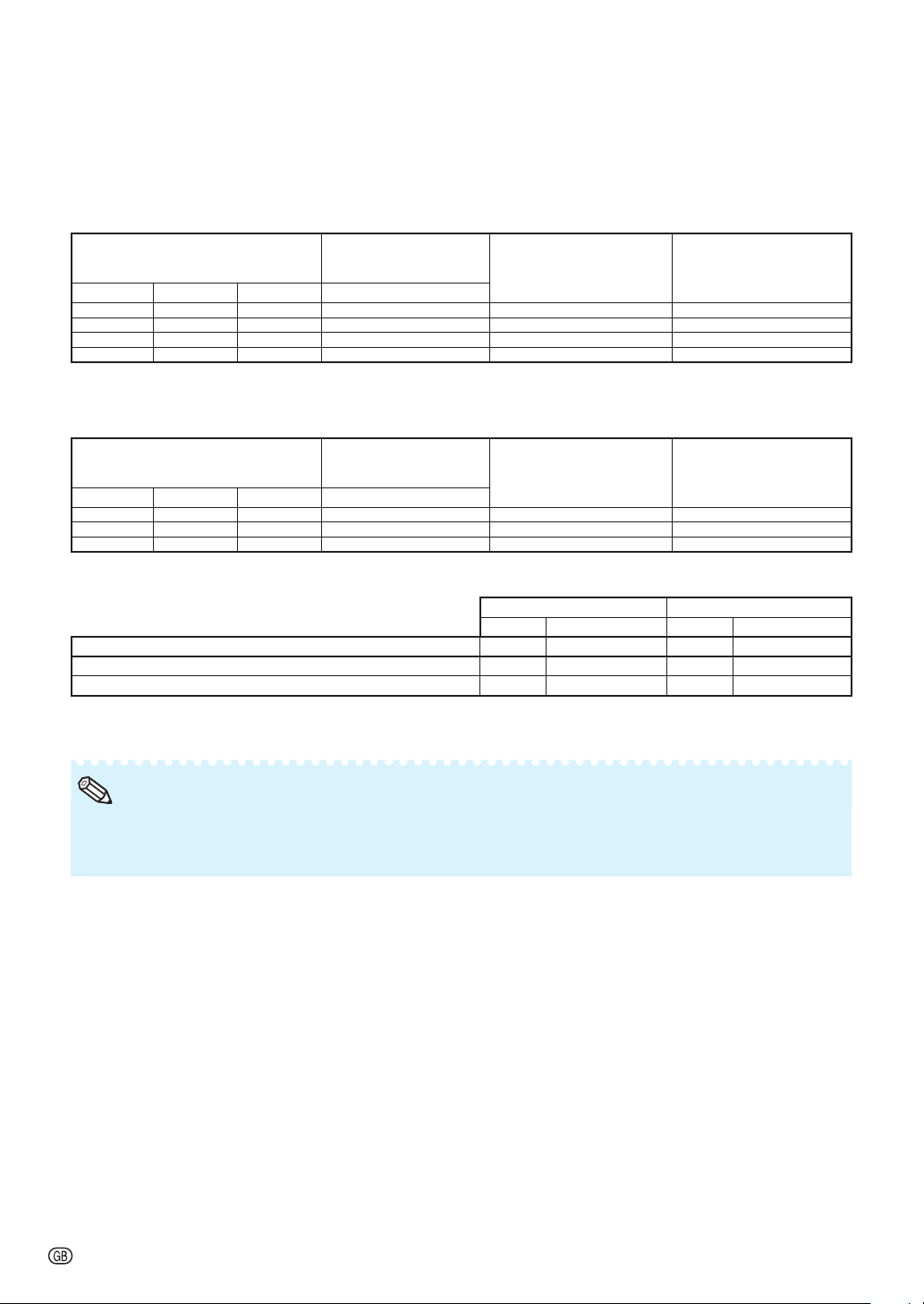
Standard Zoom Lens (AN-PH818EZ: For XG-PH80X-N)
F1.7-1.9, f = 26-34 mm
4:3 Signal Input (Normal Mode)
Picture (Screen) size Projection distance [L]
Distance from the lens center to
the bottom of the image [H]
Distance from the
lens center to the
center of the image
[W]
Diag. [
F
]
Width Height Minimum [L1]
Maximum [L2
] Lower [H1] Upper [H2]
500" (1270 cm) 1016 cm (400'') 762 cm (300'') 18.1 m (59' 4") 23.9 m (78' 4") -381.0 cm
(-150")
0.0 cm
(0")
± 101.6 cm
(40")
300" (762 cm) 610 cm (240'') 457 cm (180'') 10.9 m (35' 7") 14.3 m (47' 0") -228.6 cm
(-90")
0.0 cm
(0")
± 61.0 cm
(24")
200" (508 cm) 406 cm (160'') 305 cm (120'') 7.2 m (23' 9") 9.6 m (31' 4") -152.4 cm
(-60")
0.0 cm
(0")
± 40.6 cm
(16")
150" (381 cm) 305 cm (120'') 229 cm (90'') 5.4 m (17' 10") 7.2 m (23' 6") -114.3 cm
(-45")
0.0 cm
(0")
± 30.5 cm
(12")
100" (254 cm) 203 cm (80'') 152 cm (60'') 3.6 m (11' 10") 4.8 m (15' 8") -76.2 cm
(-30")
0.0 cm
(0")
± 20.3 cm
(8")
80" (203 cm) 163 cm (64'') 122 cm (48'') 2.9 m (9' 6") 3.8 m (12' 6") -61.0 cm
(-24")
0.0 cm
(0")
± 16.3 cm
(6
13
/
32
")
70" (178 cm) 142 cm (56'') 107 cm (42'') 2.5 m (8' 4") 3.3 m (11' 0") -53.3 cm
(-21")
0.0 cm
(0")
± 14.2 cm
(5
19
/
32
")
60" (152 cm) 122 cm (48'') 91 cm (36'') 2.2 m (7' 1") 2.9 m (9' 5") -45.7 cm
(-18")
0.0 cm
(0")
± 12.2 cm
(4
51
/
64
")
40" (102 cm) 81 cm (32'') 61 cm (24'') 1.4 m (4' 9") 1.9 m (6' 3") -30.5 cm
(-12")
0.0 cm
(0")
± 8.1 cm
(3
13
/
64
")
16:9 Signal Input (Normal Mode)
Picture (Screen) size Projection distance [L]
Distance from the lens center to
the bottom of the image [H]
Distance from the
lens center to the
center of the image
[W]
Diag. [
F
]
Width Height Minimum [L1] Maximum [L2] Lower [H1] Upper [H2]
300" (762 cm) 664 cm (261'') 374 cm (147'') 11.8 m (38' 9") 15.6 m (51' 2") -186.8 cm
(-73
17
/
32
")
62.3 cm
(24
33
/
64
")
± 66.4 cm
(26
9
/
64
")
200" (508 cm) 443 cm (174'') 249 cm (98'') 7.9 m (25' 10") 10.4 m (34' 2") -124.5 cm
(-49
1
/
32
")
41.5 cm
(16
11
/
32
")
± 44.3 cm
(17
7
/
16
")
150" (381 cm) 332 cm (131'') 187 cm (74'') 5.9 m (19' 5") 7.8 m (25' 7") -93.4 cm
(-36
49
/
64
")
31.1 cm
(12
1
/
4
")
± 33.2 cm
(13
5
/
64
")
120" (305 cm) 266 cm (105'') 149 cm (59'') 4.7 m (15' 6") 6.2 m (20' 6") -74.7 cm
(-29
27
/
64
")
24.9 cm
(9
13
/
16
")
± 26.6 cm
(10
29
/
64
")
100" (254 cm) 221 cm (87'') 125 cm (49'') 3.9 m (12' 11") 5.2 m (17' 1") -62.3 cm
(-24
33
/
64
")
20.8 cm
(8
11
/
64
")
± 22.1 cm
(8
23
/
32
")
80" (203 cm) 177 cm (70'') 100 cm (39'') 3.2 m (10' 4") 4.2 m (13' 8") -49.8 cm
(-19
39
/
64
")
16.6 cm
(6
17
/
32
")
± 17.7 cm
(6
31
/
32
")
60" (152 cm) 133 cm (52'') 75 cm (29'') 2.4 m (7' 9") 3.1 m (10' 3") -37.4 cm
(-14
45
/
64
")
12.5 cm
(4
29
/
32
")
± 13.3 cm
(5
15
/
64
")
When using the projector with screen sizes not listed in the above charts, calculate the values according to the formulas.
4:3 Signal 16:9 Signal
[m/cm] [Feet/inches] [m/cm] [Feet/inches]
L1: Minimum projection distance (m/ft)
0.03617
F
0.03617
F
/ 0.3048 0.03941
F
0.03941
F
/ 0.3048
L2: Maximum projection distance (m/ft)
0.04775
F
0.04775
F
/ 0.3048 0.05202
F
0.05202
F
/ 0.3048
H1: Lower distance from the lens center to the bottom of the image
(cm/in)
-0.762
F
-0.762
F
/ 2.54 -0.62263
F
-0.62263
F
/ 2.54
H2: Upper distance from the lens center to the bottom of the image
(cm/in)
0
F
0
F
/ 2.54 0.20754
F
0.20754
F
/ 2.54
W: Distance from the lens center to the center of the image (cm/in)
±0.2032
F
±0.2032
F
/ 2.54 ±0.22138
F
±0.22138
F
/ 2.54
F
: Picture diagonal size: 40" – 500" (4:3)
60" – 300" (16:9)
Allow a margin of error in the values in the diagrams above.
When the distance from the lens center to the bottom of the image [H] is a negative number, this indicates
that the bottom of the image is below the lens center.
•
•
Note
-6
Screen Size and Projection Distance
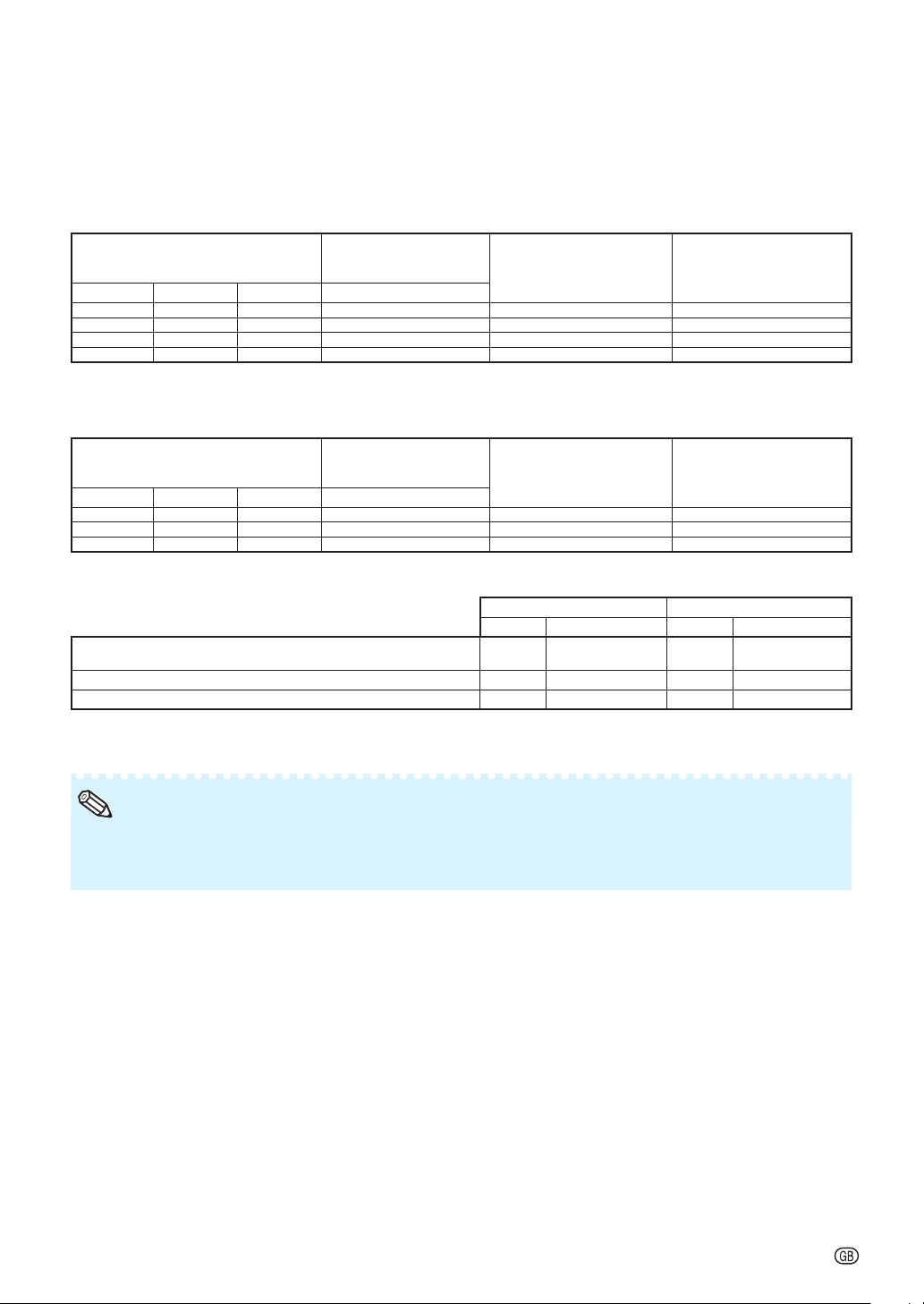
Fixed Wide Lens (AN-PH808EX: For XG-PH80W-N)
F2.0, f = 11.4 mm
16:10 Signal Input (Normal Mode)
Picture (Screen) size Projection distance
Distance from the lens center
to the bottom of the image [H]
Distance from the lens center
to the center of the image [W]
Diag. [
F
]
Width Height [L]
200'' (508 cm) 431 cm (170'') 269 cm (106'') 3.3 m (10' 11") -134.6 cm (-53") ± 43.1 cm (16
61
/
64
")
150'' (381 cm) 323 cm (127'') 202 cm (79'') 2.5 m (8' 2") -101.0 cm (-39
3
/
4
") ± 32.3 cm (12
23
/
32
")
100'' (254 cm) 215 cm (85'') 135 cm (53'') 1.7 m (5' 6") -67.3 cm (-26
1
/
2
") ± 21.5 cm (8
31
/
64
")
50'' (127 cm) 108 cm (42'') 67 cm (26'') 0.8 m (2' 9") -33.7 cm
(-13
1
/
4
")
± 10.8 cm
(4
15
/
64
")
4:3 Signal Input (Normal Mode)
Picture (Screen) size Projection distance
Distance from the lens center
to the bottom of the image [H]
Distance from the lens center
to the center of the image [W]
Diag. [
F
]
Width Height [L]
150'' (381 cm) 305 cm (120'') 229 cm (90'') 2.8 m (9' 3") -114.3 cm (-45") ± 34.5 cm (13
37
/
64
")
100'' (254 cm) 203 cm (80'') 152 cm (60'') 1.9 m (6' 2") -76.2 cm (-30") ± 23.0 cm (9
1
/
16
")
80'' (203 cm) 163 cm (64'') 122 cm (48'') 1.5 m (4' 11") -61.0 cm (-24") ± 18.4 cm (7
1
/
4
")
When using the projector with screen sizes not listed in the above charts, calculate the values according to the formulas.
16:10 Signal 4:3 Signal
[m/cm] [Feet/inches] [m/cm] [Feet/inches]
L: Projection distance (m/ft)
0.01667
F
0.01667
F
/ 0.3048 0.01887
F
0.01887
F
/ 0.3048
H: Distance from the lens center to the bottom of the image (cm/in)
-0.6731
F
-0.6731
F
/ 2.54 -0.762
F
-0.762
F
/ 2.54
W: Distance from the lens center to the center of the image (cm/in)
±0.21539
F
±0.21539
F
/ 2.54 ±0.23004
F
±0.23004
F
/ 2.54
F
: Picture diagonal size: 50" – 200" (16:10)
80" – 150" (4:3)
Allow a margin of error in the values in the diagrams above.
When the distance from the lens center to the bottom of the image [H] is a negative number, this indicates
that the bottom of the image is below the lens center.
•
•
Note
-7
Screen Size and Projection Distance
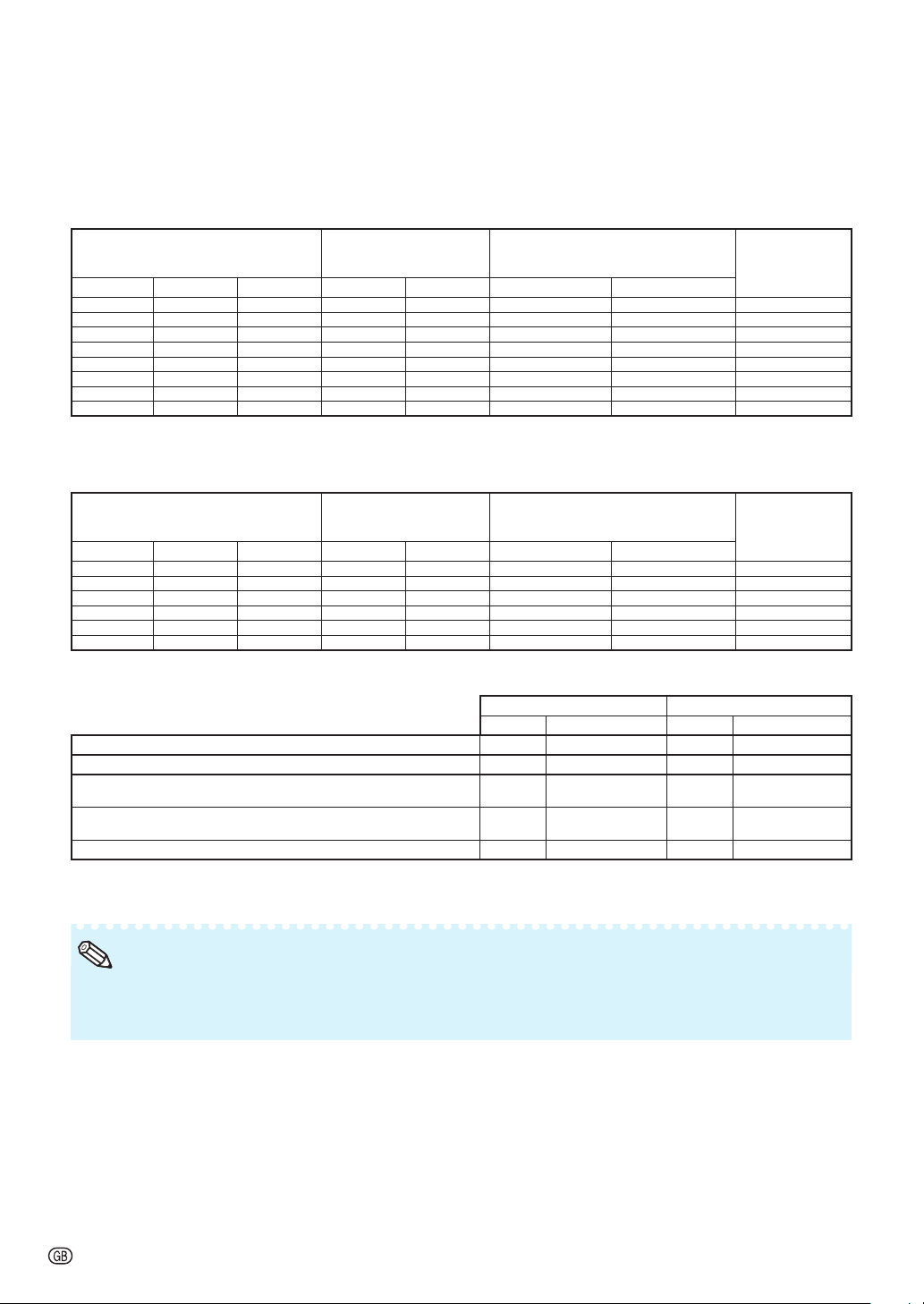
Fixed Wide Lens (AN-PH808EX: For XG-PH80X-N)
F2.0, f = 11.4 mm
4:3 Signal Input (Normal Mode)
Picture (Screen) size Projection distance
Distance from the lens center
to the bottom of the image [H]
Distance from the lens center
to the center of the image [W]
Diag. [
F
]
Width Height [L]
200'' (508 cm) 406 cm (160'') 305 cm (120'') 3.1 m (10' 4") -152.4 cm (-60") ± 40.6 cm (16")
150'' (381 cm) 305 cm (120'') 229 cm (90'') 2.4 m (7' 9") -114.3 cm (-45") ± 30.5 cm (12")
100'' (254 cm) 203 cm (80'') 152 cm (60'') 1.6 m (5' 2") -76.2 cm (-30") ± 20.3 cm (8")
50'' (127 cm) 102 cm (40'') 76 cm (30'') 0.8 m (2' 7") -38.1 cm (-15") ± 10.2 cm (4")
16:9 Signal Input (Normal Mode)
Picture (Screen) size Projection distance
Distance from the lens center
to the bottom of the image [H]
Distance from the lens center
to the center of the image [W]
Diag. [
F
]
Width Height [L]
150'' (381 cm) 332 cm (131'') 187 cm (74'') 2.5 m (8' 4") -93.4 cm (-36
49
/
64
") ± 33.2 cm (13
5
/
64
")
100'' (254 cm) 221 cm (87'') 125 cm (49'') 1.7 m (5' 6") -62.3 cm (-24
33
/
64
") ± 22.1 cm (8
23
/
32
")
80'' (203 cm) 177 cm (70'') 100 cm (39'') 1.3 m (4' 4") -49.8 cm (-19
39
/
64
") ± 17.7 cm (6
31
/
32
")
When using the projector with screen sizes not listed in the above charts, calculate the values according to the formulas.
4:3 Signal 16:9 Signal
[m/cm] [Feet/inches] [m/cm] [Feet/inches]
L: Projection distance (m/ft)
0.01573
F
0.01573
F
/ 0.3048
0.01714
F
-
0.042
(0.01714
F
- 0.042) /
0.3048
H: Distance from the lens center to the bottom of the image (cm/in)
-0.762
F
-0.762
F
/ 2.54 -0.62263
F
-0.62263
F
/ 2.54
W: Distance from the lens center to the center of the image (cm/in)
±0.2032
F
±0.2032
F
/ 2.54 ±0.22138
F
±0.22138
F
/ 2.54
F
: Picture diagonal size: 50" – 200" (4:3)
80" – 150" (16:9)
Allow a margin of error in the values in the diagrams above.
When the distance from the lens center to the bottom of the image [H] is a negative number, this indicates
that the bottom of the image is below the lens center.
•
•
Note
-8
Screen Size and Projection Distance
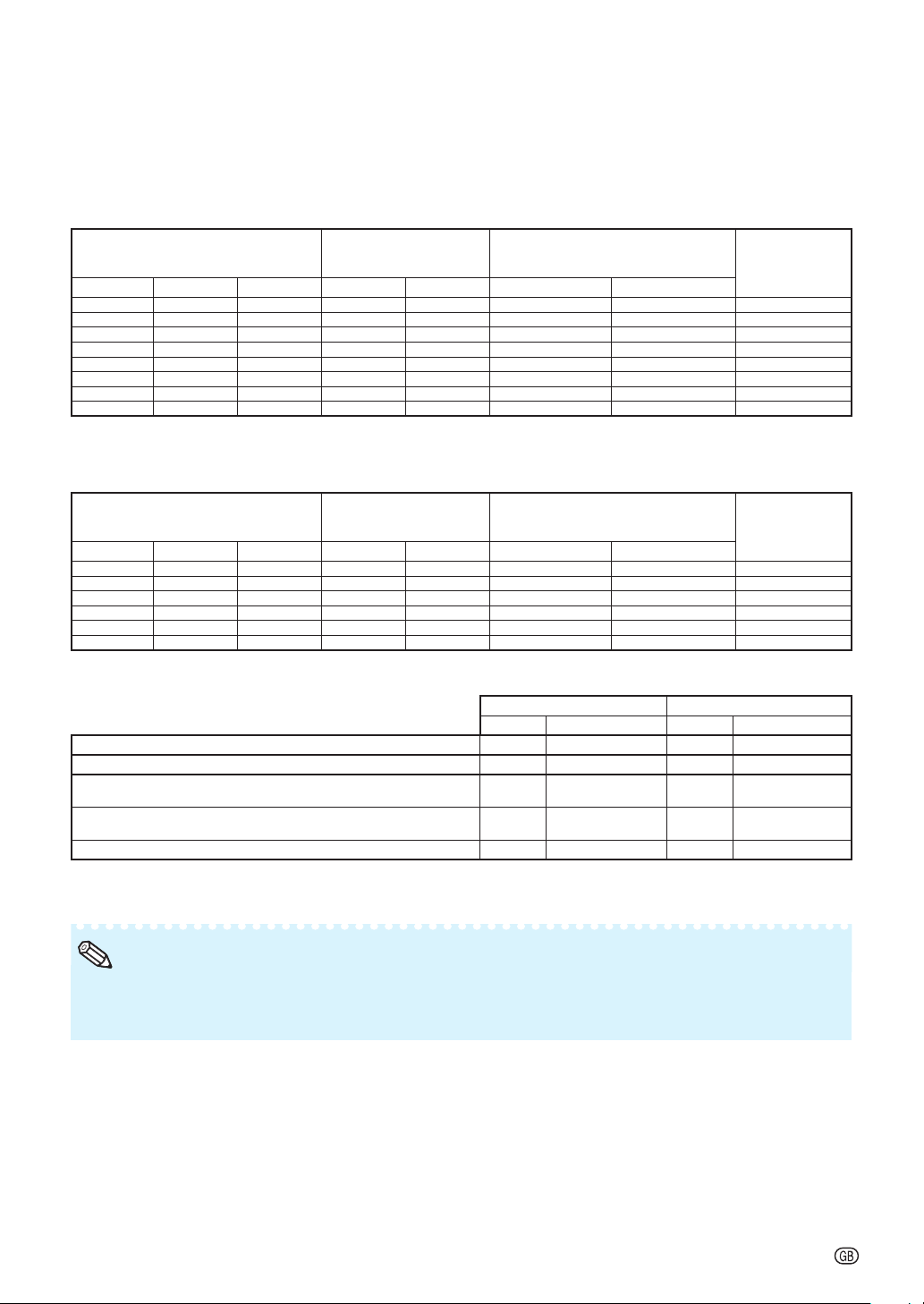
Wide-zoom Lens (AN-PH814EZ: For XG-PH80W-N)
F1.81-2.29, f = 19.3-25.8 mm
16:10 Signal Input (Normal Mode)
Picture (Screen) size Projection distance [L]
Distance from the lens center to
the bottom of the image [H]
Distance from the
lens center to the
center of the image
[W]
Diag. [
F
]
Width Height Minimum [L1]
Maximum [L2
] Lower [H1] Upper [H2]
500"
(1270 cm)
1077 cm
(424") 673 cm (265") 14.3 m (47' 0") 19.3 m (63' 3") -336.6 cm (-132
1
/
2
") 0.0 cm (0") ± 107.7 cm (42
13
/
32
")
300" (762 cm) 646 cm (254") 404 cm (159") 8.6 m (28' 2") 11.6 m (37' 11") -201.9 cm (-79
1
/
2
") 0.0 cm (0") ± 64.6 cm (25
7
/
16
")
200" (508 cm) 431 cm (170") 269 cm (106") 5.7 m (18' 10") 7.7 m (25' 4") -134.6 cm (-53") 0.0 cm (0") ± 43.1 cm (16
61
/
64
")
100" (254 cm) 215 cm (85") 135 cm (53") 2.9 m (9' 5") 3.9 m (12' 8") -67.3 cm (-26
1
/
2
") 0.0 cm (0") ± 21.5 cm (8
31
/
64
")
80" (203 cm) 172 cm (68") 108 cm (42") 2.3 m (7' 6") 3.1 m (10' 1") -53.8 cm (-21
13
/
64
") 0.0 cm (0") ± 17.2 cm (6
25
/
32
")
70" (178 cm) 151 cm (59") 94 cm (37") 2.0 m (6' 7") 2.7 m (8' 10") -47.1 cm (-18
35
/
64
") 0.0 cm (0") ± 15.1 cm (5
15
/
16
")
60" (152 cm) 129 cm (51") 81 cm (32") 1.7 m (5' 8") 2.3 m (7' 7") -40.4 cm (-15
29
/
32
") 0.0 cm (0") ± 12.9 cm (5
3
/
32
")
40" (102 cm) 86 cm (34") 54 cm (21") 1.1 m (3' 9") 1.5 m (5' 1") -26.9 cm (-10
19
/
32
") 0.0 cm (0") ± 8.6 cm (3
25
/
64
")
4:3 Signal Input (Normal Mode)
Picture (Screen) size Projection distance [L]
Distance from the lens center to
the bottom of the image [H]
Distance from the
lens center to the
center of the image
[W]
Diag. [
F
]
Width Height Minimum [L1] Maximum [L2] Lower [H1] Upper [H2]
300" (762 cm) 610 cm (240") 457 cm (180") 9.7 m (31' 11") 13.1 m (43' 0") -228.6 cm (-90") 0.0 cm (0") ± 69.0 cm (27
11
/
64
")
200" (508 cm) 406 cm (160") 305 cm (120") 6.5 m (21' 3") 8.7 m (28' 8") -152.4 cm (-60") 0.0 cm (0") ± 46.0 cm (18
7
/
64
")
150" (381 cm) 305 cm (120") 229 cm (90") 4.9 m (16' 0") 6.5 m (21' 6") -114.3 cm (-45") 0.0 cm (0") ± 34.5 cm (13
37
/
64
")
100" (254 cm) 203 cm (80") 152 cm (60") 3.2 m (10' 8") 4.4 m (14' 4") -76.2 cm (-30") 0.0 cm (0") ± 23.0 cm (9
1
/
16
")
80" (203 cm) 163 cm (64") 122 cm (48") 2.6 m (8' 6") 3.5 m (11' 5") -61.0 cm (-24") 0.0 cm (0") ± 18.4 cm (7
1
/
4
")
60" (152 cm) 122 cm (48") 91 cm (36") 1.9 m (6' 5") 2.6 m (8' 7") -45.7 cm (-18") 0.0 cm (0") ± 13.8 cm (5
7
/
16
")
When using the projector with screen sizes not listed in the above charts, calculate the values according to the formulas.
16:10 Signal 4:3 Signal
[m/cm] [Feet/inches] [m/cm] [Feet/inches]
L1: Minimum projection distance (m/ft)
0.02865
F
0.02865
F
/ 0.3048 0.03243
F
0.03243
F
/ 0.3048
L2: Maximum projection distance (m/ft)
0.03856
F
0.03856
F
/ 0.3048 0.04365
F
0.04365
F
/ 0.3048
H1: Lower distance from the lens center to the bottom of the image
(cm/in)
-0.6731
F
-0.673
1
F
/ 2.54 -0.762
F
-0.762
F
/ 2.54
H2: Upper distance from the lens center to the bottom of the image
(cm/in)
0
F
0
F
/ 2.54 0
F
0
F
/ 2.54
W: Distance from the lens center to the center of the image (cm/in)
±0.21539
F
±0.21539
F
/ 2.54 ±0.23004
F
±0.23004
F
/ 2.54
F
: Picture diagonal size: 40" – 500" (16:10)
60" – 300" (4:3)
Allow a margin of error in the values in the diagrams above.
When the distance from the lens center to the bottom of the image [H] is a negative number, this indicates
that the bottom of the image is below the lens center.
•
•
Note
-9
Screen Size and Projection Distance
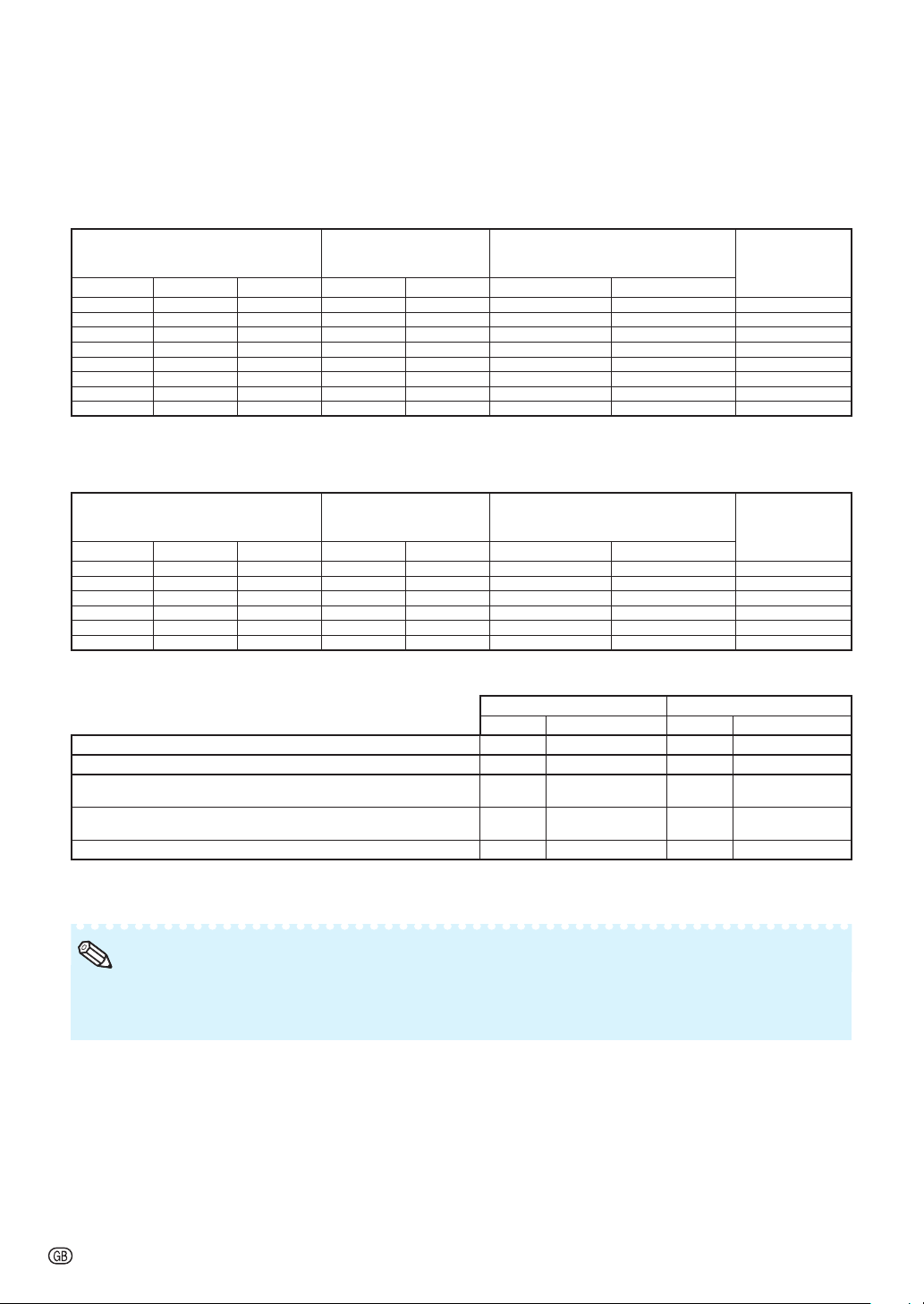
Wide-zoom Lens (AN-PH814EZ: For XG-PH80X-N)
F1.81-2.29, f = 19.3-25.8 mm
4:3 Signal Input (Normal Mode)
Picture (Screen) size Projection distance [L]
Distance from the lens center to
the bottom of the image [H]
Distance from the
lens center to the
center of the image
[W]
Diag. [
F
]
Width Height Minimum [L1]
Maximum [L2
] Lower [H1] Upper [H2]
500"
(1270 cm)
1016 cm
(400'') 762 cm (300'') 13.5 m (44' 4") 18.2 m (59' 8") -381.0 cm (-150") 0.0 cm (0") ± 101.6 cm (40")
300" (762 cm) 610 cm (240'') 457 cm (180'') 8.1 m (26' 7") 10.9 m
(35' 10")
-228.6 cm (-90") 0.0 cm (0") ± 61.0 cm (24")
200" (508 cm) 406 cm (160'') 305 cm (120'') 5.4 m (17' 9") 7.3 m
(23' 10")
-152.4 cm (-60") 0.0 cm (0") ± 40.6 cm (16")
100" (254 cm) 203 cm (80'') 152 cm (60'') 2.7 m (8' 10") 3.6 m (11' 11") -76.2 cm (-30") 0.0 cm (0") ± 20.3 cm (8")
80" (203 cm) 163 cm (64'') 122 cm (48'') 2.2 m (7' 1") 2.9 m (9' 7") -61.0 cm (-24") 0.0 cm (0") ± 16.3 cm (6
13
/
32
")
70" (178 cm) 142 cm (56'') 107 cm (42'') 1.9 m (6' 2") 2.5 m (8' 4") -53.3 cm (-21") 0.0 cm (0") ± 14.2 cm (5
19
/
32
")
60" (152 cm) 122 cm (48'') 91 cm (36'') 1.6 m (5' 4") 2.2 m (7' 2") -45.7 cm (-18") 0.0 cm (0") ± 12.2 cm (4
51
/
64
")
40" (102 cm) 81 cm (32'') 61 cm (24'') 1.1 m (3' 7") 1.5 m (4' 9") -30.5 cm (-12") 0.0 cm (0") ± 8.1 cm (3
13
/
64
")
16:9 Signal Input (Normal Mode)
Picture (Screen) size Projection distance [L]
Distance from the lens center to
the bottom of the image [H]
Distance from the
lens center to the
center of the image
[W]
Diag. [
F
]
Width Height Minimum [L1] Maximum [L2] Lower [H1] Upper [H2]
300" (762 cm) 664 cm (261'') 374 cm (147'') 8.8 m (29' 0") 11.9 m (39' 0") -186.8 cm (-73
17
/
32
") 62.3 cm (24
33
/
64
") ± 66.4 cm (26
9
/
64
")
200" (508 cm) 443 cm (174'') 249 cm (98'') 5.9 m (19' 4") 7.9 m (26' 0") -124.5 cm (-49
1
/
32
") 41.5 cm (16
11
/
32
") ± 44.3 cm (17
7
/
16
")
150" (381 cm) 332 cm (131'') 187 cm (74'') 4.4 m (14' 6") 5.9 m (19' 6") -93.4 cm (-36
49
/
64
") 31.1 cm (12
1
/
4
") ± 33.2 cm (13
5
/
64
")
100" (254 cm) 221 cm (87'') 125 cm (49'') 2.9 m (9' 8") 4.0 m (13' 0") -62.3 cm (-24
33
/
64
") 20.8 cm (8
11
/
64
") ± 22.1 cm (8
23
/
32
")
80" (203 cm) 177 cm (70'') 100 cm (39'') 2.4 m (7' 9") 3.2 m (10' 5") -49.8 cm (-19
39
/
64
") 16.6 cm (6
17
/
32
") ± 17.7 cm (6
31
/
32
")
60" (152 cm) 133 cm (52'') 75 cm (29'') 1.8 m (5' 10") 2.4 m (7' 10") -37.4 cm (-14
45
/
64
") 12.5 cm (4
29
/
32
") ± 13.3 cm (5
15
/
64
")
When using the projector with screen sizes not listed in the above charts, calculate the values according to the formulas.
4:3 Signal 16:9 Signal
[m/cm] [Feet/inches] [m/cm] [Feet/inches]
L1: Minimum projection distance (m/ft)
0.02703
F
0.02703
F
/ 0.3048 0.02945
F
0.02945
F
/ 0.3048
L2: Maximum projection distance (m/ft)
0.03637
F
0.03637
F
/ 0.3048 0.03962
F
0.03962
F
/ 0.3048
H1: Lower distance from the lens center to the bottom of the image
(cm/in)
-0.762
F
-0.762
F
/ 2.54 -0.62263
F
-0.62263
F
/ 2.54
H2: Upper distance from the lens center to the bottom of the image
(cm/in)
0
F
0
F
/ 2.54 0.20754
F
0.20754
F
/ 2.54
W: Distance from the lens center to the center of the image (cm/in)
±0.2032
F
±0.2032
F
/ 2.54 ±0.22138
F
±0.22138
F
/ 2.54
F
: Picture diagonal size: 40" – 500" (4:3)
60" – 300" (16:9)
Allow a margin of error in the values in the diagrams above.
When the distance from the lens center to the bottom of the image [H] is a negative number, this indicates
that the bottom of the image is below the lens center.
•
•
Note
-10
Screen Size and Projection Distance
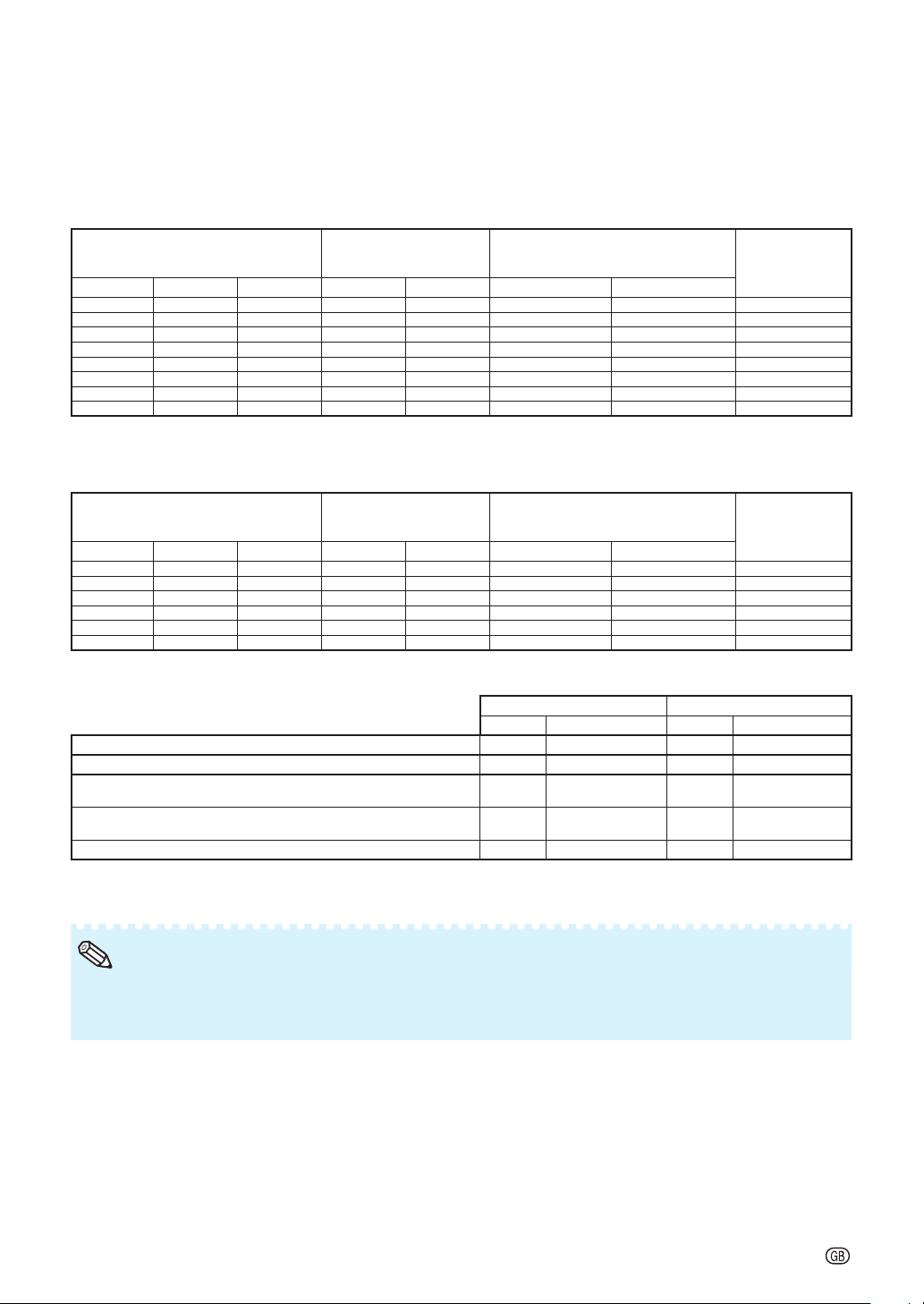
Tele-zoom Lens (AN-PH823EZ: For XG-PH80W-N)
F2.1-2.9, f = 32-63 mm
16:10 Signal Input (Normal Mode)
Picture (Screen) size Projection distance [L]
Distance from the lens center to
the bottom of the image [H]
Distance from the
lens center to the
center of the image
[W]
Diag. [
F
]
Width Height Minimum [L1]
Maximum [L2
] Lower [H1] Upper [H2]
500"
(1270 cm)
1077 cm
(424") 673 cm (265") 23.9 m (78' 5") 47.7 m
(156' 6")
-336.6 cm (-132
1
/
2
") 0.0 cm (0") ± 107.7 cm (42
13
/
32
")
300" (762 cm) 646 cm (254") 404 cm (159") 14.3 m (47' 1") 28.6 m (93' 11") -201.9 cm (-79
1
/
2
") 0.0 cm (0") ± 64.6 cm (25
7
/
16
")
200" (508 cm) 431 cm (170") 269 cm (106") 9.6 m (31' 5") 19.1 m (62' 7") -134.6 cm (-53") 0.0 cm (0") ± 43.1 cm (16
61
/
64
")
150" (381 cm) 323 cm (127") 202 cm (79") 7.2 m (23' 6") 14.3 m (47' 0") -101.0 cm (-39
3
/
4
") 0.0 cm (0") ± 32.3 cm (12
23
/
32
")
100" (254 cm) 215 cm (85") 135 cm (53") 4.8 m (15' 8") 9.5 m (31' 4") -67.3 cm (-26
1
/
2
") 0.0 cm (0") ± 21.5 cm (8
31
/
64
")
80" (203 cm) 172 cm (68") 108 cm (42") 3.8 m (12' 7") 7.6 m (25' 1") -53.8 cm (-21
13
/
64
") 0.0 cm (0") ± 17.2 cm (6
25
/
32
")
60" (152 cm) 129 cm (51") 81 cm (32") 2.9 m (9' 5") 5.7 m (18' 9") -40.4 cm (-15
29
/
32
") 0.0 cm (0") ± 12.9 cm (5
3
/
32
")
40" (102 cm) 86 cm (34") 54 cm (21") 1.9 m (6' 3") 3.8 m (12' 6") -26.9 cm (-10
19
/
32
") 0.0 cm (0") ± 8.6 cm (3
25
/
64
")
4:3 Signal Input (Normal Mode)
Picture (Screen) size Projection distance [L]
Distance from the lens center to
the bottom of the image [H]
Distance from the
lens center to the
center of the image
[W]
Diag. [
F
]
Width Height Minimum [L1] Maximum [L2] Lower [H1] Upper [H2]
300" (762 cm) 610 cm (240") 457 cm (180") 16.2 m (53' 3") 32.4 m
(106' 4")
-228.6 cm (-90") 0.0 cm (0") ± 69.0 cm (27
11
/
64
")
200" (508 cm) 406 cm (160") 305 cm (120") 10.8 m (35' 6") 21.6 m (70' 11") -152.4 cm (-60") 0.0 cm (0") ± 46.0 cm (18
7
/
64
")
150" (381 cm) 305 cm (120") 229 cm (90") 8.1 m (26' 8") 16.2 m (53' 2") -114.3 cm (-45") 0.0 cm (0") ± 34.5 cm (13
37
/
64
")
100" (254 cm) 203 cm (80") 152 cm (60") 5.4 m (17' 9") 10.8 m (35' 5") -76.2 cm (-30") 0.0 cm (0") ± 23.0 cm (9
1
/
16
")
80" (203 cm) 163 cm (64") 122 cm (48") 4.3 m (14' 3") 8.6 m (28' 4") -61.0 cm (-24") 0.0 cm (0") ± 18.4 cm (7
1
/
4
")
60" (152 cm) 122 cm (48") 91 cm (36") 3.2 m (10' 8") 6.5 m (21' 3") -45.7 cm (-18") 0.0 cm (0") ± 13.8 cm (5
7
/
16
")
When using the projector with screen sizes not listed in the above charts, calculate the values according to the formulas.
16:10 Signal 4:3 Signal
[m/cm] [Feet/inches] [m/cm] [Feet/inches]
L1: Minimum projection distance (m/ft)
0.04782
F
0.04782
F
/ 0.3048 0.05414
F
0.05414
F
/ 0.3048
L2: Maximum projection distance (m/ft)
0.09542
F
0.09542
F
/ 0.3048 0.10802
F
0.10802
F
/ 0.3048
H1: Lower distance from the lens center to the bottom of the image
(cm/in)
-0.6731
F
-0.673
1
F
/ 2.54 -0.762
F
-0.762
F
/ 2.54
H2: Upper distance from the lens center to the bottom of the image
(cm/in)
0
F
0
F
/ 2.54 0
F
0
F
/ 2.54
W: Distance from the lens center to the center of the image (cm/in)
±0.21539
F
±0.21539
F
/ 2.54 ±0.23004
F
±0.23004
F
/ 2.54
F
: Picture diagonal size: 40" – 500" (16:10)
60" – 300" (4:3)
Allow a margin of error in the values in the diagrams above.
When the distance from the lens center to the bottom of the image [H] is a negative number, this indicates
that the bottom of the image is below the lens center.
•
•
Note
-11
Screen Size and Projection Distance
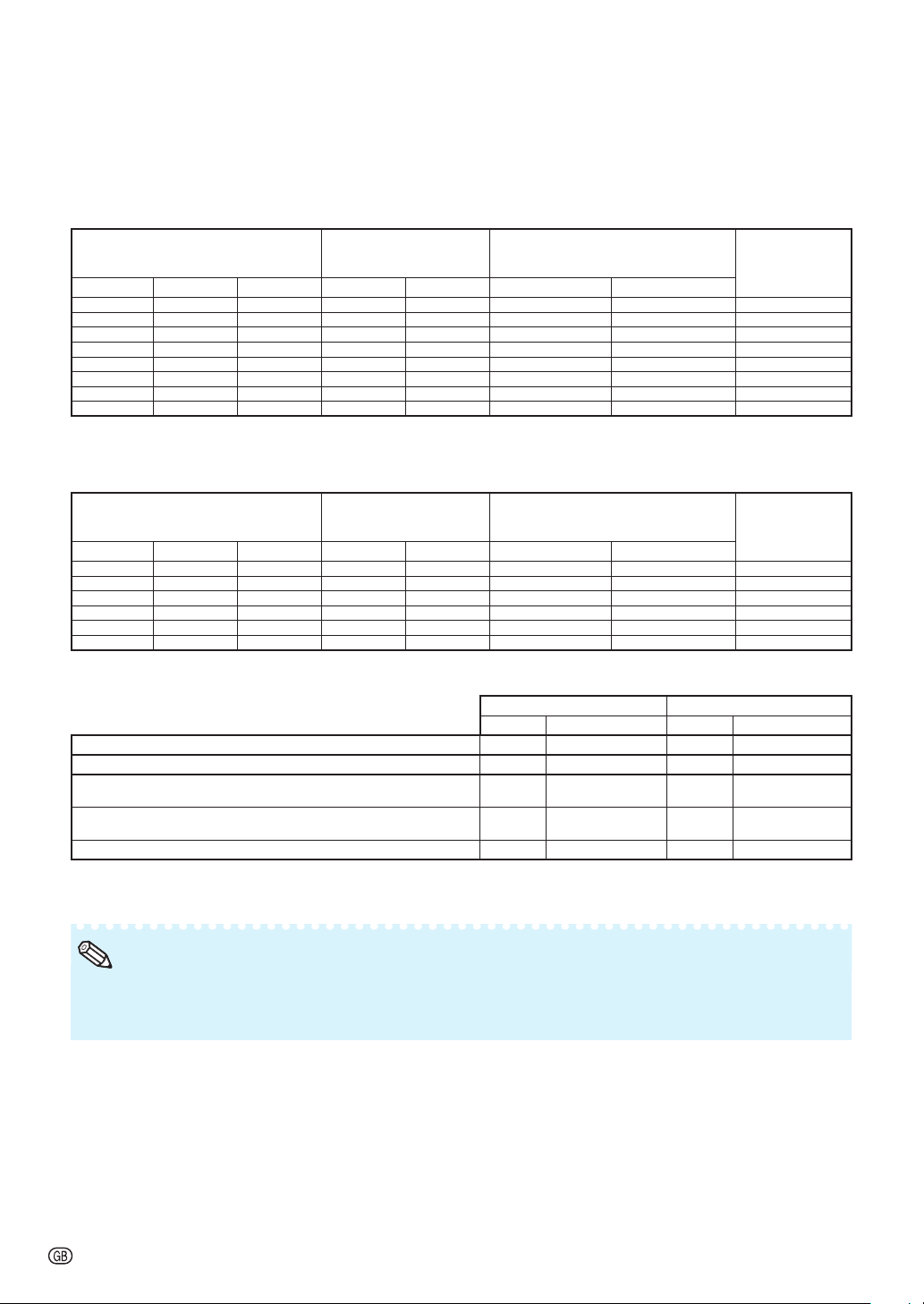
Tele-zoom Lens (AN-PH823EZ: For XG-PH80X-N)
F2.1-2.9, f = 32-63 mm
4:3 Signal Input (Normal Mode)
Picture (Screen) size Projection distance [L]
Distance from the lens center to
the bottom of the image [H]
Distance from the
lens center to the
center of the image
[W]
Diag. [
F
]
Width Height Minimum [L1]
Maximum [L2
] Lower [H1] Upper [H2]
500"
(1270 cm)
1016 cm
(400'') 762 cm (300'') 22.6 m (74' 0")
45.0 m
(147' 8") -381.0 cm (-150") 0.0 cm (0") ± 101.6 cm (40")
300" (762 cm) 610 cm (240'') 457 cm (180'') 13.5 m (44' 5") 27.0 m (88' 7") -228.6 cm (-90") 0.0 cm (0") ± 61.0 cm (24")
200" (508 cm) 406 cm (160'') 305 cm (120'') 9.0 m (29' 7") 18.0 m (59' 1") -152.4 cm (-60") 0.0 cm (0") ± 40.6 cm (16")
150" (381 cm) 305 cm (120'') 229 cm (90'') 6.8 m (22' 2") 13.5 m (44' 4") -114.3 cm (-45") 0.0 cm (0") ± 30.5 cm (12")
100" (254 cm) 203 cm (80'') 152 cm (60'') 4.5 m (14' 10") 9.0 m (29' 6") -76.2 cm (-30") 0.0 cm (0") ± 20.3 cm (8")
80" (203 cm) 163 cm (64'') 122 cm (48'') 3.6 m (11' 10") 7.2 m (23' 8") -61.0 cm (-24") 0.0 cm (0") ± 16.3 cm (6
13
/
32
")
60" (152 cm) 122 cm (48'') 91 cm (36'') 2.7 m (8' 11") 5.4 m (17' 9") -45.7 cm (-18") 0.0 cm (0") ± 12.2 cm (4
51
/
64
")
40" (102 cm) 81 cm (32'') 61 cm (24'') 1.8 m (5' 11") 3.6 m (11' 10") -30.5 cm (-12") 0.0 cm (0") ± 8.1 cm (3
13
/
64
")
16:9 Signal Input (Normal Mode)
Picture (Screen) size Projection distance [L]
Distance from the lens center to
the bottom of the image [H]
Distance from the
lens center to the
center of the image
[W]
Diag. [
F
]
Width Height Minimum [L1] Maximum [L2] Lower [H1] Upper [H2]
300" (762 cm) 664 cm (261'') 374 cm (147'') 14.7 m (48' 5") 29.4 m (96' 6") -186.8 cm (-73
17
/
32
") 62.3 cm (24
33
/
64
") ± 66.4 cm (26
9
/
64
")
200" (508 cm) 443 cm (174'') 249 cm (98'') 9.8 m (32' 3") 19.6 m (64' 4") -124.5 cm (-49
1
/
32
") 41.5 cm (16
11
/
32
") ± 44.3 cm (17
7
/
16
")
150" (381 cm) 332 cm (131'') 187 cm (74'') 7.4 m (24' 2") 14.7 m (48' 3") -93.4 cm (-36
49
/
64
") 31.1 cm (12
1
/
4
") ± 33.2 cm (13
5
/
64
")
100" (254 cm) 221 cm (87'') 125 cm (49'') 4.9 m (16' 2") 9.8 m (32' 2") -62.3 cm (-24
33
/
64
") 20.8 cm (8
11
/
64
") ± 22.1 cm (8
23
/
32
")
80" (203 cm) 177 cm (70'') 100 cm (39'') 3.9 m (12' 11") 7.8 m (25' 9") -49.8 cm (-19
39
/
64
") 16.6 cm (6
17
/
32
") ± 17.7 cm (6
31
/
32
")
60" (152 cm) 133 cm (52'') 75 cm (29'') 2.9 m (9' 8") 5.9 m (19' 4") -37.4 cm (-14
45
/
64
") 12.5 cm (4
29
/
32
") ± 13.3 cm (5
15
/
64
")
When using the projector with screen sizes not listed in the above charts, calculate the values according to the formulas.
4:3 Signal 16:9 Signal
[m/cm] [Feet/inches] [m/cm] [Feet/inches]
L1: Minimum projection distance (m/ft)
0.04511
F
0.04511
F
/ 0.3048 0.04915
F
0.04915
F
/ 0.3048
L2: Maximum projection distance (m/ft)
0.09002
F
0.09002
F
/ 0.3048 0.09807
F
0.09807
F
/ 0.3048
H1: Lower distance from the lens center to the bottom of the image
(cm/in)
-0.762
F
-0.762
F
/ 2.54 -0.62263
F
-0.62263
F
/ 2.54
H2: Upper distance from the lens center to the bottom of the image
(cm/in)
0
F
0
F
/ 2.54 0.20754
F
0.20754
F
/ 2.54
W: Distance from the lens center to the center of the image (cm/in)
±0.2032
F
±0.2032
F
/ 2.54 ±0.22138
F
±0.22138
F
/ 2.54
F
: Picture diagonal size: 40" – 500" (4:3)
60" – 300" (16:9)
Allow a margin of error in the values in the diagrams above.
When the distance from the lens center to the bottom of the image [H] is a negative number, this indicates
that the bottom of the image is below the lens center.
•
•
Note
-12
Screen Size and Projection Distance
Tele-zoom Lens (AN-PH845EZ: For XG-PH80W-N)
F2.2-3.1, f = 63.5-117.4 mm
16:10 Signal Input (Normal Mode)
Picture (Screen) size Projection distance [L]
Distance from the lens center to
the bottom of the image [H]
Distance from the
lens center to the
center of the image
[W]
Diag. [
F
]
Width Height Minimum [L1]
Maximum [L2
] Lower [H1] Upper [H2]
500"
(1270 cm)
1077 cm
(424") 673 cm (265") 47.7 m
(156' 6")
89.4 m
(293' 3")
-336.6 cm (-132
1
/
2
") 0.0 cm (0") ± 107.7 cm (42
13
/
32
")
300" (762 cm) 646 cm (254") 404 cm (159") 28.6 m (93' 11")
53.6 m
(176' 0") -201.9 cm (-79
1
/
2
") 0.0 cm (0") ± 64.6 cm (25
7
/
16
")
200" (508 cm) 431 cm (170") 269 cm (106") 19.1 m (62' 7")
35.8 m
(117' 4") -134.6 cm (-53") 0.0 cm (0") ± 43.1 cm (16
61
/
64
")
150" (381 cm) 323 cm (127") 202 cm (79") 14.3 m (47' 0") 26.8 m (88' 0") -101.0 cm (-39
3
/
4
") 0.0 cm (0") ± 32.3 cm (12
23
/
32
")
100" (254 cm) 215 cm (85") 135 cm (53") 9.5 m (31' 4") 17.9 m (58' 8") -67.3 cm (-26
1
/
2
") 0.0 cm (0") ± 21.5 cm (8
31
/
64
")
80" (203 cm) 172 cm (68") 108 cm (42") 7.6 m (25' 1") 14.3 m (46' 11") -53.8 cm (-21
13
/
64
") 0.0 cm (0") ± 17.2 cm (6
25
/
32
")
60" (152 cm) 129 cm (51") 81 cm (32") 5.7 m (18' 9") 10.7 m (35' 2") -40.4 cm (-15
29
/
32
") 0.0 cm (0") ± 12.9 cm (5
3
/
32
")
40" (102 cm) 86 cm (34") 54 cm (21") 3.8 m (12' 6") 7.2 m (23' 6") -26.9 cm (-10
19
/
32
") 0.0 cm (0") ± 8.6 cm (3
25
/
64
")
4:3 Signal Input (Normal Mode)
Picture (Screen) size Projection distance [L]
Distance from the lens center to
the bottom of the image [H]
Distance from the
lens center to the
center of the image
[W]
Diag. [
F
]
Width Height Minimum [L1] Maximum [L2] Lower [H1] Upper [H2]
300" (762 cm) 610 cm (240") 457 cm (180") 32.4 m
(106' 4")
60.7 m
(199' 2")
-228.6 cm (-90") 0.0 cm (0") ± 69.0 cm (27
11
/
64
")
200" (508 cm) 406 cm (160") 305 cm (120") 21.6 m (70' 11")
40.5 m
(132' 10")
-152.4 cm (-60") 0.0 cm (0") ± 46.0 cm (18
7
/
64
")
150" (381 cm) 305 cm (120") 229 cm (90") 16.2 m (53' 2")
30.4 m
(99' 7") -114.3 cm (-45") 0.0 cm (0") ± 34.5 cm (13
37
/
64
")
100" (254 cm) 203 cm (80") 152 cm (60") 10.8 m (35' 5")
20.2 m
(66' 5") -76.2 cm (-30") 0.0 cm (0") ± 23.0 cm (9
1
/
16
")
80" (203 cm) 163 cm (64") 122 cm (48") 8.6 m (28' 4") 16.2 m (53' 1") -61.0 cm (-24") 0.0 cm (0") ± 18.4 cm (7
1
/
4
")
60" (152 cm) 122 cm (48") 91 cm (36") 6.5 m (21' 3") 12.1 m
(39' 10")
-45.7 cm (-18") 0.0 cm (0") ± 13.8 cm (5
7
/
16
")
When using the projector with screen sizes not listed in the above charts, calculate the values according to the formulas.
16:10 Signal 4:3 Signal
[m/cm] [Feet/inches] [m/cm] [Feet/inches]
L1: Minimum projection distance (m/ft)
0.09542
F
0.09542
F
/ 0.3048 0.10802
F
0.10802
F
/ 0.3048
L2: Maximum projection distance (m/ft)
0.17878
F
0.17878
F
/ 0.3048 0.20239
F
0.20239
F
/ 0.3048
H1: Lower distance from the lens center to the bottom of the image
(cm/in)
-0.6731
F
-0.673
1
F
/ 2.54 -0.762
F
-0.762
F
/ 2.54
H2: Upper distance from the lens center to the bottom of the image
(cm/in)
0
F
0
F
/ 2.54 0
F
0
F
/ 2.54
W: Distance from the lens center to the center of the image (cm/in)
±0.21539
F
±0.21539
F
/ 2.54 ±0.23004
F
±0.23004
F
/ 2.54
F
: Picture diagonal size: 40" – 500" (16:10)
60" – 300" (4:3)
Allow a margin of error in the values in the diagrams above.
When the distance from the lens center to the bottom of the image [H] is a negative number, this indicates
that the bottom of the image is below the lens center.
•
•
Note

-13
Screen Size and Projection Distance
Tele-zoom Lens (AN-PH845EZ: For XG-PH80X-N)
F2.2-3.1, f = 63.5-117.4 mm
4:3 Signal Input (Normal Mode)
Picture (Screen) size Projection distance [L]
Distance from the lens center to
the bottom of the image [H]
Distance from the
lens center to the
center of the image
[W]
Diag. [
F
]
Width Height Minimum [L1]
Maximum [L2
] Lower [H1] Upper [H2]
500"
(1270 cm)
1016 cm
(400'') 762 cm (300'')
45.0 m
(147' 8")
84.3 m
(276' 8")
-381.0 cm (-150") 0.0 cm (0") ± 101.6 cm (40")
300" (762 cm) 610 cm (240'') 457 cm (180'') 27.0 m (88' 7") 50.6 m
(166' 0")
-228.6 cm (-90") 0.0 cm (0") ± 61.0 cm (24")
200" (508 cm) 406 cm (160'') 305 cm (120'') 18.0 m (59' 1") 33.7 m (110' 8") -152.4 cm (-60") 0.0 cm (0") ± 40.6 cm (16")
150" (381 cm) 305 cm (120'') 229 cm (90'') 13.5 m (44' 4") 25.3 m (83' 0") -114.3 cm (-45") 0.0 cm (0") ± 30.5 cm (12")
100" (254 cm) 203 cm (80'') 152 cm (60'') 9.0 m (29' 6") 16.9 m (55' 4") -76.2 cm (-30") 0.0 cm (0") ± 20.3 cm (8")
80" (203 cm) 163 cm (64'') 122 cm (48'') 7.2 m (23' 8") 13.5 m (44' 3") -61.0 cm (-24") 0.0 cm (0") ± 16.3 cm (6
13
/
32
")
60" (152 cm) 122 cm (48'') 91 cm (36'') 5.4 m (17' 9") 10.1 m (33' 2") -45.7 cm (-18") 0.0 cm (0") ± 12.2 cm (4
51
/
64
")
40" (102 cm) 81 cm (32'') 61 cm (24'') 3.6 m (11' 10") 6.7 m (22' 2") -30.5 cm (-12") 0.0 cm (0") ± 8.1 cm (3
13
/
64
")
16:9 Signal Input (Normal Mode)
Picture (Screen) size Projection distance [L]
Distance from the lens center to
the bottom of the image [H]
Distance from the
lens center to the
center of the image
[W]
Diag. [
F
]
Width Height Minimum [L1] Maximum [L2] Lower [H1] Upper [H2]
300" (762 cm) 664 cm (261'') 374 cm (147'') 29.4 m (96' 6") 55.1 m
(180' 10")
-186.8 cm (-73
17
/
32
") 62.3 cm (24
33
/
64
") ± 66.4 cm (26
9
/
64
")
200" (508 cm) 443 cm (174'') 249 cm (98'') 19.6 m (64' 4")
36.8 m
(120' 7")
-124.5 cm (-49
1
/
32
") 41.5 cm (16
11
/
32
") ± 44.3 cm (17
7
/
16
")
150" (381 cm) 332 cm (131'') 187 cm (74'') 14.7 m (48' 3") 27.6 m (90' 5") -93.4 cm (-36
49
/
64
") 31.1 cm (12
1
/
4
") ± 33.2 cm (13
5
/
64
")
100" (254 cm) 221 cm (87'') 125 cm (49'') 9.8 m (32' 2") 18.4 m (60' 3") -62.3 cm (-24
33
/
64
") 20.8 cm (8
11
/
64
") ± 22.1 cm (8
23
/
32
")
80" (203 cm) 177 cm (70'') 100 cm (39'') 7.8 m (25' 9") 14.7 m (48' 3") -49.8 cm (-19
39
/
64
") 16.6 cm (6
17
/
32
") ± 17.7 cm (6
31
/
32
")
60" (152 cm) 133 cm (52'') 75 cm (29'') 5.9 m (19' 4") 11.0 m (36' 2") -37.4 cm (-14
45
/
64
") 12.5 cm (4
29
/
32
") ± 13.3 cm (5
15
/
64
")
When using the projector with screen sizes not listed in the above charts, calculate the values according to the formulas.
4:3 Signal 16:9 Signal
[m/cm] [Feet/inches] [m/cm] [Feet/inches]
L1: Minimum projection distance (m/ft)
0.09002
F
0.09002
F
/ 0.3048 0.09807
F
0.09807
F
/ 0.3048
L2: Maximum projection distance (m/ft)
0.16866
F
0.16866
F
/ 0.3048 0.18375
F
0.18375
F
/ 0.3048
H1: Lower distance from the lens center to the bottom of the image
(cm/in)
-0.762
F
-0.762
F
/ 2.54 -0.62263
F
-0.62263
F
/ 2.54
H2: Upper distance from the lens center to the bottom of the image
(cm/in)
0
F
0
F
/ 2.54 0.20754
F
0.20754
F
/ 2.54
W: Distance from the lens center to the center of the image (cm/in)
±0.2032
F
±0.2032
F
/ 2.54 ±0.22138
F
±0.22138
F
/ 2.54
F
: Picture diagonal size: 40" – 500" (4:3)
60" – 300" (16:9)
Allow a margin of error in the values in the diagrams above.
When the distance from the lens center to the bottom of the image [H] is a negative number, this indicates
that the bottom of the image is below the lens center.
•
•
Note

-14
Connecting Pin Assignments
COMPUTER/COMPONENT input and COMPUTER/COMPONENT output Terminals: mini
D-sub 15 pin female connector
COMPUTER Input/Output COMPONENT Input/Output
Pin No. Signal Pin No. Signal
1.
2.
3.
4.
5.
6.
7.
8.
9.
10.
11.
12.
13.
14.
15.
Video input (red)
Video input (green/sync on green)
Video input (blue)
Not connected
Not connected
Earth (red)
Earth (green/sync on green)
Earth (blue)
Not connected
GND
Not connected
Bi-directional data
Horizontal sync signal: TTL level
Vertical sync signal: TTL level
Data clock
1.
2.
3.
4.
5.
6.
7.
8.
9.
10.
11.
12.
13.
14.
15.
PR (CR)
Y
PB (CB)
Not connected
Not connected
Earth (PR)
Earth (Y)
Earth (PB)
Not connected
Not connected
Not connected
Not connected
Not connected
Not connected
Not connected
DVI-D Terminal: 24 pin connector
Pin No. Name Pin No. Name
1.
2.
3.
4.
5.
6.
7.
8.
9.
10.
11.
12.
T.M.D.S. Data 2–
T.M.D.S. Data 2+
T.M.D.S. Data 2 Shield
Not connected
Not connected
DDC Clock
DDC Data
Not connected
T.M.D.S. Data 1–
T.M.D.S. Data 1+
T.M.D.S. Data 1 Shield
Not connected
13.
14.
15.
16.
17.
18.
19.
20.
21.
22.
23.
24.
Not connected
+5 V Power
Ground
Hot Plug Detect
T.M.D.S. Data 0 –
T.M.D.S. Data 0+
T.M.D.S. Data 0 Shield
Not connected
Not connected
T.M.D.S. Clock Shield
T.M.D.S. Clock+
T.M.D.S. Clock–
RS-232C Terminal: D-sub 9 pin male connector
Pin No. Signal Name I/O Reference
1.
2.
3.
4.
5.
6.
7.
8.
9.
RD
SD
SG
RS
CS
Receive Data
Send Data
Signal Ground
Request to Send
Clear to Send
Input
Output
Not connected
Connected to internal circuit
Connected to internal circuit
Not connected
Connected to internal circuit
Not connected
Connected to CS in internal circuit
Connected to RS in internal circuit
Not connected
5
10
15
1
11
6
5
10
15
1
11
6
1724
1
9
16
8
1724
1
9
16
8
15
69
15
69

-15
RS-232C Cable recommended connection: D-sub 9 pin female connector
Pin No. Signal Pin No. Signal
1.
2.
3.
4.
5.
6.
7.
8.
9.
CD
RD
SD
ER
SG
DR
RS
CS
CI
1.
2.
3.
4.
5.
6.
7.
8.
9.
CD
RD
SD
ER
SG
DR
RS
CS
CI
Projector
Pin No.
Computer
Pin No.
4
5
6
4
5
6
USB Terminal: Type B USB connector LAN Terminal: LAN (RJ-45)
Pin No. Signal Name Pin No. Signal Pin No. Signal
1.
2.
3.
4.
VCC
USB–
USB+
SG
USB power
USB data–
USB data+
Signal Ground
1.
2.
3.
4.
TX+
TX–
RX+
5.
6.
7.
8.
RX–
51
96
51
96
Depending on the controlling device used, it may be necessary to connect Pin 4 and Pin 6 on the
controlling device (e.g. computer).
•
Note
Depending on the controlling device used, it may be necessary to connect Pin 4 and Pin 6 on the
controlling device (e.g. computer).
•
Note
43
12
43
12
8
...
1 8
...
1
Connecting Pin Assignments
-16
RS-232C Specifi cations and Commands
Computer control
A computer can be used to control the projector by connecting an RS-232C serial control cable (cross
type, commercially available) to the projector. (See page 24 of the projector's operation manual for
connection.)
Communication conditions
Set the serial port settings of the computer to match that of the table.
Signal format: Conforms to RS-232C standard. Parity bit: None
Baud rate: 115,200 bps Stop bit: 1 bit
Data length: 8 bits Flow control: None
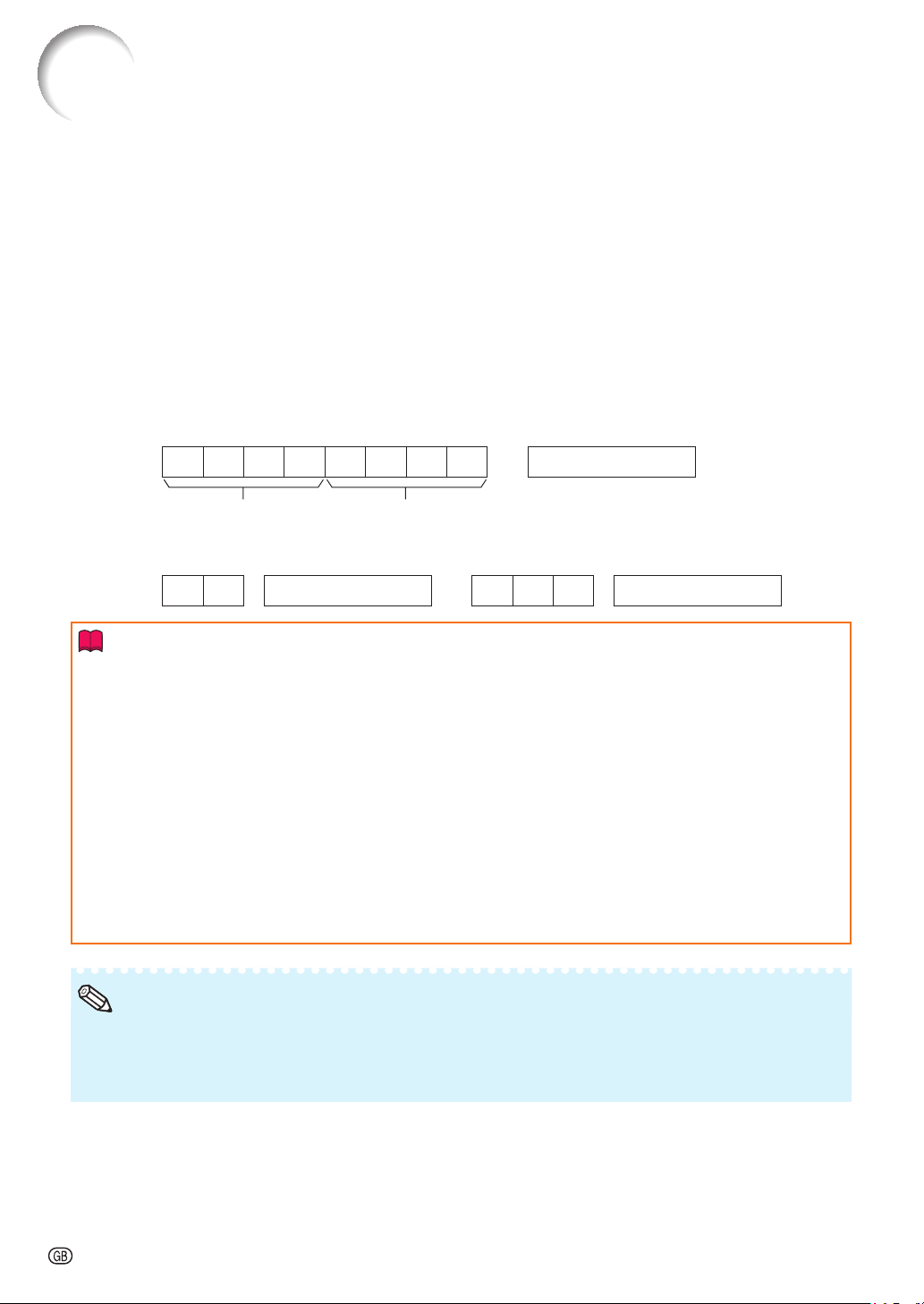
Basic format
Commands from the computer are sent in the following order: command, parameter, and return code.
After the projector processes the command from the computer, it sends a response code to the
computer.
Command format
C1 C2 C3 C4 P1 P2 P3 P4 Return code (0DH)
Command 4-digit Parameter 4-digit
Response code format
Normal response
Problem response (communication error or incorrect command)
OK Return code (0DH) E R R Return code (0DH)
Info
When controlling the projector using RS-232C commands from a computer, wait for at least 40 seconds
after the power has been turned on, and then transmit the commands.
After sending an input selection or picture adjustment command and then receiving an “OK” response
code, the projector may take some time to process the command. If a second command is sent while the
projector is still processing the fi rst command, you may receive an “ERR” response code. If this happens,
try resending the second command.
When more than one code is being sent, send each command only after the response code for the
previous command from the projector is verifi ed.
“POWR????”, “TABN _ _ _ 1”, “TLPS _ _ _ 1”, “TPOW _ _ _ 1”, “TLPN _ _ _ 1”, “TLTT _ _ _ 1”,
“TLTM _ _ _ 1”, “TLTL _ _ _ 1”, “TNAM _ _ _ 1”, “MNRD _ _ _ 1”, “PJN0 _ _ _ 1”
− When the projector receives the special commands shown above:
* The on-screen display will not disappear.
* The “Auto Power Off” timer will not be reset.
− The special commands are available for applications that require continuous polling.
•
•
•
•
Set “LAN/RS232C” in “Ex. Setting” of “PRJ-ADJ” menu to “RS232C”.
If an underbar (_) appears in the parameter column, enter a space.
If an asterisk (*) appears in the parameter column, enter a value in the range indicated in brackets under
CONTROL CONTENTS.
•
•
•
Note
-17
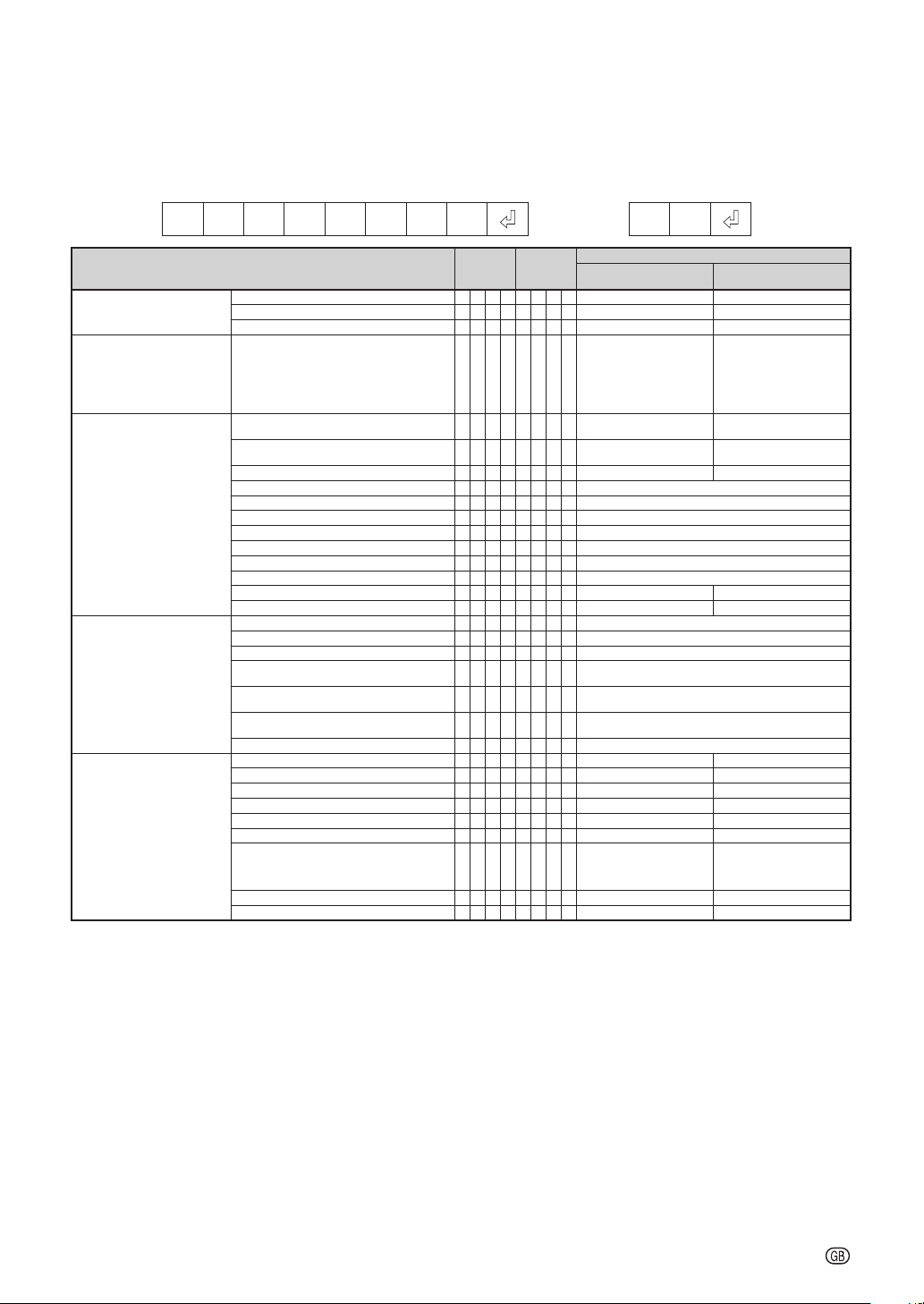
Commands
Example: When turning on the projector, make the following setting.
Computer Projector
POWR___1
o
m
OK
CONTROL CONTENTS COMMAND PARAMETER
RETURN
Power ON
Standby mode
(or 40-second startup time)
Power On P O W R
___
1 OK OK or ERR
Off P O W R
___
0 OK or ERR OK
Status POWR????1 0
Projector Condition T A B N
___
10: Normal
8: Lamp Life 5% or less
16: Lamp Burn-out
32: Lamp Ignition Failure
0: Normal
2: Fan Error
4: Lamp Unit Cover Open
8: Lamp Life 5% or less
16: Lamp Burn-out
32: Lamp Ignition Failure
64:
Temp Abnormally High
Lamp Lamp1 Status T L P S
___
1 0: Off, 1: On, 2: Retry
3: Waiting, 4: Lamp Error
0: Off, 4: Lamp Error
Lamp2 Status T L P S
___
2 0: Off, 1: On, 2: Retry
3: Waiting, 4: Lamp Error
0: Off, 4: Lamp Error
Power Status T P O W
___
1 1: On, 2: Cooling 0: Standby
Quantity T L P N
___
12
Lamp1 Usage Time(Hour) T L T T
___
1 0 – 9999(Integer)
Lamp2 Usage Time(Hour) T L T T
___
2 0 – 9999(Integer)
Lamp1 Usage Time(Minute) T L T M
___
1 0, 15, 30, 45
Lamp2 Usage Time(Minute) T L T M
___
2 0, 15, 30, 45
Lamp1 Life(Percentage) TLTL
___
1 0% – 100%(Integer)
Lamp2 Life(Percentage) TLTL
___
2 0% – 100%(Integer)
Lamp1 Timer Reset *1 L P R E 0 0 0 1 ERR OK or ERR
Lamp2 Timer Reset *1 L P R E 0 0 0 2 ERR OK or ERR
Name Model Name Check T N A M
___
1XGPH80WN/XGPH80XN
Model Name Check M N R D
___
1 XG-PH80W-N/XG-PH80X-N
Serial No. Check *2 S N R D
___
1Serial No.
Projector Name Setting 1
(First 4 characters) *3
PJN1****OK or ERR
Projector Name Setting 2
(Middle 4 characters) *3
PJN2****OK or ERR
Projector Name Setting 3
(Last 4 characters) *3
PJN3****OK or ERR
Projector Name Check P J N 0
___
1Projector Name
Input Change COMPUTER1 I R G B
___
1 OK or ERR ERR
COMPUTER2 (5BNC) I R G B
___
2 OK or ERR ERR
COMPUTER3 (DVI) I R G B
___
3 OK or ERR ERR
COMPONENT I R G B
___
4 OK or ERR ERR
S-VIDEO I V E D
___
1 OK or ERR ERR
VIDEO I V E D
___
2 OK or ERR ERR
Input RGB Check I R G B ? ? ? ? 1: COMPUTER1,
2: COMPUTER2,
3: DVI,
4: COMPONENT or ERR
ERR
Input Video Check I V E D ? ? ? ? 1: S-VIDEO, 2: VIDEO or ERR ERR
Input Mode Check I M O D ? ? ? ? 1: RGB, 2: VIDEO ERR
*1 The Lamp Timer Reset command is available only in standby mode.
*2 Serial No. Check command is used to read out the 12 digits of serial No.
*3 For setting the projector name, send the commands in the order of PJN1, PJN2 and PJN3.
RS-232C Specifi cations and Commands
-18
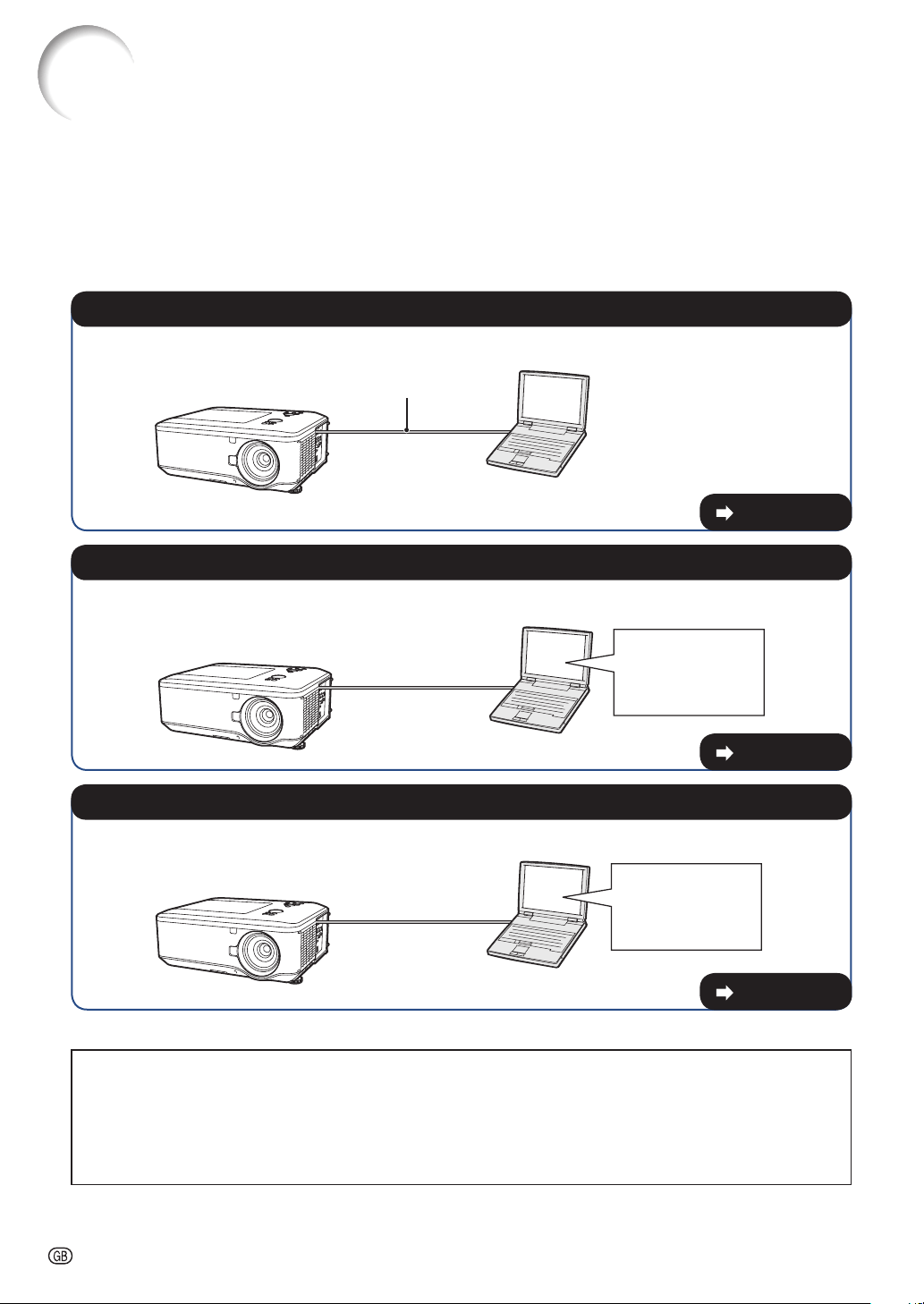
Setting up the Projector Network Environment
This section describes the basic procedure for using the projector via the network.
If the network is already constructed, the projector's network settings may need to be
changed. Please consult your network administrator for assistance with these settings.
You can make network settings both on the projector and on the computer. The following
procedure is for making settings on the computer.
Network settings on the computer
Connect a LAN cable (Category 5, cross-over type) between the computer and projector.
LAN cable
(commercially available)
1. Connecting the projector to a computer
Page 19
Adjust the IP settings of the computer to enable one-to-one communications with the projector.
Temporarily change
the computer's IP
address.
2. Setting an IP address for the computer
Pages 20, 21
Adjust the projector network settings to conform to your network.
Use Internet Explorer
(version 6.0 or later)
to make various
projector settings.
3. Setting up a network connection for the projector
Pages 22, 23
Microsoft
®
, Windows
®
and Windows Vista
®
are registered trademarks of Microsoft Corporation in the
United States and/or other countries.
PJLink is a registered trademark or an application trademark in Japan, the United States, Canada, E.U.,
China and/or other countries/regions.
All other company or product names are trademarks or registered trademarks of their respective
companies.
•
•
•
-19
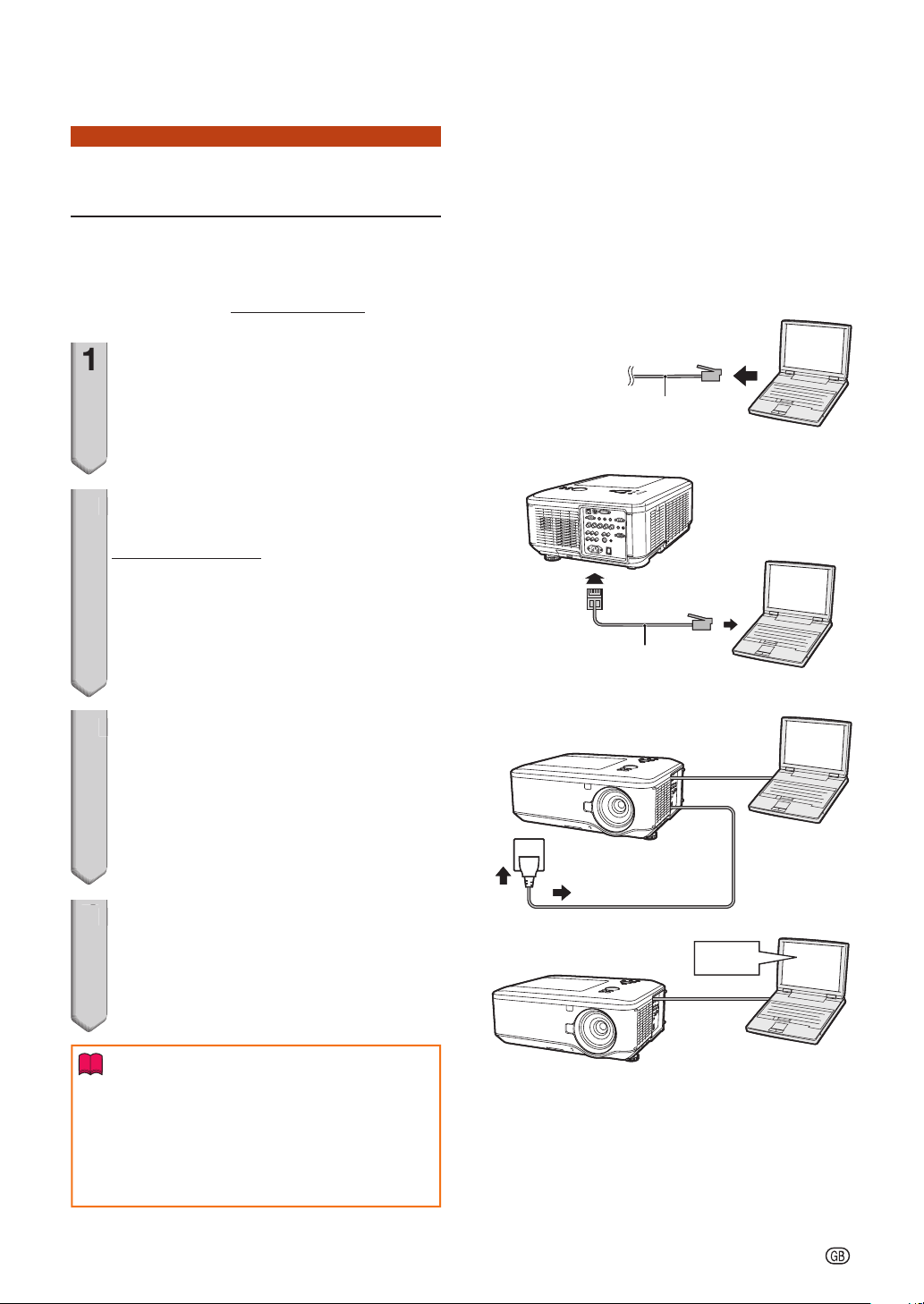
1. Connecting the Projector
to a Computer
Establishing a one-to-one connection from
the projector to a computer. Using a
commercially available LAN cable (UTP
cable, Category 5, cross-over type) you can
confi gure the projector via the computer.
1
Disconnect the computer's LAN
cable from the existing network.
2
Connect a commercially available
LAN cable (UTP cable, Category 5,
cross-over type) to the projector's
LAN terminal and connect the
other end of the cable to the
computer's LAN terminal.
3
Plug the power cord into the AC
socket of the projector.
4
Turn on the computer.
Info
Confi rm that the LINK LED on the rear of the
projector illuminates. If the LINK LED does not
illuminate, check the following:
The LAN cable is properly connected.
The power switches of both the projector and
the computer are on.
•
•
1
A LAN cable being
connected to the network
A LAN cable being
connected to the network
2
LAN cable
(cross-over type, commercially available)
LAN cable
(cross-over type, commercially available)
3
ONON
4
This completes the connection. Now proceed to “2. Setting an IP Address for the Computer”.
Setting up the Projector Network Environment
-20
2. Setting an IP Address for
the Computer
The following describes how to make
settings in Windows Vista
®
.
1
Log on the network using the
administrator's account for the
computer.
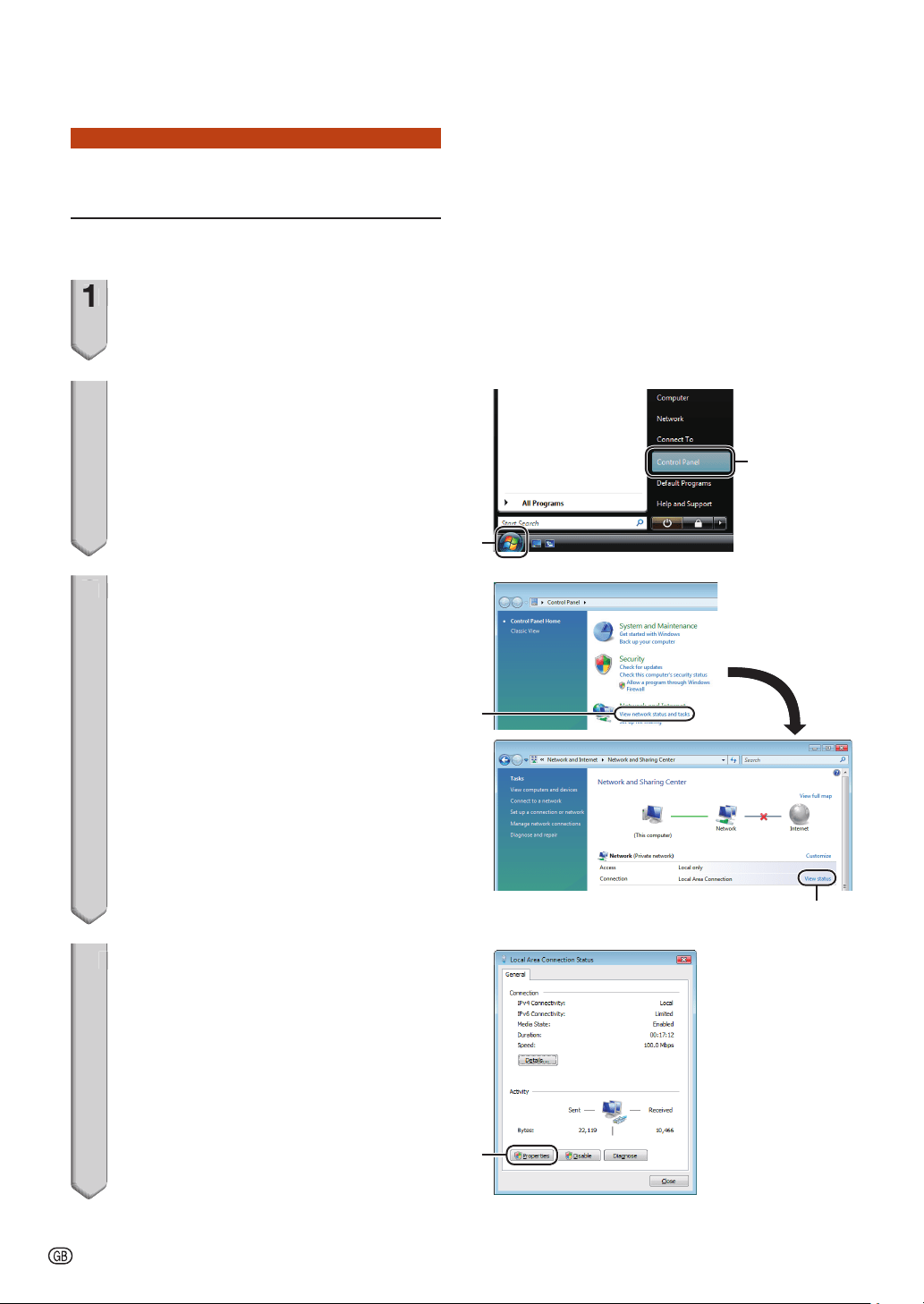
2
Click “start”, and click “Control
Panel”.
3
Click “View network status and
tasks” of “Network and Internet”,
and click “View status” in the new
window.
This manual uses examples to explain the
operations in Category View. If you are using
Classic View, double-click “Network and
Sharing Center”.
4
Click “Properties”.
When the user account control display is
displayed, click “Continue”.
•
•
1
2
1
2
1
2
3
1
2
XXXXXXXXX
1
2
XXXXXXXXX
4
11
Setting up the Projector Network Environment
-21
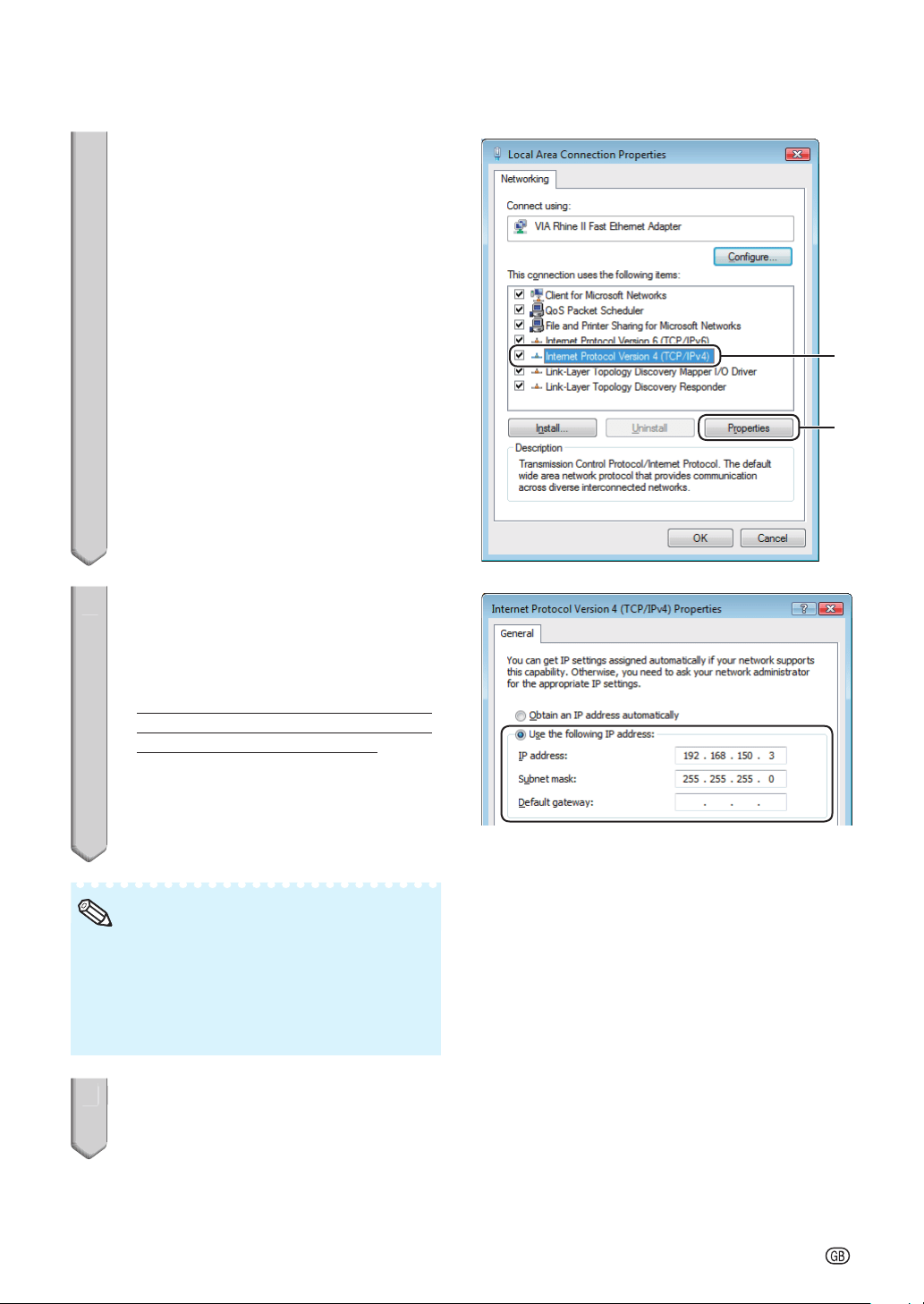
5
Click “Internet Protocol Version 4
(TCP/IPv4)”, and click the
“Properties” button.
6
Confi rm or change an IP address
for the setup computer.
1 Confi rm and note the current IP
address, Subnet mask and Default
gateway.
Make sure to note the current IP address,
Subnet mask and Default gateway as you
will be required to reset them later.
2 Set temporarily as follows:
IP address: 192.168.150.3
Subnet mask: 255.255.255.0
Default gateway: (Do not input any
values.)
The factory default settings for the projector are
as follows:
DHCP Client: OFF
IP address: 192.168.150.2
Subnet mask: 255.255.255.0
Default gateway: 0.0.0.0
•
Note
7
After setting, click the “OK”
button, and then restart the
computer.
5
1
2
1
2
6
7
After confi rming or setting, proceed to “3. Setting up a Network Connection for the
Projector”.
Setting up the Projector Network Environment
-22
3.
Setting up a Network Con-
nection for the Projector
Settings for such items as the projector's
IP address and subnet mask are
compatible with the existing network.
Set each item on the projector as follows.
(See page 54 of the projector's operation
manual for setting.)
DHCP Client: Off
IP Address: 192.168.150.002
Subnet Mask: 255.255.255.000
1
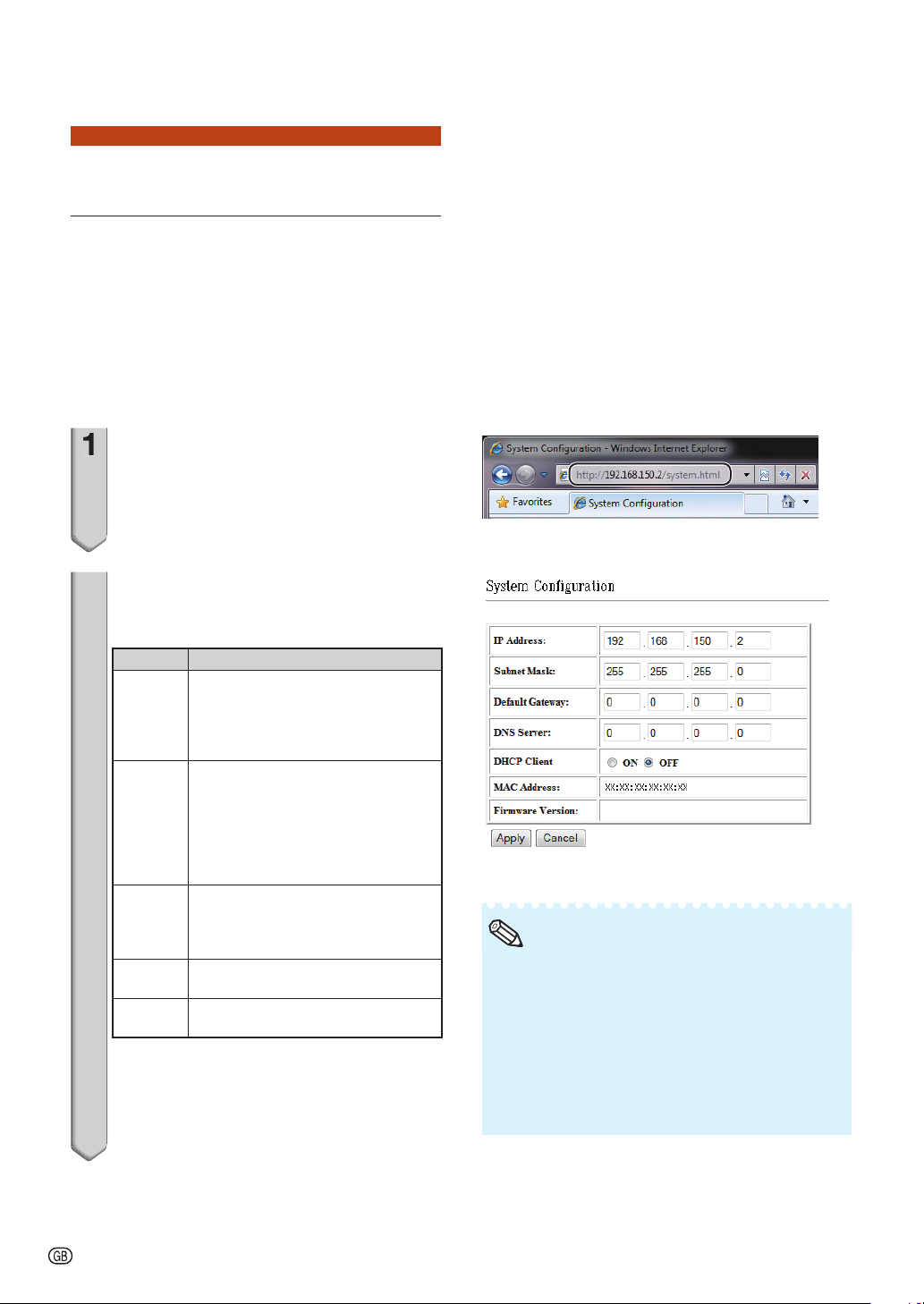
Start Internet Explorer (version 6.0
or later) on the computer, and
enter “http://192.168.150.2/system.
html” in “Address”, and then press
the “Enter” key.
2
The “System Confi guration”
screen appears, ready for network
settings for the projector.
Items Setting example / Remarks
IP
Address
You can set this item when “DHCP
Client” is set to “OFF”.
Factory default setting: 192.168.150.2
Enter an IP address appropriate for
the network.
Subnet
Mask
You can set this item when “DHCP
Client” is set to “OFF”.
Factory default setting:
255.255.255.0
Set the subnet mask to the same as
that of the computer and equipment
on the network.
Default
Gateway
You can set this item when “DHCP
Client” is set to “OFF”.
Factory default setting: 0.0.0.0
* When not in use, set to “0.0.0.0”.
DNS
Server
Factory default setting: 0.0.0.0
* When not in use, set to “0.0.0.0”.
DHCP
Client
Select “ON” or “OFF” to determine
whether to use DHCP Client.
1
2
Setting up the Projector Network Environment
Confi rm the existing network's segment (IP
address group) to avoid setting an IP address
that duplicates the IP addresses of other
network equipment or computers. If
“192.168.150.2” is not used in the network
having an IP address of “192.168.150.XXX”, you
don't have to change the projector IP address.
For details about each setting, consult your
network administrator.
•
•
Note
-23
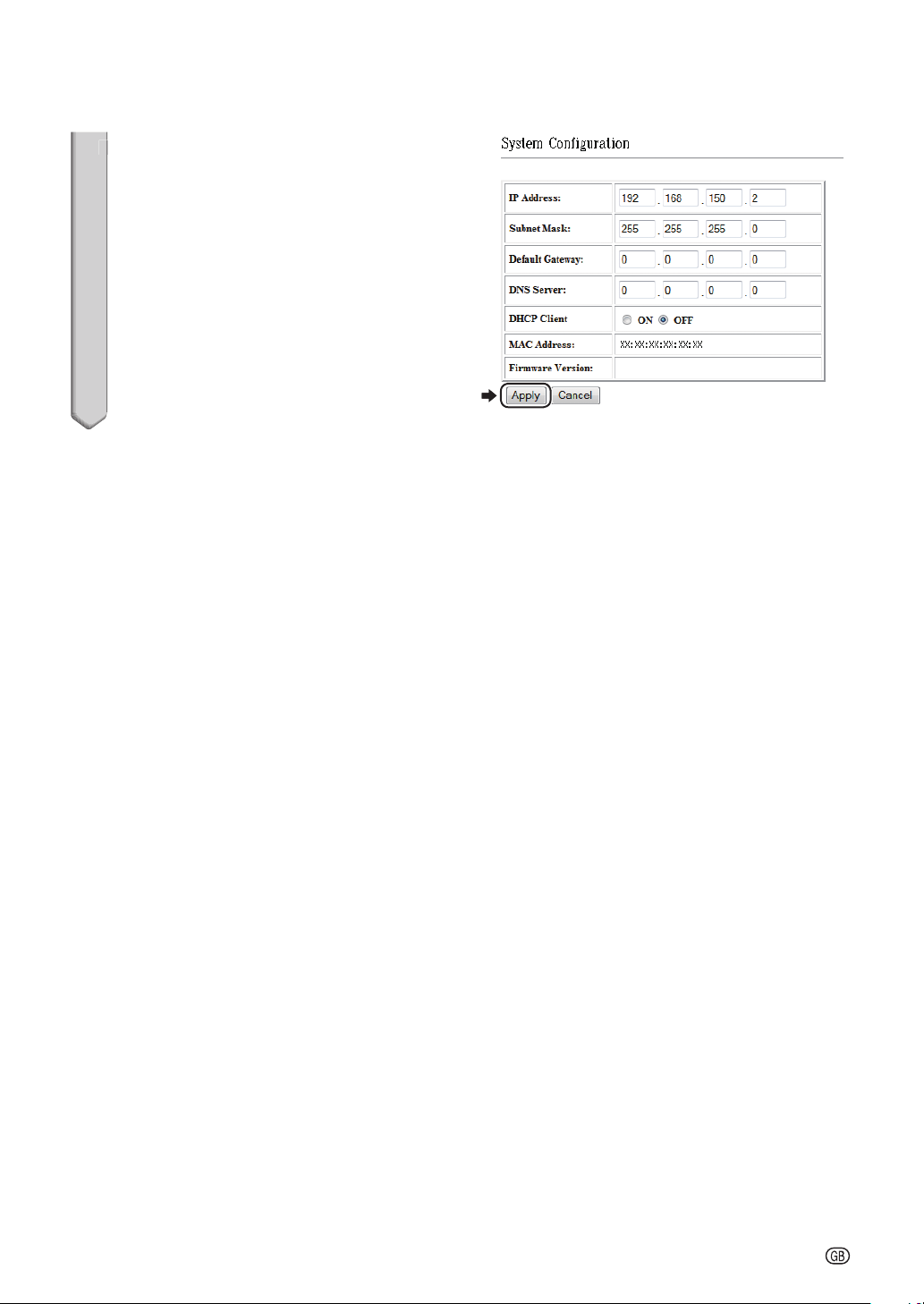
3
Confi rm that the values are set
properly, and then click the
“Apply” button.
Close the browser.
This completes the network settings.
After setting items, wait for about 15 seconds and
then re-access.
Change the IP address of the setting computer
back to its original address, which you have noted
down in Step 6-1 on page
21, and then connect
the computer and the projector to the network.
•
•
•
•
3
Setting up the Projector Network Environment

-24
Controlling the Projector via LAN
After connecting the projector to your network, enter the projector IP address in
“Address” on Internet Explorer (version 6.0 or later) using a computer on the network to
start a setup screen that will enable control of the projector via the network.
Controlling the Projector
Using Internet Explorer
Complete connections to external
equipment before starting the operation.
(See pages 21-25 of the projector's
operation manual.)
Complete the AC cord connection. (See
page 27 of the projector's operation
manual.)
Set “LAN/RS232C” in “Ex. Setting” of the
“PRJ-ADJ” menu to “LAN”.
When connecting the projector to the LAN, use
a commercially available LAN cable (UTP cable,
Category 5, cross-over type). When
connecting the projector to a hub, use a
straight-through cable.
•
•
Note
1
Start Internet Explorer on the
computer.
2
Enter “http://” followed by the
projector IP address set by the
procedure on page
22 followed by
“/” in “Address”, and then press
the “Enter” key.
When “DHCP Client” is set to “Off” on the
projector, IP address is 192.168.150.2. If you
did not change the IP address in “3. Setting
up a Network Connection for the
Projector” (pages
22-23), enter
“http://192.168.150.2/system.html”.
3
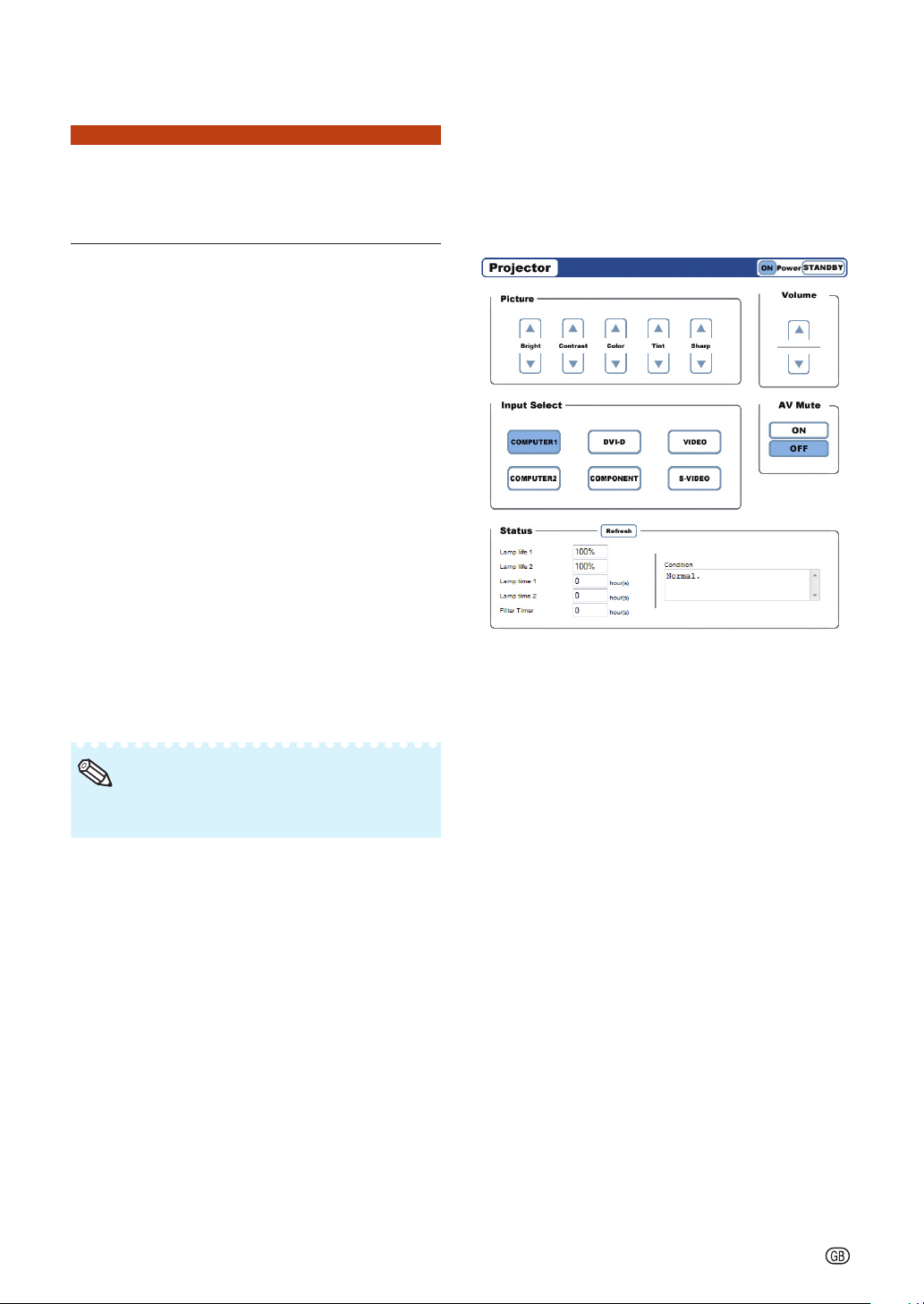
A screen for controlling the
projector appears, ready for
performing various status
conditions and control.
•
1
2
3
-25
Controlling the Projector via LAN
Controlling the Projector and
Confi rming the Projector
Status
On this screen, you can perform projector
control or confi rm the projector status.
You can control the following items:
Power
Picture
Bright
Contrast
Color
Tint
Sharp
Input Select
Volume
AV Mute
You can confi rm the following items:
Status
Lamp life 1
Lamp life 2
Lamp time 1
Lamp time 2
Filter Timer
Condition
For details about each item, refer to the
projector's operation manual.
•
Note
•
•
–
–
–
–
–
•
•
•
•
–
–
–
–
–
–
-26
Controlling the Projector via LAN
Making General Settings for
the Network
Enter “http://XXX.XXX.XXX.X/lanconf.
html” (for “XXX.XXX.XXX.X”, enter the IP
address set by the procedure on page 22)
in “Address” on Internet Explorer (version
6.0 or later) using a computer on the
network to display the “Projector LAN
Confi guration” screen.
Confi rm that the values are set properly,
and then click the “Apply” button.
When “DHCP Client” is set to “Off” on the
projector, IP address is 192.168.150.2. If you did
not change the IP address in “3. Setting up a
Network Connection for the Projector”
(pages
22-23), enter “http://192.168.150.2/
system.html”.
You can input up to 60 characters.
You can input the characters below:
– Host Name and Domain Name: A-Z, 0-9, -
– Originator Address, SMTP Server and
Recipient Address: a-z, A-Z, 0-9, !, #, $, %, &,
*, +, -, /, =, ?, ^, {, |, }, ~, _, ', ., @, `
•
•
•
Note
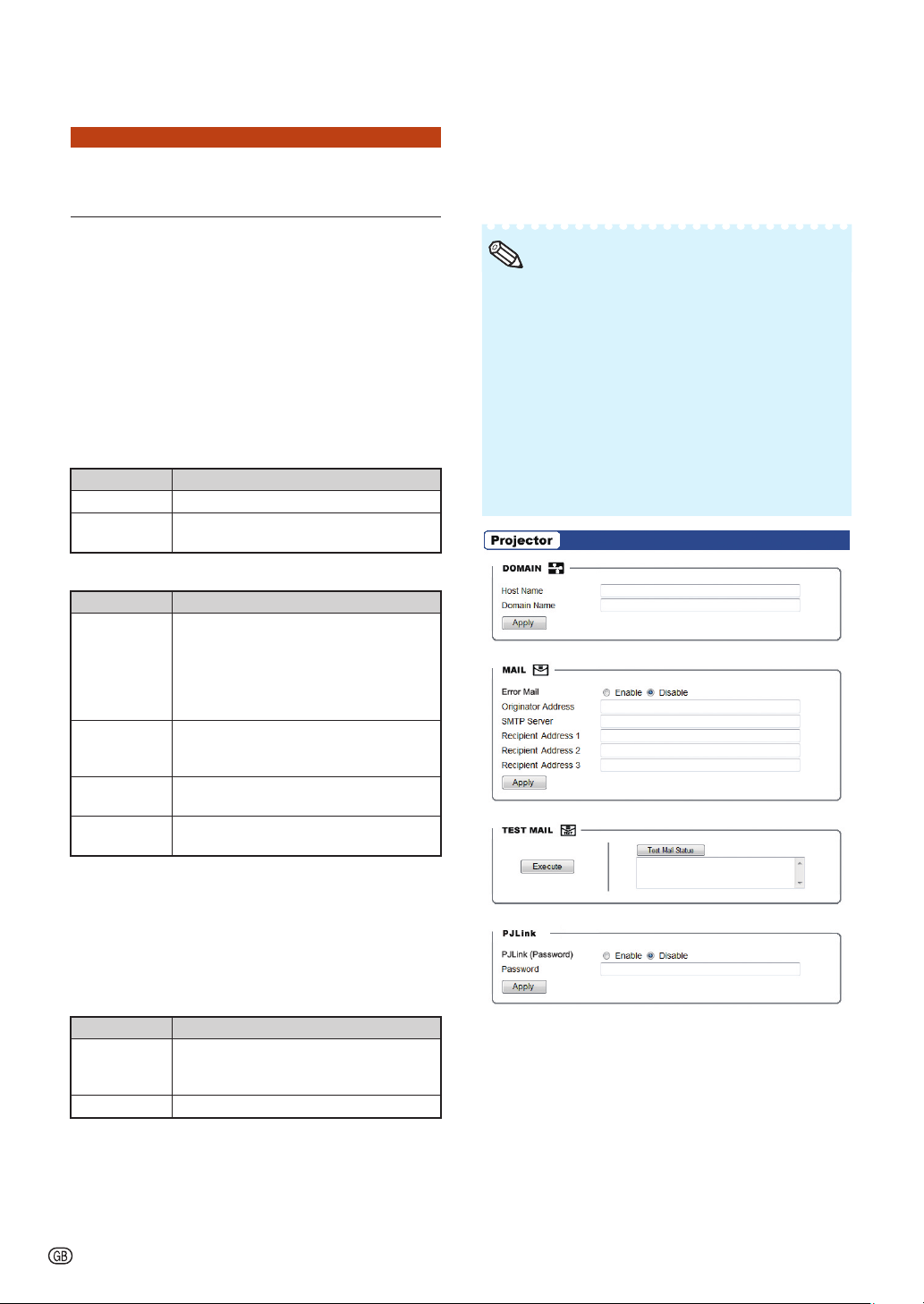
On this screen, you can make general
settings relating to the network.
DOMAIN
Items Description
Host Name Setting a hostname.
Domain
Name
Setting a domain name of the network
connected to the projector.
MAIL
Items Description
Error Mail Selecting “Enable” activates the Alert
Mail feature. When using a wired LAN,
your computer will receive an error
message via e-mail if the projector
lamp reaches the end of its lifetime or if
an error occurs in the projector.
Originator
Address
Setting the projector's e-mail address.
The e-mail address set here becomes
Originator E-mail Address.
SMTP Server Setting an SMTP server address for e-
mail transmission.
Recipient
Address (1–3)
Setting your recipient's address.
TEST MAIL
Click “Execute” to enable the TEST MAIL feature, which
allows you to send a test mail to confi rm that the
settings for e-mail transmission are properly made. Click
“Test Mail Status” to make sure that the test mail is sent
correctly.
PJLink
Items Description
PJLink
(Password)
Selecting “Enable” allows you to set a
password when using the PJLink
feature.
Password Setting a password.
■
■
■
■
-27
Operating the Projector Using the PJLink
TM
Protocol
The projector conforms with the PJLink
TM
standard Class 1.
The commands to be used in controlling the projector by the PJLink
TM
protocol are as
shown below.
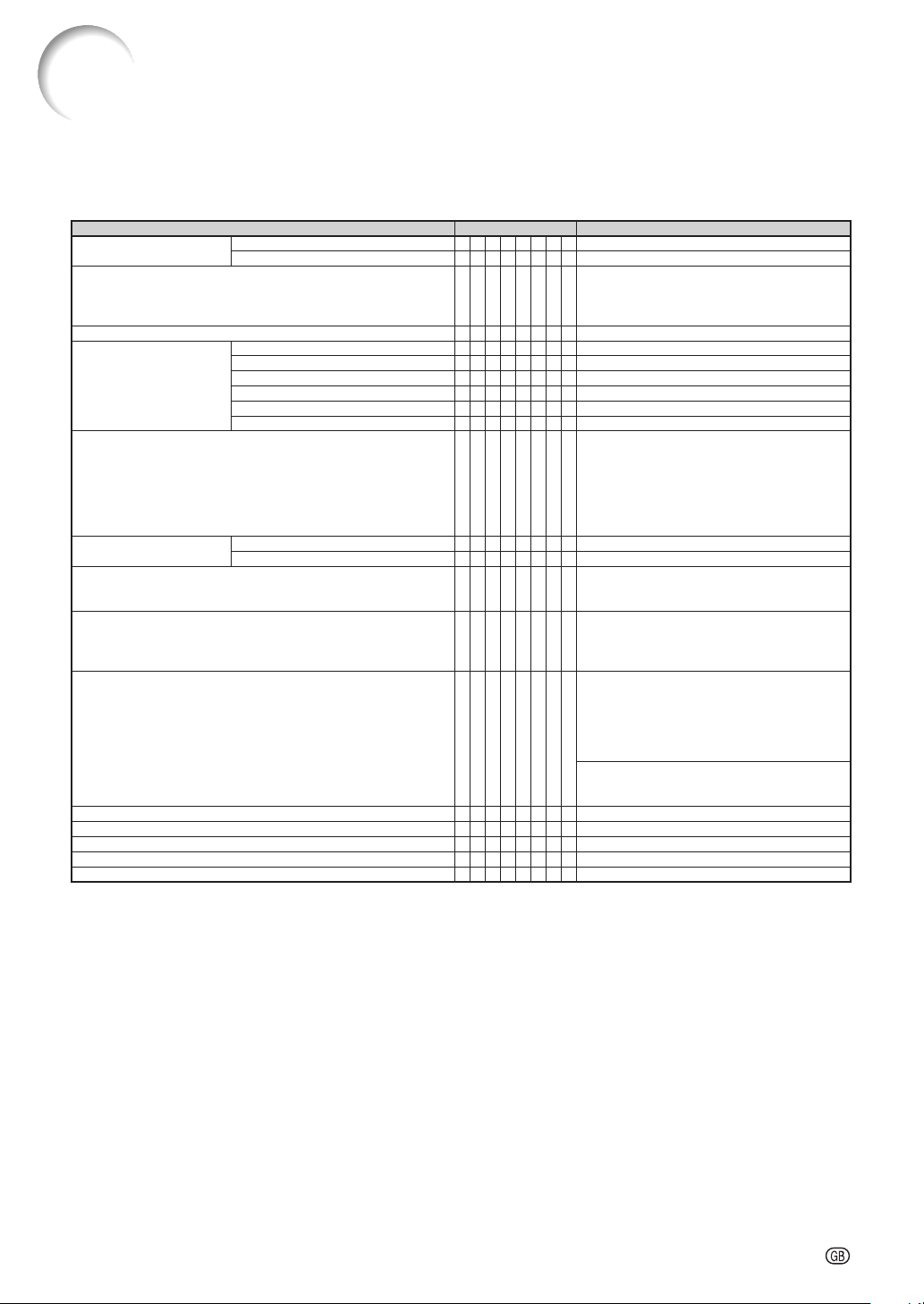
CONTROL CONTENTS
COMMAND RETURN
Power Control
Off P O W R _ 0 OK or ERR3
On P O W R _ 1 OK or ERR3
Power Status Query
P O W R _ ? 0: Standby Mode
1: Power On
2: Standby (Cooling)
3: Power On (Warming up)
Input List Query
I N S T _ ? 11 12 21 22 23 31
Input Change
COMPUTER1 I N P T _ 1 1 OK or ERR3
COMPUTER2 I N P T _ 1 2 OK or ERR3
COMPONENT I N P T _ 2 1 OK or ERR3
S-VIDEO I N P T _ 2 2 OK or ERR3
VIDEO I N P T _ 2 3 OK or ERR3
DVI I N P T _ 3 1 OK or ERR3
Input Status Query
I N P T _ ? 11: COMPUTER1
12: COMPUTER2
21: COMPONENT
22: S-VIDEO
23: VIDEO
31: DVI
or ERR3
AV Mute
Off A V M T _ 3 0 OK or ERR3
On A V M T _ 3 1 OK or ERR3
AV Mute Status Query
A V M T _ ? 30: Off
31: On
or ERR3
Lamp Query
L A M P _ ? 1st Number: Lamp1 Usage Time (Hour)
2nd Number: 0: Lamp1 Off 1: Lamp1 on
3rd Number: Lamp2 Usage Time (Hour)
4th Number: 0: Lamp2 Off 1: Lamp2 on
Error Condition Query
E R S T _ ? 1st Byte: Fan Error Status
2nd Byte: Lamp Error Status
3rd Byte: Temp. Error Status
4th Byte: Cover Open Status
5th Byte: Not Used, Return 0
6th Byte: Not Used, Return 0
0: No Error Detected
1: Warning
2: Error Detected
Projector Name Query N A M E _ ? Projector Name
Manufacture Name Query I N F 1 _ ? SHARP
Product Name Query I N F 2 _ ? XG-PH80W-N/XG-PH80X-N
Other Information Query I N F O _ ? Not used
Class Information Query C L S S _ ? 1
PJLink
TM
Authentication:
To activate the password used for PJLink
TM
, set “PJLink (Password)” to “Enable” and then enter the password
(page
26). When operating without authentication, set “PJLink (Password)” to “Disable”.
PJLink
TM
Compliant:
This product conforms with the PJLink standard Class 1 and all Class 1 commands are implemented.
This product confi rms with the PJLink standard specifi cation version 1.00.
For additional information, visit “http://pjlink.jbmia.or.jp/english/”.

-28
Troubleshooting
Communication cannot be established with the projector
When connecting the projector using serial-connection
? Check that the RS-232C terminal of the projector and a computer or the commercially
available controller are connected correctly.
? Check that the RS-232C cable is a cross-over cable.
? Check that the RS-232C port setting for the projector corresponds to the setting for the
computer or the commercially available controller.
When connecting the projector to a computer using network (LAN)-
connection
? Check that the cable's connector is fi rmly inserted in the LAN terminal of the projector.
? Check that the cable is fi rmly inserted into a LAN port for a computer or a network device
such as a hub.
? Check that the LAN cable is a Category 5 cable.
? Check that the LAN cable is a cross-over cable when connecting the projector to a computer
directly.
? Check that the LAN cable is a straight-through cable when connecting the projector with a
network device such as a hub.
? Check that the power supply is turned on for the network device such as a hub between the
projector and a computer.
Check the network settings for the computer and the projector
? Check the following network settings for the projector.
IP Address
Check that the IP address for the projector is not duplicated on the network.
Subnet Mask
When the gateway setting for the projector is “0.0.0.0” (Not Used), or the gateway setting
for the projector and the default gateway setting for the computer are the same:
The subnet masks for the projector and the computer should be the same.
The IP address parts shown by the subnet mask for the projector and the computer
should be the same.
(Example)
When the IP address is “192.168.150.2” and the subnet mask is “255.255.255.0” for the
projector, the IP address for the computer should be “192.168.150.X” (X=3-254) and the
subnet mask should be “255.255.255.0”.
Gateway
When the gateway setting for the projector is “0.0.0.0” (Not Used), or the gateway setting
for the projector and the default gateway setting for the computer are the same:
The subnets for the projector and the computer should be the same.
The IP address parts shown by the subnet mask for the projector and the computer
should be the same.
(Example)
When the IP address is “192.168.150.2” and the subnet mask is “255.255.255.0” for the
projector, the IP address for the computer should be “192.168.150.X” (X=3-254) and the
subnet mask should be “255.255.255.0”.
When “DHCP Client” is set to “Off” on the projector:
IP address: 192.168.150.2
Subnet mask: 255.255.255.0
Gateway address: 0.0.0.0 (Not Used)
For network settings for the projector, refer to pages
22-23.
•
•
Note
•
•
•
•
•
•
•
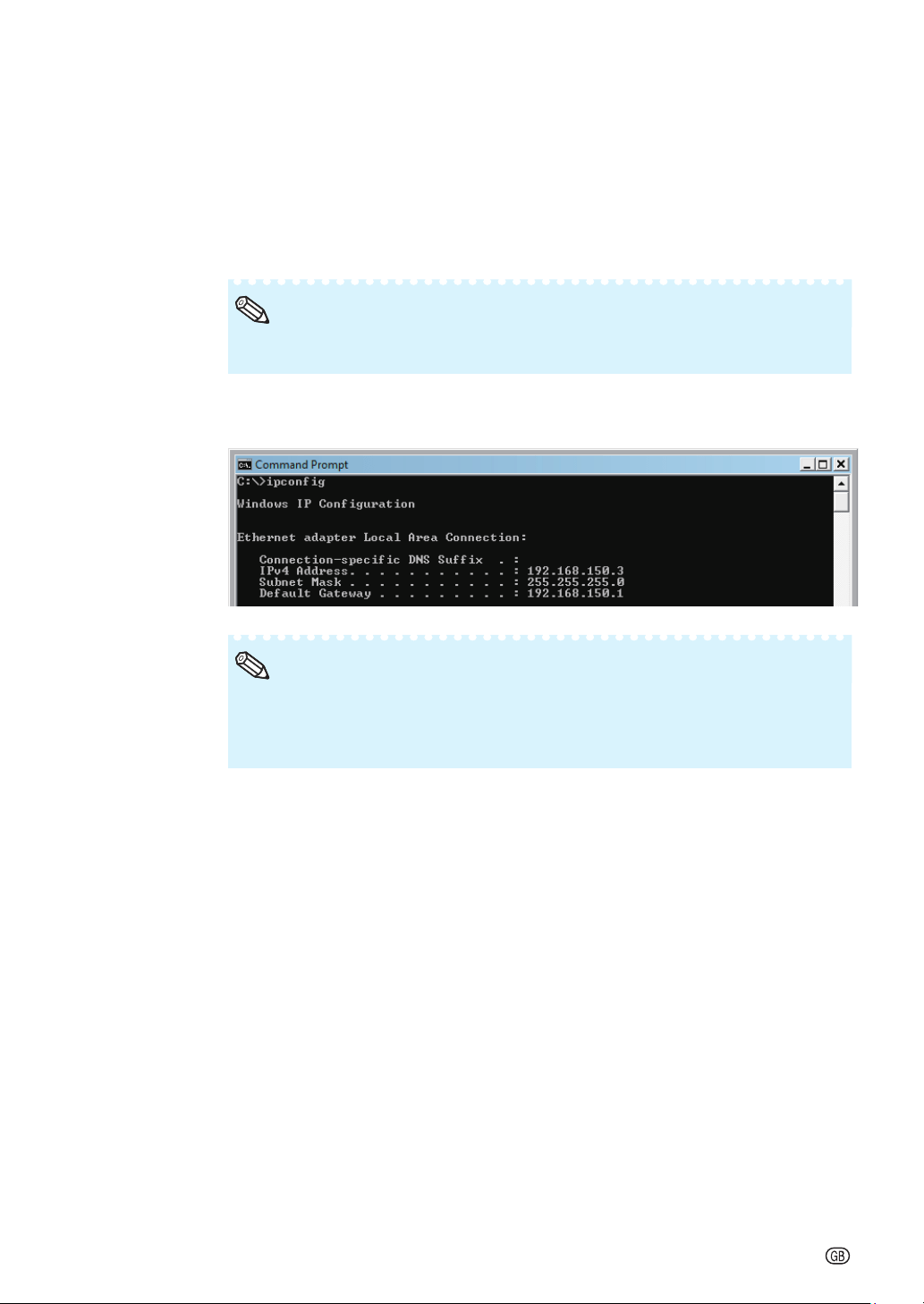
-29
? Take the following steps for checking the network settings for the computer.
1. Open a command prompt.
In the case of Windows
®
2000: click “start” ➔ “Programs” ➔ “Accessories”
➔ “Command Prompt” in order.
In the case of Windows
®
XP, Windows Vista
®
: click “start” ➔ “All Programs”
➔ “Accessories” ➔ “Command Prompt” in order.
2. After launching the command prompt, enter the command “ipconfi g”, and press the “Enter”
key.
Communication may not be established even after carrying out the network settings
for the computer. In such cases, restart your computer.
•
Note
C:\>ipconfi g
Usage examples of ipconfi g
C:\>ipconfi g /? displays how to use “ipconfi g.exe”.
C:\>ipconfi g displays the set IP address, subnet mask and default gateway.
C:\>ipconfi g /all displays all the setting information related to TCP/IP.
•
Note
3. To return to the Windows
®
screen, enter “exit” and press the “Enter” key.
•
•
Troubleshooting
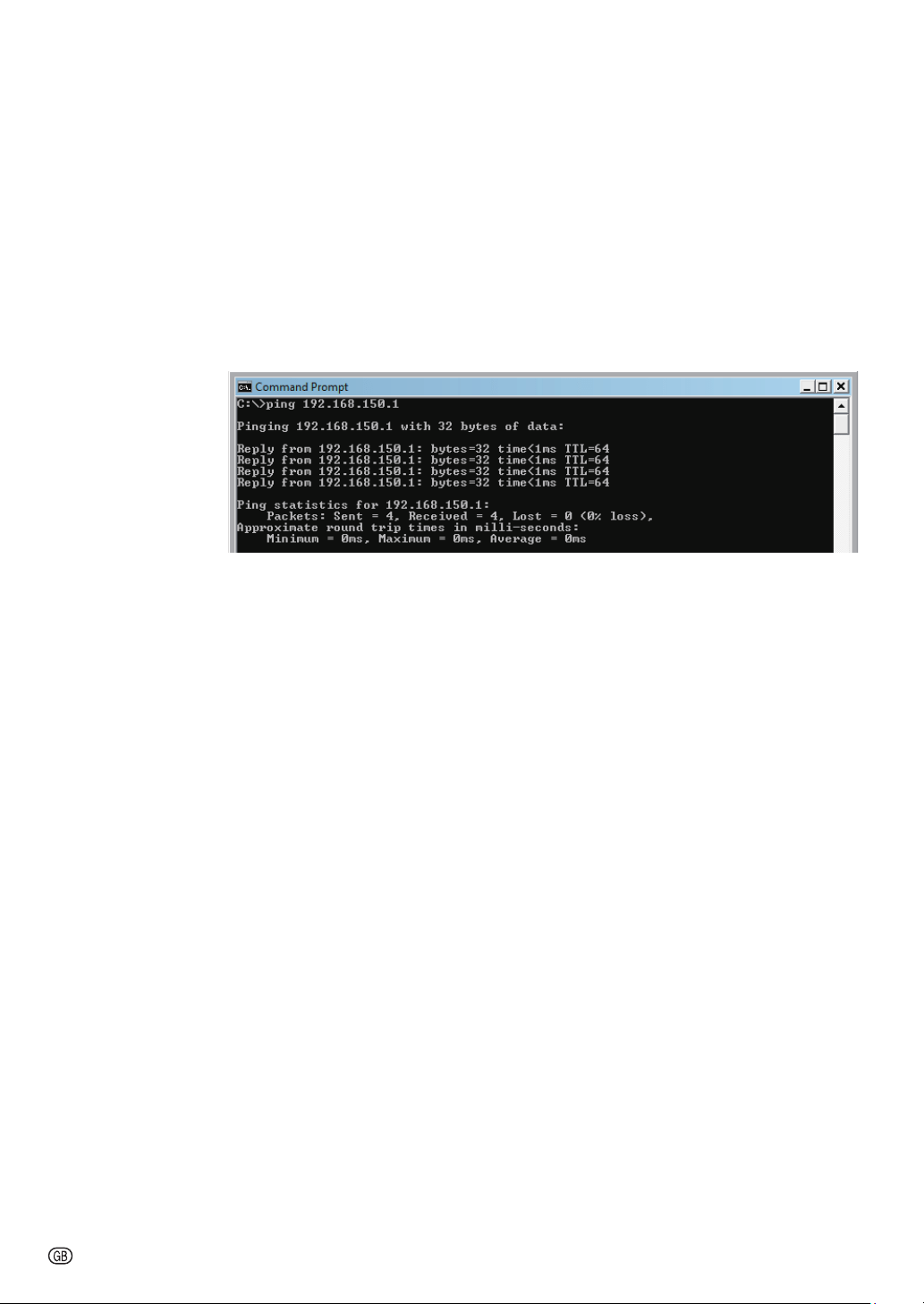
-30
? Check if the “TCP/IP” protocol is operating correctly using the “PING” command. Also, check
if an IP address is set.
1. Open a command prompt.
In the case of Windows
®
2000: click “start” ➔ “Programs” ➔ “Accessories” ➔
“Command Prompt” in order.
In the case of Windows
®
XP, Windows Vista
®
: click “start” ➔ “All Programs” ➔
“Accessories” ➔ “Command Prompt” in order.
2. After launching the command prompt enter a command “PING”.
Entry example C:\>ping XXX.XXX.XXX.XXX
“XXX.XXX.XXX.XXX” should be entered with an IP address to be connected to, such as the
projector.
3. When connecting normally, the display will be as follows.
(The screen may be slightly different depending on the OS type.)
<Example> when the IP address connected to is “192.168.150.1”
4. When a command cannot be sent, “Request time out” will be displayed.
Check the network setting again.
If communication can still not be established properly, contact your network administrator.
5. To return to the Windows
®
screen, enter “exit” and then press the “Enter” key.
? When the projector cannot be connected, even though the “PING” command is checked:
When a security software is installed on the PC, or when a fi re wall has been set up for the
network system, connection may not be possible. Consult the system administrator.
•
•
•
Troubleshooting
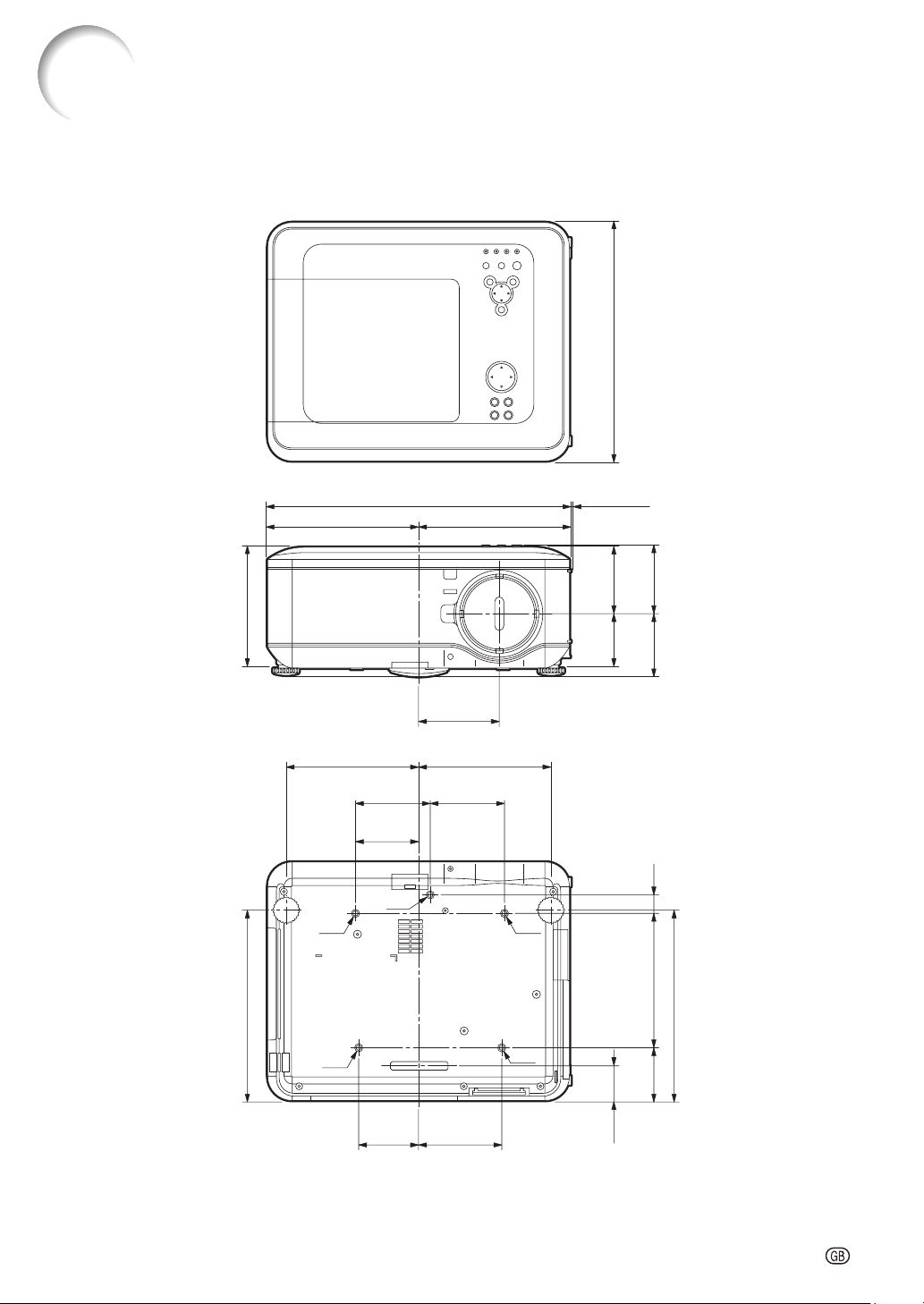
-31
Dimensions
Units: inches (mm)
9
61
/64 (252.5) 9
61
/64 (252.5)
15
11
/64 (385)
M4
M4
M4
M4
M4
19
57
/64 (505)
1
/8 (3)
7
41
/64 (194)12
1
/16 (306)
4
13
/64
(106.5)
3
7
/16
(87)
2
15
/64
(56.5)
3
29
/32
(99)
1
3
/16
(30)
4
1
/4
(108)
5
11
/32
(135.7)
8
49
/64 (222.5) 8
49
/64 (222.5)
4
59
/64
(125)
4
59
/64
(125)
4
13
/64
(106.5)
8
15
/32
(215)
3
25
/64
(86)
12
1
/16
(306)
5
29
/64
(138.5)
4
(101.5)
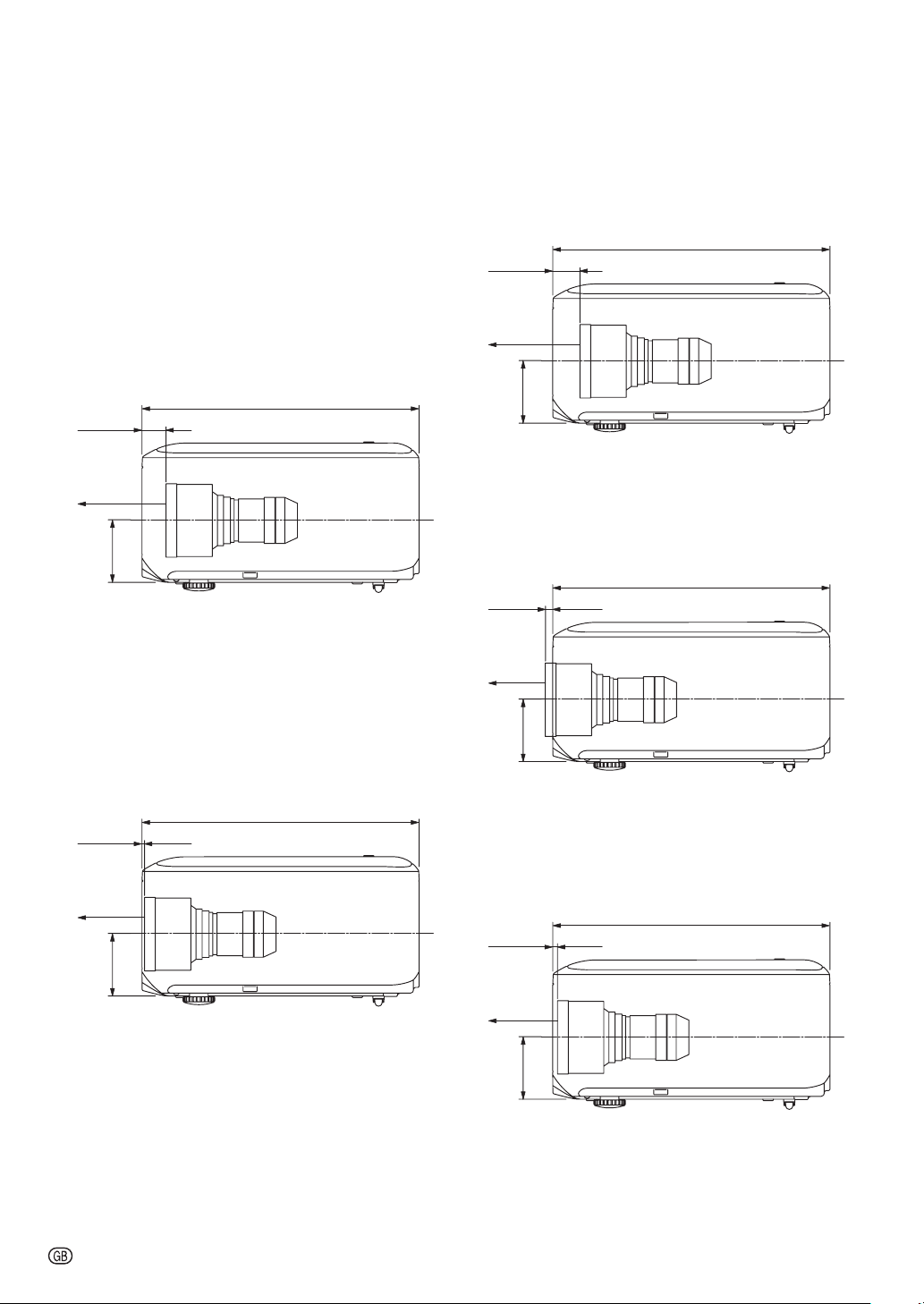
-32
Dimensions
Projector and Lens Dimensions
3
7
/16
(87)
15
11
/64
(385)
61
/64
(24.2)
0
(0)
[When AN-PH808EX is installed]
Unit : inches (mm)
3
7
/16
(87)
15
11
/64
(385)
7
/64
(2.65)
1
/16
(1.63)
[When AN-PH814EZ is installed]
Unit : inches (mm)
3
7
/16
(87)
15
11
/64
(385)
1
3
/32
(27.7)
7
/64
(2.8)
[When AN-PH818EZ is installed]
Unit : inches (mm)
3
7
/16
(87)
15
11
/64
(385)
9
/32
(7)
13
/64
(5)
[When AN-PH823EZ is installed]
Unit : inches (mm)
3
7
/16
(87)
15
11
/64
(385)
13
/64
(5)
3
/32
(2.4)
[When AN-PH845EZ is installed]
Unit : inches (mm)