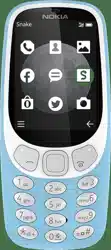
Nokia 3310 3G
User Guide
Issue 2019-05-23 en-USA

Nokia 3310 3G User Guide
1 About this user guide
Important: For important information on the safe use of your device and battery,
read “For your safety” and “Product Safety” info in the printed user guide, or at
www.nokia.com/support before you take the device into use. To find out how to get started
with your new device, read the printed user guide.
© 2019 HMD Global Oy. All rights reserved. 2

Nokia 3310 3G User Guide
Table of Contents
1 About this user guide 2
2 Get started 4
Keys and parts . . . . . . . . . . . . . . . . . . . . . . . . . . . . . . . . . . . . . . . . . . 4
Set up and switch on your phone . . . . . . . . . . . . . . . . . . . . . . . . . . . . . . . . 5
Charge your phone . . . . . . . . . . . . . . . . . . . . . . . . . . . . . . . . . . . . . . . 8
Lock or unlock the keys . . . . . . . . . . . . . . . . . . . . . . . . . . . . . . . . . . . . . 9
3 Basics 10
Get the most out of the two SIM cards (dual SIM phones) . . . . . . . . . . . . . . . . . . 10
Explore your phone . . . . . . . . . . . . . . . . . . . . . . . . . . . . . . . . . . . . . . . 11
Change the volume . . . . . . . . . . . . . . . . . . . . . . . . . . . . . . . . . . . . . . . 14
Write text . . . . . . . . . . . . . . . . . . . . . . . . . . . . . . . . . . . . . . . . . . . . . 14
4 Calls, contacts, and messages 16
Calls . . . . . . . . . . . . . . . . . . . . . . . . . . . . . . . . . . . . . . . . . . . . . . . . 16
Contacts . . . . . . . . . . . . . . . . . . . . . . . . . . . . . . . . . . . . . . . . . . . . . 17
Send and receive messages . . . . . . . . . . . . . . . . . . . . . . . . . . . . . . . . . . 18
5 Personalize your phone 19
Change your ring or message tone . . . . . . . . . . . . . . . . . . . . . . . . . . . . . . 19
Change the look of your home screen . . . . . . . . . . . . . . . . . . . . . . . . . . . . . 19
6 Camera 21
Photos . . . . . . . . . . . . . . . . . . . . . . . . . . . . . . . . . . . . . . . . . . . . . . 21
Videos . . . . . . . . . . . . . . . . . . . . . . . . . . . . . . . . . . . . . . . . . . . . . . . 22
7 Internet and connections 23
Browse the web . . . . . . . . . . . . . . . . . . . . . . . . . . . . . . . . . . . . . . . . . 23
© 2019 HMD Global Oy. All rights reserved. 3

Nokia 3310 3G User Guide
8 Music, audio and videos 24
Music player . . . . . . . . . . . . . . . . . . . . . . . . . . . . . . . . . . . . . . . . . . . 24
Voice recorder . . . . . . . . . . . . . . . . . . . . . . . . . . . . . . . . . . . . . . . . . . 24
Video player . . . . . . . . . . . . . . . . . . . . . . . . . . . . . . . . . . . . . . . . . . . 24
9 Radio 26
Find and save radio stations . . . . . . . . . . . . . . . . . . . . . . . . . . . . . . . . . . 26
Listen to radio . . . . . . . . . . . . . . . . . . . . . . . . . . . . . . . . . . . . . . . . . . 26
10 Clock, calendar, and calculator 27
Set the time and date manually . . . . . . . . . . . . . . . . . . . . . . . . . . . . . . . . 27
Alarm clock . . . . . . . . . . . . . . . . . . . . . . . . . . . . . . . . . . . . . . . . . . . . 27
Calendar . . . . . . . . . . . . . . . . . . . . . . . . . . . . . . . . . . . . . . . . . . . . . 27
Calculator . . . . . . . . . . . . . . . . . . . . . . . . . . . . . . . . . . . . . . . . . . . . . 28
11 Bluetooth 29
Activate Bluetooth . . . . . . . . . . . . . . . . . . . . . . . . . . . . . . . . . . . . . . . . 29
12 Copy, share and remove content 30
Copy content . . . . . . . . . . . . . . . . . . . . . . . . . . . . . . . . . . . . . . . . . . . 30
Share content . . . . . . . . . . . . . . . . . . . . . . . . . . . . . . . . . . . . . . . . . . 30
Memory . . . . . . . . . . . . . . . . . . . . . . . . . . . . . . . . . . . . . . . . . . . . . . 31
Remove private content from your phone . . . . . . . . . . . . . . . . . . . . . . . . . . 31
13 Backup and restore 32
Create a backup . . . . . . . . . . . . . . . . . . . . . . . . . . . . . . . . . . . . . . . . . 32
Restore a backup . . . . . . . . . . . . . . . . . . . . . . . . . . . . . . . . . . . . . . . . 32
14 Tools 33
Extras . . . . . . . . . . . . . . . . . . . . . . . . . . . . . . . . . . . . . . . . . . . . . . . 33
Torch . . . . . . . . . . . . . . . . . . . . . . . . . . . . . . . . . . . . . . . . . . . . . . . 33
Counters . . . . . . . . . . . . . . . . . . . . . . . . . . . . . . . . . . . . . . . . . . . . . 34
© 2019 HMD Global Oy. All rights reserved. 4

Nokia 3310 3G User Guide
15 Settings 35
System settings . . . . . . . . . . . . . . . . . . . . . . . . . . . . . . . . . . . . . . . . . 35
Connectivity settings . . . . . . . . . . . . . . . . . . . . . . . . . . . . . . . . . . . . . . 36
Personalization settings . . . . . . . . . . . . . . . . . . . . . . . . . . . . . . . . . . . . 36
Time and language settings . . . . . . . . . . . . . . . . . . . . . . . . . . . . . . . . . . 37
Security settings . . . . . . . . . . . . . . . . . . . . . . . . . . . . . . . . . . . . . . . . . 38
16 Product and safety information 39
For your safety . . . . . . . . . . . . . . . . . . . . . . . . . . . . . . . . . . . . . . . . . . 39
Network services and costs . . . . . . . . . . . . . . . . . . . . . . . . . . . . . . . . . . . 41
Emergency calls . . . . . . . . . . . . . . . . . . . . . . . . . . . . . . . . . . . . . . . . . 41
Take care of your device . . . . . . . . . . . . . . . . . . . . . . . . . . . . . . . . . . . . 42
Recycle . . . . . . . . . . . . . . . . . . . . . . . . . . . . . . . . . . . . . . . . . . . . . . 43
Crossed-out wheelie bin symbol . . . . . . . . . . . . . . . . . . . . . . . . . . . . . . . . 43
Battery and charger information . . . . . . . . . . . . . . . . . . . . . . . . . . . . . . . . 43
Small children . . . . . . . . . . . . . . . . . . . . . . . . . . . . . . . . . . . . . . . . . . 44
Medical devices . . . . . . . . . . . . . . . . . . . . . . . . . . . . . . . . . . . . . . . . . 44
Implanted medical devices . . . . . . . . . . . . . . . . . . . . . . . . . . . . . . . . . . . 44
Hearing . . . . . . . . . . . . . . . . . . . . . . . . . . . . . . . . . . . . . . . . . . . . . . 45
Protect your device from harmful content . . . . . . . . . . . . . . . . . . . . . . . . . . 45
Vehicles . . . . . . . . . . . . . . . . . . . . . . . . . . . . . . . . . . . . . . . . . . . . . . 45
Potentially explosive environments . . . . . . . . . . . . . . . . . . . . . . . . . . . . . . 46
Certification information (SAR) . . . . . . . . . . . . . . . . . . . . . . . . . . . . . . . . 46
Copyrights and other notices . . . . . . . . . . . . . . . . . . . . . . . . . . . . . . . . . 47
About Digital Rights Management . . . . . . . . . . . . . . . . . . . . . . . . . . . . . . . 48
© 2019 HMD Global Oy. All rights reserved. 5
Nokia 3310 3G User Guide
2 Get started
KEYS AND PARTS
Explore the keys and parts of your new phone.
Your phone
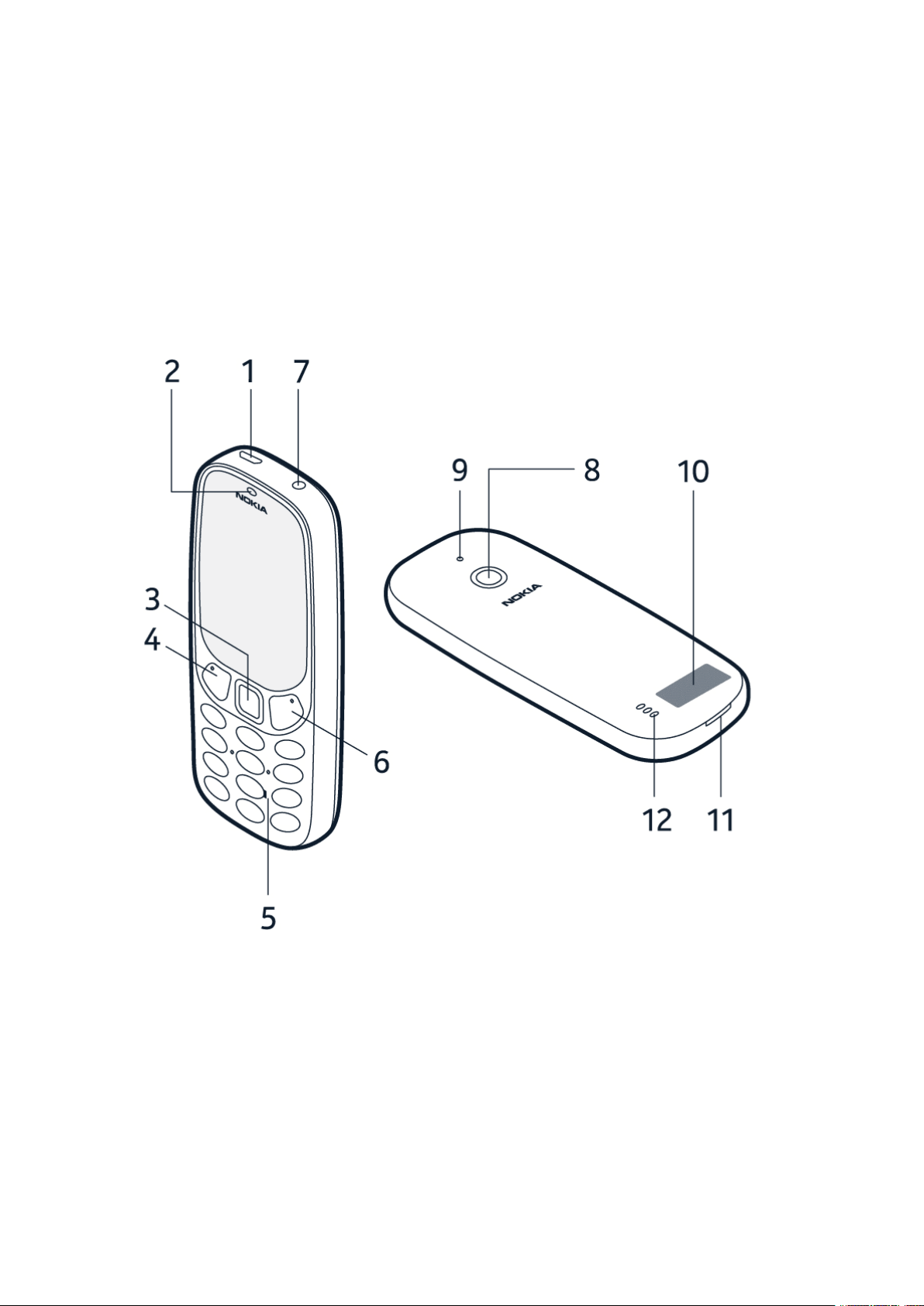
The keys and parts of your phone are:
1. Charger connector
2. Earpiece
3. Scroll and selection key
4. Function key, call key
5. Number keys
6. Function key, end call/power key
7. Headphone connector
8. Camera
9. Flash light
10. Antenna area
© 2019 HMD Global Oy. All rights reserved. 6
Nokia 3310 3G User Guide
11. Back cover opening slot 12. Loudspeaker
To lock the keys automatically, select Menu > > Security > Keyguard >
Automatic keyguard and select On .
To unlock the keys, select Unlock and press * .
Avoid touching the antenna area while the antenna is in use. Contact with antennas affects the
communication quality and may reduce battery life due to higher power level during operation.
Do not connect to products that create an output signal, as this may damage the device. Do
not connect any voltage source to the audio connector. If you connect an external device
or headset, other than those approved for use with this device, to the audio connector, pay
special attention to volume levels.
Parts of the device are magnetic. Metallic materials may be attracted to the device. Do not
place credit cards or other magnetic storage media near the device, because info stored on
them may be erased.
Some of the accessories mentioned in this user guide, such as charger, headset, or data cable,
may be sold separately.
Note: You can set the phone to ask for a security code. Select Menu > > Security >
Keyguard and set Security code on. If there is a pre-set code, it is 12345. Change it to
protect your privacy and personal data. Note, however, that when you change the code, you
need to remember the new code, as HMD Global is not able to open or bypass it. This phone
cannot be located or locked remotely if lost.
SET UP AND SWITCH ON YOUR PHONE
Learn how to insert the SIM card, memory card, and battery, and how to switch on your phone.
Micro SIM
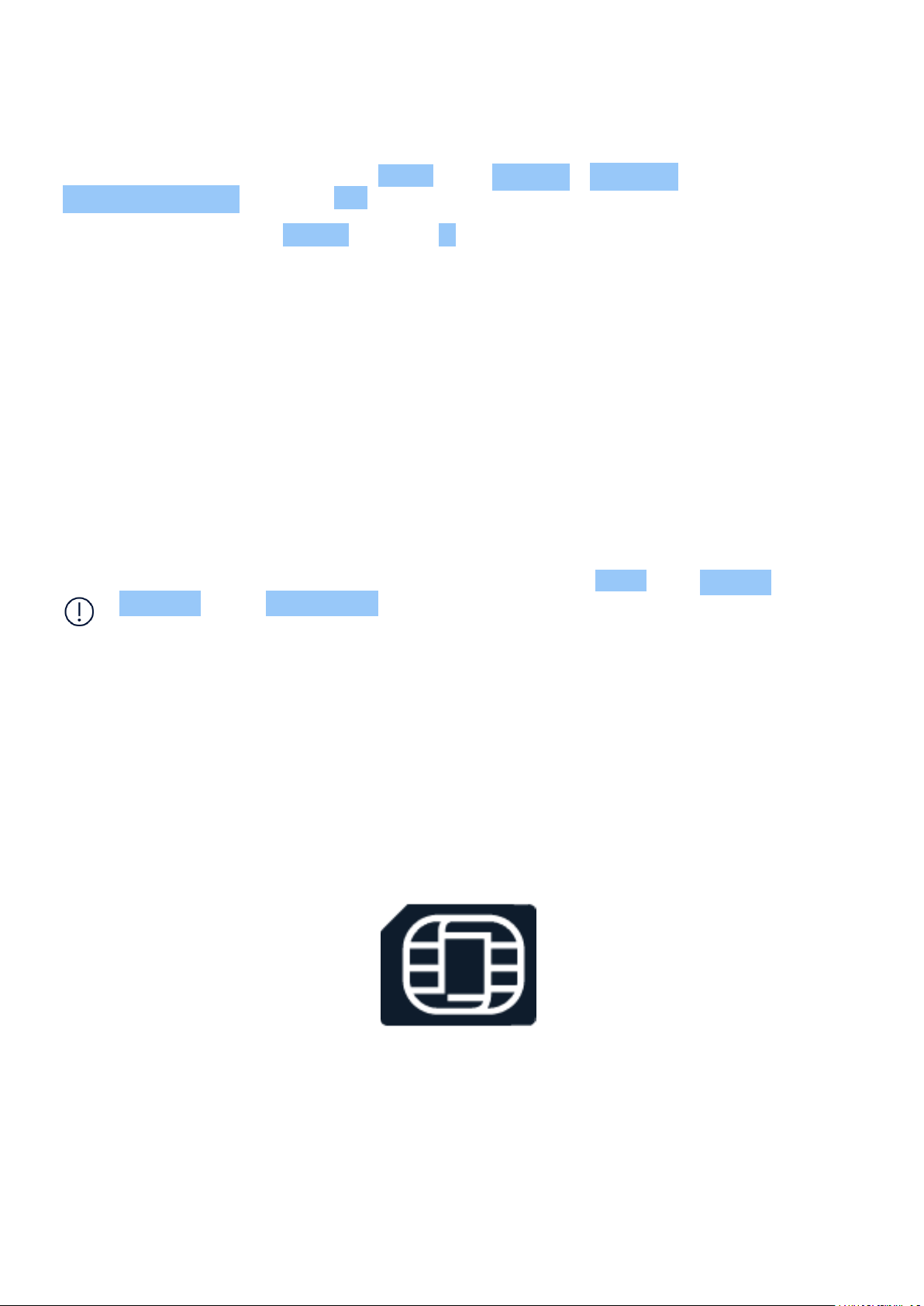
Important: This device is designed to be used with a micro SIM card (see figure) only. Use of
incompatible SIM cards may damage the card or the device, and may corrupt data stored on
the card. Please consult your mobile operator for the use of a SIM card that has a nano-UICC
cutout.
© 2019 HMD Global Oy. All rights reserved. 7
Nokia 3310 3G User Guide
MicroSD memory cards
Use only compatible memory cards approved for use with this device. Incompatible cards may
damage the card and the device and corrupt data stored on the card.
Note: Switch the device off and disconnect the charger and any other device before removing
any covers. Avoid touching electronic components while changing any covers. Always store
and use the device with any covers attached.
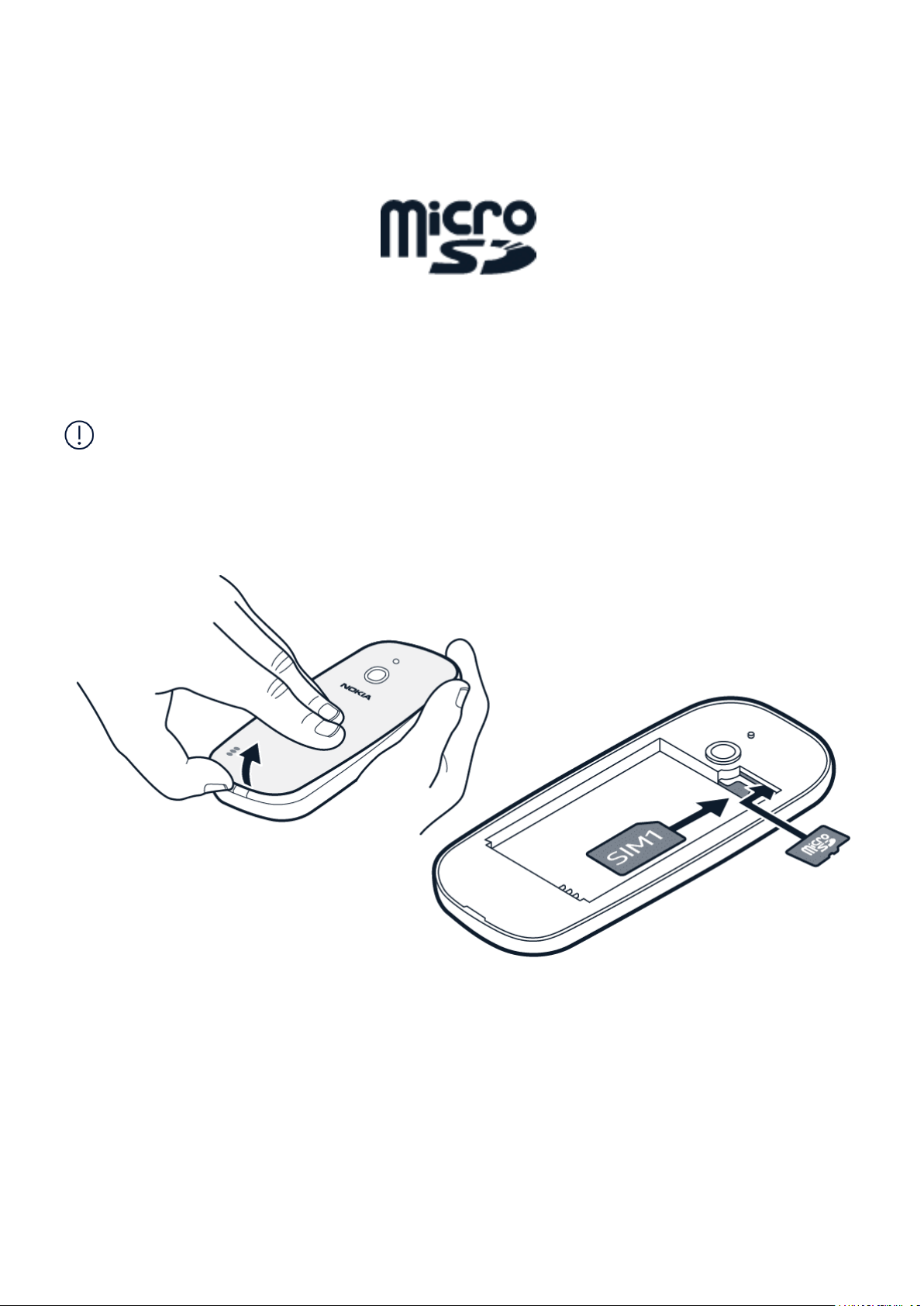
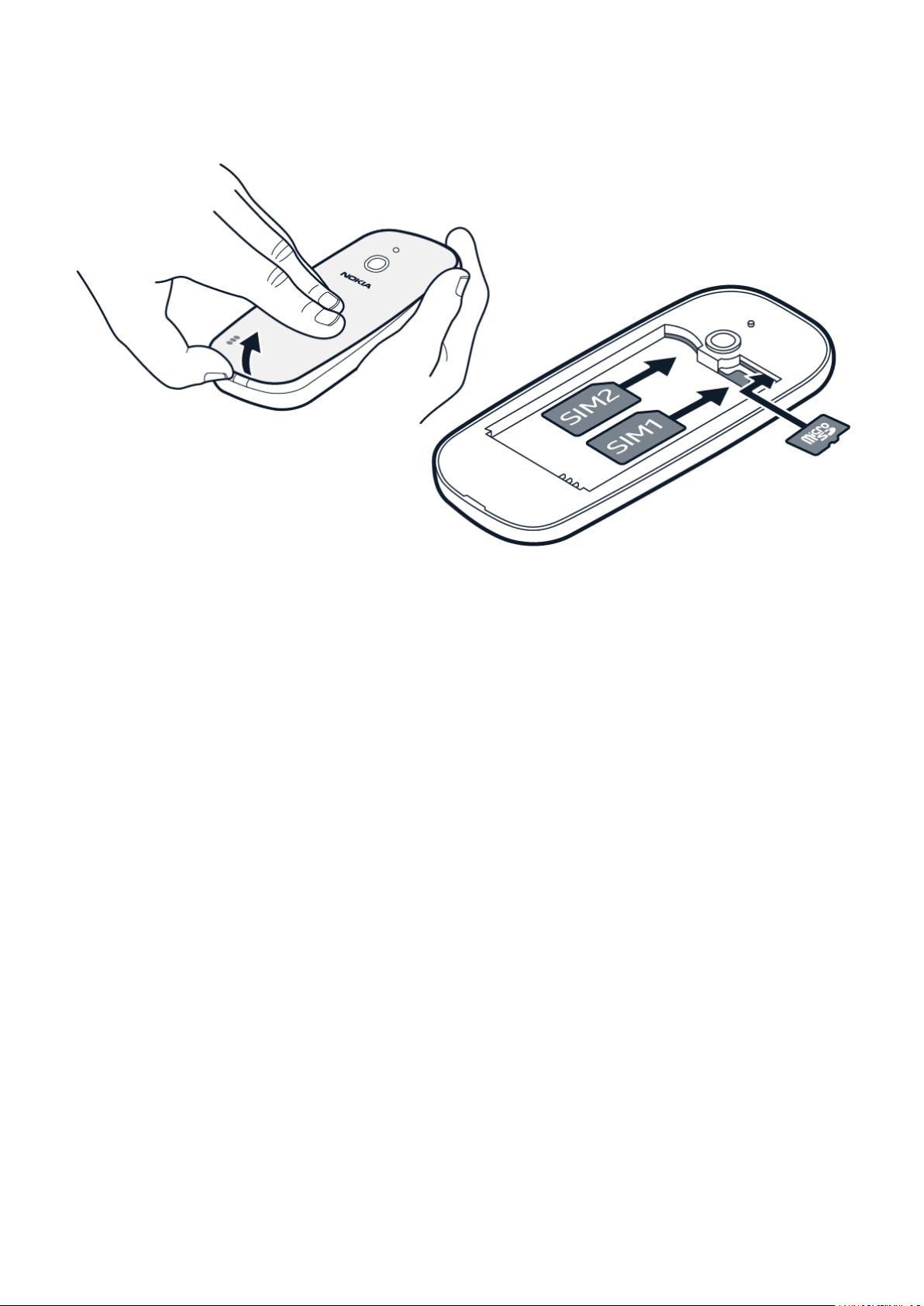
Set up your phone (single SIM)
1. Place your fingernail in the small slot at the
bottom of the phone, lift and remove the
cover.
2. If the battery is in the phone, lift it out.
3. Slide the SIM into the SIM slot with the
contact area face down.
4. If you have a memory card, slide the
memory card into the memory card slot.
5. Line up the battery contacts, and put the
battery in.
6. Put back the back cover.
© 2019 HMD Global Oy. All rights reserved. 8
Nokia 3310 3G User Guide
Set up your phone (dual SIM)
1. Place your fingernail in the small slot at the
bottom of the phone, lift and remove the
cover.
2. If the battery is in the phone, lift it out.
3. Slide the first SIM into SIM slot 1 with the
contact area face down. Slide the second
SIM into SIM slot 2. Both SIM cards are
available at the same time when the device
is not being used, but while one SIM card
is active, for example, making a call, the
other may be unavailable.
4. If you have a memory card, slide the
memory card into the memory card slot.
5. Line up the battery contacts, and put the
battery in.
6. Put back the back cover.
Switch on your phone
Press and hold the key.
Remove the SIM card
Open the back cover, remove the battery, and slide the SIM out.
Remove the memory card
Open the back cover, remove the battery, and pull the memory card out.
© 2019 HMD Global Oy. All rights reserved. 9
Nokia 3310 3G User Guide
Access codes
Your phone and SIM card use different codes for security.
• PIN or PIN2 codes: These codes protect your SIM card against unauthorized use. If you
forget the codes or they aren’t supplied with your card, contact your network service
provider. If you type in the code incorrectly 3 times in a row, you need to unblock the code
with the PUK or PUK2 code.
• PUK or PUK2 codes: These codes are required to unblock a PIN or PIN2 code. If the codes
are not supplied with your SIM card, contact your network service provider.
• Security code: The security code helps you protect your phone against unauthorized use.
You can set your phone to ask for the security code that you define. Keep the code secret
and in a safe place, separate from your phone. If you forget the code and your phone is
locked, your phone will require service. Additional charges may apply, and all the personal
data on your phone may be deleted. For more info, contact the nearest care point for your
phone, or your phone dealer.
• IMEI code: The IMEI code is used to identify phones in the network. You may also need to
give the number to your care point services or phone dealer. To view your IMEI number, dial
*#06# . Your phone’s IMEI code is also printed on your phone label, which is located under
the battery. The IMEI is also visible on the original sales box.
CHARGE YOUR PHONE
Your battery has been partially charged at the factory, but you may need to recharge it before
you can use your phone.
Charge the battery
1. Plug the charger into a wall outlet.
2. Connect the charger to the phone. When done, unplug the charger from the phone, then
from the wall outlet.
If the battery is completely discharged, it may take several minutes before the charging
indicator is displayed.
Tip: You can use USB charging when a wall outlet is not available. Data can be transferred
while charging the device. The efficiency of USB charging power varies significantly, and it
may take a long time for charging to start and the device to start functioning. Make sure your
computer is switched on.
Save power
To save power:
© 2019 HMD Global Oy. All rights reserved. 10

Nokia 3310 3G User Guide
1. Charge wisely: always charge the battery
fully.
2. Select only the sounds that you need:
mute unnecessary sounds, such as keypad
sounds.
3. Use wired headphones, rather than the
loudspeaker.
4. Change the phone screen settings: set the
phone screen to switch off after a short
time.
5. Lower the screen brightness.
6. When applicable, use network connections,
such as Bluetooth, selectively: switch the
connections on only when you are using
them.
LOCK OR UNLOCK THE KEYS
Lock the keypad
To lock the keys automatically, select Menu > > Security > Keyguard >
Automatic keyguard and select On .
Unlock the keypad
To unlock the keys, select Unlock and press * .
© 2019 HMD Global Oy. All rights reserved. 11
Nokia 3310 3G User Guide
3 Basics
GET THE MOST OUT OF THE TWO SIM CARDS (DUAL SIM PHONES)
Your phone can use two SIM cards, and you can use them for different purposes.
Select which SIM card to use
1. Select Menu > > Connectivity > Dual SIM .
2. To choose which SIM to use for calls, select Preferred SIM for calls , and select SIM1 or
SIM2 .
3. To choose which SIM to use for messages, select Preferred SIM for messages , and select
SIM1 or SIM2 .
4. To choose which SIM to use for mobile data, select Mobile data connection , switch
Mobile data on, and select either SIM1 or SIM2 .
Forward calls between your 2 SIMs
Get the most out of your 2 SIM cards. If you forward your calls between your SIMs, when
someone calls you on one SIM while you’re having a call on the other, you can manage your
calls from both SIMs just like with only one SIM.
Make sure you have 2 SIM cards inserted in your phone.
1. Select Menu > > Connectivity > Dual SIM > SIM numbers .
2. Type in the numbers of your both SIMs and select Save .
3. Scroll up to Forward calls , and select Between two SIMs , From SIM1 to SIM2 , or
From SIM2 to SIM1 .
© 2019 HMD Global Oy. All rights reserved. 12
Nokia 3310 3G User Guide
EXPLORE YOUR PHONE
See the apps and features of your phone
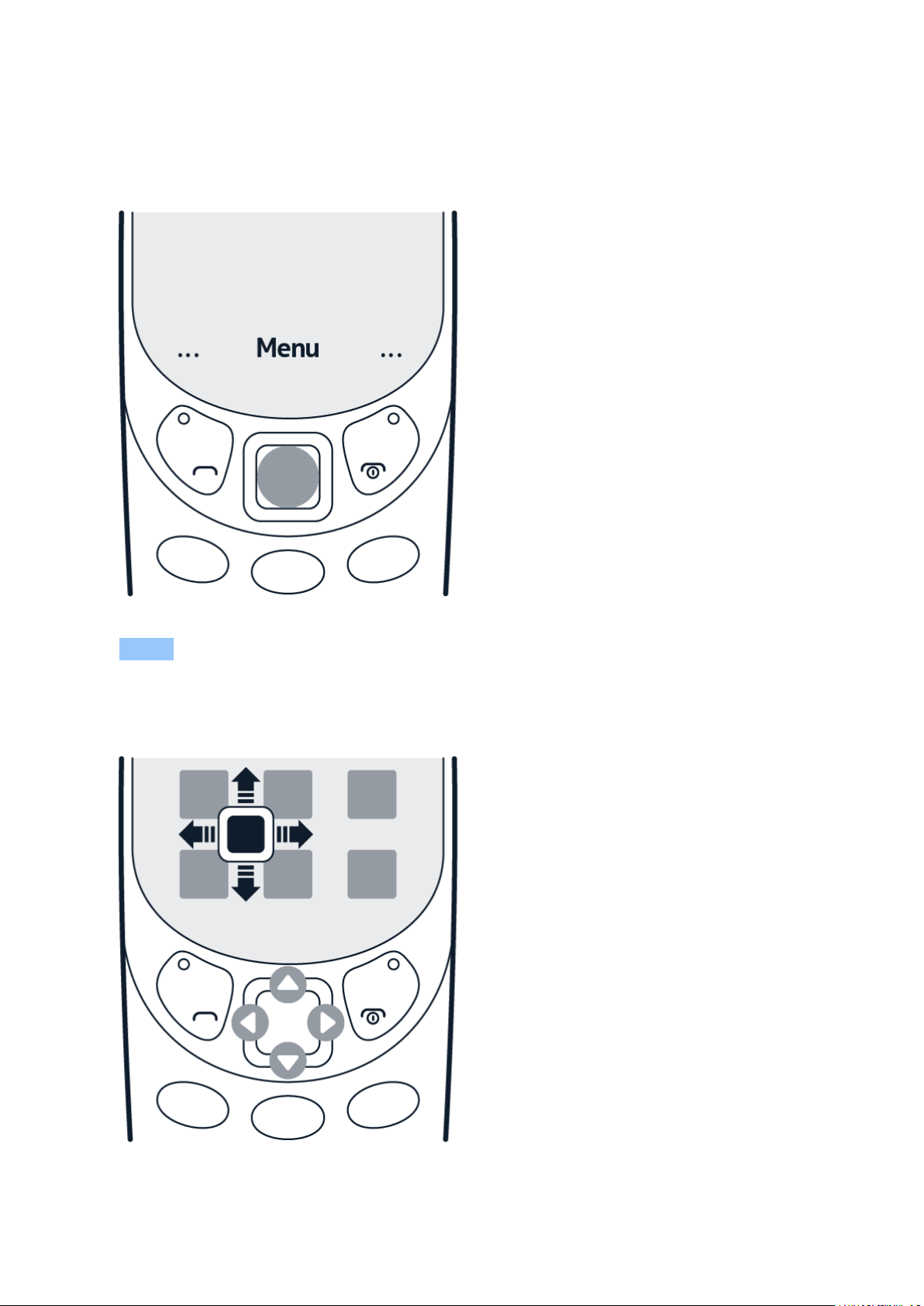
Select Menu .
Go to an app or feature
Press the scroll key up, down, left, or right.
© 2019 HMD Global Oy. All rights reserved. 13
Nokia 3310 3G User Guide
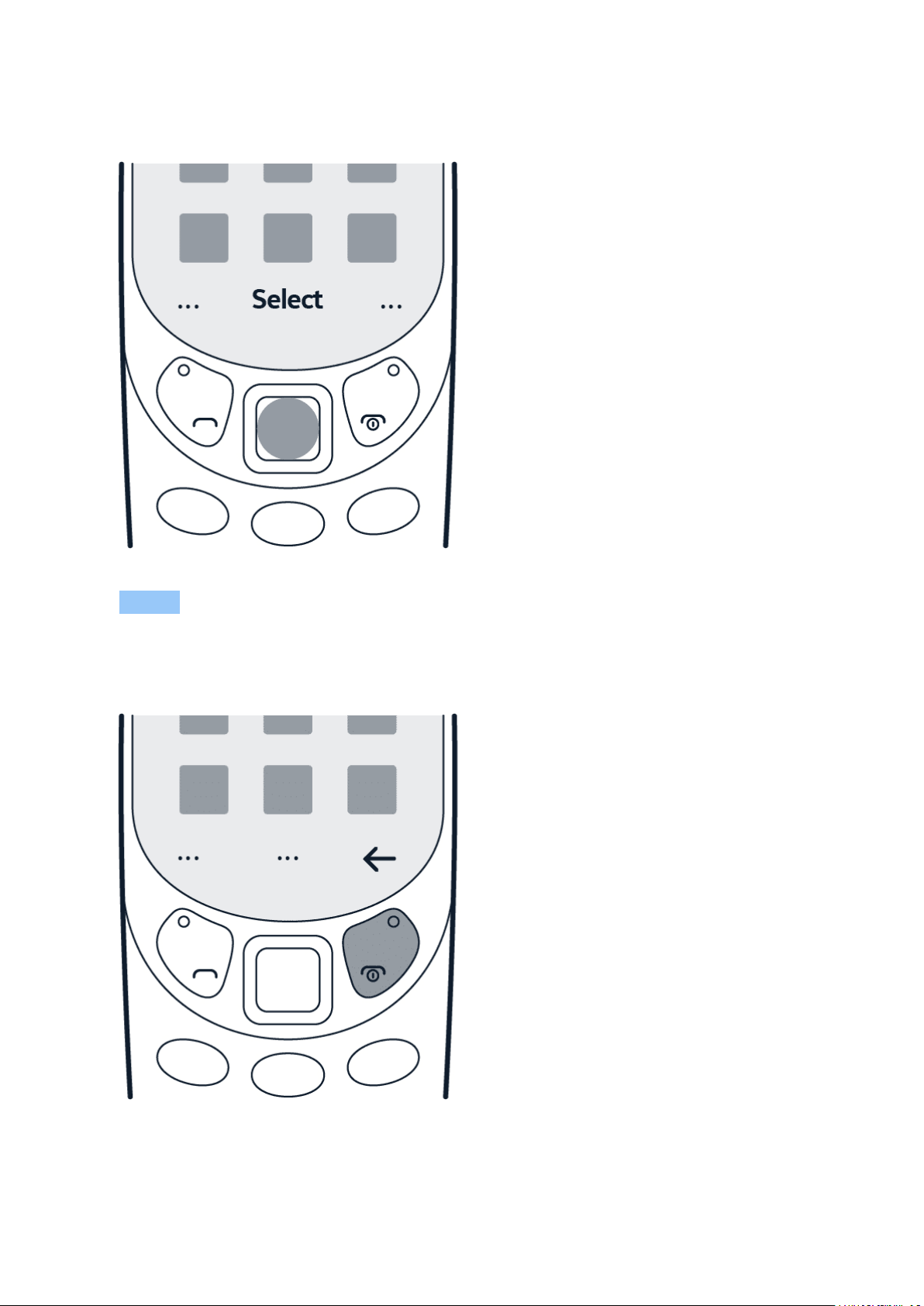
Open an app or select a feature
Select Select .
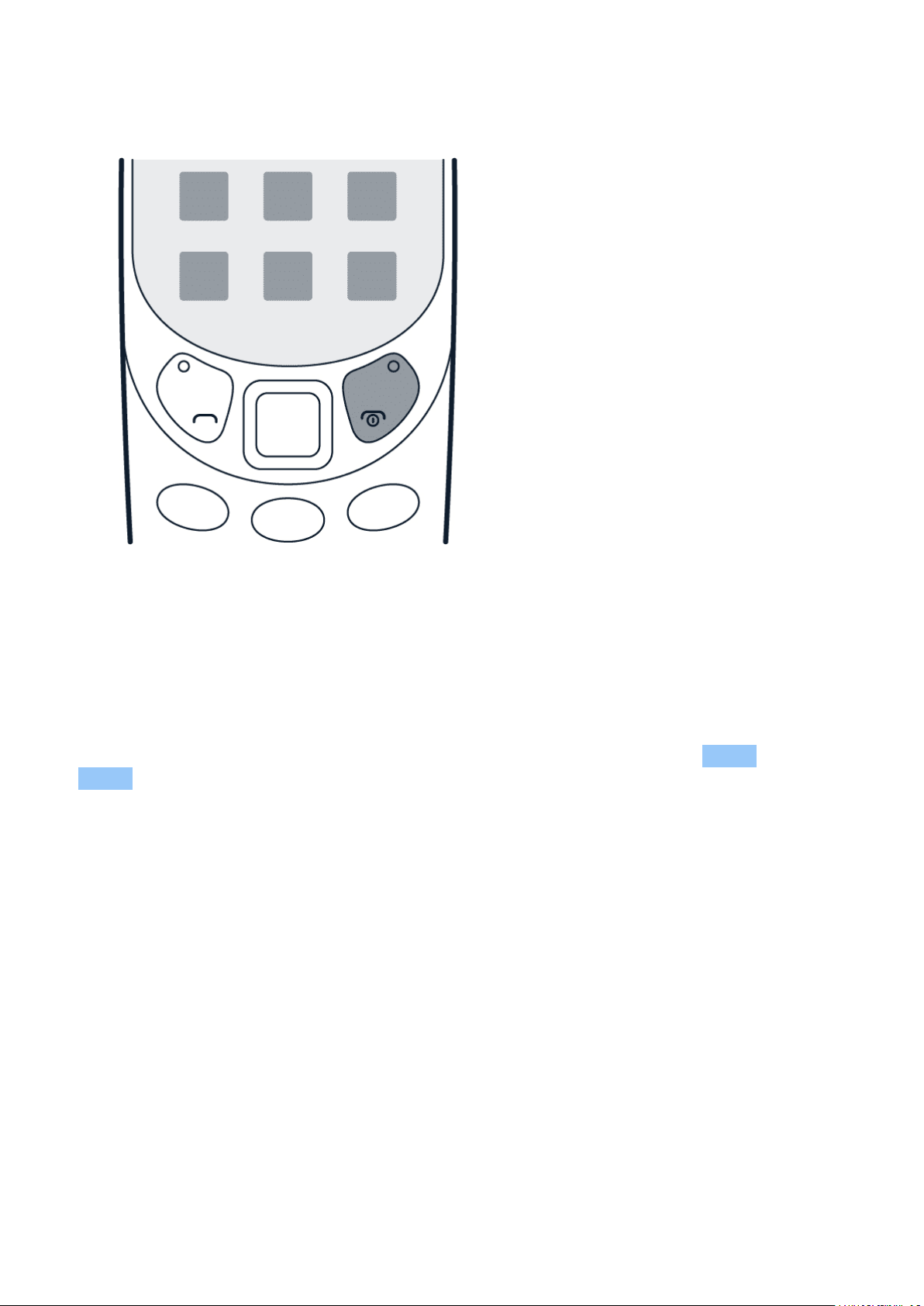
Go back to the previous view
Press .
© 2019 HMD Global Oy. All rights reserved. 14
Nokia 3310 3G User Guide
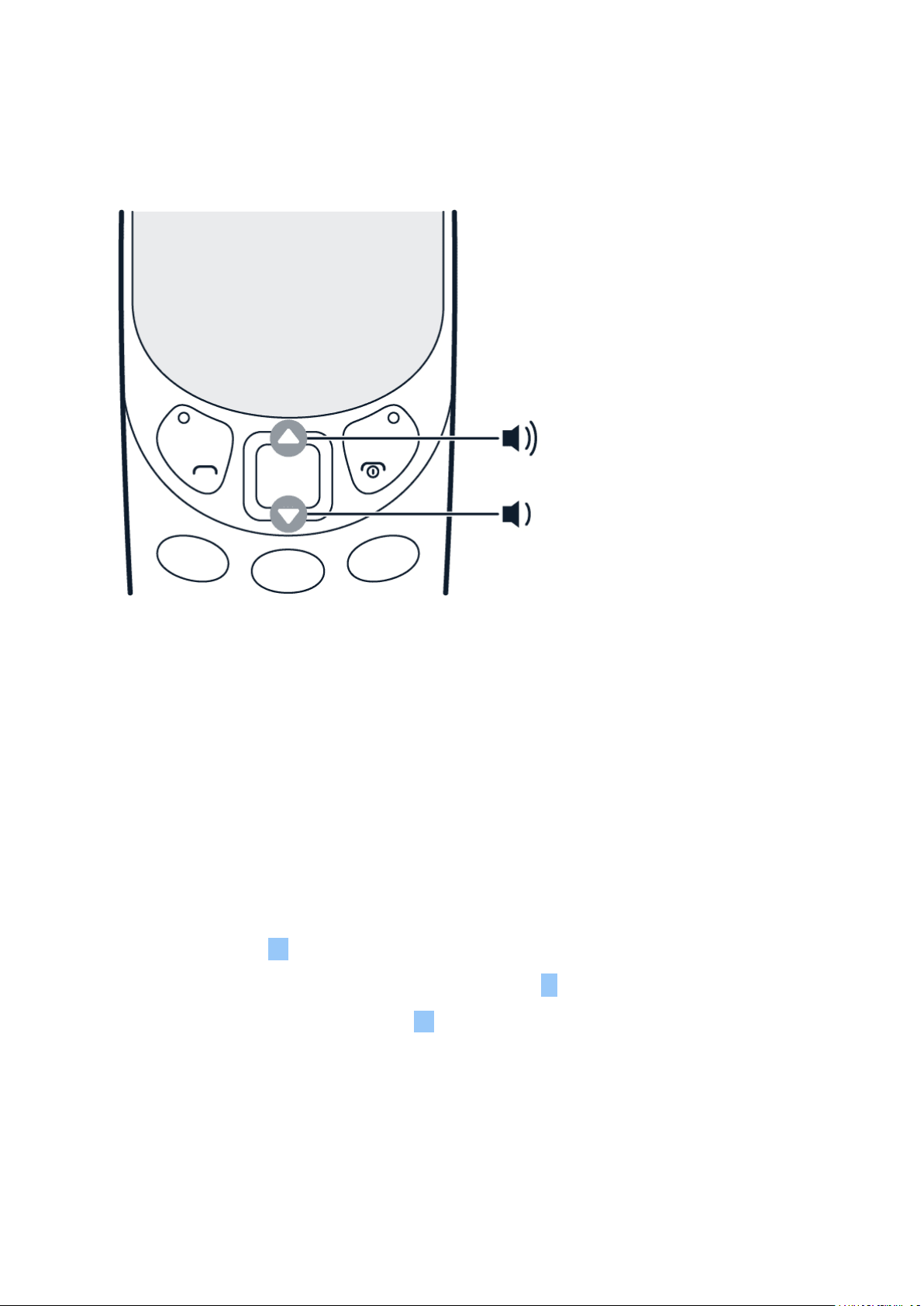
Go back to the home screen
Press the end key.
Arrange the menu
If you want to change the order of applications in the menu, you can rearrange them.
To rearrange the menu, select the application that you want to move. Select Menu >
> Move , and use the scroll key to move the application. Press the scroll key to place the
application to your desired location.
© 2019 HMD Global Oy. All rights reserved. 15
Nokia 3310 3G User Guide
CHANGE THE VOLUME
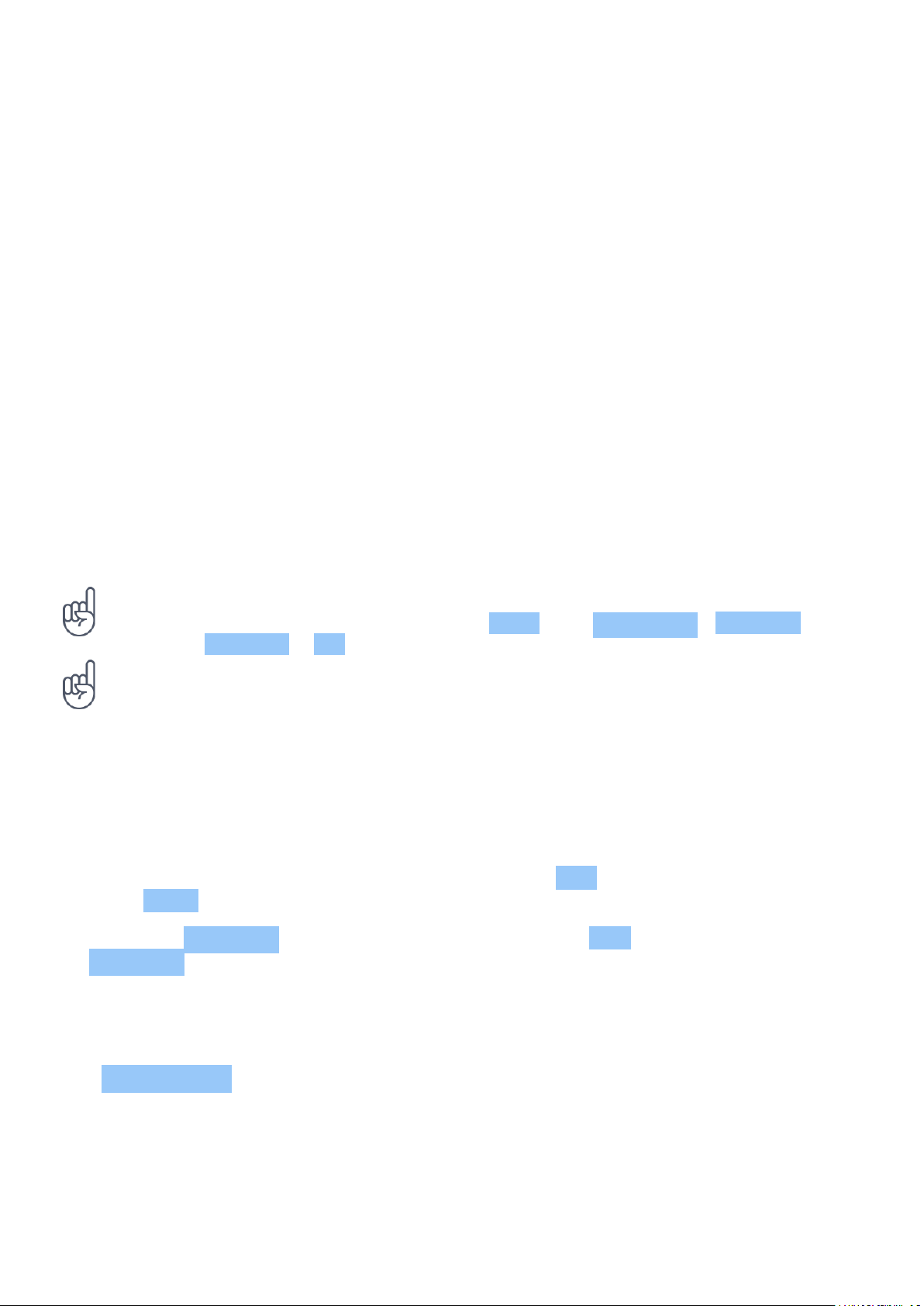
Turn the volume up or down
Trouble hearing your phone ringing in noisy environments, or calls too loud? You can change
the volume to your liking.
Scroll up or down to change the volume during a call or when listening to the radio.
WRITE TEXT
Write using the keypad
Writing with the keypad is easy and fun.
Press a key repeatedly until the letter is shown.
To type in a space press 0 .
To type in a special character or punctuation mark, press * .
To switch between character cases, press # repeatedly.
To type in a number, press and hold a number key.
Use predictive text
To speed up your writing, your phone can guess what you are starting to write. Predictive text
is based on a built-in dictionary. This feature is not available for all languages.
© 2019 HMD Global Oy. All rights reserved. 16

Nokia 3310 3G User Guide
To switch predictive text on, select Menu > > . Scroll to Predictive text and select a
language.
To switch between predictive and traditional text, press # repeatedly.
To switch predictive text off, select Menu > > , scroll to Predictive text , and select
Predictive text off .
© 2019 HMD Global Oy. All rights reserved. 17
Nokia 3310 3G User Guide
4 Calls, contacts, and messages
CALLS
Make a call
Learn how to make a call with your new phone.
1. Type in the phone number. To type in the + character, used for international calls, press *
twice.
2. Press . If asked, select which SIM to use.
3. To end the call, press .
Answer a call
Press .
Tip: To handle your calls hands-free, pair your phone with a compatible Bluetooth headset
(sold separately). To switch Bluetooth on, select Menu > > Connectivity > Bluetooth ,
and switch Bluetooth to On .
Tip: If you are in a situation where you cannot answer the phone and you need to silence it
quickly, press .
Speed dial
You can call a contact quickly using speed dial.
1. To add people to your speed dial list,
select Menu > .
2. Select > Speed dial and switch
Speed dial on.
3. Select Edit .
4. Scroll to an available speed dial number,
and select Add .
5. Select a contact.
You can select whether the phone calls or sends a text message when you press the speed dial
key. By default, the phone calls. To change the call to a text message, select the speed dial and
> Send message .
© 2019 HMD Global Oy. All rights reserved. 18
Nokia 3310 3G User Guide
CONTACTS
Add a contact
Save and organize your friends’ phone numbers.
1. Select Menu > > > Add new contact .
2. Scroll up to add a photo for the contact.
3. Scroll down to write the name and number and to add any other information that you want
to include. You can also select a specific ringtone for the contact.
4. Select > Save contact .
Tip: You can select which memory you want to use for storing contacts. Select Options >
> Storage > Preferred storage and select Phone or Memory card .
Tip: To save a phone number in the dialer, type in the number, and select >
Add to Contacts and select whether to create a new contact or to update existing.
Tip: To copy contacts between your phone and SIM cards, in Contacts , select >
Copy contacts .
Save a contact from call log
You can save contacts from call log.
1. Select Menu > .
2. Highlight the number you want to save, and select > Add to Contacts and select whether
to create a new contact or to update existing.
3. Add the contact’s information and select > Save contact .
Call a contact or send a message
You can call or send messages to a contact directly from the contacts list.
1. Select Menu > and scroll to a contact.
2. Open the contact card, and select whether you want to call or to send a message.
© 2019 HMD Global Oy. All rights reserved. 19

Nokia 3310 3G User Guide
Create a contact group
You can create contact groups and use them, for example, for sending a message to multiple
people at the same time.
1. Select Menu > > > Groups .
2. Select a group, and > Add member .
3. Select a contact, and press . The contact is added to the group.
SEND AND RECEIVE MESSAGES
Write and send messages
1. Select Menu > > + New message .
2. Add the recipients. You can enter a phone number directly or add press to add a recipient
from your contacts or groups.
3. Write a message.
4. Press Send .
Writing options
You can find different options for writing a message from when you are in the message field.
You can insert smileys and symbols, or use ready-made templates. You can add images, sound
or contact cards, discard messages, and save them as drafts.
Message options
When you have received messages in your phone, select the message without opening it, and
press .
You can, for example, call the sender, delete the conversation, and add the sender to
Contacts . You can also access Message settings .
© 2019 HMD Global Oy. All rights reserved. 20
Nokia 3310 3G User Guide
5 Personalize your phone
CHANGE YOUR RING OR MESSAGE TONE
You can choose a new ringtone or message tone.
Change your ringtone
1. Select Menu > > Personalisation > Sounds .
2. Select Ringtone .
3. Scroll to a ringtone.
4. Press Select .
Tip: Is your ringtone too loud or too silent? Select Volume and scroll left or right.
Change your message tones
1. Select Menu > > Personalisation > Sounds > Message alert .
2. Scroll to a message tone.
3. Press Select .
CHANGE THE LOOK OF YOUR HOME SCREEN
Change the look of your home screen with display settings.
Choose a new wallpaper
You can change the background of your home screen with wallpapers.
1. Select Menu > > Personalisation > Lock screen background > Wallpapers .
2. Scroll to a wallpaper and press Select to see how it looks on the screen.
3. Press .
You can also select a wallpaper from the photos you have on your phone.
© 2019 HMD Global Oy. All rights reserved. 21

Nokia 3310 3G User Guide
Choose a new theme color
You can change the color that your phone uses for highlighting items such as menu options.
1. Select Menu > Personalisation > Theme .
2. Scroll left or right to select a color.
3. Press Select .
Select a shortcut for the left and right function key
1. Select Menu > > Personalisation > Keypad > Lock screen shortcuts .
2. Select Right key or Left key and scroll to the application or function you want.
3. Press Select .
© 2019 HMD Global Oy. All rights reserved. 22
Nokia 3310 3G User Guide
6 Camera
PHOTOS
You don’t need a separate camera when your phone has all you need for capturing memories.
Take a photo
Capture the best moments with your phone camera.
1. To switch the camera on, select Menu > .
2. To zoom in or out, scroll up or down.
3. To take a photo, select .
Before you take a photo, you can change your settings in > Camera settings . You can, for
example, adjust the exposure and brightness of a photo.
If you want to add effects to your photo, change the photo quality, or use the timer to better
position a photo, press and select one of the available options.
Tip: To switch the flash on, in camera, select > Flash and switch it on.
View a photo you have taken
To view the photo right after taking it, select > Gallery . To view the photo later, select
Menu > Gallery .
Tip: To set a photo you have taken as the lock screen photo, in Gallery , open the photo and
select > Set as lock screen .
Take several photos
You can take several photos after each other with the burst mode.
1. In camera, select > Burst .
2. Select how many photos you want the camera to take.
3. Go back to the viewfinder, and select . The camera takes several photos with short
intervals.
To continue taking just one photo at a time, select > Burst > 1 .
© 2019 HMD Global Oy. All rights reserved. 23
Nokia 3310 3G User Guide
Edit a photo you have taken
You can edit the photos that you have taken in Gallery .
1. Open a photo.
2. Select > Edit .
3. Select what you want to edit, and use the
scroll key to make the edits.
4. Select Apply .
5. Press .
The edited photo is saved as a new photo.
VIDEOS
You don’t need a separate video camera - record video memories with your phone.
Record a video
Besides taking photos, you can also record videos with your phone.
1. To switch the video camera on, select Menu > and scroll to .
2. To start recording, select .
3. To stop recording, select .
Before you start recording, you can change your settings, add effects, or switch on the video
light in .
Tip: Need more space for your videos? Insert a memory card, and set Menu > > Storage
> Preferred storage to Memory card .
Watch the recorded video
To view the video right after recording, select .
Tip: To view the video later, select Menu > .
© 2019 HMD Global Oy. All rights reserved. 24
Nokia 3310 3G User Guide
7 Internet and connections
BROWSE THE WEB
Learn how to browse the web with your phone.
Connect to internet
Catch up on the news, and visit your favorite websites on the go.
1. Select Menu > .
2. Write a web address, and press OK .
Tip: If you want to avoid data costs, switch mobile data off when you are not surfing the web.
In your single SIM phone, select Menu > > Connectivity > Network settings and switch
Mobile data off.
Tip: If you want to avoid data costs, switch mobile data off when you are not surfing
the web. In your dual SIM phone, select Menu > > Connectivity > Dual SIM >
Mobile data connection , and switch Mobile data off.
Tip: To open a web link from a message, scroll on top of the link and select Go to .
© 2019 HMD Global Oy. All rights reserved. 25
Nokia 3310 3G User Guide
8 Music, audio and videos
MUSIC PLAYER
You can listen to your MP3 music files with the music player.
Listen to music
1. Select Menu > .
2. Select whether you want to view your songs, artists, albums, or playlists.
3. Scroll to a song, and select Play .
Tip: To listen to music using wireless headphones, pair your phone with a compatible
Bluetooth headset (sold separately). To switch Bluetooth on, select Menu > >
Connectivity > Bluetooth , and switch Bluetooth to On .
Tip: To set a song as ringtone, select Songs , scroll to the song you want, and select >
Set as ringtone .
Create a playlist
1. Select Menu > > Songs .
2. Scroll to a song, and select >
Add to playlist .
3. Scroll up and select + New playlist .
4. Give the playlist a name and select OK .
5. Select the playlist that you just created.
The song is added to that playlist.
VOICE RECORDER
Record a sound clip
1. Select Menu > Voice recorder .
2. To record, select .
3. To stop recording, select .
VIDEO PLAYER
Watch your favorite videos wherever you are.
© 2019 HMD Global Oy. All rights reserved. 26

Nokia 3310 3G User Guide
Play a video
1. Select Menu > .
2. Select the video, and press Open .
3. Press the scroll key to pause and resume playback while watching the video.
Tip: Not all video formats are supported.
© 2019 HMD Global Oy. All rights reserved. 27

Nokia 3310 3G User Guide
9 Radio
FIND AND SAVE RADIO STATIONS
You need to connect a compatible headset to listen to the radio. The headset acts as an
antenna. Troubleshooting tip: in case the radio does not work, make sure that the headset is
properly connected.
Search for radio stations
Select Menu > . If you open the radio for the first time, it will automatically search for the
available stations and start playing. To switch to another found station, scroll left or right.
To search for all available stations later, select > Auto tuning .
Save a found station as a favorite
You can save a found station into your list of favorites.
1. To save a station as a favorite, when listening to that station, select > Add to favourites .
2. Select a position, and select Add .
3. Give the channel a name, and select OK .
LISTEN TO RADIO
Did you find a good radio station? Next, start listening to it!
Listen to your favorite radio stations on your phone
Select Menu > . The radio starts playing the last station you have listened.
To change the station, scroll left or right.
To change the volume, scroll up or down.
To close the radio, select > Close radio .
Tip: To listen to a radio station using the phone’s speakers, press and switch Speaker on.
Keep the headset connected.
© 2019 HMD Global Oy. All rights reserved. 28

Nokia 3310 3G User Guide
10 Clock, calendar, and calculator
SET THE TIME AND DATE MANUALLY
You can set your phone clock manually.
Change the time and date
1. Select Menu > > Time & language > Date and time .
2. Switch Auto update to Off .
3. Scroll down, and use the number keys to set the time and date.
ALARM CLOCK
Learn how to use the alarm clock to wake up and get to places on time.
Set an alarm
No clock around? Use your phone as an alarm clock.
1. Select Menu > .
2. Select Add to add an alarm.
3. Set the hour and minutes with the number
keys.
4. Select whether the alarm repeats, and
write a name for the alarm.
5. Select and alarm tone and snooze time.
6. Select Save .
To add another alarm, scroll up to + New alarm and select Add .
To turn off an alarm, scroll to the alarm and select Turn off .
CALENDAR
Need to remember an event? Add it to your calendar.
Add a calendar reminder
1. Select Menu > .
2. Select a date and > Add new event .
3. Type in a name for the event.
4. Scroll down, and set the date and time with
© 2019 HMD Global Oy. All rights reserved. 29

Nokia 3310 3G User Guide
the number keys.
5. Add any other information that you
want to include in the event, including a
reminder time and a ringtone.
6. Select Save .
CALCULATOR
Learn how to add, subtract, multiply and divide with your phone calculator.
How to calculate
1. Select Menu > .
2. Enter the first factor of your calculation, use the scroll key to select the operation, and
enter the second factor.
3. Press the scroll key to get the result of the calculation.
Press to empty the number fields.
© 2019 HMD Global Oy. All rights reserved. 30

Nokia 3310 3G User Guide
11 Bluetooth
ACTIVATE BLUETOOTH
Connect your phone with Bluetooth to other devices.
Switch on Bluetooth
Select Menu > > Connectivity > Bluetooth and switch Bluetooth on.
© 2019 HMD Global Oy. All rights reserved. 31

Nokia 3310 3G User Guide
12 Copy, share and remove content
COPY CONTENT
Copy photos, videos, music, and other content created by you between your phone and
computer.
Copy content between your phone and computer
1. Connect your phone to a compatible computer with a compatible USB cable.
2. Select Mass storage .
3. On your computer, open a file manager, such as Windows Explorer, and browse to your
phone. You can see the content stored on your phone and on the memory card, if inserted.
4. Drag and drop items between your phone and computer.
SHARE CONTENT
Share your stuff, such as contacts, photos, videos and music easily with friends and family.
Share your content using Bluetooth
To share content with Bluetooth, make sure Bluetooth is switched on in both phones, and make
sure the phones are visible to other phones.
1. To share, for example, a photo, select
Menu > Gallery .
2. Open the photo that you want to share,
and select > Share .
3. Select Via Bluetooth . Your phone
searches for available Bluetooth devices.
Press once the receiving phone is
found.
4. Select Pair and enter a passcode. The
passcode can be, for example, a series of
numbers that the recipient must enter
on the receiving phone to confirm the
connection.
5. The recipient may need to accept the files
that you are sending on their phone.
Operating the device in hidden mode is a safer way to avoid malicious software. Do not
accept Bluetooth connection requests from sources you do not trust. You can also switch the
Bluetooth function off when you are not using it.
© 2019 HMD Global Oy. All rights reserved. 32
Nokia 3310 3G User Guide
Share your content using multimedia messages
To share content using multimedia messages, make sure both phones and send and receive
them.
1. To share, for example, a contact card, select Menu > Contacts .
2. Open the contact card that you want to share, and select > Share contact .
3. Select Via multimedia . Your phone opens a new message.
4. Add the recipient of the message, and select Send .
MEMORY
When needed, you can check how much used and how much free memory you have on your
phone.
Check the amount of used and free memory
Select Menu > Files > > Details . The phone shows the amount of available memory, the
amount of used memory, and the amount of free memory.
REMOVE PRIVATE CONTENT FROM YOUR PHONE
If you buy a new phone, or otherwise want to dispose of or recycle your phone, here’s how you
can remove your personal info and content.
Remove content from your phone
When removing private content from your phone, pay attention to whether you are removing
content from the phone memory or the SIM card.
1. To remove messages, select Menu > > > Delete conversations . Select the
conversations that you want to delete, and select . You can also select > Select all to
select all conversations at one go.
2. To remove contacts, select Menu > > > Delete contacts . Select the contacts that
you want to delete, and select . You can also select > Select all to select all contacts at
one go.
3. To remove your call info, select Menu > > < Delete all .
4. Check that all your personal content has been removed.
© 2019 HMD Global Oy. All rights reserved. 33

Nokia 3310 3G User Guide
13 Backup and restore
CREATE A BACKUP
Sometimes you need to create a backup of your phone data.
Create a backup
1. Select Menu > > Storage > Create backup .
2. A list opens where you can select the data that you want to back up.
3. Press <fp>zicon-set.</fp>
4. Your phone tells you that the backup will be saved to your memory card. You cannot use
your phone until the backup is complete. Select OK to create the backup.
RESTORE A BACKUP
To restore a backup of your data you need the created backup file on a memory card.
Restore a backup
1. Select Menu > > Storage > Restore backup .
2. Select the backup, and select OK .
3. Your phone restarts after restoring the backup files.
© 2019 HMD Global Oy. All rights reserved. 34

Nokia 3310 3G User Guide
14 Tools
EXTRAS
Countdown timer
If you need an alarm but don’t want to create one in the alarm clock, use the countdown timer.
You can, for example, time something that’s cooking in the kitchen.
1. Select Menu > Extras > Countdown timer .
2. Use the scroll keys and number keys to set the time and write a name for the timer.
3. Select Start .
After you have set a time in the countdown timer, return to Menu > Extras , scroll to
Countdown timer and press the scroll key to edit or stop the timer.
Stopwatch
1. Select Menu > Extras > Stopwatch .
2. Select Start .
3. Press when, for example, a lap has been completed.
To stop, select Stop and press .
Converter
1. Select Menu > Extras > Converter .
2. Select what you want to convert and how do you want to convert it.
3. Use the number keys to write both measurements. Converter converts the measurements
automatically.
TORCH
Use the flashlight
Select Menu > Torch . Press the scroll key once to switch the flashlight on, and press again to
switch the flashlight off.
Do not shine the light in anyone’s eyes.
© 2019 HMD Global Oy. All rights reserved. 35

Nokia 3310 3G User Guide
COUNTERS
Check and clear counters
Counters keep track of the amount of mobile data used, the calls made and messages sent
using your SIM card. If you have a dual SIM phone, both SIM cards are tracked separately.
To check the details of your SIM card usage, select Menu > Counters . Select the SIM card and
press the scroll key.
To clear all counters, select > Clear all counters .
© 2019 HMD Global Oy. All rights reserved. 36

Nokia 3310 3G User Guide
15 Settings
SYSTEM SETTINGS
Available system settings
Select Menu > > System .
In system settings, you can edit, for example:
• Call settings , including call forwarding, voicemail number, and cost settings
• Settings for Messages , including whether to send delivery reports for messages and
whether to receive multimedia messages when roaming
• Backlight settings, including the brightness and timeout of your keypad backlight
• Settings for Notifications , including what notifications to see in your standby mode
Reset your phone
Accidents may happen and your phone may stop responding. You can restore the original
factory settings, but be careful, since this reset removes all data you have saved in the phone
memory and all your personalization.
If you are disposing your phone, note that you are responsible of removing all private content.
You may need the have the security code to restore the original settings. To reset your phone
to its original settings and to remove all your data, on the home screen, type in *#7370#.
1. Select Menu > > System > About > Restore factory settings .
2. There is no more confirmation after you select OK , but the phone is reset and all data is
removed.
3. The phone reboots.
Send feedback
You can send feedback on your phone directly from Settings .
1. Select Menu > > System > About > Send feedback .
2. Give feedback to questions as instructed, and select Send .
© 2019 HMD Global Oy. All rights reserved. 37

Nokia 3310 3G User Guide
CONNECTIVITY SETTINGS
Available connectivity settings
Select Menu > > Connectivity .
In connectivity settings, you can edit, for example:
• Bluetooth settings, including the phone name and visibility
• Dual SIM settings, including the preferred SIM or calls and messages
• Access point settings, which change the way you connect to the internet
• Settings for Network type , which change the preferred network
Flight mode
When you are flying or in other locations where phone use is restricted, use the flight mode.
To activate flight mode, select Menu > > Connectivity and switch Flight mode on.
Flight mode closes connections to the cellular network and switches your device’s wireless
features off. Comply with the instructions and safety requirements given by, for example, an
airline, and any applicable laws and regulations.
Restrict mobile data usage with data roaming
If you want to avoid extra costs, you can change the data roaming settings.
Select Menu > > Connectivity and switch Data roaming off.
PERSONALIZATION SETTINGS
Change your ringtone
1. Select Menu > > Personalisation > Sounds .
2. Select Ringtone .
3. Scroll to a ringtone.
4. Press Select .
© 2019 HMD Global Oy. All rights reserved. 38

Nokia 3310 3G User Guide
Change your message tones
1. Select Menu > > Personalisation > Sounds > Message alert .
2. Scroll to a message tone.
3. Press Select .
Choose a new wallpaper
You can change the background of your home screen with wallpapers.
1. Select Menu > > Personalisation > Lock screen background > Wallpapers .
2. Scroll to a wallpaper and press Select to see how it looks on the screen.
3. Press .
You can also select a wallpaper from the photos you have on your phone.
Choose a new theme color
You can change the color that your phone uses for highlighting items such as menu options.
1. Select Menu > Personalisation > Theme .
2. Scroll left or right to select a color.
3. Press Select .
Select a shortcut for the left and right function key
1. Select Menu > > Personalisation > Keypad > Lock screen shortcuts .
2. Select Right key or Left key and scroll to the application or function you want.
3. Press Select .
TIME AND LANGUAGE SETTINGS
Change the time and date
1. Select Menu > > Time & language > Date and time .
2. Switch Auto update to Off .
3. Scroll down, and use the number keys to set the time and date.
© 2019 HMD Global Oy. All rights reserved. 39

Nokia 3310 3G User Guide
SECURITY SETTINGS
You can edit the available security settings.
Lock the keypad
To lock the keys automatically, select Menu > > Security > Keyguard >
Automatic keyguard and select On .
Use a security code
You can set the phone to ask for a security code. If there is a pre-set code, it is 12345. Change
it to protect your privacy and personal data. Note, however, that when you change the code,
you need to remember the new code, as HMD Global is not able to open or bypass it. This
phone cannot be located or locked remotely if lost.
1. Select Menu > > Security > Keyguard and switch Security code on.
2. Enter the security code and select OK .
© 2019 HMD Global Oy. All rights reserved. 40
Nokia 3310 3G User Guide
16 Product and safety information
FOR YOUR SAFETY
Read these simple guidelines. Not following them may be dangerous or against local laws and
regulations. For further info, read the complete user guide.
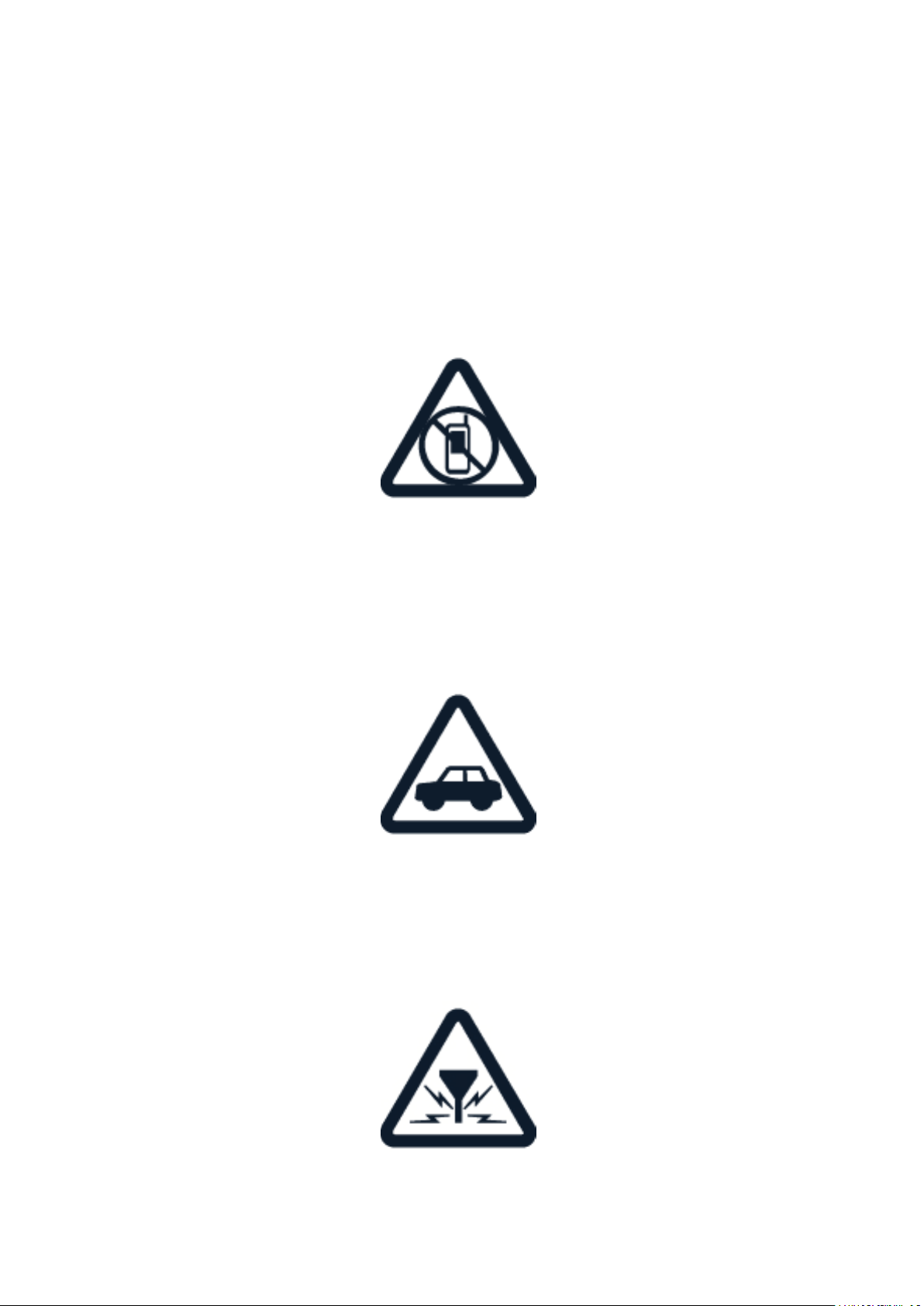
SWITCH OFF IN RESTRICTED AREAS
Switch the device off when mobile phone use is not allowed or when it may cause interference
or danger, for example, in aircraft, in hospitals or near medical equipment, fuel, chemicals, or
blasting areas. Obey all instructions in restricted areas.
ROAD SAFETY COMES FIRST
Obey all local laws. Always keep your hands free to operate the vehicle while driving. Your first
consideration while driving should be road safety.
INTERFERENCE
All wireless devices may be susceptible to interference, which could affect performance.
© 2019 HMD Global Oy. All rights reserved. 41
Nokia 3310 3G User Guide
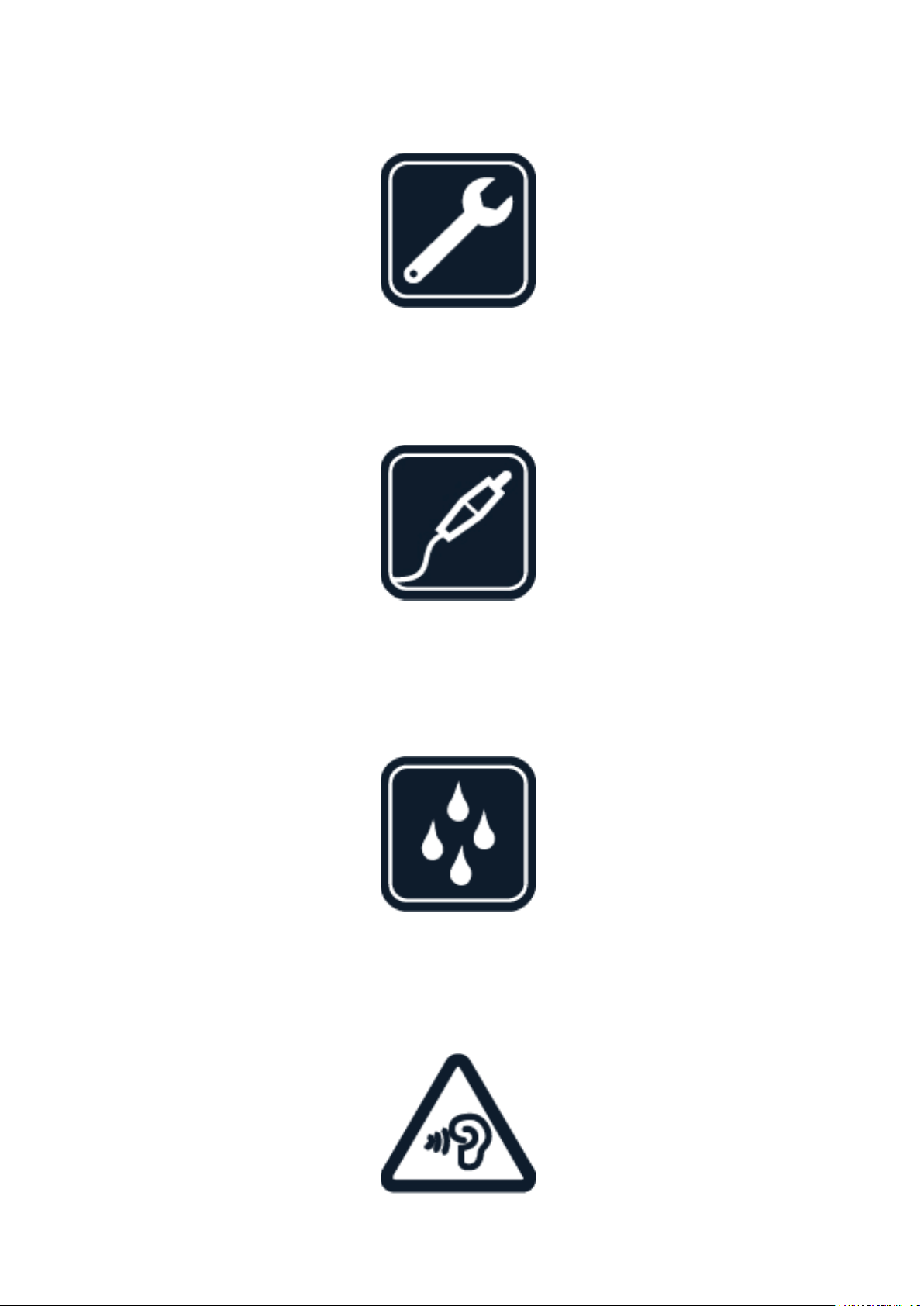
AUTHORIZED SERVICE
Only authorized personnel may install or repair this product.
BATTERIES, CHARGERS, AND OTHER ACCESSORIES
Use only batteries, chargers, and other accessories approved by HMD Global Oy for use with
this device. Do not connect incompatible products.
KEEP YOUR DEVICE DRY
If your device is water-resistant, please refer to its IP rating for more detailed guidance.
PROTECT YOUR HEARING
© 2019 HMD Global Oy. All rights reserved. 42
Nokia 3310 3G User Guide
To prevent possible hearing damage, do not listen at high volume levels for long periods.
Exercise caution when holding your device near your ear while the loudspeaker is in use.
SAR
This device meets RF exposure guidelines when used either in the normal use position against
the ear or when positioned at least 0.2 inches (5 mm) away from the body. The specific
maximum SAR values can be found in the Certification Information (SAR) section of this user
guide. For more info, go to www.sar-tick.com.
When a carry case, belt clip or other form of device holder is used for body-worn operation,
it should not contain metal and should provide at least the above-stated separation distance
from the body. Note that mobile devices may be transmitting even if you are not making a
voice call.
NETWORK SERVICES AND COSTS
Using some features and services, or downloading content, including free items, require a
network connection. This may cause the transfer of large amounts of data, which may result
in data costs. You may also need to subscribe to some features.
You can only use your device on the GSM 900/1800 and WCDMA1 and 8 networks. You need a
subscription with a service provider.
EMERGENCY CALLS
Important: Connections in all conditions cannot be guaranteed. Never rely solely on any
wireless phone for essential communications like medical emergencies.
Before making the call:
• Switch the phone on.
• If the phone screen and keys are locked, unlock them.
• Move to a place with adequate signal strength.
© 2019 HMD Global Oy. All rights reserved. 43

Nokia 3310 3G User Guide
1. Press the end key repeatedly, until the home screen is shown.
2. Type in the official emergency number for your present location. Emergency call numbers
vary by location.
3. Press the call key.
4. Give the necessary info as accurately as possible. Do not end the call until given permission
to do so.
You may also need to do the following:
• Put a SIM card in the phone.
• If your phone asks for a PIN code, type in the official emergency number for your present
location, and press the call key.
• Switch the call restrictions off in your phone, such as call barring, fixed dialling, or closed
user group.
TAKE CARE OF YOUR DEVICE
Handle your device, battery, charger and accessories with care. The following suggestions help
you keep your device operational.
• Keep the device dry. Precipitation,
humidity, and all types of liquids or
moisture can contain minerals that
corrode electronic circuits.
• Do not use or store the device in dusty or
dirty areas.
• Do not store the device in high
temperatures. High temperatures may
damage the device or battery.
• Do not store the device in cold
temperatures. When the device warms to
its normal temperature, moisture can form
inside the device and damage it.
• Do not open the device other than as
instructed in the user guide.
• Unauthorized modifications may damage
the device and violate regulations
governing radio devices.
• Do not drop, knock, or shake the device or
the battery. Rough handling can break it.
• Only use a soft, clean, dry cloth to clean
the surface of the device.
• Do not paint the device. Paint can prevent
proper operation.
• Keep the device away from magnets or
magnetic fields.
• To keep your important data safe, store
it in at least two separate places, such as
your device, memory card, or computer, or
write down important info.
During extended operation, the device may feel warm. In most cases, this is normal. To avoid
getting too warm, the device may automatically slow down, close apps, switch off charging,
and if necessary, switch itself off. If the device is not working properly, take it to the nearest
authorized service facility.
© 2019 HMD Global Oy. All rights reserved. 44
Nokia 3310 3G User Guide
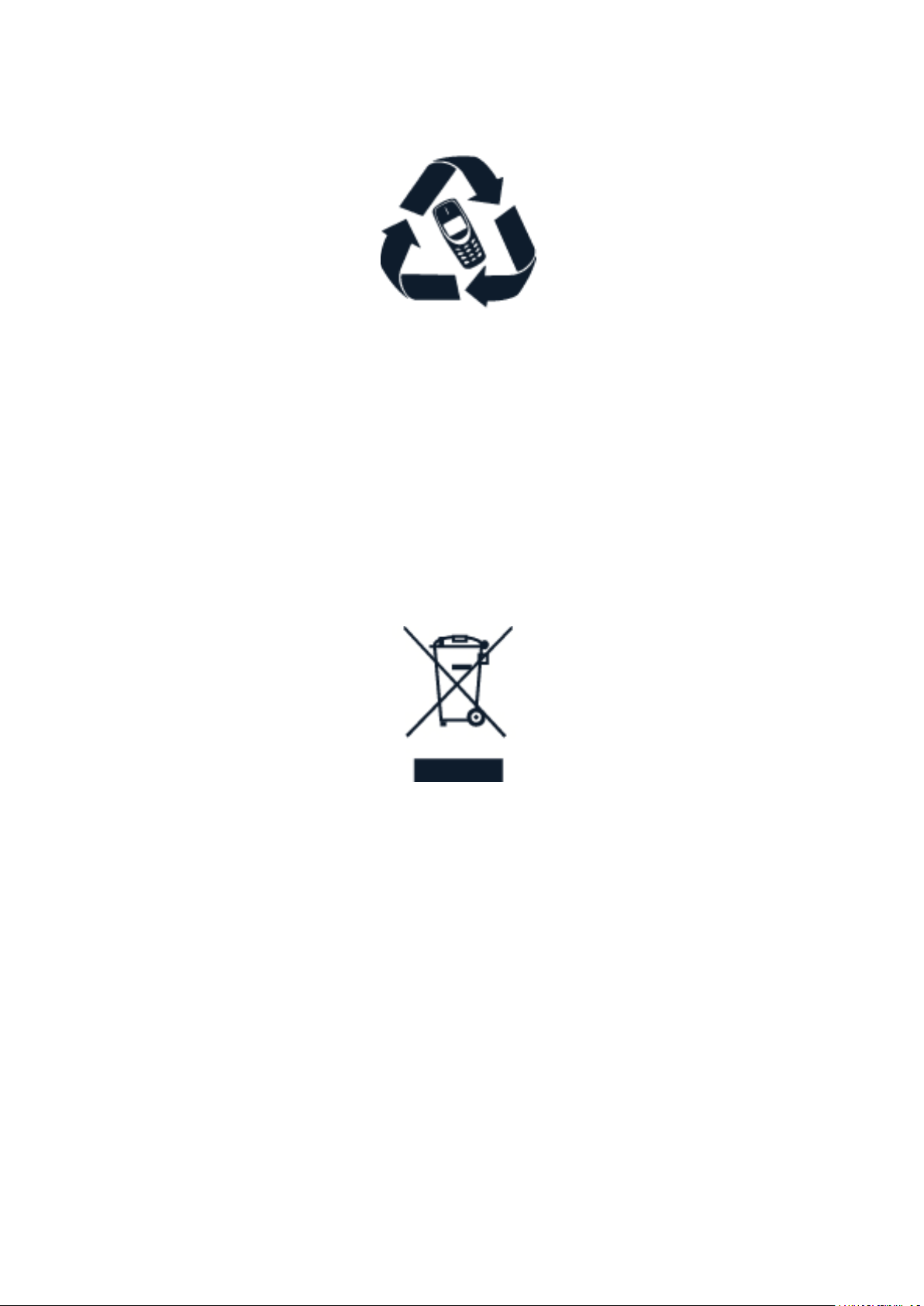
RECYCLE
Always return your used electronic products, batteries, and packaging materials to dedicated
collection points. This way you help prevent uncontrolled waste disposal and promote the
recycling of materials. Electrical and electronic products contain a lot of valuable materials,
including metals (such as copper, aluminum, steel, and magnesium) and precious metals (such
as gold, silver, and palladium). All materials of the device can be recovered as materials and
energy.
CROSSED-OUT WHEELIE BIN SYMBOL
Crossed-out wheelie bin symbol
The crossed-out wheelie bin symbol on your product, battery, literature, or packaging reminds
you that all electrical and electronic products and batteries must be taken to separate
collection at the end of their working life. Do not dispose of these products as unsorted
municipal waste: take them for recycling. For info on your nearest recycling point, check with
your local waste authority.
BATTERY AND CHARGER INFORMATION
Battery and charger
Use your device only with an original BL-4UL rechargeable battery.
Charge your device with AC-18 charger. Charger plug type may vary.
HMD Global may make additional battery or charger models available for this device.
Battery type: BL-4UL
© 2019 HMD Global Oy. All rights reserved. 45

Nokia 3310 3G User Guide
Battery and charger safety info
To unplug a charger or an accessory, hold and pull the plug, not the cord.
When your charger is not in use, unplug it. If left unused, a fully charged battery will lose its
charge over time.
Always keep the battery between 59°F and 77°F (15°C and 25°C) for optimal performance.
Extreme temperatures reduce the capacity and lifetime of the battery. A device with a hot or
cold battery may not work temporarily. Accidental short-circuiting can happen when a metallic
object touches the metal strips on the battery. This may damage the battery or the other
object.
Do not dispose of batteries in a fire as they may explode. Obey local regulations. Recycle when
possible. Do not dispose as household waste.
Do not dismantle, cut, crush, bend, puncture, or otherwise damage the battery in any way.
If a battery leaks, do not let liquid touch skin or eyes. If this happens, immediately flush the
affected areas with water, or seek medical help. Do not modify, attempt to insert foreign
objects into the battery, or immerse or expose it to water or other liquids. Batteries may
explode if damaged.
Use the battery and charger for their intended purposes only. Improper use, or use of
unapproved or incompatible batteries or chargers may present a risk of fire, explosion, or other
hazard, and may invalidate any approval or warranty. If you believe the battery or charger is
damaged, take it to a service centre or your phone dealer before continuing to use it. Never
use a damaged battery or charger. Only use the charger indoors. Do not charge your device
during a lightning storm.
SMALL CHILDREN
Your device and its accessories are not toys. They may contain small parts. Keep them out of
the reach of small children.
MEDICAL DEVICES
Operation of radio transmitting equipment, including wireless phones, may interfere with
inadequately shielded medical devices’ function. Consult a physician or the medical device’s
manufacturer to determine if it is adequately shielded from external radio energy.
IMPLANTED MEDICAL DEVICES
To avoid potential interference, manufacturers of implanted medical devices recommend a
minimum separation of 15.3 centimeters (6 inches) between a wireless device and the medical
device. Persons who have such devices should:
© 2019 HMD Global Oy. All rights reserved. 46
Nokia 3310 3G User Guide
• Always keep the wireless device more
than 15.3 centimeters (6 inches) from the
medical device.
• Not carry the wireless device in a breast
pocket.
• Hold the wireless device to the ear
opposite the medical device.
• Switch the wireless device off if there is
any reason to suspect that interference is
taking place.
• Follow the manufacturer directions for the
implanted medical device.
If you have any questions about using your wireless device with an implanted medical device,
consult your health care provider.
HEARING
Warning: When you use the headset, your ability to hear outside sounds may be affected. Do
not use the headset where it can endanger your safety.
Some wireless devices may interfere with some hearing aids.
PROTECT YOUR DEVICE FROM HARMFUL CONTENT
Your device may be exposed to viruses and other harmful content. Take the following
precautions:
• Be cautious when opening messages.
They may contain malicious software or
otherwise be harmful to your device or
computer.
• Be cautious when accepting connectivity
requests, browsing the internet, or
downloading content. Do not accept
Bluetooth connections from sources you
do not trust.
• Only install and use services and software
from sources that you trust and that offer
adequate security and protection.
• Install antivirus and other security
software on your device and any
connected computer. Only use one
antivirus app at a time. Using more may
affect performance and operation of the
device and/or computer.
• If you access preinstalled bookmarks and
links to third party internet sites, take the
appropriate precautions. HMD Global does
not endorse or assume liability for such
sites.
VEHICLES
Radio signals may affect improperly installed or inadequately shielded electronic systems in
vehicles. For more info, check with the manufacturer of your vehicle or its equipment. Only
authorized personnel should install the device in a vehicle. Faulty installation may be dangerous
and invalidate your warranty. Check regularly that all wireless device equipment in your vehicle
© 2019 HMD Global Oy. All rights reserved. 47

Nokia 3310 3G User Guide
is mounted and operating properly. Do not store or carry flammable or explosive materials in
the same compartment as the device, its parts, or accessories. Do not place your device or
accessories in the air bag deployment area.
POTENTIALLY EXPLOSIVE ENVIRONMENTS
Switch your device off in potentially explosive environments, such as near gasoline pumps.
Sparks may cause an explosion or fire resulting in injury or death. Note restrictions in areas
with fuel; chemical plants; or where blasting operations are in progress. Areas with a potentially
explosive environment may not be clearly marked. These usually are areas where you are
advised to switch your engine off, below deck on boats, chemical transfer or storage facilities,
and where the air contains chemicals or particles. Check with the manufacturers of vehicles
using liquefied petroleum gas (such as propane or butane) if this device can be safely used in
their vicinity.
CERTIFICATION INFORMATION (SAR)
This mobile device meets guidelines for exposure to radio waves.
Your mobile device is a radio transmitter and receiver. It is designed not to exceed the limits
for exposure to radio waves (radio frequency electromagnetic fields), recommended by
international guidelines from the independent scientific organization ICNIRP. These guidelines
incorporate substantial safety margins that are intended to assure the protection of all
persons regardless of age and health. The exposure guidelines are based on the Specific
Absorption Rate (SAR), which is an expression of the amount of radio frequency (RF) power
deposited in the head or body when the device is transmitting. The ICNIRP SAR limit for mobile
devices is 2.0 W/kg averaged over 10 grams of tissue.
SAR tests are carried out with the device in standard operating positions, transmitting at its
highest certified power level, in all its frequency bands.
Please refer to www.nokia.com/phones/sar for the maximum SAR value of the device.
This device meets RF exposure guidelines when used against the head or when positioned
at least 5/8 inch (1.5 centimetres) away from the body. When a carry case, belt clip or other
form of device holder is used for body-worn operation, it should not contain metal and should
provide at least the above stated separation distance from the body.
To send data or messages, a good connection to the network is needed. Sending may be
delayed until such a connection is available. Follow the separation distance instructions until
the sending is finished.
During general use, the SAR values are usually well below the values stated above. This is
because, for purposes of system efficiency and to minimize interference on the network, the
operating power of your mobile is automatically decreased when full power is not needed for
the call. The lower the power output, the lower the SAR value.
Device models may have different versions and more than one value. Component and design
changes may occur over time and some changes could affect SAR values.
© 2019 HMD Global Oy. All rights reserved. 48

Nokia 3310 3G User Guide
For more info, go to www.sar-tick.com. Note that mobile devices may be transmitting even if
you are not making a voice call.
The World Health Organization (WHO) has stated that current scientific information does not
indicate the need for any special precautions when using mobile devices. If you are interested
in reducing your exposure, they recommend you limit your usage or use a hands-free kit to
keep the device away from your head and body. For more information and explanations and
discussions on RF exposure, go to the WHO website at www.who.int/peh-emf/en.
COPYRIGHTS AND OTHER NOTICES
Declaration of Conformity
Hereby, HMD Global Oy (Ltd.) declares that this product is in compliance with the essential
requirements and other relevant provisions of Directive 2014/53/EC. A copy of the Declaration
of Conformity can be found at www.nokia.com/mobile-declaration-of-conformity.
The availability of products, features, apps and services may vary by region. For more info,
contact your dealer or your service provider.
This device may contain commodities, technology or software subject to export laws and
regulations from the US and other countries. Diversion contrary to law is prohibited.
The contents of this document are provided ”as is”. Except as required by applicable law, no
warranties of any kind, either express or implied, including, but not limited to, the implied
warranties of merchantability and fitness for a particular purpose, are made in relation to the
accuracy, reliability or contents of this document. HMD Global reserves the right to revise this
document or withdraw it at any time without prior notice.
To the maximum extent permitted by applicable law, under no circumstances shall HMD Global
or any of its licensors be responsible for any loss of data or income or any special, incidental,
consequential or indirect damages howsoever caused.
Reproduction, transfer or distribution of part or all of the contents in this document in any
form without the prior written permission of HMD Global is prohibited. HMD Global operates
a policy of continuous development. HMD Global reserves the right to make changes and
improvements to any of the products described in this document without prior notice.
HMD Global does not make any representations, provide a warranty, or take any responsibility
for the functionality, content, or end-user support of third-party apps provided with your
device. By using an app, you acknowledge that the app is provided as is.
Downloading of maps, games, music and videos and uploading of images and videos may
involve transferring large amounts of data. Your service provider may charge for the data
transmission. The availability of particular products, services and features may vary by region.
Please check with your local dealer for further details and availability of language options.
Certain features, functionality and product specifications may be network dependent and
subject to additional terms, conditions, and charges. All are subject to change without notice.
© 2019 HMD Global Oy. All rights reserved. 49

Nokia 3310 3G User Guide
Manufacturer and/or importer in EU: HMD Global Oy, Bertel Jungin aukio 9, 02600 Espoo,
Finland.
HMD Global Privacy Policy, available at www.nokia.com/en_int/phones/privacy, applies to your
use of the device.
© 2017 HMD Global. All rights reserved. HMD Global Oy is the exclusive licensee of the Nokia
brand for phones & tablets. Nokia is a registered trademark of Nokia Corporation.
The Bluetooth word mark and logos are owned by the Bluetooth SIG, Inc. and any use of such
marks by HMD Global is under license.
This product includes open source software. For applicable copyright and other notices,
permissions, and acknowledgements, select *#6774# on the home screen.
ABOUT DIGITAL RIGHTS MANAGEMENT
When using this device, obey all laws and respect local customs, privacy and legitimate rights of
others, including copyrights. Copyright protection may prevent you from copying, modifying,
or transferring photos, music, and other content.
© 2019 HMD Global Oy. All rights reserved. 50