
Table of Contents
12
1. SAFETY PRECAUTIONS ...................................................................................................... 14
2. INTENDED USE OF THE REFRIGERATOR ........................................................................ 14
3. INSTALLATION AND CONNECTION ................................................................................... 15
3.1 Choosing the site .......................................................................................................................................... 15
3.2 Positioning and levelling the appliance ......................................................................................................... 15
3.3 Electrical connection ..................................................................................................................................... 15
4. PRODUCT DESCRIPTION ................................................................................................... 16
4.1 Shelves ......................................................................................................................................................... 16
4.2 Refrigerator compartment defrosting water drain .......................................................................................... 16
4.3 Fruit and vegetable box ................................................................................................................................. 16
5. SETTING AND SELECTING THE OPERATING TEMPERATURE ....................................... 17
4.4 Door shelves and containers ......................................................................................................................... 17
4.5 Cheese box ................................................................................................................................................... 17
4.6 Inside lighting ................................................................................................................................................ 17
6. MAINTENANCE AND CLEANING ......................................................................................... 18
6.1 Defrosting the refrigerator compartment ....................................................................................................... 18
6.2 Cleaning the refrigerator ............................................................................................................................... 18
6.3 Switching off the refrigerator ......................................................................................................................... 18
6.4 Practical advice for saving energy ................................................................................................................ 18
6.5 Operating noise ............................................................................................................................................. 19
6.6 Identifying and Dealing with Malfunctions ..................................................................................................... 19
6.7 Changing the inside light bulb ....................................................................................................................... 19
7. TROUBLESHOOTING GUIDE .............................................................................................. 20
INSTRUCTIONS FOR THE USER: these instructions contain user recommendations, description of the
commands and the correct procedures for cleaning and maintenance of the appliance.
INSTRUCTIONS FOR THE INSTALLER: these are intended for the qualified technician who must
install the appliance, set it functioning and carry out an inspection test.
Further information about the products can be found at www.smeg.com
@
Loading page 2...
Loading page 3...

Instructions for the Installer
15
3. INSTALLATION AND CONNECTION
3.1 Choosing the site
Always place the refrigerator in a dry place with satisfactory ventilation. Never expose it to direct sunlight
or install it outdoors. Depending on its climate class (stated on the nameplate), the appliance can be
used in different temperature conditions:
Class Ambient temperature
SN (Subnormal) from + 10° C to + 32° C
N (Normal) from + 16° C to + 32° C
ST (Subtropical) from + 18° C to + 38° C
T (Tropical) from + 18° C to + 43° C
Never place the refrigerator close to heat sources. If this is unavoidable, a suitable insulating panel must
be used to allow the appliance to function properly. Otherwise, place the appliance at least 3 cm from
electric or gas cookers and at least 30 cm from combustion or radiation heating systems.
To allow proper cooling of the condenser, the refrigerator must not
be placed too close to the wall. To prevent this, the appliance comes
complete with two plastic spacers which must be fitted to the top of
the condenser. If the refrigerator is installed underneath a wall
cupboard, the distance between the two must be at least 5 cm.
Take care not to scratch or damage the floor when installing the
appliance on parquet or linoleum. If necessary, when positioning
slide the refrigerator over pieces of wood or a mat to the point
decided for connection to the electrical mains.
3.2 Positioning and levelling the appliance
Place the refrigerator on a firm, level surface. To compensate for
any unevenness in the floor, the refrigerator has four adjustable
feet. This gives it added stability and makes it easier to move
around and position. Take great care when moving the appliance
not to damage the floor (for example, when installing on a parquet
floor).
3.3 Electrical connection
Before switching the refrigerator on for the first time, leave it vertical for at least two hours. Then connect
the appliance's power supply lead to a mains socket with earth contact, installed in accordance with
electrical safety regulations. The rated voltage and frequency are stated on the nameplate inside the
refrigerator compartment. The appliance must be conn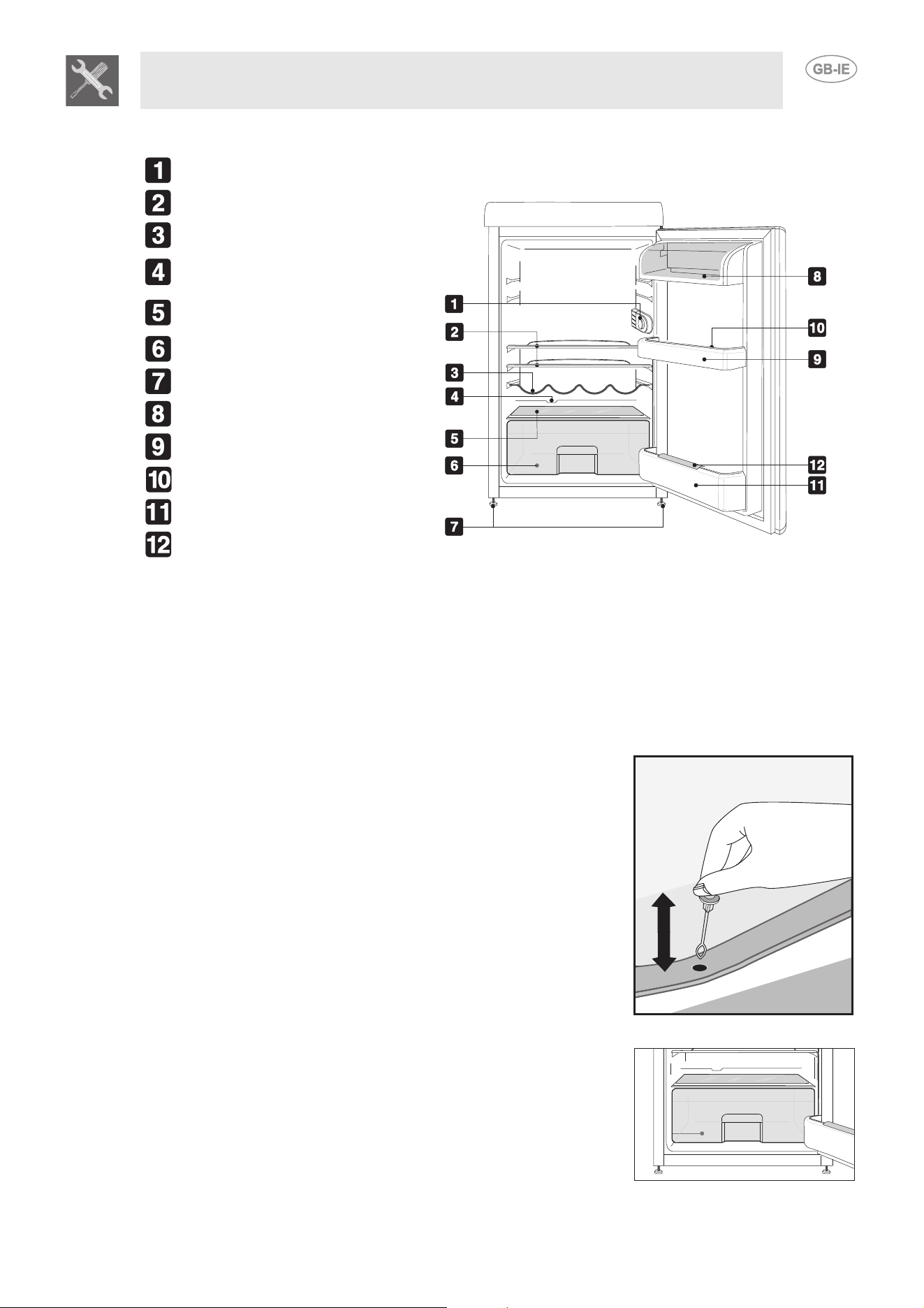
Instructions for the Installer
16
4. PRODUCT DESCRIPTION
Inside light and thermostat knob.
Removable shelves.
Bottle shelf
Defrosting water collection
channel.
Fruit and vegetable compartment
lid.
Fruit and vegetable compartment.
Adjustable front and rear feet.
Dairy produce compartment.
Door compartments.
Egg compartment.
Bottle shelf.
Bottle retainer strut.
4.1 Shelves
The refrigerator comes complete with several shelves which can be set at different heights by placing
them on the runners provided. Each shelf has a safety fitting to prevent it from being pulled completely
out or accidentally removed. To remove it from the appliance, lift it at the back and extract it. Then
change the position of the shelf or shelves as you require. For easy removal of all internal accessories,
the door has to be opened completely.
4.2 Refrigerator compartment defrosting water drain
The rear of the refrigerator compartment, underneath the refrigerating
plate, has a channel and a hole for collecting the defrosting water. To
ensure the refrigerator can function properly, take care never to block
this hole. It is best to check and clean it fairly regularly using the
condensation drain funnel cap provided.
4.3 Fruit and vegetable box
this container is in the bottom of the refrigerator compartment, which is
fitted with a glass shelf to cover fresh foods that require constant
humidity for optimum storage.

Instructions for the user
17
5. SETTING AND SELECTING THE OPERATING TEMPERATURE
4.4 Door shelves and containers
The inside of the door is fitted with special shelves and boxes to take eggs,
butter, dairy products, tubes, preserves and other small packages. The
bottom of the door has a shelf to take vertical bottles.
All door shelves and boxes can be removed for cleaning. To remove them from the door, tap them
upward with your fist in the first on one side of the insertion zone and then on the other. Do not place
excessively heavy bottles on the bottle shelf, and place bottles on the shelf gently when loading them.
4.5 Cheese box
A special cheese box with lid is supplied. This box can be placed on any shelf
as required.
4.6 Inside lighting
When the refrigerator door is opened, the light comes on; it remains on until
the door is completely closed again. The light comes on even if the refrigerator
thermostat is set on "0", meaning that the refrigerator is switched off.
The knob in the top right-hand corner of the refrigerator is used to
set the operating temperature. When the knob is turned to 0, the
appliance is switched off. The operating settings are from 1 to 5.
There is no direct correspondence between the setting chosen and
the temperature. Increasing the setting number reduces the
temperature. In normal operating conditions, a medium-low setting
(1-2) is recommended. This will provide effective storage of the
fresh foods in the refrigerator compartment.
Important
Changes in weather conditions (temperature and humidity) and the frequency with which the
door is opened may affect the refrigerator's operating temperatures.

Instructions for the User
18
6. MAINTENANCE AND CLEANING
6.1 Defrosting the refrigerator compartment
The refrigerator compartment has automatic defrosting. During normal operation of the refrigerator, frost
forms on its back wall when the compressor is working and dissolves when it is not in operation. When
the compressor is not working, the frost which has built up on the back wall melts and the water flows
into the opening provided in the bottom of the body of the refrigerator. From here, it flows into the tray on
the compressor, where it evaporates.
Warning
The amount of ice which forms on the back wall may vary with changes in weather conditions
(temperature and humidity), the frequency with which the door is opened, the appliance's operating
temperatures and the amount of fresh foods stored inside (especially fruit and vegetables).
6.2 Cleaning the refrigerator
Before cleaning, disconnect the plug from the electrical mains. Clean the outside using only water and a
gentle liquid detergent or an ordinary detergent for washable surfaces (such as a window-cleaning
product). Never use products containing abrasives or substances which may attack the lacquered or
painted parts, acids or chemical solvents. Use a sponge or a soft cloth.
Do not use steam cleaners to clean the inside; we recommend the use of refrigerator-specific
disinfectants. Special SMEG brand steel cleaning products are available from our Service Centres.
Remove the shelves and accessories, taking care not to apply excessive force when removing. Follow
the instructions provided in the "Door Shelves and Containers" section carefully. Never wash removable
plastic parts in the dishwasher; use only warm water and washing-up liquid or water and vinegar. Take
care not to wet the electrical lighting components with water or detergents.
Clean the seals with warm water and then dry.
To allow the refrigerator to operate at full efficiency, periodically also clean the
condenser on the rear with a brush or a vacuum cleaner.
Also make a periodic check on the tray above the compressor, and clean it if
necessary.
6.3 Switching off the refrigerator
If the refrigerator is to be out of use for some time, turn the thermostat knob to 0. Then empty the
compartments, disconnect the appliance from the electrical mains, and once it has defrosted dry any
residual moisture which has collected. Leave the door ajar to prevent the humidity and trapped air from
creating unpleasant smells.
6.4 Practical advice for saving energy
- Install the refrigerator in a cool, well ventilated place, protected against direct sunlight and well away
from heat sources.
- Do not place hot foods in the refrigerator section. Wait for foods and drinks to cool to room
temperature before placing them on the shelves;
- Open the door(s) as infrequently and for as short a time as possible to prevent the compartments
from warming up too much;
- Clean the condenser (rear of the refrigerator) periodically to prevent the appliance from losing
efficiency;
- On models equipped with intensive cooling and rapid freezing, do not leave these functions activated
for longer than absolutely necessary;
- If the refrigerator is to be out of use for a long period, it is best to empty it and switch it off;
Loading page 8...
Loading page 9...