Rev.03_10082018
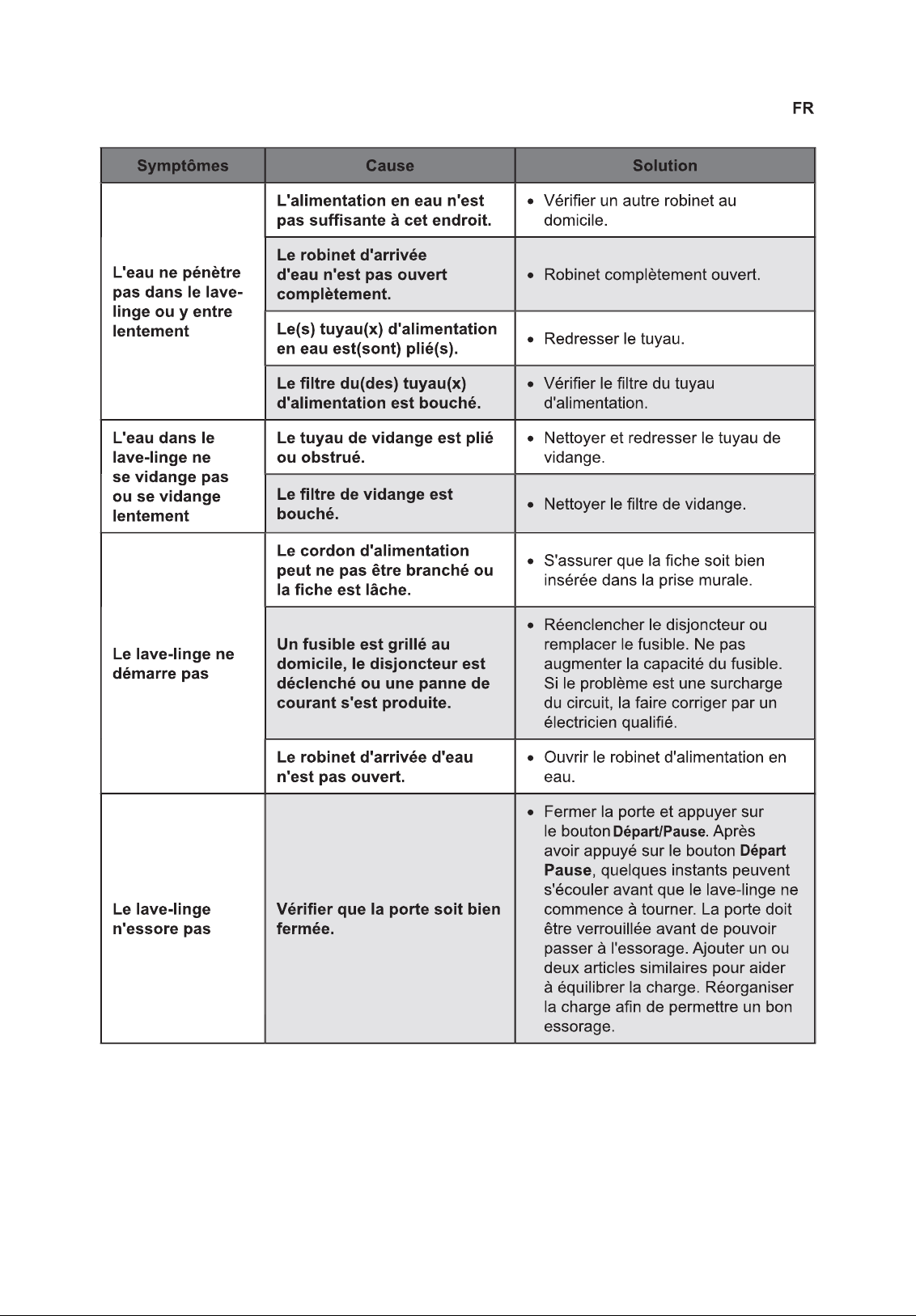
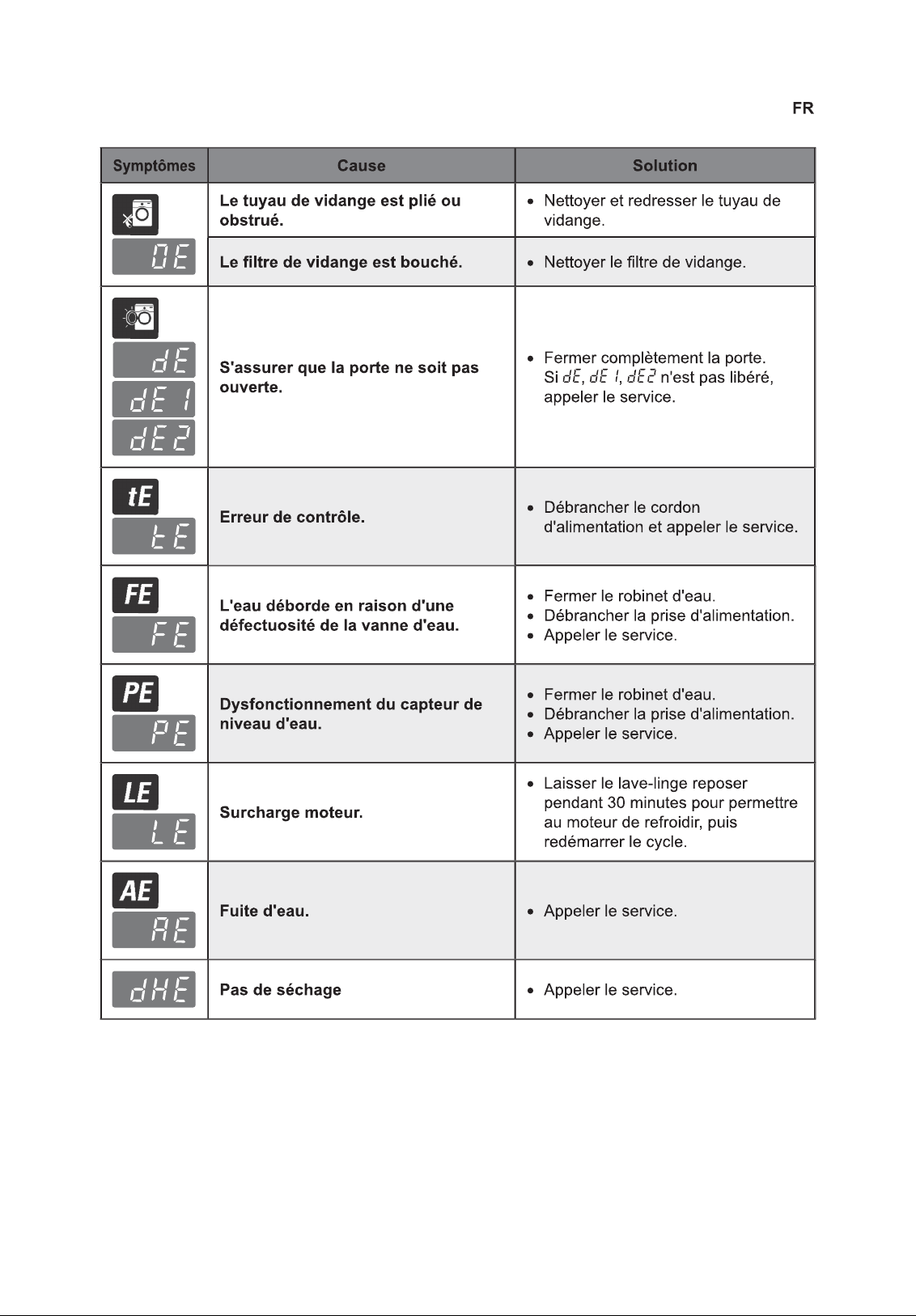
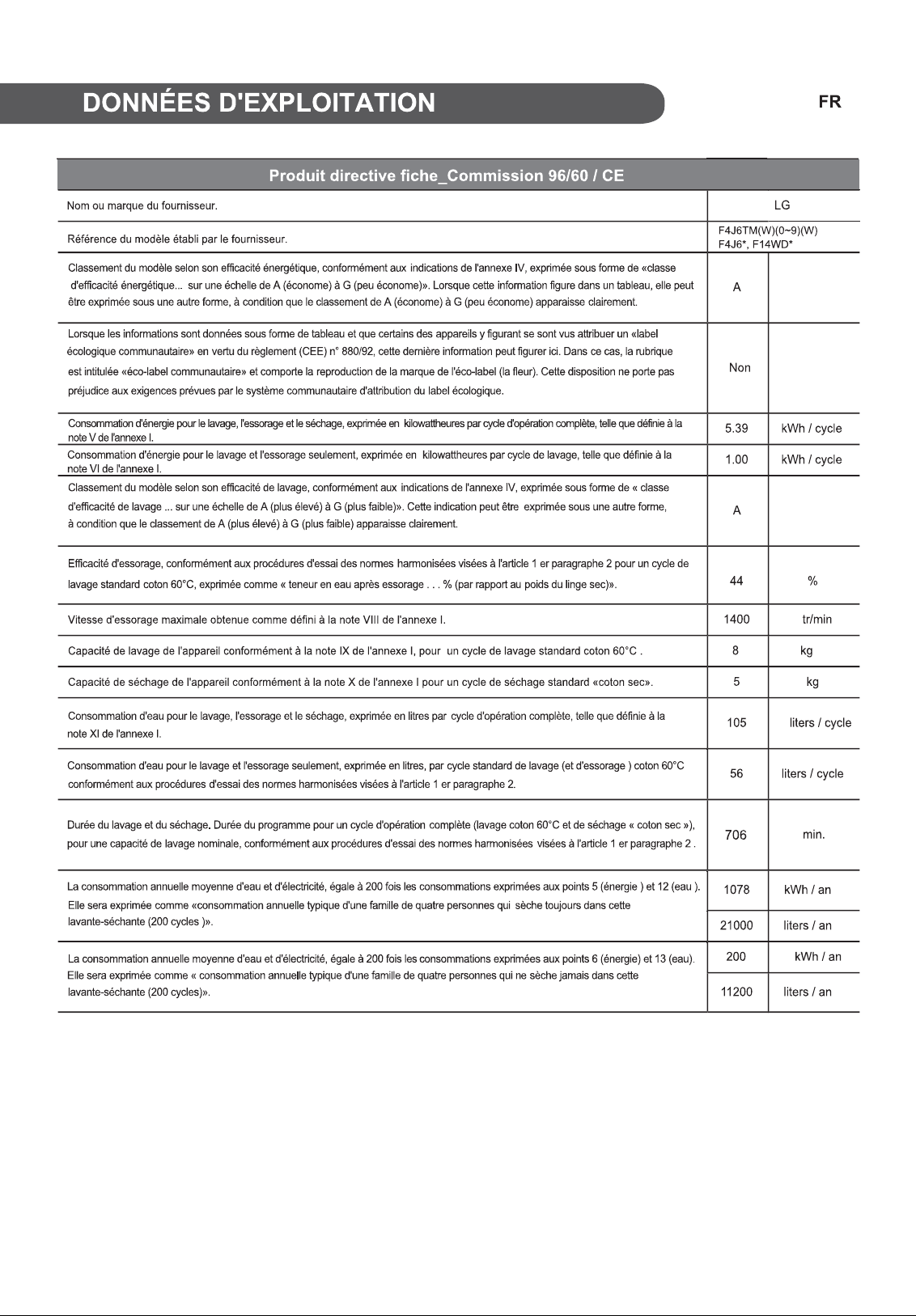
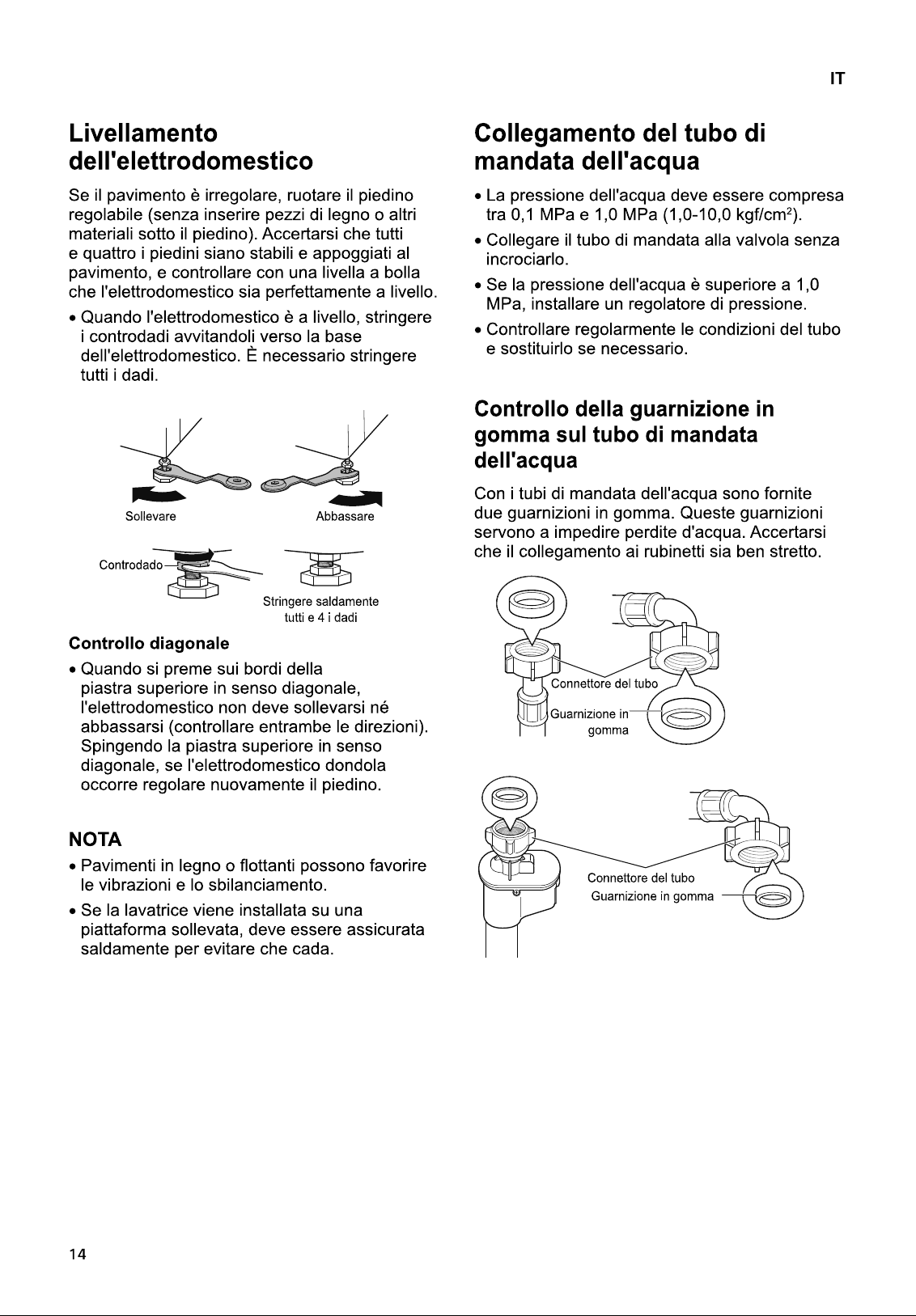
35
40
43
35
38
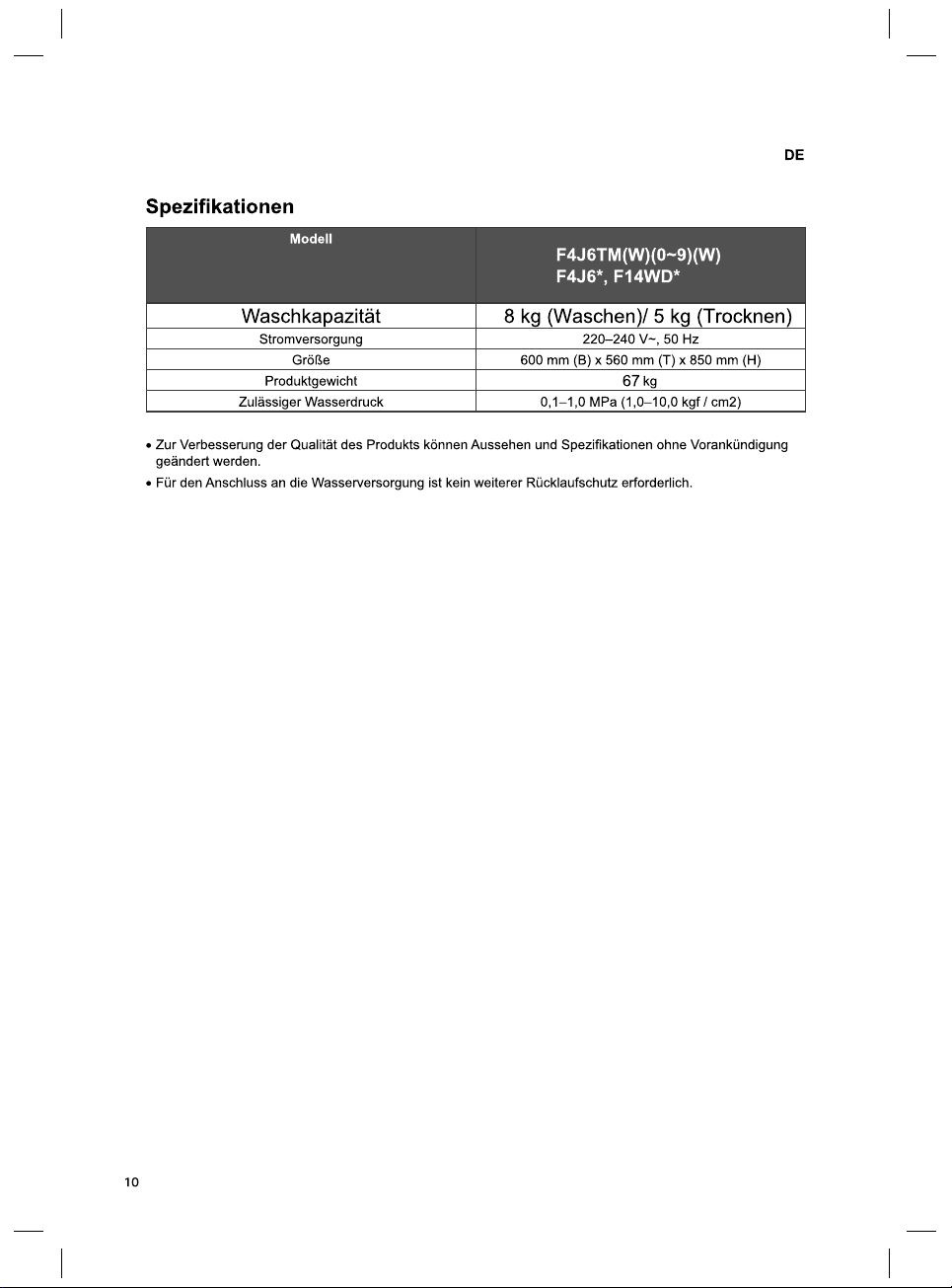
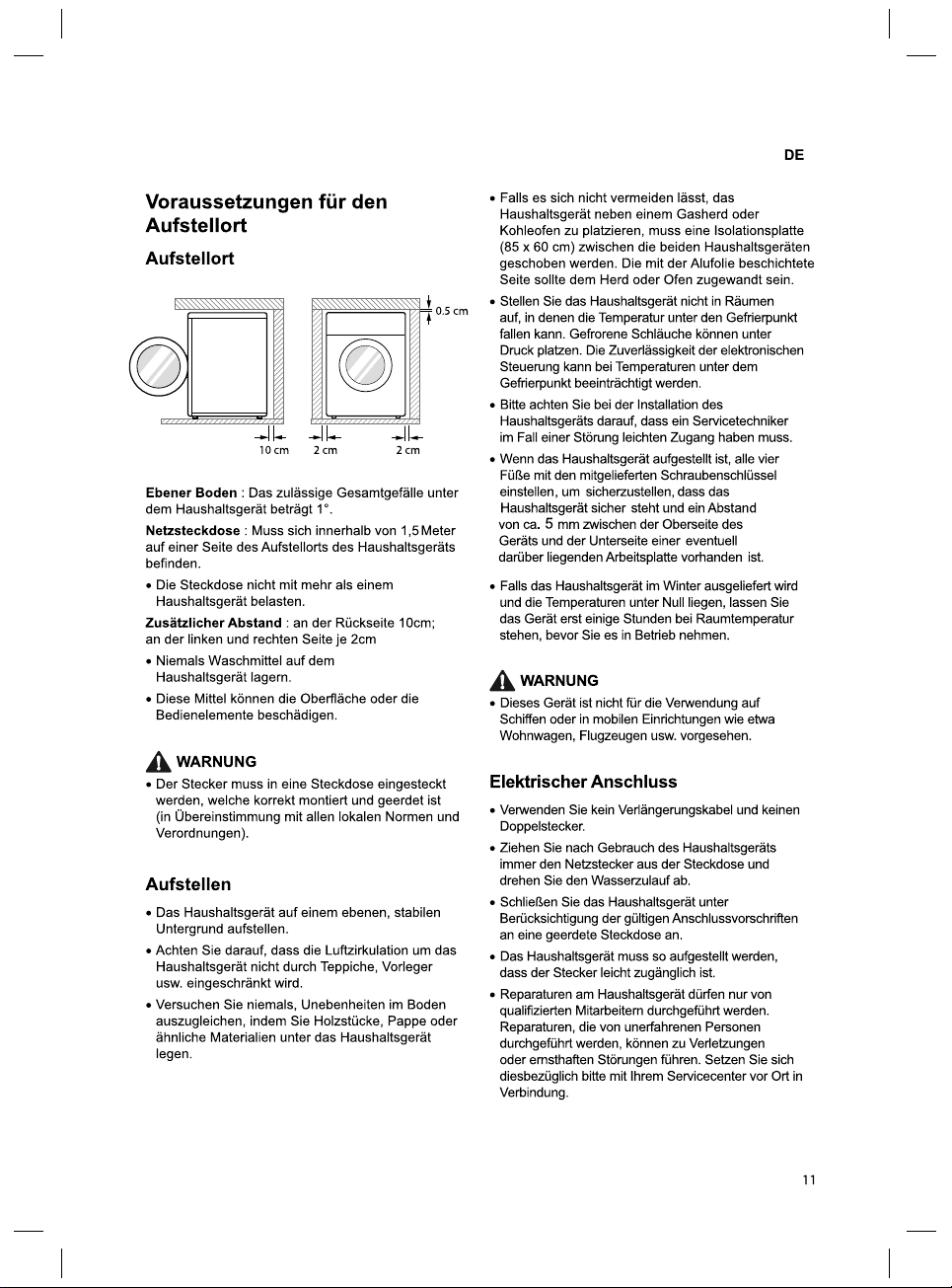
2 cm
0.5 cm
2 cm10 cm
5
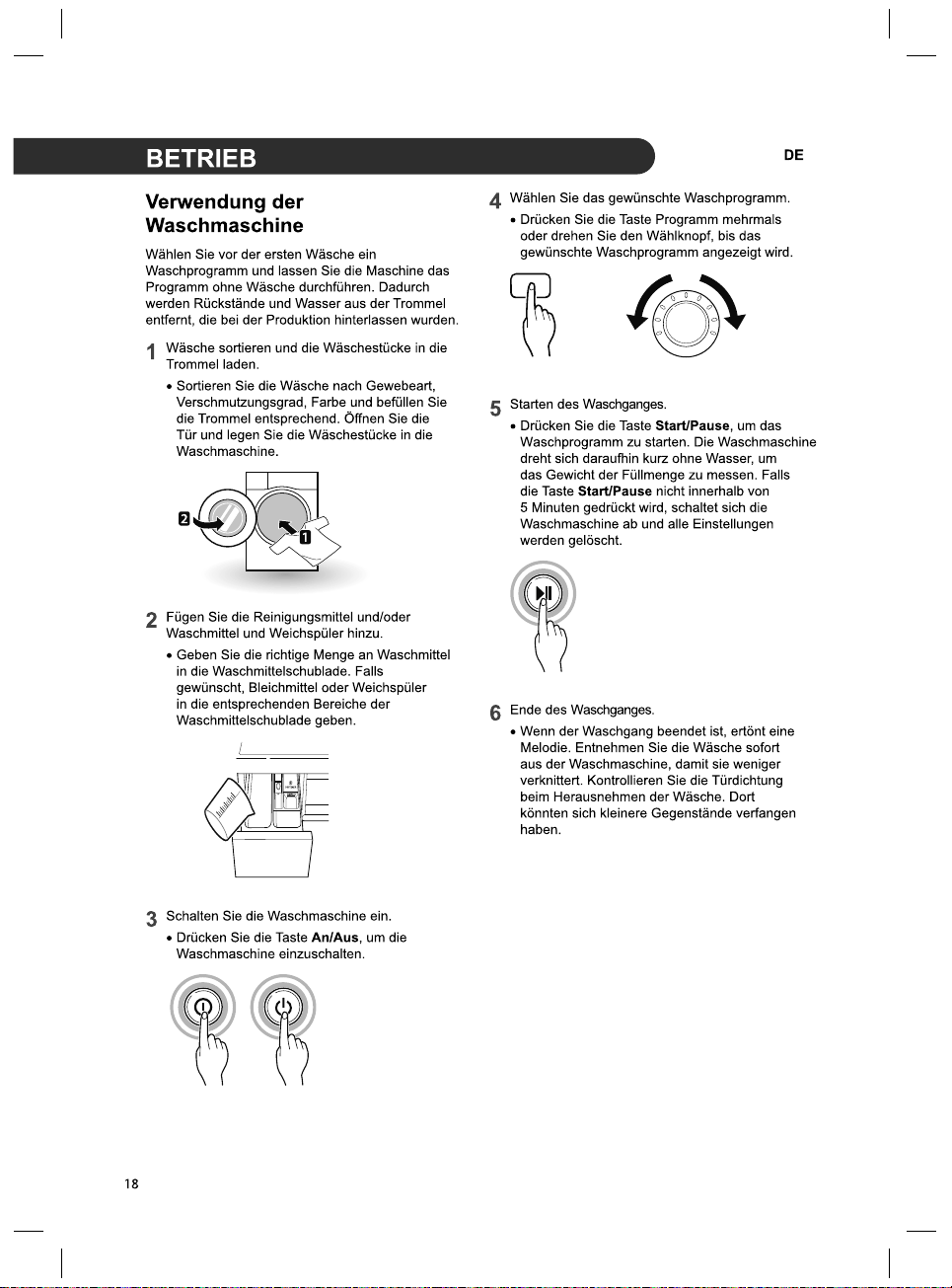
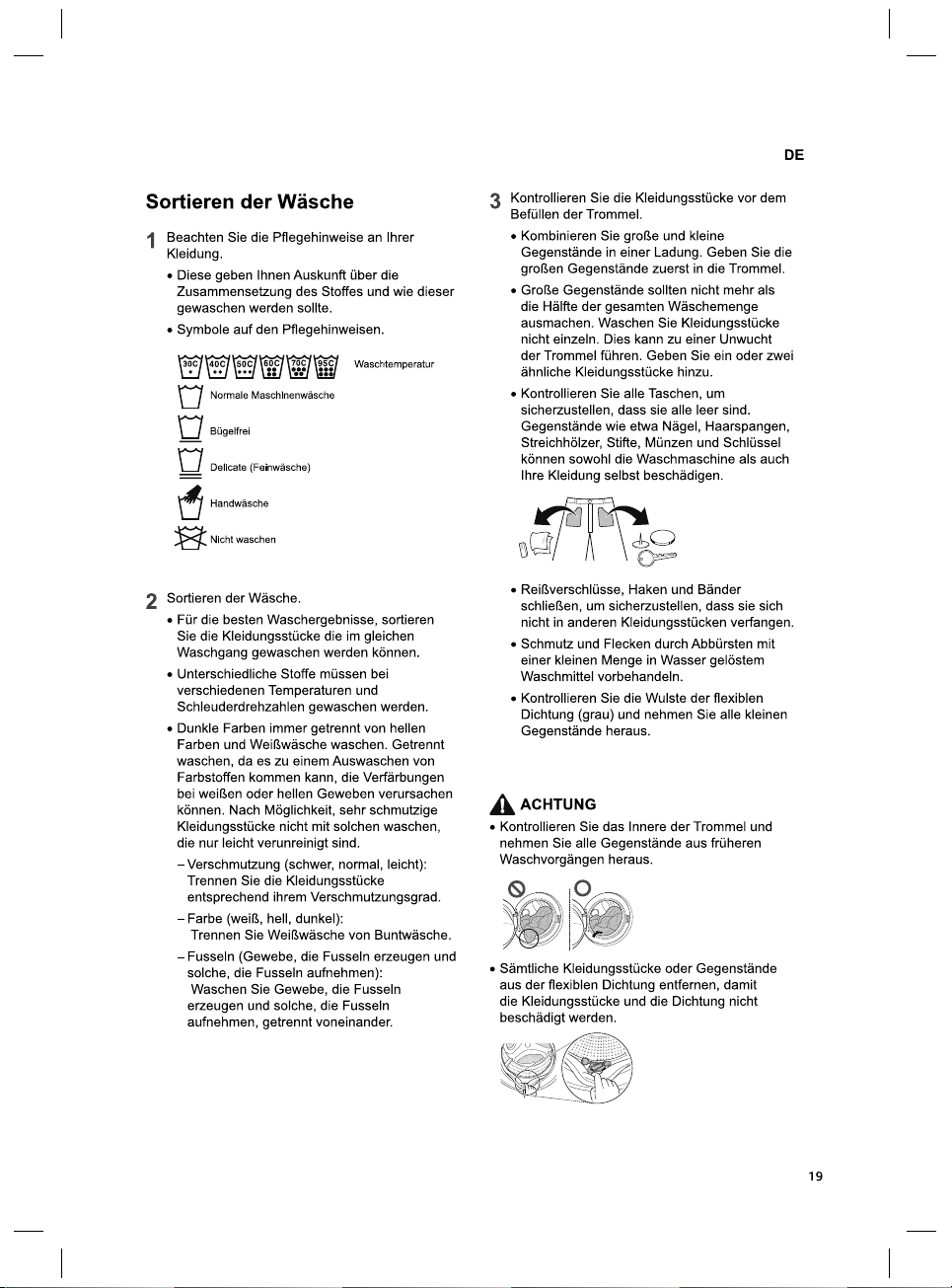
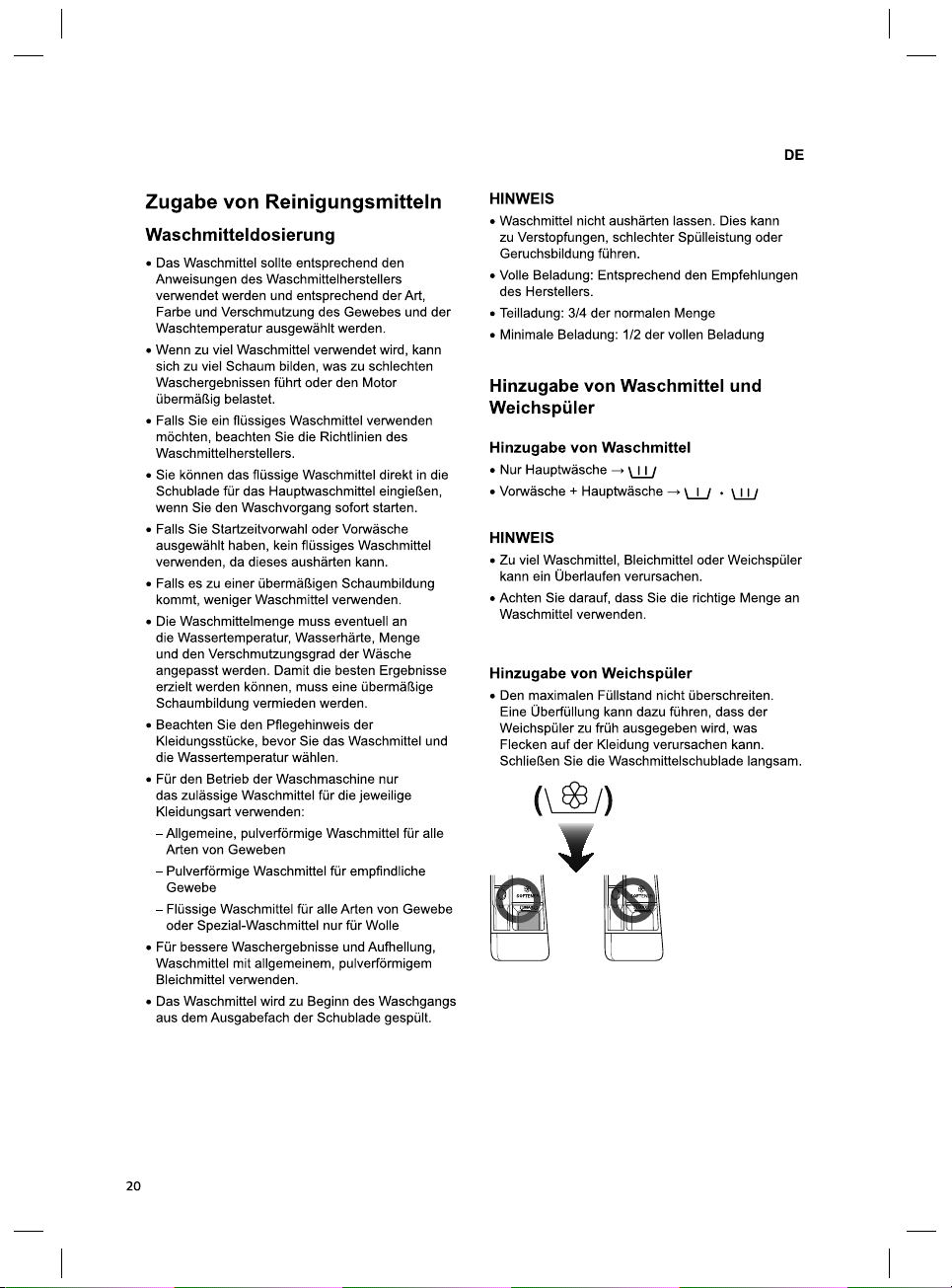
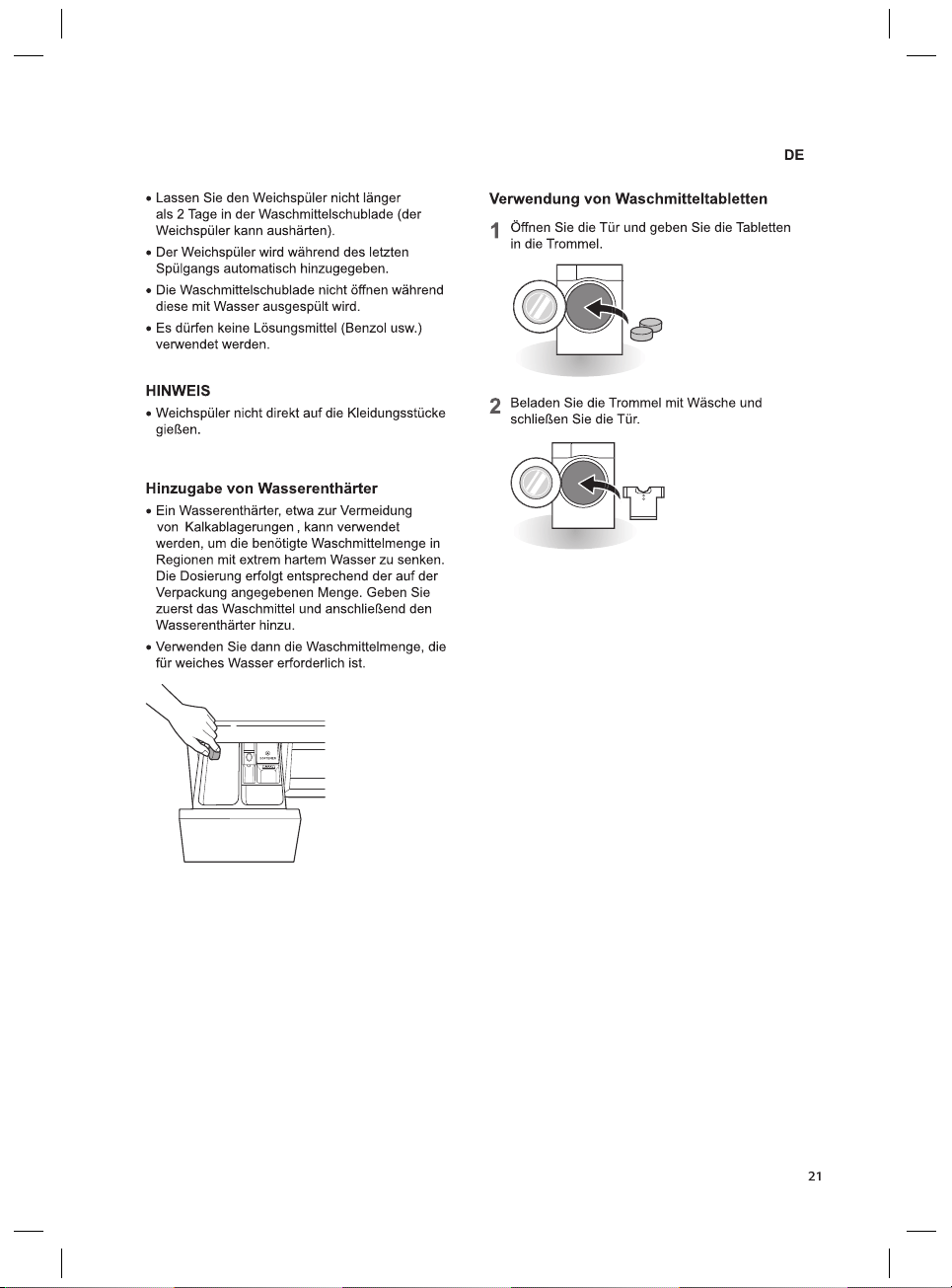
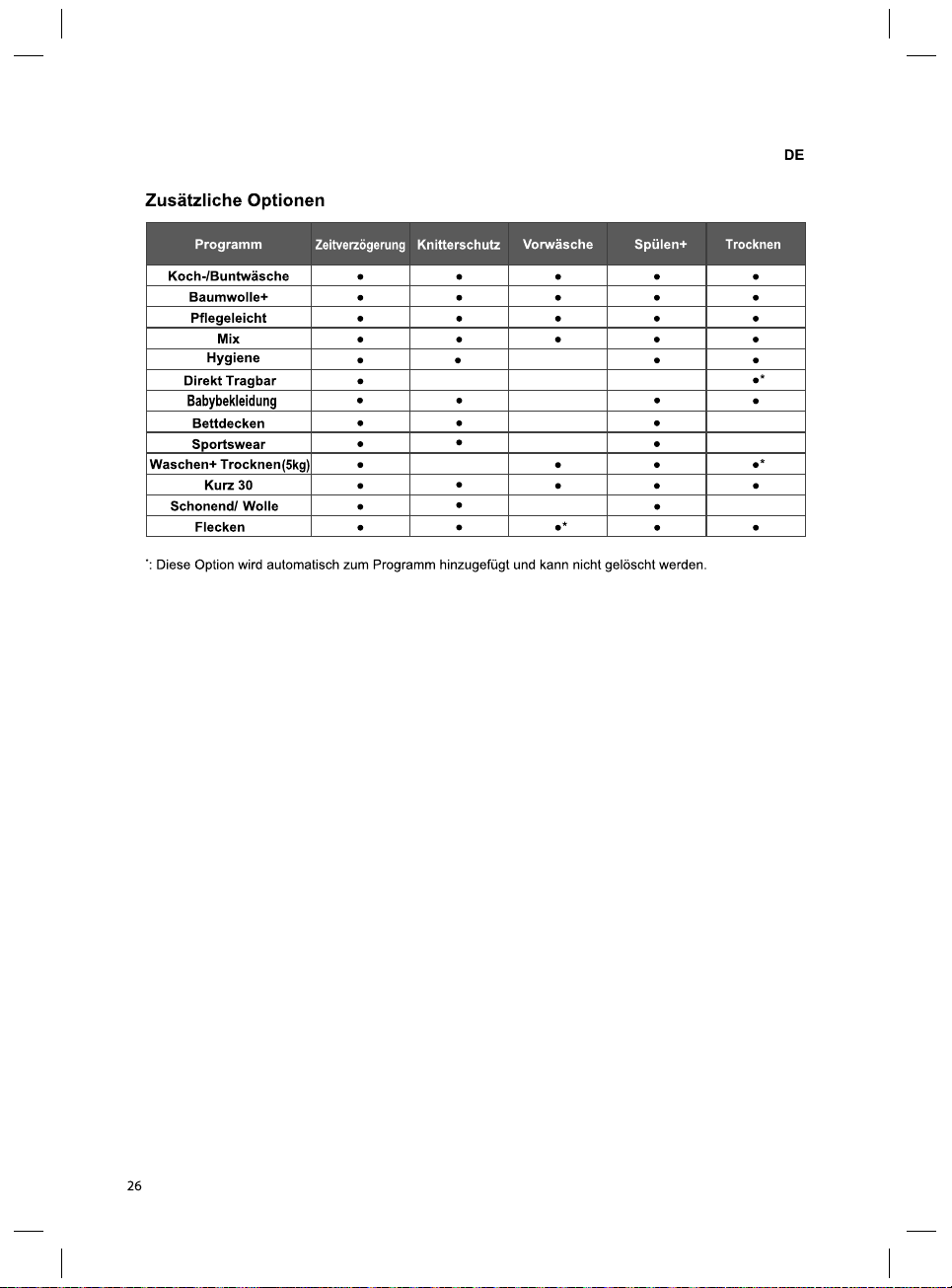
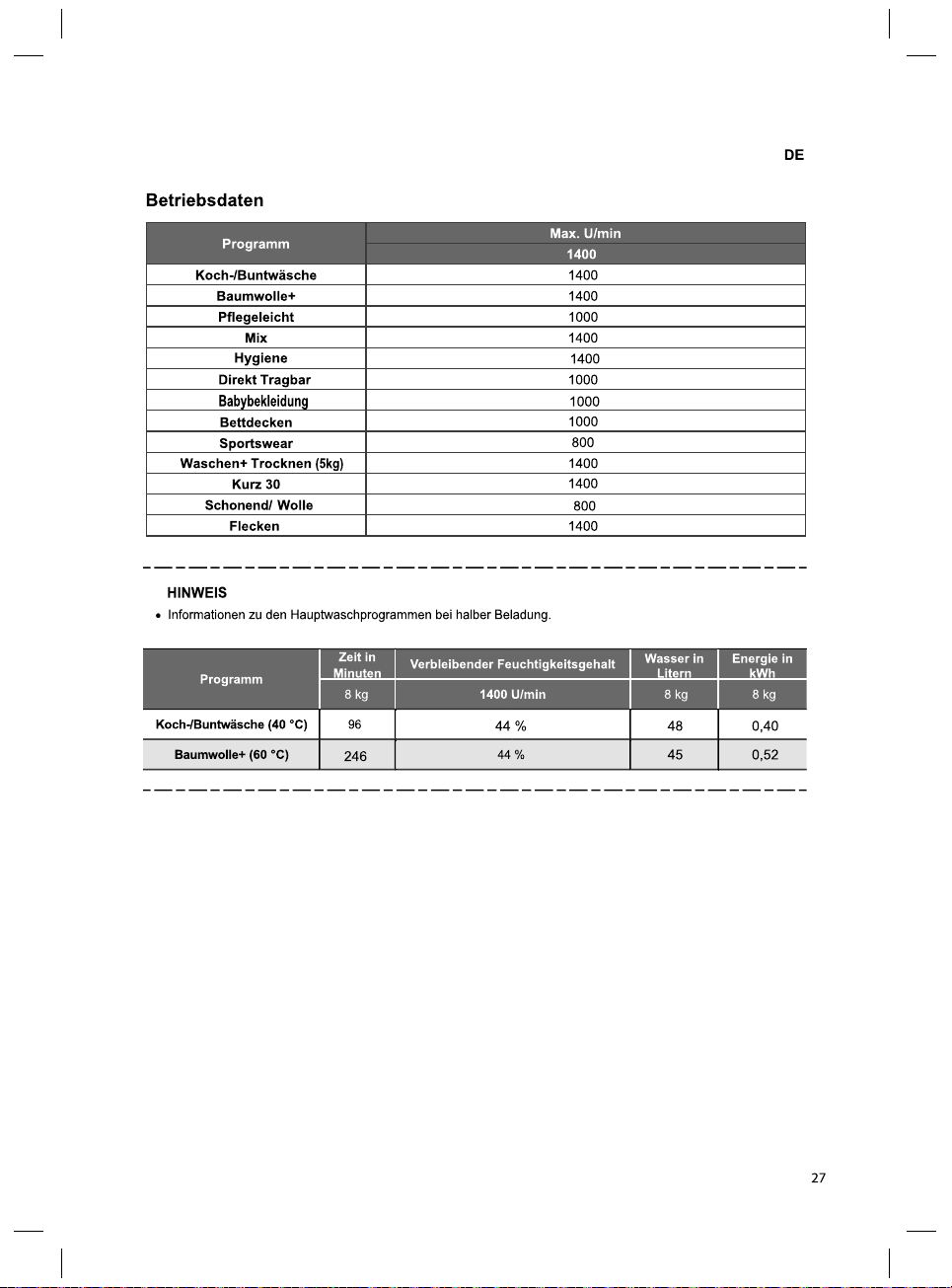
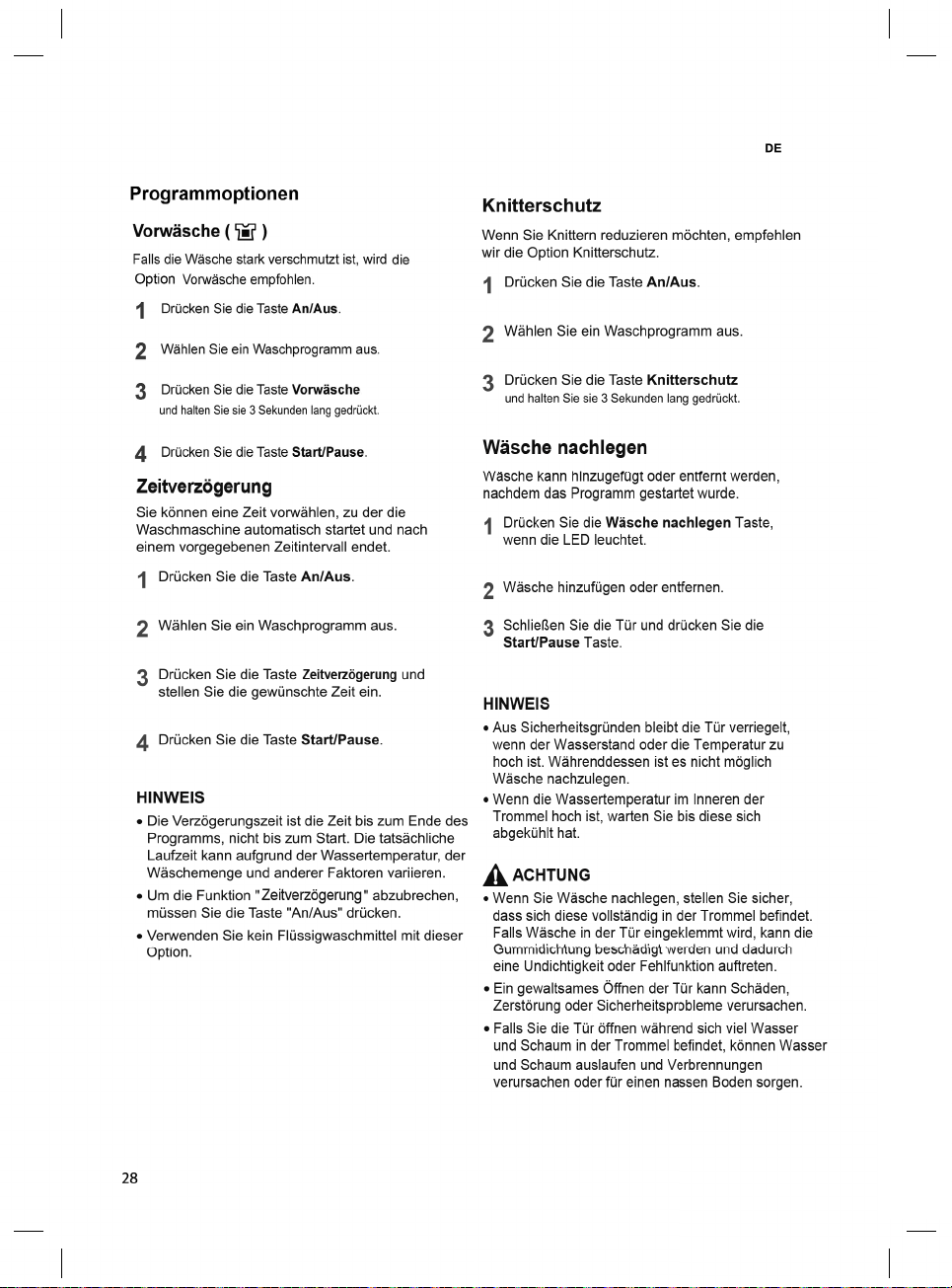
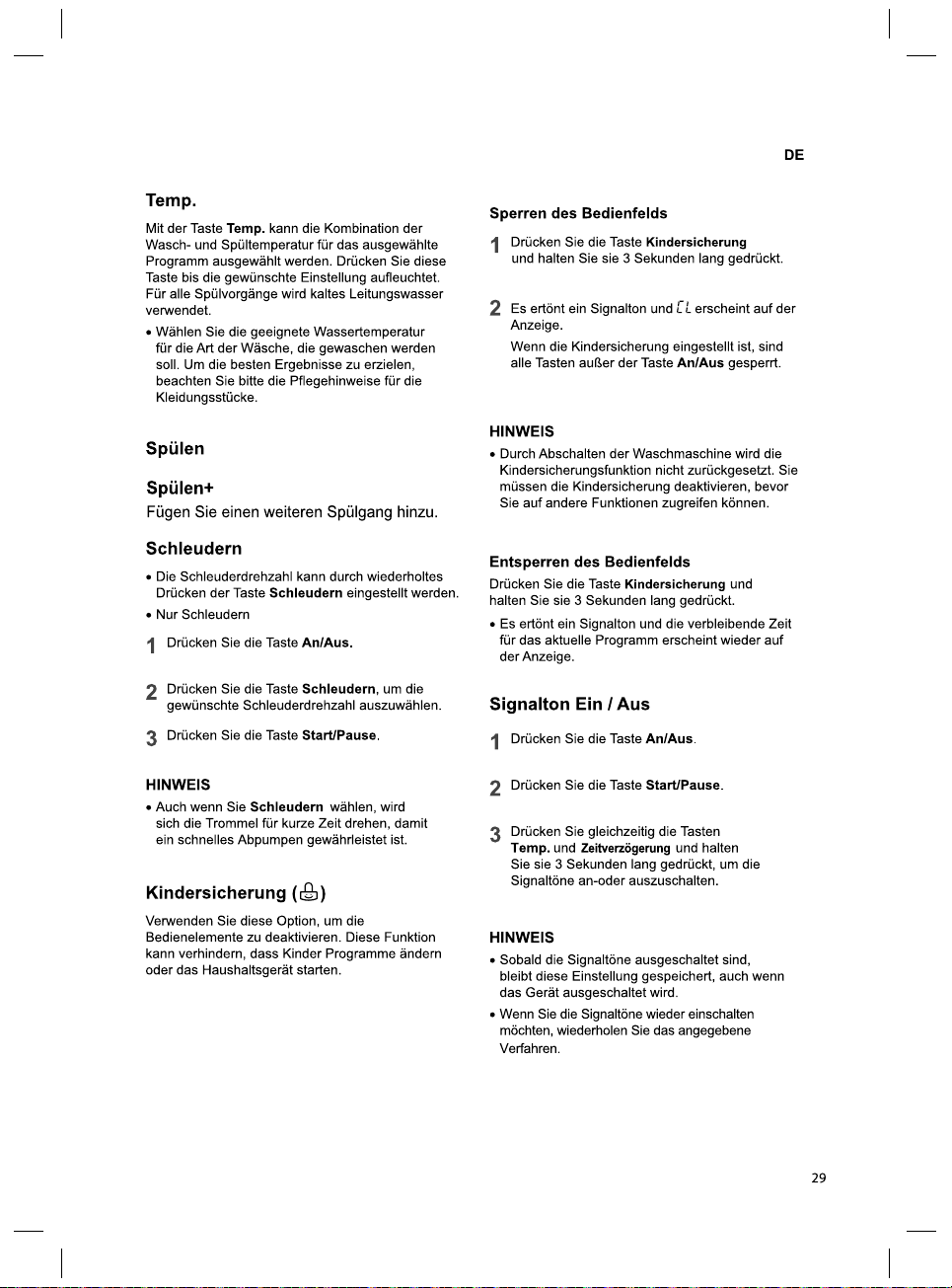
30
SMART FUNCTIONS
EN
Using SmartThinQ
Application
Installing SmartThinQ
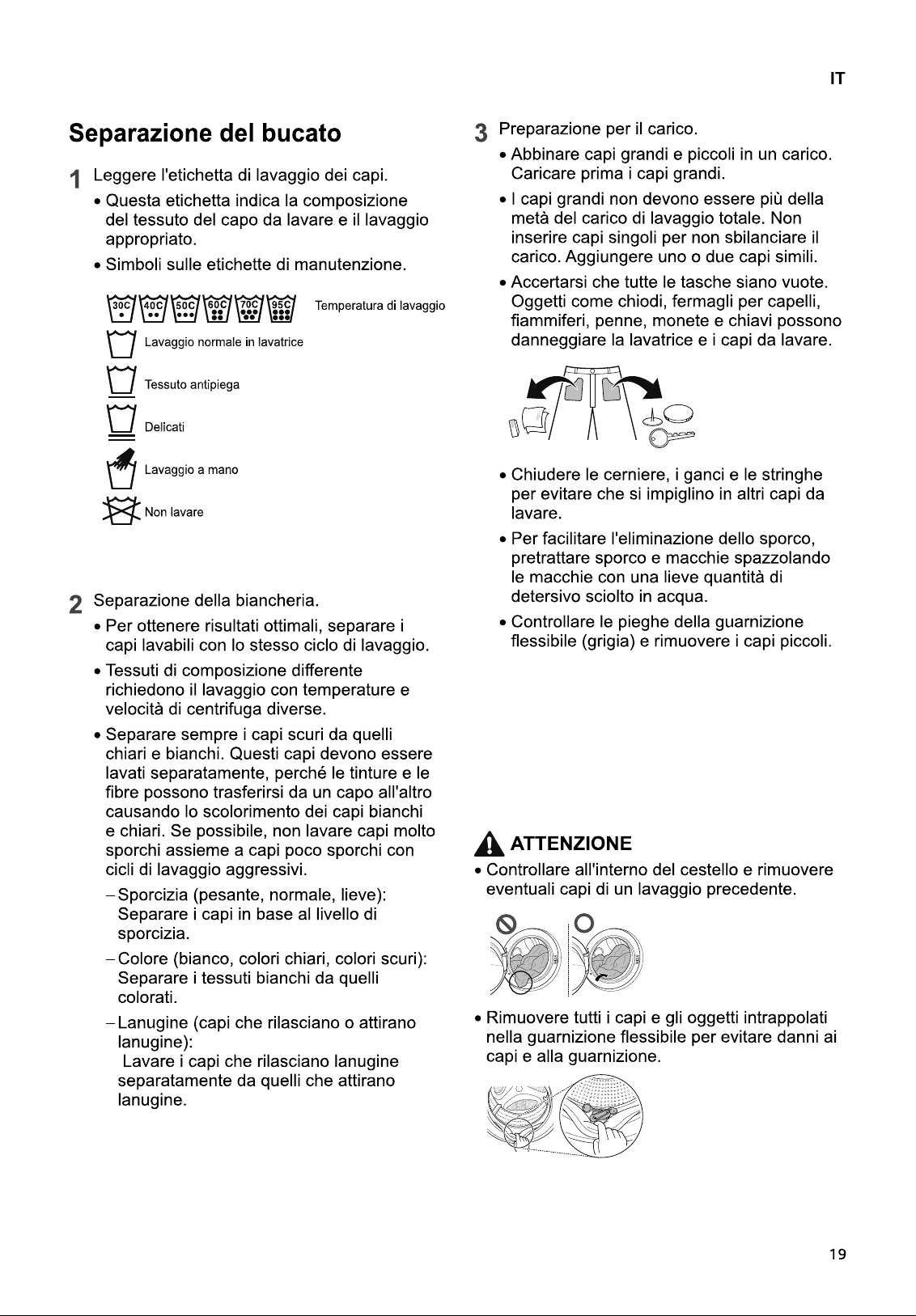
Search for the LG SmartThinQ application from
the Google Play Store on a smart phone.
Follow instructions to download and install the
application.
Tag On Function
• For appliances with the logo
• The Tag On function can only be used with
most smart phones equipped with the NFC
(Near Field Communication) function and
based on the Android OS (operating system).
Download Cycle
Download new and special cycles that are not
included in the basic cycles on the appliance.
Appliances that have been successfully
registered can download a variety of specialty
cycles specific to the appliance.
Only one cycle can be stored on the appliance
at a time.
Once cycle download is completed in the
appliance, the product keeps the downloaded
cycle until a new cycle is downloaded.
Tub Clean Coach
This function shows how many cycles remain
before It is time to run the Tub Clean cycle.
Smart Diagnosis™
This function provides useful information for
diagnosing and solving issues with the
appliance based on the pattern of use.
Settings
Set the product nickname and delete product.
NOTE
• Press in the LG SmartThinQ application
for a more detailed guide on how to use the
Tag On function.
• The location of the smartphone's NFC module
may vary depending on the phone, and NFC
use may be restricted on some smartphones
due to differences in transmission methods.
Because of the characteristics of NFC, if the
transmission distance is too far, or if there is a
metal sticker or a protective case on the
phone, transmission will not be good. In some
cases, NFC-equipped phones may be unable
to transmit successfully.
• The content found in this manual may differ
from the current version of the LG SmartThinQ
application, and the software may be modified
without informing customers.
• NFC function would vary depending on smart
phones.
Smart Diagnosis™ Using a Smart
Phone
• For appliances with the or logo
Use this function if you need an accurate
diagnosis by an LG Electronics customer
information centre when the appliance
malfunctions or fails.
Smart Diagnosis™ can not be activated unless
the appliance is connected to power. If the
appliance is unable to turn on, then
troubleshooting must be done without using
Smart Diagnosis™.
31
EN
Using Smart Diagnosis™
Smart Diagnosis™ Through the
Customer Information Centre
Use this function if you need an accurate
diagnosis by an LG Electronics service centre
when the product malfunctions or fails. Use this
function only to contact the service
representative, not during normal operation.
1
Press the Power button to turn on the
washing machine. Do not press any other
buttons or turn the programme selector
knob.
2
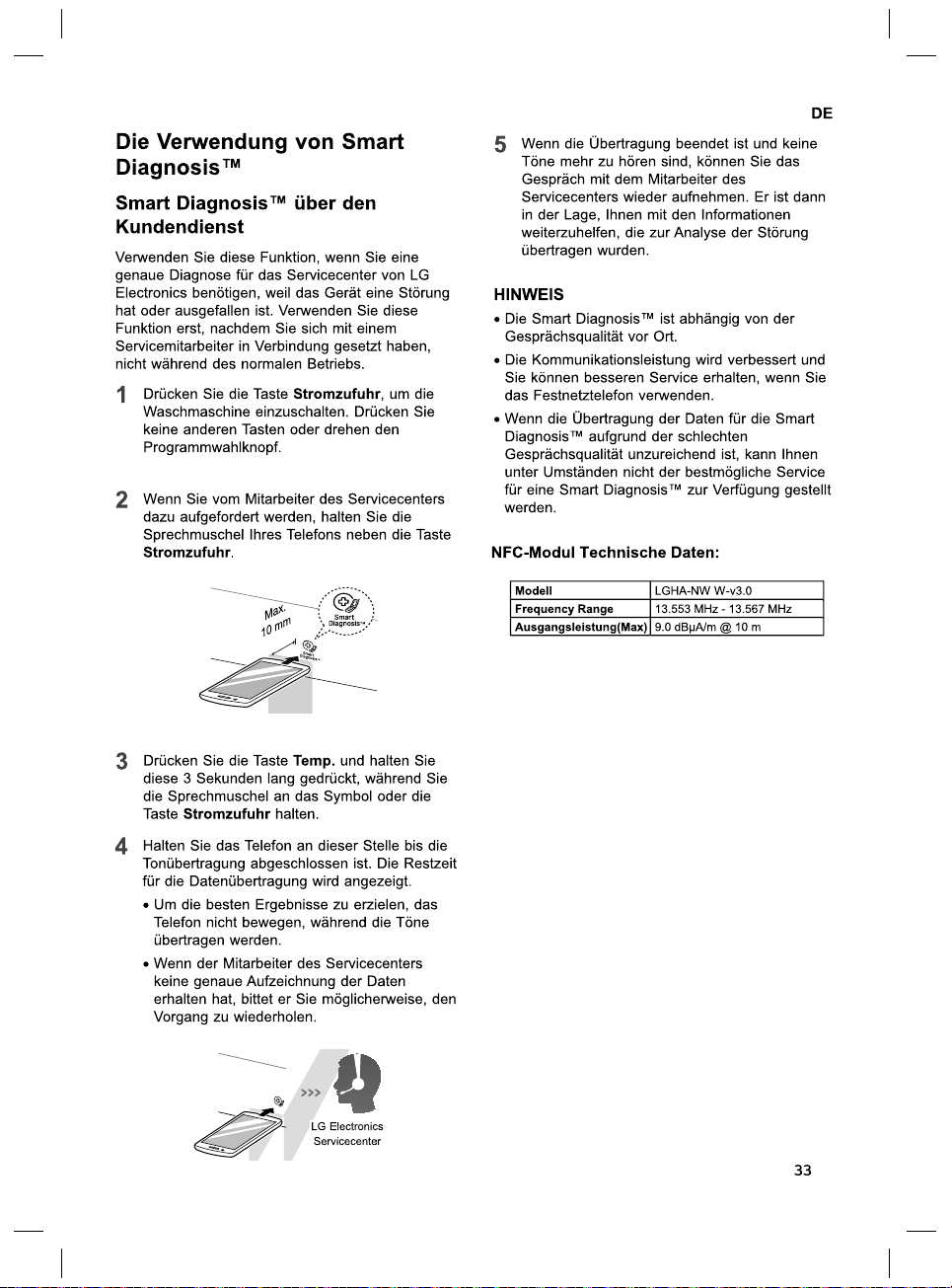
When instructed to do so by the call centre,
place the mouthpiece of your phone close
to the Power button.
Max.
10
m
m
3
Press and hold the Temp. button for three
seconds, while holding the phone
mouthpiece to the icon or Power button.
4
Keep the phone in place until the tone
transmission has finished. Time remaining
for data transfer is displayed.
• For best results, do not move the phone
while the tones are being transmitted.
• If the call centre agent is not able to get
an accurate recording of the data, you
may be asked to try again.
LG Electronics
service centre
5
Once the countdown is over and the tones
have stopped, resume your conversation
with the call centre agent, who will then be
able to assist you using the information
transmitted for analysis.
NOTE
• The Smart Diagnosis™ function depends on
the local call quality.
• The communication performance will improve
and you can receive better service if you use
the home phone.
• If the Smart Diagnosis™ data transfer is poor
due to poor call quality, you may not receive
the best Smart Diagnosis™ service.
NFC Module Specifications
Model LGHA-NWW-v3.0
Frequency Range 13.553 MHz - 13.567 MHz
Output Power(Max) 9.0dBμA/m@10m
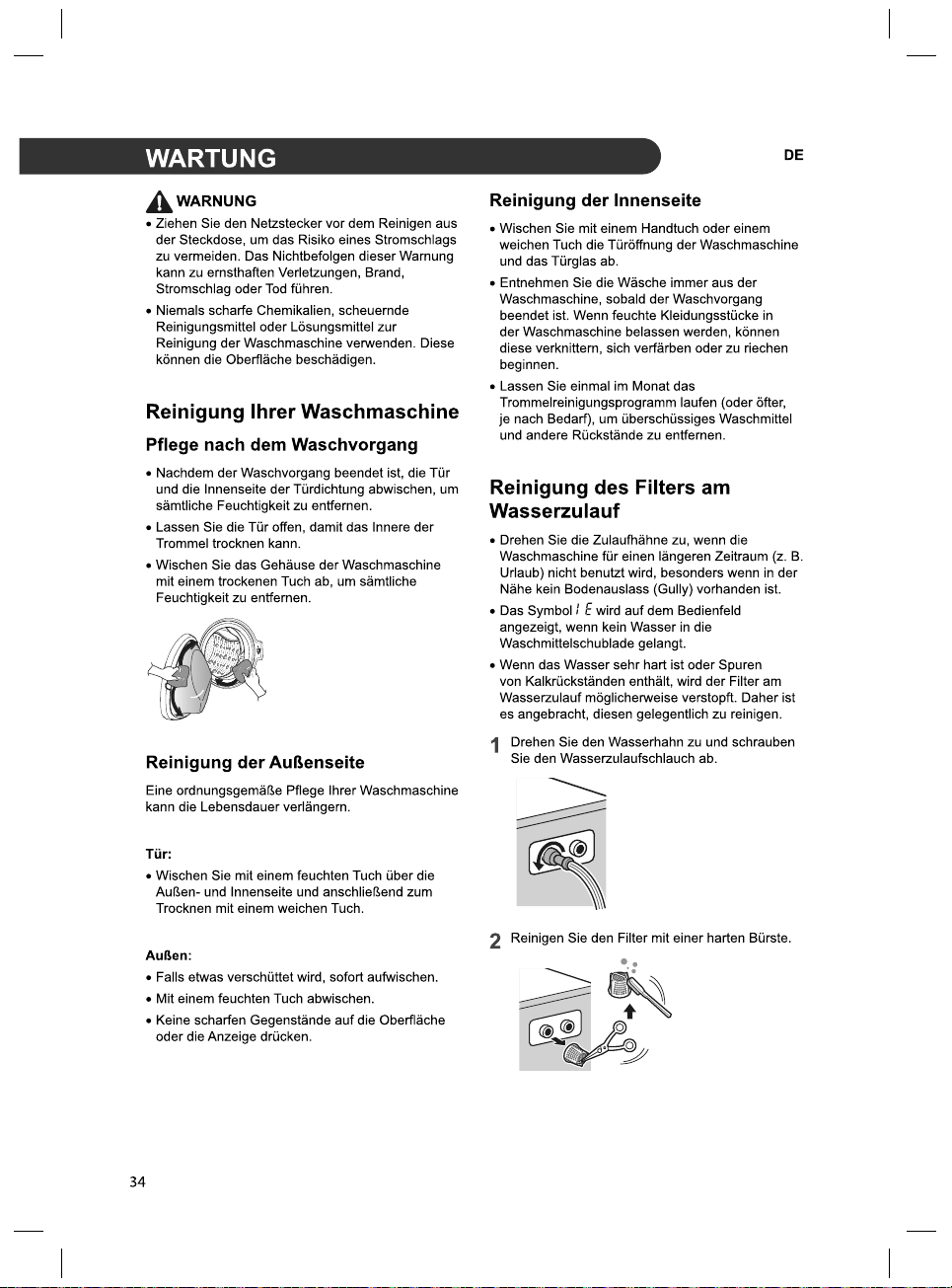
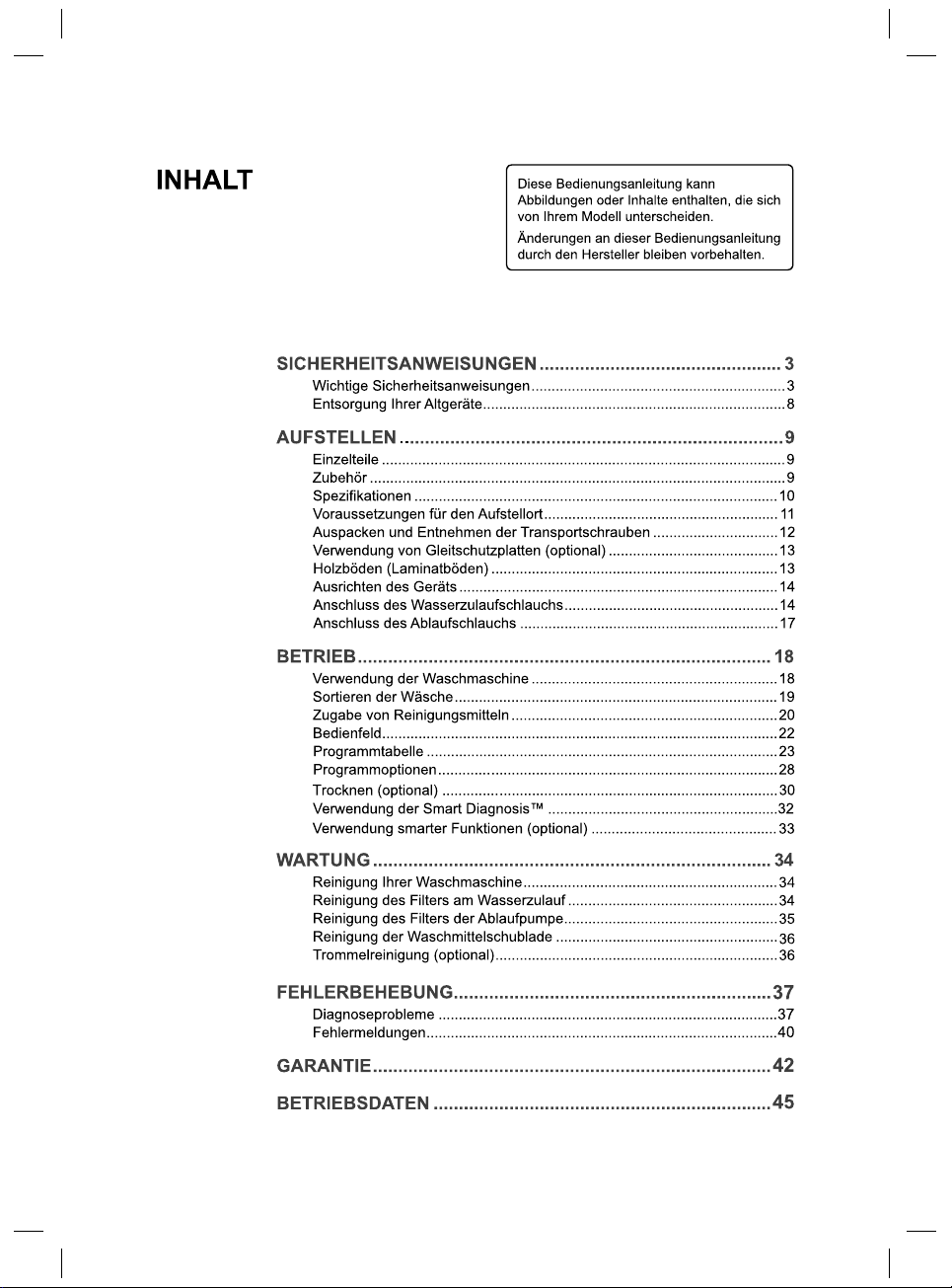
(Trommelreinigung)
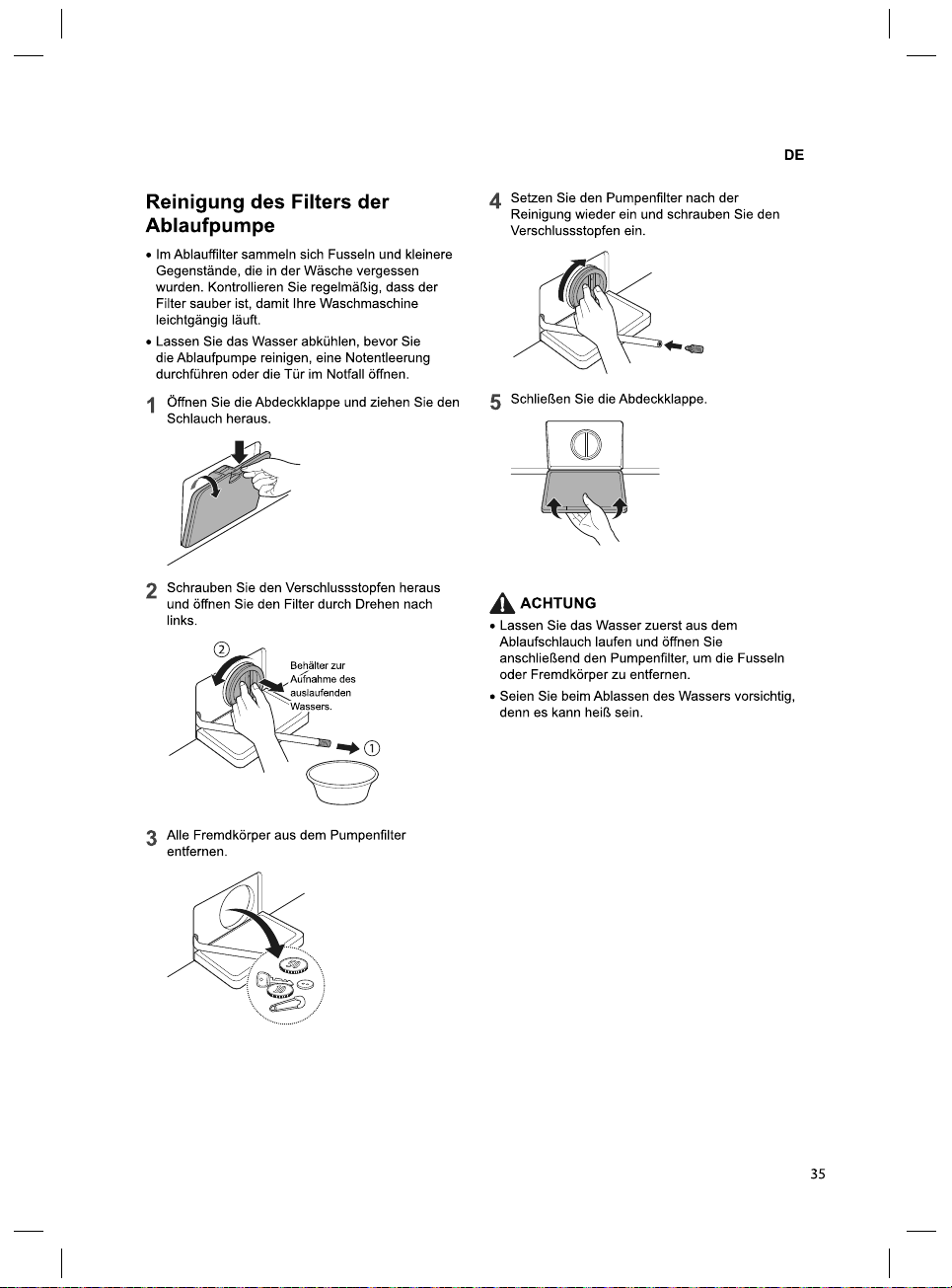
35
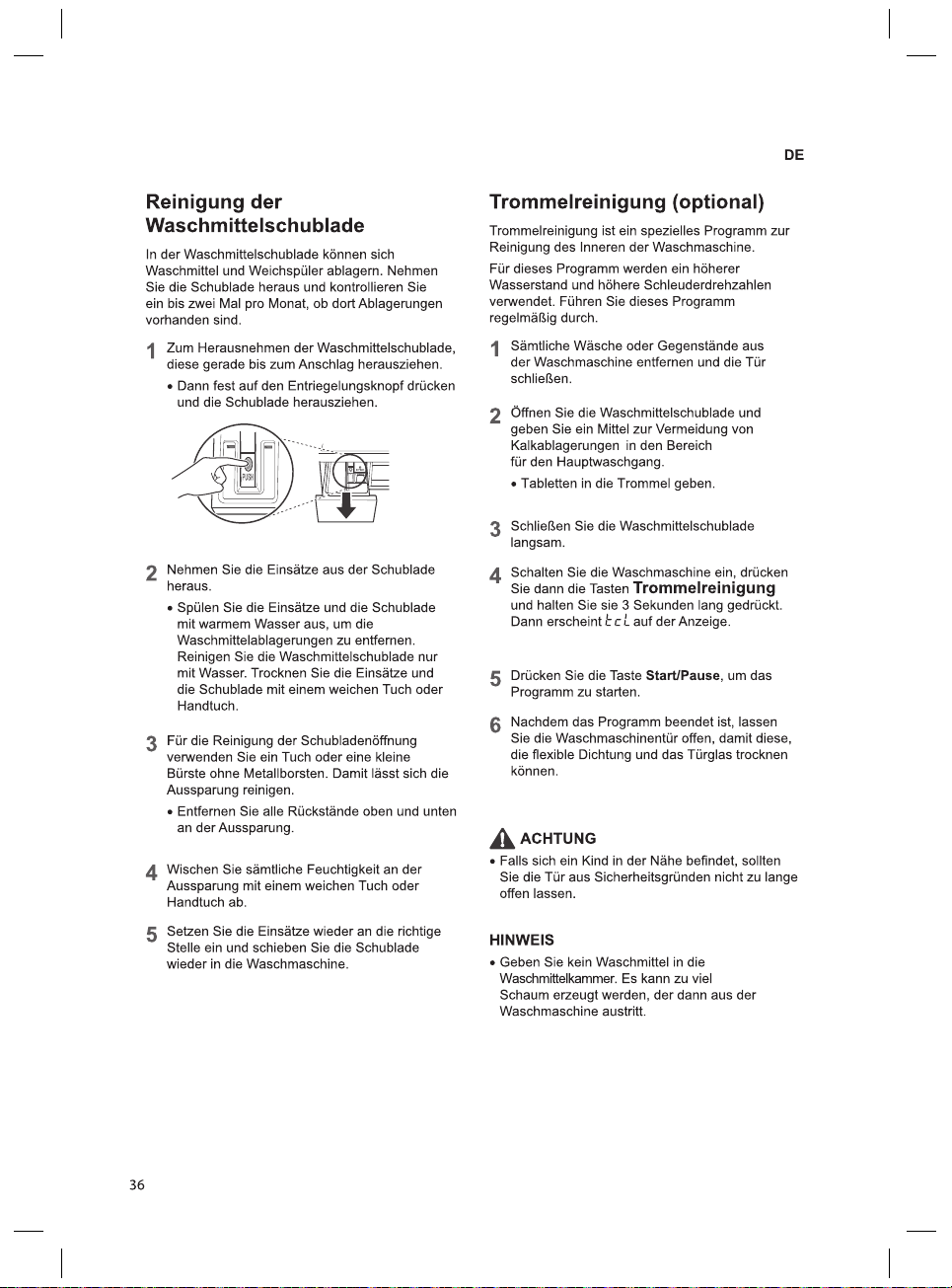
36
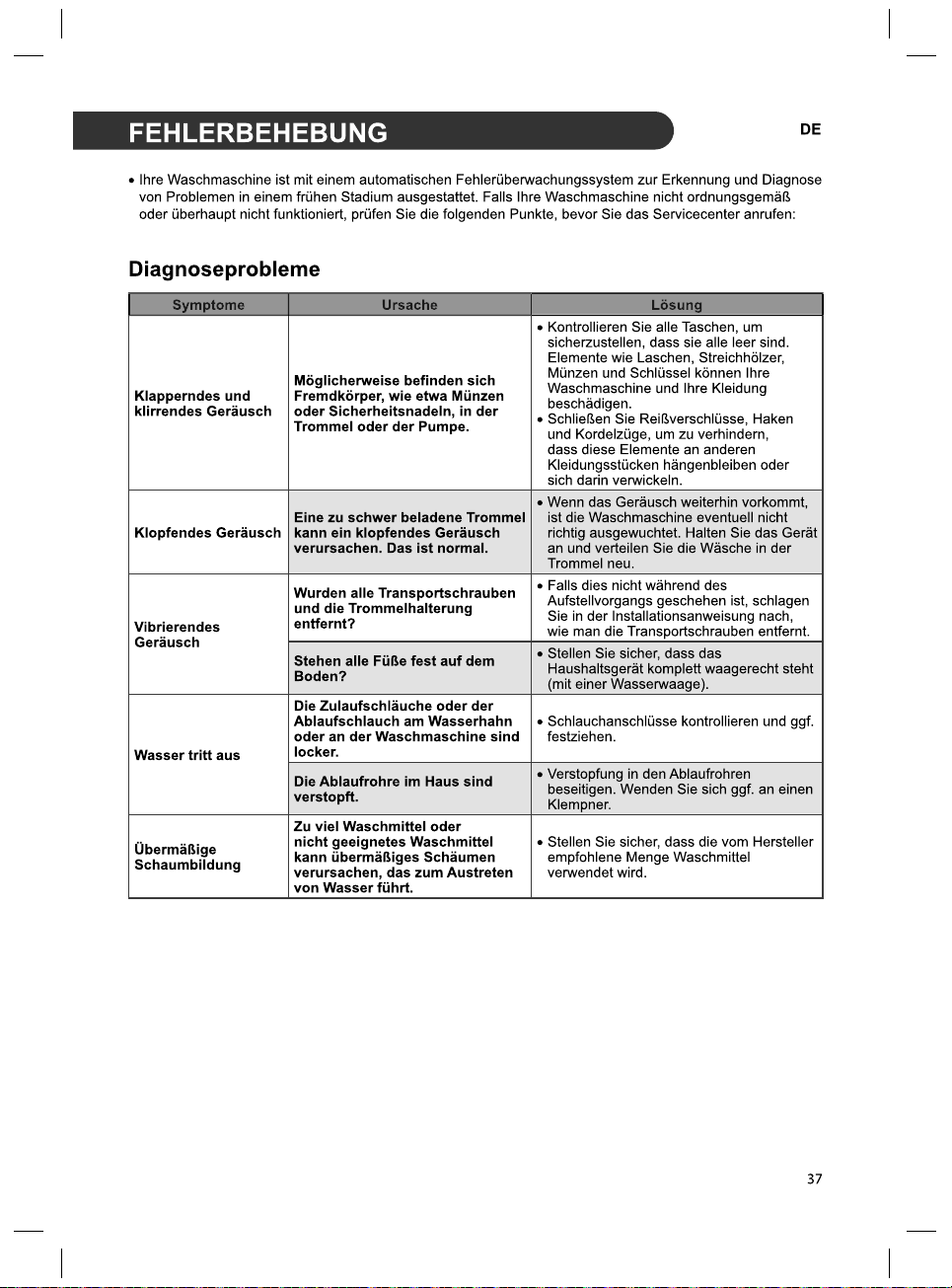
37
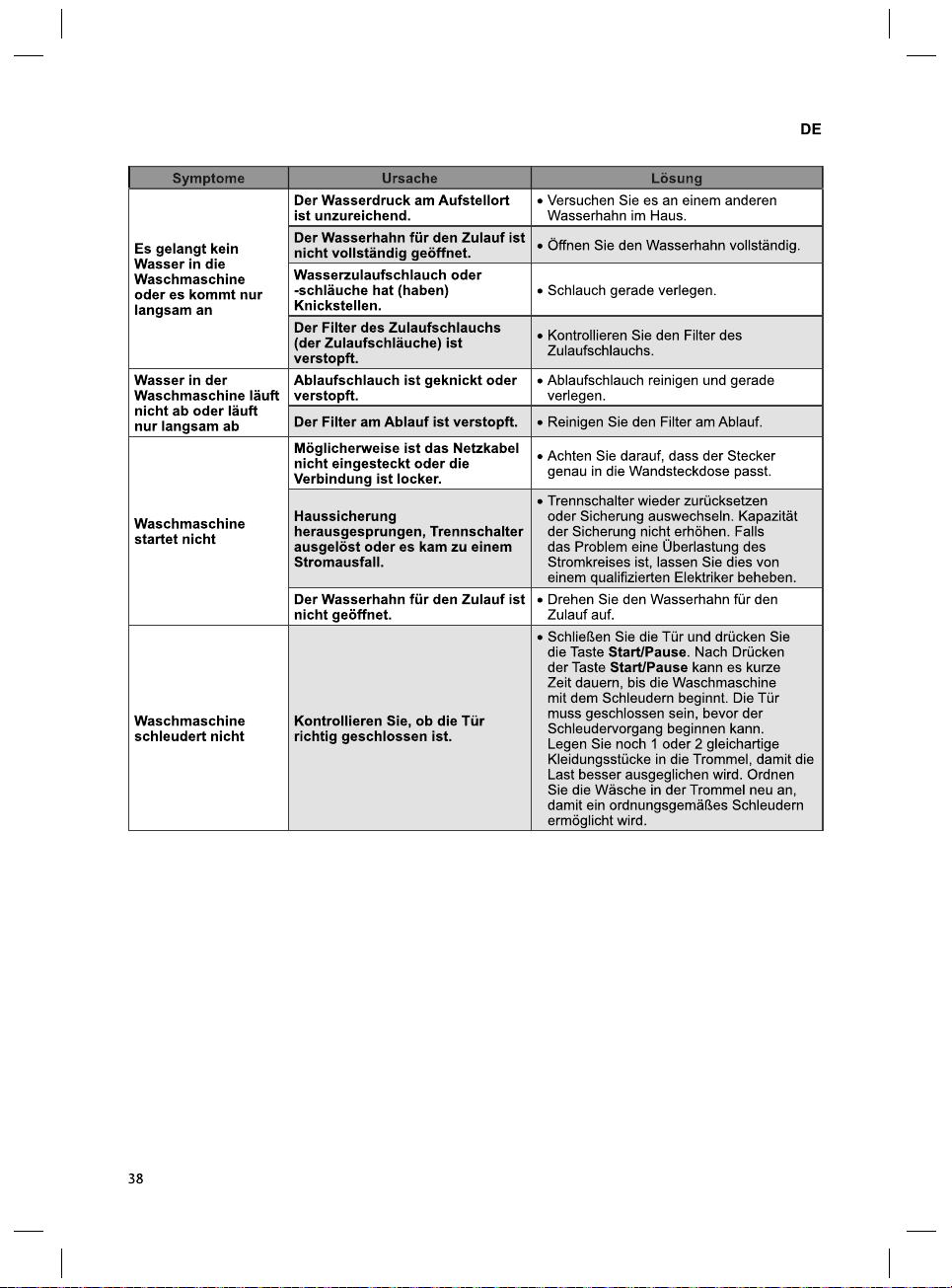
38
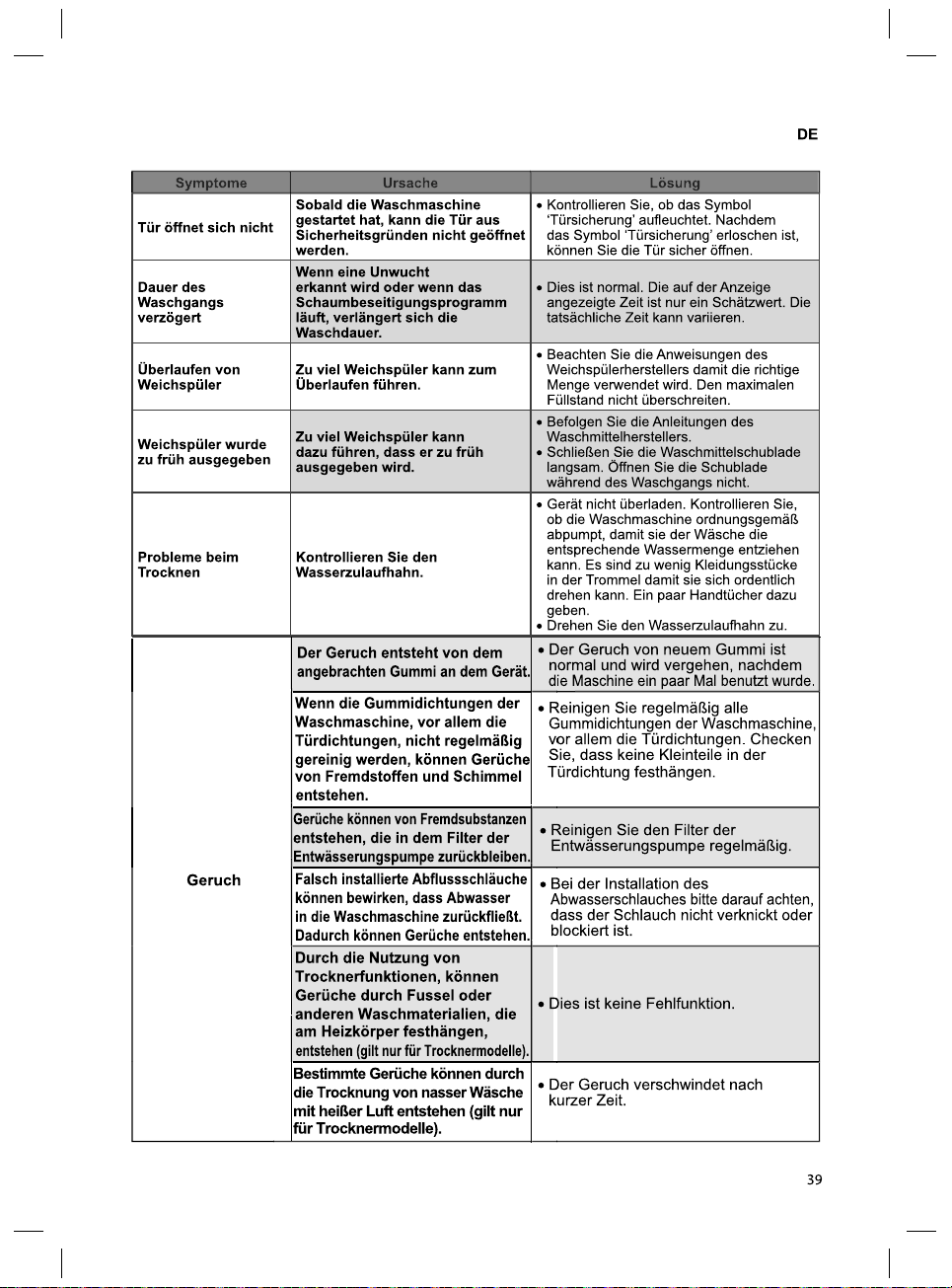
39
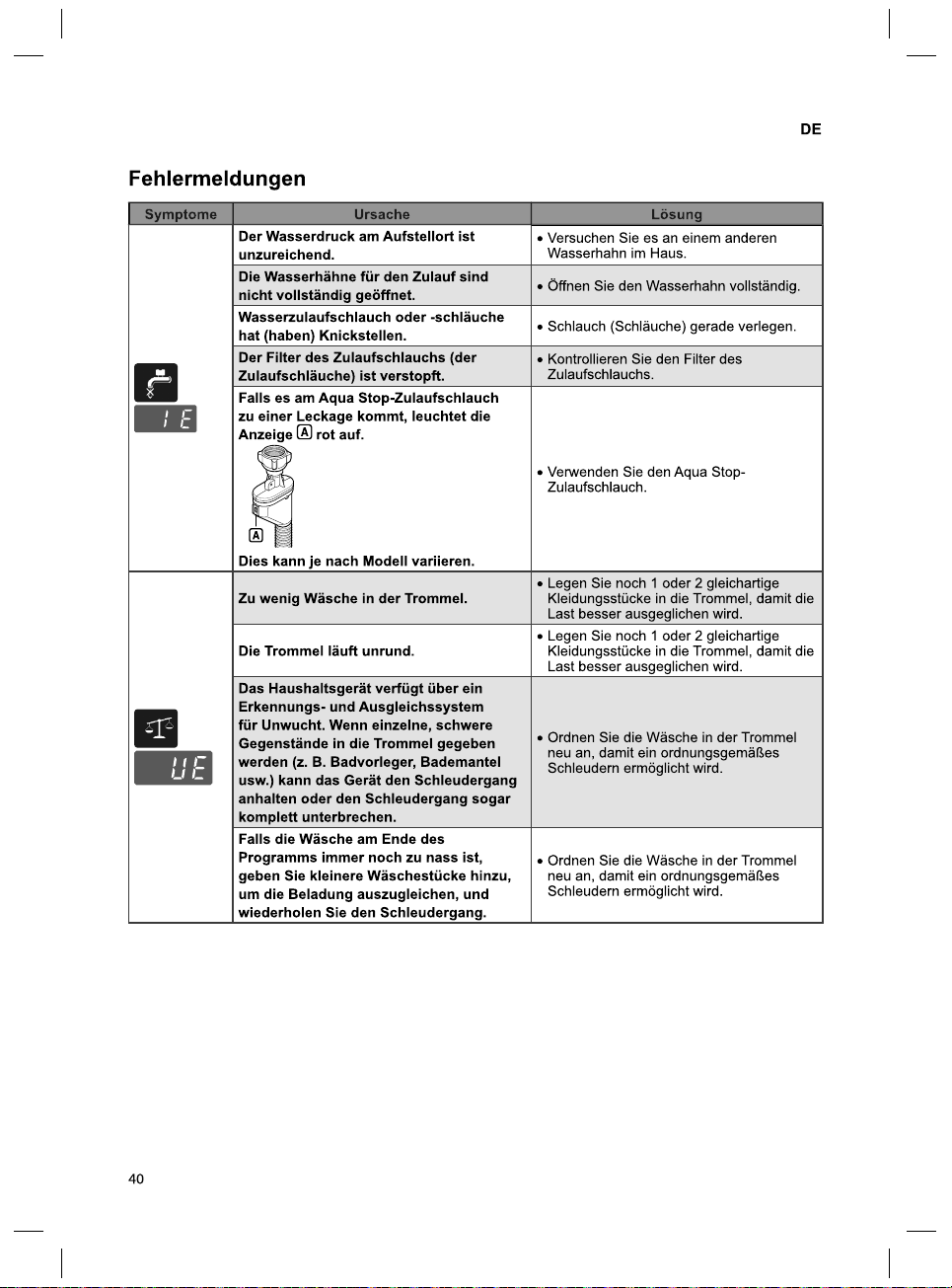
40
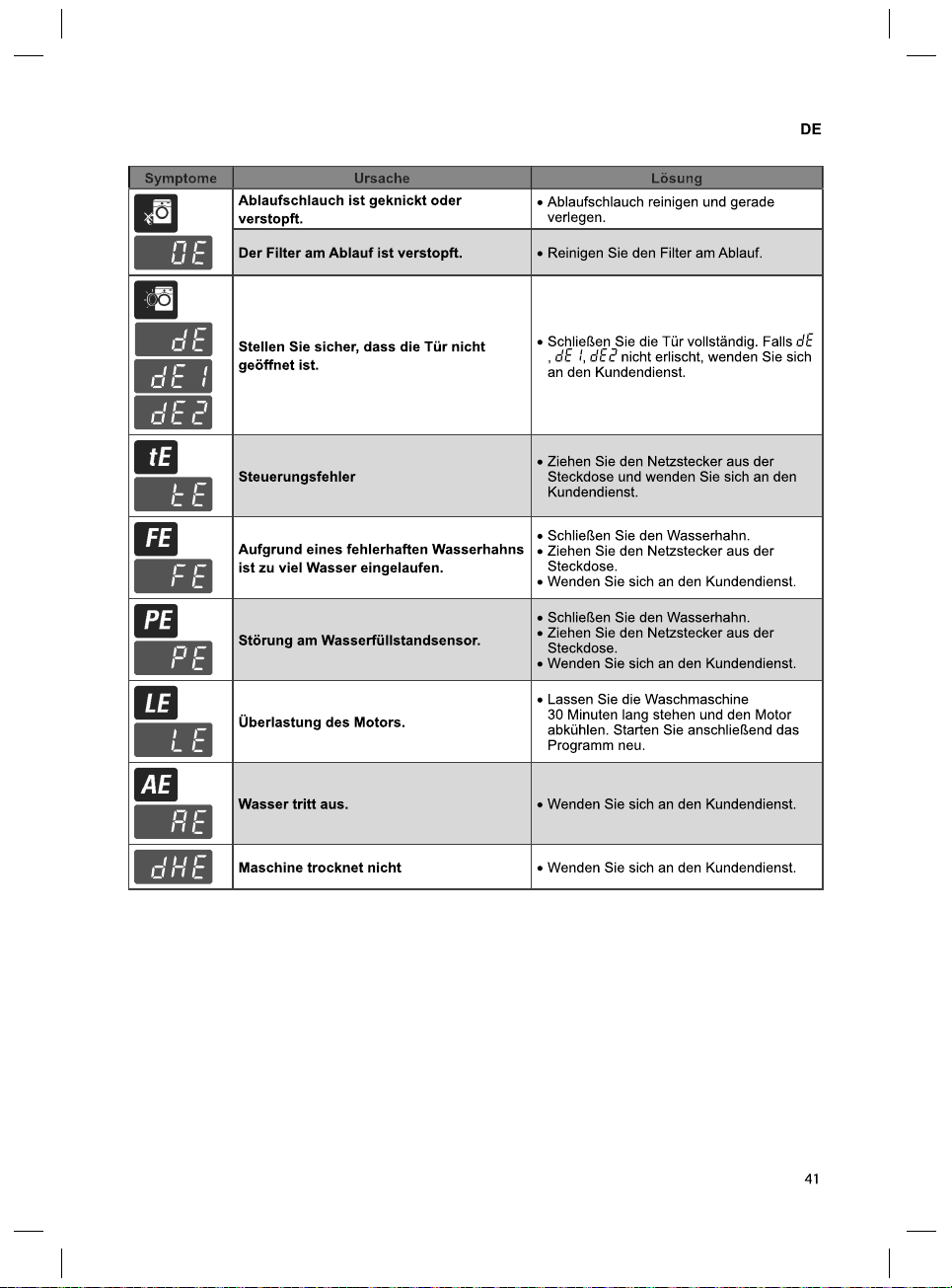
41
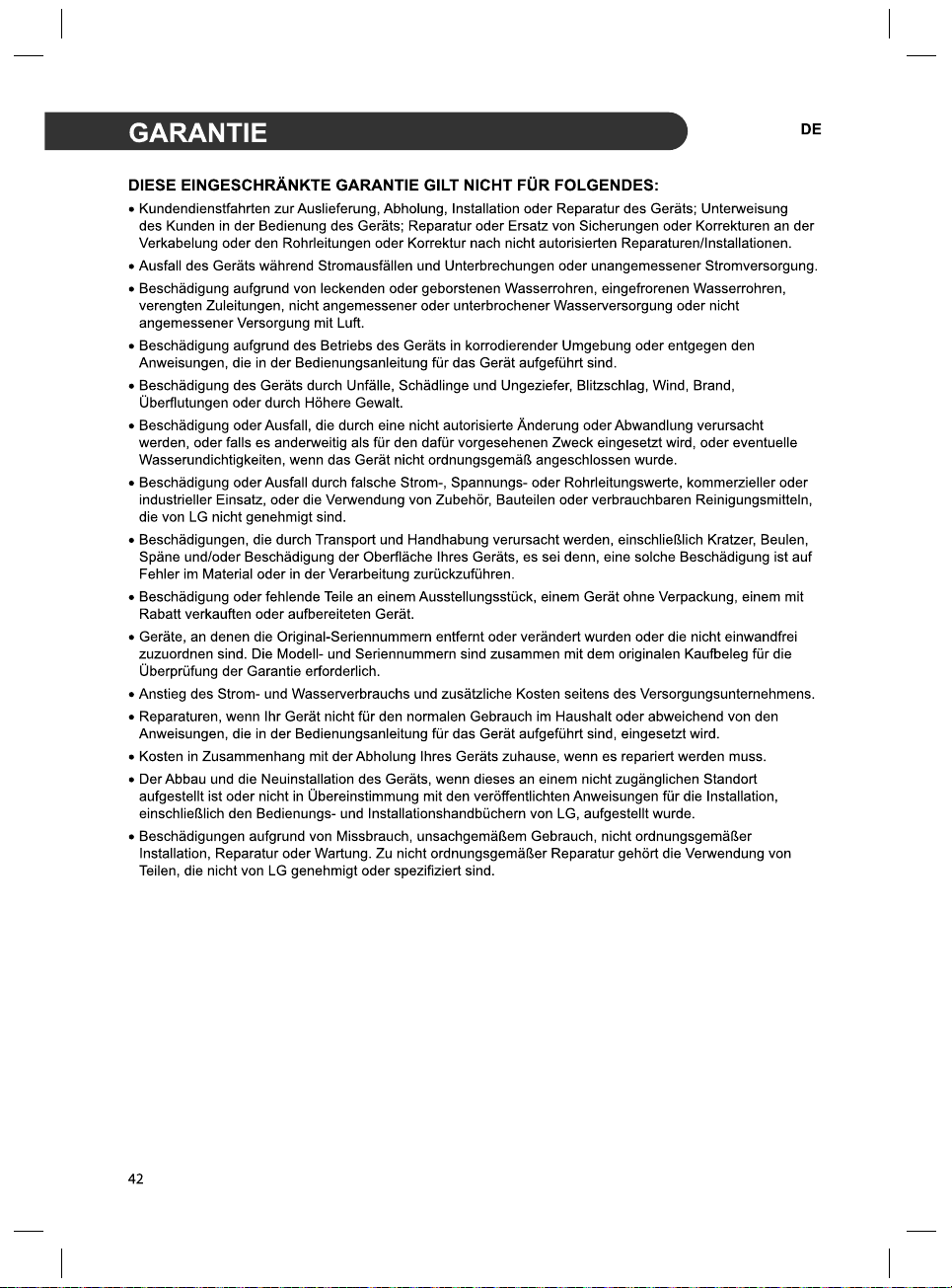
42
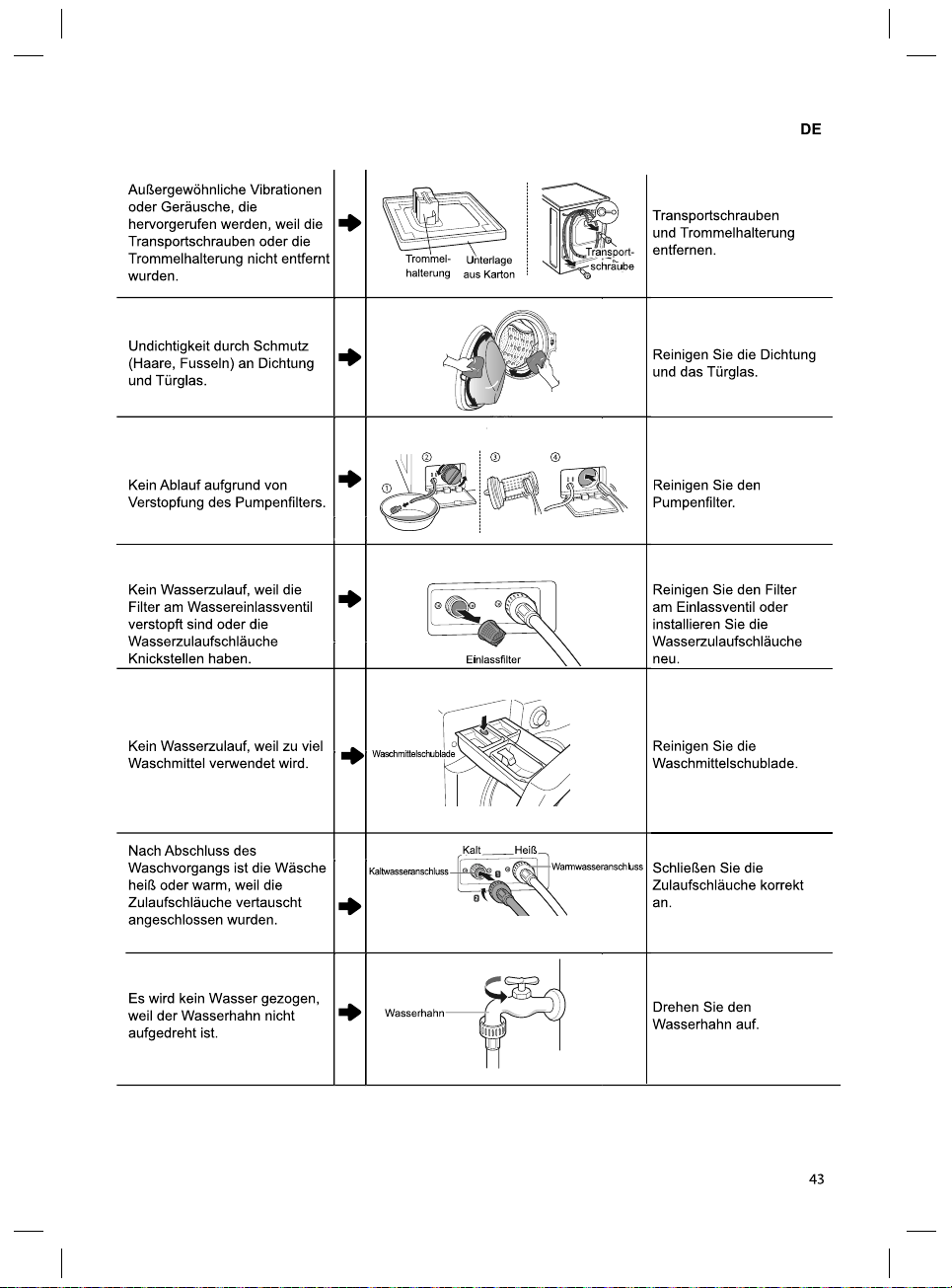
43
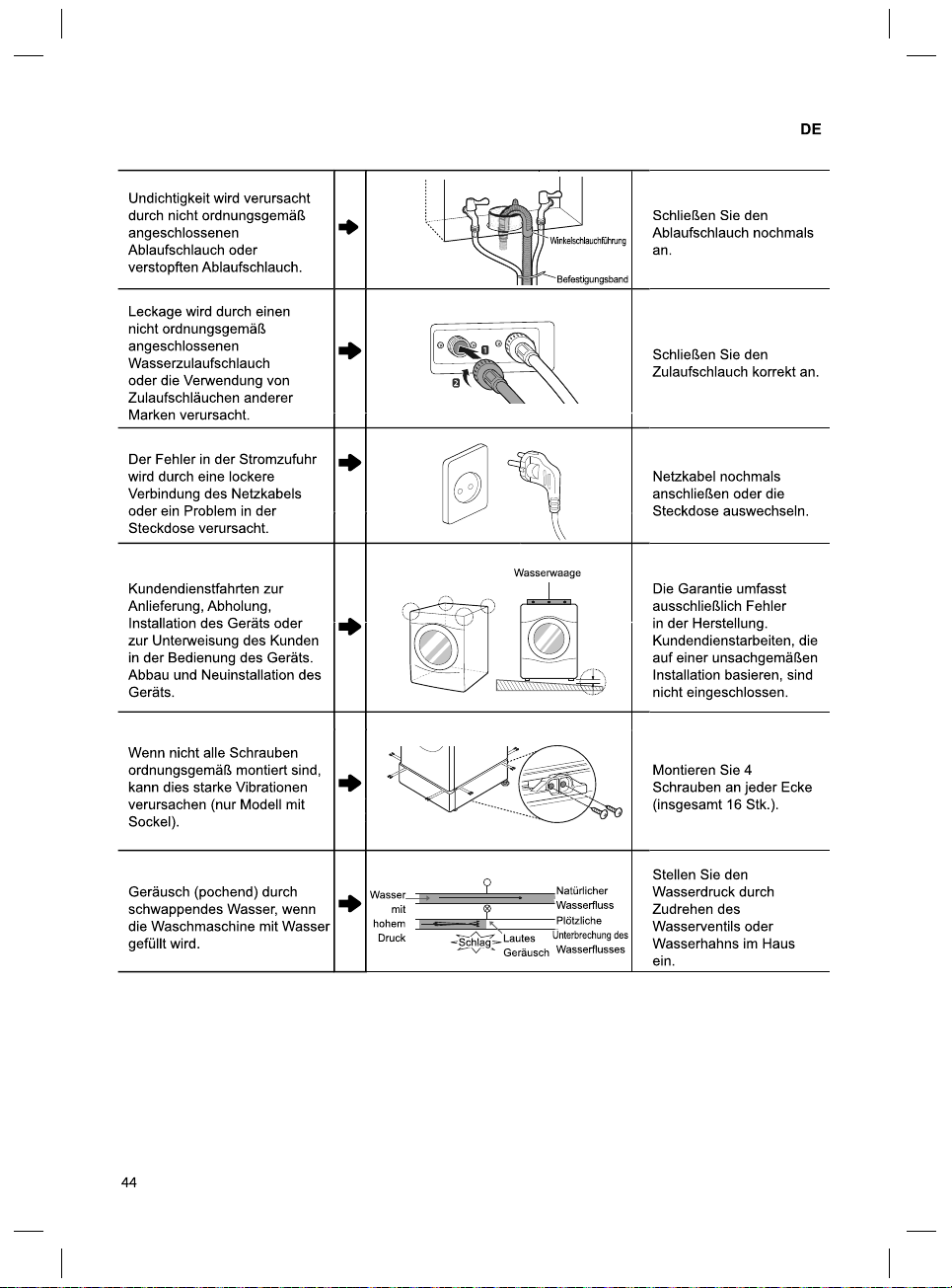
37
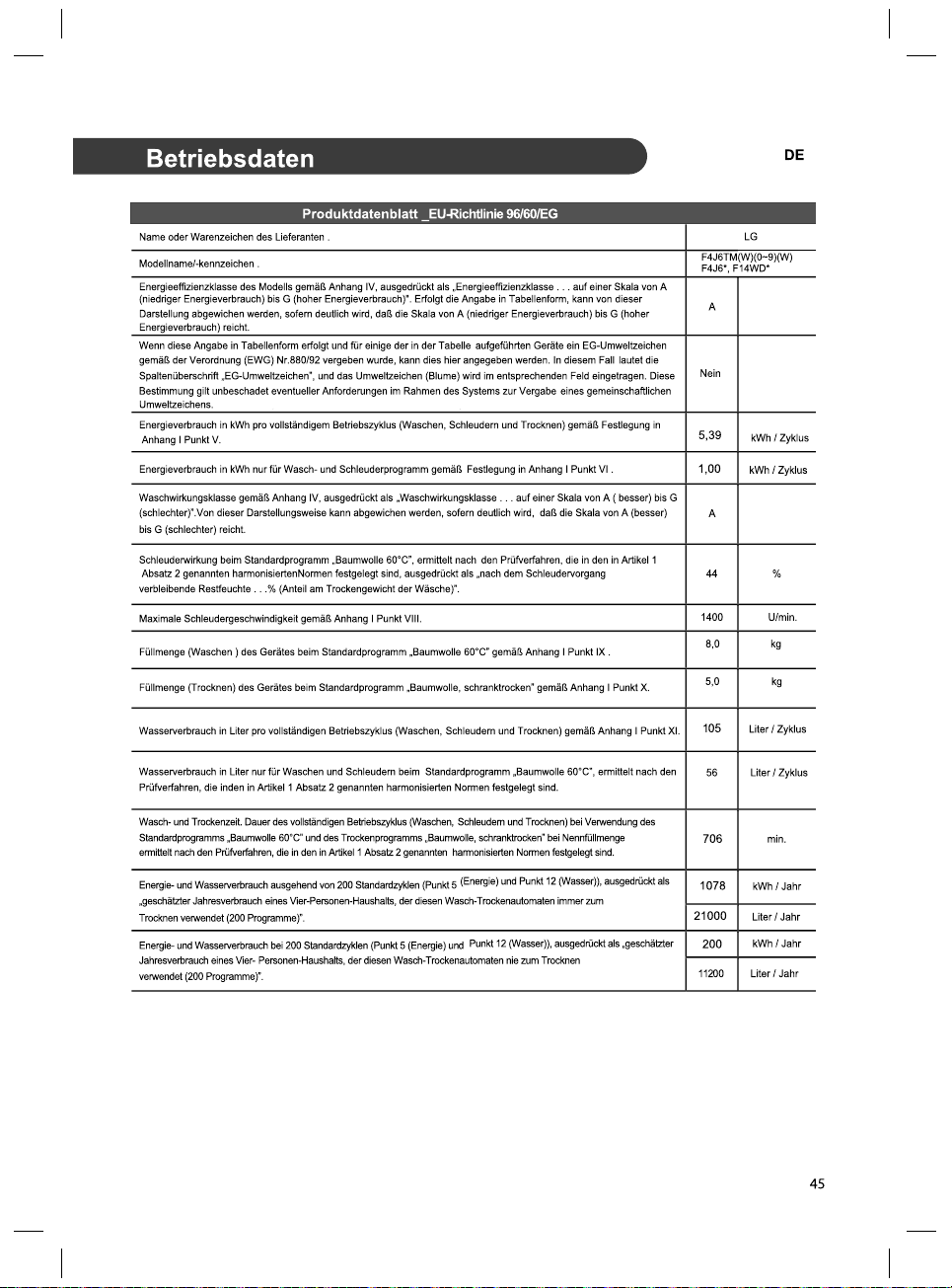
42
45
37
40


2 cm
0.5 cm
2 cm10 cm
5









32
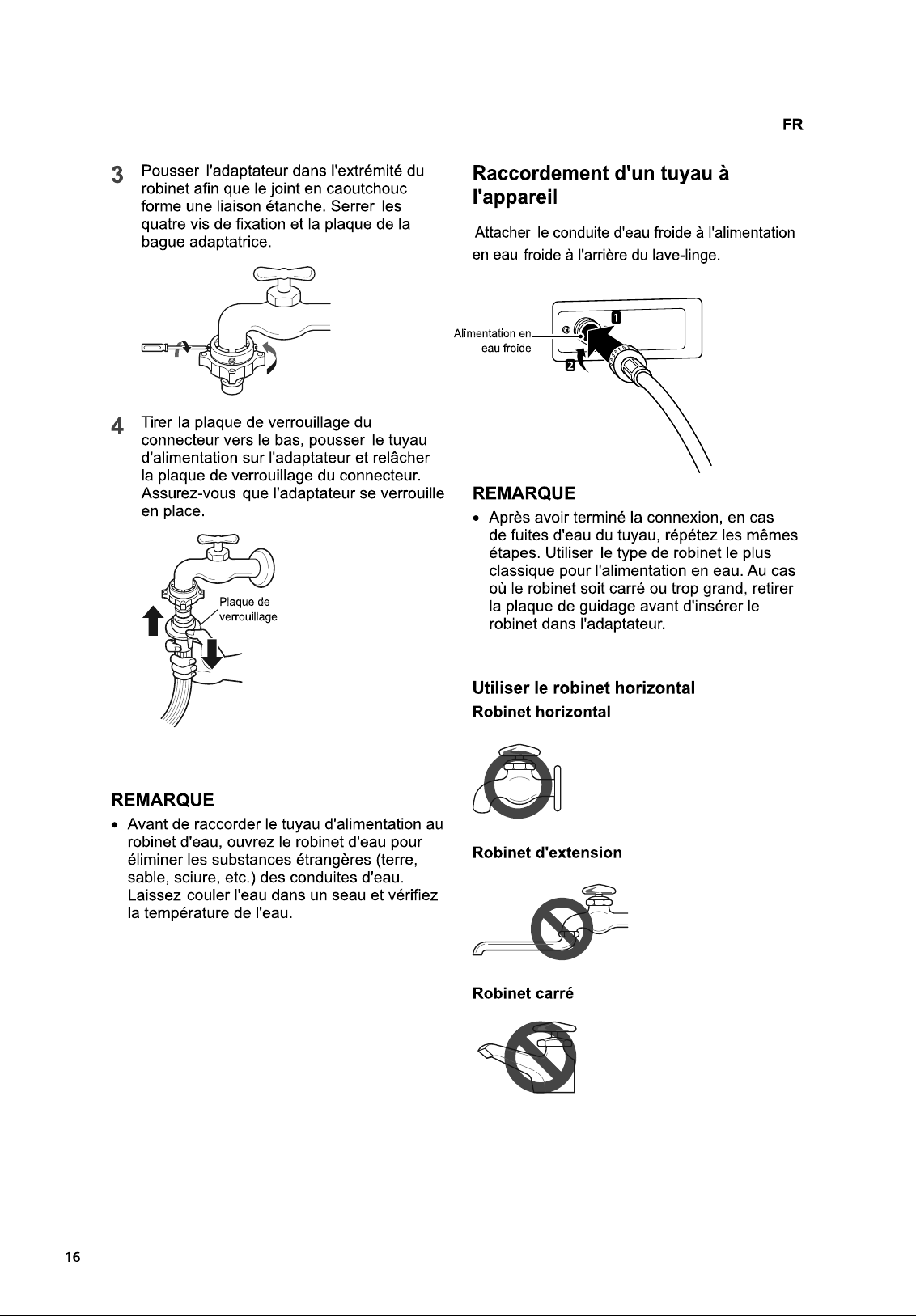
FONCTIONS SMART
FR
Utilisation de l'Application
SmartThinQ
Installation de SmartThinQ
Chercher l’application LG SmartThinQ dans Google
Play Store Store sur un smartphone. Suivez les
instructions pour télécharger et installer
l’application.
Fonction Tag On
• Pour les appareils avec le logo .
• La fonction Tag On ne peut être utilisée qu'avec
la plupart des smartphones équipés de la fonction
NFC (Near Field Communication) et basés sur le
SE (système d'exploitation) Android.
Programme téléchargé
Téléchargez des cycles nouveaux et spéciaux qui
ne sont pas inclus dans les cycles de base de
l'appareil.
Les appareils enregistrés avec succès peuvent
télécharger une variété de cycles de spécialité
spécifiques à l'appareil.
Un seul cycle peut être enregistré dans l'appareil à
la fois.
Une fois le téléchargement d'un cycle dans
l'appareil est treminé, le produit garde le cycle
téléchargé jusqu'au téléchargement d'un nouveau.
Nettoyage de la cuve
Cette fonction indique le nombre de cycles restants
avant de lancer le cycle de Nettoyage de la cuve.
Smart Diagnosis™
Cette fonction fournit des informations utiles pour le
diagnostic et la résolution de problèmes avec
l'appareil sur la base du modèle d'utilisation.
Réglages
Définir le nom du produit et supprimer un produit.
REMARQUE
• Appuyez dans l'application LG SmartThinQ
pour obtenir un guide plus détaillé sur la manière
d'utilisation de la fonction Tag On.
• L'emplacement du module NFC du téléphone
portable peut varier en fonction du téléphone, et
l'utilisation du NFC peut être restreinte sur
quelques téléphones en raison des différences
des méthodes de transmission. En raison des
caractéristiques du NFC, si la distance de
trasmission est assez éloignée ou s'il y a
présence d'un sticker métallique ou d'un étui de
protection sur le téléphone, la transmission ne
sera pas bonne. Dans quelques cas, les
téléphones équipés de NFC peuvent ne pas
transmettre avec succès.
• Le contenu de ce manuel peut différer de la
version actuelle de l'application LG SmartThinQ et
le logiciel peut être modifié sans en informer les
clients.
• La fonction NFC peut varier en fonction des
smartphones.
Smart Diagnosis™ à l'aide d'un
smartphone
• Pour les appareils avec le logo ou
Utiliser cette fonction si vous avez besoin d'un
diagnostic précis par un centre d'information client
LG Electronics en cas de dysfonctionnement ou de
panne de l'appareil.
Smart Diagnosis™ ne peut pas être activé tant que
l'appareil n'est pas connecté à l'alimentation
électrique. Si l'appareil ne peut pas être mis sous
tension, le dépannage doit être effectué sans l'aide
de Smart Diagnosis™.

33
FR
Utilisation de Smart
Diagnosis™
Smart Diagnosis™ Par
l'intermédiaire du Centre
d'Information Client
Utiliser cette fonction si vous avez besoin d'un
diagnostic précis par un centre de service LG
Electronics en cas de dysfonctionnement ou de
panne de l'appareil. Utiliser cette fonction
uniquement pour communiquer avec le
représentant de service, pas pendant l'utilisation
normale.
1
Appuyer sur le bouton Marche/Arrêt pour
mettre le lave-linge sous tension. Ne pas
appuyer sur une autre touche ni tourner le
bouton de sélection de programme.
2
Lorsque vous y êtes invité par le centre
d'appel, placez le microphone de votre
téléphone à proximité du bouton Marche/Arrêt.
Max.
10
mm
3
Appuyer et maintenir le bouton Temp. pendant
3 secondes tout en maintenant le microphone
du téléphone sur l'icône ou le bouton
Alimentation.
4
Maintenir le téléphone en place jusqu'à ce que
la transmission du signal soit terminée. Le
temps restant pour le transfert des données
s'affiche.
• Pour de meilleurs résultats, ne pas déplacer
le téléphone lorsque les tonalités sont
transmises.
• Si l'agent du centre d'appel n'est pas en
mesure d'obtenir un enregistrement précis
des données, vous pouvez être invité à
réessayer.
Centre de service
LG Electronics
5
Une fois le compte à rebours terminé et les
tonalités arrêtées, reprendre la conversation
avec l'agent de centre d'appel, qui sera alors
en mesure de vous aider grâce aux
informations transmises pour analyse.
REMARQUE
• La fonction Smart Diagnosis™ dépend de la
qualité de l'appel local.
• Les performances de communication seront
améliorées et vous pourrez recevoir un meilleur
service si vous utilisez le téléphone fixe.
• Si le transfert des données du Smart Diagnosis™
est médiocre en raison de la mauvaise qualité de
l'appel, vous ne pourrez pas recevoir le meilleur
service du Smart Diagnosis™.
Caractéristiques du module NFC
Modéle LGHA-NW W-v3.0
Bande de fréquence: 13.553 MHz - 13.567 MHz
Puissance de sortie(Max) 9.0dBμA/m@10m

34

35

36

37
38

39

40
41

42

43

44
45


37
42
45
37
40


2 cm
0.5 cm
2 cm10 cm
5










32
FUNZIONI SMART
IT
Utilizzare l'applicazione
SmartThinQ
Installare SmartThinQ
Cercare l'applicazione LG SmartThinQ per
smartphone su Google Play Store. Seguire le
istruzioni per scaricare e installare l'applicazione.
Etichetta sulla funzione
• Per elettrodomestici che recano il logo
• La funzione Tag On può essere utilizzata con la
maggior parte degli smartphone con sistema
operativo Android dotati della funzione NFC (Near
Field Communication).
Download Cycle (Personalizzato)
Scarica nuovi e speciali cicli non inclusi nei cicli di
base del dispositivo.
I dispositivi registrati con successo possono
scaricare una serie di cicli speciali specifici per
l'elettrodomestico.
È possibile archiviare un solo ciclo per volta
sull'elettrodomestico.
Una volta che lo scaricamento del ciclo è
completato nel dispositivo, il prodotto mantiene il
ciclo scaricato fino a quando non ne viene
scaricato uno nuovo.
Istruzioni Pulizia Cestello
Questa funzione mostra quanti cicli restano prima
di dover avviare il ciclo di Pulizia della Vasca.
Smart Diagnosis™
Questa funzione fornisce informazioni utili per la
diagnosi e la risoluzione dei problemi in base al
modello di utilizzo.
Impostazioni
Impostare il nome del prodotto e cancellare il
prodotto.
NOTA
• Premere sull'app LG SmartThinQ per
consultare una guida più dettagliata sulla funzione
Tag On.
• La posizione del modulo NFC dello smartphone
può cambiare in base al modello di telefono;
inoltre l'uso di NFC può essere limitato a causa
dei diversi metodi di trasmissione. In base alle
caratteristiche di NFC, se la distanza di
trasmissione è troppo elevata (o se ci sono delle
placche di metallo o una custodia protettiva dello
smartphone), la trasmissione potrebbe non
essere ottimale. In alcuni casi, i telefoni dotati di
NFC potrebbero non essere in grado di
trasmettere il segnale in maniera efficace.
• Le informazioni contenute in questo manuale
possono variare a seconda della versione
dell'applicazione LG SmartThinQ e il software
potrebbe essere modificato senza avvisare i
clienti.
• La funzione NFC dipende dallo smartphone.
Uso della funzione Smart
Diagnosis™ con uno smartphone
• Per elettrodomestici che recano il logo o
In caso di malfunzionamento o guasto
dell'apparecchio, utilizzare questa funzione se
occorre una diagnosi accurata da parte di un
Centro di assistenza clienti LG Electronics.
La funzione Smart Diagnosis™ può essere attivata
solo accendendo l'elettrodomestico. Se non è
possibile accendere l'elettrodomestico, consultare
la sezione relativa alla Soluzione dei problemi
senza utilizzare la funzione Smart Diagnosis™.

33
IT
Uso della funzione Smart
Diagnosis™
Smart Diagnosis™ tramite il Centro
di assistenza clienti
In caso di malfunzionamento o guasto
dell'elettrodomestico, utilizzare questa funzione se
occorre una diagnosi accurata per il centro
assistenza LG Electronics. Utilizzare questa
funzione solo per rivolgersi all'assistenza, non
durante l'uso normale.
1
Premere il tasto di Accensione per accendere
la lavatrice. Non premere altri tasti e non
ruotare la manopola di selezione del
programma.
2
Quando viene indicato dall'operatore del call
center, avvicinare il più possibile il microfono
del telefono al tasto di Accensione.
Max.
10
m
m
3
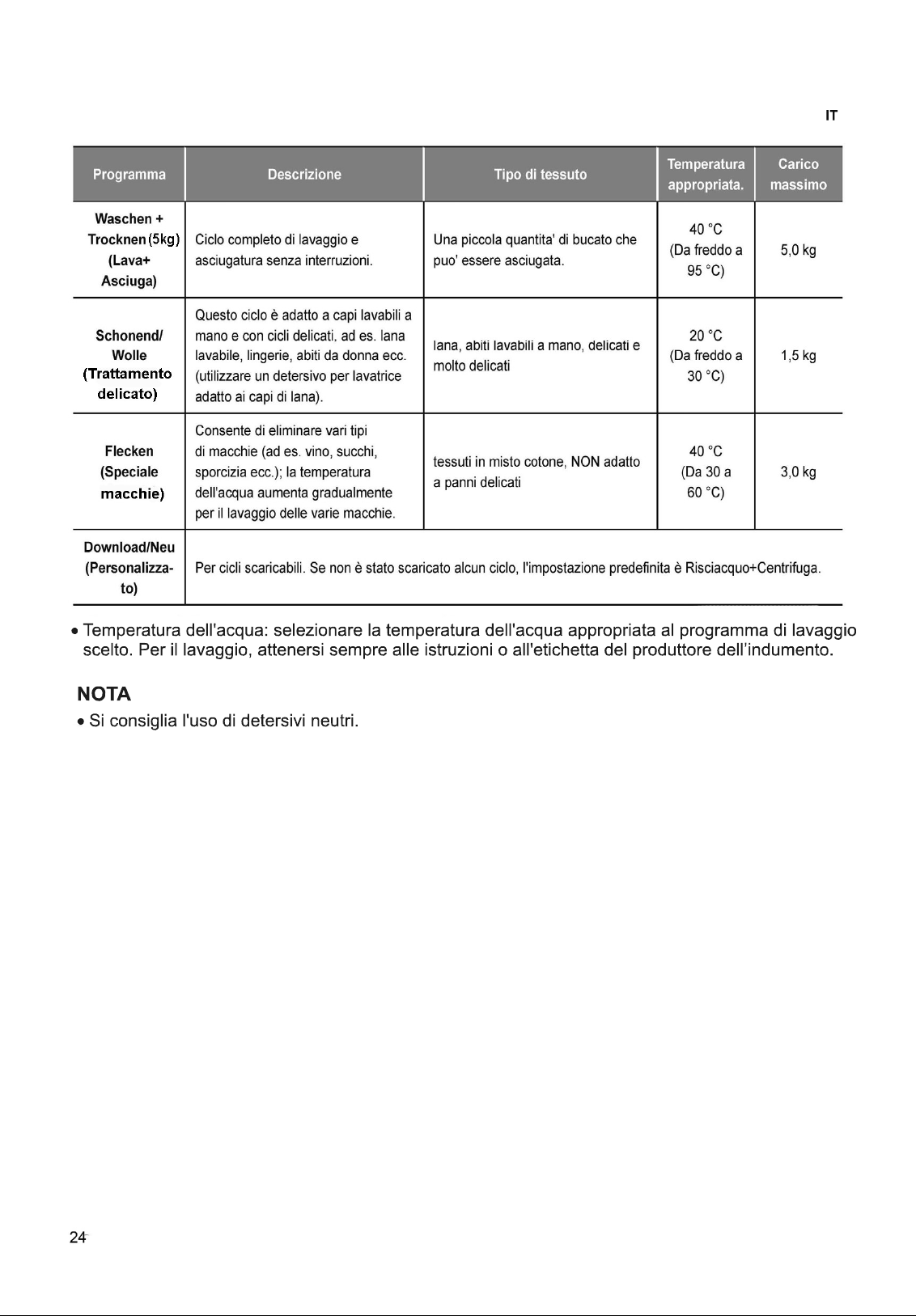
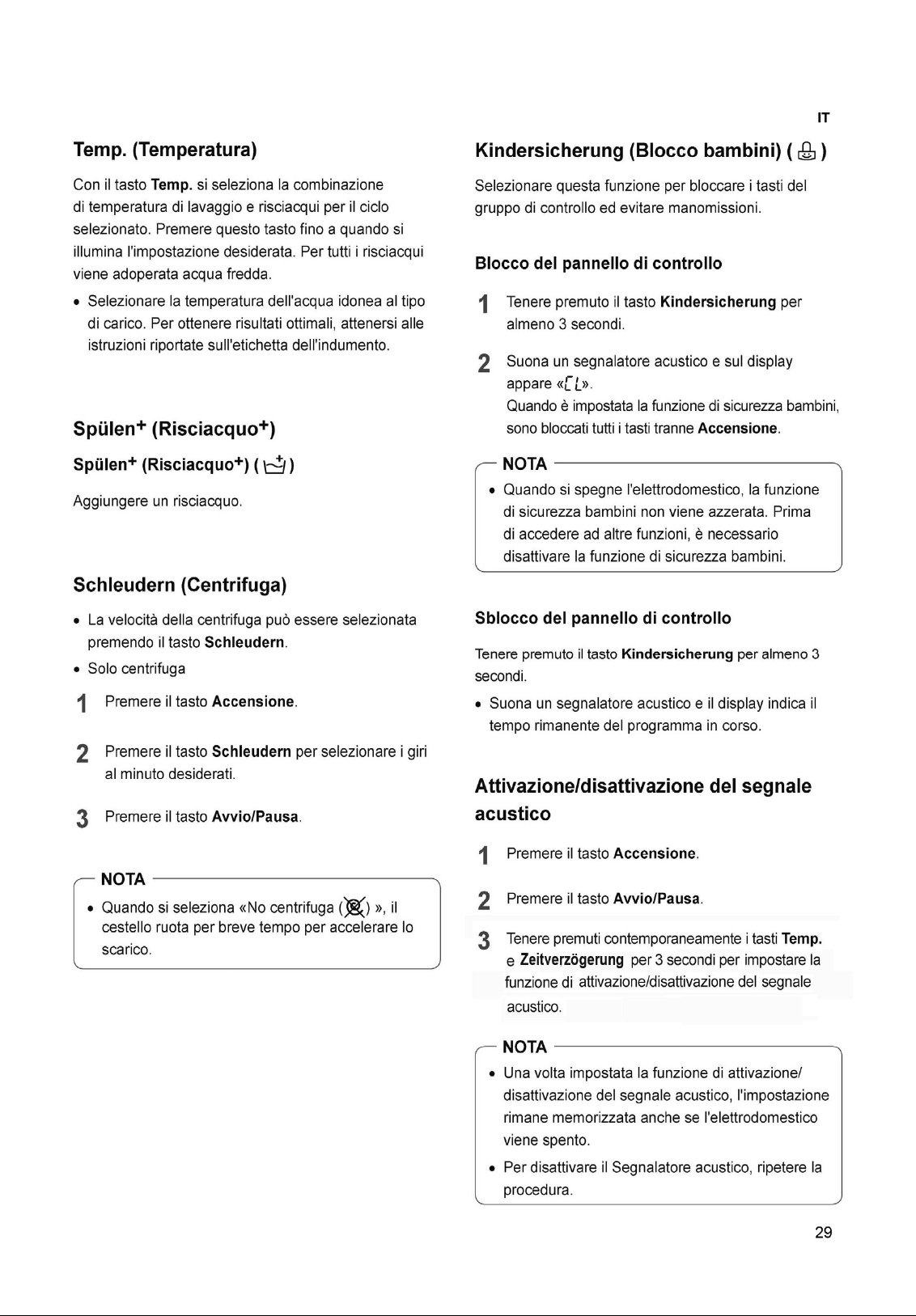
Tenere premuto il tasto Temp. per 3 secondi
mantenendo il microfono del telefono accanto
all'icona o al tasto Accensione.
4
Mantenere il telefono in posizione fino al
termine della trasmissione dei toni. Viene
visualizzato il tempo di trasferimento dei dati
rimanente.
• Per risultati ottimali, non spostare il telefono
durante la trasmissione dei toni.
• Se l'agente del call center non è in grado di
ottenere una registrazione accurata dei dati,
potrebbe chiedere di ripetere l'operazione.
Centro assistenza LG
Electronics
5
Una volta interrotti i toni e scaduto il conto alla
rovescia, riprendere la conversazione con il
rappresentante del call center, che sarà in
grado di fornire assistenza utilizzando le
informazioni trasmesse per l'analisi.
NOTA
• La funzione Smart Diagnosis™ dipende dalla
qualità del segnale telefonico locale.
• Se si utilizza un telefono fisso, la comunicazione
sarà migliore e l'assistenza sarà più efficiente.
• Se il trasferimento dei dati di Smart Diagnosis™ è
difficoltoso a causa della scarsa qualità della
chiamata, è possibile che non si ottengano i
migliori risultati dal servizio Smart Diagnosis™.
Specifiche del modulo NFC
Modello LGHA-NW
W
-v3.0
Gamma di frequenza 13.553 MHz - 13.567 MHz
Potenza di uscita (max.) 9.0dBμA/m@10m
34

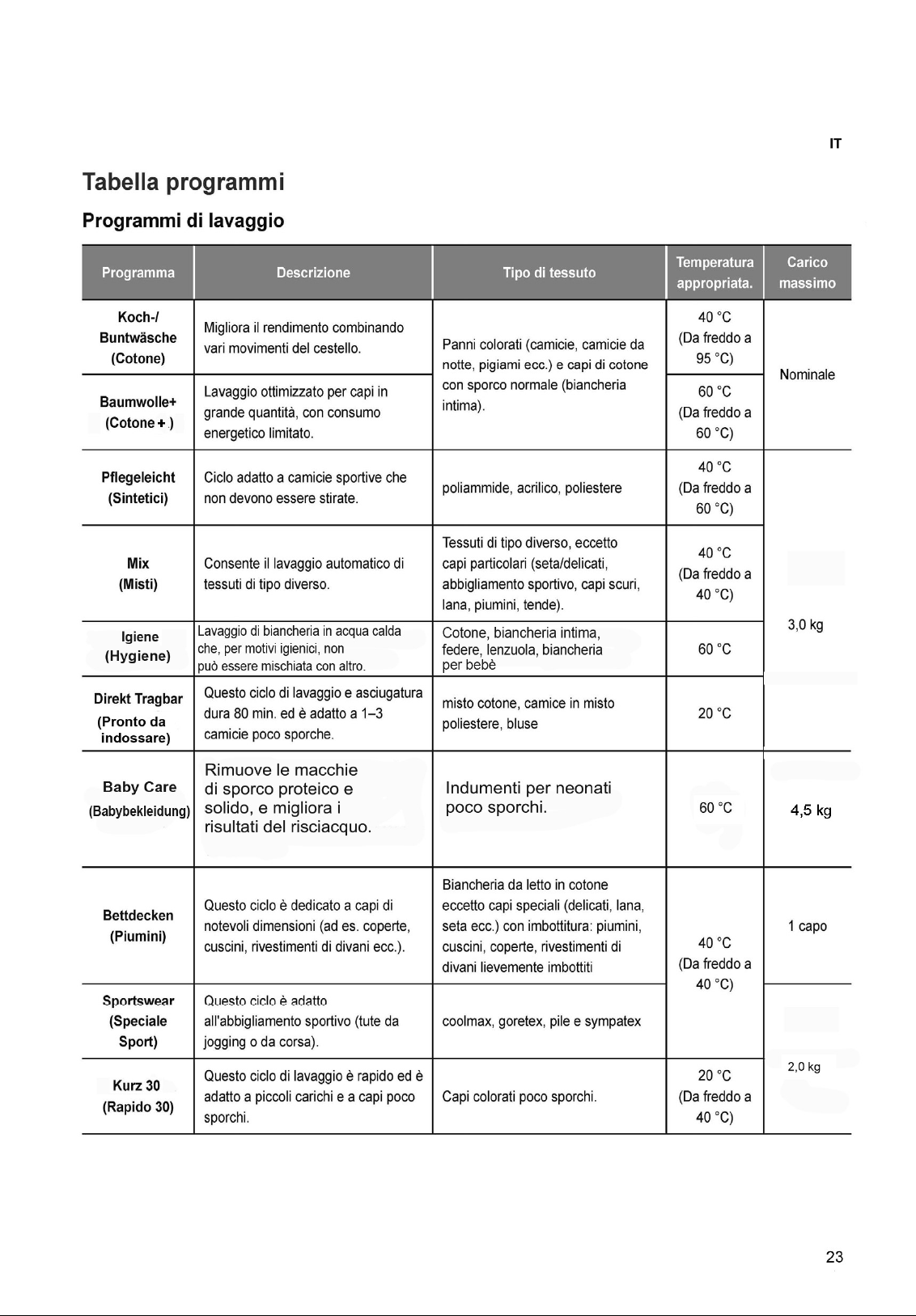
35

36

37

38

39

40

41
42
43

44

45