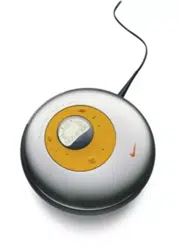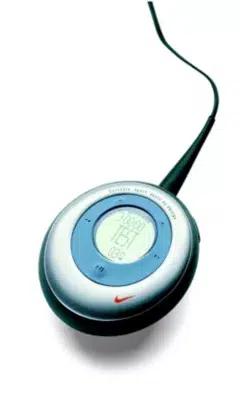
psa260 cover 23/6/04 16:12 Page 1
UUnnpplluugg ssaaffeellyy
To avoid loss of data, disconnect your player safely.
Exit any active application working with your player.
Click on the task tray.
Remove the USB cable.
5
AATTTTEENNTTIIOONN!!
WINDOWS 98SE USERS:
To avoid installation problems,
DDOO NNOOTT CCOONNNNEECCTT
your player to your
computer until
AAFFTTEERR
installation completes.
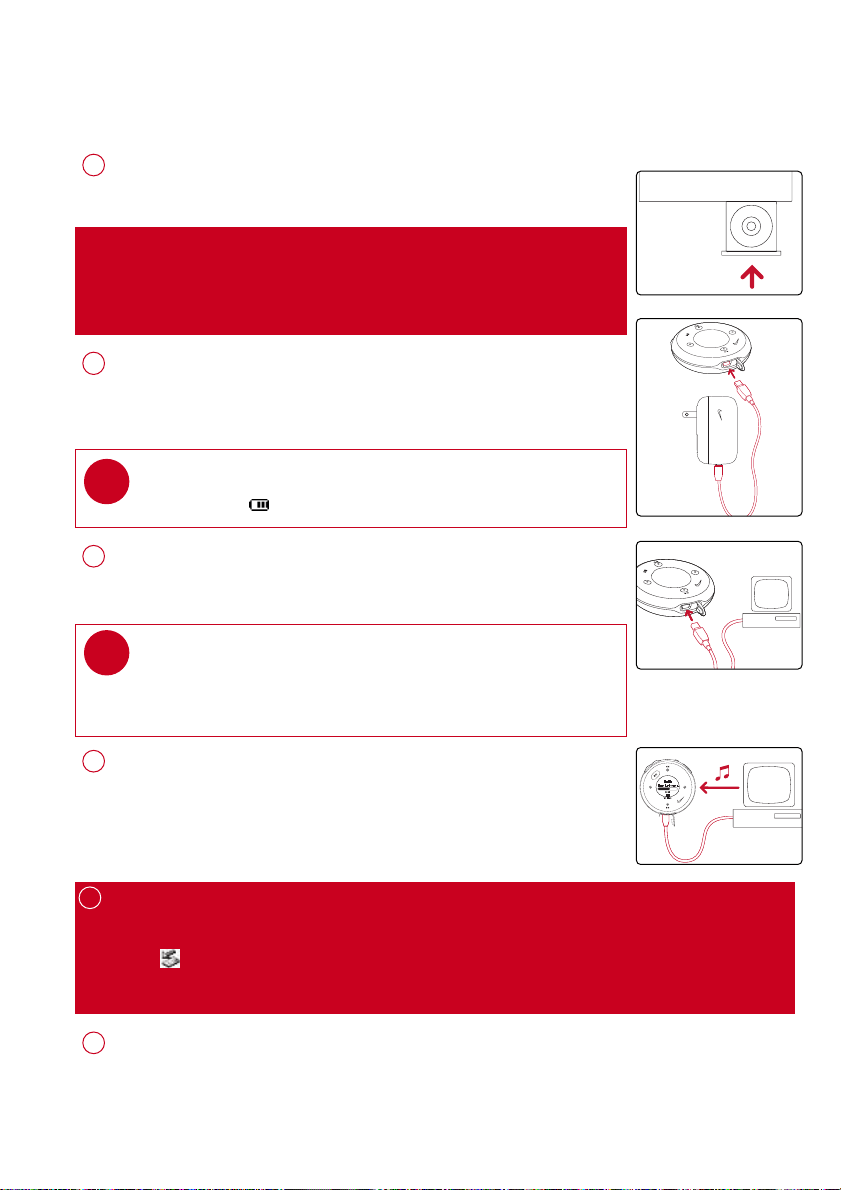
PPrreeppaarraattiioonnss
CCoonnnneecctt ppllaayyeerr ttoo ccoommppuutteerr
Open the USB cover. Connect your player to your computer using
the supplied USB cable.
3
IInnssttaallll
Insert the supplied CD into your computer’s CD-ROM drive.
Follow screen instructions to complete installation.
1
OOrrggaanniizzee aanndd ttrraannssffeerr mmuussiicc vviiaa DDMMMM // MMuussiiccmmaattcchh®®
Launch DMM/ Musicmatch® on your PC from Windows desktop
or
SSttaarrtt
menu.
Organize and transfer music files from your computer to your player.
4
TIP
Please refer to your computer’s manual for the exact position of
your USB port. Look for the USB symbol on the processing unit of
your computer.
✔
CChhaarrggee
Open the USB cover. Connect the supplied charger to the USB port
and the main power supply. For extended battery power, please
charge for at least 4 hours for first time use.
2
TIP
This indicator shows your battery information during charging.
✔
PPoowweerr oonn aanndd eennjjooyy!!
Press and hold 22;; for 2 seconds to power on if the player does not
power on automatically. Enjoy your new running / music experience!
6
1
PSA260-eng.qxd 7/8/04 2:47 PM Page 1
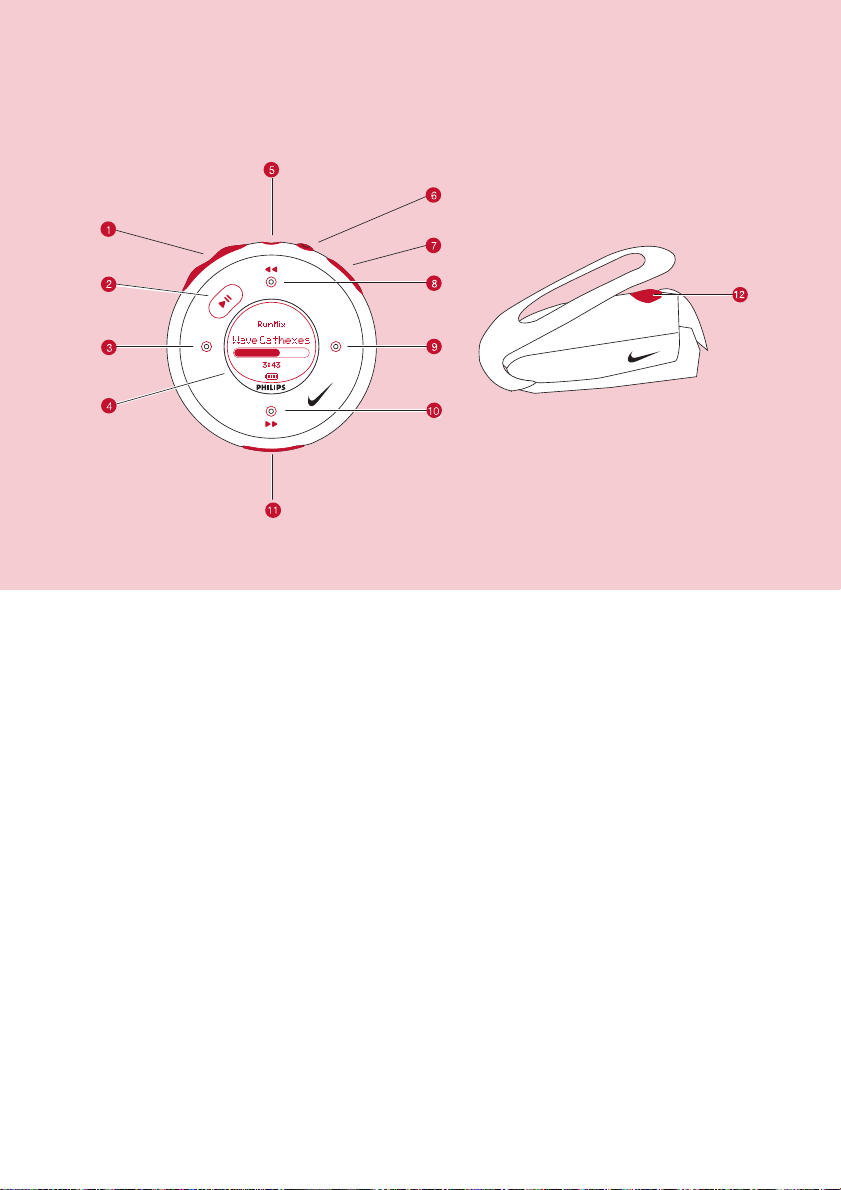
NNaammee ooff PPaarrttss
1
−− // ++
Volume control, press
−−
to decrease; press
++
to increase
2 22;; Press and hold to power on / off; press briefly to play / pause
3 11 Left
4
LLCCDD ddiissppllaayy
Dynamically displays menu, options and track information
5
HHeeaaddpphhoonneess jjaacckk
Connects headphones
6
RRuunn
Starts / stops recording running activities
7
VVooiiccee ffeeeeddbbaacckk
Activates running feedback
8 33 , 55 Up / Previous / Fast rewind
9 22 Right
0 44 , 66 Down / Next / Fast forward
!
UUSSBB ppoorrtt //
Open cover to connect to computer / charge your player
CChhaarrggiinngg ssoocckkeett
@
SSDDMM
Power ON / OFF speed and distance monitor
2
PSA260-eng.qxd 7/15/04 12:38 PM Page 2

MMeennuu NNaavviiggaattiioonn
MMuussiicc
PPllaayylliissttss
AArrttiissttss
AAllbbuummss
GGeennrreess
AAllll TTrraacckkss
RRaaddiioo
SSeettttiinnggss SSttrroobbee lliigghhtt
SShhuuffffllee && RReeppeeaatt
DDBBBB
EEqquuaalliizzeerr
BBaacckklliigghhtt
CCoonnttrraasstt
LLaanngguuaaggee
SSyynncchhrroonniizzee
Press and hold 22;; to power on.
See specific chapters for details of each setting.
2
e.g. Playlist001... PlaylistXXX
e.g. A ... Z
Preset 1
Preset 10
Autosearch
...
33
11 22
44
Up
Down
Left
Right
1
44
e.g. A ... Z
e.g. A ... Z
e.g. A ... Z
RRuunnnniinngg
HHiissttoorryy
List of Freerun logs by date
CCaalliibbrraattiioonn
MMaannuuaall
AAuuttoommaattiicc
FFaaccttoorryy sseettttiinnggss
VVooiiccee ffeeeeddbbaacckk
DDiissttaannccee uunniittss
3
PSA260-eng.qxd 7/8/04 2:47 PM Page 3
Press and hold 22;; to power on.
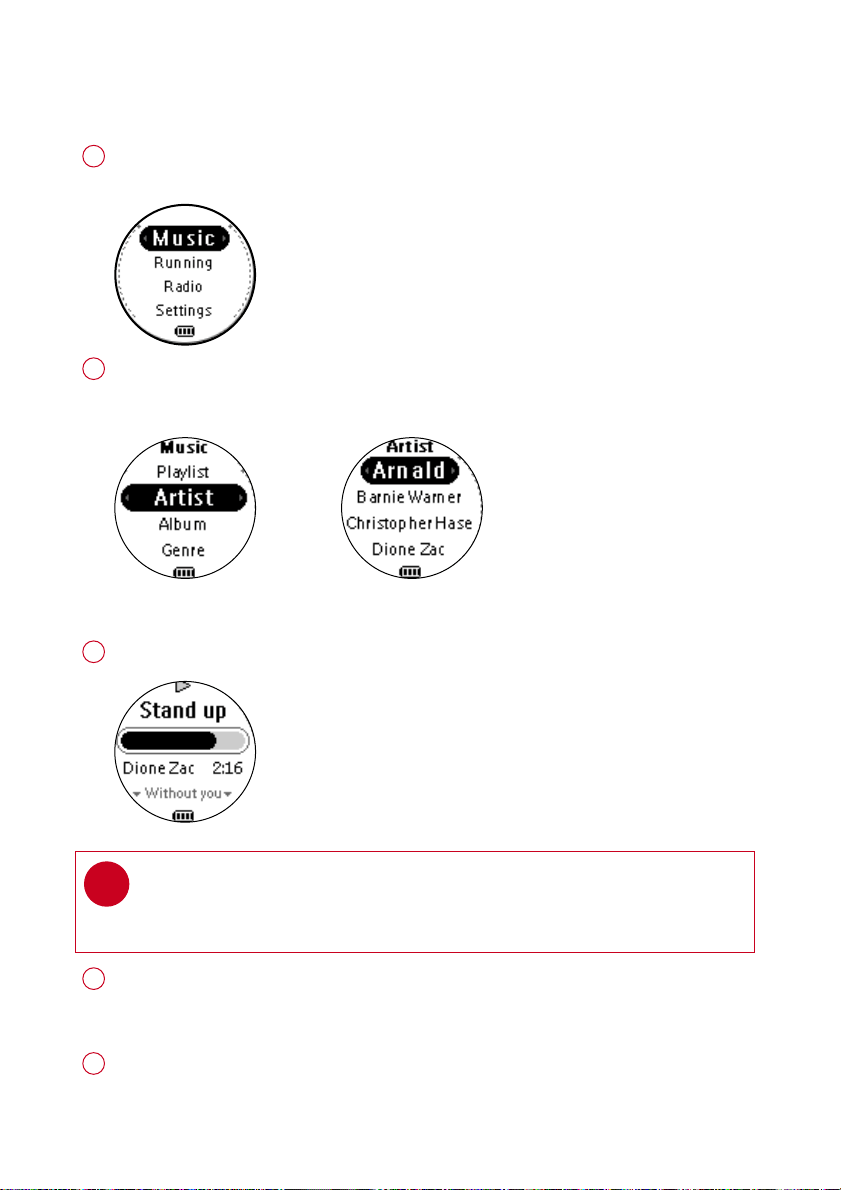
From the root menu, press 22 to enter the music mode.
Any radio playback will stop as you enter the music mode.
1
Press 33 to scroll up or 44 to scroll down for your option.
Press 22 for next or 11 for previous levels of library.
Press 22;; to play.
2
MMuussiicc MMooddee:: BBaassiicc OOppeerraattiioonn
Library options Artists list
Playscreen
Press 33 , 33 for the previous or 44, for the next track.
Press 33 to play the same track again.
Press and hold 44 to fast forward or 33 to rewind in a track during playback.
4
Press and hold 22;; to power off. Your player will save your current
music playback status and resume next time you power on.
5
Press 22;; to pause during playback.
3
*Actual display varies with use
4
TIP
> To display library options during playback, press 11 .
> To display the root menu, press and hold 11 .
✔
PSA260-eng.qxd 7/8/04 2:47 PM Page 4
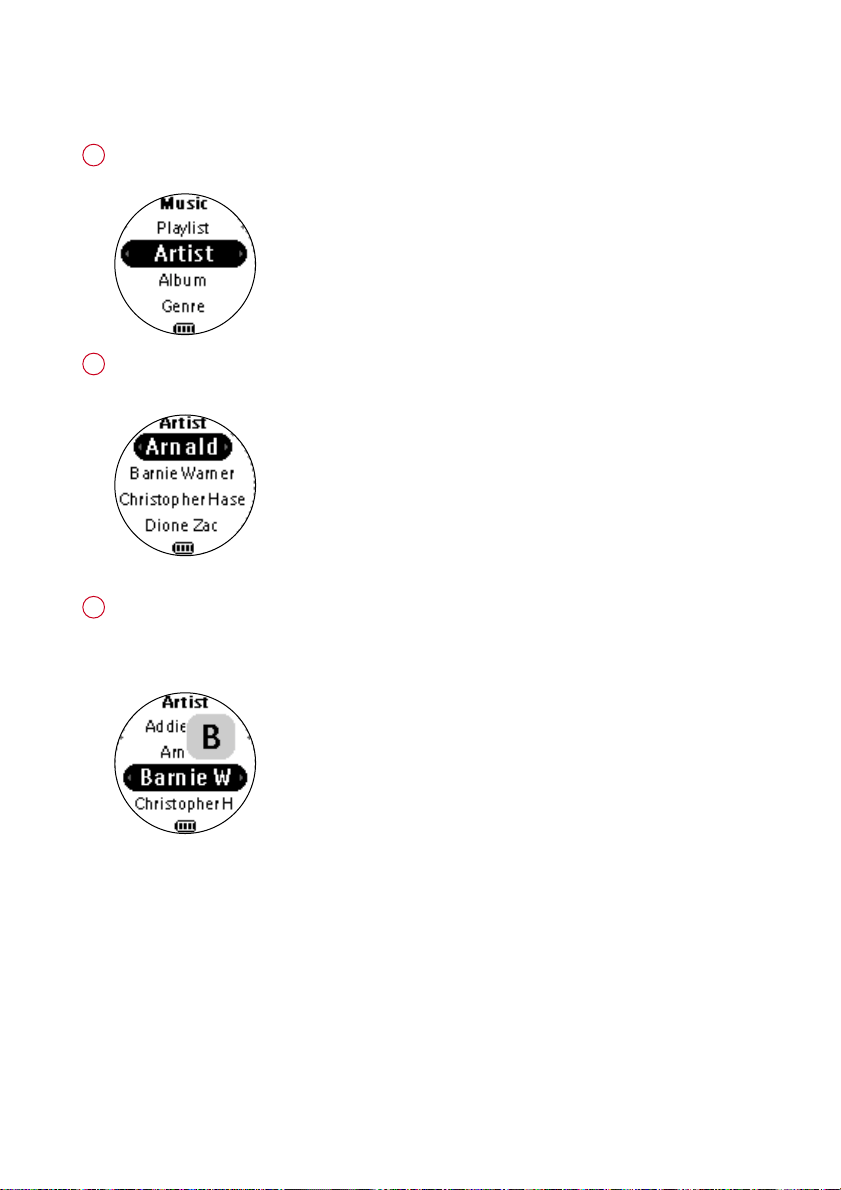
MMuussiicc MMooddee:: LLiibbrraarryy OOppttiioonnss aanndd FFaasstt SSccrroolllliinngg
Press 33 to scroll up or 44 to scroll down for your library option.
Press 22 on
AArrttiisstt
to display the artist library
Press 22 for the next or 11 for the previous level of library.
2
Artists list in alphabetical order
Press and hold 44 for 2 seconds to scroll down quickly.
Press and hold 33 for 2 seconds to scroll up quickly.
Release button to stop scrolling.
3
Browsing tracks quickly.
1
*Actual display varies with use
5
PSA260-eng.qxd 7/8/04 2:47 PM Page 5
6
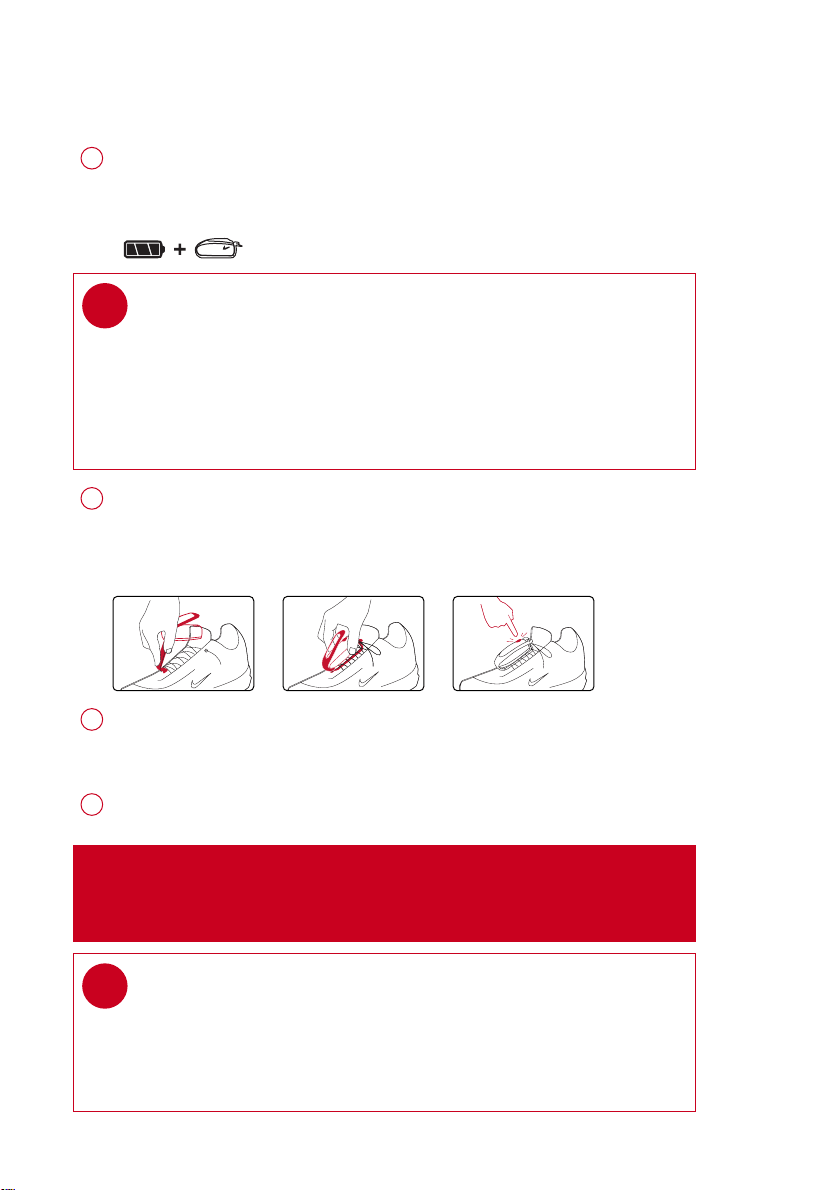
IInnssttaalllliinngg tthhee ssppeeeedd aanndd ddiissttaannccee mmoonniittoorr
Use an appropriately-sized coin to twist
cclloocckkwwiissee
to open the speed
monitor battery door. Insert an AAA alkaline battery (with positive in first).
Replace the battery door, pressing fully in and twist
aannttii--cclloocckkwwiissee
to
secure the closing.
1
Press and hold 22;; for 2 seconds to power on your player.
Press
SSDDMM
for 2 seconds to power on the monitor. Your monitor will blink.
The monitor is now ready to record your running activities.
3
Unhook the rubber strap and detach the clip. Loosen shoelaces and slide
monitor clip under laces. Secure the monitor to your running shoe.
The monitor should rest just below where laces tie and be secure enough to
stay in place during running.
2
TBD
TBD
After running is completed, terminate the logging (see page 11).
Press and hold
SSDDMM
for 2 seconds to power off your monitor after use.
4
TIP
Batteries contain chemical substances, so they should be disposed of
properly.
Incorrect use of batteries can cause the electrolyte leakage and will
corrode the compartment or cuase the batteries to burst.
Remove the batteries if the set is not to be used for a long time.
✔
AATTTTEENNTTIIOONN
: Anyone beginning an exercise regimen for the first time
(especially users of pacemakers or other implanted devices) should
consult a physician or health professional before using the
MMPP33
RUN.
TIP
> Your SDM automatically shutdown when there is no connection with
your player for 10 minutes or no activity is detected for 30 minutes.
Press
SSDDMM
for 2 seconds to power on the monitor again.
> Replace the battery when your monitor blinks rapidly (usually after 50 hrs
for a high quality alkaline battery).
✔
TBD
2 SEC
TBD
PSA260-eng.qxd 7/15/04 12:39 PM Page 6
7
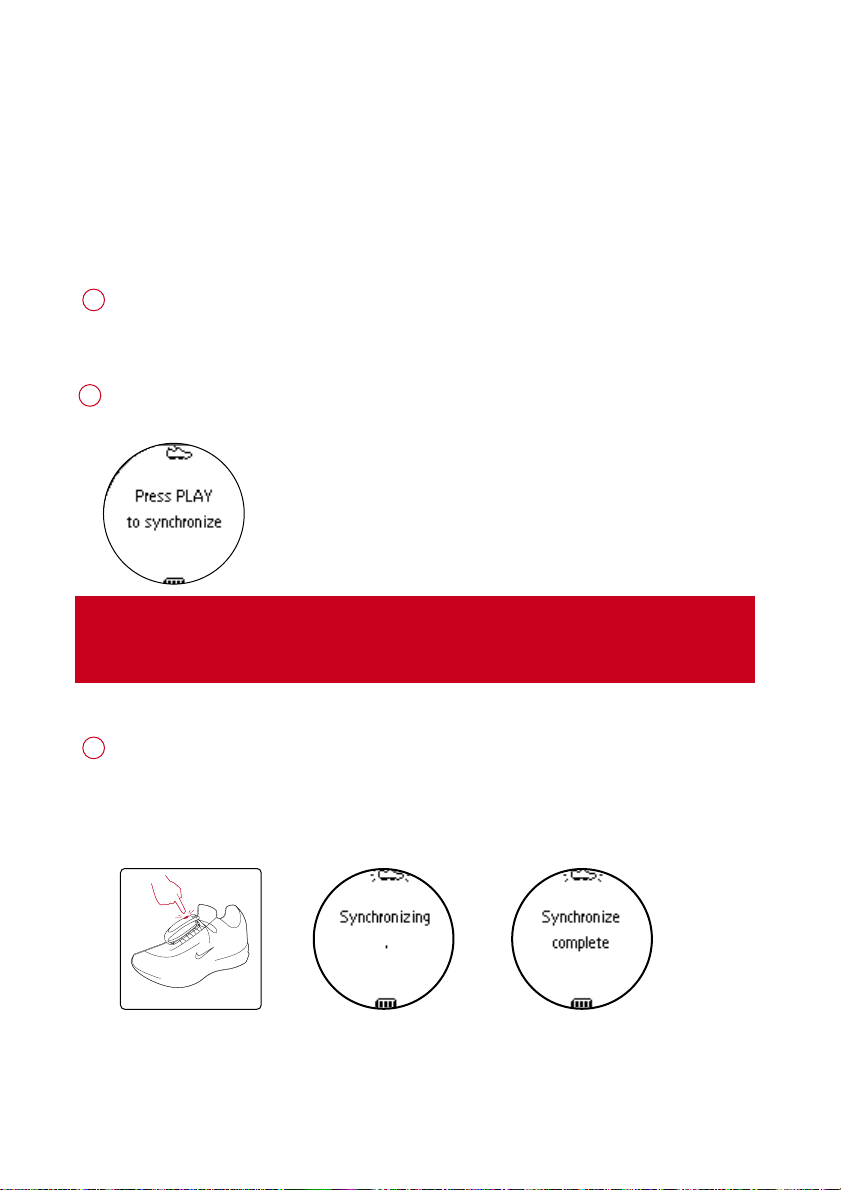
Press and hold 22;; for 2 seconds to power on your player.
From the root menu, press 44, 44, 44, 22 to enter the settings mode.
Select
SSYYNNCCHHRROONNIIZZEE
and press 22 . Press 22 ;; to start synchronization when prompted.
2
1
IIMMPPOORRTTAANNTT!!
Your player will link with the first monitor which gives out signals.
Make sure there is no activated sensors within 15 meters.
Press and hold
SSDDMM
on your monitor for 6 seconds.
The speed and distance monitor light will blink rapidly (x3).
Wait for the player screen to display
SSyynncchhrroonniizzee ccoommpplleettee
.
Your player is now synchronized with your monitor.
3
6 SEC
SSyynncchhrroonniizziinngg ppllaayyeerr wwiitthh
ssppeeeedd aanndd ddiissttaannccee mmoonniittoorr
Please synchronize your player with the speed and distance monitor if:
> you have bought a new speed and distance monitor; or
> you cannot establish connection between your player and the speed and distance monitor
even when a new alkaline battery is inserted
*Actual display varies with use
PSA260-eng.qxd 7/8/04 2:48 PM Page 7
8
RRuunnnniinngg mmooddee:: AAuuttoommaattiicc ccaalliibbrraattiioonn
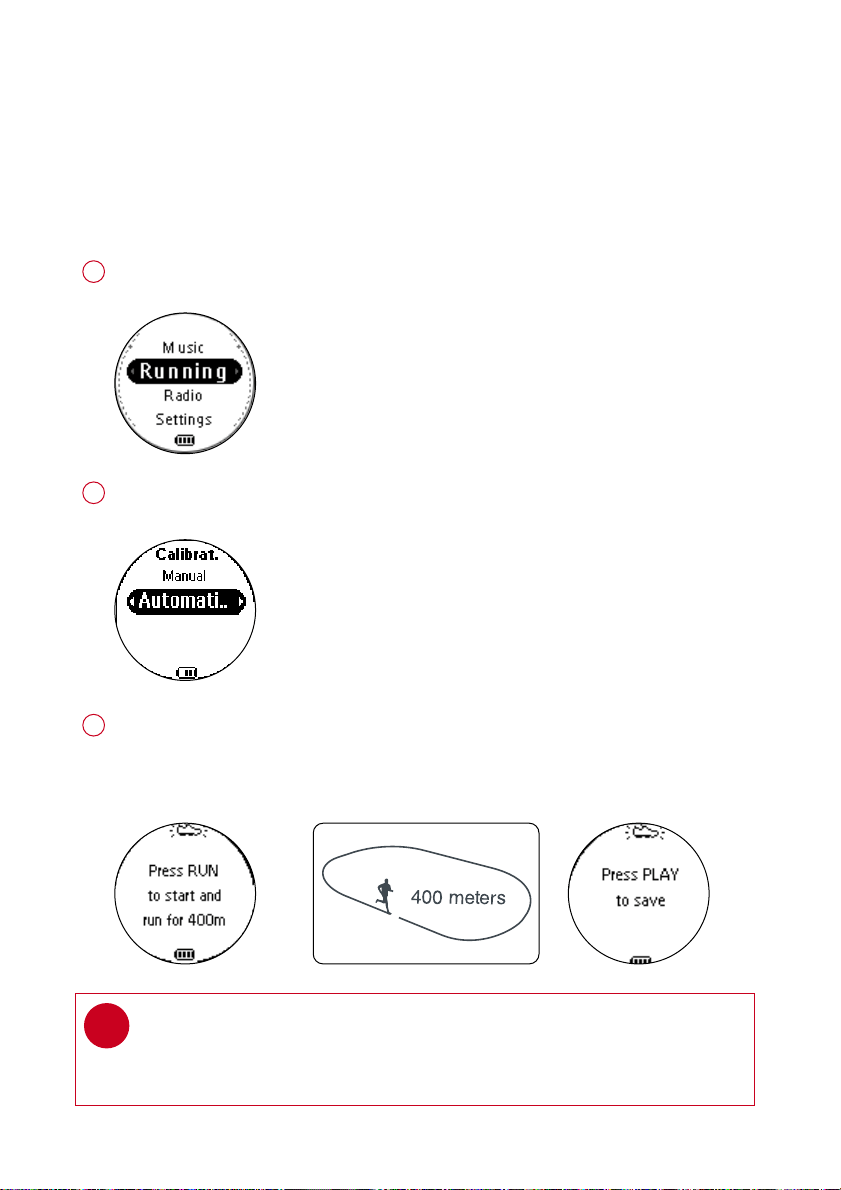
Press and hold 22;; to power on.
From the root menu, press 44 , 22 to enter the running mode.
1
To calibrate the speed and distance monitor, select CALIBRATION > AUTOMATIC.
2
Press RUN and start running 400 metres on the inner lane of a marked track as prompted.
Press RUN again when you have completed your track.
Press
22 ;;
to save the calibration value.
3
TIP
If you want to stop the calibration during running, press 11 to
discard the calibration value.
✔
Your speed and distance monitor provides unprecedented accuracy right out of the box.
In addition, an optional calibration procedure can be performed to guarantee optimal accuracy
for a specific user, which will correct for individual stride variations such as pronation or supina-
tion. Calibration can be performed either automatically or manually.
*Actual display varies with use
PSA260-eng.qxd 7/8/04 2:48 PM Page 8
9
RRuunnnniinngg mmooddee:: MMaannuuaall ccaalliibbrraattiioonn
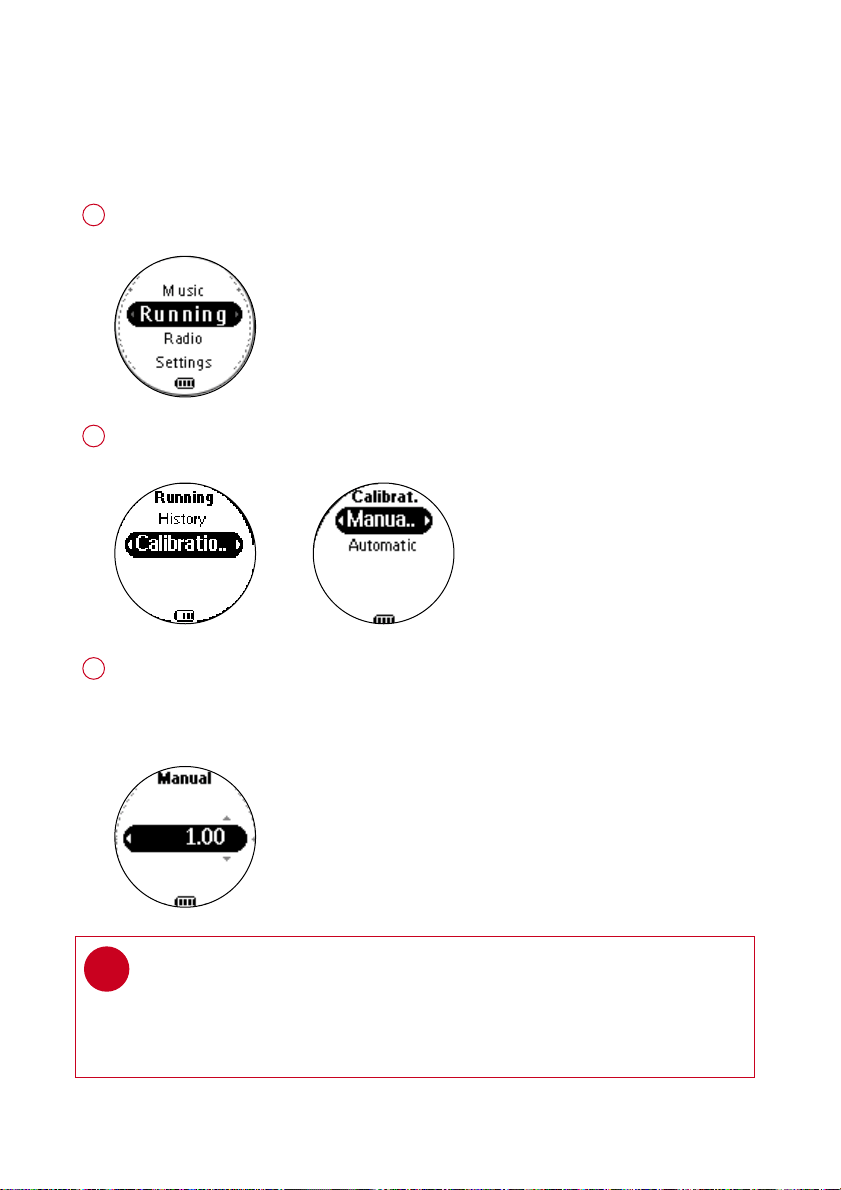
Press and hold 22;; to power on.
From the root menu, press 44 , 22 to enter the running mode.
1
To calibrate the speed and distance monitor, select CALIBRATION > MANUAL.
2
Press 33 or 44 to select calibration offset (from 0.50 to 1.50). Change the offset value
to make small adjustments. If the monitor is under-measuring a known distance,
increase the offset value. Different shoe models may affect the monitor’s calibration.
Adjust the offset value accordingly if you notice differences between shoes.
3
To optimize SDM performance for different running style, you can manually
calibrate the SDM.
TIP
> If you run 400m and the monitor returns a reading of 380m (5% under), you
should adjust the offset value to 1.05.
> Write down and keep your offset value. It will come in handy if your friends
borrow your MP3RUN and they change your calibration setting.
✔
*Actual display varies with use
PSA260-eng.qxd 7/8/04 2:48 PM Page 9
10
LLooggggiinngg yyoouurr rruunnnniinngg aaccttiivviittiieess
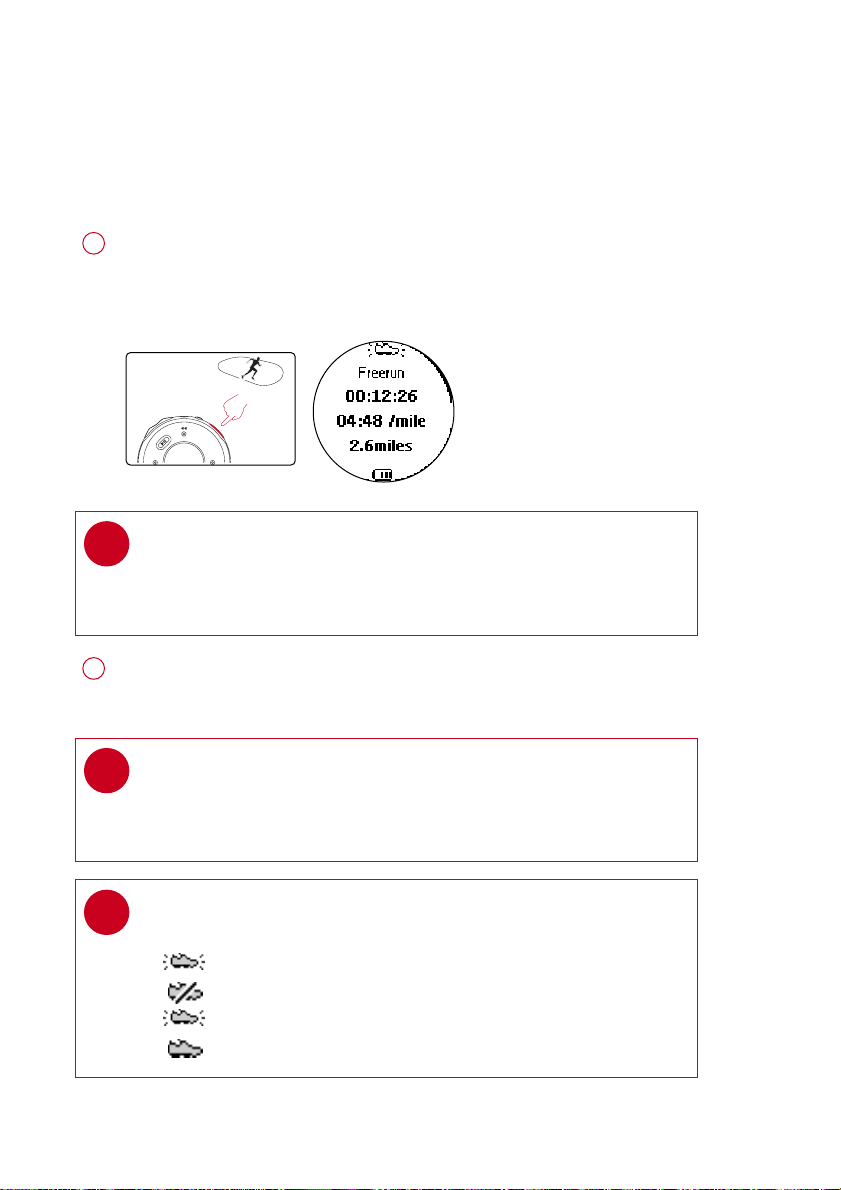
Press
SSDDMM
for 2 seconds to power on the monitor.
Press
RRUUNN
and wait for a beep.
The screen will display an SDM connection status icon.
Start running. Your running activities will now be logged.
1
TIP
Any radio playback will stop as you start logging your running activities.
You can select an item from the music mode to accompany your running.
(See page 4 for more information.)
✔
Press
RRUUNN
briefly to pause logging.
Press
RRUUNN
briefly again to resume logging.
2
*Actual display varies with use
TIP
Check your SDM connection status from the following icons:
> SDM active
> SDM inactive
> (blinking) SDM trying to establish connection
> SDM not yet sychronized (see page 7)
✔
To keep your workout log synchronized with summer / winter timing, please connect
your player to your computer and start DMM before logging your running activities.
TIP
Use pause to log your running more accurately.
Press
RRUUNN
briefly to pause logging after the beep.
Press
RRUUNN
briefly again to resume logging and start running.
✔
PSA260-eng.qxd 7/8/04 2:48 PM Page 10
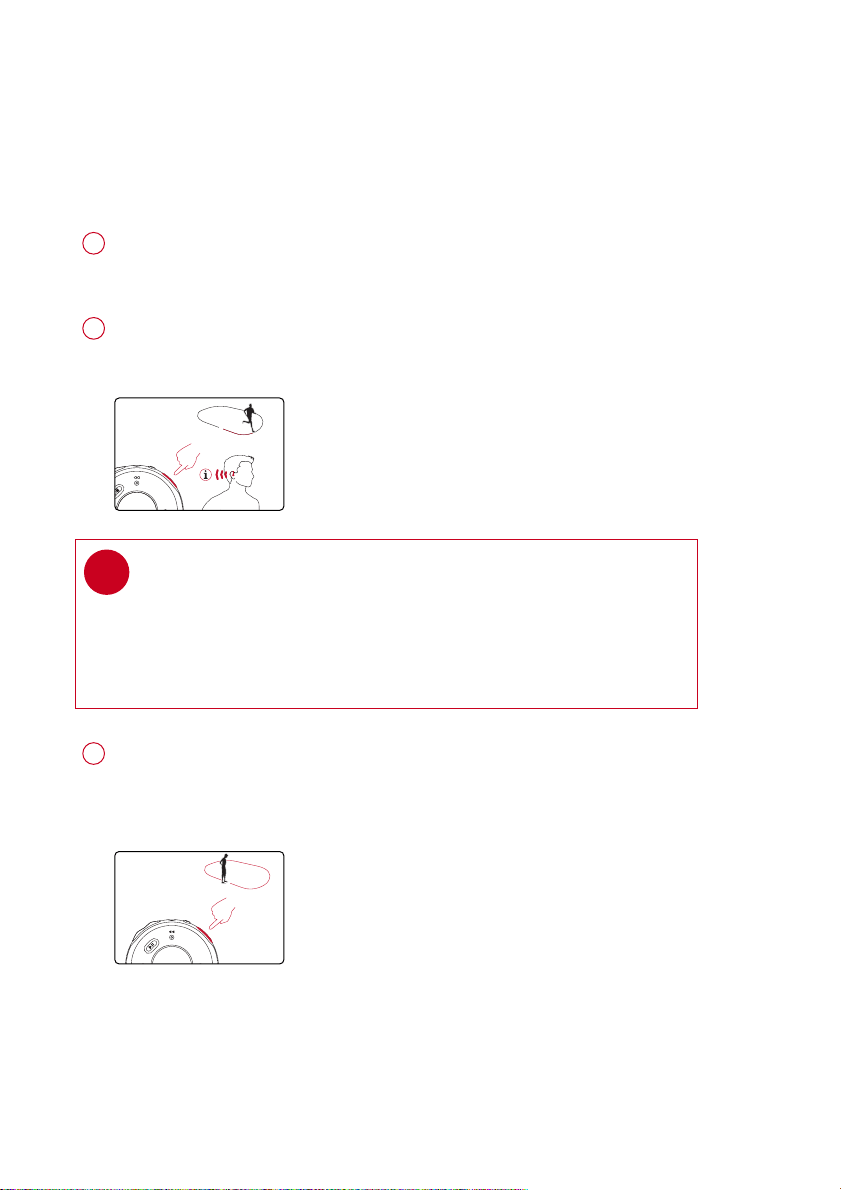
11
Press and hold
RRUUNN
for 1 second to stop logging.
Your running data will be saved and your music playback will continue.
(See page 20 for information on how to manage your running data on
your computer.)
3
Press
FFEEEEDDBBAACCKK
to get information (in English) about your running progress.
2
TIP
You can also get feedback automatically according to distance
(every km / mile) and time (every 5 minutes).
Select this option from
SSEETTTTIINNGGSS
➔
VVOOIICCEE FFEEEEDDBBAACCKK
.
✔
0.5 SEC
1 SEC
GGeettttiinngg ffeeeeddbbaacckk oonn yyoouurr rruunnnniinngg
Voice feedback will be available 2 minutes after logging started.
Start logging your running activities. (see page 10)
1
PSA260-eng.qxd 7/15/04 2:31 PM Page 11
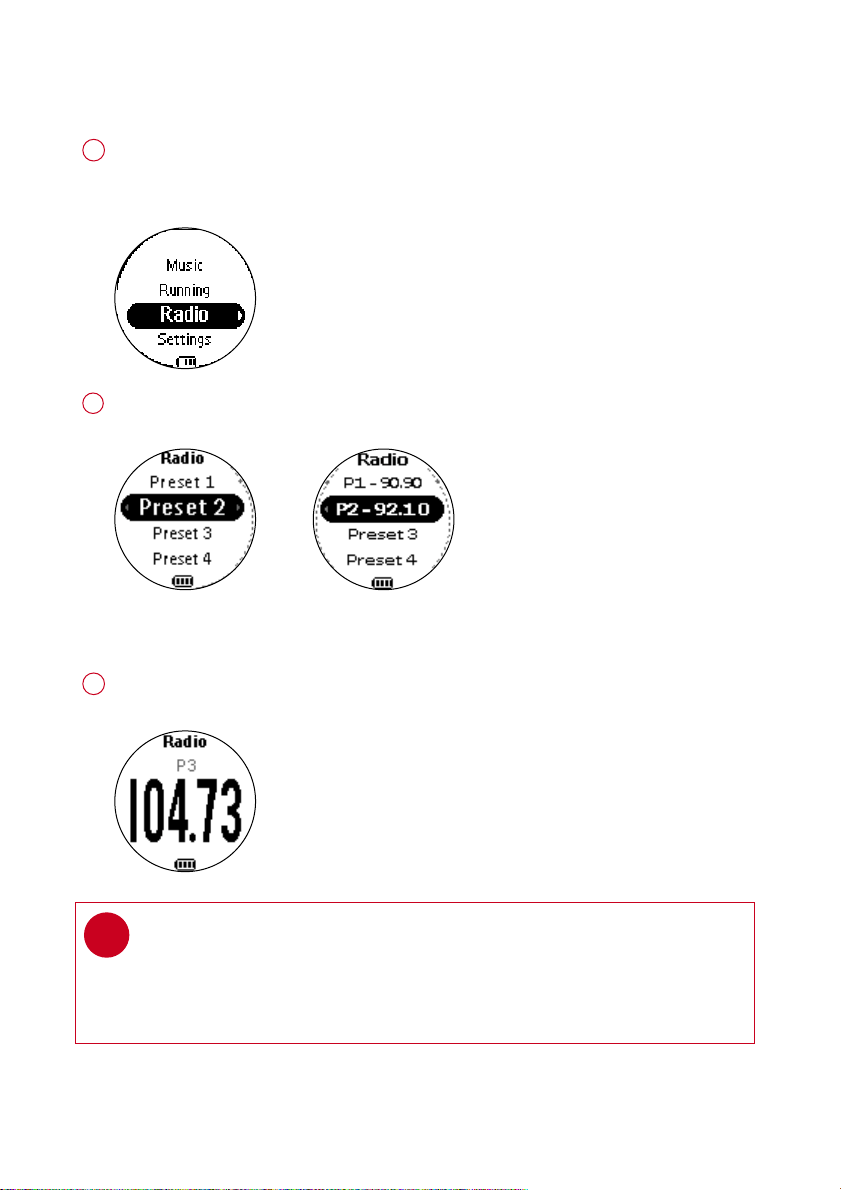
RRaaddiioo MMooddee:: AAuuttoommaattiicc TTuunniinngg
From the root menu, press 44, 44, 22 to enter the radio mode (disabled during
running logging).
Any music playback will stop as you enter the radio mode.
1
Press 44 to scroll down to
AAUUTTOO SSEEAARRCCHH
. Press 22;; to automatically select
the 10 strongest radio stations. Press 11 to abort
AAUUTTOO SSEEAARRCCHH
.
2
Press 33 to scroll up or 44 to scroll down for your preset.
Press 22;; to play the selected station.
3
Radio mode, no station
stored
Stations tuned
TIP
> Connect your headphones before you start tuning.
> No stations are tuned if you are using your player for the first time.
> Some settings and functions are not available in the radio mode.
✔
*Actual display varies with use
12
PSA260-eng.qxd 7/8/04 2:48 PM Page 12
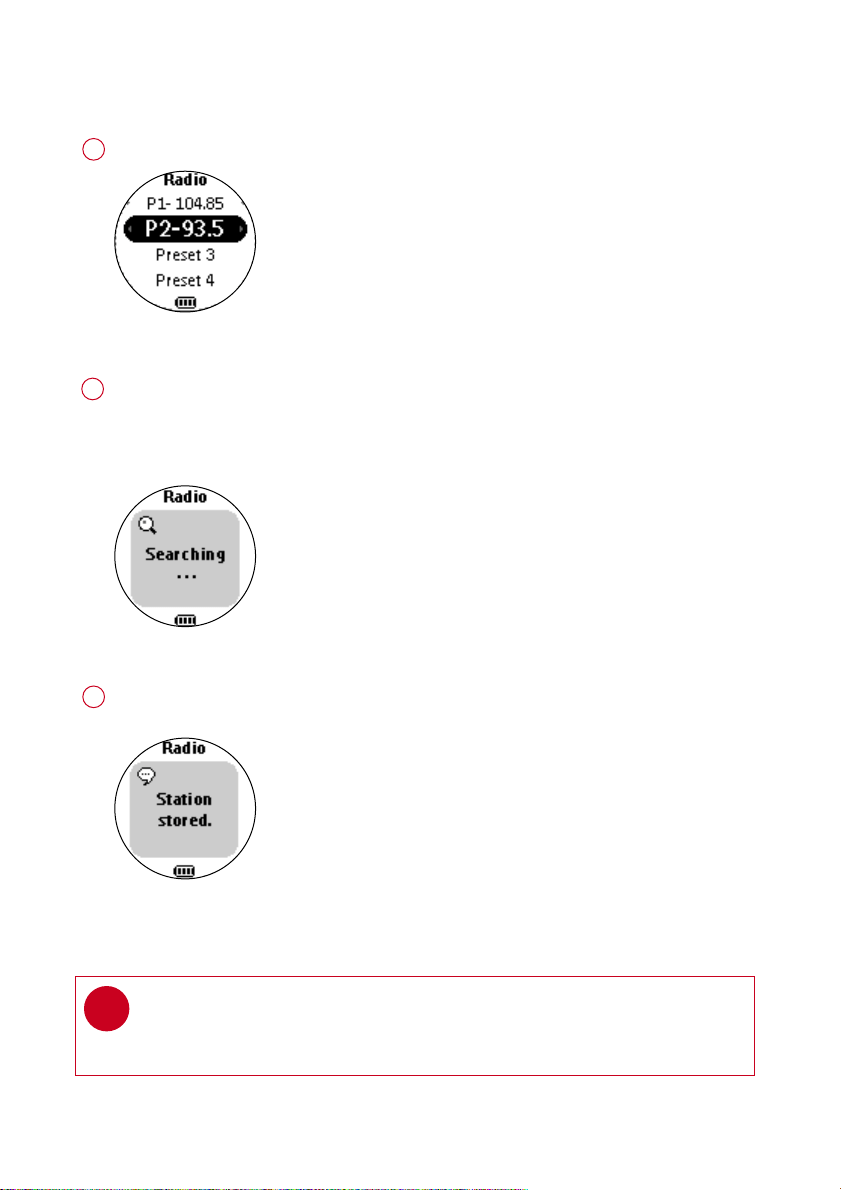
RRaaddiioo MMooddee:: MMaannuuaall TTuunniinngg
Press 33 to scroll up or 44 to scroll down for your preset.
1
Press 22;; to play the selected station.
Press 44 or 33 to fine tune (tune step by step).
Press and hold 44 to search for the next available station.
Press and hold 33 for the previous available station.
Press 11 to abort searching.
Press 22;; to save your setting.
3
Manual tuning
Station stored
TIP
If you want to discard the newly searched station, press 11 to exit the radio menu.
✔
Radio preset menu
2
*Actual display varies with use
13
PSA260-eng.qxd 7/8/04 2:48 PM Page 13
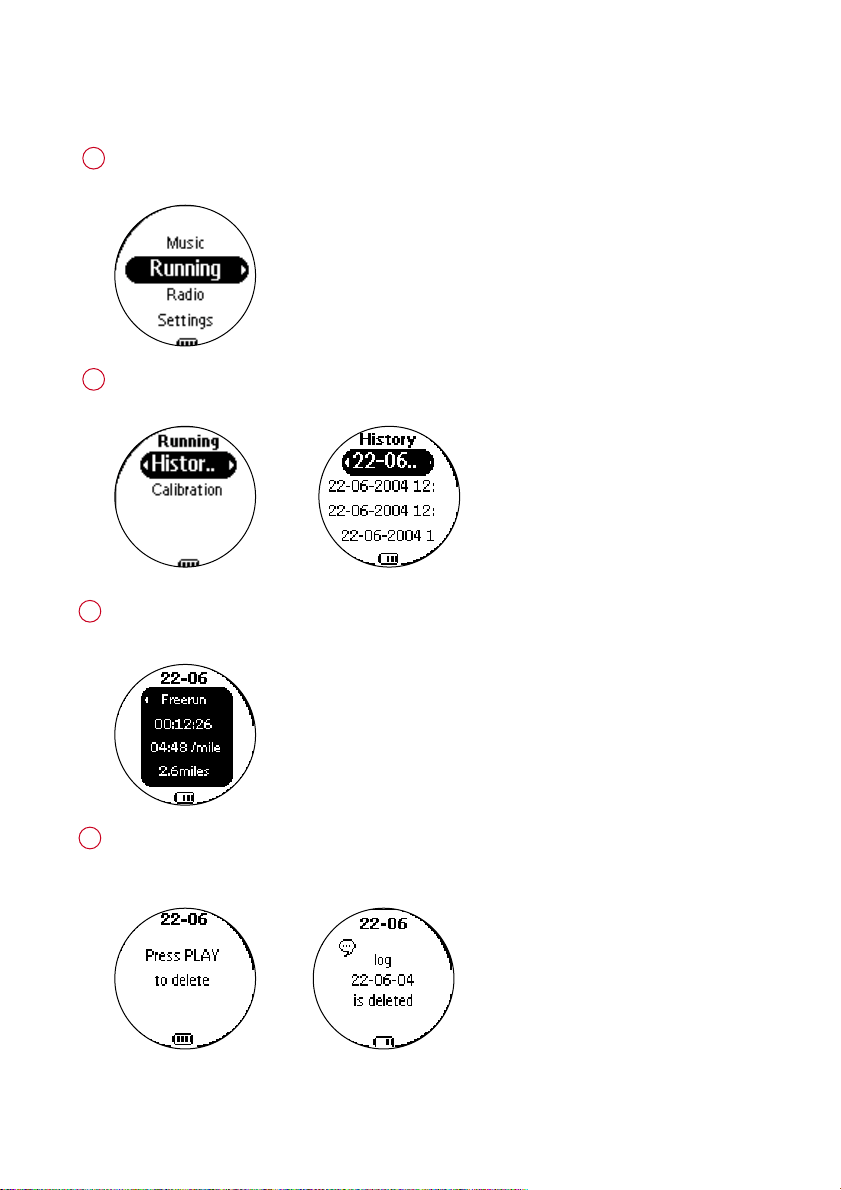
RRuunnnniinngg mmooddee:: HHiissttoorryy
Press and hold 22;; to power on.
From the root menu, press 44 , 22 to enter the running mode.
1
To list your running history, select HISTORY and press 22.
Your running logs will be listed by date.
2
*Actual display varies with use
14
Press 33 or 44 to select your running log.
Press 22 to view the results of the highlighted running log.
3
If you want to delete the running log, press 22;; as prompted.
If you want to keep the running log, press 11 .
4
PSA260-eng.qxd 7/8/04 2:48 PM Page 14
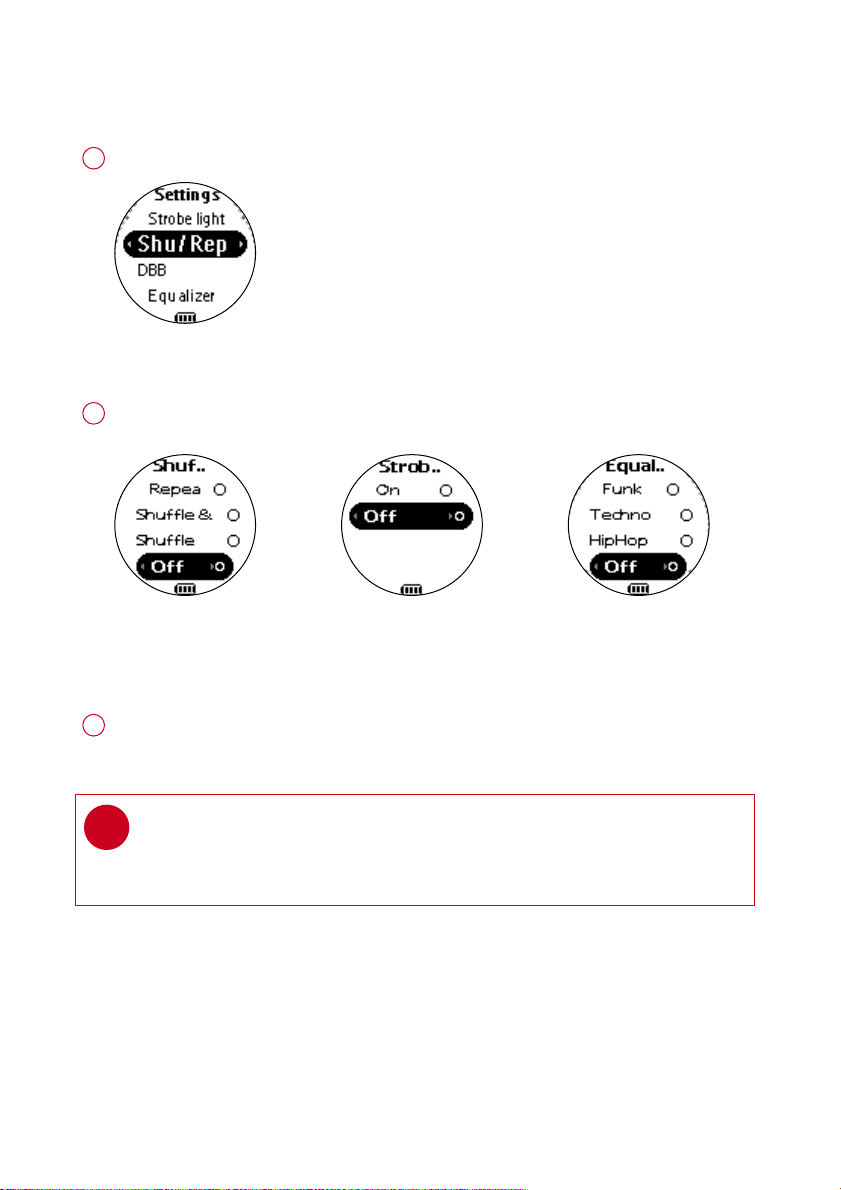
SSeettttiinnggss MMooddee
From the root menu, press 44, 44, 44, 22 to enter the settings mode.
1
Press 33 to scroll up or 44 to scroll down for your setting.
Press 22 for next or 11 for previous levels of options.
2
Settings mode
Repeat / Shuffle Strobe light Equalizer
Press 22 to confirm your selection.
3
TIP
To display player information, select and highlight
FFaaccttoorryy sseettttiinnggss
;
press and hold 22 for 2 seconds.
✔
*Actual display varies with use
15
PSA260-eng.qxd 7/8/04 2:48 PM Page 15
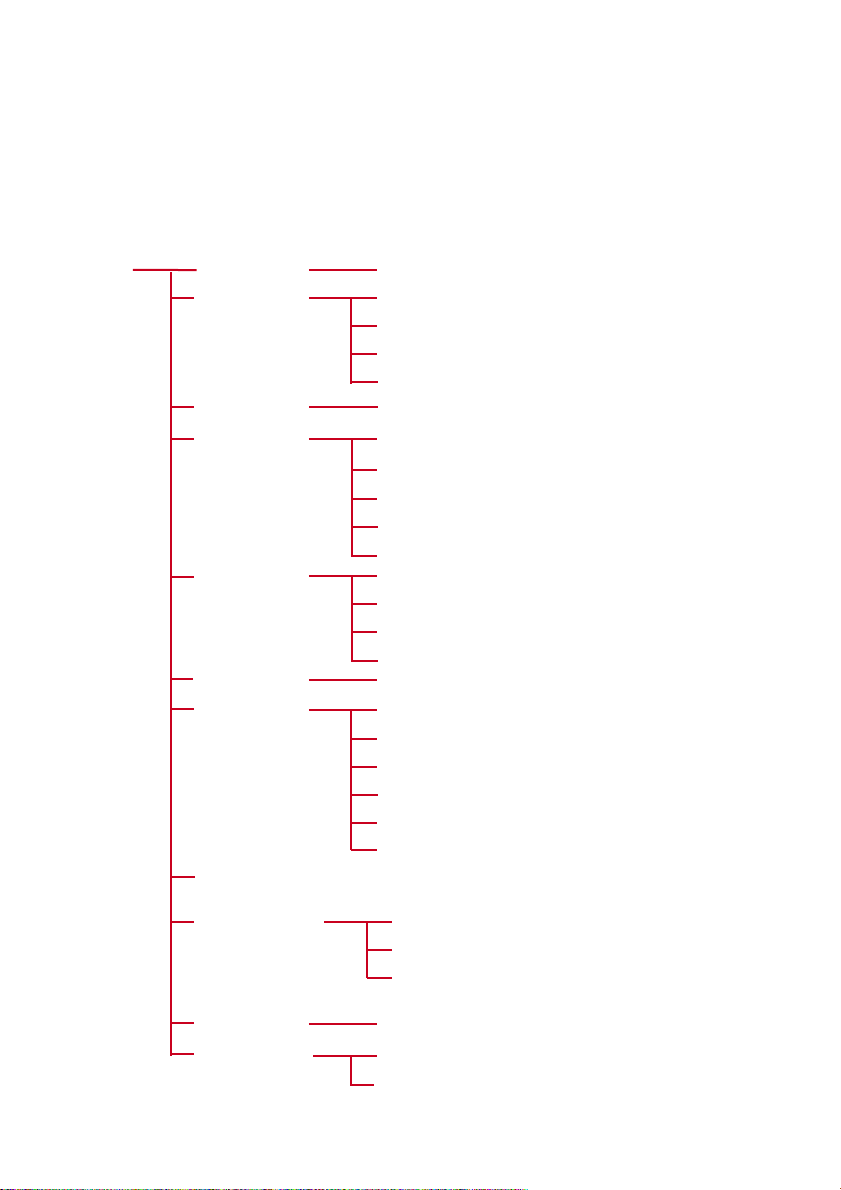
AAddvvaanncceedd SSeettttiinnggss aanndd AAccttiioonnss
You can adjust the following settings from the settings mode.
Press 33 to scroll up or 44 to scroll down for your setting.
Press 22 for next or 11 for previous levels of options.
Press 22 to confirm your selection.
SSeettttiinnggss SSttrroobbee lliigghhtt
DDBBBB
EEqquuaalliizzeerr
SShhuuffffllee &&
RReeppeeaatt
LLaanngguuaaggee
BBaacckklliigghhtt
CCoonnttrraasstt
FFaaccttoorryy sseettttiinnggss
on /
ooffff
Rock
Funk
Techno
ooffff
HipHop
Shuffle
Shuffle & Repeat
ooffff
Repeat All
5 sec
1100 sseecc
30 sec
Off
Levels 1 to 10
((LLeevveell 77))
Restore
Cancel
Default setting in
bboolldd
.
16
on /
ooffff
SSyynncchhrroonniizzee
VVooiiccee ffeeeeddbbaacckk
DDiissttaannccee UUnniittss
MMiilleess
/ Kilometres
EEnngglliisshh
Italiano
Español
Portugués
Français
Deutsch
On Distance (1km/1mile)
OOnn DDeemmaanndd
On Time (5min)
33
11 22
44
Up
Down
Left
Right
PSA260-eng.qxd 7/8/04 2:48 PM Page 16
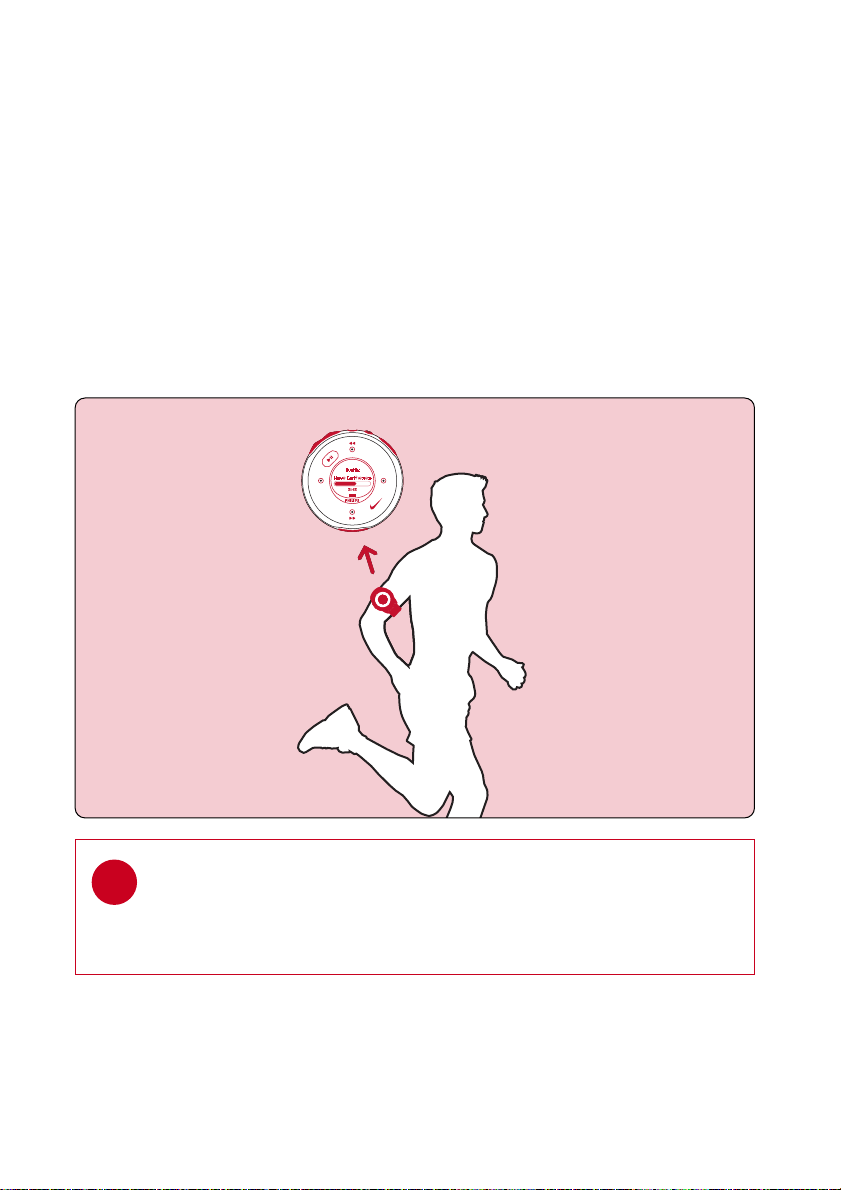
WWeeaarriinngg yyoouurr ppllaayyeerr
TIP
Use armband and player holder to wear player on your arm.
✔
17
SSttrroobbee LLiigghhtt
Strobe light is an illumination technology setting that allows the backlit LCD
display to gradually radiate bursts of light, enhancing visibility of the runner
in low light conditions.
PSA260-eng.qxd 7/8/04 2:48 PM Page 17
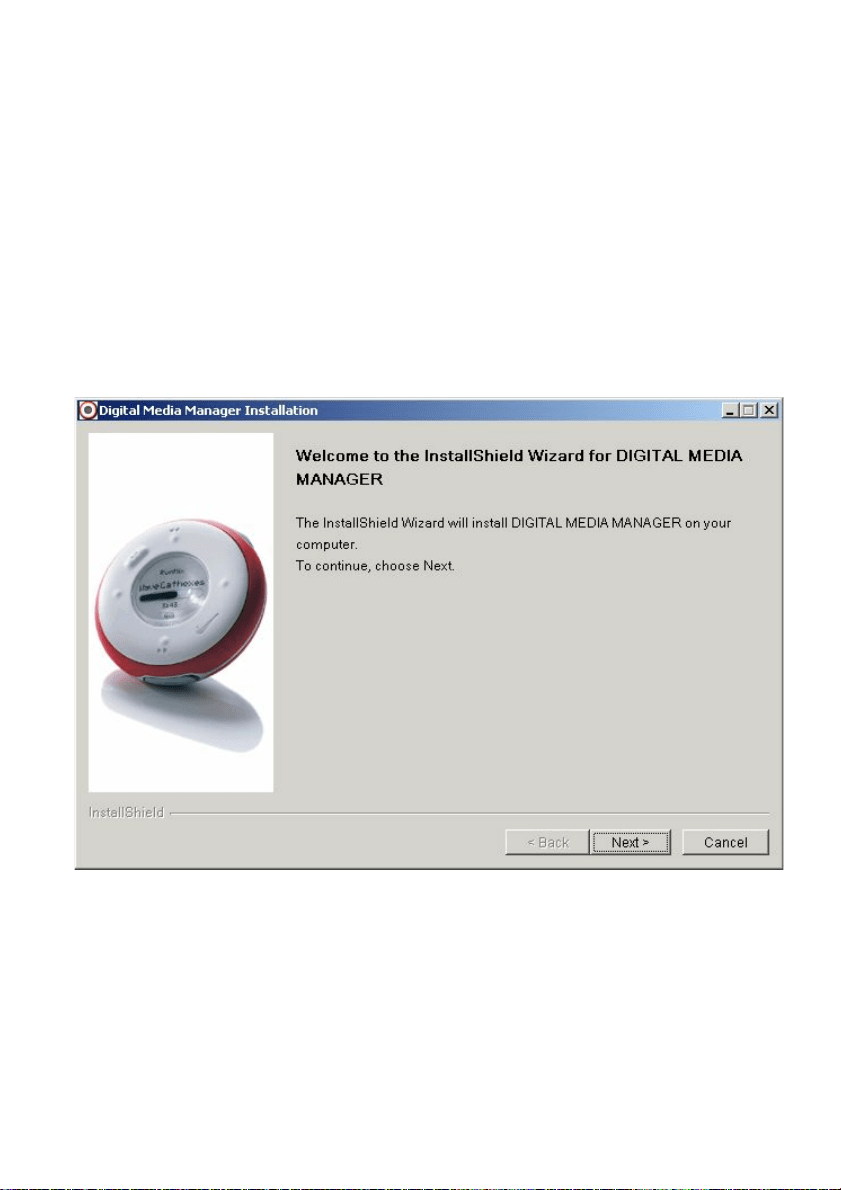
Digital Media Manager contains all the necessary software components you need to work
properly with your player. These include:
- running log management
- running log upload to support site
- playlist creation
- MP3 / WMA transfer for playback on player
- paths and supporting link for DMM software and player firmware upgrades.
AAbboouutt DDiiggiittaall MMeeddiiaa MMaannaaggeerr ((DDMMMM))
*Actual display varies with use
18
PSA260-eng.qxd 7/8/04 2:48 PM Page 18
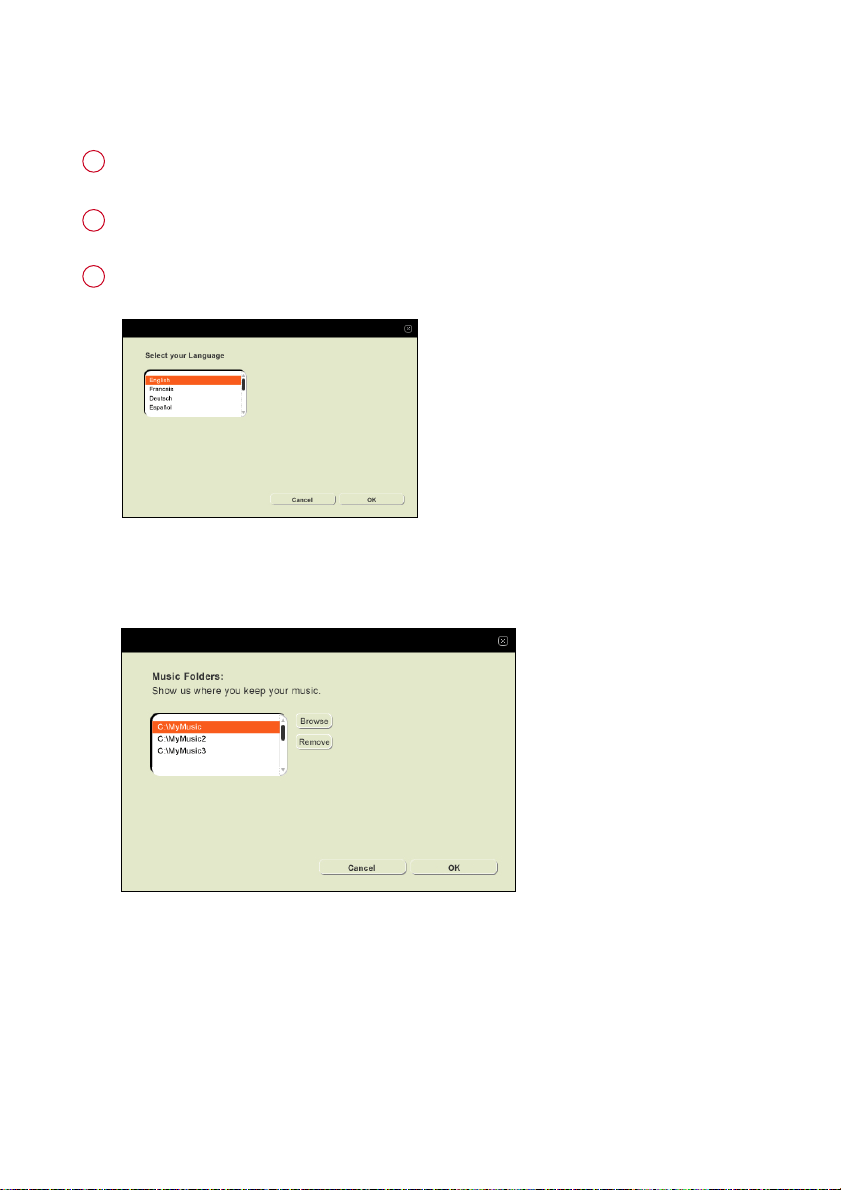
IInnssttaallll DDMMMM
Insert the supplied CD into your computer’s CD-ROM drive.
1
Follow screen instructions to begin and complete DMM installation.
2
Launch DMM to customize your settings when prompted to do so.
3
Select DMM’s display language*
Specify one or more music folder*
*Actual display varies with use
19
PSA260-eng.qxd 7/8/04 2:48 PM Page 19
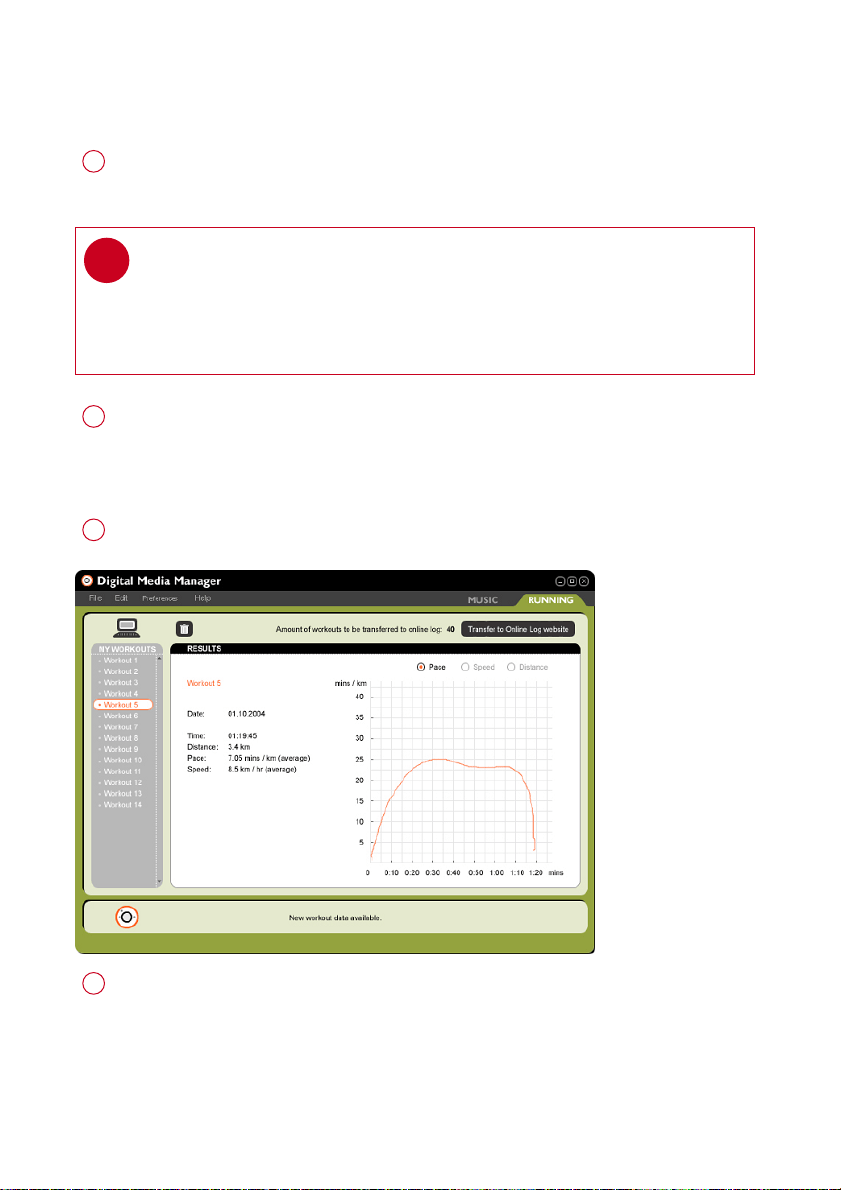
LLaauunncchh DDMMMM ((ppllaayyeerr ccoonnnneecctteedd))
Open the USB cover.
Connect your player to your computer using the supplied USB cable.
The USB connection screen will automatically appear.
1
Launch DMM. (see page 19 for first time launch settings)
New running data on your player will be automatically transferred to DMM.
Please wait for the process to complete. Never disconnect the USB cable
while transfer is in progress.
2
Organize your running data, music and playlists in DMM.
3
Transfer your music from DMM to your player.
4
TIP
Please refer to your computer’s manual for the exact position of your USB port.
Look for the USB symbol on the processing unit of your computer.
✔
*Actual display varies with use
20
PSA260-eng.qxd 7/8/04 2:48 PM Page 20
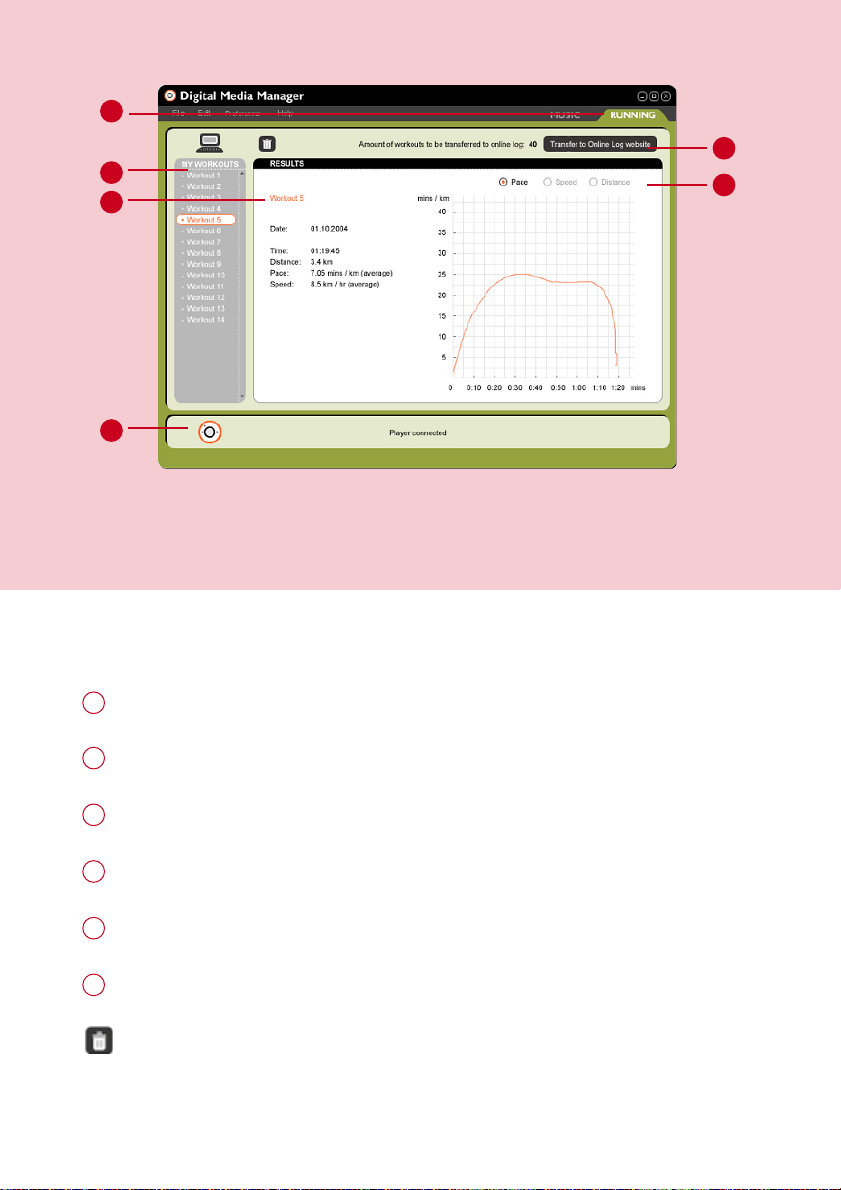
TThhee mmaaiinn RRUUNNNNIINNGG ssccrreeeenn ((ppllaayyeerr ccoonnnneecctteedd))
1
2
21
*Actual display varies with use
RRUUNNNNIINNGG TTAABB
: click to display running logs
1
MMYY WWOORRKKOOUUTTSS
: Click on desired workout to show detailed information.
2
2
1
3
4
5
6
Workout information area
3
PPLLAAYYEERR SSTTAATTUUSS
: Displays player connection status
4
TTrraannssffeerr ttoo oonnlliinnee lloogg wweebbssiittee
: transfer all workhout history to online log website
5
Click to display workout history according to pace, speed or distance
6
TTrraasshh
: deletes workout history selection.
PSA260-eng.qxd 7/8/04 2:48 PM Page 21

TTrraannssffeerr ttoo oonnlliinnee lloogg wweebbssiittee ((UUSSAA oonnllyy))
22
*Actual display varies with use
Click on
TTrraannssffeerr ttoo oonnlliinnee lloogg wweebbssiittee
.
1
Login / Create new user name in the pop-up screen as shown above.
2
Click
OOKK
to complete your transfer. Do not disconnect your internet connection
until transfer completes.
3
TIP
DMM will transfer a summary of your workout log to the online log website.
✔
PSA260-eng.qxd 7/8/04 2:48 PM Page 22

23
DDMMMM MMeennuuss aanndd AAccttiioonnss
Use menus to customize DMM:
FFiillee
RReeffrreesshh ccoonntteennttss
For updating the latest status of the selected window
SSttaarrtt ppllaayyeerr lliinnkk//
For disconnecting your player from DMM
SSttoopp ppllaayyeerr lliinnkk
QQuuiitt
For exiting DMM
EEddiitt
TTrraacckk iinnffoorrmmaattiioonn
For editing track information (in music tab only)
DDeelleettee aallll wwoorrkkoouuttss
For deleting all workout logs
OOnnlliinnee DDeevviiccee RReeggiissttrraattiioonn
For online device registration
UUsseerr nnaammee
For changing the name of the user
PPrreeffeerreenncceess
LLaanngguuaaggee
For selecting a language for DMM
MMuussiicc ffoollddeerrss
For adding, deleting or re-arranging your Music folders
(in music tab only)
TTrraannssffeerr ooppttiioonnss
For selecting transfer options (in music tab only)
DDiissttaannccee uunniittss
For selecting distance units
IInntteerrnneett ccoonnnneeccttiioonn
For selecting internet connection options
PPllaayyeerr ffiirrmmwwaarree
For checking, upgrading and restoring player firmware
UUppggrraaddee DDMMMM
For checking and upgrading DMM
HHeellpp
DDMMMM HHeellpp
For additional help and tips
SSuuppppoorrtt
For instant access to support site
AAbboouutt DDMMMM HHeellpp
For software version information
AAbboouutt PPllaayyeerr
For player information
AAbboouutt NNiikkeerruunnnniinngg..ccoomm
For online log site information
TIP
The menus will call up various messages or windows where you need to input
some information. Follow screen instructions to complete your settings.
✔
PSA260-eng.qxd 7/8/04 2:48 PM Page 23
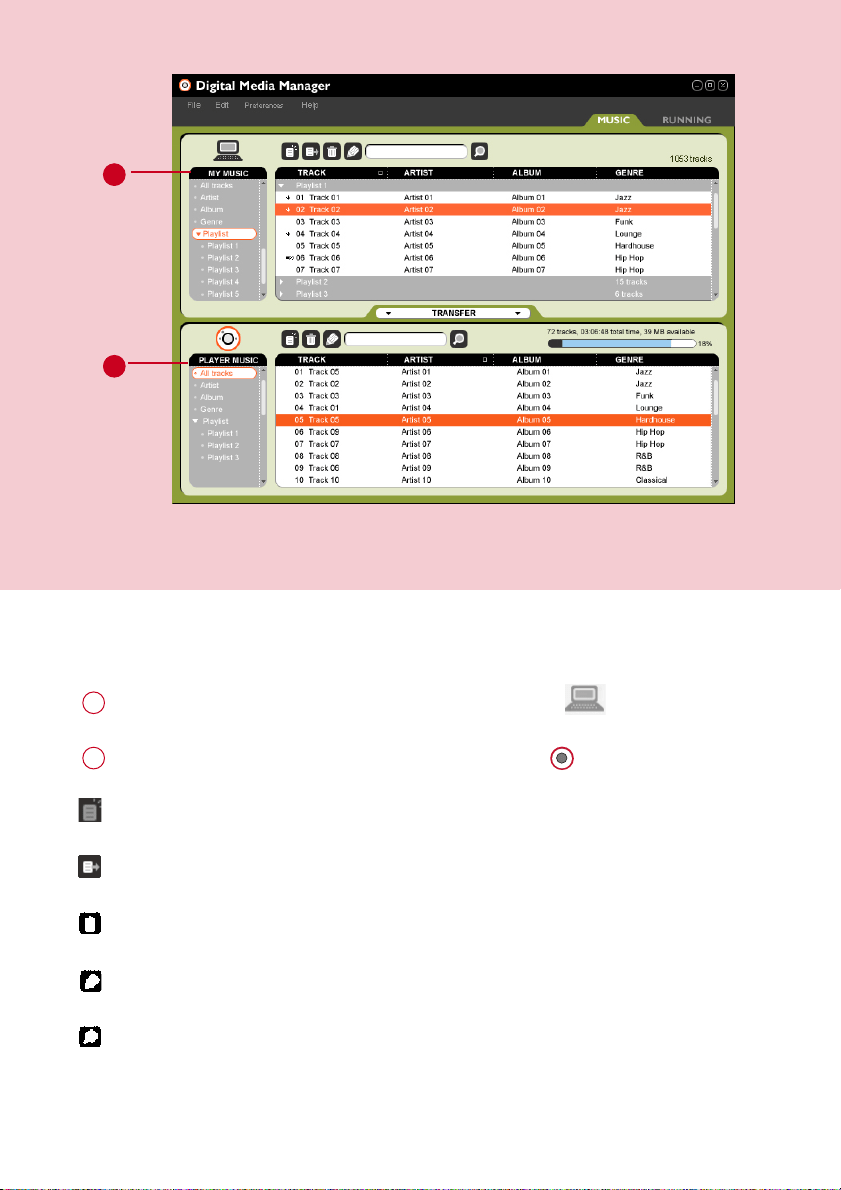
TThhee mmaaiinn MMUUSSIICC ssccrreeeenn ((ppllaayyeerr ccoonnnneecctteedd))
1
2
MMYY MMUUSSIICC
: displays the contents of your music folders; click on to minimize / maximize.
1
PPLLAAYYEERR MMUUSSIICC
: displays the contents of your player; click on to minimize / maximize.
2
NNeeww ppllaayylliisstt::
creates a new playlist.
IImmppoorrtt mmuussiicc
: adds music or playlist.
TTrraasshh
: deletes selection.
EEddiitt IIDD33 ttaagg
: edits track information of selected track.
SSeeaarrcchh
: searches for music from
MMYY MMUUSSIICC
and / or
PPLLAAYYEERR MMUUSSIICC
.
*Actual display varies with use
24
PSA260-eng.qxd 7/8/04 2:48 PM Page 24
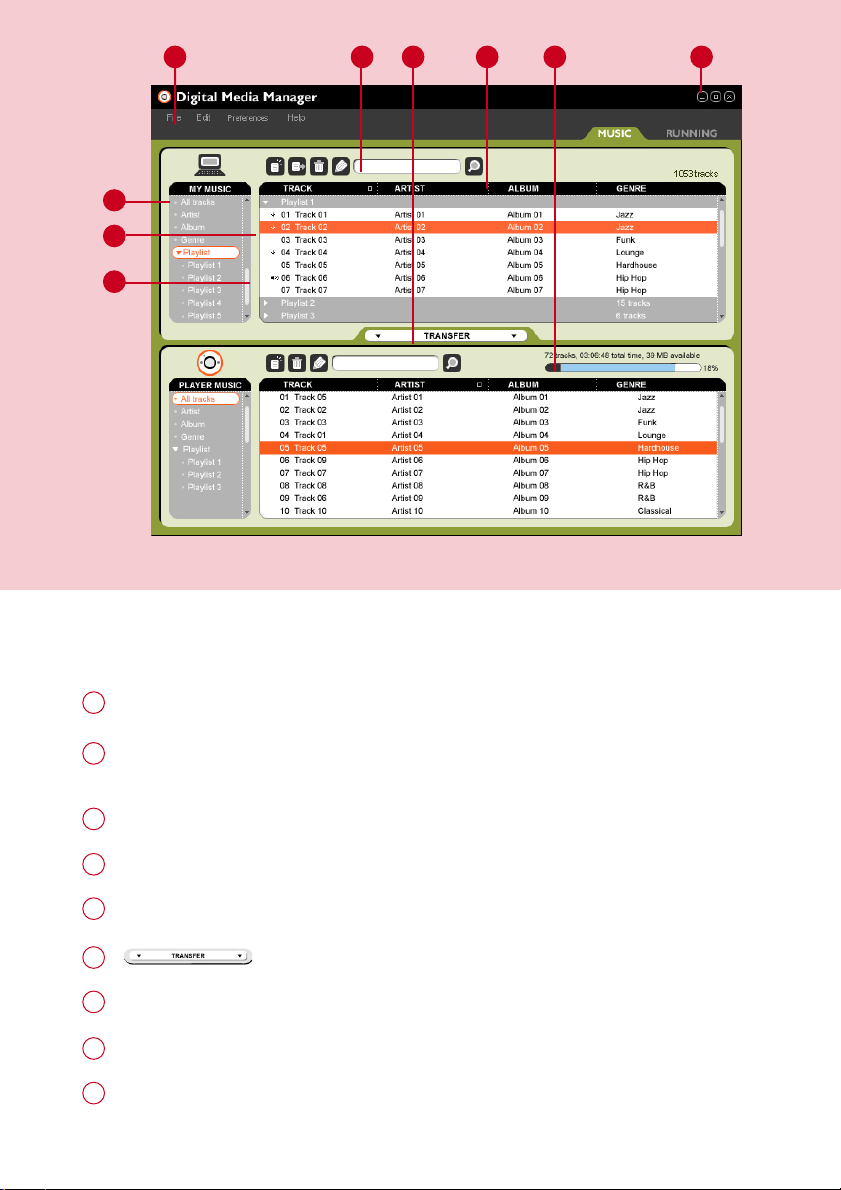
SSeelleeccttoorr ppaanneell aanndd ccoonntteenntt ppaanneell
SSeelleeccttoorr ppaanneell
: arranges the display order of the content panel.
1
CCoonntteenntt ppaanneell
: displays the contents of
MMYY MMUUSSIICC
, highlight to drag from
MMYY MMUUSSIICC
and drop to
PPLLAAYYEERR MMUUSSIICC..
2
1
2
5 6 8 9
3
4
SSccrroollll bbaarr
3
PPuullll ddoowwnn mmeennuuss
4
TTeexxtt aarreeaa
: type your search criteria here.
5
: transfers highlighted tracks and / or playlists.
6
HHeeaaddeerr sseeppaarraattoorr
: resizes column width.
7
PPllaayyeerr mmeemmoorryy iinnddiiccaattoorr
: shows available memory on your player.
8
RReessiizziinngg bbuuttttoonnss
: minimizes, maximizes DMM view / exit DMM.
9
*Actual display varies with use
25
7
PSA260-eng.qxd 7/8/04 2:48 PM Page 25
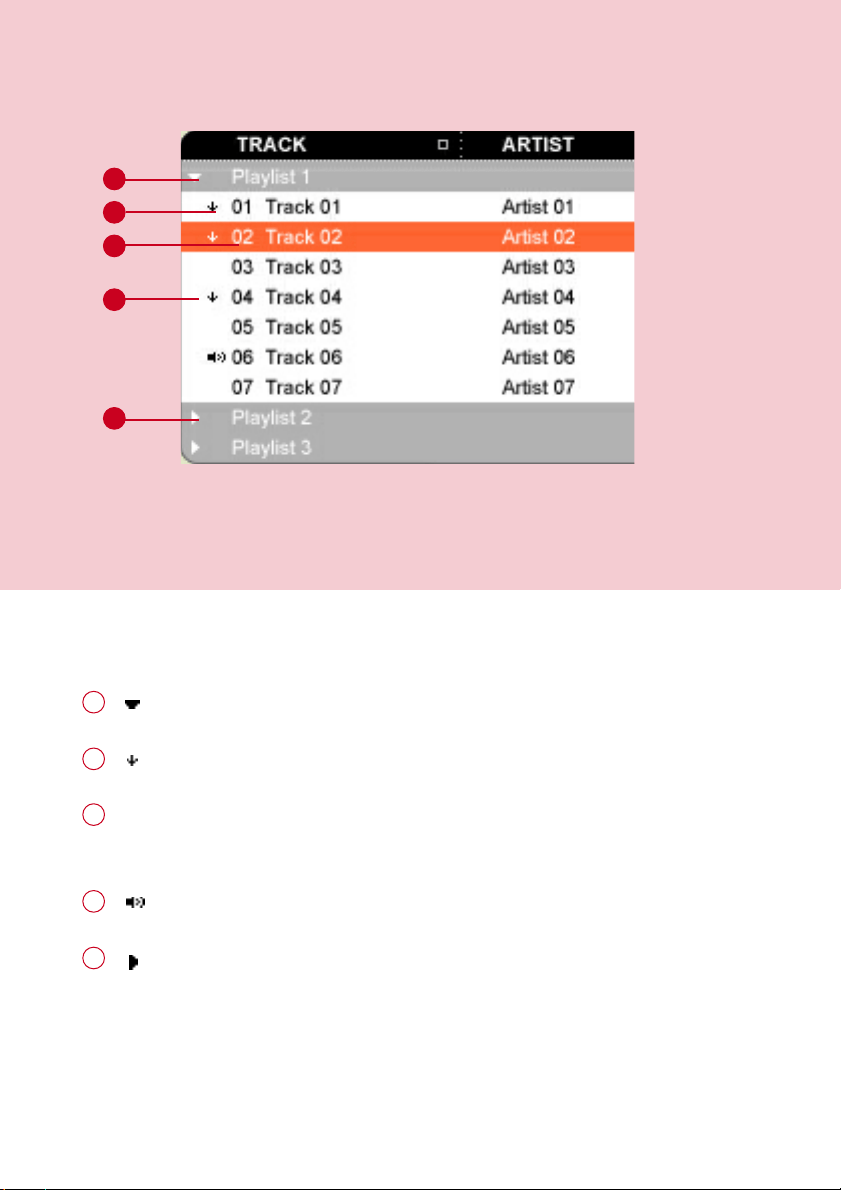
IInnddiiccaattoorrss oonn tthhee ccoonntteenntt ppaanneell
: expanded view, displays item contents in full.
1
: track / playlist not on the player.
2
1
2
3
4
5
Click to highlight an item.
Press <Delete> on your keyboard to delete the highlighted item.
3
: indicates track is playing by DMM.
4
: collapsed view: item contains more contents to display.
5
*Actual display varies with use
26
PSA260-eng.qxd 7/8/04 2:48 PM Page 26
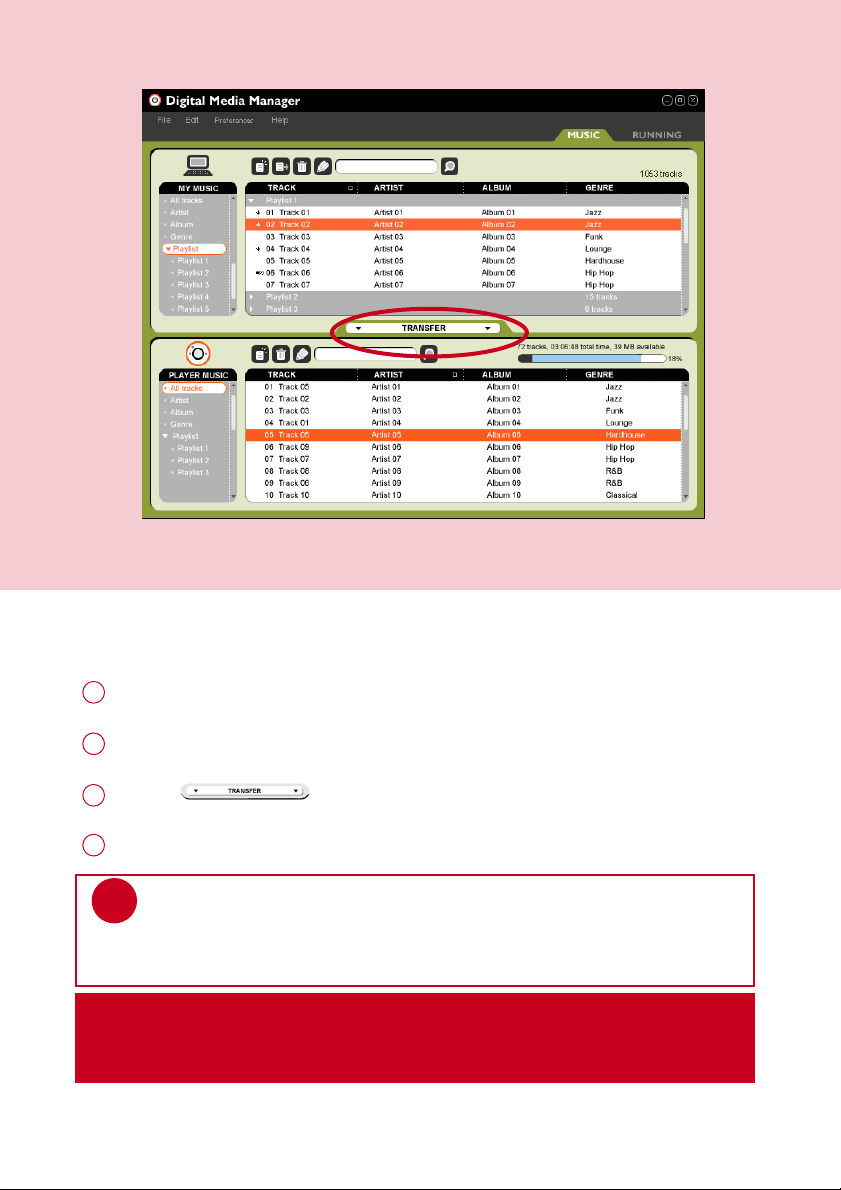
CClliicckk aanndd TTrraannssffeerr
Make sure your player is connected when you launch DMM.
1
Click and highlight an item (e.g. track, artist, album, genre, playlist).
2
Click on to copy your selection from your computer to your player.
3
Your selection is now transferred to your player.
4
IIMMPPOORRTTAANNTT:: KKEEEEPP AA CCOOPPYY OOFF YYOOUURR OORRIIGGIINNAALL FFIILLEESS!!
Please keep a copy of the original files transferred to your player. Philips is not
responsible for any loss of content if the player is damaged or not readable.
*Actual display varies with use
TIP
Press and hold <Ctrl> on your keyboard and click to select more than one item.
To select consecutive items, click the first item, press and hold <Shift> on your
keyboard, and then click the last item.
✔
27
PSA260-eng.qxd 7/8/04 2:48 PM Page 27
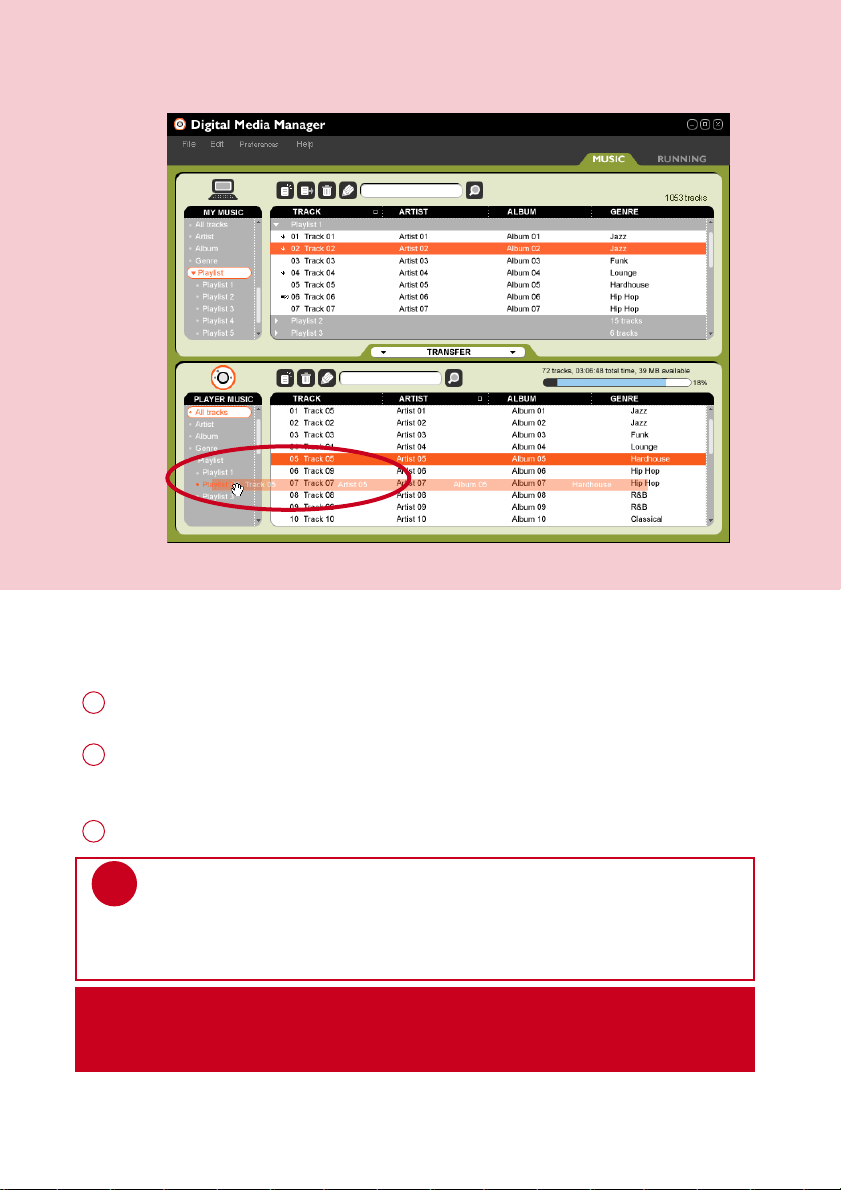
DDrraagg aanndd DDrroopp ttoo TTrraannssffeerr
Make sure your player is connected when you launch DMM.
1
Click to highlight an item (e.g. track, artist, album, genre, playlist).
Drag the selection to
PPLLAAYYEERR MMUUSSIICC
or a specific playlist.
2
Your selection is now transferred to your drop destination.
3
IIMMPPOORRTTAANNTT:: KKEEEEPP AA CCOOPPYY OOFF YYOOUURR OORRIIGGIINNAALL FFIILLEESS!!
Please keep a copy of the original files transferred to your player. Philips is not
responsible for any loss of content if the player is damaged or not readable.
*Actual display varies with use
TIP
Press and hold <Ctrl> on your keyboard and click to select more than one item.
To select consecutive items, click the first item, press and hold <Shift> on your
keyboard, and then click the last item.
✔
28
PSA260-eng.qxd 7/8/04 2:48 PM Page 28
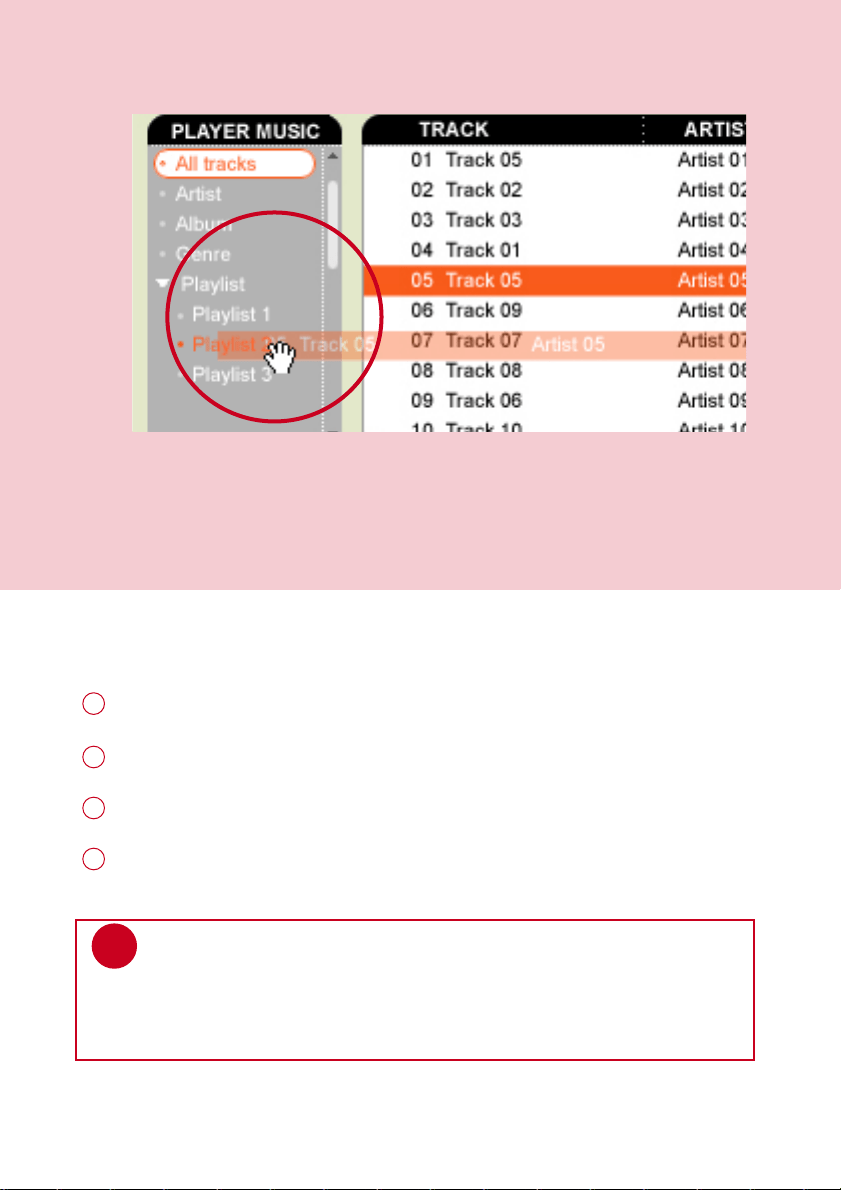
AAdddd aa TTrraacckk ttoo aa PPllaayylliisstt bbyy DDrraagg aanndd DDrroopp
Click on a track.
1
Drag the selected track to a playlist.
2
Hold the mouse button and move your selection to a destination playlist.
3
Your selected track is now in the playlist.
4
TIP
Press and hold <Ctrl> on your keyboard and click to select more than one item.
To select consecutive items, click the first item, press and hold <Shift> on your
keyboard, and then click the last item.
✔
*Actual display varies with use
29
PSA260-eng.qxd 7/8/04 2:48 PM Page 29
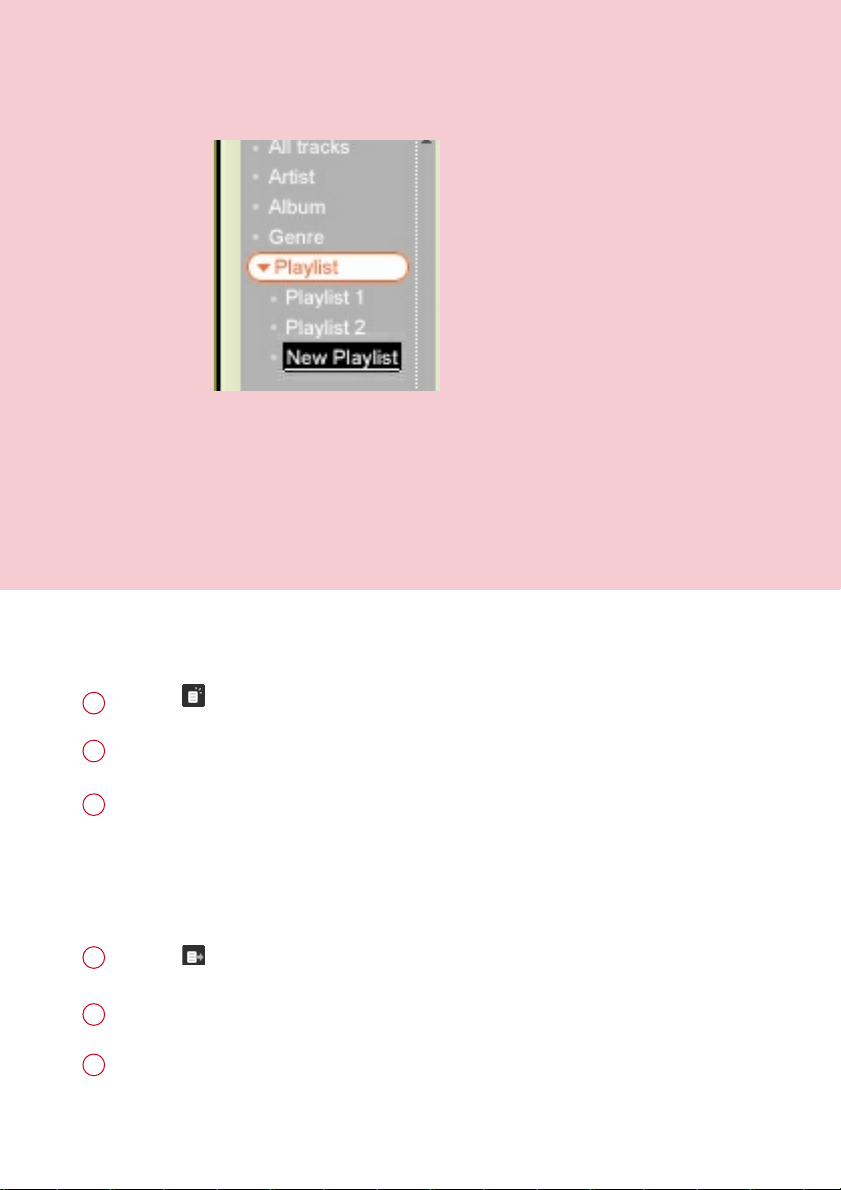
CCrreeaattee PPllaayylliissttss
Click on to create a new playlist.
1
Fill in the information in the selector panel in New Playlist.
2
Press <Enter> to save your new playlist.
You can now drag more tracks to the new playlist.
3
Click on to import a playlist.
1
Fill in the information in the pop up window.
2
Follow screen instructions to import your new playlist.
You can now drag more tracks to the imported playlist.
3
IImmppoorrtt PPllaayylliissttss
*Actual display varies with use
30
PSA260-eng.qxd 7/8/04 2:48 PM Page 30
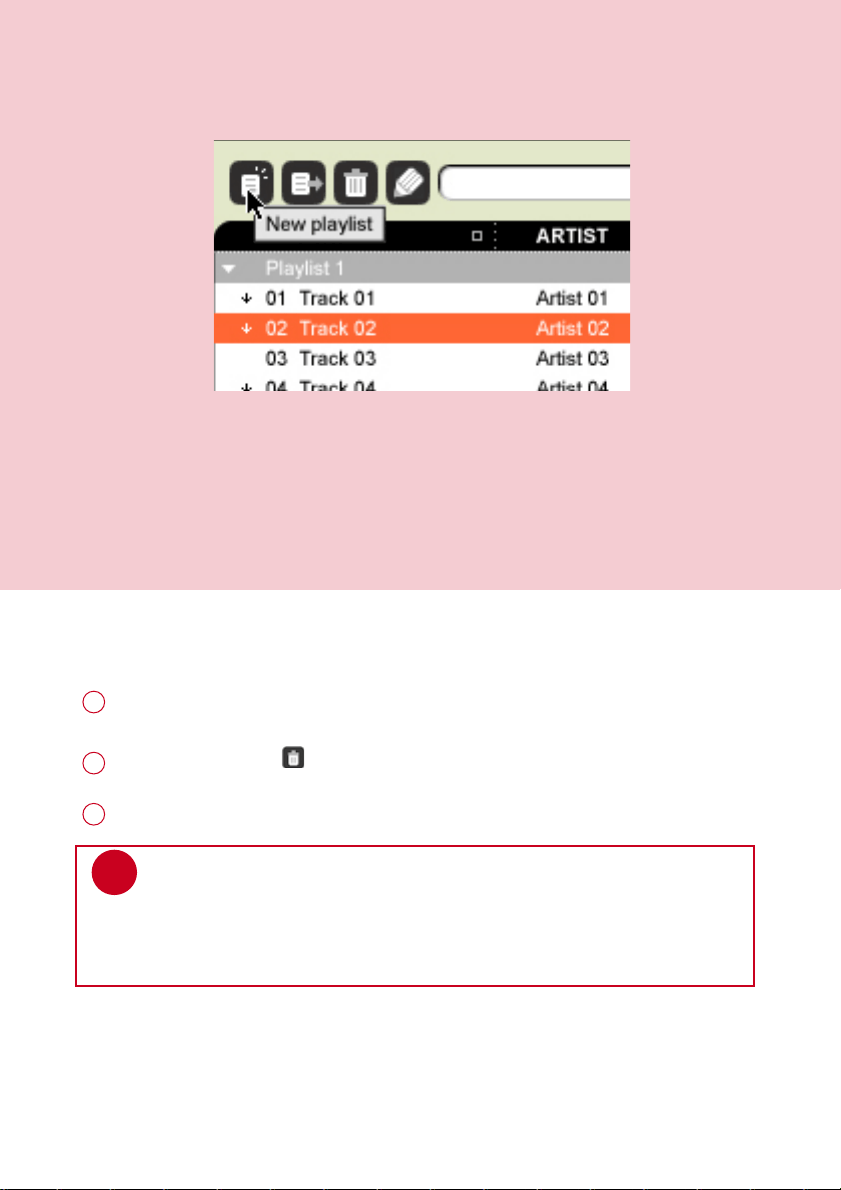
DDeelleettee TTrraacckkss aanndd PPllaayylliissttss
Click to highlight an item.
1
Drag your selection to to delete.
2
Alternatively, press <Delete> on your keyboard to delete your selection.
3
*Actual display varies with use
TIP
Press and hold <Ctrl> on your keyboard and click to select more than one item.
To select consecutive items, click the first item, press and hold <Shift> on your
keyboard, and then click the last item.
✔
31
PSA260-eng.qxd 7/8/04 2:48 PM Page 31
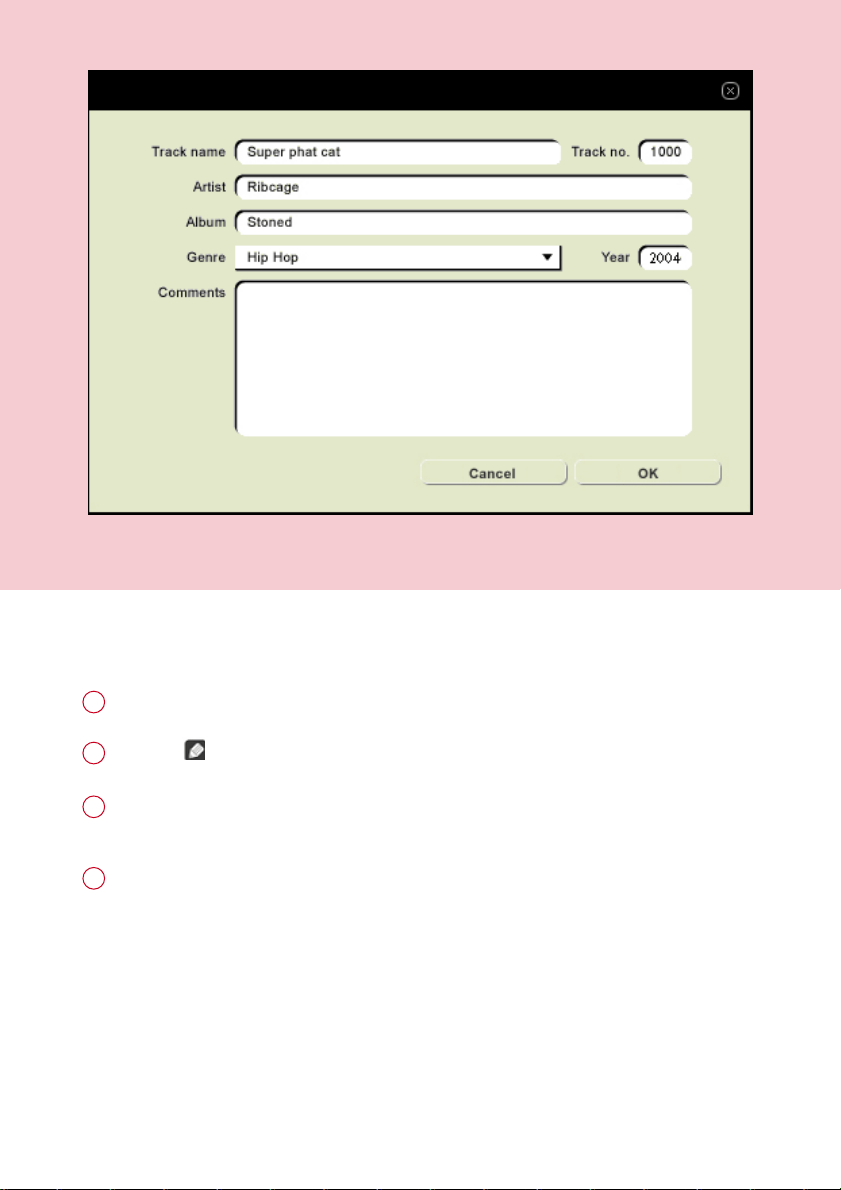
EEddiitt TTrraacckk IInnffoorrmmaattiioonn
Click on a track to edit its information.
1
Click on to call up the
IIDD33 TTaagg EEddiittoorr
.
2
Click on the text boxes of
TTrraacckk nnaammee
,
TTrraacckk nnuummbbeerr
,
AArrttiisstt
,
AAllbbuumm
,
GGeennrree
,
YYeeaarr
,
CCoommmmeennttss
to edit relevant information.
3
Click on
OOKK
to save the information. Click
CCaanncceell
to discard changes made.
4
*Actual display varies with use
32
PSA260-eng.qxd 7/8/04 2:48 PM Page 32
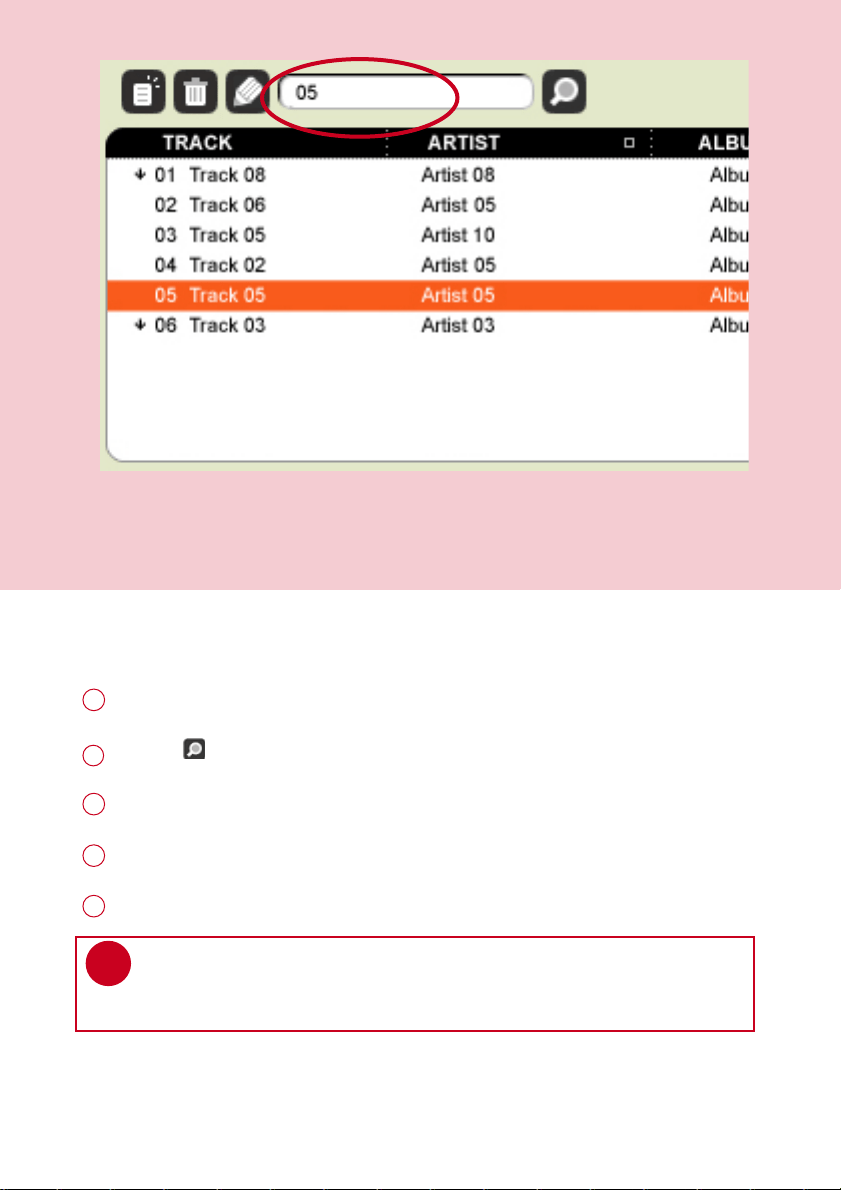
SSeeaarrcchh ffoorr TTrraacckkss oorr PPllaayylliissttss
Type a search string in the
SSeeaarrcchh
field.
1
Click on to start searching.
2
You will see tracks and / or playlists that contain the search string.
3
You can transfer, delete or drag and drop these tracks as described in previous sections.
4
TIP
Deleting items from the searched results will delete them from your library!
✔
Click on the
SSeelleeccttoorr ppaanneell
to exit the search view.
5
*Actual display varies with use
33
PSA260-eng.qxd 7/8/04 2:48 PM Page 33
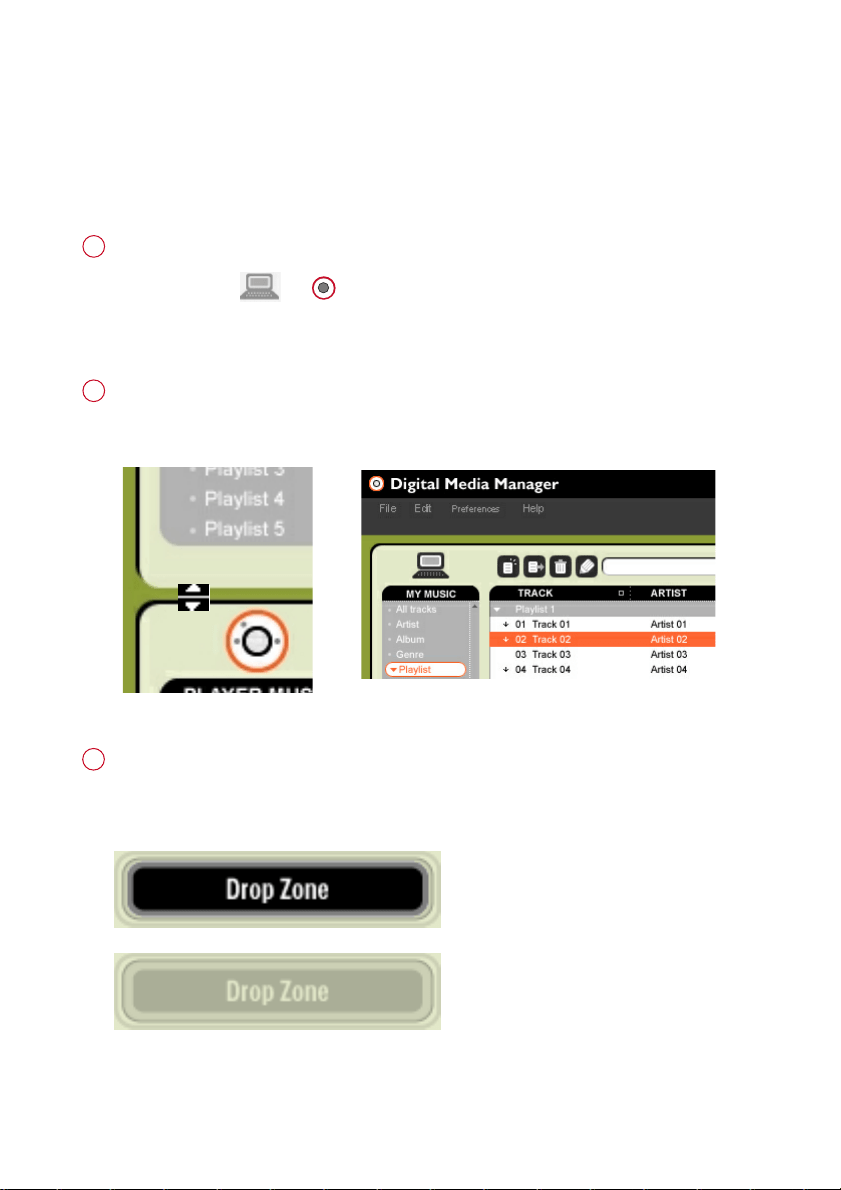
MMaakkee UUssee ooff tthhee DDiiffffeerreenntt VViieewwss
SSeeccttiioonn iiccoonnss
You can click on or to expand or minimize respective content panels.
1
BBoorrddeerr aarreeaa
Drag the border area between
MMYY MMUUSSIICC
and
PPLLAAYYEERR MMUUSSIICC
. When the content
panel is reduced to a certain size, the content panel will only show the section icon.
2
DDrroopp ZZoonnee
When
PPLLAAYYEERR MMUUSSIICC
is minimized, you will see a
DDrroopp ZZoonnee
. You can drag
selected items and drop them here. Note that the
DDrroopp ZZoonnee
icon turns grey when
player memory is full.
3
DMM provides different view options. This is to minimize content refreshing time.
There are a few ways to customize DMM views.
34
PSA260-eng.qxd 7/8/04 2:48 PM Page 34
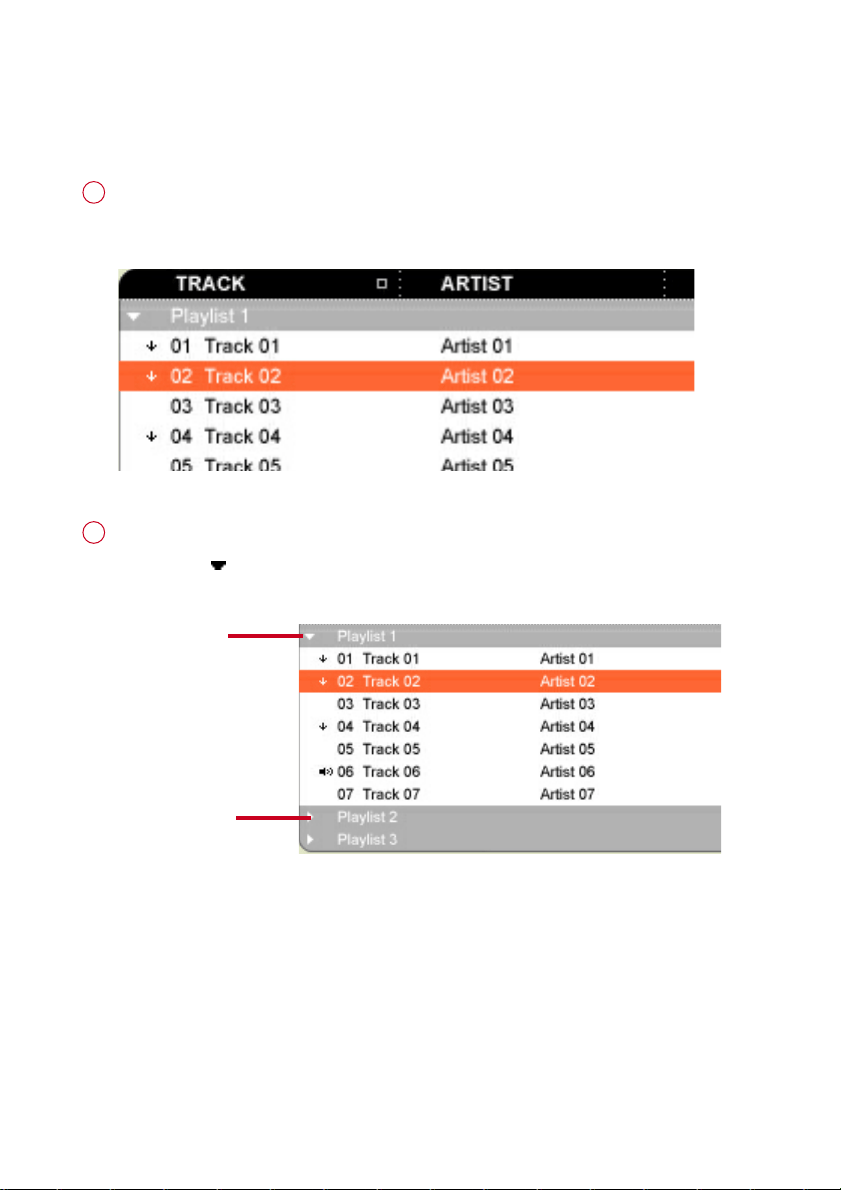
DDiissppllaayy TTrraacckkss YYoouurr WWaayy
SSoorrttiinngg
You can click on the contents header (Track, Artist, Album, Genre) to
arrange music tracks according to the order you selected.
1
DDeettaaiilleedd // ssuummmmaarryy vviieeww
Click on the next to the contents header to turn on / turn off
detailed display of item contents.
2
detailed view
summary view
35
PSA260-eng.qxd 7/8/04 2:48 PM Page 35
UUppggrraaddeess
Since it is possible for you to upgrade your product, we recommend that you register your
product on www.nike-philips.com/register so we can inform you as soon as new free upgrades
become available.
We know you will enjoy your product for a long time. For best performance, we recommend that
you regularly check in to www.nike-philips.com for free upgrades of the latest software and
firmware for your product.
FFiirrmmwwaarree UUppggrraaddee
Your player is controlled by an internal program called
ffiirrmmwwaarree
. You can download and install
the latest firmware to keep your player updated.
Click
PPrreeffeerreenncceess
➔
PPllaayyeerr FFiirrmmwwaarree
➔
UUppggrraaddee FFiirrmmwwaarree
. This will give you further
information on how to download and upgrade your player firmware.
1
Follow screen instructions to complete firmware upgrade.
2
TIP
Because you are updating the program of your player, please make sure
your player is connected to your computer before you launch DMM.
Keep it connected during the firmware upgrade process.
✔
DDMMMM UUppggrraaddee
DMM is the software that enables best interactions between your player and your computer
Keep it updated by doing upgrades.
Click
PPrreeffeerreenncceess
➔
UUppggrraaddee DDMMMM
. This will give you further information on how to
download and upgrade your DMM.
1
Follow screen instructions to complete DMM upgrade.
2
36
PSA260-eng.qxd 7/8/04 2:48 PM Page 36

UUnniinnssttaallll DDMMMM
Close all applications, including DMM.
1
From the Start menu, go to Control Panel. Select Add / Remove Programs.
Select DMM from your currently installed programs to uninstall.
2
For further information on uninstalling programs, please refer to Windows’
user manual.
3
37
PSA260-eng.qxd 7/8/04 2:48 PM Page 37
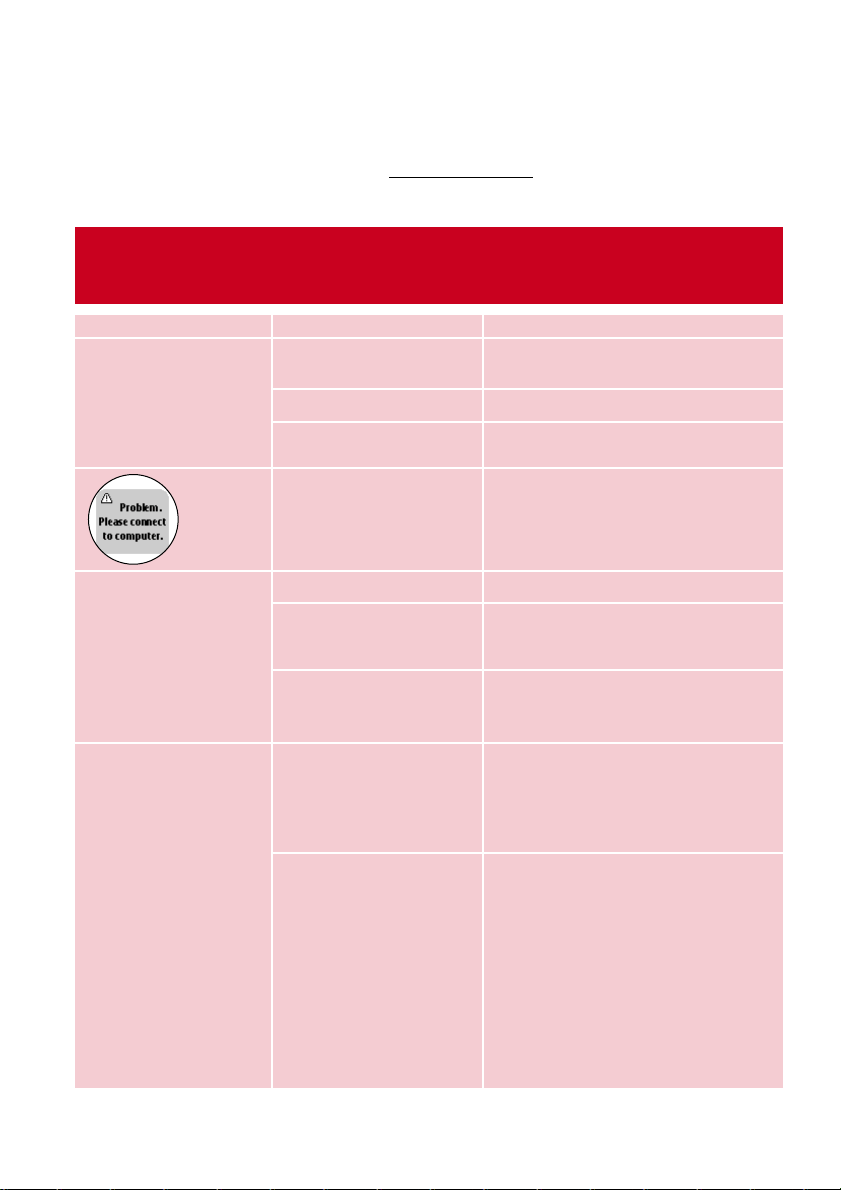
PPrroobblleemm CCaauussee SSoolluuttiioonn
Cannot power on player Battery drained Charge the battery
(See page 1, step 2)
Loose key press Press and hold 22;; for 2 seconds
USB connected Disconnect player from
computer (See page 1, step 5)
Firmware / databse error Connect player to computer and
restart DMM
USB doesn’t work Loose connection Check connection
Wrong OS version Your operation system must be
Win 98SE or later
USB driver not installed Windows 98SE user only: install
the USB driver provided in by-
packed CD
Player does not respond Player busy Press and hold [VOLUME +] and
33 to reset. Press and hold 22;; for
2 seconds to power on again if the
power on screen does not appear
automatically
Automatic power off Your player automatically powers
if there is no operation and no
music played within 20 seconds.
Press and hold
22;;
to power on.
TTrroouubblleesshhoooottiinngg ((11))
If a fault occurs, first check the points listed. For further help and other troubleshooting tips,
please also check out FAQ for your player at w
ww.nike-philips.com.
If you are unable to find a solution from these hints, consult your dealer or service center.
WARNING:
Under no circumstances should you try to repair the set yourself, as this will invalidate
the warranty.
38
PSA260-eng.qxd 7/8/04 2:48 PM Page 38
39
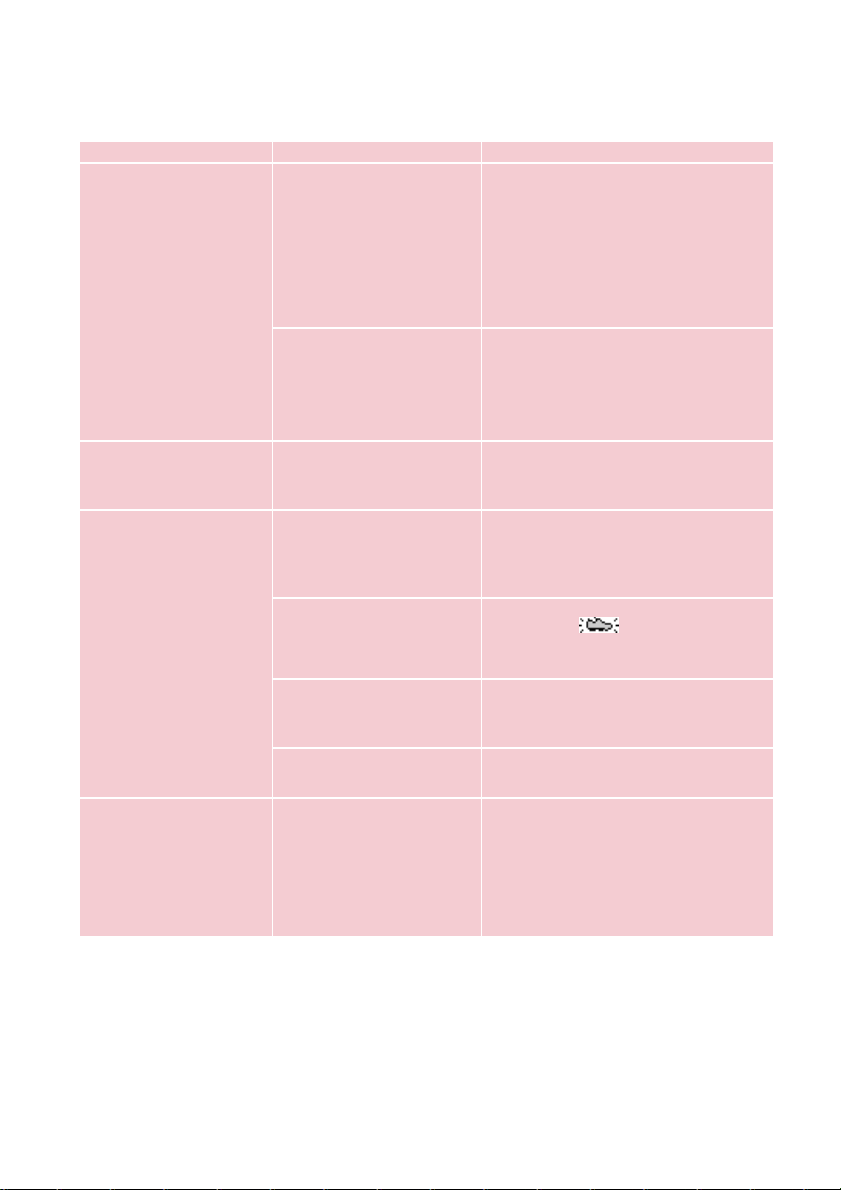
PPrroobblleemm CCaauussee SSoolluuttiioonn
Cannot play track Track format not Your player is not able to play
supported AAC encrypted or WMA songs
bought from the internet.
Since it is possible for you to upgrade
your product, we recommend that you
regularly check in to www.nike-philips.com
for free upgrades of the latest software
and firmware for your product.
Tracks were copied Your player will play tracks only if they
from your computer they are transferred using the by-
to your player using packed music management software
drag and drop in
Windows Explorer
Tracks not shown in Track format not Ensure that all your music on your
by-packed music supported computer is in formats supported by
management software your player.
SDM doesn’t work Synchronization problem
Please synchronize your player with
the speed and distance monitor if:
you have bought a new speed and
distance monitor (see page 7)
Workout started before Wait for the and the audible
SDM connection is beep before starting running
established
SDM connection lost Re-establish SDM connection
due to surrounding (see page 6)
interference
SDM connection lost Install batteries or charge your
because of low battery player
No voice feedback Essential files for voice Connect player to computer and
feedback deleted restart DMM
during USB connection
TTrroouubblleesshhoooottiinngg ((22))
PSA260-eng.qxd 7/8/04 2:48 PM Page 39

SSaaffeettyy aanndd MMaaiinntteennaannccee
TTaakkee ccaarree wwhheenn uussiinngg hheeaaddpphhoonneess
HHeeaarriinngg ssaaffeettyy
:
Listen at a moderate volume. Using headphones at high volume can impair your hearing.
TTrraaffffiicc ssaaffeettyy::
Do not use headphones while driving or cycling as you may cause an accident.
TTaakkee ccaarree wwhheenn uussiinngg ssttrroobbee lliigghhtt
Do not look directly into the strobe light for prolonged period as this may cause
damage to your eyes.
GGeenneerraall mmaaiinntteennaannccee
TToo aavvooiidd ddaammaaggee oorr mmaallffuunnccttiioonn::
– Do not expose to excessive heat caused by heating equipment or direct sunlight.
– Do not drop your player or allow objects to fall on your player.
– Do not allow your player to be submersed in water. Do not expose earphone socket or
battery compartment to water as water entering the set may cause major damage.
– Do not use any cleaning agents containing alcohol, ammonia, benzene, or abrasives as
these may harm the set.
– Active mobile phones in the vicinity may cause interference.
UUssiinngg DDMMMM
Avoid the risk of corrupting and losing data with the following precautions when using DMM:
– Never disconnect the USB cable while file transfer is in progress.
– Never close DMM while file transfer is in progress.
– Operate using one file management system only. When transferring files, do not attempt to
transfer files via Windows Explorer whilst waiting for transfer to complete on DMM.
– Do not delete any track via Windows Explorer when file transfer is active in DMM.
If you wish to delete a file, please only do so from either DMM or from Windows Explorer after file
transfer completes.
UUssiinngg tthhee ppoowweerr aaddaapptteerr // cchhaarrggeerr
– Use only the power adapter that came with your player. Adapters for other electronic
devices may look similar, but they may damage your player.
– The only way to shut off power completely to your power adapter/charger is to disconnect
it from the power source.
– Always leave space around your power adapter. Do not use this equipment in a location
where airflow around the power adapter is confined, such as a bookcase.
– When connecting or disconnecting your power adapter, always hold the power adapter by
its sides. Keep fingers away from the metal part of the plug.
– The power adapter for your player is a high-voltage component and should not be opened
for any reason, even when your player is off.
EEnnvviirroonnmmeennttaall iinnffoorrmmaattiioonn
We have reduced the packaging to its minimum and made it easy to separate into
materials: cardboard, PS, PE, PET.
Your set consists of material which can be recycled if disassembled by a specialized company
Please observe the local regulations to dispose of packaging, exhausted
batteries and old equipment.
40
PSA260-eng.qxd 7/8/04 2:48 PM Page 40
NNoottiiccee ffoorr tthhee UUSSAA
Nike-Philips
PSA260
Note:
This equipment has been tested and found to comply with the limits for a Class B
digital device, pursuant to part 15 of the FCC Rules. These limits are designed to provide
reasonable protection against harmful interference in a residential installation. This
equipment generates, uses, and can radiate radio frequency energy and, if not installed
and used in accordance with the instruction manual, may cause harmful interference to
radio communications.
However, there is no guarantee that interference will not occur in a particular installation.
If this equipment does cause harmful interference to radio or television reception, which
can be determined by turning the equipment off and on, the user is encouraged to try to
correct the interference by one or more of the following measures:
0 Relocate the receiving antenna.
0 Increase the separation between the equipment and receiver.
0 Connect the equipment into an outlet on a circuit different from that to which
the receiver is connected.
0 Consult the dealer or an experienced radio/ TV technician for help.
Notice for Canada
This Class B digital apparaatus complies with Canadian ICES-003.
This product complies with the radio interference requirements of the European Community.
MMooddiiffiiccaattiioonnss
Modifications not authorized by the manufacturer may void user authority to operate this device.
CCooppyyrriigghhtt iinnffoorrmmaattiioonn
All other brand and product names are trademarks of their respective companies
or organizations.
Unauthorized duplication of any recordings downloaded from the internet or made from audio
CDs is a violation of copyright laws and international treaties.
41
PSA260-eng.qxd 7/8/04 2:48 PM Page 41

TTeecchhnniiccaall DDaattaa
GGeenneerraall
Dimension 27 (D) x 27 (H) x 71 mm
Weight 70g
PPoowweerr ssuuppppllyy
Built-in 600mAh Li-ion rechargeable battery
Multi-voltage AC power adapter / charger
BBaatttteerryy ppllaayyttiimmee
12 hours using built-in rechargeable battery (4 hours fully charged, 1 hour fast charge)
*Battery life may vary according to use.
DDiissppllaayy
White Backlight LCD
IInnddiiccaattiioonnss
Album name, artist name, battery status, DBB, frequency, pre-set station, time, track
SSoouunndd
Bass enhancement Dynamic Bass Boost
Equalizer settings Funk, Hip hop, Rock, Techno
Frequency Response 20 - 20 000 Hz
Output power (RMS) 2 x 5 mW (16 Ω)
Signal to noice ratio >80
Volume control Digital
AAuuddiioo PPllaayybbaacckk
MP3 (8 - 320 kbps and VBR)
WMA (32 - 192 kbps)
IIDD33--ttaagg ssuuppppoorrtt
Album title, genre title, track title and artist name
SSttoorraaggee MMeeddiiaa
Mass storage class, 256MB* NAND Flash
Music memory capacity: up to 65 MP3 tracks (128kbps) or 130 WMA tracks (64kbps)
* Actual formatted capacity will be less.
TTuunneerr
Frequency range 87.5 - 108 MHz
Station presets 10
Tuner bands FM stereo
CCoonnnneeccttiivviittyy
5V DC, headphones (3.5mm line-out), remote control, USB 1.1, Bluetooth 1.1
BBlluueettooootthh
SPP, Class 3, range up to 5m
MMuussiicc ttrraannssffeerr
via DMM / Musicmatch for music playback
FFiillee ttrraannssffeerr
via Windows Explorer of data in general
AAcccceessssoorriieess
(availability subject to regions)
AY4102 AC/ DC adapter
AY4208 Armband
AY4212 Carrier
SBC HJ030/771 Headphones
AY3192 USB cable
The type plate is at the back of the set.
Philips, Nike, Inc. reserves the right to make design and specification changes for product
improvement without prior notice.
All rights reserved.
42
PSA260-eng.qxd 7/8/04 2:48 PM Page 42
www.nike-philips.com
type number - psa260
© 2004 Phillips, Nike, Inc. All rights reserved.
Meet Philips & Nike on the Internet
http://www.nike-philips.com
psa260 cover 23/6/04 16:12 Page 2