Installation and Operating Guide | Warranty
Model Number | DTT901 | Digital TV Tuner Converter Box
With Analog Pass-Through
For service/
support Call:
Toll Free Number
1-877-9-ZENITH
(http://www.zenithservice.com)
© Copyright 2007, LG Electronics U.S.A., Inc.
As an ENERGY
S
TAR
®
Partner, LG
has determined that this product
or product models meet the
E
NERGY STAR
®
guidelines for
energy efficiency.
E
NERGY
STAR
®
is a U.S. registered mark.
LSX300-4PM_CUSALZK_ENG_4948 7/22/08 10:41 AM Page 1
This lightning flash with arrowhead symbol within
an equilateral triangle is intended to alert the user
to the presence of uninsulated dangerous voltage
within the product’s enclosure that may be of suf-
ficient magnitude to constitute a risk of electric
shock to persons.
The exclamation point within an equilateral trian-
gle is intended to alert the user to the presence
of important operating and maintenance (servic-
ing) instructions in the literature accompanying
the product.
WARNING: TO PREVENT FIRE OR ELECTRIC SHOCK
HAZARD, DO NOT EXPOSE THIS PRODUCT TO RAIN
OR MOISTURE.
WARNING: Do not install this equipment in a confined
space such a bookcase or similar unit.
CAUTION: Do not block any ventilation openings. Install in
accordance with the manufacturer's instructions.
Slots and openings in the cabinet are provided for ventila-
tion and to ensure reliable operation of the product and to
protect it from overheating.
The openings should be never be blocked by placing the
product on a bed, sofa, rug or other similar surface.This
product should not be placed in a built-in installation such
as a bookcase or rack unless proper ventilation is provided
or the manufacturer's instruction have been adhered to.
CAUTION: The apparatus should not be exposed to water
(dripping or splashing) and no objects filled with liquids,
such as vases, should be placed on the apparatus.
CAUTION concerning the Power Cord
Most appliances recommend they be placed upon a
dedicated circuit;
That is, a single outlet circuit which powers only that appli-
ance and has no additional outlets or branch circuits.
Check the specification page of this owner's manual to be
certain.
Do not overload wall outlets. Overloaded wall outlets, loose
or damaged wall outlets, extension cords, frayed power
cords, or damaged or cracked wire insulation are danger-
ous. Any of these conditions could result in electric shock
or fire. Periodically examine the cord of your appliance, and
if its appearance indicates damage or deterioration, unplug
it, discontinue use of the appliance, and have the cord
replaced with an exact replacement part by an authorized
servicer.
Protect the power cord from physical or mechanical abuse,
such as being twisted, kinked, pinched, closed in a door, or
walked upon. Pay particular attention to plugs, wall outlets,
and the point where the cord exits the appliance.
To disconnect power from the unit, pull out the units power
cord from the outlet. When installing the product, ensure
that the plug is easily accessible.
FCC WARNING: This equipment may generate or use
radio frequency energy. Changes or modifications to this
equipment may cause harmful interference unless the
modifications are expressly approved in the instruction
manual. The user could lose the authority to operate this
equipment if an unauthorized change or modification is
made.
REGULATORY INFORMATION: FCC Part 15
This equipment has been tested and found to comply with
the limits for a Class B digital device, pursuant to Part 15
of the FCC Rules. These limits are designed to provide
reasonable protection against harmful interference when
the product is operated in a residential installation. This
product generates, uses, and can radiate radio frequency
energy and, if not installed and used in accordance with
the instruction manual, may cause harmful interference to
radio communications. However, there is no guarantee
that interference will not occur in a particular installation.
If this product does cause harmful interference to radio or
television reception, which can be determined by turning
the product off and on, the user is encouraged to try to
correct the interference by one or more of the following
measures:
• Reorient or relocate the receiving antenna.
• Increase the separation between the product and
receiver.
• Connect the product into an outlet on a circuit different
from that to which the receiver is connected.
• Consult the dealer or an experienced radio/TV techni-
cian for help.
CAUTION:
DO NOT ATTEMPT TO MODIFY THIS PRODUCT IN ANY
WAY WITHOUT WRITTEN AUTHORIZATION FROM LG
ELECTRONICS CORPORATION.
UNAUTHORIZED MODIFICATION COULD VOID THE
USER’S AUTHORITY TO OPERATE THIS PRODUCT.
THIS EQUIPMENT IS INTENDED TO RECEIVE AND
DECODE SIGNALS TRANSMITTED ACCORDING TO
ATSC DIGITAL TELEVISION STANDARD A/53, SPECIFI-
CATION AND IS INTENDED TO BE USED WITH AN
APPROPRIATE ANTENNA AND DISPLAY DEVICE THAT
YOU MUST PROVIDE.
FCC COMPLIANCE: The responsible party for this prod-
uct’s compliance is:
Marketed and Distributed by LG Electronics U.S.A., Inc.,
1000 Sylvan Avenue, Englewood Cliffs, NJ.
Phone: 1-201-816-2000.
Zenith-brand consumer electronics products are marketed
by LG Electronics USA, Inc.
Introduction
2
CAUTION
RISK OF ELECTRIC SHOCK
DO NOT OPEN
CAUTION: TO REDUCE THE RISK
OF ELECTRIC SHOCK
DO NOT REMOVE COVER (OR BACK)
NO USER-SERVICEABLE PARTS INSIDE
REFER SERVICING TO QUALIFIED
SERVICE PERSONNEL.
LSX300-4PM_CUSALZK_ENG_4948 7/22/08 10:41 AM Page 2
Introduction
3
IMPORTANT SAFE-
TY INSTRUCTIONS
Please read and observe all warnings and
instructions in this owner’s manual. And those
marked on the product. Retain this booklet for
future reference.
PLEASE READ AND OBSERVE ALL WARN-
INGS AND INSTRUCTIONS IN THIS OWNER’S
MANUAL. AND THOSE MARKED ON THE
PRODUCT. RETAIN THIS BOOKLET FOR
FUTURE REFERENCE.
1. Read these instructions.
2. Keep these instructions.
3. Heed all warnings.
4. Follow all instructions.
5. Do not use this apparatus near water.
6. Clean only with dry cloth.
7.
Do not block any ventilation openings. Install
in accordance with the manufacturer's instruc-
tions.
8. Do not install near any heat sources such
as radiators, heat registers, stoves, or other
apparatus (including amplifiers) that pro-
duce heat.
9. Do not defeat the safety purpose of the
polarized or grounding-type plug. A polar-
ized plug has two blades with one wider
than the other. A grounding type plug has
two blades and a third grounding prong. The
wide blade or the third prong are provided
for your safety. If the provided plug does not
fit into your outlet, consult an electrician for
replacement of the obsolete outlet.
10. Protect the power cord from being walked
on or pinched particularly at plugs, conven-
ience receptacles, and the point where they
exit from the apparatus.
11. Only use attachments/accessories speci-
fied by the manufacturer.
12. Use only with the cart,
stand, tripod, bracket, or
table specified by the
manufacturer, or sold with
the apparatus. When a cart
is used, use caution when
moving the cart/apparatus combination to
avoid injury from tip-over.
13. Unplug this apparatus during lightning
storms or when unused for long periods of
time.
14.
Refer all servicing to qualified service per-
sonnel. Servicing is required when the
apparatus has been damaged in any way,
such as power-supply cord or plug is dam-
aged, liquid has been spilled or objects
have fallen into the apparatus, the appara-
tus has been exposed to rain or moisture,
does not operate normally, or has been
dropped.
Contents
Introduction . . . . . . . . . . . . . . . . . . . . . .4-5
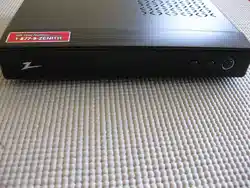
Front Panel . . . . . . . . . . . . . . . . . . .4
Connection Panel Overview . . . . . .4
Remote Control Key Functions . . . .5
Installation . . . . . . . . . . . . . . . . . . . . . . . .6
Connections with TV and
over-the-air antenna . . . . . . . . . . . .6
Connecting to a VCR . . . . . . . . . . .6
Connecting to an Amplifier
(Receiver) . . . . . . . . . . . . . . . . . . . .6
Setup . . . . . . . . . . . . . . . . . . . . . . . . . . .7-12
Install Guide . . . . . . . . . . . . . . . . . .7
Menu Overview . . . . . . . . . . . . . . . .7
Typical Menu Operation . . . . . . . . .7
Setup Menu Features . . . . . . . . . . .8
Option Menu Features . . . . . . . .9-10
Lock Menu Features . . . . . . . .10-12
Operation . . . . . . . . . . . . . . . . . . . . . .13-14
Channel Selection . . . . . . . . . . . . .13
Volume Adjustment . . . . . . . . . . . .13
Signal . . . . . . . . . . . . . . . . . . . . . .13
Auto Off . . . . . . . . . . . . . . . . . . . .13
Channel Banner Display . . . . . . . .13
Simple Guide . . . . . . . . . . . . . . . .14
Program Information Display . . . . .14
Reference . . . . . . . . . . . . . . . . . . . . . .15-16
Controlling Your TV with the Supplied
Multi-brand Remote Control . . . . .15
Troubleshooting . . . . . . . . . . . . . .16
Specifications . . . . . . . . . . . . . . . .16
Manufactured under license from Dolby
Laboratories. “Dolby” and the double-D are
trademark of Dolby Laboratories.
LSX300-4PM_CUSALZK_ENG_4948 7/22/08 10:41 AM Page 3

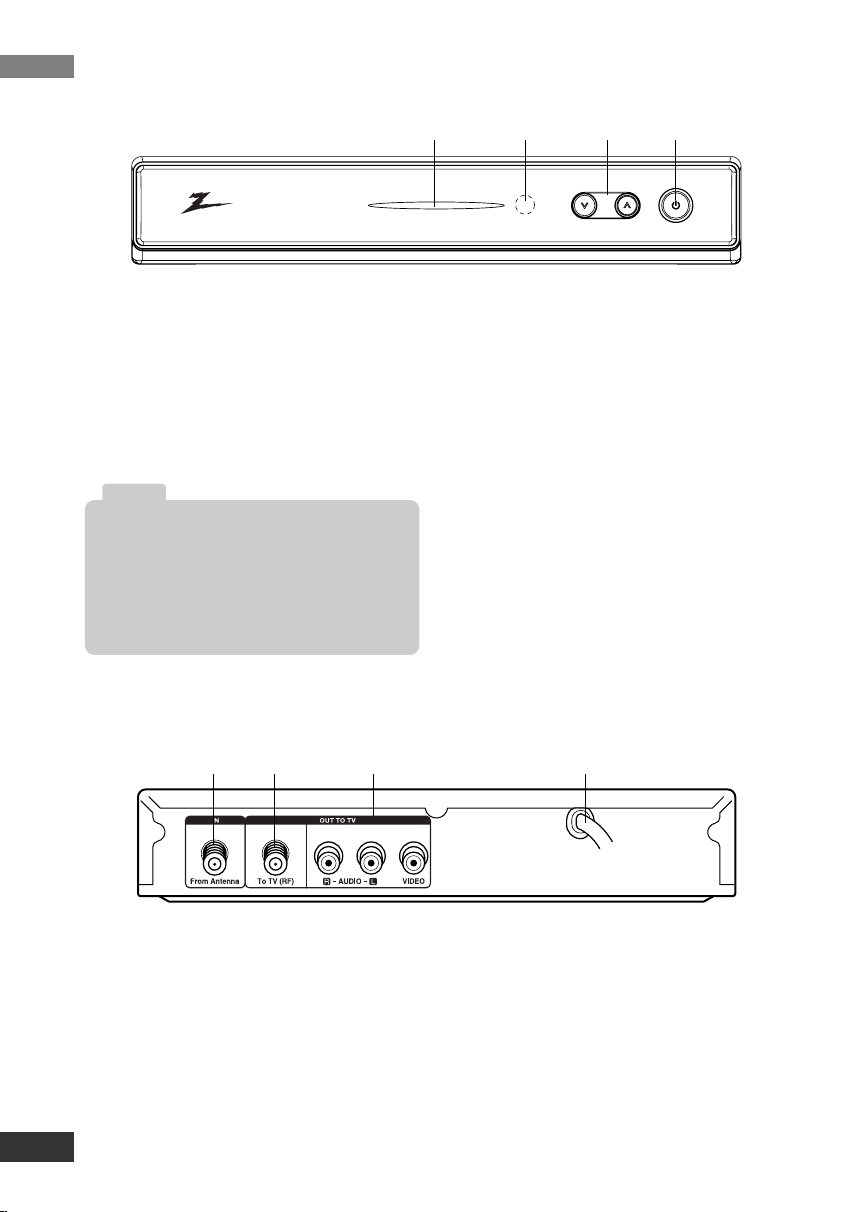
a POWER indicator
Lights up red (standby mode) or blue
(active mode). This indicator will blink
when remote signal is received.
b Remote Control Sensor
Receives signals from the Remote
Control.
c u/U (Channel Down/Up)
Scans up or down through memo-
rized channels.
d POWER
Turns the unit on or off.
a From Antenna
Connect to digital signal source;
over-the-air antenna.
b To TV (RF)
Connect to a TV with RF coaxial
inputs.
c VIDEO and AUDIO OUTPUT
(Left/Right)
Connect to a TV/Monitor with Video
and audio inputs.
d AC Power Cord
Plug into the power source.
Introduction
4
Front Panel
Connection Panel Overview
abcd
ab c d
If you have a universal remote control, you may
control this unit using it.
To program the remote control to control this
unit, set the remote control’s operation mode to
TV or Settop Box, and set your remote control to
the manufacturer codes of LG or Zenith.
Note
LSX300-4PM_CUSALZK_ENG_4948 7/22/08 10:41 AM Page 4
Introduction
5
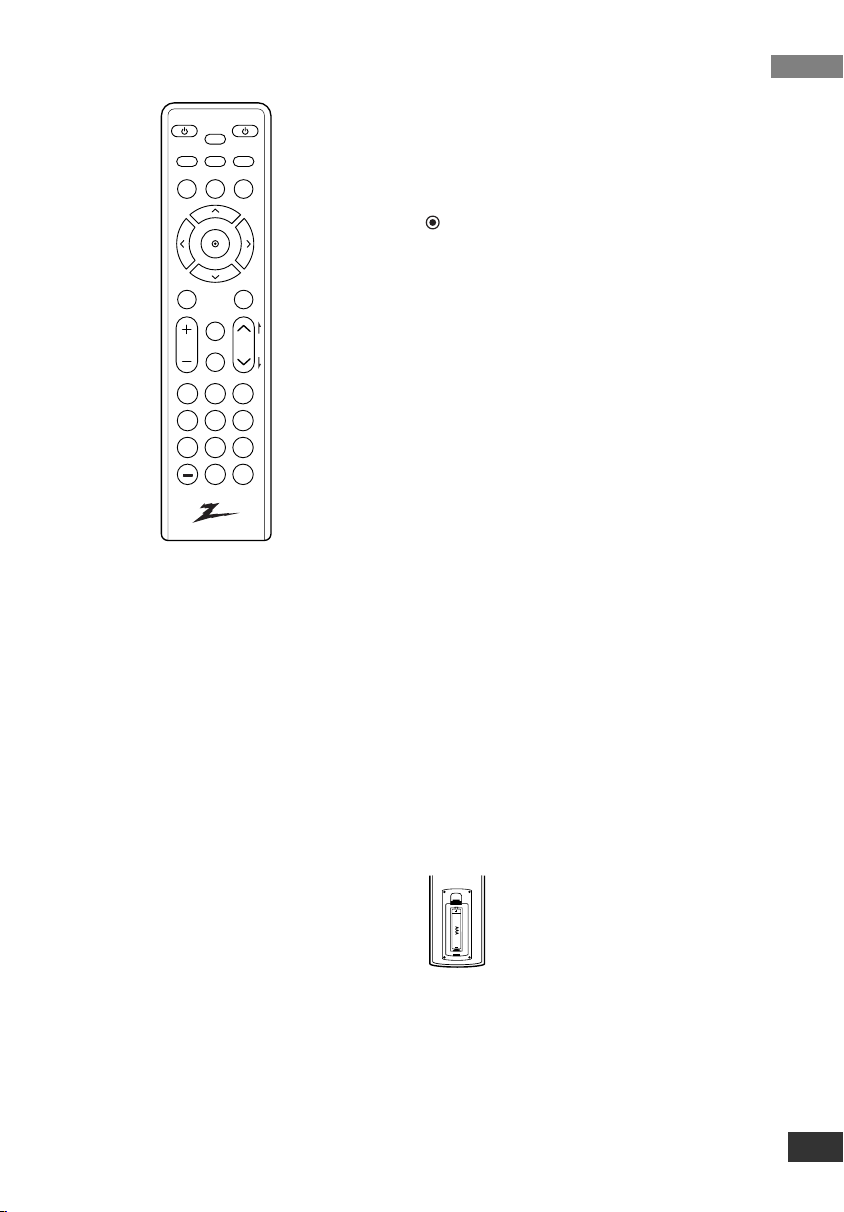
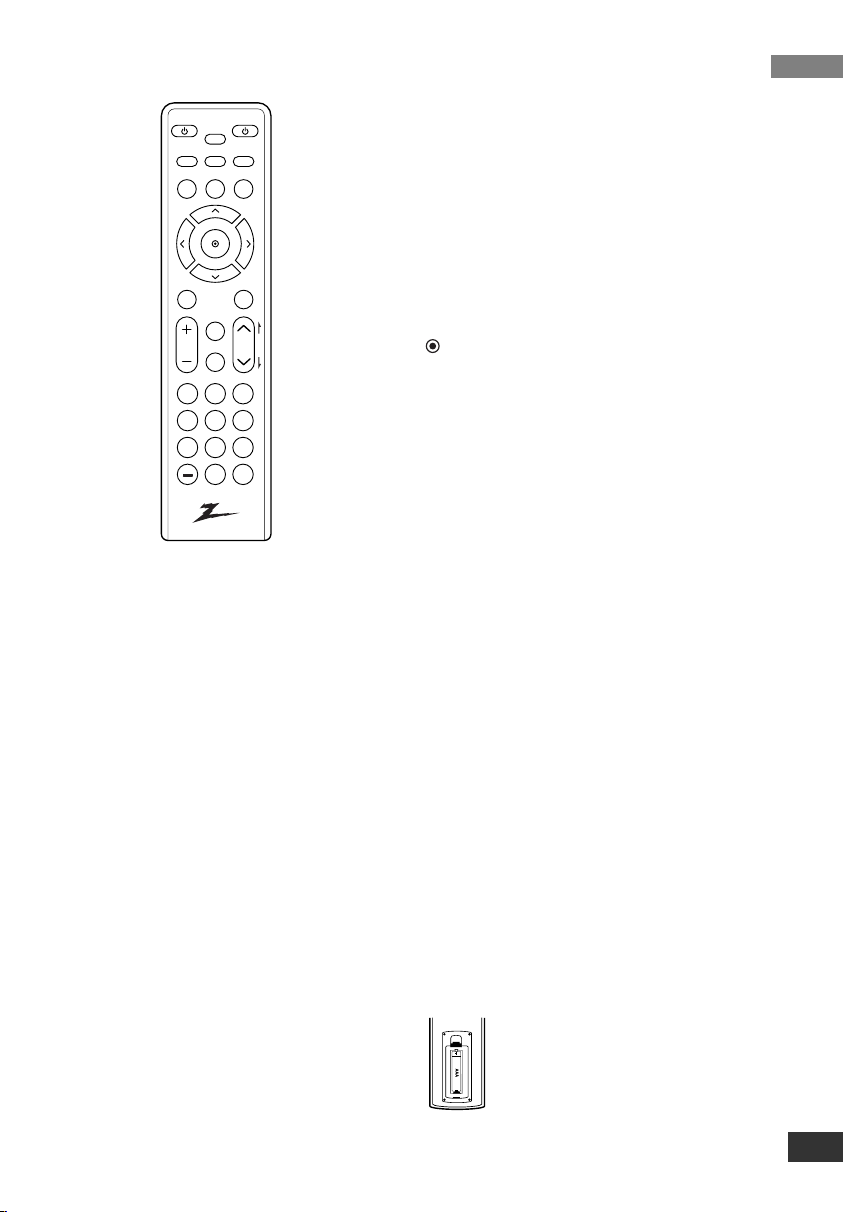
Remote Control
TV POWER
Turns the TV ON and OFF. (Refer to page 15)
SLEEP
Sets this unit to turn off automatically at a
specified time. (Off t 1 hour t 2 hours
t 3 hours t 4 hours)
POWER
Turns the UNIT ON and OFF.
SIGNAL
You can view the signal strength and listen to
the beep sound according to signal strength
for the current channel.
SAP
Selects program’s audio language if available.
ZOOM
Changes the picture aspect ratio.
DISPLAY
Shows current program information for the cur-
rent channel.
GUIDE
Brings up the Simple Guide.
CCD
Selects caption mode if available.
(Service 1-6 t CC 1-4 t Text 1-4 t Off)
MENU
Accesses or closes main menu.
EXIT
Removes all on-screen displays and returns to
TV viewing from any menu.
Arrow Buttons (U / u / I / i)
Selects options in a menu.
(Select)
Selects highlighted menu function. Completes
the channel number input and promptly tunes
to selected channel.
FAV (Favorite )
Selects through the programmed Favorite
channels.
MUTE
Turns sound ON and OFF.
CH (Channel) (U / u) / PAGE (R/r)
Selects channels in memory. Pages through
the Channel Edit and Block Channel menu.
VOL (Volume) (+/–)
Sets sound level.
Numbers
Chooses channels and enters password.
- (Dash)
Enters a dash for sub channel numbers such
as 2-1, 2-2, 47-3 etc.
RECALL
Returns to the last channel viewed.
Remote Control Operation
Point the remote control at the remote
sensor and press the buttons.
Remote Control Battery Installation
Detach the battery cover on the
rear of the remote control, and
insert a battery (size AAA) with
3 and # aligned correctly.
We recommend to use the
alkaline battery.
TV
POWER
POWER
SLEEP
SAP
MENU
SIGNAL
DISPLAY
EXIT
VOL CH
CCD
FAV
P
A
G
E
MUTE
ZOOM
GUIDE
1 2 3
4 5 6
7 8 9
0
RECALL
LSX300-4PM_CUSALZK_ENG_4948 7/22/08 10:41 AM Page 5
Installation
6
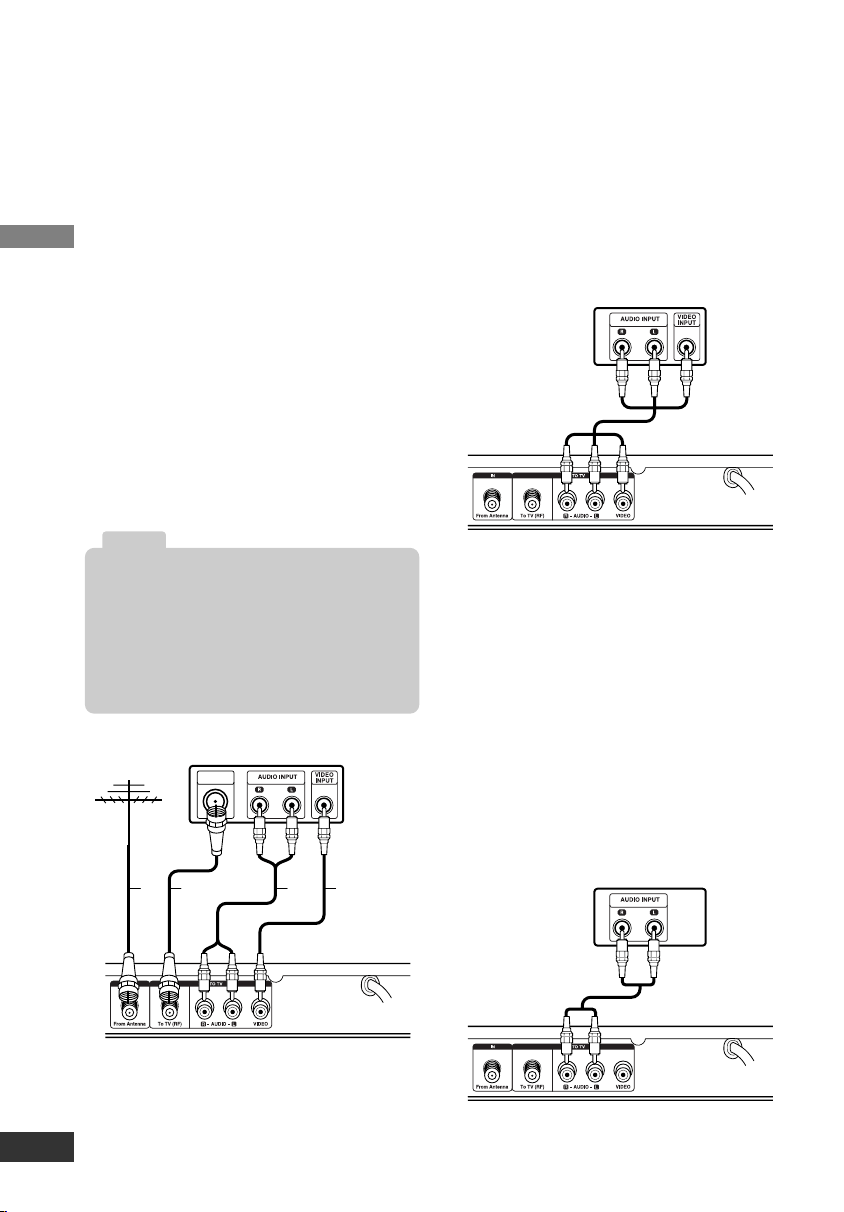
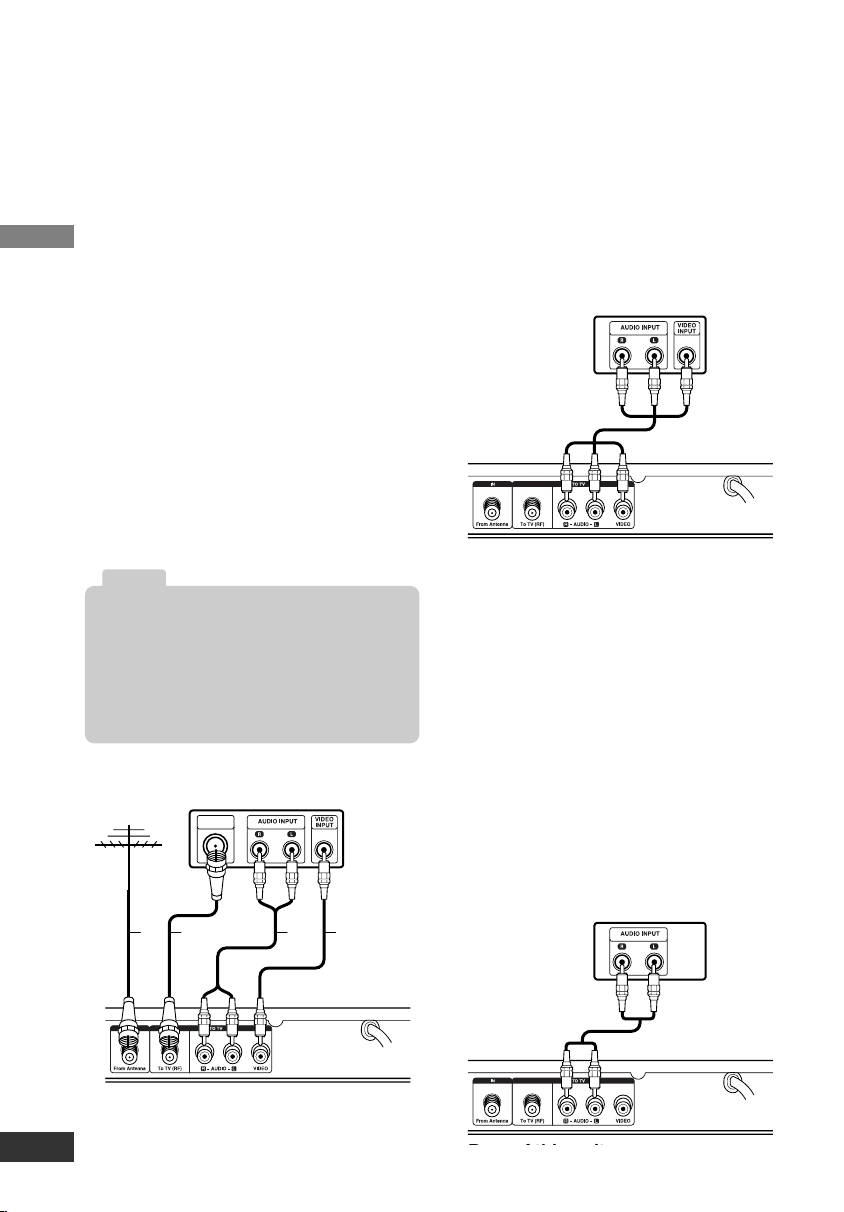
Connections with TV and
over-the-air antenna
1. Connect the antenna to the “From
Antenna” jack on this unit using a
coaxial RF cable (N).
2.
Connect the “To TV (RF)” jack on this
unit to the “Antenna In” jack on your
TV using a coaxial RF cable (R).
Your TV must be tuned to the selected
RF Output Channel (Refer to page 8)
channel (3 or 4) to display the picture.
(default: channel 3).
OR
Connect the VIDEO and AUDIO (L/R)
jacks on this unit to the video and
audio input jacks on the TV using the
video (V) and audio (A) cable.
3. Plug the power cord into a power
strip/surge protector or a wall outlet.
Connecting to a VCR
You can record a tuned TV program on
the unit by connecting a VCR or similar
recording device.
Connect the “VIDEO OUT” and “AUDIO
OUT (L/R)” jacks on the unit to the “A/V
IN” jack on your VCR using RCA-type
cables. See also the owner’s manual
supplied with the connected equipment.
Connecting to an Amplifier
(Receiver)
You can enjoy the sound by connecting
your audio component such as an AV
amplifier (receiver).
Connect AUDIO OUT (L/R) jacks on the
unit to the audio left and right in jacks on
your amplifier, receiver, or stereo system,
using an audio cables. See also the
owner’s manual supplied with the con-
nected equipment.
Rear of this unit
TV
V
ARN
ANTENNA
INPUT
Antenna
Rear of this unit
VCR
Rear of this unit
Amplifier (Receiver)
• Set “Audio Output” option to “Mono” if the
unit is connected to TV with RF cable (See
page 10).
• “To TV (RF)” jack passes the analog signal
from the “From Antenna” jack to your
TV/monitor if the unit is turned off or
unplugged.
Notes
LSX300-4PM_CUSALZK_ENG_4948 7/22/08 10:41 AM Page 6
Setup
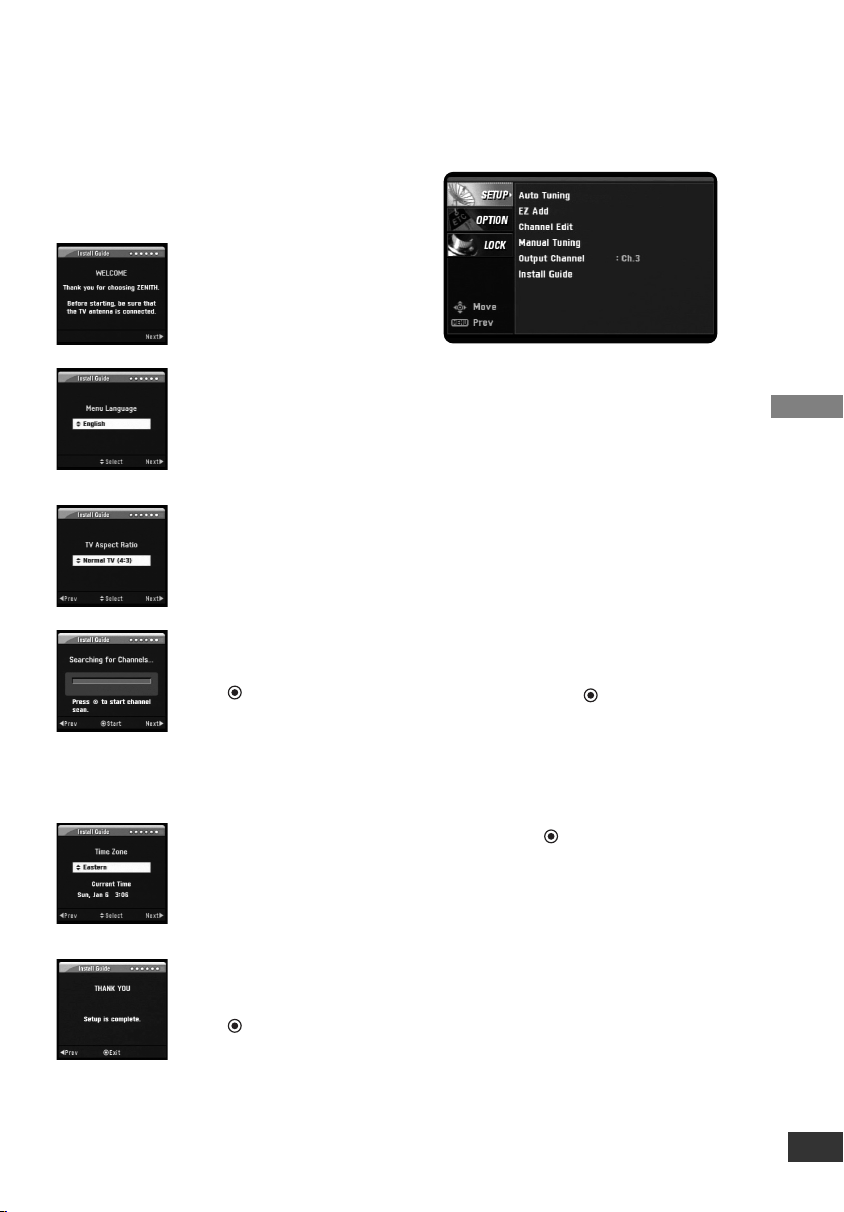
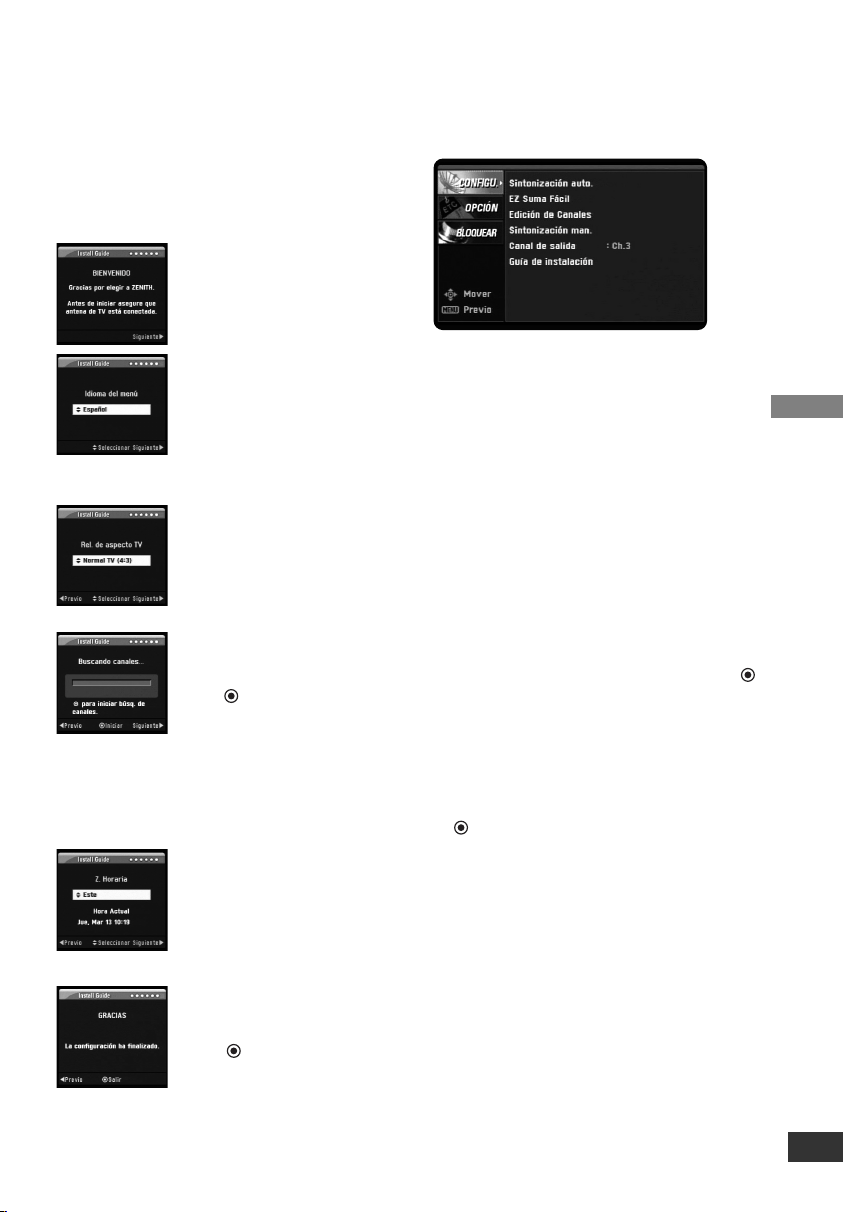
Install Guide
The Install Guide is a convenient way for
you to customize the settings of this unit.
When the unit is turned on for the first
time after connecting the power supply,
Install Guide is displayed on the screen
automatically.
Step 1 (Welcome Message)
Press i to move to the
next step.
Step 2 (Menu Language)
Use U / u to select a lan-
guage (English, Spanish,
French) then press i to
move to the next step.
Step 3 (TV Aspect Ratio)
Use U / u to select your
TV type then press i to
move to the next step.
Step 4 (Searching for
Channels...)
Press (Select) to start
auto tuning.
After auto tuning is
complete, press i to
move to the next step.
Step 5 (Time Zone)
Use U / u to select a time
zone then press i to
move to the next step.
Step 6 (Thank You
Message)
Press (Select) to
finish install guide.
Menu Overview
By using the menu, you can make vari-
ous adjustments to menu options such as
picture and sound.
To display and exit the Menu:
Press MENU to display the menu. A sec-
ond press of Menu will take you back to
initial screen.
To go to the next level:
Press i on the remote control.
To go back to the previous level:
Press I on the remote control.
Typical Menu Operation
1. Press MENU. The menu appears.
2. Use
u / U
to select the desired option
then press i or (Select) to move to
the second level.
3. Use U / u to select the second
desired option then press i to move
to the third level.
4. Use U / u to select the desired setting
then press (Select) to confirm your
selection. Some items require addi-
tional steps.
5. Press EXIT to exit the menu.
7
LSX300-4PM_CUSALZK_ENG_4948 7/22/08 10:41 AM Page 7
Setup
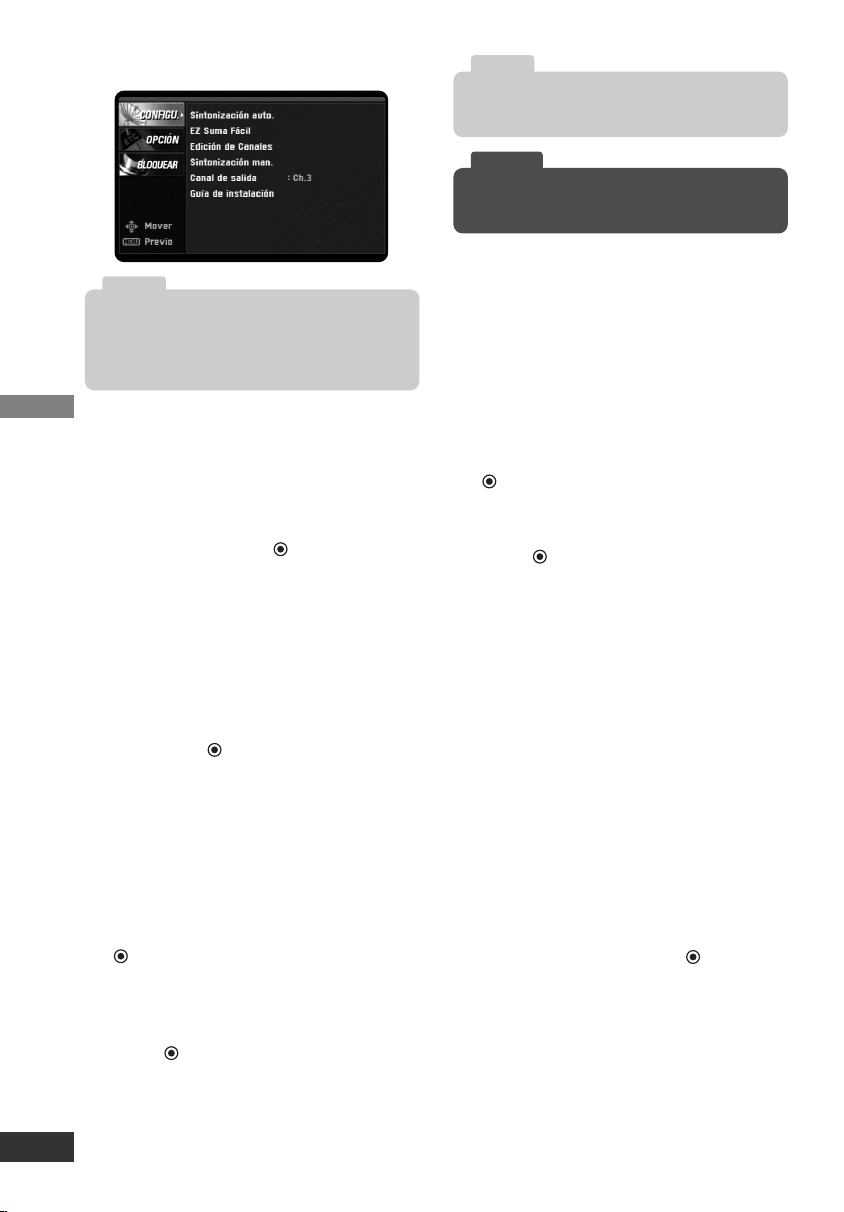
Setup Menu Features
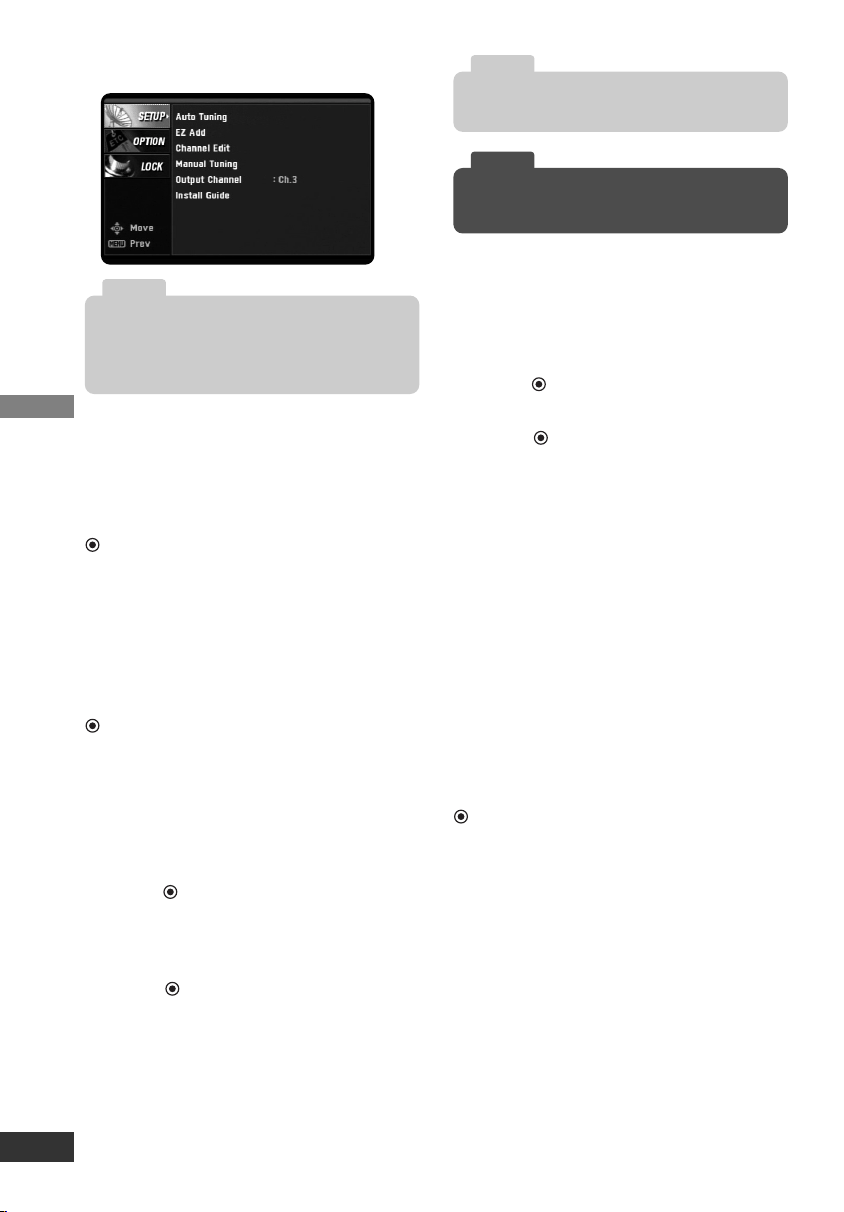
Auto Tuning
Automatically finds all digital channels
available through the ‘Antenna In’ source
and stores all the active channels found.
Select “Auto Tuning” option then press
(Select) to start auto tuning.
EZ Add
Automatically adds new channels avail-
able through the antenna input to the
memorized channels already in the chan-
nel list.
Select “EZ Add” option then press
(Select) to start auto tuning.
Channel Edit
Channel Edit allows you to manually add
or delete channels from the channel list
in memory.
1. Select “Channel Edit” option then
press (Select) or i.
The Channel Edit menu appears.
2. Select a channel on the Channel Edit
menu.
3. Press (Select) to add or delete the
channel.
or
Press FAV to add the channel to the
Favorite Ch. list.
Manual Tuning
This feature manually adds or deletes
channels.
1. Select “Manual Tuning” option then
press (Select) or i.
2. Select a channel to add or delete.
3. Press (Select) to confirm your
selection.
4. Repeat steps 2-3 to add or delete
additional channels.
Output Channel
If you use the To TV (RF) jack, select
channel 3 or 4 to send RF signal from
the unit to your TV. Your TV must be
tuned to the selected channel to display
the picture.
Install Guide
The Install Guide is a convenient way for
you to customize the settings of this unit.
Select [Install Guide] option then press
(Select) and Install Guide menu will
appear, see page 7.
8
A password is required to gain access to Auto
Tuning, Manual Tuning and Install Guide menu
if the Lock System option is set to “On”
(See page 10).
Note
While watching TV, you can select a favorite
channel using FAV button on the Remote Control.
Tip
Deleted channels can not be selected with the
CH (
u
/
U
) buttons.
Note
LSX300-4PM_CUSALZK_ENG_4948 7/22/08 10:41 AM Page 8
Setup
9
Option Menu Features
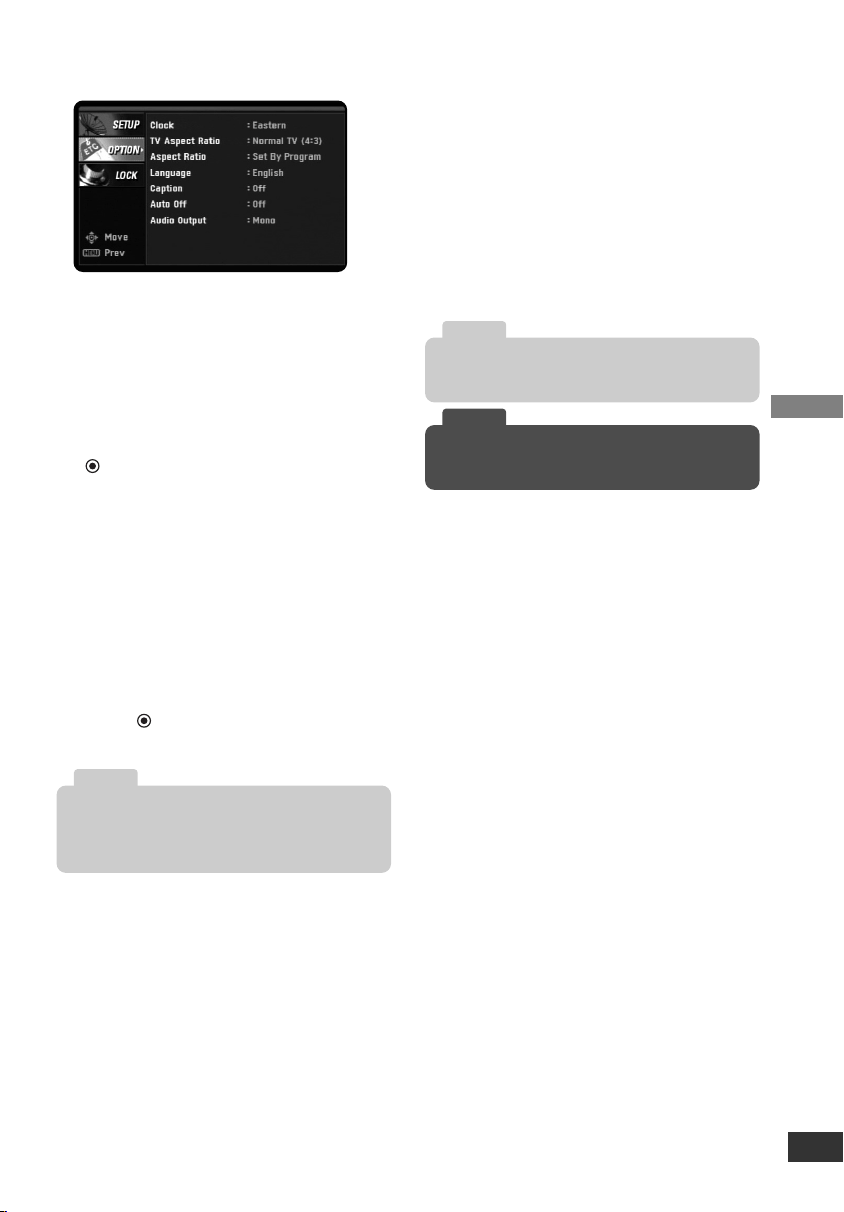
Clock
Enables the user to set up the clock
information. Normally, your clock is set
using signals transmitted by DTV sta-
tions. Choosing your time zone sets the
current time automatically.
1. Select “Clock” option then press
(Select) or i.
2. Use I or i to select your time zone
then press
u
to move to “Day Light
Saving” option.
3. Use I or i to select a “Day Light
Saving” option.
You can turn Day Light Saving “On”
or “Off” manually. If it is set to “Auto”,
the unit will use the clock information
from DTV stations to determine the
proper setting.
4. Press (Select) to confirm your
setting.
TV Aspect Ratio
Select your TV type.
4:3 – Select when a standard 4:3 TV is
connected.
16:9 – Select when a 16:9 wide TV is
connected.
Aspect Ratio
Selects the screen format for current
channel. The options displayed differ
depending on the TV Aspect Ratio.
Language
Select a language for the audio and menu.
(English, Spanish, or French)
In the case when a TV station does not send, or
sends wrong data and/or information, the unit
may be set to an incorrect time.
Note
The changed aspect ratio is applied only to cur-
rent channel.
Note
While watching TV, you can change the aspect
ratio using ZOOM button on the Remote Control.
Tip
LSX300-4PM_CUSALZK_ENG_4948 7/22/08 10:41 AM Page 9

Setup
10
Option Menu Features (Continued)
Caption
Allows you to select an option for display-
ing Caption Data from the unit.
Mode – Select “Analog” or “Digital” to use
the analog or digital caption feature.
If not, select “Off”.
Analog – Selects a mode for displaying
Analog Caption Data. In the Analog
Caption Service, CC 1-4 display pro-
gram’s dialog, and Text 1-4 display
data service information.
Digital – Selects a mode for displaying
Digital Caption Data (Service 1-6).
Digital Option – Selects Digital Caption
appearance menu options.
Style: Use caption feature defaults as
provided by the program or customize
caption appearance with the Custom
menu options.
Size: Selects the font size.
Font: Selects the font type.
Text Color: Selects the font color.
Text Opacity: Selects the font opacity.
BG. (Background) Color: Selects the
background color.
BG. (Background) Opacity: Selects the
background opacity.
Edge Type: Selects the edge type.
Edge Color: Selects the edge color.
Auto Off
Sets a time this unit will turn off.
If you do not press any button within the
preset time, this feature automatically
turns the unit off. (Default: 4 hours)
If you select “Off”, Auto Off is not active.
Audio Output
Select the appropriate audio output mode
of the unit depending on your TV connec-
tion.
Stereo – When your TV is connected with
stereo audio cable (L/R).
Mono – When your TV is connected with
mono audio cable or RF cable.
Lock Menu Features
Lock System
Allows you to set up specific channels
and ratings through blocking schemes.
Also allows you to activate or disable all
of the lock schemes previously set up. A
password is required to gain access to
the LOCK menus.
If the Lock System is set to Off, the
Channel and Program Ratings are not
functional.
Set Password
Changes the password.
1. Select the “Set Password” option then
press (Select) or i.
2. Enter the new 4-digit password.
3. Enter the same password again for
new password’s confirm.
While watching TV, you can change the caption
option using CCD button on the Remote Control.
Tip
You can select a time for the Auto Off using
SLEEP button on the Remote Control.
Tip
To access the LOCK menu, you must input the
4-digit password. (The default password is
“0000”.)
Tip
LSX300-4PM_CUSALZK_ENG_4948 7/22/08 10:41 AM Page 10

Setup
11
Block Channel
Blocks any channel that you do not want
to view or that you do not want your chil-
dren to watch. If you tune in a blocked
channel, a black screen with a pop-up
box will appear.
1. Select “Block Channel” option then
press (Select) or i.
2. Select a channel then press (Select)
to block or unblock the channel.
The mark will appear to the right of
the station name to indicate the
blocked channel.
3. Repeat step 2 to block or unblock
additional channels on the channel
list menu.
TV Rating-Children
Prevents children from watching certain
children’s TV programs according to the
ratings limit set. This rating applies only
to TV programs for children. Unless you
block TV programs intended for mature
audiences in the TV Rating – General
menu, your children could view those
programs.
1. Select the “TV Rating-Children” option
then press (Select) or i.
2.
Select the “Age” or “Fantasy Violence”
option then press (Select) or i.
Age: Selection applies regardless of
content category of rating.
Fantasy Violence: Selection applies if
TV programs include rating for
Fantasy Violence.
3. Select a rating then press (Select).
TV-Y: All Children.
TV-Y7: Directed toward children age
7 and older.
TV Rating-General
Blocks TV programs that you or your
family may not wish to watch, based on
the rating scheme set.
1. Select the “TV Rating-General” option
then press (Select) or i.
2. Select the “Age”, “Dialogue”,
“Language”, “Sex”, or “Violence”
option then press (Select) or i.
Age: Selection applies regardless of
content category of rating.
Dialogue: Selection applies if TV pro-
grams have rating for Dialogue.
Language: Selection applies if TV
programs have rating for Language.
Sex: Selection applies if TV programs
have rating for Sex.
Violence: Selection applies if TV pro-
grams have rating for Violence.
3. Select a rating then press (Select).
TV-G: General Audience.
TV-PG: Parental Guidance Suggested.
TV-14: Parents Strongly Cautioned.
TV-MA: Mature Audience Only.
Movie Rating
Blocks movies according to the movie
ratings restrictions so children cannot
view certain movies. You can set the rat-
ings to block out all the movies with rat-
ings above a specified level. Keep in
mind that the movie ratings apply only to
movies shown on TV, not TV programs
such as soap operas.
1. Select the “Movie Rating” option then
press (Select) or i.
2. Select a rating then press (Select).
G: General Audiences
All ages admitted.
PG: Parental Guidance Suggested.
Some material may not be suitable
for children.
PG-13: Parents Strongly Cautioned
Some material may not be appro-
priate for children under 13.
R: Restricted Under 17 requires
accompanying parent or adult
guardian.
NC-17: No one 17 and under admit-
ted.
X: No one 17 and under admitted.
LSX300-4PM_CUSALZK_ENG_4948 7/22/08 10:41 AM Page 11

Setup
12
Canadian Rating
Blocks Canadian TV program that you or
your family may not wish to watch, based
on the Canadian English/French
Language Rating system.
1. Select the “Canadian Rating” option
then press (Select) or i.
2. Select the “English” or “French”
option then press (Select) or i.
English: Selection applies if TV pro-
grams have the Canadian English
Language Rating.
French: Selection applies if TV pro-
grams have the Canadian French
Language Rating.
3. Select a rating then press (Select).
For Canadian English Language
Rating system
C: Program intended for children
under age 8.
C8+: Program generally considered
acceptable for children 8 years and
over to watch on their own.
G: General audience.
PG: Parental guidance.
14+: Program contains themes or
content which may not be suitable
for viewers under the age of 14.
18+: Adult program.
For Canadian French Language
Rating system
G: General - Program intended for
audience of all ages.
8 ans+: Not recommended for young
children.
13 ans+: Program may not be suit-
able for children under the age of
13.
16 ans+: Program is not suitable for
children under the age of 16.
18 ans+: Program restricted to adults.
Downloadable Rating
The rating information can be updated if
the TV station sends the downloadable
rating information.
1. Select the “Downloadable Rating”
option then press (Select) or i.
2. Select a rating title or TV rating then
press (Select) or i.
3. Select a rating then press (Select).
• If information is not downloaded from the TV
station, the Downloadable Rating option is not
available.
• Rating information is automatically down-
loaded while watching DTV channels. It may
take several seconds.
• The Downloadable Rating option is available
for use after rating information is downloaded
from the TV station. However, depending on
the information from the TV station, it may
not be available for use.
• Rating levels differ depending on the broad-
casting station.
• The default option name and Downloadable
Rating changes depending on the downloaded
information.
• The on-screen display for Downloadable
Rating options will appear with a language
that TV station sends.
• The rating titles (For example: Humor, etc)
and TV ratings (For example: MH, H, VH,
etc) may differ depending on the TV station.
Note
LSX300-4PM_CUSALZK_ENG_4948 7/22/08 10:41 AM Page 12
Operation
13
Channel Selection
You can select channels as described below.
• Use Number (0-9) and – (dash) buttons
to select a channel directly.
• Press FAV to scroll through your
favorite channels.
• Press RECALL to return to the previ-
ous channel you viewed.
•
Use CH u/U on the Remote Control or
u/U on the front panel to select a chan-
nel through the channels in memory.
Volume Adjustment
Adjusts the sound level for audio out on
the unit.
• Use VOL +/– to adjust the sound level
for audio out on the unit.
• Press MUTE to turn off the volume for
audio out on the unit.
Signal
You can view the signal strength bar to
help you adjust the antenna to the cor-
rect direction for your location by press-
ing SIGNAL on the Remote Control. An
audible beep accompanies the signal
strength bar.
Auto Off
This unit will be automatically turned off,
in case of no button input for a preset
time. You can set a time using the
SLEEP button.
If you select “Off”, Auto Off is not activat-
ed.
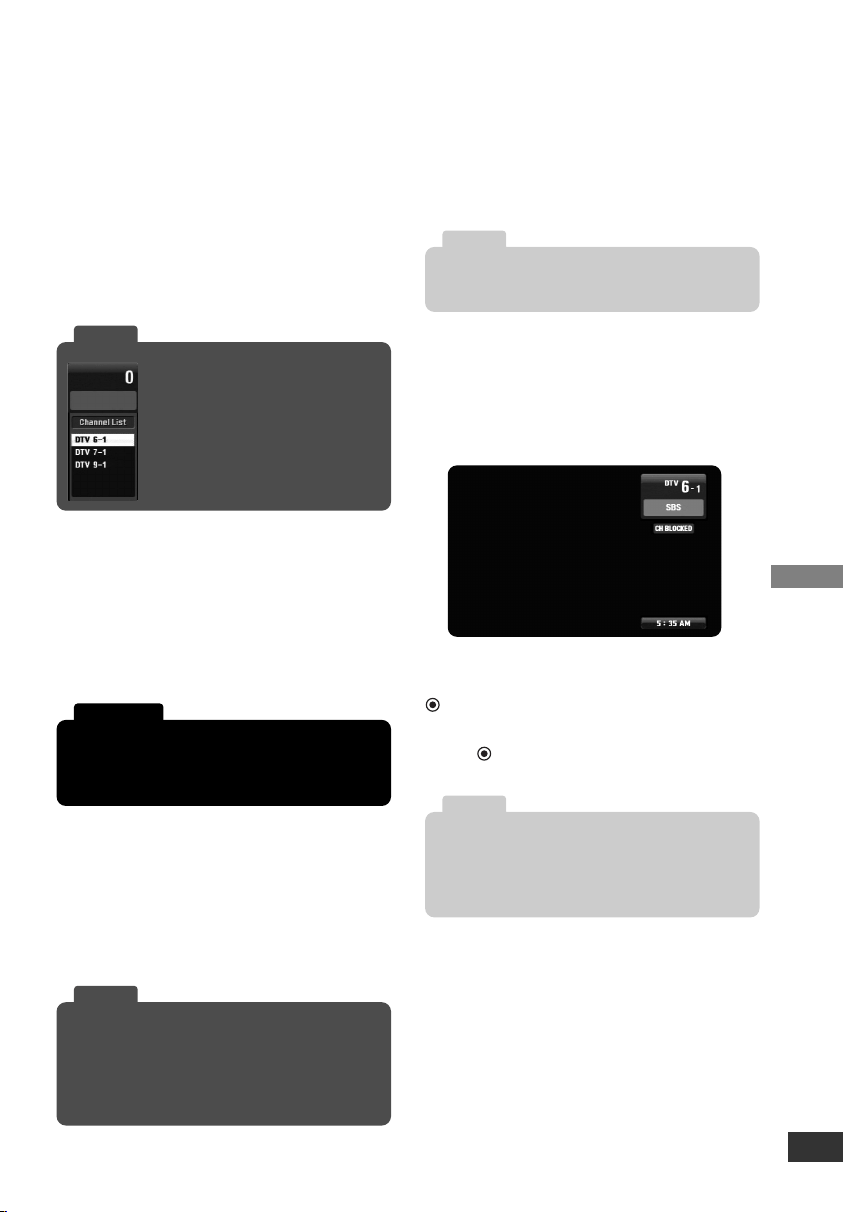
Channel Banner Display
The Channel Banner shows channel
number, station name, current time, and
block information for a moment.
The Channel Banner appears whenever
you tune to a new channel or press the
(Select) button while viewing a pro-
gram.
Press (Select) to clear Channel
Banner from being displayed.
Removing the MUTE function may cause hear-
ing or speaker damage if the TV volume is set
too high.
Caution
Refer to www.antennaweb.org for antenna infor-
mation for your receiving location.
AntennaWeb.org, will help you determine the
proper outdoor antenna to use in order to receive
television channels that are broadcast locally.
Tip
If you press any number button for
channel selection, Channel List will
appear and you can select a channel
easily on the list.
Tip
The confirm message will appear before
1 minute from Auto Off time.
Note
• Station name and clock are displayed only if
they are provided by broadcaster.
• Block Information displays such as No Signal,
Rating Blocked, or Channel Blocked.
Note
LSX300-4PM_CUSALZK_ENG_4948 7/22/08 10:41 AM Page 13
Operation
14
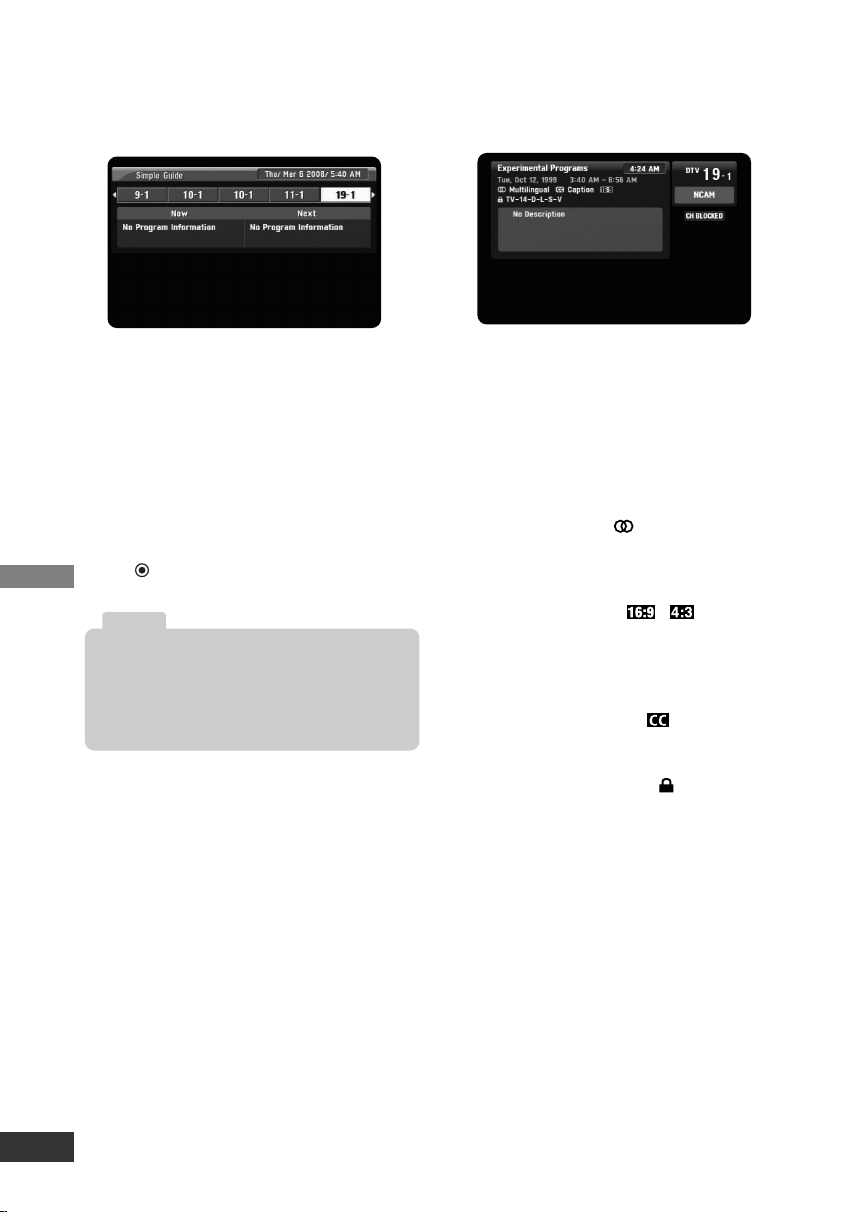
Simple Guide
Use the Simple Guide to see the informa-
tion for a current or next program easily
and conveniently.
To display or exit the Simple Guide
Press the GUIDE button on your remote
control.
To view other channel’s information
Use I / i on your remote control to navi-
gate the Simple Guide screen.
To tune to another channel
Use I / i on your remote control then
press (Select).
Program Information Display
The Information Display appears if you
press the DISPLAY button on the remote
control while viewing a program.
The Program Information shows items
listed below.
• Program Title
• Current date
• Start and End Time
• Current time
• Channel Number
• Station Name
• Multilingual Icon ( )
Indicates that multiple audio tracks are
available. You can select an alternate
audio language track with SAP button.
• Aspect Ratio Icon (
,
)
Indicates that the current program is
transmitted in wide or 4:3 picture for-
mat. Press ZOOM to view letterbox or
cropped as desired.
• Closed Caption Icon ( )
Indicates that the current program con-
tains Caption Data Service.
• Content Advisory Icon ( )
Indicates that the current program con-
tains content advisory data, and dis-
plays rating value of program.
• Program Details
A description of the program may be
available from the broadcaster
The channel information in Simple Guide menu
are displayed only if they are provided by broad-
caster, and the information for each channel can
be received only if the unit is tuned to the
channel.
Note
LSX300-4PM_CUSALZK_ENG_4948 7/22/08 10:41 AM Page 14
Reference
15
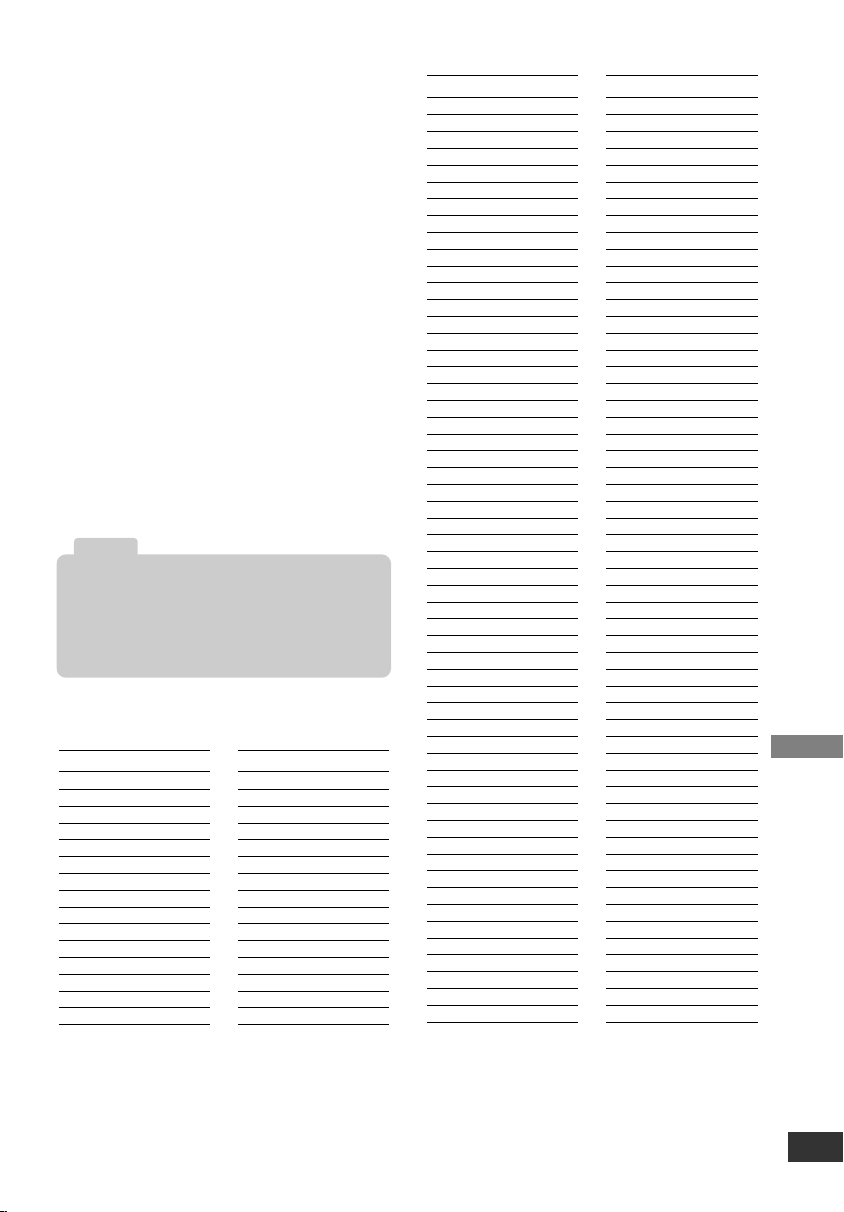
Controlling Your TV with the
Supplied Multi-brand Remote
Control
You can control the power switch of your
TV with the supplied Multi-brand Remote
Control. If your TV is listed in the table,
set the appropriate manufacturer code.
To program the Remote Control to control
your TV
1. While pressing and holding down the
TV POWER button, press the CHU or
CHu repeatedly until your TV is
turned on or off.
• Each press of CHU or CHu button
sends a manufacturer code (1 - 45)
to your TV one after the other.
2. Release TV POWER button when
your TV is turned on or off.
Controllable TV Brands
• Depending on your TV, TV POWER button
may not function on the TV.
• When you replace the batteries of the remote,
the remote control may be reset to the default
setting. Program it to control again.
Note
Manufacturer
Abex
Admiral
Advent
Aiko
Akai
America Action
Anam
Anam National
AOC
Apex Digital
Audiovox
Baysonic
Bell&Howell
Bradford
Broksonic
Manufacturer
Candle
Carnivale
Carver
Celebrity
Celera
Changhong
Citizen
Clarion
Contec
Craig
Crosley
Crown
Curtis Mathes
CXC
Daewoo
Manufacturer
Durabrand
Electroband
Elektra
Emerson
Envision
Fisher
Funai
Futuretech
GE
Gibralter
GoldStar
Grunpy
Haier
Hallmark
Harley Davidson
Harman/Kardon
Harvard
Havermy
Hello Kitty
Himitsy
Hisense
Hitachi
Infinity
Insignia
JBL
JCB
Jensen
JVC
KEC
Kenwood
KLH
KTV
LG
Lloyd's
LXI
Magnasonic
Magnavox
Magnin
Marantz
Masushita
Megatron
Memorex
MGA
Midland
Mitsubishi
Motorola
MTC
Multitech
NAD
NEC
Nikko
Norcent
NTC
Onwa
Optimus
Manufacturer
Orion
Panasonic
Penney
Philco
Philips
Pilot
Poptonica
Portland
Prima
Prism
Proscan
Proton
Quasar
RadioShack
RCA
Realistic
Runco
Sampo
Samsung
Samsux
Sansui
Sanyo
Scotch
Scott
Sears
Sharp
Sheng Chia
Simpson
Sony
Soundesign
Squareview
SSS
Starlite
Supreme
SVA
Sylvania
Symphonic
Tandy
Tatung
Technics
Techwood
Teknika
Thomas
TMK
Toshiba
Totevision
TVS
Vector Research
Victor
Vidikron
Vidtech
Wards
White Westinghouse
Yamaha
Zenith
LSX300-4PM_CUSALZK_ENG_4948 7/22/08 10:41 AM Page 15

Reference
16
Troubleshooting
No power.
• Plug the power cord into the wall outlet
securely.
Fragmented picture and unclear sound.
• Check your antenna input, location, and
signal strength.
No picture.
• Select the Auto Tuning or Manual Scan
functions if you have not already done so.
• Check to make sure all the cables are
installed correctly and that the proper
source is selected on your TV. For exam-
ple, CH 3, CH 4, Video 1 or Video 2.
• The antenna signal strength may be low.
Check the signal strength and adjust the
antenna location and direction.
• For more information about connections,
please refer to connections on page 6.
Normal picture but no sound.
• Check volume levels.
• Make sure the TV is not muted.
• Check that the unit is connected properly.
Picture is distorted.
• Make sure the proper aspect ratio is select-
ed.
• Make sure the video output is connected to
the TV.
Available channels are missing.
• You can find all the available channels by
running the “Auto Tuning” or “EZ Add” in the
SETUP menu.
You forgot your password.
• Enter the master password “7777”.
The Remote Control does not work properly.
• Point the Remote Control at the remote
sensor on the unit.
• Operate the Remote Control within 23 ft
(7 m).
• Remove any obstacles blocking the signal.
• Replace dead batteries with new ones.
Specifications
General
• Television System: DTV standard
ATSC
• Channel Coverage: Terrestrial 2-69
• Dimensions (W x H x D):
Approx. 8.5 x 1.8 x 6.4 inches
(215 x 46 x 162 mm)
• Net Weight): Approx. 1.65 lbs (0.75 kg)
• Operating temperature:
41 °F to 104 °F (5 °C to 40 °C)
• Operating humidity: 5 % to 90 %
• Power requirement: 120V ~ 60 Hz AC.
• Power consumption: 3.9 W
Input/Output
• From Antenna:
Antenna input, ATSC, 75 Ω
• To TV (RF):
Antenna output, 75 Ω,
RF Output Channel 3 or 4 (Switchable)
• VIDEO OUTPUT:
1.0 V (p-p), 75 Ω, negative sync,
RCA jack x 1
• AUDIO OUTPUT:
2.0 Vrms (1 KHz, 0 dB), 600 Ω,
RCA jack (L, R) x 1
Accessories
• RF cable (1)
• Video cable (1)
• Audio (L/R) cable (1)
• Remote Control (1)
• Battery (size AAA) (1)
• Owner’s Manual (1)
Design and specifications are subject to change
without prior notice.
Note
LSX300-4PM_CUSALZK_ENG_4948 7/22/08 10:41 AM Page 16

Reference
17
ANALOG PASS-THROUGH FEATURE
Federal law requires that all “full-power” television stations must end analog
broadcasts after February 17, 2009, but this does not include “low-power” TV
stations (such as “low-power” or “community” stations of very restricted range
(LPTV), “Class A” stations, and “translator” or “booster” stations).
These stations may continue to broadcast in analog after the February 17,
2009, digital conversion deadline for full-power television stations.
This converter box has a feature called “Analog Pass-Through,” which
allows your analog TV to continue to tune the analog low-power stations.
Simply put, to receive analog stations, turn off the box; the analog signal will
"pass-through" the box to be tuned in the TV. To enjoy the digital stations,
tune them through the converter box as explained in this operating guide.
NOTE: Online resources with low-power TV information include:
www.dtvtransition.org/lowpower, https://www.dtv2009.gov/lowpower/, and
www.dtv.gov. For a map and list of low-power stations by state, please visit
www.ntia.doc.gov/dtvcoupon/LPTVmap.html
LSX300-4PM_CUSALZK_ENG_4948 7/22/08 10:41 AM Page 17

This Zenith Electronics product, will be repaired or replaced, at Zenith’s option, if it proves to be defective in mate-
rial or workmanship, under normal use, during the warranty period (“Warranty Period”) listed below, effective from
the date (“Date of Purchase”) of original consumer purchase of the product. This warranty is good only to the origi-
nal purchaser of the product and effective only when used in the United States, excluding U.S. Territories.
THIS WARRANTY IS IN LIEU OF ANY OTHER WARRANTIES, EXPRESS OR IMPLIED, INCLUDING WITHOUT
LIMITATION, ANY WARRANTY OF MERCHANTABILITY OR FITNESS FOR A PARTICULAR PURPOSE. TO
THE EXTENT ANY IMPLIED WARRANTY IS REQUIRED BY LAW, IT IS LIMITED IN DURATION TO THE
EXPRESS WARRANTY PERIOD ABOVE. ZENITH ELECTRONICS WILL NOT BE LIABLE FOR ANY INCIDEN-
TAL, CONSEQUENTIAL, INDIRECT, SPECIAL OR PUNITIVE DAMAGES OF ANY NATURE, EVEN IF ADVISED
OF THE POSSIBILITY OF SUCH DAMAGES, INCLUDING WITHOUT LIMITATION, LOST REVENUES OR
PROFITS, LOST OR CORRUPTED PROGRAMMING OR DATA, OR ANY OTHER DAMAGE WHETHER BASED
IN CONTRACT, TORT OR OTHERWISE. Some states do not allow the exclusion or limitation of incidental or con-
sequential damages or limitation on how long an implied warranty lasts, so the above exclusion or limitation may
not apply to you. This warranty gives you specific legal rights and you may also have other rights that may vary
from state to state.
THIS LIMITED WARRANTY DOES NOT APPLY TO:
•
Damages or operating problems that result from shipping, installation, adjustment of user controls, calibration,
maintenance or failure to maintain, or separate system components; and
• Damages or operating problems that result from normal wear and tear, misuse, abuse, operation outside
environmental specifications or contrary to the requirements or precautions in the Operating Guide, acci-
dent, lightning strikes or other natural causes, unauthorized modification or alteration, incorrect electrical
current or voltage, signal reception or input, software not licensed directly by Zenith, software errors that do
not disable functionality, operating and software protocols adopted after the date of manufacture or for out-
side the US, institutional or commercial use, or other causes not arising out of defect in material or work-
manship.
The cost of repair or replacement under these excluded circumstances shall be borne by the consumer.
CUSTOMER INTER-ACTIVE CENTER NUMBERS:
WARRANTY PERIOD:
LABOR: 90 days from the Date of Purchase.
PARTS: One Year from the Date of Purchase.
* Parts replaced are warranted for the remaining
portion of the original warranty period.
HOW SER
VICE IS HANDLED:
Call 1-877-9-ZENITH for instructions on getting the
defective unit repaired or replaced.
Please retain dated sales receipt and your box to
return the unit to Zenith for repair or replacement.
Shipping both ways will be paid by Zenith during the
first 90 days of the Warranty Period. During the
remainder of the Warranty Period (91~365 days), you
pay inbound shipping charges and Zenith pays return
shipping charges.
Visit our website at: http://www.zenithservice.com
For Warranty Service, Where to buy, Product
Assistance, or Customer Assistance
Call 1-877-9-ZENITH (24 hours a day, 365 days per
year) and select appropriate options from the menu.
Or visit our website at http://www.zenithservice.com
Zenith Electronics LLC
Limited Warranty - USA
LG ELECTRONICS U.S.A., INC.
1000 SYLVAN AVENUE
ENGLEWOOD CLIFFS, NJ
P/N: MFL38574948
Printed in China
Issue O
LSX300-4PM_CUSALZK_ENG_4948 7/22/08 10:41 AM Page 18
Guía de instalación y funcionamiento | Garantía
Número de modelo | DTT901 | Conversor sintonizador de TV digital
con Paso analógico
Para llamar al
Servicio de
asistencia:
Marque el número
gratuito
1-877-9-ZENITH
(http://www.zenithservice.com)
© Copyright 2007, LG Electronics U.S.A., Inc.
Como empresa asociada de
ENERGY
S
TAR
®
, LG ha decidido
que este producto o productos
se adaptan a las guías para la
eficiencia energética de
ENERGY STAR
®
.
E
NERGY
STAR
®
es una marca registrada de
EE.UU.
LSX300-4PM_CUSALZK_SPA_4948 7/22/08 10:42 AM Page 1
El símbolo del rayo con punta de flecha dentro de
un triángulo equilátero pretende alertar al usuario
de la presencia de voltaje peligroso no aislado
dentro de la carcasa del producto que puede
tener la magnitud suficiente para constituir un
riesgo de sacudida eléctrica para las personas.
El signo de exclamación dentro de un triángulo
equilátero pretende alertar al usuario de la
presencia de instrucciones importantes (de
servicio) de funcionamiento y mantenimiento en
la información que acompaña al producto.
ADVERTENCIA: PARA REDUCIR EL RIESGO DE
INCENDIO O DESCARGA ELÉCTRICA, NO EXPONGA
ESTE PRODUCTO A LA LLUVIA NI A LA HUMEDAD.
ADVERTENCIA: No instale este equipo en un espacio
cerrado, como una estantería o mueble similar.
PRECAUCIÓN: No bloquee las aberturas de ventilación.
Instálelo de acuerdo con las instrucciones del fabricante.
Las ranuras y aberturas de la carcasa sirven para ventilar
y garantizar un funcionamiento seguro del producto, y para
protegerlo de un sobrecalentamiento.
No deben bloquearse nunca las aberturas colocando el
producto sobre una cama, sofá, alfombra o superficie simi-
lar. Este producto no debe colocarse en una instalación
incorporada, como una estantería o estante, a no ser que
exista una ventilación adecuada o se cumpla con las
instrucciones del fabricante.
PRECAUCIÓN: No deberá exponerse el aparato a agua
(goteo o salpicadura), ni colocar sobre el mismo objetos
con líquido, como jarrones.
PRECAUCIÓN Información sobre el cable de
alimentación
Es recomendable colocar la mayoría de aparatos en un
circuito específico;
Esto es, un circuito simple de tomacorriente que sólo
alimente al aparato y no tenga tomas de corriente adi-
cionales o cableado de circuitos. Compruebe la página de
especificación de este manual de usuario para asegurarse.
No sobrecargue las tomas de la pared. Las tomas de pared
sobrecargadas, sueltas o dañadas, alargadores, cables de
alimentación deshilachados, o cables aislantes dañados o
rotos suponen un peligro. Cualquiera de estas condiciones
podría provocar un incendio o una descarga eléctrica.
Examine periódicamente el cable del aparato, y si su aspec-
to parece dañado o deteriorado, desenchúfelo, suspenda el
uso del aparato, y que un técnico de servicio autorizado
sustituya el cable con piezas de recambio exactas.
Proteja el cable de alimentación de abusos físicos o
mecánicos, así como de ser enroscado, prensado, atrapa-
do por una puerta, o que alguien camine sobre él. Preste
especial atención a los enchufes, tomacorrientes, y al
punto desde donde sale el cable del aparato.
Para desconectar la unidad, jale el cable de alimentación
del tomacorriente. Al instalar el producto, asegúrese de
que se puede acceder fácilmente al enchufe.
ADVERTENCIA DE LA FFC: Este equipo puede generar
o utilizar energía en forma de frecuencias de radio.
Cualquier cambio o modificación en este equipo puede
causar interferencias peligrosas, a menos que las modifi-
caciones se aprueben expresamente en el manual de
instrucciones. El usuario podría perder la autorización
para utilizar este equipo si se realiza un cambio o modifi-
cación no autorizado.
INFORMACIÓN REGULADORA: FCC Sección 15
Este equipo ha sido testado y los resultados demuestran
que cumple con los límites establecidos para un aparato
digital de Clase B de acuerdo con la sección 15 de las
normas FCC. Estos límites están diseñados para propor-
cionar una protección razonable contra interferencias
dañinas cuando se utiliza el producto en instalaciones
residenciales. Este producto genera, utiliza y puede
radiar energía en forma de frecuencias de radio y, en
caso de no instalarlo y utilizarlo según el manual de
instrucciones, puede provocar interferencias no deseadas
en las comunicaciones de radio. No obstante, no existe
ninguna garantía de que, por otras causas, no ocurran
interferencias en una instalación en particular. Si este
producto causa interferencias indeseadas a la recepción
de emisiones radiofónicas o de televisión que puede
determinar encendiendo y apagando el producto. Se
recomienda al usuario que corrija las interferencias sigu-
iendo una o más de las siguientes medidas:
• Vuelva a orientar o colocar la antena de recepción.
• Aumente la separación entre el producto y el receptor.
• Conecte el producto a una toma o circuito diferente al
que está conectado el receptor.
• Consulte al distribuidor o a un técnico experto en
radio/televisión para solicitar ayuda.
PRECAUCIÓN:
NO INTENTE MODIFICAR ESTE PRODUCTO DE
NINGÚN MODO SIN UNA AUTORIZACIÓN ESCRITA DE
LG ELECTRONICS CORPORATION.
UNA MODIFICACIÓN SIN PERMISO PODRÍA INVALIDAR
LA CAPACIDAD DEL USUARIO PARA OPERAR ESTE
PRODUCTO. ESTE PRODUCTO ESTÁ DISEÑADO PARA
RECIBIR Y DECODIFICAR SEÑALES TRANSMITIDAS
DE ACUERDO AL SISTEMA DE TELEVISION DIGITAL
ATSC A/53, ESTÁ DISEÑADO PARA UTILIZARSE CON
UNA ANTENA APROPIADA Y DISPOSITIVO DE
VISUALIZACIÓN QUE USTED DEBE PROPORCIONAR.
COMPATIBLE CON FCC: la parte responsable para la
compatibilidad con este producto es:
Comercializado y distribuido por LG Electronics EE.UU.,
Inc., 1000 Sylvan Avenue, Englewood Cliffs, NJ.
Teléfono: 1-201-816-2000.
Introducción
2
PRECAUCIÓN
RIESGO DE DESCARGA
ELÉCTRICA NO ABRIR
PRECAUCIÓN: PARA REDUCIR EL RIESGO
DE DESCARGA ELÉCTRICA NO RETIRE LA
CUBIERTA (O PARTE POSTERIOR) EN EL
INTERIOR NO HAY PIEZAS REPARABLES
POR EL USUARIO SOLICITE AYUDA A PER-
SONAL DE SERVICIO CUALIFICADO.
LSX300-4PM_CUSALZK_SPA_4948 7/22/08 10:42 AM Page 2
Introducción
3
INSTRUCCIONES
DE SEGURIDAD
IMPORTANTES
Lea y observe detenidamente todas las adver-
tencias e instrucciones de este manual del pro-
pietario, así como las indicadas en el producto.
Conserve este manual para futuras consultas.
LEA Y OBSERVE DETENIDAMENTE TODAS LAS
ADVERTENCIAS E INSTRUCCIONES DE ESTE
MANUAL DEL PROPIETARIO, así COMO LAS
INDICADAS EN EL PRODUCTO. CONSERVE
ESTE MANUAL PARA FUTURAS CONSULTAS.
1. Lea estas instrucciones.
2. Guarde estas instrucciones.
3. Tenga en cuenta todas las advertencias.
4. Siga todas las instrucciones.
5. No utilice este producto cerca del agua.
6. Límpielo sólo con un paño seco.
7. No bloquee las aberturas de ventilación.
Instálelo de acuerdo con las instrucciones
del fabricante.
8. No lo coloque cerca de fuentes de calor,
como radiadores, rejillas de aire caliente,
estufas u otros aparatos (incluidos los
amplificadores) que emitan calor.
9. No pase por alto la seguridad adicional que
supone un enchufe polarizado o tipo toma
tierra. Un enchufe polarizado tiene dos clavi-
jas, una más ancha que la otra. Un enchufe
tipo toma a tierra tiene dos clavijas y un tercer
diente de toma a tierra. La clavija ancha o el
tercer diente se incorporan para su seguridad.
Si el enchufe suministrado no encaja en la
toma, póngase en contacto con un electricista
para que sustituya la toma obsoleta.
10. Proteja el cable de alimentación para que
no lo pisen ni aplasten, especialmente en
las clavijas, las tomas y el punto de salida
del aparato.
11. Utilice únicamente acoplamientos y
accesorios especificados por el fabricante.
12. Utilícelo sólo con el estante
fijo o con ruedas, trípode,
soporte o mesa especifica-
dos por el fabricante o con
el accesorio suministrado
con el aparato. Si utiliza un
carrito, tenga cuidado al moverlo junto
con el aparato para evitar lesiones en
caso de que éste se caiga.
13. Desenchufe este producto durante tor-
mentas eléctricas o en caso de no utilizar-
lo durante un largo periodo de tiempo.
14. Sólo el personal cualificado puede
encargarse del servicio técnico.
La asistencia técnica es necesaria si el
aparato presenta algún daño, como por
ejemplo, si el cable o la clavija de
alimentación están dañados, si se
derrama líquido o se introducen objetos
dentro del aparato, si el aparato ha esta-
do expuesto a la lluvia o humedad, si no
funciona correctamente o si se ha caído.
Contenido
Introducción . . . . . . . . . . . . . . . . . . . . .4-5
Panel frontal . . . . . . . . . . . . . . . . .4
Descripción general del panel de
conexión . . . . . . . . . . . . . . . . . . . .4
Funciones importantes del control
remoto . . . . . . . . . . . . . . . . . . . . . .5
Instalación . . . . . . . . . . . . . . . . . . . . . . . .6
Conexiones con TV y antena de TV 6
Conexión de un VCR . . . . . . . . . . .6
Conexión a un amplificador
(receptor) . . . . . . . . . . . . . . . . . . . .6
Configuración . . . . . . . . . . . . . . . . . . .7-12
Guía de instalación . . . . . . . . . . . .7
Generalidades del menú . . . . . . . .7
Trabajo diario con el menú . . . . . . .7
Funciones del menú Configu. . . . . .8
Funciones del menú Opción . . .9-10
Funciones del menú Bloquear .10-12
Funcionamiento . . . . . . . . . . . . . . . . .13-14
Selección de canales . . . . . . . . . .13
Ajuste del volumen . . . . . . . . . . .13
Señal . . . . . . . . . . . . . . . . . . . . . .13
Apagado automático . . . . . . . . . . .13
Pantalla información de canal . . .13
Simple Guide . . . . . . . . . . . . . . . .14
Pantalla de información de programa .14
Referencia . . . . . . . . . . . . . . . . . . . . .15-16
Control de su TV con el control remoto
universal (multimarca) suministrado . .15
Solución de problemas . . . . . . . . .16
Especificaciones . . . . . . . . . . . . . .16
Fabricado bajo licencia de Dolby Laboratories.
“Dolby” y el símbolo de la doble-D son marcas
comerciales de Dolby Laboratories.
LSX300-4PM_CUSALZK_SPA_4948 7/22/08 10:42 AM Page 3
a Indicador POWER (ENCENDIDO)
Se ilumina en rojo (modo espera) o
azul (modo activo). El indicador
parpadeará cuando se reciba la
señal remota.
b Sensor del control remoto
Recibe señales del control remoto.
c u/U (Arriba/Abajo Canales)
Busca hacia arriba o abajo en los
canales memorizados.
d POWER
Enciende y apaga la unidad.
a From Antenna (de la Antena)
Conéctese a la fuente de señal
digital; antena de TV
b To TV (RF) (a la TV)
Conecte a un TV con entradas
coaxiales RF.
c VIDEO y AUDIO OUTPUT
(Izquierdo/Derecho)
Conexión a un televisor/monitor con
entradas de video y audio.
d Cable de alimentación de CA
Enchufe a la fuente de alimentación.
Introducción
4
Panel frontal
Descripción general del panel de conexiones
abcd
ab c d
Si dispone de un control remoto universal, podrá
controlar esta unidad. Para configurar el control
remoto con el fin de controlar esta unidad,
establezca el modo de funcionamiento control
remoto en TV o sintonizador digital, y cambie la
configuración del control remoto al código del
fabricante de LG o Zenith.
Nota
LSX300-4PM_CUSALZK_SPA_4948 7/22/08 10:42 AM Page 4
Introducción
5
Control remoto
TV POWER
Enciende y apaga el televisor. (Consulte la
página 15)
SLEEP
Puede ajustar la unidad para que se
apague automáticamente a una hora
especificada. (Apagado t 1 hora t
2 horas t 3 horas t 4 horas)
POWER
ENCIENDE y APAGA la UNIDAD.
SIGNAL
Puede ver la potencia de la señal y escuchar
un pitido de acuerdo a la potencia del canal
actual.
SAP
Selecciona el idioma de audio del programa si
está disponible.
ZOOM
Cambia la relación de aspecto de la imagen.
DISPLAY
Muestra información actualizada del programa
del canal actual.
GUIDE
Recupera la guía simple.
CCD
Selecciona el modo Subtítulo si está
disponible.
(Servicio 1-6 t CC 1-4 t Texto 1-4 t
Apagado)
MENU
Abre o cierra el menú principal.
EXIT
Elimina todo lo visualizado en pantalla y
vuelve a la visualización del televisor desde
cualquier menú.
Botones flecha (U / u / I / i)
Selecciona opciones numeradas en un menú.
(Seleccionar)
Selecciona las funciones del menú iluminadas.
Completa la entrada de número de canal y sin-
toniza rápidamente los canales seleccionados.
FAV (Favorito)
Avanza a través de los canales
programados como favoritos
MUTE
ACTIVA y DESACTIVA el sonido.
CH (Canal) (U / u) / PAGE (R/r)
Selecciona los canales de la memoria.
Páginas a través del menú Edición de
Canales y el menú Bloquear Canal.
VOL (Volumen) (+/-)
Ajusta el nivel de sonido.
Números
Escoge los canales e introduce la contraseña.
- (Guión)
Introduce un guión en los número de sub
canal, como: 2-1, 2-2, 47-3, etc.
RECALL
Retorna al último canal visualizado.
Funcionamiento del control remoto
Oriente el control remoto hacia el sensor
y pulse los botones.
Instalación de las pilas en el control
remoto
Quite la cubierta de las pilas de
la parte posterior del control
remoto e inserte una pila
(tamaño AAA) alineando 3 y #
correctamente. Recomendamos
la utilización de pilas alcalinas.
TV
POWER
POWER
SLEEP
SAP
MENU
SIGNAL
DISPLAY
EXIT
VOL CH
CCD
FAV
P
A
G
E
MUTE
ZOOM
GUIDE
1 2 3
4 5 6
7 8 9
0
RECALL
LSX300-4PM_CUSALZK_SPA_4948 7/22/08 10:42 AM Page 5
Instalación
6
Conexiones con TV y antena de TV
1. Conecte la antena a la toma “From
Antenna” de esta unidad utilizando un
cable coaxial RF (N).
2.
Conecte la toma “To TV (RF)” de esta
unidad a la toma “Antenna In” de su
televisor utilizando un cable coaxial
RF (R). Su televisor debe tener
sintonizado el canal de salida (RF)
(Consulte la página 8) canal (3 ó 4)
para visualizar la imagen
(por defecto: canal 3).
O
Conecte el VIDEO y la toma AUDIO
(L/R) de esta unidad en las tomas de
entrada de video y audio utilizando el
cable de video (V) y audio (A).
3. Enchufe el cable de alimentación a
un protector de aislamiento/contra
subidas de tensión o a un
tomacorriente de pared.
Conexión de un VCR
Puede grabar un programa de TV en su
unidad conectando el VCR o un
dispositivo similar de grabación.
Conecte las tomas “VIDEO OUT” y
“AUDIO OUT (L/R)” de la unidad a la
toma “A/V IN” de su VCR mediante cables
tipo RCA. Consulte también el Manual del
usuario incluido con el equipo conectado.
Conexión a un amplificador
(receptor)
Puede disfrutar del mejor sonido
conectando su componente de audio,
como un amplificador de AV (receptor).
Conecte las tomas izquierda y derecha
de AUDIO OUT (L/R) de la unidad a las
tomas de entrada izquierda y derecha de
su amplificador, receptor o equipo
estéreo, utilizando cables de audio.
Consulte también el Manual del usuario
incluido con el equipo conectado.
Rear of this unit
TV
V
ARN
ANTENNA
INPUT
Antenna
• Ajuste la opción “Salida de audio” a “Mono”
si la unidad está conectada al televisor con el
cable RF (Consulte página 10).
• La toma “To TV (RF)” transmite la señal
analógica desde la toma “De la antena” a su
TV/monitor si la unidad está apagada o
desenchufada.
Nota
Antena
Parte posterior de la unidad
Rear of this unit
VCR
Rear of this unit
Amplifier (Receiver)
Parte posterior de la unidad
Parte posterior de la unidad
Amplificador (receptor)
LSX300-4PM_CUSALZK_SPA_4948 7/22/08 10:42 AM Page 6
Configuración
7
Guía de instalación
La Guía de instalación es una forma
cómoda para que personalice los ajustes
de esta unidad. Cuando encienda la unidad
por primera vez después de conectar la
fuente de alimentación, la Guía de
Instalación aparecerá automáticamente.
Paso 1 (Mensaje de
bienvenida)
Pulse i para pasar al
siguiente paso.
Paso 2 (Idioma del menú)
Use U / u para selec-
cionar un idioma (Inglés,
Español, Francés) y, a
continuación, pulse i para
pasar al siguiente paso.
Paso 3 (Rel. de aspecto TV)
Use U / u para seleccionar
el tipo de televisor y, a con-
tinuación, pulse i para
pasar al siguiente paso.
Paso 4 (Buscando
canales…)
Pulse (Seleccionar) para
iniciar la sintonización
automática. Después de
que la sintonización
automática se haya comple-
tado, pulse i para pasar al
siguiente paso.
Paso 5 (Z. Horaria)
Use U / u para seleccionar
el tipo de zona horaria y, a
continuación, pulse i para
pasar al siguiente paso.
Paso 6 (Mensaje de
agradecimiento)
Pulse (Seleccionar)
para cerrar la Guía de
instalación.
Generalidades del menú
Utilizando los menús, puede realizar
varios ajustes a las opciones de menú
como imágenes y sonidos.
Para visualizar y salir del Menú:
Pulse MENU para visualizar el menú.
Si pulsa Menú una segunda vez, volverá
a la pantalla principal.
Para pasar al siguiente nivel:
Pulse i en el mando a distancia.
Para volver al nivel anterior:
Pulse I en el mando a distancia.
Trabajo diario con el menú
1. Presione MENU. El menú aparece.
2. Use
u / U
para seleccionar la opción
deseada y, a continuación, pulse i o
(Seleccionar) para ir al segundo nivel.
3. Use U / u para seleccionar la segunda
opción deseada y, a continuación,
pulse i para ir al tercer nivel.
4. Use U / u para seleccionar el ajuste
deseado y, a continuación, pulse
(Seleccionar) para confirmar la
selección. Algunos elementos
requieren que se realicen otros pasos.
5. Pulse EXIT (SALIR) para salir del
menú.
LSX300-4PM_CUSALZK_SPA_4948 7/22/08 10:42 AM Page 7
Configuración
8
Funciones del menú Configu.
Sintonización auto.
Encuentra automáticamente todos los
canales digitales disponibles a través de
la fuente ‘Antenna In’ y memoriza todos
los canales activos encontrados.
Seleccione la opción “Sintonización
auto.” y después pulse (Seleccionar)
para iniciar la sintonización automática.
EZ Suma Fácil
Añade automáticamente nuevos canales
disponibles a la lista de canales ya
memorizados, a través de la entrada de
antena.
Seleccione la opción “EZ Suma Fácil” y
después pulse (Seleccionar) para
iniciar la sintonización automática.
Edición de Canales
Edición de Canales le permite añadir o
borrar canales de forma manual en la
lista de canales memorizados.
1. Seleccione la opción “Edición de
Canales” y después pulse
(Seleccionar) o i. Aparece el
menú Edición de Canales.
2. Seleccionar un canal del menú
Edición de Canales.
3. Pulse (Seleccionar) para añadir o
borrar un canal.
o
Pulse FAV para añadir el canal a la
lista de Favoritos.
Funciones del menú Configu.
(Continuación)
Sintonización man.
Esta función permite añadir o borrar
canales de forma manual.
1. Seleccione la opción “Edición de
Canales” y después pulse
(Seleccionar) o i.
2. Seleccione un canal que desee
añadir o borrar.
3. Pulse (Seleccionar) para confirmar
su selección.
4. Repita los pasos 2-3 para añadir o
borrar más canales.
Canal de salida
Si utiliza la toma TO TV (RF) (a la TV),
seleccione el canal 3 o 4 para enviar la
señal RF de la unidad a su TV.
Su TV debe tener sintonizado el canal
seleccionado para visualizar la imagen.
Guía de instalación
La Guía de instalación es un elemento
muy útil que le permitirá personalizar la
configuración de su unidad.
Seleccione la opción [Guía de
instalación] y pulse después
(Seleccionar), entonces aparecerá el
menú Guía de instalación; consulte la
página 7.
Se necesita una contraseña para acceder al menú
Sintonización automática, Sintonización manual y
Guía de instalación si la opción “Sist. de Bloqueo”
está ajustada a “Encendido” (Consulte la página 10).
Nota
Mientras ve la televisión puede elegir un canal
favorito pulsando el botón FAV del control remoto.
Consejo
Los canales borrados no pueden seleccionarse
con los botones CH (
u
/
U
).
Nota
LSX300-4PM_CUSALZK_SPA_4948 7/22/08 10:42 AM Page 8

Configuración
9
Funciones del menú Opción
Reloj
Permite al usuario configurar la
información del reloj. Normalmente, su
reloj se configura mediante las señales
transmitidas por las emisoras de DTV.
Seleccionar su zona horaria establecerá
automáticamente la hora local.
1.
Seleccione la opción “Reloj” y, a
continuación, pulse (Seleccionar) o i.
2. Use I o i para seleccionar su zona
horaria y pulse
u
para dirigirse a la
opción “Horario de verano”.
3. Use I o i para seleccionar la opción
“Horario de verano”.
Usted puede activar o desactivar
manualmente la opción “Horario de
verano”. Si se establece en
“Automático”, la unidad usará la
información horaria de las estaciones
de DTV para determinar el ajuste
correcto.
4. Pulse (Seleccionar) para confirmar
su selección.
Rel. de aspecto TV
Seleccione el tipo de televisor.
4:3 - Selecciónelo cuando esté conecta-
do un televisor estándar de 4:3.
16:9 - Selecciónelo cuando esté
conectado un televisor panorámico de
16:9.
Relación de Aspecto
Seleccione el formato de pantalla para el
canal actual. Las opciones visualizadas
difieren dependiendo de la proporción de
aspecto.
Lenguaje
Seleccione un idioma para el menú de
idioma y de audio. (Inglés, Español, o
Francés)
En caso de que la emisora de TV no envíe o
envíe información incorrecta, la unidad podría
ser configurada con una hora incorrecta.
Nota
La relación de aspecto modificada se aplica sólo
al canal actual.
Nota
Mientras ve la televisión, puede cambiar Relación de
aspecto usando el botón ZOOM del control remoto.
Consejo
LSX300-4PM_CUSALZK_SPA_4948 7/22/08 10:42 AM Page 9
Configuración
10
Funciones del menú Option
(Continuación)
Subtíttulos
Le permite seleccionar una opción para
visualizar la información de Subtítulos de
la unidad.
Modo - Seleccione “Análoga” o “Digital”
para utilizar subtítulos digitales.
Si no lo desea, seleccione “Apagado”.
Análoga - Selecciona un modo para
visualizar subtítulos analógicos.
En el servicio analógico de Subtítulos,
CC 1-4 muestra un diálogo de
programa y el Texto 1-4 muestra
información de los datos del servicio.
Digital - Selecciona un modo para
visualizar los subtítulos digitales
(Servicio 1-6).
Opción digital - Selecciona las opciones de
aspecto de menú de Subtítulos digitales.
Estilo: Utilice las funciones predetermi-
nadas de subtítulo proporcionadas por
el programa o personalice el aspecto
de los subtítulos con las opciones del
menú Personalizar.
Tamaño: Selecciona el tamaño de la
fuente.
Letra: Selecciona el tipo de fuente.
Color de Txt: Selecciona el color de la
fuente.
Opacidad de Txt: Selecciona la
opacidad de la fuente.
Color fondo: Selecciona el color de
fondo.
Tono fondo: Selecciona la opacidad de
fondo.
Tipo marco: Selecciona el tipo de bordes.
Color marco: Selecciona el color de
bordes.
Apagado automático
Ajuste la hora en la que esta unidad se
apagará. Si no pulsa ningún botón antes de
que transcurra el tiempo preestablecido,
ésta función apaga la unidad
automáticamente. (Por defecto: 4 horas)
Si selecciona “Apagado”, la opción de
apagado automático se desactiva.
Salida de audio
Selecciona el modo de salida de audio
apropiado de la unidad dependiendo de
la conexión del televisor.
Estéreo - Cuando el televisor está
conectado con el cable de audio
estéreo (I/D).
Mono - Cuando su TV está conectada
mediante un cable de audio mono o RF.
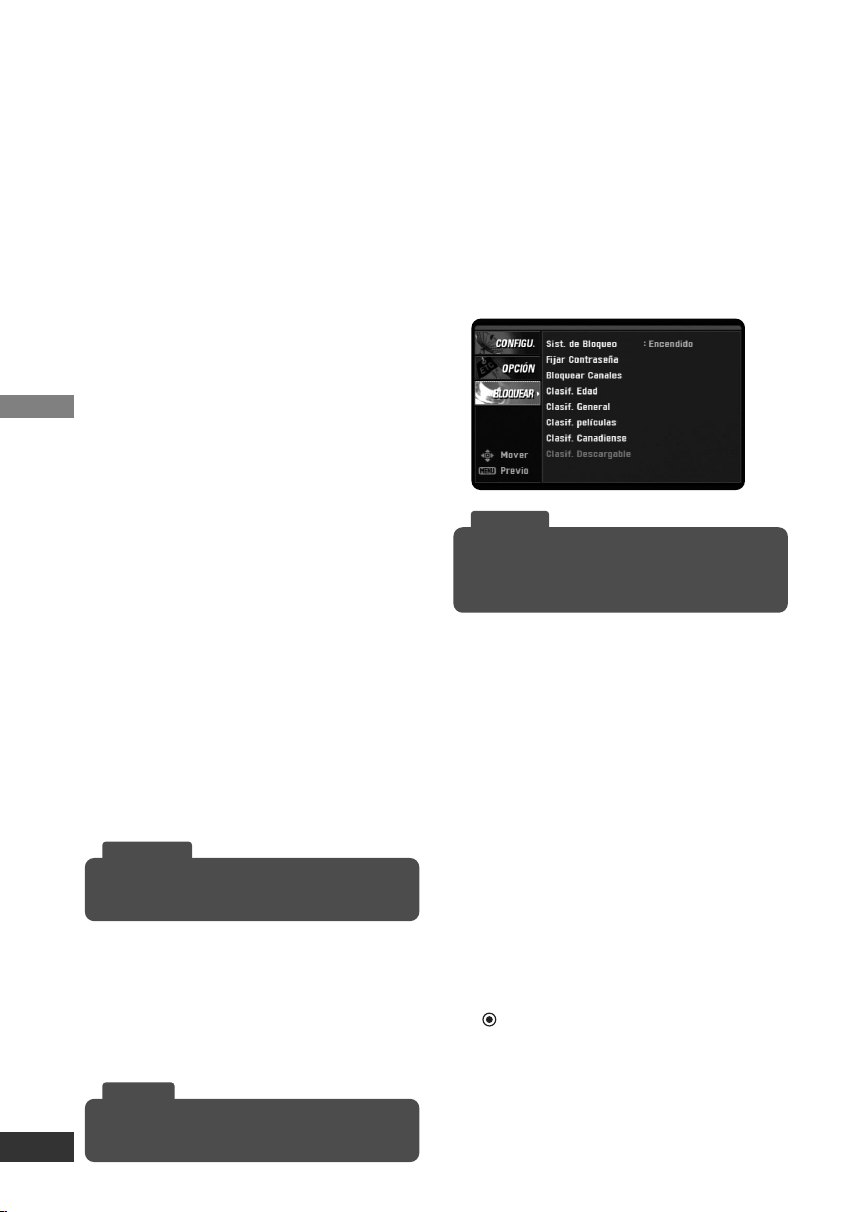
Funciones del menú Bloquear
Sist. de Bloqueo
Le permite ajustar programas y
clasificaciones específicas a través de un
programa de bloqueo. También le
permite activar o desactivar todos los
programas de bloqueo ajustados con
anterioridad. Se necesita una contraseña
para acceder a los menús de bloqueo.
Si el sistema de bloqueo está ajustado
en Apagado, el canal y las clasificaciones
de programa no están disponibles.
Fijar Contraseña
Cambia la contraseña.
1. Seleccione la opción “Fijar
Contraseña” y después pulse
(Seleccionar) o i.
2. Introduzca la nueva contraseña de 4
dígitos.
3. Introduzca de nuevo la contraseña
para confirmar la nueva contraseña.
Mientras ve la televisión, puede cambiar la relación
de aspecto usando el botón CCD del control remoto.
Consejo
Puede seleccionar una hora para el apagado automáti-
co utilizando el botón SLEEP del control remoto.
Consejo
Para acceder al menú de bloqueo, debe introducir
una contraseña de 4 dígitos. (La contraseña por
defecto es “0000”.)
Consejo
LSX300-4PM_CUSALZK_SPA_4948 7/22/08 10:42 AM Page 10

Configuración
11
Bloquear Canales
Bloquea el canal que no desea ver o que
no quiera que vean sus hijos. Si sintoniza
un canal bloqueado, aparecerá una pan-
talla negra con una ventana emergente.
1. Seleccione la opción “Bloquear
Canales” y luego pulse
(Seleccionar) o i.
2. Seleccione un canal y luego pulse
(Seleccionar) para bloquear o
desbloquear el canal.
Aparecerá una marca en el lado
derecho del nombre de la emisora
para indicar el canal bloqueado.
3. Repita el paso 2 para bloquear o
desbloquear más canales en el menú
de la lista de canales.
Clasif. Edad
Previene a los niños de ciertos progra-
mas de TV según el ajuste del límite de
la clasificación. Esta clasificación se apli-
ca sólo a programas infantiles. A menos
que bloquee los programas dirigidos a
una audiencia adulta en el menú de
Clasificación general, sus hijos podrán
ver estos programas.
1. Seleccione la opción “Clasif. Edad” y
luego pulse (Seleccionar) o i.
2. Seleccione la opción “Edad” o
“Violencia Fantástica” y luego
presione (Seleccionar) o i.
Edad: la selección se aplica a pesar
de la clasificación del contenido.
Violencia Fantástica: la selección se
aplica si los programas incluyen
una clasificación del contenido de
Violencia Fantástica.
3. Seleccione una clasificación y luego
pulse (Seleccionar).
TV-Y: Apto para todos los niños.
TV-Y7: Dirigido a niños a partir de los
7 años.
Clasif. General
Bloquea los programas de televisión que
usted o su familia no desean ver basán-
dose en un ajuste de la clasificación.
1. Seleccione la opción “Clasif. General”
y luego pulse (Seleccionar) o i.
2. Seleccione la opción “Edad”,
“Diálogo”, “Lenguaje”, “Sexo”, o
“Violencia” y luego presione
(Seleccionar) o i.
Edad: la selección se aplica a pesar
de la clasificación del contenido.
Diálogo: la selección se aplica si los
programas tienen una clasificación
de diálogos con posible contenido
ofensivo.
Lenguaje: la selección se aplica si los
programas tienen una clasificación
del lenguaje ofensivo.
Sexo: la selección se aplica si los
programas tienen una clasificación
de contenido sexual.
Violencia: la selección se aplica si los
programas tienen una clasificación
de contenido violento.
3. Seleccione una clasificación y luego
pulse (Seleccionar).
TV-G: Apto para todo público.
TV-PG: Menores con supervisión de
adultos.
TV-14: Se advierte a los padres.
TV-MA: Mayores de 18 años.
Clasif películas
Se bloquean películas de acuerdo a las
restricciones de la clasificación. Así los niños
no pueden ver determinadas películas.
Puede ajustar las clasificaciones para blo-
quear todas las películas con clasificaciones
que superen el nivel especificado. Tenga
presente que la clasificación de películas
sólo es aplicable a películas emitidas en TV,
no a programas como telenovelas.
1. Seleccione la opción “Clasificación
películas” y después pulse
(Seleccionar) o i.
2. Seleccione una clasificación y luego
pulse (Seleccionar).
G: Apto para todo público.
Todas las edades permitidas.
PG: Es necesaria una orientación de
los padres.
Algunos contenidos pueden ser
inadecuados para los niños.
PG-13: Se advierte a los padres de
que algunos contenidos pueden ser
inadecuados para los niños
menores de 13 años.
R: No permitido a menores de 17
años, es necesaria la compañía de
un adulto.
NC-17: No se admiten menores de 17.
X: No se admiten menores de 17.
LSX300-4PM_CUSALZK_SPA_4948 7/22/08 10:42 AM Page 11

Configuración
12
Clasificación canadiense
Bloquea los programas de la TV canadi-
ense que usted o su familia no quieran
ver, con el sistema de clasificación para
inglés / francés canadiense.
1. Seleccione la opción “Canadian
Rating” (Clasificación canadiense) y,
a continuación, pulse (Seleccionar)
o i.
2. Selecciona las opciones “English”
(inglés) o “French” (francés) y, a con-
tinuación, pulse (Seleccionar) o i.
English: Se activa cuando los progra-
mas de TV cuentan con el sistema
de clasificación de inglés canadiense.
French: Se activa cuando los
programas de TV cuentan con el
sistema de clasificación de francés
canadiense.
3. Seleccione una clasificación y, a
continuación, pulse (Seleccionar).
Para el sistema de clasificación de
inglés canadiense
C: Programa recomendado para
menores de 8 años.
C8+: Programa para que los niños de
8 años o más lo vean sin compañía
paterna.
G: Audiencia general.
PG: Guía paterna.
14+: El programa contiene temas o
contenido que podría no ser
aceptable para menores de 14
años.
18+: Programa adulta.
Para el sistema de clasificación de
francés canadiense
G: General - programa pensado para
una audiencia de todas las edades.
8 ans+: No recomendado para
menores.
13 ans+: El programa podría no estar
recomendado para menores de 13
años.
16 ans+: El programa no está
recomendado para menores de 16
años.
18 ans+: Programa sólo para adultos.
Clasif. Descargable
La información sobre la clasificación puede
actualizarse si la emisora de TV envía la
información de clasificación descargable.
1. Seleccione la opción “Clasif. Descargable”
y después pulse (Seleccionar) o i.
2. Seleccione un título de clasificación o
clasificación de TV y luego pulse
(Seleccionar) o i.
3. Seleccione una clasificación y luego
pulse (Seleccionar).
• Si la información no se descarga de la emisora
de TV, la opción de Clasificación descargable
no está disponible.
• La información de clasificación se descarga
automáticamente mientras ve canales
digitales. Puede demorarse unos segundos.
• La opción de Clasificación descargable está
disponible después de descargar la informa-
ción de clasificación de la emisora de tele-
visión. No obstante, dependiendo de la infor-
mación de la emisora, puede no estar
disponible para su uso.
• Los niveles de clasificación pueden cambiar
dependiendo de la emisora de difusión.
• El nombre de la opción por defecto y la clasi-
ficación descargable cambia dependiendo de
la información descargada.
• La visualización en pantalla de las opciones
de clasificación descargable aparecerá en el
idioma de la emisora de televisión.
• Los títulos de clasificación (Por ejemplo:
Humor, etc.) y la clasificación de televisión
(Por ejemplo: MH, H, VH, etc.) pueden cam-
biar dependiendo de la emisora de televisión.
Nota
LSX300-4PM_CUSALZK_SPA_4948 7/22/08 10:42 AM Page 12
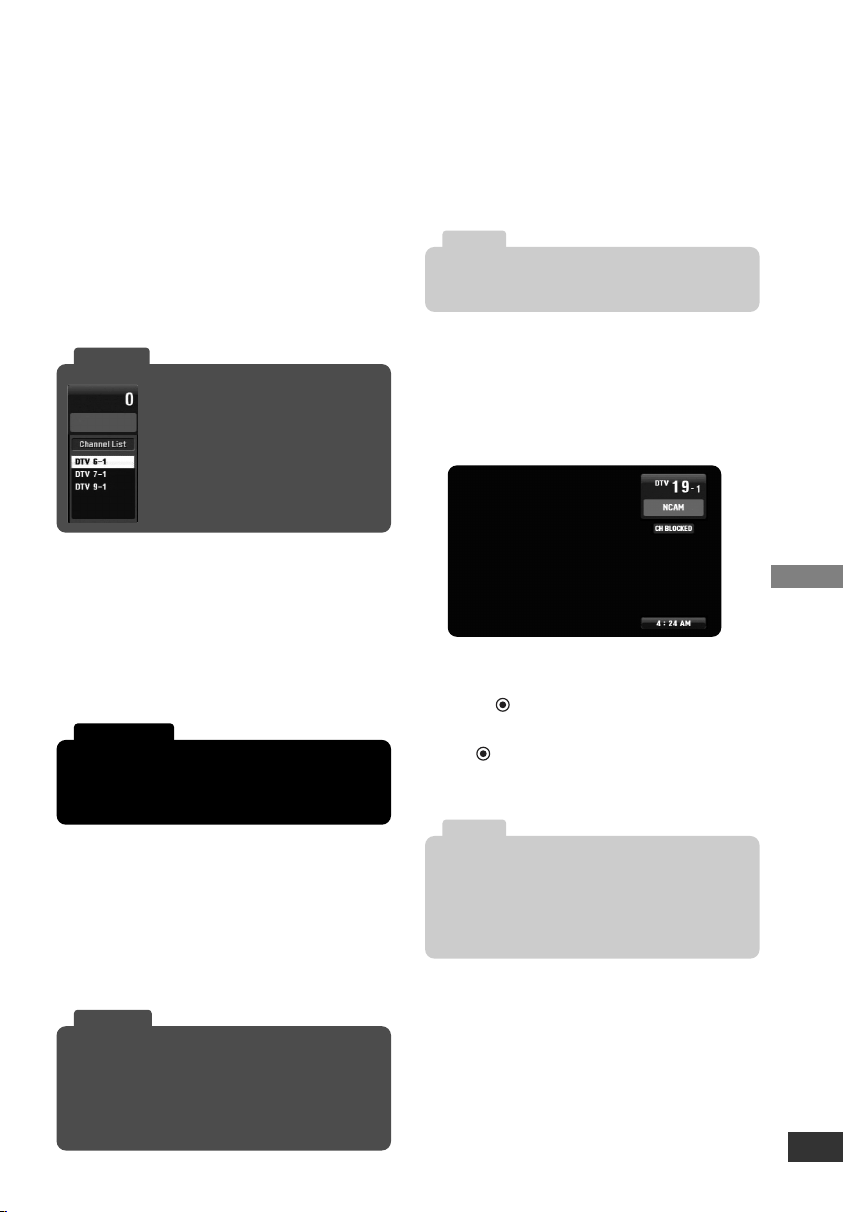
Funcionamiento
13
Selección de canales
Puede seleccionar los canales tal y como se
describe a continuación.
• Puede seleccionar los canales tal y
como se describe a continuación.
• Pulse FAV para desplazarse por sus
canales favoritos.
• Pulse RECALL para volver al canal
visualizado anteriormente.
•
Use el botón CH u/U del control remoto
o u/U del panel frontal para seleccionar
un canal de la memoria.
Ajuste del volumen
Ajusta el nivel del sonido para la salida
de audio de la unidad.
• Utilice el botón VOL +/- para ajustar el
nivel de la salida de audio de la unidad.
• Pulse MUTE para quitar el volumen de
la salida de audio de la unidad.
Señal
Puede observar el indicador de potencia
de la señal que le ayudará a ajustar la
antena en la dirección correcta de
acuerdo a su ubicación, pulsando el
botón de SIGNAL del control remoto.
Un pitido acompaña la señal de potencia.
Apagedo automático
Esta unidad se apagará automáticamente,
en caso de no pulsar ningún botón en un
tiempo predeterminado. Puede ajustar la
hora utilizando el botón SLEEP.
Si selecciona “Apagado”, la función de
apagado automático no se activa.
Pantalla Información de canal
La información de canal muestra el
número de canal, el nombre de la emiso-
ra, la hora actual e información sobre el
bloqueo durante un momento.
La información de canal aparece cada
vez que sintonice un nuevo canal o pulse
el botón (Seleccionar) mientras ve un
programa.
Pulse (Seleccionar) para borrar la
información de canal y no verla en
pantalla.
La eliminación de la función MUTE puede causar
problemas de audición o daños en el parlante, si el
volumen de la televisión está ajustado demasiado alto.
Precaución
Consulte www.antennaweb.org para obtener infor-
mación sobre antenas apropiadas para su ubicación.
Antenna Web.org, le ayudará a determinar la antena
apropiada que debe utilizar para recibir los canales
de televisión que se emiten en la zona.
Consejo
Si pulsa cualquier botón para
seleccionar un canal, la lista de
canales aparecerá y podrá
seleccionar fácilmente un canal de
la lista.
Consejo
El mensaje de confirmación aparecerá 1 minuto
antes del apagado automático.
Nota
• El nombre de la emisora y el reloj aparecen
sólo si son proporcionados por la emisora.
• La información de bloqueo aparece en forma
de: Sin señal, Clasificación bloqueada o Canal
bloqueado.
Nota
LSX300-4PM_CUSALZK_SPA_4948 7/22/08 10:42 AM Page 13
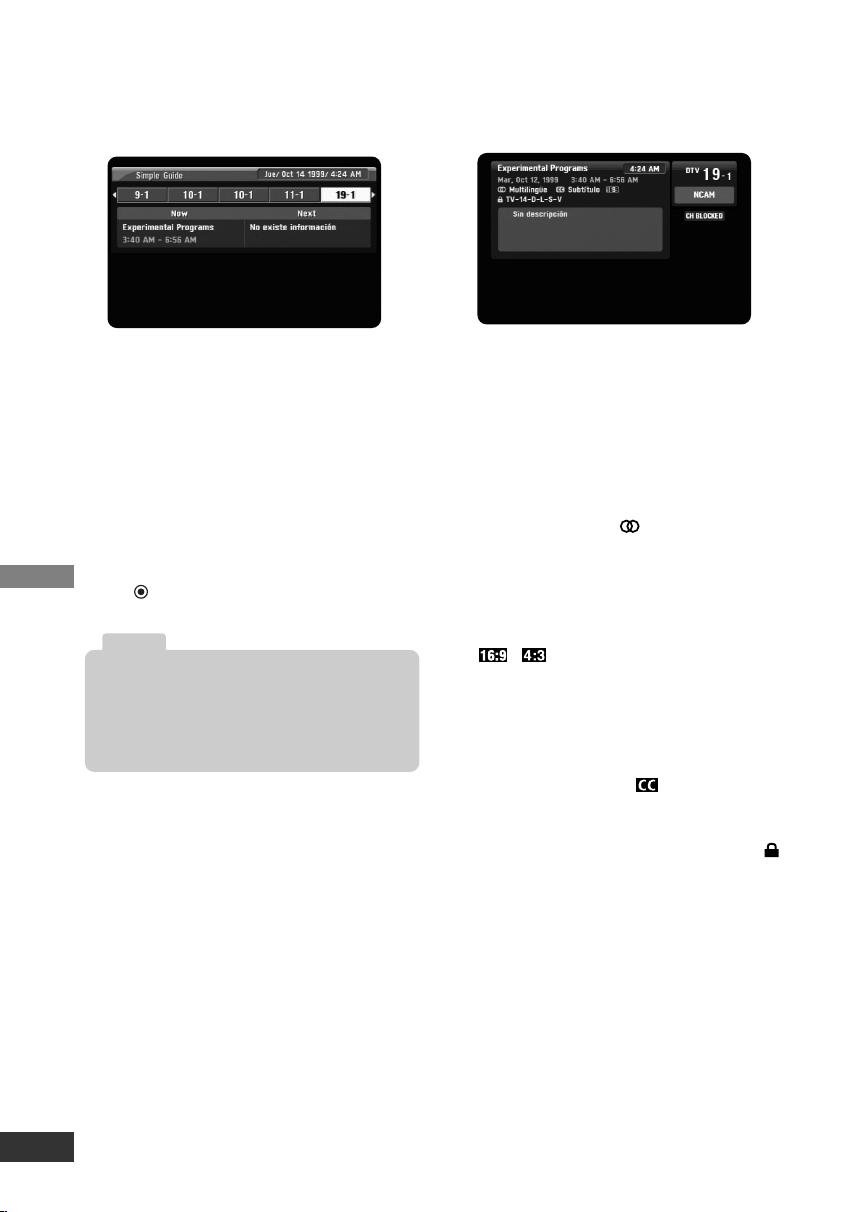
Funcionamiento
14
Simple Guide
Utilice la Guía simple para obtener infor-
mación sobre el programa actual o el
siguiente, de forma rápida y conveniente.
Para entrar o salir de la Guía simple
Pulse el botón GUIDE (guía) en el
mando a distancia.
Para ver la información de otro canal.
Utilice I / i del control remoto para
navegar por la pantalla de la Guía
simple.
Para sintonizar otro canal
Utilice I / i del control remoto y luego
pulse (Seleccionar).
Pantalla de Información de programa
La pantalla de información aparece si
pulsa el botón DISPLAY del control
remoto mientras ve un programa.
La información de Programa muestra las
siguientes entradas.
• Título del programa
• Fecha actual
• Hora de inicio y finalización
• Hora actual
• Número del canal
• Nombre de la emisora
• Icono multilingüe ( )
Indica que varias pistas de audio están
disponibles. Puede seleccionar una
pista alternativa de audio de idioma
con el botón SAP.
• Icono de relación de aspecto
(
,
)
Indica que el programa actual se
transmite en formato amplio o formato
de imagen 4:3. Pulse ZOOM para ver
“Letterbox” o reducir la imagen según
desee.
• Icono de subtítulos ( )
Indica que el programa actual contiene
servicio de información de subtítulos.
• Icono de Clasificación de contenido ( )
Indica que el programa actual contiene
información sobre el contenido y
muestra los valores de clasificación del
programa.
• Información sobre el programa
La emisora puede proporcionar una
descripción del programa.
La información de canal en el menú de la Guía
simple sólo aparece si es proporcionada por la
emisora y la información para cada canal sólo se
puede recibir si la unidad tiene sintonizado el
canal
Nota
LSX300-4PM_CUSALZK_SPA_4948 7/22/08 10:42 AM Page 14
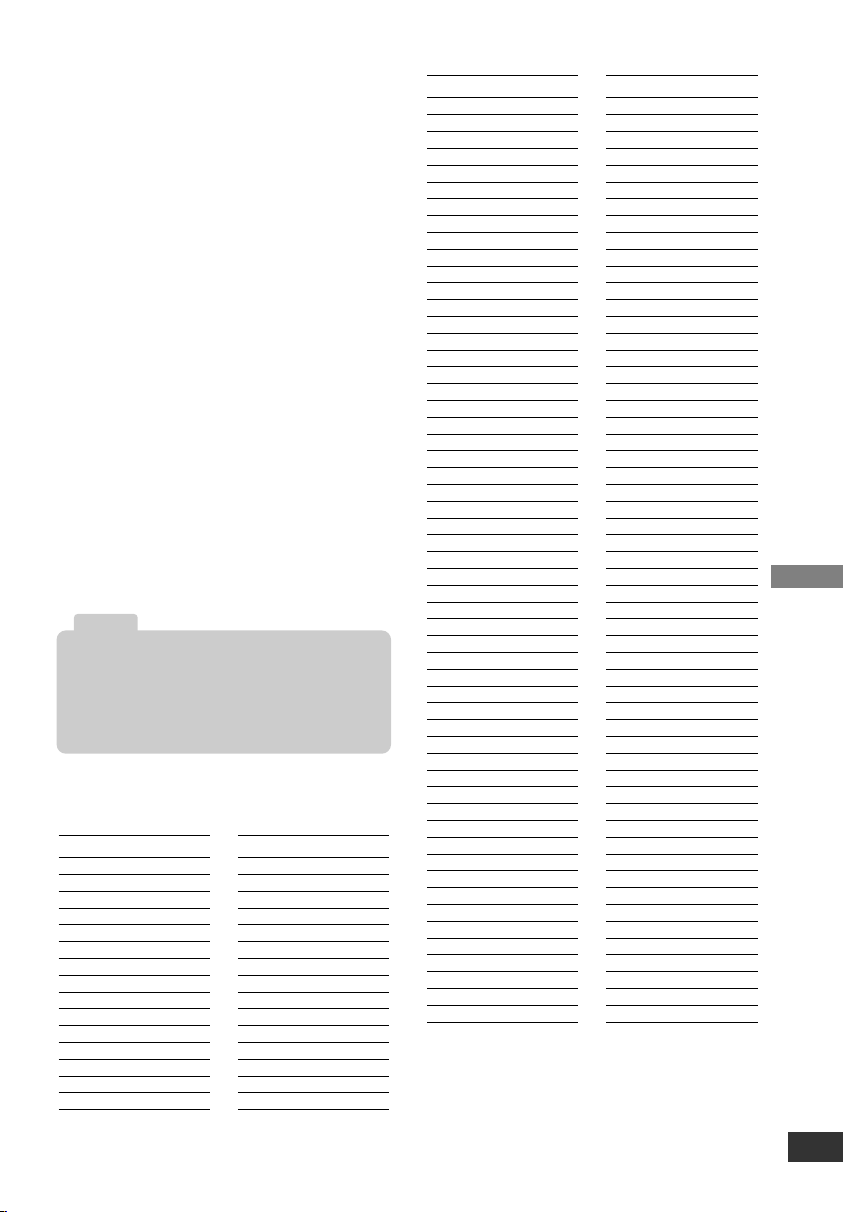
Referencia
15
Control de su TV con el control
remoto universal (multimarca)
suministrado
Puede controlar el interruptor de
encendido de su TV con el control
remoto universal (multimarca)
suministrado. Si su TV aparece en la lista
de la tabla, introduzca el código de
fabricante adecuado.
Configuración del control remoto para
controlar su TV
1. Mientras mantiene pulsado el botón
TV POWER, pulse los botones CHU
o CHu varias veces hasta que su TV
se encienda o se apague.
• Cada vez que pulse los botones
CHU o CHu envía a su TV un códi-
go del fabricante (1 - 45), uno luego
de otro.
2. Suelte el interruptor TV POWER de
su TV cuando su televisión esté
encendida o apagada.
Marcas de TV controlables
• Dependiendo de su televisor, puede que el
botón TV POWER no funcione.
• Cuando cambie las pilas del control remoto, el
control remoto se podría volver a configurar
por defecto. Configúrelo otra vez.
Nota
Fabricante
Abex
Admiral
Advent
Aiko
Akai
America Action
Anam
Anam National
AOC
Apex Digital
Audiovox
Baysonic
Bell&Howell
Bradford
Broksonic
Fabricante
Candle
Carnivale
Carver
Celebrity
Celera
Changhong
Citizen
Clarion
Contec
Craig
Crosley
Crown
Curtis Mathes
CXC
Daewoo
Fabricante
Durabrand
Electroband
Elektra
Emerson
Envision
Fisher
Funai
Futuretech
GE
Gibralter
GoldStar
Grunpy
Haier
Hallmark
Harley Davidson
Harman/Kardon
Harvard
Havermy
Hello Kitty
Himitsy
Hisense
Hitachi
Infinity
Insignia
JBL
JCB
Jensen
JVC
KEC
Kenwood
KLH
KTV
LG
Lloyd’s
LXI
Magnasonic
Magnavox
Magnin
Marantz
Masushita
Megatron
Memorex
MGA
Midland
Mitsubishi
Motorola
MTC
Multitech
NAD
NEC
Nikko
Norcent
NTC
Onwa
Optimus
Fabricante
Orion
Panasonic
Penney
Philco
Philips
Pilot
Poptonica
Portland
Prima
Prism
Proscan
Proton
Quasar
RadioShack
RCA
Realistic
Runco
Sampo
Samsung
Samsux
Sansui
Sanyo
Scotch
Scott
Sears
Sharp
Sheng Chia
Simpson
Sony
Soundesign
Squareview
SSS
Starlite
Supreme
SVA
Sylvania
Symphonic
Tandy
Tatung
Technics
Techwood
Teknika
Thomas
TMK
Toshiba
Totevision
TVS
Vector Research
Victor
Vidikron
Vidtech
Wards
White Westinghouse
Yamaha
Zenith
LSX300-4PM_CUSALZK_SPA_4948 7/22/08 10:42 AM Page 15

Referencia
16
Solución de problemas
No hay alimentación.
• Conecte firmemente el cable de
alimentación al tomacorriente.
Imagen fragmentada y sonido distorsionado.
• Verifique la entrada de la antena, ubicación
y potencia de la señal.
Ausencia de imagen.
• Seleccione las funciones de sintonización
automática o de búsqueda manual en caso
de que todavía no lo haya hecho.
• Asegúrese de que todos los cables están
bien conectados y que ha seleccionado la
fuente apropiada en su TV. Por ejemplo,
CH 3, CH 4, Video 1 o Video 2.
• La potencia de señal de la antena puede
ser baja. Verifique la señal de potencia y
ajuste la ubicación de la antena y la
dirección.
• Para más información sobre las conexiones,
consulte la página 6.
Imagen normal pero sin sonido.
• Compruebe los niveles de sonido.
• Asegúrese de que el TV no está silenciado.
• Compruebe que la unidad está
correctamente conectada.
La imagen está distorsionada.
• Asegúrese de que está seleccionada la
relación de aspecto correcta.
• Asegúrese de que la entrada de video está
conectada directamente al TV.
Faltan canales disponibles.
• Puede encontrar todos los canales
disponibles haciendo funcionar
“Sintonización auto.” o “Ez Suma Fácil” del
menú CONFIGURACIÓN.
Olvidó su contraseña.
• Introduzca la contraseña maestra “7777”.
El control remoto no funciona correctamente.
• Apunte el mando a distancia al sensor
remoto de la unidad.
• Haga funcionar el mando a distancia dentro
de un margen de 7m.
• Quite cualquier obstáculo bloqueando la
señal.
• Cambie las pilas por otras nuevas.
Especificaciones
General
• Sistema de TV: DTV estándar ATSC
• Cobertura de canal: 2-69 terrestre
• Dimensiones aprox. (An. x Al. x Prf.):
215 x 46 x 162 mm
• Peso neto (aprox.): 0,75 kg
• Temperatura de funcionamiento:
de 5 °C a 40 °C.
• Humedad de funcionamiento:
de 5 % a 90 %
• Requisitos de alimentación:
CA 120V ~ 60 Hz.
• Consumo de energía: 3,9 W
Entrada/Salida
• From Antenna (de la Antena):
Entrada de antena, ATSC, 75 Ω
• To TV (RF) (a la TV.):
Salida de antena, 75 Ω,
Canal de salida RF 3 o 4
(Intercambiable)
• SALIDA DE VIDEO:
1,0 V (p-p), 75 Ω,
sincronización negativa, 1 toma RCA
• SALIDA DE AUDIO:
2,0 Vrms (1 KHz, 0 dB), 600 Ω,
1 toma RCA (L, R) (Iqda., Dcha.)
Accesorios
• Cable RF (1)
• Cable de video (1)
• Cable de audio (L/R) (1)
• Control remoto (1)
• Pilas (tamaño AAA) (1)
• Manual de usuario (1)
El diseño y las especificaciones están sujetos a
cambio sin previo aviso.
Nota
LSX300-4PM_CUSALZK_SPA_4948 7/22/08 10:42 AM Page 16

Referencia
17
CARACTERÍSTICA DE PASO ANALÓGICO
Las leyes federales exigen que todos los canales de televisión de “potencia total”
deberán finalizar sus emisiones analógicas antes del 17 de febrero de 2009,
pero esta disposición no incluye canales de “baja potencia” (como canales de
“baja potencia” o “comunitarios” o de alcance muy restringido (LPTV), canales de
“Clase A” y canales “traductores” o “estaciones multiplicadoras”).
Estos canales podrán continuar su emisión analógica tras el 17 de febrero de
2009, la fecha límite de conversión para los canales de televisión de potencia
total.
Este conversor dispone de una función denominada “Paso analógico”, que
permitirá a su TV analógica continuar sintonizando las emisoras analógicas
de baja potencia. En pocas palabras: desconecte el dispositivo para recibir
canales analógicos; la señal analógica “pasará” por la unidad y será
sintonizada en la TV. Para disfrutar de canales digitales, sintonícelos a través
del conversor, como se explica en esta guía operativa.
NOTA: los recursos online con información relativa a canales de TV de baja
potencia incluyen: www.dtvtransition.org/lowpower,
https://www.dtv2009.gov/lowpower/ y www.dtv.gov. Para consultar un mapa y
lista de canales de baja potencia por estados, visite
www.ntia.doc.gov/dtvcoupon/LPTVmap.html
LSX300-4PM_CUSALZK_SPA_4948 7/22/08 10:42 AM Page 17

Este producto pertenece a Zenith Electronics, quien reparará o reemplazará, a elección de Zenith, si se comprue-
ba que el montaje o los materiales son defectuosos en un uso normal, durante el periodo de garantía (“Periodo de
garantía”) que figura abajo, efectivo desde la fecha de compra (“Fecha de compra”) del producto por el cliente
original. Esta garantía es válida únicamente para el comprador original del producto y efectiva únicamente cuando
se utilice en los Estados Unidos, excluyendo sus territorios.
ESTA GARANTÍA SUSTITUYE A CUALQUIER OTRA GARANTÍA, EXPRESA O IMPLÍCITA, INCLUYENDO SIN
LIMITACIÓN, CUALQUIER GARANTÍA DE COMERCIALIZACIÓN O CAPACIDAD PARA UNA FINALIDAD
ESPECÍFICA. POR EXTENSIÓN, CUALQUIER GARANTÍA IMPLÍCITA LEGALMENTE REQUERIDA ESTÁ
LIMITADA EN SU DURACIÓN AL PERIODO DE GARANTÍA EXPRESA ANTERIOR. ZENITH ELECTRONICS
NO SERÁ RESPONSABLE DE NINGÚN DAÑO INCIDENTAL, RESULTANTE, INDIRECTO, ESPECIAL O
PUNITIVO DE CUALQUIER NATURALEZA, INCLUSO SI LA POBILIDAD DE TALES DAÑOS INCLUYERA
PÉRDIDAS DE INGRESOS O BENEFICIOS SIN LIMITACIÓN, INFORMACIÓN PERDIDA O CORROMPIDA O
CUALQUIER OTRO DAÑO, YA SEA MEDIANTE CONTRATO, AGRAVIO O DE OTRO MODO. Algunos estados
no permiten la exclusión o limitación de daños incidentales o resultantes o limitaciones sobre el tiempo de
actuación de una garantía implícita, de modo que la anterior exclusión o limitación no se le aplicaría. Esta garan-
tía le ofrece derechos legales específicos y también puede tener otros derechos que variarán de estado a estado.
ESTA GARANTÍA LIMITADA NO SE APLICA A:
• Daños o problemas de funcionamiento producidos por el transporte, instalación, ajustes de los controles
de usuario, calibración, mantenimiento o fallos de mantenimiento, sistemas de componentes separados y
• Daños o problemas de funcionamiento producidos por un mal uso, abuso, funcionamiento fuera
de las especificaciones del entorno o contrario a los requisitos o precauciones del manual de
instrucciones, accidente, cortes de luz u otras causas naturales, modificaciones o alteraciones
no autorizadas, corriente o voltaje no adecuado, recepción o entrada de señal, uso de software
no autorizado directamente por Zenith, errores de software que no impiden el funcionamiento,
los protocolos de software que han sido adquiridos después de la fecha de manufacturación o
fuera de EE.UU., uso comercial o institucional, uso distinto para el que está diseñado.
El coste de la reparación o recambio bajo estas circunstancias excluidas deberá ser abonado por el consumidor.
NÚMEROS DEL CENTRO INTERACTIVO PARA EL CLIENTE:
PERIODO DE GARANTÍA:
MANO DE OBRA: 90 días desde la fecha de la
compra.
PIEZAS: Un año desde la fecha de compra.
* Las piezas de repuesto estarán en garantía
durante el tiempo restante del periodo de garantía
original.
SOLICITUD DE SER
VICIO TÉCNICO:
Llame al 1-877-9-ZENITH para informarse sobre la
reparación o sustitución de piezas defectuosas.
Conserve la factura con la fecha de compra y la
caja para devolver la unidad a Zenith para su
reparación o sustitución.
Zenith se encargará del transporte en ambos casos,
durante los primeros 90 días del periodo de garantía.
Durante el periodo de garantía restante (91 - 365
días), usted realiza el pago de los gastos de envío y
Zenith pagará los gastos de vuelta.
Visite nuestro sitio web en: http://www.zenithservice.com
Para obtener ayuda del Servicio de garantía,
Centro de asistencia, o Atención al cliente
Llame al 1-877-9-ZENITH (24 horas al día, 365 días
al año) y seleccione la opción apropiada del menú.
O visite nuestro sitio web en:
http://www.zenithservice.com
Zenith Electronics LLC
Garantía limitada - EE.UU.
LG ELECTRONICS EE.UU., INC.
1000 SYLVAN AVENUE
ENGLEWOOD CLIFFS, NJ
P/N: MFL38574948
Imprimido en China
Edición O
LSX300-4PM_CUSALZK_SPA_4948 7/22/08 10:42 AM Page 18