User Guide
© 2011 Sprint. Sprint and the logo are trademarks of Sprint. Other marks are trademarks of their
respective owners.

Important Messages b
Important Messages
IMPORTANT: If the account type you want to set up is not in the device database, you will be
asked to enter more details. You should get all pertinent information for the email
account such as incoming and outgoing server settings before you proceed.
WARNING: Use only Sprint-approved or manufacturer-approved batteries and chargers with
your device. The failure to use a Sprint-approved or manufacturer-approved
battery and charger may increase the risk that your device will overheat, catch
fire or explode, resulting in serious bodily injury, death or property damage.
Manufactured under license from Dolby Laboratories.
Dolby and the double-D symbol are trademarks of Dolby Laboratories.

TOC i
Table of Contents
Table of Contents ......................................................................................................................... i
Get Started ................................................................................................................................ 1
Your Device at a Glance ......................................................................................................... 1
Setting Up Your Device .......................................................................................................... 1
Activating Your Device ........................................................................................................... 2
Complete the Setup Application.............................................................................................. 3
Make Your First Call ........................................................................................................... 3
Setting Up Your Voicemail .................................................................................................. 4
Sprint Account Passwords ...................................................................................................... 4
Getting Help ........................................................................................................................... 5
Managing Your Account ...................................................................................................... 5
Sprint 411 ........................................................................................................................... 5
Sprint Operator Services ..................................................................................................... 6
Device Basics ............................................................................................................................ 7
Your Device Overview ............................................................................................................ 8
Front View ........................................................................................................................... 8
Rear View ..........................................................................................................................10
Viewing the Display Screen ...................................................................................................11
Turning Your Device On and Off............................................................................................14
Turning Your Device On .....................................................................................................14
Turning Your Device Off .....................................................................................................14
Battery and Charger ..............................................................................................................15
Extending Your Battery Life ...............................................................................................17
Device Function Keys ............................................................................................................18
Menu Key...........................................................................................................................18
Working with Menus ...........................................................................................................19
Using the Notifications Panel .............................................................................................21
Home Key ..........................................................................................................................22
Back Key............................................................................................................................22
Search Key ........................................................................................................................22

TOC ii
Touchscreen Navigation ........................................................................................................25
Your Home Screen ................................................................................................................26
Home Screen .....................................................................................................................26
Extended Home Screens ...................................................................................................27
Using the Application Key ..................................................................................................28
Applications: How to View, Open and Switch .....................................................................28
Applications .......................................................................................................................30
Customizing Your Home Screen ........................................................................................32
Accessing Recently-Used Applications ..............................................................................35
Changing the Screen Orientation .......................................................................................35
Displaying Your Phone Number.............................................................................................36
Entering Text With the On-screen Keyboard .........................................................................37
Tips for Editing Text ...........................................................................................................41
Creating a Google Account ....................................................................................................42
Your Google Account .........................................................................................................42
Signing into Your Google Account .....................................................................................42
Phone .......................................................................................................................................44
Making Calls ..........................................................................................................................44
Dialing Options ..................................................................................................................45
Missed Call Notification ......................................................................................................45
Calling Emergency Numbers ..............................................................................................45
TTY Use With Sprint Service..............................................................................................46
In-Call Options ...................................................................................................................47
Dialing and Saving Phone Numbers With Pauses ..............................................................48
Dialing From the Contacts List ...........................................................................................48
Using Direct Dialing ...........................................................................................................49
Plus (+) Code Dialing .........................................................................................................49
Answering Calls .....................................................................................................................49
Ending a Call .....................................................................................................................50
Phone Call Options................................................................................................................50
Caller ID .............................................................................................................................50
Call Waiting ........................................................................................................................51
Making a 3-Way Call ..........................................................................................................51

TOC iii
Call Forwarding ..................................................................................................................52
Call Log .................................................................................................................................52
Viewing the Call Log ..........................................................................................................52
Call Log Options ................................................................................................................53
Making a Call From the Call Log ........................................................................................54
Saving a Number From the Call Log ..................................................................................54
Prepending a Number From the Call Log ...........................................................................54
Clearing the Call Log .........................................................................................................54
Saving a Phone Number .......................................................................................................55
Finding a Phone Number .......................................................................................................55
Voice Dialer ...........................................................................................................................55
Activating Voice Dialer .......................................................................................................56
Making a Voice Call With Voice Dialer ...............................................................................56
Calling a Phone Number with Voice Dialer .........................................................................56
Opening Menus With Voice Dialer .........................................................................................57
Text-to-Speech ......................................................................................................................57
Text-to-Speech Settings .....................................................................................................57
Voice Search .........................................................................................................................58
Device Settings .........................................................................................................................59
Wireless & networks settings .................................................................................................59
Airplane mode ....................................................................................................................59
Wi-Fi settings .....................................................................................................................60
Bluetooth settings ..............................................................................................................60
Tethering & portable hotspot settings .................................................................................60
VPN settings ......................................................................................................................60
Mobile networks settings ....................................................................................................60
Call settings ...........................................................................................................................61
North American Dialing ......................................................................................................61
International Dialing ...........................................................................................................61
TTY mode ..........................................................................................................................61
Roaming Settings ..................................................................................................................61
Setting Roam Mode ...........................................................................................................62
Call Guard ..........................................................................................................................63

TOC iv
Data Roam Guard ..............................................................................................................63
Sound Settings ......................................................................................................................64
Ringer Types .....................................................................................................................64
Adjusting the Device's Volume Settings .............................................................................64
Vibrate and Silent Mode .....................................................................................................65
Selecting a Notification Ringtone .......................................................................................66
Setting Various Feedback Tones .......................................................................................66
Display Settings .....................................................................................................................67
Changing the Backlight Time Length ..................................................................................67
Changing the Contrast .......................................................................................................67
Display Language ..............................................................................................................67
Setting the Device Automatically to Rotate the Screen.......................................................67
Date & Time Display Settings.............................................................................................68
Animation Display Options .................................................................................................68
Location & Security Settings ..................................................................................................68
Using Wireless Networks ...................................................................................................69
Using GPS Satellites ..........................................................................................................69
Your Device's Lock Feature ...............................................................................................69
Your Device's Unlock Pattern, Pin, or Password Feature ...................................................71
Silence Your Device from the Lock Screen ........................................................................72
Credential Storage Settings ...............................................................................................72
Accounts Settings ..................................................................................................................74
Accounts ...............................................................................................................................74
Removing an Account ...........................................................................................................75
Configuring Account Sync and Display Options .....................................................................75
Contacts....................................................................................................................................78
Creating a New Contacts Entry..............................................................................................79
Adding a Contact to Your Favorites .......................................................................................79
Editing a Contacts Entry ........................................................................................................80
Adding a Number to a Contact‘s Entry ...................................................................................81
Editing a Contact‘s Entry Number ..........................................................................................82
Assigning Direct Dialing Numbers .........................................................................................82
Selecting a Ringtone for an Entry ..........................................................................................82

TOC v
Assigning a Picture to an Entry ..............................................................................................83
Finding Contacts' Entries .......................................................................................................83
Selecting which Contacts are Displayed ................................................................................83
Communicating with Your Contacts .......................................................................................84
Importing, Exporting, and Sharing Contacts ..........................................................................85
Importing contacts from your microSD card .......................................................................85
Exporting contacts to your microSD card ...........................................................................86
Sharing a contact ...............................................................................................................86
Accounts and Messaging ..........................................................................................................87
Email .....................................................................................................................................87
Corporate Email (Outlook) .................................................................................................88
Configuring Corporate Email Settings ................................................................................90
Composing Text Messages ................................................................................................92
Accessing Text Messages .................................................................................................93
Multimedia Messaging (MMS) ............................................................................................94
Composing MMS Messages ..............................................................................................94
Deleting a Message or Message Thread ............................................................................96
Adjusting Message Settings ...............................................................................................96
Text Messaging and MMS .....................................................................................................97
Gmail .....................................................................................................................................98
Synchronizing Accounts ...................................................................................................... 110
Synchronizing Your Google Account ................................................................................ 110
Synchronizing Your Corporate Account ........................................................................... 111
Privacy: Factory Data Reset............................................................................................. 113
Applications and Entertainment ............................................................................................... 114
Android Market™ ................................................................................................................ 114
Sprint ID .............................................................................................................................. 116
Applications ......................................................................................................................... 117
Sprint Zone ...................................................................................................................... 118
NASCAR Sprint Cup Mobile ............................................................................................. 118
Sprint Football Live .......................................................................................................... 119
Getting Started with Sprint TV and Music ............................................................................ 120
Sprint TV & Movies .............................................................................................................. 121

TOC vi
Watching TV .................................................................................................................... 121
Music ................................................................................................................................... 122
Backing Up Your Downloaded Music Files ....................................................................... 123
Sprint Music Plus ............................................................................................................. 123
Accessing Sprint Music Plus ............................................................................................ 123
Purchasing and Downloading Music from Sprint Music Plus ............................................ 123
YouTube™ .......................................................................................................................... 124
GPS Navigation ................................................................................................................... 125
GPS Services ...................................................................................................................... 125
Activating Location Mode ................................................................................................. 125
Activating Using Wireless Networks ................................................................................. 125
Google Maps™ ................................................................................................................... 126
TeleNav™ GPS Navigator ................................................................................................... 128
Getting Started with TeleNav GPS Navigator ................................................................... 128
Registering TeleNav GPS Navigator ................................................................................ 128
Using TeleNav GPS Navigator ......................................................................................... 129
Getting Driving Directions .................................................................................................... 129
Using a Physical Address ................................................................................................ 129
Using a Local Business Category .................................................................................... 131
Sharing a Recent Location with Others ............................................................................ 131
Configuring Your Navigation Preferences ........................................................................ 131
Navigation ........................................................................................................................... 133
Web and Data ......................................................................................................................... 134
Connecting to Wi-Fi Networks ............................................................................................. 134
Wi-Fi Protected Setup ...................................................................................................... 136
Data Services ...................................................................................................................... 136
Your User Name .............................................................................................................. 136
Launching a Web Connection .......................................................................................... 137
Data Connection Status and Indicators ............................................................................ 137
Virtual Private Networks (VPN) ............................................................................................ 138
Preparing Your Device for VPN Connection ..................................................................... 138
Setting Up Secure Credential Storage ............................................................................. 138
Adding a VPN Connection ............................................................................................... 138

TOC vii
Connecting to a VPN ....................................................................................................... 139
Disconnect From a VPN ................................................................................................... 139
Browser ............................................................................................................................... 139
Learn to Navigate the Browser ......................................................................................... 139
Browser Menu .................................................................................................................. 141
Tethering and Portable Hotspot ........................................................................................... 146
SmartShare ......................................................................................................................... 147
SmartShare Status and Indicators ................................................................................... 147
To turn SmartShare on and allow sharing contents .......................................................... 147
To share contents from remote content library to other devices ....................................... 148
To share contents from your device to your renderer device (e.g. TV) ............................. 148
Camera and Video .................................................................................................................. 149
Taking Pictures .................................................................................................................... 149
Camera Settings .............................................................................................................. 150
Viewing Your Pictures ...................................................................................................... 151
Gallery Options ................................................................................................................ 151
Assigning Pictures ........................................................................................................... 152
Recording Videos ................................................................................................................ 152
Video Settings .................................................................................................................. 153
Video Gallery Options ...................................................................................................... 153
Tools and Calendar ................................................................................................................. 155
Calendar .............................................................................................................................. 155
Viewing Your Calendar and Events .................................................................................. 155
Viewing Event Details ...................................................................................................... 158
Creating an Event ............................................................................................................ 159
Editing or Deleting an Event ............................................................................................. 159
Setting an Event Reminder .............................................................................................. 160
Responding to an Event Reminder................................................................................... 160
Displaying and Synchronizing Calendars ......................................................................... 161
Changing Calendar Settings ............................................................................................ 161
Folders ................................................................................................................................ 162
Clock ................................................................................................................................... 163
Alarms ................................................................................................................................. 164

TOC viii
Calculator ............................................................................................................................ 166
Updating Your Android Operating System ........................................................................... 166
Updating Your Profile .......................................................................................................... 167
Updating Your PRL.............................................................................................................. 167
Bluetooth ............................................................................................................................. 167
Turning Bluetooth On and Off .......................................................................................... 167
The Bluetooth Settings Menu ........................................................................................... 168
Pairing Bluetooth Devices ................................................................................................ 169
Sending Items via Bluetooth............................................................................................. 170
Disconnecting Bluetooth Connection During an Active Call .............................................. 171
microSD Card ...................................................................................................................... 171
Removing the microSD Card............................................................................................ 171
Inserting the microSD Card .............................................................................................. 172
microSD Icon Indicators ................................................................................................... 172
microSD Adapter .............................................................................................................. 172
Viewing Memory in the microSD Card .............................................................................. 173
Formatting the microSD Card ........................................................................................... 173
Connecting Your Device to Your Computer ...................................................................... 173
Important Connection Information .................................................................................... 175
Index ....................................................................................................................................... 176
Get Started 1
Get Started
This section gives you all the information you need to set up your device and Sprint service for
the first time.
Your Device at a Glance
Setting Up Your Device
Activate Your Device
Complete the Setup Application
Set Up Voicemail
Sprint Account Information and Help
Your Device at a Glance
Setting Up Your Device
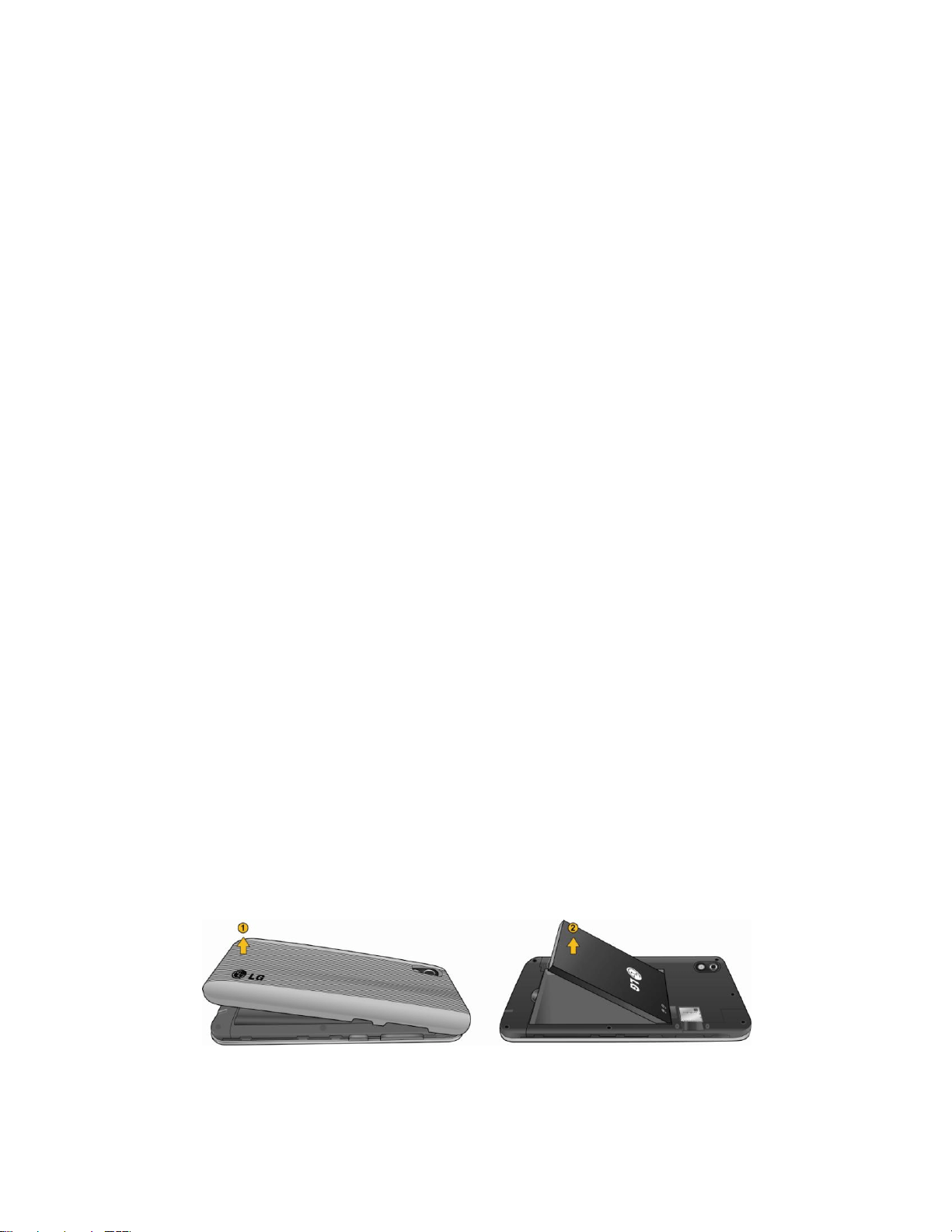
You must first install and charge the battery to begin setting up your device.
1. Install the battery.
Remove the battery from its packaging.
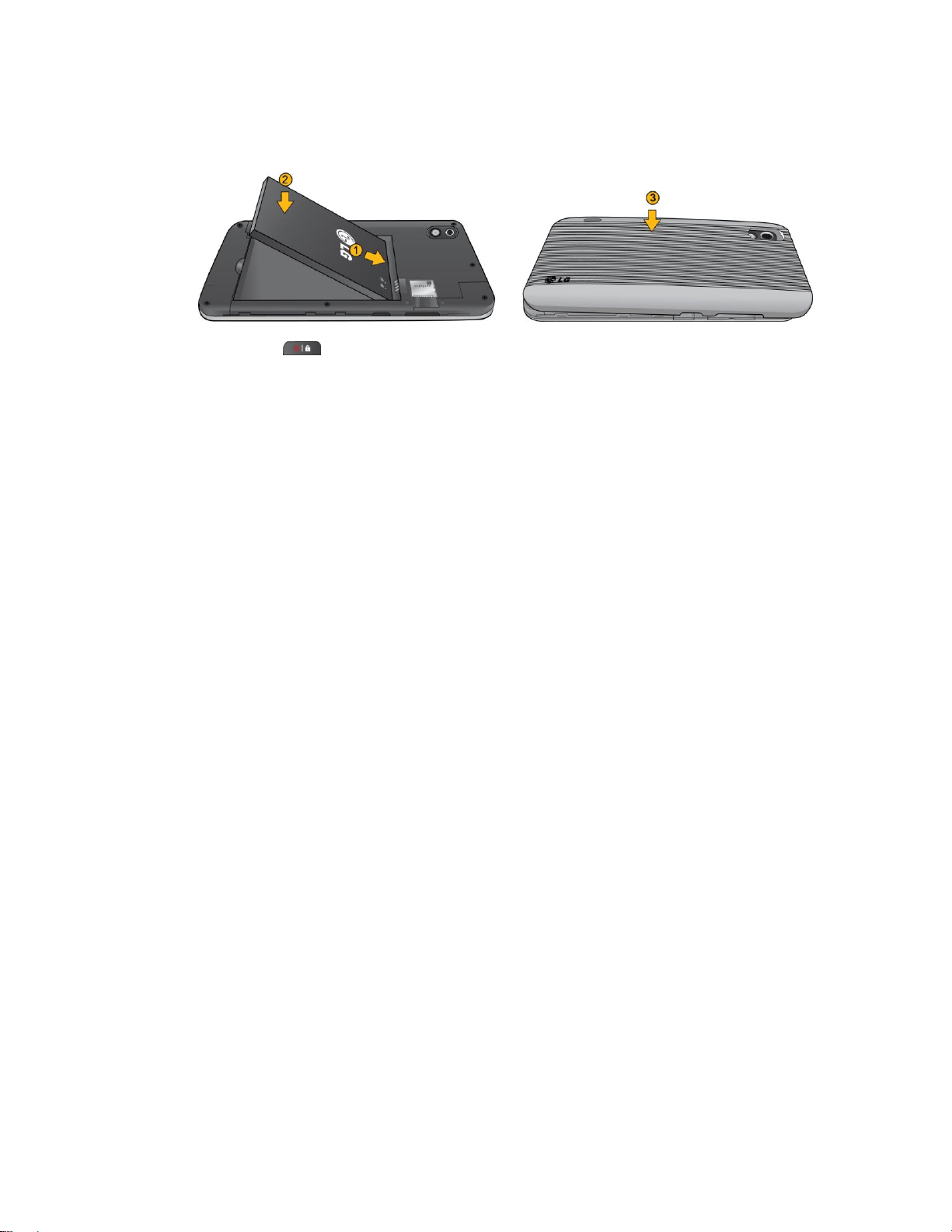
Insert the battery into the opening in the back of the device, making sure the
connectors align (see step 1 in the following illustration). Gently press down to
secure the battery (see step 2 in the following illustration).
Get Started 2
Position the back cover over the battery compartment and press down until you hear
a click (see step 3 in the following illustration).
2. Press and hold located on the top right to turn the device on.
Activating Your Device
Depending on your account or how and where you purchased your device, it may be ready to
use or you may need to activate it on your Sprint account.
● If you purchased your device at a Sprint Store, it is probably activated and ready to
use.
● If you received your device in the mail and it is for a new Sprint account or a new
line of service, it is designed to activate automatically. To confirm your activation, make
a phone call.
● If you received your device in the mail and you are activating a new phone for an
existing number on your account, (you're swapping phones), you can activate on your
computer online or directly on your phone.
Activate on your computer:
Go to sprint.com/activate and follow the instructions.
Activate on your phone:
Note: For security reasons, you will need your Sprint phone number and PIN to use this
activation method.
1. Turn on your new phone. (Make sure the old one is turned off.) Your device will
automatically attempt Hands-Free Activation.
2. Tap Activate to override auto-activation and start the manual activation wizard.
Note: If you don't override Hands-Free Activation, your device will attempt to auto activate five
times. Wait for Retry to appear on your screen. Tap Retry and then tap Activate.
3. Follow the on-screen prompts to complete the activation process.
4. After you have completed the wizard, make a phone call to confirm your activation.

Get Started 3
If your phone is still not activated or you do not have access to the Internet, contact Sprint
Customer Service at 1-888-211-4727 for assistance.
Tip: Do not press while the phone is being activated. Pressing cancels the
activation process.
Note: If you are having difficulty with activation, contact Sprint Customer Service by dialing
1-888-211-4727 from any other phone.
Complete the Setup Application
Once your device has been turned on and activated, you will see a Welcome message. You can
then complete the setup application.
1. Touch the Android icon to get started. To skip any section, tap Next or Skip.
2. Set up your Google account. Tap Create or Sign in.
3. Follow the instructions to complete the steps to create or sign in to your Google account.
4. Select the Location Consent options.
Checkmark to select your Google location options and tap Next.
5. The device will set up your services and you will be directed to the Home screen after
completion.
Note: You do not need to sign up for a Google account to use your device. However, to
download applications from the Android Market, you must link your device to a Google
account.
Make Your First Call
1. Tap > . (Tap the Phone tab, if the screen is not already on the dial screen.)
2. Use the dialpad to enter a phone number.
If you enter a wrong number, tap to erase digits one by one.
To erase the entire number, touch and hold .
3. Tap to dial the number.
Note: Your device's battery should have enough charge for your device to turn on and find a
signal, set up your voicemail, and make a call. You should fully charge your battery as
soon as possible. See Charging the Battery for details.

Get Started 4
Setting Up Your Voicemail
Your phone automatically transfers all unanswered calls to your voicemail, even if your phone is
in use or turned off. You should set up your Sprint voicemail and personal greeting as soon as
your phone is activated. Always use a password to protect against unauthorized access.
1. Tap > . (Tap the Phone tab, if the screen is not already on the dial screen.)
2. Touch and hold or tap .
3. Follow the system prompts to:
Create your password.
Record your name announcement.
Record your greeting.
Note: Sprint strongly recommends that you create a password when setting up your voicemail
to protect against unauthorized access. Without a password, anyone who has access to
your phone is able to access your voicemail messages.
Sprint Account Passwords
As a Sprint customer, you enjoy unlimited access to your personal account information, your
voicemail account, and your data services account. To ensure that no one else has access to
your information, you will need to create passwords to protect your privacy.
Account Username and Password
If you are the account owner, you will create an account username and password when you
sign on to www.sprint.com. (Click Need to register for access? to get started.) If you are not
the account owner (if someone else receives the bill for your Sprint service), you can get a sub-
account password at www.sprint.com.
Voicemail Password
You‘ll create your voicemail password (or passcode) when you set up your voicemail. See
Setting Up Your Voicemail for more information on your voicemail password.
With your Sprint phone, you may elect to set up an optional data services password to control
access and authorize Premium Service purchases.
Data Services Password
For more information, or to change your passwords, sign on to www.sprint.com or call Sprint
Customer Service at 1-888-211-4727.

Get Started 5
Getting Help
Find out about account passwords and information about managing your account and finding
help.
Managing Your Account
Manage your Sprint account from your computer, your Sprint phone, or any other phone.
Online: www.sprint.com
● Access your account information.
● Check your minutes used (depending on your Sprint service plan).
● View and pay your bill.
● Enroll in Sprint online billing and automatic payment.
● Purchase accessories.
● Shop for the latest Sprint phones.
● View available Sprint service plans and options.
● Learn more about data services and other products like games, ringers, screensavers,
and more.
From Your Sprint Phone
● From the dial screen, tap to check minute usage and account balance.
● From the dial screen tap to make a payment.
● From the dial screen, tap to access a summary of your Sprint service
plan or get answers to other questions.
● From the dial screen, tap to add a new line of service, upgrade your
phone, purchase accessories, or access other account services.
From Any Other Phone
● Sprint Customer Service: 1-888-211-4727.
● Business Customer Service: 1-800-927-2199.
Sprint 411
Sprint 411 gives you access to a variety of services and information, including residential,
business, and government listings; movie listings or showtimes; driving directions, restaurant

Get Started 6
reservations, and major local event information. You can get up to three pieces of information
per call, and the operator can automatically connect your call at no additional charge.
There is a per-call charge to use Sprint 411, and you will be billed for airtime.
► From the dial screen, tap .
Sprint Operator Services
Sprint Operator Services provides assistance when you place collect calls or when you place
calls billed to a local telephone calling card or third party.
► From the dial screen, tap .
For more information or to see the latest in products and services, visit us online at
www.sprint.com.

Device Basics 7
Device Basics
Your Device
Viewing the Display Screen
Turning Your Device On and Off
Battery and Charger
Device Function Keys
Navigation and Customization
Displaying Your Phone Number
Entering Text
Creating a Google Account
Tip: Phone Software Upgrades – Updates to your device‘s software may become available
from time to time. Sprint will automatically upload critical updates to your device. You
can also use the menu to check for and download updates. Tap > > Settings
> About phone > System updates.
Device Basics 8
Your Device Overview
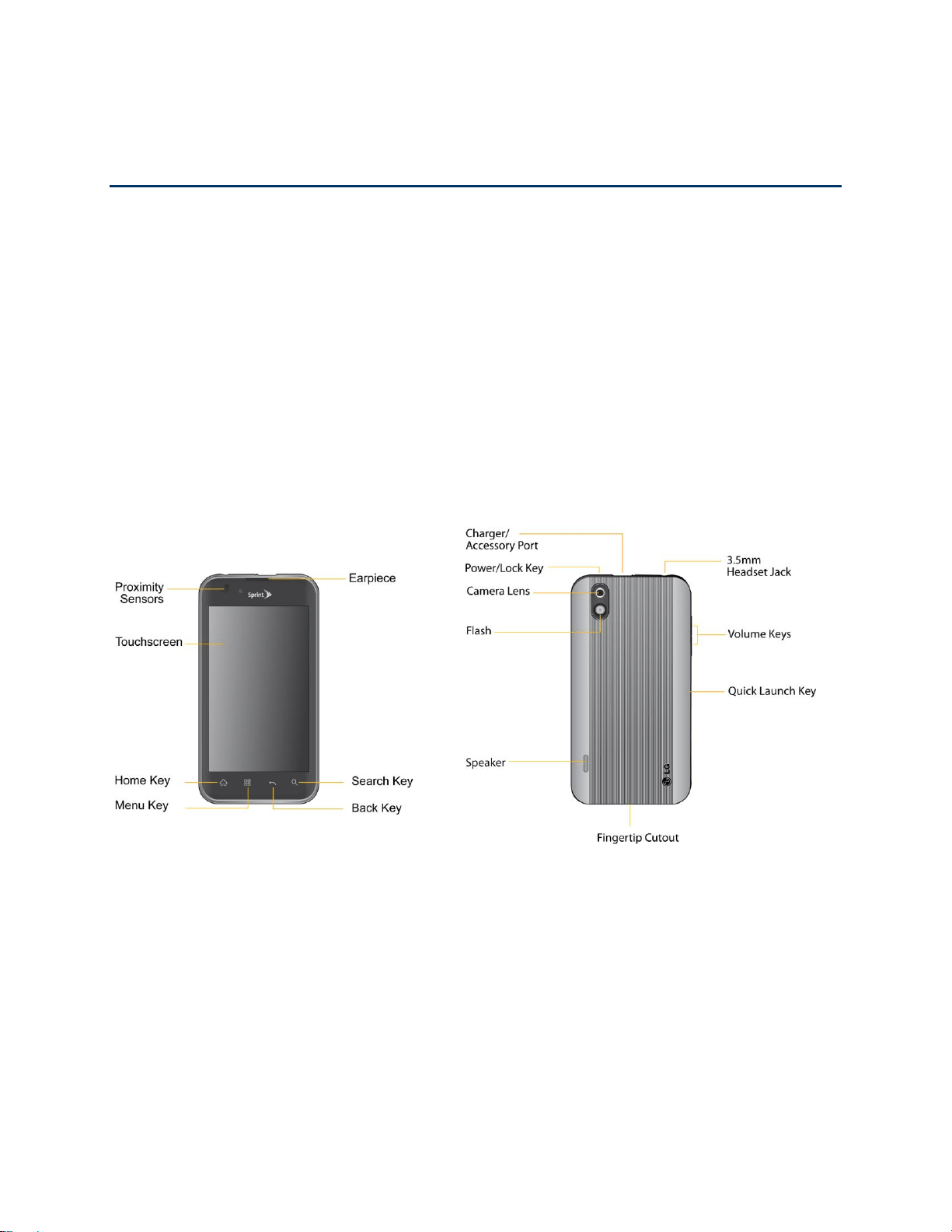
Front View
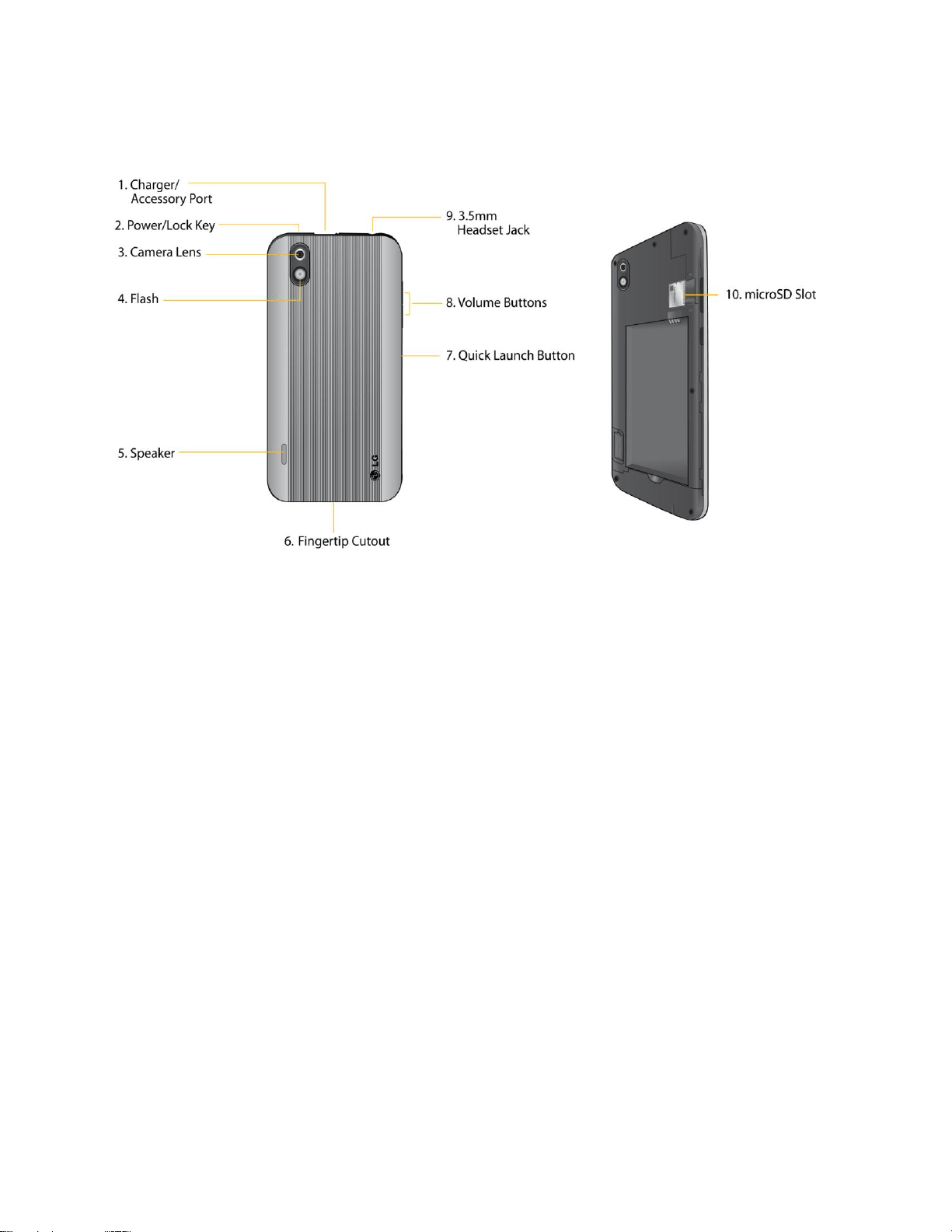
1. Front Camera Lens allows you to take a self-shot.
2. Proximity Sensors sense proximity towards other objects (such as your head) so that
touch commands are not accidentally activated during a call.
Note: Please be careful not to cover the sensors with a protective film, pouch, or a protective
case not authorized by LG.
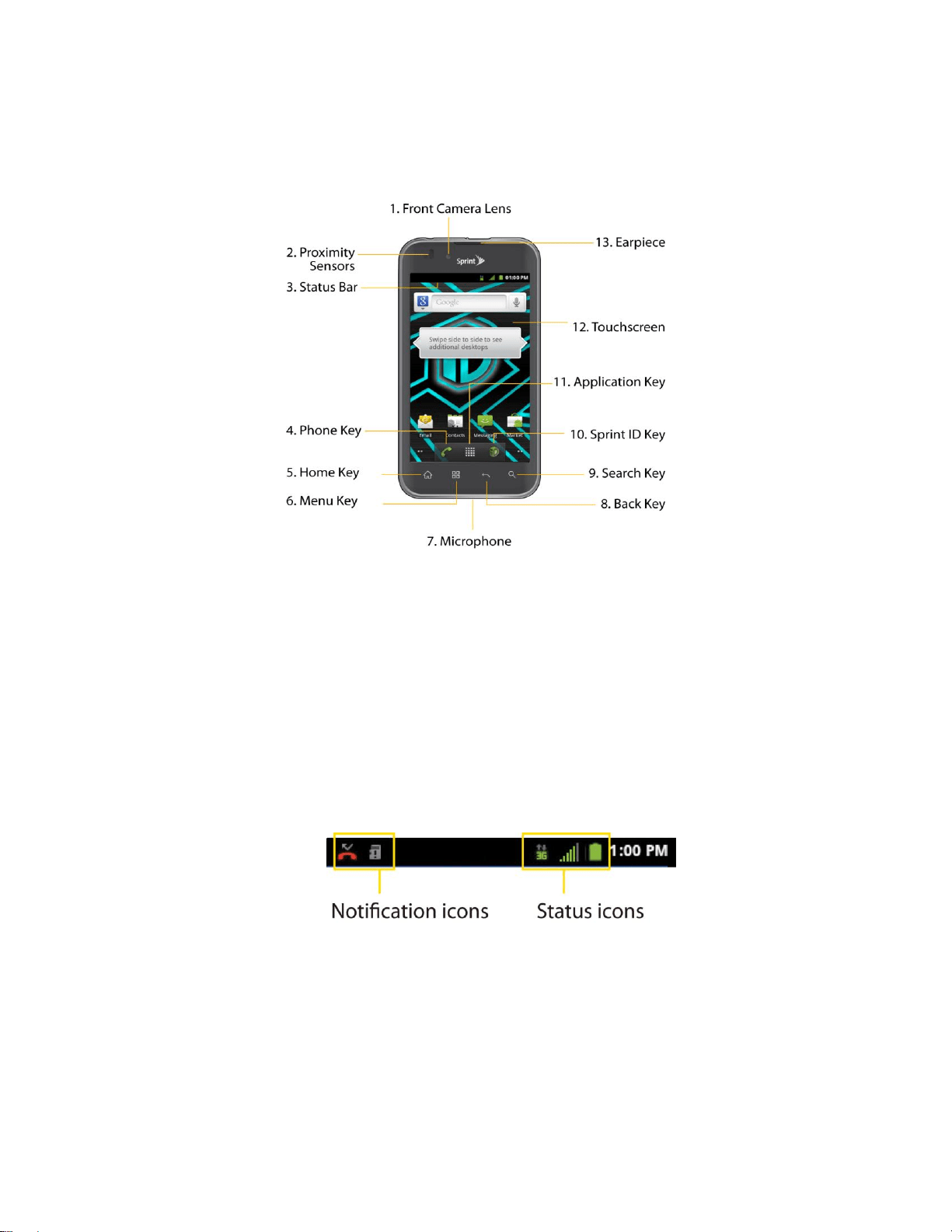
3. Status Bar provides information about your device‘s status and options, such as signal
strength, roaming, ringer setting, messaging, and battery charge. The Status Bar displays
icons indicating that you‘ve received notifications (on the left) and icons indicating the
device's status (on the right), along with the current time.
4. Phone Key displays the dialpad so you can dial a number. Also provides additional tabs
to access Call log, Contacts, and your Favorites.
5. Home Key returns to the Home screen. If you're already viewing one of extension panes,
it opens the central Home screen. Press and hold to display recently used applications.

Device Basics 9
6. Menu Key allows you to access your device's main functions menu from the Home
screen: Add, Wallpaper, Settings, Switch ID, Search, and More (Manage apps and
Notifications). While using an application, press to open a list of options available.
7. Microphone allows other callers to hear you clearly when you are speaking to them.
8. Back Key returns to the previous screen. Also closes pop-up display items such as
menus and dialog boxes.
9. Search Key displays the Quick Search box that can be used to search for a key term
both on the device and online. See Using the Search Key.
For example, entering the word ―Pa‖ will display any matching entries from your
device‘s Contacts list, installed applications, or will suggest search terms.
Press and hold to launch Voice Search where you can initiate a Google™ search by
verbally entering search terms. The device recognizes your spoken words and
initiates a Web search.
10. Sprint ID Key launches the Sprint ID application from where you can replace a current ID
or get a new one.
11. Application Key opens the Applications screen to view installed applications.
12. Touchscreen displays all the information needed to operate your device, such as the
applications, call status, the Contacts list, the date and time, and the signal and battery
strength.
13. Earpiece lets you hear the caller and automated prompts.
Device Basics 10
Rear View
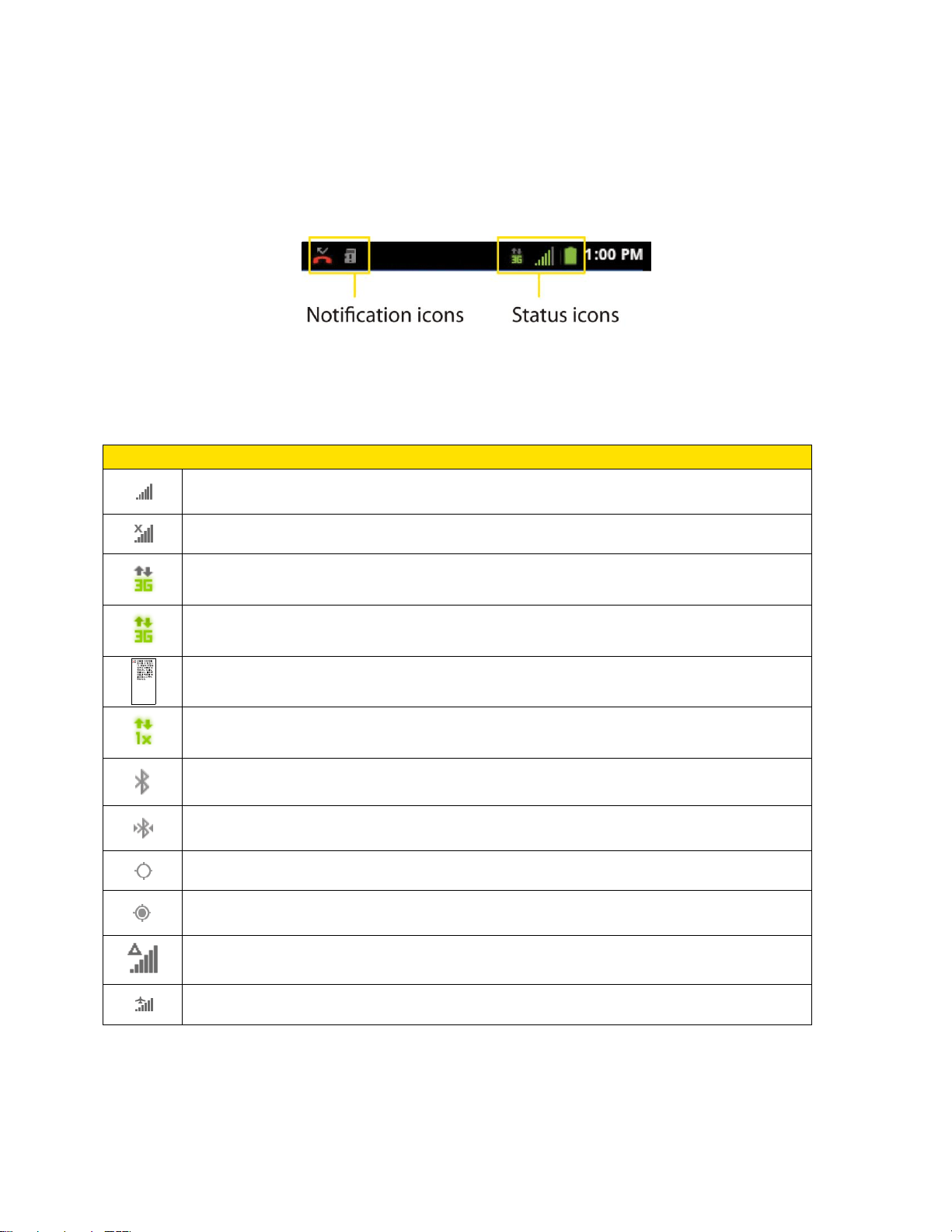
1. Charger/Accessory Port allows you to connect the device charger or an optional USB
cable (included). CAUTION! Inserting an accessory into the incorrect jack may damage
the device.
2. Power/Lock Key locks the screen. Press and hold to open the Phone options menu (for
the following options): Silent mode, Airplane mode, and Power off.
3. Camera Lens, as part of the built-in camera, lets you take pictures and videos.
4. Flash helps take pictures and video in darker lighting.
5. Speaker lets you hear the different ringers and sounds. The speaker also lets you hear
the caller‘s voice in speakerphone mode.
6. Fingertip Cutout allows you to lift and remove the device's back cover.
7. Quick Launch Button gives you quick access to the specific feature you previously
allocate to this button. Camera is allocated by default.
8. Volume Buttons allow you to adjust the ringer and media volumes, or to adjust the in-
call volume during a call. When you press and hold the volume button, the phone
switches to the Sound-off mode.
9. 3.5mm Headset Jack allows you to plug in a headset for convenient, hands-free
conversations. CAUTION! Inserting an accessory into the incorrect jack may damage the
device.
10. microSD Slot accommodates the pre-installed microSD™ card (expandable up to 32GB).
Note: Insert a microSD card to use the camera and other multimedia features. Multimedia
contents will be saved in the microSD card. Your LG MARQUEE™ has a microSD™card
pre-installed.
Device Basics 11
Viewing the Display Screen
The Status Bar appears at the top of the screen. It displays icons indicating that you‘ve received
notifications (on the left) and icons indicating the device‘s status (on the right), along with the
current time.
If you have more notifications than can fit in the Status Bar, a plus icon prompts you to open the
Status Bar to view them all. (See Using the Notifications Panel.)
The following list identifies the symbols you‘ll see on your device's display screen:
Status Bar – Service Icons
Signal Strength – Shows your current signal strength. (More bars = stronger
signal.)
No Service – Your phone cannot find a usable signal.
3G Connected – Indicates that 3G data service is available.
3G In Use – Indicates that 3G data service is in use.
1x Data Connected – Indicates that 1x data service is available.
1x Data Service In Use – Indicates that 1x data service is in use.
Bluetooth On – Indicates that Bluetooth is on.
Bluetooth Connected – Indicates that the phone is connected to a Bluetooth
device.
GPS On – Indicates that GPS is on.
GPS Communicating – Indicates that the device is receiving location data from
GPS.
Roaming – Your phone is ―roaming‖ off the Nationwide Sprint Network.
Airplane Mode – Indicates that the device is in Airplane Mode.

Device Basics 12
Status Bar – Status Icons
Speakerphone On – Indicates that Speakerphone is on.
No microSD – Indicates that no microSD card is installed.
Vibrate Mode – Indicates that the ringer volume is set to vibrate and any sounds
are silenced.
Ringer Silenced – Indicates that all sounds are turned off.
Muted – Indicates that phone microphone is muted.
Very Low Battery – Indicates that battery is very low.
Low Battery – Indicates that battery is low.
Battery Drained (40%) – Indicates that battery is partially drained.
Battery Full – Shows your current battery charge level. (Icon shown is fully
charged.)
Battery Charging – Indicates that battery is charging.
Unknown Battery – Indicates that an unknown battery is inserted.
Alarm Clock – Indicates that an alarm is set.
Status Bar – Notification Icons
New Gmail Message – Indicates a new Gmail message.
New Text or Multimedia Message – Indicates you have received a new text or
multimedia message.
New Email – Indicates a new Email message.
Problem With Text Or Multimedia Message Delivery – Indicates a text or
multimedia message is undeliverable.
Urgent Text or Multimedia Message - Indicates you have received an urgent
text or multimedia message.
New Google Talk Message – Indicates you have received a new Google Talk
message.
New Voicemail – Indicates you have received a new voicemail message.
Upcoming Event – Alerts you to an upcoming event.
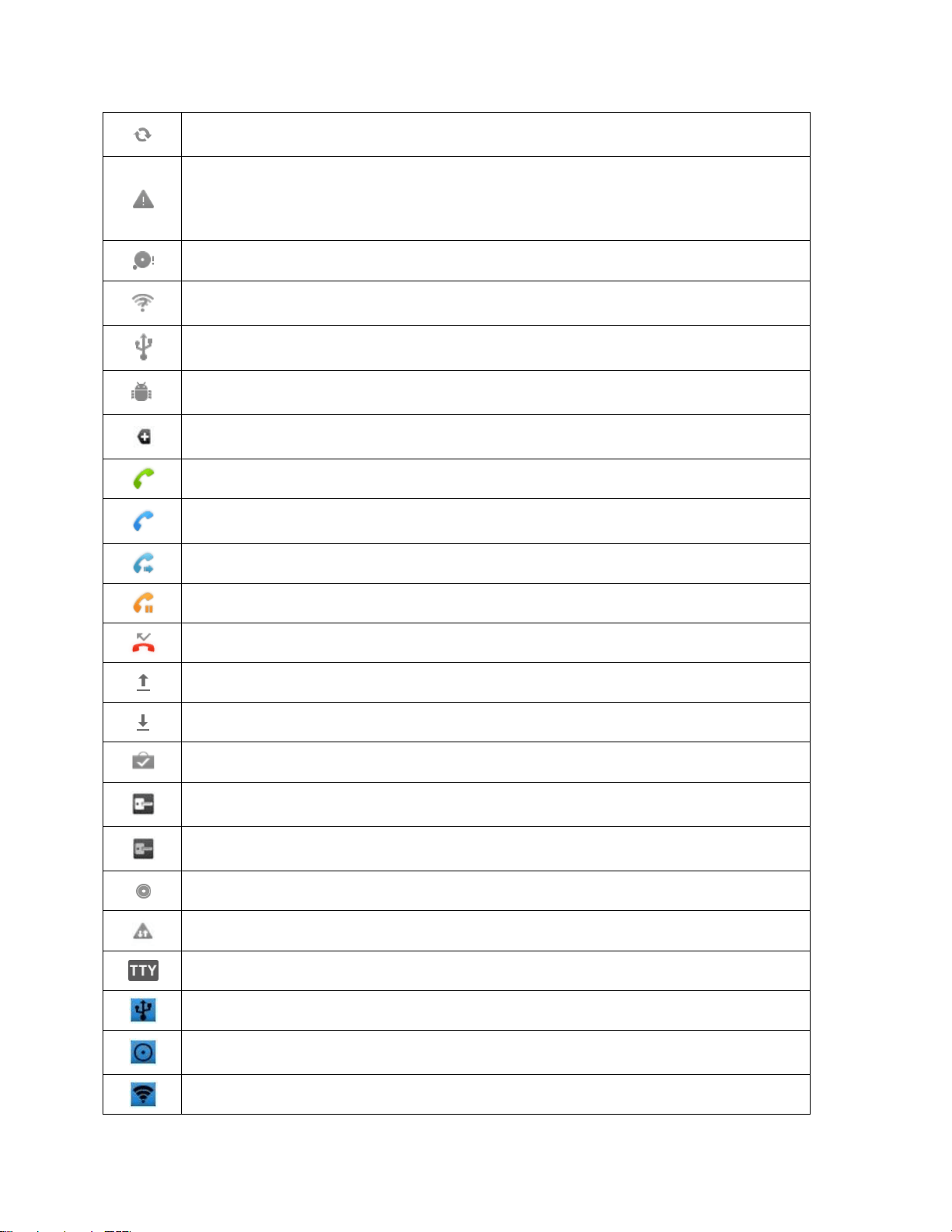
Device Basics 13
Data Is Syncing – Application sync is active and synchronization is in progress
for Gmail, Calendar, and Contacts.
Problem With Sign-In Or Sync – There has been an issue with your
connection to the Google server, or you were not properly signed into your
account. In order to use Google application or sync features, you must set up
and sign into an active Google account.
Full microSD Card – Indicates that microSD card is full.
An Open Wi-Fi Network Available – Indicates that an open Wi-Fi network is
available.
USB Connected – The device has detected an active USB connection.
USB Debugging Connected – The device has detected an active USB
connection and is in a USB Debugging mode.
More Notifications Not Displayed – Indicates that there are more notifications
which are not displayed in the status bar.
Call In Progress – Indicates that a call is in progress.
Call In Progress Using Bluetooth Headset – Indicates that a call is in progress
using the Bluetooth headset.
Call Being Forwarded – Indicates that a call is being forwarded.
Call On Hold – Indicates that a call is on hold.
Missed Call – Indicates that you have missed calls.
Uploading Data – Indicates that your device is uploading data.
Downloading Data – Indicates that your device is downloading data.
Download Finished – Indicates that a download is complete.
Connected To VPN – Indicates that the device is connected to a Virtual Private
Network.
Disconnected From VPN – Indicates that the device is disconnected from the
Virtual Private Network.
Song Is Playing – Indicates that a song is playing.
Carrier data use threshold approaching or exceeded.
TTY – Indicates that your phone is operating in TTY mode.
Tethering Active - Indicates that USB tethering is active.
Tethering and Hotspot Active - Indicates that both USB tethering and Portable
Wi-Fi hotspot are active.
Portable Wi-Fi hotspot Active - Indicates that Portable Wi-Fi hotspot is active.
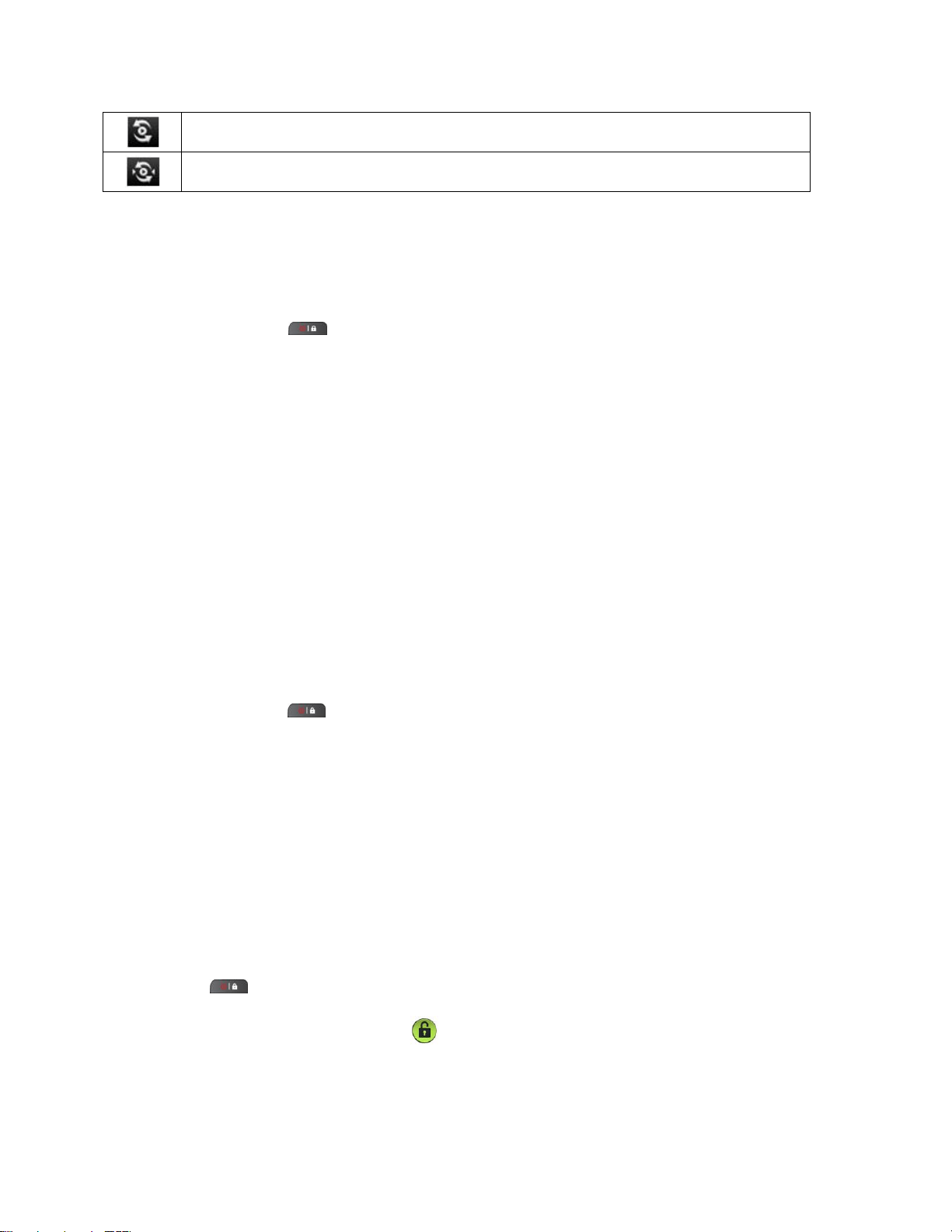
Device Basics 14
SmartShare On - Indicates that SmartShare is turned on.
SmartShare sharing request - Indicates that SmartShare is requesting sharing.
Turning Your Device On and Off
Turn your device on and off and wake-up the screen by using the Power/Lock Key.
Turning Your Device On
► Press and hold .
Once your phone is on, it may display ―Searching for Service.‖ When your phone finds a signal,
it enters standby mode – the phone‘s idle state. At this point, you are ready to begin making and
receiving calls.
If your phone is unable to find a signal after 15 minutes of searching, a Power Save feature is
automatically activated. When a signal is found, your phone automatically returns to standby
mode.
In Power Save mode, your phone searches for a signal periodically without your intervention.
You can also initiate a search for Sprint service by pressing any key (when your phone is turned
on).
Tip: The Power Save feature conserves your battery power when you are in an area where
there is no signal.
Turning Your Device Off
1. Press and hold for two seconds until you see the powering-down animation on the
display screen.
2. Tap Power off and then tap OK to power off the device.
Your screen remains blank while your phone is off (unless the battery is charging).
Wake Up the Screen
If you don‘t use the device for a while, the screen and backlight will shut off to conserve battery
power.
To wake up the device's screen
1. Press . Your lock screen will appear. See Your Device's Lock Feature.
2. Touch and drag the Unlock icon to the right. The last screen you were working on
opens. (This is the default lock screen.)
Device Basics 15
Battery and Charger
Sprint-approved or LG-approved batteries and accessories can be found at Sprint Stores or
through LG; or call 1-866-866-7509 to order. They‘re also available at www.sprint.com.
WARNING: Use only Sprint-approved or LG-approved batteries and chargers with your
device. The failure to use a Sprint-approved or LG-approved battery and charger
may increase the risk that your phone will overheat, catch fire, or explode,
resulting in serious bodily injury, death, or property.
Battery Capacity
Your device is equipped with a Lithium Ion (Li-Ion) battery. It allows you to recharge your battery
before it is fully drained. The battery provides up to 5.5 hours of continuous digital talk time.
When the battery reaches 5% of its capacity, the battery icon blinks. When there are
approximately two minutes of talk time left, the device can sound an audible alert and then turn
off.
Note: Long backlight settings, searching for service, using vibrate mode, browser use, and
other variables may reduce the battery‘s talk and standby times.
Tip: Watch your device's battery level indicator and charge the battery before it runs out of
power.
Installing the Battery
► See Setting Up Your Device.
Removing the Battery
1. Make sure the power is turned off so that you don‘t lose any unsaved items.
2. Lift the back cover using the fingertip cutout located at the bottom of the cover and
remove it.
3. Lift the battery using the fingertip cutout and remove it from the device.
WARNING: Do not handle a damaged or leaking Li-Ion battery as you can be burned.

Device Basics 16
Charging the Battery
Keeping track of your battery‘s charge is important. If your battery level becomes too low, your
device automatically turns off, and you will lose any information you were just working on.
Always use a Sprint-approved or LG-approved desktop charger, travel charger, or vehicle power
adapter to charge your battery.
1. Connect the cableless wall adapter and USB cable as shown; the LG logo on the USB
cable should face toward you.
2. Plug one end of the USB cable into the device's Charger/Accessory Port and the other
end into an electrical outlet. The charge time varies depending upon the battery level.
With the Sprint-approved Li-Ion battery, you can recharge the battery before it becomes
completely rundown.
Battery Temperature Protection
Though extremely rare, if the battery becomes overheated, the phone will automatically turn off.
Charging with USB
You can use your computer to charge your device. To be able to charge with the USB cable,
you need to install the necessary USB drivers on your computer first. Connect one end of the
USB cable to the Charger/Accessory Port on your device and connect the other end to a USB
port on your computer. It is best to use the rear USB port when connecting to a desktop
computer. The USB hub should be powered by an external power source (see NOTE below).
Note: Low-power USB ports are not supported, such as the USB port on your keyboard or bus-
powered USB hub.
LG USB Driver is downloadable from the following site: http://www.lg.com/us/ > Click
Support > Mobile Phone Support > Select the Carrier(Sprint) > Select the Model LG
Marquee™ > Click USB Cable Driver to download.
Always unplug the charger from the wall socket after the phone is fully charged to save
unnecessary power consumption of the charger.

Device Basics 17
Extending Your Battery Life
You can extend your battery's life between charges by turning off features that run in the
background. You can also monitor how applications and system resources consume battery
power.
● Reduce your Backlight On time. (See Changing the Backlight Time Length.)
● Turn Bluetooth off when not in use. (See Turning Bluetooth On and Off.)
● Turn Wi-Fi off when not in use. (See To turn Wi-Fi on and connect to a Wi-Fi network
● Deactivate the GPS when not needed. Most applications using this function will
periodically query the GPS satellites for your current location; each query drains your
battery. (See Activating Location Mode.)
● Do not wait until your battery is completely depleted before charging your device.
Repeating this process of a complete discharge and recharge can over time reduce the
storage capacity of any battery.
● Turn off Automatic application sync. (See Synchronizing Accounts.)
● Use the Power Control Widget to deactivate hardware functions such as Wi-Fi, Bluetooth,
GPS, Synchronization, or LCD brightness setting. (See Adding and Removing Widgets.)
● Check the Running Services and close any unnecessary applications.
Turn down screen brightness and set a shorter screen timeout. (See Display
Settings.)
If you don't need them to sync, turn off automatic syncing for Gmail, Calendar,
Contacts, and other applications. (See Synchronizing Accounts.)
Use the Power Control widget to check and control the wireless connections,
Bluetooth power, GPS connection, syncing activity, and display brightness. (See
Adding and Removing Widgets.)
To check the battery's charge level:
Tap > > Settings > About phone > Status.
The battery status (charging, discharging) and level (as a percentage of fully charged) are
displayed at the top of the screen.
To monitor and control what uses the battery:
The Battery Use screen shows which applications consume the most battery power. You can
also use it to turn off applications that you‘ve downloaded, if they are consuming too much
power.

Device Basics 18
1. Tap > > Settings > About phone > Battery use.
Tap any of the listed items for more options.
Cell standby to switch to Airplane Mode to save power in areas with no cell coverage.
Phone idle to view battery used when phone is idle.
Maps to view battery used to run Maps application.
Display to adjust the display settings.
Wi-Fi to view battery used when Wi-Fi is turned on.
Voice calls to view battery used for voice calls.
Device Function Keys
The LG Marquee™ comes equipped with four main function keys that can be used on any
screen to access added functions.
Menu Key
The Menu Key ( ) activates an available menu function for the current screen or application.
When on the Home screen, the following menu options are available:
Add ( ) adds one of the following functions to a selected screen. Options include:
Shortcuts, Widgets, Folders, and Wallpapers. (See Customizing Your Home
Screen.)
Wallpaper ( ) provides the ability to customize the current screen‘s wallpaper
image. This image can be obtained from either your Pictures folder or from any of the
available images within the device‘s Wallpaper gallery.
Settings ( ) provides quick access to the device‘s settings menu. (See Settings.)
The Settings menu can also be accessed by tapping > >Settings.
Switch ID ( ) allows you to access the downloaded Sprint ID packs, change to
another Sprint ID pack, or download new SprintID packs.
Search ( ) displays the Quick Search box that can be used to search for a key
term both on the device and on the Web. (See Using the Search Key.)
• For example, entering the word “Pa”, will display any matching entries from your
device‘s Contacts list, installed applications, or will suggest search terms.
More allows you to manage applications and notifications.
Device Basics 19
• Manage apps displays the Manage applications screen. You can manage how
applications use memory, stop a misbehaving application, or uninstall an
application.
• Notifications allows you to expand the Status Bar to provide more detailed
information about the current on-screen notification icons. (See Using the
Notifications Panel.)
Working with Menus
There are two Android menu types: Options menus and Context menus.
Options menus
Options menus contain tools that apply to the activities of the current screen or application, not
to any specific item on the screen. To open the available options menu, tap .
● Not all applications have Options menus; if you tap on a screen that has no Options
menu, nothing will happen.
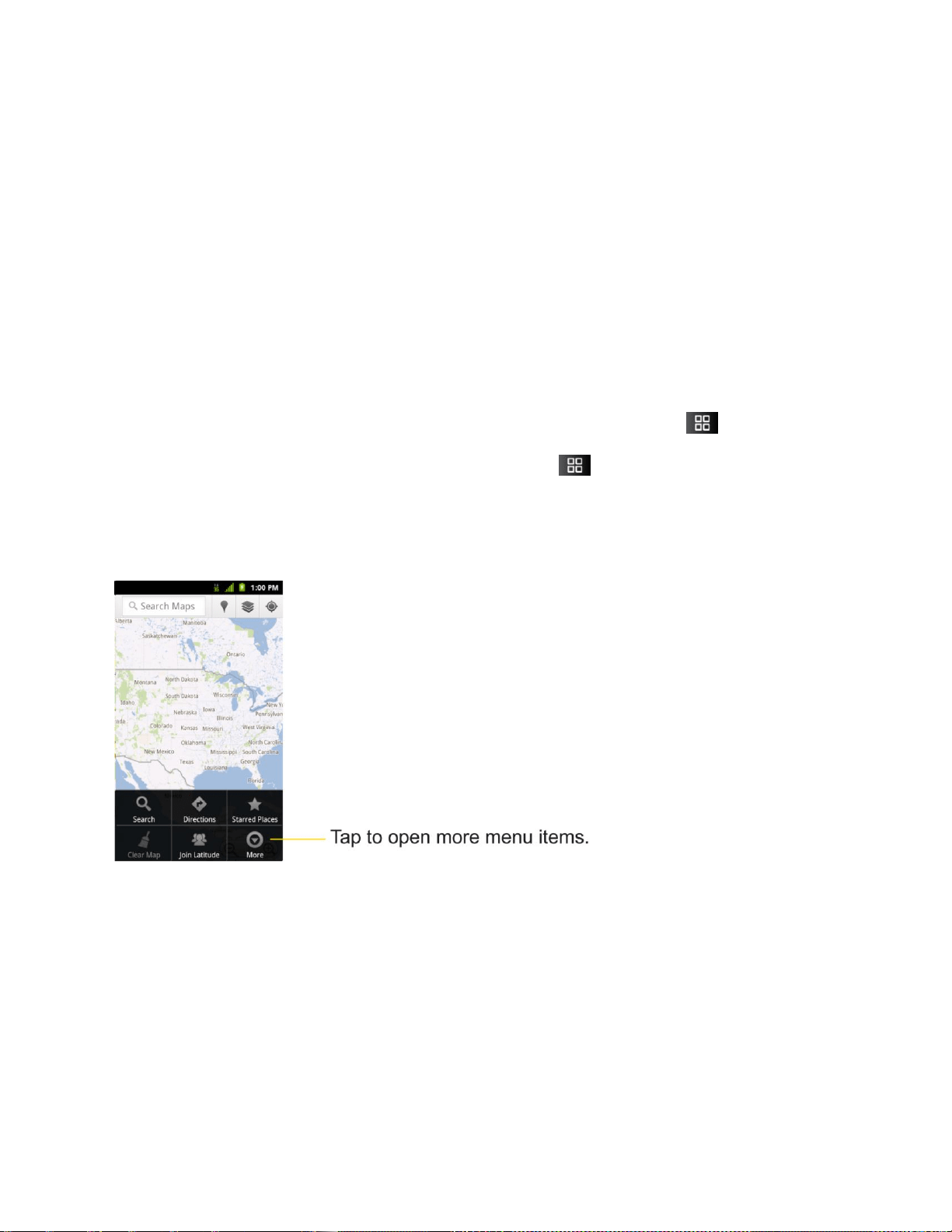
Some applications have more Options menu items than can fit in the options menu; tap More to
open the additional items.
Device Basics 20
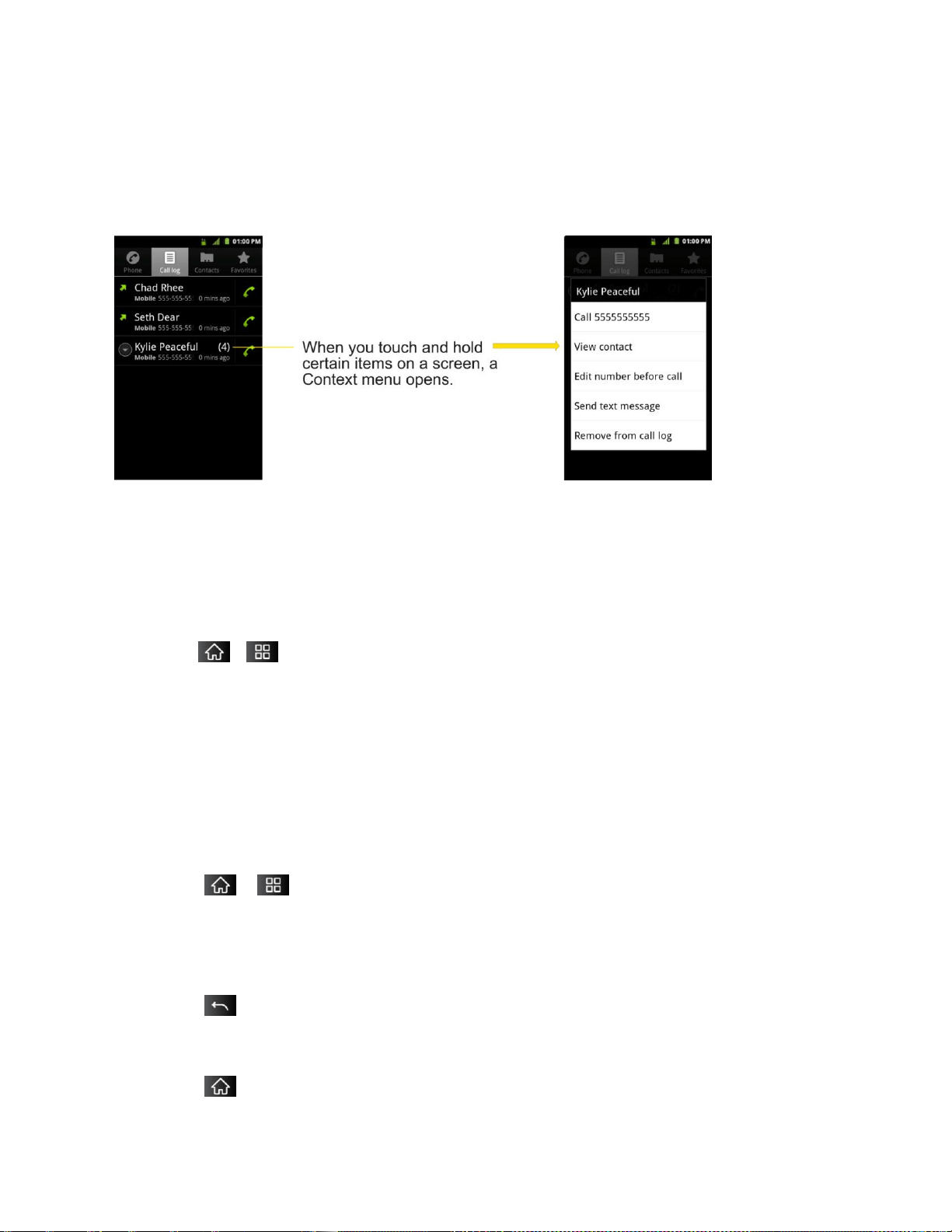
Using Context menus
Context menus contain options that apply to a specific item on the screen. To open a Context
menu, touch and hold an item on the screen. Not all items have Context menus. If you touch
and hold an item that has no Context menu, nothing will happen.
‗
Selecting Menu Items
To select a menu or option, simply tap it. If there are more menus/options than can fit in a
screen, slide the screen up to display more menus/options.
For example, to set the phone to play tones when dialing numbers on the dial pad:
1. Tap > .
2. Tap Settings.
3. Tap Sound.
4. Slide the screen up to display more menus.
5. Tap Audible touch tones to checkmark it.
For the purposes of this guide, the above steps condense into:
► Tap > > Settings >Sound > Audible touch tones.
Backing Up Within a Menu
To go to the previous menu:
► Tap .
To return to standby mode:
► Tap .

Device Basics 21
Using the Notifications Panel
Notification icons report the arrival of new messages, calendar events, alarms, as well as
ongoing events, such as when you are on a call.
When you receive a notification, text appears briefly and the notification icon will be displayed in
the Status Bar. For descriptions of the various notification icons, see Viewing the Display
Screen.
You can open the Notifications Panel to view a list of all recent notifications. Depending on your
settings, you may hear a notification sound, and the device may vibrate.
Note: Adjusting sound volume and other general notifications settings is described in Sound
Settings
Applications whose activities produce notifications, such as Gmail™ and Google Talk, have
their own settings, which you can use to configure whether, and how, they send notifications.
See the sections on those applications for details.
To open the Notifications Panel:
► Touch and drag the Status Bar to the bottom of the screen.
– or –
► Tap > > More > Notifications.
The Notifications Panel displays your wireless provider and a list of your current notifications,
organized into ongoing and event-based notifications.
To respond to a notification:
1. Open the Notifications Panel. Your current notifications are listed in the panel, each with
a brief description.
2. Tap a notification to view it. The Notifications Panel will close and the application that
corresponds to your response will open.
For example, new voicemail notifications dial your voicemail box, and network disconnect
notifications open the list of configured networks so you can reconnect.
To clear all notifications:
1. Open the Notifications Panel.
2. Tap Clear at the top right of the panel.
All event-based notifications will be cleared; ongoing notifications will remain in the list.
To close the Notifications Panel:
Device Basics 22
1. Touch and drag the tab at the bottom of the Notifications Panel to the top of the screen.
2. Tap . (The panel will also close when you touch a notification.)
Home Key
The Home Key takes you back to your main Home screen. (of the 5 total available
screens.)
Back Key
The Back Key returns you to the previously active screen. If the on-screen keyboard is
currently open, this key closes the keyboard.
Search Key
The Search Key displays the Quick Search Box that you can use to search for a key term
both on the device and on the Web. Some applications, such as Contacts, Gmail™, and Google
Maps™, have the ability to search contents within those specific applications. In addition to
being able to search by typing in search terms, you can also search by voice.
Tap to launch the Quick Search Box.
Touch and hold to launch the Voice Search function.
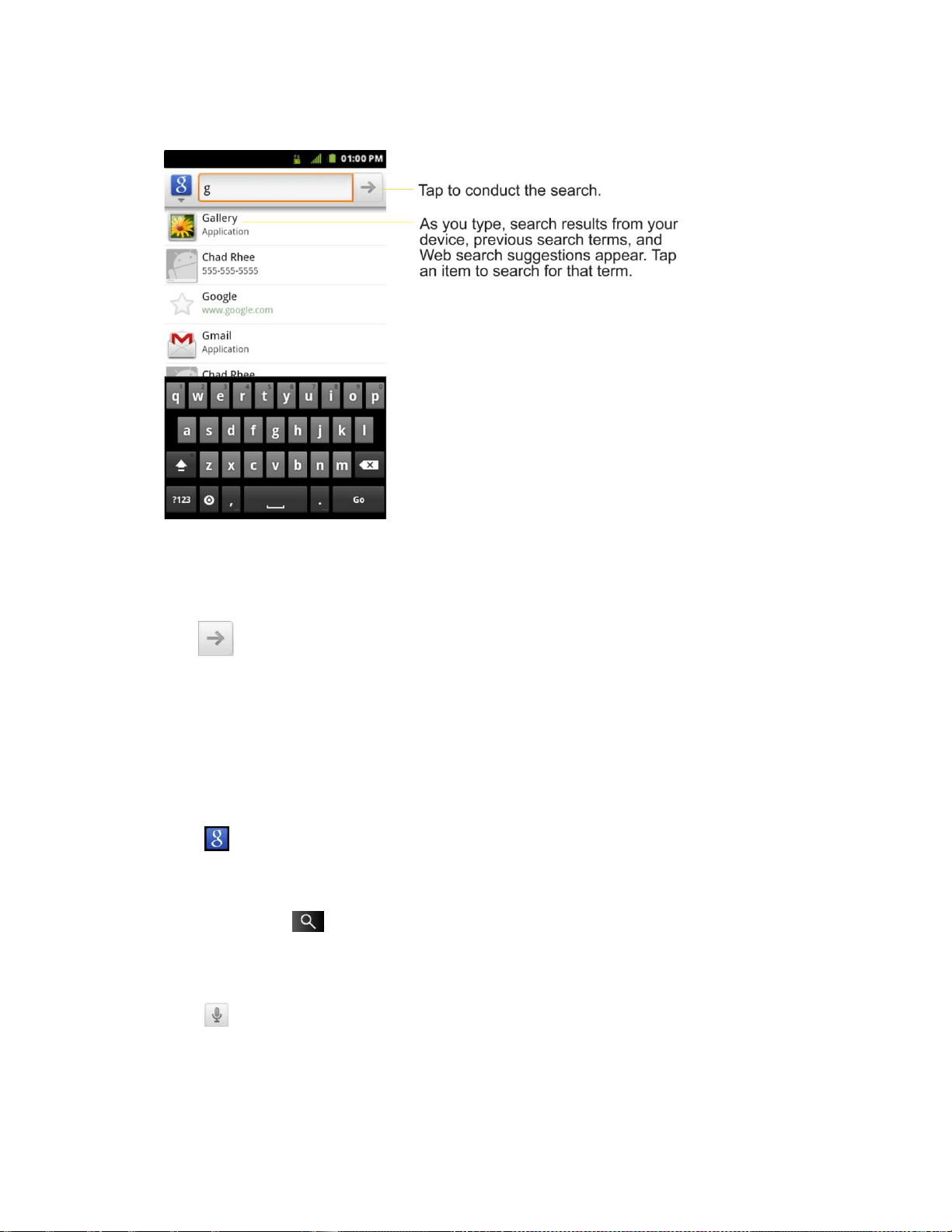
Device and Web Search Using Text Entry
1. Tap > .
When you press on the Home screen or in the other applications that support this, the
Quick Search Box will open automatically.
.
In some applications, such as Gmail, Contacts, Browser, and Android Market
TM
, the
application‘s own search box opens when you tap . This is indicated by the
application's icon on the left side of the search box.
Device Basics 23
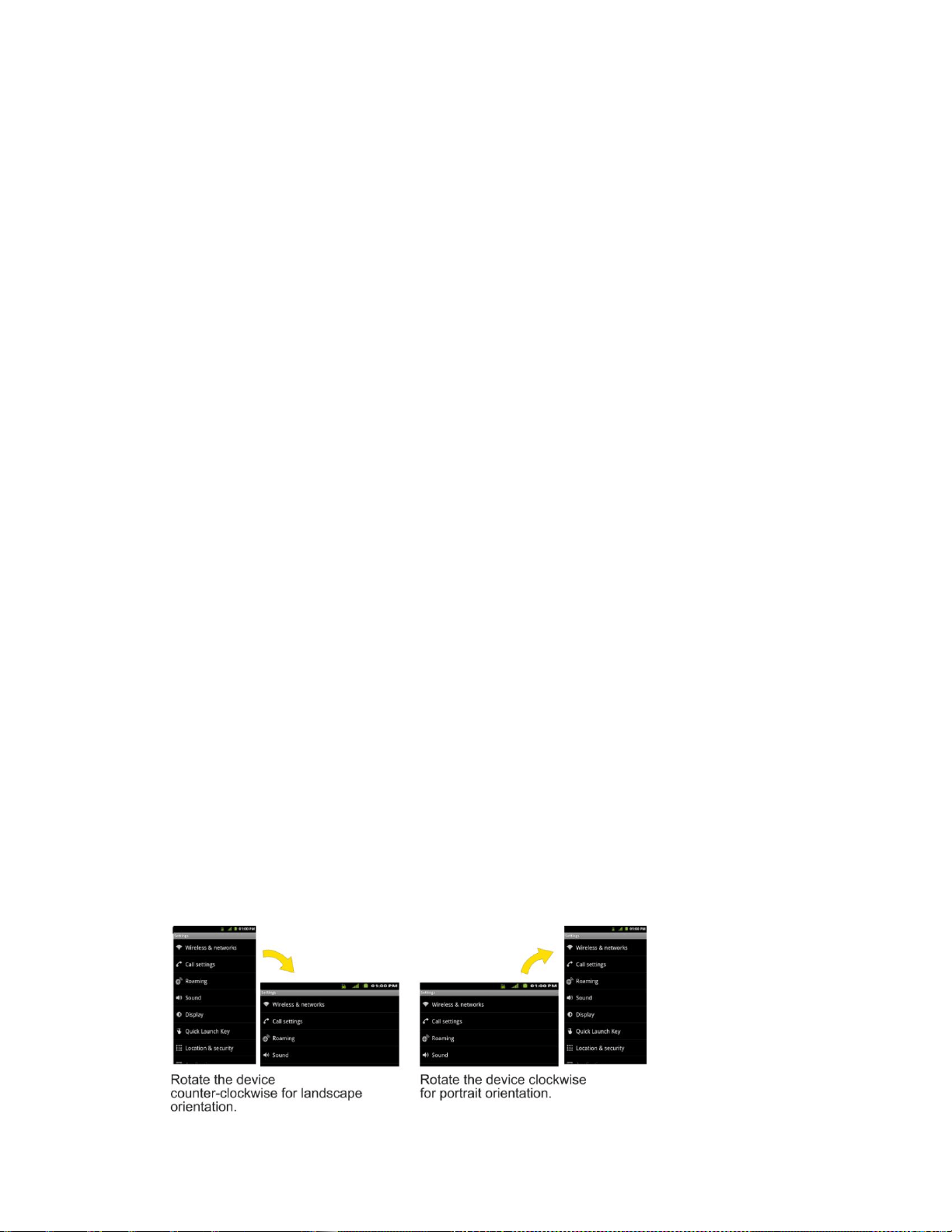
2. Enter the text you're searching for in the Quick Search Box.
You can use the Search preferences to configure some aspects of Google Web
search (for example, whether it makes suggestions below the Quick Search Box as
you type), and what device features you want to include in searches.
3. Tap to search for the entered text.
– or –
If what you want to search for appears in the suggestions list, tap that item to conduct
the search.
To search different by type:
► Tap > All, Web, Apps, or Contacts.
To search using voice command:
► Touch and hold .
– or –
Tap from the Quick Search Box.
When you stop speaking, Google Search by Voice analyzes your speech and displays the
results of your search.

Device Basics 24
The available Voice Commands are:
● Say ―Directions to,‖ followed by an address, name, business name, type of business, or
other destination, to get directions to that location from Google Maps™.
● Say ―Navigate to,‖ followed by an address, name, business name, type of business, or
other destination to get spoken, turn-by-turn directions to that destination.
● Say ―Map of,‖ followed by an address, name, business name, type of business, or other
location, to view that location on Google Maps.
● For additional commands, tap Help.
Device Basics 25
Touchscreen Navigation
The LG Marquee™ is a touch-sensitive device which allows you to select an on-screen option
with a single touch and to easily scroll through long lists. Simply slide up and down through the
display with your fingertip.
Your touchscreen provides an excellent way to interact with and use your Android phone. With
the touch of your finger, you can access available applications, make menu selections, and
access data saved to your device. The following terms are used for describing the different
available actions using the touchscreen:
● Tap: A single finger tap selects items, links, shortcuts and letters on the on-screen
keyboard.
● Touch and hold: Touch and hold an item on the screen by touching it and not lifting
your finger until an action occurs. For example, to open a contact‘s available options,
touch and hold the contact in the Contacts list until the context menu opens.
● Drag: Touch and hold an item for a moment and then, without lifting your finger, move
your finger on the screen until you reach the target position. You can drag items on the
Home screen to reposition them, as described in Changing the Device‘s Wallpaper, or
drag the Notifications Panel open, as described in Using the Notifications Panel.
● Swipe or slide: To swipe or slide, quickly move your finger across the surface of the
screen, without pausing when you first touch it (so you don‘t drag an item instead). For
example, you can slide the screen up or down to scroll through a list, or browse through
the different Home screens by swiping from left to right (and vice versa).
● Double-tap: Double-tap to zoom on a Web page or a map. For example, quickly double-
tap a section of a Web page to adjust that section to fit the width of the screen. You can
also double-tap to zoom in and out when taking a picture (using the Camera), and when
using Maps.
● Pinch-to-Zoom: Use your index finger and thumb in a pinch or spread motion to zoom
in or out when using the Browser, Maps, or browsing pictures.
● Rotate the screen: From many applications and menus, the orientation of the screen
adjusts to the device‘s physical orientation. (See Changing the Screen Orientation.)
Device Basics 26
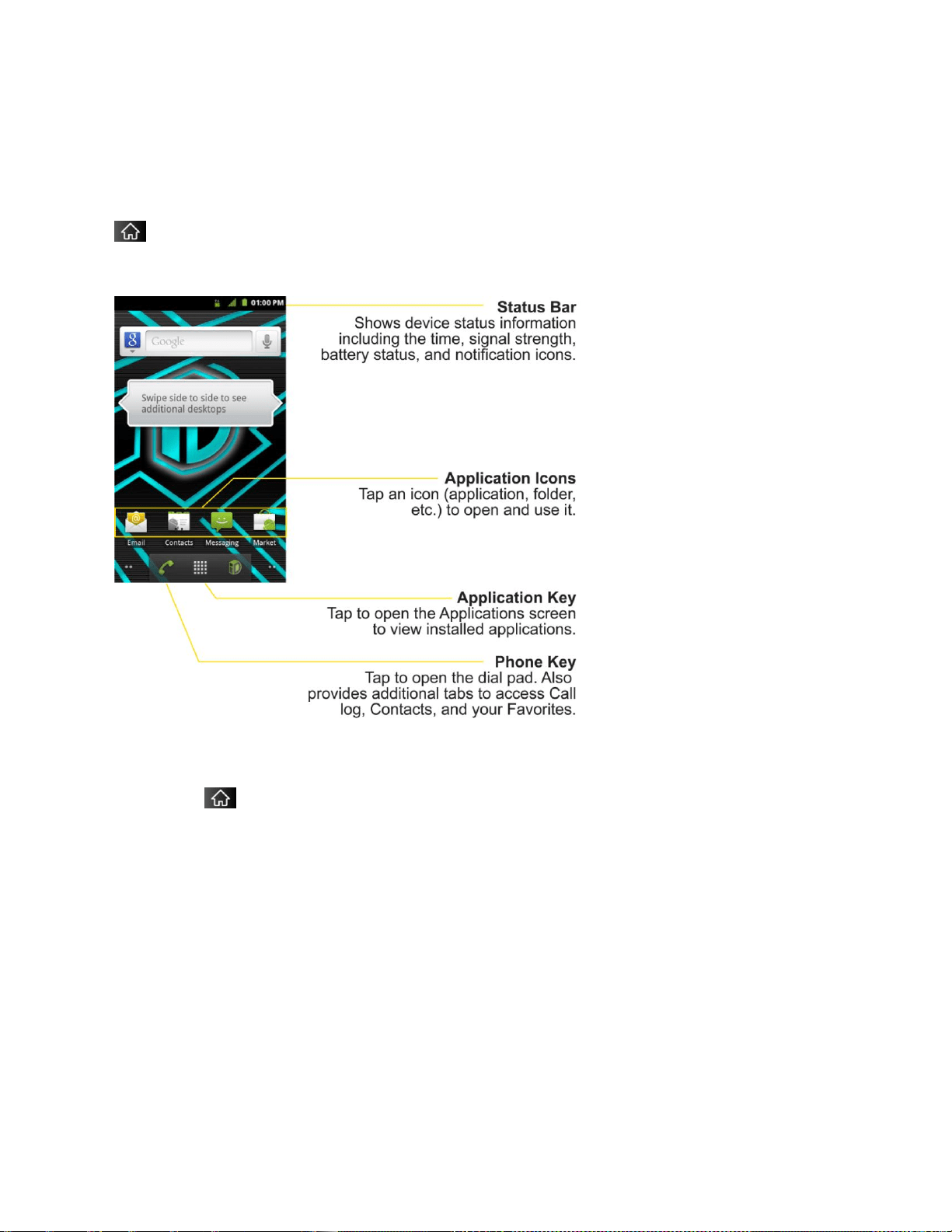
Your Home Screen
The Home screen is the starting point for many applications and functions, and it allows you to
add items like application shortcuts, folders, or Google widgets to give you instant access to
information and applications. This is the default page and accessible from any menu by tapping
.
Home Screen
To return to the Home screen:
► Tap at any time, from any application.
Device Basics 27
Extended Home Screens
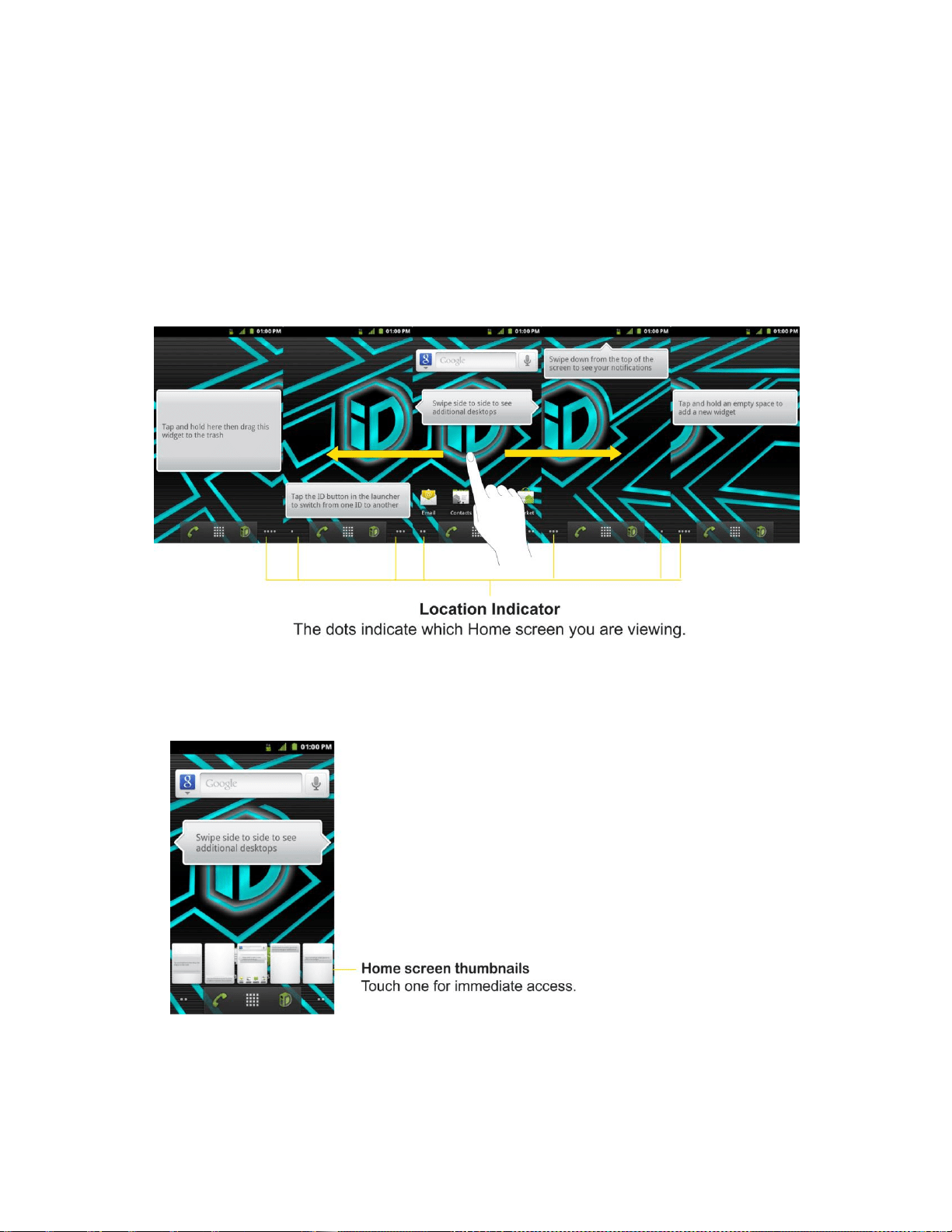
The operating system provides multiple Home screens to provide more space for adding icons,
widgets, and more.
► Slide your finger left or right across the Home screen. The main screen is in the center
with two extension screens on either side of it. (For more information on sliding, see
Touchscreen Navigation.)
Extended Home Screens
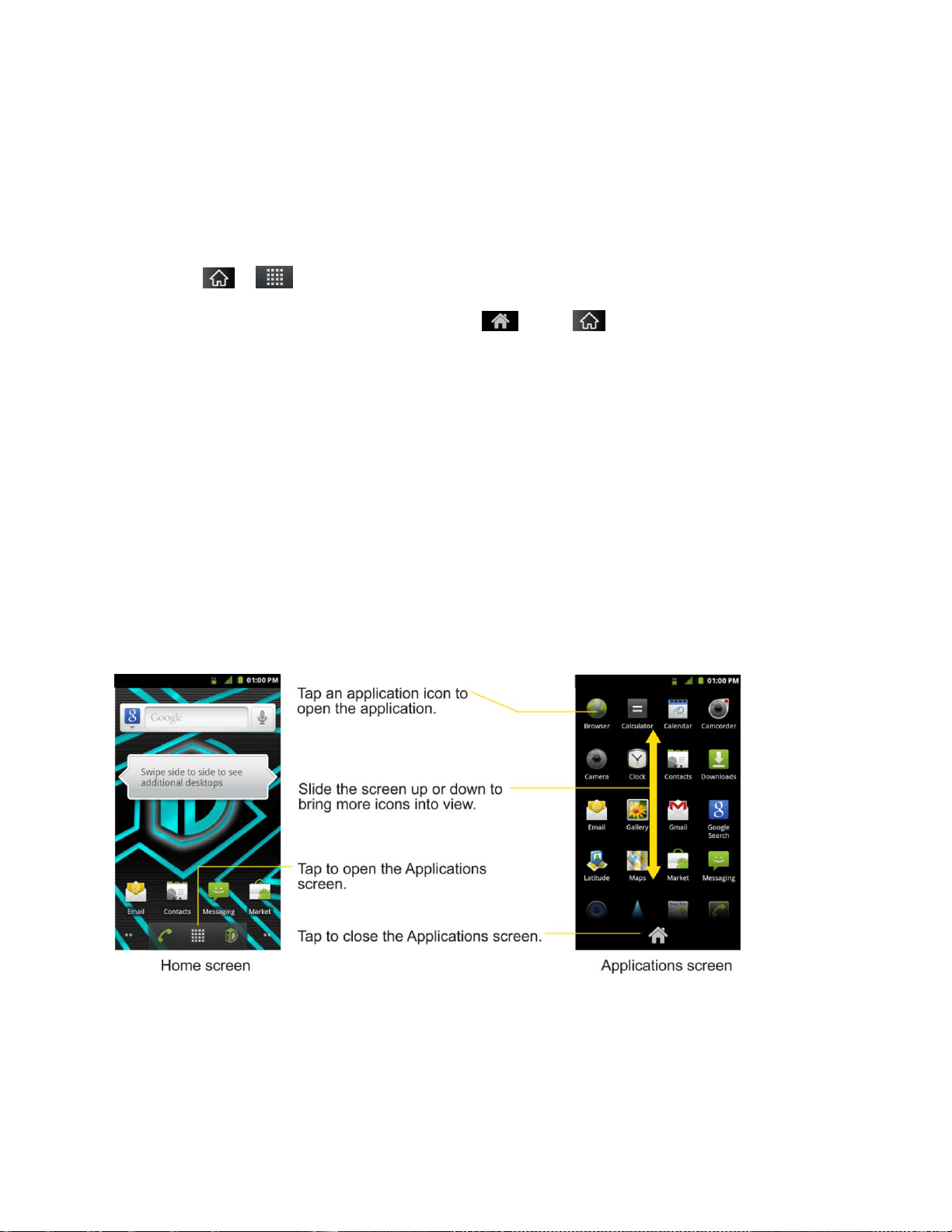
► Touch and hold the Home screen dots on the lower left or right of the screen to view
thumbnails of the Extended Home screens, then touch one to go to that specific screen
(see the following image).
Device Basics 28
Using the Application Key
All of your device‘s applications are located within the Applications screen. This key houses
shortcuts to your currently available applications.
Note: This screen houses all default and downloaded applications (installed from Android
Market).
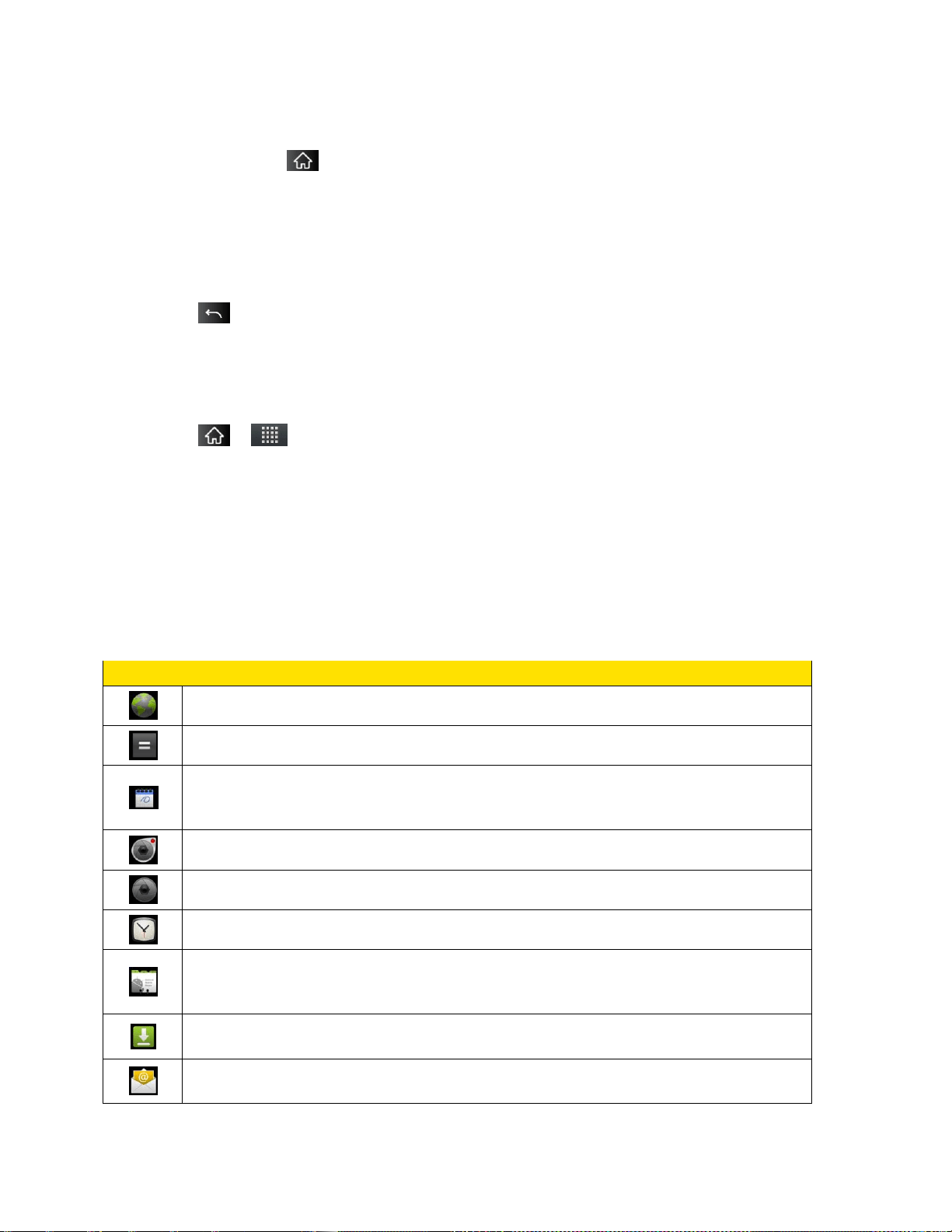
1. Tap > to open the screen.
To close the Applications screen, tap or tap again.
2. Scroll though the list and tap an icon to launch the associated application.
Applications: How to View, Open and Switch
All of the applications on your device, including any applications that you downloaded and
installed from Android Market™ or other sources, are grouped together on one Applications
screen that you access from your Home screen. If you have more applications than you can
currently see on the Applications screen, slide the screen up or down to view more.
The Applications screen contains all of the device's applications (though not downloaded
widgets and other downloaded material that isn't an application), including the Clock, Browser,
Calculator, Camera, Market, NASCAR Sprint Cup Mobile, Sprint Navigation, Sprint TV,
YouTube, Voice Search, and much more.
Overview

Device Basics 29
Opening and Closing the Applications Screen
To open the Applications screen:
► Tap .
To close the Applications screen:
► Tap .
► Tap .
Note: The Applications screen closes automatically when you tap an icon to open its
Application. Dragging an icon onto your Home screen also closes the Applications
screen automatically.
Opening and Switching Applications
Multi-tasking is easy with Android™. Opened applications can keep running in the background
when you open another application. There‘s no need to quit an application before opening
another. You can easily switch among several open applications. Android manages each
application, pausing and starting them as needed to ensure that unused applications don‘t
waste your device's resources.
To open an application:
► Simply tap its icon on the screen.
Tip: You can customize your Home screen with shortcuts to the applications you use most
often. Applications are located on the Applications screen, but you can add an
application shortcut to your Home screen for faster access. No matter where the icon is,
on the Applications screen or your Home screen, just touch it to open and use it. See
Adding Application Icons to the Home screen for more information.
To open multiple applications:
1. Tap an application icon to open it.
2. Tap .
3. Tap and tap the icon for the other application you want to open.
– or –
Simply tap the icon if the application you want is already on your Home screen.
Device Basics 30
To switch between multiple applications:
1. Touch and hold . A small window opens with icons of applications that you‘ve used
recently.
2. Tap the application icon you want to open.
– or –
Tap to return to the current application.
Adding Application Icons to the Home Screen
Customize your Home screen with shortcuts to the applications you use most often.
1. Tap > .
2. Touch and hold the application icon you want to add to your Home screen.
3. Lift your finger to place the app on your Home screen, or drag the icon to where you want
it on the screen, then lift your finger.
Applications
The following is a listing of the default applications available on both the Home/Extended
screens and the Applications screen.
Application Icons
Browser – Launches the Sprint Powerdeck browser.
Calculator – Launches the Calculator application.
Calendar – Launches the Calendar application that can sync to either your
Google or Outlook®Work calendar. Events can only be synched to a managed
account.
Camcorder – Launches the Camcorder.
Camera – Launches the Camera.
Clock - Access the Clock application.
Contacts – Displays the Contacts that can be synchronized with your device
from either your Google or Outlook account. Contacts can only be synched to a
managed account.
Downloads – Launches the Downloads application that you can view, reopen,
or delete what you've downloaded.
Email – Provides access your POP3, IMAP, and Exchange Server (Outlook)
email accounts. Also provides access to your Gmail account.
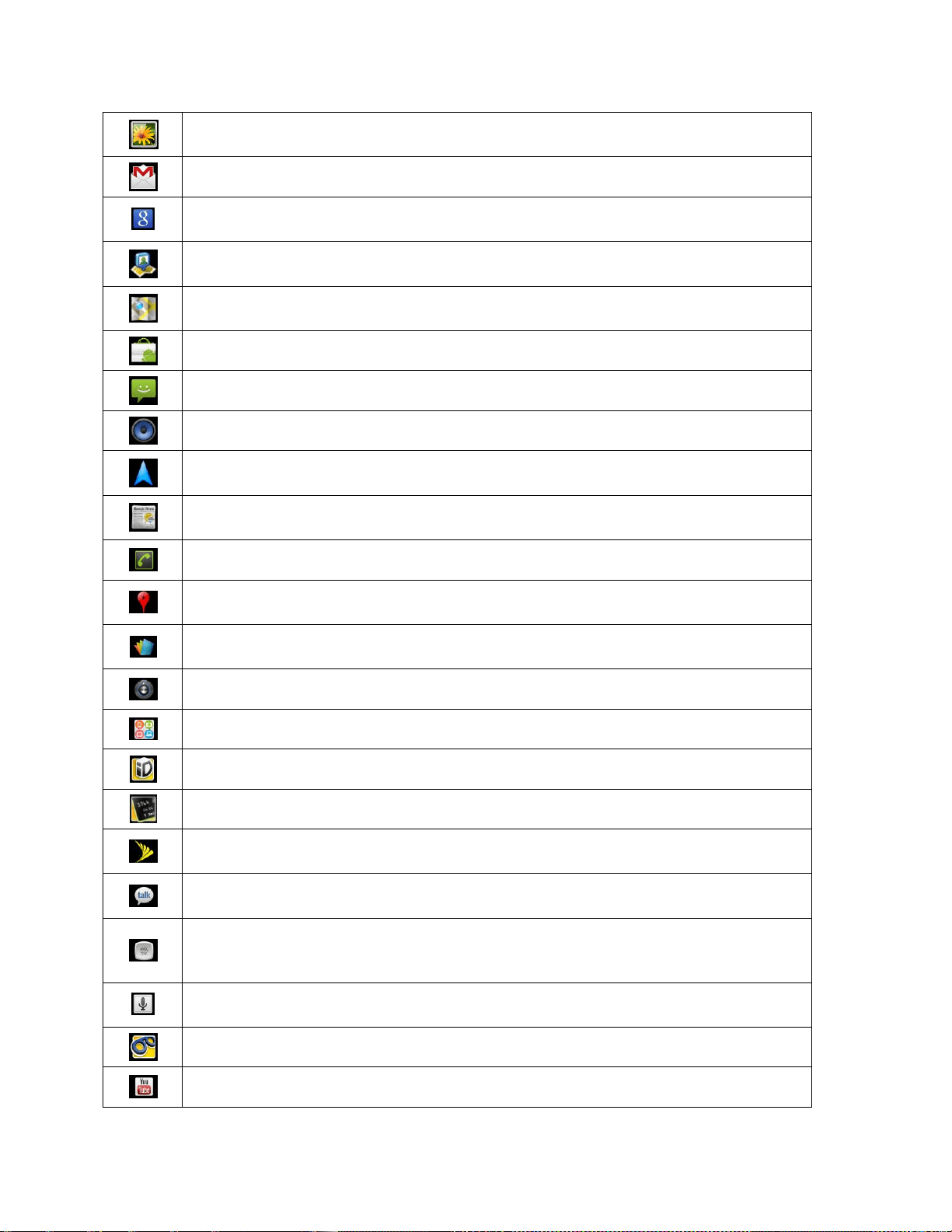
Device Basics 31
Gallery – Displays a Gallery of camera images and video saved on your
microSD™ card .
Gmail – Provides access to your Gmail account .
Google Search – Displays the Quick Search Box to search for a key term both
on your device and the Web.
Latitude – Lets you see your friends' locations and share yours with them. The
application also lets you see your friends' locations on a map or in a list.
Maps – Launches a dynamic map that helps you find local businesses, locate
friends, view maps and get driving directions.
Market – Browse, search for, and download applications on the Android Market.
Messaging – Provides access to your text and multimedia messages.
Music – Launches the Music Player.
Navigation – Launches the GPS Navigation feature on your phone, allowing you
to get quick turn-by-turn directions.
News & Weather – Launches the application that allows you to stay up to date
on news and weather.
Phone – Accesses the phone keypad.
Places – Allows others to find your business on local search results using either
Google Search or Google Maps.
Polaris Office – Launches the Polaris Office application so that you can view,
create, and edit document files on your device.
Settings – Accesses the device‘s Settings menu.
SmartShare - Accesses the SmartShare application.
Sprint ID - Accesses the Sprint ID application.
Sprint Mobile Wallet - Accesses the Sprint Mobile Wallet application.
Sprint Zone – Accesses links to Sprint Zone services like Account Information,
What‘s New, Suggested Apps, and other promotional content.
Talk – Launches the Google Talk application that lets you chat with family and
friends over the Internet for free.
Voice Dialer – Launches your device‘s automatic speech recognition (ASR)
software, called Voice Control, to dial a phone number in our Contacts or to
launch phone functions .
Voice Search – Launches your device‘s speech recognition software and
initiates a Google search based on the recognized speech.
Voicemail – Launches Voicemail.
YouTube – Launches the YouTube application.

Device Basics 32
Note: The Email application can access both Exchange Server-based email (such as Work
email) and other Internet-based email providers such as Yahoo! and Gmail.
Customizing Your Home Screen
You can customize your Home screen by doing the following:
● Creating Shortcuts
● Adding Widgets
● Creating Contact shortcuts
● Creating Folders
● Changing the Background (Wallpaper)
Creating Shortcuts
Shortcuts are different from the Home screen Widgets. Shortcuts can access a specific contact,
activate a feature, action, or launch an application.
To add a shortcut from the Application tab:
1. Tap to access the Home screen.
2. Select a location (screen) for your new shortcut by scrolling across your available
screens until you reach the desired one. (See Home Screen Overview.)
3. Tap to reveal all your current applications. By default, the applications are listed in a
grid view.
4. Scroll down through the list and locate your desired application.
5. Touch and hold the on-screen icon. This creates an immediate shortcut of the selected
icon and closes the Applications screen. The new shortcut then appears to hover over
the Home screen.
Note: The same shortcut can be added to any of the available screens (Home or Extended).
The application you add to the screen will still appear within the Applications screen.
6. While holding the on-screen icon, position it on the current screen. Once complete,
release the screen to lock the shortcut into its new position.
To add a shortcut via the Home screen:
1. Tap to access the Home screen.
2. Touch and hold on an empty area of the screen.

Device Basics 33
3. From the Add to Home screen window, tap Shortcuts.
4. Tap a selection from the list. Default options include:
Applications
Bookmark
Contact
Direct dial
Direct message
Directions & Navigation
Email
Gmail label
Music playlist
Settings
5. Follow the on-screen instructions (if necessary) to add the new shortcut to your current
Home screen.
To delete a shortcut:
1. Tap to activate the Home screen.
2. Touch and hold the desired shortcut. This unlocks it from its location on the current
screen.
3. Drag the icon over the Trash and release it.
Adding and Removing Widgets
Widgets are self-contained applications that can be accessed through your Application Key or
on the Home or Extended screens. Unlike a shortcut, this Widget appears as an on-screen
application.
To add a Widget:
1. Tap to access the Home screen.
2. Touch and hold on an empty area of the screen.
3. From the Add to Home screen window, tap Widgets.
4. Tap an available Widget to place it on your current screen.

Device Basics 34
Default widgets include : Analog clock, Calendar, Google Search, Home screen
tips, Latitude, Market, Music, News & Weather, Picture frame, Power Control,
Rate Places, Traffic, Tutorial #1, Tutorial #2, Tutorial #3, Tutorial #4, Tutorial #5,
and YouTube.
To remove a Widget:
1. Go to the Home screen on which the widget is located.
2. Touch and hold the widget. This unlocks it from its location on the current screen.
3. Drag the widget over the Trash and release it.
This action does not delete the Widget, just removes it from the current screen.
To place a Widget onto a different screen
1. Touch and hold the widget you want to move.
2. Drag the widget to the edge of the screen (the left side if moving to a screen located on
the left, right side if moving to a screen located on the right).
3. After about one second, the current screen will change. Repeat until you get to the
desired screen.
Creating and Managing Folders
Folders can be located on any of the available screens and can contain multiple Shortcuts or
different Contact entries
To create a folder onscreen:
1. Tap to activate the Home screen.
2. Touch and hold on an empty area of the screen.
3. From the Add to Home screen window, tap Folders.
4. Tap an available folder type to place it on your current screen.
Choices include New folder, All contacts, Contacts with phone numbers, Recent
documents, or Starred contacts.
Note: Starred contacts are those Contact entries you have tagged as very important.

Device Basics 35
Changing the Device's Wallpaper
To change the Home screen wallpaper:
1. From the Home screen, tap > Wallpaper.
– or –
Touch and hold an empty spot on the Home screen, then tap Wallpapers.
2. Tap Gallery, ID wallpapers, LG wallpapers, Live wallpapers, or Wallpapers.
Gallery to use a picture saved on your device as a wallpaper. You can crop the
picture before setting it as a wallpaper.
ID wallpapers to open the available wallpapers that were included in your Sprint ID
pack.
LG wallpapers to open available LG wallpapers.
Live wallpapers to open a list of animated wallpapers installed on your device. Live
wallpapers can be animated or even interactive. More Live wallpapers are available
on the Android Market.
Wallpapers to open a screen of wallpaper images saved on your device. Slide the
thumbnail images left and right to view the available images.
3. Tap Set wallpaper or Save.
Accessing Recently-Used Applications
Your device keeps a running list of your eight most recently used applications.
1. Touch and hold to open the recently-used applications window.
2. Tap an icon to open the related application.
Changing the Screen Orientation
This device is capable of changing the orientation of screen content when the orientation of the
device itself has changed. The device‘s built-in accelerometer senses movement and changes
its angle/orientation. Note that some of the screens, applications and widgets do not support
orientation changes.
The automatic screen orientation feature can be manually enabled to change the orientation for
all enabled screens when rotation is detected.
Note: An example of a screen that automatically re-orients by moving the device is the
Messaging screen. This only requires you turn the device to a horizontal position.

Device Basics 36
To manually activate the auto-rotate feature:
1. Tap > > Settings > Display.
2. Tap Auto-rotate screen to enable (a green checkmark displays) or disable the screen
auto-rotation.
Displaying Your Phone Number
Display your phone number and other information about your phone and account.
► Tap > > Settings > About phone > Status.
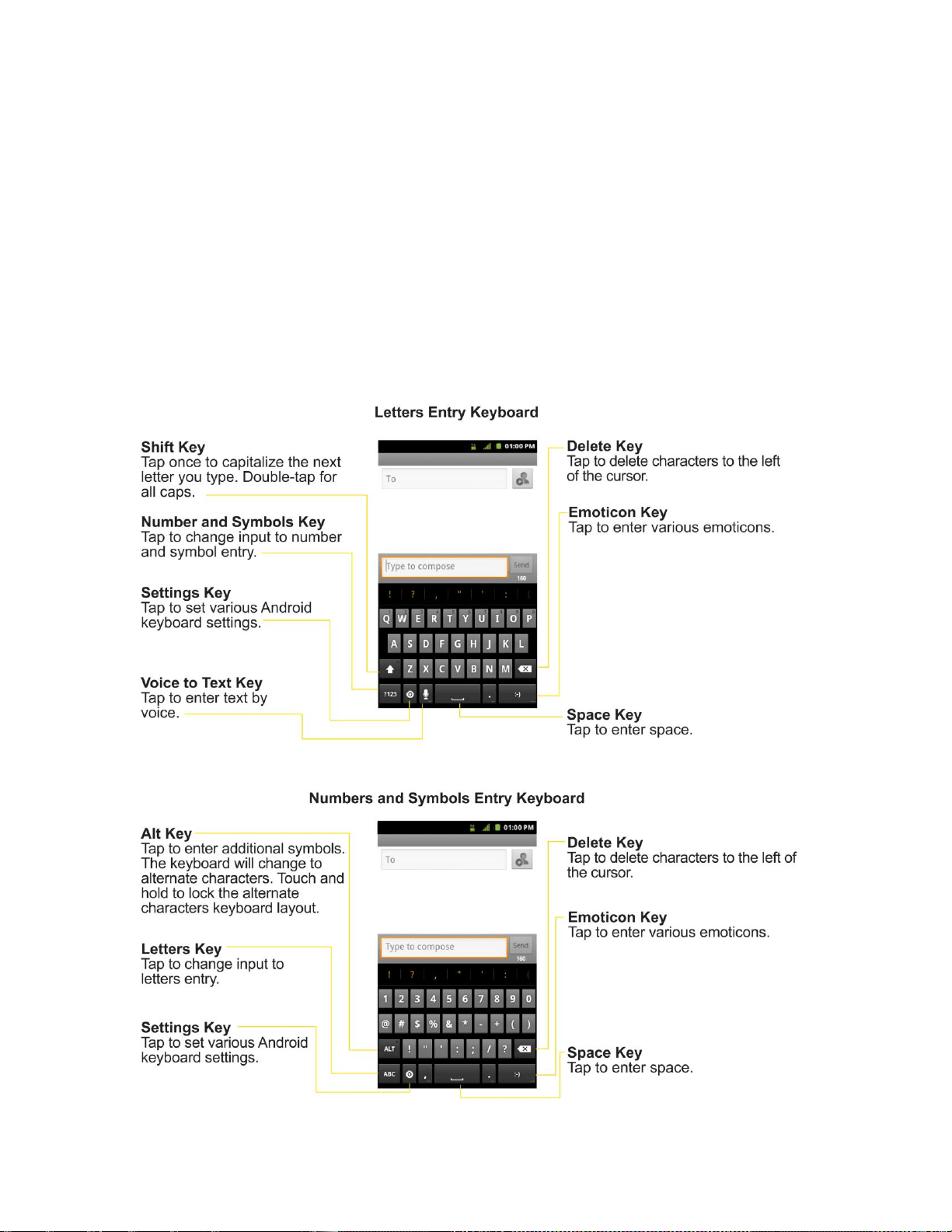
Device Basics 37
Entering Text With the On-screen Keyboard
The on-screen keyboard displays automatically when you tap a text entry field. To manually
display the keyboard, simply touch a text field where you want to enter text.
There are two types of methods that you can use: Android keyboard and Swype.
To select the keyboard:
1. Touch and hold the text entry field and tap Input method.
2. Tap the method you want to use: Android keyboard or Swype.
Using Android keyboard

Device Basics 38
1. Tap a text field where you want to enter text.
2. Enter the desired text.
To enter numbers or symbols, tap .
To enter letters again, tap .
To configure Android keyboard settings, tap .
• Vibrate on keypress allows you to activate a vibration sensation as you enter
text using the keypad.
• Sound on keypress allows you to activate a sound sensation as you enter text
using the keypad.
• Popup on keypress displays the larger image of each key you tap.
• Touch to correct words underlines a word in a text field if you tap the word and
the keyboard has suggestions for other words you may have intended.
• Auto-capitalization allows you to automatically capitalize the first letter of a
sentence.
• Show settings key allows you to set whether to display the Settings Key or
always hide it.
• Voice input allows you to set on which on-screen keyboard you want the voice-
input Microphone Key or turn voice input off.
• Input Language allows you to select the current text input language. The default
language depends on the language set when you first activated the phone.
• Quick fixes allows you to correct some common misspellings as you type.
• Show suggestions shows you suggested words in a strip above the onscreen
keyboard as you type.
• Auto-complete allows you to automatically enter a suggested word (highlighted
in the strip above the keyboard) when you enter a space or punctuation.
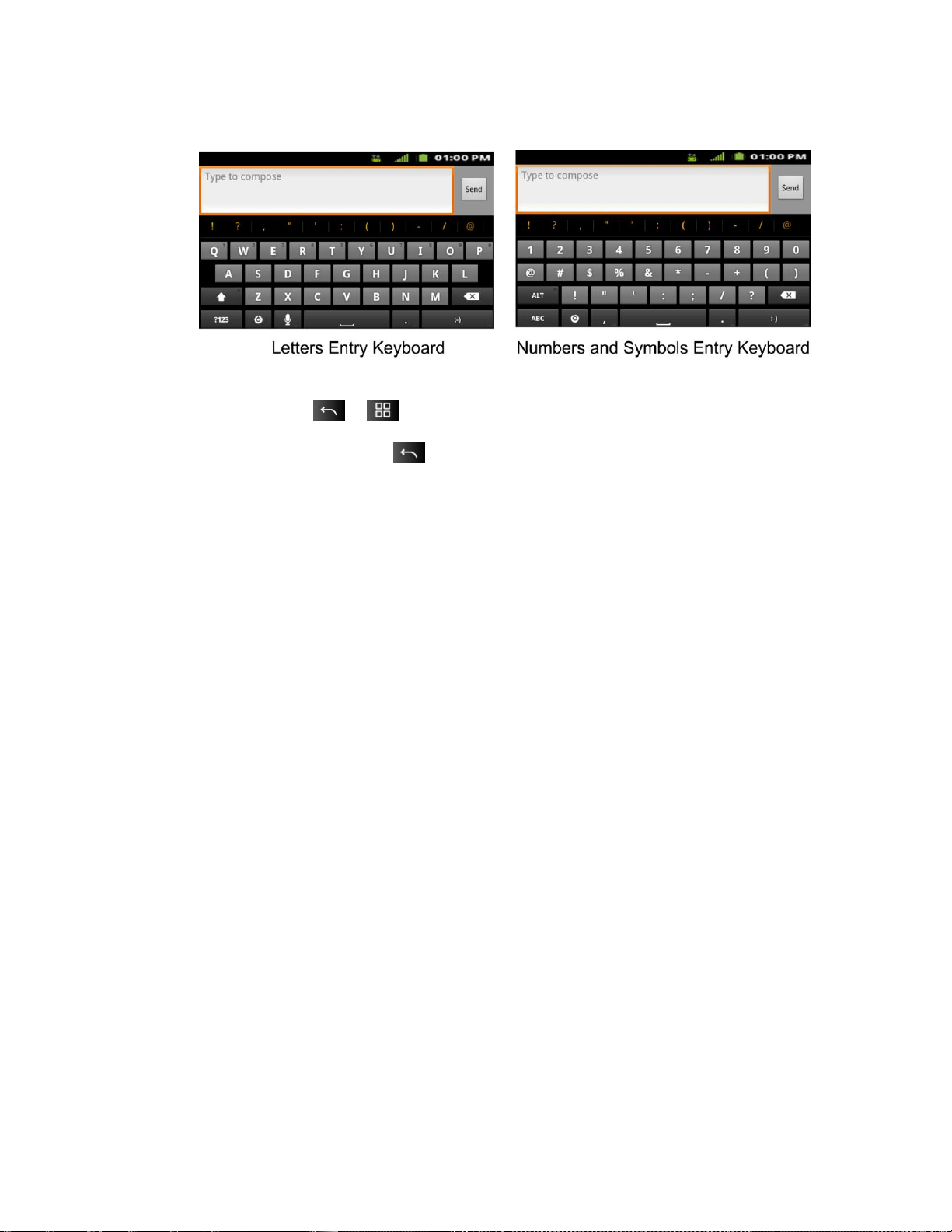
Device Basics 39
Rotate the screen to a horizontal position to use the larger keyboard.
Note: If you do not want the screen to change orientations automatically, uncheck the Auto-
rotate screen. Tap > > Settings > Display and deselect Auto-rotate screen.
3. When you finished typing, tap to close the keyboard.
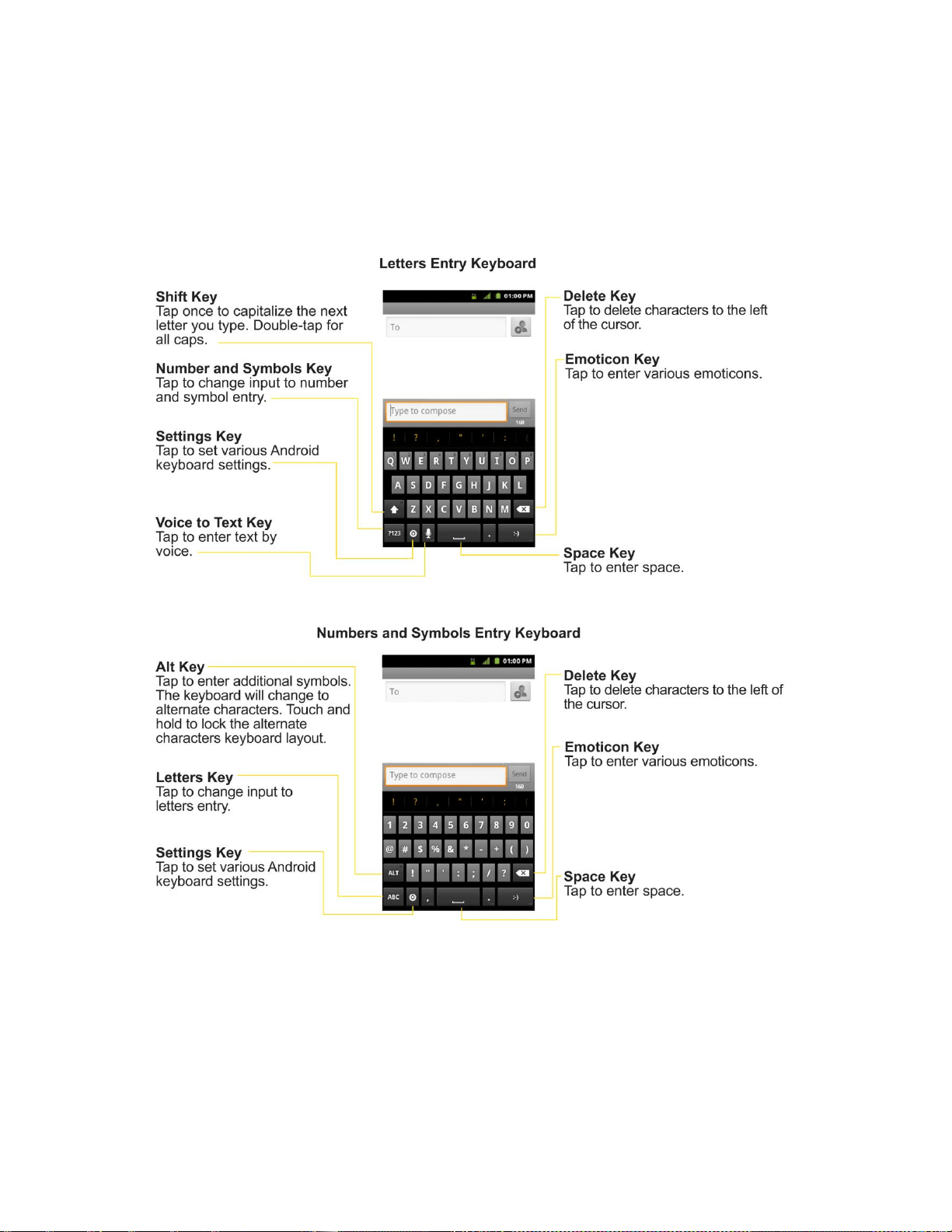
Device Basics 40
Using Swype Method
Swype is a text entry method that allows you to enter a word by sliding your finger from letter to
letter, lifting your finger between words. Swype uses error correcting algorithms and a language
model to predict the next word. Swype also includes a predictive text system. For more
information, please refer to the Swype Tutorial and Help on your device.
► Create a squiggle (like an S shape) to create a double letter (such as ―pp‖ in ―apple‖).
► To enter a capitalized word, slide your finger above the top row of the keyboard and then
slide back down to the next letter(s).
► Move your finger over the apostrophe to enter contractions. For common punctuated
suffixes, lift your finger off between the suffix and the main part of the word.
To configure Swype settings:

Device Basics 41
1. When the Swype keyboard is displayed, tap
2. Tap Options.
3. Tap any of the following settings:
Language allows you to select the current text input language. The default language
depends on the language set when you first activated the phone.
Word prediction allows you to use a built-in word database to predict words while
entering text in Swype.
Audio feedback allows you to turn on sounds generated by the Swype application.
Vibrate on keypress allows you to activate a vibration sensation as you enter text
using the keypad.
Enable tip indicator allows you to turn on an on-screen flashing indicator that
provides helpful user information.
Auto-spacing allows you to automatically insert a space between words. When you
finish a word, just lift your finger and start the next word.
Auto-capitalization allows you to automatically capitalize the first letter of a
sentence.
Show complete trace allows you choose whether or not you want the complete
Swype path to display.
Word choice window sets the amount of times the word choice selection window
displays on the screen. Move the slider between Never or Always and tap OK.
Speed vs. accuracy sets how quickly Swype responds to onscreen input. Move the
slider between Fast Response (speed) or Error Tolerance (accuracy) and tap OK.
Swype help displays the Swype User Manual.
Tutorial provides an on-screen tutorial.
Tips for Editing Text
You can edit the text you enter in text fields and use menu commands to cut, copy, and paste
text, within or across most applications.
To cut/copy and paste the text:
1. Touch and hold the text field that contains the text.
2. Tap Select word or Select all in the menu that opens. The selected text is highlighted in
orange, with a tab at each end of the selection.

Device Basics 42
3. Drag either selection tab to expand or reduce the range of selected text.
To cancel the selection, simply tap unselected text or empty area.
4. Tap the selected text.
5. When the pop-up menu opens, tap Cut or Copy.
6. Place the cursor on the location where you want to paste the text.
7. Touch and hold the text field.
8. When the pop-up menu opens, tap Paste. The text that you pasted also remains in the
device‘s memory (temporarily), so you can paste that same text in another location.
Creating a Google Account
Your Google Account
You must create and/or sign into a Google Account to use Gmail
TM
, Google Talk
TM
, Google
Calendar
TM
, and other Google Apps. Signing into a Google Account is also necessary to
download applications from the Android Market
TM
, to sync your data (if applicable) with the
Google servers, and to take advantage of any other available Google services on your device.
If you don‘t have a Google Account, you will be prompted to create one. If you have an
enterprise account through your company or other organization, your IT department may have
special instructions on how to sign into that account.
1. From a computer, or from your device's Browser, navigate to www.google.com.
2. On the main page, select Sign-in > Create an account now.
3. Follow the on-screen prompts to create your free account.
4. Log into your provided email address, locate the email from Google, and respond to the
new email to both confirm and activate your new account.
Signing into Your Google Account
1. Launch an application that requires a Google account (such as Android Market or Gmail).
2. Click Next > Sign in.
Note: If you do not already have a Google account, tap Create and follow the on-screen
prompts to create your new account.
3. Touch the Username and Password fields and enter your information.
4. Tap Sign in. Your device then communicates with the Google servers to confirm your
information.

Device Basics 43
Important: Some applications, such as Calendar, work only with the primary Google account
(the first Google account set up with your device). If you plan to use more than
one Google Account with your device, be sure to sign into the one you want to
use with such applications first. When you sign in, your contacts, Gmail
messages, Calendar events, and other information from these applications and
services on the Web can be synchronized with your device. You will be prompted
to sign in or to create a Google Account the first time you start an application that
requires one, such as Gmail or Android Market.
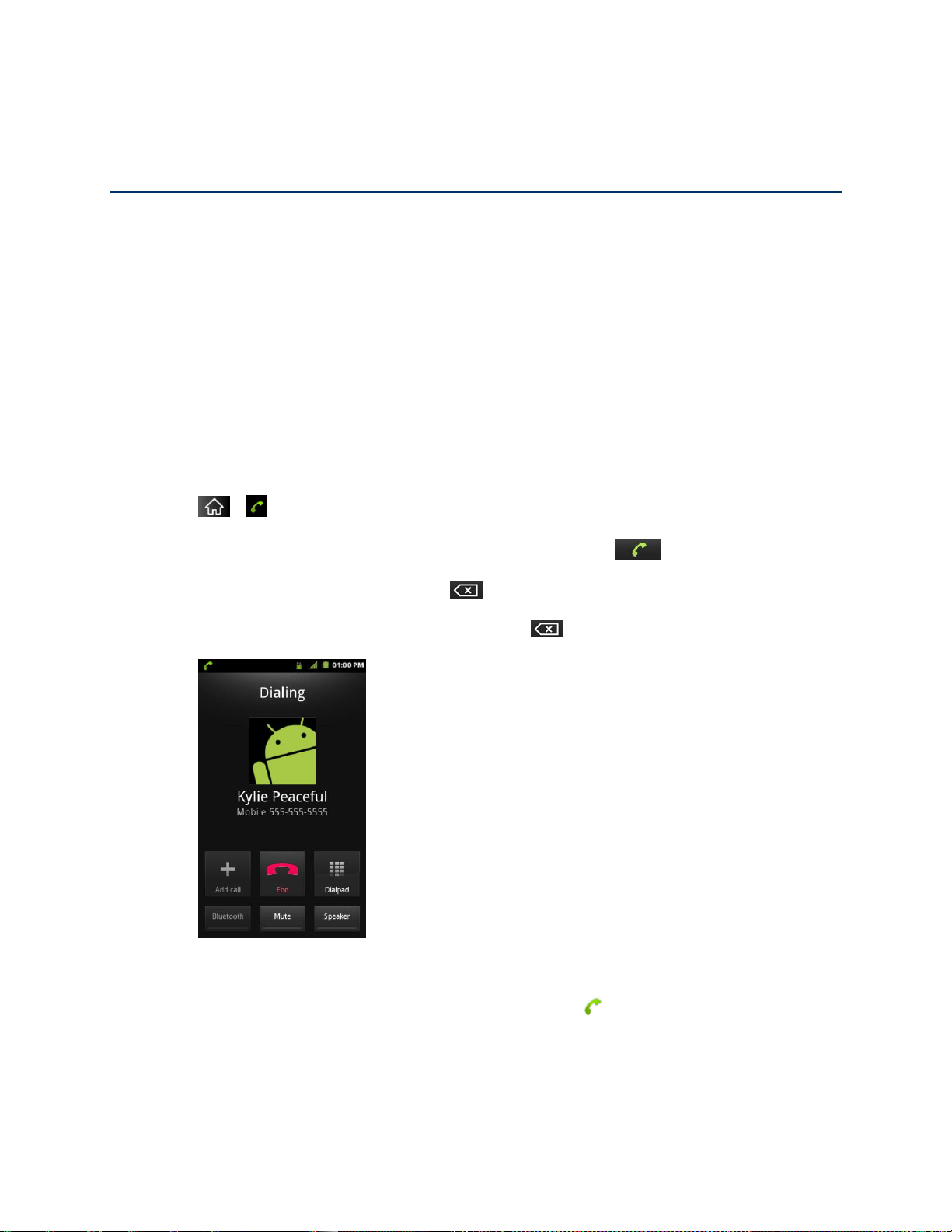
Phone 44
Phone
With the Sprint National Network and your device‘s phone, you can enjoy clear calling across
the country.
Making Calls
Answering Calls
Saving a Phone Number
Finding a Phone Number
Making Calls
There are several convenient ways to place calls from your device.
1. Tap > .
2. Enter a phone number using the on-screen dialpad and tap .
If you enter a wrong number, tap to erase digits one by one.
To erase the entire number, touch and hold .
Options during a call:
You can open other applications during a call. The will appear in the Status Bar
while the call is underway.
Press the Up/Down Volume Keys to adjust the call volume.

Phone 45
Use the on-screen buttons to add another call, put a call on hold, to use the
speakerphone, and for other options, as described in In-Call Options.
3. Tap to end the call.
Tip: To redial your last outgoing call, follow step 1 to access the Dialer, tap the Call log tab,
locate the call entry and tap .
You can also make calls from your Contacts list, from the Call log, and using Voice Dialer.
Dialing Options
After entering numbers with the dialpad, you can use the following dialing options.
Tap to view the following options:
● Add to contacts: Tap to add the entered number as a new contact, or to an existing
contact entry. (See Saving a Phone Number.)
● Add 2-sec pause: Enter digits and select this option to introduce a two-second pause
before the following sequence of digits is dialed by the phone. (See Dialing and Saving
Phone Numbers With Pauses.)
● Add wait: Enter digits and select this option to have the phone dial the preceding set of
digits first, and then dial the following sequence of digits when you tap Yes on the pop
up screen. (See Dialing and Saving Phone Numbers With Pauses.)
Missed Call Notification
A missed call icon displays when you do not answer a call. When you do not answer an
incoming call, is displayed in the Status Bar.
To display the Missed Call entry from the notification screen:
1. Touch and drag the Status Bar to the bottom of the screen to open the Notification Panel.
2. Tap the missed call notification. The Call log screen will be displayed. (To dial the phone
number, tap .)
Calling Emergency Numbers
You can place calls to 911 (tap and dial ), even if your phone is
locked or your account is restricted.
Note: When you place an emergency call, your phone automatically enters Emergency mode.

Phone 46
During an emergency call, tap an option.
● Speaker On to activate speakerphone mode. (If you are in speakerphone mode, the
option is displayed as Speaker Off to deactivate.)
● Dialpad/Hide to show or hide the onscreen dialpad.
● End to end the current call.
To exit Emergency mode:
1. Tap to end the emergency call.
2. Tap Exit on the Emergency Call Back mode.
Enhanced 911 (E911) Information
This phone features an embedded Global Positioning System (GPS) chip necessary for utilizing
E911 emergency location services where available. When you place an emergency 911 call, the
GPS feature of your phone seeks information to calculate your approximate location. Depending
on several variables, including availability and access to satellite signals, it may take up to 30
seconds or more to determine and report your approximate location.
Important: Always report your location to the 911 operator when placing an
emergency call. Some designated emergency call takers, known as Public
Safety Answering Points (PSAPs) may not be equipped to receive GPS location
information from your phone.
TTY Use With Sprint Service
A TTY (also known as a TDD or Text Telephone) is a telecommunications device that allows
people who are deaf, hard of hearing, or who have speech or language disabilities, to
communicate by telephone.
Your device is compatible with select TTY devices. Please check with the manufacturer of your
TTY device to ensure that it is compatible with digital cell phones. Your phone and TTY device
will connect via a special cable that plugs into your device's headset jack. If this cable was not
provided with your TTY device, contact your TTY device manufacturer to purchase the
connector cable.
To turn TTY Mode on or off:
1. Tap > > Settings > Call settings > TTY mode.
2. Tap TTY Off to turn TTY mode off.
– or –

Phone 47
Tap any of the following to enable the feature:
TTY Full, TTY HCO, or TTY VCO.
To access the state Telecommunications Relay Service (TRS) for assistance with TTY calls:
► Dial to reach an operator.
For additional information about Sprint Relay Services and TTY compatibility, call Sprint Relay
Customer Service at 800-676-3777 or visit www.sprintrelay.com.
Note: In TTY Mode, your device will display the TTY access icon. When enabled, TTY mode
may impair the audio quality of non-TTY devices connected to the headset jack.
WARNING: 911 Emergency Calling Sprint recommends that TTY users make emergency
calls by other means, including Telecommunications Relay Services (TRS),
analog cellular, and landline communications. Wireless TTY calls to 911 may be
corrupted when received by public safety answering points (PSAPs), rendering
some communications unintelligible. The problem encountered appears related
to software used by PSAPs. This matter has been brought to the attention of the
FCC, and the wireless industry and the PSAP community are currently working to
resolve this.
In-Call Options
Once you initiate a call, you will see these on-screen options:
● Add call to initiate a 3-way call.
● End to end the call.
● Dialpad to display the dialpad.
● Bluetooth (Only available when a Bluetooth headset is connected to your phone) to
conduct the call via the Bluetooth headset for hands-free conversation. (For details
about pairing the phone with a Bluetooth headset, see Pairing Bluetooth Devices.)
Note: When using the Bluetooth headset during a call, the Ongoing Call notification icon is
blue in the Status Bar.
● Mute to mute the microphone during a call. The Mute button lights up and is
displayed on the Status Bar to indicate the microphone is muted. To unmute the
microphone, tap Mute again.
● Speaker to turn the speakerphone on or off. The Speaker button lights up and is
displayed on the Status Bar to indicate that the speakerphone is on.

Phone 48
WARNING: Because of higher volume levels, do not place the device near your ear while
using the speakerphone.
Dialing and Saving Phone Numbers With Pauses
You can dial or save phone numbers with pauses for use with automated systems, such as
voicemail or credit card billing numbers.
There are two types of pauses available on your device:
● 2-Second Pause automatically sends the next set of numbers after two seconds.
● Hard Pause (Wait) sends the next set of numbers when you tap .
Note: You can have multiple pauses in a phone number and combine two-second and hard
pauses.
To dial or save phone numbers with pauses:
1. Enter the phone number.
2. Tap > Add 2-sec pause or Add wait.
3. Enter additional numbers.
4. Tap to dial the number.
– or –
Tap > Add to contacts to save the number in your Contacts.
Note: When dialing a number with a hard pause (Wait) , tap Yes on the pop up to send the
next set of numbers.
Dialing From the Contacts List
Dial directly from your contacts list.
1. Tap > > Contacts.
– or –
Tap > > Contacts.
2. Find a contact to call and tap it to open its entry, then tap .
– or –

Phone 49
Touch and hold the contact. When a context menu opens, tap Call contact.
Using Direct Dialing
With Direct Dialing, you are able to directly save a contact to your Home screen.
1. Tap > > Add > Shortcuts > Direct dial.
2. Tap a contact from your Contacts List. The contact will appear on your Home screen.
To use Direct Dial:
► Simply tap the contact on the Home screen.
Plus (+) Code Dialing
When placing international calls, Plus Code Dialing automatically enters the international access
code for your location (for example, 011 for international calls made from the U.S.).
1. In the Dial screen, touch and hold until you see a ―+‖ on the display screen.
2. Dial the country code and phone number, and then tap . (The phone automatically
prepends the access code for international dialing, followed by the country code and
phone number.)
Answering Calls
When you receive a phone call, the Incoming Call screen opens with the caller ID and any other
available information (such as the caller's name, if saved in the Contact‘s list). The most recent
incoming calls are recorded in the Call log. (See Call Log.)
To answer a call:
► Touch and drag to the right.
If you were already on a call, the first call is placed on hold while you answer the new call. To
silence the ringer of an incoming call, press the down Volume Key.
Your phone notifies you of incoming calls in the following ways:
● The phone rings or vibrates.
● The backlight illuminates.
● The screen displays an incoming call message.

Phone 50
To decline a call and divert it to voicemail:
► Touch and drag to the left.
The caller is sent directly to your voicemail box to leave a message.
Answering a Roam Call With Call Guard Enabled
Call Guard is an option that helps you manage your roaming charges when making or receiving
calls while outside the Nationwide Sprint Network. Please see Roaming Settings for more
information about roaming.
► Tap Yes to answer the call. (See Call Guard for additional information.)
Note: When your phone is off, calls go directly to voicemail
Ending a Call
When you have finished the conversation, please make sure to tap .
► Tap .
– or –
If you opened other applications while on a call:
1. Open the Notifications Panel.
Touch and drag the Status Bar to the bottom of the screen.
2. Tap Current call to redisplay the Phone application.
3. Tap .
Phone Call Options
Your phone application provides many useful features and options to help you make the most of
your calling experience.
Caller ID
Caller ID allows people to identify a caller before answering the phone by displaying the number
of the incoming call. If you do not want your number displayed when you make a call, follow
these steps.
1. Tap > (Tap the Phone tab if necessary).

Phone 51
2. Tap .
3. Enter a phone number and tap .
To permanently block your number, call Sprint Customer Service.
Call Waiting
When you‘re on a call, Call Waiting alerts you of incoming calls by sounding a beep instead of a
ring. Your device's screen informs you that another call is coming in and displays the caller‘s
phone number (if it is available).
To respond to an incoming call while you’re on a call:
► Before accepting the incoming call, tap and drag one of the following onscreen options:
Answer to answer the new call. The first caller is placed on hold.
Decline to send the call to your voicemail box.
To switch back to the first caller:
► From the In-Call options screen, tap Swap calls.
Tip: For those calls where you don‘t want to be interrupted, you can temporarily disable Call
Waiting by pressing before placing your call. Call Waiting is
automatically reactivated once you end the call.
Making a 3-Way Call
With 3-Way Calling, you can talk to two people at the same time. When using this feature, the
normal airtime rates will be charged for each of the two calls.
1. Tap > (Tap the Phone tab if necessary).
2. Make your call to the first recipient.
3. Once you have established the connection, tap Add call.
4. Enter the second caller‘s phone number and tap or select a number from your
Contacts. (Your first call is automatically put on hold.)
5. When you‘re connected to the second party, tap Merge calls to combine both calls into a
single 3-way call. If one of the people you called hangs up during your call, you and the
remaining caller stay connected. If you initiated the call and are the first to hang up, all
callers are disconnected.

Phone 52
Call Forwarding
Call Forwarding lets you forward all your incoming calls to another phone number – even when
your phone is turned off. You can continue to make calls from your device when you have
activated Call Forwarding.
To activate Call Forwarding:
1. Tap > (Tap the Phone tab if necessary)..
2. Tap .
3. Enter the area code and phone number to which you want your calls forwarded.
4. Tap . (You will hear a tone to confirm the activation of Call Forwarding and the call
will end.)
To deactivate Call Forwarding:
1. Tap > (Tap the Phone tab if necessary)..
2. Tap . (You will hear a tone to confirm the deactivation and
the call will end.)
Note: You are charged a higher rate for calls you have forwarded.
Call Log
The Call Log tab of the Phone application lists all recent incoming, outgoing, and missed calls.
Viewing the Call Log
Call Log Options
Making a Call From the Call Log
Saving a Number From the Call Log
Prepending a Number From the Call Log
Clearing the Call Log
Viewing the Call Log
The Call log is a list of the most recently placed, received, or missed calls. It offers a convenient
way to redial a number, return a call, or add a number to your Contacts.
To open the Call log:
► Tap > > Call log.
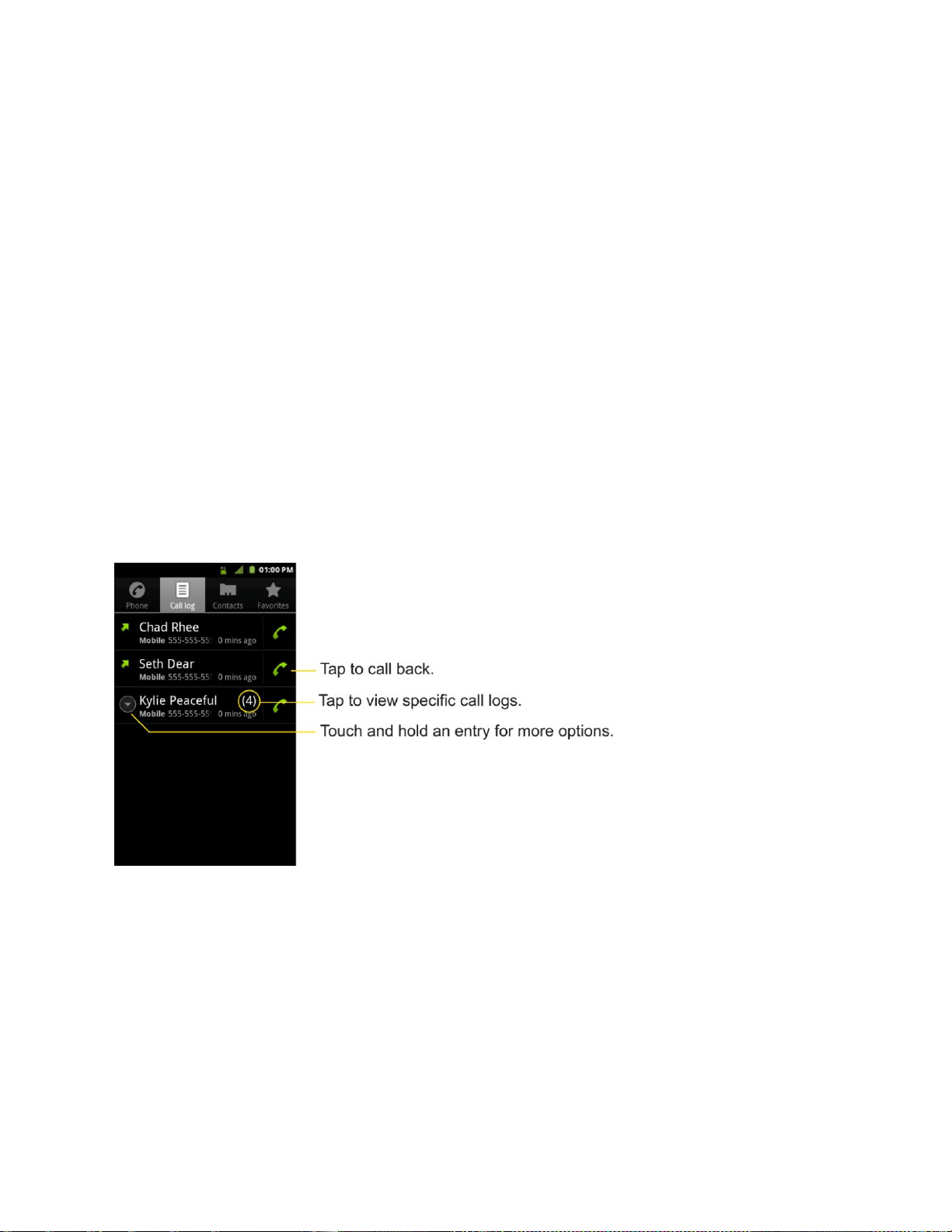
Phone 53
Calls are listed in the Call log tab, the most recent calls are located at the top of the list. Scroll
down to see older entries.
Note: Call log records only calls that occur while the device is turned on. If a call is received
while your device is turned off, it will not be included in the call log. If you return a call
from the voicemail menu, it will not be included in your phone‘s Call log.
Call Log Options
Tap an entry to view the date and time of the call and call duration. The following options are
available:
● Call again to make a call.
● Send text message to send a text message.
● Add to contacts to add an entry's number to your Contacts.
● View contact to view the contact entry.
If several calls were made to one number or received by one number, the calls are displayed as
one entry. When you tap this entry, the individual call logs are opened.
You can also touch and hold the entry to open a menu with more options, to communicate with
that contact in other ways.
● Call to make a call.
● View contact (for entries saved in Contacts) to view contact information.
● Edit number before call to edit a number before you redial.
● Send text message to send a text message.
● Add to contacts to add an entry's number to your Contacts.

Phone 54
● Remove from call log to remove the entry from the Call log.
Making a Call From the Call Log
► From the Call log, tap at the right of the entry.
Saving a Number From the Call Log
1. Tap an entry and tap Add to contacts.
– or –
Touch and hold an entry and tap Add to contacts.
2. Tap Create new contact.
– or –
Search for an existing contact name and tap an existing contact to add the new number
to that existing contact. (For more information about creating and editing contacts, see
Contacts.).
Note: You cannot save phone numbers already in your Contacts or from calls identified as No
ID or Restricted.
Prepending a Number From the Call Log
If you need to make a call from the Call log and you are outside your local area code, you can
add the appropriate prefix by prepending the number.
1. Touch and hold an entry and tap Edit number before call.
2. Tap the area immediately to the left of the phone number and enter the prefix.
3. Tap to call the number.
– or –
Tap > Add to contacts to save the amended number in your Contacts.
Clearing the Call Log
1. From the Call log, tap > Clear call log.
2. If you are certain you want to clear the Call log, tap OK.
– or –
Tap Cancel.

Phone 55
Saving a Phone Number
You can store phone numbers and contact entries in your phone. You can also synchronize
them with your Google
TM
Account, Microsoft Exchange account, or other accounts that support
syncing contacts. (For more information, see Contacts.)
To save a number from standby mode:
1. Tap > .
2. Enter a phone number and tap and tap Add to contacts.
3. Tap Create new contact.
– or –
Search for an existing contact name and tap an existing contact to add the new number
to that existing contact.
For more information about creating and editing contacts, see Contacts.
Finding a Phone Number
Your contacts are displayed alphabetically in a list. It is easy to search for a contact by name.
1. Tap > > Contacts.
– or –
Tap > .
2. Scroll and search for the contact or start entering the name of the contact you‘re
searching for. As you type, contacts with matching names will appear above the
keyboard.
3. Tap a matching contact in the list to open its entry. To dial a number, tap .
Voice Dialer
You can use your device‘s automatic speech recognition (ASR) software, called Voice Dialer, to
dial a phone number in your Contacts or to launch device functions without having to go through
the phone menus. All you have to do is to talk into the phone, and ASR will recognize your voice
and complete tasks by itself.
Voice Dialing
Opening Menus With Voice Dialer

Phone 56
Text-to-Speech
Voice Search
Important Note: The Voice Control (Speech-to-Action) feature will not launch if you are
currently in an active menu.
Activating Voice Dialer
► Tap > > Voice Dialer.
The screen displays ―Listening‖ and the phone prompts you to say the name of the command
you want to use. To complete your task, simply follow the voice prompts or touch an onscreen
option.
Available ASR commands include:
● Call <Name> to call an entry in your Contact List. (See Making a Voice Call With Voice
Dialer.)
● Dial <#> to call a spoken phone number.
● Redial to call back the last Contact you dialed.
● Open <Menu> to jump directly to menu items or applications. (See Opening Menus With
Voice Dialer.)
Tip: Use Voice Dialer in a quiet environment so it can accurately recognize your commands
Making a Voice Call With Voice Dialer
1. Tap > > Voice Dialer.
2. When you see ―Listening,‖ say ―Call‖ followed by the name and the label for the phone
number you wish to call. For example, say ―Call John Smith Mobile.‖ The device dials
the number stored for the contact ―John Smith‖ with the label ―Mobile.‖
If the location is not recognized or the name does not have a phone number stored in
Contacts, your device will display a list of possible options.
If a name has only a single number, or if you know the name but are not sure which
number to call, say ―Call‖ followed by the name only. For example, say ―Call John.‖
If the name is recognized and there is only one phone number for the name, your
device immediately places the call.
Calling a Phone Number with Voice Dialer
1. Tap > > Voice Dialer.

Phone 57
2. When you see ―Listening,‖ say ―Dial‖ followed immediately by a phone number; for
example, say “Dial 555 555 5555.‖
3. Speak naturally and clearly and remember to speak one digit at a time (1-800 should be
pronounced ―One Eight Zero Zero.)
Opening Menus With Voice Dialer
The Voice Dialer application allows you to directly open many menu items or applications by
saying voice commands.
1. Tap > > Voice Dialer.
2. When you see ―Listening,‖ say ―Open‖ followed by a menu or application.
3. If a list of valid actions is displayed, tap an action, the device opens the selected menu.
Text-to-Speech
The text-to-speech feature allows the device to provide a verbal readout of onscreen data such
as messages and incoming caller information (based on Caller ID).
Text-to-Speech Settings
1. Tap > > Settings > Voice input & output > Text-to-speech settings.
2. Configure any of the following Text-to-Speech settings:
Listen to an example: Plays a short example of what the text-to-speech feature will
sound like on your device when activated.
Always use my settings: Allows you to override the application settings with those
configured within this menu.
Default Engine: Sets the speech synthesis engine to be used for spoken text.
Install voice data: Installs the voice data required for speech synthesis.
Speech rate: Allows you to adjust the rate at which the displayed text is spoken by
the device. Choose from: Very slow, Slow, Normal, Fast, and Very fast.
Language: Allows you to assign the language used by the verbal readout. Choose
from German (Germany), English (United Kingdom), English (United States),
Spanish (Spain), French (France), or Italian (Italy).
Pico TTS: Allows you to configure the Pico TTS language settings.

Phone 58
Voice Search
Voice Search uses built-in voice recognition software to listen to your spoken words, convert
those to text, then launch a Google search using that text.
1. Tap > > Voice Search.
2. Speak clearly into the microphone. If an error occurs, tap Speak again.
3. You can then touch a matching entry from the Google search page to direct you to the
item you are searching.

Device Settings 59
Device Settings
This section provides an overview of items you can change using your device‘s Settings menus.
Wireless & networks settings
Call settings
Roaming settings
Sound settings
Display settings
Location & security settings
Accounts & sync
To open Settings:
► Tap > > Settings.
– or –
Tap > > Settings.
Wireless & networks settings
This group of settings lets you control your device's Wi-Fi settings, Bluetooth, Tethering, VPN,
and Mobile networks.
Airplane mode
Airplane Mode (Flight mode) allows you to use many of your device‘s features, such as Games,
and Music, when you are in an airplane or in any other area where making or receiving calls or
data is prohibited. When you set your device to Airplane Mode, it cannot send or receive any
calls or access online data.
1. Press and hold to reveal the Phone options.
2. Tap Airplane mode.
– or –
1. Tap > > Settings > Wireless & networks.

Device Settings 60
2. Tap Airplane mode. (A green checkmark appears.) While in Airplane Mode, your
device‘s Status Bar will display .
To deactivate Airplane Mode:
1. Press and hold to reveal the Phone options.
2. Tap Airplane mode.
– or –
1. Tap > > Settings > Wireless & networks.
2. Tap Airplane mode to remove the checkmark.
Wi-Fi settings
Your device lets you take advantage of Wi-Fi hotspots for high-speed data access using
available computer networks. For details on your device’s Wi-Fi features and settings, see
Connecting to Wi-Fi Networks.
Bluetooth settings
Your device‘s Bluetooth capabilities let you use wireless headsets, send and receive pictures
and files, and more. For details on your device’s Bluetooth settings, see The Bluetooth Settings
Menu.
Tethering & portable hotspot settings
You can share your device‘s data connection with a computer by turning on the USB tethering.
You can also share your device's data connection with up to eight devices at once, by turning
your phone into a portable Wi-Fi hotspot. For details on your device‘s Tethering & portable
hotspot settings, see Sharing Your Device‘s Mobile Data Connection.
VPN settings
From your device, you can add, set up, and manage virtual private networks (VPNs) that allow
you to connect and access resources inside a secured local network, such as your corporate
network. For details on your device's VPN settings, see Virtual Private Networks (VPN).
Mobile networks settings
You can set whether to enable or disable data access on your device.
1. Tap > > Settings > Wireless & networks > Mobile networks.
2. Tap Data enabled to check or uncheck it.

Device Settings 61
Call settings
Your device's Call settings menu lets you configure International call options and TTY mode.
North American Dialing
Replace + code as needed for outgoing calls.
1. Tap > > Settings > Call settings.
2. Tap North American Dialing to check or uncheck it.
International Dialing
Set international dialing code for outgoing calls.
1. Tap > > Settings > Call settings > International Dialing (The North American
Dialing option must be disabled).
2. Enter the international dialing code and tap OK.
TTY mode
A TTY (also known as a TDD or Text Telephone) is a telecommunications device that allows
people who are deaf, hard of hearing, or who have speech or language disabilities, to
communicate by telephone. Your device is compatible with select TTY devices. Please check
with the manufacturer of your TTY device to ensure that it is compatible with digital cell phones.
Your phone and TTY device will connect via a special cable that plugs into your device's
headset jack. If this cable was not provided with your TTY device, contact your TTY device
manufacturer to purchase the connector cable.
To turn TTY Mode on or off:
1. Tap > > Settings > Call settings > TTY mode.
2. Tap TTY Off to turn TTY mode off, or tap TTY FULL, TTY HCO or TTY VCO.
Roaming Settings
With your device and global roaming service from Sprint Worldwide
SM
Wireless Service, you can
make phone calls and use wireless data services around the globe on compatible CDMA and
GSM/UMTS networks.
Roaming Icon
Your display screen always lets you know when you‘re off the Nationwide Sprint Network.
Anytime you are roaming, the device displays the roaming icon ( ). If you are roaming on a
digital system, you will see the roaming icon along with the text – Digital Roam – .

Device Settings 62
Roaming on Other Digital Networks
When you‘re roaming on digital networks, your call quality and security will be similar to the
quality you receive when making calls on the Nationwide Sprint Network. However, you may not
be able to access certain features, such as data services, depending on the available network.
Note: If you‘re on a call when you leave the Nationwide Sprint Network, your call will be
dropped. If your call is dropped in an area where you think Sprint service is available,
turn your phone off and on again to reconnect to the network.
Checking for Voicemail Messages While Roaming
When you are roaming off the Nationwide Sprint Network, you may not receive a notification of
new voicemail messages on your phone. Callers can still leave messages, but you will need to
periodically check your voicemail for new messages if you are in a roaming service area for an
extended period of time.
1. Dial your 10-digit wireless phone number.
2. When you hear your voicemail greeting, press .
3. Enter your passcode at the prompt and follow the voice prompts.
When you return to the Nationwide Sprint Network, voicemail notification will resume as normal.
Setting Roam Mode
Your phone allows you to control your roaming capabilities. By using the Roaming menu option,
you can determine which signals your phone accepts.
Choose from three different settings on your dual-band device to control your roaming
experience.
1. Tap > > Settings > Roaming.
2. Tap Domestic Data, International Data or both to place a checkmark and connect to
data service while roaming. (Requires Domestic Voice or International Voice.)
Note: With Data roaming unchecked, you can still transmit data with a Wi-Fi connection. See
Connecting to Wi-Fi Networks.
3. Tap System select to change the CDMA roaming mode.
Sprint Only to access only the home area mobile network, which is the Nationwide
Sprint Network. This option also prevents roaming on other networks.
Include Roaming to seek service on the Nationwide Sprint Network. When Sprint
service is unavailable, the device searches for an alternate system.

Device Settings 63
Call Guard
Call Guard makes it easy to manage your roaming by requiring confirmation before placing or
answering a roaming call.
To turn Call Guard on or off:
1. Tap > > Settings > Roaming > Roaming Guards.
2. Tap Voice(Domestic), Voice(International) or both to activate or deactivate this function.
When active, an extra key press is required for dialing when in a roaming area.
Note: Call Guard is turned off by default on your phone.
Voice dialing and speed dialing are not available when you are roaming with Call Guard
enabled.
To place roaming calls with Call Guard on:
1. Tap > (Tap the Phone tab if necessary).
2. Enter 1 + area code + the seven-digit number and tap .
3. Tap Yes.
To answer incoming roaming calls with Call Guard on:
1. Touch and drag to the right. (A message will be displayed notifying you that
roaming charges will apply.)
2. Tap Yes.
Data Roam Guard
Depending on service availability and roaming agreements, your phone may be able to access
data services while roaming on certain digital systems. You can set your device to alert you
when you are roaming off the Nationwide Sprint Network and try to use data services such as
messaging.
Note: Data Roam Guard is turned off by default on your phone.
To set your Data Roam Guard notification:
1. Tap > .
2. Tap Settings > Roaming > Roaming Guards
3. Tap Data(Domestic), Data(International) or both to place a checkmark and activate the
function.

Device Settings 64
To use data services when Data Roam Guard is active:
► When a pop-up notification appears informing you that data roam charges may apply,
tap Connect or Always Connect to connect.
Sound Settings
In the Sound settings menu, you can configure call and notification ringtones, audio volumes, as
well as some related settings.
Ringer Types
The phone ringtones alert you of incoming calls.
Selecting Ringtone for Voice Calls
1. Tap > > Settings > Sound > Phone ringtone.
2. Tap a ringtone to select it and to hear it. If you want to set the ringtone, tap OK. If not,
select another ringtone or tap Cancel.
Using a Song as a Ringtone
You can use a song as your phone ringtone, in place of one of the ringtones that come with the
phone.
1. Tap > > Music.
2. Touch and hold a song in your collection. In the pop-up menu, tap Use as phone
ringtone.
– or –
On the Playback screen, tap > Use as ringtone.
For details about using the Music application, see Music.
Adjusting the Device's Volume Settings
Adjust your device's volume settings to suit your needs and your environment.
1. Tap > > Settings > Sound > Volume.
2. Adjust each volume level.
Ringtone: Changes the volume of your call ringtones and notifications (if applicable).
Media: Changes the volume of your music, videos and other media.
Alarm: Changes the volume of your alarms.

Device Settings 65
Notification: If you deselect the checkmark (below the Alarm volume bar), you will
be able to set this volume level. This is the volume of the ringtone when you receive
a notification.
3. Tap OK.
Tip: You can adjust the ringer volume on the Home screen or Applications screen, or almost
any screen by using the Volume Keys on the right side of your device. In other
applications such as Music, YouTube, spoken directions, and other audio, the Volume
Keys control the volume of the application.
Vibrate and Silent Mode
To set your device to vibrate instead of making any sounds:
1. Tap > > Settings > Sound > Vibrate.
2. Tap one of the four options.
To set your device to always vibrate:
1. Tap > > Settings > Sound > Vibrate.
2. Tap Always.
To switch to silent mode:
1. Tap > > Settings > Sound.
2. Tap Silent mode. (A green checkmark will appear.)
– or –
Press the down volume button until you see on the screen.
– or –
On the default lock screen, drag to the left.
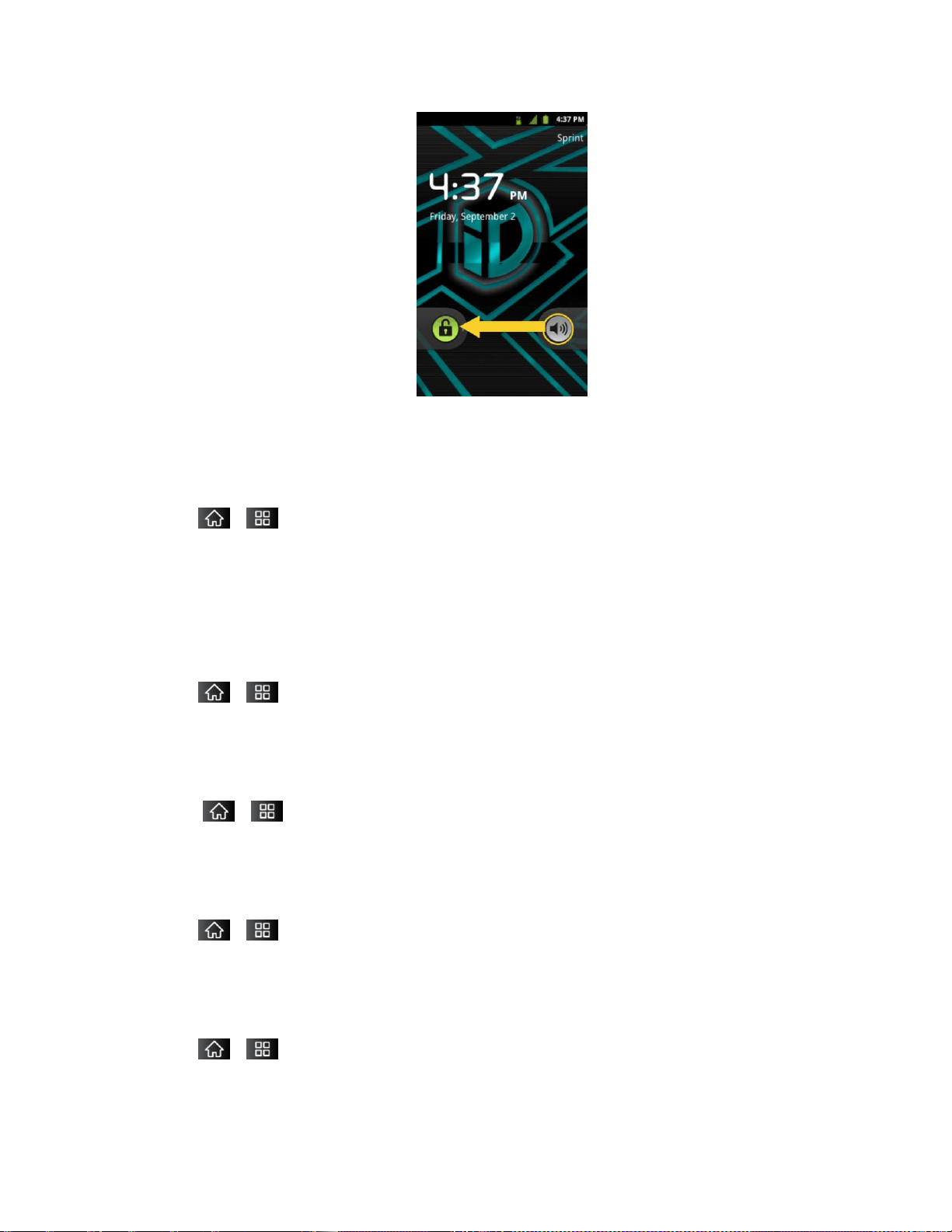
Device Settings 66
Selecting a Notification Ringtone
When you receive a notification such as the arrival of new messages, calendar events, or
alarms, the device sounds a ringtone.
1. Tap > > Settings > Sound > Notification ringtone.
2. Tap a ringtone to select it and to hear it. If you want to set the ringtone, tap OK. If not,
select another ringtone or tap Cancel..
Setting Various Feedback Tones
To hear tones when you use the dialpad to dial a number:
1. Tap > > Settings > Sound.
2. Tap Audible touch tones. (A green checkmark will appear.)
To hear sound when you tap buttons, icons, and other onscreen items:
1. Tap > > Settings > Sound.
2. Tap Audible selection. (A green checkmark will appear.)
To hear sound when the screen is locked or unlocked:
1. Tap > > Settings > Sound.
2. Tap Screen lock sounds. (A green checkmark will appear.)
To set your device to vibrate when touching buttons and keys:
1. Tap > > Settings > Sound.
2. Tap Haptic feedback. (A green checkmark will appear.)

Device Settings 67
To set how the phone reacts when you make an emergency call:
1. Tap > > Settings >Sound.
2. Tap Emergency tone.
3. Tap Off, Alert, or Vibrate.
Display Settings
Adjusting your device's display settings not only helps you see what you want, it can also help
increase battery life.
Changing the Backlight Time Length
Select how long the display screen remains backlit after you touch the screen or press a key
before the screen darkens.
1. Tap > > Settings > Display > Screen timeout.
2. Tap 15 seconds, 30 seconds, 1 minute, 2 minutes, 10 minutes, or 30 minutes.
Note: Long backlight settings reduce the battery‘s talk and standby times. For the best battery
performance, use the shortest convenient timeout.
Changing the Contrast
Adjust your screen‘s contrast (brightness) to suit your surroundings.
1. Tap > > Settings > Display > Brightness.
2. Use the slider to set a brightness level.
Note: For the best battery performance, use the dimmer levels.
Display Language
You can choose to display your device's onscreen menus in English or in Spanish.
1. Tap > > Settings > Language & keyboard > Select language.
2. Tap English, Español, 한국어, 简体, or 繁體.
Setting the Device Automatically to Rotate the Screen
Choose whether the device automatically switches the orientation of the screen as you turn it
sideways or even upside down.
1. Tap > > Settings > Display.

Device Settings 68
2. Tap Auto-rotate screen to automatically rotate the screen (a green checkmark will
appear).
– or –
To disable this, tap Auto-rotate screen so that the checkmark is removed.
Note: Some applications on your device do not support the Auto-rotate feature.
Date & Time Display Settings
Set your preferences for how dates and time are displayed. You can also use these settings to
set your own time and time zone, rather than obtaining the current time from the mobile network.
1. Tap > > Settings > Date & time.
2. Tap Use 24-hour format to display the time using 24-hour time format—for example,
13:00 rather than 1:00 pm.
3. Tap Select date format to open a dialog to select the format for displaying dates.
Animation Display Options
Choose whether you want to enjoy animated transitions for some effects (such as when opening
menus), for all supported effects (such as when navigating from one screen to another), or to
remove all animated transitions (this setting does not affect transitions in non-native
applications).
1. Tap > > Settings > Display > Animation.
2. Tap No animations, Some animations, or All animations.
Location & Security Settings
Your Location settings menu lets you select how your device determines its location (using the
wireless network, GPS satellites, both, or neither). The Security settings menus let you set
device security, lock codes, passwords, administrator settings, and more.
The Location feature allows the network to detect your position. Turning Location off will hide
your location from everyone except 911.
Note: Turning Location on will allow the network to detect your position using GPS technology
making some Sprint applications and services easier to use. Turning Location off will
disable the GPS location function for all purposes except 911, but will not hide your
general location based on the cell site serving your call. No application or service may
use your location without your request or permission. GPS-enhanced 911 is not
available in all areas.
To enable your device's Location feature:

Device Settings 69
1. Tap > > Settings > Location & security > GPS Privacy Setting.
2. Tap Location On or E911 Only.
Using Wireless Networks
You can use information from Wi-Fi and Sprint networks to determine your approximate location,
for use in GPS applications, when you search, and so on. To use information about your
location when navigating and searching in GPS applications (see GPS Navigation) you must
turn on location services.
1. Tap > > Settings > Location & security.
2. Tap Use wireless networks. (A green checkmark will appear.)
3. When you check this option, you‘re asked whether you consent to sharing your location
anonymously with Google‘s location service.
4. Read the disclaimer and tap Agree.
Using GPS Satellites
You can use your device's global positioning system (GPS) satellite receiver to pinpoint your
location to within accuracy as close as several meters (―street level‖). Actual GPS accuracy
depends on a clear view of the sky and other factors.
1. Tap > > Settings > Location & security.
2. Tap Use GPS satellites. (A green checkmark will appear.)
Note: Uncheck this option when you do not use Maps to conserve battery.
Your Device's Lock Feature
Locking Your Device
When your device is locked, you can only receive incoming calls or make calls to 911.
► Press . Locking the screen prevents accidental screen touches from activating
phone functions.
Unlocking Your Device
1. Press to wake up the phone. (See Wake Up the Screen.)
2. On your lock screen, touch and drag the green Unlock icon to the right.
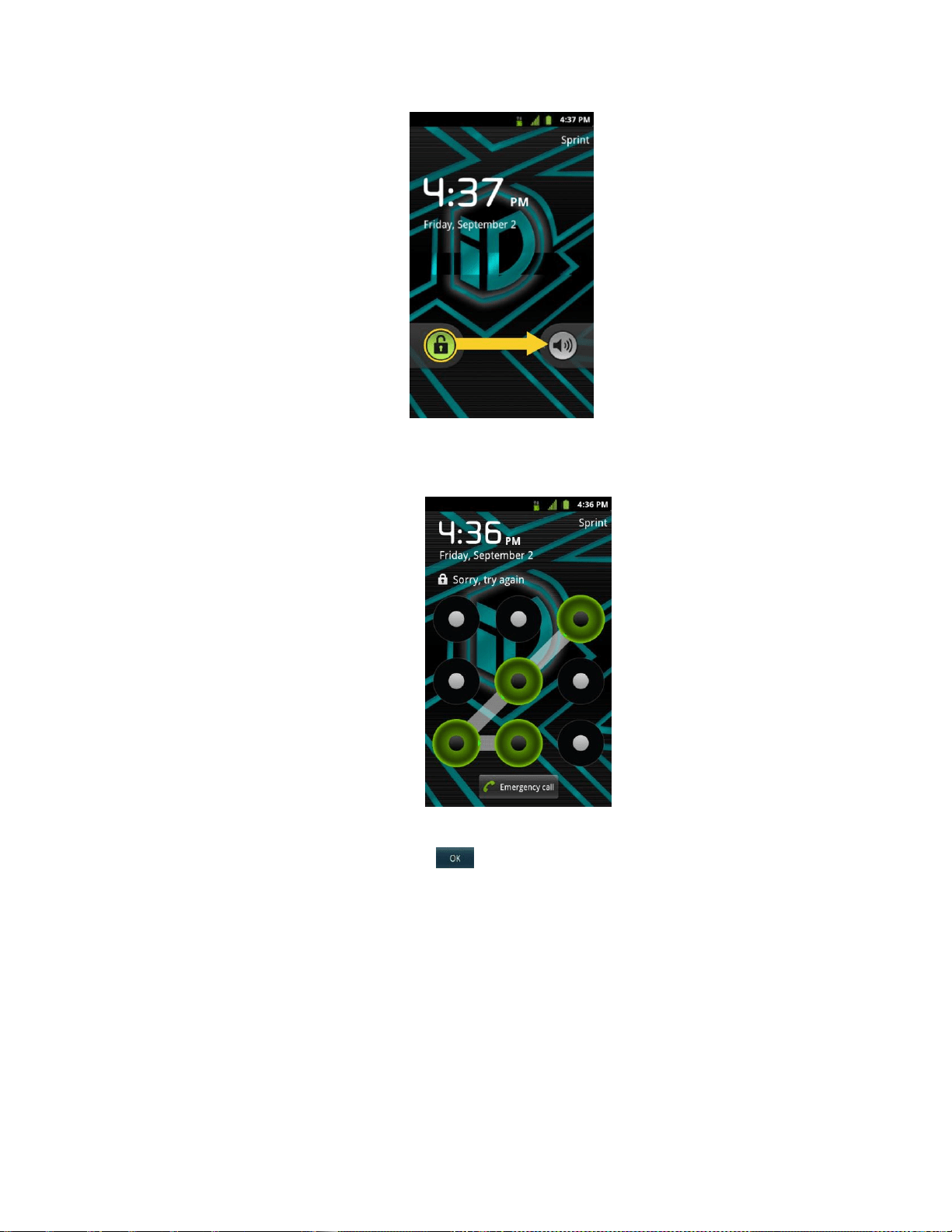
Device Settings 70
If you have set up an Unlock Pattern (see Your Device's Lock Feature), use your
fingertip to draw the pattern.
If you have set up Unlock PIN or Unlock Password, enter the Unlock PIN or Unlock
Password. After entering it, tap . The last screen you were working on opens.
Note: You have five opportunities to enter your unlock Pattern, PIN or Password. If you've
entered the wrong information five times, you must wait 30 seconds before you can
attempt again.
If you‘ve set up a Google account on the device, tap the Forgot pattern? button.
You will be able to unlock the device with your Google account username and
password.
If you haven‘t created a Google account on the device, you must perform a factory
reset.
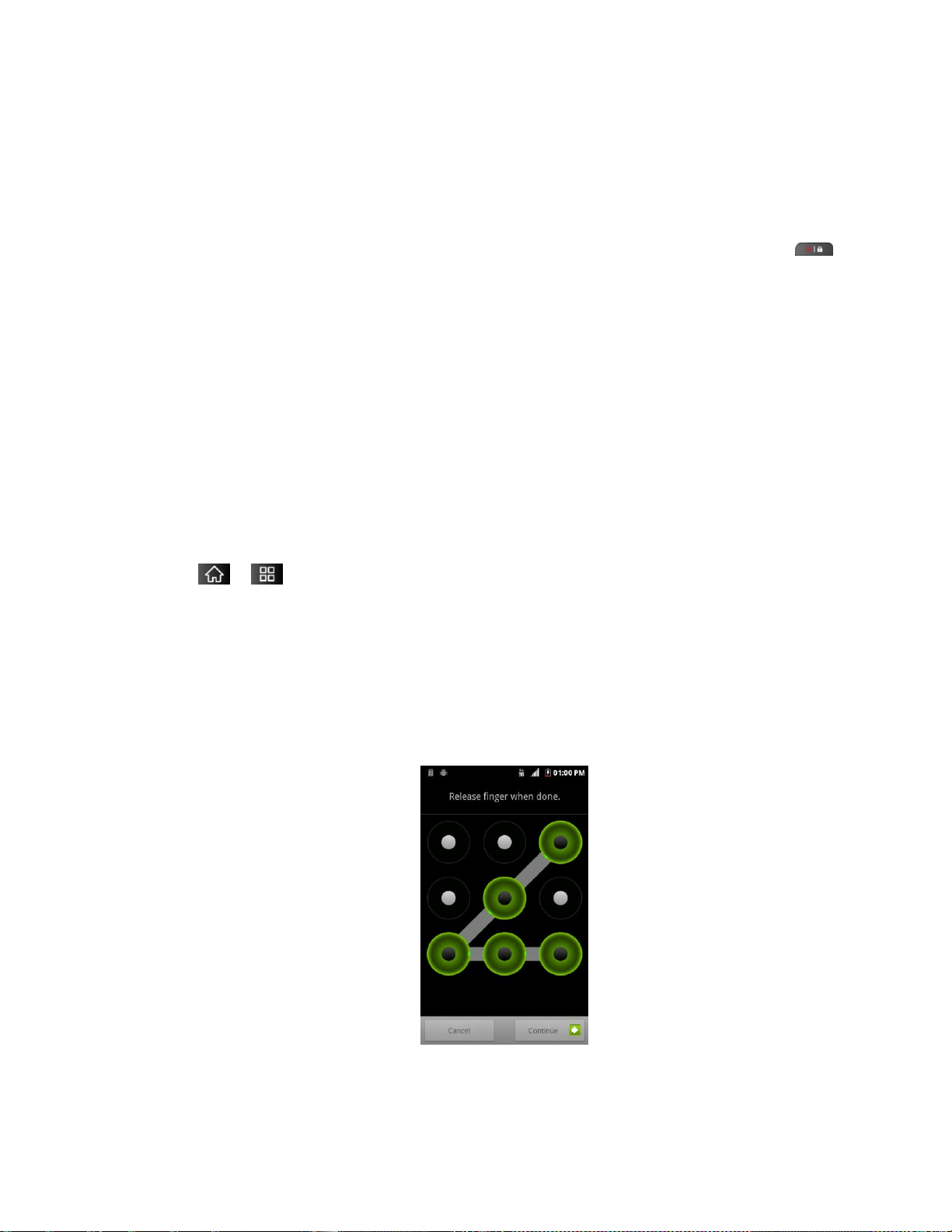
Device Settings 71
CAUTION! If you perform a factory reset, all user applications and user data will be
deleted. Please remember to back up any important data before performing a factory
reset.
When you can‘t recall your unlock Pattern, PIN or Password:
1. Turn the power off.
2. Press and hold the following keys for over 10 seconds: Down Volume Key + .
3. When the power turns on, release these keys.
If you can't recall your unlock PIN or Password: Call Sprint Customer Service at
1-888-211-4727.
Your Device's Unlock Pattern, Pin, or Password Feature
You can increase your device‘s security by creating a screen unlock pattern (disabled by
default), by creating a PIN, or by choosing a password. When these features are enabled, you
must draw the correct unlock pattern, enter the PIN, or enter the password on the screen to
unlock and regain access to the device.
Your Device's Lock Feature
1. Tap > > Settings > Location & security.
2. Tap Set up screen lock.
3. Select Pattern, PIN, or Password.
Pattern: The first time you set unlock pattern, you will see a tutorial with instructions
on how to create it. Read the tutorial and tap Next (twice). Draw your pattern and tap
Continue. Then redraw the pattern and tap Confirm. (Connect at least four dots.)
PIN: Enter a PIN (at least of four digits) and tap Continue. Then re-enter your PIN
and tap OK.

Device Settings 72
Password: Enter a Password (at least of four characters) and tap Continue. Then
re-enter your Password and tap OK.
From then on, any time you wish to turn the phone on or unlock the screen, you must draw your
unlock pattern or enter the PIN or password to unlock the screen.
Changing the Lock Code
1. Tap > > Settings > Location & security > Change screen lock.
2. Confirm the saved pattern, or your PIN or Password.
3. Select Pattern, PIN, or Password.
To disable your device's lock feature:
1. Tap > > Settings > Location & security > Change screen lock.
2. Confirm the saved pattern, or your PIN or Password.
3. Tap None.
Calling in Lock Mode
Even if the screen is locked, you will still be able to place emergency calls. Tap the Emergency
Call icon.
► To call an emergency number, tap the Emergency call button, enter the phone number
and tap .
Silence Your Device from the Lock Screen
If you are in a place where your device's sounds may disturb others, you can quickly silence
your device from the lock screen.
► Drag to the left. To turn the phone sounds back on, drag to the right.
Credential Storage Settings
You use credential storage to establish some kinds of VPN and Wi-Fi connections.
To allow applications to access your device's encrypted store of secure certificates and related
passwords and other credentials:
1. Tap > Settings > Location & security.
2. Slide the screen up until you see Use secure credentials.
3. Tap Use secure credentials. (A green checkmark will appear.)

Device Settings 73
To install a secure certificate from a microSD card:
1. Tap > >Settings > Location & security > Install from SD card.
2. Tap the file name of the certificate to install. Only the names of certificates that you have
not already installed on your device are displayed.
3. If prompted, enter the certificate's password and tap OK.
4. Enter a name for the certificate and tap OK. You can now use the certificate that you
installed when connecting to a secure network. For security purposes, the certificate will
be deleted from the microSD card.
If you have not already set a password for your device‘s credential storage, you will
be prompted to enter a password for it twice, then tap OK.
To set or change the password for your secure credential storage:
1. Tap > > Settings > Location & security > Set password.
2. Enter the current password, a new password, and confirm the new password. (Please
note that your password must have at least 8 characters.)
To delete all secure certificates and related credentials and reset its password:
1. Tap > Settings > Location & security > Clear storage.
2. Tap OK in the confirmation dialog box.

Device Settings 74
Accounts Settings
The Accounts settings menu lets you add and manage all your email, social networking, and
picture and video sharing accounts.
Adding Account
Removing an Account
Configuring Account Sync and Display Options
Accounts
You can add multiple Google™ Accounts and Exchange accounts. You may also be able to add
other kinds of accounts, depending on the applications downloaded and installed on your device.
When you add an account, the Contacts application compares any new contacts with your
existing contacts and will join contact entries if matches are found. This does not join the contact
entries on the accounts themselves; they are only displayed as a single contact on your device.
(See Configuring Account Sync and Display Options to learn how to separate contact
information that was joined incorrectly.)
To add an account:
Note: To add some accounts, you must contact a network administrator for account setup
information. For example, you may need to know the account‘s domain or server
address.
1. Tap > > Settings > Accounts & sync. The Accounts & sync settings screen
displays your current sync settings and accounts. (For more information, see Configuring
Account Sync and Display Options.)
2. Tap Add account.
3. Tap the type of account you want to add.
4. Follow the on-screen steps to enter the required (and optional) account information.
Note: Many accounts require only a user name and password, but some accounts will require
more information.
5. Configure the account.
Depending on the kind of account, you may be asked to configure the types of data you want to
sync to the device, name of the account, and other details. When you're finished, the account
will be added to the list in the Accounts & sync settings screen.

Device Settings 75
Removing an Account
You can remove an account to delete all information associated with it from your device,
including email, contacts, settings, etc.
Some accounts cannot be removed, such the first Google Account you set up on the device.
That account can only be removed by resetting your device entirely.
To remove an account:
1. Tap > > Settings > Accounts & sync.
2. Tap the account you want to delete.
3. Tap Remove account.
4. Tap Remove account again to confirm that you want to remove the account.
Configuring Account Sync and Display Options
You can configure background data and synchronization options for the applications on your
device. You can also configure synchronization options for each individual account. Some
applications, such as Gmail
TM
and Calendar, have their own synchronization settings. Some
applications, such as Contacts and Gmail, can sync data for multiple accounts. Others, such as
Calendar, sync data only from the first Google Account you set up with your device, or from an
account associated specifically with that application.
For some accounts, syncing is two-directional; changes that you make to the information on
your device are synchronized with the accounts on the Web or computer. Your Google Account
synchronizes in a two-directional manner. Other accounts support only one-way sync; the
information changed on your phone is only changed on your phone.
To configure general sync settings:
1. Tap > Settings > Accounts & sync.
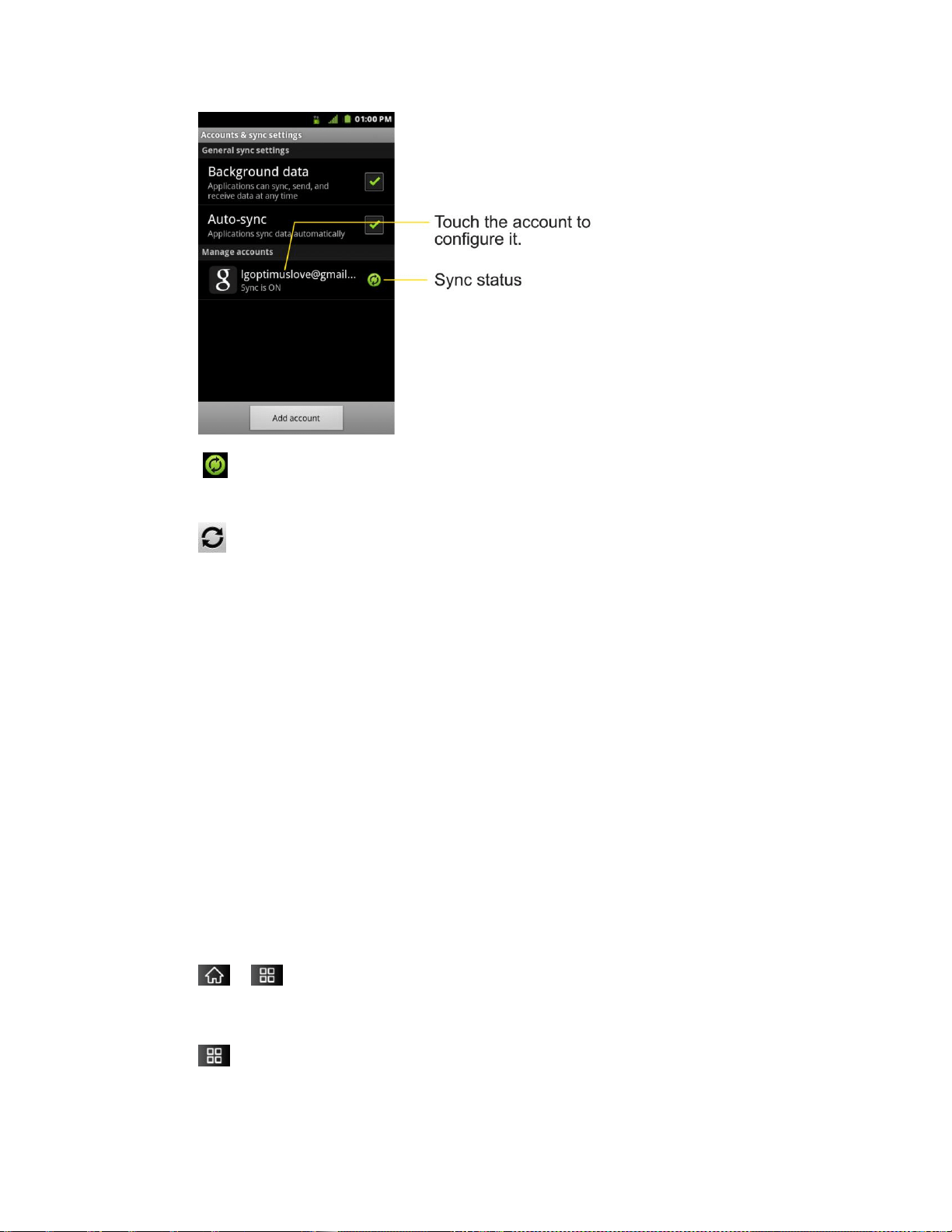
Device Settings 76
Indicates that some, or all, of an account‘s information is configured to sync
automatically with your device.
Indicates that none of an account‘s information is configured to sync
automatically with your device.
2. Tap Background data to enable or disable whether applications can use your data
connection to synchronize data while the applications run in the background.
If you disable this option, the Gmail and Calendar applications will not automatically receive
updates until they are manually refreshed (using their respective options menu).
3. Tap Auto-sync to enable or disable whether changes you make to information on the
device or on the web are automatically synced with each other.
For example, when this option is enabled, changes that you make in the Contacts
application on your device are automatically made to your web-based Google
Contacts™.
If you uncheck this option, you may be able to use an application's tools to sync data
manually. (See To sync information manually.)
To sync information manually:
1. Tap > > Settings > Accounts & sync.
2. Tap the account whose data you want to sync.
3. Tap > Sync now.

Device Settings 77
To change an account’s sync settings:
1. Tap > > Settings > Accounts & sync.
2. Tap the account whose data you want to change.
The Data and synchronization screen will open, displaying a list of the types of data
the account can sync.
3. Tap the items you want to sync. (A green checkmark indicates that synchronization has
been enabled.)
By disabling synchronization for an item, it will not remove the previously
synchronized data from your device, it will simply stop future synching. To remove
the information previously synced for the account, you must remove the account.

Contacts 78
Contacts
The Contacts application lets you store and manage contacts from a variety of sources,
including contacts you enter and save directly in your device as well as contacts synchronized
with your Google account, your PC, compatible email programs (including Exchange Server),
and your Facebook friends.
Creating a New Contacts Entry
Adding a Contact to Your Favorites
Editing a Contacts Entry
Adding a Number to a Contacts Entry
Editing a Contacts Entry‘s Numbers
Assigning Direct Dialing Numbers
Selecting a Ringtone for an Entry
Assigning a Picture to an Entry
Finding Contacts Entries
Selecting which Contacts are Displayed
Communicating with Your Contacts
Importing, Exporting, and Sharing Contacts
Use the Contacts application to add, view, and communicate with your family, friends and
acquaintances.
To open your Contacts application:
► Tap > Contacts.
All of your contacts are displayed alphabetically in a list. If you have a new phone and haven't
added any contacts yet, the Contacts application will display hints on how to start adding
contacts to your phone.

Contacts 79
Creating a New Contacts Entry
You can add contacts on your phone and synchronize them with the contacts in your Google™
Account, Microsoft Exchange account, or other accounts that support syncing contacts.
The Contacts application tries to join new addresses with existing contacts, to create a single
entry. You can also manage that process manually.
1. Tap > > Contacts.
2. Tap > New contact.
3. Tap a destination type (Phone, Google, or Corporate), if applicable.
4. Tap the Picture Frame icon to select a picture to display next to the name in your list of
contacts and in the Caller ID.
5. Tap the First name and Last name fields and enter a name for the new entry.
6. Tap the label button (to the left of the Phone number field) to select one of the following
categories: Mobile, Home, Work, Work Fax, Home Fax, Pager, Other, Custom.
7. Tap a phone number field and enter a phone number. Tap Email, Postal address,
Organization, or More to input additional contact information.
8. When you're finished, tap Done.
Adding a Contact to Your Favorites
Favorites contains a short list of the contacts you communicate with most often.
To add a contact to your favorites:
1. Tap > > Contacts.
2. Tap a contact to view its details.
3. Tap the star to the right of the contact's name. (A gold star appears.)
To remove a contact from your favorites list:
1. Tap > > Favorites.
2. Tap a contact to view its details.
3. Tap the gold star to the right of the contact's name. The star will turn gray, meaning it has
been removed from your Favorites.

Contacts 80
Editing a Contacts Entry
You can change or add details saved in your contact entries, such as setting specific ringtones
to specific contacts or setting calls from specific contacts to divert to your voicemail. Some
contact entries contain information from multiple sources: information that you added manually,
information joined from multiple accounts to consolidate duplicates, etc.
If you find duplicate entries in Contacts, you can join them into a single entry. If you find that
unrelated contacts were joined in error, you can separate them.
Changes made to information from one source do not automatically change the information on
the other sources. For example, if you have information about a contact from a Google Account
and an Exchange account and both are configured to sync contacts, changes to the contact
from the Google Account are synced to that account on the Web, but the information from the
Exchange account will remain unchanged.
For more information about working with multiple accounts, see Accounts.
To edit contact details:
1. Tap > > Contacts.
2. Touch and hold the contact whose details you want to edit.
3. Tap Edit contact.
4. Edit the desired contact information.
5. Tap Done.
To change a contact’s default phone number:
The default phone number is used when you initiate a call or send a text message using the
context menu (by touching and holding a contact).
1. Tap > > Contacts.
2. Tap the name of a contact to view its details.
3. Touch and hold the phone number you want to set as the contact's default phone number.
4. Tap Make default number. (A checkmark will appear next to the default phone number.)
To divert calls from a contact to your voicemail:
1. Tap > > Contacts.
2. Tap the name of a contact to view its details.

Contacts 81
3. Tap > Options.
4. Tap Incoming calls. (A green checkmark will appear.)
5. Tap .
When this contact calls you, your phone will not ring and the caller will be forwarded directly to
your voicemail.
To set a ringtone for a contact:
1. Tap > > Contacts.
2. Tap the name of a contact to view its details.
3. Tap > options.
4. Tap Ringtone and tap a ringtone to select it.
5. Tap OK.
To delete a contact:
1. Tap > > Contacts.
2. Tap the name of a contact.
3. Tap > Delete contact.
If the contact contains information from a read-only account, you will not be able to
delete it; you will only be able to change the sync settings for that account or delete
the account itself.
If the contact contains information joined from a read-only account, a dialog box will
inform you that you must separate the contact entry into individual contacts to delete
the contact.
4. Tap OK to confirm that you want to delete the contact.
Adding a Number to a Contact’s Entry
1. Tap > > Contacts.
2. Touch and hold the contact's entry.
3. Tap Edit contact in the menu that opens.
4. Tap the Phone category‘s plus button.

Contacts 82
5. Tap the label button to the left of the phone number field and select the relevant label.
To create your own label, tap Custom.
6. Enter a phone number and tap Done.
Editing a Contact’s Entry Number
1. Tap > > Contacts.
2. Touch and hold a contact's entry.
3. Tap Edit contact.
4. Tap a phone number to edit.
5. Re-enter or edit the number and tap Done.
Assigning Direct Dialing Numbers
Speed dialing, as available in other feature phones, is not available. However, you are able to
directly save a contact to your Home screen.
To set a contact as Direct dial:
1. Tap > > Add > Shortcuts > Direct dial.
2. Tap a contact from your Contact List. The contact will be shown on the Home screen.
Note: If there is no available space on a particular Home screen pane, Add will not be
available; you must delete or remove an item before you can add another item. In this
case, you have the option of switching to another Home screen pane.
Direct Dial
Simply tap the contact on the Home screen.
Selecting a Ringtone for an Entry
Assign a ringtone to a Contacts entry so you can identify the caller by the ringtone. (See Ringer
Types.)
1. Tap > > Contacts.
2. Tap the name of a contact to view its details.
3. Tap > Options.
4. Tap Ringtone and tap a ringtone to select it.

Contacts 83
5. Tap OK.
Assigning a Picture to an Entry
Assign a picture to display each time a certain contact calls you.
1. Tap > > Contacts.
2. Touch and hold the contact's entry.
3. Tap Edit contact.
4. Tap the Picture Frame icon.
5. Tap Take photo to take a new picture. The camera will launch.
– or –
Tap Select photo from Gallery to select a picture from the Gallery.
6. After cropping the picture as you want, (see Gallery Options) tap Save.
Finding Contacts' Entries
Finding Contacts by Name
1. Tap > > Contacts.
2. Tap .
Shortcut: From the Home screen, tap to display the Search feature.
3. Start entering the name of the contact you‘re searching for. As you type, contacts with
matching names will appear below the search box.
4. Tap a matching contact in the list to open its entry.
Selecting which Contacts are Displayed
You can hide contacts that don't have phone numbers. You can also configure which groups of
contacts you want to display in the Contacts List.
To set whether contacts without phone numbers are displayed:
1. Tap > > Contacts.
2. Tap > Display Options.
3. Tap Only contacts with phones. (A green checkmark will appear.)
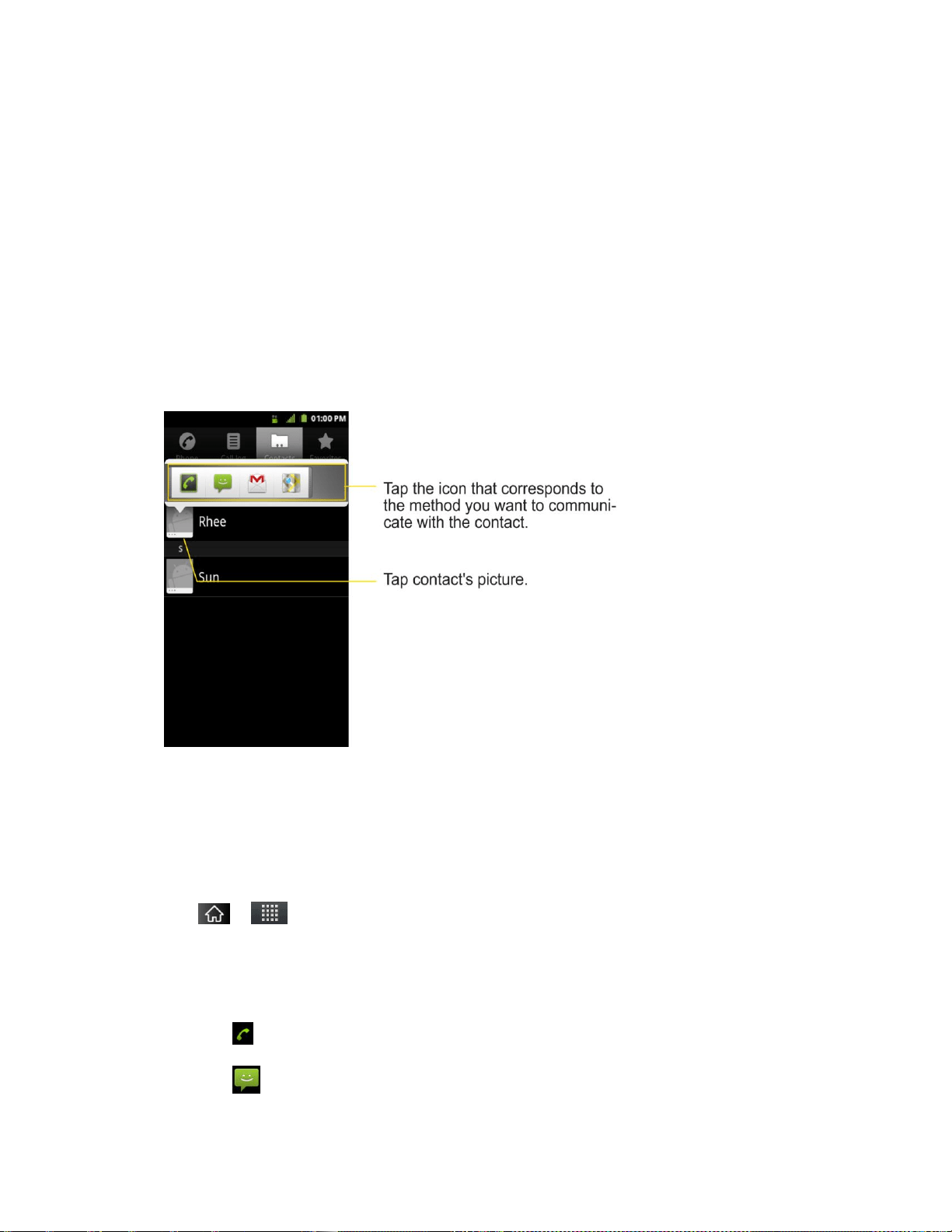
Contacts 84
4. Tap Done.
Communicating with Your Contacts
From the Contacts or Favorites tab, you can quickly call or send a text (SMS) or multimedia
message (MMS) to a contact's default phone number. You can also open a menu to access
different methods of communicating with that contact.
The Contacts application shares your contacts with many other applications, such as Gmail™
(see Gmail) and messaging (see Text Messaging and MMS).
To connect by using Quick Contact for Android™:
1. Tap a contact's picture to open Quick Contact for Android.
2. Tap the icon corresponding to the type of communication you want to start.
Depending on the contact information saved, the available actions will be displayed above the
name. (For more information, see Communicating with Your Contacts.)
To communicate with a contact:
1. Tap > > Contacts.
2. Tap the contact's entry.
3. In the contact's details screen, tap the method you wish to communicate with the contact.
Tap next to the number you want to call to directly.
Tap next to the number you want to message.

Contacts 85
Tap next to the email address you want to email.
Note: Anytime you see the green dial button next to a number, such as in your Favorites or
Call log, just tap it to call that number.
To call a contact’s default number:
1. Tap > > Contacts.
2. Touch and hold the contact's entry.
3. Tap Call contact.
(For more information about placing phone calls, see Making Calls.)
To send a text or multimedia message to a contact’s default number:
1. Tap > > Contacts.
2. Touch and hold the contact's entry.
3. Tap Text contact.
For more information about sending text and multimedia messages, see Text Messaging and
MMS.
Importing, Exporting, and Sharing Contacts
If you have contacts stored in vCard format on a microSD card you can import them into your
Contacts application on your device. You can also export contacts in vCard format onto a
microSD card. Export your contacts to back them up to a computer or another device.
Importing contacts from your microSD card
Note: See Connecting Your Device to Your Computer for details about copying files to a
microSD card from your computer.
1. Insert the microSD card (that contains the vCard files) into your device.
2. Tap > > Contacts.
3. Tap > Import/Export > Import from SD card.
4. If you have more than one account on your phone, tap the account into which you want to
import the contacts.
5. Tap the importing option and then tap OK.

Contacts 86
Exporting contacts to your microSD card
You can export all of the contacts on your phone to your microSD card, as vCard files. You can
then copy this file to a computer or another device that is compatible with this format, such as
an address book application. (See Connecting Your Device to Your Computer.)
1. Tap > > Contacts.
2. Tap > Import/Export.
3. Tap Export to SD card.
4. Tap OK to confirm your selection and to begin exporting your Contact List to the microSD
card.
Sharing a contact
You can share a contact with someone by sending it to the person as a vCard file.
1. Tap > > Contacts.
2. Open the contact you want to share.
3. Tap > Share.
4. Choose the method for sending.

Accounts and Messaging 87
Accounts and Messaging
With Sprint service and your device‘s messaging capabilities, you have the opportunity to share
information through many different channels and accounts.
Email
Your device's Email application lets you access and manage multiple email accounts
simultaneously in one convenient location.
Although there is a separate Gmail application, the main email application can manage both
Internet based email services (Gmail™ and Yahoo!™) and Corporate Work Email (Outlook®).
The device can also be manually configured to connect to other email systems.
Note: If you have multiple email accounts, you must configure each account with its own
settings.
If you want to send and receive email messages through an ISP (Internet Service Provider)
account (such as Outlook), you will first need to set up an IMAP or POP account.
Internet Message Access Protocol (IMAP) – This mail retrieval protocol is frequently
used in large networks and commercial and institutional settings. IMAP4 is the
current standard.
Post Office Protocol (POP) - This protocol is supported by most ISPs and is currently
more common among consumer applications. POP3 is the current standard.
Note: For more information, review your email carrier‘s support documents or contact your IT
administrator.
Email Icons/Shortcuts
- Email shortcut
- Gmail shortcut
Status Bar - Notifications
- New Email message received
- New Gmail message received

Accounts and Messaging 88
Corporate Email (Outlook)
The main Email application also provides access to your Outlook Exchange server via
your device. If your company uses Microsoft Exchange Server 2003, 2007 and 2010 as the
corporate email system, you can use this email application to wirelessly synchronize your email,
Contacts and directly with your company‘s Exchange server.
Important: This Outlook application does not utilize Microsoft® ActiveSync to synchronize
the device to your remote Exchange Server. This synchronization is done
wirelessly over the air (OTA) and not via a direct connection.
Setting Up a Corporate Email
1. Tap > > Email.
2. Tap > Accounts.
3. Tap > Add account.
4. Enter your Email address and Password
information, then tap Next. Consult your Network Administrator for further details.
Email address: Your Outlook work email address.
Password: Typically your network access password (case-sensitive).
5. Tap Exchange (from the add new email account screen).
6. Enter a Domain\Username, Password, and Server information and tap Next.
Domain\Username: Enter your network domain\login username.
Password: Typically your network access password (Case-sensitive).
Server: Your exchange server remote email address. Typically starts with
mail.XXX.com. Obtain this information from your company network administrator.
If your network requires SSL encryption, tap the Use secure connection (SSL) box
to place a checkmark and activate this additional level of security.
If your exchange server requires this feature, leaving this field unchecked can
prevent connection.
Note: Signal interruptions or incorrect username or password information can cause
completion issues.
7. Read the on-screen activation disclaimer and, if prompted, tap Next.

Accounts and Messaging 89
8. Configure your Inbox checking frequency, Period to synchronize (days to
synchronize between your device and server), and activate any other email settings, then
tap Next.
9. Identify your new account with a unique name and provide the outgoing name, then tap
Done.
Important: You can synchronize over the air (not directly) with an Exchange Server running
Microsoft Exchange Server 2003 Service Pack 2 (SP2) or Microsoft Exchange
Server 2010.
Note: You can have multiple Work Email (Microsoft Exchange) accounts active on your device.
Opening Corporate Email
1. Tap > > Email.
2. Tap a message to read, manage, or reply to.
From your Inbox screen, tap to select options, such as Refresh, Compose,
Folders, Accounts, or Account settings.
While in a message, tap to select messaging options, such as Delete, Forward,
Reply, Reply all, or Mark as unread.
Create and Send Email
1. From the Inbox, tap > Compose.
2. Enter the recipient‘s email address in the To field.
If you are sending the email to several recipients, separate the email addresses with
a comma.
You can add as many message recipients as you want.
Note: To send an additional carbon copy (Cc) or a blind carbon copy (Bcc) of the current email
to other recipients, tap > Add Cc/Bcc.
3. Tap the Subject field and enter the email subject.
4. Tap the Body field and compose your email.
To add a picture attachment, tap > Add attachment.
You can access the internal microSD card and navigate to the file you wish to attach.
Tap the file you wish to attach.

Accounts and Messaging 90
To reply to an email message:
1. From the Inbox, tap an email message to view it.
2. With the email message displayed, tap either Reply or Reply all.
– or –
With the email message displayed, tap and tap either Reply or Reply all.
If you select Forward, you must specify the message‘s recipients.
3. Enter a new message body and tap Send.
To delete an email message:
► Touch and hold an email (from your inbox list) and tap Delete from the pop-up context
menu.
– or –
With the email message displayed, tap Delete.
Configuring Corporate Email Settings
Account Settings: Allow you to configure various settings for your account.
1. Tap > > Settings > Accounts & sync.
2. Tap the Corporate account to reveal the account‘s synchronization settings screen.
3. Place a checkmark next to each option if you want the device to automatically
synchronize. If you want to manually synchronize, tap > Sync now.
To configure Corporate Email settings:
1. Tap > > Settings > Accounts & sync.
2. Tap the Corporate account field to reveal the account‘s synchronization settings screen.
3. Tap Account settings.
Account name: Displays the name used by the device to track the account.
Your name: Displays the name that recipients view when receiving email from you.
Signature: To add a signature or other information to outgoing email.

Accounts and Messaging 91
Period to synchronize Email: Configures how many days worth of emails the
device and server should synchronize. Choose from: One day, Three days, One
week, Two weeks, or All.
Period to synchronize calendar: Configures how many days worth of calendar
events the device and server should synchronize. Choose from: Two weeks, One
month, Three months, Six months, or All.
Email check frequency: Configures the frequency which the device queries the
remote server for new email changes. Choose from: Automatic (Push), Never,
Every 15 minutes, Every 30 minutes, Every hour, Every 2 hours, or Every 4
hours.
Inbox Sort by: Allows you to sort Inbox by date, subject, sender, or size.
Roaming: Allows you to retrieve email automatically while roaming.
Default account: Assigns this account as the default account used when sending
out new emails.
Ask before deleting: Allows you to set whether to ask before deleting.
Email notifications: Allows the phone to notify you when you receive new emails.
Select ringtone: Allows you to assign a ringtone to notify you of new email.
Vibrate: Allows you to set the phone to vibrate when new email is received.
Incoming settings: Allows you to view and modify your incoming server settings.
Sync contacts: Synchronizes the contacts between your device and the remote
exchange server. A checkmark indicates the feature is enabled.
Sync calendar: Synchronizes your exchange calendar entries between your device
and the remote exchange server. A checkmark indicates the feature is enabled.
Out Of Office: Allows you to configure your Out of Office settings.
4. Tap to return to the previous screen.
For more detailed Corporate email information, see Corporate Email (Outlook). For more
information on Corporate Calendar synchronizing, see Synchronizing Your Corporate Account.
To Create a Corporate Email Signature:
This signature can differ from any current Email signature on your local Outlook client. This
signature is applied to any outgoing emails originating on your device.
1. Tap > > Settings > Accounts & sync.

Accounts and Messaging 92
2. Tap the Corporate account to reveal the account‘s synchronization settings screen.
3. Tap Account settings.
4. Tap Signature.
5. Delete the current default text and enter your new email signature.
6. Tap OK to store the new signature.
Configuring Data Synchronization Settings
This feature allows you to determine which current applications are synchronized with the
external server and at what intervals.
1. Tap > > Settings > Accounts & sync.These settings can affect data minute
usage, please refer to your current data plan for more details.
2. Tap any of the following options:
Background data: Allows data synchronization to occur as a background function
and does not affect any current use of the device.
Auto-sync: Requires the device to maintain synchronized with the remote server
providing data to your selected applications.
3. Tap to store your changes and return to the Home screen.
Text Messaging and MMS
With text messaging (SMS), you can send and receive instant text messages between your
wireless phone and another messaging-ready phone. When you receive a new message, you
will be notified by your device.
Messaging is available via the Messaging application in your Applications screen. The icon
appears in Status Bar when a new text message is received.
Note: See your service plan for applicable charges for text messaging and and SMS voicemail.
Composing Text Messages
1. Tap > > Messaging > New message.
2. Tap the To field and enter the recipient‘s phone number or email information using the
on-screen keyboard.
Contacts: As you enter either a phone number or email address, if the information
matches a current contact‘s entry information, you will see a match. When you see a
match, tap the associated name to complete the addressing.

Accounts and Messaging 93
Mobile: Tap to use the keypad to enter a wireless phone number directly.
Email: You can also enter the recipient‘s email address.
3. Tap a matching entry from the on-screen dropdown list. This list is populated by matches
found from your managed accounts.
4. Tap the text field and enter your message.
5. Insert an Emoticon or a Smiley.
To enter an emoticon, touch and hold on the Swype keyboard or touch and hold
on the Android keyboard.
To enter a smiley from the menu options, tap > Insert smiley. Make a selection
from the list to insert it into your current message.
6. Review your message and tap Send.
Accessing Text Messages
To read a text message:
When you receive a text message, your phone will notify you. You can access the message by:
► Opening the Notification Panel and tapping the text message notification.
► Tapping > > Messaging and selecting the new message.
To reply to a text message:
1. While viewing a message, tap the text field.
2. Compose your reply or use the preset messages or icons.
To enter a message, use your on-screen keyboard. (See Entering Text With the On-
screen Keyboard.)
3. Insert an emoticon or a Smiley.
To enter an emoticon, touch and hold on the Swype keyboard or touch and hold
on the Android keyboard.
To enter a smiley from the menu options, tap > Insert smiley. Make a selection
from the list to insert it into the message.
4. You may select additional messaging options by tapping .

Accounts and Messaging 94
Options include: Call, Add subject, Attach, Set priority, Insert Smiley or More
[Preset Message, Delete thread, All threads, and Add to Contacts].
5. Review your reply and tap Send.
Multimedia Messaging (MMS)
With multimedia messaging (MMS), you can send and receive instant multimedia messages
that contain text, pictures, audio, recorded voice, or a picture slideshow. Messaging is available
via the Messaging application in your Applications screen.
Note: See your service plan for applicable charges for multimedia messaging.
Composing MMS Messages
1. Tap > > Messaging > New message.
2. Tap the To field and enter the recipient‘s phone number or email information. As you
enter the phone number or email address, matching contacts appear on-screen.
Tap an available matching recipient or continue entering the phone number or email
address.
3. Tap the text field and enter your message.
4. Tap > Attach.
5. Select a multimedia attachment type:
Pictures: Opens the Gallery application. Use the on-screen navigation to select the
picture you wish to send with the outgoing message.
Capture picture: Opens the Camera application. Take a picture, and then tap OK to
use this image in your message. (See Taking Pictures.)
Videos: Opens the Gallery application. Use the on-screen navigation to select a
video and attach it to your outgoing message.
Capture video: Opens the Camcorder application. Record a video, then tap OK to
use this video in your message. (See Recording Videos.)
Audio: Opens a menu that allows you to choose between Select music track and
Sound Recorder. Use the on-screen navigation with the Select music track option
to select an audio file and tap OK or record a new audio file using the Sound
Recorder option.
Record audio: Opens the message recorder.
• Record Duration: Displays the length of the recorded voice message.
• Record: Starts recording your message.

Accounts and Messaging 95
• Play: Plays back the current recording.
• Stop: Stops the recording. Once stopped, tap either Use this recording (attach
it to your message) or Discard (delete the current recording and re-record).
Slideshow: Opens the Edit slideshow menu.
• Tap Add slide to create a new slide.
• Tap the created slide (example, Slide 1), tap Add picture, and then select the
picture you want to add to the slide.
• Tap the text field below the image to enter a caption for the picture.
• When finished, tap Done to attach the slideshow to your message.
Contact(vCard): Opens your Contacts list and allow you to select a picture of a
Contact to send.
Note: To remove or replace a picture or an audio attachment, on the Compose screen, tap the
Remove or Replace button next to the attachment.
6. When you are finished creating your new MMS message, tap Send MMS.
To view and play a multimedia message:
1. Tap > > Messaging.
2. From the message list, tap a multimedia message to open its contents.
3. While viewing a message, tap the play icon (on the video file) to playback the file or tap
the image to view the picture.
Tip: The file attachment on the MMS message can be saved to the microSD card. To save
the attachment, touch and hold the file and tap Save attachment from the Message
options context menu.
To reply to a multimedia message:
1. Tap > > Messaging.
2. From the message list, tap a multimedia message to open its contents.
3. While viewing a message, tap the text field and type your reply message.
4. Once completed, tap Send.
Note: When replying to an SMS message with an MMS message, first open the text message,
press and tap Attach. The original text message is then automatically converted
into a multimedia message.

Accounts and Messaging 96
Deleting a Message or Message Thread
1. Tap > > Messaging.
2. From the message list, touch a message and tap .
– or –
Touch and hold the message thread to display the context menu.
3. Tap Delete thread and once prompted, tap OK to complete the process.
Adjusting Message Settings
1. Tap > > Messaging.
2. From within the Messaging screen, tap and tap Settings.
3. Adjust the following settings according to your needs:
Delete old messages: Enable this option to delete older text messages when the
limit for maximum number of text messages is exceeded.
Text message limit: Sets the maximum number of text messages that can be stored
on the device (per conversation).
Multimedia message limit: Sets the maximum number of multimedia messages that
can be stored on the device (per conversation).
Signature: Tap this to automatically add signature (green checkmark displays).
Callback Number: Check this to automatically add callback number (green
checkmark displays).
Set priority: Select Normal or Urgent.
Message Reassembly: Enable this option (green checkmark displays) so that multi-
segment messages can be reassembled and shown as a single message. Each
segment will still count toward your usage.
Preset Message: Select a preset message, such as "Call me" or "Where are you?"
Auto-retrieve: Enable this option to automatically retrieve the entire content of your
MMS message. When checked, the MMS message header, message body, and any
attachments will automatically download to your device.
• If you disable this option, only the MMS message header will be retrieved and
displayed.

Accounts and Messaging 97
Roaming auto-retrieve. : Disable this option if you only desire the MMS message
headers to download while roaming. Enable this option to automatically download
your complete multimedia messages even while roaming.
Set priority: Select Low, Normal, or High.
Notifications: Enable this option if you wish to receive a notification in the Status
Bar when a new text or multimedia message arrives.
Select ringtone: Allows you to select a ringer to sound when a new message is
received. Tap this option, and then select a ringtone that is specific to new text and
multimedia messages. A sample will briefly be played upon selection.
Vibrate : Enable this option if you want the device to vibrate when a new text or
multimedia message is received.
Text Messaging and MMS
Your device's advanced messaging capabilities let you send and receive many different kinds of
text messages.
Messaging settings allow you to decide how you would like to be notified of new messages,
create a signature with each sent message, and create your own preset messages.
Viewing Notifications of Received Messages
When you receive a message, your device notifies you by displaying an icon within the
Notification area at the top left of your Home screen.
- indicates a new text or MMS messages were received.
1. Tap > > More > Notifications.
– or –
Touch and drag the Status Bar to the bottom of the screen.
2. Tap a message notification to open the Messaging application.
Deleting Old Text Messages
Delete messages or message threads you have read whenever you like, or have your device
delete them automatically for you. A thread is a series of text conversations between two people.
Deleting a thread will delete the sent and received messages in the conversation
To delete a specific message thread:
1. Tap > >Messaging.

Accounts and Messaging 98
2. Tap a thread to view the contents of that thread.
3. Tap > More > Delete thread.
To delete all stored messages:
1. Tap > > Messaging.
2. Tap > Delete threads.
Gmail
This email client is Google‘s web-based email service. (See Synchronizing Your Google
Account.)
From a computer, launch your preferred Web browser and navigate to www.gmail.com.
Depending on your synchronization settings, Gmail (along with calendar events, phone numbers
and other contact information) on your device is automatically synchronized between your
device and your Gmail account on the Web.
Note: You must have a valid and active Google account prior to using this email client.
● Gmail is web-based: Your messages are stored online, on Google™ servers, but you
can read, write, and organize messages by using the Gmail application on your device
or a web browser on a computer. Because your mail is stored on Google servers, you
can search your entire message history, backed by the speed and power of Google
search. Any actions taken in the Gmail phone application are reflected on the web
browser. For example, if you read a message in Gmail on your device, it will be marked
as read in a Web browser. And a message that you send using a browser, or even a
draft of a message, is visible in Gmail on the device.
● Gmail is conversation-based: Every related message is grouped in your Inbox as a
single conversation thread. In other email applications, replies to messages are sent as
individual messages, making it difficult to keep track of related messages. Gmail makes
it easy to follow conversations with its conversation threads.
● Gmail is organized by labels, not by folders: By tagging messages with labels, you
can organize your conversations in many different ways. Whereas in other email
applications, each message can only be stored in one folder. For example, with Gmail
you can label a conversation with your mother about your brother‘s birthday present with
both ―Mom‖ and ―Dave.‖ Later, you can look for the all messages containing either label.
Using folders, you'd have to store the message in the ―Mom‖ folder or the ―Dave‖ folder,
not both.
● Gmail for the phone is optimized for mobile: Some features are only accessible on
your computer browser. The best place to organize and learn about Gmail is the Web.
For example, you can't use the Gmail application on the device to create the labels and

Accounts and Messaging 99
filters that you use to organize your messages, but you can label a message. Gmail on
the Web offers complete information about the service, so it‘s the best place to learn
about all of the features of Gmail.
● Gmail is for Gmail: Of course you can use Gmail to send email to any email address,
and anyone can send email to you at your Gmail address. But if you want to read
messages from another email service provider (using your AOL, Yahoo!, or other email
account), you must use the Email application. (See Email.)
Setting Up other Email accounts via the Device
The Email application only reveals all currently added Email accounts. To view additional email
accounts within the main Email screen, they must first be added.
1. Tap > > Email.
2. Follow the on-screen instructions to setup an Email account.
Tap Manual setup to configure your connection settings manually (POP3 , IMAP, or
Exchange). Follow the onscreen prompts and enter the information specific to your
carrier.
Opening Gmail and Your Inbox
When you open the Gmail application, the most recent conversations are displayed in your
Inbox.
► Tap > > Gmail.
All of your conversations are displayed in your Inbox unless you delete, archive, or filter them.
Conversations with new messages are displayed with bold subject lines. To read a message in
a conversation, tap the conversation. (See Reading Your Messages.)
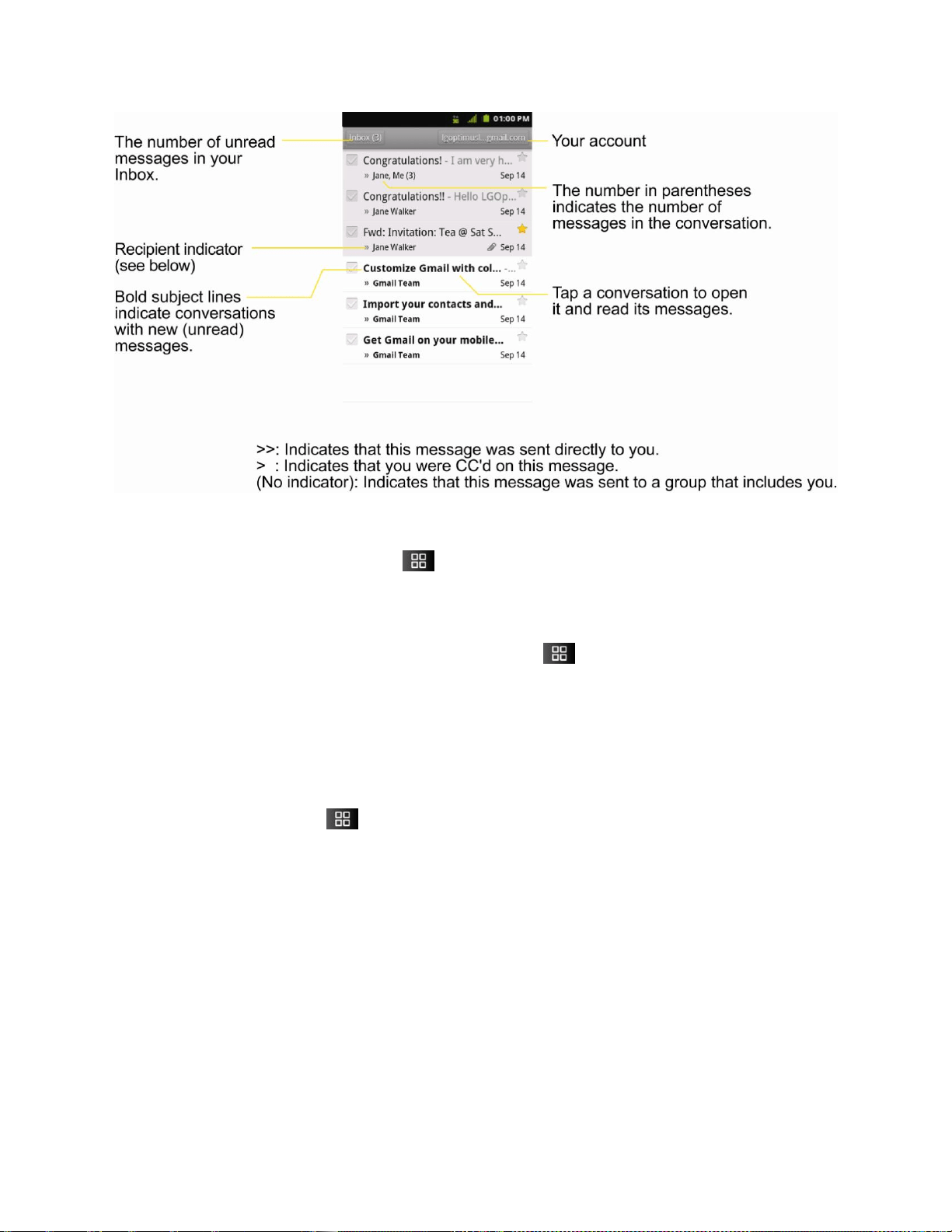
Accounts and Messaging 100
To open your Inbox when Gmail is running:
► When reading a message, tap > Go to inbox.
– or –
When viewing a list of labeled conversations, tap > More > Go to inbox.
To switch accounts:
Gmail displays conversations and messages from one Google Account at a time. If you have
more than one account, you can open the Accounts screen to view how many unread
messages you have in each account and switch accounts.
1. From your Inbox, tap > Accounts.
– or –
Tap your account name at the top right corner of the Inbox screen.
2. Tap the account that contains the email you want to read.
Reading Your Messages
► Tap a conversation that contains the message you want to read.
When you open a conversation, the first unread or starred message is displayed.
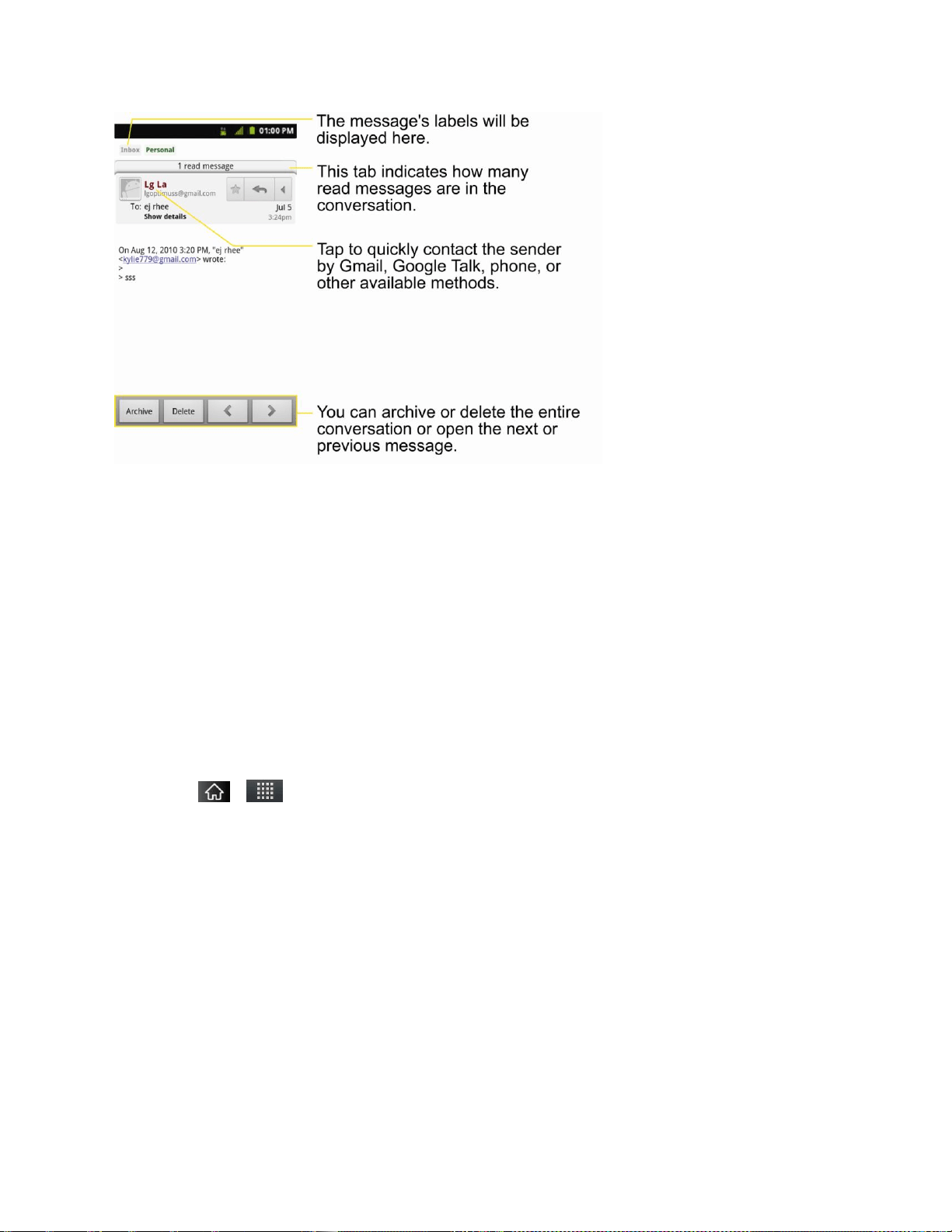
Accounts and Messaging 101
The Google Talk online status will appear next to the name of the sender of each message if the
sender has a Google account. If you want to contact the sender, touch the Contact's picture ID
to open Quick Contact. (See Communicating with Your Contacts.) When reading messages in a
conversation, you can use the buttons at the bottom of the screen to archive the entire
conversation (see Archiving Conversations) or delete it. After you delete a conversation, you
can touch Undo in the green bar that appears at the top of the Inbox screen to return the
message to the Inbox. You can scroll to the bottom of a message to access buttons for replying
to or forwarding the message, as described in Replying to or Forwarding a Message.
To reread a message:
When you open a conversation, messages that you‘ve already read are minimized into a tab
that indicates the number of hidden messages.
1. Tap > > Gmail.
2. Tap the conversation you want to view, then touch the tab indicating minimized
messages.
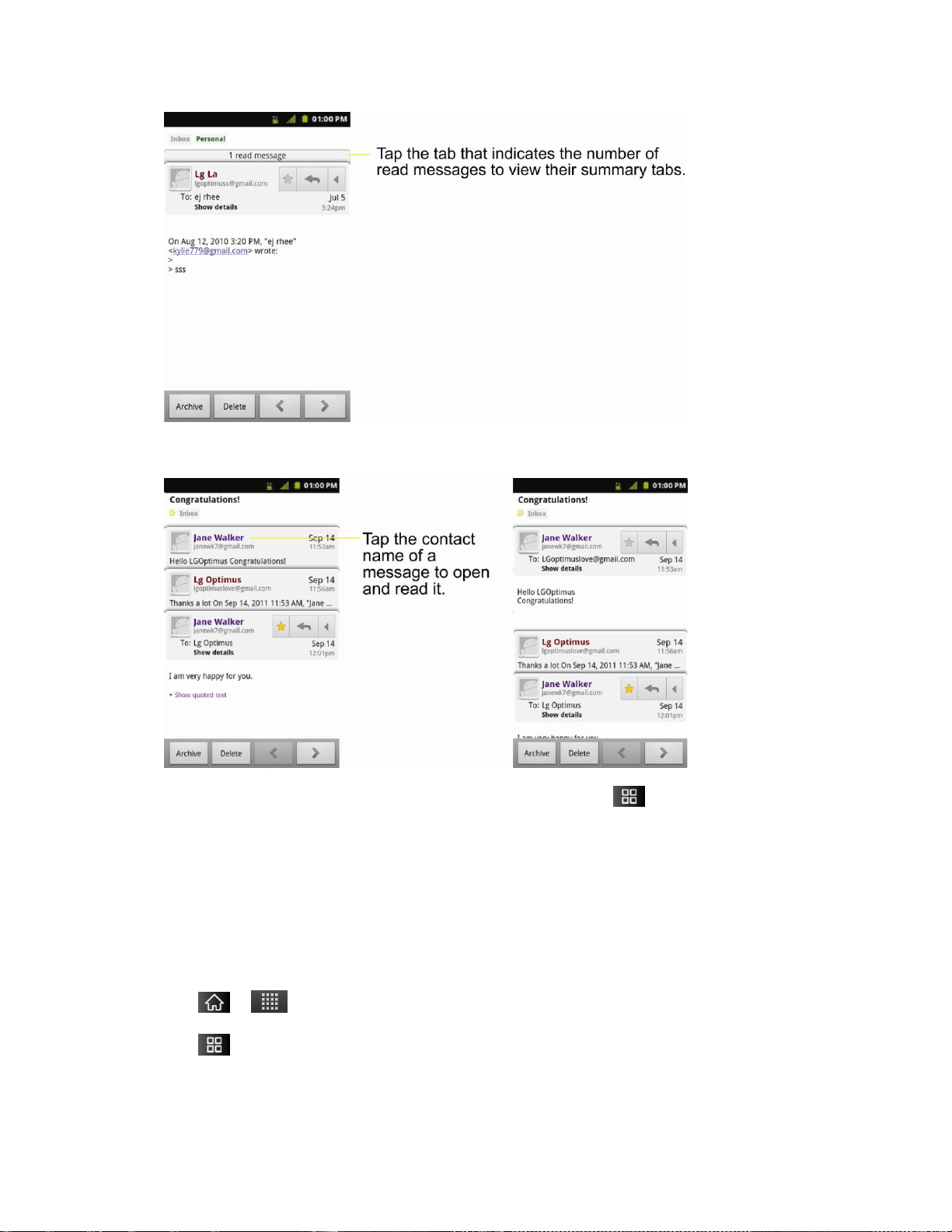
Accounts and Messaging 102
3. Tap the contact name to open that message.
When reading a message or when its tab is selected, you can tap > Mark unread to return
a read message to the unread state. For example, to remind yourself to read it again later.
Composing and Sending a Message
You can compose and send a message to people or groups with Gmail addresses or other
email addresses.
To compose and send a message:
1. Tap > > Gmail.
2. Tap > Compose.

Accounts and Messaging 103
3. Enter a recipient's address. As you enter text, matching addresses are displayed from
your Contact list. You can tap a suggested address or continue entering text to enter a
new one.
4. Tap > Add Cc/Bcc to Cc or Bcc recipients, if necessary.
5. Enter a subject for the message in the Subject field.
6. Continue into the next field to compose your email message.
7. Tap > Attach to add an attachment to the email.
8. Tap to send the email.
– or –
If you're not ready to send the message, tap instead. You can read your drafts by
opening messages with the Drafts label. (See Viewing Conversations by Label.)
– or –
Tap > Discard to erase the message (including any saved drafts).
Note: If you aren't connected to a network - for example, if you‘re working in Airplane mode -
the messages that you send are stored on your device, with the Outbox label until you
connect to a network again.
Accounts and Messaging 104
Replying to or Forwarding a Message
You can continue an email conversation by replying to a message or by forwarding it.
To reply to or forward a message:
1. Tap to view the reply options.
2. Tap Reply, Reply all, or Forward.
Replying to or forwarding messages without changing the subject adds your reply to
the current conversation. Changing the subject starts a new conversation.
The message will open in a new screen where you can add or remove addresses,
edit the subject, and add or remove text or attachments, as described in Composing
and Sending a Message.
You can add one or more people to an ongoing conversation by replying to all and
then adding the new person's address(es) to the message.
All of the messages in the conversation are included in the new message; any
messages that follow the message you forward are omitted.
3. Tap to send the email.
Working with Conversations in Batches
With Gmail, you can archive, label, delete, or perform other actions on a batch of conversations
at once.
1. From the Inbox or another label, tap the checkmark box to the left of each message for all
the messages you want to include in the batch.
When you checkmark a conversation, the Archive, Delete, and Labels buttons
appear at the bottom of the screen.
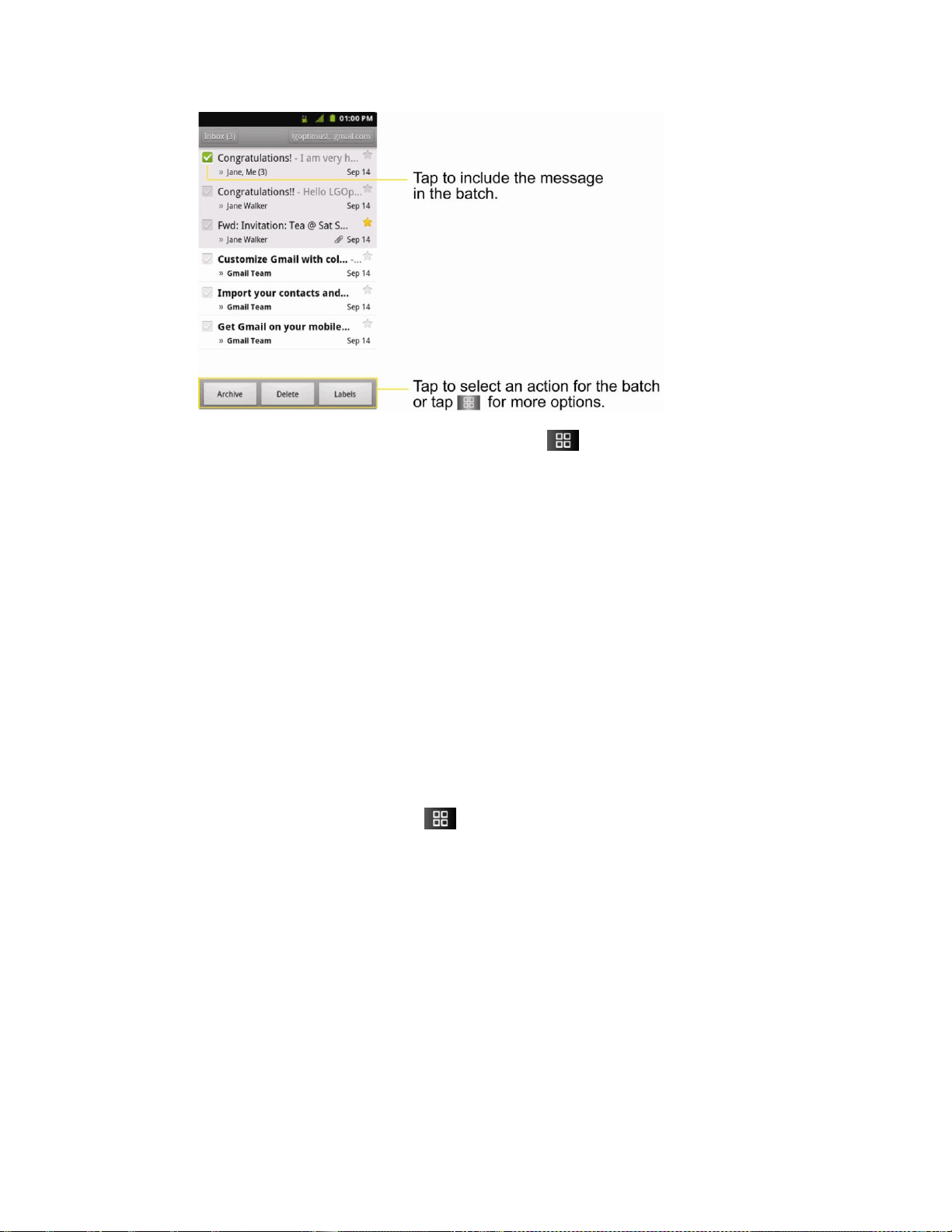
Accounts and Messaging 105
2. Tap Archive, Delete, or Labels. You can also tap > Add star, Report spam, Mute,
Mark read/Mark unread, Not important/Mark important, or More (Deselect all, Help,
About).
The chosen action affects the selected batch of messages. If you accidentally delete
a batch of conversations, you can tap Undo in the green bar (that appears briefly
after the action) at the top of the Inbox screen to return the messages to the Inbox or
appropriate label. You can also use Undo after muting, archiving, and reporting
spam. If you never work with batches of messages, you can hide the check boxes to
leave more room for the subjects of conversations. (See Changing Gmail Settings.)
Labeling a Conversation
As mentioned previously, conversations are organized by labels. Gmail has several default
labels, but you can also add your own through Gmail on the Web.
To label a conversation or change a conversation's labels:
1. When viewing a conversation, tap > Change labels.
2. In the dialog box that opens, check the labels you want to assign to the conversation and
tap OK.
To label a batch of conversations at once:
You can assign or change the labels of one or more conversations at once.
1. From your Inbox or another label, checkmark the conversations to select a batch. (See
Working with Conversations in Batches.)
2. Tap Labels at the bottom of the screen.
3. In the dialog box that opens, check the labels you want to assign to the conversation.
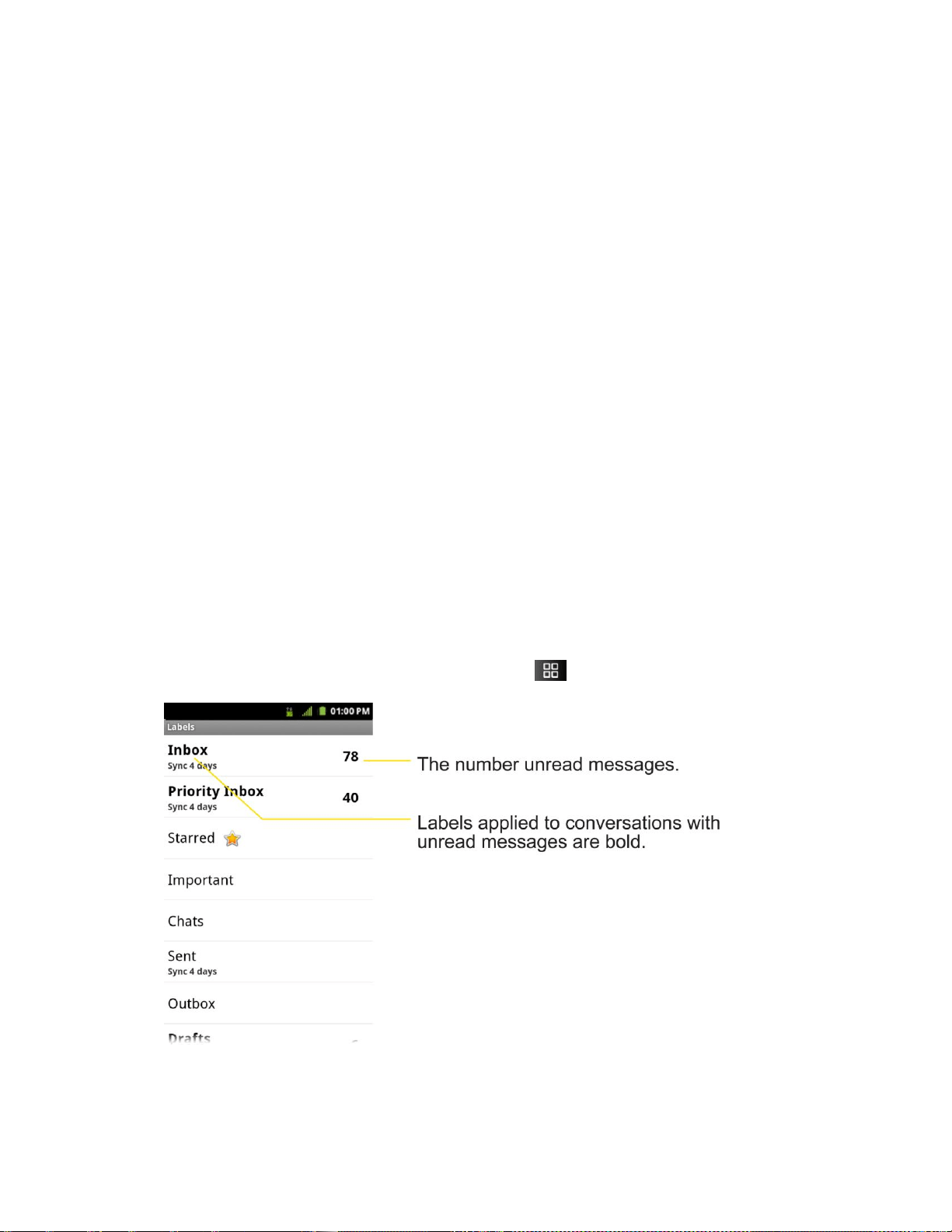
Accounts and Messaging 106
4. Tap OK.
Starring a Message
You can star an important message or conversation to make it easy to locate again. To view just
conversations with starred messages, see Viewing Conversations by Label and view the
Starred label.
To star a message:
● When reading a message, tap the star in its header.
– or –
When viewing the list of conversations, tap a conversation‘s star to start the newest
message in the conversation.
To unstar a message:
● Tap its star again.
Viewing Conversations by Label
You can view a list of the conversations that have the same label, including conversations with
starred messages. (See Labeling a Conversation or Starring a Message for information about
assigning labels and stars.)
1. When viewing your Inbox or another label, press > Go to labels.
2. Tap a label to view a list of conversations with that label.

Accounts and Messaging 107
Note: The conversation list will resemble your Inbox. Most of the options available while using
your Inbox will also be available while viewing these lists of labeled messages.
Reporting Spam
The Gmail webmail service is quite effective at preventing spam (junk mail) from reaching your
Inbox. When you do receive spam you can help improve the Gmail service by reporting the
conversation as spam.
To report a conversation as spam:
► When reading the email, tap > More > Report spam.
– or –
From the Inbox, tap the checkmark to select the messages, then tap > Report
spam.
When you report a conversation as spam, the conversation (and all its messages) are removed
from your Inbox. You can view the messages you've marked as spam by switching to the Spam
label. (See Viewing Conversations by Label.)
Searching for Messages
With the Gmail application, it is very easy to search and find specific emails. When you search
for emails, all of the emails in your Google account on the web are included in your search
(except those labeled Trash or Spam), not just those that you've synchronized onto your device.
You can also use the advanced search options as described on the Gmail website.
1. From the Inbox, tap > Search.
– or –
From the Inbox, press .
2. Enter the word or words to search for, then tap the Search icon to the right of the text
field. A list of results will appear, displaying all of the conversations with emails that
contain the word(s) you searched for.
Archiving Conversations
You can archive conversations, to move them out of your Inbox without deleting them. Archived
conversations are assigned the All Mail label, and also retain any other labels you've assigned
to them. Archived conversations are also included in search results. If someone replies to a
message that you‘ve archived, its conversation will be restored to your Inbox.
To Archive a conversation:

Accounts and Messaging 108
► From your Inbox, touch and hold a conversation and then tap Archive in the menu that
opens.
– or –
Checkmark one or a batch of conversations in your Inbox, then tap the Archive button.
(See Working with Conversations in Batches.)
– or –
When reading a message, tap the Archive button at the bottom of the screen.
Synchronizing Conversations
The Gmail webmail service has the resources to store all the messages you've ever sent or
received; your device does not. To save space, Gmail downloads only some of your messages
to your device. Use the Settings application to control how and when applications synchronize
their data. (See Synchronizing Accounts.)
To select which conversations to synchronize:
1. Tap > > Gmail.
2. Tap > More > Settings > Labels.
The Synchronization settings screen opens, displaying a list of your Gmail labels. Below
each label is its current synchronization setting: Sync all, Sync 4 days, or with no label.
(Conversations with no label are not synchronized.)
3. Tap a conversation label whose synchronization settings you want to change. Choose
from the following options:
Sync none: Don't download any conversations that only have this label.
Sync 4 days: Download the previous four days (or number of days you set) of
conversations.
Sync all: Download all conversations with this label.
To set how many days of conversations to synchronize:
1. Tap > > Gmail.
2. Tap > More > Settings > Labels.
3. Tap Number of days to sync.
4. Enter the number of days, then tap the OK button.

Accounts and Messaging 109
Appending a Signature to Your Messages
You can add a signature to every email you send, such as your name, contact information, or
any personal message.
1. Tap > > Gmail.
2. Tap > More > Settings > Signature.
3. Enter a signature or other information.
4. Tap OK.
Changing Gmail Settings
You can change a number of settings for Gmail. Each Google account has its own settings, so
your changes affect only the current account. (See To switch accounts.)
Notification volumes and some synchronization settings can also be changed in the Settings
application.
1. Tap > > Gmail.
2. Tap > More > Settings.
General settings:
Priority Inbox: When checkmarked, this feature makes Priority Inbox your default
inbox for your account.
Signature: To add a signature or other information to outgoing email. (See
Appending a Signature to Your Messages.)
Confirm actions: If checkmarked, this feature will display a dialogue asking you to
confirm whenever you want to archive, delete, or send a message.
Auto-advance: Allows you to choose what screen to display after you delete or
archive conversation.
Message text size: Allows you choose the size of the text in a message for easier
viewing.
Batch operations: When checkmarked, this feature allows you to perform various
operations on multiple conversations at once
Clear search history: Removes the search history all searches performed on your
Gmail account.
Labels: Allows you to manage which conversations are synchronized and how often.

Accounts and Messaging 110
Notification settings:
Email notifications: When checkmarked, the phone will notify you whenever you
receive new email. (See Using the Notifications Panel.)
Select ringtone: Allows you to choose a ringtone to sound when you receive a new
email notification.
Vibrate: When checkmarked, the phone will vibrate when you receive a new email
notification.
Notify once: When checkmarked, the phone will notify you once for new email, not
for every new message.
Synchronizing Accounts
Your device is able to synchronize data from a variety of different sources or sites. These
accounts can range from Google, a Corporate Exchange Server, and other social sites,
including Facebook, Twitter, and MySpace.
Corporate and Google accounts are also able to synchronize Calendar events and Contacts.
To enable the auto-sync feature:
1. Tap > > Settings > Accounts & sync.
2. Tap Auto-sync. A checkmark indicates the feature is enabled.
Tap an account you've already set up to choose the type of data you want to
synchronize. For example, you can choose to sync your Google Calendar and/or
Gmail data.
Synchronizing Your Google Account
By default, there are no accounts managed by the device. These must be added manually.
To add an account (using a Google account type as an example):
1. Tap > > Settings > Accounts & sync.
2. Tap Add account > Google.
3. Tap Next > Sign in.
Note: If you do not already have a Google account, tap Create (instead of Sign in) follow the
on-screen prompts to create your new account.
4. Tap the Username and Password fields and enter your information.

Accounts and Messaging 111
5. Tap Sign in. Your device communicates with the Google servers to confirm your
information. Your existing Gmail account appears within the Manage accounts area of
the screen.
If Auto-sync is selected, changes or updates to your Gmail account are then
automatically updated to your device.
To configure the Google sync settings:
1. Tap > Settings > Accounts & sync.
2. Tap the Google account to reveal the account‘s synchronization settings screen.
3. Tap the type of data you wish to synchronize (Sync Picasa Web Albums, Sync
Contacts, Sync Gmail, and Sync Calendar). Note that Auto-sync must be selected (in
the previous screen) for these options to become available.
4. Tap to return to the previous screen.
Synchronizing Your Corporate Account
Your device is capable of synchronizing with your company‘s Exchange Servers.
To add a new Corporate account:
1. Tap > > Settings > Accounts & sync.
2. Tap Add account > Corporate.
3. Follow the on-screen prompts to create your new Corporate email account. (See
Corporate Email (Outlook.)
If Auto-sync is selected, changes or updates to your Corporate/Outlook account are
synchronized to your device.
To configure the Corporate account settings:
1. Tap > > Settings > Accounts & sync.
2. Tap the Corporate account.
3. Tap the options you wish to configure:
Account settings allows you to configure:
• Account name: displays the name used by the device to track the account.
• Your name: displays the name used in the From field within your outgoing
emails.

Accounts and Messaging 112
• Signature: allows you to create an outgoing email signature attached to new
emails sent from your device.
• Period to synchronize email to select the how many days of data you want to
sync. Choose from: One day, Three days, One week, Two weeks, or All.
• Period to synchronize calendar: to select how many days worth of calendar
events the device and server should synchronize. Choose from: Two weeks,
One month, Three month, Six month, or All.
• Email check frequency: to select the frequency which the device queries the
remote server for new email changes. Choose from: Automatic (Push), Never,
Every 15 minutes, Every 30 minutes, Every hour, Every 2 hours, or Every 4
hours.
• Inbox Sort by: to sort Inbox by date, subject, sender, or size.
• Roaming: Allows you to retrieve email automatically while roaming.
• Default account: assigns this account as the default used when sending out
new emails.
• Ask before deleting: to set whether to ask before deleting.
• Email notifications: enable the device to display icon in the Status Bar
when new emails have been received.
• Select ringtone:assigns an audible ringtone when a new or upcoming event is
pending.
• Vibrate: assigns a vibration when a new or upcoming event is pending.
• Incoming settings: provides access to the Domain, password, and exchange
server parameter fields.
• Sync contacts: synchronizes the contacts between your device and the remote
exchange server. A checkmark indicates the feature is enabled.
• Sync calendar: synchronizes your exchange calendar entries between your
device and the remote exchange server. A checkmark indicates the feature is
enabled.
• Out Of Office: allows you to configure your Out of Office settings.
4. Tap to return to the previous screen.
5. For more detailed Work/Corporate email information, see Corporate Email (Outlook.). For
more information on Corporate Calendar synchronizing, see Displaying and
Synchronizing Calendars

Accounts and Messaging 113
Privacy: Factory Data Reset
Resetting the device restores all the factory defaults, including personal data from internal
device storage, information about your Google Account, any other accounts, your system and
application settings, and any downloaded applications. Resetting the device does not erase any
system software updates you‘ve downloaded or any files on your microSD card, such as music,
pictures, or applications. After resetting the device, the next time you turn on the device, you‘re
prompted to reenter the same kind of information as when you first started the device. See
Activating Your Device.
1. Tap > > Settings > Privacy > Factory data reset.
2. If you are certain that you would like to restore all factory settings, tap Reset phone.
3. Enter your unlock Pattern, PIN, or Password if you have configured one.
4. Tap Erase everything to confirm.

Applications and Entertainment 114
Applications and Entertainment
All your device‘s features are accessible through the Applications list.
Android Market
Applications
Getting Started with Sprint TV and Music
Sprint TV & Movies
Music
YouTube™
GPS Services
Google Maps™
TeleNav™ GPS Navigator
Getting Driving Directions
Navigation
Android Market™
Android Market provides direct access to applications and games to download and install on
your device.
Accessing the Market
1. Tap > > Market.
2. If not already logged in with your Google account, tap Next.
3. Tap Sign in and enter your Google account information.
4. Touch Accept to agree to the Android Market terms of service.
Note: Market options may vary depending on the version installed in your device. Your Market
application will update automatically when available.
Selecting and Installing a Google Application
1. Tap > > Market.

Applications and Entertainment 115
2. Browse for an application. Once you have decidedon one, tap it to view its details.
3. Read the application descriptions and comments.
4. Tap Install (for free applications) or the Price button (for paid applications).
Note: Use caution with applications which request access to any personal data, functions, or
significant amounts of data usage times.
5. Tap Accept & download (for free applications) or follow the on-screen instructions to
pay for the application and tap Accept & buy.
6. Check the progress of the current download by opening the Notifications Panel.
7. You will be notified when the item is downloaded and installed on your device.
8. On the Android Market screen, tap > Downloads, tap the installed application in the
list,and then tap Open.
Launching an Installed Google Application
1. Tap > .
– or –
Tap > > Market > > My Apps.
2. Tap icon of the newly installed application.
Reinstalling a Google Application
If the Android Operating System is ever updated, any data contained on the device will be
erased. The only data stored on the device are Google applications available via the Android
Market.
Note: Pictures, videos and music are stored on the microSDcard. Applications can be stored
on the microSD card as well as on the device. Contacts and Calendars are stored
remotely on your remote Google or Outlook servers.
1. Tap > > Market > > My Apps.
2. Scroll through the list of previously downloaded Google applications and choose the one
you wish to reinstall.
3. Follow the on-screen instructions.

Applications and Entertainment 116
Sprint ID
ID Packs are bundles of applications, ringtones, wallpapers, settings, and more. ID Packs are
installed using an application called Sprint ID.
You can have up to six ID Packs installed at any one time and you can easily switch from one
ID Pack to another without losing any applications already installed. For example, when you
install the Sprint ID Pack, Sprint applications such as Sprint TV, TeleNav™ GPS Navigator,
NASCAR Sprint Cup Mobile, and Sprint Football Live will remain in your applications.
Installing Your First ID Pack
Note: Your device must be activated, your battery should be fully charged, and you should be
in a network coverage area before you install an ID Pack.
1. Tap from the Home screen.
If your device is in Power Save mode, tap to reactivate the screen.
If the lock screen appears, unlock it by dragging the Unlock icon to the right side
of the screen.
Note: You also have the ability to place an emergency call directly from the Welcome to Sprint
ID screen.
2. Tap Get New in the Choose your ID screen.
Note: The Sprint ID pack comes with wallpapers, ringtones, and applications such as Sprint
TV, & Movies, GPS TeleNavigator, Sprint Music Plus, Sprint Football Live, and
NASCAR Sprint Cup Mobile.
3. Browse the ID packs and tap the desired one.
4. Read the information screen for a description of the ID Pack and touch Install.
5. Touch Agree to accept the Terms & Conditions of the ID Pack.
6. If prompted, touch Continue on any following screens until you see the Downloading
icon in the Status Bar.
Note: While the ID Pack is downloading in the background, you can begin to explore the
features of your new device from the home screen.
When the download is complete, you will see the Download finished icon in the
Status Bar.
WARNING: DO NOT interrupt the download process.

Applications and Entertainment 117
7. Tap > > More > Notifications. If the download is complete, tap ID ready to
install to install the ID Pack.
Switching ID Packs
1. Tap > (Sprint ID).
2. Tap an ID Pack to replace your current pack.
– or –
Tap Get New to install a new ID Pack and follow steps 2–7 of Installing Your First ID
Pack.
Note: Certain features of Sprint ID are subject to change. For the most up-to-date information
about using Sprint ID, please visit www.sprint.com.
Applications
You can access a wide variety of Sprint applications in many different categories with your
phone and data service. Currently, various applications, such as NASCAR, Sprint Football Live,
TeleNav GPS Navigator, Sprint Music Plus, and Sprint TV are available when you download
and install the Sprint ID pack.
Note: Some Sprint data applications may not work with a Wi-Fi connection present. If
prompted, disable your device's Wi-Fi feature while using these applications.
Download the Sprint ID Pack
► Tap > . On the Choose your ID screen, tap Get New > Sprint Pack. Follow
the on-screen prompts to install the Sprint ID Pack.
– or –
Tap > > Sprint Zone > Sprint Applications. Follow the on-screen prompts to
install the Sprint ID Pack.
Note: Once you download and install the Sprint pack, Sprint applications such as NASCAR
Sprint Cup Mobile, Sprint Football Live, Sprint Music Plus, and TeleNav™GPS
Navigator will appear on your Applications screen. When you switch from the Sprint
pack to another ID pack, or choose a new ID pack, the Sprint applications will remain
installed and visible on your Applications screen.
To download and install Sprint apps:
1. Tap > > [application name]. The application will then be downloaded.

Applications and Entertainment 118
2. Follow the instructions to customize your application (such as selecting a favorite team
or driver) or tap to explore your options.
Note: Important Privacy Message – Sprint‘s policies often do not apply to third-party
applications. Third-party applications may access your personal information or require
Sprint to disclose your customer information to the third-party application provider. To
find out how a third-party application will collect, access, use, or disclose your personal
information, check the application provider‘s policies, which can usually be found on their
website. If you aren‘t comfortable with the third-party application‘s policies, don‘t use the
application.
Sprint Zone
Sprint Zone is a free application that lets you stay connected to all the latest news and
information from Sprint. Included here are Sprint customer promotions, news, feedback,
featured apps and tips/tricks for your device.
1. Tap > > Sprint Zone.
2. Navigate through the list to find your relevant topics.
3. Tap a topic link to continue to that page.
NASCAR Sprint Cup Mobile
Now you have the ability to get every bit of NASCAR coverage, news, and stats right on your
device.
1. Tap > > NASCAR.
2. If prompted, read the disclaimer, make a selection and tap OK. Follow the on-screen
instructions until you reach the main NASCAR Sprint Cup Mobile page.
3. Navigate the main page using your finger.
4. Tap an on-screen option to activate features that include:
Home is the main NASCAR homepage where you can view stats on a current race,
choose to follow a specific driver, view special NASCAR promotions and other
NASCAR-specific multimedia content.
• Tap and tap Home to return to the main NASCAR page. This applies to
each of these options.
Race Recap provides overviews of the current races, pictures, commentary,
additional photos,and race stats.
Chase displays a list of selectable multimedia video clips from the Chase for the
Sprint Cup 2011.

Applications and Entertainment 119
My Driver to customize your NASCAR experience by following specific drivers.
Information includes driver-specific stats and NASCAR RSS feeds. You can also get
additional stats, review other driver info, or change drivers.
Stats & Schedule lets you track race information such as: NSCS Recap, NNS
Recap, Point Standings,Season Stats, and Schedule.
Miss Sprint Cup is your insider to NASCAR by providing news, information, blogs
and twitter updates to the goings-on within NASCAR.
Videos displays a list of selectable multimedia content. Other features include
streaming multimedia content from NASCAR radio stations or other racing radio
shows.
News & Alerts provides you with quick access to NASCAR-specific news, photos,
and driver stats.You can also customize alerts for new information such as ALL
NASCAR News, Sprint Cup News, etc.
Twitter allows you to view the latest Twitter updates.
Fantasy lets you take part in online fantasy racing, access Games, News, Videos,
take part in Polls, and access other Special Promotions.
FanZone displays a list of selectable content available to Sprint subscribers such as
Sweepstakes, Video clips (footage and music) and Screensavers.
Settings and Help displays help information for usage of the NASCAR application
and features.
Exit to quit the NASCAR application.
• Tap > Exit > Yes.
Sprint Football Live
Get Sprint Football live on your device. It lets you be right in the middle of your favorite game by
being a part of previews, blogs, discussions groups, fantasy football, etc.
1. Tap > > Sprint Football Live.
2. Tap the PRO or COLLEGE tab on the Sprint Football Live home page, or tap >
PRO or COLLEGE to access features such as:
My Team launches a team-specific page with content such as top stories, Schedules,
and the ability to change your favorite team selection.
Scores and Schedules to access the latest scores and team schedules.

Applications and Entertainment 120
News and Blogs provides AP league news, Blogs, Division news, Transactions, and
other football related information.
Polls (College) for the latest AP, Coaches, and BCS polls.
Standings for the latest team standings.
Statistics for the latest team and player statistics.
Heisman (College) for access to the latest news on the run for the Heisman.
Videos and Photos for updated football news reports, photos, and video clips.
Fantasy (Pros) for access to your favorite fantasy leagues.
Twitter launches an onscreen Twitter page specific to the NFL, or college teams.
Odds for the odds on the upcoming team matchups.
Team Pages allows you select from either the AFC or NFC conferences, then
display content such as top stories, Schedules, and the ability to change your
favorite team selection.
Settings/Help displays help information for Sprint Football Live, allows you to
change your favorite team, and gives software information about the Sprint Football
Live application.
To exit Sprint Football live:
► Tap > EXIT.
Getting Started with Sprint TV and Music
In order to access Sprint applications on your device, such as Sprint TV and Sprint Music Plus,
you must first download and install the Sprint ID Pack. Once you have installed the Sprint pack,
you can switch back to any other pack or install a new pack. The Sprint applications will always
be stored on your applications screen.
Sprint TV gives you the ability to listen to audio clips and to view video clips right from your
device's display.Watch live TV and catch up on episodes of your favorite shows – anywhere on
the Nationwide Sprint Network.*
Sprint Music Plus lets you preview, purchase, download, and listen to over a million songs
right on your device.You can even add songs from your own library to round out your on-the-go
playlist.
* Sprint TV coverage not available everywhere. Content and lineup subject to change.
Select channels also available for casual usage. Visit sprintchannels.mobitv.com for
more information.

Applications and Entertainment 121
► Tap > .
On the Choose your ID screen tap Get New > Sprint Pack. Follow the on-screen
prompts to install the Sprint ID Pack.
– or –
Tap > > Sprint Zone > Sprint Applications. Follow the on-screen prompts
to install the Sprint ID Pack.
Sprint TV & Movies
The Sprint TV application offers a wide variety of accessible channels. Subscription options
include comprehensive basic packages as well as a full menu of ―a la carte‖ channels. Visit
sprintchannels.mobitv.com for more information on channels and pricing.
Some of the available categories may include:
● Sprint Radio Sprint Power View
● Primetime TV
● Music Videos
● Sprint TV Live Music
● Sports
● Entertainment
● Cartoons
● News & Weather
● Movies & Shorts
● Mobile Previews
Note: Available categories and content are subject to change.
Watching TV
1. Tap > > Sprint TV & Movies. Depending on your settings, your device may
prompt you to accept a data connection.
2. Select Live TV, On Demand, or Movies to display channel options.
3. Tap an entry to select a channel from the Sprint TV listings or to select an available
category.

Applications and Entertainment 122
Note: The first time you access a channel, the system will prompt you to purchase access
(unless the channel doesn't have a monthly fee). Tap Subscribe to purchase access.
4. If applicable, tap a desired clip to view the program. The clip will automatically load and
begin playing.
Tip: Scroll through the channels to view more selections. Once you find a channel that you
want to watch or listen to, simply touch it and wait approximately three seconds, and the
channel begins loading.
Music
You can play audio files that are stored on your device's microSD card. Copy audio files from
your computer onto the microSD card before you open the Music application. The Music
application supports audio files in numerous formats, including MP3, WMA, M4A (DRM-free
AAC files, from iTunes® ), AMR, MIDI, and OGG Vorbis.
Music Player
1. Tap > > Music.
2. You can select music tracks from the following tabs:
Artists: To display your music library sorted by artist.
Albums: To display your music library sorted by album.
Songs: To browse through your downloaded music library.
Playlists: To select a customized playlist you‘ve created.
3. Once you‘ve displayed a list of songs, you can browse through your available titles.
To listen to a song or playlist, tap it to begin playing.
Creating a Playlist
1. Tap > > Music > Songs.
All compatible music files are displayed.
2. Touch and hold a song you‘d like to add to a playlist. A popup menu is displayed.
3. Tap Add to playlist and select either Current playlist or New (to create a new playlist).
If you select New, delete the current default name, enter a name for your new playlist,
then tap Save.

Applications and Entertainment 123
Assigning a Song as a Ringtone
1. Tap > > Music > Songs.
2. Touch and hold a song you‘d like to use as your new ringtone. A popup menu is
displayed.
3. Tap Use as phone ringtone to set the selected song as your new default ringtone.
4. Confirm the song has been successfully assigned by navigating to your Phone ringtone
menu.
Tap > > Sound > Phone ringtone.
Backing Up Your Downloaded Music Files
Sprint recommends that you back up your downloaded music files to your computer. Although
the downloaded files can only be played on your device and on your account, backing them up
to your computer lets you access the files in case your microSD card is lost or damaged, or if
you install a new microSD card. (See Connecting Your Device to Your Computer.)
1. Connect your device to your PC using a USB cable or the built-in connection on
Bluetooth -enabled phones.
2. Use your computer to navigate to the microSD card's Music folder.
3. Select and copy the music files to a folder on your computer‘s hard drive.
Sprint Music Plus
The Sprint Music Plus store lets you purchase and download digital music files to play on your
device or computer.
Accessing Sprint Music Plus
1. Tap > > Sprint Zone> Sprint Applications > Sprint Music Plus. Depending
on your settings, your device may prompt you to accept a data connection.
2. Follow the on-screen instructions to download the application.
3. Tap > Notifications. Tap the Download complete field for the Sprint Music app
and tap Install.
Purchasing and Downloading Music from Sprint Music Plus
1. Tap > > Sprint Music Plus.
2. Tap My Library, Downloads, Music Store, Ringtone Store, or Ringback Tone Store
to begin your music selection.

Applications and Entertainment 124
My Library allows you to access your music library.
Downloads allows you to view any pending downloads.
Music Store provides access to New Releases,Top Downloads, or Genres of
music.
Ringtone Store provides access to New Ringtones, Top Ringtones, or Genres of
music.
Ringback Tone Store provides access to New Ringback Tones, Top Ringback
Tones, or Genres of music.
YouTube™
YouTube™ is a video sharing website on which users can upload and share videos. The site is
used to display a wide variety of user-generated video content,including movie clips, TV clips,
and music videos, aswell as video content such as video blogging, informational shorts and
other original videos.
Note: YouTube is a data-intensive feature. Sprint recommends that you upgrade to an
unlimited data plan to avoid additional data charges.
1. Tap > > YouTube.
2. To search for videos, tap or tap .
3. Enter the text to search for or tap to search by voice.
4. If entering text, tap a suggestion below the search box or tap to search.
5. Scroll through the search results and tap a video to watch it.
6. Tap to return to the previous page.
Note: It is not necessary to sign in to the YouTube site to view content. However, if you wish to
sign in to access additional options, tap > My Channel. Then enter your username
and password and tap Sign in or select your account from the list.

Applications and Entertainment 125
GPS Navigation
GPS Services
Google Maps™
TeleNav™ GPS Navigator
Getting Driving Directions
Navigation
GPS Services
Your device's built-in GPS capability gives you accessto a number of location-based services,
including Maps, Navigation, and TeleNav™ GPS Navigator.
Activating Location Mode
Before using any of the location-based services, you must turn on your device's location mode.
1. Tap > > Settings > Location & security.
2. Tap Use GPS satellites to place a checkmark and activate your GPS.
Activating Using Wireless Networks
This additional location feature uses open Wi-Fi and mobile network connections to assist in
providing additional location accuracy.
1. Tap > > Settings > Location & security.
2. Tap Use wireless networks to place a checkmark and activate this feature. (A green
checkmark appears.)
Since this feature is based on Google‘s location service, you will need to agree to
allow Google to collect anonymous information.
3. Tap Agree to accept the terms of service.
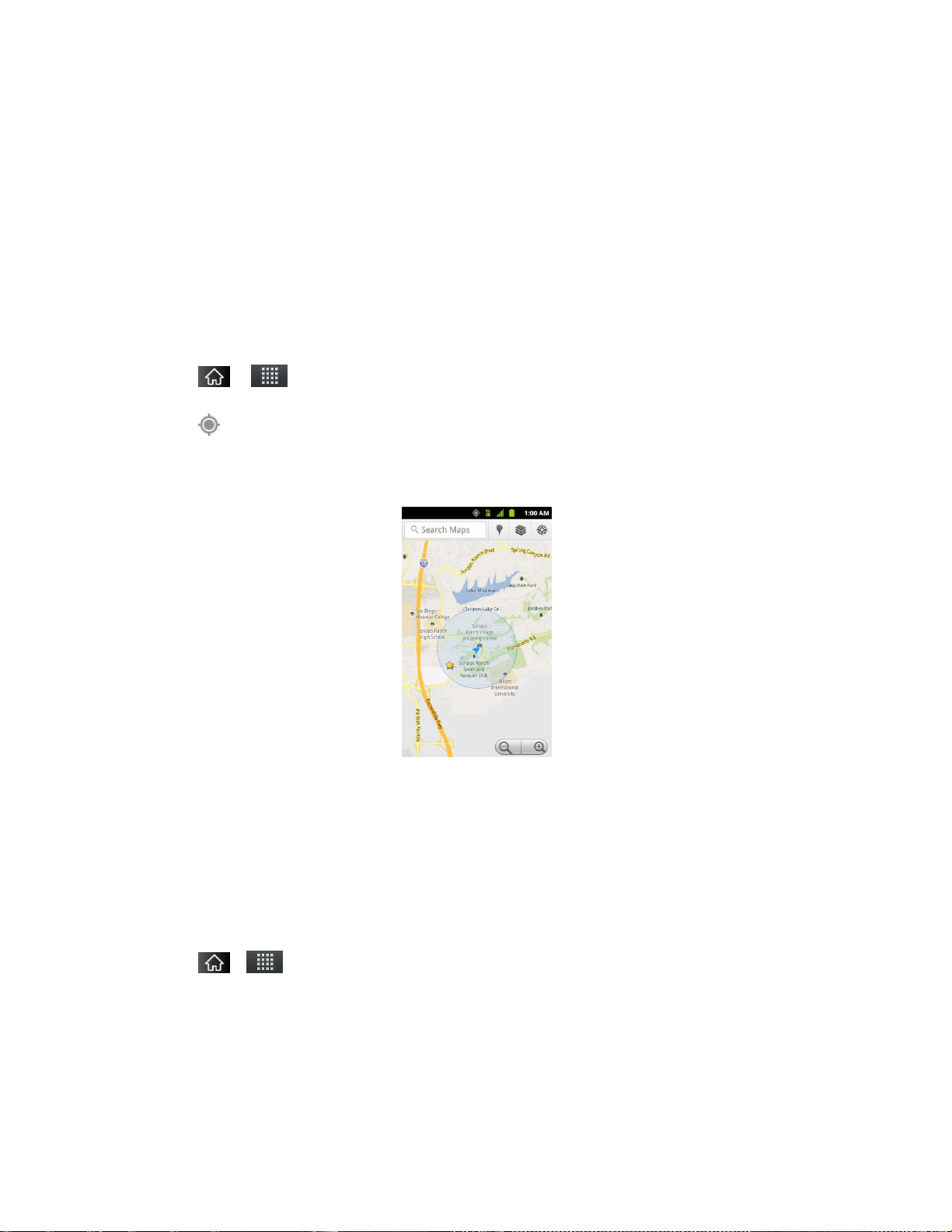
Applications and Entertainment 126
Google Maps™
You can use Google Maps to find your current location; to view real-time traffic conditions; to get
detailed directions by foot, public transportation, bicycle, or car; and to navigate by using spoken,
turn-by-turn driving instructions using the Google Maps Navigation (beta) service. You can
search on a street map or a satellite image to locate an address or a landmark, and you can
view some locations as if you were strolling down the street. If you join Google Latitude, you can
view your friends‘ locations on your maps and share your location and other information with
them. There are some locations that Maps does not have information about.
To launch the Google Maps application and view your location:
1. Tap > > Maps
2. Tap .
The map centers on a blue arrow that indicates your location. A blue circle around the
arrow indicates that your actual location is with in the circle.
To get an address and additional information for a location:
► Touch and hold a location on the map. A balloon with the address and a thumbnail from
Street View (if available) opens over the location.
► Tap the balloon to access additional options.
To utilize Google Maps:
1. Tap > > Maps
If prompted, read the What‘s new message and tap OK.
2. Tap the magnification icons to zoom in or out of the current map view.
– or –
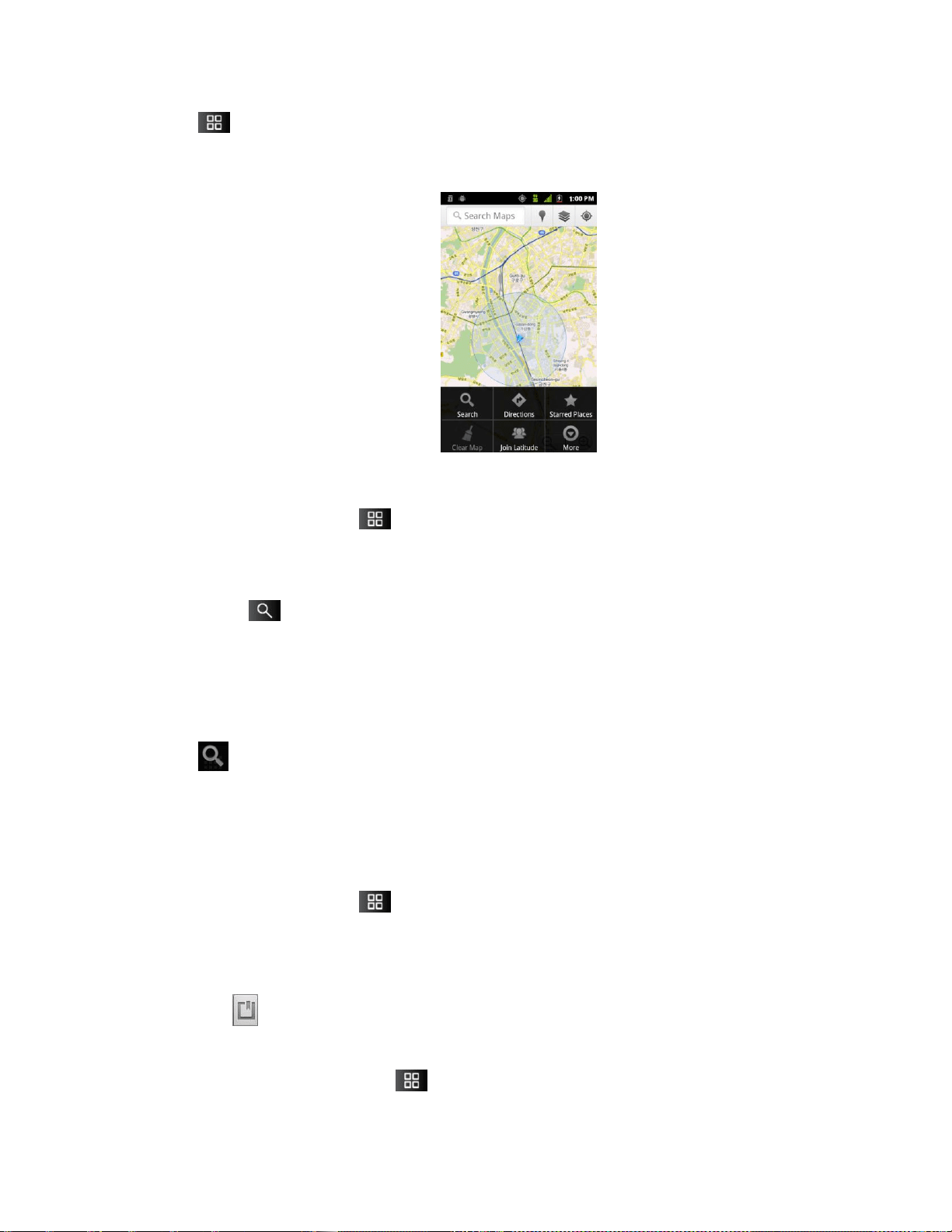
Applications and Entertainment 127
Tap to utilize other Google Map features.
Choose from: Search, Directions, My Places, Clear Map, Join Latitude, and More.
To search for a location:
1. While viewing a map, tap > Search.
– or –
Simply tap .
2. In the search box, enter the place you're looking for.
You can enter an address, a city, or a type of business or establishment. For
example, ―theater in New York‖.
3. Tap . Markers with letter labels indicate search matches on the map.
4. Tap a marker to open a balloon that contains a label. Tap the balloon to open a screen
with more information about the location, as well as options for obtaining directions.
To get directions:
1. While viewing a map, tap > Directions.
2. Enter a starting point in the My Location field, or leave as is to allow GPS to find your
location, and your destination in the End point field.
Tap to open a menu with options for selecting an address from your Contacts or
a point that you touch on a map.
To reverse directions, tap > Reverse Start & End.

Applications and Entertainment 128
3. Tap the icon for car, public transit, bicycling, or walking directions.
4. Tap Get directions. The directions to your destination appear as a route.
5. You can choose the directions format:
Read directions as text by tapping .
Tap > See map to see the directions on a map.
Tap > Directions to get spoken, turn-by-turn directions from Google Maps
Navigation.
When you're finished, tap > Clear Map to clear the map.
TeleNav™ GPS Navigator
TeleNav GPS Navigator gives you turn-by-turn directions on-screen and over speakerphone.
Note: Depending on your service plan, TeleNav may require a monthly subscription. Contact
Sprint for information and pricing.
Some features may be available only with a subscription to TeleNav GPS Navigator
Premium.
Getting Started with TeleNav GPS Navigator
Before you can use TeleNav GPS Navigator, you must first install the Sprint ID pack.
► Tap > . On the Choose your ID screen tap Get New > Sprint Pack. Follow
the on-screen prompts to install the Sprint ID Pack.
– or –
Tap > > Sprint Zone> Sprint Applications. Follow the on-screen prompts to
install the Sprint ID Pack.
Registering TeleNav GPS Navigator
Before you can use the TeleNav GPS Navigator, your device and service must be registered.
1. Tap > > TeleNav GPS Navigator.
2. Read the disclaimer and touch Accept to acknowledge the terms of use.
3. Tap each of the on-screen registration fields and enter the required information.
First Name, Last Name, and Email (optional).

Applications and Entertainment 129
If using the on-screen keyboard, tap Next to store your information.
4. Tap Continue to register your information.
5. Tap Yes to take a brief tour of the Navigation features, or No, Skip Tour to continue to
the main navigation screen.
Using TeleNav GPS Navigator
1. Tap > > TeleNav GPS Navigator.
2. Select an option and follow the on-screen instructions to take advantage of TeleNav‘s full
suite of features.
Drive To lets you get driving directions from wherever you are to wherever you‘re
going. Choices include:
• My Favorites: user-defined favorite locations.
• Recent Places: recently entered locations.
• Address: manually entered street addresses.
• Contacts: those local addresses assigned to previously entered Contacts.
• Places: lets you search for locations from several categories.
• Airport: local airports based on current GPS location.
Places lets you search for locations from dozens of names or category options such
as Food/Coffee, Gas Stations, Gas by Price, Banks/ATMs, WiFi Spots, Parking
Lots, Hotels & Motels, Movie Theaters, etc.
Maps & Traffic provides access to a 2D map of your current location, and other
additional features.
Local Apps allows you to search for movies.
Note: For more information about Sprint Navigation powered by TeleNav, visit
www.sprint.com/navigation.
Getting Driving Directions
The GPS hardware (when enabled) allows you to get driving directions to selected locations or
establishments based on your current location.
Using a Physical Address
1. Tap > > TeleNav GPS Navigator > Drive To > Address.
2. Manually enter the new address and receive driving directions from the GPS network.
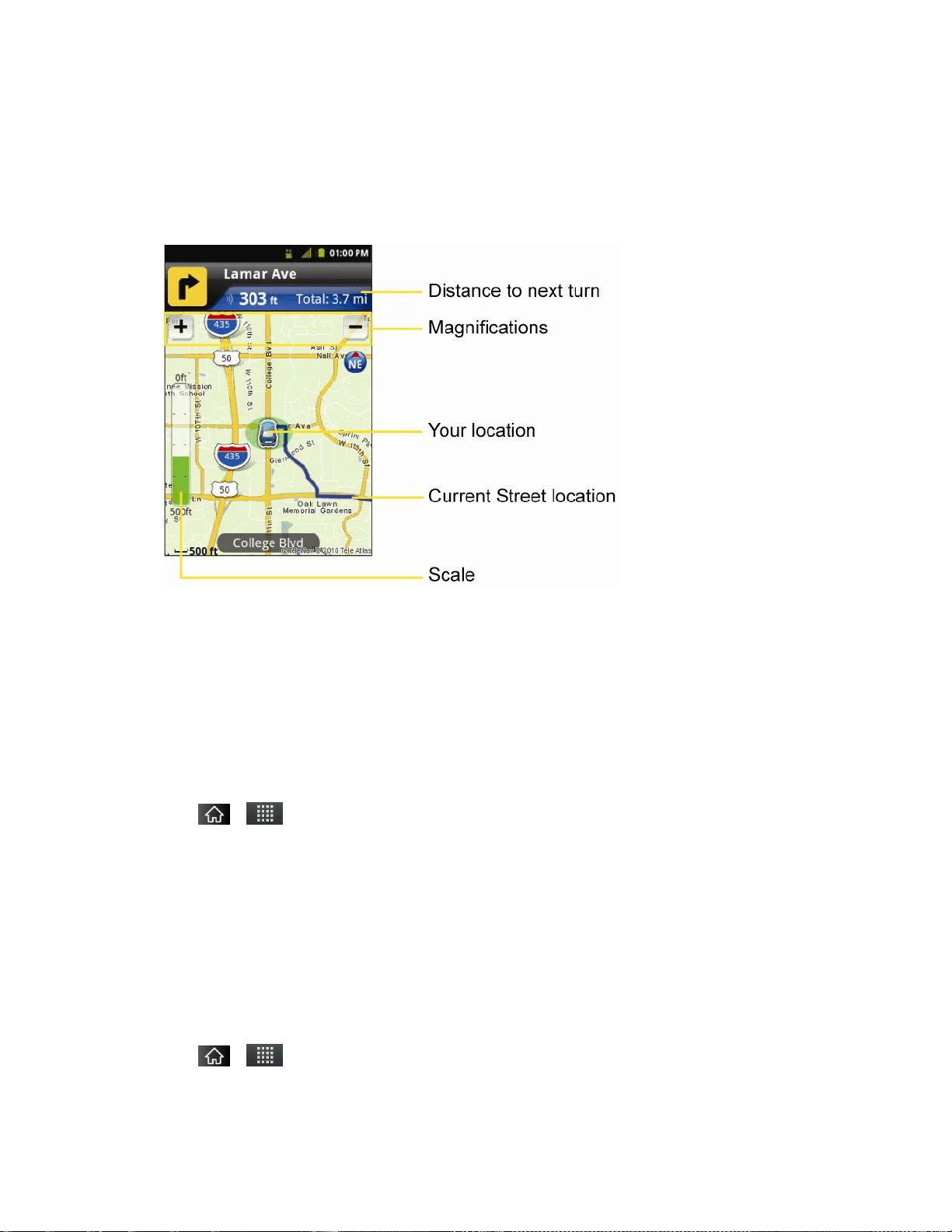
Applications and Entertainment 130
– or –
Tap Say It to place a call to the TeleNav™ operator where you will speak the desired
address. This is similar to calling 411 for directory assistance. (A fee may be incurred.)
3. Tap Address and then enter information (Address, City, State/ZIP, and Country) into any
of the address fields.
4. Tap Submit to initiate your search. If prompted to select from a list of matches, tap the
correct address.
5. Follow both the on-screen and audio directions.
To receive turn-by-turn directions (2D):
1. Tap > > TeleNav GPS Navigator > Drive To > Address.
Note: A 2D map is a flat representation of your projected driving directions. A 3D map
represents the driving directions with a representation of depth.
2. Enter the physical address information, and tap Submit and tap Go.
3. Tap > Directions to receive a detailed turn-by-turn description for navigating to your
desired location. You can also select Map or Traffic views.
To search nearby locations based on type:
1. Tap > > TeleNav GPS Navigator > Drive To > Places.

Applications and Entertainment 131
2. Select a category from the list that displays. A list of nearby businesses under that
category will display.
Using a Local Business Category
The LG Marquee™ can also cross-reference your current location with local business and
points of interest, such as Grocery Stores, Gas Stations, Wi-Fi Spots, Malls, Hospitals, etc.
1. Tap > > TeleNav GPS Navigator > Places.
2. Tap one of the available categories: Food/Coffee, Gas, ATM, WiFi, etc.
– or –
Enter a location into the search field to begin retrieving matches. Once you see a
matching business name, touch the entry.
Entries with more than one available category or subcategory) appear with an
adjacent gray arrow. These entries can be expanded and then closed.
3. Tap to store your information and begin the search.
4. Tap a matching entry based on star ratings and distances.
To search for the nearest gas station in your area:
1. Tap > > TeleNav GPS Navigator > Places > Gas.
2. Select Any, By Price (Regular), By Price (Plus), By Price (Premium), By Price
(Diesel).
3. Tap an entry from the list to display a new route to the selected gas station.
Sharing a Recent Location with Others
Recently queried locations can be saved to you‘re my Favorites list and also shared with other
cellular devices.
1. Tap > > TeleNav GPS Navigator
2. Tap the Send To: field and then enter a mobile number or email address.
3. Tap Send Now to complete the delivery process.
Configuring Your Navigation Preferences
1. Tap > > TeleNav GPS Navigator > > Settings.
2. Touch an entry to change its current setting:

Applications and Entertainment 132
Profile: allows you to alter the current first and last name registered with the service,
as well as email address.
General: allows you to change general settings, including:
• Language: allows you to assign a current language. Default is English(US).
• Distance Units: allows you to alter the descriptions used for distances:
Km/Meters or Miles/Feet.
Navigation: lets you change navigation settings, including:
• Route Style: allows you to choose the method which is used to provide you
directions from Point A to Point B. The default is Fastest.
• Map Color: allows you to to select Auto, Daytime, or Nighttime.
• Avoid: allows you to set up obstacles that should be avoided when determining
travel routes: HOV Lanes, Tolls, and Traffic Delays space. Tap Done to set
these parameters.
• Map Style: allows you to setup a preferred traffic display view. Choose from 2D
Moving Maps or 3D Moving Maps (default).
• Backlight: allows you to assign the backlight settings. Choose from Always On,
On at Turns, or Device Default.
Audio: lets you change the audio readout given during your navigation session.
Select from With Street Names, Without Street Names, or No Audio.

Applications and Entertainment 133
Navigation
Another Google Maps navigation application is available on your device. It uses your current
location (provided by GPS communication to your device) to provide various location-based
services.
1. Tap > > Navigation.
2. Read the on-screen disclaimer and tap Accept.
3. Choose from the following on-screen options:
Speak Destination to use the voice recognition feature to search for matching
locations in your area.
Type Destination to manually enter a destination address.
Contacts to receive turn-by-turn directions to the address stored for a selected
Contacts entry.
Starred Places to obtain directions to locations that have been starred within Google
maps (maps.google.com)

Web and Data 134
Web and Data
Your device's data capabilities let you wirelessly access the Internet or your corporate network
through a variety of connections, including:
Connecting to Wi-Fi Networks
Data Services
Virtual Private Networks
Browser
Tethering and Portable Hotspot
Connecting to Wi-Fi Networks
Wi-Fi is a wireless networking technology that can provide Internet access at distances of up to
100 meters, depending on the Wi-Fi router and your surroundings.
To use Wi-Fi on your device, you must connect to a wireless access point, or ―hotspot.‖ Some
access points are open and you can simply connect to them without entering any information.
Others are hidden or implement other security features, so you must configure your device to
connect to them.
Turn off Wi-Fi when you're not using it to extend the life of your battery.
When you connect to a Wi-Fi network, the device obtains a network address and other
information it needs from the network, using the DHCP protocol. To configure the device with a
static IP address and other advanced settings, tap > Advanced from the Wi-Fi settings
menu.
To turn Wi-Fi on and connect to a Wi-Fi network:
1. Tap > .
2. Tap Settings > Wireless & networks > Wi-Fi settings.
3. Tap Wi-Fi to turn Wi-Fi on and scan for available Wi-Fi networks.
A list of available Wi-Fi networks will be displayed. Secured networks are indicated
by a lock icon.
If the device finds a network that you have connected to previously, it automatically
connects to it.
4. Tap a network to connect to it.

Web and Data 135
If the network is open, you will be prompted to confirm that you want to connect to
that network by touching Connect.
If the network is secured, you will be prompted to enter a password. (Ask your
network administrator for details.)
When you're connected to a network, you can tap the network name in the Wi-Fi
settings screen for details about the speed, security, address, and related settings.
To receive notifications when open networks are in range:
By default, when Wi-Fi is on, you receive notifications in the Status Bar when your device
detects an open Wi-Fi network.
1. Turn on Wi-Fi, if it's not already on.
2. From the Wi-Fi settings screen, tap Network notification to checkmark the box. Tap
again to remove the checkmark and stop receiving notifications.
To add a Wi-Fi network:
You can add a Wi-Fi network manually if it does not broadcast its name (SSID) or if you want to
add a Wi-Fi network when you are out of its range.
To add a secured network, you need to contact the network‘s administrator to obtain the
password or other required security credentials.
1. Turn on Wi-Fi, if it's not already on.
2. From the Wi-Fi settings screen, tap Add Wi-Fi network.
3. Enter the Network SSID (name) of the network. If the network is secured, tap the
Security drop-down menu and tap the type of security used for the network.
4. Enter the required passwords and security credentials.
5. Tap Save.
The device will connect to the wireless network. Any credentials that you entered are saved,
so you are connected automatically the next time you come within range of this network.
To forget a Wi-Fi network:
You can also make the device forget about the details of a Wi-Fi network that you have added.
For example, if you don't want the device to connect to it automatically or if it is a network that
you no longer use.
1. Turn on Wi-Fi, if it's not already on.
2. In the Wi-Fi settings screen, touch and hold the name of the network.

Web and Data 136
3. Tap Forget network.
Wi-Fi Protected Setup
Wi-Fi Protected Setup (WPS) is for the one-touch setup option to connect with the access points
which supply WPS.
To connect with Wi-Fi networks with WPS:
1. Locate your device near the access point that can be scanned.
2. From the Wi-Fi settings screen, tap Wi-Fi Protected Setup. It will start WPS and
Progress bar will be display.
3. Press WPS button of the access point or set up the WPS on the access point
configuration menu within 2 minutes. The access point will recognize the device and add
it to the network.
Data Services
With your Sprint service, you are ready to start enjoying the advantages of data services. This
section will help you learn the basics of using your data services, including managing your user
name, launching a data connection, and navigating the Web with your device.
Important: Certain data services requests may require additional time to process. While your
device is loading the requested service, the touchscreen or QWERTY keyboard
may appear unresponsive when in fact they are functioning properly. Allow the
device some time to process your data usage request.
Your User Name
When you buy your device and sign up for service, you‘re automatically assigned a user name,
which is typically based on your name and a number, followed by ―@sprintpcs.com.‖ (For
example, the third John Smith to sign up for Sprint data services might have
jsmith003@sprintpcs.com as his user name.)
When you use data services, your user name is submitted to identify you to the Nationwide
Sprint Network. Your user name will be automatically programmed into your device. You don‘t
have to enter it.
Updating Your User Name
If you choose to change your user name and select a new one online, you must then update the
user name on your device.
► Tap > > Settings > About phone > System updates > Update Profile.
Your profile will be automatically updated by the network.

Web and Data 137
Launching a Web Connection
► Tap > > Browser.
Note: You can connect to the Internet via Mobile network or via Wi-Fi (access by tapping
> Settings > Wireless & networks).
Once the Browser loads, you are directed to the home page.
Tip: To change the default home page, tap > More > Settings > Set home page.
Note: The Browser automatically launches when a Web link is touched from within an email or
text message.
Data Connection Status and Indicators
Your phone notifies you of the current status of your data connection through status icons in the
Status Bar. The following symbols can be displayed:
Your device is connected to the high-speed Sprint Mobile Broadband Network (3G).
When the arrows are animated, your device is transferring data. When the arrows are
gray, your device is connected to the network but is not currently transferring data. In
either state, you can receive incoming calls.
Your device is connected to the Sprint 1xRTT data network. When the arrows are
animated, your device is transferring data and you cannot receive calls. When the
arrows are gray, your device is connected to the network but is not currently transferring
data and you can receive calls.
If you do not see an indicator, your device does not have a current data connection. To launch a
connection, see Launching a Web Connection.

Web and Data 138
Virtual Private Networks (VPN)
From your device, you can add, set up, and manage virtual private networks (VPNs) that allow
you to connect and access resources inside a secured local network, such as your corporate
network.
Prepare Your Device for VPN Connection
Set Up Secure Credential Storage
Add a VPN Connection
Connect to a VPN
Disconnect From a VPN
Preparing Your Device for VPN Connection
Depending on the type of VPN you are using at work, you may be required to enter your login
credentials or install security certificates before you can connect to your company‘s local
network. You can get this information from your network administrator. Before you can initiate a
VPN connection, your device must first establish a Wi-Fi or data connection. For information
about setting up and using these connections on your device, see Launch a Web Connection
and Turn Wi-Fi On and Connect to a Wireless Network.
Setting Up Secure Credential Storage
If your network administrator instructs you to download and install security certificates, you must
first set up the device‘s secure credential storage.
1. Tap > > Settings > Location & security > Set password.
2. Enter a new password (at least eight characters without any spaces) for the credential
storage, scroll down and confirm the password, and then tap OK.
3. Select the Use secure credentials check box.
You can then download and install the certificates needed to access your local network. Your
network administrator can tell you how to do this.
Adding a VPN Connection
1. Tap > > Settings > Wireless & networks > VPN settings.
2. Tap Add VPN, and then tap the type of VPN you want to add.
3. Tap VPN settings and set them up according to the security details you have obtained
from your network administrator.
4. When finished, tap > Save.

Web and Data 139
The VPN is then added to the VPNs section of the VPN settings screen.
Connecting to a VPN
1. Tap > > Settings > Wireless & networks > VPN settings.
2. In the VPNs section, tap the VPN that you want to connect to.
3. When prompted, enter your login credentials, and then tap Connect. When you are
connected, the VPN connected icon appears in the notification area of the title bar.
4. Open the Web browser to access resources such as intranet sites on your corporate
network.
Disconnect From a VPN
1. Touch and drag down the Status Bar to open the Notifications Panel.
2. Tap the VPN connection to return to the VPN settings screen, and then tap the VPN
connection to disconnect from it.
When your device has disconnected from the VPN, the VPN disconnected icon is displayed in
the notification area of the title bar.
Browser
Web pages that are optimized for mobile devices typically open at a size appropriate for your
device. Often, you can't zoom or even scroll their contents. Web pages that aren't designed
specifically for mobile devices typically open in overview mode– the page is zoomed out so you
can get the big picture.
Learn to Navigate the Browser
Navigating through menus and websites during a data session is easy once you‘ve learned a
few basics. Here are some tips for getting around:
Note: Prior to gaining access to Sprint‘s Powerdeck Web page, you may be asked to enter
your 10-digit PCS phone number and tap Ok. Entering your phone number is not
required for access to other Web pages.
Scrolling
As with other menus on your phone, you‘ll have to scroll up and down to see everything on
some websites.
To scroll a Web page:
► Slide your finger on the screen in the direction you wish to scroll.

Web and Data 140
Selecting
Once you‘ve learned how to scroll, you can start navigating the Web.
To select items or links:
► Simply tap a link or an item.
Links, which are displayed as underlined text, direct you to Web pages, select special functions,
or even place calls.
Going Back
To go back one page:
► Tap on your device. Repeat this process to keep going back through your recently
visited pages.
Finding and Copying Text on a Web Page
To find text on a Web page:
1. Tap > More > Find on page.
2. Enter the text you're looking for.
As you type, the first word with matching characters is highlighted on the screen and
subsequent matches are boxed.
3. Tap the left or right arrow to jump to and highlight the previous or next matching word.
To copy text from Web page:
1. Open a Web page and scroll to the beginning of the text you want to copy
2. Tap > More > Select text.
3. Use your finger to drag across the text you want to copy. The selected text is highlighted
in orange, with a tab at each end of the selection.
4. Drag either selection tab to expand or reduce the range of selected text.
To cancel the selection, simply tap unselected text or empty area.
5. Tap the selected text. The text you selected is copied to the clipboard. You can now use
the techniques described in Entering Text With the On-screen Keyboard to paste the
copied text into a text field.

Web and Data 141
Going to a Specific Website
To go to a particular website by entering a URL(website address):
1. Tap the URL field (top of the Browser window) and enter a new Web address.
As you enter the address, possible matches are displayed. Tap an entry to launch
the desired website.
2. Tap to launch the new page.
Browser Menu
The Browser menu offers additional options to expand your use of the Web on your device.
Opening the Browser Menu
The Browser menu may be opened anytime you have an active data session, from any page
you are viewing.
► From any open Web page, tap .
Options available within the Browser menu include:
● New window: Launches a new Browser window while maintaining the current Web
page active.
● Bookmarks: Allows you to access and manage your Bookmarks.
● Windows: Displays the currently active Browser windows as a list. Tap a window entry
to launch that window.
● Refresh: Reloads the current Web page and displays the most current information.
● Forward: Forwards you to a previously viewed page.
● More: Provides the following additional Browser options:
Add bookmark: Allows you to assign the current Web page as a new bookmark.
Find on page: Allows you to search the current Web page for a word.
Select text: Allows you to select text from the current Web page and copies it to the
clipboard.
Page info: Displays the Name and URL (website address) of the Web page you‘re
currently viewing.
Share page: Allows you to send a URL via Bluetooth, Email, Gmail, and Messaging.

Web and Data 142
Downloads: Displays your download history.
Settings: Allows you to configure and manage your Browser settings.
Adjusting Browser Privacy Settings
1. Tap to open the Browser menu.
2. Tap More > Settings.
3. In the Page content settings area, select from one of the following Web page settings:
Text size: Allows you to increase or decrease the size of the text that the Browser
uses when displaying Web pages. Options include: Tiny, Small, Normal, Large, or
Huge.
Default zoom: Allows you to increase or decrease the magnification level that the
Browser uses when first opening a Web page. Choose from: Far, Medium, or Close.
Open pages in overview: When checkmarked, Webpages are displayed in an
overview. If the checkmark is removed, the Web page is displayed at 100% size.
Text encoding: Allows you to change the character-encoding standard that the
Browser uses when displaying text on a Web page.
Block pop-up windows: When checkmarked, this feature allows the device to block
pop-up windows and prevent websites from opening windows unless you request it.
Load images: When checkmarked, this feature allows the Browser to load images
when displaying a Web page. Remove the checkmark to allow the Browser to omit
images when displaying a Web page.
Auto-fit pages: When checkmarked, the Browser optimizes the presentation text
and other elements of Web pages to fit your device‘s screen. If the checkmark is
removed, Web pages can be viewed as designed for a computer screen.
Landscape-only display: When checkmarked, this feature allows your device to
display pages in landscape (horizontal) orientation on your screen, regardless of how
you are holding the device.
Enable JavaScript: When checkmarked, the Browser allows JavaScript to run.
Remove the checkmark to prevent JavaScript from running.
Enable plug-ins: When checkmarked, plug-ins are enabled on Web pages. Remove
the checkmark to disable plug-ins from Web pages.
Open in background: When checkmarked, links opened in a new window will open
in the background. If the checkmark is removed, new windows will open in place of
the current window.

Web and Data 143
Set home page: Allows you to enter a URL to set as your Home page. (See Setting
the Browser Home Page)
Invert color: Displays pages in inverted color.
4. Tap to return to the Browser.
Adjusting Browser Privacy Settings
1. Tap to open the Browser menu.
2. Tap More > Settings.
3. Navigate to the Privacy settings area and select from one of the following privacy
settings:
Clear cache: Clears all currently cached content and databases. Tap OK to
complete the process.
Clear history: Clears the Browser navigation history. Tap OK to complete the
process.
Accept cookies: When checkmarked, your device allows Web pages to store
cookies. Remove the checkmark to prevent Web pages from storing cookies on your
device.
Clear all cookie data: Clears all current Browser cookie files.
Remember form data: When checkmarked, the Browser remembers what you
entered in a form on a site and displays matching entries when entering text in a
form. Remove the checkmark to disable this feature.
Clear form data: Deletes all the information the Browser remembers about what
you've entered informs. Tap OK to complete the process.
Enable location: When checkmarked, you permit websites with location-specific
content to ask whether you want to share your location, using your device's GPS. To
provide a website with your location, you must also have location sharing enabled in
the Settings application.
Clear location access: Allows you to clear the permissions to access your location
that you‘ve granted to websites in the past. If those websites want permission to
access your location again, you must grant it again.
4. Tap to return to the Browser.
Adjusting Browser Security Settings
1. Press to open the Browser menu.

Web and Data 144
2. Tap More > Settings.
3. Navigate to the Security settings area and select from one of the following security
settings:
Remember passwords: The Browser can remember your usernames and
passwords for some Web pages that require you to log in to make it quicker to
access those pages on repeat visits. Remove the checkmark to prevent the Browser
from storing usernames and passwords.
Clear passwords: Deletes all saved passwords that the Browser has stored. Tap
OK to complete the process.
Show security warnings: When checkmarked, you will be notified if there is a
security issue with the current website. Remove the checkmark to disable this
function.
4. Tap to return to the Browser.
Setting the Browser Home Page
1. Tap to open the Browser menu.
2. Tap More > Settings > Set home page.
3. Delete the current address and enter a new URL. If you are viewing the Web page you
want to set as the Home page, tap Use current page instead.
4. Tap OK to complete the process.
Resetting the Browser to Default
1. Tap to open the Browser menu.
2. Tap More > Settings > Reset to default.
3. Tap OK to complete the process.
Creating Website Settings
1. Tap to open the Browser menu.
2. Tap More > Settings > Website settings. These advanced settings that can be
configured for individual sites (ex: Clear location access).
3. Tap OK to complete the process.

Web and Data 145
Creating Bookmarks
You can bookmark Web pages so that you can quickly return to them.
1. From any open Web page, tap to open the Browser menu.
2. Tap Bookmarks. Three tabs are revealed:
Shortcut: From any open Web page, tap (located next to the URL).
Bookmarks: Displays a list of your current bookmarks.
Most visited: Displays a list of your most frequently visited websites.
History: Displays a record of your browsing history. These records are organized
into folders such as: Today, Yesterday, 5 days ago, and 1 month ago.
3. In the Bookmarks tab, tap Add.
4. Enter a descriptive name and URL for the new bookmark
5. Tap OK to store the new entry to your Bookmarks list.
To create Bookmarks from other Tabs:
1. From any open Web page, tap >Bookmarks.
– or –
From any open Web page, tap .
2. Tap either the Most visited or History tab.
3. Tap the star icon adjacent to a Web page entry. The star now turns gold. This adds the
―starred‖ website to your current Bookmarks list.
– or –
Touch and hold an entry from the list to display a popup menu. Then, tap Add
bookmark to add the selected entry to your current list of bookmarks.
To create a New Home Page:
1. From any open Web page, tap >Bookmarks.
– or –

Web and Data 146
From any open Web page, tap .
2. Tap either the Most visited or History tab.
3. Touch and hold an entry from the list to display a popup menu.
4. Tap Set as homepage to assign the selected entry as your new homepage.
Adding Bookmarks to Your Home Screen
1. From any open Web page, tap > Bookmarks.
– or –
From any open Web page, tap .
2. Touch and hold an existing entry from the list to display a popup menu.
3. Tap Add shortcut to Home to add the selected entry to your Home screen.
Tethering and Portable Hotspot
You can share your device‘s data connection with up to five devices at once, by turning your
phone into a portable Wi-Fi hotspot.
When your device is sharing its data connection, appears in the Status Bar. For the latest
information about portable hotspots, including supported operating systems and other details,
please visit http://www.android.com/tether#wifi.
To share your device's data connection via USB cable:
1. Tap > .
2. Tap Settings > Wireless & networks > Tethering & portable hotspot.
3. Connect your device to your computer with a USB cable.
4. Tap USB tethering to activate it. (A green checkmark will appear.)
Note: You cannot access your phone's microSD card on your computer when using USB
tethering.
To share your device’s data connection as a portable Wi-Fi hotspot:
1. Tap > .
2. Tap Settings > Wireless & networks > Tethering & portable hotspot.

Web and Data 147
3. Tap Portable Wi-Fi hotspot to activate it. (A green checkmark will appear.) After a
moment, the phone starts broadcasting its Wi-Fi network name (SSID), so you can
connect it with up to 5 computers or other devices.
4. To change the network name (SSID) or secure its Wi-Fi network, tap Portable Wi-Fi
hotspot settings > Configure Wi-Fi hotspot.
5. In the dialog box, configure the options.
Tap the Network SSID field and enter a new network SSID (name) that other
computers see when scanning for Wi-Fi networks.
To secure the Wi-Fi network, tap the Security menu and select WPAP2 PSK (Wi-Fi
Protected Access 2 with a Preshared Key). When a password field is added to the
dialog box, enter a password. You will need to enter this password when you
connect the device‘s hotspot with a computer or other device.
If you uncheck Enable DHCP Server, you need to set a static IP for connection. This
setup option cannot be changed while USB Tethering or Wi-Fi Hotspot is in progress.
When Enable DHCP Server is checked, you can set the range of IP assigned to the
connected device. Tap the Starting IP and End IP field and enter the range. This
setup option cannot be changed while USB Tethering or Wi-Fi Hotspot is in progress.
To limit the number of devices to share your device’s data connection, tap Max
users and select the number of the devices to limit.
6. Tap Save.
SmartShare
SmartShare uses Digital Living Network Alliance (DLNA) technology to share digital content
through a wireless network. Both devices must be DLNA-capable to support this feature.
SmartShare Status and Indicators
SmartShare is turned on.
SmartShare sharing request
To turn SmartShare on and allow sharing contents
1. Tap > > SmartShare.
2. Tap > Settings.
3. Tap Discoverable to place a checkmark and make your device visible.

Web and Data 148
Tap Always accept request if you would like to automatically accept sharing
requests from other devices.
4. Under the Sharing contents section, tap Pictures, Videos, and/or Music to place a
checkmark on the types of content you would like to share. SmartShare is now activated
and ready to share contents.
To share contents from remote content library to other devices
Let your renderer device (e.g. TV) play multimedia contents from your remote content library
(e.g. PC)
Note: Make sure that the DLNA functionality of your devices is properly configured (e.g. TV
and PC)
1. Touch the To button to or select the device from renderer lists.
2. Touch From button and select the device of the remote content library.
3. You can browse the content library.
4. Touch a content thumbnail or press the and select Play button.
To share contents from your device to your renderer device (e.g.
TV)
Note: Make sure that your renderer device is properly configured.
1. While browsing your pictures or videos using the Gallery application, touch and hold a
file to select a file or multiple files to share.
2. Then you will be able to select multiple files to be shared.
3. Tap each file to share to place a checkmark or tap Select All.
4. Tap Share > SmartShare. SmartShare is automatically launched with the selected files
5. Tap the play button and select the device from renderer lists to play the files.
Note: Follow the similar steps to use the Music player and Camera to share contents
Check that your device is connected with your home network using Wi-Fi connection to use this
application. Some DLNA enabled device (e.g. TV) support only the DMP feature of DLNA and
will not appear in the renderer device list. Your device might not be able to play some contents.
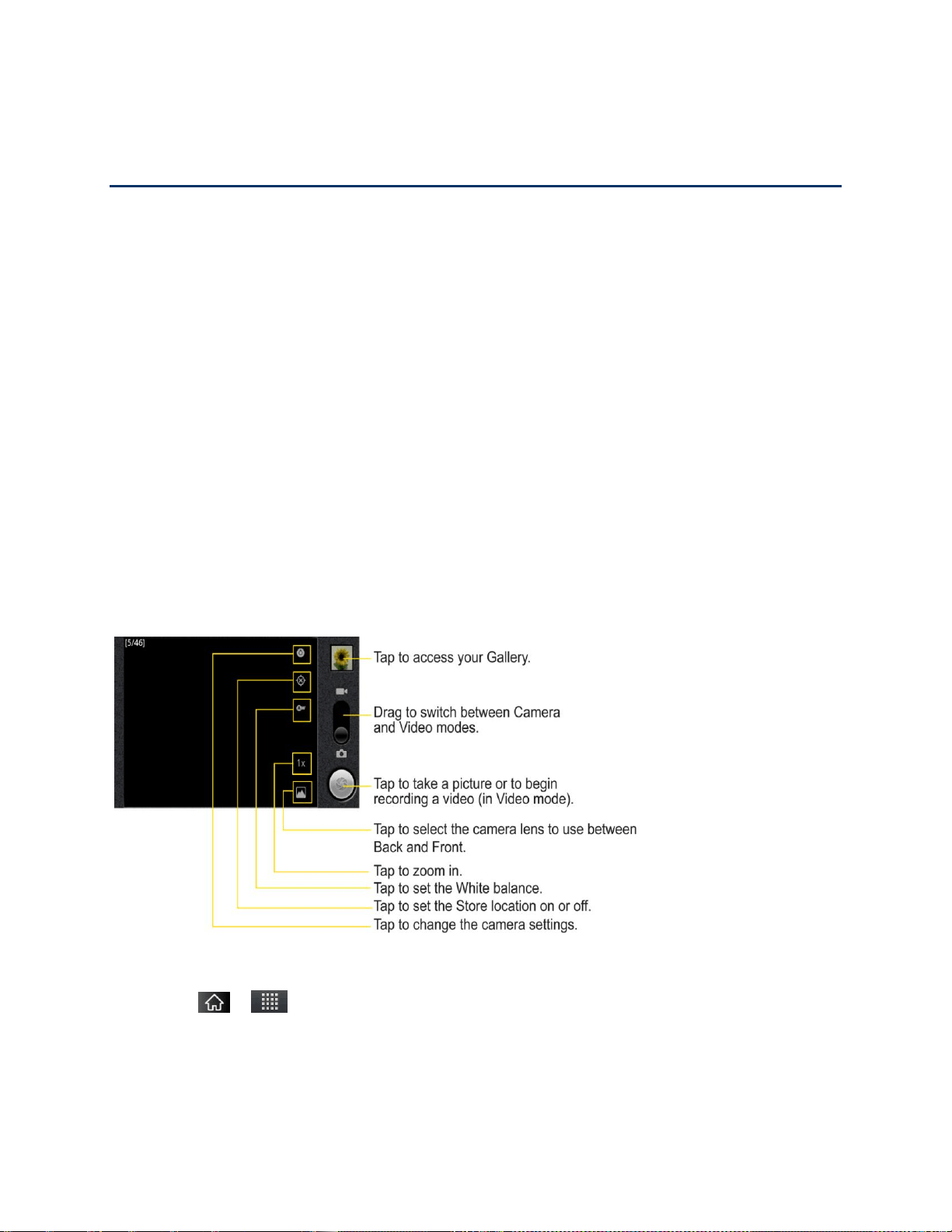
Camera and Video 149
Camera and Video
You can use the camera or camcorder to take and share pictures and videos. Your device
comes with a 5 megapixel camera with an autofocus feature that lets you capture sharp pictures
and videos.
Taking Pictures
Recording Videos
You can take pictures and record videos using the Camera application. You can also view your
pictures and videos with the Gallery application.
Note: Pictures and videos are stored in a microSD card. Please make sure that the device has
a microSD card inserted before taking pictures or recording video.
Be sure to clean the protective lens cover with a microfiber cloth before taking pictures.
A lens cover with smudges from fingers can cause blurry pictures with a“halo‖ effect.
Taking Pictures
Taking pictures with your device's built-in camera is as simple as choosing a subject, pointing
the lens, and pressing a button.
To take a picture:
1. Tap > > Camera to activate camera mode. (Additional camera options are
available through the camera settings page. See Camera Settings for more information.)
2. Frame your subject on the screen.

Camera and Video 150
3. Tap until the shutter sounds. The camera brings the image into focus. When the
image is in focus, the focus indicators in each corner turn green and the camera takes a
picture. (Your device automatically saves the picture to the microSD card.)
Camera Settings
From the camera mode, tap each icon to adjust the following camera settings.
Settings
• Focus mode to set the focal properties of the camera lens. Choose from Auto
(default), Infinity, Macro (close up images), or Fixed.
• Scene mode to select Auto, Portrait, Landscape, Night, Night Portrait,
Fireworks or Sports.
• Picture size to set the size of your picture. Choose from 5M Pixels, 3M Pixels,
2M Pixels, 1M Pixels, VGA, or QVGA.
• Picture quality to set the image quality for your picture. Choose from Super fine,
Fine, or Normal.
• Color effect to apply different color effects to your pictures. Choose from None,
Mono, Sepia, Negative, Solarize.
• ISO to control the camera's sensitivity to light. Choose from Auto (default), 100,
200, 400, or 800.
• Auto Review to set whether to view the picture that was just taken. Choose from
No Review, 2 secs (default), or 5 secs.
• Restore to defaults to restore the settings back to the default values.
Store location to decide whether to use the device‘s GPS to include the
location of each picture you take.
• On: Location stored with picture
• Off: Location not stored with picture
White balance to select how the camera adjusts colors in different kinds of
light in order to achieve the most natural-looking colors for your pictures. Choose
from Auto, Incandescent, Daylight, Fluorescent, or Cloudy.
Flash mode to select Auto, On, or Off.
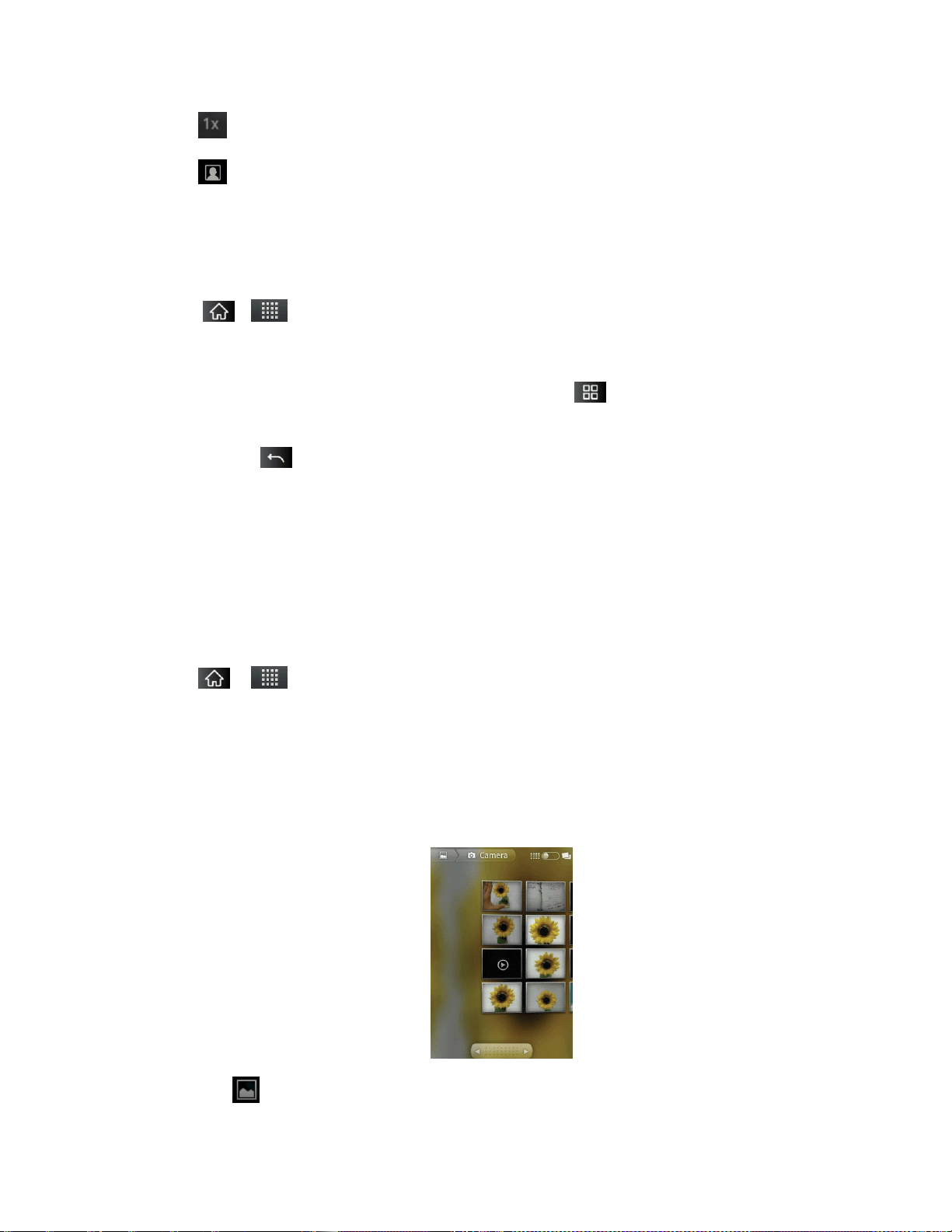
Camera and Video 151
Zoom to zoom in on an object. You can adjust the zoom from 1x to 3x.
Select camera to select Back or Front.
Viewing Your Pictures
The Gallery is where you can access the Gallery of stored camera images. You can view them
in a slideshow, share them with your friends, and delete and edit them.
1. Tap > > Gallery.
2. Select a location and tap an image to view your picture.
• Tap an image to open it, and tap Menu or tap for options, such as Share,
Delete, and More.
• Tap to return to the previous screen.
Gallery Options
The Gallery application presents the pictures and videos on your microSD card, including those
you‘ve taken with the Camera application and those you downloaded from the Web or other
locations.
If you have one of your device's Google™ Accounts, you‘ll also see your Picasa Web albums in
Gallery.
1. Tap > > Gallery to view the images stored on the microSD card.
Drag left or right to view more albums.
2. Tap an album to open it and view its contents. (The pictures and videos in the album are
displayed in chronological order.)
3. Tap a picture in an album to view it.
Tap at the top left of the screen to return to the main Gallery screen at any time.

Camera and Video 152
Tap Slideshow to watch a slideshow of the current album.
Tap Menu to access the following options:
• Share to share the picture via Messaging, Picasa, Gmail, Email, Bluetooth,
SmartShare, or any other installed application that supports sharing.
• Delete to delete the picture.
• More to access options such as Details, Set as, Crop, Rotate Left, or Rotate
Right.
Assigning Pictures
After taking a picture, assign it as a picture ID for a Contacts entry or as the Home screen
background image (wallpaper).
1. Tap > > Gallery.
2. Tap an album and tap an image to view it.
3. With the picture displayed, tap Menu > More > Set as.
4. Select an option.
Contact icon to assign the picture to a Contact entry as a picture ID. Tap an entry
from Contacts, crop the image and tap Save to assign the picture.
Wallpaper to assign the picture as a background image, crop the image and tap
Save to assign the picture.
Recording Videos
In addition to taking pictures, you can record, view, and send videos with your device's built-in
video camera.
1. Tap > > Camera and drag the camera mode control to the
Video position .
– or –
Tap > > Camcorder.
2. Select Video Mail to record a short video for email or messaging or Long Video.
3. Point the lens to frame the scene where you want to start.

Camera and Video 153
4. Tap to start recording the video. The length of the recording is displayed on the
bottom left part of the screen.
5. Tap to stop recording. Your video will be automatically saved to the Gallery.
Video Settings
From video mode, tap each icon to adjust the following camcorder settings.
Settings
• Color effect to apply different color effects to your videos. Choose from None,
Mono, Sepia, Negative, Solarize.
• Restore defaults to restore the settings back to the default values.
White balance to select how the camcorder adjusts colors in different kinds of
light in order to achieve the most natural-looking colors for your videos. Choose from
Auto, Incandescent, Daylight, Fluorescent, or Cloudy.
Flash mode to select whether flash is On or Off.
Video quality to set the video quality and maximum length combination
appropriate for viewing on a computer or for sharing with others via Messaging or
YouTube. Choose from High (Max 1h), Low (Max 2h), MMS (Low, 30s), or
YouTube(High, 10m)
Video Gallery Options
The Gallery is where you can access the Gallery of stored video images. You can view them,
share them with your friends, and delete and edit them.
1. Tap > > Gallery to view the videos stored on the microSD card.
Scroll left or right to view more albums.
2. Tap an album to open it and view its contents. (The pictures and videos in the album are
displayed in chronological order.)
3. Tap then tap a video to place a checkmark and access the following options:
Tap Share to share the video via Messaging, YouTube, Gmail, Email, Bluetooth,
SmartShare, or any other installed application that supports sharing.
Tap Delete to delete the video.
Tap More to view the details of the video.

Camera and Video 154
To play a video:
1. Tap > > Gallery to view videos stored on the microSD card.
Scroll left or right to view more albums.
2. Tap an album to open it and view its contents. (The pictures and videos in the album are
displayed in chronological order.)
3. Tap a video in an album to play.
Tap the video to view the playback controls.

Tools and Calendar 155
Tools and Calendar
Learn how to use many of your device's productivity-enhancing features.
Calendar
Folders
Clock
Alarms
Calculator
Updating Your Android Operating System
Updating Your Profile
Updating Your PRL
Bluetooth
microSD card
Calendar
Viewing Your Calendar and Events
Use the Calendar application you can view the events you have scheduled in the coming days,
weeks, or months.
To open your Calendar application:
► Tap > > Calendar.
If you have created or subscribed to more than one calendar through Google Calendar
TM
on the Web, events from each calendar are displayed in a different color. (For
information about which calendars are displayed on your device, see Displaying and
Synchronizing Calendars.)
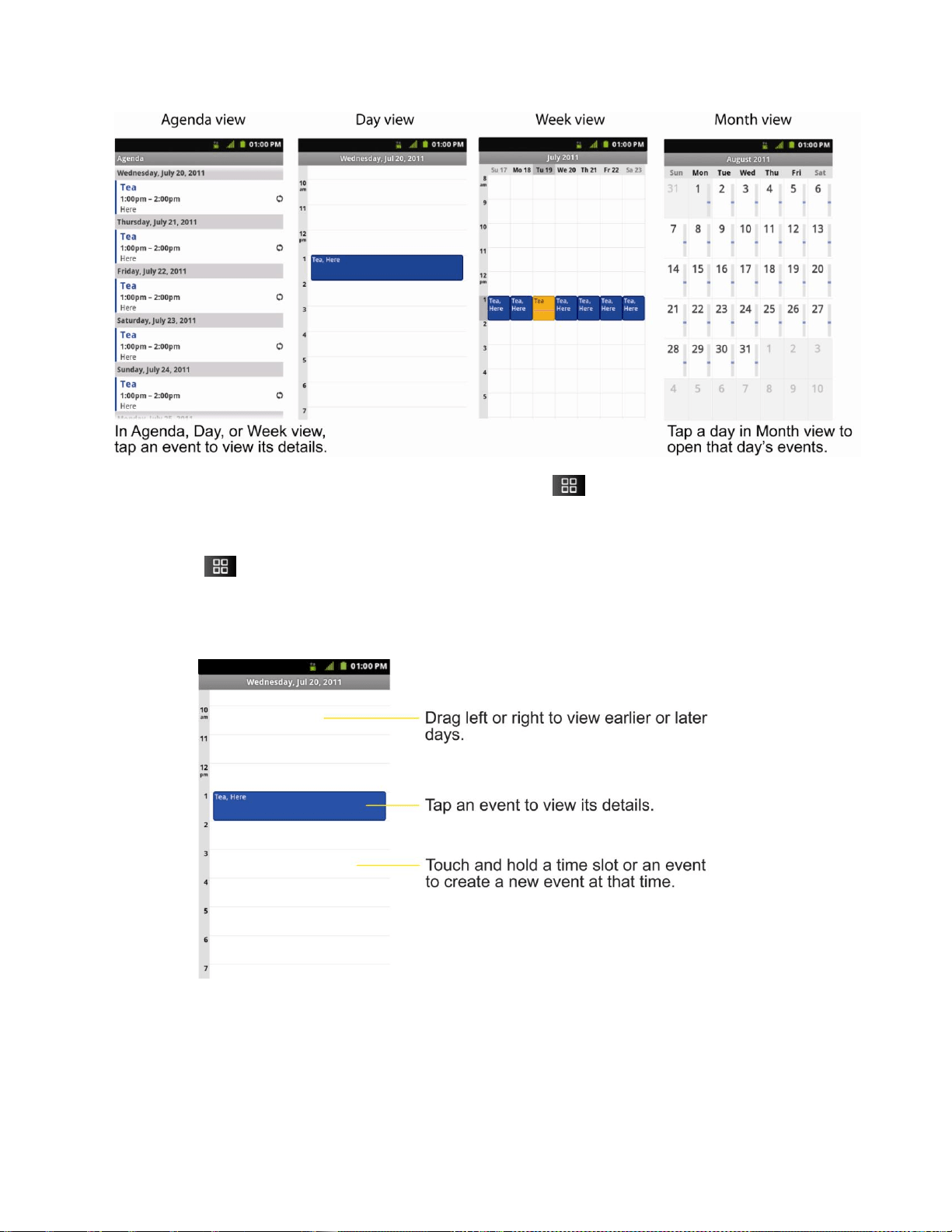
Tools and Calendar 156
Note: To go to the current day in any Calendar view, tap > Today.
To change your Calendar view:
► Tap > Day, Week, Month, Agenda, or Today. Each view displays the events in
your calendar for the period of time that you specify.
Day View
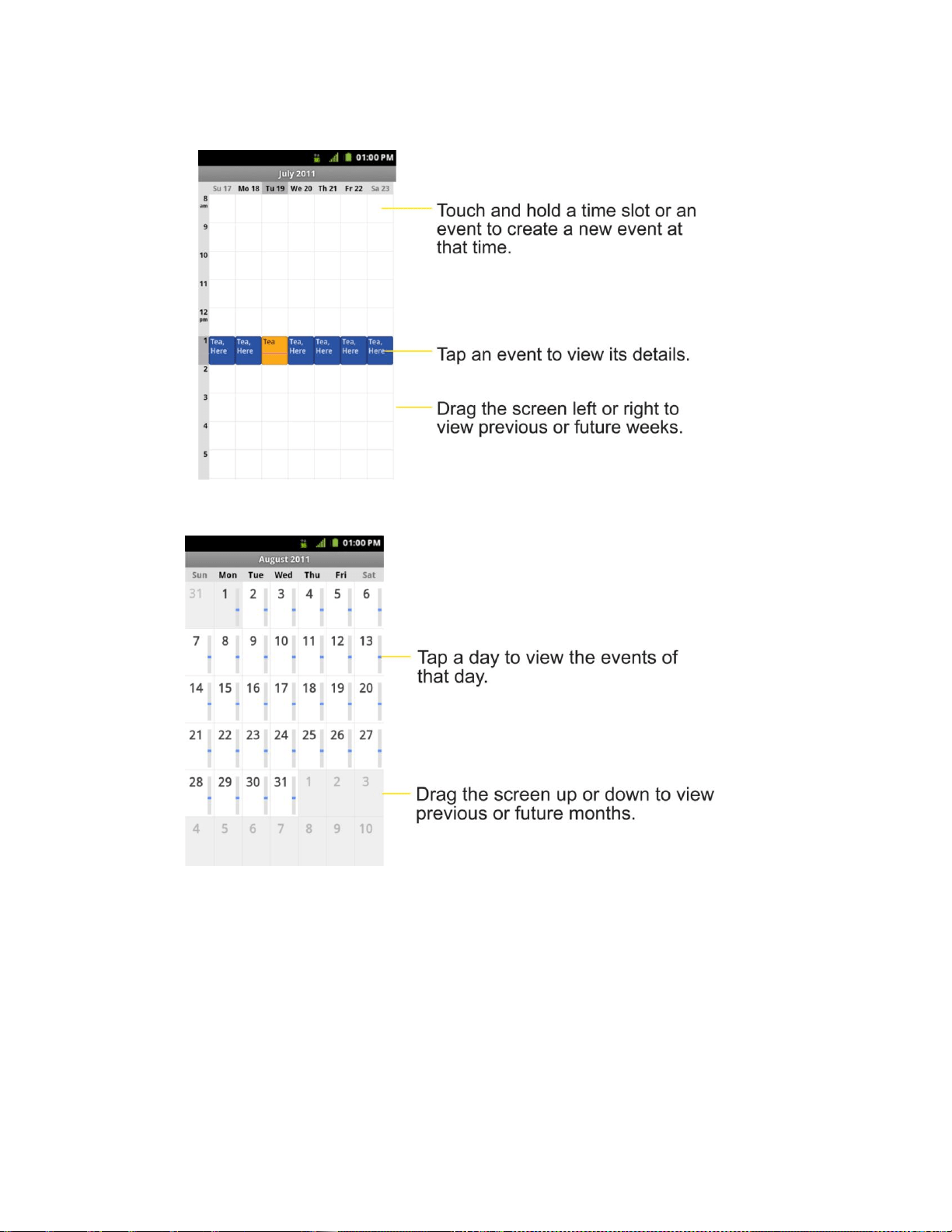
Tools and Calendar 157
Week View
Month View
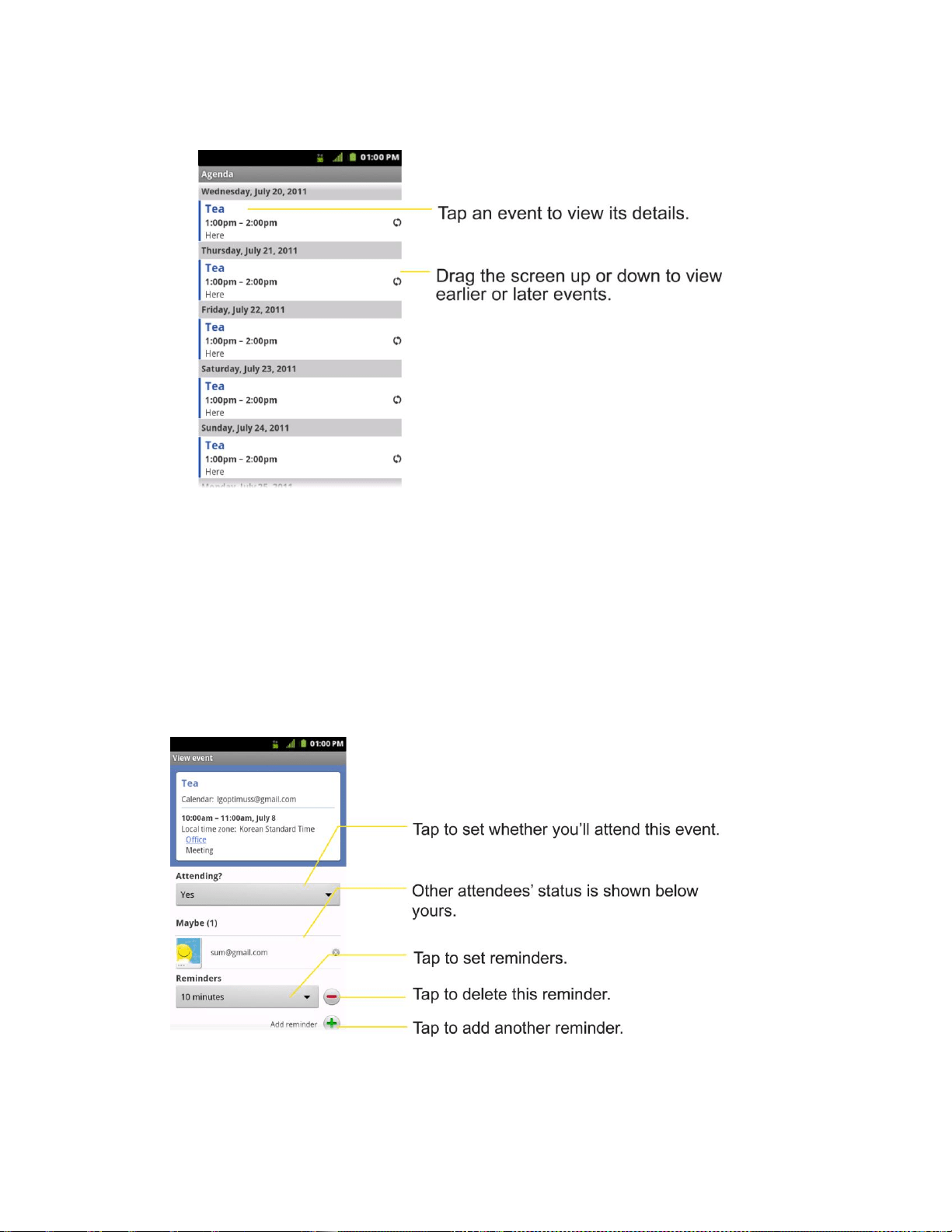
Tools and Calendar 158
Agenda View
Viewing Event Details
You can view more information about an event in a number of ways, depending on the current
view.
To view information about an event:
► In Agenda, Day, or Week view, tap an event to view its details.
► In Month view, tap a day to switch to Day view. Then tap an event to open the event
summary.

Tools and Calendar 159
Creating an Event
You can use Calendar on your device to create events that appear on your device and in your
Google Calendar on the Web.
To create an event:
1. Open the Calendar, and tap > More > New event.
You can also touch and hold a spot in Day, Week, or Month view. In the menu that
opens, tap New event to open the new event screen with that day and time already
entered.
2. Add details about the event.
Enter a name, and other optional details about the event, just as you would on
Google Calendar (on the web). If you have more than one calendar, you can choose
the calendar to which to add the event. Tap the Plus button to add more
reminders.(See Setting an Event Reminder.)
3. Invite guests to the event.
In the Guests field, enter the email addresses of everyone you want to invite to the
event. Separate multiple addresses with commas ( , ). If the people to whom you
send invitations use Google Calendar, they'll receive an invitation through their
Google Calendar and by email.
4. Tap > Show extra options to add additional event details.
5. Scroll to the bottom of the screen and tap Done.
The event will be added to your Calendar. You can also access and configure the
event from Google Calendar on the Web.
Editing or Deleting an Event
You can edit or delete an event that you created on the device or on the Web. You can also edit
or delete events created by others, if they have given you permission.
To edit an event:
1. Open Calendar and tap the event to open it. (See Viewing Event Details.)
2. Tap > Edit event.
(For information on how to create or change event information, see Creating an Event.)
Note: Tap the > Show extra options to add or edit additional event details.
3. Make your changes to the event.

Tools and Calendar 160
4. Tap Done.
To delete an event:
► From Agenda, Day, or Week view, tap an event to view the event details. Then, tap
> Delete event. Tap OK to confirm.
► From Day or Week view, touch and hold the event then tap Delete event in the menu
that opens. Tap OK to confirm.
► When editing an event, tap the Delete button at the bottom of the screen. Then tap OK
to confirm.
Setting an Event Reminder
You can set one or more reminders for an event, whether or not you created the event or have
permission to edit its other details.
To set an event reminder:
1. Open Calendar and touch the event to open it. (See Viewing Event Details.)
2. Tap Add reminder to add a reminder.
3. Tap the reminder time to display a popup menu and choose your desired setting.
At the designated time, you will receive a notification to remind you about the event.
(See Responding to an Event Reminder.)You can also use Google Calendar (on the
Web) to configure additional reminders.
To delete an event reminder:
1. Open Calendar and tap the event to open it.
2. Tap to remove a reminder.
Responding to an Event Reminder
If you set a reminder for an event, the reminder notification appears in the Status Bar when the
reminder time arrives. (See Using the Notifications Panel.)
To respond to an event reminder:
► If you receive notifications in the Status Bar, drag the Notifications Panel down to your
notifications. Tap the event notification to open the list of Calendar notifications.
► Tap an event in the Calendar Notifications list to view more information about that event.
► Tap Snooze all in the Calendar Notifications list to receive the reminder again 5 minutes
later.

Tools and Calendar 161
► Tap Dismiss all in the Calendar Notifications list to delete all reminders in the list.
► Tap when viewing the Calendar Notifications list to keep the reminders. The
reminders will remain in the Status Bar.
Displaying and Synchronizing Calendars
Initially, all calendars that you create or subscribe to through Google Calendar on the Web are
also displayed in the Calendar application on your device. You can select which calendars to
show or hide on the device, and which to keep synchronized.
You can also control whether any data is synchronized to your device by using the General sync
settings in Settings > Accounts & sync.
(For more information, see Configuring Account Sync and Display Options.)
Only the calendars that you've created or subscribed to on the Web are shown in the
Calendars list.
To show or hide calendars:
1. Tap > More > Calendars.
2. Tap the button to the right of each calendar to show or hide it. If is displayed, the
calendar is visible. If is not displayed, the calendar is hidden. The status of the
calendar is also displayed in text under the calendar's name.
To stop syncing calendars to your device:
1. Tap > More > Calendars.
2. Tap the button to the right of each calendar stop syncing. If is not displayed, the
calendar will not sync. The status of the calendar is also displayed in text under the
calendar's name.
To synchronize calendars to your device:
1. Tap > More > Calendars.
2. Tap the button to the right of each calendar to sync it. If is displayed, the calendar will
sync. The status of the calendar is also displayed in text under the calendar's name.
Changing Calendar Settings
You can change the settings for how the Calendar application displays events and how it
notifies you of upcoming events.
To change Calendar settings:

Tools and Calendar 162
► Open the Calendar, and tap > More> Settings.
Hide declined events: When checkmarked, declined events so that they are not
displayed in your calendar views. Tap to remove the checkmark and display all
events in your calendar views.
Use home time zone: When checkmarked, the device displays calendars and event
times in your home time zone when traveling.
Home time zone: Opens a dialog where you can set the time zone to use in
Calendar when you're traveling, if you have the Use home time zone setting
checked.
Set alerts & notifications: Opens a dialog box to configure event reminders. You
can select to be alerted, to be notified in the Notification panel, or to turn off
notifications. (See Setting an Event Reminder and Responding to an Event
Reminder.)
Select ringtone: Allows you to select which ringtone is used for the Calendar event
reminders.
Vibrate: Allows you to set event reminders to vibrate.
Default reminder time: Allows you to select the default time set for event reminders.
Folders
Folders allow you to organize other Home screen shortcuts and icons, or folders that contain all
your contacts, contacts with phone numbers, or starred contacts. Your folder's contents are kept
up to date automatically. Organizing in folders can create space to add more shortcuts, widgets,
or applications on the Home screen.
To add a folder to the home screen:
1. Go to the Home screen pane where you want to add a folder. (Swipe the Home screen
from left to right or vice versa.)
2. Touch and hold an empty spot on the Home screen pane.
3. Tap Folders and select from the available options.
To rename a folder:
1. Tap the folder icon to open it.
2. Touch and hold the folder window's title bar.
3. Enter the new folder name and tap OK.
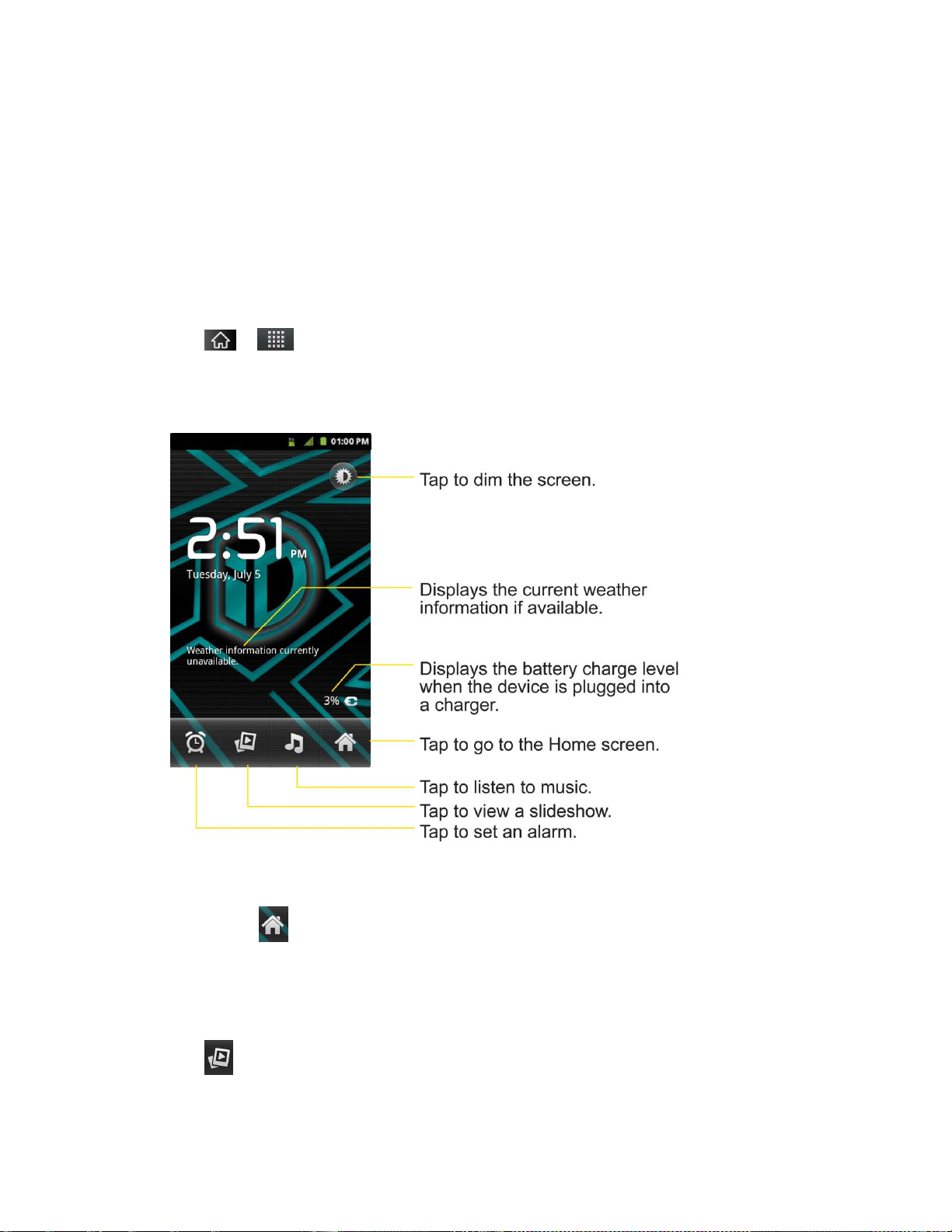
Tools and Calendar 163
To organize items on the Home screen in a folder:
► Just drag a shortcut, an icon, or a folder and drop in a folder.
Clock
You can use Clock application to monitor several types of information at once, in addition to the
current date and time.
To open the Clock application:
► Tap > > Clock.
The Clock application opens with the date and time displayed on your Home screen wallpaper,
along with your local weather and other useful information.
► When the Clock application is running, it switches to screensaver mode after a few
minutes. Simply press a device key to wake the phone up again. To return to the Home
screen, tap at the bottom of the Clock screen.
To play a slideshow:
You can play a slideshow of the pictures in your Gallery albums from the Clock application.
► Tap at the bottom of the Clock screen.
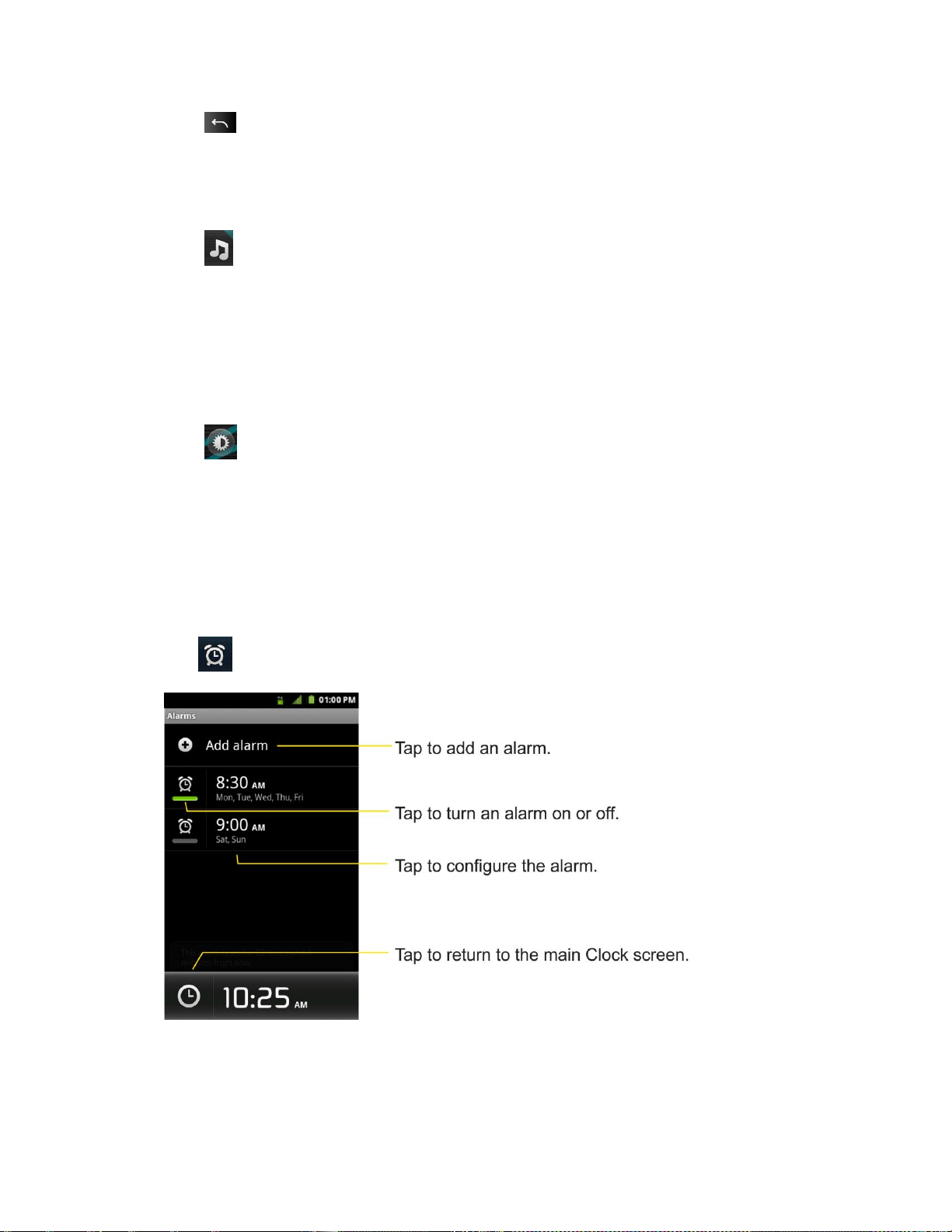
Tools and Calendar 164
► Tap to end the show.
To play music:
You can play music while the Clock is displayed.
► Tap at the bottom of the Clock screen.
The Music application opens, where you can select music to play. You can return to the Clock
application or use another application while the music is playing.
To dim the Clock display:
If you want to use your device as a bedside clock, you can set the screen brightness very low.
► Tap on the top right of the screen to dim the clock.
► Tap the screen to restore normal brightness.
Alarms
The Clock application also allows you to set alarms.
To set an alarm:
1. Tap at the bottom of the Clock screen.
2. Tap an existing alarm to change its time and other attributes or tap Add alarm to add a
new one.

Tools and Calendar 165
3. Tap Time to set the time of the alarm. You can change the time by taping the + or -
buttons and the AM or PM buttons or tap the hour and minutes fields to enter the time
with the keyboard.
4. Tap Repeat to set the days when you want the alarm to sound. (If you don't set a repeat,
the alarm will only sound on the assigned day.)
5. Tap Ringtone to select a ringtone for the alarm. The ringtone plays briefly when you
select it.
6. Tap Vibrate to have the device vibrate, in addition to playing the ringtone.
7. Tap Label to enter a name for the alarm.
8. When you're finished, tap Done.
9. Tap to return to the main Clock screen.
To change clock alarm settings:
1. Tap at the bottom of the Clock screen.
2. Tap > Settings.
3. You can set the following options:
Alarm in silent mode: Tap to place a checkmark and allow your device to play
alarms even when it is in Silent mode.
Alarm volume: Allows you to set the volume of alarms.
Snooze duration: Allows you to set how long the Clock waits before playing an
alarm again.
Volume and Camera: Allows you to set the desired behavior of the Volume Keys
and Camera Key when pressed during an alarm.
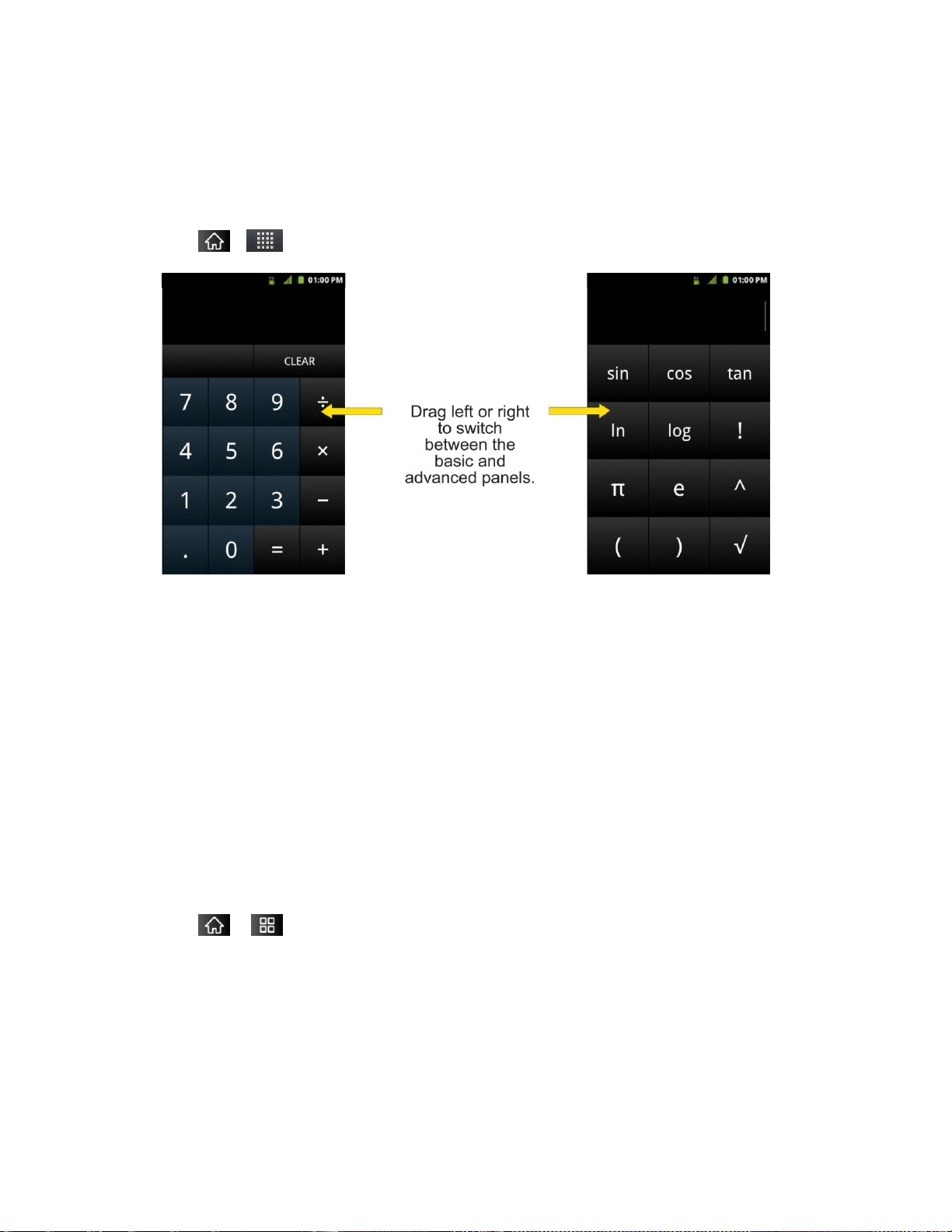
Tools and Calendar 166
Calculator
You can use the Calculator application to solve math problems.
To open and use the Calculator:
1. Tap > > Calculator.
2. Enter numbers and arithmetic operators on the basic panel.
3. Drag the basic panel to the left to open the advanced panel.
4. Touch and hold the Calculator‘s display to open a menu where you can copy what you‘ve
entered and access other tools.
5. Tap Clear to delete the last number or operator you entered. Touch and hold Clear to
delete all of the entered information.
Updating Your Android Operating System
This option allows you to update the Android Operating System (OS) on your device via an
over-the-air connection. There are two components to your LG Marquee™: Sprint User-
Interface (UI) firmware and device Google OS.
1. Tap > > Settings > About phone > System updates > Update Firmware and
Update LG Software.
2. Follow the on-screen instructions.

Tools and Calendar 167
Updating Your Profile
This option allows you to automatically update your online user profile information. If you choose
to change your user name and select a new one online, you must then update the user name on
your device.
1. Tap > Settings > About phone > System updates > Update Profile.
2. Follow the on-screen instructions.
Updating Your PRL
This option allows you to download and update the PRL (Preferred Roaming List) automatically.
1. Tap > > Settings > About phone > System updates > Update PRL.
2. Follow the on-screen instructions.
Bluetooth
Bluetooth is a short-range communications technology that allows you to connect wirelessly to a
number of Bluetooth devices, such as headsets and hands-free car kits, Bluetooth-enabled
handhelds, computers, printers, and wireless phones. The Bluetooth communication range is
usually up to approximately 30 feet.
Turning Bluetooth On and Off
Using the Bluetooth Settings Menu
Pairing Bluetooth Devices
Sending Items via Bluetooth
Disconnecting Bluetooth Connection During an Active Call
Turning Bluetooth On and Off
By default, your device‘s Bluetooth feature is set to Off. Turning Bluetooth on makes your device
“discoverable‖ by other in-range Bluetooth devices.
Note: Activating Bluetooth can drain your battery faster and reduce your available usage times.
To conserve your device‘s battery, turn off Bluetooth when not in use. Always turn off
your Bluetooth when you are in locations that prohibit its use.
To turn Bluetooth on:
1. Tap > > Settings > Wireless & networks.

Tools and Calendar 168
2. Tap Bluetooth to place a checkmark and activate the feature. When active, appears
within the Status Bar.
To turn Bluetooth off:
1. Tap > Settings > Wireless & networks.
2. Tap Bluetooth to uncheck and deactivate Bluetooth.
Bluetooth Status Indicators
The following icons show your Bluetooth connection status at a glance:
– Bluetooth is active
– Bluetooth is connected to a Bluetooth device
The Bluetooth Settings Menu
The Bluetooth settings menu allows you to set up many of the characteristics of your device's
Bluetooth service, including:
● Entering or changing the name your device uses for Bluetooth communication
● Setting your device's visibility (or ―discoverability‖) for other Bluetooth devices
To access the Bluetooth Settings menu:
1. Tap > > Settings > Wireless & networks.
2. Tap Bluetooth to place a checkmark and activate the feature. When active, appears
within the Status Bar.
3. Tap Bluetooth settings.
4. Set the following Bluetooth options:
Device name: Change your device‘s Bluetooth name.
Discoverable: Tap to place a checkmark and make your device visible to other
devices for pairing and communication. (A green checkmark will appear.) Tap again
to uncheck and make your device invisible.
Note: Your device is visible for up to 120 seconds (2 minutes). This value appears as a
countdown within this field.

Tools and Calendar 169
Scan for devices: If the Bluetooth-compatible device (such as headsets, device,
printer, or computer) you want to pair with isn't on the list, make sure the target
device is set to be discoverable, then tap Scan for devices to scan again.
Pairing Bluetooth Devices
Paired Devices
The Bluetooth pairing process allows you to establish trusted connections between your device
and another Bluetooth device. When you pair devices, they share a passkey, allowing for fast,
secure connections while bypassing the discovery and authentication process.
To pair your phone with another Bluetooth device:
1. Verify your Bluetooth is active.
2. From the Bluetooth settings page, tap Discoverable to place a checkmark and make
your device visible. Your device must be visible to successfully pair with an external
device.
3. Tap Scan for devices. (Your device will display a list of discovered in-range Bluetooth
devices.)
4. Tap a device from the list to initiate pairing.
5. Depending on the device, you might have to tap Pair to accept the passkey (if they match
on both devices) , confirm matching passkeys, or enter the passkey or PIN Code.
6. Tap Done > OK if you entered a passkey or PIN code or passkey.
7. The external device will then have to accept the connection and enter your device‘s PIN
code.
Once successfully paired to an external device, appears within the Status Bar.
Note: Due to different specifications and features of other Bluetooth-compatible devices,
display and operations may be different, and functions such as transfer or exchange
may not be possible with all Bluetooth compatible devices.
Pairing between two Bluetooth devices is a one-time process. Once a pairing has been
created, the devices will continue to recognize their partnership and exchange
information without having to re-enter a passcode again.
To disconnect a paired device:
Disconnecting a paired device breaks the connection between the device and your
LG Marquee™, but retains the pairing. At a later point when you wish to reconnect the device,
there is no need to setup the connection information again.

Tools and Calendar 170
1. Verify your Bluetooth is active.
2. From the Bluetooth settings page, tap the previously paired device (under the Bluetooth
devices section).
3. Tap OK to confirm disconnection.
– or –
From the Bluetooth settings page, touch and hold the name of the previously paired
device, and select Disconnect.
Note: Disconnections are manually done but often occur automatically if the paired device
goes out of range of your LG Marquee™ or if it is powered off.
To delete a paired device (unpair):
Deleting a device from your list removes its ―connection record‖ and upon reconnection would
require that you re-enter all the previous pairing information.
1. Verify your Bluetooth is active.
2. From the Bluetooth settings page, touch and hold the name of the previously paired
device (under the Bluetooth devices section). This opens the connected device‘s menu
options.
3. Tap Disconnect & Unpair to confirm deletion.
Sending Items via Bluetooth
Depending on your paired devices‘ settings and capabilities, you may be able to send pictures,
videos, Contacts information, or other items using a Bluetooth connection.
Note: Prior to using this feature, Bluetooth must first be enabled, and the recipient‘s device
must be visible. If no devices are detected, tap Scan devices to begin a new search.
To send contacts information:
1. Tap > > Contacts.
2. Tap an entry to open its details page.
3. Tap > Share > Bluetooth.
4. Tap a paired device.
The external Bluetooth device must be visible and communicating for the pairing to
be successful.
To send pictures and/or videos:

Tools and Calendar 171
1. Tap > > Gallery.
2. Tap an album to open it and view its contents. (The pictures and videos in the album are
displayed in chronological order.)
3. Tap , then checkmark pictures and/or videos to share.
4. Tap Share> Bluetooth.
5. Tap a paired device.
The external Bluetooth device must be visible and communicating for the pairing to
be successful.
Disconnecting Bluetooth Connection During an Active Call
► During an active call, where the audio is being routed through a connected Bluetooth
device (headset or hands-free connection), tap Bluetooth to route the device‘s audio
through the connected Bluetooth headset (On) or through the speaker (Off).
When the call is routed to a Bluetooth headset, the current call area is surrounded by
a blue box, the Bluetooth button indicates it‘s on, and the Bluetooth call icon is
displayed in the Status Bar.
When Bluetooth is turned off, the call is routed through either the earpiece or
speaker, the call area is surrounded by a green box, the Bluetooth button indicates
it's off, and the Call icon is displayed in the Status Bar.
Note: Communication can be toggled between the Bluetooth headset and the device earpiece
or speaker by tapping the Bluetooth button On or Off.
microSD Card
Your deviceis equipped with a preinstalled microSD™ (Secure Digital) memory card to expand
the device's available memory space. It allows you to store images, videos, music, and voice
data in your device.
Your Device's microSD Card and Adapter
microSD Card Settings
Connecting Your Device to Your Computer
Removing the microSD Card
To safely remove the microSD card from your device, first you need to unmount the microSD
card.

Tools and Calendar 172
WARNING: On the Android OS 2.3, you can download applications from Android Market and
store them on a microSD card as well as on the device. Due to this feature, if you
skip the unmount procedure, it can cause an error because information between
the microSD card and the device is not accorded properly. In the worst case, the
microSD card can be corrupted or damaged.
1. Tap > > Settings > Storage > Unmount SD card. Confirm your selection by
tapping OK. Now you can safely remove the microSD card.
2. Lift off the back cover using the fingertip cutout at the bottom of the cover.
3. Carefully remove the microSD card from the slot.
Note: You can easily damage the microSD card by improper operation. Please be careful
when inserting, removing, or handling it.
Inserting the microSD Card
1. Lift off the back cover using the fingertip cutout at the bottom of the cover.
2. Position the microSD card with the label side facing up and slide it into place until it is
fully inserted and locked in place.
Note: Be sure to use only recommended microSD cards (up to 32GB). Using non-
recommended microSD cards could cause data loss and damage your device.
microSD Icon Indicators
The following icons show your microSD card connection status at a glance:
- microSD card has been unmounted from the device and is safe to remove.
- microSD card is being prepared for use and for mounting.
Note: DO NOT remove a microSD card while files are being accessed or transferred. Doing so
will result in loss or damage of data. Make sure your battery is fully charged before using
the microSD card. Your data may become damaged or unusable if the battery runs out
while using the microSD card.
microSD Adapter
The supplied microSD adapter allows you to use microSD cards in other SD-compatible devices,
like computers, cameras, and printers. Before using the microSD card with an SD-compatible
device, you will need to insert the microSD card into the microSD adapter.
To insert the microSD card into the microSD adapter:
► With the label side of the microSD card facing up, insert the card into the supplied
microSD adapter, and gently slide the card until it is fully inserted.

Tools and Calendar 173
To remove the microSD card from the microSD adapter:
► Hold the front edge of the microSD card, and gently pull it out to remove it from the
adapter.
Write Protection
The microSD adapter has a built-in Write Protection lock to prevent accidental overwriting or
removal of your data when the microSD card and adapter are inserted in another device.
► Slide the Write Protection lock tab down into the “Lock‖ position to prevent overwriting of
data. To allow data to be added or removed from the microSD card, slide the Write
Protection lock tab up into the normal position.
Viewing Memory in the microSD Card
1. Tap > > Settings > Storage.
2. Review the available information.
The storage capacity page is divided into two sections: SD card and Internal
storage.
Formatting the microSD Card
Formatting a microSD card permanently removes all files stored on the card.
1. Tap > > Settings > Storage.
2. Tap Unmount SD card and confirm your selection by tapping OK to release the microSD
card from its use by the device. The icon appears in the Status Bar to indicate an
unmounted microSD card.
3. Once unmounted, tap Erase SD card > Erase SD card > Erase everything.
Once completely formatted, you will have to remount the microSD card in order to
use it.
Note: The formatting procedure erases all the data on the microSD card, after which the files
CANNOT be retrieved. To prevent the loss of important data, please check the contents
before you format the card.
Connecting Your Device to Your Computer
Before using your device's mass storage capabilities, you need to prepare your device's data
services to synchronize with your desktop or laptop computer. Once you have connected the
device to the computer, you can transfer your data to or from the microSD card.

Tools and Calendar 174
To connect your device to a computer via USB:
1. Use the USB cable that came with your phone to connect the phone to a USB port on
your computer.
2. Open the Notifications Panel and tap USB connected.
3. Select Mass storage and tap Done and OK in the dialog box that opens to confirm that
you want to transfer files.
When the device is connected as USB storage, you receive a notification on your
computer.
You device's microSD card is mounted as a removable drive on your computer. You
can now copy files to and from the microSD card. For more information, see the
documentation for your computer.
During this time, you will not be able to access the microSD card in your device, so
you can't use applications that rely on the microSD card, such as Camera, Gallery,
and Music.
To remove the connection:
WARNING: Carefully follow your computer's instructions to unmount, remove, or disconnect
any removable USB devices or disks, to avoid losing information on the microSD
card when disconnecting your phone from your computer.
1. On your computer, complete the process to safely Stop, or Remove, the USB device (in
this case, the phone). For example, use the Safely Remove Hardware option to Stop the
USB Mass Storage Device on Windows® XP.
2. Open the Notifications Panel (on your device) and tap USB connected and select
Charge only to unmount the microSDcard.

Tools and Calendar 175
Important Connection Information
● To avoid loss of data, DO NOT remove the USB cable, the microSD card, or the battery
while accessing or transferring files.
● DO NOT use your computer to change or edit folder or file names on the microSD card,
and do not attempt to transfer large amounts of data from the computer to the microSD
card. Doing so may cause the microSD card to fail.
● DO NOT turn off or restart your computer, or put it into standby mode, while using a
mass storage device. Doing so will result in loss or damage of data.
● The microSD card can only be mounted for use by either the device or a connected
computer. Prior to accessing the card via a different method, it must first be unmounted
from its current device (phone or computer-USB).
Important: The microSD card can only share a connection with one device at a time, either
your device or your computer (via its USB connection), not both. You cannot
browse the contents of the card via your device if they are currently being
browsed via your computer.

Index
Index
3-way call, 47, 51
Account Passwords, 4
Accounts, 74
Adding a Contact to Your Favorites, 79
Adding a Number to a Contacts Entry, 81
Airplane Mode, 59
Alarms, 164
Android Market™, 114
Answering Calls, 49
Applications, 30, 117
Assigning Direct Dialing Numbers, 82
Battery, 15
Bluetooth, 167
Calculator, 166
Calendar, 155
Call Forwarding, 52
Call Guard, 63
Call Log, 52
Call Waiting, 51
Caller ID, 50
Camera, 149
Capacity, 15
Changing Calendar Settings, 161
Charging the Battery, 16
Charging with USB, 16
Clearing, 54
Clock, 163
Connecting to Wi-Fi Networks, 134
Connecting Your Device to Your Computer, 173
Contacts, 78
Context menus, 20
Corporate Email (Outlook), 88
Creating a New Contacts Entry, 79
Creating a Playlist, 122
Creating an Event, 159
Credential Storage Settings, 72
Customizing Your Home Screen, 32
Data Roam Guard, 63
Data Services, 136
Date & Time Display, 68

Index
Dialing Options, 45
Display Screen, 11
Driving Directions, 129
Editing a Contacts Entry‘s Numbers, 82
Editing or Deleting an Event, 159
Editing Text, 42
Email, 87
Emergency Numbers, 45
Enhanced 911 (E911), 46
Entering Text, 37
Extended Home Screens, 27
Feedback Tones, 66
Finding a Phone Number, 55
Folders, 162
Formatting, 173
Gallery Options, 151
Gmail, 98
Google Account, 42
Google Maps, 126
GPS Navigation, 125
GPS Services, 125
Home Screen, 26
Importing, Exporting, and Sharing Contacts, 85
In-Call Options, 47
Installing, 15
Launching a Web Connection, 137
Locking Your Device, 69
Making a Call, 54
Making Calls, 44
microSD Card, 171
Missed Call Notification, 45
Multimedia Messaging (MMS), 94
Music, 122
NASCAR Sprint Cup Mobile, 118
Notification Ringtone, 66
Notifications, 21
Operator Services, 6
Pairing Bluetooth Devices, 169
Pauses, 48
Player, 122
Plus (+) Code Dialing, 49
Prepending a Number, 54
Ringer Types, 64
Roaming, 61

Index
Saving a Phone Number, 55
Security, 68
Sending Items via Bluetooth, 170
Setting Roam Mode, 62
Settings, 168
Sharing a contact, 86
Silence Your Device, 72
Sound Settings, 64
Sprint Football Live, 119
Sprint Zone, 118
Synchronizing, 161
Synchronizing Accounts, 110
Taking Pictures, 149
TeleNav™ GPS Navigator, 128
Text Messaging, 92
Text-to-Speech, 57
TTY Use, 46
Turning Bluetooth On and Off, 167
Turning Your Device On and Off, 14
Unlocking Your Device, 69
Vibrate, 65
Viewing Event Details, 158
Viewing Your Calendar, 155
Viewing Your Pictures, 151
Volume, 64
Write Protection, 173
Your User Name, 136
YouTube™, 124