ge.com
49-80480 07-07 JR
JT930—30 ″ Single Wall Oven
JT980—30 ″ Double Wall Oven
Owner’s Manual
Safety Instructions . . . . . . . . . . . .2–7
Operating Instructions
Adjusting Temperature . . . . . . . . . .34
Clock, Timer and
Control Lockout . . . . . . . . . . . . . . .12
Controls . . . . . . . . . . . . . . . . . . . .9–11
Convection . . . . . . . . . . . . . . . .24–27
Defrost Feature, Guide . . . . . . .19, 20
Introduction . . . . . . . . . . . . . . . . . . .8
Oven . . . . . . . . . . . . . . . . . . . . .13–15
Proof, Warmer and Warm . . . . . . .29
Recipes . . . . . . . . . . . . . . . . . . . . . . .28
Sabbath Feature . . . . . . . . . . . .35–37
Self-Cleaning Oven . . . . . . . . . .30, 31
Settings . . . . . . . . . . . . . . . . . . .32, 33
Speed Baking/
Speed Roasting . . . . . . . . . . . . .16, 17
Speed Broiling, Guide . . . . . . .17, 18
Timed Baking
and Roasting . . . . . . . . . . . .22, 26, 27
Traditional Baking/Roasting . .21, 22
Traditional Broiling, Guide . . . . . .23
Care and Cleaning
Cleaning Oven Door . . . . . . . . . . .38
Control Panel . . . . . . . . . . . . . . . . .39
Light Bulb . . . . . . . . . . . . . . . . . . . .37
Packaging Tape . . . . . . . . . . . . . . . .37
Racks . . . . . . . . . . . . . . . . . . . . . . . .39
Stainless Steel Surfaces . . . . . . . . . .38
Troubleshooting Tips . . . . . . .40–43
Accessories . . . . . . . . . . . . . . . . . . .44
Consumer Support
Consumer Support . . . . .Back Cover
Product Registration . . . . . . . . 45, 46
Warranty . . . . . . . . . . . . . . . . . . . . .47
Built-In Oven
Write the model and serial
numbers here:
Model #______________________
Serial # ______________________
You can find them on a label on
the side trim or on the front of the
(lower) oven behind the oven door.
Self-Cleaning Oven with Trivection
™
IMPORTANT SAFETY INFORMATION.
READ ALL INSTRUCTIONS BEFORE USING.
■ Do not attempt to operate this oven with
the door open since open-door operation
can result in harmful exposure to
microwave energy. It is important not to
defeat or tamper with the safety interlocks.
■ Do not place any object between the oven
front face and the door or allow soil or
cleaner residue to accumulate on sealing
surfaces.
■ The oven should not be adjusted or
repaired by anyone except properly
qualified service personnel.
■ Do not operate the oven if it is damaged.
It is particularly important that the oven
door close properly and that there is no
damage to the:
door (bent),
hinges and latches (broken or
loosened),
door seals and sealing surfaces.
PRECAUTIONS TO AVOID POSSIBLE EXPOSURE TO EXCESSIVE
MICROWAVE ENERGY
Safety Instructions
Operating Instructions
Care and CleaningTroubleshooting TipsConsumer Support
2
WARNING!
For your safety, the information in this manual must be followed to minimize the risk of fire or
explosion, electric shock, or to prevent property damage, personal injury, or loss of life.
IMPORTANT SAFETY NOTICE
The California Safe Drinking Water and Toxic Enforcement Act requires the Governor of California
to publish a list of substances known to the state to cause cancer, birth defects or other reproductive
harm, and requires businesses to warn customers of potential exposure to such substances.
The fiberglass insulation in self-clean ovens gives off a very small amount of carbon monoxide during
the cleaning cycle. Exposure can be minimized by venting with an open window or using a ventilation
fan or hood.
When using electrical appliances, basic safety precautions should be followed, including the following:
WARNING—Grounding Instructions:
This appliance must be connected to a
grounded, metallic, permanent wiring
system, or an equipment grounding
conductor should be run with the circuit
conductors and connected to the equipment
grounding terminal or lead on the
appliance.
WARNING
—To reduce the risk of burns,
electric shock, fire, injury to persons or
exposure to excessive microwave energy:
■ Use this appliance only for its intended
purpose as described in this manual. Do
not use corrosive chemicals or vapors in
this appliance. This oven is specifically
designed to heat or cook food, and is not
intended for laboratory or industrial use.
■ Be sure your appliance is properly
installed and grounded by a qualified
technician in accordance with the
provided installation instructions.
■ Do not attempt to repair or replace any
part of your oven unless it is specifically
recommended in this manual. All other
servicing should be referred to a qualified
technician.
■ Have the installer show you the location of
the circuit breaker or fuse. Mark it for easy
reference.
■ Before performing any service, disconnect
the oven power supply at the household
distribution panel by removing the fuse or
switching off the circuit breaker.
■ Do not leave children alone—children
should not be left alone or unattended in
an area where an appliance is in use. They
should never be allowed to sit or stand on
any part of the appliance.
■ Do not store this appliance outdoors.
Do not use this product near water—
for example, in a wet basement, or near
a swimming pool.
■ Do not operate this appliance if it has a
damaged cord or plug, if it is not working
properly or if it has been damaged or
dropped.
■ This appliance should be serviced only
by qualified service personnel. Contact
nearest authorized service facility for
examination, repair or adjustment.
■ Do not allow anyone to climb, stand or
hang on the door. They could damage the
oven, or cause severe personal injury.
■ Be sure the oven is securely installed in a
cabinet that is firmly attached to the house
structure. Never allow anyone to climb, sit,
stand or hang on the oven door.
■ Never leave the oven door open when you
are not watching the oven.
■ Always keep combustible wall coverings,
curtains or drapes a safe distance from
your oven.
■ Always keep dish towels, dish cloths, pot
holders and other linens a safe distance
from your oven.
■ Always keep wooden and plastic utensils
and canned food a safe distance away
from your oven.
■ Teach children not to play with the
controls or any other part of the oven.
■ Large scratches or impacts to glass doors
can lead to broken or shattered glass.
■ Do not cover or block any openings on
the appliance.
SAFETY PRECAUTIONS
ge.com
3
Safety Instructions
Operating Instructions Care and Cleaning
Troubleshooting Tips Consumer Support
■ Do not store flammable materials in
an oven.
■ CAUTION: Items of interest to
children should not be stored in cabinets
above an oven; children climbing on the
oven to reach items could be seriously
injured.
■ Never wear loose-fitting or hanging
garments while using the appliance. Be
careful when reaching for items stored in
cabinets over the oven. Flammable material
could be ignited if brought in contact with
hot surfaces or heating elements and may
cause severe burns.
■ Use only dry pot holders—moist or damp
pot holders on hot surfaces may result in
burns from steam. Do not let pot holders
touch hot heating elements. Do not use a
towel or other bulky cloth.
■ For your safety, never use your appliance
for warming or heating the room.
■ Do not let cooking grease or other
flammable materials accumulate in or
near the oven.
■ Do not use water on grease fires. Never pick
up a flaming pan. Turn the controls off.
■ Flame in the oven can be smothered
completely by closing the oven door and
turning the oven off or by using a multi-
purpose dry chemical or foam-type fire
extinguisher.
■ Do not touch the heating elements or the
interior surface of the oven. These surfaces
may be hot enough to burn even though
they are dark in color. During and after
use, do not touch, or let clothing or other
flammable materials contact any interior
area of the oven; allow sufficient time for
cooling first.
■ Potentially hot surfaces include oven vent
openings, surfaces near the openings,
crevices around the oven door, the edges
of the window and metal trim parts above
the door.
■ REMEMBER: The inside surface of the oven
may be hot when the door is opened.
■ Never leave jars or cans of fat drippings in
or near your oven.
■ Do not store or use combustible materials,
gasoline or other flammable vapors and
liquids in the vicinity of this or any other
appliance.
■ Stand away from the oven when opening
the oven door. Hot air or steam which
escapes can cause burns to hands, face
and/or eyes.
■ Do not heat unopened food containers.
Pressure could build up and the container
could burst, causing an injury.
■ Keep the oven vent unobstructed.
■ Keep the oven free from grease buildup.
■ Place the oven rack in the desired position
while the oven is cool. If racks must be
handled when hot, do not let pot holder
contact the heating elements.
■ When using cooking or roasting bags in the
oven, follow the manufacturer’s directions.
■ Pulling out the rack to the stop-lock is a
convenience in lifting heavy foods. It is also
a precaution against burns from touching
hot surfaces of the door or oven walls.
■ Do not use the oven to dry newspapers.
If overheated, they can catch on fire.
■ Do not use the oven for a storage area.
Items stored in an oven can ignite.
■ Do not leave paper products, cooking
utensils or food in the oven when not
in use.
■ After broiling, always take any broiler pan
out of the oven and clean it. Leftover
grease in a broiler pan can catch fire next
time you use the pan.
■ Clean only parts listed in this Owner’s
Manual.
■ Do not use aluminum foil to line
oven bottoms. Improper installation
of aluminum foil may result in a risk
of electric shock or fire.
WARNING!
SAFETY PRECAUTIONS
4
Safety Instructions
Operating Instructions
Care and CleaningTroubleshooting TipsConsumer Support
IMPORTANT SAFETY INFORMATION.
READ ALL INSTRUCTIONS BEFORE USING.
Read and follow the specific “Precautions to Avoid Possible Exposure to Excessive Microwave Energy”
section in this manual.
To reduce the risk of fire in the oven cavity:
■ Do not overcook food. Carefully attend
appliance if paper, plastic or other
combustible materials are placed inside
the oven to facilitate cooking.
■ In defrost mode, remove wire twist-ties
from paper or plastic containers before
placing bags in the oven.
■ Oven Cooking Bags—Do not use the wire
twist-tie to close the bag.
■ Do not use paper towels.
■ Do not use your oven to dry newspapers.
■ Do not overcook potatoes. They could
dehydrate and catch fire, causing damage
to your oven.
■ Do not operate the oven while empty to
avoid damage to the oven and the danger
of fire.
■ Do not use the oven for storage purposes.
Do not leave paper products, cooking
utensils or food in the oven when not
in use.
■ If materials inside the oven should ignite,
keep the oven door closed, turn the oven
off and shut off power at the fuse or circuit
breaker panel. If the door is opened, the
fire may spread.
■ This oven is not approved or tested for
marine use.
■ Some products such as whole eggs and
sealed containers—for example, closed
jars—will explode and should not be
heated in this oven. Such use of the oven
could result in injury.
■ Do not boil eggs in this oven. Pressure will
build up inside the egg yolk and will cause
it to burst, possibly resulting in injury.
■ Do not pop popcorn in your oven.
■ Foods with unbroken outer “skin” such as
potatoes, sausages, tomatoes, apples, egg
yolks, chicken livers and other giblets
should be pierced to allow steam to escape
during cooking.
■ Don’t defrost frozen beverages in narrow-
necked bottles (especially carbonated
beverages). Even if the container is
opened, pressure can build up. This can
cause the container to burst, possibly
resulting in injury.
■ Hot foods and steam can cause burns.
Be careful when opening any containers
of hot food, cooking pouches and boxes.
To prevent possible injury, direct steam
away from hands and face.
■ As with any appliance, close supervision is
necessary when used by children.
TRIVECTION
™
OVEN
ge.com
5
Safety Instructions
Operating Instructions Care and Cleaning
Troubleshooting Tips Consumer Support
Safety Instructions
Operating Instructions
Care and CleaningTroubleshooting TipsConsumer Support
IMPORTANT SAFETY INFORMATION.
READ ALL INSTRUCTIONS BEFORE USING.
■ Steam or vapor escaping from around
the door.
■ Dimming of the oven light and change
in the blower sound may occur.
■ The microwave fan may operate with both
ovens off. It is cooling the control and will
turn itself off.
■ Some TV-radio interference might be
noticed while using your oven. It is
similar to the interference caused by other
small appliances and does not indicate a
problem with your oven.
ALL THESE THINGS ARE NORMAL WITH YOUR TRIVECTION
™
OVEN
If you see arcing, open the door and correct the problem.
ARCING
Arcing is the microwave term for sparks in the
oven. Arcing is caused by:
■ Metal or foil touching the side of the oven.
■ Foil not molded to food (upturned edges
act like antennas).
■ Metal, such as twist-ties, poultry pins or
gold-rimmed dishes in the oven.
■ Recycled paper towels containing small
metal pieces being used in the oven.
Liquids such as water, coffee or tea are able
to be overheated beyond the boiling point
without appearing to be boiling. Visible
bubbling or boiling when the container is
removed from the microwave oven is not
always present. THIS COULD RESULT IN VERY
HOT LIQUIDS SUDDENLY BOILING OVER WHEN
THE CONTAINER IS DISTURBED OR A UTENSIL
IS INSERTED INTO THE LIQUID.
SUPER HEATED WATER AND SPONTANEOUS BOILING
6
Cook meat and poultry thoroughly—meat to at least an INTERNAL temperature of 160°F and poultry
to at least an INTERNAL temperature of 180°F. Cooking to these temperatures usually protects against
foodborne illness.
COOK MEAT AND POULTRY THOROUGHLY…
■ Do not clean the door gasket. The door
gasket is essential for a good seal. Care
should be taken not to rub, damage or
move the gasket.
■ Do not use oven cleaners. No commercial
oven cleaner or oven liner protective
coating of any kind should be used in or
around any part of the oven. Residue from
oven cleaners will damage the inside of the
oven when the self-clean cycle is used.
■ Keep the oven vent unobstructed.
■ Before self-cleaning the oven, remove
shiny, silver-colored oven racks (on some
models) and all other cookware.
■ Be sure to wipe up excess spillage before
starting the self-cleaning operation.
■ If the self-cleaning mode malfunctions,
turn the oven off and disconnect the power
supply. Have it serviced by a qualified
technician.
■ Listen for fan—A fan noise should be
heard sometime during the cleaning cycle.
If not, call a serviceman before self-
cleaning again.
SELF-CLEANING OVEN
READ AND FOLLOW THIS SAFETY INFORMATION CAREFULLY.
SAVE THESE INSTRUCTIONS
7
ge.com
Safety Instructions
Operating Instructions Care and Cleaning
Troubleshooting Tips Consumer Support
Introduction.
The GE Profile oven with Trivection
™
technology is a microwave-assist wall oven designed to cook food up to five
times faster than a traditional oven. This oven gives the user the flexibility to cook food in traditional cooking modes
(bake or broil), convection modes (convection bake and convection roast) or in speedcook modes (speed bake and
speed broil). This oven features easy-to-use controls that will guide you through oven operations.
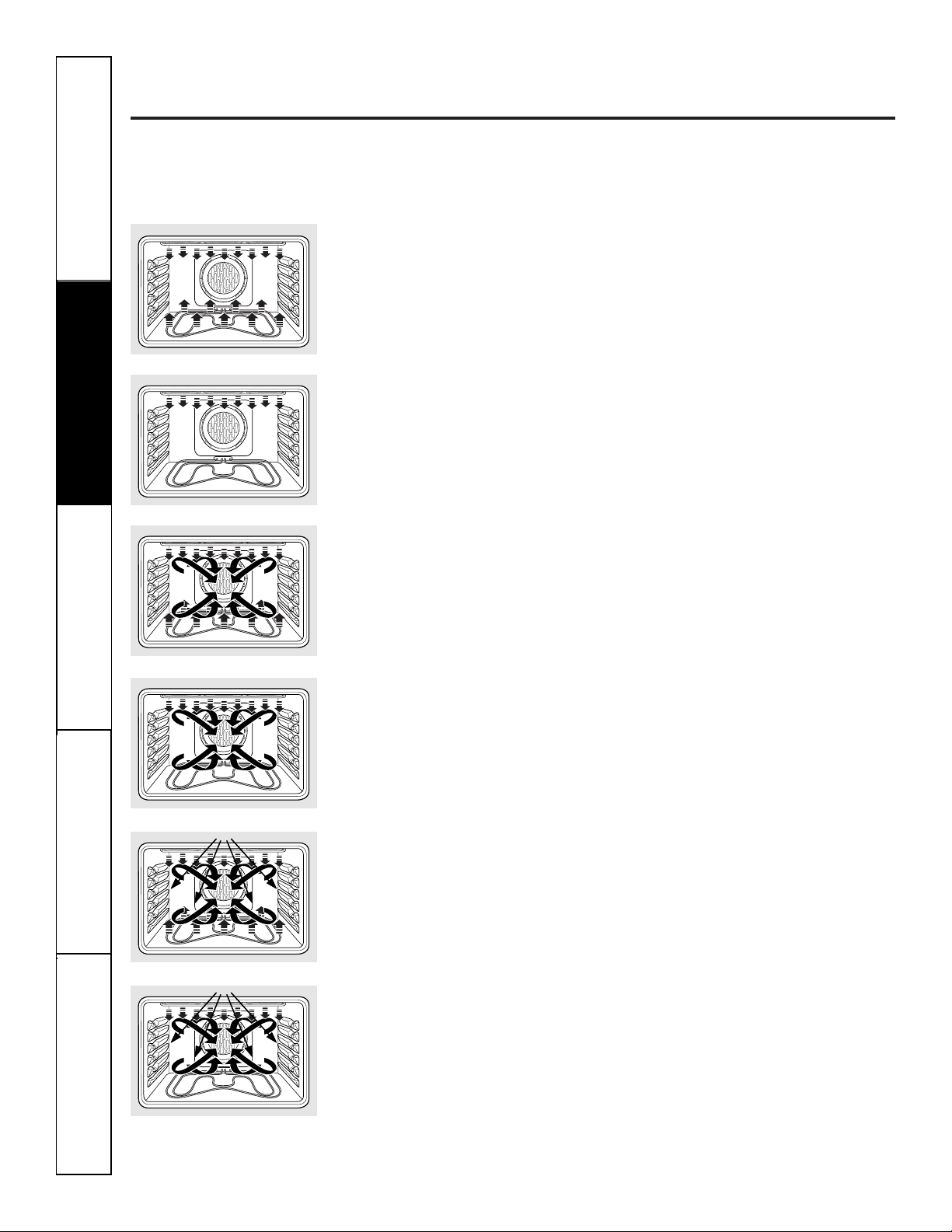
Bake
Baking is cooking with heated air. The
upper and lower elements cycle back and
forth to heat the air and maintain
temperature. Used for traditional baking
and roasting. Best for delicate items.
Broil
Heat is provided by the upper element
to broil your food. May be used with the
oven door open or closed.
Convection Bake—Multi and Single Rack
Heat is provided by the element in the
back of the oven, along with the upper
and lower elements. The air is circulated
with a reversing fan system. The fan will
change directions to provide optimal
evenness and browning. The Multi Rack
option is ideal for evenly baking foods
when using more than one rack. The
1 Rack option, used for one rack of food,
cooks food faster than BAKE mode.
Convection Roast
Heat is provided by the upper element
and circulated with the reversing fan
system. The fan will change directions to
provide optimal evenness and browning.
Good for roasting large tender cuts of
meat or poultry, uncovered. Roasts foods
up to 25% faster.
Speed Bake
Heat is provided by the three elements
and microwave. The exact combination
of elements is automatically determined
by the food category selected. Air is
circulated with the reversing fan system
described above. Ideal for baking and
roasting foods up to five times faster.
Speed Broil
Heat is provided by the upper element
and microwave. Air is circulated with the
reversing fan system described above.
Oven door must be closed. Ideal for
broiling foods to medium to well done
doneness levels two times faster than
traditional broil.
8
Safety Instructions
Operating Instructions
Care and CleaningTroubleshooting TipsConsumer Support
Using the oven controls.
(Throughout this manual, features and appearance may vary from your model.) ge.com
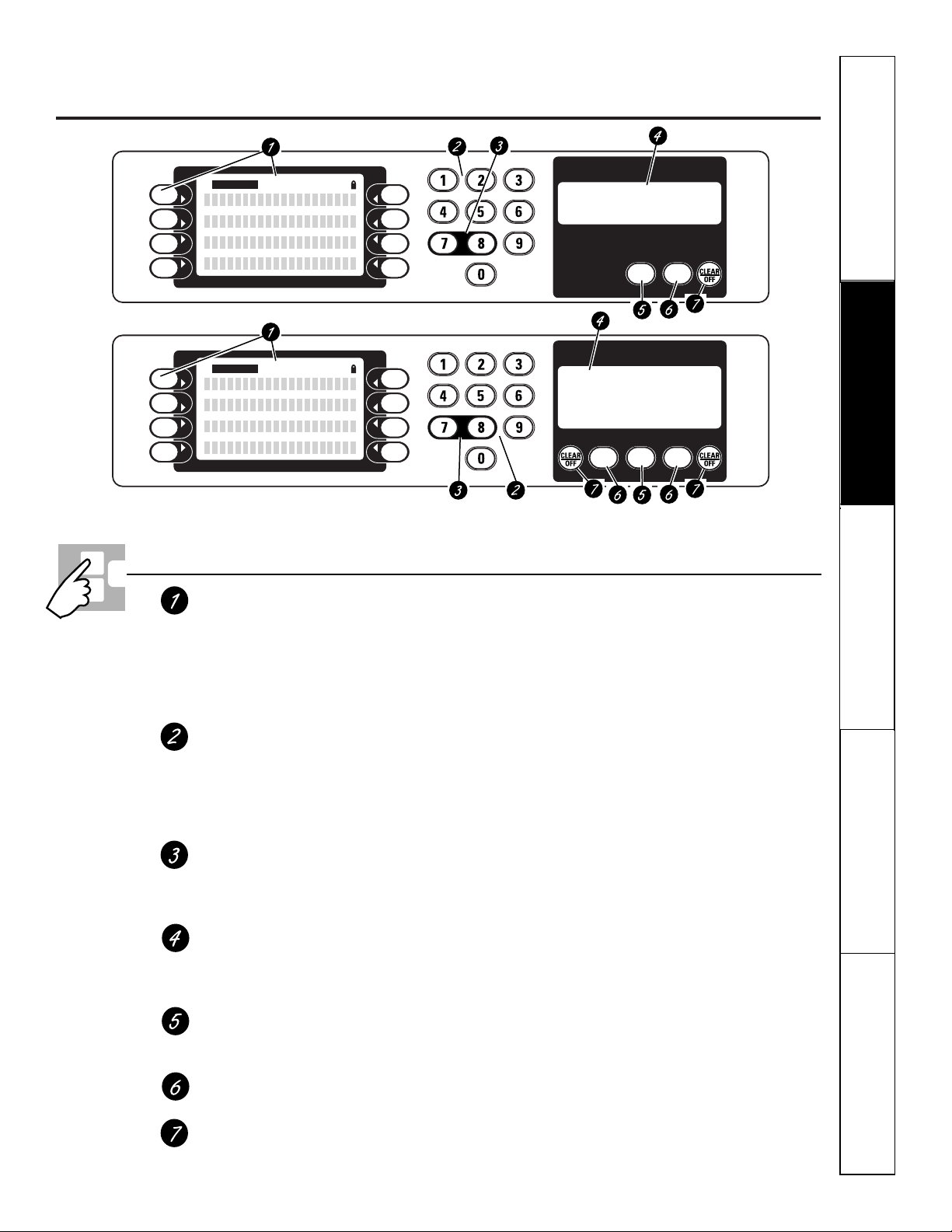
Control Screen & Keypad
All cooking modes, special features and
oven settings are directed and operated
from the control screen. Directions for
operating the oven and prompting for
required information are displayed within
the control screen.
Numeric Keypad
Used to enter information requiring
numbers such as time of day on the clock,
timer, oven temperature, start time and
length of operation for timed baking and
self-cleaning.
Control Lockout
Allows the user to lock the control so that
the touch pads cannot be activated when
pressed.
Time and Temperature Display
All time and temperature information
is displayed in this area as feedback to
the user.
Kitchen Timer
Turns the kitchen timer on and off.
Does not control the oven.
Oven Light
Turns oven light on or off.
Clear/Off
Cancels ALL oven operations EXCEPT the
clock and timer.
If “F– and a number or letter” flash in the display and
the oven control signals, this indicates a function
error code. Press the CLEAR/OFF pad. Allow the oven to
cool for one hour. Put the oven back into operation. If the
function error code repeats, disconnect the power to the
oven and call for service.
If your oven was set for a timed oven operation
and a power outage occurred, the clock and all
programmed functions must be reset.
The time of day will flash in the display when there
has been a power outage.
Oven Control Layout and Description
Double oven control.
Single oven control.
CONTROL LOCK
OVEN
LIGHT
UPPER OVEN LOWER OVEN
OVEN
LIGHT
KITCHEN
TIMER
ON/OFF
SELECT
CONTROL LOCK
OVEN
LIGHT
KITCHEN
TIMER
ON/OFF
SELECT
Safety Instructions
Operating Instructions Care and Cleaning
Troubleshooting Tips Consumer Support
9
Safety Instructions
Operating Instructions
Care and CleaningTroubleshooting TipsConsumer Support
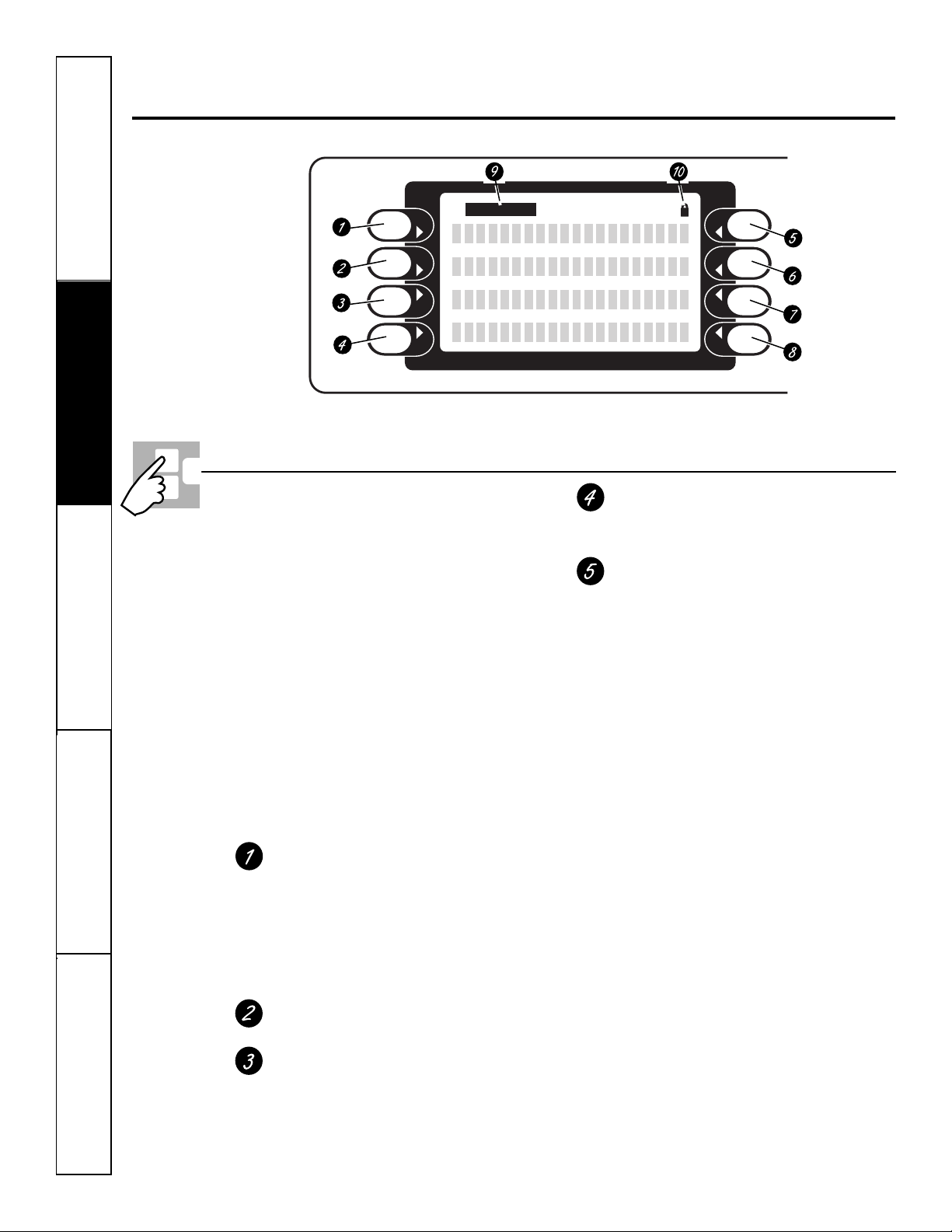
Press pad beside display to select item
in display.
Oven Control Sleep Feature—Any time the oven is
not in use (no cooking, no cleaning, no help and
no timers) for more than 10 minutes, the oven
control will go to sleep. While sleeping, the
control display will not show any text; it will go
blank. The clock will remain displayed in the time
and temperature display unless the “no clock”
option has been selected.
There will be no audible signal given to indicate
that the control is entering the sleep feature.
The control will enter the sleep feature even
when the control is locked.
The user cannot turn this feature OFF.
How to Exit the Sleep Feature—Touch any key. The
function associated with that key will not be started,
but the control display main menu will reappear.
Speedcook
In Speedcook mode, the user will be
prompted to enter food category,
temperature and cooking time.
Speed bake—Bakes food faster than
traditional cooking modes.
Speed broil—Broils food faster than
traditional Hi/Lo Broil.
Bake
Traditional bake mode.
Convection
Conv 1-Rack—Convection bake function
used for baking on one rack.
Conv Multi—Convection bake function
used for baking on more than one rack.
ConvRoast—Convection roast function.
Broil
LO & HI—Traditional broil function.
Speed broil
Features
Additional cooking-related features.
Defrost—This feature is used to thaw
frozen foods. Enter the defrost time using
the chart in the Using the Defrost Feature
section.
Self-Clean—This feature cleans the oven.
See the Using the self-cleaning oven section.
Warmer—This feature keeps hot, cooked
food warm for up to 3 hours. It is not
intended for reheating cold food. See the
How to Set the Oven for Warmer section.
Proof—This feature maintains a warm
environment useful for rising yeast-
leavened products. It is not intended to
keep food warm or reheat cold food. See
the How to Set the Oven for Proof section.
Warm (Cook & Hold)—When this feature is
turned on, it will keep hot, cooked foods
warm for up to 3 hours following a Timed
Bake function. See the How to Set the Oven
for Warm section.
Sabbath—Designed for use on the Jewish
Sabbath and Holidays. See the Using the
Sabbath Feature section.
Using the oven controls.
(Throughout this manual, features and appearance may vary from your model.)
SELECT
Control Screen and Keypad
10
Settings
This oven has additional settings that you
may choose to use. See the Settings section.
Recipes
NOTE: On double wall ovens, Recipes is
available only on the upper oven.
This oven feature allows the user
to store up to six temperature/cooking
time combinations. The user can then
speed bake, bake or convection bake/roast
one of the six stored favorite recipes
without having to choose the settings
each time.
Help
Provides basic information on each
function and how to find the function.
If selected from the home screen, it gives
general help. If selected while performing
a function, it gives help on that function.
Select Exit to leave Help.
Select Prompt
Visual prompt to the user indicating
that a selection needs to be made from
the control screen.
Door Lock Indicator
Indicates that the oven door is locked
for self-clean.
ge.com
Safety Instructions Operating Instructions Care and Cleaning Troubleshooting Tips Consumer Support
Control Screen and Keypad
11
Your control will allow you to lock out the touch
pads so they cannot be activated when pressed.
NOTE: On double oven models, this activates this
feature for both ovens.
To lock/unlock the controls:
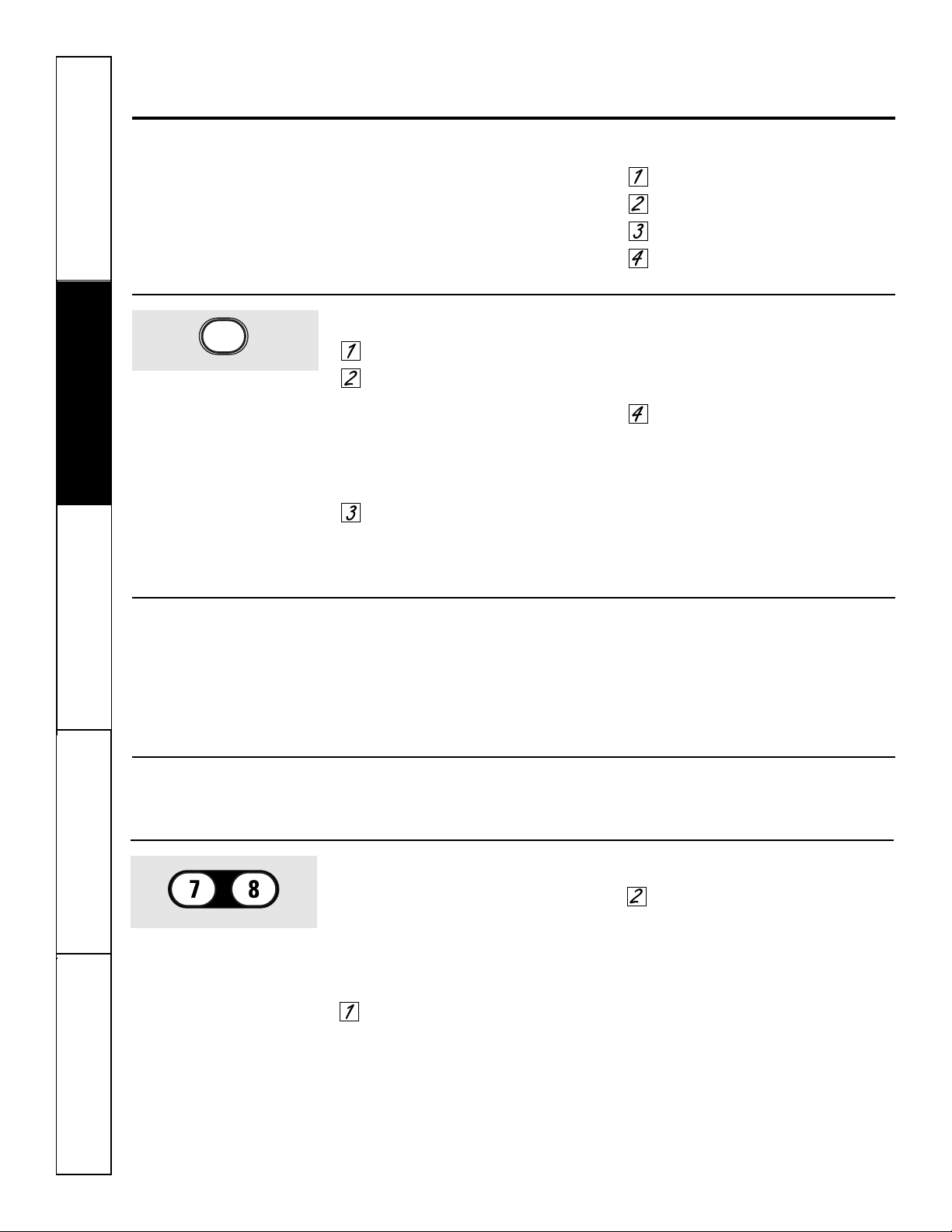
Press the 7 and 8 pads at the same
time for 3 seconds, until the control
screen shows CONTROL IS LOCKED.
To unlock the control, press the
7 and 8 pads at the same time for
3 seconds, until CONTROL IS LOCKED
disappears from the control screen
and the main menu is displayed.
When this feature is on and the touch
pads are pressed, the control will show
CONTROL IS LOCKED.
■ The control lockout mode affects
all touch pads.
■ The control will remain locked
after a power failure.
12
Using the clock, timer and control lockout.
To Set the Clock
The clock must be set to the correct time
of day for the automatic oven timing
functions to work properly. The time of
day cannot be changed during timed
baking, a self-cleaning cycle or delayed
start time.
Select SETTINGS.
Select CLOCK.
Press the number pads.
Select ENTER.
Make sure the clock is set to the
correct time of day.
To Set the Timer
Press the KITCHEN TIMER pad.
Press the number pads until the
amount of time you want shows
in the display. For example, to set
2 hours and 45 minutes, press 2, 4
and 5 in that order. If you make a
mistake, press the KITCHEN TIMER
pad and begin again.
Select START.
After selecting START, SET disappears;
this tells you the time is counting down,
although the display does not change until
one minute has passed. Seconds will not be
shown in the display until the last minute is
counting down.
When the timer reaches :00,
the control will beep 3 times
followed by one beep every
6 seconds until the KITCHEN
TIMER pad is pressed once.
The continuous beep can be canceled by
following the steps in the Settings section
under Tones at the End of a Timed Cycle.
KITCHEN
TIMER
ON/OFF
The timer is an hour and minute
timer only.
The timer does not control oven
operations. The maximum setting on
the timer is 9 hours and 59 minutes.
To set 10 minutes, enter 10. DO NOT
enter 10:00!
To Reset the Timer
If the remaining time is not in the display
(clock, delay start or cooking time are in
the display), recall the remaining time by
pressing the KITCHEN TIMER pad or using
REVIEW TIMES.
You may change it by pressing the
KITCHEN TIMER pad, then press the
number pads until the time you want
appears in the display.
To Cancel the Timer
Press KITCHEN TIMER pad twice.
Control Lockout
CONTROL LOCK
Safety Instructions
Operating Instructions
Care and CleaningTroubleshooting TipsConsumer Support
Using the oven. ge.com
To avoid possible burns, place the racks in the desired position before you turn the oven on.
Before you begin…
The racks have stop-locks, so that when
placed correctly on the supports, they will
stop before coming completely out, and
will not tilt.
When placing and removing cookware,
pull the rack out to the bump on the
rack support.
To remove a rack, pull it toward you,
tilt the front end up and pull it out.
To replace, place the end of the rack
(stop-locks) on the support, tilt up the
front and push the rack in.
NOTE: On double wall ovens, the rack design is
unique for the upper Trivection™ oven. Due to
this, the upper oven racks and the lower oven
racks are not interchangeable.
NOTE: A cooling fan will automatically turn on
during all cooking modes. This fan turns on to
cool internal parts. It may run for up to 1-1/2
hours after the oven is turned off.
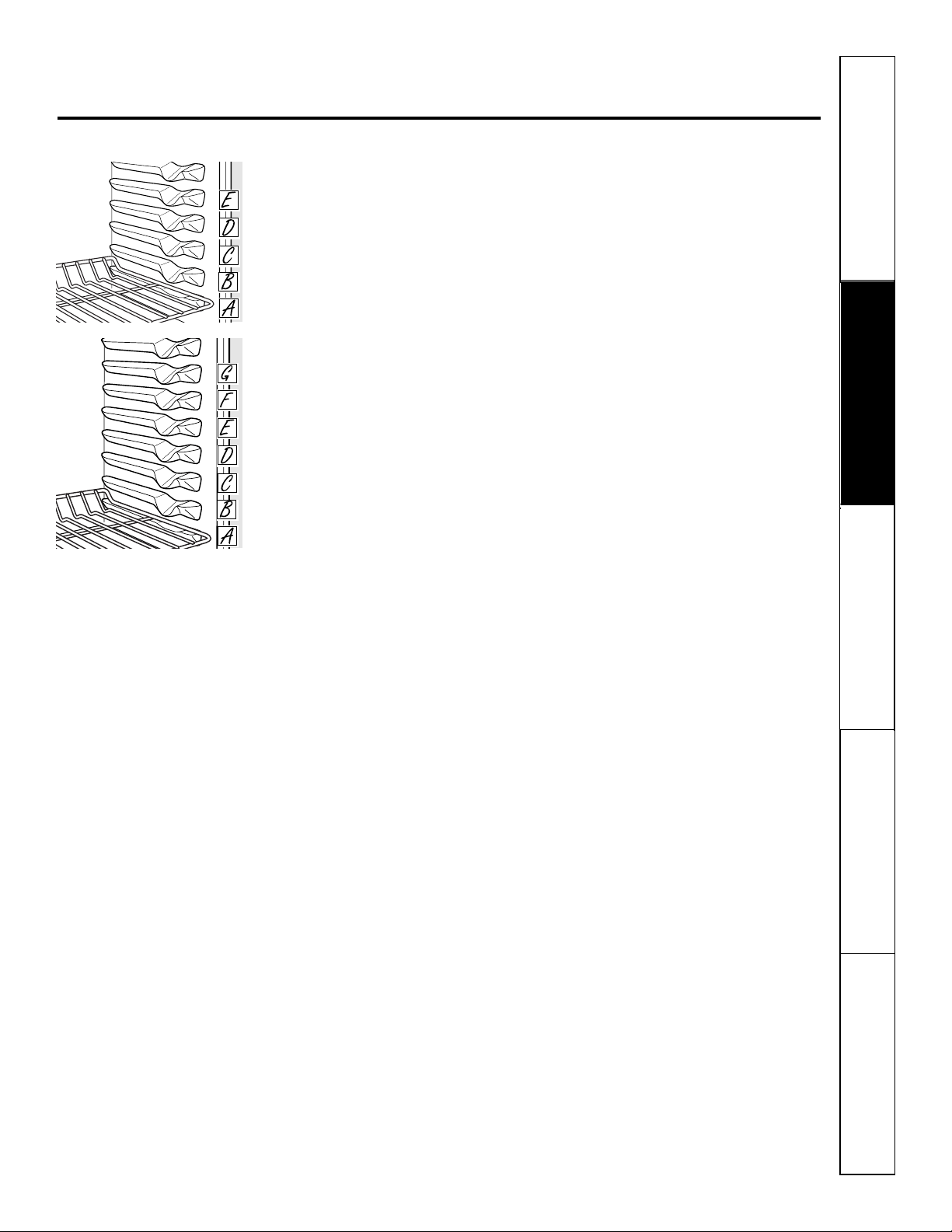
30″ Trivection
™
oven has
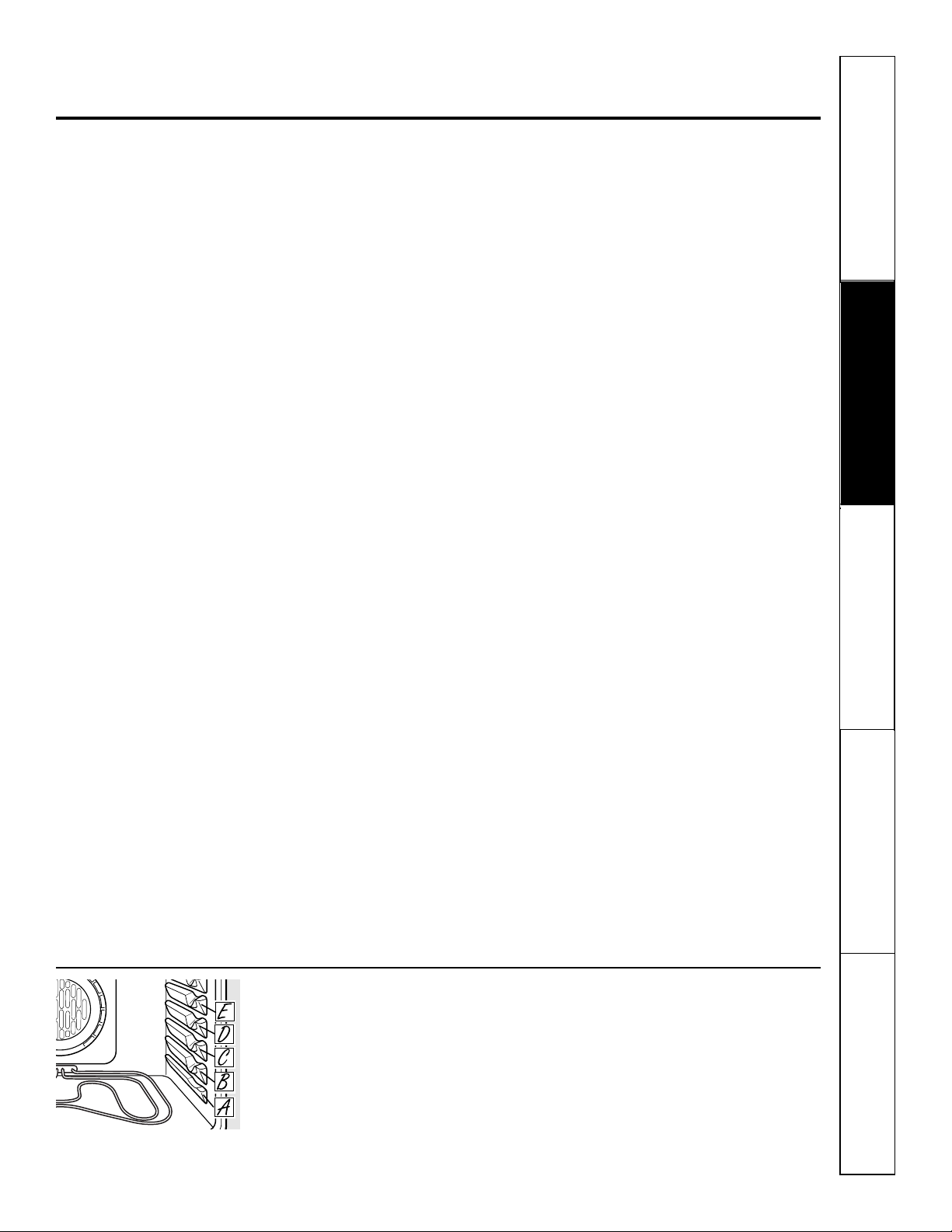
5 rack positions A–E (as shown).
30″ lower oven of double oven has
7 rack positions A–G (as shown).
13
Safety Instructions
Operating Instructions Care and Cleaning
Troubleshooting Tips Consumer Support

Using the Trivection
™
oven.
Microwave Assisted
In the Trivection oven, a microwave is
used to assist cooking.
The combination of microwave,
convection fan and heating elements is
unique for each food category.
NOTE: The microwave will cycle on and off while
cooking to best distribute energy to the food.
The microwave turns off and the cook time
stops counting down when the oven door
is opened.
NOTE: The convection fan may cycle on and off
and change direction while cooking to best
distribute hot air in the oven. The convection fan
shuts off when the oven door is opened.
Auto Recipe
™
Conversion
You can use your favorite recipes in the
Trivection oven.
When speedcooking, enter the
traditional cooking temperature and
the maximum recipe/package cook time.
When speedcooking, the Auto Recipe
™
conversion feature automatically converts
traditional cook time into the appropriate
speedcooking time. The converted time
will display after you start the oven. This
time will be up to 5 times faster than
traditional baking based on food type.
Cookware for Speedcooking. . .
You can use cookware that is oven-safe.
Heat-resistant paper and plastic
containers and bakeware that are
recommended for use in traditional
baking can also be used for speed baking.
However, they should not be used at
temperatures higher than the
temperature recommended by the
bakeware manufacturer.
If you are cooking with several pans,
leave space between them. Arcing is the
microwave term for sparks in the oven.
To avoid arcing, be sure there is at least
1 inch of space between metal surfaces—
pans, wall of cavity, aluminum foil.
Do not completely surround food with
metal and/or foil while speedcooking—
you will not have a time savings (for
example, wrapping potato with foil, using
metal roasting pan with lid).
When using a metal pan, do not cover it
with a metal lid or foil (a glass lid or
parchment paper may be used).
However, foil may be used to shield food
to prevent overbrowning or overcooking
(i.e., placing small strips of foil on tips of
wings and legs of poultry). Also, foil
covers may be tented over food (i.e.,
large frozen casseroles) toward the end
of their cook time to prevent
overbrowning or overcooking.
DO NOT USE FOOD WRAPPERS MADE
FROM A COMBINATION OF METAL FOIL
AND PAPER IN THE OVEN in speedcook
modes. For example, some frozen or
deli breads are baked and sold in these
wrappers. Remove the food from
the wrapper and speed bake on a flat
metal pan.
When speedcooking with metal pans,
heavy aluminum pans are recommended
for best results.
When speed baking with stoneware or
cooking stones, refer to the manufacturer’s
owner’s manual for proper use and
maintenance. For best results, preheat
your flat cooking stones. If the
manufacturer does not recommend
preheating the cooking stones, do not
use them in Speedcooking modes. Do not
use hearth inserts while speedcooking.
Use pans with low sides whenever
possible. A shallow pan allows air
to circulate around the food more
efficiently.
Dark or matte finish bakeware will
produce darker browning on food.
When you are speed broiling, it is
important that you use the broiler pan
with grid for best results. The pan is
used to catch grease spills and the grid
is used to prevent grease spatters.
14
Safety Instructions
Operating Instructions
Care and CleaningTroubleshooting TipsConsumer Support
Safety Instructions
Operating Instructions Care and Cleaning
Troubleshooting Tips Consumer Support
ge.com
Other Speedcooking Tips. . .
You must preheat your oven.
Put the food in the oven after the
preheat beep when the oven control
displays “Put Food In Oven” and then
press START. You must press the START
key after placing the food in the oven to
start the speedcook mode.
When choosing a speedcook food
category, refer to the chart on page 16.
All frozen foods should be speedcooked
using the FROZENFOODS category.
When baking potatoes, the
recommended cooking temperature
is 350°F and cooking time is 90 minutes
for medium sized potatoes. Add an
additional 15–30 minutes for large
potatoes or when baking more than
four potatoes.
In general, when cooking meats wrapped
in dough or refrigerated dough product,
use the Biscuit/Roll or BakedGoods
category.
For recipes using a large quantity
of cheese, milk and/or eggs, use the
BakedGoods category.
Larger amounts of food or multiple racks
of food may require additional time.
Check food doneness as prompted and
continue cooking as needed.
Items such as appetizers, cookies, biscuits
and rolls can be speed baked on multiple
racks. Cooking time may increase slightly
for some foods, but since two or three
racks of food are being cooked at the
same time, the overall result is substantial
time saved.
When cooking multiple items or pans,
leave space between them for maximum
air circulation.
Cakes and quick breads (banana,
zucchini or pumpkin bread) are not
recommended for multiple rack speed
baking. Place cakes side-by-side on one
rack if speed baking. When using more
than one rack to cook these foods, use
CONV MULTI mode. See Using the
convection modes section.
Meats/Poultry
Cooking times will vary depending on
the cut of meat. Check for doneness at
minimum time. Note: Meats will continue
to cook and internal temperatures will
rise after they are removed from the oven
(standing time).
Use the broiler pan and grid provided
with your oven for best results.
As in a conventional oven, aluminum foil
may be used to shield food—to prevent
overbrowning or overcooking (i.e., placing
small strips of foil on tips of wings and legs
of poultry). Also, foil covers may be tented
over food (i.e., large frozen casseroles)
toward the end of their cook time to
prevent overbrowning or overcooking.
Make sure that the foil is securely attached
to the food. However, large amounts of
foil or fully enclosing food in foil blocks
the microwave energy, which eliminates
time savings.
Do not use oven thermometers, meat
thermometers or wire twist-ties in the
oven while speedcooking.
Pop-up thermometers in your meat
may be inaccurate. Check the temperature
of the meat with a thermometer after
removing the meat from the oven.
For best results, speed bake turkeys
unstuffed.
Rack Positions for Speed Baking. . .
If cooking on one rack, place food so that it is approximately centered in the oven.
Rack Positions and Examples
C Cookies, pizza, pie, muffins, cakes, biscuits, casseroles
B Loaves of bread, bundt cakes, meat loaf, small and medium roasts, whole chicken
A Very tall items: turkey, large roasts, angel food cakes
If cooking on two racks, use rack positions A and D to provide lots of space between
items for optimal results.
If cooking on three racks, use rack positions A, C and E.
Rack positions, Trivection
™
Oven.
15
16
Safety Instructions
Operating Instructions
Care and CleaningTroubleshooting TipsConsumer Support
Using the Trivection
™
oven.
How to Set the Oven for Speed Baking
Select SPEEDCOOK from the
main menu.
Select SPEED BAKE when baking
or roasting.
Select food type. You can select
FROZENFOODS, MEAT or VEG/CASS.
Select MORE to see additional
categories—POULTRY/FISH,
BAKEDGOODS and BREADS.
Reference the table for food
category and time savings.
NOTE: You will need to select a
subcategory for some food types.
For example, if you select VEG/CASS,
you will need to select between
BAKED POTATO, VEGETABLE or
CASSEROLE.
Enter recipe cook temperature.
Enter maximum recipe or package
cook time.
Select START. Cook time will
automatically convert to shorter
time and display on control screen.
You must always preheat the oven.
Wait for preheat signal and message
on display to “PUT FOOD IN OVEN”
before placing food in oven.
Select START. Start will not appear on
control screen until door is opened and
food is put in oven. You must select START
to start cooking. Countdown of cook time
will begin.
Note: Food may be checked at any time
by opening the door. The microwave and
convection fan will turn off and the cooking
time countdown will stop while the door is
open. All three will resume when the door
is closed.
Check food when prompted and
add more time if desired.
After the cooking time has ended, the oven
will prompt the user to add “MORE TIME”
to further cook food if desired. Add
additional time by selecting MORE TIME.
Enter traditional cooking time in minutes
and select START. Once again, the oven
automatically converts the traditional time
to the appropriate speedcook time (nearest
minute). Press CLEAR/OFF pad if food
has finished cooking.
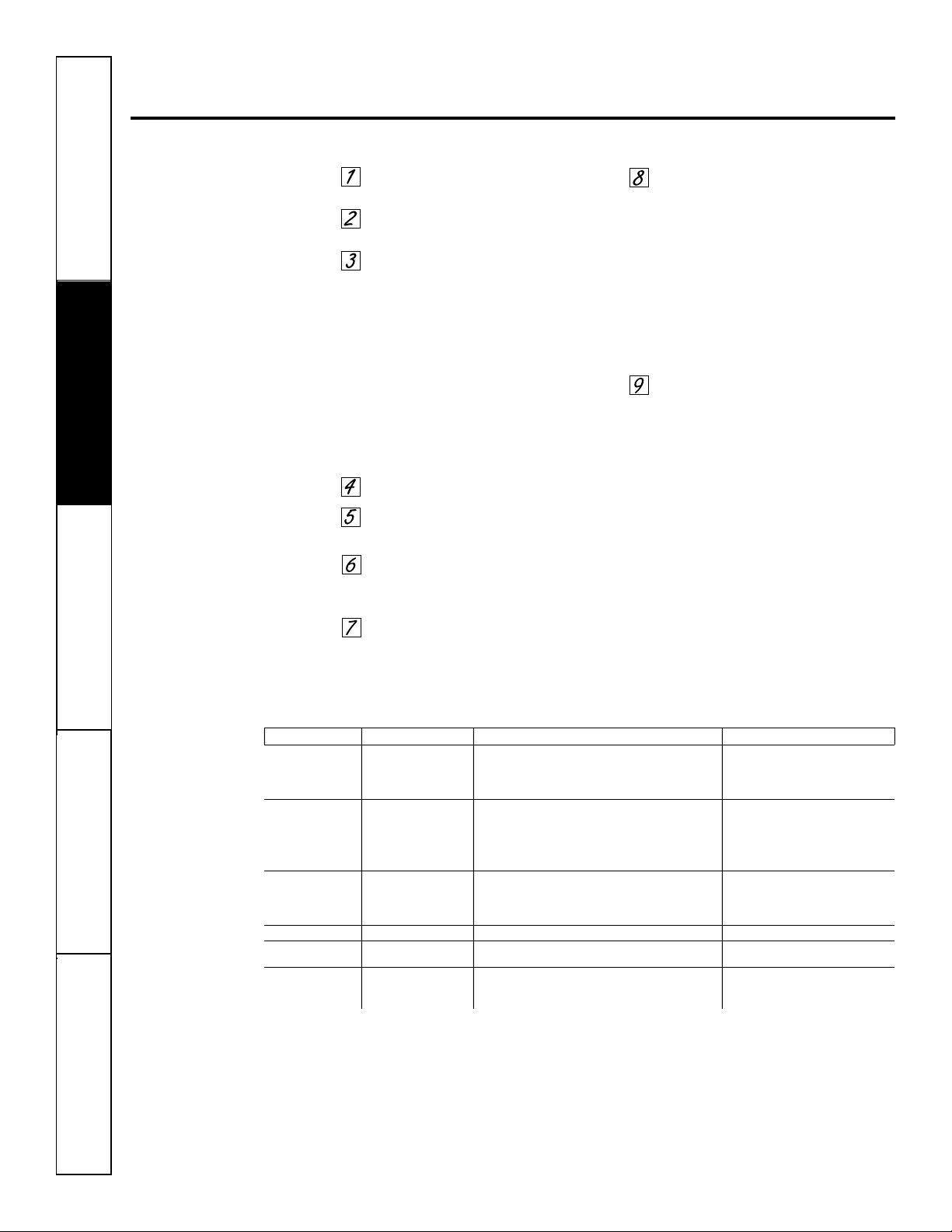
Food Type Food Subcategory Food Examples Approximate Time Savings
FrozenFood Desserts Frozen: Pies, Cookies, Cobblers 1-1/2 times faster
MainDishes Frozen: Entrees, Lasagna, TV Dinners, Pizzas 2 times faster
Snack/Sides Frozen: Snacks, Appetizers, Vegetables, French Fries 2 to 3 times faster
Frozen: Rolls, Biscuits
Meat Ham Ham 1-1/2 times faster
Pork Pork Tenderloin, Pork Roast 2-1/2 to 3 times faster
Beef Meatloaf, Beef Roast 2-1/2 to 3 times faster
Lamb Leg of Lamb 2-1/2 to 3 times faster
Game/Wild Venison 2-1/2 to 3 times faster
Veg/Cass BakedPotato Baked Potatoes 5 times faster
Vegetable Unfrozen: Vegetables (carrots, squash, etc.) 4 times faster
Casserole Unfrozen: Meat Casseroles or Lasagna, 4 times faster
Unfrozen: Vegetable Casseroles
Poultry/Fish —— Chicken, Fish, Turkey, Seafood, Cornish Hens 2 to 3 times faster
BakedGoods —— Cookies, Muffins, Cupcakes, Appetizers, Bar Cookies, Cakes, 2 times faster
Fresh Pies, Brownies, Souffles, Cobblers
Breads QuickBread Quick Breads such as Corn Bread and Banana Bread 2 times faster
DoughBread Yeast Bread, Fresh or Deli Pizzas 3 times faster
Biscuit/Roll Biscuits, Sweet Rolls, Dinner Rolls, Breadsticks 3 times faster
ge.com
Safety Instructions
Operating Instructions Care and Cleaning
Troubleshooting Tips Consumer Support
Tips for Speed Broiling
Your oven with Trivection
™
technology
has the flexibility to broil like a traditional
oven or speed broil. Speed broiling of
meats is approximately twice as fast as
traditional broiling.
Speed broiling must be done with the
door closed.
The oven must be preheated when
speed broiling.
Turning meat and poultry is optional in
speed broil. However, use tongs if turning
meat to prevent piercing the meat and
losing juices.
Speed broil will generally produce good
results for medium to well done meats. If
rare meat is desired, use traditional broil.
Cooking times will vary depending
on the cut of meat. Check for doneness
at minimum time using a meat
thermometer. DO NOT leave a meat
thermometer in the meat or poultry while
cooking with Trivection technology since
this may damage the thermometer.
For best results, use a pan designed
for broiling.
Evenly slit fat around the outside edges
of steaks and chops to prevent curling
during broiling.
If desired, marinate meats before
broiling. Brush with sauces during the
last five minutes only.
17
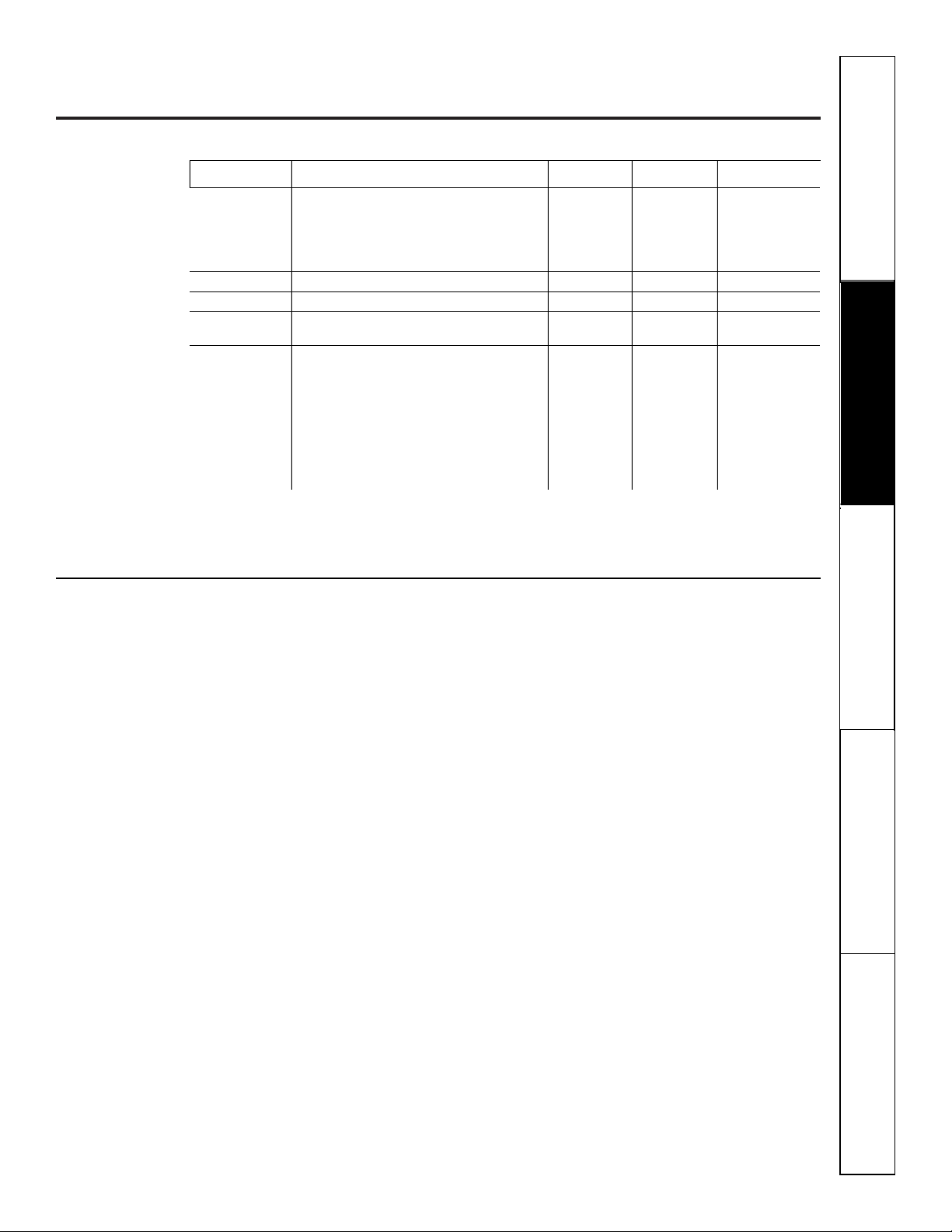
Meats Minutes/Lb. Oven Temp. Internal Temp.
Beef Rib, Boneless Rib, Rare
†
22–26 325°F 140°F
†
Top Sirloin Medium 26–30 325°F 160°F
(3 to 5 lbs.) Well 30–34 325°F 170°F
Beef Tenderloin Rare
†
12–16 325°F 140°F
†
Medium 16–20 325°F 160°F
Pork Bone-in, Boneless (3 to 5 lbs.) 30–35 325°F 160°F
Ham Canned, Butt, Shank (3 to 5 lbs., fully cooked) 23–28 325°F 140°F
Lamb Bone-in, Boneless (3 to 5 lbs.) Medium 25–30 325°F 160°F
Well 30–35 325°F 170°F
Poultry Whole Chicken (2-1/2 to 3-1/2 lbs.) 24–26 325°F 180°–185°F
Cornish Hens, Unstuffed (1 to 1-1/2 lbs.) 40–45 325°F 180°–185°F
Stuffed (1 to 1-1/2 lbs.) 45–50 325°F 180°–185°F
Duckling (4 to 5 lbs.) 28–32 350°F 180°–185°F
Turkey, whole*
Unstuffed (10 to 16 lbs.) 14–18 325°F 180°–185°F
Unstuffed (18 to 24 lbs.) 8–12 325°F 180°–185°F
Turkey Breast (4 to 6 lbs.) 23–27 325°F 170°F
* Stuffed birds are not recommended for speedcooking.
† The U.S. Department of Agriculture says “Rare beef is popular, but you should know that cooking it to only 140°F means some
food poisoning organisms may survive.” (Source: Safe Food Book. Your Kitchen Guide. USDA Rev. June 1985.)
Traditional Roasting Guide
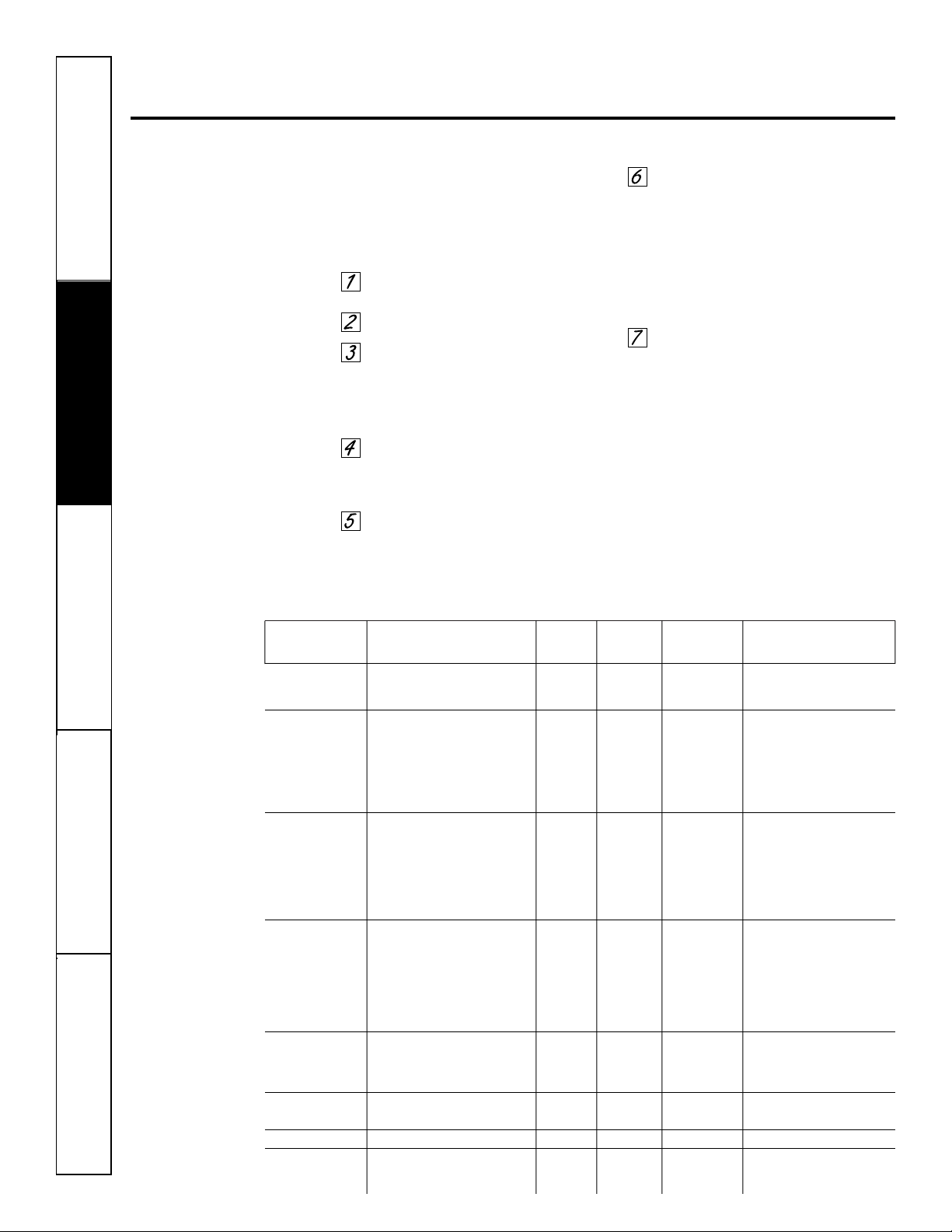
Rack First Side Second Side
Food Quantity and/or Thickness Position Time, Min Time, Min. Comments
Ground Beef 2 lb. (8 patties) D 10 8 Space evenly on pan.
1/2″ to 3/4″ thick Up to 8 patties take about
the same time.
Beef Steaks
Med. Rare 1″ thick D 11 10 Steaks less than 1″ thick
Medium (about 2–3 lbs.) D 13 12 cook through before browning.
Cook first side to desired
Med. Rare 1-1/2″ thick D 14 13 brownness. Then turn and
Medium (about 3–4 lbs.) D 17 16 finish second side to desired
doneness. Slash fat.
Chicken 1 whole, cut up, C 35 25
about 3 to 3-1/2 lbs.
6 Bone-in breasts, C 28 26 Brush each side with melted
12 to 14 oz. each butter. Broil skin-side down
first.
6 Boneless breasts, D 12 10
5 to 7 oz. each
Fish 4 Fillets, 1/4″ to 1/2″ thick E 7 Do not Place skin side down.
turn over. Brush with olive oil.
4 Fillets, 3/4″ to 1″ thick D 14 Do not Place skin side down.
turn over. Brush with olive oil.
4 Steaks, 1″ thick (about 2 lbs.) D 10 10 Brush with lemon butter
before and during cooking,
if desired.
Lobster Tails 2–4, 8 to 12 oz. each C 18–20 Do not Cut through back of shell.
turn over. Spread open. Brush with
melted butter after half of
broiling time.
Pork Chops 6 Chops, 1/2″ thick (about 2 lbs.) E 9–11 7 Slash fat.
6 Chops, 1″ thick (about 4 lbs.) D 23 14 Slash fat.
Ham Slices 2 precooked, 1/2″ thick D 13 6
Lamb Chops
Medium 4 Chops, 1-1/2″ thick, D 12 9 Slash fat.
Well Done about 1-1/2 lbs. D 14 12
18
Safety Instructions
Operating Instructions
Care and CleaningTroubleshooting TipsConsumer Support
Using the Trivection
™
oven.
Traditional Broiling Guide for Speed Broiling
How to Set the Oven for Speed Broiling
Heat is provided by the upper element
and microwave. Air is circulated with the
reversing fan system. Oven door must be
closed. Ideal for broiling foods to medium to
well done doneness levels two times faster
than traditional broil.
Select SPEEDCOOK from the
main menu.
Select SPEED BROIL.
Enter traditional broil time for first
side (using maximum time if a range
is given). Reference the chart below.
NOTE: If you don’t plan to turn the food
over, enter the total broil time.
Select START to preheat oven. Cook
time will automatically convert to
shorter time and display on control
screen.
You must preheat the oven. Wait
for the preheat signal and message
on display to “PUT FOOD IN OVEN”
before placing food in oven.
Select START. Start will not appear on
control screen until door is opened and
food is put in oven. Countdown of cook
time will begin.
NOTE: Food may be checked at any time
by opening the door. The microwave and
convection fan will turn off and the time
countdown will stop while the door is open.
They will resume when the door is closed.
Check food when prompted. Turn
food as needed and add more time
for the second side.
After the cooking time has ended, the oven
will prompt the user to add “MORE TIME”
to further cook food if desired. Add
additional time by selecting MORE TIME.
Enter traditional cooking time in minutes
and select START. Once again, the oven
automatically converts the traditional time
to the appropriate speedcook time (nearest
minute). Press CLEAR/OFF pad if food
has finished cooking.
Using the defrost feature. ge.com
How to Set the Oven for Defrost
Place food in oven.
Select FEATURE from main menu.
Select DEFROST.
Enter the defrost time in hours
and/or minutes. Reference the
chart on the next page.
Select START.
NOTE: Food may be checked at any time
by opening the door. The microwave and
convection fan will turn off and the defrost
time countdown will stop while the door
is open. They will resume when the door
is closed.
Check food and turn over when
prompted. Add more time if
desired.
After the defrost time has ended, the oven
will prompt the user to add “MORE
TIME.” Add additional time by selecting
MORE TIME. Enter time in minutes.
Press CLEAR/OFF pad if food has finished
defrosting.
The defrost feature allows you to thaw food for a set amount of time.
Cookware/Tips for Defrosting
For best results, remove food from
packaging and place on broil pan and grid.
If food is left in packaging, slit, pierce or
vent to prevent heat buildup.
Place food in the oven according to the
Defrosting Guide.
You can use all cookware/containers that
are oven safe or microwave-safe. Arcing is
the microwave term for sparks in the
oven. Be sure there is at least 1 inch of
space between metal surfaces—pans, wall
of cavity, aluminum foil—to prevent
arcing. Dishes with metallic trim should not
be used as arcing may occur. Remove metal
twist ties from paper or plastic bags before
placing them in the oven.
Do not completely surround food with
metal and/or foil.
Plastic storage containers should be
uncovered before defrosting.
Foods that spoil easily should not be
allowed to sit out for more than one hour
after defrosting. Room temperature
promotes the growth of harmful bacteria.
Use caution when removing metal pans
and stoneware after defrosting. They may
become very warm, and you may need to
use a potholder.
For more even defrosting, turn food
over, separate and rearrange when
prompted. Be sure large meats are
completely defrosted before cooking.
See the Defrosting Guide for additional
comments.
When defrosted, food should be cool but
softened in all areas. If still slightly icy,
return to the oven very briefly, or let it
stand a few minutes.
19
Safety Instructions
Operating Instructions Care and Cleaning
Troubleshooting Tips Consumer Support
20
Safety Instructions
Operating Instructions
Care and CleaningTroubleshooting TipsConsumer Support
Using the defrost feature.
Defrosting Guide
Rack Defrost Stand
Food Position Time Time Comments
Ground Meat
1 lb. D 9 min. 5 min. Turn over, break apart and remove
more than 1 lb. C 9 min./lb. 10 min. defrosted meat at signals.
Hamburger Patties D 9 min./lb. 5 min. Turn over and separate at signals.
Stew Meat D 9 min./lb. 10 min. Turn over and break apart at signals.
Steaks and Chops B 10–12 min./lb. 10 min. Turn over and separate at signals. Shield
warm areas with small pieces of foil.
Roasts
Boneless and Bone-in A 8–9 min./lb. 30 min. Turn over at signals. Shield warm areas
with small pieces of foil.
Chicken
Pieces, Boneless C 9 min./lb. 10 min. Turn over and separate at signals. Rinse
Pieces, Bone-in C 9 min./lb. 10 min. under cold water after stand.
Whole B 9–10 min./lb. 20 min. Shield ends of legs and wings with foil.
Turn over at signals. Rinse under cold water
after stand.
Turkey Breast B 10 min./lb. 30 min. Turn over at signals. Shield warm areas
with foil.
Cornish Hens C 8 min./lb. 30 min. Shield ends of legs with foil. Turn over
at signals. Rinse under cold water after
stand time.
Duck B 9–10 min./lb. 30 min. Shield ends of legs with foil. Turn over
at signals. Rinse under cold water after
stand time.
Fish
Fillets and Steaks C 6–7 min./lb. 10 min. Turn over and rearrange at signals. Shield
Whole C 8 min./lb. 10 min. warm areas with foil. Let stand in cold water.
Seafood
Shrimp and Scallops D 6 min./lb. 10 min. Separate at signals. Rinse under cold water
after stand.
Lobster Tails C 7 min./each 15 min. Shield tail ends with foil. Turn over at
signals. Let stand in cold water.
21
Safety Instructions
Operating Instructions Care and Cleaning
Troubleshooting Tips Consumer Support
Using traditional bake and roast.
ge.com
To avoid possible burns, place the racks in the desired position before you turn the oven on.
How to Set the Oven for Baking or Roasting
Select BAKE. Select upper oven or
lower oven on double oven models.
Press the number pads to set the
desired temperature.
Select START. The display will show
the changing temperature (starting
at 100°F). The display starts
changing once the temperature
reaches 100°F.
Check food for doneness at
minimum time on recipe. Cook
longer if necessary.
Press the CLEAR/OFF pad when
cooking is complete.
NOTE: A cooling fan may automatically turn on
and off to cool internal parts. This is normal, and
the fan may continue to run even after the oven is
turned off.
Preheating and Pan Placement for Baking
Preheat the oven if the recipe calls for it.
To preheat, set the oven at the correct
temperature. Preheating is necessary for
good results when baking cakes, cookies,
pastry and breads.
Baking results will be better if baking pans
are centered in the oven as much as
possible. Pans should not touch each
other or the walls of the oven. If you need
to use two racks, use CONV MULTI mode
described in Using the convection modes
section for best results, placing food on
racks A and D (B and E for lower oven
on double oven models).
NOTE: On double wall ovens, the rack design is
unique for the upper Trivection™ oven. Due to
this, the upper oven racks and the lower oven
racks are not interchangeable.
Rack Position
Trivection
™
Lower
Type of Food 30″ Oven 30” Oven
Frozen pies B or C C or D
(on cookie sheet)
Angel food cake A A
Bundt or pound cakes B B
Biscuits, muffins, B or C C or D
brownies, cookies,
cupcakes, layer
cakes, pies
Casseroles B or C C or D
Aluminum Foil
Do not use aluminum foil on the bottom
of the oven.
Never entirely cover a rack with
aluminum foil. This will disturb the heat
circulation and result in poor baking.
A smaller sheet of foil may be used to
catch a spillover by placing it on a lower
rack several inches below the food.
Using the traditional timed baking and roasting features.
(on some models)
On double oven models, you can use timed baking in one oven while using self-clean in the other; you can also use
timed baking in both ovens at the same time.
NOTE: Foods that spoil easily—such as milk, eggs, fish, stuffings, poultry and pork—should not be allowed to sit for
more than 1 hour before or after cooking. Room temperature promotes the growth of harmful bacteria. Be sure that
the oven light is off because heat from the bulb will speed harmful bacteria growth.
How to Set an Immediate Start and Automatic Stop
The oven will turn on immediately and cook for a
selected length of time. At the end of the cooking
time, the oven will turn off automatically.
Make sure the clock shows the correct
time of day.
Select BAKE. Select upper oven or
lower oven on double oven models.
Using the number pads, enter the
desired temperature.
Select OPTIONS.
Select TIMED BAKE.
NOTE: The time countdown will not start until
after the oven is preheated.
Using the number pads, enter the
desired baking time. The oven
temperature and the cooking time
that you entered will be displayed.
Select ENTER. This tells the oven that
you have finished setting it.
Select START.
The display will show the changing
temperature (starting at 100°F) and the
cooking time. The display starts changing
once the temperature reaches 100°F.
The oven will continue to cook for the
programmed amount of time, then shut
off automatically, unless the WARM
feature was set. See the Using the proof,
warmer and warm features section.
After the cooking time has ended, the oven will
prompt the user to add “MORE TIME” to further
cook food if desired. Add additional time by
selecting MORE TIME. Enter traditional cooking
time in minutes and select START. Press
CLEAR/OFF pad if food has finished cooking.
How to Set a Delayed Start and Automatic Stop
You can set the oven control to delay-start the
oven, cook for a specific length of time and then
turn off automatically.
Make sure the clock shows the correct
time of day.
Select BAKE. Select upper oven or
lower oven on double oven models.
Using the number pads, enter the
desired temperature.
Select OPTIONS.
Select TIMED BAKE.
Using the number pads, enter the
desired baking time.
NOTE: The time countdown will not start until
after the oven is preheated.
Select ENTER.
Select OPTIONS.
Select DELAY BAKE.
Using the number pads, enter the
time of day you want the oven to
turn on and start cooking.
Select ENTER.
Select START.
If you would like to check the times you
have set, select REVIEW TIMES. You have
the option to see delay time, clock, bake
time or timer.
When the oven turns on at the time
of day you have set, the display will
show the changing temperature
(starting at 100°F) and the cooking
time. The display starts changing once
the temperature reaches 100°F.
The oven will continue to cook for the
programmed amount of time. After the
cooking time has ended, the oven will prompt the
user to add “MORE TIME” to further cook food
if desired. Add additional time by selecting
MORE TIME. Enter traditional cooking time in
minutes and select START. Press CLEAR/OFF
pad if food has finished cooking. The oven will
turn off automatically, unless the WARM
feature was set. See the Using the proof,
warmer and warm features section.
22
Safety Instructions
Operating Instructions
Care and CleaningTroubleshooting TipsConsumer Support
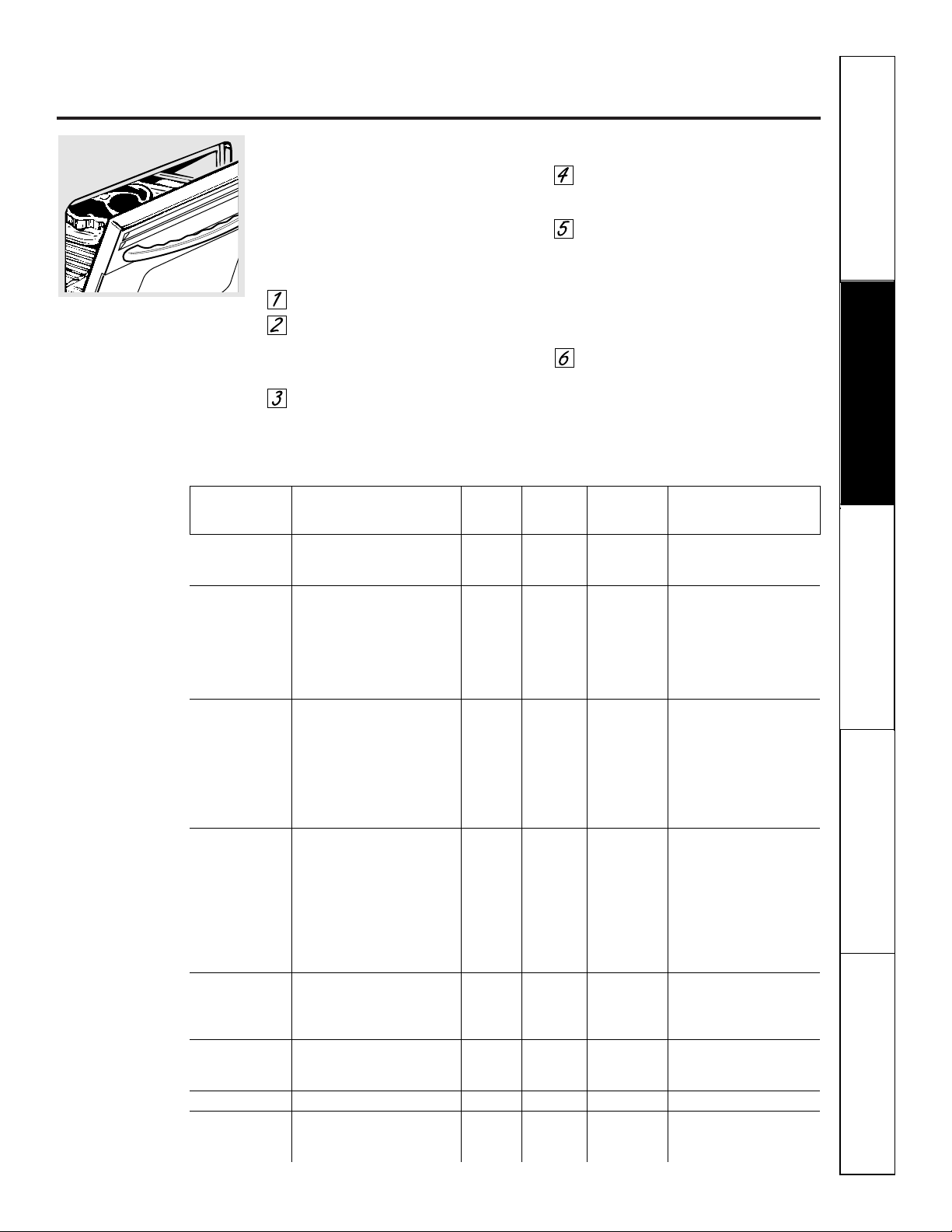
Using traditional broil. ge.com
How to Set the Oven for Broiling
Leave the door open to the broil stop position.
The door stays open by itself, yet the proper
temperature is maintained in the oven.
NOTE: Food can be broiled with the door open
or closed. However, if the door is closed, the
food may not brown as well because the oven
heating element will cycle on and off.
Select BROIL.
Select HI for high broil
or LO for low broil. LO is used to
broil thicker cuts of meat without
over-browning them.
Select START. We recommend
preheating for 5 minutes with the door
closed whether you broil food with
the door open or closed.
Place the meat or fish on a broiler
grid in a broiler pan designed
for broiling.
Follow suggested rack positions in
the Broiling Guide.
The size, weight, thickness, starting
temperature and your preference of
doneness will affect broiling times. This
guide is based on meats at refrigerator
temperature.
When broiling is finished, press the
CLEAR/OFF pad.
NOTE: The oven will automatically turn off
after 3 hours of continuous broil.
Safety Instructions
Operating Instructions Care and Cleaning
Troubleshooting Tips Consumer Support
Rack First Side Second Side
Food Quantity and/or Thickness Position* Time, Min Time, Min. Comments
Ground Beef 2 lb. (8 patties) D 10 8 Space evenly on pan.
1/2″ to 3/4″ thick Up to 8 patties take about
the same time
Beef Steaks
Med. Rare 1″ thick D 11 10 Steaks less than 1″ thick
Medium (about 2–3 lbs.) D 13 12 cook through before browning.
Cook first side just to turn
Med. Rare 1 1/2″ thick D 14 13 meat color then finish second
Medium (about 3–4 lbs.) D 17 16 side to desired doneness.
Slash fat.
Chicken 1 whole, cut up, C 35 25
about 3 to 3-1/2 lbs.
6 Bone-in breasts, C 28 26 Brush each side with melted
12 to 14 oz. each butter. Broil skin-side down
first.
6 Boneless breasts, D 12 10
5 to 7 oz. each
Fish 4 Fillets, 1/4″ to 1/2″ thick E 7 Do not Place skin side down.
turn over. Brush with olive oil.
4 Fillets, 3/4″ to 1″ thick E 14 Do not Place skin side down.
turn over. Brush with olive oil.
4 Steaks, 1″ thick (about 2 lbs.) E 12 12 Brush with lemon butter
before and during cooking,
if desired.
Lobster Tails 2–4, 8 to 12 oz. each C 18–20 Do not Cut through back of shell.
turn over. Spread open. Brush with
melted butter after half of
broiling time.
Pork Chops 6 Chops, 1/2″ thick (about 2 lbs.) E 9–11 7
Slash fat.
6 Chops, 1″ thick (about 4 lbs.) D 23 14
Ham Slices 2 precooked, 1/2″ thick D 13 6
Lamb Chops
Medium 4 Chops, 1-1/2″ thick, D 12 9 Slash fat.
Well Done about 1-1/2 lbs. D 14 12
Broiling Guide
* NOTE: For double wall ovens, when using the lower oven, move up 1 rack position. Broil times may be faster
on the lower oven.
23
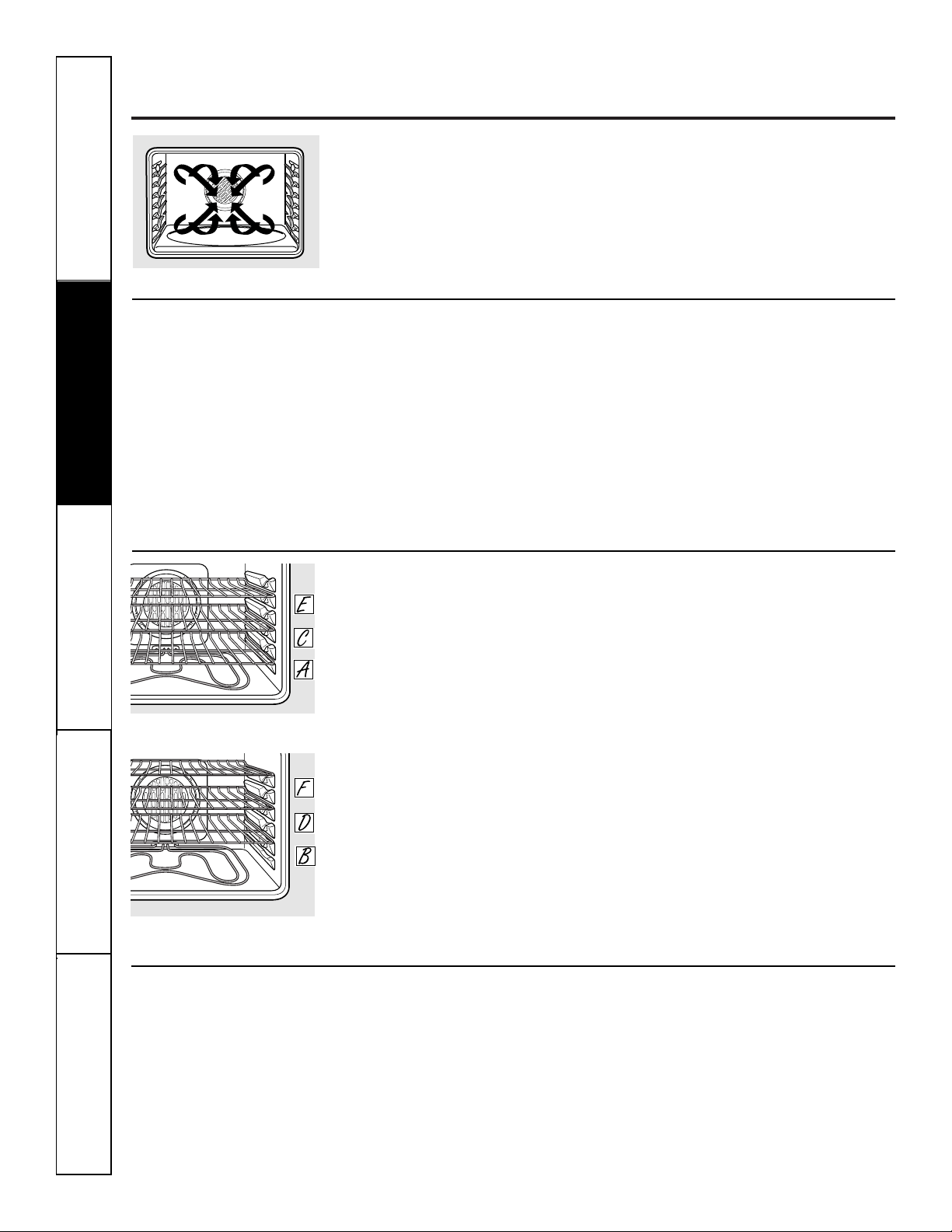
Because heated air is circulated evenly
throughout the oven, foods can be
baked with excellent results using
multiple racks.
The amount of time required for
multi-rack baking may increase slightly
for some foods, but overall time is saved
because two to three times as much food
is cooked at once. Cookies, muffins,
biscuits and other quick breads give
good results with multi-rack baking.
To cook food on more than one rack
in convection bake, use CONV MULTI.
Trivection
™
Oven
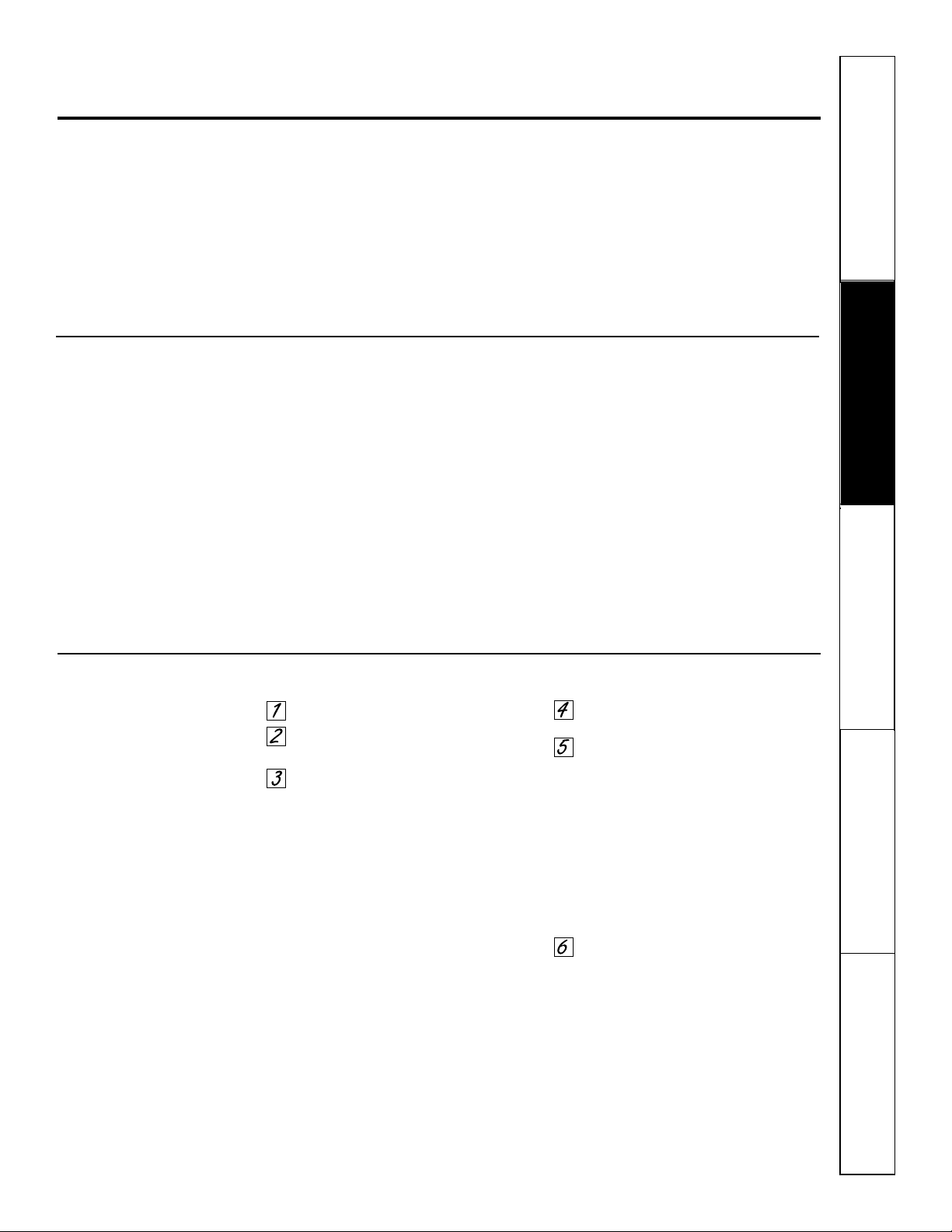
When baking on 3 racks, place one
rack in the first (A) position, one
in the third (C) position and one in
the 5th (E) position.
Lower Oven
When baking on 3 racks, place one rack
in the second (B) position, one in the
fourth (D) position and one in the 6th
(F) position.
NOTE: On double wall ovens, the rack design is
unique for the upper Trivection™ oven. Due to
this, the upper oven racks and the lower oven
racks are not interchangeable.
Using the convection modes.
Auto Recipe
™
Conversion
When convection baking, the Auto
Recipe
™
Conversion feature automatically
reduces the set traditional baking
temperature by the recommended 25°F.
See Auto Recipe
™
Conversion in the
Settings section.
■ Use pan size recommended.
■ Some package instructions for frozen
casseroles or main dishes have been
developed using commercial convection ovens.
For best results in this oven, preheat the oven
and use the traditional temperature on the
package.
Convection Fan
In a convection oven, a fan circulates hot air
over, under and around the food.
This circulating hot air is evenly distributed
throughout the oven cavity. As a result, foods
are evenly cooked and browned—often in less
time with convection heat.
NOTE: The convection fan may cycle on and off
and change direction while cooking to best
distribute hot air in the oven. The convection oven
fan shuts off when the oven door is opened.
DO NOT leave the door open for long
periods of time while using convection
cooking or you may shorten the life of
the convection heating element.
24
Safety Instructions
Operating Instructions
Care and CleaningTroubleshooting TipsConsumer Support
Multi-Rack Convection Baking
Multi-rack position, lower oven.
Multi-rack position, Trivection
™
Oven.
The convection fan circulates the heated
air evenly over and around the food
using the bake and broil elements.
When convection baking with only 1 rack, use
CONV 1 RACK and for best results place the
rack on shelf B or C in the Trivection
™
oven, or
shelf C or D in the lower oven on double oven
models, at the center of the oven. Cook times
may decrease, so food should be checked earlier
than package directions to make sure that it
does not overcook.
Ideal for cooking large casseroles and
lasagna with good results.
1-Rack Convection Baking
Select CONVECTION.
On double oven models, select
upper or lower oven.
Select CONV MULTI for multi-rack
convection baking. This mode is
used for cooking food items on
more than one rack (i.e., 2, 3 or
more racks) at the same time in
convection bake. See Multi-Rack
Baking section for more information.
Select CONV 1-RACK for one rack
convection baking. This mode is
used for cooking food items on only
one rack in convection bake.
Select CONVROAST for convection
roasting.
Press the number pads to set the
desired oven temperature.
Select START.
When the oven starts to heat, the
changing temperature, starting at 100°F,
will be displayed. When the oven reaches
the temperature you set, 3 beeps will
sound.
To change the oven temperature, select
HOME. Select CONVECTION and the
desired convection mode. Then use the
number pads to set the new temperature
and select START.
Press CLEAR/OFF pad when finished.
■ You will hear a fan while cooking with
convection. The convection fan will stop when
the door is opened, but the heat will not
turn off.
■ You may hear the oven clicking during
baking. This is normal.
Safety Instructions
Operating Instructions Care and Cleaning
Troubleshooting Tips Consumer Support
25
ge.com.
Cookware for Convection Cooking
Before using your convection oven,
check to see if your cookware leaves
room for air circulation in the oven.
If you are baking with several pans, leave
space between them. Also, be sure the
pans do not touch each other or the
walls of the oven.
Paper and Plastic
Heat-resistant paper and plastic
containers that are recommended for
use in regular ovens can be used for
convection baking, but shouldn’t be
used at temperatures higher than the
temperature recommendation of the
cookware manufacturer.
Metal and Glass
Any type of cookware will work in your
convection oven. However, metal pans
heat the fastest and are recommended
for convection baking.
■ Glass or ceramic pans cook more slowly.
For recipes like oven-baked chicken,
use a pan with low sides. Hot air cannot
circulate well around food in a pan with
high sides.
How to Set the Oven for Convection Baking or Roasting
Convection Roast
■ Good for large tender cuts of meat, uncovered.
The convection fan circulates the heated
air evenly over and around the food.
Meat and poultry are browned on all
sides as if they were cooked on a
rotisserie. The heated air seals in juices
quickly for a moist and tender product
while, at the same time, creating a rich
golden brown exterior.
When you are convection roasting, it is
important that you use a broiler pan and
grid designed for broiling for best
convection roasting results. The pan is
used to catch grease spills and the grid
is used to prevent grease spatters.
When baking cookies, you will
get the best results if you use a
flat cookie sheet instead of a
pan with low sides.
Safety Instructions
Operating Instructions
Care and CleaningTroubleshooting TipsConsumer Support
26
Using the timed features for convection cooking.
On double oven models, you can use timed baking or roasting in one oven while using self-clean in the other; you can
also use timed baking or roasting in both ovens at the same time.
You will hear a fan while cooking with these features. The convection fan will stop when the door is opened, but the
heat will not turn off.
NOTE: Foods that spoil easily—such as milk, eggs, fish, stuffings, poultry and pork—should not be allowed to sit for
more than 1 hour before or after cooking. Room temperature promotes the growth of harmful bacteria. Be sure
that the oven light is off because heat from the bulb will speed harmful bacteria growth.
How to Set an Immediate Start and Automatic Stop
The oven will turn on immediately and cook for a
selected length of time. At the end of the cooking
time, the oven will turn off automatically.
Make sure the clock shows the correct time
of day.
Select CONVECTION.
On double oven models, select
upper or lower oven.
Select CONV MULTI for multi-rack
convection baking. This mode is
used for cooking food items on
more than one rack (i.e., 2, 3 or
more racks) at the same time in
convection bake. See Multi-Rack
Baking section for more information.
Select CONV 1-RACK for one rack
convection baking. This mode is
used for cooking food items on only
one rack in convection bake.
Select CONVROAST for convection
roasting.
Press the number pads to set the
desired oven temperature.
Select OPTIONS.
Select TIMED BAKE.
Using the number pads, enter the
desired convection cooking time.
The oven temperature and the
cooking time that you entered will
be displayed.
NOTE: The time countdown will not start until
after the oven is preheated.
Select ENTER. This tells the oven
that you have finished setting it.
Select START.
When the oven starts to heat, the
changing temperature, starting at 100°F,
will be displayed. When the oven reaches
the temperature you set, 3 beeps will
sound.
The oven will continue to cook for the
programmed amount of time, then shut
off automatically, unless the WARM
feature was set. See the Settings section.
After the cooking time has ended, the oven will
prompt the user to add “MORE TIME” to further
cook food if desired. Add additional time by
selecting MORE TIME. Enter traditional cooking
time in minutes and select START. Press
CLEAR/OFF pad if food has finished cooking.
How to Set a Delayed Start and Automatic Stop
You can set the oven control to delay-start the oven,
cook for a specific length of time and then turn off
automatically.
Make sure the clock shows the correct time
of day.
Select CONVECTION.
On double oven models, select
upper or lower oven.
Select CONV MULTI for multi-rack
convection baking. This mode is
used for cooking food items on
more than one rack (i.e., 2, 3 or
more racks) at the same time in
convection bake. See Multi-Rack
Baking section for more information.
Select CONV 1-RACK for one rack
convection baking. This mode is
used for cooking food items on only
one rack in convection bake.
Select CONVROAST for convection
roasting.
Press the number pads to set the
desired oven temperature.
Select OPTIONS.
Select TIMED BAKE.
Using the number pads, enter the
desired convection cooking time.
NOTE: The time countdown will not start until
after the oven is preheated.
Select ENTER.
Select OPTIONS.
Select DELAY BAKE.
Using the number pads, enter the
time of day you want the oven to
turn on and start cooking.
Select ENTER.
Select START.
If you would like to check the times you
have set, select REVIEW TIMES. You have
the option to see delay time, clock, cook
time or timer.
When the oven starts to heat, the
changing temperature, starting at 100°F,
will be displayed. When the oven reaches
the temperature you set, 3 beeps will
sound.
The oven will continue to cook for the
programmed amount of time. After the
cooking time has ended, the oven will prompt the
user to add “MORE TIME” to further cook food
if desired. Add additional time by selecting
MORE TIME. Enter traditional cooking time in
minutes and select START. Press CLEAR/OFF
pad if food has finished cooking. The oven will
turn off automatically, unless the WARM
feature was set. See the Settings section.
Press the CLEAR/OFF pad to clear
the display.
Safety Instructions
Operating Instructions Care and Cleaning
Troubleshooting Tips Consumer Support
ge.com
Convection Roasting Guide
Meats Minutes/Lb. Oven Temp. Internal Temp.
Beef Rib, Boneless Rib, Rare 20–24 325°F 140°F†
Top Sirloin Medium 24–28 325°F 160°F
(3 to 5 lbs.) Well 28–32 325°F 170°F
Beef Tenderloin Rare 10–14 325°F 140°F†
Medium 14–18 325°F 160°F
Pork Bone-in, Boneless (3 to 5 lbs.) 23–27 325°F 170°F
Chops (1/2 to 1″ thick) 2 chops 30–35 total 325°F 170°F
4 chops 35–40 total 325°F 170°F
6 chops 40–45 total 325°F 170°F
Ham Canned, Butt, Shank (3 to 5 lbs. fully cooked) 14–18 325°F 140°F
Lamb Bone-in, Boneless (3 to 5 lbs.) Medium 17–20 325°F 160°F
Well 20–24 325°F 170°F
Seafood Fish, whole (3 to 5 lbs.) 30–40 total 400°F
Lobster Tails (6 to 8 oz. each) 20–25 total 350°F
Poultry Whole Chicken (2
1
⁄2 to 3
1
⁄2 lbs.) 24–26 350°F 180°–185°F
Cornish Hens Unstuffed (1 to 1
1
⁄2 lbs.) 50–55 total 350°F 180°–185°F
Stuffed (1 to 1
1
⁄2 lbs.) 55–60 total 350°F 180°–185°F
Duckling (4 to 5 lbs.) 24–26 325°F 180°–185°F
Turkey, whole*
Unstuffed (10 to 16 lbs.) 8–11 325°F 180°–185°F
Unstuffed (18 to 24 lbs.) 7–10 325°F 180°–185°F
Turkey Breast (4 to 6 lbs.) 16–19 325°F 170°F
* Stuffed birds generally require 30–45
minutes additional roasting time.
Shield legs and breast with foil to
prevent overbrowning and drying
of skin.
† The U.S. Department of Agriculture
says “Rare beef is popular, but you
should know that cooking it to only
140°F means some food poisoning
organisms may survive.” (Source: Safe
Food Book. Your Kitchen Guide. USDA
Rev. June 1985.)
27
28
Safety Instructions
Operating Instructions
Care and CleaningTroubleshooting TipsConsumer Support
Recipes.
You can preset up to six temperature/cooking time combinations with this function. You can then bake, convection
bake/roast or speed bake any of these six favorite recipes without choosing settings each time.
NOTES:
You cannot program broil, defrost, dehydrate, warmer, proof, speed broil , Delay Bake or self-clean in RECIPES.
Your oven will remember FAVORITES that have been programmed even after a power outage.
The cooking time you enter does not include preheat time. The oven will begin to count down the cooking time
after the oven has completed preheating. At the preheat tone, put your food in the oven.
FAVORITES are only available on the upper oven of a double wall oven.
To Program a New FAVORITE
Select RECIPES.
Select an available FAVORITE. An
available FAVORITE will not have
a block before and after it. A
FAVORITE that has already been
programmed will have a block
before and after it. For example:
■FAVORITE1■.
Select the desired cooking mode.
The available options are BAKE,
CONVECTION (both convection bake
modes and convection roast) and
SPEED BAKE (all speed bake
categories and sub-categories).
Use the number pads to enter the
cooking temperature.
Use the number pads to enter the
cooking time. Select ENTER when
finished.
The control display will show the
programmed cooking mode,
temperature and time for the
FAVORITE. Select SAVE if the
information displayed is correct.
Select START to begin cooking with
the recipe that was just saved. If you
do not want to start the recipe now,
touch the CLEAR/OFF pad.
To Use a FAVORITE
Select RECIPES.
Select an available FAVORITE. An
available FAVORITE will not have
a block before and after it. A
FAVORITE that has already been
programmed will have a block
before and after it. For example:
■FAVORITE1■.
The control display will show
the programmed cooking mode,
temperature and time for the
FAVORITE selected. Select START
to begin cooking with the selected
recipe.
To Change or Replace a FAVORITE
Select RECIPES.
Select the desired FAVORITE recipe.
A FAVORITE that has already been
programmed will have a block
before and after it. For example:
■FAVORITE1■.
The control display will show
the programmed cooking mode,
temperature and time for the
FAVORITE. Select REPLACE.
Select the desired cooking mode.
The available options are BAKE,
CONVECTION (both convection bake
modes and convection roast) and
SPEED BAKE (all speed bake
categories and sub-categories).
Use the number pads to enter the
cooking temperature.
Use the number pads to enter the
cooking time. Select ENTER when
finished entering the cooking time.
The control display will show the
programmed cooking mode,
temperature and time for the
FAVORITE. Select SAVE if the
information displayed is correct.
Select START to begin cooking with
the recipe that was just saved. If you
do not want to start the recipe now,
touch the CLEAR/OFF pad.
Safety Instructions
Operating Instructions Care and Cleaning
Troubleshooting Tips Consumer Support
Using the proof, warmer and warm features. ge.com
The proofing feature maintains a warm environment useful for rising yeast-leavened products.
How to Set the Oven For Proof
NOTE: For best results, cover the dough with a
cloth or with greased plastic wrap (the plastic
may need to be anchored underneath the
container so the oven fan will not blow it off).
Place the covered dough in the oven
on rack B or C.
Select FEATURES, then MORE, then
PROOF and then START.
The interior oven lights turn on and
remain on during proofing.
The proofing feature automatically
provides the optimum temperature for
the proofing process, and therefore does
not have a temperature adjustment.
Set the KITCHEN TIMER for the
minimum proof time.
When proofing is finished, press
the CLEAR/OFF pad.
■ To avoid lowering the oven temperature
and lengthening proofing time, do not
open the oven door unnecessarily.
■ Check bread products early to avoid
over-proofing.
NOTE:
■ Do not use the proofing mode for warming
food or keeping food hot. The proofing oven
temperature is not hot enough to hold foods
at safe temperatures. Use the WARMER
feature to keep hot food warm.
■ Proofing will not operate when oven is above
125°F. “OVEN TOO HOT” will show in the
display.
How to Set the Oven For Warmer
The warmer feature can be activated
independently to keep hot, cooked
foods warm. This feature is not designed
to reheat cold food.
To use this feature, select FEATURES, then
WARMER, then START.
NOTE: On double oven models, select upper or
lower oven. Then select START.
To Crisp Stale Items
■ Place food in low-sided dishes or pans.
■ For best results, place the food items in
a single layer. Do not stack.
■ Leave them uncovered.
■ Check crispness after 20-30 minutes.
Add time as needed.
IMPORTANT NOTES:
■ Food should be kept hot in its cooking
container or transferred to a heat-safe
serving dish.
■ For moist foods, cover them with an oven-safe
lid or aluminum foil.
■ Fried or crisp foods do not need to be covered,
but can become too dry if warmed for too long.
■ Repeated opening of the door allows the hot
air to escape and the food to cool.
■ Allow extra time for the temperature inside the
oven to stabilize after adding items.
■ With large loads it may be necessary to cover
some of the cooked food items.
■ Remove serving spoons, etc., before placing
containers in the oven.
■ Do not use plastic containers, lids or plastic
wrap.
CAUTION: Plastic containers, lids or plastic wrap
will melt if placed in the oven. Melted plastic may
not be removable and is not covered under your
warranty.
How to Set the Oven For Warm
The warm feature (cook and hold)
automatically keeps hot cooked foods
warm for up to 3 hours after a TIMED
BAKE is finished.
To turn this feature ON or OFF, select
FEATURES, then MORE, then WARM.
If the blocks before and after WARM are
lit, the feature is ON. If there are no
blocks lit before and after WARM, the
feature is OFF.
29
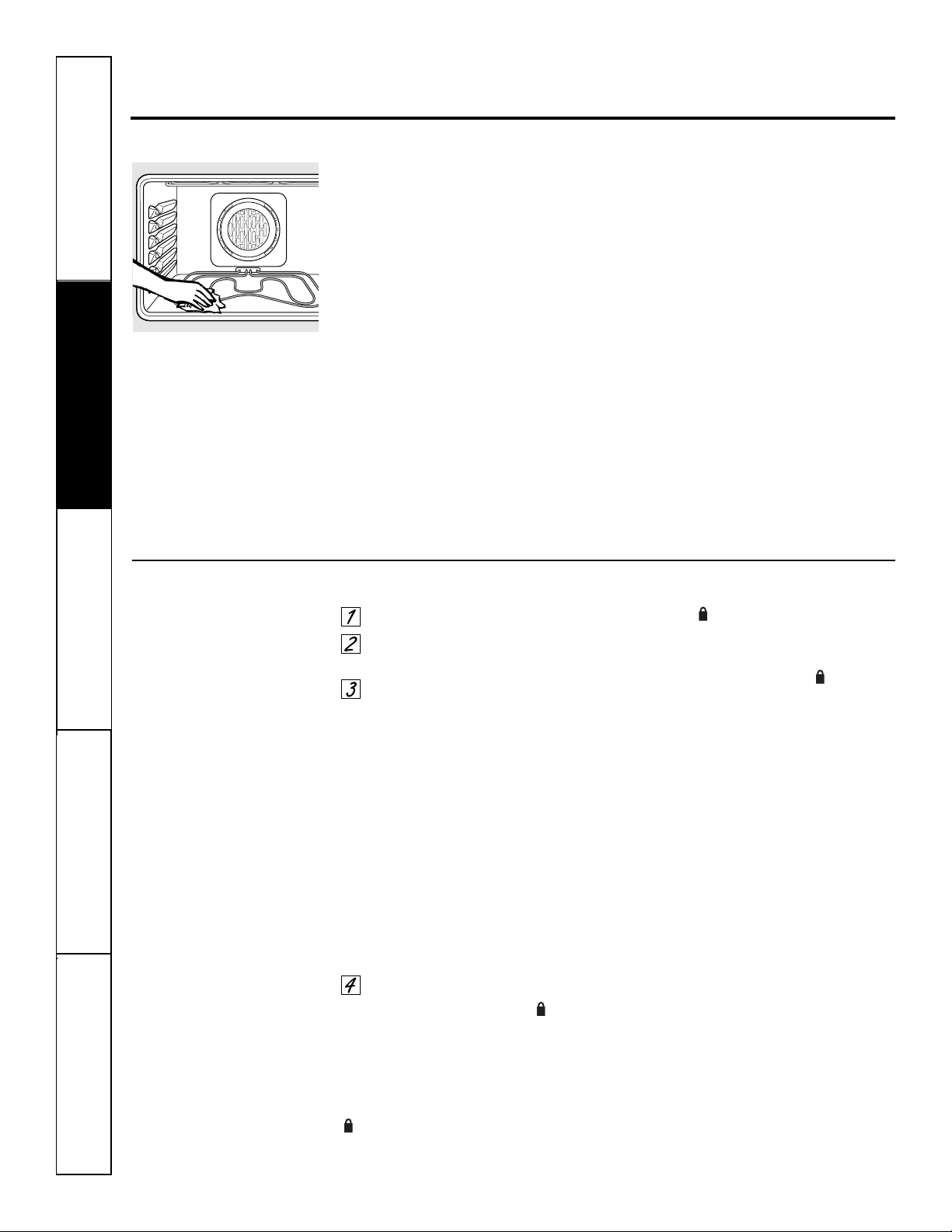
Safety Instructions
Operating Instructions
Care and CleaningTroubleshooting TipsConsumer Support
The oven door must be closed and all controls must be set correctly for the cycle to work properly.
Before a Clean Cycle
We recommend venting your kitchen
with an open window or using a
ventilation fan or hood during
the first self-clean cycle.
Remove broiler pan, broiler grid, all
cookware and any aluminum foil from
the oven.
The shiny, silver-colored oven racks
(on some models) can be self-cleaned,
but they will darken, lose their luster
and become hard to slide.
Do not use abrasives or oven cleaners.
Clean the top, sides and outside of the
oven door with soap and water.
Make sure the oven light bulb cover
is in place and the oven light is off.
NOTE: See Cleaning the Oven Door in the
Care and Cleaning section for instructions
on how to clean the inner door outside
the gasket. This area is not cleaned
during the self-clean cycle.
IMPORTANT: The health of some birds
is extremely sensitive to the fumes given
off during the self-cleaning cycle of
any oven. Move birds to another
well-ventilated room.
■ On double oven models, you can
set a clean cycle in both ovens.
However, the last oven set will
automatically delay its start until the
end of the first oven’s clean cycle.
■ On double oven models, you can
use timed baking in one oven and
self-clean the other at the same time.
Wipe up heavy soil on the oven
bottom. (appearance may vary)
How to Set the Oven for Cleaning
Select FEATURES.
Select SELF CLEAN. Select upper or
lower oven on double oven models.
Select the desired self clean.
A 3-hour self-clean time is
recommended when cleaning small,
contained spills. A self-clean time of
4 hours or longer is recommended
for a dirtier oven.
LO (3 hrs) will self clean the oven
for 3 hours.
STD (4 hrs) will self clean the oven
for 4 hours.
ADJUST TIME allows oven to be set
for any time between 3 and 5 hours.
Input the clean time (to nearest 5
minutes) using the number pads
and select ENTER.
Select START.
The door locks automatically. will
flash until door is locked. The display will
show the clean time remaining.
It will not be possible to open the
oven door until the temperature drops
below the lock temperature and the
(LOCK) light goes off.
When the (LOCK) light goes off, you
will be able to open the door.
■ To stop a clean cycle, press the
CLEAR/OFF pad. When the (LOCK)
light goes off indicating the oven has
cooled below the locking temperature,
you will be able to open the door.
Using the self-cleaning oven.
30
31
ge.com
The oven door must be closed and all controls must be set correctly for the cycle to work properly.
How to Delay the Start of Cleaning
Select FEATURES.
Select SELF CLEAN. Select upper or
lower oven on double oven models.
Select the desired self clean.
A 3-hour self-clean time is
recommended when cleaning small,
contained spills. A self-clean time of
4 hours or longer is recommended
for a dirtier oven.
LO (3 hrs) will self clean the oven
for 3 hours.
STD (4 hrs) will self clean the oven
for 4 hours.
ADJUST TIME allows oven to be set
for any time between 3 and 5 hours.
Input the clean time (to nearest 5
minutes) using the number pads
and select ENTER.
Select DELAY CLEAN.
Using the number pads, enter the
time of day you want the clean cycle
to start.
Select ENTER.
Select START.
The door locks automatically when you
select START. The oven will remain
locked. The display will show the start
time. Once the self-clean cycle starts, it
will not be possible to open the oven
door until the temperature drops below
the lock temperature and the goes off.
When goes off, you will be able to
open the door.
NOTE: On double oven models, you can set a
delay clean in both ovens. However, the second
oven set will automatically delay the start of
cleaning until the end of the first oven’s clean
cycle.
After a Clean Cycle
You may notice some white ash in the
oven. Wipe it up with a damp cloth after
the oven cools.
If white spots remain, remove them with a
soap-filled steel-wool pad and rinse thoroughly
with a vinegar and water mixture.
These deposits are usually a salt residue
that cannot be removed by the clean
cycle.
If the oven is not clean after one clean
cycle, repeat the cycle.
■ You cannot set the oven for cooking
until the oven is cool enough for the
door to unlock.
■ If the racks become hard to slide, wipe
the rack supports with cooking oil.
Safety Instructions
Operating Instructions Care and Cleaning
Troubleshooting Tips Consumer Support

Safety Instructions
Operating Instructions
Care and CleaningTroubleshooting TipsConsumer Support
Settings.
Your new touch pad control has additional settings that you may choose to use. They remain in the control’s
memory, even after a power failure.
NOTE: If a setting is selected, it will have blocks before and after. For example: settings .
If the setting is not selected, it will not have a block before and after. For example: (settings).
))((
Clock
The clock must be set to the correct time
of day for the automatic oven timing
functions to work properly. Note that the
time of day cannot be changed during a
timed baking or self-cleaning cycle.
Select SETTINGS and then select
CLOCK.
Press the number keys to enter the
correct time of day.
Select ENTER.
Clock Options
Your control uses a 12-hour clock. If you
prefer to have no clock displayed or a
24-hour military time clock, follow these
steps:
Select SETTINGS and then select
CLOCKOPTIONS.
Select “12 hour”, “24 hour” or
“no clock.”
After setting this option, select
HOME.
NOTE: If you select the “no clock” option,
you will not be able to use the Delay Bake
or Delay Clean functions.
12 Hour Shut Off
With this option, should you forget and leave the
oven on, the control will automatically turn the
oven off after 12 hours.
To turn this option ON or OFF:
Select SETTINGS and then select
MORE.
Select 12HOUROFF to turn the option
ON or OFF.
After setting this option, select
HOME.
NOTE: On double oven models, this activates
this special feature for both ovens.
Check Food Doneness
To help you adapt to cooking with Trivection
™
technology, this option prompts you 3/4 of the
way through a speed bake mode so that you can
check your food doneness.
To turn this option ON or OFF:
Select SETTINGS and then select
MORE.
Select CHECKFOOD to turn the
option ON or OFF.
After setting this option, select
HOME.
32
ge.com
Auto Recipe
™
Conversion
When using convection bake, the Auto Recipe
™
Conversion feature automatically changes
entered traditional baking temperatures to
convection baking temperatures. For example, if
you enter a regular recipe temperature of 350°F
and select START, the display will show Con
and then the converted temperature of 325°F.
NOTE: This feature does not change traditional
baking times, only traditional baking temperatures.
To turn this option ON or OFF:
Select SETTINGS and then select
MORE.
Select CONVTEMP to turn the option
ON or OFF.
After setting this option, select
HOME.
Tones at the End of a Timed Cycle
At the end of a timed cycle, 3 short beeps will
sound followed by one beep every 6 seconds until
the CLEAR/OFF pad is pressed. This continuous
6-second beep may be canceled.
To turn the continuous 6-second beep
ON or OFF:
Select SETTINGS and then select
MORE twice.
Select BEEPONCE to turn the
continuous 6-second beep OFF.
Select FULL BEEP to turn the
continuous 6-second beep ON.
After setting this option, select
HOME.
NOTE: On double oven models, this cancels the
end-of-cycle tone for both ovens.
Fahrenheit or Celsius Temperature
Your oven control displays the temperature in
Fahrenheit (°F), but you may change this to
display the temperature in Celsius (°C).
To change the temperature display between
Fahrenheit or Celsius:
Select SETTINGS and then select
MORE.
Select TEMP°F to display the
temperature in Fahrenheit (°F).
Select TEMP°C to display the
temperature in Celsius (°C).
After setting this option, select
HOME.
NOTE: On double oven models, the new setting
will be displayed for both ovens.
Tone Volume
This feature allows you to adjust the tone
volumes to a more acceptable level. There are
three possible volume levels.
To change the volume level:
Select SETTINGS and then select
MORE twice.
Select BEEPVOLUME. Each time the
volume level is changed, the tone
you hear is an audible indication of
the volume level. Select 2 BEEP for
the middle volume level. Select
3 BEEP for the loudest volume level.
Select 1 BEEP for the quietest
volume level.
After choosing the desired sound
level (1 BEEP, 2 BEEP or 3 BEEP),
select HOME.
NOTE: On double oven models, this changes the
tone volume for both ovens.
33
Safety Instructions
Operating Instructions Care and Cleaning
Troubleshooting Tips Consumer Support
34
Safety Instructions
Operating Instructions
Care and CleaningTroubleshooting TipsConsumer Support
Adjust the oven temperature—Do it yourself!
You may find that your new oven cooks differently than the one it replaced. Use your new oven for a few weeks
to become more familiar with it. If you still think your new oven is too hot or too cold, you can adjust the
temperature yourself.
Do not use thermometers, such as those found in grocery stores, to check the temperature setting of your oven.
These thermometers may vary 20–40 degrees.
NOTE: This adjustment will only affect baking and roasting temperatures; it does not affect broiling, convection,
speedcooking or self-cleaning temperatures. The adjustment will be retained in memory after a power failure.
To Adjust the Temperature
Select SETTINGS, then MORE, then
MORE, then ± temp. Select upper or
lower oven for double oven models.
The current temperature
adjustment will appear in the time
and temperature display.
Select INCREASE (cook hotter) or
DECREASE (cook cooler) to change
cooking temperature adjustment
in 1° increments. Continue until
desired number is displayed.
The oven temperature can be
adjusted up to (+) 35°F hotter or
(-) 35°F cooler.
When you have made the
adjustment, select HOME to go back
to the main display. Use your oven
as you would normally.
The type of margarine will affect baking performance!
Most recipes for baking have been developed using high-fat products such as butter or margarine (80% fat). If you
decrease the fat, the recipe may not give the same results as with a higher-fat product.
Recipe failure can result if cakes, pies, pastries, cookies or candies are made with low-fat spreads. The lower the fat
content of a spread product, the more noticeable these differences become.
Federal standards require products labeled “margarine” to contain at least 80% fat by weight. Low-fat spreads, on the
other hand, contain less fat and more water. The high-moisture content of these spreads affect the texture and flavor
of baked goods. For best results with your old favorite recipes, use margarine, butter or stick spreads containing at least
70% vegetable oil.
Using the Sabbath Feature.
(Designed for use on the Jewish Sabbath and Holidays.) (on some models) ge.com
The Sabbath feature can be used for baking/roasting only. It cannot be used for convection, broil, speedcook, defrost, proof,
dehydrate, warm, warmer, self-clean or Delay Bake cooking.
NOTE:
■ The oven light in the lower oven of a double wall oven (on some models) comes on automatically when the door is opened and
goes off when the door is closed. The oven light may be turned on prior to the Sabbath by using the oven light keypad or the
bulb may be removed in order to keep the light from turning on. See the Oven Light Replacement section to remove the bulb.
■ The oven light in the single wall oven and the upper oven of a double wall oven is automatically locked out by the control while
using the Sabbath feature. The light cannot be turned on or off by the oven light keypad or by opening or closing the door.
If the oven light is on, it will remain on and if the oven light is off, it will remain off while the Sabbath feature is being used.
■ If there is a loss of power while using the Sabbath feature, the oven will return to the Sabbath feature when power returns,
but the bake settings will need to be reentered.
■ The CLEAR/OFF pad still works during the Sabbath feature and will clear any active BAKE settings.
■ The Glass Touch number pad surface is solid and will not depress when pushed. To make sure that any command entered
while using Sabbath registers for the Glass Touch, ensure that the entire pad of your finger is squarely over the keypad for
two seconds. Make sure not to overlap another pad while touching the desired pad—be especially careful around the
CANCEL key so that the programmed cooking mode is not exited accidentally.
■ The lower wall oven of a double wall oven can not be started or the temperature changed once in the Sabbath feature.
However, the lower wall oven can be set before entering the Sabbath feature.
How to Set for Sabbath Feature in Baking/Roasting
Make sure that the clock shows the correct time
of day.
Select BAKE. On double oven
models, select upper or lower oven.
Enter the desired temperature
using the number pads and START
the oven.
Select HOME, then FEATURES,
then MORE.
Select SABBATH. No audible signal
will be given and the temperature
will disappear from the time and
temperature display. The element
and oven icons will remain displayed
to indicate that the oven is on.
NOTE: Selecting BAKE, entering a
temperature and pressing START will
clear any programmed Timed Bake
and start the new settings.
Safety Instructions
Operating Instructions Care and Cleaning
Troubleshooting Tips Consumer Support
*Sabbath*
Bake
Start
*Sabbath*
Bake
Back
Start
Double oven model control screen
Single oven model control screen
35
Make sure that the clock shows the correct time
of day.
Select BAKE.
On double oven models, select
upper or lower oven.
Using the number pads, enter the
desired temperature between 170°F
and 550°F. No audible signals will be
given and no temperature will be
displayed.
Select OPTIONS.
Select TIMEDBAKE. Enter the desired
cooking time using the number
pads. Note that the cooking time
will not start to count down until
after preheat is complete. Select
ENTER. This tells the oven that you
have finished setting it.
Select START.
Select HOME, then FEATURES,
then MORE.
Select SABBATH. No audible signal
will be given and the temperature
will disappear from the time and
temperature display. The element
and oven icons will remain displayed
to indicate that the oven is on and the
cooking time will remain displayed.
NOTE: The temperature cannot be
changed during a Timed Bake. Selecting
bake, entering a temperature and pressing
START will clear any programmed Timed
Bake and start the new settings.
When cooking is finished, 0
HR
:00 will
appear in the time and temperature
display. Then the 0
HR
:00 along with the
element and oven icons will turn off,
indicating that the oven has turned OFF.
The control remains in the Sabbath
feature.
36
Using the Sabbath Feature.
(Designed for use on the Jewish Sabbath and Holidays.) (on some models)
Once in Sabbath Feature, How to Set for Baking/Roasting or Adjust
Baking Temperature (upper oven of double wall ovens only)
Select BAKE. No audible signal will
be given.
Using the number pads, enter the
desired temperature between 170°F
and 550°F. No audible signals will be
given and no temperature will be
displayed.
Select START. No audible signal will
be given.
NOTE:
■ When setting the oven for baking/roasting,
the element and oven icons will light after
a random delay period of approximately
30 seconds to 1 minute to indicate that the
oven is baking/roasting. If the element and
oven icons do not appear in the time and
temperature display, start again at step 1.
The control did not recognize the
temperature entered as a valid temperature.
■ When adjusting the temperature setting
of the oven, the element and oven icons
remain lit to indicate that the oven is still
on. If the element and oven icons turn off,
start again at step 1. The control did not
recognize the temperature entered as a
valid temperature.
■ The Glass Touch number pad surface is
solid and will not depress when pushed.
To make sure that any command entered
while using Sabbath registers for the Glass
Touch, ensure that the entire pad of your
finger is squarely over the keypad for
two seconds. Make sure not to overlap
another pad while touching the desired
pad—be especially careful around the
CANCEL key so that the programmed
cooking mode is not exited accidentally.
■ The lower wall oven of a double wall oven
can not be started or the temperature
changed once in the Sabbath feature.
However, the lower wall oven can be set
before entering the Sabbath feature.
Safety Instructions
Operating Instructions
Care and CleaningTroubleshooting TipsConsumer Support
*Sabbath*
Bake
Start
*Sabbath*
Bake
Back
Start
Double oven model control screen
Single oven model control screen
How to Set for Sabbath Feature in Timed Baking/Roasting—
Immediate Start and Automatic Stop
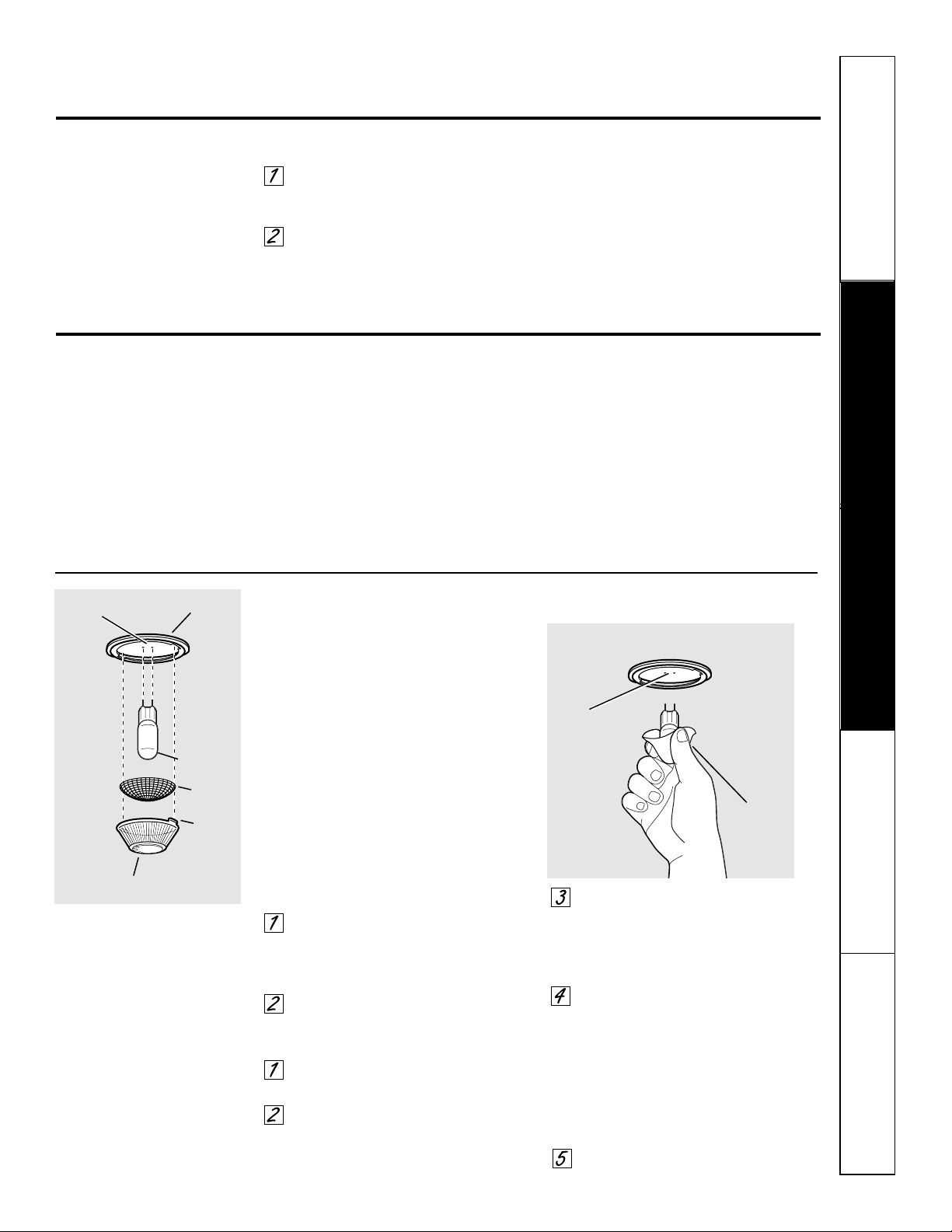
Safety Instructions
Operating Instructions Care and Cleaning
Troubleshooting Tips Consumer Support
Care and cleaning of the oven.
Be sure electrical power is off and all surfaces are cool before cleaning any part of the oven.
How to Remove Protective Shipping Film and Packaging Tape
Carefully grasp a corner of the protective
shipping film with your fingers and slowly
peel it from the appliance surface. Do
not use any sharp items to remove the
film. Remove all of the film before using
the appliance for the first time.
To assure no damage is done to the
finish of the product, the safest way to
remove the adhesive from packaging
tape on new appliances is an application
of a household liquid dishwashing
detergent. Apply with a soft cloth and
allow to soak.
NOTE: The adhesive must be removed from all
parts. It cannot be removed if it is baked on.
Oven Light Bulbs
NOTE: The glass cover should be
removed only when cold. Wearing latex
gloves may offer a better grip.
CAUTION: Before replacing your
oven light bulb, disconnect the electrical
power to the oven at the main fuse or
circuit breaker panel.
Be sure to let the light cover and bulb
cool completely.
For your safety, do not touch a bulb with
bare hands or a damp cloth. It can also
shorten the bulb life.
To remove:
Turn the glass cover
counterclockwise 1/4 turn until the
tabs of the glass cover clear the
grooves of the socket.
Using gloves or a dry cloth, remove
the bulb by pulling it straight out.
To replace:
Use a new 130-volt Halogen bulb,
not to exceed 50 watts.
Using gloves or a dry cloth, remove
the bulb from its packaging. Do not
touch the bulb with bare fingers.
Push the bulb straight into the
receptacle all the way. Then replace
the screen. NOTE: The screen must
be replaced or the life of the bulb
will be reduced.
Place the tabs of the glass cover into
the grooves of the socket. Turn the
glass cover clockwise 1/4 turn.
For improved lighting inside the
oven, clean the glass cover
frequently using a wet cloth. This
should be done when the oven is
completely cool.
Reconnect electrical power to
the oven.
Bulb
Socket
Tab
Glass cover
Receptacle
Use gloves
or cloth
Receptacle
Screen
How to Exit the Sabbath Feature
Touch the CLEAR/OFF pad to make
sure that the oven is turned OFF. No
audible signal will be given.
Hold the BACK key for 3 seconds. No
audible signal will be given. This will
take the oven control out of the
Sabbath feature. The control will
return to the Features menu where
SABBATH was originally selected.
Select HOME to return to the main
menu on the control display.
ge.com
37
38
Safety Instructions
Operating Instructions
Care and CleaningTroubleshooting TipsConsumer Support
Care and cleaning of the oven.
Do not rub or clean the door gasket—
it has an extremely low resistance to
abrasion.
If you notice the gasket becoming worn,
frayed or damaged in any way or if it has
become displaced on the door, you should
have it replaced.
To clean the inside of the door:
■ Because the area inside the gasket is
cleaned during the self-clean cycle, you
do not need to clean this by hand.
■ The area outside the gasket and
the door liner can be cleaned with a
soap-filled or plastic scouring pad,
hot water and detergent. Rinse well
with a vinegar and water solution.
To clean the outside of the door:
■ Use soap and water to thoroughly
clean the top, sides and front of the
oven door. Rinse well. You may also
use a glass cleaner to clean the glass
on the outside of the door. Do not let
water drip into the vent openings.
■ If any stain on the door vent trim is
persistent, use a soft abrasive cleaner
and a sponge-scrubber for best results.
■ Spillage of marinades, fruit juices,
tomato sauces and basting materials
containing acids may cause
discoloration and should be wiped
up immediately. When surface is cool,
clean and rinse.
■ Do not use oven cleaners, cleaning
powders or harsh abrasives on the
outside of the door.
Cleaning the Oven Door
Do not use a steel wool pad; it will scratch
the surface.
To clean the stainless steel surface,
use warm sudsy water or a stainless steel
cleaner or polish. Always wipe the surface
in the direction of the grain. Follow the
cleaner instructions for cleaning the
stainless steel surface.
To inquire about purchasing stainless
steel appliance cleaner or polish, or to
find the location of a dealer nearest you,
please call our toll-free number:
National Parts Center
1.800.626.2002
ge.com
Stainless Steel Surfaces (on some models)
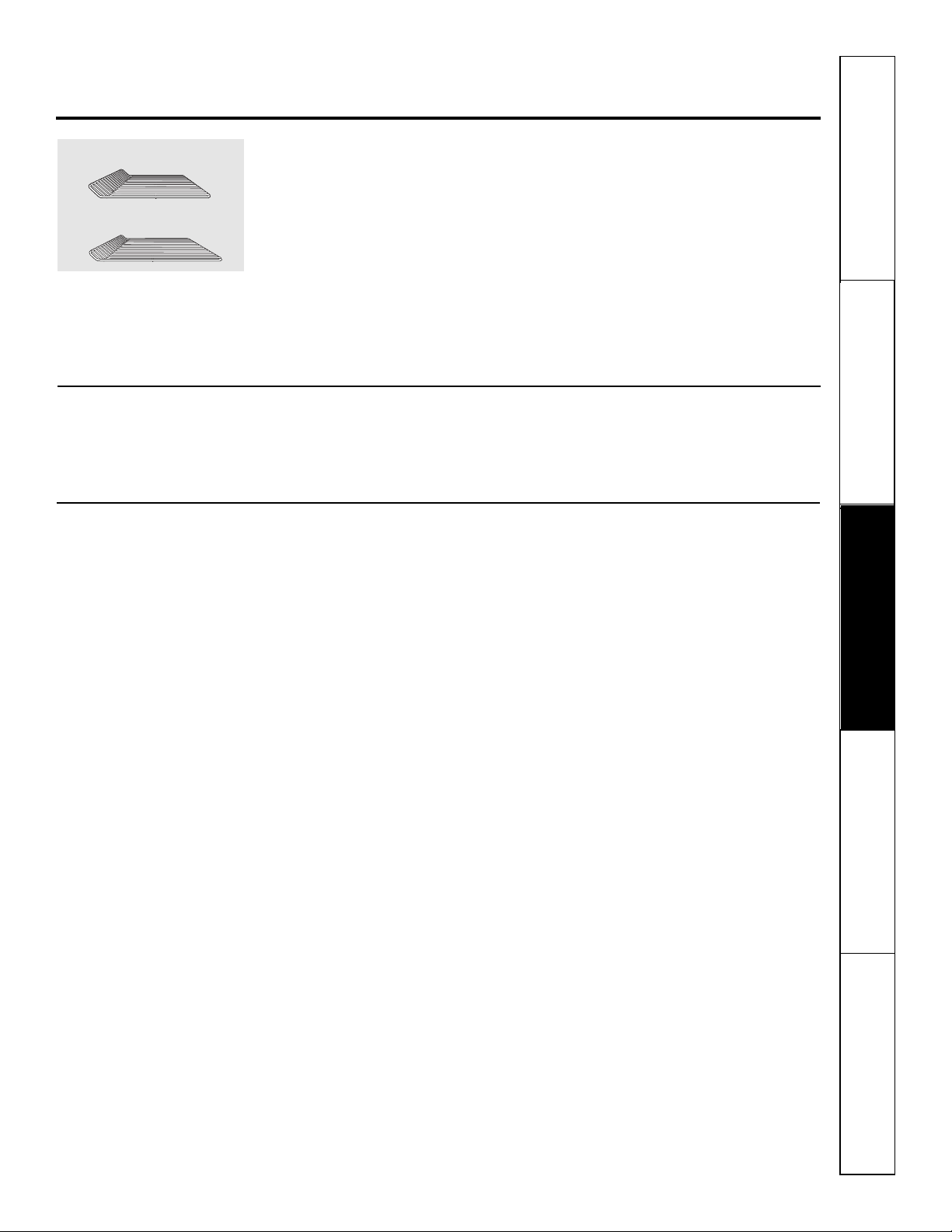
39
Safety Instructions
Operating Instructions Care and Cleaning
Troubleshooting Tips Consumer Support
Oven Racks
All oven racks may be cleaned by hand
with an abrasive cleaner or steel wool.
After cleaning, rinse the racks with clean
water and dry with a clean cloth. Gray
porcelain-coated oven racks may remain
in the oven during the self-cleaning
cycle without being damaged. The shiny,
silver-colored oven racks may remain
in the oven during the self-cleaning
cycle, but they will lose their luster and
become hard to slide.
It will be necessary to grease all oven
rack side edges with a light coating of
vegetable oil after cleaning them by hand
or in the oven. This will help maintain
the ease of sliding the racks in and out of
the oven.
NOTE: On double wall ovens, the rack design is
unique for the upper Trivection™ oven. Due to
this, the upper oven racks and the lower oven
racks are not interchangeable.
Upper Trivection™ oven rack
ge.com
Oven Heating Elements
Do not clean the broil element. Any soil
will burn off when the element is heated.
To clean the area below the bake
element, gently lift the element and
clean with warm, soapy water.
Control Panel
If desired, the touch pads may be deactivated
before cleaning.
See the Control lockout information in the
Using the clock, timer and control lockout
section in this manual.
Clean up splatters with a damp cloth.
You may also use a glass cleaner.
Remove heavier soil with warm soapy
water. Do not use abrasives of any kind.
Reactivate the touch pads after cleaning.
Lower oven rack
Safety Instructions
Operating Instructions
Care and CleaningTroubleshooting TipsConsumer Support
Before you call for service…
Troubleshooting Tips
Save time and money! Review the charts on the following
pages first and you may not need to call for service.
Problem Possible Causes What To Do
Food does not Oven controls • See Using the Trivection
™
Oven section.
speed bake properly improperly set.
Rack position is incorrect • See Using the Trivection
™
Oven section.
or the rack is not level.
Incorrect use of cookware • See Using the Trivection
™
Oven section.
and/or aluminum foil.
Cookware of improper size
being used.
Door not closed. • Close door completely.
Very delicate item. • Use traditional bake.
Food not to desired • Cook times will vary due to recipe and pan variations.
doneness. Check food when prompted and add additional time
with More Time if needed.
Sauce on food gets too brown. • Apply sauce later in cooking cycle.
Meat cooked too long. • Remove from oven sooner and allow to stand. Meat
temperature will continue to rise.
Food put in too early. • Place food in the oven once the oven is preheated and
the display shows “PUT FOOD IN OVEN”.
Temperature reading Don’t use a meat • Take the temperature of the meat after removing it
on meat thermometer thermometer in oven from the oven.
seems inaccurate while speedcooking.
Food does not Oven controls • See Using the Trivection
™
Oven section.
speed broil properly improperly set.
Improper rack position • See the Broiling Guide.
being used.
Cookware not suited to broiling. • For best results, use a pan designed for broiling.
Door not closed. • Close door completely.
Food overcooked. • Remove from oven sooner and allow to stand. Food
temperatures will continue to rise.
Food undercooked. • Speed broil for additional time using MoreTime.
Meat is too done in center. • Use traditional broil for very thin steaks or for foods
where a rare to medium rare doneness is desired.
Food put in too early. • Place food in the oven once the oven is preheated and
the display shows “PUT FOOD IN OVEN”.
Cook time doesn’t Oven controls improperly set. • See Using the Trivection
™
Oven section.
countdown while
Door is not • Close door completely.
speedcooking
closed completely.
START not selected. • Press START once food is placed in the oven.
40
41
Safety Instructions
Operating Instructions Care and Cleaning
Troubleshooting Tips Consumer Support
ge.com
Problem Possible Causes What To Do
Arcing between metal Improper spacing between • See Using the Trivection
™
Oven section.
surfaces in oven while metal surfaces and/or
speedcooking or aluminum foil.
defrosting
Display shows Wiring from house to oven • Contact installer or qualified electrician to check house
“Miswired detected” is incorrect. wiring to oven.
Option not seen on the Option may be listed • Select MORE to see additional items.
display screen on the next screen.
Hot air from oven When using the cooking • This is normal.
features, hot air will exit
the oven through the vent
located above the door.
Food does not bake or Oven controls improperly set. • See the Using traditional bake and roast section.
roast properly in the
Shelf position is incorrect • See the Using traditional bake and roast section.
oven
or the shelf is not level.
Incorrect cookware or • See the Using traditional bake and roast section.
cookware of improper
size being used.
Oven temperature needs • See the Adjust the oven temperature—Do it yourself!
adjustment. section.
Food does not broil Oven controls improperly set. • Make sure you select BROIL.
properly
Improper shelf position • See the Broiling Guide.
being used.
Cookware not suited • For best results, use a pan designed for broiling.
for broiling.
In some areas the power • Preheat the broil element for 10 minutes.
(voltage) may be low.
• Broil for the longest period of time recommended in
the Broiling Guide.
Clock and timer The clock is in the • See the Settings section for the oven clock.
do not work or no clock mode.
display goes blank
Controls improperly set. • See the Using the clock and lower oven timer section.
A fuse in your home may be • Replace the fuse or reset the circuit breaker.
blown or the circuit breaker
tripped.
42
Safety Instructions
Operating Instructions
Care and CleaningTroubleshooting TipsConsumer Support
Before you call for service…
Troubleshooting Tips
Problem Possible Causes What To Do
Oven Oven temperature • See the Adjust the oven temperature—Do it yourself!
temperature too needs adjustment. section.
hot or too cold
Oven will not work Oven controls improperly set. • See the Using the oven section.
A fuse in your home may • Replace the fuse or reset the circuit breaker.
be blown or the circuit
breaker tripped.
Oven will not self-clean The oven temperature is too • Allow the oven to cool and reset the controls.
high to set a self-clean operation.
Oven controls improperly set. • See the Using the self-cleaning oven section.
“Crackling” or This is the sound of the • This is normal.
“popping” sound metal heating and cooling
in the oven during both the cooking and
cleaning functions.
Excessive smoking Excessive soil. • Press the CLEAR/OFF pad. Open the windows to
in the oven during rid the room of smoke. Wait until the (LOCK) light
a clean cycle goes off. Wipe up the excess soil and reset the
clean cycle.
Oven door will Oven too hot. • Allow the oven to cool below locking temperature.
not open after a
clean cycle
Oven not clean Oven controls improperly set. • See the Using the self-cleaning oven section.
after a clean cycle
Oven was heavily soiled. • Clean up heavy spillovers before starting the clean
cycle. Heavily soiled ovens may need to self-clean
again or for a longer period of time.
(LOCK) light is on The oven door is locked • Press the CLEAR/OFF pad. Allow the oven to cool.
when you want to cook because the temperature
in the oven inside the oven has not
dropped below the
locking temperature.
Display shows “ERR” A temperature was set • Set the temperature between 170°F–550°F.
outside the allowable range
of 170°F–550°F.
43
Safety Instructions
Operating Instructions Care and Cleaning
Troubleshooting Tips Consumer Support
ge.com
Problem Possible Causes What To Do
Oven light does Light bulb is loose or defective. • Tighten or replace the bulb.
not work
Pad operating light is broken. • Call for service.
“F— and a number or You have a function • Press the CLEAR/OFF pad. Allow the oven to cool for one
letter” flash in the error code. hour. Put the oven back into operation.
lower oven display
If the function code repeats. • Disconnect all power to the oven for at least
30 seconds and then reconnect power. If the
function error code repeats, call for service.
Power outage, Power outage or surge. • Reset the clock. If the oven was in use, you must reset
clock flashes it by pressing the CLEAR/OFF pad, setting the clock
and resetting any cooking function.
Steam from the vent When using the convection • This is normal.
or speedcook feature, it is
normal to see steam coming
out of the oven vent. As the
number of shelves or amount
of food being cooked increases,
the amount of visible steam
will increase.
“Burning” or “oily” This is normal in a new oven • To speed the process, set a self-clean cycle for a
odor emitting from and will disappear in time. minimum of 3 hours. See the Using the self-cleaning
oven vent oven section.
Strong odor An odor from the insulation • This is temporary.
in the oven around the inside of the
oven is normal for the first
few times the oven is used.
Fan noise when using A cooling fan or a convection • This is normal. The cooling fan will turn on
the oven fan (depending on the function to cool internal parts. It may run for up to 1-1/2
you are using) may automatically hours after the oven is turned off. The convection
turn on. fan will cycle on and off until the function is over
or the door is opened.
Oven door does not The lower oven rack is in the • Place the correct rack in the correct oven. On double
shut or racks do not upper oven or the upper oven wall ovens, the rack design is unique for the upper
fit properly on a rack is in lower oven. Trivection™ oven. Due to this, the upper oven racks
double wall oven and the lower oven racks are not interchangeable.

44
Safety Instructions
Operating Instructions
Care and CleaningTroubleshooting TipsConsumer Support
Accessories.
Looking For Something More?
You can find these accessories and many more at ge.com, or call 800.626.2002
(during normal business hours). Have your model number ready.
Visit ge.com for more information.
Oven Racks Broil Pan
Trivection
™
VHS Tape
Oven Elements
Light BulbsCleaner

45
General Electric Company
Warranty Registration Department
P.O. Box 32150
Louisville, KY 40232-2150
GE Service Protection Plus
™
GE, a name recognized worldwide for quality and dependability, offers you
Service Protection Plus
™
—comprehensive protection on all your appliances—
No Matter What Brand!
Benefits Include:
• Backed by GE
• All brands covered
• Unlimited service calls
• All parts and labor costs included
• No out-of-pocket expenses
• No hidden deductibles
• One 800 number to call
You will be completely satisfied with our service protection or you may request your money back
on the remaining value of your contract. No questions asked. It’s that simple.
Protect your refrigerator, dishwasher, washer and dryer, range, TV, VCR and much more—any brand!
Plus there’s no extra charge for emergency service and low monthly financing is available. Even icemaker
coverage and food spoilage protection is offered. You can rest easy, knowing that all your valuable
household products are protected against expensive repairs.
Place your confidence in GE and call us in the U.S. toll-free at 800.626.2224
for more information.
*All brands covered, up to 20 years old, in the continental U.S.
We’ll Cover Any Appliance.
Anywhere. Anytime.*
Please place in envelope and mail to:
✁
Cut here
46
Consumer Product Ownership Registration
Im
p
o
rta
n
t
M
a
il
T
o
d
a
y!
GE Consumer & Industrial
Appliances
General Electric Company
Louisville, KY 40225
ge.com
First
Name
Mr. ■■ Ms. ■■ Mrs. ■■ Miss ■■
Street
Address
City
State
Date Placed
In Use
Month
Day
Year
Zip
Code
Apt. #
Last
Name
Phone
Number
_
_
Consumer Product Ownership Registration
Dear Customer:
Thank you for purchasing our product and thank you for placing your confidence in us.
We are proud to have you as a customer!
Follow these three steps to protect your new appliance investment:
Important: If you did not get a registration card with your
product, detach and return the form below to
ensure that your product is registered, or register
online at ge.com.
1
23
Model Number Serial Number
✁
Cut here
Complete and mail
your Consumer
Product Ownership
Registration today.
Have the peace of
mind of knowing we
can contact you in
the unlikely event of
a
safety modification.
After mailing the
registration below,
store this document
in a safe place. It
contains information
you will need should
you require service.
Our service number is
800.GE.CARES
(800.432.2737).
Read your Owner’s
Manual carefully.
It will help you
operate your new
appliance properly.
Model Number Serial Number
E-mail Address*
* Please provide your e-mail address to receive, via e-mail, discounts, special offers and other important
communications from GE Appliances (GEA).
■■ Check here if you do not want to receive communications from GEA’s carefully selected partners.
FAILURE TO COMPLETE AND RETURN THIS CARD DOES NOT DIMINISH YOUR
WARRANTY RIGHTS.
For more information about GEA’s privacy and data usage policy, go to ge.com and click on
“Privacy Policy” or call 800.626.2224.
47
Safety Instructions
Operating Instructions Care and Cleaning
Troubleshooting Tips Consumer Support
For The Period Of: GE Will Replace:
One Year Any part of the speedcook electric convection oven which fails due to a defect in materials
From the date of the or workmanship. During this limited one-year warranty, GE will also provide, free of charge,
original purchase all labor and in-home service to replace the defective part.
■ Service trips to your home to teach you how to use
the product.
■ Improper installation, delivery or maintenance.
■ Failure of the product if it is abused, misused, or
used for other than the intended purpose or used
commercially.
■ Replacement of house fuses or resetting of
circuit breakers.
■ Damage to the product caused by accident, fire,
floods or acts of God.
■ Incidental or consequential damage caused by
possible defects with this appliance.
■ Damage caused after delivery.
■ Product not accessible to provide required service.
What GE Will Not Cover:
This warranty is extended to the original purchaser and any succeeding owner for products purchased for
home use within the USA. If the product is located in an area where service by a GE Authorized Servicer is not
available, you may be responsible for a trip charge or you may be required to bring the product to an Authorized GE
Service location for service. In Alaska, the warranty excludes the cost of shipping or service calls to your home.
Some states do not allow the exclusion or limitation of incidental or consequential damages. This warranty
gives you specific legal rights, and you may also have other rights which vary from state to state. To know
what your legal rights are, consult your local or state consumer affairs office or your state’s Attorney General.
Warrantor: General Electric Company. Louisville, KY 40225
All warranty service provided by our Factory Service Centers, or
an authorized Customer Care
®
technician. To schedule service,
on-line, 24 hours a day, visit us at ge.com, or call 800.GE.CARES
(800.432.2737). Please have serial number and model number
available when calling for service.
Staple your receipt here.
Proof of the original purchase
date is needed to obtain service
under the warranty.
GE Self-Cleaning Oven with Trivection
™
Warranty.
EXCLUSION OF IMPLIED WARRANTIES—Your sole and exclusive remedy is product repair as provided in this Limited
Warranty. Any implied warranties, including the implied warranties of merchantability or fitness for a particular purpose,
are limited to one year or the shortest period allowed by law.
Printed in the United States
Consumer Support.
GE Appliances Website
ge.com
Have a question or need assistance with your appliance? Try the GE Appliances Website 24 hours a day,
any day of the year! For greater convenience and faster service, you can now download Owner’s Manuals,
order parts or even schedule service on-line.
Schedule Service ge.com
Expert GE repair service is only one step away from your door. Get on-line and schedule your service at
your convenience 24 hours any day of the year! Or call 800.GE.CARES (800.432.2737) during normal
business hours.
Real Life Design Studio ge.com
GE supports the Universal Design concept—products, services and environments that can be used by
people of all ages, sizes and capabilities. We recognize the need to design for a wide range of physical and
mental abilities and impairments. For details of GE’s Universal Design applications, including kitchen
design ideas for people with disabilities, check out our Website today. For the hearing impaired, please call
800.TDD.GEAC (800.833.4322).
Extended Warranties ge.com
Purchase a GE extended warranty and learn about special discounts that are available while your warranty
is still in effect. You can purchase it on-line anytime, or call 800.626.2224 during normal business hours.
GE Consumer Home Services will still be there after your warranty expires.
Parts and Accessories ge.com
Individuals qualified to service their own appliances can have parts or accessories sent directly to their
homes (VISA, MasterCard and Discover cards are accepted). Order on-line today, 24 hours every day or
by phone at 800.626.2002 during normal business hours.
Instructions contained in this manual cover procedures to be performed by any user. Other servicing generally
should be referred to qualified service personnel. Caution must be exercised, since improper servicing may cause
unsafe operation.
Contact Us ge.com
If you are not satisfied with the service you receive from GE, contact us on our Website with all the details
including your phone number, or write to: General Manager, Customer Relations
GE Appliances, Appliance Park
Louisville, KY 40225
Register Your Appliance ge.com
Register your new appliance on-line—at your convenience! Timely product registration will allow for
enhanced communication and prompt service under the terms of your warranty, should the need arise.
You may also mail in the pre-printed registration card included in the packing material.