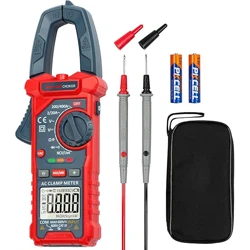
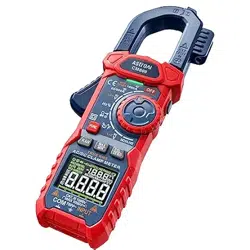
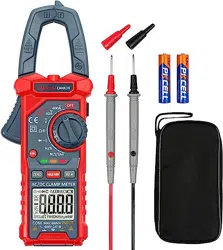
User Manual for Digital Clamp Meter
Thank you for purchasing the 202D Auto Ranging Digital Clamp Meter from AstroAI. The AstroAI 202D Auto Ranging Digital Clamp Meter is designed to be safely and accurately used by professionals in a commercial setting or weekend DIYer’s that need a little more utility from their standard digital multimeter. This manual provides all safety information, operation instruction, specifications, and maintenance for the meter. This instrument measures AC/DC voltage, AC Current, Resistance, Continuity, as well as Diode Measurements. Additional features and functions included polarity indication, data hold, maximum value hold, over range indication, and automatic power-off. Thank you again for choosing AstroAI, if you have any questions or concerns regarding your product, please contact us.
NOTE: Fully read and understand this manual before using this Digital Multimeter. This manual provides all safety information, operation instructions, specifications, and maintenance for the meter. This Digital Clamp Meter has been designed according to EN61010- 1 oncoming electronic measuring instruments with an overvoltage category (CAT II 600V) and Pollution degree 2.
WARNING: To avoid possible electric shock or personal injury, and to avoid possible damage to the Meter or to the equipment being tested, adhere to the following rules:
- Before using the Meter, inspect the exterior casing. Do not use the Meter if it is damaged or if all or part of the exterior casing is removed. Look for cracks or missing plastic. Pay special attention to the insulation around the connectors.
- Inspect the test leads for damaged insulation or exposed metal. Check the test leads for continuity.
- Do not apply more than the rated voltage, as marked on the Meter, between the terminals or between any terminal and grounding.
- The manual rotary switch should be placed in the correct position before measurement and should NOT be moved during measurement to prevent damage to the Meter.
- When the Meter is working at an effective voltage over 60V in DC or 30V rms in AC, special care should be taken because there is a danger of electric shock.
- Use the proper terminals, function, and range for your measurements.
- Do not use or store the Meter in a high-temperature environment, do not expose to high levels of humidity, or near strong magnetic fields. The performance of the Meter may deteriorate after dampening.
- When using the test leads, keep your fingers behind the finger guards.
- Disconnect circuit power and discharge all high-voltage capacitors before testing resistance, continuity, or diodes.
- Replace the battery as soon as the battery indicator appears. With a low battery, the Meter might produce false readings that can lead to electric shock and personal injury.
- Remove the connection between the testing leads and the circuit being tested, and turn the Meter power off before opening the Meter case.
- When servicing the Meter, use only the same model number or identical electrical specifications replacement parts.
- The internal circuit of the Meter shall not be altered at will to avoid damage of the Meter and any accident.
- Clean using a soft cloth and mild detergent for the surface of the Meter. Do not use abrasive materials or solvents to prevent the surface of the Meter from corrosion and damage.
- Turn the Meter off when not in use and take out the battery when it is not going to be used for an extended period of time. Regularly check the battery as it may leak when it has not been used for some time. Replace the battery as soon as leaking appears. A leaking battery will damage the Meter.
| Display |
LCD, 2000 Counts updated 2/sec |
| LCD Size |
30*49mm |
| Polarity Indication |
“-” displayed automatically |
| Over-Range Indication |
“OL” displayed |
| Low Battery Indication |
“ ” displayed ” displayed |
| Range Select |
Auto |
| Operating Temperature |
32°F~104°F (0°C~40°C), less than 80% Relative Humidity |
| Storage Temperature |
14°F~122°F (-10°C~50°C), less than 85% Relative Humidity |
| Battery Type |
1.5V x 2, AAA size |
| Dimensions |
213 x 52 x 31mm |
| Weight |
Approx 190g |
ELECTRICAL SYMBOLS
 |
AC (Alternating Current) |
 |
DC (Direct Current) |
 |
DC or AC |
 |
Earth Ground |
 |
Double Insulated |
| AUTO |
Auto Range |
 |
Complies with EU directives |
 |
Low Battery |
 |
Diode |
 |
Fuse |
 |
Continuity Test |
 |
Warning |
 |
Dangerous Voltage may be present |
MULTIMETER DIAGRAM
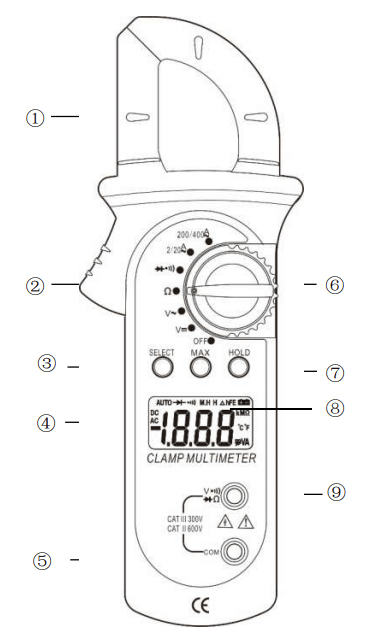
1. Transformer Jaws:
Picks up AC Current flowing through the conductor.
2. Trigger
Press to open the transformer jaws, when the trigger is not pressed, the jaws will automatically close.
3. SELECT Button
Push this button to select which function to use depending on the Function/Range Switch.
4. Display
3 1/2 digit LCD, with a maximum reading of 1999.
5. COM Input Jack
Low input for all voltage, resistance, and continuity measurements. Will accept banana plugs.
6. Function/Range
Switch Use this switch to select the desired function and range.
7. DATA HOLD Button
When this button is pushed, the display will show the last reading and “H” symbol will appear until the DATA HOLD button is pushed again. Data holding will be cancelled automatically when the function switch is changed/rotated.
8. MAX HOLD Button
When this button is pushed, the display will show the last Maximum reading and the “M.H.” symbol will appear until the MAX HOLD button is pushed again. Maximum hold will be cancelled automatically when the function switch is changed/rotated.
9. VΩ Input Connect
High input for voltage, resistance, and continuity measurement that will accept banana plugs. When measuring insulation resistance, use for accepted insulation tester unit VΩ banana plugs.
SPECIFICATIONS
Accuracy is guaranteed for 1 year when recommended storage temperatures are met (14°F~122°F (-10°C~50°C), less than 85% Relative Humidity).
DC VOLTAGE (Auto ranging)
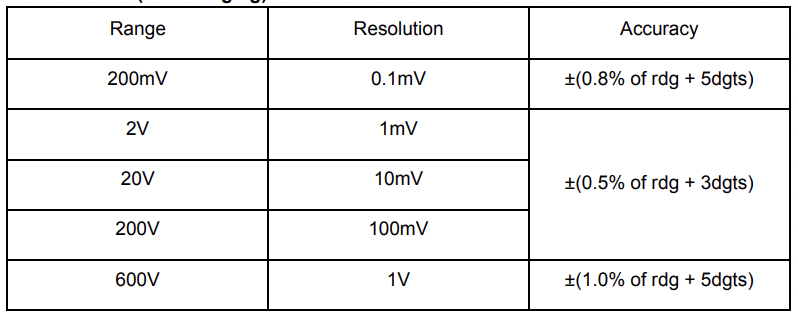
Input Impedance: 10MΩ
Overload Protection: 600V DC/AC rms
Max. Input voltage: 600V DC
AC CURRENT (Auto ranging)
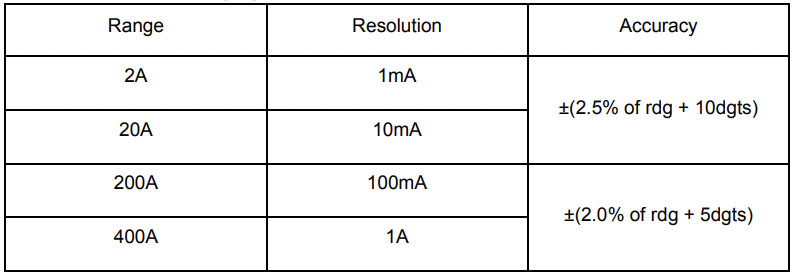
Measuring Voltage Drop: 200mV
Frequency Range: 40 - 200Hz
AC VOLTAGE (Auto ranging)
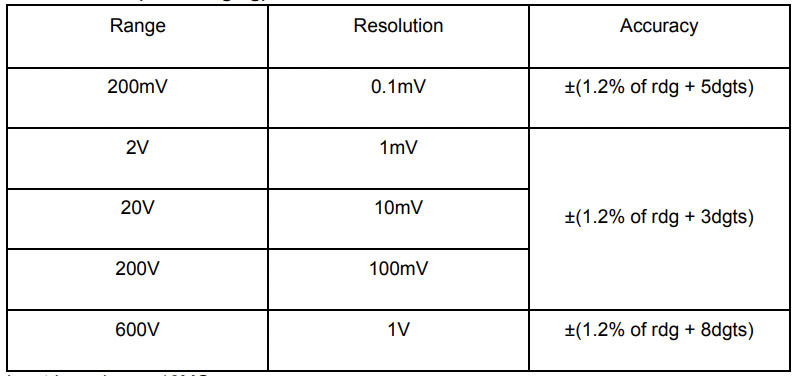
Input Impedance: 10MΩ
Frequency Range: 40Hz - 400Hz
Overload Protection: 600V DC/AC rms
Max. Input voltage: 600V AC rms
RESISTANCE (Auto Ranging)
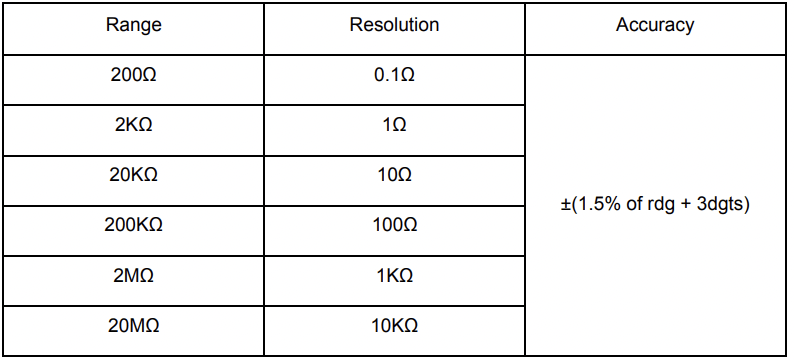
Open Voltage: about 0.25V
Overload Protection: 250V DC/AC RMS
DIODE AND CONTINUITY
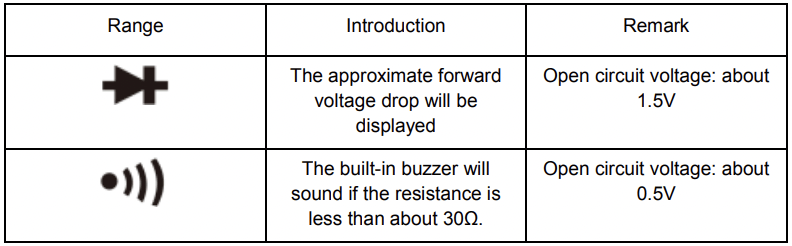
Overload Protection: 250V DC/AC RMS
For continuity test: When the resistance is between 30Ω and 100Ω, the buzzer may sound or may not sound. When the resistance is more than 100Ω, the buzzer will not sound.
OPERATION INSTRUCTIONS
Measuring Voltage
- Connect the Black test lead to the COM Jack and the Red test lead to the V Jack.
- Set the function switch to V~ or V
 range.
- Connect the test leads to the source or load to be measured.
- Read the LCD display for the polarity of the Red test lead. The result will be a DC measurement.
NOTE:
a. When measuring in a small range (E.G. mV), the meter may display an unstable reading when the test leads have not been connected to the load to be measured. It is normal and will not affect the measurements.
b. To avoid damage to the meter, do not measure a voltage which exceeds 600V for DC or AC, depending on measurement function.
Measuring AC Current
- Set the function switch to the AC 200/400A range. If the display indicates one or more leading zeros, shift to the 2/20Z range to improve the resolution of the measurement.
- Press the trigger to open the transformer jaws and clamp one conductor only. It is impossible to make measurements when two or three conductors are clamped at the same time.
- The result displayed will be AC Current.
Measuring Resistance
- Connect the Black test lead to the COM Jack and the Red test lead to the “VΩ” Jack. (Note: the polarity of the red test lead is positive “+”)
- Set the function/range switch to “Ω” range.
- Connect the test leads to the load being measured.
- Read the results on the display.
NOTE:
a. For resistance measurements >1MΩ, the meter may take a few seconds to stabilize the reading. This is normal for high-resistance measurements.
b. When the input is not connected, (E.G. the circuit is open) the symbol “OL” will be displayed as an over range indicator.
c. Before measuring in-circuit resistance, be sure that the circuit being tested has all power removed and all capacitors are fully discharged.
Continuity Test
- Connect the Black test lead to the COM Jack and the Red test lead to the “VΩ” Jack.
- Set the function/range switch to
 range.
- Press the Select Button to select the continuity measurement mode. The
 symbol will appear as an indicator.
- Connect the red test lead to the anode of the diode to be tested and the black test lead to the cathode.
- The meter will show the approximate forward voltage of the diode. If the connections are reversed, “OL” will be shown on the display.
- If the circuit resistance is lower than about 30Ω, the built-in buzzer will sound.
Diode Test
- Connect the Black Test Lead to the “COM” Jack and the Red Test Lead to the “VΩ” Jack. (Note: the polarity of the red test lead is positive “+”)
- Set the function/range switch to range.
- Press the SELECT Button to select continuity measurement mode, and the
 symbol will appear as an indicator.
- Connect the red test lead to the anode of the diode to be tested and black test lead to the cathode.
- The meter will show the approximate forward voltage of the diode. If the connections are reversed, “OL” will be shown on the display.
AUTO POWER OFF
If the meter is not in operation for 15 minutes, it will turn off automatically. To turn it on again, simply rotate the range switch or press any button.
If you press the “HOLD” button to turn the meter back on after it turns off, the automatic poweroff function will be disabled.
BATTERY REPLACEMENT
If the low battery symbol ( ) appears on the display, it indicates that the battery should be replaced. Remove the screws and open the back case. Replace the dead batteries with new ones (2x AAA, 1.5V).