REV: XP13000HX-02272020
This manual provides information regarding
the operation and maintenance of these
products. We have made every effort to
ensure the accuracy of the information in
this manual. We reserve the right to change
this product at any time without prior
notice.
5800 Ontario Mills Pkwy
Ontario, CA 91764 USA
www.duromaxpower.com
Call our Customer Care Team Toll Free 8-5 pm PST Mon-Fri
844-DUROMAX
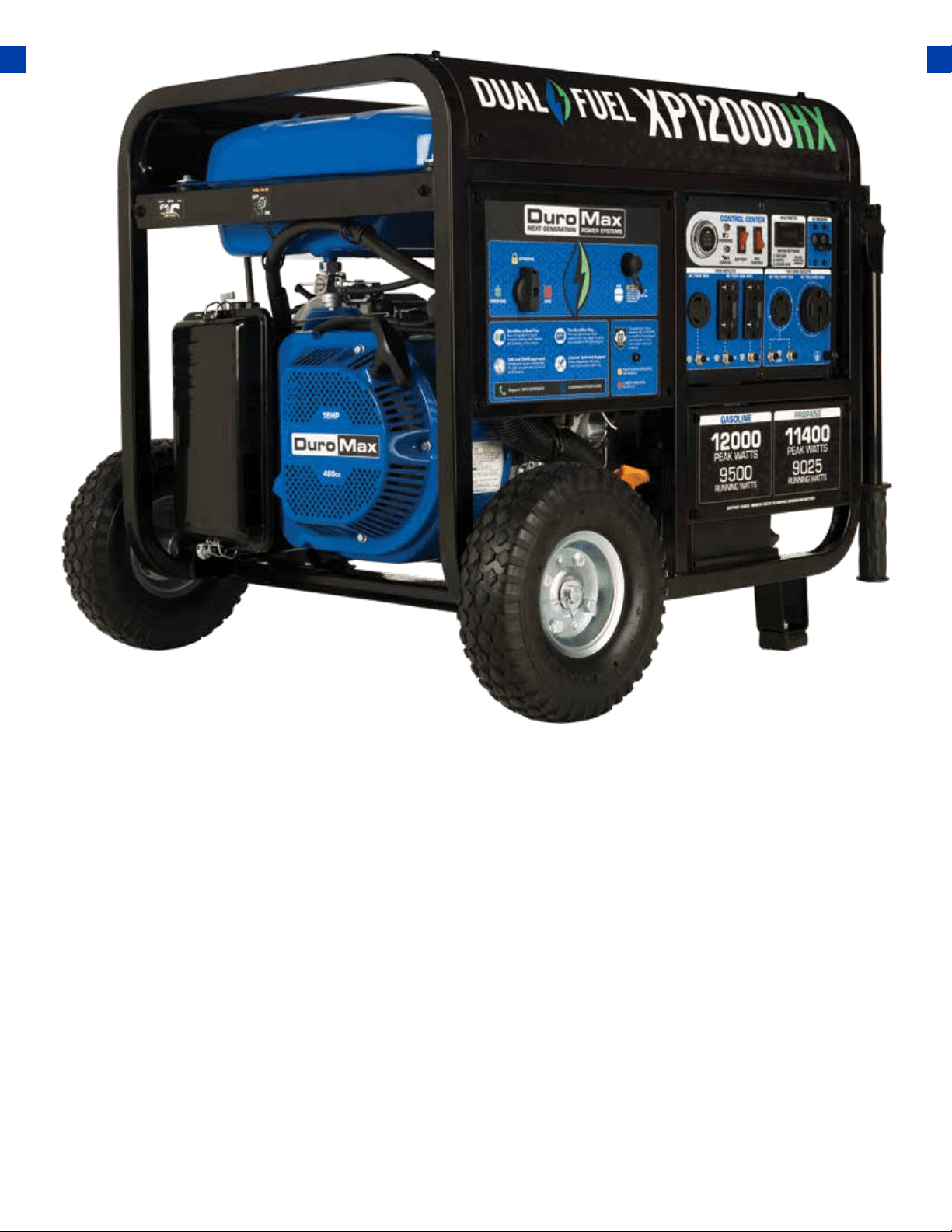
XP12000HX
USER MANUAL


CONTENTS
1.
Introduction .................................................................................................................... 6
General Safety Procedures ........................................................................................... 8
Carbon Monoxide Safety ............................................................................................. 12
Unit and Purchase Information .................................................................................. 14
Introduction
4.
Checking the Oil ........................................................................................................... 34
Check the Gas Level ..................................................................................................... 35
Starting the Generator Using Gasoline ...................................................................... 36
Starting the Generator Using Propane....................................................................... 38
Starting the Generator Using Recoil Start ................................................................. 40
Starting the Generator
3.
Shipping Braces ............................................................................................................ 25
Wheel Kit Installation .................................................................................................... 26
Connect the Battery .................................................................................................... 28
Adding Oil ...................................................................................................................... 29
Adding Gasoline ............................................................................................................ 30
Grounding the Generator ........................................................................................... 31
High Altitude Operation .............................................................................................. 31
Generator Setup
5.
AC Usage ........................................................................................................................ 46
Connecting a Load to the Generator .......................................................................... 48
Using the Digital Multimeter ....................................................................................... 50
Using the Generator
2.
Quick Start Guide (Gasoline) ....................................................................................... 16
Quick Start Guide (Propane) ........................................................................................ 18
Generator Components ............................................................................................... 20
Package Contents ......................................................................................................... 22
Quick Start

CONTENTS
6.
7.
8.
Maintenance Schedule .................................................................................................. 54
Maintenance Log ........................................................................................................... 55
Checking the Oil ............................................................................................................ 56
Changing the Oil ............................................................................................................. 57
Cleaning the Air Filter .................................................................................................... 58
Spark Plug Maintenance ............................................................................................... 60
Emptying the Gas Tank ................................................................................................. 62
Cleaning the Fuel Filter Cup .......................................................................................... 64
Storage and Transportation ......................................................................................... 65
Specications .................................................................................................................. 66
.......................................................................................................................... 76
Basic Troubleshooting .................................................................................................. 68
Changing / Inspecting the Carbon Brushes ............................................................... 69
Changing / Inspecting the AVR .................................................................................... 71
Wiring Diagram ............................................................................................................. 74
Maintenance and Care
Warranty
Troubleshooting
9.
.................................................................................................. 80
Contact Information


6
The DuroMax Way is a commitment to excellence. This vision is focused on the quality, reliabil-
ity, and durability of our products combined with outstanding customer service. We understand
that having dependable power whenever and wherever you need it provides comfort, safety, and
peace of mind. It is through this philosophy that DuroMax achieves our vision of...
THE DUROMAX WAY
The DuroMax Way is more than just a brand, it is our understanding and appreciation of just how
important power can be to someone without it…
DUROMAX FOR HOME
Electricity in our home not
only provides comfort but
safety as well. From keeping
the heat or A/C on to keeping
our food cold, power is
essential to our daily lives.
Inevitability when disaster
strikes and we are left without
power for a prolonged period
of time, our way of life is
put at risk. This is by far the
most critical time for reliable
portable power.
DUROMAX FOR WORK
On the job site, portable
power allows you the ability
to get work done in remote
locations when traditional
power sources are usually
unavailable. Equipment like
table saws, sanders, and
work lights are a necessity
and portable power can
play a critical role in getting
a job done successfully and
eciently.
DUROMAX FOR PLAY
Camping outdoors in a
remote location can get one
in touch with nature and allow
them to forget the stress of
the day to day grind. Here
portable power can provide
comfort as well as safety. With
portable power, you can keep
your cell phone charged, light
up your campsite, or even
brew a cup of coee, all while
being miles from civilization.
7
INTRODUCTION
Notice Regarding Emissions
DuroMax Power Equipment is headquartered in Ontario, California and is the industry’s leader in
Dual Fuel portable generator technology. In addition to a full assortment of portable generators
ranging from digital inverters to large 15,000-watt portable standby units, their product line
includes pressure washers, engines, pumps, and accessories.
The foundation of our company is built on quality, reliability, durability, and customer service. At
DuroMax our vision is simple, we are committed to Powering Everyone... Anywhere!
STOP
Please do not return
to the store.
DuroMax representatives are ready to help you
with any questions, concerns, or issues about your
new product. We can guide you through assembly,
start up, and how to operate your new generator.
We want you to be able to put your new generator
to use right away!
CALL US BEFORE YOU CONSIDER
RETURNING THE PRODUCT!
1-844-DUROMAX
TOLL-FREE
Engines that are certied to comply with U.S. EPA emission regulations for SORE (Small o Road
Equipment), are certied to operate on regular unleaded gasoline and may include the following
emission control systems: (EM) Engine Modications and (TWC) Three-Way Catalyst (if so equipped).
8
SAFETY ALERT SYMBOL
DANGER: This generator produces poisonous carbon monoxide gas when running. This
gas is both odorless and colorless. Even if you do not see or smell gas, carbon monoxide
may still be present. Breathing this poison can lead to headaches, dizziness, drowsiness,
and eventually death.
● Use outdoors ONLY in non-conned areas.
● Keep several feet of clearance on all sides to allow proper ventilation of the generator.
WARNING: The exhaust from this product contains chemicals known to the State of
California to cause cancer, birth defects, or other reproductive harm.
WARNING: This generator produces heat when running. Temperatures near exhaust can
exceed 150°F (65°C).
● Do not touch hot surfaces. Pay attention to warning labels on the generator denoting
hot parts of the machine.
● Allow generator to cool several minutes after use before touching engine or areas
which heat during use.
The safety alert symbol is used with one of the safety words (DANGER,
CAUTION, or WARNING) to alert you of hazards. Please pay attention to
these hazard notices both in this manual and on the generator.
GENERAL SAFETY PROCEDURES
Please familiarize yourself with the following safety symbols and words:
● DANGER: Indicates a hazard that will result in serious injury or death if instructions are not
followed.
● WARNING: Indicates a strong possibility of causing serious injury or death if instructions are not
followed.
● CAUTION: Indicates a possibility of personal injury or equipment damage if instructions are not
followed.

9
GENERAL SAFETY PROCEDURES
WARNING: This generator may emit highly ammable and explosive gasoline vapors,
which can cause severe burns or even death. A nearby open ame can lead to an
explosion even if not directly in contact with gasoline.
● Do not operate near an open ame.
● Do not smoke near the generator.
● Always operate on a rm, level surface.
● Always turn the generator o before refueling.
● Allow generator to cool for at least 2 minutes before removing the fuel cap. Loosen
cap slowly to relieve pressure in the tank.
● Do not overll the gas tank. Gas may expand during operation. Do not ll to the top
of the tank.
● Always check for spilled gas before operating.
● Empty the gasoline tank before storing or transporting the generator.
● Before transporting, turn the fuel valve to the o position and disconnect
the spark plug.
WARNING: This generator produces a powerful voltage, which can result in electrocution.
● ALWAYS ground the generator before using it (see the “Grounding the Generator”
portion of the “PREPARlNG THE GENERATOR FOR USE section).
● The generator should only be plugged into electrical devices, either directly or with
an extension cord. NEVER connect to a building electrical system without a qualied
electrician. Such connections must comply with local electrical laws and codes. Failure
to comply can create a back-ow of power, which may result in serious injury or death
to utility workers.
● Use a ground fault circuit interrupter (GFCI) in highly conductive areas such as metal
decking or steelwork. GFCls are available in-line with some extension cords.
● Do not use uncovered in rainy or wet conditions.
● Do not touch bare wires or receptacles (outlets).
● Do not allow children or non-qualied persons to operate.
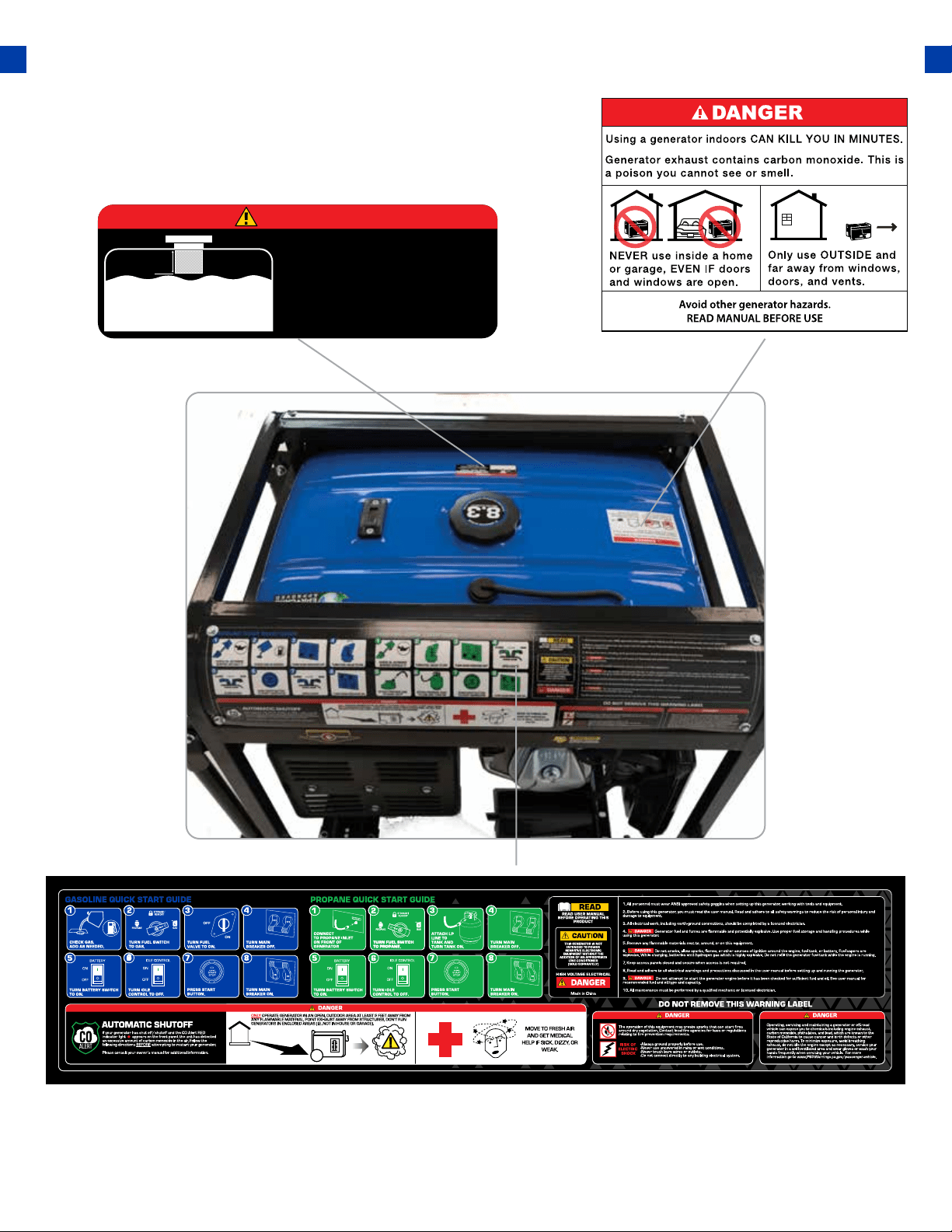
In addition to the above safety notices, please familiarize
yourself with the safety and hazard markings on the
generator.
GENERAL SAFETY PROCEDURES
DANGER
DO NOT OVERFILL
THE GAS TANK
OVERFILLING CAN RESULT
IN A FIRE, EXPLOSION,
OR DEATH.
1.5”
10
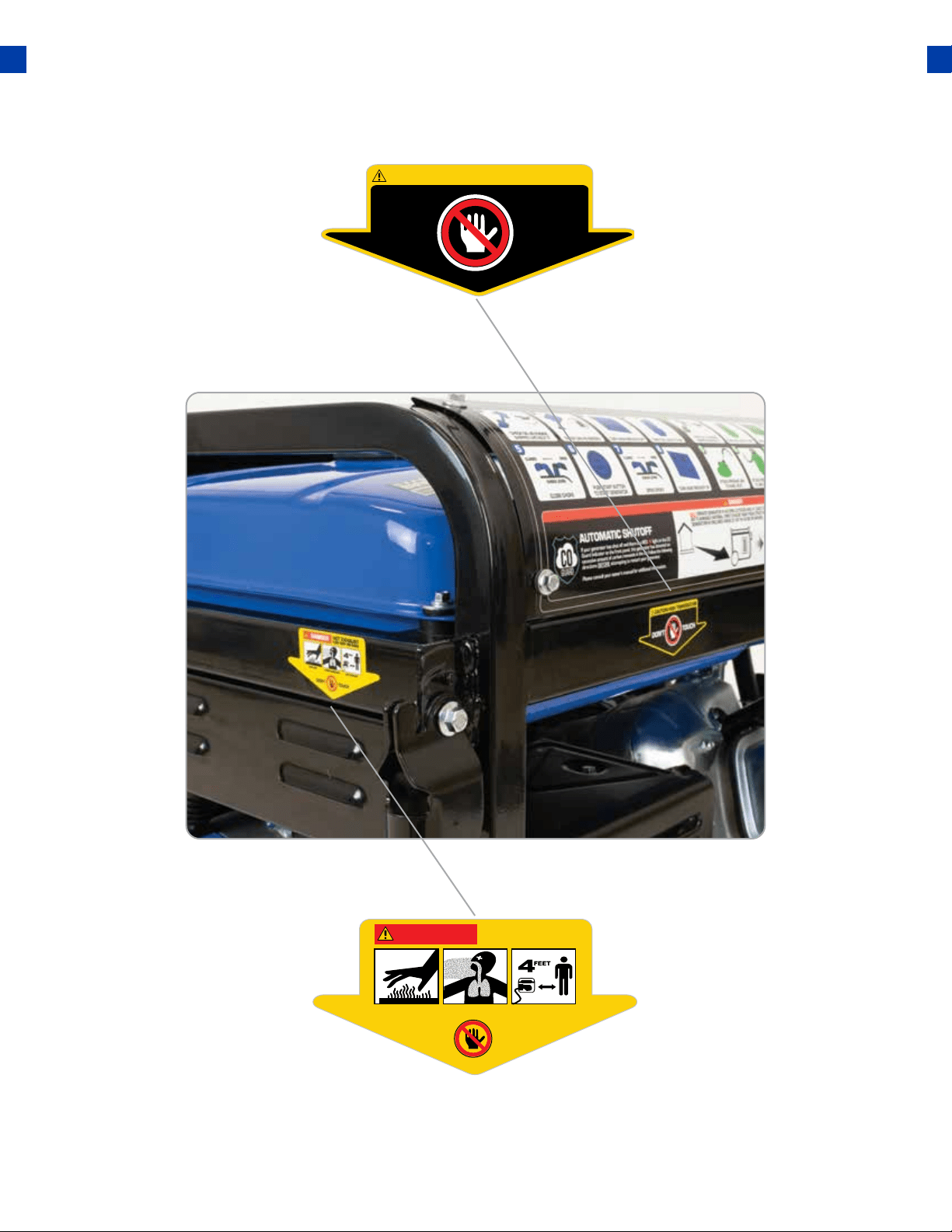
DON’T TOUCH
CAUTION HIGH TEMPERATURE
DANGER
HOT EXHAUST
KEEP SAFE DISTANCE
DON’T TOUCH
BURN RISK
CARBON MONOXIDE SAFE DISTANCE
GENERAL SAFETY PROCEDURES
11
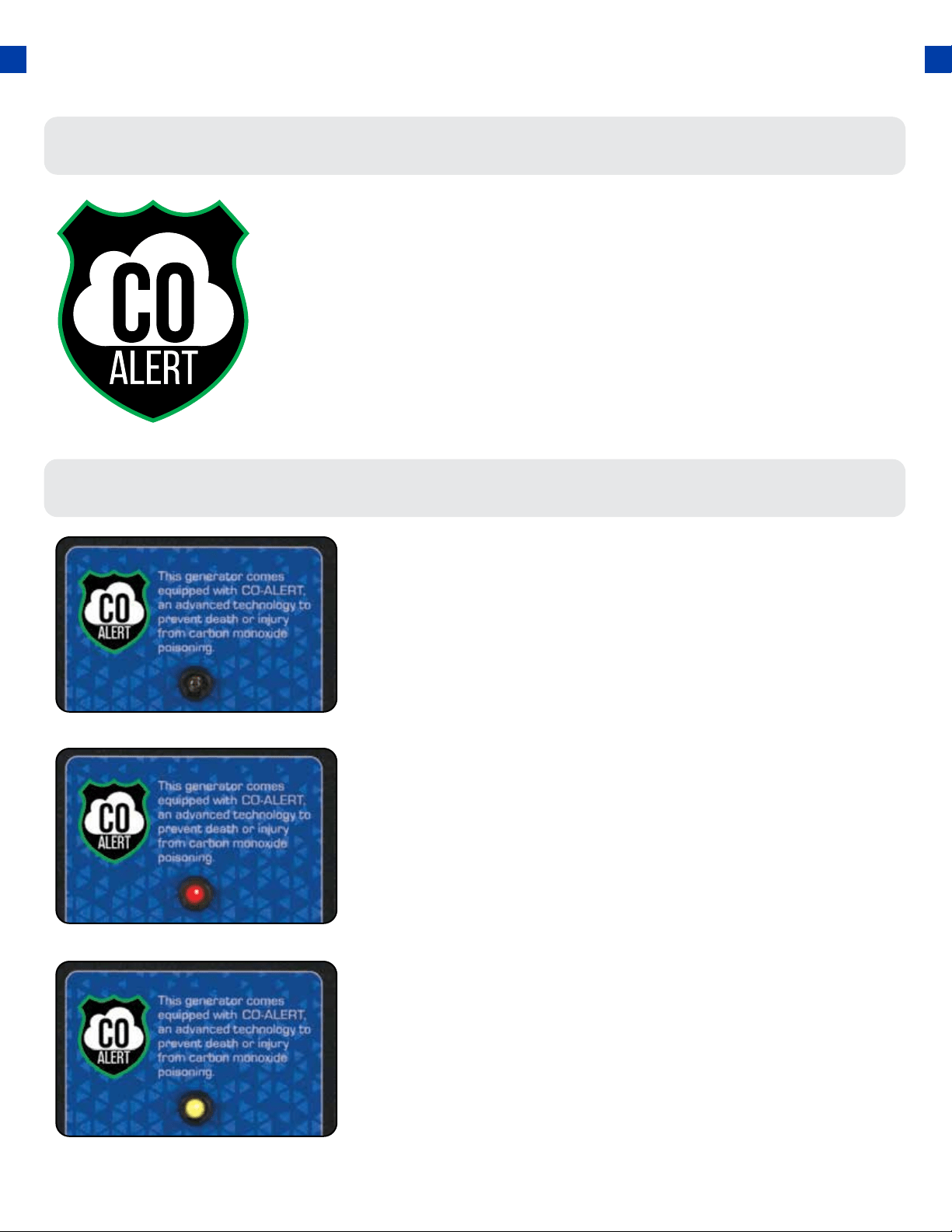
CARBON MONOXIDE SAFETY
Carbon Monoxide
CO Alert
● The indicator will light red.
● The engine will shutdown.
● The engine will not restart for 5 minutes.
Maintenance Required
If an error in the CO Alert system is detected the indicator
will light yellow. Please contact DuroMax Service at
844-DUROMAX for assistance.
Description
The DuroMax CO Alert system was created to protect
our customers and their families from dangerous carbon
monoxide. Just like the detector for your home the CO Alert
tests the air for to keep you safe and healthy.
CO Detected
If dangerous carbon monoxide levels are detected:
Generators are very convenient, but they can also be very dangerous. All
fuel-burning appliances and equipment release a poisonous gas called
carbon monoxide.
Carbon monoxide (also known as CO) can be dangerous for humans
and pets, even in small amounts, because it blocks oxygen from getting
into your body. Carbon monoxide poisoning can lead to death in a very
short time. It is odorless, tasteless and invisible, so you may be exposed
without knowing it. That is why carbon monoxide is sometimes called
“the silent killer.”
12

As the only safe way to use a portable generator, taking your
generator outside is absolutely mandatory to keep your family
safe from carbon monoxide. But there’s even more you can do.
By educating yourself about all carbon monoxide risks, you’ll
be better prepared to protect your family from this colorless,
odorless threat. Visit takeyourgeneratoroutside.com for more
information.
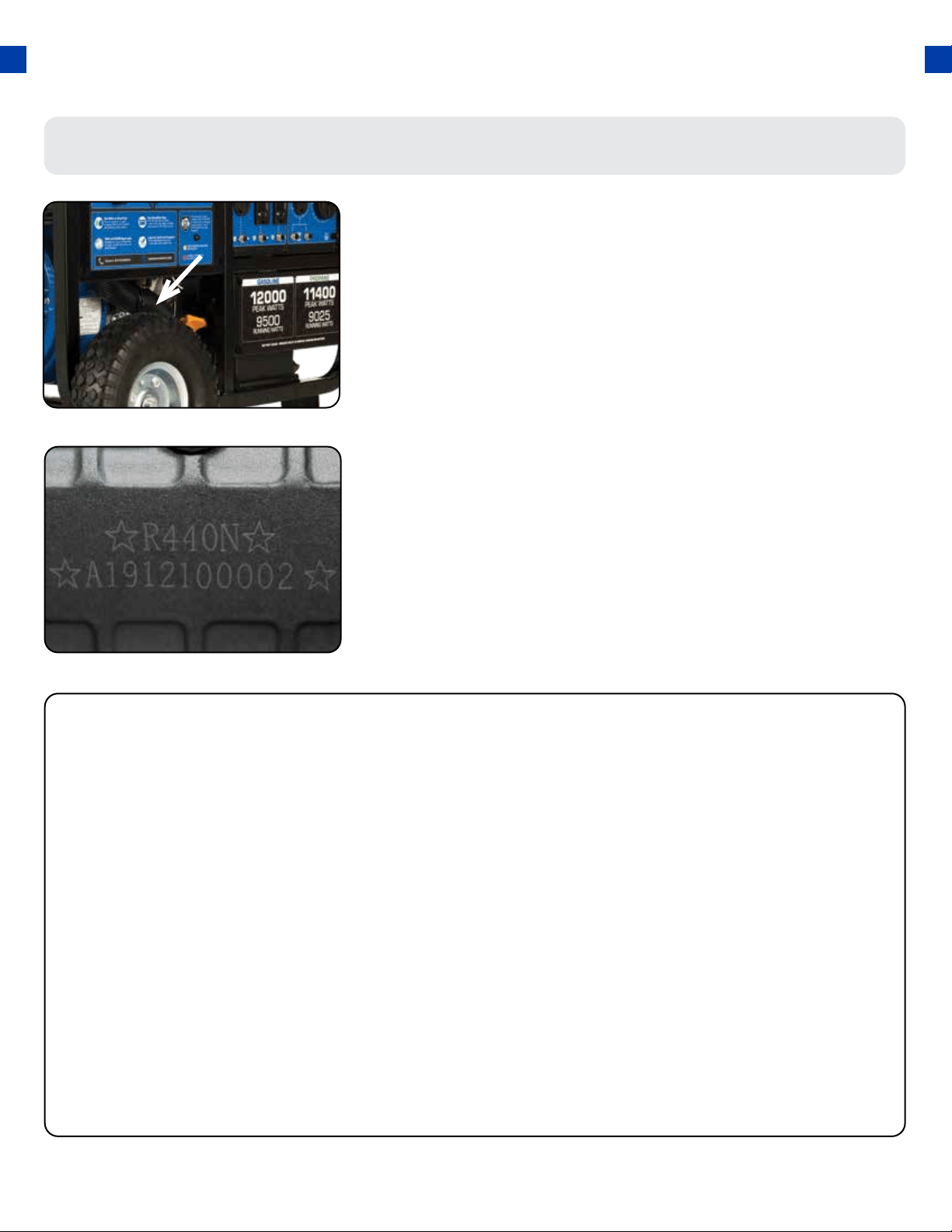
Serial Number
Serial number format
STAPLE RECEIPT HERE
The serial number will be shown in two parts. The engine
model, followed by the serial number.
Engine Model: _____________________________________________
Serial Number: _____________________________________________
A purchase receipt may be necessary for warranty parts or
service in the future. If you have a paper receipt staple it
here for easy reference.
If you purchased the unit online, save the email receipt
where you can access it, and record your details here for
convenience in the future.
Purchase Date: ____________________________________________
Order Number: ____________________________________________
Retailer Name: _____________________________________________
Serial Number
The serial number is located on the engine block, above and
to the left of the oil ll.
UNIT AND PURCHASE INFORMATION
14
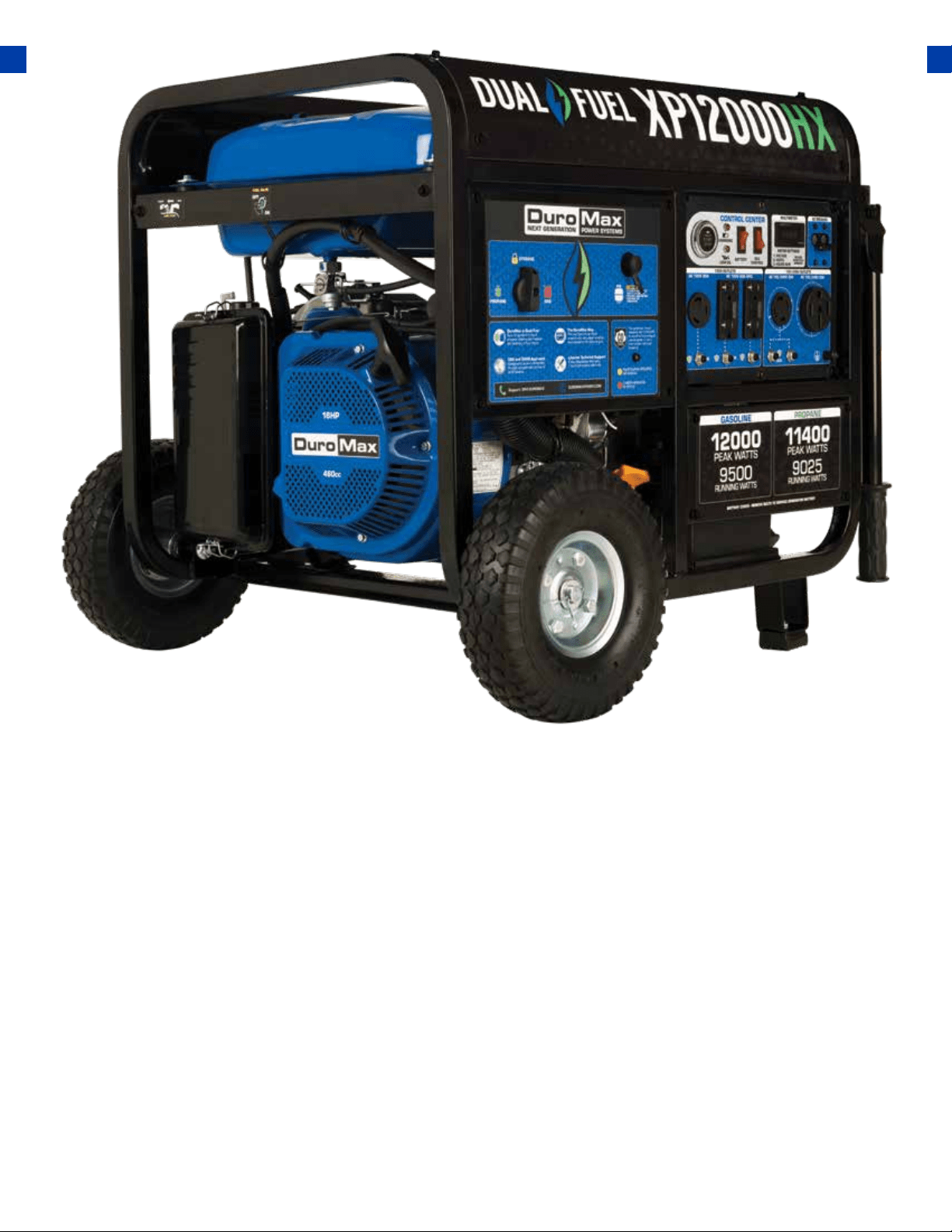
QUICK START
The Quick Start of your generator is the minimum necessary setup that will get you going as soon
as possible. Be sure to read the instructions starting on pg. 25 for full setup instructions.
15
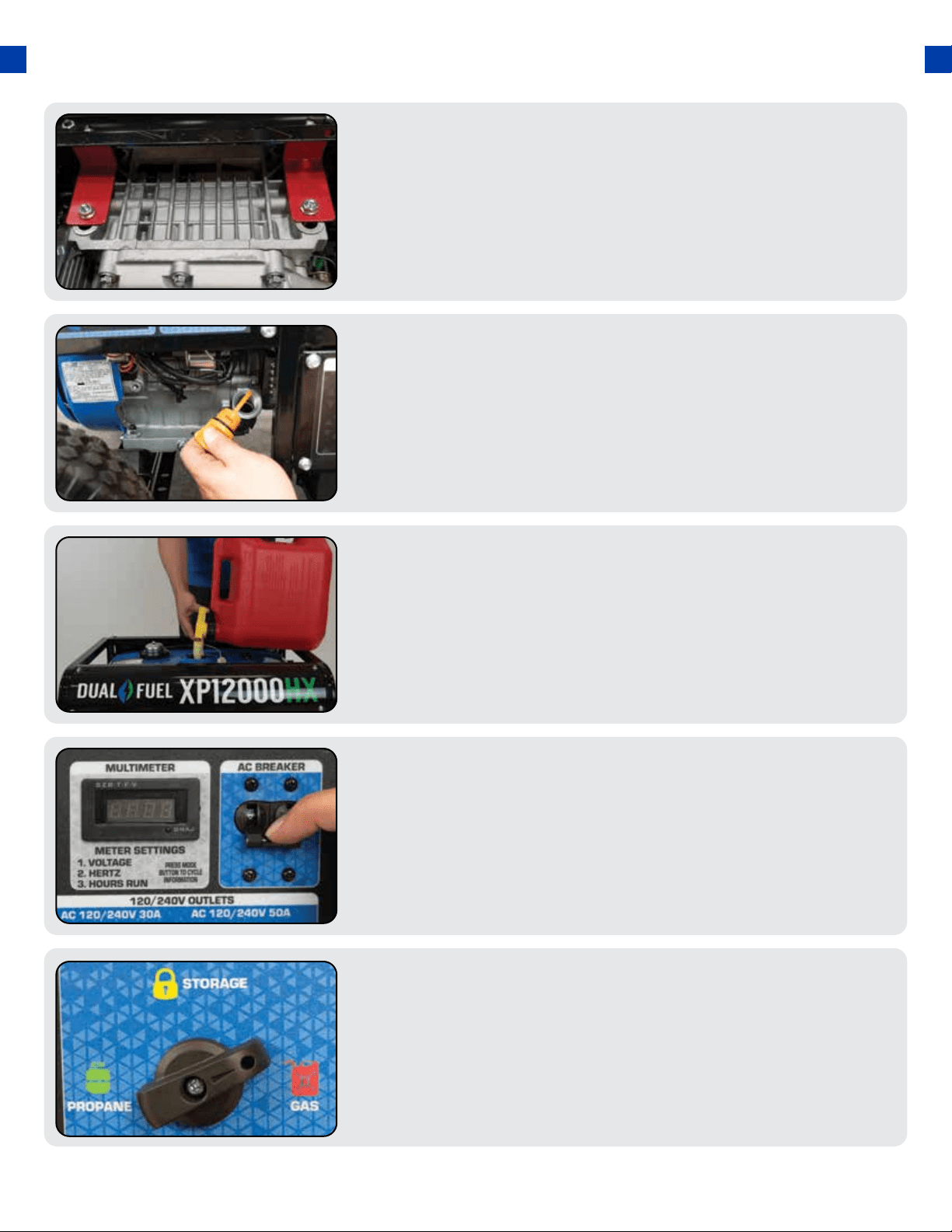
Turn fuel switch to GAS
The fuel switch is located on the left front panel. Rotate
the switch clockwise to the GAS position to turn on the gas
supply.
5.
QUICK START GUIDE (GASOLINE)
Remove shipping braces
The shipping braces prevent engine movement during
shipment. Flip the generator over and remove the brightly
colored brace between the motor and the frame, and the
wood brace under the generator.
1.
Add gasoline
The fuel cap is located on top of the fuel tank. Fill the tank
with fresh unleaded gasoline 87 octane or higher. The tank
is full when you see fuel in the bottom of the fuel lter cup.
DO NOT overll the tank.
3.
Add oil
The oil ll cap is located on the lower engine block to the
right of the recoil start housing. Remove the oil ll cap and
ll with 10w30 oil.
2.
Turn breaker o
The breaker is located on the right side of the front power
panel. Flip the breaker down to prevent accidental load
when starting the generator.
4.
16
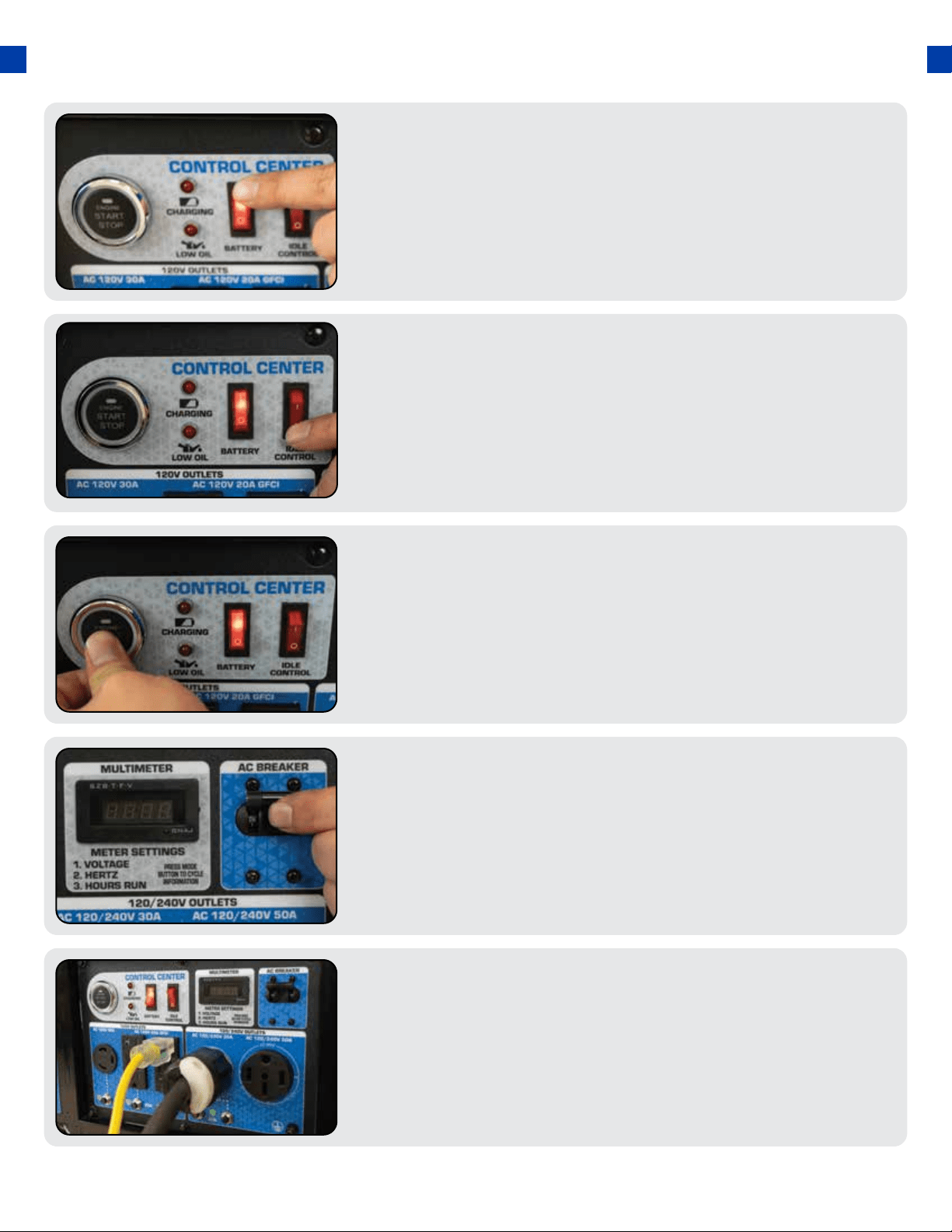
Turn idle control o
The idle control is located on the top center of the main
power panel. Turn the switch OFF to prevent the unit from
trying to idle down before the engine is warmed up.
7.
Turn battery switch on
The battery switch is located on the top center of the main
power panel. Turn the switch ON to allow power to the
push-button start.
6.
Connect devices
Connect your devices to the receptacles on the front panel.
Start with the largest loads rst.
10.
Start generator
The push-button start is located on the left side of the
main power panel. Press the button for 1 second to start
the generator.
8.
Turn breaker on
The breaker is located on the right side of the front power
panel. Flip the breaker up to allow the power to ow to the
receptacles.
9.
17
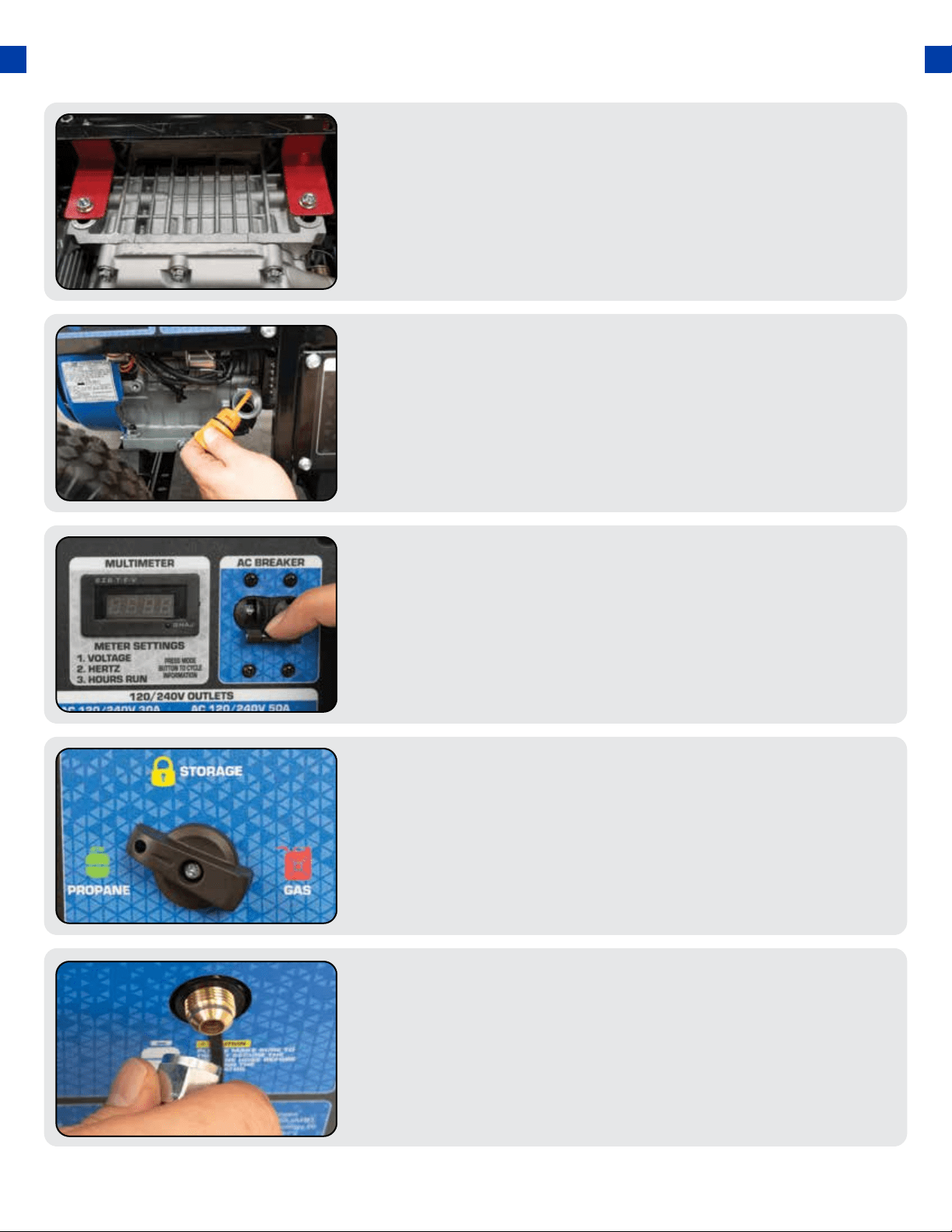
QUICK START GUIDE (PROPANE)
Remove shipping braces
The shipping braces prevent engine movement during
shipment. Flip the generator over and remove the brightly
colored brace between the motor and the frame, and the
wood brace under the generator.
1.
Turn breaker o
The breaker is located on the right side of the front power
panel. Flip the breaker down to prevent accidental load
when starting the generator.
3.
Connect propane hose
The propane inlet is located on the left-hand front panel to
the right of the fuel switch. Securely connect the propane
hose to the inlet.
5.
Turn fuel switch to Propane
The fuel switch is located on the left front panel. Rotate
the switch counter-clockwise to the Propane position to
turn on the fuel supply.
4.
18
Add oil
The oil ll cap is located on the lower engine block to the
right of the recoil start housing. Remove the oil ll cap and
ll with 10w30 oil.
2.
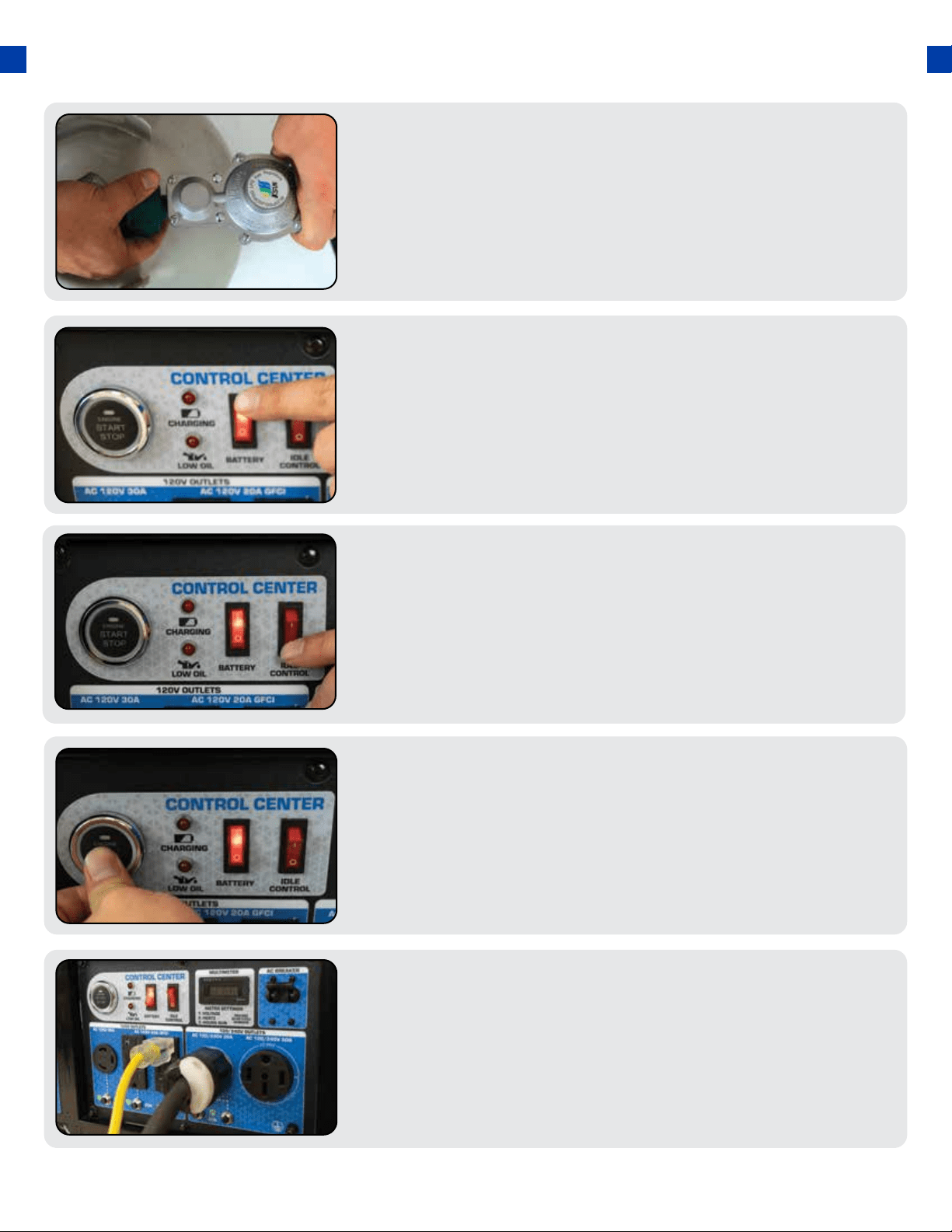
Turn idle control o
The idle control is located on the top center of the main
power panel. Turn the switch OFF to prevent the unit from
trying to idle down before the engine is warmed up.
8.
Connect propane tank
Screw the open ACME nut connection to your propane
tank and turn the tank on.
6.
19
Turn breaker on / connect
The breaker is located on the right side of the front power
panel. Flip the breaker up to allow the power to ow to the
receptacles. Connect your devices to the receptacles on
the front panel. Start with the largest loads rst.
10.
Turn battery switch on
The battery switch is located on the top center of the main
power panel. Turn the switch ON to allow power to the
push-button start.
7.
Start generator
The push-button start is located on the left side of the main
power panel. Press the button for 1 second and release to
start the generator.
9.
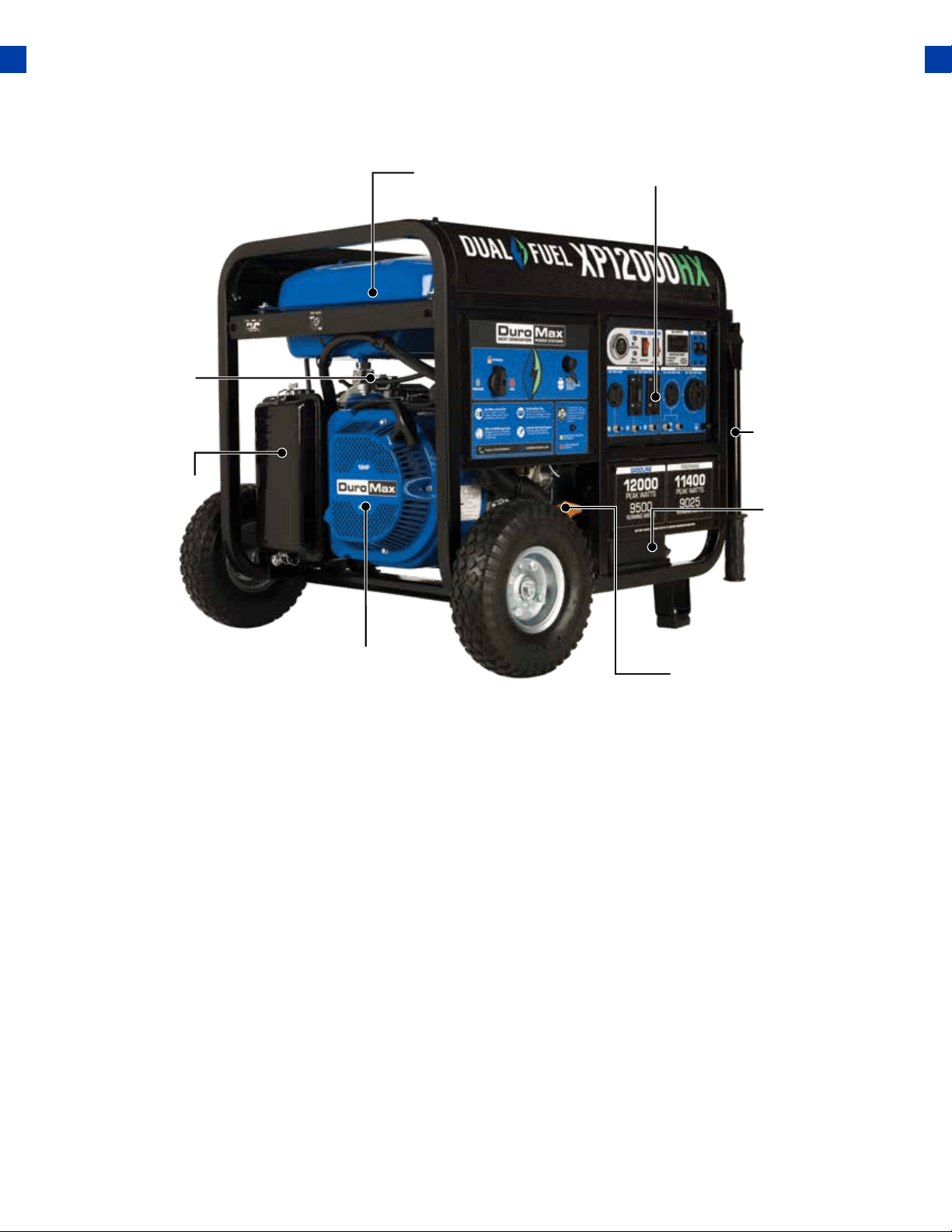
GENERATOR COMPONENTS
4. Fuel Tank
20
2. Air Cleaner
6. Handles
7. Battery
8. Oil Fill and Dipstick
1. Recoil Start
5. Power Panel
3. Fuel Valve
13. Low Oil Alert
21. GFCI 20A Receptacles
1. Recoil Start – Easy Pull Recoil Start to start the engine without the electric start.
2. Air Cleaner - A removable, cleanable, oiled, element that cleans the air going into the engine.
3. Fuel Valve - On/O valve that allows gasoline to the fuel switch.
4. Fuel Tank - All metal 8.3 Gallon gasoline fuel tank.
5. Power Panel - Contains the start switch, plugs, meters, and circuit breakers.
6. Handles - Longest handles of any DuroMax Model allow easy movement across any surface
7. Battery - 12V DC Battery that powers the Electric Start System.
8. Oil Fill and Dipstick - Use to add or check the oil.
9. Fuel Switch - Fuel selection switch to choose Gas, Propane, or Storage mode.
10. Propane Inlet - Provides a regulated LPG Fuel supply to the engine. (Intended for use with an
LPG Source of 3 PSI or more.)
11. Engine Switch – Push Button start switch. Press for 1 second to start the generator. Hold for 3
seconds to stop the generator.
12. Charging Light - Will light when the generator is charging the on-board battery.
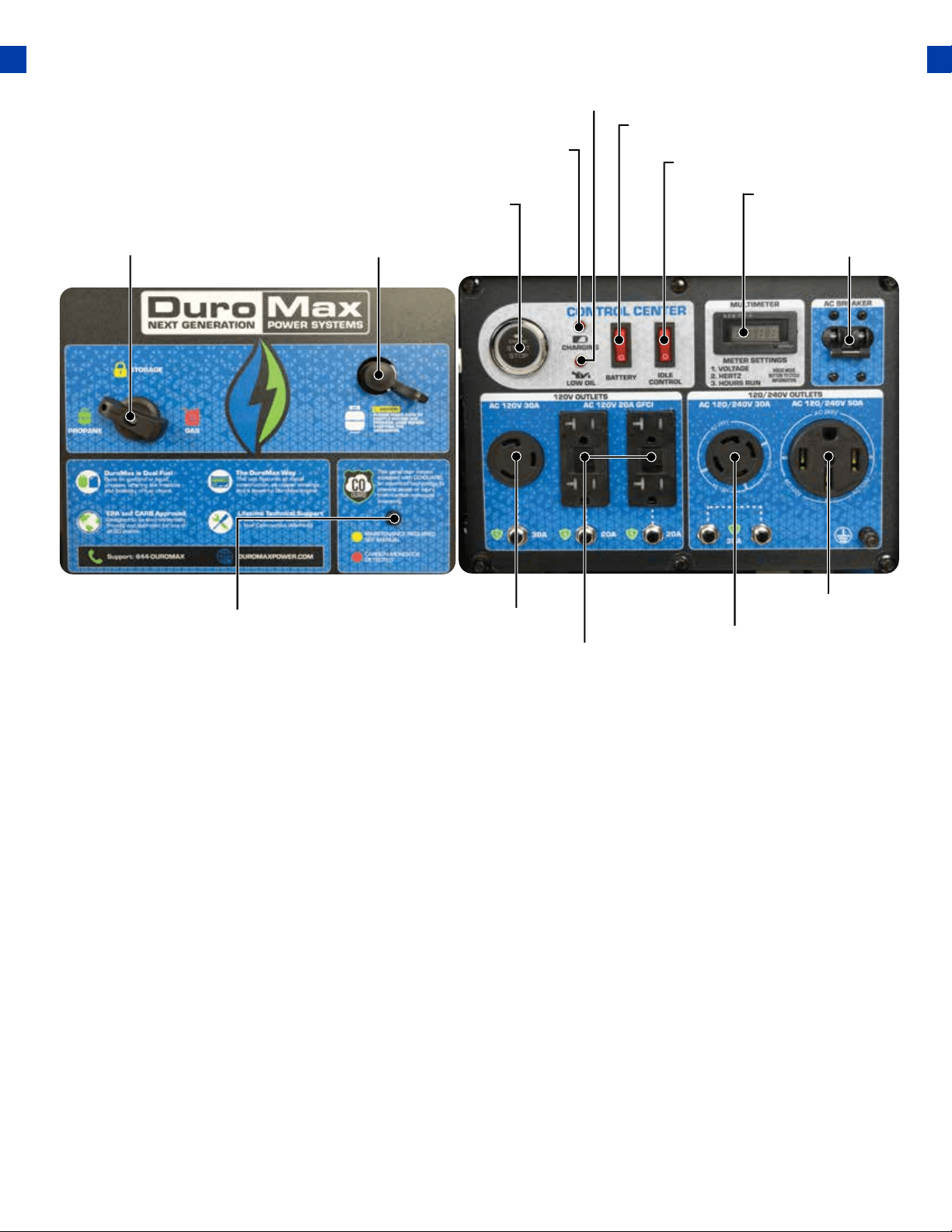
21
9. Fuel Switch
14. Battery Switch
10. Propane Inlet
11. Engine Switch
12. Charging Light
13. Low Oil Alert
15. Idle Control
16. Circuit Breaker
17. Multimeter
19. 50A Receptacle
20. 240v 4-Prong Twist Lock
21. GFCI 20A Receptacles
18. CO Alert 22. 120v 3-Prong Twist Lock
13. Low Oil Alert – Will light only if the generator shuts down due to low oil.
14. Battery Switch – Prevents battery discharge during storage.
15. Idle Control - Slows the engine to save fuel and lower noise when no load.
16. Circuit Breaker - Protects the panel from overload and short circuits.
17. Multimeter – Displays voltage, hertz, and time running.
18. CO Alert - Shuts down the engine in the event of CO buildup.
19. 120/240v 4-Prong Receptacle - Use to connect electrical devices that run 120 or 240 Volt,
60Hz, single-phase, AC current (NEMA 14-50).
20. 120/240v 4-Prong Twist Lock - Use to connect electrical devices that run 120 or 240 Volt, 60Hz,
single-phase, AC current (NEMA L14-30).
21. 120v 3-Prong GFCI Receptacle - Use to connect electrical devices that run 120 Volt, 60Hz,
single-phase, AC current (NEMA 5-20).
22. 120v 3-Prong Twist Lock - Use to connect electrical devices that run 120 Volt, 60 Hz, single-
phase, AC current (L5-30).
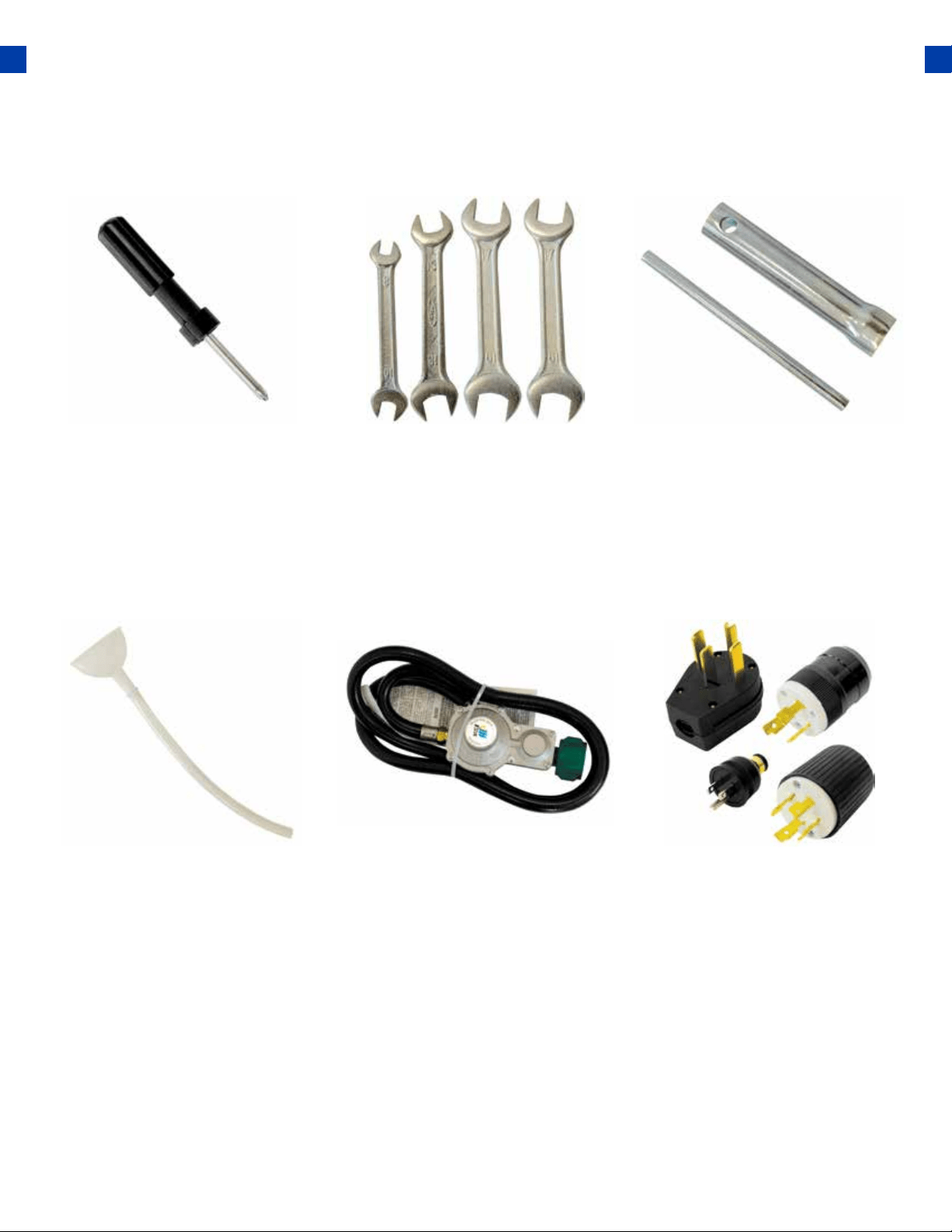
Propane Regulator w/
Hose
Used provide a regulated
propane supply to the propane
inlet.
PACKAGE CONTENTS
Your generator comes with the items listed below. Please check to see that all of the following
items are included with your generator.
● Note: Actual tools may dier in appearance or design from the image shown.
Double-Sided
Screw Driver
Oil Funnel w/ hose
Spanner Spark Plug Wrench
Plug Ends
Phillips and slot blade
screwdriver used for generator
maintenance.
Used to add oil to the
generator without messy spills.
Assorted wrenches used in
generator maintenance and
assembly. 10mm/12mm,
13mm/15mm, and
17mm/19mm.
Used in spark plug
maintenance, inspection, and
installation.
Plug heads for the receptacles
found on the generator are
included to make or rewire
your own cords.
22
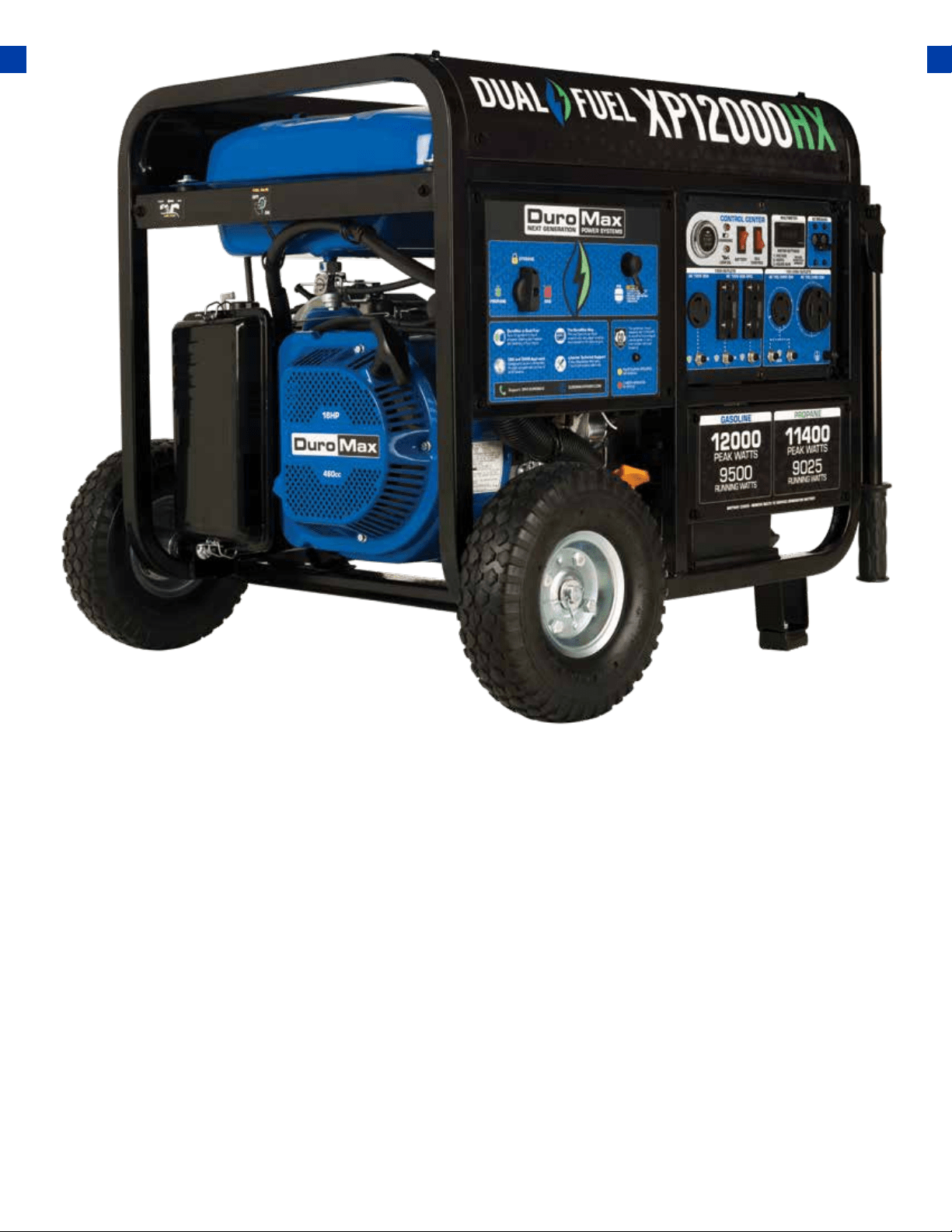
GENERATOR SETUP
Proper setup of your generator will get you going as soon as possible while making sure you and
your equipment are safe and cared for.
23

24
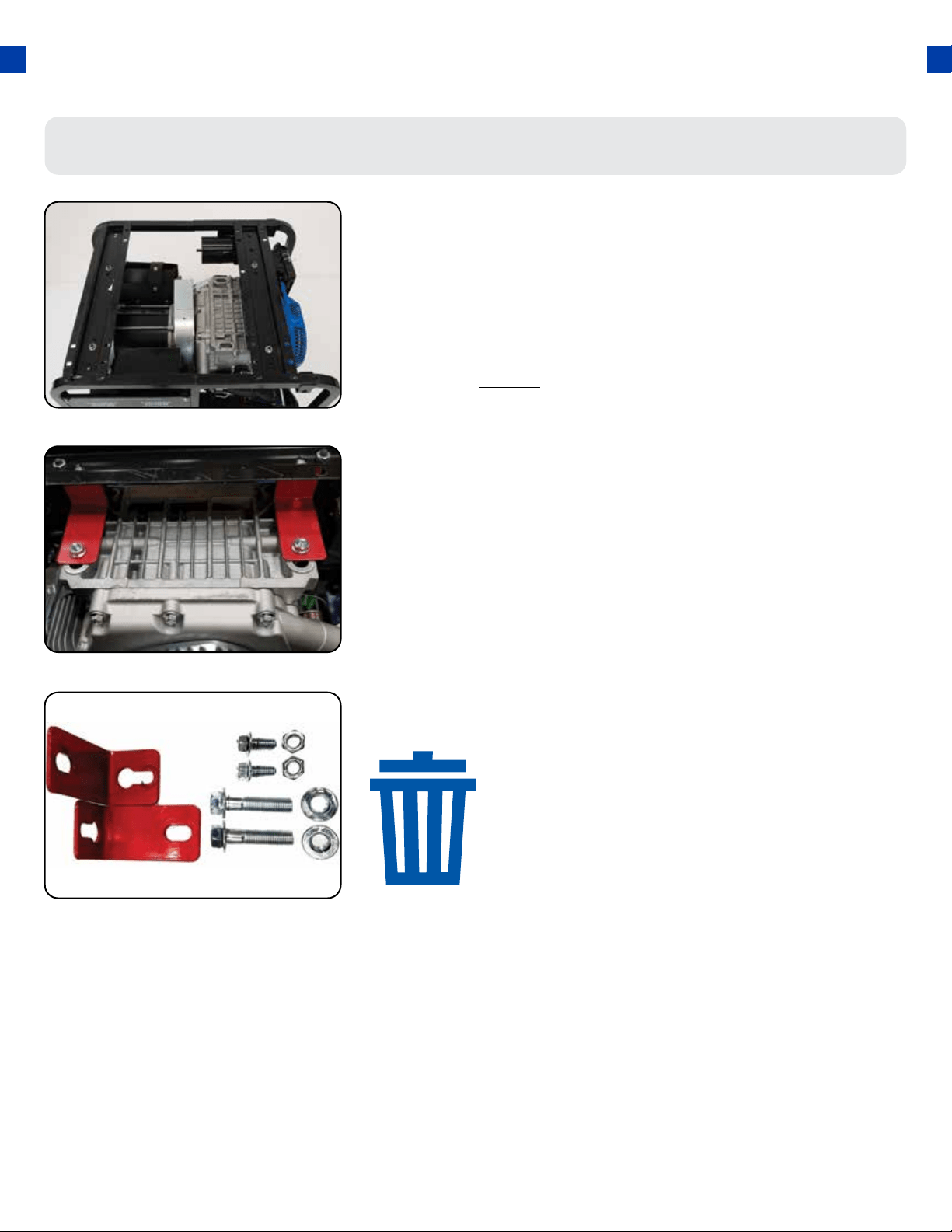
GENERATOR SETUP
Unpack
a. Remove the generator from the box.
b. Place the largest piece of packing foam on a at surface.
c. Flip the generator upside down on the pad.
CAUTION: NEVER Attempt this if you have put fuel or oil in
the generator.
1.
Step 1 - Remove Shipping Braces
Remove braces
The shipping braces prevent engine movement during
shipment. Flip the generator over and remove the brightly
colored braces between the motor and the frame, and the
wood brace under the generator.
2.
25
Note: Shipping braces can be thrown away.
They will not be needed again.
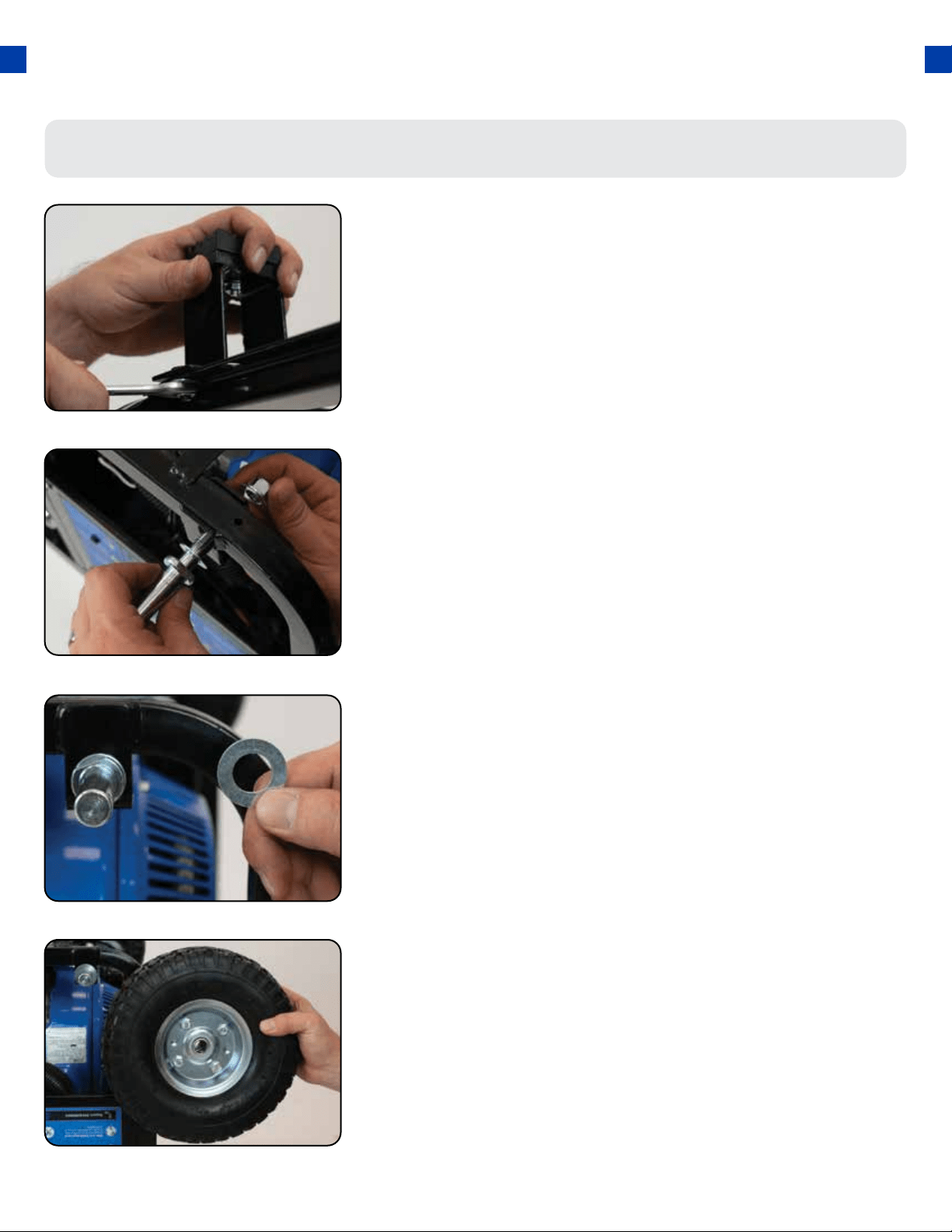
Install support legs
a. Secure the support legs to the frame with the
provided lock nuts.
1.
Step 2 - Wheel Kit Installation (Optional)
Install wheels
a. Place the wheels onto the axles.
4.
Install wheel axles
a. Place the smallest washer onto the wheel axle bolts.
b. Insert wheel axle bolts through the frame and
secure with the provided nut and wrenches
2.
GENERATOR SETUP (CONTINUED)
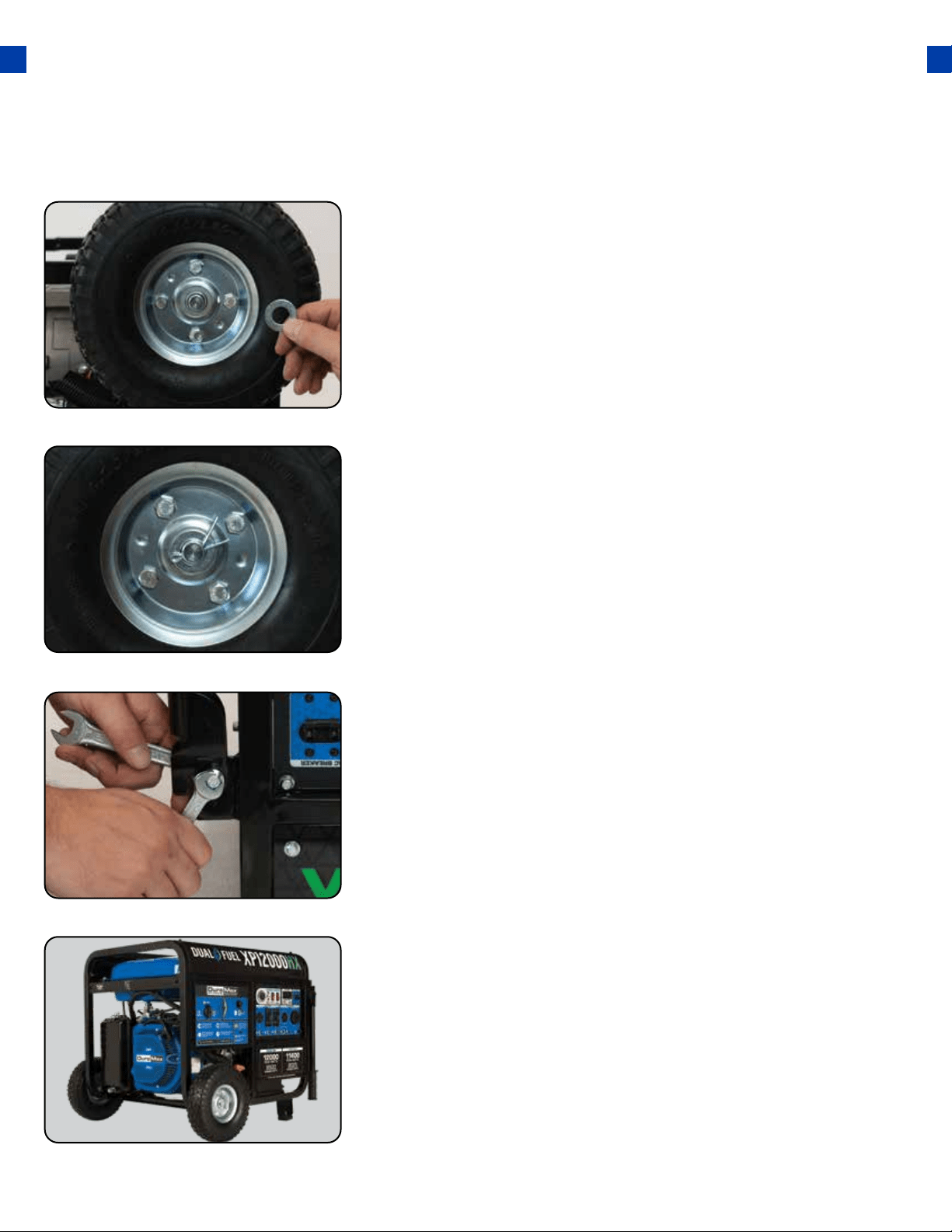
Install inside wheel washers
a. Place one of the large washers onto the axles.
3.
26
27
Install outside wheel washers
a. Place the other large washers onto the axles.
5.
Install handles
a. Attach the handles to the brackets on the frame
using the provided bolts and nuts.
Do not overtighten the handles, it will prevent
free movement.
7.
Install cotter pins
a. Place the cotter pin through the hole at the end of
the axle and bend it out to secure the wheel.
6.
Flip over assembled
a. Flip the assembled generator over onto its wheels
and support brackets.
8.
Step 3 - Connect the Battery
28
GENERATOR SETUP (CONTINUED)
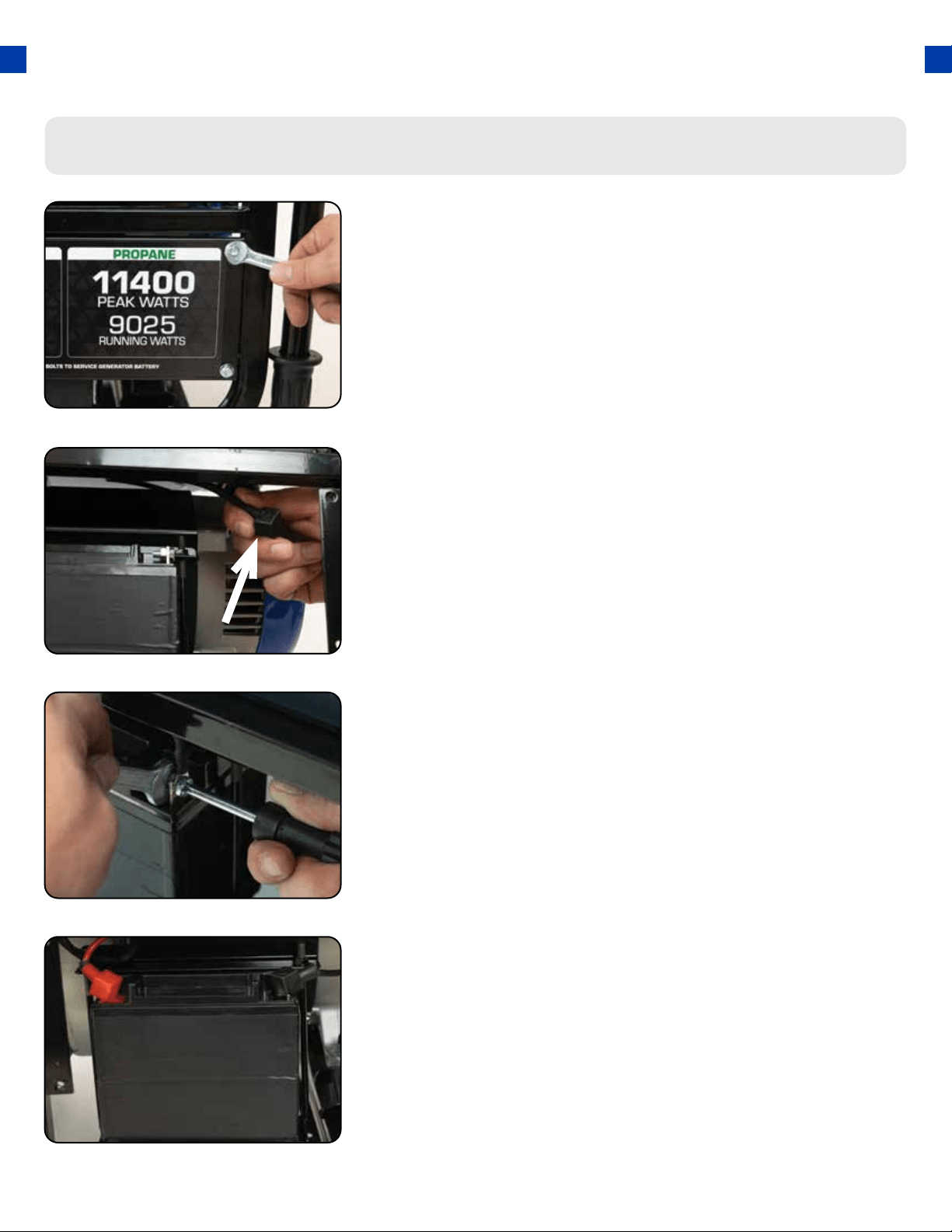
Remove the battery cover
1.
Reinstall the battery plate
a. Cover the connected terminal with the black rubber
boot.
b. Reinstall the battery cover plate using the wrench
from the toolkit.
4.
Locate the negative cable
a. Locate the negative battery cable above and behind
the battery. One side is connected to ground and
the other end needs to be connected to the battery.
b. Route the free end to the negative battery terminal.
2.
Connect the negative cable
a. Push the black rubber boot up the wire to expose
the connector.
b. Securely connect the free end of the battery cable
to the negative battery terminal using the screw
and nut from the battery with the screwdriver and
wrench from the toolkit.
3.
a. Remove the battery cover plate using the wrench
from the toolkit.
29
-20 20 40 60 800 100 F
-30-40 -10 0 10 20
30
-20
40 C
30
10W-30
ENVIRONMENTAL TEMPERATURE
5W-30
SAE
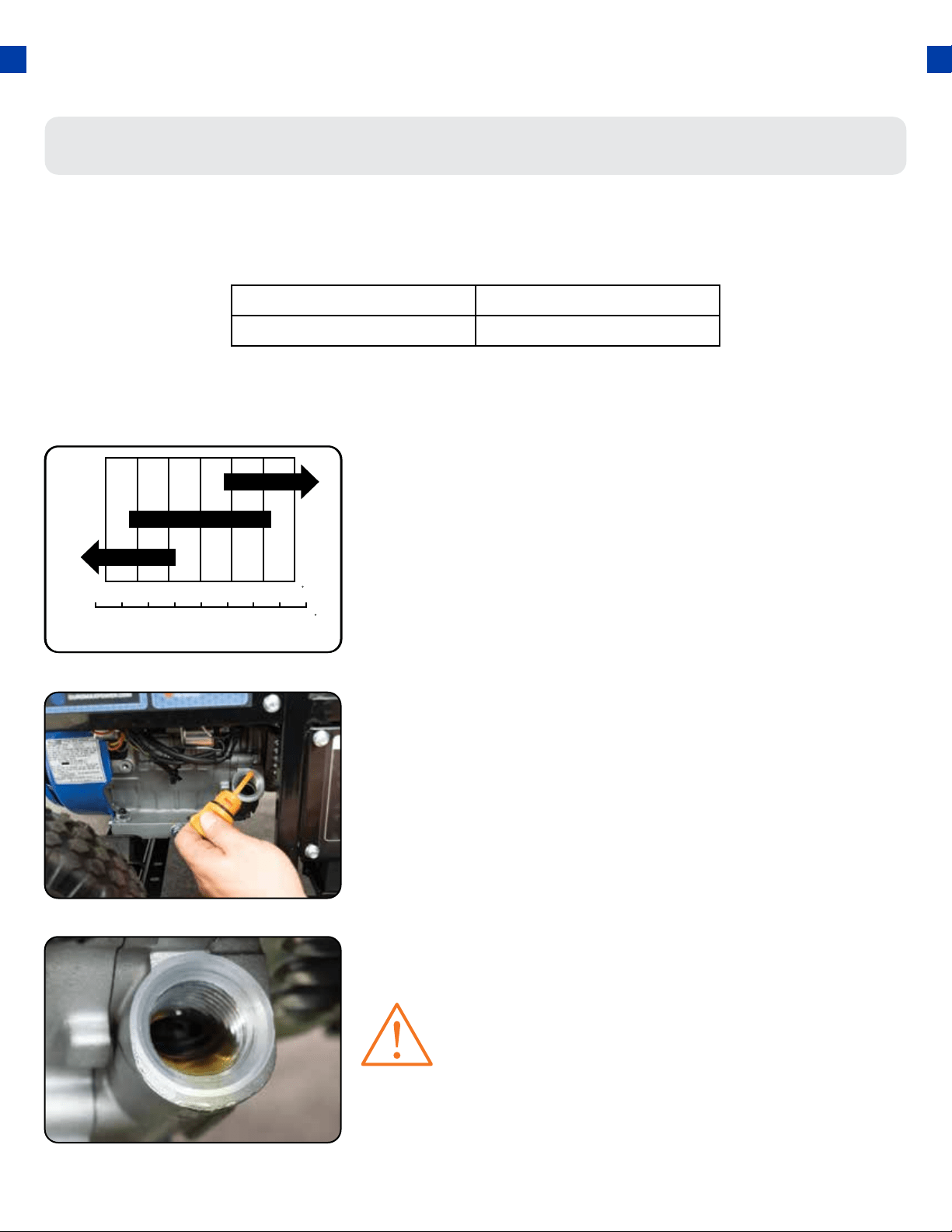
Add oil
The generator requires engine oil to operate properly. The generator, when new from the package,
contains no oil in the crankcase
*
. You must add the proper amount of oil before operating the
generator for the rst time. This amount is equal to the oil capacity of the engine crankcase:
WARNING: Do not apply engine oils with additives or 2-stroke gasoline engine oils. They don’t
have enough lubrication and may shorten the engine’s service life.
a. Make sure the generator is on a level surface.
b. Unscrew the oil ller/dipstick cap from the engine.
c. Using a funnel, add the appropriate amount of oil
into the crankcase. You will know the crankcase is
full when the oil level has reached the lower lip of
the opening you have just poured the oil into.
d. Replace the oil ller cap.
Step 4 - Adding Oil
Engine oil recommended: SAE 10W-30. Viscosity varies with
regions and temperatures. Choose your oil viscosity using the
chart to the left.
* A small amount of oil from factory testing may be present on
arrival.
Model Number XP12000HX
Engine Oil Capacity 37 . oz (1.1L)
WARNING: DO NOT overll the crankcase. This
may damage the motor and shorten the overall
life of your generator.
GENERATOR SETUP (CONTINUED)
30
Step 5 - Adding Gasoline (Optional)
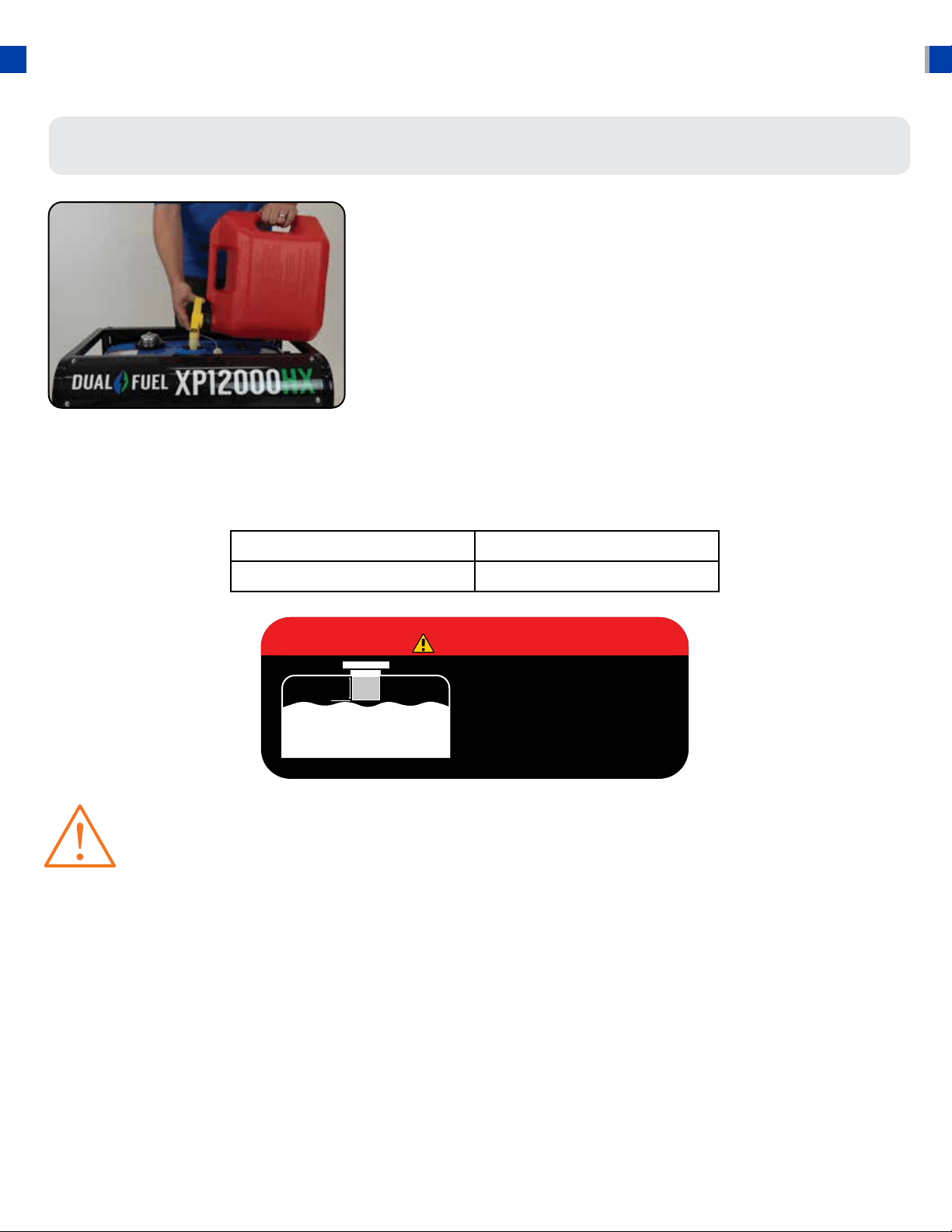
Add Gasoline
a. Make sure the generator is on a level surface.
b. Unscrew gas cap and set aside (NOTE: the gas cap
may be tight and hard to unscrew).
c. Slowly add unleaded gasoline to the fuel tank. Be
careful not to overll. The fuel gauge on the top of
the gas tank indicates how much gasoline is in the
generator gas tank.
d. Replace fuel cap and wipe up any spilled gasoline
with a dry cloth.
IMPORTANT:
● To ensure that the generator runs smoothly use only FRESH, UNLEADED GAS WITH AN
OCTANE RATING OF 87 OR HIGHER.
● Never use an oil/gasoline mixture. Never use old gas.
● Avoid getting dirt or water in the fuel tank.
● Gas can age in the tank and make it hard to start up the generator in the future.
● Never store generator for extended periods of time with fuel in the tank.
Model Number XP12000HX
Gas Tank Capacity 8.3 US Gal. (31L)
DANGER
DO NOT OVERFILL
THE GAS TANK
OVERFILLING CAN RESULT
IN A FIRE, EXPLOSION,
OR DEATH.
1.5”
WARNING: Gas can expand. Do not ll the gas tank to the very top. Leave a
minimum of 1.5 in open space.
Gasoline and gas fumes are highly ammable.
Do not ll the tank near an open ame.
Always check for fuel spills.
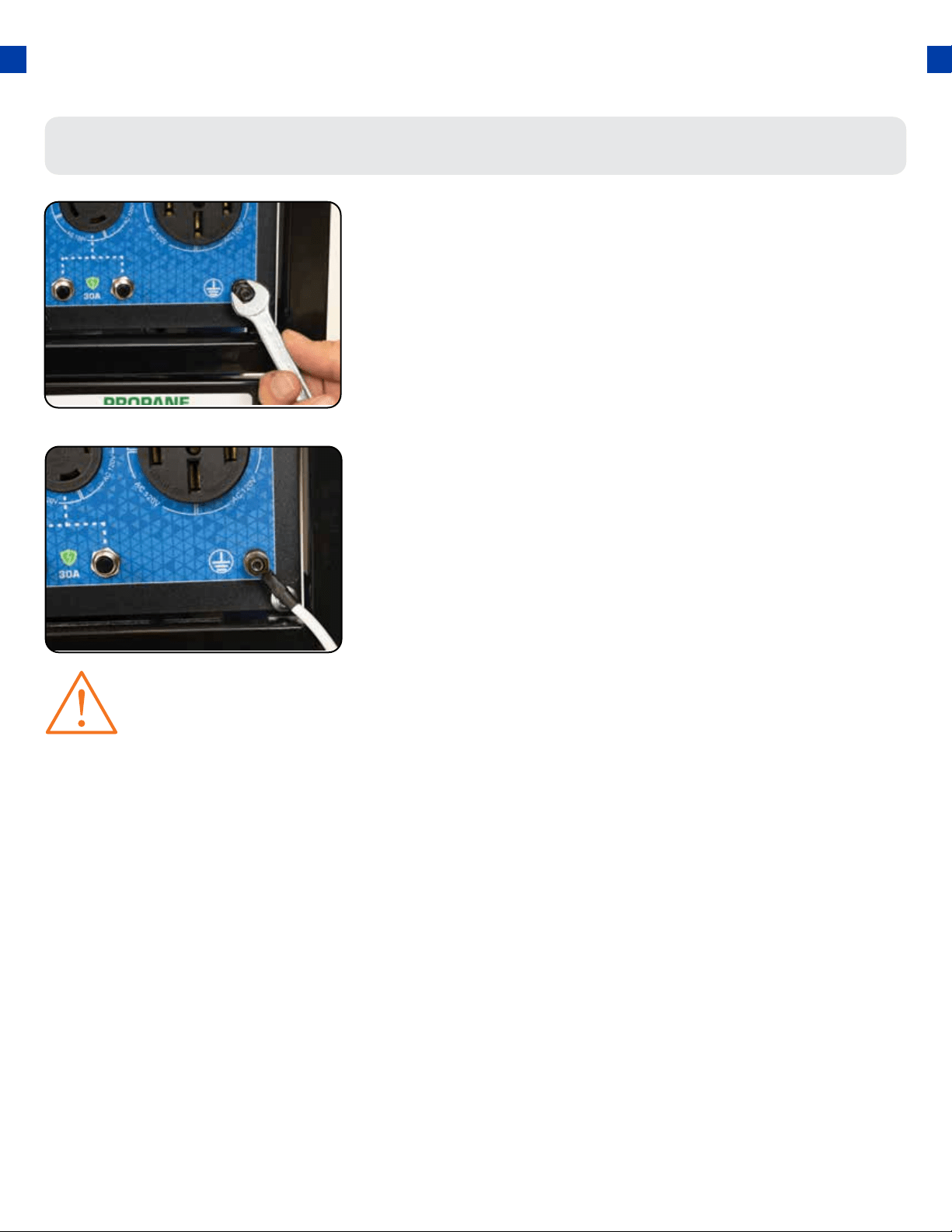
WARNING: Failure to properly ground the generator can result in electrocution.
31
Attach grounding wire
a. Ground the generator by tightening the grounding
nut against a grounding wire.
b. Connect the other end to a copper or brass
grounding rod that’s driven into the earth.
A generally acceptable grounding wire is a No. 12 AWG
(American Wire Gauge) stranded copper wire.
Grounding codes can vary by location. Please contact a local
electrician to check the grounding regulations for your area.
Step 6 - Grounding the Generator
High Altitude Operation
At high altitudes, the standard carburetor air/fuel mixture will be too rich. The performance will decrease,
and fuel consumption will increase. A very rich mixture will also foul the spark plug and cause hard starting.
Operation at an altitude that diers from that at which this engine was certied, for extended periods of
time, may increase emissions. High altitude performance can be improved by specic modications to the
carburetor. If you always operate your generator at altitudes above 3,000 feet (900 meters), have a dealer
perform this carburetor modication. This engine, when operated at high altitude with the carburetor
modications for high altitude use, will meet each emission standard throughout its useful life. Even with
carburetor modication, engine horsepower will decrease by about 3.5% for each 1,000-foot (300-meter)
increase in altitude. The eect of altitude on horsepower will be greater than this if no carburetor
modication is made.
When the carburetor has been modied for high altitude operation, the air/fuel mixture will be too lean
for low altitude use. Operation at altitudes below 3,000 feet (900 meters) with a modied carburetor may
cause the engine to overheat and result in serious engine damage.

32
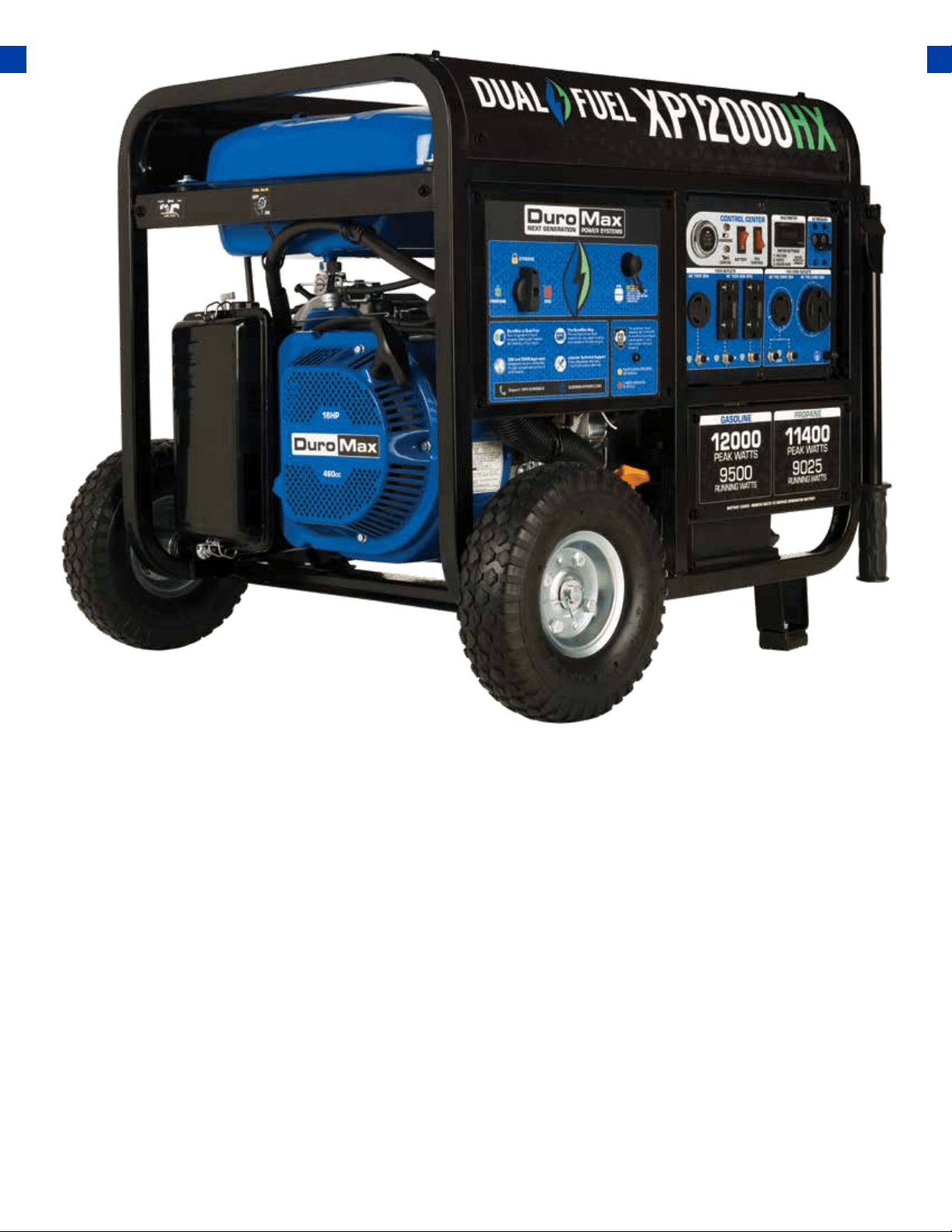
33
STARTING THE GENERATOR
If this is not your rst time using the generator there are still steps you should take to prepare it for
operation each time you use it.
IMPORTANT: At this point, you should be familiar with the procedures described in the rst
portion of this section entitled “GENERATOR SETUP” If you have not yet read this section, go
back and read it now.
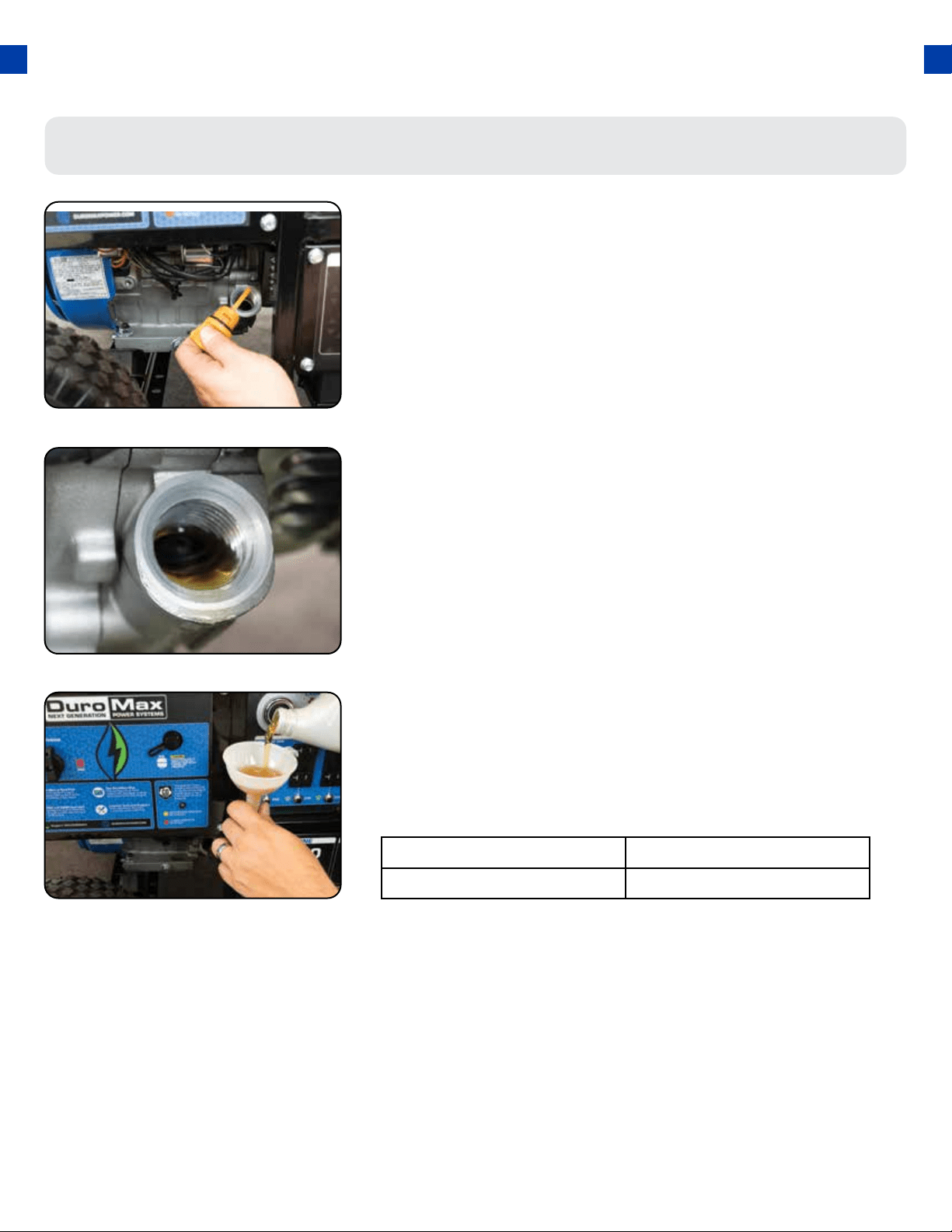
Step 1 - Check the oil
Check the oil
The generator is equipped with an automatic shuto to
protect it from damage due to low oil. Nonetheless, you
should check the oil level of the engine before each use to
ensure that the engine crankcase has a sucient amount.
To check the oil level:
a. Make sure the generator is on a level surface.
b. Unscrew the oil ller/dipstick cap.
c. With a dry cloth, wipe the oil o of the stick on the
inside of the cap.
d. Insert the dipstick as if you were replacing the
cap and then remove it again. There should now be
oil on the stick. If there is no oil on the stick, or oil
only at the very end of the stick, you should add
oil until the engine crankcase is lled (see “Adding
Oil” portion of the “Maintenance” section).
e. Be sure to replace the cap when nished checking
oil.
34
BEFORE YOU START YOUR GENERATOR
Model Number XP12000HX
Engine Oil Capacity 37 . oz (1.1L)
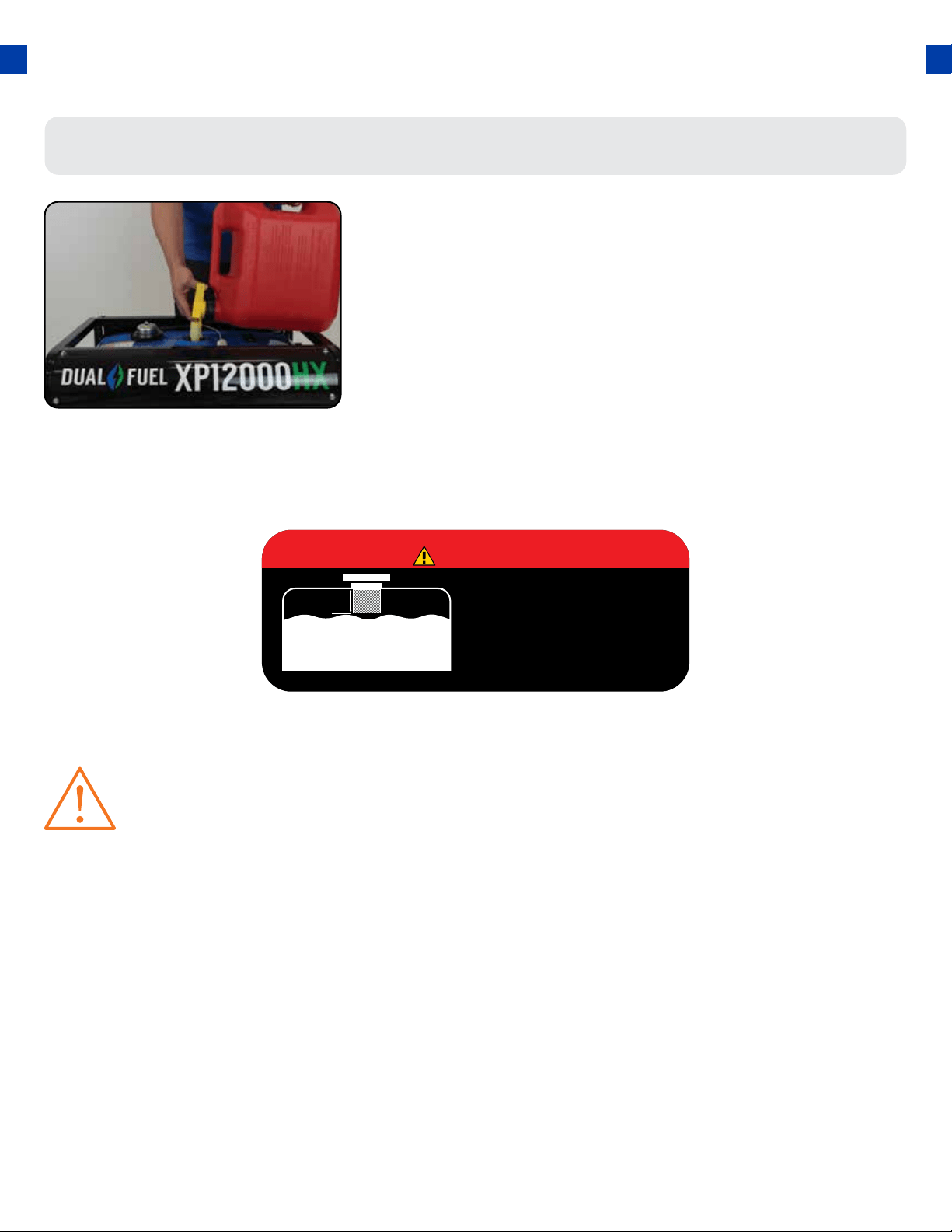
35
Check fuel level
If running the engine on gasoline check to see that there is
sucient gasoline in the fuel tank. The fuel gauge on top of
the tank will give a rough estimate of the gasoline level. The
gauge will appear white then ll red as the tank is lled.
Note: Fuel gauge may not register with less than 1/3
fuel tank full.
Step 2 - Check the gas level (Optional)
DANGER
DO NOT OVERFILL
THE GAS TANK
OVERFILLING CAN RESULT
IN A FIRE, EXPLOSION,
OR DEATH.
1.5”
WARNING: Gasoline and gasoline fumes are highly ammable.
● Do not ll the tank near an open ame.
● Always allow the engine to cool for several minutes before refueling.
● DO NOT overll the fuel tank. Fuel expands when shaken or heated. ALWAY leave 1
1
/
2
“
space or more at the top of the tank.
● ALWAYS use fresh fuel or stabilized fuel. Old gasoline (older than 30 days) can cause
permanent damage to the fuel system.
● Always check for fuel spills.
STARTING THE GENERATOR
36
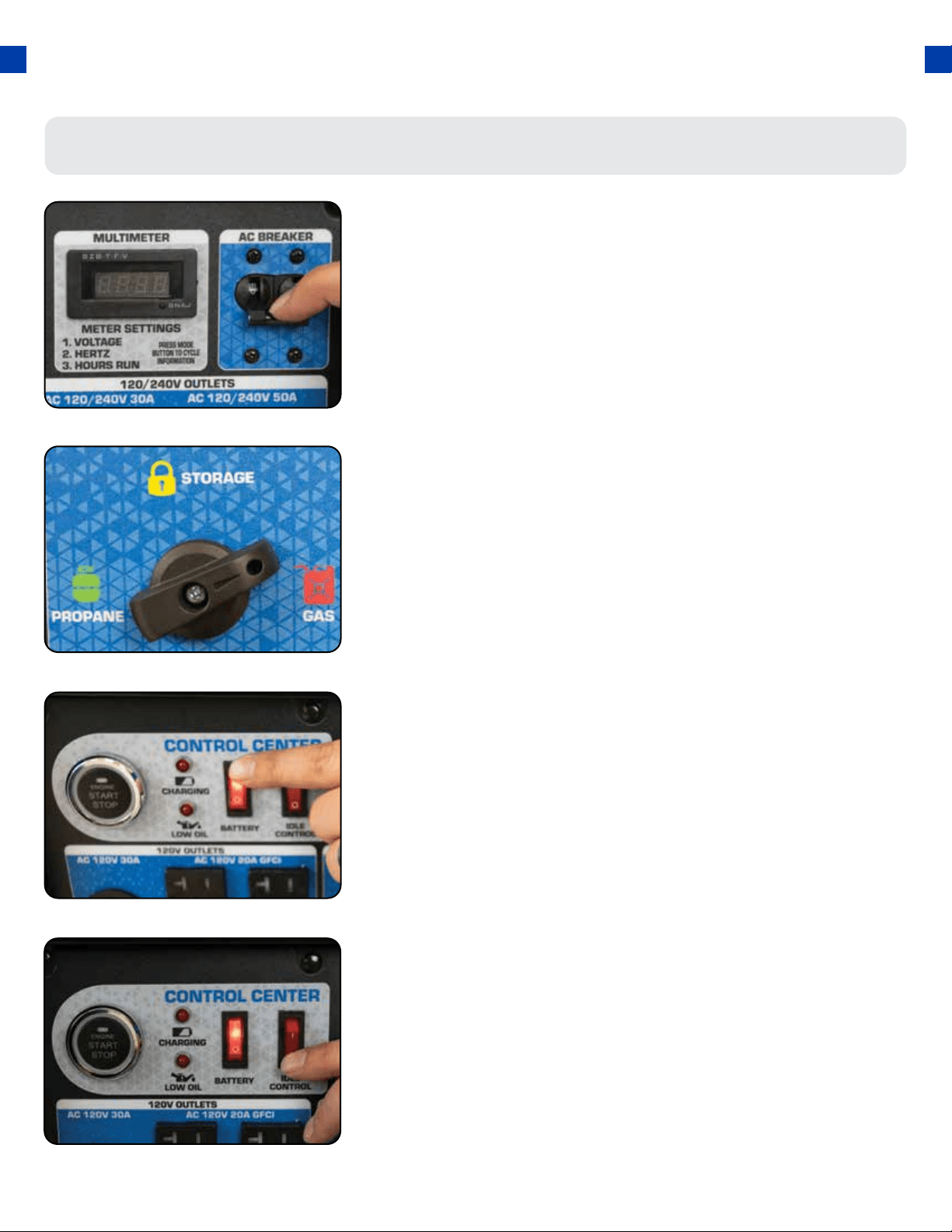
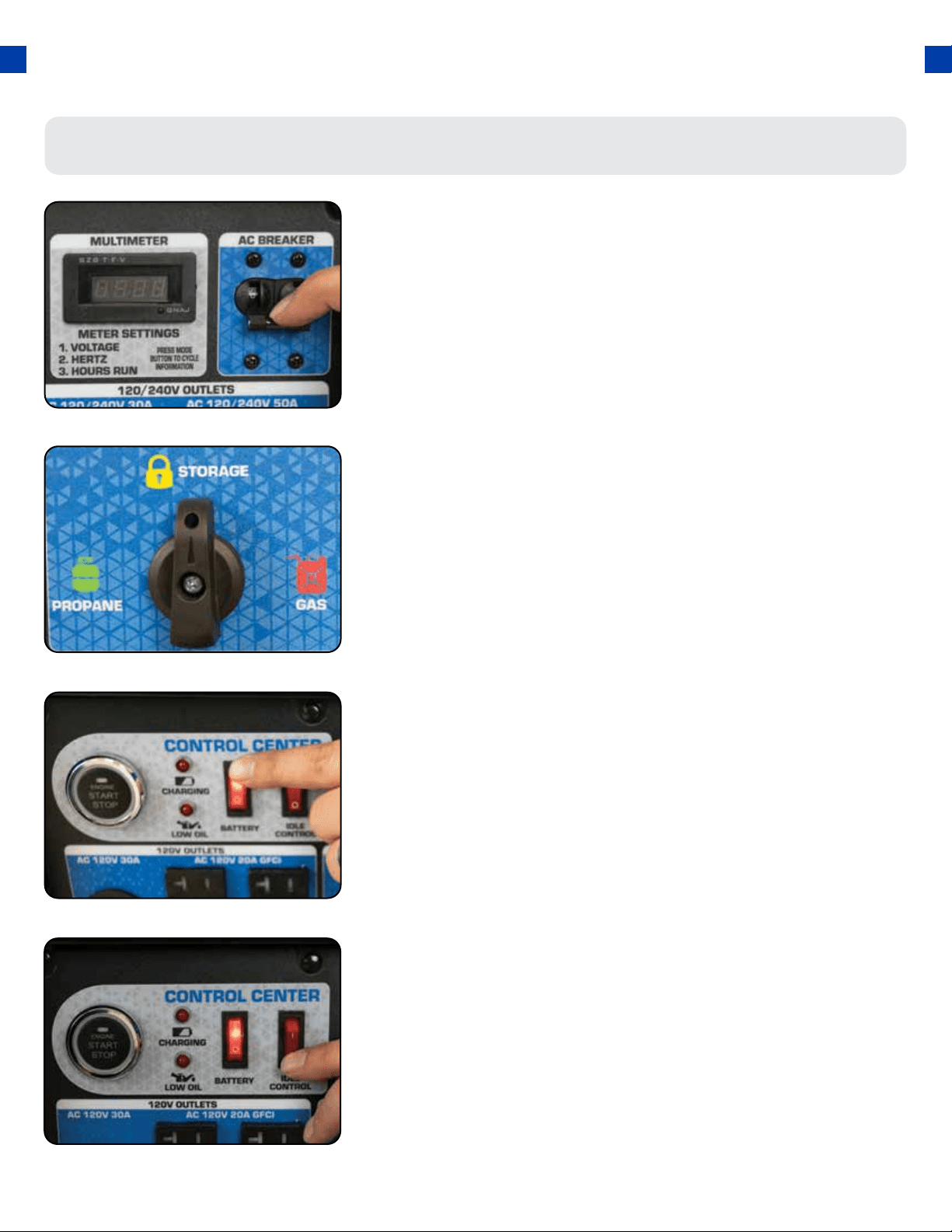
Turn breaker OFF
The breaker is located on the right side of the front power
panel. Flip the breaker down to prevent accidental load
when starting the generator.
1.
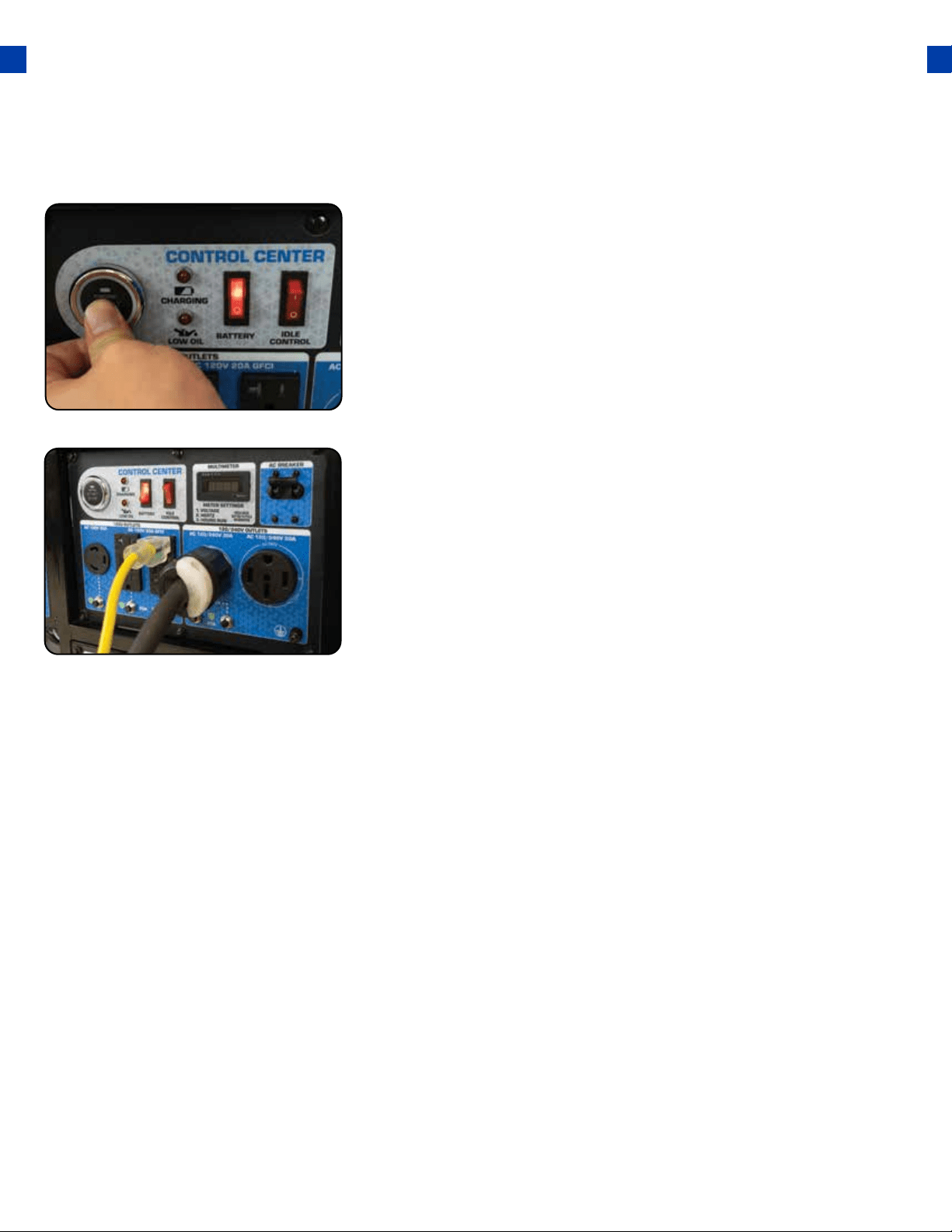
Turn fuel switch to GAS
Turn battery switch ON
The fuel switch is located on the left front panel. Rotate
the switch clockwise to the GAS position to turn on the gas
supply.
The battery switch is located on the top center of the main
power panel. Turn the switch ON to allow power to the
push-button start.
2.
4.
Turn idle control OFF
The idle control is located on the top center of the main
power panel. Turn the switch OFF to prevent the unit from
trying to idle down before the engine is warmed up.
3.
Starting the Generator Using Gasoline
37
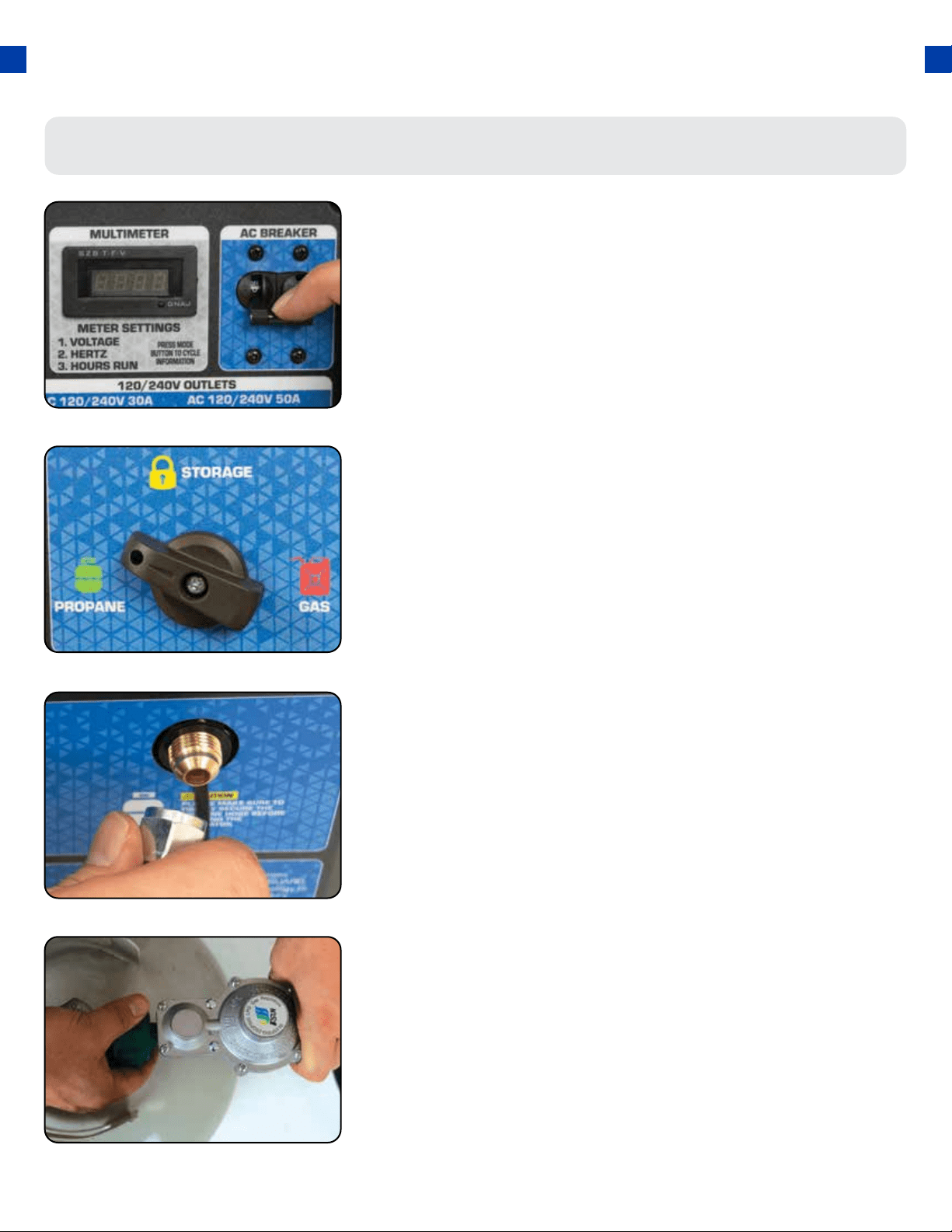
Start the Generator
The push-button start is located on the left side of the main
power panel. Press the button for 1 second and release to
start the generator.
5.
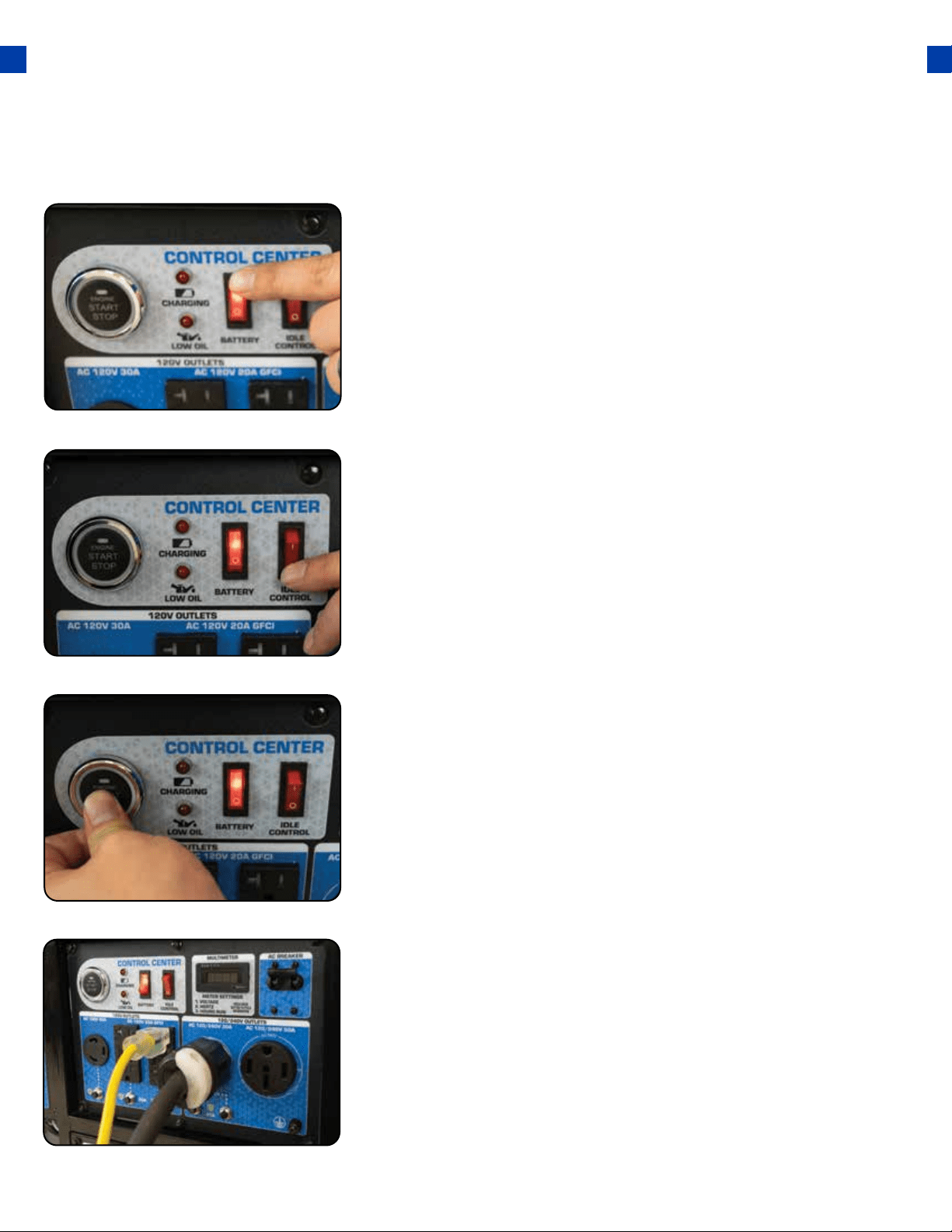
Turn breaker ON / Connect
The breaker is located on the right side of the front power
panel. Flip the breaker up to allow the power to ow to the
receptacles. Connect your devices to the receptacles on the
front panel. Start with the largest loads rst.
6.
STARTING THE GENERATOR (CONTINUED)
Starting the Generator Using Propane
38
Turn breaker o
The breaker is located on the right side of the front power
panel. Flip the breaker down to prevent accidental load
when starting the generator.
1.
Turn fuel switch to Propane
Connect propane hose
Connect propane tank
The fuel switch is located on the left front panel. Rotate the
switch counter-clockwise to the Propane position to turn on
the fuel supply.
The propane inlet is located on the left-hand front panel to
the right of the fuel switch. Securely connect the propane
hose to the inlet.
Screw the open ACME nut connection to your propane tank
and turn the tank on.
2.
3.
4.
39
Turn battery switch ON
The battery switch is located on the top center of the main
power panel. Turn the switch ON to allow power to the
push-button start.
6.
Turn idle control OFF
The idle control is located on the top center of the main
power panel. Turn the switch OFF to prevent the unit from
trying to idle down before the engine is warmed up.
5.
Start the Generator
The push-button start is located on the left side of the main
power panel. Press the button for 1 second and release to
start the generator.
7.
Turn breaker ON / Connect
The breaker is located on the right side of the front power
panel. Flip the breaker up to allow the power to ow to the
receptacles. Connect your devices to the receptacles on the
front panel. Start with the largest loads rst.
8.

STARTING THE GENERATOR (CONTINUED)
Starting the Generator Using Propane
40
WARNING: WHEN USING THE GENERATOR WITH LPG, MAKE SURE THERE IS NO
POSSIBLE IGNITION SOURCE CLOSE TO THE GENERATOR.
1. Before using, make sure all of the LPG connectors and hoses are well connected and
sealed.
2. Connect electrical devices to the generator ONLY after the engine runs smoothly.
(There may be remnant gasoline in the carburetor; this can cause unsteady engine
performance for several minutes)
3. If the propane gas leaks, shut o the LPG supply rst and then quickly unplug or turn
o any electrical devices powered by the unit.
4. When stopping the engine, unplug or turn o any electrical devices, turn o the Main
Circuit Breaker and then turn o the LPG Supply. After the engine has stopped turn
the Battery Switch to the “OFF” position.
CAUTION: Start Button will not operate if the fuel switch is set to storage.
CAUTION: Disconnect all electrical loads from the generator before attempting to
start!
WARNING: Operating the starter motor for more than 5 seconds can damage the
motor. If the engine fails to start, wait 10 seconds before operating the starter
again.

41
STARTING THE GENERATOR (CONTINUED)
Shut breaker o
The breaker is located on the right side of the front power
panel. Flip the breaker down to prevent accidental load
when starting the generator.
1.
Starting the Generator Using Recoil Start
Select your fuel.
If using gasoline, see step 2 on pg. 36. If using propane see
steps 2 - 4 on pg. 38.
2.
42
Turn battery switch ON
The battery switch is located on the top center of the main
power panel. Turn the switch ON to allow power to the
push-button start.
4.
Turn idle control OFF
The idle control is located on the top center of the main
power panel. Turn the switch OFF to prevent the unit from
trying to idle down before the engine is warmed up.
3.

43
Pull the recoil start
The recoil start is located on the left side panel next to the air
lter. Pull the recoil handle slowly until resistance is felt, then
quickly pull the recoil handle until fully extended.
6.
Open choke
After the engine has started, push the choke to the OPEN
position as the engine warms up.
7.
Turn breaker ON / Connect
The breaker is located on the right side of the front power
panel. Flip the breaker up to allow the power to ow to the
receptacles. Connect your devices to the receptacles on the
front panel. Start with the largest loads rst.
8.
Close choke
The choke lever is located above the air lter to the left of
the recoil start. Slide the lever to the left to cut the air supply
and allow more gas into the engine to start.
5.
CAUTION: Release the recoil handle only after the cord
has retracted. Releasing the recoil handle while extended
may cause harm to yourself or your equipment.

44
USING THE GENERATOR
If this is not your rst time using the generator, there are still steps you should take to prepare it
for operation each time you use it.
IMPORTANT: At this point, you should be familiar with the procedures described in the rst
portion of this section entitled “GENERATOR SETUP”; if you have not yet read this section, go
back and read it now.
45

USING THE GENERATOR
AC Usage
The total running wattage requirement of the electrical devices connected to the generator should
not exceed the rated wattage of the generator itself. To calculate the total wattage requirement of
the electrical devices you wish to connect, nd the rated (or running) wattage of each device. This
number should be listed somewhere on the device or in its instruction manual.
If you cannot nd this wattage, you may calculate it by multiplying the Voltage requirement by the
Amperage drawn: Watts = Volts x Amps. If these specications are not available, you may estimate
the Watts required by your device by using the chart on the next page.
Once you have found the rated wattage requirement of each electrical device, add these numbers
to nd the total rated wattage you wish to draw from the generator. If this number exceeds
the rated wattage of the generator, DO NOT connect all these devices. Select a combination of
electrical devices, which has a total rated wattage lower than or equal to the rated wattage of the
generator.
Fuel Source Rated (Running Wattage) Surge (Peak) Wattage
Gasoline 9500 12000
Propane 9025 12350
46
● You may connect electrical devices running on AC current according to their wattage
requirements.
● The chart below shows the rated and surge wattage of your generator according to its model
number.
● The rated wattage corresponds to the maximum wattage the generator can output on a
continuous basis.
● The surge wattage corresponds to the maximum amount of power the generator can output for
a short period of time. Many electrical devices such as refrigerators require short bursts of extra
power, in addition to the rated wattage listed by the device, to stop and start their motors. The
surge wattage ability of the generator covers this extra power requirement.

47
Tool or Appliance Rated (Running) Watts Additional Surge Watts
Electric water heater (40 gal) 4000 0
Hot plate 2500 0
Radial arm saw 2000 2000
Electric Stove 1500 0
Circular Saw 1500 1500
Air compressor (1 HP) 1500 3000
Window air conditioner 1200 1800
Miter saw 1200 1800
Microwave 1000 2000
Well water pump 1000 1500
Reciprocating saw 960 1040
Sump pump 800 1200
Refrigerator freezer 800 1200
Furnace blower 800 1300
Computer 800 0
Electric drill 600 900
Television 500 0
Deep freezer 500 800
Garage door opener 480 600
Stereo 400 0
Box fan 300 600
Clock radio 300 0
Security system 180 0
DVD Player 100 0
Common light bulb 75 0
CAUTION: The generator can only run at its surge wattage capacity for a very short time.
Connect only electrical devices requiring a rated (running) wattage equal to or less than
the rated wattage of the generator. Never connect devices requiring a rated wattage
equal to the surge wattage of the generator.
NOTE: The above wattage gures are estimates only.
Try to check the wattage listed on your electrical devices before consulting this chart.
USING THE GENERATOR (CONTINUED)
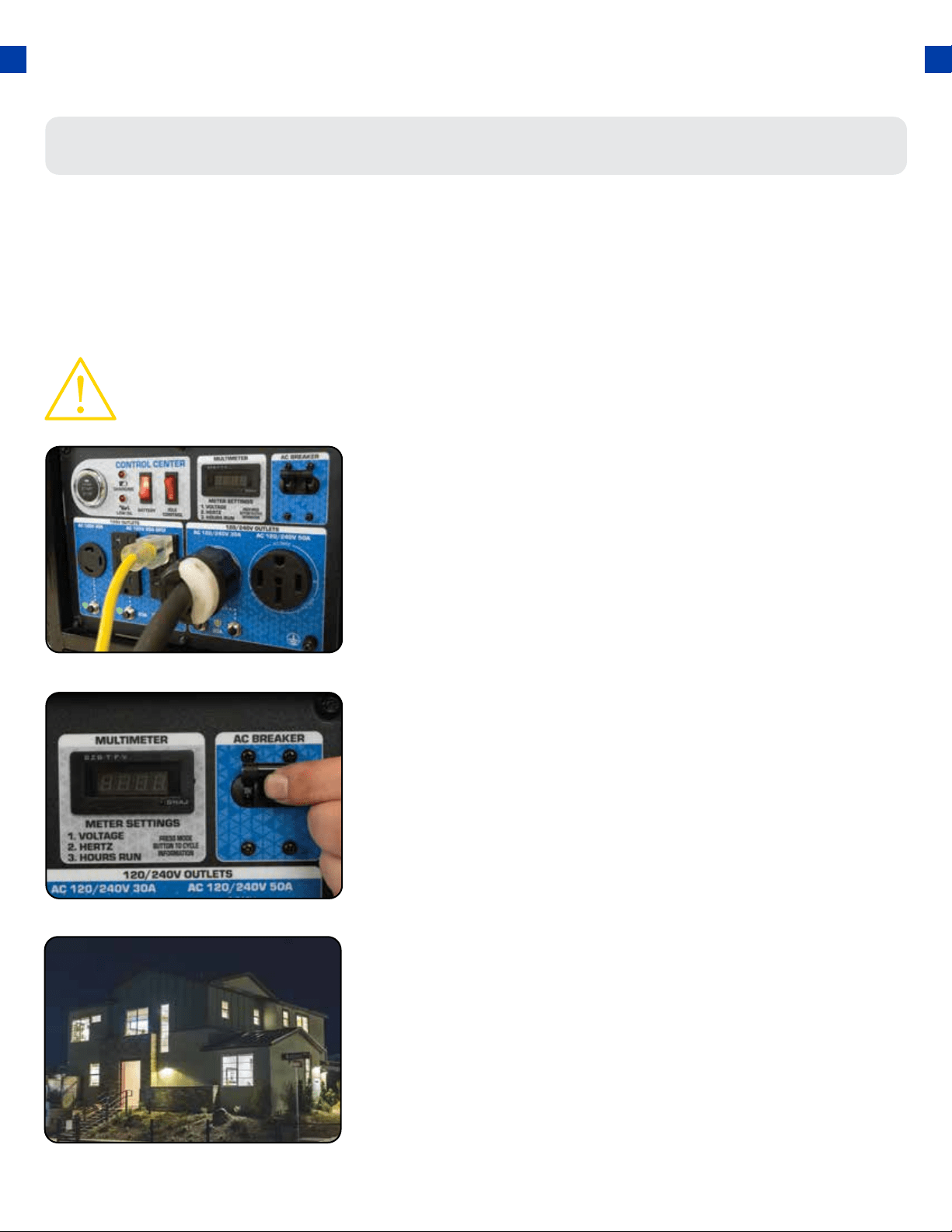
Connecting a load to the generator
NOTE: Be sure to attach devices to the correct receptacle (outlet).
● 120v devices can be directly connected to the 120v ONLY receptacles.
● 120v devices can be connected to the 120/240v receptacle using an appropriate adapter.
● 240v devices can ONLY be connected to the 240v receptacle.
Plug in devices
Turn breaker on
Turn on connected devices
Plug in devices to the appropriate receptacle. When using
the generator balance the load as closely as possible. Placing
more load on one side of the circuit will reduce the breaker
trip period.
Flip the circuit breaker up to the on position to allow power to
the receptacles.
Start or turn on appliances starting with the biggest loads
rst.
1.
2.
3.
48
CAUTION: Do not connect 50Hz or 3-phase loads to the generator.
49
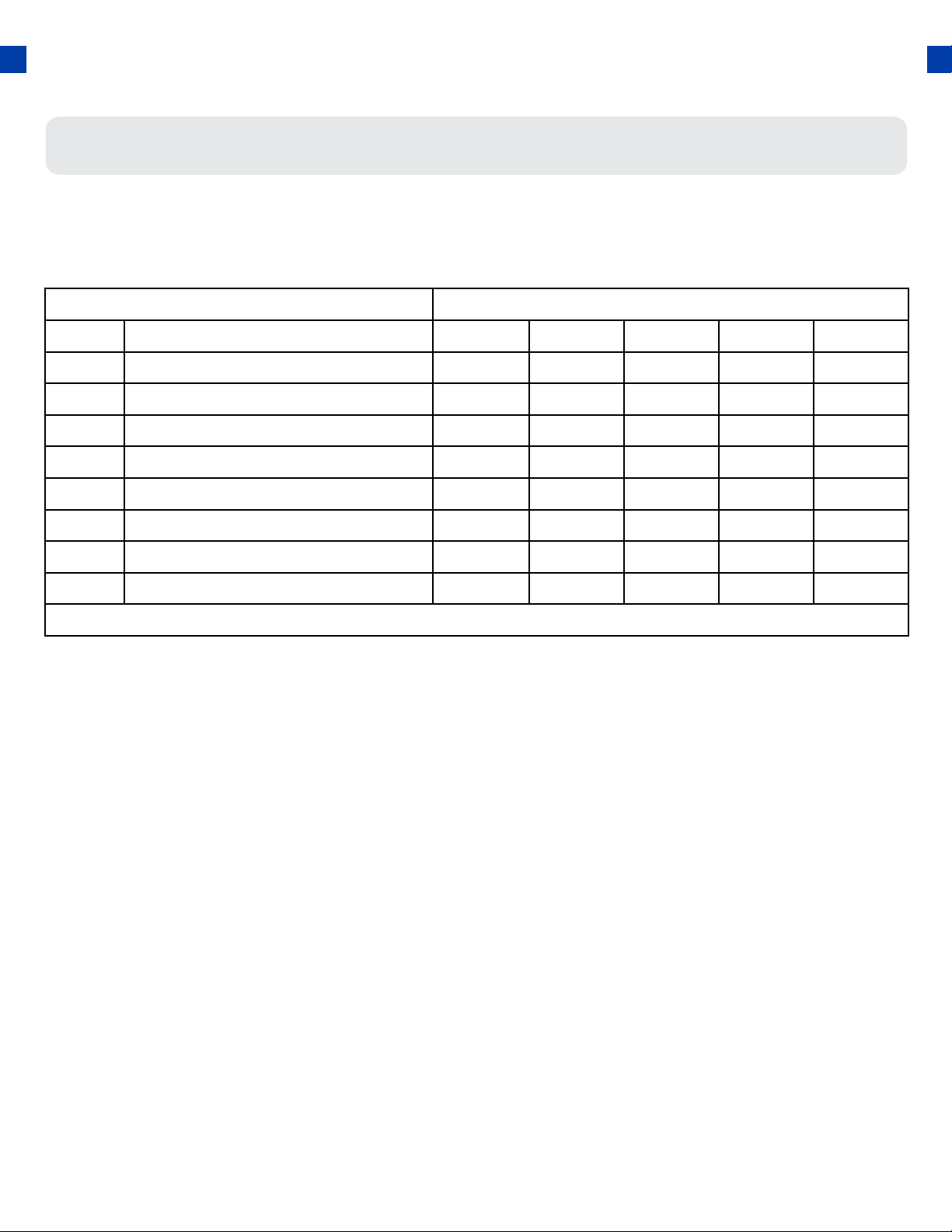
Choosing the right power cord
Long or thin cords can drain the power provided to an electrical device by the generator. When
using such cords, allow for a slightly higher rated wattage requirement for the electrical device. See
the table below for recommended cords based on the power requirement of the electrical device.
DEVICE REQUIREMENTS WIRE GAUGE BY LENGTH (ft.)
AMPS WATTS (120/240V) 10 25 50 100 150
5 600/1200 18 16 14 12 10
10 1200/2400 16 14 12 12 10
15 1800/3600 14 14 12 12 10
20 2400/4800 12 12 12 10 10
25 3000/6000 12 10 10 10 8
30 3600/7200 10 10 10 8 NR
40 4800/9600 8 8 6 6 NR
50 6000/12000 6 6 6 NR NR
*NR = NOT RECOMMENDED *Gauge based on twisted copper wire
USING THE GENERATOR (CONTINUED)
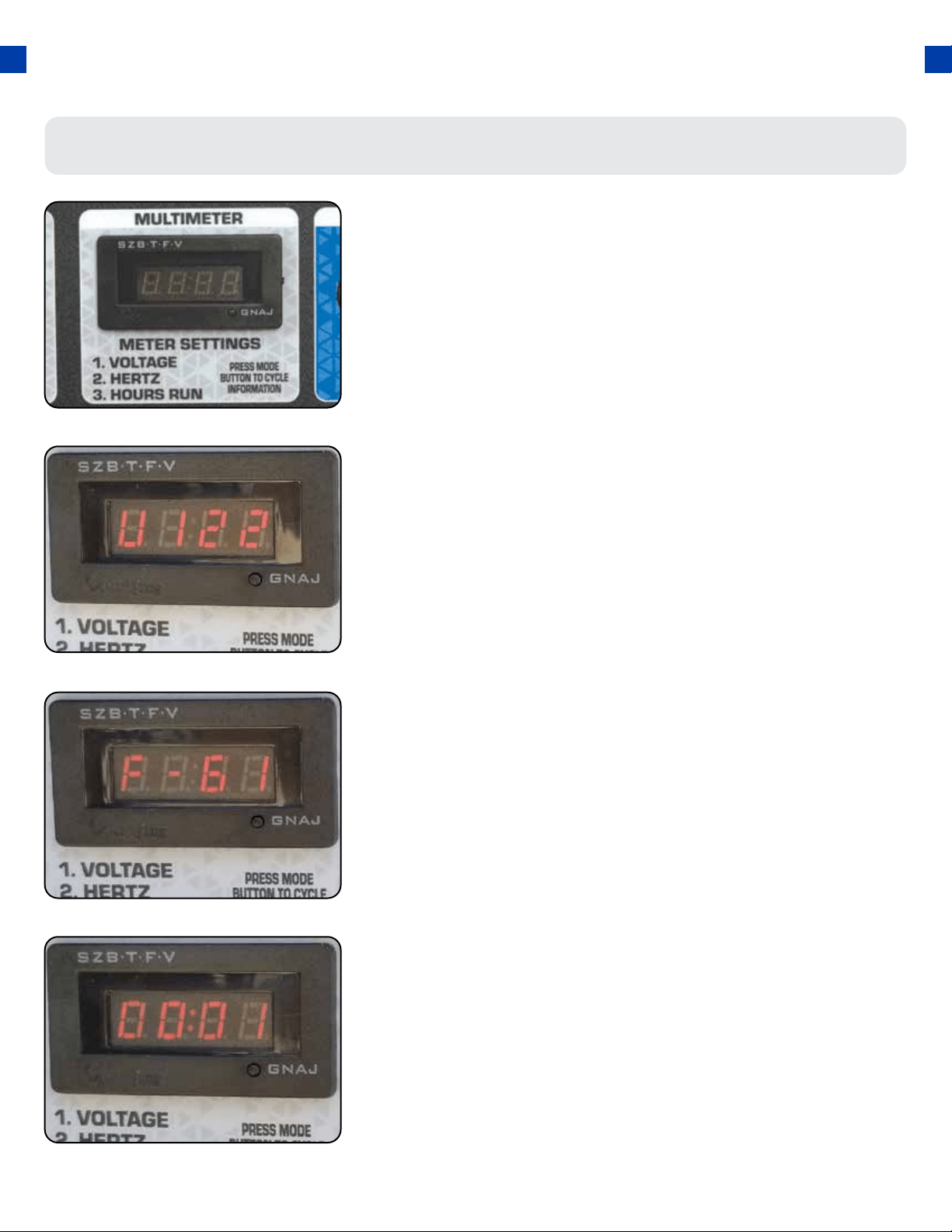
When the generator is started, the display will read the
current voltage. Press the MODE button to cycle through
the multimeter functions.
Using the digital multimeter
Voltage
The voltage currently produced by the generator in volts.
1.
Frequency
The frequency currently produced by the generator in Hz.
2.
Hours Run
The number of hours the engine has currently been running.
3.
50
51
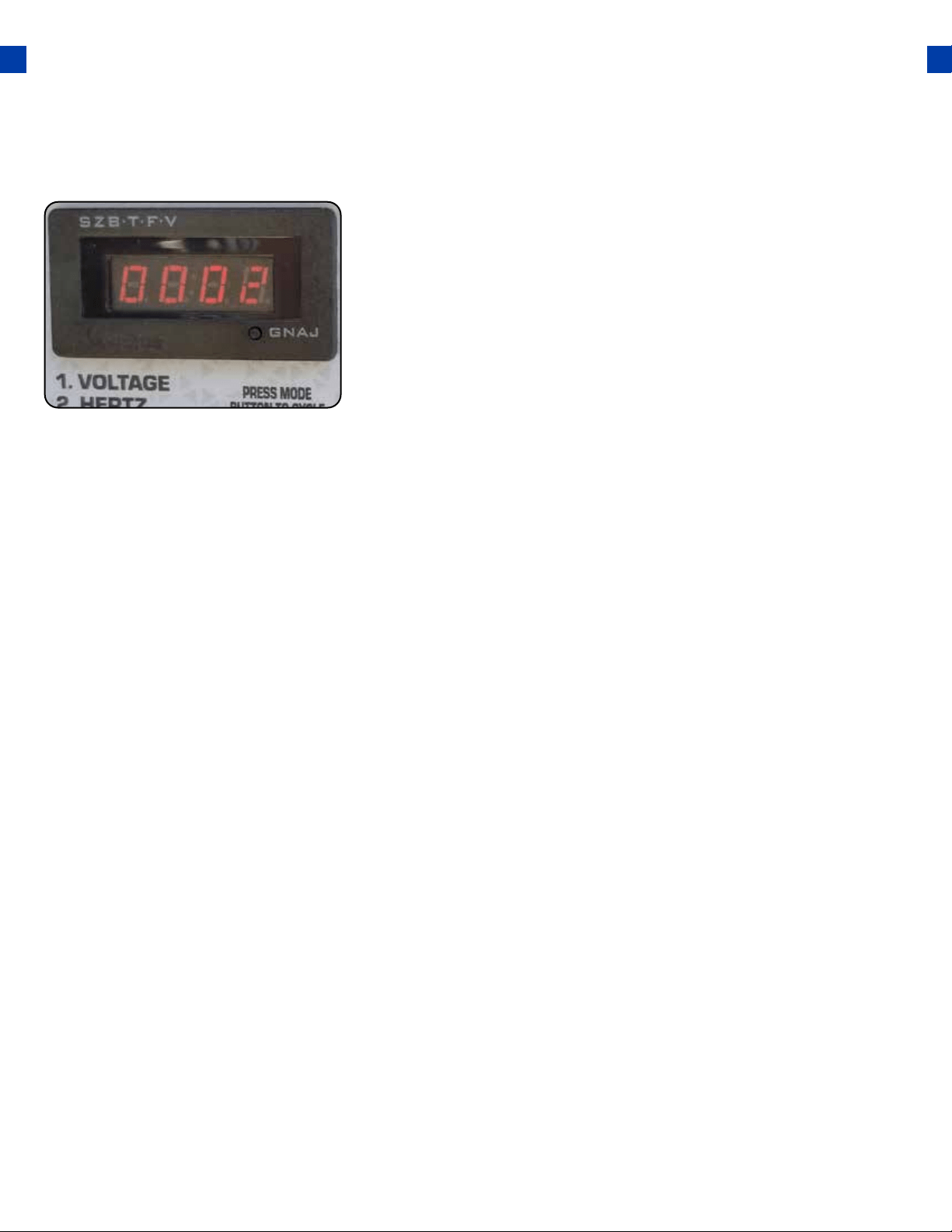
Hours Total
The number of hours the generator has been run in total.
4.

52
MAINTENANCE AND CARE
Proper maintenance and storage of your generator are essential to ensure trouble-free use of your
generator when you need it.
By following the maintenance and care requirements, you can keep your generator running
smoothly and eciently for years to come.
53
MAINTENANCE AND CARE
Proper routine maintenance of your generator is essential for safe, economical, and trouble-free
operation. It will also help reduce air pollution.
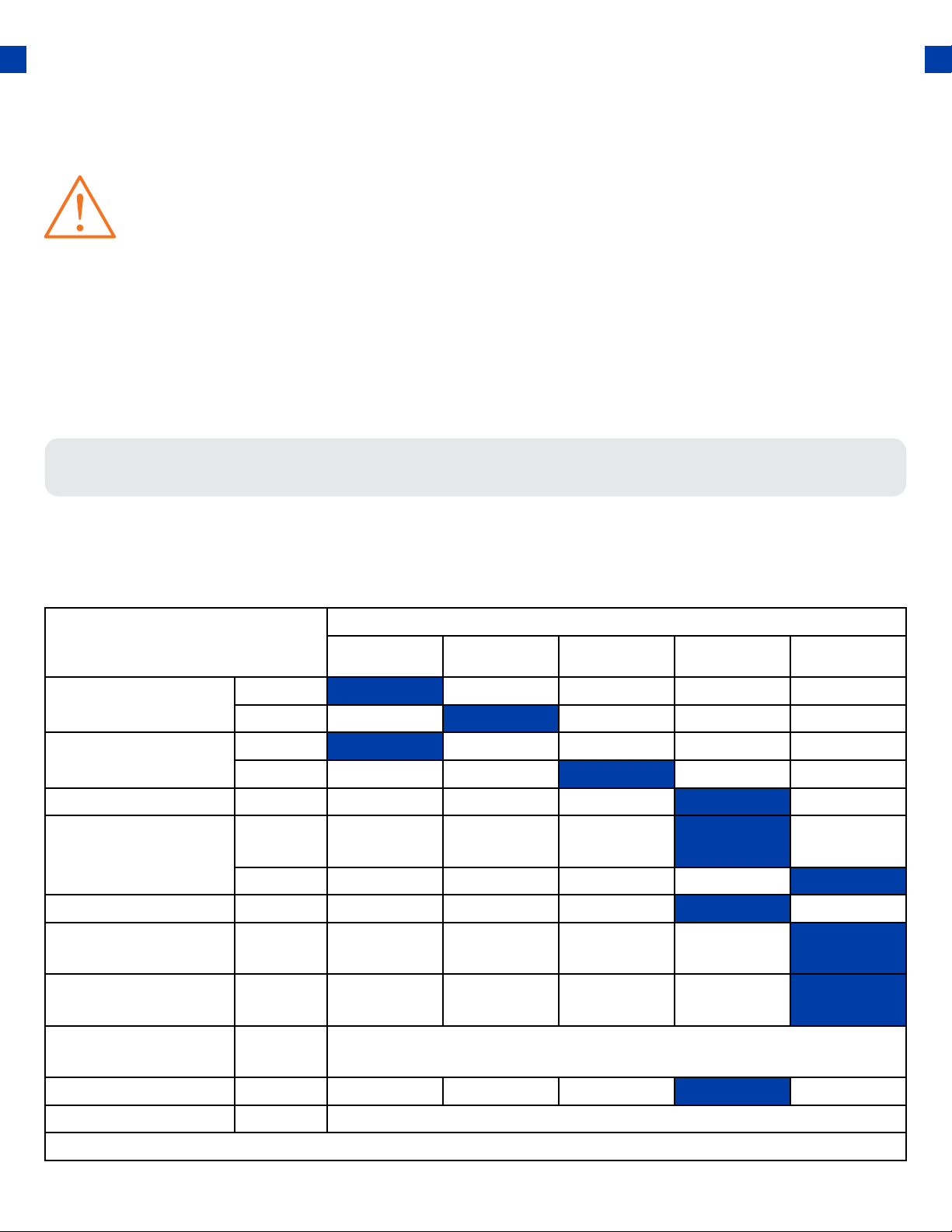
Maintenance Schedule
Remember that this schedule is based on the assumption that your machine will be used for its
designed purpose. Sustained high-load, high-temperature operation, or use in unusually wet or
dusty conditions, will require more frequent service.
SERVICE
REGULAR SERVICE PERIOD
BEFORE
EACH USE
EVERY MO. OR
20 HRS
EVERY 3 MO. OR
50 HRS
EVERY 6 MO. OR
100 HRS
EVERY 12 MO.
OR 300 HRS
ENGINE OIL CHECK
CHANGE
AIR CLEANER CHECK
CHANGE
SEDIMENT CUP CLEAN
SPARK PLUG CLEAN-
ADJUST
REPLACE
SPARK ARRESTOR CLEAN
IDLE SPEED CHECK /
ADJUST
VALVE CLEARANCE CHECK-
ADJUST
COMBUSTION
CHAMBER
CLEAN
500 HOURS
FUEL TANK / FILTER CLEAN
FUEL TUBE CHECK EVERY 24 MO. (REPLACE IF NECESSARY)
TO BE PERFORMED AT MONTHS INDICATED OR HOUR INTERVAL WHICHEVER COMES FIRST
54
WARNING: Improper maintenance, or failure to correct a problem before operation, can
cause a malfunction in which you can be seriously injured or killed. Always follow the
inspection, maintenance recommendations, and schedules in this instruction manual.
● Make sure the engine is o before you begin any maintenance or repairs.
● Let the engine and exhaust system cool before touching.
● To reduce the possibility of re or explosion, be careful when working around
gasoline. Use only a nonammable solvent, not gasoline, to clean parts. Keep
cigarettes, sparks, and ames away from all fuel-related parts.
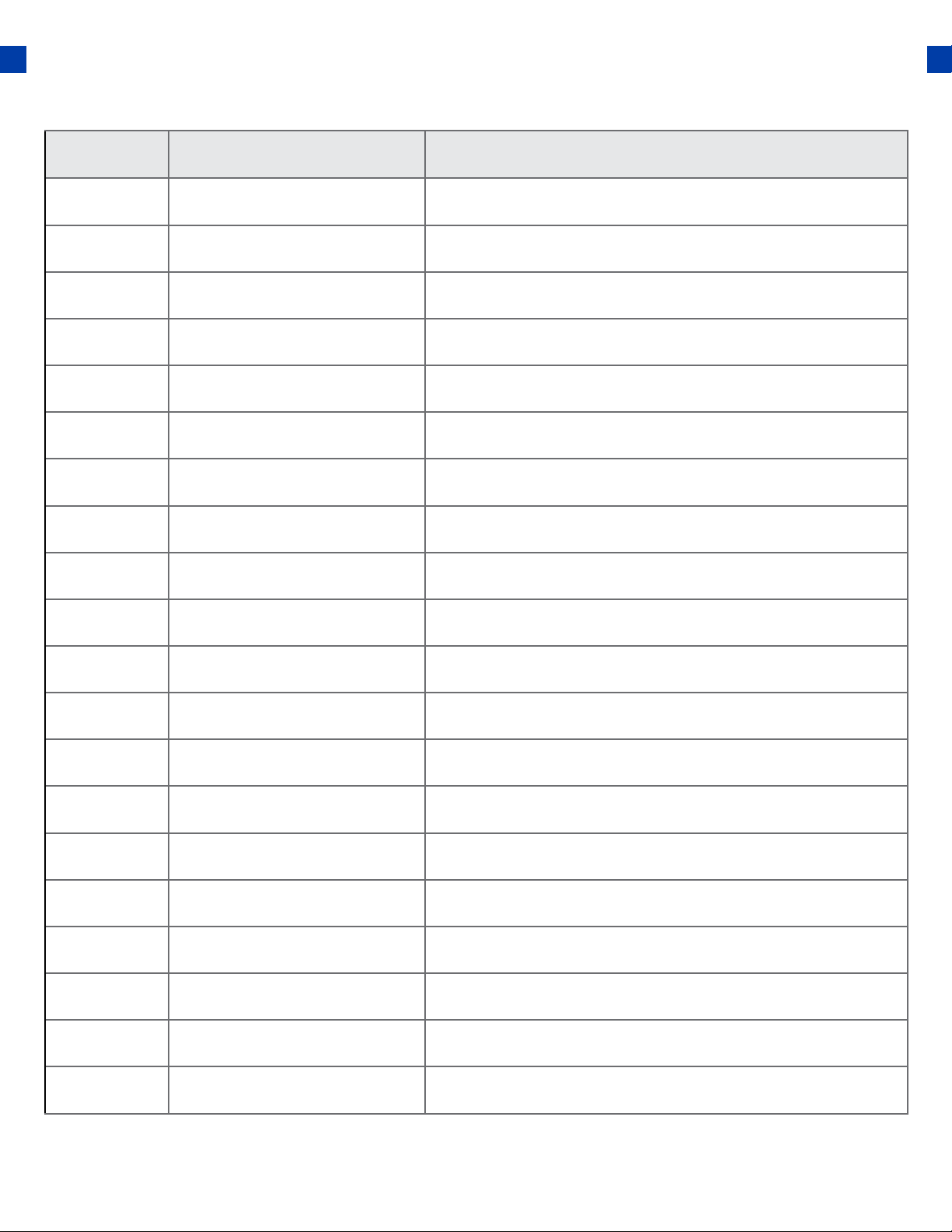
MAINTENANCE LOG
Date Generator Hours Maintenance Performed
55
MAINTENANCE AND CARE (CONTINUED)
Checking the oil
56
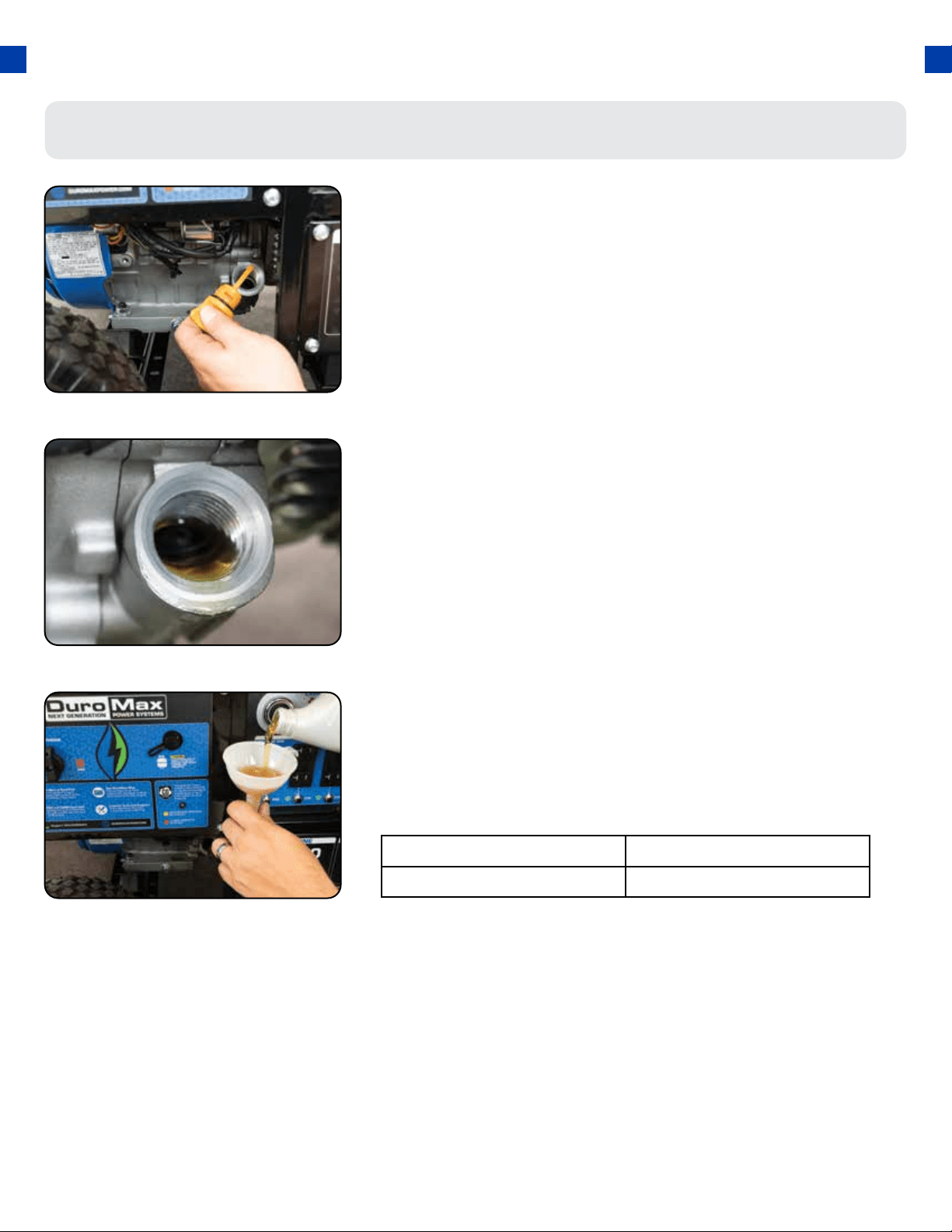
Check the oil
The generator is equipped with an automatic shuto to
protect it from damage due to low oil. Nonetheless, you
should check the oil level of the engine before each use to
ensure that the engine crankcase has a sucient amount.
To check the oil level:
a. Make sure the generator is on a level surface.
b. Unscrew the oil ller/dipstick cap.
c. With a dry cloth, wipe the oil o of the stick on the
inside of the cap.
d. Insert the dipstick as if you were replacing the
cap and then remove it again. There should now be
oil on the stick. If there is no oil on the stick, or oil
only at the very end of the stick, you should add
oil until the engine crankcase is lled (see “Adding
Oil” portion of the “Maintenance” section).
e. The oil will be visible in the oil ll spout when full.
f. Be sure to replace the cap when nished checking
oil.
Model Number XP12000HX
Engine Oil Capacity 37 . oz (1.1L)
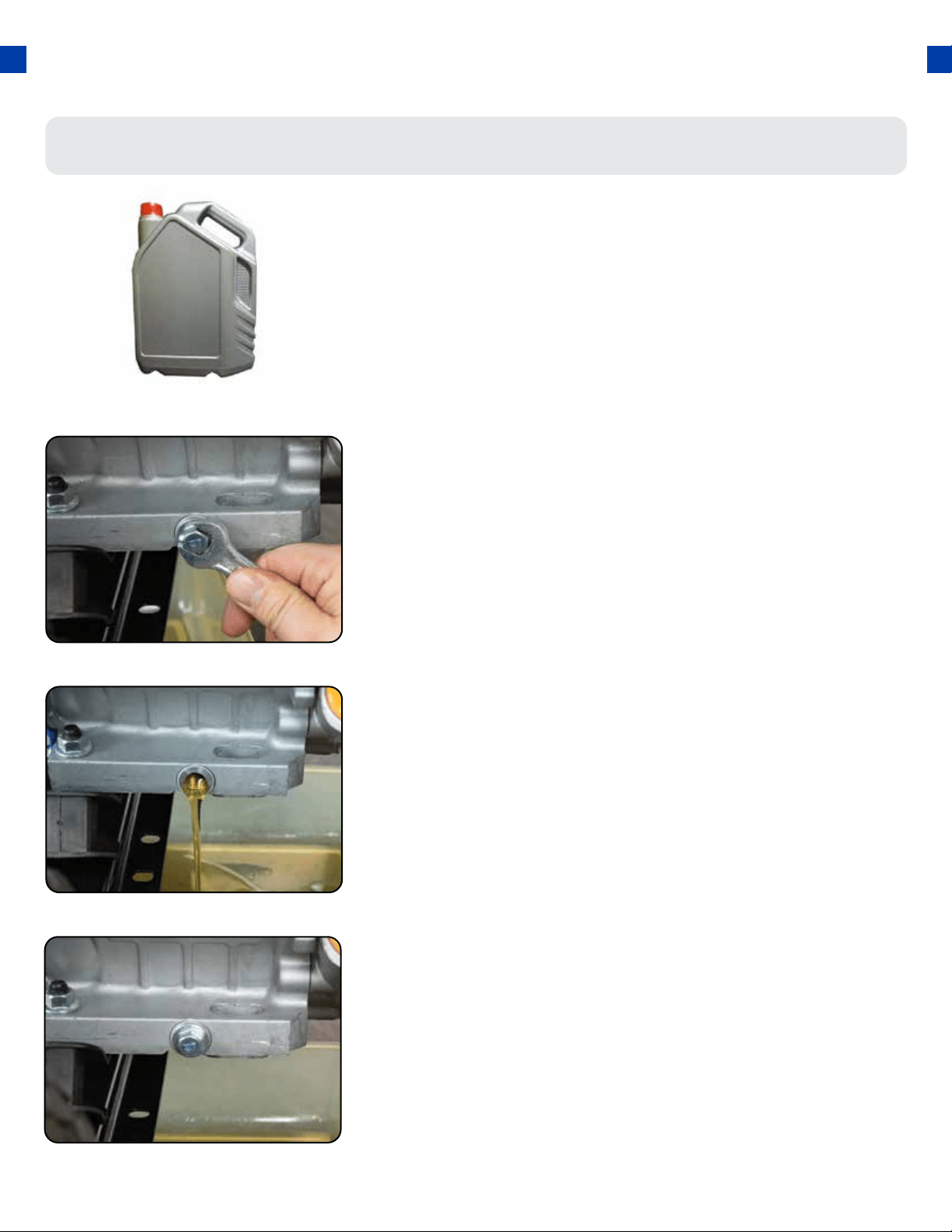
Changing the oil
Remove drain plug
Using a 12 mm hex wrench, unscrew the oil drain plug, which
is located on the crankcase underneath the oil ller/dipstick
cap.
Allow all the oil to drain from the generator.
1.
Drain oil
Drain oil into an approved oil disposal container. Contact
your local auto parts store for information on oil disposal.
2.
Replace drain plug
Replace the oil drain plug and tighten with a 12 mm hex
wrench.
3.
57
Worn out or dirty oil does not cool the generator properly
and can lead to catastrophic engine damage.
In addition to regular oil changes, it is necessary to drain the
oil from the crankcase if it has become contaminated with
water or dirt.
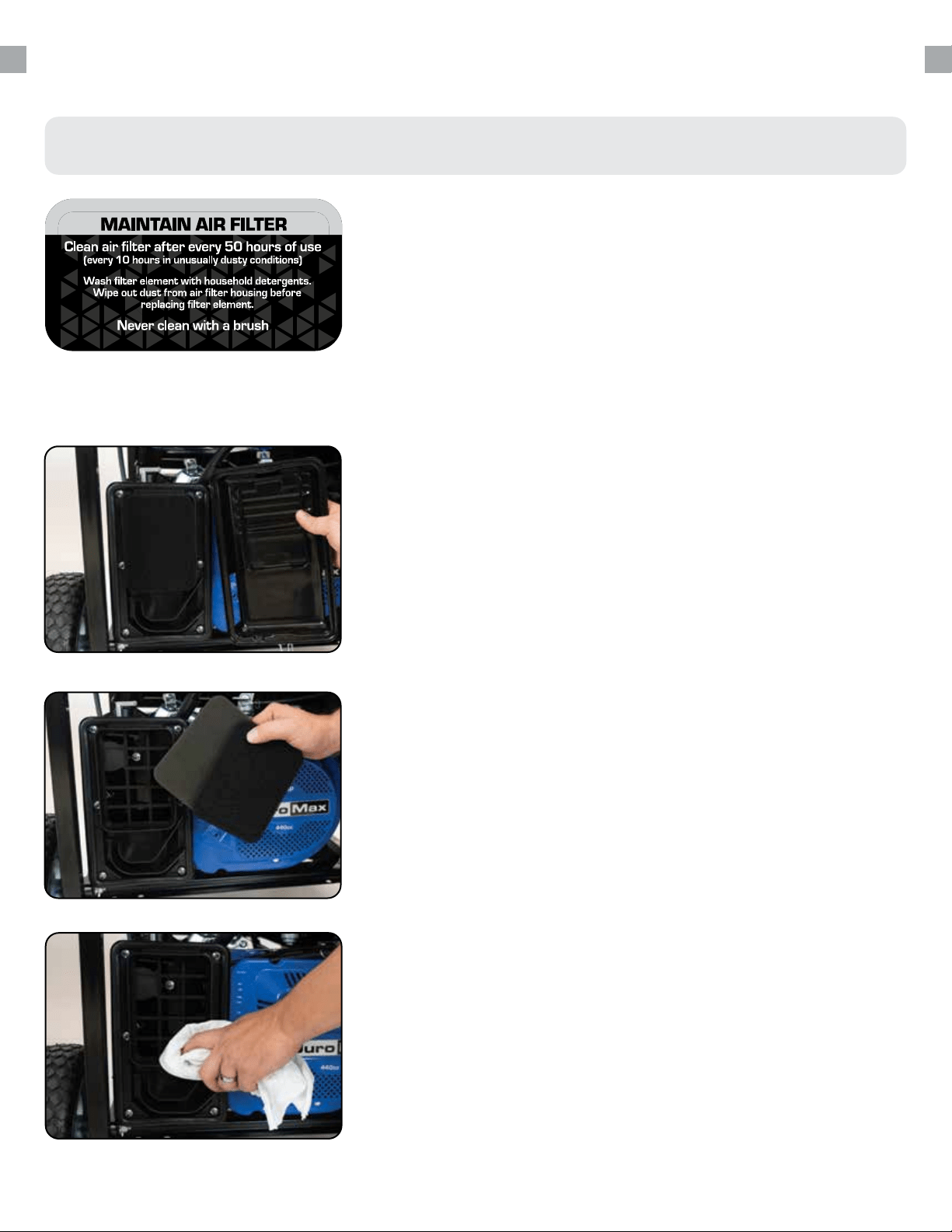
Routine maintenance of the air cleaner helps maintain proper
airow to the carburetor. Check that the air cleaner is free of
excessive dirt after every use.
Note: Improper maintenance may cause less air to enter the
engine or dirty air to enter the engine causing overheating
and engine wear.
MAINTENANCE AND CARE (CONTINUED)
Cleaning the air lter
58
Remove the lter cover
Remove lter
Clean out lter casing
Release the clips on the top and bottom of the cover and
remove the lter cover.
Remove the sponge-like elements from the casing.
Wipe the dirt from inside the empty air cleaner casing.
1.
2.
3.
59
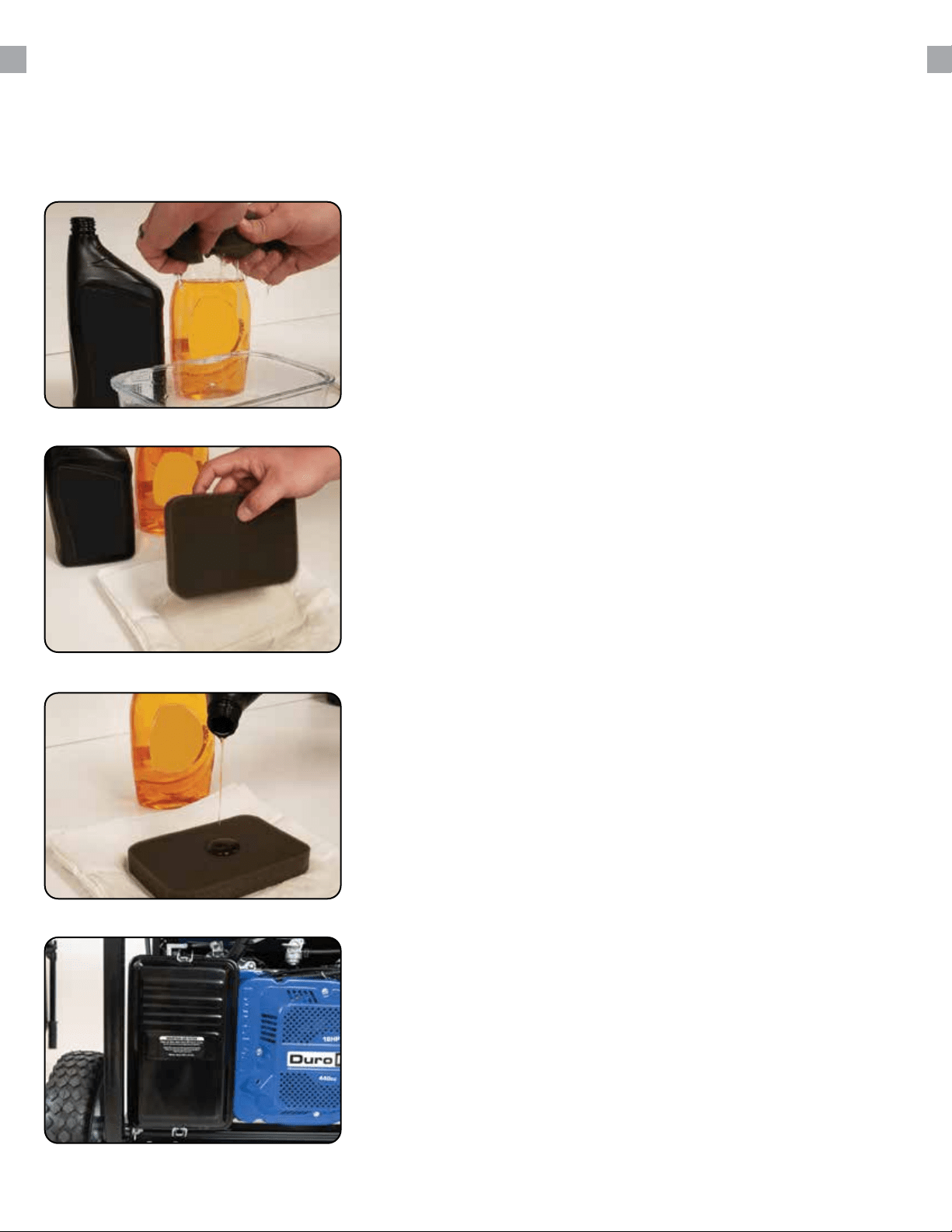
Replace elements in casing
Replace the sponge-like elements in the air cleaner casing and
replace the cover.
7.
Wash cleaner element
Wash the sponge-like elements in household dish detergent
and warm water.
4.
Dry cleaner element
Pat dry on a dry cloth and allow the elements to dry completely.
5.
6.
Add engine oil to elements
Soak the dry elements in a small amount of engine oil. Ring
out any excess oil.
The spark plug is important for proper engine operation.
A good spark plug should be intact, free of deposits, and
properly gapped.
Improper maintenance may cause reduced fuel economy,
misres, trouble starting, or damage to the spark plug
threads.
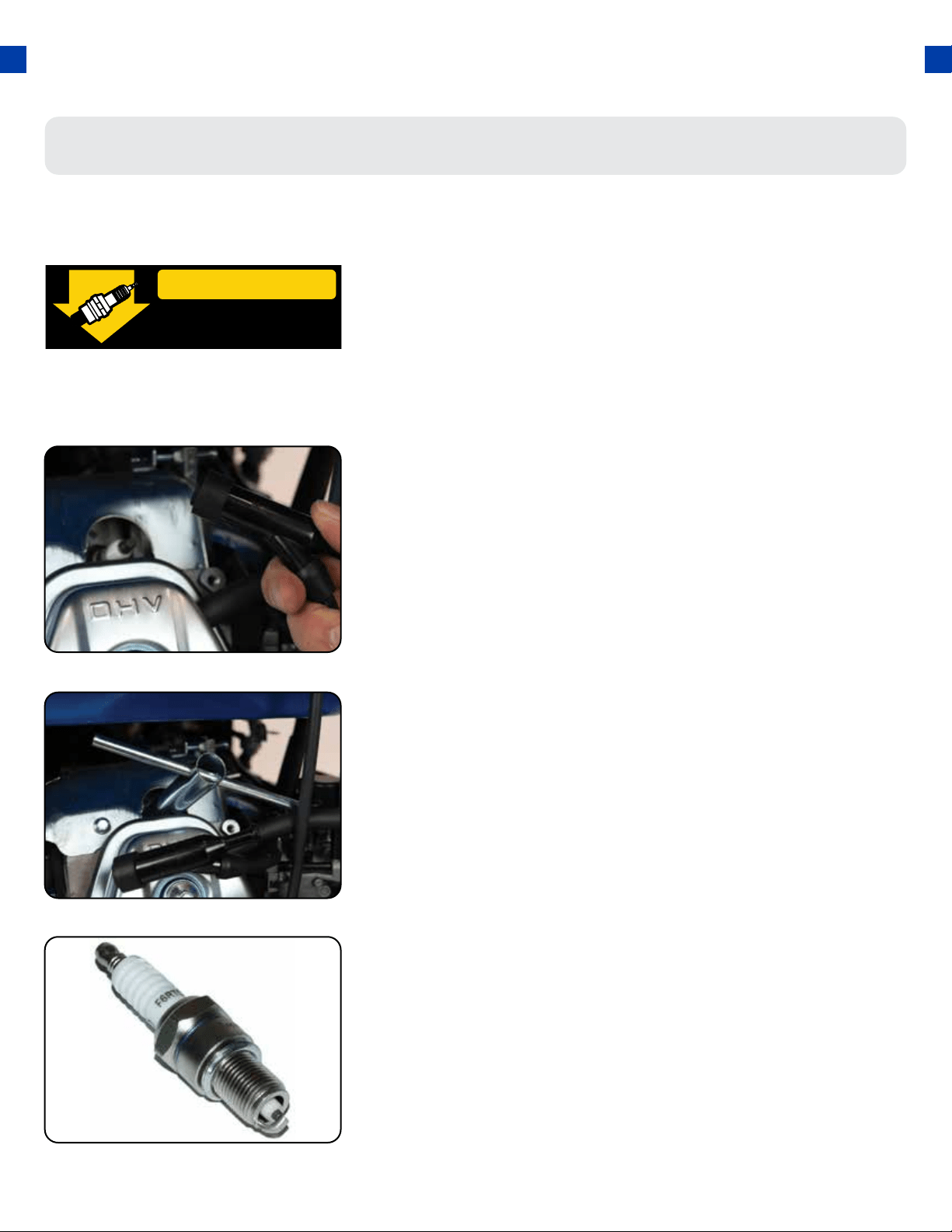
Spark Plug Maintenance
Remove spark plug cap
Remove spark plug
Inspect spark plug
Pull on the spark plug cap to remove it.
Unscrew the spark plug from the generator using the spark
plug wrench included with this product.
Visually inspect the spark plug. If it is cracked or chipped,
discard and replace it with a new spark plug. We recommend
using an F6RTC spark plug such as NGK BPR6ES.
1.
2.
3.
SPARK PLUG
CONSULT MANUAL
BEFORE REMOVING
MAINTENANCE AND CARE (CONTINUED)
60
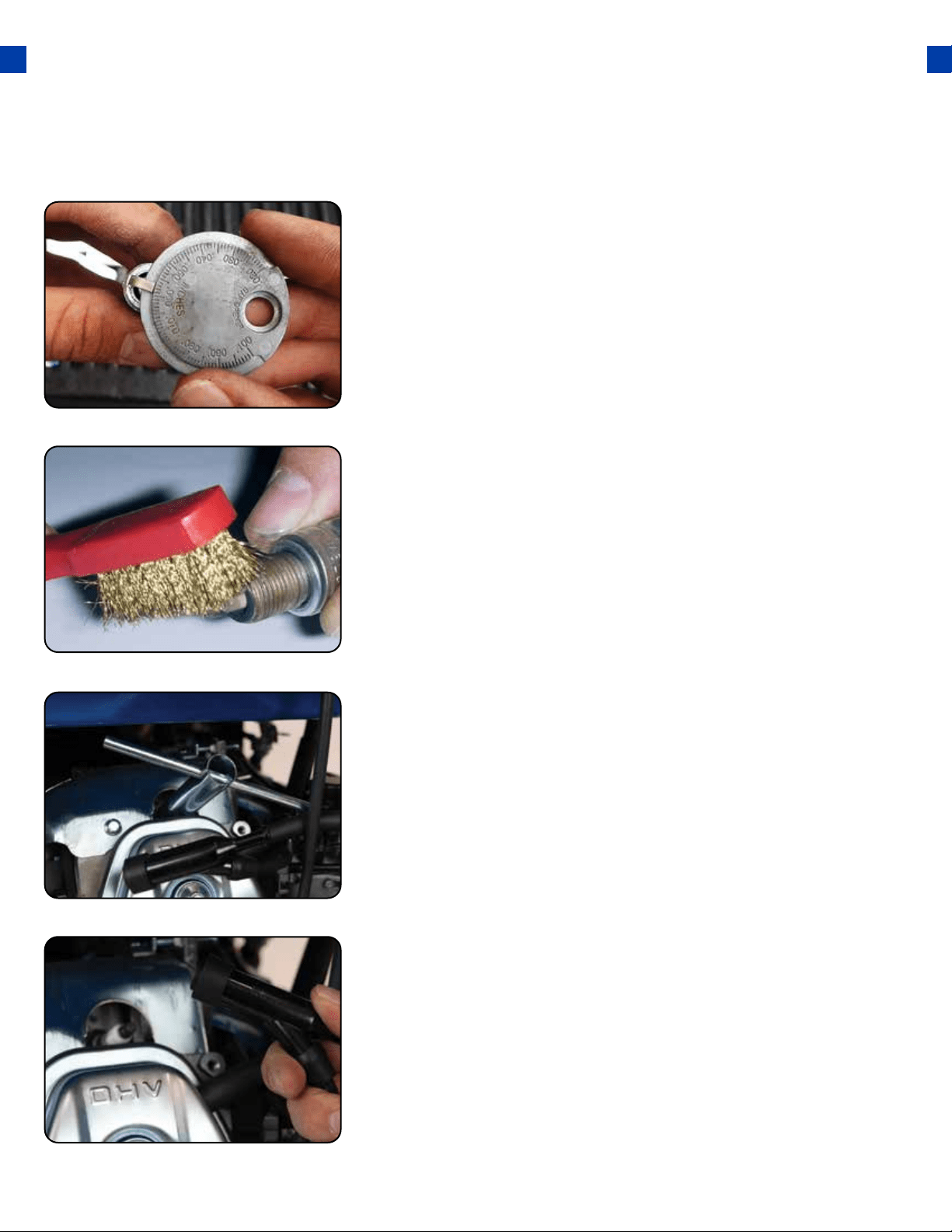
Measure plug gap
Measure the plug gap with a gauge. The gap should be 0.7-0.8
mm (0.028-0.031 in).
4.
Clean and re-gap
If you are re-using the spark plug, use a wire brush to clean
any dirt from around the spark plug base and then re-gap the
spark plug.
5.
Install spark plug
Replace spark plug cap
Screw the spark plug back into its place on the generator
using the spark plug wrench.
Replace the spark plug cap.
6.
7.
61
Emptying the Gas Tank
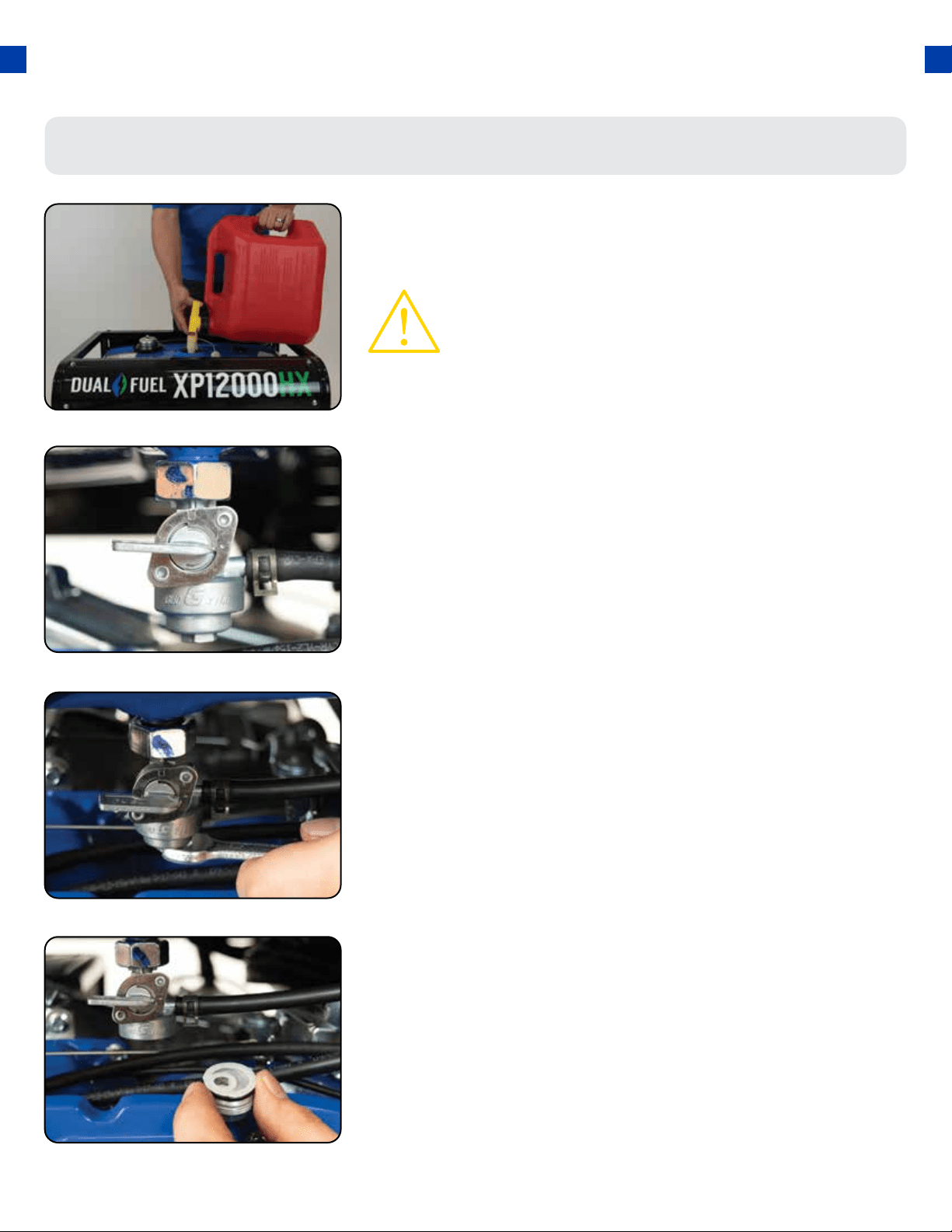
Shut fuel valve o
Remove fuel lter cup
Empty fuel lter cup
Turn the fuel valve to the “OFF” position.
Remove the fuel lter cup (see “Removing the Fuel Filter Cup”
earlier in this section.
Empty the fuel lter cup of any fuel.
1.
2.
3.
CAUTION: Do not store fuel from one season to another.
Gasoline sold at the pump today contains additives such
as ethanol that even when stored properly may damage
the fuel system components.
If you have been using gasoline in your generator; before
storing your generator for extended periods of time you
should drain your generator fuel tank of gasoline.
MAINTENANCE AND CARE (CONTINUED)
62
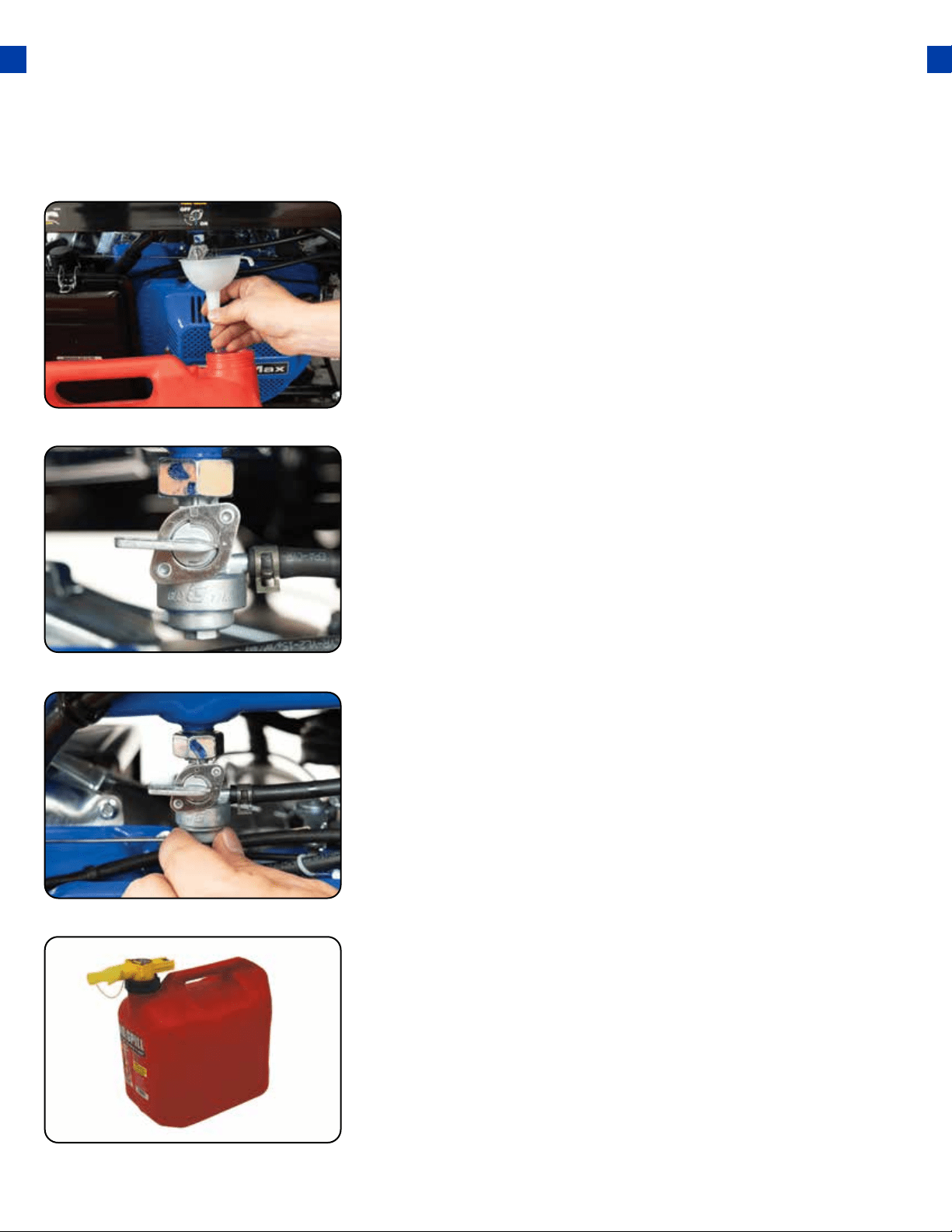
Drain gas from the generator
With a funnel underneath the fuel valve to catch the gas, turn
the fuel valve to the “ON” position. Drain all the gas from the
generator.
4.
Shut fuel valve o
Replace fuel lter cup
Store emptied gas
Turn the fuel valve to the “OFF” position.
Reinstall the fuel lter cup.
Store the emptied gasoline in a suitable place and add fuel
stabilizer to keep fuel fresh and usable.
5.
6.
7.
63
MAINTENANCE AND CARE (CONTINUED)
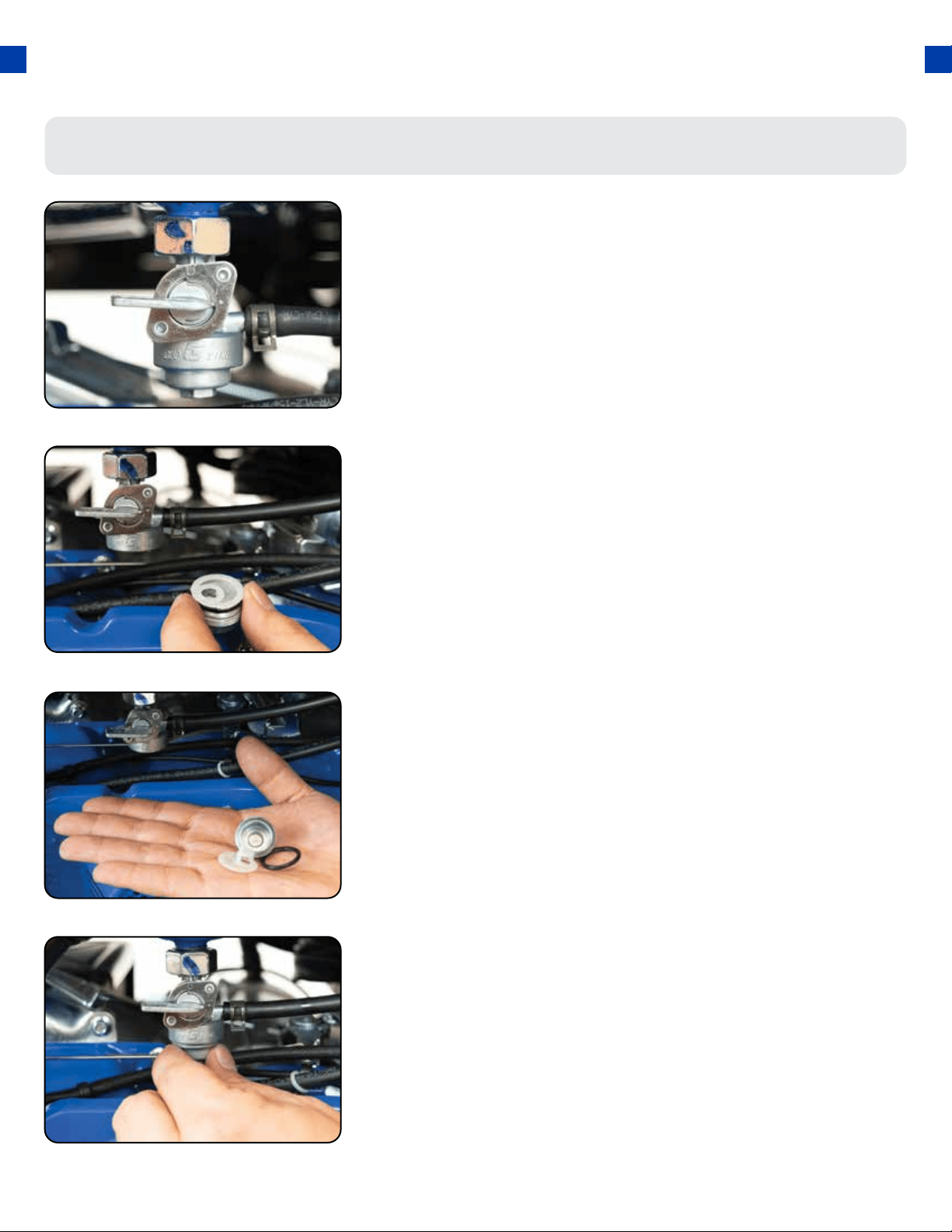
Shut fuel valve o
Turn the fuel valve to the “OFF” position.
1.
Cleaning the fuel lter cup
Remove fuel lter cup
Clean lter cup
Replace fuel lter cup
Unscrew the fuel lter cup from the fuel valve using a wrench.
Clean the cup of all sediment using a rag or brush.
Reinstall the fuel lter cup.
2.
3.
4.
64

When transporting your generator:
● Empty the gas tank (see “Emptying the Gas Tank” in the “Maintenance” section).
● Disconnect the spark plug.
● Do not obstruct any ventilation openings & keep the generator in a cool dry area.
CAUTION: Never place any type of storage cover on the generator while it is still
hot.
Storage and Transportation
65
Storage Period Storage Preparation
If you plan on starting
the same day.
1. Turn o the main breaker.
2. Allow the unit to run 3 - 5 minutes.
3. Turn o the battery switch.
4. Store.
If you plan on starting
the unit again within
30 days.
1. Turn o the main breaker.
2. Allow the unit to run 3 - 5 minutes.
3. Turn o the fuel valve.
4. Allow the unit to stall out.
5. Turn o the battery switch.
6. Add fuel stabilizer to the gas remaining in the tank.
7. Store.
If you do not plan to
start the unit for
longer than 30 days.
1. Turn o the main breaker.
2. Allow the unit to run 3 - 5 minutes.
3. Turn o the fuel valve.
4. Allow the unit to stall out.
5. Turn o the battery switch.
6. Drain the fuel tank (See “Emptying the Gas Tank” in the “Maintenance” section)
7. Drain the carburetor
a. Remove the drain bolt from the carburetor.
b. Drain the small amount of remaining fuel from the carburetor bowl.
8. Oil the cylinder
a. Remove the spark plug.
b. Put 2 tbsp. of 10w30 motor oil directly into the spark plug hole
c. Pull the recoil start one time.
d. Replace the plug.
9. Remove the battery and place it on tender indoors.

SPECIFICATIONS
AC Rated Wattage (Gasoline) 9500W
AC Rated Wattage (Propane) 9025W
AC Surge Wattage (Gasoline) 12000W
AC Surge Wattage (Propane) 12350W
AC Rated Voltage 120/240V
AC Rated Frequency 60 Hz
AC Phase Single
Dimensions LENGTH 28in.
WIDTH 22in.
HEIGHT 23in.
Engine Type 4-Stroke OHV Forced-Air
Ignition System Non-Contact Transistor
Displacement 457cc
Starting Type Electric / Recoil
Fuel Tank Capacity 8.3 US Gal. (31L)
Oil Capacity 40.5 . oz. (1.2L)
Run Time @ 50% (Gasoline) 8 hr.
Run Time @ 50% (Propane) 8 hr. (40 lb.)
Noise Level <72db
66
TROUBLESHOOTING
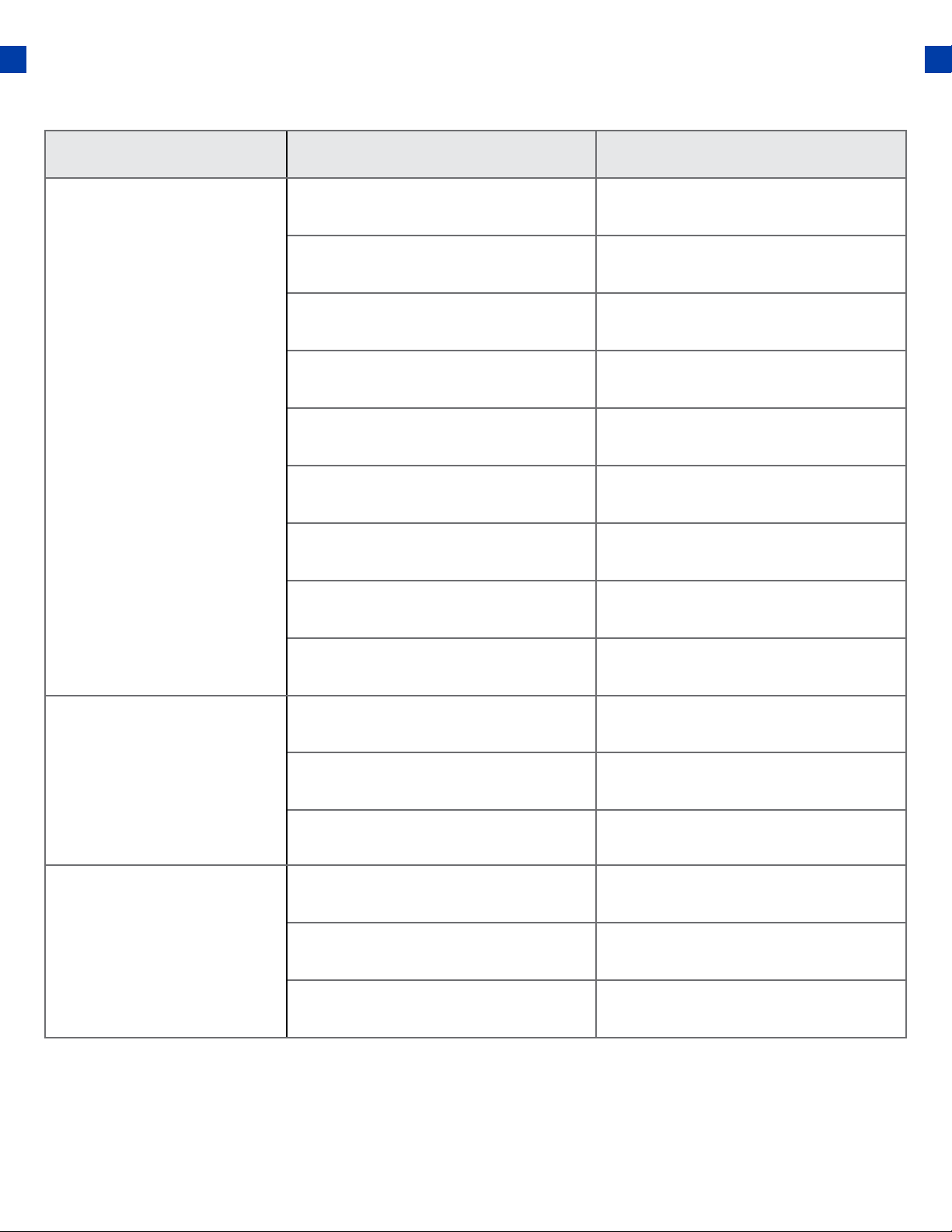
This section of the manual is to help you troubleshoot problems with your generator.
67
TROUBLESHOOTING
Problem Description Solution
The engine will not
start
Engine Switch is “O” Set engine switch to “run”
Fuel Valve is “Closed” Turn the fuel valve to “open”
Choke is open Close the choke
The engine is out of fuel Add fuel
Fuel is old or contaminated Change fuel
Spark Plug is dirty Clean spark plug
Spark Plug is broken Replace spark plug
The generator is not level
Move the generator to a level
surface
Oil is low Add/change the oil
Engine runs, but there
is no electrical output
The circuit breaker is “O” Turn “on” circuit breaker
Wiring connection is bad Replace extension cord(s)
Device connected to generator
is malfunctioning
Disconnect malfunctioning
device
The generator runs
but does not support
all electrical devices
connected
Generator is overloaded
Disconnect 1 or more items to
reduce the load
Device connected to the gener-
ator is bad
Disconnect malfunctioning
device
The air lter is dirty Clean / replace the air lter
68
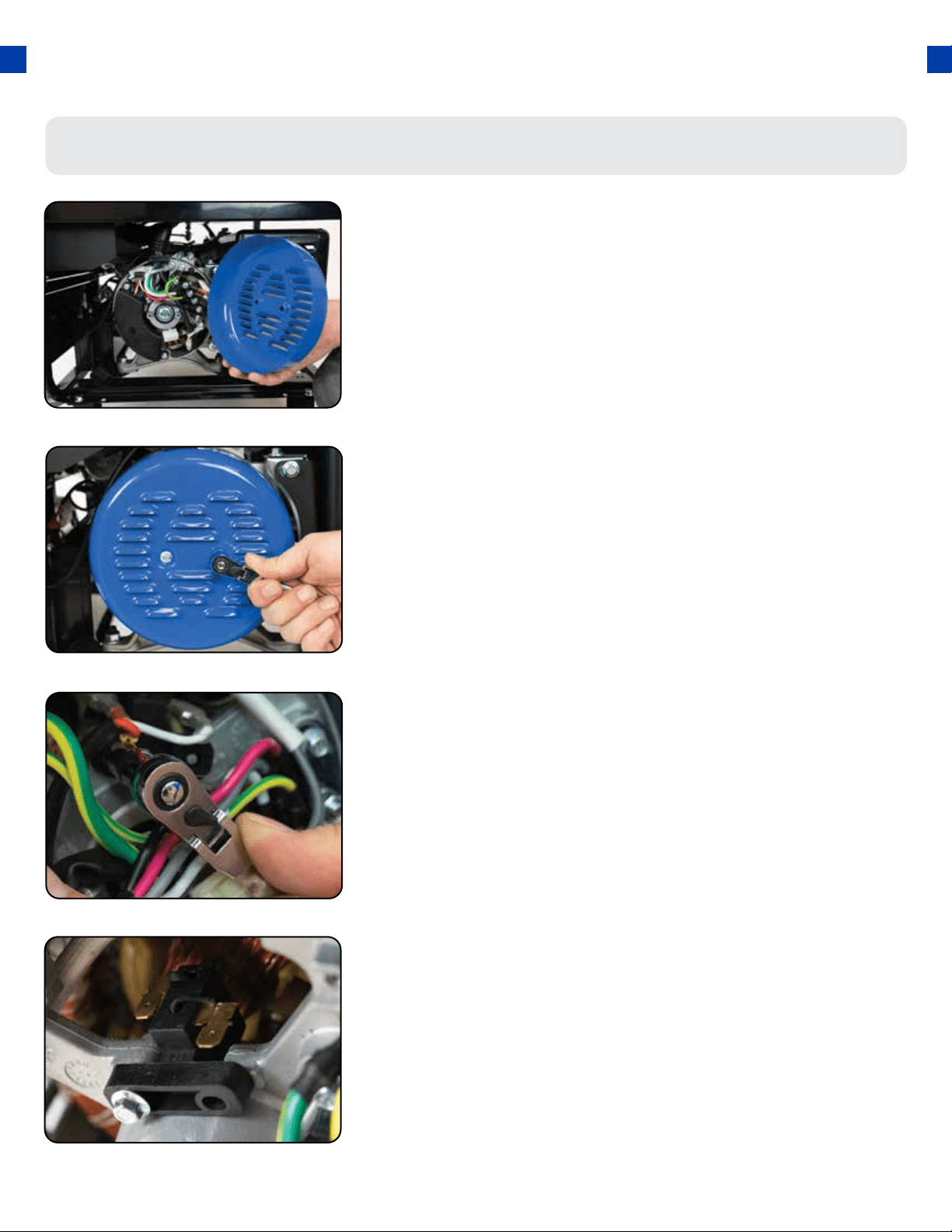
Changing / Inspecting the Carbon Brushes
The carbon brushes in conjunction with the AVR regulates
power from the generator. The carbon brushes are wearable
parts and should be inspected every 250 running hours.
Remove generator cover
Remove bolt from brush
Disconnect AVR wires
Remove the 2 bolts of the generator cover then pull the cover
o the generator.
Remove the bolt holding the carbon brush.
Remove the two wires from the AVR on the carbon brush
1.
2.
3.
69
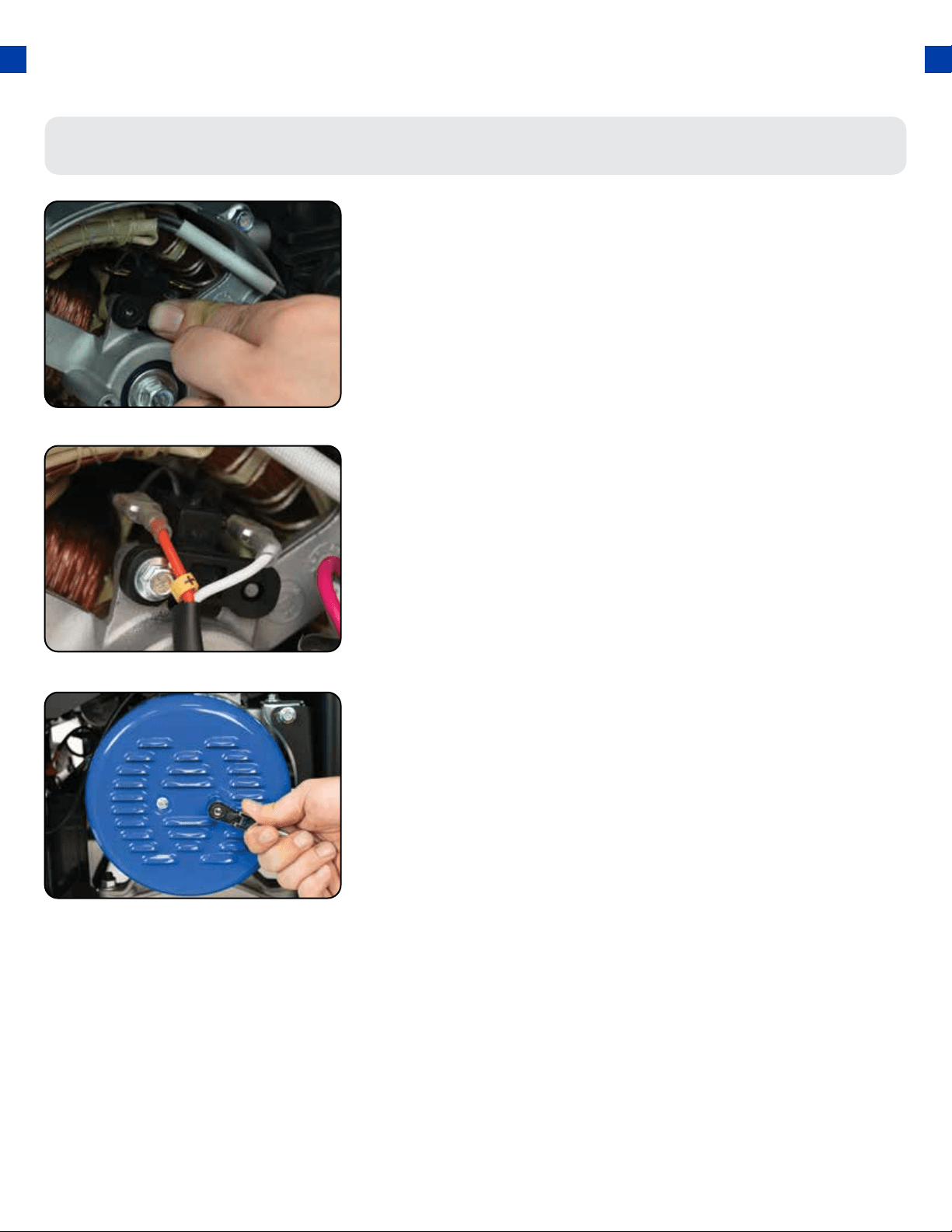
Changing / Inspecting the Carbon Brushes (Cont.)
Install new brush
Install new carbon brush with bolt.
4.
Connect AVR wires
Insert and connect the 2 wires from the AVR, be sure to connect
+ and – correctly.
5.
6.
Replace generator cover
Replace the back cover of the generator and secure it with
the 2 bolts.
TROUBLESHOOTING (CONTINUED)
70
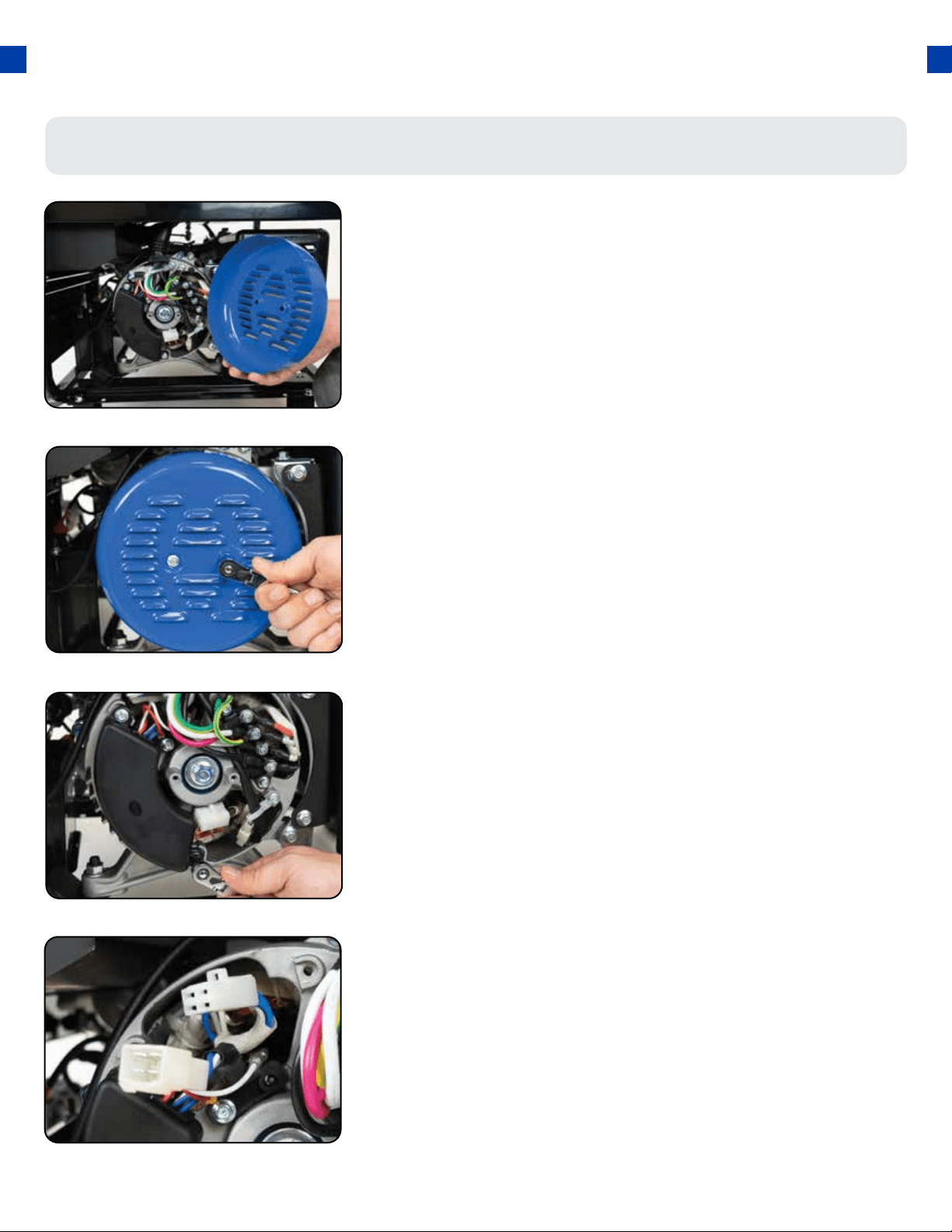
Changing / Inspecting the AVR
The carbon brushes in conjunction with the AVR regulates
power from the generator. If the generator is overheated
or overloaded, the AVR may be damaged and require
replacement.
Remove generator cover
Remove AVR bolts
Disconnect AVR wire clip
Remove the 2 bolts of the generator cover then pull the cover
o the generator.
Remove the 2 bolts holding the AVR.
Disconnect the wire clip.
1.
2.
3.
71
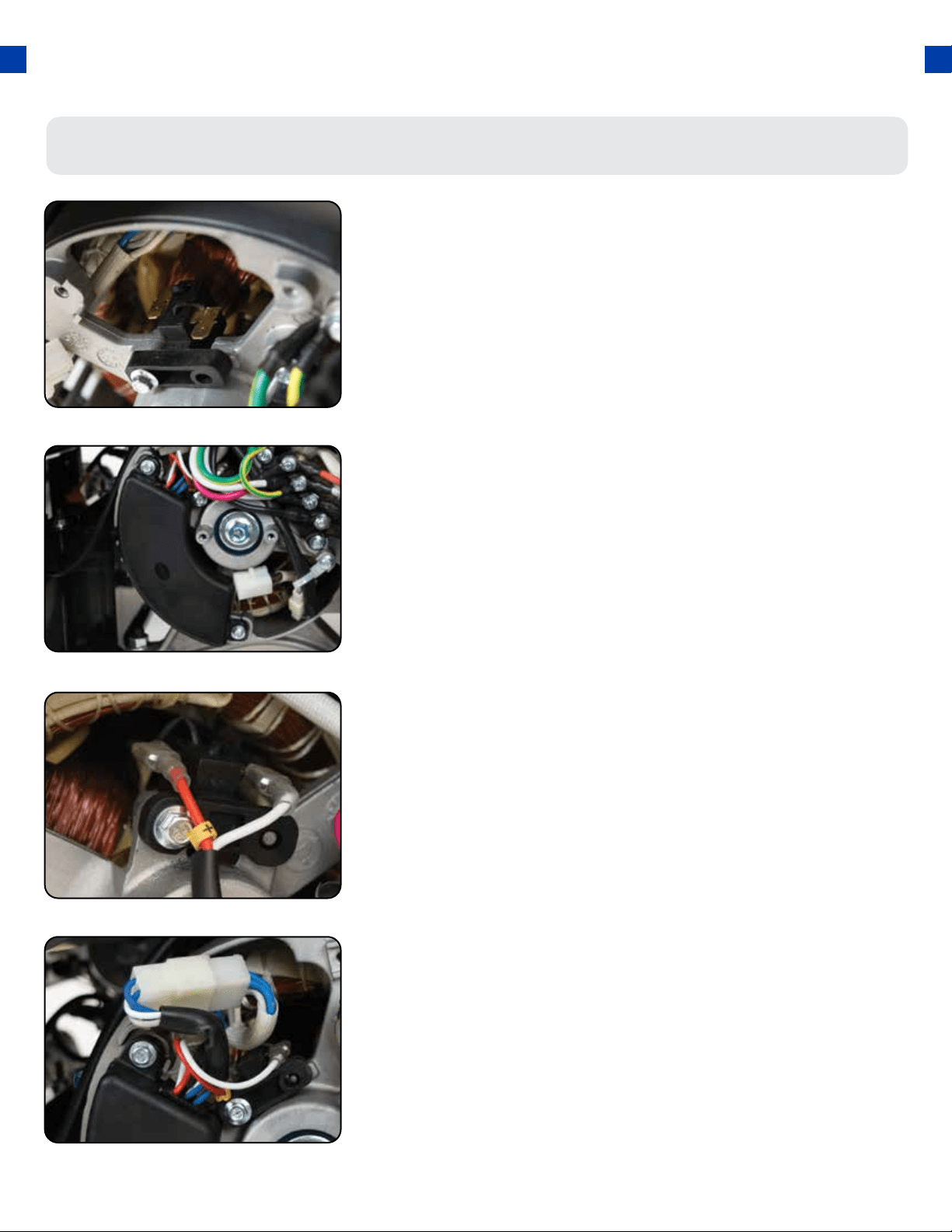
Reconnect the AVR wire clip
Reconnect the wire clip.
7.
Disconnect wires from brush
Remove the 2 wires from the AVR on the carbon brush.
4.
Install new AVR
Install the new AVR with the 2 bolts.
5.
6.
Reconnect wires to brush
Insert and connect the 2 wires from the AVR, be sure to
connect + and – correctly.
Changing / Inspecting the AVR (Continued)
TROUBLESHOOTING (CONTINUED)
72
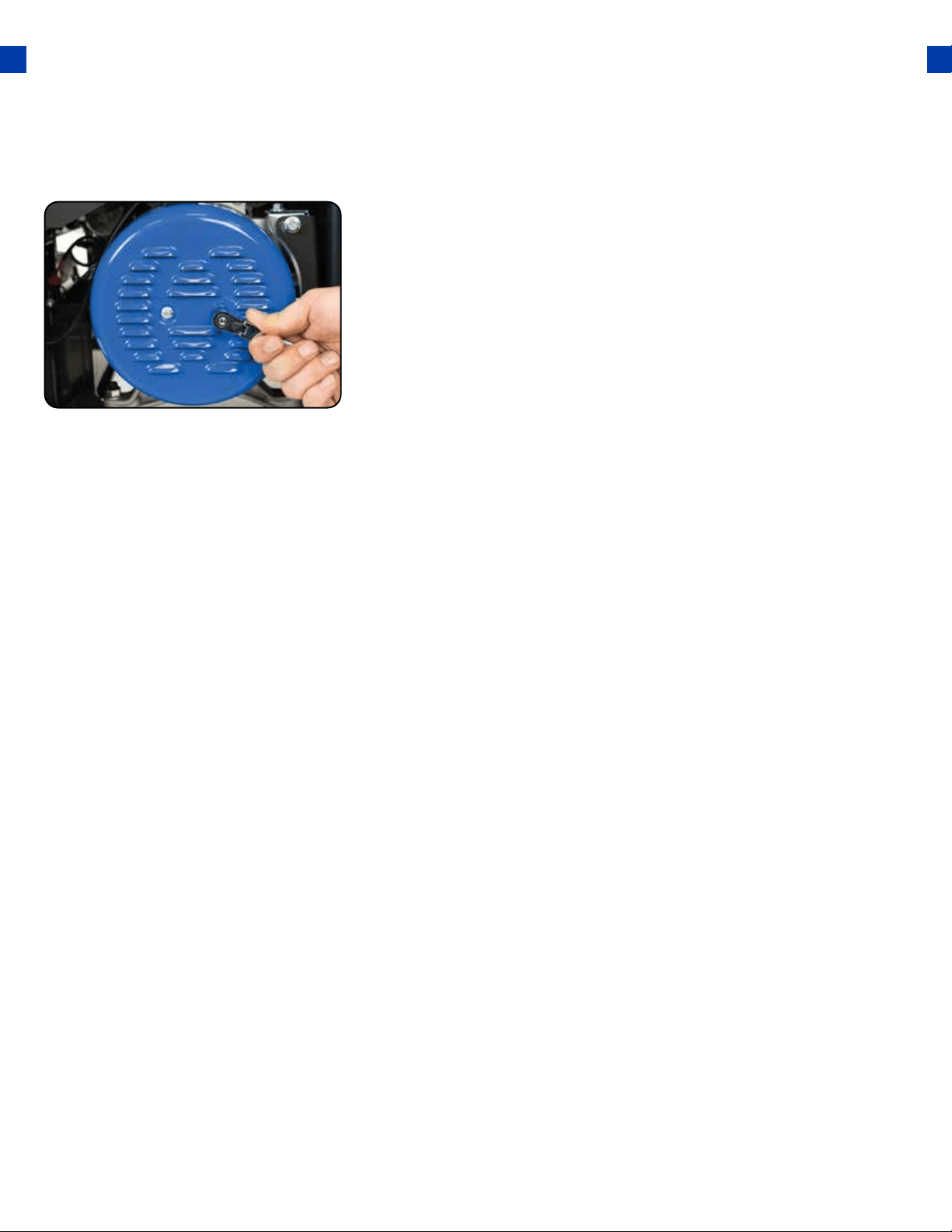
Replace generator cover
Replace the back cover of the generator and secure it with
the 2 bolts.
8.
73
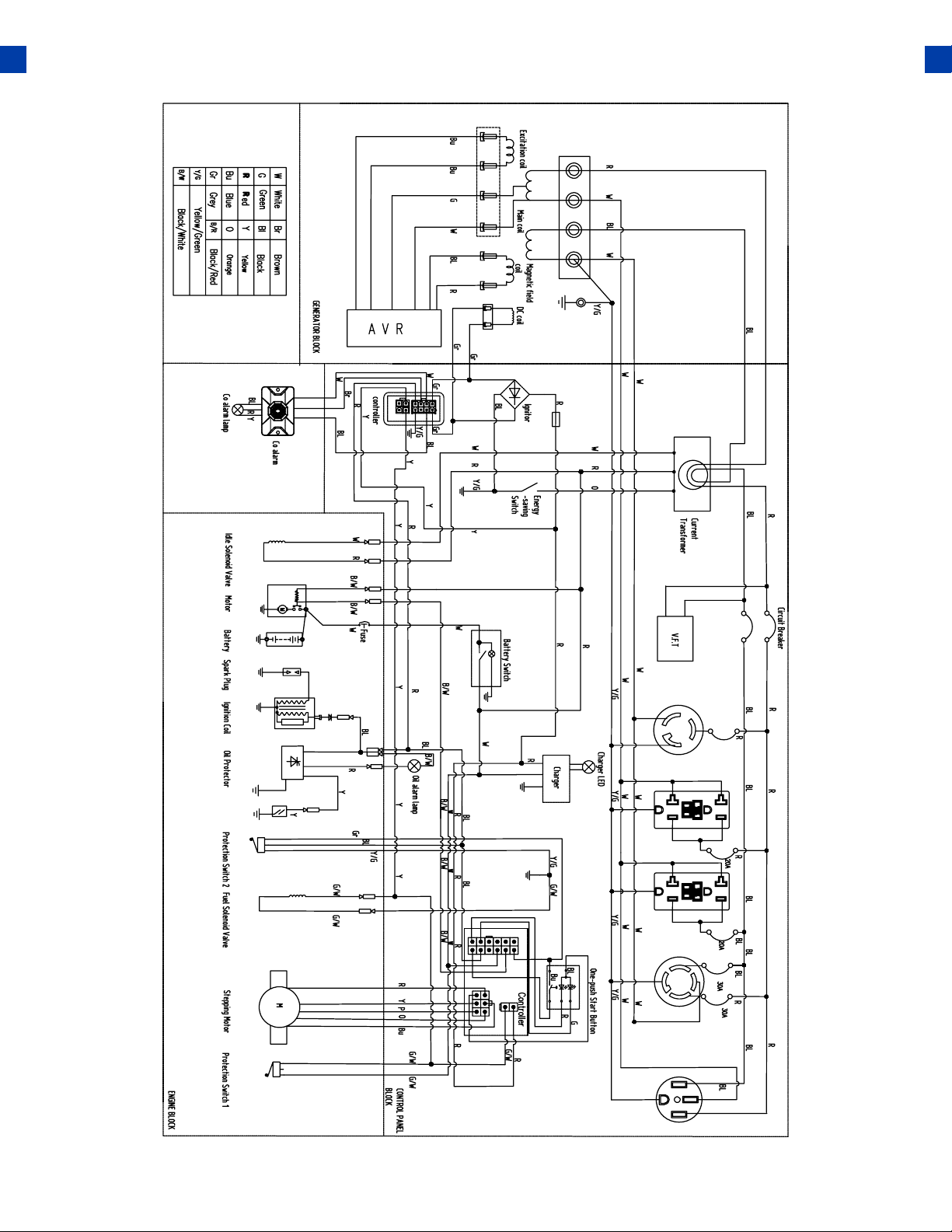
WIRING DIAGRAM
74

75

WARRANTY
3-year Warranty
All DuroMax Power Equipment warrant the original purchasers to a 3-year Parts Warranty
(Residential Use ONLY: Unusually heavy or commercial use is covered for a period of 1-year) in
the event of failure due to defects in electrical or mechanical components. Freight on any items
submitted for replacement or repair under the Warranty is the responsibility of the equipment
owner. This warranty is non-transferable and only valid to the original purchaser.
Warranty Exclusions
The DuroMax Power Equipment warranty does not cover repairs or returns when the fault is:
Normal Wear and Tear, Installation Use or Maintenance Services, Cosmetic defects, Accessories,
Failures due to acts of God or Natural Disasters, or problems related to/from aftermarket or non-
OEM parts.
Warranty Limitations
DuroMax Power Equipment does not claim or hold any obligation to loss of time, freight charges,
use of the product, or any incidental damages from the use of this product. THIS WARRANTY IS IN
LIEU OF ALL OTHER WARRANTIES, EXPRESSED OR IMPLIED.
U.S EPA AND CALIFORNIA EMISSION CONTROL WARRANTY STATEMENT
YOUR WARRANTY RIGHTS AND OBLIGATIONS
The California Air Resources Board, The United States Environmental Protection Agency (US EPA)
and DuroMax Power Equipment, are pleased to explain the emission control system warranty on
your 2020-2021 year small o-road engine. In the United States and California, new small o-road
engines must be designed built and equipped to meet the State’s stringent anti-smog standards.
DuroMax Power Equipment must warrant the emission control system on your small o-road
engine for the periods of time listed below provided there has been no abuse neglect or improper
maintenance of your small o-road engine.
Your emission control system may include parts such as the carburetor or fuel injection system, the
ignition system, and a catalytic converter. Also included may be hoses, belts, connectors, and other
emission-related assemblies.
Where a warrantable condition exists, DuroMax Power Equipment will repair your small o-road
engine at no cost to you including diagnosis, parts, and labor.
MANUFACTURER’S WARRANTY COVERAGE:
As the small o-road engine owner, you are responsible for the performance of the required
76

maintenance listed in your owner’s manual. DuroMax Power Equipment recommends that you
retain all receipts covering maintenance on your small o-road engine, but DuroMax Power
Equipment cannot deny warranty solely for the lack of receipts or for your failure to ensure the
performance of all scheduled maintenance.
As the small o-road engine owner, you should, however, be aware that DuroMax Power
Equipment may deny you warranty coverage if your small o-road engine or a part has failed due
to abuse, neglect, improper maintenance or unapproved modications.
You are responsible for presenting your small o-road engine to a DuroMax Power Equipment
distribution center as soon as a problem exists. The warranty repairs should be completed in a
reasonable amount of time, not to exceed 30 days.
If you have any questions regarding your warranty rights and responsibilities, contact DuroMax
Power Equipment authorized warranty service facility:
TEL: 1-844-387-6629
WEBSITE: www.duromaxpower.com
ADDRESS: 5800 Ontario Mills Pkwy, Ontario CA 91764
This telephone number is only for the engines which the company name “DuroMax Power
Equipment” on the emission label.
DEFECTS WARRANTY REQUIREMENTS:
(a) The warranty period begins on the date the engine or equipment is delivered to an ultimate
purchaser.
(b) General Emissions Warranty Coverage. DuroMax Power Equipment warrants to the ultimate
purchaser and each subsequent owner that the engine or equipment is:
(1) Designed, built, and equipped so as to conform with all applicable regulations adopted by
US EPA & Air Resources Board; and
(2) Free from defects in materials and workmanship that causes the failure of a warranted
part for a period of two years.
(c) The warranty on emissions-related parts will be interpreted as below:
(1) Any warranted part that is not scheduled for replacement as required maintenance in
the written instructions required by subsection (d) must be warranted for the warranty
period dened in Subsection(b)(2). If any such part fails during the period of warranty
coverage, it must be repaired or replaced by DuroMax Power Equipment according to
77

WARRANTY (CONTINUED)
Subsection (4) below. Any such part repaired or replaced under the warranty must be
warranted for the remaining warranty period.
(2) Any warranted part that is scheduled only for regular inspection in the written instructions
required by subsection(d)must be warranted for the warranty period dened in Subsection(b)
(2). A statement in such written instructions to the eect of “repair or replace as necessary” will
not reduce the period of warranty coverage. Any such part repaired or replaced under warranty
must be warranted for the remaining warranty period.
(3) Any warranted part that is scheduled for replacement as required maintenance in the written
instructions required by subsection (d) must be warranted for the period of time prior to the
rst scheduled replacement point for that part. If the part fails prior to the rst scheduled
replacement, the part must be repaired or replaced by DuroMax Power Equipment according to
Subsection (4) below. Any such part repaired or replaced under warranty must be warranted for
the remainder of the period prior to the rst scheduled replacement point for the part.
(4) Repair or replacement of any warranted part under the warranty must be performed at no
charge to the owner at a warranty station. (5) Notwithstanding the provisions of Subsection
(4) above, warranty services or repairs must be provided at all DuroMax Power Equipment
distribution centers that are franchised to service the subject engines.
(6) The owner must not be charged for diagnostic labor that leads to the determination that
a warranted part is, in fact, defective provided that such diagnostic work is performed at
a warranty station. (7) DuroMax Power Equipment is liable for damages to other engine
components proximately caused by a failure under warranty of any warranted part.
(8) Throughout the emissions warranty period dened in Subsection (b)(2), DuroMax Power
Equipment must maintain a supply of warranted parts sucient to meet the expected demand
for such parts.
(9) Any replacement part may be used in the performance of any warranty maintenance or repairs
and must be provided without charge to the owner such use will not reduce the warranty
obligations of DuroMax Power Equipment
(10) Add-on or modied parts that are not exempted by the Air Resources Board may not be
used. The use of any non-exempted add-on or modied parts will be grounds for disallowing a
warranty claim. DuroMax Power Equipment will not be liable to warrant failures of warranted
parts caused by the use of a non-exempted add-on or modied part.
(11) DuroMax Power Equipment issuing the warranty shall provide any documents that describe
that manufacturer’s warranty procedures or policies within ve working days of a request by the
US EPA & Air Resources Board.
78

Exhaust Emission Warranty Parts List.
(1) Fuel Metering System
(i) Carburetor and internal parts (and/or
pressure regulator or fuel injection
system).
(ii) Air/fuel ratio feedback and control
system.
(iii) Cold start enrichment system.
(iv) Fuel tank.
(2) Air induction system
(i) Controlled hot air intake system.
(ii) Intake manifolds.
(iii) Air lter.
(3) Ignition System
(i) Spark Plugs.
(ii) Magneto or electronic ignition system.
(iii) Spark advance/retard system.
(4) Exhaust Gas Recirculation (EGR) System
(i) EGR valve body, and carburetor spacer
if applicable.
(ii) EGR rate feedback and control system.
(5) Air Injection System
(i) An air pump or pulse valve.
(ii) Valves aecting the distribution of
ow.
(iii) Distribution manifold.
(6) Catalyst or Thermal Reactor System
(i) Catalytic converter.
(ii) Thermal reactor.
(iii) Exhaust manifold.
(7) Particulate Controls
(i) Traps, lters, precipitators, and any
other device used to capture particulate
emissions.
(8) Miscellaneous Items Used in Above Systems
(i) Electronic controls
(ii) Vacuum, temperature, and time-
sensitive valves and switches.
(iii) Hoses, belts, connectors, and
assemblies.
79
DuroMax Power Equipment will furnish with each new engine written instructions for the
maintenance and use of the engine by the owner

80
CUSTOMER SERVICE
Duromax Power Equipment is committed to ensuring that our products perform when they need
to. Our generators are your lifeline in the event of an emergency. Should you have any problems,
please contact our customer service department:
DUROMAX POWER EQUIPMENT
5800 Ontario Mills Parkway
Ontario, CA 91764
Customer Service: 844-DUROMAX
Customer Service Hours: 8-5 pm PST
Website: www.duromaxpower.com
Email: [email protected]

5800 Ontario Mills Parkway
Ontario, CA 91764
United States
844-DUROMAX
REV: XP12000HX-07212020