ASSEMBLY / OWNER’S MANUAL
M3i
ASSEMBLY / OWNER’S MANUAL
M3i
M3i
This product is compliant with the
applicable CE requirements.
ASSEMBLY / OWNER’S MANUAL
™
™
™

Assembly / Owner’s Manual
2
Important Safety Instructions 3
Safety Warning Labels / Serial Number 5
Specications 6
BeforeAssembly 6
Parts 7
Hardware 8
Tools 8
Assembly 9
Moving the Machine 19
Leveling the Machine 19
Features 20
Console Features 21
Resistance Level Shifter 22
Fitness Basics 25
Operations 31
Mounting / Dismounting 31
Power Up / Idle Mode 32
Manual (Quick Start) Program 33
MAX Workout Program 33
Paused / Results Mode 34
EditaUserProle 35
Customize MAX Program 35
ConsoleSetupMode 36
Maintenance 37
Maintenance Parts 38
Troubleshooting 40
Body Weight Loss Guide 42
Table of Contents / Registration
Nautilus, Inc., www.nautilusinternational.com | Nautilus, Inc., 5415 Centerpoint Parkway, Groveport, OH 43125 USA | Printed in China | © 2017 Nautilus,
Inc. | Bowex, the B logo, Max Trainer, Nautilus, Schwinn, and Universal are trademarks owned or licensed by Nautilus, Inc., registered or otherwise
protected by common law in the U.S. and other countries. Polar
®
and OwnCode
®
are trademarks of their respective owners.
ORIGINAL MANUAL - ENGLISH VERSION ONLY
To validate warranty support, keep the original proof of purchase and record the following information:
Serial Number __________________________
Date of Purchase ____________________
To register your product warranty, contact your local distributor.
Fordetailsregardingproductwarrantyorifyouhavequestionsorproblemswithyourproduct,pleasecontactyourlocalBowex
distributor.Tondyourlocaldistributor,goto: www.nautilusinternational.com or www.nautilus.cn
Assembly / Owner’s Manual
3
Important Safety Instructions
When using an electrical appliance, basic precautions should always be followed, including the following:
This icon means a potentially hazardous situation which, if not avoided, could result in death or serious injury.
Obey the following warnings:
Read and understand all warnings on this machine.
Carefully read and understand the Assembly instructions.
Carefully read and understand the Assembly instructions. Read and understand the complete Manual. Keep the Manual
for future reference.
To reduce the risk of electrical shock or unsupervised usage of the equipment, always unplug this machine from the
electrical outlet immediately after using and before cleaning.
To decrease the risk of burns, electric shock, or injury to persons, read and understand the complete Owner’s Manual.
Failure to follow these guidelines can cause a serious or possibly fatal electrical shock or other serious injury.
• Keep bystanders and children away from the product you are assembling at all times.
• Do not connect power supply to the machine until instructed to do so.
• The machine should never be left unattended when plugged in. Unplug from outlet when not in use and before cleaning, maintaining or repairing
the machine.
• Beforeeachuse,examinethemachinefordamagetopowercord,loosepartsorsignsofwear.Donotuseiffoundinthiscondition.Contact
your local distributor for repair information.
• Not intended for use by persons with medical conditions where those conditions may impact the safe operation of the machine or pose a risk of
injury to the user.
• Do not drop or put objects into any opening of the machine.
• Never operate this machine with the air openings blocked. Keep the air openings free of lint, hair and the like.
• Do not assemble this machine outdoors or in a wet or moist location.
• Makesureassemblyisdoneinanappropriateworkspaceawayfromfoottrafcandexposuretobystanders.
• Some components of the machine can be heavy or awkward. Use a second person when doing the assembly steps involving these parts. Do
not do steps that involve heavy lifting or awkward movements on your own.
• Set up this machine on a solid, level, horizontal surface.
• Do not try to change the design or functionality of this machine. This could compromise the safety of this machine and will void the warranty.
• If replacement parts are necessary, use only genuine Nautilus replacement parts and hardware. Failure to use genuine replacement parts can
cause a risk to users, keep the machine from operating correctly and void the warranty.
• Do not use until the machine has been fully assembled and inspected for correct performance in accordance with the Manual.
• ReadandunderstandthecompleteManualsuppliedwiththismachinebeforerstuse.KeeptheManualforfuturereference.
• Do all assembly steps in the sequence given. Incorrect assembly can lead to injury or incorrect function.
• SAVE THESE INSTRUCTIONS.

Assembly / Owner’s Manual
4
Before using this equipment, obey the following warnings:
Read and understand the complete Manual. Keep the Manual for future reference.
Read and understand all warnings on this machine. If at any time the Warning stickers become loose, unreadable or dislodged,
contact your local distributor for replacement stickers.
To reduce the risk of electrical shock or usage of the equipment, always unplug the power cord from the wall outlet and
the machine and wait 5 minutes before cleaning, maintaining or repairing the machine. Place the power cord in a secure location.
• Children must not be let on or near to this machine. Moving parts and other features of the machine can be dangerous to children.
• Not intended for use by anyone under 14 years of age.
• Consultaphysicianbeforeyoustartanexerciseprogramoranewhealthanddietplan.Stopexercisingifyoufeelpainortightnessinyour
chest, become short of breath, or feel faint. Contact your doctor before you use the machine again. Use the values calculated or measured
bythemachine’scomputerforreferencepurposesonly.Theheartratedisplayedontheconsoleisanapproximationandshouldbeusedfor
reference only.
• Beforeeachuse,examinethismachineforloosepartsorsignsofwear.Donotuseiffoundinthiscondition.MonitorthePedalsandCrank
Arms closely. Contact your local distributor for repair information.
• Maximumuserweightlimit:136kg(300lbs.).Donotuseifyouareoverthisweight.
• This machine is for home use only.
• Donotwearlooseclothingorjewelry.Thismachinecontainsmovingparts.Donotputngersorotherobjectsintomovingpartsoftheexercise
equipment.
• Set up and operate this machine on a solid, level, horizontal surface.
• Make the Pedals stable before you step on them. Use caution when you step on and off the machine.
• Do not operate this machine outdoors or in moist or wet locations.
• Keepatleast0.6m(24”)oneachsideofthemachineclear.Thisistherecommendedsafedistanceforaccessandpassagearoundand
emergency dismounts from the machine. Keep third parties out of this space when machine is in use.
• Donotoverexertyourselfduringexercise.Operatethemachineinthemannerdescribedinthismanual.
• Perform all regular and periodic maintenance procedures recommended in the Owner’s Manual.
• Keep the Pedals and Handlebars clean and dry.
• Exerciseonthismachinerequirescoordinationandbalance.Besuretoanticipatethatchangesinspeedandresistancelevelcanoccurduring
workouts, and be attentive in order to avoid loss of balance and possible injury.
• This machine cannot stop the Pedals or Upper Handlebars independently of the Resistance Fan. Reduce the pace to slow the Resistance Fan,
Upper Handlebars and Pedals to a stop. Do not dismount the machine until the Pedals and Upper Handlebars have come to a complete stop.
• Do not drop or put objects into any opening of the machine.
• Prior to use read and understand the Owner’s Manual. The appliance is not to be used by persons with functional limitations and impairments,
reducedphysical,sensoryormentalcapabilities,orlackofexperienceandknowledge.
• Thisapplianceisnotintendedforusebypersons(includingchildren)withreducedphysical,sensoryormentalcapabilities,orlackofexperience
and knowledge, unless they have been given supervision or instruction concerning use of the appliance by a person responsible for their safety.
• Children should be supervised to ensure that they do not play with the appliance.
Assembly / Owner’s Manual
5
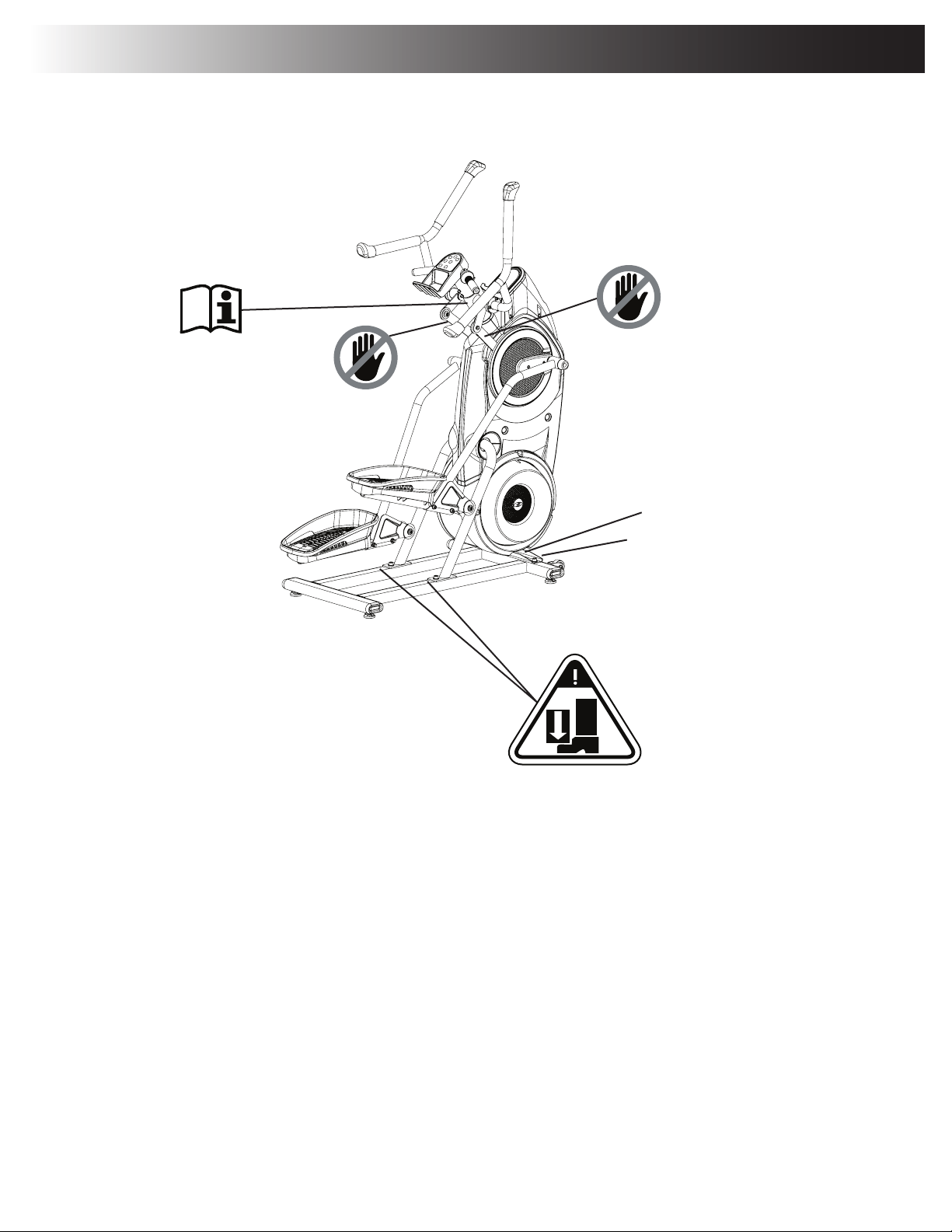
Product
Specification Label
Serial Number Label
Safety Warning Labels and Serial Number
Assembly / Owner’s Manual
6
Before Assembly
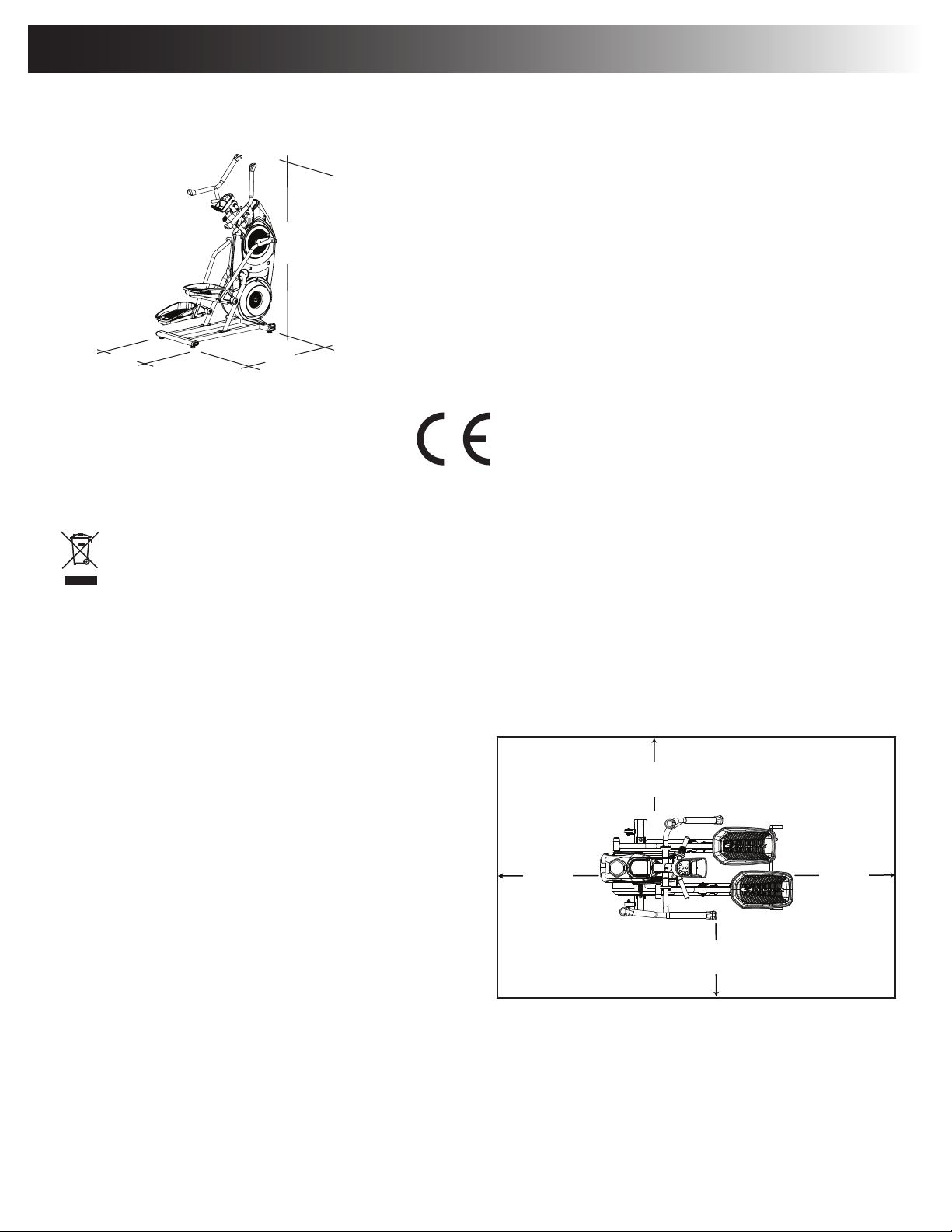
Select the area where you are going to set up and operate your machine. For safe operation, the location must be on a hard, level surface. Allow a
workoutareaofaminimum188cmx246.4cm(74”x97”).Besurethattheworkoutspaceyouareutilizinghasadequateheightclearance,taking
intoconsiderationtheheightoftheuserandthemaximumpedalheightofthetnessmachine.
Basic Assembly Tips
Follow these basic points when you assemble your machine:
• Readandunderstandthe“ImportantSafetyInstructions”before
assembly.
• Collect all the pieces necessary for each assembly step.
• Using the recommended wrenches, turn the bolts and nuts to
the right (clockwise) to tighten, and the left (counterclockwise) to
loosen, unless instructed otherwise.
• When attaching 2 pieces, lightly lift and look through the bolt
holes to help insert the bolt through the holes.
• The assembly requires 2 people.
Machine Mat
TheBowex™MaxTrainer™MachineMatisanoptionalaccessorythathelpskeepyourworkoutareaclearandaddsalayerofprotectiontoyour
oor.Therubbermachinematprovidesanon-slip,rubbersurfacewhichlimitsstaticdischargeandreducesthepossibilityofdisplayorrunninger-
rors.Ifpossible,putyourBowex™MaxTrainer™MachineMatinyourselectedworkoutareabeforeyoubeginassembly.
To order the optional machine mat, contact your local distributor.
Specifications / Before Assembly
Maximum User Weight: 136kg(300lbs.)
Total Surface Area (footprint) of equipment: 7429.5 cm
2
Maximum Pedal Height: 48.5 cm ( 19.1 inches )
Machine Weight: 63.4kg(139.8lbs.)
Power Requirements:
Operational Voltage: 9VDC
Operating Current: 1.5A
ACPowerAdapter: 100-240VAC,50-60Hz
Complies with the following:
ISO 20957 Compliant SAA Compliant
GB17498 Compliant
DO NOT dispose of this product as refuse. This product is to be recycled. For proper disposal of this product, please follow the prescribed
methods at an approved waste center.
2.46m ( 97”)
1.88m
( 74” )
0.6m
( 24” )
0.6m
( 24” )
0.6m
( 24” )
0.6m
( 24” )
73” (185.4 cm) x 94.1” (239 cm).
164.3 cm
( 64.7” )
124.5 cm
( 49” )
66 cm
( 26” )
49”
(124.5 cm)
26”
(66 cm)
Assembly / Owner’s Manual
7
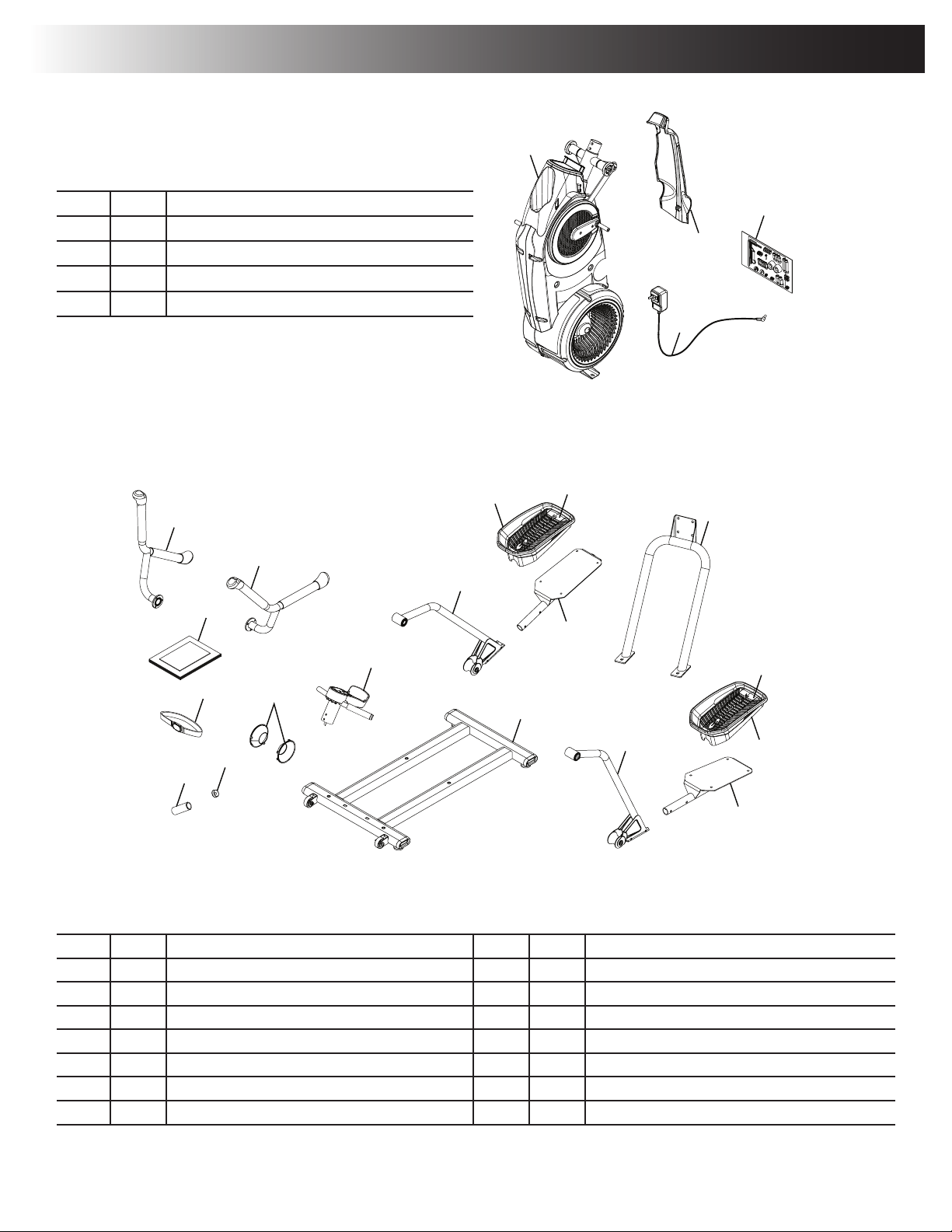
Adecalhasbeenappliedtoallright(“R”)andleft(“L”)partstoassistwithassembly.
Item Qty Description Item Qty Description
5 1 Upper Handlebar, Right 12 1 Stabilizer Assembly
6 1 Upper Handlebar, Left 13 1 Static Handlebar Assembly
7 2 Leg 14 2 Cap
8 2 Foot Pad 15 1 Static Handlebar Grip
9 2 Foot Pad Insert 16 1 Static Handlebar Cap
10 2 Pedal 17 1 Heart Rate Chest Strap
11 1 Rail Assembly 18 1 Manual Kit
( 2 Boxes )
Box 1
Item Qty Description
1 1 Frame
2 1 Shroud, Rear
3 1 AC Adapter
4 1 Hardware Card
5
11
7
12
9
6
1
7
3
2
8
9
8
10
10
13
14
17
15
16
4
18
5
11
7
12
9
6
1
7
3
2
8
9
8
10
10
13
14
17
15
16
4
18
Box 2
Parts
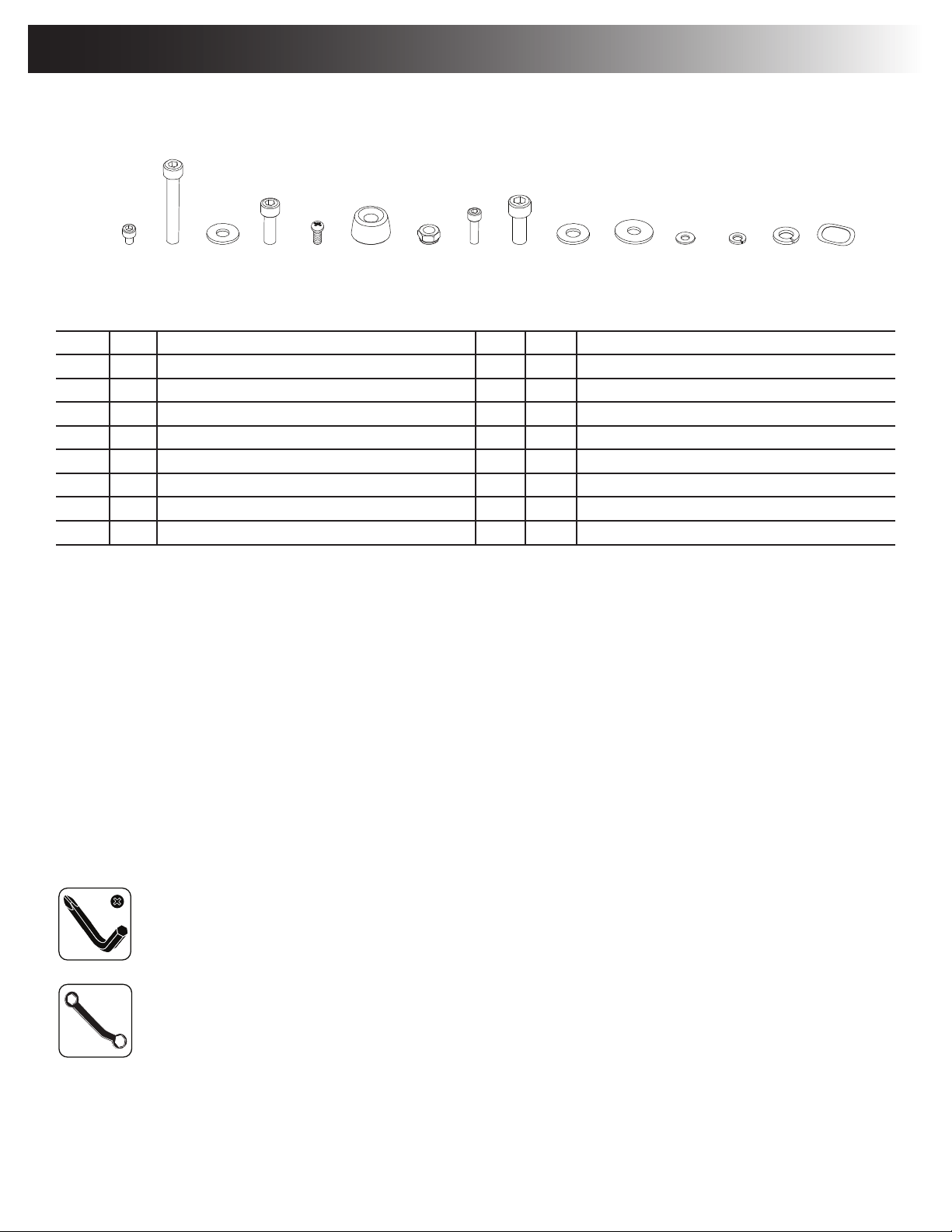
Assembly / Owner’s Manual
8
Tools
Included
#2
5 mm
6mm
8 mm
13 mm
Hardware / Tools
Item Qty Description Item Qty Description
A 8 SocketHeadHexScrew,M6x1.0x8 I 4 SocketHeadHexScrew,M10x1.5x25
B 4 SocketHeadHexScrew,M8x1.25x55 J 4 Washer,FlatM10x23
C 12 Washer,FlatM8x18 K 2 Washer,FlatM8x24
D 6 SocketHeadHexScrew,M8x1.25x20 L 4 Washer,FlatM6x13
E 1 PanPhillipsScrew,M5x0.8x20 M 10 LockWasher,M6
F 2 Cap N 6 Lock Washer, M8
G 4 Lock Nut, M8 O 2 WaveWasher,17.2x22
H 10 SocketHeadHexScrew,M6x1.0x20
Note: Select pieces of Hardware have been provided as spares on the Hardware Card. Be aware that there may be remaining Hardware
after the proper assembly of your machine.
A B C D E F
G H
I J K L M N O
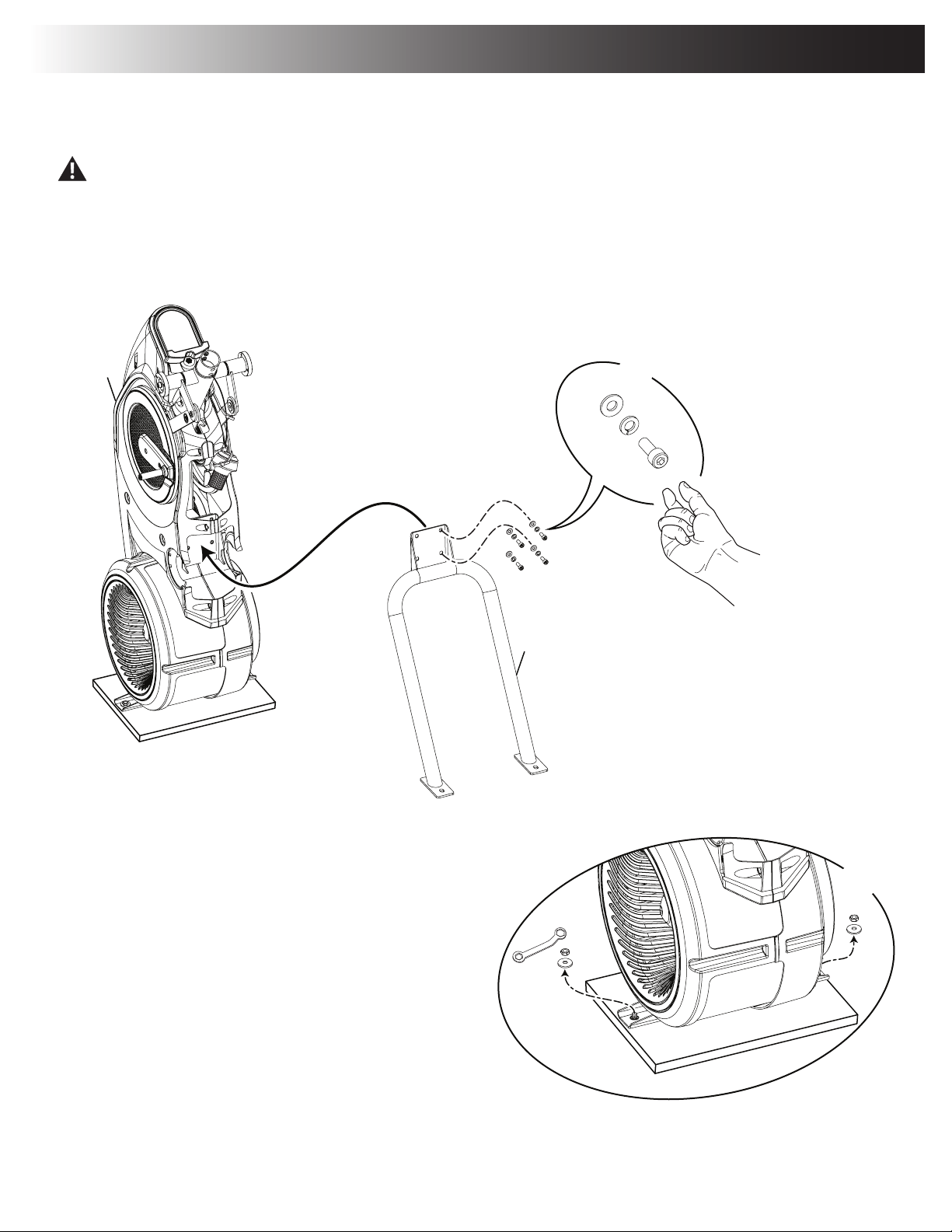
Assembly / Owner’s Manual
9
1. Attach Rail Assembly to Frame and then Release the Frame from the Shipping Plate
Some components of the machine can be heavy or awkward. Use a second person when doing the assembly steps involving these
parts. Do not do steps that involve heavy lifting or awkward movements on your own.
NOTICE: Hand tighten hardware.
13mm
X2
C
11
X4
N
D
1
13mm
X2
C
11
X4
N
D
1
Assembly
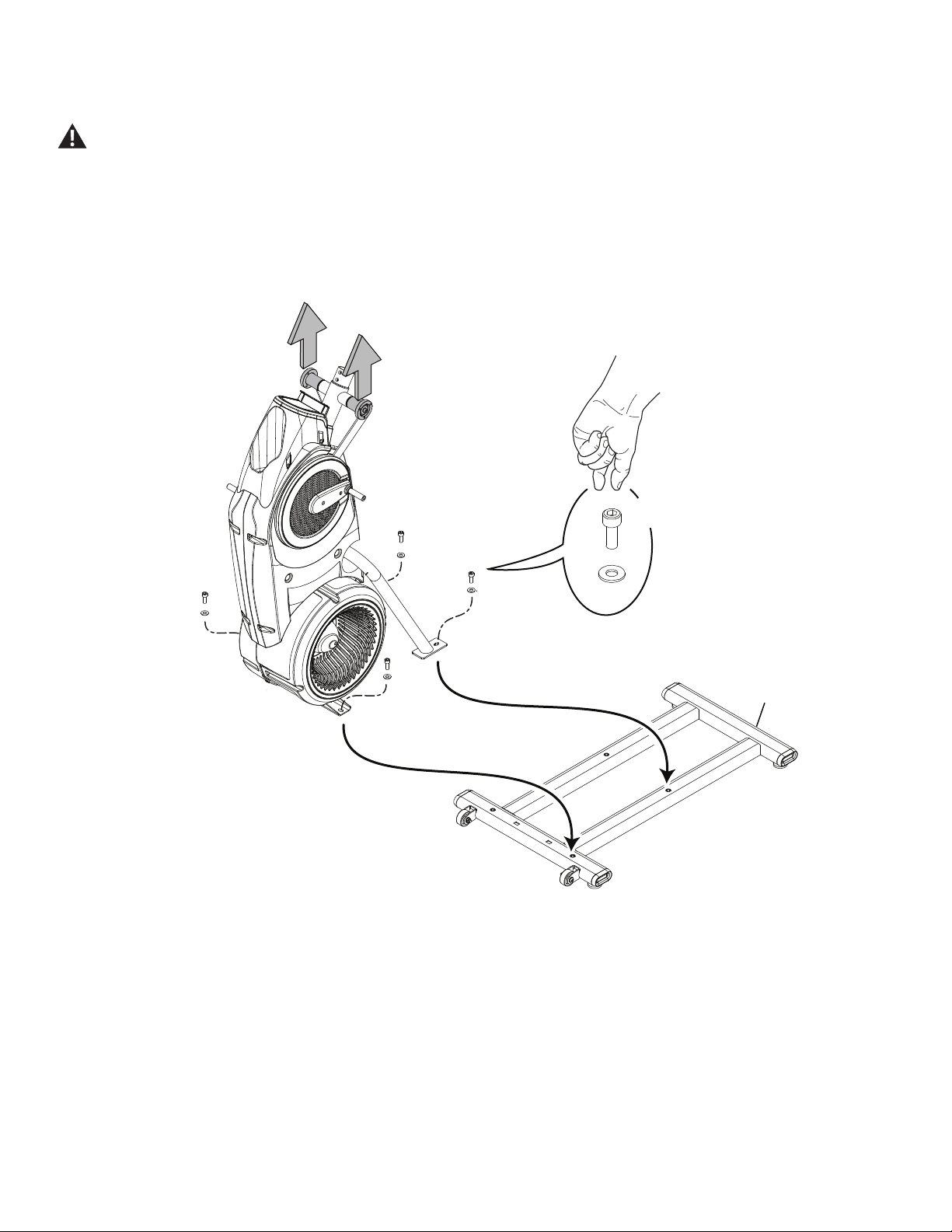
Assembly / Owner’s Manual
10
2. Carefully Lift the Frame Assembly from the Shipping Plate and Attach to the Stabilizer Assembly
Some components of the machine can be heavy or awkward. Use a second person when doing the assembly steps involving these
parts. Do not do steps that involve heavy lifting or awkward movements on your own. Lift the Frame Assembly from the exterior of
the pivot assembly as indicated below.
NOTICE: Once all hardware has been hand tightened, fully tighten ALL hardware from previous steps.
I
J
X4
12
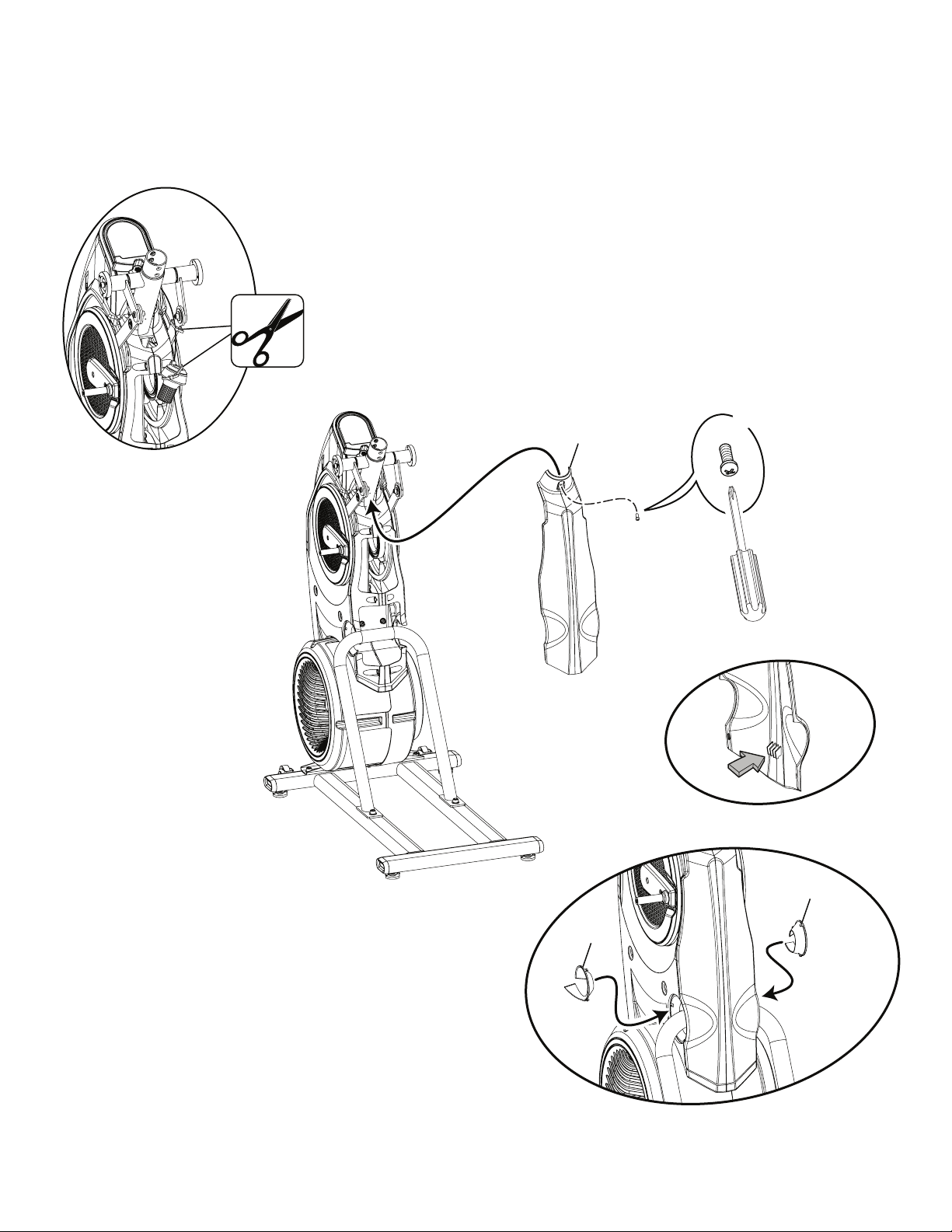
Assembly / Owner’s Manual
11
3. Cut the Shipping Zip-Ties and Attach the Rear Shroud and Caps to the Frame Assembly
NOTICE: Place the inside hook of the Rear Shroud on the Frame Assembly and then pivot it up into place.
14
14
2
#2
X1
E
Assembly / Owner’s Manual
12
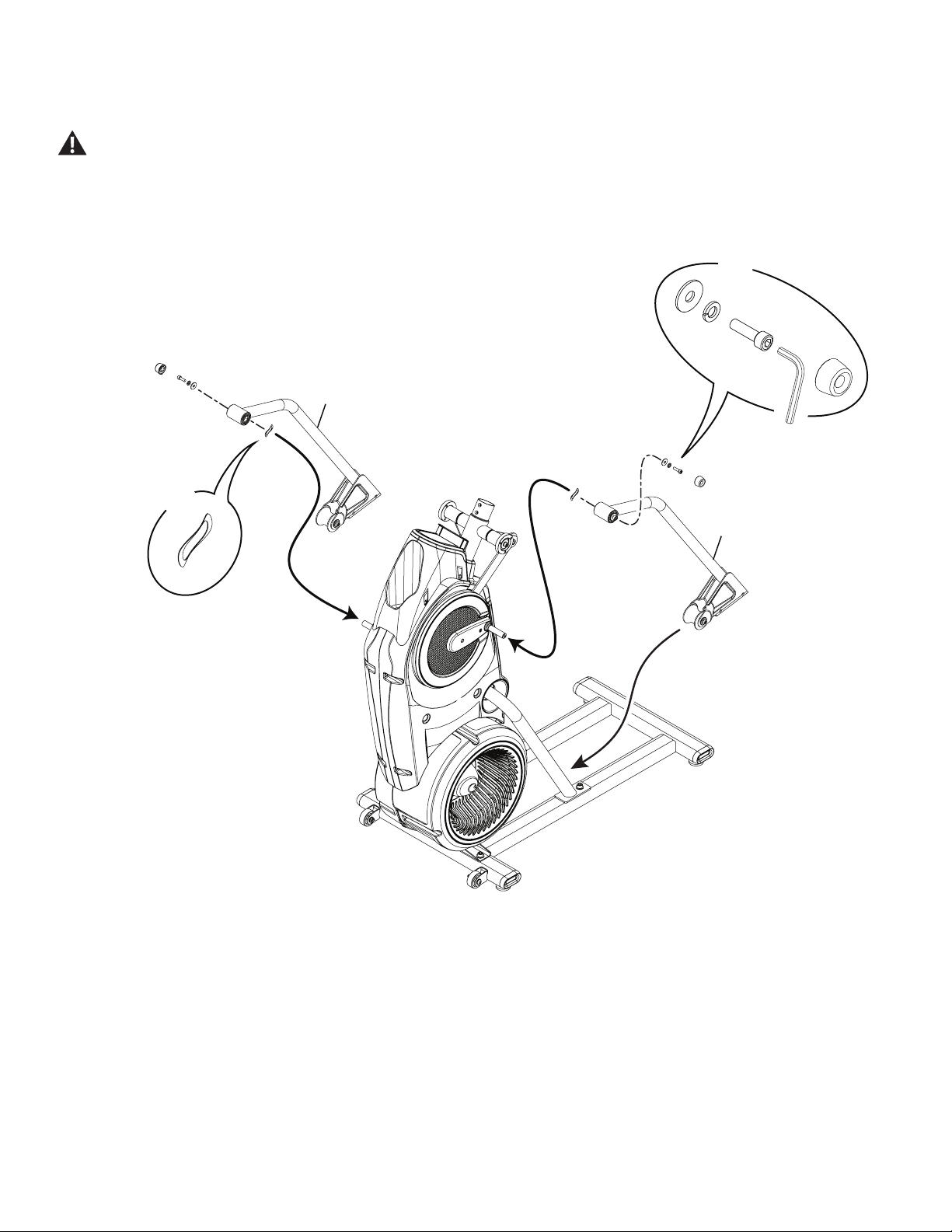
4. Attach Legs to Frame Assembly
Be aware that the Legs are connected and when either of these parts move the other does as well.
K
X2
N
D
F
6mm
7
7
X2
O
Assembly / Owner’s Manual
13
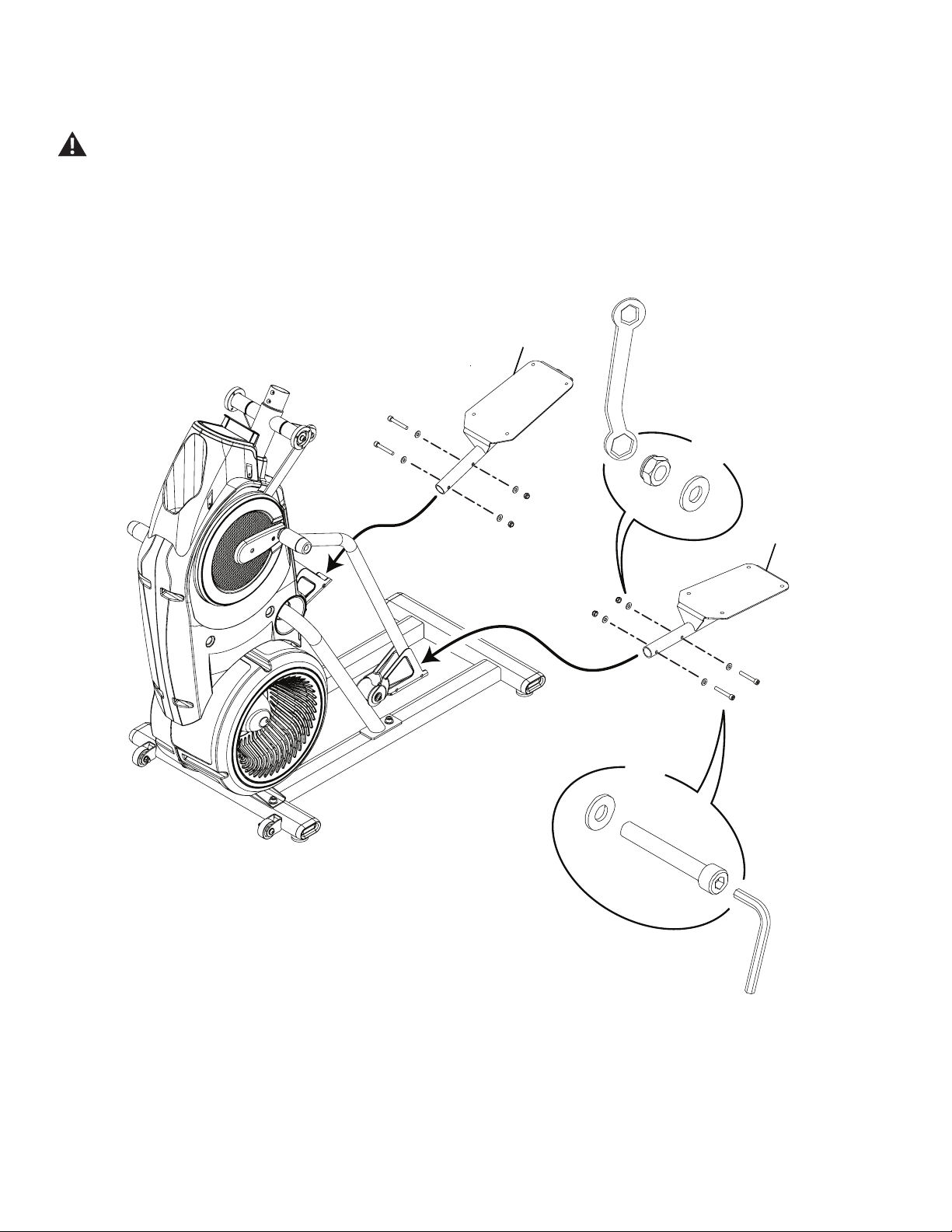
5. Attach Pedals to Frame Assembly
In order to avoid possible serious injury, when inserting the tube ends into the Leg Assemblies be careful to avoid fingers or hands
being caught or pinched.
B
X4
6mm
C
G
X4
C
10
10
13mm
Assembly / Owner’s Manual
14
X2
X8
5mm
8
9
8
A
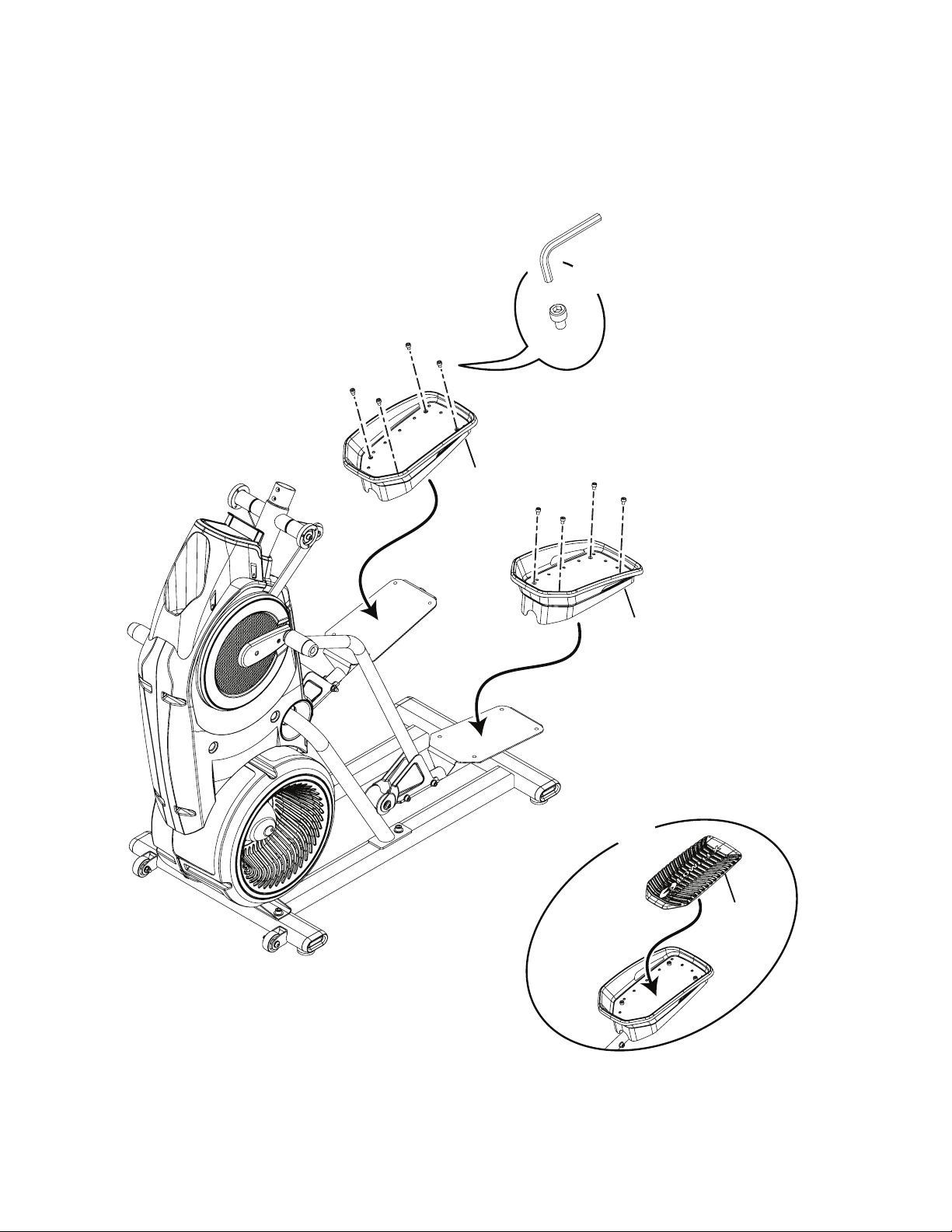
6. Connect the Foot Pads and then the Foot Pad Inserts
Assembly / Owner’s Manual
15
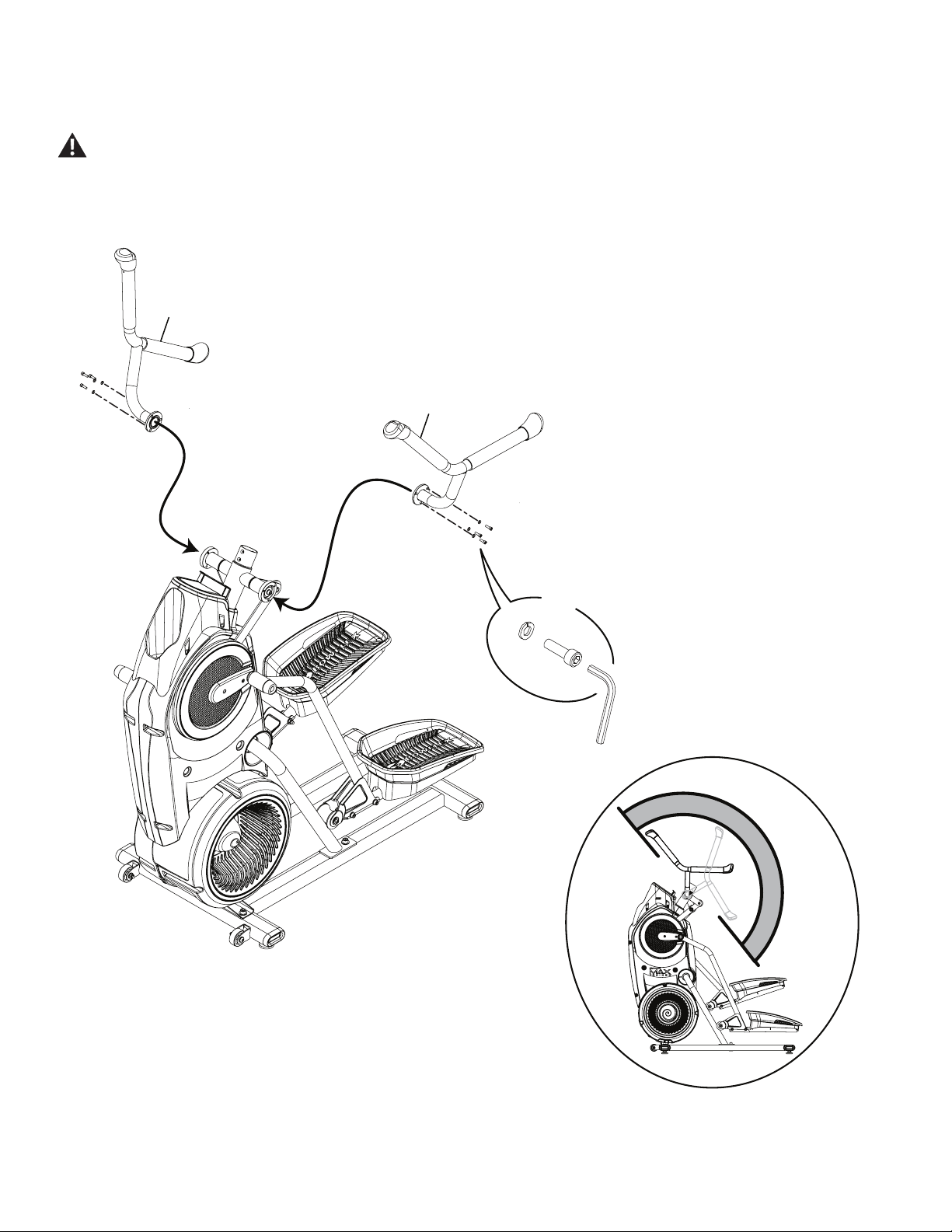
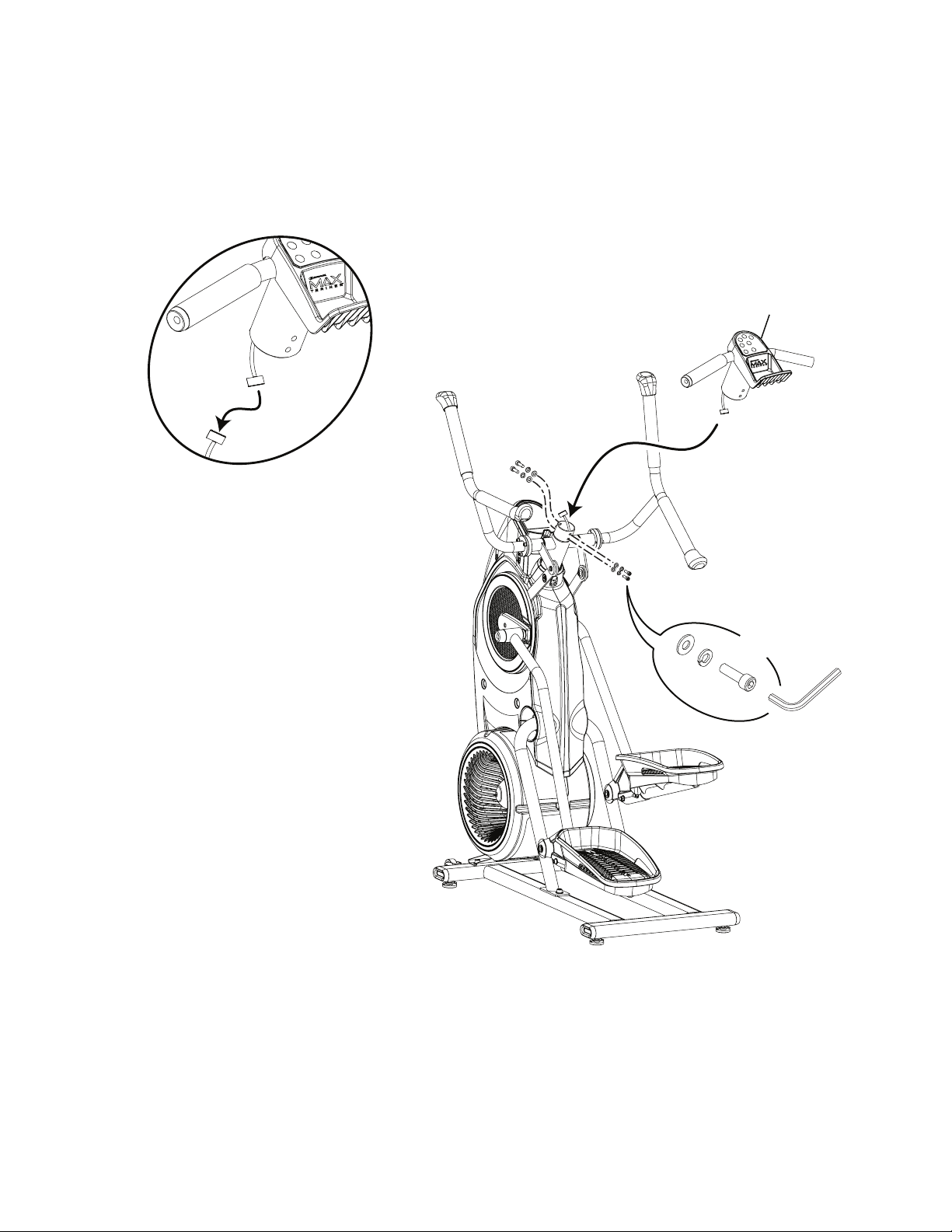
7. Attach the Upper Handlebars to Frame Assembly
Be aware that the Pedals and the Upper Handlebars are connected and when either of these parts move the other does as well.
Some components of the machine can be heavy or awkward. Use a second person when doing the assembly steps involving these
parts. Do not do steps that involve heavy lifting or awkward movements on your own.
NOTICE: Be sure to attach the Upper Handlebars so they can be correctly grasped by a User when on the machine.
5
6
H
M
X6
5mm
Assembly / Owner’s Manual
16
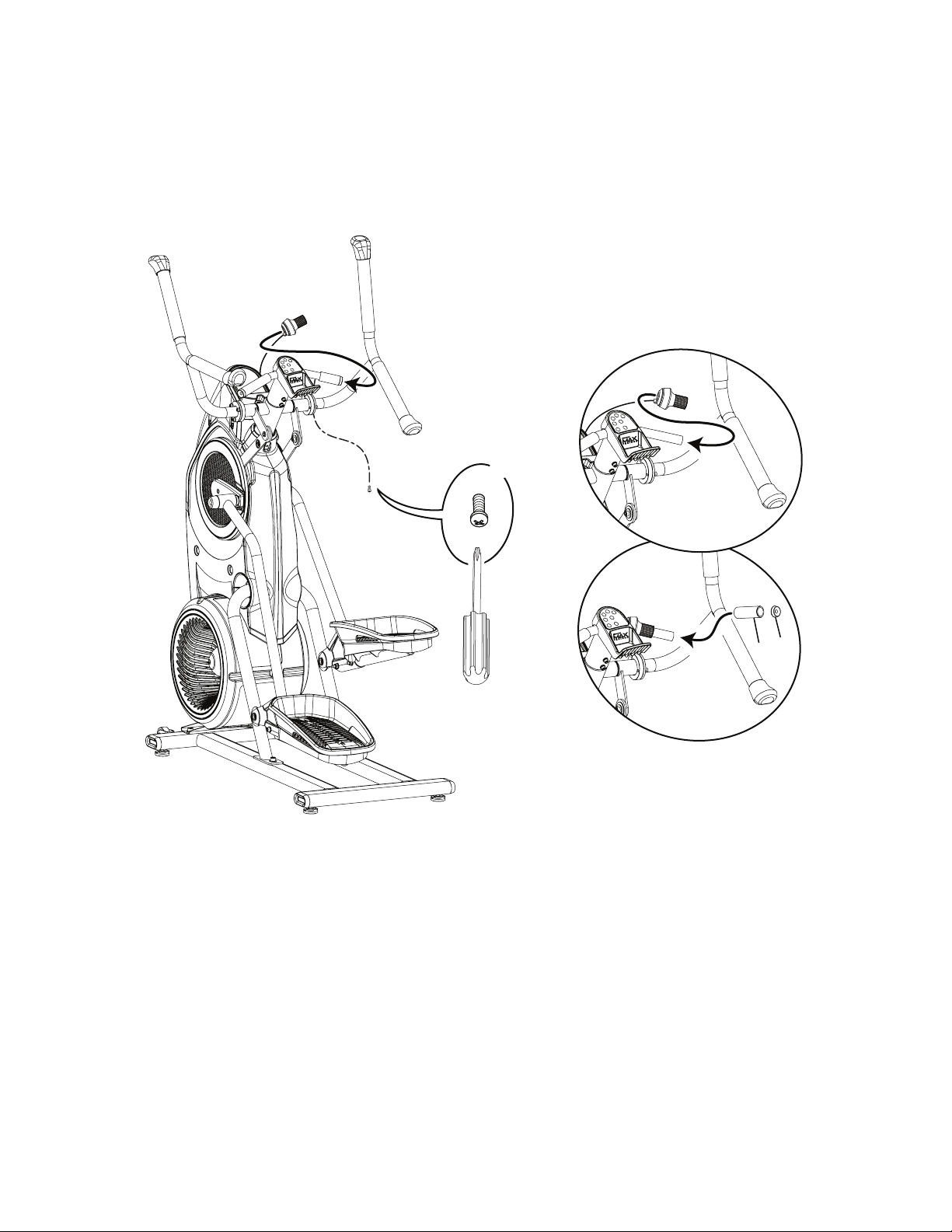
8. Connect the Static Handlebar Assembly to the Frame Assembly
NOTICE: Do not crimp the Console Cable.
5mm
X4
H
M
L
13
Assembly / Owner’s Manual
17
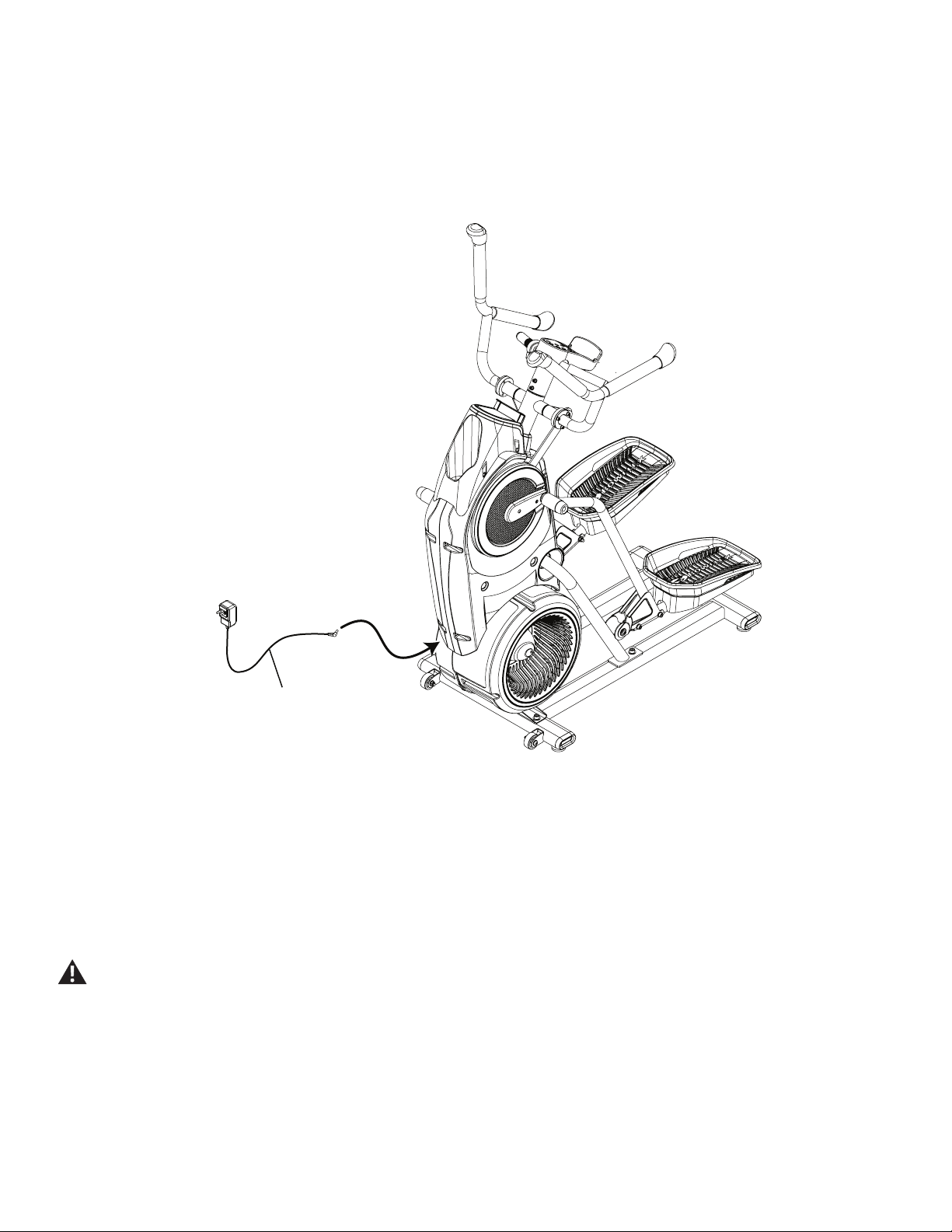
9. Attach the Shifter Assembly to the Static Handlebar and Attach the Grip
NOTICE: Do not crimp the Cable. Hardware is pre-installed and not on Hardware Card (*). Be sure the settings on
the Shifter Assembly are visible to a User before fully tightening the hardware.
Note: A small application of soapy water can be used to ease the Static Handleber Grip onto the Handelbar.
*
X1
#2
15
16
Assembly / Owner’s Manual
18
3
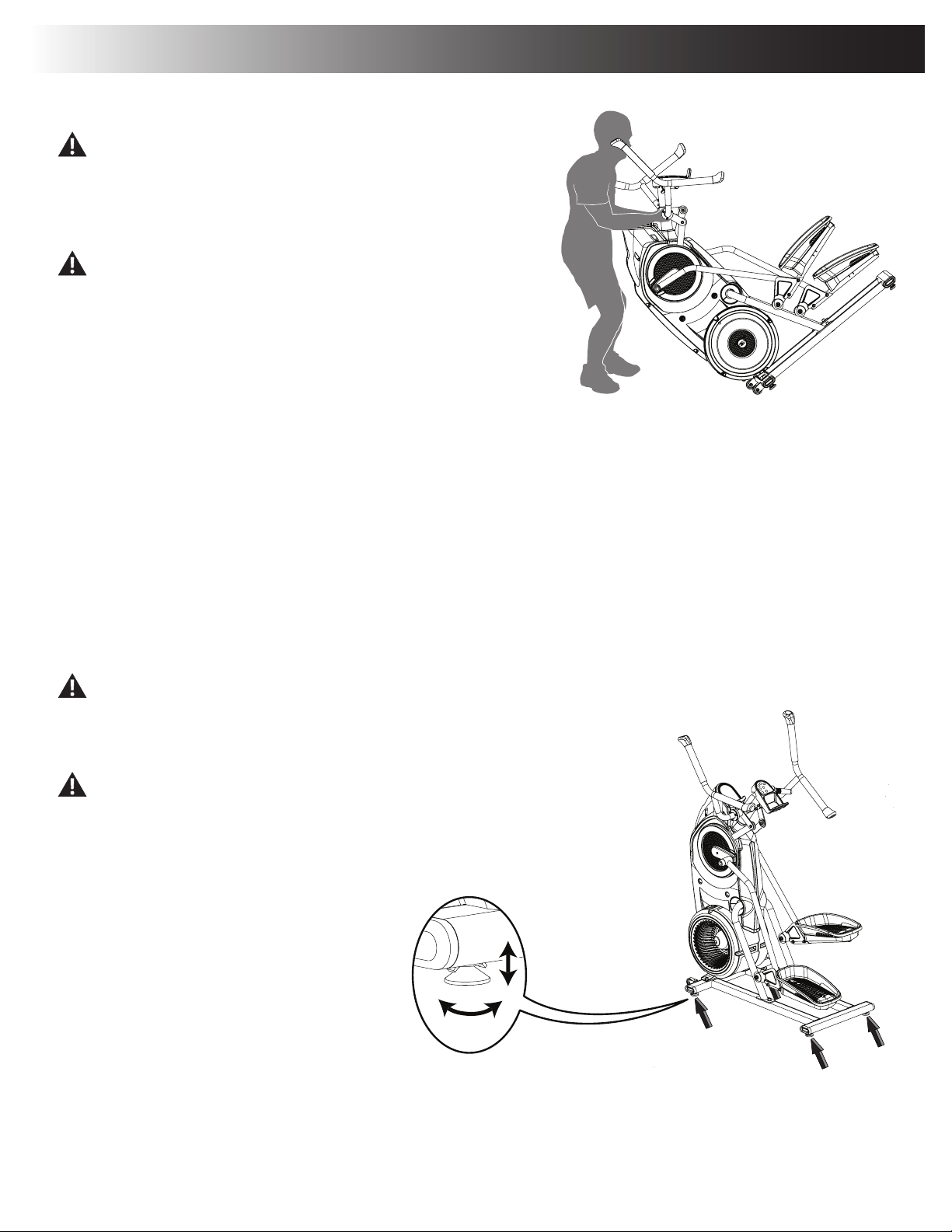
10. Connect the AC Adapter to the Frame Assembly
NOTICE: Be sure to use the appropriate AC Adapter plug for your region.
11. Final Inspection
Inspect your machine to ensure that all hardware is tight and components are properly assembled.
Besuretorecordtheserialnumberintheeldprovidedatthefrontofthismanual.
Do not use until the machine has been fully assembled and inspected for correct performance in accordance with the Owner’s
Manual.
Assembly / Owner’s Manual
19
Moving the Machine
The machine may be moved by one or more persons depending on their
physical abilities and capacities. Make sure that you and others are all
physically t and able to move the machine safely.
1. Grasp the inner, unmoving part of the Pivot Assembly to carefully tilt the machine
toward you onto the transport rollers.
Be aware of the Handlebars and the weight of the machine before tilting the
machine.
2. Push the machine into position.
3. Carefully lower the machine into position.
NOTICE: Be careful when you move the machine. All abrupt motions can affect the
computer operation.
Leveling the Machine
ThemachineneedstobeleveledifyourworkoutareaisunevenoriftheRailAssemblyisslightlyofftheoor.Toadjust:
1. Place the machine in your workout area.
2. Loosenthelockingnutsandadjustthelevelersuntiltheyareevenlybalancedincontactwiththeoor.
Do not adjust the levelers to such a height that they detach or unscrew from the machine. Injury to you or damage to the machine
can occur.
3. Tighten the locking nuts.
Make sure the machine is level and stable before you exercise.
Adjustments
Assembly / Owner’s Manual
20
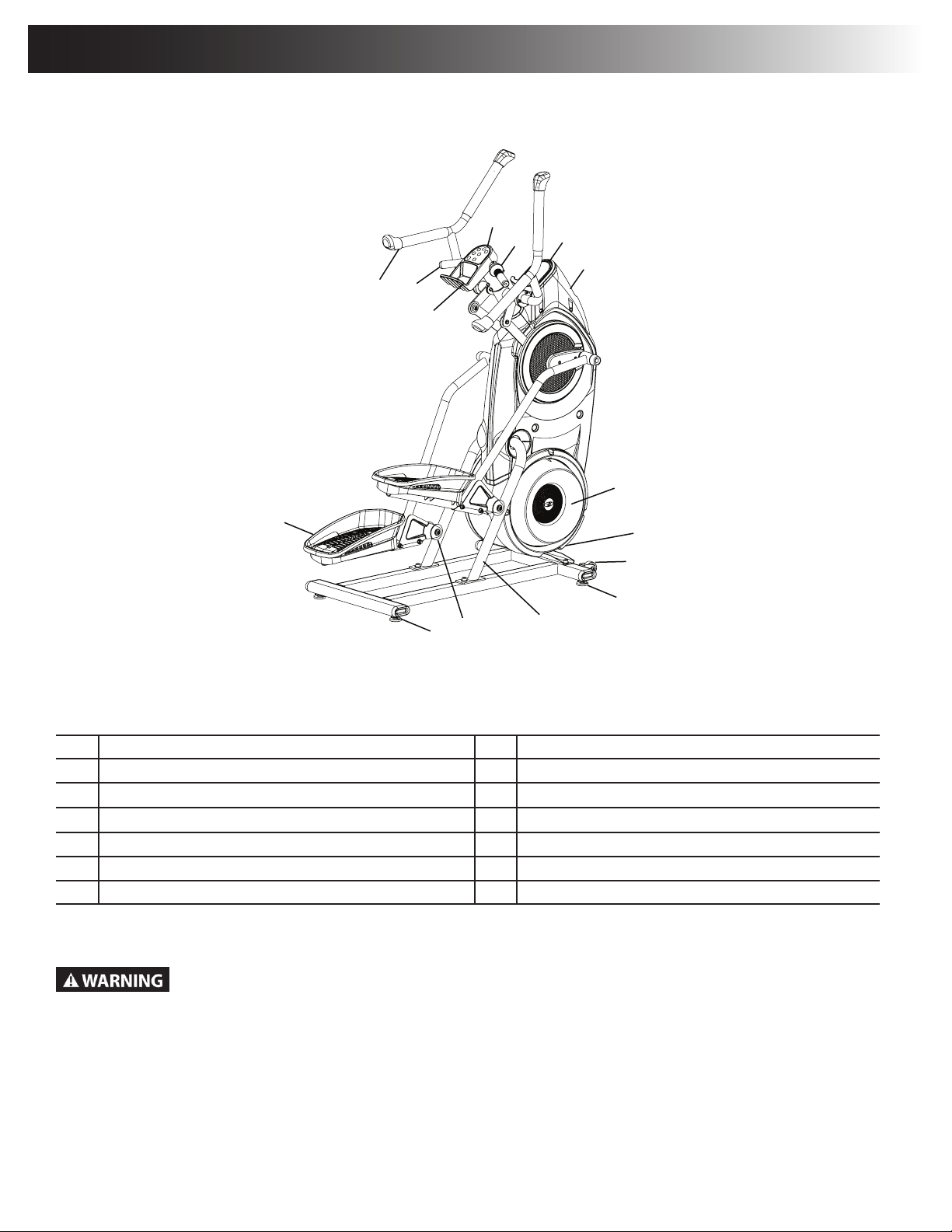
A Console Buttons H Leveler
B Resistance Level Shifter I Rail Assembly
C Console Display J Roller
D Water Bottle Holder K Pedal
E Resistance Fan L Media Tray
F Power Connector M Static Handlebar
G Transport Roller N Upper Handlebar
Use the values calculated or measured by the machine’s computer for reference purposes only. The heart rate
displayed is an approximation and should be used for reference only. Over exercising may result in serious injury or
death. If you feel faint stop exercising immediately.
F
E
G
H
H
I
J
K
B
C
A
M
N
L
D
Features
Assembly / Owner’s Manual
21
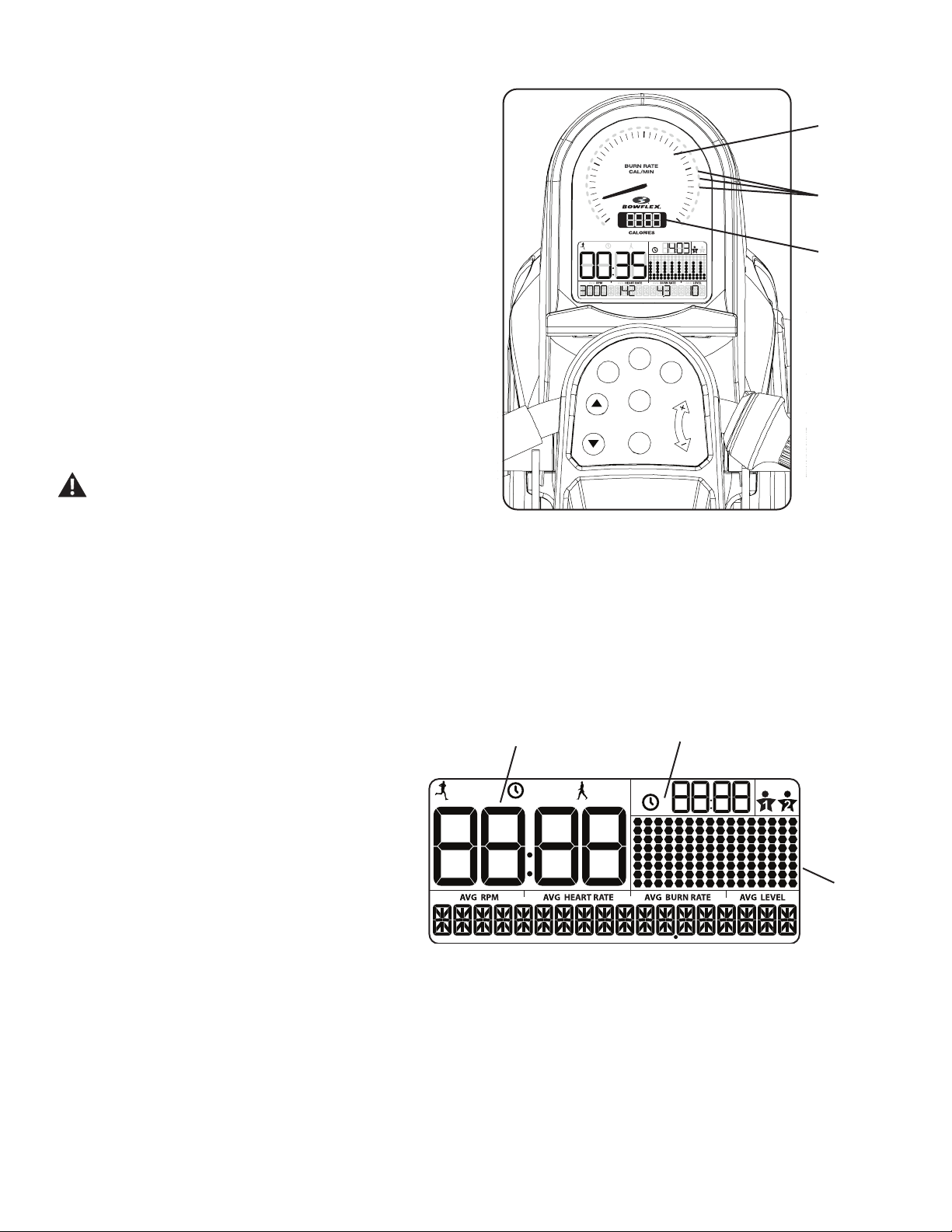
Maximum Burn Rate LED Marker
TheMaximumBurnRateLEDMarkerisanorangeLEDthatshowsthehighestrateofcalorieburnachievedduringthecurrentworkout.
Calories
TheCaloriesdisplayeldshowstheestimatedcaloriesthathavebeenburnedduringtheworkout.Themaximumdisplayis9999.
LCD Display Data
The console display shows the workout measurements
and current options.
Time
TheTIMEdisplayeldshowsthetimecountfortheactive
workout. There are three types of time display depending
on the style of workout: Interval, Manual, or Steady State.
ACTIVE: During an Interval workout, the TIME display
will shift between the ACTIVE and REST intervals with
anaudibleconrmation,countingthetimedownforthe
current segment. ACTIVE is the sprint, or high Intensity,
segment of the Interval workout.
TOTAL: During a Manual workout, the TIME display will count up until the workout is ended.
Themaximumdisplayis99:99.Ifthetimecountismore,theworkoutwillbeended.
REST:DuringanIntervalworkout,thereducedworkoutlevelthatcountsdownuntilthenextACTIVEsegment.
Total Time
TheTOTALTIMEdisplayeldshowsthetimecountforanIntervalworkout.ThisdisplaywillbeblankduringaManualworkout.
PAUSE/END
START
MAX
Interval
ENTER
USER
USER
TOTAL
ACTIVE
REST
TOTAL
BURN
RATE
RESISTANCE
LEVEL
0
10
20
40
30
Target
Burn
Rate LED
Range
Calories
Console Features
The Console provides information about your workout on the display
screen.
Burn Rate Display
The Burn Rate Display shows the level of calories being burned per
minute. This rate is a function of the current level of RPM (pedal speed)
andresistancelevel(1-8).Aseitherofthosevaluesincrease,theBurn
Rate will increase.
Target Burn Rate LED Range
The Target Burn Rate LED Range is a workout coach based on the
settingsoftheselectedUserProle.ArangeofveLEDsareactivated
duringaworkout.TherstoftheLEDsintherangeisasuggested
beginnerlevel,withthehigherLEDsbeingforamoreadvancedtness
user.
Note:BesuretheUserProleiscurrentforamoreexactcalorieburnrate
and suggested target range.
The Target Burn Rate LED Range is a suggested workout
level, and should only be followed if your physical tness
level allows.
Burn Rate
Display
USER
TOTAL
ACTIVE
REST
TOTAL
Workout
Profile
Display
Time
Total Time

Assembly / Owner’s Manual
22
User Prole
TheUSERPROFILEdisplayshowstheselecteduserprole.Auserproleisalwaysselected.
Note:FormoreaccuratecaloriecountsandtargetCalorieBurnRates,customizeyourUserProle.
Workout Prole Display
TheWorkoutProleDisplayareashowstheBurnRateproleoftheprogram.Eachcolumnintheproleshowsoneinterval(workoutsegment).The
higherthecolumn,thehighertheTargetedBurnRateoftheworkout.Theashingcolumnshowsthecurrentinterval.
Note:Duringaworkout,theWorkoutProleDisplaywillnotreectupdatestoresistancelevel,onlyburnrate.
RPM
TheRPMdisplayeldshowsthemachinerevolutionsperminute(pedalspeed).Themaximumdisplayis200.
Heart Rate
The Heart Rate display shows the heart rate in beats per minute (BPM) from the heart rate sensors. This value will not be shown if a heart rate signal
is not detected.
Consult a physician before you start an exercise program. Stop exercising if you feel pain or tightness in your chest, become short
of breath, or feel faint. Contact your doctor before you use the machine again. The heart rate displayed on the console is an
approximation and should be used for reference only.
Burn Rate
TheBurnRatedisplayeldshowsthecurrentrateatwhichcaloriesarebeingburnedperminute.TheRPMandResistanceLeveldirectlychange
thisrate.TheUserProlesettingsalsoaffecttherate(Userweight).
Level
TheLeveldisplayeldshowsthecurrentResistanceLevel(1-8).ThehighertheResistanceLevel,theharderitwillbetopushthePedals.
Keypad Functions
ENTERbutton-Pushtoacceptthedisplayedvaluefortheoption.
MAXINTERVALbutton-PushtostarttheMAXINTERVALworkout,pushandholdfor3secondstoedittheintervaltimes(ACTIVEandREST)for
the MAX workout program.
USERbutton-PushtoselectthedesiredUserProle,pushandholdfor3secondstoedittheselectedUserProle.
BURN RATE Increase ()button-IncreasestheTargetBurnRateduringaworkout,orincreasesavalue(time,age,weight,orheight).
STARTbutton-FromtheWELCOMEscreenstartsaManualworkout,startsaselectedProgramworkout,orresumesapausedworkout.
BURN RATE Decrease ()button-DecreasestheTargetBurnRateduringaworkout,ordecreasesavalue(time,age,weight,orheight).
PAUSE/ENDbutton-Pausesanactiveworkout,endsapausedworkout,orgoes back to the previous screen.
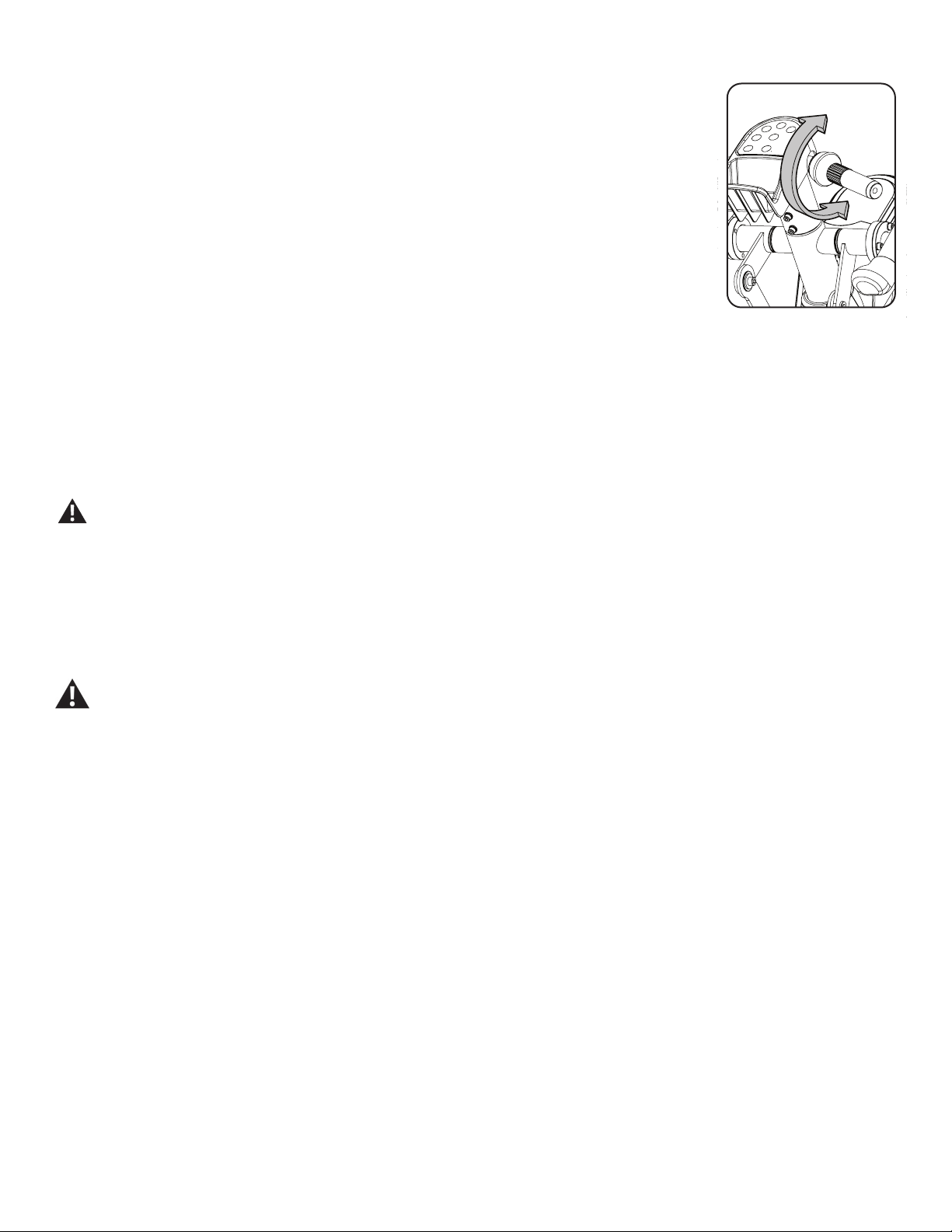
Resistance Level Shifter
YourBowex™MaxTrainer™machineusesResistancetochangetheintensityofyourworkoutortoadjustthepaceofthePedals.ThelevelofRe-
sistanceisadjustedbytheShifterontherightsideoftheStaticHandlebar.A“1”settingistheminimumamountofresistance,the“8”isthemaximum
resistance.TheclosertheShifterissettothe“8”setting,themoreenergywillbeneededtomovethePedalsdownward.
During a workout, if you keep your RPM rate stable and increase the Pedal Resistance, your Calorie Burn Rate will increase. This results in a more
intense workout.
Assembly / Owner’s Manual
23
To get yourself oriented with the process, begin with the Shifter set to 4. If this setting does not allow enough Pedal
travel at a casual stepping pace, adjust the Shifter toward the 1 setting until you are comfortable with the amount
oftravel.IfyoundthatthePedalsmovetoomuchandyouarenotabletoincreasethesteppingpace,adjust
the Shifter setting toward the 8 setting, allowing less Pedal movement. The Pedals should be set so they displace
enough to absorb the impact of your motion at your desired stepping pace.
Note:“Bottomedout”iswhentheUserisunabletostartaworkoutbecausethePedalswillnotmove.Ifthis
occurs, safely grasp the Static Handlebars and apply your weight to the heel of the higher foot. While still
grasping the Static Handlebar, lean back slightly applying more weight onto the heel. Once the Pedals
begin to move, resume your intended workout.
It may be helpful to note the Shifter setting for future reference when there are multiple users of the machine.
Remote Heart Rate Monitor
MonitoringyourHeartRateisoneofthebestprocedurestocontroltheintensityofyourexercise.TheConsolecanreadtelemetryHeartRate(HR)
signalsfromaHeartRateChestStrapTransmitterthatoperatesinthe4.5kHz-5.5kHzrange.
Note: The heart rate chest strap must be an uncoded heart rate strap from Polar Electro or an uncoded POLAR
®
compatible model. (Coded
POLAR
®
heart rate straps such as POLAR
®
OwnCode
®
chest straps will not work with this equipment.)
If you have a pacemaker or other implanted electronic device, consult your doctor before using a wireless chest strap or other
telemetric heart rate monitor.
The heart rate displayed on the console is an approximation and should be used for reference only.
Chest Strap
Using the heart rate transmitter chest strap lets you monitor your heart rate at any time during your workout.
Consult a physician before you start an exercise program. Stop exercising if you feel pain or tightness in your chest, become short
of breath, or feel faint. Contact your doctor before you use the machine again. Use the values calculated or measured by the
machine’s computer for reference purposes only.
To put on your chest strap:
1. Adjustthestraplengthtotsnuglyandcomfortablyagainstyourskin.Securethestraparoundyourchest,justbelowthechestmuscles,and
buckle it.
2. Lift the transmitter off your chest and moisten the two Grooved Electrode Areas on the back.
3. Checkthatthewetelectrodeareasarermlyagainstyourskin.
The transmitter will send your heart rate to the machine’s receiver and display your estimated Beats Per Minute (BPM).
Always remove the transmitter before you clean the chest strap. Clean the chest strap regularly with mild soap and water, and thoroughly dry it.
Residual sweat and moisture may keep the transmitter active and drain the battery in the transmitter. Dry and wipe clean the transmitter after each
use.
Note: Do not use abrasives or chemicals such as steel wool or alcohol when you clean the chest strap, as they can damage the electrodes
permanently.
IftheConsoledoesnotdisplayaheartratevalue,thetransmittermaybeatfault.Checkthatthetexturedcontactareasonthecheststrapare
making contact with your skin. You may need to lightly wet the contact areas. If no signal appears or you need further assistance, contact your local
distributor.
Assembly / Owner’s Manual
24
Heart Rate Calculations
Yourmaximumheartrateusuallydecreasesfrom220BeatsPerMinute(BPM)inchildhoodtoapproximately160BPMbyage60.Thisfallinheart
rateisusuallylinear,decreasingbyapproximatelyoneBPMforeachyear.Thereisnoindicationthattraininginuencesthedecreaseinmaximum
heartrate.Individualsofthesameagecouldhavedifferentmaximumheartrates.Itismoreaccuratetondthisvaluebycompletingastresstest
than by using an age related formula.
Yourat-restheartrateisinuencedbyendurancetraining.Thetypicaladulthasanat-restheartrateofapproximately72BPM,whereashighly
trained runners may have readings of 40 BPM or lower.
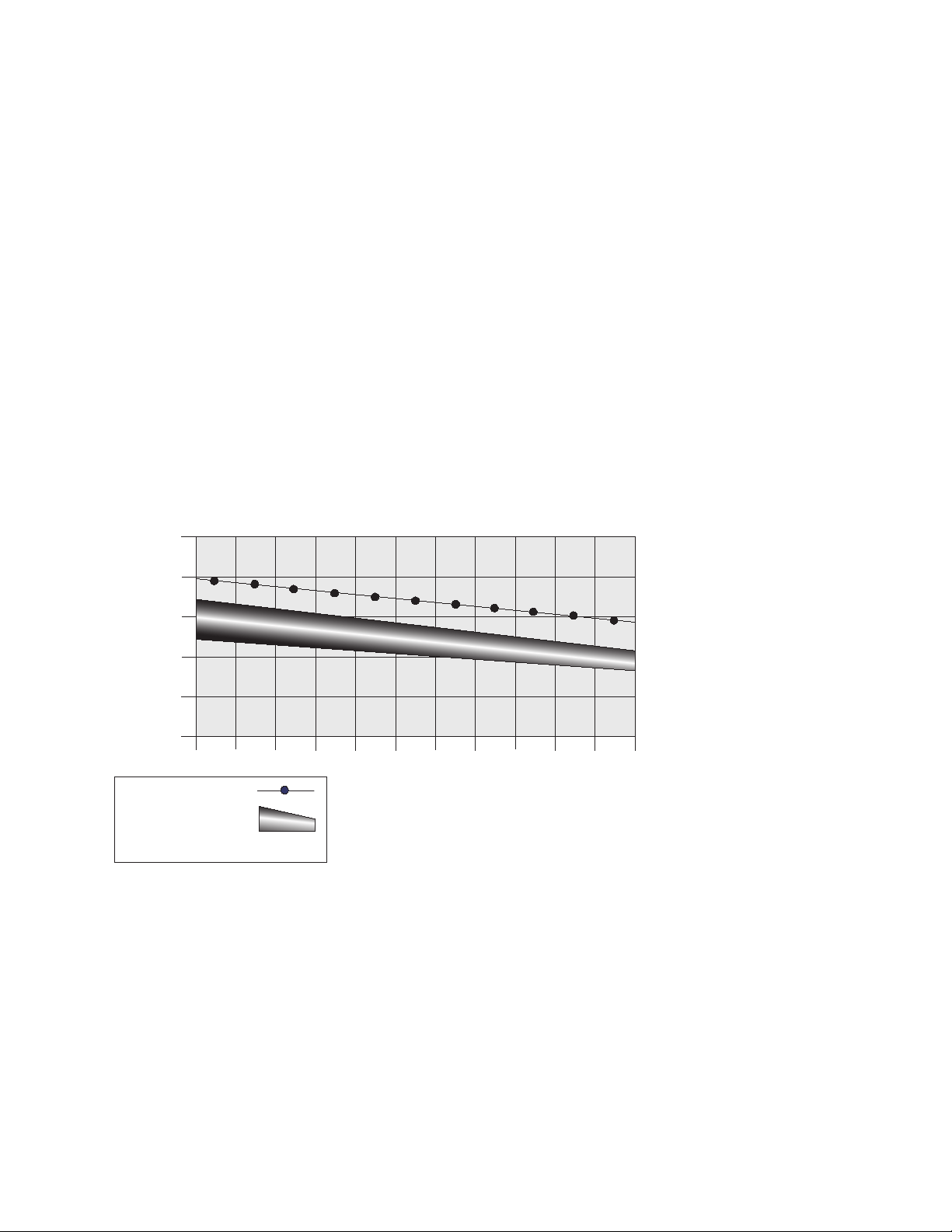
The Heart Rate table is an estimate of what Heart Rate Zone (HRZ) is effective to burn fat and improve your cardiovascular system. Physical condi-
tions vary, therefore your individual HRZ could be several beats higher or lower than what is shown.
Themostefcientproceduretoburnfatduringexerciseistostartataslowpaceandgraduallyincreaseyourintensityuntilyourheartratereaches
between60–85%ofyourmaximumheartrate.Continueatthatpace,keepingyourheartrateinthattargetzoneforover20minutes.Thelonger
you maintain your target heart rate, the more fat your body will burn.
The graph is a brief guideline, describing the generally suggested target heart rates based on age. As noted above, your optimal target rate may be
higher or lower. Consult your physician for your individual target heart rate zone.
Note:Aswithallexercisesandtnessregimens,alwaysuseyourbestjudgmentwhenyouincreaseyourexercisetimeorintensity.
20-24
FAT-BURNING TARGET HEART RATE
Heart Rate BPM (beats per minute)
Age
25-29
0
50
100
150
200
250
30-34 35-39 40-44 45-49 50-54 55-59 60-64 65-69 70+
196
191
186
181
176
171
166
161
156
151
146
167
162
158
154
150
145
141
137
133
128
126
Maximum Heart Rate
Target Heart Rate Zone
(keep within this range
for optimum fat-burning)
11 8
11 5
11 2
109
106
103
100
97
94
91
88
FAT-BURNING
ANAEROBIC
AEROBIC

Assembly / Owner’s Manual
25
Fitness Basics
Frequency
Tomaintaingoodhealth,loseweightandimproveyourcardiovascularendurance,usetheBowex™MaxTrainer™cardiomachineaminimumof3
times per week, around 14 minutes each day.
Ifyouarenewtoexercise(orreturningtoaregularexerciseprogram),andyouareunabletocomfortablycomplete14minutesofcontinuousexer-
ciseatonetime,justdo5–10minutes,andgraduallyincreaseyourworkouttimeuntilyoucanreacha14minutetotal.
Ifyourscheduleisbusy,andyouareunabletot14minutesofcontinuousexerciseintoyourday,tryaccumulating14minutesbydoingmultiple
shorterworkoutsonthesameday.Forexample,7minutesinthemorningand7minutesintheevening.Thismaybeagreatwaytostartyourcardio
training if you are new to vigorous activity.
Forbestresults,combineyourBowex™MaxTrainer™cardiomachineworkoutswithastrengthtrainingprogramusingaBowex™homegymor
Bowex™SelectTech™dumbbells,andfollowtheBowex™BodyWeightLossGuideincludedinthismanual.
Consistency
Busyworkschedules,familyobligationsanddailychorescanmakeitdifculttotregularexerciseintoyourlife.Trythesetipstoincreaseyour
chances of success:
Scheduleyourworkoutsthesamewayyouschedulemeetingsorappointments.Selectspecicdaysandtimeseachweek,anddon’tchangeyour
workout times unless it is absolutely necessary.
Make a commitment to a family member, friend or spouse, and encourage each other to stay on track each week. Leave messages with friendly
reminders to be consistent, and keep each other accountable.
Makeyourworkoutsmoreinterestingbyalternatingbetweensteadystate(single-speed)workoutsandintervaltraining(variedspeed)workouts.The
Bowex™MaxTrainer™cardiomachineisevenmorefunwhenyouaddthiskindofvariety.
Apparel
Itisimportanttowearappropriate,safeandcomfortablefootwearandclothingwhenusingtheBowex™MaxTrainer™cardiomachine,including:
• Rubber-soledathleticwalkingorrunningshoes.
• Exerciseclothingthatallowsyoutomovefreely,andkeepcomfortablycool.
• Athletic support that provides stability and comfort.
• Exercisefriendlywaterbottleforconstanthydration.
Assembly / Owner’s Manual
26
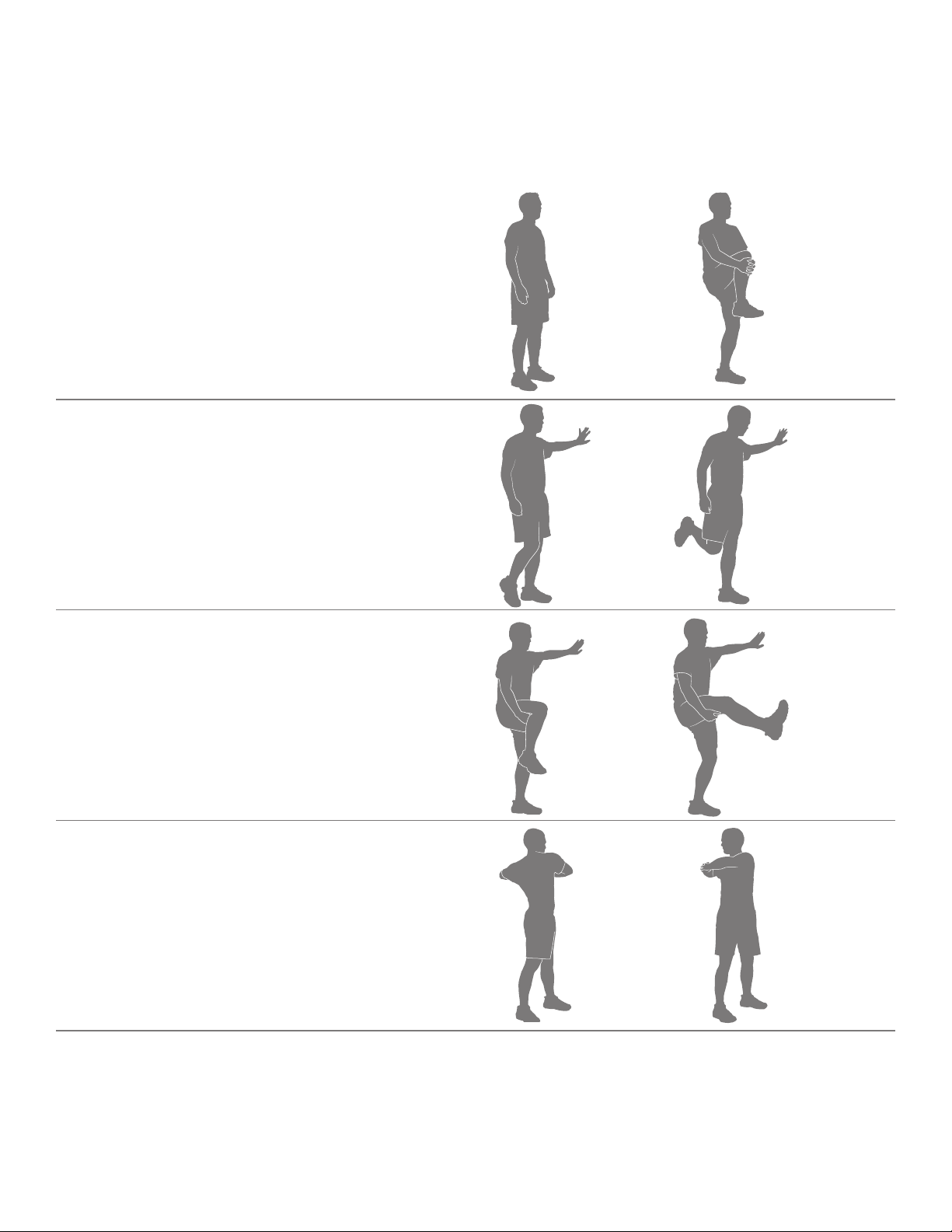
Warm-Up *
BeforeyouuseyourBowex™MaxTrainer™cardiomachine,considerdoingthesedynamicwarm-upstretches,whichwillhelpprepareyourbody
for the workout:
Dynamic Knee Hug
Stand with the feet together. Bring one knee forward and up
toward the chest. Place the hands around the shin and pull
the knee into the chest. Release the stretch by putting the
footontheoor.Eachrepetitionofthesequenceshouldtake
1to3seconds.Repeatasacontinuous,controlled,uidse-
quence 10 or 20 times. Repeat the stretch with the other leg.
Dynamic Knee Bend
Stand with the feet together. Hold onto a wall for balance with
one hand, if necessary. Raise the heel of one foot toward the
gluteals.Releasethestretchbyputtingthefootontheoor.
Each repetition of the sequence should take 1 to 3 seconds.
Repeatasacontinuous,controlled,uidsequence10or20
times. Repeat the stretch with the other leg.
Dynamic Knee Kick
Stand tall and hold one leg up with the hands at hip height,
keeping the knee bent. Hold onto a wall for balance with one
hand, if necessary. Straighten the knee as far as comfortably
possible. Release the stretch by bending the knee. Each rep-
etition of the sequence should take 1 to 3 seconds. Repeat
asacontinuous,controlled,uidsequence10or20times.
Repeat the stretch with the other leg.
Dynamic Twist
Standwiththefeetshoulder-widthapart.Bendtheelbows;
hold the arms out to the sides. Twist the upper body to one
side and then the other side as far as comfortably possible.
Each repetition of the sequence should take 1 to 3 seconds.
Repeatasacontinuous,controlled,uidsequence10or20
times
*Source:JayBlahnik’sFull-BodyFlexibility,SecondEdition,2010.HumanKinetics.com.
Assembly / Owner’s Manual
27
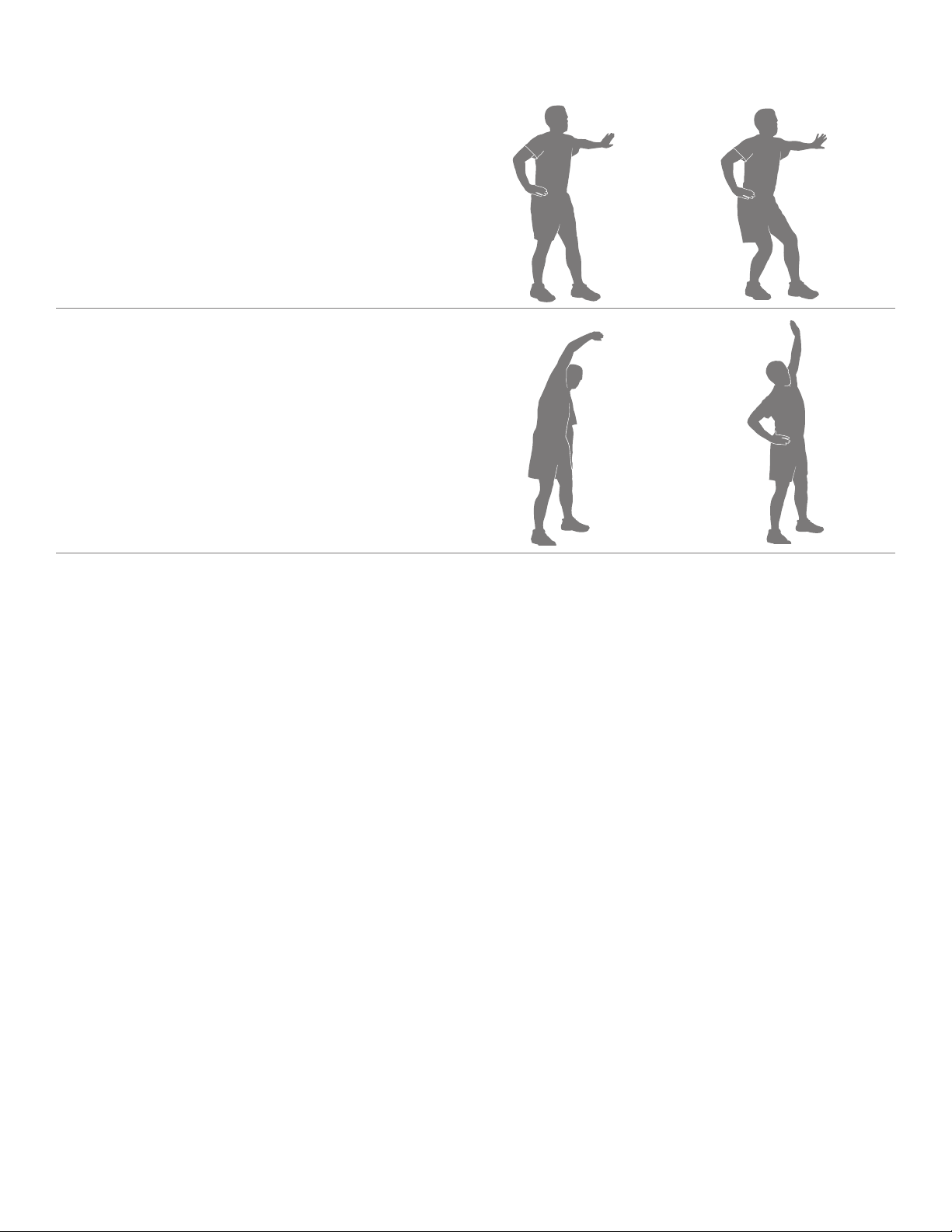
Dynamic Bent Knee Heel Press
Standwithonefootforwardandonefootback,hip-width
apart and feet facing forward. Hold onto a wall for balance
with one hand, if necessary. Bend both knees putting weight
on the back heel. Release the stretch by returning to the start
position. Each repetition of the sequence should take 1 to 3
seconds.Repeatasacontinuous,controlled,uidsequence
10 or 20 times. Repeat the stretch with the other leg. Touch a
wall or hold onto something for balance, if necessary.
Dynamic Side Reach
Stand with the feet apart, the knees slightly bent and the
arms at the sides of the body. Reach with one hand above
the head and lean over to the opposite side. Release the
stretch by returning to the start position. Then reach with the
other hand to the opposite side. Use the other arm to support
the body weight on the thigh, if necessary. Each repetition
of the sequence should take 1 to 3 seconds. Repeat as a
continuous,controlled,uidsequence10or20times.

Assembly / Owner’s Manual
28
Workouts
Followtheseguidelinestoeaseyourselfintoaweeklyexerciseregimen.Useyourjudgmentand/ortheadviceofyourphysicianorhealthcare
professionaltondtheintensityandlevelofyourworkouts.
Consult a physician before you start an exercise program. Stop exercising if you feel pain or tightness in your chest, become short
of breath, or feel faint. Contact your doctor before you use the machine again. Use the values calculated or measured by the
machine’s computer for reference purposes only. The heart rate displayed on the console is an approximation and should be used
for reference only.
SteadyStateandIntervalTrainingare2typesofworkoutsyoucandoonyourBowex™MaxTrainer™cardiomachine:
Steady State workouts
A Steady State workout involves slowly increasing your workout speed to a challenging, but comfortable, speed you can hold for most of your work-
out.GettingyourHeartRateupintotheFat-Burning,HeartZonezoneforanentireworkoutwouldbeagreatSteadyStateworkout.Forexample,
holdinga6caloriesperminuteBurnRatepacefortheentireworkout,exceptduringthewarm-upandcool-down.SteadyStateworkoutshelpyou
buildexercisecondence,staminaandendurance,andareessentialtoawell-roundedcardiovasculartrainingprogram.
Interval Training workouts
AnIntervalTrainingworkoutinvolvesadjustingyourworkoutintensityforspeciclengthsoftimetoraiseandloweryourbreathingrate,heartrate
and calorie burn. This form of workout allows you to burn more calories than a standard workout in a shorter period of time. Using the Calorie Burn
Rate display, you can adjust the intensity of your workout quickly to achieve your goals.
TheBowex™MaxTrainer™cardiomachinecombines8“ACTIVE”and8“REST”segmentstocreateanIntervalworkout.Duringan“ACTIVE”
segment,pushyourselftoalevelofhighcalorieburnthatcanberepeatedforthe8segments.Thenduringthe“REST”segments,allowyourself
todecreasetheintensityandprepareforthenext“ACTIVE”segment.Theseextremechangesinintensity,alongwithpushingyourbodytoward
exhaustion,iswherethemaximumbenetsaregainedfromIntervalTrainingworkouts.
IntervalTrainingworkoutsprovidevariety,helpminimizeoveruseinjuries(thatsometimesoccurfromdoingonlySteadyStateworkouts),maximize
calorieburnandimprovetness.
TheBowex™MaxTrainer™cardiomachineisdesignedtocushionyourjointsandmuscles,andbothSteadyStateandIntervalTrainingworkouts
should feel much more comfortable than walking or running outside on a hard surface or a treadmill.
After Burn Rate
AttheendofanintenseIntervalTrainingworkout,yourbodywillactuallyneedtoexpendadditionalenergytoreplenishyourbody’sreserves.This
additionalamountofenergythatyourbodywillbeusingistheAfterBurnRate,orEPOC(ExcessPost-exerciseOxygenConsumption).Thelevelof
thisadditionalenergyrequirementforyourbodyisdirectlyrelatedtomanyfactors.Somefactorsareyourphysicaltnesslevel,intensitylevelofthe
intervaltrainingworkout,lengthofoxygendeprivationduringtheworkout,andphysicaldemandsduringtherecoveryphase.
In summary, your body will be burning more calories for hours after your workout. So after an intense MAX Interval workout, you may feel the effects
for hours afterwards.
Assembly / Owner’s Manual
29
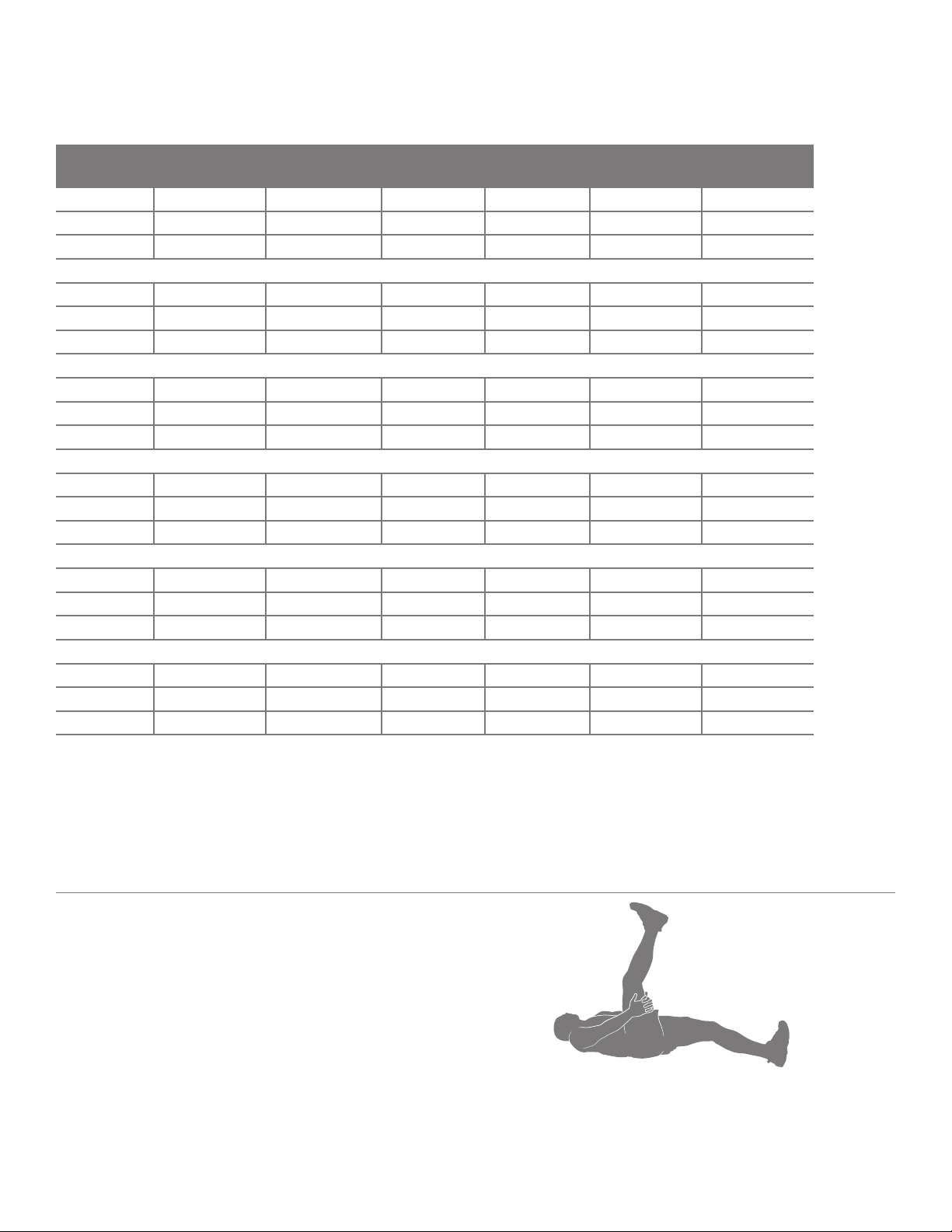
Workout Log
Use this log to track your workouts and progress. Tracking your workouts helps you stay motivated and achieve your goals.
Date Calories Burn Rate (aver-
age)
Time RPM (average) Heart Rate (aver-
age)
Level (average)
Cool-Down *
Whenyouaredoneusingyourcardiomachine,considerdoingtheserelaxingstretches,whichwillhelpyourbodyrecoverfromtheworkoutand
makeyoumoreexible:
Lying Leg Raise
Lieontheoorfaceupwiththelegsslightlybent.Liftoneleg
up toward the ceiling, keeping the knee straight. Place the
hands (or a strap) around the thigh and move the leg closer
to the head. Hold the stretch for 10 to 30 seconds. Repeat the
stretchontheotherleg.Keeptheheadontheooranddo
not round the spine.
Assembly / Owner’s Manual
30
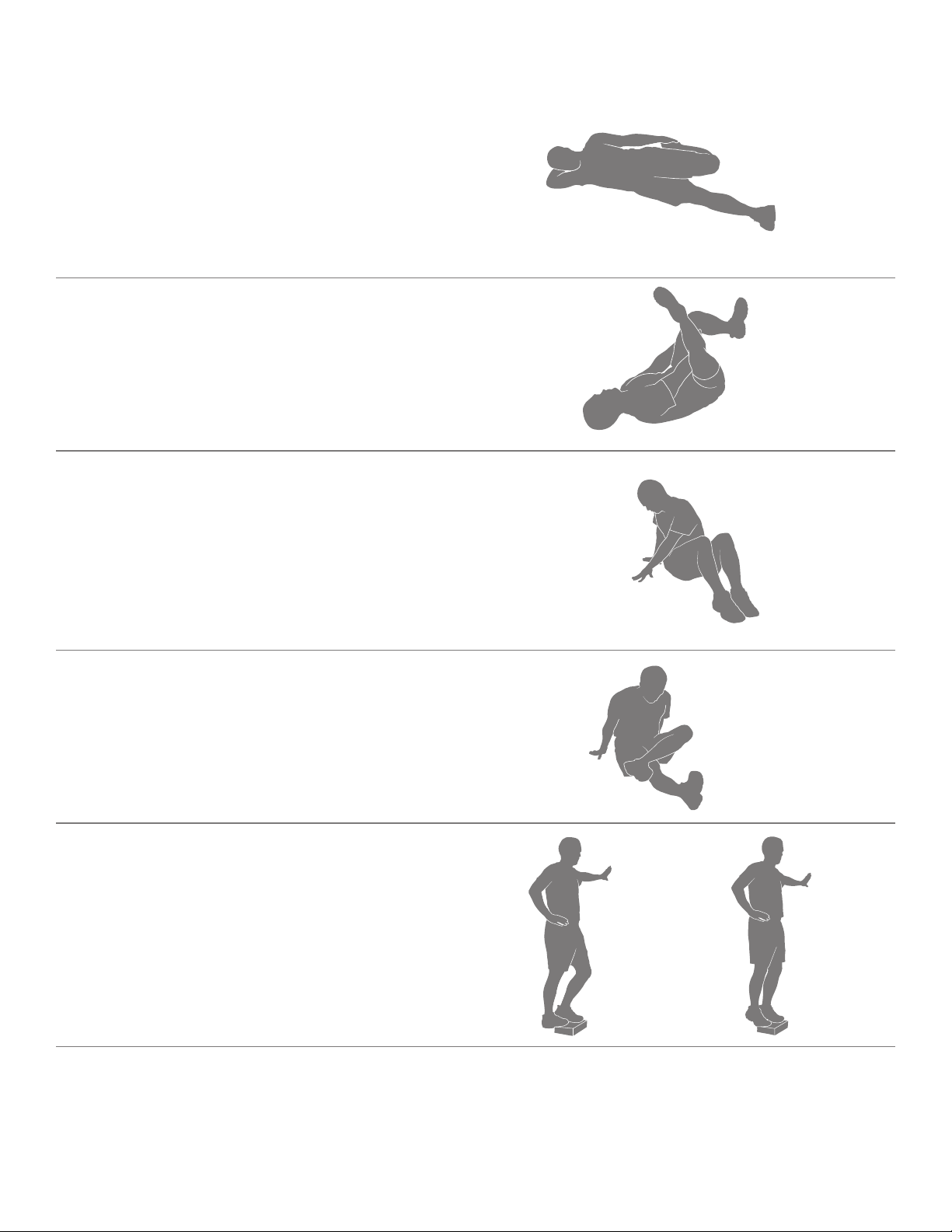
Side Lying Knee Bend
Lieontheoorononesideofthebodyandresttheheadon
the lower arm. Bend the top knee and hold the ankle with the
same-sidehand,thenpulltheheeltowardthegluteals.Hold
the stretch for 10 to 30 seconds. Lie on the other side and
repeat the stretch with the other leg. Remember to hold the
knees close together.
Lying Figure Four
Lieontheoorfaceupwiththelegsbent.Placeonefoot
acrossthethighoftheoppositeleginthegurefourposition.
Reachforthelegontheoorandpullittowardthechest.
Hold the stretch for 10 to 30 seconds. Repeat the stretch with
theotherleg.Keeptheheadontheoor.
Seated Twist
Sitontheoorandextendthelegsstraightoutinfrontofthe
bodywiththekneesslightlybent.Placeonehandontheoor
behind the body and the other hand across the thigh. Twist
the upper body as far as comfortably possible to one side.
Hold the stretch for 10 to 30 seconds. Repeat the stretch on
the other side.
Seated Figure Four
Sitontheoorandextendonelegstraightoutinfrontofthe
body. Place the foot of the other leg across the thigh in the
gurefourposition.Movethechesttowardthelegs,pivoting
at the hip. Hold the stretch for 10 to 30 seconds. Repeat on
the other leg. Use the arms to support the back.
Dynamic Heel Drop
Place the ball of one foot on the edge of a step or staircase.
Place the other foot slightly in front. Hold onto a wall for bal-
ance with one hand, if necessary. Lower the heel of the back
foot as far as comfortably possible, keeping the knee straight.
Release the stretch by lifting the heel as high as comfortably
possible. Each repetition of the sequence should take 1 to 3
seconds.Repeatasacontinuous,controlled,uidsequence
10 or 20 times. Repeat the stretch with the other leg
*Source:JayBlahnik’sFull-BodyFlexibility,SecondEdition,2010.HumanKinetics.com.

Assembly / Owner’s Manual
31
How Often Should You Exercise
Consult a physician before you start an exercise program. Stop exercising if you feel pain or tightness in your chest, become short
of breath, or feel faint. Contact your doctor before you use the machine again. Use the values calculated or measured by the
machine’s computer for reference purposes only. The heart rate displayed on the console is an approximation and should be used
for reference only.
• 3 times a week for about 15 minutes each day.
• Schedule workouts in advance and try to follow the schedule.
Note: Ifyouarenewtoexercise(orreturningtoaregularexerciseprogram),andyouareunabletocomfortablycomplete15minutesofcontinuous
exerciseatonetime,justdo5–10minutes,andgraduallyincreaseyourworkouttimeuntilyoucanreacha15minutetotal.
Intensity of Workout
To increase the intensity of your workout:
• Push yourself to increase the number of Pedal revolutions per minute
• Place your feet further out toward the rear of the Pedals
• Increase the Resistance Level and keep your RPM consistent, or increase it as well
• Use your upper and lower body at different levels
• Shift your grip location on the Upper Handlebars to work out other parts of your upper body
Hand Placement (Grip Selection)
ThetnessmachineisequippedwithUpperHandlebarsthatallowforavarietyofupperbodyworkouts.Whenstartingout,placeyourhandswhere
itfeelsmostcomfortableandstableontheUpperHandlebars.Asyouprogressonyourtnessroutine,shiftyourhandplacementtotargetdifferent
muscle groups.
Exercise on this machine requires coordination and balance. Be sure to anticipate that changes in speed and resistance level can
occur during workouts, and be attentive in order to avoid loss of balance and possible injury.
The Static Handlebars can also be used to add stability and allow you to focus the workout more on your legs.
Mounting and Dismounting Your Machine
Care should be used when mounting or dismounting the machine.
Be aware that the Pedals and the Handlebars are connected and when either of these parts move the other does as well. In order to
avoid possible serious injury, grasp the Static Handlebars to steady yourself.
Be sure there is nothing under the Pedals or in the Air Resistance Fan before moving anything on the machine.
Tomountyourtnessmachine:
1. Move the Pedals until the one nearest to you is in the lowest position.
2. Grasp the Static Handlebars under the Console Button Assembly.
3. Steadying yourself with the Static Handlebars, step up onto the lowest Pedal and place your other foot onto the opposite Pedal.
Note:“Bottomedout”iswhentheUserisunabletostartaworkoutbecausethePedalswillnotmove.Ifthisoccurs,safelygrasptheStatic
Handlebars and apply your weight to the heel of the higher foot. While still grasping the Static Handlebar, lean back slightly applying more
weight onto the heel. Once the Pedals begin to move, resume your intended workout.
Operations
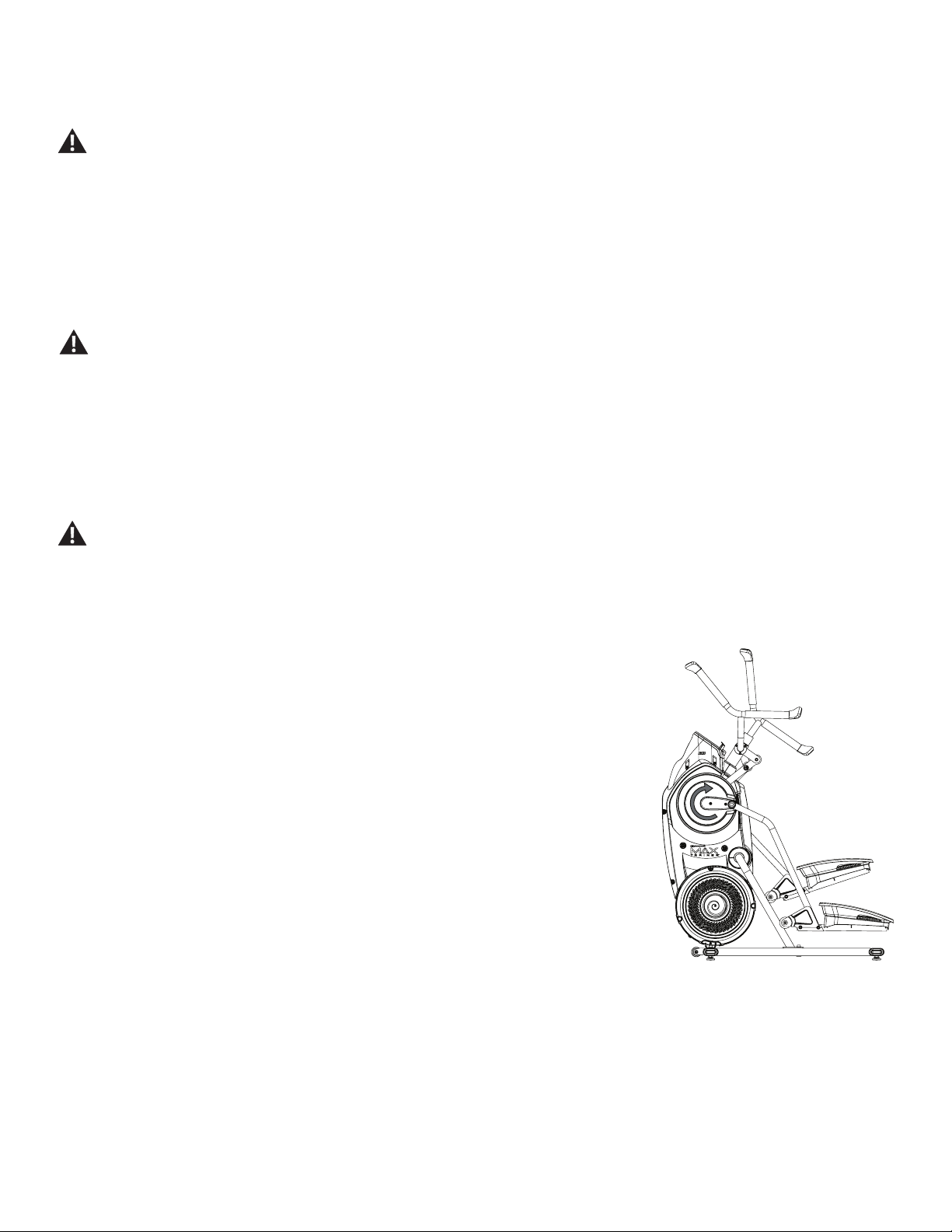
Assembly / Owner’s Manual
32
Todismountyourtnessmachine:
1. Move the Pedal you want to dismount from to the highest position, and bring the machine to a complete stop.
This machine is not equipped with a free-wheel. Pedal speed should be reduced in a controlled manner.
2. Grasp the Static Handlebars under the Console to steady yourself.
3. Withyourweightonthelowestfoot,swingtheupperfootoffthemachineanddownontotheoor.
4. Step off of the machine and release your grip from the Static Handlebars.
Getting Started
1. Placethetnessmachineinyourworkoutarea.
Place the machine on a clean, hard, level surface, free from unwanted material or other objects that may hamper your ability to
move freely. A rubber mat can be used below the machine to prevent the release of static electricity and protect your ooring.
The machine can be moved by one or more persons. Make sure that your own physical strength is capable of safely moving the
machine.
2. ExamineforanyobjectsbelowthePedalsandintheAirResistanceFan.Besureitisclear.
3. Connect the power cord to the machine and into a grounded AC Wall Outlet.
4. If you use the Heart Rate Monitor, follow the Chest Strap directions.
5. To mount the machine, move the Pedals until the one nearest you is in the lowest position.
Care should be used when mounting or dismounting the machine.
Be aware that the Pedals and the Handlebars are connected and when either of these parts move the other does as well. In order to
avoid possible serious injury, grasp the Static Handlebars to steady yourself.
6. GrasptheStaticHandlebarsundertheConsoleButtonAssembly.
7. Steadying yourself with the Static Handlebars, step up onto the lowest Pedal and place your other foot onto the opposite Pedal.
Note:“Bottomedout”iswhentheUserisunabletostartaworkoutbecausethePedalswillnotmove.
If this occurs, safely grasp the Static Handlebars and apply your weight to the heel of the higher
foot. While still grasping the Static Handlebar, lean back slightly applying more weight onto the
heel. Once the Pedals begin to move, resume your intended workout.
8. PushtheUSERbuttontoselectthedesiredUserProle.
9. Push the START button to begin a Quick Start workout. Starting with a Quick Start workout will get
youfamiliarwithhowyourBowex™MaxTrainer™machineoperatesandrespondstoadjustments
of Resistance Level and Burn Rate.
Note: When operating the Bowex™MaxTrainer™ machine, be sure the Legs are moving in the
direction as shown on the Crank Cover.
WhenreadyforaBowex™MaxTrainer™workout,besuretoprogramyourUserProle(seetheEdit
aUserProlesection)beforestartingtheMAXworkout.ThesuggestedTargetBurnRatesarebasedon
yourUserProlesettings.
Power-Up / Idle Mode ( WELCOME screen )
The Console will enter Power-Up / Idle Mode if it is plugged into a power source, any button is pushed, or if it receives a signal from the RPM sensor
as a result of pedaling the machine.
Auto Shut-Off (Sleep Mode)
IftheConsoledoesnotreceiveanyinputinapproximately5minutes,itwillautomaticallyshutoff.TheLCDdisplayisoffwhileinSleepMode.
Note: The Console does not have an On/Off switch.
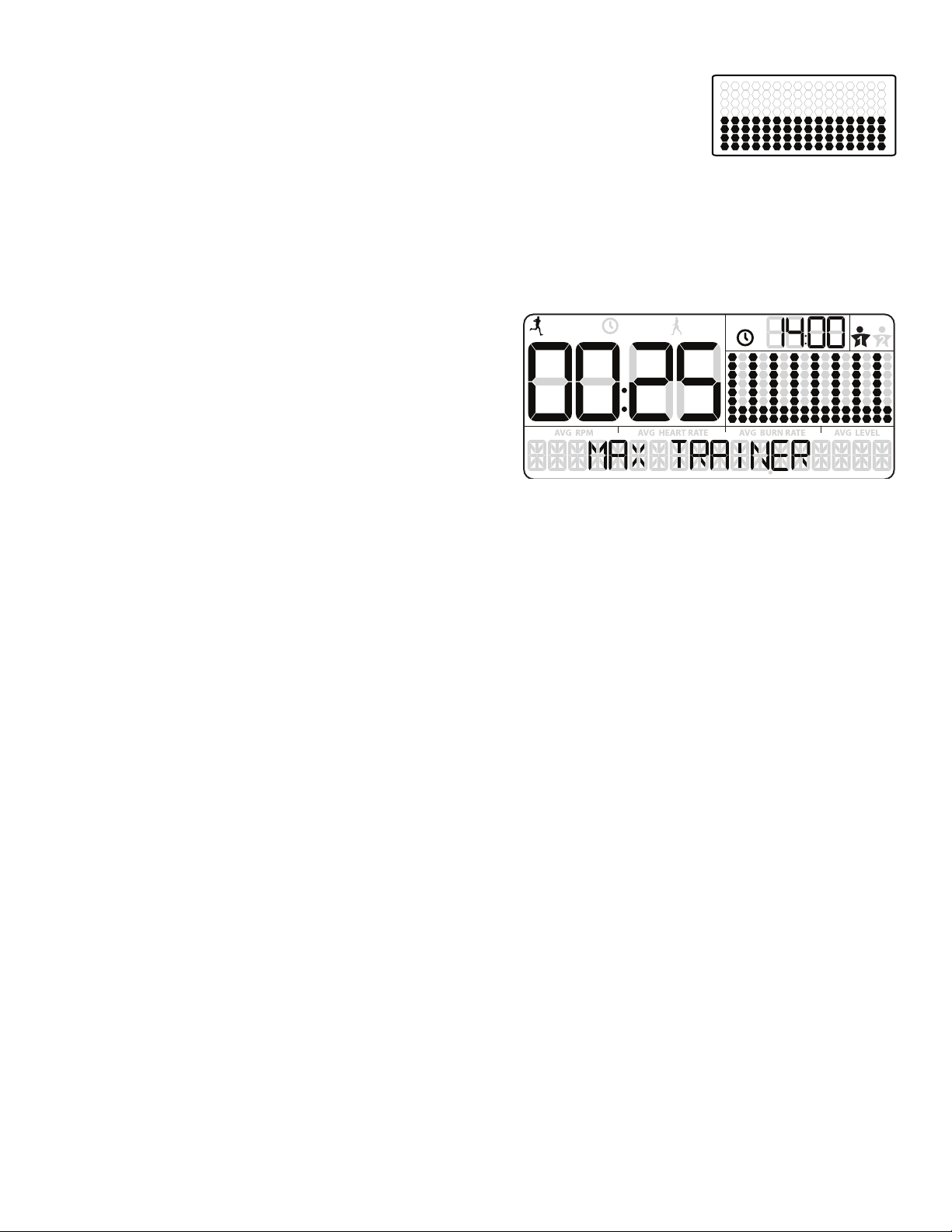
Assembly / Owner’s Manual
33
Manual ( Quick Start ) Program
TheManualworkoutprogramisanopen-endedworkoutthattracksyourtotaltime,allowingyoutotalcontrol.The
WorkoutProleDisplayshowstheTargetBurnRatefortheManualprogram.
1. Stand on the machine.
2. PushtheUSERbuttontoselectyourUserProle.
3. Push the START button to begin the Manual workout program.
4. When done with your workout, stop pedaling and push PAUSE/STOP to pause the workout. Push the PAUSE/STOP button again to end the
workout.
MAX Interval Workout Program
The MAX Interval Workout Program is a workout that alternates from intense
burstsofoutput(“ACTIVE”),toaslowerpaced,‘catchyourbreath’time
period(“REST”),bothofwhicharerepeatedovereightcycles.TheWorkout
ProleDisplayshowstheTargetBurnRatefortheMAXIntervalprogram.
1. Stand on the machine.
2. PushtheUSERbuttontoselectyourUserProle.
Note: During the workout, the Console will show the Target LED Range
basedontheselectedUserProlesettings.
3. Push the MAX Interval button.
Note:TheWorkoutProleDisplaywilladjusttheBurnRateproletothecurrentUsersettings.
4. The workout will begin with an audible countdown as the Burn Rate display needle sweeps across the display and then settles on the current
Burn Rate. The Target Burn Rate LED’s will also activate and sweep up to the recommended Burn Rate.
Therstworkoutsegmentisan“ACTIVE”intervalthatlastsforashorterperiodoftime.SafelypushyourselftogettheBurnRatedisplayinto
the Target Burn Rate (red LED’s) and keep it in the range until the time reaches 00:00.
Note: The Target Burn Rate (LED) Range is provided only as a suggested target. The 5 LED range provides a lesser target, and allows a User
toprogresstothehigherLED’sintherangeastheirtnesslevelincreases.TochangetheTargetBurnRate(LED)Range,pushtheap-
propriate Burn Rate button until the Target Range is near the desired value.
Atthelast3secondsofthe“ACTIVE”workout,theConsolewillbeginanaudiblecountdown.
5. Astheintervaltimereaches“00:00”,theConsolewillmakethethirdaudibleconrmationandthenextsegmentoftheworkout,a“REST”seg-
ment, will begin.
The Target LED Range will shift from red to green and sweep to a reduced Burn Rate. During the REST Interval, continue to workout but at a
lower level.
Atthelast3secondsofthe“REST”workout,theConsolewillbeginanaudiblecountdown.Theintervalisabouttoshiftfroma“REST”toan
“ACTIVE”intervalagain.
6. Astheintervaltimereaches“00:00”,theConsolewillmakeanaudibleconrmationandshifttothenext“ACTIVE”segment.
Theshiftfrom“ACTIVE”to“REST”segmentswillrepeatforatotalof8cyclesovertheworkout.
7. Whenthelast“REST”segmentiscompleted,theConsolewilldisplay”WORKOUTCOMPLETE”,andthenshowtheworkoutresults.TheCon-
solewilldisplaythetotaltimeofthe“ACTIVE”intervals,alongwithTOTALTIME.Ifthereisnoinputfor5minutes,theConsolewillautomatically
go into Sleep Mode.
Note: IfanIntervalworkoutisendedbeforeall16segmentshavebeencompleted,theConsolewillonlyshowthelastsegmentcompletedon
theProgramProle.
USER
TOTAL
ACTIVE
REST
TOTAL
Speed Interval
Calorie Burn
30 seconds
90 seconds
90 seconds
30 seconds
90 seconds
30 seconds
90 seconds
30 seconds
90 seconds
30 seconds
90 seconds
30 seconds
90 seconds
30 seconds
90 seconds
30 seconds
Strength Interval
45 seconds
90 seconds
90 seconds
45 seconds
90 seconds
45 seconds
90 seconds
45 seconds
90 seconds
45 seconds
90 seconds
45 seconds
90 seconds
45 seconds
90 seconds
45 seconds
Fat Burn
Stairs
Max Interval *
25 seconds
80 seconds
80 seconds
25 seconds
80 seconds
25 seconds
80 seconds
25 seconds
80 seconds
25 seconds
80 seconds
25 seconds
80 seconds
25 seconds
80 seconds
25 seconds
Manual *
Calorie Goal
Fitness Test
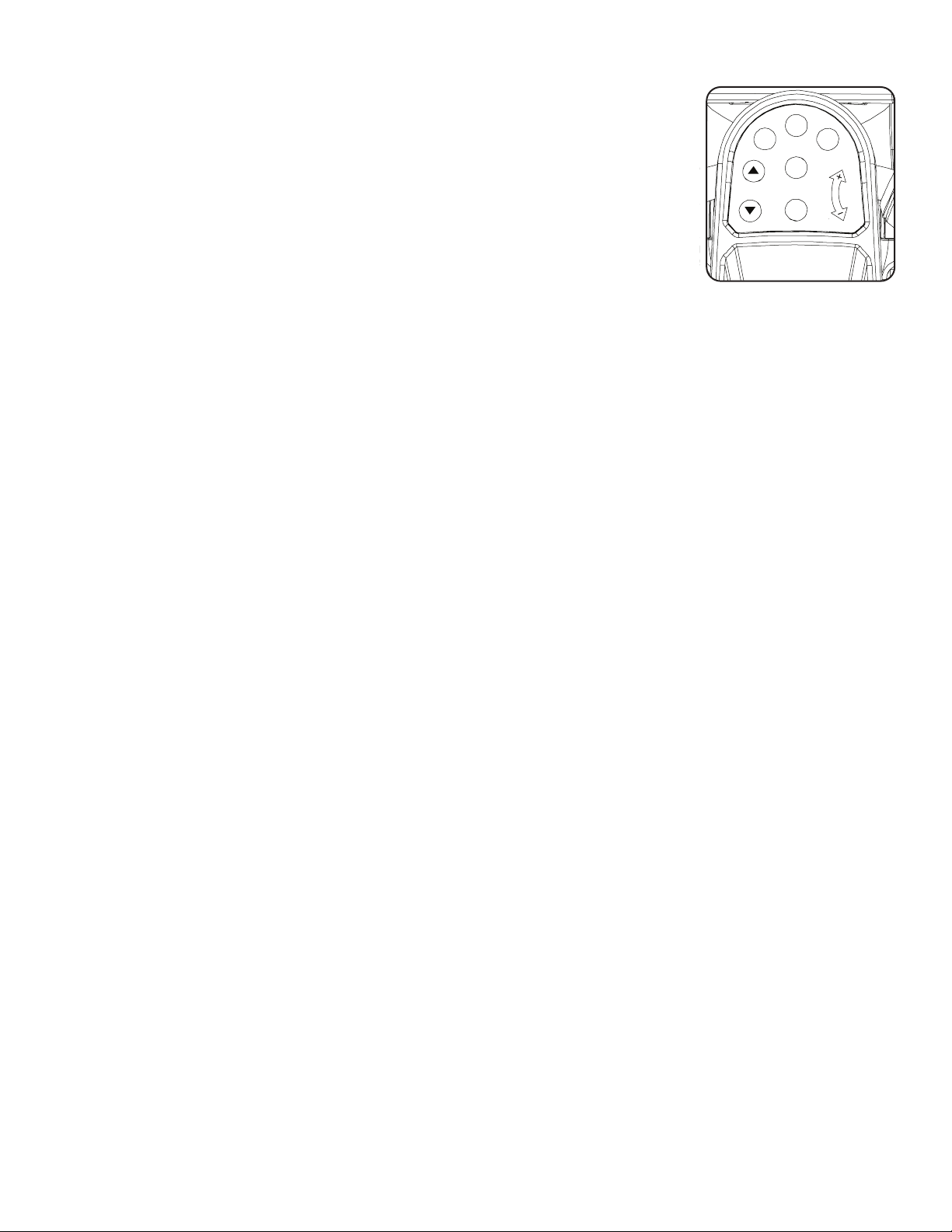
Assembly / Owner’s Manual
34
Paused / Results Mode
To Pause a workout:
1. Stop pedaling and push the PAUSE/STOP button to pause your workout.
Note: The Console will automatically pause if there is no RPM signal for 5 seconds.
2. To continue your workout, push START or start pedaling.
Whenpaused,theConsoledisplaywillshow“WORKOUTPAUSED”,andthenashtheworkoutvalues.
If the workout does not resume or if the PAUSE/STOP button is pushed, the workout will display “WORKOUT
COMPLETE”,andtheresultvaluesaredisplayed(TotalCalories,TotalTime,AverageRPM,AverageHeartRate,
AverageBurnRate,andAverageLevel).IftheworkoutwasaMAXIntervalworkout,theConsolewillalsodisplaythetotal“ACTIVE”intervaltime.
IfthereisnoRPMfor5minutes,theConsoleautomaticallygotothePower-Up/IdleMode.
Changing Resistance Levels
UsetheResistanceLevelDialtoadjusttheresistancelevel.AResistancelevelof“1”istheleastresistance,asettingof“8”isthehighestresistance
level.
Edit a User Prole
ForamoreaccuratecaloriecountandTargetCalorieBurn,aUserProleshouldbecustomizedtotheUser.
1. PushUSERbuttontoselectyourUserProle(User1orUser2).
2. Push and hold the USER button for 3 seconds to begin the Edit User mode.
3. TheConsolewilldisplaytheAGEpromptwiththedefaultagevalue(“32”).UsetheBurnRate/IncreaseorBurnRate/Decreasebuttonsto
adjust the value, and push ENTER to set the value.
4. TheConsolewilldisplaytheGENDERpromptwiththedefaultgendervalue(“FEMALE”).UsetheBurnRate/IncreaseorBurnRate/Decrease
buttons to adjust the value, and push ENTER to set the value.
5. TheConsolewilldisplaytheUNITSpromptwiththedefaultunitsvalue(“LBS”).UsetheBurnRate/IncreaseorBurnRate/Decreasebuttonsto
adjust the value, and push ENTER to set the value.
6. TheConsolewilldisplaytheWEIGHTpromptwiththedefaultweightvalue(“160”).UsetheBurnRate/IncreaseorBurnRate/Decreasebut-
tons to adjust the value, and push ENTER to set the value.
7. TheConsolewilldisplaytheHEIGHTpromptwiththedefaultheightvalue(“60INCHES”).UsetheBurnRate/IncreaseorBurnRate/Decrease
buttons to adjust the value, and push ENTER to set the value.
8. TheConsolewilldisplaytheRESETSETTINGSpromptwiththedefaultvalue(“NO”).UsetheBurnRate/IncreaseorBurnRate/Decrease
buttons to adjust the value, and push ENTER to accept the value. All Workout settings for the User will be reset to the default settings.
9. TheConsolewilldisplaytheRESETUSERpromptwiththedefaultvalue(“NO”).UsetheBurnRate/IncreaseorBurnRate/Decreasebuttons
to adjust the value, and push ENTER to accept the value. All Workout results and settings for the User will be erased with a reset.
10. TheUserProlereviewiscomplete,andtheConsolewilldisplaytheWELCOMEscreen.
OntheinitialeditofeachUserProle,allscreensmustbereviewedandaccepted.Aftertheinitialedit,aUsercanadjustavalue,setit,andpush
PAUSE/STOPtoexittheEditUsermode.
PAUSE/END
START
BURN
RATE
MAX
Interval
ENTER
USER
RESISTANCE
LEVEL

Assembly / Owner’s Manual
35
Customize the MAX Interval Program
The interval times and burn rate levels can be adjusted on the MAX Interval Program. The adjusted values will be set as the default settings for
future workouts.
1. Step up to the machine.
2. Push and hold down the MAX Interval button for 3 seconds.
3. TheConsolewilldisplaythe“ACTIVE”intervaltime,ashing.TheACTIVEsegmentsintheProledisplaywillalsobeashing.PushtheBurn
Rate/IncreaseorBurnRate/Decreasebuttonstoadjustthe“ACTIVE”intervaltime.
Note: Intervalsarelimitedtoamaximumof10:00foreachtype(“ACTIVE”or“REST”),andtheentireworkoutislimitedtoamaximumof99:04
minutes.
4. Push the ENTER button to set the displayed value.
5. TheConsolewilldisplaythe“ACTIVE”BurnRateadjustedtotheUsersettings,ashing.PushtheBurnRate/IncreaseorBurnRate/Decrease
buttonstoadjustthe“ACTIVE”BurnRatelevel.
6. PushtheENTERbuttontosetthedisplayedvalue.
7. The“REST”intervaltimeisnowdisplayed,ashing,alongwiththeothersegmentsontheProledisplay.PushtheBurnRate/IncreaseorBurn
Rate/Decreasebuttonstoadjustthe“REST”intervaltime.
8. Push the ENTER button to set the displayed value.
9. TheConsolewilldisplaythe“REST”BurnRateadjustedtotheUsersettings,ashing.PushtheBurnRate/IncreaseorBurnRate/Decrease
buttonstoadjustthe“REST”BurnRatelevel.
10. Push the ENTER button to set the displayed value.

Assembly / Owner’s Manual
36
The Console Setup Mode lets you control the sound settings, or see maintenance statistics (Total Run Hours and Software Version).
1. PushandholddowntheBurnRate/IncreaseandPAUSE/ENDbuttonsfor3secondswhileinthePower-UpModetogointotheConsoleSetup
Mode.
Note: PushPAUSE/ENDtoexittheConsoleSetupModeandreturntothePower-UpModescreen.
2. The Console display shows the Sound Settings prompt with the current setting. Push the Burn Rate/Increase or Burn Rate/Decrease buttons to
changebetweenthesettingsof“OFF”and“1”through“7”.Asettingof7istheloudestsoundlevel.
3. Push ENTER to set.
4. The Console display shows the TOTAL RUN HOURS for the machine.
5. Forthenextprompt,pushtheENTERbutton.
6. TheConsoledisplayshowstheSoftwareVersionprompt.
7. PushtheENTERbuttontoexittheConsoleSetupMode.
TheConsolewilldisplaythePower-UpModescreen.
Console Setup Mode

Assembly / Owner’s Manual
37
Read all maintenance instructions fully before you start any repair work. In some conditions, an assistant is required to do the necessary tasks.
Equipment must be regularly examined for damage and repairs. The owner is responsible to make sure that regular maintenance is
done. Worn or damaged components must be repaired or replaced immediately. Only manufacturer supplied components can be
used to maintain and repair the equipment.
If at any time the Warning labels become loose, unreadable or dislodged, contact your local distributor for replacement labels.
To reduce the risk of electrical shock or usage of the equipment, always unplug the power cord from the wall outlet and
the machine and wait 5 minutes before cleaning, maintaining or repairing the machine. Place the power cord in a secure location.
Daily: Beforeeachuse,examinetheexercisemachineforloose,broken,damaged,orwornparts.Donotuseif
foundinthiscondition.Repairorreplaceallpartsattherstsignofwearordamage.Aftereachworkout,use
a damp cloth to wipe your machine and Console free of sweat.
Note:AvoidexcessivemoistureontheConsole.
Weekly: Check for smooth roller operation. Wipe the machine to remove dust, dirt, or grime. Clean the rails and
surface of the rollers with a damp cloth.
Note: Do not use petroleum based products.
Monthly
or after 20
hours:
Make sure all bolts and screws are tight. Tighten as necessary.
NOTICE: Do not clean with a petroleum based solvent or an automotive cleaner. Be sure to keep the Console free of moisture.
Maintenance
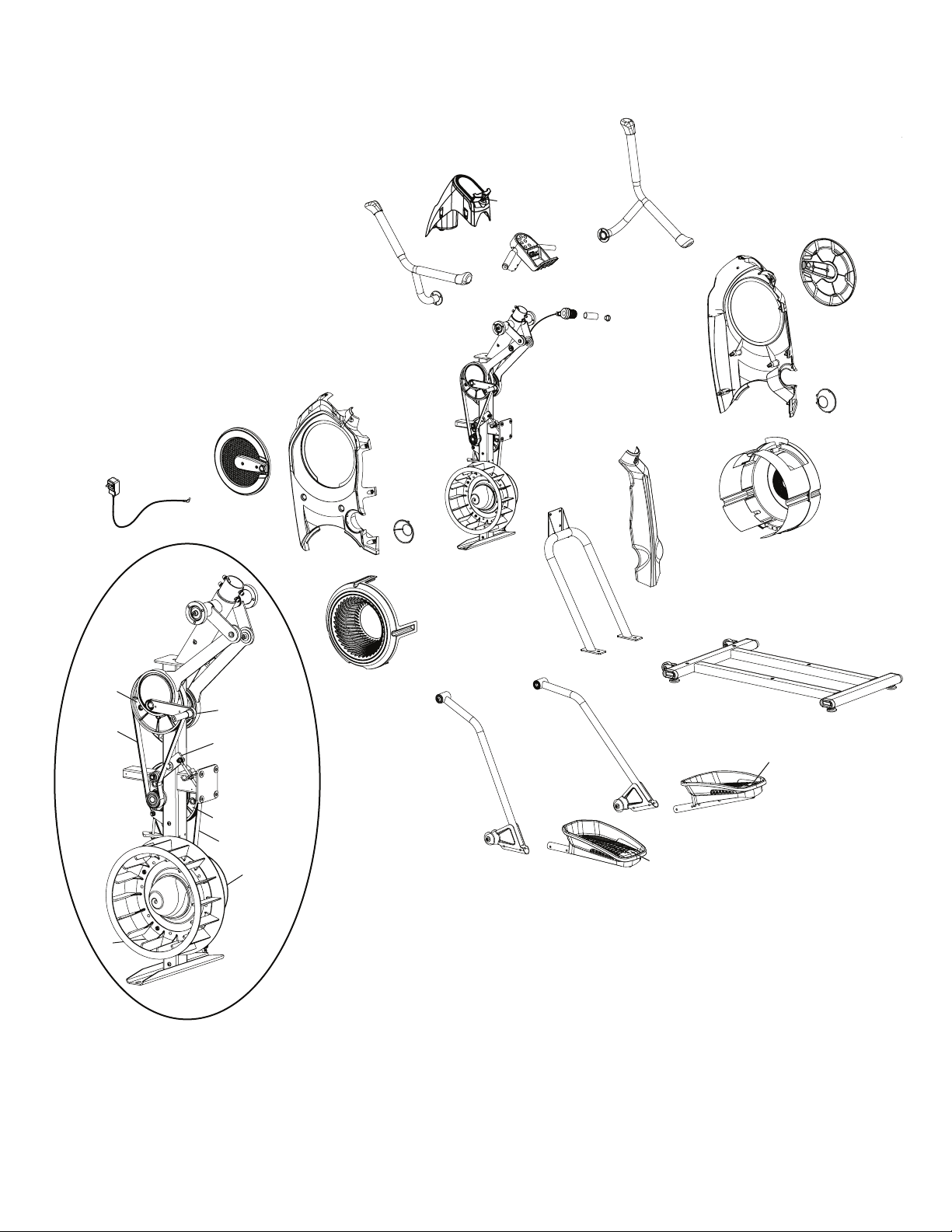
Assembly / Owner’s Manual
38
Maintenance Parts
D
E
F
C
A
B
G
H
K
J
A
C
I
N
M
L
P
O
Q
U
S
T
R
X
X
Y
Y
W
V
W
V
Z
N
BB
M
AA
CC
GG
DD
FF
HH
EE
II
JJ
KK
KK
Assembly / Owner’s Manual
39
A Upper Handle Grip O Shroud, Right Fan CC Drive Pulley, Upper
B Handlebar, Left P Fan Assembly Inserts DD Arm Drive Assembly
C Lower Handle Grip Q Shroud, Rear EE Crank Arm
D Console Shroud / Water Bottle Holder R Rail Assembly FF Tensioner
E Console Assembly S Transport Wheel GG Drive Pulley, Lower
F Speaker T Stabilizer HH Fan Back Plate
G Handlebar, Static U Leveler II Speed Sensor (behind Fan)
H Console Button Assembly V Foot Pad Insert JJ Power Cord
I Handlebar, Right W Foot Pad KK Drive Belt
J Shifter Assembly X Roller
K Handlebar Grip, Static Y Leg
L Shroud, Right Z Shroud, Left Fan
M Crank Cover AA Fan Assembly
N Cap BB Shroud, Left
Assembly / Owner’s Manual
40
Condition/Problem Things to Check Solution
No display/partial display/unit
will not turn on
Check electrical (wall) outlet Make sure unit is plugged into a functioning wall outlet.
Pedal movement Safely pedal the machine for a few seconds. The Console should sense the
signal from the Speed Sensor and fully activate.
Check connection at front of unit Connection should be secure and undamaged. Replace adapter or connec-
tion at unit if either are damaged.
Check data cable
connections/orientation
Be sure cable is connected securely and oriented properly. Small latch on
connector should line up and snap into place.
Check data cable integrity All wires in cable should be intact. If any are visibly crimped or cut, replace
cable.
Check console display for
damage
Check for visual sign that console display is cracked or otherwise damaged.
Replace Console if damaged.
AC Adapter Check for visual sign that AC Adapter is cracked or otherwise damaged.
Replace AC Adapter if damaged.
Console Display IfConsoleonlyhaspartialdisplayandallconnectionsarene,replacethe
Console.
If the above steps do not resolve the problem, contact your local distributor
for further assistance.
No response on Console when
button is pushed
Console Button Assembly Try other buttons to get any response on the Console.
Check data cable integrity from
Console Button Assembly to
Console
All wires in cable should be intact. If any are visibly crimped or cut, replace
cable.
Check data cable
connections/orientation
Be sure cable is connected securely and oriented properly. Small latch on
connector should line up and snap into place.
Check console display for
damage
Check for visual sign that console display is cracked or otherwise damaged.
Replace Console if damaged.
Check Console Button As-
sembly
Check for visual sign that the Console Button Assembly is otherwise dam-
aged. Replace the Console Button Assembly if damaged.
If the above steps do not resolve the problem, contact your local distributor
for further assistance.
No speed/RPM reading Check data cable integrity All wires in cable should be intact. If any are cut or crimped, replace cable.
Check data cable
connections/orientation
Be sure cable is connected securely and oriented properly. Small latch on
connector should line up and snap into place.
Check magnet position (requires
shroud removal)
Magnet should be in place on pulley.
Check Speed Sensor (requires
shroud removal)
Speed sensor should be aligned with magnet and connected to data cable.
Realign sensor if necessary. Replace if there is any damage to the sensor or
the connecting wire.
Console Electronics If tests reveal no other issues, contact your local distributor for further as-
sistance.
Unit operates but Telemetric HR
not displayed
Chest Strap Strap should be “POLAR
®
”compatibleanduncoded.Makesurestrapis
directly against skin and contact area is wet.
Interference
Try moving unit away from sources of interference (TV, Microwave, etc).
Replace Chest Strap If interference is eliminated and HR does not function, replace strap.
Troubleshooting
Assembly / Owner’s Manual
41
Condition/Problem Things to Check Solution
Console shuts off (enters sleep
mode) while in use
Check electrical (wall) outlet Make sure unit is plugged into a functioning wall outlet.
Check connection at front of unit Connection should be secure and undamaged. Replace adapter or connec-
tion at unit if either are damaged.
Check data cable integrity All wires in the cable should be intact. If any are cut or crimped, replace
cable.
Check data cable
connections/orientation
Be sure cable is connected securely and oriented properly. Small latch on
connector should line up and snap into place.
Reset machine Unplug unit from electrical outlet for 5 minutes. Reconnect to outlet.
Check magnet position (requires
shroud removal)
Magnet should be in place on pulley.
Check Speed Sensor (requires
shroud removal)
Speed sensor should be aligned with magnet and connected to data cable.
Realign sensor if necessary. Replace if there is any damage to the sensor or
the connecting wire.
Pedals will not move Pedal locations ThePedalsmaybe“bottomedout”.SafelygrasptheStatic
Handlebars and apply your weight to the heel of the higher foot. While still
grasping the Static Handlebar, lean back slightly applying more weight onto
the heel. Once the Pedals begin to move, resume your intended workout.
Fan will not turn Check for blockage of fan Unplug unit from electrical outlet for 5 minutes. Remove material from fan. If
necessary, detach the Shrouds to help with removal. Do not operate machine
until Shrouds have been replaced.
Unit rocks/does not sit level Check leveler adjustment Adjust levelers until machine is level.
Check surface under unit Adjustmentmaynotbeabletocompensateforextremelyunevensurfaces.
Move machine to level area.
Footpedalsloose/unitdifcult
to operate
Hardware Tightly secure all hardware on the Pedal Arms and Handlebar Arms.

Assembly / Owner’s Manual
42
Introduction and Overview
WelcometotheBowex™BodyWeightLossGuide.ThisguideisdesignedtobeusedwithyourBowex
®
equipment and will help you:
• Lose weight and get lean
• Improve your health and wellness
• Increase your energy and vitality
Consult a physician before you start an exercise program or a new health and diet plan. Stop exercising if you feel pain or tightness
in your chest, become short of breath, or feel faint. Contact your doctor before you use the machine again. Use the values calcu-
lated or measured by the machine’s computer for reference purposes only. The heart rate displayed on the console is an approxi-
mation and should be used for reference only.
ByfocusingonthemainthreeelementsoftheBowex™BodyWeightLossGuide-quality,balance,andconsistency-you’llbeabletoreachand
maintainyourweightlossandtnessgoalsforthenextsixweeksandbeyond.
• Quality–Theemphasisofthisplanisoneatingmorewholefoodsandgettingthemostnutrientsfromyourcaloriesaspossible.Makingthe
majorityofyourdietfromfoodsthathaveasingleingredient(forexamplefruits,vegetables,sh,leanprotein,eggs,beans,nuts,andwhole
grains)providesthevitamins,minerals,ber,protein,andhealthyfatsyourbodyneeds.
• Balance–Eachofthemealsandsnacksinthisguidehaveasourceofberorsmartcarbohydrate,protein,andhealthyfattokeepyour
energy levels consistent throughout the day to fuel your workouts. By having this balance you’ll feel fuller longer, which is critical to weight loss
success.
• Consistency–Gettingaboutthesamenumberofcalorieseachdayisimportantforyourmetabolismandyourmindset.Ifyouoverdoitone
day,don’ttrytomakeupforitthenextdaybynoteatingorcuttingyourcaloriesdrastically.Getrightbackontrackbyfollowingthisguide!
Results & Expectations
Resultswillvarydependingonyourage,startingweight,andexerciselevelbutonaverageyoucanexpecttolose1-3lbsperweekandexperience
increased energy levels.
5 Tips for Long-Term Success
1. Keep a food logincludinghungerlevelsandwaterintake.Freeonlinefoodlogsandmobileappsareavailableatwww.mytnesspal.comand
www.loseit.com
2. Weigh and/or take measurements weekly–nomoreandnoless.Weighingweeklyratherthandailyoreveryotherdayisbest.You’lltrack
your progress and keep yourself in check without getting discouraged if the scale doesn’t move for a few days. And remember, weight is just
anumberandit’sinuencedbymusclegainaswellasfatloss.Feelinghowyourclothestcanoftenbeabetterindicatorofprogressasyour
bodyadaptstoexerciseandnutritionchanges.
3. Measure portions–Toavoidportioncreep,usemeasuringcupsandspoonsforgrains(rice,pasta,cereal),beans,nuts,oils,anddairy.Use
the Portion Sizes Guide for other foods.
4. Plan ahead–Makeamealplanfortheweekorlogyourfoodadayinadvance.Planningsetsyouupforsuccess,especiallyforsocialevents
and eating out.
5. Practice your desired long-term habits–It’seasytojustifypooreatingchoiceswhenyou’reonlyfocusedontheshortterm.Focusonthe
longtermsatisfactionofaslimmer,healthieryouratherthanthetemporarygraticationyou’llgetfromsplurging.
How to Use this Guide
• Eat breakfast within 90 minutes of waking up and balance your meals and snacks throughout the day
–Don’tgolongerthan5-6hourswithouteating
–Ifyou’renotusedtoeatingbreakfast,startoutsmallwithapieceoffruitandhavesomethingelse1-2hourslater.Yourbodyadaptsto
not eating breakfast, but as soon as you start eating early in the day and cutting back on dinner portions you’ll notice your hunger will
increase.Thisisagoodsignyourmetabolismisworking!
• Mix and match meal options
–Select1optionfromtheappropriatemealplan(maleorfemale)forbreakfast,lunch,anddinner,payingcloseattentiontoportionsizes
–Select1-2snackoptionsperday
–Youhavetheoptiontosubstituteonesnackforonetreatunder150calories
–Usethemealplan,sampleoptions,andgrocerylisttocreateyourownmealsformorevariety
Bowflex
™
Body Weight Loss Guide

Assembly / Owner’s Manual
43
–Youcanswapoutanytypeofprotein,vegetablesorsmartcarbsforthesuggestedmealoptions.Forexample:
• Turkey for tuna
• Anyshorseafoodforchicken
• Cooked vegetables instead of salad
• Eat your calories
–Cutouthighcaloriebeverageslikesoda,juices,coffeedrinks,andalcohol
–Stickwithwater,unsweetenedtea,andcoffee.Aimforaminimumof64oz(1.9liters)ofwaterperdaytostaywellhydrated
• If you’re still hungry after or in between meals:
–Haveaglassofwaterandwait15-20minutes.Manytimeswemistakethirst(orevenboredom!)forhunger.Waitouttheinitialurgetoeat
and sometimes it will pass.
–Ifyou’restillhungryafterwaiting15-20minuteshaveasnackormini-mealwithfruit,vegetables,andprotein.
If your goal is muscle gain or strength:
• Usethesamemealplanbutincreaseportionsizesinthesameratiostoincreasethetotalnumberofcaloriesyoueateveryday.Forexample,
increaseportionsizesofproteinandsmartcarbsatmealsby50%.Addingasnackisanotheroptiontomeetyourbody’sincreasedcalorie
needs in order to gain muscle and strength.
• Focusonpost-workoutnutritionbyhavingoneofyoursnackswithin30minutesafteryoucompleteyourworkout.Makesuretohaveacom-
bination of carbohydrates such as fruit with protein (yogurt, milk, or protein powder) to promote muscle growth and recovery. Chocolate milk is
also a great option.
Meal Plan Overview
Thefemalemealplanprovidesabout1400calories,andthemaleplanprovidesabout1600calories,ofhighqualitynutritiontonotonlyhelpyou
loseweightandfeelgreatbutgetthemostoutofyourcalories.Thevitamins,minerals,andantioxidantsfromeatingmostlywholefoodshelpsup-
port optimal health. These calorie levels will result in healthy weight loss for the majority of people. Keep in mind that everyone’s metabolism is very
different depending on age, height, weight, activity level, and genetics. Pay close attention to your weight, hunger levels, and energy and adjust your
calories if needed.
Follow these guidelines if you’re over 55:
• If you’re over 55, you need fewer calories because your metabolism slows as you age. Stick with three meals with one optional snack per day.
Follow these guidelines if you’re under 25:
• Ifyou’reunder25youmayneedmorecalories.Addanothersnackifyoufeellowonenergyorareextremelyhungry.
Breakfast
Breakfastincludesasmartcarb,fruit,andasourceofprotein,whichwillalsohavefat.Withabalanceofcarbohydratesandberfromthesmartcarb
and fruit combined with protein and fat, you’ll energize your day and help control hunger levels throughout the day.
Snacks
Eachsnackisabalanceofcarbohydratesandproteintokeepyourbloodsugarmoreconsistent,whichmeansyouwon’texperiencehungerand
energy level spikes and drops.
Thishappenswhenyouhaveahighcarb-onlysnacklikechips,candy,soda,crackers,orpretzels.
Lunch and Dinner
Lunchcombinesllingberfromvegetablesandsmartcarbswithalean,orlow-fat,protein.Thehealthyfatcancomeeitherfromtheproteinadded
during cooking (nuts on a salad) or as a dressing or sauce (such as oil and vinegar salad dressing).
Assembly / Owner’s Manual
44
protein
veggies
rich
carbs
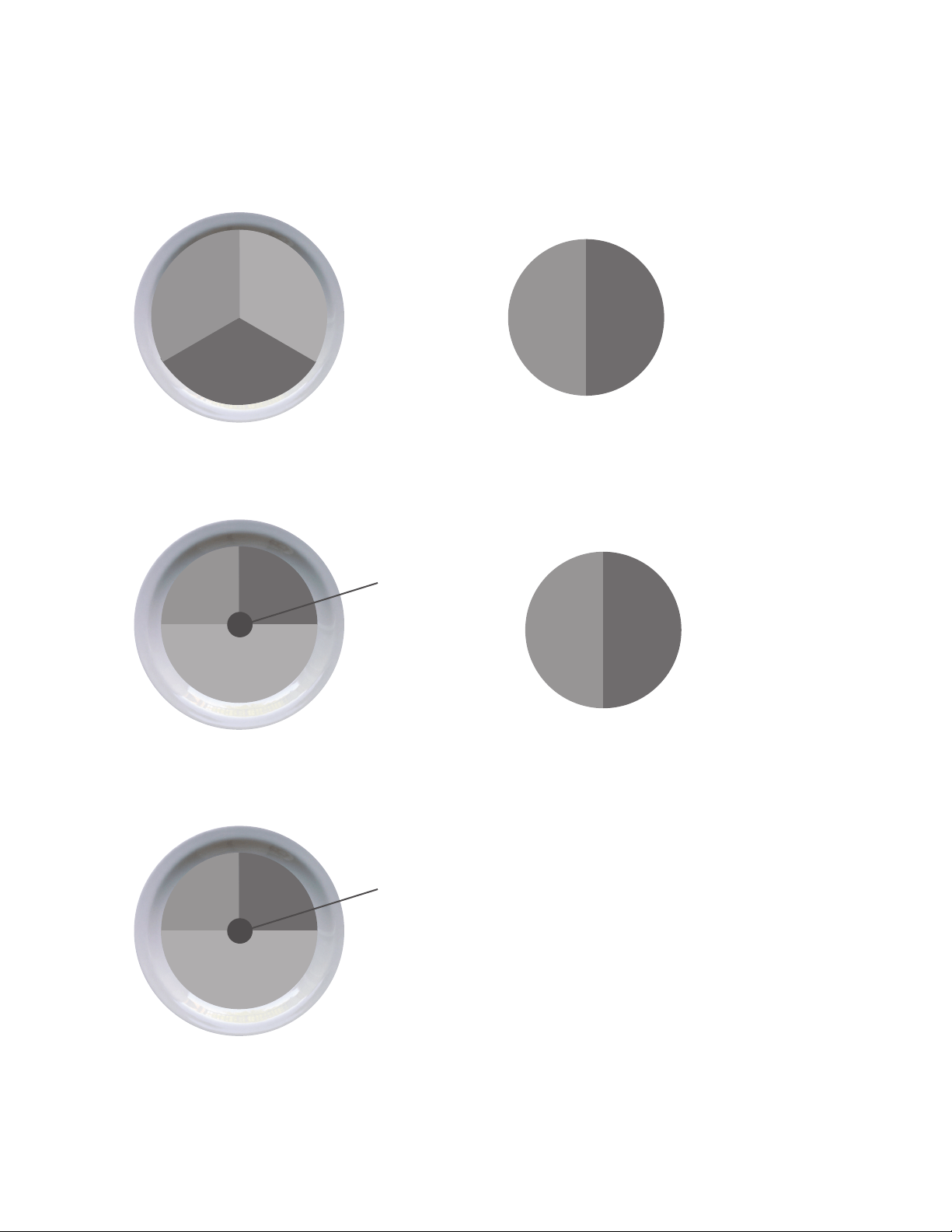
Here’s an overview of what an ideal day looks like:
(See Portion Size Guide for proper serving sizes)
smart
carb
protein/fat
Breakfast
Lunch
Dinner
Snack #1
Snack #2
fruit
smart
carb
protein
healthy
fat
smart
carb
protein
veggies
smart
carb
protein
healthy
fat
smart
carb
protein
veggies
Assembly / Owner’s Manual
45
Breakfast Options Fruit Smart Carb Protein/Fat
Fruit and Nut Oatmeal Cook
plain oats in water. Top with fruit,
nuts, milk, cinnamon, and honey.
Berries or banana Plain oats
(Regularorquick-cook)
Nuts and milk
Egg Mufn Cook egg/s. Toast
bread and top with 1 slice of
cheese, 1 slice of ham, and
tomato.
Tomato Englishmufnorsandwichthin Egg, ham, and cheese
Yogurt Power Parfait Top yogurt
with fruit. Sprinkle with 1 serving
ofnuts,10-15ml(2-3tbsp)wheat
germ,orgroundaxseed,15ml(1
tbsp) oats, and cinnamon.
Chopped fruit of your choice Oats, wheat germ, and ground
axseed
Plainnon-fatGreekyogurtand
nuts
On the Go PB & Apple Sand-
wich Toast bread. Spread on
peanut butter, thin slices of ½ an
apple, and 5ml (1 teaspoon) of
honey.
Sliced apple Sandwich thin, bread, or bagel
thin
Peanut butter
Lunch & Dinner Options Lean Protein Smart Carb Veggies
Pork Loin, Sweet Potato &
Green Beans
Grilled or baked pork loin Baked Sweet Potato Green Beans
Chicken Stir Fry
Flavor with 30ml(2 tbsp) teriyaki
sauce
Chicken breast or boneless skin-
less thigh
Brown or wild rice Mixedstirfryvegetables
(fresh or frozen)
Steak Tacos with Side Salad (3
for males, 2 for females) Top with
salsa, coriander, and sprinkle of
shredded cheese
Sirloin steak Corn tortillas Salad
Whole Wheat Pasta with
Shrimp or White Beans & Mari-
nara Sauce
Shrimp (frozen or fresh) or can-
nellini beans
Whole wheat pasta Steamed broccoli
Bunless Burgers with Oven
Fries, Corn, & Salad
Grill burgers. Bake sliced pota-
toes on sprayed cookie sheet for
25-30minutes@218°C(425°F
).
93%leangroundbeeforturkey Oven baked fries Corn on the cob + side salad
Tuna & Avocado Wrap with
Vegetable Soup
Use 85g (3oz) of tuna (1 can). Top
with lettuce, tomato, avocado, and
mustard.
Tuna High-berwrap Vegetable soup
(homemadeorlow-sodium
canned)
Assembly / Owner’s Manual
46
Snack Options
Smart Carb Protein
1 medium apple 10-15almonds
Baby carrots 30ml (2 tbsp) hummus
1 serving of crackers* 1 string cheese
Energy or protein bar with <200 calories*
*Seewww.Bowex.com/Resourcesforbrandrecommendations
Optional Treats
YouhavethechoiceofreplacingSnack#2witha100-150calorietreat.Youcanhaveanoptionaltreateverydaybutforoptimalhealthitisrecom-
mendedtolimitsmallsplurgesto3-4timesperweek.Usetheapproachthatworksbestforyou.Hereareafewexamples:
• 118ml (½ cup) lowfat ice cream
• 1 small bag of baked potato chips
• 118ml (4oz) of wine or 355ml (12oz) light beer
• 710ml(3cups)ofair-poppedorlightpopcorn
Sample 3 Day Plan
Based on each of the meal options listed above, a typical 3 day plan could look like this:
Day 1 Day 2 Day 3
Breakfast Eggmufn Power yogurt parfait Fruit + nut oatmeal
Snack 1 Apple with almonds Nut Thins
®
+ string cheese Baby carrots and hummus
Lunch Tuna & avocado wrap with soup Leftoversfromdinner-day1 Leftoversfromdinner-day2
Optional Snack 2 or Treat 118 ml (½ cup) ice cream bar Energy bar 100 calorie bag of light popcorn
Dinner Shrimp pasta Chicken stir fry Bunless burgers
Assembly / Owner’s Manual
47
Portion Size Guide
Each of the items listed are for one serving
MALE FEMALE
PROTEIN
2 eggs
142g(5oz)chicken,sh,leanmeat,ortofu
158ml (2/3 cup) beans or lentils*
237ml (1 cup) greek yogurt*
42.5g (1.5oz) cheese*
1 egg
85g(3oz)chicken,sh,orleanmeat
118ml (1/2 cup) beans or lentils*
118ml (1/2 cup) greek yogurt*
42.5g (1.5oz) cheese*
HEALTHY FAT
30ml (2 tblspn) peanut or nut butter*
10ml(2tspn)olive,ax,orwalnutoil
59ml (1/4 cup) of nuts
1/3 medium avocado
15ml (1 tblspn) peanut or nut butter*
5ml(1tspn)olive,axorwalnutoil
30ml(1/8cup)or30ml(2tblspn)ofnuts(approx.15
almonds)
1/4 medium avocado
SMART CARB
237ml (1 cup) cooked grains (59ml / 1/2 cup raw):
oats, brown rice, quinoa, pasta
1 medium sweet or regular potato
2 corn tortillas
1 slice of bread (or 2 light slices equaling 120 calories
or less)
1englishmufn,sandwichthin,orhigh-berwrap
118ml (1/2 cup) cooked (59ml / 1/4 cup raw) grains
1/2 medium sweet potato or regular potato
2 corn tortillas
1 slice of bread (or 2 light slices equaling 120 calories or
less)
1englishmufn,sandwichthin,orhigh-berwrap
FRUIT
1 medium apple, orange, or pear
1 small banana (length of your hand)
237ml (1 cup) berries or chopped fruit
59ml (1/4 cup) dried fruit (fresh or frozen is optimal)
Vegetables*Youcanhaveunlimitedvegetablesexceptforpeasandcorn;stickwith118ml(1/2cup)serving
473ml (2 cups) spinach or lettuce = 2 cupped hands
237ml (1 cup) raw vegetables
118ml (1/2 cup) cooked vegetables
177ml(6oz)lowsodiumvegetablejuice
OPTIONAL TREATS
118ml (1/2 cup) lowfat ice cream
1 small bag of baked potato chips
28g (1oz) dark chocolate
118ml (4oz) of wine or 355ml (12oz) light beer
710ml(3cups)air-poppedorlightpopcorn
* some foods are a combination of protein and carbs or protein and fat
237ml (1 cup) = baseball
118ml (1/2 cup) = lightbulb
30ml (2 tblspn)
= golf ball
59ml (1/4 cup) nuts
= Altoids tin
85g (3oz) chicken or meat
= deck of cards
1 medium potato
= computer mouse
1 medium piece of fruit =
tennis ball
28g (1oz) cheese
= 3 dice
Assembly / Owner’s Manual
48
Grocery List
BREAD & GRAINS
100%wholewheatbread
Sprouted grain breads
Lightorwholewheatenglishmufns
Sandwich or bagel thins
Cornorlow-carbwholewheattortillas
High-berwraps
Plain oats: 1 minute or old fashioned
Whole grains: brown rice, bulgar, barley, quinoa, couscous
Tips:Lookfor100%wholewheatastherstingredient.Lookfor4gof
berpersliceor5gper2slicesoflightordietbread.Aimforbreadwith
less than 100 calories per slice.
DAIRY & DAIRY ALTERNATIVES
Plainnon-fatgreekyogurt
Ker(yogurtlikedrink)
Organiclow-fatmilk
Enriched almond or soy milk
Cheese: feta, parmesan, mozzarella, light havarti, provolone, swiss,
string cheese, or single serving packages
MEAT, FISH, POULTRY & PROTEIN
Wild game
Salmon, halibut, tuna, tilapia, shrimp,
catsh,scallops,orcrab
Pork loin, pork chops, or pork roast
Chicken or turkey breast or thighs (no skin)
Eggsand100%eggwhites
Leanbeef:sirloin,chuck,round,tenderloin,93%lean(organicand
grass fed is best)
Canned salmon or tuna (in water)
Nitrate-free,reducedsodiumham,turkey,chicken,orroastbeeflunch-
meat
Anytypeofbean,dryorcannedlow-sodiumvarieties
Tofu and tempeh
Tips:Lookfor“Choice”or“Select”cutsofmeatratherthan“Prime”.
Prime cuts are fattier. Limit intake of highly processed meat and
imitation meat products like sausage, bacon, pepperoni, and hot dogs to
once a week or less.
FROZEN FOODS
All vegetables without sauce
All fruit
Grains and grain medleys
CRACKERS, SNACKS & ENERGY BARS
Any unsalted nuts or seeds
Air-poppedorlightpopcorn
Edamame in the pod
Energy bars
Crackers
Hummus
Tips:Limitcrackers,pretzels,andchipsto2-3servingsperweek.
Always pair with protein such as hummus, cheese, or nuts. Look for
energy bars with less than 200 calories and 20g of sugar and at least 3g
ofproteinand3gofber.Lookforcrackerswithlessthan130calories
and 4g or less of fat per serving.
FATS & OILS
Avocado
Olive,grapeseed,walnut,sesame,oraxseedoil
Butter/spreads: look for products free of trans fats and partially
hydrogenated oils on the ingredient list.
Tips:Lightoliveoilreferstotheavor,notthecaloriecontent.Always
measure oil and butter. Even if a fat is considered healthy, it’s still very
high in calories and portions need to be controlled.
DRESSINGS, CONDIMENTS & SAUCES
Vinegars: rice, wine, balsamic
All fresh or dried herbs and spices
Mustard
Salsa and chili sauce
Marinarasaucewithnohigh-fructosecornsyrup
Lemon and lime juice
Bottled minced garlic and ginger
Low-sodiumsoysauce
Tips: Look for products free of MSG, added colors, and high fructose
corn syrup. Look for sauces under 50 calories per serving. Avoid cream
based sauces and dressings like ranch, bleu cheese, and alfredo.
Allfruitsandvegetables,freshandfrozen,aregreatchoices.Sinceeverymealhasoneorboth,yourshoppingcartshouldreectthis.

Assembly / Owner’s Manual
49
Keep It Going
Tips for continued weight loss and maintaining changes
• Keep weighing yourself weekly, even after you’ve reached your goal weight
• Continue keeping a food log.Ifyouhaveyourmealplanwell-established,logyourfoodeveryotherweektokeepyourselfontrack.Don’t
feel like you have to do it every day.
• Prepare for plateaus.Thescalemightnotbudgeforafewweeksorevenmonthsaftersomeinitialweightloss.Thisisnormalandtobeex-
pected.It’sthebody’snaturalprocessforadjustingtoyournewlowerweight.Stayfocusedonyourlong-termgoal,celebrateyoursuccesses
andchanges,andmixupyourworkoutstohelpovercometheplateau.
• Calorie adjustments for maintaining weight loss.Onceyou’vereachedyourgoalweight,youcanincreaseyourcalories100-200perday
as long as your activity level stays the same
• Treat yourself.Haveanon-foodrewardforeachgoalyouhitsuchasamassage,anewoutt,oranoutingwithfriendsandfamily
• Use the resources belowtondnewrecipes,getexpertadvice,andsupporttostaymotivated
Resources
Downloadable Resources from Bowex™ Website(www.Bowex.com/Resources)
• Grocery Shopping List for Fridge (Blank Form)
• 7 Day Meal Planning Form
• Additional Dinner Options
• Pre and Post Workout Fueling Guide
Questions & Support
• Askquestions,postsuggestions,andconnectwithouronlineBowex™DietitianontheBowexFacebookpage
Recipes
• www.wholeliving.com
• www.eatingwell.com
• www.whfoods.org
• www.livebetteramerica.org
Online food logs
• www.mytnesspal.com
• www.loseit.com

Assembly / Owner’s Manual
50

Assembly / Owner’s Manual
51
8014410.020119.C
EN
™
™
™
™
™
™