
Operating and installation instructions
Steam combination oven
To prevent the risk of accidents or damage to the appliance, it is
essential to read these instructions before it is installed and used for
the first time.
en-AU, NZ M.-Nr. 11 218 740

Contents
2
Warning and Safety instructions.......................................................................... 8
Caring for the environment ................................................................................ 18
Overview............................................................................................................... 19
Steam oven ........................................................................................................... 19
Accessories supplied ............................................................................................ 21
Controls................................................................................................................ 24
On/Off sensor........................................................................................................ 25
Proximity sensor.................................................................................................... 25
Sensor controls ..................................................................................................... 26
Touch display ........................................................................................................ 27
Symbols................................................................................................................. 28
Operating principles............................................................................................ 29
Selecting a menu option ....................................................................................... 29
Scrolling through menus ....................................................................................... 29
Exiting a menu....................................................................................................... 29
Changing a value or setting................................................................................... 29
Changing a setting in a list ............................................................................... 29
Entering numbers with the roller ...................................................................... 29
Entering numbers using the numerical keypad................................................ 29
Changing the setting with a segment bar ........................................................ 30
Entering letters ...................................................................................................... 30
Displaying the context menu................................................................................. 30
Moving entries....................................................................................................... 30
Displaying the pull-down menu............................................................................. 31
DisplayingHelp ..................................................................................................... 31
Activating MobileStart ........................................................................................... 31
Description of the functions............................................................................... 32
Control panel......................................................................................................... 32
Water container ..................................................................................................... 32
Food probe............................................................................................................ 32
Temperature/Core temperature ............................................................................. 32
Moisture................................................................................................................. 32
Cooking duration................................................................................................... 33
Noises.................................................................................................................... 33
Heating-up phase.................................................................................................. 33
Cooking phase ...................................................................................................... 33
Steam reduction .................................................................................................... 34
Oven interior lighting ............................................................................................. 34

Contents
3
Before using for the first time ............................................................................ 35
Miele@home.......................................................................................................... 35
Standard settings .................................................................................................. 36
Cleaning for the first time ...................................................................................... 37
Setting the correct boiling point for water............................................................. 38
Heating up the appliance ...................................................................................... 39
Settings ................................................................................................................ 40
Settings overview .................................................................................................. 40
Opening the “Settings” menu................................................................................ 43
Language ........................................................................................................... 43
Time....................................................................................................................... 43
Date ....................................................................................................................... 44
Lighting.................................................................................................................. 44
Start screen ........................................................................................................... 44
Display................................................................................................................... 45
Volume................................................................................................................... 46
Units ...................................................................................................................... 46
Keeping warm ....................................................................................................... 46
Steam reduction .................................................................................................... 47
Recommended temperatures................................................................................ 47
Booster.................................................................................................................. 47
Automatic rinsing .................................................................................................. 47
Water hardness ..................................................................................................... 48
Proximity sensor ................................................................................................... 49
Safety .................................................................................................................... 50
Furniture front recognition ..................................................................................... 51
Miele@home.......................................................................................................... 51
Remote control...................................................................................................... 52
Activating MobileStart ...................................................................................... 52
SuperVision ........................................................................................................... 53
RemoteUpdate ...................................................................................................... 54
Software version.................................................................................................... 55
Legal information................................................................................................... 55
Showroom programme.......................................................................................... 55
Factory default settings......................................................................................... 55
Alarm + minute minder ....................................................................................... 56
Using the Alarmfunction....................................................................................... 56
Using the Minute minderfunction ......................................................................... 57
Main and sub-menus .......................................................................................... 58
Energy saving tips ............................................................................................... 60

Contents
4
Operation.............................................................................................................. 62
Changing values and settings for a cooking programme...................................... 63
Changing the temperature and core temperature ............................................ 64
Changing the moisture level............................................................................. 64
Setting cooking durations ................................................................................ 64
Changing the set cooking durations ................................................................ 65
Deleting the set cooking durations................................................................... 65
Cancelling cooking................................................................................................ 66
Interrupting a cooking programme........................................................................ 66
Pre-heating the oven ............................................................................................. 67
Booster............................................................................................................. 68
Pre-heat............................................................................................................ 69
Crisp function ........................................................................................................ 70
Injecting bursts of steam....................................................................................... 71
Changing the function ........................................................................................... 71
General notes....................................................................................................... 72
The advantages of cooking with steam ................................................................ 72
Suitable containers................................................................................................ 72
Shelf level .............................................................................................................. 73
Frozen.................................................................................................................... 73
Temperature .......................................................................................................... 73
Duration................................................................................................................. 73
Cooking with liquid................................................................................................ 73
Your own recipes - steam cooking........................................................................ 73
Universal tray and combi rack............................................................................... 74
Steam cooking..................................................................................................... 75
Eco Steam cooking ............................................................................................... 75
Notes on the cooking charts ................................................................................. 75
Vegetables............................................................................................................. 76
Fish........................................................................................................................ 79
Meat ...................................................................................................................... 82
Rice ....................................................................................................................... 84
Grains .................................................................................................................... 85
Pasta/Noodles....................................................................................................... 86
European dumplings ............................................................................................. 87
Dried pulses .......................................................................................................... 88
Hen's eggs ........................................................................................................... 90
Fruit ....................................................................................................................... 91
Sausages............................................................................................................... 91
Shellfish ................................................................................................................. 92
Mussels ................................................................................................................. 93
Menu cooking - manual......................................................................................... 94

Contents
5
Sous-vide (vacuum) cooking .............................................................................. 96
Special applications .......................................................................................... 104
Reheat ................................................................................................................. 104
Defrost................................................................................................................. 106
Mix & Match ........................................................................................................ 109
Blanch ................................................................................................................. 120
Bottling ................................................................................................................ 120
Bottling cakes...................................................................................................... 123
Drying food.......................................................................................................... 124
Prove yeast dough .............................................................................................. 125
Menu cooking – automatic.................................................................................. 125
Disinfect items .................................................................................................... 126
Heat crockery ...................................................................................................... 127
Keeping warm ..................................................................................................... 127
Heat damp towels ............................................................................................... 128
Dissolve gelatine ................................................................................................. 128
Decrystallise honey ............................................................................................. 129
Melt chocolate..................................................................................................... 129
Make yoghurt ...................................................................................................... 130
Render fat............................................................................................................ 131
Sweat onions....................................................................................................... 131
Extracting juice.................................................................................................... 132
Fruit jam............................................................................................................... 133
Skinning fruit and vegetables.............................................................................. 134
Preserving apples ............................................................................................... 135
Preparing custard royale ..................................................................................... 135
Automatic programmes .................................................................................... 136
Categories ........................................................................................................... 136
Using Automatic programmes............................................................................. 136
Usage notes ........................................................................................................ 136
Search ................................................................................................................. 137
MyMiele .............................................................................................................. 138
User programmes.............................................................................................. 139
Baking................................................................................................................. 143
Baking guidelines ................................................................................................ 143
Tips on baking..................................................................................................... 144
Notes on the oven functions ............................................................................... 144

Contents
6
Roasting ............................................................................................................. 146
Roasting tips ....................................................................................................... 146
Notes on the oven functions ............................................................................... 146
Food probe.......................................................................................................... 148
Grilling ................................................................................................................ 152
Grilling tips .......................................................................................................... 152
Tips for grilling..................................................................................................... 152
Notes on the oven functions ............................................................................... 153
Cleaning and care ............................................................................................. 155
Notes on cleaning and care................................................................................. 155
Cleaning the steam oven front ............................................................................ 156
PerfectClean........................................................................................................ 157
Oven compartment ............................................................................................. 158
Cleaning the water container .............................................................................. 159
Accessories ......................................................................................................... 160
Cleaning the shelf runners................................................................................... 161
Lowering the top heat/grill element..................................................................... 162
Maintenance........................................................................................................ 163
Soak ............................................................................................................... 163
Drying ............................................................................................................. 163
Rinsing............................................................................................................ 163
Descaling the steam oven .............................................................................. 163
Removing the door.............................................................................................. 165
Fitting the door .................................................................................................... 166
Problem solving guide ...................................................................................... 167
Optional accessories ........................................................................................ 175
Cooking containers ............................................................................................. 175
Other.................................................................................................................... 175
Cleaning and care products ................................................................................ 175
Service................................................................................................................ 176
Contact in case of fault ....................................................................................... 176
Warranty .............................................................................................................. 176
Installation.......................................................................................................... 177
Safety instructions for installation ....................................................................... 177
Installation notes ................................................................................................. 178

Contents
7
Building-in dimensions........................................................................................ 179
Installation in a tall unit................................................................................... 179
Installation in a base unit................................................................................ 180
Side view ........................................................................................................ 181
Room for the control panel to open and close............................................... 182
Connections and ventilation........................................................................... 183
Installing the steam oven..................................................................................... 184
Mains water connection ...................................................................................... 185
Drainage .............................................................................................................. 187
Electrical connection ........................................................................................... 188
Copyright and licences ..................................................................................... 189

Warning and Safety instructions
8
The steam combination oven is referred to in the following instructions as a
steam oven.
This appliance complies with all current local and national safety
requirements. However, inappropriate use can lead to personal
injury and damage to property.
Please read these operating and installation instructions carefully
before using the steam oven for the first time. They contain
important information on safety, installation, use and maintenance
of the appliance. This prevents both personal injury and damage to
the steam oven.
In accordance with standard IEC60335-1, Miele expressly and
strongly advises that you read and follow the instructions in
“Installation”, as well as in the “Warning and Safety instructions”.
Miele cannot be held liable for injury or damage caused by non-
compliance with these instructions.
Keep these instructions in a safe place and pass them on to any
future owner.

Warning and Safety instructions
9
Correct application
This steam oven is designed for domestic use and for use in
similar environments by guests in hotel or motel rooms, bed &
breakfasts and other typical living quarters. This does not include
common/shared facilities or commercial facilities within hotels,
motels or bed & breakfasts.
The steam oven is not suitable for outdoor use.
The steam oven is intended only to steam, bake, roast, grill,
defrost and reheat food.
Any other use is not permitted.
This appliance is not intended for use by persons (including
children) with reduced physical, sensory or mental capabilities, or
lack of experience and knowledge, unless they have been given
supervision or instruction concerning its use by a person responsible
for their safety, and are able to recognise the dangers of misuse.
This steam oven is supplied with a special lamp to cope with
particular conditions (e.g. temperature, moisture, chemical
resistance, abrasion resistance and vibration). This special lamp
must only be used for the purpose for which it is intended. It is not
suitable for room lighting. Replacement lamps may only be replaced
by a Miele authorised technician.

Warning and Safety instructions
10
Safety with children
Activate the system lock to ensure that children cannot switch on
the steam oven inadvertently.
Young children must not be allowed to use this appliance.
Older children may only use the appliance if its operation has
been clearly explained to them and they are able to use it safely.
They must be able to understand and recognise the possible
dangers caused by incorrect operation.
Cleaning may only be carried out by older children under the
supervision of an adult.
Please supervise children in the vicinity of the steam oven and do
not let them play with it.
Risk of suffocation from packaging material. Whilst playing,
children may become entangled in packaging material (such as
plastic wrapping) or pull it over their head with the risk of suffocation.
Keep packaging material away from children.
Risk of injury caused by hot surfaces. Children's skin is far more
sensitive to high temperatures than that of adults. External parts of
the steam oven such as the door glass, control panel and the vent
become quite hot. Do not let children touch the steam oven when it
is in operation.
Keep children well away from the steam oven until it has cooled
down and there is no danger of injury.
Risk of injury from the open door. The oven door can support a
maximum weight of 10kg. Children could injure themselves on an
open door.
Do not let children sit on the open door, lean against it or swing on it.
If you touch the sensor, the door will fully open automatically.
In doing so, it can knock against small children or animals, for
example. When opening the door, make sure that nobody is in the
area around the door.

Warning and Safety instructions
11
Technical safety
Unauthorised installation, maintenance and repairs (including
removal of any cover) can cause considerable danger for the user.
Installation, maintenance and repairs must only be carried out by a
Miele authorised technician.
A damaged appliance is dangerous. Check the appliance for any
visible damage. Never install or attempt to use a damaged
appliance.
Reliable and safe operation of this oven can only be assured if it
has been connected to the mains electricity supply.
The electrical safety of this appliance can only be guaranteed
when continuity is complete between it and an effective earthing
system. It is most important that this basic safety requirement is
present and tested regularly and, where there is any doubt, the
household wiring system should be inspected by a qualified
electrician.
Before connecting the appliance to the mains supply, ensure that
the connection data on the data plate (voltage and frequency)
matches the mains electricity supply. This data must correspond in
order to avoid the risk of damage to the appliance. Consult a
qualified electrician if in any doubt.
Do not connect the appliance to the mains electricity supply by a
multi-socket adapter or an extension lead. These do not guarantee
the required safety of the appliance (e.g. danger of overheating).
For safety reasons, this appliance may only be used after it has
been built in.
This appliance must not be installed and operated in mobile
installations (e.g. on a ship).

Warning and Safety instructions
12
Risk of injury due to electric shock. Any contact with live
connections or tampering with the electrical or mechanical
components of the oven will endanger your safety and may lead to
steam oven malfunctions.
Do not open the steam oven housing under any circumstances.
The manufacturer's warranty will be invalidated if the appliance is
not repaired by a Miele approved service technician.
Faulty components must only be replaced by genuine Miele spare
parts. The manufacturer can only guarantee the safety of the
appliance when Miele replacement parts are used.
If the plug has been removed or the connection cable is not
supplied with a plug, the steam oven must be connected to the
mains supply by a suitably qualified electrician.
If the mains connection cable is damaged, it must be replaced
with a special mains connection cable (see “Installation - Electrical
connection”).
During installation, maintenance and repair work, the appliance
must be disconnected from the mains electricity supply. It is only
completely isolated from the electricity supply when:
– it is switched off at the mains circuit breaker, or
– it is switched off at the wall socket and the plug is withdrawn from
the socket. Do not pull the mains connection cable but the mains
plug to disconnect your appliance from the mains electricity
supply.
If the steam oven is installed behind a furniture front (e.g. a door),
do not close the furniture front while the steam oven is in use. Heat
and moisture can build up behind a closed furniture door. This can
result in damage to the steam oven, the housing unit and the floor.
Leave the furniture door open until the steam oven has cooled down
completely.

Warning and Safety instructions
13
This steam oven must be plumbed in by a suitably qualified
person.
Miele cannot be held liable for damage caused by incorrect
installation or connection.
The appliance must be connected to the cold water supply only.
The tap must be easily accessible after the appliance has been
installed.
Before connection, check the inlet and drain hoses for visible
signs of damage.
The integrated water protection system offers protection from
water damage, provided the following conditions are met:
– The steam oven is correctly installed (connected to the electricity
supply) and plumbed in.
– The steam oven is repaired if any damage is identified.
– The tap has been turned off when the appliance is not going to be
used for a longer period of time (e.g. during holidays).
Warning: If the lamp needs to be replaced, ensure it is replaced by
a Miele approved service technician and that the appliance is
switched off beforehand to avoid the possibility of an electric shock.
In areas which may be subject to infestation by cockroaches or
other vermin, pay particular attention to keeping the appliance and
its surroundings clean at all times. Any damage caused by
cockroaches or other vermin will not be covered by the warranty.

Warning and Safety instructions
14
Correct use
Risk of injury caused by hot surfaces and steam. The steam oven
gets hot during operation. You could burn yourself on the heating
elements, oven compartment, shelf runners, accessories, door glass,
food or steam.
Wear oven gloves when placing hot food in the oven or removing it,
when adjusting oven shelves etc. in a hot oven compartment and
when closing the door.
Risk of injury caused by hot food.
Food may spill or splash around when placing it into the oven or
removing it. The food can cause burns.
When placing cooking containers in the oven or removing them,
make sure that the hot food does not spill.
Do not use the steam oven to heat up or bottle food in sealed tins.
Pressure will build up inside them and they can explode causing
damage to the appliance, as well as the risk of injury and scalding.
Plastic containers which are not heat-resistant will melt, and may
ignite, at high temperatures and can damage the steam oven.
Use only heat-resistant plastic containers. Please follow the
container manufacturer's instructions. If you want to use plastic
containers in your steam oven, make sure they can resist high
temperatures and steam. Other plastic containers may melt, distort
or break.
Food which is left in the oven compartment can dry out and the
moisture released can lead to corrosion damage in the steam oven.
Do not leave food in the oven compartment and do not use any
cooking containers which are susceptible to corrosion.
Risk of injury from the open door. You could bang into the open
door or trip over it. Avoid leaving the door open unnecessarily.

Warning and Safety instructions
15
The door can support a maximum load of 10kg. Do not sit on or
lean against an open door, and do not place heavy objects on it.
Also make sure that nothing can get trapped between the door and
the oven compartment. The steam oven could get damaged.
Oil and fat can ignite if overheated. Never leave the steam oven
unattended when cooking with oil and fat.
If it does ignite, do not put the flames out with water. Switch the
steam oven off immediately and then suffocate the flames by
keeping the oven door closed.
Due to the high temperatures radiated, objects left near the steam
oven when it is in use could catch fire.
Do not use the steam oven to heat up the room.
Grilling food for excessively long cooking durations can cause it to
dry out with the risk of catching fire. Do not exceed the
recommended cooking durations.
Some foods dry out very quickly and can be ignited by high
grilling temperatures.
Do not use grilling functions for crisping rolls or bread or to dry
flowers or herbs. Instead use Fan Plus or Conventional Heat.
To avoid fuelling any flames, do not open the oven door if there is
smoke inside the steam oven. Interrupt the programme by switching
the steam oven off and disconnect it from the mains electricity
supply. Do not open the door until the smoke has dispersed.
If using alcohol in your recipes, please be aware that high
temperatures can cause the alcohol to vaporise and even to ignite on
the hot heating elements.

Warning and Safety instructions
16
Never line the floor of the oven compartment with aluminium foil
or oven liners. Do not place any crockery or any pans, pots or baking
trays directly on the floor of the oven compartment.
If you want to use the floor of the oven compartment as an extra
surface, place the rack on the floor of the oven compartment with
the rack surface facing up and the cooking container on top. In
doing so, ensure that the filter in the floor of the oven is not moved.
The oven compartment floor can become damaged by the rack
being pushed around on it.
Do not push the rack around on the oven compartment floor.
Larger deposits of food can block the drain and pump. Always
make sure that the filter in the floor of the oven is inserted.
To prevent the risk of damage, do not leave the food probe in the
steam oven when it is not being used.
When using a small electrical appliance, e.g. a hand-held blender,
near the steam oven, care should be taken that the cable of the
appliance cannot get trapped by the steam oven door. The insulation
on the cable could become damaged, giving rise to an electric shock
hazard.
Do not operate the appliance without the lamp cover. Steam could
attack the electrical components and cause a short circuit. Steam
could also damage the electrical components.

Warning and Safety instructions
17
Cleaning and care
Risk of injury due to electric shock. The steam from a steam
cleaning appliance could reach electrical components and cause a
short circuit. Never use a steam cleaner for cleaning.
Scratches on the door glass can result in the glass breaking.
Do not use abrasive cleaners, hard sponges, brushes or sharp metal
tools to clean the door glass.
The shelf runners can be removed (see “Cleaning and care –
Cleaning the shelf runners”).
Refit the shelf runners correctly.
Try to avoid the interior walls being splashed with food or liquids
containing salt. If it does happen, wipe these away thoroughly to
avoid corrosion on the stainless steel surface.
Accessories
Use only genuine original Miele spare parts. If spare parts or
accessories from other manufacturers are used, the warranty will be
invalidated, and Miele cannot accept liability.
Only use the Miele food probe supplied with this oven. If it is
faulty, it must only be replaced with a suitable original Miele food
probe.
The plastic on the food probe can melt at very high temperatures.
Do not use the food probe when grilling (exception: Fan Grill). If
you are not using the food probe, do not store it in the oven.

Caring for the environment
18
Disposal of the packing
material
The transport and protective packaging
has been selected from materials which
are environmentally friendly for
disposal, and can normally be recycled.
Recycling the packaging reduces the
use of raw materials in the
manufacturing process and also
reduces the amount of waste in landfill
sites. Ensure that any plastic
wrappings, bags etc. are disposed of
safely and kept out of the reach of
babies and young children. Danger of
suffocation.
Disposing of your old
appliance
Electrical and electronic appliances
often contain valuable materials. They
also contain specific materials,
compounds and components, which
were essential for their correct function
and safety. These could be hazardous
to human health and to the environment
if disposed of with your domestic waste
or if handled incorrectly. Please do not,
therefore, dispose of your old appliance
with your household waste.
Please dispose of it at your local
community waste collection / recycling
centre for electrical and electronic
appliances. You are also responsible for
deleting any personal data that may be
stored on the appliance prior to
disposal. Please ensure that your old
appliance poses no risk to children
while being stored prior to disposal.
Overview
19
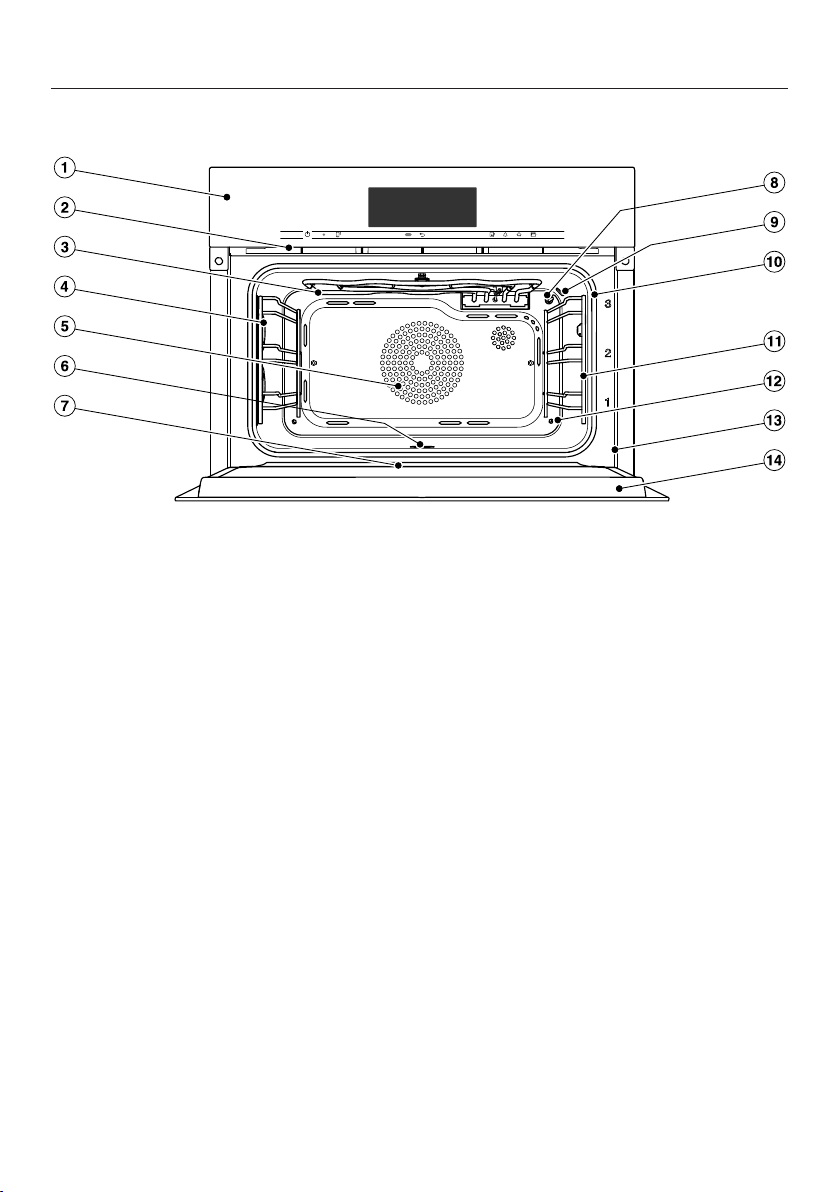
Steam oven
a
Control panel
b
Ventilation outlet
c
Top heat/grill element with wireless food probe antenna
d
Oven interior lighting
e
Air inlet for the fan with ring heating element behind it
f
Oven floor with bottom heating element and floor filter underneath it
g
Drip channel
h
Temperature sensor
i
Moisture sensor
j
Door seal
k
Shelf runners with 3 shelf levels
l
Steam outlet
m
Front frame with data plate
n
Door
Overview
20
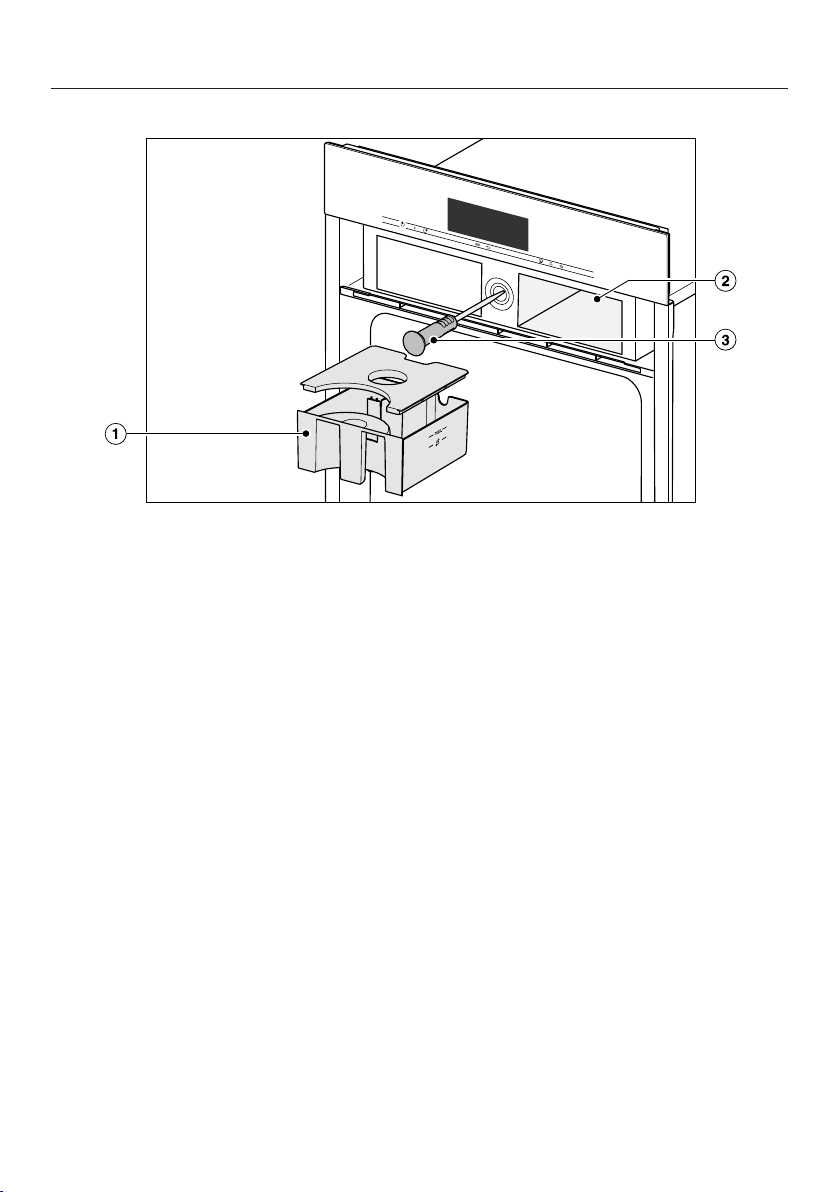
a
Water container
b
Compartment for water container
c
Food probe holder and wireless food probe
Overview
21
A list of the models described in these
operating and installation instructions
can be found on the back page.
Data plate
The data plate located on the front
frame of the oven is visible when the
door is open.
The data plate states the model
number, the serial number as well as
connection data (voltage, frequency
and maximum rated load).
Have this information available if you
need to contact Miele so that any
issues can be rectified as quickly as
possible.
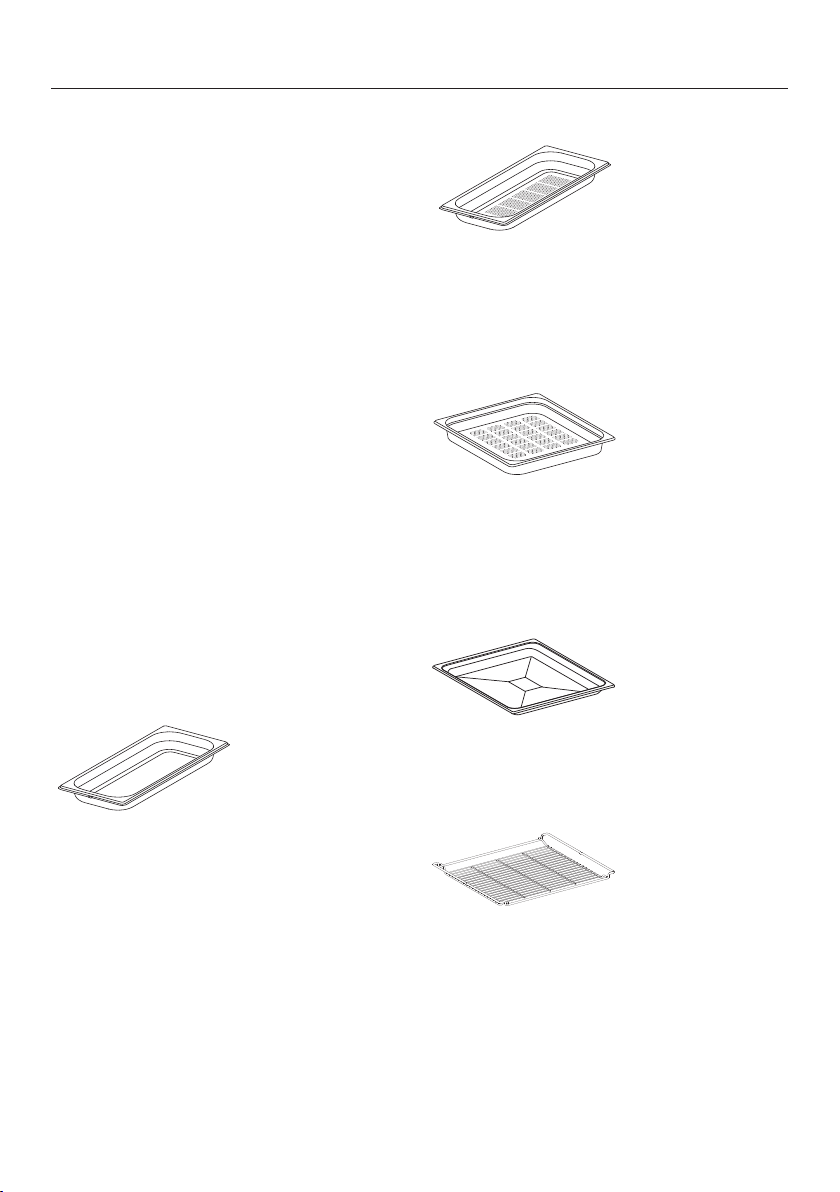
Accessories supplied
The accessories supplied with your
appliance, as well as a range of optional
ones, are available to order from Miele
(see “Optional accessories”).
DGG 20
1 solid cooking container
Gross capacity 2.4litres / Useable
capacity 1.8litres
450x190x40mm (W x D x H)
DGGL 20
1 perforated cooking container
Gross capacity 2.4 litres / Useable
capacity 1.8 litres
450x190x40mm (W x D x H)
DGGL 12
1 perforated cooking container
Gross capacity 4.9 litres / Useable
capacity 3.3 litres
450 x 390 x 40 mm (W x D x H)
Universal tray
1 universal tray for baking, roasting and
grilling
Combi rack
1 combi rack for baking, roasting and
grilling
Overview
22
Food probe
1 food probe for precise temperature
controlled cooking. The food probe
monitors the inner temperature of the
meat (core temperature).
Opener
For manually opening the door
DGClean
Special cleaning agent for heavy soiling
of the oven compartment, especially
after roasting.
Descaling tablets
For descaling the appliance.
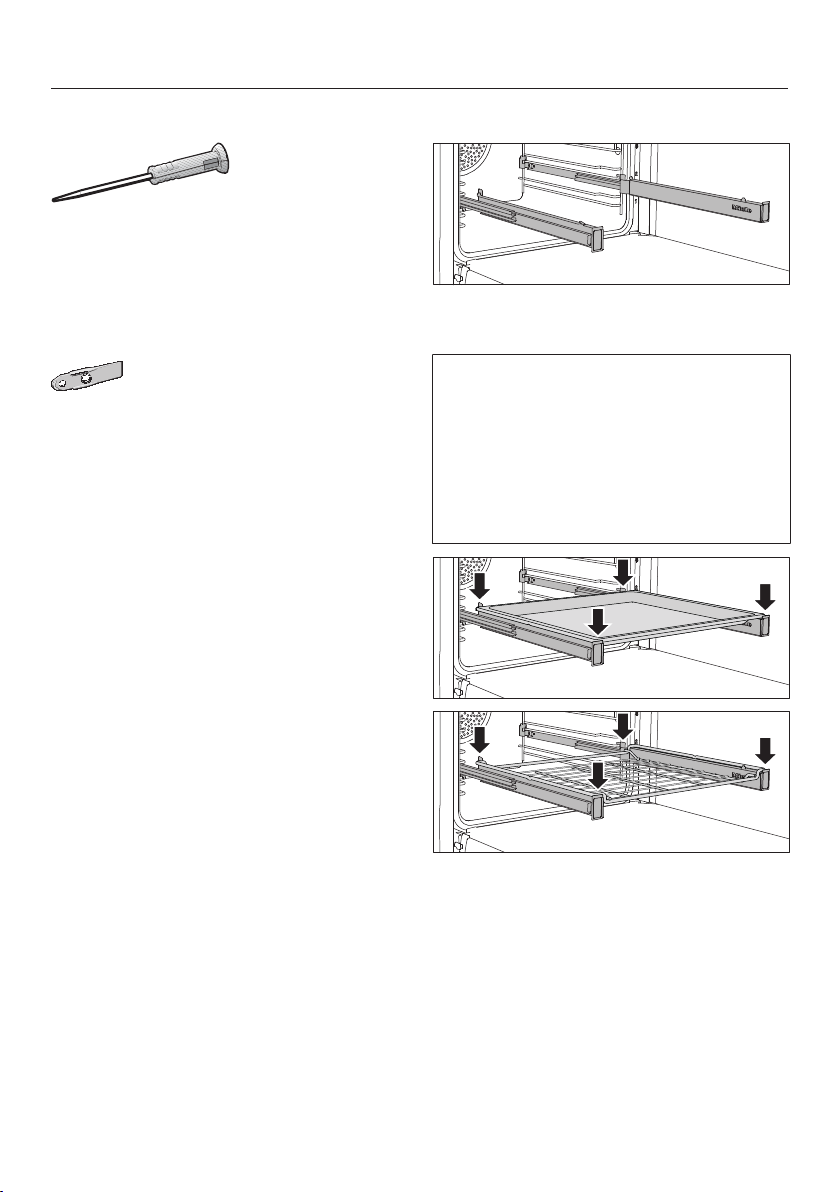
FlexiClip telescopic runners HFC71
The FlexiClip telescopic runners can be
attached to any shelf level.
Push the FlexiClip telescopic runners
right into the oven cavity before
placing accessories on them.
The accessories will then
automatically sit securely between the
stoppers at either end of each runner
and be prevented from sliding off.
The FlexiClip telescopic runners can
support a maximum load of 15kg.
Overview
23
Fitting and removing the FlexiClip
telescopic runners
Risk of injury caused by hot
surfaces.
The steam oven gets hot during
operation. You could burn yourself
on the heating elements, oven
compartment, shelf runners or
accessories.
Allow the heating elements, oven
compartment, shelf runners and
accessories to cool down before
fitting or removing the FlexiClip
telescopic runners.
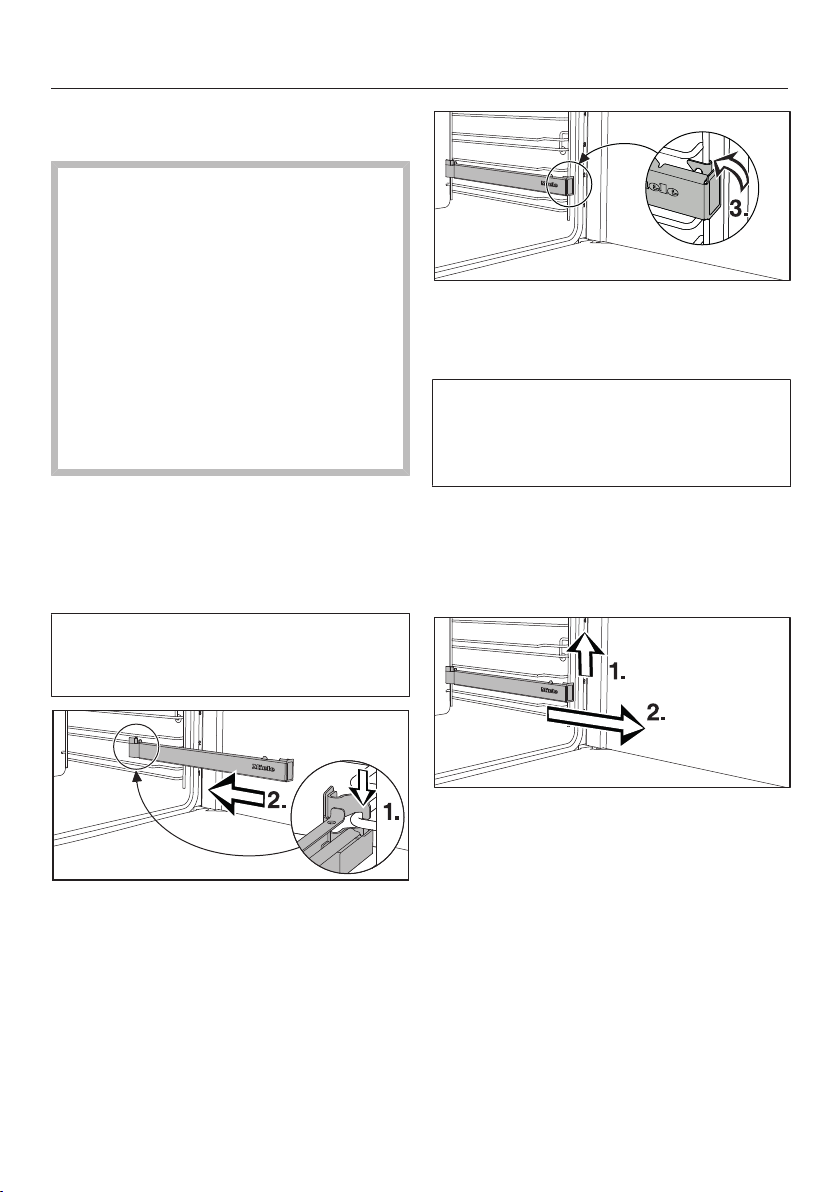
The FlexiClip telescopic runners are
fitted in between the two rails that make
up a shelf level.
The FlexiClip telescopic runner with the
Miele logo is fitted on the right.
When fitting or removing the
telescopic runners, do not extend
them.
Hook the FlexiClip telescopic runner
onto the bottom rail of a shelf level at
the front (1.) and push it along the rail
into the oven interior (2.).
Then secure the telescopic runner to
the bottom of the two rails as
illustrated (3).
If the FlexiClip telescopic runners are
difficult to pull out after fitting, you
may need to pull firmly on them once
to release them.
To remove a FlexiClip telescopic runner,
proceed as follows:
Push the FlexiClip telescopic runner
in all the way.
Remove the FlexiClip telescopic
runner by raising it at the front (1.)
and then pulling it forwards along the
rail of the shelf level and out (2.).
Controls
24
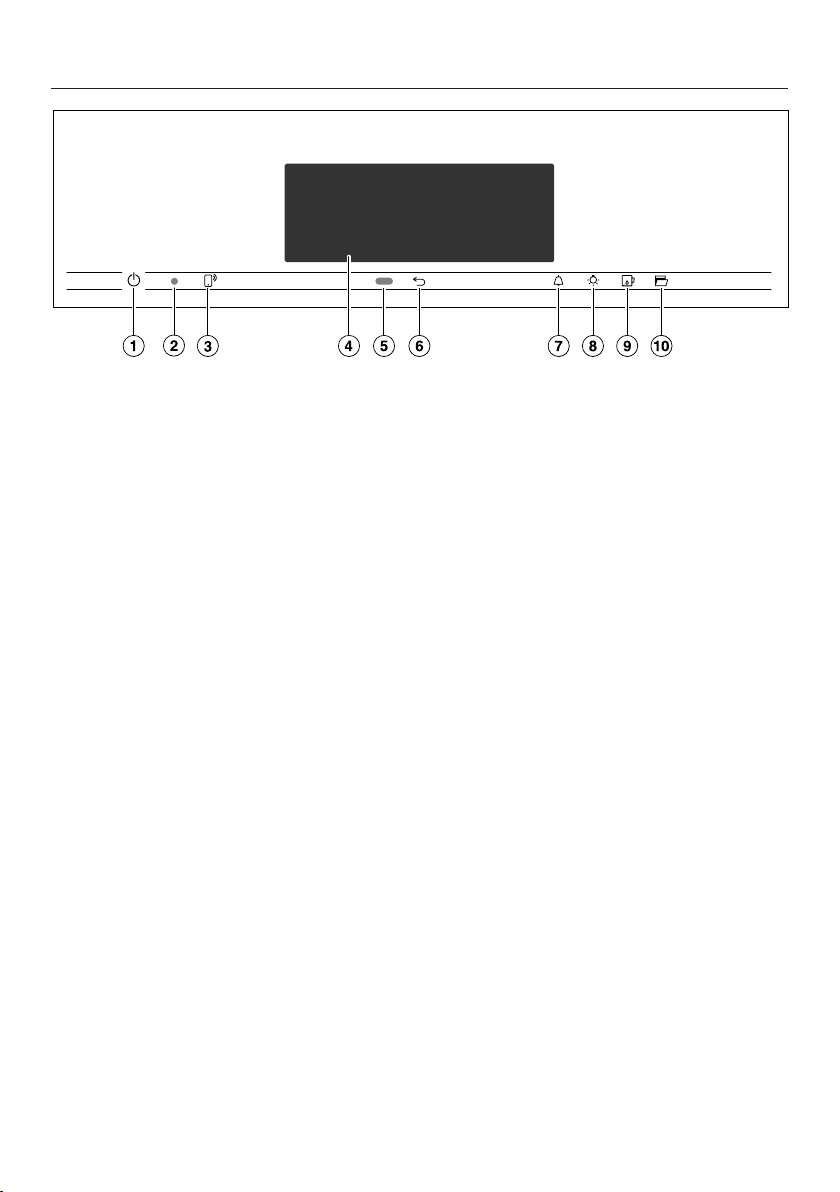
a
Recessed On/Off sensor
For switching the steam oven on and
off
b
Optical interface
(for Miele service technicians only)
c
sensor
For controlling the steam oven via
your mobile device
d
Touch display
For displaying information and for
operation
e
Proximity sensor
For switching on the oven interior
lighting and the display when
approached, and to dismiss the
buzzer when movement is detected
f
sensor
To go back a step
g
sensor
For setting the minute minder or
alarms
h
sensor
For switching the oven interior
lighting on and off
i
sensor
For opening and closing the control
panel
j
sensor
For opening the door

Controls
25
On/Off sensor
The On/Off sensor is recessed and
reacts to touch.
Use this sensor to switch the steam
oven on and off.
Proximity sensor
The proximity sensor is located under
the touch display next to the sensor.
The proximity sensor detects when you
approach the touch display, e.g. with
your hand or body.
If you have activated the corresponding
settings, you can switch on the oven
interior lighting, switch on the steam
oven or dismiss the buzzers (see
“Settings – Proximity sensor”).

Controls
26
Sensor controls
The sensors react to touch. Every touch on the sensors is confirmed by a keypad
tone. This keyapd tone can be switched off by selecting theVolume| Keypad tone|
Offsetting.
If you want the sensor controls to respond even when the steam oven is switched
off, select the Display| QuickTouch| Onsetting.
Sensor Function
If you want to control the steam oven from your mobile device,
you must have the Miele@home system, switch on the Remote
controlsetting and touch this sensor. The sensor then lights up
orange and the MobileStart function is available.
As long as this sensor is illuminated, you can control the steam
oven via your mobile device (see “Settings – Miele@home”).
Depending on which menu you are in, this will take you back a
level or back to the main menu.
If a menu appears in the display or if a cooking programme is in
progress, you can use this sensor to set a minute minder (e.g.
when boiling eggs on the cooktop) or an alarm (a specific time)
at any point (see “Alarm + minute minder”).
Select this sensor to switch the oven interior lighting on and off.
Depending on the setting selected, the oven interior lighting
switches off after 15seconds or remains constantly switched on
or off.
Use this sensor to open and close the control panel (see
“Description of the functions - Control panel”).
Use this sensor to open the door automatically. To close it, press
against the door frame with your hand or with a suitable pot
holder or oven glove until the door shuts.

Controls
27
Touch display
The sensitive surface of the touch display can be scratched by pointed or sharp
objects, e.g. pens.
Only touch the display with your fingers.
Make sure that water cannot get behind the touch display.
The touch display is split into multiple areas.
Oven functions
12:00
Automatic
programmes
Special
applications
MyMiele
The menu path appears on the left of the header. The individual menu options are
separated by a vertical line. … indicates that there are more options available,
which are not visible because there is not enough space in the display.
If you touch a menu name in the header, the display will switch to that menu. To
switch to the start screen, touch.
The time of day is shown on the right of the header. You can set the time of day by
touching the display.
Additional symbols may also appear, e.g. SuperVision.
At the top of the header there is an orange line where you can drag down the pull-
down menu. This allows you to switch settings on or off during a cooking
programme.
The current menu and menu options are shown in the centre. You can scroll to the
right or left by swiping your finger across the display to the right or left. Touch a
menu option to select it (see “Operating principles”).
The operation fields that appear in the footer vary according to the menu that is
selected; e.g.Timer, Save or OK.

Controls
28
Symbols
The following symbols may appear in the display:
Symbol Meaning
This symbol indicates that there is additional information and
advice about using the appliance. Select OK to confirm the
information.
… This indicates that there are more options available, which are
not visible because there is not enough space in the display.
Alarm
Minute minder
Some settings, e.g. display brightness and signal tone volume,
are selected using a segment bar.
The system lock or sensor lock is on (see “Settings – Safety”).
The controls are locked.
Core temperature when using the food probe
Remote control (only appears if you are in the Miele@home
system and have selected the Remote control| On setting).
SuperVision (only appears if you are in the Miele@home system
and have selected the SuperVision| SuperVision display| On setting)

Operating principles
29
You operate the steam oven via the
touch display by touching the desired
menu option.
Each time you touch a possible option
the relevant characters (word and/or
symbol) light up orange.
Fields for confirming an operating step
are highlighted in green (e.g. OK).
Selecting a menu option
Touch the desired field or value in the
touch display.
Scrolling through menus
You can scroll left or right.
Swipe across the screen. To do this,
place your finger on the touch display
and swipe it in the direction you want.
The bar at the bottom shows you where
you are in the current menu.
Exiting a menu
Touch the sensor or touch the …
symbol in the menu path.
Touch the symbol to switch to the
status display.
Entries made before this which have not
been confirmed withOK will not be
saved.
Changing a value or setting
Changing a setting in a list
The current setting is highlighted in
orange.
Touch the desired setting.
The setting is now saved. This will take
you back to the previous menu.
Entering numbers with the roller
Swipe the roller up or down until the
value you want is displayed in the
centre.
Confirm with OK.
The changed number is now saved.
Entering numbers using the
numerical keypad
Tap on the value that is in the middle
of the numerical keypad.
The numerical keypad will appear.
Touch the required numbers.
As soon as you enter a valid value, OK
turns green.
Use the arrow to delete the last entered
number.
Confirm with OK.
The changed number is now saved.

Operating principles
30
Changing the setting with a segment
bar
Some settings are represented by a
bar with seven segments. If
all of the segments are illuminated, the
maximum value is selected.
If none of the segments is illuminated or
if only one is, the minimum value is
selected or the setting is switched off
altogether (e.g. buzzers).
Touch the corresponding segment on
the segment bar to change the
setting.
Select On or Off to switch the setting
on or off.
Confirm your selection withOK.
The setting is now saved. This will take
you back to the previous menu.
Entering letters
Letters are entered using a display
keyboard. It is best to select short,
memorable names.
Touch the letters or characters you
want.
Useful tip: You can add a line break for
longer programme names using the
symbol.
Touch Save.
The name is now saved.
Displaying the context menu
In some menus you can display a
context menu, e.g. to rename User
programmes or to move entries
underMyMiele.
For example, touch a User
programme and keep your finger on it
until the context menu opens.
Touch the touch display outside of
the menu window to close the
context menu.
Moving entries
You can change the order of User
programmes or entries underMyMiele.
For example, touch a User
programme and keep your finger on it
until the context menu opens.
Select Move.
Keep your finger on the highlighted
field and drag it to the desired
location.

Operating principles
31
Displaying the pull-down menu
During a cooking programme, you can
switch settings such asBooster orPre-
heat and the Wi-Fi function on or off.
Use the orange line under the header
to drag the pull-down menu down.
Select the setting you want to
change.
Active settings are highlighted in
orange. Depending on the selected
colour scheme, inactive settings are
highlighted either in black or white
(see “Settings – Display”).
To close the pull-down menu, drag it
back up to the top or touch an area of
the display located outside of the
menu window.
DisplayingHelp
Context-sensitive help is available for
certain functions. Help appears on the
bottom line.
Touch Help to display information in
text and pictures.
Touch Close to return to the previous
menu.
Activating MobileStart
Select the sensor to activate
MobileStart.
The sensor lights up. You can
operate your steam oven remotely with
the Miele@mobile App.
Directly operating the steam oven via
the touch display takes priority over
operating it via the remote control
function on the App.
You can use MobileStart as long as
the sensor is lit up.

Description of the functions
32
Control panel
The water container and food probe are
located behind the control panel. The
control panel is opened and closed by
touching the sensor. It is fitted with
an obstruction sensor. If it meets an
obstruction while opening or closing,
the process is cancelled. When opening
and closing the control panel, do not
touch the door.
Water container
Water is pumped into the water
container and then into the steam
generator.
A malfunction can occur if the
aperture to the water container is
blocked.
The aperture on the front of the water
container must not be blocked as
otherwise water cannot be pumped
into the steam generator.
Food probe
The food probe measures the core
temperature in the food, enabling the
temperature during the cooking process
to be monitored simply and accurately.
Temperature/Core temperature
Some functions are allocated with a
recommended temperature. The
recommended temperature can be
altered within the given range for an
individual cooking programme, a
programme stage or for every time that
programme is used (see “Settings -
Recommended temperatures”).
The core temperature can also be
altered within the given range for an
individual programme or a specific
programme stage.
Moisture
The Combi modefunction and
ReheatSpecial application use a
combination of oven heat and moisture.
The moisture level can be selected
within the given range for an individual
programme or a specific programme
stage.
Depending on the moisture setting,
moisture or fresh air is supplied to the
oven compartment. With the moisture
setting=0%, the maximum fresh air
supply is implemented and no moisture
is supplied. With the moisture
setting=100%, there is no fresh air
supply and the moisture content is at its
maximum.
Some food gives off moisture during
the cooking process. This moisture
from the food affects the amount of
additional moisture needed. If the
required amount of moisture is low, the
steam generator may not be activated
at all.

Description of the functions
33
Cooking duration
Depending on the function, you can set
a cooking duration of between 1minute
and 6, 10 or 12hours.
The cooking durations of the Automatic,
Maintenance and Menu
cookingprogrammes are set at the
factory and cannot be altered.
When cooking with steam, as well as
for programmes and applications with
pure steam operation, the cooking
duration does not begin until the set
temperature is reached. It starts
immediately for all other functions,
programmes and applications.
Noises
A humming sound can be heard during
operation and after switching off the
steam oven. This noise does not
indicate incorrect operation or an
appliance fault. The noise is made by
water being pumped through the
system.
When the steam oven is in use, you will
hear a fan noise.
Heating-up phase
The display shows the temperature in
the oven compartment as it rises during
the heating-up phase in all functions
(exceptions: Full Grill, Economy
Grill).
The duration of the heating-up phase
with steam cooking will depend on the
quantity and temperature of the food. In
general, the heating-up phase will take
approx. 7minutes. It will be longer if
you are cooking refrigerated or frozen
food. The heating-up phase may also
take longer when cooking at lower
temperatures and when cooking with
the Sous-vide function.
Cooking phase
The elapsing remaining time is shown in
the display during the cooking phase.
When cooking with steam, the cooking
phase begins once the set temperature
is reached. It starts immediately for all
other functions, programmes and
applications.

Description of the functions
34
Steam reduction
With steam cooking and Combi mode,
the steam reduction function will switch
on automatically at the end of a cooking
programme which uses a temperature
within a certain temperature range. This
is to prevent a large amount of steam
escaping when the door is opened.
Steam reduction appears in the display.
Steam reduction can be switched off
(see “Settings - Steam reduction”).
When steam reduction is switched off, a
large amount of steam will escape when
the door is opened.
Oven interior lighting
For energy saving reasons, the oven
interior lighting has been set at the
factory to go out after the programme
has begun.
If you want the lighting to remain on
during cooking, the relevant setting
needs to be changed (see “Settings –
Lighting”).
If the door is left open at the end of a
cooking programme, the oven lighting
will switch off automatically after
5minutes.
The lighting can be switched on for
15seconds by touching the sensor
on the control panel.

Before using for the first time
35
Miele@home
Your steam oven is equipped with an
integrated Wi-Fi module.
In order to use it, you need:
– a Wi-Fi network
– the Miele@mobile App
– a Miele user account. The user
account can be created via the
Miele@mobile App.
The Miele@mobile App will guide you
as you connect your steam oven to your
home Wi-Fi network.
Once your steam oven is connected to
your Wi-Fi network, you can use the
App for a number of actions, including
the following:
– Call up information on the operating
status of your steam oven
– Retrieve information on cooking
processes that are in progress
– End cooking programmes that are in
progress
Connecting your steam oven to your
Wi-Fi network will increase energy
consumption, even when the steam
oven is switched off.
Make sure that the signal of your Wi-
Fi network is sufficiently strong in the
place where your steam oven is
installed.
Availability of the Wi-Fi connection
The Wi-Fi connection shares a
frequency range with other appliances
(including microwave ovens and remote
control toys). This may result in
sporadic or even complete connection
failures. Therefore, a constant
availability of featured functions cannot
be guaranteed.
Miele@home availability
The ability to use the Miele@mobile App
depends on the availability of the
Miele@home service in your country.
The Miele@home service is not
available in every country.
For information about availability,
please visit www.miele.com.
Miele@mobile App
You can download the Miele@mobile
App from the Apple App Store
®
or the
Google Play Store™ free of charge (only
functional in selected countries).

Before using for the first time
36
Standard settings
The following settings must be made
before starting up for the first time. You
can change these settings again at a
later time (see “Settings”).
Risk of injury caused by hot
surfaces.
The steam oven gets hot during
operation.
For safety reasons, the steam oven
may only be used when it has been
fully installed.
The steam oven will switch on
automatically when it is connected to
the electricity supply.
Setting the language
Select the language you want.
If you have accidentally selected a
language that you don't understand,
proceed as described in “Settings –
Language”.
Setting the country
Select the country you want.
Setting up Miele@home
Set up Miele@home? appears in the
display.
To set up Miele@home immediately,
selectContinue.
To set it up at a later date, selectSkip.
See “Settings – Miele@home” for
information on setting up at a later
date.
To set up Miele@home immediately,
select the desired connection
method.
You will then be guided by the display
and the Miele@mobile App.
Setting the date
Set the day, month and year.
Confirm with OK.
Setting the time of day
Set the time of day in hours and
minutes.
Confirm with OK.

Before using for the first time
37
Setting the water hardness level
Contact your local water supplier to
find out your local water hardness
range if necessary.
See the “Settings - Water hardness”
for more information.
Set the water hardness level for your
area.
Confirm with OK.
Completing the commissioning
process
Follow any further instructions in the
display.
The appliance is now ready for use.
Cleaning for the first time
Remove any protective foil and
stickers, except the data plate, from
the oven and accessories.
The appliance has undergone a
function test in the factory. Residual
water from this testing may have
trickled back into the cabinet during
transportation.
Cleaning the water container
Risk of injury caused by the
control panel.
You could get caught in the panel as
it opens or closes.
Do not touch the upper edge of the
door when the panel is opening and
closing.
Switch the steam oven on using the
On/Offsensor.
Select the sensor to open the
control panel.
Remove the water container. To do
this, push it upwards slightly as you
take it out of the appliance.
Rinse the water container by hand or
in the dishwasher.

Before using for the first time
38
Cleaning the accessories/oven
compartment
Take all accessories out of the oven
compartment.
Wash the cooking containers by hand
using hot water and a little washing-
up liquid or in the dishwasher.
The universal tray and combi rack
surfaces are treated with
PerfectClean enamel and must only
be washed by hand.
See “Cleaning and care -
PerfectClean”.
Clean the universal tray and combi
rack with a solution of warm water
and a little washing-up liquid applied
with a soft sponge.
The interior of the steam oven has
been treated at the factory with a
conditioning agent.
To remove this, clean the oven
interior with a mild solution of
washing-up liquid and warm water
applied with a soft sponge, and then
dry thoroughly with a soft cloth.
Setting the correct boiling
point for water
Before cooking food for the first time,
you must adjust the boiling temperature
of the water, which varies depending on
the altitude of where the steam oven is
located. This procedure also flushes out
the waterways.
This procedure must be carried out
to ensure trouble-free functioning of
your appliance.
Run the steam oven for 15minutes
using the Steam cooking function
(100°C). Proceed as described in
“Operation”.
Setting the correct boiling point for
water following a house move
If you move house, the boiling point for
the water in the steam oven will need to
be reset for the new altitude if this
differs from the old one by 300m or
more. To do this, descale the appliance
(see “Cleaning and care -
Maintenance”).

Before using for the first time
39
Heating up the appliance
Take all accessories out of the oven
compartment if applicable.
To remove the grease from the ring
heating element, heat the steam oven
up at 200°C using the Fan Plus
function for 30minutes.
Proceed as described in “Operation”.
Risk of injury caused by hot
surfaces.
The steam oven gets hot during
operation. You could burn yourself
on the heating elements, oven
compartment, shelf runners or door
glass.
Wear oven gloves when adjusting
oven shelves etc. in a hot oven
compartment and when closing the
hot door.
The heating element will give off a
slight smell when it is heated up for
the first time. The smell and any
vapours given off will dissipate after a
while and do not indicate a faulty
connection or appliance.
It is important to ensure that the
kitchen is well ventilated during this
operation.

Settings
40
Settings overview
Menu option Available settings
Language ...| deutsch| english| ...
Country
Time Display
On| Off*| Night dimming
Clock type
Analogue*| Digital
Clock format
24 h*| 12 h (am/pm)
Set
Date
Lighting On
On for 15 seconds*
Off
Start screen Main menu*
Oven functions
Automatic programmes
Special applications
User programmes
MyMiele
Display Brightness
*
Colour scheme
Bright| Dark*
QuickTouch
On| Off*
Volume Buzzer tones
Keypad tone
Welcome melody
On*| Off
Units Weight
g*| lb| lb/oz
Temperature
°C*| °F
* Factory settings

Settings
41
Menu option Available settings
Keeping warm On
Off*
Steam reduction On*
Off
Recommended
temperatures
Booster On*
Off
Automatic rinsing On*
Off
Water hardness 1° dH| ...| 15° dH*| ...| 70° dH
Proximity sensor Switch the light on
during cooking process*| Always on| Off
Switch the appliance on
On| Off*
Acknowledge buzzer
On*| Off
Safety System lock
On| Off*
Sensor lock
On| Off*
Furniture front recognition On
Off*
Miele@home Activate
Deactivate
Connection status
Set up again
Reset
Set up
Remote control On*
Off
SuperVision SuperVision display
On| Off*
Display standby
On| Only if there is a fault*
Appliance list
Display this appliance| Buzzer tones
* Factory settings

Settings
42
Menu option Available settings
RemoteUpdate On*
Off
Software version
Legal information Open source licences
Showroom programme Demo mode
On| Off*
Factory default settings Appliance settings
User programmes
MyMiele
Recommended temperatures
* Factory settings

Settings
43
Opening the “Settings” menu
In the Settings menu, you can
personalise your steam oven by
adjusting the factory default settings to
suit your requirements.
From the main menu:
Select Settings.
Select the desired setting.
You can check settings or change them.
Settings cannot be altered while a
cooking programme is in progress.
Language
You can set the language and the
country.
After selecting and confirming your
choice, the language you have selected
will appear in the display.
Useful tip: If you have selected the
wrong language by mistake, select in
the main menu. Follow the symbol to
get back to the Language sub-menu.
Time
Display
Select how you want the time of day to
appear in the display when the steam
oven is switched off:
– On
The time is always visible in the
display.
If you also select the Display|
QuickTouch| On setting, all sensor
controls react to touch straight away
and the proximity sensor
automatically detects when you
approach the display.
If you also select the Display|
QuickTouch| Off setting, the steam
oven has to be switched on before it
can be used.
– Off
The display is dark to save energy.
The steam oven has to be switched
on before you can use it.
– Night dimming
To save energy, the time is only
visible in the display between
5:00am and 11:00pm. The display
remains dark at all other times.

Settings
44
Clock type
The time of day can be displayed in an
Analogue (with a clock face) or Digital
(h:min) format.
With the digital display, the date is also
shown.
Clock format
The time of day can be displayed in the
24 or 12-hour format (24 hor12 h (am/
pm)).
Set
Set the hours and then the minutes.
Useful tip: If no cooking programme is
in progress, touch the time in the
header to change it.
If there is a power cut, the current time
of day will reappear once power has
been restored. The time of day is saved
for approx. 150hours.
If the steam oven has been connected
to a Wi-Fi network and signed into the
Miele@mobile App, the time will be
synchronised based on the country
setting in the Miele@mobile App.
Date
Set the date.
When the steam oven is switched off,
the date will only appear in the display
if Time| Clock type| Digital is selected.
Lighting
– On
The oven interior lighting is switched
on during the entire cooking period.
– On for 15 seconds
The oven interior lighting switches off
15seconds after a cooking
programme has begun. Press the
sensor to switch the oven interior
lighting on again for 15seconds.
– Off
The oven interior lighting is switched
off. Press the sensor to switch on
the oven interior lighting for
15seconds.
Start screen
The steam oven is set at the factory for
the main menu to appear when the
steam oven is switched on. You can
change this default setting so that, for
instance, the oven functions or MyMiele
settings appear in the display (see
“MyMiele”).
This new start screen will then appear
when the steam oven is next switched
on.
Select the sensor or follow the path
in the header to get to the main menu.

Settings
45
Display
Brightness
The display brightness is represented
by a segment bar.
–
Maximum brightness
–
Minimum brightness
Colour scheme
Choose between a light or dark colour
scheme for the display.
– Bright
The display has a light background
with dark characters.
– Dark
The display has a dark background
with light characters.
QuickTouch
Select how the sensor controls and the
proximity sensor should respond when
the steam oven is switched off:
– On
If you have also selected the Time|
Display| On or Night dimming setting,
the sensor controls and the proximity
sensor will also respond when the
steam oven is switched off.
– Off
Regardless of whether Time| Display
is set, the sensor controls and the
proximity sensor only respond when
the steam oven is switched on, as
well as for a certain amount of time
after switching it off.

Settings
46
Volume
Buzzer tones
If buzzers are switched on, a buzzer will
sound when the set temperature is
reached and at the end of a set time.
The volume of the buzzers is
represented by a segment bar.
–
Maximum volume
–
Buzzers are switched off
Keypad tone
The volume of the tone that sounds
each time you touch a sensor is
represented by a segment bar.
–
Maximum volume
–
Keypad tone is switched off
Welcome melody
The melody that sounds when you
touch the On/Off sensor can be
switched on or off.
Units
Weight
For Automatic programmes, you can set
the weight of food in grams (g), pounds
(lb) or pounds/ounces (lb/oz).
Temperature
You can set the temperature in degrees
Celsius (°C) or degrees Fahrenheit (°F).
Keeping warm
Using the Keeping warmfunction, you
can keep food warm at the end of a
steam cooking programme. Food is
kept warm at a preset temperature for a
maximum of 15minutes. You can
cancel the keeping warm process by
opening the door.
Please note that delicate food,
especially fish, can continue cooking
whilst being kept warm.
– On
The Keeping warmfunction is switched
on. If a temperature of at least 80°C
is selected, this function will switch
on after approx. 5minutes. The food
is kept warm using a temperature of
70°C.
– Off
The Keeping warmfunction is switched
off.

Settings
47
Steam reduction
The Steam reductionfunction stops
excessive steam escaping when the
door is opened.
– On
The steam reduction function will
switch on automatically at the end of
a cooking programme which uses a
temperature of over approx. 80°C
(steam cooking) or 80–100°C and
100% moisture (Combi mode). Steam
reduction appears in the display.
– Off
If steam reduction is switched off, the
Keeping warm function is also
automatically switched off. When
steam reduction is switched off, a
large amount of steam will escape
when the door is opened.
Recommended temperatures
If you frequently cook with different
temperatures, it makes sense to change
the recommended temperatures.
After selecting this option, a list of oven
functions will appear in the display.
Select the function you want.
The recommended temperature will
appear together with the range within
which it can be changed.
Change the recommended
temperature.
Confirm with OK.
Booster
The Boosterfunction is used to quickly
pre-heat the oven.
– On
The Booster function is automatically
switched on during the heating-up
phase of a cooking programme. The
top heat/grill element, ring heating
element and hot air fan pre-heat the
oven compartment to the desired
temperature at the same time.
– Off
The Booster function is switched off
during the heating-up phase of a
cooking programme. Only the heating
elements for the selected oven
function are used to pre-heat the
oven compartment.
You can also use the pull-down menu
to switch the Boosterfunction on or off
for a cooking programme.
Automatic rinsing
Following a cooking programme with
steam, Appliance rinsing will appear in the
display after the steam oven has been
switched off.
This process flushes any remaining
food deposits out of the system.
You can activate or deactivate the
automatic rinsing process.

Settings
48
Water hardness
To ensure that the steam oven works
correctly and to ensure that descaling is
carried out at the correct interval, it
must be set to the local water hardness
level. The harder the water is, the more
frequently the steam oven needs to be
descaled.
Contact your local water supplier to find
out your local water hardness range if
necessary.
If you are using bottled drinking water,
e.g. mineral water, use non-carbonated
water. Select settings according to the
calcium content. The calcium content is
given on the label of the bottle in mg/l
Ca
2+
or ppm (mg Ca
2+
/l).
The degree of hardness can be set
between 0.2mmol/l (1°dH) and
12.5mmol/l (70°dH). The hardness level
is set to 2.7mmol/l (15°dH) at the
factory.
Set the water hardness level for your
area.
Confirm with OK.
Water hardness Calcium content
mg/lCa
2+
or
ppm (mgCa
2+
/l)
Setting
°dH mmol/l
1 0.2 7 1
2 0.4 14 2
3 0.5 21 3
4 0.7 29 4
5 0.9 36 5
6 1.1 43 6
7 1.3 50 7
8 1.4 57 8
9 1.6 64 9
Water hardness Calcium content
mg/lCa
2+
or
ppm (mgCa
2+
/l)
Setting
°dH mmol/l
10 1.9 71 10
11 2.0 79 11
12 2.2 86 12
13 2.3 93 13
14 2.5 100 14
15 2.7 107 15
16 2.9 114 16
17 3.1 121 17
18 3.2 129 18
19 3.4 136 19
20 3.6 143 20
21 3.8 150 21
22 4.0 157 22
23 4.1 164 23
24 4.3 171 24
25 4.5 179 25
26 4.7 186 26
27 4.9 193 27
28 5.0 200 28
29 5.2 207 29
30 5.4 214 30
31 5.6 221 31
32 5.8 229 32
33 5.9 236 33
34 6.1 243 34
35 6.3 250 35
36 6.5 257 36
37-45 6.6-8.0 258–321 37-45
46-60 8.2-10.7 322–429 46-60
61-70 10.9-12.5 430-500 61-70

Settings
49
Proximity sensor
The proximity sensor detects when you
approach the touch display, e.g. with
your hand or body.
If you want the proximity sensor to
respond even when the steam oven is
switched off, select the Display|
QuickTouch| On setting.
Switch the light on
– during cooking process
As soon as you approach the touch
display during a cooking programme,
the oven interior lighting switches on.
The oven interior lighting
automatically switches off again after
15seconds.
– Always on
As soon as you approach the touch
display, the oven interior lighting
switches on. The oven interior
lighting automatically switches off
again after 15seconds.
– Off
The proximity sensor does not
respond when you approach the
touch display. Select the sensor to
switch on the oven interior lighting for
15seconds.
Switch the appliance on
– On
If the time is displayed, the steam
oven switches on and the main menu
appears as you approach the touch
display.
– Off
The proximity sensor does not
respond when you approach the
touch display. Switch the steam oven
on using the On/Off sensor.
Acknowledge buzzer
– On
As soon as you approach the touch
display, the buzzers switch off.
– Off
The proximity sensor does not
respond when you approach the
touch display. Switch the buzzers off
manually.

Settings
50
Safety
System lock
The system lock prevents the appliance
being switched on by mistake.
You can still set an alarm and a minute
minder as well as use the MobileStart
function when the system lock is active.
The system lock will remain activated
even after a power failure.
– On
The system lock is switched on.
Before you can use the steam oven,
switch it on and touch the symbol
for at least 6seconds.
– Off
The system lock is deactivated. You
can use the steam oven as normal.
Sensor lock
The sensor lock prevents the cooking
programme being switched off by
mistake or settings being changed.
Apart from the On/Off sensor, the
activated sensor lock prevents the
sensors and fields in the display from
working a few seconds after a
programme has been started.
– On
The sensor lock is switched on.
TouchOK for at least 6seconds to
deactivate the sensor lock for a short
period of time.
– Off
The sensor lock is deactivated. All
sensor controls react to touch as
normal.
If you want to switch off the oven with
the sensor lock activated, touch the
On/Off sensor until the oven
switches off.

Settings
51
Furniture front recognition
– On
Furniture front recognition is
activated. Using the proximity sensor,
the steam oven automatically detects
whether the furniture door is closed.
If the furniture door is closed, the
steam oven switches off
automatically after a certain period.
– Off
Furniture front recognition is
deactivated. The steam oven does
not detect whether the furniture door
is closed.
If the steam oven is installed behind
a furniture front (e.g. a door), the
steam oven, housing unit and the
floor can be damaged by the build-
up of heat and moisture behind the
closed furniture front.
Always leave the furniture door open
when you are using the steam oven.
Leave the furniture door open until
the steam oven has cooled down
completely.
Miele@home
Your steam oven is a Miele@home
compatible appliance with
SuperVision functionality.
Your steam oven is fitted ex-works
with a Wi-Fi communication module
and is suitable for wireless
communication.
There are a number of ways of
connecting your steam oven to your Wi-
Fi network: We recommend connecting
your steam oven to your Wi-Fi network
with the help of the Miele@mobile App
or via WPS.
After installing the Miele@mobile App
on a mobile device, you can do the
following, depending on your appliance:
– Operate your appliance remotely
– Call up information on the operating
status of your appliance
– Call up information on the
programme sequence of your
appliance
– Set up a Miele@home network with
other Wi-Fi enabled Miele appliances

Settings
52
– Activate
This setting is only visible if
Miele@home is deactivated. The Wi-
Fi function is reactivated.
– Deactivate
This setting is only visible if
Miele@home is activated.
Miele@home remains set up, the Wi-
Fi function is switched off.
– Connection status
This setting is only visible if
Miele@home is activated. The display
shows information such as the Wi-Fi
reception quality, network name and
IP address.
– Set up again
This setting is only visible if a Wi-Fi
network has already been set up.
Reset the network settings and
immediately set up a new network
connection.
– Reset
This setting is only visible if a Wi-Fi
network has already been set up. The
Wi-Fi function is deactivated and the
Wi-Fi network will be reset to the
factory default. You must set up a
new connection to the Wi-Fi network
to be able to use Miele@home.
– Set up
This setting is only visible if there is
no existing Wi-Fi network. You must
set up a new connection to the Wi-Fi
network to be able to use
Miele@home.
Remote control
If you have installed the Miele@mobile
App on your mobile device, have
access to the Miele@home system and
have activated the remote control
function (On), you can use the
MobileStart function to retrieve
information on steam oven cooking
programmes currently in progress or to
end a programme in progress.
Activating MobileStart
Select the sensor to activate
MobileStart.
The sensor lights up. You can
operate your steam oven remotely with
the Miele@mobile App.
Directly operating the steam oven via
the touch display takes priority over
operating it via the remote control
function on the App.
You can use MobileStart as long as
the sensor is lit up.

Settings
53
SuperVision
The steam oven is a Miele@home
compatible appliance with
SuperVisionfunctionality for monitoring
other household appliances in the
Miele@home system or “Settings –
Miele@home”.
The SuperVisionfunction cannot be
activated until the Miele@home system
has been set up.
SuperVision display
– On
The SuperVisionfunction is switched
on.
The symbol will appear in the top
right-hand corner of the display.
– Off
The SuperVisionfunction is switched
off.
Display standby
The SuperVisionfunction is also
available when the oven is in standby.
However, the time of day display must
be switched on (Settings| Time|
Display| On).
– On
Active domestic appliances that are
signed on to the Miele@home system
are always displayed.
– Only if there is a fault
Only faults on active domestic
appliances are displayed.
Appliance list
All household appliances signed on to
the Miele@home system are displayed.
Once you have selected an appliance,
you can access further settings:
– Display this appliance
– On
The SuperVisionfunction for this
appliance is switched on.
– Off
The SuperVisionfunction for this
appliance is switched off. The
appliance is still signed on to the
Miele@home system. Faults are
displayed, even if the
SuperVisionfunction for the
appliance has been switched off.
– Buzzer tones
You can select whether the buzzers
are switched on (On) or switched off
(Off) for this appliance.

Settings
54
RemoteUpdate
The RemoteUpdatemenu option is only
displayed and can only be selected if
the requirements for using
Miele@home have been met (see
“Before using for the first time –
Miele@home” or “Settings –
Miele@home”).
The RemoteUpdate function is used for
updating the software in your steam
oven. If an update is available for your
steam oven, it will automatically
download it. Updates will not be
installed automatically. They must be
initiated manually.
If you do not install an update, you can
continue to use your steam oven as
usual. However, Miele recommends
installing updates.
Switching on/Switching off
RemoteUpdate is switched on as
standard. Available updates will be
downloaded automatically and will only
be installed if you initiate it.
Switch off RemoteUpdate if you do not
wish any updates to be downloaded.
Running a RemoteUpdate
Information about the content and
scope of an update is provided in the
Miele@mobile App.
A message will appear in your steam
oven display if a software update is
available.
You can install the update immediately
or postpone this until later. When the
steam oven is switched on again, you
will be reminded about the update.
Switch RemoteUpdate off if you do not
wish to install updates.
The update can take several minutes.
Please note the following information
about the RemoteUpdate function:
– You will only receive a message when
an update is available.
– Once an update has been installed, it
cannot be undone.
– Do not switch the steam oven off
during the update. Otherwise, the
update will be aborted and will not be
installed.
– Some software updates can only be
carried out by a Miele service
technician.

Settings
55
Software version
The software version menu option is for
use by Miele service technicians. You
do not need this information for
domestic use.
Confirm with OK.
Legal information
You can find an overview of the
integrated Open Source components
under Open source licences.
Confirm with OK.
Showroom programme
This function enables the steam oven to
be demonstrated in showrooms without
heating up. Do not activate this setting
for domestic use.
Demo mode
If you have activated Demo mode,
Demo mode is switched on. The appliance
will not heat up. will appear when you
switch the steam oven on.
– On
Touch OK for at least 4seconds to
activate Demo mode.
– Off
Touch OK for at least 4seconds to
deactivate Demo mode. You can use
the steam oven as normal.
Factory default settings
– Appliance settings
Any settings that have been altered
will be reset to the factory default
settings.
– User programmes
All User programmes will be deleted.
– MyMiele
All MyMiele entries will be deleted.
– Recommended temperatures
Any recommended temperatures that
have been changed will be reset to
the factory default settings.

Alarm + minute minder
56
Using the sensor, you can set a
minute minder duration to time any
activity in the kitchen, e.g. boiling eggs
on the cooktop, or an alarm for a
specific time.
Two alarms can be set simultaneously,
two minute minder durations or an
alarm and a minute minder duration.
Using the Alarmfunction
The alarm can be used to specify a
particular time for a buzzer to sound.
Setting the alarm
If the Display| QuickTouch| Offsetting is
selected, you will need to switch the
steam oven on before setting the
alarm. The alarm time will then appear
in the display when the steam oven is
switched off.
Select the sensor.
Select Alarm.
Set the time for the alarm.
Touch Close to confirm.
When the steam oven is switched off,
the alarm time and will appear
instead of the time of day.
If you are cooking at the same time or if
you are in a different menu, the alarm
time and will appear in the top right-
hand corner of the display.
At the specified time for the alarm,
will flash in the display next to the
time and a buzzer will sound.
Select the sensor or the set alarm
time in the display.
The buzzer will stop and the symbols in
the display will go out.
Changing an alarm
Select the alarm in the display or
select the sensor and the desired
alarm.
The set alarm time appears in the
display.
Set the new time for the alarm.
Touch Close to confirm.
The adjusted alarm time is now saved
and will appear in the display.
Deleting an alarm
Select the alarm in the display or
select the sensor and the desired
alarm.
The set alarm time appears in the
display.
Select Delete.
Touch Close to confirm.
The alarm will be deleted.

Alarm + minute minder
57
Using the Minute
minderfunction
The minute minder can be used to
time other activities in the kitchen,
e.g.boiling eggs on the cooktop.
The minute minder can also be used at
the same time as a cooking programme
for which the cooking duration start and
finish times have been set (e.g. as a
reminder to stir the food or add
seasoning, etc.).
The maximum minute minder time
that can be set is 59minutes and
59seconds.
Setting the minute minder
If you have selected the Display|
QuickTouch| Offsetting, you will need
to switch the steam oven on before
setting the minute minder. The minute
minder can then be seen counting
down in the display when the steam
oven is switched off.
Select the sensor.
Select Minute minder.
Set the minute minder time.
Touch Close to confirm.
When the steam oven is switched off,
the minute minder time will count down
in the display and will appear instead
of the time of day.
If you are cooking at the same time or if
you are in a different menu, the minute
minder time and will appear in the
top right-hand corner of the display.
At the end of the minute minder time
will flash, the time will start counting
up and a buzzer will sound.
Select the sensor or the required
minute minder in the display.
The buzzer will stop and the symbols in
the display will go out.
Changing the time set for the minute
minder
Select the minute minder in the
display or select the sensor and
then the required minute minder
duration.
The minute minder time selected
appears.
Set a new minute minder duration.
Touch Close to confirm.
The changed minute minder duration is
now saved and will count down in
minutes. Minute minder durations under
10minutes will count down in seconds.
Cancelling the minute minder
Select the minute minder in the
display or select the sensor and
then the required minute minder
duration.
The minute minder time selected
appears.
Select Delete.
Touch Close to confirm.
The minute minder is now cancelled.
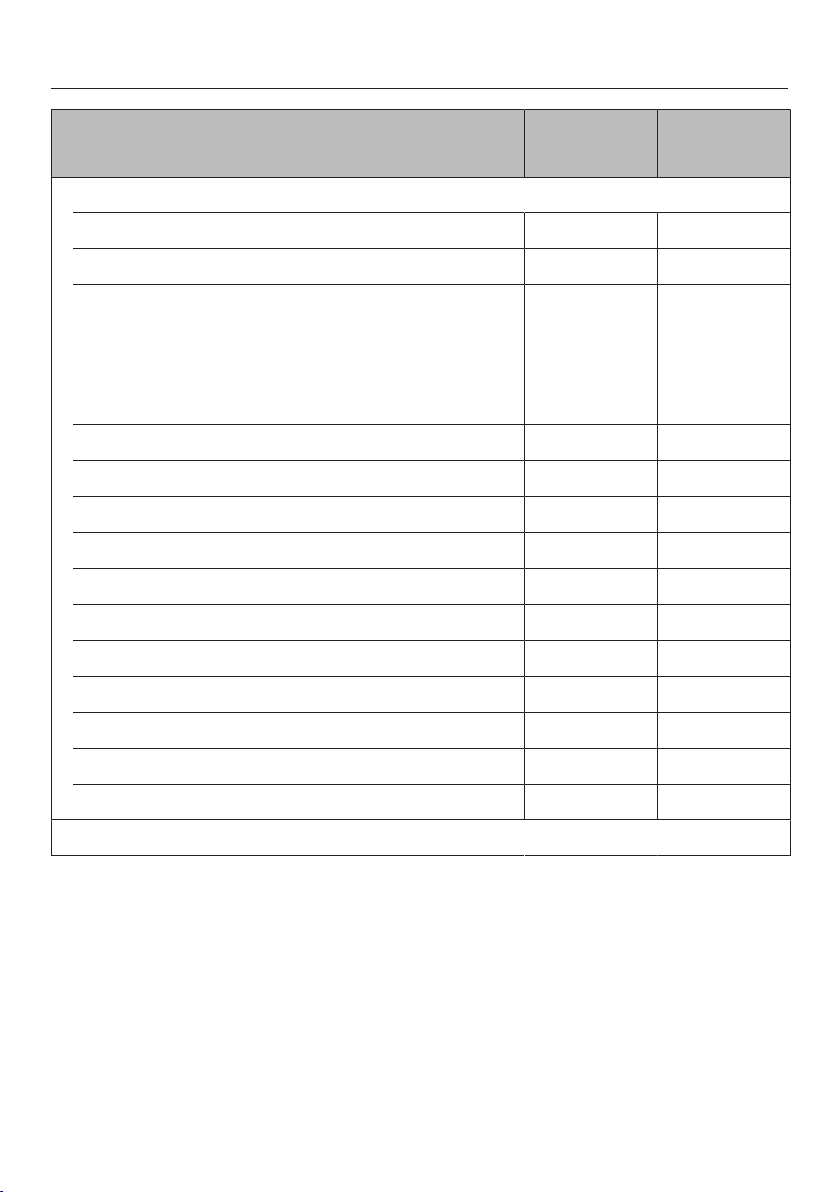
Main and sub-menus
58
Menu Recommen-
ded value
Range
Oven functions
Fan Plus 160 °C 30–225 °C
Conventional Heat 180 °C 30–225 °C
Combi mode
Combi Fan Plus 170 °C 30–225 °C
Combi Conventional 180 °C 30–225 °C
Combi Grill Setting3 Setting1–3
Steam cooking 100 °C 40–100 °C
Sous-vide 65 °C 45–90 °C
Intensive Bake 180 °C 50–225 °C
Bottom Heat 190 °C 100–200 °C
Top Heat 190 °C 100–225 °C
Full Grill Setting3 Setting1–3
Economy Grill Setting3 Setting1–3
Fan Grill 200 °C 50–225 °C
Cake Plus 160 °C 30–225 °C
Eco Fan Heat 160 °C 30–225 °C
Eco Steam cooking 100 °C 40–100 °C
Automatic programmes
Main and sub-menus
59
Menu Recommen-
ded value
Range
Special applications
Reheat 130 °C 120–140 °C
Defrost 60 °C 50–60 °C
Mix & Match
Crispy reheating – –
Gentle reheating – –
Crispy cooking – –
Gentle cooking – –
Blanch – –
Bottling 90 °C 80–100 °C
Drying 60 °C 60–70 °C
Prove yeast dough – –
Menu cooking – –
Disinfect items – –
Heat crockery 50 °C 50–80 °C
Keeping warm 65 °C 40–100 °C
MyMiele
User programmes
Settings
Maintenance
Descale
Soak
Drying
Rinse

Energy saving tips
60
Cooking programmes
– If possible, use the Automatic
programmes for cooking food.
– Remove any accessories from the
oven that are not required for a
cooking process.
– In general, if a range of temperatures
is given in a recipe or chart, it is best
to select the lower temperature and
to check the food after the shortest
duration.
– Pre-heat the oven only if instructed to
do so in the recipe or the cooking
chart.
– Avoid opening the door during a
cooking process.
– Dark, matte tins are best for baking.
They absorb the heat more effectively
and transmit it to the mixture more
quickly. Shiny materials such as
stainless steel or aluminum reflect the
heat, preventing it from reaching the
food efficiently. Do not cover the
oven floor or the rack with heat-
reflective aluminum foil.
– Monitor cooking durations to avoid
wasting energy when cooking food.
Set the cooking duration, or use a
food probe if you have one.
– The Fan Plus function can be
used for cooking many types of food.
Because the fan distributes the heat
in the oven compartment straight
away, it allows you to use a lower
temperature than you would with
Conventional Heat. It also enables
you to cook on several shelf levels at
the same time.
– Fan Grill is the best function for
grilled dishes. With Fan Grill you can
use lower temperatures than with
other grill functions which use the
maximum temperature setting.
– The Eco Fan Heatfunction
ensures energy-efficient cooking
thanks to optimal utilisation of heat.
Use this function for sweet and
savoury bakes and gratins. Do not
open the door during the cooking
programme.
– You can use the Eco Steam
cooking function to save energy
during steam cooking. This function
is suitable mainly for cooking fish and
vegetables.
– Whenever possible you should cook
several dishes at the same time.
Place them next to each other in the
oven or on different shelf levels.
– Dishes which you are unable to
prepare at the same time should, if
possible, be cooked one after the
other in order to make use of existing
heat in the oven.

Energy saving tips
61
Settings
– Select the setting Display|
QuickTouch| Off for the control
elements in order to reduce energy
consumption.
– Select the Lighting| Off or On for 15
seconds setting for the oven interior
lighting. The oven interior lighting can
be switched on again at any time by
touching thesensor.
Energy saving mode
The steam oven will switch itself off
automatically to save energy if a
programme is not being run and
controls have not been operated. The
time of day will appear in the display or
the display will remain dark (see
“Settings – Time”).

Operation
62
Malfunction due to missing floor
filter.
If the floor filter is missing, food
deposits can get into the drain. The
water cannot be pumped away.
Before each cooking programme,
check that the filter in the floor of the
oven compartment is correctly fitted.
Switch the steam oven on.
The main menu will appear.
Place the food in the oven.
Select Oven functions.
Select the function you want.
The function and recommended values
for temperature and moisture (if
applicable) will appear.
Change the recommended values if
necessary.
The recommended values will be
automatically accepted within a few
seconds. You can change the
temperature and moisture level later
by selecting the temperature or
moisture indicator.
Confirm with OK.
The required and the actual temperature
are displayed and the heating-up phase
will begin.
You will see the temperature rising in
the display. A buzzer will sound when
the selected temperature is reached for
the first time.
After the cooking programme, select
Finish.
Risk of injury due to hot steam.
When using a cooking programme
involving steam, a lot of hot steam
can escape if the door is opened.
The steam can cause burns.
Step back and wait until the hot
steam has dissipated.
Take the food out of the oven.
Risk of injury caused by hot
surfaces.
The steam oven gets hot during
operation. You can burn yourself on
the door glass.
Wear oven gloves when closing the
hot door.

Operation
63
Cleaning the steam oven
Remove the water container and
empty it as required.
Switch the steam oven off.
Appliance rinsing appears after a cooking
programme involving steam.
Follow the instructions in the display.
The rinsing process should be
carried out every time to flush any
remaining food deposits out of the
system.
If you have selected Display|
QuickTouch| Off in the settings menu,
you will have to switch the steam oven
on in order to open the door.
After each use, clean and dry the
whole appliance as described in
“Cleaning and care”.
Leave the appliance door open until
the oven interior is completely dry.
Changing values and settings
for a cooking programme
Depending on the function, as soon as
a cooking programme is in progress,
you can change the values or settings
for this programme.
Depending on the function, you can
change the following settings:
– Temperature
– Moisture
– Duration
– Booster
– Pre-heat
– Crisp function

Operation
64
Changing the temperature and core
temperature
Via Settings| Recommended
temperatures, you can permanently
adjust the recommended temperature
to suit your cooking preferences.
The core temperature only
appears if you are using the food
probe (see “Roasting – Food probe”).
Touch the temperature display.
Change the temperature and the
core temperature as required.
Confirm with OK.
The cooking programme will resume
with the new target temperatures.
Changing the moisture level
Touch the moisture indicator.
Change the moisture level.
Confirm with OK.
The programme will continue to run at
the new moisture level.
Setting cooking durations
Cooking results can be adversely
affected if there is a long delay
between the food being placed in the
oven and the start of cooking. Fresh
food can change colour and even
spoil.
When baking, the cake mixture or
dough can dry out, and the raising
agents can lose their effectiveness.
Select as short a time as possible
until the start of the cooking process.
Example: You have placed the food in
the oven compartment, selected a
function and the required settings such
as the temperature.
By entering Duration, Finish at or Start at,
you can automatically switch the
cooking programme off or on and off.

Operation
65
– Duration
Enter the required cooking duration
for the food. The heating will switch
off automatically once this duration
has elapsed. The maximum cooking
duration that can be set depends on
the function that you have selected.
– Finish at
Specify when you want the cooking
programme to finish. The oven
heating will switch off automatically
at the time you have set.
– Start at
This function will only appear in the
menu if you have set aDuration or
Finish attime. WithStart at, you have
to specify when you want the
cooking programme to start. The
oven heating will switch on
automatically at the time you have
set.
Select orTimer.
Set the required times.
Confirm with OK.
When cooking with steam, the cooking
duration does not begin until the set
required temperature is reached.
The steam reduction function will
switch on at the end of a cooking
programme which used a temperature
of over approx. 80°C (steam cooking)
or 80–100°C and 100% moisture
(Combi mode).
Wait until Steam reduction goes out in
the display before opening the door
and removing the food from the oven.
Changing the set cooking durations
Select, the duration or Timer.
Select the desired time and change it.
Confirm with OK.
These settings will be deleted in the
event of a power failure.
Deleting the set cooking durations
Select, the duration or Timer.
Select the time you want.
Select Delete.
Confirm with OK.
If you delete Duration, the set times for
Finish at and Start at are also deleted.
If you delete Finish atorStart at, the
cooking programme will start using
the cooking duration set.

Operation
66
Cancelling cooking
If you cancel a cooking programme, the
oven heating and lighting will switch off.
Any cooking durations set will be
deleted.
Cancelling a cooking programme
without a set cooking duration
Select Finish.
The main menu will appear.
Cancelling a cooking programme
with a set cooking duration
Select Cancel.
Cancel process? appears in the display.
Select Yes.
The main menu will appear.
Interrupting a cooking
programme
A cooking programme is interrupted as
soon as the door is opened. The oven
heating switches off.
The set cooking duration is saved when
cooking with steam as well as for
programmes and applications with pure
steam operation.
Risk of injury due to hot steam.
When using a cooking programme
involving steam, a lot of hot steam
can escape if the door is opened.
The steam can cause burns.
Step back and wait until the hot
steam has dissipated.
Risk of injury caused by hot
surfaces and food.
The steam oven gets hot during
operation. You could burn yourself
on the heating elements, oven
compartment, shelf runners,
accessories, food or door glass.
Wear oven gloves when placing hot
food in the oven or removing it, when
adjusting oven shelves etc. in the hot
oven compartment and when closing
the hot door.
When placing cooking containers in
the oven or removing them, make
sure that the hot food does not spill.
The cooking programme will resume
when the door is closed.

Operation
67
The steam oven will heat up again and
the display will show the temperature in
the cooking compartment as it rises.
When cooking with steam as well as for
programmes and applications with pure
steam operation, the remaining time
only continues to count down once the
set temperature has been reached.
In programmes using 100% moisture
and temperatures up to 100°C: the
cooking programme will finish early if
the door is opened in the last minute
of cooking (55seconds remaining).
Pre-heating the oven
The Boosterfunction is used to quickly
pre-heat the oven compartment in
some functions.
The Pre-heatfunction can be used with
any oven function (except Eco Fan
Heat) and has to be switched on
separately for each cooking
programme.
It is only necessary to pre-heat the oven
in a few instances.
Pre-heat the oven compartment when
cooking the following food:
– Cakes and pastries with a short
cooking duration (up to approx.
30minutes) and delicate items (e.g.
sponge) with the Conventional
Heatfunction

Operation
68
Booster
The Boosterfunction is switched on as
the factory default setting for the
following functions (Settings| Booster|
On):
– Fan Plus
– Conventional Heat
If you set a temperature above 100°C
and the Boosterfunction is switched on,
a rapid heating-up phase heats the
oven compartment to the set
temperature. The top heat/grill element
and the ring heating element come on
together with the hot air fan.
Delicate items (e.g. sponge or
biscuits) will brown too quickly on
the top if the Boosterfunction is
used.
Switch off the Boosterfunction for
these items.
Switching Booster on or off for a
cooking programme
If you have selected the Booster| On
setting, you can switch off the function
separately for a cooking programme.
On the other hand, you can also switch
on the function separately for a cooking
programme if you have selected the
Booster| Off setting.
Example: You have selected a function
and the required settings such as the
temperature.
You want to switch off the
Boosterfunction for this cooking
programme.
Drag down the pull-down menu.
Booster is highlighted in orange.
Select Booster.
Depending on the colour scheme,
Booster is highlighted in either black or
white.
Close the pull-down menu.
The Boosterfunction is switched off
during the heating-up phase. Only the
heating elements for the selected oven
function are used to pre-heat the oven
compartment.

Operation
69
Pre-heat
You can place most dishes in the cold
oven compartment to make use of the
heat produced during the heating-up
phase.
If you have set a cooking duration, it
will only start to count down when the
target temperature is reached and you
have placed the food in the oven.
Start the cooking programme
immediately without delaying the start
time.
Switching on the Pre-heat function
The Pre-heat function has to be
switched on separately for each
cooking programme.
Example: You have selected a function
and the required settings such as the
temperature.
Drag down the pull-down menu.
Depending on the colour scheme, Pre-
heat is highlighted in either black or
white.
Select Pre-heat.
Pre-heat is highlighted in orange.
Appliance is being pre-heated. Do not insert
food yet appears.
Confirm with OK.
Close the pull-down menu.
The following message is displayed
with a time: Place food in the oven at ....
The oven compartment is heated to the
set temperature.
As soon as you are prompted to do
so, place the food in the oven
compartment.
Confirm with OK.

Operation
70
Crisp function
The Crisp function (moisture reduction)
allows moisture to be removed from the
oven as required during the entire
cooking process or at times during the
process.
It is a good idea to use this function
when cooking items which have a moist
topping, e.g. quiche, pizza, tray bakes
with fresh fruit toppings or muffins.
Poultry in particular gets a good crisp
skin with this function.
The Crisp function can be used in the
following functions:
– Fan Plus
– Conventional Heat
– Intensive Bake
– Bottom Heat
– Top Heat
– Fan Grill
– Cake Plus
Switching on the Crisp function
The Crisp function has to be switched on
separately for each cooking
programme.
Example: You have selected a function
and the required settings such as the
temperature.
You want to switch on the Crisp function
for this cooking programme.
Drag down the pull-down menu.
Depending on the colour scheme, Crisp
function is highlighted in either black or
white.
Select Crisp function.
Crisp function is highlighted in orange.
Close the pull-down menu.
The Crisp function is switched on.
The Crisp function can be switched off
again at any time via the pull-down
menu.

Operation
71
Injecting bursts of steam
You can inject bursts of steam during
the cooking process in all oven
functions (except Eco Fan Heat). The
number of bursts of steam is unlimited.
You can release a burst of steam as
soon as Burst of steam appears and Start
is shown in green.
Please wait until the heating-up phase
is completed to allow the steam to be
distributed evenly in the warm air in
the oven.
Select Start.
The burst of steam will be released.
This will take approximately 1minute.
Proceed as described to release
further bursts of steam once Start is
shown in green again.
Changing the function
You can change to another function
during a cooking programme.
Touch the symbol for the selected
function.
If you have set a cooking duration,
confirm the Cancel process?message
with Yes.
Select the new function.
The new function appears in the display
with its corresponding recommended
values.
Set the values for the cooking
programme and confirm with OK.

General notes
72
This section contains general
information. You will find more detailed
information about particular foods and
how to cook them in the other sections.
The advantages of cooking
with steam
Almost all vitamins and minerals are
retained as the food is not immersed in
water.
Cooking with steam also retains the
true taste of the food better than
conventional cooking. We therefore
recommend seasoning the food after it
has been cooked. Food also retains its
fresh, original colour.
Suitable containers
Cooking containers
This steam oven is supplied with
stainless steel cooking containers.
Other containers, in a variety of sizes,
both perforated and solid, are available
as optional extras (see “Optional
accessories”). This enables you to
choose the most suitable container for
the meal you are preparing.
Use perforated cooking containers for
steam cooking if possible. The steam
can reach the food from all sides and
the food is cooked evenly.
Your own containers
You can also use your own containers.
However, please note the following:
– Containers must be suitable for use
in an oven and able to withstand
steam. With plastic containers,
please check with the manufacturer
that they are suitable for use in a
steam oven.
– Thick-sided containers made from
porcelain, ceramic, or stoneware are
not very suitable for using with
steam. Due to their thick sides, they
do not conduct heat well and as a
result cooking durations will be
considerably longer than those given
in the charts.
– Place the containers on the rack or
on a suitable tray. Depending on the
size of the container, you can also
place the rack on the floor of the
oven compartment with the rack
surface facing up and the cooking
container on top. You can also take
the shelf runners out to make more
room (see “Cleaning and care -
Cleaning the shelf runners”).
– Ensure that there is a gap between
the upper rim of the container and
the top of the cooking compartment
to allow sufficient steam into the
container.

General notes
73
Shelf level
You can select any shelf level. You can
also cook on several levels at the same
time. This will not alter the cooking
duration.
When cooking with more than one deep
cooking container at the same time,
offset them to allow steam to circulate
properly. If possible, leave a shelf level
between the containers.
Always insert cooking containers, the
rack and the tray between the rails of
the shelf runners so that they cannot
tip.
Frozen
The heating-up phase for frozen food is
longer than for fresh food. The greater
the quantity of frozen food, the longer
the heating-up phase.
Temperature
During steam cooking, the temperature
does not exceed 100°C. Almost all
foods can be cooked at this
temperature. Some types of food, such
as berries, need to be cooked at lower
temperatures to prevent them from
bursting. See the relevant sections in
these operating instructions for more
details.
Duration
During steam cooking, the cooking
duration does not begin until the set
temperature is reached.
In general, the cooking durations for
cooking with steam are the same as for
cooking food in a saucepan. More
information about any factors which
may affect the cooking duration is given
in the relevant sections.
The quantity of food does not affect the
cooking duration. 1kg of potatoes will
take the same time to cook as 500g of
potatoes.
Cooking with liquid
When cooking with liquid, only fill the
cooking container ²/₃ full to prevent the
liquid spilling when the cooking
container is removed from the oven.
Your own recipes - steam
cooking
Food and recipes which are prepared in
a pot or a pan can also be cooked in
the steam oven. The cooking times in
the steam oven will be the same. Please
note that food will not be brown or crisp
when cooking with steam.

General notes
74
Universal tray and combi rack
Use the universal tray with the combi
rack placed on top of it, e.g. for roasting
and grilling. During roasting, you can
use the meat juices collected in the tray
to make a gravy or sauce.
If you are using the universal tray with
the combi rack on top, insert the
universal tray between the rails of a
shelf level and the combi rack will
automatically sit on top. When removing
them from the oven, pull both out
together.
Non-tip safety notches
The combi rack and universal tray have
non-tip safety notches which prevent
them being pulled right out when they
only need to be partially pulled out. The
tray and rack can then only be taken
out of the oven by raising them
upwards and then pulling them out.

Steam cooking
75
Eco Steam cooking
You can use the Eco Steam cooking
function to save energy during steam
cooking. This function is suitable mainly
for cooking fish and vegetables.
We recommend using the cooking
durations and temperatures given in the
chart under “Steam cooking”.
You can cook for longer if necessary.
When cooking starchy foods such as
potatoes, rice and pasta, the best
function to use is Steam cooking.
Setting
Oven functions | Eco Steam
cooking
Notes on the cooking charts
Follow the instructions on cooking
durations, temperatures and cooking
notes.
Selecting the cooking duration
The cooking durations given are
guidelines only.
We recommend selecting the shorter
duration initially. You can cook for
longer if necessary.

Steam cooking
76
Vegetables
Fresh
Prepare fresh vegetables in the usual
way, i.e. wash, clean and cut them up.
Frozen food
Frozen vegetables do not need to be
defrosted beforehand. Exception: the
vegetables have been frozen together in
a block.
Frozen and fresh vegetables which take
the same length of time to cook can be
cooked together.
If vegetables have frozen together in
clumps, break these up before cooking
with steam. Follow the manufacturer’s
instructions on the packaging regarding
cooking duration.
Cooking containers
Food such as peas or asparagus
spears, which have little or no space
between them, will take longer to cook
because the steam has less space to
work in. For an even result, it is best to
use a shallow container for these types
of food, and only fill it about 3 - 5cm
deep. When cooking large quantities,
divide the food between 2 or 3 shallow
containers rather than using one deep
one.
Different types of vegetables which take
the same length of time to cook can be
cooked together in one cooking
container.
Use solid containers for vegetables
which are cooked in liquid, e.g.
cabbage.
Shelf level
When cooking vegetables with a
distinctive colour (e.g. beetroot) in a
perforated container at the same time
as cooking other foods in other
containers, place the solid tray directly
underneath the perforated container to
catch any drips and therefore avoid any
colour transfer.
Duration
The cooking duration depends on the
size of the food and how well cooked
you want it, just as it does with
conventional cooking methods.
Example:
Firm potatoes, cut into quarters:
approx. 12minutes
Firm potatoes, cut in half:
approx. 17minutes
Settings
Automatic programmes | Vegetables
| ... |
or
Oven functions | Steam cooking
Temperature: 100°C
Duration: see chart

Steam cooking
77
Vegetables [min.]
Artichokes 32–38
Cauliflower, whole 27–28
Cauliflower, florets 8
Beans, green 6–8
Broccoli, florets 2–4
Chantenay carrots, whole 7–8
Chantenay carrots, halved 5–6
Chantenay carrots, chopped 4
Chicory, halved 4–5
Chinese cabbage, chopped 3
Peas 2
Fennel, halved 10–12
Fennel, sliced 4–5
Kale, chopped 23–26
Firm potatoes, peeled
whole
halved
quartered
20–25
15–20
10–15
Fairly firm potatoes, peeled
whole
halved
quartered
23–28
18–23
14–18
Soft potatoes, peeled
whole
halved
quartered
25–30
20–25
15–20
Kohlrabi, cut into batons 6–7
Pumpkin, diced 4–8
Corn on the cob 10–15
Silverbeet, chopped 2–3

Steam cooking
78
Vegetables [min.]
Capsicum, diced or sliced 2
New potatoes, firm 20–25
Mushrooms 2
Leeks, sliced 2–4
Leeks, halved lengthways 4–6
Romanesco, whole 22–25
Romanesco, florets 5–7
Brussels sprouts 10–12
Beetroot, whole 50–60
Red cabbage, chopped 15–20
Black salsify, whole 9–10
Celeriac, cut into batons 6–7
Asparagus, green 2–4
Asparagus, white 5–10
Carrots, chopped 6
Spinach 1–2
Spring cabbage, chopped 10–11
Celery, chopped 2–5
Turnips, chopped 6–7
White cabbage, chopped 12
Savoy cabbage, chopped 10–11
Zucchini, sliced 2–3
Sugar snap peas 2–3
Duration

Steam cooking
79
Fish
Fresh
Prepare fresh fish in the usual way, i.e.
clean, gut and fillet.
Frozen
Fish does not need to be fully defrosted
before cooking. Defrost so that the
surface is sufficiently thawed to take
herbs and seasoning. Depending on the
thickness of the fish, 2–5 minutes
should be enough.
Preparation
Add some lemon or lime juice to fish
before cooking. The citric acid helps the
flesh stay firm.
It is not necessary to season fish when
cooking with steam as this method
retains the minerals which give the fish
its unique flavour.
Cooking containers
If using a perforated container, grease it
first or line it with baking paper.
Shelf level
When cooking fish in a perforated
container at the same time as cooking
other types of food in other containers,
place the container with the fish directly
above the universal tray to catch any
liquid and so avoid any transfer of
tastes to other food.
Temperature
85°C – 90°C
For gently cooking delicate types of
fish, such as flounder.
100°C
For cooking firmer types of fish, e.g.
salmon.
Also for cooking fish in sauce or stock.
Duration
The cooking duration depends on the
thickness and the texture of the fish,
and not on the weight. The thicker the
fish, the longer the cooking duration. A
3cm thick piece of fish weighing 500g
will take longer to cook than a 2 cm
thick piece of fish weighing 500g.
The longer fish cooks, the firmer its
flesh will become. Use the cooking
durations given in the chart. If you find
that the fish is not cooked sufficiently,
only cook it for a few minutes more.
When cooking fish in sauce or stock,
we recommend that you increase the
cooking duration quoted by a few
minutes.

Steam cooking
80
Useful tips
– Adding herbs and spices, such as
dill, will help bring out the full flavour
of the fish.
– Cook large fish in the swimming
position. To help maintain the
structure of the fish, place a small
cup or similar upside down in the
cooking container. Arrange the fish
bellyside down over the cup.
– You can use any fish scraps, e.g. fish
heads, bones, tails etc. to make a
fish stock. Place the fish scraps
together with some mixed vegetables
in a solid cooking container and add
cold water. Cook at 100°C for 60 to
90minutes. The longer the cooking
duration, the stronger the stock.
– Preparing fish au bleu is a method
involving cooking the fish in water
with vinegar, at different proportions
depending on the recipe. It is
important not to damage the skin of
the fish. This method is suitable for
cooking trout, tench, eel and salmon.
Settings
Automatic programmes | Fish | ... |
Steam cooking
or
Oven functions | Steam cooking
Temperature: see chart
Cooking duration: see chart

Steam cooking
81
Fish [°C] [min.]
Eel 100 5–7
Perch fillet 100 3–5
Bream/Snapper fillet 85 3–5
Trout, 250g 90 8–12
Halibut/Trumpeter fillet 85 4–6
Blue eye trevalla/Ling fillet 100 6
Salmon fillet 100 4–8
Salmon steak 100 8–10
Australian salmon 90 8–10
Basa fillet 85 3
Rosefish fillet 100 6–8
Jackass morwong/Terakihi fillet 100 4–6
Flounder fillet 85 4–5
Stargazer/Monkfish fillet 85 6–8
Sole fillet 85 3
Turbot fillet 85 5–8
Tuna fillet 85 4–8
Pikeperch fillet 85 4
Temperature, duration

Steam cooking
82
Meat
Fresh
Prepare the meat in the usual way.
Frozen food
Meat should be thoroughly defrosted
before cooking in the steam oven (see
“Special applications” – “Defrost”).
Preparation
Meat which needs to be seared before
being cooked, e.g. stewing steak,
should be seared in a pan on the
cooktop.
Duration
The cooking duration depends on the
thickness and the texture of the meat,
and not on the weight. The thicker the
piece of meat, the longer the cooking
duration. A piece of meat weighing 500
g which is 10 cm thick will take longer
to cook than a piece of meat weighing
500 g which is 5 cm thick.
Useful tips
– To retain the flavourings, use a
perforated cooking container. Place a
solid cooking container or the
universal tray underneath in order to
collect the concentrate. You can use
the concentrate to enhance your
sauces or freeze it for later use.
– Boiling chicken, back or top rib and
meat bones can be used to make
stock. Place the meat together with
the bones and some mixed
vegetables in a cooking container
and add cold water. The longer the
cooking duration, the stronger the
stock.
Settings
Automatic programmes | Meat | ... |
Steam cooking
or
Oven functions | Steam cooking
Temperature: 100°C
Duration: see chart

Steam cooking
83
Meat [min.]
Beef shin, covered with water 110–120
Pork knuckle 135–140
Chicken breast fillet 8–10
Knuckle 105–115
Beef soup bones 110–120
Veal for stewing 3–4
Gammon steaks 6–8
Lamb stew 12–16
Turkey roulade 12–15
Turkey schnitzel 4–6
Rib of beef, covered with water 130–140
Beef stew 105–115
Boiling chicken, covered with water 80–90
Silverside 110–120
Duration

Steam cooking
84
Rice
Rice swells when cooked and needs to be cooked in liquid. The proportion of rice
to liquid will vary depending on the type of rice.
The rice absorbs all the liquid during the cooking process so that none of the
nutrients are lost.
Settings
Automatic programmes | Rice | ... |
or
Oven functions | Steam cooking
Temperature: 100°C
Duration: see chart
Ratio
Rice : Liquid
[min.]
Basmati rice 1:1.5 15
Parboiled rice 1:1.5 23–25
Arborio rice
Milk rice
Risotto rice
1:2.5
1:2.5
30
18–19
Brown rice 1:1.5 26–29
Wild rice 1:1.5 26–29
Duration

Steam cooking
85
Grains
Grain swells when cooked and needs to be cooked in liquid. The proportion of
grain to liquid will vary depending on the type of grain.
Grain can be cooked whole or cracked.
Settings
Automatic programmes | Grains | ... |
or
Oven functions | Steam cooking
Temperature: 100°C
Duration: see chart
Ratio
Grain : Liquid
[min.]
Amaranth 1:1.5 15–17
Bulgur 1:1.5 9
Green spelt, whole 1:1 18–20
Green spelt, cracked 1:1 7
Oats, whole 1:1 18
Oats, cracked 1:1 7
Millet 1:1.5 10
Polenta 1:3 10
Quinoa 1:1.5 15
Rye, whole 1:1 35
Rye, cracked 1:1 10
Wheat, whole 1:1 30
Wheat, cracked 1:1 8
Duration
Steam cooking
86
Pasta/Noodles
Dry pasta and noodles
Dry pasta and noodles swell when they are cooked and need to be cooked in
liquid. The liquid must cover the pasta or noodles. Using hot liquid gives better
results.
Increase the cooking time stated by the manufacturer by approx. 1/3.
Fresh food
Fresh pasta and noodles, such as those you can buy from the supermarket chilled
counter, do not need to absorb water. Cook in a greased, perforated container.
Separate any pieces of pasta or noodles which have stuck together and spread
them out in the cooking container.
Settings
Automatic programmes | Pasta | ... |
or
Oven functions | Steam cooking
Temperature: 100°C
Duration: see chart
Fresh pasta / noodles [min.]
Gnocchi 2
Knöpfli 1
Ravioli 2
Spätzle 1
Tortellini 2
Dry pasta / noodles,
covered with water
Flat noodles / Fettuccine 14
Vermicelli 8
Duration

Steam cooking
87
European dumplings
Ready-made dumplings in wrappers need to be covered completely with water.
Otherwise they will not absorb enough water and will fall apart, even if steeped in
water prior to cooking.
Cook fresh dumplings in a greased, perforated container.
Settings
Automatic programmes | Pasta | ... |
or
Oven functions | Steam cooking
Temperature: 100°C
Duration: see chart
[min.]
Steamed dumplings 30
Yeast dumplings 20
Boil-in-the-bag potato dumplings 20
Boil-in-the-bag bread dumplings 18–20
Duration
Steam cooking
88
Dried pulses
Soak pulses for at least 10 hours in cold water before cooking. Soaking makes the
pulses more digestible and shortens the cooking duration required. Soaked pulses
must be covered with liquid during cooking.
Lentils do not need to be soaked before cooking.
With unsoaked pulses a certain ratio of pulses to liquid is required.
Settings
Automatic programmes | Pulses | ... |
or
Oven functions | Steam cooking
Temperature: 100°C
Duration: see chart
Soaked
[min.]
Beans
Kidney beans 55–65
Adzuki beans 20–25
Black beans 55–60
Borlotti beans 55–65
Haricot beans 34–36
Peas
Yellow split peas 40–50
Green peas, shelled 27
Duration
Steam cooking
89
Unsoaked
Ratio
Pulses : Liquid
[min.]
Beans
Kidney beans 1:3 130–140
Adzuki beans 1:3 95–105
Black beans 1:3 100–120
Borlotti beans 1:3 115–135
Haricot beans 1:3 80–90
Lentils
Brown lentils 1:2 13–14
Red lentils 1:2 7
Peas
Yellow split peas 1:3 110–130
Green peas, shelled 1:3 60–70
Duration

Steam cooking
90
Hen's eggs
Use a perforated container to prepare boiled eggs in the steam oven.
The eggs do not need to be pierced before cooking as they are gradually warmed
during the heating-up phase and so do not burst when they are cooked with
steam.
When using a solid container for preparing egg dishes, remember to grease it first.
Settings
Automatic programmes | Hen's eggs | ... |
or
Oven functions | Steam cooking
Temperature: 100°C
Duration: see chart
[min.]
Small (S)
soft
medium
hard
3
5
9
Medium (M)
soft
medium
hard
4
6
10
Large (L)
soft
medium
hard
5
6–7
12
Extra large (XL)
soft
medium
hard
6
8
13
Duration
Steam cooking
91
Fruit
Cook fruit in a solid container so that
none of the juice is lost. If you wish to
cook fruit in a perforated container,
place a solid container directly
underneath it to collect the juice.
Useful tip: You can use the collected
juice to prepare a glaze for a fruit flan.
Settings
Automatic programmes | Fruit | ... |
or
Oven functions | Steam cooking
Temperature: 100°C
Duration: see chart
[min.]
Apple chunks 1–3
Pear chunks 1–3
Cherries 2–4
Mirabelle plums 1–2
Nectarine/Peach chunks 1–2
Plums 1–3
Quinces, diced 6–8
Rhubarb chunks 1–2
Gooseberries 2–3
Duration
Sausages
Settings
Automatic programmes | Sausages
|...|
or
Oven functions | Steam cooking
Temperature: 90°C
Duration: see chart
Sausages [min.]
Frankfurters 6–8
Sausages 6–8
White sausages 6–8
Duration

Steam cooking
92
Shellfish
Preparation
Defrost frozen shellfish before cooking with steam.
Peel, remove and discard the intestines, and then wash the shellfish.
Cooking containers
If using a perforated container, grease it first or line it with baking paper.
Duration
The longer shellfish are cooked, the tougher they become. Use the cooking
durations given in the chart.
When cooking shellfish in sauce or stock, we recommend that you increase the
cooking duration quoted by a few minutes.
Settings
Automatic programmes | Shellfish | ... |
or
Oven functions | Steam cooking
Temperature: see chart
Cooking duration: see chart
[°C] [min.]
Crevettes 90 3
Prawns 90 3
King prawns 90 4
Small shrimps 90 3
Crayfish 95 10–15
Large shrimps 90 3
Temperature, duration
Steam cooking
93
Mussels
Fresh food
Danger of food poisoning from spoiled mussels.
Spoiled mussels can cause food poisoning.
Only cook mussels which are closed.
Do not eat mussels which have not opened after being cooked.
Steep fresh mussels in water for a few hours before cooking to rinse out any sand.
Then scrub the mussels thoroughly to clean them.
Frozen
Defrost frozen mussels before cooking.
Duration
The longer mussels are cooked, the harder they become. Use the cooking
durations given in the chart.
Settings
Automatic programmes | Mussels and clams | ... |
or
Oven functions | Steam cooking
Temperature: see chart
Cooking duration: see chart
[°C] [min.]
Goose barnacles 100 2
Cockles 100 2
Blue mussels 90 12
Scallops 90 3
Razor clams 100 2–4
Vongole 90 2–4
Temperature, duration
Steam cooking
94
Menu cooking - manual
Before cooking meals with the
manual Menu cooking function,
switch off steam reduction (see
“Settings – Steam reduction”).
Menu cooking involves cooking various
foods with different cooking times in
order to serve them all together in one
meal, e.g. rosefish fillet with rice and
broccoli.
Foods are placed in the steam oven at
different times so that they are all ready
at the same time.
Shelf level
Place foods that produce a lot of liquid
(e.g. fish) or have a distinctive colour
(e.g. beetroot) directly above the
universal tray. This avoids any transfer
of flavour or colour to other food by
preventing liquid dripping onto food
below it.
Temperature
Whole meals should be cooked at a
temperature of 100°C as this is the
temperature required to cook the
majority of foods.
Do not cook a whole meal at the lowest
temperature when different
temperatures are required for different
types of food, e.g. 85°C for seabream
and 100°C for potatoes.
If the recommended cooking
temperature for the food is 85°C for
example, try cooking it at 100°C and
testing the result. Some delicate types
of fish with a soft structure, e.g.
flounder will become very firm when
cooked at 100°C.
Duration
If you increase the recommended
temperature, shorten the cooking
duration by approx. ¹/₃.
Example:
Food cooking durations
(see cooking charts in “Steam cooking”)
Parboiled rice 24 minutes
Rosefish fillet 6 minutes
Broccoli 4 minutes
Calculation of set cooking durations:
24minutes minus
6minutes=18minutes (1stcooking
duration: rice)
6minutes minus 4minutes=2minutes
(2ndcooking duration: rosefish fillet)
Remaining time=4 minutes
(3rdcooking duration: broccoli
Duration 24min. – rice
6 min. - rosefish
fillet
4 min. -
broccoli
Setting 18 min. 2 min. 4 min.

Steam cooking
95
Cooking a whole menu
Place the rice in the oven first.
Set the first cooking duration:
18minutes.
After the 18minutes, place the fish in
the oven.
Set the second cooking duration:
2minutes.
After the 2minutes, place the
broccoli in the oven.
Set the third cooking duration:
4minutes.

Sous-vide (vacuum) cooking
96
With this gentle cooking method, food
is cooked slowly and at a low, constant
temperature in vacuum packaging.
With vacuum cooking, no moisture
evaporates during cooking and all
nutrients and flavours are retained.
The cooking result has an intensive
taste and food is cooked evenly.
Use only fresh food which is in a
good condition.
Ensure hygienic conditions and that
food has not been out of the
refrigerator too long, e.g. during
transportation.
Use only heat-stable, boiling-
resistant vacuum bags.
Do not cook food in the sales
packaging, such as vacuum-packed
frozen food as it is possible that the
packaging used is not suitable for
vacuum cooking.
Do not use the vacuum bag more
than once.
Vacuum-seal the food in a chamber
system vacuum sealer only.

Sous-vide (vacuum) cooking
97
Important notes on use
For an optimum cooking result:
– Use herbs and spices more sparingly
than with conventional methods
because the impact on the taste of
the food will be stronger.
You can also cook the food
unseasoned and add seasoning after
cooking.
– The cooking duration is reduced
when salt, sugar, and liquids are
added.
– The food becomes firmer if acidic
foods, such as lemon or vinegar are
added.
– Do not use alcohol or garlic as this
can cause an unpleasant taste.
– Only use vacuum sealing bags that
match the size of the food. If the
vacuum bag is too big, too much air
can remain inside.
– If you want to cook several pieces of
food in one vacuum bag, put them
side by side in the bag.
– If you want to cook food in several
vacuum sealing bags at once, put the
bags side by side on the rack.
– The cooking durations depend on the
thickness of the food.
– Keep the door closed during the
cooking process. Opening the door
extends the cooking process and can
change the cooking result.
– Temperatures and cooking durations
from sous-vide recipes cannot
always be emulated exactly. Alter the
settings to achieve the degree of
cooking you want.

Sous-vide (vacuum) cooking
98
Useful tips
– In order to reduce cooking times, you
can vacuum seal food items 1–2 days
before the cooking programme. Store
the vacuum-sealed food in the
refrigerator at no more than 5°C. In
order to preserve quality and flavour,
the food should be cooked no later
than 2 days afterwards.
– Freeze liquids such as marinades
before vacuum sealing to prevent
them from escaping from the bag.
– Fold the edges of the vacuum sealing
bag outwards for filling. This will give
you clean, perfect weld seams.
– If you do not want to eat the food
straight after cooking, put it in iced
water immediately and allow it to cool
down completely. After this, store the
food at temperatures no greater than
5°C.
This way, you can retain the food’s
quality and flavour while keeping it
fresh for longer.
Exception: Poultry must be eaten
straight after the cooking programme.
– After cooking, cut the vacuum bag on
all sides for easier access to the
food.
– Briefly fry meat and firm types of fish
(such as salmon) before serving. This
will help to develop a roasted aroma.
– Use the brine or marinade of
vegetables, fish, or meat to make a
sauce.
– Serve the food on pre-warmed
plates.

Sous-vide (vacuum) cooking
99
Using the Sous-videfunction
Rinse the food with cold water and
dry it.
Place the food in a vacuum bag and
add spices or liquid if desired.
Vacuum seal the food in a chamber
system vacuum sealer.
For the best cooking results, place
the rack on shelf level2.
Place the vacuum-sealed food on the
rack (next to each other if there are
several bags).
Select Oven functions.
Select Sous-vide.
Change the recommended
temperature if necessary.
Confirm with OK.
Set further settings as necessary (see
“Operation”).
Possible causes for poor
results
The vacuum bag has opened:
– The weld seam was not clean or
stable enough and came undone.
– The bag was damaged by a sharp
bone.
The food has an unpleasant or strange
taste:
– Incorrect storage of the food; the
food was kept out of the refrigerator
for too long.
– The food was contaminated with
bacteria before it was vacuum
sealed.
– Too much of ingredients such as
spices were added.
– The bag or weld seam were not in
perfect order.
– The vacuum was insufficient.
– The food was not eaten or chilled
immediately after cooking.
Sous-vide (vacuum) cooking
100
The cooking durations given in the tables are guidelines only. We recommend
selecting the shorter duration initially. You can cook for longer if necessary. The
cooking duration only begins when the set temperature is reached.
Food Added in advance [°C] [min.]
Sugar Salt
Fish
Blue eye trevalla/Ling fillet, 2.5 cm thick x 54 35
Salmon fillet, 2–3cm thick x 52 30
Stargazer/Monkfish fillet x 62 18
Pikeperch fillet, 2cm thick x 55 30
Vegetables
Cauliflower florets, medium to large x 85 40
Hokkaido pumpkin, sliced x 85 15
Kohlrabi, sliced x 85 30
White asparagus, whole x x 85 22–27
Sweet potato, sliced x 85 18
Fruit
Pineapple, sliced x 85 75
Apples, sliced x 80 20
Baby bananas, whole 62 10
Peaches, halved x 62 25–30
Rhubarb chunks 75 13
Plums, halved x 70 10–12
Other
Beans, white, soaked at a 1:2 ratio
(beans to liquid)
x 90 240
Prawns, peeled and deveined x 56 19–21
Hen's egg, whole 65–66 60
Scallops, removed from shell 52 25
Shallots, whole x x 85 45–60
Temperature, duration
Sous-vide (vacuum) cooking
101
Food Added in
advance
[°C] [min.]
Sugar Salt Medium* Well-
done*
Meat
Duck breast, whole x 66 72 35
Saddle of lamb (on the bone) 58 62 50
Beef tenderloin, 4cm thick 56 61 120
Beef rump steak, 2.5cm thick 56 – 120
Pork fillet, whole x 63 67 60
Temperature, duration
* Degree of doneness
The “Well-done” degree of doneness has a higher core temperature than “Medium,” but
is not cooked through in the classical sense.

Sous-vide (vacuum) cooking
102
Reheating
Only reheat brassicas, such as kohlrabi
and cauliflower, in combination with a
sauce. Without sauce, an unpleasant
cabbage-like taste and grey-brown
colour may develop.
Foods with a short cooking time and
those which have a different degree of
doneness when reheated, e.g. fish, are
not suited to being reheated.
Preparation
Immediately after cooking, place the
food in ice cold water and leave for
approximately one hour. The rapid
cooling inhibits continued cooking of
the food. This means the ideal degree
of doneness of the food remains as it is.
Store the food afterwards in the
refrigerator at max. 3°C.
Please note that the quality of food
deteriorates the longer it is stored.
We recommend storing food in the
refrigerator for no longer than five
days before reheating it.
Settings
Oven functions|Sous-vide
Temperature: see chart
Time: see chart
Sous-vide (vacuum) cooking
103
Reheating in the Sous-vide function
The durations specified in the chart are guidelines only. You can make the duration
longer if necessary. The cooking duration only begins when the set temperature is
reached.
Food [°C]
2
[min.]
Medium
1
Well-
done
1
Meat
Saddle of lamb (on the bone) 58 62 30
Beef tenderloin, 4cm thick 56 61 30
Beef rump steak, 2.5cm thick 56 – 30
Pork fillet, whole 63 67 30
Vegetables
Cauliflower florets, medium to large
3
85 15
Kohlrabi, sliced
3
85 10
Fruit
Pineapple, sliced 85 10
Other
Beans, white, soaked at a 1:2 ratio
(beans to liquid)
90 10
Shallots, whole 85 10
Temperature, duration
1
Degree of doneness
The “Well-done” degree of doneness has a higher core temperature than “Medium,” but
is not cooked through in the classical sense.
2
The durations apply to vacuum-sealed food with an initial temperature of approx. 5°C
(refrigerator temperature).
3
Reheat only in sauce.

Special applications
104
Reheat
To reheat food which was cooked
using the sous-vide method, use the
Sous-vide function (see “Sous-vide
– Reheating”).
The steam oven is very effective at
reheating food gently, without drying it
out or cooking it further. The food
reheats evenly and does not need to be
stirred during the reheating process.
You can reheat individual dishes or
plated meals which have been prepared
previously (e.g. meat, vegetables and
potatoes).
Suitable containers
Small quantities can be reheated on a
plate, larger quantities should be placed
in a cooking container.
Duration
10–12minutes are usually sufficient for
one plate of food. More than one plate
will need a little longer.
If you are reheating several plated
meals one after the other, the reheating
time can be reduced by around
5minutes for the second and
subsequent plates as the oven
compartment will still be hot.
Moisture content
The more moist the food, the less
moisture that needs to be added.
Useful tips
– Do not reheat large items, such as a
joint of roast meat, whole. Divide it
into portions and reheat these as
plated meals.
– Compact items, such as stuffed
capsicum or roulades, should be cut
in half.
– Reheat sauces separately. Exceptions
are dishes such as goulash, which is
cooked in sauce.
– Please note that breaded items, such
as schnitzel, will not retain their
crispness when they are reheated.
Food does not need to be covered
before it is reheated.
Settings
Special applications | Reheat
or
Oven functions | Combi mode |
Combi Fan Plus
Temperature: see chart
Moisture: see chart
Duration: see chart
Special applications
105
The durations specified in the chart are guidelines only. We recommend selecting
the shorter duration initially. You can make the duration longer if necessary.
Food [°C] [%] * [min.]
Vegetables
Carrots
Cauliflower
Kohlrabi
Beans
120 70 8–10
Side dishes
Pasta
Rice
Potatoes, halved lengthways
120 70 8–10
Dumplings
Mashed potato
140 70 18–20
Meat and poultry
Sliced meat, 1.5cm thick
Roulades, sliced
Goulash
Lamb stew
Meatballs
Chicken schnitzel
Turkey schnitzel, sliced
140 70 11–13
Fish
Fish fillet
Fish roulade, halved
140 70 10–12
Plated meals
Spaghetti, Napoli sauce
Roast pork, potatoes and vegetables
Stuffed capsicum (halved), rice
Chicken fricassee, rice
Vegetable soup
Creamy soup
Clear soup
Casserole
120 70 10–12
Temperature, Moisture, Duration
* These times apply to food heated on a plate.

Special applications
106
Defrost
It is much quicker to defrost items in the
steam oven than at room temperature.
Risk of infection from bacteria.
Bacteria such as salmonella can
cause life-threatening food
poisoning.
It is particularly important to observe
food hygiene rules when defrosting
fish and meat, and in particular when
defrosting poultry.
Do not use the liquid produced
during defrosting.
Process the food as required as soon
as it has been defrosted.
Temperature
60°C is the best temperature for
defrosting.
Exceptions: 50°C for minced meat and
game.
Before and after defrosting
Remove any packaging before
defrosting.
Exceptions: Leave bread, biscuits and
cakes in their packaging as otherwise
they will absorb moisture and become
soft.
Allow food to stand at room
temperature for a few minutes after
defrosting. The standing time is
necessary to allow the even distribution
of heat from the outside to the inside.
Cooking containers
Use a perforated container with the
universal tray underneath when
defrosting food which will drip, such as
poultry. This way food will not be lying
in defrosted liquid.
Foods which do not drip can be
defrosted in a solid cooking container.
Useful tips
– Fish does not need to be fully
defrosted before cooking. Defrost so
that the surface is sufficiently thawed
to take herbs and seasoning.
Depending on the thickness of the
fish, 2–5 minutes is generally enough.
– When defrosting food which has
frozen together, e.g. berries and meat
portions, separate them half-way
through the defrosting time.
– Do not refreeze food once it has
thawed.
– Defrost frozen ready meals according
to the instructions on the packaging.
Settings
Special applications | Defrost
or
Oven functions | Steam cooking
Temperature: see chart
Defrosting duration: see chart
Standing time: see chart
Special applications
107
The durations specified in the chart are guidelines only. We recommend selecting
the shorter defrosting duration initially. You can make the defrosting duration
longer if necessary.
Frozen food Quantity [°C] [min.] [min.]
Dairy products
Sliced cheese 125 g 60 15 10
Quark 250 g 60 20–25 10–15
Cream 250 g 60 20–25 10–15
Soft cheese 100 g 60 15 10–15
Fruit
Apple sauce 250 g 60 20–25 10–15
Apple pieces 250 g 60 20–25 10–15
Apricots 500 g 60 25–28 15–20
Strawberries 300 g 60 8–10 10–12
Raspberries/Red/
Blackcurrants
300 g 60 8 10–12
Cherries 150 g 60 15 10–15
Peaches 500 g 60 25–28 15–20
Plums 250 g 60 20–25 10–15
Gooseberries 250 g 60 20–22 10–15
Vegetables
Frozen in a block 300 g 60 20–25 10–15
Fish
Fish fillets 400 g 60 15 10–15
Trout 500 g 60 15–18 10–15
Lobster 300 g 60 25–30 10–15
Small shrimps 300 g 60 4–6 5
Ready meals
Meat, vegetables, sides /
Casserole / Soup
480 g 60 20–25 10–15
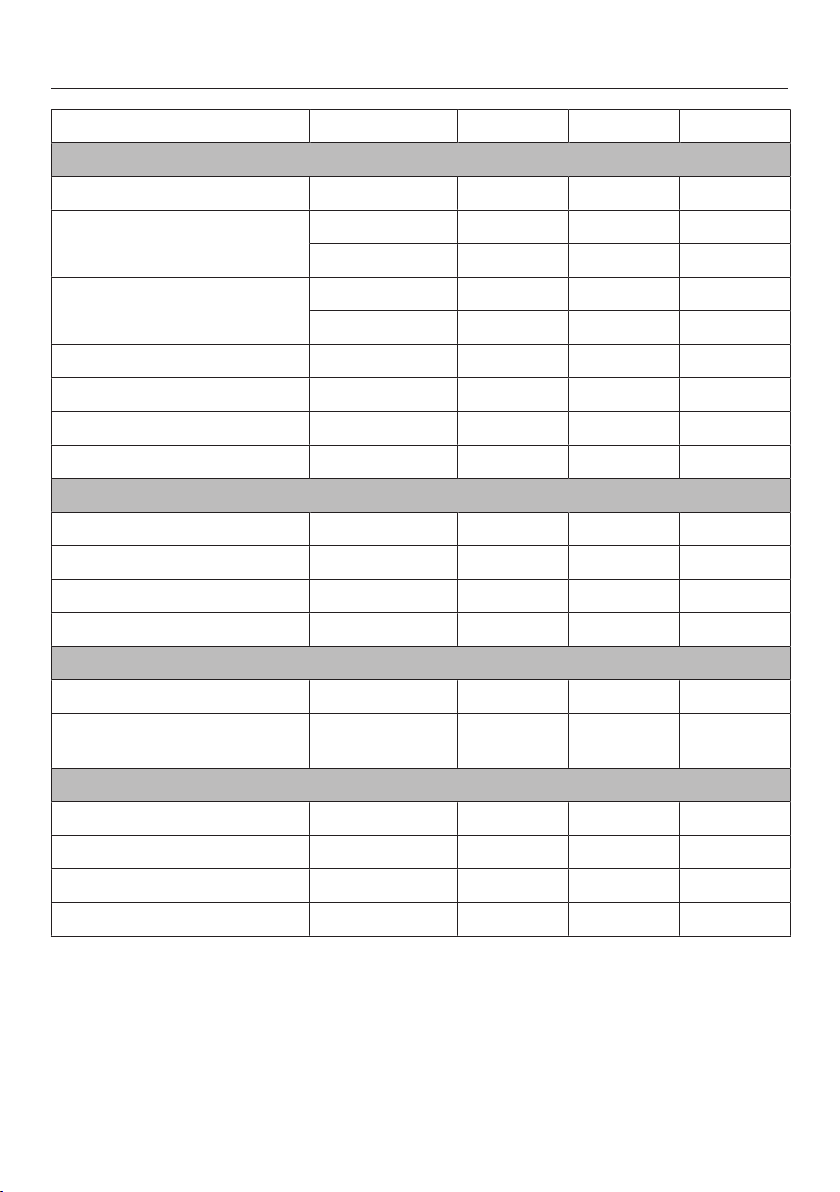
Special applications
108
Frozen food Quantity [°C] [min.] [min.]
Meat
Roast meat slices 125–150g each 60 8–10 15–20
Minced meat
250 g 50 15–20 10–15
500 g 50 20–30 10–15
Stew
500 g 60 30–40 10–15
1000 g 60 50–60 10–15
Liver 250 g 60 20–25 10–15
Saddle of hare 500 g 50 30–40 10–15
Roebuck saddle 1000 g 50 40–50 10–15
Schnitzel/Chops/Sausages 800 g 60 25–35 15–20
Poultry
Chicken 1000 g 60 40 15–20
Chicken thighs 150 g 60 20–25 10–15
Chicken fillet 500 g 60 25–30 10–15
Turkey drumsticks 500 g 60 40–45 10–15
Baked goods
Puff pastries/Yeast buns – 60 10–12 10–15
Creamed mixture cakes/
biscuits
400 g 60 15 10–15
Bread/Rolls
Bread rolls – 60 30 2
Rye bread, sliced 250 g 60 40 15
Whole grain bread, sliced 250 g 60 65 15
White bread, sliced 150 g 60 30 20
Temperature Defrosting duration Standing time

Special applications
109
Mix & Match
The Mix & MatchSpecial application is
available to help with simple and
uncomplicated preparation of plated
meals. With this application, you can
reheat food that has already been
cooked (convenience food) or assemble
a portioned-out meal using fresh food
and cook it on a plate.
During cooking, you have the choice
between a crispy, browned result or
gently cooked food with a succulent
surface without additional browning.
Only use food that is completely
hygienic. If you have any concerns,
dispose of the food.
Cooking containers
Use:
– a flat plate or a small ovenproof dish
– a deep bowl or a cup for food that
requires liquid to be added
Baked goods, pizza, tarte flambée, etc.
can be placed directly on the rack (with
baking paper if necessary).
The plastic containers for ready
meals are not sufficiently heat-
resistant.
Transfer ready meals into suitable
cooking containers.

Special applications
110
Tips for reheating plated meals
– For fried or gratin dishes, useCrispy
reheating and for baked or boiled
dishes, useGentle reheating.
– UsingCrispy reheating ensures that
only food that was crispy before
reheating stays crispy.
– The food should not exceed a height
of 2–2.5cm. Transfer taller food into
flat containers (e.g. casserole) or slice
it into smaller pieces (e.g. roulades,
bakes).
– Only reheat pasta mixed into a sauce.
– Droplets of water may have
accumulated underneath the
crockery. Dry the droplets of water
before serving.
Tips for cooking plated meals
– You can easily make a sauce from
the meat and fish stock: add 1tsp. of
cornflour to the raw meat or fish
before cooking. Stir the sauce with a
fork until smooth before serving. You
can also use 1tsp. of mashed potato
powder (instant) or a pinch of guar
gum instead of cornflour.
– If cooking durations for different
foods are not the same, you can
compensate for this by changing the
size of the food: if the cooking
duration is shorter, make the pieces
larger (e.g. large cauliflower florets). If
the cooking duration is longer, make
the pieces smaller (e.g. diced
potatoes).
– You can also compensate for
differing cooking durations with
layering: place food with a short
cooking duration under a food with a
long cooking duration or put them
together as a small bake.
– To prevent the food from drying out,
prepare your dish with a sauce or
marinade. You can also use cheese
or bacon.

Special applications
111
Assembling a plated meal using
various components
For a good cooking result, you must put
together the individual components of
the dish – such as meat, side dishes
and vegetables – so that a common
setting can be selected for browning.
This setting must be suitable for all
elements of the meal, or at least
conditionally suitable.
We recommend using the following
procedure:
Select a main ingredient based on the
cooking charts, e.g. steak.
Select other ingredients which have
the corresponding settings for
browning, e.g. green beans and rice.
Notes on the cooking charts
As well as information on portion sizes
or the way the food needs to be
processed prior to cooking, the cooking
charts also provide tips on preparation.
The degree of browning is represented
in the display by a bar with seven
segments. Basically, the more
segments that are filled, the longer the
cooking duration.
You can use the icons to determine
which setting is appropriate to brown
the food:
Symbol Meaning
Unsuitable
Conditionally suitable
Suitable

Special applications
112
Using the Mix & MatchSpecial
application
Food does not need to be covered
while it is being cooked.
Prepare the food as required.
Select Special applications | Mix &
Match.
If you are preparing food that is
already cooked, select Gentle
reheating or Crispy reheating.
If you are preparing food that is fresh
or just partially cooked, select Gentle
cooking or Crispy cooking.
Change the setting for browning if
necessary.
Confirm with OK.
Place the food on the rack on shelf
level2.
Confirm with OK.
You can start the cooking programme
immediately or delay the start.
If by the end of a cooking
programme, the plated meal is not
cooked enough for your taste, select
Continue cooking.

Special applications
113
Reheating food with the “Crispy reheating”Special application
Food Browning segment bar setting
Apple strudel, 4cm thick
Baked camembert, 25g
Baked camembert, 75g
Baguettes, pre-baked
Puff pastry canapés
Puff pastry pockets, filled with spinach
Börek pastry, 3cm thick
Fried potatoes (convenience)
Patty
1
, tofu
Bread roll (wheat), pre-baked
Bread roll (rye), pre-baked
Bread roll, stale, soft
Cheeseburger
Chilli con carne
1
, 2cm thick
Ciabatta rolls, pre-baked
Ciabatta rolls, stale, soft
Crêpe
1
Tarte flambée (convenience)
Tarte flambée, ready-made dough with own toppings
Meat strips
1
(convenience)
Focaccia, pre-baked, 3–4cm thick
Rissole
1
(pork), 25g
Rissole
1
(pork), 60g
Rissole
1
(pork), 100g
Spring rolls, small
Spring rolls
Hot dog
1

Special applications
114
Food Browning segment bar setting
Kaiserschmarrn pancake
1
(convenience)
Potatoes, fairly firm, sliced
Potato pockets (convenience)
Lasagne
1
, 3cm thick
Naan
1
, pre-baked
Pasta, fresh with sauce, cheese
Pasta bake
1
, 2cm thick
Pasta bake
1
, 4.5cm thick
Pasta bake
1
, 6cm thick
Pancakes
1
Crêpes
1
, rolled
Pita
1
, pre-baked
Pizza (convenience)
Poffertjes pancake
Quiche, small
Quiche, 2cm thick
Quiche, 3.5cm thick
Potato pancakes
Hash browns (convenience)
Schnitzel
Taco shell
Hawaii toast
Cheese on toast
Tortilla chips with cheese
Tortilla
1
(rolled in aluminium foil)
1
is not crispy, only needs to be sufficiently heated (>65°C).

Special applications
115
Cooking food with the “Crispy cooking”Special application
Food Cooking tips Browning segment bar
setting
Meat
1
Bratwurst (pork), boiled, 25g Cut
Bratwurst (pork), boiled, 100g Cut
Bratwurst (pork), coarse Brush with oil, cut
Fillet skewers (beef), large chunks Marinated
Meat skewers (pork), large chunks Marinated
Rissole (pork), 60g –
Chicken breast, 3cm thick With bacon, marinated
Chicken breast, 3cm thick On its own, marinated
Stuffed chicken breast Filling: spinach, crème fraîche
Chicken skewer, large chunks Marinated
Chicken drumstick Marinated
Saddle of veal, 180g Marinated, with sauce
Gammon, 2.5–4cm thick –
Gammon cutlet, 2cm thick –
Lamb chop, 2cm thick Marinated
Steak, 2.5–3.5cm thick Marinated
Pork fillet, 4cm thick With bacon
Pork chop Crumbed, drizzled with oil
Fish
1
Halibut cutlet Marinated
Blue eye trevalla/Ling With butter and breadcrumb
crust
Blue eye trevalla/Ling fillet, 3–3.5cm
thick
Marinated
Blue eye trevalla/Ling fillet roulade Stuffed
Salmon fillet, 2.5–3cm thick Marinated
Salmon cutlet Marinated
Salmon skewer, large chunks Marinated
Blue grenadier fillet Topping: spinach, feta

Special applications
116
Food Cooking tips Browning segment bar
setting
Tuna With tomatoes, topped with
cheese
Side dishes
Fried potatoes (convenience), gently
fried
–
Dates in bacon (convenience) –
Fresh pasta, tortellini –
Gnocchi (convenience) With small chunks of butter or
cheese
Potatoes
2
, slices/small cubes
Brush with oil
Potato pockets (convenience), pre-
cooked
–
Lasagne, pre-cooked, 3cm thick –
Brown rice, cooking duration
8minutes
Salt, 1:2 (rice:liquid)
Pasta bake, fresh pasta Raw meat, vegetables, sauce
Pasta bake, pre-cooked, 2cm thick –
Potato pancakes (convenience
mixture)
Brush with oil
Rice (convenience), pre-cooked –
Hash browns (convenience), pre-
cooked
–
Potato dumplings (convenience) With small chunks of butter
Vegetables
Eggplant, 2cm thick Oil, salt, pepper
Cauliflower, large florets Salt and pepper
Broccoli, large florets Sauce
Beans, green (string beans) With bacon, salt, pepper
Cherry tomatoes, whole Marinated
Kohlrabi, thick slices Marinated
Pumpkin, in small cubes Salt and pepper
Corn on the cob Marinated
Carrots, quartered/in thick slices Salt and pepper

Special applications
117
Food Cooking tips Browning segment bar
setting
Capsicum, large chunks Marinated
Ratatouille, roughly chopped Tomato paste, ketchup,
seasoning, cornflour
Zucchini, 2cm thick Oil, salt, pepper
Other
Baked camembert, 25g –
Baguette, part-baked bread rolls –
Bread roll, stale, soft –
Cheeseburger, pre-cooked –
Tarte flambée (convenience) –
Tarte flambée, ready-made dough with
own toppings
–
Spring roll, frozen, 25g –
Spring roll, frozen, 100g –
Grilled cheese (convenience) –
Kaiserschmarrn pancake
(convenience)
–
Kaiserschmarrn pancake, uncooked –
Tofu patty, pre-cooked –
Onion tart (convenience) –
1
Add 1tsp. cornflour to raw meat/fish.
2
Fairly firm

Special applications
118
Food suitable for the “Gentle cooking”Special application
Food Cooking tip
Meat
1
Bockwurst (pork) –
Fillet skewers (beef), large chunks Marinated with peanut sauce
Meat skewers (pork) Marinated
Chicken breast, 150g, 3cm thick On its own
Stuffed chicken breast Filling: spinach, crème fraîche
Chicken skewer, large chunks Marinated
Chicken fricassee –
Saddle of veal, 180g In sauce
Gammon, 230g, 2.5–4cm thick Salt and pepper
Gammon cutlet (pork), 200g, 2cm thick Salt and pepper
Meatballs (pork), 50–100g each In sauce
Fish
1
Trout, whole, without head Seasoned, butter
Blue eye trevalla/Ling fillet, 3–3.5cm thick Marinated
Blue eye trevalla/Ling fillet roulade Stuffed, marinated
Salmon fillet, 2.5–3cm thick Marinated
Salmon cutlet Marinated
Salmon skewer, large chunks Marinated
Blue grenadier fillet, 180g Topping: spinach and crème fraîche
Blue grenadier fricassee, large chunks With white sauce
Catfish skewer, large chunks Marinated
Side dishes
Basmati rice Salt, ratio 1:2.5 (rice:liquid)
Fresh pasta, tortellini Sauce, salt
Gnocchi (convenience) Salt, covered with water
Potatoes, floury, halved Salt
Potatoes
2
, sliced or small cubes
Salt
Potatoes
2
, quartered or in wedges
Salt

Special applications
119
Food Cooking tip
Boil-in-the-bag potato dumplings (convenience) Covered with water
Mashed potato, cooked –
Mashed potato (convenience), dry product According to the packet instructions
Macaroni, short, uncooked Sauce, ratio 1:3 (pasta:water)
Brown rice, cooking duration 8minutes Salt, ratio 1:2 (rice:liquid)
Parboiled rice (convenience), cooking duration
8minutes
Salt, ratio 1:2 (rice:liquid)
Parboiled rice, cooking duration 10–12minutes Salt, ratio 1:2 (rice:liquid)
Rice (convenience), pre-cooked Salt
Potato dumplings (convenience) Salt, small chunks of butter
Vermicelli, uncooked Covered with stock
Vegetables
Cauliflower, large florets Salt
Beans, green (string beans) With bacon or salt, pepper
Broccoli, large florets With/Without cheese sauce
Cherry tomatoes, whole Marinated
Kohlrabi, sliced Salt and pepper
Pumpkin, in small cubes Salt and pepper
Corn on the cob Herb butter
Carrots, quartered or in thick slices Seasoned
Capsicum, large chunks Marinated
Ratatouille, roughly chopped Tomato paste, ketchup, seasoning, cornflour
Brussels sprouts, whole Salt and pepper
Asparagus, spears, whole, 1–2cm thick Salt, pepper, small chunks of butter
Zucchini, sliced, 2cm thick Oil, salt, pepper
1
Add 1tsp. cornflour to raw meat/fish.
2
Fairly firm

Special applications
120
Blanch
Blanch fruit and vegetables before
freezing them. Blanching helps maintain
the quality of the produce when it is
frozen.
Blanching vegetables also helps them
retain their original colour.
Put the prepared vegetables
(cleaned, washed, chopped etc.) into
a perforated cooking container and
place in the steam oven.
Once blanched, plunge the
vegetables into ice cold water to cool
them down quickly. Drain them well.
Settings
Special applications | Blanch
or
Oven functions | Steam cooking
Temperature: 100°C
Blanching time: 1minute
Bottling
Only use unblemished, fresh produce
which is in good condition.
Glass jars
Use clean glass jars and accessories
and check them for any defects. Glass
jars with twist off lids or glass lids with a
rubber seal are suitable.
Make sure that all the glass jars are the
same size so that bottling is carried out
evenly.
After you have filled the jars with the
bottled produce, clean the glass rims
with a clean cloth and hot water and
then seal the jars.
Fruit
Sort fruit carefully, rinse it briefly but
thoroughly and allow it to drain. Take
great care when cleaning soft fruit as it
is very delicate and squashes easily.
Remove any peel, stalks, cores or
stones. Cut up large fruit. For example,
cut apples into slices.
If you are bottling fruit with stones (e.g.
plums, apricots) without removing the
stones, pierce the fruit several times
with a fork or wooden skewer as
otherwise it will burst.

Special applications
121
Vegetables
Rinse, clean and cut up vegetables.
Vegetables should be blanched before
bottling to help them retain their colour
(see “Special applications –
Blanching”).
Fill volume
Fill the glass jars with produce up to no
more than 3cm below the rim. Do not
pack it down as this will damage the
cell walls of the produce. Tap the jar
gently onto a cloth to help distribute the
contents evenly. Fill the jars with liquid.
The produce must be completely
covered.
Use a sugar solution for fruit and a salt
or vinegar solution for vegetables.
Meat and sausages
Briefly fry or cook the meat before
bottling. Use the juices with some
added water, or the broth in which the
meat was cooked, as the liquid content
of the jars. Make sure there is no grease
on the rim of the jars.
When bottling sausages, only fill the
jars to halfway as the meat will rise
during the bottling process.
Useful tips
– Make use of residual heat by leaving
the jars in the oven for 30minutes
after it has switched off.
– Then cover the jars with a cloth and
allow to cool for approx. 24hours.
Bottling food
Place a perforated container or the
rack on level1.
Place the closed jars in the perforated
container or on the rack. The jars
must not touch each other.
Settings
Special applications | Bottling
or
Oven functions | Steam cooking
Temperature: see chart
Bottling duration: see chart
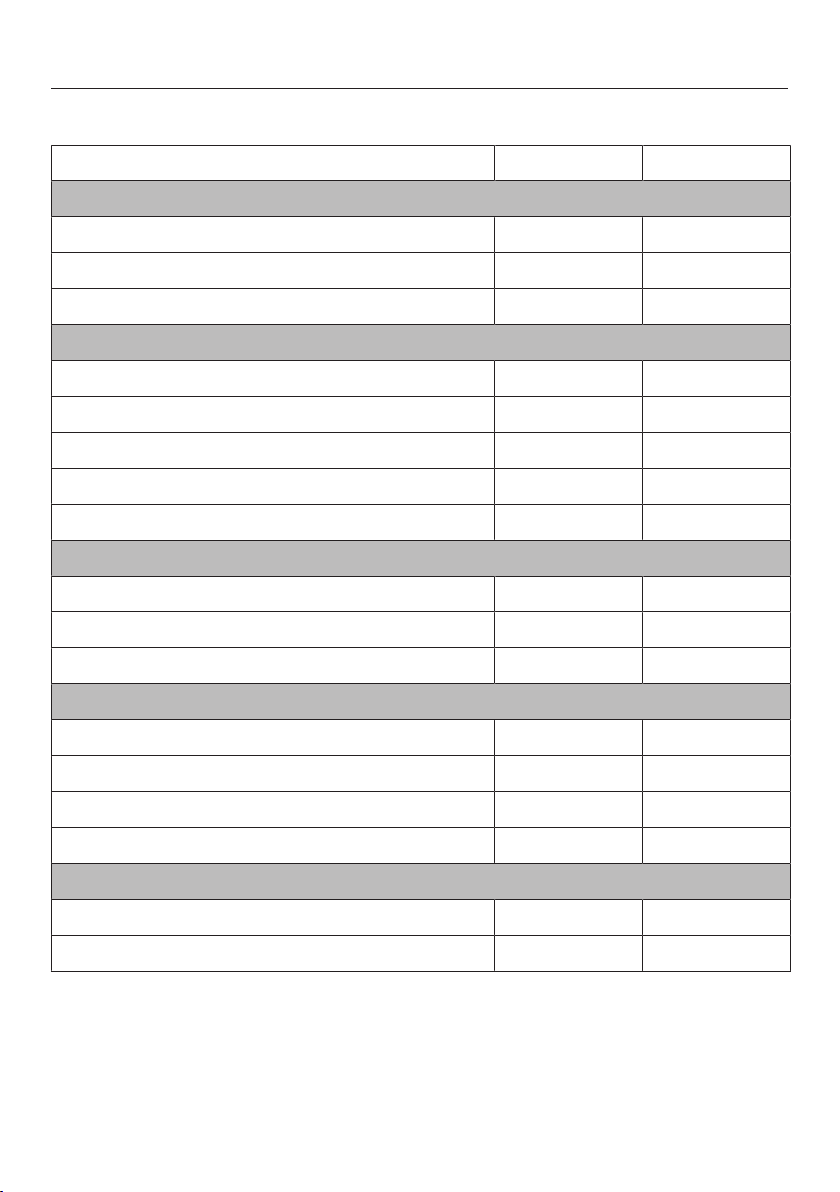
Special applications
122
The durations specified in the chart are guidelines only.
Food [°C] * [min.]
Berries
Red / Blackcurrants 80 50
Gooseberries 80 55
Cranberries 80 55
Fruit with stones
Cherries 85 55
Mirabelle plums 85 55
Plums 85 55
Peaches 85 55
Greengage plums 85 55
Fruit with pips
Apples 90 50
Apple sauce 90 65
Quinces 90 65
Vegetables
Beans 100 120
Broad beans 100 120
Gherkins 90 55
Beetroot 100 60
Meat
Pre-cooked 90 90
Roasted 90 90
Temperature, Duration
* Bottling durations apply to 1.0l jars. If using 0.5l jars, reduce the duration by 15minutes.
If using 0.25l jars, reduce the duration by 20 minutes.

Special applications
123
Bottling cakes
Creamed, sponge and yeast dough mixtures are all suitable for bottling. Cakes will
keep for approx. 6 months.
Cakes made with fresh fruit are not suitable for long term storage, and must be
consumed within 2 days of being made.
Only use sterilised jars and accessories. The jars must be narrower at the bottom
than at the top (mason jars). 0.25l jars are the best for this purpose.
The jars need to have a bottling ring, glass lid and a spring lock clip to be sealed.
Make sure that all the jars are the same size so that the bottling process is carried
out evenly.
Grease the inside of the jars with butter up to 1cm below the rim.
Sprinkle inside the jars with fine breadcrumbs.
Fill the jars ¹/₂ to ²/₃ full with mixture (depending on recipe). Make sure the rim
stays clean.
Place the rack on shelf level1.
Place the open jars (all the same size) on the rack. The jars must not touch each
other.
Close the jars immediately after bottling by clamping the glass lid down
securely. Do not let the cakes cool down. If the mixture has risen above the rim,
it can be pushed back down into the jar with the glass lid.
The durations specified in the chart are guidelines only. We recommend selecting
the shorter duration initially. You can extend the duration if necessary.
Type of
mixture
Oven
function
Stage [°C] [%] [min.]
Creamed
mixture
– 160 – 35–45
Sponge – 160 – 50–55
Yeast
dough
1
2
30
160
100
30
10
30–35
Temperature, Moisture, Duration
Conventional Heat, Combi mode Conventional

Special applications
124
Drying food
Only use the Drying Special application or the Combi mode| Combi Fan Plus
function to dry food so that moisture can be dissipated.
Cut the food into similar sized pieces.
Place the pieces on the rack covered with baking paper.
Useful tip: Bananas and pineapple are not suitable for drying.
Settings
Special applications | Drying
Temperature: see chart
Drying time: see chart
or
Oven functions | Combi mode | Combi Fan Plus
Temperature: see chart
Moisture: 0%
Drying time: see chart
The durations specified in the chart are guidelines only. We recommend selecting
the shorter drying time initially. You can make the drying time longer if necessary.
Food [°C] [h]
Apple, rings 70 6–8
Apricots, halved, stones removed 60–70 10–12
Pears, sliced 70 7–9
Herbs 60 1.5–2.5
Mushrooms 70 3–5
Tomatoes, sliced 70 7–9
Citrus fruit, sliced 70 8–9
Damsons, stones removed 60–70 10–12
Temperature, Duration (hours)

Special applications
125
Prove yeast dough
Prepare the dough according to the
recipe.
Place the dough in an uncovered
bowl in a perforated container or on
the inserted rack.
Depending on the size of the bowl,
you can also place the rack on the
floor of the oven compartment with
the rack surface facing up and place
the bowl on top. If necessary, you
can also remove the shelf runners.
Settings
Special applications | Prove yeast
dough
or
Oven functions | Combi mode |
Combi Fan Plus
Temperature: 30°C
Moisture: 100%
Duration: as per recipe instructions
Menu cooking – automatic
When cooking a menu automatically,
you can combine up to 3 different foods
with different cooking durations, e.g.
fish fillet with rice and vegetables.
Foods are placed in the steam oven at
different times so that they are all ready
at the same time. You can select the
foods in any order because the steam
oven sorts the items according to the
length of cooking duration and
indicates when each item has to be
placed in the oven.
The Finish at and Start at functions are
not available with Menu cooking.
Using the Menu cookingSpecial
application
Select Special applications | Menu
cooking.
Select the food you want.
Depending on the type of food
selected, you will be asked about the
size, weight and how well you want it
cooked.
Select the values required and then
confirm with OK.
Select Add food.
Select the next food you want and
proceed in the same way as with the
first ingredient.
Repeat for the third type of food as
required.
After confirming Start menu cooking, you
will be prompted to place the food with
the longest cooking duration in the
appliance.

Special applications
126
When using perforated containers to
cook foods that produce a lot of
liquid or have a distinctive colour, be
sure to place them over the universal
tray. This avoids any transfer of
flavour or colour to other food by
preventing liquid dripping onto food
below it.
At the end of a heating-up phase, the
steam oven will indicate when the next
item of food has to be placed inside.
Once this time has been reached, a
buzzer will sound.
This process is repeated once again if
there is a third food item.
You can still cook food types not listed
in the display together to prepare a
menu. Please refer to “Steam cooking
– Menu cooking – manual” for more
information.
Disinfect items
The steam oven will disinfect baby
bottles and other containers so that at
the end of the programme they are as
germ free as they would have been if
boiled. Check beforehand that all parts,
teats etc. are declared by the
manufacturer to be heat resistant to
100°C and also that they can withstand
hot steam.
Dismantle, clean and thoroughly rinse
baby bottles. Reassemble the bottles
only after they have completely dried.
This prevents recontamination.
Place the individual items on the rack
or in a perforated container (on their
sides or with the opening facing
downwards) ensuring that they do not
touch one another. This will allow hot
steam to reach them from all sides.
Settings
Special applications | Disinfect items
Duration: 1minute to 10hours
or
Oven functions | Steam cooking
Temperature: 100°C
Duration: 15 minutes

Special applications
127
Heat crockery
By pre-heating the crockery, the food
does not cool down as quickly.
Use heat-resistant crockery.
Place the rack on shelf level2 and
place the crockery to be pre-heated
on it. Depending on the size of the
crockery, you can also place the rack
on the floor of the oven compartment
with the rack surface facing up and
the crockery on top. If necessary, you
can also remove the shelf runners.
Select Special applications.
Select Heat crockery.
Alter the recommended temperature
if necessary and then set the
duration.
Risk of injury caused by hot
surfaces.
The steam oven gets hot during
operation. You could burn yourself
on the heating elements, oven
compartment, shelf runners or
accessories. Droplets of water may
have accumulated underneath the
crockery.
Wear oven gloves when removing
dishes from the oven.
Keeping warm
You can keep food warm in the oven
compartment for up to 2hours.
In order to maintain the quality of
food, select the shortest possible
time.
Select Special applications.
Select Keeping warm.
Place the food to be kept warm in the
oven and confirm withOK.
Alter the recommended temperature
if necessary and then set the
duration.

Special applications
128
Heat damp towels
Moisten towels and then roll them up.
Place them beside one another in a
perforated cooking container.
Settings
Automatic programmes | Special | Heat
damp towels
or
Oven functions | Steam cooking
Temperature: 70°C
Duration: 2minutes
Dissolve gelatine
Soften gelatine leaves by leaving
them in a bowl of cold water for
5minutes. The gelatine leaves have
to be fully covered with water.
Remove the gelatine leaves from the
bowl and squeeze them out. Empty
the bowl. Place the squeezed gelatine
leaves back in the bowl.
Gelatine powder: Place the gelatine
powder in a bowl and add water
according to the instructions on the
packaging.
Cover the bowl and place it in a
perforated cooking container.
Settings
Automatic programmes | Special |
Dissolve gelatine
or
Oven functions | Steam cooking
Temperature: 90°C
Duration: 1minute

Special applications
129
Decrystallise honey
Loosen the lid and place the jar of
honey in a perforated cooking
container.
Stir the honey once during the
process.
Settings
Automatic programmes | Special |
Decrystallise honey
or
Oven functions | Steam cooking
Temperature: 60°C
Duration: 90minutes (irrespective of the
size of jar or the amount of honey in the
jar)
Melt chocolate
You can use the steam oven for melting
any type of chocolate.
When using a cake glaze, place it in a
perforated cooking container, leaving it
in its packaging.
Break the chocolate into small
pieces.
Place large quantities in a solid
container and small quantities in a
cup or a bowl.
Cover the container or the dish with a
lid or with foil that is resistant to
temperatures up to 100°C and to hot
steam.
Stir large quantities once during
cooking.
Settings
Automatic programmes | Special | Melt
chocolate
or
Oven functions | Steam cooking
Temperature: 65°C
Duration: 20minutes

Special applications
130
Make yoghurt
To prepare yoghurt, you will need milk
and live culture or yoghurt starter
powder, e.g. from a health food store.
Use natural yogurt with live culture and
without additives. Do not use heat-
treated yogurt.
The yoghurt must be fresh (short
storage time).
You can use either unchilled long-life
milk or fresh milk.
Long-life milk can be used as it is – no
further preparation is required. Fresh
milk must first be heated to 90°C (do
not boil it) and then cooled down to
35°C. Fresh milk will give a better set
than long-life milk.
The yoghurt and milk should have the
same percentage fat.
Do not move or shake the jars while the
yoghurt is fermenting.
Immediately after preparation, leave the
yoghurt to cool in the fridge.
The firmness, fat content and cultures
used in the yoghurt starter all affect the
consistency of homemade yoghurt. Not
all yoghurts are equally suitable as
yoghurt starters.
Useful tip: If you are using yoghurt
starter powder, you can prepare the
yoghurt from a mixture of milk and
cream. For that, mix ³/₄ litre milk with ¹/₄
litre cream.
Mix 100 g yoghurt with 1litre of milk
or make up the mixture with yoghurt
enzyme, following the instructions on
the packaging.
Pour the mixture into glass jars and
seal the jars.
Place the sealed jars in a perforated
cooking container and place in the
oven. The jars must not touch each
other.
Straight after the cooking duration
has finished, place the jars in the
refrigerator. Take care not to shake
the jars unnecessarily.
Settings
Automatic programmes | Special |
Make yoghurt
or
Oven functions | Steam cooking
Temperature: 40°C
Duration: 5:00hours
Possible causes for poor results
Yoghurt is not set:
Incorrect storage of the yoghurt starter,
too much time out of the refrigerator,
packaging was damaged, milk was
insufficiently heated.
Liquid has not been removed:
Jars were moved, the yoghurt cooled
down too slowly.
Yoghurt is grainy:
The milk was heated too high, it was
not free of imperfections, the milk and
yoghurt starter were not stirred evenly.

Special applications
131
Render fat
The bacon will not become brown.
Place the bacon (diced or rashers) in
a solid cooking container.
Cover the container with foil that is
temperature-resistant up to 100°C
and resistant to steam.
Settings
Automatic programmes | Special |
Render fat
or
Oven functions | Steam cooking
Temperature: 100°C
Duration: 4minutes
Sweat onions
Sweating means cooking the onions in
their own juices, with the addition of a
little fat if necessary.
Cut the onions up into small pieces
and place them in a solid cooking
container with a little butter.
Cover the container with foil that is
temperature-resistant up to 100°C
and resistant to steam.
Settings
Automatic programmes | Special |
Sweat onions
or
Oven functions | Steam cooking
Temperature: 100°C
Duration: 4minutes

Special applications
132
Extracting juice
This appliance is ideal for extracting
juice from soft, firm and hard fruit.
It is best to use overripe fruit, as the
riper the fruit, the greater the quantity of
juice produced. Very ripe fruit will also
produce a more intense flavour.
Preparation
Sort and rinse the fruit, and cut out any
blemishes.
Remove the stalks from grapes and
morello cherries as these are bitter.
Berries do not need to have their stalks
removed.
Dice larger fruit such as apples into
approximately 2cm cubes. The harder
the fruit, the smaller the pieces should
be.
Useful tips
– Try experimenting with mild and tart
flavours. For example, mix apples
with elderberries.
– Adding sugar will increase the
quantity of juice produced and
improve the flavour. Sprinkle the fruit
with sugar and leave to absorb for a
few hours before juicing. For 1kg of
sweet fruit add 50–100g of sugar,
and for 1kg of tart fruit add 100–
150g of sugar.
– If you wish to bottle the juice rather
than consume it straight away, pour it
whilst hot into hot, sterilised bottles
up to the rim, and then seal
immediately with sterilised rubber
tops.
Extracting juice from fruit
Put the prepared fruit (cleaned,
washed, chopped etc.) into a
perforated cooking container.
Place a solid cooking container or the
universal tray underneath in order to
collect the juice.
Settings
Oven functions | Steam cooking
Temperature: 100°C
Duration: 40–70minutes

Special applications
133
Fruit jam
Only use unblemished, fresh produce
which is in good condition.
Glass jars
Only use sterilised jars with twist-off lids
up to a maximum capacity of 250ml.
After pouring in the jam, clean the
outside of the rim of the jar with a cloth
and hot water.
Preparation
Sort fruit carefully, rinse it briefly but
thoroughly and allow it to drain. Take
great care when cleaning soft fruit as it
is very delicate and squashes easily.
Remove any stalks, cores or stones.
Purée the fruit as otherwise the
preserve will not set. Add jam sugar to
the fruit (according to packet
instructions) and stir well.
For sweet fruit and berries you should
also add some citric acid.
Making jam
Fill jars to maximum 2/3 full.
Place the open jars in a perforated
cooking container or on the rack.
At the end of the cooking duration,
take the jars out of the steam oven
using oven gloves. Leave them to
stand for 1–2minutes before sealing
them with lids and then leave them to
cool.
Settings
Oven functions | Combi mode |
Combi Fan Plus
Temperature: 150°C
Moisture: 0%
Duration: 35–45minutes
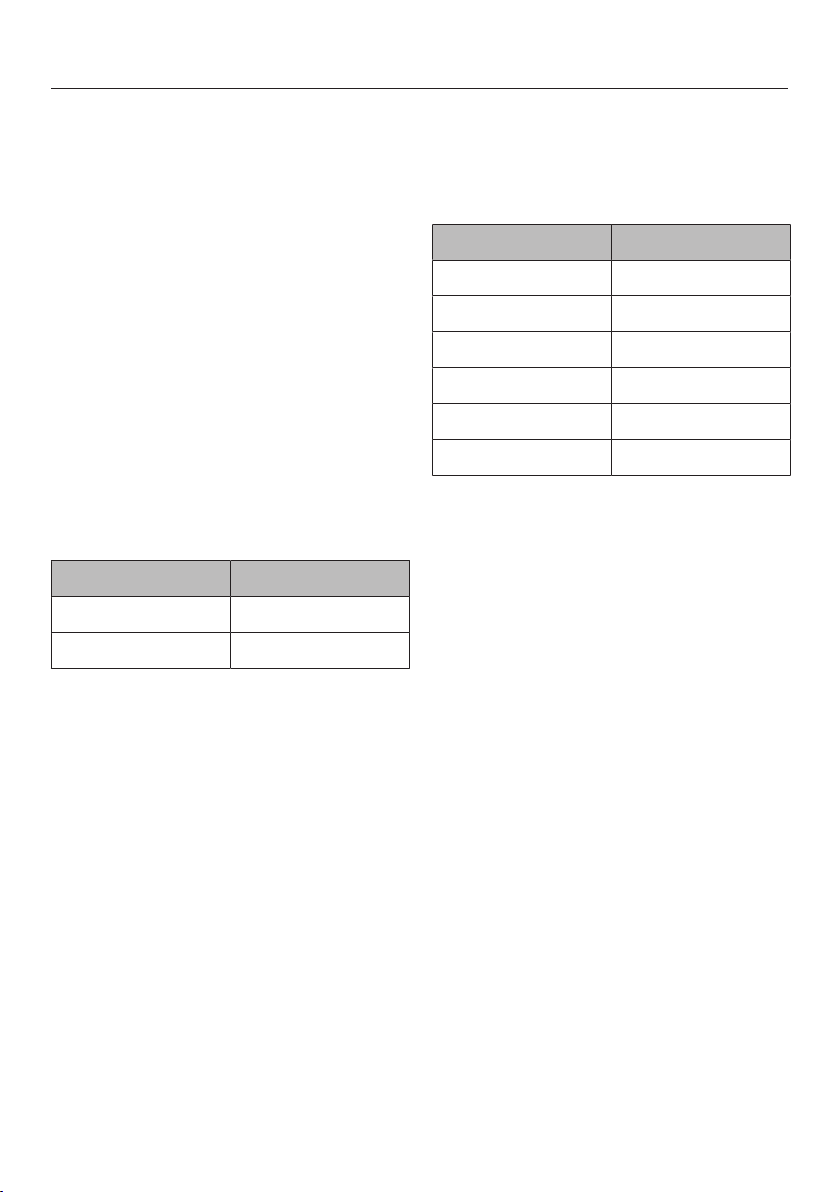
Special applications
134
Skinning fruit and vegetables
Cut a cross in the top of tomatoes,
nectarines etc. This will allow the skin
to be removed more easily.
Place the food in a perforated
container if cooking with steam, or a
universal tray if using the grill.
To blanch almonds, it is important to
plunge them into cold water as soon
as they are taken out of the oven as
otherwise the skin cannot be
removed.
Settings
Oven functions | Full Grill
Setting: 3
Duration: see chart
Food [min.]
Capsicum 10
Tomatoes 7
Duration
Settings
Oven functions | Steam cooking
Temperature: 100°C
Duration: see chart
Produce [min.]
Apricots 1
Almonds 1
Nectarines 1
Capsicum 4
Peaches 1
Tomatoes 1
Duration

Special applications
135
Preserving apples
You can treat homegrown apples in the
steam oven to increase the length of
time for which you can store them.
Once treated, the apples will keep for 5
to 6 months when stored in a dry, cool
and well-ventilated place. This method
is only suitable for apples and not for
other types of fruit.
Settings
Automatic programmes | Fruit | Apples |
Whole
or
Oven functions | Steam cooking
Temperature: 50°C
Preserving time: 5minutes
Preparing custard royale
Stir 6eggs into 375ml milk (do not
beat into a foam).
Season the egg/milk mixture and
pour into a solid cooking container
greased with butter.
Settings
Oven functions | Steam cooking
Temperature: 100°C
Duration: 4minutes

Automatic programmes
136
The wide range of Automatic
programmes enable you to achieve
excellent results with ease.
Categories
The Automatic programmes are
sorted into categories to provide a
better overview. Simply select the
appropriate Automatic programme for
the type of food you are cooking and
follow the instructions in the display.
Using Automatic programmes
Select Automatic programmes.
A list will appear.
Select the desired food category (e.g.
Cakes).
The Automatic programmes available
for the food type selected will then
appear.
Select the Automatic programme that
you want to use.
Follow the instructions in the display.
Some Automatic programmes will
prompt you to use the food probe.
Read the information under “Roasting
– Food probe”.
The core temperature cannot be
changed for the Automatic
programmes.
Useful tip: Use Info to display
information such as how to place or
turn the food depending on the cooking
programme.
Usage notes
– The degree of cooking and browning
are represented by a bar with seven
segments. You can set how well you
want the food cooked or how brown
you want it to be by touching the
relevant segment.
– Some roasting programmes also offer
the Roast with moistureoption. Meat
cooked at a low temperature over a
long cooking duration will be tender
and succulent. The additional
moisture helps to achieve the best
cooking and browning result: the
meat is very succulent and tender.
The cut is cooked evenly and has a
thin brown outer layer that forms
during the roasting programme.
There is therefore no need to sear the
meat beforehand. In contrast to the
Roastoption, there is no need to use
the food probe in this case and you
can set a start or finish time
depending on your menu planning.
– The weights specified in the
Automatic programmes refer to the
weight per piece. For example, you
can cook just one piece of salmon
weighing 250g or 10 pieces of
salmon, each weighing 250g, at the
same time.
– The oven interior needs to be at room
temperature before starting an
Automatic programme.

Automatic programmes
137
– When you place food in the hot oven
compartment, be careful when
opening the door. Hot steam may
escape. Step back and wait until the
steam has dissipated. Avoid contact
with hot steam, and do not touch the
hot oven compartment walls. Danger
of burning and scalding.
– Please refer to recipes for information
on suitable baking containers.
– For some Automatic programmes the
start time can be delayed using Start
at or Finish at. The individual cooking
stages of the Automatic programme
are listed under the Display cooking
stagesmenu option.
– If by the end of an Automatic
programme the food is not cooked
enough, selectContinue cooking
orContinue baking.
– Automatic programmes can also be
saved as User programmes.
Search
(Depending on language)
Under Automatic programmes, you can
search by the name of the categories
and the Automatic programmes.
There is a full text search which can
also be used to search for parts of
words.
From the main menu:
Select Automatic programmes.
The category list will appear in the
display.
Select Search.
Use the keyboard to type in the
search text, e.g. “Bread”.
The number of hits will be shown in the
footer.
If no match is found, or if there are
more than 40 matches, the hits field
will be deactivated and you will need
to change the search text.
SelectXX hits.
The categories and Automatic
programmes found will then appear.
Select the desired Automatic
programme, or the category and then
the Automatic programme.
The Automatic programme will start.
Follow the instructions in the display.

MyMiele
138
Under MyMiele, you can save
frequently used applications.
It is particularly useful with Automatic
programmes as you do not need to
work through every screen in order to
start your programme.
Useful tip: You can also set menu
options that you have entered into
MyMiele to appear on the start screen
(see “Settings – Start screen”).
Adding entries
You can add up to 20entries.
Select MyMiele.
Select Add entry.
You can select options listed in the
following categories:
– Oven functions
– Automatic programmes
– Special applications
– User programmes
– Maintenance
Confirm with OK.
The selected item and its respective
symbol will appear in the list.
Proceed as above for further entries.
Only options that have not yet been
selected are available for selection.
Deleting entries
Select MyMiele.
Touch the entry you want to delete
and keep your finger on it until the
context menu appears.
Select Delete.
The entry will then be removed from the
list.
Moving entries
Select MyMiele.
Touch the entry you want to move
and keep your finger on it until the
context menu appears.
Select Move.
An orange border appears around the
entry.
Move the entry.
The entry appears in the desired
position.

User programmes
139
You can create and save up to 20 of
your own programmes.
– You can combine up to 9cooking
stages to accurately programme your
favourite or most frequently used
recipes. In each cooking stage, you
can select settings such as the
function, temperature and cooking
duration.
– You can enter the name of the
programme for your recipe.
When you call up and start your
programme the next time, it will run
automatically.
There are different ways of creating a
User programme:
– At the end of an Automatic
programme or Special application,
save it as a User programme.
– After running a programme with a set
duration, save it.
Then name the programme.
Creating a User programme
Select User programmes.
Select Create programme.
You can now specify the settings for the
first cooking stage.
Follow the instructions in the display:
Select and confirm the desired
settings.
If you select the Pre-heatfunction, use
Add to add another cooking stage
where you set a cooking duration.
Only then can you save or start the
programme.
All settings for the first cooking stage
have now been set.
You can add more cooking stages, for
example, if you want to add another
cooking function to follow on from the
first.
If additional cooking stages are
required, selectAdd and proceed as
for the first cooking stage.
If you want to check the settings or to
change them at a later stage, touch
the cooking stage in question.
When you have finished setting all the
cooking stages, select Save.
Enter the programme name using the
keyboard.
You can add a line break for longer
programme names using the
symbol.
Once you have entered the
programme name, select Save.

User programmes
140
A message will appear in the display
confirming that the new name has been
saved.
Confirm with OK.
You can start the saved programme
immediately, delay the start or change
the cooking stages.
Starting a User programme
Place the food in the oven.
Select User programmes.
Select the required programme.
Depending on the programme settings,
the following menu options will appear
in the display:
– Start now
The programme will start
immediately. The oven heating will
switch on immediately.
– Finish at
Specify the time at which the
programme should finish. The oven
heating will switch off automatically
at the time you have set.
– Start at
Specify the time at which you want
the programme to start. The oven
heating will switch on automatically
at the time you have set.
– Display cooking stages
A summary of your settings will
appear in the display.
– Display actions
The required actions, e.g. placing the
food in the oven, will appear in the
display.
Select the required menu option.
The programme selected will begin
straight away or at the time set.
Use Info to display information such
as how to place or turn the food
depending on the cooking
programme.
At the end of the programme, select
Close.

User programmes
141
Changing cooking stages
Cooking stages in an Automatic
programme that you have renamed as
a User programme cannot be
changed.
Select User programmes.
Touch the programme you want to
change and keep your finger on it
until the context menu appears.
Select Change.
Select the cooking stage that you
want to change orAdd to add another
cooking stage.
Select and confirm the desired
settings.
If you want to start the modified
programme without changing it,
selectStart.
SelectSave when you have changed
all the settings.
A message will appear in the display
confirming that the new name has been
saved.
Confirm with OK.
The saved programme has been
changed and you can start it
immediately or delay the start.
Renaming User programmes
Select User programmes.
Touch the programme you want to
change and keep your finger on it
until the context menu appears.
Select Rename.
Change the programme name using
the keyboard.
You can add a line break for longer
programme names using the
symbol.
Once you have changed the
programme name, selectSave.
A message will appear in the display
confirming that the new name has been
saved.
Confirm with OK.
The programme has now been
renamed.

User programmes
142
Deleting User programmes
Select User programmes.
Touch the programme you want to
delete and keep your finger on it until
the context menu appears.
Select Delete.
Confirm the query with Yes.
The programme will be deleted.
Go to Settings| Factory default settings|
User programmes to delete all User
programmes at the same time.
Moving User programmes
Select User programmes.
Touch the programme you want to
move and keep your finger on it until
the context menu appears.
Select Move.
An orange border appears around the
entry.
Move the programme.
The programme appears in the desired
position.

Baking
143
Handling food carefully will help
protect your health.
Cakes, pizzas and chips should be
cooked until golden, not dark brown.
Baking guidelines
– Set a cooking duration. When baking,
the oven should not be set to start a
long time off. Otherwise the cake
mixture or dough will dry out, and the
raising agents will lose their
effectiveness.
– Generally, you can use the rack,
universal tray and any type of baking
tray made of heat-resistant material.
– Always place bakeware on the rack.
– Always cook frozen goods such as
cakes, pizza or baguettes on the
rack.
Very high temperatures can cause
the universal tray to distort to such
an extent that the tray cannot be
taken out of the oven compartment.
– Small items of frozen food such as
oven chips or potato croquettes can
be cooked on the universal tray. Turn
these frozen food items several times
during cooking.
– Bake on a maximum of 2 levels at
once. When baking cakes with a
moist topping, only bake on one
level.
Using baking paper
Miele accessories, e.g. the universal
tray, are treated with PerfectClean
enamel (see “Cleaning and care”).
Surfaces treated with PerfectClean
enamel generally do not need to be
greased or covered with baking paper.
Use baking paper when cooking:
– lye mixtures because anything
prepared using a lye containing
sodium hydroxide can damage the
PerfectClean surface
– mixtures with a high egg white
content, such as sponge, meringue
and macaroons, as these can easily
stick
– puff pastry or strudel dough
– frozen food on the rack
– small items of frozen food such as
oven chips or potato croquettes on
the universal tray

Baking
144
Tips on baking
– Dark, matte tins are best for baking.
Avoid using bright, thin-walled tins as
they give an uneven or poor
browning result. In certain
unfavourable conditions, the food will
not cook properly.
– Place cakes in rectangular tins on the
rack with the longer side across the
width of the oven for optimum heat
distribution and even results.
– When cooking frozen food such as
chips, croquettes, cakes, pizza and
baguettes, select the medium
temperature quoted on the
manufacturer's packaging.
– If a range is specified for the cooking
duration, check whether the food is
cooked after the shortest duration.
Stick a wooden skewer into the food.
If it comes out clean without any
batter/dough on it, the food is done.
Notes on the oven functions
You can find an overview of all the
functions with their recommended
values in “Main and sub-menus”.
Combi mode
This function uses a combination of
oven heat and moisture. The addition of
steam prevents the surface of the food
from drying out. Bread, bread rolls and
puff pastry have a shiny and crispy
crust.
You can choose between different types
of heating:
– Combi Fan Plus
– Combi Conventional
– Combi Grill
We recommend baking bread and
bread rolls in several cooking stages:
the shine is created during the first
cooking stage thanks to the injection of
steam (maximum moisture, low
temperature). Browning takes place in
the next cooking stage with high
moisture and a high temperature. It is
then dried with reduced moisture and a
medium to high temperature.
Useful tip: Recipes and comprehensive
cooking charts with information on
functions, temperatures, moisture and
cooking durations can be found in the
Miele cookbook/recipe booklet
“Bake, roast, steam”.

Baking
145
Automatic programmes
Please refer to the cookbook for
information on suitable baking
containers.
Follow the instructions in the display.
Fan Plus
Use this function if you are baking on
multiple shelf levels at the same time.
You can use any type of baking tray
made of heat-resistant material.
Because the fan distributes the heat
around the oven compartment straight
away, you can use a lower temperature
than you would with the Conventional
Heatfunction.
Conventional Heat
Use this function for cooking traditional
recipes. If using an older recipe or
cookbook, set the oven temperature
10°C lower than that recommended.
This will not change the cooking
duration.
Only bake on one level. If you are
making a tray bake, use shelf level2.
Intensive Bake
This function is suitable for baking
cakes with moist toppings, pizza,
quiche, etc.
Place the food on shelf level1.
Bottom Heat
Use this function towards the end of
cooking to brown the base of the food.
Top Heat
Use this function towards the end of
cooking to brown the top of food.
This function is suitable for gratins and
for browning bakes.
Cake Plus
Use this function for baking creamed
and frozen lye mixtures.
Eco Fan Heat
This function is suitable for making
sweet and savoury bakes and gratins in
a way that saves energy.
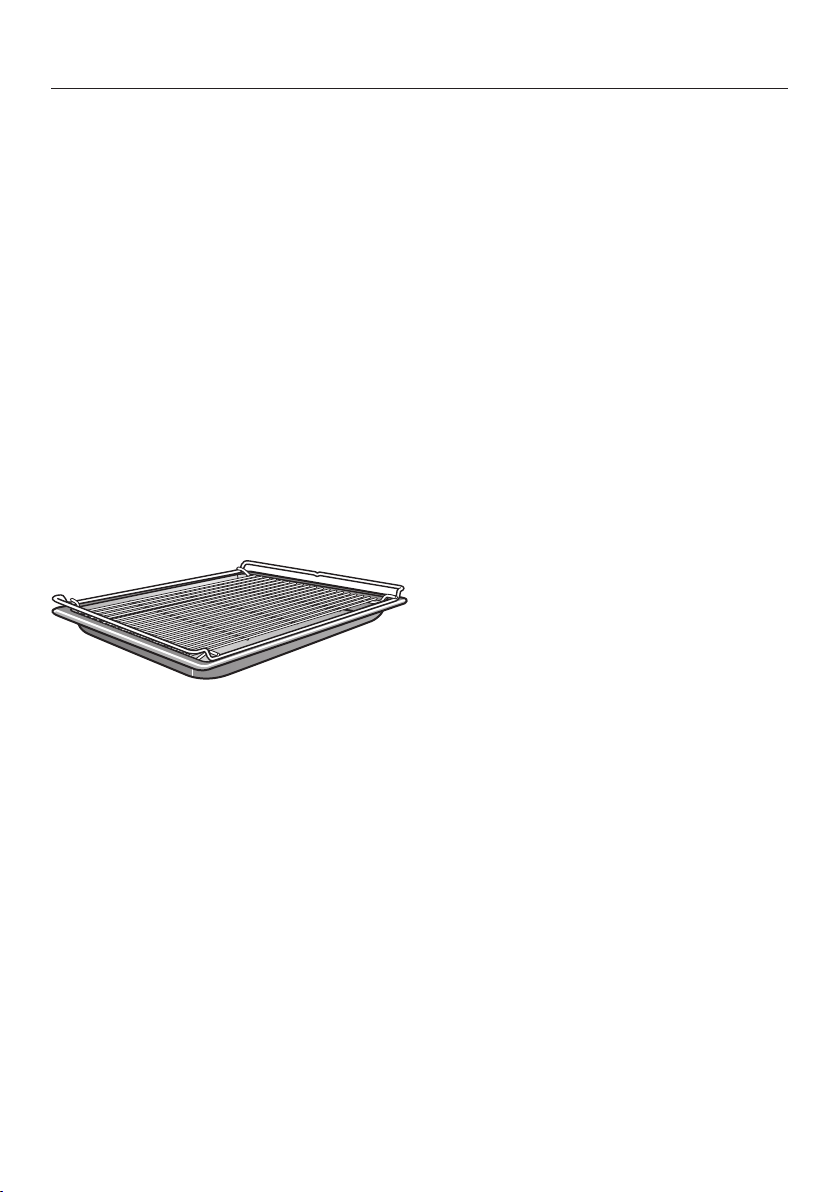
Roasting
146
Roasting tips
– Never roast frozen meat as it will dry
out. Always defrost meat before
roasting.
– Remove skin and sinew before
roasting.
– Marinate and season the meat to
taste.
– If you are roasting several pieces of
meat together, select pieces that
have a similar thickness.
– Use the universal tray with the rack
placed on top of it. The oven
compartment stays cleaner and you
can then use the meat juices
collected to make a gravy or sauce.
– Allow a standing time of approx.
10minutes before carving meat. This
resting time ensures the meat juices
are distributed evenly.
Notes on the oven functions
You can find an overview of all the
functions with their recommended
values in “Main and sub-menus”.
Combi mode
This function uses a combination of
oven heat and moisture. The addition of
steam prevents the surface of the food
from drying out. The results are
particularly tender and succulent meat
with a well-browned outside. Use the
Combi mode function for cooking
meat, fish and poultry dishes.
You can choose between different types
of heating:
– Combi Fan Plus
– Combi Conventional
– Combi Grill
We recommend cooking meat slowly
and gently in several cooking stages: at
a high temperature during the first
cooking stage to brown the surface.
The second cooking stage requires
increased moisture and a reduced
temperature. The meat cooks evenly
and the muscle protein is macerated,
making the meat particularly tender.
Useful tip: Recipes and comprehensive
cooking charts with information on
functions, temperatures, moisture and
cooking durations can be found in the
Miele cookbook/recipe booklet
“Bake, roast, steam”.

Roasting
147
Automatic programmes
Follow the instructions in the display.
Fan Plus
This function is suitable for roasting
meat and poultry that needs to be well
browned.
Because the fan distributes the heat
around the oven compartment straight
away, you can use a lower temperature
than you would with the Conventional
Heatfunction.
Conventional Heat
Use this function for cooking traditional
recipes. If using an older recipe or
cookbook, set the oven temperature
10°C lower than that recommended.
This will not change the cooking
duration.
Use the Bottom Heatfunction
towards the end of the cooking
duration to brown the base of the
food.
Do not use the Intensive
Bakefunction for roasting as the
juices will become too dark.

Roasting
148
Food probe
The food probe enables you to monitor
the temperature precisely during a
cooking programme.
How it works
The metal tip of the food probe must be
fully inserted into the centre of the food.
There is a temperature sensor in the
metal tip which measures the core
temperature of the food during cooking.
The core temperature set will depend
on how well cooked you want your
meat to be and on the type of meat.
The temperature can be set between
30and 99°C.
The cooking duration will depend on a
number of different factors: the higher
the temperature in the oven
compartment and the moisture, where
applicable, and the thinner the food, the
quicker the set core temperature will be
reached.
The core temperature values are sent
via a signal from the transmitter in the
handle of the food probe via the
antenna to the steam oven's electronic
unit as soon as the food with the food
probe is placed in the oven
compartment.
Accurate radio transmission is only
guaranteed if the oven door is closed. If
the door is opened during a cooking
programme, e.g. to baste the food,
radio signal transmission is interrupted.
It will only resume when the door is
closed. It will take a few seconds before
the current core temperature appears
again in the display.
Damage due to high
temperatures.
Temperatures higher than 100°C will
damage the temperature sensor in
the food probe beyond repair.
The food probe should be reinserted
in its holder when it is not being
used.
Options for use
Some Automatic programmes and
Special applications will prompt you to
use the food probe.
You can also use the food probe with
User programmes and with the
following functions:
– Fan Plus
– Conventional Heat
– Combi Fan Plus
– Combi Conventional
– Steam cooking
– Intensive Bake
– Fan Grill
– Cake Plus

Roasting
149
Important notes on use
To ensure the food probe works
correctly, please observe the following
instructions.
The metal tip of the food probe can
break.
Do not use the wireless food probe
to lift or carry the food.
– Do not use deep, narrow, metal
cooking containers, as these will
weaken the radio signal.
– For wireless food probes, avoid
placing metal objects above them,
such as a lid, aluminium foil or the
rack or the universal tray on the shelf
levels above. Glass lids may be used.
– Do not use another standard metal
cooking thermometer at the same
time.
– Do not allow the handle of the food
probe to sit in any sauce or cooking
liquid, or to rest on the food or on the
edge of the cooking container.
– You can place the meat in a pot or on
the rack.
– The metal tip of the food probe must
be fully inserted into the centre of the
food so that the temperature sensor
reaches more or less to the core. The
handle should point diagonally
upwards and not horizontally towards
the corners of the oven or the door.
– When cooking poultry, insert the
metal tip into the thickest part of the
breast. You can find the thickest part
of the breast by pressing the area
with your thumb and index finger.
– The metal tip must not touch any
bone or be inserted in areas with a lot
of fat. Heavily marbled areas and
bones can cause cooking to end
prematurely.
– If the meat is very heavily marbled
with fat, select the highest core
temperature given in the cooking
charts.
– When using aluminium foil or roasting
bags, insert the food probe through
the foil/bag into the centre of the
food. You can also place meat inside
the bag or foil with the food probe
already inserted. Follow the roasting
bag manufacturer's instructions.
– The food probe can only be inserted
horizontally into flat food, e.g. fish.
Therefore place flat food in a glass or
ceramic cooking container, as the
walls of a metal container would
disturb the radio signals.
If the food probe is no longer
recognised during cooking, a message
will appear in the display. Reposition
the food probe in the food.

Roasting
150
Using the food probe
Remove the food probe from its
holder behind the panel.
Fully insert the metal tip of the food
probe into the centre of the meat.
If you are cooking several pieces of
meat at the same time, insert the food
probe into the largest piece of meat.
The handle should be pointing
diagonally upwards.
Place the food in the oven.
Close the door.
Select an oven function or Automatic
programme.
Set the temperature and the core
temperature if necessary.
The core temperature cannot be
changed for Automatic programmes.
Follow the instructions in the display.
The cooking programme finishes as
soon as the core temperature is
reached.
Risk of injury caused by hot
surfaces.
The handle of the food probe can get
hot. You can burn yourself on the
handle.
Wear oven gloves when removing
the food probe.
Useful tip: If the food is not cooked
sufficiently when the core temperature
is reached, insert the food probe into
another place or increase the core
temperature and repeat the programme.
Delaying the start of a cooking
programme with food probe
You can also delay the start of the
cooking programme to a later time.
Select Start at.
You can estimate approximately when
the food will be ready as the duration of
the cooking programme is about the
same as if you were cooking food
without using the food probe.
You cannot set Duration and Finish at
because the total cooking duration is
determined by when the set core
temperature is reached.

Roasting
151
Chart with core temperatures
Meat [°C]
Veal
rare
medium
well-done
53–55
60–65
70–75
Gammon 75–80
Leg of lamb
rare
medium
well-done
53–55
60–65
70–75
Saddle of lamb
rare
medium
well-done
53–55
60–65
70–75
Saddle of venison
rare
medium rare
well-done
54
57
81
Topside of beef 65–75
Fillet of beef/
Sirloin joint
rare
medium
well-done
53–55
60–65
70–75
Roast ham/pork 70–85
Pork fillet
rare
medium
well-done
60
66
75
Game/leg cut 75
Core temperature
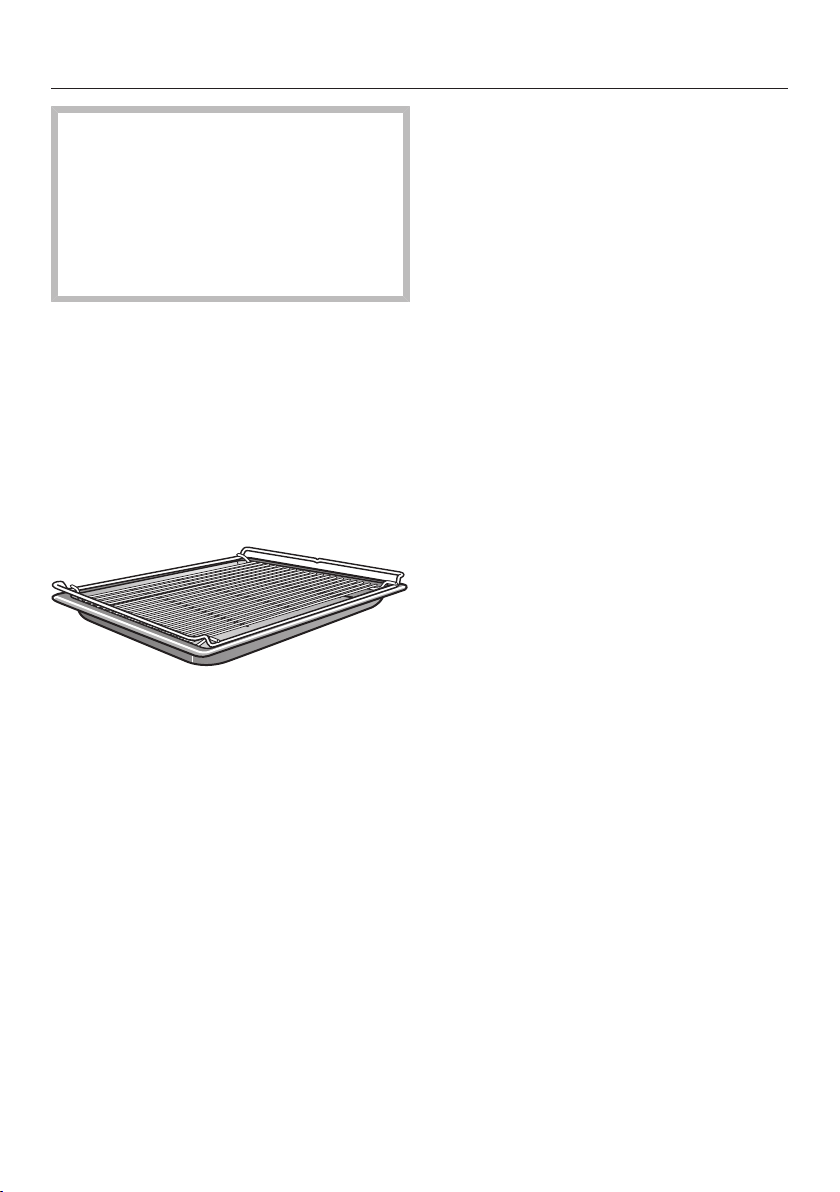
Grilling
152
Risk of injury caused by hot
surfaces.
If you open the appliance door
during grilling, the controls will get
very hot.
Keep the door closed during the
grilling programme.
Grilling tips
– Always pre-heat for at least
5minutes before grilling.
– Use the universal tray with the rack
placed on top of it. Exception: If you
are grilling on shelf level3, insert the
universal tray one level down from
the rack.
– When grilling fish, place the fish on a
piece of baking paper cut to size.
– Grill thick food, e.g. half a chicken, on
shelf level2 and thin food, e.g.
steaks, on shelf level3.
– Turn the food ²/₃ of the way through
the cooking duration. Exception: It is
not necessary to turn food when
using Fan Grill or grilling fish.
Tips for grilling
– Marinate lean meat or brush it with
oil. Do not use other types of fat as
they can burn and cause smoke.
– Pierce sausages before grilling.
– It is best to grill food of a similar
thickness at the same time so that
the grilling time for each item does
not vary too greatly.
– To test the food, press down on the
meat with a spoon. This lets you
determine how well the meat has
been cooked.
– Rare
If the meat gives easily to the
pressure of the spoon, it will still
be red on the inside.
– Medium
If there is some resistance, the
inside will be pink.
– Well-done
If there is great resistance, it is
cooked through.
– To grill thicker pieces of food more
gradually after an initial high
temperature, continue grilling at a
lower temperature setting or use a
lower shelf level to allow the food to
cook through to the centre.

Grilling
153
Notes on the oven functions
You can find an overview of all the
functions with their recommended
values in “Main and sub-menus”.
The plastic on the food probe can
melt at very high temperatures.
Do not use the food probe when
using the Grill functions.
Do not store the food probe in the
oven compartment when it is not
being used.
Combi Grill
This function is suitable for grilling food
that should be brown on the outside,
but not dry, e.g. corn on the cob.
Full Grill
Use this function to grill flat thin cuts in
large quantities and for browning large
baked dishes.
Economy Grill
Use this function to grill flat thin cuts in
smaller quantities and for browning
small baked dishes.
Fan Grill
This function is suitable for grilling
thicker food such as poultry or rolled
meat.
Grilling
154
Grilling chart
Settings
Oven functions | Fan Grill
Temperature: see chart
Duration: see chart
The chart below is a suggested guide only. Temperatures are approximations and
must be varied according to the thickness and preparation of the meat. Personal
taste and size of serves will vary times and temperatures. We recommend you
monitor cooking results for best outcomes.
Food [°C] [min.]
Meat
Chicken breast fillet 200 2–3 14–18
Chicken satays 200 3 12–15
Whole butterflied chicken 200 1 35–40
Kebabs and satays (red meat) 200 3 12–15
Lamb back straps 220 3 8–10
Lamb loin chops 190 3 12–16
Lean beef fillet steak 220 3 6–12
Lean thin sausages 180 3 8–10
Thick sausages 180 3 15–20
Fish
Oily fish 200 3 8–12
Thick fish fillets, cutlets or steaks 200 3 10–15
Thin white fish fillets 220 3 6–10
Vegetables
Potato wedges or small roast potatoes 220 2 20–25
Vegetables, capsicum, zucchini, sweet
potato, eggplant
200 3 12–15
Temperature, Shelf level, Duration

Cleaning and care
155
Notes on cleaning and care
Risk of injury caused by hot
surfaces.
The steam oven gets hot during
operation. You could burn yourself
on the heating elements, oven
compartment, shelf runners or
accessories.
Allow the heating elements, oven
compartment, shelf runners and the
accessories to cool down before
manual cleaning.
Risk of injury due to electric
shock.
The steam from a steam cleaning
appliance could reach electrical
components and cause a short
circuit.
Do not use a steam cleaner to clean
the steam oven.
The use of unsuitable cleaning
agents can cause the surfaces to
discolour or alter. The front of the
steam oven is particularly
susceptible to damage from oven
cleaners and descaling agents.
All surfaces of this appliance are
susceptible to scratching. Scratches
on glass surfaces could cause a
breakage in certain circumstances.
Remove any residual cleaning agent
immediately.
Stubborn soiling could damage the
steam oven in certain circumstances.
Once the oven has cooled, clean the
oven compartment, the inside of the
door and the door seal. Waiting too
long can make cleaning
unnecessarily difficult and in some
cases impossible.
Do not use commercial cleaning
agents. Only use cleaning agents
designed for domestic use.
Do not use cleaning agents or
washing-up liquids containing
aliphatic hydrocarbons as these
could cause the seals to swell.
The appliance and accessories
should be cleaned and dried
thoroughly after each use.
Leave the appliance door open until
the oven interior is completely dry.
If the steam oven is not going to be
used for a longer period of time, it
should be thoroughly cleaned and
dried beforehand to prevent the build-
up of odours and so on. Leave the
door open afterwards.

Cleaning and care
156
Unsuitable cleaning agents
To avoid damaging the surfaces of your
appliance, do not use:
– cleaning agents containing soda,
alkalines, ammonia, acids or
chlorides
– cleaning agents containing descaling
agents
– abrasive cleaning agents, e.g.
powder cleaners and cream cleaners
– solvent-based cleaning agents
– stainless steel cleaning agents
– dishwasher cleaner
– glass cleaning agents
– cleaning agents for ceramic cooktops
– hard, abrasive brushes or sponges,
e.g. pot scourers, brushes or
sponges which have been previously
used with abrasive cleaning agents
– dirt erasers
– sharp metal scrapers
– steel wool or metal scourers
– stainless steel spiral pads
– spot cleaning with mechanical
cleaning agents
– oven cleaners and sprays
Cleaning the steam oven front
Clean the appliance front with a
clean, soft sponge and a solution of
warm water and washing-up liquid.
After cleaning, wipe the surfaces dry
using a soft cloth.
Useful tip: A clean, damp microfibre
cloth without cleaning agent can also
be used.

Cleaning and care
157
PerfectClean
The oven compartment, shelf runners,
universal tray and combi rack surfaces
are treated with PerfectClean enamel.
This finish has an iridescent
appearance. PerfectClean surfaces
have very good non-stick properties
and are easy to clean.
However, it is important to clean the
surfaces each time the oven is used.
The non-stick properties will deteriorate
if soiling is not removed from
PerfectClean surfaces after each use. If
used frequently without being cleaned,
cleaning may become very difficult.
Soiling such as spilt juices and cake
mixtures are best removed whilst the
oven compartment is still warm.
Spilt fruit juices may cause
discolouration to the surfaces that
cannot be removed. However, this does
not affect the properties of the
PerfectClean finish.
Always remove all cleaning agent
residues to protect the non-stick
properties.
To protect the non-stick effect of
PerfectClean surfaces, please avoid:
– abrasive cleaning agents, e.g.
powder cleaners and cream cleaners
– cleaning agents for ceramic cooktops
– ceramic glass and stainless steel
cleaners
– steel wool or metal scourers
– abrasive sponges, e.g. pot scourers
or sponges which have been
previously used with abrasive
cleaning agents
– oven sprays
– spot cleaning with mechanical
cleaning agents
Do not clean PerfectClean
accessories in the dishwasher.

Cleaning and care
158
Oven compartment
The surface of the oven
compartment has been treated with
PerfectClean.
Please see “Cleaning and care -
PerfectClean” for instructions on
cleaning.
Ensure that no cleaning agent gets
into the openings on the oven
compartment rear panel.
To make cleaning the oven
compartment easier, you can remove
the oven door, dismantle the shelf
runners and lower the top heat/grill
element.
Cleaning after a programme using
steam
Remove:
– condensate using a sponge or
absorbent cloth,
– light, greasy soiling with a sponge
and a solution of washing-up liquid
and hot water.
After cleaning, wipe the surface with
clean water to remove any cleaning
agent residues.
Then dry the oven compartment and
the inside of the door with a cloth.
Useful tip: You can then leave the
steam oven to dry automatically (see
“Cleaning and care - Maintenance”).
Cleaning after a roasting, grilling or
baking programme
Clean the oven compartment
thoroughly after roasting, grilling and
baking as otherwise soiling can burn
on and become impossible to
remove.
Clean the oven compartment and
inside of the door with a clean
washing-up sponge, hot water and a
little washing-up liquid. You can use
the hard surface of a washing-up
sponge to clean the oven
compartment if necessary.
After cleaning, wipe the surface with
clean water to remove any cleaning
agent residues.
Then dry the oven compartment and
the inside of the door with a cloth.
Useful tip: Soaking the soiling for a few
minutes with a solution of washing-up
liquid and hot water can make cleaning
easier. Alternatively, run the
Maintenance |Soak programme (see
“Cleaning and care - Maintenance”).

Cleaning and care
159
Cleaning the floor filter
The filter in the floor of the oven
should be cleaned and dried after
every use.
Vinegar can be used to remove
discolouration and limescale deposits
from the filter in the floor of the oven.
Rinse thoroughly with clean water
afterwards.
Cleaning the door seal
The door seal may become brittle
and tear on account of contact with
grease residues.
Clean the door seal between the
inside of the oven door and the oven
compartment after every baking or
roasting programme.
Clean the door seal using a clean,
damp microfibre cloth without any
cleaning agent. You can also use a
clean sponge and warm water with a
little washing-up liquid.
After cleaning, dry the seal with a soft
cloth.
Replace the seal with a new one if it
becomes porous or brittle.
Door seals can be ordered from Miele
(see the end of this booklet for contact
details).
Cleaning the water container
The water container is suitable for
cleaning in a dishwasher.
Remove the water container after
each use. To do this, push it upwards
slightly as you take it out of the
appliance.
Empty the water container.
Water can drip into the container
compartment when the water
container is removed.
Dry the compartment if necessary.
Rinse the water container by hand or
in the dishwasher.
Dry the water container with a soft
cloth to prevent limescale.

Cleaning and care
160
Accessories
Cleaning the universal tray and
combi rack
The surfaces of the universal tray
and the combi rack have been
treated with PerfectClean.
Please see “Cleaning and care -
PerfectClean” for instructions on
cleaning.
Remove:
– light soiling with a clean sponge and
a solution of washing-up liquid and
warm water.
– stubborn soiling with a clean
washing-up sponge, hot water and a
little washing-up liquid. If necessary,
you can also use the rough side of
the sponge.
After cleaning, wipe the surface with
clean water to remove any cleaning
agent residues.
Then wipe the surfaces dry using a
cloth.
Cleaning cooking containers and the
food probe
The cooking containers and food
probe are suitable for cleaning in a
dishwasher.
Wash and dry the cooking containers
and food probe after each use.
Any bluish discolouration on the
cooking containers can be removed
with vinegar. Rinse afterwards with
clean water.
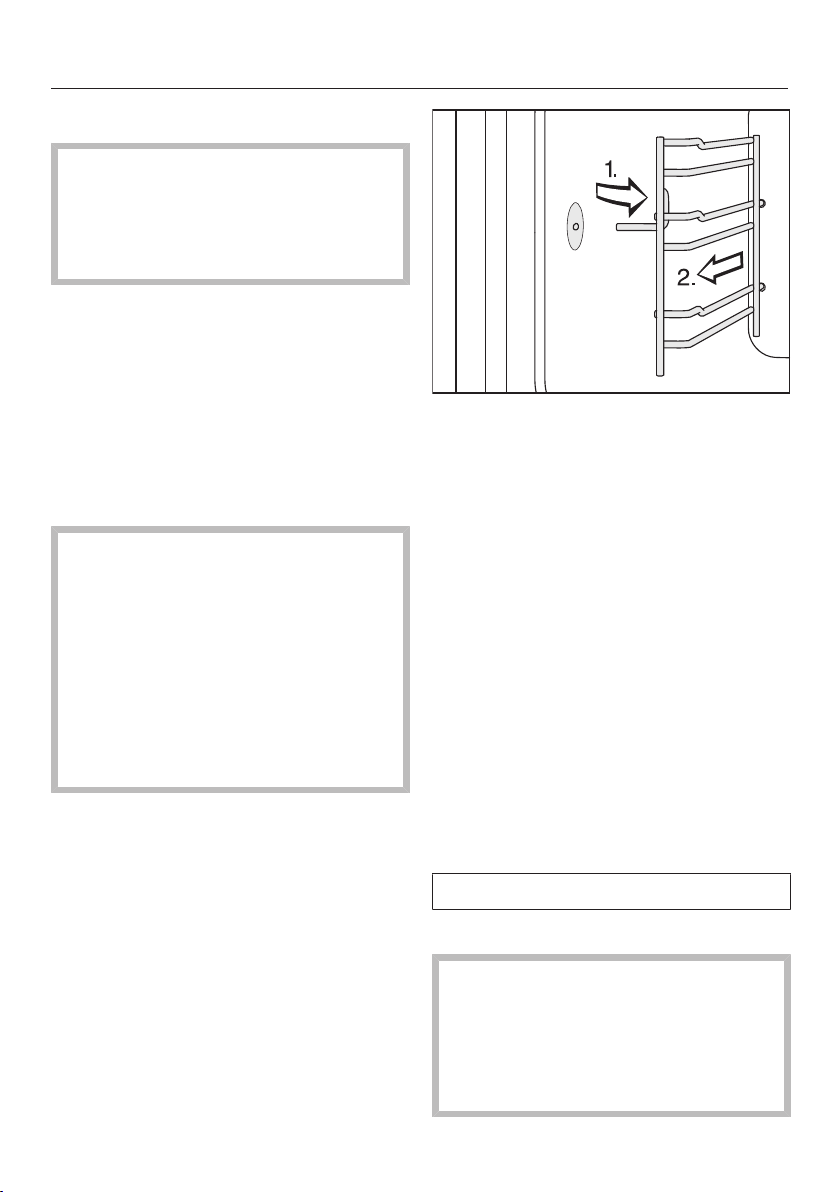
Cleaning and care
161
Cleaning the shelf runners
The surfaces of the shelf runners
have been treated with PerfectClean.
Please see “Cleaning and care -
PerfectClean” for instructions on
cleaning.
You can remove the shelf runners
together with the FlexiClip telescopic
runners (if present).
If you want to remove the FlexiClip
telescopic runners separately
beforehand, please follow the
instructions in “Overview - Fitting and
removing the FlexiClip telescopic
runners”.
Risk of injury caused by hot
surfaces.
The steam oven gets hot during
operation. You could burn yourself
on the heating elements, the oven
compartment, or accessories.
Allow the heating elements, oven
compartment and the accessories to
cool before removing the shelf
runners.
Pull the shelf runners out of the
holder (1.) at the front of the oven and
then pull them out of the oven (2.).
Remove:
– light soiling with a clean sponge and
a solution of washing-up liquid and
warm water.
– stubborn soiling with a clean
washing-up sponge, hot water and a
little washing-up liquid. If necessary,
you can also use the rough side of
the sponge.
After cleaning, wipe the surface with
clean water to remove any cleaning
agent residues.
Then dry the shelf runners with a
cloth.
Refit in the reverse order.
Refit the shelf runners carefully.
If the shelf runners are not correctly
inserted, there is no anti-tip
protection. The temperature sensor
could also be damaged when
cooking containers are placed in the
steam oven.
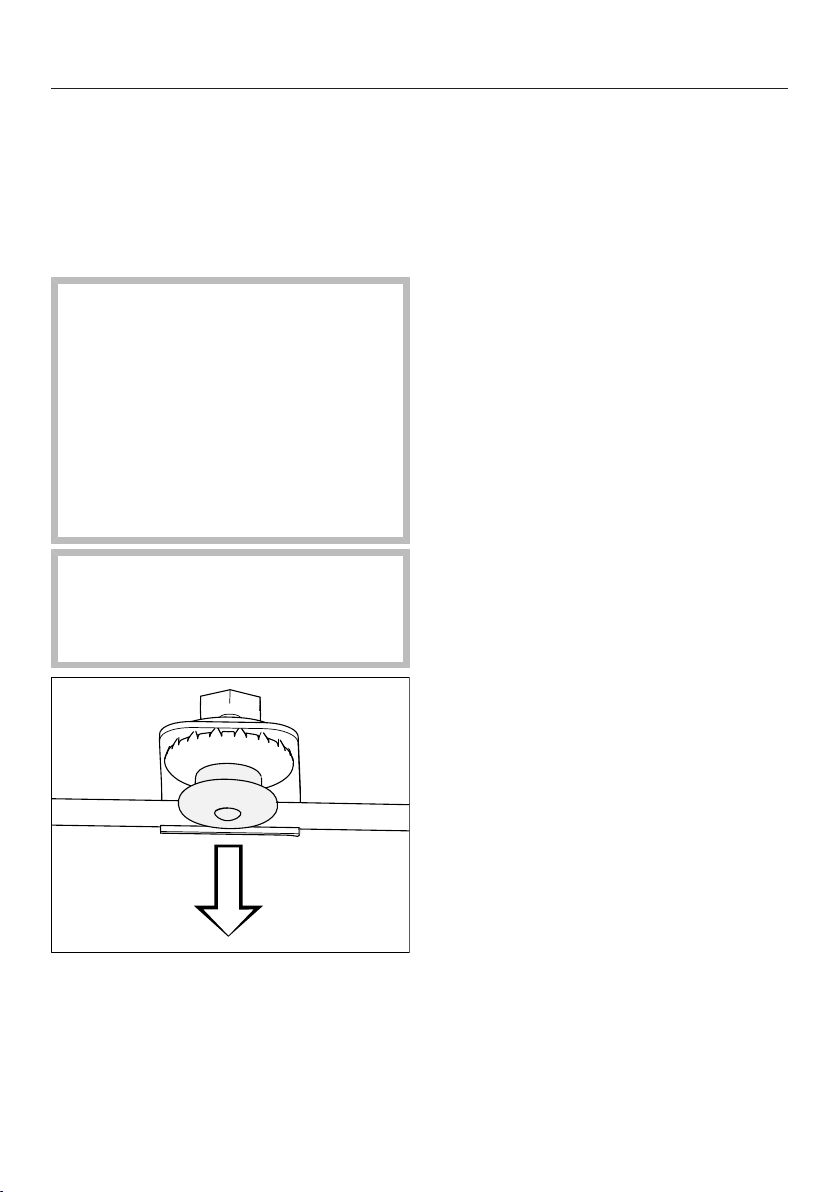
Cleaning and care
162
Lowering the top heat/grill
element
If the oven compartment roof is badly
soiled, the top heat/grill element can be
lowered by approx. 5cm to make
cleaning easier.
Risk of injury caused by hot
surfaces.
The steam oven gets hot during
operation. You could burn yourself
on the heating elements, oven
compartment, shelf runners or
accessories.
Allow the heating element, oven
compartment, shelf runners and the
accessories to cool before cleaning.
Use caution not to damage the top
heat/grill element.
Never use force when pulling down
the top heat/grill element.
Carefully pull down the pressure cap.
The top heat/grill element then lowers
automatically.
Clean the oven compartment roof
with a sponge cloth or a washing-up
sponge (see “Cleaning and care -
Oven compartment”).
After cleaning the oven compartment
roof, push the pressure cap back up.
Make sure the pressure cap engages
correctly.

Cleaning and care
163
Maintenance
The Finish at and Start at functions are
not available in maintenance
programmes.
Soak
Stubborn soiling can be soaked using
this maintenance programme.
Let the oven cavity cool down.
Remove all accessories from the
oven.
Remove coarse soiling with a cloth.
Select Maintenance | Soak.
The soaking process takes approx.
10minutes.
Drying
This maintenance programme can be
used to dry any residual moisture in the
oven compartment, including in
inaccessible areas.
Dry the oven compartment with a soft
cloth first.
Select Maintenance| Drying.
The drying process takes approx.
20minutes.
Rinsing
The water-carrying system is rinsed out
during this maintenance programme.
Any remaining food deposits are rinsed
away.
Select Maintenance| Rinse.
Follow the instructions in the display.
The rinsing process takes approx. 10
minutes.
Descaling the steam oven
We recommend using Miele descaling
tablets (see “Optional accessories”) to
descale the appliance. These have
been specially developed for use with
Miele appliances to optimise the
descaling process. Other descaling
agents, which contain other acids
besides citric acid and/or other
undesirable substances, such as
chlorides, could cause damage to the
product. Moreover, the descaling
result required could not be
guaranteed if the descaling solution
was not of the appropriate
concentration.
Do not spill descaling agent onto
metal surfaces. This can cause
marks to appear.
However, should any descaling
agent get onto these surfaces, wipe
it away immediately.
The steam oven has to be descaled
after a certain number of operating
hours. When the time comes to descale
it, the number of uses remaining lights
up in the display. Only cooking
processes that use steam are counted.
The appliance will lock after the last
remaining cooking process.
We recommend that you descale the
appliance before it locks out.
The water container must be emptied
and rinsed out during the descaling
process.

Cleaning and care
164
Switch the steam oven on and select
Maintenance|Descale.
The message Please wait will appear in
the display. The descaling process is
being prepared. This may take several
minutes. As soon as the appliance is
ready, you will be prompted to add
descaling agent to the water container.
Fill the water container with lukewarm
fresh tap water up to the level
marker and drop 2Miele descaling
tablets in it.
Wait until the descaling tablets have
dissolved.
Push the water container into the
appliance.
Confirm with OK.
The time remaining will appear in the
display. The descaling process will now
begin.
Do not switch the steam oven off
during the descaling process,
otherwise the whole process will have
to be started from the beginning
again.
The water container must be rinsed out
once and reinserted empty during the
process.
Follow the instructions in the display.
Confirm with OK.
Once the time remaining has elapsed,
Finishedwill appear in the display and a
buzzer will sound.
Remove the water container and
empty it.
Clean and dry the water container.
Open the door and let the oven cool
down.
Then dry the oven compartment.
Leave the appliance door open until
the oven interior is completely dry.
Switch the steam oven off.
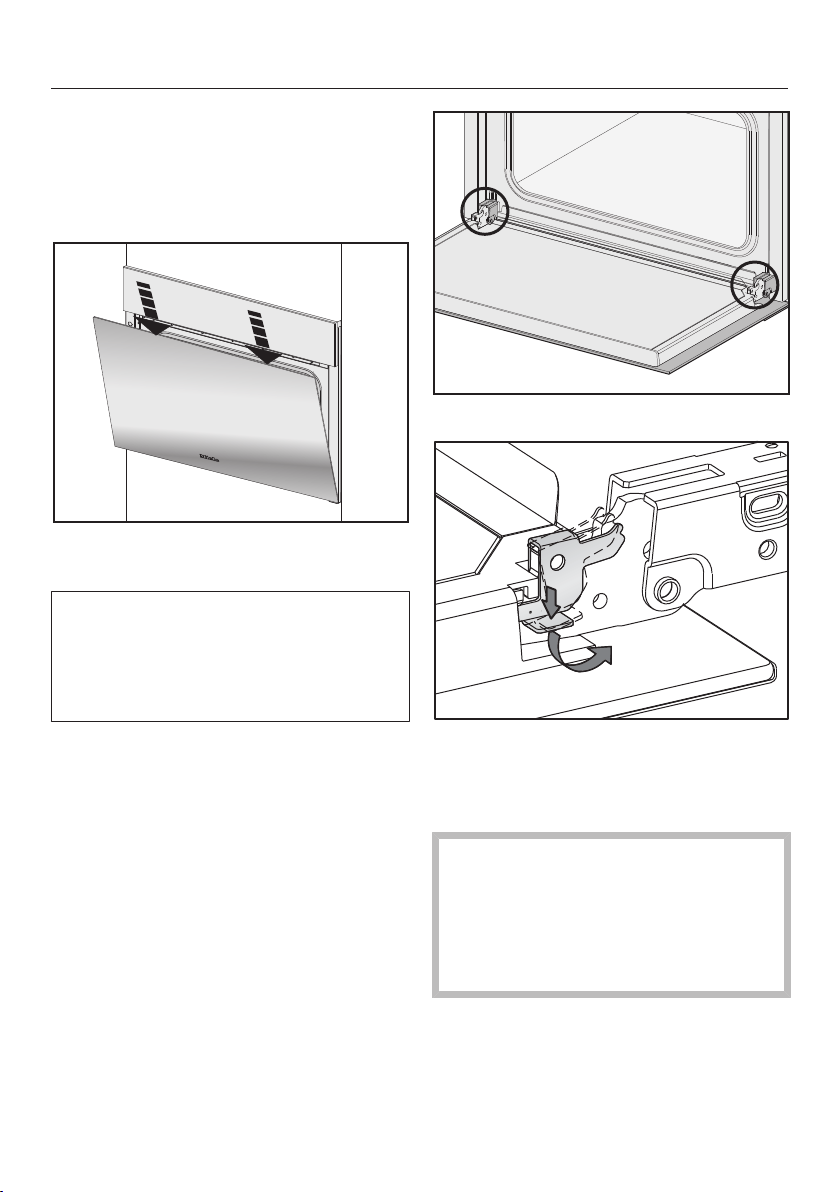
Cleaning and care
165
Removing the door
Prepare a suitable underlay for the
door, such as a soft cloth.
Open the door a fraction.
Using both hands, press down on the
top edge of the door briefly.
The oven door is connected to the
hinges by retainers. Before removing
the door from the retainers, the
locking clamps on both door hinges
have to be released.
Open the door fully.
Release the locking clamps on the
hinges by pushing them down as far
as they will go until they are at an
angle.
The steam oven could become
damaged if you incorrectly remove
the door.
Never pull the door horizontally off its
retainers, as they will spring back
against the steam oven.
Raise the door up until it rests
partially open.
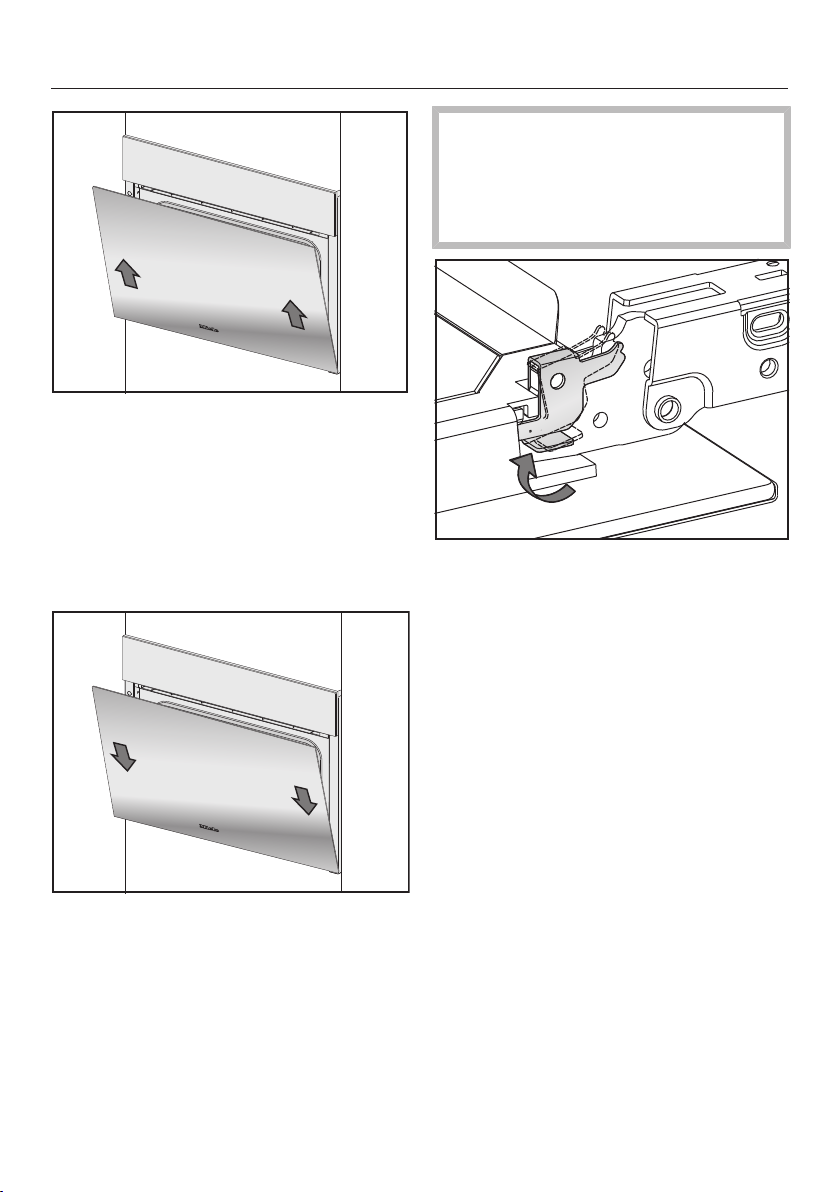
Cleaning and care
166
Hold the door on either side and
evenly pull diagonally upwards from
the hinge retainers.
Make sure that the door is straight.
Place the door on the previously
prepared surface.
Fitting the door
Hold the door securely on both sides
and carefully fit it back onto the door
hinge retainers.
Make sure that you put the door back
on straight.
Open the door fully.
If the locking clamps are not locked,
the door could work loose, resulting
in damage.
Ensure that the locking clamps are
locked after refitting the door.
To relock the locking clamps, flip
them back up to the horizontal
position as far as they will go.

Problem solving guide
167
With the help of the following guide, minor faults in the performance of the
appliance, some of which may result from incorrect operation, can be remedied
without contacting Miele. This will save you time and money because you won't
need a service call.
Please note that a call-out charge will be applied to unnecessary service visits
where the problem could have been rectified as described in these operating
instructions.
Problem Possible cause and remedy
You cannot switch the
appliance on.
The circuit breaker has tripped.
Reset the circuit breaker in the mains fuse box
(see data plate for minimum fuse rating).
There may be a technical fault.
Disconnect the appliance from the mains
connection for approximately 1minute by:
– switching off at the wall socket and withdrawing
the plug, or
– switching off the mains circuit breaker or residual
current device.
If, after switching the circuit breaker or residual
current device back on, the steam oven will still
not switch on, contact a qualified electrician or
Miele.
The oven does not heat
up.
Demo mode is active.
The steam oven can be operated, however the
heating elements will not work.
Deactivate Demo mode (see “Settings -
Showroom programme”).
The oven cavity has been warmed up by a warming
drawer in operation underneath it.
Open the door and let the oven cool down.
The fan can still be
heard after the
appliance has been
switched off.
The fan is still running.
The appliance is fitted with a fan which removes
steam from the oven. The fan will continue to run for
a while after the appliance has been switched off. It
will switch itself off automatically after a while.

Problem solving guide
168
Problem Possible cause and remedy
The sensor controls or
the proximity sensor do
not respond.
You have selected the Display| QuickTouch| Off setting.
When this is activated, the sensor controls and
proximity sensor do not respond when the steam
oven is switched off.
As soon as the steam oven is switched on, the
sensor controls and the proximity sensor will
respond. If you want the sensor controls and the
proximity sensor to respond even when the steam
oven is switched off, select the Display|
QuickTouch| On setting.
The settings for the proximity sensor are switched off.
Change the settings for the proximity sensor by
selecting Settings| Proximity sensor.
The proximity sensor is defective.
Call Miele.
The steam oven is not connected to the power
supply.
Check that the steam oven plug is correctly
inserted into the socket.
Check if the circuit breaker has tripped. Contact a
qualified electrician or Miele.
If the display does not respond, there is a fault with
the controls.
Touch and hold the On/Off sensor until the
display switches off and the steam oven restarts.
The door cannot be
opened.
You have selected the Display| QuickTouch| Off setting.
The sensor does not respond when the steam
oven is switched off.
As soon as the steam oven is switched on, the
sensors will respond. If you want the sensors to
always respond even when the steam oven is
switched off, select the Display| QuickTouch|
Onsetting.
There may be a technical fault.
If you need to open the door, e.g. because there is
still food in the oven, you will need to open the
door manually (see end of this section).
If the problem occurs again, contact Miele.

Problem solving guide
169
Problem Possible cause and remedy
A humming sound can
be heard during
operation and after
switching off the steam
oven.
This noise does not indicate incorrect operation or an
appliance fault. The noise is made by water being
pumped through the system.
After moving house, the
appliance no longer
switches from the
heating-up phase to the
cooking phase.
Altitude affects the boiling point of water. If you move
house, the appliance will need to be reset for the new
altitude if this differs from the old one by more than
300m.
To adjust the boiling temperature, you need to
descale the appliance (see “Cleaning and care –
Maintenance”).
During operation an
unusually large amount
of steam escapes or
steam escapes from
parts of the steam oven
where it does not
usually.
The door is not properly closed.
Close the door.
The door seal is not correctly fitted.
If necessary, press it in all the way round the door
to make sure it is fitted evenly.
The door seal is damaged, e.g. cracked.
Replace the door seal.
This can be ordered from Miele (see the end of this
booklet for contact details).
The oven lighting
doesn't come on.
The lamp needs to be replaced.
Call Miele to have the lamp replaced.
The control panel will
not open or close
automatically despite
touching the sensor
several times.
Something is obstructing the control panel.
Remove the obstruction.
The obstruction sensor is very sensitive, which means
the control panel sometimes doesn't open or close.
Open/Close the control panel manually (see end of
this section).
If the problem occurs again, contact Miele.
The Start at and Finish at
functions are not
available.
The temperature in the oven compartment is too high,
e.g. after a programme has finished.
Open the door and let the oven cool down.
These functions are not generally available in
maintenance programmes.
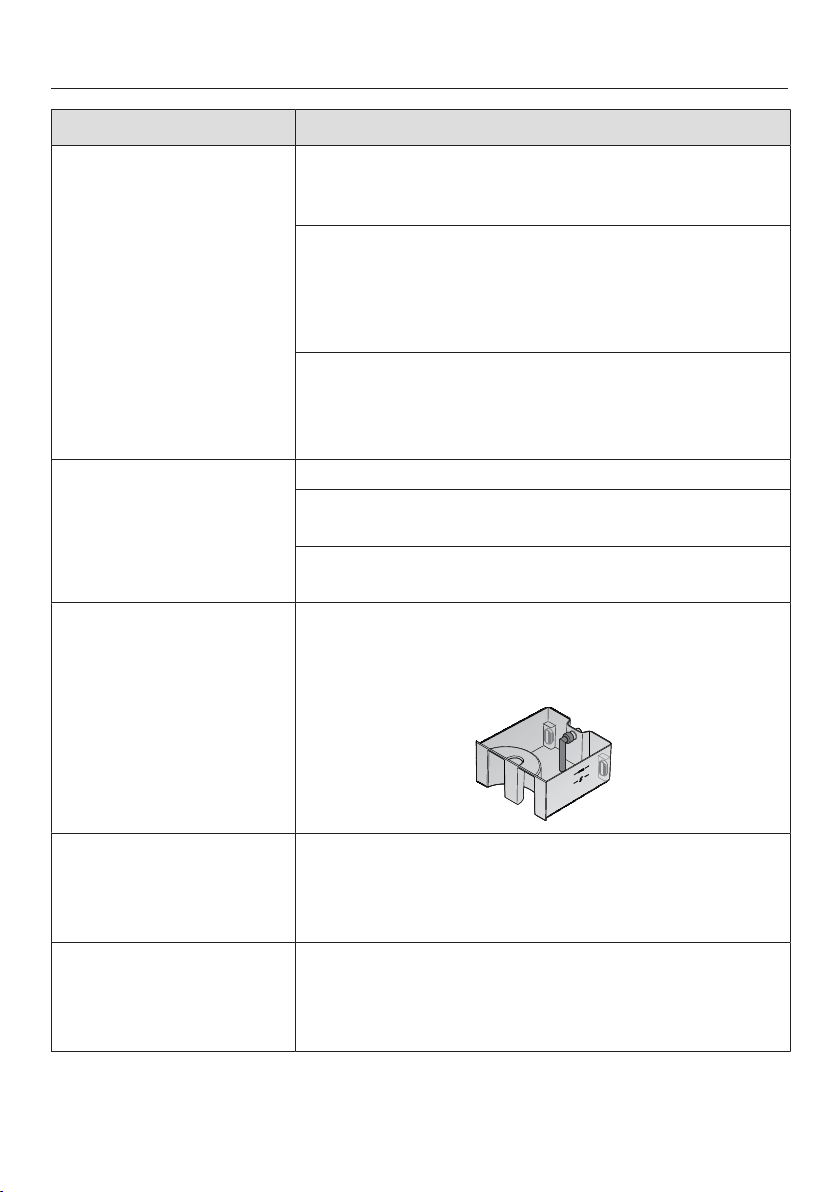
Problem solving guide
170
Problem Possible cause and remedy
Cakes and biscuits are
not cooked properly
after following the
durations given in the
recipe.
The temperature set is not the same as the one given
in the recipe.
Change the temperature.
The recipe has been altered. For example, adding
more liquid or eggs can increase the cooking duration
required.
Adapt the temperature and/or cooking duration to
the altered recipe.
The grease filter on the back panel (optional
accessory) is fitted. This increases the cooking
duration.
Adjust the cooking duration.
Cakes or biscuits are
unevenly browned.
The temperature was set too high.
More than two shelf levels were used for baking.
Bake on a maximum of two levels.
The grease filter has not been taken out of the back
panel (optional accessory).
F10 The suction hose in the water container is
– not correctly attached.
– not positioned vertically.
Correct the position of the suction hose:
F11
F20
Internal drainage fault.
Descale the steam oven (see “Cleaning and care -
Maintenance”).
If the fault message appears again, contact Miele.
F44 Communication fault.
Switch the steam oven off and then back on again
after a few minutes.
If the same message appears again, call Miele.
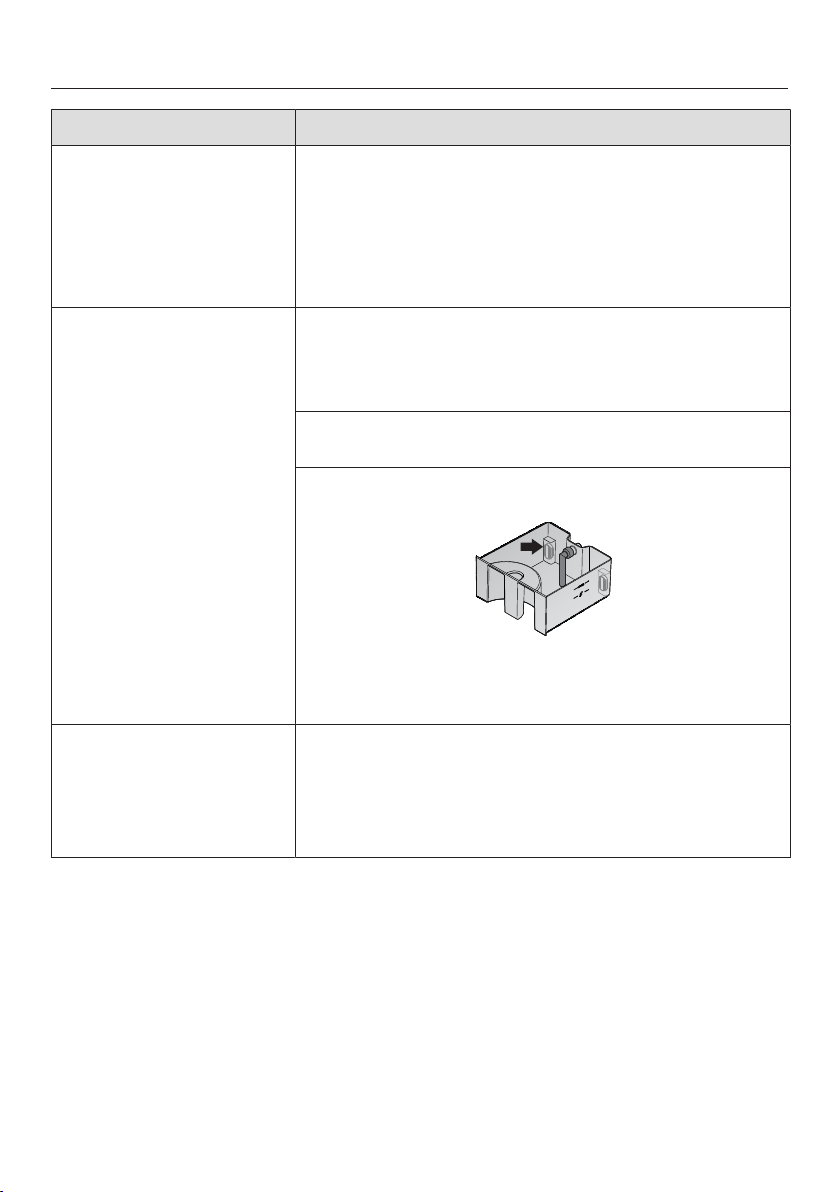
Problem solving guide
171
Problem Possible cause and remedy
F55 The maximum length of time for which the steam
oven can be operated on a function has been
exceeded, so the appliance has switched itself off
automatically for safety reasons.
Switch the steam oven off and then back on again.
The steam oven is immediately ready for use again.
F94 No water intake:
– The water inlet hose is trapped or kinked.
Rectify the cause of the problem and start the
appliance again.
– The tap has been turned off.
Turn on the tap and start the appliance again.
– One or both float switches in the water container are
stuck.
Release the float switch(es) so that it moves freely.
If, having corrected the problem, this fault
message appears again, contact Miele.
F190 The water inlet valve is faulty.
This can occur if the control panel was opened or
closed during water intake.
Confirm with OK and continue operation.
If the same message appears again, call Miele.
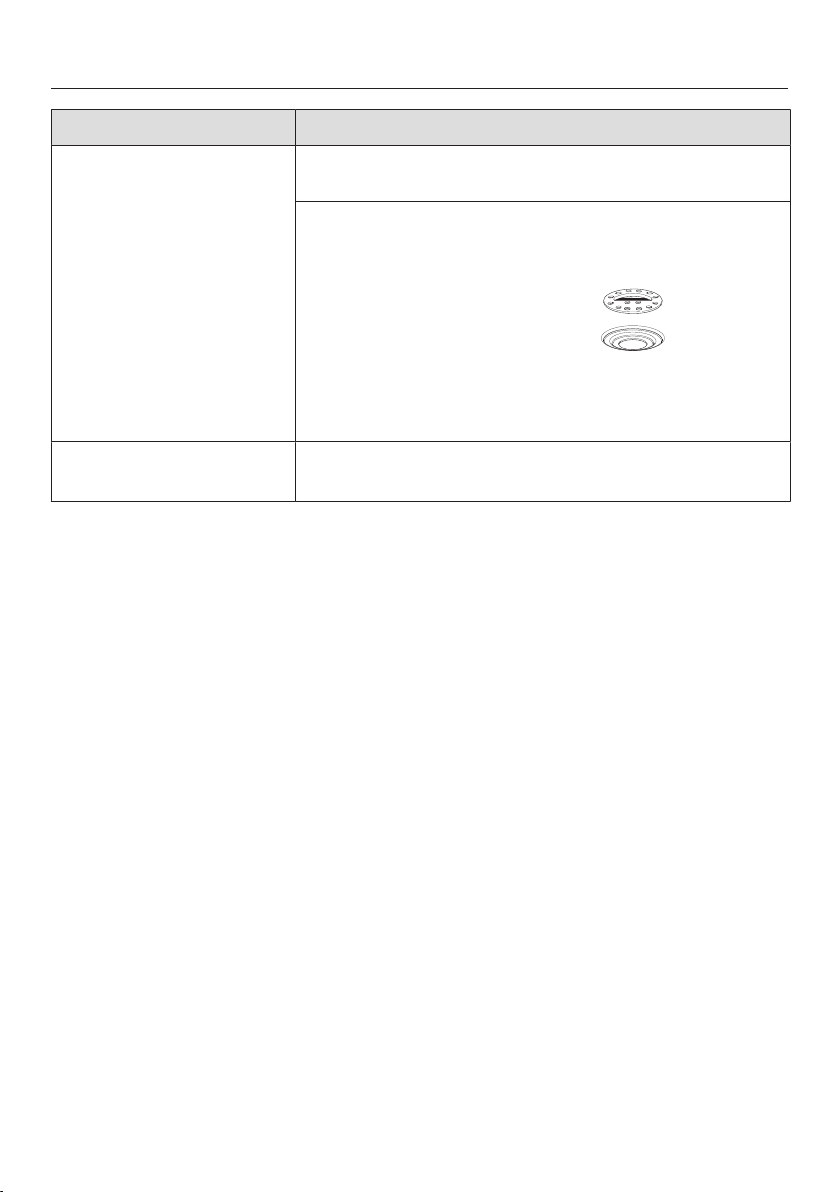
Problem solving guide
172
Problem Possible cause and remedy
F196 There is a fault.
Switch the steam oven off and then back on again.
The floor filter is not fitted correctly.
Switch the steam oven off.
Insert the filter correctly:
Switch the steam oven back on again.
If the same message appears again, call Miele.
F and other fault codes Technical fault.
Switch the appliance off and call Miele.
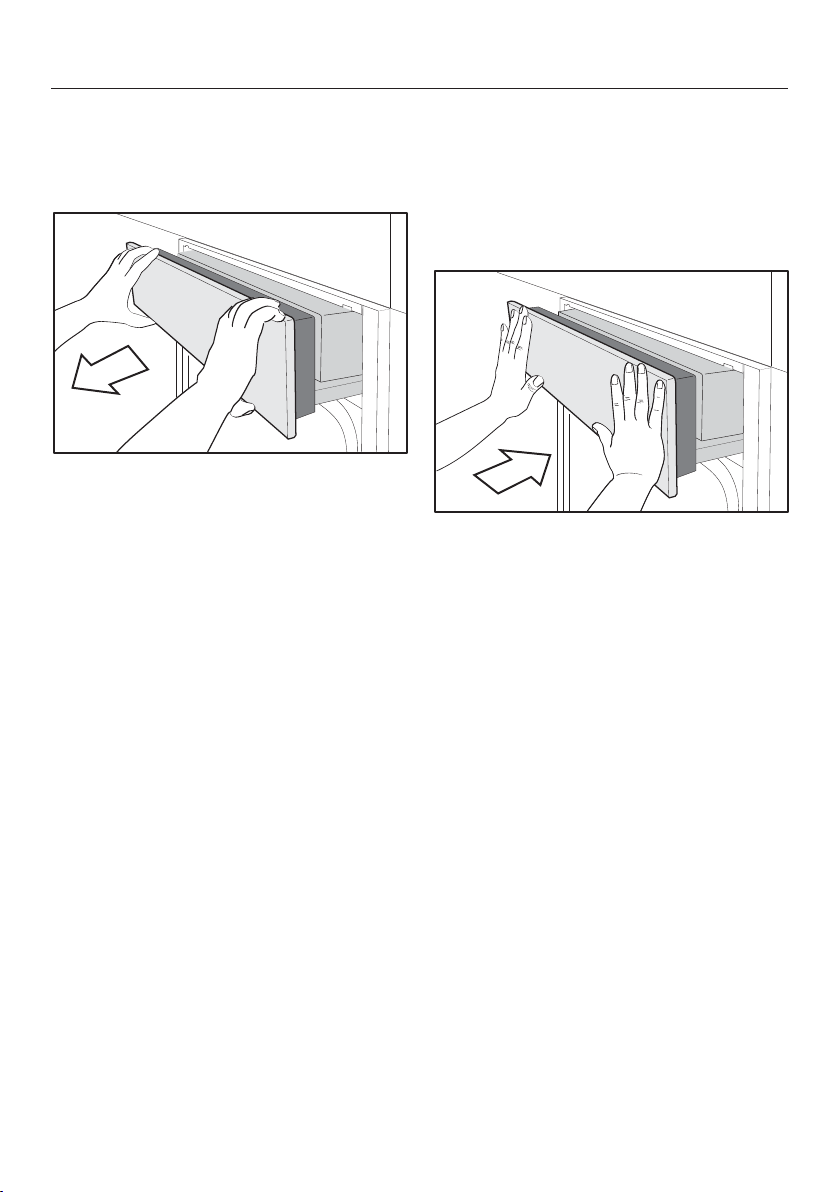
Problem solving guide
173
Opening the control panel
manually
Carefully open the appliance door.
Hold the control panel at the top and
bottom.
Pull out the panel towards you.
Carefully push it upwards.
Closing the control panel
manually
Hold the control panel at the top and
bottom.
Carefully push it downwards.
Push the panel right in.
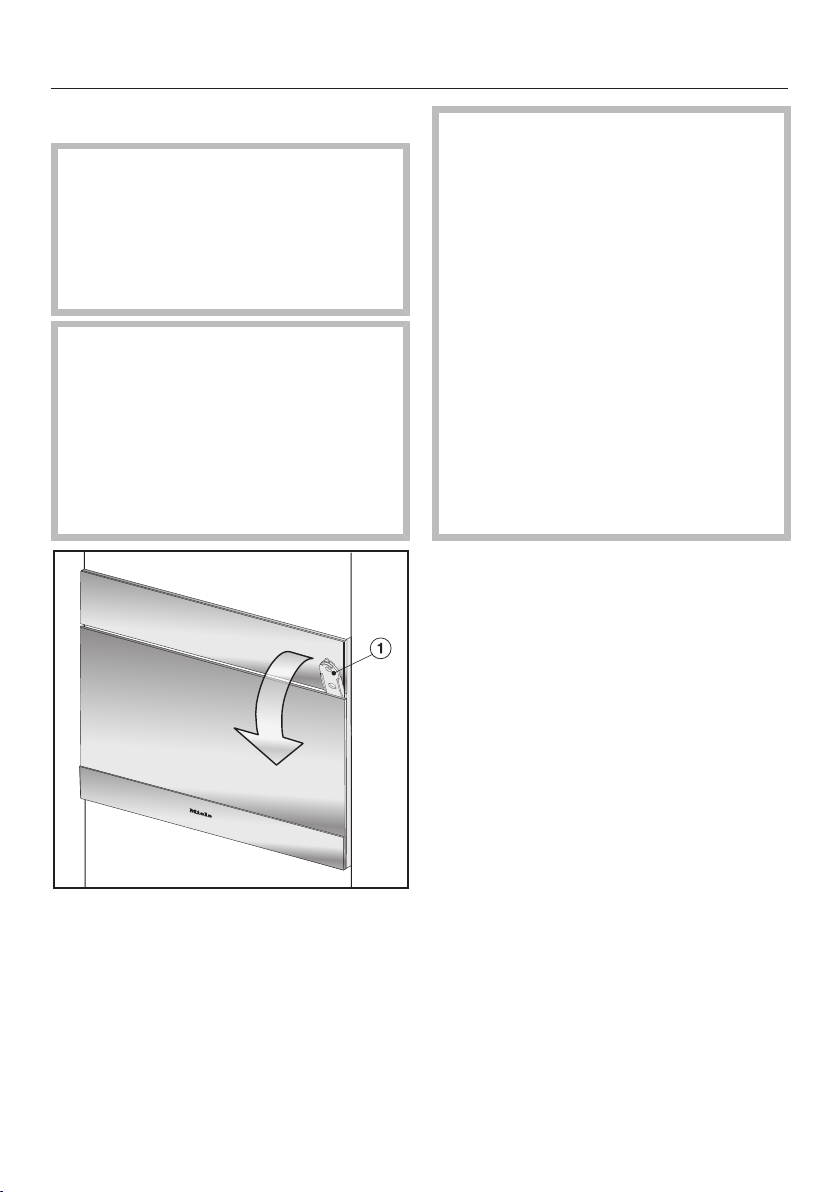
Problem solving guide
174
Opening the door manually
Risk of injury caused by hot
surfaces.
The door glass may be hot. You can
burn yourself on the door glass.
Wear oven gloves when opening the
hot door.
Risk of injury caused by steam.
When using a cooking programme
involving steam, a lot of steam can
escape if the door is opened. The
steam can cause burns.
Step back and wait until the steam
has dissipated before taking the food
out of the oven.
Insert the opener supplied about
3cm into the gap between the door
and the control panel on the right-
hand side and then pull the door
open.
Risk of injury caused by hot
surfaces and food.
The steam oven gets hot during
operation. You could burn yourself
on the heating elements, oven
compartment, shelf runners,
accessories, food or door glass.
Wear oven gloves when placing hot
food in the oven or removing it, when
adjusting oven shelves etc. in the hot
oven compartment and when closing
the hot door.
Wear oven gloves when taking hot
food out of the oven, when adjusting
oven shelves etc. in a hot oven
compartment and when closing the
hot door.

Optional accessories
175
Miele offers a range of useful
accessories, as well as cleaning and
conditioning products for your
appliance.
These products can be ordered from
the Miele online shop.
They can also be ordered directly from
Miele (see end of this booklet for
contact details).
Cooking containers
Miele offers a wide range of cooking
containers. These have all been
optimised in terms of functionality and
dimensions for Miele appliances.
Detailed information on each of our
products can be found on the Miele
website.
– Perforated cooking containers in
various sizes
– Solid cooking containers in various
sizes
– Gourmet oven dishes in various sizes
– Lids for Gourmet oven dishes
Other
– Baking trays
– Round baking tray
– FlexiClip telescopic runners
– Grease filter
Cleaning and care products
– DGClean
Special cleaning agent for removing
stubborn soiling from the oven
compartment, particularly after
roasting
– Descaling tablets
– All purpose microfibre cloth
For removing finger marks and light
soiling

Service
176
Contact in case of fault
In the event of any faults which you
cannot remedy yourself, please contact
Miele.
Contact information for Miele can be
found at the end of this booklet.
Please quote the model and serial
number of your appliance when
contacting Miele. This information can
be found on the data plate.
The data plate is visible on the front
frame of the oven, with the door fully
open.
Warranty
The manufacturer's warranty for this
appliance is 2years.
For further information, please refer to
your warranty booklet.

Installation
*
I
N
S
T
A
L
L
A
T
I
O
N
*
177
Safety instructions for installation
Risk of damage from incorrect installation.
Incorrect installation can cause damage to the steam oven.
The steam oven must only be installed by a qualified person.
The connection data (frequency and voltage) on the steam oven’s
data plate must correspond with those of the electricity supply in
order to ensure that no damage can occur to the steam oven.
Compare this data before connecting the appliance. If in any doubt,
consult a qualified electrician.
Multi-socket adapters and extension leads do not guarantee the
required safety of the appliance (fire hazard). Do not use them to
connect the steam oven to the power supply.
The socket and on-off switch should be easily accessible after the
steam oven has been installed.
The steam oven must be positioned so that you can see the
contents of a cooking container placed on the top shelf level.
Otherwise there is a risk of injuries or spillages of hot food.
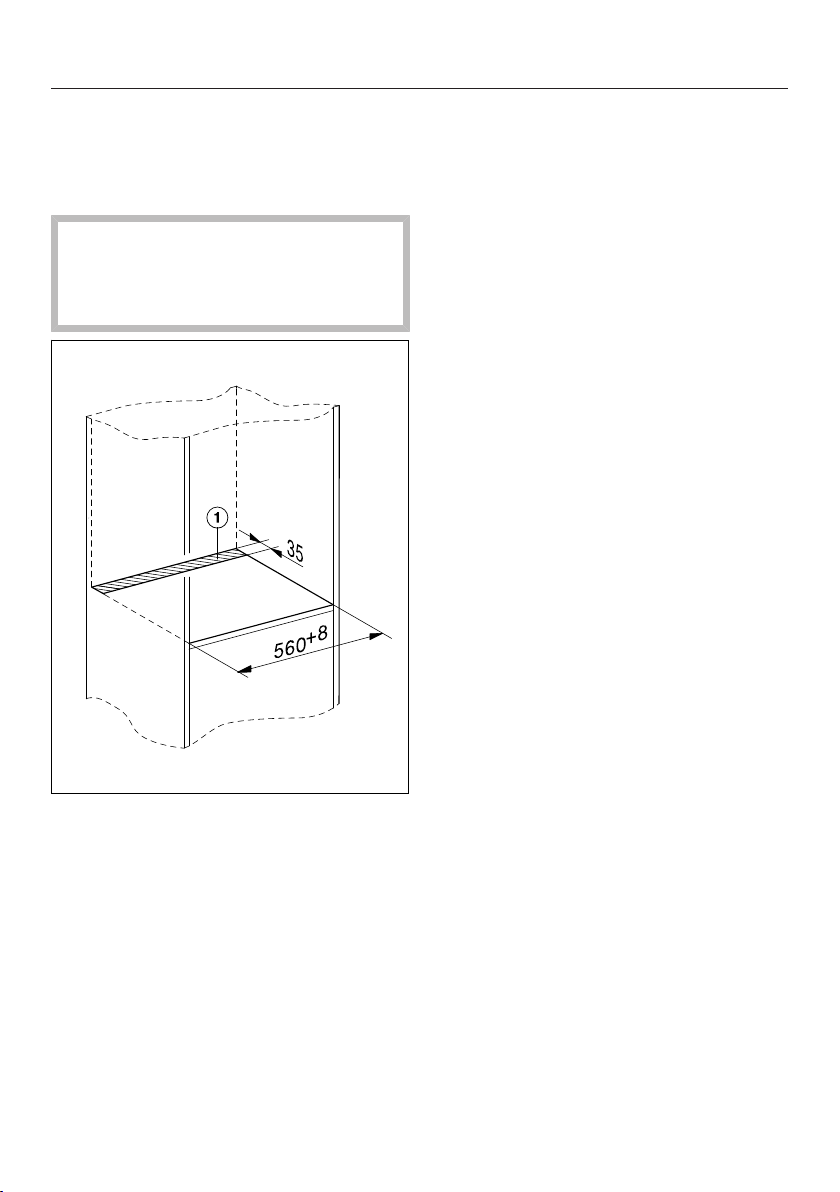
Installation
*
I
N
S
T
A
L
L
A
T
I
O
N
*
178
Installation notes
All dimensions are given in mm.
Cut-out for installing the water hoses
In order to prevent water damage
due to damaged connection hoses, a
cut-out must be made in the interim
shelf of the housing unit.
Create a cut-out in the interim
shelf on which the steam oven is to
be placed.
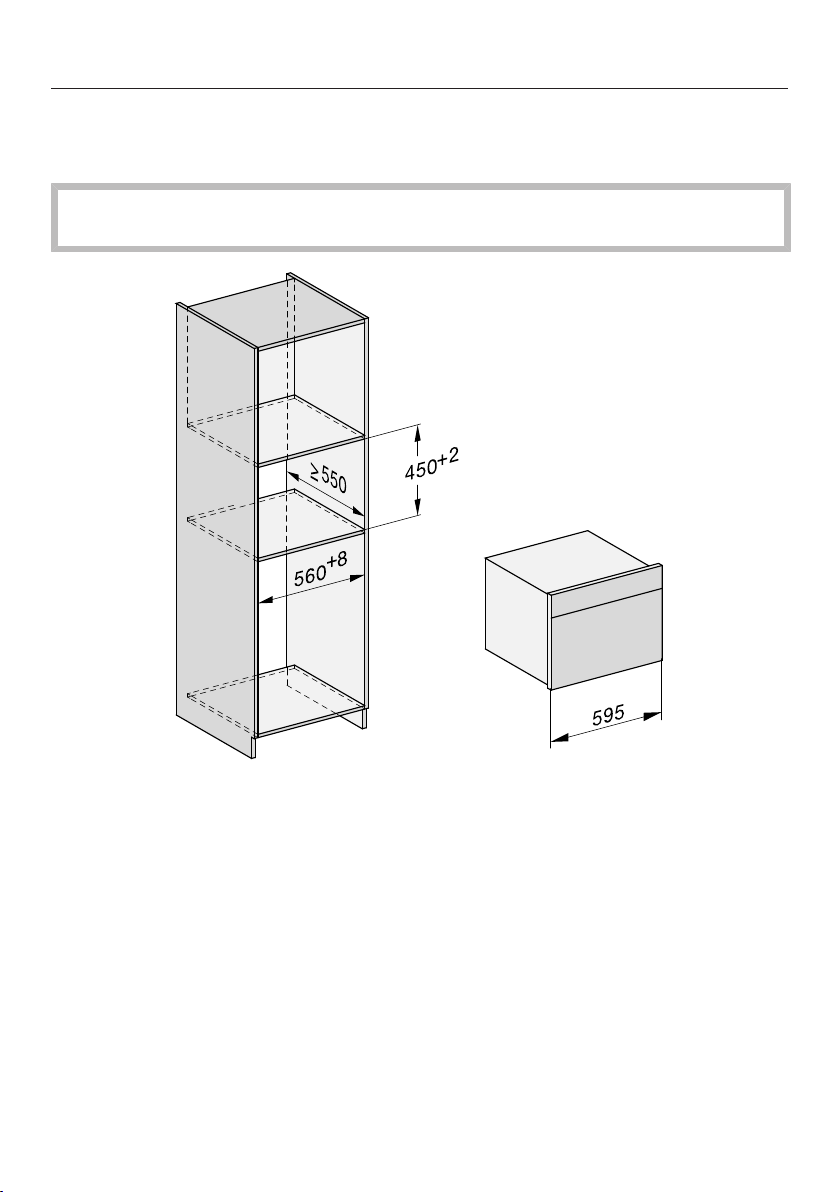
Installation
*
I
N
S
T
A
L
L
A
T
I
O
N
*
179
Building-in dimensions
Installation in a tall unit
The furniture housing unit must not have a back panel fitted behind the
building-in niche.
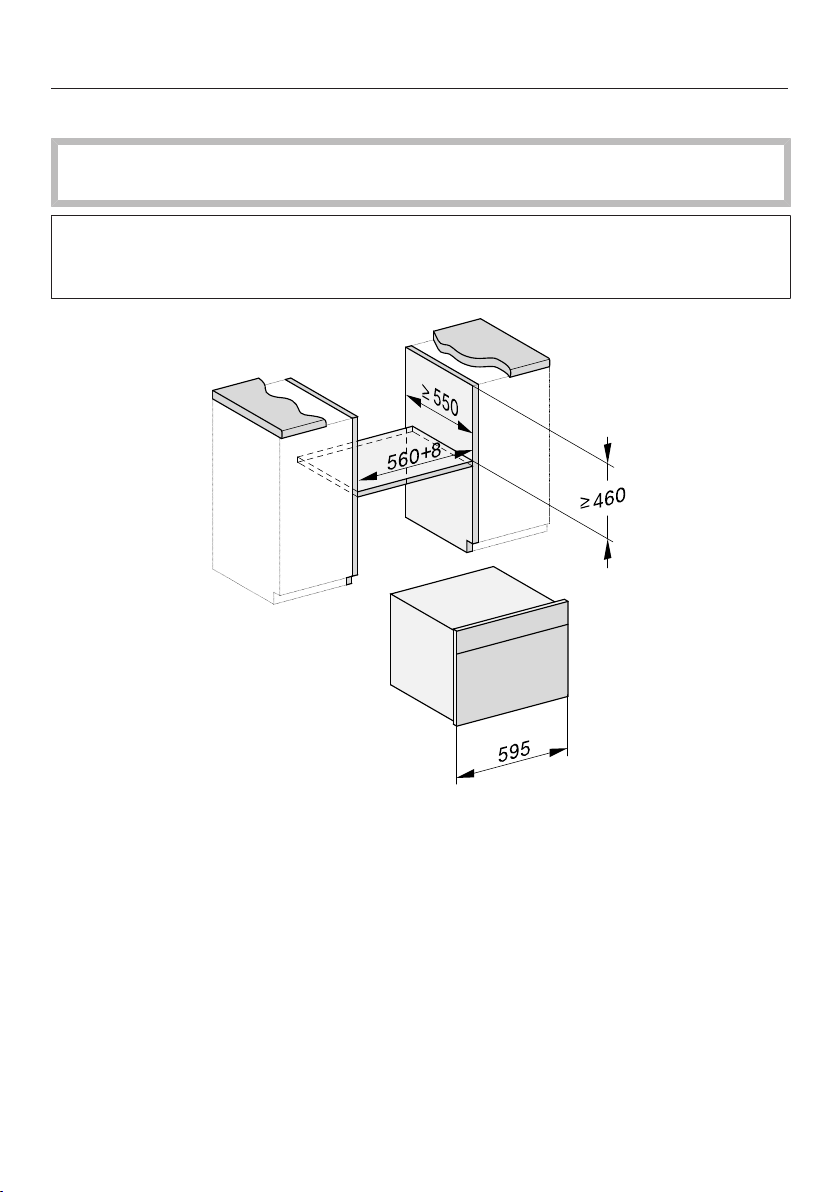
Installation
*
I
N
S
T
A
L
L
A
T
I
O
N
*
180
Installation in a base unit
The furniture housing unit must not have a back panel fitted behind the
building-in niche.
When building the oven into a base unit underneath a cooktop, please also
observe the installation instructions for the cooktop as well as the building-in
height required for the cooktop.
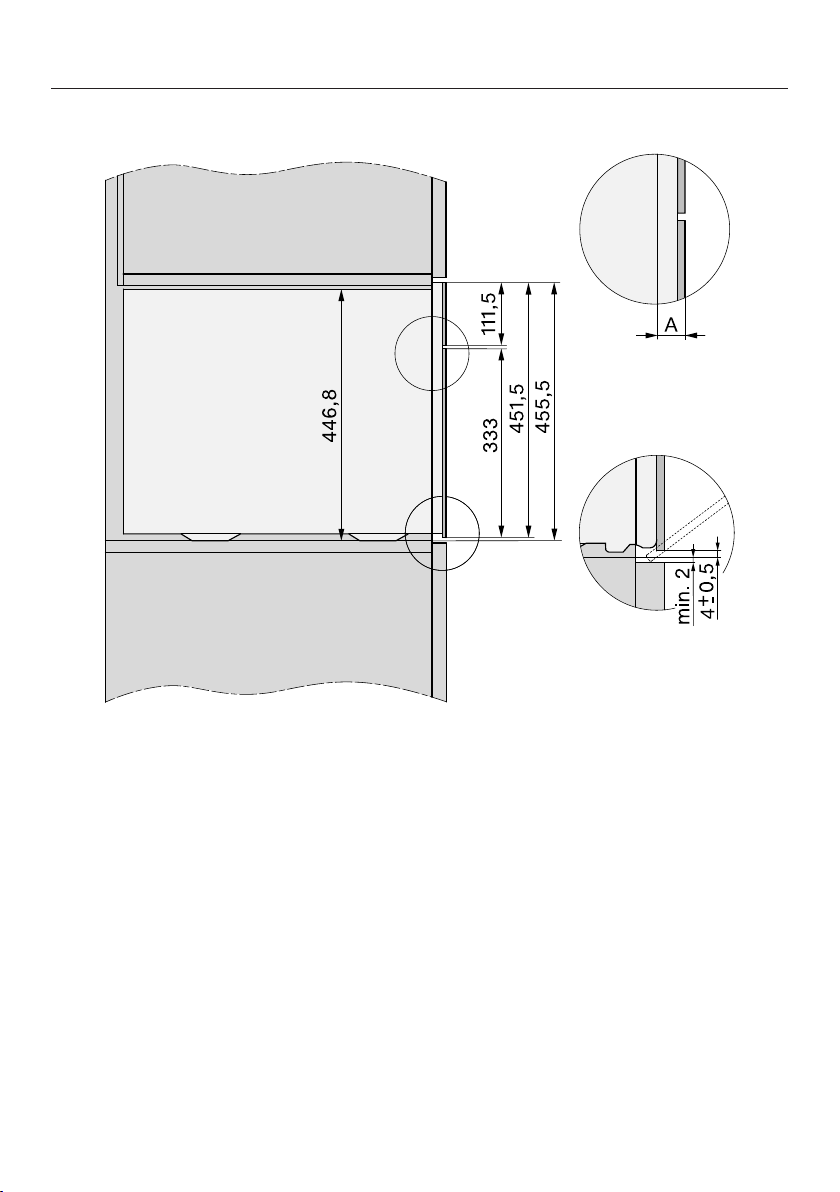
Installation
*
I
N
S
T
A
L
L
A
T
I
O
N
*
181
Side view
A Glass front: 22mm
Metal front: 23.3mm
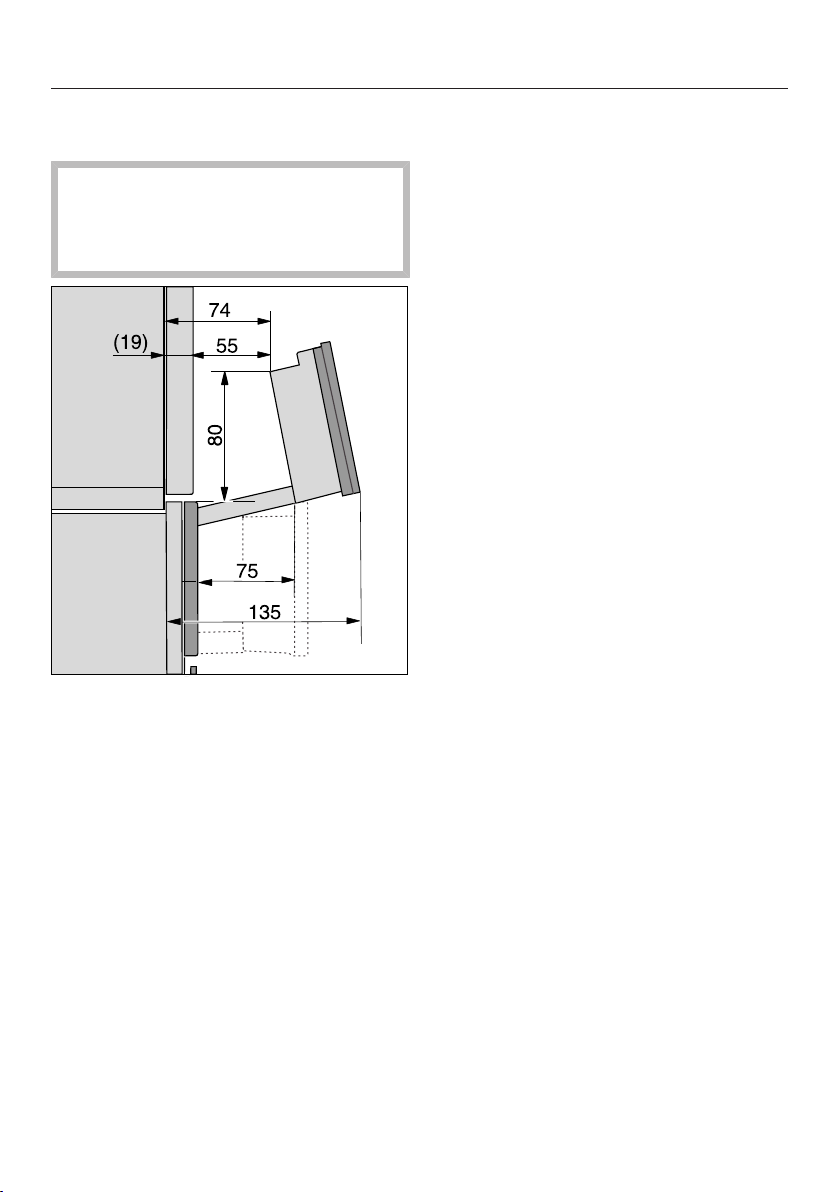
Installation
*
I
N
S
T
A
L
L
A
T
I
O
N
*
182
Room for the control panel to open
and close
The area in front of the control panel
must not be blocked by anything
(such as a door handle) that would
hinder it from opening and closing.
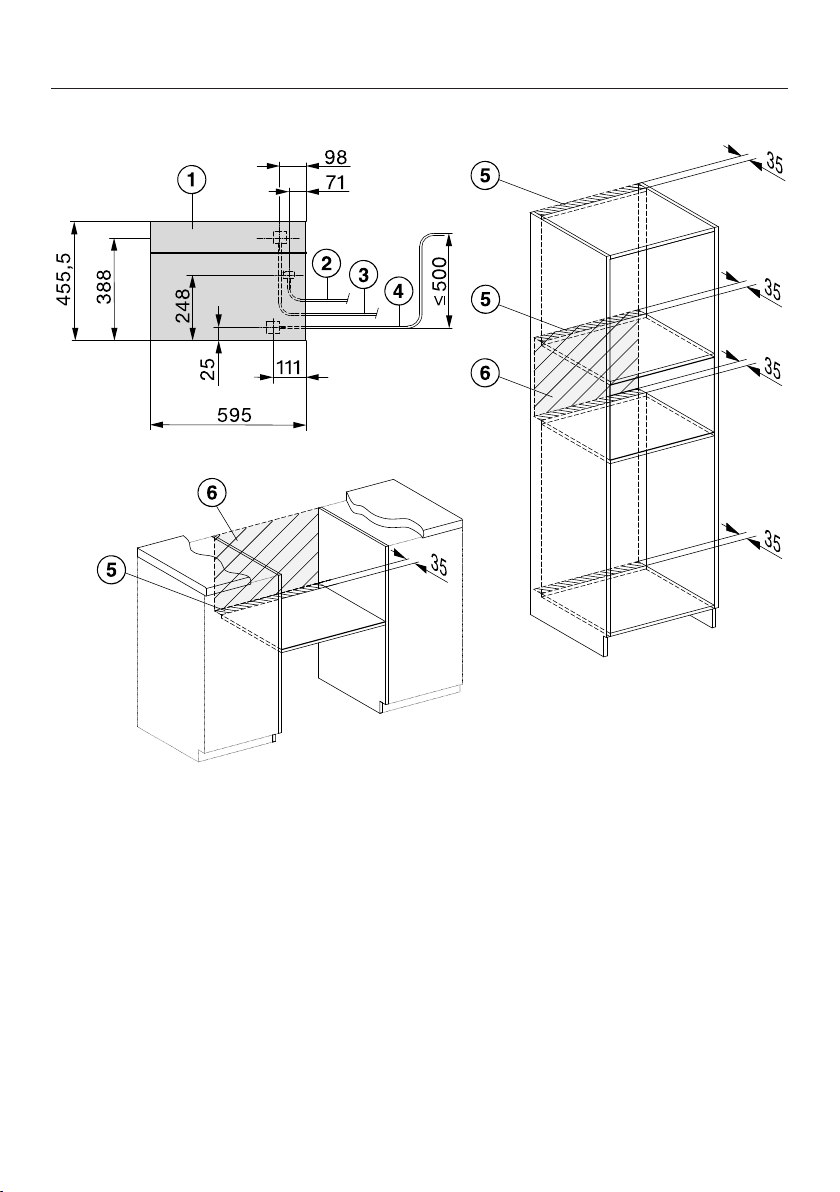
Installation
*
I
N
S
T
A
L
L
A
T
I
O
N
*
183
Connections and ventilation
a
Front view
b
Mains connection cable, L = 2000 mm
c
Stainless steel water inlet hose, L=2000mm
d
Plastic drain hose, L=3000mm
The top end of the drain hose to where it connects to the siphon must not be
higher than 500mm.
e
Ventilation cut-out, min. 180cm
2
f
No connections permitted in this area
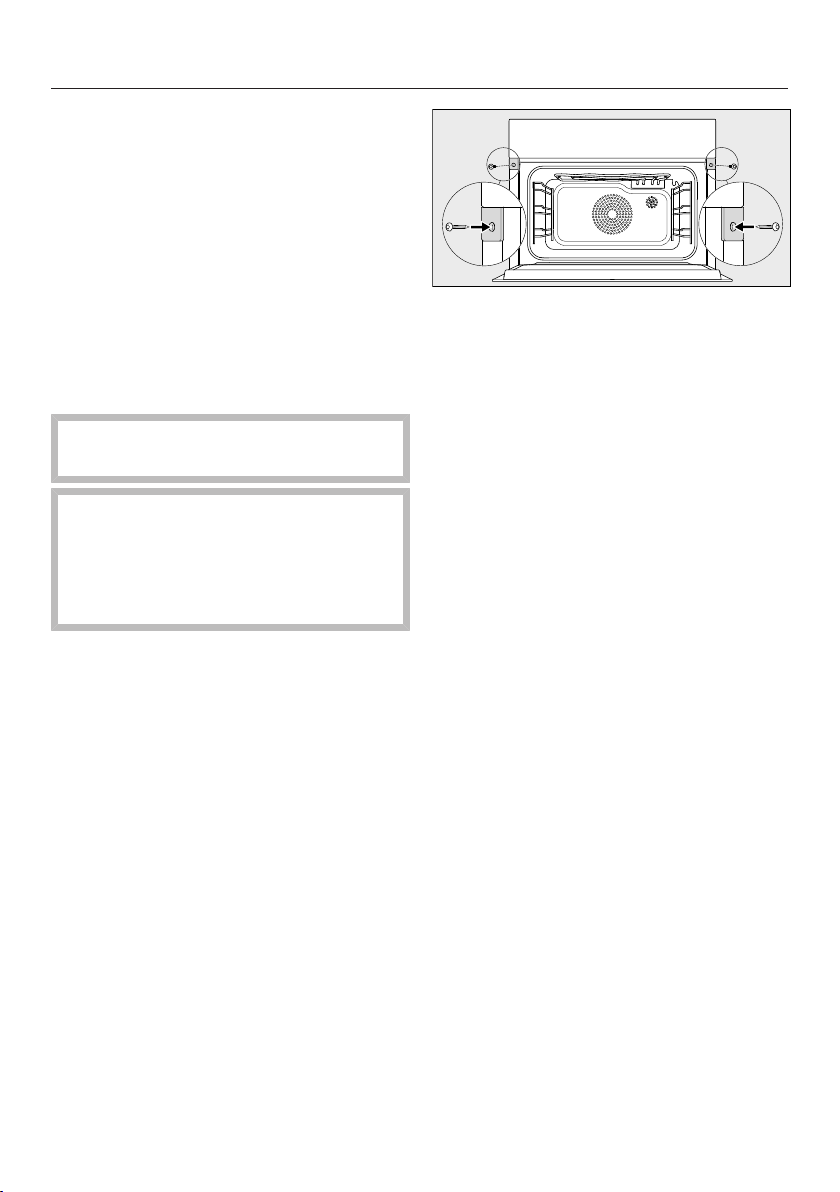
Installation
*
I
N
S
T
A
L
L
A
T
I
O
N
*
184
Installing the steam oven
Before installing and connecting the
steam oven, please read the
instructions in “Installation - Mains
water connection” and “Installation -
Drainage”.
Connect the mains connection cable
to the appliance.
Feed the water inlet hose and the
drain hose through the cut-out in the
base of the building-in niche.
Use the handle cut-outs on the side
of the casing to lift the appliance.
The steam generator may
malfunction if the steam oven is not
on a level surface.
The maximum deviation from the
horizontal that can be tolerated is 2°.
Push the steam oven into the
installation niche and align. When
doing so, make sure that the mains
connection cable and water hoses do
not get trapped or damaged.
Open the door.
Secure the steam oven to the side
walls of the unit using the wood
screws supplied (3.5x25mm).
Connect the steam oven to the water
inlet and drain (see “Installation -
Mains water connection” and
“Installation - Drainage”).
Connect the appliance to the mains
electricity supply.
Check the appliance for correct
function in accordance with the
operating instructions.

Installation
*
I
N
S
T
A
L
L
A
T
I
O
N
*
185
Mains water connection
Risk of injury and damage due to
incorrect connection.
Failing to connect the appliance
correctly can result in personal injury
and/or material damage.
The appliance may only be
connected to the water supply by a
suitably qualified technician.
Danger to health and property
due to contaminated water.
The quality of the water used must
conform to the requirements for
drinking water in the country in which
the steam oven is being used.
Connect the steam oven to the water
supply.
Connection to the water supply must
comply with the applicable
regulations in the country in which
the appliance is being installed. This
appliance must be installed
according to AS/NZS 3500.1. Back
flow prevention is already integrated
in the appliance.
The steam oven complies with local and
national regulations.
The steam oven must only be
connected to a cold water supply.
If an upstream domestic water
softening unit is connected, please
make sure that the conductivity level
of the water is maintained.
Water damage due to
contamination.
Impurities in the water supply may
accumulate in the valve of the steam
oven. The valve can no longer close
and water is streaming out.
Flush the water lines before
connecting the steam oven or when
working on the water supply line.
The water connection pressure needs
to be between 100kPa (1bar) and
600kPa (6bar). If the pressure is higher
than 600kPa, a pressure reducing valve
must be fitted.
A tap must be provided between the
stainless steel hose and the household
water supply to ensure that the water
supply can be disconnected if
necessary. The tap must be easily
accessible after the steam oven has
been built in.
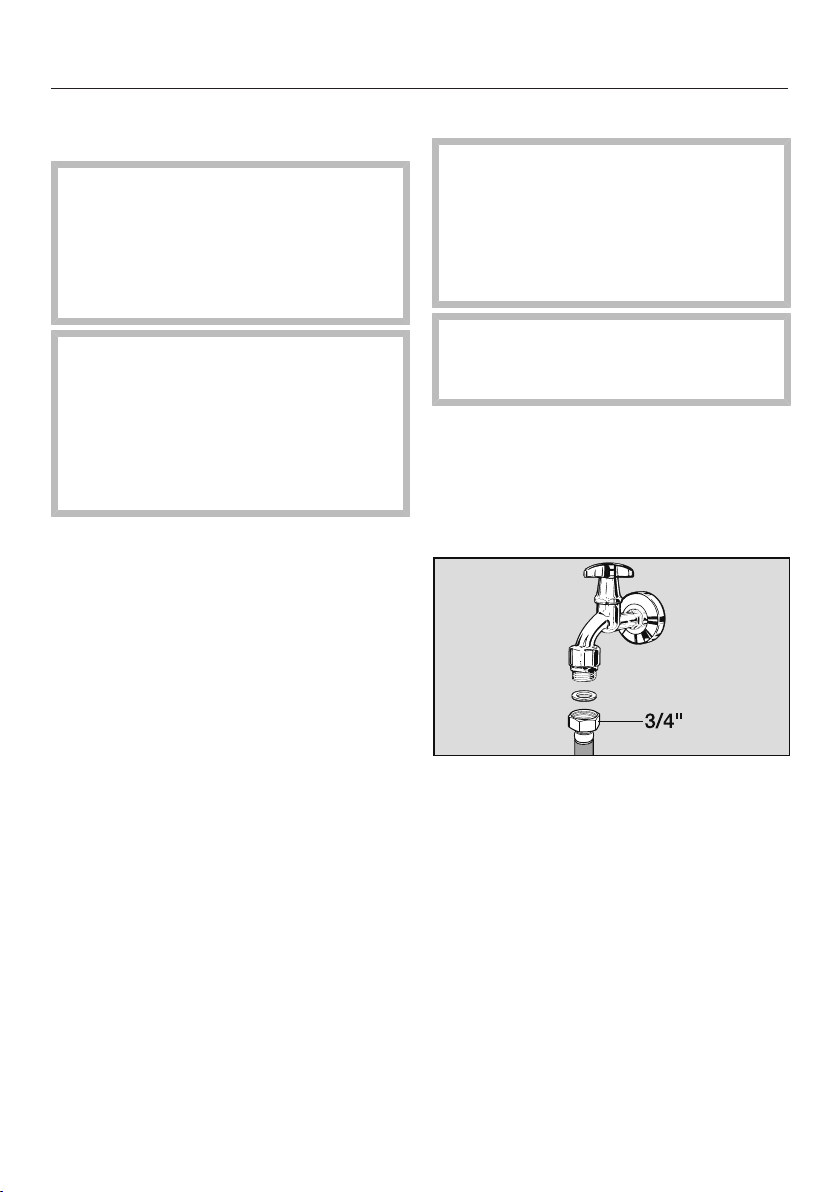
Installation
*
I
N
S
T
A
L
L
A
T
I
O
N
*
186
Fitting the stainless steel hose to the
steam oven
Only use the stainless steel hose
supplied. The stainless steel hose
must not be shortened, extended or
replaced by another hose.
Old or used hoses must not be
connected to the steam oven.
The stainless steel hose must only
be replaced by an original Miele
spare part. A stainless steel hose
which is suitable for use with
drinking water is available to order
from Miele (see back cover for
contact details).
The length of the stainless steel hose
supplied is 2000mm.
Remove the cover cap from the
mains water connection at the back
of the steam oven.
Take the angled end of the stainless
steel hose and check whether there is
a washer. Fit one if necessary.
Screw the stainless steel hose
coupling nut onto the threaded union.
Ensure that it is screwed into position
correctly and watertight.
Connecting the water supply
Disconnect the steam oven from
the mains electricity supply before
connecting it to the water supply.
Turn off the water supply at the tap
before connecting the steam oven to
the water supply.
The tap must be easily accessible
after the steam oven has been built
in.
To connect the steam oven to the water
supply, a tap with a 3/4" connection is
required.
Check that a washer is present. Fit
one if necessary.
Connect the stainless steel hose to
the tap.
Ensure that it is screwed into position
correctly.
Turn on the tap slowly and check for
leaks.
Correct the position of the washer
and union if necessary.

Installation
*
I
N
S
T
A
L
L
A
T
I
O
N
*
187
Drainage
This appliance must be connected to
the drainage system in accordance
with AS/NZS 3500.2.
The drainage siphon must not be
located higher than the drain hose
connection point on the steam oven.
This is to ensure that water can drain
out completely after a programme.
The top end of the drain hose to
where it connects to the siphon must
not be higher than 500mm.
The drain hose supplied must not be
shortened.
The drain hose can be connected to
– a surface mounted or flush-mounted
siphon with a fixed hose connection,
or
– the connection point on a sink
drainage siphon.
The temperature of the drainage water
is 70°C.
Only genuine original Miele hoses can
be used with this appliance.
Connecting the drain hose
Connect the drain hose to the nozzle
on the siphon.
Then secure the drain hose with the
hose clip.

Installation
*
I
N
S
T
A
L
L
A
T
I
O
N
*
188
Electrical connection
We recommend that you connect the
steam oven to the electricity supply
using a suitable switched electrical
socket. This simplifies servicing. The
socket must be easily accessible after
the steam oven has been installed.
Risk of damage from incorrect
connection.
Danger of injury! Miele cannot be
held liable for unauthorised
installation, maintenance and repair
work as this can be dangerous to
users.
Miele cannot be held liable for
damage or injury (e.g. electric shock)
caused by the lack of or inadequacy
of an on-site earthing system.
If the plug is removed from the
connection cable or if the cable is
supplied without a plug, the steam
oven must be connected to the
electrical supply by a suitably
qualified and competent electrician.
If the socket is no longer accessible,
or if a hard-wired connection is
planned, an additional means of
disconnection must be provided for
all poles. Suitable means of
disconnection include switches with
an all-pole contact gap of at least
3mm. These include miniature circuit
breakers, fuses and relays. The
connection data is given on the data
plate. Please ensure this information
matches the household mains
electricity supply.
After installation, ensure that all
electrical components are shielded
and cannot be accessed by users.
Total power output
See data plate.
Connection data
The connection data is given on the
data plate. Please ensure this
information matches the household
mains supply.
Residual current device
For extra safety, it is advisable to
protect the steam oven with a suitable
residual current device (RCD) with a trip
range of 30mA.
Replacing the mains connection
cable
If replacing the mains connection cable,
it must be replaced with a cable type
H05VV-F, available from Miele.
Disconnecting from the mains
Risk of electric shock!
There is a risk of electric shock if the
appliance is connected to the mains
electricity supply during repair or
service work.
After disconnection, ensure the
appliance cannot be switched back
on by mistake.

Copyright and licences
189
For the purpose of operating and controlling the appliance, Miele uses proprietary
or third-party software that is not covered by open source licensing terms. These
items of software/software components are protected by copyright. The copyright
powers of Miele and third parties must be respected.
In addition, the appliance contains software components which are distributed
under open source licensing terms. You can access these open source
components along with the associated copyright notices, copies of the valid
licensing terms and any further information in the appliance under Settings| Legal
information| Open source licences. The liability and warranty arrangements for the
open source licences displayed at this location only apply in relation to the
respective rights holders.
The appliance contains, in particular, software components which are licensed by
the rights holders under the GNU General Public License, version2, or the GNU
Lesser General Public License, version2.1. For a period of at least 3years
following the purchase or delivery of the appliance, Miele shall provide you or third
parties with a machine-readable copy of the source code for the open source
components contained in the appliance, which are licensed under the terms of the
GNU General Public License, version2, or the GNU Lesser General Public License,
version2.1. The source code shall be made available on a data carrier (CD-ROM,
DVD or USB stick). To obtain this source code, please contact us, specifying the
product name, serial number and purchase date, by sending us an e-mail
([email protected]) or writing to the following address:
Miele & Cie. KG
Open Source
GTZ/TIM
Carl-Miele-Straße 29
33332 Gütersloh, Germany
We wish to draw your attention to the limited warranty for the benefit of rights
owners under the terms of the GNU General Public License, version2, and the
GNU Lesser General Public License, version2.1:
This program is distributed in the hope that it will be useful, but WITHOUT ANY
WARRANTY, without even the implied warranty of MERCHANTABILITY of FITNESS
FOR A PARTICULAR PURPOSE. See the GNU General Public License and GNU
Lesser General Public License for more details.


www.miele.com.au
Miele Experience Centre and
Head Office Melbourne:
1 Gilbert Park Drive
Knoxfield, VIC 3180
Miele Experience Centre South Melbourne:
206-210 Coventry Street
South Melbourne, VIC 3205
Miele Experience Centre and Office Sydney:
3 Skyline Place
Frenchs Forest, NSW 2086
Miele Experience Centre and Office Brisbane:
Tenancy 4C, 63 Skyring Terrace
Newstead, QLD 4006
Miele Experience Centre and Office Perth:
83-85 Sir Donald Bradman Drive
Hilton, SA 5033
205-207 Stirling Highway
Claremont, WA 6010
Miele Experience Centre and Office Adelaide:
Miele Australia Pty. Ltd.
Miele New Zealand Limited
Level 2, 10 College Hill
Freemans Bay, Auckland 1011
Miele Experience Centre
Auckland:
8 College Hill
Freemans Bay, Auckland 1011
Telephone:
0800 464 353 (0800 4 MIELE)
www.miele.co.nz
Miele Global Headquarters
Germany
Miele & Cie. KG
Carl-Miele-Straße 29
33332 Gütersloh
Federal Republic of Germany
Head Office:
IRD 98 463 631
ACN 005 635 398
ABN 96 005 635 398
Miele Experience Centre Gold Coast:
131 Ferry Road
Southport, QLD 4215

M.-Nr. 11 218 740 / 00en-AU, NZ
DGC7845X

