
Owner's
Manual
Manual
del
Propietario
SLIDER/CASEMENT
AIR
CONDITIONER
HORIZONTAL/MARCO
ACONDICIONADOR
DE
AIRE
Model,
Modelo
580.
74066
580.
74126
Sears,
Roebuck
and
Co.,
Hoffman
Estates,
IL
60179
U.S.A.
www.sears.com
ENGLISH
ESPANOL
-2-
FULL
ONE
YEAR
WARRANTY
ON
ROOM
AIR
CONDITIONER
For
one
year
from
the
date
of
purchase,
when
this
air
conditioner
is
operated
and
maintained
for
normal
room
cooling
according
to
instructions
in
this
owner's
manual,
Sears
will
repair
this
air
conditioner,
free
of
charge,
if
defective
in
material
or
workmanship.
FULL
FIVE-YEAR
WARRANTY
ON
SEALED
REFRIGERATION
SYSTEM
For
five
years
from
the
date
of
purchase,
when
this
air
conditioner
is
operated
and
maintained
for
normal
room
cooling
according
to
instructions
in
this
owner's
manual,
Sears
will
repair
the
sealed
refrigeration
system
(consisting
of
refrigerant,
connecting
tubing,
and
compressor),
free
of
charge,
if
defective
in
material
or
workmanship.
WARRANTY
SERVICE
IS
AVAILABLE
BY
CONTACTING
SEARS
SERVICE
AT
1-800-4-MY-HOME.
Warranty
coverage
applies
only
to
air
conditioners
used
for
non-commercial,
private
household
purposes.
This
warranty
applies
only
while
this
product
is
in
use
in
the
United
States.
This
warranty
gives
you
specific
legal
rights,
and
you
may
also
have
other
right
which
vary
from
state
to state.
Sears,
Roebuck
and
Co.,
D/817WA,
Hoffman
Estates,
IL
60179
U.S.A.
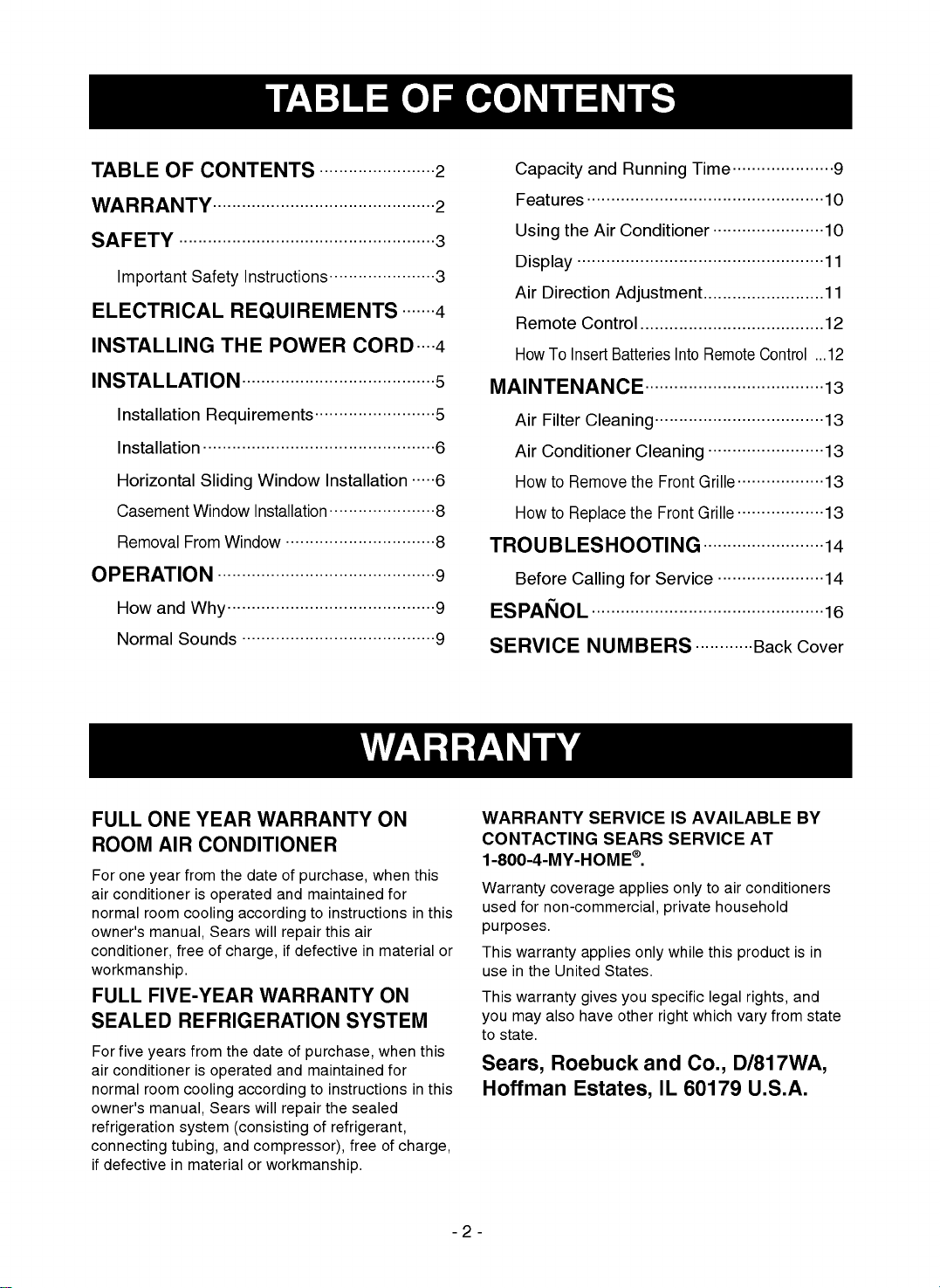
TABLE
OF
CONTENTS
........................2
WARRANTY..............................................2
SAFETY
.....................................................3
Important
Safety
Instructions......................3
ELECTRICAL
REQUIREMENTS
.......4
INSTALLING
THE
POWER
CORD
....4
INSTALLATION........................................5
Installation
Requirements.........................5
Installation
................................................6
Horizontal
Sliding
Window
Installation
.....6
Casement
Window
Installation
......................8
Removal
From
Window
...............................8
OPERATION
.............................................9
How
and
Why...........................................9
Normal
Sounds
........................................9
Capacity
and
Running
Time
.....................9
Features
.................................................10
Using
the
Air
Conditioner
.......................10
Display
...................................................11
Air
Direction
Adjustment.........................11
Remote
Control
......................................12
How
To
Insert
Batteries
Into
Remote
Control
...12
MAINTENANCE.....................................13
Air
Filter
Cleaning...................................13
Air
Conditioner
Cleaning
........................13
How
to
Remove
the
Front
Grille
..................13
How
to
Replace
the
Front
Grille
..................13
TROUBLESHOOTING.........................14
Before
Calling
for
Service
......................14
ESPANOL
................................................16
SERVICE
NUMBERS
............Back
Cover

SAFETY
-3-
ENGLISH
IMPORTANT
SAFETY
INSTRUCTIONS
The
safety
instructions
below
will
tell
you
how
to
use
your
room
air
conditioner
to
avoid
harm
to
yourself
or
damage
to
your
ROOM
AIR
CONDITIONER.
FOR
YOUR
SAFETY
Do
not
store
or
use
gasoline
or
other
flammable
vapors
and
liquids
in
the
vicinity
of
this
or
any
other
appliance.
Read
product
labels
for
flammability
and
other
warnings.
PREVENT
ACCIDENTS
To
reduce
the
risk
of
fire,
electrical
shock,
or
injury
to
persons
when
using
your
air
conditioner,
follow
basic
precautions,
including
the
following:
?
Be
sure
the
electrical
service
is
adequate
for
the
model
you
have
chosen.
?
If
the
air
conditioner
is
to
be
installed
in
a
window,
you
will
probably
want
to
clean
both sides
of
the
glass
first.
If
the
window
is
a
triple-track
type
with
a
screen
panel
included,
you
may
want
to
remove
the
screen
completely
before
installation.
?
Be
sure
the
air
conditioner
has
been
securely
and
correctly
installed
according
to
the
separate
installation
instructions
provided
with
this
manual.
Save
this
manual and
installation
instructions
for
possible
future
use
in
removing
or
reinstalling
this
unit.
?
Use
gloves
when
handling
the
air
conditioner.
Be
careful
to
avoid
cuts
from
sharp
metal
fins
on
front
and
rear
coils.
ELECTRICAL
INFORMATION
The
complete
electrical
rating
of
your
new
room
air
conditioner
is
stated
on
the
serial
plate.
Refer
to
the
rating
when
checking
the
electrical
requirements.
?
Be
sure
the
air
conditioner
is
properly
grounded.
To
minimize
shock
and
fire
hazards,
proper
grounding
is
important.
The
power
cord
is
equipped
with
a
three-prong
grounding
plug
for
protection
against
shock
hazards.
?
Your
air
conditioner
must
be
plugged
into
in
a
properly
grounded
wall
receptacle.
If
the
wall
receptacle
you
intend
to
use
is
not
adequately
grounded
or
protected
by
a
time
delay
fuse
or
circuit
breaker,
have
a
qualified
electrician
install
the
proper
receptacle.
?
Do
not
run
air
conditioner
with
a
protective
covering.
This
could
result
in
mechanical
damage
within
the
air
conditioner.
?
Do
not
use an
extension
cord
or
an
adapter
plug.
ENERGY
SAVING
IDEAS
?
The
capacity
of
the
room
air
conditioner
must
fit
the
room
size
for
efficient
and
satisfactory
operation.
?
Install
the
room
air
conditioner
on
the
shady
side
of
your
home.
A
window
that
faces
north
is
best
because
it
is
shaded
most
of
the
day.
?
Do
not
block
air
flow
inside
with
blinds,
curtains,
or
furniture,
or
outside
with
shrubs,
enclosures,
or
other
buildings.
?
Close
the
floor
and
wall
registers
and
the
fireplace
damper
so
cool
air
does
not
escape
up
the
chimney
and
into
the
duct
work.
?
Keep
blinds
and
drapes
in
other
windows
closed
during
the
sunniest
part
of
the
day.
?
Clean
the
air
filter
as
recommended
in
the
MAINTENANCE
section
of
this
manual.
?
Proper
insulation
and
weather
stripping
in
your
home
will
help
keep
warm
air
out
and
cool
air
in.
?
External
house
shading
with
trees,
plants
or
awnings
will
help
reduce
the
air
conditioner's
work
load.
?
Operate
heat
producing
appliances
such
as
ranges,
washers,
dryers,
and
dishwashers
during
the
coolest
part
of
the
day.
Avoid
fire
hazard
or
electric
shock.
Do
not
use
an
extension
cord
or
an
adapter
plug.
Do
not
remove
any
prong
from
the
power
cord.
Do
not,
under
any
circumstances,
cut,
remove,
or
bypass
the
grounding
prong
from
this
plug.
Grounding
type
wall
receptacle
Power
supply
cord
with
3-prong
grounding
plug

ELECTRICAL
REQUIREMENTS
INSTALLING
THE
POWER
CORD
-4-
OBSERVE
ALL
LOCAL
CODES
AND
ORDINANCES.
DO
NOT,
UNDER
ANY
CIRCUMSTANCES,
REMOVE
THE
POWER
SUPPLY
CORD
GROUND
PRONG.
ELECTRICAL
GROUND
IS
REQUIRED
ON
THIS
APPLIANCE.
A
115-volt
60
Hz,
AC
only,
15A
fused
and
properly
grounded
electrical
supply
is
required.
A
time
delay
fuse
or
time
delay
circuit
breaker
is
recommended.
Use
a
dedicated
circuit,
serving
only
this
appliance.
DO
NOT
USE
AN
EXTENSION
CORD.
RECOMMENDED
GROUNDING
METHOD
For
your
personal
safety,
this
appliance
must
be
grounded.
This
appliance
has
a
power
supply
cord
with
a
3-prong
grounding
plug.
To
minimize
possible
shock
hazard,
the
cord
must
be
plugged
into
a
mating
grounding
type
wall
receptacle
and
grounded
in
accordance
with
the
National
Electrical
Code
(ANSI/NFPA
70)
latest
edition
and
all
local
codes
and
ordinances.
If
a
mating
wall
receptacle
is
not
available,
it
is
the
personal
responsibility
and
obligation
of
the
customer
to
have
a
properly
grounded
3-prong
wall
receptacle
installed
by
a
qualified
electrician.
Electrical
Shock
Hazard
Plug
into
a
grounded
3
prong
outlet.
Do
not
remove
ground
prong.
Do
not
use
an
adapter.
Do
not
use
an
extension
cord.
Failure
to
follow
these
instructions
can
result
in
death,
fire,
or
electrical
shock.
3-prong
grounding
plug
Ground
prong
Power
supply
cord
3-prong
grounding
type
wall
receptacle
Fasten
the
stopper
using
Type
A
screw,
and
lead
the
power
cord
out
through
slit
"A".
Fasten
the
stopper
using
left
screw
hole,
and
rotate
properly
to
lead
the
power
cord
out
through
slit
"B".
USING
SLIT
"A"
USING
SLIT
"B"
You
can
choose
between
the
two
methods
below
according
to
your
preference
and
window
sill
shape.
A
Power
cord
Power
cord
B
Screw
(Type
A)
Screw
(Type
A)

INSTALLATION
-5-
ENGLISH
INSTALLATION
REQUIREMENTS
These
instructions
are
for
a
horizontal
sliding
or
a
casement
window.
The
electrical
outlet
must
be
within
reach
of
the
power
cord.
Side
louvers
and
the
rear
of
the
air
conditioner
must
have
clear
air
space
to
allow
enough
air
flow
through
the
condenser
for
heat
remove.
The
rear
of
the
unit
must
be
outdoors,
not
inside
a
building
or
garage.
ELECTRICAL
SERVICE
Check
your
available
electrical
service.
The
power
supply
available
must
be
the
same
as
that
shown
on
the
unit
nameplate
(found
on
right
side
of
cabinet).
All
models
are
equipped
with
a
3-prong
service
plug
to
provide
proper
service
and
safe
positive
grounding.
Do
not
change
plug
in
any
way.
Do
not
use
an
adapter
plug.
If
your
present
wall
outlet
does
not
match
your
plug,
call
a
qualified
electrician
to
make
the
necessary
corrections.
SAVE
CARTON
and
this
OWNER'S
MANUAL
for
future
reference.
The
carton
is
the
best
way
to
store
unit
during
winter
or
when
not
in
use.
21"
min.
40
1/2"
max.
15
1/2"
min.
Horizontal
sliding
window
21
1/2"
min.
15
1/2"
min.
16
1/2"
max.
Casement
window
Inlet
Grille
To
avoid
risk
of
personal
injury,
property
damage,
or
product
damage
due
to
the
weight
of
this
device
and
sharp
edges
that
may
be
exposed:
?
Air
conditioners
covered
in
this
manual
pose
an
excessive
weight
hazard.
Two
or
more
people
are
needed
to
move
and
install
the
unit.
To
prevent
injury
or
strain,
use
proper
lifting
and
carrying
techniques
when
moving
unit.
?
Carefully
inspect
location
where
air
conditioner
will
be
installed.
Be
sure
it
will
support
the
weight
of
the
unit
over
an
extended
period
of
time.
?
Handle
air
conditioner
with
care.
Wear
protective
gloves
whenever
lifting
or
carrying
the
unit.
AVOID
the
sharp
metal
fins
of
front
and
rear
coils.
?
Make
sure
air
conditioner
does
not
fall
during
installation.
CAUTION
NOTE!
Before
using
the
air
conditioner
secure
the
front
grille
with
two
screws
enclosed
with
the
owner's
manual.
1.
Open
the
inlet
grille
downward
and
remove
the
air
filter.
2.
Fasten
the
front
grille
with
screws.
3.
Reinstall
the
air
filter.
4.
Close
the
inlet
grille.

INSTALLATION
HARDWARE
INSTALLATION
Pick
a
location
that
will
allow
the
air
conditioner
to
blow
the
cold
air
into
the
area
you
want.
Windows
used
for
installation
must
be
strong
enough
to
support
the
weight
of
the
air
conditioner.
Good
installation
with
special
attention
to
the
proper
position
of
the
unit
will
lessen
the
chance
that
service
will
be
needed.
When
cooling
more
than
one
room,
installation
location
is
very
important.
To
cool
your
rooms,
cold
air
must
be
blown
from
the
air
conditioner
in
a
straight
path.
HORIZONTAL
SLIDING
WINDOW
INSTALLATION
Loosely
attach
the
Support
Bracket
to
the
bottom
of
Bracket
using
Bolts,
Washer,
and
Nuts.
Attach
the
Leveling
bolt
and
nut.
(Fig.
1)
Remove
protective
backing
from
Window
Track
Seal
and
apply
seal
to
window
track.
(Fig.2)
Measure
and
lightly
mark
a
line
8-1/4
inches
from
window
jamb.
Center
the
Support
Bracket
assembly
on
the
window
track
and
fasten
with
4
Type
C
screws.(Fig.
2)
INSTALLATION
-6-
1
2
3
8
7
910
3
12
11
16
17
1
6
5
13
15
4
14
2
Bracket
Support
Bracket
Nut
Washer
Leveling
Bolt
&
Nut
Bolt
81/4
inches
Window
Jamb
Window
Track
Window
Track
Seal
Type
C
screw
FIG.
1
FIG.
2
REQUIRED
TOOLS:
?
Tight
Fitting
gloves
?
Standard
screwdriver
?
Phillips
screwdriver
?
Pliers
?
Sharp
knife
?
3/8-inch
open
end
wrench
or
adjustable
wrench
?
1/4-inch
hex
socket
and
ratcher
?
Tape
measure
?
Electric
drill
?
1/4-inch
drill
bit
NO.
NAME
OF
PARTS
Q'TY
1
Curtain
1
2
Curtain
Frame
1
3
Upper
Guide
1
4
Side
Guide
2
5
Support
Bracket
1
6
Bracket
1
7
Leveling
bolt
&
nut
1
8
Bolt
2
9
Nut
2
10
Washer
2
11
Side
Guide
seal
1
12
Foam
Seal
Strip
1
13
Window
Track
Seal
1
14
L
Bracket
1
15
Screw
(Type
A)
9
16
Screw
(Type
B)
3
17
Screw
(Type
C)
8

Put
the
Support
Bracket
against
the
outside
wall
and
tighten
the
Bolts
on
top
of
the
Bracket.
Adjust
the
Leveling
Bolt
so
that
the
air
conditioner
will
be
installed
with
a
very
slight
tilt
(about
1/4")
downward
toward
the
outside
for
proper
drainage.
Tighten
the
nut.
(Fig.
3)
NOTE:
DO
NOT
drill
a
hole
in
the
bottom
of
the
base
pan.
The
air
conditioner
is
designed
to
operate
with
the
bottom
of
the
base
pan
approximately
half-full
of
water.
Fasten
Side
Guides
to
the
sides
of
the
Air
Conditioner
using
3
Type
A
screws
per
Guide.
Start
with
first
screw
at
middle
of
Guide.
(Fig.
4)
Fasten
Upper
Guide
on
the
top
of
the
Air
Conditioner
using
3
Type
A
screws.
(Fig.
4)
Measure
height
of
window
opening
from
top
of
Bracket
assembly
as
shown
Fig.
5.
Subtract
20-3/4
inches.
Mark
this
measurement
on
Curtain
and
cut
the
Curtain.
(Fig.
5)
Slide
Curtain
into
Curtain
Frame.
Slide
Curtain
Frame
assembly
into
side
Guides
of
the
Air
Conditioner
cabinet.
Make
sure
Curtain
is
firmly
enclosed
on
all
sides
by
the
Frame.
(Fig.
6)
Cut
side
Guide
seal
into
2
equal
lengths.
Remove
protective
backing
and
apply
it
to
the
rear
side
of
cabinet
Side
Guides,
starting
just
below
Curtain
Frame
assembly.
Pinch
off
excess
length
so
seal
is
even
with
the
bottom
of
side
Guide.
(Fig.
7)
ENGLISH
-7-
INSTALLATION
FIG.
5
6
7
8
9
Fastening
Side
Guides
Upper
Guide
Side
Guide
FIG.
4
Curtain
Frame
Curtain
Apply
weather
seal
to
side
guides
just
below
edge
of
Curtain
Frame.
4
FIG.
6
FIG.
7
About
1/4"
Outside
Wall
FIG.
3
5

Place
Air
Conditioner
in
window
opening.
It
should
sit
on
Bracket
assembly
so
that
Curtain
Frame
and
cabinet
Side
Guides
are
against
top
and
side
window
jambs.
Mate
front
of
Bracket
with
Base
Guide
attached
to
the
bottom
of
base
pan.
Drill
1/8
inch
holes
in
window
track
through
the
existing
holes
on
Base
Guide.
Screw
4
Type
C
screws
through
the
holes.
(Fig.
8)
If
this
is
a
casement
window
installation,
proceed
to
Casement
Window
Installation.
If
not,
slide
inner
window
sash
firmly
against
side
of
the
cabinet.
Drill
1/8
inch
hole
in
window
jamb
to
align
with
the
existing
holes
in
the
Curtain
Frame.
Attach
Curtain
Frame
to
window
frame
with
2
Type
B
screws.
(Fig.
8)
NOTE:
Check
all
seals
and
plug
any
remaining
air
gaps
with
a
suitable
weatherproof
caulk.
If
this
is
a
casement
window
installation,
proceed
to
Casement
Window
Installation.
If
not,
stuff
the
Foam
Seal
Strip
between
the
vertical
sash
and
the
window
glass.
(Fig.
9)
Attach
the
L
Bracket
with
a
Type
B
screw.
(Fig.
9)
CASEMENT
WINDOW
INSTALLATION
?
Installation
procedure
is
the
same
as
that
described
in
steps
1
through
11
and
step
13
of
the
Horizontal
Sliding
Window
installation.
?
If
the
window
opening
is
wider than
15-3/4
inches
you
will
need
to
install
a
filler
panel.
Make
this
panel
from
3/4
inch
thick
wood
and
run
it
the
full
length
of
the
window.
Attach
it
securely
to
the
window
frame
and
paint
it
to
protect
it
from
the
weather.
?
Since
there
is
a
wide
variety
of
casement
window
styles
and
sizes,
these
instructions
may
not
be
exactly
suited
to
your
particular
situation.
To
ensure
best
results,
have
the
work
performed
by
someone
skilled
in
installing
casement
window
air
conditioners.
REMOVAL
FROM
WINDOW
?
Turn
off
and
unplug
the
air
conditioner.
?
If
horizontal
sliding
window,
remove
the L
Bracket
from
window
frame
and
the
Foam
Seal
Strip
from
between
the
windows.
?
Remove
the
Safety
Bracket
that
you
installed
in
Step
12.
?
Unscrew
the
Curtain
Frame
from
the
window
frame.
?
Remove
air
conditioner
from
the
window
opening.
BE
CAREFUL
NOT
TO DROP
IT.
Once
removed,
set
it
safely
out
of
the
way.
?
Remove
Curtain
Frame
and
Curtain.
?
Unscrew
the
Side
Guides
and
Upper
Guide.
?
Place
unit
and
all
assembly
hardware
in
air
conditioner
shipping
carton,
and
store
in
a
clean,
dry
place.
INSTALLATION
-8-
Type
B
screw
Type
C
screw
Base
pan
Bracket
Base
Guide
Window
Track
L
Bracket
Foam
seal
strip
FIG.
8
FIG.
9
10
11
12
13
14
15
?
Air
conditioners
covered
in
this
manual
pose
an
excessive
weight
hazard.
Two
or
more
people
are
needed
to
move
and
install
the
unit.
To
prevent
injury
or
strain,
use
proper
lifting
and
carrying
techniques
when
moving
unit.
?
When
handling
the
air
conditioner,
be
careful
to
avoid
cuts
from
sharp
metal
fins
on
front
and
rear
coils.
?
Make
sure
air
conditioner
does
not
fall
during
removal.
CAUTION

HOW
AND
WHY
Your
room
air
conditioner
provides
the
following
functions
to
make
hot
weather
living
more
comfortable:
?
Cools
and
circulates
room
air.
?
Lowers
humidity
by
removing
excess
moisture.
?
Filters
out
summertime
dust,
dirt,
and
some
airborne
impurities.
The
air
conditioner
performs
these
functions
by
drawing
room
air
through
a
filter
which
traps
dust
and
dirt
particles.
The
air
then
passes
over
a
cooling
coil
which
refrigerates
the
air
and
removes
excess
moisture.
The
same
air
is
then
returned
to
the
room--
cooler,
drier,
and
cleaner.
Moisture
removed
from
the
room
air
is
carried
to
the
outside
and
evaporated.
Your
air
conditioner
is
designed
to
be
easy
to
operate
and
to
provide
plenty
of
cooling
power.
NORMAL
SOUNDS
FIG.
10
Aside
from
the
regular
fan
motor
and
compressor
sounds
coming
from
your
air
conditioner,
you
will
once
in
a
while
hear
a
pinging
sound.
This
is
the
result
of
moisture
being
picked
up
from
the
air
in
the
room
and
thrown
against
the
air
conditioner's
fan.
This
is
normal
and
should
not
be
cause
for
concern.
Also,
do
not
be
alarmed
if
you
hear
a
slight
hissing
or
gurgling
sound
coming
from
your
air
conditioner
after
it
is
off.
These
are
normal
coolant
noises.
CAPACITY
AND
RUNNING
TIME
Proper
unit
size
is
important
in
deciding
the
desired
comfort
for
the
area
you
want
to
cool.
An
undersized
unit
will
not
have
the
capability
to
cool,
leaving
the
area
uncomfortably
warm.
The
proper
size
is
determined
by
the
number
of
square
feet
in
the
area
to
be
cooled,
indoor
and
outdoor
temperature
and
humidity.
Whenever
the
heat
or
humidity
load
is
above
normal
the
air
conditioner
must
run
longer
and
more
often
to
keep
the
desired
temperature
you
have
selected,
Under
heavy
heat
load
conditions
the
air
conditioner
may
need
to
run
constantly
to
keep
the
temperature
you
want.
At
times
using
the
MED
FAN
setting
to
circulate
the
room
air
may
make
it
comfortable
even
though
the
air
is
not
being
cooled.
This
will
decrease
your
cost
of
use.
Condenser
You
may
hear
droplets
of
water
hitting
the
condenser
causing
a
pinging
or
clicking
sound.
Unit
Vibration
The
unit
may
vibrate
and
make
noise
because
of
poor
wall
or
window
construction.
Compressor
The
modern
high
efficiency
compressor
may
have
a
high
pitched
hum
or
pulsating
noise
that
cycles
on
and
off.
Fan
You
may
hear
air
movement
from
the
fan.
OPERATION
-9-
ENGLISH
FIG.
10

OPERATION
-10-
FEATURES
USING
THE
AIR
CONDITIONER
To
reduce
the
risk
of
fire,
electric
shock,
or
injury
to
persons,
read
the
important
SAFETY
instructions
section
before
operating
this
appliance.
To
begin
operating
the
air
conditioner
after
installation,
follow
these
steps:
1.
Plug
in
the
air
conditioner.
(To
prevent
electrical
hazards,
do
not
use
an
extension
cord
or
an
adapter
plug.)
2.
Set
the
exhaust
vent
to
the
CLOSE
position.
3.
Set
the
TEMP
Control
to
the
coolest
setting.
4.
Set
the
MODE
control
at
the
highest
COOL
level.
5.
Adjust
the
louvers
for
comfortable
air
flow.
6.
Once
the
room
has
cooled,
adjust
the
TEMP
and
Mode
Control
to
the
setting
you
find
most
comfortable.
NOTE
:
If
the
air
conditioner
is
turned
off,
wait
3
minutes
before
restarting.
This
allows
pressure
inside
the
compressor
to
equalize.
Failure
to
wait
3
minutes
before
restarting
may
cause
inefficient
operation.
If
you
move
the
TEMP
Control
to
a
warmer,
then
immediately
back
to
a
cooler
setting,
the
unit
will
shut
off.
Wait
3
minutes
before
restarting.
1
6
5
4
2
3
7
10
11
9
12
13
14
8
15
1.
Cabinet
2.
Air
Discharge
3.
Vertical
Air
Deflector
(Horizontal
Louver)
4.
Air
Intake
(Inlet
Grille)
5.
Air
Filter
6.
Front
Grille
7.
Control
Panel
8.
Power
Cord
9.
Evaporator
Coil
10.
Condenser
11.
Compressor
12.
Base
pan
13.
Brace
14.
Side
Louver
VENT
CONTROL
The
Vent
Control
allows
the
air
conditioner
to
either
recirculate
inside
air
(CLOSE)
or
exhaust
air
to
the
outside
(OPEN).
(FIG.
12)
?
The
CLOSE
position
is
used
when
maximum
cooling
is
desired.
It
may
also
be used
for
air
recirculation
without
cooling
when
the
air
conditioner
is
set
in
the
FAN
position.
?
The
OPEN
position
removes
stale
air
from
the
room
and
exhausts
it
to
the
outside.
Fresh
air
is
drawn
into
the
room
through
your
home's
normal
air
passages.
?
The
OPEN
or
CLOSE
position
can
be
used
with
any
fan
selection.
VENT
CLOSE
OPEN
FIG.
11
FIG.
12

OPERATION
-11-
ENGLISH
TIMER
-
SHUT-OFF
TIME
?
You
will
usually
use
shut-off
time
while
you
sleep.
?
With
unit
running,
use
Timer
to
set
number
of
hours
until
shut-off.
?
For
your
sleeping
comfort,
once
Time
is
set,
the
Temperature
setting
will
raise
2˚F
after
30
min.,
and
2°F
after
another
30
min.
?
Every
time
you
push
Timer
button,
it
advances
the
Timer
setting
as
follows:
1
Hour
2
Hours
etc.
12
Hours
maximum.
-
START
TIME
?
With
unit
not
running,
use
Timer
to
set
number
of
hours
before
unit
starts.
?
Every
time
you
push
Timer
button,
it
advances
the
Timer
setting
as
follows:
1
Hour
2
Hours
etc.
12
Hours
maximum.
POWER
?
To
turn
the
air
conditioner
ON,
push
this
button.
To
turn
the
air
conditioner
OFF,
push
the
button
again.
?
This
button
takes
priority
over
any
other
buttons.
?
When
you
first
turn
it
on,
the
unit
is
in
cool
mode,
High
fan
speed,
Temperature
setting
at
72°F.
TEMPERATURE
SETTING
?
Use
this
button
to
automatically
control
the
temperature
of
the
room.
The
temperature
can
be
set
within
a
range
of
60°F
to
86°F
by
increments
of
1°F.
MODE
-
Every
time
you
push
this
button,
it
will
shift
among
COOL,
ENERGY
SAVER
and
FAN.
-
ENERGY
SAVER
?
The
fan
stops
when
the
compressor
stops
cooling.
Approximately
every
3
minutes
the
fan
will
turn
on
and
the
unit
will
check
the
room
air
to
determine
if
cooling
is
needed.
REMOTE
CONTROL
SIGNAL
RECEIVER
FAN
SPEED
?
Every
time
you
push
this
button,
it
advances
the
setting
as
follows
:
{HIGH(F3)
LOW(F1)
MED(F2)
HIGH(F3)}
FIG.
13
FIG.
14
AUTO
RESTART
When
power
is
restored
after
an
electrical
power
failure,
the
unit
will
begin
to
run
at
its
last
setting.
AIR
DIRECTION
ADJUSTMENT
HORIZONTAL
AIR
DIRECTION
CONTROL
The
horizontal
air
direction
is
adjusted
by
moving
the
vertical
louvers
right
and
left
with
your
fingertips.
(FIG.
13)
VERTICAL
AIR
DIRECTION
CONTROL
The
vertical
air
direction
is
adjusted
by
moving
the
horizontal
louvers
up
and
down
with
your
fingertips.
(FIG.
14)
DISPLAY

OPERATION
-12-
REMOTE
CONTROL
Note:
The
Remote
Control
will
not
operate
properly
if
strong
light
shines
on
the
sensor
window
of
the
Air
Conditioner
or
if
there
are
obstacles
between
the
Remote
Control
and
the
Air
Conditioner.
Every
time
you
push
button,
you
will
hear
beep
sound
from
the
Air
Conditioner.
REMOTE CONTROL
OPERATIONS
1.
POWER
?
To
turn
the
air
conditioner
ON,
push
this
button.
To
turn
the
air
conditioner
OFF,
push
the button
again.
?
This
button
takes
priority
over
any
other
button.
?
When
you
first
turn
it
on,
the
unit
is
in
cool
mode,
High
fan
speed,
Temperature
setting
at
72˚F.
2.
TEMPERATURE
SETTING
?
Use
this
button
to
automatically
control
the
temperature
of
the
room.
The
temperature
can
be
set
within
a
range
of
60°F
to
86°F
by
increments
of
1°F.
3.
MODE
-
Every
time
you
push
this
button,
it
will
shift
among
COOL,
ENERGY
SAVER
and
FAN.
-
ENERGY
SAVER
?
The
fan
stops
when
the
compressor
stops
cooling.
Approximately
every
3
minutes
the
fan
will
turn
on
and
the
unit
will
check
the
room
air
to
determine
if
cooling
is
needed.
4.
FAN
SPEED
?
Every
time
you
push
this
button,
it
advances
the
setting
as
follows:
{High(F3)
Low(F1)
Med(F2)
High(F3)}
5.
TIMER
-
SHUT-OFF
TIME
?
You
will
usually
use
shut-off
time
while
you
sleep.
?
With
unit
running,
use
Timer
to
set
number
of
hours
until
shut-off.
?
For
your
sleeping
comfort,
once
Time
is
set,
the
Temperature
setting
will
raise
2˚F
after
30
min,
and
2°F
after
another
30
min.
?
Every
time
you
push
Timer
button,
it
advances
the
Timer
setting
as
follows:
1
Hour
2
Hours
etc.
12
Hours
maximum.
-
START
TIME
?
With
unit
not
running,
use
timer
to
set
number
of
hours
before
unit
starts.
?
Every
time
you
push
Timer
button,
it
advances
the
Timer
setting
as
follows:
1
Hour
2
Hours
etc.
12
Hours
maximum.
HOW
TO
INSERT
BATTERIES
INTO
REMOTE
CONTROL
1.
Remove
the
cover
from
the
back
of
the
remote
controller.
2.
Insert
two
batteries.
?
Be
sure
that
the
(+)
and
(-)
directions
are
correct.
?
Be
sure
that
both
batteries
are
new.
3.
Re-attach
the
cover.
?
Do
not
use
rechargeable
batteries.
Such
batteries
differ
from
standard
dry
cells
in
shape,
dimensions,
and
performance.
?
Remove
the
batteries
from
the
remote
controller
if
the
air
conditioner
is
not
going
to
be
used
for
an
extended
length
of
time.
?
In
order
to
prevent
discharge,
remove
the
batteries
from
the
remote
control
if
the
air
conditioner
is
not
going
to
be
used
for
an
extended
period
of
time.
Keep
the
remote
control
away
from
extremely
hot
or
humid
places.
To
maintain
optimal
operation
of
the
remote
control,
the
remote
sensor
should
not
be
exposed
to
direct
sunlight.
?
The
remote
control
can
be
mounted
on a
wall
using
the
mountable
holder.
Power
Temp
Fan
Speed
Timer
Mode
2
3
4
5
1
36
1
54
2
FIG.
15
FIG.
16
FIG.
17

ENGLISH
AIR
FILTER
CLEANING
The
Air
Filter
will
become
dirty
as
it
removes
dust
from
the
inside
air.
It
should
be
washed
at
least
every
2
weeks.
If
the
Air
Filter
remains
full
of
dust,
the
air
flow
will
decrease
and
the
cooling
capacity
will
be
reduced,
possibly
damaging
the
unit.
?
Pull
the
inlet
grille
forward,
grasping
both
tabs,
then
pull
out
the
air
filter.
(FIG.
18)
?
Wash
the
Air
Filter
under
the
faucet
with
warm
water.
Be
sure
to
shake
off
all
the
water
before
replacing
the
filter.
(FIG.19)
AIR
CONDITIONER
CLEANING
Clean
the
front
grille
and
inlet
grille
by
wiping
with
a
cloth
dampened
in
a
mild
detergent
solution.
(FIG.
20)
The
cabinet
may
be
washed
with
mild
soap
or
detergent
and
lukewarm
water,
then
polished
with
liquid
appliance
wax.
To
ensure
continued
peak
efficiency,
the
condenser
coils
(outside
of
the
unit)
should
be
checked
periodically
and
cleaned
if
they
become
clogged
with
soot
or
dirt
from
the
atmosphere.
Brush
or
vacuum
exterior
coils
to
remove
debris
from
fins.
HOW
TO
REMOVE
THE
FRONT
GRILLE
?
Open
the
inlet
grille
downward.
?
Remove
the
screw
securing
the
Front
Grille.
?
Push
the
grille
up
from
the
bottom
and
pull
the
top
of
the
grille
away
from
the
case
to
lift
the
top
tabs
out
of
their
slots.
HOW
TO
REPLACE
THE
FRONT
GRILLE
Attach
the
front
grille
to
the
cabinet
by
inserting
the
tabs
on
the
grille
into
the
slots
on
the
front
of
the
cabinet.
Push
the
grille
in
until
it
snaps
into
place.
Front
Grille
Inlet
Grille
MAINTENANCE
-13-
FIG.
18
FIG.
19
FIG.
21
FIG.
22
FIG.
20
-14-
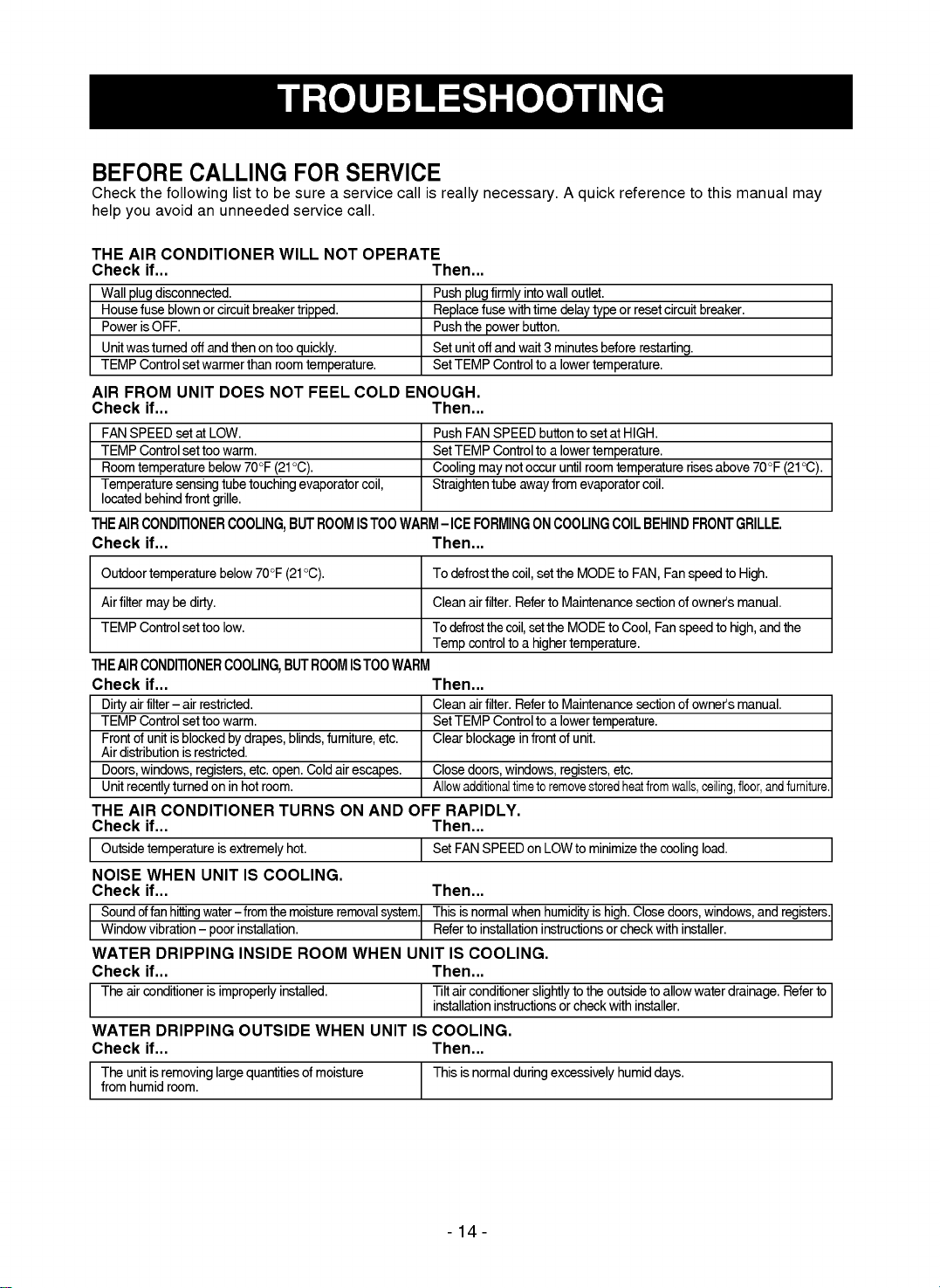
BEFORE
CALLING
FOR
SERVICE
Check
the
following
list
to
be
sure
a
service
call
is
really
necessary.
A
quick
reference
to
this
manual
may
help
you
avoid
an
unneeded
service
call.
THE
AIR
CONDITIONER
WILL
NOT
OPERATE
Check
if...
Then...
AIR
FROM
UNIT
DOES
NOT
FEEL
COLD
ENOUGH.
Check
if...
Then...
THE
AIR
CONDITIONER
COOLING,
BUT
ROOM
IS
TOO
WARM
--
ICE
FORMING
ON
COOLING
COIL
BEHIND
FRONT
GRILLE.
Check
if...
Then...
THE
AIR
CONDITIONER
COOLING,
BUT
ROOM
IS
TOO
WARM
Check
if...
Then...
THE
AIR
CONDITIONER
TURNS
ON
AND
OFF
RAPIDLY.
Check
if...
Then...
NOISE
WHEN
UNIT
IS
COOLING.
Check
if...
Then...
WATER
DRIPPING
INSIDE
ROOM
WHEN
UNIT
IS
COOLING.
Check
if...
Then...
WATER
DRIPPING
OUTSIDE
WHEN
UNIT
IS
COOLING.
Check
if...
Then...
Wall
plug
disconnected.
Push
plug
firmly
into
wall
outlet.
House
fuse
blown
or
circuit
breaker
tripped.
Replace
fuse
with
time
delay
type
or
reset
circuit
breaker.
Power
is
OFF. Push
the
power
button.
Unit
was
turned
off
and
then
on
too
quickly.
Set
unit
off
and
wait
3
minutes
before
restarting.
TEMP
Control
set
warmer
than
room
temperature.
Set
TEMP
Control
to
a
lower
temperature.
FAN
SPEED
set
at
LOW.
Push
FAN
SPEED
button
to
set
at
HIGH.
TEMP
Control
set
too
warm.
Set
TEMP
Control
to
a
lower
temperature.
Room
temperature
below
70°F
(21°C).
Cooling
may
not
occur
until
room
temperature
rises
above
70°F
(21°C).
Temperature
sensing
tube
touching
evaporator
coil,
Straighten
tube
away
from
evaporator
coil.
located
behind
front
grille.
Outdoor
temperature
below
70°F
(21°C).
To
defrost
the
coil,
set
the
MODE
to
FAN,
Fan
speed
to
High.
Air
filter
may
be
dirty.
Clean
air
filter.
Refer
to
Maintenance
section
of
owner's
manual.
TEMP
Control
set
too
low.
To
defrost
the
coil,
set
the
MODE
to
Cool,
Fan
speed
to
high,
and
the
Temp
control
to
a
higher
temperature.
Dirty
air
filter
--
air
restricted.
Clean
air
filter.
Refer
to
Maintenance
section
of
owner's
manual.
TEMP
Control
set
too
warm.
Set
TEMP
Control
to
a
lower
temperature.
Front
of
unit
is
blocked
by
drapes,
blinds,
furniture,
etc.
Clear
blockage
in
front
of
unit.
Air
distribution
is
restricted.
Doors,
windows,
registers,
etc.
open.
Cold
air
escapes.
Close
doors,
windows,
registers,
etc.
Unit
recently
turned
on
in
hot
room.
Allow
additional
time
to
remove
stored
heat
from
walls,
ceiling,
floor,
and
furniture.
Outside
temperature
is
extremely
hot.
Set
FAN
SPEED
on
LOW
to
minimize
the
cooling
load.
Sound
of
fan
hitting
water
--
from
the
moisture
removal
system.
This
is
normal
when
humidity
is
high.
Close
doors,
windows,
and
registers.
Window
vibration
--
poor
installation.
Refer
to
installation
instructions
or
check
with
installer.
The
air
conditioner
is
improperly
installed.
Tilt
air
conditioner
slightly
to
the
outside
to
allow
water
drainage.
Refer
to
installation
instructions
or
check
with
installer.
The
unit
is
removing
large
quantities
of
moisture
This
is
normal
during
excessively
humid
days.
from
humid
room.
-15-



