
Please read this manual carefully before operating
your set and retain it for future reference.
LB56**
LB55**
LB62**
P/NO : MFL68003302 (1401-REV01)
Printed in Indonesia
www.lg.com
OWNER’S MANUAL
LED TV
*
* Disclaimer
LG LED TV applies LCD screen with LED backlights.
ENG
http://opensource.lge.com
www.lg.com
ENG
ENG
ENG
ENG
ENG
ENG

ENG
ENG
A
B
A
B
<
=
<
=
ENG
ENG
ENG
ENG
ENG
ENG
ENG
»
»
»
»
»
»
ENG
A
B
ENG
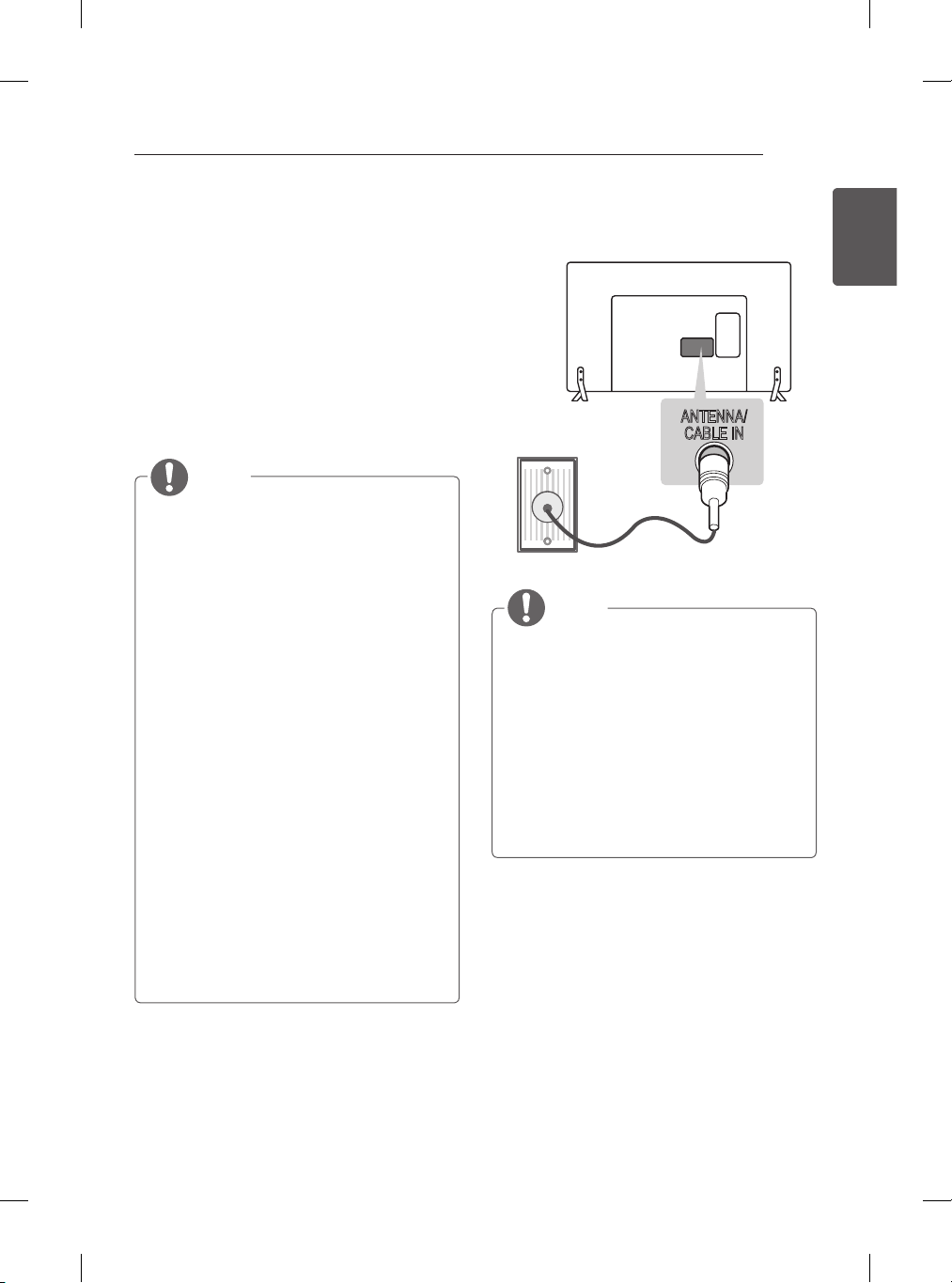
ANTENNA/
CABLE IN
ENG
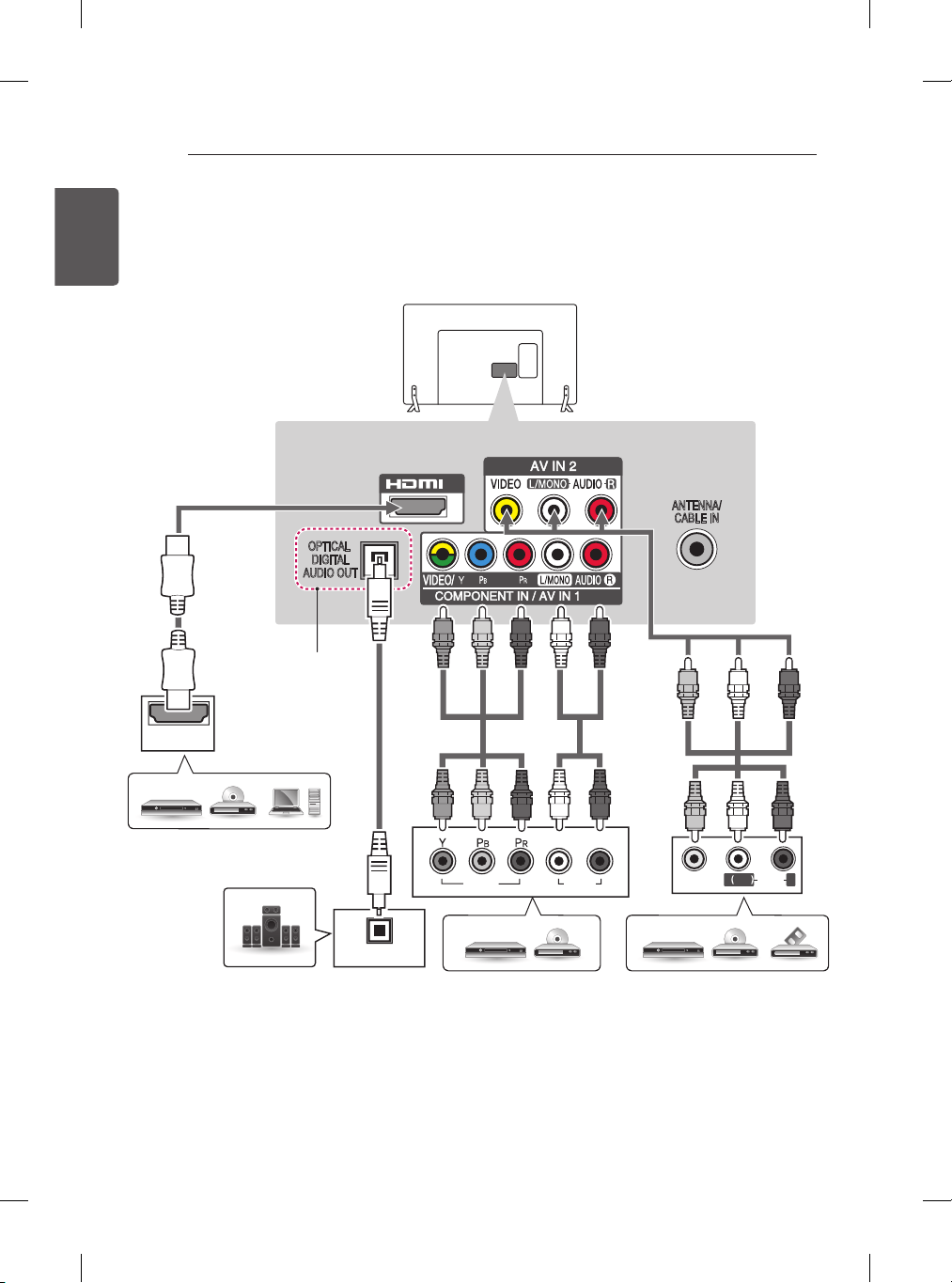
HDMI
OPTICAL
DIGITAL
AUDIO OUT
ANTENNA/
CABLE IN
1
IN
AUDIO
VIDEO
L R
OPTICAL
AUDIO IN
VIDEO
MONO
( )
AUDIOL R
IN
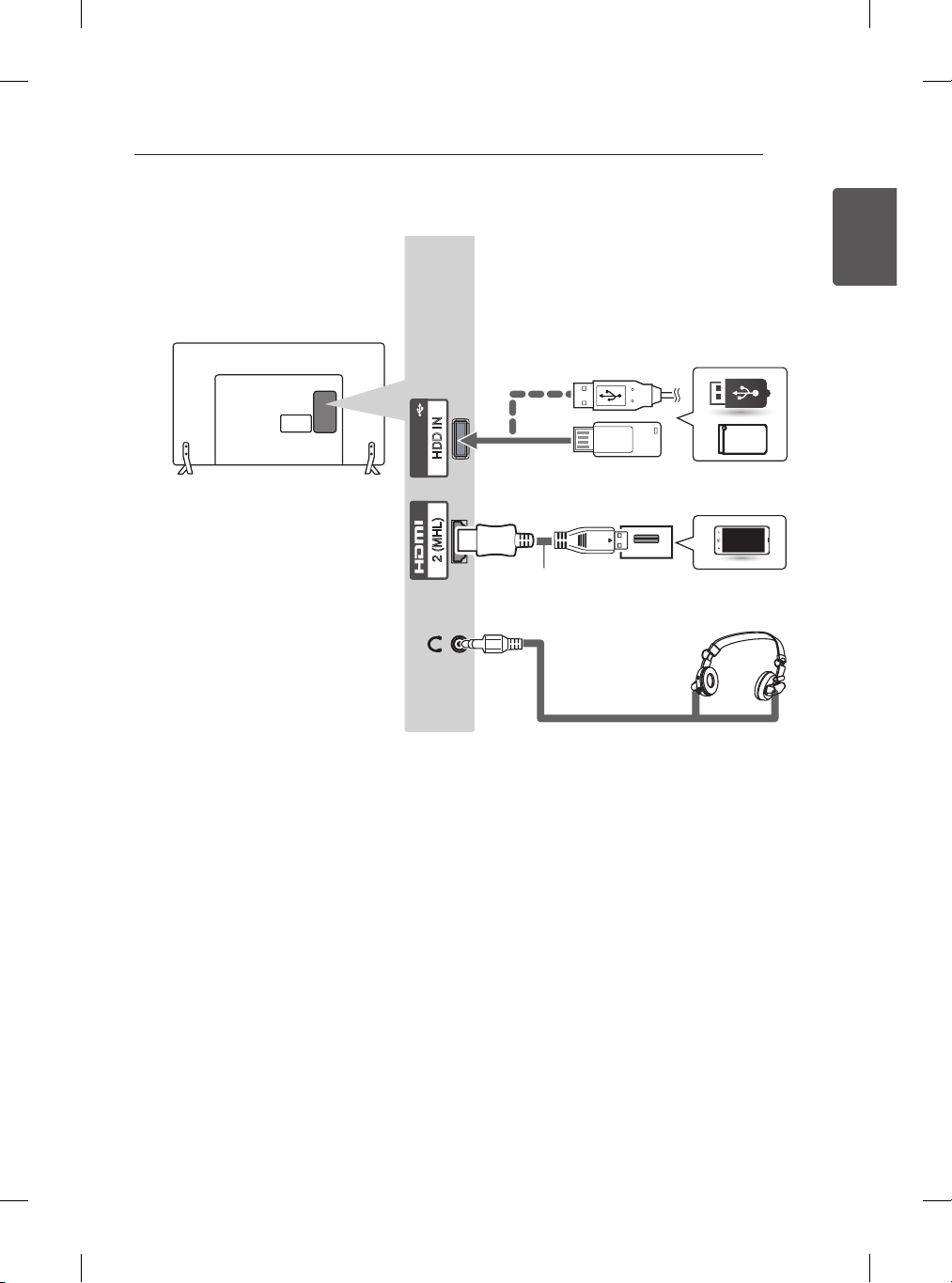
2 (MHL) HDD IN
USB IN
H/P OUT
ENG
HDMI
OPTICAL
DIGITAL
AUDIO OUT
ANTENNA/
CABLE IN
1
IN
AUDIO
VIDEO
L R
OPTICAL
AUDIO IN
VIDEO
MONO
( )
AUDIOL R
IN
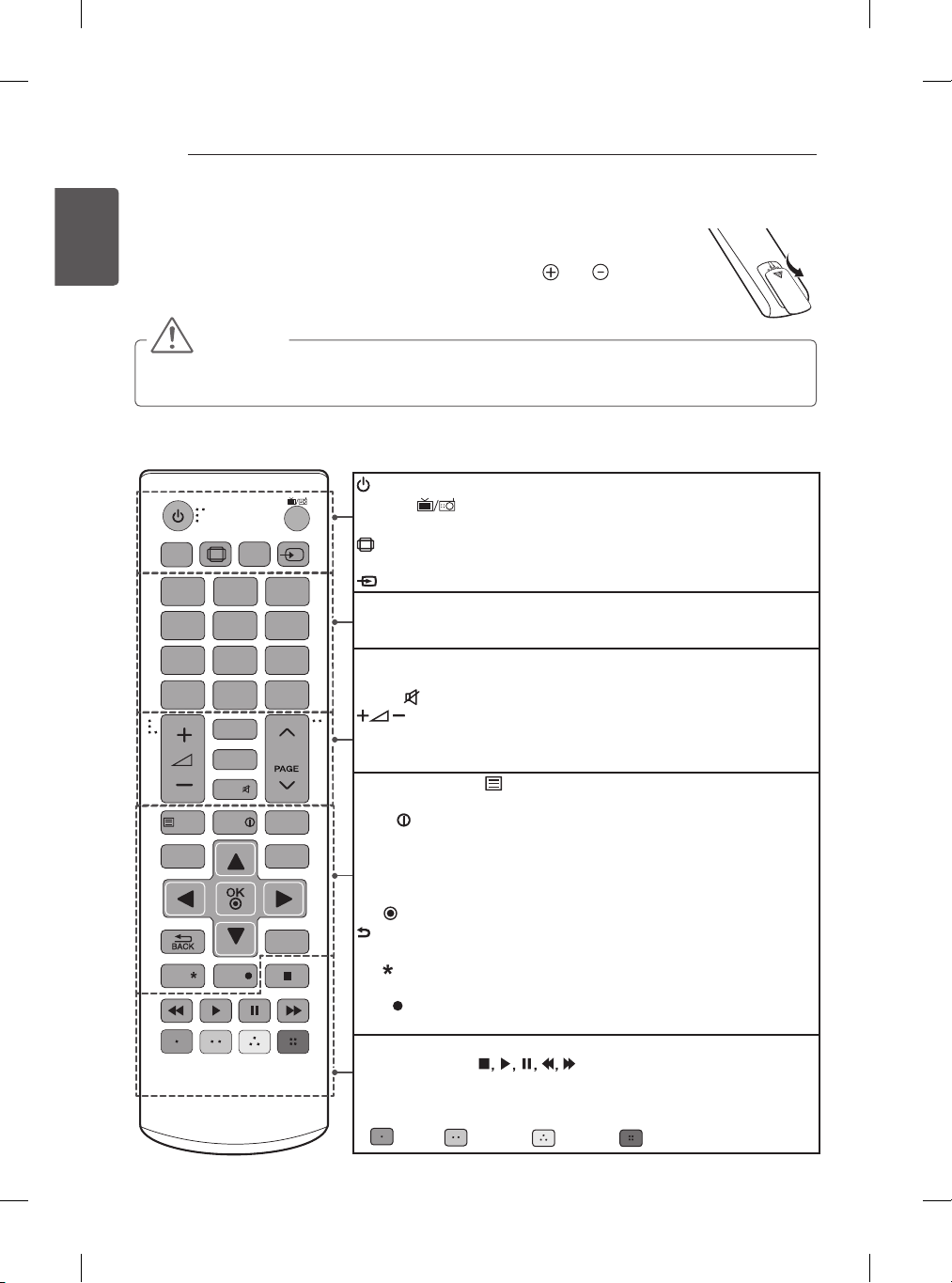
2 (MHL) HDD IN
USB IN
H/P OUT
ENG
1
4 5 6
7 8 9
LIST
SUBTITLE
TEXT
SETTINGS
Q.MENU
EXIT
INFO
T.OPT
Q.VIEW
P
0
FAV
GUIDE
MUTE
2 3
LIVE TV
INPUT
RATIO
TV/
RAD
REC
AV MODE
AD
/
ꕌꕍ
ꕌꕍ
23
ENGENGLISH
REMOTE CONTROL
1
4 5 6
7 8 9
LIST
SUBTITLE
TEXT
SETTINGS
Q.MENU
EXIT
INFO
T.OPT
Q.VIEW
P
0
FAV
GUIDE
MUTE
2 3
LIVE TV
INPUT
RATIO
TV/
RAD
REC
AV MODE
BOLLYWOOD
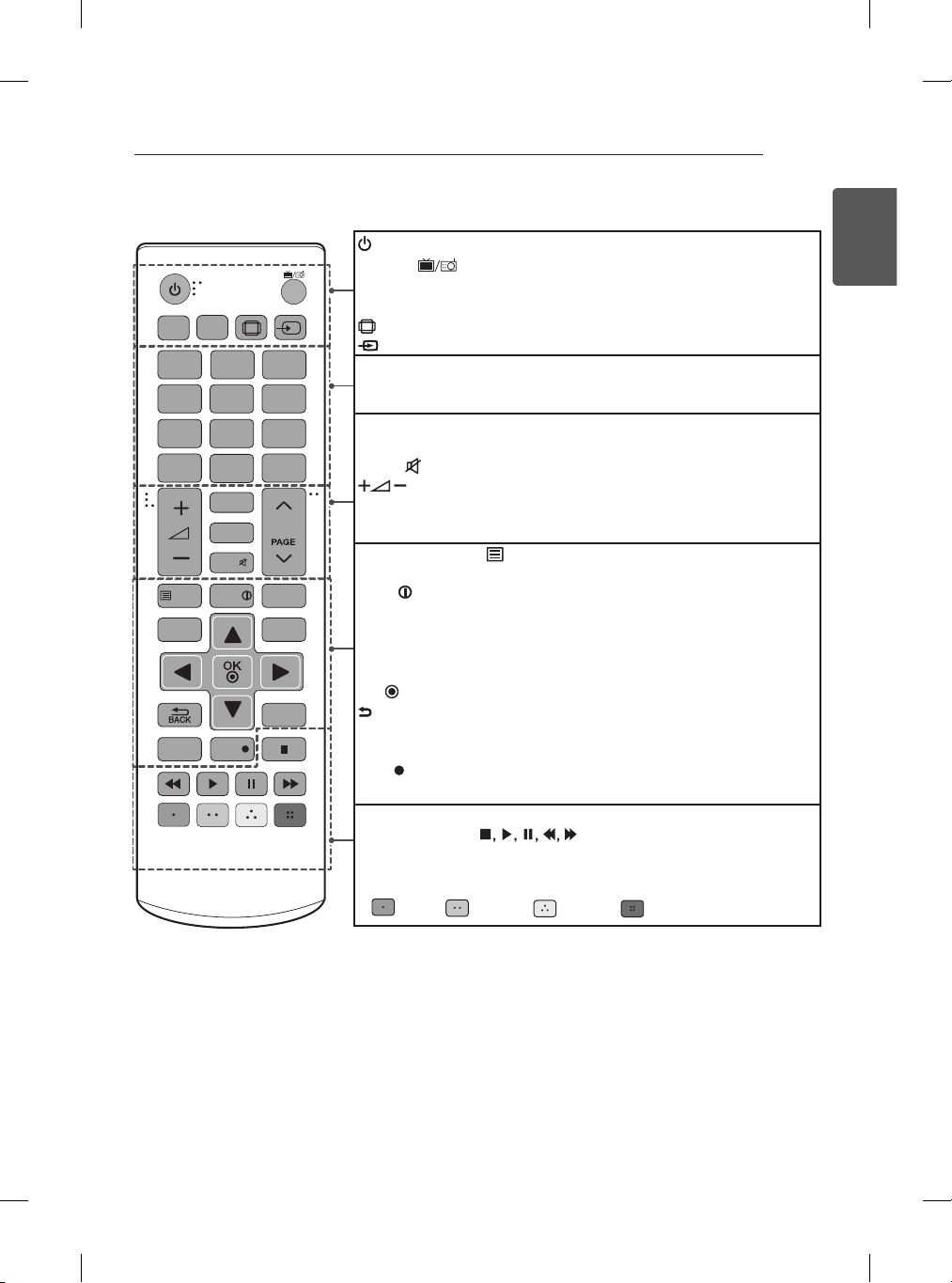
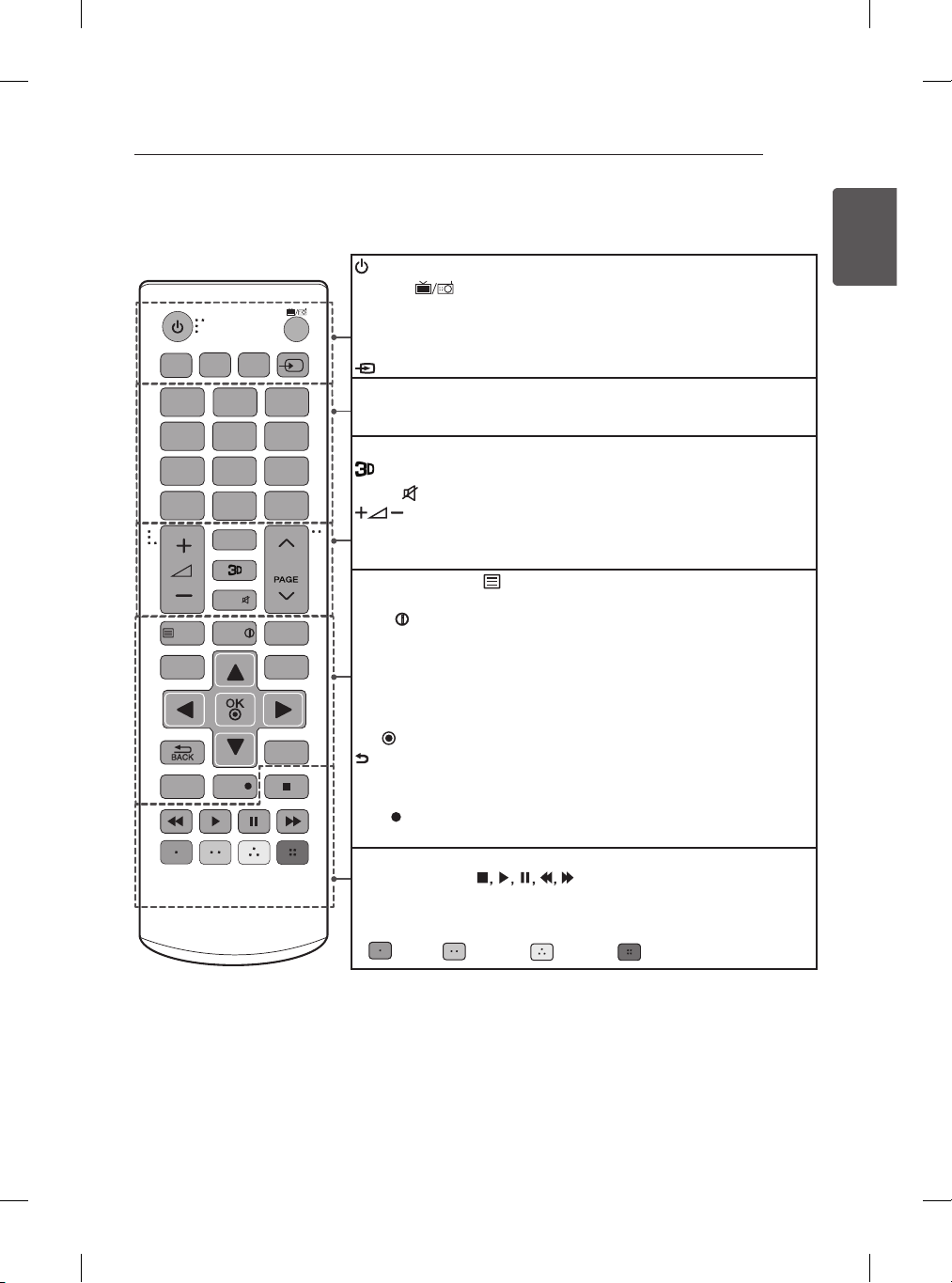
(POWER) Turns the TV on or off.
TV/RAD
Selects Radio, TV and DTV programme.
SUBTITLE Recalls your preferred subtitle in digital mode.
AV MODE Selects an AV mode.
RATIO Resizes an image.
INPUT Changes the input source.
Number buttons Enters numbers.
LIST Accesses the saved programme list.
Q.VIEW Returns to the previously viewed programme.
FAV Accesses your favourite programme list.
GUIDE Shows programme guide.
MUTE
Mutes all sounds.
Adjusts the volume level.
ꕌPꕍ
Scrolls through the saved programmes.
ꕌPAGEꕍ
Moves to the previous or next screen.
Teletext buttons (
TEXT, T.OPT)
These buttons are used for
teletext.
INFO
Views the information of the current programme and screen.
SETTINGS Accesses the main menus.
Q.MENU Accesses the Quick menus.
Navigation buttons (up/down/left/right) Scrolls through menus or
options.
OK
Selects menus or options and confirms your input.
BACK Returns to the previous level.
EXIT Clears on-screen displays and returns to TV viewing.
BOLLYWOOD Switches the BOLLYWOOD sound mode.
REC
Starts to record and displays record menu.
(Only Time Machine supported model)
LIVE TV Returns to LIVE TV.
Control buttons (
) Controls the MY MEDIA menus,
Time Machine control or the SIMPLINK compatible devices (USB,
SIMPLINK or Time Machine).
Coloured buttons These access special functions in some menus.
(
: Red, : Green, : Yellow, : Blue )
(Only LB56**, LB55**) (Only India)
ENG
1
4 5 6
7 8 9
LIST
TEXT
SETTINGS
EXIT
GUIDE AV MODE
INFO
T.OPT
Q.VIEW
P
0
FAV
MUTE
2 3
INPUT
TV/
RAD
Q.MENU
3D OPTION
REC
LIVE TV
AD
/
SUBTITLE
ꕌꕍ
ꕌꕍ
25
ENGENGLISH
REMOTE CONTROL
1
4 5 6
7 8 9
LIST
TEXT
BOLLWOOD
EXIT
GUIDE
SETTINGS
INFO
T.OPT
Q.VIEW
P
0
FAV
MUTE
2 3
INPUT
TV/
RAD
Q.MENU
3D OPTION
REC
LIVE TV
SUBTITLE
AV MODE
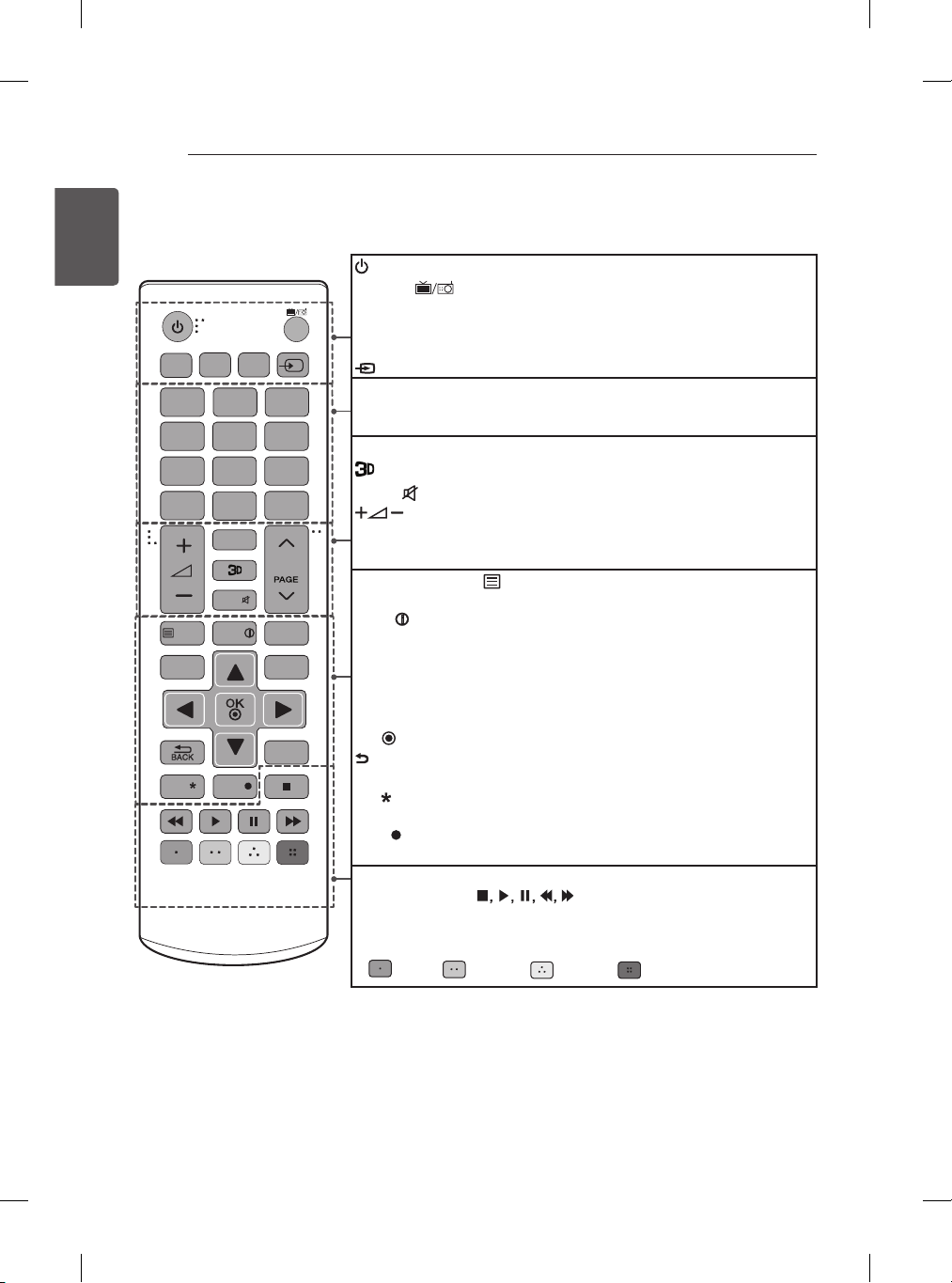
(POWER) Turns the TV on or off.
TV/RAD
Selects Radio, TV and DTV programme.
SUBTITLE Recalls your preferred subtitle in digital mode.
GUIDE Shows programme guide.
SETTINGS Accesses the main menus.
INPUT Changes the input source.
Number buttons Enters numbers.
LIST Accesses the saved programme list.
Q.VIEW Returns to the previously viewed programme.
FAV Accesses your favourite programme list.
Used for viewing 3D video.
MUTE
Mutes all sounds.
Adjusts the volume level.
ꕌPꕍ
Scrolls through the saved programmes.
ꕌPAGEꕍ
Moves to the previous or next screen.
Teletext buttons (
TEXT, T.OPT)
These buttons are used for
teletext.
INFO
Views the information of the current programme and screen.
BOLLYWOOD Switches the BOLLYWOOD sound mode.
3D OPTION Use this to view 3D video.
Q.MENU Accesses the Quick menus.
Navigation buttons (up/down/left/right) Scrolls through menus or
options.
OK
Selects menus or options and confirms your input.
BACK Returns to the previous level.
EXIT Clears on-screen displays and returns to TV viewing.
AV MODE Selects an AV mode.
REC
Starts to record and displays record menu.
(Only Time Machine supported model)
LIVE TV Returns to LIVE TV.
Control buttons (
) Controls the MY MEDIA menus,
Time Machine control or the SIMPLINK compatible devices (USB,
SIMPLINK or Time Machine).
Coloured buttons These access special functions in some menus.
(
: Red, : Green, : Yellow, : Blue )
(Only LB62**) (Only India)
ENG

ENG
ENG

ENG
ENG

ENG
www.lg.com
www.lg.com.

ENG
33
ENG
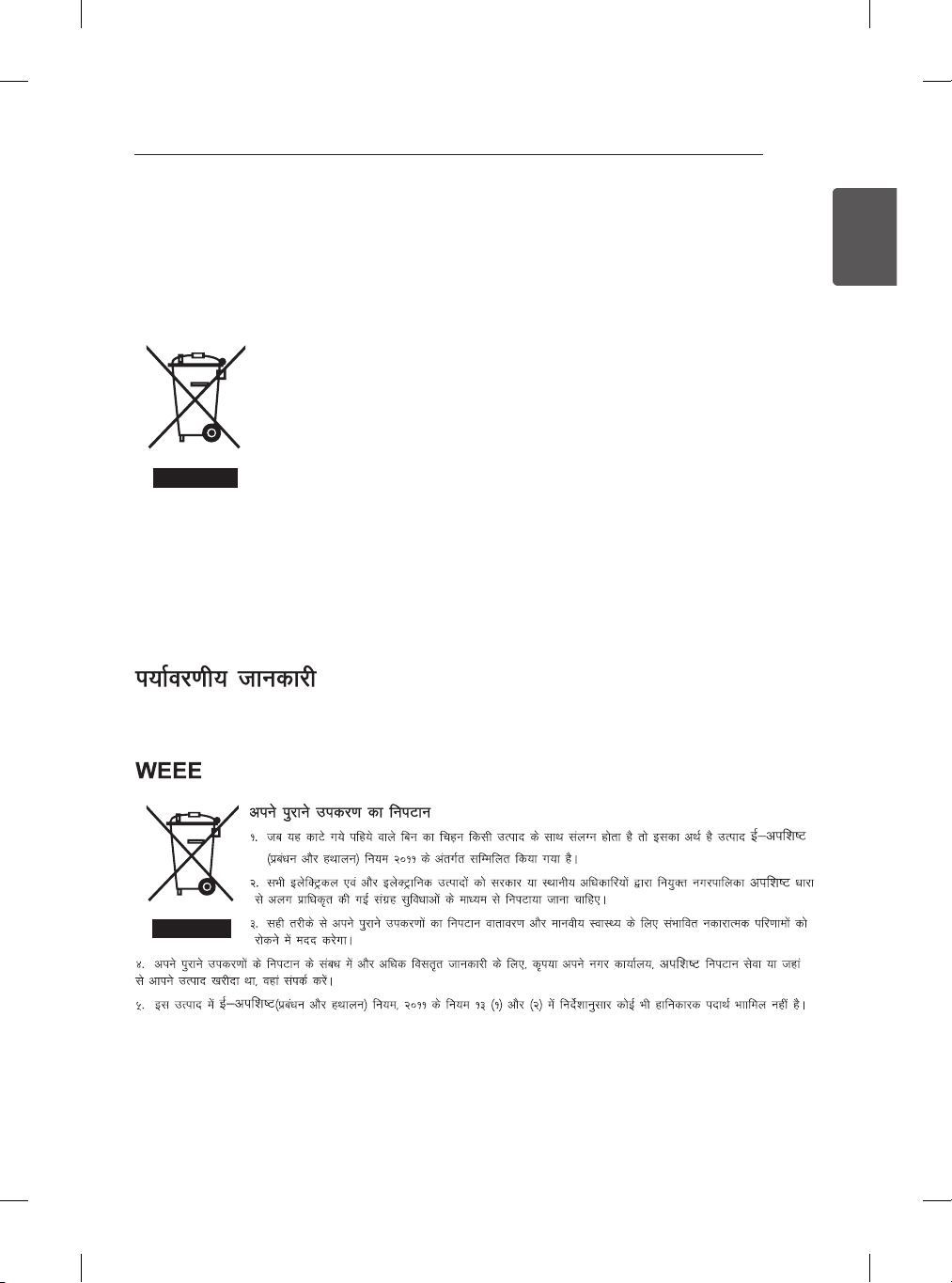
ENVIRONMENTAL INFORMATION
(Only India)
1. When this crossed-out wheeled bin symbol is attached to a product it means the
product is covered by the e-waste (Management and Handling) Rules, 2011.
2. All electrical and electronic products should be disposed of separately from
the municipal waste stream via designated collection facilities appointed by the
government or the local authorities.
3. The correct disposal of your old appliance will help prevent potential negative
consequences for the environment and human health.
4. For more detailed information about disposal of your old appliance, please contact your city office,
waste disposal service or the shop where you purchased the product.
5. This product does not contain any of the hazardous substances as specified in the rule 13 (1) and (2)
of the e-waste (Management and Handling) Rules, 2011.
ENG
35
ENGENGLISH
SPECIFICATIONS
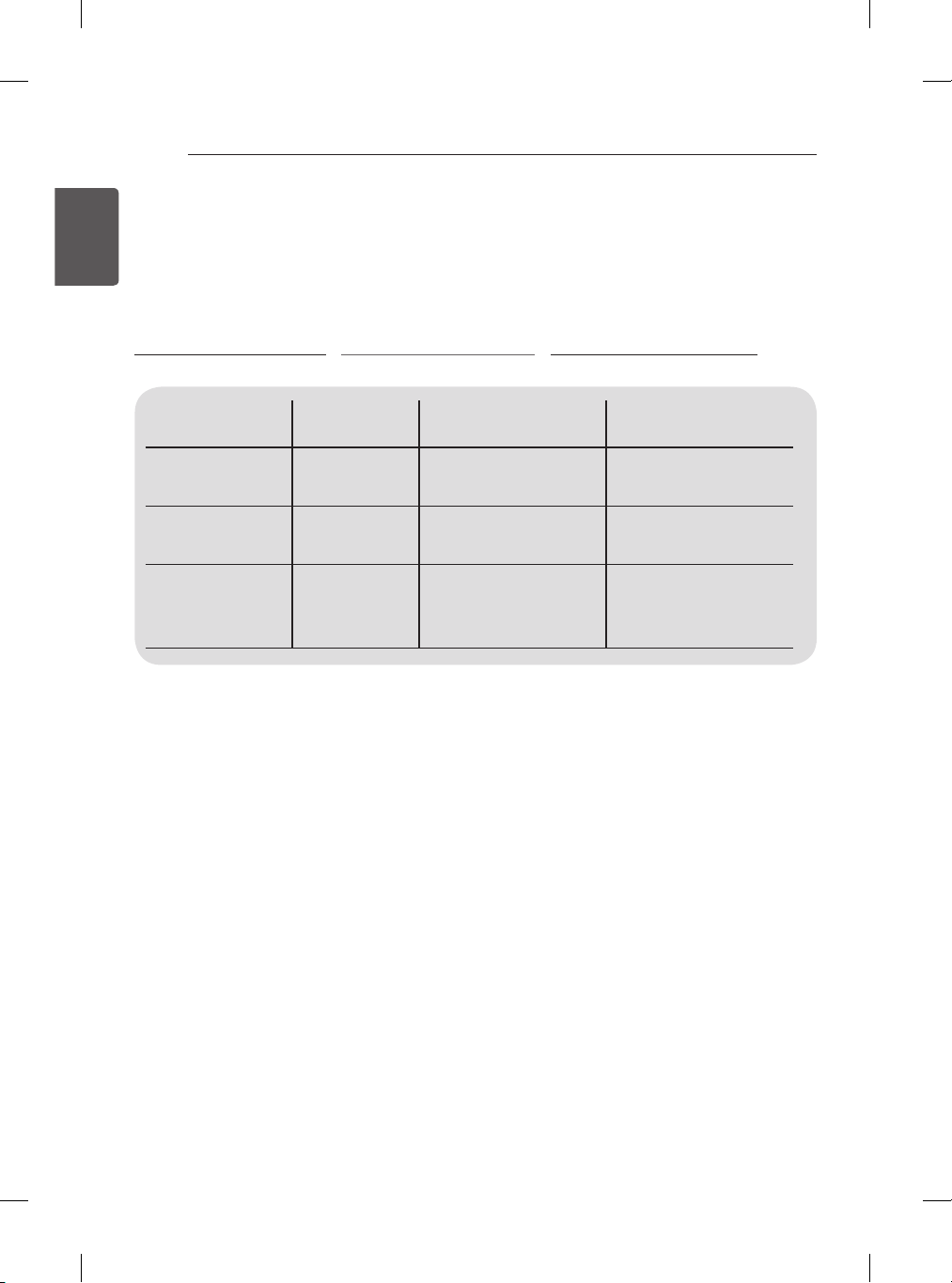
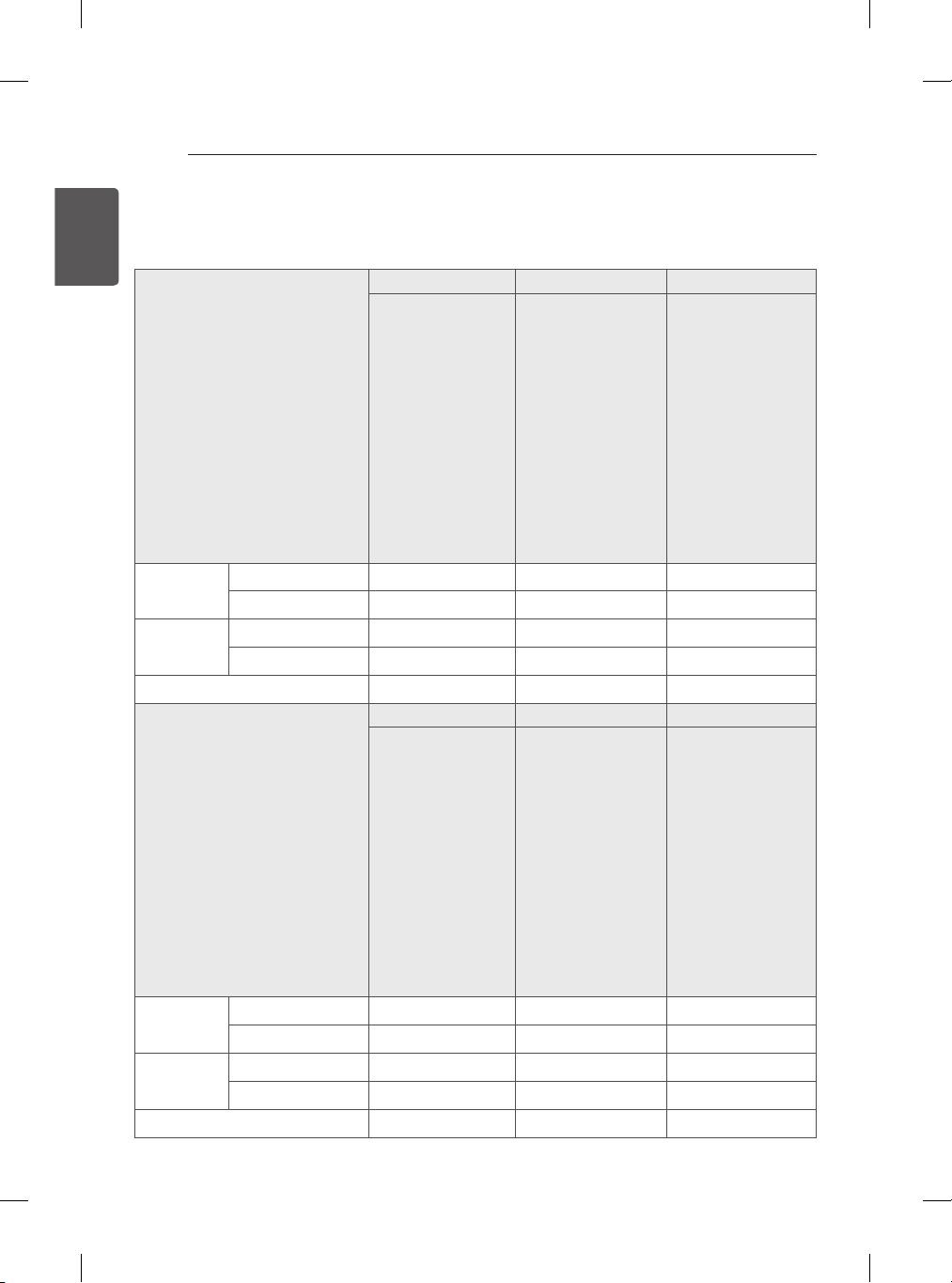
MODELS
60LB56** 32LB55** 42LB55**
60LB5600-TA
60LB560T-TA
60LB560B-TA
60LB560D-TA
60LB560Y-TA
60LB560Z-TA
60LB565B-TA
60LB5610-TC
60LB561T-TC
60LB561B-TC
60LB561D-TC
60LB5630-TD
60LB563T-TD
60LB563B-TD
60LB563D-TD
60LB561Y-TC
60LB561Z-TC
60LB563Y-TD
60LB563Z-TD
60LB5650-TO
32LB5500-TA
32LB550Z-TA
32LB550D-TA
32LB550B-TA
32LB550T-TA
32LB550Y-TA
32LB5510-TC
32LB551T-TC
32LB551B-TC
32LB551D-TC
32LB552R-TB
32LB552R-TC
32LB551Y-TC
32LB551Z-TC
42LB5500-TA
42LB550Z-TA
42LB550D-TA
42LB550B-TA
42LB550T-TA
42LB550Y-TA
42LB5510-TC
42LB551T-TC
42LB551B-TC
42LB551D-TC
42LB552R-TB
42LB552R-TC
42LB551Y-TC
42LB551Z-TC
Dimensions
(W x H x D)
With stand (mm)
1373 x 848 x 280 731 x 480 x 208 959 x 611 x 218
Without stand(mm)
1373 x 801 x 58.8 731 x 437 x 56.5 959 x 570 x 56.2
Weight With stand (kg)
23.5 5.9 9.5
Without stand (kg)
23.0 5.7 9.2
Power requirement
AC 100-240 V~ 50 / 60 Hz AC 100-240 V~ 50 / 60 Hz AC 100-240 V~ 50 / 60 Hz
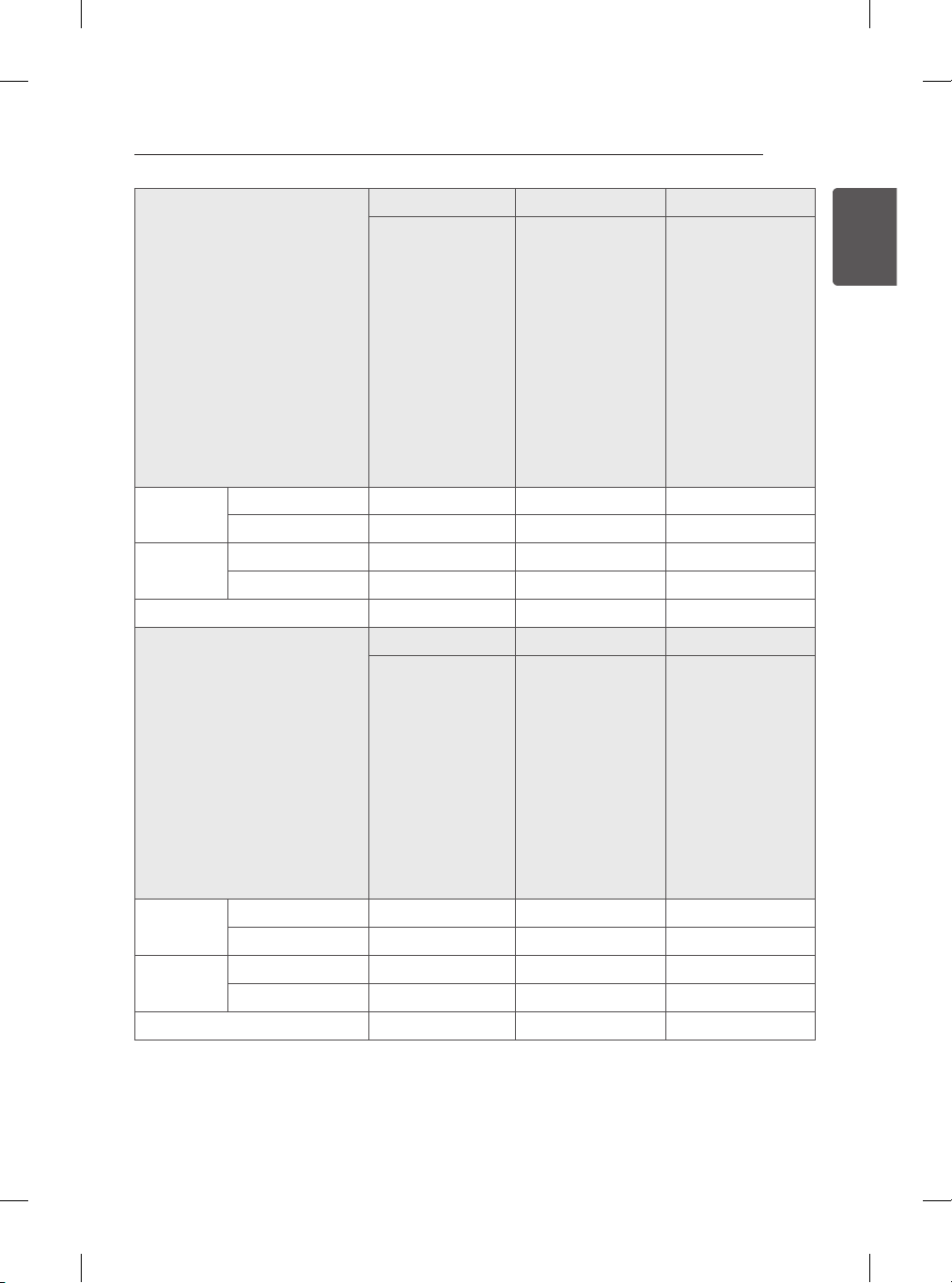
MODELS
49LB55** 55LB55** 32LB62**
49LB5500-TA
49LB550Z-TA
49LB550D-TA
49LB550B-TA
49LB550T-TA
49LB550Y-TA
49LB5510-TC
49LB551T-TC
49LB551B-TC
49LB551D-TC
49LB552R-TB
49LB552R-TC
49LB551Y-TC
49LB551Z-TC
55LB5500-TA
55LB550Z-TA
55LB550D-TA
55LB550B-TA
55LB550T-TA
55LB550Y-TA
55LB5510-TC
55LB551T-TC
55LB551B-TC
55LB551D-TC
55LB552R-TB
55LB552R-TC
55LB551Y-TC
55LB551Z-TC
32LB6200-TA
32LB620D-TA
32LB620B-TA
32LB620Z-TA
32LB620T-TA
32LB620Y-TA
32LB6230-TE
32LB623T-TE
32LB623B-TE
32LB623D-TE
32LB623Y-TE
32LB623Z-TE
32LB623Y-TF
32LB623Z-TF
32LB6230-TF
32LB623T-TF
32LB623B-TF
32LB623D-TF
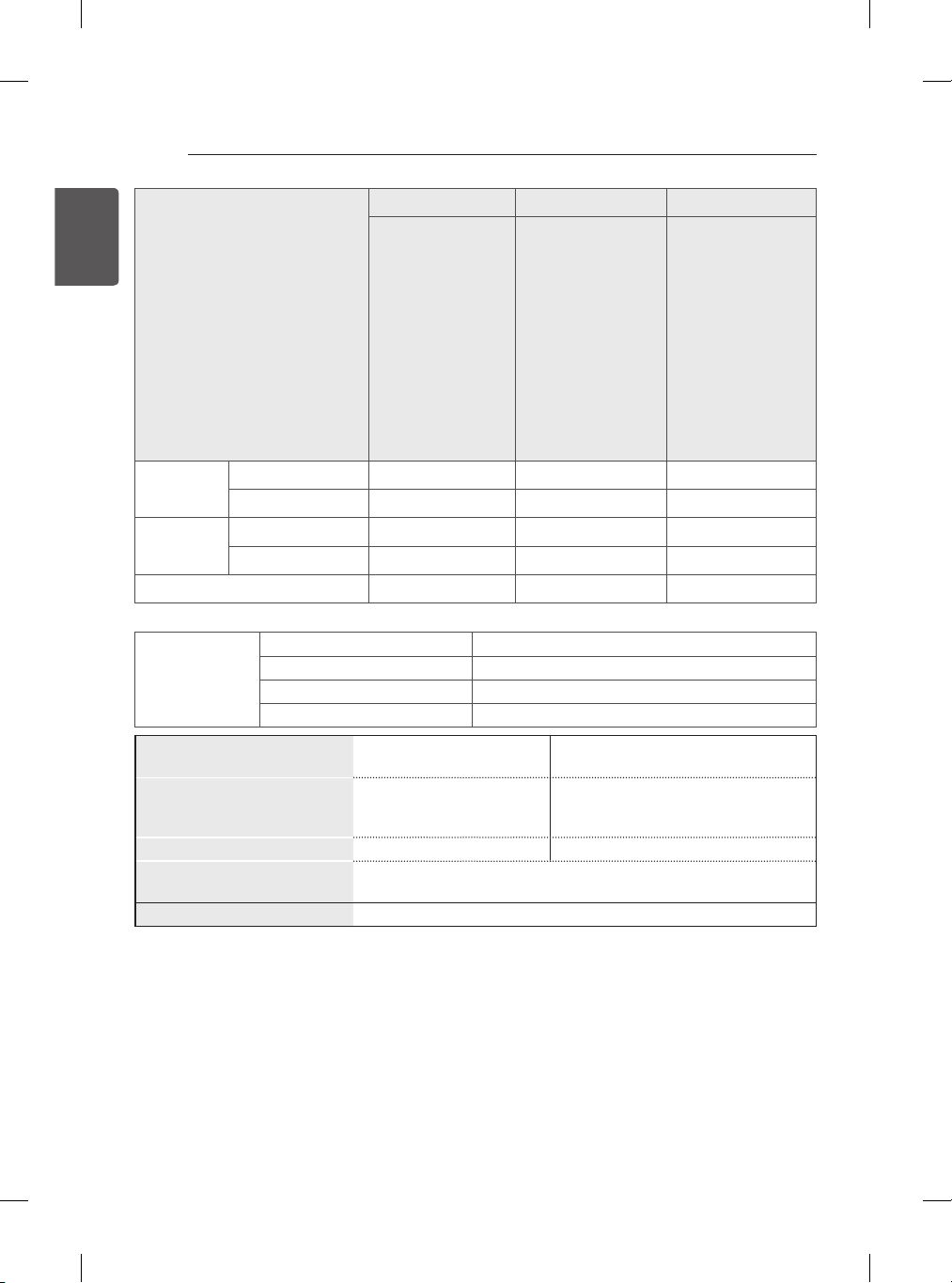
Dimensions
(W x H x D)
With stand (mm)
1105 x 694 x 247 1241 x 769 x 247 731 x 477.6 x 184.6
Without stand(mm)
1105 x 652 x 56.5 1241 x 724 x 57.5 731 x 437 x 56.5
Weight With stand (kg)
13.6 18.2 5.9
Without stand (kg)
13.2 17.8 5.7
Power requirement
AC 100-240 V~ 50 / 60 Hz AC 100-240 V~ 50 / 60 Hz AC 100-240 V~ 50 / 60 Hz
ENG
ENG
ENG

Record the model number and serial
number of the TV.
Refer to the label on the back cover and
quote this information to your dealer
when requiring any service.
MODEL
SERIAL
(Only DTV)