Kenmore Elite ®
Models/Modelos: 000.00000000
English / Español
Use & Care Guide
Manual de Uso y Cuidado
P/N 000000000000
Sears Brands Management Corporation
Customer Assistance/Asistencia al Cliente
1-855-438-7899
Hoffman Estates, IL 60179 U.S.A.
www.kenmore.com
www.sears.com
www.kmart.com
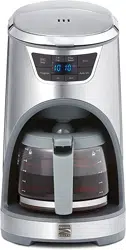
Drip Coffeemaker
12-Cup Glass Carafe
Cafetera de goteo
Garrafa de cristal 12-copas
KENMORE ELITE LIMITED WARRANTY
FOR FIVE YEARS from the date of sale this appliance is warranted against defects in
material or workmanship.
WITH PROOF OF SALE, return a defective appliance to the retailer from which it was
purchased for free replacement.
This warranty is void if this appliance is ever used for other than private household purposes.
This warranty does not cover the gold-tone filter, which is an expendable part that can wear
out from normal use within the warranty period.
This warranty gives you specific legal rights, and you may also have other rights which vary
from state to state.
Sears Brands Management Corporation, Hoffman Estates, IL 60179
KENMORE ELITE LIMITED WARRANTY
FOR FIVE YEARS from the date of sale this appliance is warranted against defects in
material or workmanship.
WITH PROOF OF SALE, return a defective appliance to the retailer from which it was
purchased for free replacement.
This warranty is void if this appliance is ever used for other than private household purposes.
This warranty does not cover the gold-tone filter, which is an expendable part that can wear
out from normal use within the warranty period.
This warranty gives you specific legal rights, and you may also have other rights which vary
from state to state.
Sears Brands Management Corporation, Hoffman Estates, IL 60179
2
3
IMPORTANT SAFEGUARDS
SAVE THESE INSTRUCTIONS!
When using electrical appliances, basic safety precautions should always be
followed, including the following:
1. READ all instructions.
2. DO NOT touch hot surfaces. Use handles or knobs.
3. To protect against fire, electric shock and injury to persons, DO NOT immerse
cord, plug, or the coffeemaker in water or other liquids.
4. Close supervision is necessary when any appliance is used by or near children.
5. ALWAYS UNPLUG coffeemaker from power outlet before cleaning, and when
storing. Allow to cool before putting on or taking off parts, cleaning or storing.
6. DO NOT operate any appliance with a damaged cord or plug, or after the
appliance malfunctions or has been dropped or damaged in any manner.
Return appliance to the nearest authorized service facility for examination,
repair or adjustment.
7. The use of accessory attachments not recommended by the appliance
manufacturer may result in fire, electric shock or injury to persons.
8. DO NOT use outdoors.
9. NEVER let the cord hang over the edge of table or counter or touch hot surfaces.
10. DO NOT place coffeemaker on or near a hot gas or electric burner or in a
heated oven.
11. DO NOT use this coffeemaker for anything other than its intended use.
12. The carafe is designed for use only with this coffeemaker.
13. Scalding may occur if the lid is removed during the brewing cycles. ALWAYS
keep the lid on the carafe when in use.
14. DO NOT unplug the appliance while coffee is brewing! Press the Start/Stop
button to stop brewing before unplugging the appliance from the electrical outlet.
15. To protect against electrical shock, this appliance is equipped with a cord having
a 3-prong grounding-type plug for insertion into a proper grounding-type
receptacle. DO NOT alter the plug for use in a 2-prong receptacle. If the plug
will not fit into a receptacle, have the proper receptacle installed by a
qualified electrician.
16. Observe the following for proper and safe carafe use:
- Do not set a hot carafe on a wet or cold surface.
- Do not use a cracked carafe or a carafe having a loose or weakened handle.
- Do not clean carafe with cleansers, steel wool pads, or other abrasive material.
- The carafe is designed for use with this appliance only; it must never be used
on a range top.
17. This appliance is for HOUSEHOLD USE ONLY.
Short Power Cord Instructions
A short power-supply cord is to be provided to reduce the risk resulting from becoming
entangled in or tripping over a longer cord. This appliance is equipped with a short
power supply cord. Extension cords are available and may be used if care is
exercised in their use. If an extension cord is used:
1. The marked electrical rating of the extension cord should be at least
as great as the electrical rating of the appliance cord.
2. The cord should be arranged so that it wil not drape over the countertop or
tabletop where it can be pulled on by children or tripped over unintentionally.
3. The extension cord should be a grounding type 3-wire cord.
IMPORTANT SAFEGUARDS
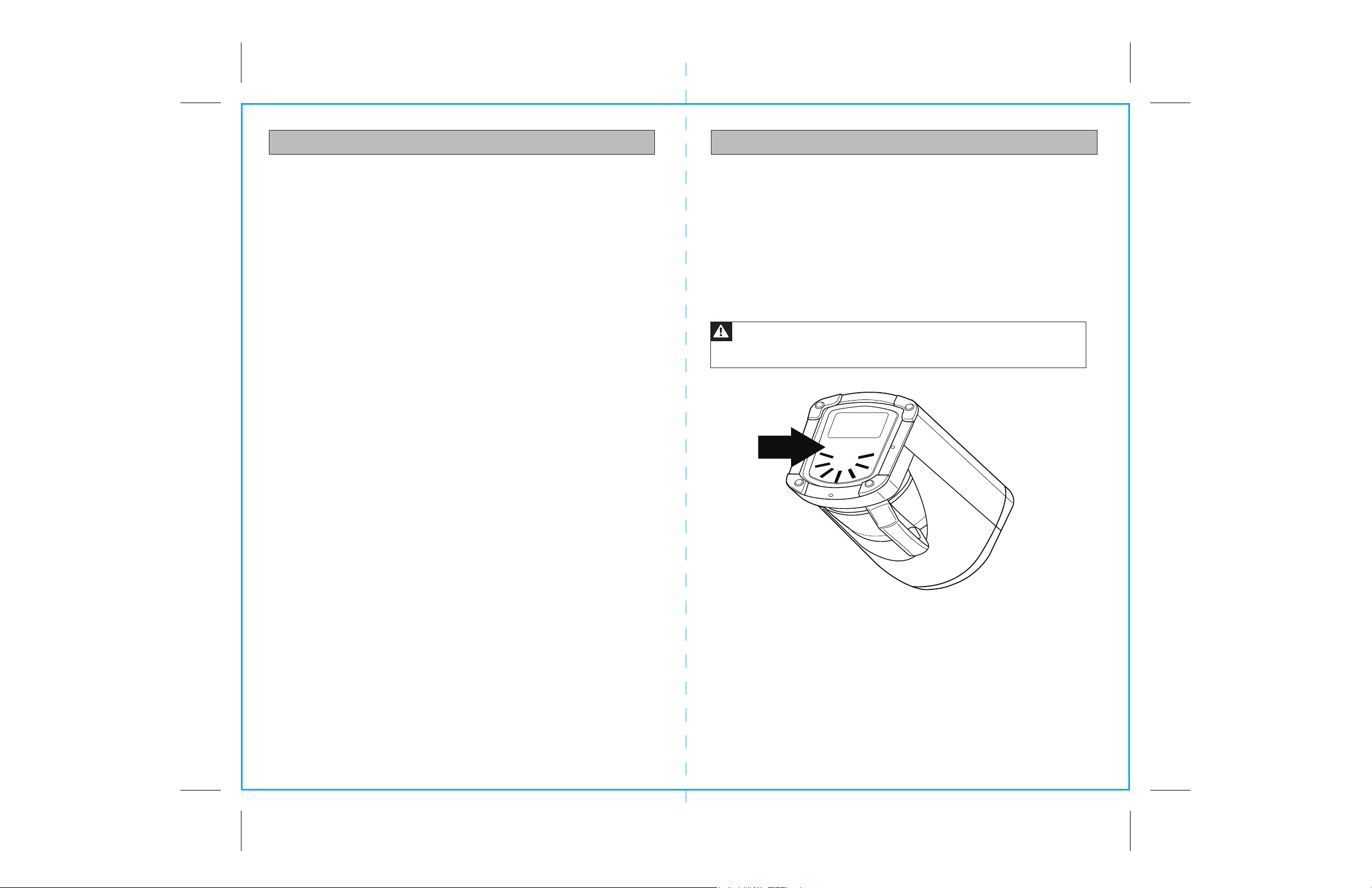
WARNING: To reduce the risk of fire or electric shock, DO NOT remove
the cover indicated by the arrow in the figure below. There are no user
serviceable parts inside.
12
Start
Program
Hr
1-4
Cup
Filter
Reset
Min
Auto On
Bold
Stop
12
10
8
6
4
10
8
6
4
2
4
5
Fig. 1
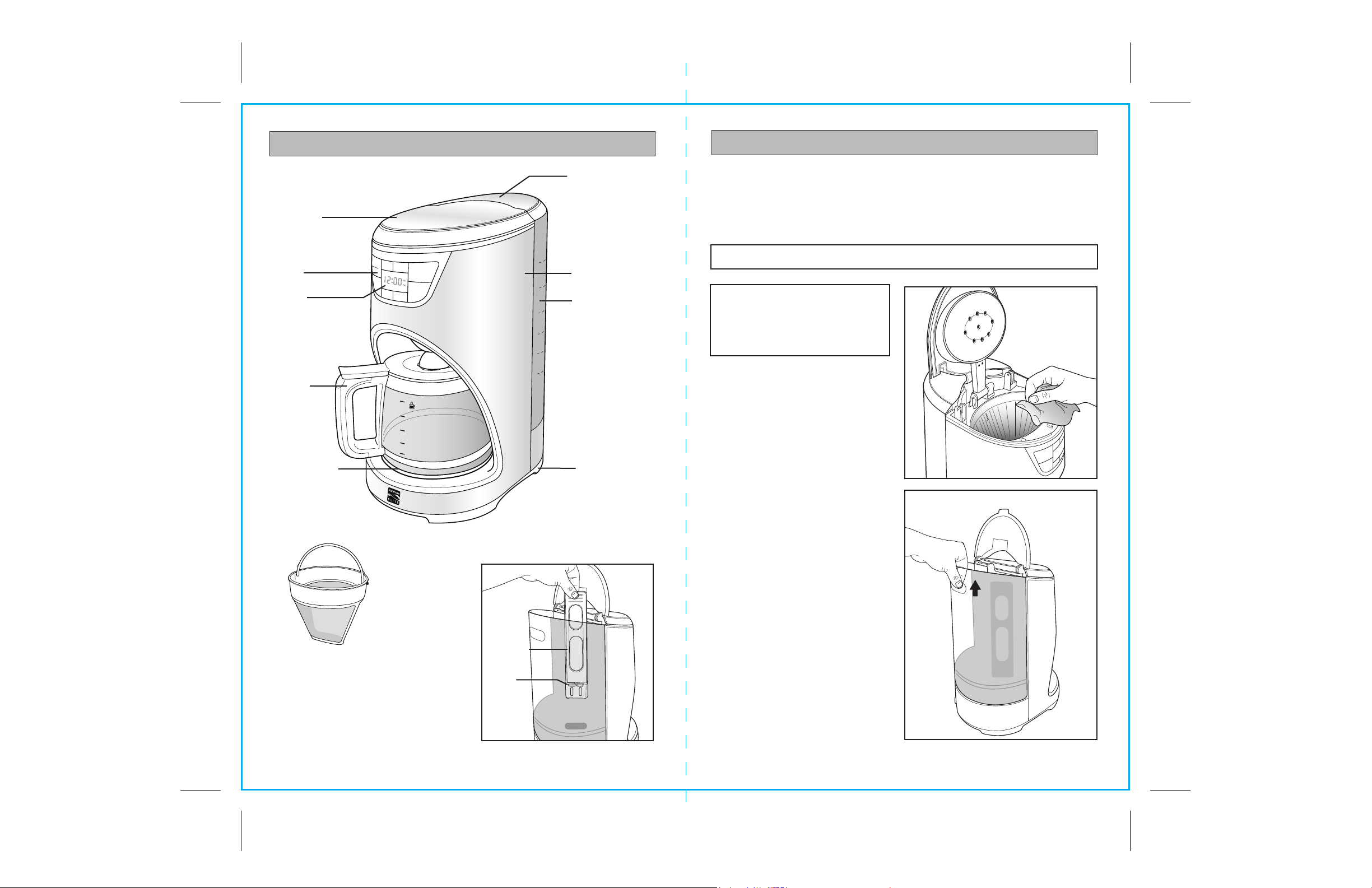
Gold-tone filter
Tank
Cover
Housing
Water
Tank
Carafe
Base
Digital
Display
Control
Panel
PARTS AND FEATURES
PREPARING TO USE YOUR COFFEEMAKER
Before the first use of the coffeemaker wash the brew basket, the permanent
gold-tone filter, the carafe and carafe lid in either the top rack of your dishwasher,
or by hand in warm, sudsy water.
The exterior of the coffeemaker, the control panel area and the warming plate
should only be cleaned with a soft damp cloth.
NOTE: NEVER clean the warming plate unless it is completely cool.
After all parts are washed for the
first time, pour cold water up to the
12 cup level mark in the water tank.
Brew it through the coffeemaker as
instructed in BREWING, but do not
add coffee grounds to the filter. When
done, turn off the coffeemaker and
discard the water from the carafe.
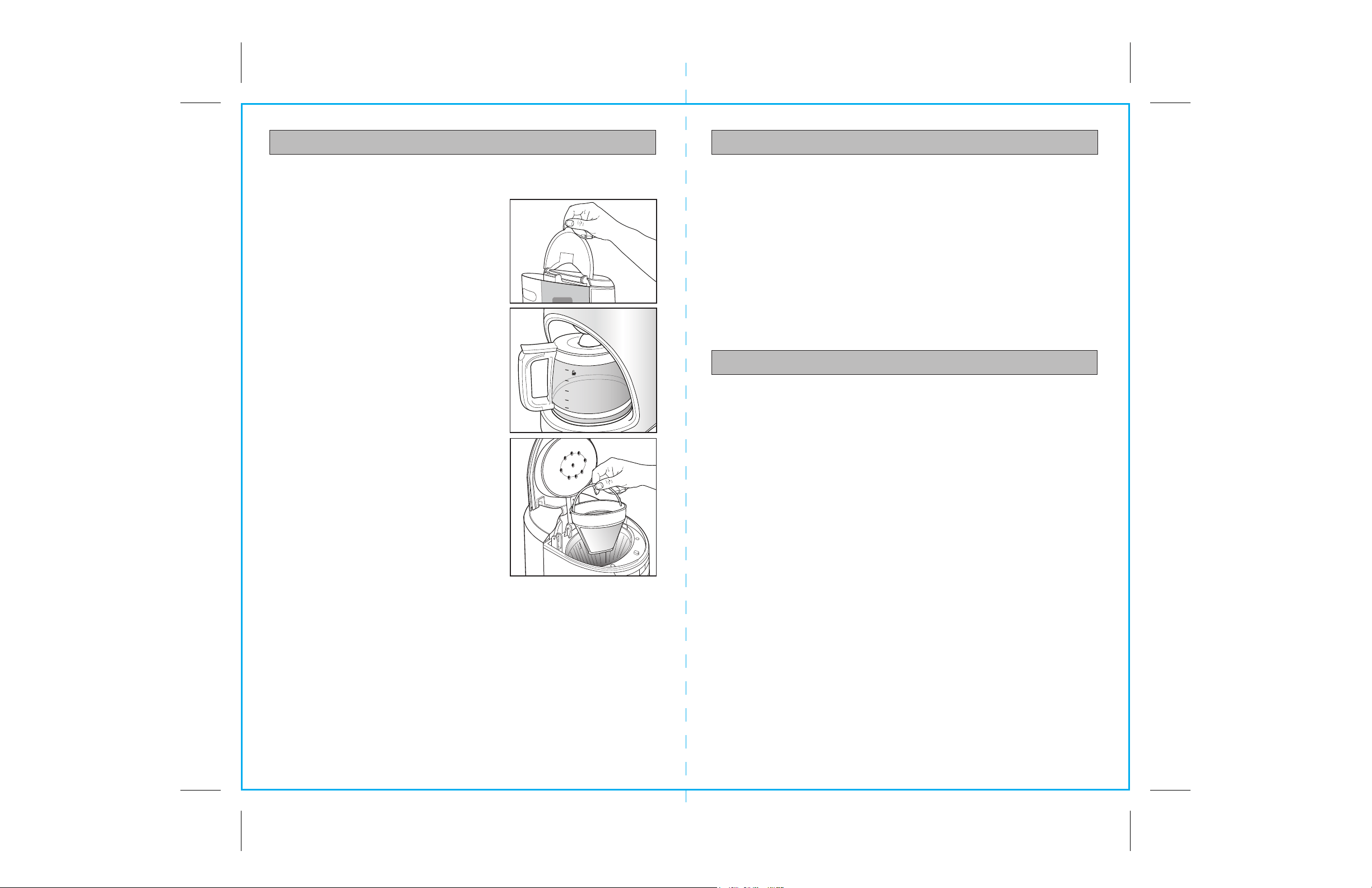
The coffeemaker has a removable
water tank. Lift the tank lid and
use the finger grip to lift up and
remove the tank (see Fig. 3). The tank
should only be removed for filling
and cleaning.
To clean inside of the tank, remove it
from the base and wash with warm sudsy
water. The water tank is dishwasher
safe (top rack only).
NOTE: DO NOT use abrasive
cleansers or scouring pads when
cleaning your coffeemaker.
NEVER immerse the coffeemaker
in water or any liquid.
Warming Plate
Filter Cover
Fig. 2
Fig. 3
Charcoal
Water
Filter
Water
Filter
Carriage
6
7
OPERATING YOUR COFFEEMAKER
The easy-to-use programmable digital controls let you know when the coffee is
ready, and even keeps track of the freshness of each brewed carafe. It’s never
been easier to brew the perfect cup of coffee.
BREWING COFFEE
1. Plug the coffeemaker into a 3-prong receptacle
if it is unplugged. When first plugged in, clock
numerals will illuminate in the display window.
To set the clock time, see the SETTING THE
CLOCK section.
NOTE: The clock does not have to be set to brew coffee.
NOTE: If no coffee is brewing, the display window
goes dark after 2 minutes. To relight screen, press
any control button except Start/Stop.
2. Open the tank cover (See Fig.3).
3. Use the carafe to fill the water tank of the
coffeemaker to the desired level with cold
water, or you can remove the tank from the
base as shown in Fig. 2 and fill it directly
with cold water from a faucet. There is a
gauge marked from 4 to 12 cups on both the
coffeemaker water tank and the sides of the
carafe (see Fig. 4). These marks show the
amount of cold water needed for the
designated number of cups. The amount of
brewed coffee will differ slightly due to the
coffee grinds absorbing some water.
4. Open the top filter cover. Place either the
permanent gold-tone filter or a size #4 cone
paper filter into the brew basket (see Fig. 5).
5. Add ground coffee. The amount of coffee
you use is a matter of personal taste (we
recommend one heaping tablespoon for
every two cups). Experiment with different
amounts of ground coffee per cup until you
brew your perfect cup of coffee. You can also try using a paper filter along
with the gold-tone filter.
6. Close the top filter cover and the water tank lid. Slide the carafe onto the warming plate.
7. The default setting of the coffee maker is regular strength. If desired, choose bold
strength by pressing the Bold button before the Start/Stop button. Press the
Start/Stop button to begin brewing. After a few seconds you will hear water flowing
into the filter. When all of the water has passed through the filter and into the carafe
as brewed coffee, three beeps sound, Start/Stop button words go out, and the
coffeemaker automatically switches to warming plate mode. For delayed brewing,
see SETTING THE CLOCK, TIMER AND AUTO-BREWING.
NOTE: A blue light illuminates beneath the water tank when coffee is brewing.
The light goes out when the brew cycle is finished.
OPERATING YOUR COFFEEMAKER cont.
8. The warming plate will continue to warm for two hours from the time that the coffee
is brewed. If all the coffee has been poured from the carafe before two hours elapse,
remove the carafe from the warming plate. Do not allow an empty carafe to sit on
the warming plate while the plate is actively warm.
NOTE: To turn off the warming plate before two hours elapse, unplug the coffeemaker.
However, the clock setting will be lost. The clock will require resetting, if desired, when the
coffeemaker is plugged in again.
BREWING COFFEE cont.
PAUSE AND POUR FEATURE
The pause and pour feature enables you to remove the carafe from the Coffeemaker
and pour a cup of coffee before brewing is finished. When the carafe is removed,
a special valve stops the flow of coffee from the brew basket to the carafe. Brewing,
however, does not stop. IMPORTANT: If the carafe is not replaced under the brew
basket after 20 seconds, water and coffee will overflow from the brew basket.
OPERATING THE CONTROL PANEL
SETTING THE CLOCK, TIMER AND AUTO-BREWING
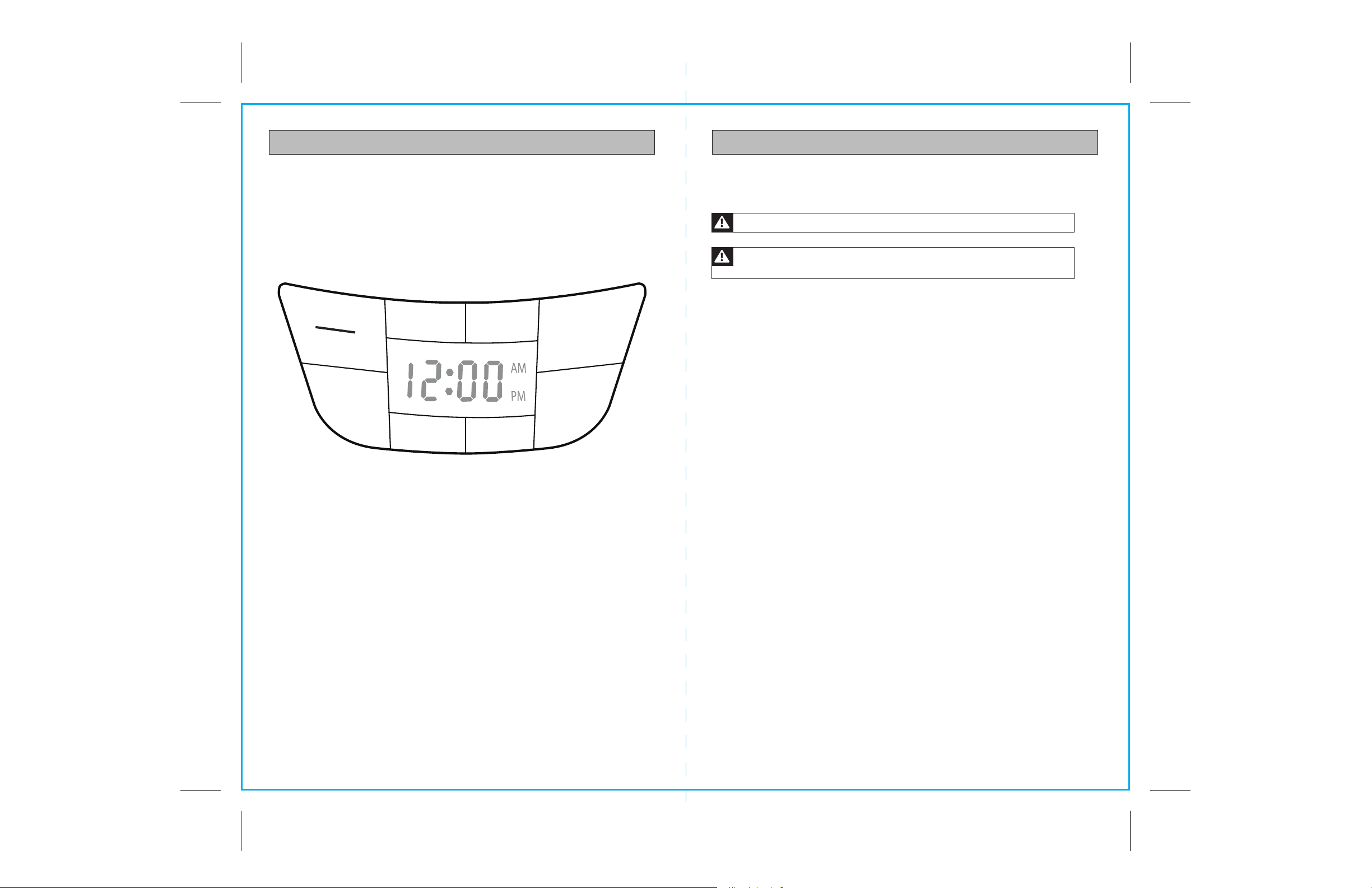
Use the Hr (Hour) and Min (Minute) Buttons to Set the Clock
1. When the coffeemaker is first plugged in, the clock will flash the default
time of 12:00 AM.
2. Press the Hr button to change the setting to any hour number between
12:00 am to 11:00 pm.
3. Press the Min button to change the setting to any minute number between 1 and 59
4. You can make the hours and minutes move more quickly in the clock display by
holding the buttons down.
5. The clock will begin keeping time at the moment the Hr and Min buttons are released.
AUDIO SIGNALS
1. When the coffeemaker is first plugged in, one beep will sound.
2. When the coffeemaker has finished brewing, three beeps will sound.
3. When the two hour warming plate period has ended, five beeps will sound.
Use the Program, Hr and Min Buttons to Program an Automatic Brew Time
1. First set the clock. See directions above.
2. Press the Program button. The Program and Auto On button words will illuminate,
and the display will flash a start of brewing time.
3. Within five seconds, use the Hr and Min buttons to set the time you wish brewing to
begin. If no input is made within five seconds, the display will revert to the set time
of day.
NOTE: Be sure to set the start of brewing time to AM or PM as desired.
4. Press the Auto On button when the correct start time is displayed within the window.
The Program button words will go out, and the Auto On button words will begin
flashing, indicating that the start of brewing time has been set. The display will
revert to the time of day clock setting.
Fig. 3
Fig. 5
12
Start
Program
Hr
1-4
Cup
Filter
Reset
Min
Auto On
Bold
Stop
12
10
8
6
4
10
8
6
4
2
Fig. 4
8
OPERATING THE CONTROL PANEL cont.
1-4 CUP BUTTON
This special cycle optimizes flavor when brewing 1 to 4 cups of coffee. Push 1-4 Cup
button before the Start/Stop button to activate the 1-4 Cup function. The words of
both buttons will illuminate. When brewing is finished, three beeps sound, both buttons
go out, and the coffeemaker automatically switches to warming plate mode.
BREWING COFFEE cont.
NOTE: To check the start of brewing time setting, press the flashing Auto On button, and
then press the Program button. The previously set start time will flash in the display. Press
the Auto On button again to retain the setting and reactivate the Auto On function.
NOTE: To cancel the Auto On function, press the flashing Auto On button. The button
words will go out.
Fig. 6
9
CARE AND CLEANING
To clean the inside of the water tank, raise the water tank cover and allow it to rest
in the open position. Pull the water tank up by the finger grip, and remove the tank
from the base. Wash tank with warm sudsy water. The water tank is dishwasher safe
(top rack only).
CARAFE CARE
A damaged carafe may result in possible burns from a hot liquid.
To avoid breaking:
1. DO NOT allow all liquid to evaporate from the carafe while on the warming plate
and never heat the glass carafe when empty.
2. DISCARD the carafe if chipped, cracked, or damaged in any manner.
3. NEVER use abrasive scouring pads or cleansers; they will scratch and weaken
the glass.
4. DO NOT place the carafe on or near a gas or electric burner, in a heated oven,
or in a microwave oven.
5. Avoid rough handling and sharp blows.
6. DO NOT set a hot carafe down on a wet or cold surface.
ALWAYS UNPLUG the coffeemaker from the electric outlet before cleaning.
The exterior of the coffeemaker, the control panel area and the warming plate should
only be cleaned with a soft damp cloth.
WARNING: NEVER immerse the coffeemaker in water or any liquid.
WARNING: DO NOT clean the warming plate unless it is completely
cool. DO NOT use abrasive cleansers or scouring pads.
Start
Stop
1-4
Cup
Filter
Reset
Auto On
Bold
Program
Hr
Min
10
11
CARE AND CLEANING
CLEANING THE COFFEEMAKER AND CHANGING THE CHARCOAL FILTER
Mineral deposits from water can clog your coffeemaker. After every 70 brewing cycles,
three beeps will sound. Also, the Filter Reset button words will illuminate. The unit will
emit a long beep after the filter is changed. Clean unit and change filter as follows:
To Clean Unit and Change Filter:
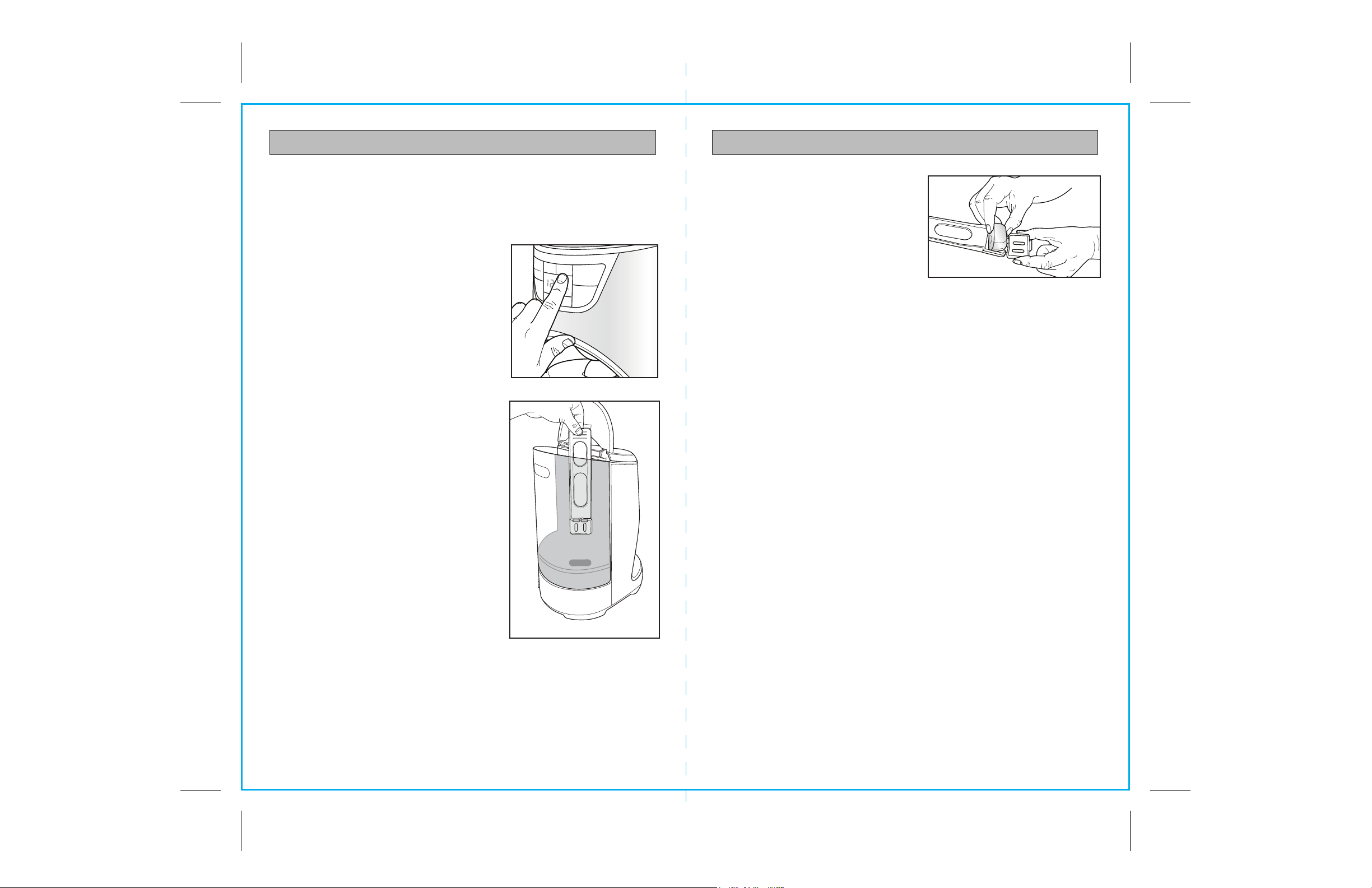
1. Press the Filter Reset button on the control
panel to turn off the blue light and reset
the count (Fig. 7).
2. Open the cover of the water tank, and pull out
the water filter carriage (Fig. 8).
3. Pour white vinegar into water tank
up to the 6-cup level shown inside tank.
4. Add cold water up to the 12-cup line.
5. Put a paper filter in the brew basket,
close cover, and place empty carafe
on the warming plate.
NOTE: Do not use the permanent gold-tone
filter in this cleaning procedure.
6. Press the Start/Stop button to turn on brewing
process and let half of the vinegar and water
solution brew through and into the carafe.
7. Press the Start/Stop button to stop the brewing
process. Allow at least 15 minutes for the
remaining solution to soften any deposits inside
the coffeemaker.
8. Press the Start/Stop button to resume the
brewing process and brew the remaining
solution into the carafe. When brewing cycle
has finished, wait for coffeemaker to cool,
then empty carafe and discard soiled paper filter.
9. Refill tank with cold water and press Start/Stop
button to run another brew cycle. You may want to repeat again to eliminate any
residual vinegar smell or taste in subsequently brewed coffee.
10. Wash the brew basket and carafe.
11. Open the water filter carriage, pull out
the used charcoal filter, and replace
with a new one of the same size and
shape as shown in Fig 9.
12. Insert the water filter carriage back into
the tank. Coffeemaker is cleaned and
ready for use.
Any other service should be performed by
a qualified service technician.
Fig. 9
CARE AND CLEANING
Hr
Min
11. Open the water filter carriage, pull out
the used charcoal filter, and replace
with a new one of the same size and
shape as shown in Fig 9.
12. Insert the water filter carriage back into
the tank. Coffeemaker is cleaned
and ready for use.
To reset the cycle count and remove the
reminder in the control panel display, push
the “Filter Reset” button.
Any other service should be performed by a qualified service technician.
Fig. 8
Fig. 7
12
Start
Program
1-4
Cup
Filter
Reset
Auto On
Bold
Stop
12
10
8
6
4
10
8
6
4
2
Fig. 7

12
13
NOTES NOTES

