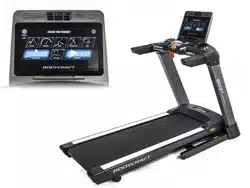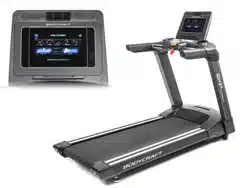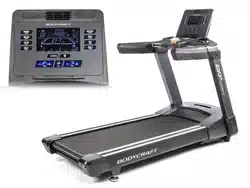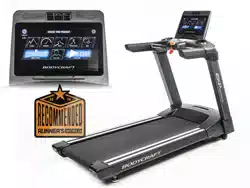
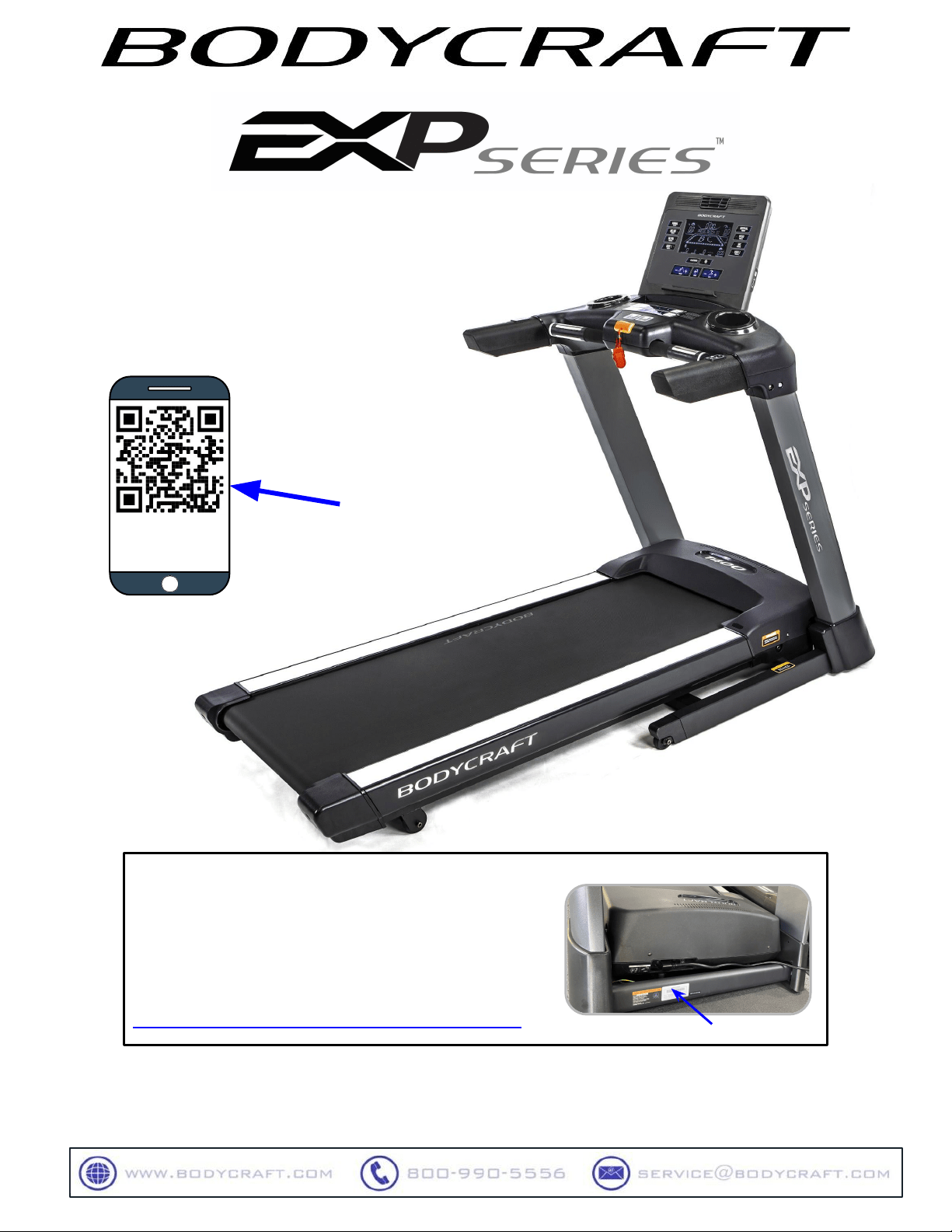
Base Serial Number: T402_ _ _ _ _ _ _ _ _ _ _ _
Console Serial Number: _ _ _ _ _ _ _ _ _ _ _ _ _
Purchased Date: ___ / ___ / ______
Dealer’s Name:__________________________
Please register your products at:
https://www.bodycraft.com/product-registration/
Open your Camera App
and point it at the QR
Code for additional
information.
http://www.bodycraft.com/
U1000-U1K1-qr.html
Owner’s Manual
T402 v1.6
1
To see this manual in
FULL COLOR
scan this QR code.
T400 Treadmill
Open your Camera
App and point it at
the QR Code
Serial Number
Serial Number
To see in
FULL COLOR
& additional information,
scan this QR code.

This page intentionally left blank

Congratulations and Welcome to the BODYCRAFT Family
Thank you for selecting BODYCRAFT. Your choice reflects a wise investment in you and your
facility. We hope you use it for many healthy years!
BODYCRAFT offers a complete array of high-quality fitness equipment. Please refer to our website at
www.bodycraft.com to view more ways to enhance your lifestyle.
Your BODYCRAFT machine has all the quality and design elements to make your workout extremely efficient
and comfortable. Your new unit is a serious cardio machine that will keep you motivated, challenged and
within reach of your fitness goals. Strength & cardiovascular training is vital for all ages which will provide an
effective workout, producing results that will encourage you to reach your fitness goals and maintain the
body you have always wanted.
Spending 15 to 30 minutes a day, three times a week, is all you need to start seeing the benefits of
a regular exercise program.
As a premium exercise equipment manufacturer, we are committed to your complete satisfaction. If you
have questions, suggestions or find missing or damaged parts, we guarantee your complete satisfaction
through our authorized dealer network or by contacting us directly. Please call your local dealer or
BODYCRAFT.
BODYCRAFT (a division of Recreation Supply, Inc.)
7699 Green Meadows Dr.
Lewis Center, OH 43035
Phone: 800-990-5556 9 am - 5 pm EST Email: service@bodycraft.com
Proof of purchase must be supplied to validate warranty and the product must have been
registered with BODYCRAFT via online at www.bodycraft.com or by calling 800-990-5556
or 740-965-2442 M-F 9 a.m. - 5 p.m. EST.
For parts orders, owner’s manuals, software
update files, exercise guides and contact
information scan this QR code.
Or go to:
https://www.bodycraft.com/customer-support

Product Safety Information
FCC Information …………………………………………………………………...
Product Safety ……………………………………………………………………..
Power & Grounding Requirements
Grounding Instructions …...................................................….………………..
Power Requirements ……………………………... .……………………………..
Product Overview
Product Overview Components & Tools for Assembly .………………………..
Product Specifications …………………………………………………………….
Shipping Boxes and Pre-Assembly TIP ……………………………………….
Assembly Parts & Hardware ..…………………………………………………….
How Assemble the Treadmill
Product Assembly Instructions ..........................................…………………...
How to Setup the Treadmill
Folding & Moving the Treadmill ………………………………………………….
Unfolding the Treadmill ………………………………………………………….
Wall Outlet, Breaker and Extension Cords .........................………….………...
Spacing Requirements …...................................................………….…………
Leveling the Treadmill (Making it stable) ………………………………………..
Running Belt Tension & Alignment ……………………………………………….
Installation Checklist ………………………………..…………………………….
Operation Instructions
Console Options……………….………………………………………………….
Console Operating Instruction ………………………………………………….
Safety Key Clip & Tether ………………………………………………………..
Heart Rate Monitoring Grips & Wireless Receiver ……………………..........
Erratic Heart Rate Readings & Exercise Tips ………………………………...
4
Table of Contents
Page
5
6 - 7
8
8
9
10
11
12
13- 24
25
26
24
27
27
28
29
30
31
31
32
33
Energy Saving function: These treadmill consoles are equipped with a power saving
function. This means after 10 minutes of inactivity, the treadmill will automatically power off.
Press any key on the dashboard to wake up the console from power save mode.
Caution: Please note that changes or modifications not expressly approved by the party responsible for
compliance could void the user's authority to operate the equipment.
This device complies with Part 15 of the FCC Rules. Operation is subject to the following two conditions:
(1) This device may not cause harmful interference, and (2) this device must accept any interference
received, including interference that may cause undesired operation.
NOTE: This equipment has been tested and found to comply with the limits for a Class B digital device,
pursuant to Part 15 of the FCC Rules. These limits are designed to provide reasonable protection against
harmful interference in a residential installation. This equipment generates, uses and can radiate radio
frequency energy and, if not installed and used in accordance with the instructions, may cause harmful
interference to radio communications. However, there is no guarantee that interference will not occur in a
particular installation. If this equipment does cause harmful interference to radio or television reception,
which can be determined by turning the equipment off and on, the user is encouraged to try to correct the
interference by one or more of the following measures:
Reorient or relocate the receiving antenna.
Increase the separation between the equipment and receiver.
Connect the equipment into an outlet on a circuit different from that to which the receiver is connected.
Consult the dealer or an experienced radio/TV technician for help.
FCC CAUTION: Changes or modifications not expressly approved by the party
responsible for compliance could void the user’s authority to operate this equipment.
Table of Contents
FCC Information
Page
Maintenance & Repairs
Cleaning your Treadmill….........................................................…………….
Preventive Maintenance ….........................................................…………….
Lubricating the Running Belt / Deck Area & Lube Icon ..….……...…………
Required Info BEFORE Initiating a Service Case …………………………..
Troubleshooting & Error Codes ………………………………………………...
Circuit Diagram .............................................................................................
Parts Lists ………..………….………………………………………….………..
Parts Exploded Views .………………………………….…………….………….
Warranty
Product Warranty ..............................................................….……..….……..
Product Warranty Registration ................................................….…..……...
Contact Us Information …………………………………………………………..
34
35
36
37
38 - 39
40
41 - 43
43 - 47
48
49
50
5

Safety and Warnings - T400 (T401 & T402) 1 of 2
6
There is a risk assumed by individuals who use this type of equipment.
A moment’s lack of attention can result in an accident, as can failure to
observe certain simple safety precautions.
Read, study and understand the Assembly Instructions and all the warning labels on this
product. Furthermore, it is recommended to familiarize yourself and others with the proper
operation and workout recommendations for this BODYCRAFT product prior to use.
● Keep children under the age of 13 and pets away from the equipment at all times. Do not
allow children and pets to use or play on the equipment. Keep children and pets away
when it is in use.
● The treadmill is not intended for use by persons with reduced physical, sensory, or mental
capabilities or lack of experience and knowledge, unless they have been given supervision
or instruction concerning use of the treadmill by someone responsible for their safety.
● Wear the safety cord and clip all times while using the treadmill. Always stand on the side
rails before the treadmill starts.
● Before beginning any exercise program on the treadmill, it is important to consult with your
physician if you have any of the following: history of heart disease, high blood pressure,
diabetes, chronic respiratory diseases, elevated cholesterol, if you smoke cigarettes or if
you experience any other chronic diseases or physical complaints.
● If over the age of 35 or overweight or pregnant, consult with your physician before
beginning any exercise program.
● If you experience dizziness, nausea, chest pains or other abnormal symptoms during
exercise, stop the exercise session immediately. Consult your physician before continuing.
● Drink fluids if you exercise for twenty or more minutes on the treadmill.
● Always follow the console instructions for proper operation.
● Never operate your treadmill if it has a damaged cord or plug, or if it is not working
properly. Contact your authorized BODYCRAFT fitness dealer for service and repair.
● Keep the power cord away from heated surfaces.
● Never insert any objects or body parts into openings.
● Keep hands and feet away from all moving parts.
● Use the handrails when getting on and off your treadmill.
● Check the power requirement for your unit to see if it matches your local power outlet.
● Do not operate the heart rate monitor transmitter together with an electrical heart
pacemaker. The transmitter may cause electrical disturbances.
● Inspect this treadmill prior to exercising to ensure it is working properly. Always make sure
all components are fastened securely.
● This treadmill is intended for indoor use. Do not place the unit outdoors or any damp or wet
locations.
Safety and Warnings - T400 (T401 & T402) 2 of 2
● Keep the treadmill away from walls to allow proper ventilation. Air should be able to circulate
freely around the unit. Keep all air openings free of dirt and dust.
● Place the treadmill in an area that will meet minimum clearance requirements: Front 12” (.3m),
Sides: 20” (.5m) & Back 79” (2m) and from any obstruction object while using the machine.
● Wear proper exercise clothing and shoes for your workout and avoid loose clothing. Never
exercise in bare feet or socks; always wear correct footwear, such as running, walking, or
cross-training shoes.
● Higher speed and higher incline is not for everyone. It is designed for occasional use of a skilled
runner and may exceed many users’ capabilities. Stop right away if you feel any discomfort. Never
walk or jog or run backwards on the treadmill.
● Place your treadmill on a solid, level surface when it is in use. Adjust the levelers at the rear of
the treadmill if necessary.
● Be careful to maintain your balance while using, mounting, dismounting, or assembling the
equipment. Loss of balance may result in a fall and serious bodily injury. Use care when getting
on or off the treadmill. When stepping on the running belt, always grasp the handrail and keep the
initial speed at or below 1 mile per hour (mph).
● Make sure the running belt is at a complete stop before exiting the machine.
● Never leave the treadmill unattended when plugged in. Unplug from outlet when not in use, before
putting on or taking off parts. When the treadmill is not in use, disconnect the treadmill by turning
the power switch to the Off position, and then remove the power plug from the electrical outlet.
● Always attach the Safety key securely to your clothing when using the treadmill.
● Do not pull the treadmill by the power cord or use cord as a handle. Always use two hands to lift
the treadmill and roll it on its front wheels.
● Keep the power cord away from heated surfaces.
● Keep the top side of the moving surface clean and dry or potential injury will occur.
● Read, understand, and test the emergency stop procedures before use.
● To ensure proper function of your treadmill, do not install attachments or accessories not
provided or recommended by BODYCRAFT.
● This T400 Treadmill is intended for home use only. DO NOT use the treadmill in any commercial,
rental, or institutional setting. Use only for its intended purpose described in this manual.
● The T400 Treadmill user’s weight is not to exceed 350 lbs (159 kgs).
7
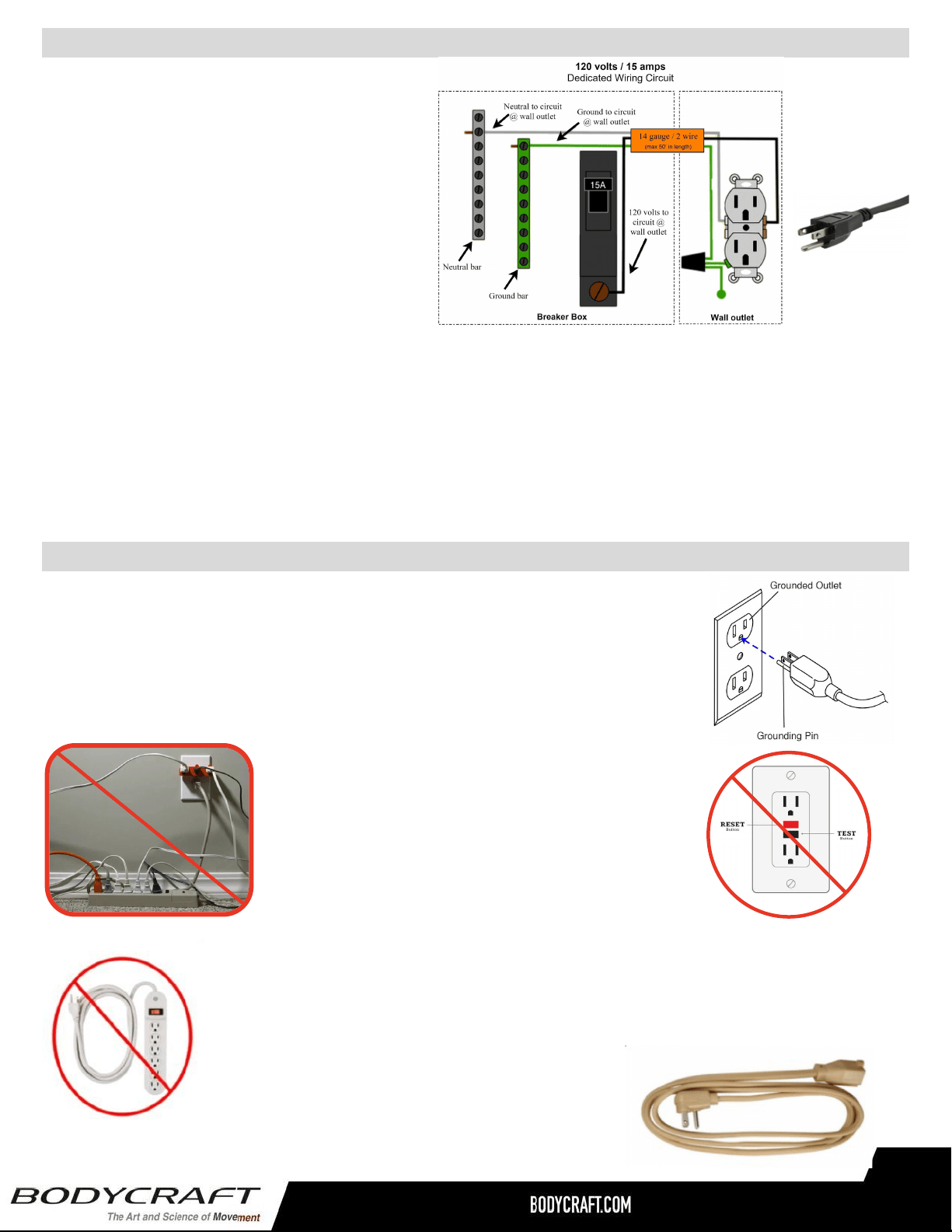
Safety and Warning for a Treadmill - Power Requirements T400 (T401 & T402)
Safety and Warning for a Treadmill - Grounding Instructions
8
DANGER - Improper connection of the equipment-grounding conductor can result in a risk of electric
shock. Check with a qualified electrician or serviceman if you are in doubt as to whether the product is
properly grounded. Do not modify the plug provided with the product if it will not fit the outlet; have a
proper outlet installed by a qualified electrician.
This product is for use on a nominal 120 volt wall circuit, and has a grounding plug that looks like the
plug illustrated in the figure. Make sure that the product is connected to an outlet having the same
configuration as the plug. No adapter should be used with this product.
This product must be grounded. If the
treadmill’s electrical system should
malfunction or breakdown, grounding
provides a path of least resistance for electric
current, reducing the risk of electric shock.
This product is equipped with a cord having an
equipment-grounding plug. The plug must be
plugged into an appropriate outlet that is
properly installed and grounded in accordance
with all local codes and ordinances.
A power strip should never be used. Extension cords should be avoided, but we
realize that in some cases an extension cord is needed. In this case, Appliance
Grade extension cords are available at most hardware stores. Buy only the
minimum length required; avoid anything longer than 6 feet. Try to find one made
with 12 gauge wire (3-wire is required). Do not use an adapter with your treadmill.
To reduce the risk of electric shock,
always unplug the treadmill from the electrical
outlet before cleaning or lightning storms.
It is recommended that your treadmill be plugged into a Dedicated 120V/15A
for home use. The treadmill must be connected to a grounded receptacle
having the same configuration as the plug. Do not modify the plug provided
with this product. If it will not fit the outlet, have a proper outlet installed by a
qualified electrician.
NOTE: DO NOT USE an GFCI wall outlet. A
treadmill uses the ground on the outlet to
disperse static electricity generated by it’s belt,
deck and motor design. Highly likely if using an
GFCI outlet, it will trip the breaker and shut down
the treadmill, potentially causing the treadmill’s
electronics failure or serious injury to the user.
THE FOLLOWING TOOLS ARE RECOMMENDED FOR EASIER ASSEMBLY:
SOCKET SET WITH 3“ & 6”
EXTENSION for 13mm & 17mm
OPEN & CLOSED WRENCHES
for 13mm & 17mm
ALLEN WRENCHES SET
4mm to 10mm)
PHILLIPS SCREWDRIVERS
#2 w/ Magnetic TIP
TORQUE WRENCH 3/8 DRIVE
TIP ON FRAME ONLY: For extra
protection from fingerprints,
sweat stains or just plain dirt,
apply an automotive grade
cleaner wax if desired. Also
makes future cleaning easier.
THE FOLLOWING IS RECOMMENDED FOR CLEANING:
100% COTTON
CLEANING CLOTHS
(Do Not Use on the Upholstery)
MILD CLEANING
SOLUTION
Product Overview Components and Tools for Assembly - T800 (T802)
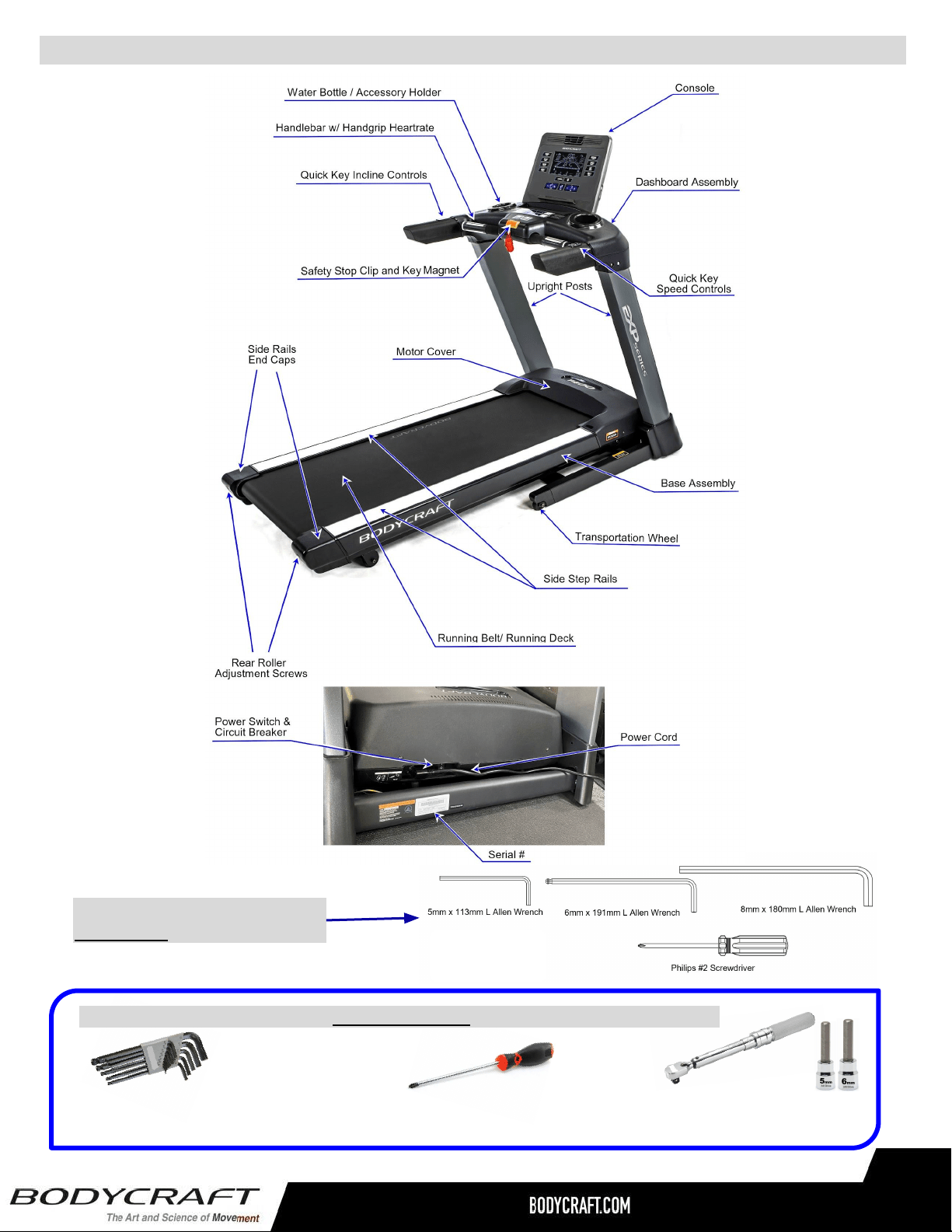
Product Overview Components and Tools for Assembly - T400 (T402)
ALLEN WRENCHES SET
(4mm to 10mm)
PHILLIPS SCREWDRIVER #2
w/ Magnetic TIP
9
THE FOLLOWING TOOLS ARE
INCLUDED FOR ASSEMBLY:
TORQUE WRENCH 3/8 DRIVE
w/ 5mm & 6mm ALLENS
TORQUE WRENCH 3/8 DRIVE
w/ 5mm & 6mm ALLENS
THE FOLLOWING TOOLS ARE RECOMMENDED FOR EASIER ASSEMBLY:
10
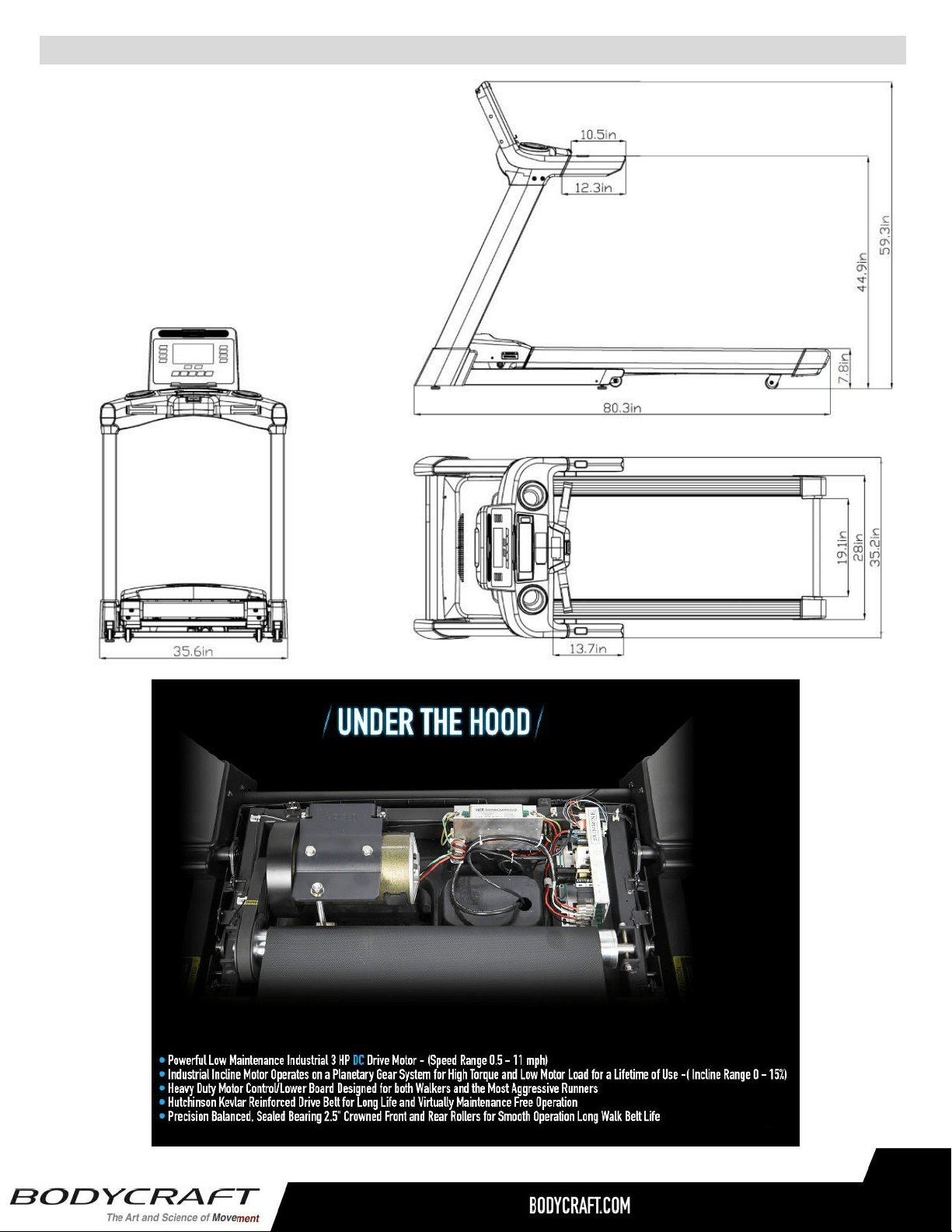
Product Specifications - T400 (T402)
RUNNING BELT: 20” W x 61” L x 2.0mm T
RUNNING DECK: 1” Thick Reversible Deck
HANDRAILS: 10.25” Custom Molded Soft Touch
DIMENSIONS: 80” L x 35” W x 59” H
WEIGHT: 260 lbs (Assembled)
MAX USER WEIGHT: 350 lbs
Physical
Dimensions
Shipped
Dimension
Shipped
Dimension
Box 1 Box 2
Length 80.3"/204cm 90.5"/230cm N/A
Width 35.6"/90.5cm 38"/97.5cm N/A
Height 59.3"/150.6cm 13.7"/35cm N/A
Weight w/
console
254lb/115kg 282lb/127.7kg N/A
PRODUCT SPECIFICATIONS
BODYCRAFT reserves the right to make improvements at any time which may affect
color, parts, materials, size, weight, or any other aspect.
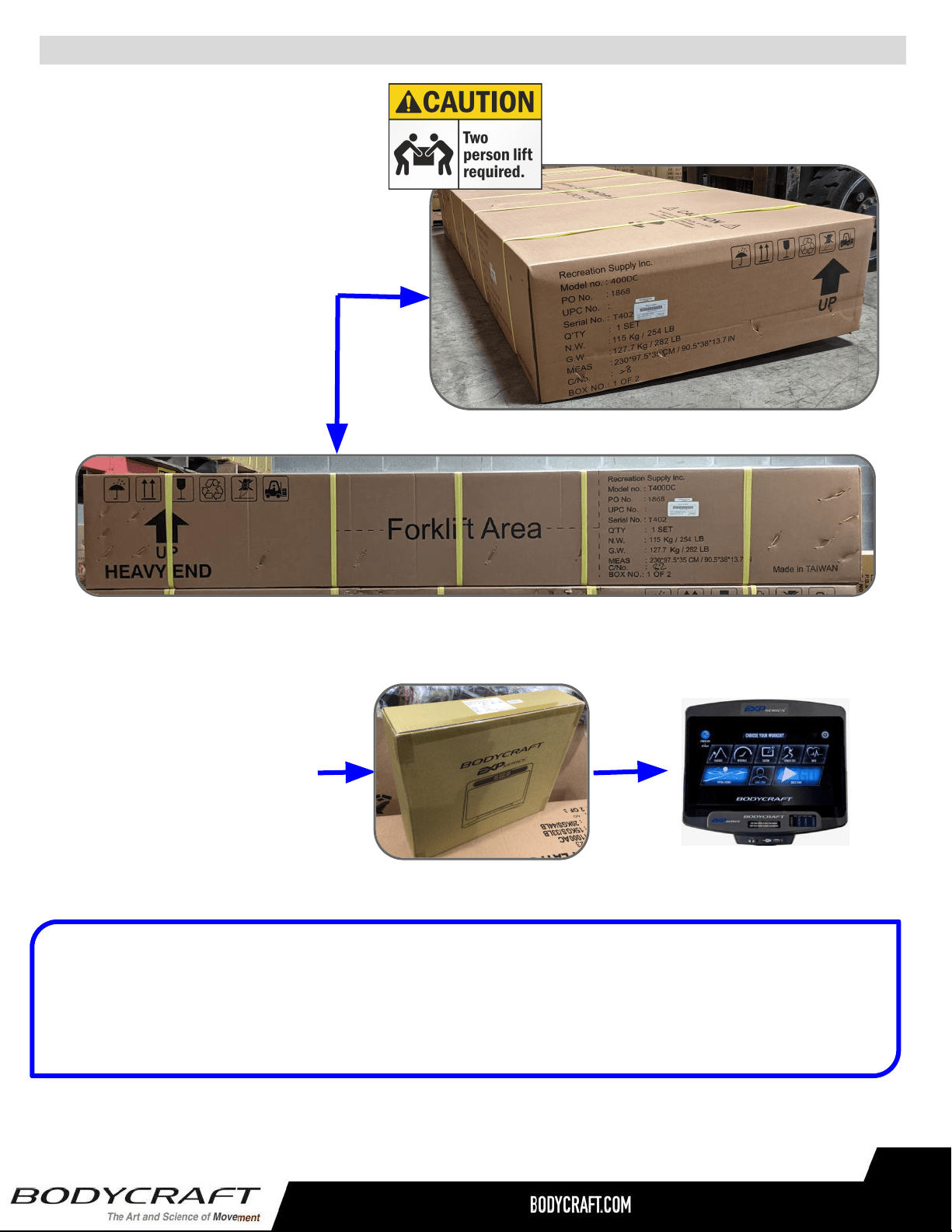
Shipping Boxes and Pre-Assembly Tip - T400 (T401 & T402)
Small Box 2 of 2
1 each @ 9 lbs
(T9LCD/T10TS)
or
1 each @ 10 lbs (T16TS)
19” x 6.25” x 5”
Pre-Assembly TIP: Place all parts from the boxes in a cleared area and position them on the floor in
front of you. Remove all packing materials from your area and place them back into the box. Do not
dispose of the packing materials until assembly is completed.
Read each step carefully before beginning.
(Includes the console model that was ordered)
Large Box 1 of 2
1 each @ 289 lbs
91” L x 39” W x 14” H
Width & Top View
Full Length (Side) View
11
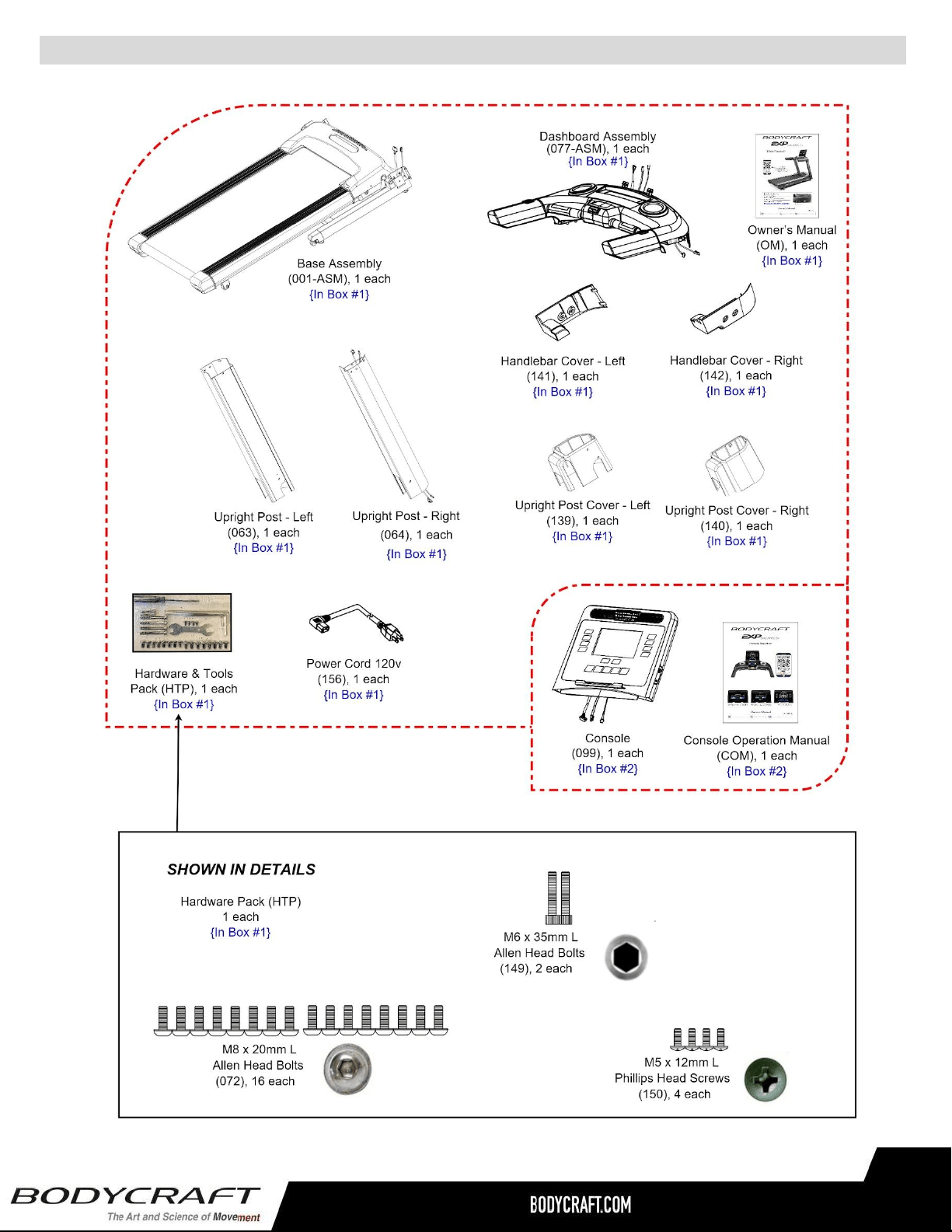
Assembly Parts & Hardware - T400 (T402)
9
Small Box #2
Large Box #1
12
Product Assembly
Many Images shown are GENERIC for both the EXP Series
Treadmills T1000 / T800 / T400 on most assembly STEPS
13
13
Fig. 1
STEP 1 – Upright Post-Right Wiring Connection
Fig. 3
Fig. 2
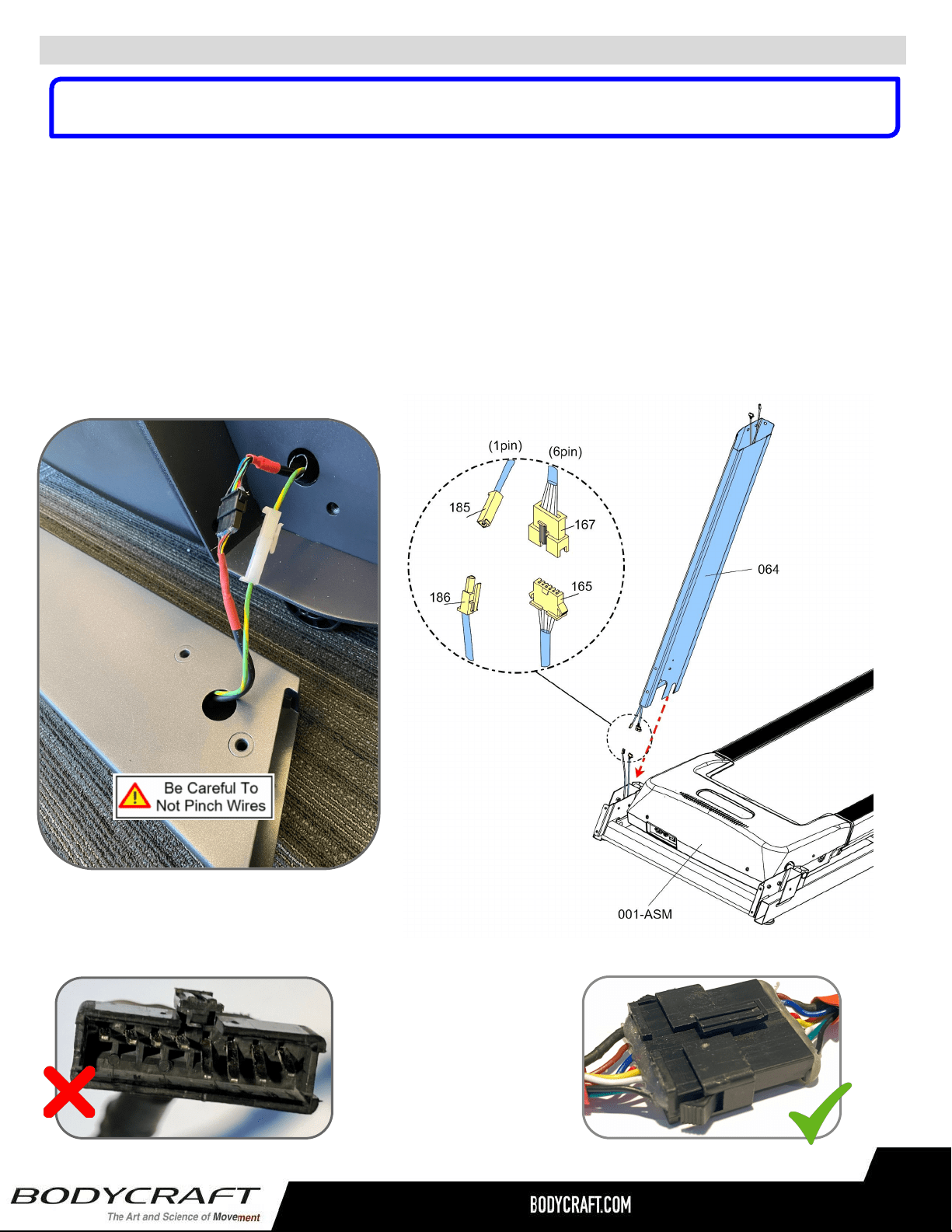
a. Lay the Upright Post-Right (064) next to the treadmill’s Base Assembly (001-ASM) on
its right side. See example pic. on (Fig. 1)
b. Then connect the following cables from the Upright Tube - Right (064) to the Base
Assembly (001-ASM):
i. Cable - Mid (#167 w/6pin) <<<< --- >>> Cable - Lower (#165 w/6pin)
ii. Grounding Cable (#185 w/1pin) <<< --- >>> Grounding Cable (#186 w/1pin)
NOTE: Confirm connections have no bent pins (Fig. 2) and are securely locked (Fig. 3) with a gentle
pull after connected.
NOTE: Many images shown are GENERIC for the EXP Series Treadmills T1000 / T800 / T400 on
multiple assembly STEPS.
Product Assembly
14
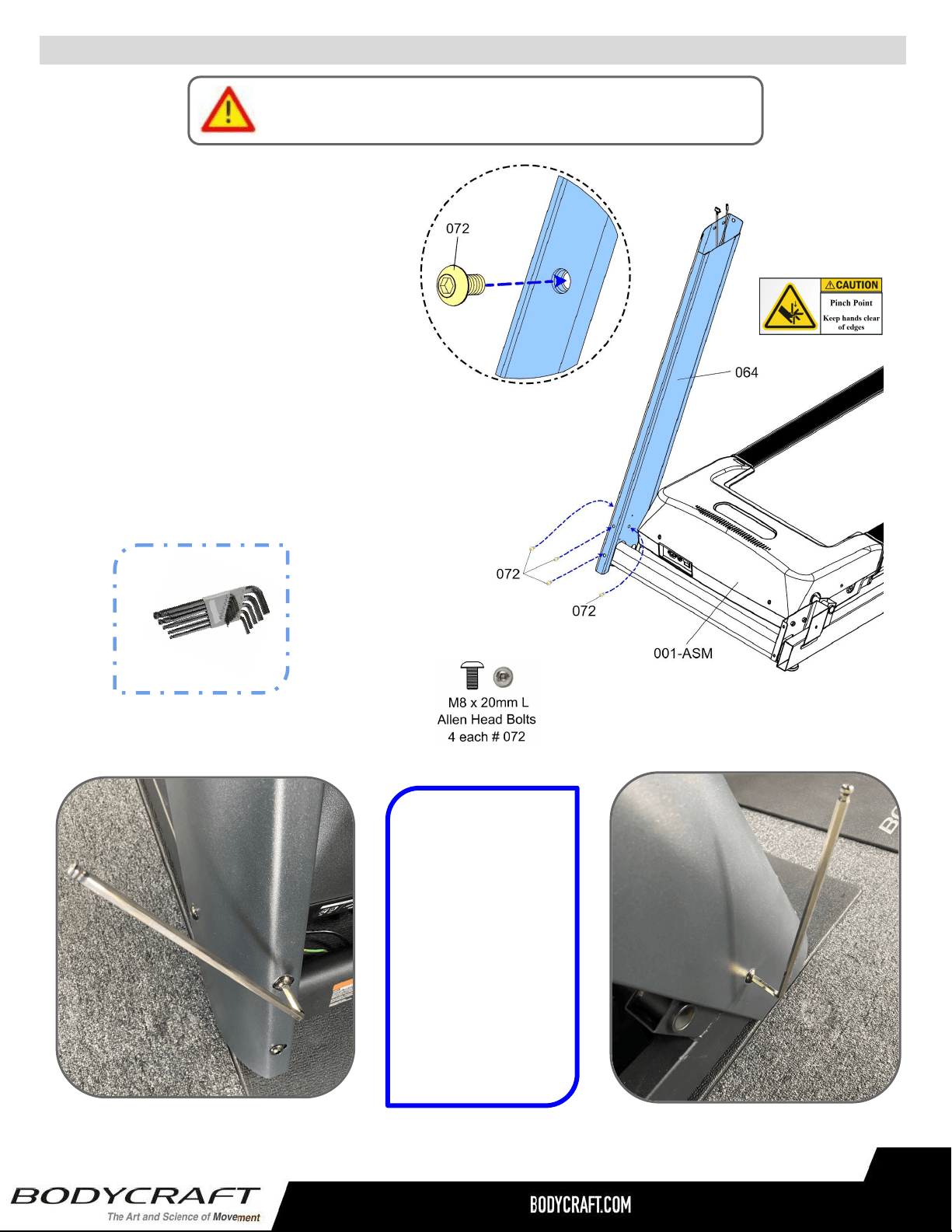
Only loosely tighten ALL BOLTS until STEP 8
STEP 2 – Install Upright Post - Right
a. Attach the Upright Post -
Right (064) to the Base
Assembly (001-ASM) using
the following hardware:
i. Four Allen Head Bolts,
M8 x 20mm L (072)
Note: See CAD image on right and
both Fig 4 and Fig 5 for examples.
Fig. 4 Fig. 5
TIP: Easier if
installing first, the
front two Allen Head
Bolts lightly by hand,
then the other side
Allen Head Bolts will
line up better.
Then loosely thread
in the rest of the way
with the 6mm Allen
Wrench.
WRENCH
13mm
Recommended Tools:
ALLEN WRENCH
6mm
ALLEN WRENCH
6mm
Recommended Tool:
Product Assembly
d. Attach the Front
Rotator Cuff (63) & Back
Rotator Cuff (64) to the
Right Handlebar (67) and
fully tighten with 4pcs
Phillips Pan Screws (M5
x p0.8 x 15mm) (147).
STEP 7 – (Continued) Upper Handlebar (66, 67) & Rotator Cuff (63, 64) Assembly.
STEP 8 – OVERVIEW Stationary Handrail (74, 75) & Rear Support Tube (102, 103)
Assembly
Overview image for
STEP 8a thu STEP 8i
e. Repeat STEP 7d for Left
....Side.
PHILLIPS SCREWDRIVERS #2
w/ Magnetic TIP
PHILLIPS SCREWDRIVERS #2
w/ Magnetic TIP
Recommended Tool:
15
Product Assembly
Only loosely tighten ALL BOLTS until STEP 8
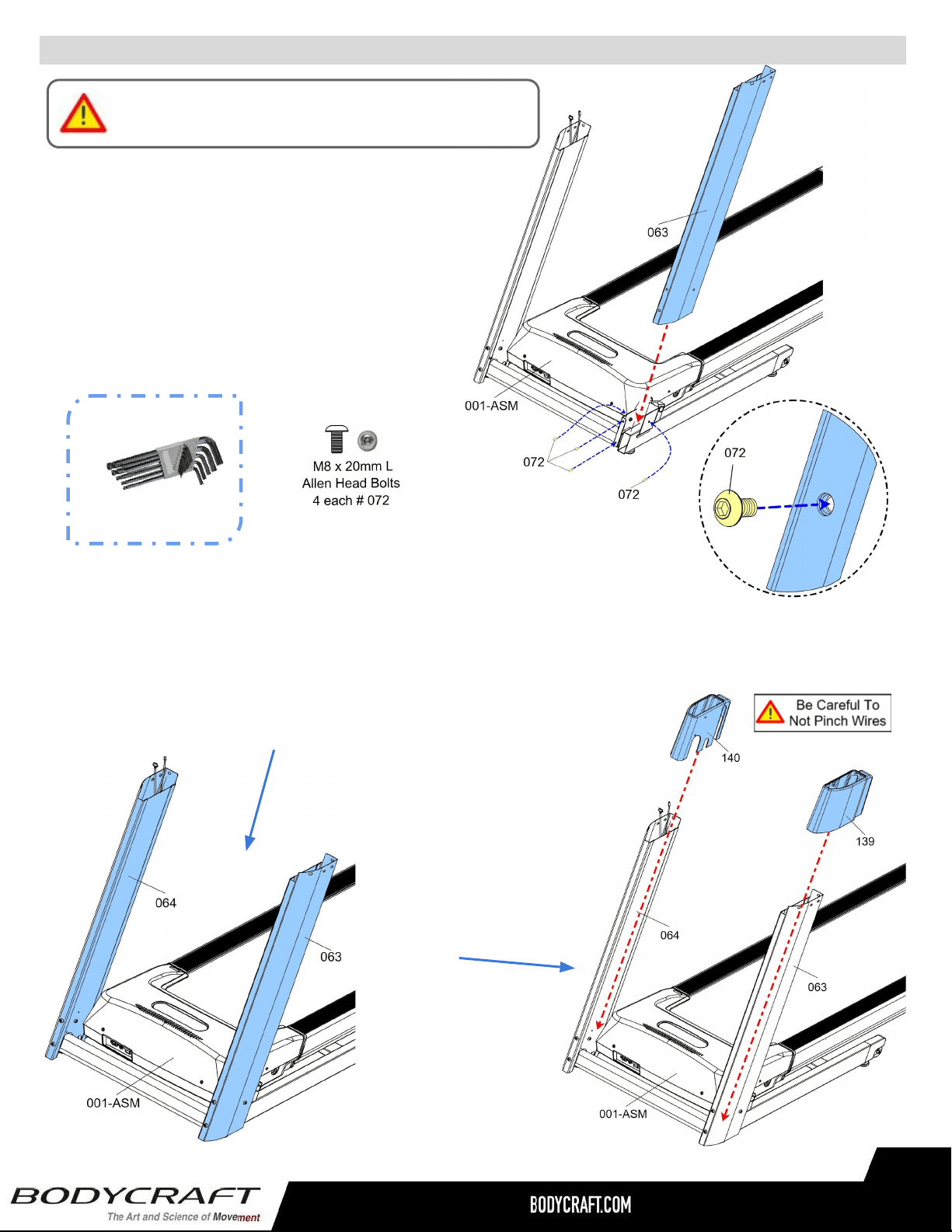
STEP 3 – Install Upright Post - Left
a. Attach the Upright Post - Left (063) to
the Base Assembly (001-ASM) using
the following hardware:
i. Four Allen Head Bolts,
M8 x 20mm L (072)
WRENCH 13mm
Recommended Tools:
ALLEN WRENCH 6mm)
a. Confirm the two Cables are hanging out of the top of Upright Post - Right (064).
b. Confirm both Upright Posts - Left (063) and Right (064) have movement
and the bolts ARE NOT fully tightened.
NOTE: Needed for STEP 5 - STEP 8 assembly
STEP 4 – Prepare for the Dashboard Assembly
c. Then slide on both
Upright Post Covers -
Lower - Left (139) and
Right (140). As shown
on CAD image to the
right.
15
ALLEN WRENCH
6mm
Recommended Tool:
Product Assembly
16
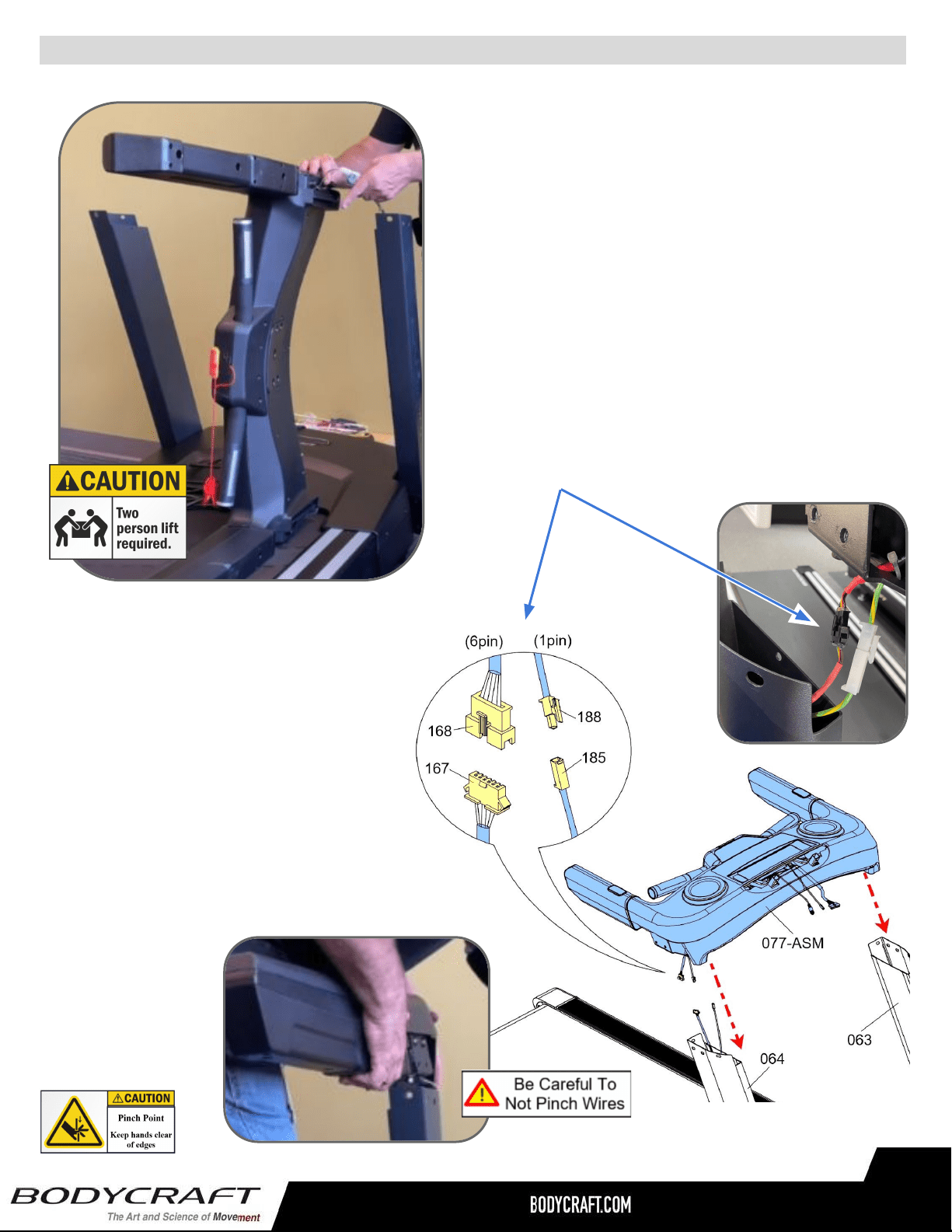
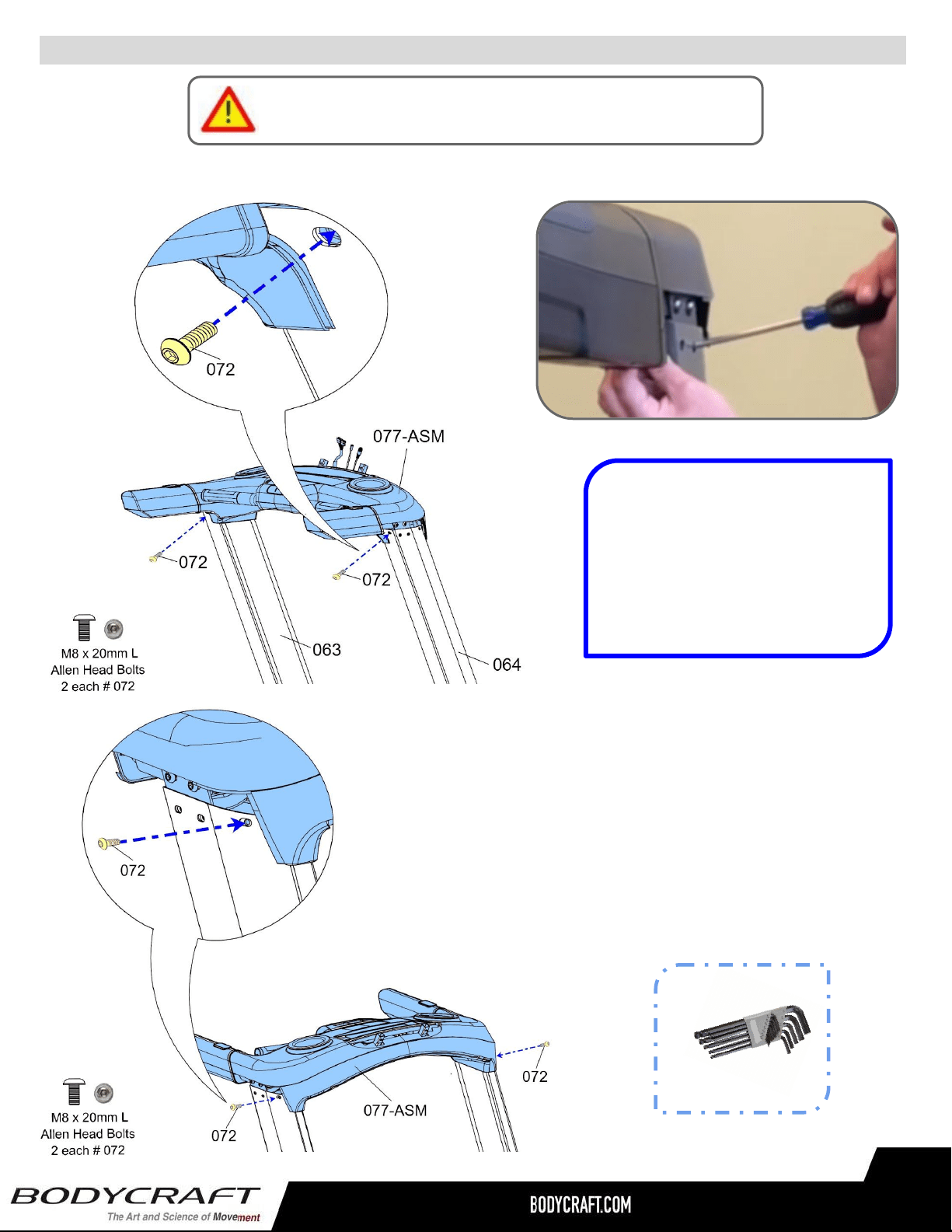
STEP 5 – Installing the Dashboard Assembly
c. After both cables are connected, confirm
they are fully locked together. Then lift up
the Dashboard Assembly and GENTLY
slide into both the Right & Left Sides of
the Upright Tubes. See pic on Fig. 7.
NOTE: Easier & SAFER for two people to
perform this task. Pinched or severed
cables during assembly
is not covered
under warranty.
Fig. 6
a. Gently lay the Left Side of the Dashboard
Assembly (077-ASM) on the running belt area.
See example pic. on Fig. 6.
b. Then connect the following cables from the
Dashboard Assembly (077-ASM) - Right Side
to the Upright Post - Right (064):
i. Cable - Upper (#168 w/6pin) <<< --
-- >>> Cable - Mid (#167 w/6pin)
ii. Grounding Cable (#188 w/1pin) <<< --
-- >>> Grounding Cable (#185 w/1pin)
a. Lay the Left Side of the Dashboard
Assembly (081-ASY) on the running belt
area. See example pic. on (Fig. 6 )
b. Then connect the following cables from
the Dashboard Assembly (081-ASY) -
Right Side to the Upright Post - Right
(126):
i. Cable - Upper (#094 w/8pin) to the
Cable - Mid (#133 w/8pin)
ii. Grounding Cable (#183 w/ 1pin) to
the Grounding Cable (#180 w/1pin)
Fig. 7
Product Assembly
b. Attach the Right Stationary
Handrail (75) to the Right Rear
Support Tube (103).
c. Attach with 4pcs Button Bolts
(151).
Please Hand Tighten All Bolts Until STEP 9
17
Product Assembly
Step # 8
17
Only loosely tighten ALL BOLTS until STEP 8
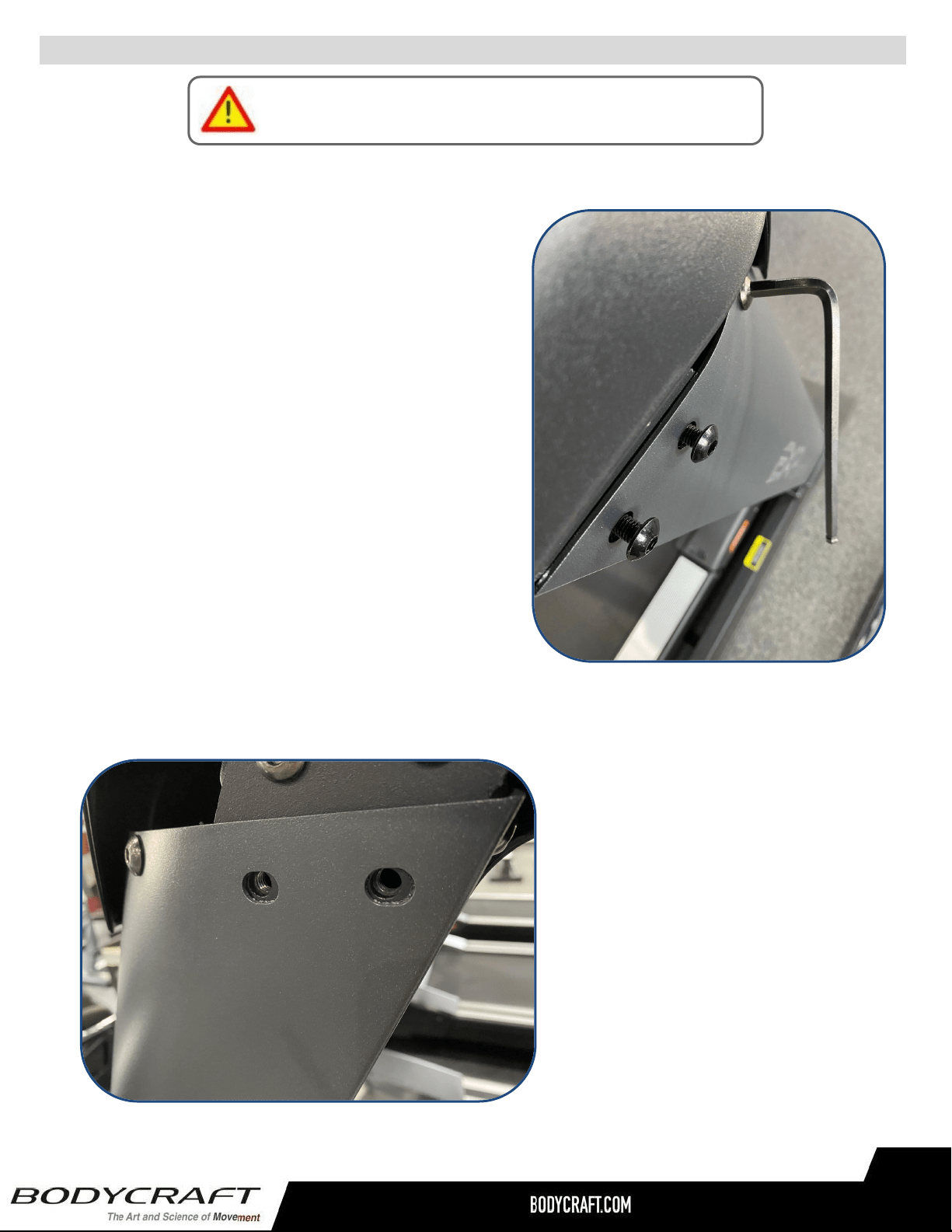
STEP 6 – Installing the Dashboard Assembly to the Upright Posts
Fig. 8
TIP: Easier to line up the front and
back bolts to the holes for STEP
6a thru STEP 6b, when using an
#2 Phillips Screwdriver in the side
holes to push up or down for
alignments.
See Fig. 8 above.
a. Attach the Dashboard Assembly (077-ASM) to the Upright
Posts (063 Left and 064 Right) using the the following
hardware:
i. Two Allen Head Bolts, M8 x 20mm L (072), back side
ii. Two Allen Head Bolts, M8 x 20mm L (072), front side
ALLEN WRENCH
6mm
Recommended Tools:
back side bolts
front side bolts
ALLEN WRENCH
6mm
Recommended Tool:
Product Assembly
18
Product Assembly
Only loosely tighten ALL BOLTS until STEP 8
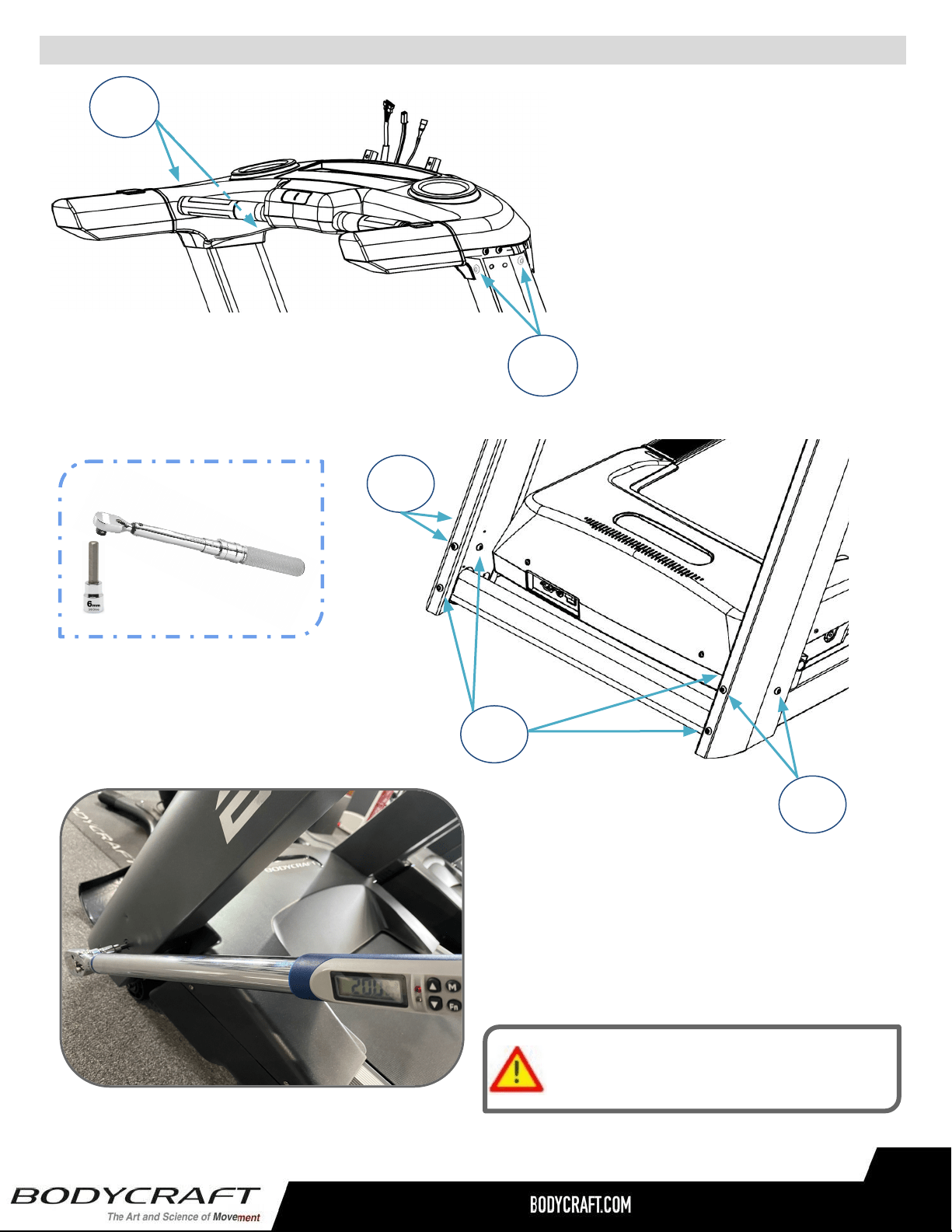
STEP 7 – Preparing to Fully Tighten the Upright Posts
a. Before fully tightening to Torque Specs in STEP
8, gently hand screw in half-way, all 4 Allen Head
Bolts, M8 x 20mm on both sides of the Upright
Posts to the Base Frame Assembly (001-ASM)
and the Dashboard Assembly (077-ASM), See
Fig. 9 image.
b. Snug up both front and rear bolts with the 6mm
Allen Wrench. This will ensure during the
tightening to Torque Specs on the other bolts, the
hole alignment to bolts will not go off when
installing the plastic Handle Bar Covers both
#141 & #142 during STEP 9a and Step 9b.
Note: Cross threaded bolts and/or stripping out the
pre-threaded holes M8mm x 1.25p will not be covered
under warranty due to installation alignments.
Fig. 9
c. Then unscrew out the 2 each side
bolts from Upright Post - Right
(064) and 2 each side bolts from
Upright Post - Left (063) before
continuing to STEP 8. Double
confirm the outer opening holes
leave room for the bolt threads to
line up with the inner threaded
holes. See pic on Fig. 10.
Fig. 10
Product Assembly
19
Product Assembly
Fig. 11
Tighten Bolts at this time
to the Recommended Torque Specs
25 ft-lbs
+/- 2 lbs
25 ft-lbs
+/- 2 lbs
25 ft-lbs
+/- 2 lbs
10 ft-lbs
+/- 2 lbs
15 ft-lbs
+/- 2 lbs
25 ft-lbs
+/- 2 lbs
25 ft-lbs
+/- 2 lbs
25 ft-lbs
+/- 2 lbs
15 ft-lbs
+/- 2 lbs
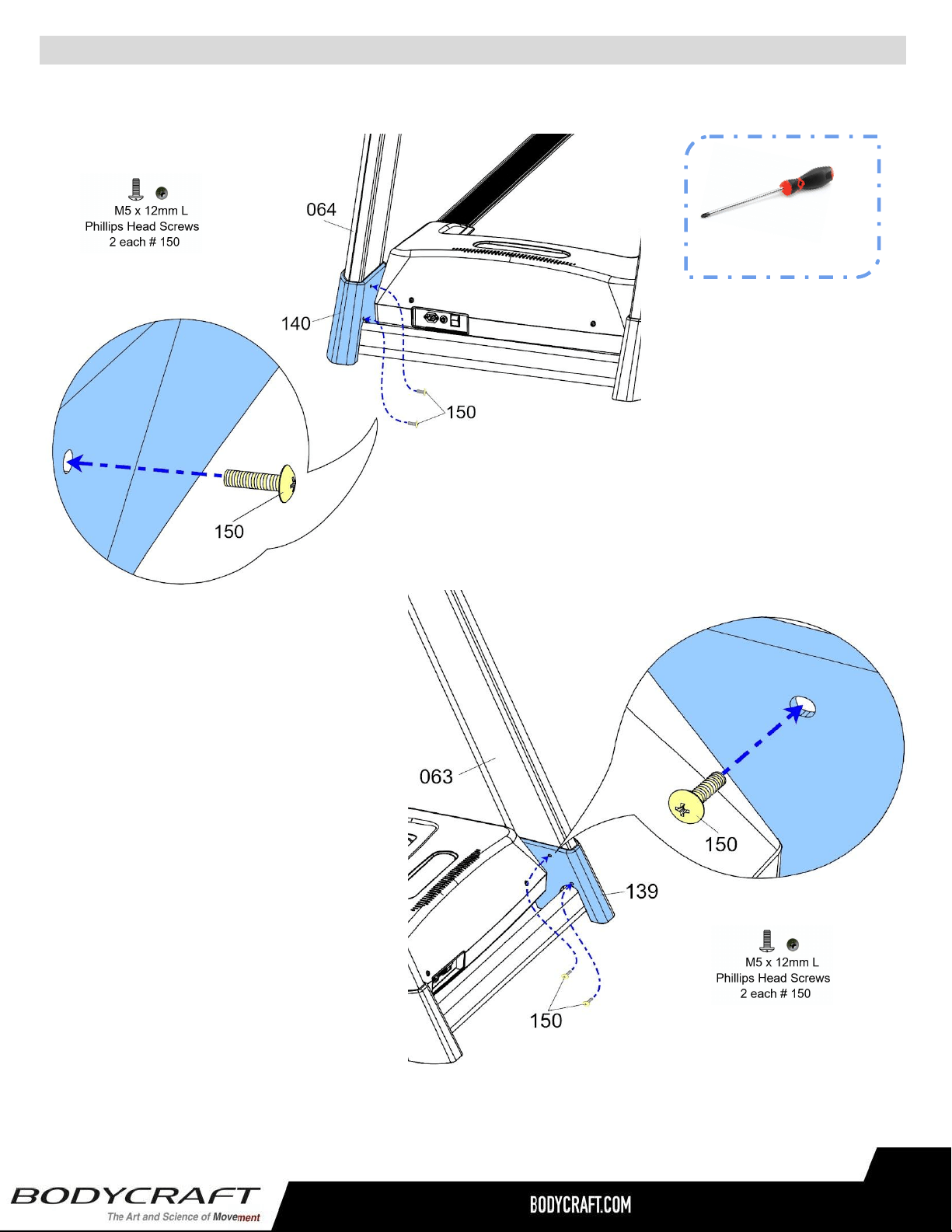
c. “Torque Time” - Tighten the Hex Bolts (156) and
Thin Nylon Nuts (135) to the recommended 20 ft-lbs +/- 2 lbs.
20 ft-lbs
+/- 2 lbs
20 ft-lbs
+/- 2 lbs
20 ft-lbs
+/- 2 lbs
20 ft-lbs
+/- 2 lbs
20 ft-lbs
+/- 2 lbs
20 ft-lbs
+/- 2 lbs
STEP 8 – “Torque Time”
Tighten all Allen Head Bolts to the
Recommended Torque Specs of 20
ft-lbs (+/- 2 lbs). These are from
STEP 2 to STEP 7.
See Fig. 11 as an example.
20 ft-lbs
+/- 2 lbs
Recommended Tools:
TORQUE WRENCH
w/ 6mm ALLEN

Product Assembly
20
Product Assembly
STEP 9 – Installing the Handlebar Covers - Right & Left
a. Attach the Handlebar Cover - Right (142) and the Handlebar
Cover - Left (141) to the Dashboard Assembly (077-ASM)
using the the following hardware:
i. Two Allen Head Bolts, M8 x 20mm L (072), Right Cover
ii. Two Allen Head Bolts, M8 x 20mm L (072), Left Cover
ALLEN WRENCH
6mm
Recommended Tools:
STEP 10 – “Torque Time” Tighten the Allen Head Bolts to the Recommended Torque Specs of
13 ft-lbs (+/- 1 lbs). See Fig. 12 as an example.
13 ft-lbs
+/- 1 lbs
13 ft-lbs
+/- 1 lbs
Fig. 12
ALLEN WRENCH
6mm
Recommended Tool:
Product Assembly
Please Hand Tighten All Bolts Until STEP 9
25 ft-lbs
+/- 2 lbs
21
Product Assembly
21
PHILLIPS SCREWDRIVERS #2
w/ Magnetic TIP
Recommended Tool:
STEP 11 – Installing the Upright Post Covers - Right & Left
a. Attach the Upright Post Cover - Right
(140) to the Upright Post - Right (064)
using the following hardware:
i. Two Screws M5 x 12mm L (150)
NOTE: Double confirm the Screws are tightened down to withstand vigorous usage.
b. Then attach the Upright Post
Cover - Left (139) to the
Upright Post - Left (063) using
the following hardware:
i. Two Screws M5 x 12mm
L (150)

Product Assembly
22
STEP 15 – Console Wiring to the Dashboard Assembly.
Please Confirm All Bolts are Tightened at this time!
Install Power Cord into power socket
Wire #1
Wire #2
Wire #3
22
a. Connect the following cables from the Console (099) to the Dashboard Assembly (077-ASM):
i. 1st Cable - Break-Out Board to Console - Lower (#170 w/9pin) <<<< --- >>> Cable -
Main Console (#220 w/9pin)
ii. 2nd Cable - Break-Out Board to Console - Lower (#107 w/2pin) <<<< --- >>> Cable -
Power Console (#221 w/2pin)
NOTE: 2nd Cable is ONLY USED with Touch 16” & 10”. NOT to be used with the 9” LCD consoles.
iii. 3rd Cable/Wire Grounding Cable (#187 w/ 1pin) <<< --- >>> Grounding Cable Console
(#207 w/1pin)
Fig. 13
b. After all cables are connected, confirm they are fully
locked together. Then GENTLY slide the console
onto the U-Shaped tubes without damaging any
cable or connections. See pic on Fig. 13.
NOTE: Easier & SAFER for two people to perform this
task. Pinched or severed cables during assembly is
not covered under warranty.
WRONG from SRS below
a. Attach the Right Upper Handlebar (67) to the Back Swing Arm (71)
and fully tighten with 4pcs Hex Flange Bolts (M8 x p1.25 x 16mm)
(168).
STEP 7 – Upper Handlebar (66, 67) & Rotator Cuff (63, 64) Assembly
Product Assembly
a. Attach the Upper & Bottom
Adjustment Covers (81, 82) to the
Adjustment Bracket (83) and fully
tighten with 1pcs Phillips Truss Screw
(M4 x 20mm) (141).
b. Repeat STEP 5b for Left side.
b. Repeat STEP 6a for Left side with Left Upper Handlebar (68).
c. “Torque Time” - Tighten the two Allen
Head Bolts to the Recommended Torque
Specs of 13 ft-lbs (+/- 1 lbs).
See Fig. 14 on the left.
23
Product Assembly
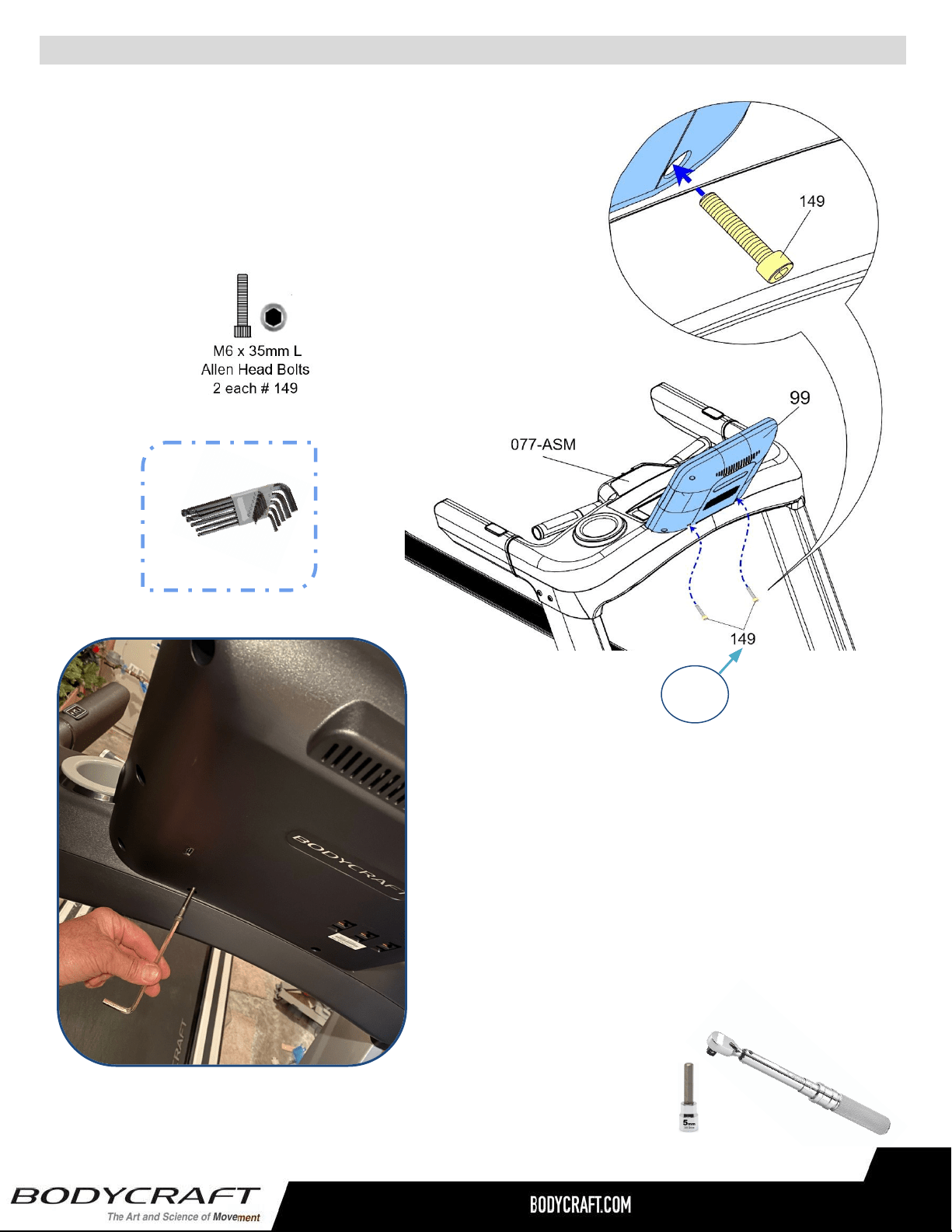
STEP 16 – Secure the Console to the Dashboard Assembly.
a. Attach the Console (099) to the Dashboard Assembly
(077-ASM) using the following hardware:
i. Two Allen Head Bolts, M6 x 35mm L (149)
13 ft-lbs
+/- 1 lbs
Fig. 14
b. Confirm the Console is completed seated
down onto the Dashboard Assembly with all
plastics flush against each other.
NOTE: This might take a bit of wiggling and
double checking for any crushed cable in the way.
ALLEN WRENCH
5mm
Recommended Tool:
Product Assembly
STEP 8 – (Continued) Assembly of Stationary Handrail, f thru g.
Please Hand Tighten All Bolts Until STEP 9
f. Attach the Right Stationary Handrail (75) to the Main Frame (1)
and slightly attach 2pcs Hex Bolts (M10 ×p 1.5 × 20mm) (158),
2pcs Lock Washers (M10) (116), & 2pcs Washers (10 x 19 x 1.5t)
(122).
24
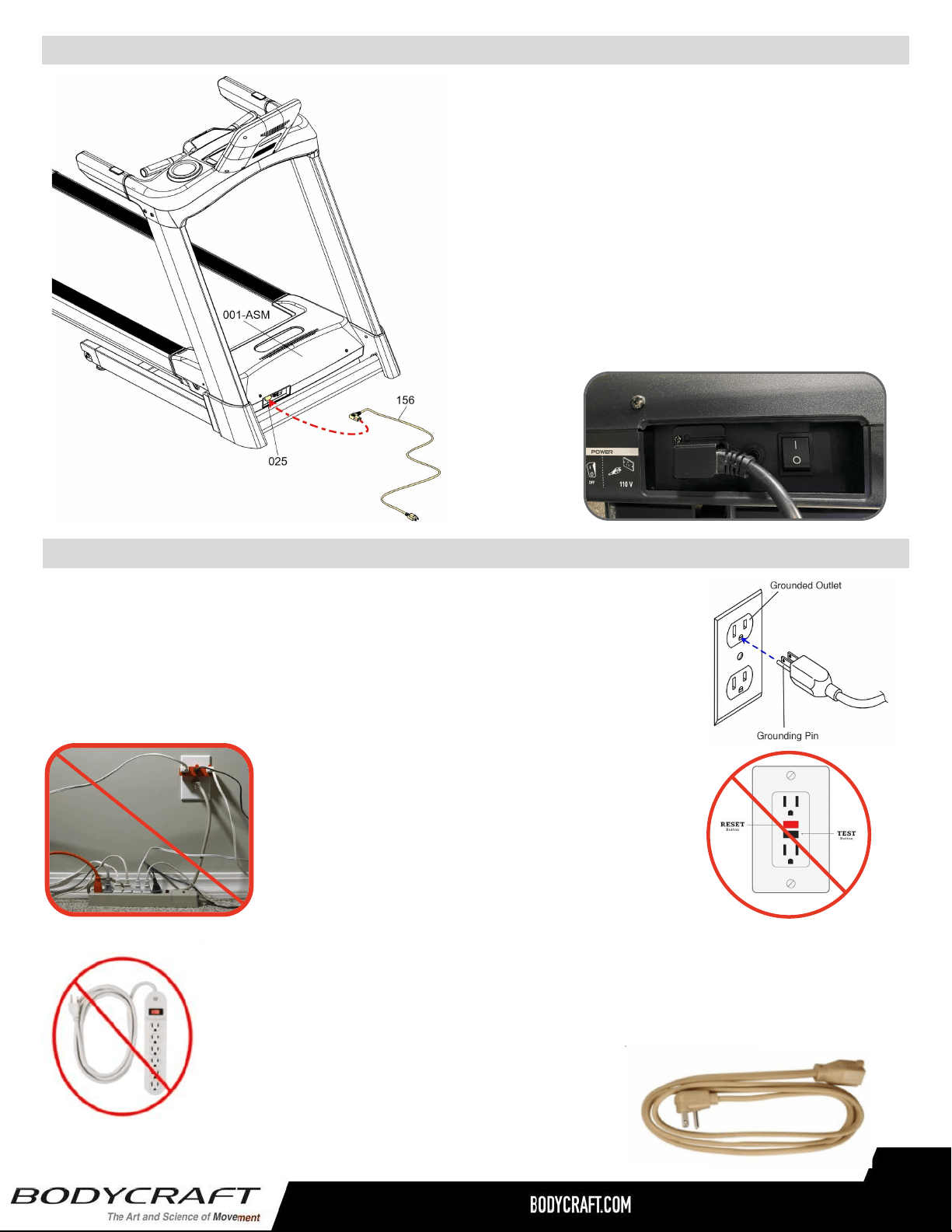
Product Setup - Wall Outlet, Breaker and Extension Cords
a. Confirm the Power Cord (156) is attached to
the Base Assembly (001-ASM). See CAD
image to left.
b. This should be secured from the Locking
Screw-in Clip (137) to the AC Socket/Input
Power (025). See Fig. 20 below using the
pre-installed hardware:
i. Screw M4 x 12mm L (006)
STEP 17 – Power Cord
Fig. 20
A power strip should never be used. Extension cords should be avoided, but we
realize that in some cases an extension cord is needed. In this case, Appliance
Grade extension cords are available at most hardware stores. Buy only the
minimum length required; avoid anything longer than 6 feet. Try to find one made
with 12 gauge wire (3-wire is required). Do not use an adapter with your treadmill.
To reduce the risk of electric shock,
always unplug the treadmill from the electrical
outlet before cleaning or lightning storms.
It is recommended that your treadmill be plugged into a Dedicated 120V/15A
for home use. The treadmill must be connected to a grounded receptacle
having the same configuration as the plug. Do not modify the plug provided
with this product. If it will not fit the outlet, have a proper outlet installed by a
qualified electrician.
NOTE: DO NOT USE an GFCI wall outlet. A
treadmill uses the ground on the outlet to
disperse static electricity generated by it’s belt,
deck and motor design. Highly likely if using an
GFCI outlet, it will trip the breaker and shut down
the treadmill, potentially causing the treadmill’s
electronics failure or serious injury to the user.
Product Assembly
25
Product Setup - Folding the Treadmill
Step 1: With the treadmill in a folded position, firmly grab the treadmill deck with both hands at the
side rail ends.
Step 2: Slightly push UP on the treadmill deck and use your foot to push forward on the upper part
of the locked cylinder. While continuing to press on the cylinder with your foot, release your
upward effort and move your hands away from the deck.
Step 3: The cylinder is now unlocked and the deck will begin lowering to the floor slowly. Step back
out of the way as the deck lowers to the floor. Your treadmill is now in place and ready to use. No
locking is required.
UNFOLDING THE TREADMILL
Belt Tension and Alignment Adjustment
Proper belt adjustment is important for smooth and safe operation of the treadmill. If the belt is too
loose, you will feel a slight hesitation each time you take a step. The adjustment screws must be
tightened evenly in order to adjust the belt properly. The adjustment screws are located at the rear of
the treadmill in the end caps.
Both adjustment screws should be tightened 1/4 turn in a clockwise direction with a wrench and the
belt checked for slipping after each adjustment. If the belt continues to slip, repeat this process until
the belt stops slipping. Make sure to only turn the adjustment screws 1/4 turn each time until the
slipping stops. This will insure that you do not over-tighten the rollers. Over-tighten the rollers may
cause serious damage to the treadmill.
Belt Alignment
If the belt tracks too close to one side, loosen the adjustment screw on the opposite side, turning it
counterclockwise 1/4 turn. Restart the treadmill and run it at 5 mph / 8 kph for 1 to 2 minutes to insure
the belt will stay in the center. Repeat the procedure if necessary.
If noises develop or malfunctions occur, stop using treadmill and contact BODYCRAFT
Customer Support immediately.
RUNNING BELT TENSION AND ALIGNMENT ADJUSTMENT
25
Lubrication to the deck is very important to your treadmill.
Your treadmill is equipped with a pre-lubricated low friction, reversible deck, that reduces the frictional
forces working against the treadmill’s drive motor. Over time, belt and deck wear due to regular use can
increase friction forces and make your treadmill’s motor work harder. This is true for any motor driven
mechanical device. Keeping friction to a minimum helps extend component life. Additionally, nonuse of
the treadmill for an extended period can lead to a dry deck. If the treadmill belt slows down very quickly
after you have completed your workout, it may lack adequate silicone.
WHY LUBRICATE THE BELT/DECK AREA?
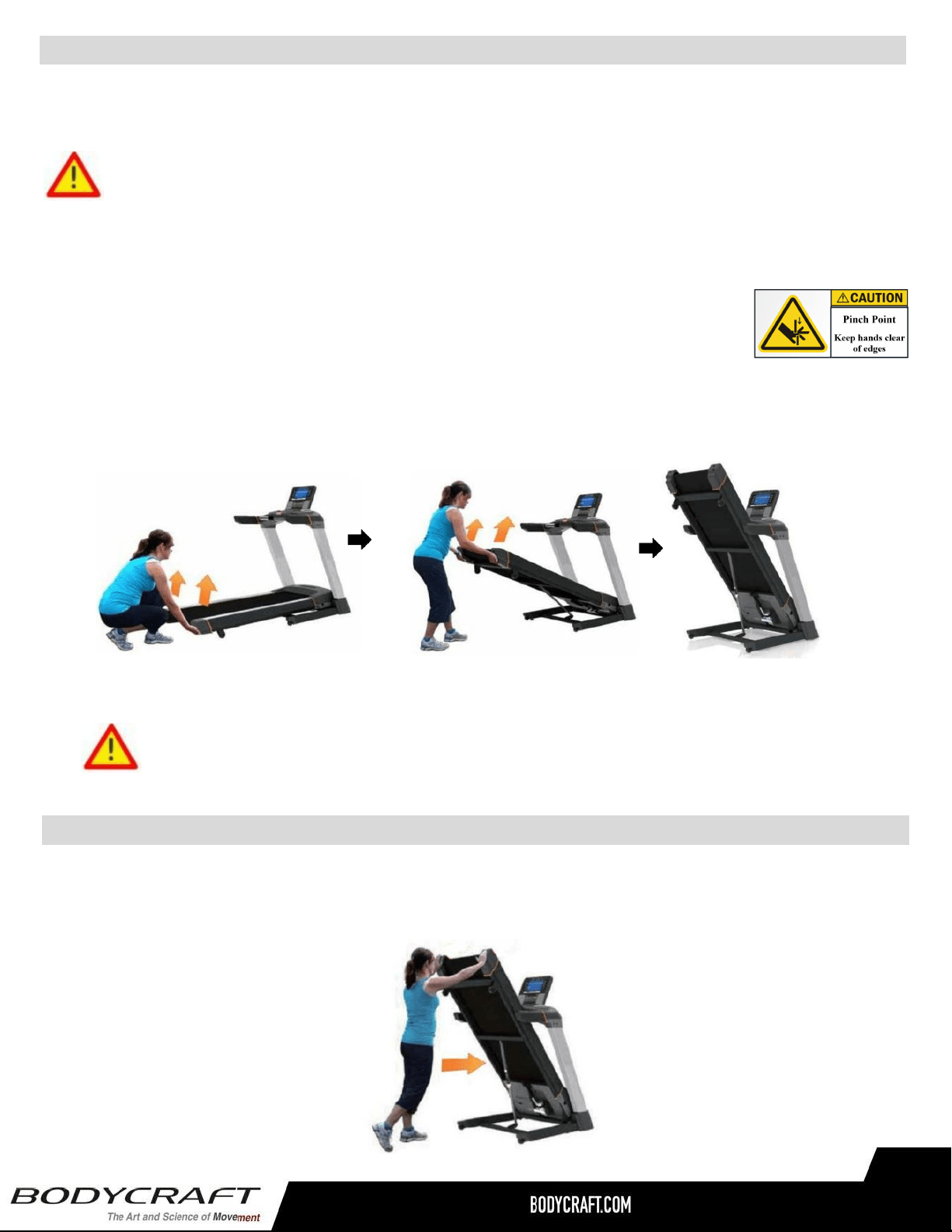
When you need more room in your home or simply want to move your treadmill to another location, it is
very easy to do so with our exclusive Fold-N-Go Feature.
Warning: Before folding the treadmill, make sure the running surface has come to a completed
stop and it is at 0° incline or horizontal position. Do not operate a folded treadmill.
Step 1: While using the proper lifting technique (bend at your knees, use your legs to lift the treadmill, not
your back), firmly grab the treadmill deck with both hands, at the side rail ends.
Step 2: Lift the deck upward.
Step 3: Continue lifting the deck. You will feel the assistance from the cylinder. Lift the deck until it locks in
place. You should be able to see and hear it lock. To verify the cylinder is locked, simply pull down on the
deck. The deck should not move. Your treadmill will remain locked in the upright position.
Product Setup - Moving the Treadmill
This treadmill is equipped with very easy to move transportation system. With the treadmill locked in the
folding position, there are now 4 wheels on the ground. You should be able to grab the treadmill and push it
wherever you would like.
CAUTION: Do not grab the belt itself, as it may roll and you may lose your grip.
Warning: When treadmill is folded, be cautious with young adults, children and
pets playing on, around or underneath the treadmill.
Product Assembly
26
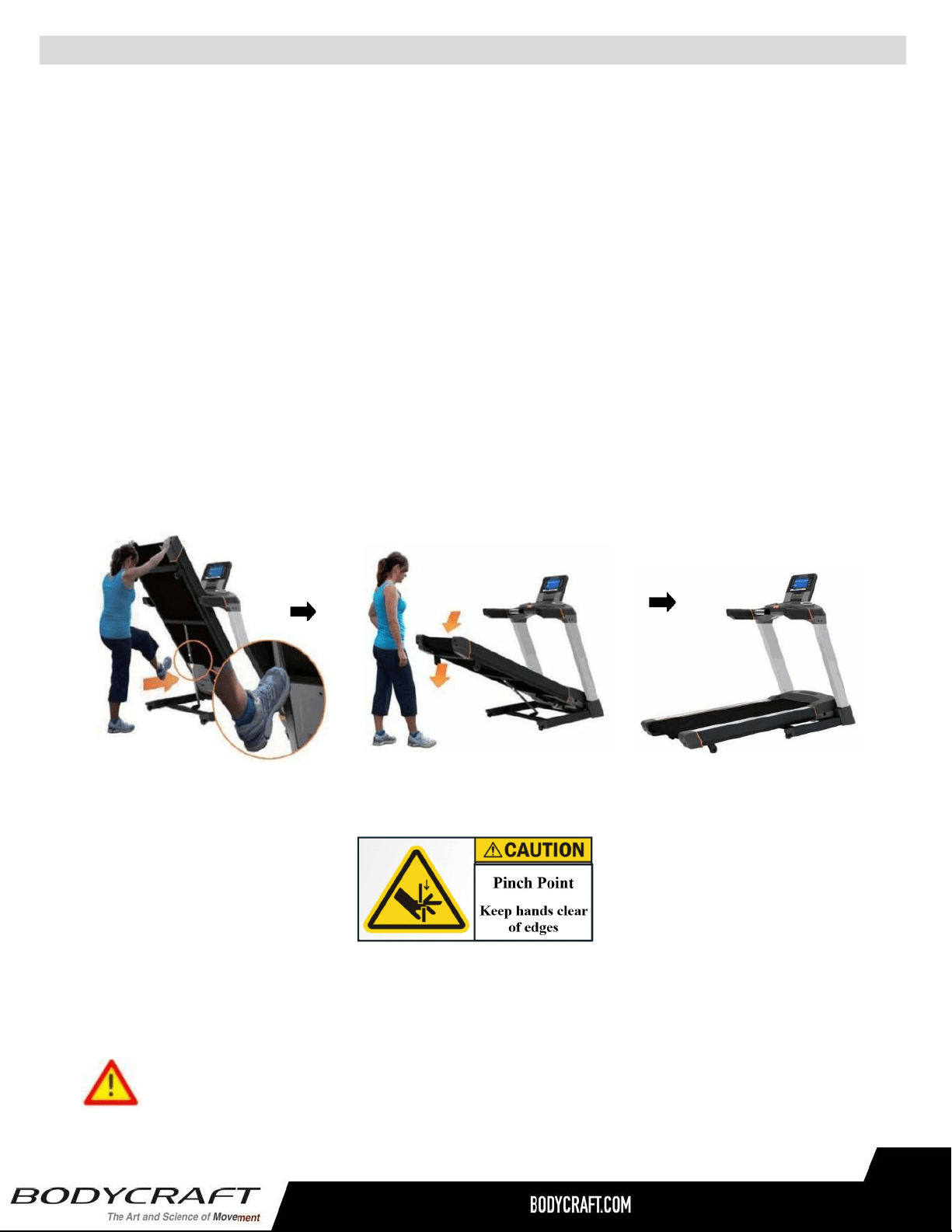
Product Setup - Unfolding the Treadmill
Step 1: With the treadmill in a folded position, firmly grab the treadmill deck with both hands at
the side rail ends.
Step 2: Slightly push UP on the treadmill deck and use your foot to push forward on the upper
part of the locked cylinder. While continuing to press on the cylinder with your foot, release
your upward effort and move your hands away from the deck.
Step 3: The cylinder is now unlocked and the deck will begin lowering to the floor slowly. Step
back out of the way as the deck lowers to the floor. Your treadmill is now in place and ready to
use. No additional locking is required.
UNFOLDING THE TREADMILL
Belt Tension and Alignment Adjustment
Proper belt adjustment is important for smooth and safe operation of the treadmill. If the belt is too
loose, you will feel a slight hesitation each time you take a step. The adjustment screws must be
tightened evenly in order to adjust the belt properly. The adjustment screws are located at the rear of
the treadmill in the end caps.
Both adjustment screws should be tightened 1/4 turn in a clockwise direction with a wrench and the
belt checked for slipping after each adjustment. If the belt continues to slip, repeat this process until
the belt stops slipping. Make sure to only turn the adjustment screws 1/4 turn each time until the
slipping stops. This will insure that you do not over-tighten the rollers. Over-tighten the rollers may
cause serious damage to the treadmill.
Belt Alignment
If the belt tracks too close to one side, loosen the adjustment screw on the opposite side, turning it
counterclockwise 1/4 turn. Restart the treadmill and run it at 5 mph / 8 kph for 1 to 2 minutes to insure
the belt will stay in the center. Repeat the procedure if necessary.
If noises develop or malfunctions occur, stop using treadmill and contact BODYCRAFT
Customer Support immediately.
RUNNING BELT TENSION AND ALIGNMENT ADJUSTMENT
26
Lubrication to the deck is very important to your treadmill.
Your treadmill is equipped with a pre-lubricated low friction, reversible deck, that reduces the frictional
forces working against the treadmill’s drive motor. Over time, belt and deck wear due to regular use can
increase friction forces and make your treadmill’s motor work harder. This is true for any motor driven
mechanical device. Keeping friction to a minimum helps extend component life. Additionally, nonuse of
the treadmill for an extended period can lead to a dry deck. If the treadmill belt slows down very quickly
after you have completed your workout, it may lack adequate silicone.
WHY LUBRICATE THE BELT/DECK AREA?
CAUTION: Do not grab the belt itself, as it may roll and you may lose your grip.
Warning: When treadmill is folded, be cautious with young adults, children and
pets playing on, around or underneath the treadmill.
Product Assembly
27
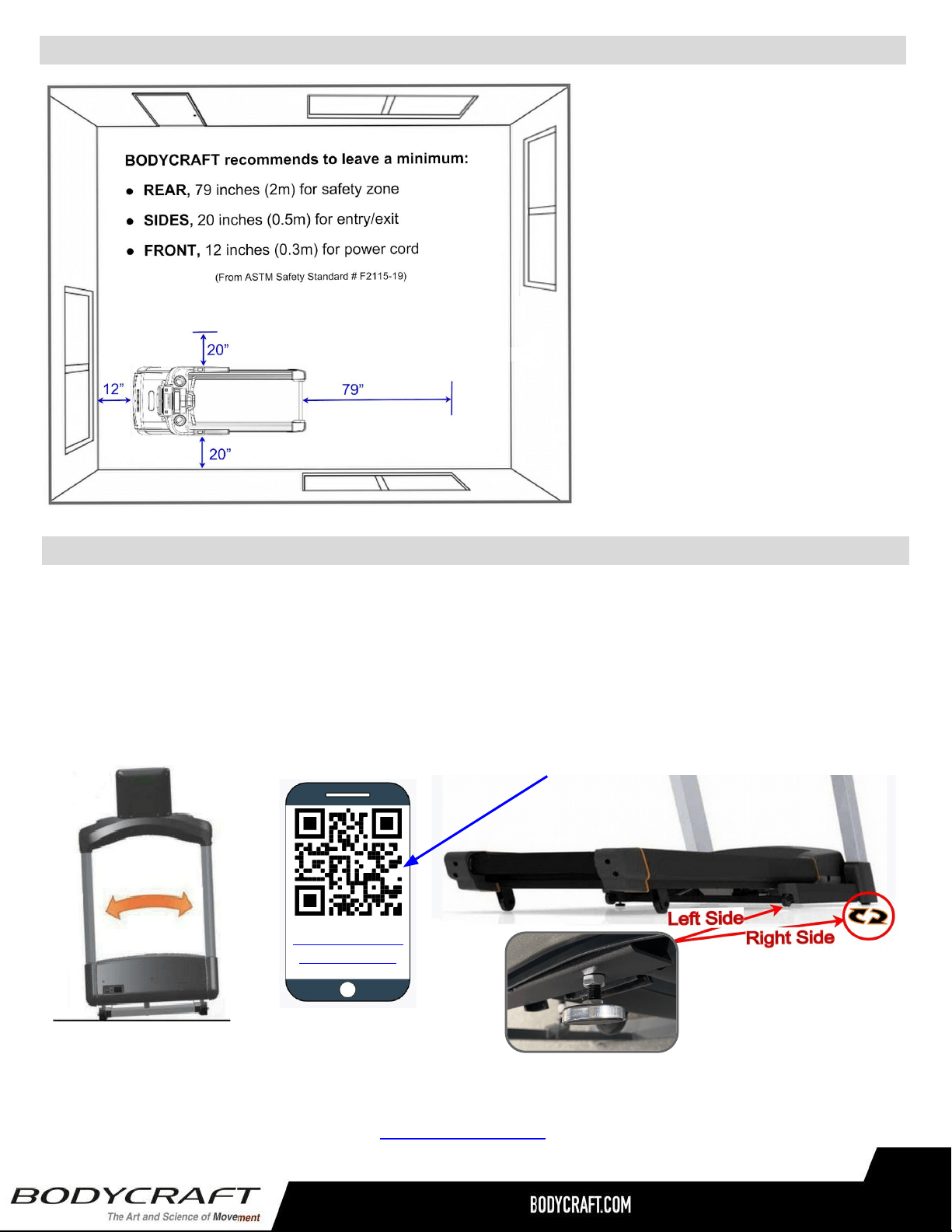
Product Setup - Spacing Requirements
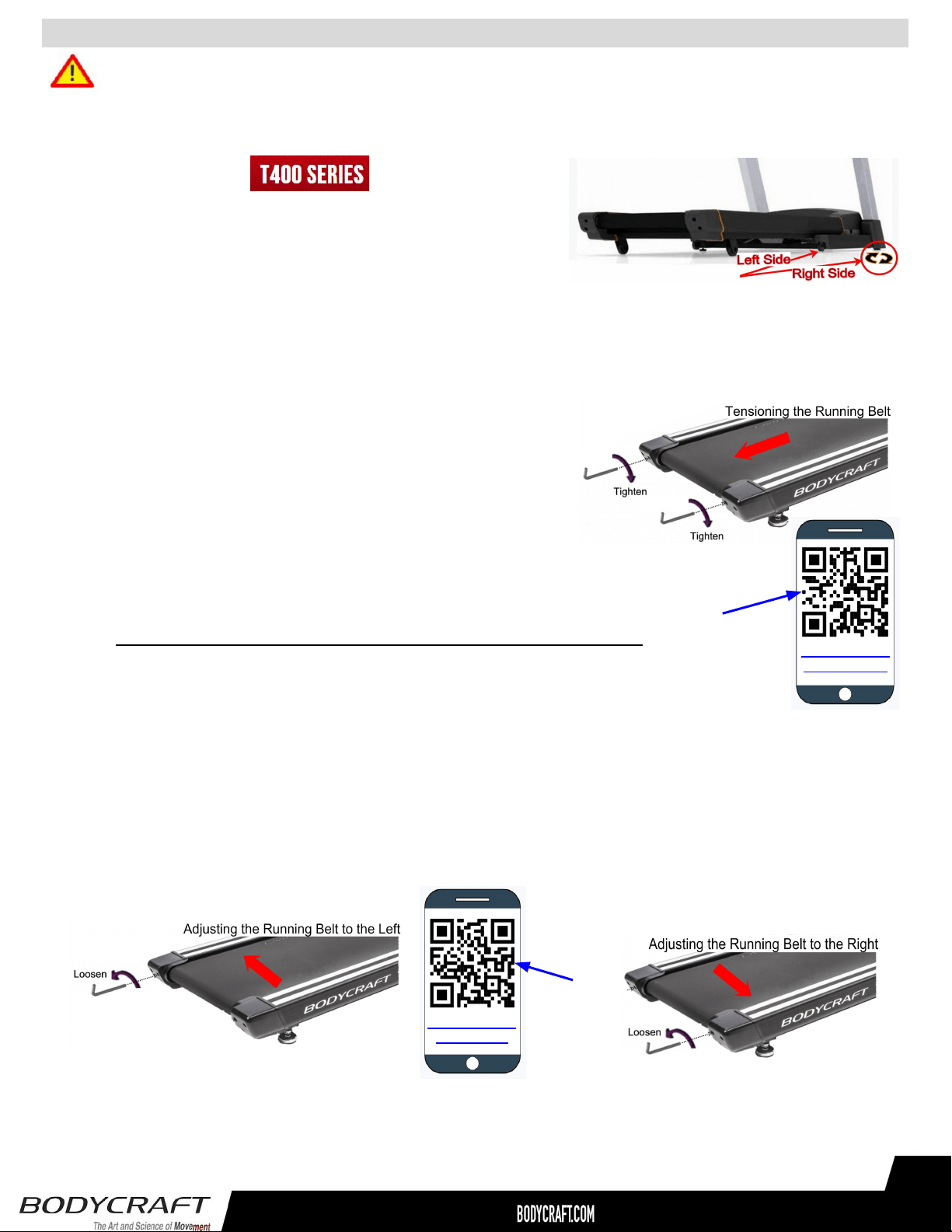
Sometimes floor surfaces are not level or even. Once your treadmill is in the desired location, take the time to
ensure that it is stable. All four contact points should make contact with the floor (2 wheels at the front and 2
adjustable rear stabilizers). If necessary, adjust the height of the rear stabilizers by turning it clockwise or
counterclockwise to either lower or raise the machine. Test by walking or running the machine to ensure that
the treadmill is not rocking on your floor. It must be level and stable to operate properly and eliminate any
undue wear and tear on the treadmill or your floor.
In some cases you may need to purchase an optional mat that will also help level all 4 contact points. Mats will
also help reduce noise and can help to protect most types of flooring. If you wish to purchase a mat, contact the
dealer you purchased the treadmill from or contact BODYCRAFT.
Product Setup - Leveling the Treadmill
https://youtu.be/
Oi-pOybBkKw
Watch Leveling the Treadmill on
YouTube
27
U.S. and other regions: The ASTM
International (ASTM) F2115-19
Standard recommends the
dimensions to be 1.64 ft. (.5 m) on
each side of the treadmill and 6.5 ft. (2
m) behind the reward most portion of
the usable moving surface or 6.5 ft. (2
m) behind the furthest rearward
obstruction to emergency egress from
the treadmill.
EU: The European EN ISO 20957
Safety Standard requires a 6.5 ft. (2m)
minimum from the rear of the treadmill
to any object or surface and at least
as wide as the treadmill.
Follow these steps after the assembly STEPS to ensure proper function of your treadmill!
● If you are not comfortable performing these STEPS, please contact your local BODYCRAFT dealer or our
customer support department to arrange a qualified technician to come to your home or commercial location.
STEP 2: Next, adjust for Running Belt Tension. Stomp Test method: While straddling the Running Belt, with
your feet on the Side Rails, start the treadmill to 2.5 mph / 4 kmh, then while holding on to the handrails, use
your stronger foot only, stomp your foot down & forward to see if the Running Belt slips. If the belt does not slip,
continue to STEP 3. If the belt slips, the adjustment screws must be tightened evenly both right & left sides in
order to adjust the belt properly. The adjustment screws are located at the rear of the treadmill in the end caps
(see figure below).
v1.2
○ Both rear roller adjustment screws should be tightened in a
clockwise direction with a 6mm Hex Wrench.
○ After each adjustment check the running belt for slipping after
each adjustment. If the belt continues to slip, repeat this process until
the belt stops slipping. Make sure to ONLY turn both adjustment screws
1/2 turn each time until the slipping stops. This will ensure that you do not
over-tighten the rollers.
Over-tightening the rollers may cause serious damage to the treadmill
○ Once you have adjusted the tension, you need to do an Running Belt Alignment
procedure in STEP 3.
Product Setup - Running Belt Tension & Alignment
28
https://youtu.be/
73FGa3LrGVQ
Watch STEP 2
on YouTube
STEP 1: Level the treadmill. Refer to the “Leveling the treadmill”
procedure from earlier Product Setup pages for more details.
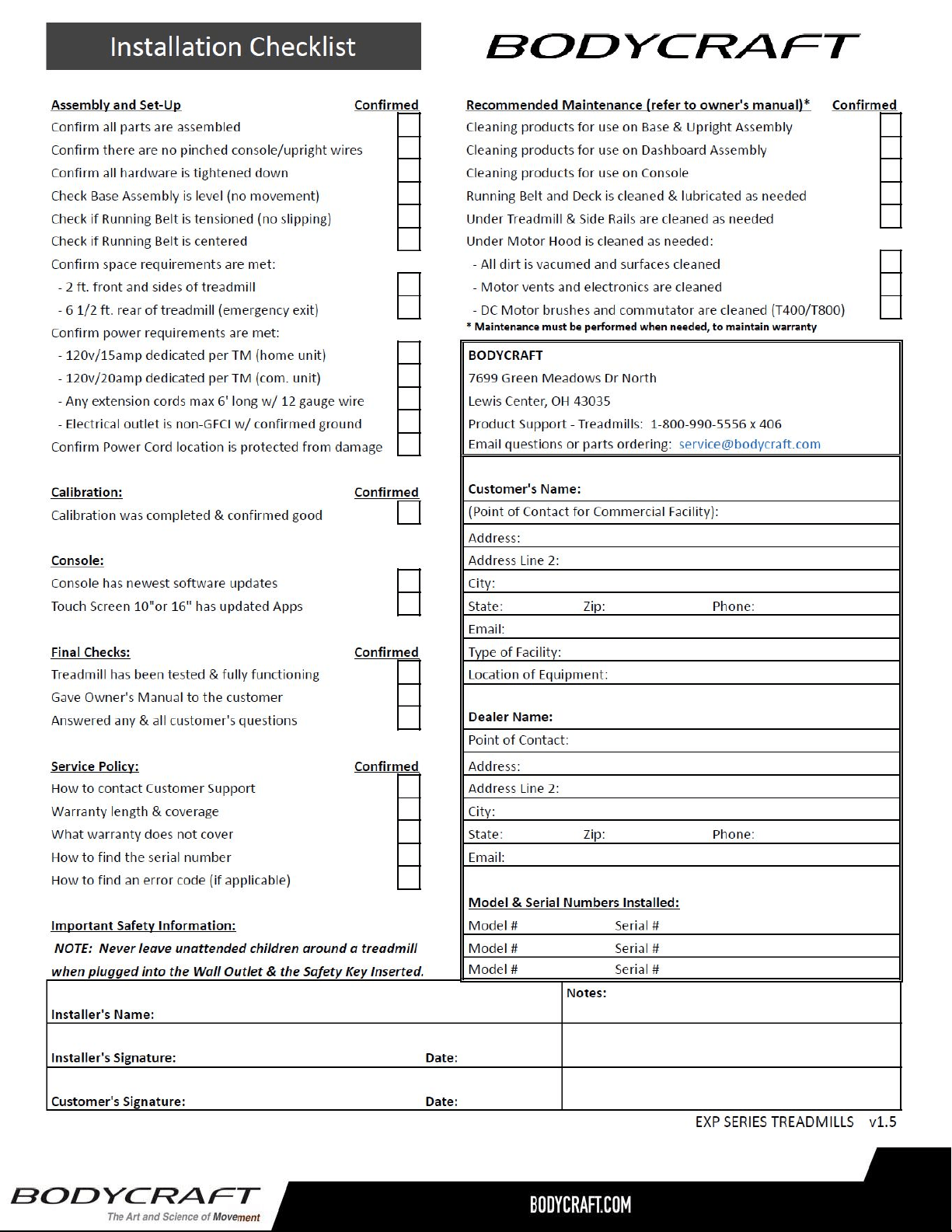
STEP 3: Next, adjust for Running Belt Alignment. The Running Belt needs to be centered between the Side
Rails with the same amount of space from both Left & Right edges of the Running Belt to each Side Rail.
STEP 4: Double confirm the Running Belt tension is still correct by simulating a Max Weight User. Simply start
walking on the treadmill at 3 mph. Then hold on the front handrails (with BOTH HANDS) and apply as much
downward and forward pressure with your feet while walking. Your feet should be moved back with the motion of
the Running Belt without any slipping. If there is any slipping, then go back to STEP 2.
○ Start the treadmill and run it at 5 mph / 8 km h for 1 to 2 minutes to insure the belt will stay in the center.
○ If the Running Belt is not centered, loosen the adjustment screw on the opposite side (where it has more
space), turning it counterclockwise 1/4 turn. Wait 1 min to confirm the Running Belt is now centered.
○ Repeat the procedure if necessary ONLY doing a 1/4 turn per adjustment.
https://youtu.be/
AMju1e25vI4
Watch STEP 3
on YouTube
Belt Tension and Alignment Adjustment
Proper belt adjustment is important for smooth and safe operation of the treadmill. If the belt is too
loose, you will feel a slight hesitation each time you take a step. The adjustment screws must be
tightened evenly in order to adjust the belt properly. The adjustment screws are located at the rear of
the treadmill in the end caps.
Both adjustment screws should be tightened 1/4 turn in a clockwise direction with a wrench and the
belt checked for slipping after each adjustment. If the belt continues to slip, repeat this process until
the belt stops slipping. Make sure to only turn the adjustment screws 1/4 turn each time until the
slipping stops. This will insure that you do not over-tighten the rollers. Over-tighten the rollers may
cause serious damage to the treadmill.
Belt Alignment
If the belt tracks too close to one side, loosen the adjustment screw on the opposite side, turning it
counterclockwise 1/4 turn. Restart the treadmill and run it at 5 mph / 8 kph for 1 to 2 minutes to insure
the belt will stay in the center. Repeat the procedure if necessary.
If noises develop or malfunctions occur, stop using treadmill and contact BODYCRAFT
Customer Support immediately.
RUNNING BELT TENSION AND ALIGNMENT ADJUSTMENT
28
Lubrication to the deck is very important to your treadmill.
Your treadmill is equipped with a pre-lubricated low friction, reversible deck, that reduces the frictional
forces working against the treadmill’s drive motor. Over time, belt and deck wear due to regular use can
increase friction forces and make your treadmill’s motor work harder. This is true for any motor driven
mechanical device. Keeping friction to a minimum helps extend component life. Additionally, nonuse of
the treadmill for an extended period can lead to a dry deck. If the treadmill belt slows down very quickly
after you have completed your workout, it may lack adequate silicone.
WHY LUBRICATE THE BELT/DECK AREA?
29
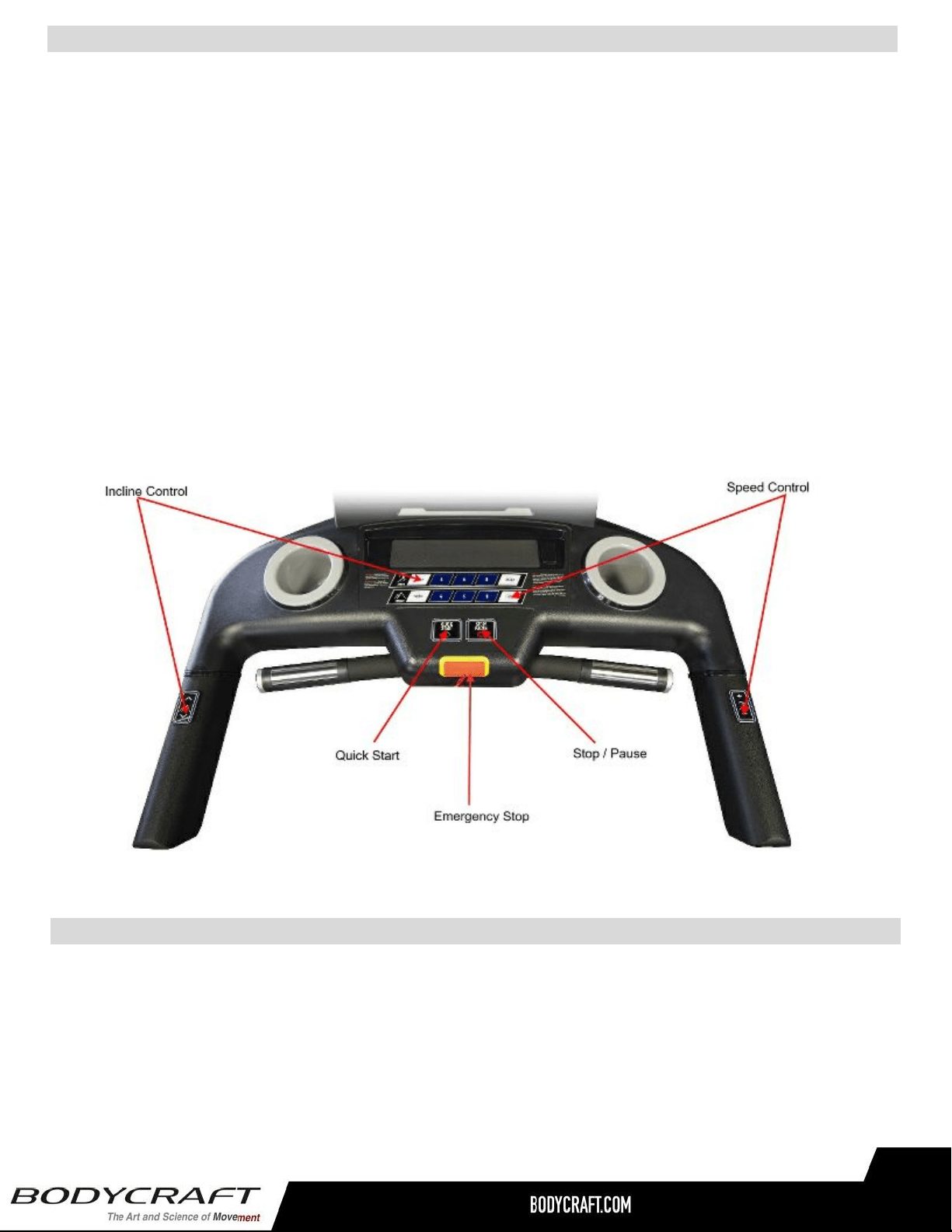
31
Console Operations Instructions - T400 (T401 & T402)
Your treadmill will not start unless the safety key is placed on the proper location of treadmill console.
Attach the safety key clip properly onto your clothes before operating treadmill. In case of an
emergency, pull the safety key off the treadmill, it will cut off the power to the console and stop the
treadmill immediately. Place the safety key back in place, and the treadmill will resume back to idle
mode. Contact your dealer for a safety key replacement if you do not have one.
Safety Key Clip & Tether
Please read the console operational instructions thoroughly and get familiar with the console layout.
Practice using this console before you start to get a better understanding of the functions. Below are
the console layout and detailed operational instructions.
To power up the treadmill, locate the power cord attached to the front of the treadmill and plug it into
a Dedicated 120V/15A for home use ONLY with a grounded wall outlet. Turn on the power switch
to wake up the treadmill and go into the idle mode.
Always turn off the treadmill after hours or when not in use.
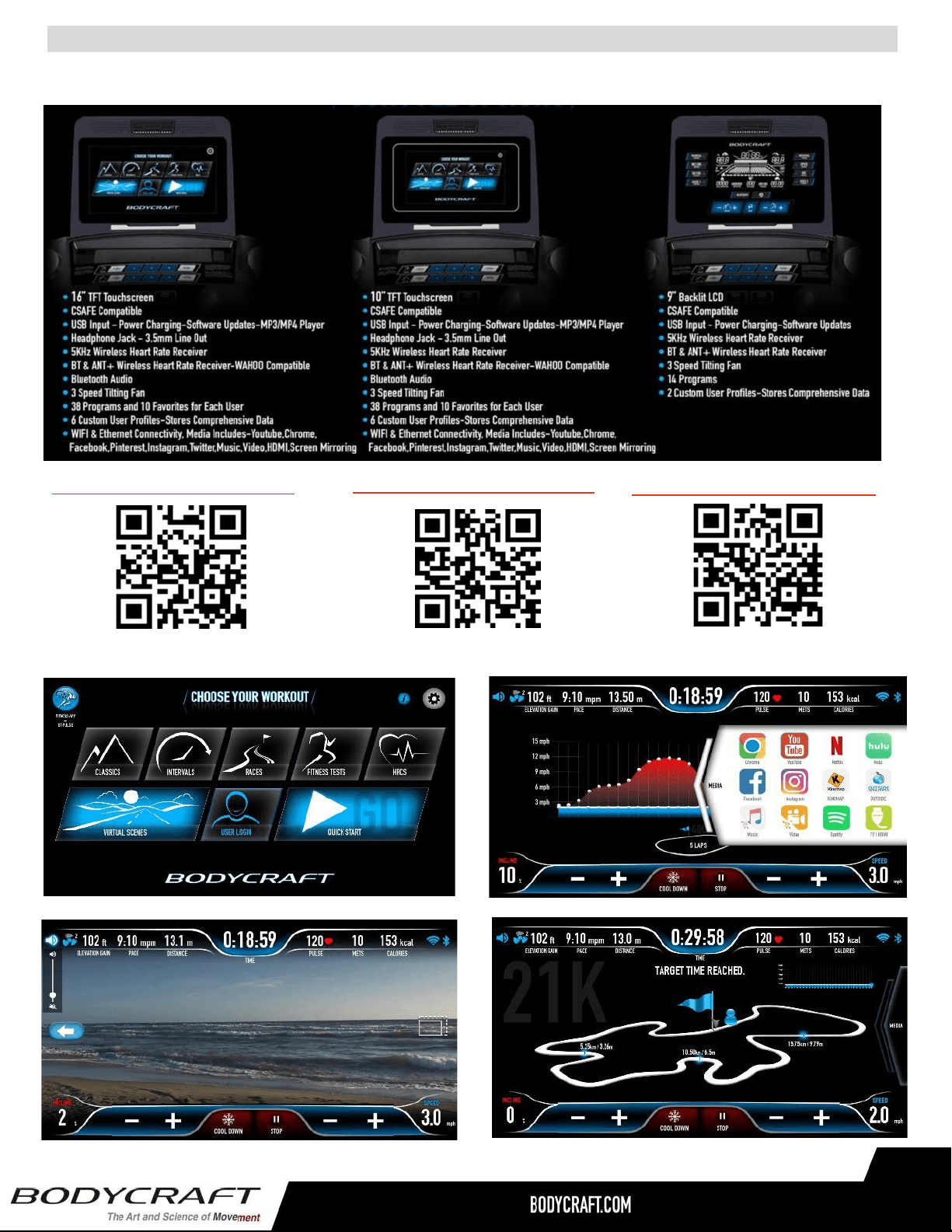
At Installation: The console needs to be paired with the treadmill product model correctly to ensure
smooth operation. When the console is powered on the first time, it needs to be calibrated. Please
follow the message window prompts to calibrate before use.
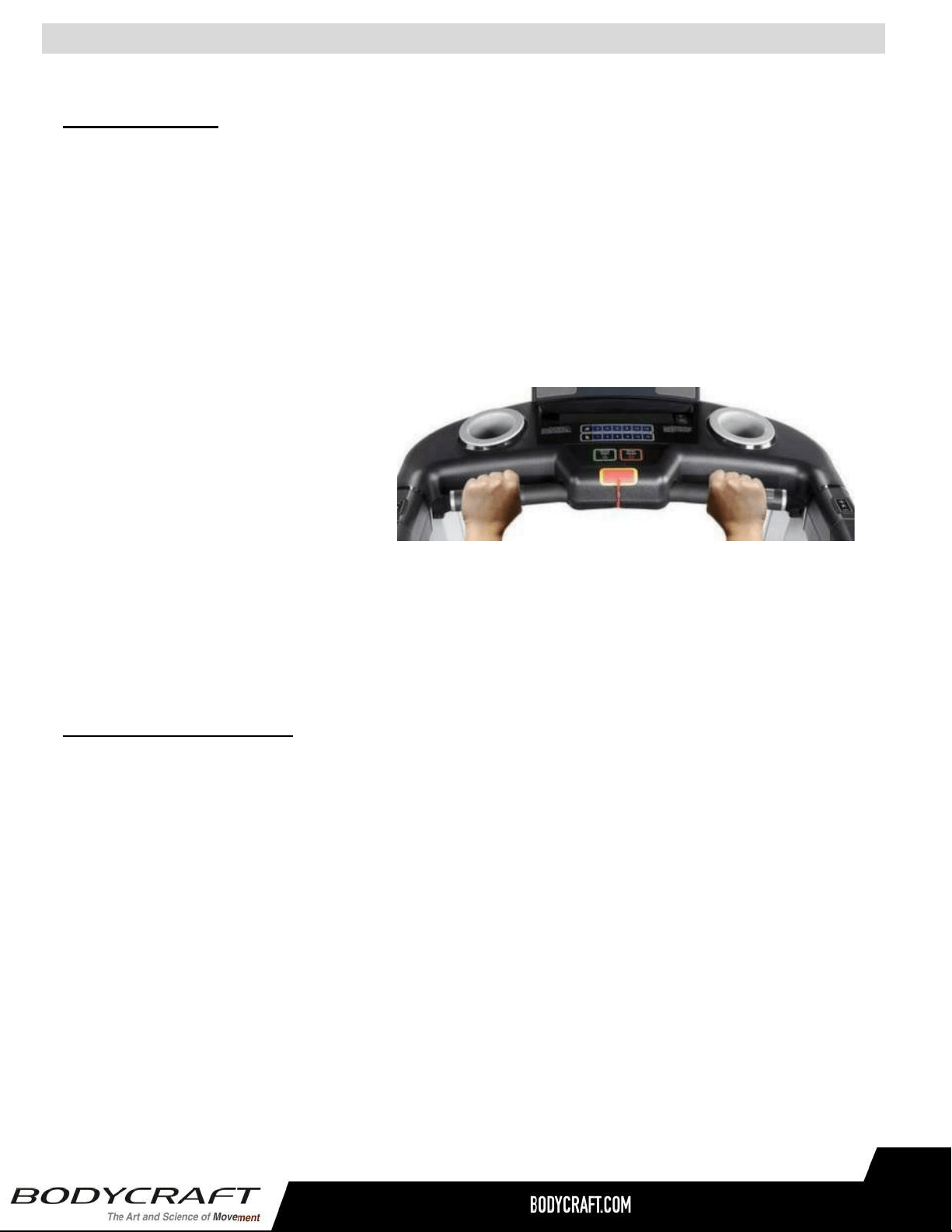
Heart Rate Monitoring Device & Exercise Tips
Pulse Hand Grips
This product comes standard with stainless steel pulse hand grips. To activate, gently grasp both
hand grips to obtain a heart rate reading.
The sensors that provide touch heart rate readings are reliant upon a pulse from the hands that is
strong. Grasp the hand sensors without squeezing too tightly to produce a clear signal. Better
readings will result from hands that are warm and moist. A tight grip on the sensors may create an
inaccurate pulse. If you have trouble getting a reading, try after exercising for several minutes which
will cause your hands to become warm. Also, wearing the chest strap may increase accuracy as
well.
For safety, it is not recommended to
use the Heart Rate Sensors when
exercising at high speeds.
The Sensors may not always be
accurate for any user at all speeds.
Individual physiology is a factor that can determine accuracy, or even if the Sensors work for you at
all. The Touch Heart Rate reading is not intended to be used for medical purposes.
Pulse Grip Operating Tips
If you are not getting a consistent reading while using the hand pulse option, we recommend the
following suggestions:
● Make sure that the palms of the hands are touching the contact area of each hand pulse
grip.
● Maintain an even pressure on the grips.
● Do not hold the hand pulse grips too tightly.
● Make sure your palms are warm and slightly moist.
● Excessive movement especially on a treadmill is not optimum for hand grip. Chest strap is
recommended when using a treadmill or any High Intensive Exercise while on a machine.
32
Heart Rate Monitoring Device
Built in Wireless Heart Rate Receiver
Note: Chest strap transmitter does not come with this unit; contact BODYCRAFT, or your dealer for purchase.
This product is equipped with a built-in receiver for your Heart Rate monitoring. Any Heart Rate
telemetry strap that transmits at 5 kHz is compatible. To get an accurate reading using these devices, you will
need to be within 3’ feet of the console, and a minimum of four feet from others using a heart rate monitoring
device. This BODYCRAFT unit is also equipped with BLE, ANT+, as well as 5K heart rate receivers.
Note: The Transmitter may fluctuate erratically if you are too close too the heart-rate monitoring
equipment or there is other electronics nearby, such as TV & Radio.
While using heart rate control modes, the computer monitors the exact measurement of your pulse. Heart
rate frequency is displayed while the computer continually compares heart rate to the preprogrammed
personal data. The computer adjusts the wattage to maintain heart rate at the preprogrammed level.
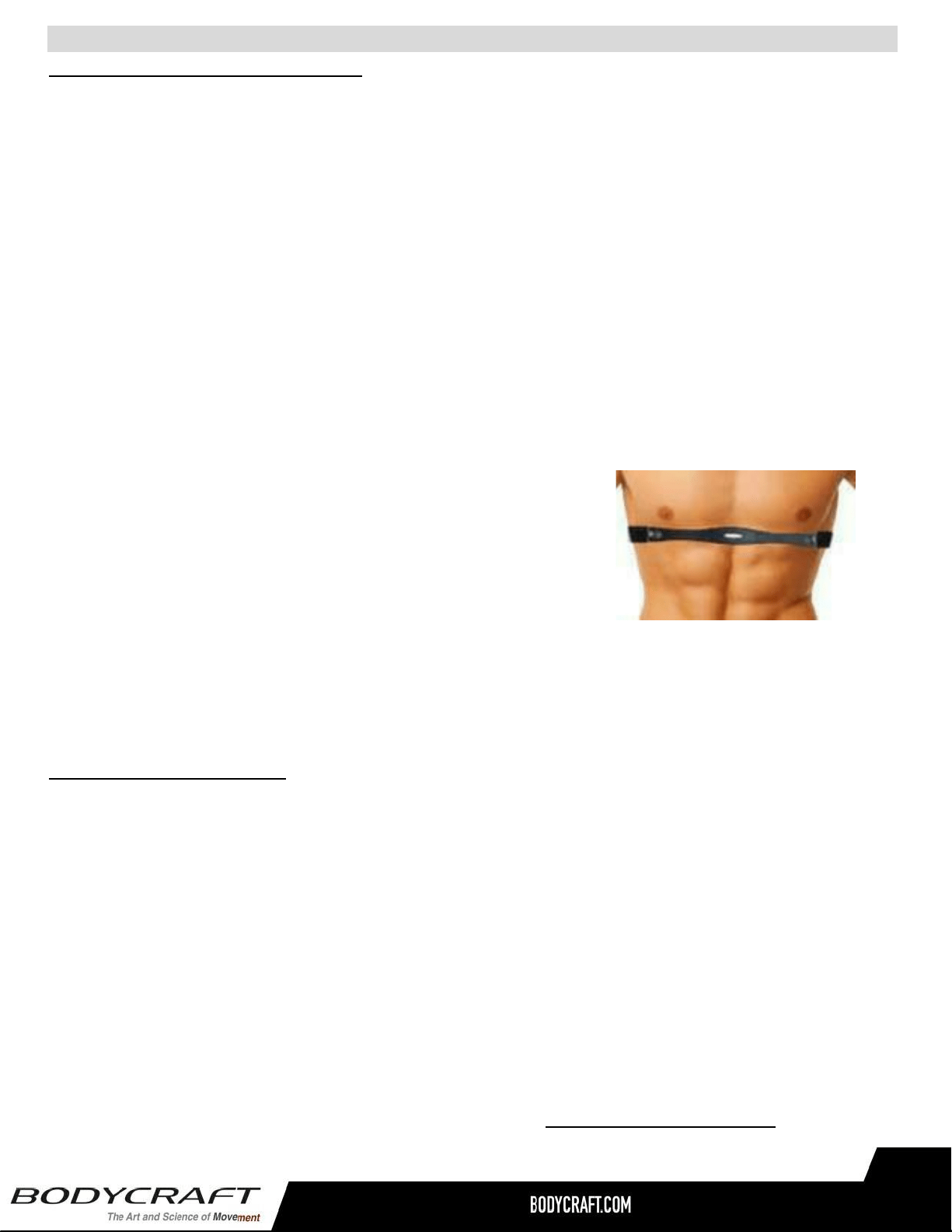
How to Wear Your Sensor/ Transmitter (Chest Strap)
1. Buckle one end of the chest strap onto the transmitter.
2. Adjust the band length so that the fit is snug, but not too tight.
3. Buckle the other end of the chest strap onto the transmitter.
4. Center the transmitter on your chest below the pectoral muscle
(breasts).
5. Stretch the transmitter away from your chest and moisten the
conductive electrode strips located next to the buckles with water.
Note: The transmitter is on automatically when being worn. It is off when it is not connected to your
body. However, as moisture may activate the transmitter, thoroughly dry the transmitter to prolong
battery life.
Erratic Heart Rate Readings
Erratic readings on the receiver can be caused by electromagnetic disturbances. If the heart rate
readings appear to be abnormal, check that your product is not within range of other strong
electromagnetic signals.
Common sources are televisions, computers, cars, cell phones, TV antennas and high voltage power
lines (both above and below ground). Please note: Static electricity in clothing or a flapping shirt can
cause electrical interference, so some items of clothing, i.e. manmade fibers, can also be the cause.
Please try wetting the T-shirt in the area where the transmitter is.
Another erratic reading cause can come from the connection point of contact not being warm or moist.
If the battery of the transmitter is running low, the transmission range decreases and may cause
errors similar to the ones listed above in this document.
Any additional medical conditions as described in the previous Pulse Grip Operating Tips, stop exercising
and consult your doctor.
33
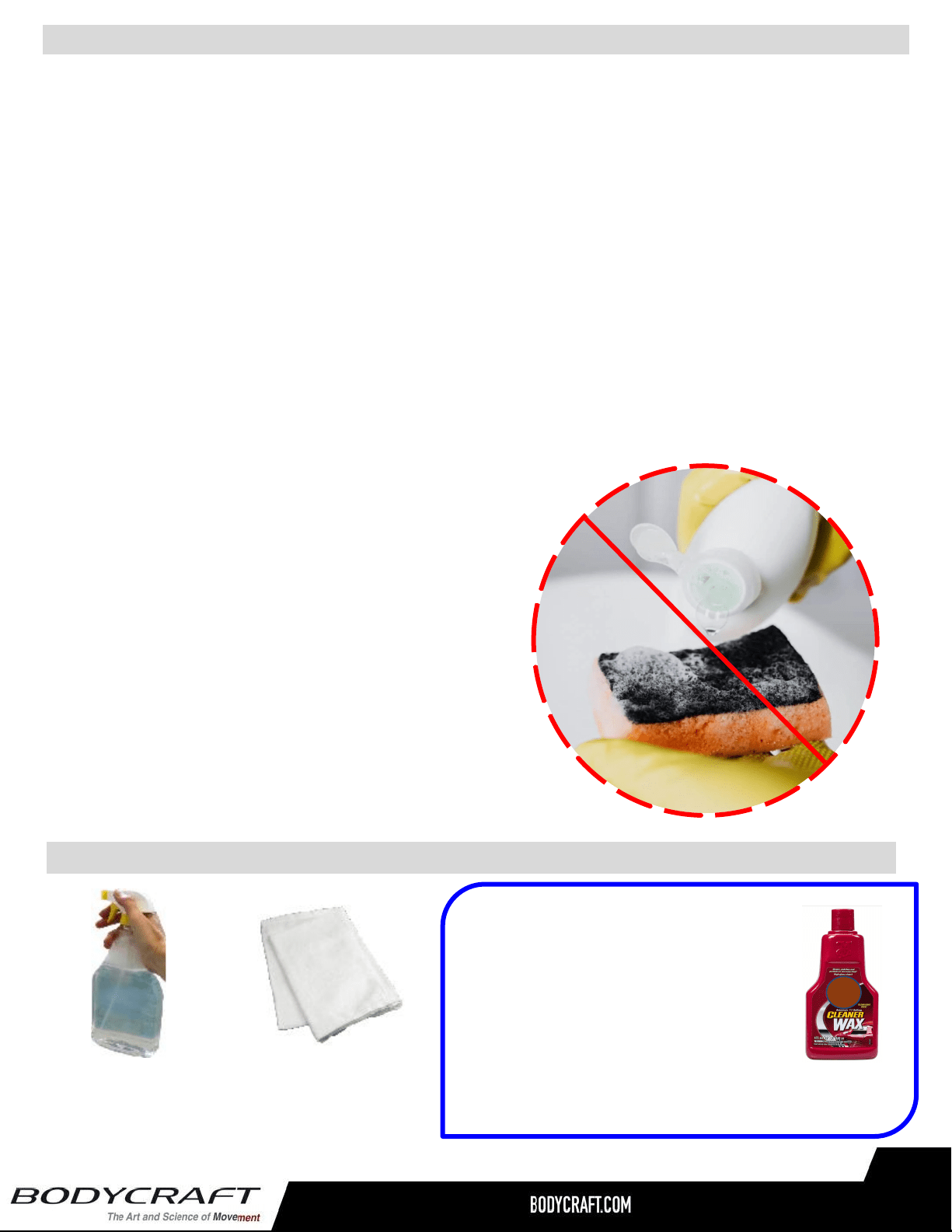
CAUTION: Do not use any acidic cleaners. Doing so will discolor the plastics, painted
surfaces and powder coatings. Never pour water or spray liquids on any part of the item.
1. Turn off and unplug the treadmill power cord from the wall before using any cleaning product.
2. ONLY APPLY CLEANER ON A CLOTH then use cloth to clean the unit.
3. Do spray cleaner directly on any surface of the treadmill
4. We recommend that you clean the treadmill after each exercise session. To remove sweat,
dust and dirt, wipe all exposed surfaces with slightly damp soft cloth only, never use solvents.
5. Clean with mild soap and water based cleaners only.
6. Always keep console and electrical parts clean and dry.
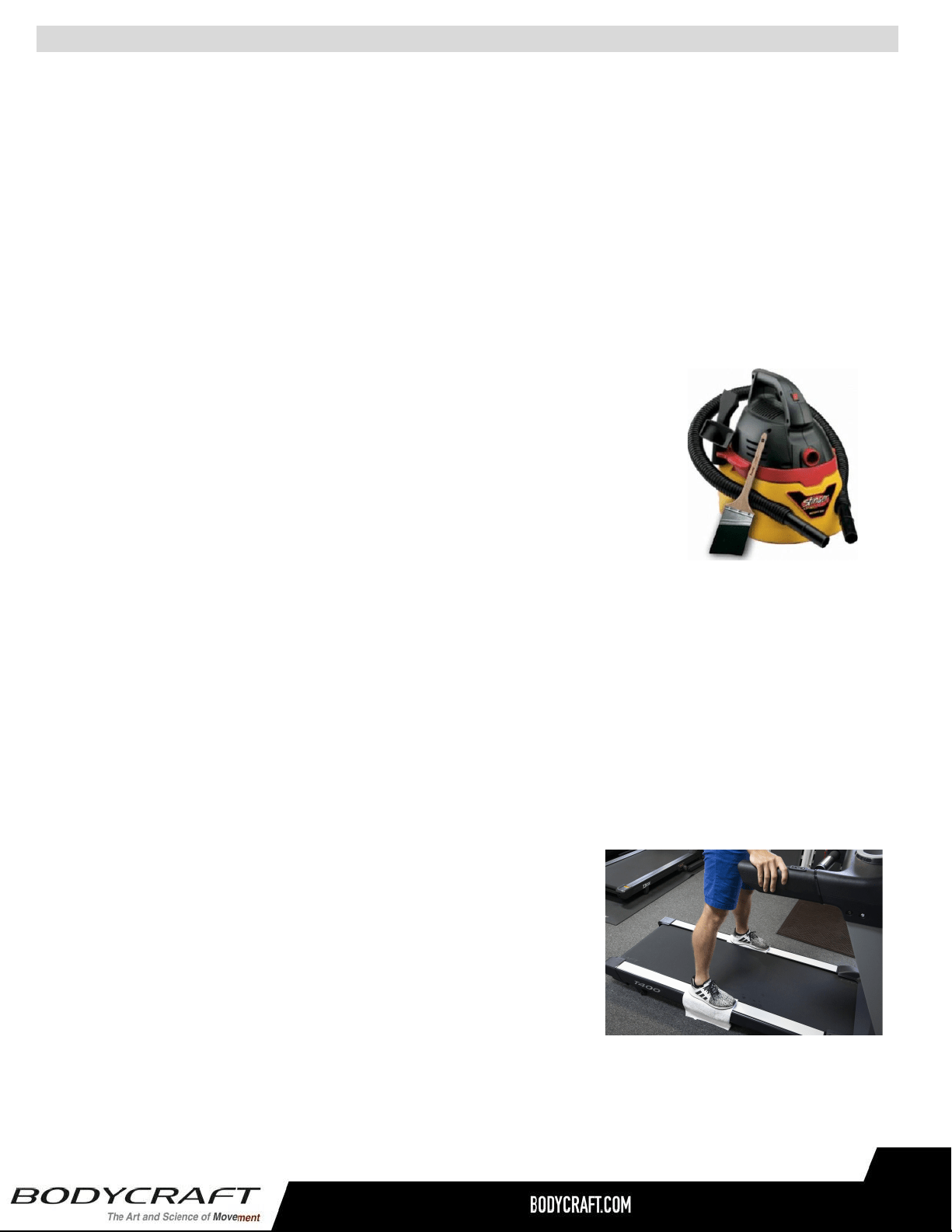
7. Wipe or vacuum dust or other objects that may have accumulated underneath the treadmill.
8. Never apply cleaning solution under running belt.
9. Confirm running belt & siderails are dry from any accidental
fluids spilling or overspray.
Cleaning your Treadmill
● DO NOT USE ABRASIVE CLEANING
SCRUBBING PADS.
● DO NOT USE AMMONIA CLEANERS.
● DO NOT USE CITRUS CLEANERS
34
TIP ON FRAME ONLY: For extra
protection from fingerprints, sweat
stains or just plain dirt, apply an
automotive grade cleaner wax at
Installation and bi-annually.
Also makes future cleaning easier.
The following is RECOMMENDED for cleaning supplies:
100% COTTON
CLEANING CLOTHS
(Do Not Use on Running Belt, Side Rails,
Handlebar, HR Grips, any Plastic or Console Glass)
MILD CLEANING
SOLUTION
34
Preventive Maintenance - T400
Preventive Maintenance - T400 (T401 & T402)
35
Preventive Maintenance is the responsibility of the owner and not covered under warranty.
(Example of changing oil and rotating tires on new car.)
To maximize the life of your treadmill, and minimize downtime, all BODYCRAFT equipment requires regular cleaning
and maintenance performed on a scheduled basis. Always unplug the power cord from the wall before servicing near
potential moving parts or under the hood. ONLY qualified service professionals or BODYCRAFT dealers should
remove the motor hood.
Service icon on the display
● A service Icon on the console will turn on periodically to remind the owner that cleaning & maintenance is needed.
After service is completed, press STOP for 5 seconds to return IDLE mode or on Touch Screens follow the prompts.
Daily Maintenance Items
● Clean entire machine using water and mild detergent such as "Simple -Green" (cleaning agents should
be alcohol and ammonia free), including console, handlebar / grip area and running belt.
● Check Emergency Stop Key and tether cord for proper operation.
Monthly Maintenance Items
● Vacuum under treadmill and wipe off all dirt around rollers & belt/deck areas.
● Inspect power cord for damage, inspect hand grip areas. and inspect the
Emergency Stop tether cord.
● Check running belt for proper tension, adjust if needed. It is especially important to check the running belt for tension
after the first 30 days of usage. All new belts will stretch, and belt slippage can be detected by users if the running belt
does not have the proper tension.
Quarterly / Semi-Annual Maintenance Items
● Unplug the power cord from the wall, then remove the front plastic cover, and vacuum entire inside area of the
machine - be careful when working around the lower PC board not to bump any wires or connections loose.
● Check drive belt for visible wear, i.e., cracking, tears, etc. The belt should be replaced if there are any visible signs
of damage. Proper alignment of the pulley needs to be confirmed.
Annual Maintenance Items
● Unplug the power cord from the wall, inspect the underside of running belt for damage - checking /cracking, glazed
surface.
● If the belt has damage or wear to it that warrants replacement. please note
that the running deck must also be flipped when a new belt is installed. If
the deck has previously been flipped and no longer has an unused side
available. it needs to be replaced when the new belt is installed.
● Unplug the power cord from the wall, clean between belt and deck
with a large towel, then lube with BODYCRAFT deck lube. Walk-in
lube for 1 min, then run belt at 8 mph for 2 mins.
● Start the unit and raise incline settings to maximum height. Turn power switch off at front of the machine to prevent
it from lowering accidentally. Lubricate incline motor screw (Recommend using a Super Lube branded grease with
PTFE {Teflon} additive).
● During normal operating conditions. the running belt and deck replacement should be done every 20,000 miles.
BODYCRAFT provides a Lube Indicator on your console indicating when the running belt
lubrication is required. The indicator will light when cleaning & lubrication is needed. If
you see this indicator pop up on the screen, follow the lubrication instruction below or call a
certified BODYCRAFT service provider.
Please be sure your treadmill is powered off, before performing this maintenance.
STEP 1: Vacuum under treadmill and clean area between the running belt and side rails.
Then continue with cleaning the area between the deck and the running belt as described
from the Preventive Maintenance page.
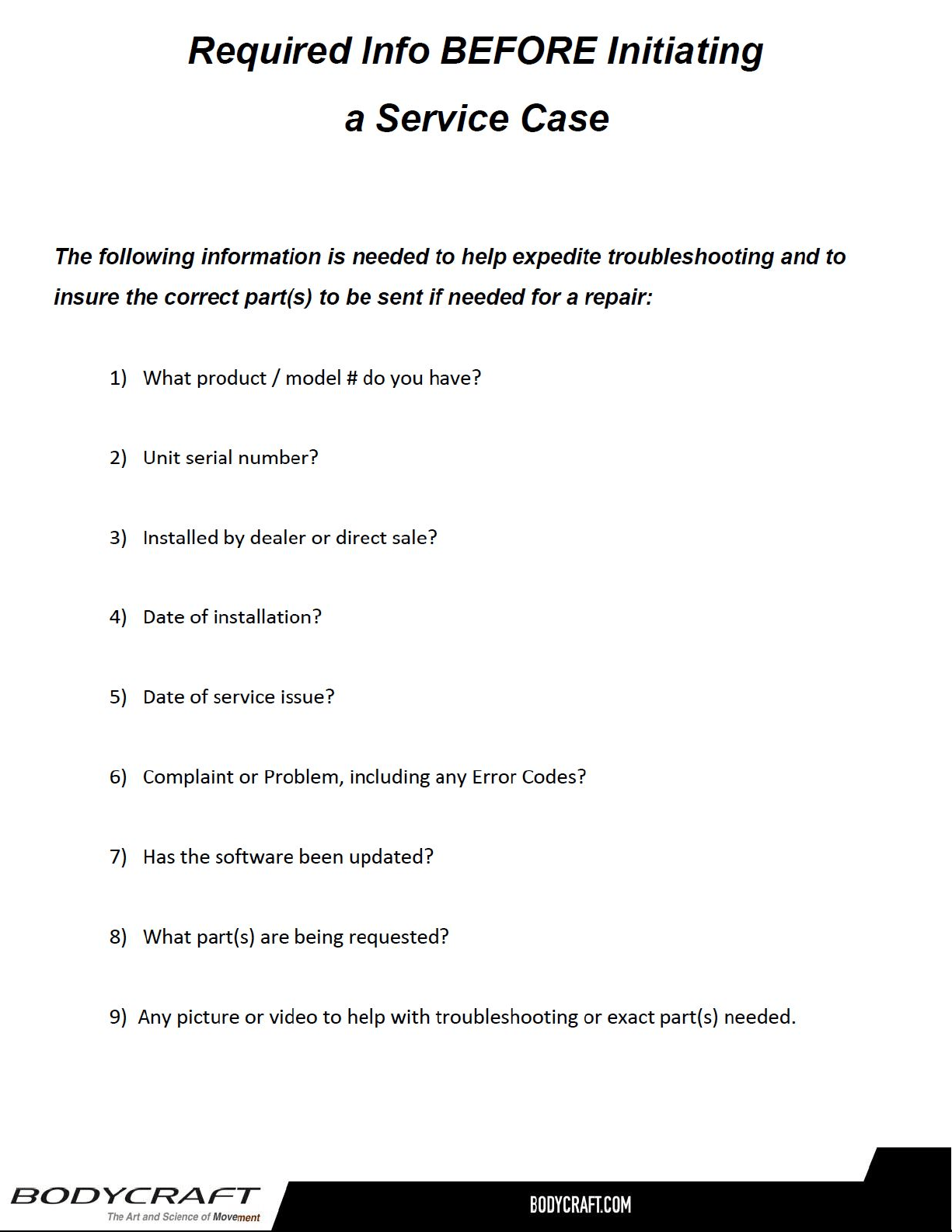
STEP 2: Take the BODYCRAFT 100% Pure Silicone Oil Bottle and cut the tip off. Then lift the running
belt up and away from the deck as far as you can on the left side of the treadmill. Point the silicone bottle
nozzle towards the center of the running deck. Lay a small bead of silicone on the deck, while moving
down the deck continue holding the belt up as you go. Stop the lube about 2” from the side of the
running belt edge.
Repeat the process on the right side of the belt. See below drawing
STEP 3: After Step 2, turn the power back on.
● For LCD console, press STOP button for a few seconds until the Lube indicator light turns off.
● For TFT (SmartTouch) console, please follow on screen instruction to reset the Lube timer.
STEP 4: Use QUICK START and walk on your treadmill at a low to moderate speed for 5 minutes to
evenly distribute the silicone lubricant.
● Lift up the running belt up and away from
the deck as far as you can and add
about 10 ml of silicone oil towards the
center of the running deck from on the
left side.
● Do the same thing for the right side.
Lubricant is necessary when the deck becomes dry to
maintain your treadmill’s warranty and keep in a good
working condition.
To purchase lube bottle go to www.bodycraft.com/treadlube.html
or email [email protected]
36
● Resetting the Lube Indicator: AFTER the lubrication procedure is complete:
- 9” LCD: Press & hold “STOP” key during idle mode for a few seconds to turn
the LUBE icon off for the.
- 16” & 10” Touch Screen: Follow the Reset prompts on the console.
Lubrication to the deck is very important to your treadmill.
Your treadmill is equipped with a pre-lubricated low friction, reversible deck, that reduces the frictional
forces working against the treadmill’s drive motor. Over time, belt and deck wear due to regular use can
increase friction forces and make your treadmill’s motor work harder. This is true for any motor driven
mechanical device. Keeping friction to a minimum helps extend component life. Additionally, nonuse of
the treadmill for an extended period can lead to a dry deck. If the treadmill belt slows down very quickly
after you have completed your workout, it may lack adequate silicone.
WHY LUBRICATE THE BELT/DECK AREA?
Caution: Do not drip any lubricate on top of the running belt. Completely clean top surface
with a mild soap cleaner if needed. Check top running surface is 100% dry before using treadmill.
How to lube
video on YouTube
NOTE: If you lubricate too much, the running belt
may slip or liquid may flow out from the machine.
Only use 1/3 of bottle (1 oz) per lubrication.
Lubricating the Running Belt / Deck Area - T1000, T800 & T400
37
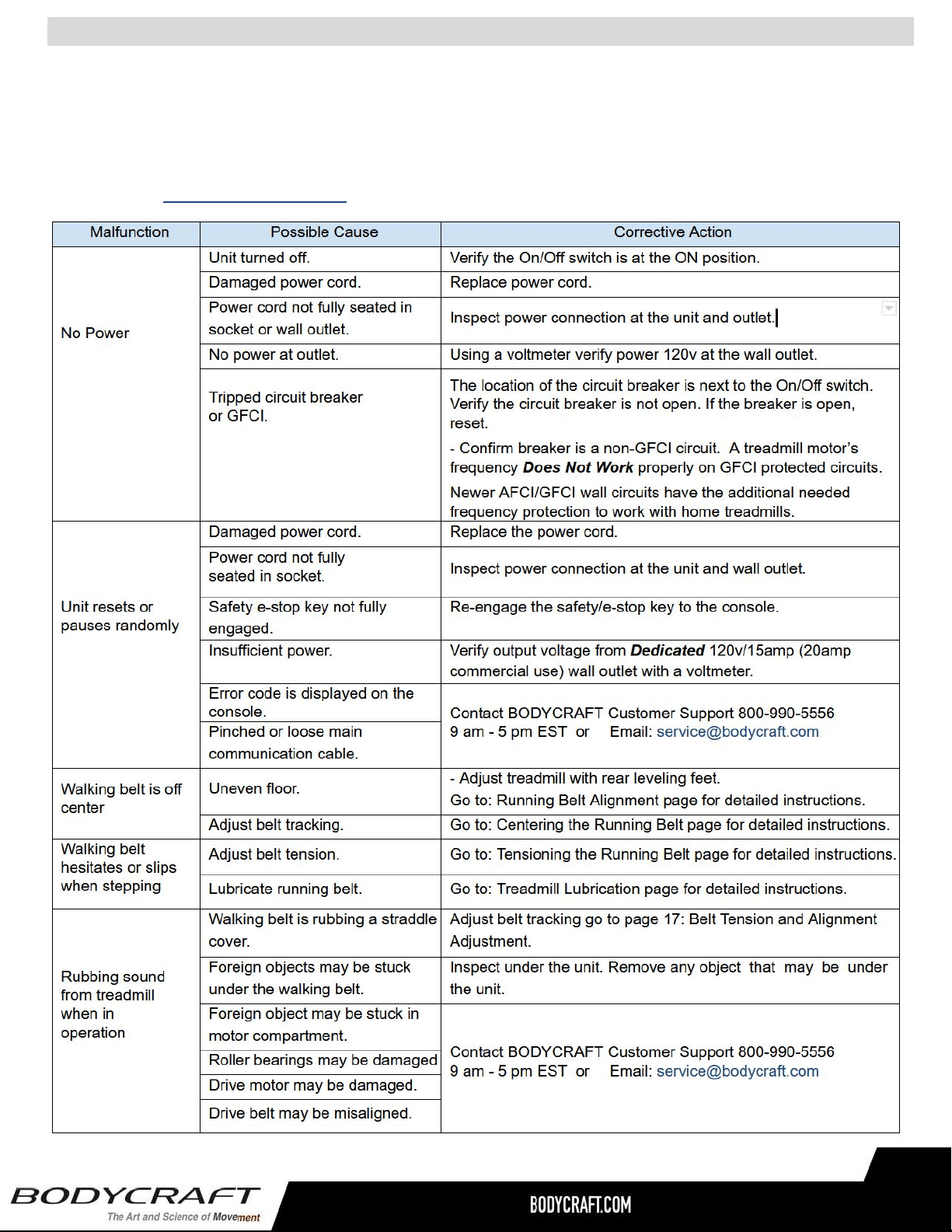
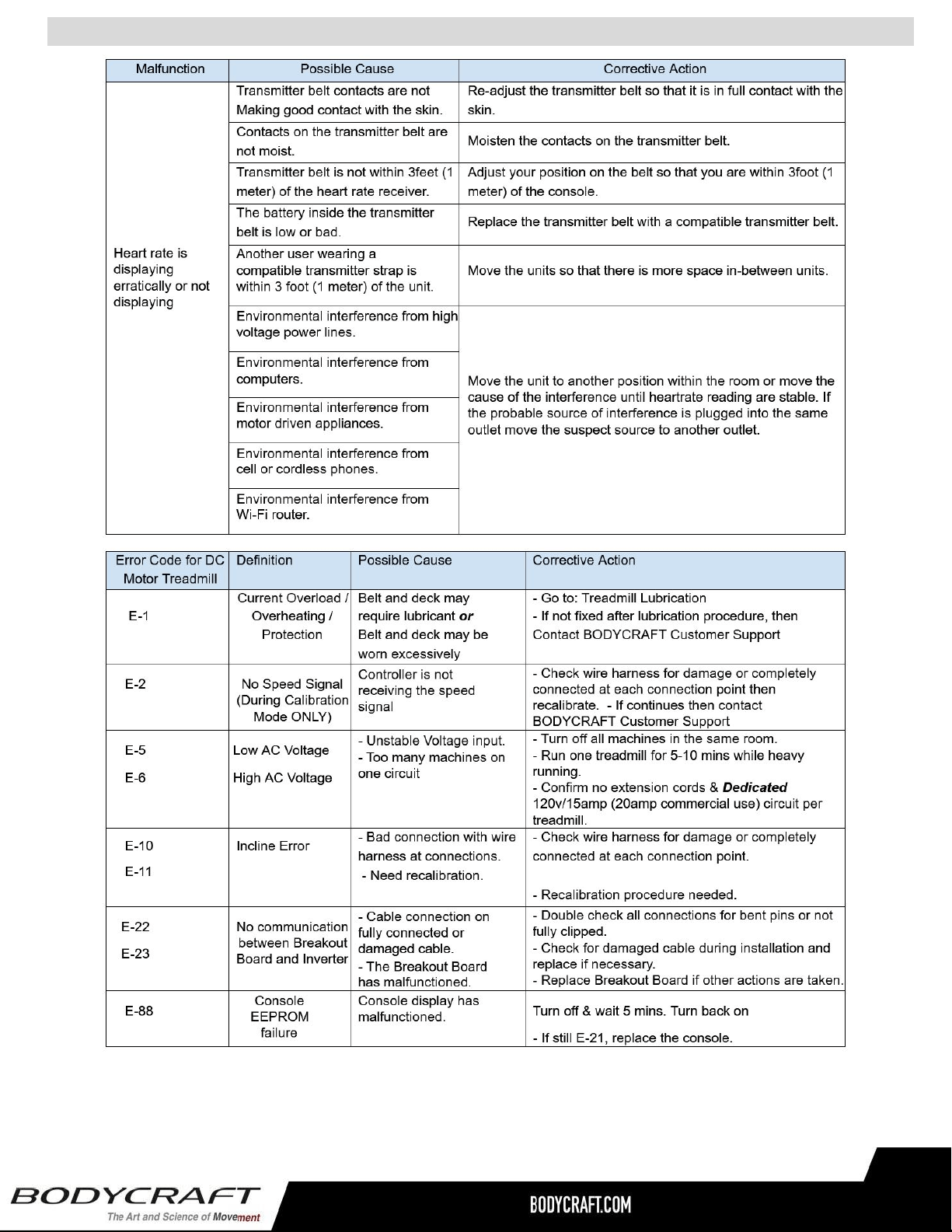
This troubleshooting guide is intended to assist diagnostics only and is not all inclusive. Technical specifications,
error codes and programming are subject to change without notice.
BODYCRAFT accepts no liability for any damage or loss suffered by persons who rely wholly or in part on any
description or statement contained within this manual.
For any questions or additional help, contact the BODYCRAFT Customer Support at 800-990-5556 9 am - 5 pm
EST or Email: [email protected] for assistance with troubleshooting and diagnostics.
38
Troubleshooting & Error Codes on DC Motor Treadmill - Basics 1 of 2
Lube icon: When the lube icon comes on, means the treadmill is due for lubrication maintenance. Please follow the
owner’s manual lubrication procedure to lubricate the tread/deck. AFTER the lubrication procedure is complete:
- 9” LCD: Press & hold “STOP” key during idle mode for a few seconds to turn the LUBE icon off for the.
- 16” & 10” Touch Screen: Follow the Reset prompts on the console.
39
Troubleshooting & Error Codes on DC Motor Treadmill - Basics 2 of 2
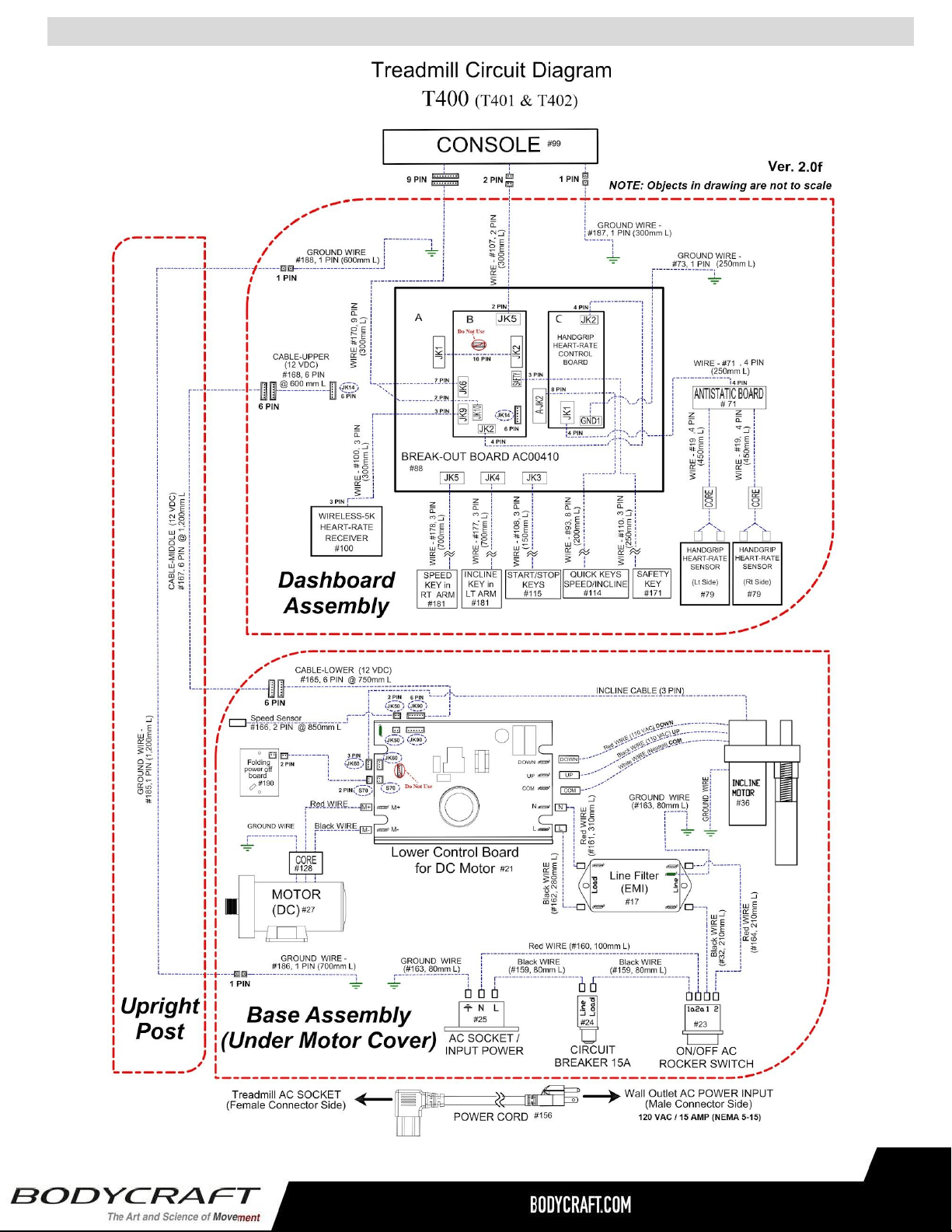
Circuit Diagram - T400 (T401 & T402)
40
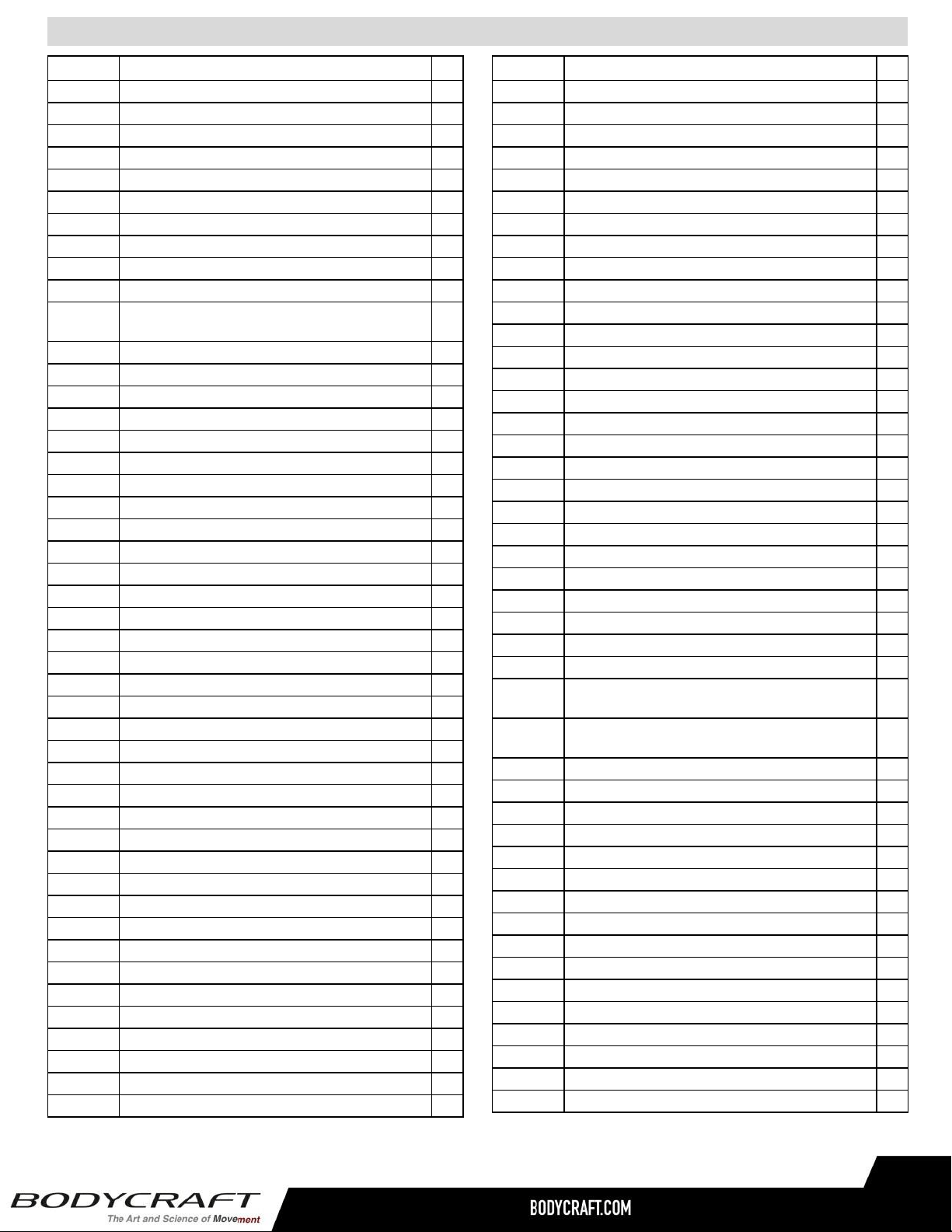
Part Lists - Detailed - T400 (T401 & T402) 1 of 3
41
Part # Description Qty Part # Description Qty
T402:001 Main Base Frame ( DIAMOND GRAY ) 1
T402:002 Elastomer Shock Absorbers - 1st Row - Front 2
T402:003 Elastomer Shock Absorbers - 2nd & 3rd Rows - Mid 4
T402:004 Elastomer Shock Absorbers - 4th Row - Rear 2
T402:005 Running Deck - 673mm W x 1,384mm L x 25.4mm T 1
T402:006 Side Step Rails - Securing Bracket to Running Deck 8
T402:007 Screw M6 x 35mm L 8
T402:008 Nylon Locknut (M6) 8
T402:009 Flat Washer M6 x 16 x 1.2mm 8
T402:010 Screw M6 x 30mm L 8
T402:011
Front Roller Assembly - 64mm D x 699mm L w/ 105mm
Pulley 1
T402:012 Rear Roller Assembly - 64mm D x 699mm L 1
T402:013 Screw M8 x 70mm L 3
T402:014 Spring Flat Washer (M8) 5
T402:015 Running Belt - 508mm W x 3,230mm L x 2.0mm T (TF) 1
T402:016 Inductor Bracket 1
T402:017 Line Filter - EMI 1
T402:018 Washer M5 x 15 x 1.2mm 2
T402:019 Handgrip Heart-Rate Sensor Wire 1
T402:020 Screw M4 x 8mm L 2
T402:021 Lower Control Board # AE001112ELT-002 (SR) 1
T402:022 Screw M4 x 20mm L 2
T402:023 On/Off AC Rocker Switch 1
T402:024 Circuit Breaker - Reset Switch (15 amp) 1
T402:025 AC Socket / Input Power - IEC 320 C14, Black, 15A 1
T402:026 Screw M4 x 12mm L 4
T402:027 Drive Motor - DC 3.0hp (TR) 1
T402:028 Ferrite Core - DC Motor Wires 1
T402:029 Drive Motor Bracket 1
T402:030 Screw M8 x 16mm L 2
T402:031 Flat Washer M8 x16 x 1.2mm 2
T402:032 Wire - Switch to Filter - Black 210mm 1
T402:033 Nylon Locknut M8 6
T402:034 Screw M8 x 25mm L 2
T402:035 Drive Motor Pulley Belt- Ribbed #508J (HS) 1
T402:036 Incline Motor - J18 (JS) 1
T402:037 Screw M10 x 60mm L 1
T402:038 Flat Washer M10 x 21 x 2.0mm T 4
T402:039 Nylon Locknut M10 x P1.5mm 2
T402:040 Screw M10 x 45mm L 1
T402:041 Screw #6-32 x 12mm L 1
T402:042 Transportation / Incline Wheel 6
T402:043 Screw M8 x 45mm L 1
T402:044 Nylon Locknut M8 x 1.25mm 8
T402:045 Flat Washer M8 x 16 x 1.2mm 14
T402:046 Screw M5 x 12mm L 4
T402:047 Base Folding Frame ( DIAMOND GRAY ) 1
T402:048 Foot Cover 2
T402:049 Gas Cylinder Assembly 1
T402:050 Gas Cylinder Clip Spring 1
T402:051 Gas Cylinder Outter Tube 1
T402:052 Screw M8 x 30mm L 1
T402:053 Screw M5 x 25mm L 4
T402:054 Adjust Foot Pad 2
T402:055 Incline Frame ( DIAMOND GRAY ) 1
T402:056 Incline Frame Bushing (Small) 2
T402:057 Incline Frame Bushing (Large) 2
T402:058 Screw Ø 12 x 25L x M10 2
T402:059 Bolt Ø 15 x 61.9mm L 2
T402:060 Flat Washer M8 x 28 x 1.5mm T 2
T402:061 Cylinder Outer Plastic Cover 1
T402:062 Rubber Pad For Incline Motor 2
T402:063 Upright Post - Left ( DIAMOND GRAY ) 1
T402:064 Upright Post - Right ( DIAMOND GRAY ) 1
T402:065 Handrail - Left Arm w/ Quick Incline Control Mount 1
T402:066 Handrail - Right Arm w/ Quick Speed Control Mount 1
T402:067 Handrail Left Arm - Decoration Ring 1
T402:068 Handrail Right Arm - Decoration Ring 1
T402:069 Foam Single Sided - Running Deck - Front 2
T402:070 Foam Double Sided - Safety Switch 2
T402:071 Handgrip Heart-Rate - Antistatic Board 1
T402:072 Screw M8 x 16mm L 16
T402:073 Ground Wire - Handgrip Heart-Rate - Green 250mm 1
T402:074
Warning Label - Dashboard Cover - Upper - Single
Sided 1
T402:075
Warning Label - Motor Cover Top - Right & Left - Single
Sided 2
T402:076 Nut 3/8"-16 2
T402:077 Dashboard Support & Front Handlebar 1
T402:078 Handlebar - Rubber Sleeve 2
T402:079 Handgrip Heart-Rate - Sensor (Assembly) 2
T402:080 Handlebar - Aluminum Ring 2
T402:081 Handlebar - End Plug 2
T402:082 Sticker - Handlebar on End Plug - Single Sided 2
T402:083 Mechanical Safety Key 1
T402:084 Safety Key Bracket 1
T402:085 Screw M3 x 8mm L 2
T402:086 Screw M6 x 35mm L (#175) 4
T402:087 Screw M2.6 x 8mm L 20
T402:088 Break-Out Board #AC00410 1
T402:089 Dashboard Cover - Upper 1
T402:090 Dashboard Cover - Bottom 1
T402:091 Water Bottle Holder 2
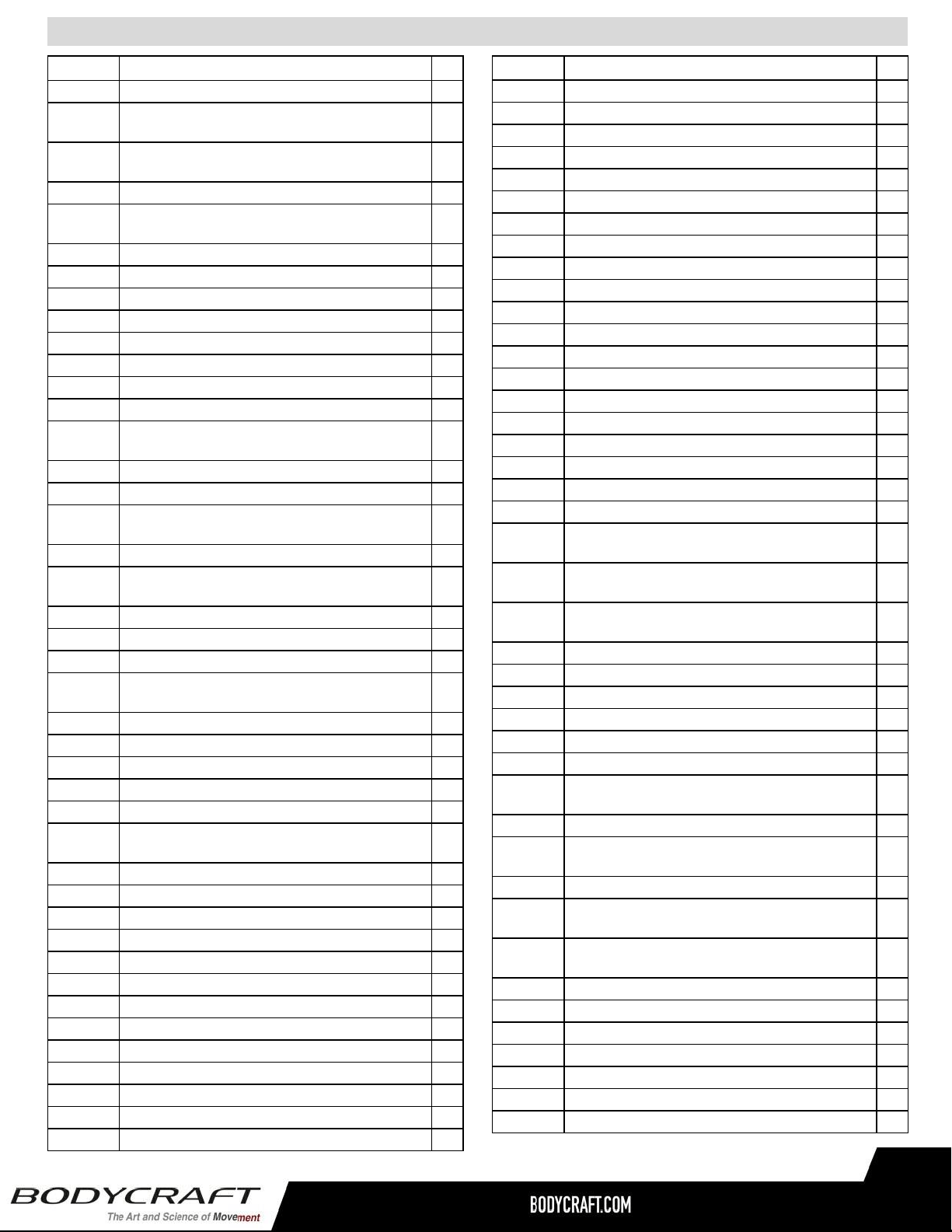
Part # Description Qty Part # Description Qty
Part Lists - Detailed - T400 (T401 & T402) 2 of 3
T402:092 Sticker - Safety Key - Single Sided 1
T402:093
Cable - Quick Keys Speed/Incline - Dashboard to
Break-out Board (8PIN) 1
T402:094
Quick Keys Speed/Incline Overlay - Dashboard - Single
Sided 1
T402:095 START/STOP Overlay - Dashboard - Single Sided 1
T402:096
Accessory Tray - Anti-Slip Rubber Sticker - Dashboard
- Single Sided 1
T402:097 Screw M4 x 15mm L 11
T402:098 Screw M5 x 12mm L 6
T402:099 Console 1
T402:100 Wireless-5K Heart-Rate Receiver 1
T402:101 Nut M10 1
T402:102 Belt Adjustment Bracket 1
T402:103 Label - Electric Warning 1
T402:104 Sticker - Drop Warning Label - Left Rail Cover (Rear) 1
T402:105
Sticker - Drop Instruction Label - Right Rail Cover
(Rear) 1
T402:106 Label - Warning 2
T402:107 Cable - Break-Out Board to Console - Lower (2 PIN) 1
T402:108
Cable - START/STOP Keys - Dashboard to Break-out
Board (3PIN) 1
T402:109 Safety Key Limit Switch 1
T402:110
Cable - Safety Key Limit Switch to Break-Out Board
(3PIN) 1
T402:111 Screw M8 x 100mm L 2
T402:112 Spring Washer M8 2
T402:113 PVC Strip 1
T402:114
Quick Keys Speed/Incline Control Board w/ Buttons -
Dashboard 1
T402:115 START/STOP Control Board w/ Buttons - Dashboard 1
T402:116 Side Step Rail - Left 1
T402:117 Side Foot Rail - Right 1
T402:118 Aluminum Rail - into Side Step Rails - Left & Right 2
T402:119 End Plug Cover - Incline Motor Tube 1
T402:120
Sticker - BODYCRAFT for Side Step Rails - Left &
Right - Single Sided 2
T402:121 Side Step Rail - Rear Ring - Left 1
T402:122 Side Foot Rail - Rear Ring - Right 1
T402:123 Side Step Rail - Front Ring - Left 1
T402:124 Side Foot Rail - Front Ring - Right 1
T402:125 End Cap - Foot Side Rail - Left Rear 1
T402:126 End Cap - Foot Side Rail - Right Rear 1
T402:127 Screw M4 x 16mm L 4
T402:128 Screw M8 x 16mm L 2
T402:129 Motor Cover - Top 1
T402:130 Motor Cover - Bottom 1
T402:131 Motor Cover - Lower Left 1
T402:132 Motor Cover - Lower Right 1
T402:133 Screw Ø 8 x M6 x 18.5mm L 4
T402:134 Sticker - Motor Cover - Top - Single Sided 1
T402:135 Strain Relief Grommet for Cables- Lower Base Frame 1
T402:136 Screw M5 x 10mm L 12
T402:137 Power Cord - Locking Screw-in Clip 1
T402:138 U Shape Clip 8
T402:139 Upright Post Cover - Lower - Left 1
T402:140 Upright Post Cover - Lower - Right 1
T402:141 Dashboard Base Cover - Left 1
T402:142 Dashboard Base Cover - Right 1
T402:143 Safety Key Assembly 1
T402:144 Screw M4 x 12mm L 4
T402:145 Screw M8 x 50mm L 1
T402:146 Nut M10 x P1.5 1
T402:147 Screw M8 s 40L 6
T402:148 Flat Washer M10 s 21 x 2.0mm 2
T402:149 Screw M6 x 35mm L 2
T402:150 Screw M5 x 0.8 x 20mm L 4
T402:151 Screw M8 x 15mm L 2
T402:152 Cylinder Lock & Release Sticker 1
T402:153 Sensor Bracket 1
T402:154
Handlebar Left - Quick Key/Incline Overlay - Single
Sided 1
T402:155
Handlebar Right - Quick Key/Speed Overlay - Single
Sided 1
T402:156
Power Cord - 120V/15A (NEMA 5-15) - IEC 320 C14 -
1,829mm L 1
T402:157 Cable Grommet 2
T402:158 Screw M5 x 16mm L 2
T402:159 Wire - Power Input - Black 80mm 2
T402:160 Wire - Power Input - Red 100mm 1
T402:161 Wire - Filter to LCB - Red 310mm 1
T402:162 Wire - Filter to LCB - Black 280mm 1
T402:163
Ground Wire - Power Input to Frame/Line Filter - Green
80mm 2
T402:164 Wire - Switch to Filter - Red 210mm 1
T402:165
Cable - Lower Control Board to Break-Out Board -
Lower (6 PIN) 1
T402:166 Speed Sensor Wire 1
T402:167
Cable - Lower Control Board to Break-Out-Board - Mid
(6 PIN) 1
T402:168
Cable - Lower Control Board to Break-Out Board -
Upper (6 PIN) 1
T402:169 Screw M2 x 5L 4
T402:170 Cable - Break-Out Board to Console - Lower (9 PIN) 1
T402:171 Safety Key Assembly 1
T402:172 Safety Key-Upper (Yellow) 1
T402:173 Safety Key - Top (Red) 1
T402:174 Safety Key Board 1
T402:175 Safety Key Clip + Cotton String 1
42
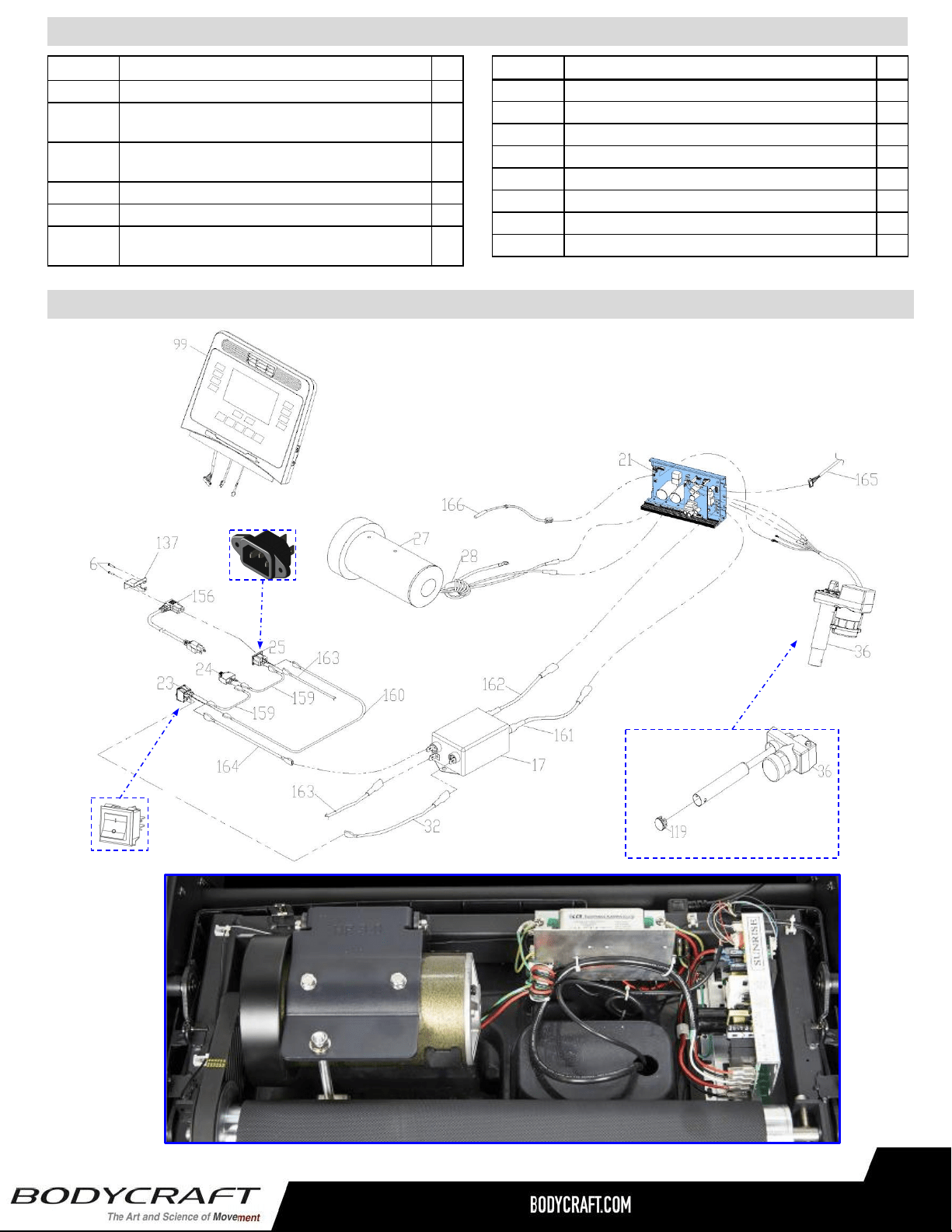
Part Lists - Detailed - T400 (T401 & T402) 3 of 3
Part # Description Qty
Product Parts Exploded View - Drive System - T400 (T401 & T402)
T402:176 Sticker - Grounding Screw Location - Single Sided 2
T402:177
Cable - Handlebar Left - Incline Control Board to
Dashboard (3PIN) 1
T402:178
Cable - Handlebar Right - Speed Control Board to
Dashboard (3PIN) 1
T402:179 Handrail Arms - Quick Key Button Shell - Left & Right 2
T402:180 Screw M4 x 10mm L 2
T402:181
Handrail Arms - Quick Key Speed/Incline - Control
Board w/ buttons 2
T402:182 Screw M2.3 x 6mm L 4
T402:183 Screw M3 x 16mm L 2
T402:184 USB Cover - Dashboard Upper Cover 1
T402:185 Ground Wire Female - Upright Post - Mid 1,200mm 1
T402:186 Ground Wire Male - Lower 700mm 1
T402:187 Ground Wire Female - Dashboard - Up 300mm 1
T402:188 Ground Wire Female - Dashboard - Down 600mm 1
T402:189 Sticker - EXP Series for Upright Post 2
Part # Description Qty
43

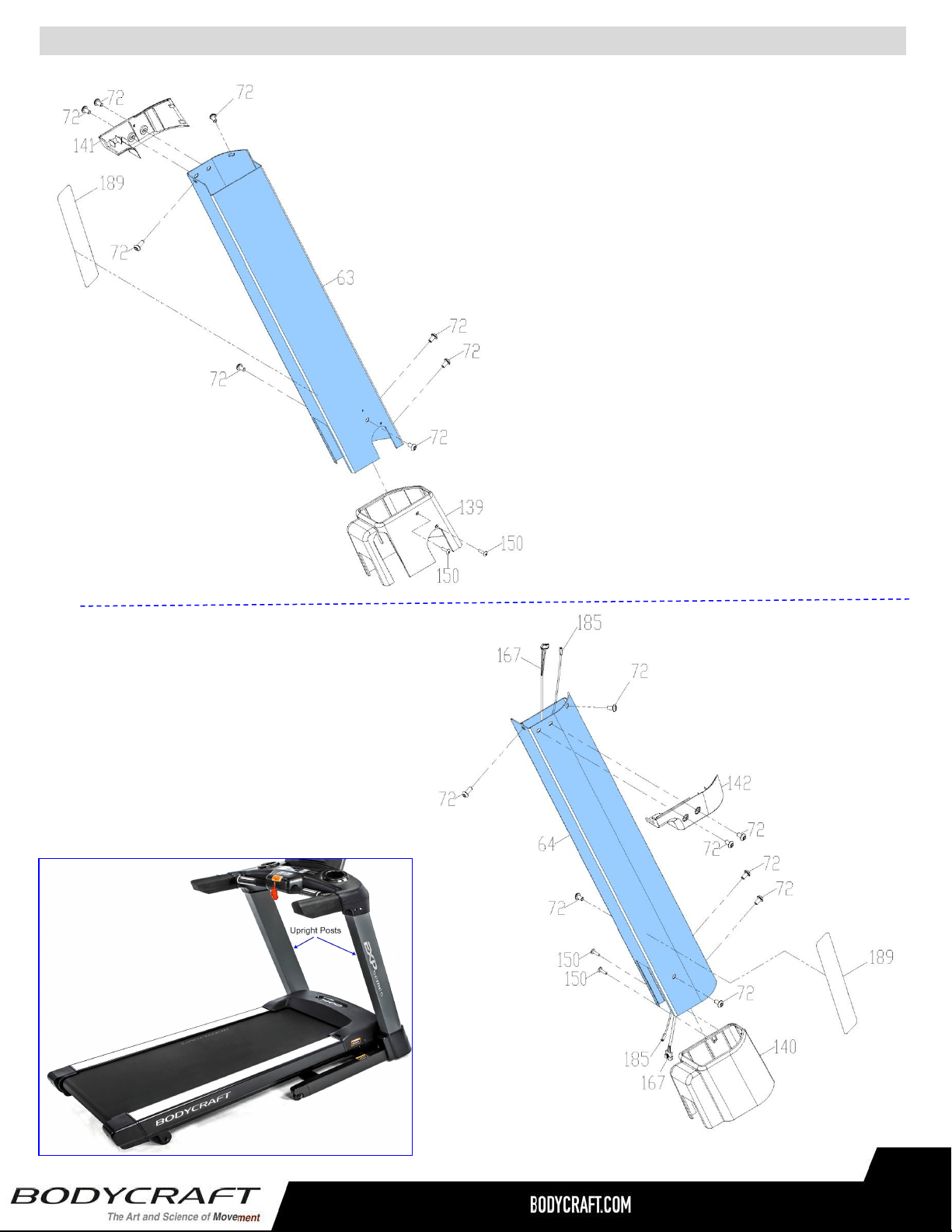
Product Parts Exploded View - Upright Posts Assembly - T400 (T401 & T402)
45
Right Side
Left Side
46
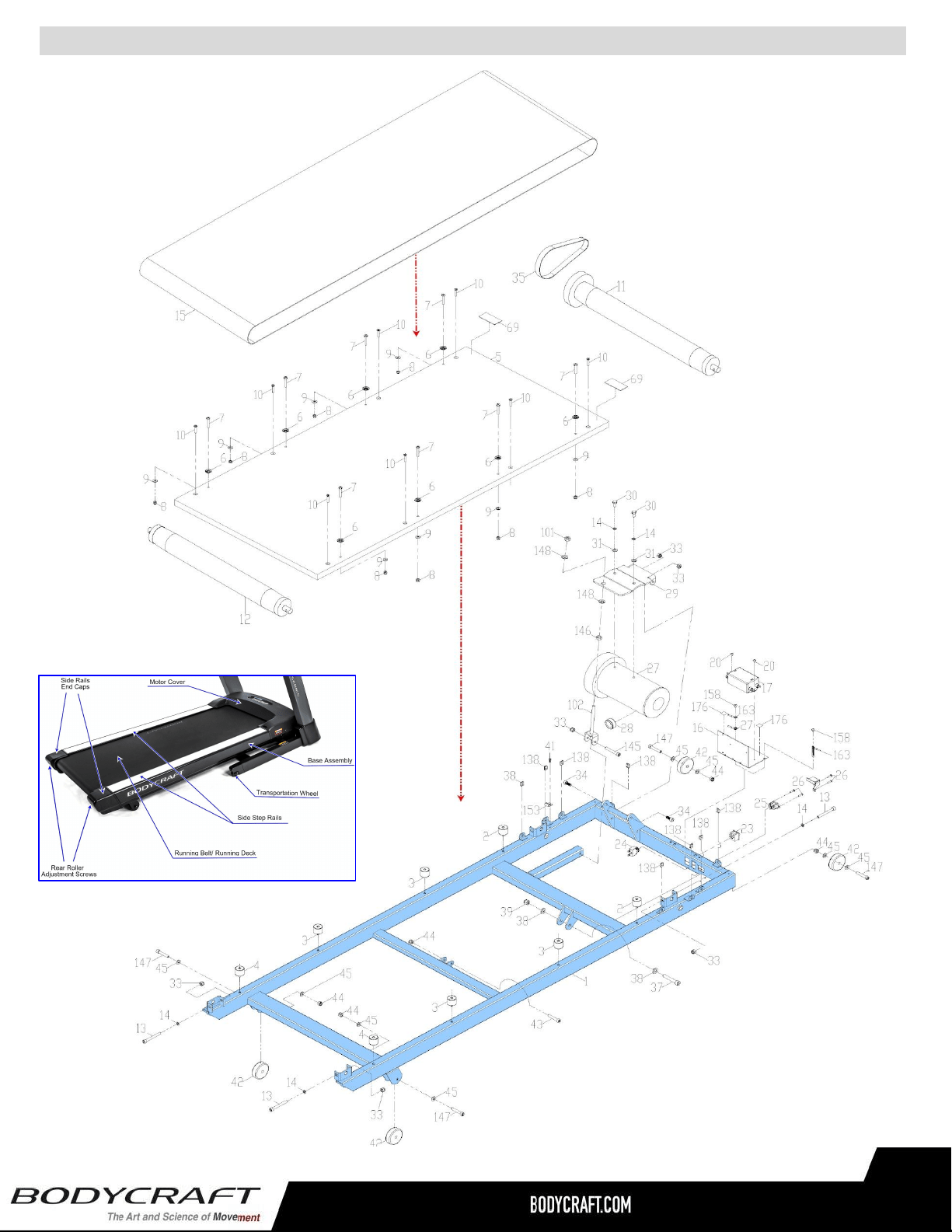
Product Parts Exploded View - Base Assembly - T400 (T401 & T402)
47
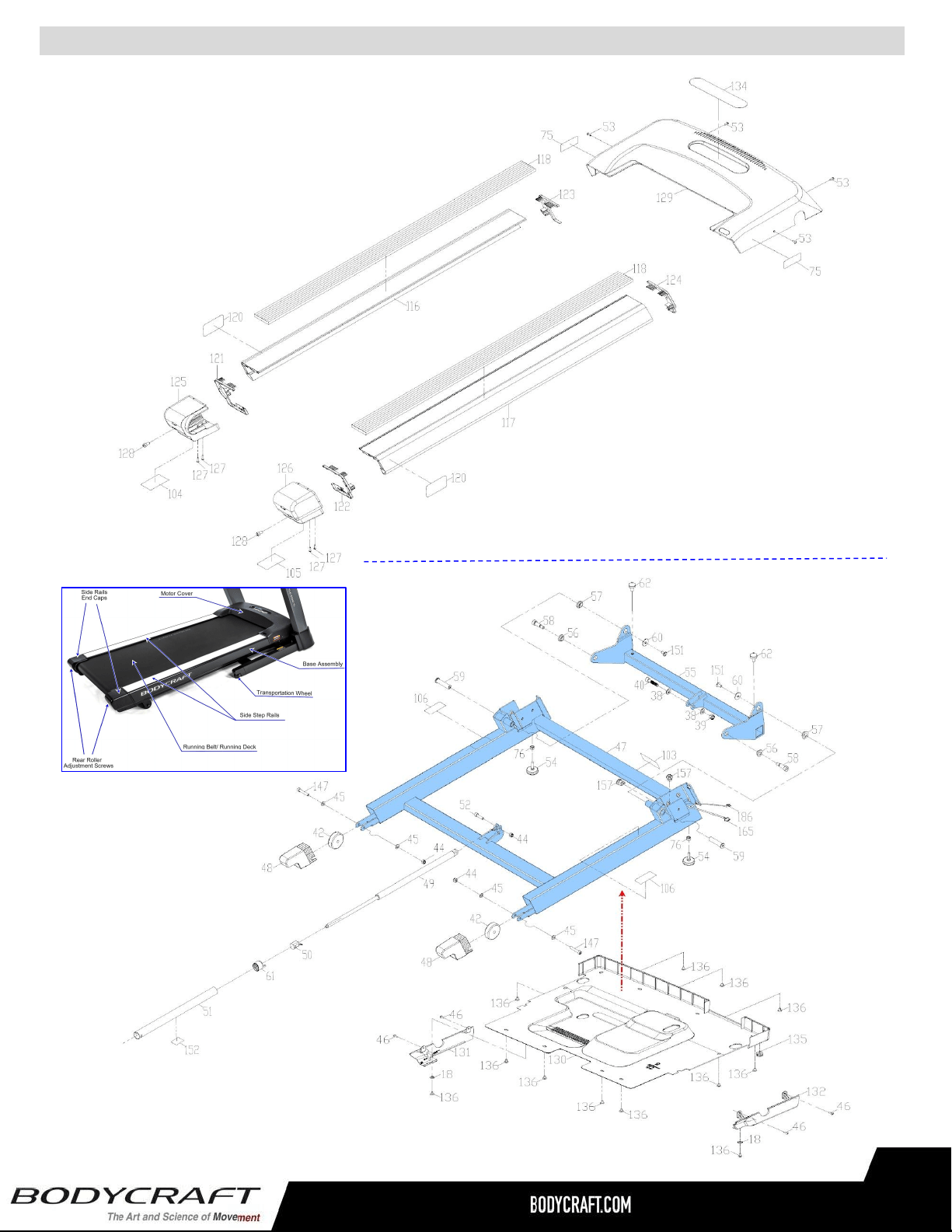
Product Parts Exploded View - Base Covers & Incline Frame - T400 (T401 & T402)
Residential Warranty (T800DC & T400DC):
Frame: Lifetime, Parts: 10 years, Console: 3 years, Labor: 2 years
Headphone Jack, HDMI, CSAFE, ETHERNET & USB Port: 90 days and Labor: None
Commercial Warranty (T800DC):
Frame: 10 years, Parts: 5 years, Console: 3 years, and Labor: 1 year.
Headphone Jack, HDMI, CSAFE, ETHERNET & USB Port: 90 days and Labor: None
This warranty excludes the following:
1. The warranty does not cover normal maintenance or labor charges unless labor terms are listed
above.
2. Normal cosmetic wear on parts such as paint, seat coverings, foot rails, labels and logos.
3. Consumables such as batteries and heart rate belts that do not have a replaceable battery.
4. Eprom/Software version upgrades unless determined as necessary.
5. Any accessories not included in the original packaging.
* This warranty is in lieu of all warranties, expressed or implied, and/or all other obligations or liabilities on
our part, and we neither assume nor authorize any person to assume for us any other obligation or liability
in connection with the sale of your BODYCRAFT product. Under no circumstances shall we be liable by
virtue of this warranty or otherwise for damage to any person or property whatsoever for any special,
indirect, incidental, secondary or consequential damage of any nature whatsoever arising out of the use or
inability to use the BODYCRAFT product.
Register your product’s warranty at www.bodycraft.com/product-registration.html
VALID FOR USA AND CANADA ONLY
(Please consult with your local distributor for warranty info specific to your region).
BODYCRAFT warrants its products to be free of defects in materials and workmanship for the time stated
below to the original purchaser.
Register your product within 30 days of purchase at www.bodycraft.com or call 800-990-5556
This warranty is valid only in accordance with the following conditions:
The warranty begins on the original purchase date at retail and ends when the original owner
disposes of it, either through sale, gift, or otherwise. This warranty is not transferable and is only valid to
the original purchaser.
This warranty is available only for purchases made within and the original purchaser currently residing in
the USA and Canada. Please consult with your local distributor for warranty information specific to your
region. The product must have been registered within 30 days of the original purchase date or supply
proof of purchase to validate warranty (original sales invoice).
This warranty does not extend to any losses or damages due to accident, misuse, abuse, neglect,
negligence, unauthorized modification or alteration, use beyond rated capacity, unsuitable power sources or
environmental conditions, water, tampering, cosmetic damages, or improper installation, handling, repair,
maintenance, or application, or lack of proper maintenance.
If the item exhibits such a defect, BODYCRAFT will, at its option, repair or replace it without cost for parts.
Shipping and handling charges may apply. (BODYCRAFT may require return of the part(s) or photographic
evidence of the damaged part(s) prior to replacement.) Serial number is required.
Parts repaired or replaced will be warranted for the remainder of the original warranty period only.
Product Warranty - Cardio T800 (T802) & T400 (T402) Treadmills
48
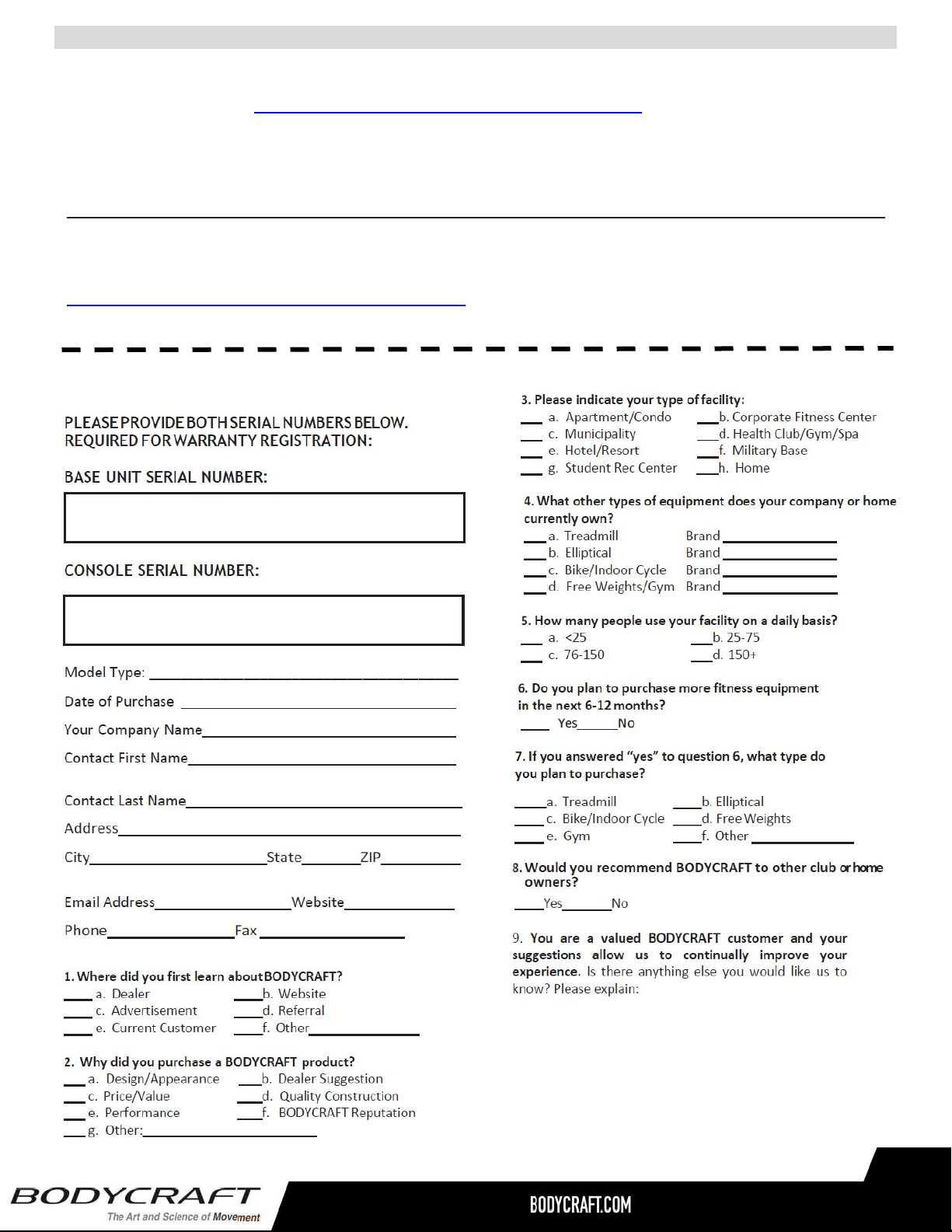
Warranty Registration - Cardio
Thank you for purchasing a BODYCRAFT product. To validate the product warranty the fast and easy way,
please go on-line now to https://www.bodycraft.com/product-registration.html and register your product. The
information you provide will never be distributed to any other individuals or agencies for any purpose. If you
prefer to mail your warranty card, have the owner of the product complete the information below and return it
to BODYCRAFT within 30 days from the date of equipment installation.
Please Note: Failure to register this product will result in no servicing or authorization of parts to be shipped.
To mail your warranty information, please fill in the information below and mail to: Service Dept.,
BODYCRAFT , 7699 Green Meadows Dr. Lewis Center, Ohio 43035 (or save postage and register online at
https://www.bodycraft.com/product-registration.html )
Warranty Registration
49