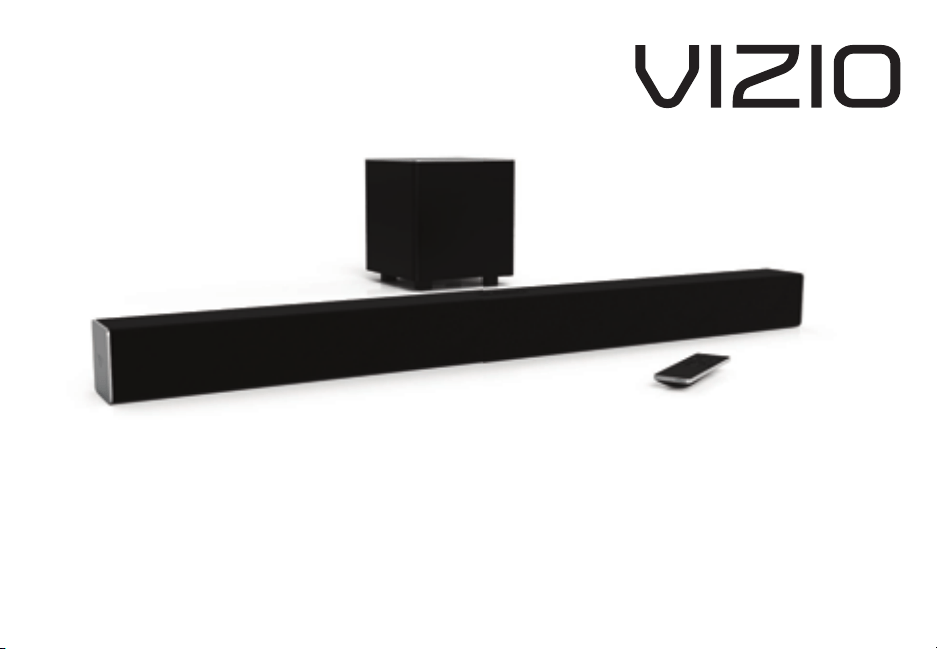
QUICK START GUIDE
Model: SB3821-D6

English - ii
our nit is designed and manufactured to operate within dened design limits and misuse may result in electric shock or re. To prevent your nit
from eing damaged the following rules should e oserved for its installation use and maintenance. lease read the following safety instructions
efore operating your nit. eep these instructions in a safe place for future reference.
• ead these instructions.
• eep these instructions.
• eed all warnings.
• ollow all instructions.
• o not use this apparatus near water.
• lean only with a dry cloth.
• o not lock any ventilation openings. Install in accordance with the manufacturers instructions.
• o not install near any heat sources such as radiators heat registers stoves or other apparatus including ampliers that produce heat.
• o not defeat the safety purpose of the polaried or grounding-type plug. polaried plug has two lades with one wider than the other.
grounding type plug has two lades and a third grounding prong. The wide lade or the third prong are provided for your safety. If the provided
plug does not t into your outlet consult an electrician for replacement of the osolete outlet.
• rotect the power cord from eing walked on or pinched particularly at plugs convenience receptacles and the point where they eit from the
apparatus.
• Only use attachmentsaccessories specied y the manufacturer.
• se only with the cart stand tripod racket or tale specied y the manufacturer or sold with the apparatus. hen a cart is used
use caution when moving the cartapparatus comination to avoid inury from tip-over.
• nplug this apparatus during lightning storms or when unused for long periods of time.
• efer all servicing to ualied service personnel. Servicing is reuired when the apparatus has een damaged in any way such as when the power
supply cord or plug is damaged liuid has een spilled or oects have fallen into the apparatus the apparatus has een eposed to rain or
moisture does not operate normally or has een dropped.
• To reduce the risk of electric shock or component damage switch o the power efore connecting other components to your nit.
• nplug the power cord efore cleaning your nit. damp cloth is sucient for cleaning. o not use a liuid or a spray cleaner on your nit. o not
use arasive cleaners.
• lways use the accessories recommended y the manufacturer to insure compatiility.
• hen moving your nit from an area of low temperature to an area of high temperature condensation may form in the housing. ait efore
turning on your nit to avoid causing re electric shock or component damage.
• Slots and openings in the ack and ottom of the cainet are provided for ventilation. To ensure reliale operation of your nit and to protect it
from overheating e sure these openings are not locked or covered. o not place your nit in a ookcase or cainet unless proper ventilation is
provided.
• ever push any oect into the slots and openings on your nit enclosure. o not place any oects on the top of your nit. oing so could short
circuit parts causing a re or electric shock. ever spill liuids on your nit.
• ever use the suwoofer in the upright vertical position without installing the legs
• o not lock the suwoofer ports. llow for - inches of space around all sides for ventilation.
• I posure to loud sounds can damage your hearing causing hearing loss and tinnitus ringing or uing in the ears. ith continued
IMPORTANT SAFETY INSTRUCTIONS

English - iii
eposure to loud noises ears may ecome accustomed to the sound level which may result in permanent damage to hearing without any noticeale
discomfort.
• hen connected to a power outlet power is always owing into your nit. To totally disconnect power unplug the power cord.
• o not overload power strips and etension cords. Overloading can result in re or
electric shock.
• The wall socket should e located near your nit and e easily accessile
• eep your nit away from moisture. o not epose your nit to rain or moisture. If water penetrates into your nit unplug the power cord and
contact your dealer. ontinuous use in this case may result in re or electric shock.
• o not use your nit if any anormality occurs. If any smoke or odor ecomes apparent unplug the power cord and contact your dealer
immediately. o not try to repair your
unit yourself.
• void using dropped or damaged appliances. If your nit is dropped and the housing is damaged the internal components may function anormally.
nplug the power cord immediately and contact your dealer for repair. ontinued use of your nit may cause re or electric shock.
• o not install your nit in an area with heavy dust or high humidity. Operating your nit in environments with heavy dust or high humidity may
cause re or electric shock.
• nsure that the power cord and any other cales are unplugged efore moving your nit.
• hen unplugging your nit hold the power plug not the cord. ulling on the power cord may damage the wires inside the cord and cause re or
electric shock. hen your nit will not e used for an etended period of time unplug the power cord.
• To reduce risk of electric shock do not touch the connector with wet hands.
• Insert the remote control atteries in accordance with instructions. Incorrect polarity may cause the attery to leak which can damage the remote
control or inure the operator.
• See the important note and rating located on the ack of the unit.
• I - This euipment is not waterproof. To prevent a re or shock haard do not place any container lled with liuid near the euipment
such as a vase or ower pot or epose it to dripping splashing rain or moisture.
• TIO - anger of eplosion or re if atteries are mistreated. eplace only with the same or specied type.
• o not leave the atteries eposed to direct sunlight for a long period of time with doors and windows closed. o not disassemle the atteries or
dispose of it in re.
• here the IS plug or appliance coupler is used as the disconnect device the disconnect device shall remain readily operale.
I To reduce the risk of re or electric shock do not epose this apparatus to rain or moisture.
CAUTION
IS O TI
SO O OT O
The lighting ash with arrowhead symol
within an euilateral triangle is intended
to alert the user to the presence of not
isolated dangerous voltage within the
product that may e sucient magnitude
to constitute a risk of shock to persons.
The eclamation point within an euilateral
triangle is intended to alert the user to
the presence of important operating and
servicing instructions in the literature
accompanying the appliance.
arning This euipment is a lass II or
doule insulated electrical appliance. It has
een designed in such a way that it does
not reuire a safety connection to electrical
earth.

nglish - iv
TABLE OF CONTENTS
ackage ontents .........................................................................................................................5
elcome to VIZIO Smartast .....................................................................................................7
Controls & Connections ...............................................................................................................8
irst-Time Setup............................................................................................................................12
Using the Remote .........................................................................................................................17
sing our Talet or Smartphone as a emote ........................................................................18
inimum ecommended euirements. ............................................................................19
Indicators ...............................................................................................................................20
airing our Smartphone or Talet ............................................................................................22
etting started with oogle ast .............................................................................................23
How to Cast Content ..............................................................................................................23
etting started with the VIZIO Smartast pp ..........................................................................24
ccount Setup..........................................................................................................................24
Selecting a Smartast device .................................................................................................25
reating an udio roup .............................................................................................................26
luetooth airing ..........................................................................................................................27
Using Bluetooth Mode ............................................................................................................28
dvanced Setup ............................................................................................................................29
Connecting a Subwoofer ............................................................................................................30
Using Button Combinations ........................................................................................................31
all-ounting the Sound ar .....................................................................................................32
elp Trouleshooting ...............................................................................................................36
imited arranty ..........................................................................................................................37
egal ompliance ......................................................................................................................41
English - 5
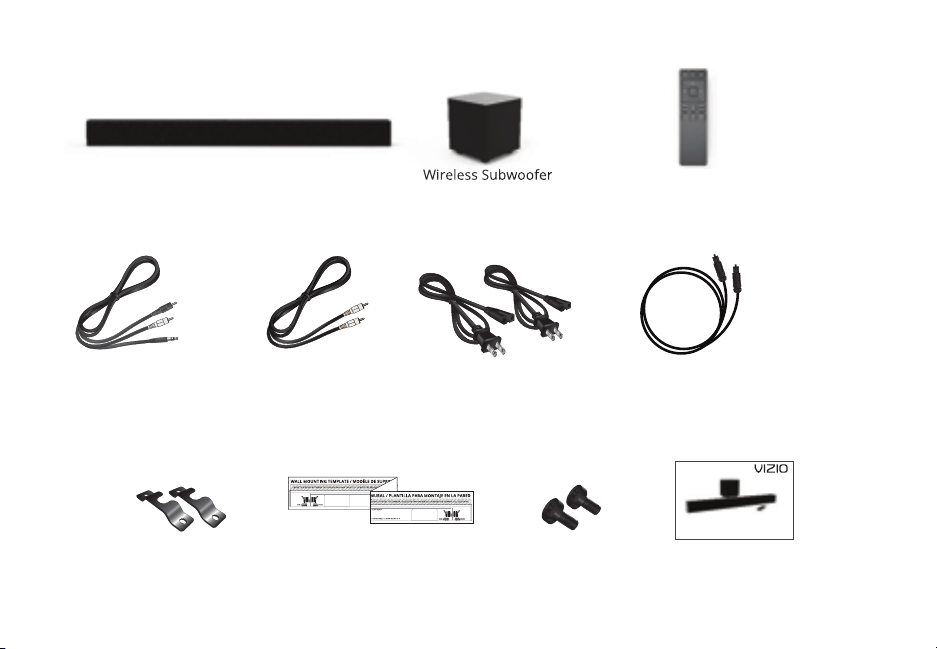
PACKAGE CONTENTS
all ount Template
all
Mount Screws
Digital Optical
Cable
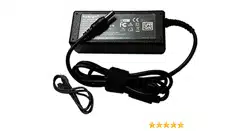
ower ales
oaial udio
Cable
uick Start uide
QUICK START GUIDE
Model: SB3821-D6
SmartCast
Sound Bar
Remote Control
with atteries
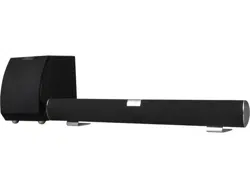
ireless Suwoofer
Stereo to
.mm udio ale
all
ount rackets
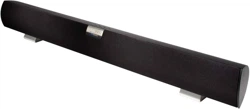
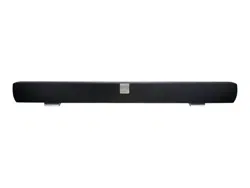
Sound ar
ireless Suwoofer
English - 6

English - 7
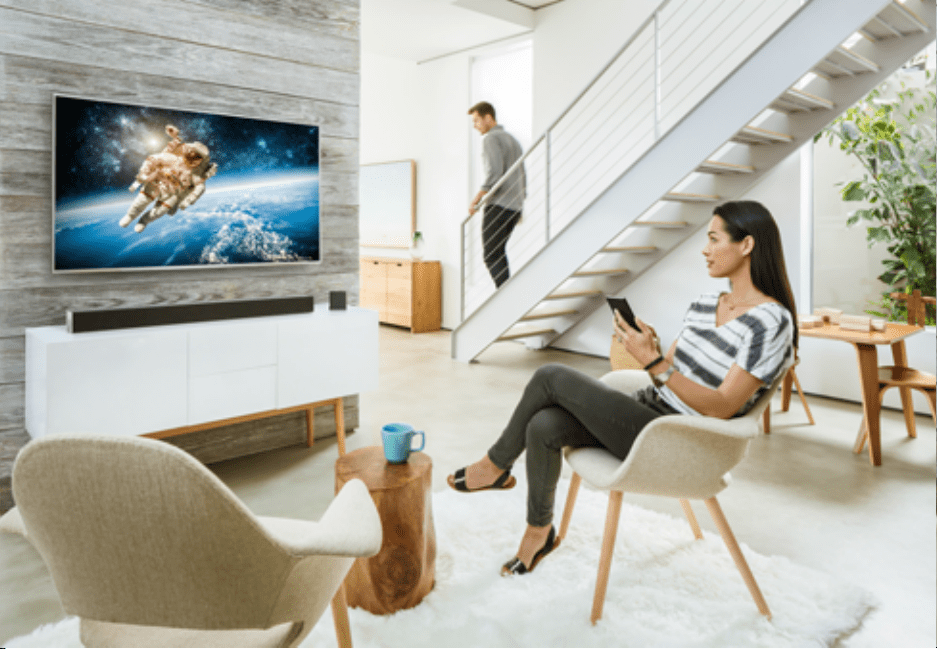
our new VIZIO Sound ar is part of the all-new collection of home theater displays sound
ars and home audio speakers that can all e controlled y one ingenious app the VIZIO
Smartast app.
ith the app you can rowse online radio music and more from multiple sources or apps in
one view without having to switch ack and forth etween those apps or sources. nd then
ust tap to cast the content to your VIZIO Sound ar - from anywhere in your home. It works
over ii so you can control your VIZIO Sound ar from any room and keep using your
smartphone or talet to continue rowsing play games tet or even watch another show
without disrupting whats playing on your sound ar. ith VIZIO Smartast what you love
doesnt change ut how you eperience it will never e the same.
ow lets get you into setup so you can start casting
Welcome to VIZIO SmartCast
™
!
English - 7
English - 8
CONTROLS & CONNECTIONS
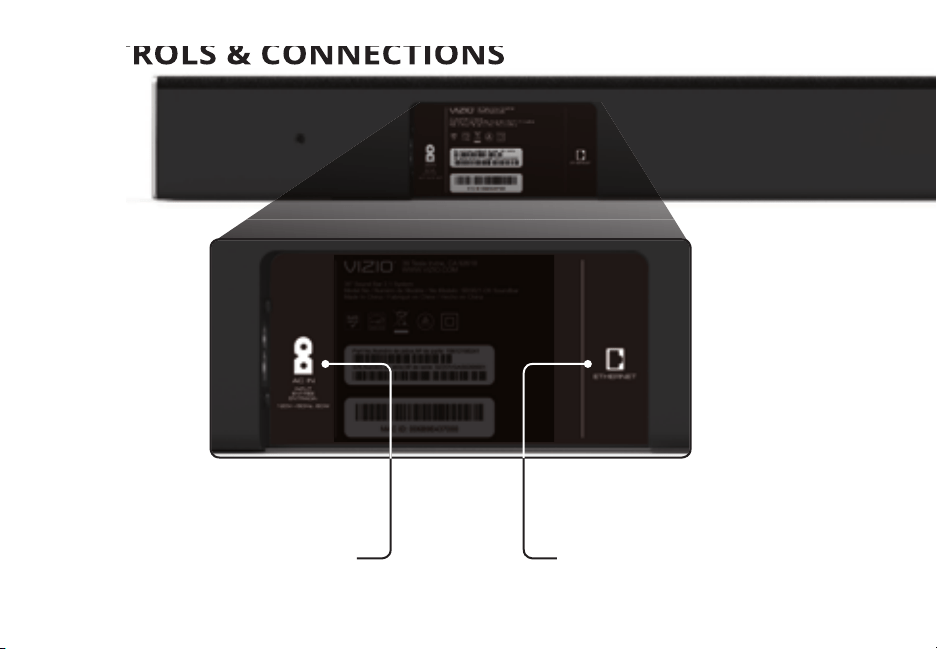
Power Port
CONTROLS & CONNECTIONS
Back of Sound Bar
Ethernet
thernet In
English - 9
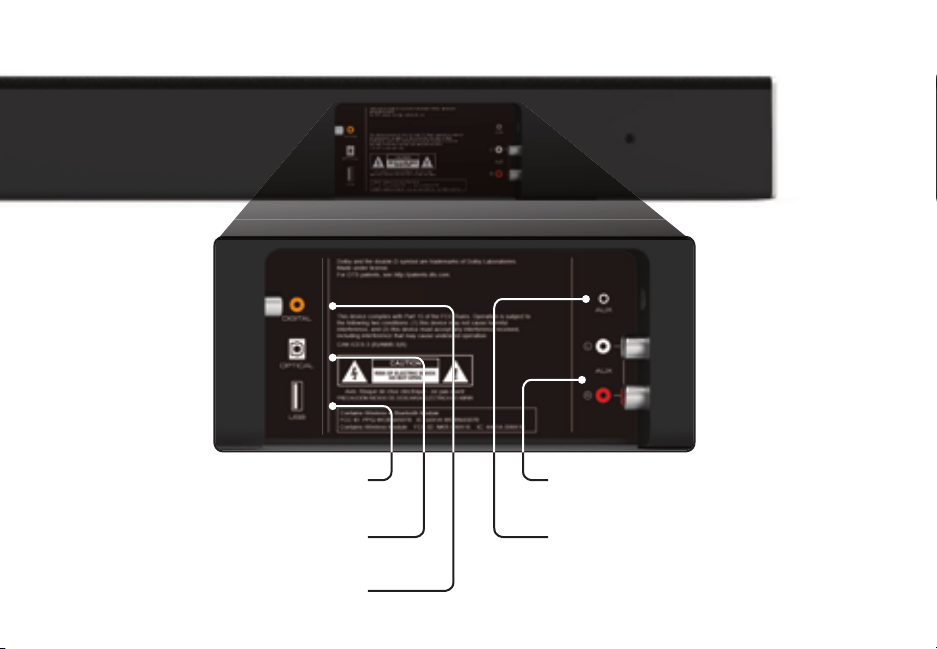
Supports .V le format playack only.
OPTICAL
igital Optical udio In
DIGITAL
oaial In
AUX
nalog udio In Stereo
AUX
nalog udio In Stereo .mm
USB*
S In
English - 10
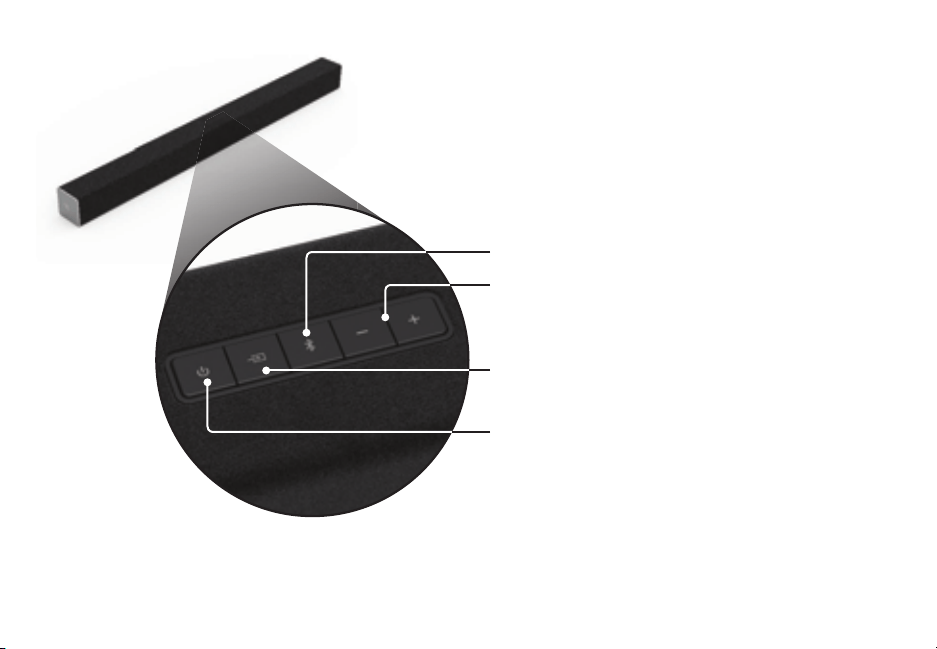
Top of Sound Bar
Input ress to change the audio source.
Power ress to turn soundar on or o.
Volume Increase or decrease the loudness
of the audio.
Bluetooth Input old to pair.
See luetooth airing for more information.
English - 11
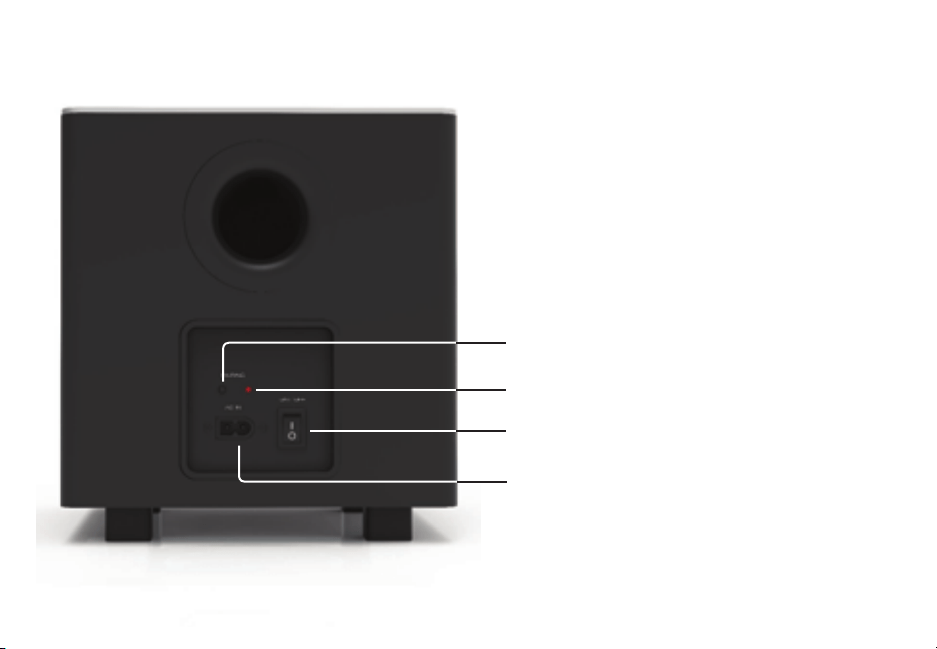
Back of Subwoofer
Power Switch
Power Port
LED Indicator
Pairing Button
English - 12
FIRST-TIME SETUP
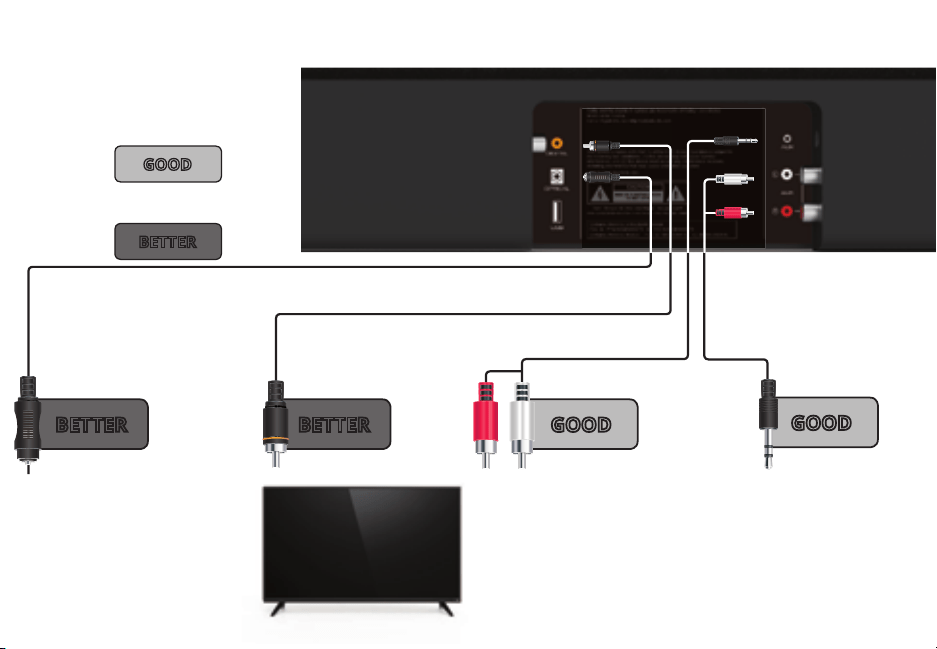
ot all TVs have the audio outputs shown aove. To con-
nect the Sound ar directly to your other devices lu-ay
player game system etc. see your devices user manual.
hen using either of the igital Inputs if there is no
audio try setting the TV output to or onnect
directly to your lu-rayother source some TVs do not
pass through digital audio.
Back of Sound Bar
AND CONNECT
IT TO YOUR TV
3.5MM TO
RCA CABLE
GOOD
3.5MM TO
RCA CABLE
GOOD
DIGITAL COAXIAL
CABLE
†
BETTER
DIGITAL OPTICAL
CABLE
†
BETTER
1
CHOOSE ONE CABLE
BETTER
GOOD
OR
English - 13
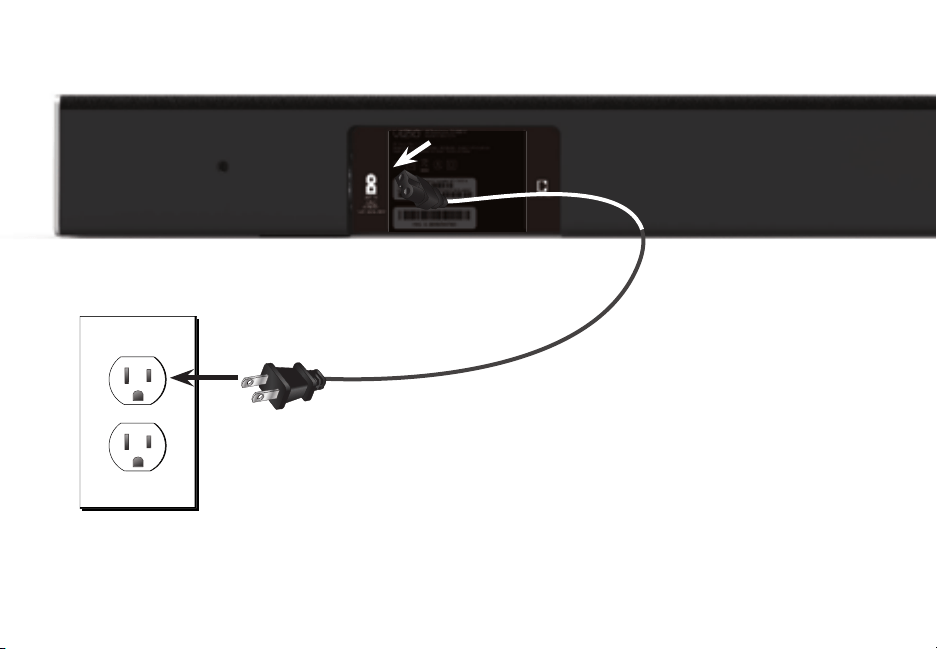
2
Connect the power cable to the sound bar AC
IN as shown.
lug the power cale into an electrical outlet.
English - 14
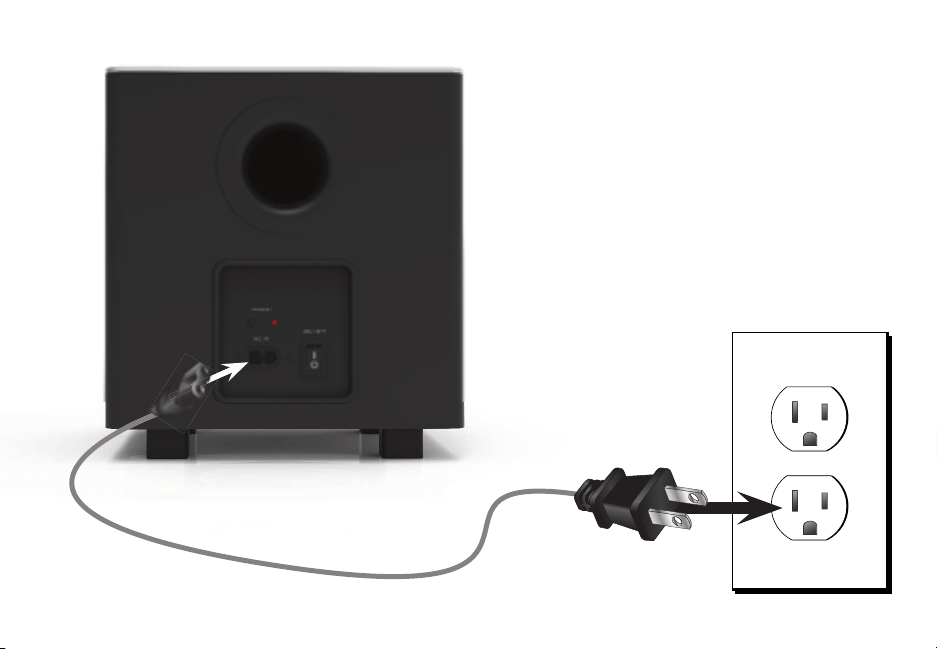
Back of Subwoofer
Connect the power cable to the Subwoofer
AC IN as shown.
lug the power cale into an electrical
outlet.
lip the ower Switch into the On position.
3
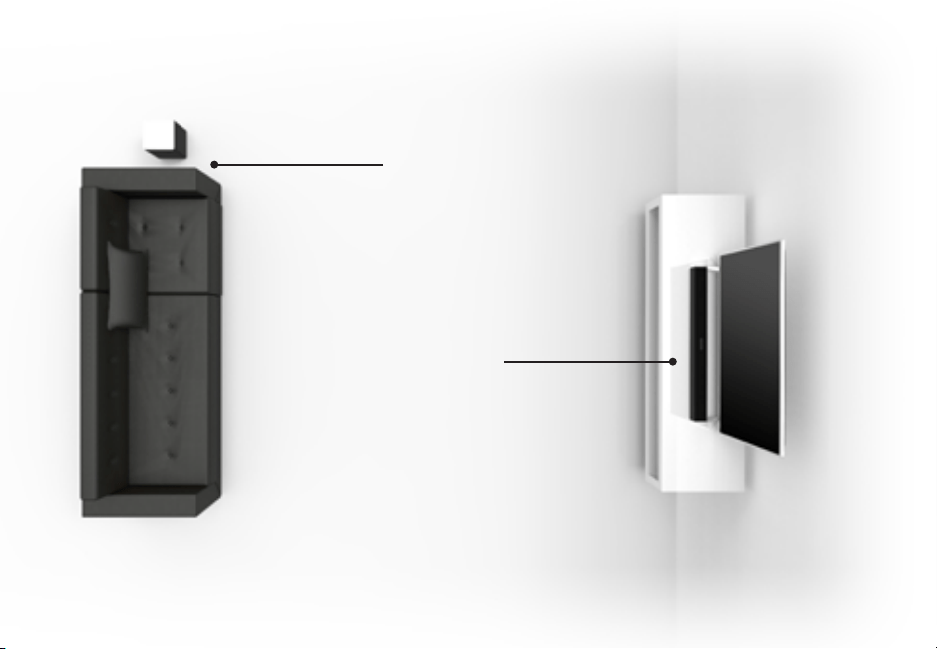
Sound Bar is centered below
the TV.
or the est surround sound eperience position the Sound ar as shown.
The Sound ar should e close to ear level. The Suwoofer should e placed in a
corner of the room.
3
Subwoofer
English - 15

English - 16
4
emove the attery cover y gently
sliding it away from the remote.
5
Insert the included atteries and gently
slide the attery cover ack into place.
6
Turn your TV on the sound ar will automatically turn on and
egin searching for an active input.
The indicators on the front of the sound ar will egin cycling
in pairs through inputs until an audio source is detected.
You can press the INPUT button to switch between audio
sources. or eample if you connected your TV to set the
sound ar to .
Input
ower
Top Top
Tip: ressing the INPUT button will stop
the auto detect function.
Occurs only during rst-time set up.
uto detect function only occurs once when the sound ar is rst powered on. To enale this feature again you must
do a actory eset see the sing utton ominations section for more information or press and hold the IT
utton for seconds.
hen needed VIZIO recommends replacing the atteries that came
with this remote with two new uracell alkaline atteries.
English - 17
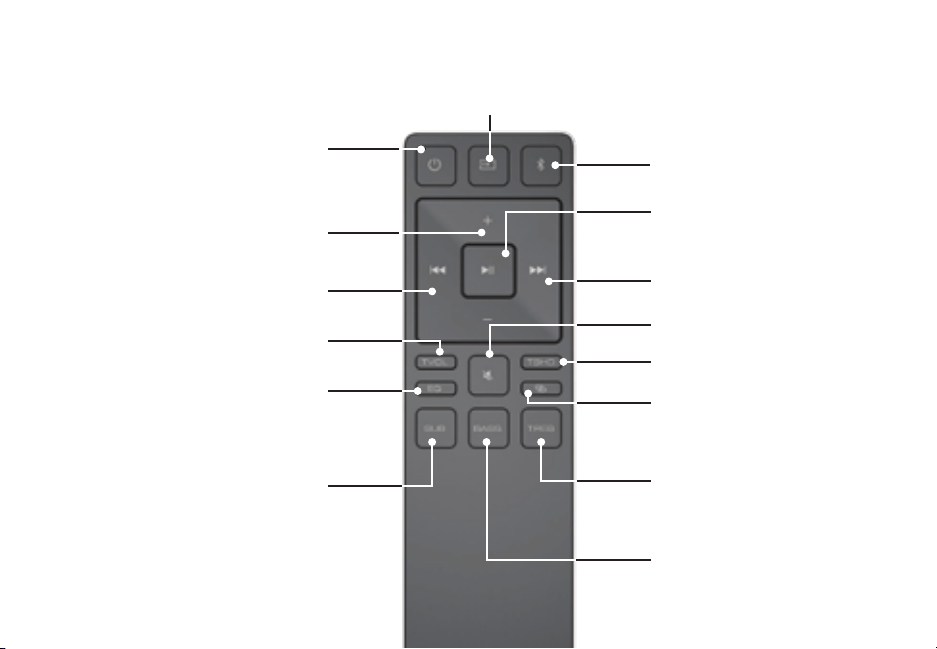
USING THE REMOTE
Volume +/-
ress to increase and decrease
volume.
Previous
ress to return to previous track.
Bluetooth
Switches to luetooth mode. ong
press puts sound bar in bluetooth
pairing mode.
Mute
ress to muteunmute.
Power
ress to turn on or o.
Enter/Play/Pause
ress to select an option.
ress to play or pause.
Next
ress to skip to the net track.
Input
ress to change the input source
TruVolume
Turns TruVolume On and O.
TruSurround
Turns TruSurround On and O.
Pair
ctivate network pairing mode on
sound ar.
Equalizer
ress the pown utton
to toggle between two preset
settings usic and ovie
Subwoofer
ress the reviouset utton to
increasedecrease the level of the
subwoofer
Bass
ress the reviouset
button to increasedecrease
the level of the ass.
Treble
ress the reviouset
button to increasedecrease
the level of the Trele.
English - 18
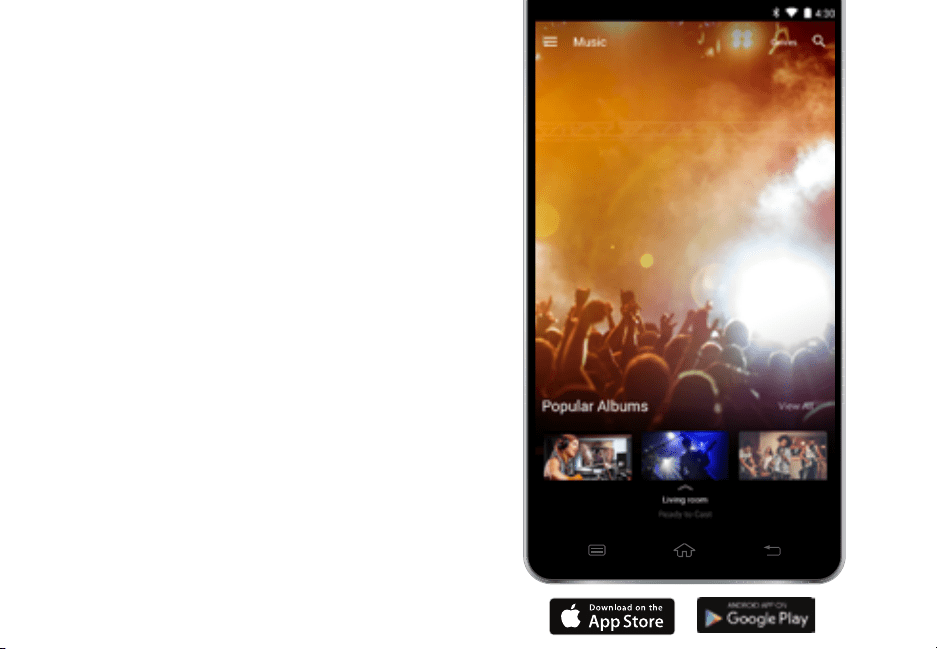
ownload the VIZIO Smartast app and turn your
smartphone or talet into a remote to control your
sound ar system. asily search discover and rowse for
content to listen through your speakers.
To use your smartphone or talet as your VIZIO
SmartCast Remote:
• ownload the VIZIO Smartast app on your
compatible smartphone or tablet and follow the
on-screen instructions to pair your device with a
VIZIO Smartast Sound ar System.
USING YOUR TABLET OR
SMARTPHONE AS A REMOTE
English - 19
ndroid
• ndroid . or higher
• . or more
• Storage or more
• etworking i-i
or a list of supported devices see oogle lay supported device article.
†
iOS*
• iOS . or later
• evices supported ihone iad
Minimum Recommended Requirements.
Suect to change
To use the luetooth functionality you must have ndroid . or later
†
httpssupport.google.comgoogleplayanswer
The VIZIO Smartast app is availale
for download from the oogle lay
Store and pple pp Store.
English - 20
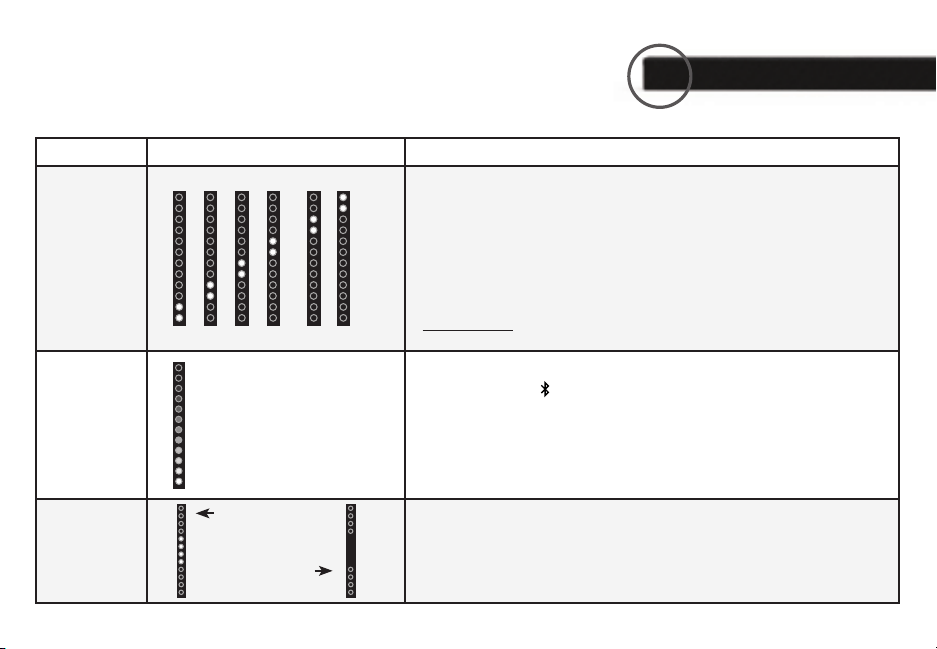
LED Indicators are located here.
The Indicators will ehave dierently with each utton on the remote control.
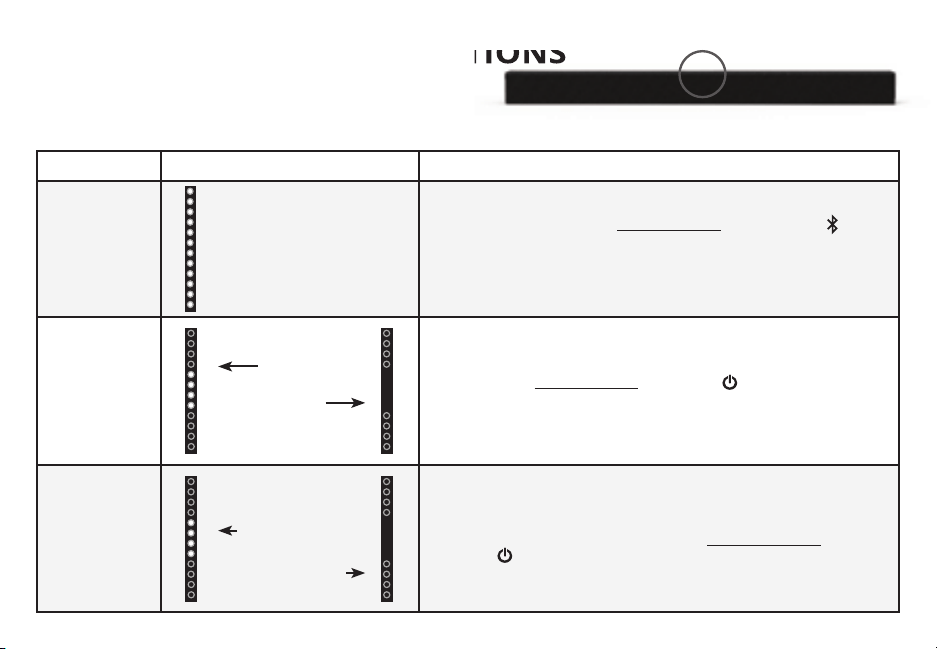
Function ehavior Description
Input
ress the IT utton on the remote to cycle through the availale inputs
nalog udio In - Stereo
•nalog udio In - Stereo .mm
•oaial In - igital
•igital Optical udio In - Optical
•Bluetooth
•S In - S
Press and hold the INPUT button on the remote control for 3 seconds to
enale the auto input detect function.
Bluetooth
Pairing
ress and hold the utton on the remote. The Sound ar will e
discoverale for minutes. ou can now search for the Sound ar VIZIO
S using your luetooth evice. The sound ar will power down if no
device is found.
Note: Set your luetooth device into pairing mode prior to the Sound ar.
DTS
TruVolume
OnO
ress the TVOL utton to enaledisale TruVolume.
hen enaled On TruVolume provides a consistent and comfortale
volume level for a more enoyale listening eperience.
hen searching for device
Flash from the bottom to the
top and ack continuously.
TruVolume On
TruVolume O
nalog udio In -
nalog udio In -
oaial In - igital
igital Optical udio In
Optical
Bluetooth
S In - S
LED INDICATORS
English - 21
Function ehavior Description
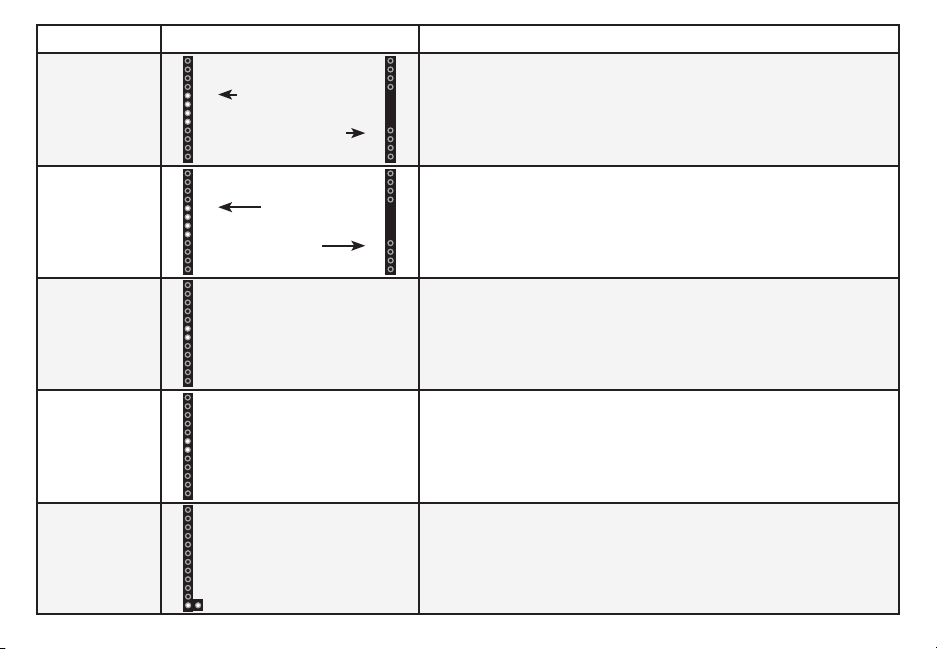
DTS
TruSurround
OnO
ress the TSHD utton to enaledisale TS TruSurround. hen
enaled On all inputs will produce virtual surround sound. hen
disaled O all sources will playack in stereo.
Equalizer Mode
ress the EQ button
to toggle etween two preset eualier
settings usic and ovie.
Note: ovie mode is on y default.
Treble
Levels
ress the TREBLE button then press the Next/Previous button to
increasedecrease the trele level. The indicators will move to the
top with increasing levels and to the ottom with decreasing levels.
Bass
Levels
ress the BASS button then press the Next/Previous button to
increasedecrease the ass level. The indicators will move to the
top with increasing levels and to the ottom with decreasing levels.
When a Dolby
Digital signal is
detected.
oly igital is only availale on either the Coaxial In or Digital Optical
Audio In inputs. hen a oly igital signal is detected the oly igi-
tal indicator will light up for seconds efore fading away.
Two center s indicate
Trele level .
Two center s indicate
ass level .
TruSurround On
TruSurround O
oly igital
Indicator
ovie
Music
English - 22
evice OT included
PAIRING YOUR SMARTPHONE OR
TABLET
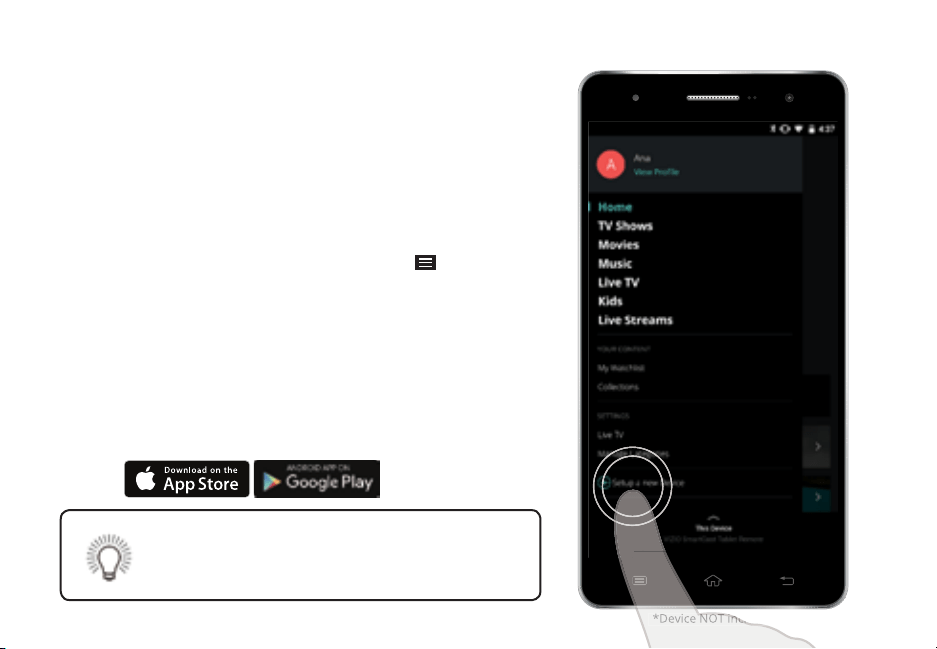
To pair your smartphone or talet with your VIZIO Smartast
Sound ar for the rst time
. Install the VIZIO Smartast app.
. aunch
the VIZIO Smartast app on your smartphone
or tablet and press the Power utton on your
Smarast Sound ar.
. rom the VIZIO Smartast app tap on the utton in
the top left corner. The side menu is displayed.
. Tap Setup a new Device from the list of options. The
setup wiard appears and egins the pairing process.
. old your smartphone or talet close to the ower
front left of sound ar for at least seconds to
pair it with your sound ar.
ollow the remaining on-screen instructions on your
smartphone or talet to nish the setup wiard.
evice OT included
evice OT included
See Getting Started with the VIZIO SmartCast App
on page 33 for instruction on how to set up a
Smartast account.
English - 23
GETTING STARTED WITH GOOGLE CAST™
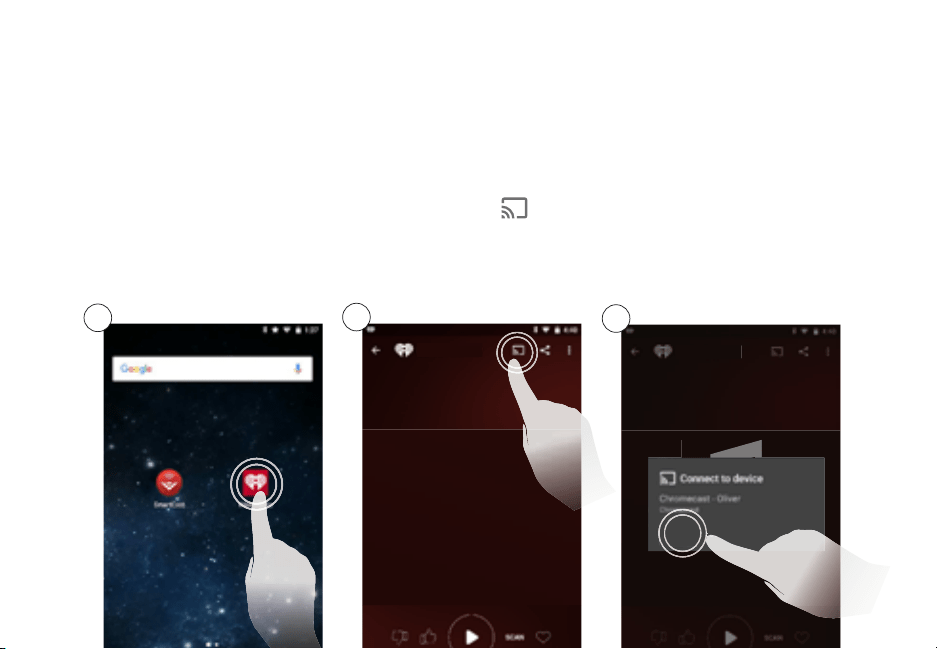
How to cast content
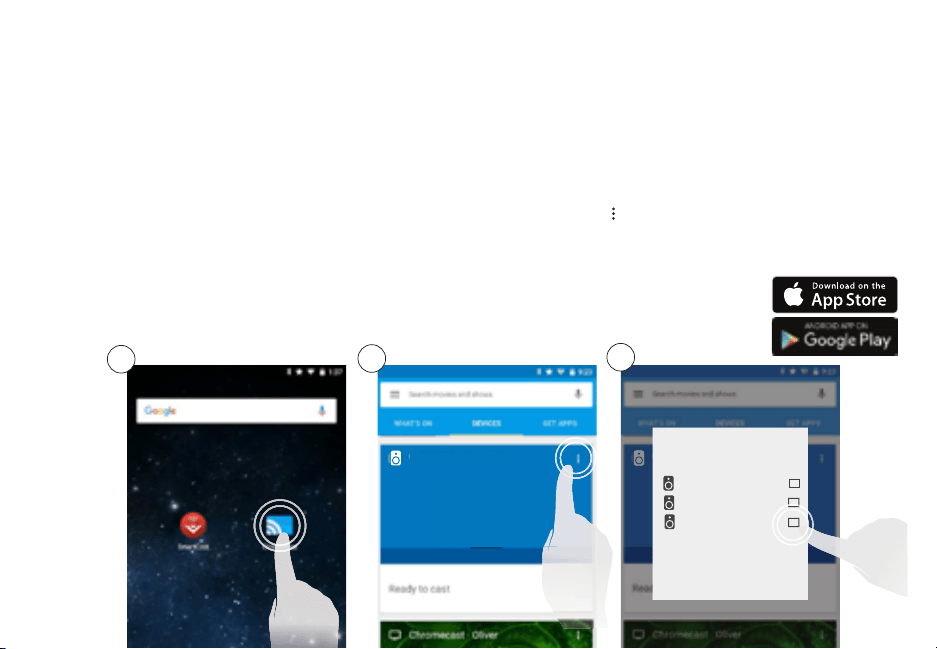
To cast music to your sound ar
. Open any ast-enaled app. Visit g.cocastaudioapps for a list of compatile apps.
. Select the content youd like to hear and tap the ast icon on the app screen.
. Select the device youd like to cast to and press play. Turn up the volume and control the speakers right from
your phone or talet.
1
2
oogle ast allows you to wirelessly send or cast music from your smartphone or talet to your Smartast
Sound ar.
♫
♫
♫
SmartCast Sound Bar
SmartCast Sound Bar
SmartCast Sound Bar
SmartCast Sound Bar
SmartCast Sound Bar
3
English - 24
The VIZIO Smartast app lets you wirelessly cast your favorite music to your VIZIO Smartast Sound ar
System. The app allows you to search for content and control cast playack across your favorite music apps.
OR
2a
2b
Account Setup
ou will need to log into your yVIZIO account to take full advantage of the VIZIO Smartast app. If you do not
have an account you can sign up for a free account.
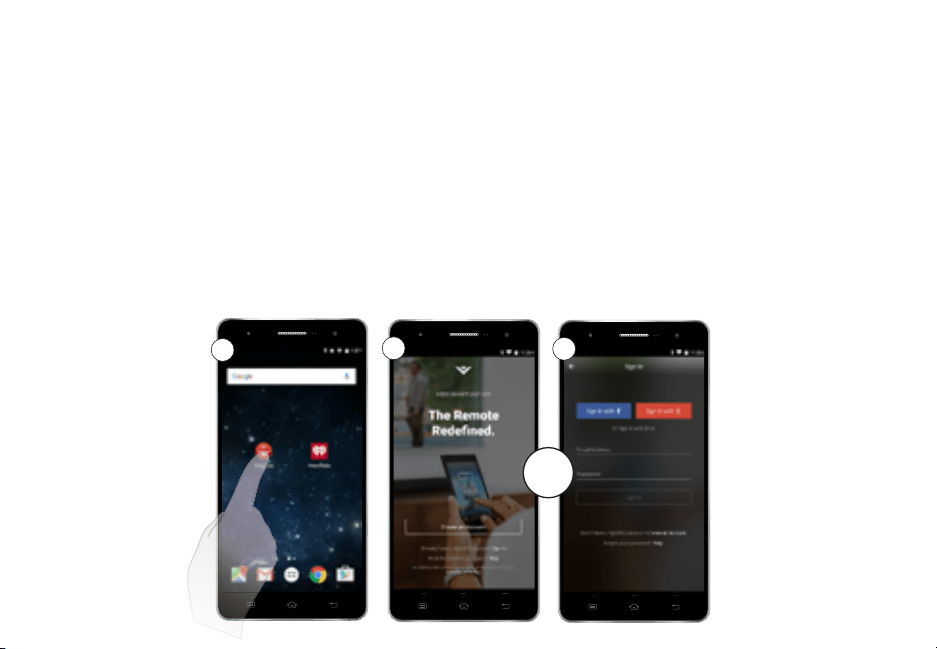
. Tap on the VIZIO Smartast app to egin.
. a Tap the Create an Account utton to sign up for a yVIZIO account.
OR
If you already have an account tap Sign In below the Create an Account button to log into
your account.
GETTING STARTED WITH THE VIZIO SMARTCAST APP
1
English - 25
Selecting a SmartCast device
ou can pair your smartphone or talet with multiple Smartast devices allowing you to seamlessly access and
cast your content wherever you are.
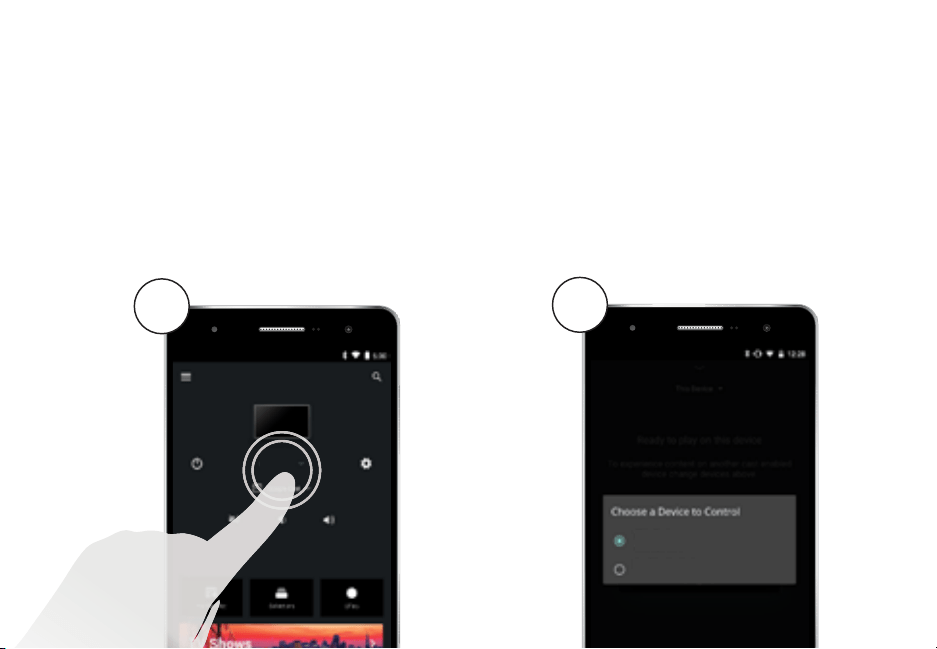
To select a dierent Smartast device
. On the ome screen of the Viio Smartast app tap This Device to reveal a list of availale devices.
. Tap to select a new device to control. ake sure the newly selected Smartast device is turned on.
1
2
SmartCast Sound Bar
This Device
This Device
English - 26
To create an audio group
. Install and open the oogle hromecast app.
. Tap evices to see a list of availale audio devices. Tap the menu icon on the top right
corner of the speaker window. list of all availale speakers appears.
. heck or uncheck the o net to each speaker to add or remove it from the group.
. Tap save to nalie the group.
CREATING AN AUDIO GROUP
ith oogle asts multi-room playack capaility you can create audio groups and cast dierent music or the
same music to multiple speakers at the same time. rior to creating an audio group make sure all speakers and
sound ars have een set up using the VIZIO Smartast pp.
Only audio devices can e put into groups.
1
2
pp images simulated.
SmartCastSoundBar4451
SmartCastSoundBar4451
3
SmartCastSoundBar4451
SmartCastSoundBar3830
itchen Speaker
English - 27
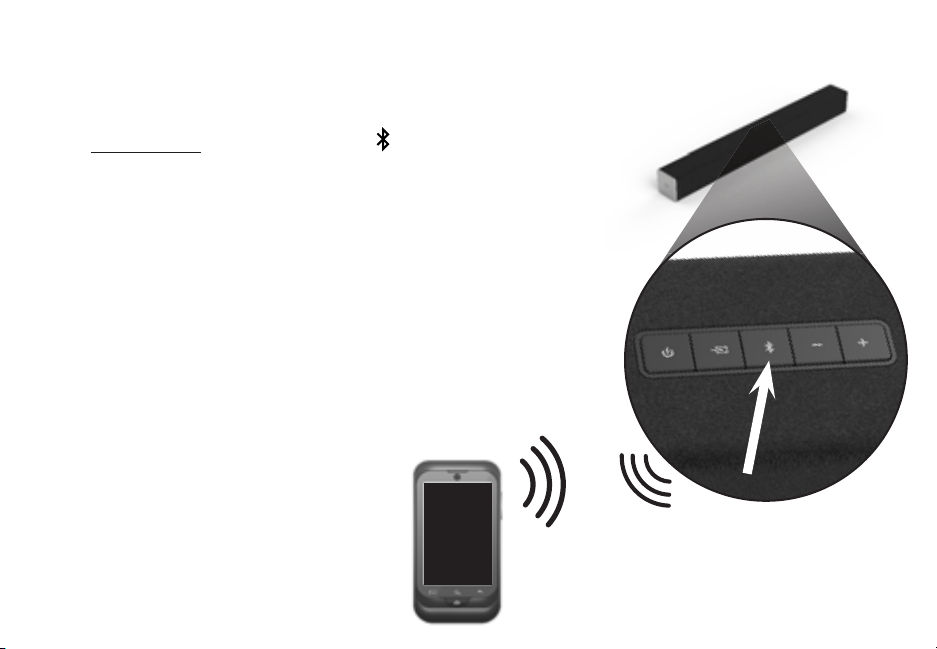
To pair the sound ar with a luetooth device
. ress and hold the Bluetooth button
on the sound ar for ve
seconds or select the T air option from the display remote
menu. hen the sound ar is in luetooth airing ode the
Indicators on the isplay anel on the front of the Sound ar will
light seuentially from ottom to top and ack again.
Once the device is paired the Indicators will stop ashing.
. ou can now search for the sound ar VIZIO S using
your luetooth device. or more information refer to the user
documentation that came with the device.
. lay audio from your luetooth device. Volume can e controlled
on your source device and the sound ar.
luetooth evice
BLUETOOTH PAIRING
Top of Sound Bar
English - 28
our sound ar supports music streaming from smartphones talets and computers with luetooth
capaility. evice compatiility will vary see your devices documentation for more information. Once you
have paired your source device to the sound ar as long as you stay within range of the sound ar your
device should remain paired. If the input is changed the luetooth device will disconnect. If the source is
changed ack to luetooth any paired luetooth device will reconnect automatically.
Maximizing Signal
luetooth signal has a range of up to feet. eep in mind that luetooth is a compressed audio format so
streamed music may lose some integrity when compared to a wired connection.
Try the following if your sound uality is less than optimal
• If you hear any reak-up or disconnect while streaming music from your device move the source
device closer to the sound ar.
• Be sure that there are no solid obstructions in the line-of-sight between the sound bar and the
source device.
• Other wireless devices can aect luetooth range including wireless security cameras wireless video
ay monitors cordless phones and microwave ovens. Turning o or moving these devices may
improve luetooth range.
our sound ar is not euipped with a microphone
so it cannot operate as a hands-free device for a
smartphone.
educe the volume levels on your device and on the
sound ar efore pressing lay. igh volume levels
can damage your hearing.
USING BLUETOOTH MODE

English - 29
ADVANCED SETUP
Supports .V le format
playack only.
DIGITAL OPTICAL
CABLE
DIGITAL COAXIAL
CABLE
3.5MM TO
RCA CABLE
3.5MM TO
RCA CABLE
Back of Sound Bar
ame onsole
etwork edia layer
Talet layeraptop
S Thum rive
English - 30
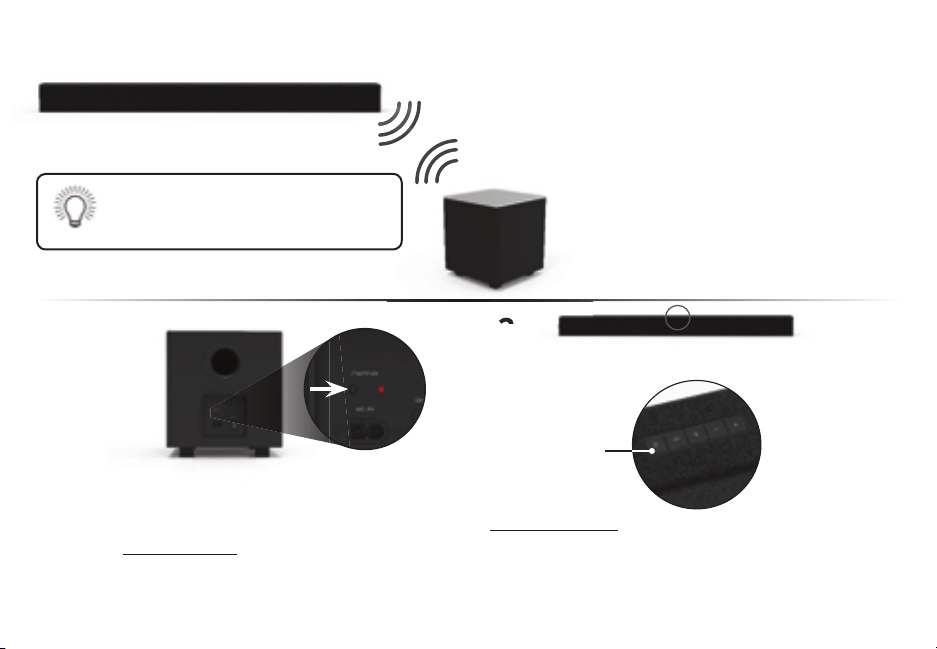
The Suwoofer has already een paired
with the Sound ar y VIZIO. owever the
Suwoofer may need to e re-linked to
the Sound Bar if there is no sound coming from the
Suwoofer.
1
irst conrm that the power switch is in the ON
position. ress and hold the Pairing button on the
ack of the Suwoofer for seconds. The on
the ack of the Suwoofer will egin to link.
2
2
ress and hold the Power button on the top of
the Sound ar for Seconds. The indicators
on the front will
ash times. The Suwoofer is
now linked with the Sound ar.
hat does pairing mean
airing means to wirelessly
connect.
Buttons are located on
top of the Sound Bar
Back of Subwoofer
Power Button
CONNECTING A SUBWOOFER
English - 31
USING BUTTON COMBINATIONS
There are functions that are triggered y dierent utton cominations on the Sound ar.
Function ehavior Description
Factory
Reset
eset the Sound ar to the factory default settings. To
perform a actory eset
Press and Hold the Bluetooth and
Volume Down uttons for
seconds.
Note This will erase all settings and preferences that you have set.
VIZIO TV
Remote
Control
naledisale the use of a VIZIO TV remote control to power
on and adust the volume of the sound ar. To enaledisale
this function
Press and Hold the Power and Volume Up
uttons for seconds.
Note This function is enaled y default.
Energy Star
hen the nergy Star setting is enaled the sound ar will
automatically power down after a period of inactivity. hen
disaled the sound ar will remain powered on until you turn
it o. To enaledisale this function Press and Hold the
Power
and Volume Down uttons for seconds.
Note: nergy Star setting is enaled y default.
ll s will
ash times
nergy Star
Enabled
nergy Star
Disabled
VIZIO TV
Remote Enabled
VIZIO TV
Remote Disable
USING BUTTON COMBINATIONS
Buttons are located here.
English - 32
WALL-MOUNTING THE SOUND BAR
Back of Sound Bar
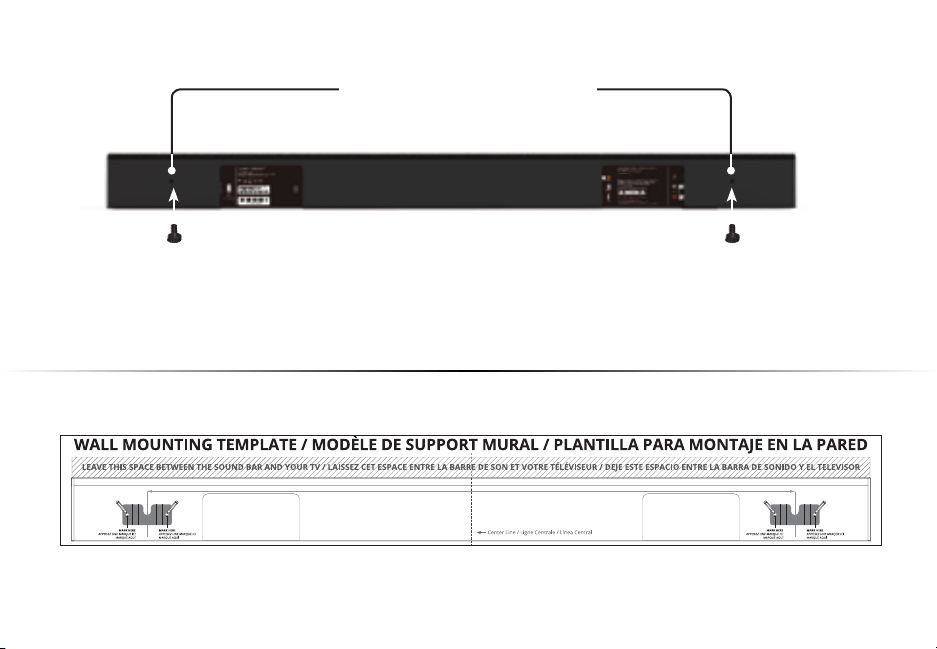
Insert the two wall-mount screws into the wall-mount screw holes and then
tighten them with a hillips screwdriver.
1
2
lace the included wall mounting template against the wall under your TV. ark the two
racket holes using a pencil.
all-ount Screw oles
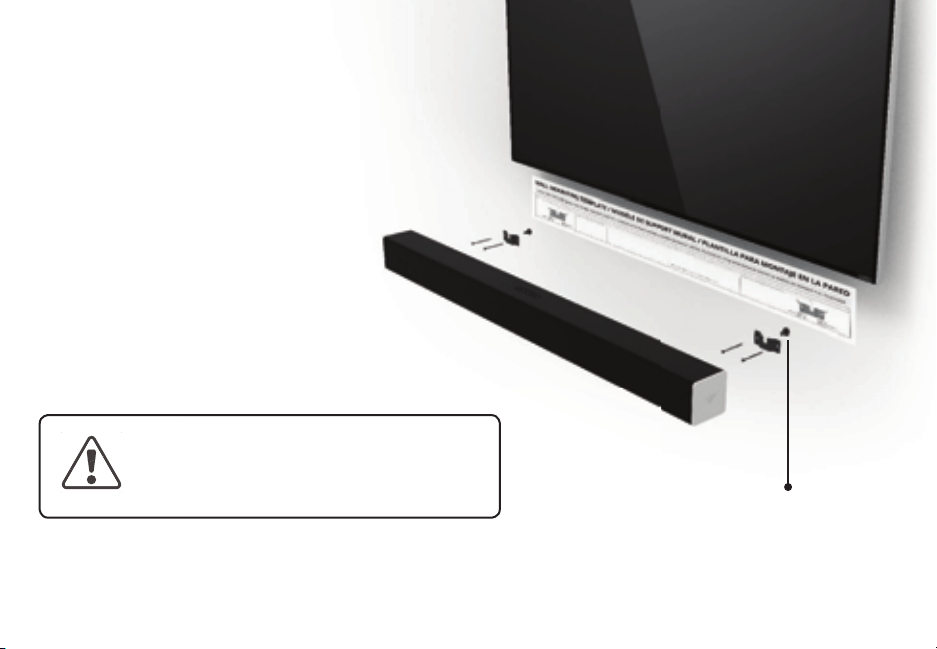
WALL-MOUNTING THE SOUND BAR
e sure your screws are attached to wood
studs drywall anchors for drywall or
concrete anchors for rickconcrete walls.
Screws for attaching the rackets to the
wall are not included. hoose the screw
type and length appropriate to your
homes construction. If in dout consult a
professional installer.
Wall Mount Screw
Screw Sie
3
If you are unfamiliar with power tools or the
layout of electrical wiring in the walls of your
home consult a professional installer.
o not use any of the included screws for the wall mount installation. These are not intended for mounting.
English - 33
Take a moment to register your product
VIZIO.COM/PRODUCT-REGISTRATION
Why register?
Customized Support
Get assistance quickly with your information on hand.
News and Oers
Take advantage of the latest news and special oers from VIZIO.
Safety and Satisfaction
Stay up-to-date with important product updates and notications.
English - 34
Se habla Español • Nous parlons Français
Hours of Operation:
Monday - Friday: 7 AM TO 11 PM (CST)
Saturday - Sunday: 9 AM TO 6 PM (CST)
Phone: (877) 698-4946 (toll-free)
You can also contact our
popular support team at:
Live chat
support available
Find help with:
•
New product setup
• Connecting your devices
• Technical problems
• Product updates and more
ward-inning ustomer are t our onvenience.
NEED HELP?
o to support.viio.com
VIZIO.COM/PRODUCT-REGISTRATION
English - 35

There is no power.
• ress the POWER utton on the remote control or on the top of your Sound ar.
• nsure the power cord is securely connected.
• lug a dierent device into the electrical outlet to verify that the outlet is working correctly.
There is no sound.
• Increase the volume. ress Volume Up on the remote control or on the top of your Sound ar.
• ress MUTE on the remote to ensure the Sound ar is not muted.
• ress INPUT on the remote or on the top of your Sound ar to select a dierent input source.
• hen using either of the igital Inputs if there is no audio Try setting the TV output to
or onnect directly to your lu-rayother source some TVs do not pass through digital audio.
• On digital inputs the input s will ash rapidly if an unsupported format is present. Set the
source to output .
• our TV may e set to variale audio output. onrm that the audio output setting is set to FIXED
or STANDARD not VARIABLE. onsult your TVs user manual for more detailed information.
• If using luetooth ensure that the volume on your source device is turned up and that the device
is not muted.
I hear uing or
humming.
• nsure all cales and wires are securely connected.
• onnect a dierent source device TV lu-ray player etc to see if the uing persists. If it does
not the prolem may e with the original device.
• onnect your device to a dierent input on the Sound ar.
The remote
isnt working.
• eplace the remote atteries with new ones.
• oint the remote directly at the center of the Sound ar when pressing a utton.
• If using a luetooth connection some of the uttons on the remote may not e supported y the
streaming application. e.g. andora doesnt support the ack utton.
HELP & TROUBLESHOOTING
English - 36

English - 37
HELP & TROUBLESHOOTING
UNITED STATES AND CANADA
SI O VIZIO OT O TO O T TS O TIS T. O SI O VIZIO OT S TIS
T . I O O OT TO T TS O TIS T O OT S T VIZIO OT ITI TIT S O T
T O S T IT O TO T TOIZ TI O S IT.
This warranty contains a inding aritration agreement and a class action waiver for nited States residents. If you live in the nited States the inding aritration
agreement and class action waiver aect your rights under this warranty. lease read the tet under the section titled inding ritration greement lass
ction aiver .S. esidents Only carefully.
How Long This Warranty Lasts
or non-commercial use VIZIO warrants the product on the terms set forth elow for one year from the date of original purchase. or commercial use VIZIO
warrants this product on the terms set forth elow for ninety days from the date of original purchase.
What This Warranty Covers
VIZIO warrants the product against defects in materials and workmanship when the product is used normally in accordance with VIZIOs user guides and manuals.
cept where restricted y law this warranty applies only to the original purchaser of a new product. The purchase must have een made from an authoried
retailer in the nited States including uerto ico or anada. The product must also e located in the country where it was purchased at the time of warranty
service.
How to Get Service
efore otaining warranty service you may visit www.viio.com for additional help and trouleshooting. To otain warranty service contact VIZIO Technical
Support via email at TechSupportVIZIO.com or via phone at VIZIO --. The VIZIO Technical Support hours are to onday
through riday and to Saturday and Sunday acic Time.
Your Obligations Before Service
ou must otain pre-authoriation efore sending your product to a VIZIO service center. ou may e reuired to supply a purchase receipt or copy to show
that the product is within the warranty period.
hen you return a product to a VIZIO service center you must ship the product in its original packaging or in packaging that aords an eual degree of protection.
VIZIO Technical Support will provide instructions for packing and shipping the product to the VIZIO service center.
S T OO ITIOS STO O OT I T I T OS O SO I-O SI-I T
SVI. If this occurs your product will e restored to its original state. ou will e responsile for restoring all applicale user data and downloaded applications.
ecovery and reinstallation of user data and downloaded applications is not covered under this warranty. In order to protect your personal information VIZIO
recommends that you always clear all personal information from the product efore it is serviced regardless of the servicer.
VIZIO’s Responsibilities
If VIZIO determines that a product is covered y this warranty VIZIO will at its option repair or replace it or refund the purchase price to you. There will e no
LIMITED WARRANTY

English - 38
charge for parts or laor during the warranty period. eplacement parts may e new or recertied at VIZIOs option and sole discretion. eplacement parts and
VIZIOs laor are warranted for the remaining portion of the original warranty or for ninety days from warranty service whichever is longer.
Types of Service
roducts must e sent to a VIZIO service center to otain warranty service. VIZIO is not responsile for transportation costs to the service center ut VIZIO will
cover return shipping to the customer.
What This Warranty Does Not Cover
This warranty does not cover a cosmetic damage normal wear and tear c improper operation d improper voltage supply or power surges e signal issues
f damage from shipping g acts of od h customer misuse modications or adustments i installation set-up or repairs attempted y anyone other than y
a VIZIO authoried service center products with unreadale or removed serial numers k products reuiring routine maintenance or l products sold S IS
TO TII or y a non-authoried reseller.
a re N ased ere
If you feel VIZIO has not met its oligations under this warranty you may attempt to resolve the issue informally with VIZIO. If you are unale to resolve the issue
informally and wish to le a formal claim against VIZIO and if you are a resident of the nited States you must sumit your claim to inding aritration according
to the procedures descried elow unless an eception applies. Sumitting a claim to inding aritration means that you do not have the right to have your claim
heard y a udge or ury. Instead your claim will e heard y a neutral aritrator.
Binding Arbitration Agreement; Class Action Waiver (U.S. Residents Only)
SS O V OT II I I S IS OT O V OT OT S SI O OTOVS O I TI
I TO O VIZIO OT II OTOVS O I ISI OT O O TI TO TIS T O TIS
T O T VIZIO OTS S OITIO O O I STT II ITTIO IIST T I
ITTIO SSOITIO OT SI ITTO OIT T I ITTIO SSOITIO I O IT
ITS OI ITTIO S ITS ST OS O OS-T ISTS. ou may learn more aout the merican
ritration ssociation and its rules for aritration y visiting www.adr.org or y calling --. Since this warranty concerns a transaction in interstate or
international commerce the ederal ritration ct will apply.
The ling fees to egin and carry out aritration will e shared etween you and VIZIO ut in no event will your fees ever eceed the amount allowale y the
merican ritration ssociation at which point VIZIO will cover all additional administrative fees and epenses. VIZIO waives its right to recover attorneys fees in
connection with any aritration under this warranty. If you are the prevailing party in an aritration to which the Supplementary rocedures for onsumer-elated
isputes applies then you are entitled to recover attorneys fees as the aritrator may determine.
The dispute will e governed y the laws of the state or territory in which you resided at the time of your purchase if in the nited States. The place of aritration
will e Irvine alifornia or your county of residence if in the nited States. The aritrator will have no authority to award punitive or other damages not measured
y the prevailing partys actual damages ecept as may e reuired y statute. The aritrator will not award conseuential damages and any award will e limited
to monetary damages and will include no euitale relief inunction or direction to any party other than the direction to pay a monetary amount. udgment on the
award rendered y the aritrator will e inding and nal ecept for any right of appeal provided y the ederal ritration ct and may e entered in any court
having urisdiction. cept as may e reuired y law neither you nor VIZIO nor an aritrator may disclose the eistence content or results of any aritration under
this warranty without the prior written consent of you and VIZIO.
IST T I ITTIO I OT O OTIS I OT SO O IIVI SIS. VIZIO O TT O
T I V T IT O TOIT O IST TO ITT S SS TIO IVT TTO TIO O I OT

English - 39
OI I I IT T TS O OOSS TO T I STTIV IT.
O ITTIO O OI I OI OSOIT O OI IT OT ITTIO O OI ITOT T IO
ITT OST O TIS TO S ITTIO O OI.
ceptions to inding ritration greement and lass ction aiver
I O O OT IS TO O T II ITTIO T SS TIO IV T you must notify VIZIO in writing within sity
days of the date that you purchased the product your written notication must e mailed to VIZIO at Tesla Irvine ttn egal epartment and
your written notication must include a your name your address c the date you purchased the product and d a clear statement that you wish to opt out
of the inding aritration agreement and class action waiver.
In addition you may pursue a claim in small claims court in your county of residence if in the nited States or in Orange ounty alifornia. In such case the
provisions of the section titled inding ritration greement lass ction aiver .S. esidents will not apply.
Exclusions and Limitations
TO T TST TT ITT I T O SS TIS OT T TOS SI OV. II
TIS II II T O TIIT ITSS O TI OS I IIT I TIO TO T
T IO ST OT OV. SO STTS OVIS O OT O IITTIOS O O O II T STS SO T
OV IITTIO OT TO O.
VIZIO I OT SOSI O OSS O S OSS O IOTIO O T OI OSS OST V O OST OITS O OT IIT
SI IIT O OSTI S V I VIZIO S VIS O T OSSIIIT O S S V I T IS
O ITS SSTI OS. SO STTS OVIS O OT O T SIO O IITTIO O IIT O OSTI S SO
T OV IITTIO O SIO OT TO O.
I I O OT O OSSS S STI O S TSOV II VIZIOS I
O TIV OOS O TT T S TS ISOV O TT VIZIO T ITS SO SIV
OTIO I ITS ISTIO I O O OT O ITS S I. S OT SO STTS OVIS O OT
O T SIO O IITTIO O IIT O OSTI S SO T OV IITTIO O SIO OT TO O.
How the Law Applies
This warranty gives you specic legal rights and you may also have other rights which vary from state to state and province to province. This warranty applies to
the greatest etent permitted y applicale law.
General
o employee or agent of VIZIO may modify this warranty. If any term of this warranty other than the class action waiver is found to e unenforceale that term will
e severed from this warranty and all other terms will remain in eect. If the class action waiver is found to e unenforceale then the entire section titled inding
ritration greement lass ction aiver .S. esidents Only will not apply. This warranty applies to the maimum etent not prohiited y law.
Changes to Warranty
This warranty may change without notice ut any change will not aect your original warranty. heck www.viio.com for the most current version.

English - 40
eans
Sound Bar: One . ull ange river for ach hannel for left for right
subwoofer: One . Suwoofer river
Inputs One Stereo
One .mm Stereo udio
One oaial
One Optical Toslink
One S Supports .V format only
Bluetooth
. agnac ireless
thernet
Sound ressure evel
System
100 dB
reuency esponse
System
to
Voltage
V
Compliances: cTVus lass
IS- nergy star
SB3821-D6

English - 41
FCC Class B Radio Interference Statement
OT This euipment has een tested and found to comply with the limits for a lass digital device pursuant to art of the ules. These limits are
designed to provide reasonale protection against harmful interference in a residential installation. This euipment generates uses and can radiate radio
freuency energy and if not installed and used in accordance with the instructions may cause harmful interference to radio communications. owever
there is no guarantee that interference will not occur in a particular installation. If this euipment does cause harmful interference to radio or television
reception which can e determined y turning the euipment o and on the user is encouraged to try to correct the interference y one or more of the
following measures:
. eorient or relocate the receiving antenna.
. Increase the separation etween the euipment and receiver.
. onnect the euipment into an outlet on a circuit dierent from that to which the receiver is connected.
. onsult the dealer or an eperienced radioTV technician for help.
This device complies with art of the ules. Operation is suect to the following two conditions this device may not cause harmful interference
and this device must accept any interference received including interference that may cause undesired operation.
the device for operation in the and - is only for indoor use to reduce the potential for harmful interference to co-channel
moile satellite systems
the maimum antenna gain permitted for devices in the ands - and - shall comply with the e.i.r.p. limit
and
the maimum antenna gain permitted for devices in the and - shall comply with the e.i.r.p. limits specied for point-to-
point and non point-to-point operation as appropriate.
sers should also e advised that high-power radars are allocated as primary users i.e. priority users of the ands - and
- and that these radars could cause interference andor damage to - devices.
i les dispositifs fonctionnant dans la ande - sont rservs uniuement pour uneutilisation lintrieur an de rduire les
risues de rouillage prudiciale au systmes de satellites moiles utilisant les mmes canau
ii le gain maimal dantenne permis pour les dispositifs utilisant les andes - et - doit se conformer la
limite de p.i.r.e.
iii le gain maimal dantenne permis pour les dispositifs utilisant la ande -
doit se conformer la limite de p.i.r.e. spcie pour leploitation point point et non point point selon le cas.
iiii e plus les utilisateurs devraient aussi tre aviss ue les utilisateurs de radars de haute puissancesont dsigns utilisateurs princi-
pau c.--d. uils ont la priorit pour les andes - et - et ue ces radars pourraient causer du rouillage
etou des dommages au dispositifs -.
Notice:
. The changes or modications not epressly approved y the party responsile for compliance could void the users authority to operate the euip-
ment.
. Shielded interface cales and power cord if any must e used in order to comply with the emission limits.
. The manufacturer is not responsile for any radio or TV interference caused y unauthoried modication to this euipment. It is the responsiilities of the
LEGAL & COMPLIANCE

English - 42
user to correct such interference.
RF Exposure Information
This device meets the governments reuirements for eposure to radio waves. This device is designed and manufactured not to eceed the emission limits
for eposure to radio freuency energy set y the ederal ommunications ommission of the .S. overnment. This device complies with radiation
eposure limits set forth for an uncontrolled environment.
IC Statement
. This device complies with Industry anada licence-eempt SS standards. Operation is suect to
the following two conditions:
this device may not cause interference and
this device must accept any interference including interference that may cause undesired
operation of the device.
. hanges or modications not epressly approved y the party responsile for compliance could void the users authority to operate the euipment.
IC Radiation Exposure Statement
This euipment complies with I SS- radiation eposure limits set forth for an uncontrolled environment. This euipment should e installed and oper-
ated with minimum distance cm etween the radiator your ody.
Battery Disposal and Recycling
ou must dispose of this product properly according to local laws and regulations. ecause this product contains electronic components andor a attery
it must e disposed of separately from household waste. ontact local authorities to learn aout disposal and recycling options. or more information visit
www.viio.comenvironment.
Software Licenses
ll software is provided suect to software license agreements and you agree that you will e ound y such license agreements in addition to other
applicale terms of use. y using the VIZIO products you agree to the VIZIO Terms of Service and rivacy olicy as well as oogles Terms of Service
and rivacy olicy. The VIZIO Terms of se and rivacy olicy may e updated from time to time and are availale to view at httpwww.viio.com
terms and httpwww.viio.comprivacy respectively.
Export Regulations
ustomer acknowledges that the VIZIO products which include technology and software are suect to customs and eport control laws in the nited States S.
The products may also e suect to the customs and eport control laws and regulations of the country in which the products are manufactured andor received.
Internet Connectivity
etwork conditions environmental and other factors may negatively aect connectivity and the resulting audio uality if any.
The applications and content of the applications pictured herein or descried in accompanying documentation may only e availale in certain countries or languages may
reuire additional fees or suscription charges and may e suect to future updates modications or discontinuation without notice. VIZIO has no control over third party
applications or content and assumes no responsiility for the availaility or interruption of such applications or content. dditional third party terms conditions and restrictions

English - 43
anufactured under license from oly aoratories. oly and the doule- symol are trademarks of oly
aoratories.
or TS patents see httppatents.dts.com. anufactured under license from TS icensing imited. TS the Symol
TS and the Symol together are registered trademarks and TS TruVolume is a trademark of TS Inc. TS Inc. ll
ights eserved.
This product ualies for ST in the factory default setting and this is the setting in which
power savings will e achieved. hanging the factory default settings or enaling other features will
increase power consumption that could eceed the limits necessary to ualify for ST rating.
e want to help you save energy.
or TS patents see httppatents.dts.com. anufactured under license from TS icensing imited. TS the Symol
TS and the Symol together are registered trademarks and TS TruSurround is a trademark of TS Inc. TS Inc.
ll ights eserved.
or TS patents see httppatents.dts.com. anufactured under license from TS icensing imited. TS the Symol
TS and the Symol together are registered trademarks and TS Studio Sound is a trademark of TS Inc. TS Inc.
ll ights eserved.
apply. oogle account is reuired to download applications from the oogle lay store. yVIZIO account is reuired to access certain features of the VIZIO Smartast app.
Information in this uick Start uide is suect to change without notice. To review the most updated version of this uick Start uide and the associated ser anual go to
httpwww.viio.com.
VIZIO Inc. ll ight eserved.
Images used under license from Shutterstock.com
This uick Start uide may not e copied in whole or in part without the written permission of VIZIO Inc. VIZIO Inc. has made reasonale eorts to ensure the accuracy
of the information provided herein. ll product specications functionality features congurations performance design and other product information descried
herein are suect to change without notice. VIZIO Inc. is not responsile for typographical technical or descriptive errors.
VIZIO the VIZIO logo the V logo and other terms and phrases are trademarks or registered trademarks of VIZIO Inc.
I I igh-enition ultimedia Interface and the I ogo are trademarks or registered trademarks of I icensing .
The luetooth
®
word mark and logos are registered trademarks owned y luetooth SI Inc. sed under license.
oogle Inc. ll rights reserved. ndroid oogle lay oogle ast and other marks are trademarks of oogle inc.
Sound pressure level measured using pink noise at meter c-weighted.
inimum reuirements ndroid . or later to use the luetooth functionality you must have ndroid . or later iOS . or later. Suect to change. or a list
of ndroid supported devices see TTSSupport.oogle.comooglelaynswer rticle. iOS devices supported ihone iad.

© 2016 VIZIO INC. ALL RIGHTS RESERVED.
160405AD-US-NC