
4-455-901-11(1)
© 2012 Sony Corporation
NEX-7
The new functions provided by this firmware update and their respective
operations are described here.
Please refer to the “Instruction Manual,” and the “α Handbook” contained on
the supplied CD-ROM.

2
GB
Functions provided
The following new functions are provided by this firmware update.
New items provided Functions
MOVIE Button Sets whether or not to activate the MOVIE button.
(Bracket: Cont.: 1.0 EV)
(Bracket: Cont.: 2.0 EV)
(Bracket: Cont.: 3.0 EV)
Shoots 3 images, each with different degrees of brightness.

3
GB
MOVIE Button
Sets whether or not to activate the MOVIE button.
1 MENU t [Setup] t [MOVIE Button] t desired setting.
On Activates the MOVIE button.
Off Deactivates the MOVIE button.
4
GB
Bracket: Cont.
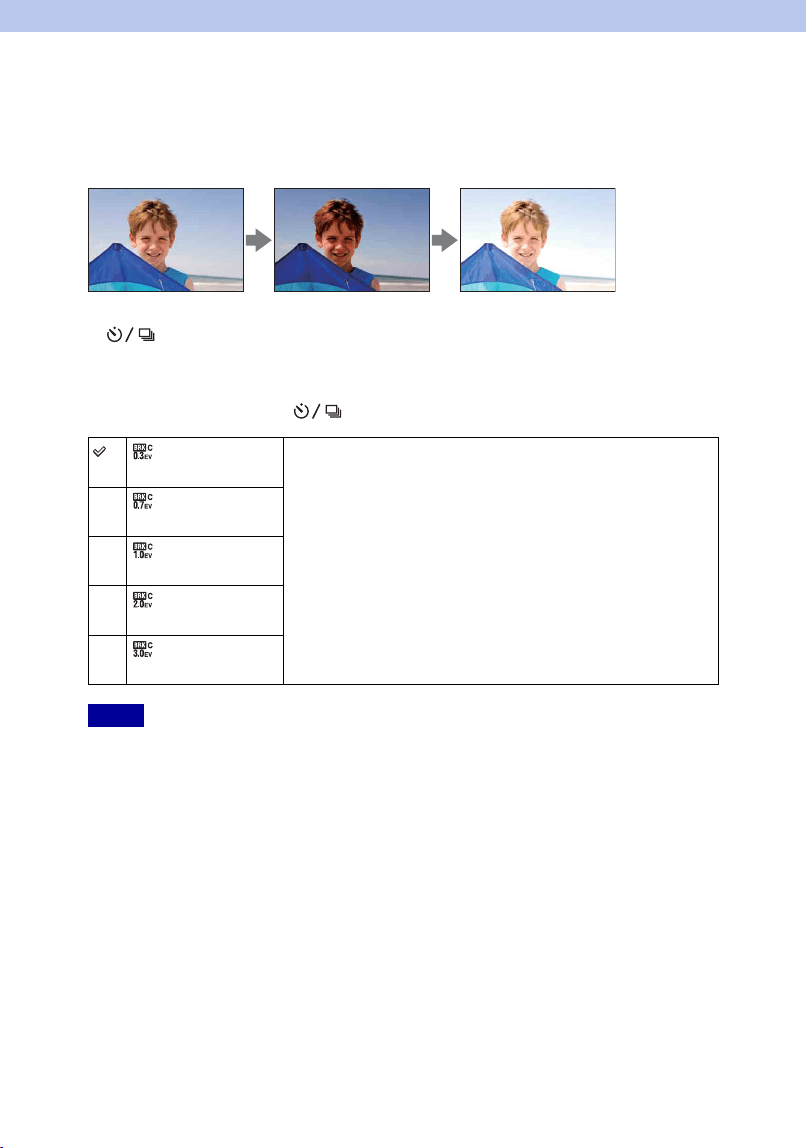
Shoots 3 images while automatically shifting the exposure from base, to darker, then to
lighter. Press and hold down the shutter button until the bracket recording is completed.
You can select an image that suits your intention, after recording.
1 (Drive Mode) on the control wheel t [Bracket: Cont.].
Or, MENU t [Camera] t [Drive Mode] t [Bracket: Cont.].
2 Option t desired mode.
To cancel the bracket, press (Drive Mode) and select [Single Shooting].
• You cannot use [Bracket: Cont.] with the following functions:
– [Intelligent Auto]
– [Scene Selection]
– [Anti Motion Blur]
– [Sweep Panorama]
– [3D Sweep Panorama]
– [Smile Shutter]
– [Auto HDR]
• The last shot is shown on the auto review.
• In [Manual Exposure], the exposure is shifted by adjusting the shutter speed.
• When you adjust the exposure, the exposure is shifted based on the compensated value.
(Bracket:
Cont.: 0.3 EV)
Images are taken with the set value of deviation (steps) from the
base exposure.
(Bracket:
Cont.: 0.7 EV)
(Bracket:
Cont.: 1.0 EV)
(Bracket:
Cont.: 2.0 EV)
(Bracket:
Cont.: 3.0 EV)
Notes