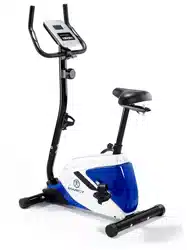

BK1016US
UPRIGHT BIKE
USER MANUAL

2
CONTENTS
Important Safety Information
Weight Limit Capacities
Hardware Parts List
Pre Assembly Check List
Assembly Instructions
Computer Instructions
Exercise Instructions
Exploded Diagram
Parts List
ADDITIONAL INFORMATION
Limited Warranty Information
3
4
5
6 - 11
12-13
14-15
16-17
18-19
20
21
Supplied by:
Pure-Tec Limited
Tel: +44 (0) 1482 212098
Email: service@puretecfitness.com
www.puretecfitness.com
3
IMPORTANT SAFETY INFORMATION
READ ALL INSTRUCTIONS BEFORE USING
1.
This Bike is intended for class H (H=Domestic) use only. It is not designed for
commercial use.
2.
This machine has been tested to EN 957.
3.
Read the OWNER’S OPERATION MANUAL and all accompanying literature and follow it
carefully before using your Bike.
4.
Keep children and pets away from the Bike at all times. Do not leave children unattended
in the same room with the Bike. The Bike is not a toy and therefore parents and
guardians should be aware of the natural tendency for children to play, leading to
situations and behaviour for which the Bike is not intended.
5.
If children are allowed to use the Bike their physical/mental development and above all,
temperament should be taken into account. Constant supervision is therefore needed.
6.
Position the Bike on a clear levelled surface which is clear of all obstacles as not to
restrict movement whilst exercising. DO NOT use the Bike near water or outdoors.
7.
Exercise equipment has moving parts. In the interest of safety, keep others, especially
children, at a safe distance while exercising.
8.
Never hold your breath while exercising. Breathing should remain at a normal rate in
conjunction with the level of exercise being performed.
9.
Rest adequately between workouts. Muscle tone develops during these rest periods.
Beginners should work out twice a week and increase gradually to 4 to 5 times per
week.
10.
Remove all jewellery, including rings, chains and pins before commencing exercise.
11.
Always wear suitable clothing and footwear during exercise. Do not wear loose fitting
clothing that could become entangled with the moving parts of your exercise machine.
IMPORTANT!!! THE MAXIMUM RECOMMENDED WEIGHT CAPACITY FOR YOUR
BIKE IS 110KGS.
THIS OWNER’S MANUAL CONTAINS ASSEMBLY, OPERATION, MAINTENANCE AND
SAFETY INFORMATION. IN THE INTEREST OF SAFETY, PLEASE MAKE CERTAIN THAT
YOU READ AND UNDERSTAND ALL THE INFORMATION BELOW.
4
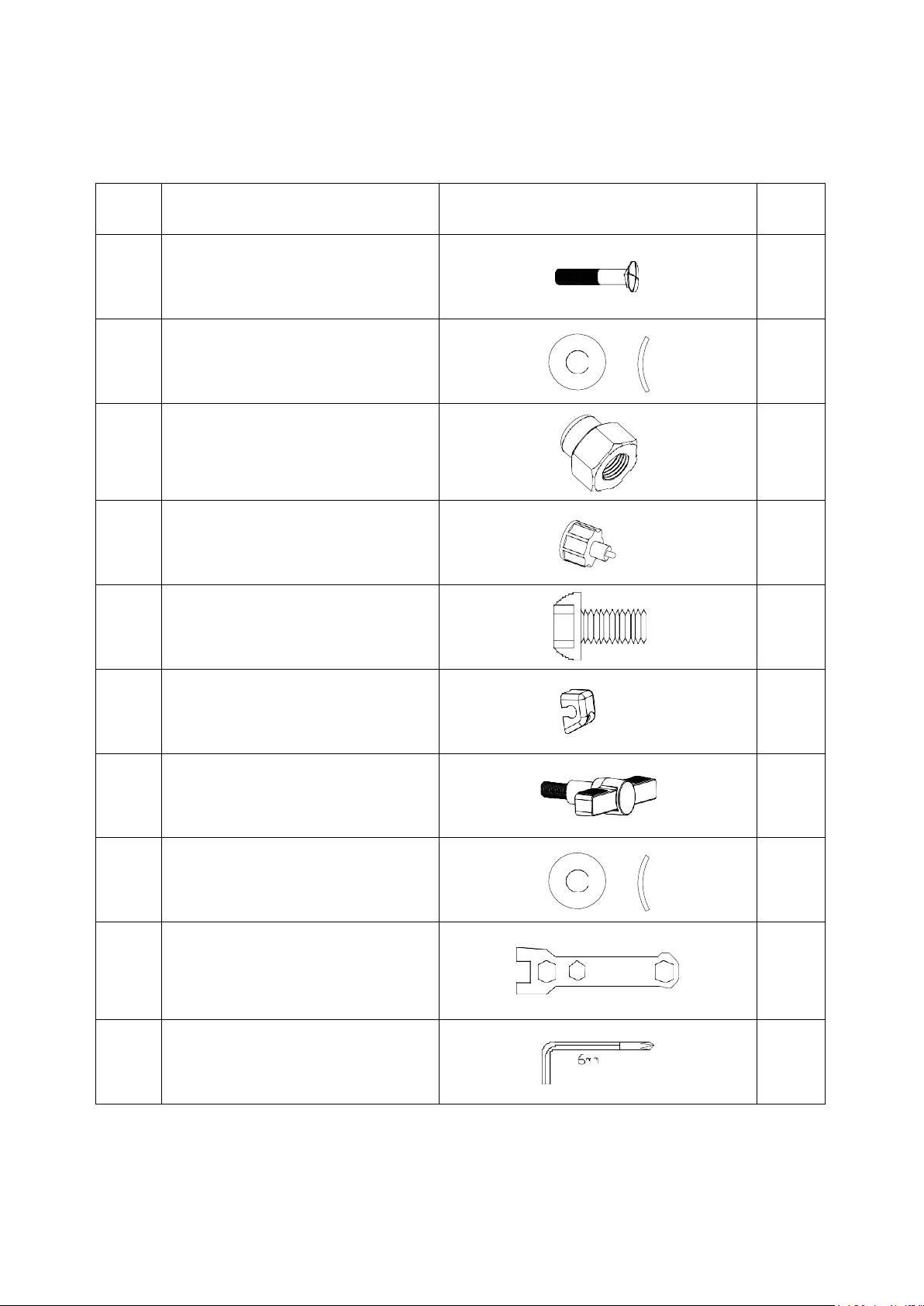
HARDWARE PACKING LIST
No. Description DRAWING Q’ty
6
Carriage Bolt M10*75
4
7
Curved Washer Φ22*Φ10
4
8
Domed Nut
4
11
Quick Release Knob
1
17
Allen Bolt M8*16
4
27
Decorative Cover
1
28
T-type Knob
1
42
Curved Washer Φ20*Φ8
4
Box Wrench
1
Allen key L6
1
5
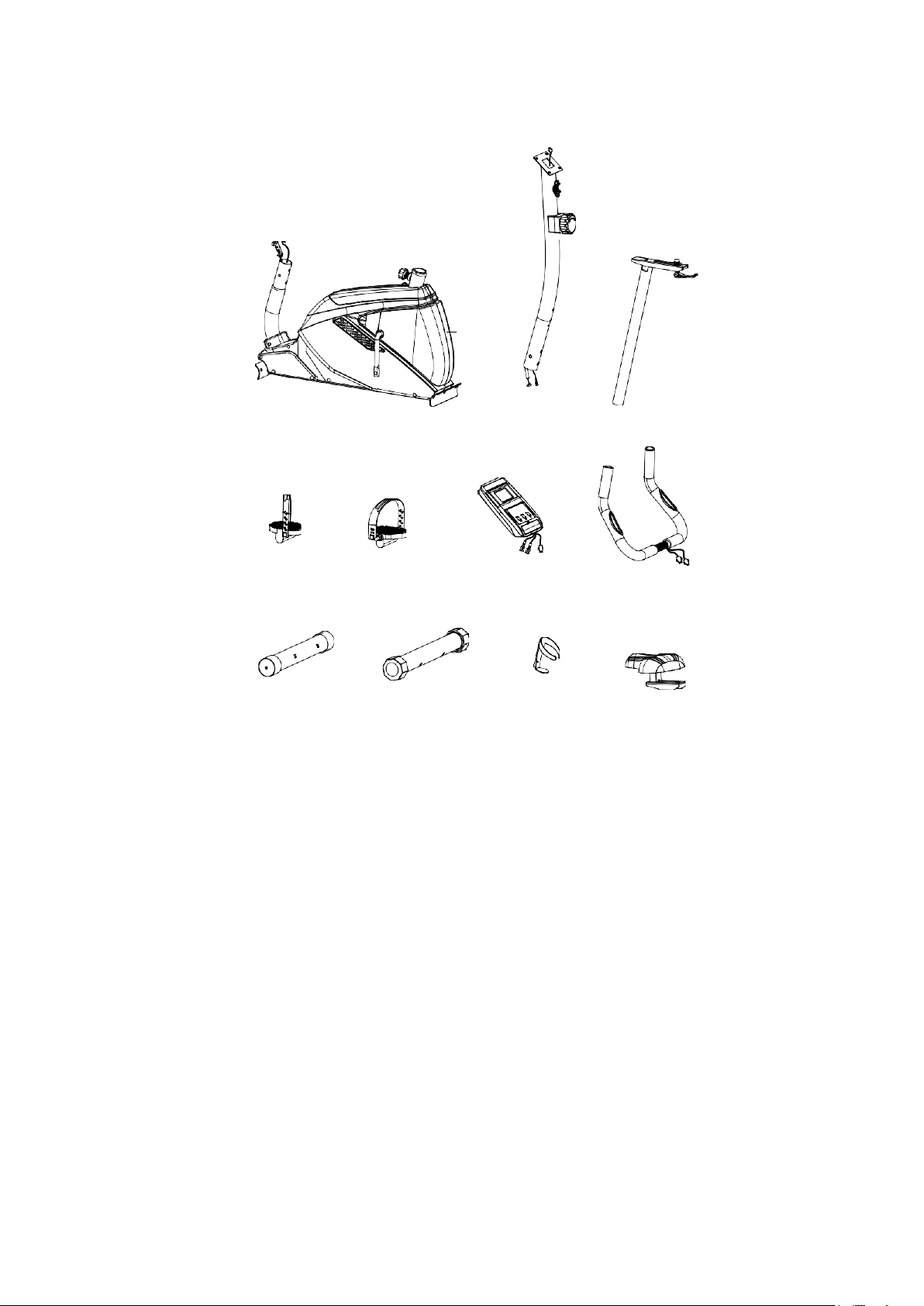
PRE-ASSEMBLY CHECK LIST
1
NO.1 NO.22 NO.15
NO.9 NO.10 NO.18 NO.19
3
2
NO.3 NO.2 NO.41 NO.16
PART NO.
DESCRIPTION
Q’TY
1
Main frame
1
22 Front support
1
15 Seat support
1
18 Meter
1
9/10 Pedal ( L/R ) 1/1
16 Seat
1
19 Handlebar
1
3
Front stabilizer
1
2
Rear stabilizer
1
41
Bottle holder
1
6
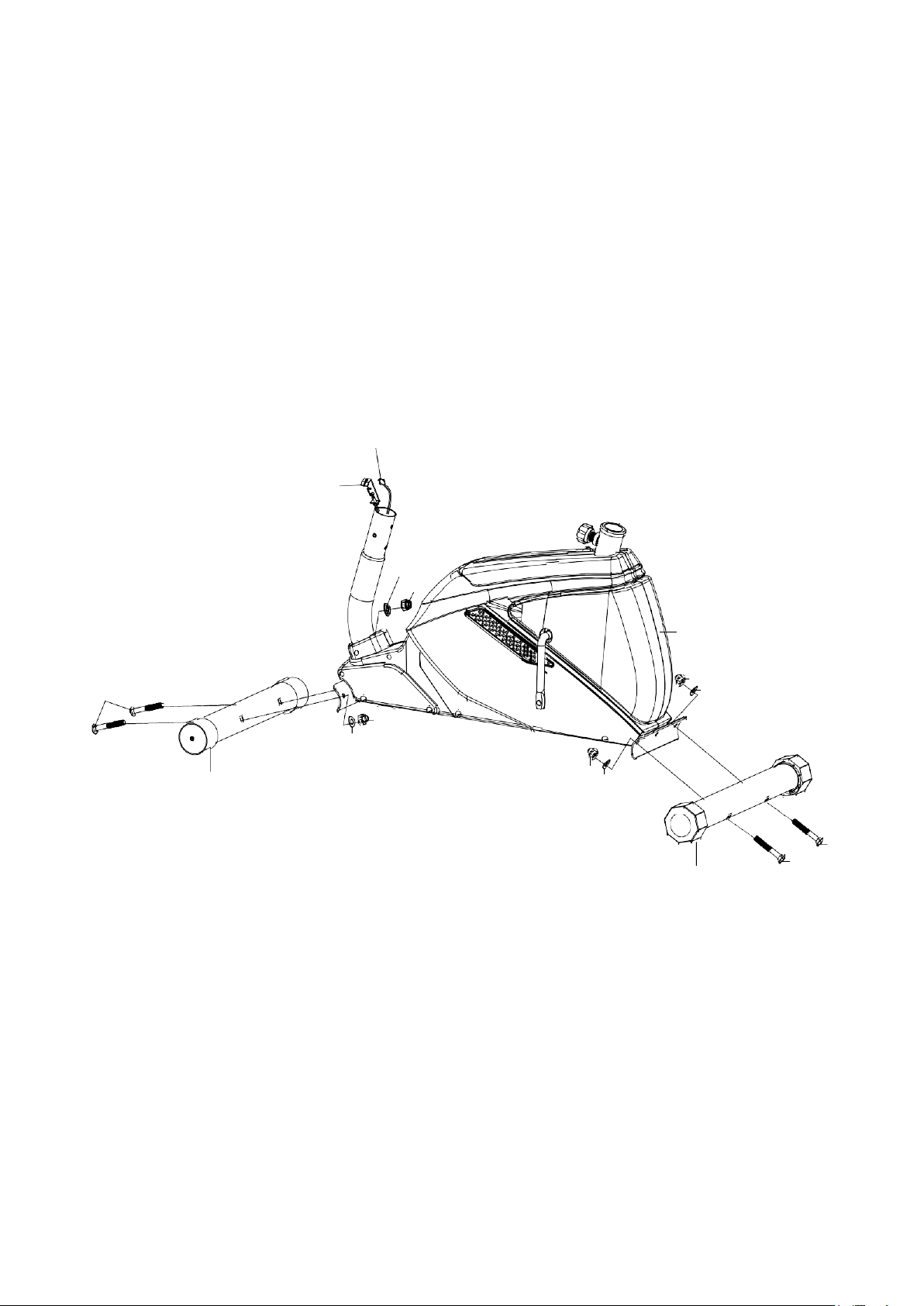
STEP 1
ASSEMBLY INSTRUCTION
Attach the front stabilizer (03) to the main frame (01), Secure using two carriage bolts (06),
two curved washers (07), two domed nuts (08).
Attach the rear stabilizer (02) to the main frame (01), Secure using two carriage bolts (06),
two curved washers (07), two domed nuts (08).
23
21
7
8
1
6
8
7
8
7
3
8
7
6
6
2
7
STEP 2
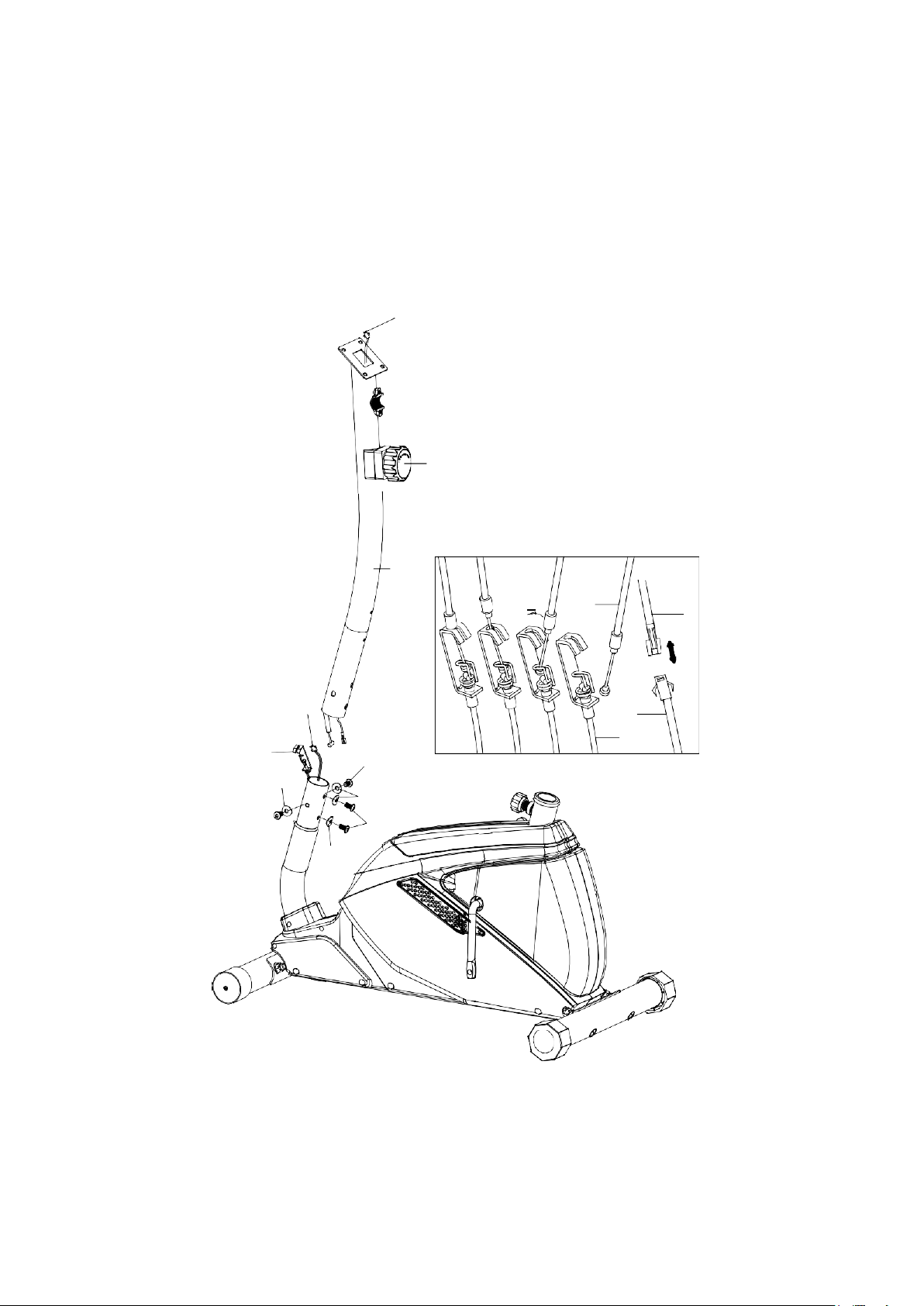
Take front post (22) and connect middle sensor wire (24) with lower sensor wire(23)
Adjust the tension control knob(20) to level 8, then connect it with the lower tension
cable (21). Insert front post (22) into main frame (1) and tighten with 4 sets of allen
bolt (17) and curved washers (42).
24
20
22
23
21
17
42
42
17
42
20
24
23
21
8
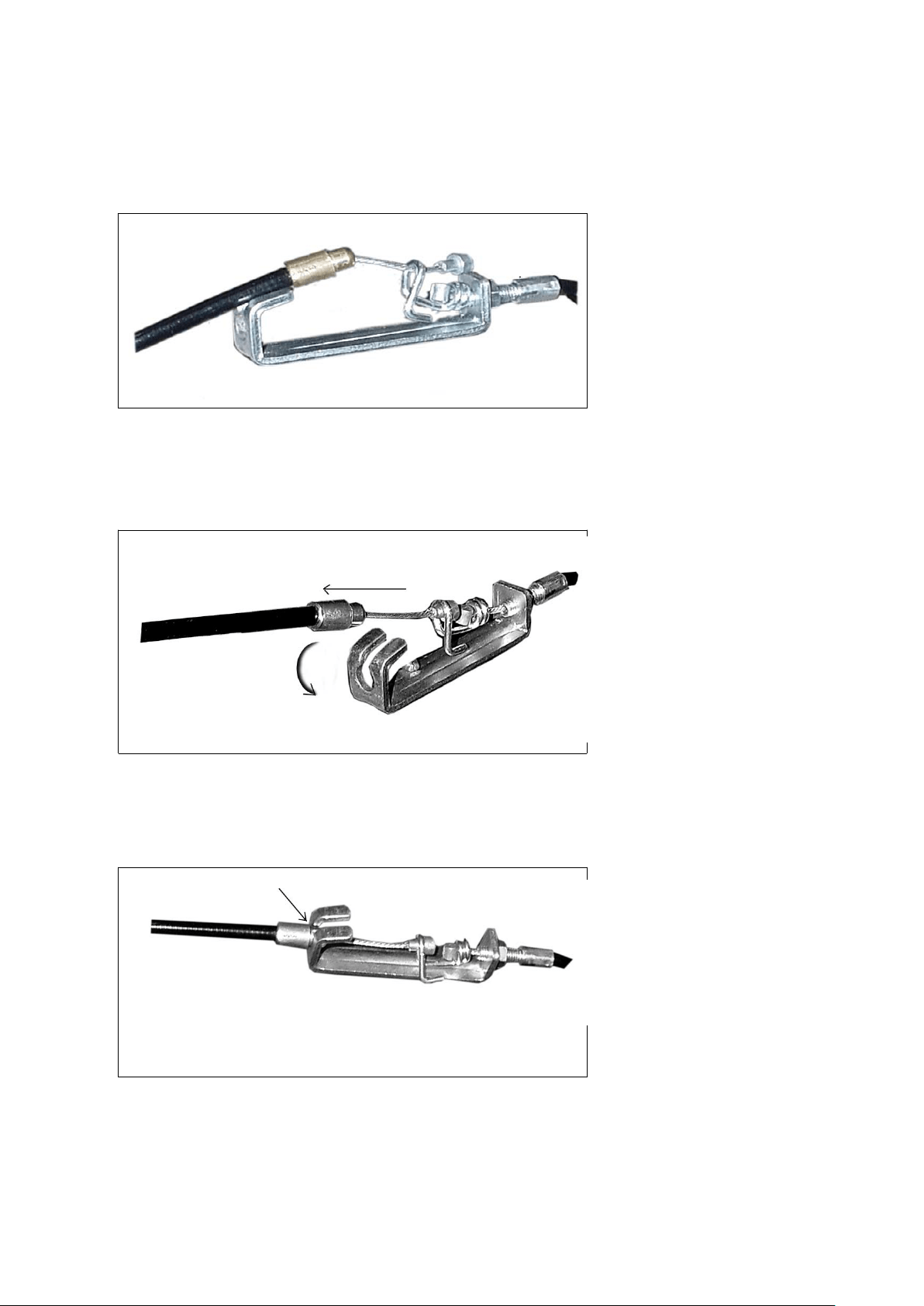
HOW TO CONNECT TENSION CONNECTOR
Slide the Cable wire from the
extension sensor wire
Connector in between the
opening on the wire holder on
sensor wire Connector.
Pull the extension sensor
wire Connector backward and
slide the wire through the slot
on the bracket.
Drop down the Connector
so the fitting sits firmly on top
of the bracket.
NOTE: In able to hold the Front Post while connecting the cables and wires
,
extra help may be needed
9
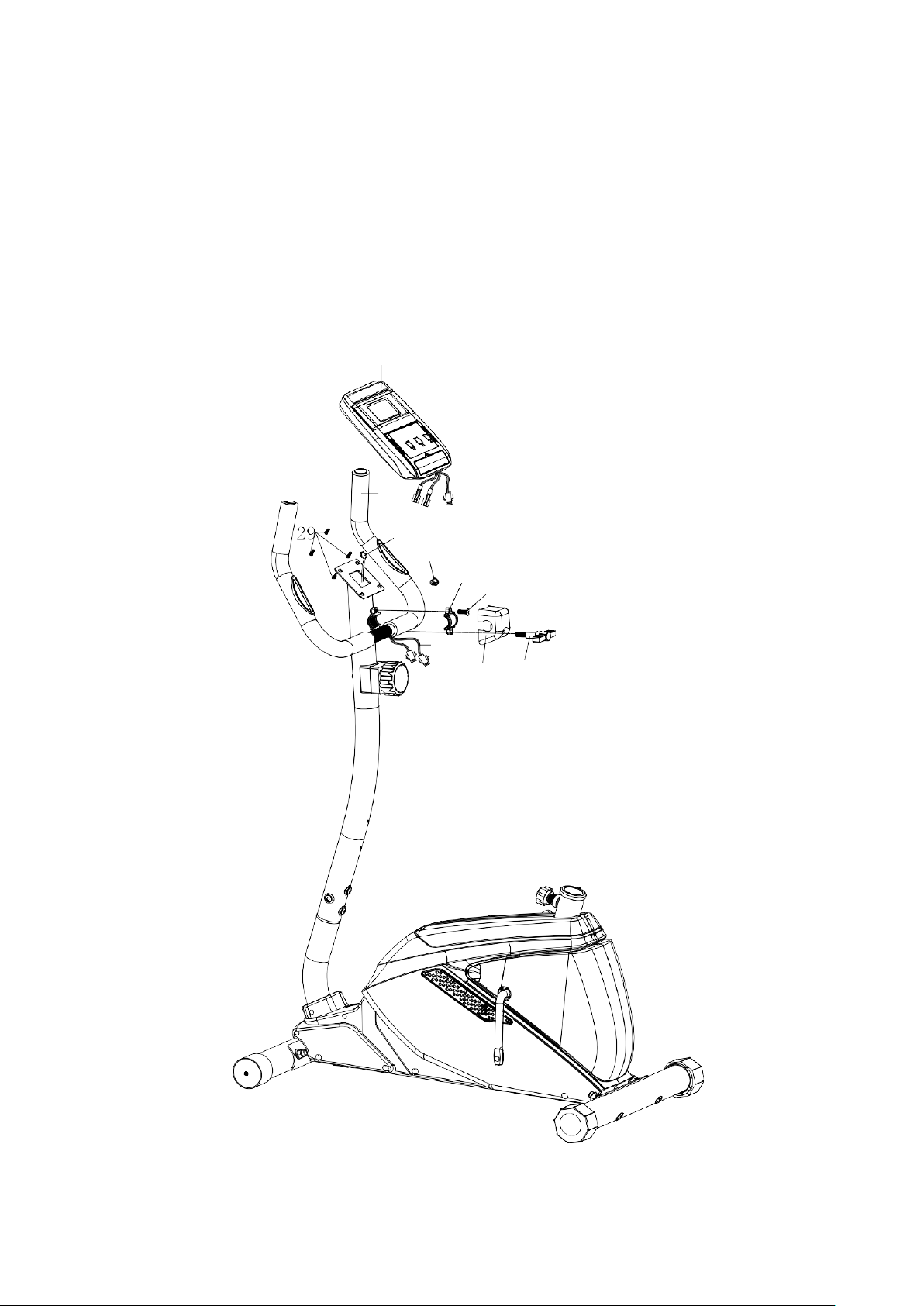
STEP 3
Attach handlebar (19) to front post (22), tighten with a clip (25) and allen bolt (25),
decorative cover (27) and T type knob (28).
Connect upper sensor wire from the back of computer (18) with middle sensor wire (24).
Insert the lower pulse wire (43) through grommet (75) on front post (22) and pull the middle
sensor wire (43) out of front post (22)
Connect lower pulse wire (43) with upper pulse wire from the back of the computer (18).
Attach computer (18) to bracket on front post (22), tighten with four screws (29).
18
19
24
75
25
26
43
27
28
10
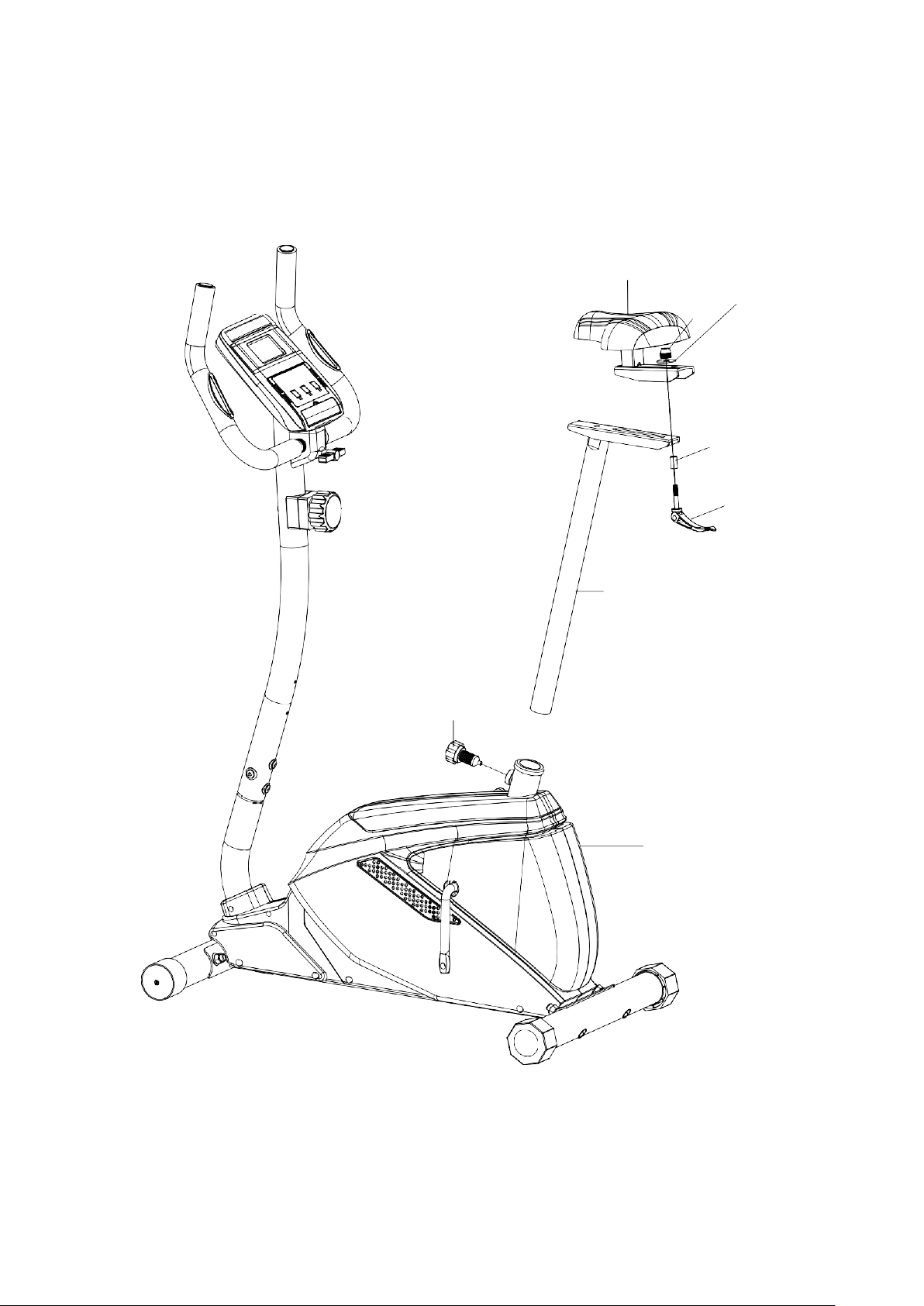
STEP 4
Attach seat (16) to seat post (15), tighten with knob (34), sleeve (33), washer (32)
and bowl shaped nut (31)).
Insert seat post (15) into main frame (1), tighten with quick release knob (11).
16
31
32
33
34
15
11
1
11
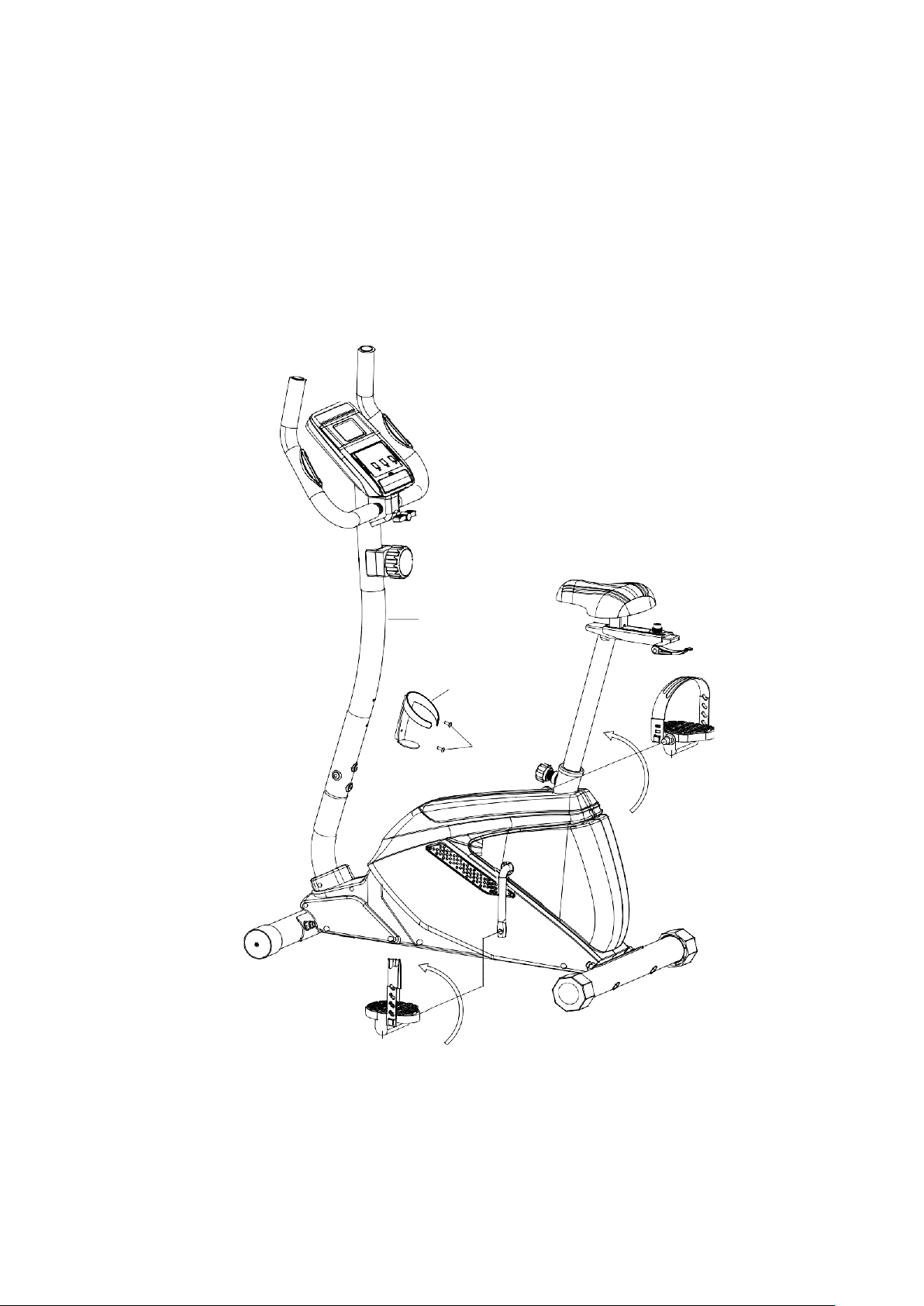
STEP 5
Attach the bottle holder (41) to the front post (22) with two self tapping screws (70).
Attach the left and right pedal straps to the left and right pedals (9/10).
Attach the left and right pedals (9/10) to the left and right crank arms.
Note: The pedals and crank arms are marked with "R" and "L". The left pedal (L) should be
threaded on clockwise and the right pedal (R) should be threaded on counter-clockwise.
22
41
70
10
9
CHECK ALL BOLTS AND NUTS ARE TIGHTENED
BEFORE USING THE MACHINE
12
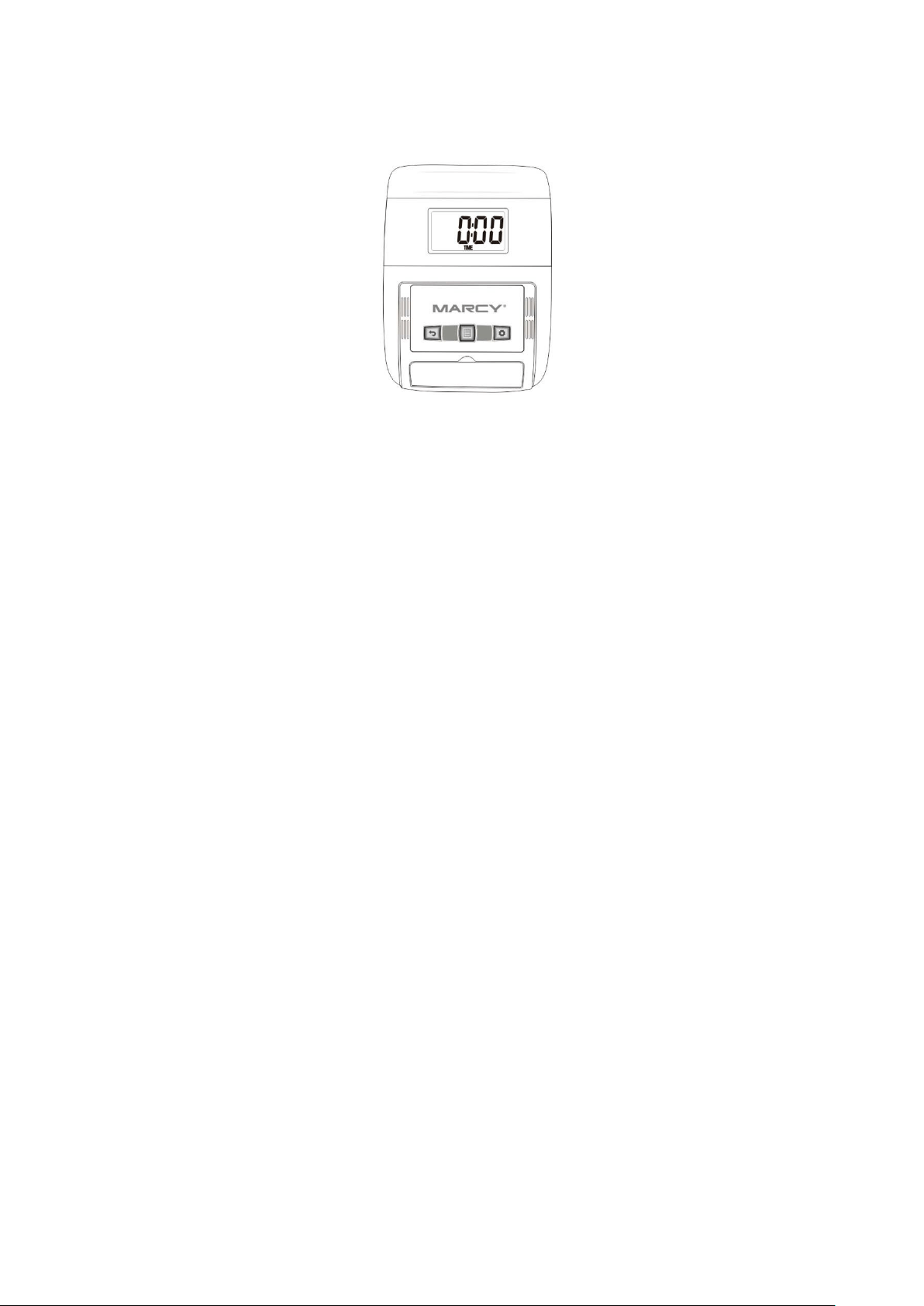
COMPUTER INSTRUCTIONS
FUNCTIONAL BUTTONS:
MODE - Push down for selecting functions.
SET - To Set the consumer movement of time、distance、calories and hand pulse.
RESET -For resetting consumer movement of time、distance、calories and hand pulse.
FUNCTION AND OPERATIONS:
1.
SCAN: Press “MODE” button until “SCAN” appears, monitor will rotate through all the 6
functions: Time、speed、distance、calorie ODO and pulse. Each display will be
hold 6 seconds.
2.
TIME: (1) Count the total time from exercise start to end.
(2)
Press “MODE” button until “TIME” appears, press “SET” button to set
exercise time. When the “set” is zero, the computer will alarm 15 seconds.
3.
SPEED: Display current speed.
4.
DIST: (1) Count the distance from exercise start to end.
(2)
Press “MODE” button until “DIST” appears. Press “SET” button to set
exercise distance. When the “set” is zero, the computer will alarm 15 seconds.
5.
CALORIES: (1) Count the total calories from exercise start to end.
(2)
Press “MODE” button unit “CAL” appears. Press “SET” button to set
exercise calories. When the “set” is zero, the computer will alarm 15 seconds.
6.
ODO: Monitor will display the total accumulated distance.
7.
PULSE: Press MODE button until “PULSE” appears. Before measuring your pulse
rate, please place your palms of your hands on Both of your contact pads and the
monitor will show your current heart beat rate in beats per minute(BPM) on the LCD
after 6~7 seconds. Remark: During the process of pulse measurement, because of
the contact jamming, the measurement value may be higher than the virtual pulse
rate during the first 2~3 seconds, then will return to normal level. The measurement
value can not be regarded as the basis of medical treatment.
Press “MODE” button until “PULSE” appears. Press “SET” button to set exercise pulse.
The setting values of 40-240 RPM , the consumer computer alarm when heart rate is below
the SET value.
13
NOTE:
1.
If the display is faint or shows no figures ,please replace the batteries.
2.
The monitor will automatically shut off if there is no signal received after 4 minutes .
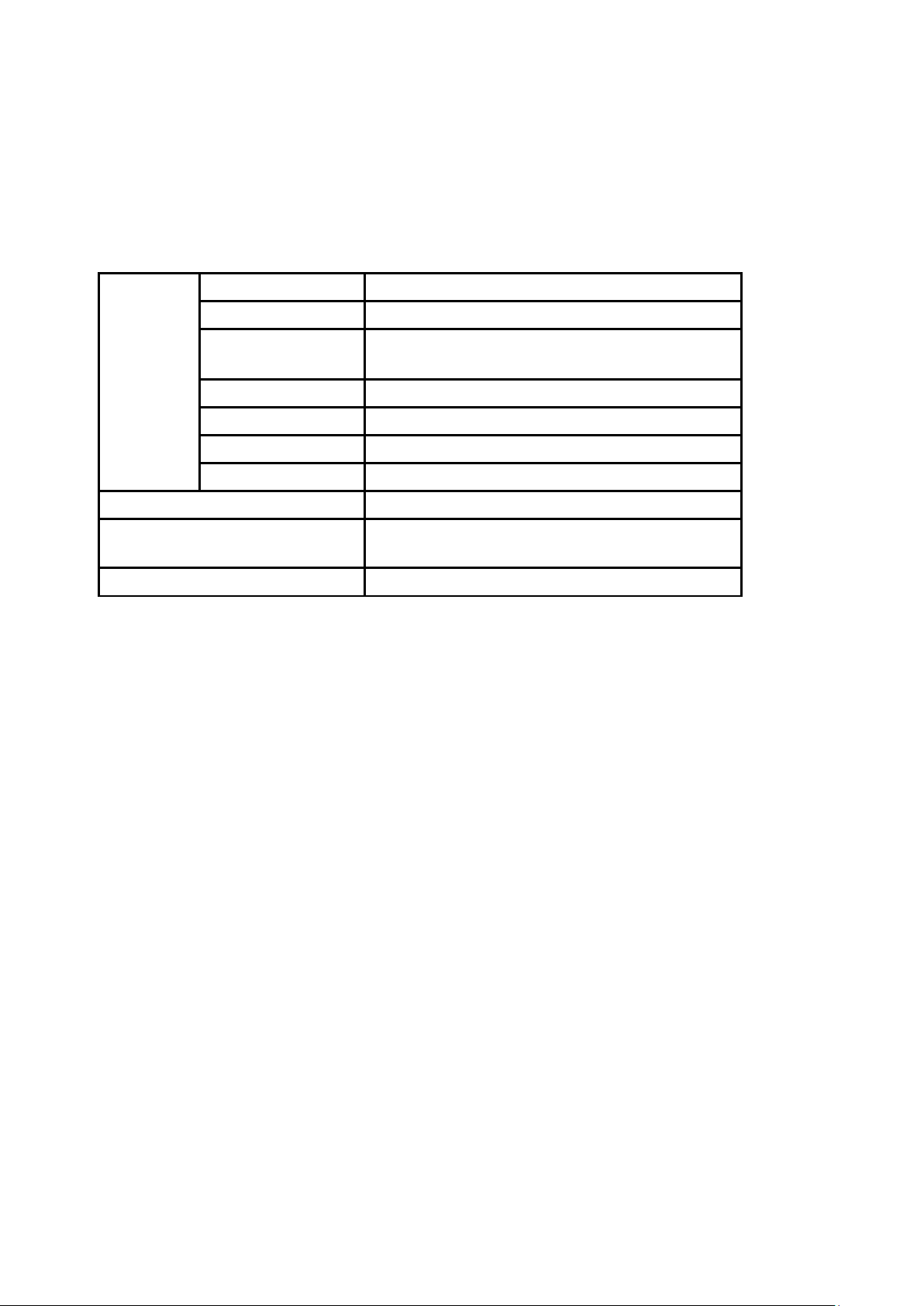
SPECIFICATIONS:
FUNCTIO
N
AUTO SCAN
Every 6 seconds
TIME
00:00’~99:59’
CURRENT
SPEED
The maximum signal can be pickup is
99.9KM/H
TRIP DISTANCE
0.00~99.99KM or 0.00~9999KM
CALORIES
0.1~999.9kCAL
ODO
0.1~999.9KM or 1 ~ 9999KM
PULSE RATE
40~240BPM
BATTERY TYPE
2pcs of SIZE –AA or UM –3
OPERATING
TEMPERATURE
0°C ~ +40°C
STORAGE TEMPERATURE
-10°C ~ +60°C
14
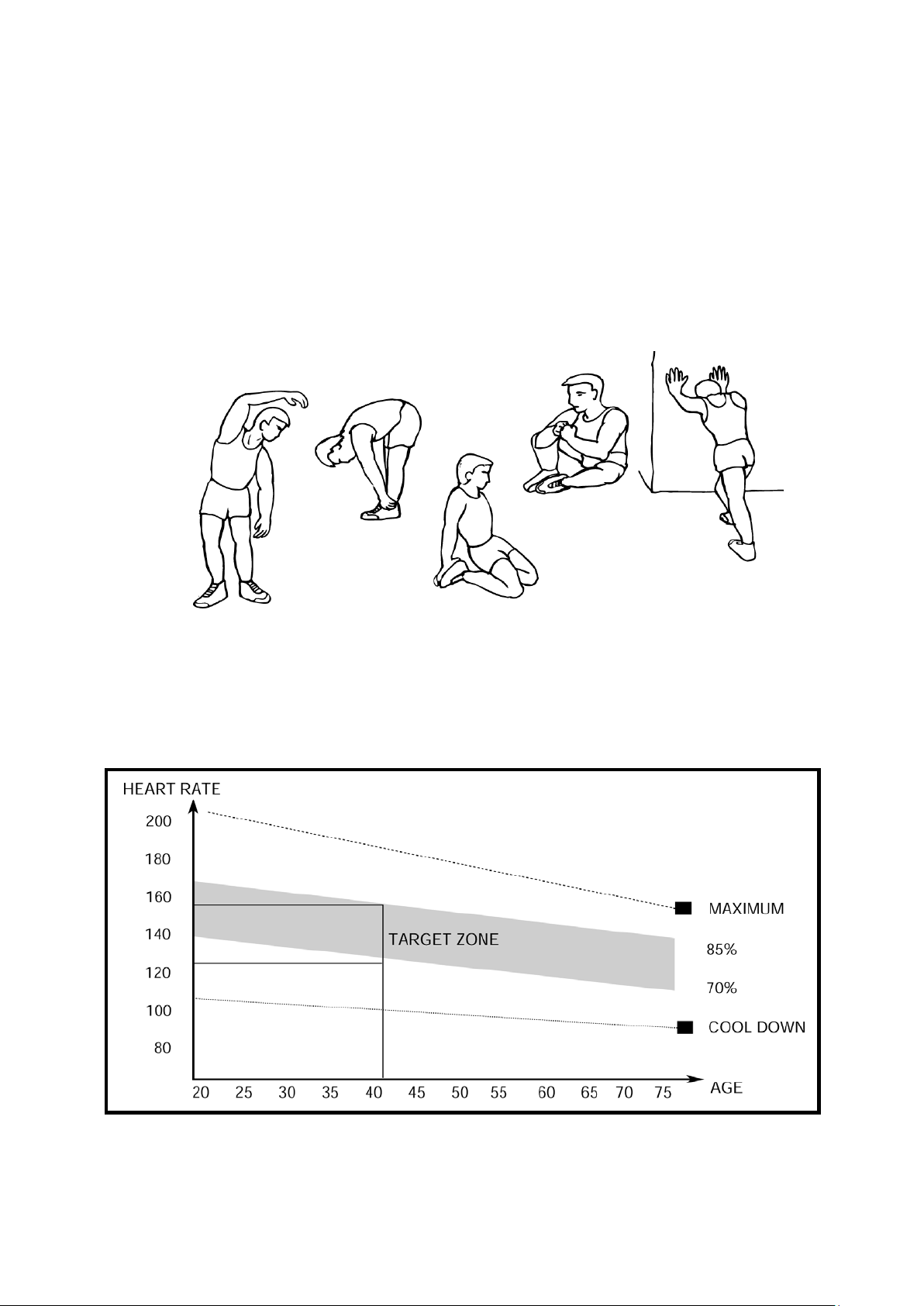
INNER THIGH
FORWARD
BENDS
CALF / ACHILLES
EXERCISE INSTRUCTIONS
Using your UPRIGHT BIKE will provide you with several benefits, it will improve your
physical fitness, tone muscle and in conjunction with a calorie controlled diet help you lose
weight.
1.
The Warm Up Phase
This stage helps get the blood flowing around the body and the muscles working properly. It
will also reduce the risk of cramp and muscle injury. It is advisable to do a few stretching
exercises as shown below. Each stretch should be held for approximately 30 seconds, do
not force or jerk your muscles into a stretch - if it hurts, STOP.
SIDE BENDS OUTER THIGH
2.
The Exercise Phase
This is the stage where you put the effort in. After regular use, the muscles in your legs will
become more flexible. Work to your but it is very important to maintain a steady tempo
throughout. The rate of work should be sufficient to raise your heart beat into the target
zone shown on the graph below.
This stage should last for a minimum of 12 minutes though most people start at about 15-20
minutes

15
3.
The Cool Down Phase
This stage is to let your Cardio-vascular System and muscles wind down. This is a repeat of
the warm up exercise e.g. reduce your tempo, continue for approximately 5 minutes. The
stretching exercises should now be repeated, again remembering not to force or jerk your
muscles into the stretch.
As you get fitter you may need to train longer and harder. It is advisable to train at least
three times a week, and if possible space your workouts evenly throughout the week.
MUSCLE TONING
To tone muscle while on your UPRIGHT BIKE you will need to have the resistance set quite
high. This will put more strain on our leg muscles and may mean you cannot train for as
long as you would like. If you are also trying to improve your fitness you need to alter your
training program. You should train as normal during the warm up and cool down phases,
but towards the end of the exercise phase you should increase resistance making your legs
work harder. You will have to reduce your speed to keep your heart rate in the target zone.
WEIGHT LOSS
The important factor here is the amount of effort you put in. The harder and longer
you work the more calories you will burn. Effectively this is the same as if you were
training to improve your fitness, the difference is the goal.
16
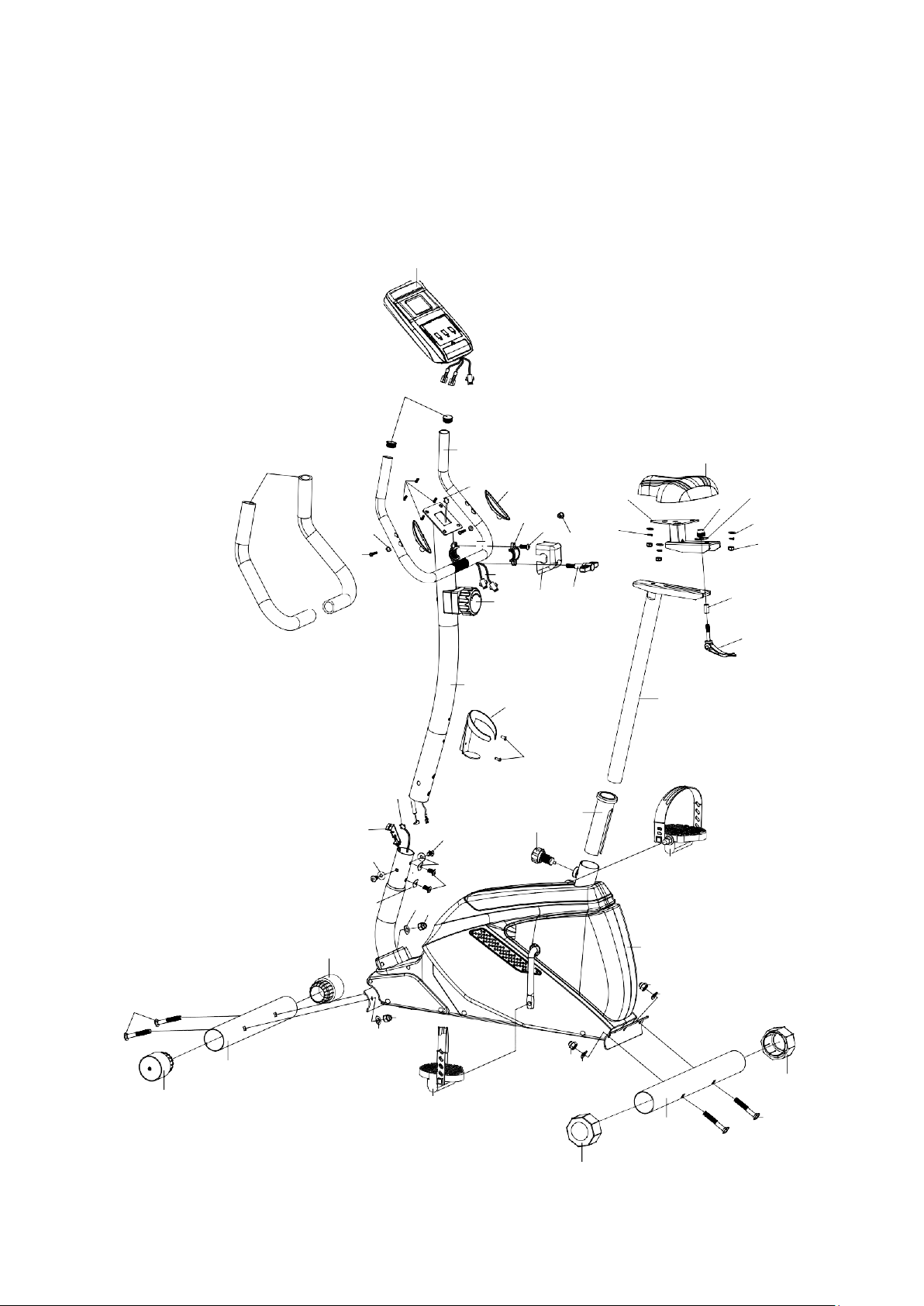
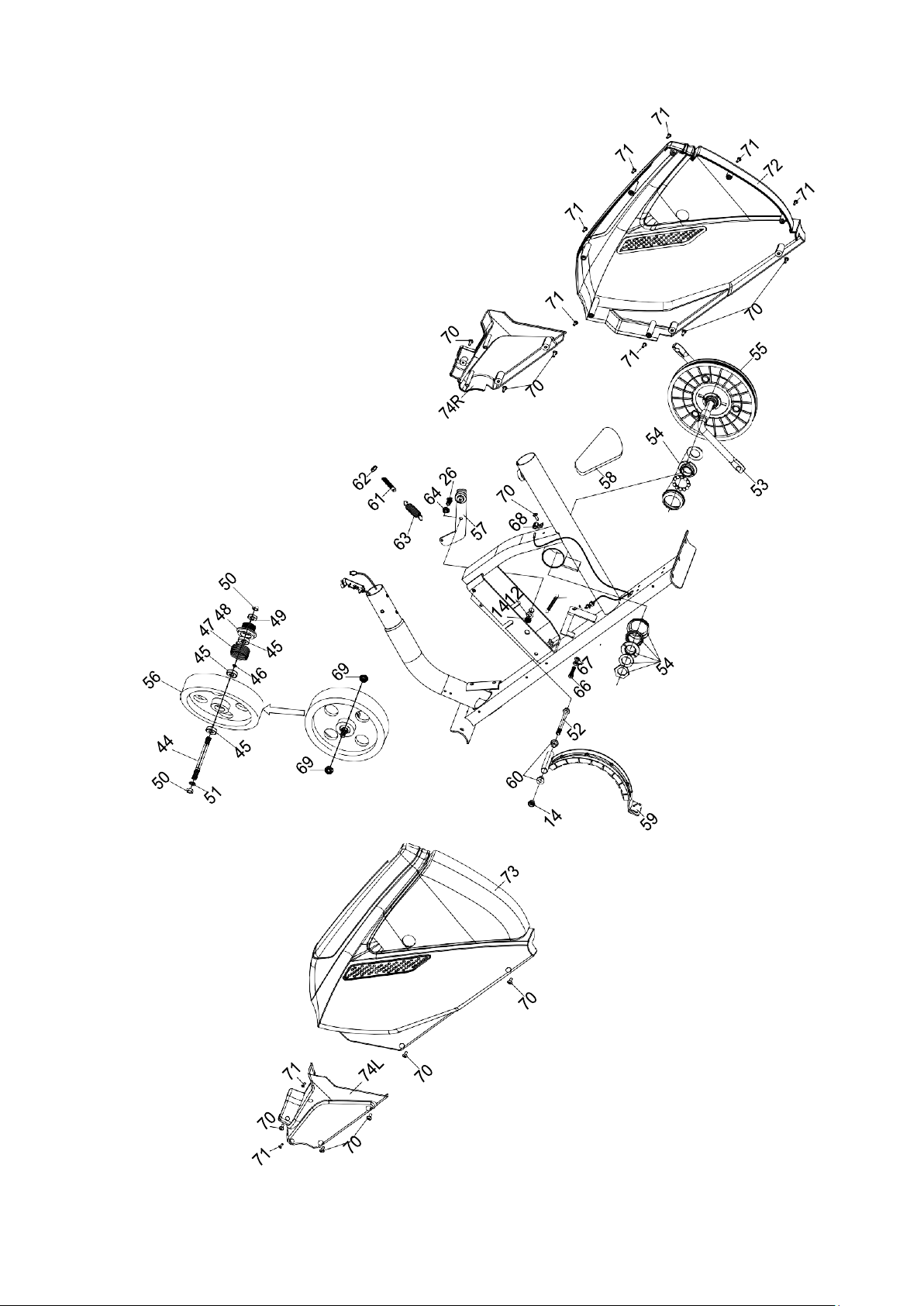
EXPLODED DIAGRAM
18
35
19
36
24
37
30
25
38
26
75
13
39
43
16
31
32
12
14
20
27
28
33
34
22
41
15
70
23
40
21
17
11
42
42
10
17
42
7
8
4
1
6
8
7
3
8
7
4
9
8
7
5
2
6
6
5
17

18
PARTS LIST
PART NO.
DESCRIPTION
Q’TY
1
Main Frame
1
2
Rear Stabilizer
1
3
Front Stabilizer
1
4
End Cap For Front Stabilizer
2
5 End Cap For Rear Stabilizer 2
6
Carriage Bolt M10*75
4
7
Curved Washer Φ10*Φ22
4
8
Domed Nut M10
4
9
Left Pedal
1
10
Right Pedal
1
11
Quick Release Knob
1
12 Washer Φ17*Φ8 4
13 Spring Washer Φ8 3
14 Nylon Nut M8 5
15
Seat Post
1
16
Seat
1
17
Allen Bolt M8*16
4
18
Computer
1
19 Handlebar 1
20
Tension control w/ upper cable wire
1
21
Lower tension cable
1
22
Front Post
1
23
Lower Sensor Wire
1
24
Middle Sensor Wire
1
25 Clip 1
26
Allen Bolt M8*20
2
27
Decorative Cover for Clip
1
28
T Type Knob
1
29
Screw M5*12
4
30
Sliding Tube
1
31
Bowl Shaped Nut
1
32
Washer
1
33
Sleeve
1
34 Knob 1
35 End Cap 2
36
Foam Grip for Handlebar
2
37
Hand Pulse Sensor
2
38
Washer
2

19
PARTS LIST
PART NO.
DESCRIPTION
Q’TY
39
Screw
2
40
Bushing
1
41
Bottle holder
1
42
Curved Washer Φ8*Φ20
4
43 Lower Pulse Wire 2
44
Axle for Flywheel
1
45
Bearing
3
46
Washer
1
47
Spring Clutch
1
48
Small pulley
1
49
Bearing
1
50 Nut M10*1.25 2
51 Bowl Shaped Spacer 1
52 Allen Bolt M8*105 1
53
Crank
1
54
BB assembly
1
55
Pulley
1
56
Flywheel
1
57
Idler Assembly
1
58
Belt
1
59
Magnetic Assembly
1
60
Spacer
2
61 Hex Head Bolt M8*45 1
62
Nut M6
1
63
Spring
1
64
Spacer
1
65
Spring
1
66
Hex Head Bolt M6*25
1
67
Nut M6
2
68 Sensor Bracket 1
69
French nut
2
70
Self Tapping Screw
13
71
Self Tapping Screw ST5*15
9
72
Chain Cover L
1
73
Chain Cover R
1
74
Decorative Cover
1/1
75
Grommet
1
20
Packaging Disposal
ADDITIONAL INFORMATION
Government guidelines ask that we reduce the amount of waste material disposed of in
land fill sites. We therefore ask that you dispose of all packaging waste responsibly at
public recycling centres.
End of Life Disposal
We at Pure-Tec Limited hope you enjoy many years of enjoyable use from your Bike.
However, a time will come when your Bike will come to the end of its useful life. Under
‘European WEEE Legislation‘ you are responsible for the appropriate disposal of your
Bike to a recognised public collection facility.
CARE AND MAINTENANCE
1. Inspect and tighten all parts before using the Bike.
2. The Bike can be cleaned using a damp cloth and mild non-abrasive detergent. DO
NOT use solvents.
3. Examine the Bike regularly for signs of damage or wear.
4. Failure to examine the Bike regularly may affect the safety level of the equipment.
5. Replace any defective components immediately and/or keep the Bike out of use until
repair.

21
LIMITED WARRANTY
Pure-Tec. warrants this product to be free from defects in workmanship and material,
under normal use and service conditions. Please refer to www.puretecfitness.com for
warranty conditions. This warranty extends only to the original purchaser and is valid
for home use only. Pure-Tec’s obligation under this Warranty is limited to replacing
damaged or faulty parts at Pure-Tec’s option.
All returns must be pre-authorised by Pure-Tec. This warranty does not extend to
any product or damage to a product caused by or attributable to freight
damage, abuse, misuse, improper or abnormal usage, purchasers own repairs or
for products used for commercial or rental purposes. No other warranty beyond
that specifically set forth above is authorised by Pure-Tec.
Pure-Tec is not responsible or liable for indirect, special or consequential damages
arising out of or in connection with the use or performance of the product or other
damages with respect to any economic loss, loss of property, loss of revenues or profits,
loss of enjoyments or use, costs of removal, installation or other consequential damages
or whatsoever natures.
The warranty extended hereunder is in lieu of any and all other warranties and any
implied warranties of merchantability or fitness for a particular purpose is limited in its
scope and duration to the terms set forth herein.
Your statutory rights are not affected.
ORDERING
REPLACEMENT PARTS
Replacement parts can be ordered by contacting our Customer Solutions
Department,
www.puretecfitness.com
Email: service@puretecfitness.com
When ordering replacement parts, please give the following information,
1. Model
2. Description of Parts
3. Part Number
4. Date of Purchase