Installation
Installation/Connections
Sony Corporation 1999 Printed in Japan
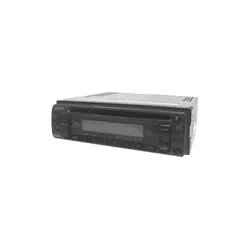
CDX-1150
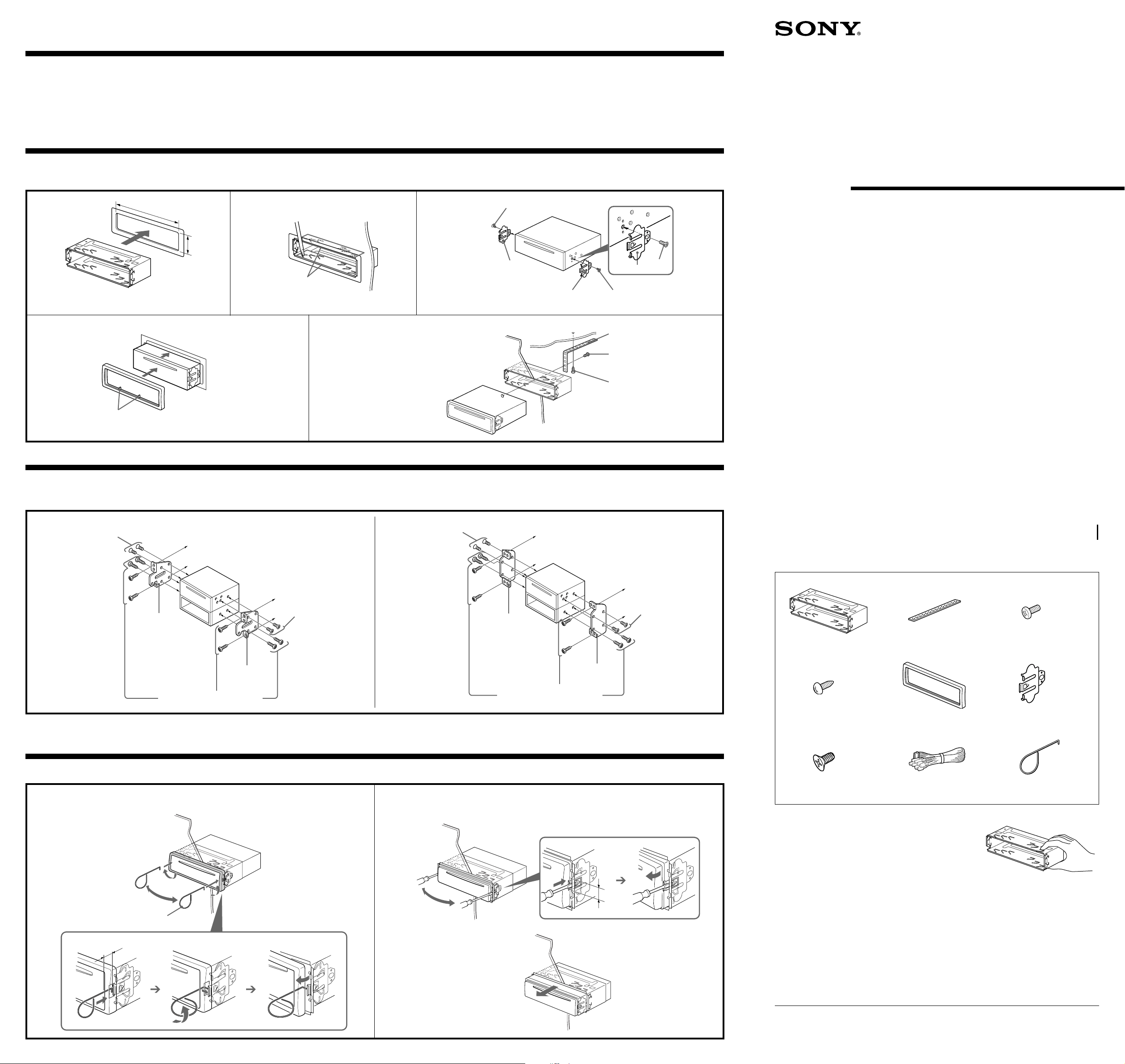
Parts for Installation and Connections
The numbers in the list are keyed to those in the instructions.
FM/AM
Compact Disc
Player
5
1
× 2
2
6
7
3
8
4
Precautions
•Do not tamper with the four holes on the upper surface of the unit. They are for tuner adjustments to be
done only by service technicians.
•Choose the installation location carefully so that the unit will not hamper the driver during driving.
•Avoid installing the unit where it would be subject to high temperatures, such as from direct sunlight or
hot air from the heater, or where it would be subject to dust, dirt or excessive vibration.
•Use only the supplied mounting hardware for a safe and secure installation.
Mounting example
Installation in the dashboard
2
With the TOP marking up
Bend these claws, if necessary.
1
4
3
Dashboard
Fire wall
5
To support the unit
Mounting the unit in a Japanese car
You may not be able to install this unit in some makes of Japanese cars. In such a case, consult your Sony dealer.
TOYOTA NISSAN
to dashboard/center console
Bracket
to dashboard/center console
7 max. size
5 × 6 mm
7 max. size
5 × 6 mm
Note
To prevent malfunction, install only with the supplied screws 7.
× 4
1
3 max. size M4 × 6 mm
2
4
Bracket
7 max. size
5 × 6 mm
7 max. size
5 × 6 mm
7 max. size 5 × 6 mm
6
6
7
max. size 5 × 6 mm
7
6
1
2
Caution
Cautionary notice for handling the bracket 1.
Handle the bracket carefully to avoid injuring your fingers.
T
O
P
TOP
182 mm
53 mm
T
O
P
Bracket
Existing parts supplied to your car
Bracket
Existing parts supplied to your car
*I-3-866-374-12*(1)
Ribs
9
Mounting angle adjustment
Adjust the mounting angle to less than 60°.
1
10 mm (
13
/32 in./po.)
4 mm (
3
/16 in./po.)
90º
2
9
Insert the supplied tool 9 between the unit and the frame, and rotate 90° to
release the hidden mounting spring. Repeat on the opposite side and remove
the frame.
Insert a flathead screwdriver between the bracket and mounting spring. Gently
pry the spring toward the unit while pulling the unit out a little. Repeat on the
opposite side and remove the unit.
Removing the unit
T
O
P
With the ribs on bottom
1
Note
To prevent malfunction, install
only with the supplied screws 7.
L
R
Caution
•This unit is designed for negative ground 12 V DC operation only.
•Before making connections, disconnect the ground terminal of the car battery to avoid short circuits.
•Connect the yellow and red power input leads only after all other leads have been connected.
•Be sure to connect the red power input lead to the positive 12 V power terminal which is energized
when the ignition key is in the accessory position.
•Run all ground wires to a common ground point.
•Connect the yellow cord to a free car circuit rated higher than the unit’s fuse rating.
If you connect this unit in series with other stereo components, the car circuit they are connected to
must be rated higher than the sum of the individual component’s fuse rating.
If there are no car circuits rated as high as the unit’s fuse rating, connect the unit directly to the
battery.
If no car circuits are available for connecting this unit, connect the unit to a car circuit rated higher
than the unit’s fuse rating in such a way that if the unit blows its fuse, no other circuits will be cut
off.
•Connecting this unit may cause some car battery wear when your car has no ACC (accessory)
position on the ignition key switch. In this case, please consult your nearest Sony dealer.
•The use of optical instruments with this product will increase eye hazard.
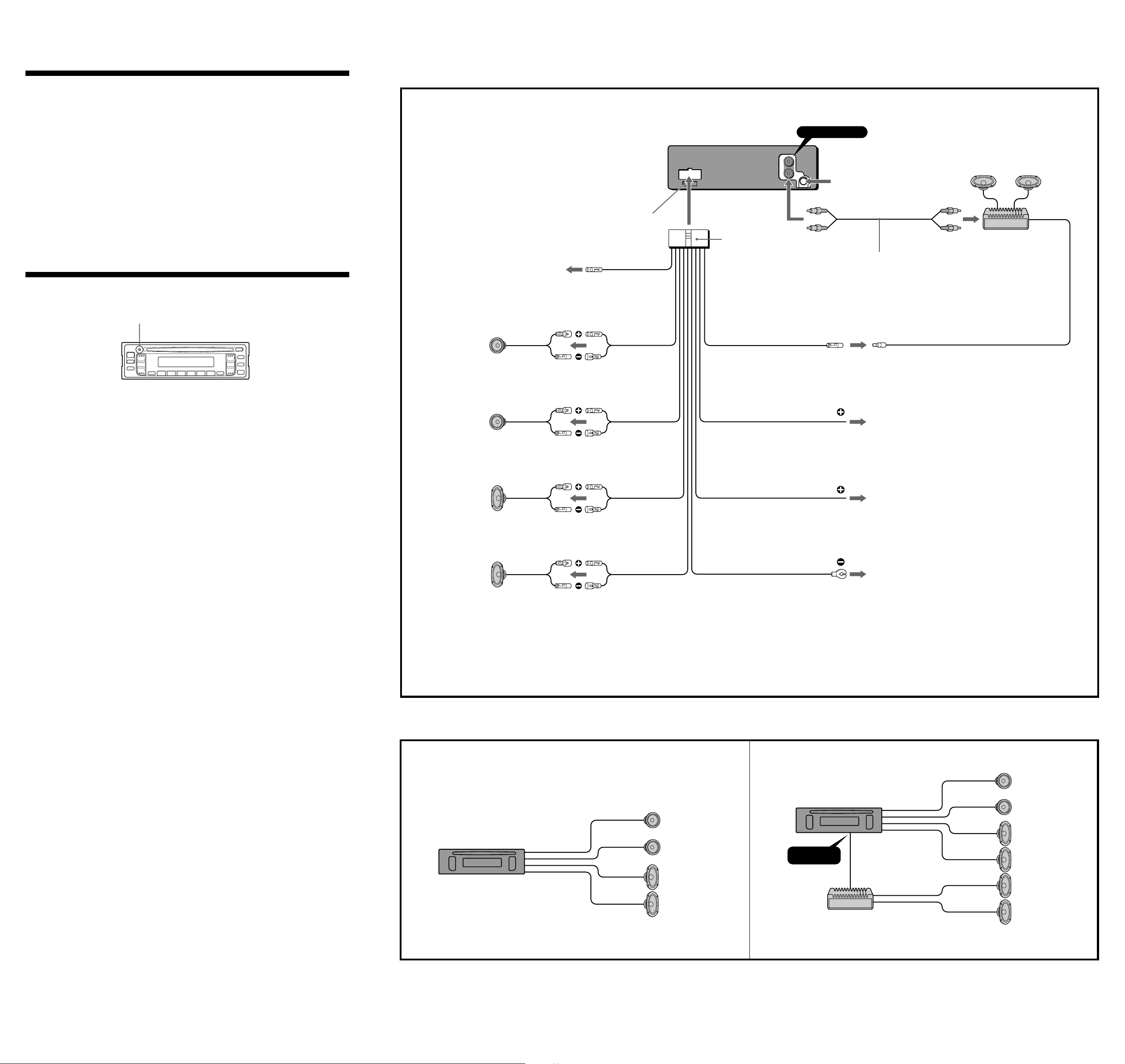
Reset button
When the installation and connections are over, be sure to press the reset button with a ball-point pen
etc.
Connection example
Notes on the control leads
• The ANT REM lead (blue) supplies +12 V DC when you turn on the tuner.
• A power antenna without relay box cannot be used with this unit.
Memory hold connection
When the yellow power input lead is connected, power will always be supplied to the memory circuit even when
the ignition key is turned off.
RCA pin cord (not supplied)
Connections
from car antenna
Red
Yellow
Black
to a metal point of the car
First connect the black ground lead, then connect the yellow and red
power input leads.
to the +12 V power terminal which is energized at all times
Be sure to connect the black ground lead to it first.
to the +12 V power terminal which is energized in the accessory
position of the ignition key
Be sure to connect the black ground lead to it first
White
Gray
Green
Purple
Right
Left
Rear speakers
Right
Left
Front speakers
Notes on speaker connection
• Before connecting the speakers, turn the unit off.
• Use speakers with an impedance of 4 to 8 ohms, and with adequate power handling capacities. Otherwise, the
speakers may be damaged.
• Do not connect the terminals of the speaker system to the car chassis, and do not connect the terminals of the
right speaker with those of the left speaker.
• Do not attempt to connect the speakers in parallel.
• Do not connect any active speakers (with built-in amplifiers) to the speaker terminals of the unit. Doing so may
damage the active speakers. Therefore, be sure to connect passive speakers to these terminals.
Connection diagram
Example 1
LINE OUT
REAR
Example 2
Rear speakers
Front speakers
Power amplifier
Rear speakers
Rear speakers
Front speakers
AMP REM
AMP REMOTE IN
Max. supply current 0.3 A
Blue/White
to power antenna control lead or power supply
lead of antenna booster amplifier
<Note> In case of without power antenna, or
antenna booster, not necessary to connect this
lead.
Rear speakers
Power amplifier
(not supplied)
LINE OUT REAR
Fuse (10 A)
8
Reset button
ANT REM
Max. supply current 0.1 A
Blue