
?
Make
sure
you
have
a
personal
computer
with
an
open
USB
port
before
connecting
the
drive
to
your
computer.
?
Power
for
all
device
should
be
turn
off
before
attaching
the
cables.
Connect
the
drive
to
the
computer
as
shown
in
figure.
Connect
the
USB
converter
cable
to
the
External
Super
Multi
DVD
Rewriter.
Connect
the
other
end
of
the
USB
converter
cable
to
your
computer.
Connect
the
AC
adapter
plug
to
the
power
connector
at
the
rear
of
the
drive.
Attach
the
AC
adapter
to
the
AC
wall
outlet.
When
the
computer
is
ready,
confirm
that
the
drive
is
detected.
And
then,
insert
the
supplied
software
CD
into
the External
Super
Multi
DVD
Rewriter
and
install
the
software.
?
Please
do
not
connect
the
AC
adapter
and
USB
2.0
converter
cable
by
any
means
other
than
specified
above.
Installation
To
AC
wall
outlet.
USB
converter
cable
NOTES
Connecting
to
computer
Hardware
Installation
NOTE

1.
Disc
Tray
2.
Drive
activity
indicators
The
LED
used
to
indicate
the
operation
of
External
Super
Multi
DVD
Rewriter.
3.
Emergency
Eject
Hole
4.
Stop/Eject
Button
1.
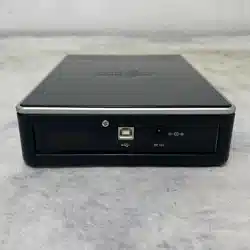
USB
Connector
This
connector
is
used
to
connect
to
the
USB
converter
cable.
2.
Power
Connector
This
connector
is
used
to
connect
to
the
AC
Power
adapter
cord.
Location
and
function
of
controls
Removing
the
USB
converter
cable
The
drive
supports
the
plug
and
play(not
swap)
function
of
Windows,
and
can
be
removed
and
inserted
by
performing
the
following
operation.
1.
Stop
the
application
software
being
currently
used.
2.
Click
the
icon
"
"
of
the
taskbar
located
on
your
screen's
bottom
right
side.
3.
Click
"Safely
Remove
USB
Mass
Storage
Device-Drive[x:]".
4.
Click
"Ok"
and
then
remove
the
USB
converter
cable.
1
234
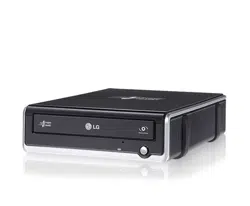
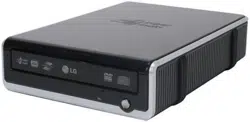
This
following
is
the
general
figure
of
the
design
of
the
drive.
The
drive's
appearance
and
specifications
may
change
without
prior
notice.
Front
Rear
12
NOTE
Don't
remove
the
USB
converter
cable
when
the
busy
indicator
on
the
drive
blinks,
or
during
computer
startup.

Features
?
Universal
Serial
Bus
(USB)
2.0
interface
for
high-speed
data
transfer.
?
Buffer
Under
Run
error
protection
technology
?
Emergency
eject
support
?
Bear
media
loading
with
power
eject.
?
Combination
of
CD-R/RW,
DVD-R/RW,
DVD+R/RW,
DVD+R
DL,
DVD-R
DL
and
DVD-RAM
drive
functions
into
one
drive.
?
Supports
region
playback
control
Phase
II.
?
Supports
LightScribe
Direct
Label
Printing
Technology
-
*Optional.
*
You
can
use
a
variety
of
Drive
System
meeting
the
following
requirements
is
needed
in
order
to
use
USB
2.0
operation
with
this
drive.
?
Computer
that
is
equipped
with
a
USB
2.0
--
compliant
USB
connector
or
PCI
adapter
card,
and
on
which
the
USB
2.0
EHCI
(Enhanced
Host
Controller
Interface)
driver
software
1)
has
been
installed.
1)
The
USB
2.0
EHCI
driver
software
is
supplied
with
currently
available
PCI
adapter
cards
that
conform
to
USB
2.0.
Further,
Microsoft
has
released
the
USB
2.0
EHCI
driver
software
for
Windows
XP,
therefore
it
is
also
possible
to
use
this
driver
software
with
Windows
XP.
If
you
want
to
know
in
detail,
please
contact
your
USB
2.0
adapter
dealer
or
consult
your
PC
manufacturer,
or
consult
the
Microsoft
Corporation
Web
site.
System
Environment
Computer
This
unit
can
be
operated
in
the
system
environment
explained
here.
*
Compatibility
problem
in
write/read
function
may
occur
with
some
media
depending
on
the
media
manufacturing
quality.
*
To
achieve
maximum
Record
&
Write
speed
your
system
may
require
data
to
be
copied
first
to
the
computer's
hard
drive
rather
than
directly
from
another
source
disc
or
drive.
Specifications
Pentium
III
800MHz
or
Higher(with
USB
2.0)
for
basic
performance
(Recommended
for
optmal
performance:Pentium
IV
2.4GHz
or
Higher).
256MB
or
larger
(Recommended:
512MB).
20GB
or
more
free
space.
(The
free
space
needed
for
writing
depends
on
the
quantity
of
data.)
64MB
(Recommended:
128MB).
USB
2.0
port
For
Software
installation
Windows
2000
Professional
(SP4)/
Windows
XP
Home
Edition/Professional
(SP1,SP2)
Direct
X
9.0
or
Higher
is
required
CD-R
:
LG,
Mitsubishi
Kagaku
Media,
Verbatim,
Taiyo
Yuden
or
TDK
discs
are
recommended.
CD-RW
:
LG,
Ricoh,
Mitsubishi
Kagaku
Media,
Verbatim
discs
are
recommended.
DVD-R
:
Maxell,
Mitsubishi
Kagaku
Media,
Taiyo
Yuden
are
recommended.
DVD-RW
:
JVC,
Mitsubishi
Kagaku
Media
are
recommended.
DVD+R
:
Mitsubishi
Kagaku
Media,
Verbatim
are
recommended.
DVD+RW
:
Mitsubishi
Kagaku
Media,
Verbatim
are
recommended.
DVD-RAM
:
Maxell,
Panasonic
are
recommended.
DVD±R
DL
:
Mitsubishi
Kagaku
Media,
Verbatim
are
recommended.
System
requirements
Hard
disk
Video
Memory
Interface
CD-ROM
drive
Software
Required
OS
CD-R,
CD-RW,
DVD-R,
DVD-RW,
DVD+R,
DVD+RW,
DVD-RAM,
DVD±R
DL
discs
CPU
Memory
-
The
maximum
data
transfer
rate
varies
according
to
the
performance
capabilities
of
the
PC.
-
For
the
sake
of
periodic
improvements,
specifications
and
appearance
are
subject
to
change
without
notice.
-
We
have
taken
all
possible
measures
to
assure
the
quality
of
our
products,
but
we
cannot
be
responsible
for
the
consequences
if
defect
occurs.
Software
Install
the
appropriate
CD
Recording
Authoring
Software
before
using
this
unit.
*
Please
uninstall
any
previous
CD
burning
software
you
may
have
loaded
on
your
PC
in
order
to
prevent
possible
compatibility
issues.
Once
you
have
installed
the
application
software,
you
may
(if
you
wish)
begin
to
reinstall
previous
software,
taking
note
for
errors.
We
recommend
using
the
drive
with
the
latest
software
as
some
problems
encountered
when
using
the
drive
can
be
solved
by
updating
the
software.
Please
visit
www.lgservice.com
and
install
the
program,
"LG
ODD
Online
F/W
update."
By
using
the
program,
you
can
automatically
check
the
latest
information
about
FirmWares
and
update
the
FirmWare.
Worldwide
support
;
http://www.LGservice.com
Worldwide
corporate
site
:
http://www.LGE.com
Supported
Discs
DVD-ROM(Single/Dual),
DVD-RW,
DVD-R,
DVD+RW,
DVD+R,
DVD+R
Double
layer,
DVD-R
Dual
layer,
DVD-
RAM,
CD-Digital
Audio
&
CD-
Extra,
CD-Plus,
CD-ROM,
CD-ROM
XA-Ready,
CD-I
FMV,
CD-TEXT,
CD-Bridge,
CD-R,
CD-RW,
Photo-CD
(Single
&
Multi-Session),
Video
CD,
DVD-VIDEO
Dimensions
(WxHxD)
160
x
50
x
230mm
Weight
About
1.26Kg
Interface
USB
2.0
Read/Write
Speed
Write
:
CD-R:
4X,
8X,
16X,
24X, 32X, 40X,
48X
CD-RW:
4X,
10X, 16X,
24X,
32X
DVD-R:
2X, 4X,
8X,
16X
DVD-RW
:
1X,
2X,
4X,
6X
DVD+R:
2.4X,
4X,
8X,
12X,
16X
DVD+RW:
2.4X,
4X, 6X,
8X
DVD-RAM:
2X, 3X,
3X-5X(Ver.2.2),
6x,
6x-8x,
6x-12x
DVD+R
DL:
2.4x, 4x, 6x,
8x,
10x
DVD-R
DL:
2x,
4x,
6x
Read
:
CD-ROM/R:
48X
max
CD-RW:
40X
max
CD-DA(DAE):
40X
max
DVD-ROM
(Single/Dual):
16X/12X
max
DVD+/-RW:
13X
max
DVD+/-R:
16X
max
DVD-VIDEO:
4.8x
max
DVD-RAM:
12X
max
DVD±R
DL:
12X
max
Data
transfer
rate
Sustained
CD-ROM
:
7200
Kbytes/s
(48X
max)
DVD-ROM
:
22160
Kbytes/s
(16X
max)
Average
Access
CD-ROM
:
125msec
(Typical)
Time
(
1
/
3
Stroke)
DVD-ROM
:
145msec
(Typical)
DVD-RAM
:
270msec
(Typical)
Buffer
capacity
2
Mbytes
MTBF
125000
Power
On
Hours
(Duty
Cycle
10%)
Read/Write
CD-R,
CD-RW,
DVD-RW,
DVD+RW,
DVD-RAM,
DVD±R
DL
Writing
Methods
CD:Disc-at-once,
Track-at
once,
Session
at
once,
Packet
Write
DVD:Random
write,
Sequential
write
Power
Requirement
AC
Adapter
Input
100-240Vac,
0.6A
47-63
Hz
Output
12Vdc
2A
(max
2.5A)
Operating
Environment
Temperature
5to35degC
Humidity
20to80%
Storage
Environment
Temperature
-20
to
55
degC
Humidity
15%
to
85%
RH
Item
Quantity
-
External
Super
Multi
DVD
Rewriter
1
-
USB
2.0
converter
cable
1
-
AC
Power
Adapter
(with
Power
supply
cable)
1
-
Software
CD
1
-
Quick
Guide
for
Drive
1
Quick
Set-up
Guide
External
Super
Multi
DVD
Rewriter
GSA-E10N
GSA-E10L
To
install
of
your
product,
please
read
this
guide
manual
carefully
and
completely.
For
the
detailed
owner's
manual
of
the
drive,
please
refer
to
the
CD
manual.
P/NO.
3828HN1012E
Package
Items
GSA-E10L
GSA-E10N
Light
Scribe
X
I/F
USB
2.0
only
USB
2.0
only
Cautions

Safety
Instructions
Ce
produit
a
ete
fabrique
conformement
aux
prescriptions
EEC
DIRECTIVE
89/336/EEC,
93/68/EEC
et
73/23/EEC.
Questo
prodotto
risponde
alle
direttive
CEE
89/336,
93/68
e
73/23,
relative
alla
compatibilita
elettromagnetica.
Este
producto
ha
sido fabricado
cumpliendo
los
requisitos
sobre
interferencias
de
radio
de
la
DIRECTIVAS
CEE
89/336/CEE,
93/68/CEE
y
73/23/CEE.
CLASS
1
LASER
PRODUCT
KLASSE
1
LASER
PRODUKT
LUOKAN
1
LASER
LAITE
KLASS
1
LASER
APPARAT
CLASE
1
PRODUCTO
LASER
CLASSE
1
PRODOTTO
LASER
CAUTION
:
CLASS
3B
VISIBLE
AND
INVISIBLE
LASER
RADIATION
WHEN
OPEN.
AVOID
EXPOSURE
TO THE
BEAM.
ADVARSEL
:
KLASSE
3B
SYNLIG
OG
USYNLIG
LASERSTRALING
VED
ABNING.
UNDGA
UDSÆTTELSE
FOR
STRALING.
ADVARSEL
:
KLASSE
3B
SYNLING
OG
USYNLIG
LASERSTRALING
NAR
DEKSEL
APENS.
UNNGA
EKSPONERING
FOR
STRALEN.
VARNING
:
KLASSE
3B
SYNLING
OCH
OSYNLIG
LASERSTRALNING
NAR
DENNAL
DEL
AR
OPPNAD.
STRALEN
AR
FARLIG.
VARO!
:
KURSSI
3B
NAKYVA
JA
NAKYMATON
AVATTAESSA
OLET
ALTTIINA
LASERSATEILYLLE.
ALA
KATSO
SATEESEN.
Dieses
Produkt
erfullt
die
Funkstorungsanforderungen
folgender
Normen:
89/336/EEC,
93/68/EEC
und
73/23/EEC.
This
product
is
manufactured
to
comply
with
the
radio
interference
requirements
of
EEC
DIRECTIVE
89/336/EEC,
93/68/EEC
and
73/23/EEC.
CAUTION:
The
laser
used
in
the
External
Super
Multi
DVD
Rewriter
can
damage
your
eyes.
Do
not
attempt
to
open
the
cover.
To
reduce
the
risk
of
electric
shock,
do
not
remove
the
cover
(or
back).
There
are
no
user-serviceable
parts
inside.
Refer
servicing
to
qualified
service
personnel.
Use
of
controls
or
performance
of
procedures
other
than
those
specified
herein
may
result
in
hazardous
radiation
exposure.
WARNING:
To
reduce
the
risk
of
fire
or
electric
shock,
do
not
expose
this
appliance
to
rain
or
moisture.
VORSICHT
:
Der
in
diesem
External
Super
Multi
DVD
-Laufwerk
benutzte
Laser
kann
Ihre
Augen
schadigen.
Versuchen
Sie
keinesfalls,
die
Abdeckung
zu
offnen.
Um
die
Gefahr
eines
elektrischen
Schocks
zu
reduzieren,
sollten
Sie
die
Abdeckung
(oder
Ruckseite)
keinesfalls
entfernen.
Im
Inneren
des
Gerats
befinden
sich
keine
Teile,
die
vom
Benutzer
selbst
gewartet
werden
konnen.
Uberlassen
Sie
die
Wartung
qualifizierten
Kundendiensttechnikern.
Beachten
Sie
bei
der
Benutzung
von
Bedienelementen
und
der
Durchfuhrung
von
Prozeduren
unbedingt
die
Anweisungen
dieses
Handbuchs,
da
andernfalls
gefahrliche
Strahlung
freigesetzt
werden
kann.
WARNUNG
:
Setzen
Sie
das
Laufwerk
keinesfalls
Regen
oder
Feuchtigkeit
aus,
um
die
Gefahr
eines
Brandes
oder
elektrischen
Schocks
zu
reduzieren.
ATTENTION:
l'exposition
au
laser
utilise
dans
le
super
graveur
multi-DVD
presente
un
danger
pour
les
yeux.
N'essayez
pas
d'ouvrir
le
capot.
Afin
de
reduire
les
risques
de
chocs
electriques,
ne
retirez
pas
le
capot
(ni
l'arriere
du
dispositif).
Aucune
piece
interne
ne
peut
etre
remplacee
par
l'utilisateur.
Pour
la
maintenance
de
l'appareil,
adressez-vous
au
personnel
qualifie
du
service
de
maintenance.
L'utilisation
de
commandes
ou
de
procedures
differentes
de
celles
specifiees
ci-apres
peut
entrainer
une
exposition
a
des
rayons
dangereux.
AVERTISSEMENT
:Ne
pas
exposer
ce
materiel
a
la
pluie
ou
a
l'humidite
(risques
d'incendie
et
d'electrocution).
PERICOLO
:
Il
dispositivo
di
lettura
e
scrittura
utilizzato
in
questo
masterizzatore
utilizza
un
raggio
laser
che,
se
osservato
da
vicino,
puo
danneggiare
la
vista.
Evitare
di
smontare
il
coperchio
dell'apparecchio.
Al
fine
di
prevenire
eventuali
folgorazioni,
evitare
di
smontare
l'apparecchio.
All'interno
dell'apparecchio
non
sono
presenti
parti
che
richiedono
manutenzione
da
parte
dell'utente.
In
caso
di
difetti
o
guasti,
rivolgersi
ad
un
Centro
di
Assistenza
Tecnica.
L'esecuzione
di
procedure
diverse
da
quella
espressamente
indicate
in
questo
manuale
puo
provo-
care
pericolose
esposizioni
alle
radiazioni
laser.
ATTENZIONE:
Al
fine
di
evitare
cortocircuiti
o
principi
di
incendio,
evitare
di
esporre
questo
apparecchio
alla
pioggia
o
ad
una
eccessiva
umidita
ambientale.
PRECAUCION:
El
laser
utilizado
en
la
unidad
External
Super
Multi
DVD
puede
danar
sus
ojos.
No
intente
abrir
la
tapa.
Para
reducir
el
riesgo
de
descarga
electrica,
no
quite
la
tapa
(ni
la
parte
posterior).
No
hay
piezas
internas
que
deba
mantener
el
usuario.
El
servicio
de
mantenimiento
debe
efectuarlo
personal
tecnico
cualificado.
El
uso
de
controles
o
la
ejecucion
de
procedimientos
distintos
de
los
especificados
en
este
manual
pueden
ser
causa
de
exposicion
a
radiacion
peligrosa.
ADVERTENCIA:
Para
reducir
el
riesgo
de
fuego
o
descarga
electrica,
no
exponga
este
aparato
a
la
lluvia
ni
a
la
humedad.
CUIDADO:
O
laser
utilizado
na
unidade
Super
Multi
DVD
pode
causar
lesoes
oculares.
Nao
tente
abrir
a
tampa.
Para
reduzir
o
risco
de
choques
electricos,
nao
retire
a
tampa
(quer
frontal
quer
superior
).
A
unidade
nao
contem
pecas
que
possam
ser
reparadas
pelo
utilizador.
Deixe
a
manutencao
para
um
tecnico
da
assistencia
qualificado.
A
utilizacao
de
controlos
ou
a
execucao
de
procedimentos
que
nao
sejam
os
especificados
neste
manual
podem
causar a
exposicao
a
radiacoes
perigosas.
AVISO:
Para
reduzir
o
risco
de
incendio
ou
choque
eletrico
nao
exponha
este
aparelho
a
chuva
ou
humidade.
Microsoft
and
Windows
are
trademarks
registered
in
the
United
States
and
other
countries
by
the
Microsoft
Corporation.
The
company
names
and
product
names
written
in
this
manual
are
trademarks
or
registered
trademarks
of
the
respective
companies.
Industry
Canada
requirement
This
class
B
digital
apparatus
complies
with
Canadian
ICES-003.
Cet
appareil
numerique
de
la
classe
B
est
conforme
a
la
norme
NMB-003
du
Canada.
FCC
COMPLIANCE
STATEMENT
Note
:
This
equipment
has
been
tested
and
found
to
comply
with
the
limits
for
a
Class
B
digital
device,
pursuant
to
Part
15
of
the
FCC
Rules.
These
limits
are
designed
to
provide
reasonable
protection
against
harmful
interference
in
a
residential
installation.
This
equipment
generates,
uses,
and
can
radiate
radio
frequency
energy
and,
if
not
installed
and
used
in
accordance
with
the
instructions,
may
cause
harmful
interference
to
radio
communications.
However,
there
is
no
guarantee
that
interference
will
not
occur
in
a
particular
installation.
If
this
equipment
does
cause
harmful
interference
to
radio
or
television
reception,
which
can
be
determined
by
turning
the
equipment
off
and
on,
the
user
is
encouraged
to
try
to
correct
the
interference
by
one
or
more
of
the
following
measures:
-
Reorient
or
relocate
the
receiving
antenna.
-
Increase
the
separation
between
the
equipment
and
receiver.
-
Connect
the
equipment
into
an
outlet
on
a
circuit
different
from
that
to
which
the
receiver
is
connected.
-
Consult
the dealer
or
an
Authorized
Service
Center
for
help.
?
FCC
WARNING
Changes
or
modifications
not
expressly
approved
by
the
party
responsible
for
compliance
could
void
the
user's
authority
to
operate
the
equipment.
?
This
Super
Multi
DVD
Drive
is
for
use
only
with
UL
listed
personal
computers
that
have
installation
instructions
detailing
user-installation
of
card
cage
accessory.
The
appliance
is
not
intended
for
use
by
young
children
or
infirm
persons
without
supervision.