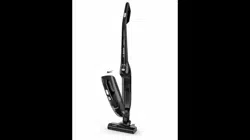
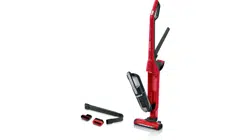
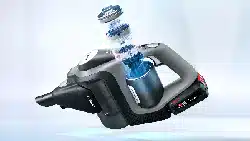
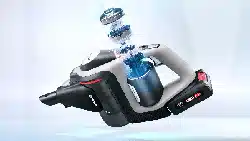
1 Floor nozzle with electric brush 2 Brush roller release button 3 Dust container 4 Motor protection filter 5 Foam filter 6 Motor unit 7 Floor tool release button 8 Hand stick handle 9 Hand stick sliding switch 10 Hand-held cordless vacuum cleaner release button 11 Hand-held cordless vacuum cleaner handle 12 Hand-held cordless vacuum sliding switch 13 Battery charging status indicator 14 Dust container release button 15 Charging cable 16 Brush roller
Before using the appliance for the first time
Fig. 1
Carefully place the handle onto the main housing and screw it into place.
Fig. 2
Plug the hand stick into the floor nozzle and lock it into place.
To release the floor nozzle, press the release button and pull the hand stick out of the nozzle.
Charging !
Caution:
Before using the vacuum cleaner for the first time, fully charge the batteries. To charge the appliance, only use the charging cable included with the appliance. The charging cable must only be connected and operated as specified on the rating plate. Do not charge the appliance at temperatures below 0 °C or above 40 °C.
Fig. 3
To charge the vacuum cleaner, place it near to a socket. The appliance can be left standing anywhere in the room. Fig. 6
Plug the charging cable into the connection at the rear of the appliance.
Plug the charging cable plug into the socket.
The charging indicator is lit up red when the appliance is charging.
Once the battery is fully charged, the charging indicator lights up blue and goes out after a few minutes. The battery is not being charged anymore. Disconnect the appliance from the mains briefly to check. The indicator will then light up blue again.
It is normal for the power adapter and vacuum cleaner to heat up and this is not a cause for concern.
Battery charging status indicator
The indicator shows the charging status of the battery.
Once the battery is fully charged, the charging indicator lights up blue and goes out after a few minutes.
When the indicator flashes, the battery must be recharged.
Using the hand stick Vacuuming
Fig. 4
Actuate the sliding switch in the direction of the arrow.
Controlling the suction level
Fig. 5
Slide the sliding switch into the required position in order to set the suction power:
Position 1
Suction with the electric brush switched on. For simple cleaning tasks on hard floors and particularly low operating noise. The appliance achieves the maximum run time at this level.
Position 2
Vacuuming at full power and with the electric brush switched on. For particularly demanding cleaning tasks. The appliance achieves a shorter run time at this level.
Fig. 6
During short pauses in vacuuming, the appliance can be left standing anywhere in the room. To do this, tilt the vacuum cleaner forwards slightly in the direction of the nozzle.
! Caution: When the appliance is left standing, it must be switched off because, if the brush is turning while the appliance is standing still, it could cause damage to the floor covering.
Using the hand-held cordless vacuum cleaner
Fig. 7
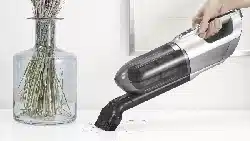
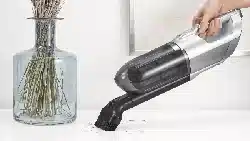
Unlock the hand-held cordless vacuum cleaner by pressing the release button and remove it from the hand stick. Charging the hand-held cordless vacuum cleaner
Fig. 8
To charge the hand stick, insert it into the hand-held vacuum cleaner and lock into place. Make sure that it is seated correctly.
After using the appliance
Fig. 9
Switch off the appliance after vacuuming.
Emptying the dust container
In order to achieve the best possible vacuuming results, the dust container should be emptied after every use.
Fig. 10
Remove the hand-held cordless vacuum cleaner from the hand stick. Fig. 7
Using the release button, unlock the dust container and remove it from the motor unit.
Fig. 11
Use the handle to remove the motor protection filter and foam filter from the dust container.
Empty the dust container.
Cleaning the filter
Fig. 12
Unlock the dust container. Use the handle to remove the motor protection filter and foam filter from the dust container. (Fig. 10 + Fig. 11)
Clean the motor protection filter and foam filter by tapping out the dirt.
If there are heavy deposits of dirt, the filter and dust container can be washed out.
Then wipe out the dust container with a dry cloth; allow the filter to dry completely before re-inserting it.
Fig. 13
a) Insert the motor protection filter and foam filter into the dust container.
b) Fit the dust container onto the motor unit and lock it into place.
New filters can be obtained from our after-sales service, if required.
Cleaning the floor nozzle
Before carrying out any maintenance, switch off the vacuum cleaner and disconnect it from the charging cable.
Fig. 14
Use the release button to release the brush roller and pull it sideways out of the floor nozzle.
Using the groove provided, cut through threads and hairs wound round the rollers with scissors.
Push the brush roller in sideways along the guide rod in the floor tool and lock in place using the release button.
Caution: The floor nozzle must only be put into operation with the brush roller fitted.
! Caution:
Floor nozzles are subject to a certain amount of wear, depending on the type of hard floors you have (e.g. rough, rustic tiles). You must therefore check the underside of the floor tool at regular intervals. Worn undersides of floor nozzles may have sharp edges that can damage delicate hard floors, such as parquet or linoleum. The manufacturer does not accept any responsibility for damage caused by worn floor tools.
Care
Before cleaning the hand stick or hand-held cordless vacuum cleaner, it must be switched off and disconnected from the charging cable. They can be cleaned using a standard commercially-available plastic cleaner. !
Caution: Do not use abrasive materials, glasscleaning agents or all-purpose cleaning products. Never immerse the vacuum cleaner in water.
Subject to technical modifications.
Intended use
Please read the information on intended use to ensure that you use the appliance correctly and safely.
Only use this appliance:
As specified in this instruction manual.
With genuine parts and accessories. Damage caused by using third-party products is not covered under the warranty.
For cleaning surfaces.
In private households and in enclosed spaces in a domestic environment at room temperature.
Up to an altitude of max. 2000 m above sea level.
In order to prevent injuries and damage, the vacuum cleaner must not be used for:
Vacuuming persons or animals.
Vacuuming up: − Hazardous, sharp-edged, hot or red-hot substances. − Damp or liquid substances. − Highly flammable or explosive substances and gases. − Ash, soot from tiled stoves and central heating systems. − Toner dust from printers and copiers.
Spare parts, accessories
Our original spare parts and original (special) accessories are designed to work with the features and requirements of our vacuum cleaners. We therefore recommend that you only use our original spare parts and original (special) accessories. This will ensure that your vacuum cleaner has a long service life and that the quality of its cleaning performance will remain consistently high throughout.
Please note:
Using unsuitable or inferior-quality spare parts and (special) accessories can damage your vacuum cleaner. Damage caused by the use of such products is not covered by our guarantee.
Safety information
This vacuum cleaner complies with the recognised rules of technology and the relevant safety regulations.
The appliance may be used by children over the age of 8 years and by persons with reduced physical, sensory or mental capacity or by persons with a lack of experience or knowledge if they are supervised or have been instructed on the safe use of the appliance and have understood the potential dangers of using the appliance.
Children must never play with the appliance.
Cleaning and user maintenance must never be carried out by children without supervision.
Plastic bags and films must be kept out of the reach of children and disposed of. =>There is a risk of suffocation.
Proper use
To charge, only use the charging cable included in the scope of supply.
The charging cable must only be connected and operated as specified on the rating plate.
The appliance must only be stored and charged indoors.
Do not expose the appliance to temperatures below 0 °C or above 40 °C.
Never vacuum without the dust bag or dust container, motor protection or exhaust filter. => This may damage the vacuum cleaner.
Keep the vacuum cleaner away from your head when using nozzles and tubes. => This could cause injury.
Do not use a damaged charging cable. Replace it with an original charging cable.
When disconnecting the charging cable from the mains, pull the plug itself to remove it; do not pull on the power cord.
Do not pull the charging cable over sharp edges or allow it to become trapped.
Before carrying out any work on the vacuum cleaner, switch off the appliance and disconnect it from the charging cable and the mains.
Do not operate the vacuum cleaner if it is damaged.
If a fault is detected, switch off the appliance and disconnect it from the charging cable and the mains.
For safety reasons, only authorised after-sales service personnel are permitted to carry out repairs and fit replacement parts to the vacuum cleaner.
In the following cases, you must stop the appliance immediately and contact the after-sales service:
− If you have accidentally vacuumed up some liquid or liquid has entered the inside of the appliance;
− If the appliance has been dropped and damaged.
Protect the vacuum cleaner from outside weather conditions, moisture and sources of heat.
Do not pour flammable substances or substances containing alcohol onto the filters (motor protection filter, exhaust filter, etc.).
The vacuum cleaner is not suitable for use on construction sites. => Vacuuming up building rubble may damage the appliance.
Switch off the appliance when it is not in use.
For safety reasons, the appliance is fitted with an overheating protection system to safeguard the battery and motors. The appliance will switch off automatically if it or the battery is too hot. = The appliance will need around 30 minutes to cool > down before it can be used again.
The packaging is designed to protect the vacuum cleaner from being damaged during transportation. We therefore recommend keeping the packaging for the purpose of future transportation.
Li-ion batteries
Read all the safety information and instructions. => Failure to act in accordance with the safety information and instructions may result in electric shock, fire and/or serious injury.
Keep all the safety information and instructions for future reference.
Protect the battery from heat sources, for example avoiding long periods in the sun and exposure to fire, as well as from water and moisture. => Risk of explosion.
Fumes may be released if the battery is damaged or used improperly. Circulate fresh air, and seek medical assistance in the event of physical symptoms arising as a result of exposure. => The fumes may irritate the airway.
If the battery is used incorrectly, liquid may leak out of the battery. Avoid touching the liquid. In the event of accidental contact, rinse the affected area with water. If the liquid comes into contact with the eyes, seek medical assistance.
=> If battery liquid leaks, it can irritate or burn the skin.
Transportation information
The Li-ion batteries in the appliance are subject to the requirements of dangerous goods legislation. The batteries can be transported by the user by road without any further requirements. In the event that they are shipped by a third party (e.g. transported by air or freight carrier), special requirements regarding packaging and identification must be met. In this case, a dangerous goods expert must be consulted when preparing the goods for dispatch.
Information on disposal
Vacuum cleaners, batteries, accessories and packaging should be recycled in an environmentally friendly manner.
Do not dispose of the vacuum cleaner or the batteries in the household rubbish.
Packaging
The packaging is designed to protect the vacuum cleaner from being damaged during transportation. It is made of environmentally friendly materials and can be recycled. Dispose of packaging that is no longer required at an appropriate recycling point.
Old appliances
This appliance contains rechargeable lithium-ion batteries. The appliance must therefore only be disposed of by an authorised after-sales service or dealer.
Batteries
Please follow the notes on transport.
Integrated batteries may only be removed by specialist personnel for the purpose of disposal. Opening the housing shell may damage the vacuum cleaner.
Only for qualified professional:
To remove the battery from the vacuum cleaner, press the on/off switch (Fig. 4 + Fig. 9 ) until the battery is fully discharged. Unscrew the screws on the housing and take off the housing shell to remove the battery.
o prevent a short circuit, disconnect the battery connections individually one after the other and then insulate the terminals.
Even in the case of complete discharge, the battery still contains a residual capacity that may be released in the event of a short circuit.