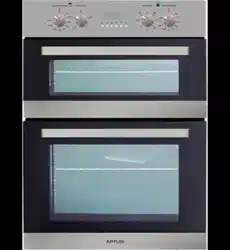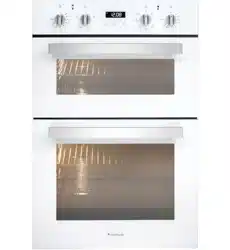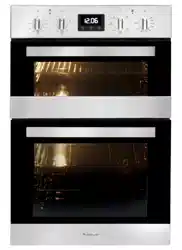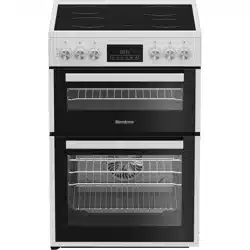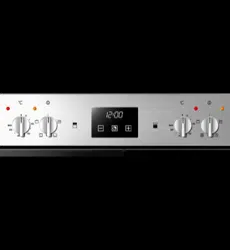

AO888X
OPERATION MANUAL
APPLIANCES
FOR LIVING

Congratulations, you are now the proud owner of an ARTUSI cooking appliance. Thank you for purchasing ARTUSI
and welcome to the ARTUSI Family.
This instruction manual has been specially created to inform you of the full range of features your ARTUSI appliance
has to offer and serves as an introduction to getting the very best out of your ARTUSI appliance.
We present detailed information on each of the features your ARTUSI appliance consists of. Once you have read
this section you will be able to choose the most appropriate settings for your appliance when cooking different
types of food.
We ask you to read the instructions in this booklet very carefully as this will allow you to get the best results from
using your appliance. KEEP THE DOCUMENTATION OF THIS PRODUCT FOR FUTURE REFERENCE.
TO REGISTER YOUR PRODUCT WITH ARTUSI, PLEASE FILL OUT THE WARRANTY CARD AT THE END OF
THIS BOOKLET AND POST IT TO:
REPLY PAID 83617
LEICHHARDT NSW 2040

3
-To avoid any possible hazard, the appliance may be installed by qualified personnel
only.
- Any repairs by unqualified persons may result in electric shock or short circuit. In
order to avoid possible injuries to your body or to the appliance, do not attempt
any repairs by qualified service personnel.
- Hot fat is highly inflammable, so pay extra attention when preparing food with
greas or oil.
- Warning! Never let small children in the vicinity of the oven; they are not yet
aware of danger of burns. Older children may use the appliance only under your
surveillance.
- The inside of the oven, also places of potential danger for children.
- Danger of burns! Oven and cooking accessories may become very hot during
operation. To avoid burns use kitchen clothes and gloves when handling hot parts
or utensils.
-Mains leak of adjacent appliances may be damaged by hotplates or if stuck
between the oven doors, and produce short circuit, therefore keep them at safe
distance from the appliance.
-Take extra precautions when grilling. Intensive heat from infrared heater
makes the oven and the accessories extremely hot. Use protective gloves
and barbecue accessories!
-Perforated roast may produce spurting of hot grease (sausages). Use long
grill tongs to prevent skin burns and protect your eyes.
-Supervise the grill at all times. Excessive heat may quickly burn your roast
and provoke fire!
- Do not let the children in the vicinity of the grill.
SAFETY PRECAUTIONS
- THIS APPLIANCE IS CONCEIVED FOR DOMESTIC USE ONLY. THE MANUFACTURER
SHALL NOT IN ANY WAY BE HELD RESPONSIBLE FOR WHATEVER INJURIES
OR DAMAGES ARE CAUSED BY INCORRECT INSTALLATION OR BY UNSUITABLE,
WRONG OR ABSURD USE.
- THIS APPLIANCE IS NOT INTENDED FOR USE BY PERSONS (INCLUDING CHILDREN)
WITH REDUCED PHYSICAL, SENSORY OR MENTAL CAPABILITIES, OR LACK OF
EXPERIENCE AND KNOWLEDGE, UNLESS THEY HAVE BEEN GIVEN SUPERVISION OR
INSTRUCTION CONCERNING USE OF THE APPLIANCE BY A PERSON RESPONSIBLE
FOR THEIR SAFETY. CHILDREN SHOULD BE SUPERVISED TO ENSURE THAT THEY
DO NOT PLAY WITH THE APPLIANCE.
- DO NOT PLACE TIN FOIL, PANS OR SIMILAR IN CONTACT WITH THE INNER BASE OF
THE OVEN TO COOK. THE HEATING ACTION OF THE LOWER RESISTANCE CAUSES
THE LOWER PART OF THE OVEN TO OVERHEAT, LEADING TO DAMAGE AND EVEN
SERIOUS CONSEQUENCES (FIRE RISK) ALSO TO THE UNIT IN WHICH THE OVEN IS
INSTALLED.
4
The oven data plate remains accessible following installation, and is exposed to
view simply by opening the door.
It shows all details needed to identify the appliance, and these must be indicated
when ordering replacement parts.
Given the type and height of this built-in oven, it can be installed only in a full-height
kitchen unit.
Particular care must be given to the instructions on installing the oven in the unit,
especially the indications regarding the size and position of the ventilation opening,
which is essential for proper cooling of the enclosure and of the oven itself.
To gu ar a nt ee t he s af e ty o f th e us er, t he u ni t ho u si ng t he o ve n mu s t b e ma n uf ac t ur ed
from materials able to withstand temperatures up to 90 °C. This includes core
materials, laminates, facings and adhesives.
MADE IN EUROPE NUM.
TYPE:
MOD.: E88A V kW
CE M
GENERAL INFORMATION
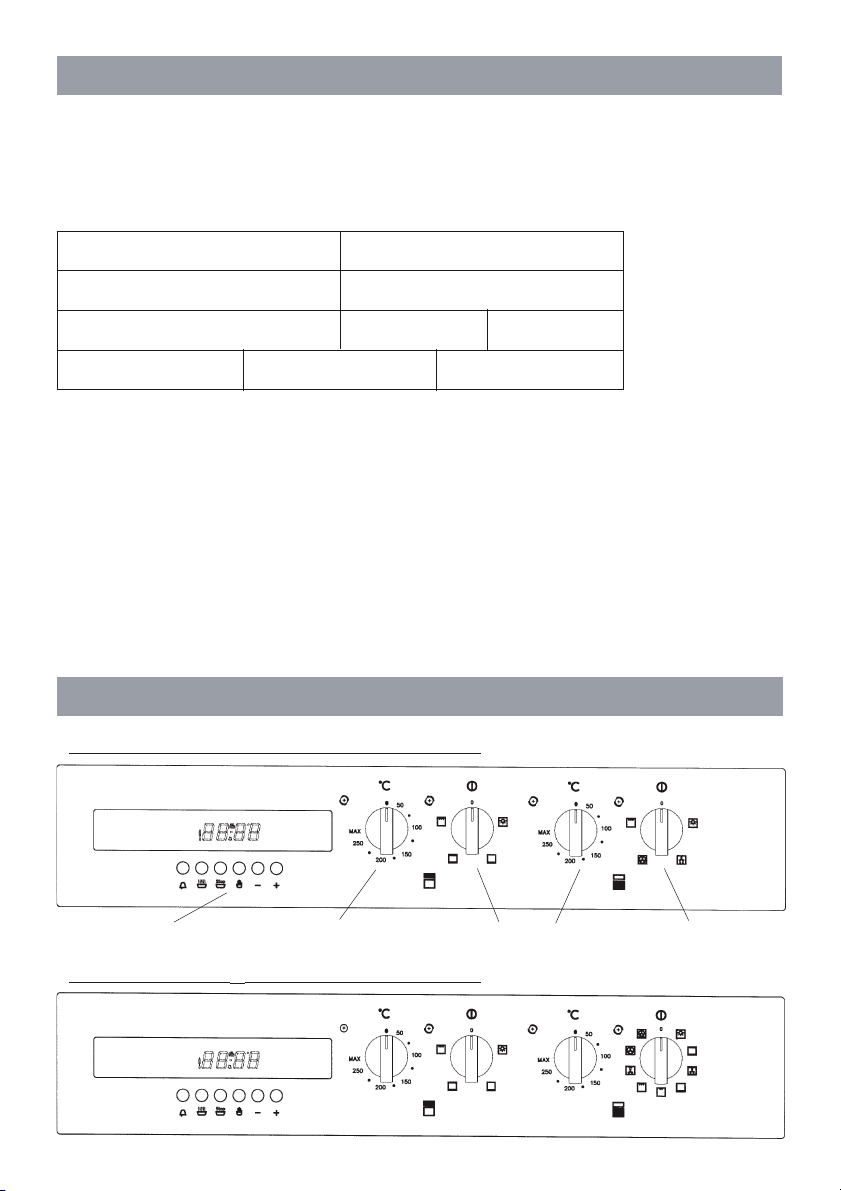
CONTROL PANEL
- 4 functions (4F+ ø) Electronic Programmer
Electronic programmer
Thermostat
Selector
Thermostat
Selector
- 9 functions (9F+ ø) Electronic Programmer
5
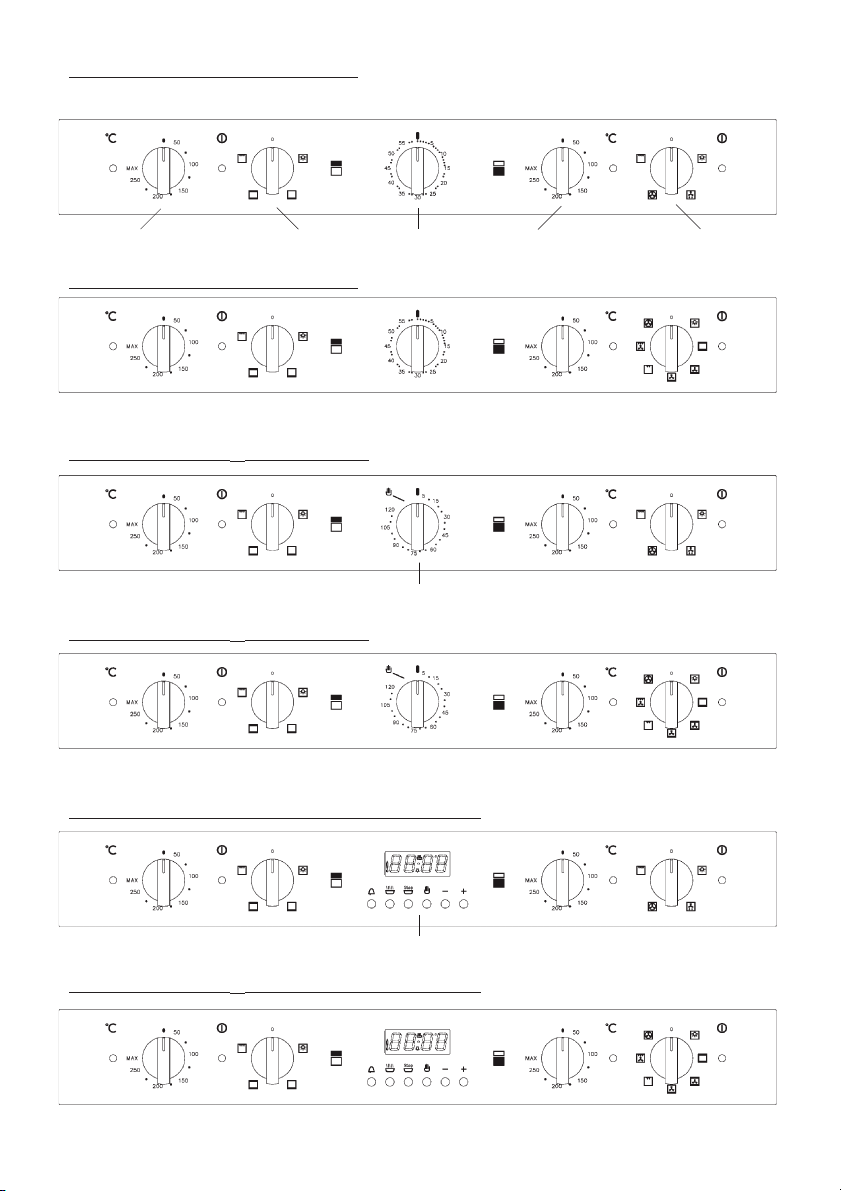
Thermostat Selector Thermostat Selector
Alarm Timer
Red Orange
light light
Red Orange
light light
- 4 functions (4F+ ø) Timer 0-60
- 7 functions (7F+ ø) Timer 0-60
- 4 functions (4F+ ø) Timer 0-120
- 7 functions (7F+ ø) Timer 0-120
- 4 functions (4F+ ø) Electronic Programmer
- 7 functions (7F+ ø) Electronic Programmer
Cooking Timer
Electronic programmer
6
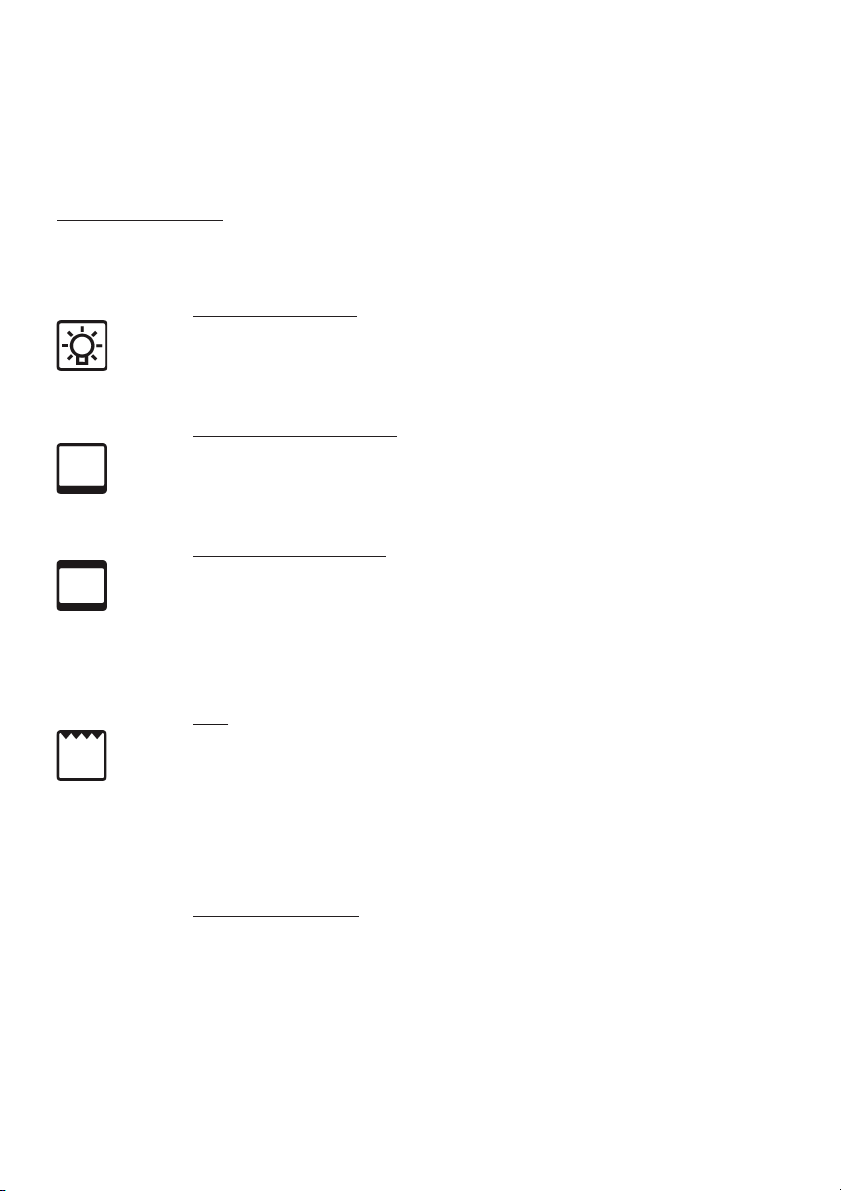
TOP OVEN
The oven offers a basic choice between two types of cooking:
A) conventional oven cooking
B) grill (infrared radiant heat)
Selector functions:
Position 0: The oven is swiched OFF
Position 1: Oven interior light (turn to the right)
Position 2: Lower heating element
Set the required temperature between 50 and 250 °C. This setting
is used typically for food to be reheated or warmed.
Position 3: Conventional cooking
Set the required cooking temperature between 50 and 250 °C. The
red light will go out as soon as the selected temperature has been
reached. The oven should be heated before any food is put in to
cook.
Position 4: Grill
Set the thermostat at a temperature between 50 and 250 °C.
The red light will go out as soon as the selected temperature has
been reached.
The oven should be heated for a few minutes before food is put
under the grill (Whether the door is open or closed).
Oven accessories:
Oven grid
Flat biscuit tray
7
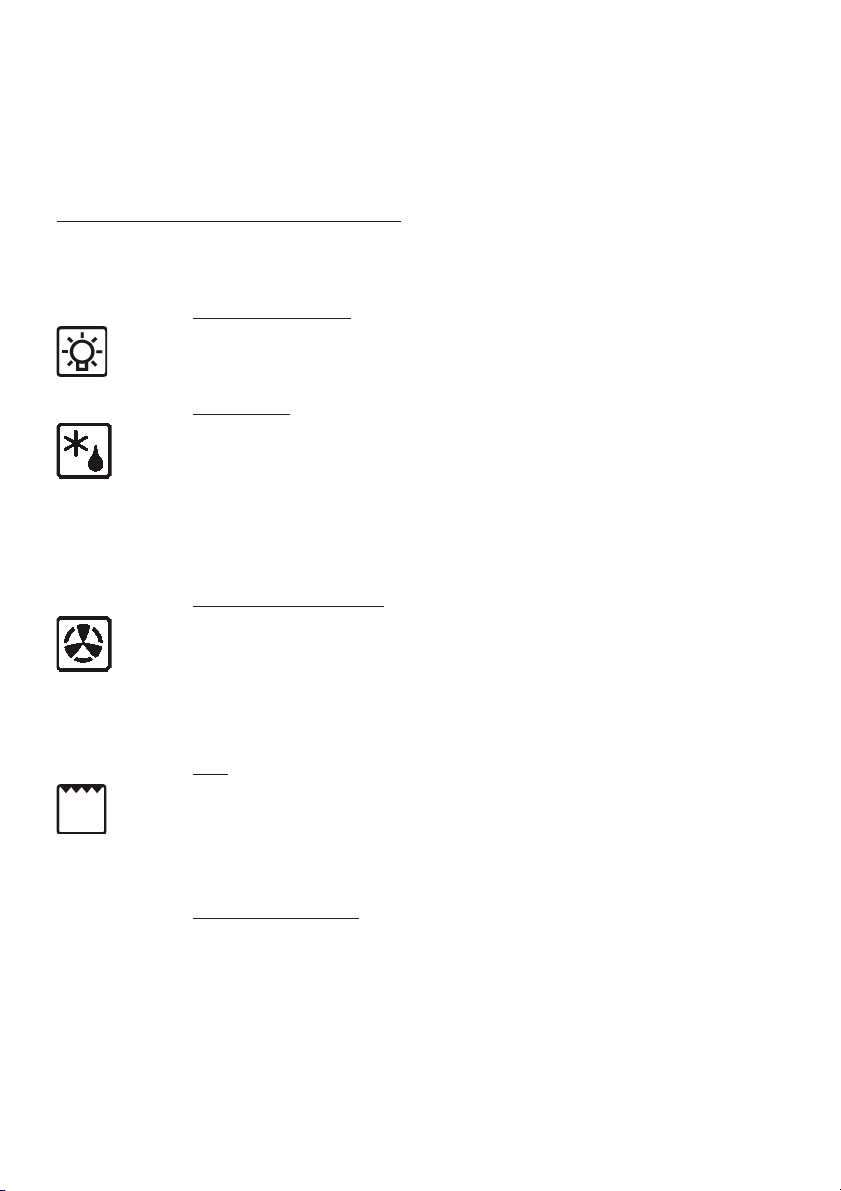
MAIN OVEN
The oven offers a choice between two types of cooking:
A) fan-assisted oven cooking
B) grill (infrared radiant heat).
Selector functions: 4 functions (4F+ ø)
Position 0: The oven is swiched OFF
Position 1: Oven interior light
Position 2: Defreezing
The oven interior light and the orange warning light remain on — as
is normally the case during all other functions of the oven — and
the fan will come into operation, though without any heat being
generated (thermostat off). The oven door must be kept closed.
Using the oven in this way, food will defreeze in a third of the time
normally needed.
Position 3: Fan-assisted cooking
The fan and the relative heating element come into operation, and
heat will be distributed uniformly around the entire chamber at the
temperature selected with the thermostat, between 50 and 250 °C.
The oven should be heated before any food is put in to cook. Different
types of food can be cooked simultaneously.
Position 4: Grill
Set the thermostat at a temperature between 50 and 250 °C.
Keep the oven door closed. This type of grilling is especially suitable
for small quantities of food. Keep the door closed.
Oven accessories:
Oven grid
Grill pan with grid
Handles for grill pan - For removing pan from the oven
8
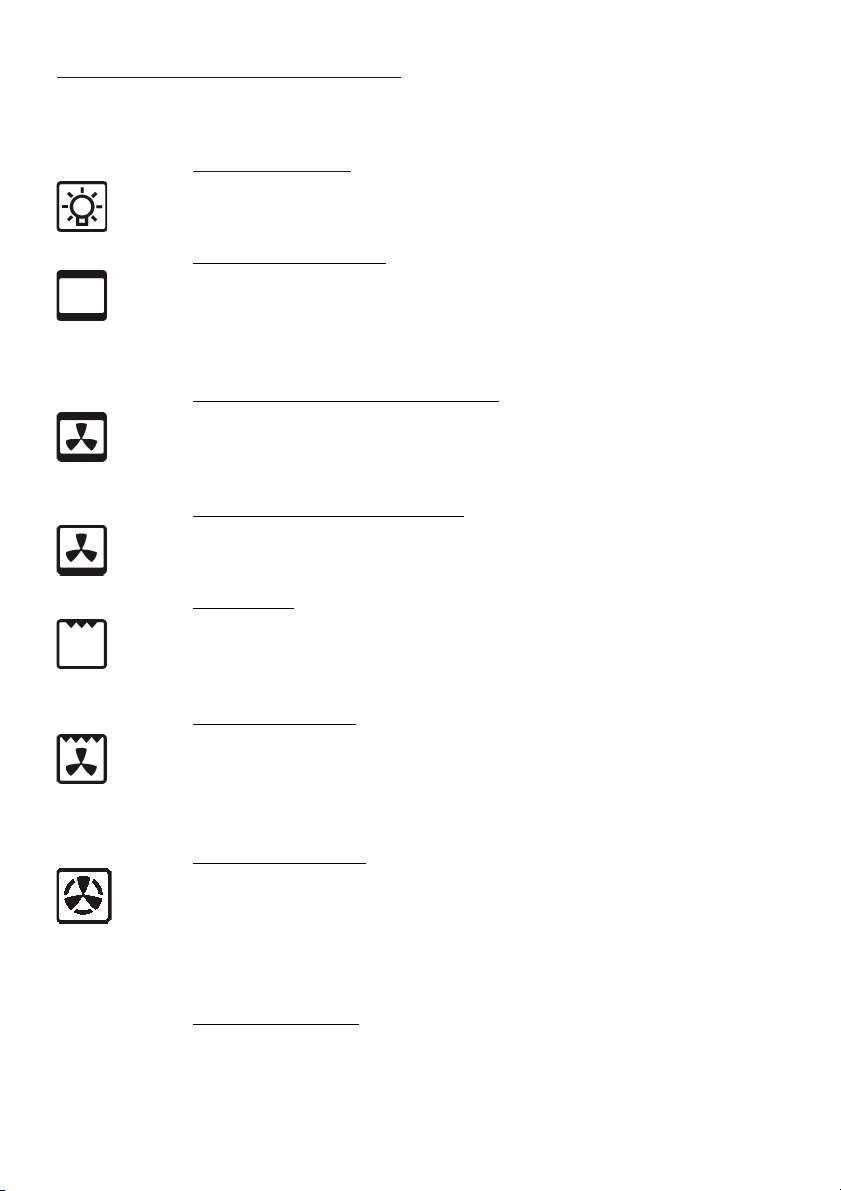
Selector functions: 7 functions (7F+ ø)
Position 0: The oven is switched OFF
Position 1: Oven interior light
Position 2: Conventional cooking
Set the required cooking temperature between 50 and 250 °C. The
red light will go out as soon as the selected temperature has been
reached. The oven should be heated before any food is put in to
cook.
Position 3: Traditional cooking + Fan assisted
Set the thermostat between 50 and 250°C.
This cooking mode integrate natural convection and fan.
Cooking mode suited to bake bread, pizzas and lasagne.
Position 4: Fan + Bottom heating element
Set the desired temperature for this very delicate and slow cooking
mode. We suggest you do not pre-heat the oven.
Position 5: Middle Grill
Use the thermostat to the desired temperature between 50 and 250
°C, while keeping the oven door closed. This cooking mode is ideal
for small amounts of food. Keep the door closed.
Position 6: Fan + Double Grill
Set the thermostat to the desired temperature between 50 and 250
°C. Fan operation combined with the grill lets you cook particular
foods quickly and deeply. We suggest you pre-heat the oven for a
few minutes before inserting food. Keep the door closed.
Position 7: Fan-forced cooking
The fan and the relative heating element come into operation, and
heat will be distributed uniformly around the entire chamber at the
temperature selected with the thermostat, between 50 and 250 °C.
The oven should be heated before any food is put in to cook. Different
types of food can be cooked simultaneously.
Oven accessories:
2 x wire shelves
1 x grill pan
9
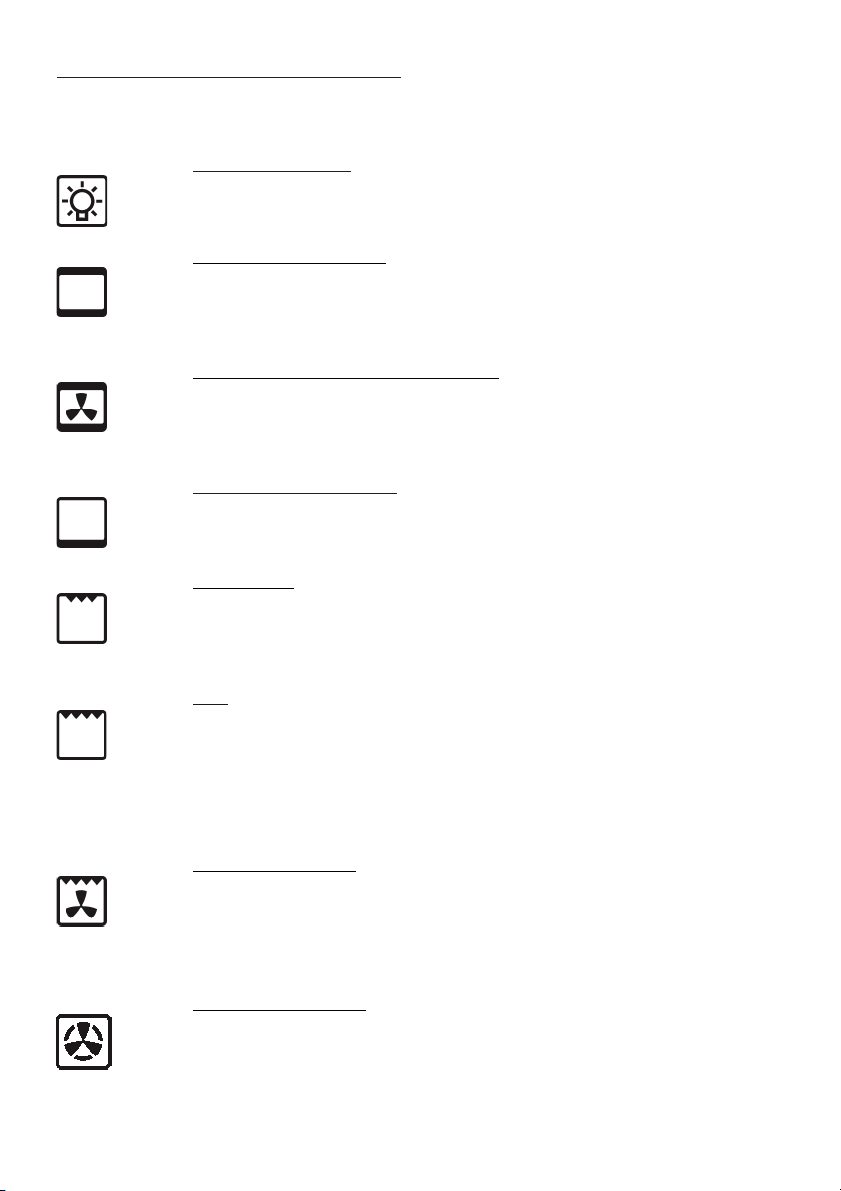
Selector functions: 9 functions (9F+ ø)
Position 0: The oven is switched OFF
Position 1: Oven interior light
Position 2: Conventional cooking
Set the required cooking temperature between 50 and 250 °C. The
red light will go out as soon as the selected temperature has been
reached. The oven should be heated before any food is put in to cook.
Position 3: Traditional cooking + Fan assisted
Set the thermostat between 50 and 250°C.
This cooking mode integrate natural convection and fan.
Cooking mode suited to bake bread, pizzas and lasagne.
Position 4: Lower heating element
Set the required temperature between 50 and 250 °C. This setting
is used typically for food to be reheated or warmed.
Position 5: Middle Grill
Use the thermostat to the desired temperature between 50 and 250
°C, while keeping the oven door closed. This cooking mode is ideal
for small amounts of food. Keep the door closed.
Position 6: Grill
Set the thermostat at a temperature between 50 and 250 °C.
The red light will go out as soon as the selected temperature has
been reached.
The oven should be heated for a few minutes before food is put
under the grill. Keep the door closed.
Position 7: Fan + Double Grill
Set the thermostat to the desired temperature between 50 and 250
°C. Fan operation combined with the grill lets you cook particular
foods quickly and deeply. We suggest you pre-heat the oven for a
few minutes before inserting food. Keep the door closed.
Position 8: Fan-forced cooking
The fan and the relative heating element come into operation, and
heat will be distributed uniformly around the entire chamber at the
temperature selected with the thermostat, between 50 and 250 °C.
The oven should be heated before any food is put in to cook. Different
types of food can be cooked simultaneously.

10
Position 9: Fan-forced cooking + lower heating element
The fan, circular heating element and bottom heating element come
on. Temperature can be adjusted between 50 and 250 °C. This
cooking mode is ideal for pizzas and other foods that require heat
from below.
Oven accessories:
2 x wire shelves
1 x grill pan
11
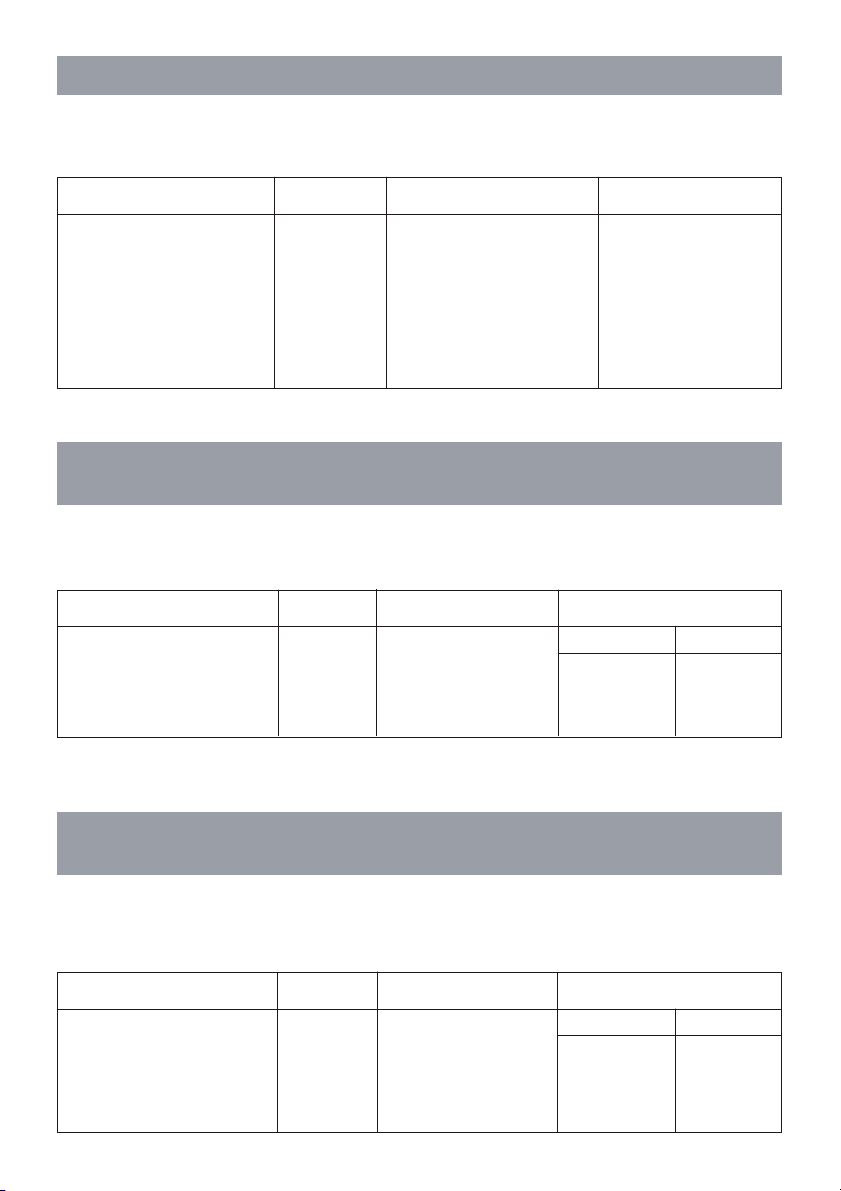
COOKING TABLE FOR TOP OVEN - CONVENTIONAL COOKING
IN HEATING SYSTEM WITH TOP AND BOTTOM HEATERS OPERATING. It is
recommended to preheat the oven 10 min.
DISHES LEVEL TEMPERATURE COOKING TIME
Yorkshire Puddin 1 200°C30 - 40 min
Fatless Sponge Cake 1 180°C25 - 30 min
Small Cakes 2 190°C15 - 20 min
Fruit Plate Tart 1 200°C40 - 45 min
Scones 2 220°C10 - 15 min
Rich Fruit Cake 1 140°C 2 - 3 hours
COOKING TABLE FOR THE TOP OVEN
WITH INFRARED HEATER OPERATING
Grilling is carried out at the door closed. 5 minutes oven preheating is recommended.
Setting possibility from 50 - max (250)°C. Food is placed on the backing pan grid.
DISHES LEVEL TEMPERATURE COOKING TIME
Side 1 Side 2
Pork steaks, Chops (4 pcs) 3 225°C 12 min 10 min
Grilled Sausages (6 pcs) 3 225°C6 min5 min
Toast (6 p c s ) 3 225°C
1 min/25 sec. 1 min/10 sec.
COOKING TABLE FOR THE MAIN OVEN
WITH INFRARED HEATER OPERATING
Grilling is carried out at the door closed. 5 minutes oven preheating is recommended.
Setting possibility from 50 - max (250)°C. Food is placed on the backing pan grid.
DISHES LEVEL TEMPERATURE COOKING TIME
Side 1 Side 2
Pork steaks, Chops (4 pcs) Topmost 5 250°C 15 min 12 min
Roast beef (4pcs) Topmost 5 250°C10 min8 min
Grilled Sausages (6 pcs) Topmost 5 250°C 9 min6 min
Toast (6 p c s ) Topmost 5 250°C
1 min/50 sec. 1 min/30 sec.
12
Set the selector for the type of cooking required.
Preheat the oven, setting the thermostat to the required temperature. Once the
oven has heated to the selected temperature, the orange warning light will go out.
This same light will appear again automatically during operation of the oven to
indicate that the heating elements are on.
Remove the drip tray when using the oven for conventional baking, roasting etc.
The tray should be left in place only when using the grill, as its purpose is to catch
falling droplets of fat. Food should be placed in oven dishes with raised edges and
positioned centrally under the grill. If fan-forced operation is selected, foods of
different types can be cooked simultaneously (e.g. meat and fish), although in this
case the respective cooking time must be observed.
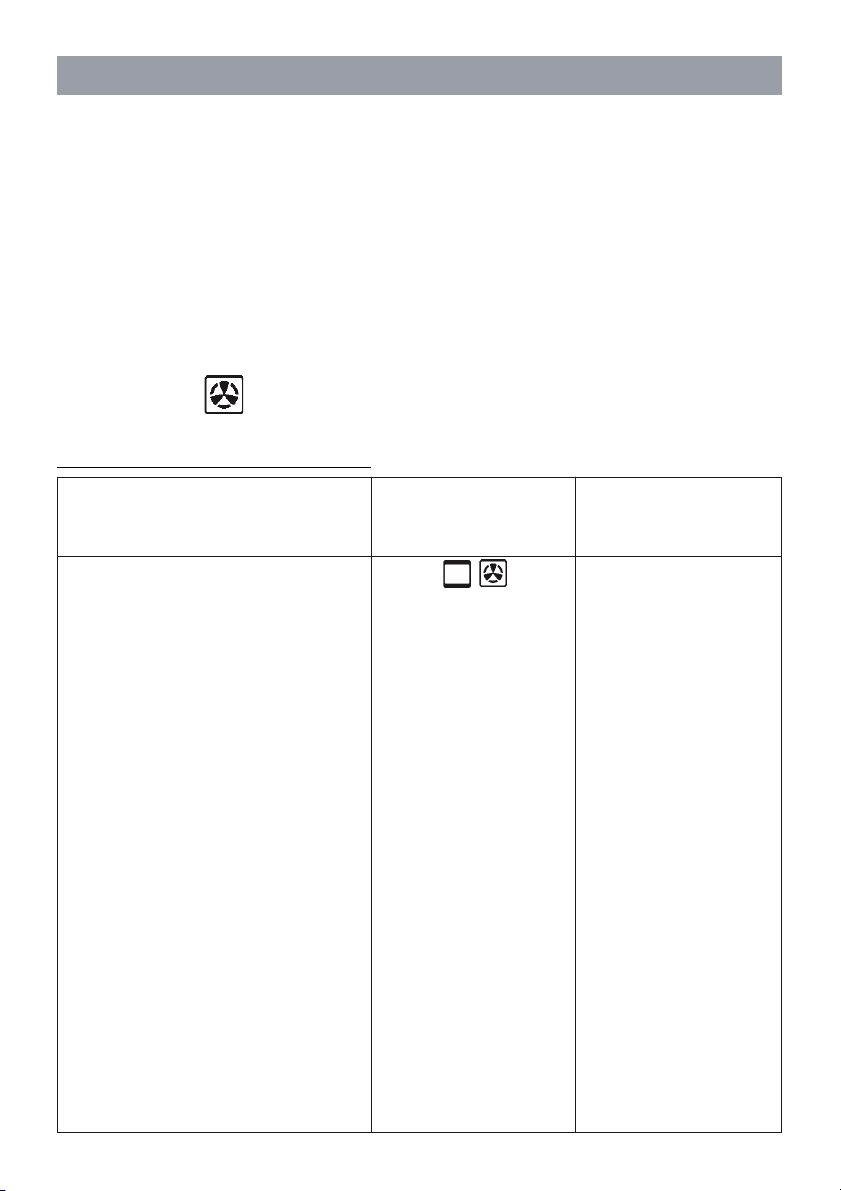
If selecting the position, temperatures must be set 10 to 20°C lower than
indicated in the table.
Sweets
Short pastry flan base
Fruit pie/tart
White leavened bread per 1 kg flour
Shortcake biscuits
Savoury biscuits
Lasagne
Meat (cooking time based on thickness)
Slow roast
Quick roast
Meat loaf
Poultry
Duck 1.5 -2 kg
Goose 3 kg
Roast chicken
Turkey 5 kg
Game
Hare
Leg of roebuck
Haunch of venison
Vegetable
Vegetable soufflé
Fish
Pizza
Grills
Pork chop
Sausage
Grilled chicken
Cooking temperatures and times
Temperature
in degrees centigrade
Approximate cooking
time in minutes
175 160
200 190
200 190
200 190
200 190
200 190
225 210
175 170
200 190
200 190
200 170
200 180
200 190
175 150
200 180
200 180
175 175
200 180
180 170
210 200
55-65
8-10
25-35
30-50
10-15
15-20
40-50
12-15
12-15
30-40
120-180
150-210
60-90
240 ca.
60-90
90-150
90-180
40-45
40-45
20-25
8-12
10-12
25-35
Dish
USING THE OVENS

13
Rare 20 minutes per 450g. (1lb)
plus 20 minutes
Medium 25 minutes per 450 g (1 lb)
plus 20 minutes
Well Done 30 minutes per 450 g (1 lb)
plus 30 minutes
Medium 25 minutes per 450 g (1 lb)
plus 25 minutes
Well Done 30 minutes per 450 g (1 lb)
plus 30 minutes
35 minutes per 450 g (1 lb)
plus 35 minutes
20 minutes per 450 g (1 lb)
plus 20 minutes
ROASTING GUIDE
- Frozen meat should be thoroughly thawed before cooking. For large joints it is
advisable to thaw overnight.
- Frozen poultry should be thoroughly thawed before cooking, the time required
depends on the size of the bird e.g. a large turkey may take up to 48 hours to thaw.
- Adjust the shelf position so the meat or poultry will be in the centre of the oven.
The TIMES given in the ROASTING GUIDE are only approximate because the size
and age of the bird will influence cooking times as will the shape of a joint and the
proportion of bone.
Notes:
If you are cooking a very large turkey e.g. over 141lb., we recommend that it is
turned around halfway through cooking, so that both legs will be cooked evenly.
Remove any excess fat from the tin before turning, to prevent any fat splashing.
When cooking stuffed meat or poultry calculate the cooking time from the total weight
of the meat plus the stuffing.
For joints cooked in foil or covered roasters, and for lidded casseroles, add 5 minutes
per 450g. (1lb. to the calculated cooking time.
Smaller joints weighing less than 1.25 k.g. (2 lb.) may require 5 minutes per 450g.
(1lb) extra cooking time.
Cook in oven
180°C (Fan oven)
200°C (Conventional oven)
Approximate cooking time
BEEF
LAMB
PORK
FOWL

14
To defrost frozen foods, turn the oven control to the defrost position,
place the food in the centre of the oven and close the door.
Be safe
X DO NOT defrost stuffed poultry using this method.
X DO NOT defrost larger joints of meat and poultry over 2kg.(4lb) using this method.
X NEVER place uncooked food for defrosting next to cooked food which is to be
cooled, as this can lead to cross contamination.
Defrosting meat, poultry, and fish can be accelerated using this method but make
sur they are completely thawed before cooking thoroughly. Place meat and poultry
on a trivet in a meat tin.
Defrosting times
Small or thin pieces of frozen fish or meat e.g. fish fillets, prawns, and mince will
take approximately 1-2 hours. Placing the food in a single layer will reduce the
thawing time.
A medium sized casserole or stew will take approximately 3-4 hours.
A 1 1/2 kg (3lb) oven ready chicken will take approximately 5 hours, remove the
giblets as soon as possible.
DEFROSTING AND COOLING (only for 4F)

15
General instructions
CAUTION: the oven door becomes hot during use. Be sure to keep children well
away!
Do not use the oven as a room heater.
Always be very careful when connecting other electrical appliances to the power
supply if these are situated near the oven: the power cables must not come into
contact with hot parts of the oven.
To e ns ur e t h e ov e n wil l a lw ay s b e s af e , a ny s e rv i ci ng
— especially of electrical parts — should be entrusted exclusively to a skilled
professional.
Clean the oven every time after use: this will make it easier to remove dirt and
grease and ensure that deposits do not build up.
Use earthenware oven dishes enamelled steel or pyrex - type glass for roasting
and baking, selecting a suitable size for the bulk and quantity of the food being
cooked.
Stainless steel ovenware is not recommended, as the metal reflects heat.
If the interior light should fail, disconnect the oven from the electrical power before
removing and replacing the lamp.
Using first time
Before using the oven for the first time, clean the interior thoroughly with liquid
detergent and lukewarm water. Wipe off, then heat the oven to maximum temperature
and leave on for 20 minutes. This will ensure that residual oil and grease used in
the manufacturing process do not give off unpleasant smells when food is cooked
in the oven.
Once this has been done, the oven is ready for use.
CAUTION: make certain the oven is disconnected from the electrical power supply
before carrying out any cleaning operation on the oven.
Final checks
Having installed the oven in its enclosure, and before switching on, be certain to
check that there are no live parts accessible, and that all the packing has been
removed.
At this point the oven can be switched on as described in the instructions.
INSTRUCTIONS FOR USE
16
CAUTION:
THIS APPLIANCE MUST BE INSTALLED BY A PROFESSIONAL
ELECTRICIAN, AND IN ACCORDANCE WITH THE
MANUFACTURER’S INSTRUCTIONS
BEFORE CARRYING OUT ANY ADJUSTMENT OR REPAIR ON
THE APPLIANCE, MAKE CERTAIN IT IS DISCONNECTED FROM
THE ELECTRICAL POWER SUPPLY
Statutory regulations, technical standards, directives
The appliance must be installed in conformity with current statutory regulations
and in accordance with applicable safety standards.
Installing the oven
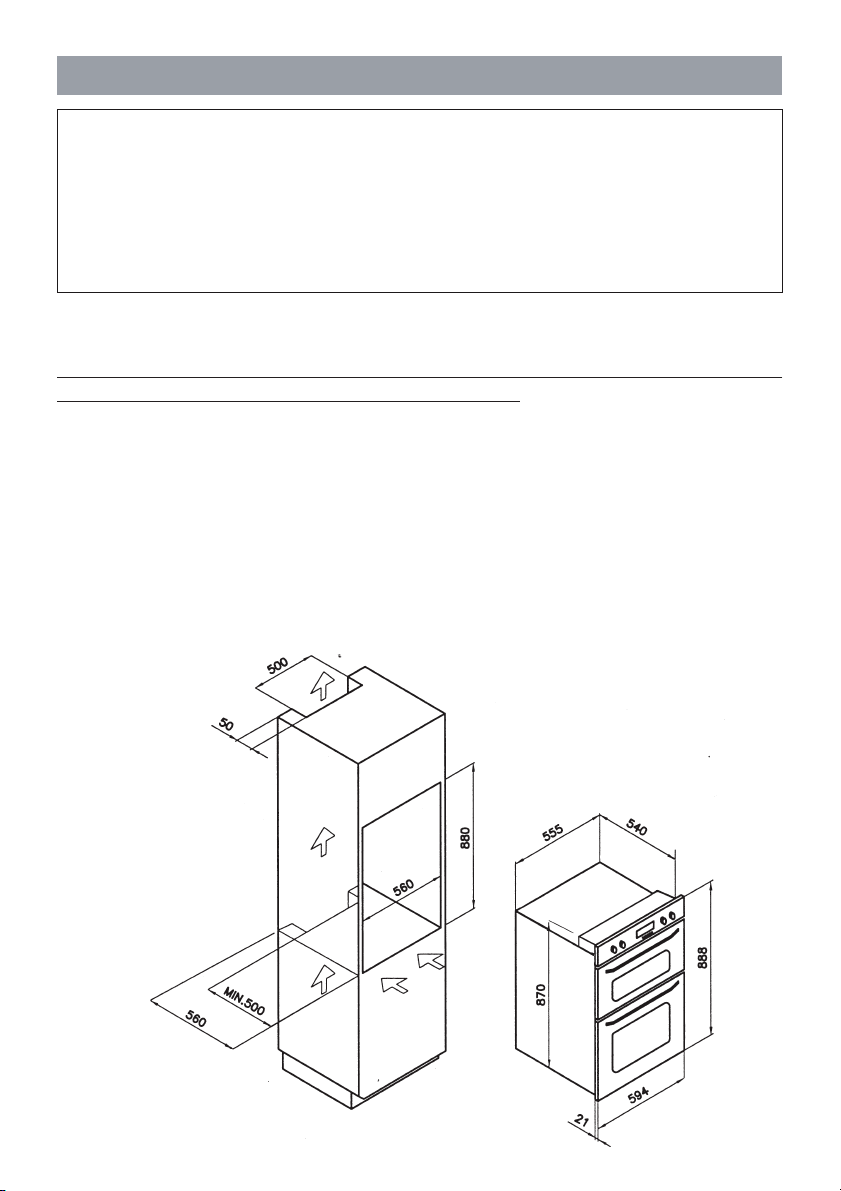
The unit in which the oven is installed must be manufactured to a modular dimension
of 600mm.
Openings at least 50 mm deep must be cut both in the bottom and in the top of the
unit to ensure adequate ventilation (see figure1 for essential dimensions).
During assembly, particular care must be taken not to pick up the oven by the door.
As a general rule, the oven door should never be forced or subjected to undue
stresses.
INSTALLATION
17
Electrical connection
Make certain the nominal a.c. power supply voltage corresponds to that indicated
on the identification data plate. The appliance must be connected to the supply by
way of an isolating switch with minimum contact separation of 3 mm. Suitable
isolating components include automatic breakers, fuses and relays.
The oven must be connected to an efficient earth system, as prescribed by national
and/or local statutory regulations.
The cable must be connected as prescribed by statutory regulations and respond
to the specifications indicated on the Technical Data page.
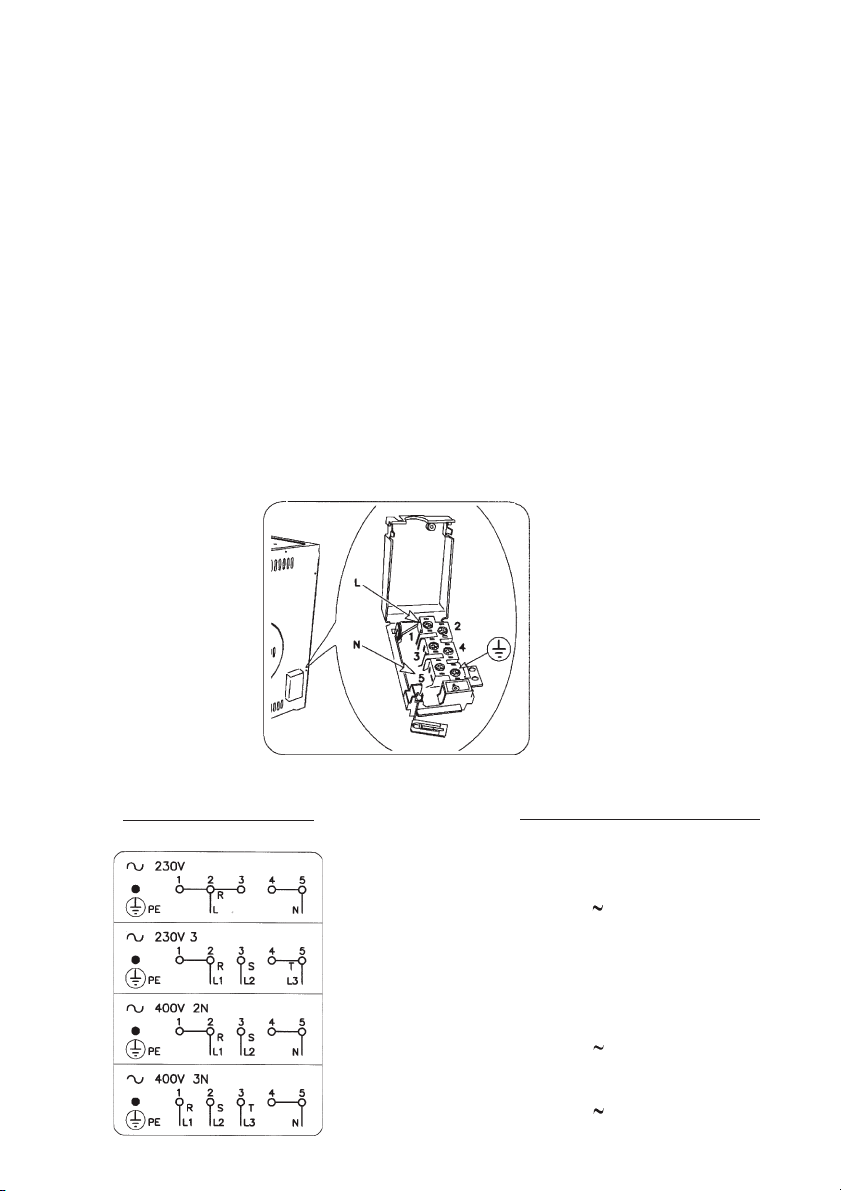
The terminal box is located at the rear of the appliance. If a new cable is fitted,
route it through the clamp and make the connections as shown in the diagram. The
earth wire must be cut longer than the other wires so that it will be the last to break
off in the event of the cable being tugged.
Having made the connection, tighten the cable clamp and close the cover of the
box.
CONNECTION DIAGRAM
CABLE TYPES AND SECTIONS
H05RR-F
400V 2N 4 x 1,5 mm
2
230V 3 4 x 1,5 mm
2
230V 3 x 2,5 mm
2
400V 3N 5 x 1,5 mm
2
18
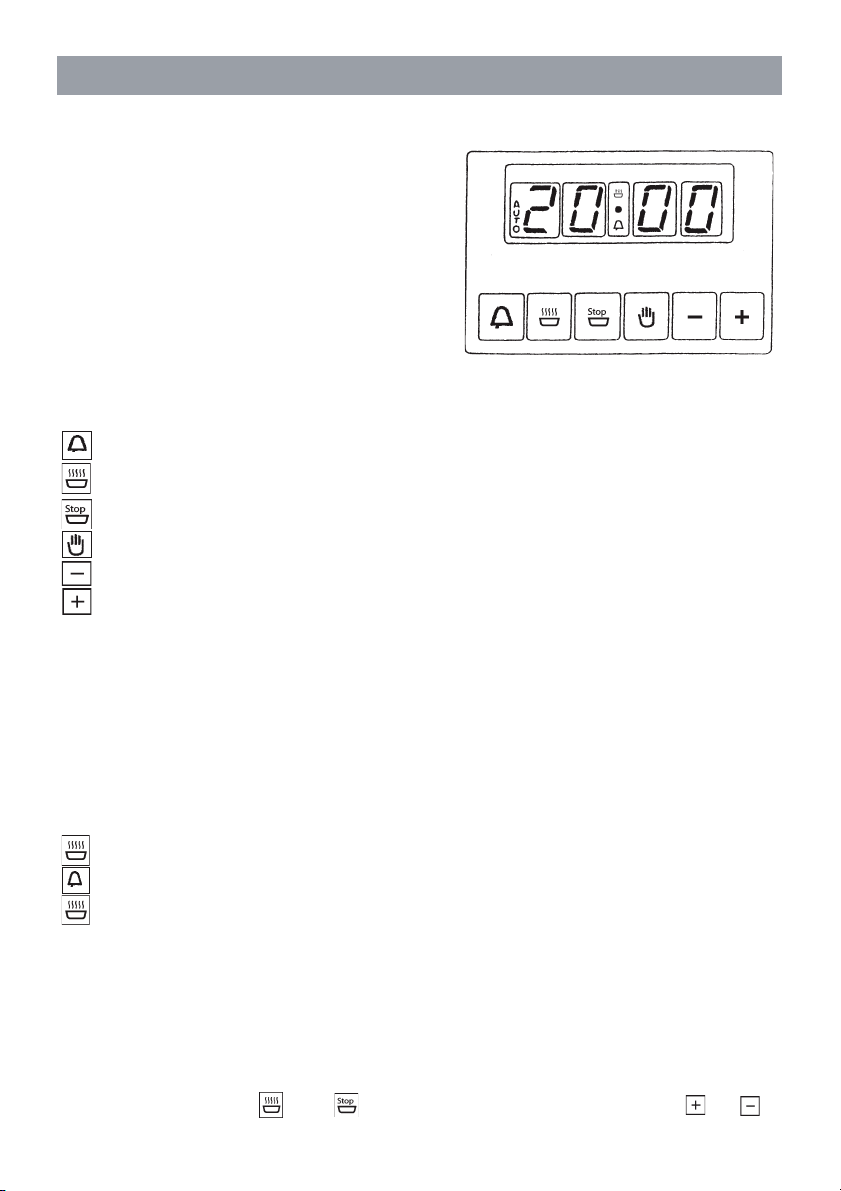
The electronic programmer incorporates the following functions:
- 24 hour clock with luminous display
- 10 hour timer
- automatic oven cooking
- semiautomatic oven cooking
The electronic programmer operate only
on the “large” oven.
ELECTRONIC PROGRAMMER
Programming buttons and their functions.
beep
cooking time in automatic mode
cooking stop time
manual operation
decrease – all programs
increase – all programs
Luminous symbols
When “AUTO” blinks, this means that the timer is in “automatic” mode but no
setting has yet been made.
When “AUTO” remains permanently alight, this means that the timer is in
“automatic” mode and already programmed
automatic cooking
timer in operation
plus “AUTO” blinking: programming error
If there is no symbol alight other than the digits of the clock, this means that the
timer is in “manual” mode.
Digital clock
The timer incorporates a digital electronic clock with luminous numbers indicating
the hours and minutes. When the appliance is first connected to the a.c. supply, or
following a power cut, three zeroes will blink in the timer window.
To set the clock
press the two buttons and together, release and then use the or
symbol to select the exact time. The longer the increase or decrease button is held,

19
Automatic cooking (programmed start and stop times)
To co o k fo o d in th e ove n us i ng t h e au tom at ic ti me r, pr o ce ed as f oll ow s :
- establish how long the food needs to cook
- enter the cooking stop time
- select the temperature and the cooking method.
Once these steps have been completed, the “AUTO” indicator will light up
permanently in the display, confirming that the oven has been programmed.
Practical example: we want to cook food for a period of 30 minutes, ending at
14.00.
- Pressing and holding , enter 0.30 in the display.
- Pressing and holding , enter 14.00 in the display.
This done, the display will revert to the current time and “AUTO” reappears,
confirming that the settings have been acknowledged and memorized. At 13.30
(14.00 minus 30 minutes) the oven switches on automatically and the symbols and
“AUTO” will appear for as long as cooking continues. The oven will then switch off
automatically at 14.00, triggering a beep that can be silenced by pressing .
Semiautomatic cooking
A. Programming the duration
B. Programming the stop time.
A) Select the duration for which the food is to cook by pressing . The oven will
switch on immediately, with the symbols “AUTO” and showing in the display.
Once the set duration has elapsed, cooking will stop and the beep sounds
intermittently. Silence the beep as indicated above.
B) Set the time for cooking to stop, by pressing . The oven will switch on
immediately, with the symbols “AUTO” and . showing in the display. When the
set time comes around, cooking will stop and the beep sounds intermittently. Silence
the beep as indicated above.
the faster the numbers will scroll.
If convenient, the clock can be turned back to 00.00:
to scroll back further at this point, release all the buttons and repeat the sequence,
pressing and holding the decrease button until the time appears in the display.
Normal cooking without using the timer
To operate the oven in manual mode — in other words without using the timer— the
blinking “AUTO” indicator must be deactivated by pressing the button.
20
Current programming status can be displayed at any given moment by pressing
the corresponding button.
It is also possible to cancel the current selection at any moment by pressing
and resetting the display to zero. Pressing at this point, the programmer will
revert to manual mode.
CAUTION: if the oven is disconnected from the power supply, or in the event of a
power failure, the clock resets to zero and all programming will be lost. When power
is restored, three zeroes appear.
ALARM TIMER
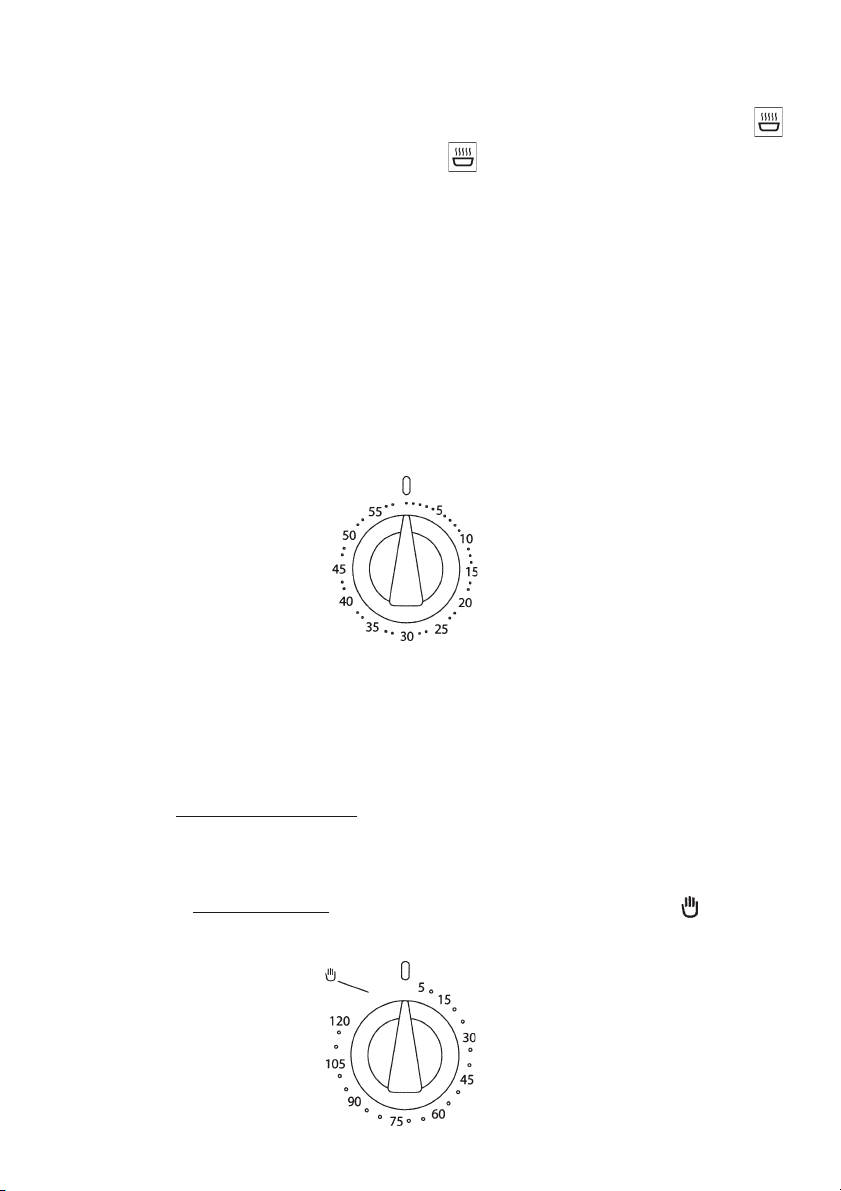
You can set this timer to sound a buzzer after 0 to 60 minutes of cooking. First
turn the knob fully clockwise, then turn it back to the desired alarm time.
COOKING TIMER
First, turn the cooking selector to the required cooking function, and the thermo-
stat to the desired cooking temperature.
Then, to set end of cooking time, turn the cooking timer to the right and to the
desired time. First turn the knob fully clockwise, then turn it back to the desired
alarm time. A buzzer sounds at the end of the timed cooking period, and the oven
switches itself off.
To set only the start of cooking, turn the cooking timer to the left to the symbol.

21
Never clean the oven with the high- pressure steam cleaning device, as it may
provoke short circuit.
Before cleaning switch the cooker off and let it cool down completely.
Front side of the casing
For cleaning of frontal part of the cooker use the usual cleaning agents and follow
the manufacturer’s instructions.
Never use any aggressive cleaning agents or dish cleaning accessories which might
cause scratches. For the front door glass use soft cloth and liquid cleaners for
clinig glass surfaces.
Stainless steel front
Clean the surface with mild detergent (soap) and soft sponge which does not scratch.
Never use aggressive cleaners or solvents, otherwise you may damage the surface.
Enamel coated and plastic surfaces
Clean the knobs and handles with soft cloth and liquid cleaners, intended for use of
smooth ename surfaces.
Oven
The oven may be cleaned in a traditional mode (using oven cleaners and sprays).
Otherwise respect the following cleaning tips:
- Cool the oven completely before cleaning.
- The oven and the accessories must be cleaned after each use, otherwise stains
might get burned in.
- Oven walls, sprayed with oil from roasting, is best cleane with warm water and
detergent when the oven is still tepid.
- Hard and heavily stained oven should be cleaned with special oven cleaning
agents. Rinse the cleaner thorouglhly and remove any detergent remaining before
the next use.
- Never use aggressive cleaners, like polishing agents, dish cleaning accessories,
corrosion inhibitors, or any other devices that might cause scratches.
- Coated, stainless steel or zinc-coated surfaces or aluminum parts must not come
into contact with oven sprays, since they might cause damage or discoloration.
The same goes for thermostat probe (if the cooker is equipped with it) and exposed
heaters on the ove ceiling.
- When purchasing cleaning agents remember the environment, and strictly follow
the manufacturer’s instructions.
CLEANING AND MAINTENANCE
22
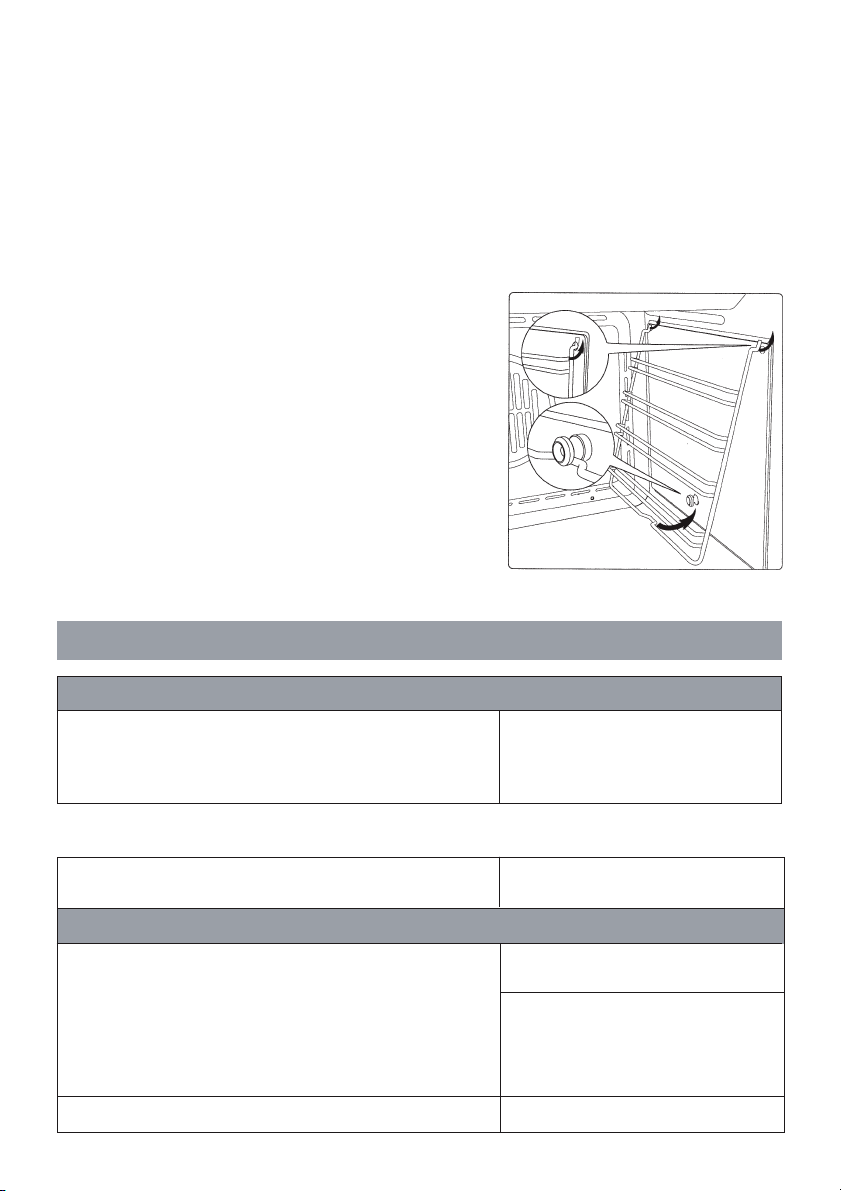
IMPORTANT: before carrying out any maintenance operations on the oven,
set the automatic isolating switch to the off position.
The oven’s side runners can easily be removed by disconnecting them from the
peg in the bottom, turning them towards the inside of the oven and extracting them
from the supporting holes.
To p ut t h em ba ck in pl ac e , r ev er s e t hi s p ro ce d ur e .
Clean the side grids only with conventional
detergents.
Removing wire grids.
This appliance is manufactured in compliance with RF suppression standards.
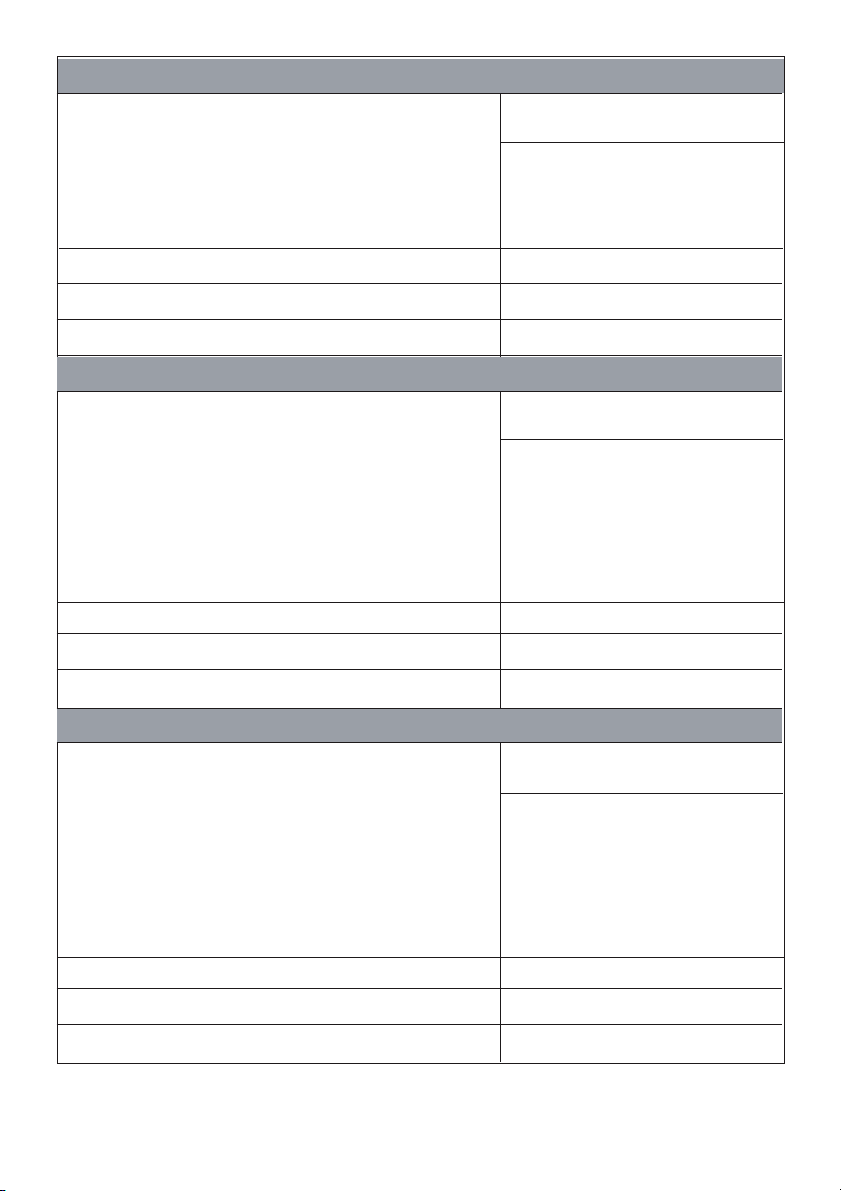
- MODEL Multifunction oven
- RATED VOLTAGE 230/240 - 400/415 V 3N
Nominal electrical input in W
(toll. +5 /-10%)
- interior light 25 W
- tangential fan unit 20 W
-
upper heating element 750 W
-
grill element 1750 W
- lower heating element 850 W
- maximum electrical input 1795 W
TECHNICAL DATA
TOP oven
Dimensions
- height mm 888
- width mm 594
- depth mm 550
- usable volume 58 + 32 litres
23
Nominal electrical input in W
(toll. +5 /-10%)
- interior light 25 W
- radial fan unit 30 W
- tangential fan unit, large oven 10 W
- circular heating element 2300 W
- grill element 2000 W
- Maximum electrical input 2365 W
- Maximum overall electrical input 4250 W 230-240V / 3700 W 220V
- Power cable
HO5 RN- F 3 x 2,5 mm
2
section
Nominal electrical input in W
(toll. +5 /-10%)
- interior light 25 W
- radial fan unit 30 W
- tangential fan unit, large oven 10 W
- circular heating element 2300 W
- middle grill 1200 W
- double grill 2200 W
- upper heating element 1000 W
- lower heating element 1100 W
- Maximum electrical input 2365 W
- Maximum overall electrical input 4250 W 230-240V / 3700 W 220V
- Power cable
HO5 RN- F 3 x 2,5 mm
2
section
Nominal electrical input in W
(toll. +5 /-10%)
- interior light 25 W
- radial fan unit 30 W
- tangential fan unit, large oven 10 W
- circular heating element 2300 W
- middle grill 1200 W
- double grill 2200 W
- upper heating element 1000 W
- lower heating element 1100 W
- Maximum electrical input 3465 W
- Maximum overall electrical input 5350 W 230-240V / 4700 W 220V
- Power cable
HO5 RN- F 3 x 2,5 mm
2
section
MAIN oven (4F)
MAIN oven (7F)
MAIN oven
24
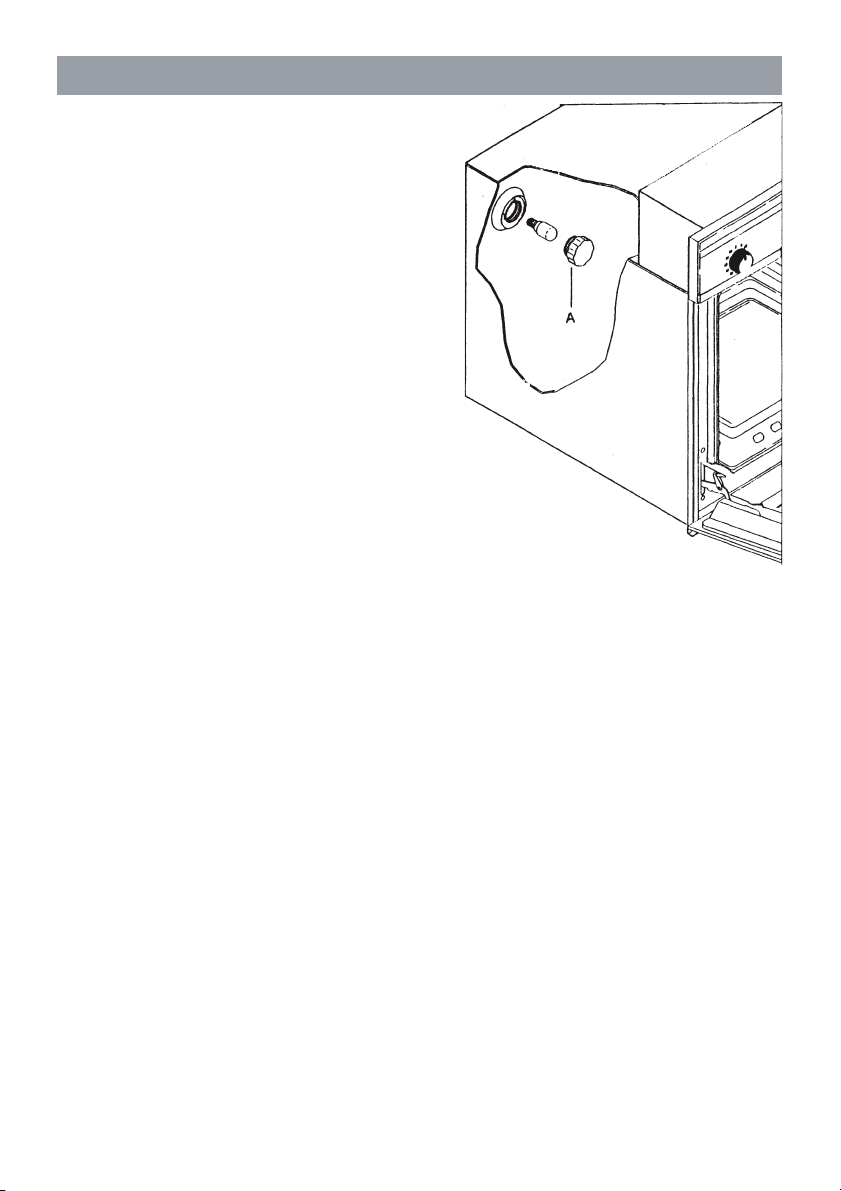
CAUTION: Disconnect the appliance from
the power supply.
To re p la c e th e l am p o f th e o ve n i nt er i or l i gh t , fi r st
unscrew and remove the protective cover A.
Renew the lamp, and refit the cover A.
Max power 25 W.
INTERIOR LIGHT: REPLACING THE LAMP
25
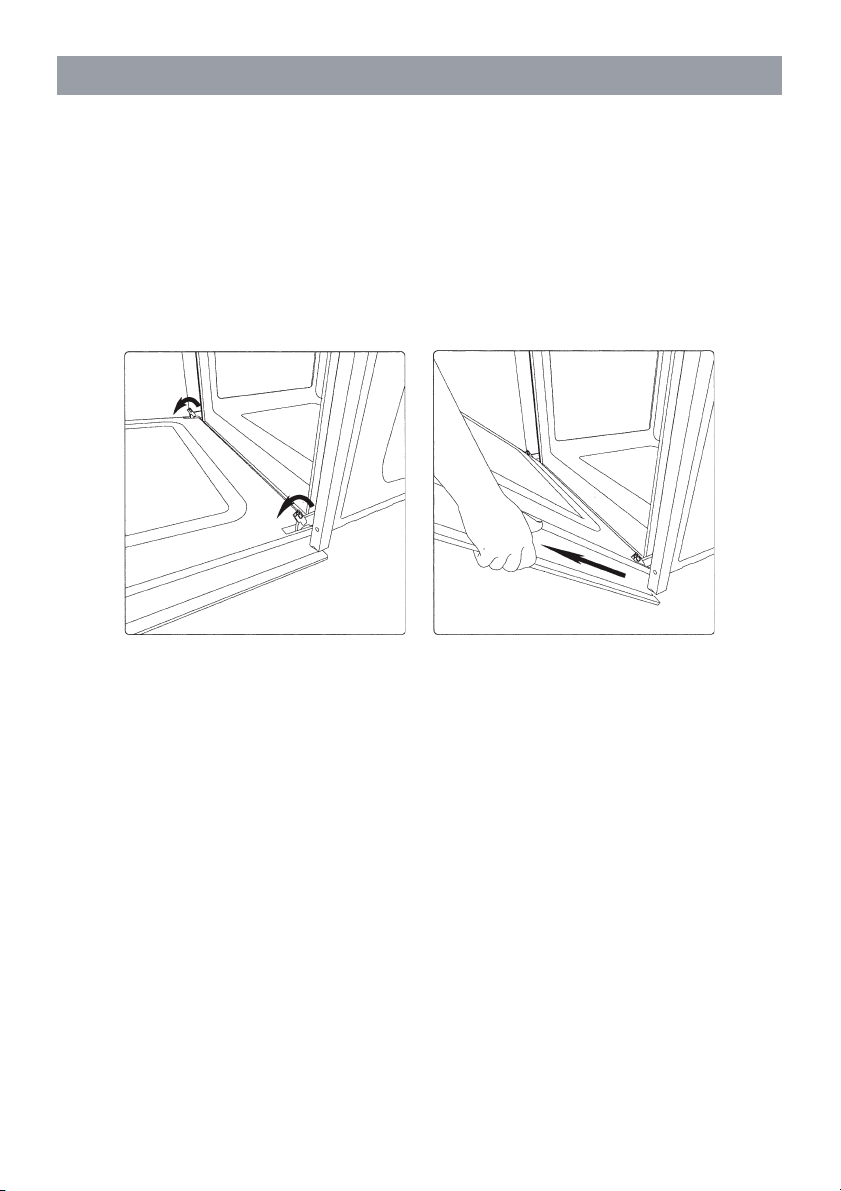
The door is easily removed, as follows:
- open the door completely;
- raise the two hinge levers as indicated in the drawing;
- close the door again until a click is produced by the levers raised previously;
- lift the door upward and away from the front of the oven to free it from the
sockets;
To refit the door, locate the hinges in the sockets and return the two levers to the
locking position.
REMOVING THE OVEN DOOR

Warranty Card
Worldwide Appliances Pty Limited
A.B.N. 45868077422
Oce:
48-50 Moore Street, Leichhardt N.S.W 2040
Post:
Locked Bag 3000, Annandale, N.S.W 2038
P: 1300 694 583
WARRANTY REGISTRATION
Your ongoing satisfaction with your artusi
product is important to us. We ask that you
complete the enclosed Warranty Registration
Card and return it to us so that we have a record
of the artusi product purchased by you.
PRIVACY
Worldwide Appliances respects your
privacy and is committed to handling your
personal information in accordance with the
National Privacy Principles and the Privacy
Act 1988 (Cth). A copy of the Worldwide
Appliances Privacy Policy is available at
www.artusi.com.au. Worldwide Appliances will
not disclose any personal information set out
in the Warranty Registration Card (“Personal
Information”) without your consent unless
required by:
1. law;
2. any Worldwide Appliances related company;
3. any service provider which provide services
to artusi or assist artusi in providing services
(including repair and warranty services) to
customers. Our purpose in collecting the
Personal Information is
to keep a record of the artusi product purchased
by you, in order to provide a better warranty
service to you in the unlikely event that there is
a problem with your artusi product. Worldwide
Appliances may contact you at any one or more
of the address, email address or telephone
numbers set out in the Warranty Registration
Card. Please contact artusi on 1300 694
583 should you not wish to be contacted by
Worldwide Appliances.
WARRANTY
1. Warranty
Worldwide Appliances warrants that each artusi
product will remain, for a period of either 12
months or 24 months of warranty. All Warranties
are valid from the original date of purchase, And
warranty claims must be accompanied by the
proof of purchase.
24 months warranty products:
All Built-in Appliances – Limited to Ovens,
Gas, Induction and Electric Cooktops, and All
Rangehoods
Freestanding Cookers - Gas and Electric Models
(900mm Width)
artusi.com.au
Dishwashers - Freestanding, Fully Integrated,
Semi Integrated and built-in
12 months warranty products:
Freestanding Cookers - Gas and Electric Models
in 50cm, 54cm and 60cm Widths
Portable Appliances* – Benchtop Models and
Portable Gas Models
2. What is not Covered by the Warranty.
The Warranty does not apply if an artusi product
is defective by a factor other than a defect arising
in the manufacture of the artusi product, including
but not limited to:
(a) damage through misuse (including failure
to maintain, service or use with proper care),
neglect, accident or ordinary wear and tear
(including deterioration of parts and accessories
and glass breakage);
(b) use for purpose for which the artusi product
was not sold or designed;
(c) use or installation which is not in accordance
with any specied instructions for use or
installation;
(d) use or operation after a defect has occurred or
been discovered;
(e) damage through freight, transportation or
handling in transit (other than when Worldwide
Appliances is responsible);
(f) damage through exposure to chemicals, dusts,
residues, excessive voltage, heat, atmospheric
conditions or other forces or environmental
factors outside the control or Worldwide
Appliances;
(g) repair, modication or tampering by the
purchaser or any person other than Worldwide
Appliances, an employee of Worldwide
Appliances or an authorised artusi service
contractor*;
(h) use of parts, components or accessories
which have not been supplied or specically
approved by artusi.
(i) damage to surface coatings caused by cleaning
or maintenance using products not recommended
in the artusi product handbook provided to the
purchaser upon purchase of the artusi product;
(j) damage to the base of an electric oven due to
items having been placed on the base of the oven
cavity or covering the base, such as aluminium
foil (this impedes the transfer of heat from the
element to the oven cavity and can result in
irreparable damage); or
(k) damages, dents or other cosmetic
imperfections not aecting the performance of the
artusi in respect of an artusi product purchased
as a “factory second” or from display
The Warranty does not extend to light globes
used in artusi products.
3. Domestic Use
Each artusi product is made for domestic use.
This Warranty may not extend to artusi products
used for commercial purposes.
Continued over...
4
Please complete and send to ARTUSI at: REPLY PAID 83617
LEICHHARDT NSW 2040
Last Name: First Name:
Address:
State: Postcode: Email:
Home Phone: Mobile:
Purchase Date: / /
(Please attach proof of purchase to validate warranty)
MODEL NUMBER
SERIAL NUMBER
(if you cannot locate the serial number please call ARTUSI on 1300 694 583)
1
2
3
4
WARRANTY REGISTRATION CARD
01052013
01032014
4. Time for Claim under the Warranty
You must make any claim under this Warranty
within twenty eight (28) days after the occurrence
of an event which gives rise to a claim pursuant
to the Warranty, by booking a service call on the
telephone number below.
5. Proof of Purchase
Customers must retain proof of purchase in order
to be eligible to make a warranty claim in respect
of an artusi product.
6. Claiming under the Warranty
Customers will bear the cost of claiming under
this Warranty unless Worldwide Appliances
determines the expenses are reasonable, in which
case the customer must claim those expenses
by providing written evidence of each expense
to Worldwide Appliances at the address on the
Warranty Registration Card.
7. Statutory Rights
(a) These terms and conditions do not aect your
statutory rights.
(b) The limitations on the Warranty set out in this
document do not exclude or limit the application
of the consumer guarantees set out in the Act or
any other equivalent or corresponding legislation
in the relevant jurisdiction where to do so would:
(i) contravene the law of the relevant jurisdiction;
or
(ii) cause any part of the Warranty to be void.
(c) Worldwide Appliances excludes indirect or
consequential loss of any kind (including, without
limitation, loss of use of the artusi product) and
(other than expressly provided for in these terms
and conditions) subject to all terms,
conditions and warranties implied by custom, the
general law, the Act or other statute.
(d) The liability of Worldwide Appliances to you
for a breach of any express or non-excludable
implied term, condition or warranty is limited at
the option of Worldwide Appliances to:
(i) replacing or repairing the defective part of the
artusi product;
(ii) paying the cost of replacing or repairing the
defective part of the artusi product;
(iii) replacing the artusi product; or
(iv) paying the cost of replacing the artusi
product.
(e) Our goods come with guarantees that cannot
be excluded under the Australian Consumer
Law. You are entitled to a replacement or refund
for a major failure and for compensation for any
other reasonably foreseeable loss or damage.
You are also entitled to have the goods repaired
or replaced if the goods fail to be of acceptable
quality and the failure does not amount to a
major failure.
8. Defects
Any part of an artusi product deemed to be
defective and replaced by Worldwide Appliances
is the property of Worldwide Appliances.
Worldwide Appliances reserves the right to
inspect and test artusi products in order to
determine the extent of any defect and the
validity of a claim under the Warranty.
*To locate your closest artusi authorised service
agent please contact us on 1300 652 100 or visit
www.artusi.com.au
ALL SERVICE CALLS MUST BE BOOKED
THROUGH AN AUTHORISED DEALER OR
WARRANTY DEPARTMENT ON 1300 652 100
OR stokesaps.com.au/artusi-service
01032014
Warranty Card continued
artusi.com.au
Warranty Card tear off


ARTUSI.COM.AUP: 1300 649 583
NSW & ACT (HEAD OFFICE)
48-50 MOORE STREET
LEICHHARDT
F 02 8569 4699
QLD
1/42 CAVENDISH ROAD
COORPAROO
F 07 3397 0850
VIC, TAS & SA
1211 TOORAK ROAD
CAMBERWELL
F 03 9809 2155
WA & NT
UNIT 10/55 HOWE STREET
OSBORNE PARK
F 08 9201 9188
NZ
PO BOX 11.160
SOCKBURN CHRISTCHURCH
F 03 344 5906
ARTUSI OFFICES ARE OPEN DAILY FROM 9AM–5PM AND SATURDAYS 10AM–4PM
DISCLAIMER
Worldwide Appliances PTY LTD, trading as ARTUSI, is continually seeking ways to improve the design specifications, aesthetics and production
techniques of its products. As a result alterations to our products and designs take place continually. Whilst every effort is made to produce
information and literature that is up to date, this brochure should not be regarded as an infallible guide to the current specifications, nor does it
constitute an offer for the sale of any particular product. Product dimensions indicated in our literature is indicative only. Actual product only
should be used to define dimension cutouts. Distributors, and retailers are not agents of ARTUSI and are not authorised to bind ARTUSI by any
express or implied undertaking or representation.