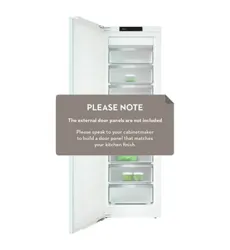
Operating and installation instructions
Freezer
To prevent the risk of accidents or damage to the appliance, it is
essential
to read these instructions before it is installed and used for
the first time.
en – AU, NZ M.-Nr. 10 198 630

Contents
2
Warning and Safety instructions .......................................................................... 4
Caring for the environment.................................................................................
12
How to save energy .............................................................................................
13
Guide to the appliance.........................................................................................
15
Control panel.......................................................................................................... 15
Switching on and off............................................................................................
18
Before using for the first time................................................................................. 18
Operating the appliance......................................................................................... 18
Switching off for longer periods of time................................................................. 19
The correct temperature .....................................................................................
20
Temperature display............................................................................................... 20
Setting the temperature ......................................................................................... 21
Using SuperFreeze...............................................................................................
22
Temperature and door alarm ..............................................................................
23
Temperature alarm ................................................................................................. 23
Switching the temperature alarm off early........................................................ 23
Door alarm ............................................................................................................. 24
Further settings....................................................................................................
25
Safety lock .........................................................................................................
25
Audible tones ....................................................................................................
26
Display brightness .............................................................................................
27
Sabbath mode ....................................................................................................
28
Adjusting the interior fittings ..............................................................................
30
Removing freezer drawers on telescopic runners.................................................. 30
Removing the shelves............................................................................................ 30
Freezing and storing food ...................................................................................
31
Freezing fresh food ................................................................................................ 31
Storing frozen food ................................................................................................ 31
Home freezing........................................................................................................ 32
Tips on home freezing ...................................................................................... 32
Packing ............................................................................................................. 32
Before placing food in the freezer..................................................................... 33
Placing food in the freezer ................................................................................ 33
Defrosting............................................................................................................... 34
Making ice cubes................................................................................................... 35

Contents
3
Cooling drinks quickly............................................................................................ 35
Cool pack............................................................................................................... 35
Automatic defrosting...........................................................................................
36
Cleaning and care................................................................................................ 37
Before cleaning...................................................................................................... 38
To remove the telescopic runners:.................................................................... 38
Cleaning the interior and accessories.................................................................... 39
Door seal................................................................................................................ 40
Ventilation gaps...................................................................................................... 40
Problem solving guide .........................................................................................
42
Noises ...................................................................................................................
49
After sales service and warranty........................................................................
50
Information for Miele Centers and Chartered Agents......................................
51
Demo mode ........................................................................................................
51
Electrical connection...........................................................................................
53
Installation advice................................................................................................
54
Side-by-side units:................................................................................................. 54
Location ................................................................................................................. 54
Ventilation .............................................................................................................. 56
Before installing the appliance............................................................................... 57
Does your old appliance have a different hinging mechanism?............................ 58
Building-in dimensions........................................................................................
59
Limiting the opening angle of the door..............................................................
60
Changing the door hinging..................................................................................
61
Installing the appliance .......................................................................................
65
Warning and Safety instructions
4
This appliance complies with all statutory safety requirements.
Ple
ase note that inappropriate use can lead to personal injury and
damage to property.
To avoid the risk of accidents and damage to the appliance,
please read these instructions carefully before using it for the first
time. They contain important notes on installation, safety, use and
maintenance.
Miele cannot be held liable for non-compliance with these
instructions.
Keep these instructions in a safe place and ensure that new users
are familiar with the contents. Pass them on to any future owner.
Correct application
This appliance is designed for domestic use and for use in similar
envir
onments by guests in hotel or motel rooms, bed & breakfasts
and other typical living quarters. This does not include common/
shared facilities or commercial facilities within hotels, motels or bed
& breakfasts.
This appliance is not suitable for outdoor use.
This applianc
e is intended to store deep frozen food, freeze fresh
food, and to make ice.
Any other usage is not supported by the manufacturer and could be
dangerous.

Warning and Safety instructions
5
This applianc
e is not suitable for storing and keeping cool
medicines, blood plasma, laboratory preparations or other such
materials or products. Incorrect use of the appliance for such
purposes can cause deterioration of the items stored. The appliance
is not suitable for use in areas where there is a risk of explosion.
Miele cannot be held liable for damage resulting from improper or
incorrect use of the appliance.
This applianc
e is not intended for use by persons (including
children) with reduced physical, sensory or mental capabilities, or
lack of experience and knowledge, unless they have been given
supervision or instruction concerning its use by a person responsible
for their safety, and are able to recognise the dangers of misuse.
Safety with children
Y
oung children must not be allowed to use this appliance.
Older childr
en may only use the appliance when its operation has
been clearly explained to them and they are able to use it safely,
recognising the dangers of misuse.
Clean
ing work may only be carried out by older children under the
supervision of an adult.
Please super
vise children in the vicinity of the appliance and do
not let them play with it.
Dange
r of suffocation! Children may be able to wrap themselves
in packing material or pull it over their heads with the risk of
suffocation. Keep children away from any packing material.
Technical safety
The refrigerant circuit has been checked for leaks. This appliance
complies with all current local and national safety requirements.

Warning and Safety instructions
6
This applianc
e contains the coolant Isobutane (R600a), a natural
gas which is environmentally friendly. Although it is flammable, it
does not damage the ozone layer and does not increase the
greenhouse effect.
The use of this coolant has, however, led to a slight increase in the
noise level of the appliance. In addition to the noise of the
compressor, you might be able to hear the coolant flowing around
the system. This is unavoidable, and does not have any adverse
effect on the performance of the appliance.
Care must be taken during the transportation and setting up of the
appliance that no parts of the cooling system are damaged. Leaking
refrigerant can damage the eyes.
In the event of any damage:
– avoid any flames or anything which creates a spark,
– disconnect the appliance from the mains electricity supply,
– ventilate the room where the appliance is located for several
min
utes, and
– call Miele.
The mor
e coolant there is in an appliance, the larger the room it
should be installed in. In the event of a leakage, if the appliance is in
a small room, there is the danger of combustible gases building up.
For every 8 g of coolant at least 1 m
3
of room space is required. The
amount of coolant in the appliance is stated on the data plate inside
the appliance.
T
o avoid the risk of damage to the appliance, make sure that the
connection data (fuse rating, frequency and voltage) on the data
plate corresponds to the household supply.
Check that this is the case before connecting the appliance. Consult
a qualified electrician if in any doubt.
The ele
ctrical safety of this appliance can only be guaranteed
when correctly earthed. It is essential that this standard safety
requirement is met. If in any doubt please have the electrical
installation tested by a qualified electrician.

Warning and Safety instructions
7
Reliable
and safe operation of this appliance can only be assured
if it has been connected to the mains electricity supply.
If
the connection cable is faulty, it must only be replaced by a
Miele approved service technician to protect the user from danger.
Do not connect the appliance to the mains electricity supply by a
multi-socket unit or an extension lead. These do not guarantee the
required safety of the appliance (e.g. danger of overheating).
If
moisture gets into electrical components, it could cause a short
circuit. Therefore, do not operate this appliance in areas which are
exposed to moisture.
This applianc
e must not be installed and operated in mobile
installations (e.g. on a ship).
Do not use a damage
d appliance. It could be dangerous. Check
the appliance for visible signs of damage.
F
or safety reasons, this appliance may only be used when it has
been fully installed.
During
installation, maintenance and repair work, the appliance
must be disconnected from the mains electricity supply. It is only
completely isolated from the electricity supply when:
– the mains fuse has been disconnected, or
– the screw-out fuse is removed (in countries where this is
applicable), or
– it is switched off at the wall socket and the plug is withdrawn
from the socket. Do not pull the mains connection cable but the
mains plug to disconnect your appliance from the mains
electricity supply.
Repairs and other work by unqualified persons could be
dangerous. Installation, maintenance work and repairs to electrical
appliances must only be carried out by a Miele approved service
technician.

Warning and Safety instructions
8
The manu
facturer's warranty will be invalidated if the appliance is
not repaired by a Miele approved service technician.
F
aulty components must only be replaced by genuine Miele spare
parts. The manufacturer can only guarantee the safety of the
appliance when Miele replacement parts are used.
Correct use
The applianc
e is designed for use within a certain climate range
(ambient temperatures), and should not be used outside this range.
The climate range for your appliance is stated on the data plate
inside the appliance. Installing it in a room with too low an ambient
temperature, e.g. a garage, will lead to the appliance switching off
for longer periods so that it cannot maintain the required
temperature.
T
o ensure proper air flow in and out of the appliance, the air vents
in the appliance and built-in structure must not be covered or
blocked in any way.
This would also increase the energy consumption and could cause
damage to the appliance.
If
storing food which contains a lot of fat or oil in the appliance,
make sure that it does not come into contact with plastic
components as this could cause stress cracks or break the plastic.
Do not st
ore explosive materials in the appliance or any products
containing propellants (e.g. spray cans). Flammable gas mixtures
can be ignited by electrical components. Danger of fire and
explosion!
Do not oper
ate any electrical equipment (e.g. an electric ice
cream maker) inside the appliance. Danger of sparking and
explosion!
Do not st
ore cans or bottles containing carbonated drinks or
liquids which could freeze in the freezer. The cans or bottles could
explode. Danger of injury and damage to the appliance.

Warning and Safety instructions
9
When cool
ing drinks quickly in the freezer, make sure bottles are
not left in for more than one hour; otherwise they could burst,
causing injury or damage.
Never han
dle frozen food or the metal parts of the appliance with
wet hands. Your hands may freeze to the frozen food or to the metal.
Danger of frost burn!
Do not tak
e ice cubes out with your bare hands and never place
ice cubes or ice lollies in your mouth straight from the freezer. The
very low temperature of the frozen ice or lollies can cause frost burn
to the lips and tongue. Danger of injury!
Do not r
efreeze thawed or partially thawed food. Defrosted food
should be used up as quickly as possible, as food soon loses its
nutritional value and goes off. Defrosted food may only be re-frozen
after it has been cooked.
F
ood stored for too long may present a risk of food poisoning.
Storage times will depend on several factors, including the freshness
and quality of the food, as well as the temperature at which it is
stored. Follow the instructions given on the food manufacturer's
packaging regarding storage conditions and "use by" dates.
Use onl
y genuine original Miele spare parts. If spare parts or
accessories from other manufacturers are used, the warranty will be
invalidated, and Miele cannot accept liability.

Warning and Safety instructions
10
Cleaning and care
Do not use an
y oils or grease on the door seals, as these will
cause the seals to deteriorate and become porous with time.
Do not use a st
eam cleaning appliance to clean this appliance.
Steam could reach the electrical components and cause a short
circuit.
Sharp edged or p
ointed objects will damage the evaporator,
causing irreversible damage to the appliance. Do not use sharp
edged or pointed objects to
– remove frost and ice, or accelerate the defrosting process,
– separate frozen foods and remove ice trays.
Never place ele
ctric heaters or candles in the appliance to defrost
it. These can damage the plastic parts.
Do not use defr
osting sprays or de-icers, as they might contain
substances which could damage the plastic parts or which could
cause a build-up of gases and pose a danger to health.

Warning and Safety instructions
11
Transporting the appliance
T
o avoid damage to the appliance, always transport it upright and
in its packaging.
Dange
r of injury and damage. The appliance is very heavy and
must be transported by two people.
Disposal of your old appliance
Befor
e disposing of an old appliance, first make the door latch or
lock unusable.
This way you will prevent children from accidentally locking
themselves in and endangering their lives.
Splashes of cool
ant can damage the eyes. Be careful not to
damage any part of the pipework whilst awaiting disposal, e.g. by
– puncturing the refrigerant channels in the condenser,
– bending any pipework, or
– scratching the surface coating.
Caring for the environment
12
Disposal of the packing
mat
erial
The transport and protective packing
h
as been selected from materials which
are environmentally friendly for
disposal, and can normally be recycled.
Recycling the packaging reduces the
u
se of raw materials in the
manufacturing process and also
reduces the amount of waste in landfill
sites. Ensure that any plastic
wrappings, bags etc. are disposed of
safely and kept out of the reach of
babies and young children. Danger of
suffocation!
Disposing of your old
appliance
Electrical and electronic appliances
oft
en contain materials which, if
handled or disposed of incorrectly,
could be potentially hazardous to
human health and to the environment.
They are, however, essential for the
correct functioning of your appliance.
Therefore, please do not dispose of
your old appliance with your household
waste.
Please dispose of it at your local
commu
nity waste collection / recycling
centre.
Take care not to damage the pipework
at the back of the app
liance before or
during transportation to an authorised
collection depot.
In this way, refrigerant in the pipework
and oil in the compressor will be
contained, and will not leak out into the
environment.
Please ensure that your old appliance
pr
esents no danger to children while
being stored awaiting disposal. See
"Warning and Safety instructions" for
more information.
How to save energy
13
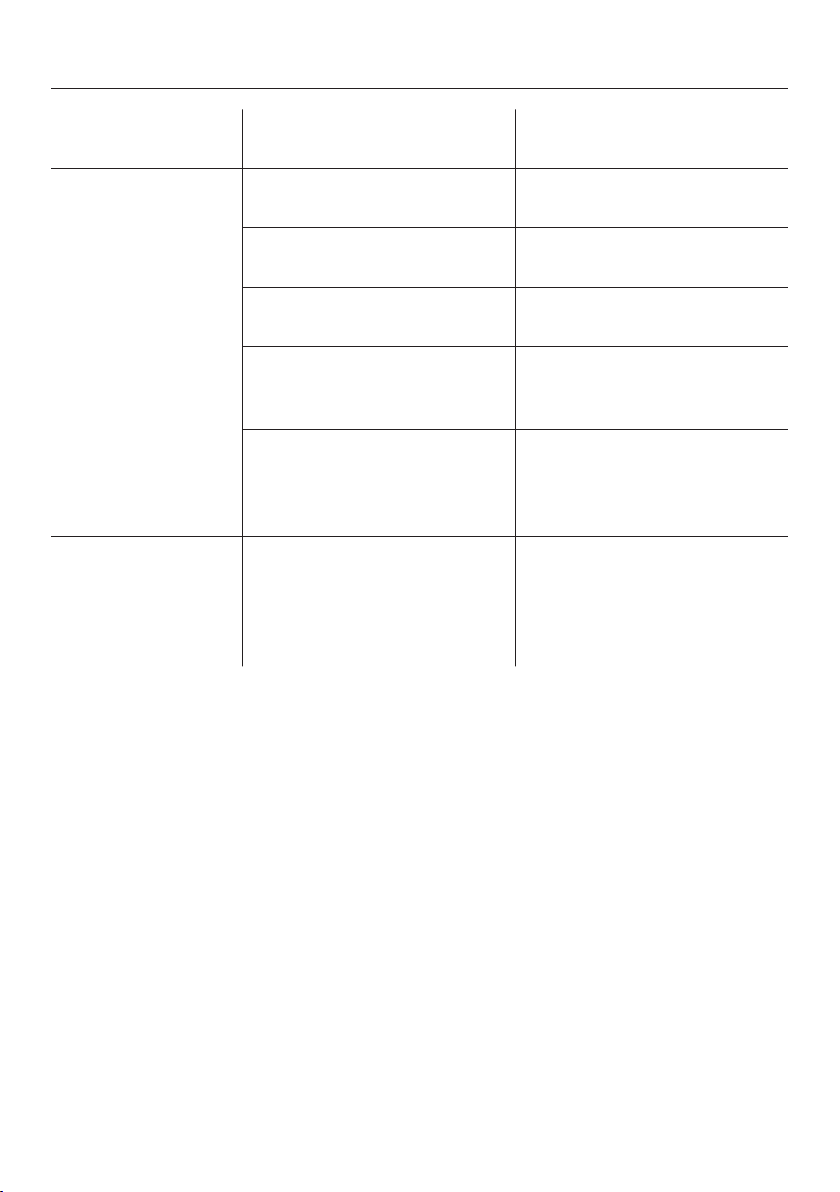
Normal
ener
gyconsumption
Increased
ener
gyconsumption
Installation/
M
aintenance
In a ventilated room. In an enclosed, unventilated
r
oom.
Protected from direct
sunlight.
In direct sunlight.
Not situated near a heat
sour
ce (radiator, oven).
Situated near a heat source
(r
adiator, oven).
Where the ideal ambient
r
oom temperature is approx.
20 °C.
Where there is a high room
t
emperature.
Where the cross-section of
the air inlet and outlet is not
cover
ed and kept free of
dust.
Where the air inlets and
outlets are covered or dusty.
Temperature
settings
Freezer section -18 °C With a low temperature
setting: The lower the
t
emperature in the
appliance, the higher the
energy consumption.
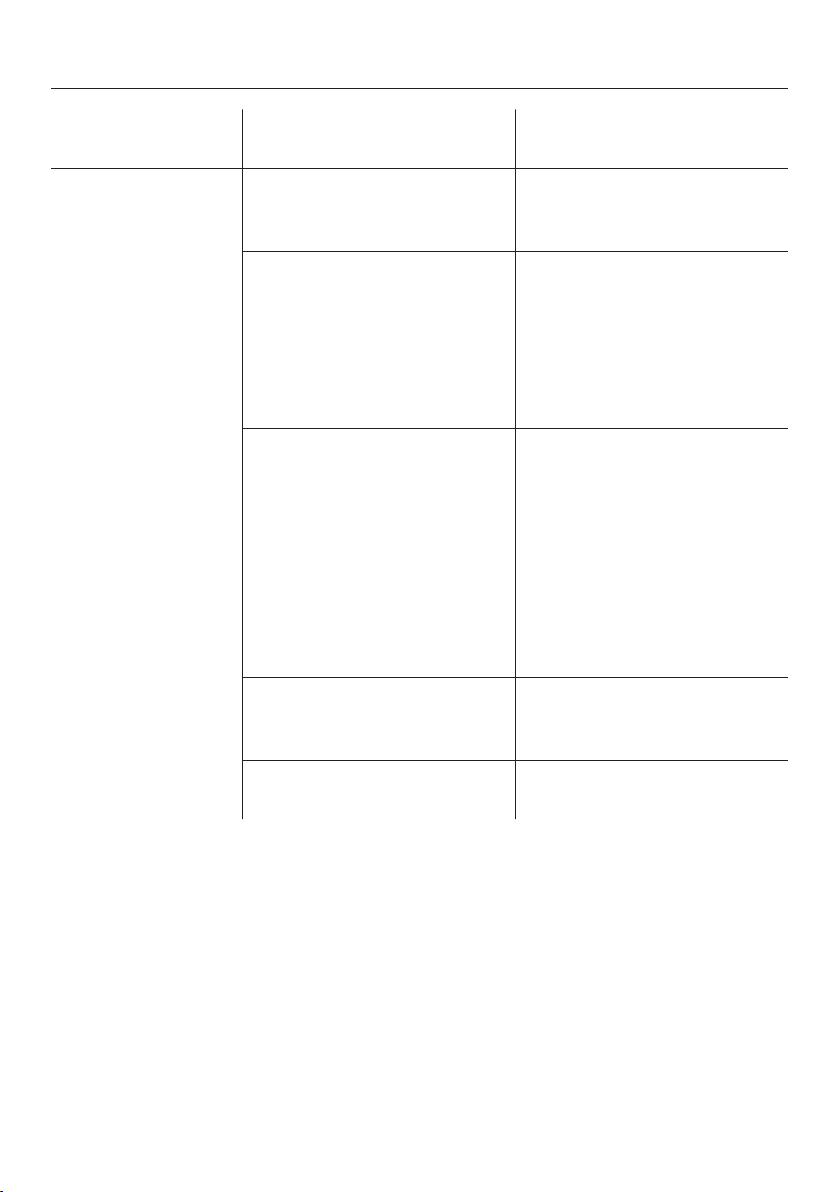
How to save energy
14
Normal
ener
gyconsumption
Increased
ener
gyconsumption
Operation Drawers and shelves
arr
anged as they were when
the appliance was delivered.
Only open the door when
necessar
y and for as short a
time as possible. Store food
in an organised way.
Frequent opening of the
door for long periods will
cause a loss of coldness.
The appliance
works harder
to cool down and the
compressor runs for longer
periods.
Take an insulated cool bag
when shopping and load
food in the appliance as
soon as possible. Replace
any food r
emoved as quickly
as possible, before it begins
to thaw.
Allow hot food and drinks to
cool down before placing
them in the appliance.
Hot food or food at room
t
emperature raises the
temperature inside the
appliance. The appliance
works harder to cool down
and the compressor runs for
longer periods.
Store food well packaged. The evaporation or
condensation of liquids will
cause a loss of coldness.
Do not overfill the appliance
t
o allow air to circulate.
Guide to the appliance
15
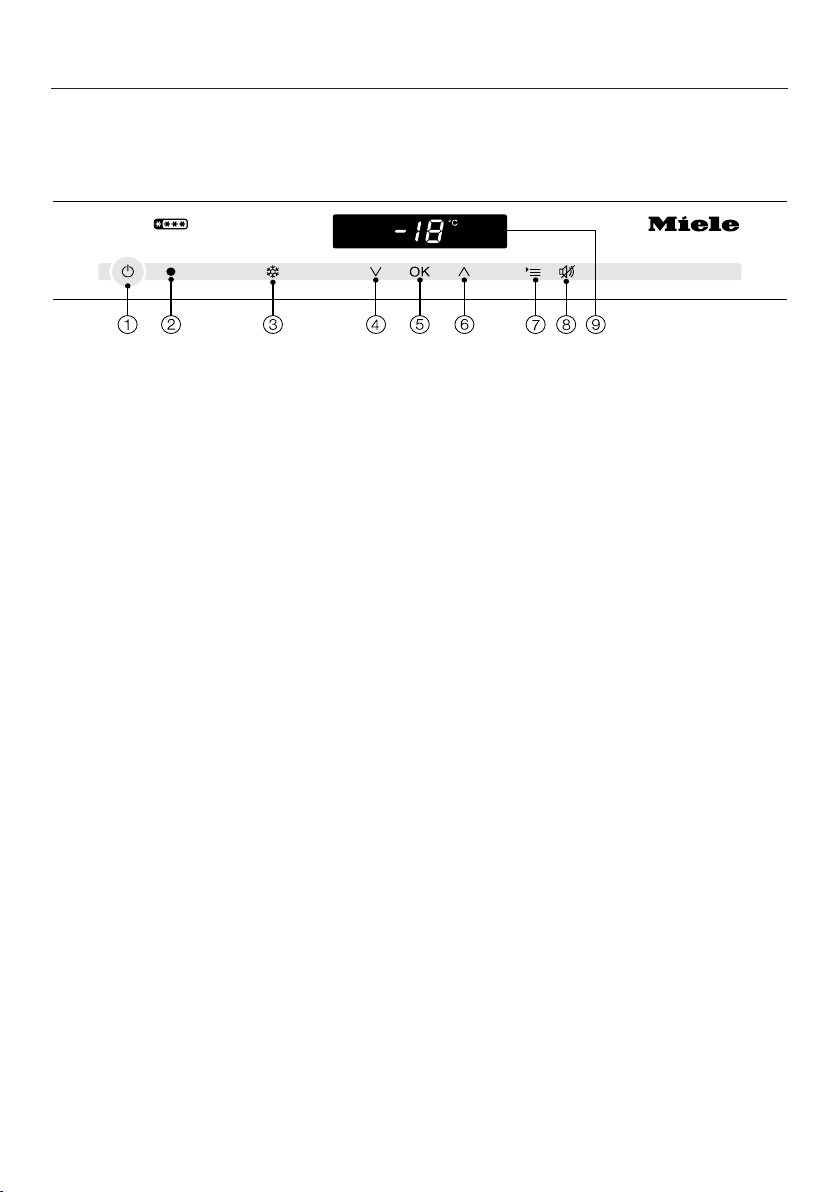
Control panel
a
On/Off sensor
for the whole appliance
b
Optical interface
(for Ser
vice only)
c
For switching the SuperFreeze
function on and off
d
For setting the temperature
( colder),
selection sensor in settings mode
e
For confirming a selection (OK
sensor)
f
For setting the temperature
( warmer),
selection sensor in settings mode
g
For selecting and deselecting the
settings mode
h
For switching the door alarm off
i
Display with temperature display and
symbols (symbols ar
e only visible in
settings mode if an alarm is
sounding, or if a message appears;
for an explanation of the symbols,
see the following chart)
Guide to the appliance
16
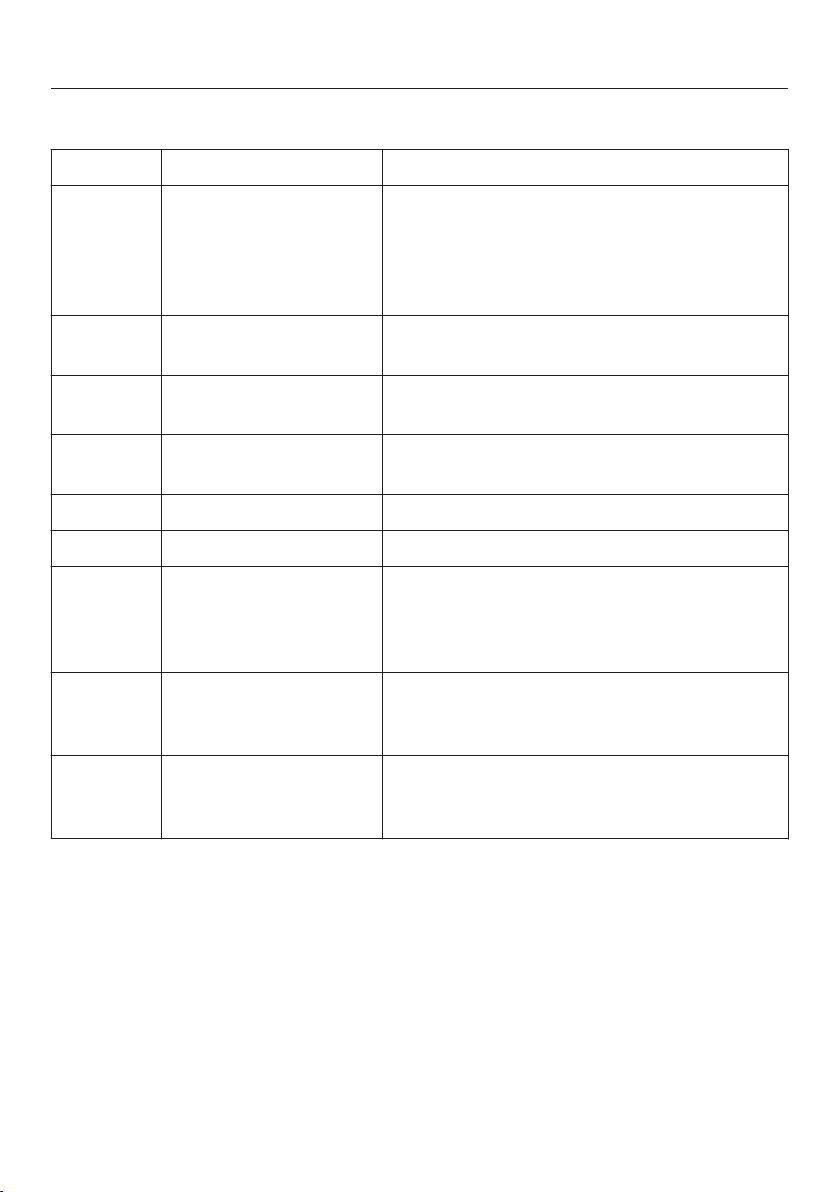
Explanation of symbols
Symbol Meaning Function
Safety lock Secures against unintended switching off
of the app
liance, unintended temperature
adjustment, unintended switching on of
SuperFreeze, and unintended entry of
settings
Audible tones Selection options for the keypad tone and
the door and t
emperature alarm tones
Miele@home Only visible when a communication module
is fitt
ed and signed on (see "Miele@home")
SmartGrid Only visible when a communication module
is fitt
ed and signed on (see "Miele@home")
Display brightness Setting the brightness of the display
Sabbath mode Switching Sabbath mode on and off
Mains connection Confirms that the appliance is connected
t
o the electricity supply when it is not
switched on; Flashes when there is a
power cut
Alarm Lights up when there is a door alarm;
flashes when ther
e is a temperature alarm,
power cut or a fault
Demo mode
(only visible when
Demo mode is active)
Switching off Demo mode
Guide to the appliance
17
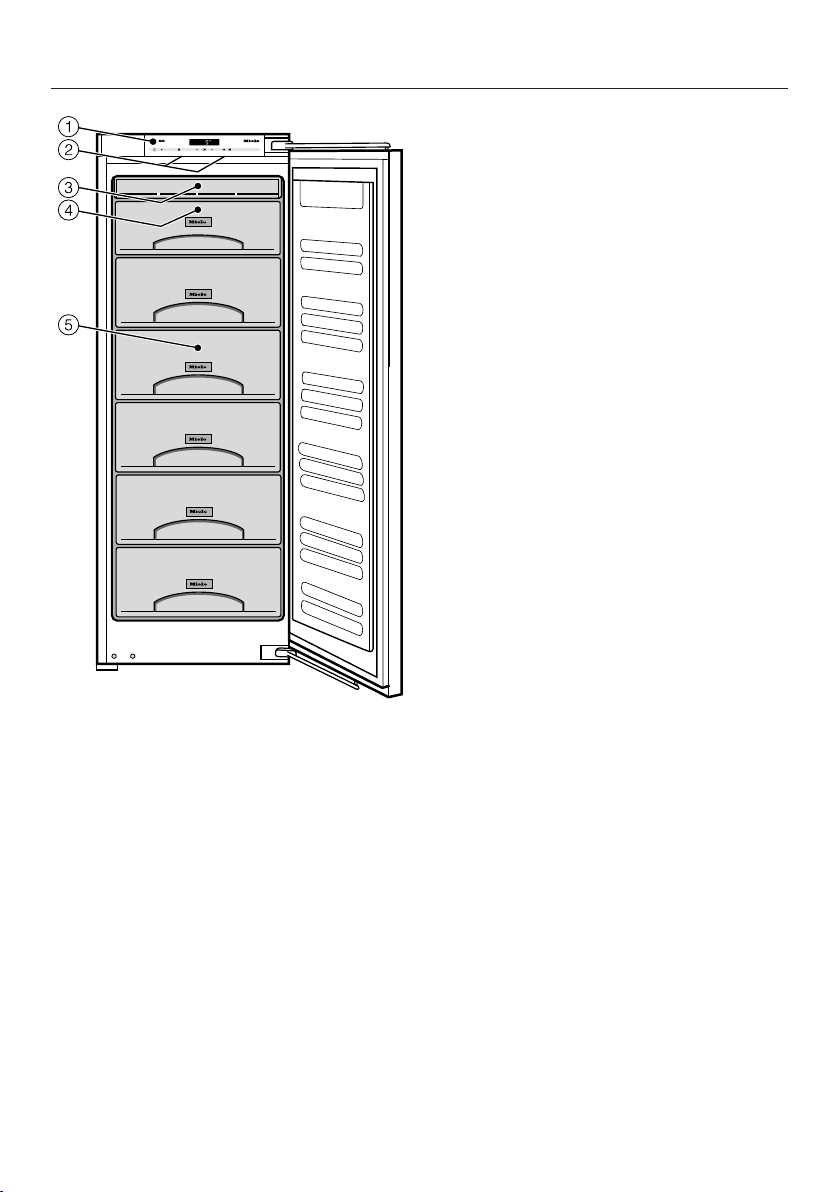
This picture is an example of an appliance
model.
a
Control panel
b
Interior lighting
c
Frost-free unit
d
Top freezer drawer, can also be used
as a freezing tray
e
Freezer drawers (number depends
on model)
Switching on and off
18
Before using for the first time
Packaging material
Remo
ve all packaging material from
the inside of the appliance.
Cleaning
Please refer to the relevant
in
structions in "Cleaning and care".
Clean the inside of the appliance and
the accessories.
Operating the appliance
A light touch of the finger on the
sensors is al
l that is required to operate
this appliance.
Each touch of a sensor is confirmed
with a k
eypad tone. The keypad tone
can be switched off if you wish (see
"Further settings").
Switching on
When the appliance is connected to the
electrical supply, the mains connection
symbol will appear in the display
aft
er a short while.
Touch the On/Off sensor.
The mains connection symbol
goes
out and the temperature appears in the
display. Two bars will flash in the
display while the current temperature is
above 0 °C.
The appliance begins to cool.
The t
emperature display and the alarm
symbol will flash at the same time
until the required temperature is
reached.
When the appliance door is opened, the
int
erior lighting comes on and the LED
lighting becomes brighter until it
reaches its maximum brightness.
To enable the temperature to get
sufficiently cold inside the appliance,
all
ow the appliance to run for a few
hours before placing food in it.
Switching on and off
19
Switching off
T
ouch the On/Off sensor.
If this does not work, the safety lock
is activated.
The temperature display disappears
and the mains connection symbol
lights up.
The cooling process will be switched
off.
Switching off the appliance in
Sabbath mode
The appliance can be switched off
directly at any time.
T
ouch the On/Off sensor.
The temperature display disappears
and the mains connection symbol
lights up.
The cooling process will be switched
off.
When the appliance is switched
back on again, Sabbath mode is
deactiva
ted.
Switching off for longer
periods of time
If the appliance is not going to be used
for a longer period of time, e.g. whilst
on holiday:
switch the appliance off,
switch off at the wall and withdr
aw
the plug from the socket, or
disconnect the mains fuse or remove
the screw-out fuse in countries where
this is applicable,
clean the appliance, and
lea
ve the door open to air out the
appliance and avoid the formation
odours.
If, during a long absence, the
appliance is switched off but not
cleaned and the door(s) left shut,
ther
e is a danger of mould and
odours building up inside the
appliance.
The correct temperature
20
It is very important to set the correct
t
emperature for storing food in the
appliance. Micro-organisms will cause
food which is not stored at the correct
temperature to deteriorate rapidly.
Temperature influences the growth rate
of these micro-organisms. Reducing
the temperature reduces their growth
rate.
To freeze fresh food and to store frozen
food for a long
time, a temperature of
-18 °C is required. At this temperature
the growth of micro-organisms is
generally halted. As soon as the
temperature rises above -10 °C, the
micro-organisms become active in the
food again so that it cannot be kept as
long. For this reason, partially defrosted
or fully defrosted food must not be
refrozen. Food may be refrozen once it
has been cooked, as the high
temperatures achieved when cooking
destroy most micro-organisms.
The temperature in the appliance will
rise:
– the more often the door is opened
and the lon
ger it is kept open,
– the more food that is stored in it,
– the warmer the food is which is being
put int
o it,
– the higher the ambient temperature
surr
ounding the appliance. The
appliance is designed for use within
specific ambient temperatures
(climate range). Do not use in
ambient temperatures for which it is
not designed.
Temperature display
In normal operation the temperature
display shows the aver
age, current
temperature in the freezer.
If the temperature is not within the
norma
l temperature display range,
dashes will flash in the display.
Depending on the room temperature
and the t
emperature setting, it can take
several hours until the selected
temperature is reached and displayed
steadily.
However, if the temperature in the
fr
eezer section remains above -18 °C
for a long time, check that the frozen
food has not started to defrost. If it
has, check that the food is safe to
use and if it is, then use it as soon as
possible.
The correct temperature
21
Setting the temperature
Use the two sensors underneath the
display t
o set the temperature.
By touching the sensor
– the temperature will get colder,
– the temperature will get warmer.
While the temperature is being set, the
t
emperature value will flash.
The following information appears in
the display while the senso
rs are being
touched:
– When first tapped: The last
t
emperature selected flashes.
– Each subsequent touch of a sensor:
Th
e temperature is adjusted in 1 °C
steps.
– Leaving a finger on the sensor
cha
nges the temperature
continuously.
Approximately 5 seconds after the last
time a senso
r has been touched, the
current temperature inside the
appliance is automatically shown.
or
T
ouch OK to confirm your selection.
If you have adjusted the temperature,
wait for appr
ox. 6 hours if the
appliance is not very full and for
approx. 24 hours if the appliance is
full befor
e checking the temperature
display, as it will take this long for the
appliance to give an accurate reading.
If,
after this time, the temperature is
still too high or too low, you will need
to adjust it again.
Temperature range
The temperature can be adjusted
between
-15 °C and -28 °C.
Using SuperFreeze
22
SuperFreeze
Switch the SuperFreeze function on
befor
e putting fresh food into the
freezer.
This helps food to freeze quickly and
r
etain its nutrients, vitamins, flavours
and appearance.
Exceptions:
– When putting in food that is already
fr
ozen.
– When freezing up to 2 kg fresh food
daily
.
Switching on SuperFreeze
When freezing small quantities of food
in the fr
eezer, the SuperFreeze function
should be switched on 6 hours
beforehand. When freezing the
maximum load of food, the
SuperFreeze function should be
switched on 24 hours beforehand.
T
ouch the SuperFreeze sensor so
that it is highlighted in yellow.
The appliance will work at full power to
lower the t
emperature in the appliance.
Switching off SuperFreeze
The SuperFreeze function will switch
itself off aut
omatically after
approx. 65 hours. The quantity of fresh
food placed in the freezer will determine
the duration before the SuperFreeze
function switches off. The
SuperFreeze symbol will go out and
the appliance will run at normal power
again.
To save energy, the SuperFreeze
function can be switched off once a
constant t
emperature of -18 °C or
colder has been reached in the freezer
section. Keep an eye on the
temperature as it falls.
T
ouch the SuperFreeze sensor so
that it is no longer highlighted in
yellow.
The appliance will continue running at
norma
l power.
Temperature and door alarm
23
The appliance has been fitted with a
warning
system which ensures that the
temperature in the freezer cannot rise
unnoticed and to avoid energy being
wasted if the door is left open.
Temperature alarm
If the freezer temperature becomes too
warm, the alarm symbol for the
fr
eezer flashes in the display and an
alarm will also sound.
The temperature the appliance is set at
det
ermines the temperature the
appliance recognises as being too
warm.
Audible and visual signals will be
activat
ed, for example,
– when the appliance is switched on
and the t
emperature in the appliance
differs greatly from the set
temperature,
– if a lot of room air enters the freezer
when food is being loaded,
r
earranged or taken out.
– when freezing large amounts of food
at once,
– in the event of a power cut,
– if the appliance has a fault.
The alarm will stop and the alarm
symbol will go out as soon as the
t
emperature has dropped down to the
correct level again.
However, if the temperature in the
freezer remains above -18 °C for a
long time, check that the frozen food
has not started to defrost. If it has,
check that the food is safe to use
and if it is, then use it as soon as
possible or cook it before freezing it
again.
Switching the temperature alarm off
early
If the noise of the alarm disturbs you,
you can switch the alarm off early if you
wish.
T
ouch the alarm off sensor.
The alarm will stop.
The alarm symbol will
remain
illuminated until the set temperature has
been reached.
Temperature and door alarm
24
Door alarm
An alarm will sound if the door is left
open for t
oo long. The alarm symbol
will light up.
The time until the door alarm is
triggered depends on the selected
setting and can be either 2 minutes
(factory default) or 4 minutes. The door
alarm can also be switched off (see
"Further settings - Audible tones").
As soon as the door is closed, the
audible t
one will stop and the alarm
symbol will disappear from the
display.
If no audible tone sounds even though
a door alarm is available, then the
audible t
one has been switched off in
settings mode (see "Further settings -
Audible tones").
Switching the door alarm off early
If the noise of the alarm disturbs you,
you can switch the alarm off early if you
wish.
T
ouch the alarm off sensor.
The audible tone stops.
The alarm symbol r
emains
illuminated until the door is closed.
Further settings
25
Certain settings on the appliance can
onl
y be selected in settings mode.
When in settings mode, the door
alarm an
d other fault messages are
automatically deactivated although
the alarm symbol appears in the
display.
Setting options
Switching the safety lock on/off
Switching audible tones on/off
Changing the display brightness
Turning Sabbath mode on/off
All other setting options are described
below
.
Safety lock
The safety lock can be activated to
pr
event:
– switching off,
– temperature changes,
– selection of the SuperFreeze
function,
– adjustment of settings (only
switching off the safety lock is
possible).
The safety lock prevents the appliance
being used without your knowledge, by
chil
dren, for example.
Switching the safety lock on/off
T
ouch the settings sensor.
All selectable symbols appear in the
display and the flashes.
T
ouch the OK sensor to confirm your
selection.
The last selected setting flashes in the
display and the symbol lights up.
Further settings
26
By t
ouching either the or sensor
you can now set whether the safety
lock is to be switched on or off:
0: safety lock is switched off
1: safety lock is switched on
Touch the OK sensor to confirm your
selection.
The selected setting is saved and the
symbol flashes.
T
ouch the settings sensor to leave
settings mode.
Otherwise, the electronics will leave
settings mode automatically after
approx. one minute.
When the safety lock is switched on,
ligh
ts up in the display.
Audible tones
The appliance has audible tones such
as the k
eypad tone and the door and
temperature alarms.
The keypad tone and door alarm
warning tone can be switched on or off,
but the temperature alarm cannot be
switched off.
You can choose from four setting
options. Option 3 is set at the fact
ory.
This means that both the keypad tone
and the door alarm are switched on.
Switching audible tones on/off
T
ouch the settings sensor.
All selectable symbols appear in the
display and the flashes.
T
ouch the sensors for setting the
temperature ( or ) repeatedly until
the symbol appears in the
display.
T
ouch the OK sensor to confirm your
selection.
The last selected setting flashes in the
display and the symbol lights up.
Further settings
27
By t
ouching the or sensor you
can now select:
0: keypad tone off; door alarm off
1: keypad tone off; door alarm on
(after 4 minutes)
2: keypad tone off; door alarm on
(after 2 minutes)
3: keypad tone on; door alarm on
(after 2 minutes)
T
ouch the OK sensor to confirm your
selection.
The selected setting is saved and the
symbol flashes.
T
ouch the settings sensor to leave
settings mode.
Otherwise, the electronics will leave
settings mode automatically after
approx. one minute.
Display brightness
You can adjust the display brightness to
suit the lig
ht conditions in the room.
The display brightness can be adjusted
i
n steps from 1 to 3. The factory default
setting is 3 (maximum brightness).
Changing the display brightness
T
ouch the settings sensor.
All selectable symbols appear in the
display and the flashes.
T
ouch the sensors for setting the
temperature ( or ) repeatedly until
the symbol appears in the display.
T
ouch the OK sensor to confirm your
selection.
The last selected setting flashes in the
display and the symbol lights up.
Further settings
28
By t
ouching the or sensor you
can adjust the display brightness:
1: minimum brightness
2: medium brightness
3: maximum brightness
T
ouch the OK sensor to confirm your
selection.
The selected setting is saved and the
symbol flashes.
T
ouch the settings sensor to leave
settings mode.
Otherwise, the electronics will leave
settings mode automatically after
approx. one minute.
Sabbath mode
The appliance offers a Sabbath mode
for the purposes of r
eligious
observance.
The following are switched off:
– the interior lighting when the door is
opened
– all acoustic and optical signals
– the temperature display
– the SuperFreeze function (if
previously selected)
The following can be selected:
– the settings sensor for switching off
Sabbath mode
– the On/Off sensor
The Sabbath mode will switch itself off
aut
omatically after approx. 120 hours.
Ensure that the doors are properly
closed, as visual and audible alarms
ar
e switched off.
Any power failure during this time is
not sho
wn in the display. After a
power failure, the appliance restarts in
Sabbath mode.
Further settings
29
Switching on Sabbath mode
T
ouch the settings sensor.
All selectable symbols appear in the
display and the flashes.
Touch the sensors for setting the
temperature ( or ) repeatedly until
the symbol flashes in the display.
T
ouch the OK sensor to confirm your
selection.
The last selected setting flashes in the
display and the symbol lights up.
By touching the or sensor you
can now switch on Sabbath mode.
To do this, select setting 1.
T
ouch the OK sensor to confirm your
selection.
The selected setting is applied, the
symbol lights up.
As soon as the symbol goes out in
the display aft
er 3 seconds, Sabbath
mode is switched on.
Switch off Sabbath mode aft
er the
Sabbath has passed.
Switching off Sabbath mode
T
ouch the settings sensor to leave
the Sabbath mode.
The temperature appears in the display
and the interior lighting switches on.
Adjusting the interior fittings
30
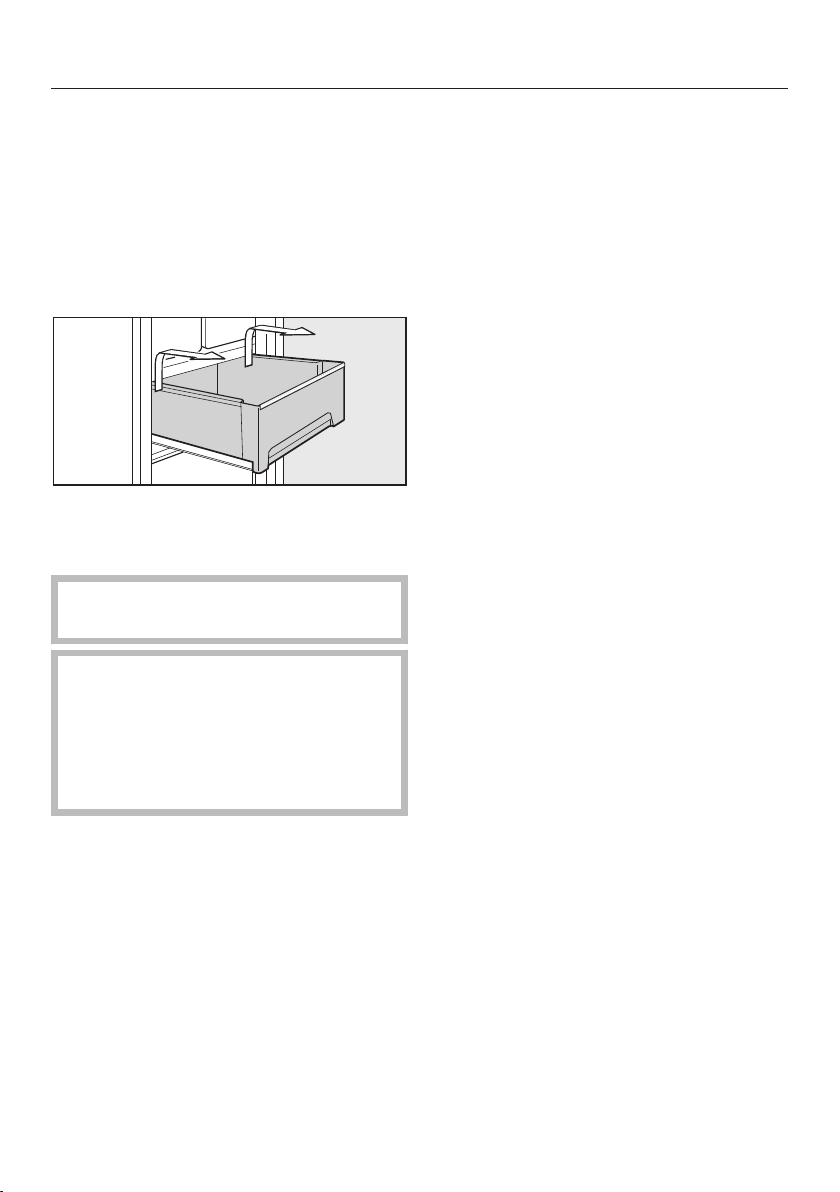
Removing freezer drawers on
t
elescopic runners
Some of the freezer drawers are on
t
elescopic runners and can be removed
for filling, emptying or cleaning
purposes.
P
ull the drawer out as far as it will go.
Ho
lding the sides of the drawer at the
back, lift it up and then forwards and
out.
Push the runners back in again to
avo
id injury or damage.
Be careful not to wash out the
special
lubricant in the telescopic
runners during cleaning.
Wipe the telescopic runners with a
well-
wrung out damp cloth to clean
them.
T
o replace the drawer, push the
runners back in completely and then
place the drawer on them.
P
ush the drawer into the appliance
until it clicks into position.
Removing the shelves
The shelves can be removed.
Li
ft the shelf slightly at the front and
then pull it forwards and out.
Freezing and storing food
31
Freezing fresh food
Fresh food should be frozen as quickly
as possible. This way the nutritional
value
of the food, its vitamin content,
appearance and taste are not impaired.
Food which takes a long time to freeze
will lo
se more water from its cells,
which then shrink. During the defrosting
process, only some of this water is
reabsorbed by the cells; the rest
collects around the food.
If food is frozen quickly, the cells have
less time t
o lose moisture, so they
shrink less. As there is not so much
moisture loss, it is easier for the food to
reabsorb it during the defrosting
process, and very little water collects
around the defrosted food.
Storing frozen food
When buying frozen food to store in
your fr
eezer section, check
– that the packaging is not damaged,
– the use-by date,
– the temperature at which the frozen
food is being
stored in the shop. The
length of time it can be kept is
reduced if it has been stored at a
temperature warmer than -18 °C.
Buy fr
ozen food once you have
finished the rest of your shopping,
and wrap it in newspaper or use a
cool bag or cool box to transport it.
S
tore it in the freezer as soon as
possible.
Never refreeze partially or fully
defrosted food. Consume defrosted
food as soon as possible as it will
lose its nutritional value and spoil if
left for too long. Defrosted food may
only be refrozen after it has been
cooked.
Freezing and storing food
32
Home freezing
Only freeze fresh food which is in a
good condition.
Tips on home freezing
– The following types of food ar
e
suitable for freezing:
Fresh meat, poultry, game, fish,
vegetables, herbs, fresh fruit, dairy
products, pastry, leftovers, egg
yolks, egg whites and a range of pre-
cooked meals.
– The following types of food ar
e not
suitable for freezing:
Grapes, lettuce, radishes, sour
cream, mayonnaise, eggs in their
shells, onions, whole raw apples and
pears.
– To retain colour, taste, aroma and
vitamin C, vegetables should be
blanch
ed after they have been
trimmed and washed. To blanch:
bring a large saucepan of water to
the boil, immerse the vegetables in
the fast boiling water for 2–3 minutes,
depending on variety. Remove, and
plunge into ice-cold water to cool
quickly. Drain and pack ready for
freezing.
– Lean meat freezes better than fatty
meat, and can be st
ored for
considerably longer.
– To prevent chops, steaks, cutlets or
r
olled meat from freezing together in
solid blocks when packed, separate
with a sheet of plastic freezer film.
– Do not season fresh foods or
blanch
ed vegetables before freezing.
Only season cooked food lightly
before freezing, but care should be
tak
en as the taste of some spices
alters when frozen.
– Placing hot foods or drinks in the
fr
eezer causes food that is already
frozen to partially thaw and increases
energy consumption. Allow hot foods
and drinks to cool down before
placing them in the freezer.
Packing
F
reeze food in portions.
Suitable packing material
– Plastic freezer film
– Freezer bags
– Aluminium foil
– Freezer containers
Unsuitable packing material
– Wrapping paper
– Grease-proof paper
– Cellophane
– Bin bags
– Plastic shopping bags
Expel as much air as possible fr
om
bags etc. before sealing them to
prevent freezer burn on food.
Close the packaging tightly with
– rubber bands
– plastic clips
– string or bag ties
– freezer tape
Useful tip: F
reezer bags may also be
sealed using home heat sealing kits.
Freezing and storing food
33
Mak
e a note of the contents and the
date of freezing on the packaging.
Before placing food in the freezer
When freezing more than 2 kg of
fresh food, switch on the
SuperFreeze function for some time
before placing the food in the freezer
(see "Using SuperFreeze"). This also
helps to prevent food that is already
in the freezer from starting to defrost.
Placing food in the freezer
The following maximum loading
weig
hts must not be exceeded:
– Top freezer drawer = 5 kg
– Freezer drawer = 25 kg
– Shelf = 35 kg
Unfrozen food should not touch
fr
ozen food as this will cause frozen
food to begin to thaw.
Mak
e sure that the packaging and
containers are dry to prevent them
sticking together when frozen.
Freezing small items
Place the food in the lower freezer
dr
awers.
Place
the food flat in the bottom of
the freezer drawer so that it freezes
through to the core as quickly as
possible.
When placing food on the shelves,
make sure that you do not block the
ventilation slits in the back wall of
the appliance. They are important for
trouble-free operation of the
appliance and normal energy
consumption.
- Freezing the maximum amount (see
data plat
e)
Remo
ve the freezer drawers.
Place the food flat on the shelves so
that it fr
eezes through to the core as
quickly as possible.
After the initial freezing process:
Place the frozen food in the freezer
drawer and push it back in.
Freezing large items
If you wish to freeze large items such as
a turk
ey or game, the shelves between
the drawers can be removed. To do
this:
Remo
ve the freezer drawers and
carefully slide out the shelves.
Freezing and storing food
34
Defrosting
Frozen food can be defrosted in
differ
ent ways:
– in a microwave oven,
– in an oven using the "Fan" or
"Defrost" setting,
– at room temperature,
– in the refrigerator (the cold given off
by the fr
ozen food helps to keep the
other food cold),
– in a steam oven.
Flat pieces of par
tially thawed meat or
fish can be placed directly into a hot
frying pan.
Thicker pieces of meat and fish (e.g.
mince
d beef, chicken, fish fillet) should
not come into contact with other food
when defrosting. Collect the defrosting
liquid and then pour it away, making
sure you wash the container it was in,
the sink and your hands.
Fruit
should be defrosted at room
temperature in its packaging, or in a
covered bowl.
Most vegetables can be cook
ed while
still frozen. Just put straight into boiling
water or hot fat. The cooking time is
slightly less than that of fresh
vegetables due to changes in the cell
structure.
Never refreeze partially or fully
defrosted food. Consume defrosted
food as soon as possible as it will
lose its nutritional value and spoil if
left for too long. Defrosted food may
only be refrozen after it has been
cooked.
Freezing and storing food
35
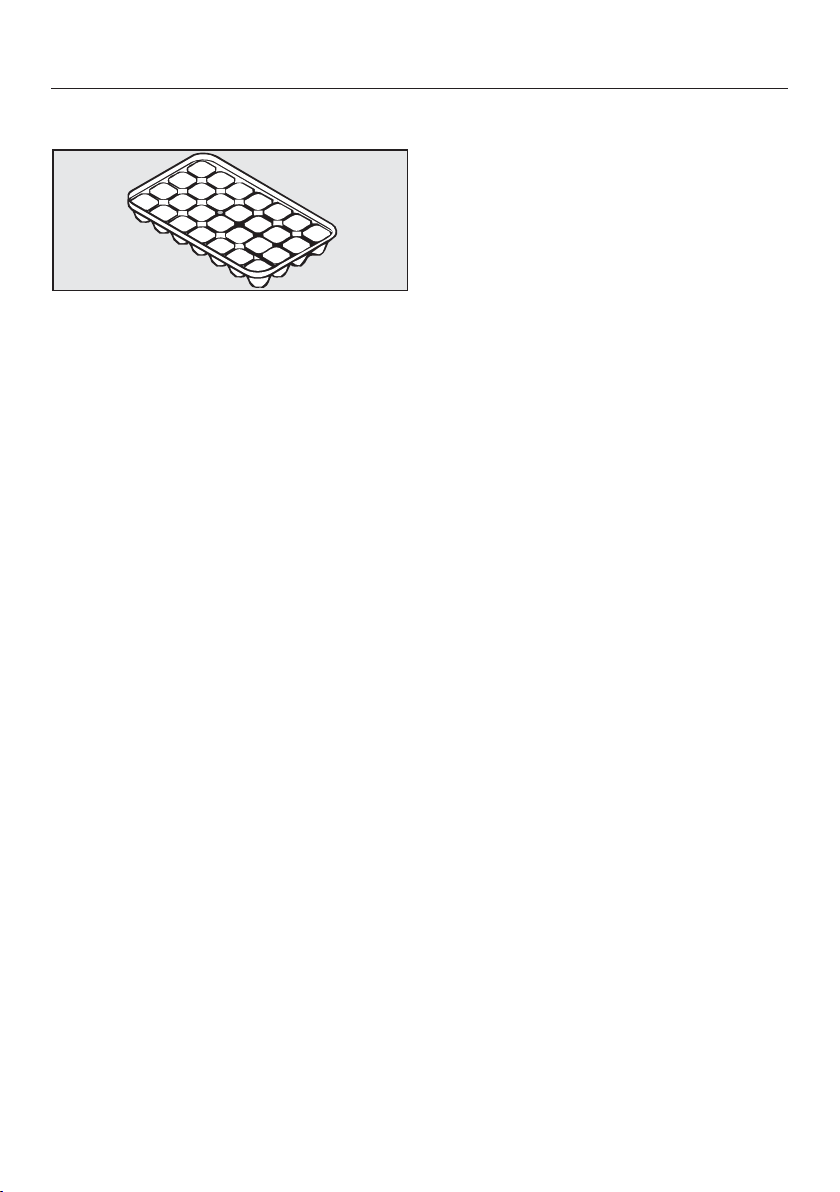
Making ice cubes
Fil
l the ice cube tray three quarters
full of water and place it on the
bottom of one of the freezer drawers.
Once fr
ozen, use a blunt instrument,
for example a spoon handle, to
remove the ice tray from the freezer if
it is stuck.
Useful tip: The ice cubes can be easily
loosen
ed by holding the tray briefly
under running water.
Cooling drinks quickly
When cooling drinks quickly in the
fr
eezer, make sure bottles are not left
in for more than one hour; otherwise
they could burst, causing injury and
damage.
Cool pack
The cool pack prevents the temperature
in the fr
eezer rising too quickly in the
event of a power cut, thus extending
the time for which food can be stored
without power to the appliance.
Place
the cool pack in the top drawer
of the freezer section.
The cool pack will be at its most
effective aft
er it has been in the freezer
for approx. 24 hours.
In the event of a power cut:
Plac
e the cool pack directly on top of
the frozen food in the front of the top
drawer so that the food will be kept
cold for as long as possible.
Useful tip: When pla
cing fresh food in
the freezer, use the cool pack to
separate the fresh food from the food
which is already frozen so that the
frozen food does not begin to thaw.
Useful tip: The cool pack can also be
used in a cool bag t
o keep food or
drinks cool for a short period of time.

Automatic defrosting
36
The appliance is equipped with a
"NoF
rost" system. The freezer defrosts
automatically.
The moisture generated by defrosting
collects in the condenser and is
aut
omatically dissipated by the
condenser from time to time.
This automatic defrosting system
enables the fr
eezer to remain
permanently ice-free. Food stored in the
freezer will not defrost.
Cleaning and care
37
Do not let water get into the
electronic unit or the lighting.
Cleaning water must not get into the
dr
ain hole.
Do not use a steam cleaning
applianc
e to clean this appliance.
The steam could reach the electrical
components and cause a short
circuit.
The data plate located inside the
appliance must no
t be removed. It
contains information which is required
in the event of a service call.
Cleaning agents
To avoid damaging the surfaces of your
appliance, do not use:
– cleaning agents containing soda,
ammonia, acids or chlorides,
– cleaning agents containing descaling
agents,
– abrasive cleaning agents, e.g.
powder cleaners an
d cream cleaners,
– solvent-based cleaning agents,
– stainless steel cleaning agents,
– dishwasher cleaner,
– oven sprays,
– glass cleaning agents,
– hard, abrasive sponges and brushes,
e.g. pot scour
ers,
– dirt erasers,
– sharp metal scrapers.
Cleaning and conditioning agents
used inside the appliance must be
food safe.
We recommend using lukewarm water
with a little washin
g-up liquid to clean
surfaces of the appliance.
The following pages contain
impor
tant information on cleaning.
Cleaning and care
38
Before cleaning
Switch the appliance off.
The display goes dark and the cooling
is switched off.
If this is not the case, the safety lock is
on (see "F
urther settings - Switching
the safety lock on/off).
Disc
onnect the appliance from the
mains. Switch off at the wall and
withdraw the plug from the socket, or
switch off the mains circuit breaker.
T
ake any food out of the appliance
and store it in a cool place.
Remove the shelves:
Lift them up at the fr
ont slightly and
then pull them forwards and out.
The telescopic runners on the
shel
ves are not dishwasher safe.
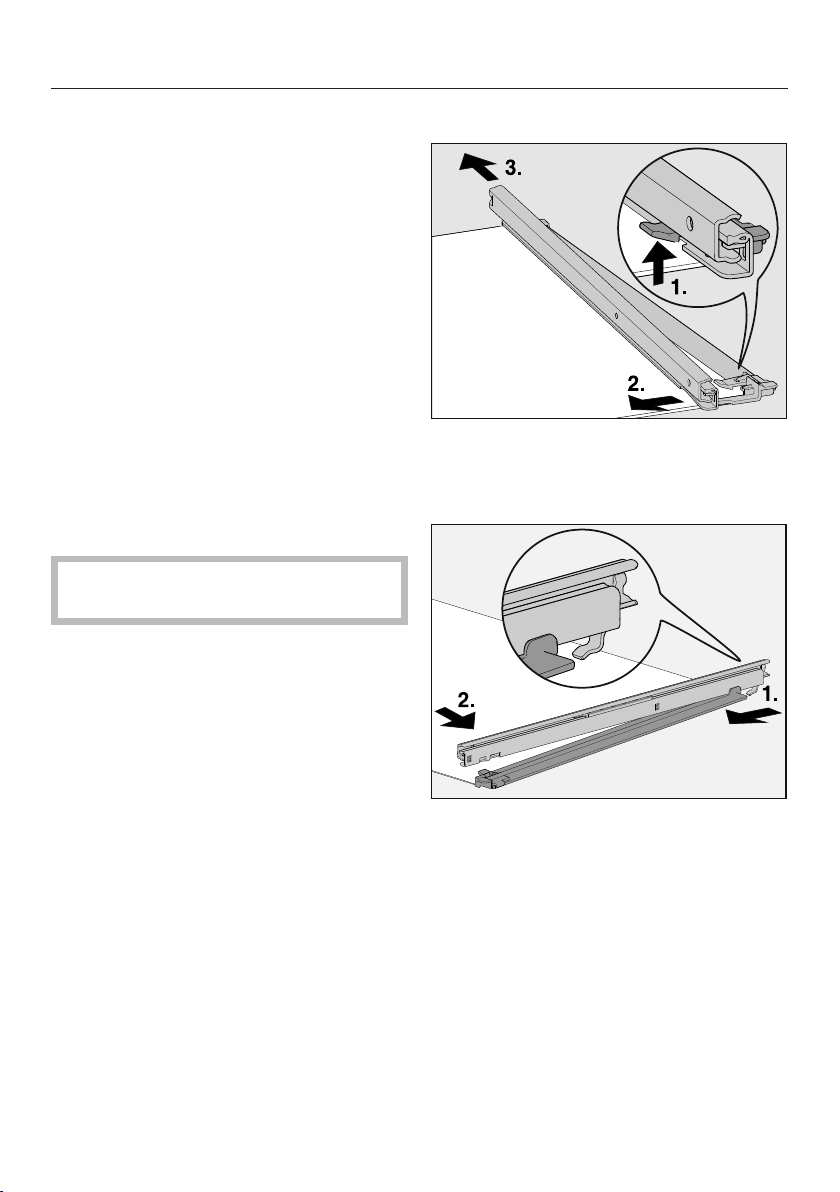
To remove the telescopic runners:
Push the catch up (1).
P
ush the telescopic runner to the
side (2) and then backwards (3).
Aft
er cleaning, reattach the
telescopic runners to the shelf.
To do this, hook the telescopic runner
onto the shelf (1) and then click the
catch into position (2).
Cleaning and care
39
Cleaning the interior and
accessories
Clean the appliance at least once a
month.
Clean up any spills, stains or food
imme
diately. Do not allow them to
dry and stick to the appliance.
Cle
an the interior with lukewarm
water and a little washing-up liquid
applied with a soft sponge. After
cleaning, wipe with a clean, damp
cloth and then dry with a soft cloth.
The following parts cannot be cleaned
in a dishwasher:
– Freezer drawers
– Shelves
– Telescopic runners on the shelves
– Cool packs
Cleaning and care
40
The ice cube tray is dishwasher safe.
The maximum temperature of the
dishwashi
ng programme selected
must not exceed 55 °C.
Contact with natural dyes from
carr
ots, tomatoes and ketchup may
discolour the plastic parts in the
dishwasher.
This discolouration does not affect the
stability of the parts.
W
ipe the telescopic runners with a
well-wrung out damp cloth to clean
them.
Be careful not to wash out the
special
lubricant in the telescopic
runners during cleaning.
L
eave the door open to air the
appliance for a short while.
Door seal
Do not use any oils or grease on the
door seals as these will cause the
seals t
o deteriorate and become
porous over time.
The door seals should be cleaned
r
egularly with clean water, and then
wiped dry with a soft cloth.
Ventilation gaps
The ventilation gaps should be
cle
aned on a regular basis with a
brush or vacuum cleaner.
A build-up of dust will increase the
energy consumption of the appliance.

Cleaning and care
41
After cleaning
Slide all
shelves back into the
appliance.
Clo
se the appliance door.
Reco
nnect to the mains and switch
the appliance back on.
Switch on the SuperF
reeze function
so that the freezer can cool down
quickly.
Once the freezer section has reached
the required temperature, place the
food back in the freezer drawers and
replace them in the freezer section.
When the t
emperature in the freezer
is a constant -18 °C or colder, press
the SuperFreeze sensor to switch the
SuperFreeze function off.
Problem solving guide
42
With the aid of the following guide, minor problems can be easily corrected
without contacting Miele.
If,
after consulting this guide, you cannot remedy the problem, please contact
Miele. Please note, however, that a call-out fee will be applied to unnecessary
service visits where the problem could have been rectified as described in these
operating instructions.
To prevent unnecessary loss of temperature, it is advisable not to open the door
while waitin
g for the appliance to be serviced.
Unauthorised installation, maintenance and repairs can cause considerable
danger for the user.
Installation, maintenance and repairs must only be carried out by a Miele
authorised technician.
Problem Possible cause and remedy
The appliance is not
gett
ing cold, the interior
lighting does not come
on when the door is
opened, and the display
is not lit up.
The appliance is not switched on and the mains
connection symbol is lit up in the display
.
Switch the appliance on.
The plug is not correctly inserted into the socket.
Inser
t the plug correctly into the socket. The mains
connection symbol appears in the display
when the appliance is switched off.
Check whether the mains fuse has tripped. There
could be a fault with the appliance, the household
electrical wiring or another electrical appliance.
Contact a qualified electrician or Miele.
The appliance does not
get cold, although the
contr
ols and the interior
lighting are working.
Demo mode is switched on and the symbol lights
up in the display
. This allows the appliance to be
presented in Miele Centers and retail stores without
switching on refrigeration. Do not activate this setting
for domestic use!
Switch off Demo mode (see "Information for Miele
Cent
ers and Chartered Agents - Demo mode").
Problem solving guide
43
Problem Possible cause and remedy
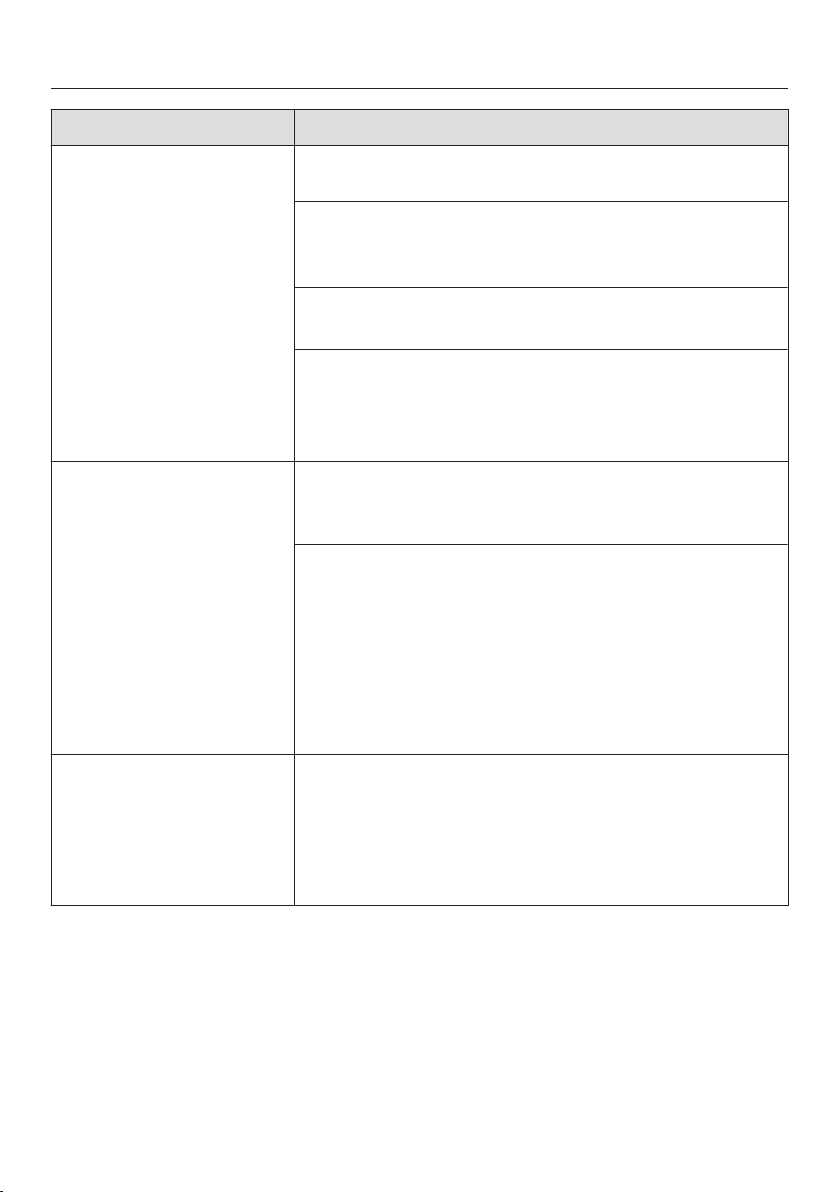
The compressor runs
contin
uously.
This is not a fault. To save energy, the compressor
runs at a lower speed,
but for longer, when less
cooling is required.
The compressor is
switching
on more
frequently and for
longer periods.
The ventilation gaps in the housing unit have been
cover
ed or become too dusty.
Do not block the ventilation gaps.
Clean
the ventilation gaps on a regular basis.
The doors have been opened too frequently, or a
lar
ge amount of fresh food has been placed inside
and/or frozen at the same time.
Only open the door when necessary and for as
short a time as possible.
After a while the temperature will return to normal by
itself.
The door is not properly closed.
A thick layer of ice
may have formed in the freezer.
Close
the door.
After a while the temperature will return to normal by
itself.
If a thick layer of ice has formed, it will decrease the
coo
ling performance and increase the energy
consumption.
Defr
ost the appliance and clean it.
The room is too warm. The higher the room
t
emperature, the longer the compressor has to run.
See "I
nstallation advice - Location".
The appliance was not properly installed in the niche.
See "Installation - Building in the appliance".
Problem solving guide
44
Problem Possible cause and remedy
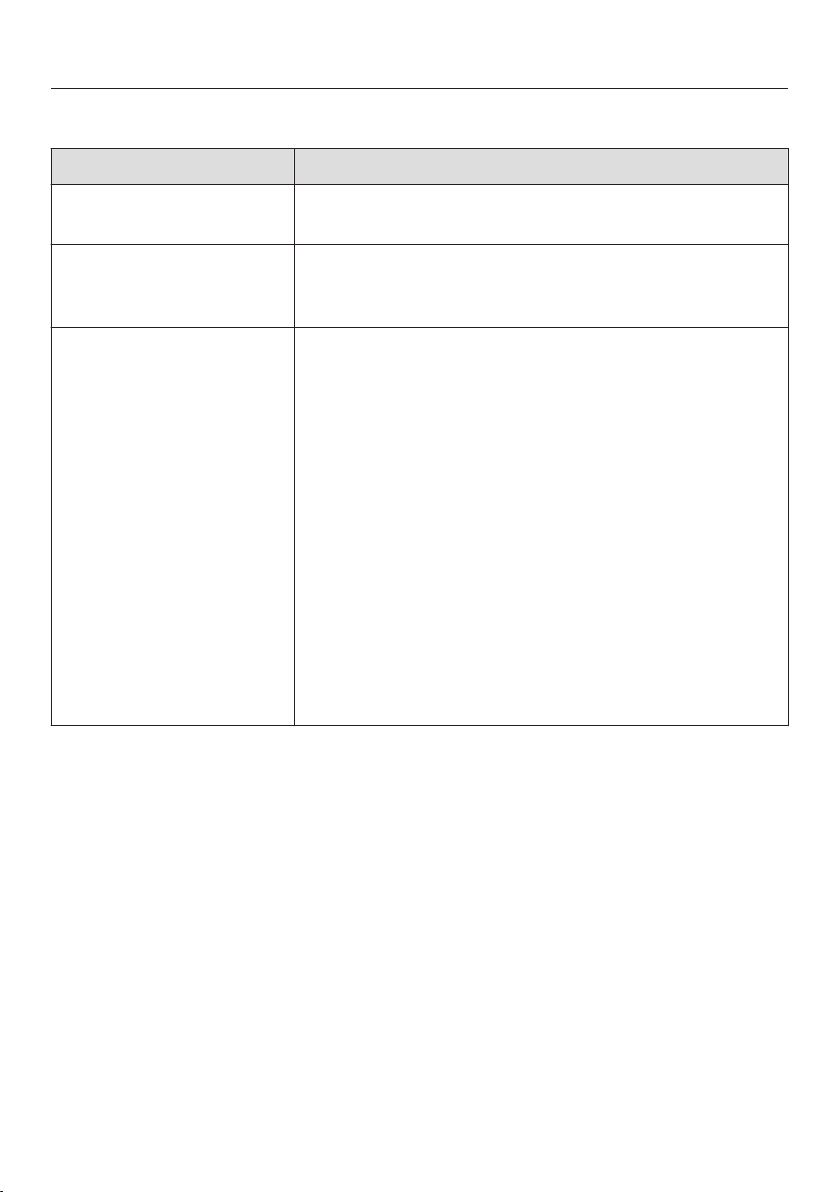
The compressor is
switching
on more
frequently and for
longer periods of time,
so the temperature in
the appliance is
dropping.
The temperature setting is too low.
Corr
ect the temperature setting.
The door is not properly closed.
Check whether the appliance door closes
pr
operly.
A large amount of food is being frozen at once.
See "F
reezing and storing food".
The SuperFreeze function is still switched on.
Y
ou can switch off the SuperFreeze function earlier
to save energy:
Touch the SuperFreeze sensor.
The compressor comes
on less and less often
and for shorter periods
of time. The
temperature in the
appliance rises.
This is not a fault. The set temperature is too high.
Corr
ect the temperature setting.
Check the t
emperature again after 24 hours.
The food begins to defrost.
The r
oom temperature is lower than the ambient
temperature for which the appliance is designed.
Operating in a room which is too cold will cause the
compressor to switch off for too long, causing the
freezer to become too warm.
See "I
nstallation advice - Location".
Raise the t
emperature of the room.
An LED indicator light is
flashing at the back of
the appliance at the
bott
om near the
compressor (depending
on model).
This is not a fault. The electronic unit for the
compressor is equipped with an operation and fault
diagnosis LED indicator light which flashes every 15
seconds (depending on model).
Problem solving guide
45
Messages in the display
Problem Possible cause and remedy
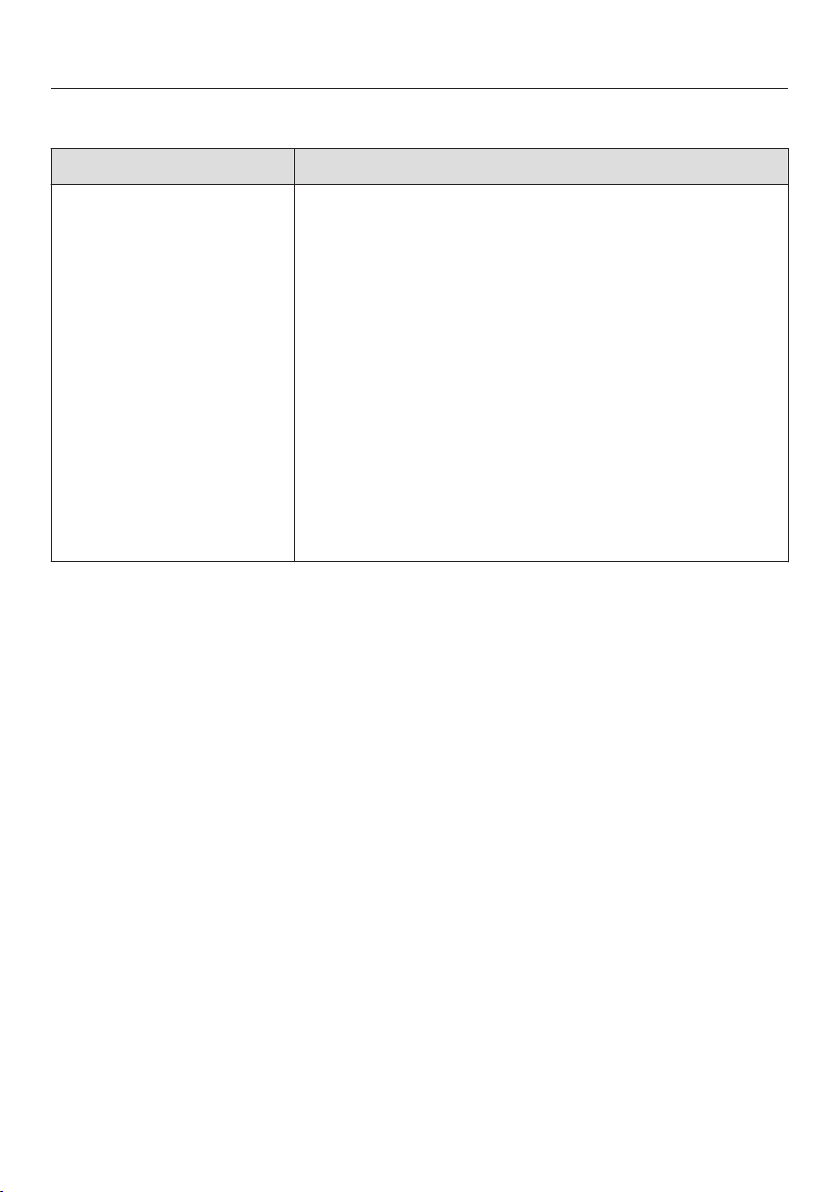
"F0
to F9" appears in
the display.
There is a fault.
C
all Miele.
The alarm symbol
lights up in the display
and an alarm sounds.
The door alarm has been activated.
Clo
se the appliance door. The alarm symbol
will go out and the alarm will stop.
The alarm symbol
flashes in th
e display.
The temperature in the freezer has risen higher or
fallen
lower than the temperature which has been set.
This could be due to, e.g.:
– the appliance door being opened too often, or
being left open.
– a large quantity of food was placed in the freezer
section at once without switching on
SuperF
reeze.
– the power was cut for a long time.
Remedy the alarm. The alarm symbol
will
disappear and the audible tone will stop.
Depending on the temperature, check whether the
food has defrosted or started to defrost. If this is
the case, cook the food before freezing again.
Problem solving guide
46
Messages in the display
Problem Possible cause and remedy
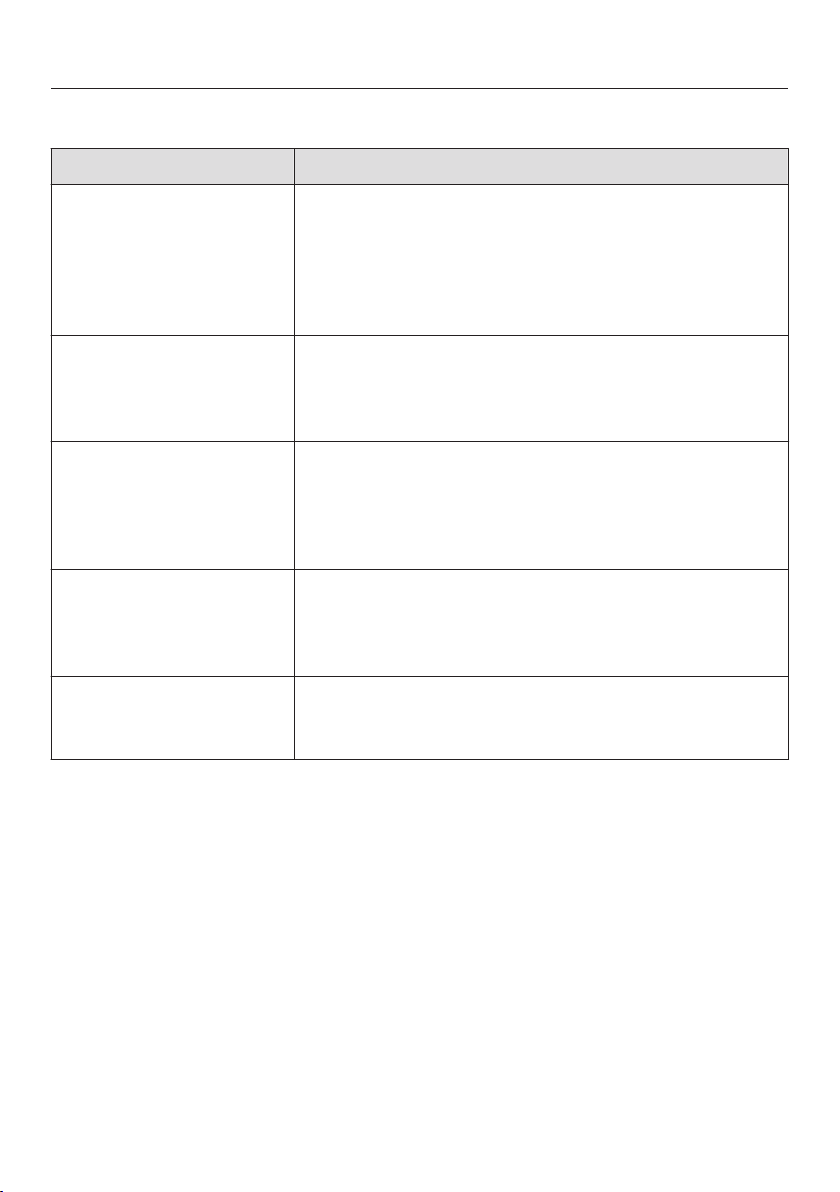
The mains connection
symbol , appears and
the alarm sounds.
Th
e temperature
display will also show
the warmest
temperature recorded
in the freezer during an
interruption to the
power supply or a
power cut.
The temperature in the appliance in the previous days
o
r hours has risen too high because of a power cut or
interruption to the power supply.
The appliance will go back to the last temperature
setting when the power is back on.
T
ouch the alarm off sensor.
The warmest temperature will be deleted. The display
will then
revert to showing the current temperature in
the freezer.
Depending
on the temperature displayed, you
should check the condition of food in the freezer. If
it has defrosted or started to defrost, check that it
is still safe to use and, if so, use it as soon as
possible. Defrosted food may only be refrozen
after it has been cooked.

Problem solving guide
47
The interior lighting is not working
Problem Possible cause and remedy
The interior lighting is
not working.
The appliance has not been switched on.
P
ress the On/Off sensor.
To avoid overheating, the lighting switches itself off
aut
omatically after approx. 15 minutes if the door is
left open. If this is not the case, then there is a fault.
Danger of injury and damage!
The LED lighting may only be repaired or replaced
by a Miele auth
orised service technician. There are
live electrical components under the lighting cover.
Do not remove the cover. If the cover is damaged
or ne
eds to be removed due to damage, exercise
caution.
There are lasers in the lighting (laser beam class
1M) which you should avoid looking at directly. Do
not use optical instruments (magnifying glass or
similar) to look at the lighting either.
C
all Miele.
Problem solving guide
48
Other problems
Problem Possible cause and remedy
The door to the freezer
section will not open
because it has been
o
pened and closed too
many times in
succession.
This is not a fault. The suction caused by opening
and closing
the door is preventing the door from
opening. Wait a few minutes and then try again. It
should now open without force.
Food has frozen
t
ogether.
The food packaging was not dry when loaded in the
fr
eezer.
Use a blunt instrument, e.g. a spoon handle or
plastic scr
aper, to prise it apart carefully.
An alarm does not
sound although the
appliance door has
been left open for some
time.
This is not a fault. The alarm tone was switched off in
settings mode (see "Further settings - Audible
tones").
You cannot switch the
appliance off.
The safety lock is switched on. The symbol lights
up.
Switch the safety lock off (see "F
urther settings -
Switching the safety lock on/off").
The external walls of
the appliance feel
warm.
This is not a fault. The heat which results from the
c
ooling process is used to avoid the build-up of
condensation on the appliance.
Noises
49
Normal noises What causes them
Brrrrr ... A humming noise is made by the motor (compressor). This
n
oise can get louder for brief periods when the motor switches
on.
Blubb, blubb ... A gurgling noise can be heard when coolant is circulating
thr
ough the pipes.
Click ... Clicking sounds are made when the thermostat switches the
mo
tor on and off.
Sssrrrrr ... On frost-free appliances you can sometimes just hear the
sound of the fan inside the appliance.
Crack ... A cracking sound can be heard when materials expand inside
the appliance.
Remember that the noise of the compressor and the coolant circulating in the
syst
em is unavoidable.
Noises that
you can easily
r
ectify
Possible cause Remedy
Rattling,
vibrating
The appliance is uneven. Realign the appliance by
using a spirit level and raising
or lowering the screw feet
underneath the appliance.
The appliance is touching
another appliance or piece of
furnitur
e.
Move it away.
Drawers or shelves are
unstable or sticking.
Check all removable items
and r
efit them correctly.
Containers are touching each
other
.
Separate them.
The transport cable clips are
hanging loose at the back of
the appliance.
Remove the clips.
After sales service and warranty
50
After sales service
In the event of any faults which you
cann
ot easily remedy, please contact
Miele.
– Ihren Miele Fachhändler oder
– den Miele Werkkundendienst.
See back of this booklet for contact
details.
Please quote the model and serial
number of your appliance when
contacting Miele.
This information is given on the data
plat
e inside your appliance.
Warranty
The manufacturer's warranty for this
appliance is 2 years.
For more information on the
manufac
turer's warranty specific to
your country, please contact Miele.
See the end of this booklet for contact
details.
Information for Miele Centers and Chartered Agents
51
Demo mode
The appliance can be demonstrated in
the sho
wroom or at exhibitions in
"Demo mode". In this mode the control
panel and interior lighting are active but
the compressor remains switched off,
so that the appliance does not cool
down.
Switching on Demo mode
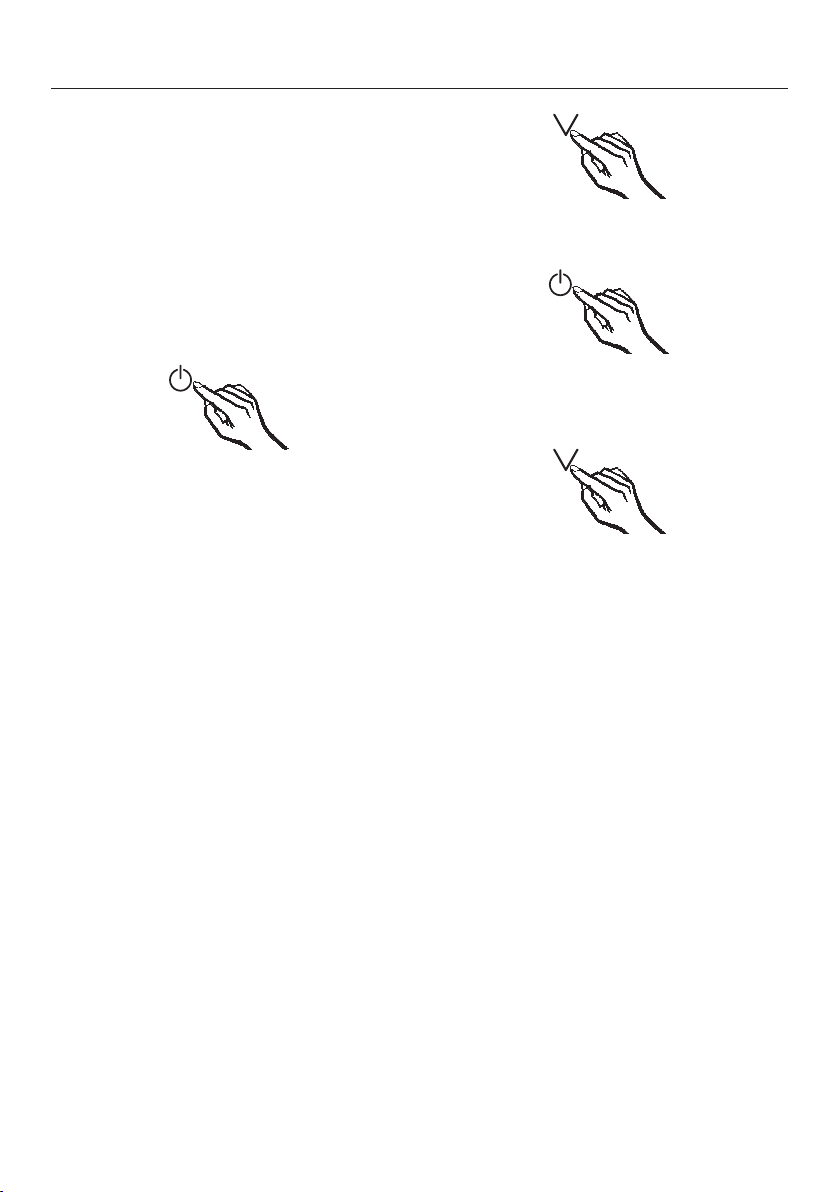
Switch the appliance off using the
On/Off sensor
.
If this does not work, the safety lock
is still activated.
The temperature display disappears
and the mains connection symbol
lights up.
Place your finger on the senso
r,
and leave it there.
A
t the same time, briefly touch the
On/Off sensor (without letting go of
the sensor).
K
eep your finger on the sensor
until the symbol appears in the
display.
The
n take your finger off the
sensor.
Demo mode is switched on and the
symbol lig
hts up in the display.
Information for Miele Centers and Chartered Agents
52
Switching off Demo mode
The symbol
is illuminated in the
display.
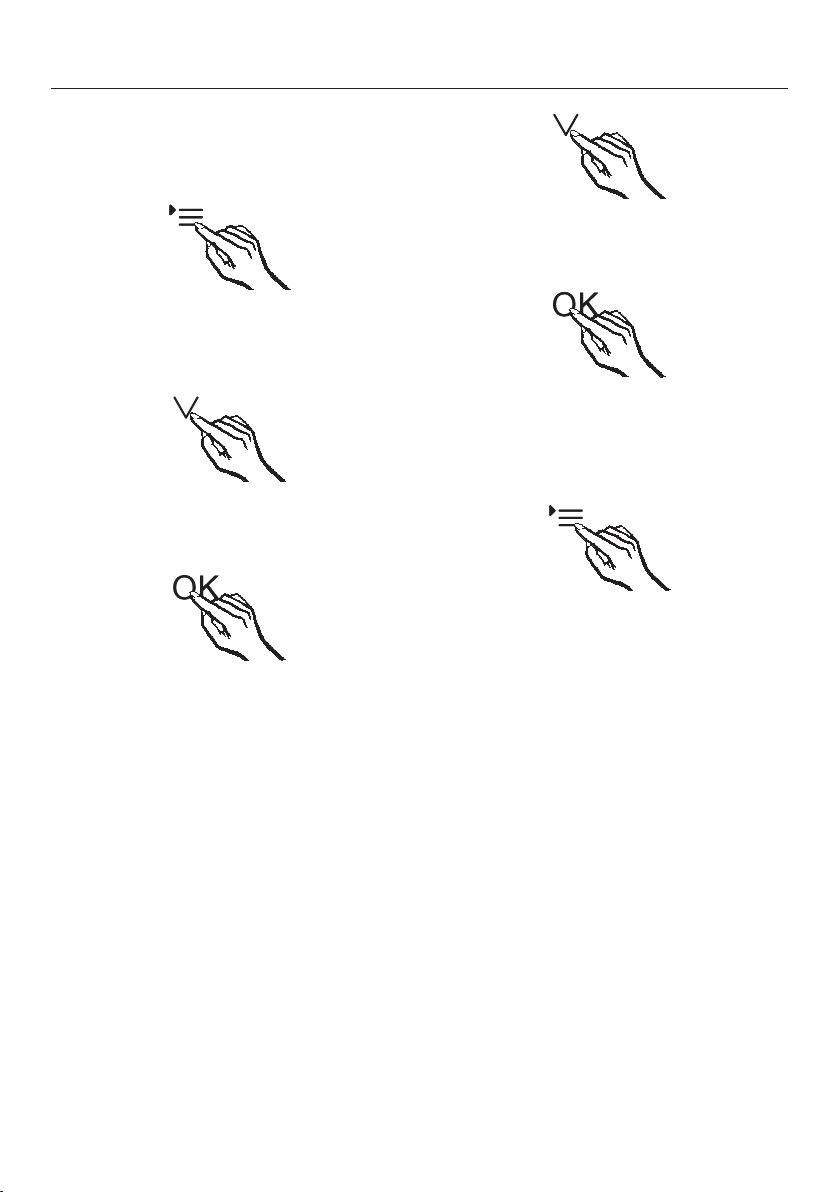
T
ouch the settings sensor.
All selectable symbols appear in the
display and the symbol flashes.
T
ouch the sensors for setting the
temperature ( or ) repeatedly until
the symbol flashes in the display.
T
ouch the OK sensor to confirm your
selection.
1 flashes in the display (Demo mode is
active) and the symbol is illu
minated.
T
ouch the or sensor so that 0
appears in the display (Demo mode is
inactive).
T
ouch the OK sensor to confirm your
selection.
The selected setting is saved and the
symbol flashes.
T
ouch the settings sensor to leave
settings mode.
Otherwise, the electronics will leave
settings mode automatically after
approx. one minute.
The Demo mode is switched off and the
symbol disappears.

Electrical connection
53
The appliance is supplied with a mains
cable and moul
ded plug ready for
connection to an AC single phase 220 –
240 V 50 Hz supply.
The fuse rating must be at least 10 A.
The voltage and frequency are given on
the data plate. Please ensure that these
match the household mains supply.
Connection should be made via a
suitable switched socket which is easily
accessible. For extra safety it is
advisable to install a suitable residual
current device (RCD).
The accessibility of the plug must
always be ensur
ed in order to be able
to quickly separate the appliance from
the mains.
If the mains socket is not accessible
aft
er the appliance has been built in, a
separator for each terminal must be
present. There must be an all-pole
contact gap of 3 mm in the switch
(including switch, fuses and relays
according to EN 60335).
The plug and mains connection cable
must not come
into contact with the
back of the appliance as vibrations can
cause damage to these components.
This, in turn, could result in a short
circuit.
Nor should other appliances be
plugg
ed into a socket located directly
behind this appliance.
Do not connect the appliance to the
mains el
ectricity supply by an extension
lead. Extension leads do not guarantee
the required safety of the appliance
(e.g. danger of overheating).
Do not connect the appliance to an
inver
ter such as those used with an
autonomous energy source e.g. solar
power. When switched on, peak loads
in the system can cause the safety
switch-off mechanism to be triggered.
This can damage the electronic unit.
The appliance must not be used with
so-called energy-saving devices
either. These reduce the amount of
energy supplied to the appliance,
causing it to overheat.
If the mains connection cable needs to
be r
eplaced, this must be done by a
qualified electrician.
WARNING:
THIS APPLIANCE MUS
T BE EARTHED.
Installation advice
54
Side-by-side units:
FNS 35402 i and FNS 37402 i freezers
have two foame
d in side-wall heaters
enabling them to be installed side-by-
side with other appliances. Each
appliance must be installed in its own
niche.
Please contact Miele for information
on which
combinations are suitable
for your appliance.
This appliance must be built in,
otherwise it could tip up.
Location
This appliance should be installed in a
dr
y, well-ventilated room. It should not
be installed where it is exposed to
direct sunlight or directly adjacent to a
heat-producing appliance such as an
oven or a radiator. The room
temperature should not go above or
below the climate range for which the
appliance is designed. The higher the
ambient temperature of the room, the
more energy the appliance requires to
operate.
When installing the appliance, please
not
e:
– The mains connection socket must
no
t be located directly behind the
appliance and must be easily
accessible.
– The plug and cable must not touch
the r
ear of the appliance as they
could be damaged by vibrations from
the appliance.
– Nor should other appliances be
plugg
ed into a socket located directly
behind this appliance.
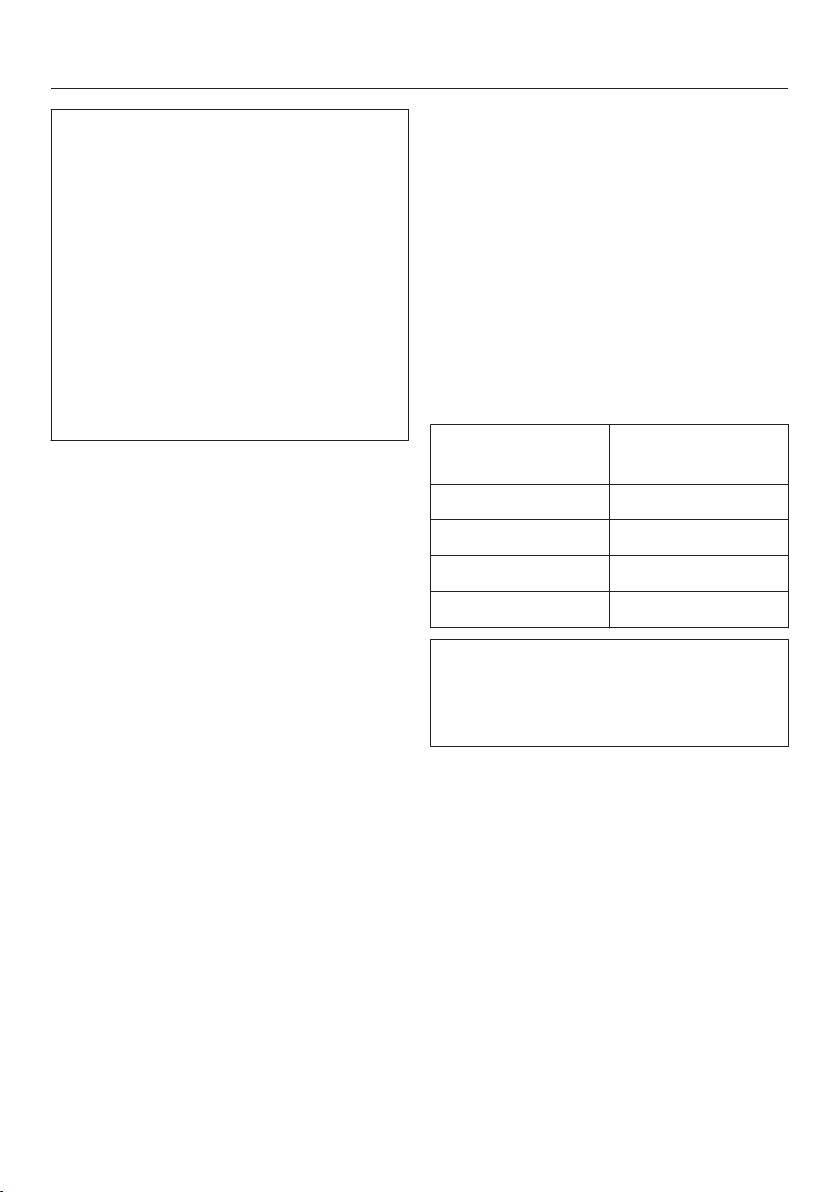
Installation advice
55
Important! In envir
onments with
high humidity condensation can build
up on external appliance panels. This
can lead to corrosion of the panels.
For prevention, it is advisable to install
the appliance with sufficient
ventil
ation in a dry and/or an air-
conditioned room. Please ensure that
the appliance door closes properly,
the ventilation gaps are not covered
over and the appliance is installed in
accordance with these installation
instructions.
Climate range
The appliance is designed for use
within a cer
tain climate range (ambient
temperature) and should not be used
outside this range.
Operating in a room which is too cold
will cause the compressor to switch off
for too long, causing the temperature
inside the appliance to rise with the risk
of food deteriorating and going off.
The climate range is stated on the data
plat
e inside the appliance.
Climate range Ambient room
t
emperature
SN +10 °C to +32 °C
N +16 °C to +32 °C
ST +16 °C to +38 °C
T +16 °C to +43 °C
A freezer from the SN climate range
can oper
ate without any difficulties in
rooms with a cooler ambient
temperature (down to +5 °C).
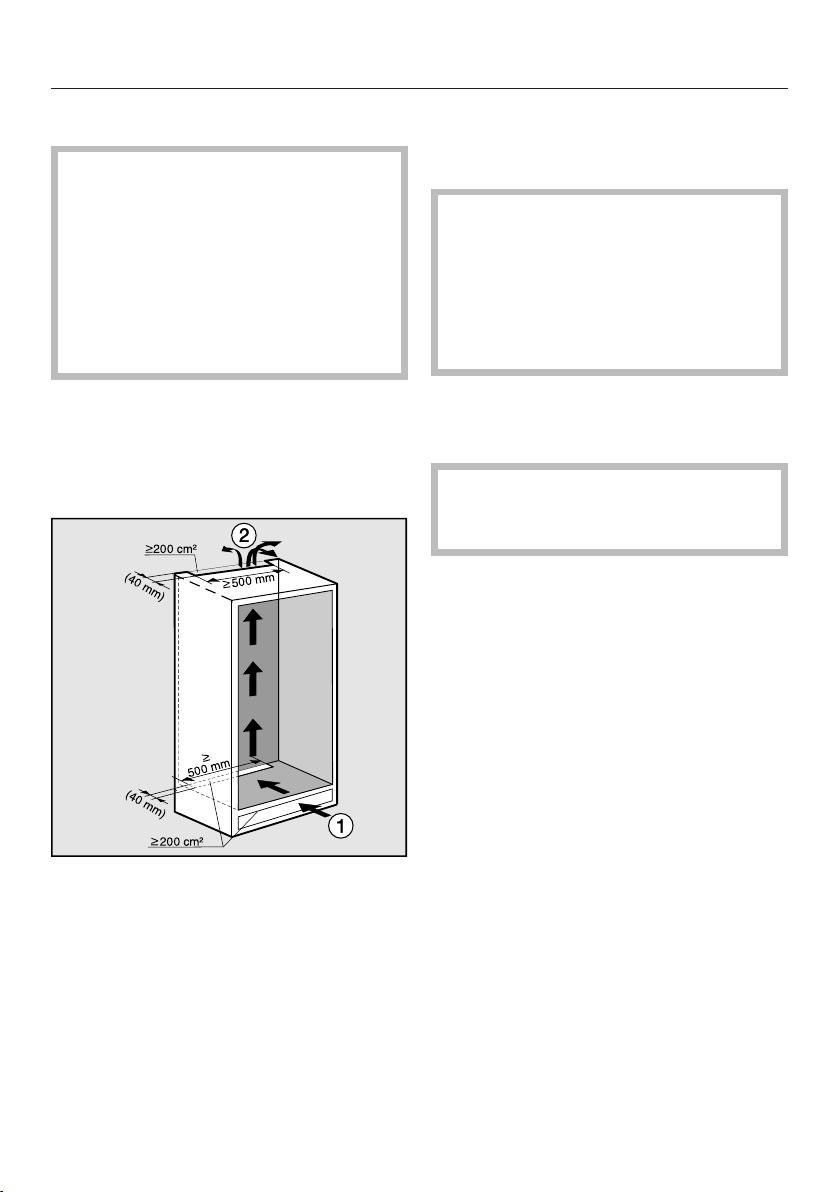
Installation advice
56
Ventilation
The ventilation gaps given must be
adher
ed to, otherwise the
compressor will be activated more
frequently and for longer periods.
This will result in increased energy
consumption and a higher operating
temperature for the compressor. This
may, in turn, cause the compressor
to be damaged.
Air at the back of the appliance gets
warm. The appliance housing unit must
ther
efore be constructed to allow
sufficient space for ventilation (see
"Building-in dimensions").
– Air intake occurs via the plinth at
the bott
om of the appliance and the
air escapes at the top at the rear
of the housing unit.
– A ventilation gap of at least 40 mm
depth must be allowed for behind the
applianc
e for air to circulate.
– The ventilation cross-sections in the
plinth, housing unit and above the
applianc
e must amount to a free
airflow of at least 200 cm² to ensure
that air can
circulate without
hindrance.
If ventilation grilles are to be inserted
in
to the ventilation gaps, the
ventilation gaps must be larger than
200 cm². The free airflow of 200 cm²
results from the total of the
ventilation cross-sections in the
grille.
– Important! The appliance uses less
ene
rgy, the larger the ventilation
gaps.
The air inlet and outlet must not be
covered or blocked in any way. They
should be dusted on a regular basis.
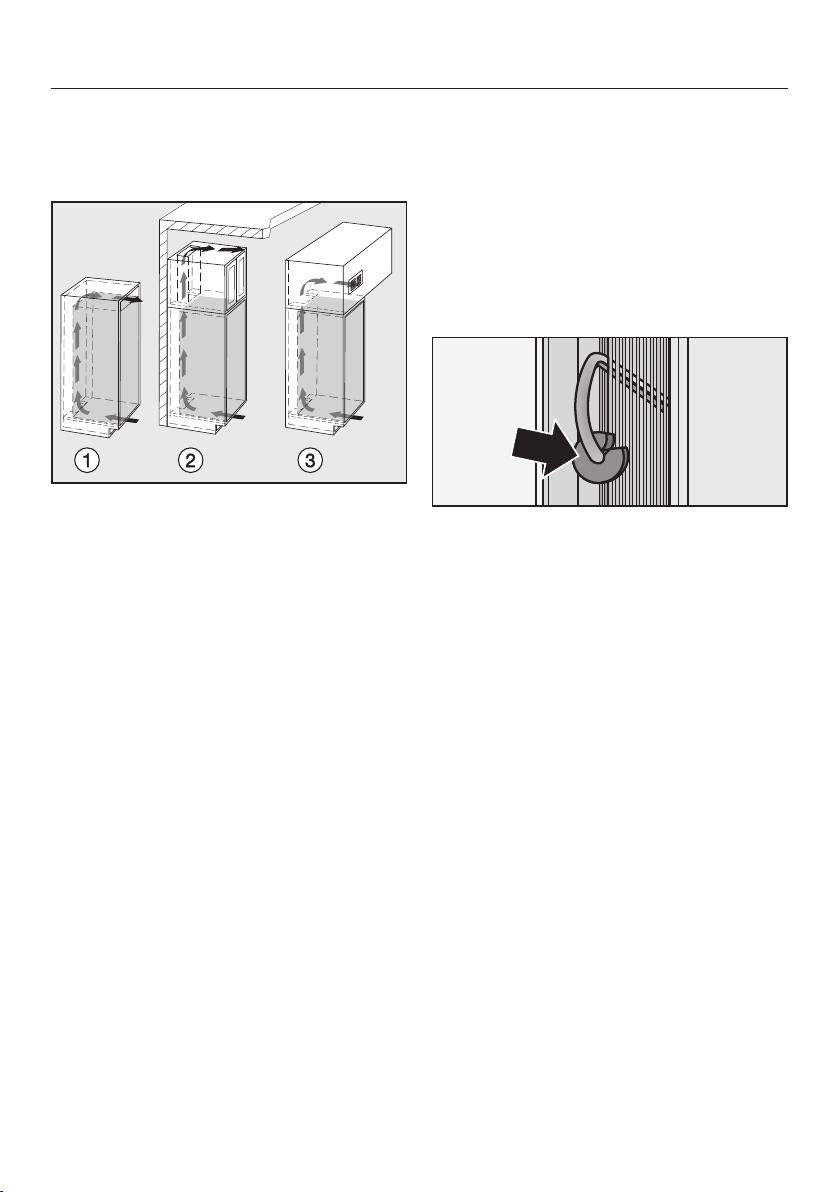
Installation advice
57
Top ventilation cross-section
The top ventilation cross-section can
be achieved in various ways:
a
directly above the appliance with a
ventil
ation grille (free airflow of at
least 200 cm²).
b
Between furniture units and the
ceiling.
c
In an intermediate ceiling.
Before installing the appliance
T
ake the accessory pack which
includes installation parts and other
accessories out of the appliance and
remove the packaging strap holding
the door in place.
Do not r
emove the following from
the rear of the appliance:
– The spacers (depending on
model).The
se ensure the gap
required between the back of the
appliance and the wall is maintained.
– The bags (depending on model)
lo
cated inside the metal grille (heat
exchanger).
These are important for the correct
functioning of the appliance. Their
contents are non-toxic and are not
dangerous.
Remo
ve any cable clips from the
back of the appliance.
Che
ck that all parts at the back of the
appliance are unhindered. Carefully
remove any hindrance.
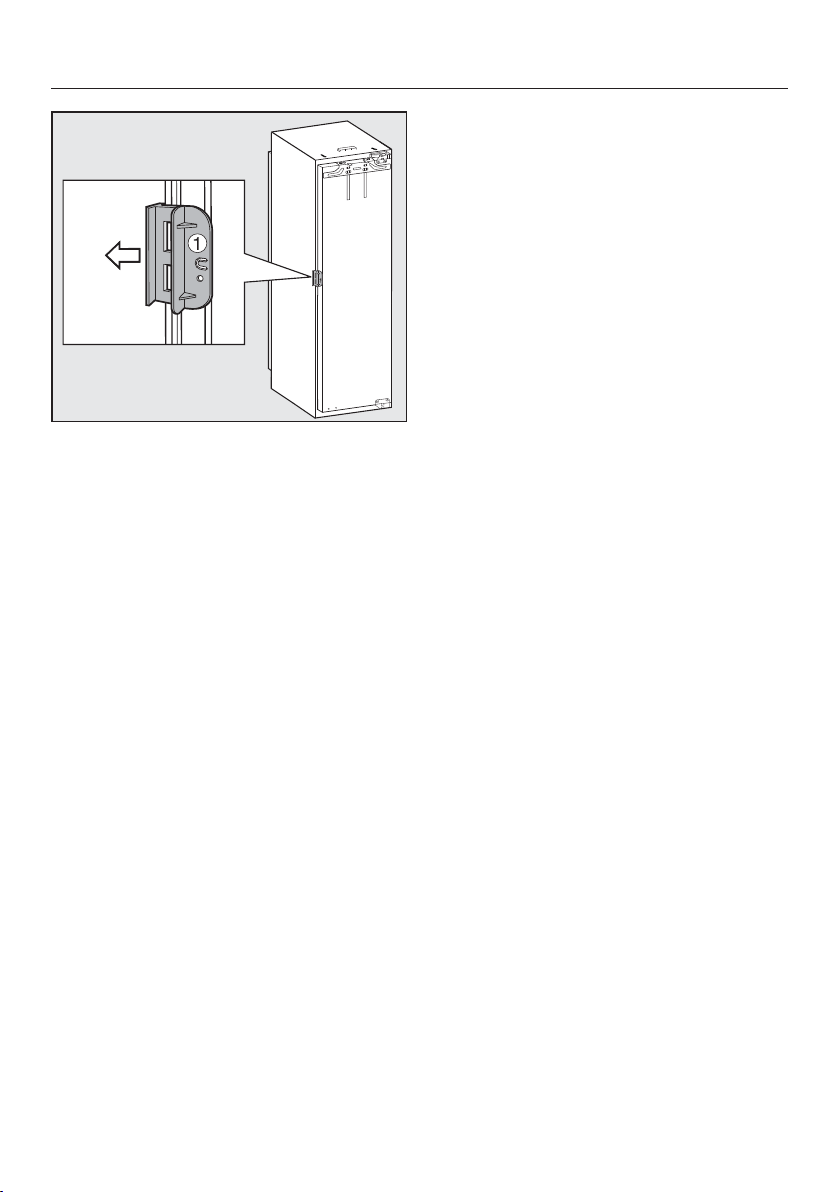
Installation advice
58
Open the appliance door and remove
the red transport clips (depending
on model).
Does your old appliance have
a different hinging
mechanism?
If your old appliance had a different
type of hinging, the furniture door can
still be used. Remove the old hinges
from the housing unit. They are no
longer required because the furniture
door will now be fitted to the appliance
door. All the necessary parts are
supplied or can be ordered from Miele.
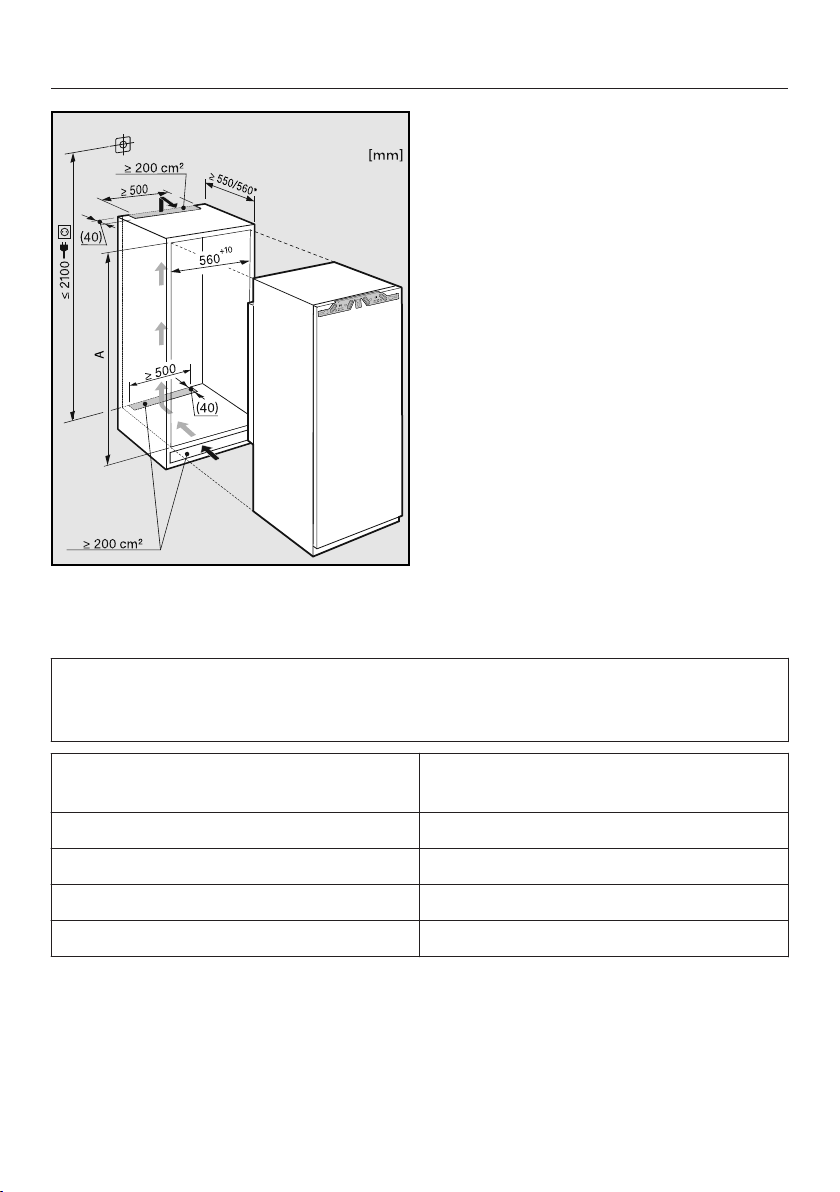
Building-in dimensions
59
* The declared energy consumption was calculated in a 560 mm deep niche (valid
for EU only). The appliance is fully functional in a 550 mm niche but the energy
consumption will be slightly higher.
Before installation, ensure the building-in niche matches the required
dimensio
ns. The required ventilation cross-sections must be adhered to in order
to ensure the correct functioning of the appliance.
Niche height [mm]
A
FN 35402 i 1397 – 1413
FN 37402 i 1772 – 1788
FNS 35402 i 1397 – 1413
FNS 37402 i 1772 – 1788
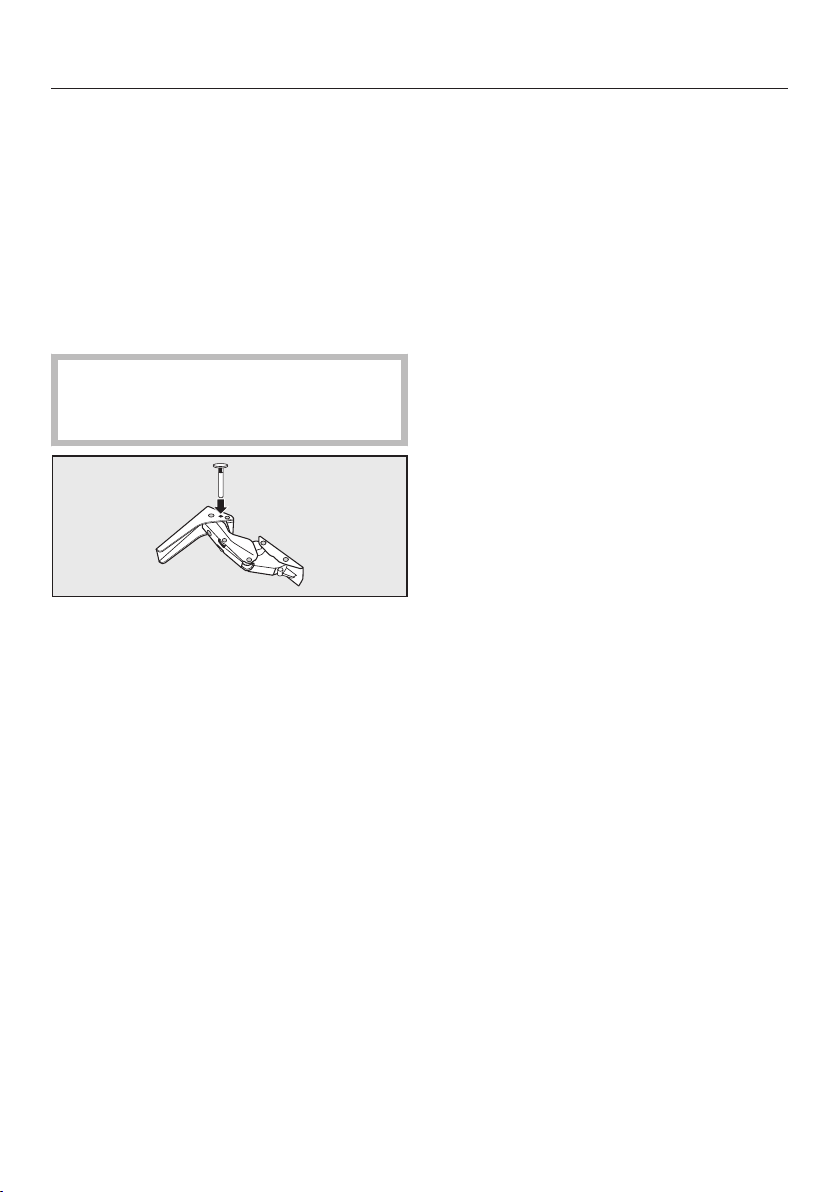
Limiting the opening angle of the door
60
The door hinges are set at the factory
t
o enable the door to be opened wide.
If the opening angle of the door needs
t
o be limited for any reason, the hinge
can be adjusted to accommodate this.
However, if the appliance door hits an
adjacent wall when opened, for
e
xample, the opening angle can be
limited to 90°.
The locking pins for limiting the door
openi
ng must be fitted before the
appliance is installed.
Place the locking pins supplied for
limi
ting the door opening into the
hinges from above.
The door opening angle is now limited
t
o 90°.
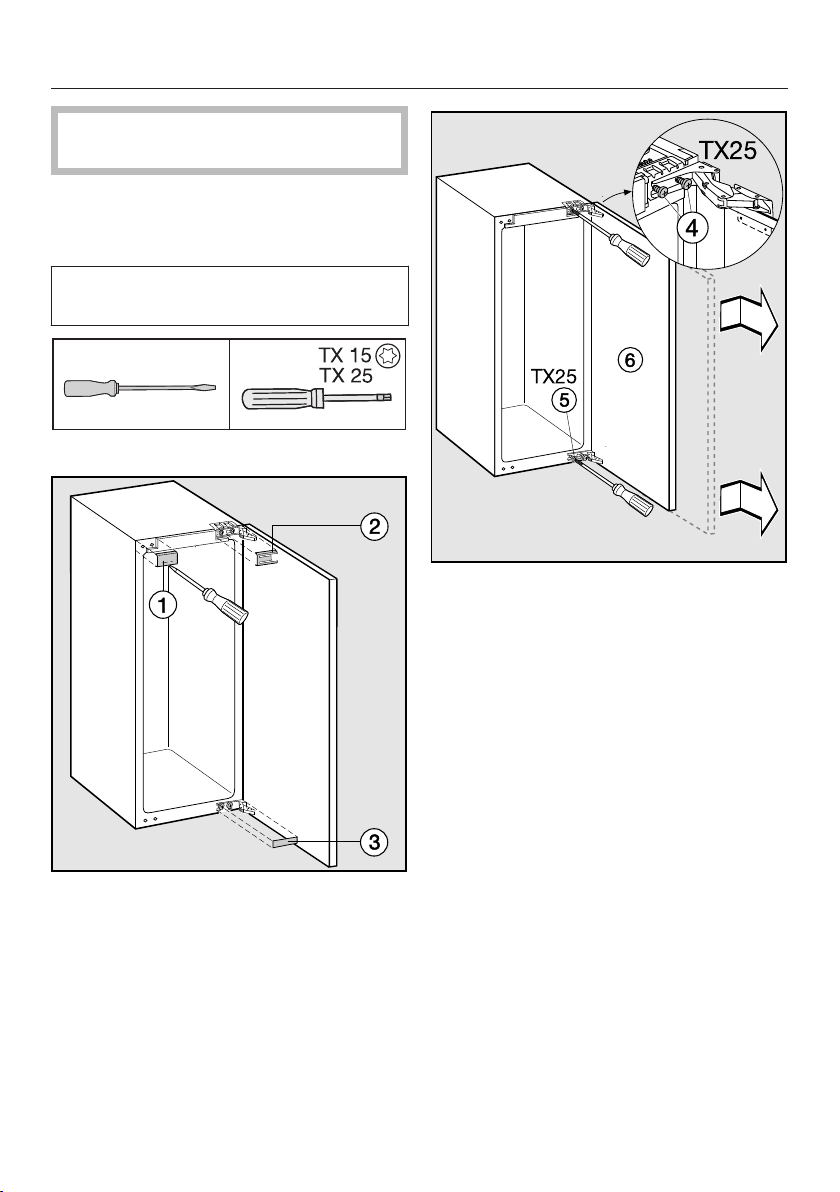
Changing the door hinging
61
Two people are needed for changing
the door hinging.
The appliance is supplied right-hand
hinged. If left-hand hinging is required,
the hinges must be changed.
To change the door hinging, you will
need the fol
lowing tools:
Open the appliance door.
Lift off covers , and .
Slig
htly loosen the screws and
on the hinges.
P
ush the door outwards, take it off
its hinges and place it to one side.
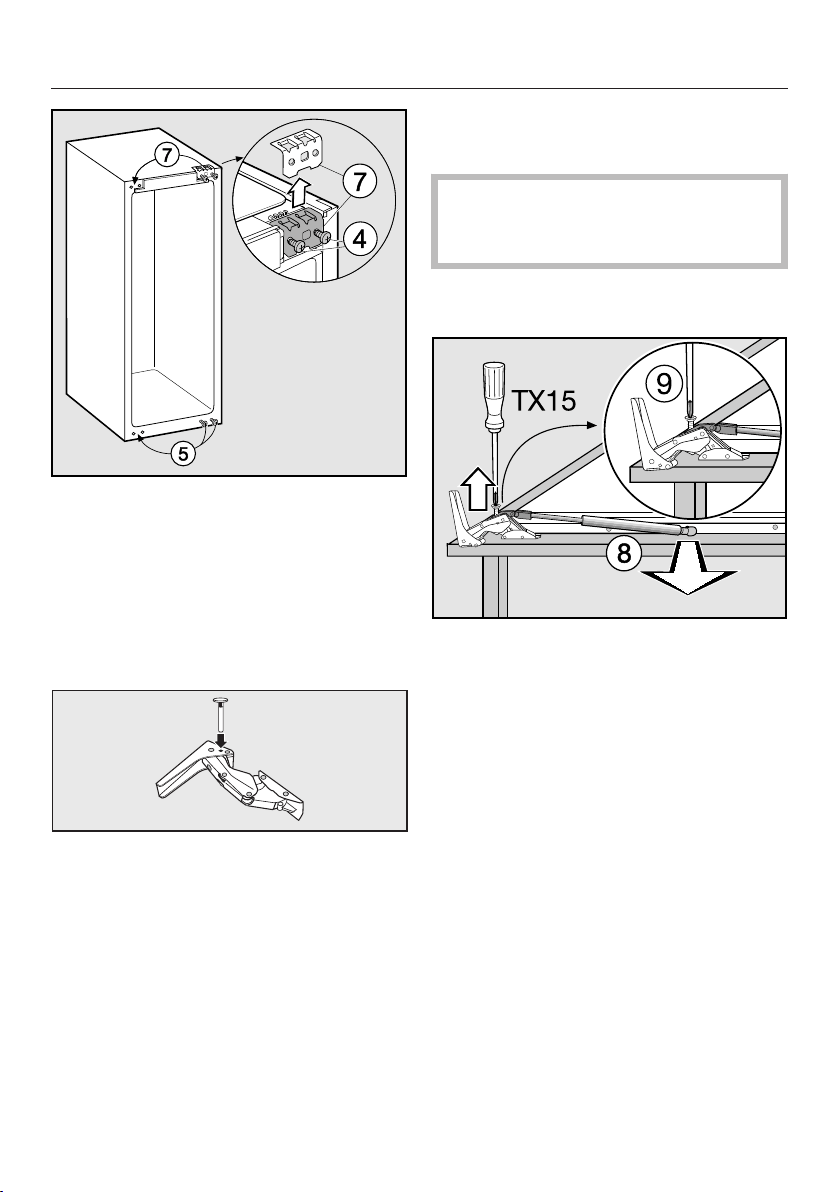
Changing the door hinging
62
Unsc
rew the screws completely.
Place the fixing element on the
opposit
e side and loosely screw in
the screws .
Unsc
rew the screws completely
and loosely screw them in on the
opposite side.
If you have put lockin
g pins into the
hinges to stop the door opening too
far: remove the locking pins from the
top of the hinges.
Removing the soft-close
mechanism
Warning! The soft-close mechanism
snaps shut when dismantled.
Danger of injury!
Place
the door with the outer side
downwards on a stable surface.
Remove the soft-close mechanism
fr
om the ball joint.
Unsc
rew the mounting and
remove the soft-close mechanism .
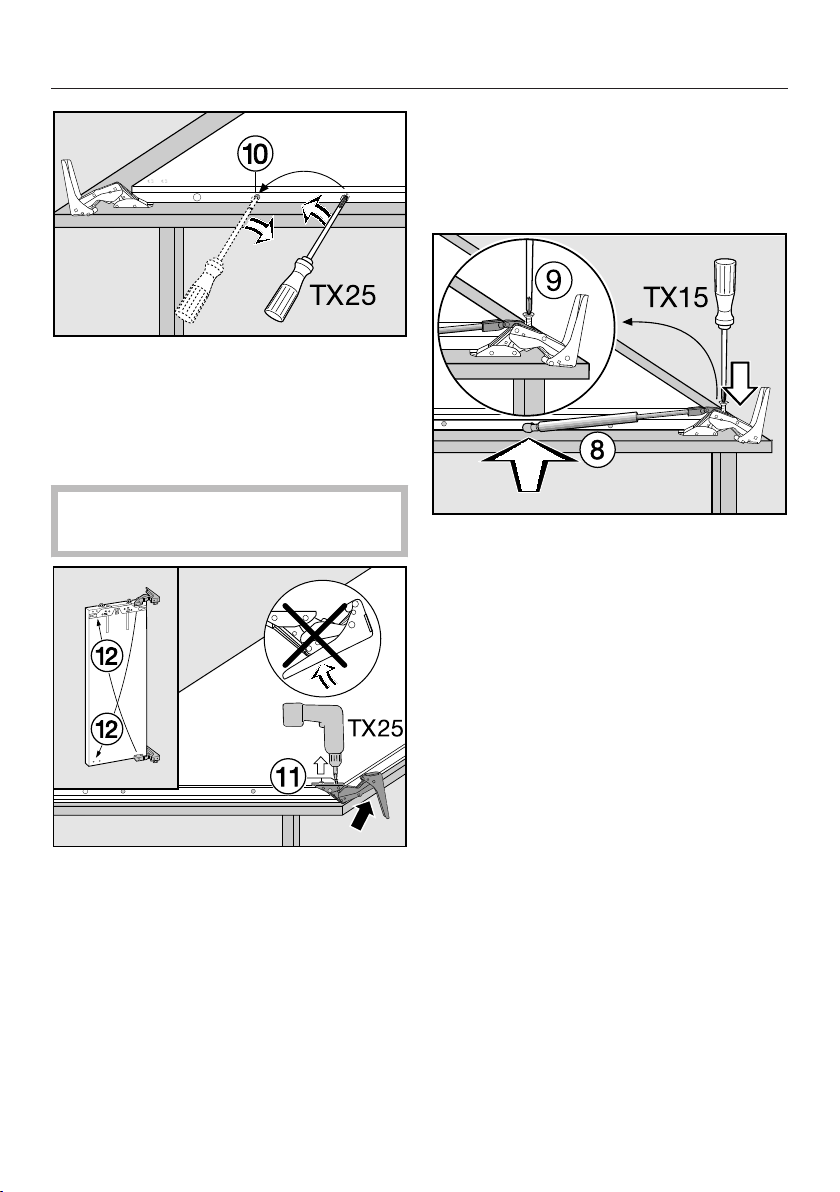
Changing the door hinging
63
Unsc
rew the ball joint and screw it
into the adjacent hole.
Now turn over the appliance door so
that the ou
ter side faces upwards
(hinges remain open).
Danger of injury!
Do not close the hinges.
Undo the scr
ews .
Place each hinge on the diagonally
opposit
e side
Securing the soft-close
mechanism
Now turn over the appliance door so
that the ou
ter side faces downwards.
Scr
ew the mounting onto the
hinge and tighten securely.
Open out the soft-close
mechanism and
hook it onto the
ball joint.
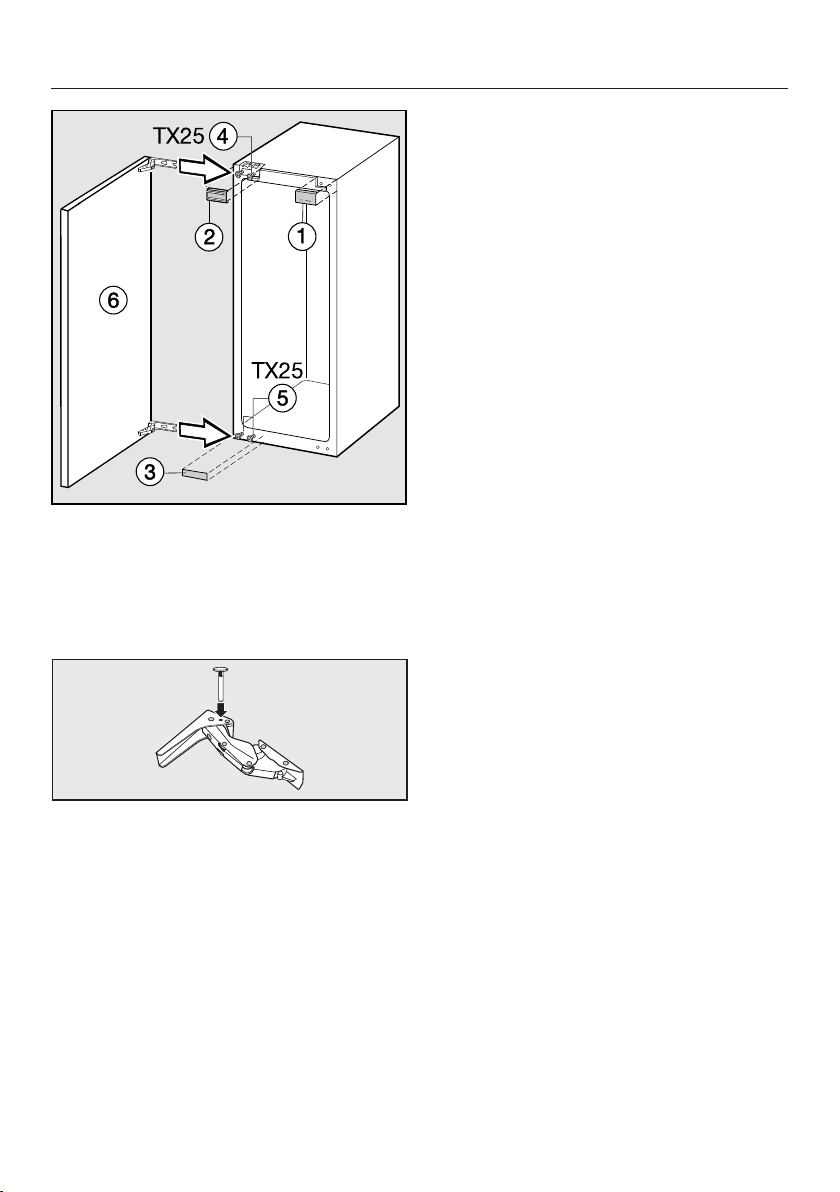
Changing the door hinging
64
Hang the appliance door ont
o the
pre-fitted screws and , and
securely tighten the screws and
.
Replace covers , and .
Refit the lo
cking pins in the top of the
hinges to prevent the doors opening
too far.
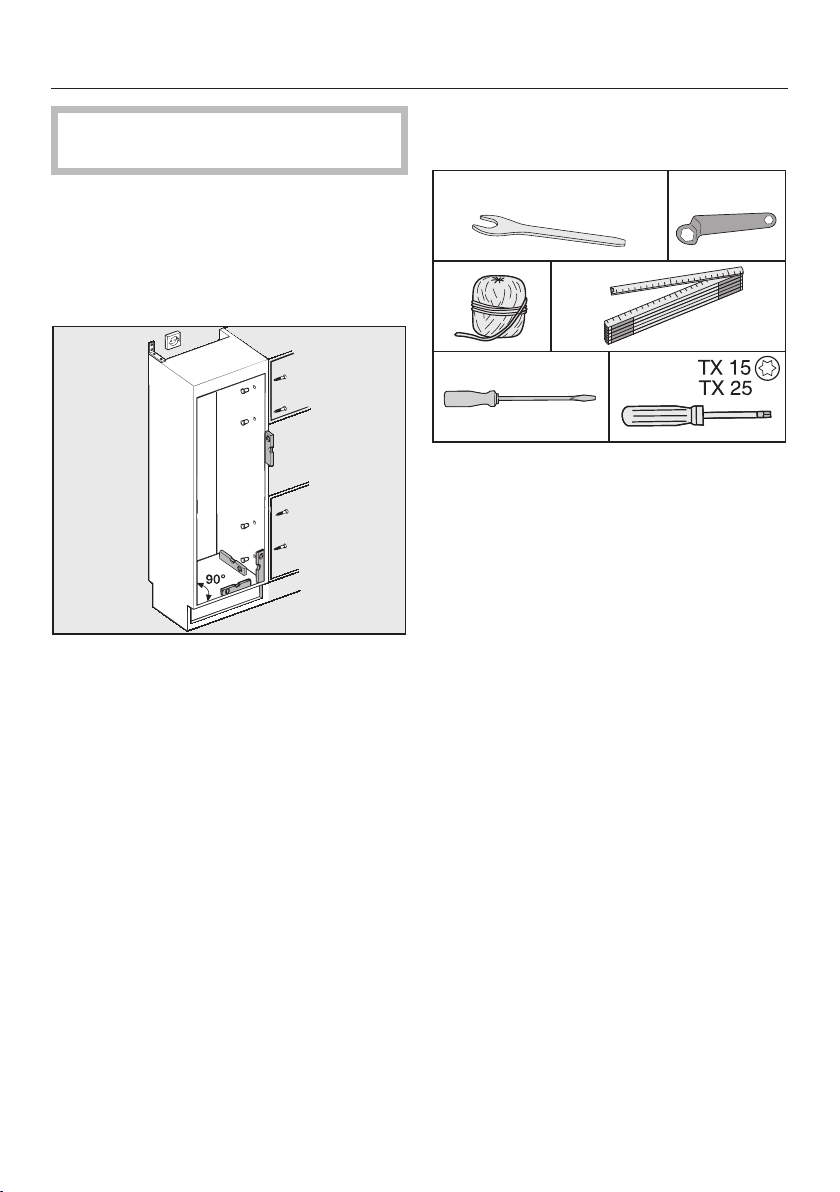
Installing the appliance
65
Two people are required for installing
the appliance.
Install the appliance in a stable, solid
housing unit, positioned on an even
and level
floor.
Secur
e the housing unit against
tipping.
Use a spirit level
to align the housing
unit. The corners of the housing unit
must be at a 90° angle to each other,
otherwise the furniture door will not
align correctly with all 4 corners of
the housing unit.
The
required ventilation cross-
sections must be ensured (see
"Installation advice - Ventilation" and
"Building-in dimensions").
To install the appliance, you will need
the foll
owing tools:
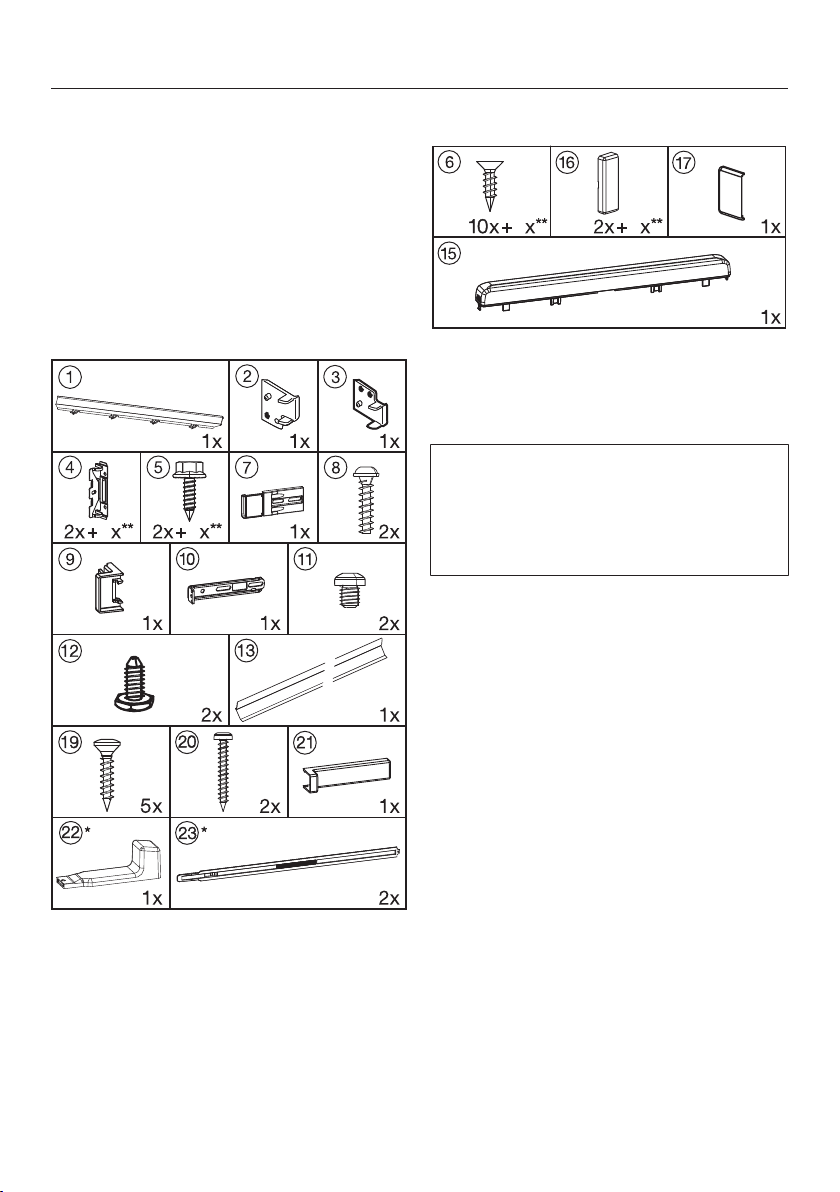
Installing the appliance
66
You will require the following
installation components
All installation components are
desig
nated by numbers. Each
component's number can also be
found in the installation steps on the
following pages.
– r
equired for installing the
appliance in its housing unit:
4
4
* These parts are only supplied with
appliances with a niche height of
140 cm or mor
e.
** Number depending on niche height.
Also contains additional installation
par
ts for fitting large or divided furniture
doors.
– for mounting the appliance doors:
8
4
** Number depending on niche height.
Also contains additional installation
par
ts for fitting large or divided furniture
doors.
All fitting instructions given are for a
right-hand hinged appliance. If you
h
ave converted the appliance to left-
hand hinging, you will need to adapt
these instructions accordingly.
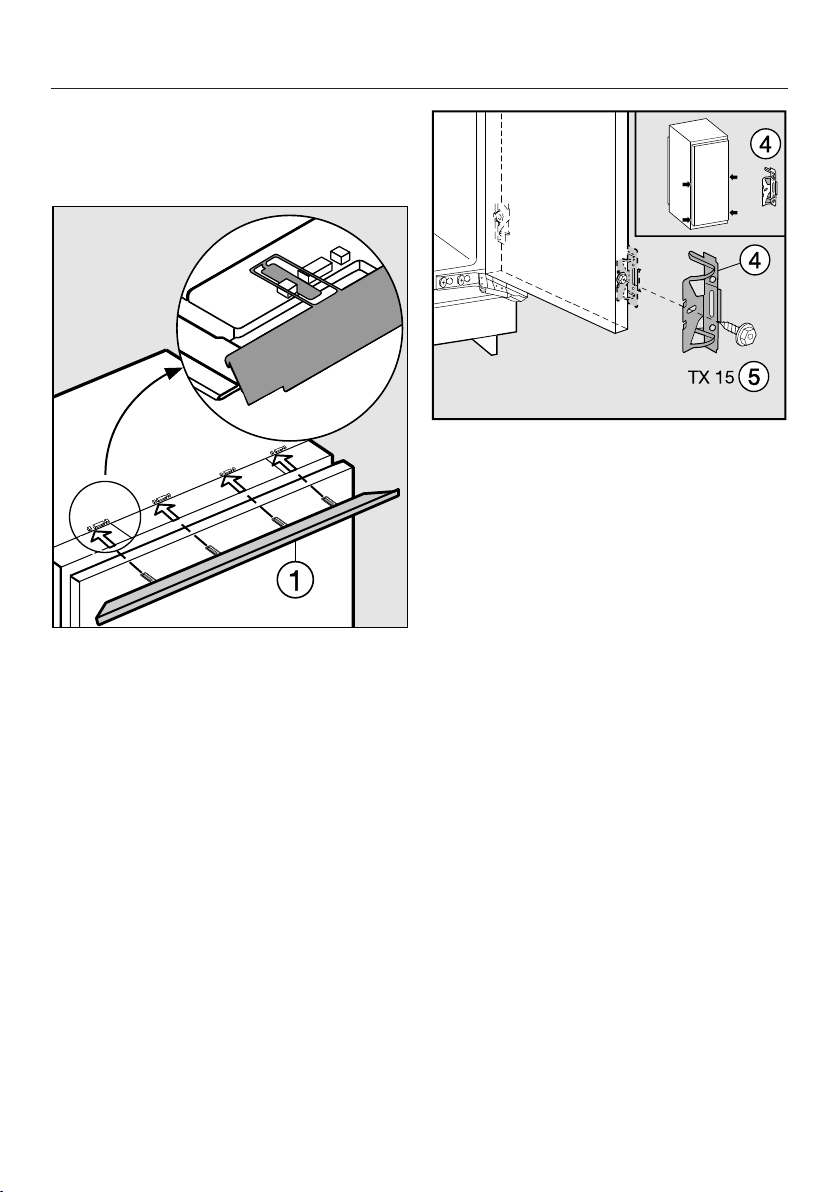
Installing the appliance
67
Preparing the appliance
P
osition the appliance in front of the
housing unit.
Slide the cover strip int
o the
holders as shown.
Scr
ew the fixing bracket using the
hexagonal screw to the pre-drilled
holes in the appliance door. Using the
pre-drilled holes in the appliance
door, secure a second pair of fixing
brackets in the handle area of the
door.
P
ush the appliance two-thirds of the
way into its niche. When doing this,
make sure that the mains cable does
not get trapped.
Useful tip: T
o help you push it into
position, tie a piece of string around the
plug to "increase" the length of the
connection cable.
Then pull the cable by the end of the
string through the housing unit. It will
then be easier to connect once the
appliance is in the unit.
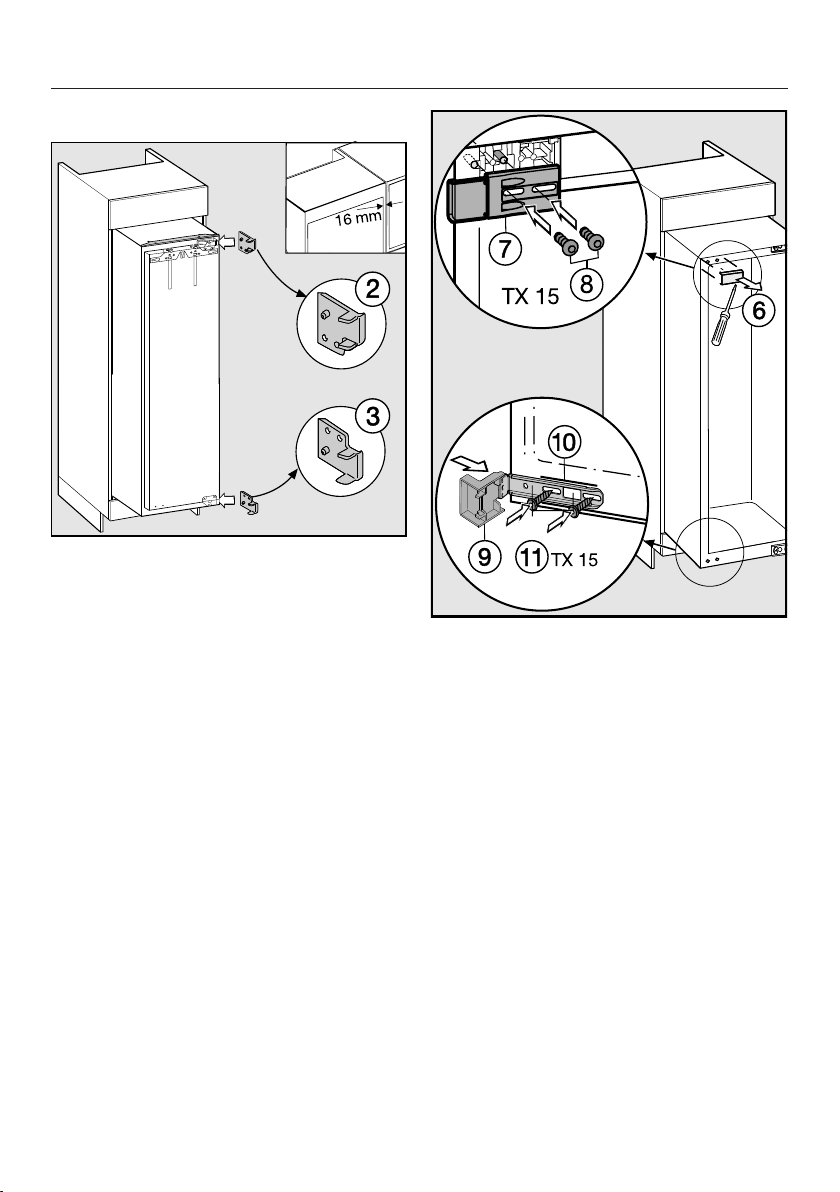
Installing the appliance
68
With 16 mm thick unit walls:
Clip the spacers and on the
right-hand side of the hinges.
Open the appliance door.
Remove the cover .
Secur
e the part using screws
loosely into the top left-hand side of
the appliance. Do not tighten the
screws so that you can adjust the
position of this part.
Fit the cover onto the fixing
bracket
Then screw the fixing bracket
using screws loosely into the
bottom of the appliance. Do not
tighten the screws so that you can
adjust the position of this part.
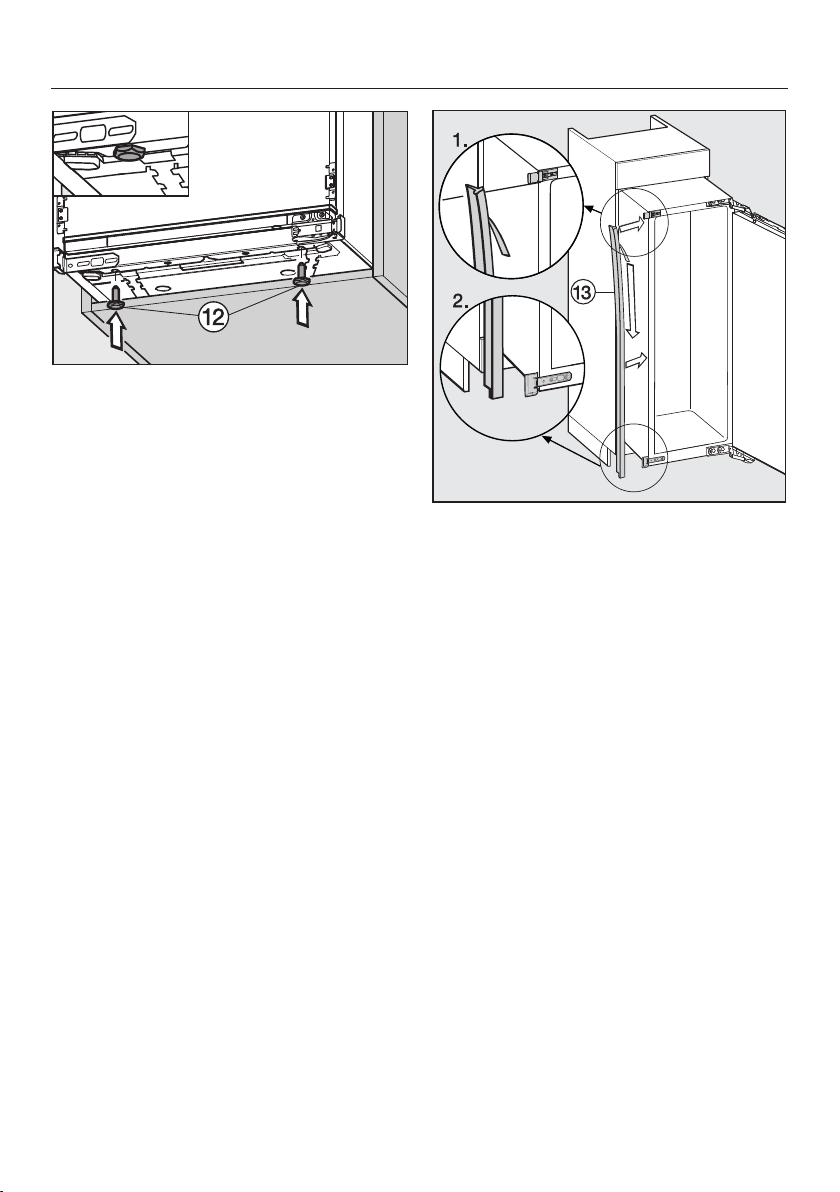
Installing the appliance
69
No
w screw the adjustable feet all
the way in.
Carefully remove the protective foil
from the sealing strip .
Fix the sealing strip flush with the
fr
ont of the appliance on the door
opening side.
1. Position the sealing strip flush with
the lower edge of the t
op fixing.
2. Stick it down along its entire length.
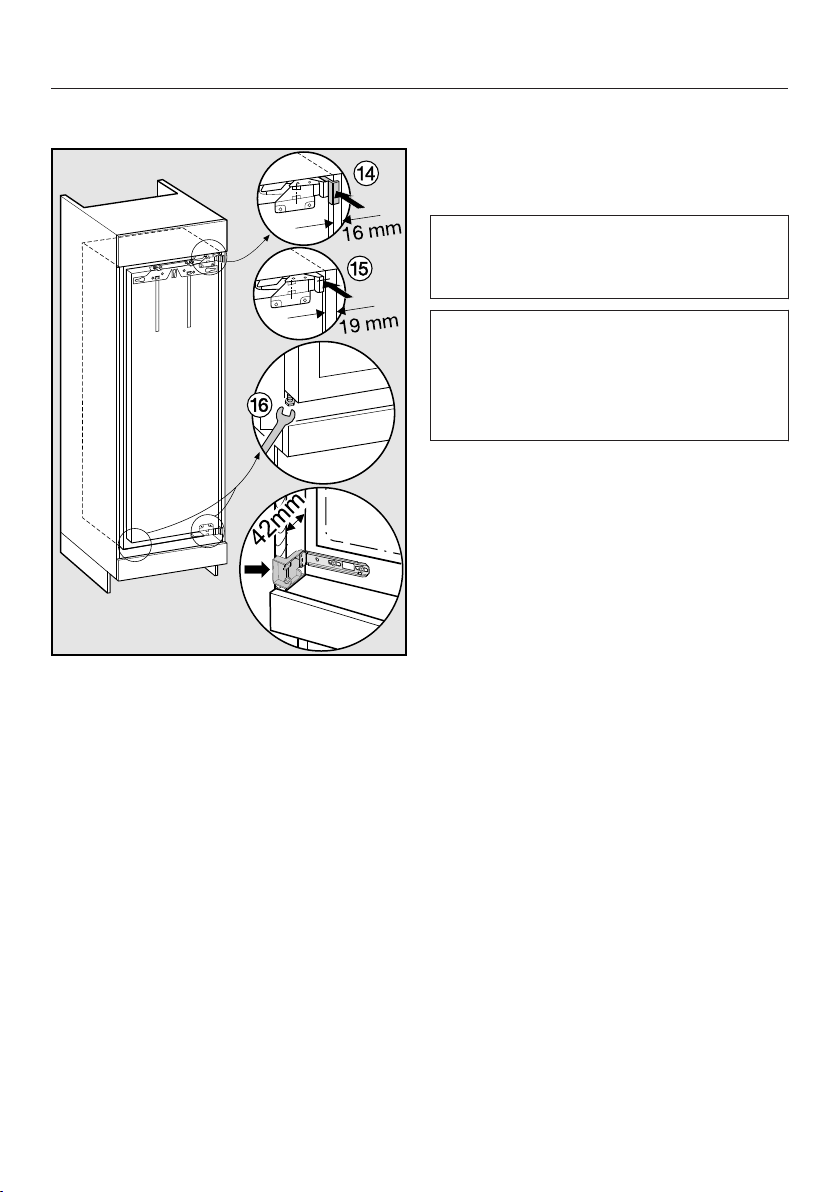
Installing the appliance
70
Installing the appliance
P
ush the appliance into the niche
until the covers of the fixing brackets
touch the front edge of the side walls
of the housing unit.
– W
ith 16 mm thick walls:
The spacers should touch the front
edge of the top and bottom of the
side walls of the housing unit.
– W
ith 19 mm thick furniture
walls:
The front edges of the hinges are
flush with the front edge of the
housing unit.
Mak
e sure that the covers of the top
and bottom fixing brackets lie flush
with the front edges of the housing
unit side walls.
This will create a gap all round of
42 mm t
o the front edges of the
housing unit side walls.
On furniture with door fittings (e.g.
stubs, seals etc.) the dimension of
these must be tak
en into account
when making sure there is a gap all
round of 42 mm.
P
ull the appliance forwards by the
appropriate dimension.
The hinges and covers will now
pr
otrude by the dimension of the door
fitting.
Useful tip: Remove the door fittings.
This will ensu
re that the door is flush
with the surrounding kitchen unit
furniture doors.
Align the appliance on both sides
by alt
ering the adjustable feet using
the spanner supplied.
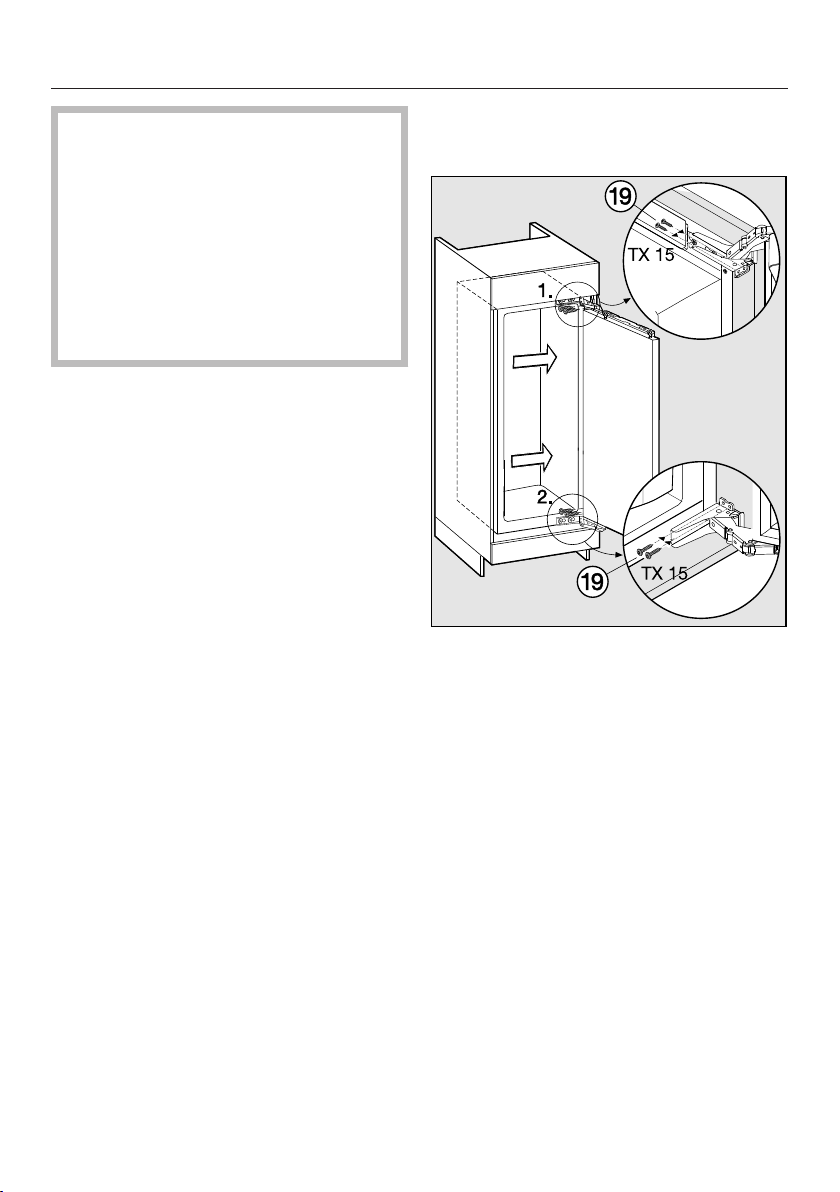
Installing the appliance
71
If the all round gap of 42 mm is not
maintained between the appliance
casi
ng and the front edge of the
housing unit side wall, the door may
not shut properly.
This can cause ice to build up,
co
ndensate to accumulate and lead
to faults in the appliance. These can
all lead to increased energy
consumption.
Securing the appliance in the
niche
P
ress the appliance against the side
of the housing unit on the hinge side.
Scr
ew chipboard screws through
the hinge plates at the top and
bottom and then the middle to secure
the appliance to the housing unit.
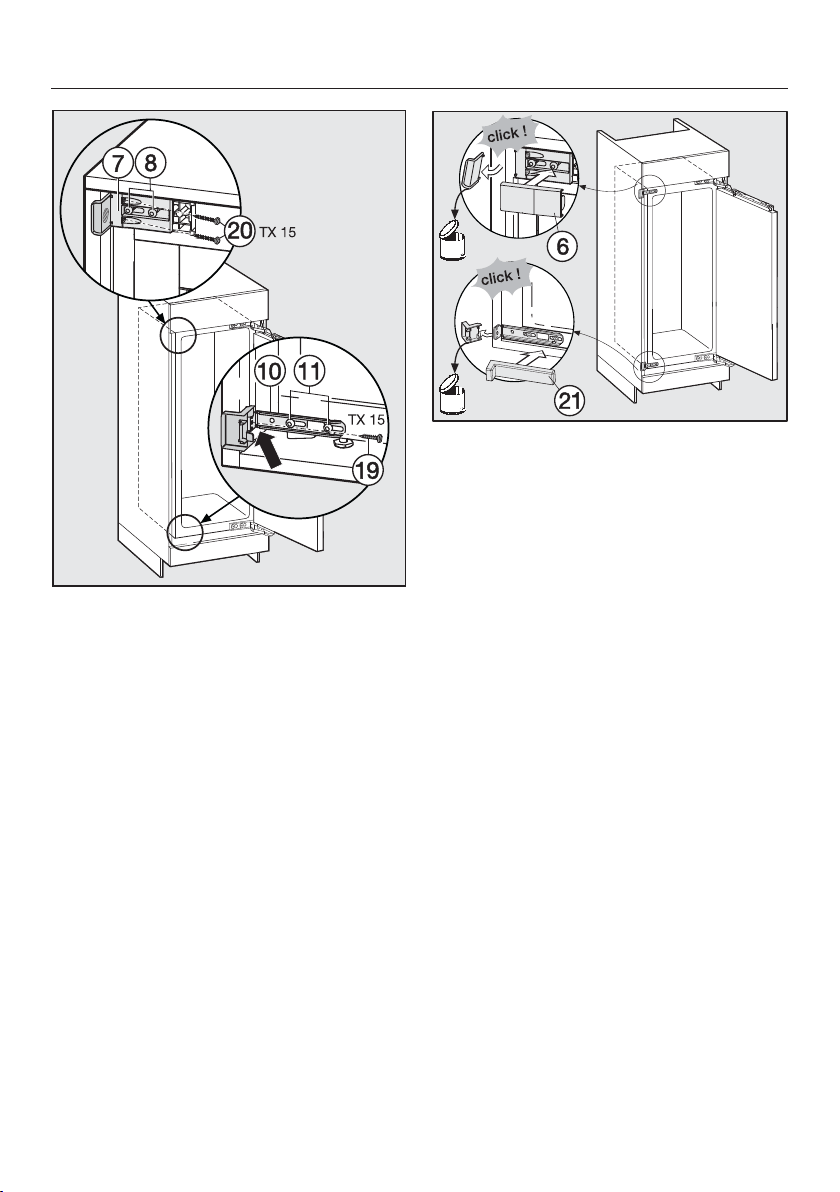
Installing the appliance
72
P
ush the loose-fitting fixing bracket
against the side wall.
Scr
ew the fixing bracket to the
housing unit side wall with the
screw . Pre-drill the hole in the
housing unit if necessary.
Secur
e the fixing bracket to the
housing unit side walls using the
screws . Drill holes in the housing
unit side walls if necessary.
Important: Push the protruding
bracket using your thumb towards
the housing unit wall whilst tightening
the screws. The appliance must not
pull back into the unit.
The
n tighten the screws and .
Break off the ends of the brackets
and dispose of them. They are no
longer needed.
A
ttach the respective covers and
to the fixing brackets.
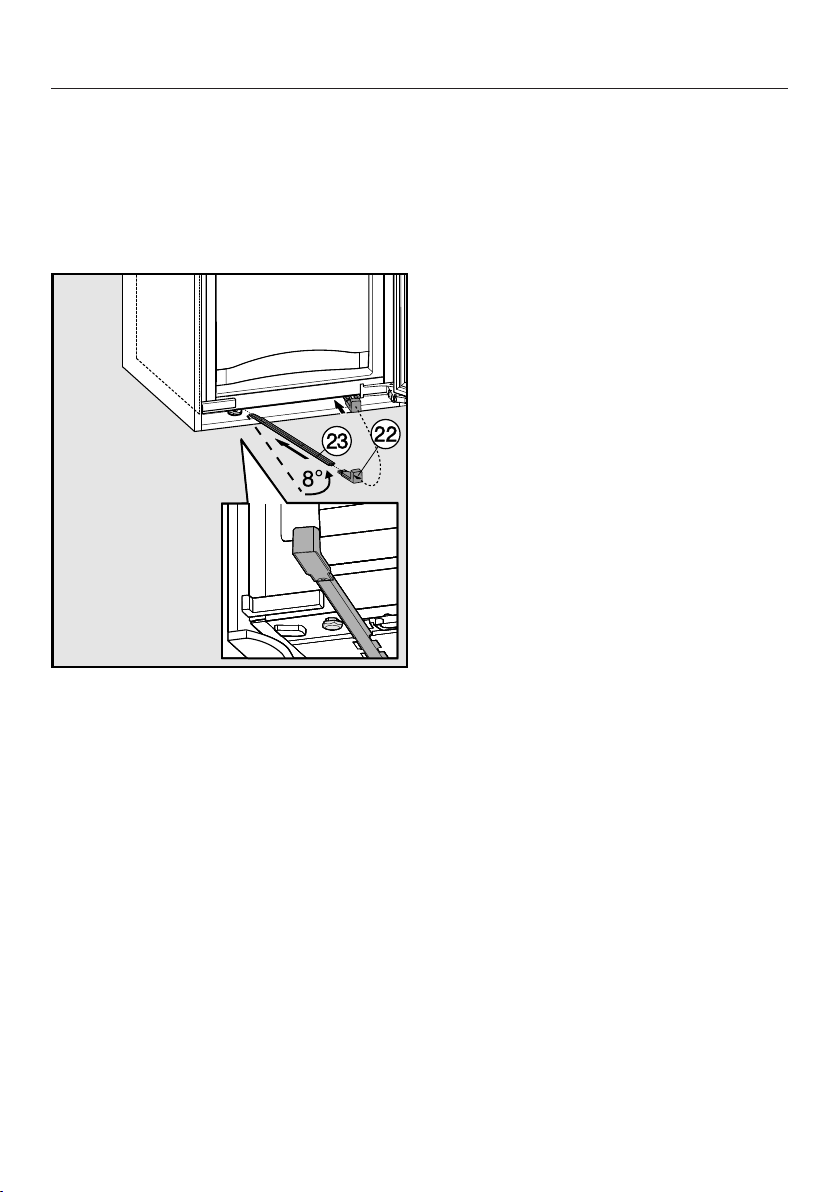
Installing the appliance
73
Only for an appliance with a niche
height gr
eater than 140 cm
For additional stability of the appliance
i
n the unit, push the rods supplied in
underneath the appliance between it
and the floor of the housing unit:
Fi
rst secure the handle to one of
the rods .
Use the ha
ndle to push the rod into
the guide as far as it will go. Remove
the handle and fit it to the other rod
and push this into its guide as far as
it will go.
Important: Keep the handle
somewhere safe in case you ever
need to fit the appliance into a new
housing unit.
Clo
se the appliance door.
Fitting a furniture door
The furniture door must be a minimum
of 16 mm thick and a maximum of
19 mm thick.
The following dimensions for gaps must
be adher
ed to:
– The gap between the furniture door
and the kitchen unit door above must
be at least 3 mm.
– The vertical gap between the
furni
ture doors should generally be
3 mm. The exact value is dependent
upon the radius of the edge of the
furniture door.
If the appliance is being built into a run
of units, the heig
ht of the furniture door
should be aligned with adjacent kitchen
units.
The furniture door must be mounted
plane and fr
ee of tension.
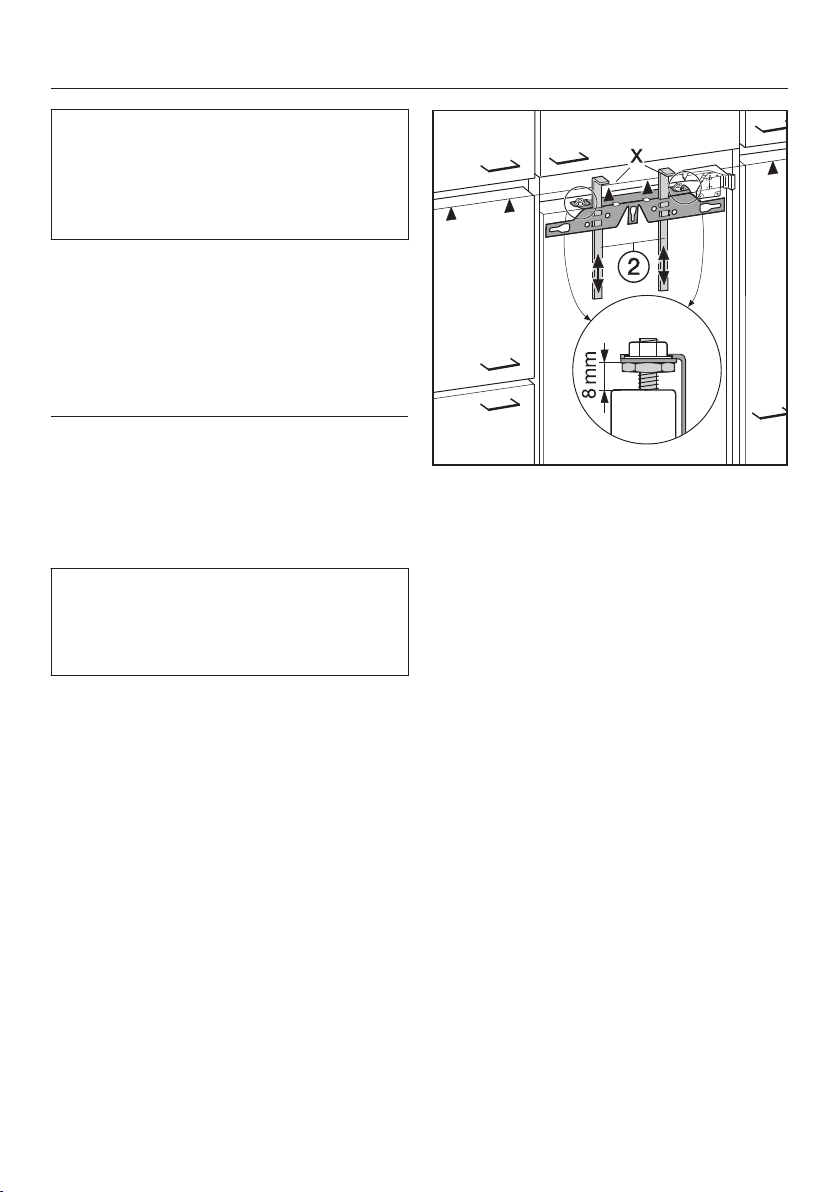
Installing the appliance
74
Fitting a door which is heavier than
the maximu
m permitted could
damage the hinges, which could in
turn affect the functioning of the
appliance.
Before fitting a furniture door, ensure
that the weight of the door does not
e
xceed the maximum permitted:
Appliance Maximum weight
of furnitur
e door
in kg
FN 35402 i 21
FN 37402 i 26
FNS 35402 i 21
FNS 37402 i 26
To fit large or segmented furniture
doors, a mounting kit or another pair
of fixing
brackets can be ordered from
Miele.
A gap of 8 mm is set e
x-works
between the appliance door and the
fixing bracket. Double check this gap
and reset it if necessary.
P
ush the fitting aids up to the
height of the furniture door: the lower
edge X of the fitting aids must be at
the same height as the upper edge of
the furniture door being fitted (see
in diagram).
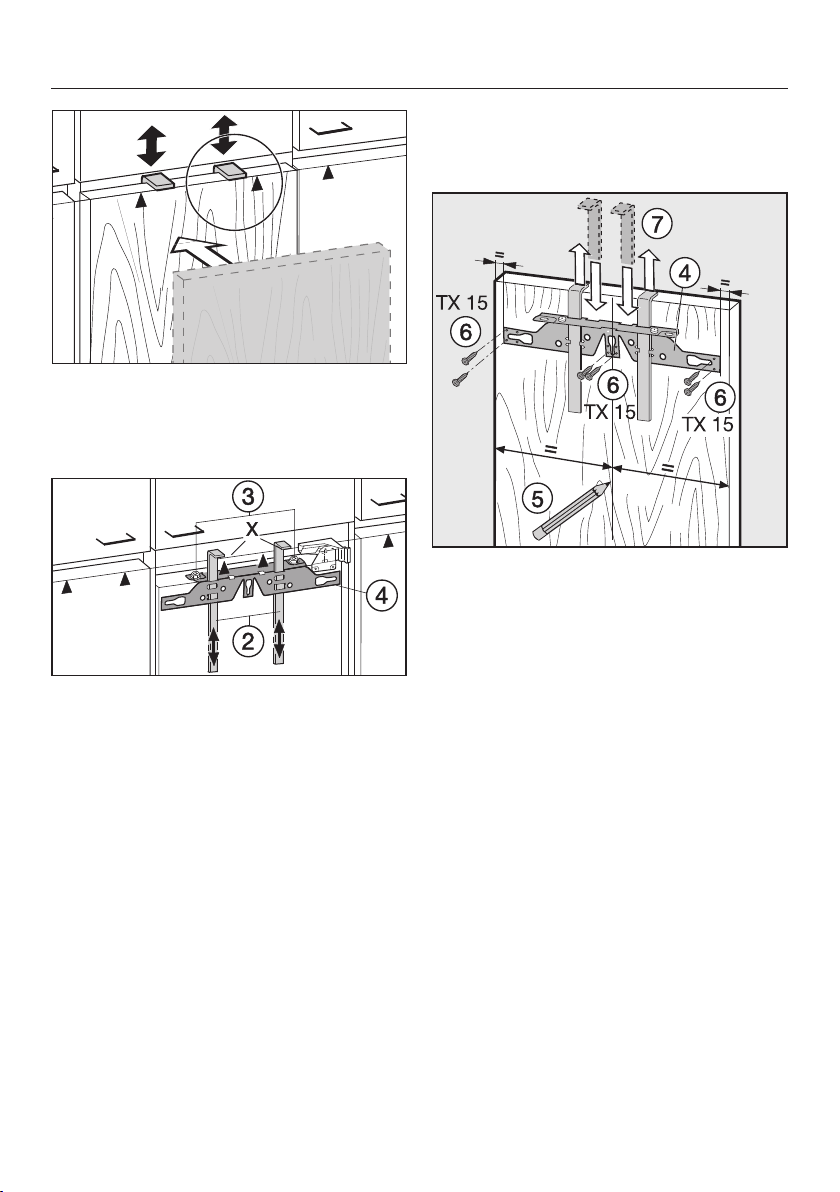
Installing the appliance
75
Useful tip: P
ush up the fitting aids
with the furniture front until they are the
same height as the doors of adjacent
kitchen units.
Undo the nuts and tak
e the fixing
bracket off together with the fitting
aids .
Place
the furniture door with the
outer side downwards on a stable
surface.
Using a pencil, lightly mark a line
down the centr
e of the inside of the
furniture door .
Han
g the fixing bracket with the
fitting aids onto the inside of the
furniture door. Align the fixing bracket
centrally.
Secur
e the fixing bracket with 6 short
chipboard screws (on cassette
doors, only use 4 screws on either
side of the bracket). Pre-drill the
holes if necessary.
P
ull the fitting aids upwards to
remove them.
Turn them around and fit them into
the middle slots on the fixing bracket
for safe keeping.
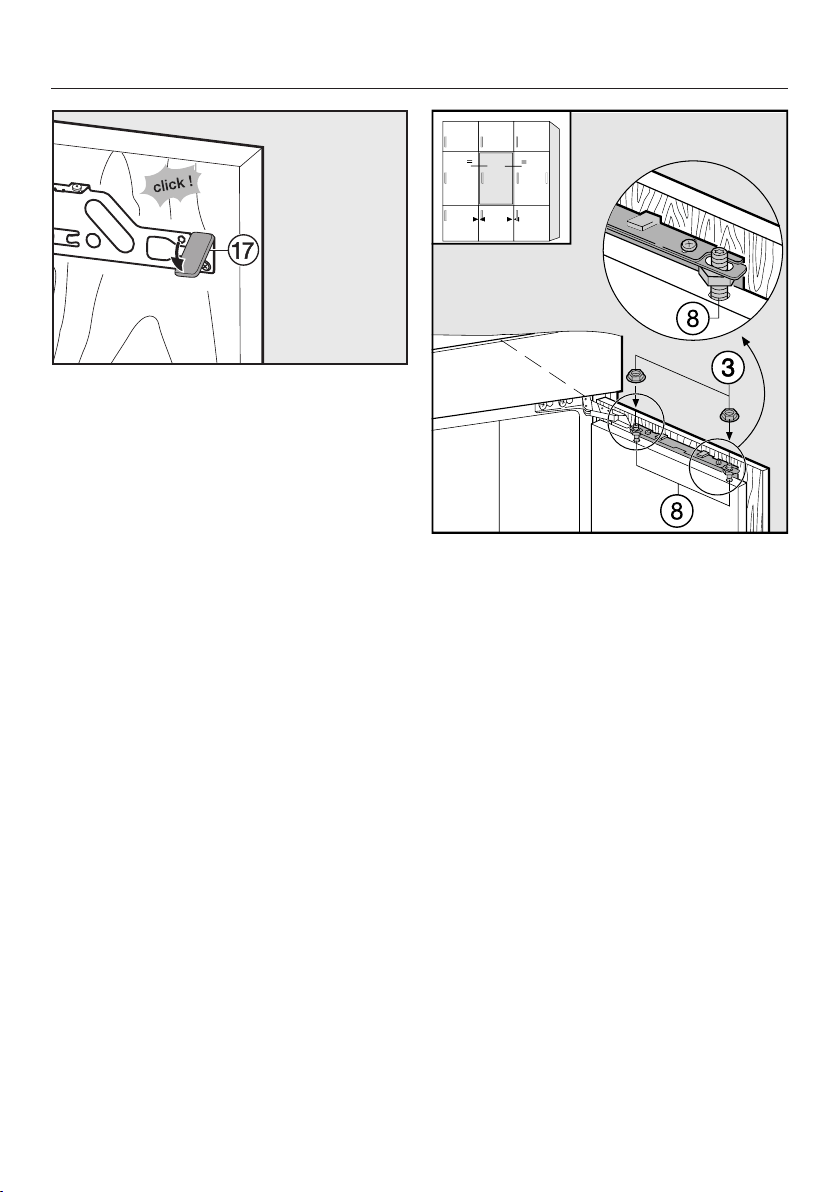
Installing the appliance
76
Fit the side cover t
o the fixing
bracket on the opposite side of the
hinge.
T
urn the furniture door over and
attach the handle (if needed).
Open the app
liance door.
Han
g the furniture door onto the
adjusting bolts .
Loosely attach the nuts on the
adjusting bolts.
Close the door and check the
distance between the door and
nei
ghbouring furniture doors. The
distance should be the same.
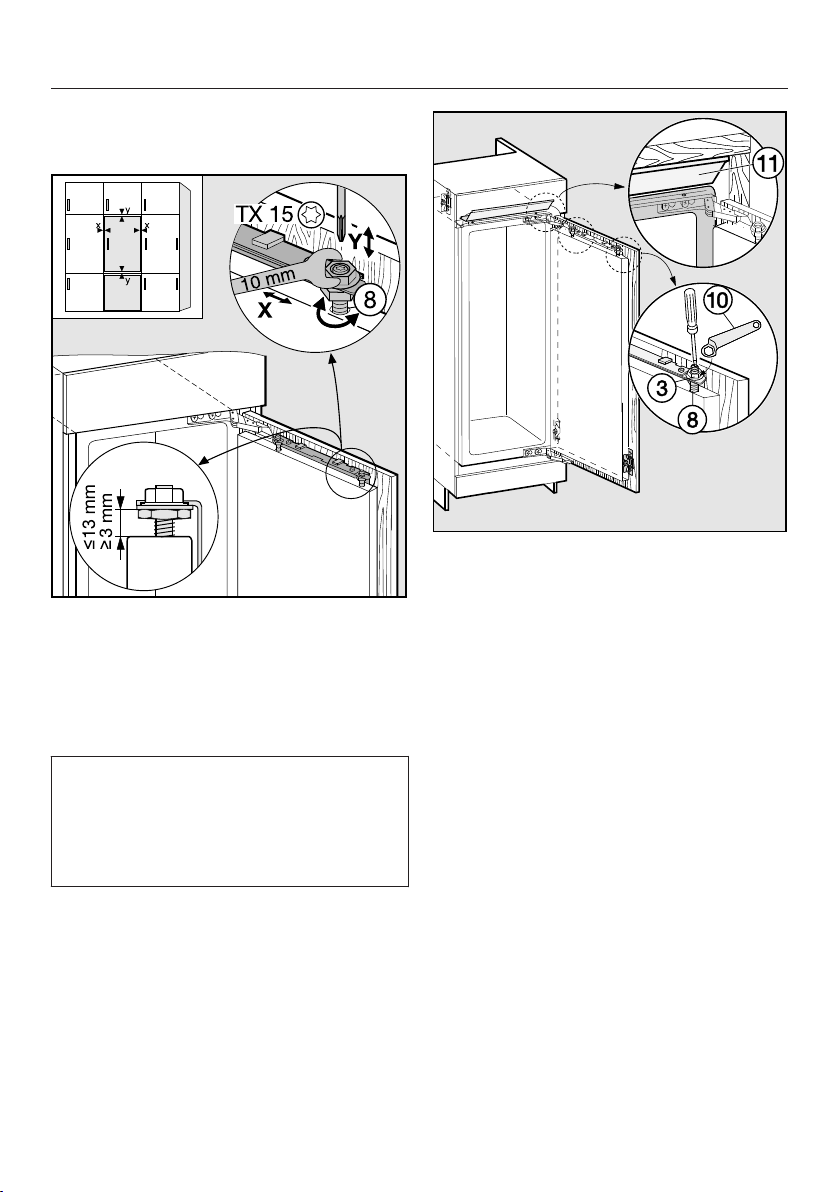
Installing the appliance
77
Adjusting the position of the
door
Adjustment to the sides (X)
Mo
ve the furniture door.
Height adjustment (Y)
Use
a screwdriver to adjust bolts .
The distance between the appliance
door and the fixing bracket is set to
8 mm at the factory. Adjust this
distance only within the dimensions
given in the diagram.
Whilst cou
nterholding adjusting
bolts with a screwdriver, tighten
nuts on the appliance door with
the ring spanner .
The cover strip must be
comple
tely hidden in the niche, and
must not protrude.
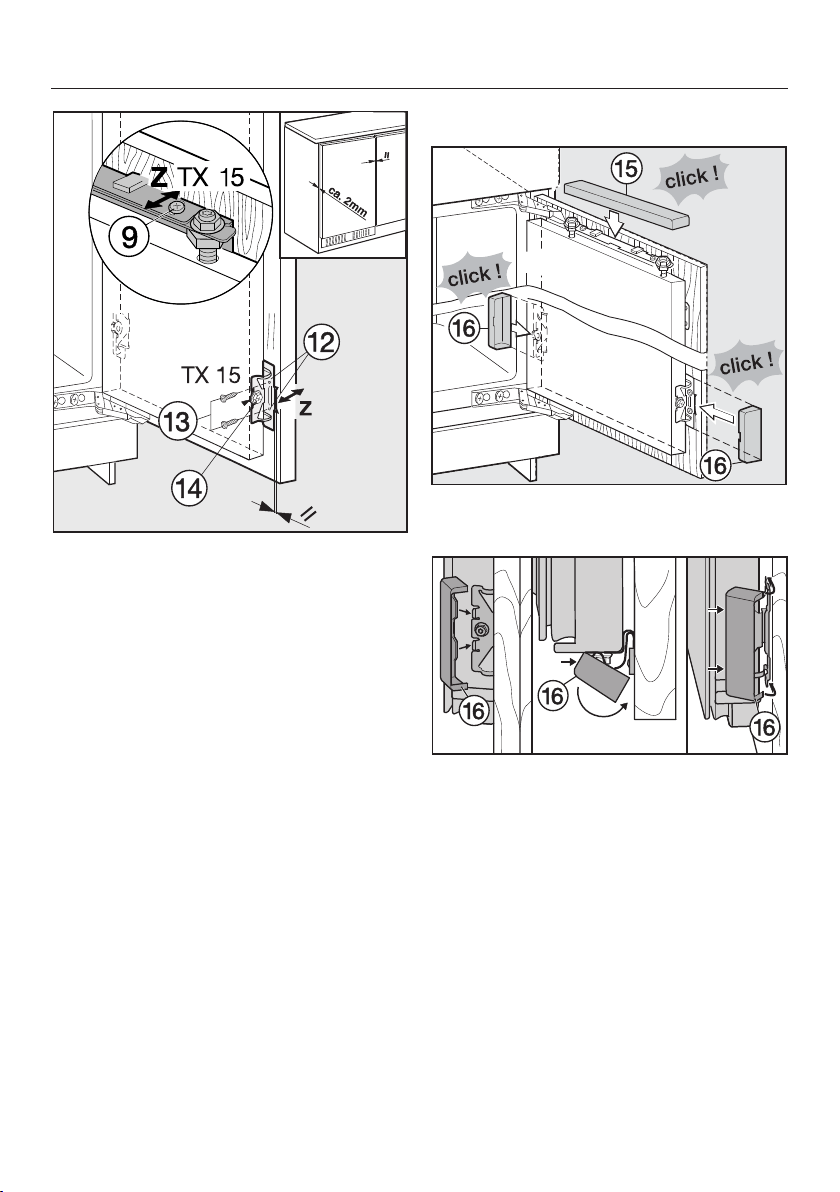
Installing the appliance
78
Drill fixing holes in
the furniture
door and screw in the screws .
Make sure the two metal edges are
aligned (Symbol //).
Close the appliance door and the
furni
ture door.
Adjusting the depth (Z)
L
oosen the screws at the top of
the appliance door and the screw
on the lower fixing bracket. Move the
furniture door to create a gap of
2 mm between the furniture door and
the housing unit.
T
ighten all screws again.
Fi
t the top cover , and click it into
place.
Fit the side covers , makin
g sure
they click into place.

Installing the appliance
79
To make sure the appliance is
corr
ectly fitted:
– The door must close properly.
– The door must not touch the housing
unit.
– The seal at the top edge of the
handle side must fit properly.
T
o double check, place a torch in the
appliance and close the door.
Switch the lights off in the room. If
you can see any light shining out
from the sides, double check the
installation.



www.miele.com.au
Miele Center and Head Office Melbourne:
1 Gilbert Park Drive
Knoxfield, VIC 3180
Miele Center and Office Melbourne:
206-210 Coventry Street
South Melbourne, VIC 3205
Miele Center and Office Sydney:
3 Skyline Place
Frenchs Forest, NSW 2086
Miele Center and Office Brisbane:
39 Harvey Street North
Eagle Farm, QLD 4009
Miele Center and Office Adelaide:
83-85 Sir Donald Bradman Drive
Hilton, SA 5033
205-207 Stirling Highway
Claremont, WA 6010
Miele Center and Office Perth:
Miele Australia Pty. Ltd.
Miele New Zealand Limited
Level 2, 10 College Hill
Freemans Bay, Auckland 1011
Miele Center Auckland:
8 College Hill
Freemans Bay, Auckland 1011
Telephone:
0800 4 MIELE (0800 464 353)
www.miele.co.nz
Miele Global Headquarters
Germany
Miele & Cie. KG
Carl-Miele-Straße 29
33332 Gütersloh
Federal Republic of Germany
Head Office:
IRD 98 463 631
ACN 005 635 398
ABN 96 005 635 398
80

M.-Nr. 10 198 630 / 00en – AU, NZ
FN 35402 i, FN 37402 i, FNS 35402 i, FNS 37402 i