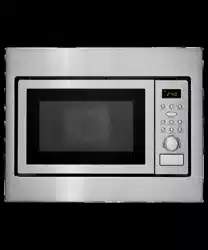
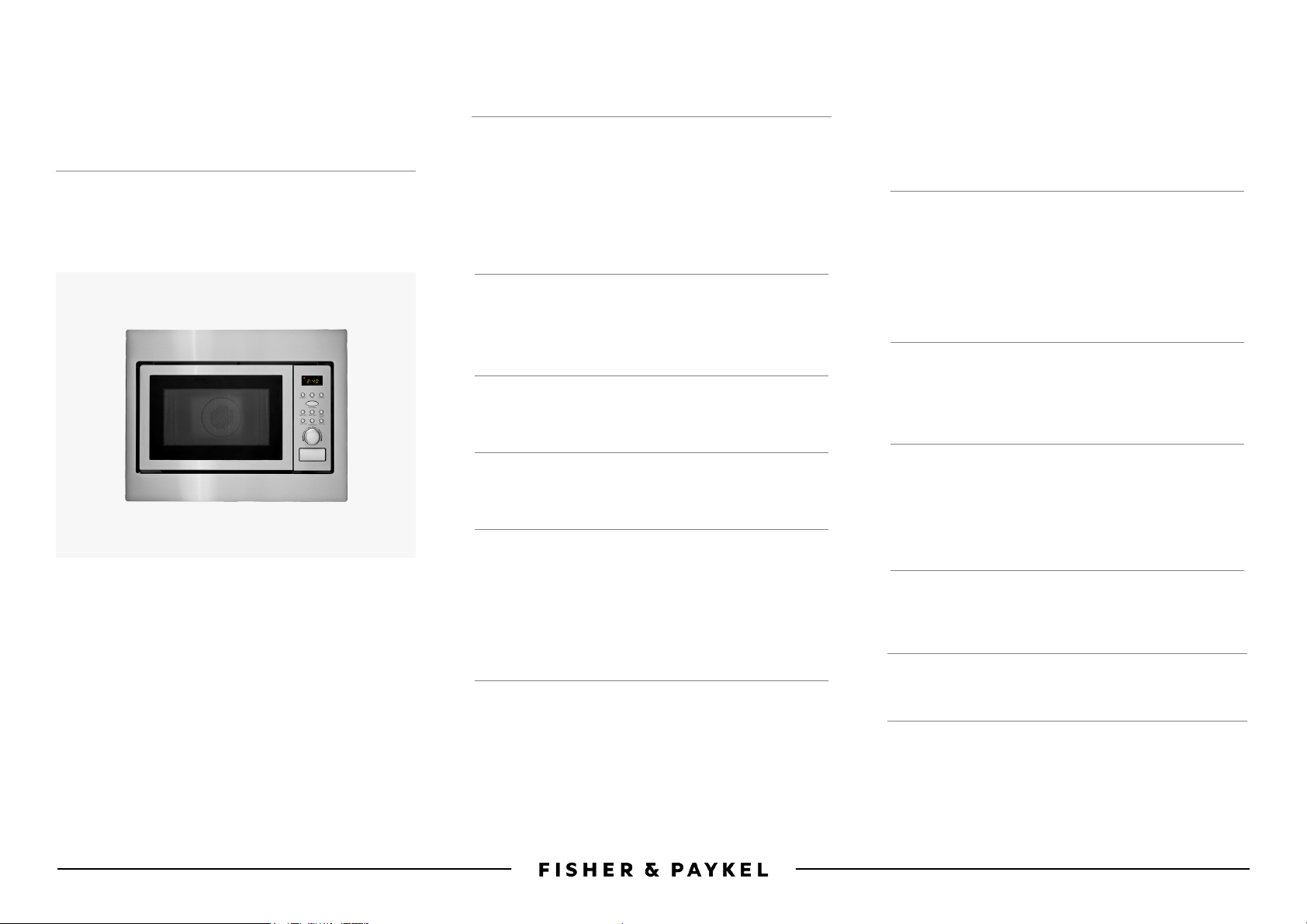
COMBINATION
MICROWAVE OVEN
OM25BLSB1, OM25BLSX1, OM25BLCX1
USER/INSTALLATION GUIDE
NZ AU BI


3
CONTENTS
Product specifications 5
Safety and warnings 6
Before installation 11
Installation guide 12
User guide (OM25BLSB1 / OM25BLSX1) 16
User guide (OM25BLCX1) 21
Troubleshooting 28
Manufacturer’s warranty 29
Customer care 29
European Directive 2012/19/EU on
Waste ElectricalandElectronic Equipment(WEEE) 31
Registration
To register your product visit our website: fisherpaykel.com/register


5
PRODUCT SPECIFICATIONS
Model OM25BLCX1
Rated voltage 230 – 240VAC, 50Hz
Rated input power (microwave) 1450W
Rated output power (microwave) 900W
Rated input power (grill) 1100W
Rated output power (grill) 2300W
Oven capacity 25L
Turntable diameter 315mm
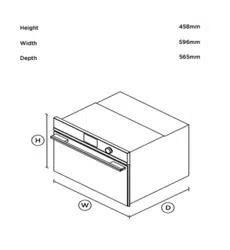
External dimensions (W) 595 x (H) 460 x (D) 470mm
Net weight Approximately 18.5kg
Model OM25BLSB1, OM25BLSX1
Rated voltage 240VAC, 50Hz
Rated input power (microwave) 1450W
Rated output power (microwave) 900W
Oven capacity 28L
Turntable diameter 315mm
External dimensions (W) 595 x (H) 388 x (D) 400mm
Net weight Approximately 18.5kg
6
SAFETY AND WARNINGS
!
WARNING!
Electric Shock Hazard
Read and follow the safety and warnings outlined in this user guide
before operating this appliance.
Failure to do so can result in death, electric shock, fire or injury to persons.
!
WARNING!
Hot Surface Hazard
The accessible surface may be hot during operation.
Use this appliance only for the intended purpose as described in the user guide.
IMPORTANT SAFETY INFORMATION
Read this user guide carefully and keep for future reference. Ensure that you follow
the installation steps when installing the appliance.
WARNING!
AVOID EXPOSURE TO EXCESSIVE MICROWAVE ENERGY!
●
This appliance is intended to be used in household and similar applications such as:
– staff kitchen areas in shops, offices and other working environments;
– farm houses;
– by clients in hotels, motels and other residential environments;
– bed and breakfast type environments.
●
Do not attempt to operate this microwave oven with the door open since open-door
operation can result in harmful exposure to microwave energy. It is important not to
tamper with the safety interlocks.
●
Do not place any object between the oven front face and the door, or allow food or
cleaner residue to accumulate on sealing surfaces.
●
Do not operate the oven if it is damaged. Ensure the oven door is closed properly and
there is no damage to the:
– Door (bent)
– Hinges and latches (broken or loosened)
– Door seals and sealing surfaces.
●
Ensure the oven is adjusted or repaired only by a Fisher&Paykel trained and
supported service technician.
●
if the door or door seals are damaged, do not operate the oven until it has been
repaired by a Fisher&Paykel trained and supported service technician.
●
Follow the basic precautions to reduce the risk of fire, electric shock, injury to persons
or exposure to excessive microwave oven energy when using your appliance.
Electric Shock Hazard
●
This appliance must be grounded. Do not plug into an outlet until appliance is
properly installed and grounded. Grounding reduces the risk of electric shock by
providing an escape wire for the electric current In the event of an electrical short
circuit. Improper grounding can result in electric shock.

7
SAFETY AND WARNINGS
●
This appliance is equipped with a cord having a grounding wire with a grounding
plug. The plug must be plugged into an outlet that is properly installed and grounded.
●
A short power-supply cord is provided to reduce the risks of tripping or the cord
becoming entangled.
●
Consult an electrician or a Fisher&Paykel trained and supported service technician
if the grounding instructions are not completely understood, or if you are not sure
whether the appliance is properly grounded. If it is necessary to use an extension
cord, use only a 3-wire extension cord.
●
If using a long cord set or extension cord, ensure that the marked electrical rating
ofthe cord is greater than the electrical rating of the appliance.
●
The long cord should be arranged so that it will not drape over the counter top or
tabletop where it can be pulled on by children or tripped over unintentionally.
●
Ensure the power supply cord is undamaged and does not run under the oven or
overany hot or sharp surface.
●
The socket must be readily accessible after installation so that it can be easily
unplugged in an emergency.
Installation
●
This appliance is intended to be used for normal personal, family or
householdpurposes.
●
This is a built-in microwave oven intended to be installed in a cavity only.
●
Make sure that all the packing materials are removed from the inside of the door.
●
DO NOT use the oven outdoors.
●
Check the oven for any damage, such as misaligned or bent door, damaged door seals
and sealing surface, broken or loose door hinges and latches and dents inside the
cavity or on the door. If there is any damage, do not operate the oven and contact
aFisher&Paykel trained and supported service technician.
●
This microwave oven must be placed on a flat, stable surface to hold its weight and
the heaviest food likely to be cooked in the oven.
●
Do not place the oven where heat, moisture or high humidity are generated or near
combustible materials.
●
To prevent overheating, this oven must not be installed behind a decorative door.
Electrical
●
Never unplug your appliance by pulling on the power cord. Always grip the plug firmly
and pull straight out from the outlet.
●
Do not plug in any other appliance at the same power point as your appliance or use
extension cords or double adapters or ungrounded (two prong) adapters.
●
If the power supply cord is damaged, it must only be replaced by a Fisher&Paykel
trained and supported service technician.
●
All electrical repairs must be carried out by a Fisher&Paykel trained and supported
service technician or qualified electrician in order to avoid a hazard.
●
Ensure that the appliance is switched off before replacing the lamp to avoid the
possibility of electric shock.
●
It is hazardous for anyone other than a Fisher&Paykel trained and supported
service technician or qualified electrician to carry out any service or repair operation
that involves the removal of a cover which gives protection against exposure to
microwaveenergy.

8
Disposal/Recycling
The packaging materials for this appliance are recyclable.
Operation
●
DO NOT operate the oven without glass tray, roller support and shaft in their
properpositions.
●
Do not use the cavity for storage purposes. Do not leave paper products, cooking
utensils or food in the cavity when not in use.
●
Arrange food items carefully. Place thickest areas towards outside of dish.
●
Watch cooking time. Cook for the shortest amount of time indicated and add more
asneeded.
●
Food severely overcooked can smoke or ignite.
●
Turn food items over once during microwaving to speed cooking of such food items
as chicken and hamburgers. Large items like roasts must be turned over at least once.
●
Rearrange food items such as meatballs halfway through cooking both from top to
bottom and from the centre of the dish to the outside.
Food Safety
●
Use only utensils that are suitable for use in microwave ovens.
●
Be fire wise. Switch off or unplug the appliance and keep the door closed if smoke
isobserved in order to stop any flames.
●
Take care when handling containers. Microwave heating of beverages can result in
delayed eruptive boiling.
●
Ensure the contents of feeding bottles and baby food jars are stirred or shaken and
the temperature checked before consumption, in order to avoid burns.
●
Use only the temperature probe recommended for this oven (for ovens provided
witha facility to use a temperature-sensing probe.)
●
Do not use the microwave oven for purposes other than the heating food and
beverages as this may lead to risk of injury, ignition or fire. It is recommended
toavoid:
– Drying of food or clothing.
– Heating of warming pads, slippers, sponges, damp cloths or similar
– Metallic containers for food and beverages should not be used during
microwavecooking.
●
Do not heat liquids and other foods in sealed containers due to risk of explosion.
●
Do not heat food in plastic or paper containers to avoid possibility of ignition.
●
Do not heat eggs in their shell and whole hard-boiled eggs in the microwave oven
dueto the risk of explosion even after microwave heating has ended.
●
Do not fry food in the oven. Hot oil can damage oven parts and utensils and even
result in skin burns. Oil can self ignite and therefore create a fire hazard.
SAFETY AND WARNINGS

9
SAFETY AND WARNINGS
Child Safety
●
Keep the appliance and its cord out of reach of children aged less than 8 years.
●
Ensure that children (aged 8 years and above) and persons with reduced physical,
sensory or mental capabilities or lack of experience and knowledge can only use the
appliance if they are supervised or have been given instruction on how to use the
appliance safely and understand the hazards involved.
●
Never allow children to play with the appliance.
●
Cover food items while cooking. Covers prevent spattering and help food items
to cook evenly.
IMPORTANT!
Ensure that your microwave oven is regularly cleaned to avoid damage to its surface
that can result in hazards or potential injury.
Cleaning
●
Clean the oven regularly and remove any food deposits. Failure to maintain the oven
in a clean condition could lead to deterioration of the surface that could adversely
affect the life of the appliance and possibly result in a hazardous situation.
●
Do not clean the appliance with a steam cleaner.
●
Be sure to unplug the appliance from the power supply before cleaning.
●
Clean the cavity of the oven after using with a slightly damp cloth.
●
Clean the accessories with soapy water.
●
The door frame, seal and neighbouring parts must be regularly cleaned with a
dampcloth.
●
Do not use harsh abrasive cleaners or sharp metal scrapers to clean the oven door
glass, this may scratch the surface which may result in shattering of the glass.
●
For easy cleaning of the cavity walls when food it baked on, place half a lemon in a
bowl with 300ml (1/2 pint) water and heat on 100% microwave power for 10 minutes.
Wipe the oven clean with a soft, dry cloth after use.
WARNING!
Personal Injury Hazard
It is hazardous for anyone other than a qualified person to carry out any service or
repair operation that involves the removal of a cover which gives protection against
exposure to microwave energy.
See the instructions on ‘Microwave-safe materials’. There may be certain non-metallic
utensils that are not safe to use for microwaving. If in doubt, you can test the utensil
in question following the procedure below.
Utensil Test
1 Fill a microwave-safe container with 1 cup (250ml) of cold water
along with theutensil.
2 Cook on maximum power for 1 minute.
3 Carefully feel the utensil. If the empty utensil is warm, do not use it
for microwavecooking.
4 Do not exceed 1 minute cooking time.
10
SAFETY AND WARNINGS
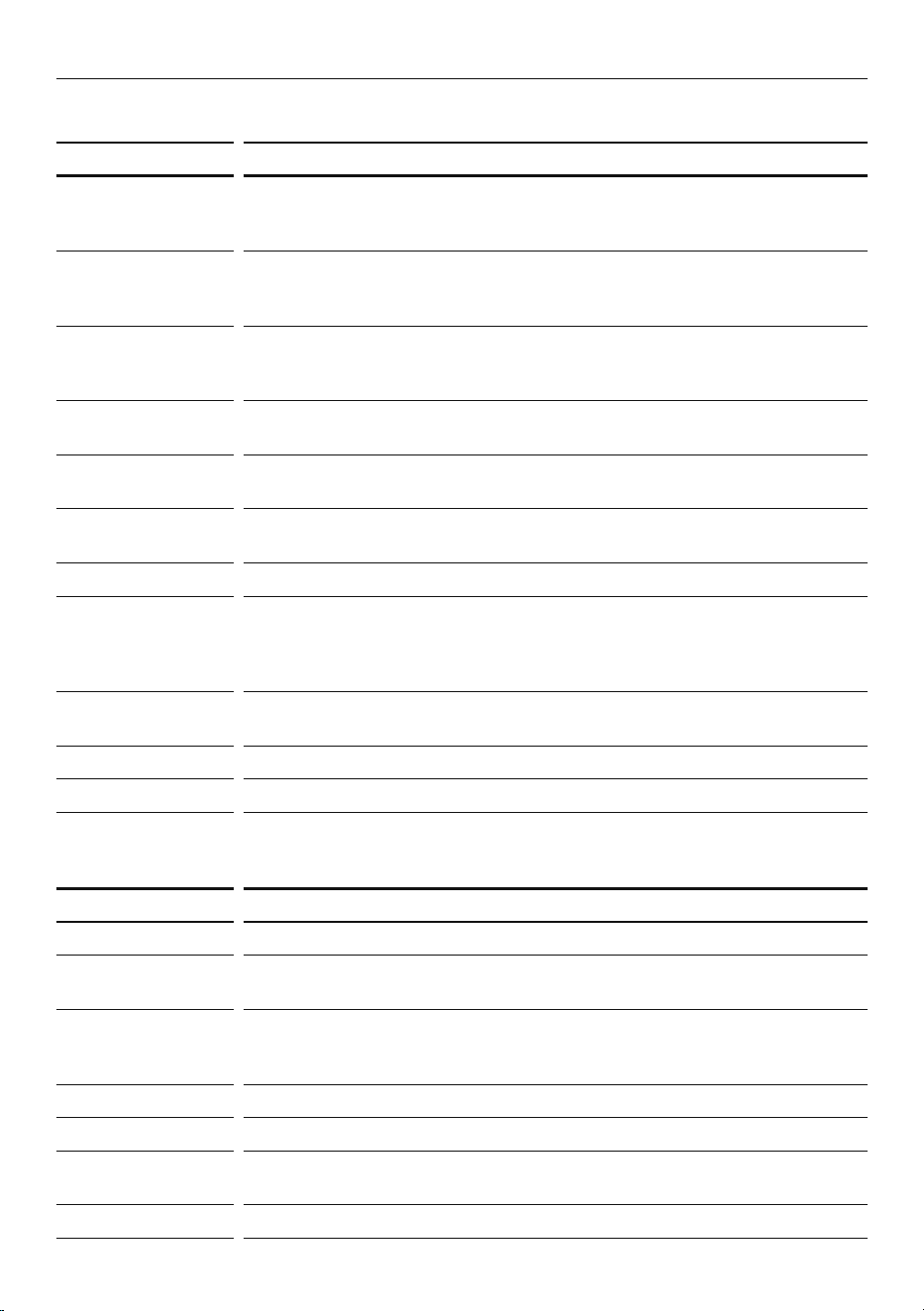
Microwave-safe materials
UTENSILS REMARKS
Browning dish Follow manufacturer’s instructions. The bottom of the browning dish
must be at least 5mm above the turntable. Incorrect usage may cause the
turntable to break
Dinnerware
microwave-safe
only
Follow manufacturer’s instructions. Do not use cracked or chipped dishes.
Glass jars always remove lid. Use only to heat food until just warm.
Mostglass jars are not heat resistant and may break.
Glassware
heat-resistant oven
glassware only
Make sure there is no metallic trim. Do not use cracked or chipped dishes.
Oven cooking
bags
Follow manufacturer’s guidelines. Do not close with metal tie.
Make slits to allow steam to escape.
Paper plate
andcups
Use for short–term cooking/warming only. Do not leave oven unattended
while cooking.
Paper towels Use to cover food for reheating and absorbing fat. Use with supervision
for a short-term cooking only.
Parchment paper Use as a cover to prevent splattering, or as a wrap for steaming.
Plastic
microwave-safe
only
Follow the manufacturer’s instructions. Should be labeled ‘MicrowaveSafe’.
Some plastic containers soften, as the food inside gets hot.
‘Boilingbags’ and tightly closed plastic bags should be slit, pierced or
vented as directed by package.
Plastic wrap Microwave-safe only. Use to cover food during cooking to retain moisture.
Do not allow plastic wrap to touch food.
Thermometers Microwave-safe only (meat and candy thermometers).
Wax paper Use as a cover to prevent splattering and retain moisture.
Non-microwaveable materials
UTENSILS REMARKS
Aluminium tray May cause arcing. Transfer food into microwave-safe dish.
Food carton with
metal handle
May cause arcing. Transfer food into microwave-safe dish.
Metal or
metaltrimmed
utensils
Metal shields the food from microwave energy.
Metal trim may causearcing.
Metal twist ties May cause arcing and could cause a fire in the oven.
Paper bags Risk of causing a fire in the oven.
Plastic foam Plastic foam may melt or contaminate the liquid inside when exposed
to high temperature. Risk of poisoning.
Wood Wood will dry out when used in the microwave oven and may split orcrack.
11
BEFORE INSTALLATION
IMPORTANT!
●
Remove the oven and all materials from the carton and oven cavity.
●
Check the components and accessories are complete.
IMPORTANT!
●
Never place the glass tray upside down. The glass tray should never be restricted.
●
Both glass tray and turntable ring assembly must always be used during cooking.
●
All food and containers of food are always placed on the glass tray for cooking.
●
If the glass tray or turntable ring assembly cracks or breaks, contact your
Fisher&Paykel trained and supported service technician.
6
7
8
4
2
9
1
3
5
!0
!1
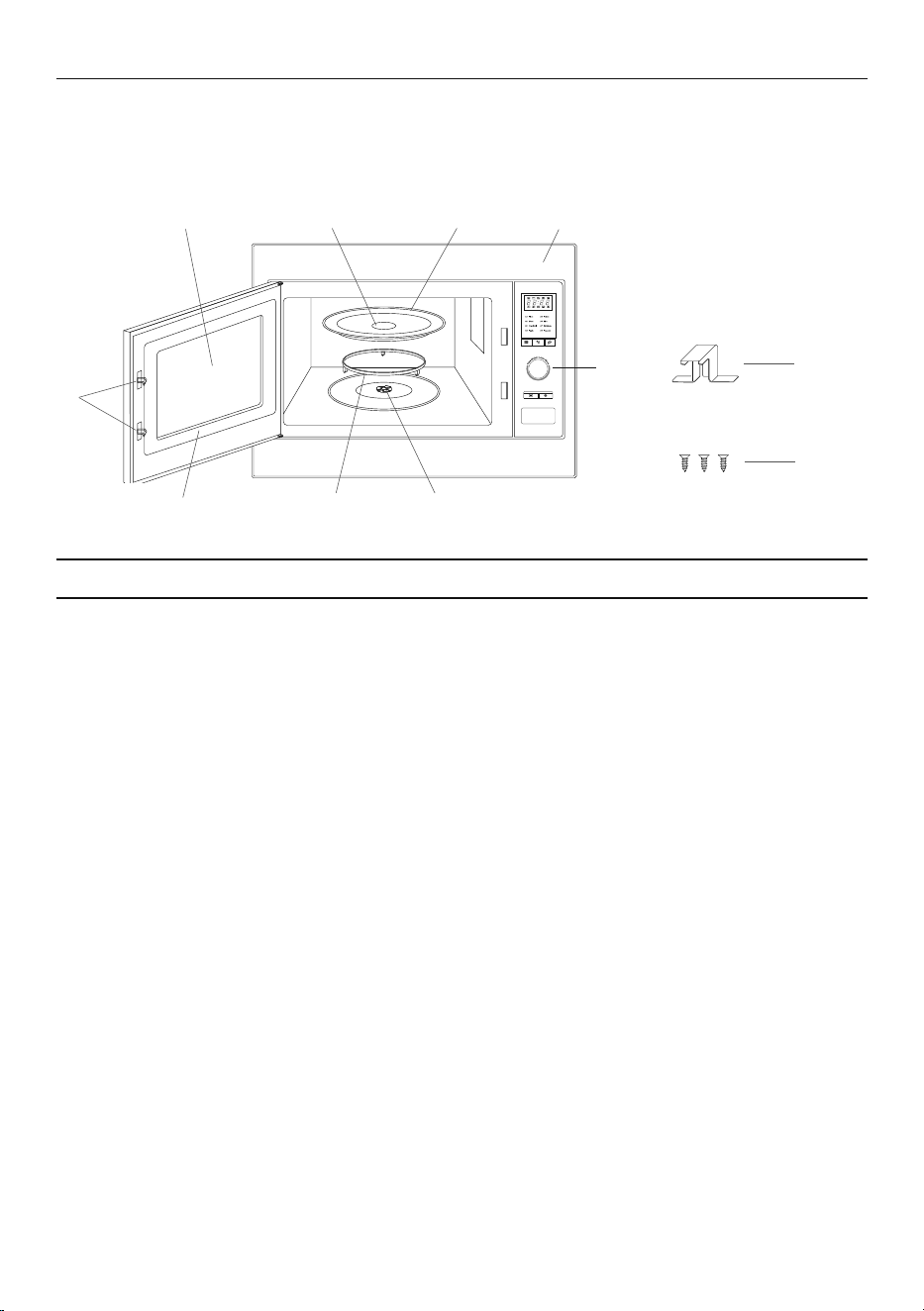
OVEN FEATURES AND ACCESSORIES
1 Safety interlock system
2 Observation window
3 Hub (underside)
4 Glass tray
5 Front trim
6 Control panel
7 Turntable shaft
8 Turntable ring assembly
9 Door assembly
!0 Mounting plate
!1 Screws
12
INSTALLATION GUIDE
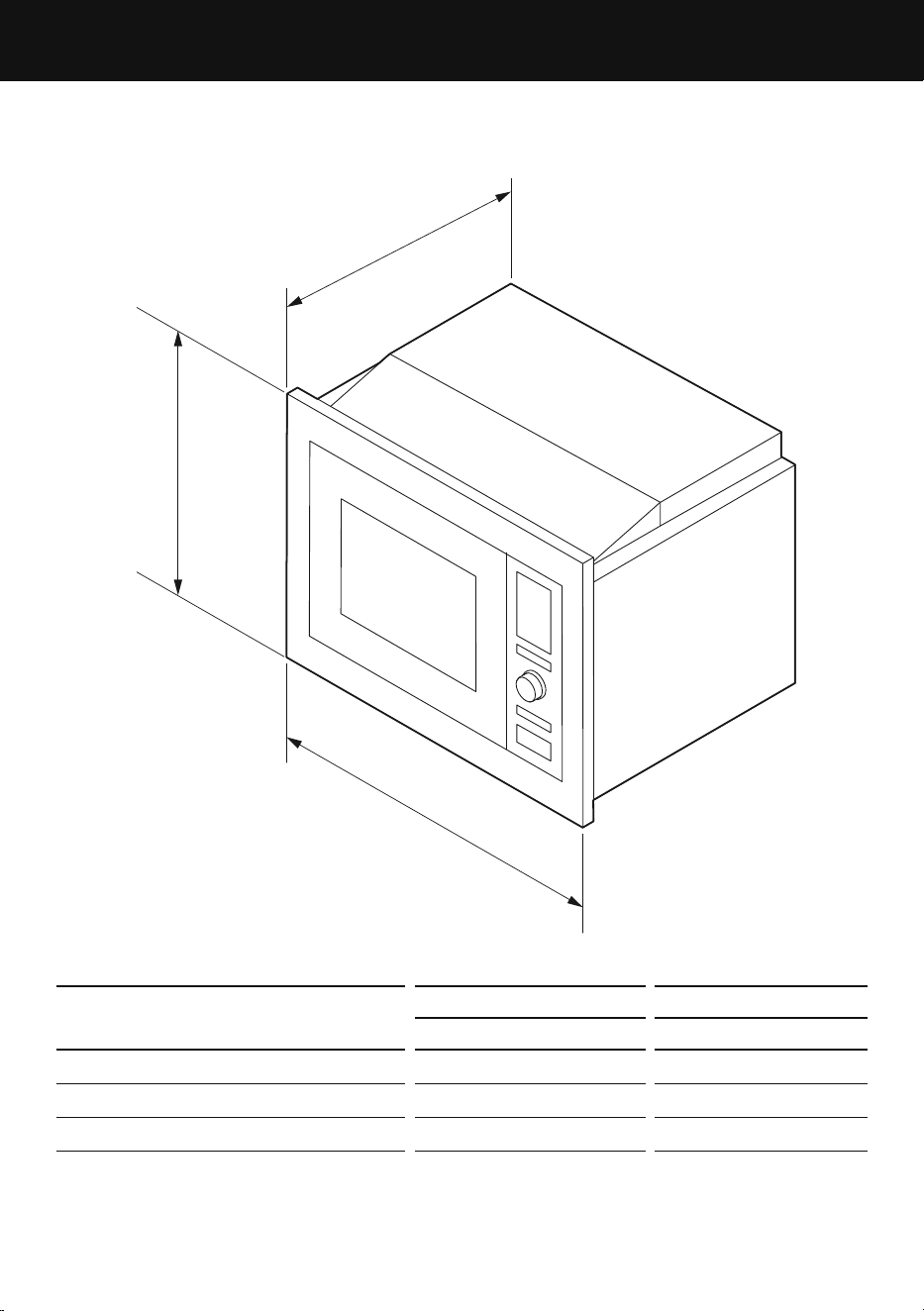
PRODUCT DIMENSIONS
OM25BLSB1/OM25BLSX1 OM25BLCX1
mm mm
A
Overall height 388 460
B
Overall depth 400 470
C
Overall width 595 595
Note: Above dimensions include the pre-installed trim kit.
A
B
C
13
INSTALLATION GUIDE
IMPORTANT!
●
The oven is fitted with a plug and must only be connected to a properly installed
earthed socket. The socket must only be installed and the connecting cable
must only be replaced by a qualified electrician, and in accordance with the
appropriateregulations.
●
If the plug is no longer accessible following installation, an all-pole isolating switch
must be present on the installation side with a contact gap of at least 3mm.
●
Minimum installation height (from floor to base of product): 85cm (for OM25BLCX1
model only).
●
Do not cover ventilation slots and suction holes.
●
Do not trap or bend the power cable.
●
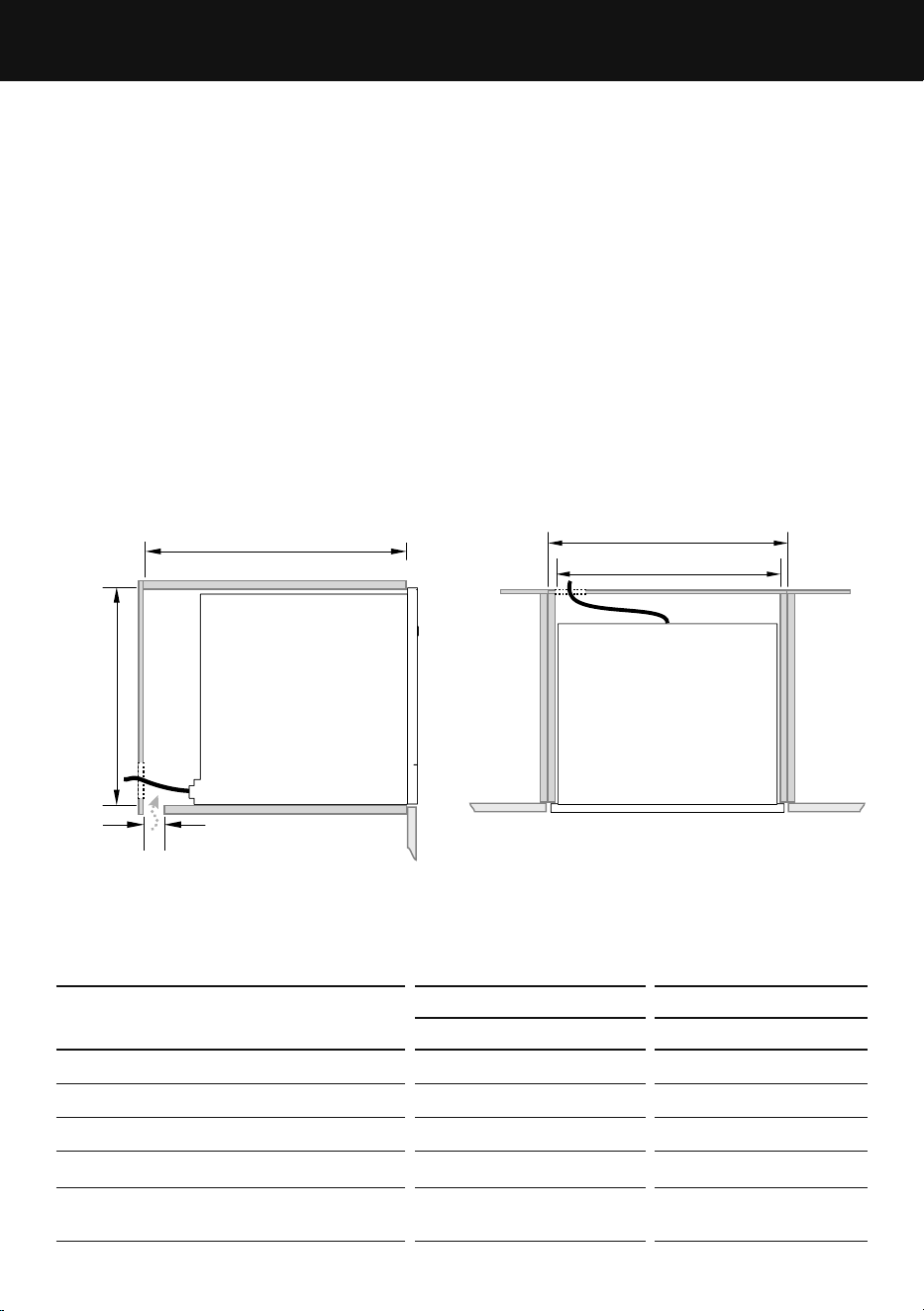
To guarantee correct ventilation a 45mm air gap to free air must be maintained at the
back of the appliance.
●
This air gap can be created through the base of the cabinet as shown or through the
back or side of the cabinet.
b
c
d
e
A
CABINETRY DIMENSIONS
OM25BLSB1/OM25BLSX1 OM25BLCX1
mm mm
A
Overall width of cavity 600 600
b
Inside width of cavity min 560 min 560
c
Inside height of cavity min 380 min 450
d
Depth of cavity min 550 min 550
e
Ventilation gap (through back,
base or side of cabinet)
45 45
SIDE
TOP
14
INSTALLATION GUIDE
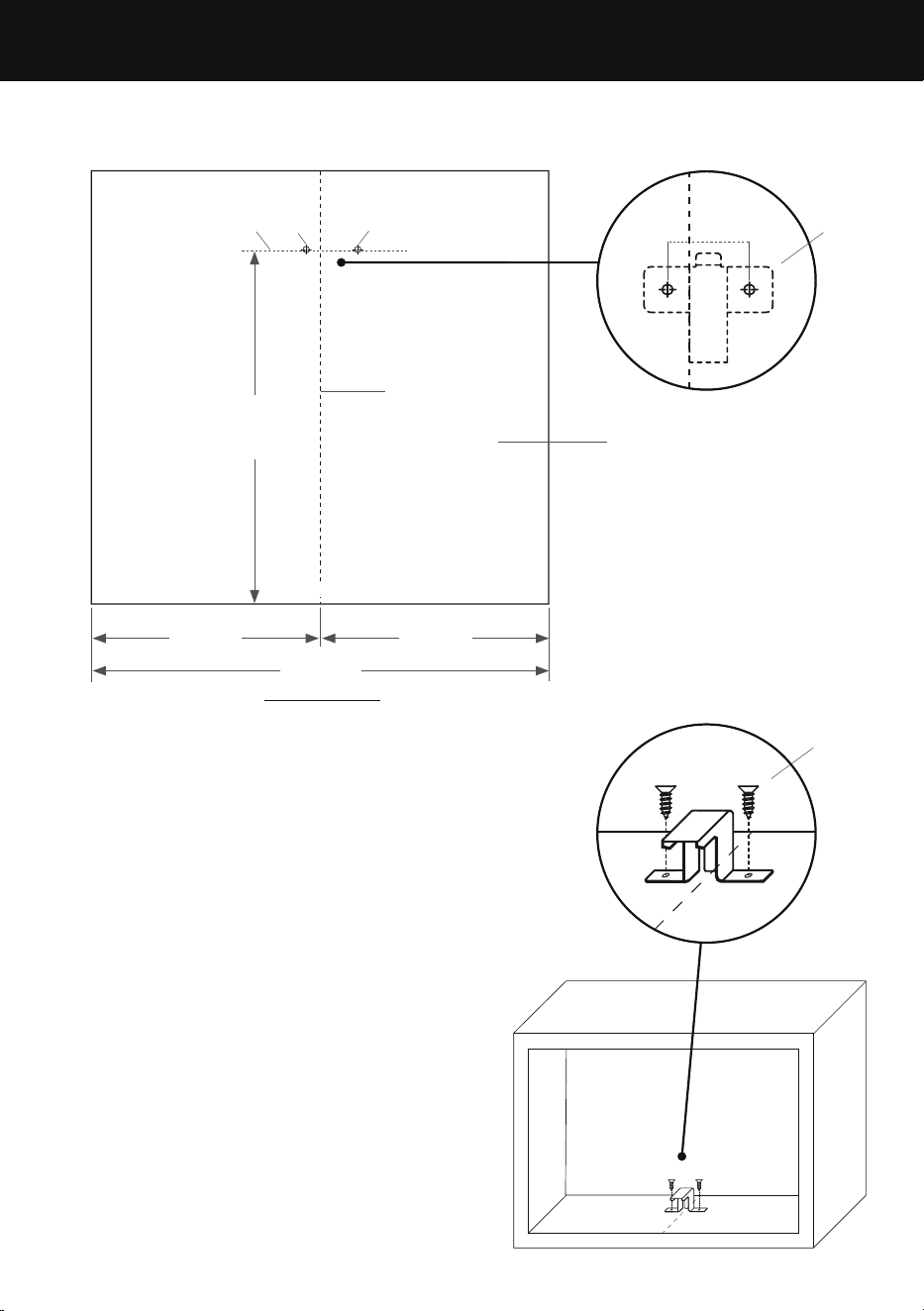
Installing mounting plate in cabinet
1 Mark a centerline (A) along the base
of the cabinet.
2 Measure 357mm from the front edge
of the cabinet and mark a line (B)
across the centreline.
3 Measure 10mm along line (B) from
the centreline towards the left and
mark a screw hole (C).
4 Measure 36mm along line (B) from
the centreline towards the right and
mark a screw hole (D).
5 Place the mounting plate (E) aligning
its screw holes with the screw hole
locations on the cabinet base.
6 Fix the mounting plate with supplied
screws (F) to the screw holes.
Cabinet base
A
560mm
280mm
357mm
280mm
b c
d
E
Front edge
36mm
10mm
f
TOP VIEW
15
INSTALLATION GUIDE
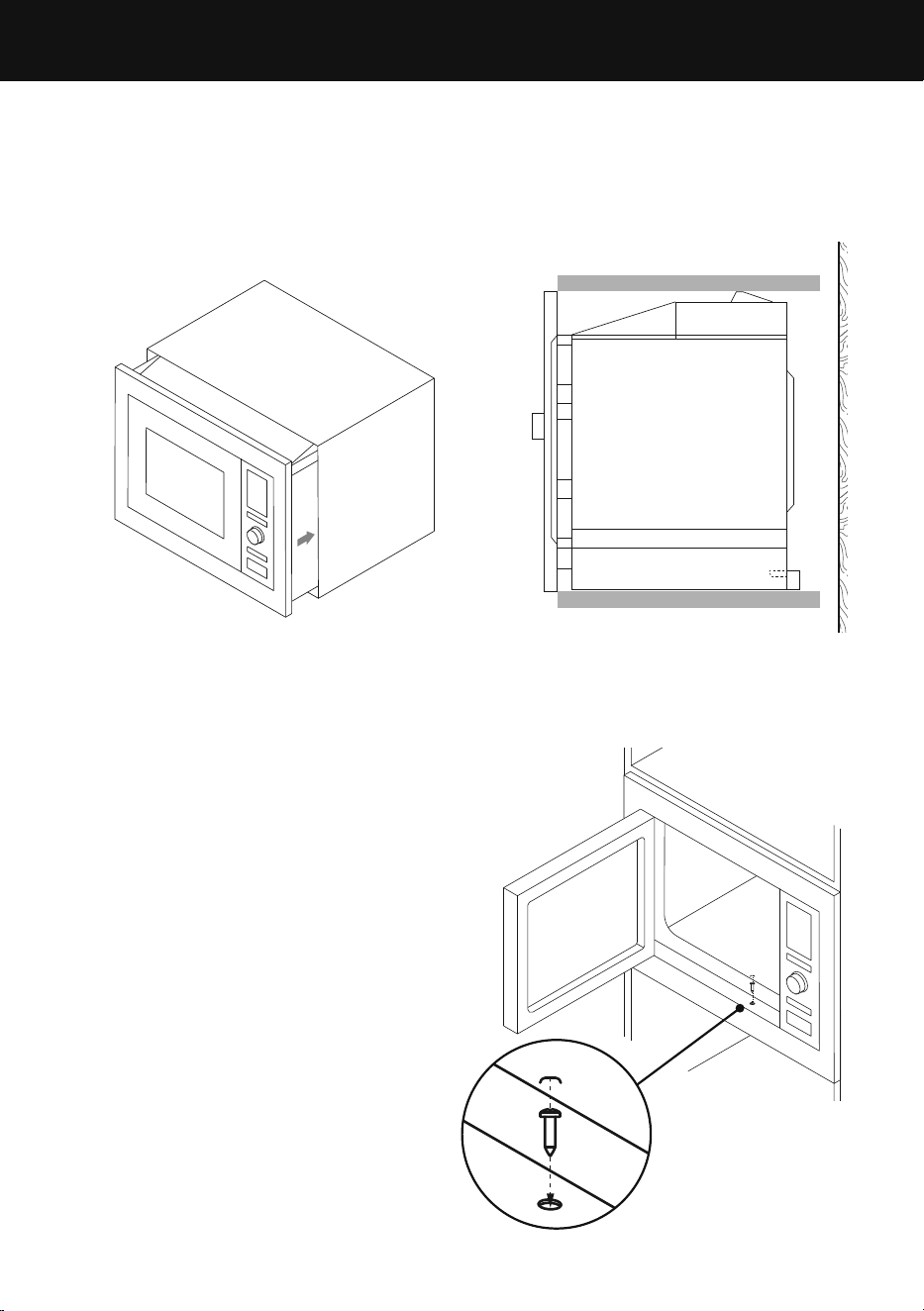
2 Fix the oven to the cabinet:
●
Open the door
●
Install a screw (C) into the
installation hole of the oven trim.
●
Fit a plastic cover (D) over the
installation hole.
1 Place the oven into the cabinet (A).
●
Ensure the back of the oven is locked
by the mounting plate (B).
●
Do not trap or kink the power cord.
Installing the oven
A
b
d
c
16
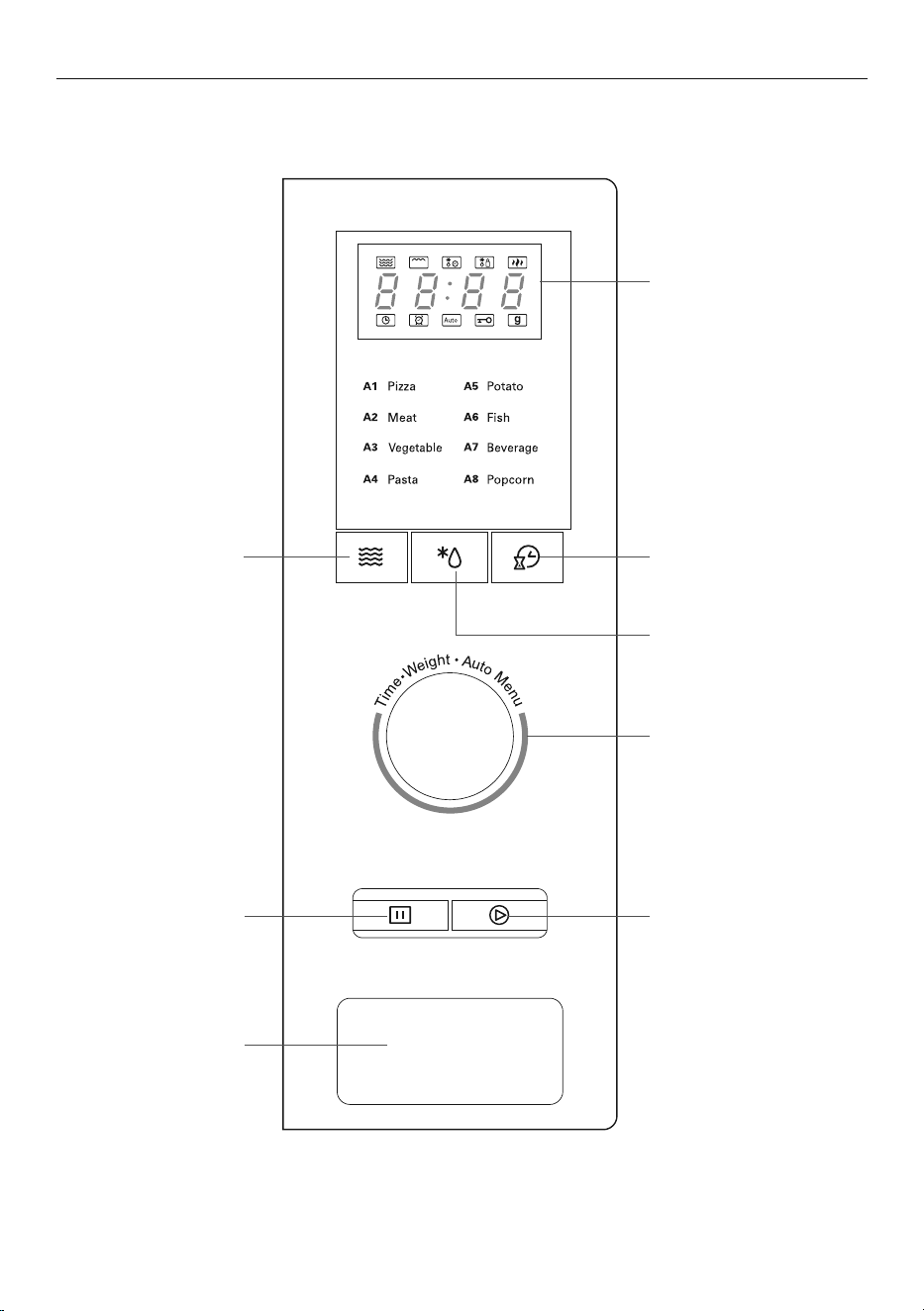
Control Panel
USER GUIDE (OM25BLSB1 / OM25BLSX1)
Microwave
Programs microwave
cooking or selects
microwave power level
Press to open
oven door
Stop/Clear
Stops the cooking
program or clears
all previous settings
before cooking starts
W.T./Time Defrost
Defrosts food by either
weight or time
Kitchen Timer/Clock
Sets the clock
Display screen
Displays cooking time,
power level, indicators
and current time
Selector dial
Rotate to select your
preferred function
Start/+30SEC./Confirm
Confirms and starts
the program; or
startscooking at 100%
microwave power
level for 30seconds
(eachpress increases
cooking time by
30seconds)

17
Quick Start
Use this feature to automatically programme the oven to cook food at 100% power.
1 Turn Selector dial left to set cooking time on the Display screen,
then press Start/+30Sec./Confirm to startcooking.
2 Press Start/+30Sec./Confirm to start the cooking time. Additional presses
of Start/+30Sec./Confirm will increase the cooking time by 30seconds
up to a maxium of 95 minutes.
Microwave cooking
1 Press Microwave and the LED will display ‘P100’.
2 Press Microwave repeatedly to adjust the power level between 100% and 10%, or turn
Selector dial to choose the power you prefer. The display screen will show ‘P100’, ‘P80’,
‘P50’, ‘P30’ or ‘P10’ for each additional press.
3 Press Start/+30Sec./Confirm to confirm your selection.
4 Turn Selector dial to set cooking time from 0:05 to 95:00 minutes.
5 Press Start/+30Sec./Confirm again to start cooking.
PRESS DISPLAY POWER LEVEL DESCRIPTION
Once
P100
100% High
Twice
P80
80% Medium High
3 times
P50
50% Medium
4 times
P30
30% Medium Low
5 times
P10
10% Low
Example: If you want to use 80% microwave power to cook for 20 minutes:
●
Press Microwave once, the screen display ‘P100’.
●
Press Microwave again or turn Selector dial to choose 80% microwave power.
●
Press Start/+30Sec./Confirm to confirm, and the screen will display ‘P80’.
●
Turn Selector dial to adjust the cooking time until the oven displays ‘20:00’.
●
Press Start/+30Sec./Confirm to start cooking.
Note: The cooking time will increase/decrease in set increments as per below:
0 – 1 min : 5 seconds
1 – 5 min : 10 seconds
5 – 10 min : 30 seconds
10 – 30 min : 1 minute
30 – 95 min : 5 minutes
USER GUIDE (OM25BLSB1 / OM25BLSX1)

18
USER GUIDE (OM25BLSB1 / OM25BLSX1)
Defrost by Weight
1 Press WT/TIme Defrost once, the oven will display ‘dEF1’.
2 Turn Selector dial to select the weight of food from 100 to 1000g.
3 Press Start/+30Sec./Confirm to start defrosting.
Defrost by Time
1 Press WT/TIme Defrost twice, the oven will display ‘dEF2’.
2 Turn Selector dial to select the defrost time. The maximum time is 95 minutes.
3 Press Start/+30Sec./Confirm to start defrosting. The defrost power is set at P30
and does not change.
Multi-function cooking
This feature allows you to use different cooking functions in one setting.
For example, if you want to defrost food for 5 minutes and then cook with
80% power for 7 minutes.
Note: If defrost is one of the functions used, this must be entered first.
1 Press WT/TIme Defrost twice, the oven will display ‘dEF2’.
2 Turn Selector dial to select the defrost time until ‘5:00’ is displayed
3 Press Microwave once the screen display ‘P100’
4 Press Microwave again or turn Selector dial to select 80% power.
5 Press Start/+30Sec./Confirm to select.
6 Turn Selector dial to select the cooking time until ‘7:00’ is displayed
7 Press Start/+30Sec./Confirm to start cooking.
The buzzer will sound once when the first cooking function starts. The buzzer will sound
again when the second cooking function starts. The buzzer will sound 5 times when
cooking is complete.
Setting the Clock
When the microwave oven is on, the LED will display ‘0:00’ and the buzzer
will ring once.
1 Press Kitchen Timer/Clock twice to select clock function. The ‘hour’ will flash.
2 Turn Selector dial to adjust the hour. The input time will be 0 – 23.
3 Press Kitchen Timer/Clock and the ‘minute’ will flash.
4 Turn Selector dial to adjust the ‘minute’, the input time will be 0 – 59.
5 Press Kitchen Timer/Clock to finish clock setting. ‘:’ will flash, and time will light up.
Note: The clock will not work if it is not set. During the process of clock setting, ifyou
press Stop/Clear the oven will go back to the previous status automatically.
Kitchen Timer
1 Press Kitchen Timer/Clock once, LED will display '00:00'.
2 Turn Selector dial to enter the required time (the maximum cooking time is 95minutes.)
3 Press Start/+30Sec./Confirm to confirm the setting.
4 When the set time is reached, the buzzer will ring 5 times. If the clock has been set,
the LED display will show the current time.

19
USER GUIDE (OM25BLSB1 / OM25BLSX1)
Lookup function
When the microwave is in use, you can determine the current cooking power and time.
To view the cooking power:
●
Press Microwave, the current power will display for 3 seconds.
To see the current time:
●
Press Kitchen Timer/Clock, the time will display for 3 seconds.
Key Lock
Key lock prevents unsupervised operation by children.
To turn key lock on:
●
Press Stop/Clear for 3 seconds, a long beep with sound. If the clock is set the current
time will be displayed, otherwise the LED will display
To turn key lock off:
●
Press Stop/Clear for 3 seconds, a long beep with sound.
Auto Menu
Auto Menu allows you to cook or reheat food automatically without entering power level
or time. Choose the food item and its weight, the oven will automatically cook your food
item for the recommended time and power level.
1 Turn Selector dial right to select the menu, ‘A-1’ to ‘A-8’ will display.
Refer to the Auto Menu table (page 20).
2 Press Start/+30Sec./Confirm to select.
3 Turn Selector dial to choose the default weight as detailed in the menu chart.
4 Press Start/+30Sec./Confirm again to start cooking.
Example: If you want to use Auto Menu to cook 350g of fish.
●
Turn Selector dial clockwise until ‘A-6’ is display
●
Press Start/+30Sec./Confirm to select.
●
Turn Selector dial to select the weight of fish until ‘350’ is displayed.
●
Press Start/+30Sec./Confirm to start cooking.

20
AUTO MENU WEIGHT (GRAMS) DISPLAY
A-1
Pizza
200 200
400 400
A-2
Meat
250 250
350 350
450 450
A-3
Vegetable
200 200
300 300
400 400
A-4
Pasta
50 (with 450ml cold water) 50
100 (with 800ml cold water) 100
A-5
Potato
200 200
400 400
600 600
A-6
Fish
250 250
350 350
450 450
A-7
Beverage
1 (about 120ml) 1
2 (about 240ml) 2
3 (about 360ml) 3
A-8
Popcorn
50 50
85 85
100 100
USER GUIDE (OM25BLSB1 / OM25BLSX1)
21
Selector dial
Door opener
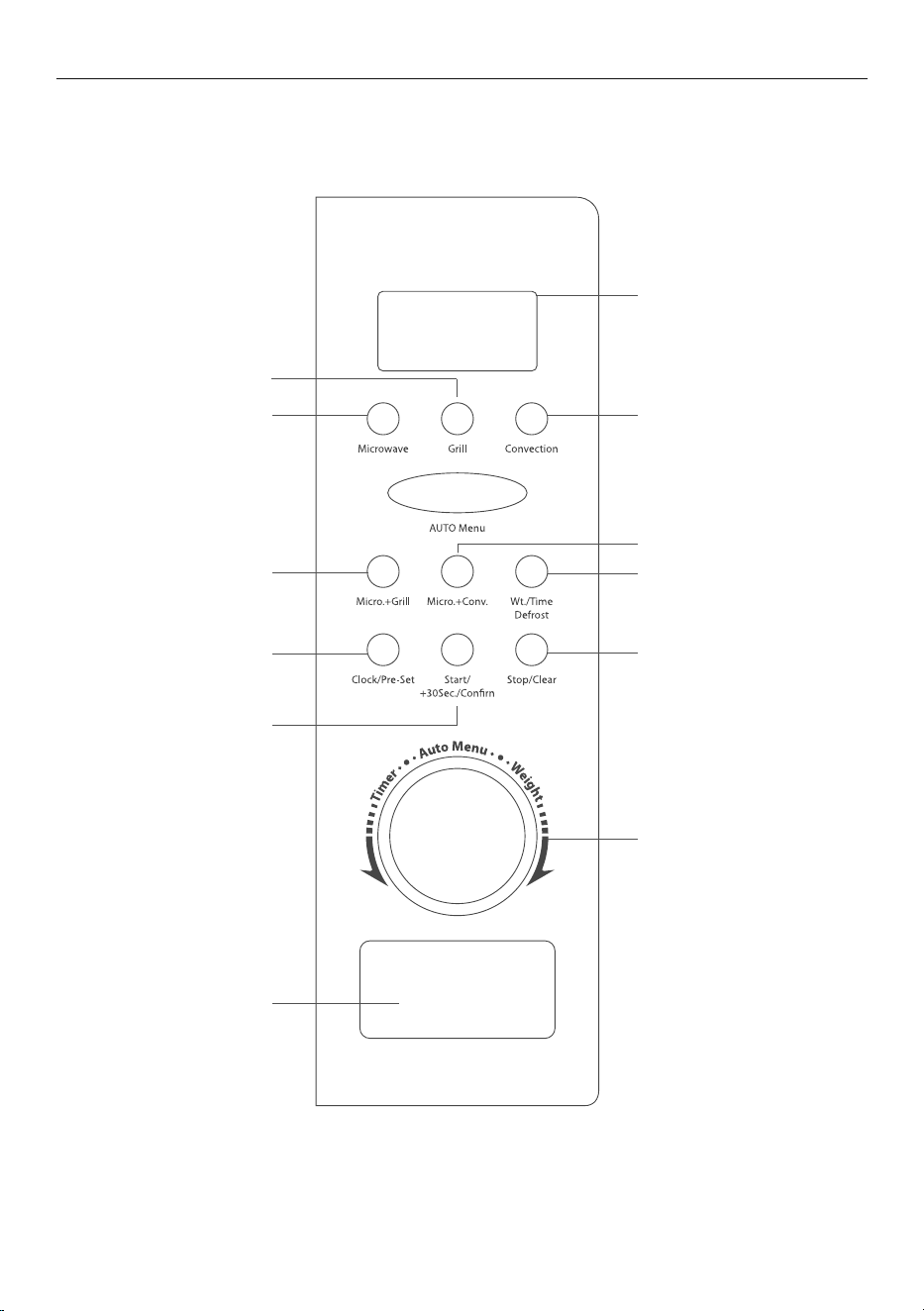
USER GUIDE (OM25BLCX1)
Control Panel
Microwave
Programs microwave
cooking or selects
microwave power level
Press to open
oven door
Stop/Clear
Stops the cooking program
or clears all previous settings
before cooking starts
Clock/Pre-set
Sets the clock
Micro.+Grill
Combines microwave
and grill cooking on three
different settings
Convection
Programs convection cooking
Display screen
Displays cooking time,
power level, indicators
and current time
Selector dial
Rotate to select your
preferred function
Start/+30SEC./Confirm
Confirms and starts the
program; or starts cooking
at 100% microwave power
level for 30 seconds (each
press increases cooking
time by 30 seconds)
Grill
Programs grill cooking
W.t./Time Defrost
Defrosts food by either
weight or time
Micro.+Conv
Defrosts food by either
weight or time

22
USER GUIDE (OM25BLCX1)
Quick Start
Use this feature to automatically programme the oven to cook food at 100% power.
1 Turn Selector dial left to set cooking time on the Display screen, then press
Start/+30Sec./Confirm to startcooking.
2 Press Start/+30Sec./Confirm to start the cooking time. Additional presses of
Start/+30Sec./Confirm will increase the cooking time by 30seconds up to a maxium
of 95 minutes.
Microwave cooking
1 Press Microwave and the LED will display ‘P100’.
2 Press Microwave repeatedly to adjust the power level between 100% and 10%, or turn
Selector dial to choose the power you prefer. The display screen will show ‘P100’, ‘P80’,
‘P50’, ‘P30’ or ‘P10’ for each additional press.
3 Press Start/+30Sec./Confirm to confirm your selection.
4 Turn Selector dial to set cooking time from 0:05 to 95:00 minutes.
5 Press Start/+30Sec./Confirm again to start cooking.
PRESS DISPLAY POWER LEVEL DESCRIPTION
Once
P100
100% High
Twice
P80
80% Medium High
3 times
P50
50% Medium
4 times
P30
30% Medium Low
5 times
P10
10% Low
Example: If you want to use 80% microwave power to cook for 20 minutes:
●
Press Microwave once, the screen display ‘P100’.
●
Press Microwave again or turn Selector dial to choose 80% microwave power
●
Press Start/+30Sec./Confirm to confirm, and the screen will display ‘P80’.
●
Turn Selector dial to adjust the cooking time until the oven displays ‘20:00’.
●
Press Start/+30Sec./Confirm to start cooking.
Note: The cooking time will increase/decrease in set increments as per below:
0 – 1 min : 5 seconds
1 – 5 min : 10 seconds
5 – 10 min : 30 seconds
10 – 30 min : 1 minute
30 – 95 min : 5 minute

23
USER GUIDE (OM25BLCX1)
Defrost by Weight
1 Press WT/TIme Defrost once, the oven will display ‘dEF1’.
2 Turn Selector dial to select the weight of food from 100 to 1000g.
3 Press Start/+30Sec./Confirm to start defrosting.
Defrost by Time
1 Press WT/TIme Defrost twice, the oven will display ‘dEF2’.
2 Turn Selector dial to select the Defrost time. The maximum time is 95 minutes.
3 Press Start/+30Sec./Confirm to start defrosting. The Defrost power is set at 'P30' and
does not change.
Multi-function cooking
This feature allows you to use different cooking functions in one setting.
For example, if you want to defrost food for 5 minutes and then cook with 80% power
for 7 minutes.
Note: If Defrost is one of the functions used, this must be entered first.
1 Press WT/TIme Defrost twice, the oven will display ‘dEF2’.
2 Turn Selector dial to select the defrost time until ‘5:00’ is displayed
3 Press Microwave once the screen display ‘P100’
4 Press Microwave again or turn Selector dial to select 80% power.
5 Press Start/+30Sec./Confirm to select.
6 Turn Selector dial to select the cooking time until ‘7:00’ is displayed.
7 Press Start/+30Sec./Confirm to start cooking.
The buzzer will sound once when the first cooking function starts. The buzzer will sound
again when the second cooking function starts. The buzzer will sound 5 times when
cooking is complete.
Grill cooking
Grill cooking is particularly useful for thin slices of meat, steaks, chops, kebabs, sausages
and pieces of chicken. It is also suitable for hot sandwiches and au gratin dishes.
1 Press the Grill button once (‘G-’ will show in the display).
2 Turn the Selector dial to select the cooking time
(minimum 5 seconds; maximum 95 minutes).
3 Press Start/+30Sec./Confirm to start cooking.
When half of the grill time has passed, the alarm will beep twice to tell you to turn the
food over. If you leave the oven to continue grilling without turning the food over the
alarm will beep twice (up to four more times) to remind you to turn your food over, as
it continues grilling. For best result in grilling food, you should turn the food item over,
close the door and then press Start/+30Sec./Confirm to resume cooking.

24
Convection cooking
Convection cooking enables you to cook the food as with a traditional oven. Microwaves
are not used. During convection cooking, hot air is circulated throughout the oven cavity
to brown and crisp food items quickly and evenly. This oven can be programmed for ten
different cooking temperatures between 140 – 230°C at 10°C increments.
It is recommended that the oven is preheated to the appropriate temperature before
food is placed in the oven.
With preheating
1 Press the Convection button once and ‘0’ will flash in the display.
This is the temperature setting.
2 To adjust the temperature between 140 – 230°C, press Convection the required number
of times or turn the Selector dial until the desired temperature is displayed.
3 Press the Start/+30Sec./Confirm to confirm the temperature.
4 Press the Start/+30Sec./Confirm to start preheating.
When the oven has reached the preheated temperature, the oven alarm will beep twice
to remind you to put the food into the oven. The preheated temperature will flash in
the display.
5 Put the food into the oven and close the door. Turn the Selector dial to select the
cooking time (minimum 5 seconds; maximum 95 minutes).
6 Press the Start/+30Sec./Confirm key to start cooking.
Note:
●
The cooking time cannot be set until the oven has reached the preheated
temperature and the door has been opened.
●
The oven will stop if the cooking time is not set within 5 minutes. The oven alarm will
beep five times and return to the standby mode (and the current time is displayed).
Without preheating
1 Press the Convection button once and ‘0’ will flash in the display.
This is the temperature setting.
2 To adjust the temperature between 140 – 230°C, press Convection the required number
of times or turn the Selector dial until the desired temperature is displayed.
3 Press the Start/+30Sec./Confirm to confirm the temperature.
4 Put the food into the oven and close the door. Turn the Selector dial to select the
cooking time (minimum 5 seconds; maximum 95 minutes).
5 Press the Start/+30Sec./Confirm key to start cooking.
USER GUIDE (OM25BLCX1)
25
Combination cooking
Microwave + Grill
This feature allows you to combine grill and microwave cooking on three
different settings.
1 Press the Micro.+Grill button once (‘G-2’ will show in the display).
2 To adjust the grill power, press the Micro.+Grill button the required number of times
(see the table below) or turn the Selector dial until the desired grill level is displayed.
3 Press Start/+30Sec./Confirm to confirm.
4 Turn the Selector dial to select the cooking time
(minimum 5 seconds; maximum 95 minutes).
5 Press Start/+30Sec./Confirm to start cooking.
DISPLAY MICROWAVE POWER GRILL POWER
G-2 28% 72%
G-3 38% 62%
G-4 48% 52%
DISPLAY MICROWAVE POWER CONVECTION POWER GRILL POWER
C-1 28% 72% —
C-2 38% 62% —
C-3 48% 52% —
C-4 48% 52 52%
Microwave + Convection
This feature allows you to combine microwave and convection cooking
on four different settings.
1 Press the Micro.+Conv. button once (‘C-1’ will show in the display).
2 To adjust the convection power, press the Micro.+Conv. button the required
number of times.
Clock setting
1 Press Clock/Pre-set to choose 12-hour or 24-hour.
2 Turn Selector dial to adjust the hour.
3 Press Clock/Pre-set and the ‘minute’ will flash.
4 Turn Selector dial to adjust the ‘minute’.
5 Press Clock/Pre-set to finish clock setting. ‘:’ will flash,
and the time will light.
Note: The clock will not work if it is not set. During the process of clock setting, ifyou
press Stop/Clear the oven will go back to the previous status automatically.
USER GUIDE (OM25BLCX1)

26
USER GUIDE (OM25BLCX1)
Delay start cooking
To set the oven for delay start cooking
1 Set the clock first (refer to 'Setting the Clock' on page 18). The clock must be set
for the delay start cooking function to work.
2 Select the cooking program. A maximum of two stages can be selected.
Note: defrosting should not be included in the delay start cooking function.
Auto Menu can be set as a single stage only.
For example, to cook with 80% microwave power for 7 minutes.
3 Press MICROWAVE once.
●
To select 80% microwave power, turn the Selector dial until ‘P80’ shows in the display.
●
Press Start/+30Sec./Confirm to confirm.
●
Turn the Selector dial to select the cooking time of 7 minutes.
Do not press Start/+30Sec./Confirm.
4 Press Clock/Pre-set. The current time is shown and the hour figures will flash
in the display.
5 Turn the Selector dial to adjust the hour figures. This should be within 0 – 23 (24-hour)
or 1 – 12 (12-hour).
6 Press Clock/Pre-set and the minute figures will flash in the display.
7 Turn the Selector dial to adjust the minute figures. This should be within 0
– 59.
8 Press Start/+30Sec./Confirm to confirm the delay start cooking time. stops flashing
and stays lit until the pre-set time. The oven alarm will beep twice and start cooking
automatically at the pre-set time.
Auto Menu
1 Press Auto Menu and ‘A-1’ will show in the display.
2 To select the desired function, press Auto Menu button repeatedly or turn Selector dial
until the desired function is displayed. Refer to the Auto Menu table (page 27).
3 Press Start/+30Sec./Confirm to confirm.
4 Turn Selector dial to choose the default weight as indicated in Auto Menu
(indicator will light up).
5 Press Start/+30Sec./Confirm again to start cooking.
Note:
●
Cake menu is under Convection cooking with 180°C warm-up function and you should
preheat first following the Auto Menu operation. When the oven reaches the required
temperature, it will stop heating, and the alarm will beep to remind you to put cake in,
then press Start/+30Sec./Confirm to start cooking.
●
Food items may require more or less than the pre-programmed time to cook thoroughly
depending on size and thickness of items.

27
USER GUIDE (OM25BLCX1)
AUTO MENU WEIGHT (GRAMS) DISPLAY POWER
A-1
Auto reheat
150 150
100%
250 250
350 350
450 450
600 600
A-2
Potato
1 (about 230) 1
100%2 (about 460) 2
3 (about 690) 3
A-3
Meat
150 150
100%
300 300
450 450
600 600
A-4
Vegetable
150 150
100%350 350
500 500
A-5
Fish
150 150
80%
250 250
350 350
450 450
650 650
A-6
Pasta
50 (with 450ml water) 50
80%100 (with 800ml water) 100
150 (with 1200ml water) 150
A-7
Soup
200 200
100%400 400
600 600
A-8
Cake
475 475 Preheat at 180°C
A-9
Pizza
200 200
C-4300 300
400 400
A-10
Chicken
500 500
C-4
750 750
1000 1000
1200 1200
28
NORMAL COMMENT
Microwave
oven interfering
TVreception
Radio and TV reception may experience interference when the
microwave oven is operating. It is similar to the interference
caused by small electrical appliances, eg mixer, vacuum cleaner,
and electricfan.
Dim oven light During lower power microwave cooking, the oven light may dim.
This is normal.
Steam accumulating
on door, hot air
outof vents
Food produces steam during the cooking process. Most will
escape from the vents however some steam may accumulate in
cooler areas of the oven such as the interior of the door. This is
normal.
Oven started
accidentally with
nofood inside
DO NOT operate the oven without food.
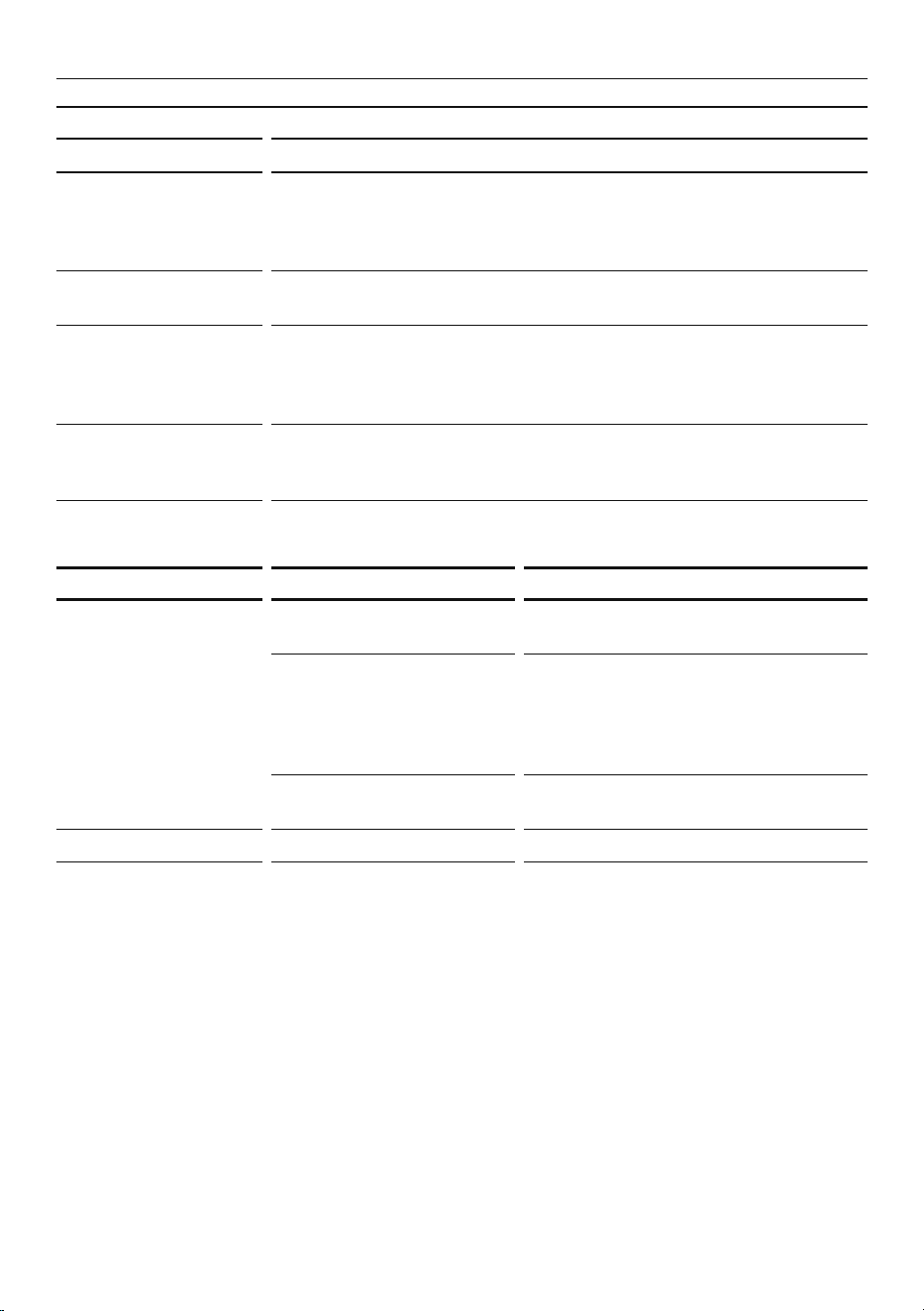
TROUBLE POSSIBLE CAUSE REMEDY
Oven cannot be
started
Power cord not plugged
in correctly.
Disconnect then reconnect it again
after 10seconds.
Fuse blown or circuit
breaker activated.
Replace fuse or reset circuit breaker
(Any electrical repairs must be
carried out by a qualified person
or a Fisher&Paykel trained and
supported service technician).
Trouble with outlet. Test outlet with other electrical
appliances.
Oven does not heat Door not closed properly. Close door properly.
TROUBLESHOOTING

29
MANUFACTURER’S WARRANTY
For details of your 5 year manufacturer’s warranty and contacts for servicing, please refer
to your separate service & warranty document online at fisherpaykel.com/uk.
This product has been designed for use in a normal domestic (residential environment). This
product is not designed for any commercial use. Any commercial use by the customer will
affect this products Manufacturer’s Warranty.
For spare parts, please contact Fisher & Paykel Customer Care. Spare parts are available for
all Fisher & Paykel products for a minimum period of 10 years from the date of manufacture.
Before you call for service or assistance
Check the things you can do yourself. Refer to your user guide and check:
1 Your product is correctly installed.
2 You are familiar with its normal operation.
3 You have read the 'Troubleshooting' section.
If after checking these points you still need assistance or parts, please refer to your nearest
Fisher&Paykel trained and supported service technician, Customer Care, or contact us
through our website fisherpaykel.com.
In UK if you need assistance
Call the Fisher & Paykel Customer Care Centre and talk to one of our
Customer CareConsultants.
Toll Free: 08000 886 605
Website: fisherpaykel.com
Postal address:
Fisher & Paykel Appliances Ltd,
Turing House, Ortensia Drive,
Milton Keynes MK17 8LX
In Ireland if you need assistance
Call the Fisher & Paykel Customer Care Centre and talk to one of our
Customer CareConsultants.
Toll Free: 1800 625174 or 01 807 7960
Website: fisherpaykel.com
Postal address:
Fisher & Paykel Appliances Ltd,
Unit 2D Corporate Park,
Swords Dublin
CUSTOMER CARE

30
CUSTOMER CARE
Registration
Register your product with us so we can provide you with the best service possible.
To register your product visit our website: fisherpaykel.com/register
Complete and keep for safe reference:
Model
Serial No.
Purchase Date
Purchaser
Dealer
Suburb
Tow n
Country
If you need service
Fisher & Paykel has a network of Fisher & Paykel trained and supported service technicians
that can carry out any service necessary on your appliance. Our Customer Care Centre
can recommend a Fisher & Paykel trained and supported service technician in your area.
Or you can book one online at fisherpaykel.com/uk/help-and-support or fisherpaykel.com/
ie/help-and-support
If you call, write or contact us via our website please provide:
your name and address, model number, serial number, date of purchase and a complete
description of the problem. This information is needed in order to better respond to
yourrequest for assistance.

31
EU This appliance is marked according to the European Directive 2012/19/EU on
WasteElectrical and Electronic Equipment (WEEE). By ensuring this product is disposed of
correctly, you will help prevent potential negative consequences for the environment and
human health, which could otherwise be caused by inappropriate handling of this product.
The symbol
marked on the serial plate, or on the documents accompanying theproduct,
indicates that this appliance cannot be treated as household waste. Itshallbe handed over
to the applicable collection point for the recycling of electrical and electronic equipment.
Disposal of the appliance shall be carried out in accordance with the local environment
regulations for waste disposal and ensure the refrigerant circuit is not damaged.
For more detailed information about treatment, recovery and recycling of this product,
please contact your local city office, your household waste disposal service or your
Fisher & Paykel retailer/dealer from whom you purchased this product.
EUROPEAN DIRECTIVE 2012/19/EU ON WASTE
ELECTRICALANDELECTRONIC EQUIPMENT(WEEE)

591914D 06.21
FISHERPAYKEL.COM
© Fisher & Paykel Appliances 2021. All rights reserved.
The models shown in this guide may not be available in all markets
and are subject to change at any time.
The product specifications in this guide apply to the specific products and
models described at the date of issue. Under our policy of continuous product
improvement, these specifications may change at any time.
For current details about model and specification availability in your country,
please go to our website or contact your local Fisher&Paykel dealer.