
User guide
Stereo Bluetooth
®
Headset
SBH80

Contents
Introduction...................................................................................3
Function overview.............................................................................3
Hardware overview........................................................................... 3
Basics.............................................................................................5
Charging the battery.........................................................................5
Battery status....................................................................................5
Turning the headset on and o........................................................5
Adjusting the volume....................................................................... 5
Resetting the headset...................................................................... 6
Wearing instruction.......................................................................... 6
Getting started.............................................................................. 7
Preparing to use your headset with a Bluetooth® device................7
Using your headset....................................................................... 8
Using your headset to handle phone calls...................................... 8
Using your headset to listen to music..............................................8
Using your headset with two devices simultaneously.................... 8
Troubleshooting.......................................................................... 10
I cannot answer a second call.........................................................10
Music from another device does not play in the headset............. 10
The headset turns o automatically...............................................10
No connection between headset and other device.......................10
Unexpected behaviour....................................................................10
Legal information......................................................................... 11
Declaration of Conformity .............................................................. 12
2
Introduction
Function overview
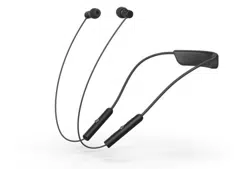
Your Stereo Bluetooth® Headset SBH80 is designed to make life more convenient
when you're on the go. You can use it together with an Android™ powered device
such as a phone or tablet, or with a Bluetooth® compatible device such as a non-
Android phone, a computer or a music player. When paired with a compatible
device, you can use your headset to control incoming and outgoing phone calls or
to listen to music.
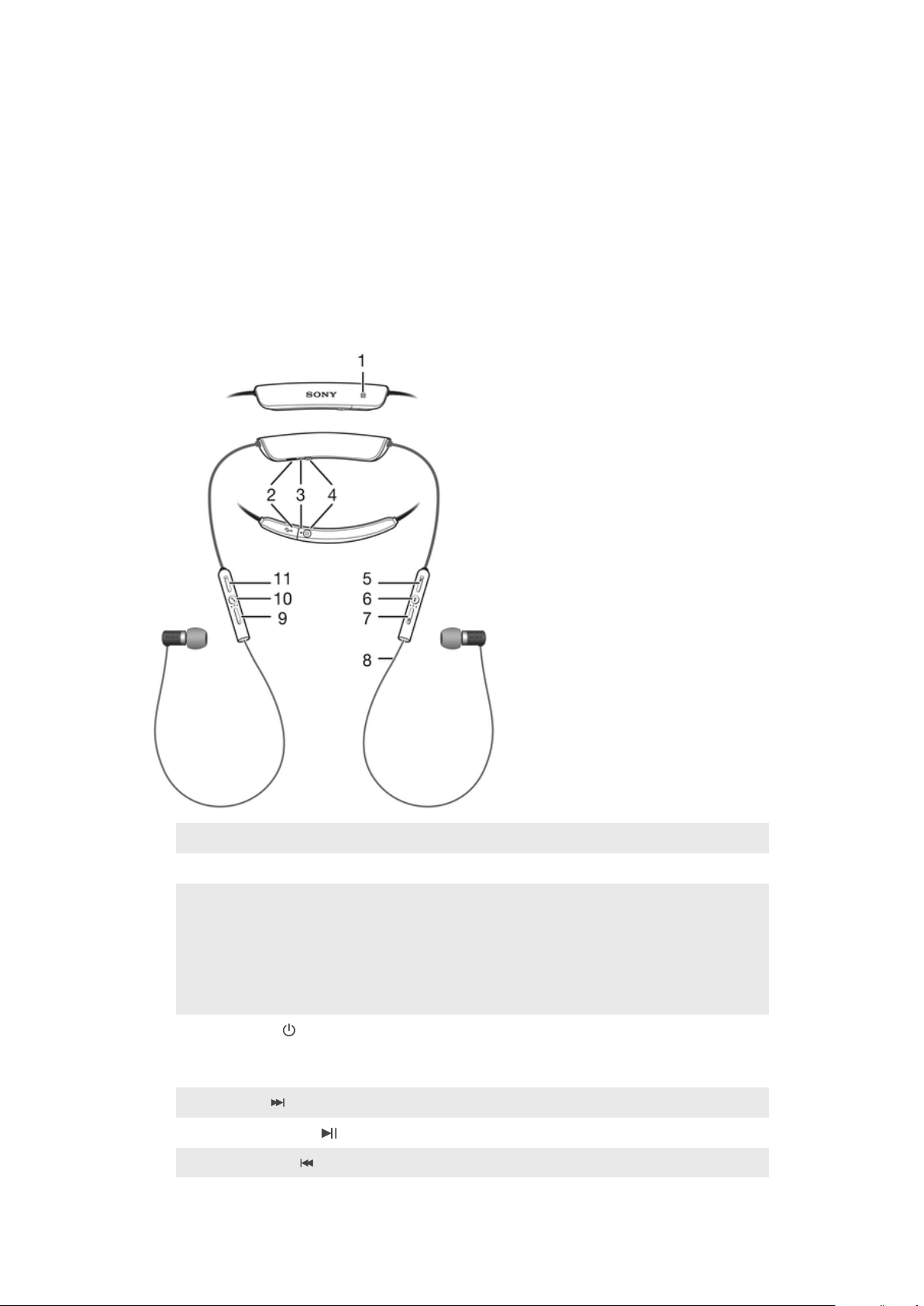
Hardware overview
1
NFC detection area Touch other devices to this area during NFC pairing.
2
Micro USB port Insert the cable for charging the battery.
3
Notification light Flashing red light: battery level is between 0% and 4%.
Yellow light: battery level is between 5% and 29%.
Green light: battery level is between 30% and 100%.
Flashing cyan-coloured light: headset is in pairing mode.
Flashing purple light: a call is coming in.
4
Power key Press and hold down to turn the headset on or o.
When the headset is on, briefly press to show a
notification light indicating battery level.
5
Next key Press to play the next track.
6
Play /Pause key Press to play or pause the current track.
7
Previous key Press to play the previous track.
3
This is an internet version of this publication. © Print only for private use.

8
Antenna
9
Volume down key Press to turn down the volume.
10
Call key Press to answer incoming calls.
Press and hold down to reject incoming calls.
11
Volume up key Press to turn up the volume.
4
This is an internet version of this publication. © Print only for private use.

Basics
Charging the battery
Before using the Stereo Bluetooth® Headset SBH80 for the first time, you need to
charge the headset for approximately 2.5 hours. Sony chargers are recommended.
To charge your headset
1 Plug one end of the USB cable into the charger or into the USB port of a
computer.
2 Plug the other end of the cable into the Micro USB port of your Stereo
Bluetooth® Headset SBH80 device.
Battery status
You can view an estimate of how much time is left before the battery of your
headset runs out after you have connected it with a compatible device. You can
view the battery status information from the Notification panel of the connected
device, or from the Smart Connect application installed on the connected device.
The Smart Connect application works on Android™ devices, and it is pre-installed
on all Android™ devices from Sony Mobile at purchase. Make sure you have
installed the latest version of Smart Connect application on your Android™ device
from Google Play™.
To view the estimated battery time from the Notification panel
• Drag the status bar downwards, the estimated battery time is shown on the
Notification panel.
To view the estimated battery time from the Smart Connect application
1 From the Home screen of your Android™ device, tap
, then find and tap
Smart Connect.
2 Tap Devices > SBH80.
Turning the headset on and o
To turn on the headset
• Press and hold down
until the headset vibrates and the notification light
turns green.
To turn o the headset
• Press and hold down
until the headset vibrates.
Adjusting the volume
To change the call or music volume
• During a call, or when listening to music, press
or .
5
This is an internet version of this publication. © Print only for private use.
Resetting the headset
Reset the headset if it behaves unexpectedly. Resetting the headset removes all
information about paired devices.
To reset the headset
1 Turn o the headset, then connect the charger so that the headset starts to
charge.
2 Press and hold down until the headset vibrates briefly.
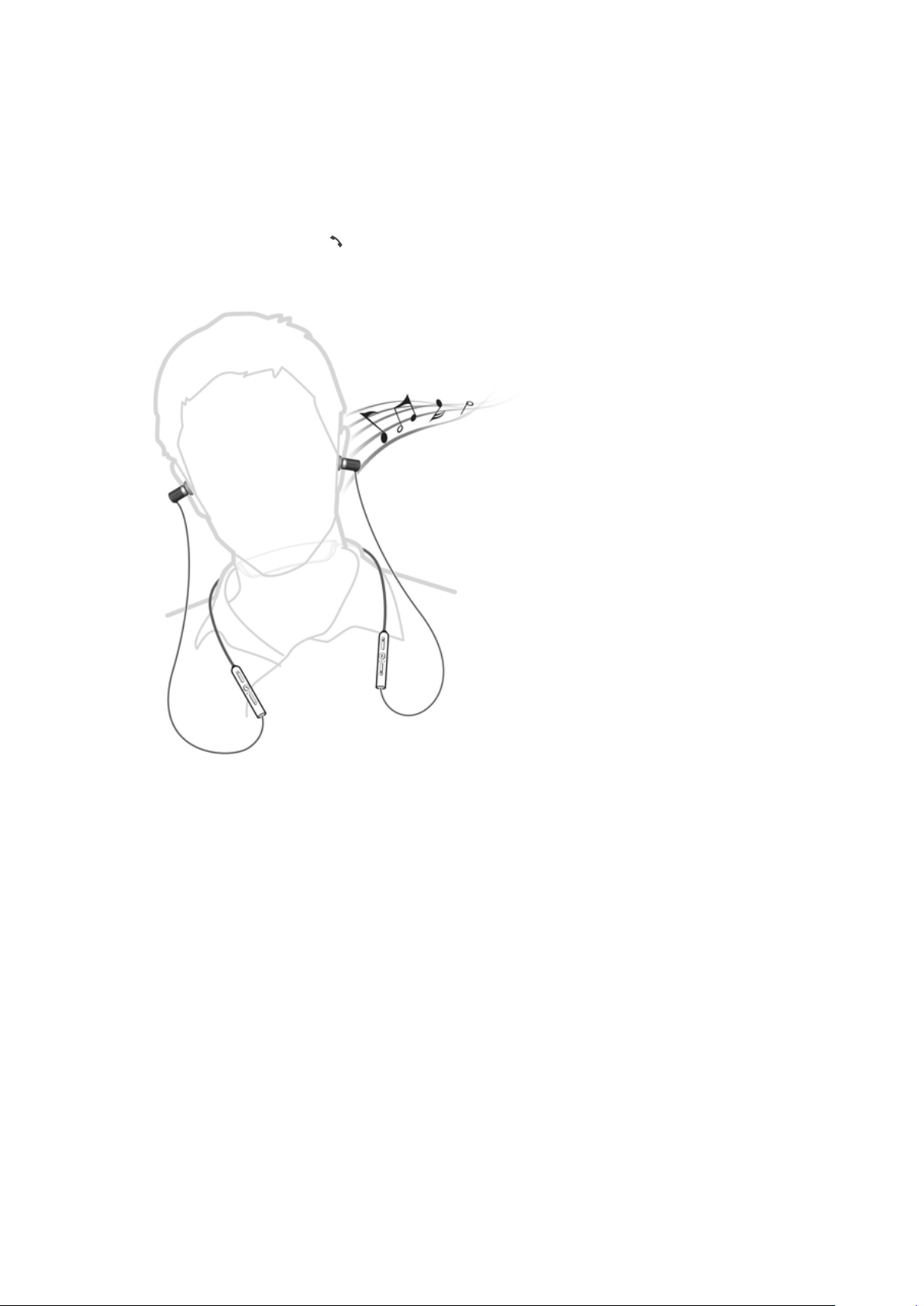
Wearing instruction
To get the best performance from your headset when using it outdoors, it is
recommended that you carry the device that you have paired with the headset on
the same side of your body as the antenna of the headset unit.
6
This is an internet version of this publication. © Print only for private use.
Getting started
Preparing to use your headset with a Bluetooth® device
Before you can start using your headset with a Bluetooth® device, you need to pair
the headset with the Bluetooth® device manually using Bluetooth® or
automatically using NFC.
To manually pair your headset with a Bluetooth® device
1 Bluetooth® device: Make sure the Bluetooth® function is turned on.
2 Turn o your headset.
3 Headset: Press and hold down
until the headset vibrates and a cyan-
coloured notification light flashes continuously.
4 Bluetooth® device: Scan for Bluetooth® devices, then select Stereo
Bluetooth® Headset SBH80 in the list of available devices.
5 Bluetooth® device: Follow the pairing instructions that appear on the
screen.
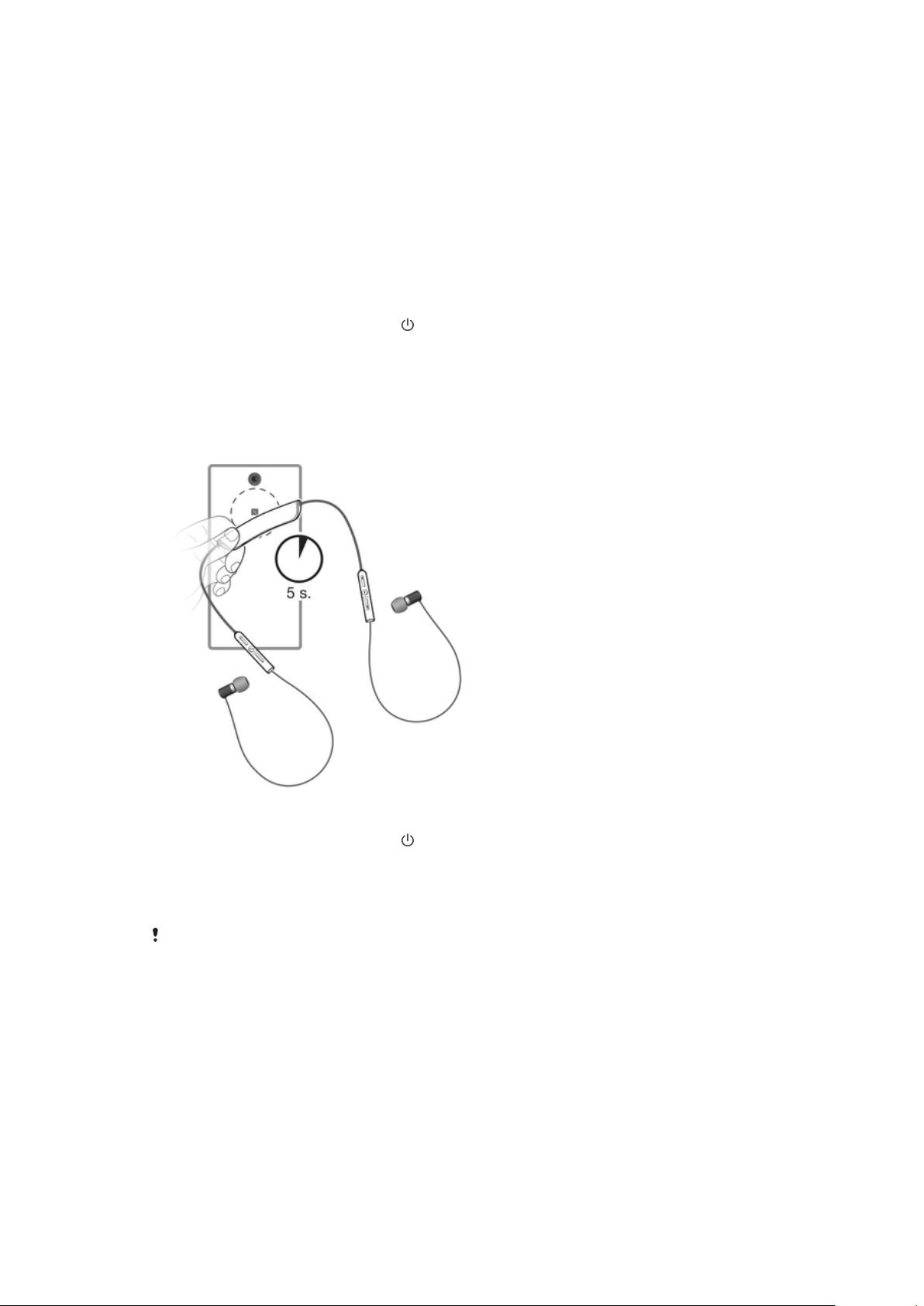
To automatically pair your headset with a Bluetooth® device
1 Bluetooth® device: Make sure that the NFC function is turned on and that
the screen is active and unlocked.
2 Headset: Press and hold down
until the headset vibrates and a cyan-
coloured notification light flashes continuously.
3 Place the Bluetooth® device over your headset so that the NFC detection
area of each device touches the other.
4 Bluetooth® device: Follow the pairing instructions that appear.
The device used in this illustration is for illustration purposes only and may not accurately
depict the actual device used.
7
This is an internet version of this publication. © Print only for private use.

Using your headset
Using your headset to handle phone calls
Use the headset to handle incoming calls, for example, to answer or reject a call.
To answer a call with the headset
• When you hear an incoming call signal, press .
To end a call
• During an ongoing call, press .
To reject a call
• When you hear an incoming call signal, press and hold down
.
To answer a second call
• When you hear an incoming call signal during an ongoing call, press
. The
ongoing call is put on hold.
You can also press
or to switch to another call and put the current call on hold.
To reject a second call
• When you hear an incoming call signal during an ongoing call, press and
hold down
.
To mute and unmute the microphone during a call
• Press and hold down
to mute the microphone. To unmute the
microphone, press and hold down again.
Using your headset to listen to music
You can listen to music from your phone or another Bluetooth® compatible device
using your headset.
To listen to music
1 Open the music player application in your device and select a track that you
want to listen to.
2 Press
to play the track. To pause the track, press again.
To move between tracks
• Press
or .
To fast forward or rewind a music track
• Press and hold down or to fast forward or rewind until you reach the
desired position.
Using your headset with two devices simultaneously
Your headset has two dierent connection modes: Multipoint mode and
Singlepoint mode. Multipoint mode helps you manage two connections at the
same time. For example, if you connect your headset with two phones, you can
receive calls from both phones without having to disconnect and reconnect.
Multipoint mode is enabled by default. If you stop using one of two connected
devices, you should switch to Singlepoint mode manually.
In Multipoint mode, the headset remembers both paired devices. You can
reconnect previously paired devices easily by manually switching back to
8
This is an internet version of this publication. © Print only for private use.

Multipoint mode from Singlepoint mode. A previously paired device can then be
detected automatically.
You can only connect to a maximum of two devices in Multipoint mode. If you pair the
headset with a third device, the first paired device gets disconnected.
To manually pair your headset with a second device
• After manually pairing the first device with your headset, repeat the same
instruction steps that describe how to manually pair your headset with
another device.
To automatically pair your headset with a second device
• After pairing the first device with your headset automatically, repeat the
same instruction steps that describe how to automatically pair your headset
with another device.
To switch between Multipoint mode and Singlepoint mode
1 Make sure that the headset is turned o.
2 Put the headphones in your ears.
3 To enter Multipoint mode, press and hold down the volume up key while
turning on the headset. After Multipoint mode is activated, you will hear two
beeps.
4 To enter Singlepoint mode, press and hold down the volume down key while
turning on the headset. After Singlepoint mode is activated, you will hear
one beep.
In order to connect to both paired devices in Multipoint mode, you need to restart the
headset.
9
This is an internet version of this publication. © Print only for private use.

Troubleshooting
I cannot answer a second call
• Make sure that your calling device supports the Bluetooth® headset profile.
• Make sure that the correct calling device is selected.
Music from another device does not play in the headset
• Make sure that the music-playing device is paired with the headset.
• Restart the music player application on the music-playing device.
• Make sure that the correct music source is selected.
The headset turns o automatically
• If the headset beeps several times shortly before turning o, the battery level is
low. Charge the battery.
No connection between headset and other device
• Make sure that the headset is charged and within range of the device that you
want to connect to. A maximum distance of 10 metres (33 feet), with no solid
objects in between, is recommended.
• Disable the Bluetooth® function in the other device so that all connections are
closed, then re-enable the Bluetooth® function and pair the headset with the
device again.
Unexpected behaviour
• Reset the headset.
10
This is an internet version of this publication. © Print only for private use.

Legal information
Sony SBH80
Prior to use, please read the
Important information
leaflet separately provided.
This User guide is published by Sony Mobile Communications AB or its local aliated company, without any
warranty. Improvements and changes to this User guide necessitated by typographical errors, inaccuracies
of current information, or improvements to programs and/or equipment, may be made by Sony Mobile
Communications AB at any time and without notice. Such changes will, however, be incorporated into new
editions of this User guide.
All rights reserved.
©2014 Sony Mobile Communications AB.
Interoperability and compatibility among Bluetooth® devices varies. Device generally supports products
utilizing Bluetooth spec. 1.2 or higher, and Headset or Handsfree profile.
Sony is the trademark or registered trademark of Sony Corporation. Bluetooth is the trademark of the
Bluetooth (SIG) Inc. and is used under license. All other marks are the property of their respective owners.
All rights reserved.
All product and company names mentioned herein are the trademarks or registered trademarks of their
respective owners. Any rights not expressly granted herein are reserved. All other trademarks are property
of their respective owners.
Visit
www.sonymobile.com
for more information.
All illustrations are for illustration only and may not accurately depict the actual accessory.
11
This is an internet version of this publication. © Print only for private use.
Declaration of Conformity
We, Sony Mobile Communications AB of
Nya Vattentornet
SE-221 88 Lund, Sweden
declare under our sole responsibility that our product
Sony type RD-0040
and in combination with our accessories, to which this declaration relates is in
conformity with the appropriate standards EN 300 328:V1.7.1, EN 301 489-3:V1.6.1,
EN 301 489-7:V1.3.1, EN 301 489-17:V2.2.1 and EN 60 950-1:2006
+A11:2009+A1:2010+A12:2011 following the provisions of, Radio Equipment and
Telecommunication Terminal Equipment directive 1999/5/EC.
Lund, January 2014
Pär Thuresson,
Quality Ocer, SVP, Quality & Customer Services
FCC Statement
This device complies with Part 15 of the FCC rules. Operation is subject to the following two conditions: (1)
This device may not cause harmful interference, and (2) This device must accept any interference received,
including interference that may cause undesired operation.
Any change or modification not expressly approved by Sony may void the user's authority to operate the
equipment.
This equipment has been tested and found to comply with the limits for a Class B digital device, pursuant to
Part 15 of the FCC Rules. These limits are designed to provide reasonable protection against harmful
interference in a residential installation. This equipment generates, uses and can radiate radio frequency
energy and, if not installed and used in accordance with the instructions, may cause harmful interference to
radio communications. However, there is no guarantee that interference will not occur in a particular
installation.
If this equipment does cause harmful interference to radio or television reception, which can be determined
by turning the equipment o and on, the user is encouraged to try to correct the interference by one or
more of the following measures:
• Reorient or relocate the receiving antenna.
• Increase the separation between the equipment and receiver.
• Connect the equipment into an outlet on a circuit dierent from that to which the receiver is connected.
• Consult the dealer or an experienced radio/TV technician for help.
Industry Canada Statement
This device complies with RSS-210 of Industry Canada.
Operation is subject to the following two conditions: (1) this device may not cause interference, and (2) this
device must accept any interference, including interference that may cause undesired operation of the
device.
This Class B digital apparatus complies with Canadian ICES-003.
Cet appareil numérique de la classe B est conforme à la norme NMB-003 du Canada.
Avis d’industrie Canada
Le présent appareil est conforme aux CNR d'Industrie Canada applicables aux appareils radio exempts de
licence.
L'exploitation est autorisée aux deux conditions suivantes: (1) l'appareil ne doit pas produire de brouillage,
et, and (2) l'utilisateur de l'appareil doit accepter tout brouillage radioélectrique subi, même si le brouillage
est susceptible d'en compromettre le fonctionnement.
Cet appareil numérique de la classe B est conforme à la norme NMB-003 du Canada.
Les dispositifs fonctionnant dans la bande 5150-5250 MHz sont réservés uniquement pour une utilisation à
l’intérieur afin de réduire les risques de brouillage préjudiciable aux systèmes de satellites mobiles utilisant
les mêmes canaux. Le gain maximal d’antenne permis pour les dispositifs utilisant les bandes 5250-5350
MHz et 5470-5725 MHz doit se conformer à la limite de p.i.r.e. Le gain maximal d’antenne permis (pour les
dispositifs utilisant la bande 5725-5825 MHz) doit se conformer à la limite de p.i.r.e. spécifiée pour
l’exploitation point à point et non point à point, selon le cas. De plus, les utilisateurs devraient aussi être
avisés que les utilisateurs de radars de haute puissance sont désignés utilisateurs principaux (c.-à-d., qu’ils
ont la priorité) pour les bandes 5 250-5 350 MHz et 5 650-5 850 MHz et que ces radars pourraient causer du
brouillage et/ou des dommages aux dispositifs LAN-EL.
12
This is an internet version of this publication. © Print only for private use.