IMPORTANT Features not purchased with your refrigerator can be purchased at Frigidaire.com or by calling 1-800-374-4432
CONTROLS AND SETTINGS
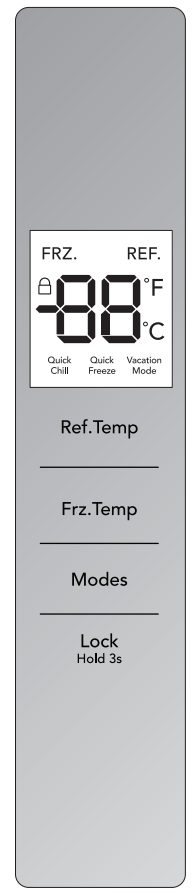
User Interface (UI) Controls
Ref. Temp: Temperature setting decreases every time the Ref. Temp indicator is pressed. It cycles between 44°F and 34°F. When 34°F is shown, pressing Ref. Temp again will loop back to 44°F. Control temperatures range from +34°F / +1°C to +44°F / +7°C
Frz. Temp: Temperature setting decreases every time the Frz. Temp indicator is pressed. It cycles between +7°F and -7°F. When -7°F is shown, pressing Frz. Temp again will loop back to +7°F. Control temperatures range from -7°F / -22°C to +7°F / -14°C.
Modes: Press the Modes key, the corresponding modes will be cycling on a loop
Lock Hold 3s: Locks the UI so Temp cannot be changed without unlocking.
Change UI °F to °C
Unlock the UI.
Hold down the Frz. Temp & Ref. Temp at the same time for 3 seconds. UI will change from °F to °C.
To change °C to °F, repeat the above steps.
Modes Setting
Press the Modes key, the corresponding modes will be cycling on a loop as shown below.
Under Quick Chill mode the fresh food compartment defaults to 34°F (1°C). Activate Quick Chill mode to increase the rate of cooling food. It deactivates automatically after 2.5 hours. When exiting the Quick Chill mode the setting restores back to the temperature set before going into Quick Chill mode.
Under Quick Freeze mode the freezer defaults to -7°F (-22°C). Activate Quick Freeze mode to increase the rate of freezing food. It deactivates automatically after 6 hours. When exiting the QuickFreeze mode the setting restores back to the temperature set before going into Quick Freeze mode.
Under Vacation Mode the fresh food compartment defaults to 37°F. While the freezer defaults to ~0°F (-18°C). When exiting Vacation Mode the setting temperature of the fresh food compartment and freezer will both be restored to those set before going into Vacation Mode.
Duration Setting of Quick Freeze
The factory default duration of Quick Freeze is 6 hours; however, you can change the time your freezer is in Quick Freeze mode between 6 and 48 hours. After Quick Freeze mode is turned on, press and hold the Frz.
Temp button for 3 seconds to view the selected time setting. Then again, press Frz.
Temp to toggle between 6 and 48 hour settings. Once the correct time is selected, press and hold the Frz. Temp button for seconds to confirm the setting. After 30 seconds of no interaction of the controls, the UI will confirm the time setting automatically and return to the main screen.
List of Fault/Error Codes:
E1 Temperature sensor failure of fresh food compartment
E2 Temperature sensor failure of freezer
E4 Failure of defrosting sensor in fresh food compartment
E5 Failure of Freezing and defrosting sensors
E6 Communication failure
E7 Failure of circulating temperature
EH Humidity sensor failure
Alarms
Display: When the unit is initially plugged in, the start-up alarm rings and it takes 3 seconds for the UI to become fully operational. The factory settings for the refrigerator are 37°F in the Fresh
Food compartment and 0°F in the Freezer. The display will then either show the temperature in the Fresh Food compartment under normal operation or a Fault code if there is a failure.
Display Control: During normal unit operation, the display screen will be locked if the Fresh
Food compartment doors are not being opened or closed and if no key is pressed for 30 seconds.
When the display is locked, it will turn off after 30 seconds of non activity (not opening or closing doors and not pressing keys) and it will light up with any key operation. If there is a failure, the display will turn on and show “Visible Fault Code” and then will turn off after 30 seconds.
To lock the control keys, hold the “Lock” Key for 3 seconds.
To unlock the control keys, hold the “Lock” Key for 3 seconds.
The system auto-locks automatically after 30 seconds of no keys or doors operation.
Door: Door ajar alarm will sound if either of the Fresh food compartment doors are left open or ajar for 5 minutes.
The door ajar alarm can be silenced by pressing any key while the door is open or by closing the door.
NOTE Freezer doors do not trigger the door ajar alarm.
Setting cooling temperatures
NOTE The recommended settings for a product installed in a kitchen is 37˚F for the fresh food compartment and 0˚F for the freezer.
IMPORTANT If your product has food freezing in the fresh food compartment, increase the temperature setting 1 or 2 degrees
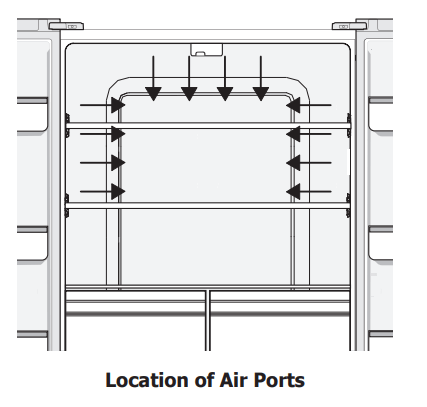
IMPORTANT Do not block the air port. If you place food within 1 inch in front of the air ports, there may be the chance of freezing food.
STORAGE FEATURES
CAUTION To avoid personal injury or property damage, handle tempered glass shelves carefully. Shelves may break suddenly if nicked, scratched, or exposed to sudden temperature change. Allow the glass shelves to stabilize to room temperature before cleaning. Do not wash in dishwasher.
You can easily adjust shelf positions in the fresh food compartments to suit your needs.
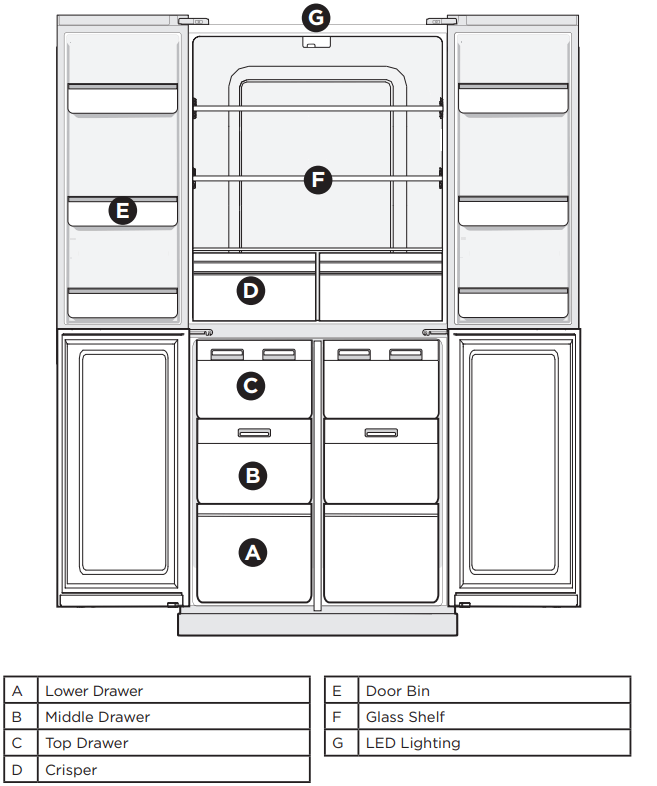
Crispers
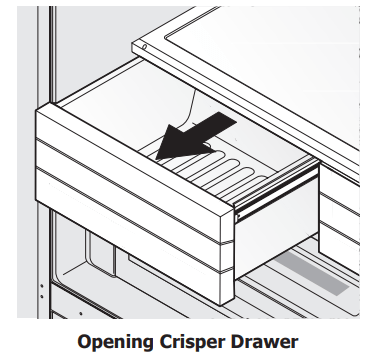
Crisper drawers are designed for storing fruits, vegetables, and other fresh produce.
Doors
Storage bins
The doors to your fresh food compartment use a system of modular storage bins. All of these bins are removable for easy cleaning. Some of them have fixed positions, while others can be adjusted to your needs.
Door bins are ideal for storing jars, bottles, cans, and large drink containers. They also enable quick selection of frequently used items.
STORING FOOD AND SAVING ENERGY
Ideas for storing foods
Fresh food storage
Keep the fresh food compartment between 34°F and 40°F with an optimum temperature of 37°F.
Avoid overcrowding the refrigerator shelves, which reduces air circulation and causes uneven cooling.
Avoid placing food in front of air ports. (See Controls Section for illustration.)
Fruits and vegetables
Store fruits and vegetables in crisper drawers, where trapped moisture helps preserve food quality for longer time periods.
Wash items and remove excess water.
Wrap any items that have strong odors or high moisture content.
Meat
Wrap raw meat and poultry separately and securely to prevent leaks and contamination of other foods or surfaces.
Store meat/poultry for short-term. Any meat to be kept longer than two days should be frozen.
Frozen food storage
Keep the freezer compartment at 0°F or lower.
A freezer operates most efficiently when it is at least ⅔ full.
Packaging foods for freezing
To minimize food dehydration and quality deterioration, use aluminum foil, freezer wrap, freezer bags, or airtight containers. Force as much air out of the packages as possible and seal them tightly. Trapped air can cause food to dry out, change color, and develop an off-flavor (freezer burn).
Wrap fresh meats and poultry with suitable freezer wrap prior to freezing.
Do not refreeze meat that has completely thawed.
Loading the freezer
Prior to grocery shopping, activate “Quick Freeze” so that on your return you can ensure your newly purchased food designated for the freezer will be preserved as quickly as possible.
Activating “Quick Freeze” also will help your freezer more efficiently maintain the selected temperature after placing new purchases with pre-existing frozen foods.
Avoid adding too much warm food to the freezer at one time. This overloads the freezer, slows the rate of freezing, and can raise the temperature of frozen foods.
Leave a space between packages, so cold air can circulate freely, allowing food to freeze as quickly as possible.
Ideas for saving energy
Installation
Locate the refrigerator in the coolest part of the room, out of direct sunlight, and away from heating ducts or registers.
Do not place the refrigerator next to heatproducing appliances such as a range, oven, or dishwasher. If this is not possible, a section of cabinetry or an added layer of insulation between the two appliances will help the refrigerator operate more efficiently.
Level the refrigerator so that the doors close tightly.
Temperature settings
Refer to the “Controls” section for procedures on temperature settings.
Food storage
Avoid overcrowding the refrigerator or blocking cold air vents. Doing so causes the refrigerator to run longer and use more energy.
Cover foods and wipe containers dry before placing them in the refrigerator. This cuts down on moisture build-up inside the unit.
Organize the refrigerator to reduce door openings. Remove as many items as needed at one time and close the door as soon as possible.
Do not place a hot container directly on a cold shelf. Remember, such an extreme temperature change may damage the glass.
CARE AND CLEANING
Protecting your investment
Keeping your refrigerator clean maintains its appearance and prevents odor build-up. Wipe up any spills immediately and clean the freezer and fresh food compartments at least twice a year.
NOTE Do not use abrasive cleaners such as window sprays, scouring cleansers, flammable fluids, cleaning waxes, concentrated detergents, bleaches, or cleansers containing petroleum products on plastic parts, interior doors, gaskets, or cabinet liners. Do not use paper towels, scouring pads, or other abrasive cleaning materials.
Never use metallic scouring pads, brushes, abrasive cleaners, or strong alkaline solutions on any surface.
Never use CHLORIDE or cleaners with bleach to clean stainless steel.
Do not wash any removable parts in a dishwasher.
Always unplug the electrical power cord from the wall outlet before cleaning.
Remove adhesive labels by hand. Do not use razor blades or other sharp instruments which can scratch the appliance surface.
Do not remove the serial plate. Removal of your serial plate voids your warranty.
Refer to the guide on the next page for details on caring and cleaning specific areas of your refrigerator.
CAUTION
Pull the refrigerator straight out to move it. Shifting it from side to side may damage flooring.
Damp objects stick to cold metal surfaces. Do not touch refrigerated surfaces with wet or damp hands.
Vacation and Moving Tips
Occasion
Tips
Short Vacations
Leave refrigerator operating during vacations of three weeks or less.
Use all perishable items from refrigerator compartment.
Long Vacations
Remove all food and ice if you will be gone one month or more.
Disconnect power cord.
Clean interior thoroughly.
Leave both doors open to prevent odors and mold build-up. Block doors open if necessary.
Moving
Remove all food and ice.
If using a handcart, load from the side.
Pad cabinet to avoid scratching surface.
Care & Cleaning Tips
Part
What To Use
Tips and Precautions
Interior & Door Liners
Soap and water
Baking soda and water
Use two tablespoons of baking soda in one quart of warm water. Be sure to wring excess water out of sponge or cloth before cleaning around controls, LED light or any electrical part.
Door Gaskets
Soap and water
Wipe gaskets with a clean soft cloth
Drawers & Bins
Soap and water
Use a soft cloth to clean drawer runners and tracks
Glass Shelves
Soap and water
Glass cleaner
Mild liquid sprays
Allow glass to warm to room temperature before immersing in warm water.
Exterior
Soap and water
Non Abrasive Glass Cleaner
Do not use commercial household cleaners containing ammonia, bleach or alcohol to clean. Use a soft cloth to clean. DO NOT use a dry cloth to clean smooth doors.
TROUBLESHOOTING
Before calling for service, review this list. It may save you time and expense. This list includes common occurrences that are not the result of defective workmanship or materials in this appliance.
Concern
Potential Cause
Common Solution
Opening/Closing Of Doors/Drawers
Door(s) will not close.
Door was closed too hard, causing other door to open slightly.
Refrigerator is not level.
It rocks on the floor when moved slightly.
Refrigerator is touching a wall or cabinet.
Food/packaging is obstructing the door from closing.
Flipper mullion on left fresh food door is not in the correct position.
Close both doors gently.
Ensure floor is level and solid, and can adequately support the refrigerator. Contact a carpenter to correct a sagging or sloping floor.
Ensure floor is level and solid, and can adequately support the refrigerator. Contact a carpenter to correct a sagging or sloping floor.
Make sure there is no food/packaging blocking the doorway.
Ensure the flipper mullion is in the correct position to allow the door to close. (See “Flipper Mullion” in INSTALLATION.)
Running of Refrigerator
Compressor does not run.
Plug at electrical outlet is disconnected.
House fuse blown or tripped circuit breaker.
Power outage.
Ensure plug is tightly pushed into outlet.
Check/replace fuse with a 15 amp timedelay fuse. Reset circuit breaker.
Check house lights. Call local electric company
Refrigerator seems to run too much or too long.
The compressor cycles as needed and stops during the defrost cycle.
It is normal that the compressor operates for a longer time in the summer. Do not store too much food in the freezer at one time. Do not place warm foods inside the refrigerator.
Water/Moisture/Frost Inside Refrigerator
Moisture collects on inside of refrigerator walls.
Weather is hot and humid.
The rate of frost buildup and internal sweating increases.
Water collects on bottom side of drawer cover.
Vegetables contain and give off moisture.
It is not unusual to have moisture on the bottom side of the cover.
Water collects in bottom of drawer
Washed vegetables and fruit drain while in the drawer.
Dry items before putting them in the drawer. Water collecting in bottom of drawer is normal.
Water/Moisture/Frost Outside Refrigerator
Moisture collects on outside of refrigerator or between doors.
Weather is humid.
This is normal in humid weather. When humidity is lower, the moisture should disappear.
Food in Fresh Food Compartment
Food is freezing.
Temperature setting is too low
Food is covering the air ports.
Move the setting to a higher degree.
Allow space between the air ports and the food.
Loud Noise
Unusually loud noise
Unit not leveled.
Refrigerator parts not properly placed.
To prevent rocking, ensure floor is level and solid. Level refrigerator.
Ensure interior parts are secure.
Lights
Lights not working
Lights are damaged.
There is no power.
If lights are damaged have them replaced by a service technician.
Make sure the unit is fully connected to the power outlet
Great question, We were able to see that this 4-Door Refrigerator does have a freezer that allows you to store and easily organize your items. We hope this information was helpful to you.
#2 How deep are the shelves, in inches, from the back to the front? I'm trying to figure out if a pizza box fits in the fridge because the other similar fridges I've seen in person that were 4 door fridges weren't large enough for a large (16inch) pizza box.
The interior depth of the refrigerator section is 21.7 inches (28.3 inches wide). It should be able to accommodate a pizza box of that size!
#3 How long does it take for my refrigerator to reach the set temperature after I turn it on?
This depends on the size, age and model of the refrigerator. It may take several hours to 24 hours for the refrigerator to reach the set temperature. The process can be accelerated by placing non-perishable goods in the refrigerator. The temperature in the refrigerator cannot be measured properly by feeling the air inside. The best way to tell if the refrigerator has reached the set temperature is to place a glass of water in the refrigerator with a thermometer in it.
The stars indicate the freezing capacity. 1 star indicates a freezing capacity down to -6ºC. This makes the freezer suitable for making ice cubes or storing previously frozen goods for up to two weeks. Fresh food cannot be frozen. 2 stars indicates a freezing capacity down to -12ºC. This makes the freezer suitable for storing previously frozen goods for up to two months. Fresh food cannot be frozen. 3 stars indicates a freezing capacity down to -18ºC. This makes the freezer suitable