5715111541_00/06.14
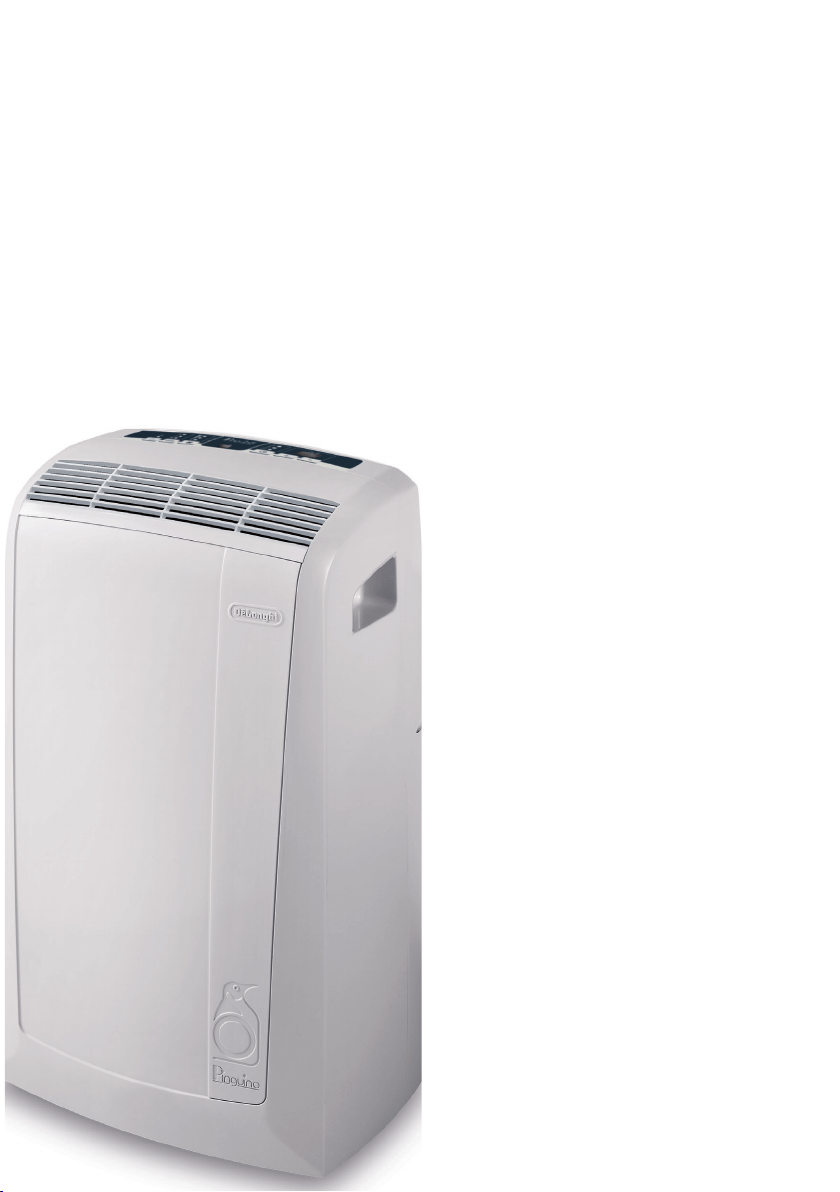
PORTABLE AIR CONDITIONER
INSTRUCTION FOR USE
MODEL PAC N76

2
3
5
Description
Accessories
1
2
3
11 12 13 14
16
15
18
17
4
5
9
10
8
7
6
4
Important safeguards
en
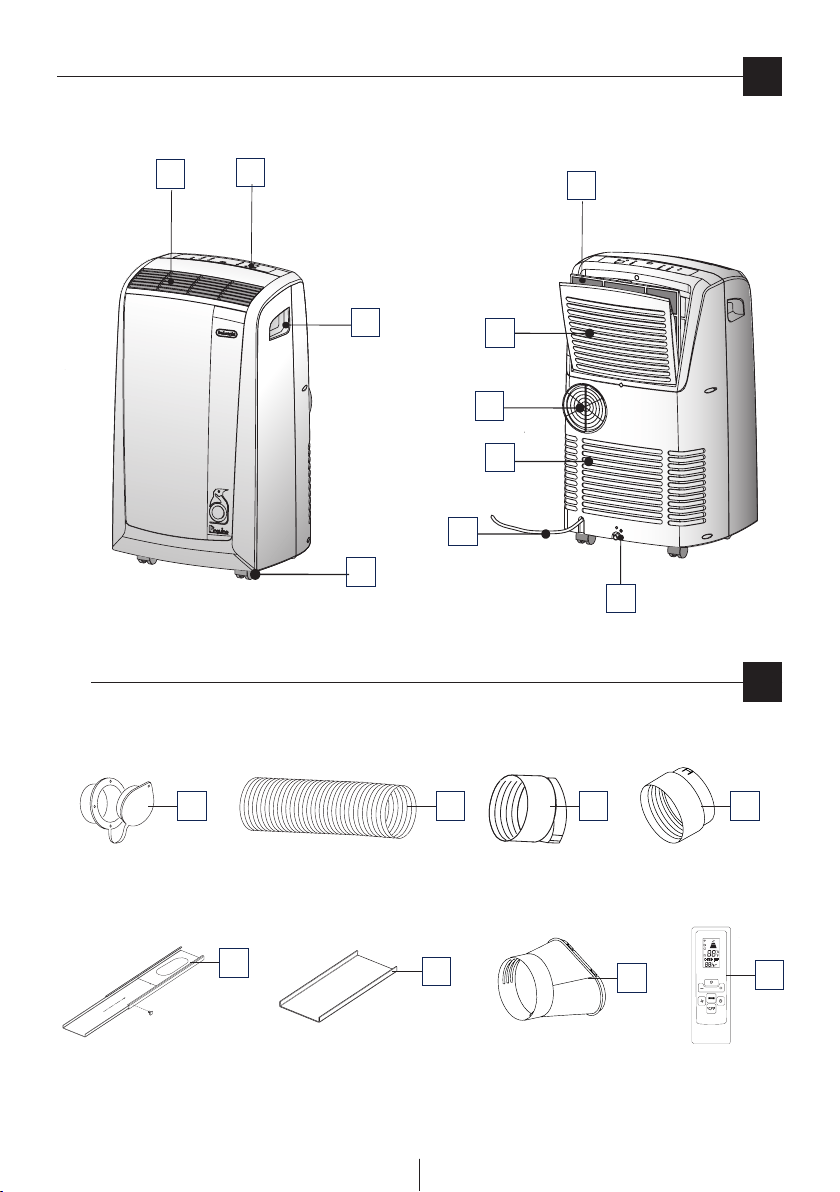
DESCRIPTION
1 Air outlet grille
2 Control panel
3 Handles
4 Castors
5 Filter
6 Evaporator air intake grille
7 Air exhaust hose housing
8 Condenser air intake grille
9 Power cable
10 Drainage hose with 2 caps
11 Wall ange with cap
12 Air exhaust hose
13 Hose adaptor
14 Accessory for wall mounting
15 Window bracket
16 Additional window bracket
17 Window outlet
18 Remote control
• Use this local air conditioner only as described in this
instruction manual.
As with all electrical equipment, whilst the instructions aim to
cover as many eventualities as possible, caution and common
sense should be applied when operating and installing this
appliance.
•
This appliance is designed for home air conditioning
and must not be used for other purposes.
• Itisdangeroustomodifyoralterthecharacteristicsofthe
appliance in any way.
• The appliance must be installed in conformity with
national legislation regulating electrical equipment and
installations.
• Iftheappliancerequiresrepair,contactaServiceCentre
authorised by the manufacturer only. Repairs carried out
by unauthorised personnel may be dangerous.
•
This appliance must be used exclusively by adults.
•
This appliance can be used by children
aged 8 upwards and by persons with
reduced physical, sensory or mental
capabilities or who lack of experience
and knowledge if they are supervised or
have been given instructions concerning
use of the appliance in a safe way
and understand the hazards involved.
Children must not play with the appliance.
Cleaning and user maintenance must not
be carried out by children unless they
are older than 8 and supervised. Keep
the appliance and its cord out of the
reach of children under 8 years of age.
• The appliance must be connected to an ecient earth
system. Have your electrical circuit checked by a qualied
electrician.
• Donotuseextensioncables.
• Before cleaning or maintenance, always unplug the
appliance from the mains socket.
• Neverunplugtheappliancebypullingonthepowercable.
•
Do not install the appliance in rooms containing gas, oil or
sulphur. Do not install near sources of heat.
• Keeptheapplianceatleast50cmawayfromammable
substances (alcohol etc) or pressurised containers (eg
aerosol cans).
• Donotrestheavyorhotobjectsontopoftheappliance.
• Cleantheairlteratleastonceaweek.
• Avoidusingheatingappliancesneartheairconditioner.
• Alwaystransporttheapplianceuprightorrestingonone
side.
Beforemovingthe appliance,empty theinternalcircuit
completely of water.
After moving the appliance, wait at least 1 hour before
starting it
• When putting the appliance away, do not cover with
plastic bags.
• The materials used for packaging can be recycled. You
are therefore recommended to dispose of them in special
dierentiated waste collection containers.
• Attheendofitsworkinglife,consigntheappliancetoa
specialist collection centre.
• If the power cable is damaged, it must
be replaced by the manufacturer or an
authorised technical service centre in
order to avoid all risk.
SPECIFIC WARNINGS FOR APPLIANCES WITH R410A*
REFRIGERANT GAS
R410A refrigerant gas conforms to EC regulations on the
environment. Avoid perforating the refrigerant circuit of the
appliance.
ENVIRONMENTAL INFORMATION: This unit contains
uorinated greenhouse gases covered by the Kyoto Protocol.
Maintenance and disposal must be carried out by qualied
personnel only (R410A, GWP=1975).
* Verify the type of refrigerant gas used in your appliance on
the rating plate.
5
Preparing for use
en
ELECTRICAL CONNECTIONS
Before plugging the appliance into the mains socket, check
that:
• The outlet’s power supply corresponds to the value
indicated on the rating label on the back of the appliance;
• The outlet and electrical circuit are adequate for the
appliance;
• Theoutletisa3-holegroundedoutlet.Ifthisisnot
the case, you must choose another outlet.
Failure to follow these important safety instructions
absolves the manufacturer of all liability.
The power cable must be replaced by a qualied
professional only.
The instructions below will enable you to prepare your air
conditioner for operation as eciently as possible. Before
use, make sure the air intake and outlet grilles are
unobstructed.
AIR-CONDITIONING WITHOUT INSTALLATION
Just a few simple steps and your comfort is ensured with your
air conditioner:
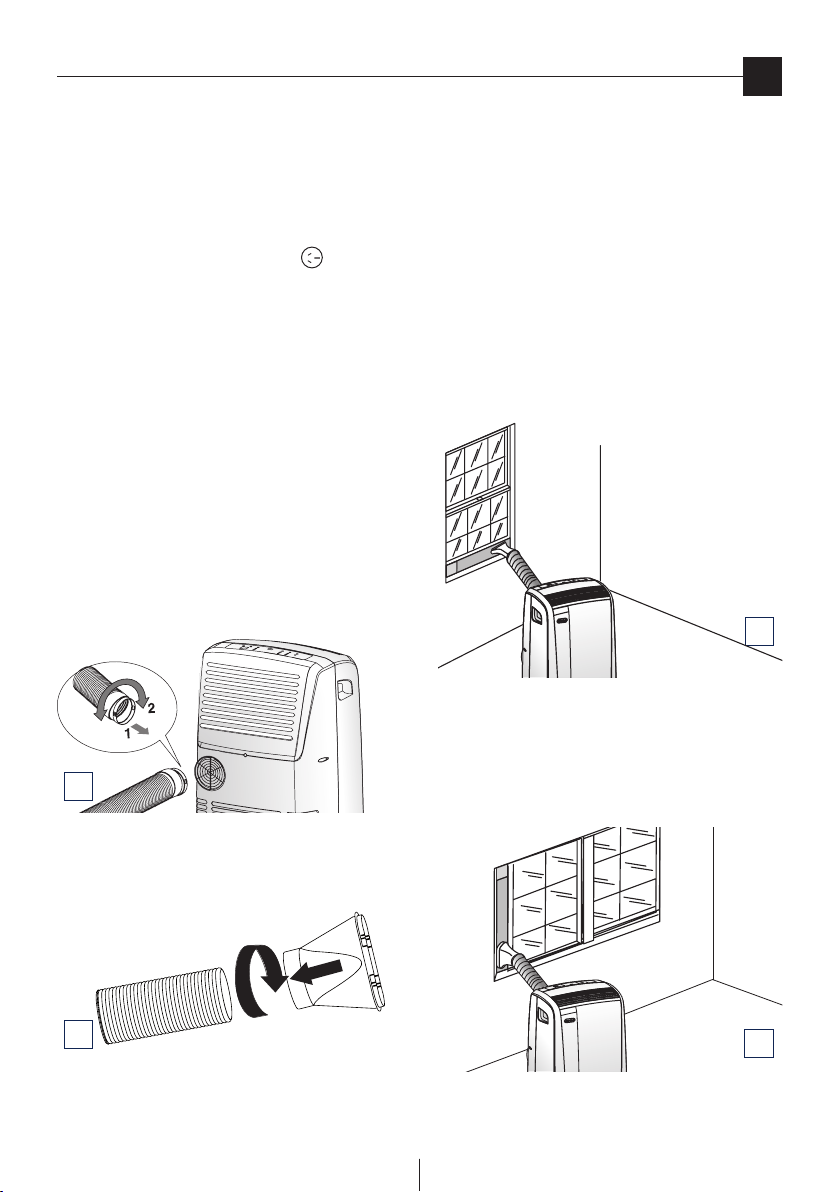
• Screwthehoseadaptor13tothehose’send 12.
• Fittheairexhausthoseinthehousingatthebackofthe
appliance. Insert it as shown in gure A.
• Screw the window outlet 17 to the other end of the
exhaust hose. (see g. B).
Sash window
• Openthewindow.
• Placethewindowbracket 15 in the window, extending it
to t the width of the window (g. C).
• Place the air conditioner near the window. Insert the
assembled exhaust hose 12 into the window bracket hole
15.
• Makesuretheairexhausthoseisunobstructed.
• Ifyouhaveaverylargewindow,inordertocoveryour
window aperture, use the additional window bracket
without holes extending it to the desired dimension,
then x the bracket by using the locking pin provided.
Whenextractingthewindowbracketandjoiningthetwo
pieces pay attention you do not cover the hole.
Other set-up methods:
• Thankstothelockingpin,it’spossibletousethewindow
bracket also for sliding windows. Position the hole of the
bracket so to allow a correct installation of the exhaust
hose (see gure D).
Keep the air hoses as short and free of curves as possible to
avoid constrictions.
2
1
2
A
B
C
D
6
en
French window
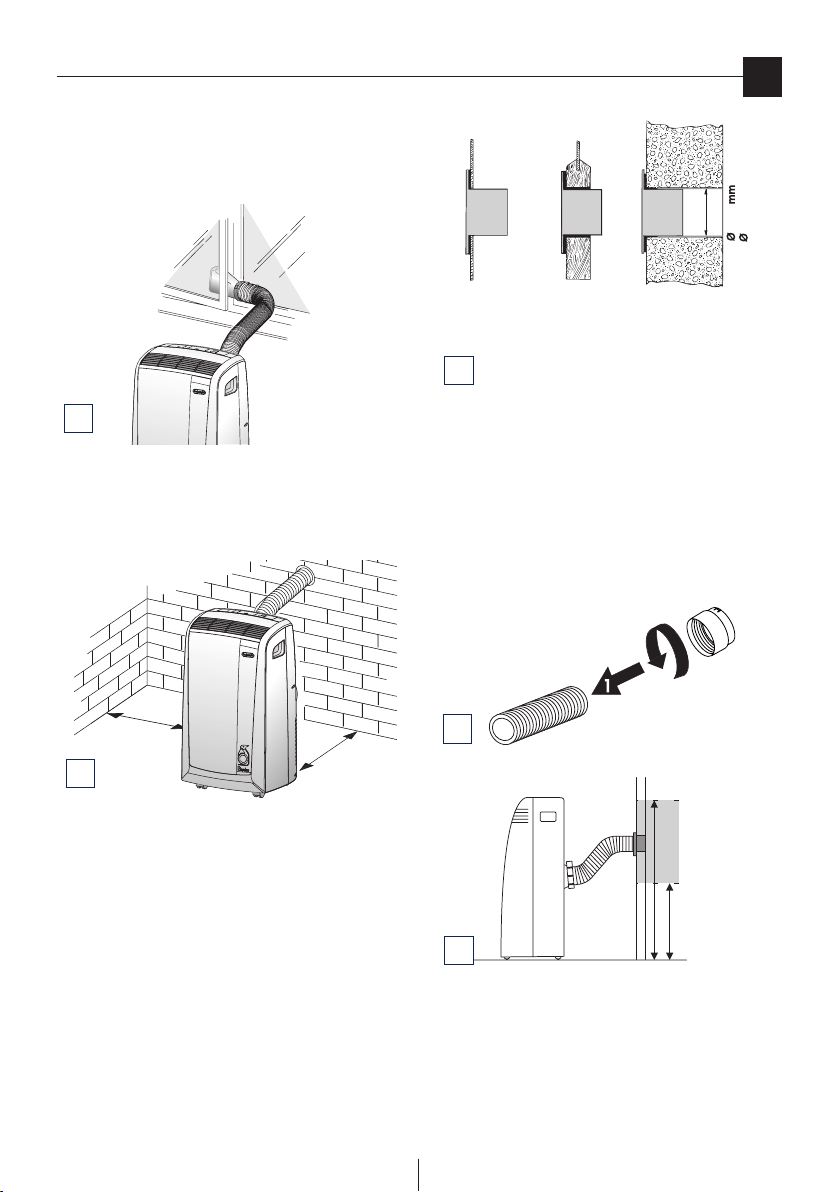
• After having screwed the window outlet 17 into the air
exhaust hose 12 , open the French window slightly and
position the window outlet 17 as shown in gure E.
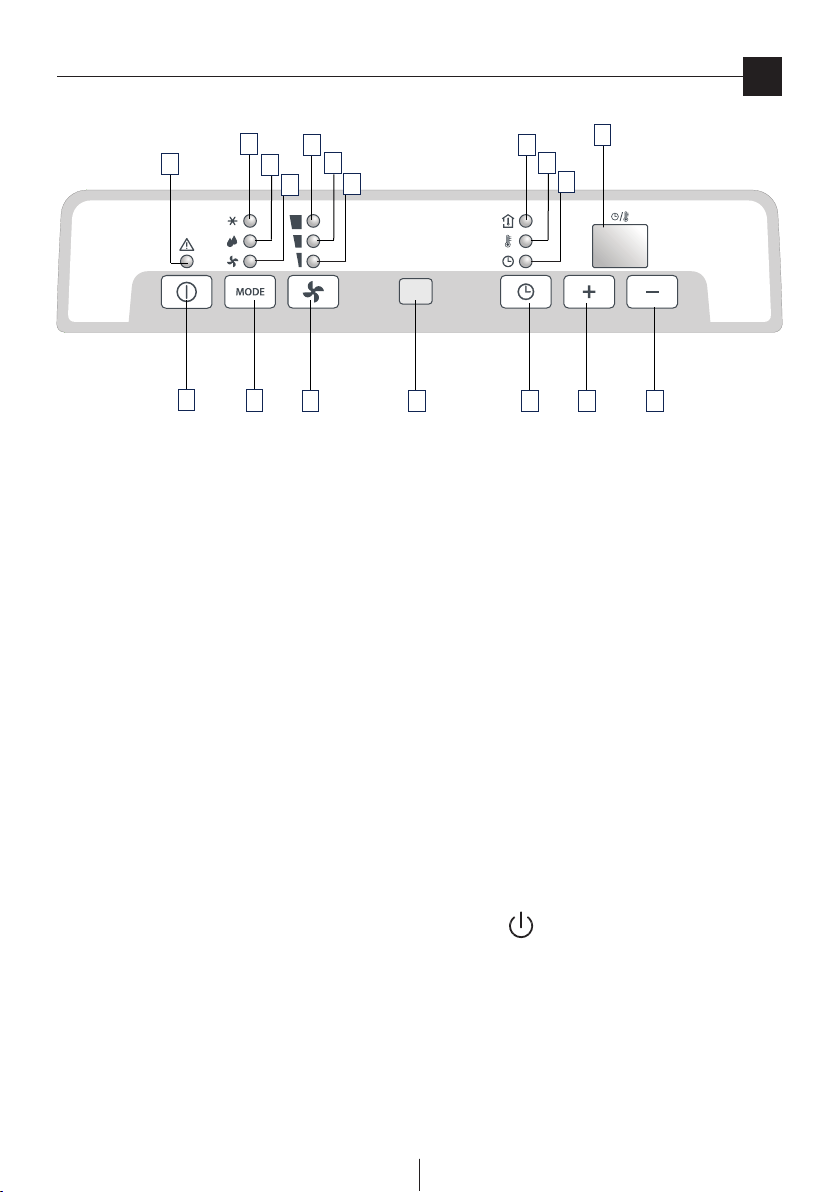
SEMIPERMANENT INSTALLATION
If required, your appliance can also be installed semi-
permanently (Fig. F).
Proceed as follows:
• Drill a hole (ø134mm / 5,27 in.) in an outside wall or
through a window pane.
Respect the height and dimensions of the hole given in
gures F and G.
NOTE: As special tools are required for installation, we suggest
you have the appliance installed by specialized personnel.
KEEP THE AIR HOSES AS SHORT AND FREE OF CURVES AS
POSSIBLE TO AVOID CONSTRICTIONS.
• Fitthewallange11 into the hole.
• Screwthehoseadaptor 13 tothehose’send12.
• Fittheairexhausthoseinthehousingatthebackofthe
appliance as shown in gure A.
• Screwthewallmountingaccessory 14 into the hose
12.
(g. H) and t it into the wall ange 11 as shown in g.
I.
When the hose 12 is not tted, the hole can be closed with the
ange cap 11 .
NOTE: Wheninstallingtheairconditionersemi-permanently,
you should leave a door slightly open (as little as 1 cm) to
guarantee correct ventilation.
Preparing for use
2
MAX100 cm
MAX 39 inches
MIN 35 cm
MAX 14 inches
134
5,25 in.
E
H
I
G
in the window pane
in the wooden
kickboard of a
French window
in the wall: you are
recommended to
insulate the section
of wall using suitable
insulation.
30 cm
30 cm
12 inches
12 inches
F
7
en
Control panel
O
P
N
I
L
M
S
T
H
G
Q
A
B
C R D E F
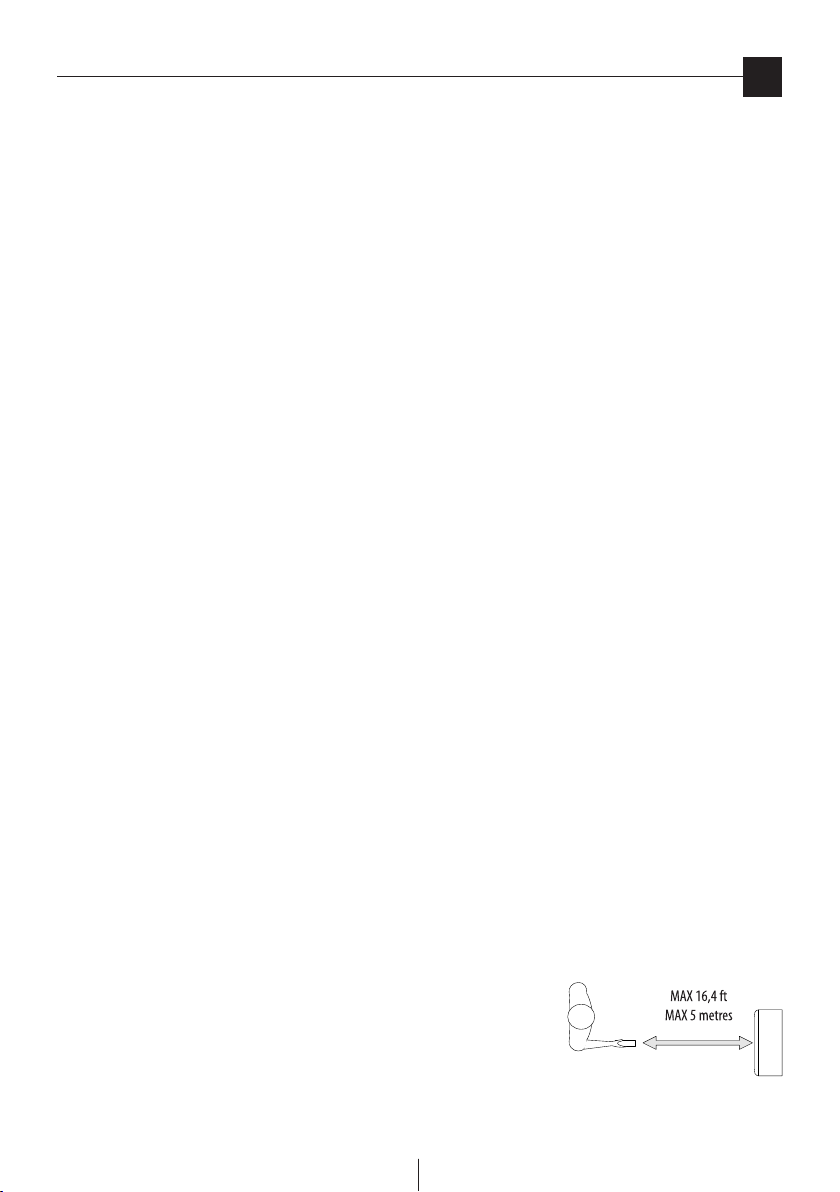
DESCRIPTION OF THE CONTROL PANEL
A ON/OFF button
B MODE selection button
Air conditioning, dehumidifying, fan.
C Fan speed selection button (MAX/MED/MIN)
D Timer button
E Programmed operation increase temperature/time button
F Programmed operation decrease temperature/time button
G Display Displays the temperature values set and the programmed operating time
H Timer in operation indicator light
I/L/M Fan speed lights
N Fan mode light
O Air-conditioning mode light
P Dehumidifying mode light
Q Alarm light
R Remote control receiver
S Light: displays room temperature
T Light: displays set temperature
Never turn the air conditioner o by unplugging from the outlet. Always press the button, then wait for a few minutes before
unplugging. This allows the appliance to perform a cycle of checks to verify operation.
8
en
Operation
Using the remote control unit (some models only)
TURNING THE APPLIANCE ON
Before plugging the appliance check the caps on the back
of the unit are correctly inserted and screwed on the
drainage hose 10.
Plug into an outlet. Two lines appear on the display indicating
that the appliance is in stand-by. Press the ON/STAND-BY
button (A). When turned on, the air conditioner starts operating
in the same mode as when it was turned o. Press the MODE
button (B) until the light corresponding to the desired mode
lights up:
Light (O): air-conditioning mode
Light (P): dehumidifying mode
Light (N): fan mode
AIR CONDITIONING MODE
Ideal for hot muggy weather when you need to cool and
dehumidify the room.
The display shows the inner temperature: the light (S) turns
on.
To modify the set temperature, push the (E) or (F) button to
reach the desired temperature. The (T) light turns on and the
(S) light turns o. (To change from °F to °C or viceversa, press
for few seconds both button E and F).
After 15 seconds, the inner temperature is shown on the
display.
The (S) light turns on.
Youcanadjustthetemperatureonlyinairconditioningmode.
Then select the fan speed by pressing the FAN button (C) until
the light corresponding to the required fan speed lights up:
MAX: the air conditioner operates at maximum to achieve
the target temperature as rapidly as possible
MED: reduces noise levels while maintaining a
comfortable temperature
MIN: for silent operation
The most suitable temperature for the room during the summer
varies from 75°F to 81°F (24 to 27°C). You are recommended,
however, not to set a temperature much below the outdoor
temperature.
FAN MODE
AdjustfanspeedbypressingtheFAN button (C) as described
fortheair-conditioningmode.
Remember that the higher the speed, the more air is ltered.
If you select “MIN” speed, less air is ltered but the appliance
is also less noisy.
DEHUMIDIFYING MODE
Ideal for reducing the humidity in a room without lowering or
raising the temperature (spring or autumn, damp rooms, rainy
spells, etc). When the dehumidifying mode is selected, the
light (P) comes on. At the same time, the “MIN” fan speed light
(M) comes on. In this mode, other speeds cannot be selected.
PROGRAMMING THE TIMER
The timer can be used to delay appliance start up or shut down.
This avoids wasting electricity by optimising operating periods.
How to programme delayed start up
• PlugtheapplianceintoamainssocketandpresstheON/
OFF button (A), then select the required operating mode
and other settings (temperature, fan speed, etc).
• PresstheON/OFFbutton(A) again to place the appliance
in standby mode.
• Pressthetimerbutton(D). The timer light “H” ashes.
• Usethe+(E)or-(F) buttons to set the number of hours
delay before the appliance comes on. The time increases or
decreases in steps of one hour.
The indicator light (H) ashes until the appliance starts up.
Youcansettheappliancetocomeonwithadelayofupto12
hours. To cancel the timer programme, press the timer button
(D) again. Light (H) stops ashing.
How to programme delayed shut down
• Delayedshutdowncanbeprogrammedinanyoperating
mode (air conditioning / fan/ dehumidifying).
• Pressthetimerbutton(D). The timer light “H” ashes.
• Usethe+(E)or-(F) buttons to set the number of hours
delay before the appliance goes o.
The time increases or decreases in steps of one hour.
The light (H) ashes until the appliance turns o as
programmed. At the set time, the air conditioner shuts down
and remains in standby. To cancel the timer programme, press
the timer button (D) again.
Light (H) stops ashing.
MODELS WITH REMOTE CONTROL
• Point the remote control at the receiver on the air
conditioner. The
remote control
must be no
more than 16,4
ft (5 metres)
away from the
appliance (without obstacles between the remote control
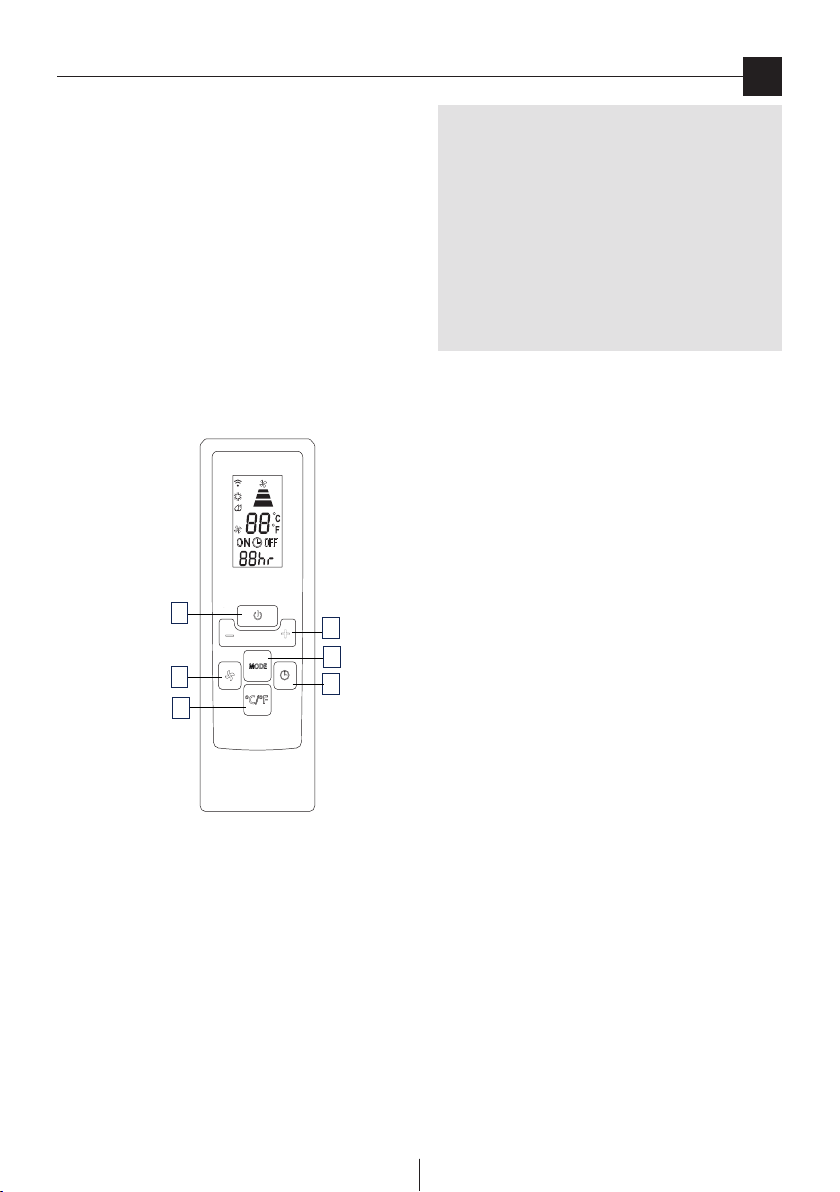
9
en
Using the remote control unit (some models only)
and the receiver).
• Theremotecontrolmustbehandledwithextremecare.
Do not drop it or expose it to direct sunlight or sources of
heat.
• Replacethecover.
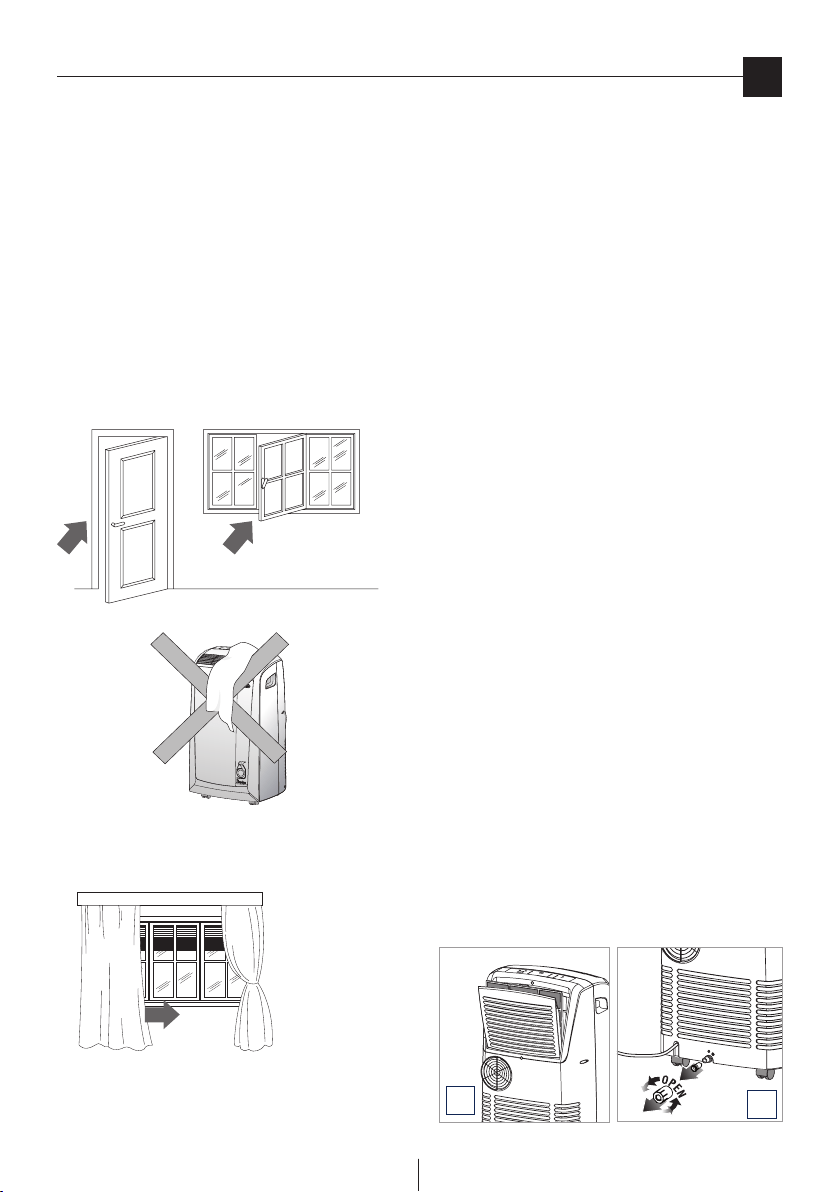
DESCRIPTION OF THE REMOTE CONTROL
19) “ON/OFF” button
20) Increase /Decrease button for temperature/programmed
use
21) “MODE” button
22) “TIMER” button
23) °F/°C scale button
24) Fan speed selection button (MAX/MED/MIN).
Inserting or replacing the batteries
• Removethecoverontherearoftheremotecontrol;
• Removetheoldbatteries,ifpresent.
• CorrectlyinserttwonewL03“AAA”1,5Vbatteries(seethe
instructions inside the battery compartment);
• Replacethecover.
If the remote control unit is replaced or discarded,
the batteries must be removed and disposed of
in accordance with current legislation as they
are harmful to the environment. Do not mix old
and new batteries. Do not mix alkaline, standard
(carbon-zinc) or rechargeable (nickel-cadmium)
batteries. Do not dispose of batteries in re.
Batteries may explode or leak. If the remote
control will not be used for a certain length of
time, remove the batteries.
TURNING THE APPLIANCE ON
Plug the appliance into the mains.
Press the ON/OFF button (19) (when turned on, the air
conditioner starts operating in the same mode as when it was
turned o).
Press the MODE button (21) to select the required mode
COOLING
DEHUMIDIFYING
FAN ONLY
On the control panel, the light corresponding to the selected
mode comes on.
For air conditioning/dehumidifying/fan only settings and
programming the timer, see page 8.
19
20
21
22
23
24
10
en
Tips/ Cleaning
To get the best from your air conditioner, follow these
recommendations:
• close the windows and doors in the room to be air
conditioned.
The only exception is when the appliance is installed
through a hole in the wall.
In this case, you are recommended to leave a slight
draught through a door or window to guarantee correct
ventilation.
• Protect the room from direct exposure to the sun by
partially closing curtains and/or blinds to make the
appliance much more economical to run;
• Neverrestobjectsofanykindontheairconditioner;
• Neverobstructtheairintake6 or outlet 1 grilles;
• Makesuretherearenoheatsourcesintheroom.
• Neverusetheapplianceinverydamprooms(laundriesfor
example).
• Neverusetheapplianceoutdoors.
• Makesuretheairconditionerisona level oor.
Before cleaning or maintenance, turn the appliance
o by pressing the ON/OFF button (A) or in models with
remote control unit, by pressing the ON/OFF button
19 , then always unplug the appliance from the mains
socket.
CLEANING THE CABINET
Youshouldcleantheappliancewithaslightlydampcloththen
dry with a dry cloth.
For safety reasons, never wash the air conditioner with water.
Precautions
Never use petrol, alcohol or solvents to clean the appliance.
Never spray insecticide liquids or similar.
CLEANING THE AIR FILTERS
To keep your air conditioner working eciently, you should
clean the dust lter every week of operation.
The lter is housed in the intake grille.
To clean the lters, remove the lter as shown in gure L.
Use a vacuum cleaner to remove the dust collected on the
lter.
If it is very dirty, immerse in warm water and rinse a number of
times. The water should never be hotter than 40°C.
After washing, leave the lter to dry. Put the lter back in its
housing.
START OF SEASON CHECKS
Make sure the power cable and plug are undamaged and the
earth system is ecient. Follow the installation instructions
precisely.
END OF SEASON OPERATIONS
To drain all water from the circuit, remove the external cap by
unscrewing it in the anticlockwise direction then, remove the
internal cap from the drain hose on the back of the appliance
and allow the water to drain out into a basin (gure M). When
the appliance is empty, replace the caps.
Clean the lter and dry thoroughly before putting back.
close doors and
windows
close blinds or
curtains
do not cover
the appliance
L
M
11
en
Troubleshooting
NOTE:
NEVER TRANSPORT OR TURN THE APPLIANCE UPSIDE DOWN OR ON ITS SIDE. IF THIS OCCURS, WAIT 6 HOURS BEFORE
TURNING THE APPLIANCE ON, 24 HOURS IS RECOMMENDED. (After the unit has been on its side, oil needs to return to the
compressortoensureproperfunction.Withoutallowingtheunitthistime(6-24hours)Theunitmayfunctionforonlyashorttime,
and then the compressor will break down from lack of oil.)
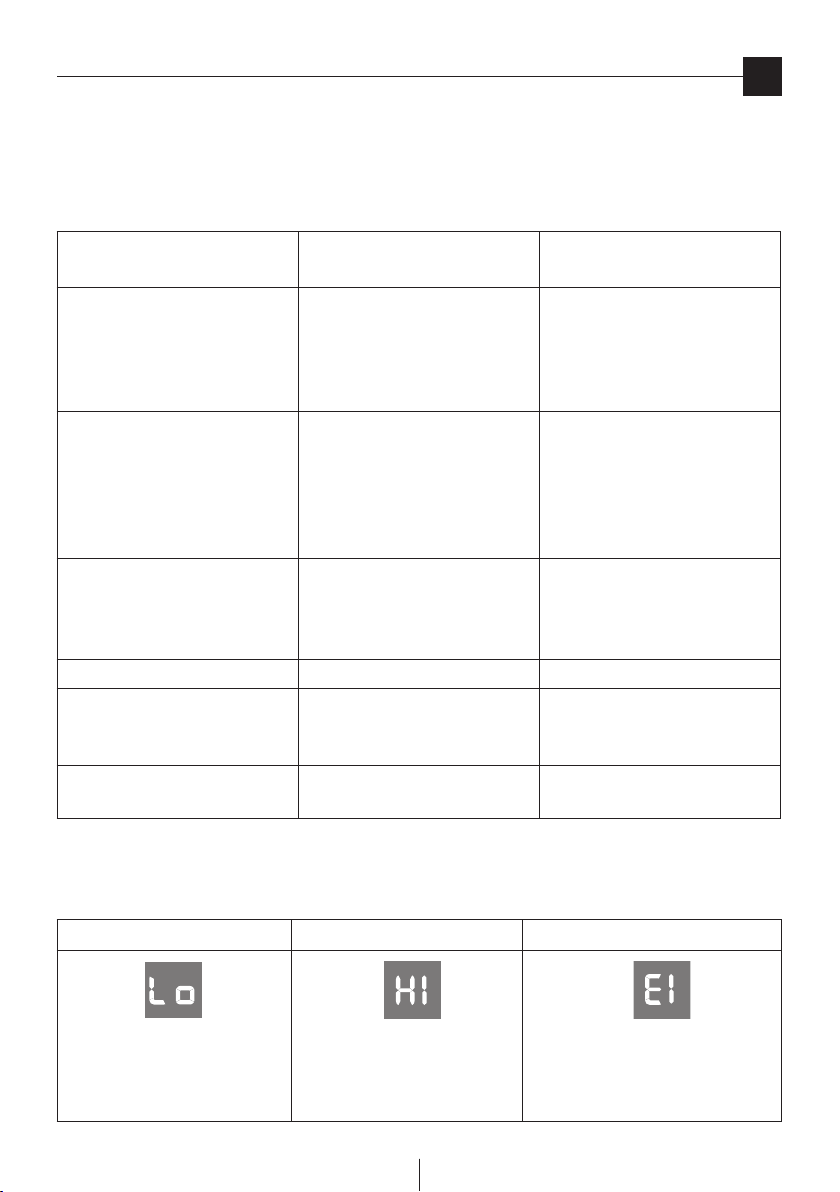
PROBLEM CAUSE REMEDY
The air
conditioning unit does not start.
• Noelectricity.
• Itisnotpluggedintotheoutlet.
• Thesafetydeviceoftheplughas
tripped.
• Wait.
• Plugintotheoutlet.
• Resetthesafetydevice,ifproblem
persists contact our toll free
customer service.
The air
conditioning unit works for a short
time only.
• Theairexhausthosehasaconstric-
tion.
• Theairexhausthoseisblocked.
• Therearetightbendsintheair
exhaust hose.
• Positiontheexhausthosecorrectly.
• Checktherearenoobstacles.
Obstructing air discharge.
• Eliminatethetightbends.
The air
conditioner works, but does not
cool the room.
• Windowopen.
• Theexhausthoseisdetached.
• Airltersclogged.
• closethewindow.
• connecttheexhausthose.
• cleanorreplacethelter.
Particular odour in the room • airpurifyingltersclogged • cleanorreplacethelters.
The air conditioner does not
operate for about 3 minutes after
turning it on
• thesafetydevicehastripped • waitforthreeminutes.
The alarm light Q comes on • thetankinsidetheapplianceisfull. • emptythetank(see“Endofseason
operations) on page 10).
IF…IS DISPLAYED, IF…IS DISPLAYED, IF…IS DISPLAYED,
“Low Temperature”
...MEANS: room temperature is too low
“High Temperature”
...MEANS: room temperature is too high
“Probe Failure”
(sensor damaged)
…MEANS: contact your local customer service
SELF-DIAGNOSIS
The appliance has a self diagnosis system to identify a number of malfunctions. Error messages are displayed on the appliance
display.

12
en
Technical specications
TECHNICAL SPECIFICATION
Power supply voltage see rating label
Max. absorbed power
during air conditioning “
Refrigerant “
Cooling capacity “
LIMIT CONDITIONS
Room temperature for
air conditioning 21 ÷ 35°C
Transport, lling, cleaning, recovery and disposal
of refrigerant should be performed by a technical
service centre appointed by the manufacturer
only. The appliance should be disposed of by a
specialist centre appointed by the manufacturer
only.