INSTRUCTION MANUAL
WIRELESS HEADSET
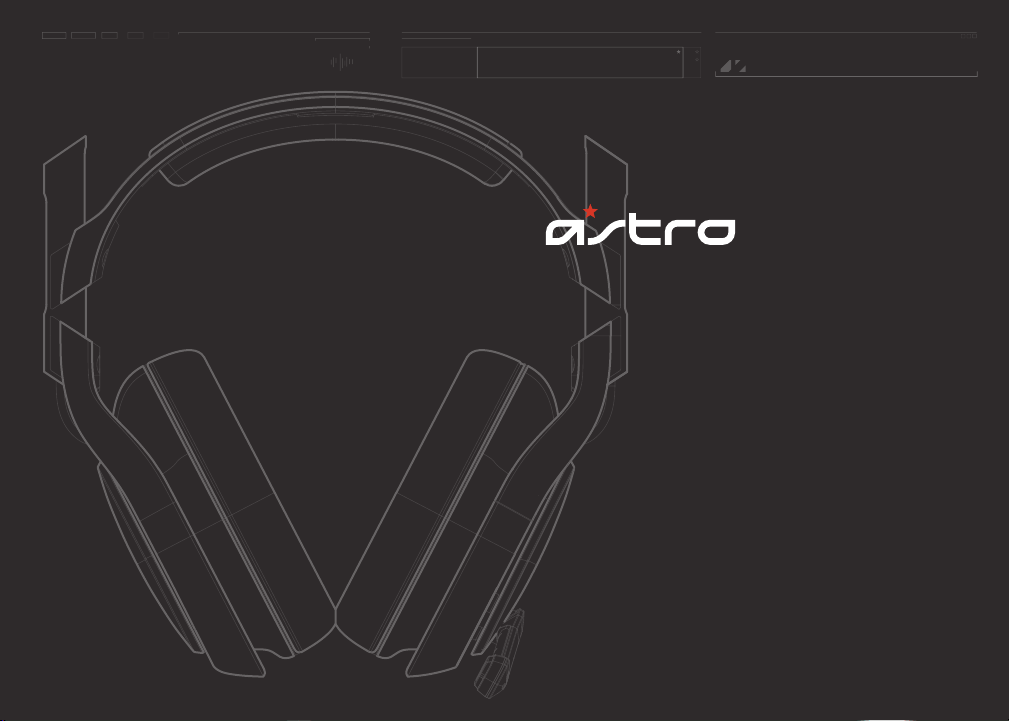
A50
QUICK
START
INSTRUCTIONS
ASTRO Gaming’s A50 Wireless headset is the perfect
gaming asset for the audio-savvy citizen who equally
appreciates business and pleasure. Professionally-tuned
ASTRO Audio paired with Dolby® Digital 7.1 Surround
Sound keep you fully immersed in the experience.
Whether you’re gaming, enjoying a feature film, or
listening to your favorite album on repeat—control over
the sound settings is just a touch away.
Congratulations on your
sound investment.
The A50s are equipped with KleerNet’s 5.8 GHz wireless
technology, designed for unimpaired performance
amongst the array of other RF traffic. ASTRO Gaming’s
integrated MixAmp™ technology allows for precise
control of game to voice balance, all fitting neatly into
the contoured design of the A50. This guide will point to
the various ways in which your A50’s can be adjusted to
a setup that’s all your own.
A50 WIRELESS SYSTEM
5.8 GHZ
EQ PRESETS
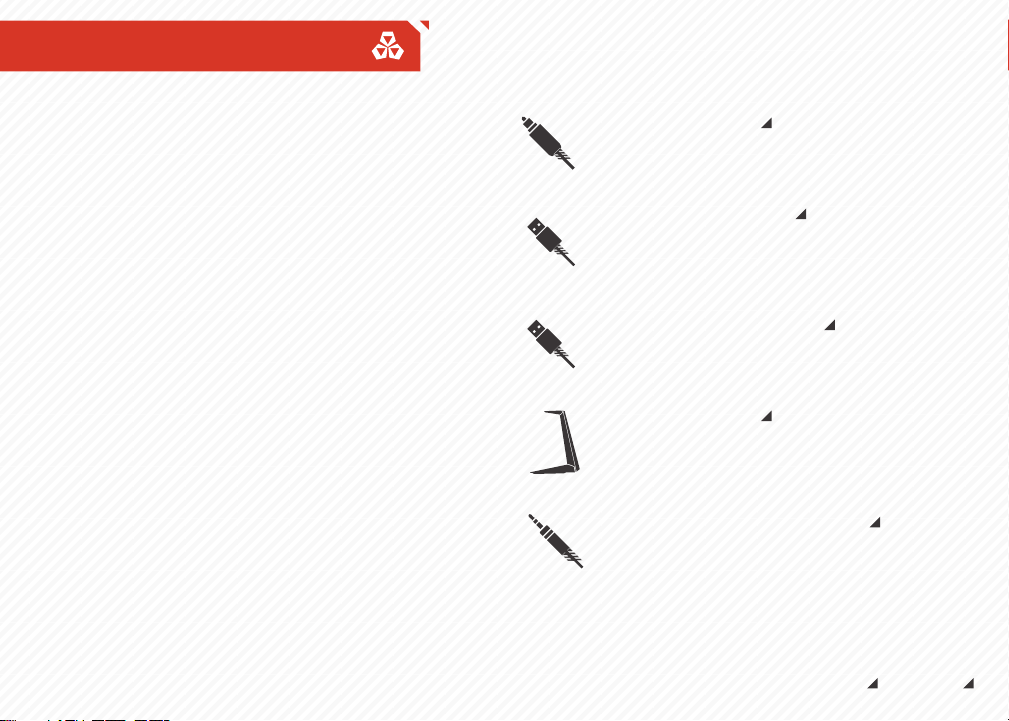
OPTICAL CABLE
Provides clear Dolby® Digital surround
sound across all platforms.
USB POWER CABLE
Powers your MixAmp™ Transmitter (Tx)
as well as voice chat for the PlayStation
Network and PC gaming.
USB CHARGING CABLE
Charges your A50 Wireless Headset from
the MixAmp™ Transmitter.
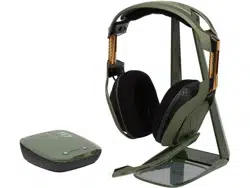
DISPLAY STAND
Holds the MixAmp™ Transmitter and
A50 Wireless Headset for storage and
charging.
AG1 XBOX ONE CHAT CABLE
Connect to Xbox One controller and Xbox
Live Chat Port for voice communication
Package Contents
Contents
So... you've breached the boxy exterior, and you're working
your way along the inside. You'll find that your A50 comes
bundled with some cables, each has a purpose that's suited
to your method of gameplay.
ASTRO GAMING
CONFIDENTIAL 2013
EYES ONLY
010185
ASTRO AUDIO
SUPERIOR
TOURNAMENT
COMPETITIVE
ASTRO GAMING
CONFIDENTIAL 2013
EYES ONLY
010185
ASTRO AUDIO
SUPERIOR
TOURNAMENT
COMPETITIVE
System Configuration // XBOX ONE
2
3
8
5
6
4
7
1
UPDATE XBOX
XBOX SETTINGS
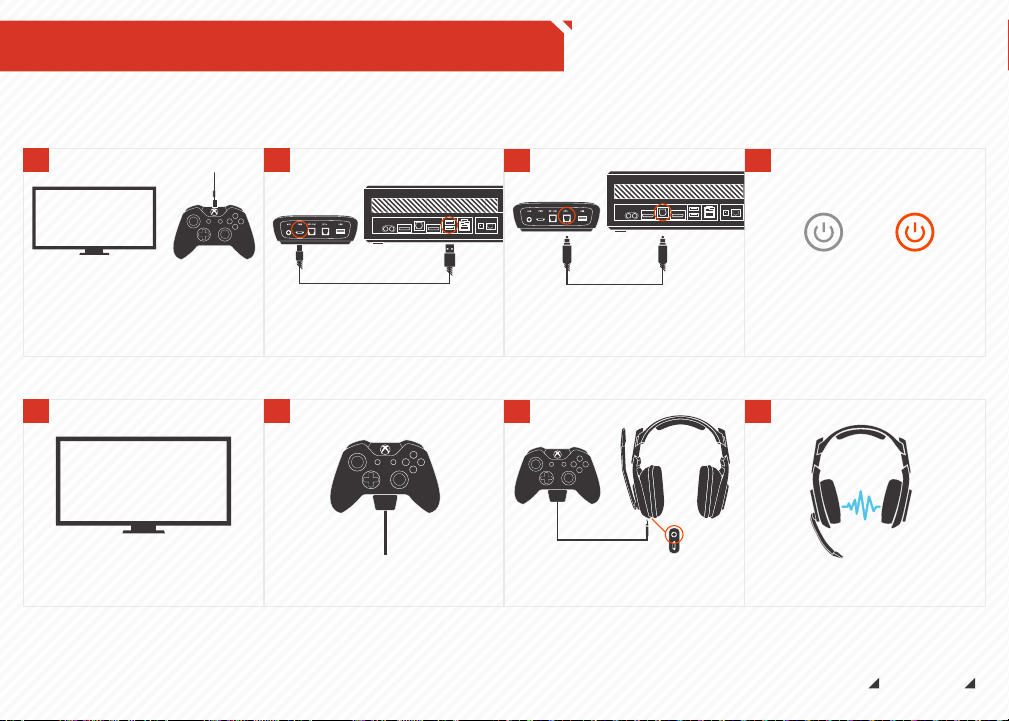
Plug AG1 Xbox One Chat Cable into
Controller
IN
Plug 1.0M A50 USB Cable into MixAmp
TM
Tx
and Xbox One for power.
Update Xbox One and Xbox One controller
with the latest software via USB cable to
console.
Go to “Settings”, then “Display & Sound.”
Under the “Digital Audio” column, choose
“Bitstream Format,” then select “Dolby
Digital.”
IN
Plug TOSlink Optical Cable into MixAmp
TM
Tx and Xbox One for Dolby® 7.1 Surround
Sound. (Be sure to remove caps on the
cable tips)
Power on your Xbox One first, then your
MixAmp
TM
Tx and A50 Headset. Your
headset and transmitter should already
be paired.
MixAmp
TM
Transmitter Power Button
*STAND BY *POWER ON
Plug AG1 Xbox One Chat Cable into A50
Headset via Xbox Live Chat Cable Port
Game on, you’re good to go!
ASTRO GAMING
CONFIDENTIAL 2013
EYES ONLY
010185
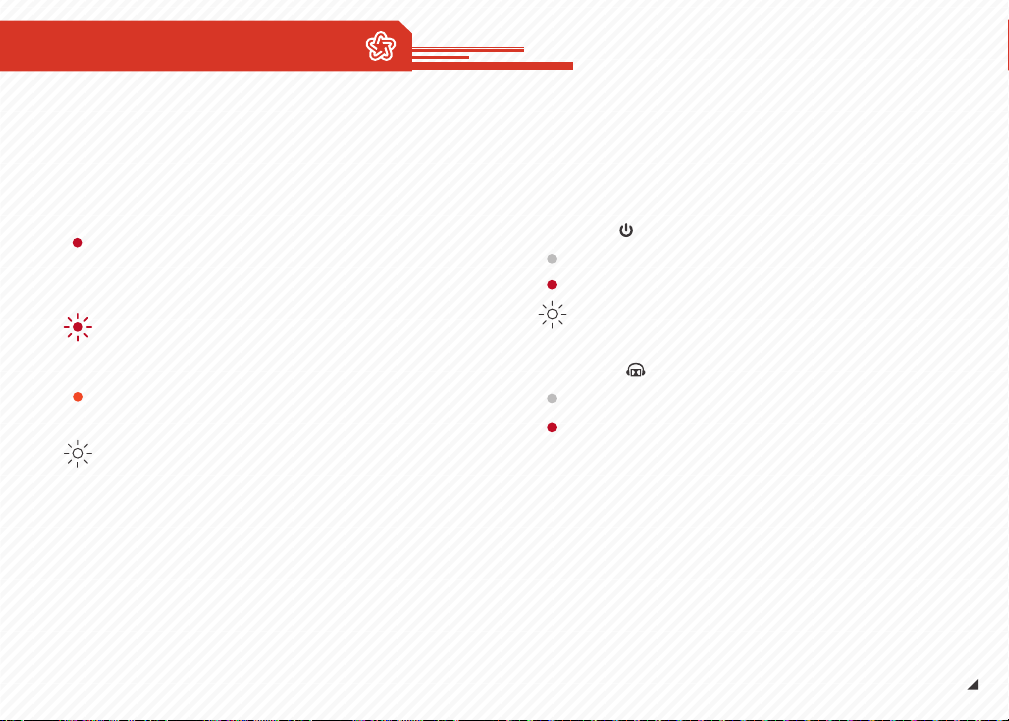
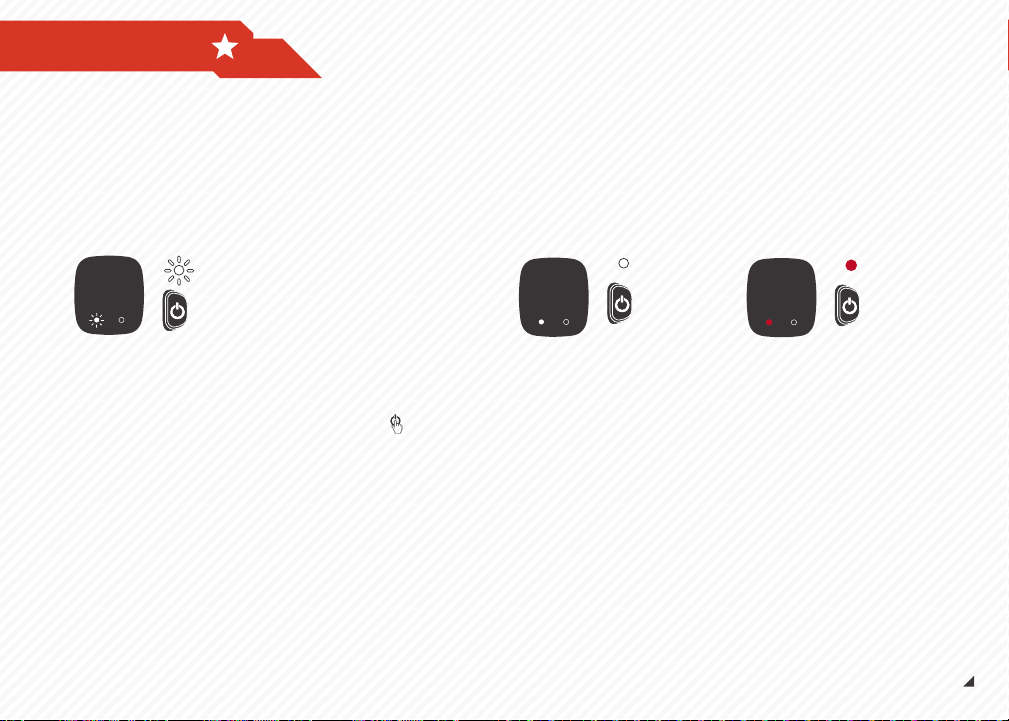
LED Indicator on A50 Headset:
Solid Red, USB connected: Charging finished.
Solid Red, USB disconnected: Powered on.
Blinking Red + Audible Beep: Low Power,
Charge Immediately.
Solid Orange: Charging Lithium-Ion Battery.
Blinking White: Pairing mode.
A50 LED BEHAVIOR
LED Indicators on MixAmp™ Tx:
Power LED
Off: Powered off.
Solid Red: Powered on.
Blinking White: Pairing mode.
Dolby® LED
Off: Dolby® Headphone disabled.
Solid Red: Dolby® Headphone enabled.
ASTRO GAMING
CONFIDENTIAL 2013
EYES ONLY
010185
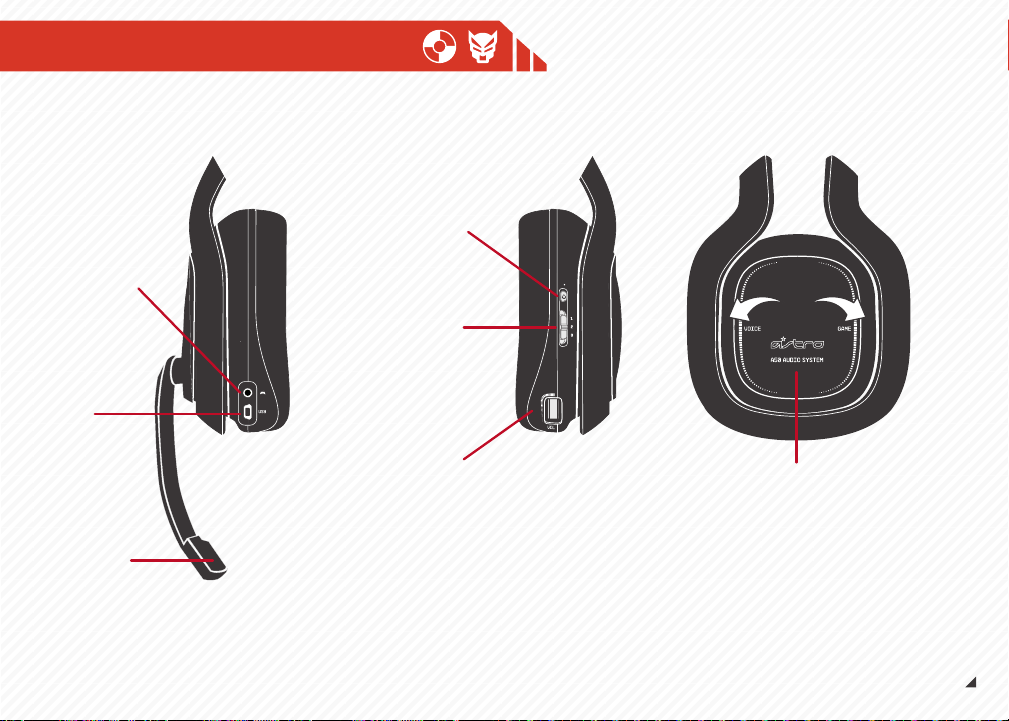
Xbox LIVE®
Cable Port
USB
Charging Port
Microphone
Power / Pairing
EQ Mode Select
1. Media Mode
2. Core Mode
3. Pro Mode
Master Volume
Game / Voice Balance
A50 User INTERFACE
A50 USER INTERFACE
A50 Controls
Game/Voice Balance: The A50’s integrated game and voice
mixing functions are located on your right earpiece. The A50s
come preset to a 50/50 balance. To adjust, press the button for
the audio function you wish to incrementally increase. Holding
down “Game” will cause the mixing function to isolate game
sounds, quieting the voice. Pressing “Voice” will cause the mixer
to decrease game sounds, amplifying voice.
While using this feature you may find your A50 emits a series of
intermittent beeps. Rest assured, you haven't been tricked into
an ASTRO hearing test.
A50 Game/Voice Balance Beeps:
At 50/50 Game + Voice: Emits a single beep
At 100% Voice: Emits a two-tone beep (unique to max voice)
At 100% Game: Emits a two-tone beep (unique to max game)
Master Volume: The Master Volume wheel located on the
bottom of the right earpiece adjusts overall volume control.
Use the Master Volume in conjunction with Game/Voice Balance
for total audio domination. Lecherous laughter is optional (but
encouraged).
Microphone: The A50 fixed microphone operates when in the
down/forward position. To activate the microphone's mute
feature, simply swing the microphone arm up to the vertical
(12 o'clock) position, where the microphone will click into place.
Equalizer (EQ) Modes: EQ modes are controlled by a switch
located on the back of the right earpiece. The A50s come
equipped with three separate EQ modes for better listening:
1. Media: Enhanced bass, for movies and music
2. Core: Balanced for single player gaming
3. Pro: Boosted high frequencies for competitive gameplay
ASTRO GAMING
CONFIDENTIAL 2013
EYES ONLY
010185
ASTRO AUDIO
SUPERIOR
TOURNAMENT
COMPETITIVE
MixAMP® TX USER INTERFACE
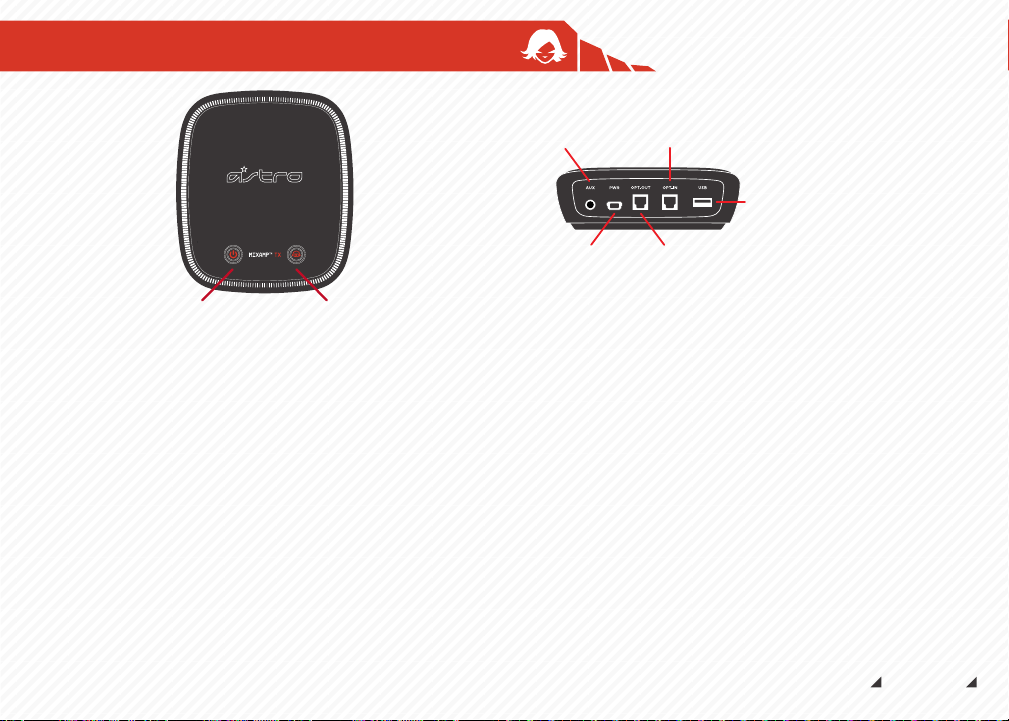
MixAmp™ Tx - Top:
Left Button: Power/Pairing
Right Button: Dolby® Headphone Virtual 7.1 Digital Surround
On/Off
MixAmp™ Tx - Rear:
PWR: Connect the USB Power Cable from this port to a free port
on your console or PC to power the MixAmp™ Tx and enable
voice capability*.
AUX: Auxiliary In. Plug your media device into this port with an
optional 3.5mm cable in order to wirelessly stream audio to
your A50 headset. Intended for use with MP3 players, phones,
and PCs (when optical digital out is not available).
OPT-OUT: Optical Out Pass through, use this input to connect
your home theater system.
OPT IN: Use this input to connect the Optical Cable from TV, PC,
or console
USB: USB: Insert the USB Charging Cable into this socket, and
attach the other end to the port on your A50s when not in use.
This port is also utilized when updating to the latest firmware
and is also needed to power Optical Passthrough.
*Additional setup may be required for some systems. Don't panic. Simply refer to the
System Configuration for your gaming console or PC to get you all sorted out.
ASTRO GAMING
CONFIDENTIAL 2013
EYES ONLY
010185
USB
Charging Port
AUX In
Optical In from TV or Console
USB Power /
Voice
Optical Out
Passthrough
Power / Pairing Dolby® Headphone
Button
PAIRING
Your A50 and MixAmp™ TxD come pre-paired. It is only
necessary to initiate the pairing process if there is no
audio after setup is completed. Got it?
Locate the Power button on the face of the MixAmp™
Transmitter and on the right side of the A50 headset.
Begin pairing mode by simultaneously holding
the power button on the MixAmp™ TxD unit and on
the A50 headset until both of the buttons blink white.
The LED indicators on both
devices will show solid
white for three seconds,
indicating that pairing has
occurred.
When the pairing process is
complete, the power buttons
on the A50 and the MixAmp™
TxD will show solid red.
You can pair up to four A50 headsets to your MixAmp™ TxD.
However only the first paired headset can use its microphone.
We recommend muting the mics of all other paired headsets.
For pairing multiple A50 headsets to your MixAmp™ TxD,
repeat this process for each additional headset or after doing
a firmware update.
ASTRO GAMING
CONFIDENTIAL 2013
EYES ONLY
010185
BATTERY & CHARGING
ASTRO GAMING
CONFIDENTIAL 2013
EYES ONLY
010185
Charging
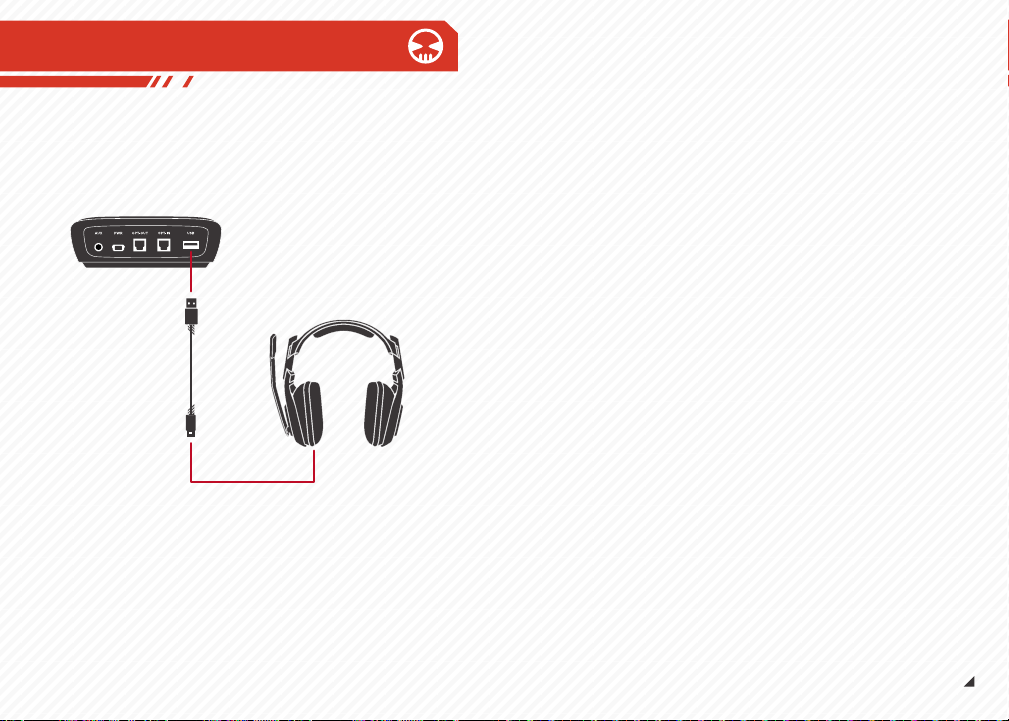
To charge your A50, attach the USB Charging Cable from the base of the
MixAmp™ Tx to the charging port on the A50s. The indicator light on the A50
will show solid orange during charging and then solid red once your A50s are
fully powered up and ready for action.
Battery Life
The non-removable lithium-Ion battery built into your A50s requires a five
hour charging cycle to reach full power. Once fully charged, the battery is
good for 8 -10 hours of on-head action time, depending on your degree of
use.
USB Charging Cable
ASTRO GAMING
CONFIDENTIAL 2013
EYES ONLY
010185
DISPLAY STAND
Display Stand - Permanent Assembly
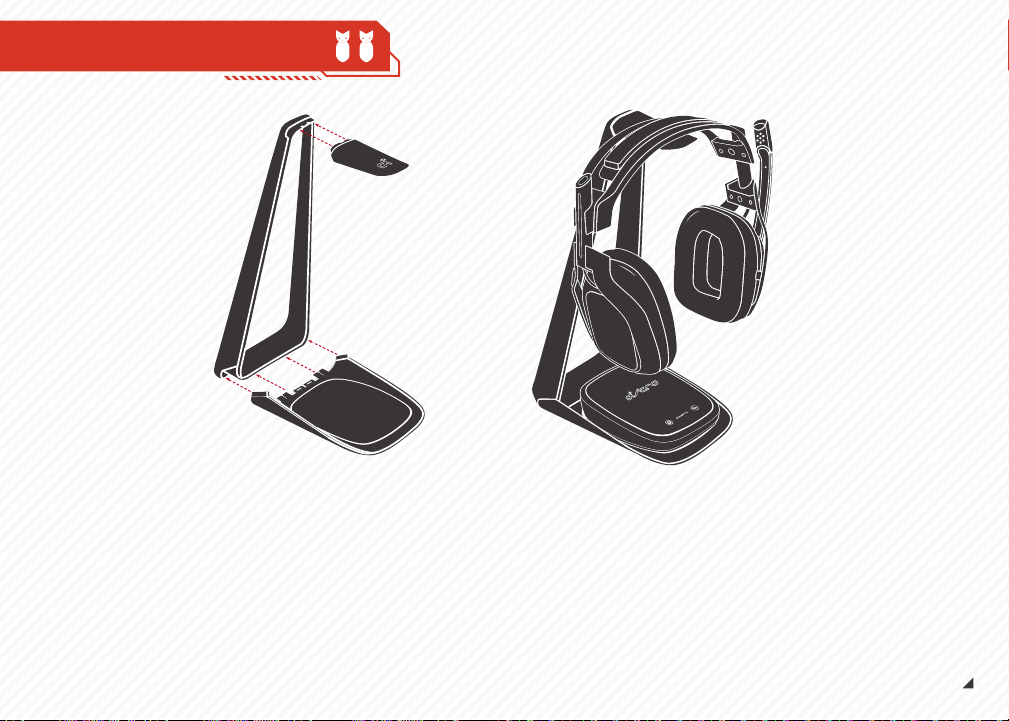
Your display stand arrives in three parts: Base, Spine, and Beak.
To assemble:
Slide and snap in the tabbed edges of base piece
into the corresponding edges of the spine.
Slide and snap the tabbed edge of the beak into
the top of the spine.
Once assembled, the Display Stand functions as a base for your
MixAmp™Tx and A50s for charging and display. The stand is
not meant to be taken apart.
1.
2.
Firmware Updating:
Keep your A50s and your platforms playing nice, and in
proper working order by making sure you are running the
latest firmware:
http://www.astrogaming.com/firmware
Troubleshooting
See FAQ:
http://www.astrogaming.com/faq
All ASTRO Gaming products come with an automatic 1-year warranty. Registration is
not required. If you purchased ASTRO products from a 3rd party retailer, you don’t
need to register it, but you will need to provide proof of purchase for any warranty
claims.
Register ASTRO products here:
http://www.astrogaming.com/register
Specs:
Weight w/o cable: 0.81lbs/363 grams
Max SPL: ~118 dB @1kHz
Ear Coupling: Over-Ear
Distortion: THD<1%
Kessel Run Distance: Under 12 Parsecs
Frequency Response: 20Hz - 20 KHz
Connector: 2.5mm XBOX Live® chat port, Mini-USB port
Microphone: 6.0mm uni-directinal noise canceling
Power Source: Mini-USB (USB 2.0 compatible)
Battery Life: 8-10 Hours
Wireless Radio: 5.8GHz Kleernet
MixAmp
TM
Tx Inputs: Optical In, AUX In (3.5mm), USB Power, USB Chat Audio
MixAmp
TM
Tx Outputs: Optical Passthrough, USB Charging Port
ASTRO GAMING
CONFIDENTIAL 2013
EYES ONLY
010185
SUPPORT
Federal Communications Commission (FCC)
Statement
15.21
You are cautioned that changes or modifications not expressly approved by the part
responsible for compliance could void the user’s authority to operate the equipment.
15.105(b)
This equipment has been tested and found to comply with the limits for
a Class B digital device, pursuant to part 15 of the FCC rules. These limits are
designed to provide reasonable protection against harmful interference in a
residential installation. This equipment generates, uses and can radiate radio
frequency energy and, if not installed and used in accordance with the instructions,
may cause harmful interference to radio communications. However, there is no
guarantee that interference will not occur in a particular installation. If this
equipment does cause harmful interference to radio or television reception, which
can be determined by turning the equipment off and on, the user is encouraged to try
to correct the interference by one or more of the following measures:
∆ Reorient or relocate the receiving antenna.
∆ Increase the separation between the equipment and receiver.
∆ Connect the equipment into an outlet on a circuit different from that to which the
receiver is connected.
∆ Consult the dealer or an experienced radio/TV technician for help.
This device complies with Part 15 of the FCC Rules. Operation is
subject to the following two conditions:
1) This device may not cause harmful interference, and
2) This device must accept any interference received, including
interference that may cause undesired operation of the device.
FCC RF Radiation Exposure Statement:
This equipment complies with FCC radiation exposure limits set forth for an
uncontrolled environment. End users must follow the specific operating instructions
for satisfying RF exposure compliance. This transmitter must not be co-located or
operating in conjunction with any other antenna or transmitter.
FCC RF Exposure requirements:
This device and its antenna(s) must not be co-located or operation in conjunction
with any other antenna or transmitter.
THE MANUFACTURER IS NOT RESPONSIBLE FOR ANY RADIO OR TV INTERFERENCE
CAUSED BY UNAUTHORIZED MODIFICATIONS TO THIS EQUIPMENT. SUCH MODIFICA-
TIONS COULD VOID THE USER’S AUTHORITY TO OPERATE THE EQUIPMENT.
ASTRO GAMING
CONFIDENTIAL 2013
EYES ONLY
010185
FCC STATEMENT
INDUSTRY CANADA CONFORMITY STATEMENT / DÉCLARATION DE CONFORMITÉ
D’INDUSTRIE CANADA
This Class B digital apparatus complies with Canadian ICES-003.
Cet appareil numérique de la classe B est conforme à la norme NMB-003 du Canada.
CE DECLARATION OF CONFORMITY
Skullcandy, Inc. declares that this product is in compliance with the essential
requirements and other relevant provisions of Directives 2004/108/EC. A copy of the
Declaration of Conformity for this product may be obtained by contacting Skullcandy,
Inc.
Note on environmental protection:
After the implementation of the European Directive 2012/19/EU in the national legal
system, the following applies: Electrical and electronic devices may not be disposed
of with domestic waste. Consumers are obliged by law to return electrical and
electronic devices at the end of their service lives to the public collecting points set
up for this purpose or point of sale. Details to this are defined by the national law of
the respective country. Failure to dispose of electronic devices properly may have
harmful effects on the environment and human health as a result of the presence of
hazardous substances in the products. This symbol on the product, the instruction
manual or the package indicates that a product is subject to these regulations. By
recycling, reusing the materials or other forms of utilizing old devices, you are making
an important contribution to protecting our environment.
ASTRO GAMING
CONFIDENTIAL 2013
EYES ONLY
010185
CANADA CONFORMITY