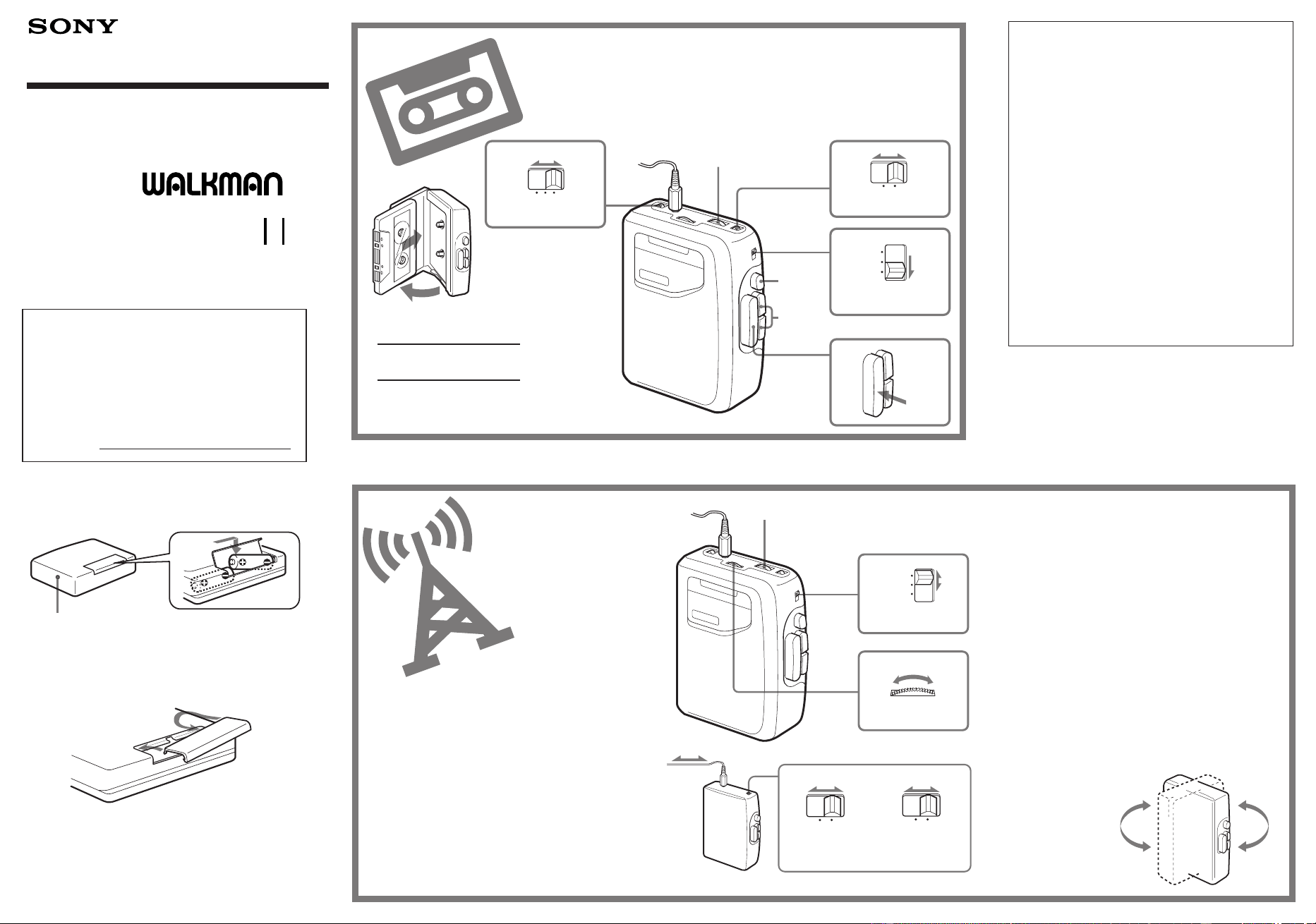
Inserting Batteries
0 )
Wind rapidly.
p
Stop.
Improve radio reception
FM
Extend the headphones/earphones cord
and adjust the FM ST/MONO selector or
DX/LOCAL selector.
AM
Rotate the Walkman.
Radio Cassette Player
Operating Instructions
xxxx
3-860-407-22 (1)
WM-FX141
Sony Corporation ©1997 Printed in China
WALKMAN is a registered trademark of Sony Corporation.
WALKMAN xxxxxxxx
R6(AA) x 2
DC IN 3V
1
2
2
1
2
VOLUME
p
0 )
AVLS
OFF
12
NORM
CrO
2
/
METAL
PLAY
FMAM TAPE
(RADIO OFF)
2
1
VOLUME
TUNING
FMAMTAPE
(RADIO OFF)
NORM
DX
CrO
2
/
METAL
LOCAL
NORM
FM ST
CrO
2
/
METAL
MONO
or
Owner’s Record
The model number is located at the rear and
the serial number is located inside the cassette
holder. Record the serial number in the space
provided below. Refer to them whenever you
call upon your Sony dealer regarding this
product.
Model No. WM-FX141
Serial No.
For the customers in the U.S.A.
Using the AVLS feature
The AVLS selector allows you to limit the
maximum volume of your Walkman
personal stereo without degrading the
sound quality.
•When the AVLS selector is set to either
position 1 or 2, the volume will be kept at a
moderate level without the degradation of
the sound quality, even if you attempt to
turn the volume up higher.
•When the AVLS selector is set to either
position 1 or 2, the playback sound may be
distorted or unstable according to the
music (especially bass boosted part). If this
happens, turn down the volume.
•When the AVLS selector is turned off, you
will be able to enjoy the full volume
capability of your Walkman personal
stereo.
When Using Headphones/Earphones
Wear the “L” marked side to the left ear and the
“R” marked side to the right ear.
When Listening to the Radio
If you have inserted a cassette with a metallic
shell or label, and interference in radio reception
occurs, remove the cassette.
If the Battery Compartiment Lid
Comes off
Radio FM: 87.6 – 108 MHz (U.S.A., Canada, and
Central and South America);
87.5 – 108 MHz (Italy and Saudi Arabia)
65 – 107.9 MHz (Eastern Europe)
87.6 – 107.9 MHz (Other countries)
AM: 530 – 1,710 kHz (U.S.A., Canada, and
Central and South America);
526.5 – 1,606.5 kHz (Italy and Saudi Arabia)
531 – 1,602 kHz (Other countries)
Power requirements
•3 V DC batteries R6 (AA) × 2
•External DC 3 V power sources
Battery life (approximate hours) (EIAJ*)
Sony Alkaline LR6 (SG) Sony R6P (SR)
16 hrs. (playback) 4.5 hrs. (playback)
48 hrs. (radio) 16 hrs. (radio)
* Measured value by the standard of EIAJ (Electric
Industries Association of Japan). (Using a Sony HF
series cassette tape)
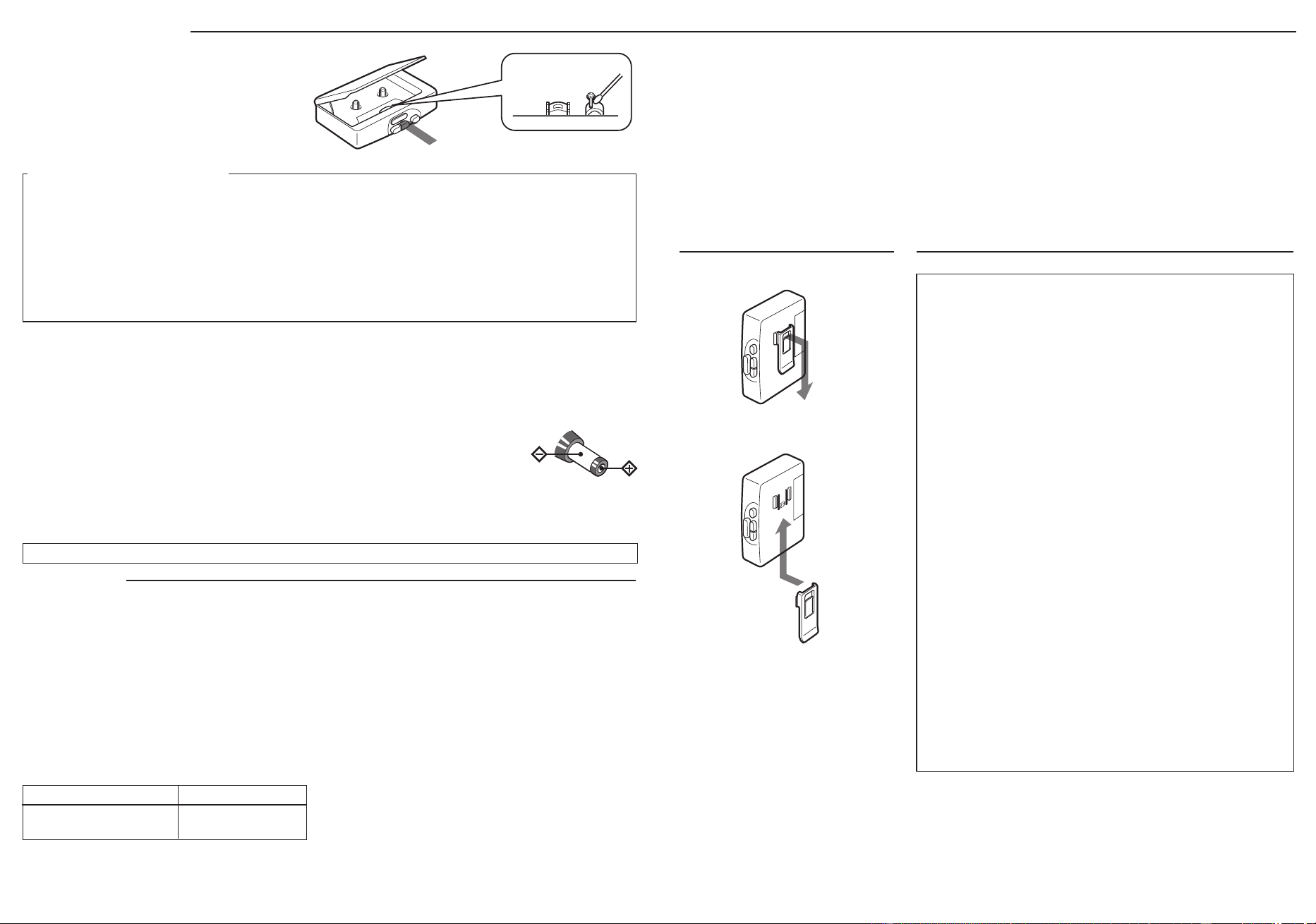
Cleaning the Walkman
•Prolonged use may contaminate the tape head. If
sound drop-out or excessive noise occurs, clean
the head and tape path with alcohol.
•Clean the headphones/earphones plug
periodically for optimum sound.
•Do not use alcohol, benzine or thinner to clean
the case.
About batteries
•When you are not going to use your Walkman
for a long time, remove the batteries to prevent
damage from battery leakage and corrosion.
About external power
You can connect the following external power
sources through the DC IN 3 V jack located on the
bottom. (When you plug a cord into the DC IN 3 V
jack, the internal batteries are automatically
bypassed.)
•House current using an AC-E30HG AC power
adaptor
Preventing hearing damage
Do not use headphones/earphones at high volume.
Hearing experts advise against continuous, loud and
extended play. If you experience a ringing in your ears,
reduce volume or discontinue use.
Caring for others
Keep the volume at a moderate level. This will allow
you to hear outside sounds and to be considerate to the
people around you.
Dimensions
93.9 × 118.5 × 35.9 mm (w/h/d)
(3
3
⁄
4
× 4
3
⁄
4
× 1
7
⁄
16
in) incl. projecting parts
Mass 205 g (7.3 oz) incl. batteries
Supplied accessories
•Stereo headphones or earphones (1)
•Belt clip (1)
Optional accessories
•AC power adaptor AC-E30HG
Your dealer may not handle some of the above listed
accessories.
Please ask the dealer for detailed information.
Design and specifications are subject to change without
notice.
•When the sound becomes unstable or cannot be
heard, replace the old batteries with new ones.
•The battery life may shorten depending on the
operation of the unit.
Notes
•Use only the recommended
AC-E30HG AC power
adaptor (not supplied).
Do not use any other
AC power adaptor. Polarity of the plug
•Specifications for
AC-E30HG varies for each area. Check your local
voltage and the shape of plug before purchasing.
About headphones/earphones
Road safety
Do not use headphones/earphones while driving,
cycling, or operating any motorized vehicle. It may
create a traffic hazard and is illegal in some areas. It can
also be potentially dangerous to play your headphones/
earphones at high volume while walking, especially at
pedestrian crossings. You should exercise extreme
caution or discontinue use in potentially hazardous
situations.
Cleaning the head and
tape path
Removing the Belt Clip
Specifications
If you have any question or problem concerning your Walkman, please consult your nearest Sony dealer.
Handling Your Walkman
•Do not expose the Walkman to extreme
temperatures, direct sunlight, moisture, sand,
dust, or mechanical shock. Never leave the
Walkman in a car parked in the sun.
•Do not wind the headphones/earphones cord
around the Walkman. The buttons may be kept
pressed, causing unnecessary battery usage.
When Playing Cassettes
•Do not use cassettes longer than 90 minutes
except for long continuous playback.
•If the tape is playing but no sound comes out, the
batteries may be weak. Replace both batteries
with new ones.
•If your Walkman has not been used for a long
time, run the Walkman for a few minutes before
inserting a cassette.
Notes on Care and Use
This warranty is valid only in the United States.
Attaching the Belt Clip
Inserting Batteries
0 )
Wind rapidly.
p
Stop.
Improve radio reception
FM
Extend the headphones/earphones cord
and adjust the FM ST/MONO selector or
DX/LOCAL selector.
AM
Rotate the Walkman.
Radio Cassette Player
Operating Instructions
xxxx
3-860-407-22 (1)
WM-FX141
Sony Corporation ©1997 Printed in China
WALKMAN is a registered trademark of Sony Corporation.
WALKMAN xxxxxxxx
R6(AA) x 2
DC IN 3V
1
2
2
1
2
VOLUME
p
0 )
AVLS
OFF
12
NORM
CrO
2
/
METAL
PLAY
FMAM TAPE
(RADIO OFF)
2
1
VOLUME
TUNING
FMAMTAPE
(RADIO OFF)
NORM
DX
CrO
2
/
METAL
LOCAL
NORM
FM ST
CrO
2
/
METAL
MONO
or
Owner’s Record
The model number is located at the rear and
the serial number is located inside the cassette
holder. Record the serial number in the space
provided below. Refer to them whenever you
call upon your Sony dealer regarding this
product.
Model No. WM-FX141
Serial No.
For the customers in the U.S.A.
Using the AVLS feature
The AVLS selector allows you to limit the
maximum volume of your Walkman
personal stereo without degrading the
sound quality.
•When the AVLS selector is set to either
position 1 or 2, the volume will be kept at a
moderate level without the degradation of
the sound quality, even if you attempt to
turn the volume up higher.
•When the AVLS selector is set to either
position 1 or 2, the playback sound may be
distorted or unstable according to the
music (especially bass boosted part). If this
happens, turn down the volume.
•When the AVLS selector is turned off, you
will be able to enjoy the full volume
capability of your Walkman personal
stereo.
When Using Headphones/Earphones
Wear the “L” marked side to the left ear and the
“R” marked side to the right ear.
When Listening to the Radio
If you have inserted a cassette with a metallic
shell or label, and interference in radio reception
occurs, remove the cassette.
If the Battery Compartiment Lid
Comes off
Radio FM: 87.6 – 108 MHz (U.S.A., Canada, and
Central and South America);
87.5 – 108 MHz (Italy and Saudi Arabia)
65 – 107.9 MHz (Eastern Europe)
87.6 – 107.9 MHz (Other countries)
AM: 530 – 1,710 kHz (U.S.A., Canada, and
Central and South America);
526.5 – 1,606.5 kHz (Italy and Saudi Arabia)
531 – 1,602 kHz (Other countries)
Power requirements
•3 V DC batteries R6 (AA) × 2
•External DC 3 V power sources
Battery life (approximate hours) (EIAJ*)
Sony Alkaline LR6 (SG) Sony R6P (SR)
16 hrs. (playback) 4.5 hrs. (playback)
48 hrs. (radio) 16 hrs. (radio)
* Measured value by the standard of EIAJ (Electric
Industries Association of Japan). (Using a Sony HF
series cassette tape)
Cleaning the Walkman
•Prolonged use may contaminate the tape head. If
sound drop-out or excessive noise occurs, clean
the head and tape path with alcohol.
•Clean the headphones/earphones plug
periodically for optimum sound.
•Do not use alcohol, benzine or thinner to clean
the case.
About batteries
•When you are not going to use your Walkman
for a long time, remove the batteries to prevent
damage from battery leakage and corrosion.
About external power
You can connect the following external power
sources through the DC IN 3 V jack located on the
bottom. (When you plug a cord into the DC IN 3 V
jack, the internal batteries are automatically
bypassed.)
•House current using an AC-E30HG AC power
adaptor
Preventing hearing damage
Do not use headphones/earphones at high volume.
Hearing experts advise against continuous, loud and
extended play. If you experience a ringing in your ears,
reduce volume or discontinue use.
Caring for others
Keep the volume at a moderate level. This will allow
you to hear outside sounds and to be considerate to the
people around you.
Dimensions
93.9 × 118.5 × 35.9 mm (w/h/d)
(3
3
⁄
4
× 4
3
⁄
4
× 1
7
⁄
16
in) incl. projecting parts
Mass 205 g (7.3 oz) incl. batteries
Supplied accessories
•Stereo headphones or earphones (1)
•Belt clip (1)
Optional accessories
•AC power adaptor AC-E30HG
Your dealer may not handle some of the above listed
accessories.
Please ask the dealer for detailed information.
Design and specifications are subject to change without
notice.
•When the sound becomes unstable or cannot be
heard, replace the old batteries with new ones.
•The battery life may shorten depending on the
operation of the unit.
Notes
•Use only the recommended
AC-E30HG AC power
adaptor (not supplied).
Do not use any other
AC power adaptor. Polarity of the plug
•Specifications for
AC-E30HG varies for each area. Check your local
voltage and the shape of plug before purchasing.
About headphones/earphones
Road safety
Do not use headphones/earphones while driving,
cycling, or operating any motorized vehicle. It may
create a traffic hazard and is illegal in some areas. It can
also be potentially dangerous to play your headphones/
earphones at high volume while walking, especially at
pedestrian crossings. You should exercise extreme
caution or discontinue use in potentially hazardous
situations.
Cleaning the head and
tape path
Removing the Belt Clip
Specifications
If you have any question or problem concerning your Walkman, please consult your nearest Sony dealer.
Handling Your Walkman
•Do not expose the Walkman to extreme
temperatures, direct sunlight, moisture, sand,
dust, or mechanical shock. Never leave the
Walkman in a car parked in the sun.
•Do not wind the headphones/earphones cord
around the Walkman. The buttons may be kept
pressed, causing unnecessary battery usage.
When Playing Cassettes
•Do not use cassettes longer than 90 minutes
except for long continuous playback.
•If the tape is playing but no sound comes out, the
batteries may be weak. Replace both batteries
with new ones.
•If your Walkman has not been used for a long
time, run the Walkman for a few minutes before
inserting a cassette.
Notes on Care and Use
This warranty is valid only in the United States.
Attaching the Belt Clip