www.lghvac.com
www.lg.com
Copyright © 2018 LG Electronics Inc. All Rights Reserved.
Please read this manual carefully before operating your set and retain
it for future reference.
Hydro Kit (For Medium Temperature)
Original instruction
OWNER’S MANUAL
AIR-TO-WATER
HEAT PUMP
MFL67086811
Rev.00_060818
ENGLISH
FRANÇAIS
ESPAÑOL
2 Hydro Kit
Hydro Kit Owner’s Manual
TABLE OF CONTENTS
FOR YOUR RECORDS
Write the model and serial numbers here:
Model #
Serial #
You can find them on a label on the side of each
unit.
Installer's Name
Purchased Date
n
Staple your receipt to this page in the event you
need it to prove date of purchase or for warranty
issues.
READ THIS MANUAL
Inside you will find many helpful hints on how to use and
maintain your
Hydro Kit
properly. Just a little preventive
care on your part can save you a great deal of time and
money over the life of your product.
You'll find many answers to common problems in the
chart of troubleshooting tips. If you review our chart of
Troubleshooting Tips first, you may not need to call for
service at all.
PRECAUTION
• Contact the authorized service technician for repair or
maintenance of this unit.
• Contact the installer for installation of this unit.
•
Hydro Kit
is not intended for use by young children or
invalids without supervision.
• When the power cable is to be replaced, replacement
work must be performed by authorized personnel
only using only genuine replacement parts.
• Installation work must be performed in accordance
with the National Electric Code by qualified and
authorized personnel only.
• This appliance is not intended for use by persons
(including children) with reduced physical, sensory or
mental capabilities or lack of experience and
knowledge, unless they have been given supervision
or instruction concerning use of the appliance by a
person responsible for their safety.
Safety Precautions .............................3
Product Introduction ..........................6
Operation Setting................................8
Temperature Setting.........................10
Low Noise Mode ...............................13
Wi-Fi Pairing......................................15
Defrost Mode.....................................17
Lock Setting ......................................19
Date Setting.......................................21
Timer Setting.....................................22
Schedule Setting...............................27
Using Thermostat .............................29
Maintenance and Service.................32
WARRANTY (USA)............................35
WARRANTY (CANADA)....................37
Safety Precaution
Owner’s Manual 3
Hydro Kit
ENGLISH
Safety Precautions
To prevent injury to the user or other people and property damage, the following instructions must be
followed.
n Incorrect operation due to ignoring instruction will cause harm or damage. The seriousness is
classified by the following indications.
WARNING
CAUTION
This symbol indicates the possibility of death or serious injury.
This symbol indicates the possibility of injury or damage.
WARNING
• Always ground the product.
- There is a risk of electric shock.
• Do not use a defective or underrated circuit breaker. Use this appliance on a dedicated circuit.
- There is risk of fire or electric shock.
• Do not use a multi outlet. Always use this appliance on a dedicated circuit and breaker.
- It can cause electric shock or fire.
• For electrical work, contact the dealer, seller, a qualified electrician, or an Authorized Service
Center. Do not disassemble or repair the product by yourself.
- There is risk of fire or electric shock.
• Always ground the product as per the wiring diagram. Do not connect the ground wire to gas or
water pipes lightening rod or telephone ground wire.
- There is risk of fire or electric shock.
• Install the panel and the cover of control box securely.
- There is risk of fire or electric shock due to dust , water etc.
• Use the correctly rated breaker or fuse.
- There is risk of fire or electric shock.
• Do not modify or extend the power cable. If the power cable or cord has scratches or skin peeled
off or deteriorated then it must be replaced.
- There is risk of fire or electric shock.
• For installation, removal or reinstallation , always contact the dealer or an Authorized Service
Center.
- There is risk of fire, electric shock, explosion, or injury.
• Do not install the product on a defective installation stand. Be sure that the installation area does
not deteriorate with age.
- It may cause product to fall.
• Never install the outdoor unit on a moving base or a place from where it can fall down.
- The falling outdoor unit can cause damage or injury or even death of a person.
• When the product is soaked (flooded or submerged) in water, contact an Authorized Service
Center for repair before using it again.
- There is risk of fire or electric shock.
• Be sure to check the refrigerant to be used. Please read the label on the product.
- Incorrect refrigerant can prevent the normal operation of the unit.

4 Hydro Kit
Safety Precaution
• Don't use a power cord, a plug or a loose socket which is damaged.
- Otherwise it may cause a fire or electrical shock.
• Do not touch , operate, or repair the product with wet hands.
- There is risk of electric shock or fire.
• Do not place a heater or other heating appliances near the power cable.
- There is risk of fire and electric shock.
• Do not allow water to run into electric parts. Install the unit away from water sources.
- There is risk of fire, failure of the product, or electric shock.
• Do not store or use or even allow flammable gas or combustibles near the product.
- There is risk of fire.
• Indoor/outdoor wiring connections must be secured tightly and the cable should be routed properly
so that there is no force pulling the cable from the connection terminals.
- Improper or loose connections can cause heat generation or fire.
• Safely dispose off the packing materials. Like screws, nails, batteries, broken things etc after
installation or service and then tear away and throw away the plastic packaging bags.
- Children may play with them and cause injury.
• Make sure to check that the power device is not dirty, loose or broken and then Turn on the power.
- Dirty, loose or broken power device can cause electric shock or fire.
• In outdoor unit the step-up capacitor supplies high voltage electricity to the electrical components.
Be sure to discharge the capacitor completely before conducting the repair work.
- An charged capacitor can cause electrical shock.
• When installing the unit, use the installation kit provided with the product.
- Otherwise the unit may fall and cause severe injury.
• Be sure to use only those parts which are listed in the service parts list. Never attempt to modify
the equipment.
- The use of inappropriate parts can cause an electrical shock, excessive heat generation or fire.
• Do not use the product in a tightly closed space for a long time. Perform ventilation regularly.
- Oxygen deficiency could occur and hence harm your health.
• Do not open the front cover or grille of the product during operation. (Do not touch the electrostatic
filter, if the unit is so equipped.)
- There is risk of physical injury, electric shock, or product failure.
• If strange sounds, smell or smoke comes from product, immediately turn the breaker off or
disconnect the power supply cable.
- There is risk of electric shock or fire.
• Ventilate the product room from time to time when operating it together with a stove, or heating
element etc.
- Oxygen deficiency can occur and hence harm your health.
• Turn the main power off when cleaning or repairing the product.
- There is risk of electric shock.
• Take care to ensure that nobody especially kids could step on or fall onto the outdoor unit.
- This could result in personal injury and product damage.
• Take care to ensure that power cable could not be pulled out or damaged during operation.
- There is risk of fire or electric shock.
• Do not place anything on the power cable.
- There is risk of fire or electric shock.
• When flammable gas leaks, turn off the gas and open a window for ventilation before turning the
product on.
- Do not use the telephone or turn switches on or off. There is risk of explosion or fire.
Owner’s Manual 5
Hydro Kit
Safety Precaution
ENGLISH
• Two or more people must lift and transport the product.
- Avoid personal injury.
• Do not install the product where it will be exposed to sea wind (salt spray) directly.
- It may cause corrosion on the product.
• Keep level even when installing the product.
- To avoid vibration or noise.
• Do not install the product where the noise or hot air from the outdoor unit could damage or disturb
the neighborhoods.
- It may cause a problem for your neighbors and hence dispute.
• Always check for gas (refrigerant) leakage after installation or repair of product.
- Low refrigerant levels may cause failure of product.
• Do not use the product for special purposes, such as preserving foods, It is not a precision
refrigeration system.
- There is risk of damage or loss of property.
• Do not block the inlet or outlet of air flow.
- It may cause product failure.
• Use a soft cloth to clean. Do not use harsh detergents, solvents or splashing water etc .
- There is risk of fire, electric shock, or damage to the plastic parts of the product.
• Do not step on or put anyting on the product. (outdoor units)
- There is risk of personal injury and failure of product.
• Do not insert hands or other objects through the air inlet or outlet while the product is operating.
- There are sharp and moving parts that could cause personal injury.
• Be cautious when unpacking and installing the product.
- Sharp edges could cause injury.
• If the refrigerant gas leaks during the repair, do not touch the leakaing refrigerant gas.
- The refrigernat gas can cause frostbite (cold burn)
• Do not tilt the unit when removing or uninstalling it.
- The condensed water inside can spill.
• If the refrigerant gas leaks during the installation, ventilate the area immediately.
- Otherwise it can be harmfull for your health.
• Dismantling the unit, treatment of the refrigerant oil and eventual parts should be done in
accordance with local and national standards.
• Do not expose your skin or kids or plants to the cool or hot air draft.
- This could harm to your health.
• Use a firm stool or ladder when cleaning, maintaining or repairing the product at an height.
- Be careful and avoid personal injury.
• This appliance can be used by children aged from 8 years and above and persons with reduced
physical, sensory or mental capabilities or lack of experience and knowledge if they have been
given supervision or instruction concerning use of the appliance in a safe way and understand the
hazards involved. Children shall not play with the appliance. Cleaning and user maintenance shall
not be made by children without supervision.
• Children should be supervised to ensure that they do not play with the appliance.
CAUTION
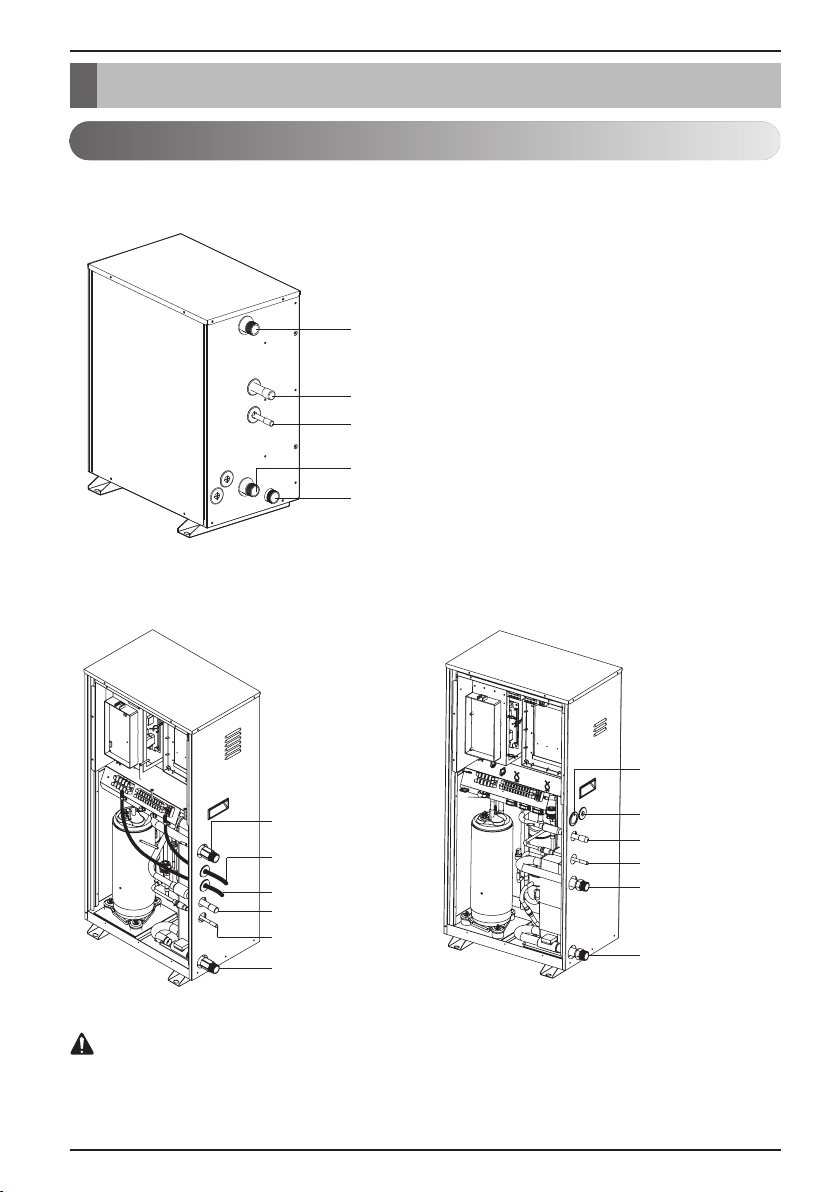
Product Introduction
Product Introduction
Typical Installation Scene
Water Out
Gas side
Liquid side
Drain
Water In
Water Out
Communication
Cable
Power Cable
Gas Side
Liquid Side
Water In
Water Out
Communication
Cable
Power Cable
Gas Side
Liquid Side
Water In
Use of power supply separate power for the indoor unit. (Do not connect and use
from the power terminal of the outdoor unit.)
CAUTION
6 Hydro Kit
<Type 1>
<Type 2>
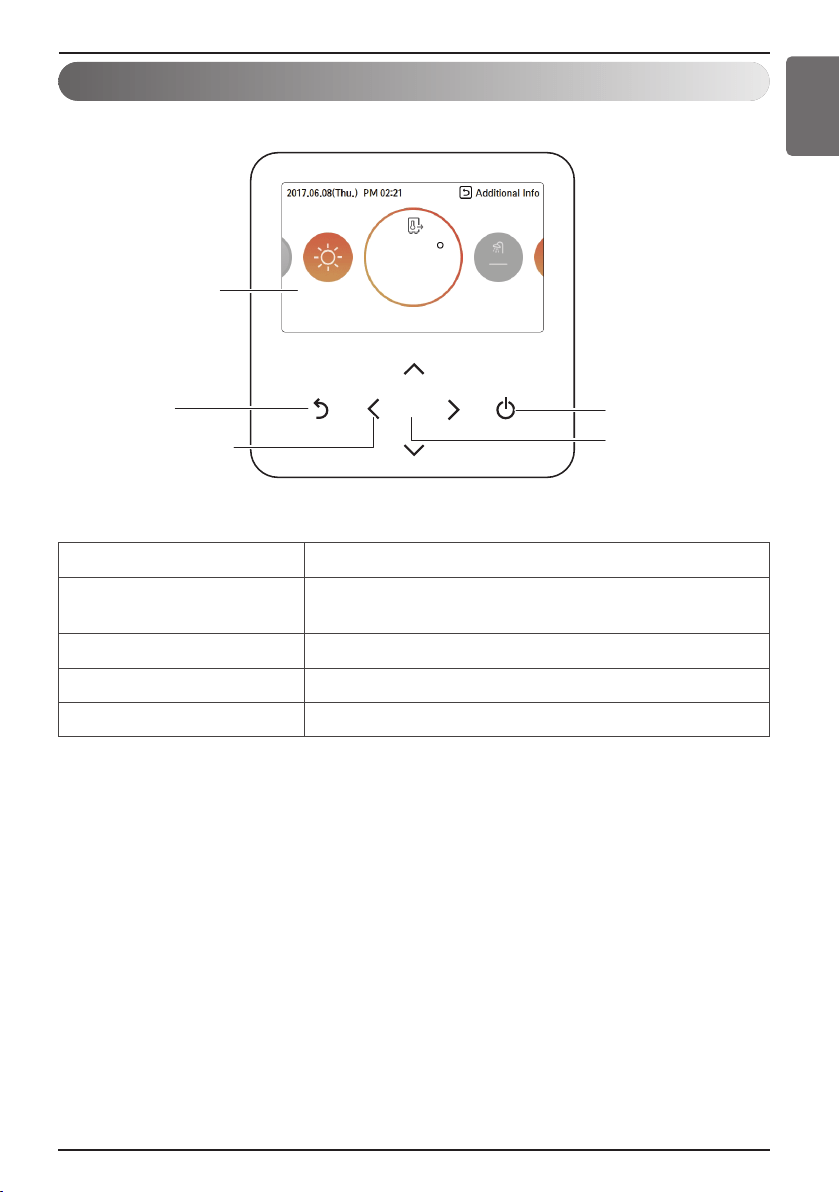
Remote Controller
Owner’s Manual 7
Hydro Kit
Product Introduction
ENGLISH
OK
On/Off Button
OK Button
Back button
Up/Down/Left/Right
Button
Operation display
window
50
Operation display window Operation and Settings status display
Back button
When you move to the previous stage from the menu’s
setting stage
Up/down/left/right button When you change the menu’s setting value
OK button When you save the menu’s setting value
On/Off button When you turn ON/OFF the air conditioner
Operation Setting
8 Hydro Kit
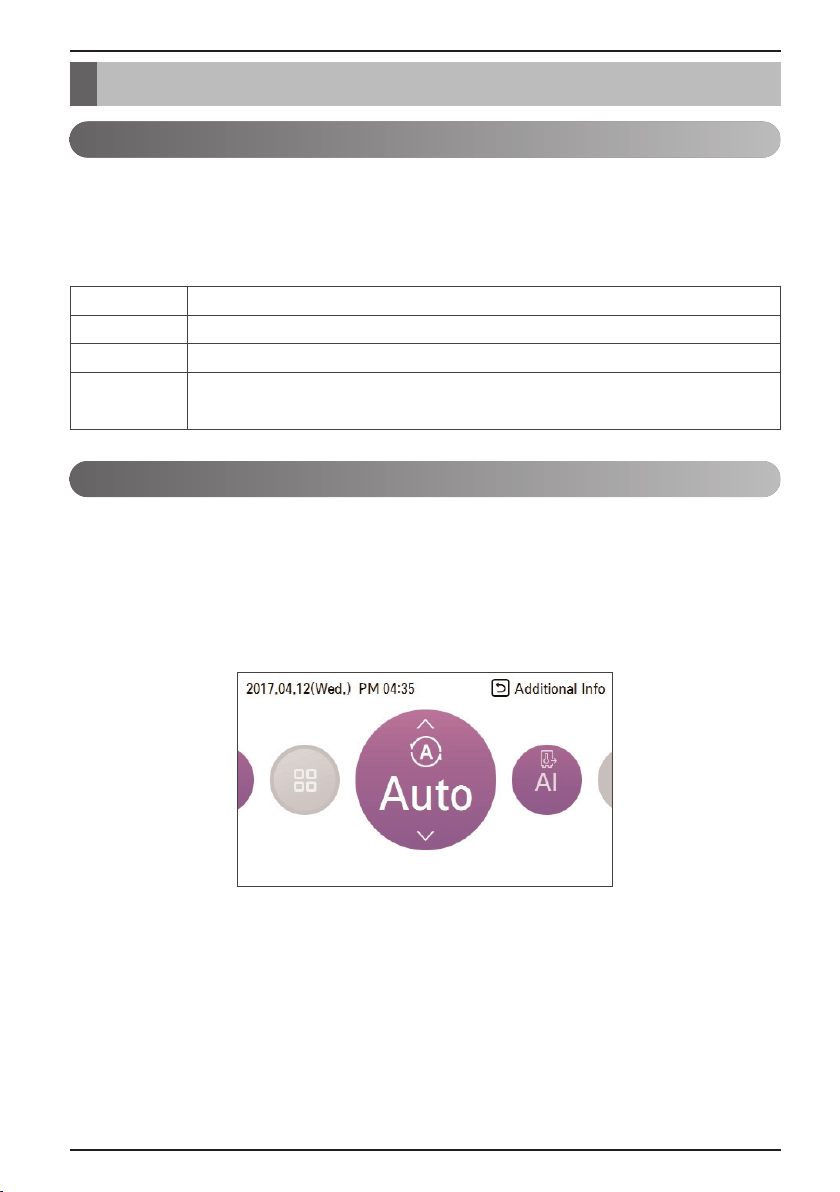
You can easily control the desired operation mode.
In the main screen, press [<, > (left/right)] button to select the operation mode or home leave or hold
category, and press [∧ , ∨ (up/down)] button to set the operation mode.
※ Some products may not support some operation modes.
This mode is only applied to heating.
In order to save energy and to give highest comfort, setting temperature will follow outside
temperature. If outdoor temperature decreases, heating capacity for the house will increase
automatically in order to keep same room temperature. All parameters will be set by installer during
start-up procedure and will be adapted to the site characteristic.
1. Select AI / Auto mode.
Operation mode
AI / Auto operation
Operation Setting
Mode Description
Cool The product yields cool water to use in FCU cooling.
Heat The product yields hot water to use in under floor heating or FCU heating.
AI / Auto
In this mode, heating setpoint is automatically determined by pre-defined
temperature profile.
Operation Setting
Owner’s Manual 9
Hydro Kit
ENGLISH
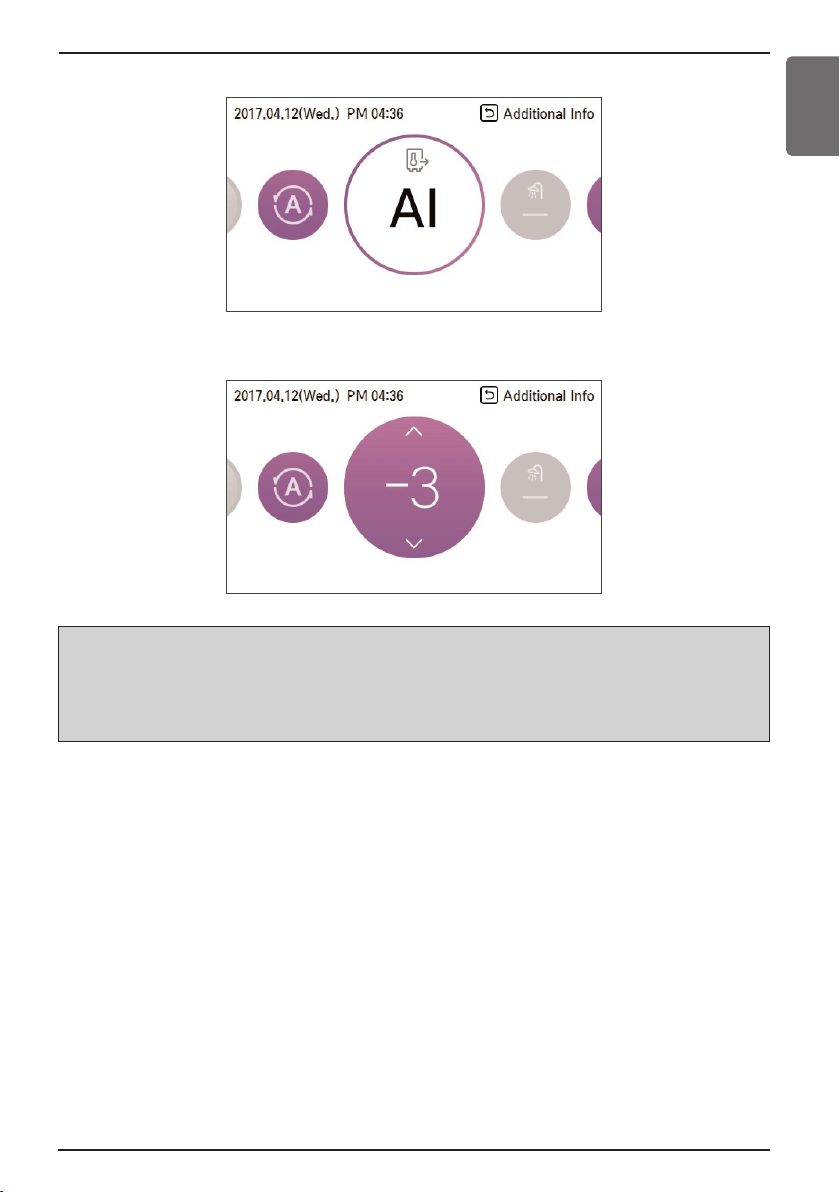
h Note
Decreasing temperature profile by 3°C (based on room air temperature)
<Temperature adjust step (unit : °C)>
-5, -4, -3, -2, -1, 0, 1, 2, 3, 4, 5
Cold Hot
2. Select the desired temperature category
3. Adjust the desired temperature level by press [∧ , ∨ (up/down)] button.
Temperature Setting
10 Hydro Kit
You can easily control to the desired temperature.
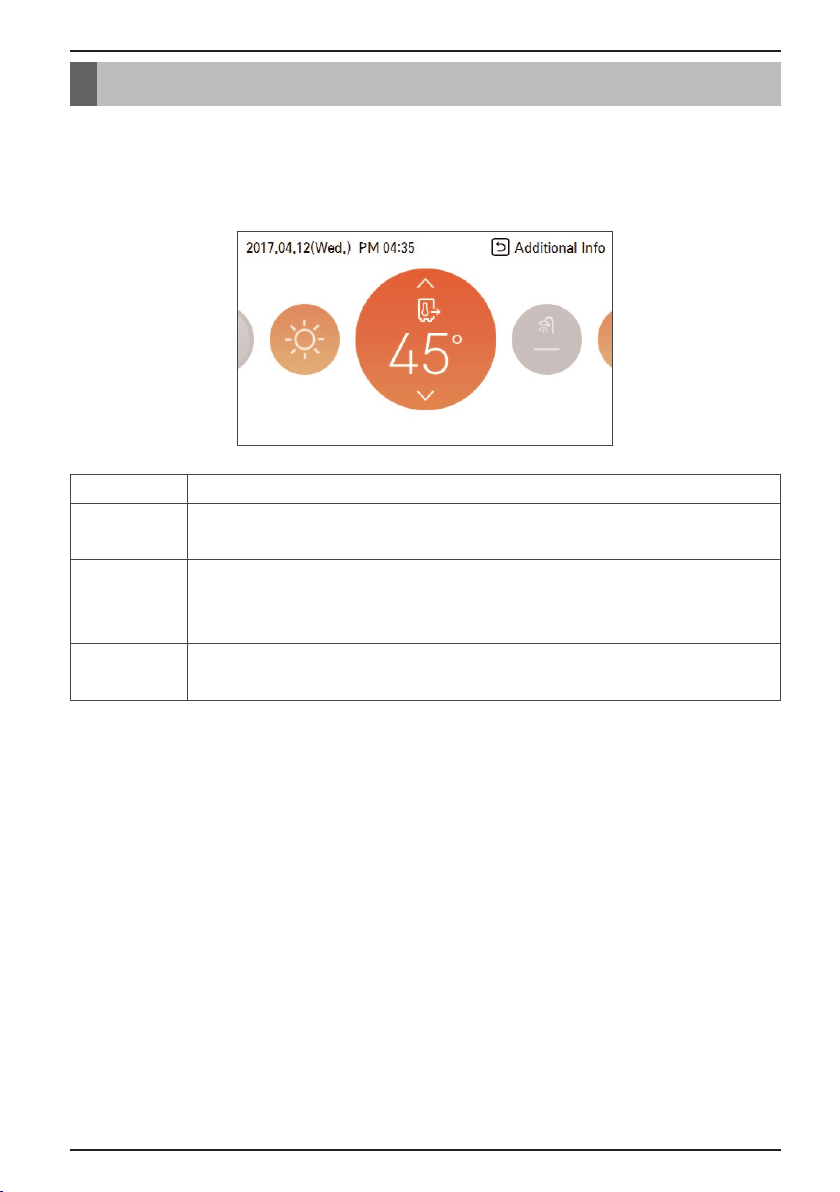
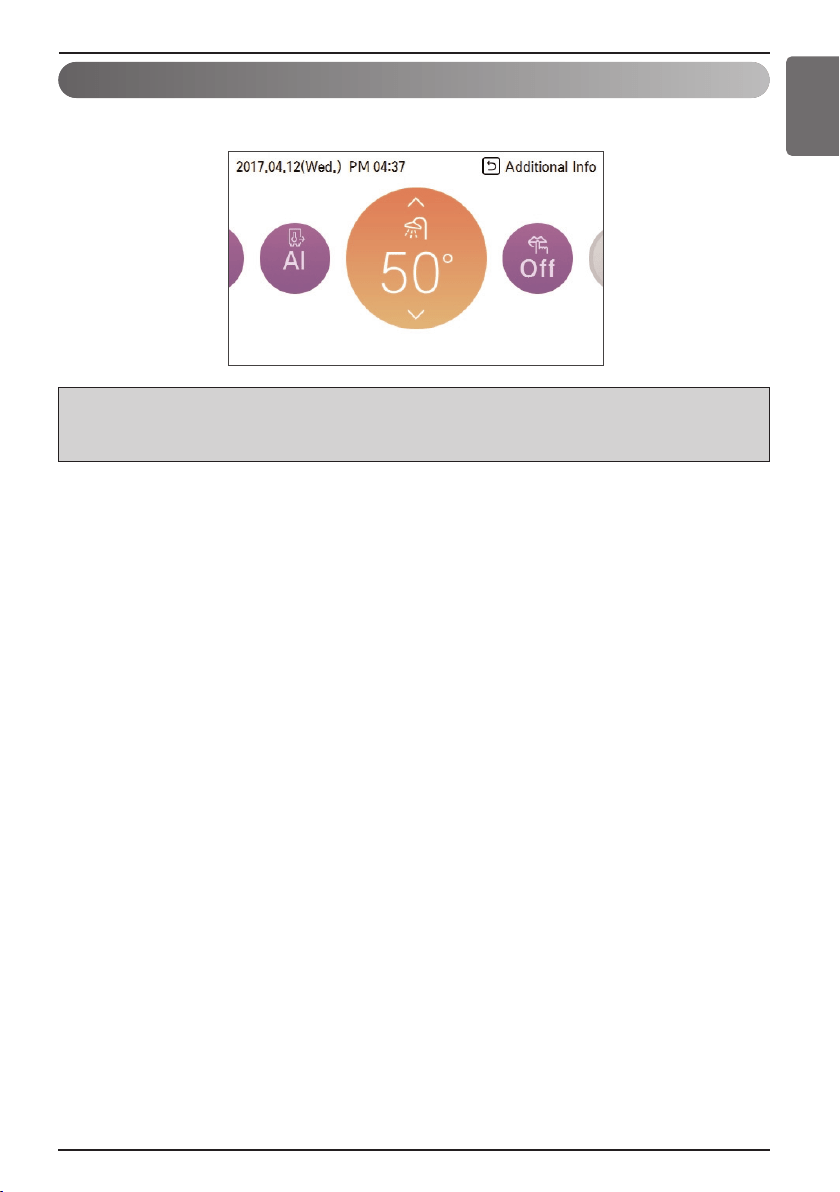
• In the main screen, press [<, > (left/right)] button to select the desired temperature category, and
press [∧ , ∨ (up/down)] button to set the desired temperature.
- In the cooling, heating, and AI/auto mode, the desired temperature control is possible.
Temperature Setting
Mode Description
Room
temperature
Room temperature setting is available when remote room air sensor (sold
separately) is installed
Leaving water
temperature
If the desired temperature is lower than the water temperature, the heating
is not performed.
Set the desired temperature higher than the water temperature.
DHW tank
temperature
DHW tank temperature setting is available when DHW tank is installed.
Temperature Setting
Owner’s Manual 11
Hydro Kit
ENGLISH
<Note>
• This function is not used when the DHW tank is not installed.
• If you want to know more information, refer function on installation information section.
Funtion to set whether or not to use a installed DHW tank
DHW Heating Operation
Temperature Setting
12 Hydro Kit
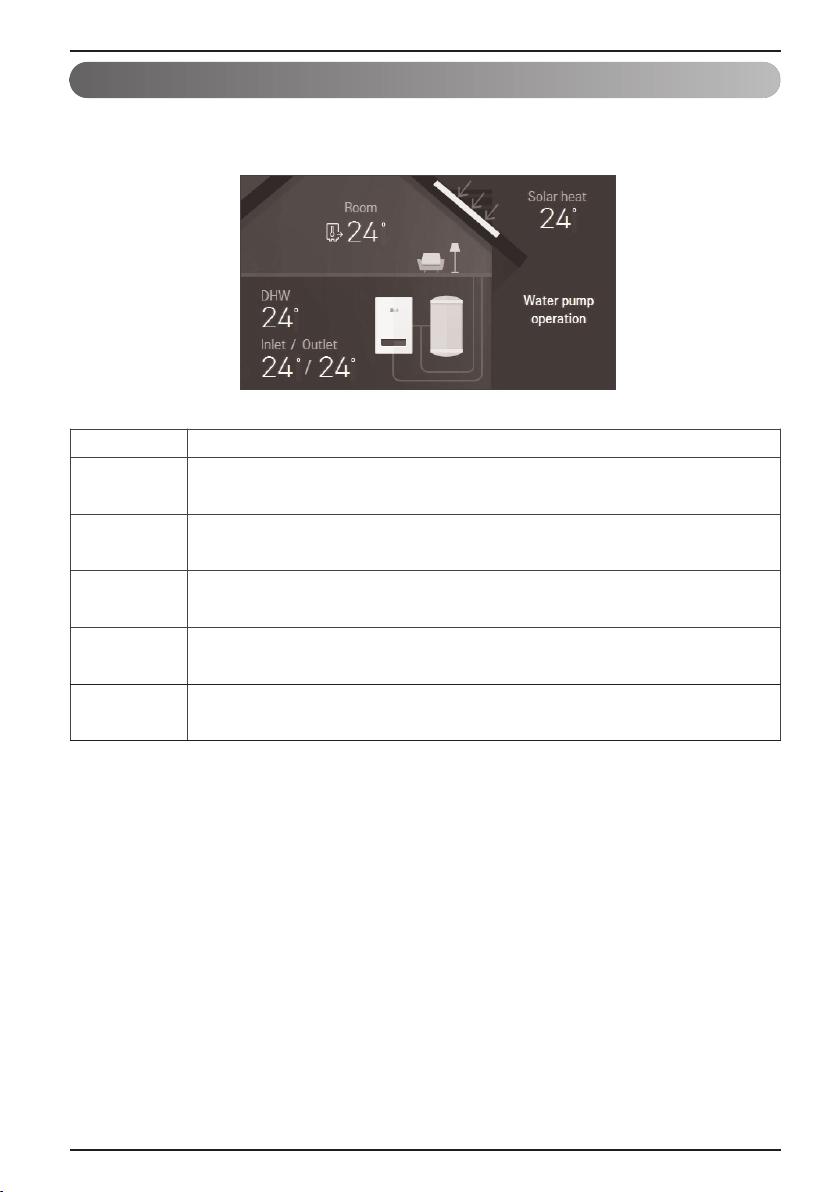
You can check the current temperature.
• In the main screen, you can enter the monitoring screen by pressing [Back] button.
View Temperature
Mode Description
Room
temperature
View room temperature
Inlet
temperature
View inlet temperature
Outlet
temperature
View outlet temperature
DHW
temperature
View DHW temperature
(Only displayed when DHW heating mode)
Solar heat
temperature
View solar power temperature
(Only displayed when DHW water heating mode)
Low Noise Mode
Owner’s Manual 13
Hydro Kit
ENGLISH
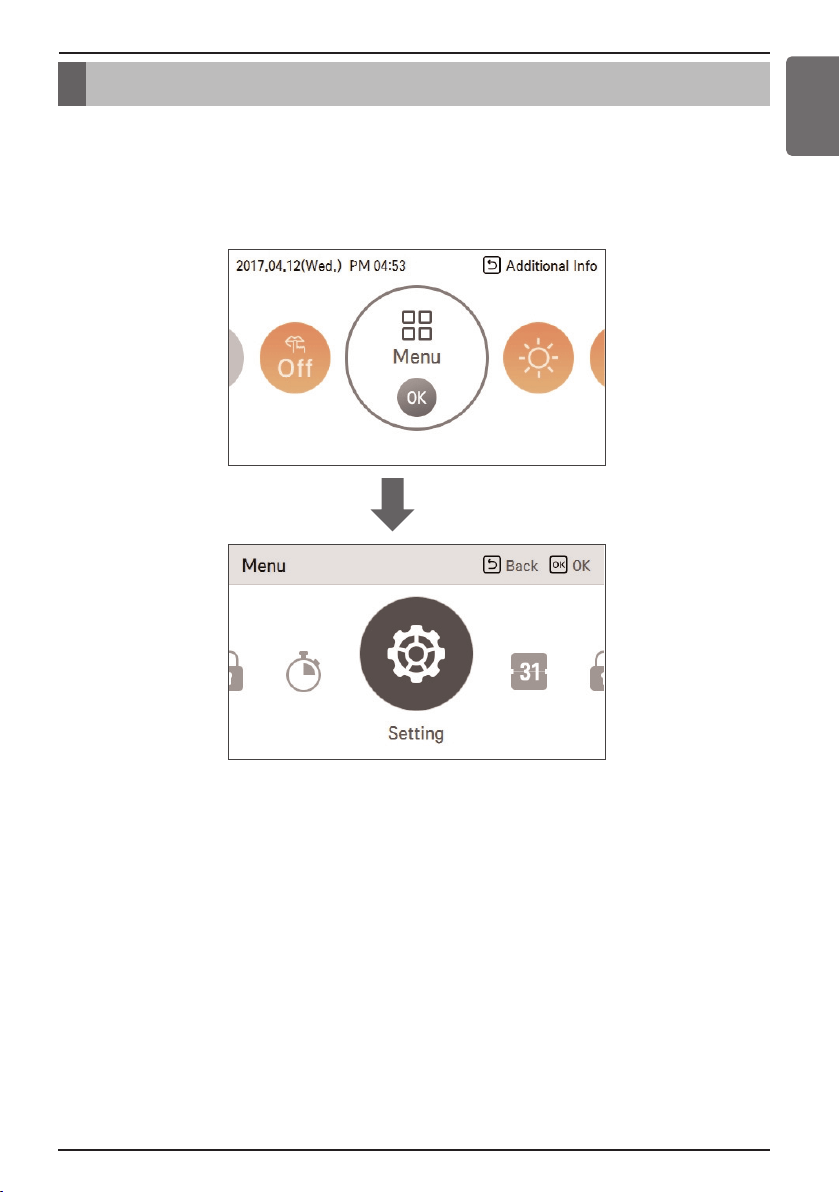
Low Noise Mode is that the unit works at reduced capacity so that the noise produced by the unit
drops.
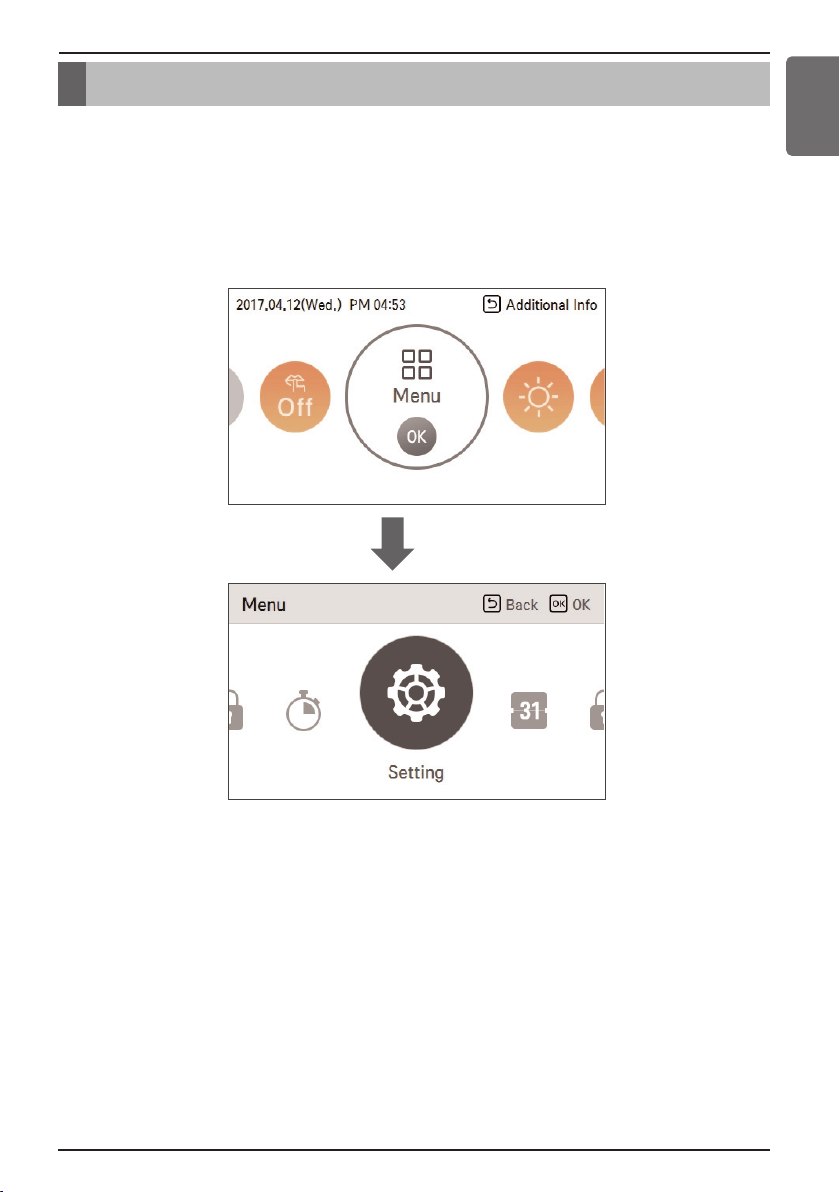
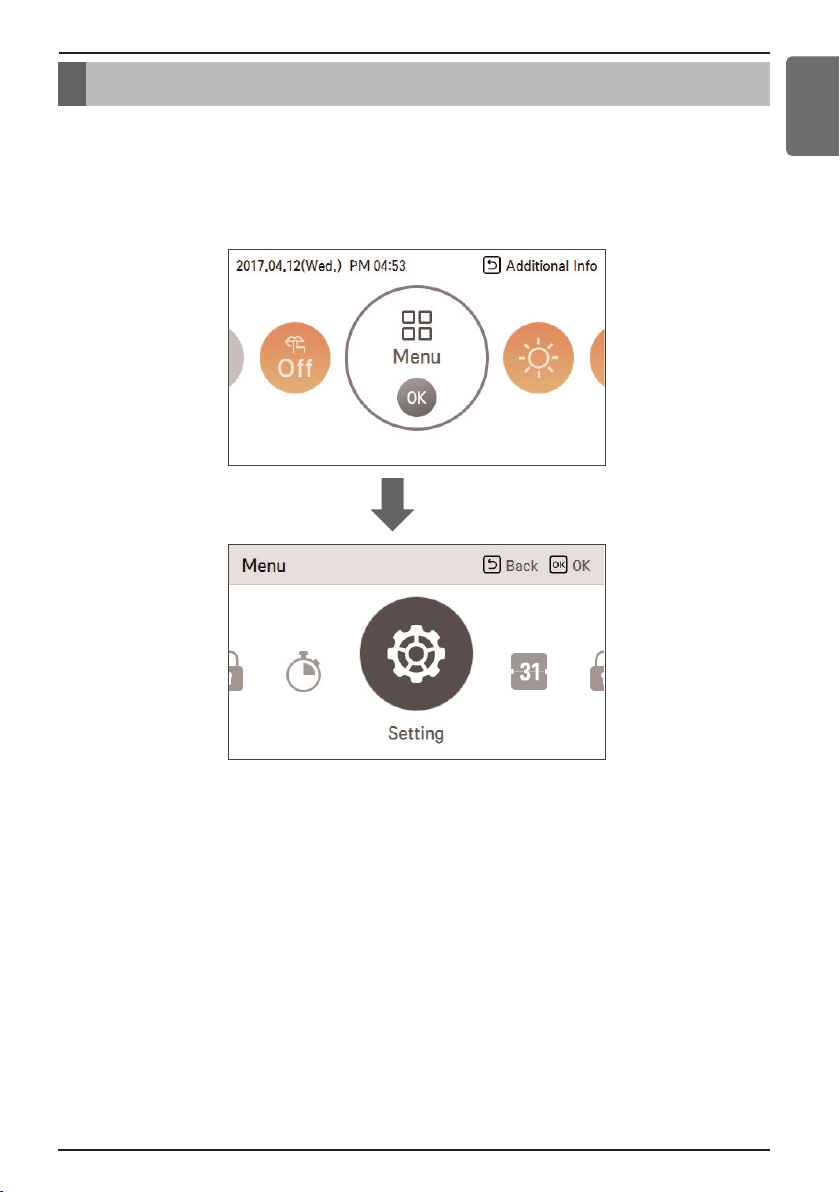
1. In the menu screen, press [<, > (left/right)] button to select “setting” category, and press [OK]
button to move to the setting list screen.
Low Noise Mode
OK
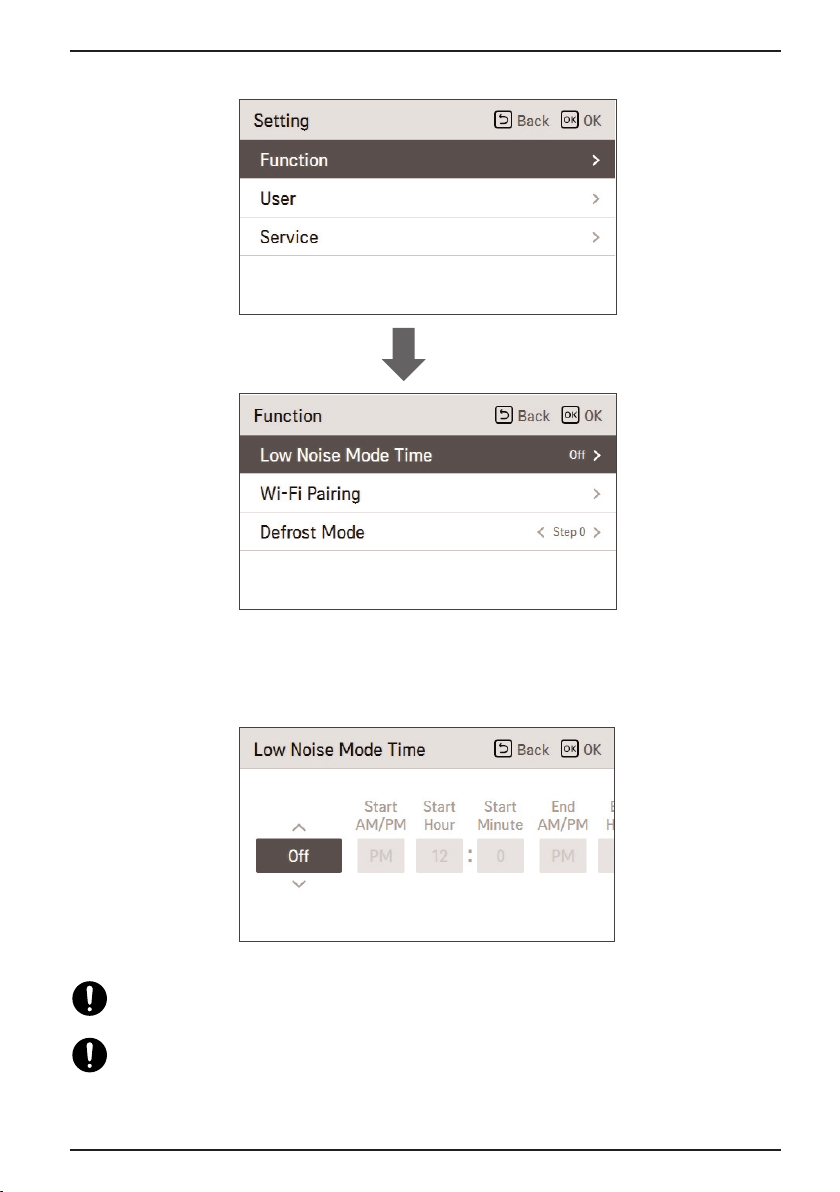
Low Noise Mode
14 Hydro Kit
This implies that the heating and cooling capacity will also drop. Beware of this when a
certain level of heating or cooling is required.
Low Noise Mode operation may not work while the product is proceeding higher priority
operation such as defrost operation, anti-freezing operation, and etc.
3. Press [<, > (left/right)] button to select the parts and press [∧ , ∨ (up/down)] button to adjust the
time
2. In the setting list, if you press [∧ , ∨ (up/down)] button, you can turn on/off Low Noise Mode.
OK
Wi-Fi Pairing
Owner’s Manual 15
Hydro Kit
ENGLISH
This function is only available on some products.
Wi-Fi Pairing is the activation of the AP mode function of the Wi-Fi module connected to the indoor
unit.
1. In the menu screen, press [<, > (left/right)] button to select “setting” category, and press [OK]
button to move to the setting list screen.
Wi-Fi Pairing
OK
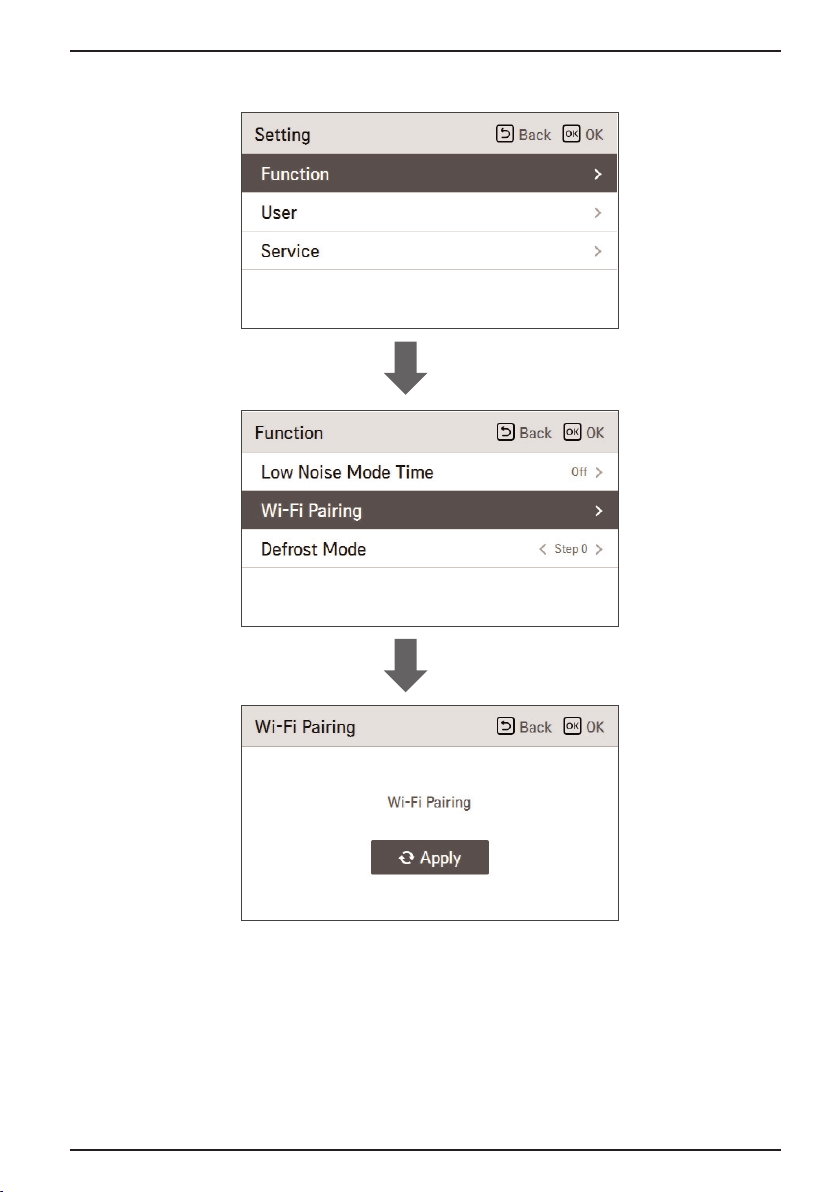
Wi-Fi Pairing
16 Hydro Kit
2. In the setting list, if you press [∧ , ∨ (up/down)] button, you can turn on/off Wi-Fi Pairing.
OK
OK
Defrost Mode
Owner’s Manual 17
Hydro Kit
ENGLISH
Defrost Mode is the function to set Defrost Mode operation of outdoor unit.
1. In the menu screen, press [<, > (left/right)] button to select “Setting” category, and press [OK]
button to move to the setting list screen.
Defrost Mode
OK
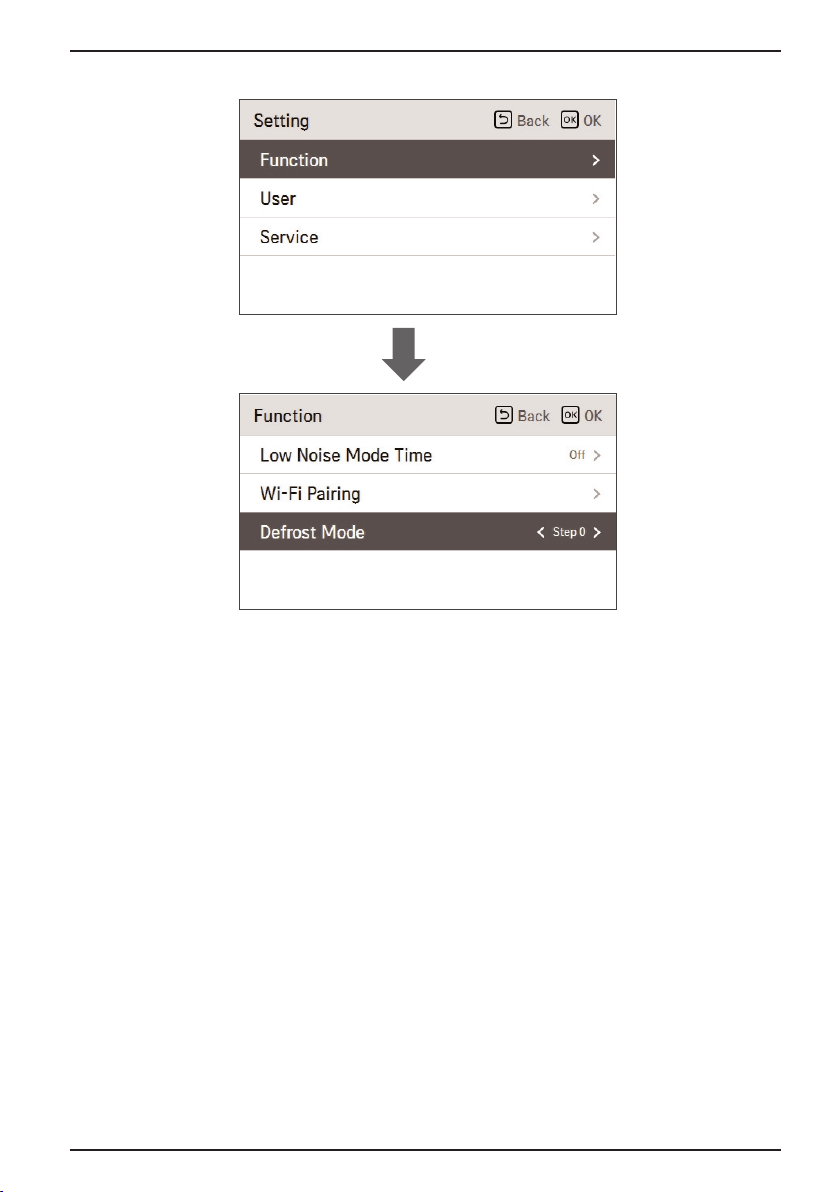
Defrost Mode
18 Hydro Kit
2. In the setting list, if you press [∧ , ∨ (up/down)] button, you can turn on/off Defrost Mode.
Setting value:
- Not use (STEP0)
- Forced snow removal (STEP1)
- Fast defrost setting (STEP2)
- Forced snow removal + fast defrost (STEP3)
OK
Lock Setting
Owner’s Manual 19
Hydro Kit
ENGLISH
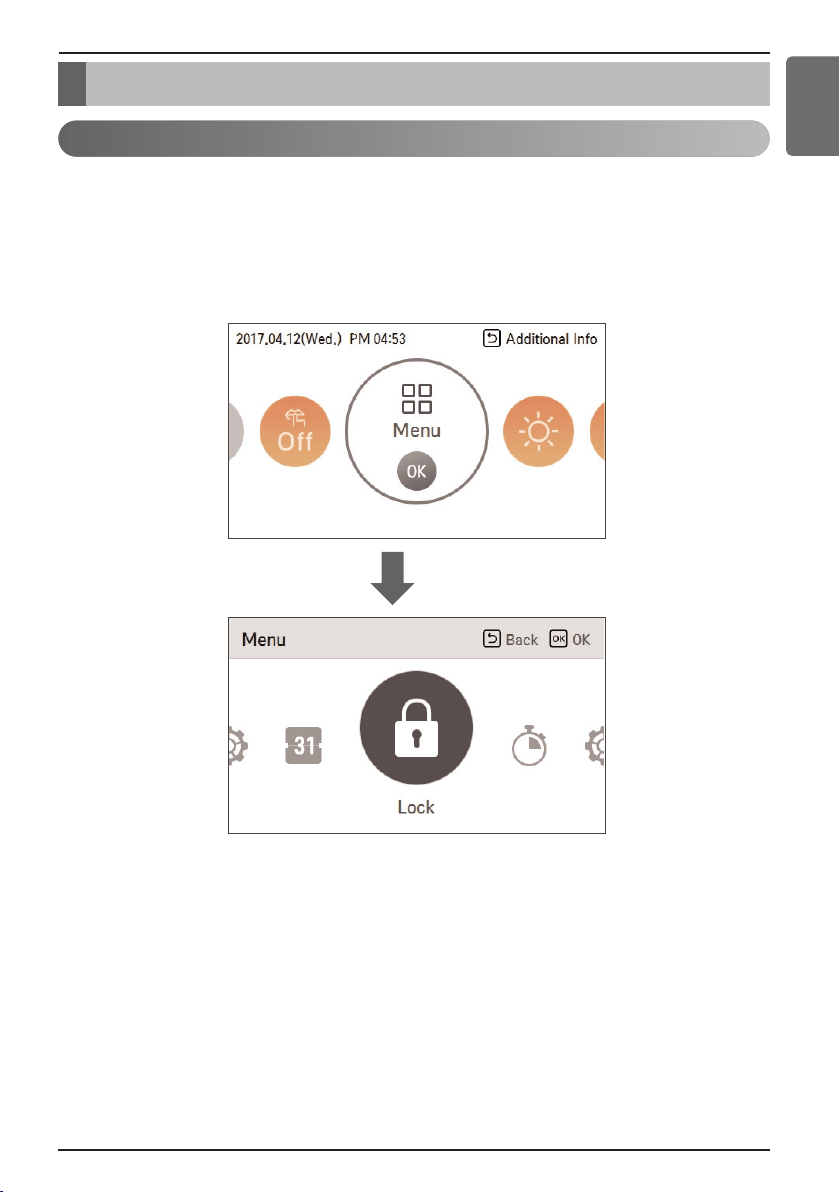
• It is the function to lock the button operation of the remote controller so that children or other
persons cannot use it without permission.
• It is the function to limit the desired temperature range that can be set in the wired remote controller.
1. In the menu screen, press [<, > (left/right)] button to select “lock setting” category, and press [OK]
button to move to the lock setting list screen.
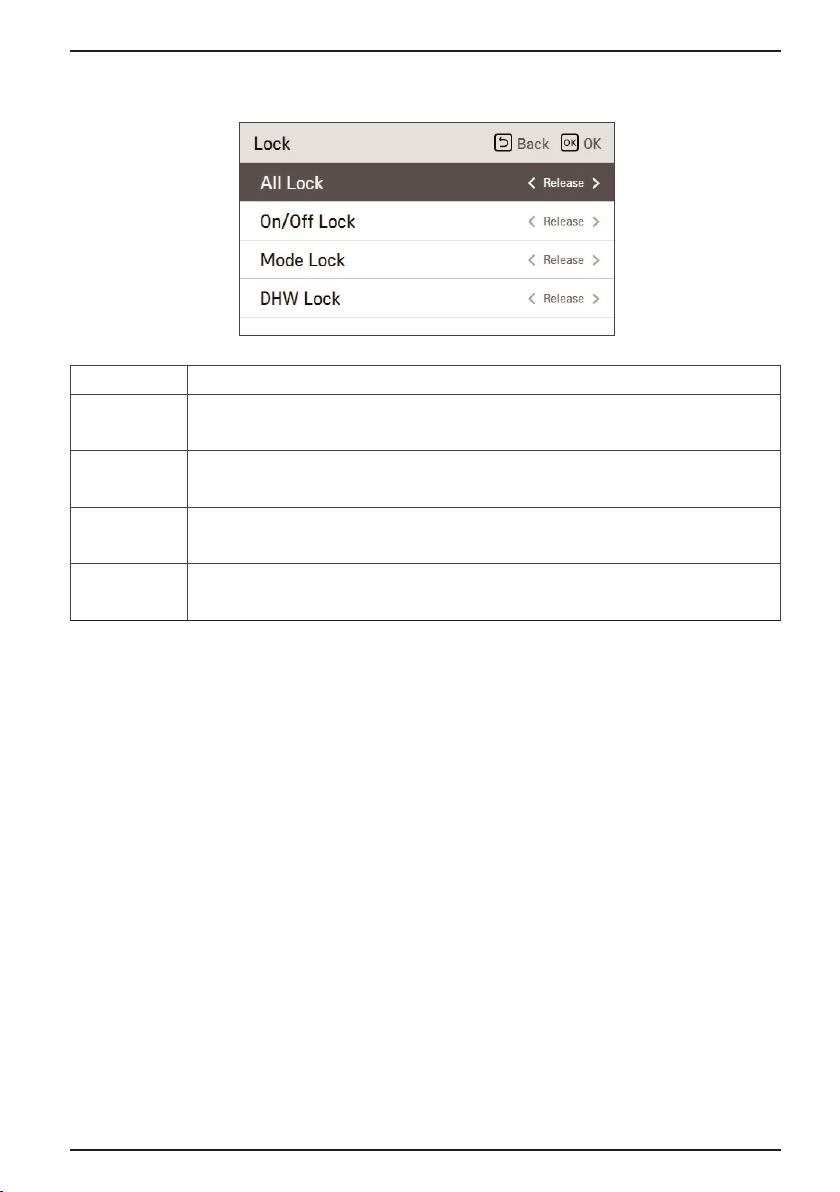
Lock Setting – All, On/Off, Mode, DHW Lock
Lock Setting
OK
Lock Setting
20 Hydro Kit
2. In the lock setting list, if you press [∧ , ∨ (up/down)] button, you can turn on/off the corresponding
lock function.
Mode Description
All Lock It locks all button operation of the remote controller.
On/Off Lock It locks the On/Off button operation of the remote controller.
DHW Lock It locks the DHW On/Off button operation of the remote controller.
Mode Lock It locks the operation mode button operation of the remote controller.
Date Setting
Owner’s Manual 21
Hydro Kit
ENGLISH
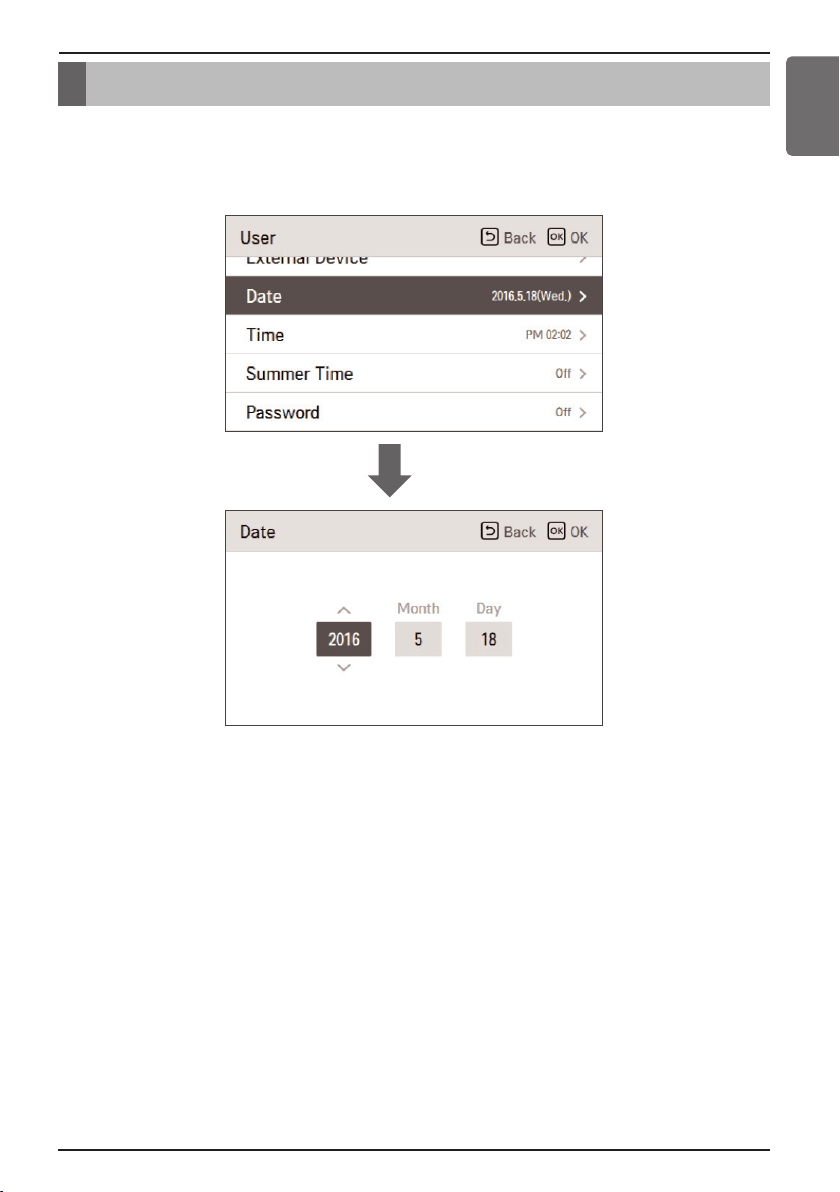
Set the date displayed on the remote controller.
• In the user setting list, select the date category, and press [OK] button to move to the detail screen.
• After the setting, if you press [OK] button, the setting is saved and moves to the previous screen.
OK
Date Setting
Timer Setting
22 Hydro Kit
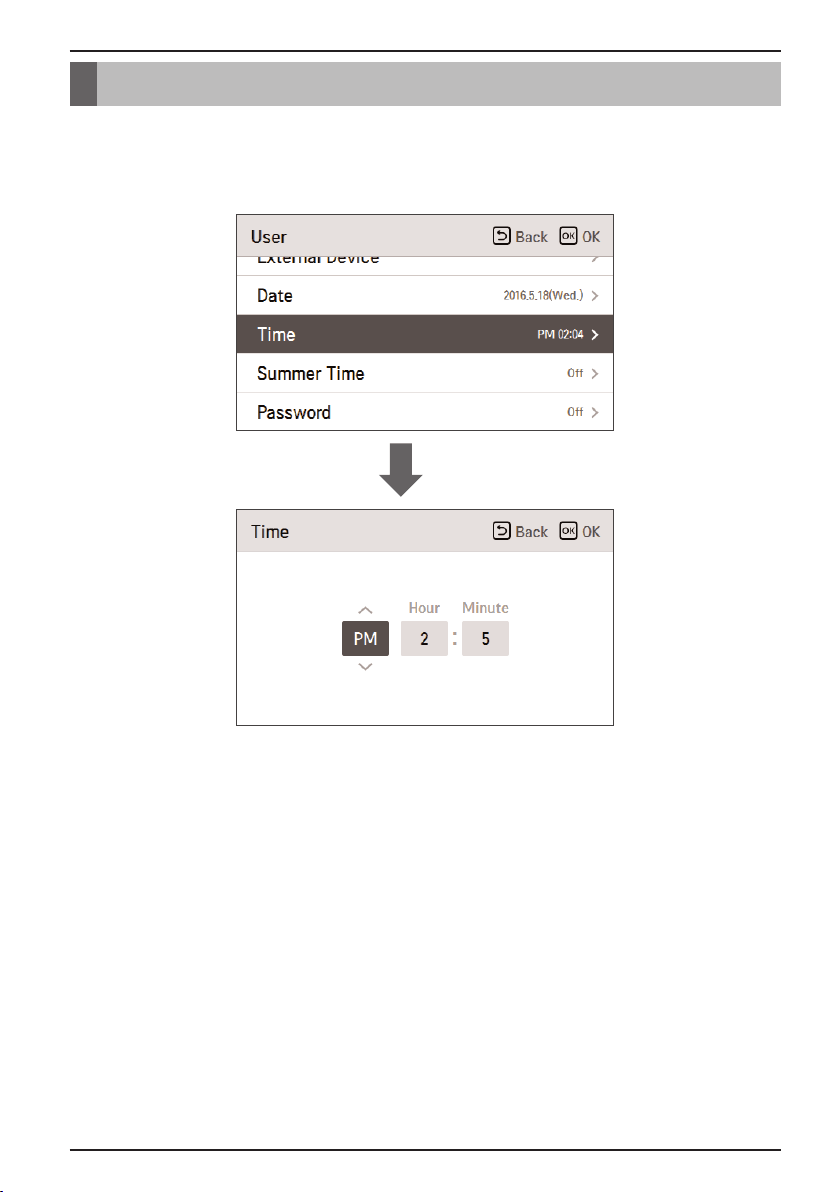
Set the time displayed on the remote controller.
• In the user setting list, select the time category, and press [OK] button to move to the detail screen.
• After the setting, if you press [OK] button, the setting is saved and moves to the previous screen.
OK
Timer Setting
Timer Setting
Owner’s Manual 23
Hydro Kit
ENGLISH
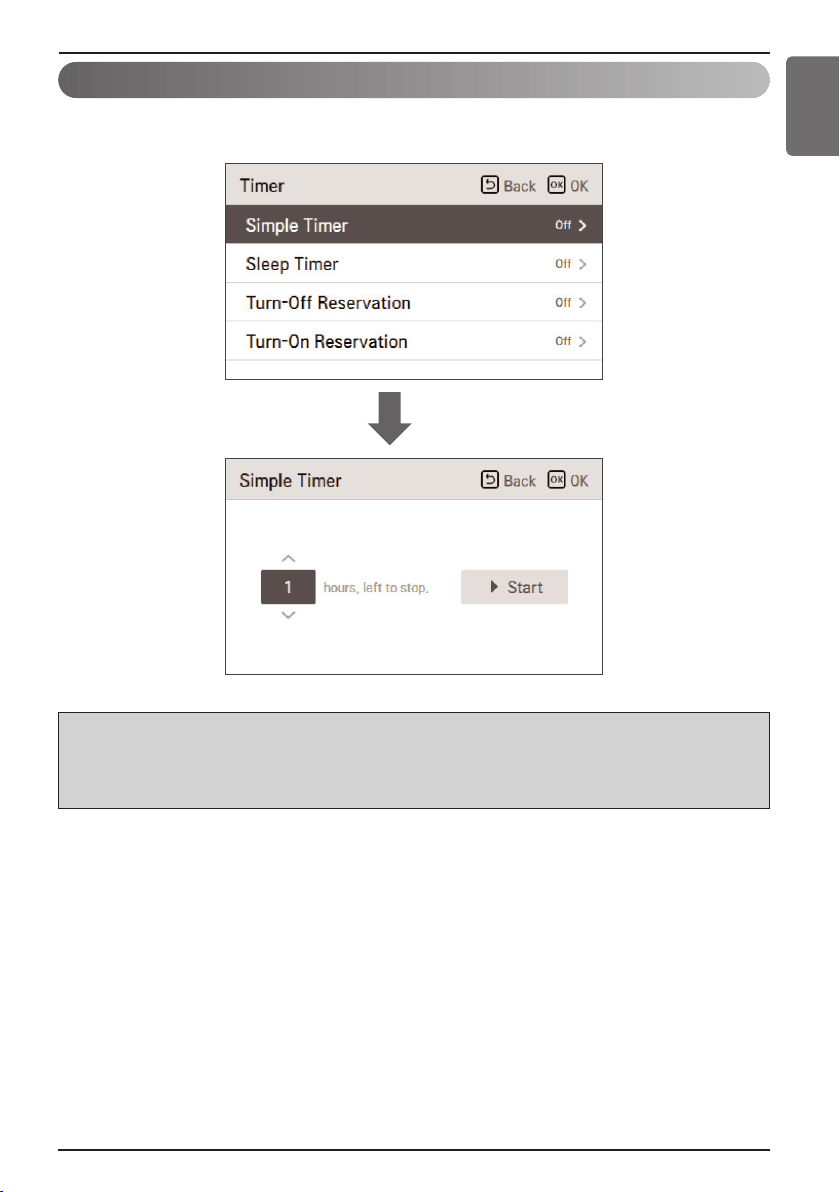
You can easily set the timer in the range of 1~7 hours in the units of 1 hour.
h Note
If the product operation is on, the easy timer turns off the operation after the corresponding time.
If the product operation is off, the easy timer turns on the operation after the corresponding time.
If the easy timer operation is turned on/off before the timer operation, the set timer will be cleared.
OK
Simple Timer
Timer Setting
24 Hydro Kit
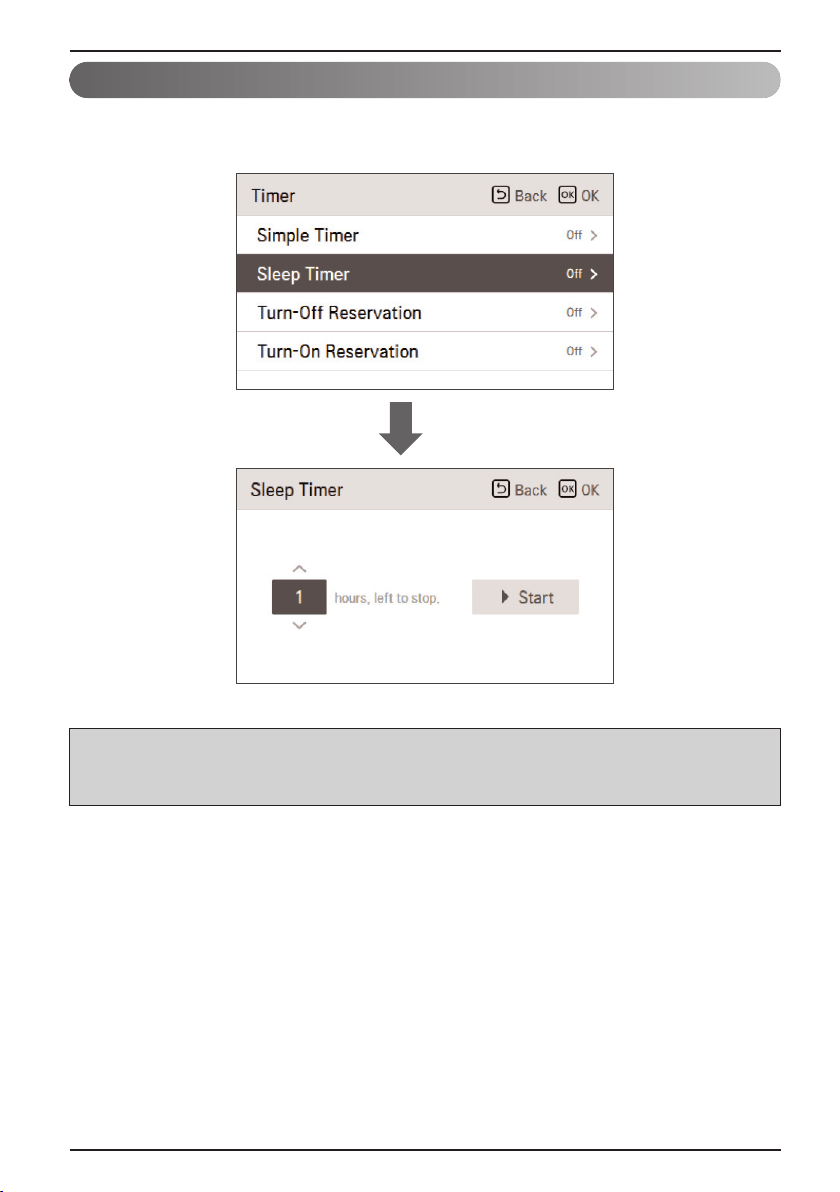
Sleep Timer is the function to operate the air conditioner in sleep mode before going to sleep for
certain hours and stop the operation.
h Note
You can set the Sleep Timer while the product is in operation.
If the sleep timer operation is turned on before the timer operation, the set timer will be cleared.
OK
Sleep Timer
Timer Setting
Owner’s Manual 25
Hydro Kit
ENGLISH
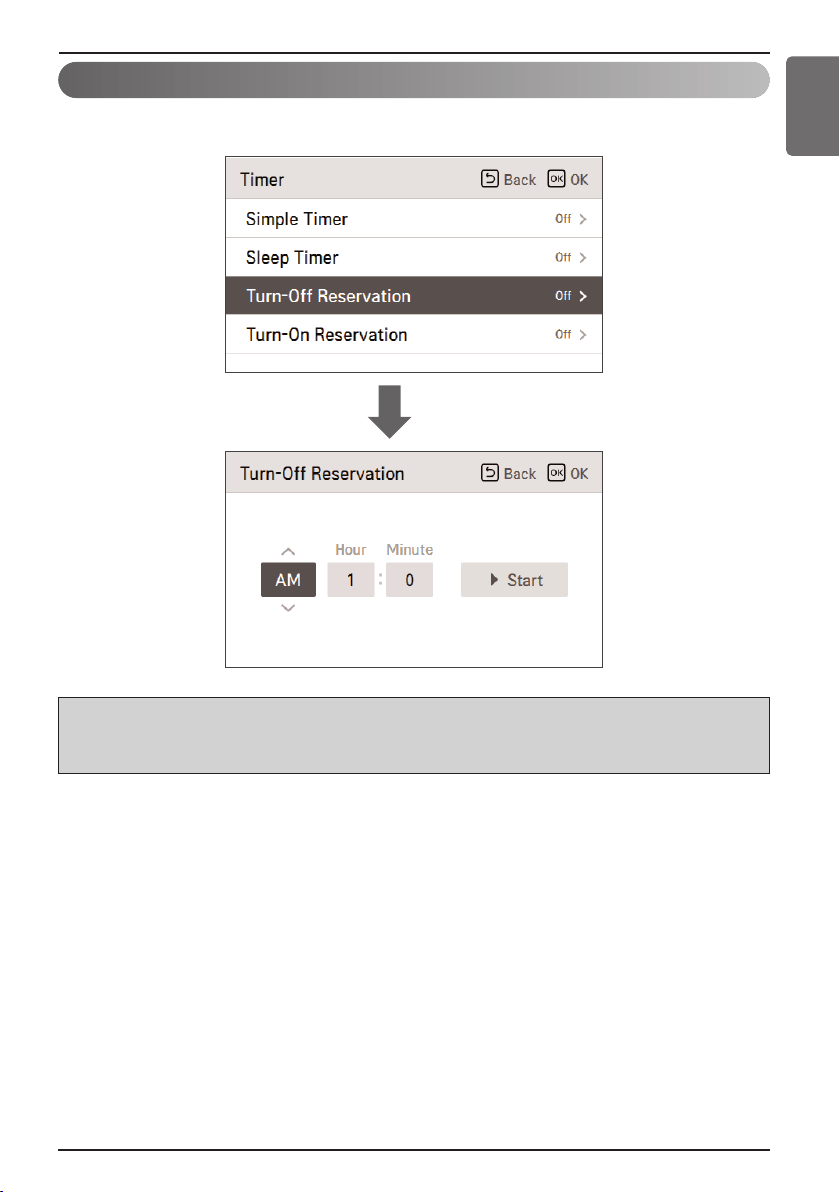
The product is automatically turned off at the set timer time.
h Note
Even if the Turn-Off Reservation operation is turned on/off after the setting and before the timer
operation, the set timer is not cleared.
OK
Turn-Off Reservation
Timer Setting
26 Hydro Kit
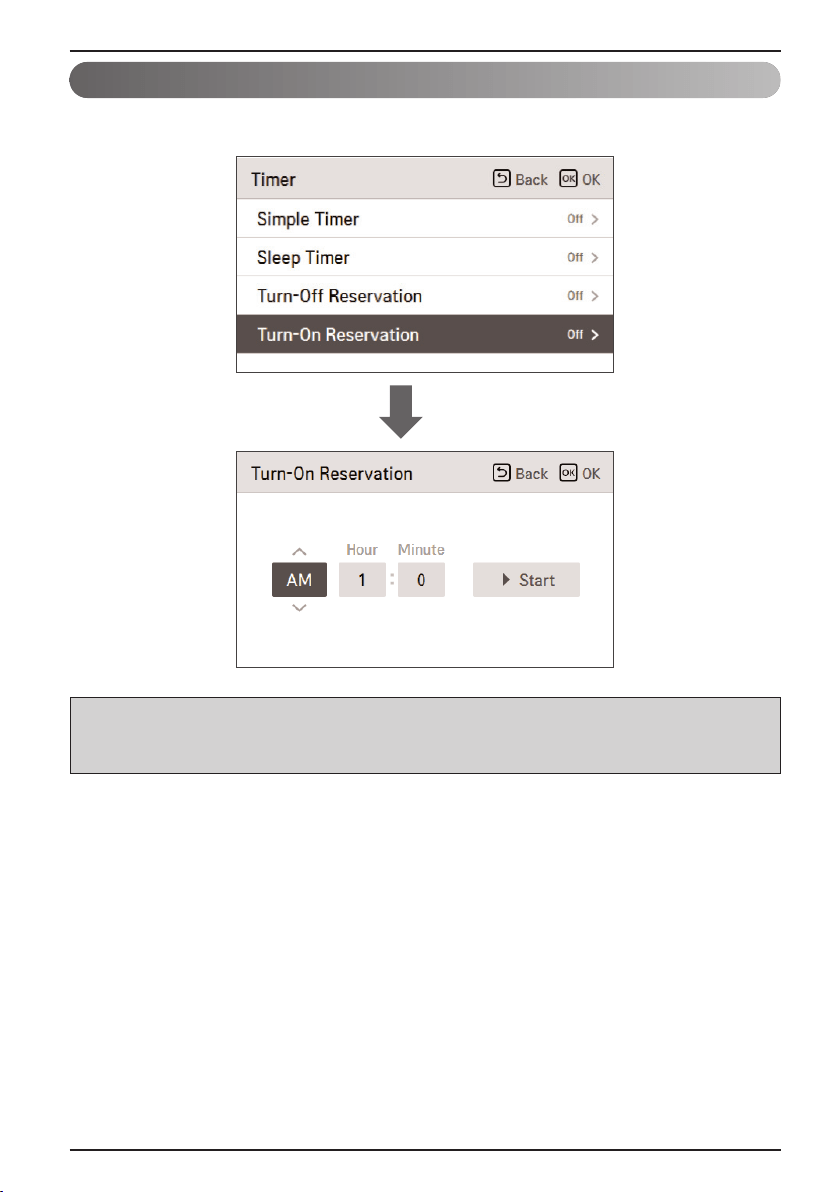
The product is automatically turned on at the set timer time.
h Note
Even if the Turn-On Reseravation operation is turned on/off after the setting and before the timer
operation, the set timer is not cleared.
OK
Turn-On Reservation
Schedule Setting
Owner’s Manual 27
Hydro Kit
ENGLISH
It is the function that can check the status of the timer (schedule) saved in the remote controller.
• In the schedule list, select the daily schedule status category, and press [OK] button to move to the
detail daily schedule status screen.
• You can use the remote controller’s [<, > (left/right)] button to check the timer information of other
dates.
• You can use the remote controller’s [∧ , ∨ (up/down)] button to check the corresponding date’s
other timer information.
• Select the timer information, and press [OK] button to move to the corresponding timer’s edit
screen.
Daily Schedule
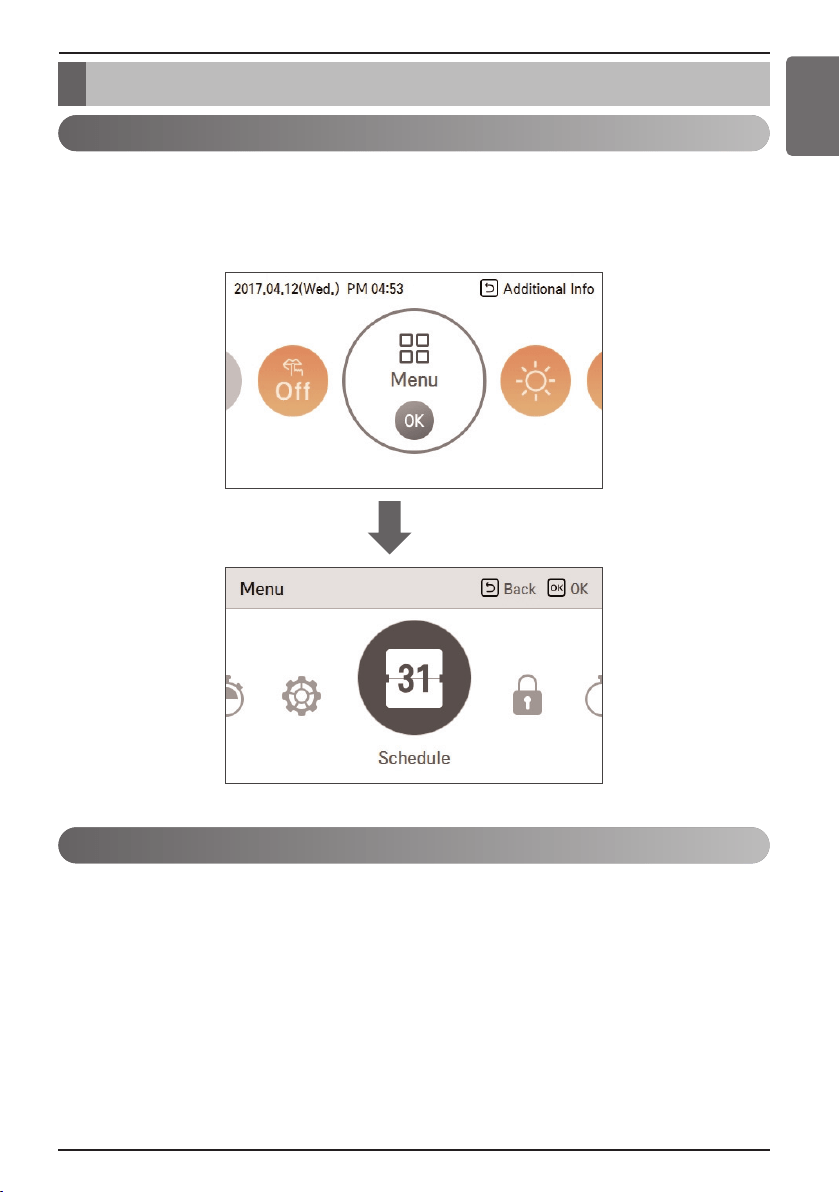
• In the menu screen, press [<, >(left/right)] button so select the schedule category, and press [OK]
button to move to the schedule setting list screen.
• In the schedule setting list screen, press [∧ , ∨ (up/down)] button to select the menu to set, and
press [OK] button to move to the detail screen.
How to enter schedule
Schedule Setting
OK

Schedule Setting
28 Hydro Kit
It is the function that can check the status of the timer (schedule) saved in the remote controller.
• In the schedule list, select the daily schedule status category, and press [OK] button to move to the
daily schedule status detail screen.
• You can use the remote controller’s [<, > (left/right)] button to check other date’s timer information.
• You can edit the saved schedule’s timer information.
- Select the schedule to edit using [∧ , ∨ (up/down)] button, and press [OK] button to move to the
edit screen.
• Select the timer information, and press [OK] button to move to the corresponding timer’s edit
screen.
Schedules & Edit
Description of each stage in Add schedule
In ‘Stage 1’, it sets the period to perform the timer.
In ‘Stage 2’, it sets the day of week to perform the timer.
- You can select ‘Everyday / Weekend / Weekdays / Individual selection’.
In ‘Stage 3’, it sets the start time for the timer.
In ‘Stage 4’, it sets the timer operation information.
- If ‘Stop’ is selected, you cannot set the mode / temperature / fan speed.
When stages 1~4 are completed, along with the message of ‘schedule is added’, it moves to View
and edit schedule screen.
Schedules & Edit – Add schedule
It is the function to automatically stop the operation on the set timer day.
• In the schedule list, select the exception day category, and press [OK] button to move to the
Exception day designation detail screen.
• In the exception day, you can check, and add/change/delete the exception day information saved in
the remote controller.
- To add an exception day, in the Exception day registration detail screen, designate
year/month/day, and press [OK] button to save the Exception day.
- Select the Exception day to edit using [∧ , ∨ (up/down)] button, and press [OK] button to move to
the edit screen.
- In the exception day edit screen, you can check, delete/change the corresponding exception day’s
setting contents.
- When you change the exception day information, you need to save it after the change.
Exception day
This function is schedule programming about DHW tank heating and DHW tank heater operation.
Two schedule programming for DHW tank heating and another Two schedule programming for DHW
tank heater operation are possible.
DHW Tank Heating & DHW Tank Heater Operation

Using Thermostat
Owner’s Manual 29
Hydro Kit
ENGLISH
Using Thermostat
1. Some electro-mechanical type thermostat has internal delay time to protect compressor. In that
case, mode change can takes time more than user's expectation. Please read thermostat manual
carefully if the product does not response quickly.
2. Setting temperature range by thermostat can be different with that of the product. The heating or
cooling set temperature should be chosen within the setting temperature range of the product.
CAUTION
The term "thermostat", which is widely used in this chapter, is a kind of 3rd party accessory.
LG Electronics does not supply thermostat and it should be supplied 3rd party manufacturers.
Room thermostat can be used for easy and convenience control. To utilize thermostat more
efficiently and correctly, this chapter presents information about using thermostat.
How to use Thermostat
To find how to turn on and off, how to set target temperature, how to change operating mode, etc,
please refer thermostat operating manual provided by thermostat manufacturer.

Using Thermostat
30 Hydro Kit
Emergency Operation
• Definition of terms
- Trouble : a problem which can stop system operation, and can be resumed temporally under
limited operation without certificated professional's assist.
- Error : problem which can stop system operation, and can be resumed ONLY after certificated
professional's check.
- Emergency mode : temporary heating operation while system met trouble.
• Objective of introducing 'Trouble'
- Not like airconditioning product, Air-to-Water heat pump is generally operation in whole winter
season without any system stopping.
- If system found some problem, which is not critical to system operating for yielding heating
energy, the system can temporarily continue in emergency mode operation with end user's
decision.
• Classified trouble
- Trouble is classified two levels according to the seriousness of the problem. : Slight trouble and
Heavy trouble
- Slight trouble : Sensor trouble. In most case, this trouble is concerned with sensor problems.
The unit is operating under emergency mode operation(level 1).
- Heavy trouble : Compressor cycle trouble. Emergency mode operation(level 2) is performed by
optional electric heater.
- Option trouble : a problem is found for option operation such as water tank heating. In this trouble,
the troubled option is assumed as if it is not installed at the system.
• Emergency operation level
- When system met trouble, it stops operation and wait for user’s decision : Calling service center or
starting emergency operation.
- To start emergency operation, user simply push ON / OFF button once more.
- Two different levels are prepared for emergency operation : High temperature cycle and low
temperature cycle.
- In emergency operation mode, user can not adjust target temperature.
※ It can not be operated, if the electric heater accessory is not installed.
DIP
Switch
Target
Leaving Water
Temperature
Target
Room Air
Temperature
Target
Sanitary Water
Temperature
High temperature cycle OFF 50℃(122℉) 24℃(75℉) 50℃(122℉)
Low temperature cycle ON 30℃(86℉) 19℃(66℉) 50℃(122℉)

Using Thermostat
Owner’s Manual 31
Hydro Kit
ENGLISH
• Duplicated trouble : Option trouble with slight or heavy trouble
- If option trouble is occurred with slight (or heavy) trouble at the same time, the system puts higher
priority to slight (or heavy) trouble and operates as if slight (or heavy) trouble is occurred.
- Therefore, sometimes sanitary water heating can be impossible in emergency operation mode.
When sanitary water is not warming up while emergency operation, please check if sanitary water
sensor and related wiring are all Ok.
• Emergency operation is not automatically restarted after main electricity power is reset.
- In normal condition, the product operating information is restored and automatically restarted after
main electricity power is reset.
- But in emergency operation, automatic re-start is prohibited to protect the product.
- Therefore, user must restart the product after power reset when emergency operation has been
running.
Maintenance and Service
32 Hydro Kit
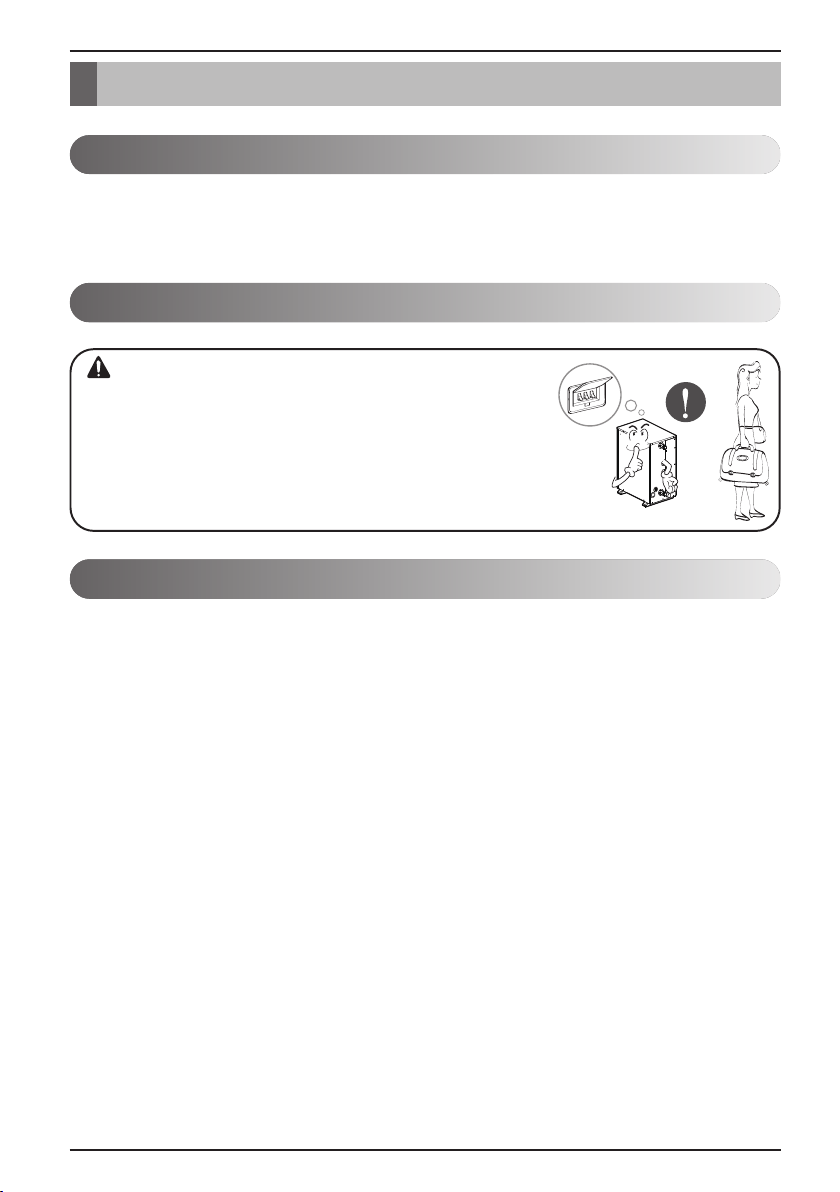
Maintenance and Service
Maintenance activities
In order to ensure optimal availability of the unit, a number of checks and inspections on the unit and
the field wiring have to be carried out at regular intervals, preferably yearly. This maintenance should
be carried out by your local agreed technician.
Call the service immediately in the following situations
1. Anything abnormal such as burning smell, loud noise etc. happen. Stop the unit and turn the
breaker off. Never try to repair by yourself or restart the system in such cases.
2. Main power cord is too hot or damaged.
3. Error code is generated by self diagnosis.
4. Water leaks from indoor unit.
5. Any switch, breaker (safety, earth) or fuse fails to work properly
User must carry routine checkup & cleaning to avoid unit’s poor performance.
In case of special situation, the job must be carried out by the only service person.
When the unit is not going....
• If the product is not used for long time, we strongly
recommend not to switch off the power supply to the product.
• If power is not supplied, some special product-protecting
actions (such as water pump anti-locking) will not performed.
CAUTION
Maintenance and Service
Owner’s Manual 33
Hydro Kit
ENGLISH
Operational instructions
n Do not disconnect the power supply of Hydro Kit during the operation.
Stop the Hydro Kit followed by outdoor unit and then only remove the power supply.
If you remove the power supply of the Hydro Kit in the mid of operation, it will leads to damage of
the product by freezing and bursting of Plate type Heat Exchanger.
n Do not remove the power supply even at the occurrence of “CH14” Error.
As the error is due to the shortage of water flow, please eliminate any sludge and scales inside the
water tubes to ensure free water pumping, remove foreign particles(dust, sand, trash, rusted
pieces) from the water tubes along with cleaning the strainer.
After cleaning the strainer, to remove the error message (not displayed), turn off the outdoor unit
followed by Hydro Kit and then disconnect power supply of Hydro Kit. And then connect power
supply and restart the unit for the normal operation.
The service will be charged if the system failure is due to strainer blockage.
Strainer cleaning period: Once in every 3 months and whenever CH14 error occurs.
n If the system stopped and displaying any error message(CH**) please follow below procedure. Do
not remove the power supply of the Hydro Kit. Contact L.G service centre.
n Do not change the water pipes randomly. When changing the water pipes there is a possibility of
foreign material entry and bubble formation as well. This leads to freezing of Plate type heat
exchanger of Hydro Kit.
When it is essential to change the water pipes, proceed only after separating the pipes from Hydro
Kit. The inner side of the new pipes must be washed thoroughly to remove the foreign materials
and then connect the pipes with the Hydro Kit.
WARNING
WARNING
Maintenance and Service
34 Hydro Kit
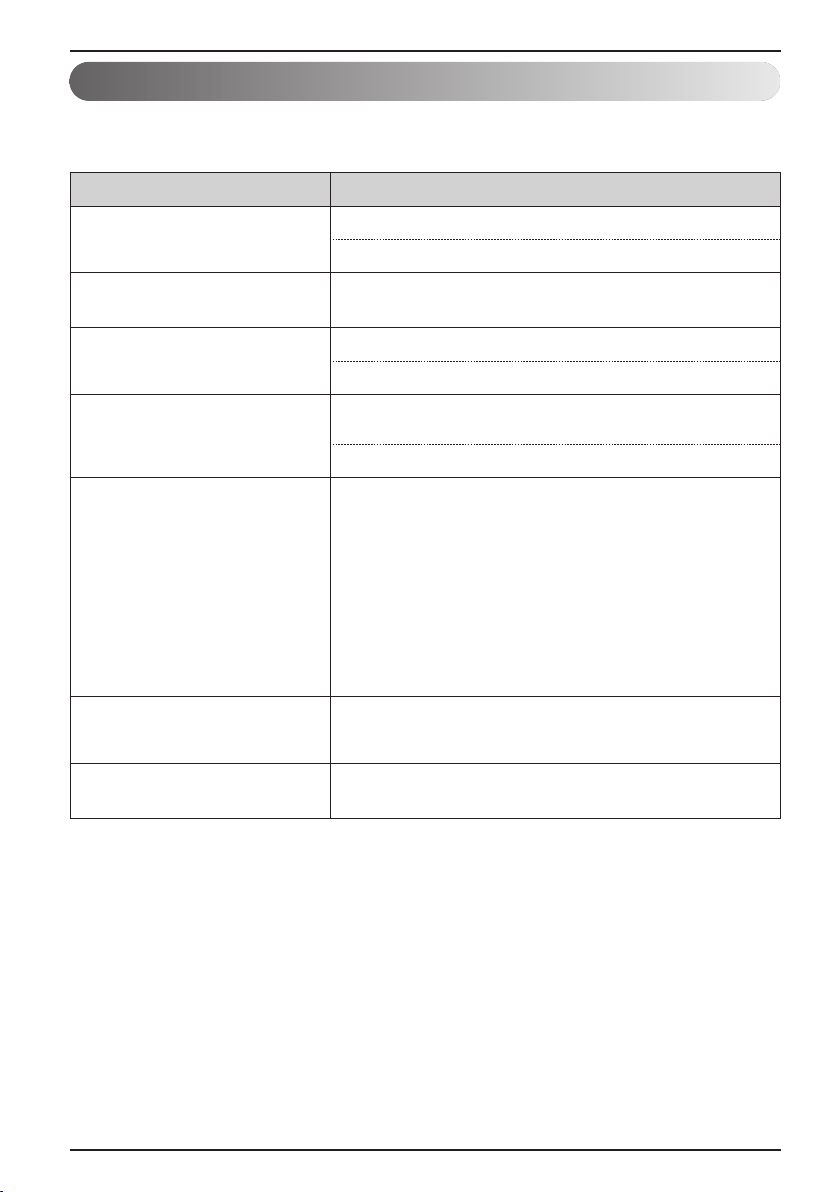
Troubleshooting Tips! Save time and money!
Check the following points before requesting repairs or service.... If the malfunction persist, please
contact your dealer.
Case Explanation
Hydro Kit does not operate.
• Have you made a mistake in timer operation?
• Has the fuse blown or has the circuit breaker been tripped?
The room has a peculiar odor.
• Check that this is not a damp smell exuded by the walls, carpet,
furniture or cloth items in the room.
Hydro Kit does not operate for
about 3 minutes when restart.
• This is the protector of the mechanism.
• Wait about three minutes and operation will begin.
Does not cool or heat effectively.
• The room may have been very hot when the Hydro Kit was first
turned on. Allow time for it to cool down.
• Has the setting temperature been set incorrectly?
The unit operation is noisy.
• Refrigerant flow sound
- While the system is being started or stopping, sound from the
refrigerant flow may be heard.
• Sound for the indoor unit heat exchanger
- During the cooling operation, a sound may be heard from the
indoor unit heat exchanger due to water freezing or melting.
• Water noise
- During starting or stopping of the unit, noise can appear in
water piping
• During defrost
- Noise can appear in unit due to defrosting of water.
Steam is raised in outdoor unit.
• Steam from outdoor heat exchanger
- During defrosting operation, ice on the outdoor heat exchanger
is melted, resulting in making steam.
Remote controller display is faint,
or no display at all.
• Has the circuit breaker been tripped?

WARRANTY (USA)
Owner’s Manual 35
Hydro Kit
ENGLISH
WARRANTY (USA)
ARBITRATION NOTICE: THIS LIMITED WARRANTY CONTAINS AN ARBITRATION PROVISION THAT
REQUIRES YOU AND LG TO RESOLVE DISPUTES BY BINDING ARBITRATION INSTEAD OF IN
COURT, UNLESS YOU CHOOSE TO OPT OUT. IN ARBITRATION, CLASS ACTIONS AND JURY
TRIALS ARE NOT PERMITTED. PLEASE SEE THE SECTION TITLED “PROCEDURE FOR RESOLVING
DISPUTES” BELOW.
PROCEDURE FOR RESOLVING DISPUTES:
ALL DISPUTES BETWEEN YOU AND LG ARISING OUT OF OR RELATING IN ANY WAY TO THIS
LIMITED WARRANTY OR THE PRODUCT SHALL BE RESOLVED EXCLUSIVELY THROUGH BINDING
ARBITRATION, AND NOT IN A COURT OF GENERAL JURISDICTION. BINDING ARBITRATION MEANS
THAT YOU AND LG ARE EACH WAIVING THE RIGHT TO A JURY TRIAL AND TO BRING OR
PARTICIPATE IN A CLASS ACTION.
Definitions. For the purposes of this section, references to “LG” mean LG Electronics U.S.A., Inc., its
parents, subsidiaries and affiliates, and each of their officers, directors, employees, agents, beneficiaries,
predecessors in interest, successors, assigns and suppliers; references to “dispute” or “claim” shall include
any dispute, claim or controversy of any kind whatsoever (whether based in contract, tort, statute,
regulation, ordinance, fraud, misrepresentation or any other legal or equitable theory) arising out of or
relating in any way to the sale, condition or performance of the product or this Limited Warranty.
Notice of Dispute. In the event you intend to commence an arbitration proceeding, you must first notify LG
in writing at least 30 days in advance of initiating the arbitration by sending a letter to LG at LG Electronics,
USA, Inc. Attn: Legal Department- Arbitration 1000 Sylvan Ave, Englewood Cliffs 07632. You and LG
agree to engage in good faith discussions in an attempt to amicably resolve your claim. The notice must
provide your name, address, and telephone number; identify the product that is the subject of the claim;
and describe the nature of the claim and the relief being sought. If you and LG are unable to resolve the
dispute within 30 days, either party may proceed to file a claim for arbitration.
Agreement to Binding Arbitration and Class Action Waiver. Upon failure to resolve the dispute during
the 30 day period after sending written notice to LG, you and LG agree to resolve any claims between us
only by binding arbitration on an individual basis, unless you opt out as provided below. Any dispute
between you and LG shall not be combined or consolidated with a dispute involving any other person’s or
entity’s product or claim. More specifically, without limitation of the foregoing, any dispute between you and
LG shall not under any circumstances proceed as part of a class or representative action. Instead of
arbitration, either party may bring an individual action in small claims court, but that small claims court
action may not be brought on a class or representative basis.
Arbitration Rules and Procedures. To begin arbitration of a claim, either you or LG must make a written
demand for arbitration. The arbitration will be administered by the American Arbitration Association (“AAA”)
and will be conducted before a single arbitrator under the AAA’s Consumer Arbitration Rules that are in
effect at the time the arbitration is initiated (referred to as the “AAA Rules”) and under the procedures set
forth in this section. The AAA Rules are available online at www.adr.org/consumer. Send a copy of your
written demand for arbitration, as well as a copy of this provision, to the AAA in the manner described in the
AAA Rules. You must also send a copy of your written demand to LG at LG Electronics, USA, Inc. Attn:
Legal Department- Arbitration 1000 Sylvan Avenue Englewood Cliffs, NJ 07632. If there is a conflict
between the AAA Rules and the rules set forth in this section, the rules set forth in this section will govern.
This arbitration provision is governed by the Federal Arbitration Act. Judgment may be entered on the
arbitrator’s award in any court of competent jurisdiction. All issues are for the arbitrator to decide, except
that issues relating to the scope and enforceability of the arbitration provision and to the arbitrability of the
dispute are for the court to decide. The arbitrator is bound by the terms of this provision.

WARRANTY (USA)
36 Hydro Kit
Governing Law. The law of the state of your residence shall govern this Limited Warranty and any
disputes between us except to the extent that such law is preempted by or inconsistent with applicable
federal law.
Fees/Costs. You do not need to pay any fee to begin an arbitration. Upon receipt of your written demand
for arbitration, LG will promptly pay all arbitration filing fees to the AAA unless you seek more than $25,000
in damages, in which case the payment of these fees will be governed by the AAA Rules. Except as
otherwise provided for herein, LG will pay all AAA filing, administration and arbitrator fees for any arbitration
initiated in accordance with the AAA Rules and this arbitration provision. If you prevail in the arbitration, LG
will pay your attorneys’ fees and expenses as long as they are reasonable, by considering factors
including, but not limited to, the purchase amount and claim amount. Notwithstanding the foregoing, if
applicable law allows for an award of reasonable attorneys’ fees and expenses, an arbitrator can award
them to the same extent that a court would. If the arbitrator finds either the substance of your claim or the
relief sought in the demand is frivolous or brought for an improper purpose (as measured by the standards
set forth in Federal Rule of Civil Procedure 11(b)), then the payment of all arbitration fees will be governed
by the AAA Rules. In such a situation, you agree to reimburse LG for all monies previously disbursed by it
that are otherwise your obligation to pay under the AAA Rules. Except as otherwise provided for, LG
waives any rights it may have to seek attorneys’ fees and expenses from you if LG prevails in the
arbitration.
Hearings and Location. If your claim is for $25,000 or less, you may choose to have the arbitration
conducted solely on the basis of (1) documents submitted to the arbitrator, (2) through a telephonic
hearing, or (3) by an in-person hearing as established by the AAA Rules. If your claim exceeds $25,000,
the right to a hearing will be determined by the AAA Rules. Any in-person arbitration hearings will be held
at a location within the federal judicial district in which you reside unless we both agree to another location
or we agree to a telephonic arbitration.
Opt Out. You may opt out of this dispute resolution procedure. If you opt out, neither you nor LG can
require the other to participate in an arbitration proceeding. To opt out, you must send notice to LG no later
than 30 calendar days from the date of the first consumer purchaser’s purchase of the product by either: (i)
sending an e-mail to [email protected], with the subject line: “Arbitration Opt Out” or (ii) calling 1-800-980-
2973. You must include in the opt out e-mail or provide by telephone: (a) your name and address; (b) the
date on which the product was purchased; (c) the product model name or model number; and (d) the serial
number (the serial number can be found (i) on the product; or (ii) online by accessing
https://www.lg.com/us/support/repair-service/schedule-repair-continued and clicking on “Find My Model &
Serial Number”).
You may only opt out of the dispute resolution procedure in the manner described above (that is, by e-mail
or telephone); no other form of notice will be effective to opt out of this dispute resolution procedure. Opting
out of this dispute resolution procedure will not affect the coverage of the Limited Warranty in any way, and
you will continue to enjoy the full benefits of the Limited Warranty. If you keep this product and do not opt
out, then you accept all terms and conditions of the arbitration provision described above.

WARRANTY (CANADA)
Owner’s Manual 37
Hydro Kit
ENGLISH
WARRANTY (CANADA)
ARBITRATION NOTICE: THIS LIMITED WARRANTY CONTAINS AN ARBITRATION PROVISION THAT
REQUIRES YOU AND LG TO RESOLVE DISPUTES BY BINDING ARBITRATION INSTEAD OF IN COURT,
UNLESS THE LAWS OF YOUR PROVINCE OR TERRITORY DO NOT PERMIT THAT, OR, IN OTHER
JURISDICTIONS, IF YOU CHOOSE TO OPT OUT. IN ARBITRATION, CLASS ACTIONS AND JURY TRIALS ARE
NOT PERMITTED. PLEASE SEE THE SECTION TITLED “PROCEDURE FOR RESOLVING DISPUTES” BELOW.
PROCEDURE FOR RESOLVING DISPUTES(FOR CANADIAN PRODUCTS):
EXCEPT WHERE PROHIBITED AT LAW, ALL DISPUTES BETWEEN YOU AND LG ARISING OUT OF OR
RELATING IN ANY WAY TO THIS LIMITED WARRANTY OR THE PRODUCT SHALL BE RESOLVED
EXCLUSIVELY THROUGH BINDING ARBITRATION, AND NOT IN A COURT OF GENERAL JURISDICTION.
EXCEPT WHERE PROHIBITED AT LAW, YOU AND LG BOTH IRREVOCABLY AGREE TO WAIVE THE RIGHT TO
A JURY TRIAL AND TO BRING OR PARTICIPATE IN A CLASS ACTION.
Definitions. For the purposes of this section, references to “LG” mean LG Electronics Canada, Inc., its parents,
subsidiaries and affiliates, and each of their officers, directors, employees, agents, beneficiaries, predecessors in
interest, successors, assigns and suppliers; references to “dispute” or “claim” shall include any dispute, claim or
controversy of any kind whatsoever (whether based in contract, tort, statute, regulation, ordinance, fraud,
misrepresentation or any other legal or equitable theory) arising out of or relating in any way to the sale, condition or
performance of the product or this Limited Warranty.
Notice of Dispute. In the event you intend to commence an arbitration proceeding, you must first notify LG in writing
at least 30 days in advance of initiating the arbitration by sending a letter to LGECI Legal Team at 20 Norelco Drive,
North York, Ontario, Canada M9L 2X6 (the “Notice of Dispute”). You and LG agree to engage in good faith
discussions in an attempt to amicably resolve your claim. The notice must provide your name, address, and
telephone number; identify the product that is the subject of the claim; and describe the nature of the claim and the
relief being sought. If you and LG are unable to resolve the dispute within 30 days of LG’s receipt of the Notice of
Dispute, the dispute shall be resolved by binding arbitration in accordance with the procedure set out herein. You and
LG both agree that, during the arbitration proceeding, the terms (including any amount) of any settlement offer made
by either you or LG will not be disclosed to the arbitrator until the arbitrator determines the dispute.
Agreement to Binding Arbitration and Class Action Waiver. Upon failure to resolve the dispute during the 30 day
period after LG’s receipt of the Notice of Dispute, you and LG agree to resolve any claims between you and LG only
by binding arbitration on an individual basis, unless you opt out as provided below, or you reside in a jurisdiction that
prevents full application of this clause in the circumstances of the claims at issue (in which case if you are a
consumer, this clause will only apply if you expressly agree to the arbitration). To the extent permitted by applicable
law, any dispute between you and LG shall not be combined or consolidated with a dispute involving any other
person’s or entity’s product or claim. More specifically, without limitation of the foregoing, except to the extent such a
prohibition is not permitted at law, any dispute between you and LG shall not under any circumstances proceed as
part of a class or representative action. Instead of arbitration, either party may bring an individual action in small
claims court, but that small claims court action may not be brought on a class or representative basis except to the
extent this prohibition is not permitted at law in your province or territory of jurisdiction as it relates to the claims at
issue between you and LG.
Arbitration Rules and Procedures. To begin arbitration of a claim, either you or LG must make a written demand
for arbitration. The arbitration will be private and confidential, and conducted on a simplified and expedited basis
before a single arbitrator chosen by the parties under the provincial or territorial commercial arbitration law and rules
of the province or territory of your residence. You must also send a copy of your written demand to LG at LG
Electronics, Canada, Inc., Attn: Legal Department- Arbitration, 20 Norelco Drive, North York, Ontario M9L 2X6. This
arbitration provision is governed by your applicable provincial or territorial commercial arbitration legislation.
Judgment may be entered on the arbitrator’s award in any court of competent jurisdiction. All issues are for the
arbitrator to decide, except that, issues relating to the scope and enforceability of the arbitration provision and to the
arbitrability of the dispute are for the court to decide. The arbitrator is bound by the terms of this provision.

WARRANTY (CANADA)
38 Hydro Kit
Governing Law. The law of the province or territory of your purchase shall govern this Limited Warranty and any
disputes between you and LG except to the extent that such law is preempted by or inconsistent with applicable
federal or provincial/territorial law. Should arbitration not be permitted for any claim, action, dispute or controversy
between you and LG, you and LG attorn to the exclusive jurisdiction of the courts of the province or territory of your
purchase for the resolution of the claim, action, dispute or controversy between you and LG.
Fees/Costs. You do not need to pay any fee to begin an arbitration. Upon receipt of your written demand for
arbitration, LG will promptly pay all arbitration filing fees unless you seek more than $25,000 in damages, in which
case the payment of these fees will be governed by the applicable arbitration rules. Except as otherwise provided for
herein, LG will pay all filing, administration and arbitrator fees for any arbitration initiated in accordance with the
applicable arbitration rules and this arbitration provision. If you prevail in the arbitration, LG will pay your attorneys’
fees and expenses as long as they are reasonable, by considering factors including, but not limited to, the purchase
amount and claim amount. Notwithstanding the foregoing, if applicable law allows for an award of reasonable
attorneys’ fees and expenses, an arbitrator can award them to the same extent that a court would. If the arbitrator
finds either the substance of your claim or the relief sought in the demand is frivolous or brought for an improper
purpose (as measured by the applicable laws), then the payment of all arbitration fees will be governed by the
applicable arbitration rules. In such a situation, you agree to reimburse LG for all monies previously disbursed by it
that are otherwise your obligation to pay under the applicable arbitration rules. Except as otherwise provided for, LG
waives any rights it may have to seek attorneys’ fees and expenses from you if LG prevails in the arbitration.
Hearings and Location. If your claim is for $25,000 or less, you may choose to have the arbitration conducted solely
(1) on the basis of documents submitted to the arbitrator, (2) through a telephonic hearing, or (3) by an in-person
hearing as established by the applicable arbitration rules. If your claim exceeds $25,000, the right to a hearing will be
determined by the applicable arbitration rules. Any in-person arbitration hearings will be held at the nearest, most
mutually-convenient arbitration location available within the province or territory in which you reside unless you and
LG both agree to another location or agree to a telephonic arbitration.
Severability and Waiver. If any portion of this Limited Warranty (including these arbitration procedures) is
unenforceable, the remaining provisions will continue in full force and effect to the maximum extent permitted by
applicable law. Should LG fail to enforce strict performance of any provision of this Limited Warranty (including these
arbitration procedures), it does not mean that LG intends to waive or has waived any provision or part of this Limited
Warranty.
Opt Out. You may opt out of this dispute resolution procedure. If you opt out, neither you nor LG can require the
other to participate in an arbitration proceeding. To opt out, you must send notice to LG no later than 30 calendar
days from the date of the first consumer purchaser’s purchase of the product by either (i) sending an e-mail to
[email protected], with the subject line: “Arbitration Opt Out;” or (ii) calling 1-800-980-2973. You must include in the
opt out e-mail or provide by telephone: (a) your name and address; (b) the date on which the product was purchased;
(c) the product model name or model number; and (d) the serial number (the serial number can be found (i) on the
product; or (ii) online by accessing https://www.lg.com/ca_en/support/repair-service/schedule-repair and clicking on
“Find My Model & Serial Number”).
In the event that you “Opt Out”, the law of the province or territory of your residence shall govern this Limited
Warranty and any disputes between you and LG except to the extent that such law is preempted by or inconsistent
with applicable federal or provincial/territorial law. Should arbitration not be permitted for any claim, action, dispute or
controversy between you and LG, you and LG agree to attorn to the exclusive jurisdiction of the courts of the
province or territory of your residence for the resolution of the claim, action, dispute or controversy between you and
LG.
You may only opt out of the dispute resolution procedure in the manner described above (that is, by e-mail or
telephone); no other form of notice will be effective to opt out of this dispute resolution procedure. Opting out of this
dispute resolution procedure will not affect the coverage of the Limited Warranty in any way, and you will continue to
enjoy the full benefits of the Limited Warranty. If you keep this product and do not opt out, then you accept all terms
and conditions of the arbitration provision described above.
Conflict of Terms. In the event of a conflict or inconsistency between the terms of this Limited Warranty and the End
User License Agreement (“EULA”) in regards to dispute resolution, the terms of this Limited Warranty shall control
and govern the rights and obligations of the parties and shall take precedence over the EULA.
US
Please call the installing contractor of your product, as warranty service will be
provided by them.
CANADA
Service call Number # : (888) LG Canada, (888) 542-2623
Numéro pour les appels de service : LG Canada, 1-888-542-2623



