CAUTION
You are cautioned that any changes or modifications not expressly
approved in this manual could void your authority to operate this
equipment.
NOTE
This equipment has been tested and found to comply with the limits
for a Class B digital device, pursuant to Part 15 of the FCC Rules. These
limits are designed to provide reasonable protection against harmful
interference in a residential installation. This equipment generates, uses,
and can radiate radio frequency energy and, if not installed and used
in accordance with the instructions, may cause harmful interference to
radio communications.
However, there is no guarantee that interference will not occur in a
particular installation. If this equipment does cause harmful interference
to radio or television reception, which can be determined by turning
the equipment off and on, the user is encouraged to try to correct the
interference by one or more of the following measures:
Reorient or relocate the receiving antenna.
Increase the separation between the equipment and receiver.
Connect the equipment into an outlet on a circuit different from that to
which the receiver is connected.
Consult the dealer or an experienced radio/TV technician for help.
For Customers in Europe
Manufacturer: Sony Corporation, 1-7-1 Konan Minato-ku Tokyo, 108-0075
Japan
For EU product compliance: Sony Belgium, bijkantoor van Sony Europe
Limited, Da Vincilaan 7-D1, 1935 Zaventem, Belgium
Disposal of Old Electrical & Electronic Equipment
(Applicable in the European Union and other European
countries with separate collection systems)
This symbol on the product or on its packaging indicates
that this product shall not be treated as household
waste. Instead it shall be handed over to the applicable
collection point for the recycling of electrical and
electronic equipment. By ensuring this product is disposed
of correctly, you will help prevent potential negative
consequences for the environment and human health,
which could otherwise be caused by inappropriate waste
handling of this product. The recycling of materials will
help to conserve natural resources. For more detailed
information about recycling of this product, please contact
your local Civic Office, your household waste disposal
service or the shop where you purchased the product.
Notes on Use
For details on compatible camera models of this unit, visit the Sony
website in your area, or consult your Sony dealer or local authorized
Sony service facility.
Although this unit is designed with dust-proofness and splash-
proofness in mind, it may not keep dust or splashes completely out.
Battery packs
Only the rechargeable battery pack(s) NP-FZ100 can be used.
You can attach up to two battery packs to this unit simultaneously.
Remove the battery pack(s) from this unit when storing this unit for an
extended period of time.
Always use a genuine Sony battery pack with this unit. Only charge the
battery pack with the specified camera or battery charger.
NP-FM55H, NP-FM50, NP-FM30, NP-FM500H, NP-FH50, NP-FW50 are
not available with this unit.
Places to avoid for unit use and storage
Regardless of whether this unit is in use or in storage, do not leave it
where it can be exposed to:
Extremely high temperatures
Do not leave this unit where it might be exposed to direct sunlight;
Avoid places like vehicle dashboards or near heat sources. The inside
of a vehicle can become extremely hot if the vehicle windows are
closed in the summer or if the vehicle is under direct sunlight. The
unit can become deformed or experience malfunctions if left inside a
vehicle.
Excessive vibrations
Strong electromagnetism or rays
Excessive sand or dust
Other cautions
This unit is designed for use from 0 °C to 40 °C (32 °F to 104 °F).
When charging the battery pack, make sure that the ambient
temperature is within the range from 10 °C to 30 °C (50 °F to 86 °F).
A rapid and dramatic rise in temperature causes condensation to form.
Therefore, seal the unit in a plastic bag and remove as much of the
air inside of the bag as you can before attempting to bring this unit
inside after being in the cold for any extended period of time. Once
the temperature in the bag has had a change to rise gradually to the
temperature in the room, you can safely remove the unit from the bag.
These procedures will prevent the unit from changing temperatures
rapidly, thereby prevent condensation from forming.
When dirty, this unit may be cleaned with a clean, dry cloth. Do not
allow this unit to come in contact with alcohol or other chemicals.
This unit has an electrically-connected signal contact point with the
camera.
If you load the battery pack(s) while this unit is not attached to the
camera, the unit could malfunction or be damaged by a shorting of the
contact point.
When attaching this unit to the camera, detaching this unit from the
camera or storing this unit separately, be sure to remove the battery
pack(s) from this unit.
When attaching a tripod to this unit, use one with a screw no longer
than 5.5 mm. This unit cannot be firmly fastened on a tripod using long
screws. Attempting to do so will damage this unit.
Interference may occur between the LCD monitor of the camera and
this unit, depending on the position of the monitor.
When attaching this unit to the camera or replacing the battery
pack(s), do not connect the USB cable to the camera.
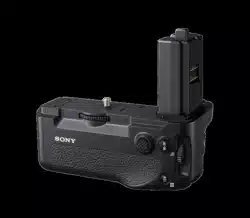
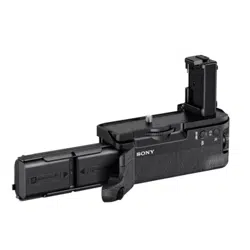
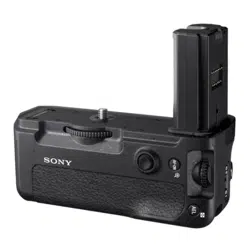
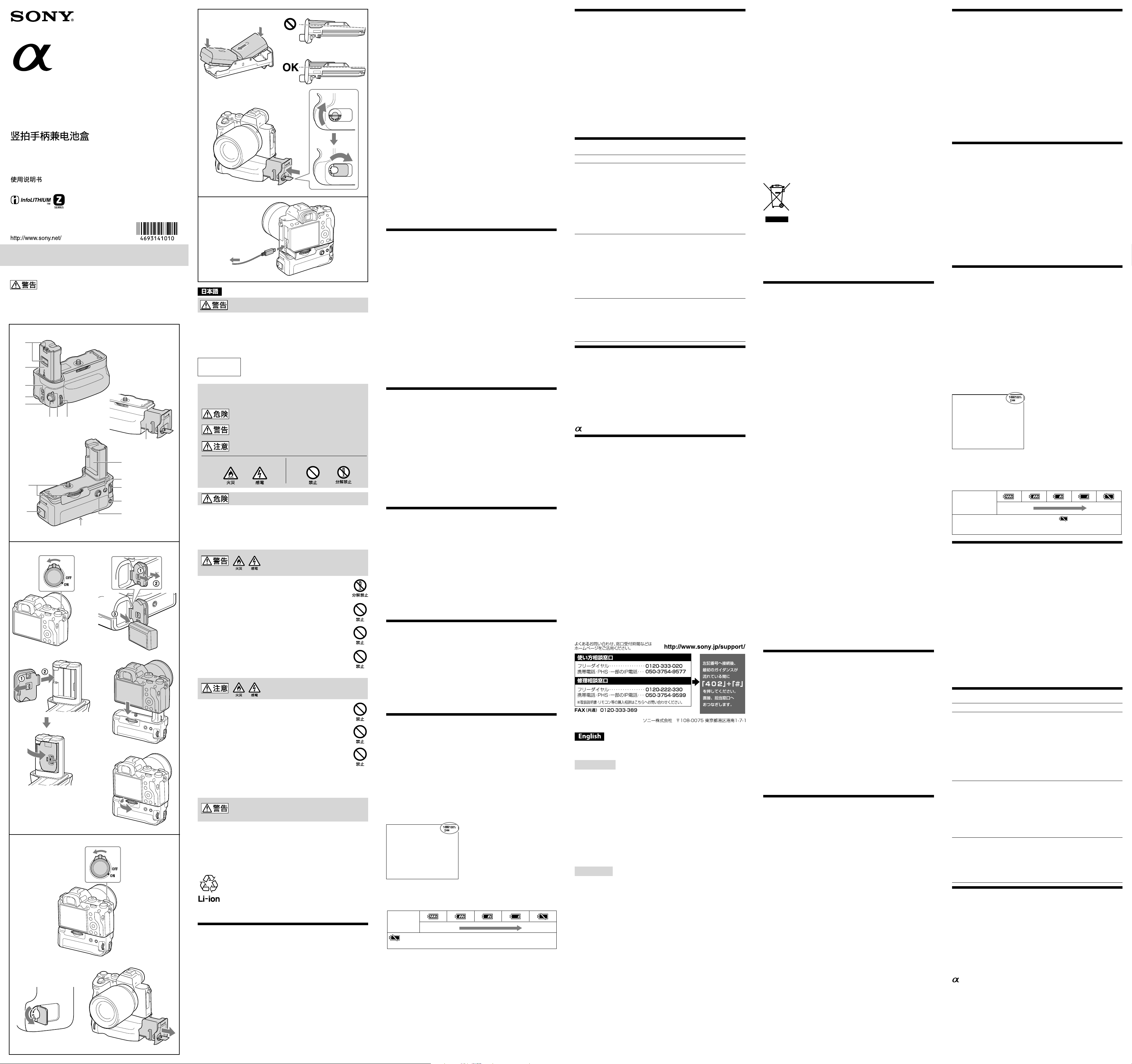
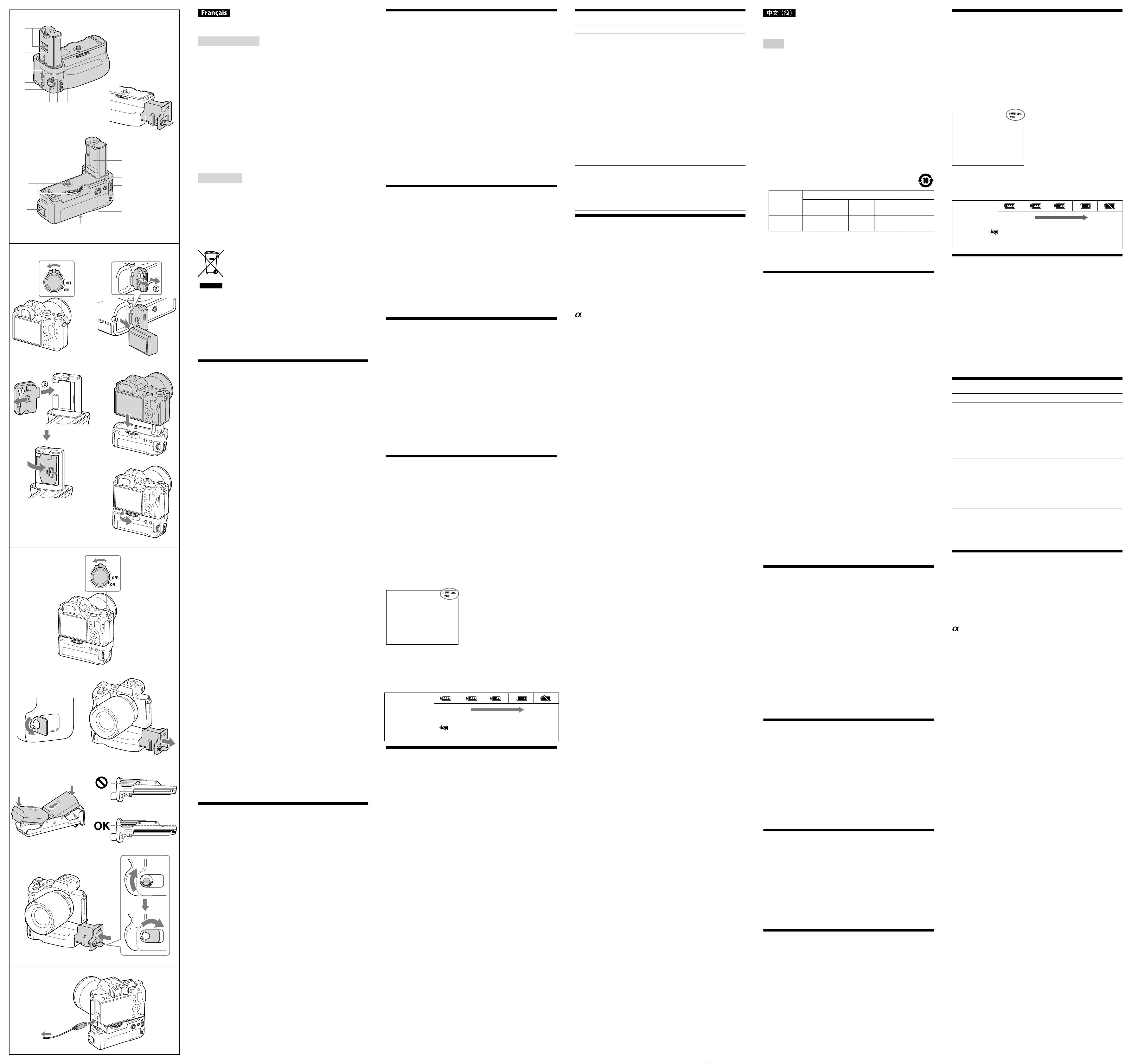
Identifying the Parts
1 Electrical contacts
2 Guide bar
3 C2 (custom 2) button
4 Strap hook
5 C1 (custom 1) button
6 Shutter button
7 Grip control LOCK switch
8 Front control dial
9 Battery pack tray
10 Attachment screw
11 Battery chamber OPEN/CLOSE knob
12 Battery cover slot
13 While shooting: AF ON button
While playing: (Zoom-in) button
14 Rear control dial
15 While shooting: AEL button
While playing: (List) button
16 Multi-selector
17 Tripod receptacle
For more information, refer to the operating instructions supplied with
your camera.
Attaching this unit to the camera
1 Set the POWER switch of the camera to “OFF.”
2 Detach the battery cover, then remove the battery pack(s)
from the camera.
3 Attach the battery cover of the camera firmly to the battery
cover slot as illustrated.
When you do not use this unit, be sure to attach the battery cover to
the camera.
If the battery pack(s) is in this unit, remove the battery pack(s) from
this unit.
4 Align the following part to attach this unit to the camera.
[This unit] Guide bar
[Camera] Battery insertion slot
[This unit] Attachment screw
[Camera] Tripod socket hole
5 Rotate the attachment screw to lock it.
Periodically confirm that the attachment screw is not loose while in
use.
After attaching this unit to the camera, make sure that all parts are
securely in place.
レンズマウントアダプター使用時の注意
本機は、レンズマウントアダプター LA-EA2/EA4との同時装着には対応していま
せん。同時装着すると、レンズマウントアダプターと本機の隙間が狭くなり持ち
にくくなります。
本機とレンズマウントアダプターを同時に使用される場合、レンズマウントアダ
プターの三脚用ネジ穴に三脚を取り付けられないことがあります。本機の三脚用
ネジ穴に三脚を取り付けてください。
カメラまたはレンズマウントアダプターに三脚座付きのレンズを取り付ける場
合は、レンズの三脚座を操作の妨げにならない位置に回転させてご使用いただく
か、着脱可能なものは外してお使いください。また、三脚を使用する場合は、レン
ズ側の三脚座を三脚に取り付けて使用してください。
カメラに本機を装着し、レンズマウントアダプターを使用して三脚座付きのレン
ズを取り付ける場合は、縦位置での撮影時に以下のレンズスイッチが操作できな
いことがありますので、あらかじめ横位置にて設定を行ってください。
フォーカスモードスイッチ
DMFモード切り替えスイッチ
フォーカスレンジ切り替えスイッチ
故障かな?と思ったら
こんなときは つぎのようにしてください
本機をカメラに取り付け、バッテリー
を入れてカメラの電源スイッチをON
にしてもカメラが動作しない
取り付けネジがしっかり締まっている
か確認してください。
バッテリーが充電されているか確認
してください。
バッテリートレイから全バッテリーを
一旦取りはずし、もう一度取り付け直
してください。
カメラの電源スイッチをOFFにし、本
機からバッテリーを抜いて、本機をは
ずし、再度取り付けてください。
シャッターボタン、その他の操作ボタ
ンが効かない
縦位置コントロールLOCKスイッチが
LOCKになっていないか確認してくだ
さい。
バッテリートレイから全バッテリーを
一旦取りはずし、もう一度取り付け直
してください。
カメラの電源スイッチをOFFにし、本
機からバッテリーを抜いて、本機をは
ずし、再度取り付けてください。
ソニー純正バッテリーを使用している
のに「対応バッテリーをお使いくださ
い」と表示される
バッテリートレイから全バッテリーを
一旦取りはずし、もう一度取り付け直
してください。
カメラの電源スイッチをOFFにし、本
機からバッテリーを抜いて、本機をは
ずし、再度取り付けてください。
主な仕様
使用電池 NP-FZ100 DC7.2V
外形寸法(約) 126.9 mm × 107.9 mm × 61.8 mm(幅/高さ/奥行き)
質量 約 272 g (バッテリートレイのみを含む、電池含まず)
動作温度 0 ℃ ~ 40 ℃
保存温度 -20 ℃ ~ +60 ℃
同梱物 縦位置グリップ(1)、印刷物一式
仕様および外観は、改良のため予告なく変更することがありますが、ご了承くださ
い。
はソニー株式会社の商標です。
保証書とアフターサービス
保証書
この製品には保証書が添付されていますので、お買い上げの際お買い上げ店でお
受け取りください。
所定事項の記入および記載内容をお確かめのうえ、大切に保存してください。
保証期間は、お買い上げ日より1年間です。
アフターサービス
調子が悪いときはまずチェックを
この取扱説明書をもう一度ご覧になってお調べください。
それでも具合が悪いときは
ソニーの相談窓口にご相談ください。
保証期間中の修理は
保証書の記載内容に基づいて修理させていただきます。
詳しくは保証書をご覧ください。
保証期間経過後の修理は
修理によって機能が維持できる場合は、ご要望により有償修理させていただきます。
部品の保有期間について
当社では本機の補修用性能部品(製品の機能を維持するために必要な部品)を、製
造打ち切り後最低7年間保有しています。この部品保有期間を修理可能の期間とさ
せていただきます。ただし、故障の状況その他の事情により、修理に代えて製品交換
をする場合がありますのでご了承ください。
保有期間が経過したあとも、故障箇所によっては修理可能の場合がありますので、
ソニーの相談窓口にご相談ください。
ご相談になるときは、次のことをお知らせください。
品名:VG-C3EM
故障の状態:できるだけ詳しく
購入年月日
Before operating the product, please read this manual thoroughly and
retain it for future reference.
WARNING
To reduce fire or shock hazard, do not expose the unit to rain or moisture.
Tape over lithium battery contacts to avoid short-circuit when disposing
of batteries, and follow local regulations for battery disposal.
Keep batteries or things that could be swallowed away from young
children. Contact a doctor immediately if an object is swallowed.
Immediately remove the batteries and discontinue use if...
the product is dropped or subjected to an impact in which the interior
is exposed.
the product emits a strange smell, heat, or smoke.
Do not disassemble. Electric shock may occur if a high voltage circuit
inside the product is touched.
CAUTION
Replace the battery with the specified type only. Otherwise, fire or
injury may result.
Dispose of used batteries according to the instructions.
For Customers in the U.S.A.
This device complies with Part 15 of the FCC Rules. Operation is subject
to the following two conditions:
(1) This device may not cause harmful interference, and (2) this device
must accept any interference received, including interference that may
cause undesired operation.
Inserting the battery packs
Battery pack NP-FZ100 (1 or 2 required)
1 When replacing the battery pack(s) with this unit attached
to the camera, set the POWER switch of the camera to OFF.
2 Rotate the battery chamber OPEN/CLOSE knob in the
direction of the arrow pointing to "OPEN," and then pull
out the battery pack tray.
3 Attach the battery pack(s) to the battery pack tray
according to the display on the battery pack tray. (See
illustration
-3.)
When attaching a battery pack, attach it to either side.
Attach the battery pack NP-FZ100 only to the battery pack tray. Do
not attach the other battery pack(s).
4 Inset the battery pack tray and rotate the battery chamber
OPEN/CLOSE knob.
Rotate the battery chamber OPEN/CLOSE knob properly to the
position as illustrated.
Charging the battery pack(s)
Charge the battery pack(s) while this unit is attached to the camera.
Note that this unit itself is not capable of charging the battery pack(s).
1 Set the POWER switch of the camera to "OFF."
2 Attach the AC adaptor (supplied with the camera) to
the camera with the micro USB cable (supplied with the
camera) and plug the AC adaptor to a power outlet.
* You can charge the battery pack(s) with a computer as
well.
When two battery packs are inserted, the one that has less power
remained is first charged.
It takes 295 minutes to charge one battery pack and 590 minutes to
charge two battery packs.
While battery charge is in progress, the charge indicator lamp lights
on the camera.
For more information, refer to the operating instructions supplied
with your camera.
Shooting vertical images
The operations of the unit’s dials and buttons are same as those for the
camera main body.
When using this unit, also refer to the operating instructions supplied
with your camera.
When using this unit in vertical orientation, align the grip control LOCK
switch with "
."
The grip control LOCK switch enables/disables the dial and button
functions.
Regardless of the position of the grip control LOCK switch, the
operating button on the camera always operates.
Switch the power ON and OFF with the POWER switch of the camera.
The grip control LOCK switch cannot switch the power ON and OFF.
Remaining battery power indicator
When you insert the two battery packs (NP-FZ100) into this unit, the
following indicator is displayed on the LCD monitor of the camera. (The
position of the battery power indicator varies depending on the mode of
the camera.)
LCD monitor (example)
Of the two battery packs, the one that has less power will be used first.
The remaining battery level of the battery pack in use is displayed as a
percentage (%).
The mark of the battery pack in use changes as shown below. When the
battery pack in use runs out, the unit automatically switches to the next
battery pack.
Remaining
battery capacity
high low
If you continue to shoot for a while after the
mark appears, that
battery pack runs out and the unit automatically switches to the next
battery pack.
Notes relating to the lens mount
adaptor
This unit is not designed for concurrent attachment with the
lens mount adaptor LA-EA2/EA4. If this unit and the adaptor are
concurrently attached to your camera, the space between this unit and
the lens mount adapter will not be wide enough for gripping this unit.
When you use this unit and a lens mount adapter at the same time,
it may not be possible to attach the tripod to the tripod screw hole of
the lens adapter. In that case, attach the tripod to the tripod receptacle
of this unit.
When you attach the lens with the tripod-mounting collar to your
camera or the lens mount adaptor, rotate the tripod-mounting collar
to a position that allows the grip to be used or remove all removable
attachments. Also, if you use the tripod, attach the tripod to the tripod-
mounting collar of the lens.
When you use the lens mount adaptor to attach the lens with the
tripod-mounting collar to the camera, the following lens switches may
not operate at the vertical shooting. Before vertical shooting, set them
at the horizontal position.
Focus-mode switch
DMF-mode switch
Focus-range limiter
Troubleshooting
Symptom Remedy
The camera does not work even
after the unit is attached to the
camera, the battery pack(s) are
inserted into the unit and the
camera POWER switch is set to ON.
Check that the unit attachment
screw is securely tightened.
Check that the battery pack(s)
are charged.
Remove the battery pack(s)
from the battery pack tray, then
reattach.
Set the camera POWER switch to
OFF, remove the battery pack(s),
and reattach the unit to the
camera.
Shutter button or other operating
buttons do not work.
Check that the grip control LOCK
switch is not set to LOCK.
Remove the battery pack(s)
from the battery pack tray, then
reattach.
Set the camera POWER switch to
OFF, remove the battery pack(s),
and reattach the unit to the
camera.
"Incompatible battery. Use correct
model." is displayed even though
genuine Sony battery pack(s) are
being used.
Remove the battery pack(s)
from the battery pack tray, then
reattach.
Set the camera POWER switch to
OFF, remove the battery pack(s),
and reattach the unit to the
camera.
Specifications
Battery pack NP-FZ100 DC7.2V
Dimensions (Approx.)126.9 mm × 107.9 mm × 61.8 mm (w/h/d)
(5 in. × 4 1/4 in. × 2 1/2 in.)
Mass Approx. 272 g (9.6 oz)
(including the battery pack tray, excluding the
battery packs)
Operating
temperature
0 °C to 40 °C (32 °F to 104 °F)
Storage temperature –20 °C to +60 °C (–4 °F to +140 °F)
Included items Vertical grip (1), Set of printed documentation
Design and specifications are subject to change without notice.
is a trademark of Sony Corporation.
安全のために
ソニー製品は安全に充分配慮して設計されています。しかし、まちがった使いかた
をすると、火災などにより人身事故になることがあり危険です。事故を防ぐために
次のことを必ずお守りください。
安全のための注意事項を守る
故障したら使わずに、ソニーの相談窓口に修理を依頼する
万 一 、異 常 が 起 き た ら
電源を切る
バッテリーをはずす
ソニーの相談窓口に修理を依頼する
変な音やにおい、
煙が出た場合は
警告表示の意味
取扱説明書では、次のような表示をしています。表示の内容をよく理解してから
本文をお読みください。
この表示の注意事項を守らないと、火災・感電などにより死亡や大
けがなど人身事故の原因となります。
注意を促す記号 行為を禁止する記号
この表示の注意事項を守らないと、感電やその他の事故によりけ
がをしたり周辺の家財に損害を与えたりすることがあります。
この表示の注意事項を守らないと極めて危険な状況が起こり、そ
の結果大けがや死亡にいたる危害が発生します。
万一、電池の液漏れが起きたら
すぐに火気より遠ざけてください。漏れた液や気体に引火して発火、破裂の
恐れがあります。
液が目に入った場合は、こすらず、すぐに水道水などきれいな水で充分に洗っ
たあと、医師の治療を受けてください。
液を口に入れたり、なめた場合は、すぐに水道水で口を洗浄し、医師に相談し
てください。
液が身体や衣服についたときは、水でよく洗い流してください。
下記の注意事項を守らないと、
火災・
感電
により
死亡
や
大けが
の原因と
なります。
分解や改造をしない。
火災や感電の原因となることがあります。
内部の点検や修理はソニーの相談窓口にご相談ください。
製品および同梱物を、幼児・子供の手の届く範囲に放置しない。
幼児・子供の近くでご使用になる場合は、細心の注意を払ってください。
落下や損傷により内部が露出した場合は、すみやかに本機および
カメラからバッテリーを抜き、使用を中止する。
感電や火傷の恐れがあります。また内部に手を触れないでください。
万一、使用中に高熱、焦げ臭い、煙が出る等の異常を感じたら、
すみやかに本機およびカメラからバッテリーを抜き、使用を中止
する。
下記の注意事項を守らないと、
けが
や
財産
に
損害
を与えることがあります。
湿気やほこり、油煙、湯気の多い場所では使わない。
上記のような場所で使うと、火災や感電の原因となることがあります。
ぬれた手でバッテリー、本機をさわらない。
感電の原因となることがあります。
不安定な場所に置かない。
ぐらついた台の上や傾いたところに置いたり、不安定な状態で三脚を設置
すると、製品が落ちたり倒れたりして、けがの原因となることがあります。
長時間使用しないときはバッテリーをはずす。
長時間使用しないときは、バッテリーを本機からはずして保管してくださ
い。火災の原因となることがあります。
バッテリーについての安全上のご注意
漏液、発熱、発火、破裂などを避けるため、下記のことを必ずお守
りください。
指定されたバッテリー以外は使わないでください。
バッテリーを火中へ投入したり、ショート、分解、加熱をしないでください。
バッテリーは使い切ってから廃棄してください。また廃棄するときは、テープな
どで接点部を絶縁してください。
バッテリー容量が残っていたり、他の金属と接触したりすると、発熱・破裂・発火
の恐れがあります。
お住いの自治体の規則にしたがって正しく廃棄するかリサイクルしてください。
リチウムイオン電池は、リサイクルできます。不要になったリチウム
イオン電池は、金属部にセロハンテープなどの絶縁テープを貼って
リサイクル協力店へお持ちください。
充電式電池の回収・リサイクルおよびリサイクル協力店については
一般社団法人JBRCホームページ
http://www.jbrc.com/を参照してください。
使用上のご注意
対応機種はカタログ、WEBをご確認ください。
本機は防塵防滴に配慮した構造となっていますが、ホコリや水滴の浸入を完全に防
ぐものではありません。
バッテリーについて
本機はリチャージャブルバッテリーパックNP-FZ100専用です。
本機に同時に2個まで装着できます。
長期間使用しないときは、本機からバッテリーを抜き取って保管してください。
必ずソニー製純正バッテリーをお使いください。また、バッテリーは指定のカメ
ラまたはバッテリーチャージャー以外で充電しないでください。
NP-FM55H、NP-FM50、NP-FM30、NP-FM500H、NP-FH50、NP-FW50は使用
できません。
置いてはいけない場所
使用中、保管中にかかわらず、次のような場所に置かないでください。故障の原因に
なります。
異常に高温になる場所
ダッシュボードの上など直射日光の当たる場所や、熱器具の近くには置かないで
ください。炎天下や夏場の窓を閉め切った自動車内は特に高温になります。放置
すると変形したり、故障したりすることがあります。
激しい振動のある場所
強力な磁気のあるところや放射線のある場所
砂やほこりの舞っている場所
その他のご注意
本機の使用温度範囲は0℃~40℃です。
バッテリーの充電は周囲の温度が10℃~ 30℃の環境で行ってください。
急激な温度変化を与えると内部に水滴を生じる危険性があります。
スキー場のような寒い屋外から暖かい室内に持ち込む場合は、屋外でビニール袋
に入れ、袋の中の空気を絞り出して密閉します。その後室内に持ち込み、周囲の温
度になじませてから取り出してください。
本機のお手入れには、柔らかい布で汚れを軽くふき取ってください。シンナー、ベ
ンジンなどの有機溶剤を含むクリーナーは絶対に使用しないでください。
本機には、カメラと電気的に接続される信号接点があります。
本機をカメラに取り付けない状態でバッテリーを装填していると、接点のショー
トなどにより故障したり不具合が発生する可能性があります。本機をカメラに取
り付け、取りはずしする場合や、本機のみで保管する場合は、必ずバッテリーを取
り出した状態にしてください。
三脚を取り付けるときは、ネジの長さが5.5 mm未満の三脚をお使いください。ネ
ジの長さが5.5 mm以上の三脚ではしっかり固定できず、本機を傷つけることが
あります。
カメラの液晶モニタの位置によっては本機と干渉することがありますのでご注
意ください。
本機をカメラに取り付けるときや電池を入れ替える時は、カメラにUSBケーブル
はつながないでください。
各部の名前
1 電源信号接点部
2 カメラ電源室挿入部
3 C2(カスタム2)ボタン
4 ストラップ取付け部
5 C1(カスタム1)ボタン
6 シャッターボタン
7 縦位置コントロールLOCKスイッチ
8 前ダイヤル
9 バッテリートレイ
10 取り付けネジ
11 電池室OPEN/CLOSEつまみ
12 カメラバッテリーカバー収納部
13 撮影時:AFオンボタン
再生時:(拡大)ボタン
14 後ダイヤル
15 撮影時:AELボタン
再生時:(一覧表示)ボタン
16 マルチセレクター
17 三脚用ネジ穴
詳細はお使いのカメラの取扱説明書をご覧ください。
カメラへの取り付けかた
1
カメラの電源スイッチをOFFにする
2
カメラのバッテリーカバーを取り外し、バッテリーを取り出す
3
カメラのバッテリーカバーを、図のように本機のバッテリーカバー
収納部にしっかりと装着する
本機を使用しないときは、バッテリーカバーを元通りにカメラに装着してく
ださい。
本機にバッテリーが入っている場合は、取り出してください。
4
以下の各部がそれぞれ合うようにはめ込む
【本機】カメラ電源室挿入部 【カメラ】バッテリー挿入口
【本機】取り付けネジ 【 カ メ ラ 】三 脚 用 ネ ジ 穴
5
取り付けネジを回して、しっかりと固定する
使用中、取り付けネジが緩んでいないことをときどき確認してください。
締めつけ後、各部が乗り上げていないか確認してください。
バッテリーの入れかた
バッテリー NP-FZ100 1個または2個
1
本機をカメラに装着したままバッテリーを入れ換える場合、カメラ
の電源スイッチをOFFにする
2
電池室OPEN/CLOSEつまみを「OPEN」のほうに回し、バッテリート
レイを引き出す
3
バッテリートレイの表示にしたがってバッテリーを取り付ける
(イラスト-3参照)
バッテリーを1個入れるときは、どちらに入れても構いません。
バッテリートレイには、バッテリー NP-FZ100しか取り付けられません。
他のバッテリーを無理に取り付けないでください。
4
バッテリートレイを挿入し、電池室のOPEN/CLOSEつまみを回す
つまみの向きが図の位置に来るまで確実に回してください。
バッテリーの充電の仕方
本機がカメラに装着された状態で充電します。
本機のみでは充電できません。
1
カメラの電源スイッチを[OFF]にする
2
カメラとACアダプター(カメラに付属)をマイクロUSBケーブル(カ
メラに付属)でつなぎ、ACアダプターをコンセントに取り付ける
※パソコンからの充電も可能です。
2個のバッテリーのうち、残量が少ない方から充電されます。
充電にかかる時間は、バッテリー 1個の時は約295分、2個の時は約590分です。
バッテリー充電中、カメラ本体の充電ランプが点灯します。
詳細はお使いのカメラの取扱説明書をご覧ください。
縦位置での撮影
本機のダイヤルやボタンの操作方法はカメラと同じです。
ご使用の際、お使いのカメラの取扱説明書もご覧ください。
使用するときは、本機の縦位置コントロールLOCKスイッチを「
」に 合 わ せ ま す 。
本機の縦位置コントロールLOCKスイッチは、本機のダイヤルやボタンを有効/無
効にするものです。
縦位置コントロールLOCKスイッチの位置には関係なく、カメラ本体側の操作ボ
タンは動作します。
電源のON/OFFはカメラの電源スイッチで行います。縦位置コントロールLOCK
スイッチでは電源はON/OFFしません。
バッテリー残量表示について
NP-FZ100を2個入れたときは、カメラの液晶モニターに下図のような表示がでま
す。(カメラのモードにより表示位置が異なる場合があります。)
液晶モニター(表示例)
2個のバッテリーのうち、容量の少ないほうから使用します。
使用されているバッテリーの残量が「%」で表示されます。
使用中のバッテリー表示マークは、下図のように変化して、バッテリーが消耗する
と、自動的に次のバッテリーに切り替わります。
残量
多 少
マークが出てしばらく撮影を続けているとバッテリーが消耗し、自動的に
次のバッテリーに切り替わります。
電気製品は安全のための注意事項を守らないと、火災や人身事故になる
ことがあります。
この取扱説明書には、事故を防ぐための重要な注意事項と製品の取り扱いかたを示して
います。この取扱説明書をよくお読みのうえ、製品を安全にお使いください。お読みに
なったあとは、いつでも見られるところに必ず保管してください。
10
11
17
16
14
15
13
12
1
2
3
4
5
6 8
7
9
1 2
3
5
4
1
2
4
3
4-693-141-01(2)
取扱説明書
Operating Instructions
Mode d’emploi
© 2017 Sony Corporation
Printed in Thailand
縦位置グリップ
Vertical Grip
Poignée verticale
VG-C3EM
Avant de faire fonctionner ce produit, lisez attentivement ce mode
d’emploi et conservez-le pour toute référence ultérieure.
AVERTISSEMENT
Afin de réduire les risques d’incendie ou de décharge électrique,
n’exposez pas cet appareil à la pluie ou à l’humidité.
Recouvrez les contacts de la batterie au lithium de bande adhésive pour
éviter tout court-circuit lors de la mise au rebut des batteries et respectez
la réglementation locale en vigueur applicable à la mise au rebut des
batteries.
Conservez les batteries hors de la portée des enfants, ainsi que tout
objet qu’ils risqueraient d’avaler. En cas d’ingestion d’un objet, consultez
immédiatement un médecin.
Retirez immédiatement les batteries et arrêtez de les utiliser si...
le produit est tombé ou a subi un choc qui mis à nu ses composants
internes ;
le produit dégage de la fumée, une odeur ou une chaleur ou
inhabituelle.
Ne démontez pas cet accessoire. Sinon, vous risquez de vous électrocuter
en touchant un circuit haute tension situé à l’intérieur du produit.
ATTENTION
Remplacez la pile uniquement par une pile correspondant au type
spécifié. Sinon vous risquez de provoquer un incendie ou des
blessures.
Mettez les piles au rebut conformément aux instructions.
POUR LES CLIENTS RÉSIDANT EN EUROPE
Fabricant : Sony Corporation, 1-7-1 Konan Minato-ku Tokyo, 108-0075
Japon
Pour toute question relative à la conformité des produits dans l’UE : Sony
Belgium, bijkantoor van Sony Europe Limited, Da Vincilaan 7-D1, 1935
Zaventem, Belgique
Traitement des appareils électriques et électroniques
en fin de vie (Applicable dans les pays de l’Union
Européenne et aux autres pays européens disposant de
systèmes de collecte sélective)
Ce symbole, apposé sur le produit ou sur son emballage,
indique que ce produit ne doit pas être traité avec les
déchets ménagers. Il doit être remis à un point de collecte
approprié pour le recyclage des équipements électriques et
électroniques. En vous assurant que ce produit sont mis au
rebut de façon appropriée, vous participez activement à la
prévention des conséquences négatives que leur mauvais
traitement pourrait provoquer sur l’environnement et sur la
santé humaine. Le recyclage des matériaux contribue par
ailleurs à la préservation des ressources naturelles. Pour
toute information complémentaire au sujet du recyclage de
ce produit, vous pouvez contacter votre municipalité, votre
déchetterie locale ou le point de vente où vous avez acheté
le produit.
Remarque sur l’emploi
Pour le détail sur les modèles d’appareils photo compatibles avec cet
accessoire, consultez le site Sony de votre région, ou adressez-vous à
votre revendeur Sony ou à un service après-vente agréé Sony.
Bien que cet accessoire soit de conception étanche à la poussière et
aux projections de liquide, il peut ne pas être parfaitement étanche à
la poussière ou aux projections.
Batteries
Seules des batteries rechargeables NP-FZ100 peuvent être utilisées.
Vous pouvez rattacher jusqu’à deux batteries en même temps à cet
accessoire.
Retirez les batteries de cet accessoire si celui-ci ne doit pas être utilisé
pendant longtemps.
Utilisez toujours une batterie Sony d'origine avec cet accessoire.
Chargez uniquement la batterie avec l'appareil photo ou le chargeur
de batterie indiqué.
Les batteries NP-FM55H, NP-FM50, NP-FM30, NP-FM500H, NP-FH50,
NP-FW50 ne peuvent pas être utilisées avec cet accessoire.
Endroits à éviter pour l’utilisation et le rangement de
l’accessoire
N’utilisez et ne rangez jamais cet accessoire dans des endroits où il
risquerait d’être exposé aux éléments suivants :
Températures extrêmement élevées
Ne laissez pas cet accessoire dans un endroit où il peut être exposé aux
rayons directs du soleil. Évitez notamment de le placer sur le tableau
de bord d’un véhicule ou près d’une source de chaleur. L’intérieur d’un
véhicule peut devenir extrêmement chaud si les vitres sont fermées
en plein été, ou si le véhicule est exposé aux rayons directs du soleil.
Si vous laissez cet accessoire à l’intérieur d’un véhicule, il risque d’être
déformé ou de ne pas fonctionner correctement.
Vibrations excessives
Champs ou rayons électromagnétiques puissants
Sable ou poussière excessive
Autres mises en garde
Cet accessoire est conçu pour une utilisation entre 0 °C et 40 °C (32 °F
et 104 °F).
Lors de la charge de la batterie, assurez-vous que la température
ambiante se trouve entre 10 °C et 30 °C (de 50 °F à 86 °F).
Une augmentation rapide et considérable de la température entraîne
la formation de condensation. Par conséquent, si cet accessoire est
resté dans un environnement froid pendant une période prolongée,
mettez-le dans un sac plastique fermé et éliminez autant d’air que
possible du sac avant de l’amener à l’intérieur. Lorsque la température
dans le sac a augmenté graduellement jusqu’à la température de la
pièce, vous pouvez retirer l’accessoire du sac en toute sécurité. Cette
procédure permet d’éviter un changement de température trop rapide
de l’accessoire, empêchant ainsi toute formation de condensation.
Lorsqu’il est sale, l’accessoire peut être nettoyé avec un linge propre
et sec. Évitez tout contact entre l’accessoire et de l’alcool ou d’autres
produits chimiques.
Cet accessoire possède un point de contact de signal raccordé
électriquement à l’appareil photo.
Si vous chargez la ou les batteries alors que cet accessoire n’est
pas raccordé à l’appareil photo, il risque de ne pas fonctionner
correctement ou d’être endommagé à la suite d’un court-circuit du
point de contact.
Lors que vous raccordez cet accessoire à l’appareil photo, que vous le
débranchez de l’appareil ou que vous le rangez séparément, n’oubliez
pas de retirez sa ou ses batteries.
Quand vous attachez un trépied à l’accessoire, utilisez un trépied avec
une vis d’une longueur inférieure à 5,5 mm.
Cet accessoire ne peut pas être fixé solidement sur un trépied utilisant
une longue vis. Essayer de le fixer sur un tel trépied peut endommager
cet accessoire.
Des interférences peuvent se produire entre l’écran LCD de la caméra
et cet accessoire en fonction de la position de l’écran.
Lorsque vous fixez cet accessoire à l’appareil photo ou lorsque vous
remplacez la ou les batteries, ne raccordez pas le câble USB à l’appareil
photo.
Nomenclature des pièces
1 Contacts électriques
2 Barre de guidage
3 Bouton C2 (personnalisé 2)
4 Crochet pour dragonne
5 Bouton C1 (personnalisé 1)
6 Déclencheur
7 Commutateur LOCK de commande de la poignée
8 Molette de commande avant
9 Plateau pour batterie
10 Vis de fixation
11 Bouton OPEN/CLOSE du compartiment pour batteries
12 Fente du couvercle des batteries de l’appareil photo
13 Lors d'une prise de vue : Touche AF ON
Lors de la lecture : Touche (Zoom-in)
14 Molette de commande arrière
15 Lors d'une prise de vue : Touche AEL
Lors de la lecture : Touche (List)
16 Multisélecteur
17 Logement du trépied
Pour plus d'informations, reportez-vous au mode d'emploi fourni avec
votre appareil photo.
Fixation de cet accessoire à l’appareil
photo
1 Réglez le commutateur POWER de l’appareil photo sur «
OFF ».
2 Retirez le couvercle de la batterie, puis retirez la ou les
batteries de l’appareil photo.
3 Insérez correctement le couvercle de la batterie de l’appareil
photo dans le logement du couvercle de la batterie, comme
indiqué.
Lorsque vous n’utilisez pas cet accessoire, veillez à placer le
couvercle de la batterie sur l’appareil photo.
Si une ou plusieurs batteries se trouvent dans cet accessoire
retirez-les.
4 Alignez l’élément suivant pour fixer cet accessoire à
l’appareil photo.
[Cet accessoire] Barre de guidage
[Appareil photo] Fente d’insertion
de la batterie
[Cet accessoire] Vis de fixation
[Appareil photo] Écrou de pied
5 Tournez la vis de fixation pour verrouiller l’accessoire.
Vérifiez régulièrement que la vis de fixation ne s’est pas desserrée
en cours d’utilisation.
Après avoir installé cet accessoire sur la caméra, vérifiez que toutes
les pièces sont correctement en place.
Insertion des batteries
Batteries NP-FZ100 (1 ou 2 requises)
1 Si vous remplacez les batteries alors que cet accessoire est
fixé à l’appareil photo, réglez le commutateur POWER de
l’appareil photo sur OFF.
2 Tournez le bouton OPEN/CLOSE du compartiment pour
batteries vers la flèche pointant sur « OPEN », puis retirez le
plateau pour batterie.
3 Installez les batteries dans leur plateau en vous conformant
au schéma indiqué dans ce dernier. (Voir illustration
-3.)
Lors de l’insertion d’une batterie, fixez-la de part et d’autre.
N’insérez que la batterie NP-FZ100 dans plateau pour batterie.
N’insérez aucun autre type de batterie.
4 Insérez le plateau pour batterie puis tournez le bouton
OPEN/CLOSE du compartiment pour batteries.
Tournez le bouton OPEN/CLOSE du compartiment de batteries pour
le mettre à la position illustrée.
Charge de la ou des batteries
Chargez la ou les batteries lorsque cet accessoire est installé sur
l'appareil photo. Notez que cet accessoire ne peut pas de lui-même
charger la ou les batteries.
1 Réglez le commutateur POWER de l'appareil photo sur
« OFF ».
2 Raccordez l'adaptateur secteur (fourni avec l'appareil
photo) à l'appareil photo avec le câble micro-USB (fourni
avec l'appareil photo) puis branchez l'adaptateur secteur à
une prise secteur.
* Vous pouvez également charger la ou les batteries avec
un ordinateur.
Lorsque deux batteries sont installées, celle dont la charge est la
plus faible est chargée en premier.
La charge dure 295 minutes pour une batterie et 590 minutes pour
deux batteries.
Lors de la charge, le témoin de charge s'allume sur l'appareil photo.
Pour plus d'informations, reportez-vous au mode d'emploi fourni
avec votre appareil photo.
Enregistrement d’images verticales
Les fonctions des molettes et des touches de l’accessoire sont identiques
à celles du corps principal de l’appareil photo.
Lors de l’utilisation de cet accessoire, reportez-vous aussi au mode
d’emploi fourni avec votre appareil photo.
Lorsque cet accessoire est utilisé verticalement, alignez le commutateur
LOCK de commande de la poignée sur «
».
Le commutateur LOCK de commande de la poignée active ou désactive
les fonctions des touches ou de la molette.
Quelle que soit la position du commutateur LOCK de commande de
la poignée, la touche de commande de l'appareil photo est toujours
opérationnelle.
Allumez ou éteignez avec son commutateur POWER de l'appareil
photo. Le commutateur LOCK de commande de la poignée ne peut pas
être utilisé pour la mise sous ou hors tension.
Témoin d’autonomie des batteries
Lorsque vous insérez les deux batteries (NP-FZ100) dans cet accessoire,
le témoin suivant s’affiche sur l’écran LCD de l’appareil photo. (La position
du témoin de la batterie varie selon le mode de l’appareil photo.)
Écran LCD (exemple)
Lorsque deux batteries sont en place, celle qui est la moins chargée est
utilisée en premier.
Le niveau de charge de la batterie utilisée est indiqué sous la forme d’un
pourcentage (%).
Le repère de batterie utilisée change de la façon suivante. Lorsque
la batterie utilisée est vide, l’accessoire passe automatiquement à la
batterie suivante.
Autonomie restante
des batteries
haute basse
Si vous continuez de prendre des photos un moment après
l’apparition du repère
, la batterie se videra et l’accessoire passera
automatiquement à la batterie suivante.
Remarques relatives à l'adaptateur de
monture d'objectif
Cet accessoire n'est pas conçu pour une fixation simultanée avec
l'adaptateur de monture d'objectif LA-EA2/EA4. Si cet accessoire et
l'adaptateur sont tous les deux fixés à l'appareil photo, l'espace entre
cet accessoire et l'adaptateur de monture d'objectif ne sera pas assez
suffisant pour saisir cet accessoire.
Si vous utilisez simultanément cet accessoire et un adaptateur de
monture d'objectif, il est possible que vous ne puissiez pas fixer le
trépied au logement du trépied de l’adaptateur d’objectif Dans ce cas,
fixez le trépied au réceptacle pour trépied de cet accessoire.
Lorsque vous fixez l'objectif avec une bague de monture sur trépied
à l'appareil photo ou l'adaptateur de monture d'objectif, tournez la
bague de monture sur trépied vers la position qui permet d'utiliser
la poignée ou de supprimer tous les accessoires amovibles. En outre,
si vous utilisez le trépied, fixez ce dernier à la bague de monture sur
trépied de l'objectif.
Lorsque vous utilisez l'adaptateur de monture d'objectif pour fixer
l'objectif avec la bague de monture sur trépied de l'appareil photo,
les commutateurs d'objectif ci-dessous peuvent ne pas fonctionner
pendant une prise de vue en position verticale. Avant une prise de vue
en position verticale, réglez-les en position horizontale.
Commutateur de mise au point
Commutateur du mode DMF
Limiteur de plage de mise au point
Dépannage
Symptôme Solution
L’appareil photo ne fonctionne
pas alors que l’accessoire est
raccordé, que la ou les batteries
sont insérées dans l’accessoire et
que le commutateur POWER de
l’appareil photo est réglé sur ON.
Vérifiez si la vis de fixation de
l’accessoire est serrée solidement.
Vérifiez si la ou les batteries sont
chargées.
Retirez la ou les batteries du
plateau pour batterie, puis
replacez-les.
Réglez le commutateur POWER
de l’appareil photo sur OFF, retirez
la ou les batteries et refixez
l’accessoire sur l’appareil photo.
Le déclencheur ou d’autres
touches ne fonctionnent pas.
Vérifiez que le commutateur LOCK
de commande de la poignée
n'est pas réglé sur LOCK.
Retirez la ou les batteries du
plateau pour batterie, puis
replacez-les.
Réglez le commutateur POWER
de l’appareil photo sur OFF, retirez
la ou les batteries et refixez
l’accessoire sur l’appareil photo.
« Batterie incompatible.
Utiliser le modèle correct. »
s’affiche même si vous utilisez
une ou plusieurs batteries Sony
d’origine.
Retirez la ou les batteries du
plateau pour batterie, puis
replacez-les.
Réglez le commutateur POWER
de l’appareil photo sur OFF, retirez
la ou les batteries et refixez
l’accessoire sur l’appareil photo.
Spécifications
Batterie NP-FZ100 7,2V CC
Dimensions (environ) 126,9 mm × 107,9 mm × 61,8 mm (l/h/p)
(5 po. × 4 1/4 po. × 2 1/2 po.)
Poids environ 272 g (9,6 oz)
(plateau pour batterie compris, batteries
non comprises)
Température de
fonctionnement
0 °C à 40 °C (32 °F à 104 °F)
Température d’entreposage –20 °C à +60 °C (–4 °F à +140 °F)
Articles inclus Poignée verticale (1), Jeu de documents
imprimés
La conception et les spécifications peuvent être modifiées sans préavis.
est une marque commerciale de Sony Corporation.
保留备⽤
在操作本产品前,请通读本⼿册,然后保存好本⼿册以备将来参考。
保留备⽤。
警告
为减少发⽣⽕灾或触电的危险,请勿让本机淋⾬或受潮。
处理电池时要⽤胶带封好锂电池触点以免短路,并遵守当地有关电池
处理⽅⾯的规定。
使电池或部件远离⼩孩,以免被吞下。⼀旦有东西被吞下,请⽴即看
医⽣。
如果出现下列情况,要⽴即取下电池并停⽌使⽤ :
产品被摔落或受到碰撞致使内部暴露。
产品散发出异味、发热或冒烟。
不要拆装。如果碰到产品内部的⾼压电流,可能会造成触电。
为避免造成环境污染,请将废弃产品按照当地法规进⾏处置。
⼩⼼
请只使⽤指定类型的电池进⾏更换。否则,
可能会造成⽕灾或受伤。
请按照说明丢弃⽤过的电池。
为避免造成环境污染,请将废弃产品按照当地法规进⾏处置。
产品中有害物质的名称及含量
部件名称
(有该部件
时)
有害物质
铅
(Pb)
汞
(Hg)
镉
(Cd)
六价铬
(Cr (VI))
多溴联苯
(PBB)
多溴⼆苯醚
(PBDE)
电路板组件/
⾦属/电缆
×○○ ○ ○ ○
本表格依据SJ/T 11364的规定编制。
○∶ 表⽰该有害物质在该部件所有均质材料中的含量均在GB/T
26572规定的限量要求以下。
×∶ 表⽰该有害物质⾄少在该部件的某⼀均质材料中的含量超出
GB/T 26572规定的限量要求。
使⽤须知
有关与本机兼容的相机型号的详细信息,请访问所在地区的Sony⽹
站,或者咨询您的Sony经销商或当地的Sony授权服务机构。
尽管本机采⽤了防尘和防溅湿的设计理念,但可能⽆法完全阻⽌灰
尘或液体进⼊。
电池
仅可使⽤锂离⼦电池组 NP-FZ100。
在本机上最多可同时安装两块电池。
长时间存放本机时,请将电池取出。
务必在本机上使⽤正品Sony电池。只能使⽤指定的相机或充电器
为电池充电。
NP-FM55H、NP-FM50、NP-FM30、NP-FM500H、NP-FH50、NP-FW50电
池不适⽤于本机。
使⽤和保存须避免的环境
⽆论本机在使⽤或保存时,都不要暴露在下列环境:
⾼温环境
不要将本机放在可能受阳光直射的位置;不要放在诸如汽车仪表
盘或接近热源的地⽅。在夏天关闭车窗或车⼦受阳光直射时,车
内会⾮常热。如果将本机留在车内会造成变形或发⽣故障。
强烈震动的环境
强电磁或强放射环境
沙尘过多的环境
其他注意事项
本机设计⼯作温度为0 ℃⾄40 ℃。
为电池充电时,确保环境温度处于 10 ℃ - 30 ℃ 范围内。
由于温度骤升会导致空⽓冷凝,因此,本机长时间处于寒冷环境
后,应将其密封到塑料袋内,尽量排空袋内的空⽓,然后再将其
带⼊室内。当袋内温度逐渐升⾼到室温时,就可以安全地从袋内
取出。这些步骤可避免本机温度的骤变,从⽽防⽌冷凝的形成。
弄脏后,可⽤洁净的⼲布清洁。不要让本机接触酒精或其他化学
品。
本机设有与相机连接的信号电触点。
如果在本机没有安装到相机的情况下装载电池,则本机可能会因
触点短路⽽造成故障或损坏。
在相机上安装或从相机上取下本机时,或将本机单独存放时,应
务必将电池从本机中取出。
将本机安装到三脚架上时,应确保三脚架的螺丝长度不超过
5.5 mm。如果螺丝超过上述长度,则⽆法将本机牢牢固定到三脚架
上。违反上述规定可导致本机受损。
视相机LCD监视器的位置⽽定,监视器和本机之间可能出现⼲扰。
将本机安装到相机或更换电池时,请勿将将USB电缆连接到相机。
部件识别
1 电触点
2 导向杆
3 C2(⾃定义2)按钮
4 背带钩
5 C1(⾃定义1)按钮
6 快门按钮
7 竖拍控制LOCK开关
8 前控制转盘
9 电池托盘
10 安装螺丝
11 电池室OPEN/CLOSE旋钮
12 电池盖插槽
13 拍摄时:AF开启按钮
播放时:(放⼤)按钮
14 后控制转盘
15 拍摄时:AEL按钮
播放时:(列表)按钮
16 多项选择器
17 三脚架安装孔
详情请参见相机附带的使⽤说明书。
安装本机到相机上
1 将相机POWER(电源)开关置于“OFF”位置。
2 拆开电池盖,然后从相机中取出电池。
3 如图所⽰,将相机的电池盖牢固安装在电池盖插槽上。
不使⽤本机时,务必将电池盖安装在相机上。
如果本机内有电池,将其取出。
4 在相机上安装本机时,应对准以下部分:
[本机] 导向杆 [相机] 电池插槽
[本机] 安装螺丝 [相机] 三脚架安装孔
5 旋紧安装螺丝使其锁定。
使⽤时,适时检查并确定安装螺丝没有松动。
将本机安装⾄相机后,确保所有部件均已固定到位。
电池安装
使⽤NP-FZ100电池(1块或2块)。
1 本机装在相机上时,更换电池前,将相机的POWER(电源)开关置
于OFF位置。
2 沿箭头⽅向转动电池室OPEN/CLOSE旋钮,使其指向“OPEN”,然
后将电池托盘拉出。
3 按照托盘上的指⽰,将电池安装到托盘上。(参见⽰图 -3)
安装电池时,可安装到任何⼀端。
只能安装NP-FZ100电池到托盘上。不要安装其他电池。
4 插⼊电池托盘并转动电池室OPEN/CLOSE旋钮。
按照图⽰正确转动电池室OPEN/CLOSE旋钮到指定位置。
为电池充电
当本机安装在相机上时,可为电池充电。请注意,本机⾃⾝⽆法为
电池充电。
1 将相机POWER(电源)开关置于“OFF”位置。
2 通过 micro USB连接线(相机附带)将电源适配器连接⾄相机,
然后将电源适配器插接到电源插座上。
* 也可通过计算机为电池充电。
当插⼊两块电池时,其中剩余电量较少的电池将先⾏充电。
为⼀块电池充电需⽤时295分钟,为两块电池充电需⽤时590分
钟。
充电过程中,相机上的充电指⽰灯会亮起。
详情请参见相机附带的使⽤说明书。
竖拍
本机转盘及按钮操作与相机主机上的转盘及按钮操作相同。
使⽤本机时,另请参阅相机附带的使⽤说明书。
沿垂直⽅向使⽤本机时,请将竖拍控制LOCK开关与“
”对齐。
竖拍控制LOCK开关可启⽤/禁⽤转盘和按钮功能。
⽆论竖拍控制LOCK开关处于什么位置,相机上的操作按钮始终可
以正常操作。
开关电源时,请使⽤相机的POWER开关。竖拍控制LOCK开关⽆法打
开/关闭电源。
剩余电量指⽰
将两块电池(NP-FZ100)插⼊本机时,相机的L C D监视器上将出现以
下指⽰标记。(电池电量的指⽰位置视相机的模式⽽异。)
LCD监视器 (⽰例)
在两块电池中,将⾸先使⽤电量较⼩的⼀块。
所⽤电池的剩余电量以百分率 (%) 显⽰。
所⽤电池的标记变化如下。当所⽤电池的电量耗尽时,本机⾃动切换
到另⼀块电池。
剩余电量
⾼低
如果在出现
标记后仍在拍摄图像,则该电池的电量将耗尽,
⽽本机将⾃动切换到另⼀块电池。
镜头转接环使⽤注意事项
就设计⽽⾔,本机并⾮与镜头转接环LA-EA2/EA4⼀起安装使⽤。
如果将本机与镜头转接环同时安装在相机上,由于⼆者的间距不够
⼤,因此⽆法将本机牢牢卡紧。
同时使⽤本机和镜头转接环时,可能⽆法将三脚架固定⾄镜头转接
环的三脚架螺丝孔。这时,请将三脚架安装在本机的三脚架安装孔
中。
将带有三脚架安装套环的镜头安装⾄相机或镜头转接环时,请将三
脚架安装套环旋转⾄可以使⽤⼿柄的位置,或取下所有可拆卸的附
件。此外,如果还使⽤三脚架,请将三脚架安装到镜头的三脚架安装
套环中。
当利⽤镜头转接环将带有三脚架安装套环的镜头安装⾄相机时,以
下镜头开关在竖拍位置可能⽆法正常操作。在开始竖拍之前,请在
⽔平位置将其设置好。
对焦模式开关
DMF模式开关
对焦范围限定器
故障维修
故障情况 解决⽅法
即使在本机安装到相机上,将电
池插⼊本机,并将相机的POWER
开关设为ON之后,相机仍不⼯
作。
检查本机的安装螺丝是否已经
拧紧。
检查电池是否已经充电。
从电池托盘中取出电池,然后
重新装⼊。
将相机的POWER开关设为OFF,
取下电池,再将本机重新安装
到相机上。
快门按钮或其他操作按钮不⼯
作。
检查竖拍控制L O C K开关是否未
设为LOCK。
从电池托盘中取出电池,然后
重新装⼊。
将相机的POWER开关设为OFF,
取下电池,再将本机重新安装
到相机上。
即使使⽤正宗的Sony电池,也会
显⽰“电池不兼容。请使⽤正确
的型号。”。
从电池托盘中取出电池,然后
重新装⼊。
将相机的POWER开关设为OFF,
取下电池,再将本机重新安装
到相机上。
规格
电池 NP-FZ100 DC7.2V
尺⼨(约) 126.9 mm×107.9 mm×61.8 mm(宽/⾼/深)
质量 约272 g
(含电池托盘,不包括电池)
操作温度 0 ℃⾄40 ℃
储存温度 -20 ℃⾄+60 ℃
所含物品 竖拍⼿柄兼电池盒(1),成套印刷⽂件
设计或规格如有变动,恕不另⾏通知。
是 Sony Corporation 的商标。
保留备⽤
在操作本产品前,请通读本⼿册,然后保存好本⼿册以备将来参考。
保留备⽤。
警告
为减少发⽣⽕灾或触电的危险,请勿让本机淋⾬或受潮。
处理电池时要⽤胶带封好锂电池触点以免短路,并遵守当地有关电池
处理⽅⾯的规定。
使电池或部件远离⼩孩,以免被吞下。⼀旦有东西被吞下,请⽴即看
医⽣。
如果出现下列情况,要⽴即取下电池并停⽌使⽤ :
产品被摔落或受到碰撞致使内部暴露。
产品散发出异味、发热或冒烟。
不要拆装。如果碰到产品内部的⾼压电流,可能会造成触电。
为避免造成环境污染,请将废弃产品按照当地法规进⾏处置。
⼩⼼
请只使⽤指定类型的电池进⾏更换。否则,可能会造成⽕灾或受伤。
请按照说明丢弃⽤过的电池。
为避免造成环境污染,请将废弃产品按照当地法规进⾏处置。
产品中有害物质的名称及含量
部件名称
(有该部件
时)
有害物质
铅
(Pb)
汞
(Hg)
镉
(Cd)
六价铬
(Cr (VI))
多溴联苯
(PBB)
多溴⼆苯醚
(PBDE)
电路板组件/
⾦属/电缆
×○○ ○ ○ ○
本表格依据SJ/T 11364的规定编制。
○∶ 表⽰该有害物质在该部件所有均质材料中的含量均在GB/T
26572规定的限量要求以下。
×∶ 表⽰该有害物质⾄少在该部件的某⼀均质材料中的含量超出
GB/T 26572规定的限量要求。
使⽤须知
有关与本机兼容的相机型号的详细信息,请访问所在地区的Sony⽹
站,或者咨询您的Sony经销商或当地的Sony授权服务机构。
尽管本机采⽤了防尘和防溅湿的设计理念,但可能⽆法完全阻⽌灰
尘或液体进⼊。
电池
仅可使⽤锂离⼦电池组 NP-FZ100。
在本机上最多可同时安装两块电池。
长时间存放本机时,请将电池取出。
务必在本机上使⽤正品Sony电池。只能使⽤指定的相机或充电器
为电池充电。
NP-FM55H、NP-FM50、NP-FM30、NP-FM500H、NP-FH50、NP-FW50电
池不适⽤于本机。
使⽤和保存须避免的环境
⽆论本机在使⽤或保存时,都不要暴露在下列环境:
⾼温环境
不要将本机放在可能受阳光直射的位置;不要放在诸如汽车仪表
盘或接近热源的地⽅。在夏天关闭车窗或车⼦受阳光直射时,车
内会⾮常热。如果将本机留在车内会造成变形或发⽣故障。
强烈震动的环境
强电磁或强放射环境
沙尘过多的环境
其他注意事项
本机设计⼯作温度为0 ℃⾄40 ℃。
为电池充电时,确保环境温度处于 10 ℃ - 30 ℃ 范围内。
由于温度骤升会导致空⽓冷凝,因此,本机长时间处于寒冷环境
后,应将其密封到塑料袋内,尽量排空袋内的空⽓,然后再将其
带⼊室内。当袋内温度逐渐升⾼到室温时,就可以安全地从袋内
取出。这些步骤可避免本机温度的骤变,从⽽防⽌冷凝的形成。
弄脏后,可⽤洁净的⼲布清洁。不要让本机接触酒精或其他化学
品。
本机设有与相机连接的信号电触点。
如果在本机没有安装到相机的情况下装载电池,则本机可能会因
触点短路⽽造成故障或损坏。
在相机上安装或从相机上取下本机时,或将本机单独存放时,应
务必将电池从本机中取出。
将本机安装到三脚架上时,应确保三脚架的螺丝长度不超过
5.5 mm。如果螺丝超过上述长度,则⽆法将本机牢牢固定到三脚架
上。违反上述规定可导致本机受损。
视相机LCD监视器的位置⽽定,监视器和本机之间可能出现⼲扰。
将本机安装到相机或更换电池时,请勿将将USB电缆连接到相机。
部件识别
1 电触点
2 导向杆
3 C2(⾃定义2)按钮
4 背带钩
5 C1(⾃定义1)按钮
6 快门按钮
7 竖拍控制LOCK开关
8 前控制转盘
9 电池托盘
10 安装螺丝
11 电池室OPEN/CLOSE旋钮
12 电池盖插槽
13 拍摄时:AF开启按钮
播放时:(放⼤)按钮
14 后控制转盘
15 拍摄时:AEL按钮
播放时:(列表)按钮
16 多项选择器
17 三脚架安装孔
详情请参见相机附带的使⽤说明书。
安装本机到相机上
1 将相机POWER(电源)开关置于“OFF”位置。
2 拆开电池盖,然后从相机中取出电池。
3 如图所⽰,将相机的电池盖牢固安装在电池盖插槽上。
不使⽤本机时,务必将电池盖安装在相机上。
如果本机内有电池,将其取出。
4 在相机上安装本机时,应对准以下部分:
[本机] 导向杆 [相机] 电池插槽
[本机] 安装螺丝 [相机] 三脚架安装孔
5 旋紧安装螺丝使其锁定。
使⽤时,适时检查并确定安装螺丝没有松动。
将本机安装⾄相机后,确保所有部件均已固定到位。
电池安装
使⽤NP-FZ100电池(1块或2块)。
1 本机装在相机上时,更换电池前,将相机的POWER(电源)开关置
于OFF位置。
2 沿箭头⽅向转动电池室OPEN/CLOSE旋钮,使其指向“OPEN”,然
后将电池托盘拉出。
3 按照托盘上的指⽰,将电池安装到托盘上。(参见⽰图 -3)
安装电池时,可安装到任何⼀端。
只能安装NP-FZ100电池到托盘上。不要安装其他电池。
4 插⼊电池托盘并转动电池室OPEN/CLOSE旋钮。
按照图⽰正确转动电池室OPEN/CLOSE旋钮到指定位置。
为电池充电
当本机安装在相机上时,可为电池充电。请注意,本机⾃⾝⽆法为
电池充电。
1 将相机POWER(电源)开关置于“OFF”位置。
2 通过 micro USB连接线(相机附带)将电源适配器连接⾄相机,
然后将电源适配器插接到电源插座上。
* 也可通过计算机为电池充电。
当插⼊两块电池时,其中剩余电量较少的电池将先⾏充电。
为⼀块电池充电需⽤时295分钟,为两块电池充电需⽤时590分
钟。
充电过程中,相机上的充电指⽰灯会亮起。
详情请参见相机附带的使⽤说明书。
竖拍
本机转盘及按钮操作与相机主机上的转盘及按钮操作相同。
使⽤本机时,另请参阅相机附带的使⽤说明书。
沿垂直⽅向使⽤本机时,请将竖拍控制LOCK开关与“
”对齐。
竖拍控制LOCK开关可启⽤/禁⽤转盘和按钮功能。
⽆论竖拍控制LOCK开关处于什么位置,相机上的操作按钮始终可
以正常操作。
开关电源时,请使⽤相机的POWER开关。竖拍控制LOCK开关⽆法打
开/关闭电源。
剩余电量指⽰
将两块电池(NP-FZ100)插⼊本机时,相机的L C D监视器上将出现以
下指⽰标记。(电池电量的指⽰位置视相机的模式⽽异。)
LCD监视器 (⽰例)
在两块电池中,将⾸先使⽤电量较⼩的⼀块。
所⽤电池的剩余电量以百分率 (%) 显⽰。
所⽤电池的标记变化如下。当所⽤电池的电量耗尽时,本机⾃动切换
到另⼀块电池。
剩余电量
⾼低
如果在出现
标记后仍在拍摄图像,则该电池的电量将耗尽,
⽽本机将⾃动切换到另⼀块电池。
镜头转接环使⽤注意事项
就设计⽽⾔,本机并⾮与镜头转接环LA-EA2/EA4⼀起安装使⽤。
如果将本机与镜头转接环同时安装在相机上,由于⼆者的间距不够
⼤,因此⽆法将本机牢牢卡紧。
同时使⽤本机和镜头转接环时,可能⽆法将三脚架固定⾄镜头转接
环的三脚架螺丝孔。这时,请将三脚架安装在本机的三脚架安装孔
中。
将带有三脚架安装套环的镜头安装⾄相机或镜头转接环时,请将三
脚架安装套环旋转⾄可以使⽤⼿柄的位置,或取下所有可拆卸的附
件。此外,如果还使⽤三脚架,请将三脚架安装到镜头的三脚架安装
套环中。
当利⽤镜头转接环将带有三脚架安装套环的镜头安装⾄相机时,以
下镜头开关在竖拍位置可能⽆法正常操作。在开始竖拍之前,请在
⽔平位置将其设置好。
对焦模式开关
DMF模式开关
对焦范围限定器
故障维修
故障情况 解决⽅法
即使在本机安装到相机上,将电
池插⼊本机,并将相机的POWER
开关设为ON之后,相机仍不⼯
作。
检查本机的安装螺丝是否已经
拧紧。
检查电池是否已经充电。
从电池托盘中取出电池,然后
重新装⼊。
将相机的POWER开关设为OFF,
取下电池,再将本机重新安装
到相机上。
快门按钮或其他操作按钮不⼯
作。
检查竖拍控制L O C K开关是否未
设为LOCK。
从电池托盘中取出电池,然后
重新装⼊。
将相机的POWER开关设为OFF,
取下电池,再将本机重新安装
到相机上。
即使使⽤正宗的Sony电池,也会
显⽰“电池不兼容。请使⽤正确
的型号。”。
从电池托盘中取出电池,然后
重新装⼊。
将相机的POWER开关设为OFF,
取下电池,再将本机重新安装
到相机上。
规格
电池 NP-FZ100 DC7.2V
尺⼨(约) 126.9 mm×107.9 mm×61.8 mm(宽/⾼/深)
质量 约272 g
(含电池托盘,不包括电池)
操作温度 0 ℃⾄40 ℃
储存温度 -20 ℃⾄+60 ℃
所含物品 竖拍⼿柄兼电池盒(1),成套印刷⽂件
设计或规格如有变动,恕不另⾏通知。
是 Sony Corporation 的商标。
10
11
17
16
14
15
13
12
1
2
3
4
5
6 8
7
9
1 2
3
5
4
1
2
4
3