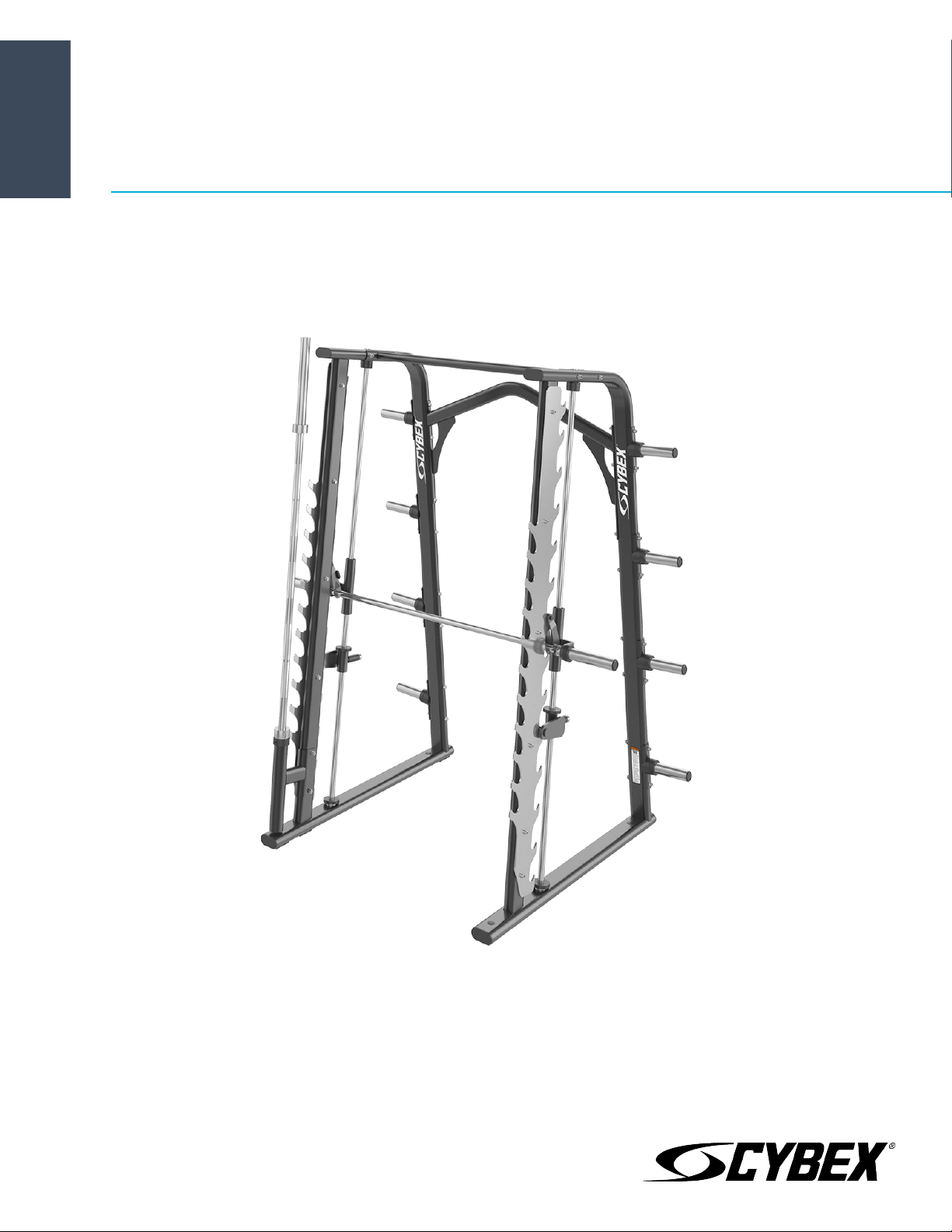
Ion Series Smith Rack
Owner's Manual
CI-SM
Part Number
1015904-0001 AA


Corporate Headquarters
Columbia Centre III, 9525 West Bryn Mawr Avenue, Rosemont, Illinois 60018 • U.S.A.
847.288.3300 • FAX: 847.288.3703
Service phone number: 800.351.3737 (toll-free within U.S.A., Canada)
Global Website: www.lifefitness.com
International Oices
AMERICAS
North America
Life Fitness, Inc.
Columbia Centre III
9525 West Bryn Mawr Avenue
Rosemont, IL 60018 U.S.A.
Telephone: (847) 288 3300
Service Email: [email protected]om
Sales/Marketing Email:
commercialsales@lifefitness.com
United Kingdom
Life Fitness UK LTD
Queen Adelaide
Ely, Cambs, CB7 4UB
Telephone: General (+44) 1353.666017
Customer Support (+44) 1353.665507
Service Email: [email protected]
Sales/Marketing Email: lif[email protected]om
All Other EMEA Countries and Distributor Business
EMEA*
Bijdorpplein 25-31
2992 LB Barendrecht
THE NETHERLANDS
Telephone: (+31) 180 646 644
Service Email:
Brazil
Life Fitness Brasil
Av. Rebouças, 2315
Pinheiros
São Paulo, SP 05401-300
BRAZIL
SAC: 0800 773 8282 option 2
Telephone: +55 (11) 3095 5200 option 2
Service Email: [email protected]om
Sales/Marketing Email: vendasbr@lifefitness.com
Germany, Austria, and Switzerland
Life Fitness Europe GMBH
Neuhofweg 9
85716 Unterschleißheim
GERMANY
Telephone:
+49 (0) 89 / 31775166 Germany
+43 (0) 1 / 6157198 Austria
+41 (0) 848 / 000901 Switzerland
Service Email: [email protected]om
Sales/Marketing Email: vertrieb@lifefitness.com
ASIA PACIFIC (AP)
Japan
Life Fitness Japan, Ltd
4-17-33 Minami Aoyama 1F/B1F
Minato-ku - Tokyo 107-0062
Japan
Telephone: (+81) 0120.114.482
Fax: (+81) 03-5770-5059
Service Email: service.lfj@lifefitness.com
Sales/Marketing Email:
sales@lifefitnessjapan.com
Latin America and Caribbean*
Life Fitness, Inc.
Columbia Centre III
9525 West Bryn Mawr Avenue
Rosemont, IL 60018 U.S.A.
Telephone: (847) 288 3300
Service Email: [email protected]om
Sales/Marketing Email:
commercialsales@lifefitness.com
Spain
Life Fitness IBERIA
C/Frederic Mompou 5,1º1ª
08960 Sant Just Desvern Barcelona
SPAIN
Telephone: (+34) 93.672.4660
Service Email: servicio.tecnico@lifefitness.com
Sales/Marketing Email:
info.iberia@lifefitness.com
Hong Kong
Life Fitness Asia Pacific LTD
32/F, Global Trade Square
21 Wong Chuk Hang Road
Hong Kong
Telephone: (+852) 2575.6262
Service Email: Service.HK@lifefitness.com
Sales/Marketing Email:
hongkong.sales@lifefitness.com
EUROPE, MIDDLE EAST, and AFRICA (EMEA)
Netherlands and Luxemburg
Life Fitness Atlantic BV
Bijdorpplein 25-31
2992 LB Barendrecht
THE NETHERLANDS
Telephone: (+31) 180 646 666
Service Email: service.benelux@lifefitness.com
Sales/Marketing Email:
marketing.benelux@lifefitness.com
Belgium
Life Fitness Benelux NV
Parc Industrial de Petit-Rechain
4800 Verviers
BELGIUM
Telephone: (+32) 87 300 942
Service Email: service.benelux@lifefitness.com
Sales/Marketing Email:
marketing.benelux@lifefitness.com
All Other Asia Pacific countries and distributor
business Asia Pacific*
32/F, Global Trade Square
21 Wong Chuk Hang Road
Hong Kong
Telephone: (+852) 2575.6262
Fax: (+852) 2575.6894
Service Email: Service.AP@lifefitness.com
Sales/Marketing Email:
Marketing.HK.Asia@lifefitness.com
*Also check
www.lifefitness.com for local representation or distributor/dealer
Page 1 of 28

User and Service Documents Link
Additional information is available online using the link above.
.
点击上面的链接可在线获取更多信息。
Flere oplysninger er tilgængelige online gennem linket ovenfor.
Bijkomende informatie is online beschikbaar via bovenstaande link.
Vous trouverez plus d'informations en ligne à l'aide du lien ci-dessus.
Zusätzliche Informationen finden Sie online über den oben angegebenen Link.
Ulteriori informazioni sono disponibili online utilizzando il link sopra riportato.
追加情報は上記リンクを使用してオンラインで利用可能です。
상기 링크를 통해 온라인에서 추가 정보를 볼 수 있습니다.
Informações adicionais estão disponíveis on-line, através do link acima.
Дополнительная информация доступна в интернете по ссылке, указанной выше.
Mediante el enlace anterior podrá acceder a información adicional en línea.
Ytterligare information finns online genom att använda länken ovan.
İnternet daha fazla bağlantıyı
.
Informazio osagarria eskuragarri dago goiko estekaren bidez.
Допълнителна информация можете да намерите онлайн, като използвате връзката по-горе.
Mitjançant l'enllaç anterior podreu accedir a informació addicional en línia.
使用上面的連結線上提供額外資訊。
Dodatne informacije možete pronaći na internetu sljedeći vezu iznad.
ከላይ የተቀመጠውን አገናኝ(ሊንክ) በመጠቀም መረጃዎች ኦንላይን ያገኛሉ
Lisätietoja on saatavissa verkosta käyttämällä yllä olevaa linkkiä.
Wubetumi anya nsɛm afoforo aka ho wɔ wɛbsait so denam asɛm a ɛwɔ atifi hɔ a wubemia so so.
Πρόσθετες πληροφορίες είναι διαθέσιμες ονλάιν χρησιμοποιώντας το σύνδεσμο παραπάνω.
. עדימ ףסונ רשפא לבקל טנרטניאב תועצמאב רושיקה ליעל
További információ elérhető online, a fenti hivatkozás segítségével.
Viðbótarupplýsingar eru fáanlegar á netinu með því að smella á tengilinn hér fyrir ofan.
Plus indicium per superum situm potes invenire.
.
Ytterligere informasjon er tilgjengelig på nettet via linken ovenfor.
Dodatkowe informacje są dostępne online pod powyższym odnośnikiem.
Informações adicionais estão disponíveis online a usar o link acima.
Informații suplimentare sunt disponibile online, utilizând link-ul de mai sus.
Dodatne informacije dostupne su na mreži putem gornjeg linka.
Ďalšie informácie sú dostupné online na vyššie uvedenom odkaze.
Page 2 of 28

Table of Contents
Safety
Safety Information.........................................................................................................................................................................................................4
Product Labels...............................................................................................................................................................................................................6
Label Locations..............................................................................................................................................................................................................7
Assembly
Component and Hardware List.................................................................................................................................................................................. 8
Tools Required...............................................................................................................................................................................................................9
Assembly Procedure..................................................................................................................................................................................................... 9
Product Information
Specifications...............................................................................................................................................................................................................16
Exercise
General Exercise Information....................................................................................................................................................................................17
Performing the Exercises........................................................................................................................................................................................... 17
Maintenance Procedures
Maintenance Schedule...............................................................................................................................................................................................19
Warranty
What is Covered...........................................................................................................................................................................................................21
Who is Covered............................................................................................................................................................................................................ 21
Who Pays Transportation and Insurance For Service.......................................................................................................................................... 21
What We Will Do To Correct Covered Defects........................................................................................................................................................21
What is Not Covered................................................................................................................................................................................................... 21
Owner's Manual...........................................................................................................................................................................................................21
Exclusive Warranty...................................................................................................................................................................................................... 21
Changes in Warranty Not Authorized......................................................................................................................................................................21
of State Laws...................................................................................................................................................................................................21
Warranty Coverage......................................................................................................................................................................................................22
Bolt to Floor Guide
Introduction................................................................................................................................................................................................................. 23
Delivery and Installation Tips................................................................................................................................................................................... 23
Anchor Types................................................................................................................................................................................................................24
Anchor Specifications.................................................................................................................................................................................................24
Pullout Force................................................................................................................................................................................................................ 24
Tools Required.............................................................................................................................................................................................................24
Static Anchor Procedure............................................................................................................................................................................................25
Foot Dimensions......................................................................................................................................................................................................... 26
Life Fitness
®
is a registered trademark.
Gym Wipes
®
is a registered trademark of the 2XL Corporation. PureGreen 24 is a trademark of Pure Green.
©
Copyright 2020, Life Fitness, LLC. All Rights Reserved. Life Fitness, Hammer Strength, Cybex, ICG and SCIFIT are registered trademarks of Life Fitness,
LLC and its ailiated companies and subsidiaries. Brunswick and related trademarks used under license from Brunswick Corporation. Disclaimer: Images
and specifications are current as of the date of publication and are subject to change.
Columbia Center III - 9525 West Bryn Mawr Ave, Rosemont, IL 60018 • 800-351-3737 • 847-288-3700 • FAX 800-216-8893
www.cybexintl.com • 1015904-0001 AA • 2020
Page 3 of 28
Safety
Safety Information
It is the sole responsibility of the purchaser of Life Fitness Family of Brands products to read the owner’s manual and warning labels
and instruct all individuals, whether they are the end user or supervising personnel, on proper usage of the equipment.
UNDERSTANDING EACH AND EVERY WARNING TO THE FULLEST IS IMPORTANT. IF ANY OF THESE WARNINGS ARE UNCLEAR, CONTACT
Life Fitness Family of Brands CUSTOMER SERVICE IMMEDIATELY AT 1-800-351-3737.
This equipment is categorized as class S per EN ISO 20957-1. As such this equipment is only intended for commercial, institutional
and/or studio facilities. It is not intended for home use. Contact Life Fitness Family of Brands with any questions regarding this
classification.
It is recommended that all users of Life Fitness Family of Brands exercise equipment be informed of the following information prior to
use.
Operating Warnings
WARNING: This product can expose you to chemicals including Methyl Isobutyl Ketone, which is known to the State of
California to cause cancer and birth defects or other reproductive harm. For more information go to http://
www.P65Warnings.ca.gov
• It is the purchaser’s sole responsibility to properly instruct its end users and supervising personnel as to the proper operating
procedures of all equipment.
• This equipment is not intended for use by children. Keep children under the age of 13 away from the machine.
• Do not allow users to wear loose fitting clothing or jewelry while using equipment. It is also recommended to have users secure
long hair back and up to avoid contact with moving parts.
• All bystanders must stay clear of all users, moving parts and attached accessories and components while machine is in operation.
Access Control
• Life Fitness Family of Brands recommends that all commercial fitness equipment be used in a supervised area. It is recommended
that the equipment be located in an access controlled area. Control is the responsibility of the facility owner.
Installation
• Life Fitness Family of Brands recommends that all equipment be secured to a solid, level surface to stabilize it and eliminate
rocking or tipping over. This must be performed by a licensed contractor. See Bolt to Floor Guide for installation procedure.
Proper Usage
• Do not use any equipment in any way other than designed or intended by the manufacturer. It is imperative that Life Fitness Family
of Brands equipment is used properly to avoid injury.
• Injuries may result if exercising improperly or excessively. It is recommended that all individuals consult a physician prior to
commencing an exercise program. If at any time during exercise you feel faint, dizzy or experience pain, STOP EXERCISING and
consult your physician.
• Keep body parts (hands, feet, hair, etc.), clothing and jewelry away from moving parts to avoid injury.
Inspection
• DO NOT attempt to use or repair any accessory approved for use with the equipment which appears to be damaged or worn.
• DO NOT use or permit use of any equipment that is damaged and/or has worn or broken parts. For all Life Fitness Family of Brands
equipment use only replacement parts supplied by Life Fitness Family of Brands.
• Maintain labels and name plates - Do not remove labels for any reason. They contain important information. If unreadable or
missing, contact Life Fitness Family of Brands customer service for a replacement.
• Equipment Maintenance - Preventative maintenance is the key to smooth operating equipment as well as to keep your liability to a
minimum. Equipment needs to be inspected at regular intervals.
• Ensure that any person(s) making adjustments or performing maintenance or repair of any kind is qualified to do so. Life Fitness
Family of Brands will provide service and maintenance training at our corporate facility upon request or in the field if proper
arrangements are made.
• Before use, examine all accessories approved for use with the Life Fitness Family of Brands equipment for damage or wear.
Page 4 of 28

Plate Loaded, Free Weight, and Body Weight Systems
• If the unit is equipped with weight rods, use only Olympic style weight plates (2.0” bore) for training weight. Do not use dumbbells
or any means other than those stated to increase weight resistance - See machine specific section for more information.
• Always utilize weight plate retention devices such as clamps or pins.
• Only add weight plates up to the load limits of the unit. Make sure all weight plates are completely placed on the weight rod.
• Never exceed the load rating for any plate loaded station, body weight station, bench or other free weight device; including specific
weight rod and band peg limits. See machine specific section for load limit information.
• Contact a Life Fitness Family of Brands representative with any questions regarding proper weights and loading.
Warnings and Cautions
• Warning labels indicate a potentially hazardous situation that could result in serious injury or death if the precautions are not
observed.
• Caution labels indicate a potentially hazardous situation that could result in serious injury or damage to machine if the
precautions are not observed.
• Contact Customer Support Services to replace any worn or damaged labels.
Page 5 of 28
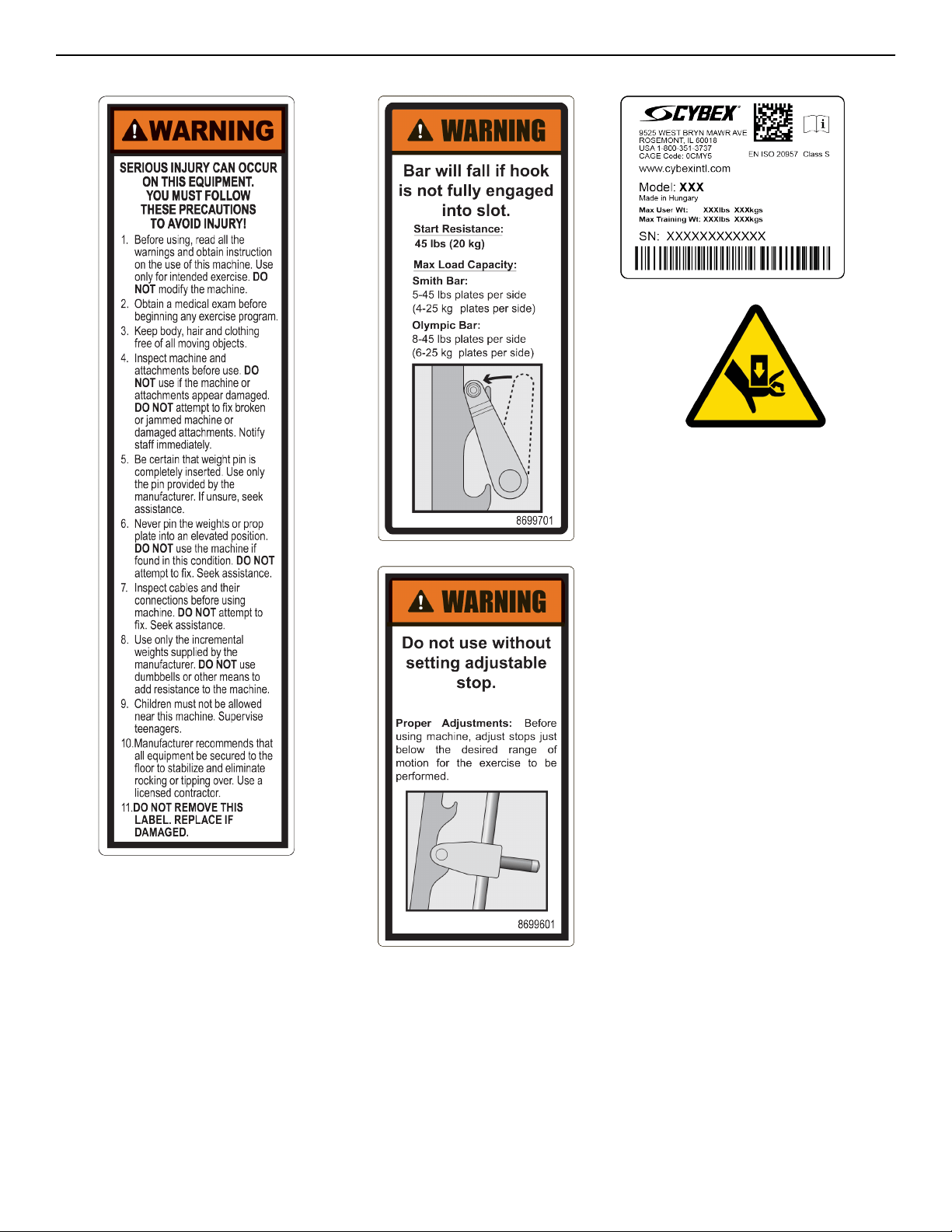
Product Labels
General Warning Bar Rack Warning
Bar Stop Warning
Serial Number
Pinch Hazard
Page 6 of 28
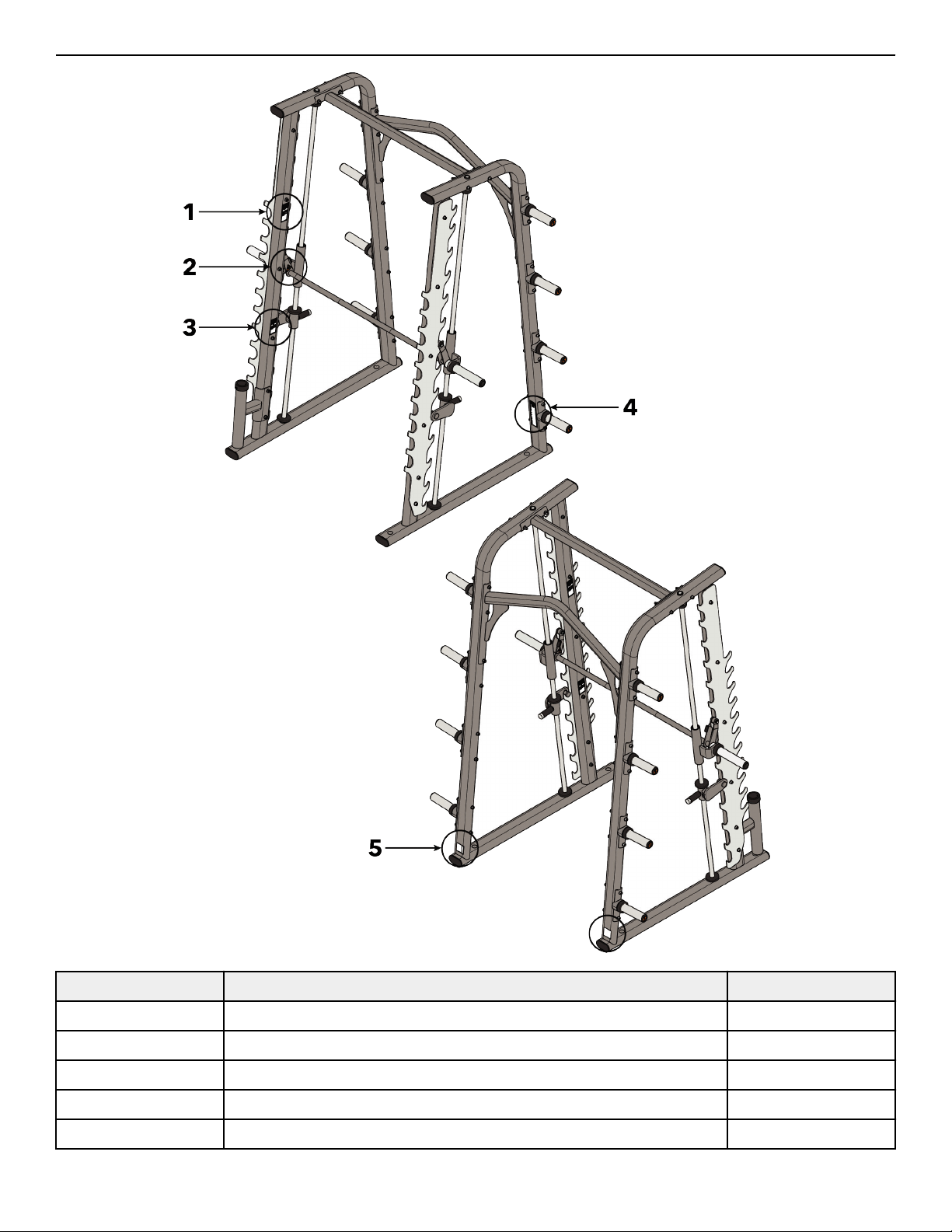
Label Locations
Item Description Qty.
1 Bar Rack Warning 2
2 Pinch Hazard 2
3 Bar Stop Warning 2
4 General Warning 1
5 Serial Number 2
Page 7 of 28
Assembly
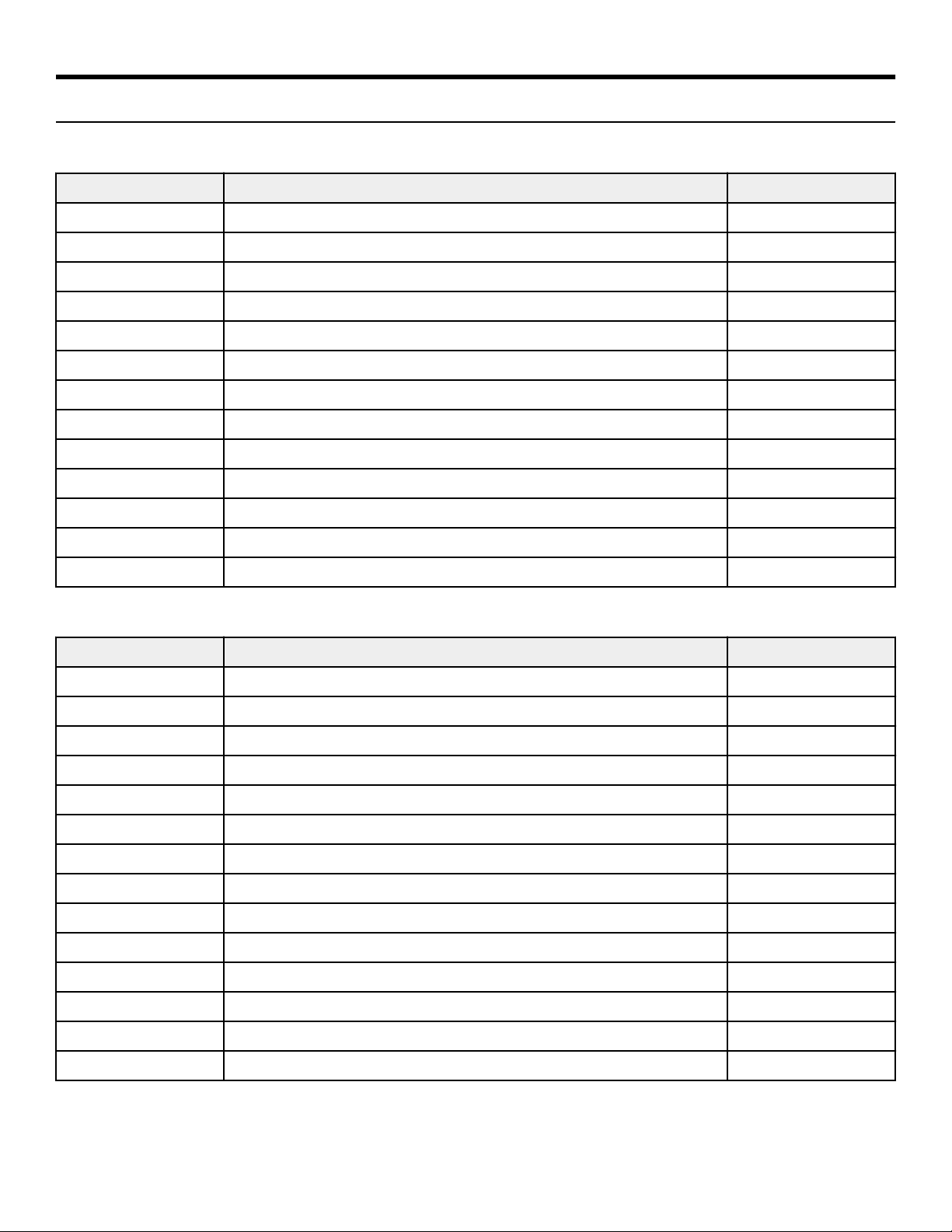
Component and Hardware List
Components
Item Description Qty.
1 Guide Rod 2
2 Top Cross Brace 1
3 Hook Plate 2
4 Right Carriage 1
5 User Bar 1
6 Adjustable Stop 2
7 Frame 1
8 Carriage 1
9 Right Frame 1
10 Weight Horn Assembly 8
11 Rear Cross Brace 1
12 Weight Horn Label Sheet 1
13 Bar Storage Assembly 1
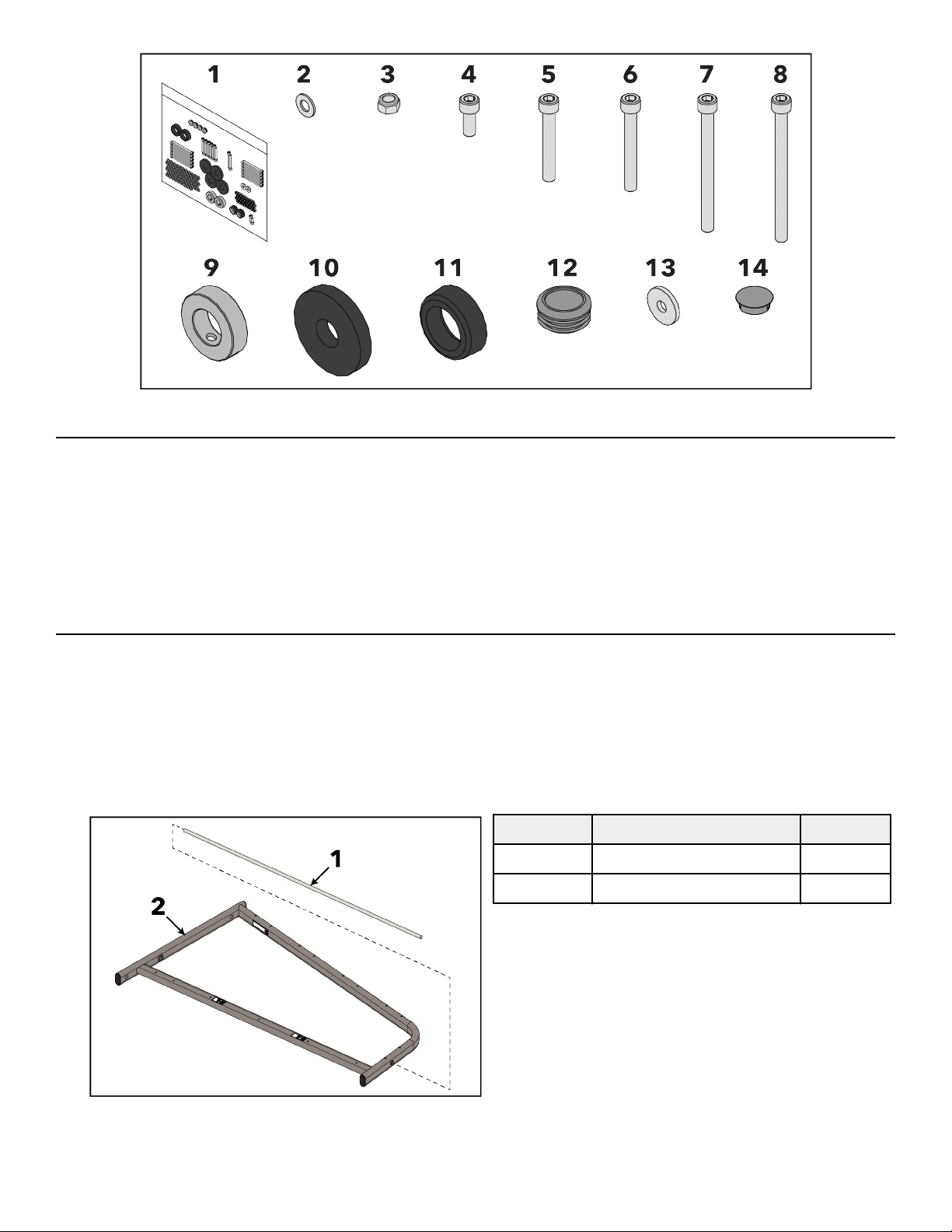
Hardware
Item Description Qty.
1 Hardware Pack 1
2 3/8" Flat Washer 64
3 M10 Hex Nylock Nut 32
4 M10 x 25mm Bolt 2
5 M10 x 70mm Bolt 10
6 M10 x 80mm Bolt 2
7 M10 x 120mm Bolt 10
8 M10 x 130mm Bolt 10
9 Collar 2
10 Carriage Bumper 4
11 Collar Bumper 2
12 Bar End Cap 2
13 Bar End Plate 2
14 Hole Plug 4
Page 8 of 28
Hardware
Tools Required
• 17 mm Socket wrench
• 17 mm Open end wrench
• 5 mm Allen wrench
• 7 mm Allen wrench
• 8 mm Allen wrench
• Torque wrench
• Rubber mallet
Assembly Procedure
Two people will be required for this procedure.
TIP: Read and understand all instructions thoroughly before assembling this unit. Check all items carefully. If there is damage, see the
Customer Service section of this manual for proper procedure to return, replace, or reorder parts.
Install Guide Rods
1. Lay right frame down on the ground.
2. Install guide rod through guide rod hole at the top of the frame.
Item Description Qty.
1 Guide Rod 1
2 Right Frame 1
3. Repeat steps for frame and guide rod.
Page 9 of 28
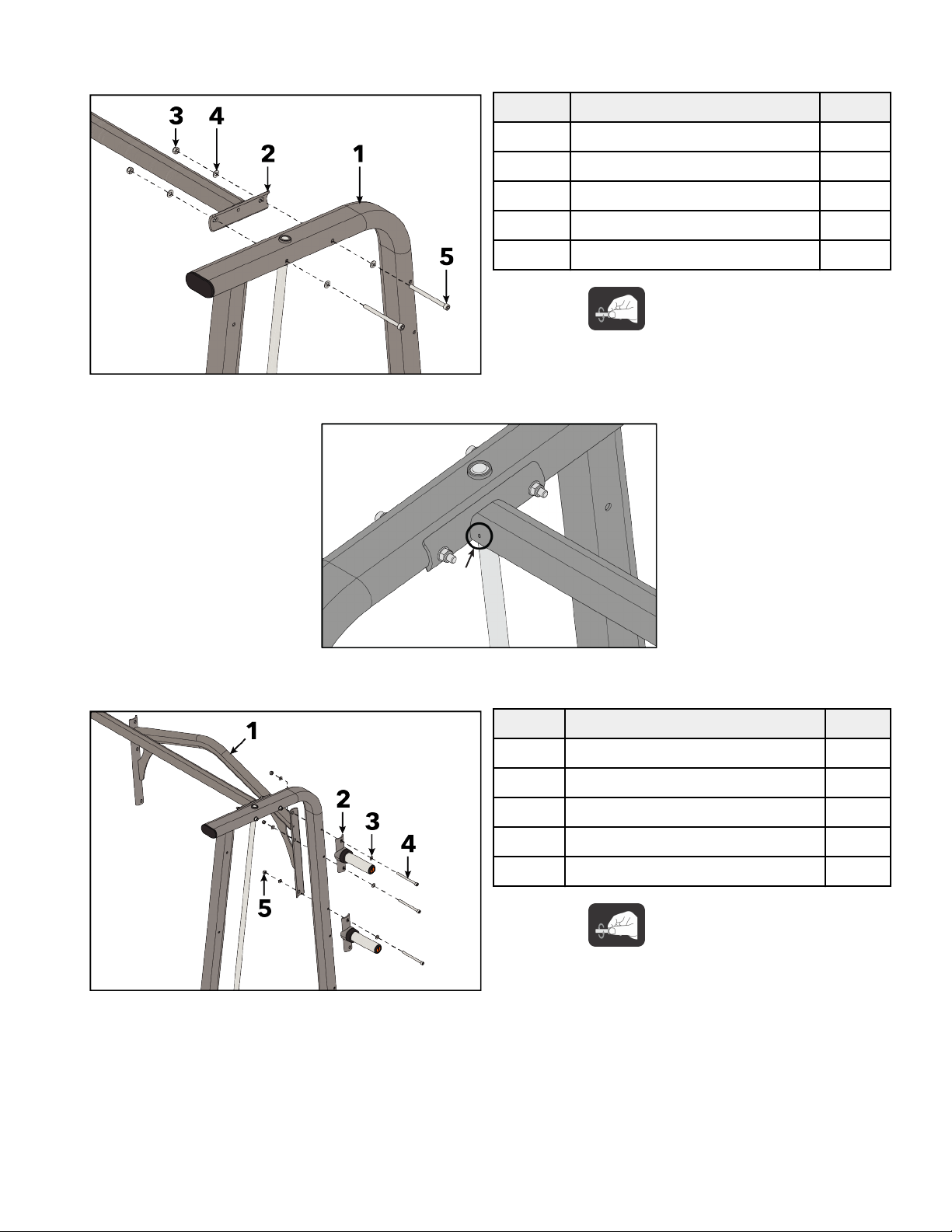
Assemble Frames
1. Install bolts, washers, and hex nuts securing top cross brace to right frame using an 8mm Allen wrench and 17mm wrench.
Item Description Qty.
1 Right Frame 1
2 Top Cross Brace 1
3 M10 Hex Nylock Nut 2
4 3/8" Flat Washer 4
5 M10 x 130mm Bolt 2
Hand tighten hardware.
NOTE: Make sure drain holes in top cross brace are facing the backs of the frames.
2. Install bolts, washers, and hex nuts securing rear cross brace and two weight horn assemblies to right frame using an 8mm Allen
wrench and 17mm wrench.
Item Description Qty.
1 Rear Cross Brace 1
2 Weight Horn Assembly 2
3 3/8" Flat Washer 6
4 M10 x 130mm Bolt 3
5 M10 Hex Nylock Nut 3
Hand tighten hardware.
3. Repeat steps 1 and 2 to install frame.
Page 10 of 28
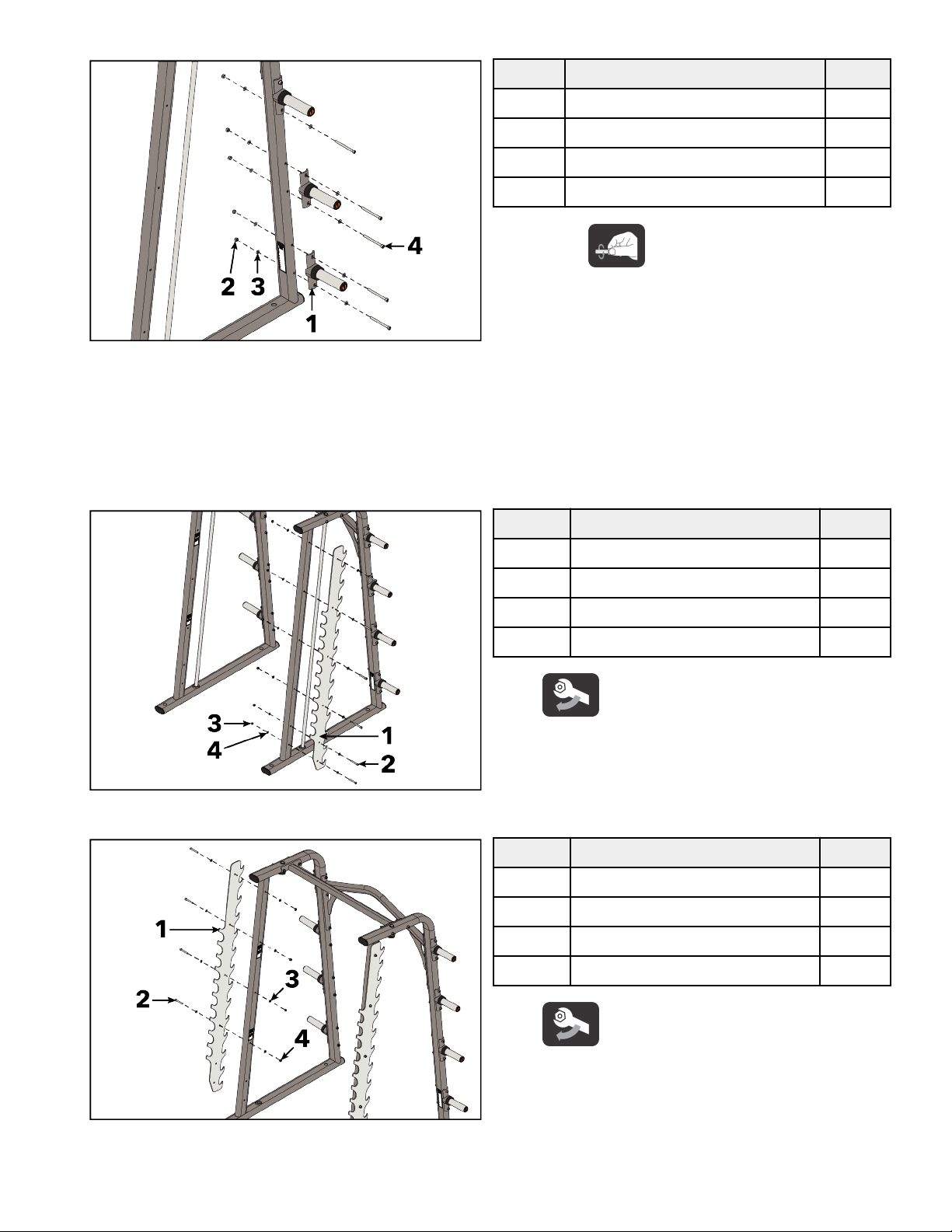
4. Install bolts, washers, and hex nuts securing weight horn assemblies to right frame using an 8mm Allen wrench and 17mm wrench.
Item Description Qty.
1 Weight Horn Assembly 2
2 M10 Hex Nylock Nut 5
3 3/8" Flat Washer 10
4 M10 x 120mm Bolt 5
Hand tighten hardware.
NOTE: Make sure arrow sticker on weight horn is pointing UP when installing the weight horns.
5. Repeat step 4 for frame.
6. Tighten all bolts to 20-25 (27-33 Nm).
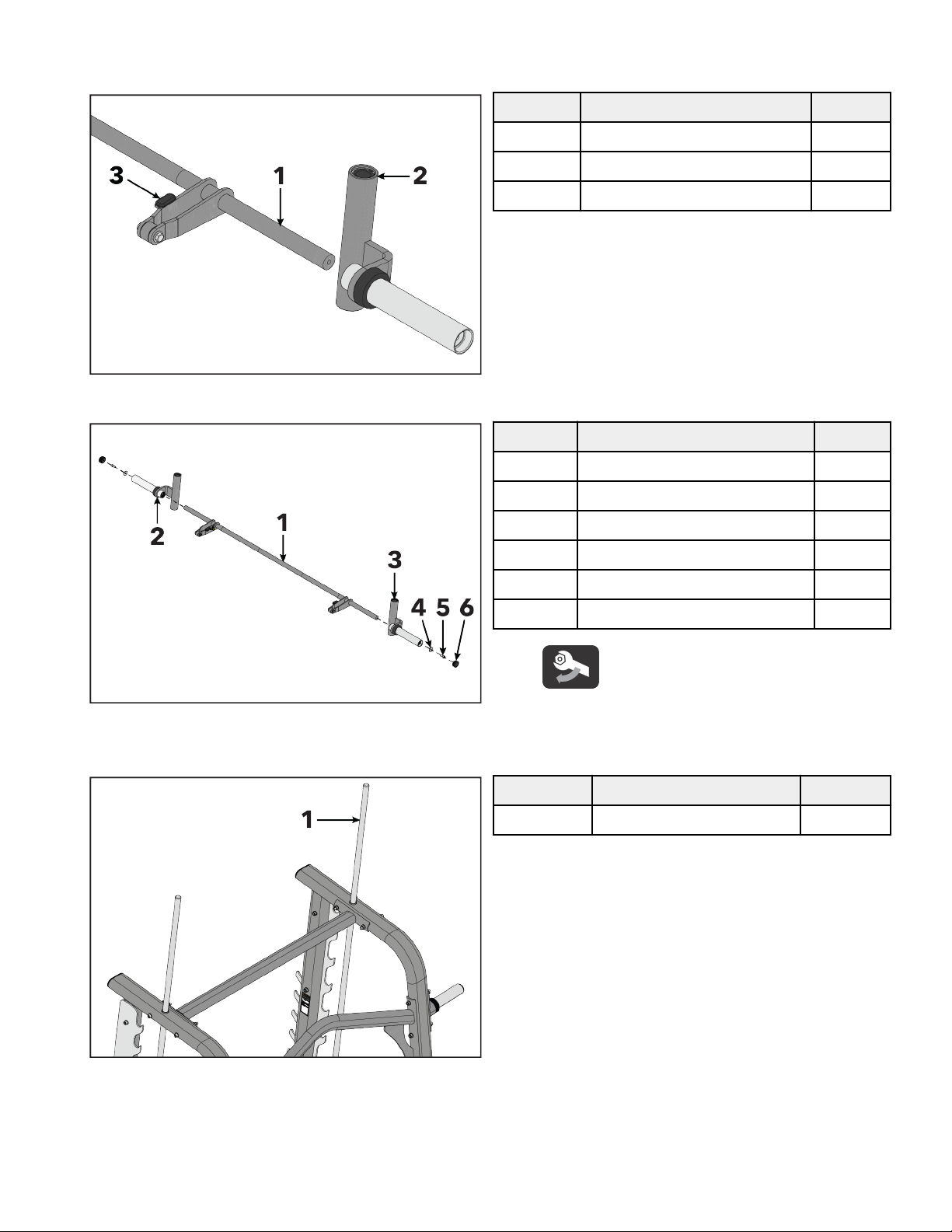
Install Hook Plates
1. Install bolts, washers, and hex nuts securing hook plate to right frame using an 8mm Allen wrench and 17mm wrench.
Item Description Qty.
1 Hook Plate 1
2 M10 x 70mm Bolt 6
3 M10 Hex Nylock Nut 6
4 3/8" Flat Washer 12
Tighten bolts to 20-25 (27-33 Nm).
2. Install bolts, washers, and hex nuts securing hook plate to frame using an 8mm Allen wrench and 17mm wrench.
Item Description Qty.
1 Hook Plate 1
2 M10 x 70mm Bolt 4
3 3/8" Flat Washer 8
4 M10 Hex Nylock Nut 4
Tighten bolts to 20-25 (27-33 Nm).
NOTE:
Do not install bolts to the bottom two holes of the hook plate on the side.
Page 11 of 28
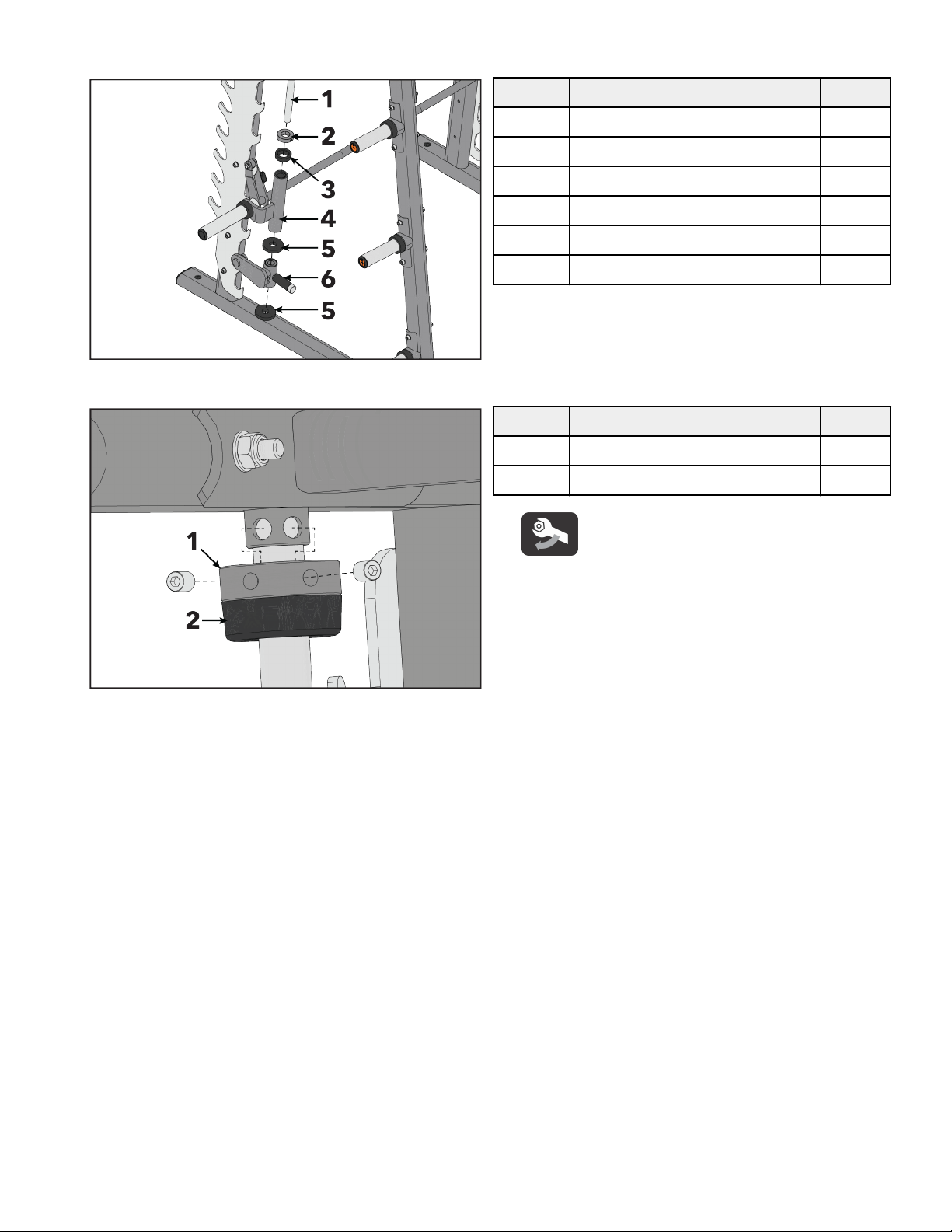
Install User Bar Assembly
1. Make sure rubber bumpers on the user bar are facing up, then slide and right carriages onto the user bar.
Item Description Qty.
1 User Bar 1
2 Carriage 1
3 Rubber Bumper 2
2. Install bolts securing bar end plates and carriages to user bar using an 8mm Allen wrench.
Item Description Qty.
1 User Bar 1
2 Right Carriage 1
3 Carriage 1
4 Bar End Plate 2
5 M10 x 25mm Bolt 2
6 Bar End Cap 2
Tighten bolts to 20-25 (27-33 Nm).
3. Install bar end caps using a rubber mallet.
4. guide rods up and out the tops of the frames.
Item Description Qty.
1 Guide Rod 2
Page 12 of 28
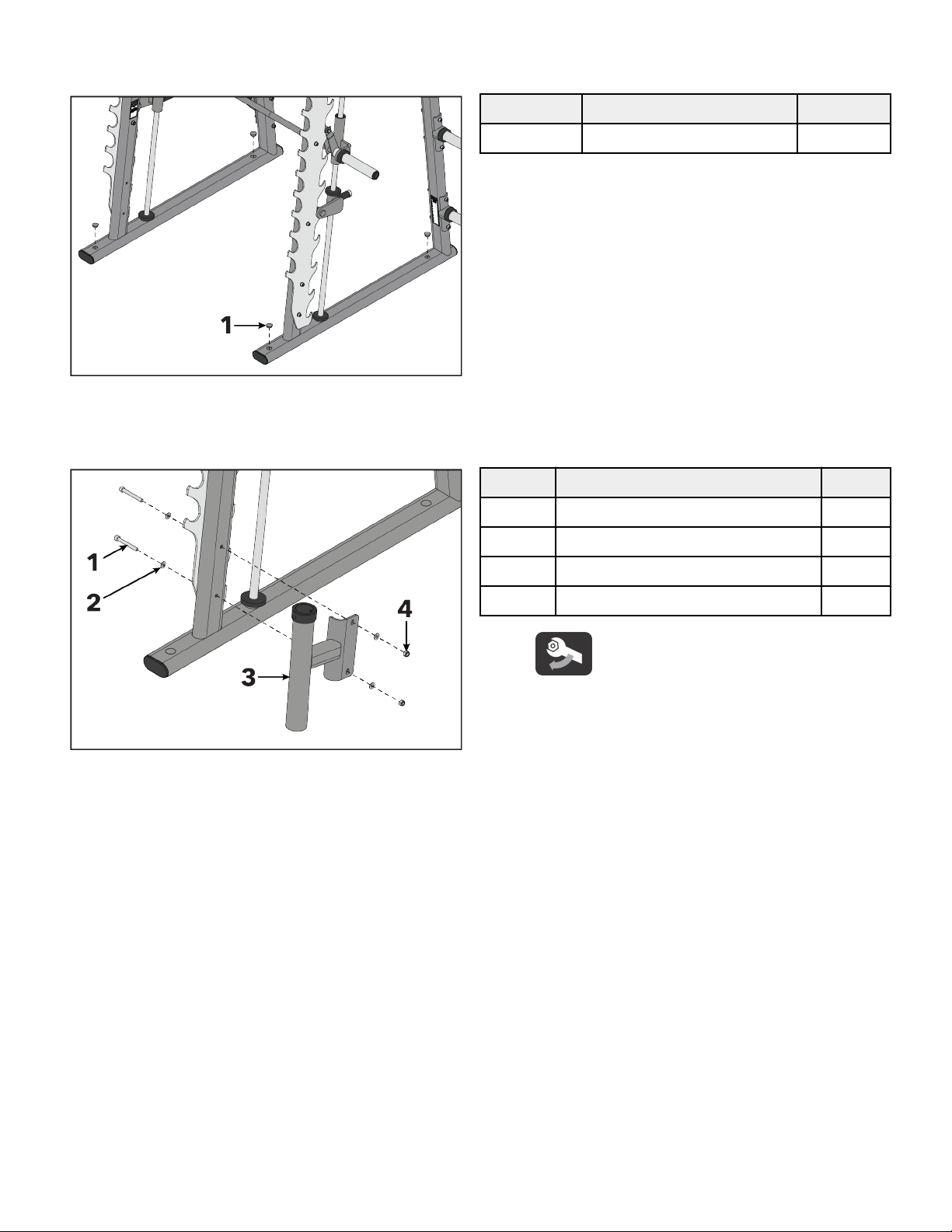
5. Install collar, collar bumper, user bar assembly, carriage bumpers, and adjustable stop to guide rods. Lower guide rods
to the bottom of the frames.
Item Description Qty.
1 Guide Rod 2
2 Collar 2
3 Collar Bumper 2
4 User Bar Assembly 1
5 Carriage Bumper 4
6 Adjustable Stop 2
6. Install collar and collar bumper to the tops of the and right frames using a 5mm Allen wrench.
Item Description Qty.
1 Collar 2
2 Collar Bumper 2
Tighten set screws to 8-10 (11-13.5 Nm).
Page 13 of 28
Install Hole Plugs
Install hole plugs to frames using a rubber mallet.
Item Description Qty.
1 Hole Plug 4
Install Bar Storage Assembly
Install bolts, washers, and hex nuts securing bar storage assembly to frame using an 8mm Allen wrench and 17mm wrench.
Item Description Qty.
1 M10 x 80mm Bolt 2
2 3/8" Flat Washer 4
3 Bar Storage Assembly 1
4 M10 Hex Nylock Nut 2
Tighten bolts to 20-25 (27-33 Nm).
Page 14 of 28
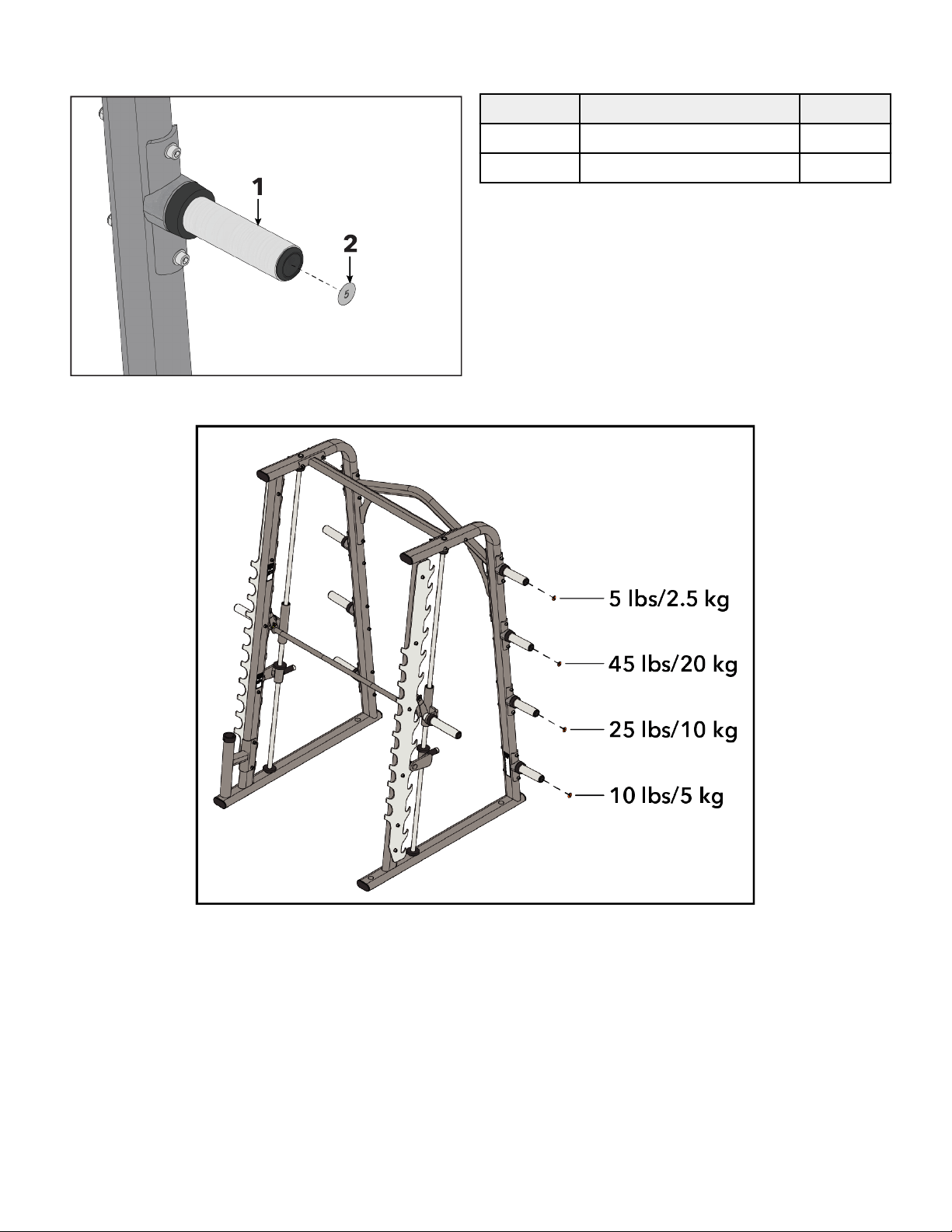
Install Weight Decals
Install weight decals to weight horns.
Item Description Qty.
1 Weight Horn 8
2 Weight Decal 8
NOTE: Weight decal placement.
Test Unit For Proper Operation.
Page 15 of 28
Product Information
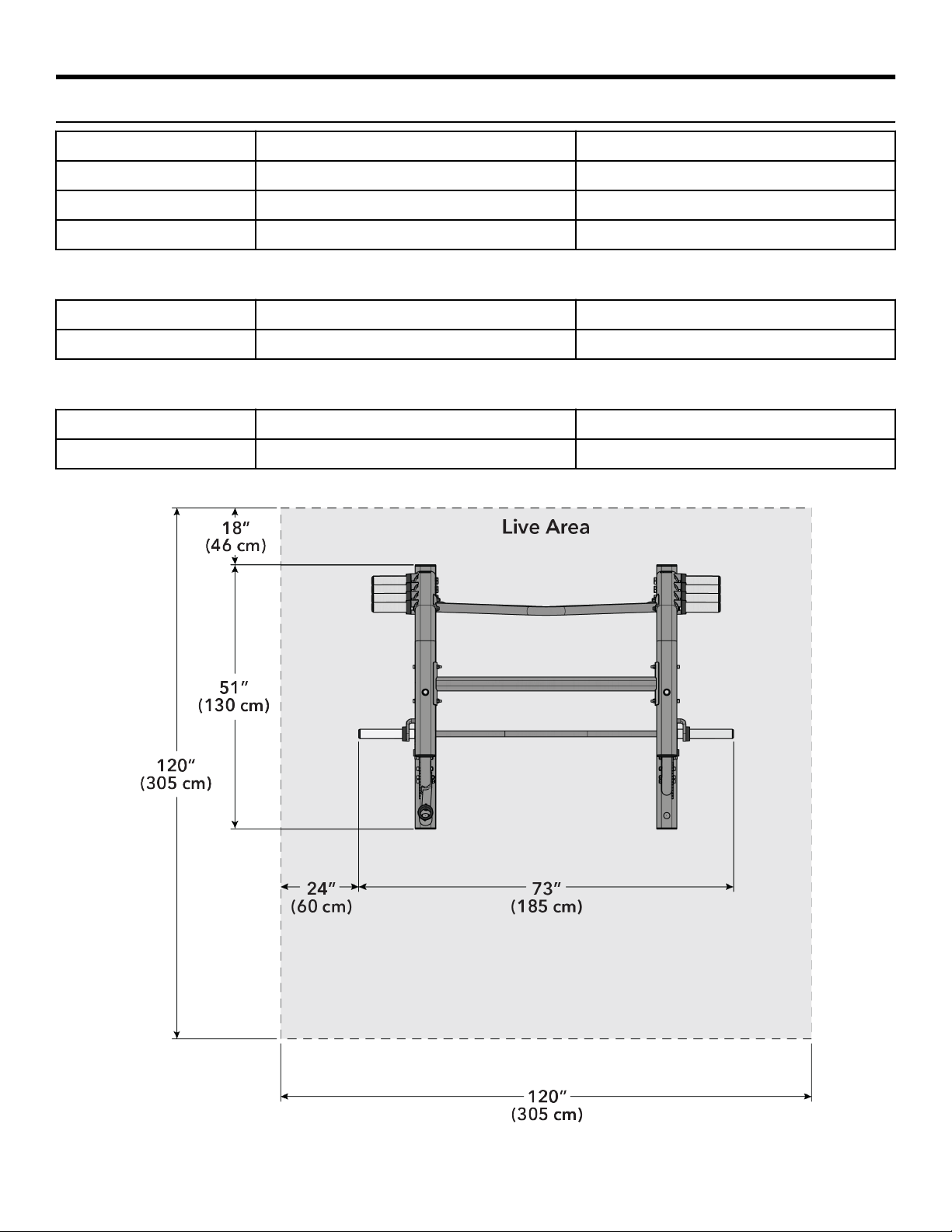
Specifications
Machine Weight: 398 lbs. 180 kg.
Size (L x W x H): in. = 51 x 73 x 88 cm = 130 x 185 x 223
Live Area (L x W): in. = 120 x 120 cm = 305 x 305
Training Weight: 495 lbs. 220 kg.
Smith Bar
Plate Capacity: 5-45 lb. plates per weight rod 4-25 kg. plates per weight rod
Start Resistance: 45 lbs. 20 kg.
Olympic Bar*
Plate Capacity: 8-45 lb. plates per weight rod 6-25 kg. plates per weight rod
Max Resistance: 765 lbs. 320 kg.
*Assuming a 45 lb. Olympic-Style Barbell
Page 16 of 28

Exercise
General Exercise Information
Intended Use
The intended commercial use of this machine is to aid exercise and improve general physical fitness. Multiple exercises can be
performed using this product. It is the responsibility of the owner to ensure exercisers understand general use and only perform
recommended exercises that do not compromise the stability of the product or put the user as risk.
Prior to Exercise
Prior to starting a training program, get a complete physical exam to make sure your physician agrees that you are ready. Always
warm-up your muscles before a workout. A cardio warm-up followed by stretching is typically recommended.
Start Your Program Conservatively
Choose weights you can easily in the first several weeks. Typically, a full range of motion is recommended, but consult a qualified
professional if you have questions about whether a full range of motion is appropriate for you due to existing limitations, injury or
discomfort. Injuries to health may result from incorrect or excessive training.
A “repetition” (rep) is defined as one complete movement through an exercise, returning to the start position. A “set” is a continuous
series of reps, usually between 6-15. During your workout the number of reps you perform in a set depends on your goal. To build
muscle and strength, fewer reps (6 - 8) with heavier weight is recommended in each set. To build endurance, more reps (12-15)
with lighter weight is typically recommended.
At the end of your workout, cool down in a similar way to your warm-up.
Performing the Exercises
General Movements
Adjust the bar to appropriate height for the exercise that will allow the ability to unrack and rack the bar catch. Adjust bar stops to the
appropriate height for the exercise. Load bar evenly with appropriate resistance. Unloaded bar = 45lbs (22kg).
Position yourself for the exercise to be performed and grasp the bar. bar and rotate to release the catch. the bar with
smooth and controlled movements. Lock bar by rotating until catch is fully engaged. Ensure bar catch is fully engaged over hook
before releasing grip on bar.
Bench Press
Muscles Used: Pectoralis and Triceps
Setup: The Bench Press exercise is performed with a bench placed under the bar. Sit on the bench facing away
from the machine. Lay down in a supine position with the head inside the machine and chest under the
bar. Grasp the bar with a shoulder width or wider overhand grip.
Movement: bar and rotate to release the catch. the bar with smooth and controlled movements. Lower
weight to chest and then press bar back up until arms are extended. Repeat. Lock bar by rotating until
catch is fully engaged. Ensure bar catch is fully engaged over hook before releasing grip on bar.
Page 17 of 28

Squat Press
Muscles Used: Quadriceps and Gluteus Maximus
Setup: Step into the machine and under the bar facing the rear of the machine. Position the bar securely on the
back of the shoulders and grasp the bar on both sides with a comfortable width grip.
Movement: bar and rotate to release the catch. the bar with smooth and controlled movements. Squat
down by bending hips back while allowing the knees to bend forward, keeping back straight. Descend
until thighs are near parallel to the floor or as low as your comfortable range of motion allows. Maintaining
a straight back, the bar by extending at both the knees and hips until legs are straight. Repeat. Lock bar
by rotating until catch is fully engaged. Ensure bar catch is fully engaged over hook before releasing grip
on bar.
Page 18 of 28
Maintenance Procedures
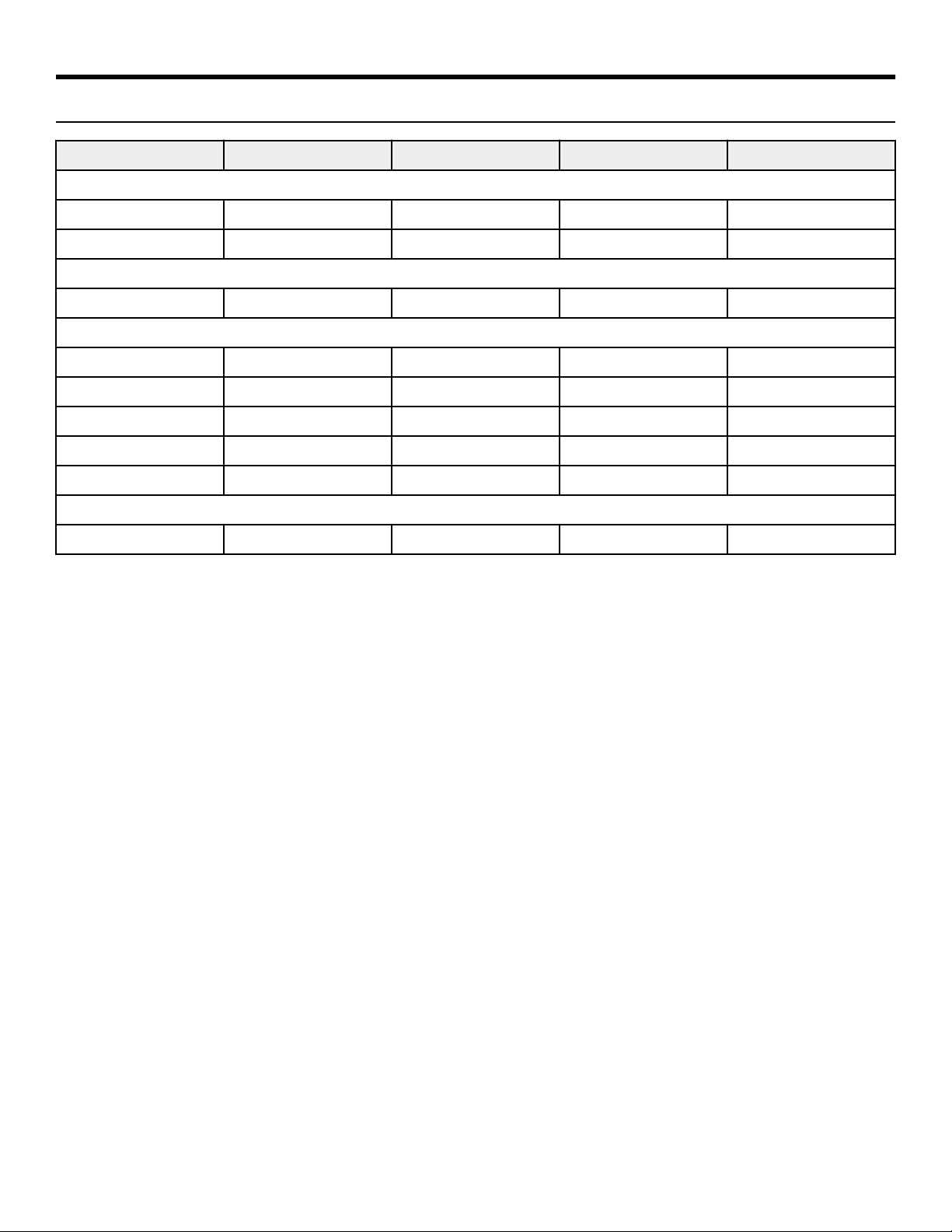
Maintenance Schedule
ACTION DAILY WEEKLY MONTHLY AS NEEDED
CLEAN
Guide Rods X
Hand Grips X
WAX
Frames X
INSPECT
Paint X
Hardware X
Frame X
Hand Grips X
Drop Stops X
LUBRICATE
Guide Rods X
Clean
• Guide rods with a cotton cloth.
• Hand grips with an approved or compatible cleaner.
Wax
• Frames with a standard, non-abrasive, wax finish.
Inspect
• Hardware. Check for loosening. Tighten as required.
• Frames. Inspect for wear and damage.
• Handgrips. Check for wear and damage.
• For paint chips. Fill in immediately with manufacturers touch-up paint.
• Drop stops. Check for any signs of cracking or fatigue.
Lubricate
• Lubricate guide rods with Break-Free® brand lubricant (part number SK50-P0005-0000). Apply the lubricant to a cotton cloth, and
then run the cotton cloth up and down the guide rods as needed.
NOTE: Only a few drops of lubricant are required for each guide rod.
Once a Week
• Visually inspect all hardware for loosening, tampering or wear.
• Check condition of hand grips.
• Inspect drop stop for any signs of cracking or fatigue.
Once a Month
• Clean guide rods with Break-Free® brand lubricant (part number SK50-P0005-0000). Clean tops of bearings at stack and inspect for
heavy buildup on rods below the head plate. half of stack and do a visual inspection, then clean as necessary.
• Inspect hardware on all machines and tighten any bolts or nuts that may have loosened over the life of the product.
Page 19 of 28

Notes
• Use polishing compound (such as car wax) and remove shoe from powder coated surfaces as necessary.
Approved and Compatible Cleaners
Two preferred cleaners have been approved by reliability experts: PureGreen 24 and Gym Wipes. Both cleaners will safely and
remove dirt, grime and sweat from equipment. PureGreen 24 and the Antibacterial Force formula of Gym Wipes are both
disinfectants that are against MRSA and H1N1.
PureGreen 24 is available in a spray which is convenient for gym to use. Apply the spray to a microfiber cloth and wipe down the
equipment. Use PureGreen 24 on the equipment for at least 2 minutes for general disinfection purposes and at least 10 minutes for
fungus and viral control.
Gym Wipes are large, durable pre-moistened wipes to use on the equipment before and workouts. Use Gym Wipes on the
equipment for at least 2 minutes for general disinfection purposes.
Contact Customer Support Services to order these cleaners (1-800-351-3737 or email: customersupport@lifefitness.com).
Mild soap and water or a mild non-abrasive household cleaner can also be used to clean the display and all exterior surfaces. Use a
microfiber cloth only. Apply the cleaner to the microfiber cloth before cleaning. DO NOT use ammonia or acid based cleaners. DO
NOT use abrasive cleaners. DO NOT use paper towels. DO NOT apply cleaners directly to the equipment surfaces.
Removal of Paint, Marking Pens, or Labels
• Butyl cellosolve works well for removal of paints, marking pen inks, lipstick, etc.
• Labels, stickers, etc. may be removed using kerosene. When the solvent will not penetrate sticker material, apply heat (hair dryer)
to the adhesive and promote removal. GASOLINE SHOULD NOT BE USED.
Page 20 of 28
Warranty
What is Covered
This Life Fitness Family of Brands commercial exercise equipment product is warranted to be free of all defects in material and
workmanship.
Who is Covered
The original purchaser or any person receiving the product as a from the original purchaser.
Who Pays Transportation and Insurance For Service
If the Product or any covered part must be returned to a service facility for repairs, We, Life Fitness Family of Brands, will pay all
transportation and insurance charges for the first year. You are responsible for transportation and insurance charge the first year.
What We Will Do To Correct Covered Defects
We will ship to you any new or rebuilt replacement part or component, or at our option, replace the Product. Such replacement parts
are warranted for the remaining portion of the original warranty period.
What is Not Covered
Any failures or damage caused by unauthorized service, misuse, accident, negligence, improper assembly or installation, debris
resulting from any construction activities in the Product’s environment, rust or corrosion as a result of the Product’s location,
alterations or modifications without our written authorization, or by failure on your part to use, operate and maintain the Product as
set out in your Operation Manual.
All terms of this warranty are void if this product is moved beyond the continental borders of the United States of America (excluding
Alaska, Hawaii and Canada) and are then subject to the terms provided by that country’s local authorized Life Fitness Family of Brands
representative.
Owner's Manual
It is VERY IMPORTANT THAT YOU READ THIS MANUAL before operating the Product. Remember to perform the periodic maintenance
requirements specified in the Manual to assure proper operation and your continued satisfaction.
Exclusive Warranty
THIS LIMITED WARRANTY IS IN LIEU OF ALL OTHER WARRANTIES OF ANY KIND EITHER EXPRESSED OR IMPLIED, INCLUDING BUT NOT
LIMITED TO THE IMPLIED WARRANTIES OF MERCHANTABILITY AND FITNESS FOR A PARTICULAR PURPOSE, AND ALL OTHER
OBLIGATIONS OR LIABILITIES ON OUR PART. We neither assume nor authorize any person to assure for us any other obligation or
liability concerning the sale of this Product. Under no circumstances shall we be liable under this warranty, or otherwise, of any
damage to any person or property, including any lost profits or lost savings, for any special, indirect, secondary, incidental or
consequential damages of any nature arising out of the use of or inability to use this Product. Some states do not allow the exclusion
or limitation of implied warranties or of liability for incidental or consequential damages, so the above limitations or exclusions may
not apply to you. Warranty coverages and terms may outside the United States. Please contact the Life Fitness servicing
your country (contact information found at the front of this manual) or visit the applicable local Life Fitness website to receive the
specific warranty information for your country.
Changes in Warranty Not Authorized
No one is authorized to change, modify or extend the terms of this limited warranty.
Eects of State Laws
This warranty gives you specific legal rights, and you may have other rights which vary from state to state and country by country.
Page 21 of 28
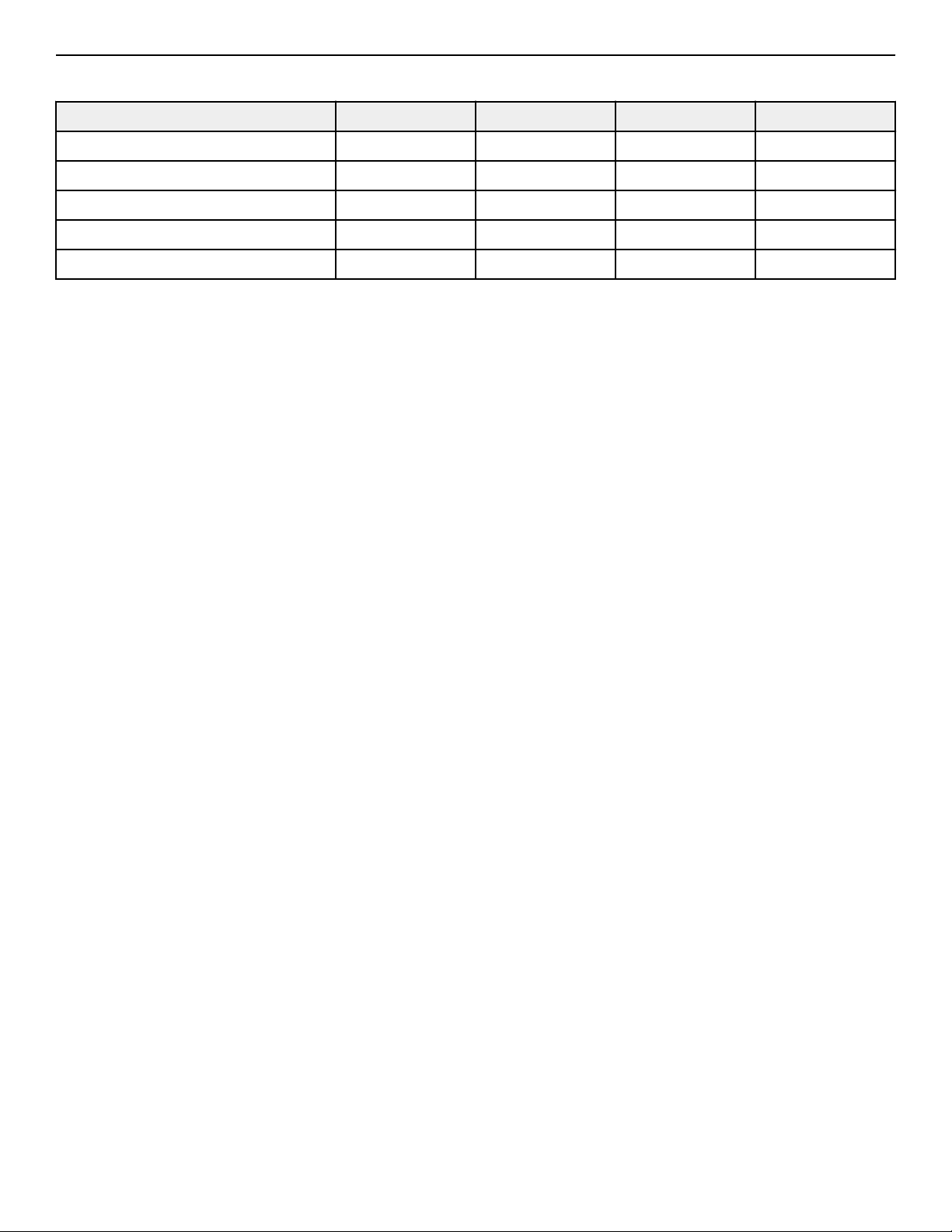
Warranty Coverage
NOTE: There is no warranty coverage for labor on Strength Products.
Item 10 Years 5 Years 1 Year 90 Days
Frame X
Guide Rods X
Grips X
Hardware / Mechanical X
Items Not Specified X
Page 22 of 28

Bolt to Floor Guide
Introduction
Cybex designs its products to be stable when used as designed. Because strength training is dynamic, we cannot predict how users will
ultimately use the products in all circumstances. Therefore, Cybex recommends that strength training equipment be secured to a solid,
level surface to stabilize and eliminate rocking or tipping over.
Each new unit shipped comes with a multi-language hangtag stating the importance of bolting the unit down as a safety precaution.
It is the facility’s responsibility to adhere to local and regional building codes.
Delivery and Installation Tips
All Anchors
• Fasteners must have minimum embedment in concrete floor, not including screed, regardless of wood/tile/rubber over sub-floor.
(See Anchor Types for maximum sub-floor thickness between unit and concrete to equipment foot must be made of flooring or
other material (i.e. no air gaps)).
• DO NOT reuse fasteners. Static and Dynamic anchors are designed for one-time use only.
• Factor in equipment’s feet height when selecting fastener length.
• Factor in flooring thickness when selecting fastener length.
• It is also recommended to drill an additional 1/2” (12.7 mm) of depth beyond the length of the fastener being used to ensure that
debris does not block the entry of the anchor.
• Minimum concrete compressive strength: 3000 psi (20 N/mm2).
Anchoring
• All anchors must have a minimum embedment into concrete, regardless of wood/tile/rubber/screed over sub-floor.
• Dynamic anchors must have a minimum embedment depth in concrete to ensure maximum security and pull out force. See Anchor
Types for embedment depth minimums.
Building Codes
It is the facility’s responsibility to adhere to local and regional building codes. Please verify with the customer to ensure that they are
aware of this.
Carpeting
If bolted down to carpet flooring, be sure to use a box cutter knife to cut the carpet threads around each foot. This will help avoid the
carpet threads from being wrapped around and pulled by the drill bit.
Competitor Product
The bolt down guidelines and procedures for Cybex products were determined by the company’s Engineering and Installation
Development groups. These guidelines include which anchors to use and positioning of the anchors are required for Cybex product.
• Cybex does not have that level of specification or engineering input for competitive product.
• Cybex installation teams are not permitted to anchor competitor equipment.
Drilling
It is also recommended to drill an additional 1/2” (12.7 mm) of depth beyond the length of the fastener being used to ensure that
debris does not block the entry of the anchor.
• This can be done by marking your drill bit with a piece of tape.
• While it is recommended that a vacuum be used to clean up debris, this will not account for all the debris that will settle at the
bottom of the drilled hole.
Page 23 of 28
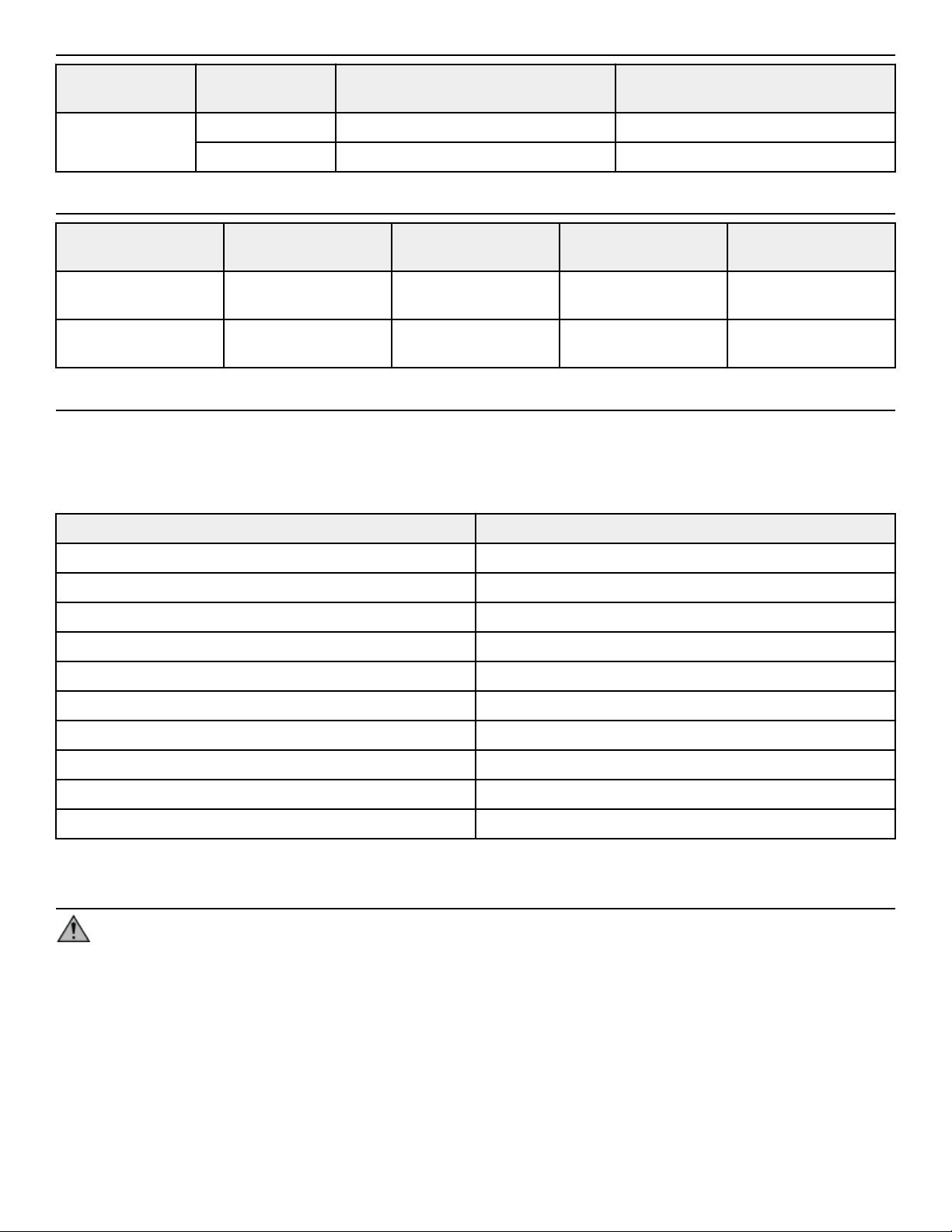
Anchor Types
Anchor Subfloor between unit and concrete 0”
to 1/2” (12.7mm) thick
Subfloor between unit and concrete
over 1/2” (12.7mm) thick
Static Imperial KH-EZ 1/4” x 4” KH-EZ 1/4” x 5”
Metric HUS-H 6mm x 120mm HUS-H 6mm x 150mm
Anchor Specifications
Static Anchor Minimum Concrete
Thickness
Minimum Drill Depth in
Concrete
Minimum Concrete
Embedment
Minimum concrete
compressive strength
KH-EZ 1/4” 4-1/8” (105mm) 1/2” (12.7mm) beyond
anchor length
2-1/2” (63.5mm) 3000psi (20 N/mm2)
HUS-H 6mm 3-3/32" (100mm) 25/64" (10mm) beyond
anchor length
2-1/64” (55mm) 3000psi (20 N/mm2)
Pullout Force
Cybex specifies Hilti
™
static and dynamic anchors. According to the anchor manufacturer, the recommended design pullout force (in
tension) for the specified anchors, when properly installed in cracked concrete, is provided in the side table. This table should be used
for reference only; for additional and up-to-date information on the anchor capabilities or the design pullout force in other substrates,
please consult Hilti directly at https://www.us.hilti.com.
Selected Anchor Design Resistance in Tension *
KH-EZ ¼” x 4” 830 lb
HUS-H 6MM x 120MM 3.3 kN
KH-EZ 3/8” x 4” 1535 lb
KH-EZ 3/8” x 5” 1535 lb
HUS-H 8MM x 120MM 3.3 kN
HUS-H 8MM x 150MM 3.3 kN
HSL-3 M 8/40 2000 lb
HST M12 x 115/20 8 kN
HST M12 x 195/200 8 kN
KB-TZ 3/8” x 3-3/4” 1615 lb
* Design strength extracted from the Hilti Anchor Fastening Technology Manual issued September 2014.
Tools Required
WARNING: Adhere to manufacturer’s equipment warnings and guidelines. Follow manufacturer’s instructions for proper
usage.
Static Anchor
• Floor scanner / rebar detector (optional)
• 1” L-shape SDS rotary hammer
• 1/4" x 12" (6mm x 305mm) carbide drill bit (for 1/4” (6mm)
anchors)
• 3/8" x 12" (8mm x 305mm) carbide drill bit (for 3/8” (8mm)
anchors)
• Safety glasses
• Extension cord
• Impact wrench
• Vacuum (for debris)
Page 24 of 28
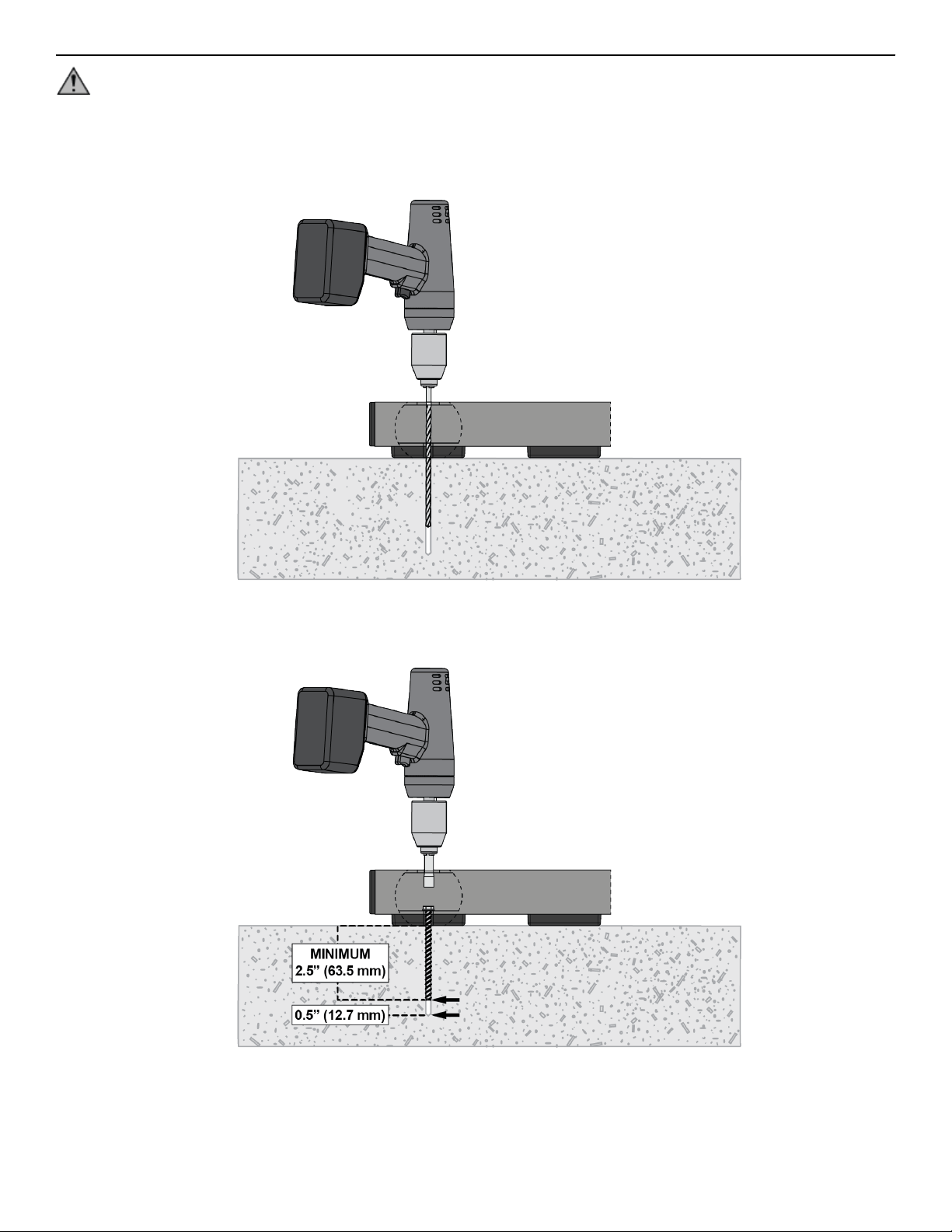
Static Anchor Procedure
CAUTION: If it is possible that the length of your bolt will not provide the minimum requirement of 2.5” (63.5mm) of
engagement, a longer anchor should be used.
1. Place unit into position to be mounted and cycle unit to set stance.
2. Each foot must get at least one static fastener.
3. Wearing protective glasses, drill down into the flooring to the required depth as perpendicular as possible, ensuring that the foot
thickness is being accounted for; refer to Anchor Selection and Foot Dimensions.
4. Insert fastener and tighten to 18 Foot-Pounds (24Nm) for 1/4” (6mm) anchor or 40 Foot-Pounds (54Nm) for 3/8” (8mm) anchor.
NOTE: If the legs/frame do not contact the mounting surface DO NOT pull down with the fastener or anchor. Loosen frame
hardware and re-tighten to allow machine to align.
Page 25 of 28
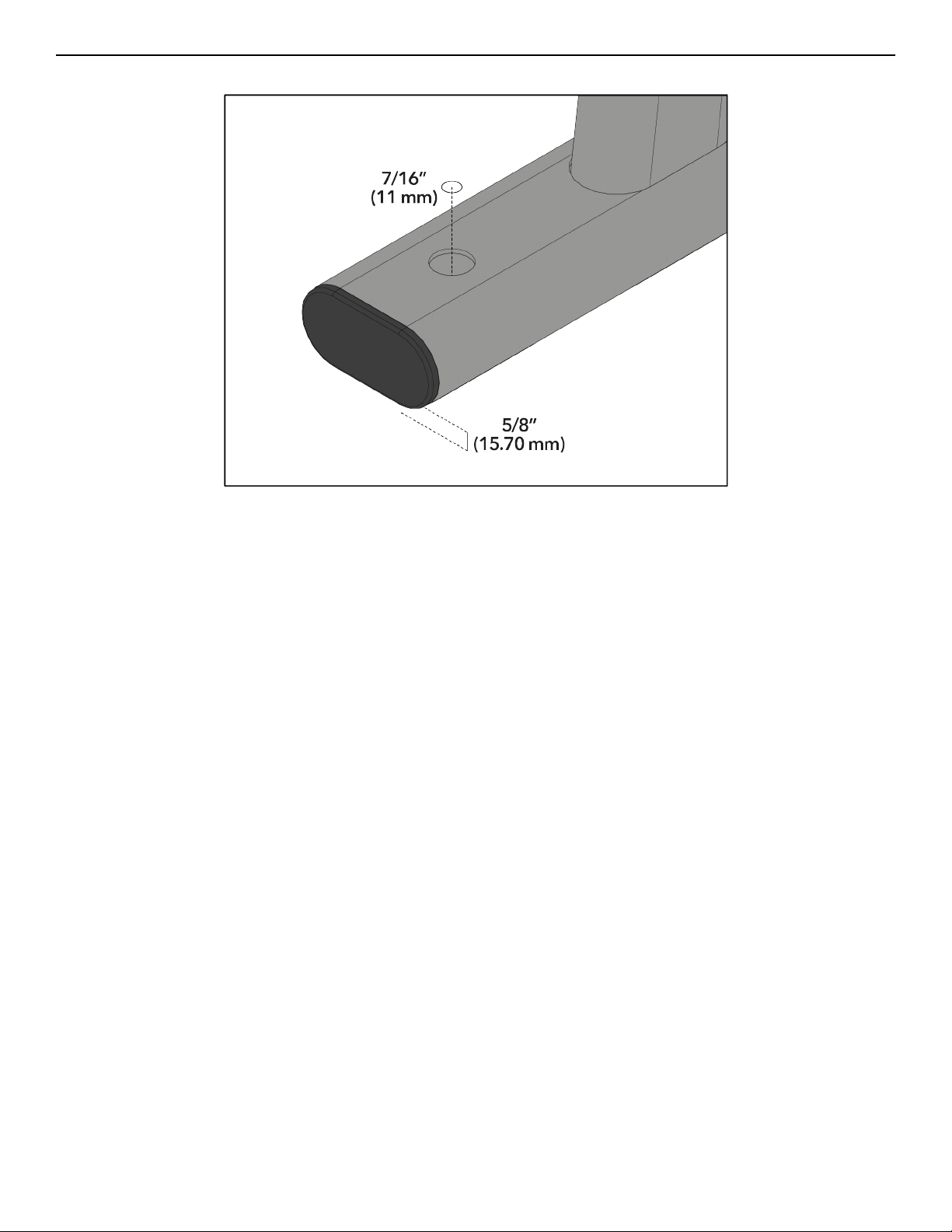
Foot Dimensions
Use below image to determine foot specifications.
Page 26 of 28


Columbia Center III - 9525 West Bryn Mawr Ave, Rosemont, IL 60018 • 800-351-3737 • 847-288-3700 • FAX 800-216-8893
www.cybexintl.com