
www.lg.com
OWNER'S MANUAL
LG CLOUD T SERIES BOX
CBT42
Please read the safety information carefully before using the product.
LG Cloud T Series Box Model List
ENG

2
ENG
English
Table of Contents
3 ASSEMBLING AND
PREPARING
3 Unpacking
4 PartsandButtons
5 ProductInstallation
5 - UsinginHorizontalPosition
5 - UsinginVerticalPosition
5 - MountingontheBackoftheMonitor
6 CONNECTING LAN/
PERIPHERALS
6 - LANConnection
6 - DVIConnection
7 - ExtendedMonitorConnection
7 - Peripheraldeviceconnection
9 TROUBLESHOOTING
10 SPECIFICATIONS
10 PowerIndicator
3
ENG
English
ASSEMBLING AND PREPARING
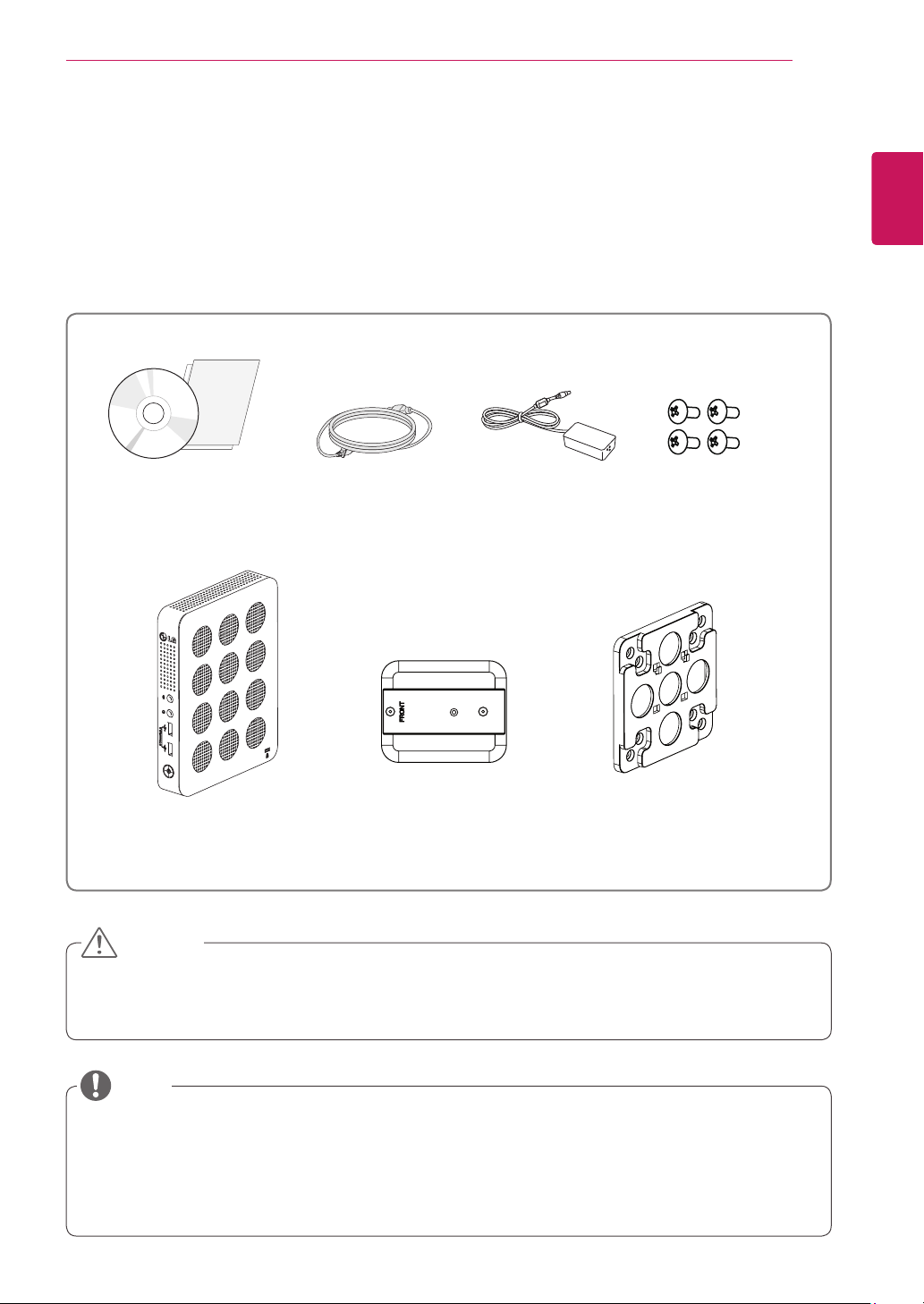
MainUnit StandBase MountBracket
PowerCordOwner'sManual/Card
FourScrews
AC/DCAdapter
ASSEMBLING AND PREPARING
Unpacking
Pleasecheckwhetherallthecomponentsareincludedintheboxbeforeusingtheproduct.Ifthereare
missingcomponents,contacttheretailstorewhereyoupurchasedtheproduct.Notethattheproductand
componentsmaylookdifferentfromthoseshownhere.
OnlyuseanapprovedLGpoweradapter.
Damagecausedbyotherpoweradaptersisnotcoveredbywarranty.
Notethatthecomponentsmaylookdifferentfromthoseshownhere.
Withoutpriornotice,allinformationandspecificationsinthismanualaresubjecttochangetoimprove
theperformanceoftheproduct.
Topurchaseoptionalaccessories,visitanelectronicsstoreoronlineshoppingsiteorcontacttheretail
storewhereyoupurchasedtheproduct.
CAUTION
NOTE
4
ENG
English
ASSEMBLING AND PREPARING
Parts and Buttons
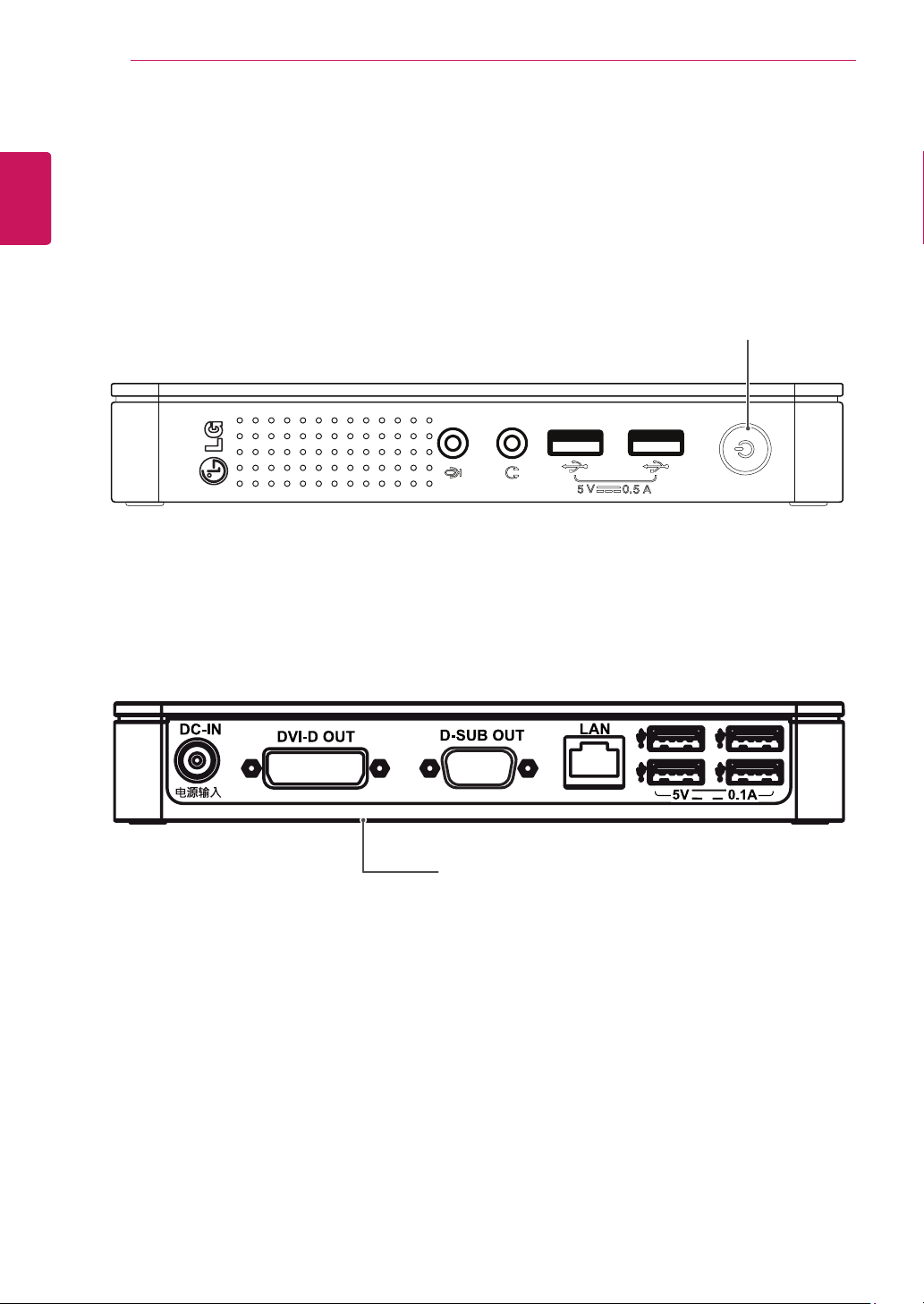
Power Indicator &
Power Button
On:PowerOn
Off:PowerOff
InputConnectors
Front Side
Rear Side
5
ENG
English
ASSEMBLING AND PREPARING
Product Installation
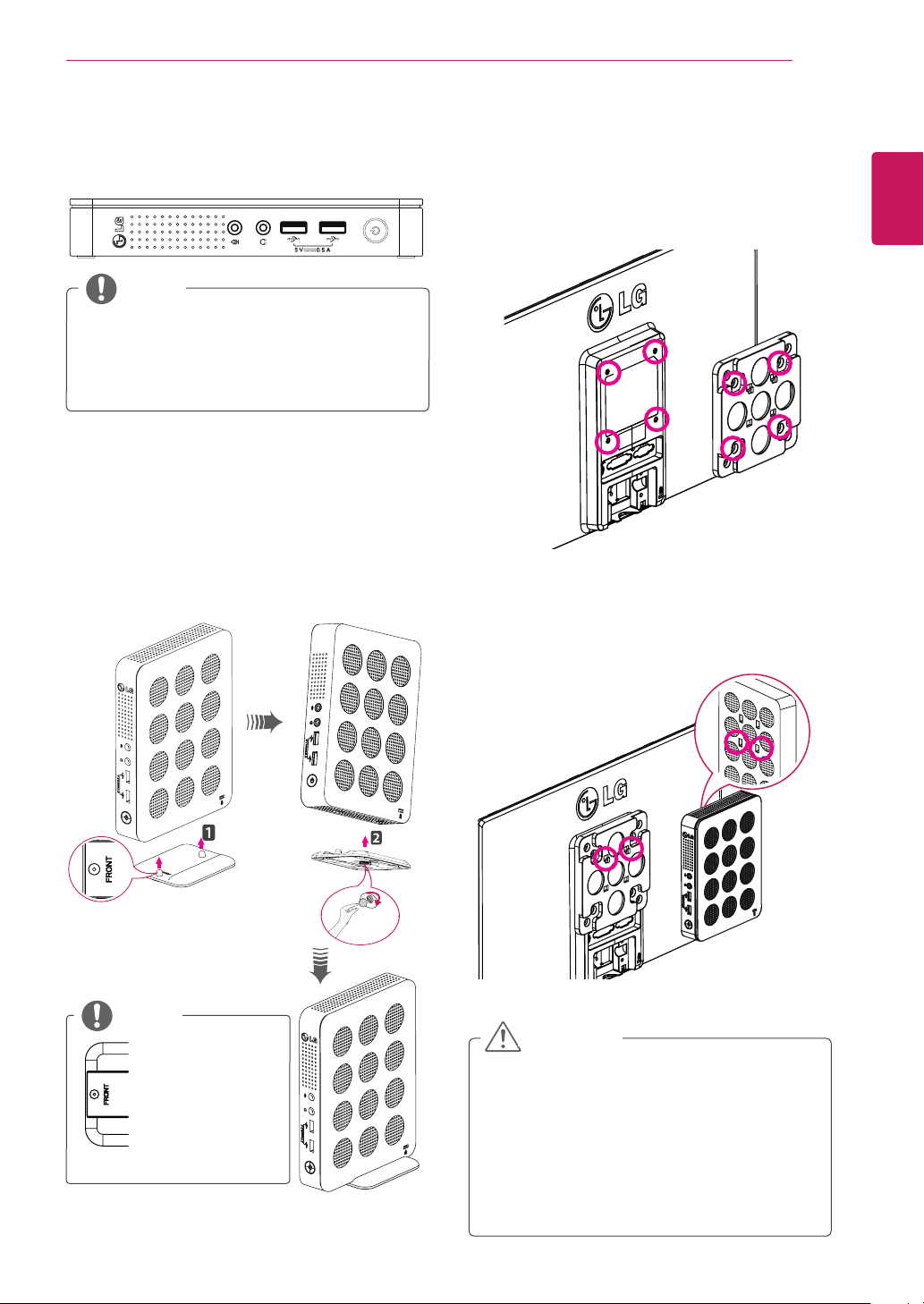
Using in Horizontal Position
Using in Vertical Position
1
Firmlyattachthestandonthebottomofthe
productasillustratedbelow.
2
Usingacoin,turnthescrewclockwiseto
securethestandbase.
Mounting on the Back of the
Monitor
1
Fixthemountbracketonthebackofthe
monitorwith4screwsasillustratedbelow.
2
Puttheproductonthetwolatchesasillustrated
below.
Assembletheproductbyaligningthebelow
twoholesoutof4holesontheproduct.
Attachthestand
basetothe
standhingewith
itsfrontpartfac-
ingforward.
Ifthisproductisusedwithupsidedown,it
maynotworkproperly.
UsetheproductwiththeKensingtonlock
facingupward.
NOTE
Theproductmaynotbemountedonsome
monitorswithmountbracket.
-Inthiscase,usetheproductinhorizontal
orverticalposition.
Whenconnectingtheperipheralsafter
mountingtheproductonthemonitor,be
suretoholdtheproduct.
CAUTION
NOTE
6
ENG
English
Connecting LAN/Peripherals
CONNECTING LAN/PERIPHERALS
DVI Connection
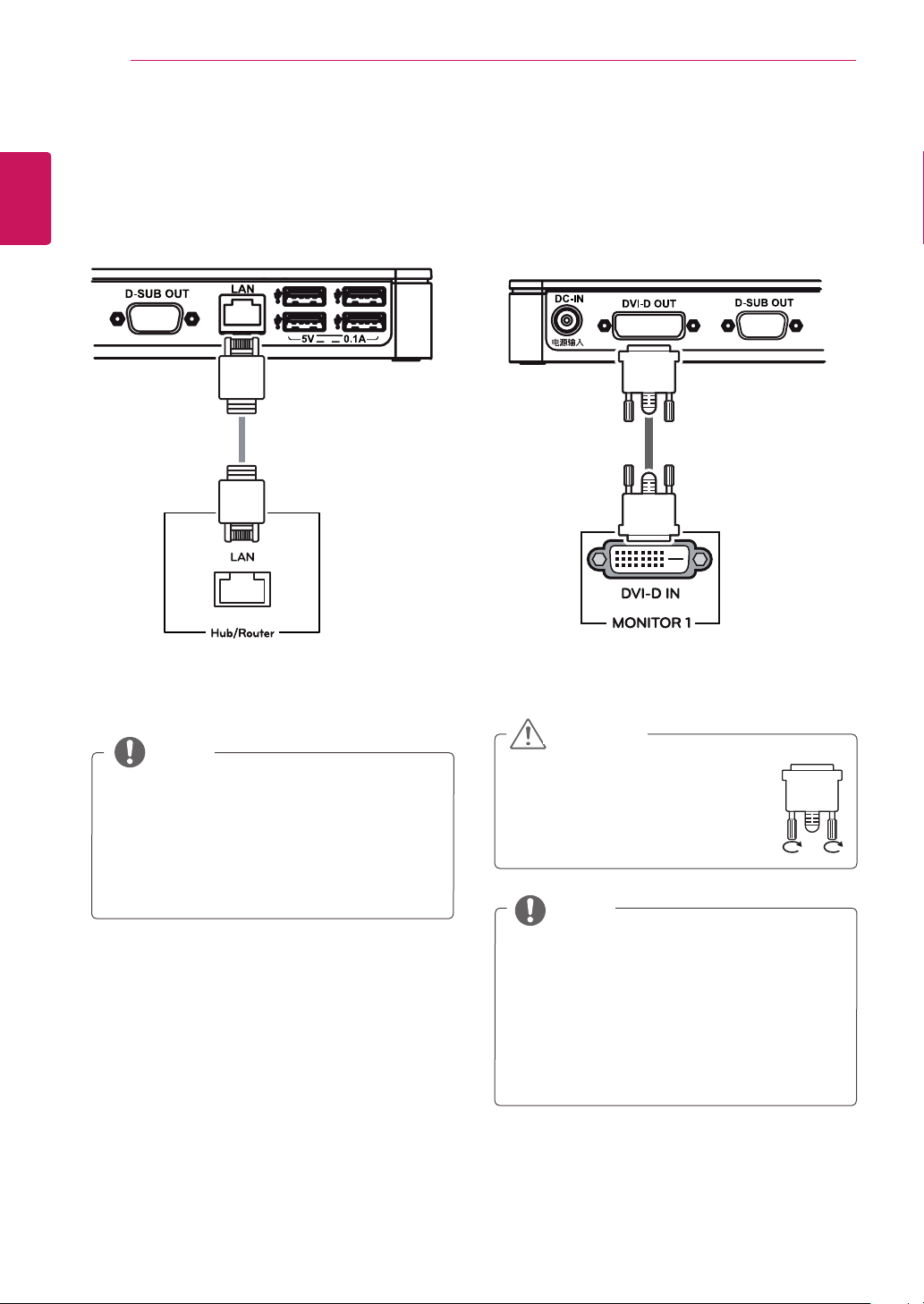
Transmitsdigitalvideosignalstothemonitor.Con-
necttheproductusingtheDVIcableasillustrated
below.
Connecttheinputsignalcable
andturninthedirectionofthe
arrow.Topreventdisconnection
securethecabletightly.
TheLANcableissoldseparately.
ThefollowingLANcabletypecanbeused:
Standard:IEEE802.3ETHERNET
ConnecttheLANcableandtheperipheralde-
vicestousetheCITRIXcloudmonitor.
Whenconnectingthepowercordtothe
outlet,useagrounded(3-hole)multi-socket
oragroundedpoweroutlet.
DVIcableisnotincludedinthebasiccom-
ponents.UsetheDVIcableprovidedwith
themonitororthestandardDVIcable.
CAUTION
NOTE
NOTE
LAN Connection
Connecttherouterorswitchtothemonitorusinga
LANcableasillustratedbelow.
7
ENG
English
Connecting LAN/Peripherals
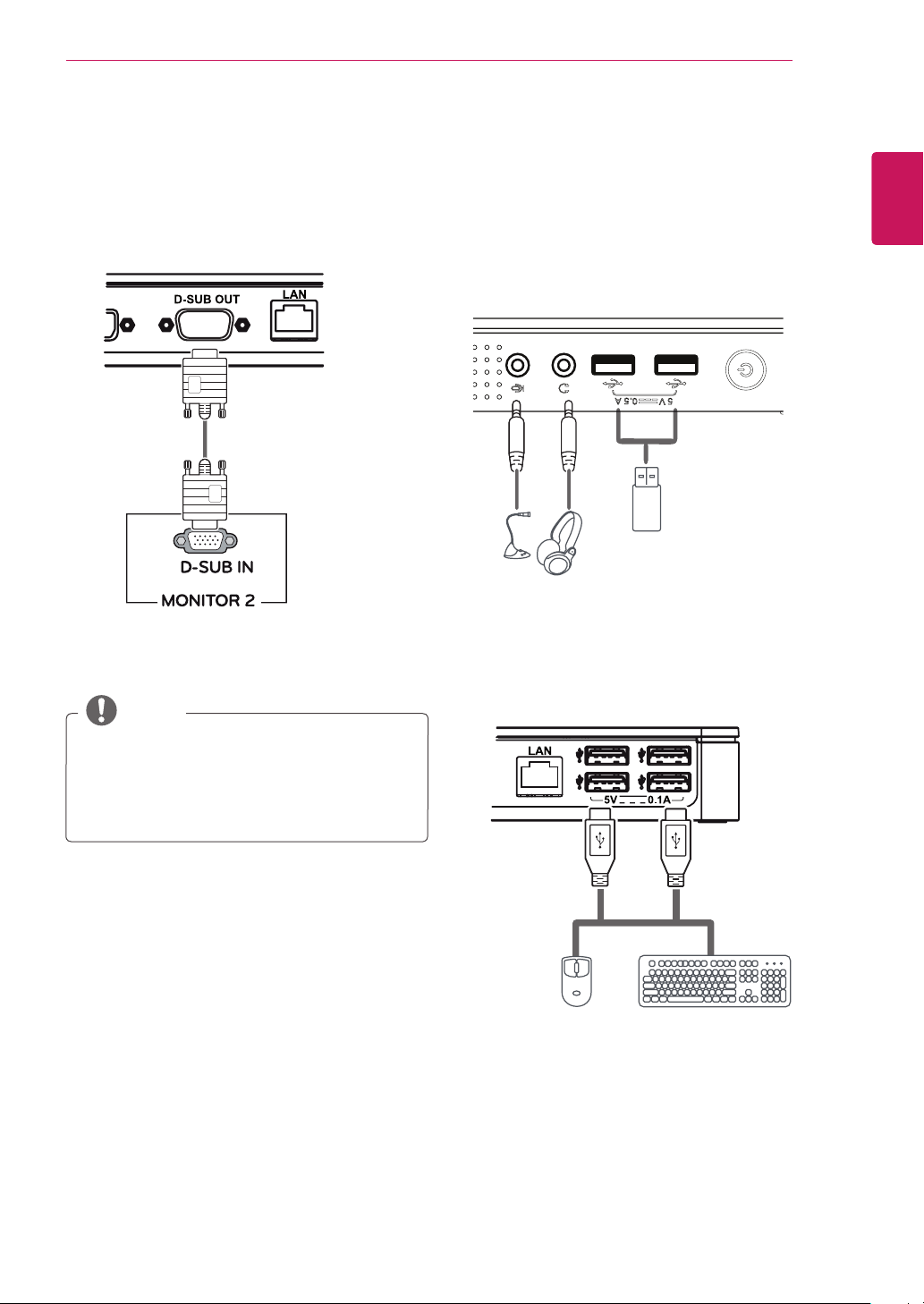
Ifthemain/subscreenwaschangedafter
extendedmonitorwasconnected,themain/
subcanbechangedinSetup.
Extended Monitor Connection
Transmitsanalogsignalstothemonitor.Connect
theproductusingtheD-subcableasillustrated
below.
Peripheral device connection
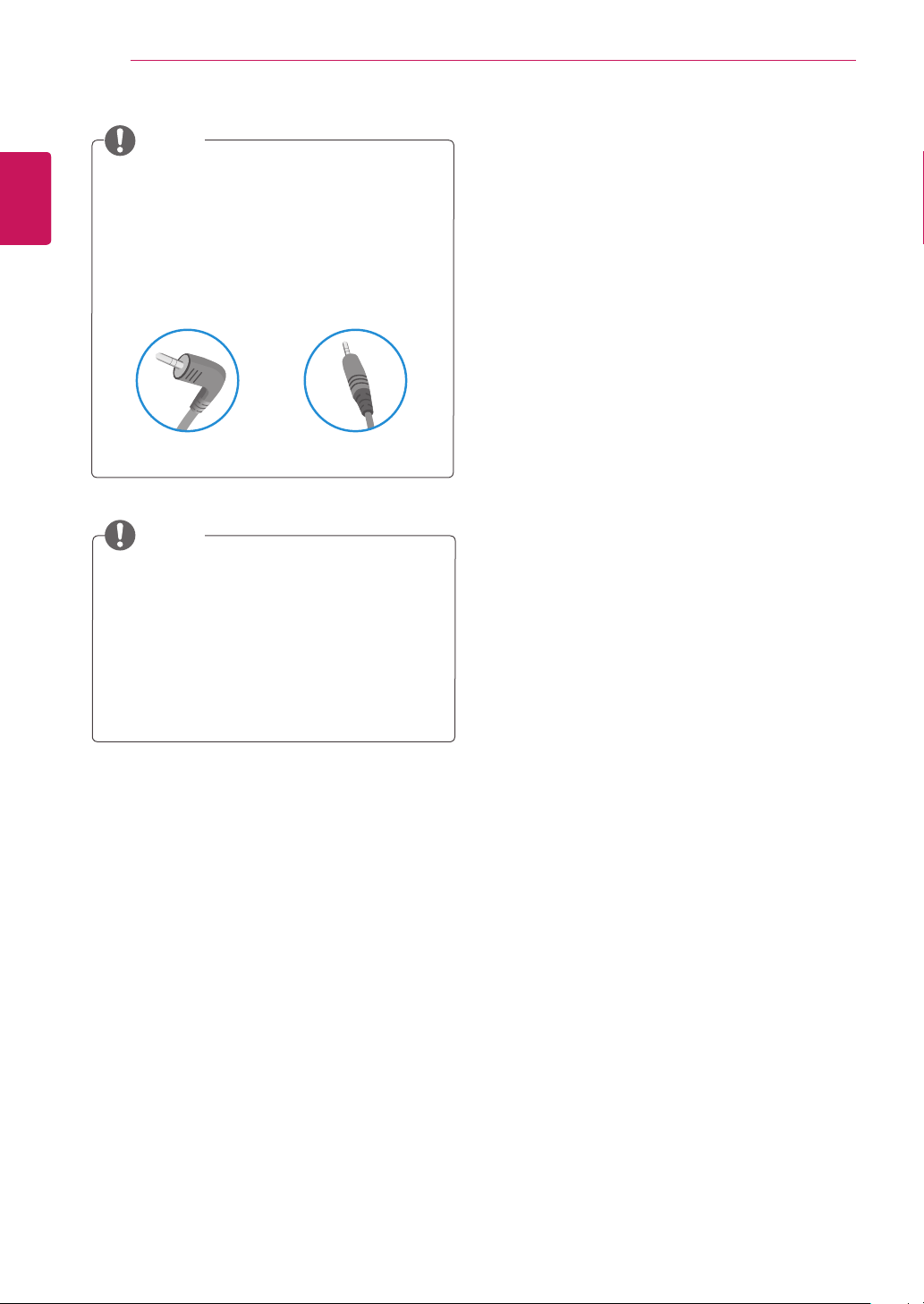
UsetheUSB,microphone,andheadphoneportto
connectaperipheraldevicetotheBOX.Connect
asillustrated.
Front Side
Rear Side
NOTE
8
ENG
English
Connecting LAN/Peripherals
Thecloudserversettingsmayaffecttheperfor-
manceoftheheadphones,earphonesorspeak-
ersdependingontheconnectedcloudserver.
Thecloudserversettingsmayaffectthe
functionsorspeedofthespecificUSBstor-
agedevicedependingontheconnected
cloudserver.
Peripheraldevicesaresoldseparately.
TheUSBportscanbeusedtoconnectthe
keyboard,mouse,andotherUSBdevices.
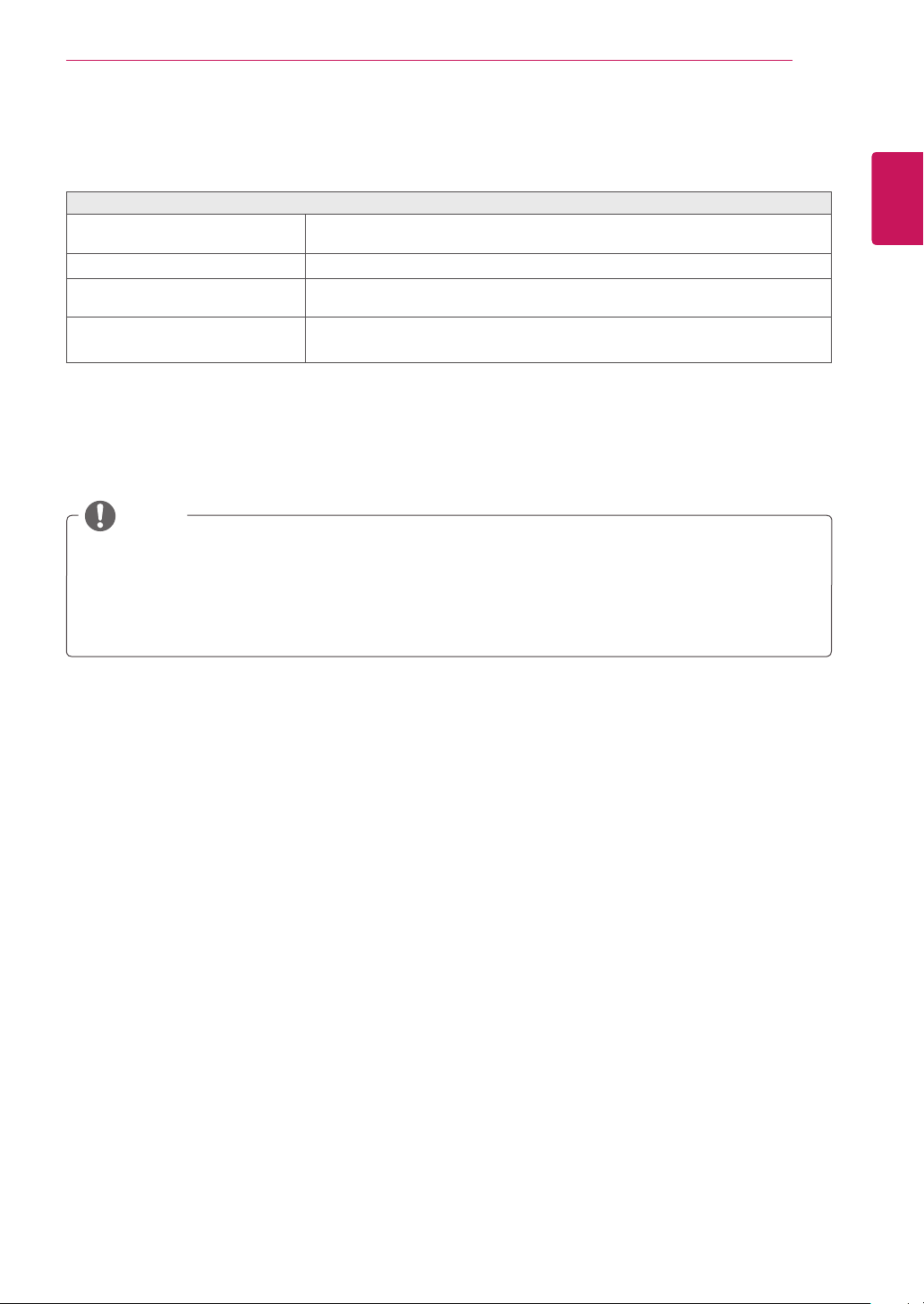
Foranangleplugearphone/microphone,itis
difficultconnectitwithaperipheraldevice,so
useastraighttype.
AngleType StraightType
NOTE
NOTE
9
ENG
English
TROUBLESHOOTING
TROUBLESHOOTING
Nothing is displayed on the screen
IsthepoweradapteroftheBox
pluggedin?
Checkifthepowercordiscorrectlypluggedintothepoweroutlet.
Isthepowerindicatoron?
Checkthepowerindicator.
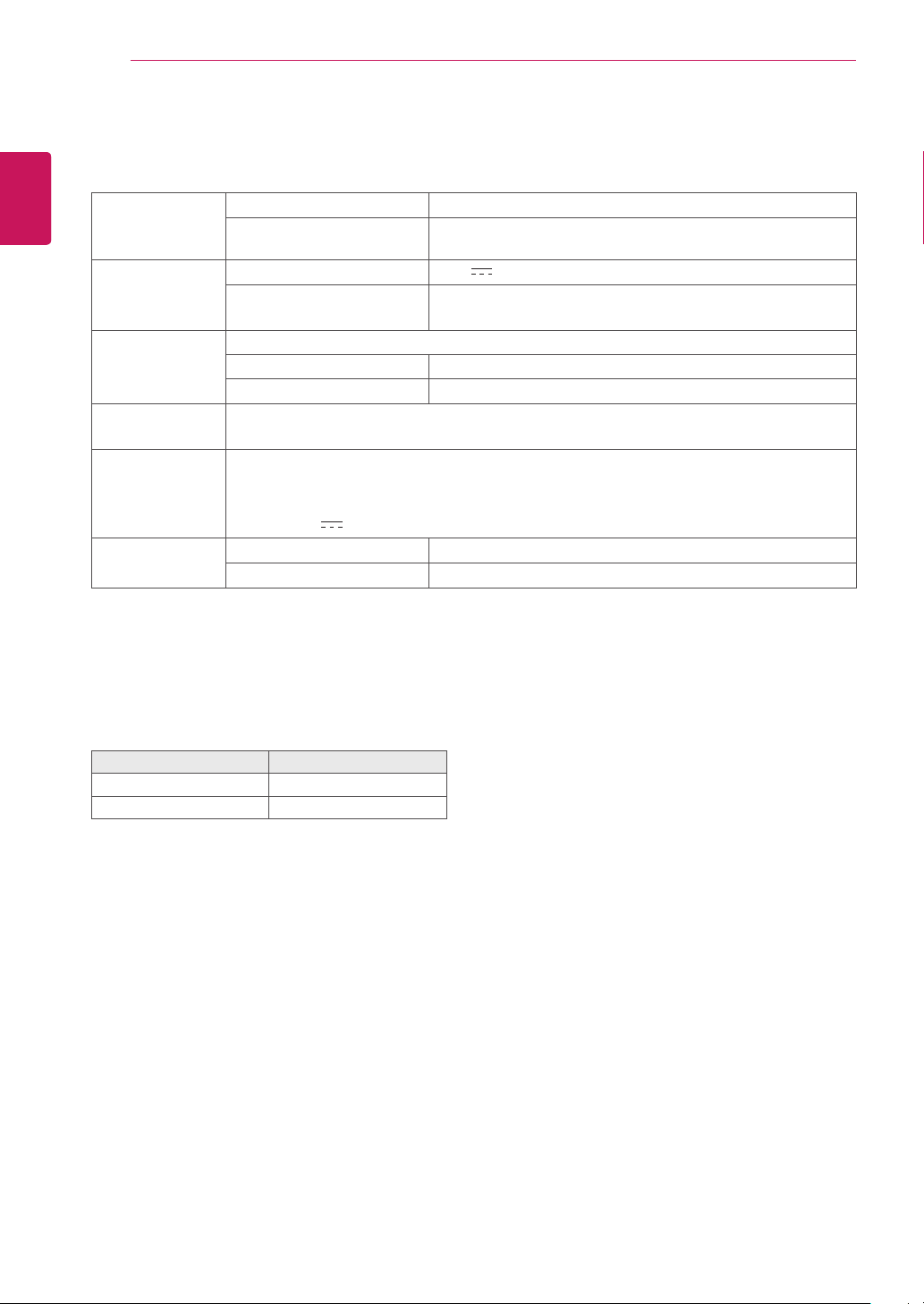
Isthepowerindicatordisplayingas
red?
Adjustthebrightnessandthecontrastoftheconnectedmonitor.
AretheBOXandthemonitorcon-
nectedwiththesignalcable?
CheckwhetherthemonitorandtheBoxareproperlyconnectedtoDVI
cableorD-SUBcable(usingDVItoD-Subgender).
Thisboxtypeproductisusedbyconnectingthemonitor.
Ifthemonitordoesnotworknormally,thescreenmaynotbedisplayedcorrectly.
NOTE
10
ENG
English
SPECIFICATIONS
SPECIFICATIONS
SupportedDis-
playResolution
(D-SUB,DVI-D)
MaximumResolution 1920x1200@60Hz
RecommendedResolution 1920x1200@60Hz
Power Voltage 19V 1.2A
Powerconsumption(Typ.)
(Cloud)
CloudMode8W
OffMode≤0.5W
Dimension Dimensions(WidthxHeightxDepth)
Withstand 70.3mmx189.3mmx143.6mm
WithoutStand 185mmx30.5mmx143.6mm
Weight(Without
Packaging)
0.65kg
AC/DCadapter TypeADS-40SG-19-319025G,manufacturedbySHENZHENHONORELECTRONIC
OrTypeLCAP21,manufacturedbyLIENCHANGELECTRONICENTERPRISE
OrTypePSAB-L203A,manufacturedbyLGInnotekCo.,Ltd
Output:19V 1.3A
Environmental
Conditions
OperatingCondition Temperature:10°Cto35°C;Humidity:10%to80%
StoringCondition Temperature:-20°Cto60°C;Humidity:5%to90%
Thespecificationsaresubjecttochangewithoutnotice.
Power Indicator
Mode LED Color
OnMode Red
OffMode Off
This device meets the EMC require-
mentsforhomeappliances(ClassB)
andisintendedforhomeuse.
Thisdevicecanbeusedinallregions.
Readtheowner'smanual(CD)carefully
andkeepitathand.
The product label contains necessary
informationforafter-service.
Model
SerialNo.
Declaration of Conformity
Trade Name: LG
Model : CBT42L
Responsible Party: LG Electronics Inc.
Address : 1000 Sylvan Ave. Englewood Cliffs
NJ 07632 U.S.A
TEL: 201-266-2534
*above information is only for USA FCC Regulatory



