

2
ENG
ENGLISH
TABLE OF CONTENTS
CONTENTS
4 LICENSES
5 ASSEMBLING AND
PREPARING
5 Accessories
6 OptionalAccessories
7 Partsandbuttons
10 Connectingthestand
12 ConnectingtheSpeakers
13 PortraitLayout
14 Mountingonawall
15 REMOTE CONTROL
17 USING THE MONITOR SET
17 ConnectingtoaPC
17 - RGBconnection
18 - DVIconnection
18 - HDMIconnection
19 - DPconnection
20 Adjustingthescreen
20 - Selectinganimagemode
20 - Customizingimageoptions
21 - CustomizingPCdisplayoptions
21 Adjustingthesound
21 - Selectingansoundmode
22 - Customizingsoundoptions
22 Usingadditionaloptions
22 - Adjustingaspectratio
24 - Usingtheinputlist
25 ENTERTAINMENT
25 - Connectingtoawirednetwork
26 - NetworkStatus
27 - ConnectingUSBstoragedevices
28 - Browsingfiles
30 - Viewingmovies
33 - Viewingphotos
36 - Listeningtomusic
38 - ViewingtheContentsList
39 - DivX®VODGuide
40 - UsingPIP/PBP
41 CUSTOMIZING SETTINGS
41 Accessingmainmenus
42 - PICTUREsettings
45 - AUDIOsettings
46 - TIMEsettings
47 - OPTIONsettings
51 - PictureID
52 - NETWORKsettings
53 MAKING CONNECTIONS
54 ConnectingtoaHDreceiver,DVD,
Camcorder,Camera,GamingDeviceor
VCRplayer
54 - DVIconnection
54 - HDMIconnection
55 - Componentconnection
55 - AV(CVBS)connection
56 ConnectingtotheLAN
56 - LANconnection
56 ConnectingtoaUSB
57 DaisyChainMonitors
57 - RGBCable
57 - DVICable
58 TROUBLESHOOTING
61 SPECIFICATIONS


ENGLISH
4
LICENSES
LICENSES
Supportedlicensesmaydifferbymodel.Formoreinformationofthelicenses,visitwww.lg.com.
HDMI,theHDMIlogoandHigh-DefinitionMultimediaInterfacearetrademarks
orregisteredtrademarksofHDMILicensingLLC.
ABOUTDIVXVIDEO:DivX isadigitalvideoformatcreatedbyDivX,LLC,a
subsidiaryofRoviCorporation.ThisisanofficialDivXCertified devicethat
playsDivXvideo.Visitdivx.comformoreinformationandsoftwaretoolsto
convertyourfilesintoDivXvideos.
ABOUTDIVXVIDEO-ON-DEMAND:ThisDivX
Certified devicemustberegisteredinordertoplaypurchasedDivXVideo-
on-Demand(VOD)movies.Toobtainyourregistrationcode,locatethe
DivXVODsectioninyourdevicesetupmenu.Gotovod.divx.comformore
informationonhowtocompleteyourregistration.
DivXCertified toplayDivX videouptoHD1080p,includingpremium
content.
DivX ,DivXCertified andassociatedlogosaretrademarksofRovi
Corporationoritssubsidiariesandareusedunderlicense.
CoveredbyoneormoreofthefollowingU.S.patents:7,295,673;7,460,668;
7,515,710;7,519,274
ManufacturedunderlicensefromDolbyLaboratories.“Dolby”andthe
double-DsymbolaretrademarksofDolbyLaboratories.
VESA,VESAlogo,DisplayPortComplianceLogoandDisplayPort
ComplianceLogoforDual-modeSourcesareregisteredtrademarksofthe
VideoElectronicsStandardsAssociation.
5
ENG
ENGLISH
ASSEMBLING AND PREPARING
ASSEMBLING AND PREPARING
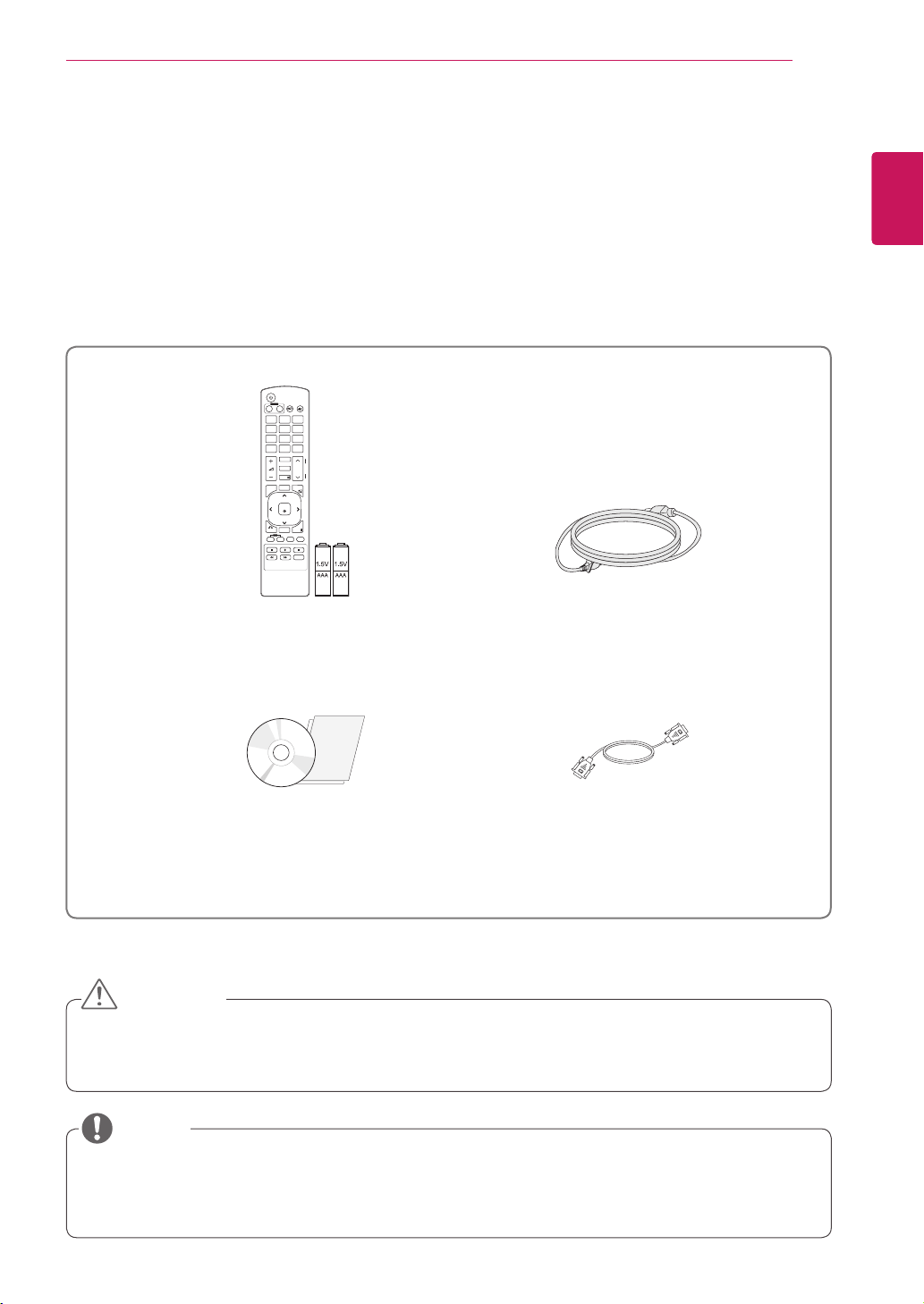
Accessories
Checkyourproductboxforthefollowingitems.Ifthereareanymissingaccessories,contactthelocal
dealerwhereyoupurchasedyourproduct.Theillustrationsinthismanualmaydifferfromtheactualproduct
andaccessories.
Donotuseanypirateditemstoensurethesafetyandproductlifespan.
Anydamagesorinjuriesbyusingpirateditemsarenotcoveredbythewarranty.
Theaccessoriessuppliedwithyourproductmayvarydependingonthemodel.
Productspecificationsorcontentsinthismanualmaybechangedwithoutpriornoticeduetoupgrade
ofproductfunctions.
Remote control and Batteries Power Cord
DVD (Owner's Manual)/ Card D-sub 15 pin signal cable
CAUTION
NOTE
P
A
G
E
INPUT
ENERGY
SAVING
MARK
ARC
ON
OFF
. , !
ABC
DEF
GHI
JKL
MNO
PQRS
TUV
1/a/A
- * #
WXYZ
CLEAR
MONITOR
PSM
AUTO
MUTE
BRIGHT
NESS
MENU
POWER
OK
S.MENU
ID
BACK
TILE
ON
OFF
EXIT
6
ENG
ENGLISH
ASSEMBLING AND PREPARING
Optional Accessories
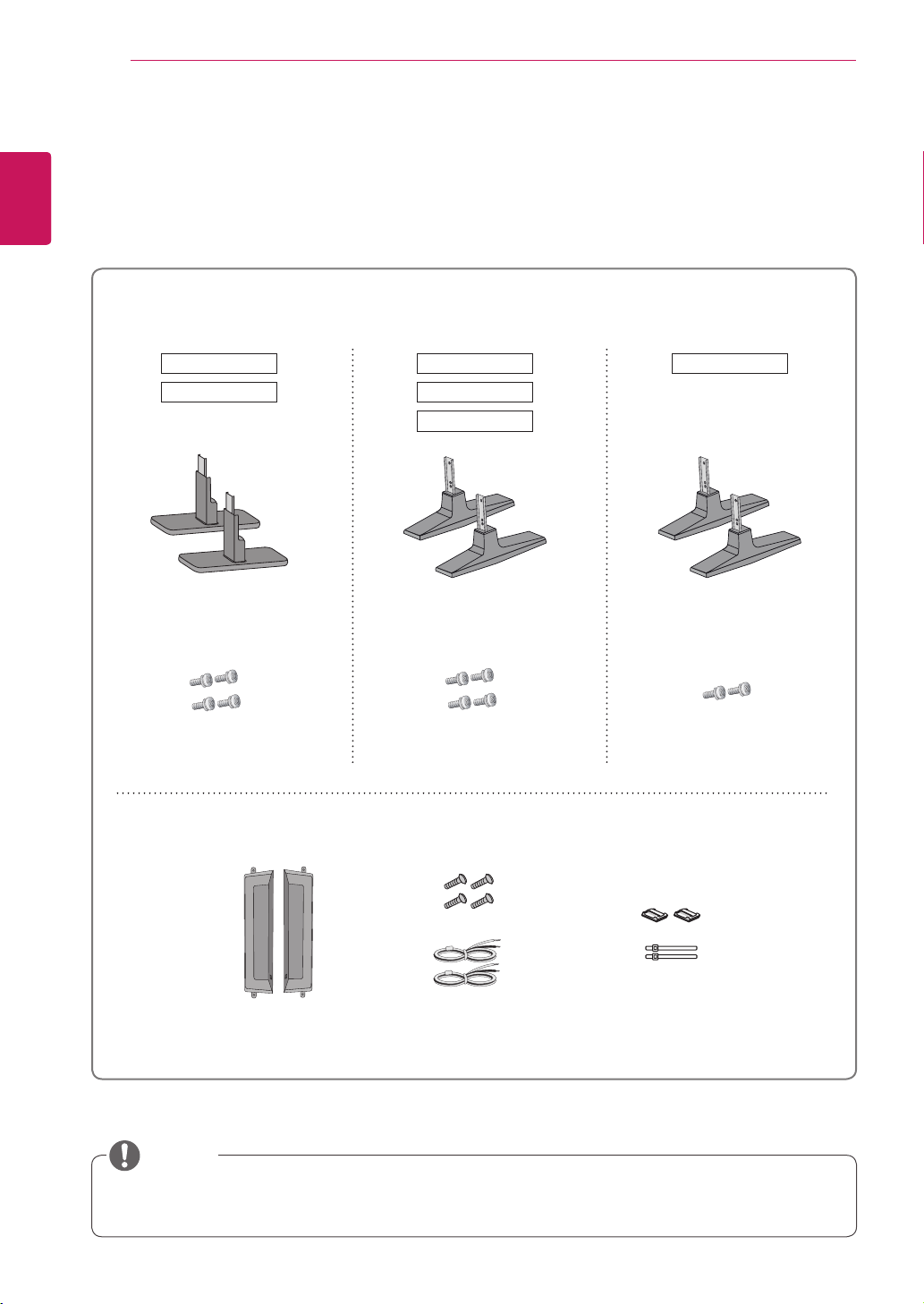
Withoutpriornotice,optionalaccessoriesaresubjecttochangetoimprovetheperformanceoftheproduct,
andnewaccessoriesmaybeadded.Theillustrationsinthismanualmaydifferfromtheactualproductand
accessories.
Cableholder/Cabletiemaynotbeavailableinsomeareasorforsomemodels.
Optionalaccessoriesarenotincludedforallmodels.
NOTE
Stand kit
Speaker kit
Cable holder/
Cable Tie
Screws/ Cable Speaker
Stand Stand Stand
Screws Screws Screws
42VS20 47VS20 55VS20
47VX30AS42VX30MS
47VX30AF
7
ENG
ENGLISH
ASSEMBLING AND PREPARING
USB DP LANAUDIO
IN
DVI IN DVI OUT
IN
SPEAKER
RGB/AV
/COMPONENT OUT
RGB/AV
/COMPONENT IN
YoucansetthePowerindicatortoonoroffbyselectingOPTIONinthemainmenu.
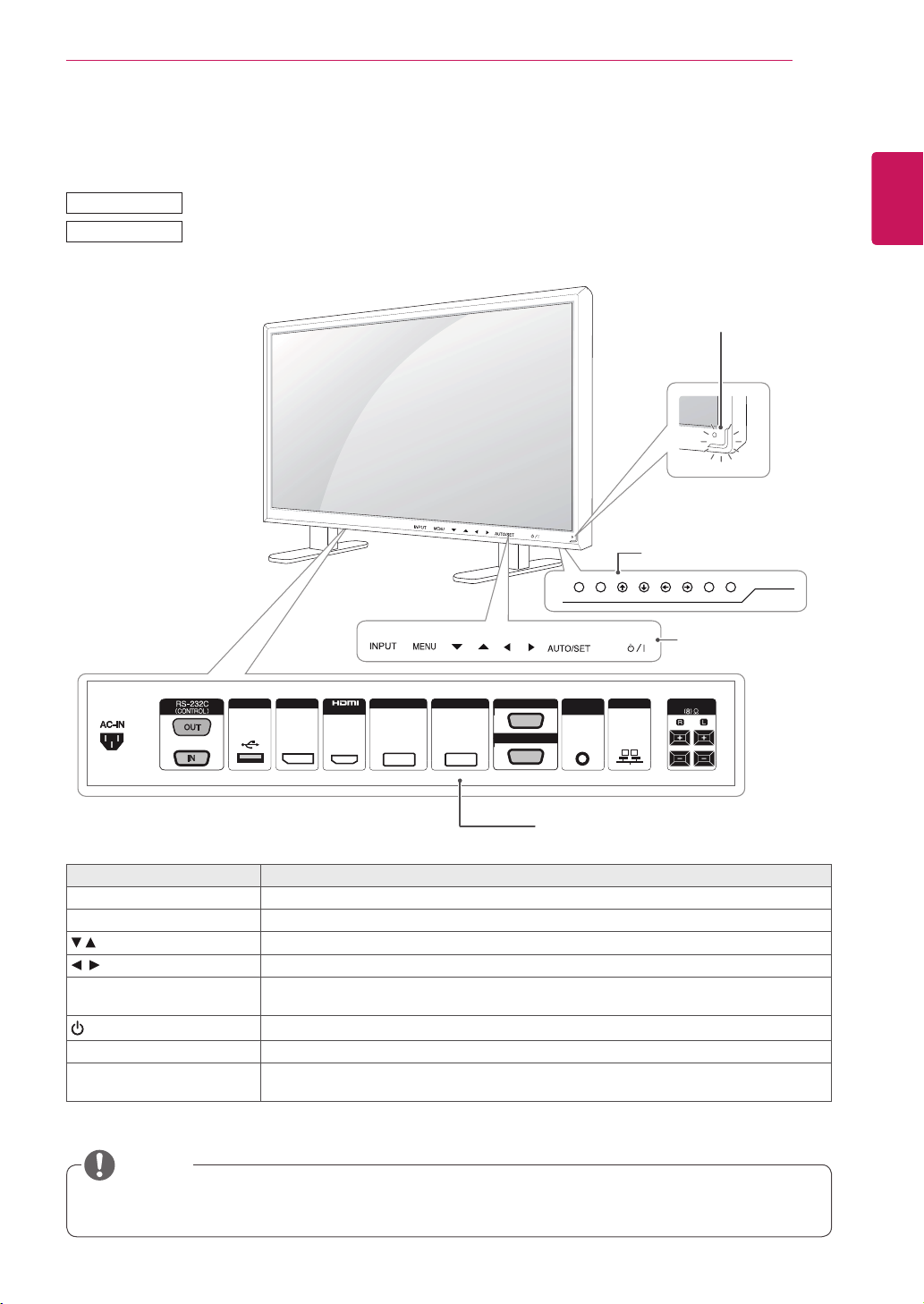
Parts and buttons
Screen Marks Description
INPUT Changestheinputsource.
MENU Accessesthemainmenus,orsavesyourinputandexitsthemenus.
Adjusttheupanddown.
Adjuststhevolumelevel.
AUTO/SET Displaysthecurrentsignalandmode.
Pressthisbuttontoadjustthescreenautomatically(availableonlyinRGBmode)
/I
Turnsthepoweronoroff.
IRReceiver Thisiswheretheunitreceivessignalsfromtheremotecontrol.
PowerIndicator ThisIndicatorlightsupbluewhenthedisplayoperatesnormally(onmode).Ifthedisplay
isinsleep(EnergySaving)mode,thisindicatorcolorchangestoamber.
Connection panel
Screen Buttons
Screen Marks
NOTE
42VS20
42VX30MS
Power Indicator
LEDOn:Powerison
LEDOff:Powerisoff
8
ENG
ENGLISH
ASSEMBLING AND PREPARING
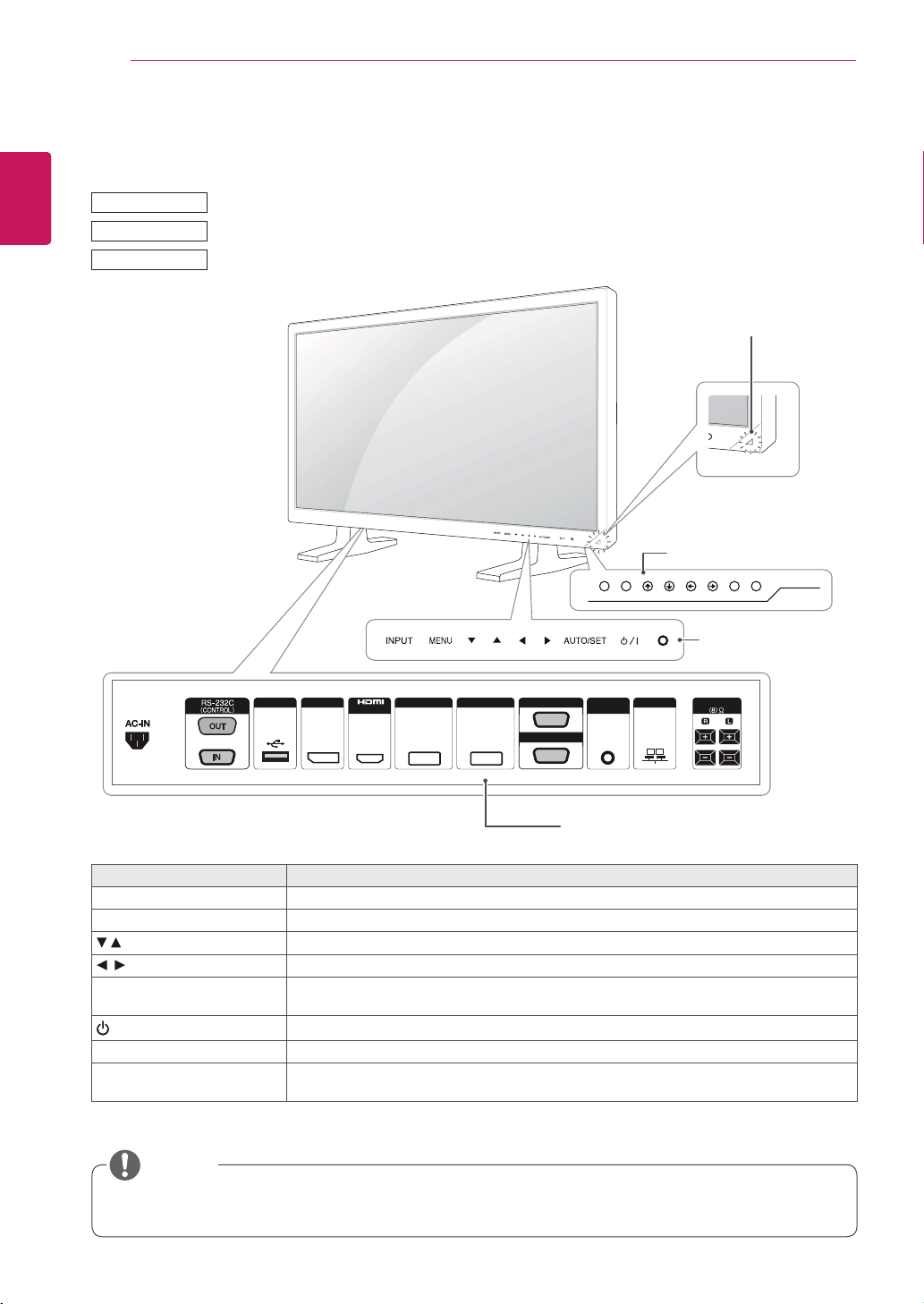
47VX30AS
47VS20
55VS20
USB DP LANAUDIO
IN
DVI IN DVI OUT
IN
SPEAKER
RGB/AV
/COMPONENT OUT
RGB/AV
/COMPONENT IN
YoucansetthePowerindicatortoonoroffbyselectingOPTIONinthemainmenu.
Screen Marks Description
INPUT Changestheinputsource.
MENU Accessesthemainmenus,orsavesyourinputandexitsthemenus.
Adjusttheupanddown.
Adjuststhevolumelevel.
AUTO/SET Displaysthecurrentsignalandmode.
Pressthisbuttontoadjustthescreenautomatically(availableonlyinRGBmode)
/I
Turnsthepoweronoroff.
IRReceiver Thisiswheretheunitreceivessignalsfromtheremotecontrol.
PowerIndicator ThisIndicatorlightsupbluewhenthedisplayoperatesnormally(onmode).Ifthedisplay
isinsleep(EnergySaving)mode,thisindicatorcolorchangestoamber.
Connection panel
Screen Buttons
Screen Marks
NOTE
Power Indicator
LEDOn:Powerison
LEDOff:Powerisoff
9
ENG
ENGLISH
ASSEMBLING AND PREPARING
USB DP LANAUDIO
IN
DVI IN DVI OUT
IN
SPEAKER
RGB/AV
/COMPONENT OUT
RGB/AV
/COMPONENT IN
YoucansetthePowerindicatortoonoroffbyselectingOPTIONinthemainmenu.
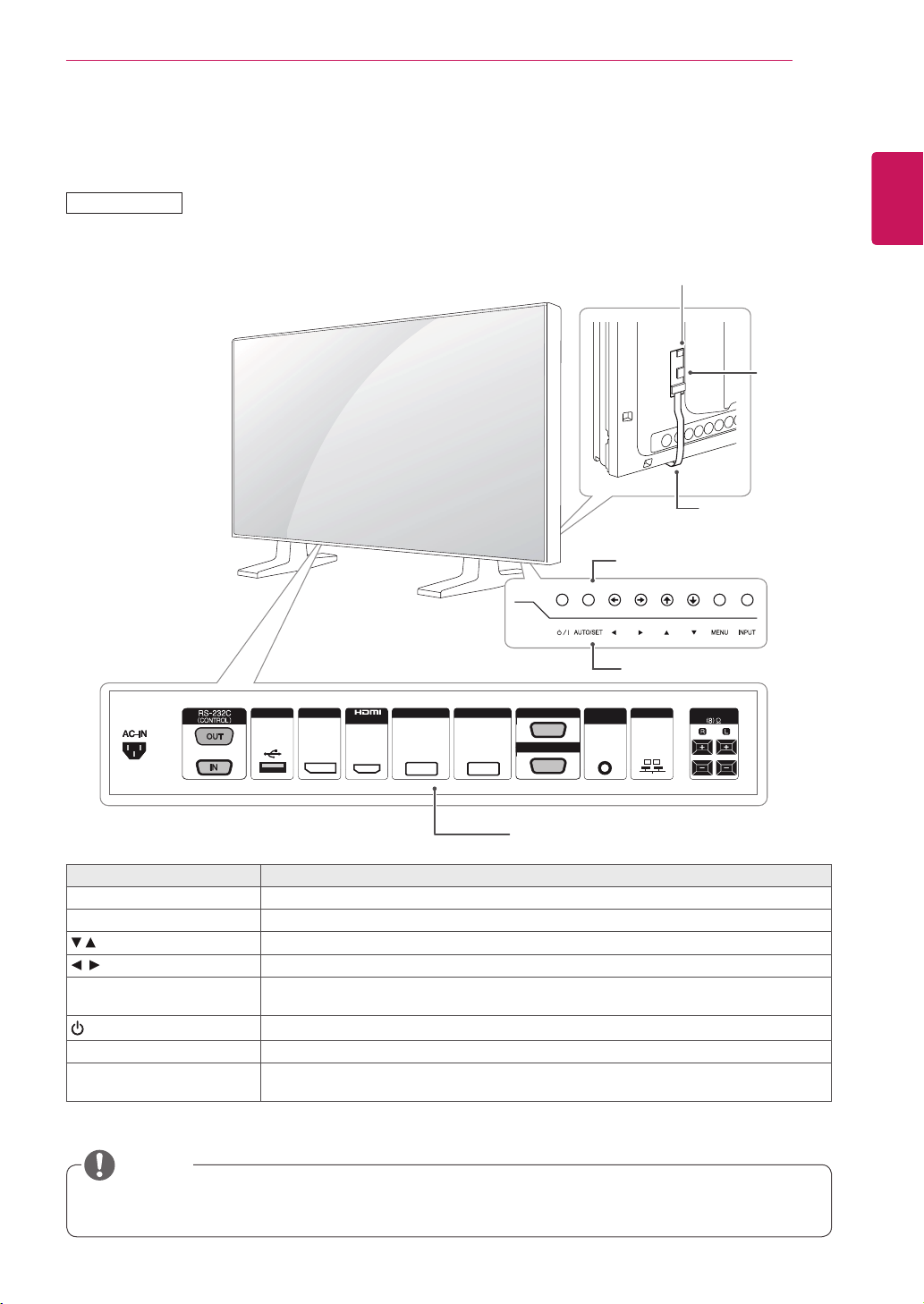
Screen Marks Description
INPUT Changestheinputsource.
MENU Accessesthemainmenus,orsavesyourinputandexitsthemenus.
Adjusttheupanddown.
Adjuststhevolumelevel.
AUTO/SET Displaysthecurrentsignalandmode.
Pressthisbuttontoadjustthescreenautomatically(availableonlyinRGBmode)
/I
Turnsthepoweronoroff.
IRReceiver Thisiswheretheunitreceivessignalsfromtheremotecontrol.
PowerIndicator ThisIndicatorlightsupbluewhenthedisplayoperatesnormally(onmode).Ifthedisplay
isinsleep(EnergySaving)mode,thisindicatorcolorchangestoamber.
Connection panel
Screen Buttons
Screen Marks
NOTE
47VX30AF
FFC
IR
Receiver
Power Indicator
LEDOn:Powerison
LEDOff:Powerisoff
10
ENG
ENGLISH
ASSEMBLING AND PREPARING
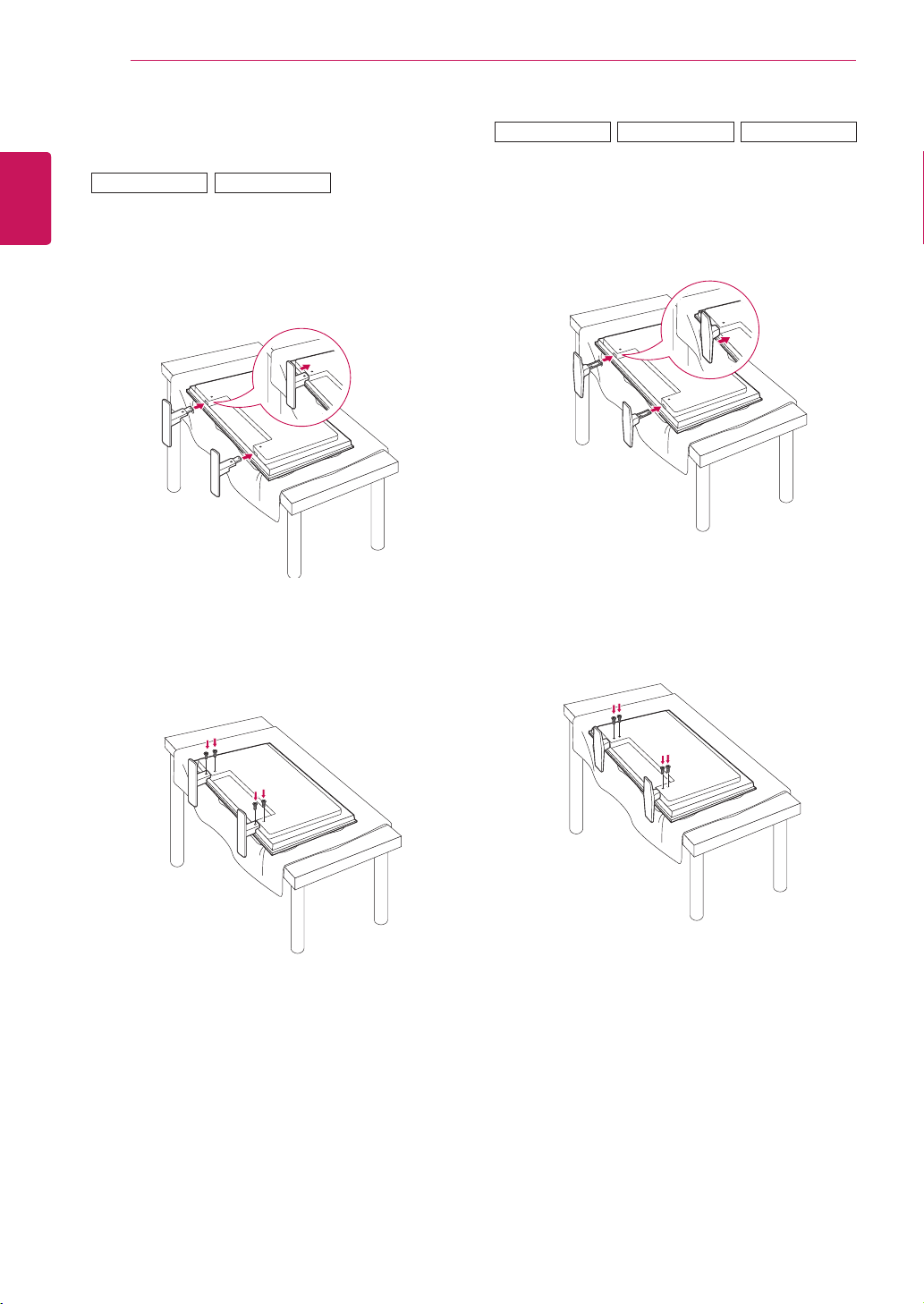
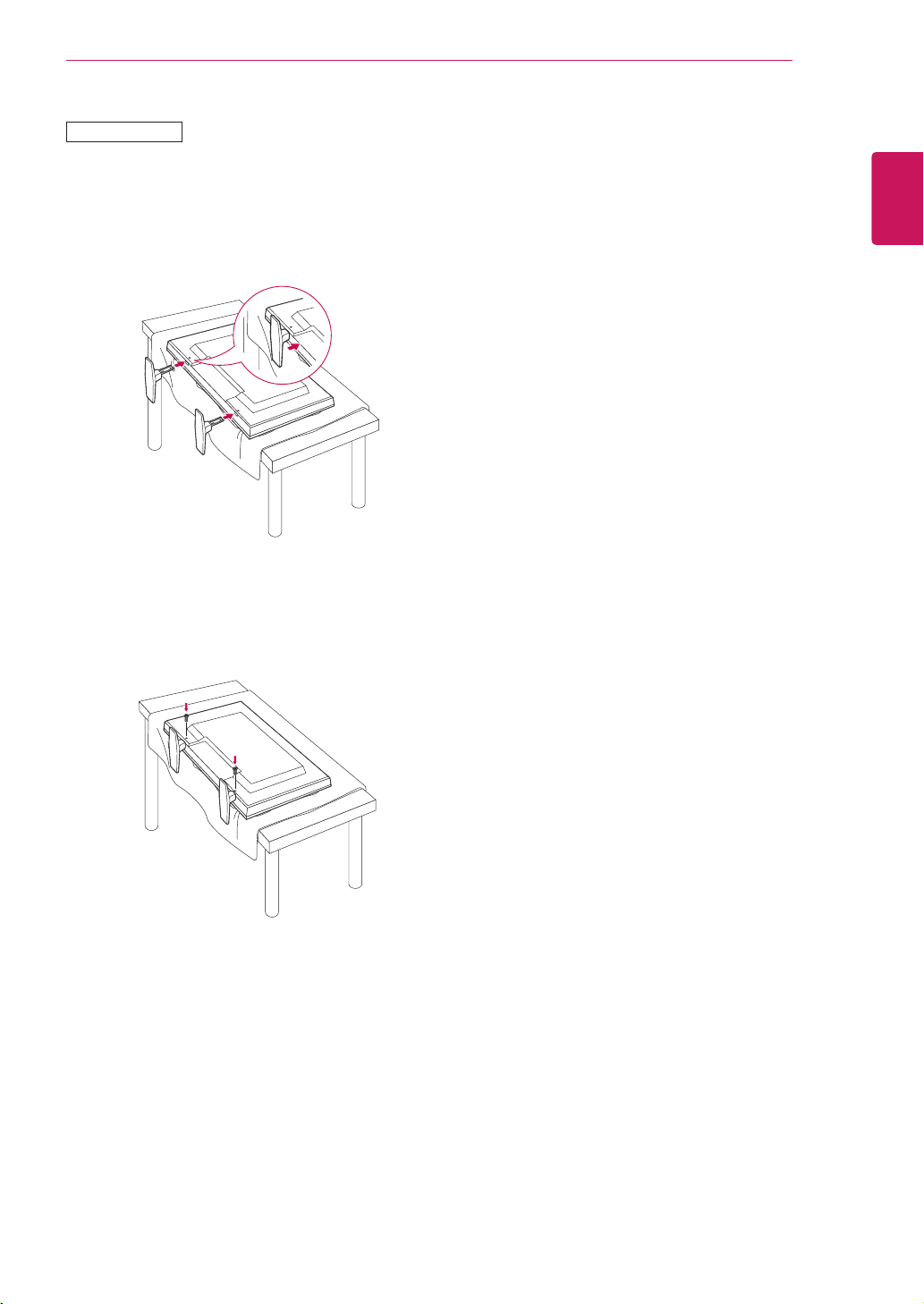
2
Usethescrewstosecurethestandontherear
sideoftheproductasshowninthediagram.
2
Usethescrewstosecurethestandontherear
sideoftheproductasshowninthediagram.
Connecting the stand
-Onlyonsomemodels.
1
Placeasoftclothonthetableandputthe
productwiththescreenfacingdownward.
-Onlyonsomemodels.
1
Placeasoftclothonthetableandputthe
productwiththescreenfacingdownward.
47VS20
42VS20
47VX30AS
42VX30MS
47VX30AF
11
ENG
ENGLISH
ASSEMBLING AND PREPARING
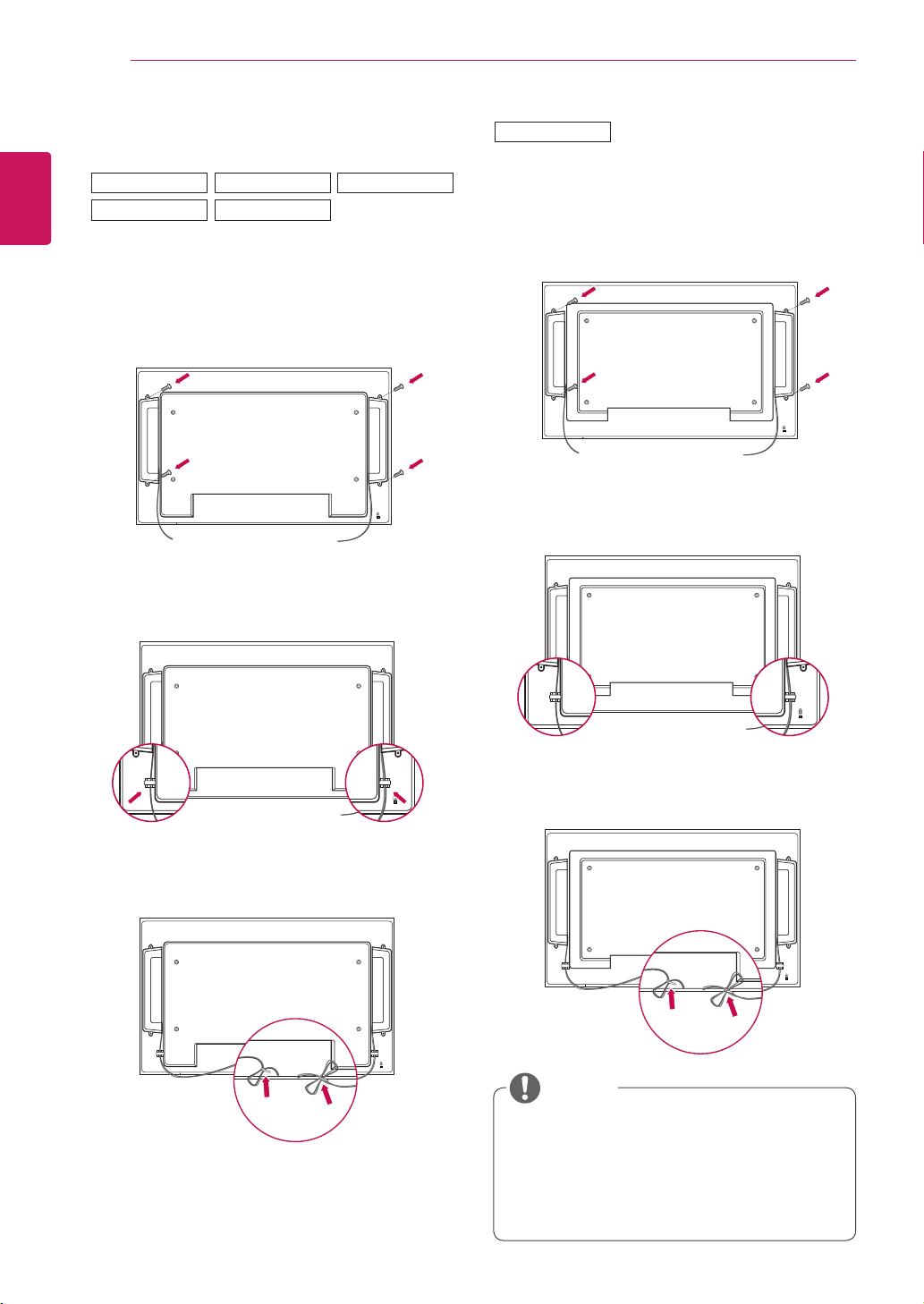
2
Usethescrewstosecurethestandontherear
sideoftheproductasshowninthediagram.
-Onlyonsomemodels.
1
Placeasoftclothonthetableandputthe
productwiththescreenfacingdownward.
55VS20
12
ENG
ENGLISH
ASSEMBLING AND PREPARING
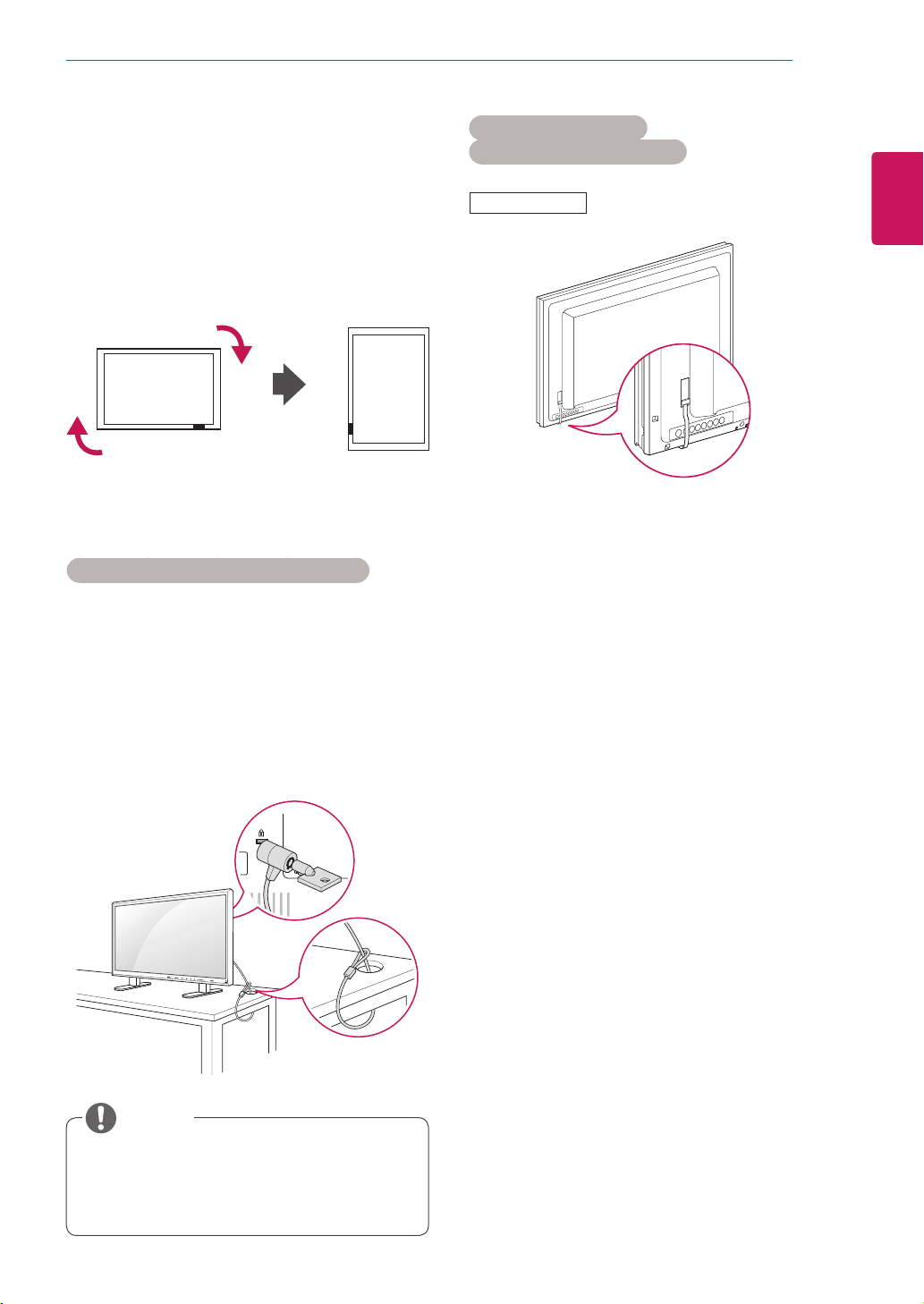
Connecting the Speakers
-Onlyonsomemodels.
1
ConnecttheinputsignalcabletotheMonitor
beforeinstallingthespeakers.Useacabletie
toorganizethecables.
-Onlyonsomemodels.
1
ConnecttheinputsignalcabletotheMonitor
beforeinstallingthespeakers.Useacabletie
toorganizethecables.
3
Afterinstallingyourspeakers,useholdersand
cabletiestoorganizethespeakercables.
2
Mountthespeakerbyusingascrewasshown
inthefollowing.Thenconnectthespeaker
cable.
3
Afterinstallingyourspeakers,useholdersand
cabletiestoorganizethespeakercables.
Connectthespeakerterminalsnotingthe
correctpolarity.
Toensurethebestsoundqualityand
minimizenoise,keepthecableasshortas
possibleasshowninthefigure.
NOTE
2
Mountthespeakerbyusingascrewasshown
inthefollowing.Thenconnectthespeaker
cable.
42VS20
55VS20
47VX30AS
47VS20
47VX30AF
42VX30MS
13
ENG
ENGLISH
ASSEMBLING AND PREPARING
Portrait Layout
-Onlyonsomemodels.
WheninstallinginaPortraitLayout,rotatethe
monitorclockwise90degrees(whenfacingthe
screen).
Using the Kensington security system
TheKensingtonsecuritysystemconnectoris
locatedatthebackoftheMonitorset.Formore
informationofinstallationandusing,refertothe
manualsuppliedwiththeKensingtonsecurity
systemorvisit
http://www.kensington.com
.
ConnecttheKensingtonsecuritysystemcable
betweentheMonitorsetandatable.
TheKensingtonsecuritysystemisoptional.
Youcanobtainadditionalaccessoriesfrom
mostelectronicsstores.
NOTE
Using the FFC/IR PCB
(Only for 47VX30AF model)
1
Removethesecuringtapefirst.
2
DonotpullouttheFFC,asthismaycause
damage.
3
Becarefulnottodamagetheproductduring
installation.
47VX30AF
14
ENG
ENGLISH
ASSEMBLING AND PREPARING
Mounting on a wall
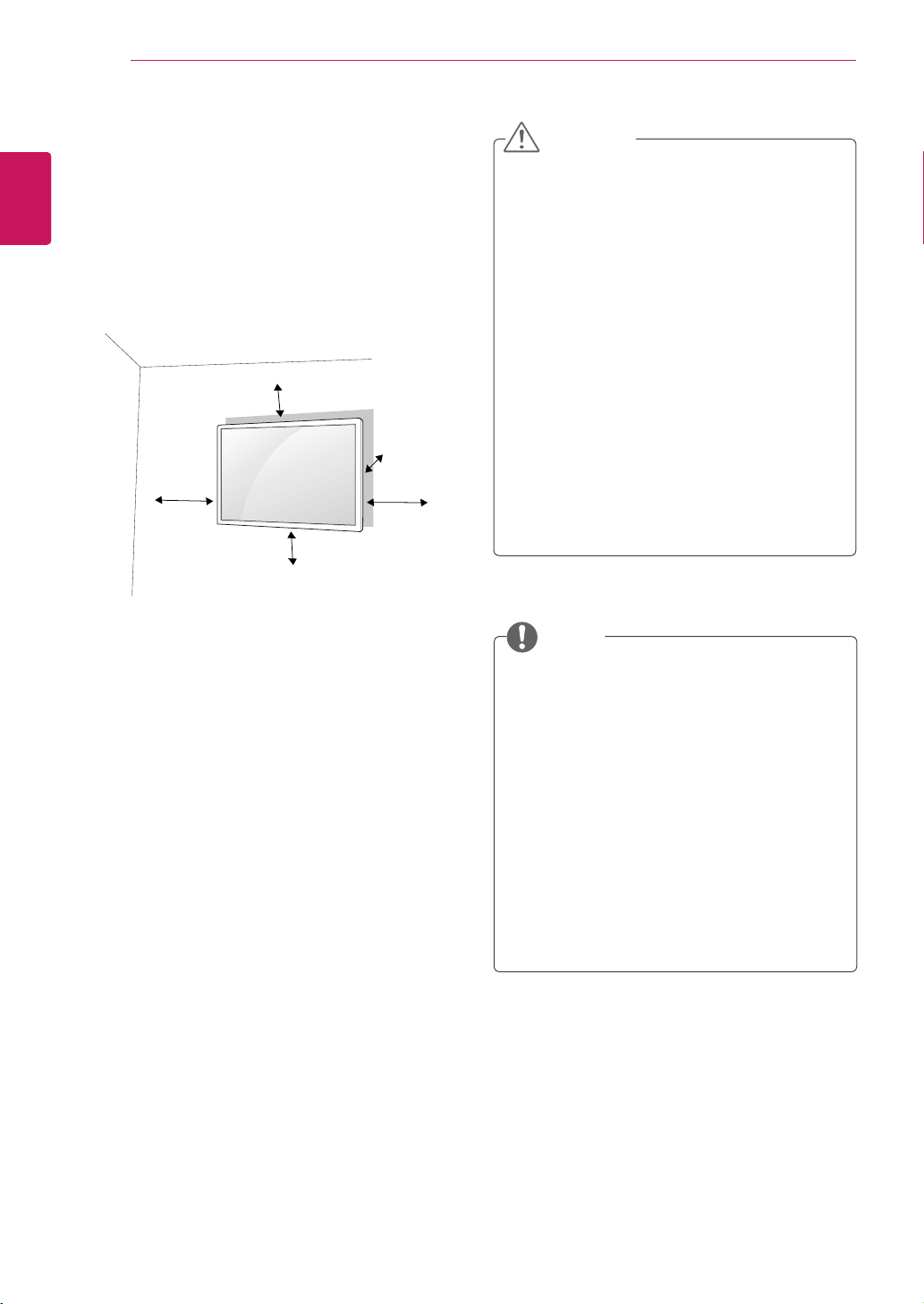
Forproperventilation,allowaclearanceof10
cmoneachsideandfromthewall.Detailed
installationinstructionsareavailablefromyour
dealer,seetheoptionalTiltWallMountingBracket
InstallationandSetupGuide.
10cm
10cm
10cm
10cm
10cm
IfyouintendtomounttheMonitortoawall,attach
Wallmountinginterface(optionalparts)totheback
oftheset.
WhenyouinstalltheMonitorusingthewall
mountinginterface(optionalparts),attachit
carefullysoitwillnotfall.
1
Please,Usethescrewandwallmountinterface
inaccordancewithVESAStandards.
2
Ifyouusescrewlongerthanstandard,the
monitormightbedamagedinternally.
3
Ifyouuseimproperscrew,theproductmight
bedamagedanddropfrommountedposition.
Inthiscase,LGElectronicsisnotresponsible
forit.
4
VESAcompatible.
5
PleaseuseVESAstandardasbelow.
785mm(31inch)orgreater
*Fasteningscrew:Diameter6.0mmxPitch1.0
mmxLength10mm
Disconnectthepowercordfirst,andthen
moveorinstalltheMonitorset.Otherwise
electricshockmayoccur.
IfyouinstalltheMonitorsetonaceilingor
slantedwall,itmayfallandresultinsevere
injury.
UseanauthorizedLGwallmountand
contactthelocaldealerorqualified
personnel.
Donotovertightenthescrewsasthismay
causedamagetotheMonitorsetandvoid
yourwarranty.
Usethescrewsandwallmountsthatmeet
theVESAstandard.Anydamagesorinjuries
bymisuseorusinganimproperaccessory
arenotcoveredbythewarranty.
UsethescrewsthatarelistedontheVESA
standardscrewspecifications.
Thewallmountkitincludesaninstallation
manualandnecessaryparts.
Thewallmountbracketisoptional.Youcan
obtainadditionalaccessoriesfromyourlocal
dealer.
Thelengthofscrewsmaydifferdepending
onthewallmount.Besuretousetheproper
length.
Formoreinformation,refertotheinstructions
suppliedwiththewallmount.
CAUTION
NOTE
15
ENG
ENGLISH
REMOTE CONTROL
REMOTE CONTROL
P
A
G
E
INPUT
ENERGY
SAVING
MARK
ARC
ON
OFF
. , !
ABC
DEF
GHI
JKL
MNO
PQRS
TUV
1/a/A
- * #
WXYZ
CLEAR
OK
S.MENU
MONITOR
PSM
AUTO
MUTE
BRIGHT
NESS
MENU
ID
BACK
TILE
ON
OFF
EXIT
POWER
(POWER)
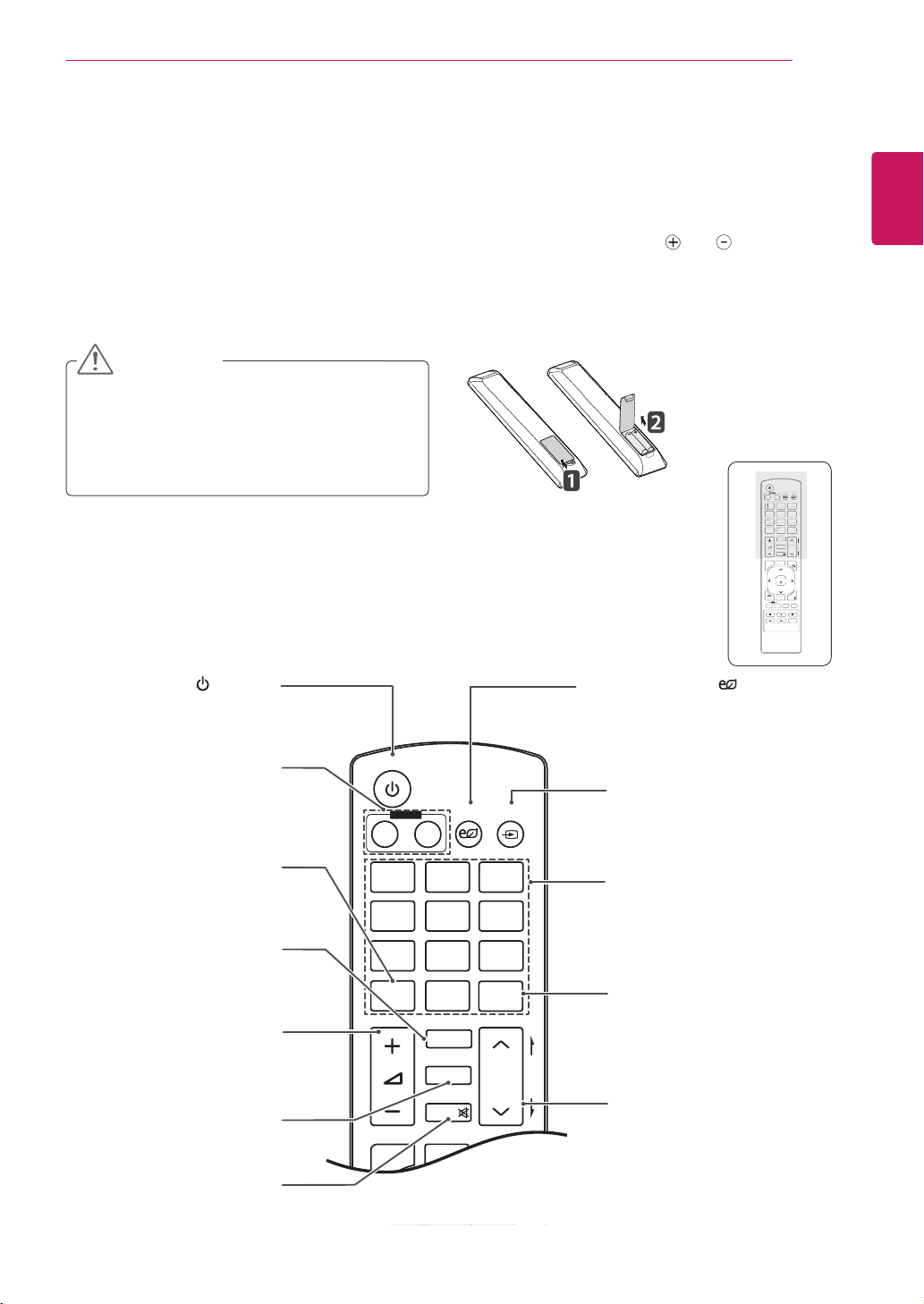
TurnstheMonitorsetonoroff.
MONITOR ON / OFF
Turnoffthemonitorandthen
turnitbackon.
1/a/A Button
Togglesbetweennumerical
andalphabetical.
ENERGY SAVING( )
Adjuststhebrightnessof
thescreentoreduceenergy
consumption.
INPUT
Selectstheinputmode.
Number and Alphabet buttons
Entersnumericaloralphabetical
charactersdependingonthe
setting.
Clear
Deletestheenterednumerical
oralphabeticalcharacter.
PSM
SelectsthePictureStatus
Mode.
MUTE
Mutesallsounds.
ARC
SelectstheAspectRatio
Mode.
Volume Up / Down
Adjuststhevolumelevel.
Brightness Key
Adjustthebrightnessby
pressingtheUpandDown
buttonsontheremotecontrol.
InUSBmode,theOSDmenu
hasthePagefunctionto
movetothenextfilelist.
P
A
G
E
INPUT
ENERGY
SAVING
MARK
ARC
ON
OFF
1
. , !
2
ABC
3
DEF
4
GHI
5
JKL
6
MNO
7
PQRS
8
TUV
9
1/a/A
0
- * #
WXYZ
CLEAR
OK
S.MENU
MONITOR
PSM
AUTO
MUTE
BRIGHT
NESS
MENU
ID
BACK
TILE
ON
OFF
EXIT
POWER
P
A
G
E
INPUT
ENER
GY
S
AVIN
G
MARK
ARC
1
.
,
!
2
ABC
3
D
E
F
4
G
HI
5
J
K
L
6
M
N
O
7
PQ
R
S
7
7
8
T
U
V
9
1/a/A
0
- * #
WXYZ
C
LEA
R
ON
OF
F
MONITOR
MONITOR
PSM
MU
T
E
BRI
G
H
T
NESS
PO
WE
R
Thedescriptionsinthismanualarebasedonthebuttonsoftheremotecontrol.Pleasereadthismanual
carefullyandusetheMonitorsetcorrectly.
Toreplacebatteries,openthebatterycover,replacebatteries(1.5VAAA)matching and endstothe
labelinsidethecompartment,andclosethebatterycover.
Toremovethebatteries,performtheinstallationactionsinreverse.
Donotmixoldandnewbatteries,asthis
maydamagetheremotecontrol.
Makesuretopointtheremotecontroltothe
remotecontrolsensorontheMonitorset.
CAUTION
16
ENG
ENGLISH
USING THE MONITOR SET
P
A
G
E
INPUT
ENERGY
SAVING
MARK
ARC
ON
OFF
. , !
ABC
DEF
GHI
JKL
MNO
PQRS
TUV
1/a/A
- * #
WXYZ
CLEAR
OK
S.MENU
MONITOR
PSM
AUTO
MUTE
BRIGHT
NESS
MENU
ID
BACK
TILE
ON
OFF
EXIT
POWER
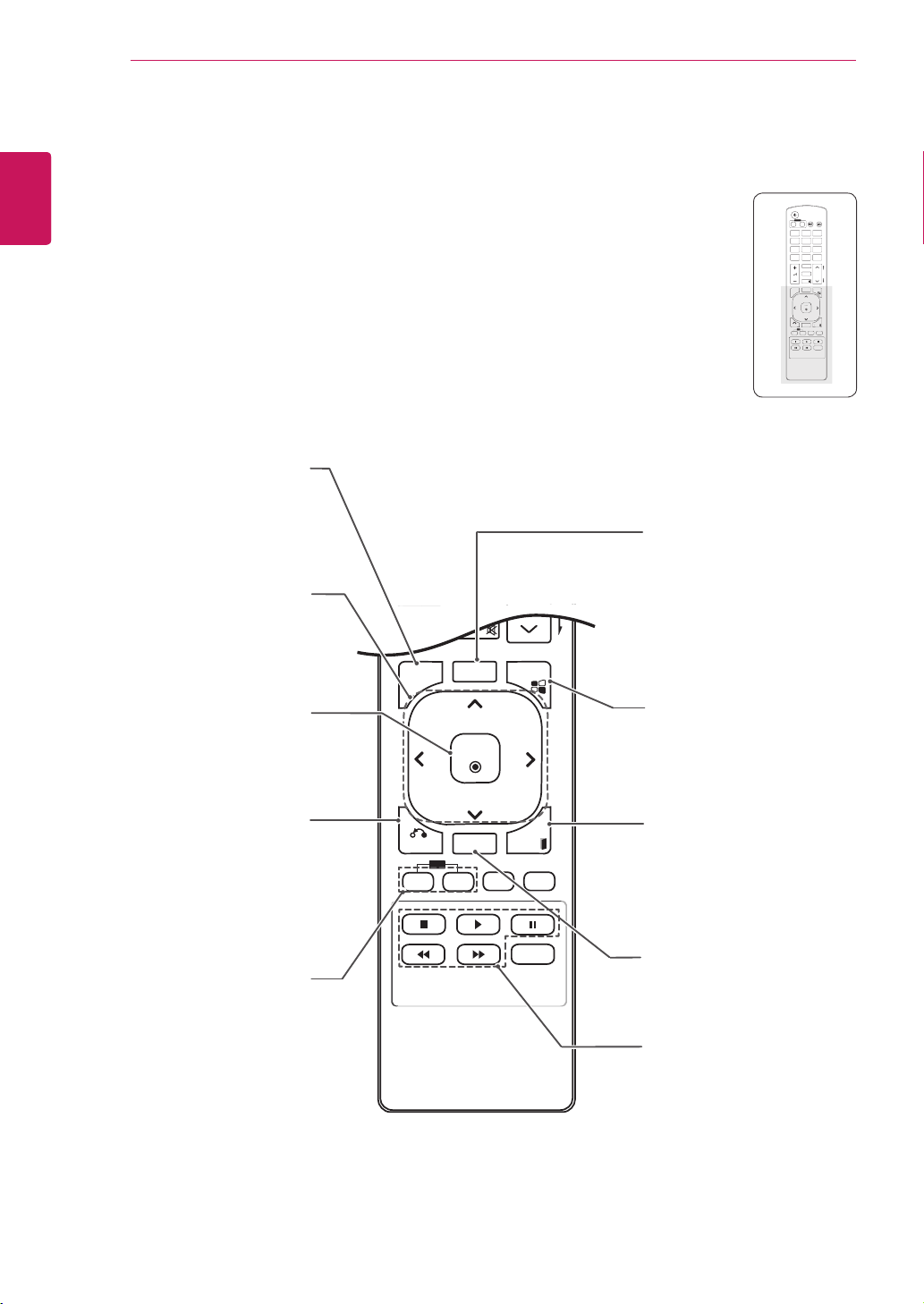
S.MENU
(SuperSignMenuKey)
Thisbuttonselectionisnot
applicable.
EXIT
Clearsallon-screendisplays
andreturnstoMonitorset
viewingfromanymenu.
TILE
SelectstheTILEMode.
MENU (Seep.41)
Accessesthemainmenus
orsavesyourinputandexit
menus.
Navigation buttons
Scrollsthroughmenusor
options.
OK
Selectsmenusoroptionsand
confirmsyourinput.
BACK
Allowstheusertomoveback
onestepinuserinteraction
function.
USB Menu control buttons
Controlsmediaplayback.
ID ON/OFF
WhenthenumberofPicture
IDisequaltoSetIDyoucan
controlthemonitorwhich
youwantinthemultidisplay
condition.
AUTO
Automaticallyadjustspicture
positionandminimizesimage
instability.(RGBinputonly)
P
A
G
E
INPUT
ENERGY
SAVING
MARK
ARC
ON
OFF
1
. , !
2
ABC
3
DEF
4
GHI
5
JKL
6
MNO
7
PQRS
8
TUV
9
1/a/A
0
- * #
WXYZ
CLEAR
OK
S.MENU
MONITOR
PSM
AUTO
MUTE
BRIGHT
NESS
MENU
ID
BACK
TILE
ON
OFF
EXIT
POWER
OK
S
.MEN
U
A
U
T
O
MEN
U
ID
BA
C
K
T
IL
E
ON
O
FF
E
XIT
17
ENG
ENGLISH
USING THE MONITOR SET
USING THE MONITOR SET
Connecting to a PC
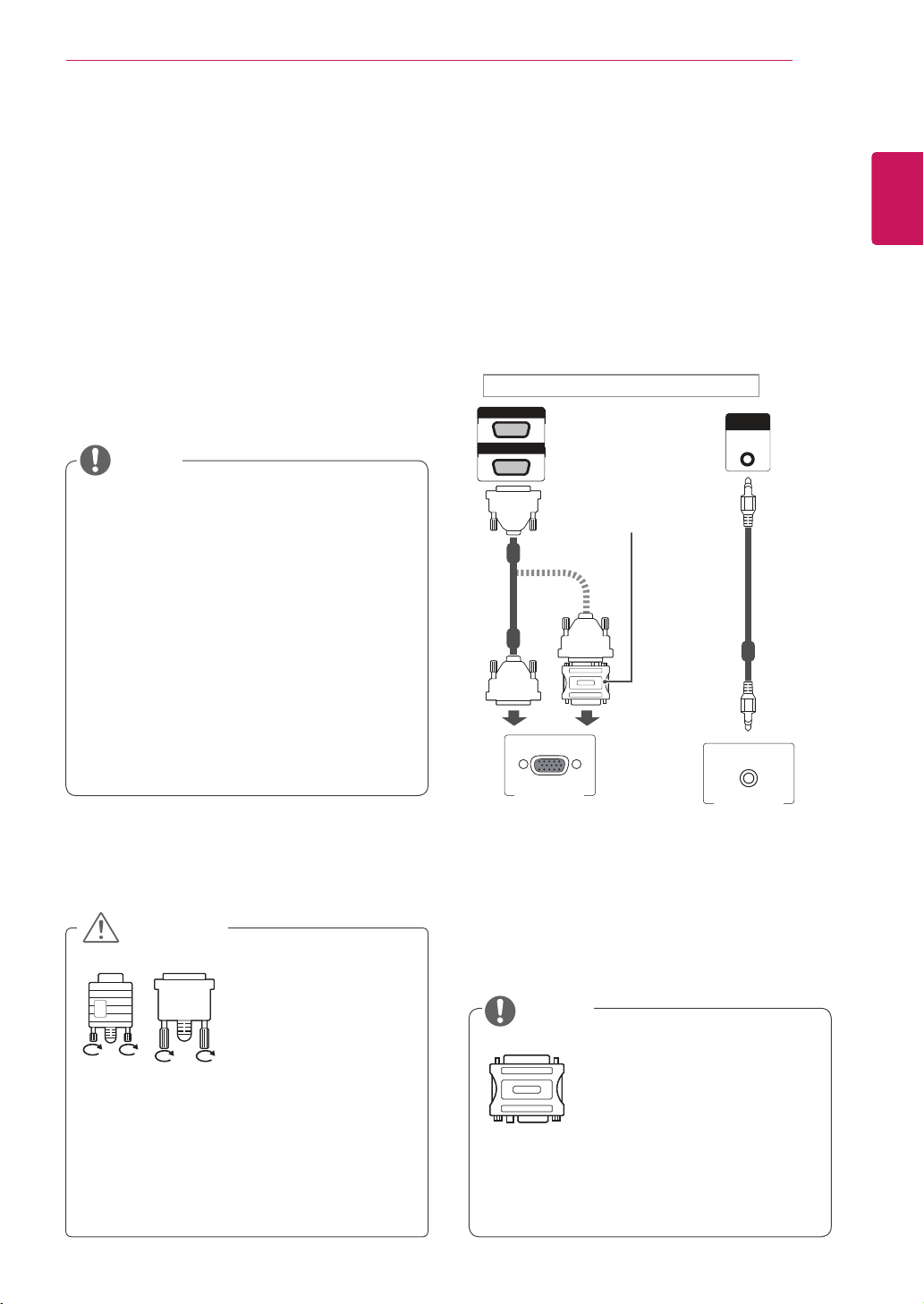
YourMonitorsetsupportsthePlug&Play*feature.
*Plug&Play:APCwillhaveabuilt-indriverfor
themonitor,noextrasoftwareisneeded.
NOTE
Connectthesignal
inputcableandtighten
itbyturningthescrews
clockwise.
Usethestandard
Macintoshadaptersince
anincompatibleadapter
isavailableinthemarket.
(Differentsignalingsystem)
Donotpressthescreenwithyourfingerfor
alongtimeasthismayresultintemporary
distortiononthescreen.
Avoiddisplayingafixedimageonthescreen
foralongperiodoftimetopreventimage
burn.Useascreensaverifpossible.
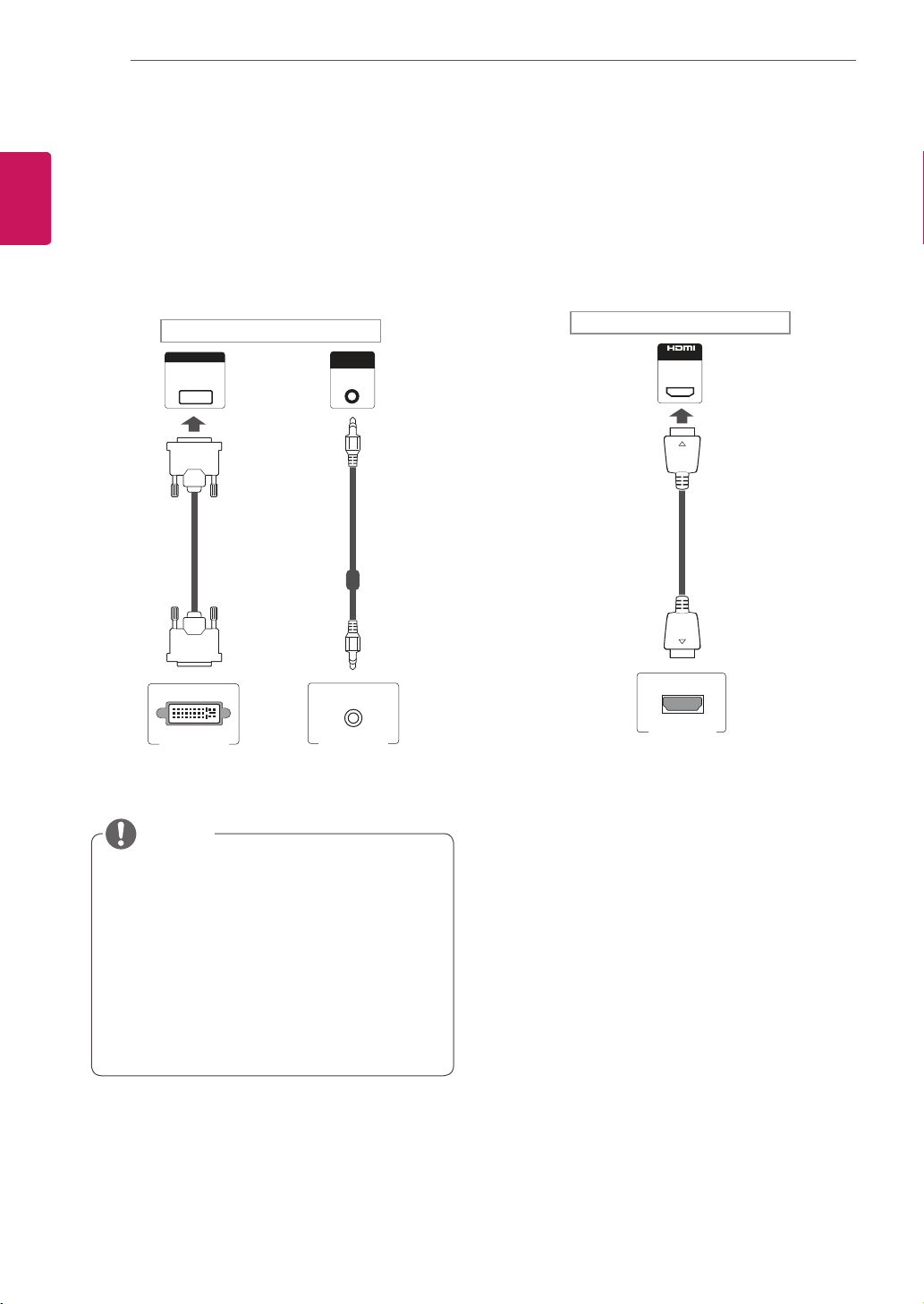
RGB connection
TransmitstheanalogvideosignalfromyourPCto
theMonitorset.ConnectthePCandtheMonitor
setwiththe15pinsignalcableasshownthe
followingillustrations.
SelectRGBinput.
Applecomputersmayrequireanadapterto
connecttothismonitor.Callorvisittheirweb
siteformoreinformation.
ItisrecommendedtousetheMonitorset
withtheHDMIconnectionforthebestimage
quality.
Useashieldedsignalinterfacecable,such
asD-sub15pinsignalcableandDVI/HDMI
cable,withaferritecoretomaintainstandard
compliancefortheproduct.
IfyouturntheMonitorsetonwhentheset
becomescold,thescreenmayflicker.Thisis
normal.
Somered,green,orbluespotsmayappear
onthescreen.Thisisnormal.
CAUTION
NOTE
AUDIO
IN
AUDIO
IN
DVI IN
IN
DP
RGB/AV
/COMPONENT OUT
RGB/AV
/COMPONENT IN
PC
Backoftheproduct.
MacintoshAdapter
(notincluded)
(notincluded)
PC/MAC
18
ENG
ENGLISH
USING THE MONITOR SET
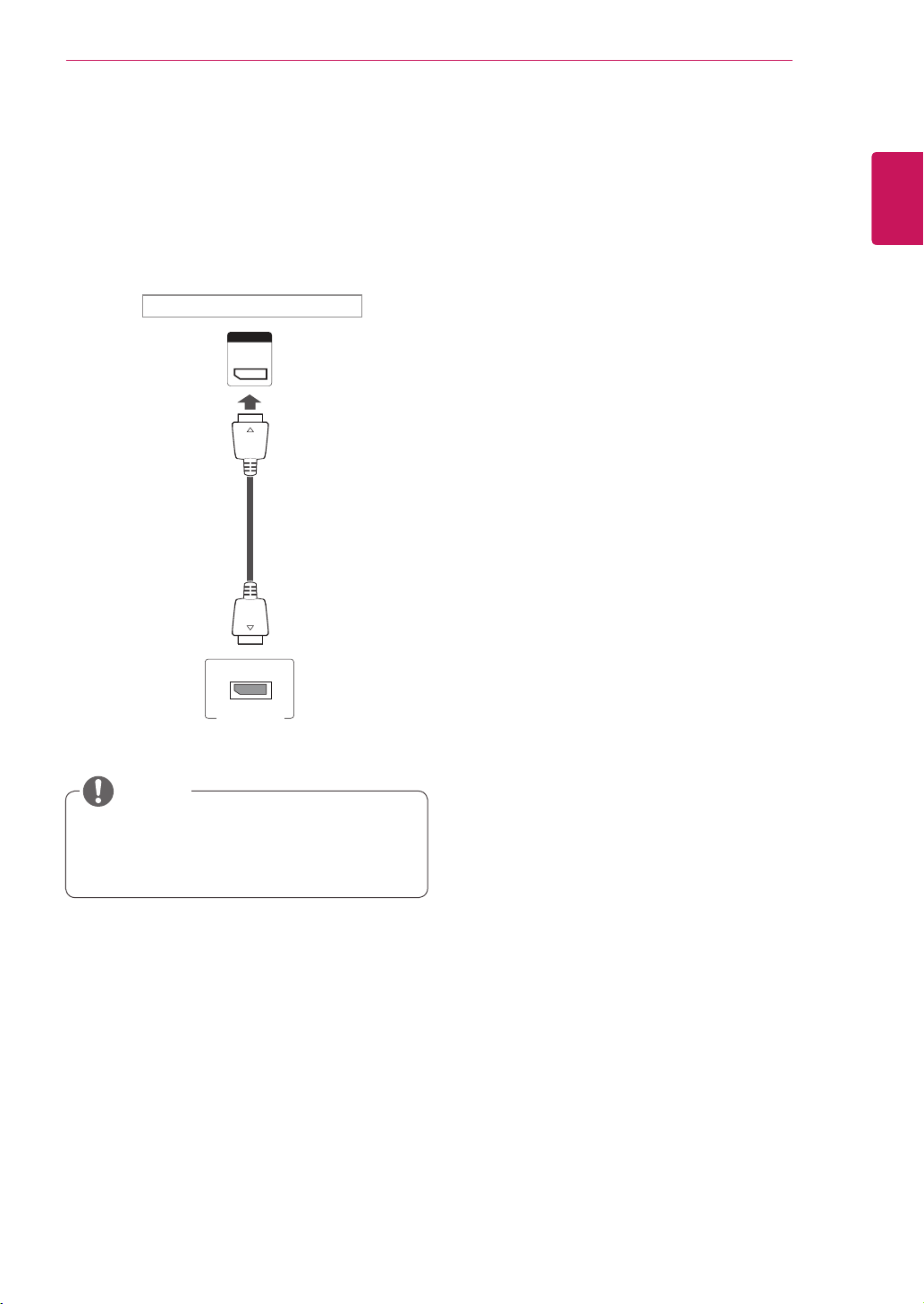
DVI connection
TransmitsthedigitalvideosignalfromyourPCto
theMonitorset.ConnectthePCandtheMonitor
setwiththeDVIcableasshownthefollowing
illustrations.
SelectDVIinput.
HDMI connection
Transmitsthedigitalvideoandaudiosignalsfrom
yourPCtotheMonitorset.ConnectthePCand
theMonitorsetwiththeHDMIcableasshownin
thefollowingillustrations.
SelectHDMIinput.
UseaHighSpeedHDMI™Cable.
PleasecheckthePCenvironmentifyou
cannothearthesoundinHDMImode.Some
PCsrequireyoutomanuallychangethe
defaultaudiooutputtoHDMI.
IfyouwanttouseHDMI-PCmode,youmust
settheinputlabeltoPCmode.
WhenHDMIPCisused,acompatiblity
problemmightoccur.
NOTE
AUDIO
IN
AUDIO
IN
DVI IN
IN
DP
RGB/AV
/COMPONENT OUT
RGB/AV
/COMPONENT IN
AUDIO
IN
AUDIO
IN
DVI IN
IN
DP
RGB/AV
/COMPONENT OUT
RGB/AV
/COMPONENT IN
PC PC
PC
Backoftheproduct.
Backoftheproduct.
(notincluded)
(notincluded)
(notincluded)
19
ENG
ENGLISH
USING THE MONITOR SET
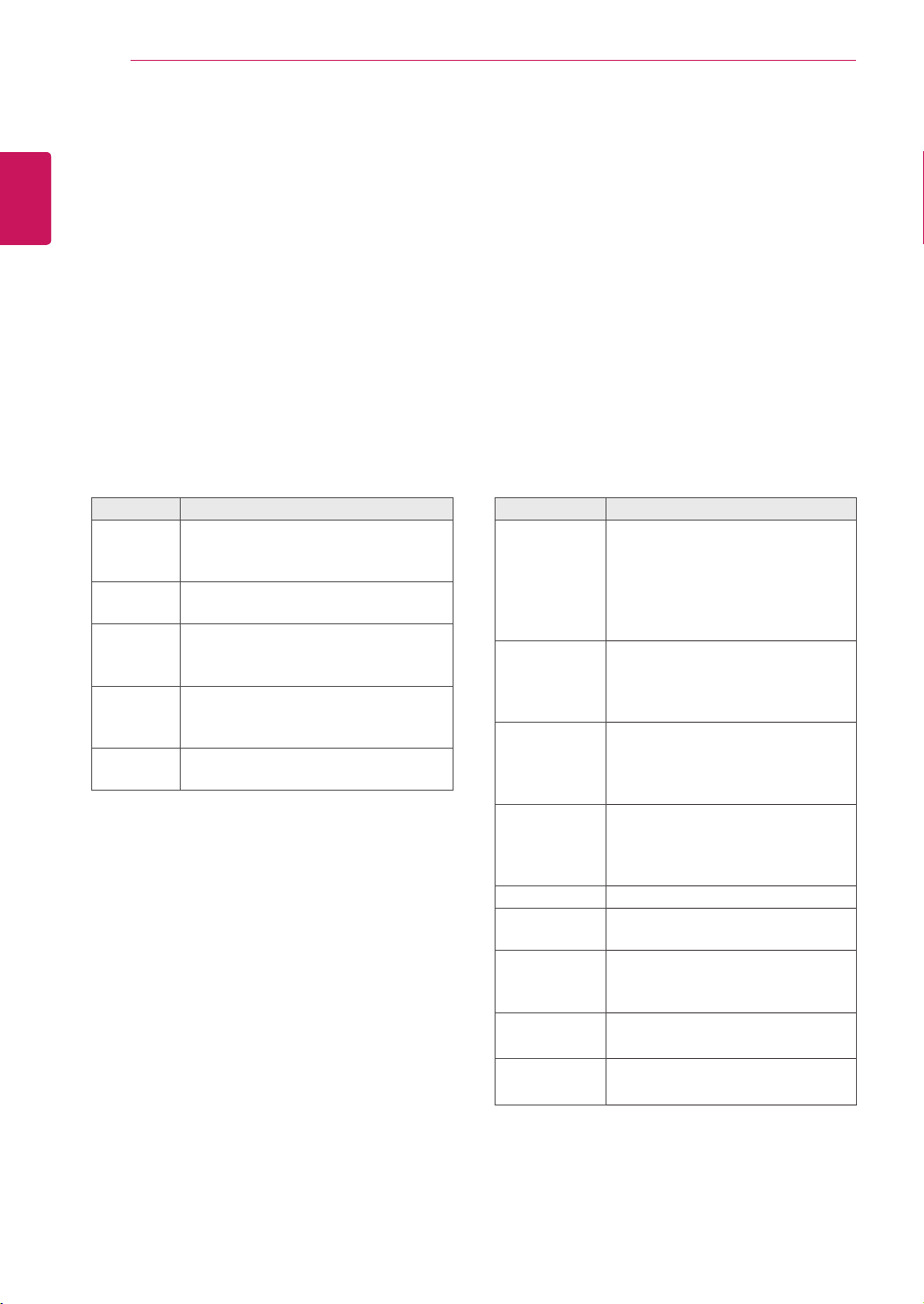
DP connection
Transmitsthedigitalvideoandaudiosignalsfrom
yourPCtotheMonitorset.ConnectthePCand
theMonitorsetwiththeDPcableasshowninthe
followingillustrations.
SelectDPinput.
Soundmaynotbeavailabledependingon
theDPversionofyourPC.
NOTE
AUDIO
IN
AUDIO
IN
DVI IN
IN
DP
RGB/AV
/COMPONENT OUT
RGB/AV
/COMPONENT IN
PC
Backoftheproduct.
(notincluded)
20
ENG
ENGLISH
USING THE MONITOR SET
Adjusting the screen
Selecting an image mode
Displayimagesinitsoptimizedsettingsby
selectingoneofthepresetimagemodes.
1
PressMENUtoaccessthemainmenus.
2
PresstheNavigationbuttonstoscrollto
PICTUREandpressOK.
3
PresstheNavigationbuttonstoscrollto
Picture ModeandpressOK.
4
PresstheNavigationbuttonstoscrolltoan
imagemodeyouwantandpressOK.
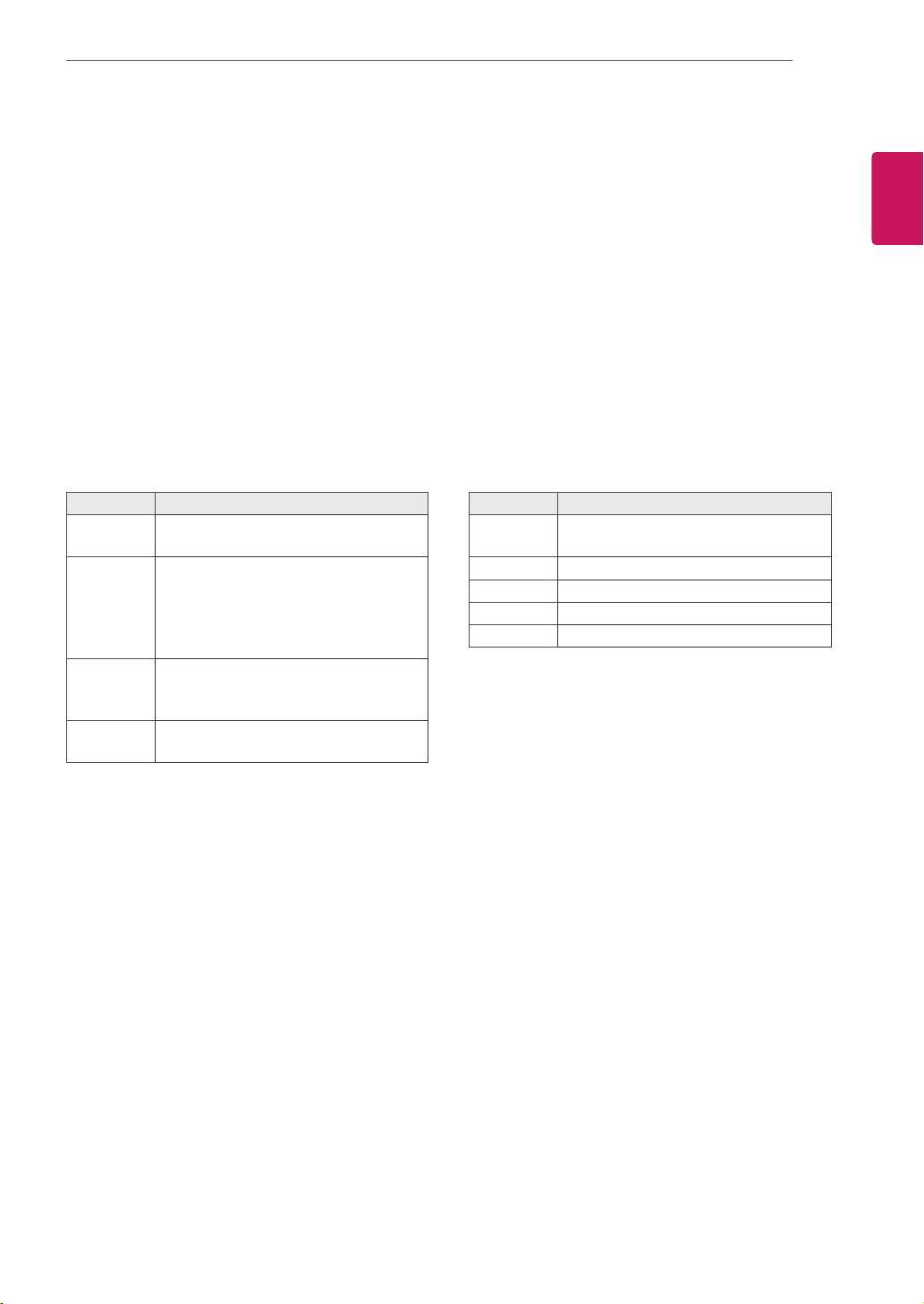
Customizing image options
Customizebasicandadvancedoptionsofeach
imagemodeforthebestscreenperformance.
1
PressMENUtoaccessthemainmenus.
2
PresstheNavigationbuttonstoscrollto
PICTUREandpressOK.
3
PresstheNavigationbuttonstoscrollto
Picture ModeandpressOK.
4
PresstheNavigationbuttonstoscrolltoan
imagemodeyouwantandpressOK.
5
Selectandadjustfollowingoptions,andthen
pressOK.
Mode Description
Vivid Adjuststhevideoimagefortheretail
environmentbyenhancingthecontrast,
brightness,Colour,andsharpness.
Standard Adjuststheimageforthenormal
environment.
Cinema Optimizesthevideoimageforacinematic
looktoenjoymoviesasifyouareina
movietheater.
Sport Optimizesthevideoimageforhighand
dynamicactionsbyemphasizingprimary
Colorssuchaswhite,grass,orskyblue.
Game Optimizesthevideoimageforafast
gamingscreensuchasPCsorgames.
5
Whenyouarefinished,pressEXIT.
Whenyoureturntothepreviousmenu,press
BACK.
Option Description
Backlight Adjuststhebrightnessofthescreen
bycontrollingtheLCDbacklight.If
youdecreasethebrightnesslevel,
thescreenbecomesdarkerandthe
powerconsumptionwillbereduced
withoutanyvideosignalloss.
Contrast Increasesordecreasesthegradient
ofthevideosignal.Youmayuse
Contrastwhenthebrightpartofthe
pictureissaturated.
Brightness Adjuststhebaselevelofthesignalin
thepicture.YoumayuseBrightness
whenthedarkpartofthepictureis
saturated.
Sharpness Adjuststhelevelofcrispnessinthe
edgesbetweenthelightanddark
areasofthepicture.Thelowerthe
level,thesoftertheimage.
Color Adjustsintensityofallcolors.
Tint Adjuststhebalancebetweenredand
greenlevels.
Color Temp. SettowarmtoenhancehotterColors
suchasred,orsettocooltomake
picturebluish.
Advanced
Control
Customizestheadvancedoptions.
RefertotheAdvancedimageoptions.
Picture Reset Restorestheoptionstothedefault
setting.
6
Whenyouarefinished,pressEXIT.
Whenyoureturntothepreviousmenu,press
BACK.
21
ENG
ENGLISH
USING THE MONITOR SET
Customizing PC display options
Customizeoptionsofeachimagemodeforthe
bestimagequality.
Thisfunctionworksinthefollowingmode:
RGB[PC]mode.
1
PressMENUtoaccessthemainmenus.
2
PresstheNavigationbuttonstoscrollto
PICTUREandpressOK.
3
PresstheNavigationbuttonstoscrollto
ScreenandpressOK.
4
Selectandadjustfollowingoptions,andthen
pressOK.
Option Description
Resolution Selectsaproperresolution.See
“CustomizingPCdisplayoptions”.
Auto
Config.
Setstoadjustthescreenposition,clock,
andphaseautomatically.
Thedisplayedimagemaybeunstablefor
afewsecondswhiletheconfigurationis
inprogress.
Position/
Size/Phase
Adjuststheoptionswhenthepictureis
notclear,especiallywhencharactersare
shaky,aftertheautoconfiguration.
Reset Restorestheoptionstothedefault
setting.
5
Whenyouarefinished,pressEXIT.
Whenyoureturntothepreviousmenu,press
BACK.
Adjusting the sound
Selecting an sound mode
Playthesoundinitsoptimizedsettingsby
selectingoneofthepresetsoundmodes.
1
PressMENUtoaccessthemainmenus.
2
PresstheNavigationbuttonstoscrollto
AUDIOandpressOK.
3
PresstheNavigationbuttonstoscrolltoSound
ModeandpressOK.
4
PresstheNavigationbuttonstoscrolltoa
soundmodeyouwantandpressOK.
Mode Description
Standard Selectwhenyouwantstandard-quality
sound.
Music Selectwhenyoulistentomusic.
Cinema Selectwhenyouwatchmovies.
Sports Selectwhenyouwatchsportsevents.
Game Selectwhenyouwatchsportsevents.
5
Whenyouarefinished,pressEXIT.
Whenyoureturntothepreviousmenu,press
BACK.
22
ENG
ENGLISH
USING THE MONITOR SET
Customizing sound options
Customizeoptionsofeachsoundmodeforthe
bestsoundquality.
1
PressMENUtoaccessthemainmenus.
2
PresstheNavigationbuttonstoscrollto
AUDIOandpressOK.
3
PresstheNavigationbuttonstoscrolltoSound
ModeandpressOK.
4
PresstheNavigationbuttonstoscrolltoa
soundmodeyouwantandpressOK.
5
Selectandadjustfollowingoptions,andthen
pressOK.
Option Description
Infinite
Sound
LG'sInfinitySoundoptionprovides
5.1channelstereosoundfromtwo
speakers.
Treble Controlsthedominantsoundsinthe
output.Whenyouturnupthetreble,
itwillincreasetheoutputtothelower
frequencyrange.
Bass Makestheoutputsoundsofter.Ifthe
bassisincreased,thefrequencyofthe
outputalsoincreases.
Reset Resetsthesoundmodetothedefault
setting.
6
Whenyouarefinished,pressEXIT.
Whenyoureturntothepreviousmenu,press
BACK.
Using additional options
Adjusting aspect ratio
Resizetheimagetoviewtheimageatitsoptimal
sizebypressingARC whileyouarewatching
Monitorset.
Ifafixedimagedisplaysonthescreenfora
longperiodoftime,itwillbeimprintedand
becomeapermanentdisfigurementonthe
screen.Thisis“imageburn”or“burn-in”and
notcoveredbythewarranty.
Iftheaspectratioissetto4:3foralong
periodoftime,imageburnmayoccuron
theletterboxedareaofthescreen.
Youcanalsochangetheimagesizeby
accessingthemainmenus.
CAUTION
NOTE
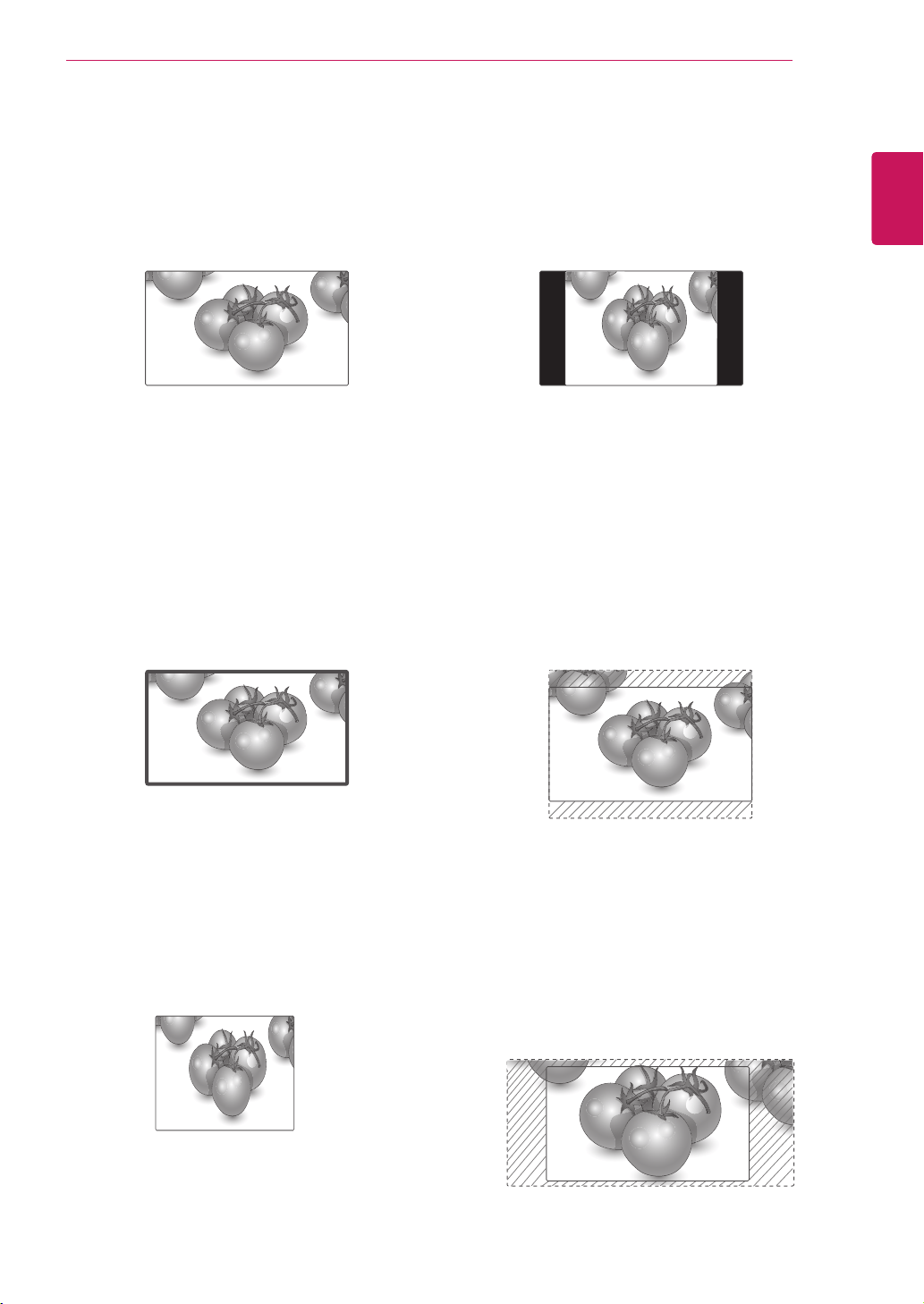
MODE
ARC
AV Component RGB Display
Port
DVI-D HDMI
PC DTV PC PC DTV PC
16:9
o o o o o o o o
Just Scan
x o x o x x o x
1:1
x x o x o o x o
4:3
o o o o o o o o
Zoom
o o x o x x o x
Cinema
Zoom
o o x o x x o x
23
ENG
ENGLISH
USING THE MONITOR SET
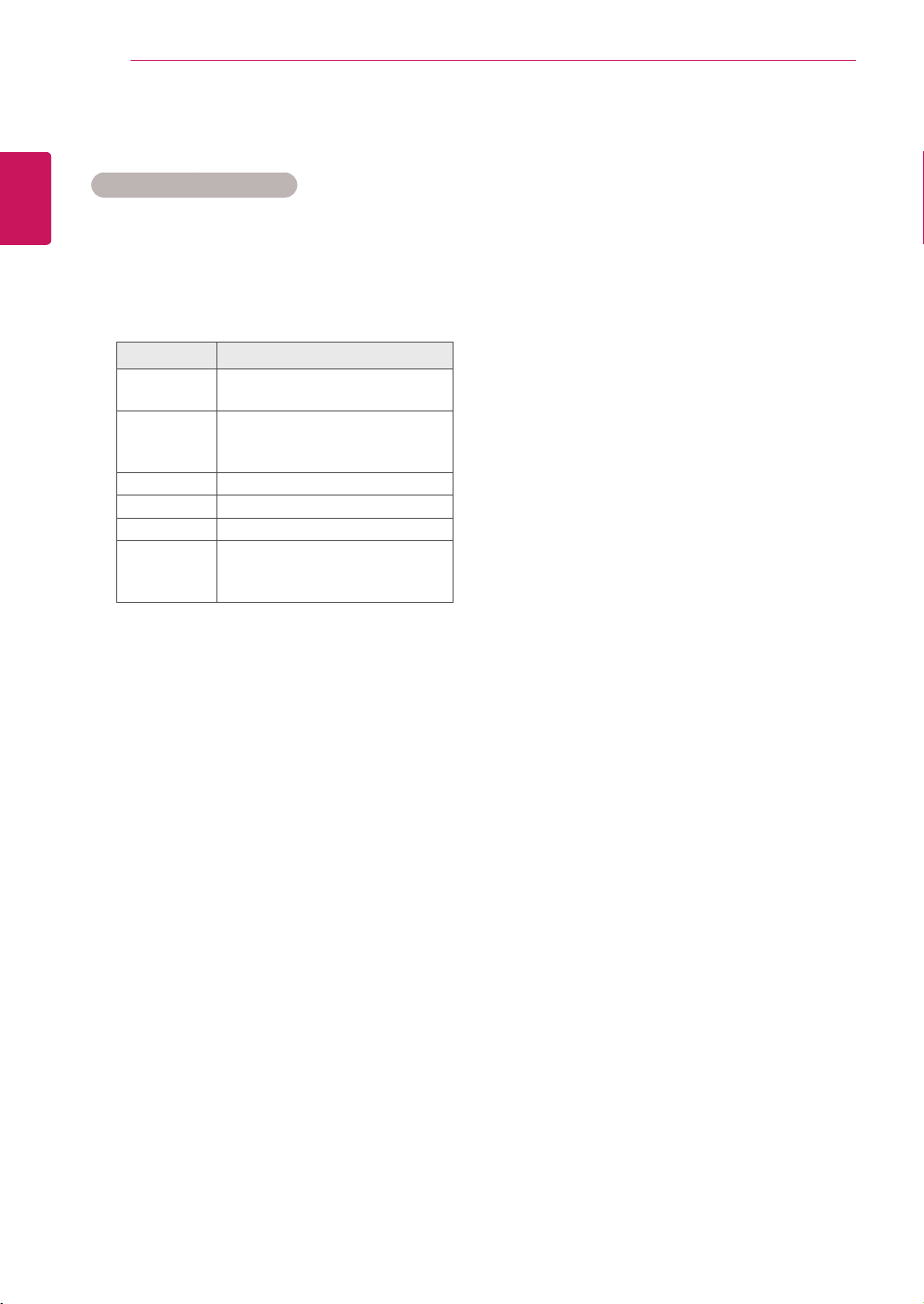
-4:3 :Thisselectionwillallowyoutoviewa
picturewithanoriginal4:3aspectratio,black
barswillappearonboththeleftandrightofthe
screen.
-Zoom :Thisselectionwillallowyoutoviewthe
picturewithoutanyalteration,whilefillingthe
entirescreen.However,thetopandbottomof
thepicturewillbecropped.
-Cinema Zoom :ChooseCinemaZoomwhen
youwanttoenlargethepictureincorrect
proportion.Note:Whenenlargingorreducing
thepicture,theimagemaybecomedistorted.
-16:9 :Thisselectionwillallowyoutoadjustthe
picturehorizontally,inlinearproportion,tofillthe
entirescreen(usefulforviewing4:3formatted
DVDs).
-Just Scan :ThisSelectionwillallowyouview
thepictureofbestqualitywithoutlossoforiginal
pictureinhighresolutionimage.Note:Ifthereis
noiseinoriginalPicture,Youcanseethenoise
attheedge.
-1:1 :Theaspectratioisnotadjustedfromthe
original.(OnlyDisplayPortPC,HDMIPC,
DVI-DPC,RGBPC)
Just Scan
24
ENG
ENGLISH
USING THE MONITOR SET
Using the input list
Selecting an input source
1
PressINPUTtoaccesstheinputsourcelist.
2
PresstheNavigationbuttonstoscrolltooneof
theinputsourcesandpressOK.
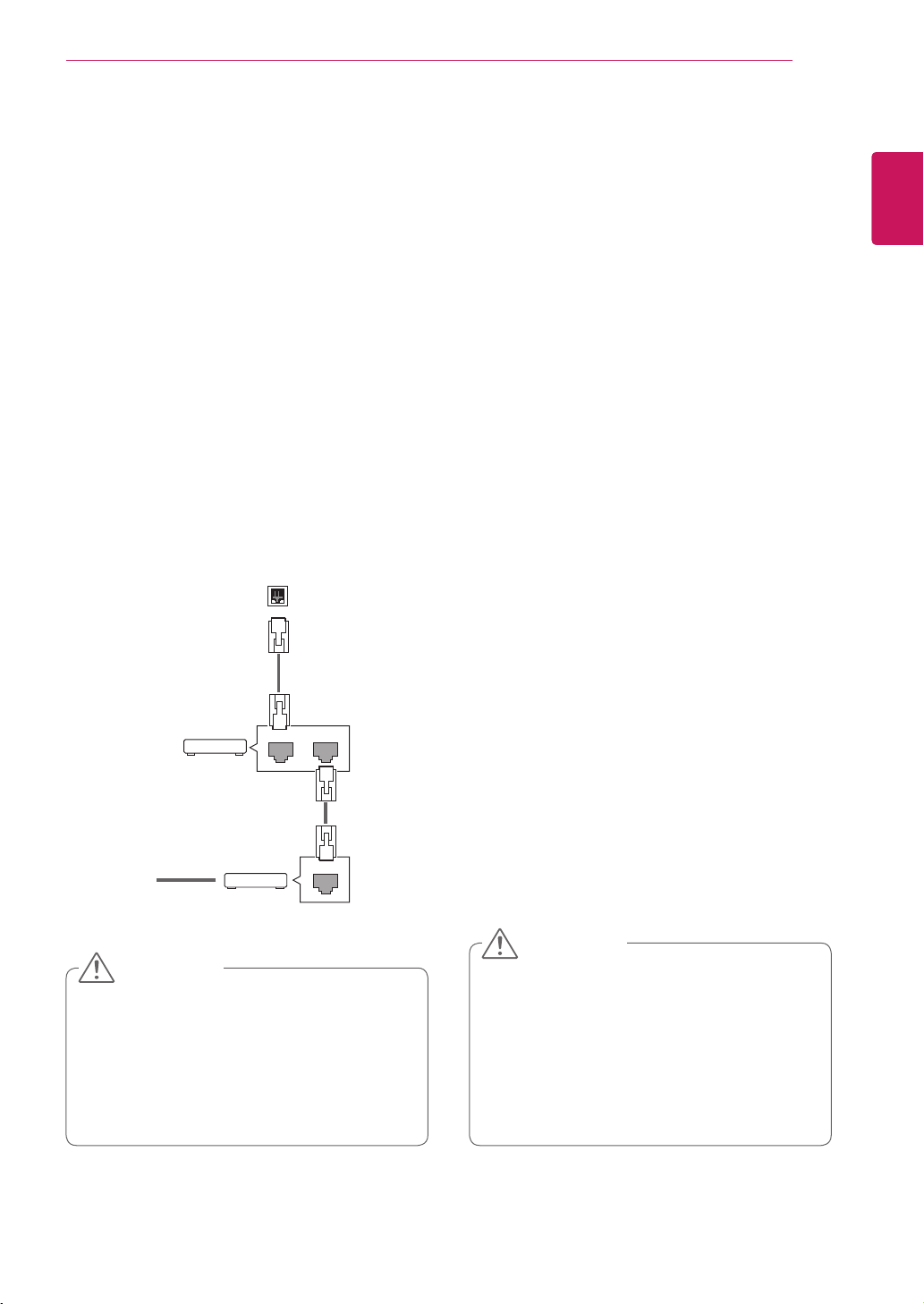
Input source Description
AV(CVBS) WatchvideofromaVCRorother
externaldevices.
Component WatchthecontentsinaDVDor
otherextemaldevices,orthrougha
digitalset-topbox
RGB ViewaPCdisplayonthescreen
Display Port ViewaPCdisplayonthescreen
DVI-D ViewaPCdisplayonthescreen
HDMI WatchcontentsinaPC,DVD
ofDigitalset-topboxotherhigh
definitiondevices
25
ENG
ENGLISH
ENTERTAINMENT
ENTERTAINMENT
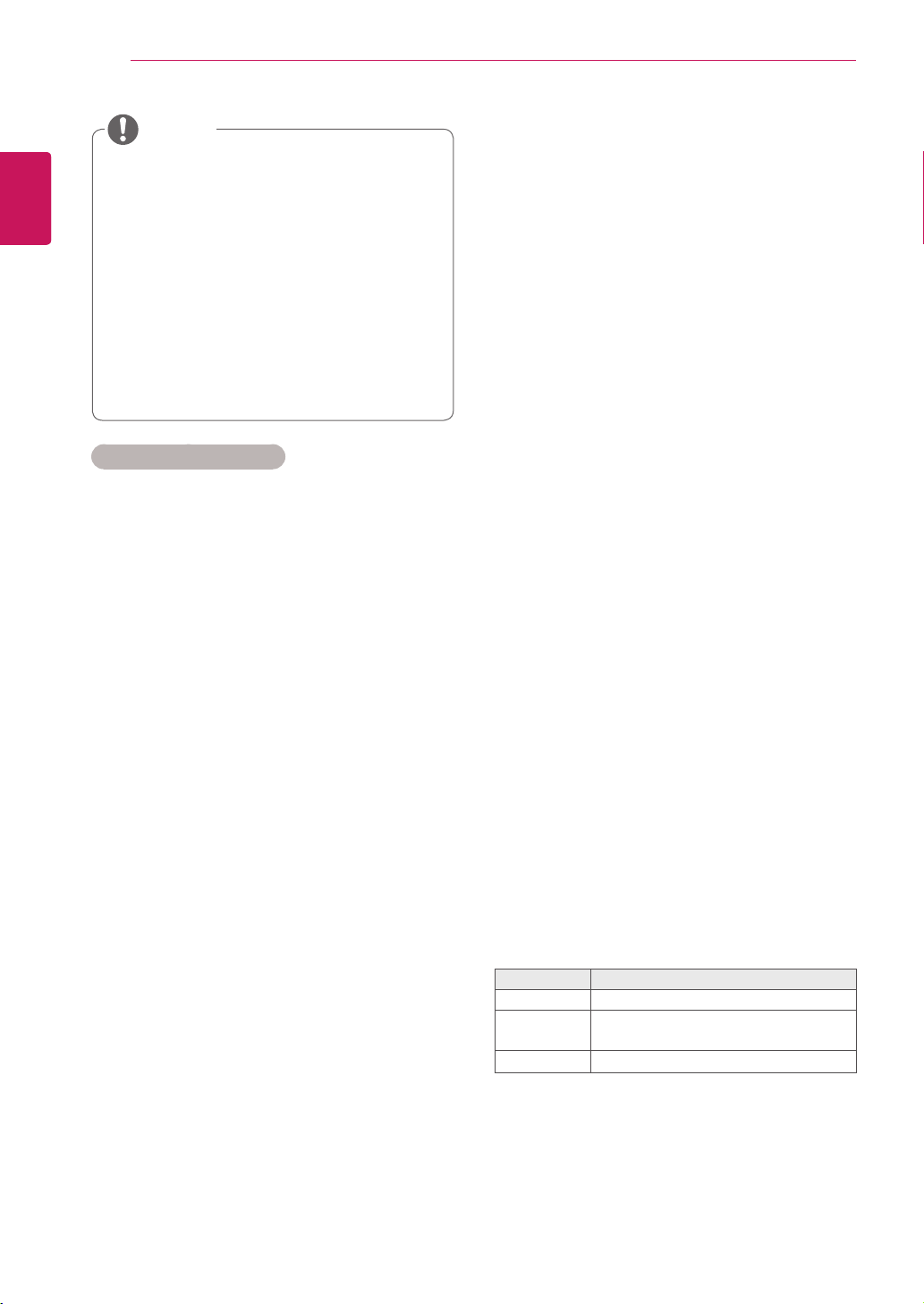
Connecting to a wired network
(Depending on model)
Connectthedisplaytoalocalareanetwork(LAN)
viatheLANportasshownonthefollowingillustra-
tionandsetupthenetworksettings.
Onlysupportswirednetworkconnection.
Aftermakingaphysicalconnection,asmall
numberofhomenetworksmayrequirethedisplay
networksettingstobeadjusted.Formosthome
networks,thedisplaywillconnecttoautomatically
withoutanyadjustments.
Fordetailinformation,contactyourinternetpro-
viderorroutermanual.
Donotconnectamodularphonecabletothe
LANport.
Sincetherearevariousconnectionmeth-
ods,pleasefollowthespecificationsofyour
telecommunicationcarrierorinternetservice
provider.
Networksettingmenuwillnotbeavail-
ableuntilthedisplayconnectedtophysical
network.
Sincetherearevariousconnectionmeth-
ods,pleasefollowthespecificationsofyour
telecommunicationcarrierorinternetservice
provider.
Tosetupthenetworkseetings:(Evenifyourdis-
playhasalreadyconnectedautomatically,running
setupagainwillnotharmanything),
1 PressMENUtoaccessthemainmenus.
2 PresstheNavigationbuttonstoscrolltoNET-
WORKandpressOK.
3 PresstheNavigationbuttonstoselectNet-
work SettingandpressOK.
4 IfyoualreadysetNetworkSetting,select
Resetting.Thenewconnectionsettingsresets
thecurrentnetworksettings.
5 SelectIP Auto SettingorIP Manual Setting.
-IfselectingIP Manual Setting,pressthe
NavigationandNumberbuttons.IPaddress-
eswillneedtobeinputmanually.
-IP Auto Setting:Selectthisifthereisa
DHCPserver(Router)onthelocalareanet-
work(LAN)viawiredconnection,thedisplay
willautomaticallybeallocatedanIPaddress.
Ifyou’reusingabroadbandrouterorbroad-
bandmodemthathasaDHCP(Dynamic
HostConfigurationProtocol)serverfunction.
TheIPaddresswillautomaticallybedeter-
mined.
6 Whenyouarefinished,pressEXIT.
LAN
Router
LAN WAN
Cable modem
ETHERNET
@
Internet
Internet
CAUTION
CAUTION
26
ENG
ENGLISH
ENTERTAINMENT
IfyouwanttoaccesstheInternetdirectlyon
yourdisplay,theinternetconnectionshould
alwaysbeon.
IfyoucannotaccesstheInternet,check
thenetworkconditionsfromaPConyour
network.
WhenyouuseNetwork Setting,checkthe
LANcableorcheckifDHCPintherouteris
turnedon.
Ifyoudonotcompletethenetworksettings,
thenetworkmaynotworkproperly.
Tips for Network setting
UseastandardLANcablewiththisdisplay.
Cat5orbetterwithaRJ45connector.
Manynetworkconnectionproblemsduringset
upcanoftenbefixedbyre-settingtherouter
ormodem.Afterconnectingthedisplaytothe
homenetwork,quicklypoweroffand/ordiscon-
nectthepowercableofthehomenetwork
routerorcablemodem.Thenpoweronand/or
connectthepowercableagain.
Dependingontheinternetserviceprovider
(ISP),thenumberofdevicesthatcanreceive
internetservicemaybelimitedbytheapplica-
bletermsofservice.Fordetails,contactyour
ISP.
LGisnotresponsibleforanymalfunctionofthe
displayand/ortheinternetconnectionfeature
duetocommunicationerrors/malfunctionsas-
sociatedwithyourinternetconnection,orother
connectedequipment.
LGisnotresponsibleforproblemswithinyour
internetconnection.
Youmayexperienceundesiredresultsifthe
networkconnectionspeeddoesnotmeetthe
requirementsofthecontentbeingaccessed.
Someinternetconnectionoperationsmaynot
bepossibleduetocertainrestrictionssetby
theInternetserviceprovider(ISP)supplying
yourInternetconnection.
AnyfeeschargedbyanISPincluding,without
limitation,connectionchargesareyourrespon
sibility.
A10Base-Tor100Base-TXLANportis
requiredwhenusingawiredconnectiontothis
display.Ifyourinternetservicedoesnotallow
forsuchaconnection,youwillnotbeableto
connectthedisplay.
ADSLmodemisrequiredtouseDSLservice
andacablemodemisrequiredtousecable
modemservice.Dependingontheaccess
methodofandsubscriberagreementwithyour
ISP,youmaynotbeabletousetheinternet
connectionfeaturecontainedinthisdisplayor
youmaybelimitedtothenumberofdevices
youcanconnectatthesametime.(IfyourISP
limitssub-scriptiontoonedevice,thisdisplay
maynotbeallowedtoconnectwhenaPCis
alreadyconnected.)
Theuseofa“Router”maynotbeallowedorits
usagemaybelimiteddependingonthepoli-
ciesandrestrictionsofyourISP.Fordetails,
contactyourISPdirectly.
Network Status
1 PressMENUtoaccessthemainmenus.
2 PresstheNavigationbuttonstoscrolltoNET-
WORKandpressOK.
3 PresstheNavigationbuttonstoselectNet-
work Status.
4 PressOKtocheckthenetworkstatus.
5 Whenyouarefinished,pressEXIT.
Option Description
Setting Returntothenetworksettingmenu.
Test
Testthecurrentnetworkstatusafterset-
tingthenetwork.
Close Returntothepreviousmenu.
NOTE
27
ENG
ENGLISH
ENTERTAINMENT
Tips for using USB storage devices
OnlyaUSBstoragedeviceisrecognizable.
IftheUSBstoragedeviceisconnected
throughaUSBhub,thedeviceisnotrecog-
nizable.
AUSBstoragedeviceusinganautomatic
recognitionprogrammemaynotberecog-
nized.
AUSBstoragedevicewhichusesitsown
drivermaynotberecognized.
TherecognitionspeedofaUSBstorage
devicemaydependoneachdevice.
Pleasedonotturnoffthedisplayorunplug
theUSBdevicewhentheconnectedUSB
storagedeviceisworking.Whensuchdevice
issuddenlyseparatedorunplugged,the
storedfilesortheUSBstoragedevicemay
bedamaged.
PleasedonotconnecttheUSBstorage
devicewhichwasartificiallymaneuveredon
thePC.Thedevicemaycausetheproductto
malfunctionorfailtobeplayed.Neverforget
touseonlyaUSBstoragedevicewhichhas
normalmusicfiles,imagefilesormoviefiles.
PleaseuseonlyaUSBstoragedevicewhich
wasformattedasaFAT32filesystem,NTFS
filesystemprovidedwiththeWindowsop-
eratingsystem.Incaseofastoragedevice
formattedasadifferentutilityprogramme
whichisnotsupportedbyWindows,itmay
notberecognized.
PleaseconnectpowertoaUSBstorage
device(over0.5A)whichrequiresanexternal
powersupply.Ifnot,thedevicemaynotbe
recognized.
PleaseconnectaUSBstoragedevicewith
thecableofferedbythedevicemaker.
SomeUSBstoragedevicesmaynotbesup-
portedoroperatedsmoothly.
FilealignmentmethodofUSBstorage
deviceissimilartoWindowXPandfilename
canrecognizeupto100Englishcharacters.
Besuretobackupimportantfilessincedata
storedinaUSBmemorydevicemaybe
damaged.Wewillnotberesponsibleforany
dataloss.
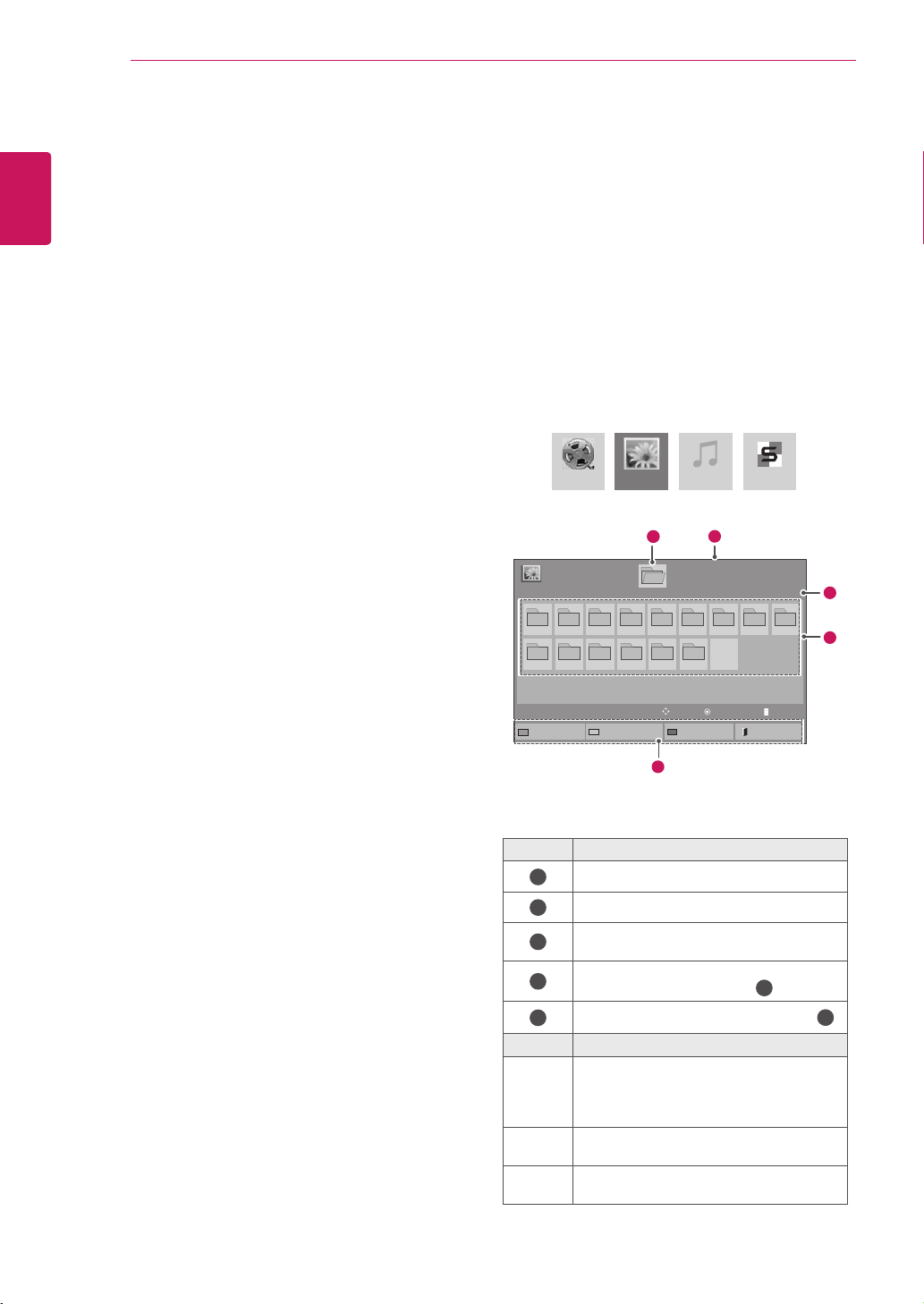
Connecting USB storage devices
ConnectUSBstoragedevicessuchasaUSB
flashmemory,externalharddrivetothedisplay
andusemultimediafeatures(See"Browsingfiles"
onpage28).
ConnectaUSBflashmemoryorUSBmemory
cardreadertotheDisplayasshownonthefollow-
ingillustration.TheMymediascreenappears.
DonotturnthedisplayofforremoveaUSB
storagedevicewhileEMF(mymedia)Menu
isactivated,asthiscouldresultinlossof
filesordamagetotheUSBstoragedevice.
BackupyourfilessavedonaUSBstorage
devicefrequently,asyoumayloseordam-
agethefilesandthismaybenotcoveredby
thewarranty.
or
CAUTION
28
ENG
ENGLISH
ENTERTAINMENT
IftheUSBHDDdoesnothaveanexternal
powersource,theUSBdevicemaynotbe
detected.Sobesuretoconnecttheexternal
powersource.
-Pleaseuseapoweradaptorforanexternal
powersource.WedonotguaranteeanUSB
cableforanexternalpowersource.
IfyourUSBmemorydevicehasmultiple
partitions,orifyouuseaUSBmulti-card
reader,youcanuseupto4partitionsorUSB
memorydevices.
IfaUSBmemorydeviceisconnectedtoa
USBmulti-cardreader,itsvolumedatamay
notbedetected.
IftheUSBmemorydevicedoesnotwork
properly,disconnectandreconnectit.
HowfastaUSBmemorydeviceisdetected
differsfromdevicetodevice.
IftheUSBisconnectedinStandbyMode,
specificharddiskwillautomaticallybe
loadedwhenthedisplayisturnedon.
Therecommendedcapacityis1TBorless
foraUSBexternalharddiskand32GBor
lessforUSBmemory.
Anydevicewithmorethantherecommend-
edcapacitymaynotworkproperly.
IfaUSBexternalharddiskwitha“Energy
Saving”functiondoesnotwork,turnthe
harddiskoffandonagaintomakeitwork
properly.
USBstoragedevicesbelowUSB2.0are
supportedaswell.Buttheymaynotwork
properlyinthemovielist.
Maximumof999foldersorfilescanberec-
ognizedunderonefolder.
ItisrecommendedtouseacertifiedUSB
storagedeviceandcable.Otherwise,aUSB
storagedevicemaynotbedetectedora
playbackerrormayoccur.
OnlyaUSBmemorystickcanbeusedto
playbackthefilesdistributedandstored
bySuperSignManager.AUSBharddiskor
multi-cardreaderwillnotwork.
OnlyanFAT32fileformattedstoragedevice
canplaybackthefilesdistributedandstored
bySuperSignmanager.
AUSB3.0storagedevicemaynotwork.
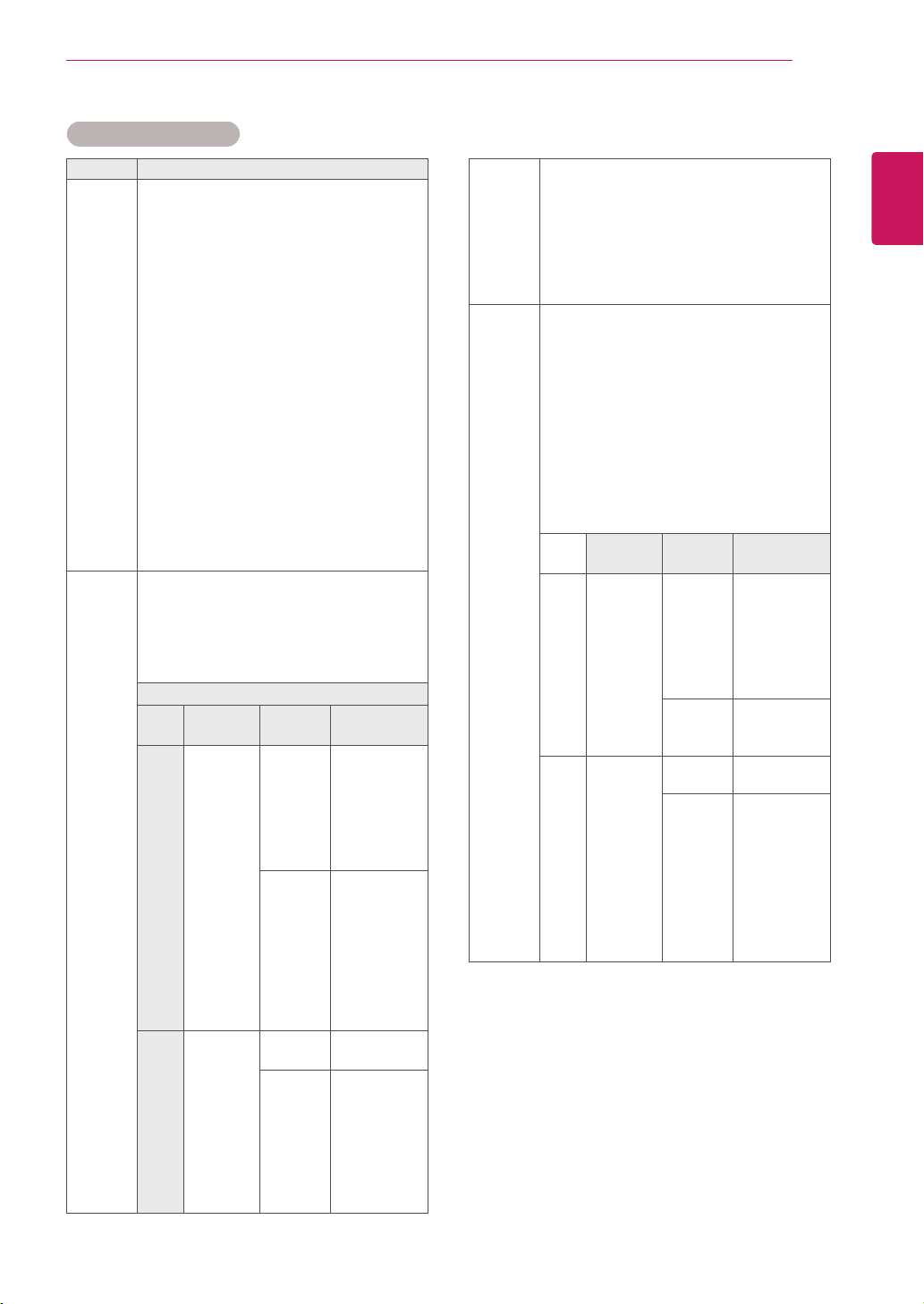
Browsing files
Accessthephoto,music,ormovielistsandbrowse
files.
1
ConnectaUSBstoragedevice.
2
PressMENUtoaccessthemainmenus.
3
PresstheNavigationbuttonstoscrolltoMy
MediaandpressOK.
4
PresstheNavigationbuttonstochoose
fromMovie List, Photo List,Music Listor
Contents ListandpressOK.
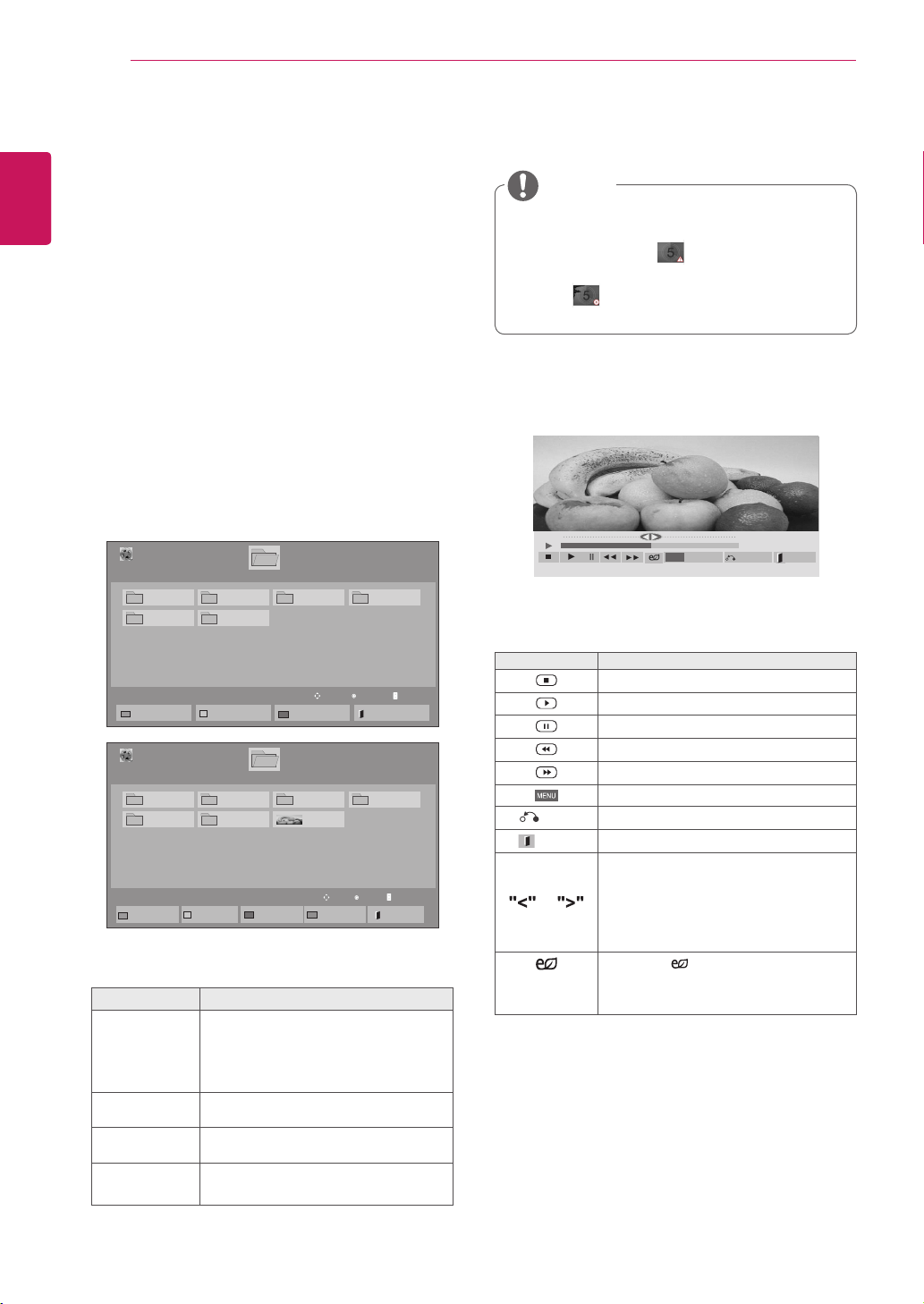
No. Description
1
Movestoupperlevelfolder
2
Currentpage/Totalpages
3
Correspondingbuttonsonthe
remotecontrol
4
Current page/ total pages of contents
underthefolderfocusedon
1
5
Contentsunderthefolderfocusedon
1
Buttom Description
Green
button
Pressthegreenbuttontotogglebetween
Photo List -> Music List,Music List ->
Contents List,Contents List -> Movie
List or Movie List -> Photo List.
Yellow
button
Amethodtoviewin5largethumbnailor
simplelist.
Blue
button
ConverttoMarkMode.
MovieList MusicListPhotoList ContentsList
Page1/1
PhotoList
Drive1
Page1/1
USBExternal
001
010 011 012 013 014 015
002 003 004 005 006 007
008
009
ToMusicList
ChangeNumbers
MarkMode
Exit
View
Move
11
2
3
4
5
P PageChange
29
ENG
ENGLISH
ENTERTAINMENT
Supported file format
Type Supported file format
Movie DAT,MPG,MPEG,VOB,AVI,DIVX,MP4,MKV,TS,T
RP,TP,ASF,WMV,FLV)
Movie(*.mpg/*.mpeg/*dat/*.ts/*.trp/*.tp/*.vob/*.
mp4/*.mov/*.mkv/*.divx/*.avi/*.asf/*.wmv/*.flv/*.
avi(motion-jpeg)/*.
mp4(motion-jpeg)/*.mkv(motion-jpeg))supporting
file
Video format:DivX3.11,DivX4.12,DivX5.x,
DivX6,Xvid1.00,Xvid1.01,Xvid1.02,Xvid1.03,
Xvid1.10beta-1/beta-2,
Mpeg-1,Mpeg-2,Mpeg-4,H.264/AVC,VC1,
JPEG,SorensonH.263
Audio format:DolbyDigital,AAC,Mpeg,MP3,
LPCM,HE-AAC,ADPCM,WMA
Bit rate:within32kbpsto320kbps(MP3)
External Subtitle format:*.smi/*.srt/*.sub
(MicroDVD,Subviewer1.0/2.0)/*.ass/*.ssa/*.
txt(TMPlayer)/*.psb(PowerDivX)
Internal Subtitle format :only,XSUB(Itisthe
subtitleformatusedinDivX6files)
Photo JPEG
Baseline:64x64to15360x8640
Progressive:64x64to1920x1440
YoucanplayJPEGfilesonly.
Non-supportedfilesaredisplayedintheform
ofpredefinedicon.
Only 3D Models
File
Extensions
Item Profile
2D jpeg
jpg
jpe
supported
fileformat
SOF0:
baseline
SOF1:
Extend
Sequential
SOF2:
Progressive
photosize
Min:64x64
Max-Normal
Type:
15360(W)x
8640(H)
Progressive
Type:
1920(W)x
1440(H)
3D mpo supported
fileformat
mpo
photosize
4:3size:
3,648x2,736
2,592x1,944
2,048x
1,536
3:2size:
3,648x
2,432
Music MP3
Bitrate32to320
SamplingrateMPEG1Layer3:32kHz,44.1
kHz,48kHz
SamplingrateMPEG2Layer3:16kHz,22.05
kHz,24kHz
SamplingrateMPEG2.5Layer3:8kHz,
11.025kHz,12kHz
Content
(when
using
SuperSign
Manager)
FileExtensions:*.cts/*.cse
Movie
File Extensions:*.mpg/*.mpeg/*.dat/*.ts/*.
trp/*.tp/*.vob/*.mp4/*.mov/*.mkv/*.avi/*.asf/*.
wmv/*.avi(motionJPEG)/*.mp4(motionJPEG)/*.
mkv(motionJPEG)
Video format:MPEG1,MPEG2,MPEG4,H.264/
AVC,DivX3.11,DivX4.12,DivX5.x,DivX6,
Xvid1.00,Xvid1.01,Xvid1.02,Xvid1.03,Xvid
1.10-beta1/2,JPEG,VC1(WVC1/WMV3)
Audio format:MP2,MP3,DolbyDigital,LPCM,
AAC,HE-AAC,LPCM,ADPCM,WMA,MP3
File
Extensions
Item Profile
Photo JPEG
JPG
PNG
BMP
supported
fileformat
SOF0:
baseline
SOF1:
Extend
Sequential
SOF2:
Progressive
Photosize
Min:64x64
MaxType:
1366x768
Music MP3 Bitrate 32kbpsto320
kbps
Sampling
rate
32kHz,44.1
kHz,48kHz
(MPEG1L3)
16kHz,22.05
kHz,24kHz
(MPEG2L3)
8kHz,11.025
kHz,12kHz
(MPEG2.5L3)
30
ENG
ENGLISH
ENTERTAINMENT
Viewing movies
Playvideofilesondisplay.Yourdisplayshowsall
ofthevideofilessavedinaUSBstoragedeviceor
sharedfolderonaPC.
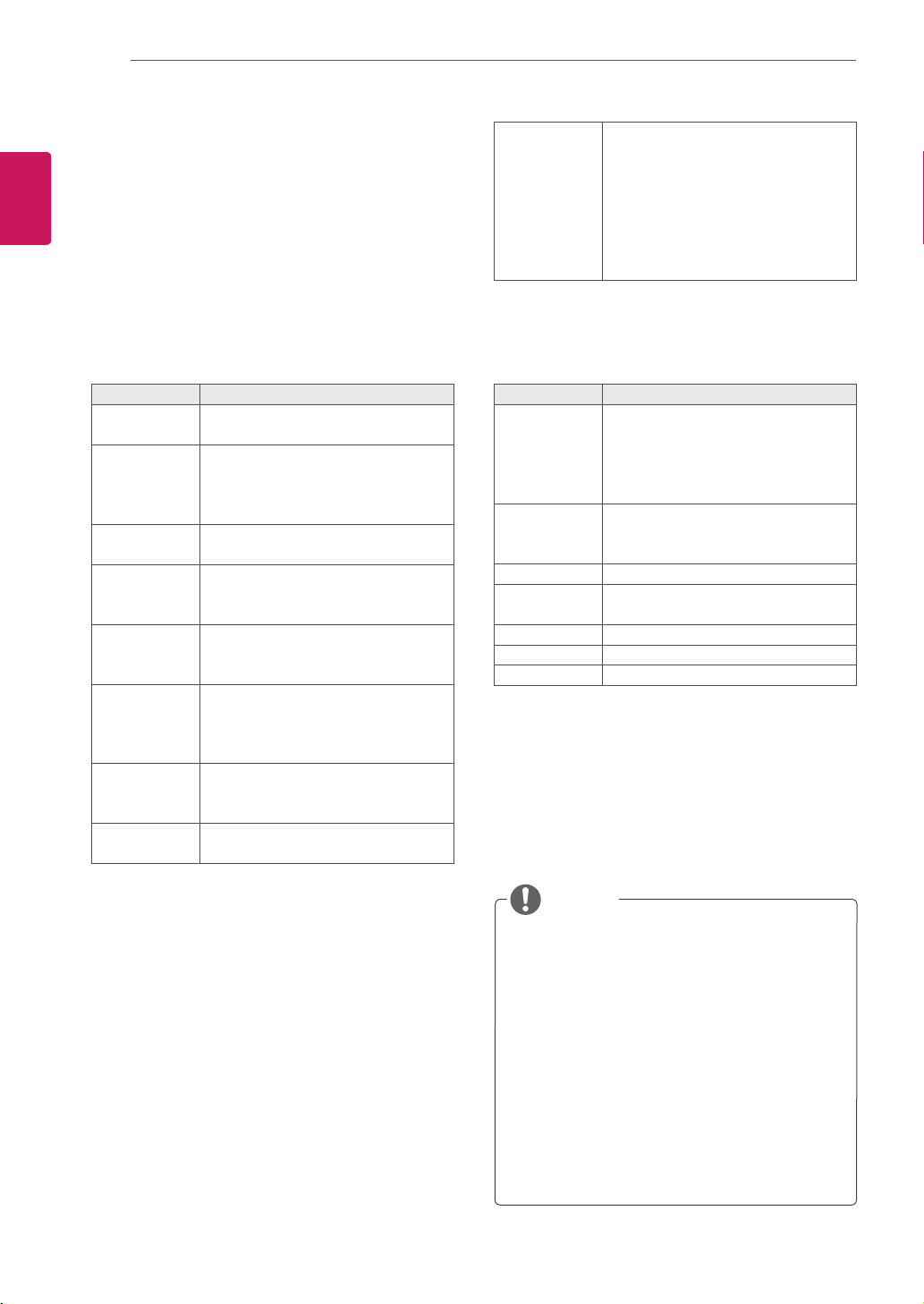
1 PresstheNavigationbuttonstoscrolltoMy
MediaandpressOK.
2 PresstheNavigationbuttonstoscrolltoMovie
ListandpressOK.
3 PresstheNavigationbuttonstoscrolltoa
folderyouwantandpressOK.
4 PresstheNavigationbuttonstoscrolltoafile
youwantandpressOK.
Menu Description
Play Marked Playtheselectedmoviefile.
Onceamoviefilefinishesplaying,
thenextselectedonewillbeplayed
automatically.
Mark All Markallmoviefilesonthescreen.
Unmark All Deselectallmarkedmoviefiles.
Exit Mark
Mode
ExittheMarkMode.
5 Playamovie.
Non-supportedfilesaredisplayedthepreview
imagebyicononly .
Abnormal files are displayed in the form of
bitmap .
6 Controlplaybackbyusingthefollowingbuttons.
Button Description
Stopstheplayback
Playsavideo
Pausesorresumestheplayback
Scansbackwardinafile
Scansforwardinafile
ShowtheOptionmenu.
HIDE
Hidethemenuonthefull-sizedscreen.
EXIT
ReturntoMovie List.
or
Skipstospecificpointsinafiledur-
ingplayback.Thetimeofaspecific
pointwillappearonthestatusbar.In
somefiles,thisfunctionmaynotwork
properly.
ENERGY
SAVING
Pressthe ENERGY SAVINGbut-
tonrepeatedlytoincreasethebright-
nessofyourscreen.
Page1/1
MovieList
USB1USBDrive
Drive1
Page1/1
ToPhotolist
ChangeNumbers
MarkMode
Exit
003
001 002
004
005 006
Play
Move
Page ChangeP
01:02:30/02:30:25
Option
MENU
Hide
Exit
NOTE
Page1/1
MovieList
USB1USBDrive
Drive1
Page1/1
PlayMarked
MarkAll
UnmarkAll
Exit
003
001 002
004
005 006
MarkMode
ExitMarkMode
051.Apple_......
02:30:25
Mark
Move
Page ChangeP

31
ENG
ENGLISH
ENTERTAINMENT
Video options
1 PressMENUtoaccessthePop-Upmenus.
2 PresstheNavigationbuttonstoscrolltoSet
Video Play., Set Video. or Set Audio. and
pressOK.
OptionvalueschangedinMovie Listdoes
notaffectPhoto ListandMusic List.
OptionvaluechangedinPhoto ListandMu-
sic ListarechangedlikewiseinPhoto List
andMusic ListexcludingMovie List.
Whenreplayingthevideofileafterstopping,
youcanplayfromwhereitstoppedprevi-
ously.
Tips for using playing video files
Someuser-createdsubtitlesmaynotwork
properly.
Somespecialcharactersarenotsupported
insubtitles.
HTMLtagsarenotsupportedinsubtitles.
Subtitlesinlanguagesotherthanthesup-
portedlanguagesarenotavailable.
Thescreenmaysuffertemporaryinterrup-
tions(imagestoppage,fasterplayback,etc.)
whentheaudiolanguageischanged.
Adamagedmoviefilemaynotbeplayed
correctly,orsomeplayerfunctionsmaynot
beusable.
Moviefilesproducedwithsomeencoders
maynotbeplayedcorrectly.
Ifthevideoandaudiostructureofrecorded
fileisnotinterleaved,eithervideooraudiois
outputted.
HDvideoswithamaximumof
1920x1080@25/30Por1280x720@50/60P
aresupported,dependingontheframe.
Videoswithresolutionshigherthan
1920X1080@25/30Por1280x720@50/60P
maynotworkproperlydependingonthe
frame.
Moviefilesotherthanthespecifiedtypesand
formatsmaynotworkproperly.
Maxbitrateofplayablemoviefileis20Mbps.
(only,MotionJPEG:10Mbps)
Wedonotguaranteesmoothplaybackof
profilesencodedlevel4.1orhigherinH.264/
AVC.
DTSAudiocodecisnotsupported.
Amoviefilemorethan30GBinfilesizeis
notsupportedforplayback.
ADivXmoviefileanditssubtitlefilemustbe
locatedinthesamefolder.
Avideofilenameanditssubtitlefilename
mustbeidenticalforittobedisplayed.
PlayingavideoviaaUSBconnectionthat
doesn’tsupporthighspeedmaynotwork
properly.
FilesencodedwithGMC(GlobalMotion
Compensation)maynotbeplayed.
WhenyouarewatchingthemoviebyMovie
Listfunction,youcanadjustanimageby
EnergySavingkeyontheremotecontrol.
Usersetupforeachimagemodedoesnot
operate.
NOTE
32
ENG
ENGLISH
ENTERTAINMENT
Repeat Turnon/offrepeatfunctionof
movieplayback.Whenturnedon,the
filewithinthefolderwillbeplayed
backrepeatedly.Evenwhenthe
repeatedplayback
isturnedoff,itcanruntheplaybackif
thefilenameissimilartotheprevious
file.
Code Page Support Language
Latin1 English,Spanish,French,
German,Italian,Swedish,Finnish,
Dutch,Portuguese,Danish,Roma-
nian,Norwegian,Albanian,Gaelic,
Welsh,Irish,Catalan,Valencian
Latin2 Bosnian,Polish,Croatian,Czech,
Slovak,Slovenian,Serbian,
Hungarian
Latin4 Estonian,Latvian,Lithuanian
Cyrillic Bulgarian,Macedonian,Russian,
Ukrainian,Kazakh
Greek Greek
Turkish Turkish
Korean Korean
Only10,000ofsyncblockscanbesupported
withinthesubtitlefile.
Whenplayingavideo,youcanadjustthe
PictureSizebypressingtheRATIObutton.
Subtitlesinyourlanguageareonlysup-
portedwhentheOSDmenuisalsointhis
language.
Thecodepageoptionsmaybedisabledde-
pendingonthelanguageofthesubtitlefiles.
Selecttheappropriatecodepageforthe
subtitlefiles.
WhenyouselecttheSet Video Play,,
1 PresstheNavigationbuttonstoscrolltoshow
thePicture Size, Audio Language, Subtitle
LanguageorRepeat.
2 PresstheNavigationbuttonstoscrolltomake
appropriateadjustments.
Menu Description
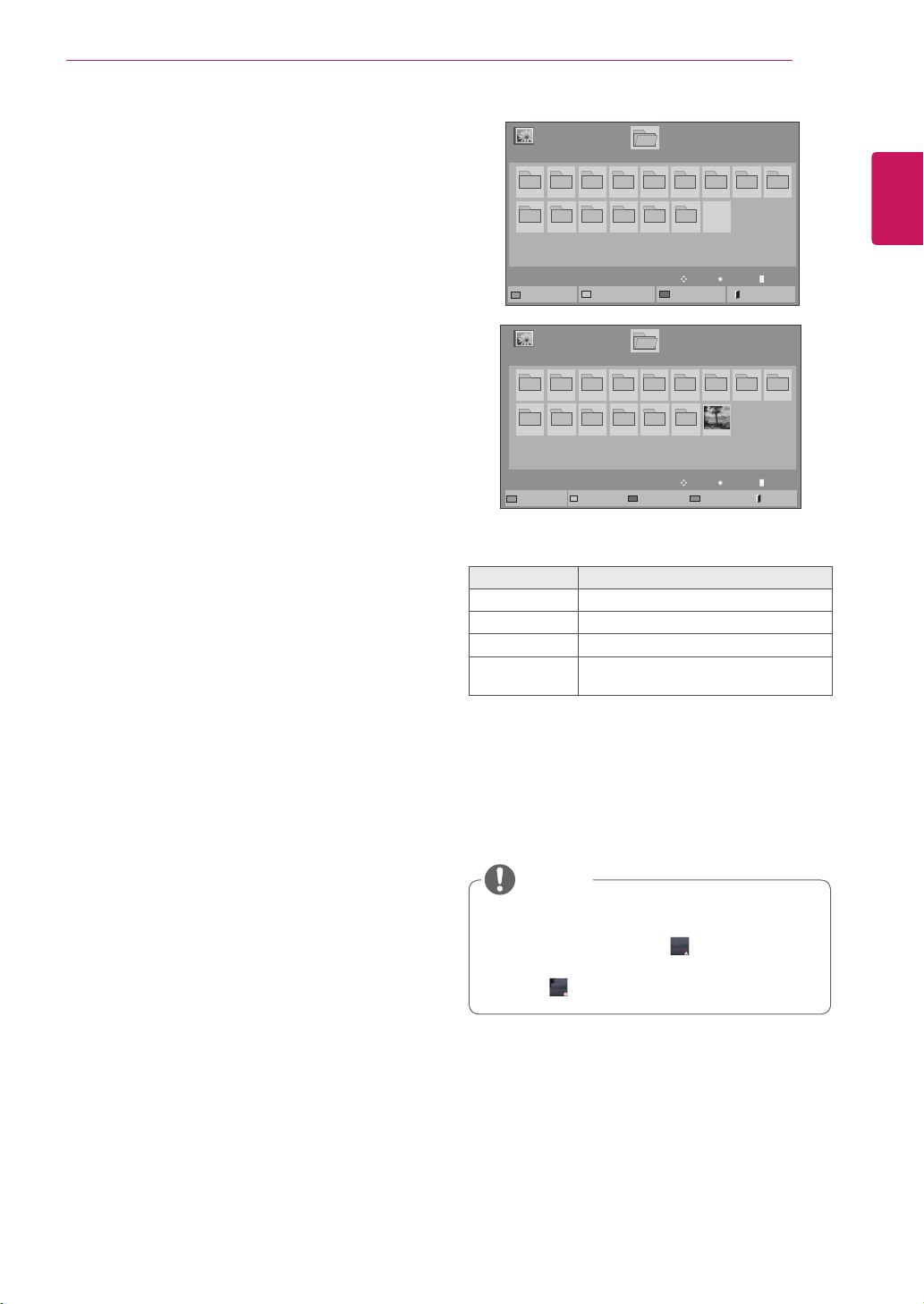
Picture Size Selectsyourdesiredpicture
formatduringmovieplay.
Audio
Language
ChangestheLanguageGroupofthe
audioduringmovieplay.Files
withasingleaudiotrackcannotbe
selected.
Subtitle
Language
Turnon/offthesubtitle.
Language ActivatedforSMIsubtitleand
canselectthelanguagewithinthe
subtitle.
Code Page Canselectthefontforsubtitle.
Whensettodefault,samefontas
generalmenuwillbeused.
Sync Adjuststhetimesynchronisationof
thesubtitlefrom-10secsto+10secs
bystepsof0.5secsduringmovie
play.
Position Changesthepositionofthe
subtitleeitherupordownduring
movieplay.
Size SelectsyourdesiredSubtitlesize
duringmovieplay.
NOTE
33
ENG
ENGLISH
ENTERTAINMENT
WhenyouselecttheSet Video,,
1 PresstheNavigationbuttonstoscrolltomake
appropriateadjustments.
WhenyouselecttheSet Audio,,
1 PresstheNavigationbuttonstoscrolltoshow
theSound Mode, Clear Voice II orBalance.
2 PresstheNavigationbuttonstoscrolltomake
appropriateadjustments.
Viewing photos
ViewimagefilessavedinaUSBstoragedevice.
Thedisplaysonthescreenmaydifferfromthe
model.
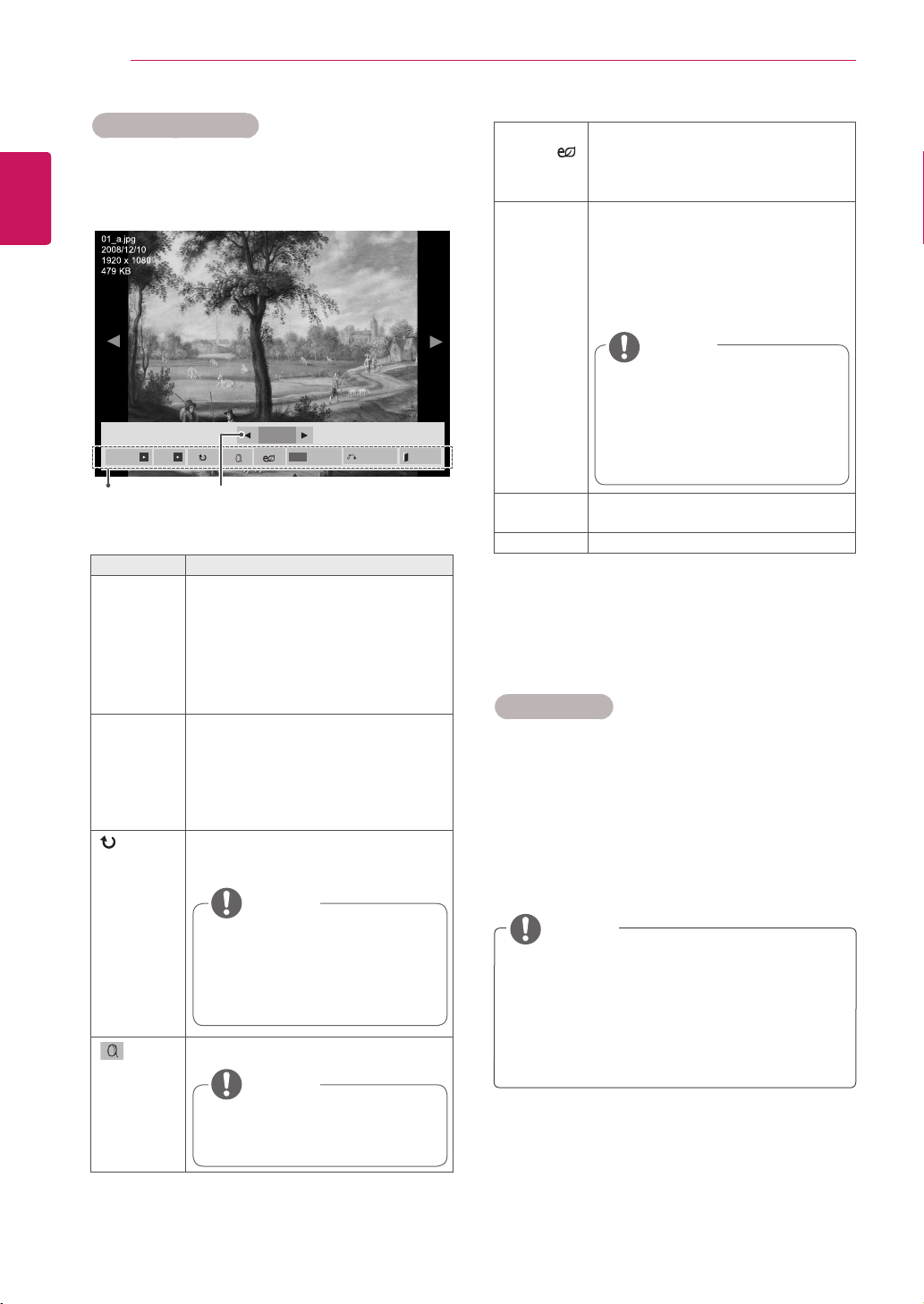
1 PresstheNavigationbuttonstoscrolltoMy
MediaandpressOK.
2 PresstheNavigationbuttonstoscrolltoPhoto
ListandpressOK.
3 PresstheNavigationbuttonstoscrolltoa
folderyouwantandpressOK.
4 PresstheNavigationbuttonstoscrolltoafile
youwantandpressOK.
5 Viewphotos.
Non-supportedfilesaredisplayedthepre-
viewimagebyicononly .
Abnormalfilesaredisplayedintheformof
bitmap .
Menu Description
View Marked Displaytheselectedphotofile.
Mark All Markallphotofilesonthescreen.
Unmark All Deselectallmarkedphotofiles.
Exit Mark
Mode
ExittheMarkMode.
NOTE
Page1/1
PhotoList
Drive1
Page1/1
USB1USBDrive
001
010 011 012 013 014 015
002 003 004 005 006 007
008
009
ToMusicList
ChangeNumbers
MarkMode
Exit
Page1/1
PhotoList
Drive1
Page1/1
USB1USBDrive
001
010 011 012 013 014 015
002 003 004 005 006 007
008
009
MarkMode
ViewMarked
MarkAll
UnmarkAll
Exit
ExitMarkMode
View
Move
Page ChangeP
Mark
Move
Page ChangeP
34
ENG
ENGLISH
ENTERTAINMENT
Photo options
1 PressMENUtoshowtheOptionmenus.
2 Press the Navigation buttons to scroll to Set
Photo View., Set Video. or Set Audio. and
pressOK.
Option values changed in Movie List does
notaffectPhoto ListandMusic List.
OptionvaluechangedinPhoto ListandMu-
sic Listarechangedlikewise in Photo List
andMusic ListexcludingMovie List.
Option Description
Slideshow Startsorstopsaslideshowwithselected
photos.
Iftherearenoselectedphotos,allpho-
tossavedinthecurrentfolderdisplay
duringaslideshow.
Tosetaslideshowspeed,selectOp-
tion.
BGM Turnsthebackgroundmusiconoroff.
Tosetthebackgroundmusicfolder,
selectOption.
YoucanadjustOptionbyMENUbutton
ontheremotecontrol.
(Rotate)
Rotatesphotosclockwise(90°,180°,
270°,360°).
(Zoom)
Viewthephotobyzoomin2,4times.
NumberofselectedphotosOptions
Using photo options
Usethefollowingoptionswhileviewingphotos.
The supported photo size is
limited. You cannot rotate a
photo if the resolution of the
rotatedwidthislargerthanthe
supportedresolutionsize.
NOTE
Photoswitharesolutionof
960x540orlesscannotbe
enlarged.
NOTE
Youcannotchangethemusic
folder while the background
musicisplaying.
You can only select the MP3
foldersavedonthedevicethat
currentlydisplaysthephoto.
NOTE
NOTE
ENERGY
SAVING( )
PresstheENERGY SAVINGbutton
repeatedlytochangethebrightnessof
yourscreen.
Option Slide Speed:Selectsaslideshow
speed(Fast,Medium,Slow).
TransitionEffect: Settheviewmode
oftheslideshow.
BGM:Selectsamusicfolderforthe
backgroundmusic.
Hide Hidestheoptionwindow.
Todisplaytheoptions,pressOK.
EXIT ReturntoPhoto List.
2/13
Slideshow BGM
Hide
Option
MENU
Exit
35
ENG
ENGLISH
ENTERTAINMENT
WhenyouselecttheSet Photo View,
1 PresstheNavigationbuttonstoscrolltoselectSlide Speed,Transition Effect or BGM.
2 PresstheNavigationbuttonstoscrolltomakeappropriateadjustments.
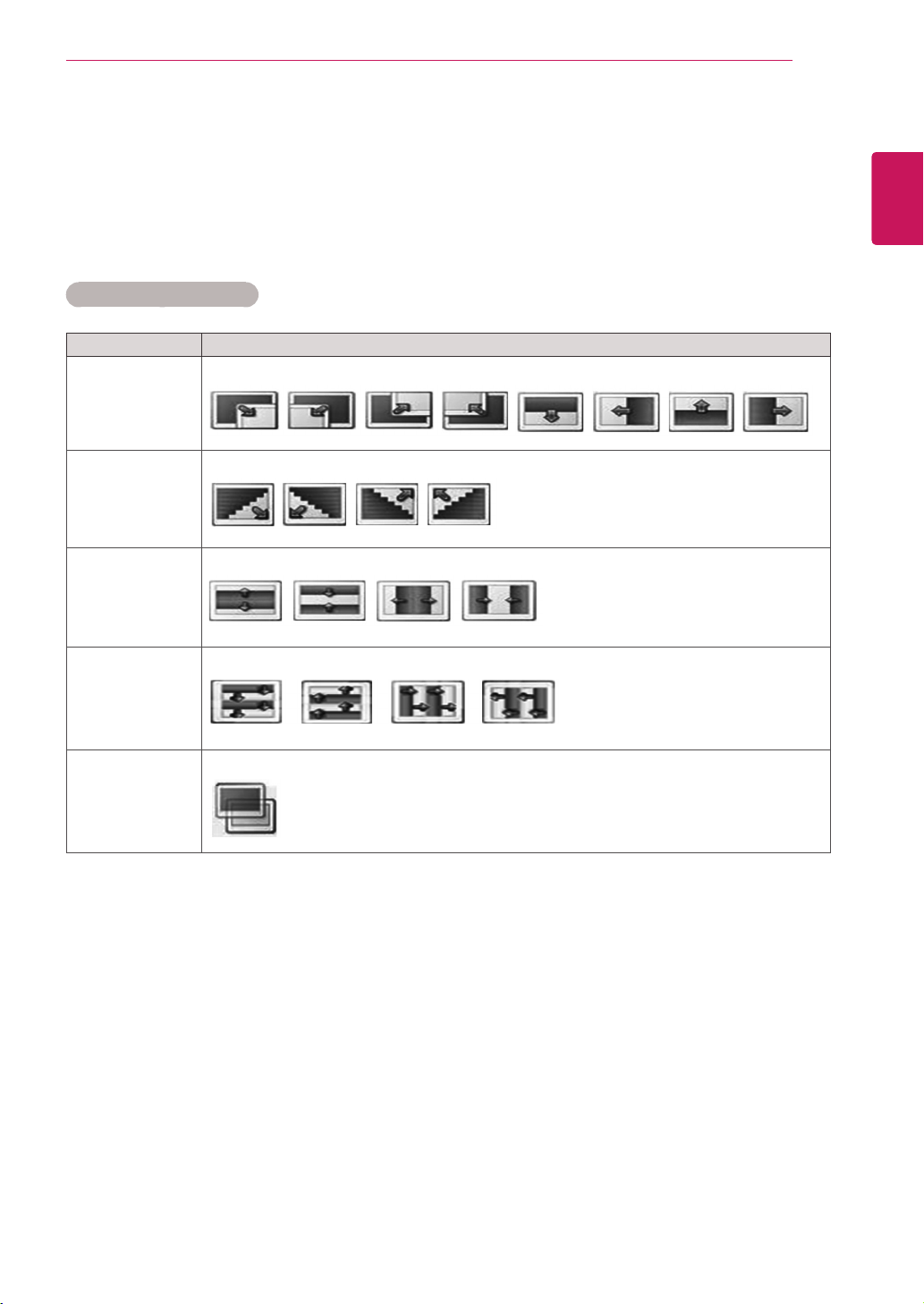
Transition Effect Option
Option Description
Sliding Pushesthecurrentslideoutofviewasitplaystothenextslide.
Stairs Pushesthecurrentslideinastaircaseshapeasitplaystothenextslide.
Door Open
/Close
Pushesthecurrentslidelikeopeningorclosingthedoorasitplaystothenextslide.
Shutter Pushesthecurrentslidelikedrawingorpullingdowntheblindasitplaystothenextslide
Fade In Fadestheslideoutslowlybeforeplayingtothenextslide.
36
ENG
ENGLISH
ENTERTAINMENT
WhenyouselecttheSet Video,
1 PresstheNavigationbuttonstoscrolltomake
appropriateadjustments.
WhenyouselecttheSet Audio,
1 PresstheNavigationbuttonsto scroll toshow
theSound Mode, Clear Voice II orBalance.
2 PresstheNavigationbuttonstoscrolltomake
appropriateadjustments.
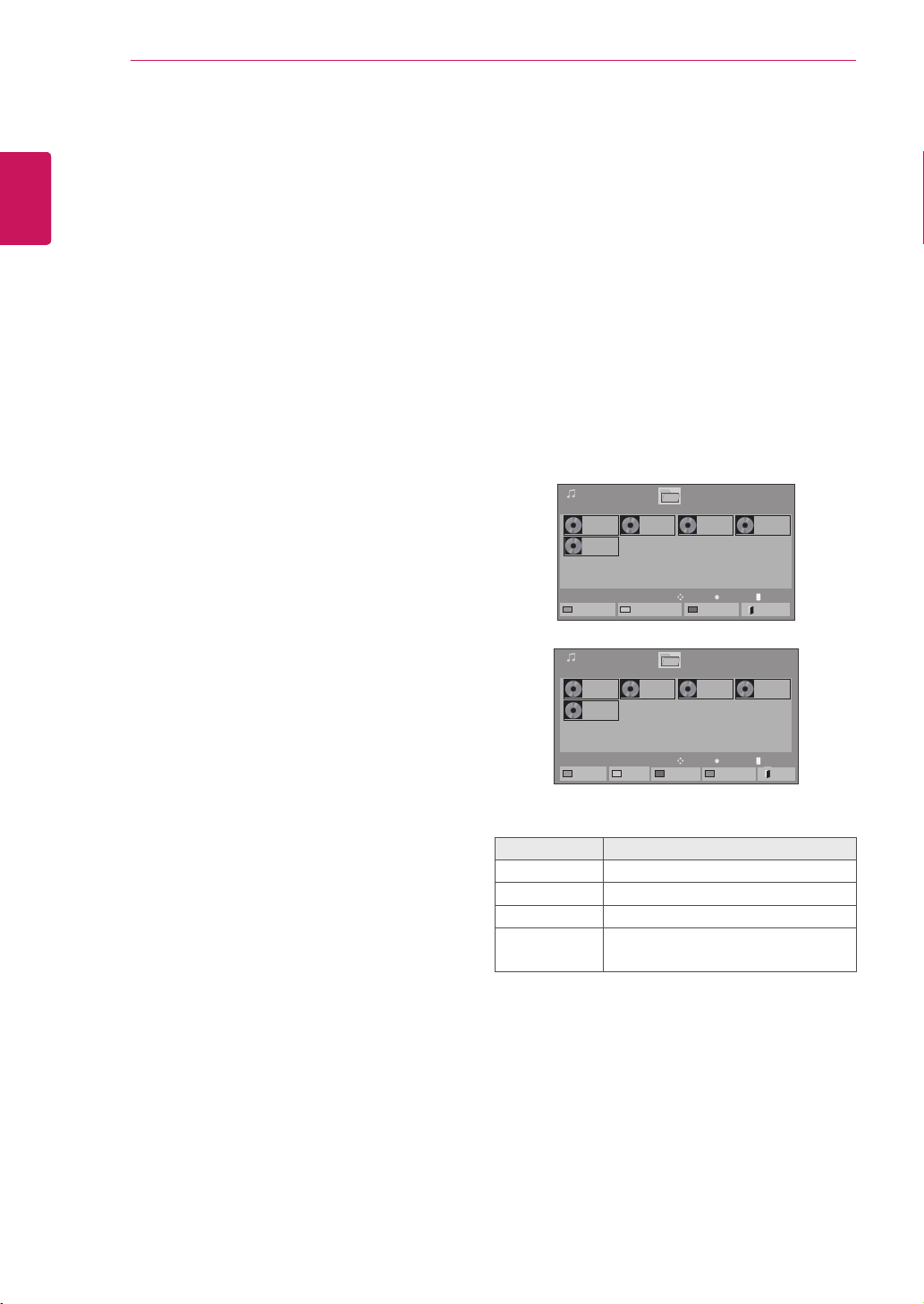
5 Playmusic.
Listening to music
1 PresstheNavigationbuttonstoscrolltoMy Me-
diaandpressOK.
2 PresstheNavigationbuttonstoscrolltoMusic
ListandpressOK.
3 PresstheNavigationbuttonstoscrolltoafolder
youwantandpressOK.
4 Pressthe Navigation buttons to scroll to a file
youwantandpressOK.
Menu Description
Play Marked Displaytheselectedmusicfile.
Mark All Markallmusicfilesonthescreen.
Unmark All Deselectallmarkedmusicfiles.
Exit Mark
Mode
ExittheMarkMode.
WhenyouselecttheSet Photo View,
1 PresstheNavigationbuttonstoscrolltoselect
Slide Speed or BGM..
2 PresstheNavigationbuttonstoscrolltomake
appropriateadjustments.
Page1/1
MusicList
Drive1
Page1/1
001.-B01.mp3
00:00
002.-B02.mp3
00:00
003.B03.mp3
00:00
004.-B04.mp3
00:00
005.-B05.mp3
00:00
USB1USBDrive
ToMovieList
ChangeNumbers
MarkMode
Exit
Page1/1
MusicList
Drive1
Page1/1
001.-B01.mp3
00:00
002.-B02.mp3
00:00
003.B03.mp3
00:00
004.-B04.mp3
00:00
005.-B05.mp3
00:00
USB1USBDrive
PlayMarked
MarkAll
UnmarkAll
Exit
MarkMode
ExitMarkMode
Play
Move
Page ChangeP
Mark
Move
Page ChangeP
37
ENG
ENGLISH
ENTERTAINMENT
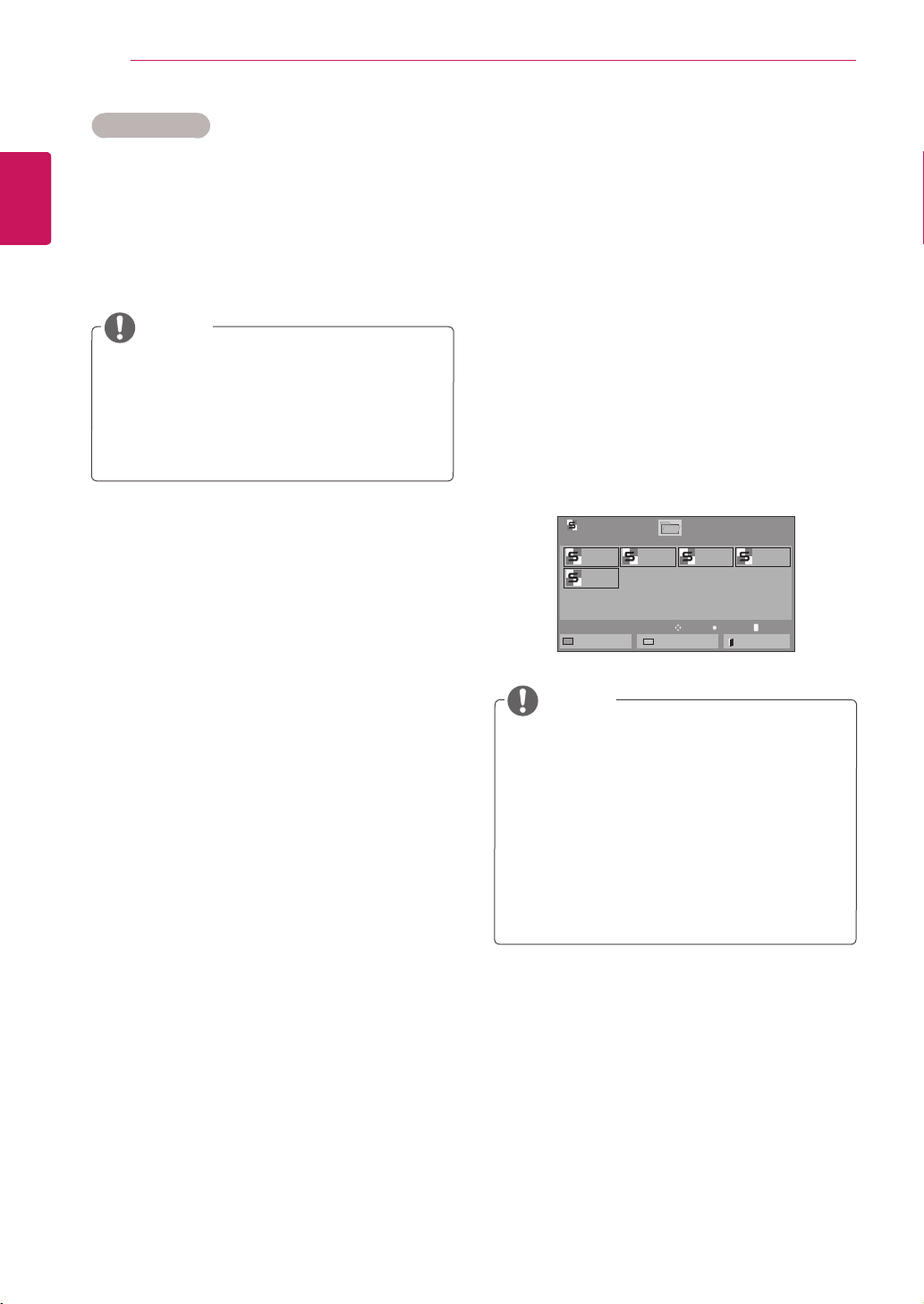
Timeelapsed/Duration
002.B02.mp3
00:31/04:04
filename
Non-supportedfilesaredisplayedthepre-
viewimagebyicononly .
Abnormalfilesaredisplayedintheformof
bitmap .
Adamagedorcorruptedmusicdoesnotplay
butdisplays00:00inplaytime.
Amusicdownloadedfromapaidservicewith
copyrightprotectiondoesnotstartbutdis-
playsinappropriateinformationinplaytime.
IfyoupressOK, buttons,screensaveris
stopped.
ThePLAY( ),Pause( ), , ,
buttonsontheremotecontrolarealsoavail-
ableinthismode.
Youcanusethe buttontoselectthenext
musicandthe buttontoselecttheprevi-
ousmusic.
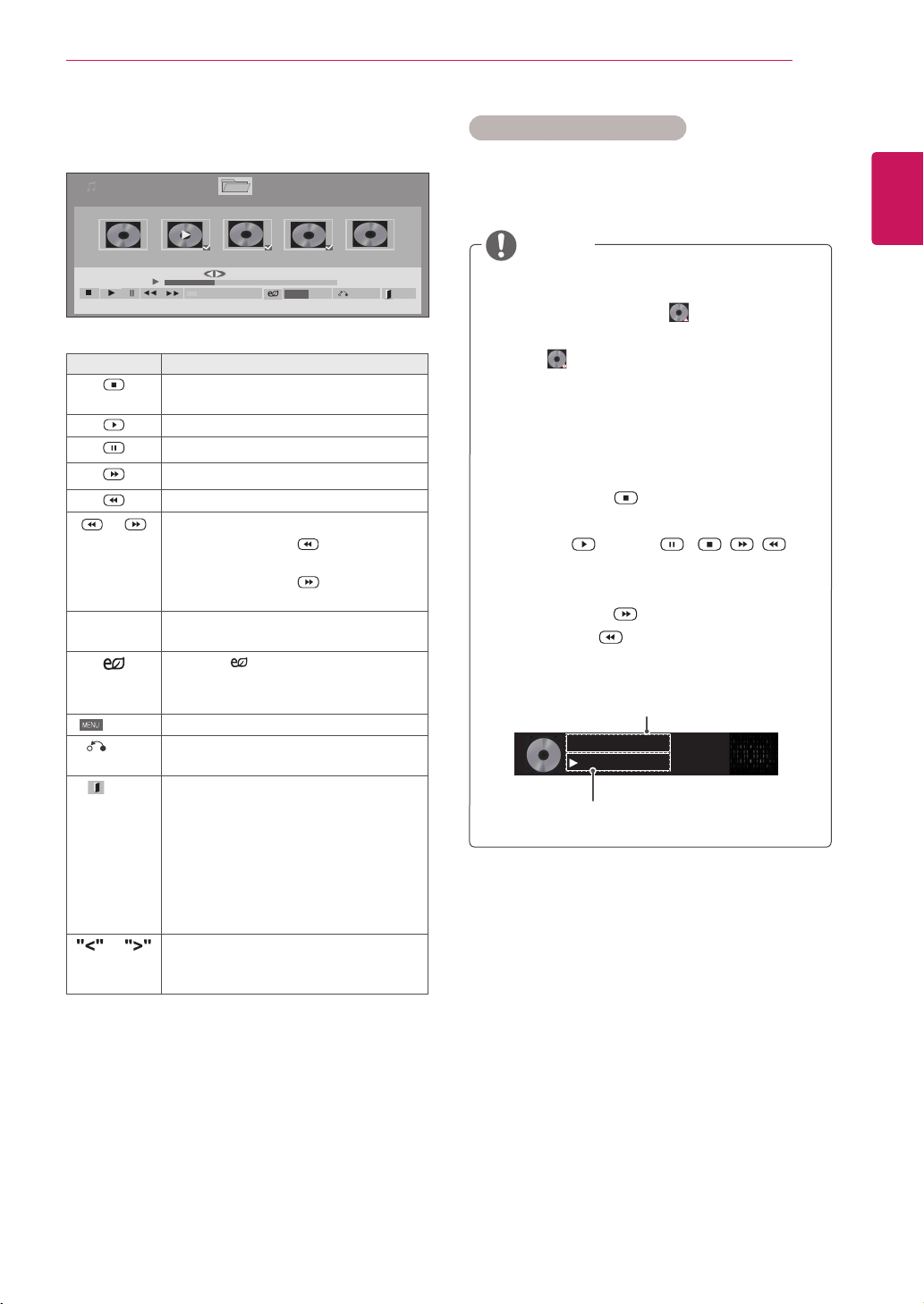
6 Controlplaybackbyusingthefollowingbuttons.
Page1/1
MusicList
Drive1 Page1/1
3file(s)Marked
004.-B04.mp3
00:00
005.-B05.mp3
00:00
006.-B06.mp3
00:00
007.-B07.mp3
00:00
008.-B08.mp3
00:00
005.-B05.mp3
02:30/03:25
Hide Exit
Option
MENU
PlaywithPhoto
Button Description
Stopsplayingbackthefileandmoves
backtothemusiclist.
Playsamusicfile
Pausesorresumesplayback
Skipstothenextfile
Skipstothepreviousfile
or Whenplaying,
Whenyoupressthe button,the
previousmusicfilewillbeplayed.
Whenyoupressthe button,thenext
musicfilewillbeplayed.
Green
button
Startplayingtheselectedmusicfiles
andthenmovetothePhoto List.
ENERGY
SAVING
Pressthe ENERGY SAVINGbutton
repeatedlytochangethebrightnessof
yourscreen.
Option
ShowtheOptionmenu.
Hide
Hidestheoptionwindow.
Todisplaytheoptions,pressOK.
EXIT
WhenyoupresstheEXITbuttonwhile
theMusicplayerisdisplayed,onlythe
musicwillbestoppedandtheplayerwill
notreturntonormalviewing.
WhenyoupresstheEXITbuttonwhile
themusicisstoppedorwhilethemusic
playerishidden,theplayerwillreturnto
normalviewing.
or
Whenusingthe<or>buttonduring
playbackacursorindicatingtheposition
canbeplayed.
Tips for playing music files
ThisunitcannotsupporttheID3Tag
embeddedMP3files.
NOTE
38
ENG
ENGLISH
ENTERTAINMENT
1 PressMENUtoaccessthePop-Upmenus.
2 PresstheNavigationbuttonstoscrolltoSet Au-
dio Play. or Set Audio. andpressOK.
Music options
Option values changed in Movie List does
notaffectPhoto ListandMusic List.
OptionvaluechangedinPhoto ListandMu-
sic Listarechangedlikewise in Photo List
andMusic ListexcludingMovie List.
WhileplayingmediafilesfromContentsList,
onlytheBACK,EXITorVolumebuttonare
available.SelectingtheBACKorEXITbutton
stopsplayingmediafilesandreturnstothe
screenviewmode.
IfthereistheAutoPlayfolderintheUSB
deviceanditsfilesareinsupportedformats,
theycanbeplayedbackautomaticallywhen
theUSBdeviceisconnectedtothemonitor.
WhenyouselecttheSet Audio Play.,
1 PresstheNavigationbuttonstoscrolltoselect
theRepeatorRandom.
2 PresstheNavigationbuttonstoscrolltomake
appropriateadjustments.
WhenyouselecttheSet Audio,,
1 PresstheNavigationbuttonstoscrolltoselect
theSound Mode, Clear Voice II orBalance.
2 PresstheNavigationbuttonstoscrolltomake
appropriateadjustments.
NOTE
NOTE
Viewing the Contents List
PlaysbackthestoredfilesusingtheExportoption
inSuperSignManager.
1 PresstheNavigationbuttonstoscrolltoMy
MediaandpressOK.
2 PresstheNavigationbuttonstoscrolltoCon-
tents ListandpressOK.
3 PresstheNavigationbuttonstoscrolltoa
folderyouwantandpressOK.
4 PresstheNavigationbuttonstoscrolltoafile
youwantandpressOK.
Page1/1
ContentsList
Drive1
Page1/1
test1.cts
07/01/2011
test2.cts
07/01/2011
test3.cts
07/01/2011
test4.cts
07/01/2011
test5.cts
07/01/2011
USB1USBDrive
ToMovieList
ChangeNumbers
Exit
Play
Move
Page ChangeP
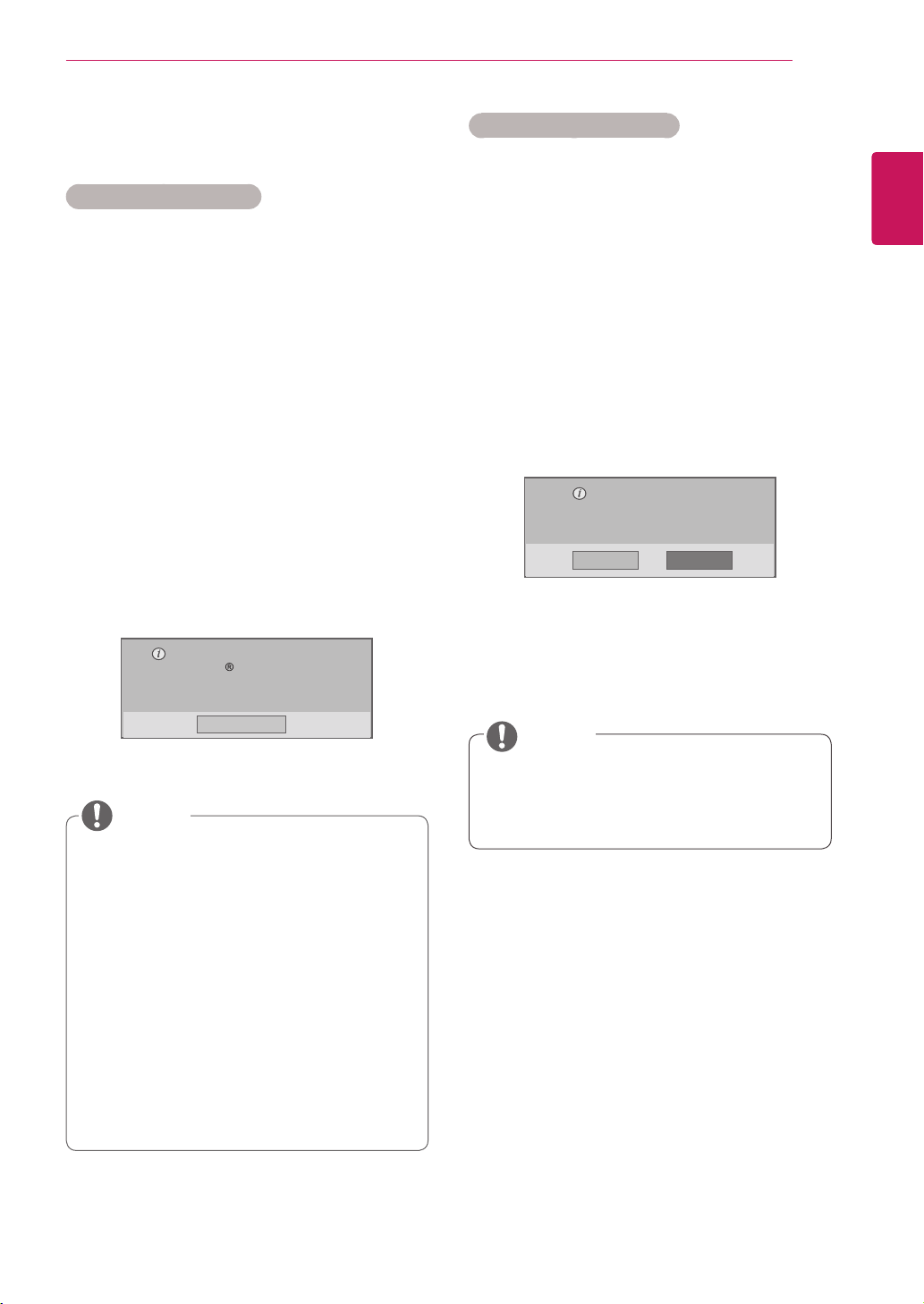
39
ENG
ENGLISH
ENTERTAINMENT
DivX® VOD Guide
DivX® VOD Registration
InordertoplaypurchasedorrentedDivX®VOD
contents,youshouldregisteryourdevicewith10
digitDivXregistrationcodefromyourdeviceat
www.divx.com/vod.
1 PressMENUtoaccessthemainmenus.
2 PresstheNavigationbuttonstoscrolltoMY
MEDIAandpressOK.
3 PresstheBluebutton.
4 PresstheNavigationbuttonstoscrolltoDivX
Reg. CodeandpressOK.
5 Viewtheregistrationcodeofyourdisplay.
6 Whenyouarefinished,press EXIT.
Whenyoureturntothepreviousmenu,press
BACK.
Whileyouarecheckingtheregistrationcode,
somebuttonsmaynotwork.
IfyouusetheDivXregistrationcodeof
anotherdevice,youcannotplaytherented
orpurchasedDivXfile.Makesuretouse
theDivXregistrationcodeassignedtoyour
monitor.
Thevideooraudiofilesthatarenotcon-
vertedbythestandardDivXcodecmaybe
corruptedornotbeplayed.
TheDivXVODcodeallowsyoutoactivate
upto6devicesunderoneaccount.
Youmustregisteryourdeviceto
playDivX protectedvideos.
Registrationcode:**********
Registerathttp://vod.divx.com
Close
NOTE
Oncethederegistrationisexecuted,you
mustregisteryourdeviceagaintoseeDivX®
VODcontents.
DivX® VOD Deregistration
Youshouldderegisteryourdevicewith8digitDivX
deregistrationcodefromyourdeviceatwww.divx.
com/vod.
1 PressMENUtoaccessthemainmenus.
2 Press the Navigation buttons to scroll to MY
MEDIAandpressOK.
3 PresstheBluebutton.
4 PresstheNavigationbuttonstoscrolltoDeacti-
vationandpressOK.
5 Press the Navigation buttons to select Yes to
confirm.
Deregistrationcode:
********
Deregisterathttp://vod.divx.com
Continuewithregistration?
Yes No
6 Whenyouarefinished,press EXIT.
When you return to the previous menu, press
BACK.
NOTE
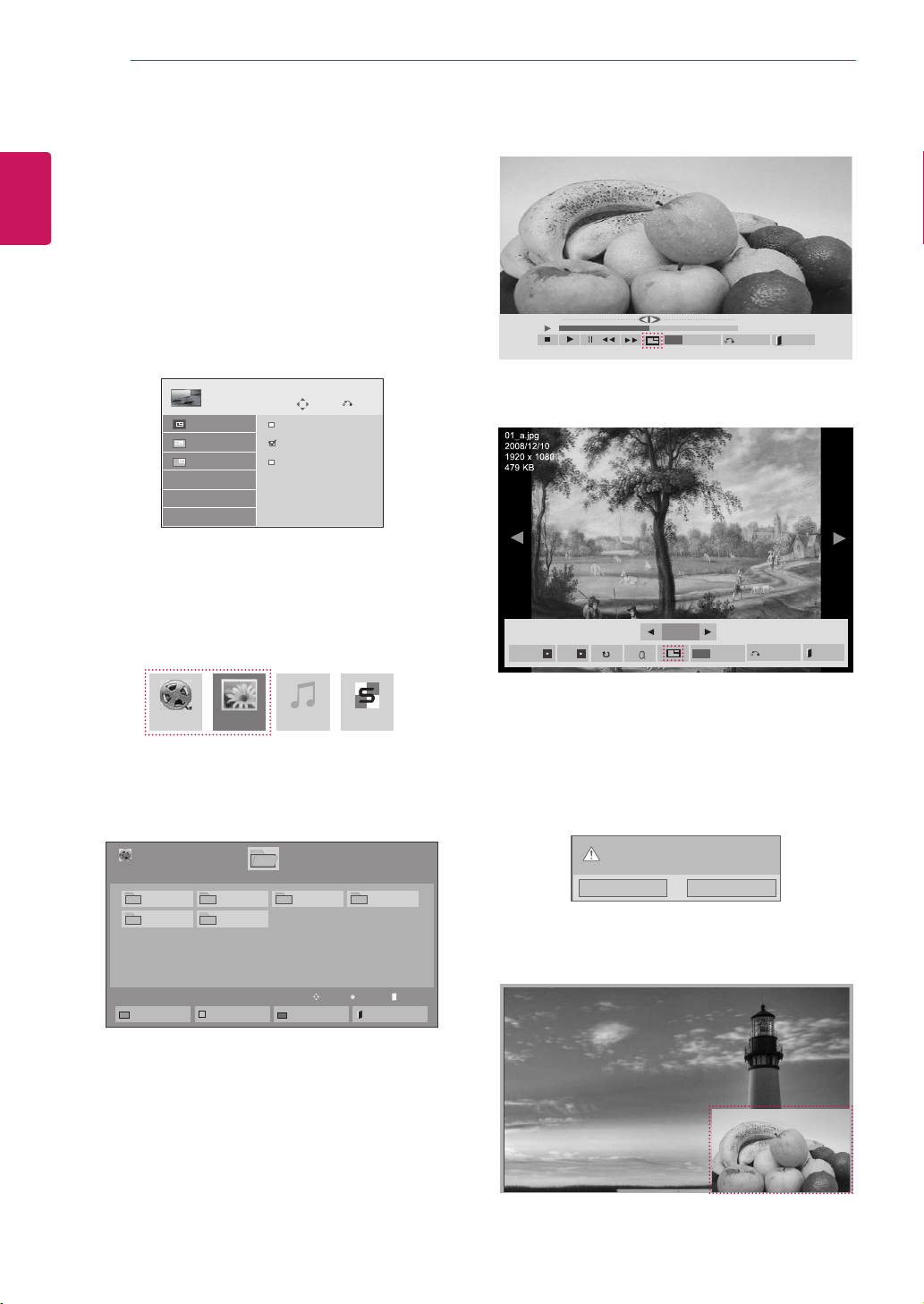
40
ENG
ENGLISH
ENTERTAINMENT
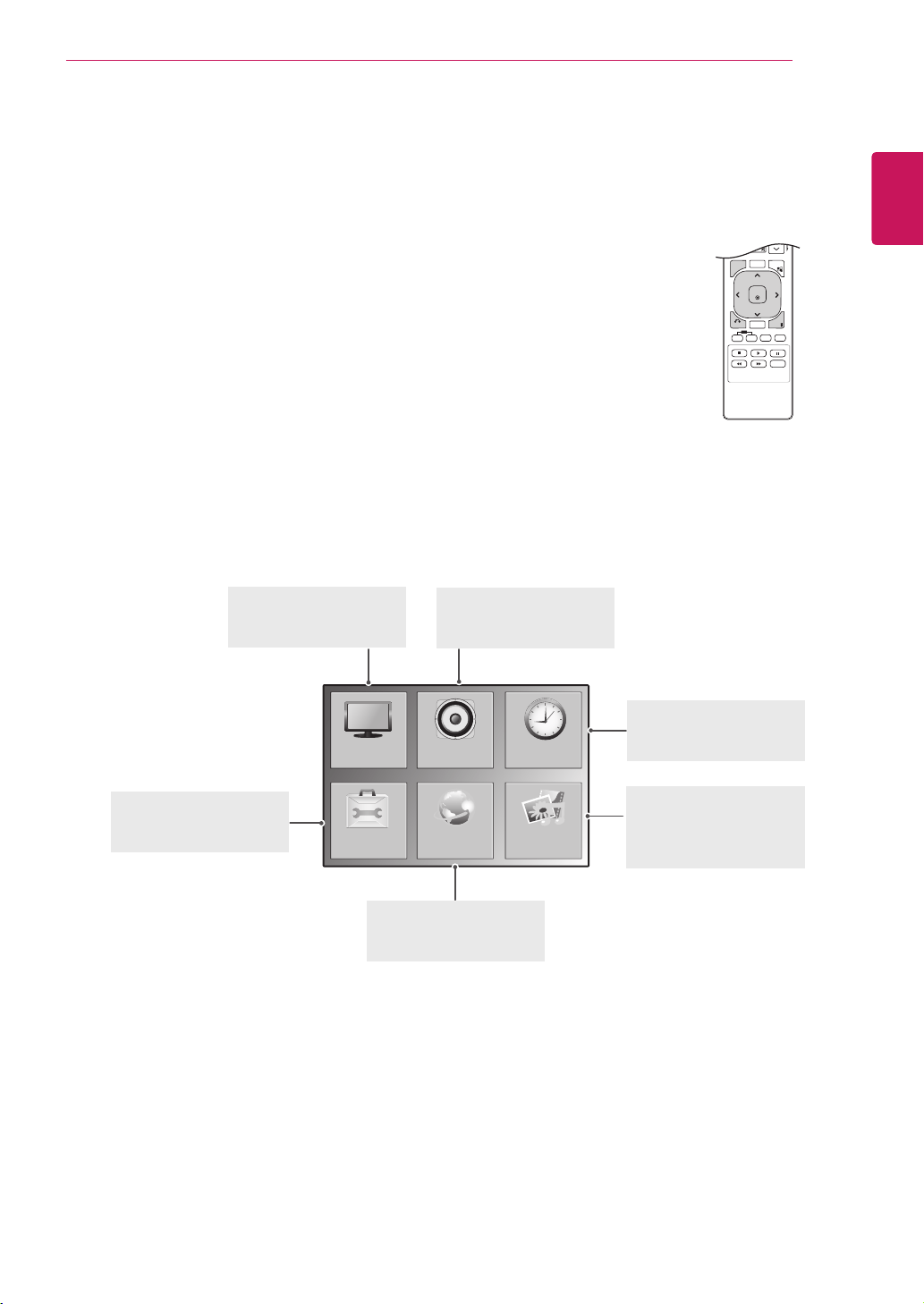
Using PIP/PBP
DisplaysvideosorphotosstoredintheUSBdevice
onasinglemonitorbydividingitintothemainand
subscreens.(Seep.50)
1 PresstheMENUbuttontomovetoOPTION
andpressOK.
2 PressPIP/PBPtoselectPIPorPBPandthen
pressOK.
3 SelectMovieListorPhoto ListfromMy
Media.(WithPIP/PBPselected,theMusic
ListandContents Listaredeactivated.)
Move
PIP/PBP
Off
PIP
PBP
Prev.
Mode
Position
Size
4 SelectafileyouwantandthenpressOK.
5 SelectthePIPorPBPiconfromtheplaylist.
01:02:30 / 02:30:25
Option
MENU
Hide
Exit
< Movie List >
< Photo List >
6 SelecteitherMainorSubforsound.Youmust
toselecttheoutputsoundbeforerunningthe
PIPorPBPfunction.
7 Thesubscreenisdisplayedonthemain
screen.
Selectthesoundpath.
Main Sub
MovieList MusicListPhotoList ContentsList
Page1/1
MovieList
USB1USBDrive
Drive1
Page1/1
ToPhotolist
ChangeNumbers
MarkMode
Exit
003
001 002
004
005 006
Play
Move
Page ChangeP
2/13
Slideshow BGM
Hide
Option
MENU
Exit
41
ENG
ENGLISH
CUSTOMIZING SETTINGS
CUSTOMIZING SETTINGS
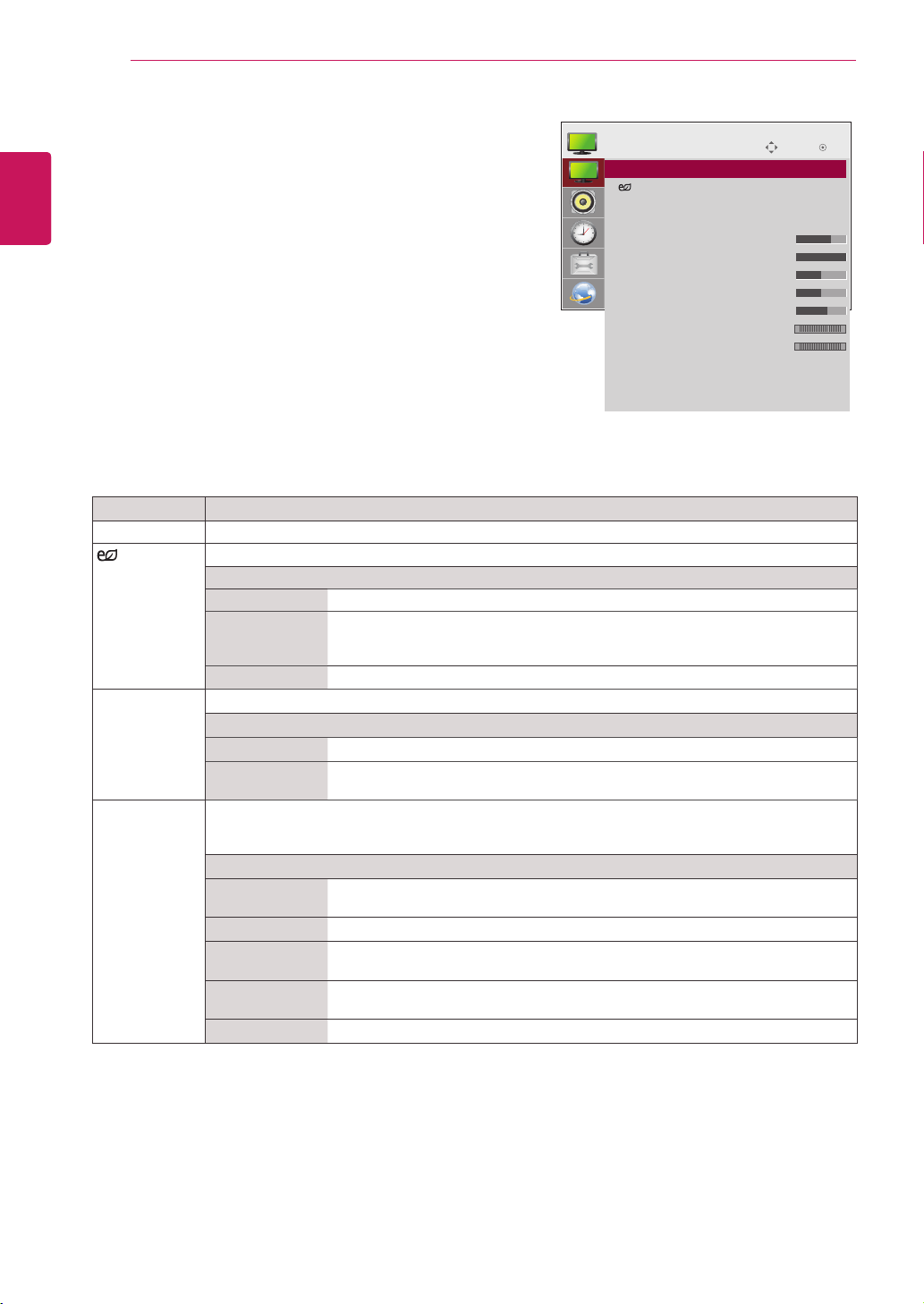
Accessing main menus
1
PressMENUtoaccessthemainmenus.
2
PresstheNavigationbuttonstoscrolltooneofthefollowingmenusand
pressOK.
3
PresstheNavigationbuttonstoscrolltothesettingoroptionyouwant
andpressOK.
4
Whenyouarefinished,pressEXIT.
Whenyoureturntothepreviousmenu,pressBACK.
P
A
G
E
MARK
ARC
OK
S.MENU
PSM
AUTO
MUTE
BRIGHT
NESS
MENU
ID
BACK
TILE
ON
OFF
EXIT
OPTION
PICTURE
NETWORK
AUDIO TIME
MY MEDIA
PICTURE (Seep.42)
Adjuststheimagesize,
quality,oreffect.
AUDIO(Seep.45)
Adjuststhesoundquality,
effect,orvolumelevel.
NETWORK(Seep.52)
Setsupthenetwork
setting.
OPTION (Seep.47)
Customizesthegeneral
settings.
TIME(Seep.46)
Setsthetime,date,or
Timerfeature.
MY MIDIA(Seep.27)
Displayandplaymovie,
photoandmusiccontent
storedonyourUSB
42
ENG
ENGLISH
CUSTOMIZING SETTINGS
PICTURE settings
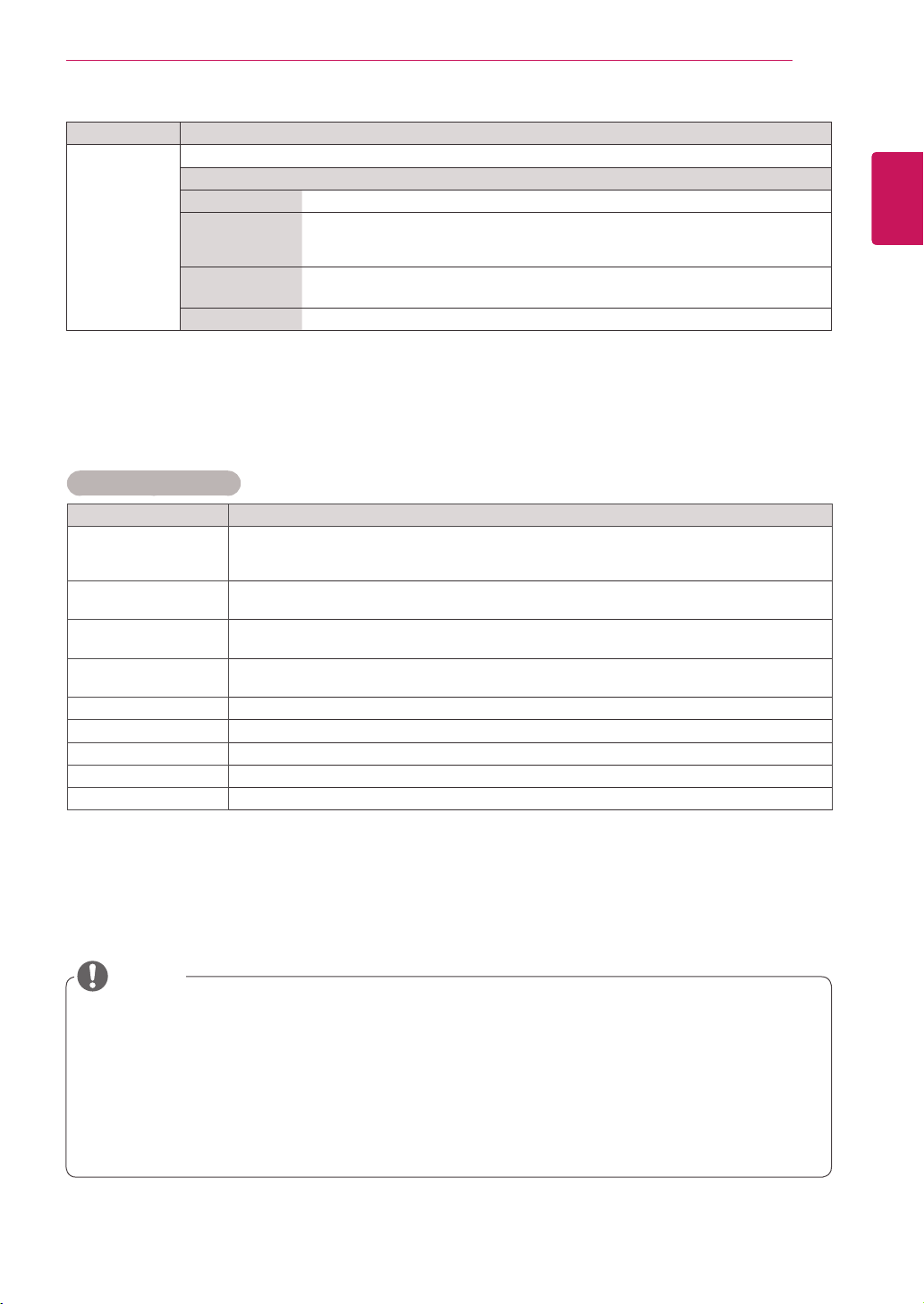
1
PressMENUtoaccessthemainmenus.
2
PresstheNavigationbuttonstoscrolltoPICTUREand
pressOK.
3
PresstheNavigationbuttonstoscrolltothesettingor
optionyouwantandpressOK.
-Toreturntothepreviouslevel,pressBACK.
4
Whenyouarefinished,pressEXIT.
Whenyoureturntothepreviousmenu,press
BACK.
Theavailablepicturesettingsaredescribedinthefollowing:
Setting Description
Aspect Ratio Changestheimagesizetoviewimagesatitsoptimalsize(Seep.22).
Energy
Saving
Setstoautomaticallyadjustthescreenbrightnesscorrespondingtothesurroundings.
Level
Off DisablesEnergySavingfunction.
Minimum/
Medium/
Maximum
Selectsthebrightnesslevelofthebacklight.
ScreenOff Thescreenturnsoffin3seconds.
Smart Energy
Saving
Adjuststhebacklightandcontrastdependingonthescreenbrightness.
Level
Off DisablestheSmartEnergySavingfunction.
On EnablestheSmartEnergySavingfunctiontosavepowerconsumptionasmuch
asthevaluesetinthesmartenergysavingrate.
Picture Mode SelectsoneofthepresetimageorcustomizesoptionsineachmodeforthebestMonitorsetscreen
performance.Youarealsoabletocustomizeadvancedoptionsofeachmode.
TheavailablepresetpicturemodesvarydependingontheMonitorset.
Mode
Vivid Adjuststhevideoimagefortheretailenvironmentbyenhancingthecontrast,
brightness,Color,andsharpness.
Standard Adjuststheimageforthenormalenvironment.
Cinema Optimizesthevideoimageforacinematiclooktoenjoymoviesasifyouareina
movietheater.
Sport Optimizesthevideoimageforhighanddynamicactionsbyemphasizingprimary
Colourssuchaswhite,grass,orskyblue.
Game OptimizesthevideoimageforafastgamingscreensuchasPCsorgames.
Move
OK
PICTURE
ꔋ
•AspectRatio :16:9
•
EnergySaving :Off
•SmartEnergySaving :Off
•PictureMode :Standard
•Backlight 70
•Contrast 100
•Brightness 50
•Sharpness 50
•Color 60
•Tint 0
•ColorTemp. 0
•AdvancedControl
•PictureReset
•Screen
R G
W C
43
ENG
ENGLISH
CUSTOMIZING SETTINGS
Ifthe'Picture Mode'settinginthePicturemenuissettoVivid, Standard, Cinema, SportorGame
thesubsequentmenuswillbeautomaticallyset.
YoucannotadjustcolorandtintintheRGB-PC/HDMI-PCmode.
WhenusingtheSmartEnergySavingfunction,thescreenmaylooksaturatedinthewhiteareaofa
stillimage.
IfEnergySavingissettoMinimum,Medium,orMaximum,theSmartEnergySavingfunctionis
disabled.
Picture Mode options
Setting Description
Backlight AdjuststhebrightnessofthescreenbycontrollingtheLCDbacklight.Ifyoudecreasethe
brightnesslevel,thescreenbecomesdarkerandthepowerconsumptionwillbereduced
withoutanyvideosignalloss.
Contrast Increasesordecreasesthegradientofthevideosignal.YoumayuseContrastwhenthe
brightpartofthepictureissaturated.
Brightness Adjuststhebaselevelofthesignalinthepicture.YoumayuseBrightnesswhenthedarkpart
ofthepictureissaturated.
Sharpness Adjuststhelevelofcrispnessintheedgesbetweenthelightanddarkareasofthepicture.
Thelowerthelevel,thesoftertheimage.
Color Adjustsintensityofallcolors.
Tint Adjuststhebalancebetweenredandgreenlevels.
Color Temp . SettowarmtoenhancehotterColorssuchasred,orsettocooltomakepicturebluish.
Advanced Control Customizestheadvancedoptions.RefertotheAdvancedimageoptions.(Seep.44).
Picture Reset Restorestheoptionstothedefaultsetting.
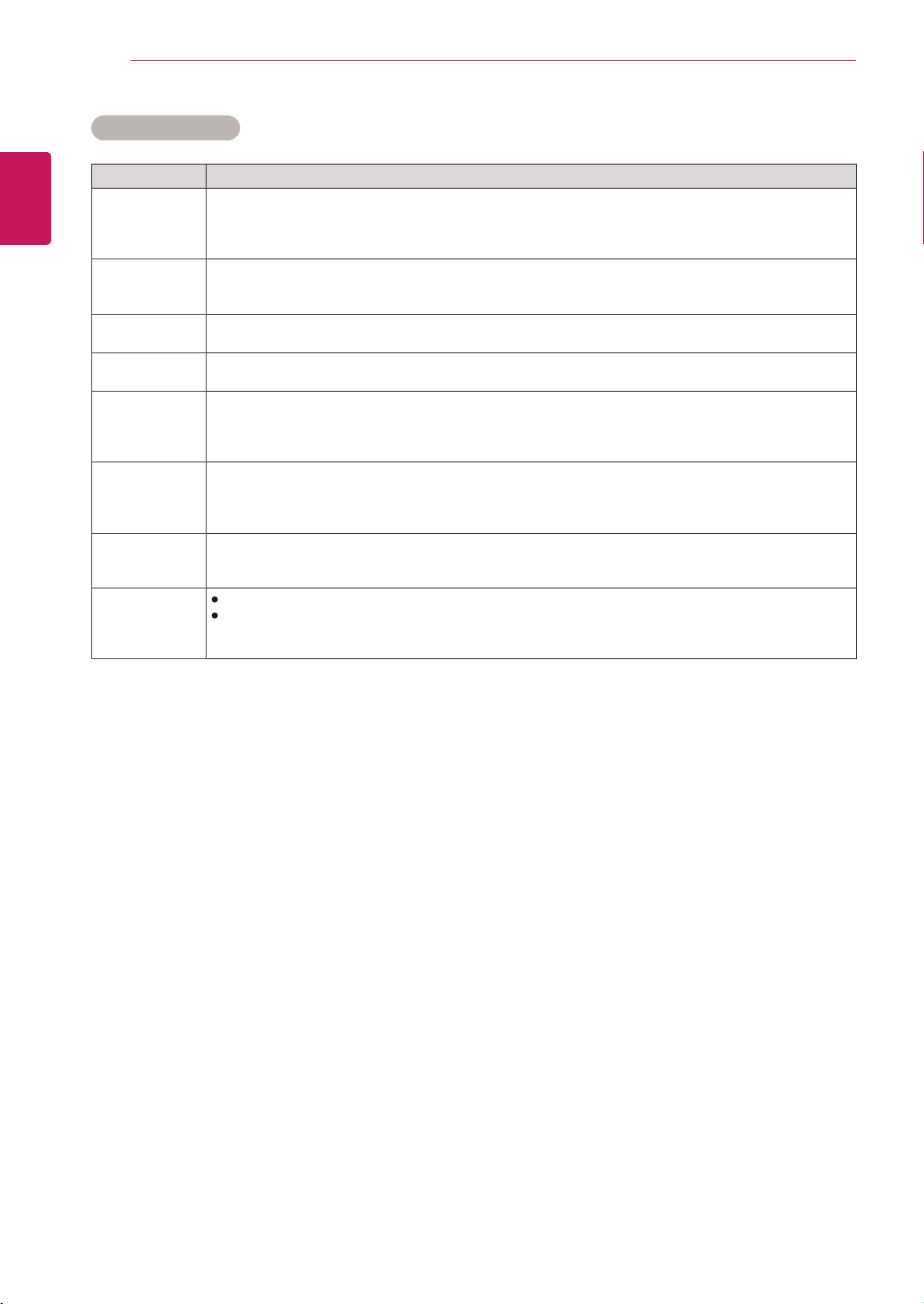
Setting Description
SCREEN
(In RGB
Mode Only)
CustomizesthePCdisplayoptionsinRGBmode.
Option
Resolution Selectsaproperresolution.See“CustomizingPCdisplayoptions”.
AutoConfigure Setstoadjustthescreenposition,clock,andphaseautomatically.
Thedisplayedimagemaybeunstableforafewsecondswhiletheconfigurationis
inprogress.
Position/Size/
Phase
Adjuststheoptionswhenthepictureisnotclear,especiallywhencharactersare
shaky,aftertheautoconfiguration.
Reset Restorestheoptionstothedefaultsetting.
NOTE
44
ENG
ENGLISH
CUSTOMIZING SETTINGS
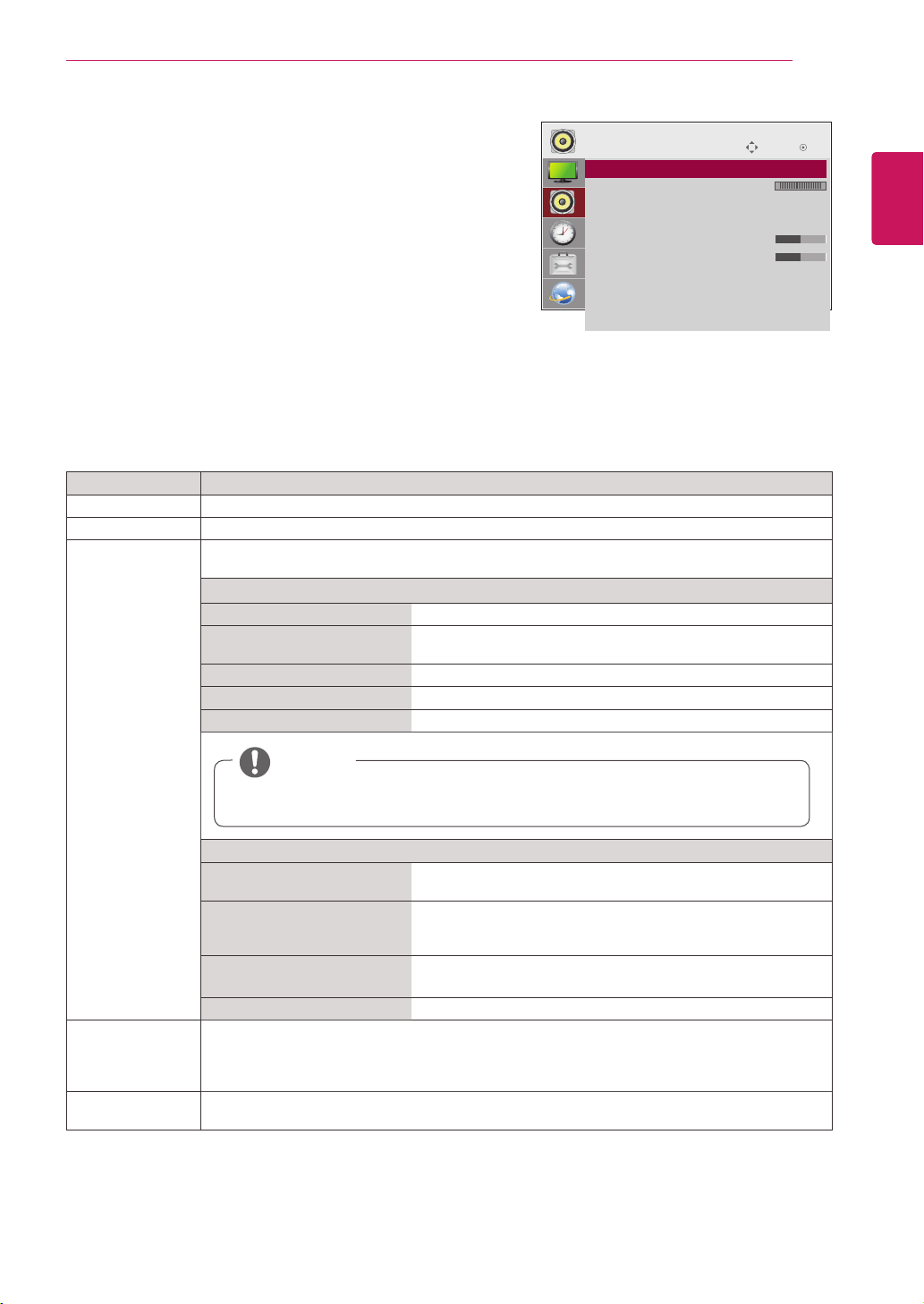
Setting Description
Dynamic
Contrast
(Off/High/
Medium/Low)
Adjuststhecontrasttokeepitatthebestlevelaccordingtothebrightnessofthescreen.The
pictureisimprovedbymakingbrightpartsbrighteranddarkpartsdarker.(Functionworksinthe
followingmode-AV(CVBS),Component,HDMI-DTV,DisplayPort-DTV)
Dynamic Color
(Off/High/Low)
AdjustsscreenColorssothattheylooklivelier,richerandclearer.Thisfeatureenhances
hue,saturationandluminancesothatred,blue,greenandwhitelookmorevivid.(Functionworksin
thefollowingmode-AV(CVBS),Component,HDMI-DTV,DisplayPort-DTV)
Clear White
(Off/High/Low)
Makethewhiteareaofscreenbrighterandmorewhite.
Skin Color
(-5 to 5)
Itdetectstheskinareaofvideoandadjustsittoexpressanaturalskincolor.
Noise
Reduction
(Off/High/
Medium/Low)
Reducesscreennoisewithoutcompromisingvideoquality.(Functionworksinthefollowingmode-
AV(CVBS),Component,HDMI-DTV,DisplayPort-DTV)
Digital Noise
Reduction
(Off/High/
Medium/Low)
Thisoptionreducesthenoiseproducedwhilecreatingdigitalvideosignals.
Gamma
(High/Medium/
Low)
Setyourowngammavalue.Onthemonitor,highgammavaluesdisplaywhitishimagesandlow
gammavaluesdisplayhighcontrastimages.
Black Level
(High/Low)
Low:Thepictureofthescreengetsdarker.
High:Thepictureofthescreengetsbrighter.
Setblacklevelofthescreentoproperlevel.
(Functionworksinthefollowingmode-AV(CVBS),Component,HDMI-DTV,DisplayPort-DTV)
Advanced Control
45
ENG
ENGLISH
CUSTOMIZING SETTINGS
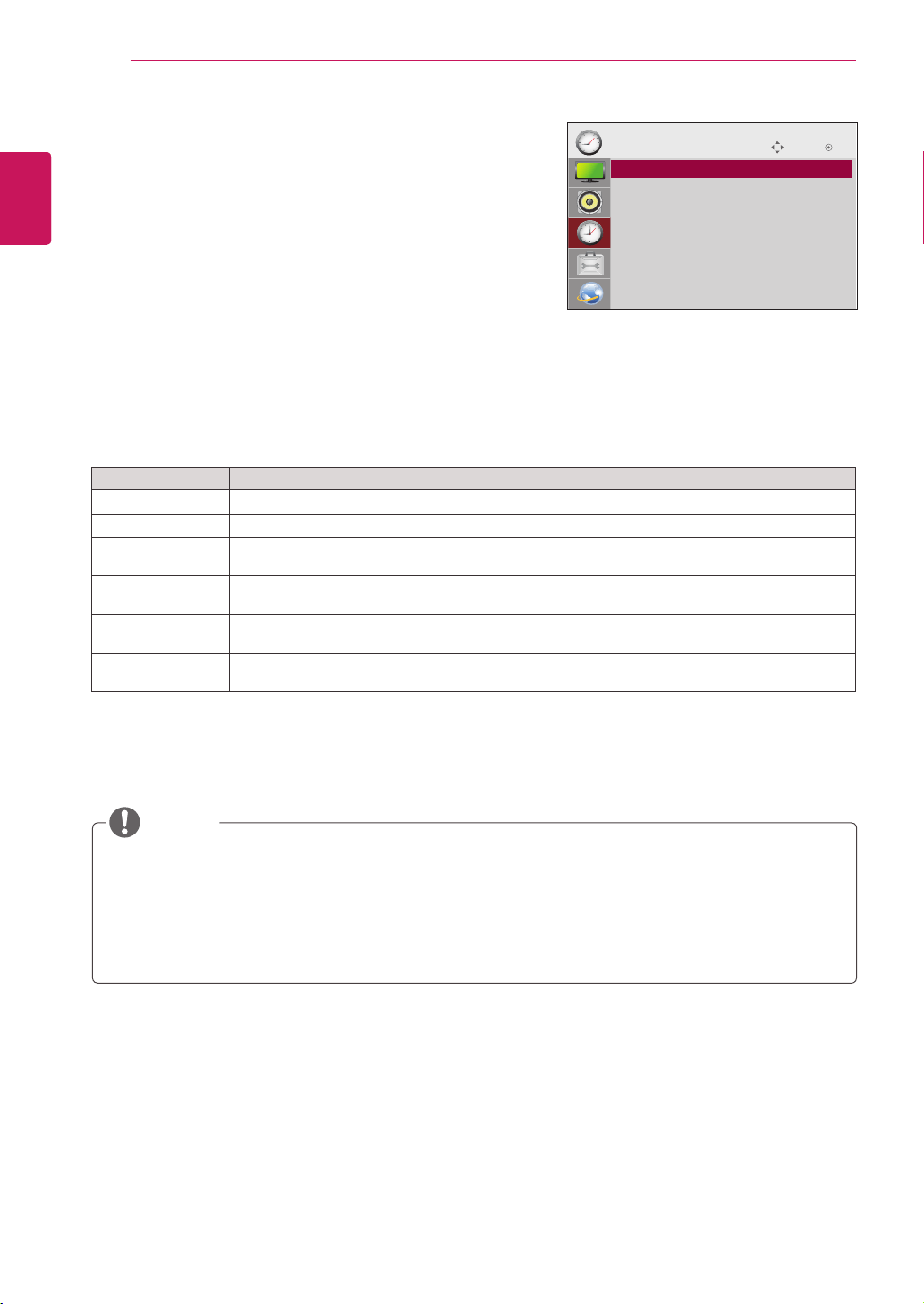
AUDIO settings
1
PressMENUtoaccessthemainmenus.
2
PresstheNavigationbuttonstoscrolltoAUDIOandpress
OK.
3
PresstheNavigationbuttonstoscrolltothesettingor
optionyouwantandpressOK.
-Toreturntothepreviouslevel,pressBACK.
4
Whenyouarefinished,pressEXIT.
Whenyoureturntothepreviousmenu,pressBACK.
Theavailableaudiooptionsaredescribedinthefollowing:
Move
OK
AUDIO
ꔋ
• Clear Voice II : Off
• Balance 0
• Sound Mode : Standard
• Infinite Sound: Off
• Treble 50
• Bass 50
• Reset
• Digital Audio Input
• Speaker : On
L R
Setting Description
Clear Voice ll Bydifferentiatingthehumansoundrangefromothers,ithelpsuserslistentohumanvoicesbetter.
Balance Adjustsbalancebetweentheleftandrightspeakersaccordingtoyourroomenvironment.
Sound Mode Thebestsoundtonequalitywillbeselectedautomaticallydependingonthevideotypethatyou're
currentlywatching.
Mode
Standard Themostcommandingandnaturalaudio.
Music Selectthisoptiontoenjoytheoriginalsoundwhenlisteningto
themusic.
Cinema Selectthisoptiontoenjoysublimesound.
Sport Selectthisoptiontowatchsportsbroadcasting.
Game Toenjoydynamicsoundwhenplayingagame.
Option
InfiniteSound LG'sInfinitySoundoptionprovides5.1channelstereosound
fromtwospeakers.
Treble Controlsthedominantsoundsintheoutput.Whenyouturnup
thetreble,itwillincreasetheoutputtothehigherfrequency
range.
Bass Makestheoutputsoundsofter.Whenyouturnupthebass,itwill
increasetheoutputtothelowerFrequency.
Reset Resetsthesoundmodetothedefaultsetting.
Digital Audio
Input
HDMI/Display Port:OutputsthesoundofdigitalsignalfromHDMIanddisplayportsthroughthe
monitorspeaker.
Audio In:OutputsthesoundthroughthemonitorspeakerbyconnectingHDMIanddisplayports
totheAudioInport.
Speaker ON:Enablessoundtothemonitorspeaker.(*Themonitorspeakerissoldseparately.)
OFF:Disablessoundtothemonitorspeaker.Usethisoptionwhenusinganexternalsounddevice.
NOTE
Ifsoundqualityorvolumeisnotatthelevelyouwant,itisrecommendedtousea separate
hometheatersystemorampliertocopewithdifferentuserenvironments.
46
ENG
ENGLISH
CUSTOMIZING SETTINGS
TIME settings
1
PressMENUtoaccessthemainmenus.
2
PresstheNavigationbuttonstoscrolltoTIMEandpress
OK.
3
PresstheNavigationbuttonstoscrolltothesettingoroption
youwantandpressOK.
-Toreturntothepreviouslevel,pressBACK.
4
Whenyouarefinished,pressEXIT.
Whenyoureturntothepreviousmenu,pressBACK.
Theavailabletimesettingsaredescribedinthefollowing:
Setting Description
Clock Setsthetimefeature.
On/Off Time SetsthetimetoturnonorofftheMonitorset.
Sleep Timer SetsthelengthoftimeuntiltheMonitorsettoturnsoff.WhenyouturntheMonitorsetoffandturn
itonagain,theSleepTimerwillbesettooff.
Power on delay Whenconnectingmultiplemonitorsandturningthepoweron,themonitorsareturnedonindividually
topreventoverload.
Auto off IfAutooffisactiveandthereisnoinputsignal,thesetswitchestooffmodeautomaticallyafter15
minutes.
Automatic
Standby
Ifyoudonotusethemonitorformorethan4hours,itwillbeinstandbymodeautomatically.
Oncetheonorofftimeisset,thesefunctionsoperatedailyatthepresettime.
Thescheduledpower-offfunctionworksproperlyonlywhenthedevicetimeissetcorrectly.
Whenthescheduledpower-onandpower-offtimesarethesame,thepower-offtimehaspriorityoverthe
power-ontimeifthesetisturnedon,andviceversaifthesetisturnedoff.
The"AutoOff,AutomaticStandby"functionmaynotbeavailabledependingonthecountry.
NOTE
Move OK
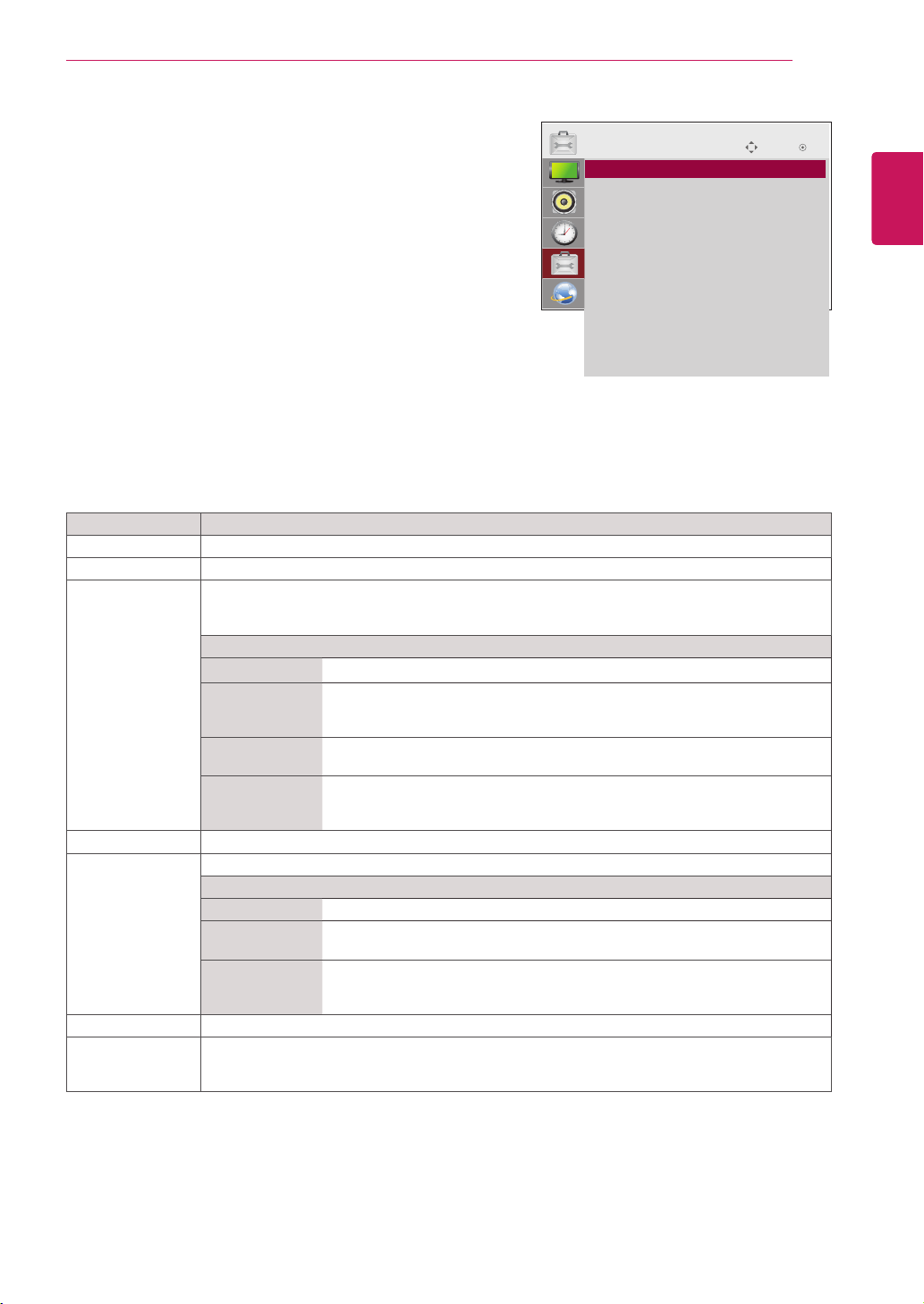
TIME
ꔋ
• Clock
• Off Time : Off
• On Time : Off
• Sleep Timer : Off
• Power On Delay : Off
• Auto Off : On
• Automatic Standby : On
47
ENG
ENGLISH
CUSTOMIZING SETTINGS
Setting Description
Language Tochoosethelanguageinwhichthecontrolnamesaredisplayed.
Power Indicator UsethisfunctiontosetthepowerindicatoronthefrontsideoftheproducttoOnorOff.
ISM Method AfrozenorstillpicturefromaPC/Videogamedisplayedonthescreenforprolongedperiods
couldresultinaghostimageremainingevenwhenyouchangetheimage.Avoidallowingafixed
imagetoremainonthescreenforalongperiodoftime.
Setting
Normal Leaveonnormalifyoudon'tforeseeimageburninbeingaproblem.
Orbiter Mayhelppreventghostimages.However,itisbestnottoallowanyfixed
imagetoremainonthescreen.Toavoidapermanentimageonthescreen,
thescreenwillmoveevery2minutes.
Inversion Thisfunctioninvertsthepanelcolorofthescreen.Thepanelcoloris
automaticallyinvertedevery30minutes.
WhiteWash Whitewashfillsthescreenwithsolidwhite.Thishelpsremovespermanent
imagesburnedintothescreen.Apermanentimagemaybeimpossibletoclear
entirelywithwhitewash.
DPM Select Ausercanchoosetoturnthepowersavingmodeon/off.
Fail Over Ifthereisnoinputsignal,itautomaticallyswitchestoanotherinputwithsignal.
Setting
Off Stopsautoswitchoftheinputsource.
Auto Switchestoanotherinputsourcewithvideosignalifnovideosignalcomes
fromthecurrentinputsource.
Manual Selectsthepriorityofinputsourceforautoswitch.
Whenseveralinputsourcesarefound,theinputsourcewithahigherpriority
willbeselected.
Factory Reset Selectthisoptiontoreturntothedefaultfactorysettings.
Set ID YoucanassignauniqueSetIDNO(nameassignment)toeachproductwhenseveralproducts
areconnectedfordisplay.Specifythenumber(1to255)usingthebuttonandexit.Usethe
assignedSetIDtoindividuallycontroleachproductusingtheProductControlProgram.
OPTION settings
1
PressMENUtoaccessthemainmenus.
2
PresstheNavigationbuttonstoscrolltoOPTIONandpress
OK.
3
PresstheNavigationbuttonstoscrolltothesettingoroption
youwantandpressOK.
-Toreturntothepreviouslevel,pressBACK.
4
Whenyouarefinished,pressEXIT.
Whenyoureturntothepreviousmenu,pressBACK.
Theavailableoptionsettingsaredescribedinthefollowing:
Move OK
OPTION
ꔋ
• Language
• Power Indicator
• ISM Method : Normal
• DPM Select : On
• Fail Over : Off
• Factory Reset
• Set ID : 1
• Tile Mode
• PIP/PBP
• Key Lock : Off
• Product/Service Info.
• Portrait Mode
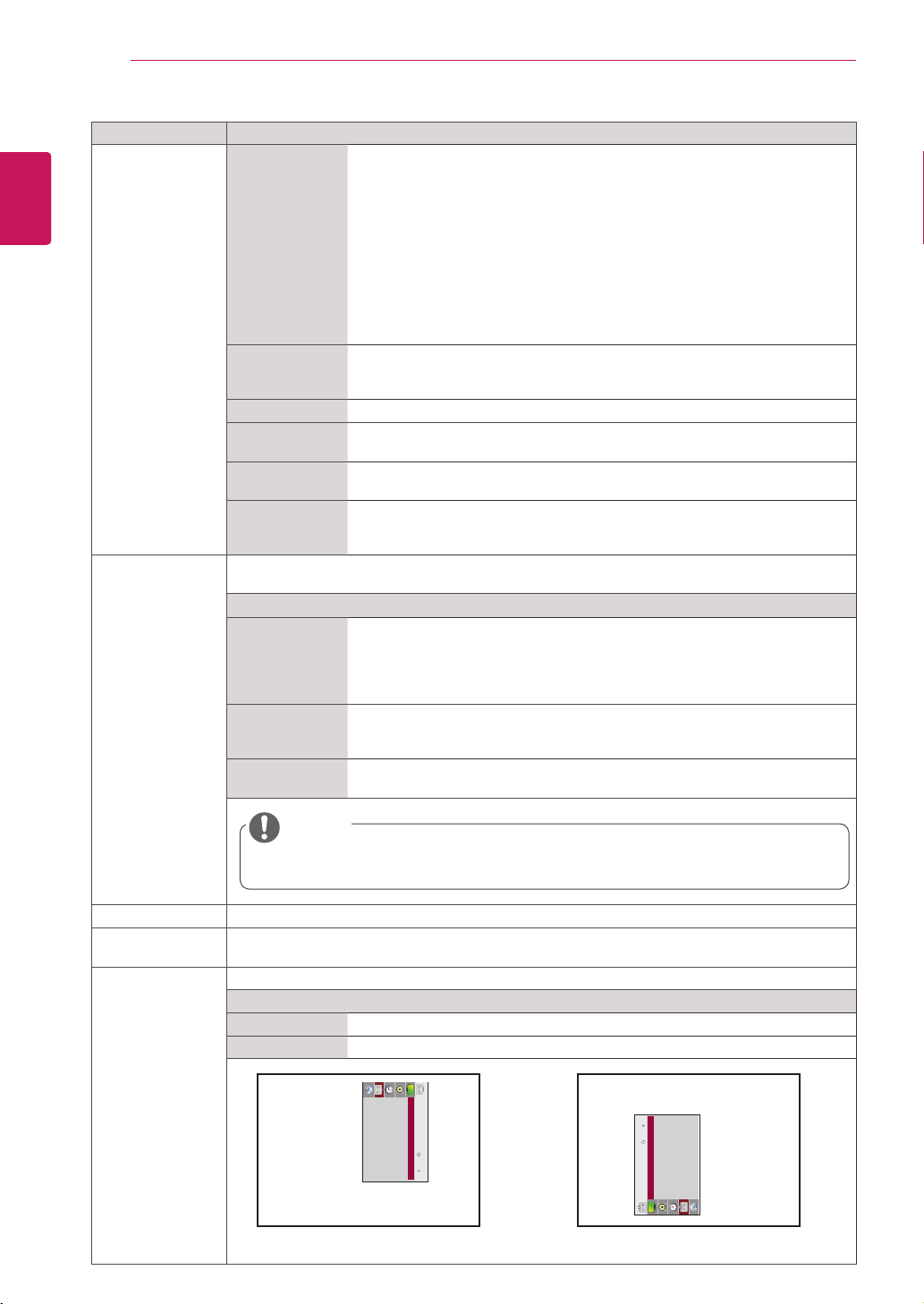
48
ENG
ENGLISH
CUSTOMIZING SETTINGS
Setting Description
Tile Mode TileMode Tousethisfunction
-Mustbedisplayedwithvariousotherproducts.
-MustbeinafunctionthatcanbeconnectedtoRGBCablebydistributorand
RS-232C.
TilemodeandchooseTilealignmentandsettheIDofthecurrentproductto
setlocation.
*OnlyafterpressingtheSETbuttontheadjustmentsmadetothesettingswill
besaved.
-Tilemode:columnxrow(c=1to15r=1to15)
-15x15available.
-Configurationofanintegrationscreenisalsoavailableaswellas
configurationofOnebyoneDisplay.
AutoConfig. Setstoadjustthescreenposition,clock,andphaseautomatically.
Thedisplayedimagemaybeunstableforafewsecondswhilethe
configurationisinprogress.
Position Movingthescreenpositionhorizontallyandvertically.
Size Adjustthehorizontalandverticalsizeofthescreentakingintoaccountthesize
ofthebezel.
Natural Theimageisomittedbythedistancebetweenthescreenstobenaturally
shown.
Reset FunctiontoinitializeandreleaseTile.
AllTilesettingarereleasedwhenselectingTilerecallandthescreenreturnsto
Fullscreen.
PIP/PBP DisplaysvideosorphotosstoredintheUSBdeviceonasinglemonitorbydividingitintothemain
andsubscreens.
Option
Mode Setsthetypeofsecondaryscreen.
*OFF:Disablesthesecondaryscreen.
*PIP (Picture In Picture):Displaysthesecondaryscreeninthemainscreen.
*PBP (Picture By Picture):Displaysthesecondaryscreennexttothemain
screen.
Position Adjuststhepositionofthesubscreen(topleft,bottomleft,topright,bottom
right)
Thedefaultvalueisthebottomright.
Size Adjuststhesizeofthesubscreen(Size0to10).
ThedefaultsizeofPIP(Size:0)is480x240;themaximumsize10is960x540.
Key Lock Turnsthelocalkeyfunctiononoroff.IfKeyLockisenabled,thelocalkeydoesnotwork.
Product/Service
Info.
Displaysthemodelname,softwareversion,serialnumber,IPaddress,MACaddressandhome
page.
Portrait mode RotateOSDclockwise(90°,270°)
Option
90° RotateOSDclockwise90°.
270° RotateOSDclockwise270°.
90° 270°
NOTE
ThePositionandSizeoptionsareenabledonlyinPIPmode.
ꔋ
Move
OK
OPTION
• Language
• Power Indicator
• ISM Method : Normal
• DPM Select : On
• Fail Over : On
• Factory Reset
• Set ID : 1
• Tile Mode
ꔋ
Move
OK
OPTION
• Language
• Power Indicator
• ISM Method : Normal
• DPM Select : On
• Fail Over : On
• Factory Reset
• Set ID : 1
• Tile Mode
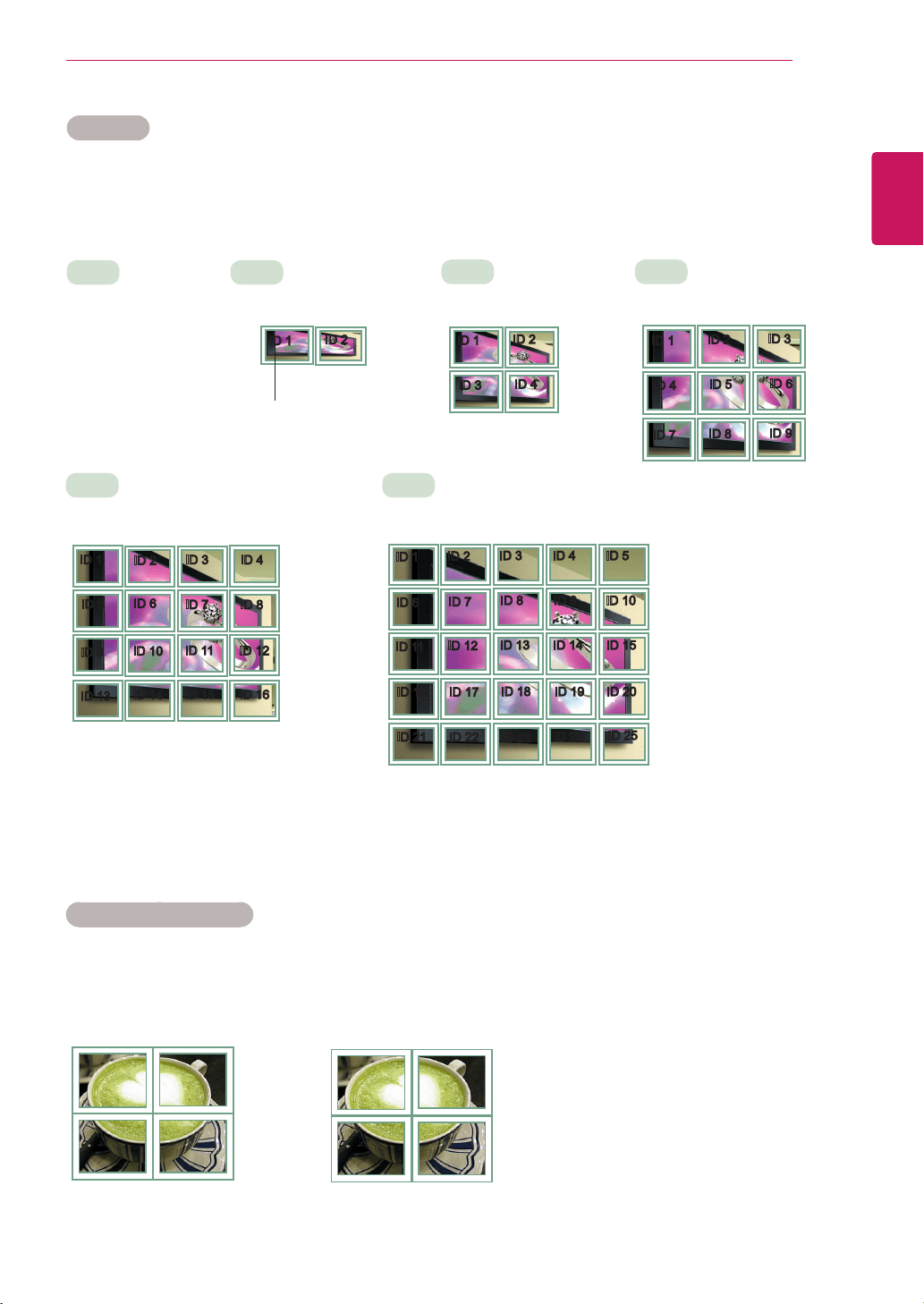
49
ENG
ENGLISH
CUSTOMIZING SETTINGS
Tile Mode
Thismonitorcanbetiledwithadditionalmonitorstocreatealargetileddisplay.
TileMode-Naturalmode
Whenactive,thepartoftheimagethatwouldnormallybedisplayedinthegapbetweenthemonitorsis
omitted.
ID1
ID2
ID3
ID4
ID1
ID2
ID4
ID5
ID3
ID6
ID7
ID8
ID9
3X3
Whenusing9monitors
ID1
ID2
ID5
ID6
ID3
ID7
ID9
ID10
ID11
ID4
ID8
ID12
ID13
ID14
ID15
ID16
ID1
ID2
ID6
ID7
ID3
ID8
ID11
ID12
ID13
ID4 ID5
ID9 ID10
ID14 ID15
ID16
ID21
ID17
ID22
ID18
ID23
ID19
ID24
ID20
ID25
Off
WhentheTileMode
optionisdisabled
2X1
Whenusing2monitors
2X2
Whenusing4monitors
5X5
Whenusing25monitors
4X4
Whenusing16monitors
ID1
ID2
TileID
Before After
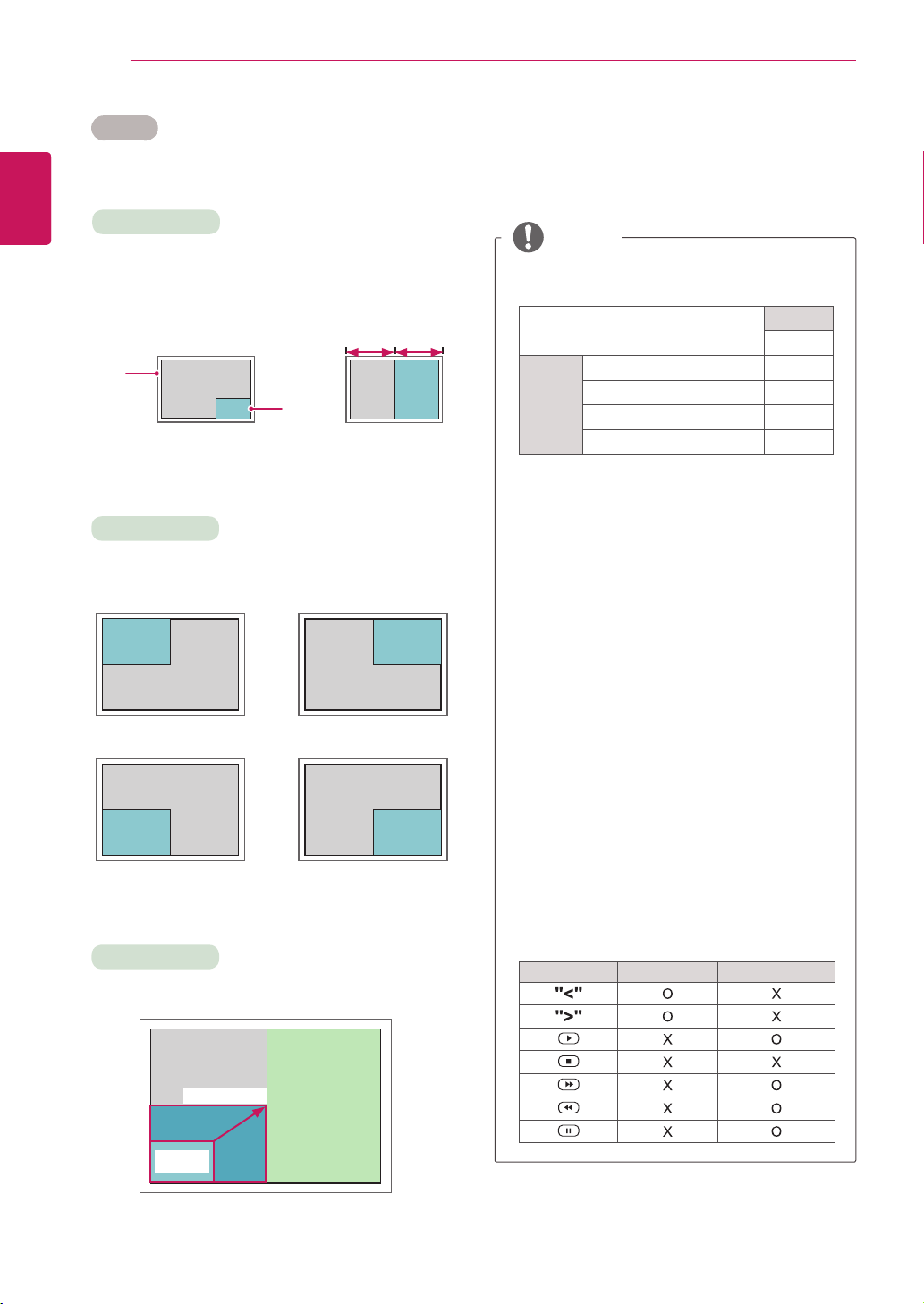
50
ENG
ENGLISH
CUSTOMIZING SETTINGS
PIP/PBP
DisplaysvideosorphotosstoredintheUSBdeviceonasingle
monitorbydividingitintothemainandsubscreens.(Seep.40)
Position
Mode
Size
top left top right
bottom left bottom right
*PIP(Picture In Picture):DisplaystheSubscreen
inthemainscreen.
*PBP(Picture By Picture):DisplaystheSub
screennexttothemainscreen.
Adjuststhepositionofthesubscreen(topleft,
bottomleft,topright,bottomright)
Adjuststhesizeofthesubscreen(Size0-10).
< 1920x1080 >
PBP
960x1080
0 :
480x270
PIP
10 : 960x540
Thesubscreenisonlysupportedwhenusingthe
USBdevice.
Sub
USB
Main
Component O
RGB O
HDMI/DVI-D/Display Port O
AV X
YoucanonlychangethesizeandpositioninPIP
mode.
WithPBPselected,theAspectRatiooptioninthe
PICTUREmenuisdisabled(Fixedas16:9).
WhilerunningthePBPfunction,theTileModefunction
doesnotwork.
Youmustselecttheoutputsoundbeforerunning
thePIPorPBPfunctions.(SelecteitherMainor
Sub.)
IfyoufailtoselectMainorSubfromthesound
selectionbox,andiftheOSDdisappearsafter
eitheraperiodoftimeorwhentheExitorBack
keyispressed,thePIP/PBPsubscreenisnot
activated.
Youcannotchangethesoundwhilerunningthe
PIPorPBPfunctions.Ifyouwanttochangethe
sound,pleaserestartPIP/PBP.
Thepicturequalityofthesubscreenisset
accordingtothevaluesselectedinthemainmenu,
nottheUSBdevice.
Whenthepoweristurnedoff/on,thePIP/PBP
modeisdisabled.
IfyouplayvideosyouselectedinPIP/PBPmode,
thevideoswillplaybackrepeatelyinsuccession.
ThebuttonsbelowworkinPIPmode.
Button Photo Movie
NOTE
Main
screen
Sub
screen
PIP PBP
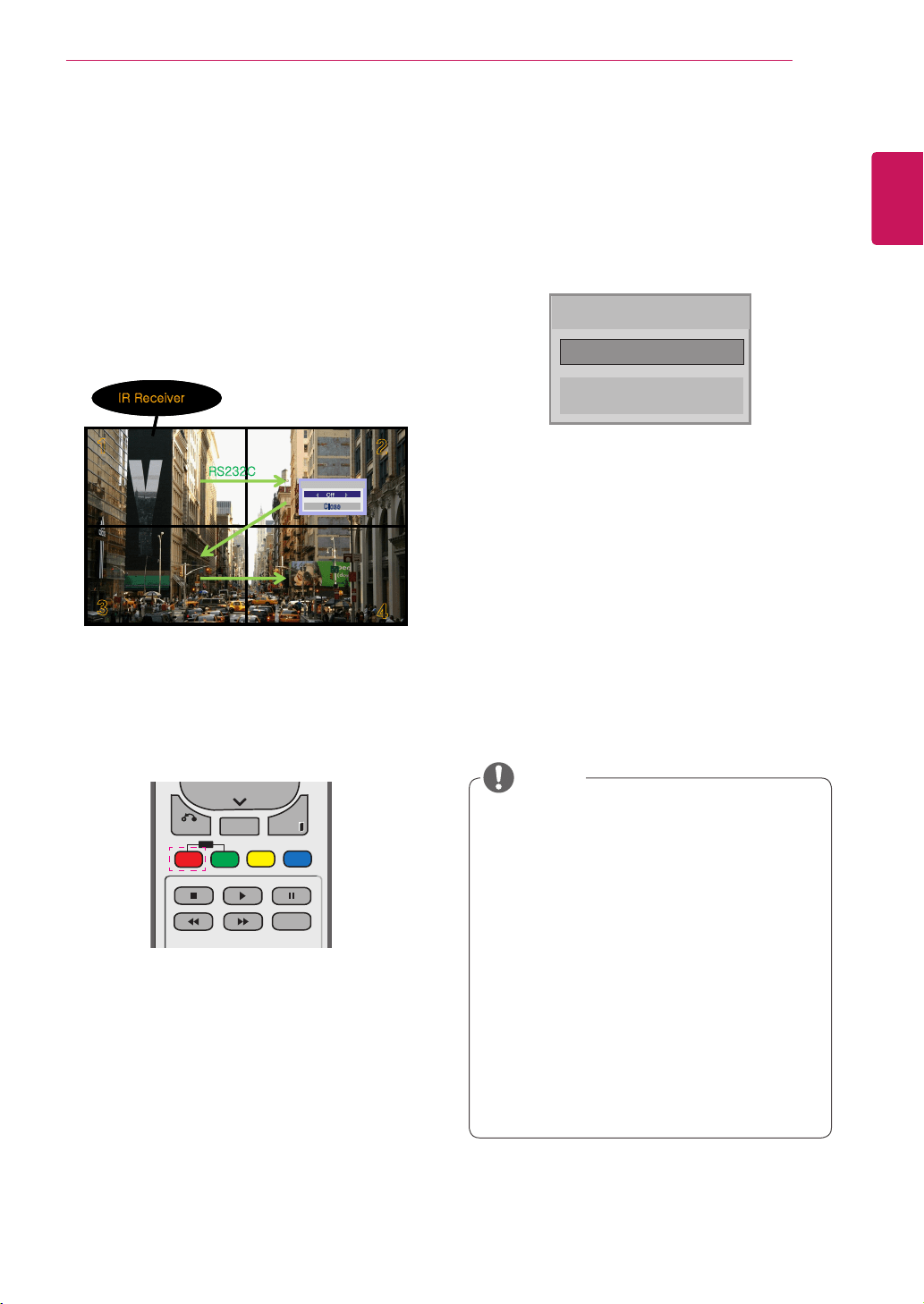
51
ENG
ENGLISH
CUSTOMIZING SETTINGS
Picture ID
PictureIDisusedtochangethesettingsofa
specicdisplayusingasingleIRreceiverfor
multi-vision.ThesetreceivingtheIRsignal
communicateswithanothersetviaanRS232
connection.EachsetisidentiedbyaSetID.If
youassignthePictureIDusingtheremotecontrol,
onlydisplayswiththesamePictureIDandSetID
canbecontrolledremotely.
1 PresstheredONbuttonontheremotecontrol
toassignthePictureID.
2 Ifyoupresstheleft/rightbuttonsorpressthe
ONbuttonrepeatedly,thePictureIDcycles
throughOFFand0to4.AssigntheIDyou
want.
IfyouassigntheSetIDtoeachsetwith
multi-vision,andthenassignthePictureID
usingtheredbuttonontheremotecontrol,
thekeycommandisdisplayedfortheset
withthesameSetIDandPictureID.Aset
withdifferentSetIDsandPictureIDscannot
becontrolledbyIRsignals.
Formoreinformationonhowtoassignthe
SetID,see"SetID"onpage44.
PleaserefertotheInstallationManualfor
moreinformationonTotalSetIDassignment.
P
A
G
E
INPUT
ENERGY
SAVING
MARK
ARC
ON
OFF
. , !
ABC
DEF
GHI
JKL
MNO
PQRS
TUV
1/a/A
- * #
WXYZ
CLEAR
OK
S.MENU
MONITOR
PSM
AUTO
MUTE
BRIGHT
NESS
MENU
ID
BACK
TILE
ON
OFF
EXIT
POWER
P
A
G
E
INPUT
ENERGY
SAVING
MARK
ARC
ON
OFF
. , !
ABC
DEF
GHI
JKL
MNO
PQRS
TUV
1/a/A
- * #
WXYZ
CLEAR
OK
S.MENU
MONITOR
PSM
AUTO
MUTE
BRIGHT
NESS
MENU
ID
BACK
TILE
ON
OFF
EXIT
POWER
Forexample,ifthePictureIDisassignedto
2,theupperrightdisplay(SetID:2)canbe
controlledbyIRsignals.
Foreachset,youcanchangethesettings
forthePICTURE,AUDIO,TIME,NETWORK
andMYMEDIAmenusorthehotkeyson
theremotecontrol.
IfyoupressthegreenOFFbuttonforPicture
IDs,thePictureIDsforallsetsareturnedoff.
Ifyouthenpressanybuttonontheremote
control,allsetswillstartworkingagain.
PictureIDwillbedisabledwhileusingthe
MYMEDIAmenu.
NOTE
Picture ID
Close
◀
Off
▶
1
2
3
4
Picture ID
Off
Close
IR Receiver
RS232C
1
2
3
4
1
2
3
4
Picture ID
Off
Close
Picture ID
Off
Close
IR Receiver
RS232C
2X2Multi-Vision(TotalSetID:4)
SetIDsareassignedasshowninthepicture.
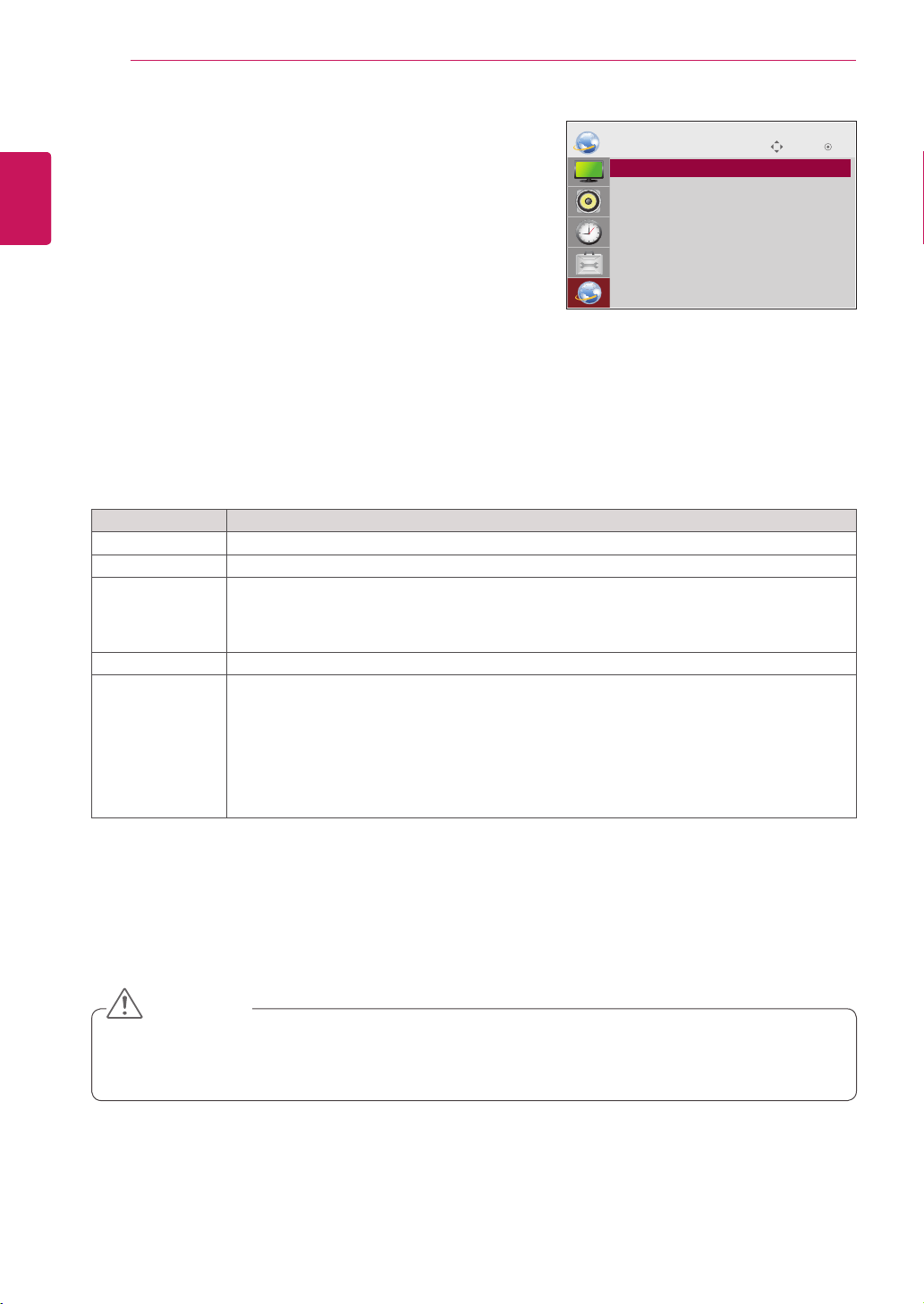
52
ENG
ENGLISH
CUSTOMIZING SETTINGS
Setting Description
Player Name SetstheplayernameusedinSuperSignManager.(Upto20characters)
Network Setting Configurethenetworksettings.
Network Status
Displaythenetworkstatus.
-Internetisconnected:Extermallyconnected
-Homenetworkisconnected:Onlyinternallyconnected
-Notconnected:Whenthereisnonetworkconnection
Server IP Setting SetstheIPaddressofthecomputer(server)onwhichSuperSignManagerisinstalled.
Server IP Status Displaystheconnectionstatuswiththeserver.
-Notconnected:WhenthereisnonetworkconnectionwithSuperSignserver
-Waitingforapproval:WhennetworkconnectionwithSuperSignserverhasbeenmade,but
accesstoserverhasnotbeenapprovedbytheserver
-Rejected:WhennetworkconnectionwithSuperSignserverhasbeenmade,butaccessto
serverhasbeenrejectedbytheserver
-Internetisconnected:WhennetworkconnectionwithSuperSignserverhasbeenmadeand
accesstoserverhasalsobeenapprovedbytheserver
NETWORK settings
1
PressMENUtoaccessthemainmenus.
2
PresstheNavigationbuttonstoscrolltoNETWORKand
pressOK.
3
PresstheNavigationbuttonstoscrolltothesettingoroption
youwantandpressOK.
-Toreturntothepreviouslevel,pressBACK.
4
Whenyouarefinished,pressEXIT.
Whenyoureturntothepreviousmenu,pressBACK.
Theavailableoptionsettingsaredescribedinthefollowing:
Move OK
NETWORK
ꔋ
• Player Name
• Network Setting : Wired
• Network Status : Not connected
• Server IP Setting
• Server IP Status : Not connected
WhensettingthePlayerName,inputdelaymayoccurifyoupressthebuttonsontheremotecontrol
continuously.
CAUTION
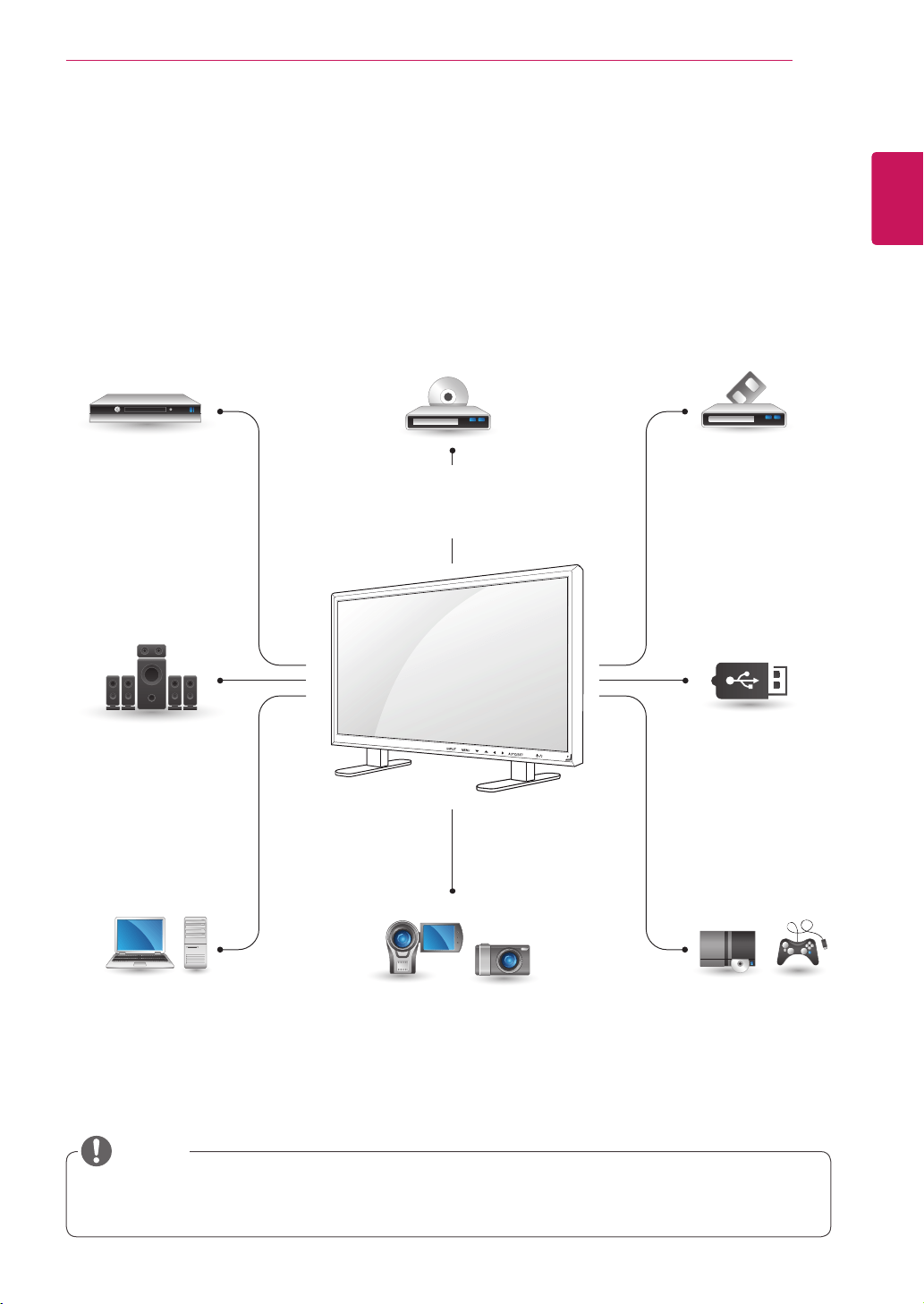
53
ENG
ENGLISH
MAKING CONNECTIONS
HDMI-Seep.54
DVI-Seep.54
AV(CVBS)-Seep.55
Component-Seep.55
HDMI-Seep.18
DVI-Seep.18
RGB-Seep.17
LAN-Seep.56
DisplayPort-Seep.19
HDMI-Seep.54
DVI-Seep.54
AV(CVBS)-Seep.55
Component-Seep.55
HDMI-Seep.54
DVI-Seep.54
AV(CVBS)-Seep.55
Component-Seep.55
AV(CVBS)
-Seep.55
Component
-Seep.55
HDMI-Seep.54
AV(CVBS)
-Seep.55
Component
-Seep.55
MAKING CONNECTIONS
ConnectvariousexternaldevicestotheportsontheMonitorset’sbackpanel.
1
FindanexternaldeviceyouwanttoconnecttoyourMonitorsetshownonthefollowingillustration.
2
Checktheconnectiontypeoftheexternaldevice.
3
Gototheappropriateillustrationandchecktheconnectiondetails.
IfyouconnectagamingdevicetotheMonitorset,usethecablesuppliedwiththegamingdevice.
Itisrecommendedyoutousetheoptionalspeakerprovided.
HD Receiver DVD VCR
USB
PC
Camcorder/Camera
Gaming device
Speaker
Memorystorage
–Seep.27
NOTE
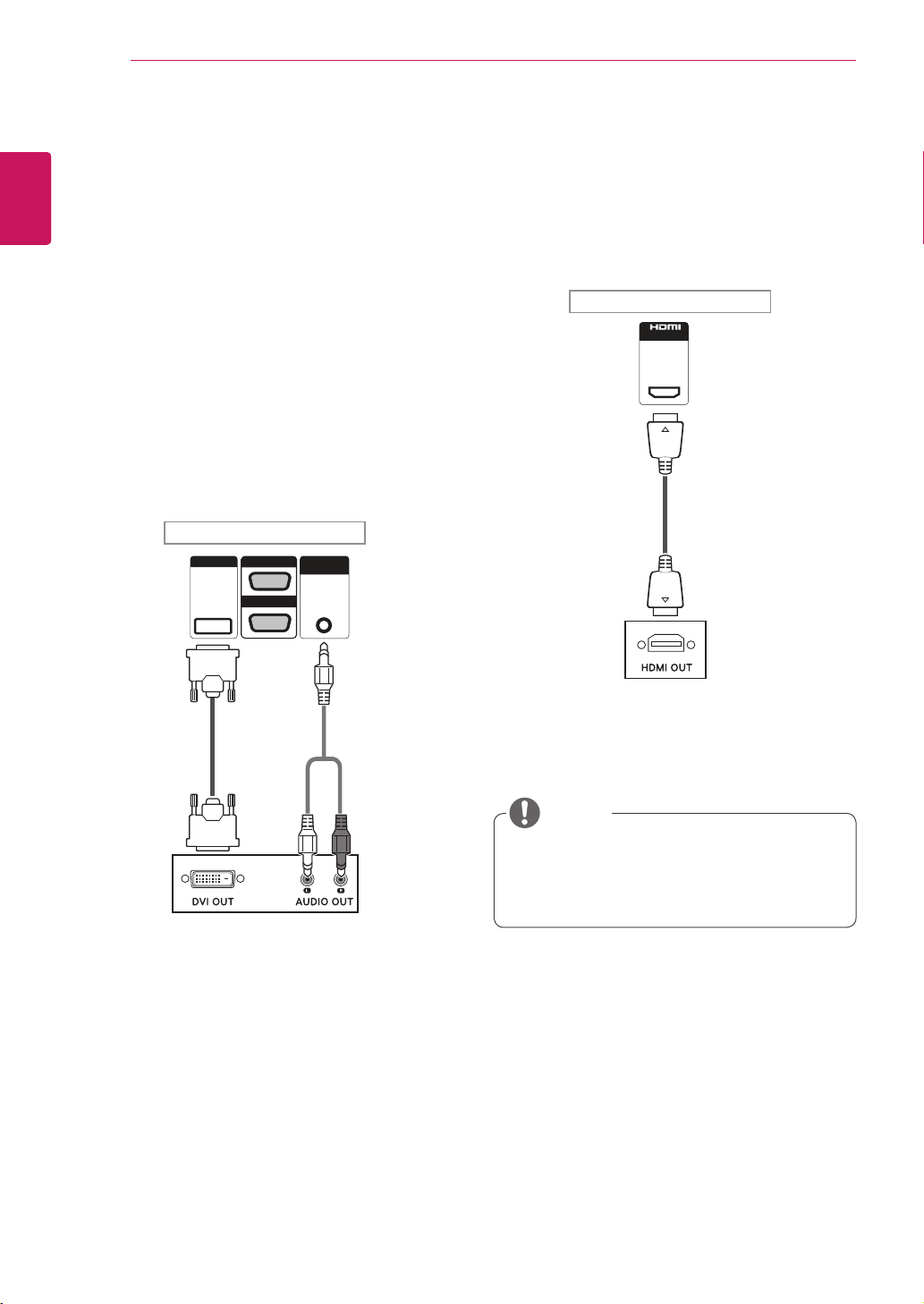
54
ENG
ENGLISH
MAKING CONNECTIONS
Connecting to a HD receiver,
DVD, Camcorder, Camera,
Gaming Device or VCR player
ConnectaHDreceiver,DVD,orVCRplayertothe
Monitorsetandselectanappropriateinputmode.
HDMI connection
Transmitsthedigitalvideoandaudiosignalsfrom
anexternaldevicetotheMonitorset.Connectthe
externaldeviceandtheMonitorsetwiththeHDMI
cableasshownonthefollowingillustration.
UseaHighSpeedHDMI™Cable.
HighSpeedHDMI™Cablesaretestedto
carryanHDsignalupto1080pandhigher.
NOTE
DVI connection
Transmitsthedigitalvideosignalfromanexternal
devicetotheMonitorset.Connecttheexternal
deviceandtheMonitorsetwiththeDVIcableas
showninthefollowingillustration.Totransmitan
audiosignal,connectanoptionalaudiocable.
AUDIO
IN
DVI IN
IN
RGB/AV
/COMPONENT OUT
RGB/AV
/COMPONENT IN
AUDIO
IN
DVI IN
IN
RGB/AV
/COMPONENT OUT
RGB/AV
/COMPONENT IN
Backoftheproduct.
Backoftheproduct.
(notincluded)
(notincluded)
(notincluded)
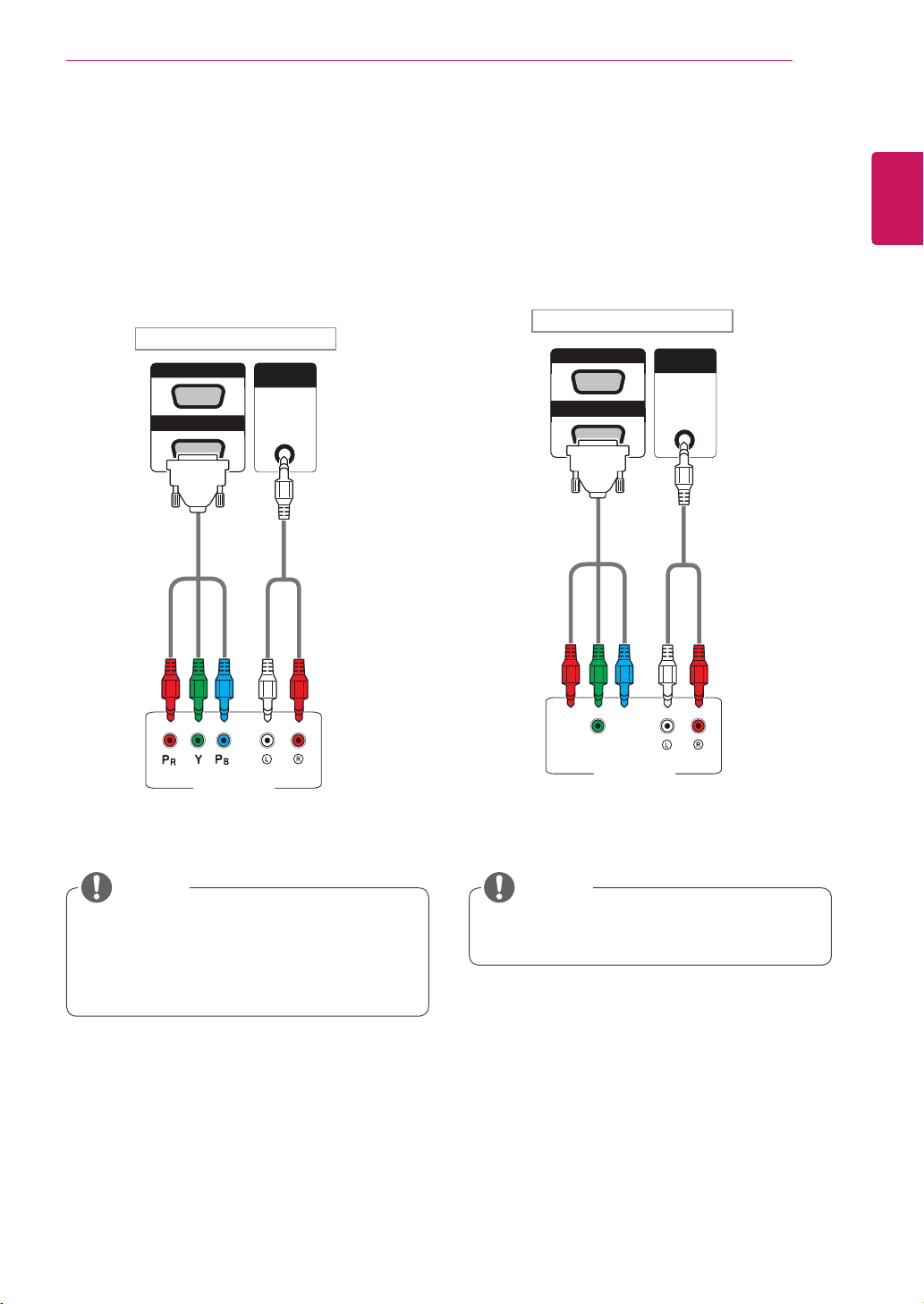
55
ENG
ENGLISH
MAKING CONNECTIONS
AV(CVBS) connection
Transmitstheanalogvideoandaudiosignalsfrom
anexternaldevicetotheMonitorset.Connectthe
externaldeviceandtheMonitorsetwiththe15
pinsignaltoRCAcableasshownonthefollowing
illustration.
Component connection
Transmitstheanalogvideoandaudiosignalsfrom
anexternaldevicetotheMonitorset.Connectthe
externaldeviceandtheMonitorsetwiththe15
pinsignaltoRCAcableasshownonthefollowing
illustration.Todisplayimagesbyusingprogressive
scan,makesuretousethecomponentcable.
AUDIO
IN
AUDIO
IN
AV (CVBS)
RGB/AV
/COMPONENT OUT
RGB/AV
/COMPONENT IN
RGB/AV
/COMPONENT OUT
RGB/AV
/COMPONENT IN
PC
AUDIO
IN
AUDIO
IN
AV (CVBS)
RGB/AV
/COMPONENT OUT
RGB/AV
/COMPONENT IN
RGB/AV
/COMPONENT OUT
RGB/AV
/COMPONENT IN
PC
WhenconnectingtotheAVorComponent
portusingthesharedinterface,theportmust
matchuptotheinputsource.Otherwise,
noisemayoccur.
NOTE NOTE
Backoftheproduct.
Backoftheproduct.
(notincluded)
(notincluded)
(notincluded)
(notincluded)
ForAV(CVBS)connection,theredandblue
cablesinasharedinterfacearenotinuse.
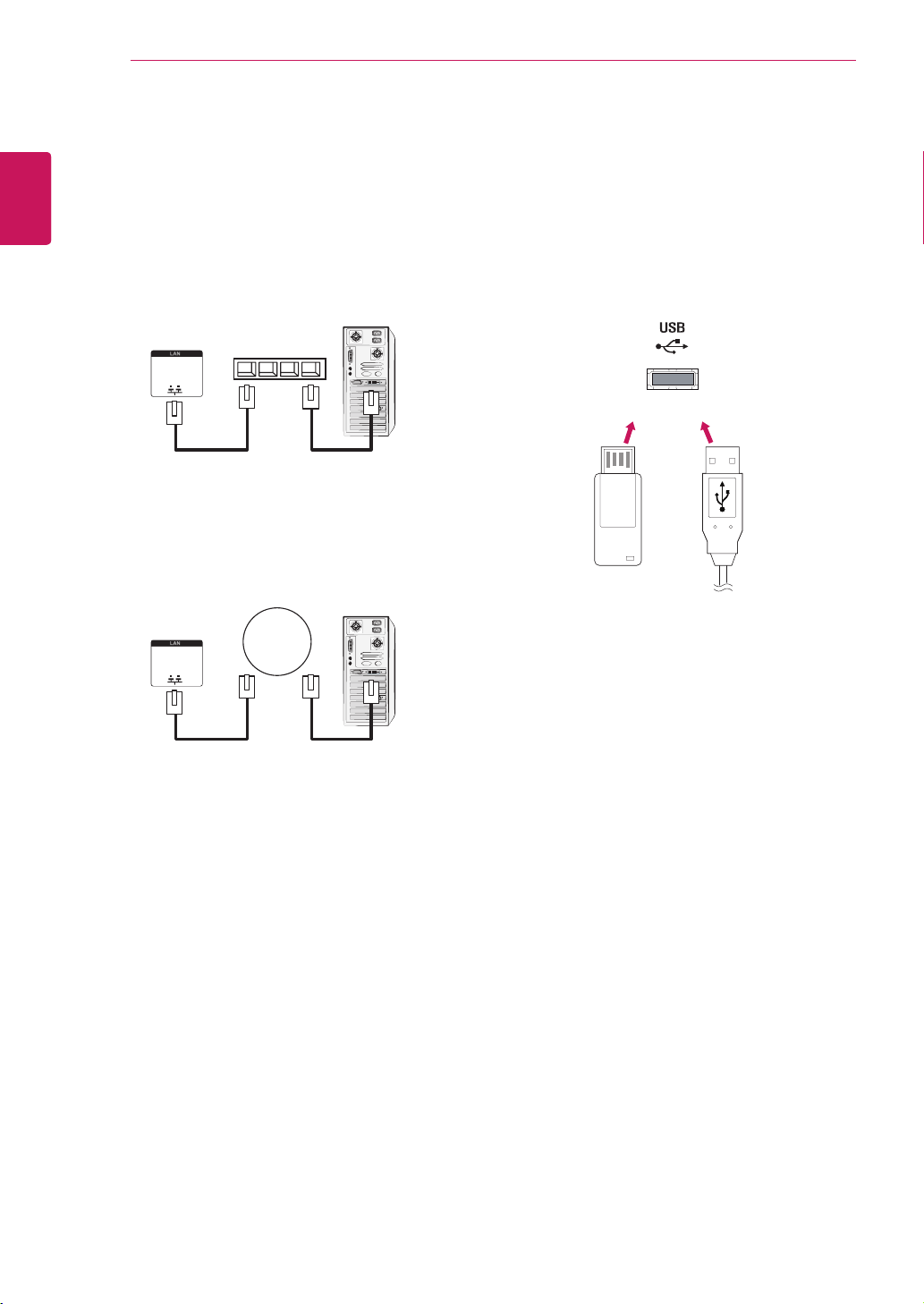
56
ENG
ENGLISH
MAKING CONNECTIONS
Connecting to the LAN
LAN connection
A
Usingarouter(Switch)
MonitorSet
Network
PC
LAN
Switch
MonitorSet
Network
PC
LAN
B
UsingtheInternet.
Connecting to a USB
ConnectaUSBstoragedevicesuchassUSB
flashmemory,externalharddrive,MP3playeror
aUSBmemorycardreadertotheMonitorsetand
accesstheUSBmenutousevariousmultimedia
files.
or
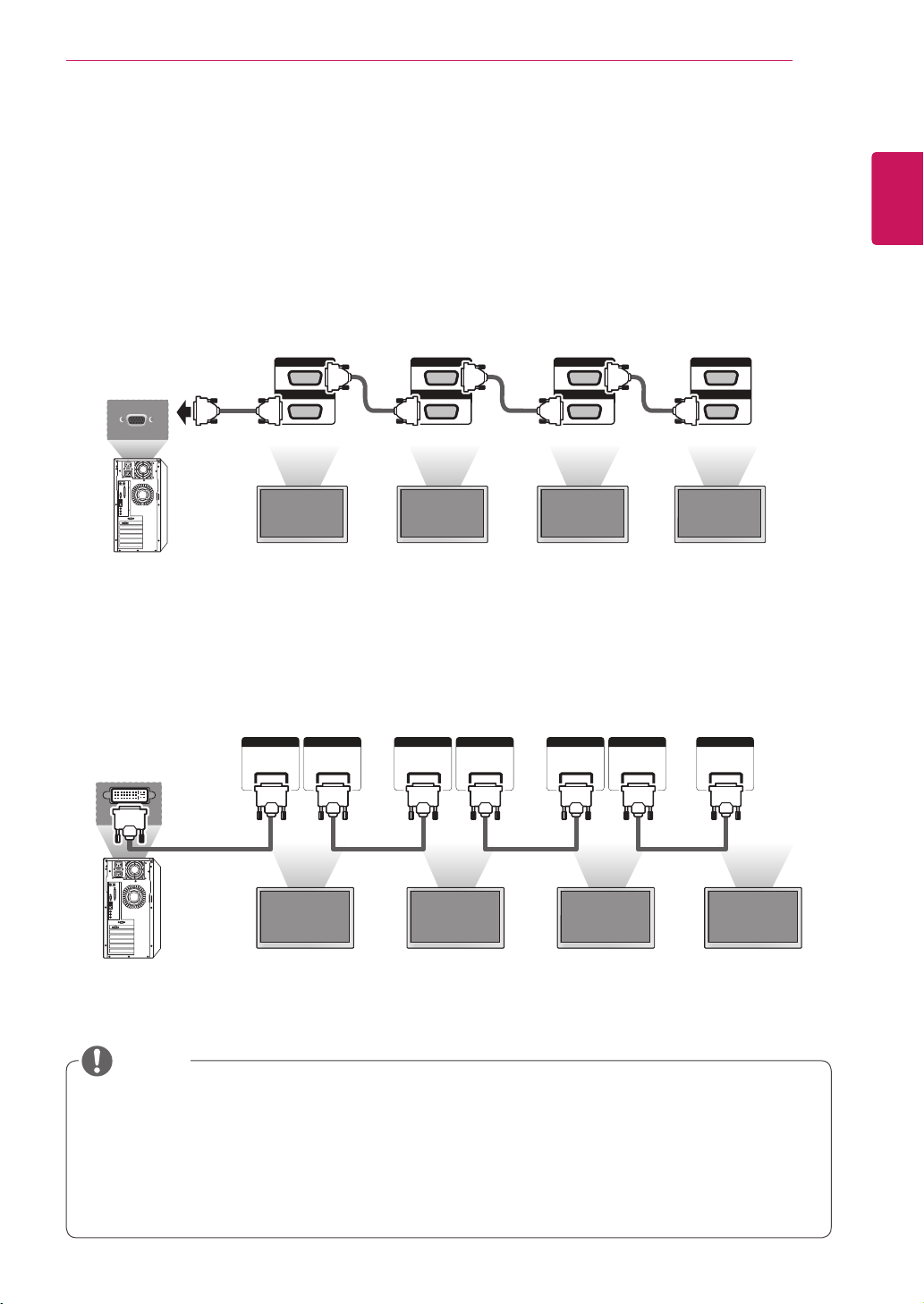
57
ENG
ENGLISH
MAKING CONNECTIONS
Thenumberofmonitorsthatcanbeconnectedtooneoutputmayvarydependingonsignalstatus
andcableloss.Ifthesignalstatusisgood,andthereisnocableloss,itispossibletoconnectupto
9monitors.Ifyouwanttoconnectmorethanthisnumberofmonitors,itisrecommendedtousea
distributor.
Whenmulti-connectingin/outcascadeformat,nolosscablesarerecommended.
DVIOUTdoesnotworkwhenconnectingtoathird-partyproduct.
NOTE
Daisy Chain Monitors
UsethisfunctiontosharetheRGBvideosignalwithothermonitorswithouthavingtouseaseparatesignal
splitterbox.
•TousedifferentproductsconnectedtoeachotherConnectoneendofthesignalinputcable(15-pin
D-SubSignalCable)totheRGBOUTconnectorofproduct1andconnecttheotherendtotheRGBIN
connectorofotherproducts
AV IN / OUT
VIDEO
IN
OUT
AUDIO
AV IN / OUT
VIDEO
IN
OUT
AUDIO
AV IN / OUT
VIDEO
IN
OUT
AUDIO
RGB/AV
/COMPONENT OUT
RGB/AV
/COMPONENT IN
RGB/AV
/COMPONENT OUT
RGB/AV
/COMPONENT IN
RGB/AV
/COMPONENT OUT
RGB/AV
/COMPONENT IN
RGB/AV
/COMPONENT OUT
RGB/AV
/COMPONENT IN
Monitor1 Monitor2 Monitor3 Monitor4
RGB Cable
15-pinD-SubSignalCable
(Max3m)
DVI Cable
DVI IN DVI OUT DVI IN DVI OUT DVI IN DVI OUT DVI IN
RGB/AV
/COMPONENT OUT
RGB/AV
/COMPONENT IN
RGB/AV
/COMPONENT OUT
RGB/AV
/COMPONENT IN
RGB/AV
/COMPONENT OUT
RGB/AV
/COMPONENT IN
RGB/AV
/COMPONENT OUT
RGB/AV
/COMPONENT IN
DVICable
Monitor1 Monitor2 Monitor3 Monitor4
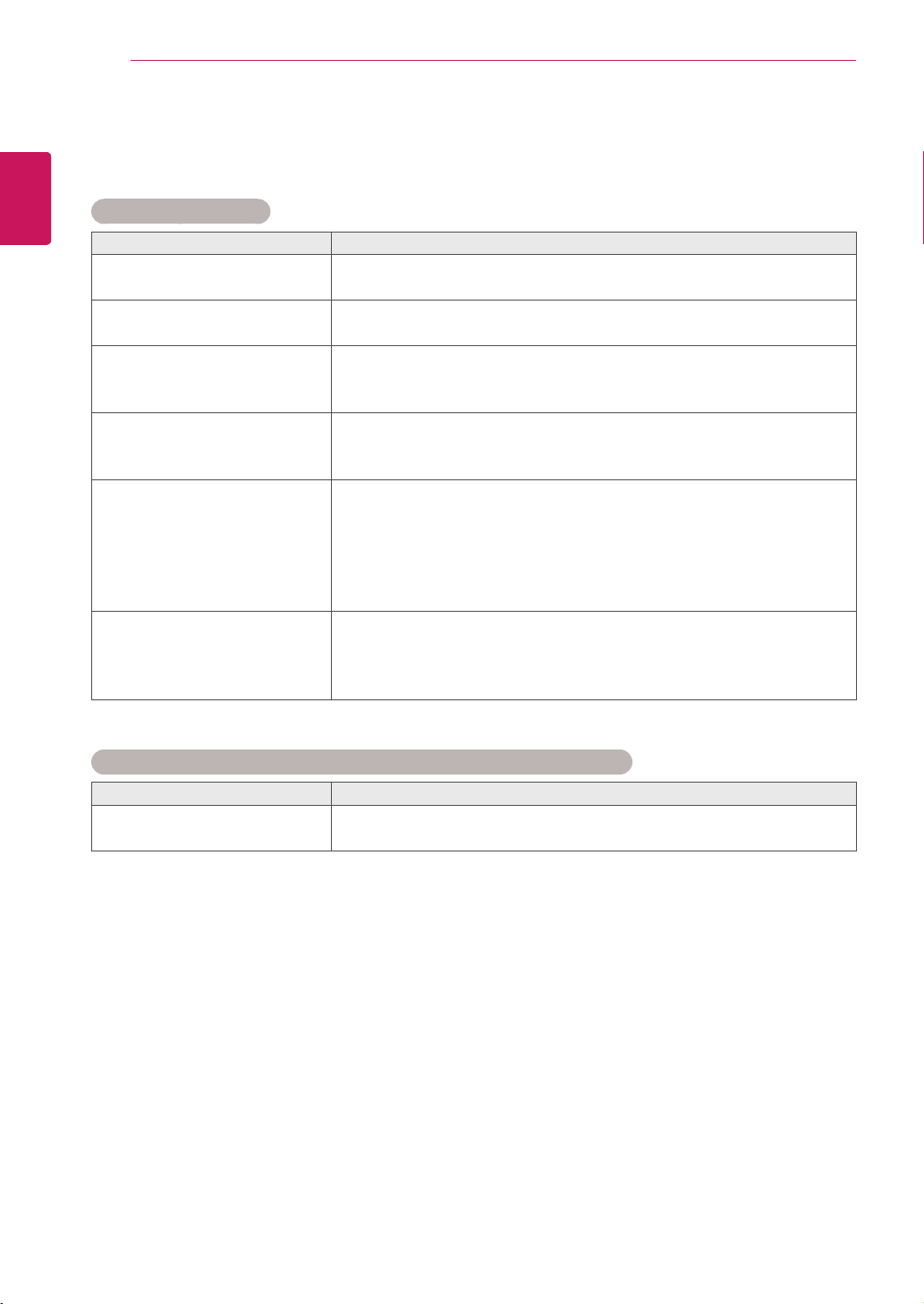
58
ENG
ENGLISH
TROUBLESHOOTING
TROUBLESHOOTING
No image is displayed
Problem Resolution
Istheproductpowercord
connected?
Seeifthepowercordisproperlyconnectedtotheoutlet.
Isthepowerindicatorlighton?
Seeifthepowerswitchisturnedon.
Mayneedservice.
Powerison,powerindicator
isbluebutthescreenappears
extremelydark.
Adjustbrightnessandcontrastagain.
Backlightmayneedrepair.
Thepowerindicatoramber?
Iftheproductisinpowersavingmode,movethemouseorpressany
key.
Turnbothdevicesoffandthenbackon.
Doesthe'Outofrange'
messageappear?
ThesignalfromthePC(videocard)isoutoftheverticalorhorizontal
frequencyrangeoftheproduct.Adjustthefrequencyrangeby
referringtotheSpecificationsinthismanual.
*Maximumresolution
RGB:1920x1080@60Hz
HDMI/DVI:1920x1080@60Hz
Doesthe'Checksignalcable'
messageappear?
ThesignalcablebetweenPCandproductisnotconnected.Check
thesignalcable.
Pressthe'INPUT'menuintheremoteControltochecktheinput
signal.
'Unknown Product' message appears when the product is connected.
Problem Resolution
Didyouinstallthedriver?
Seeiftheplug&playfunctionissupportedbyreferringtothevideo
cardusermanual.
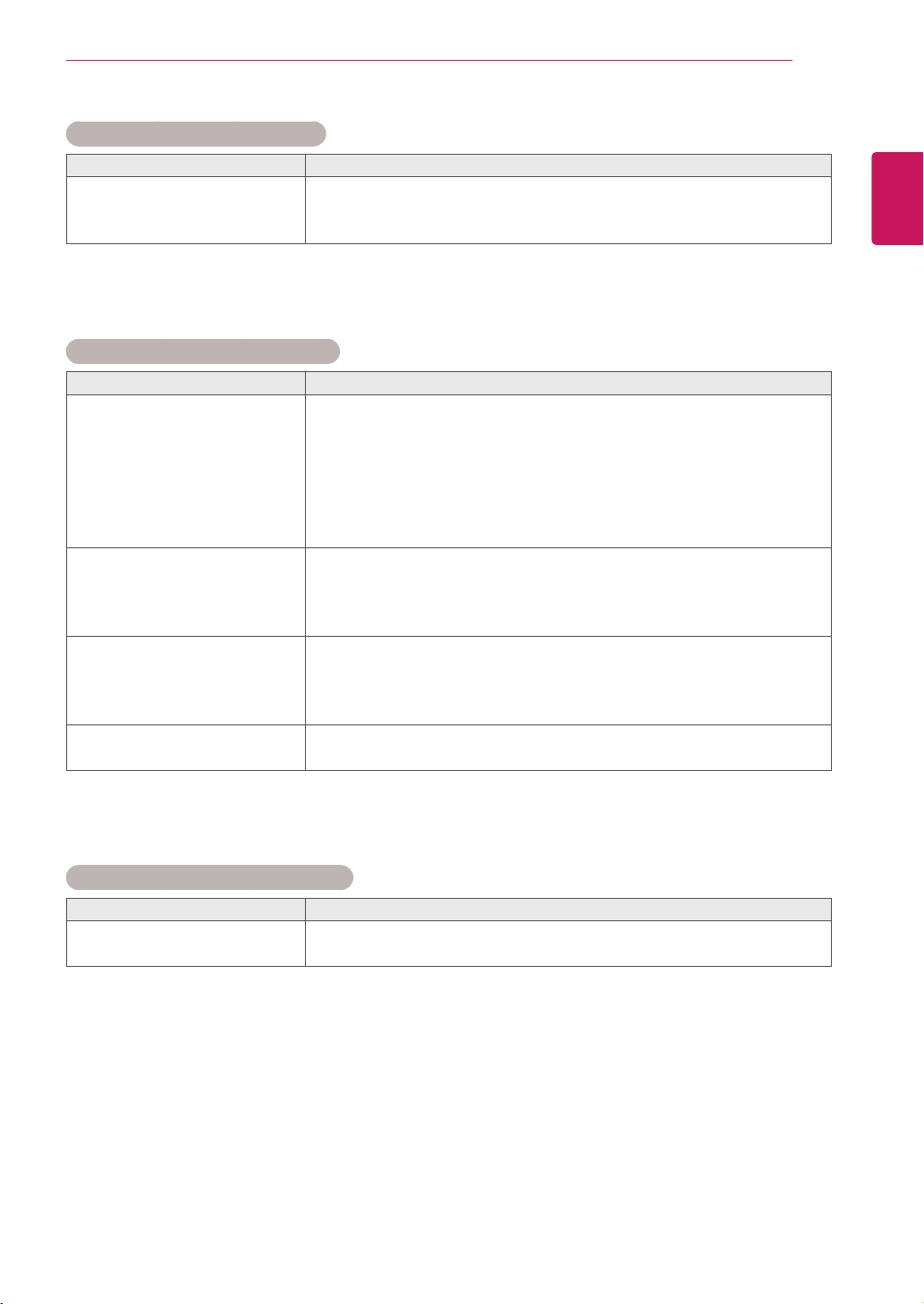
59
ENG
ENGLISH
TROUBLESHOOTING
'Key Lock On' message appears.
Problem Resolution
The'KeyLockOn'message
appearswhenpressingthe
Menubutton.
TheLockfunctionpreventstheOSDsettingsfrombeingchanged
inadvertently.Toreleasethelock,gotoMenuandOptionanddisable
theKeyLockoption.
The screen image looks abnormal.
Problem Resolution
Isthescreenpositionwrong?
D-Subanalogsignal-Pressthe"AUTO"buttonintheremotecontrol
toautomaticallyselecttheoptimalscreenstatusthatfitsintothe
currentmode.Ifadjustmentisnotsatisfactory,usethePositionOSD
menu.
Seeifthevideocardresolutionandfrequencyaresupportedbythe
product.Ifthefrequencyisoutofrange,settotherecommended
resolutionintheControlPanel"Display"Settingmenu.
Dothinlinesappearonthe
backgroundscreen?
D-Subanalogsignal-Pressthe"AUTO"buttonintheremotecontrol
toautomaticallyselectanoptimalscreenstatusthatfitsintothe
currentmode.Ifadjustmentisnotsatisfactory,usetheClockOSD
menu.
Horizontalnoiseappearsorthe
characterslookblurred.
D-Subanalogsignal-Pressthe"AUTO"buttonintheremotecontrol
toautomaticallyselectanoptimalscreenstatusthatfitsintothe
currentmode.Ifadjustmentisnotsatisfactory,usethePhaseOSD
menu.
Thescreenisdisplayed
abnormally.
Theproperinputsignalisnotconnectedtothesignalport.Connect
thesignalcablethatmatcheswiththesourceinputsignal.
After-image appears on the product.
Problem Resolution
After-imageappearswhenthe
productisturnedoff.
Ifyouuseafixedimageforalongtime,thepixelsmaybedamaged
quickly.Usethescreen-saverfunction.
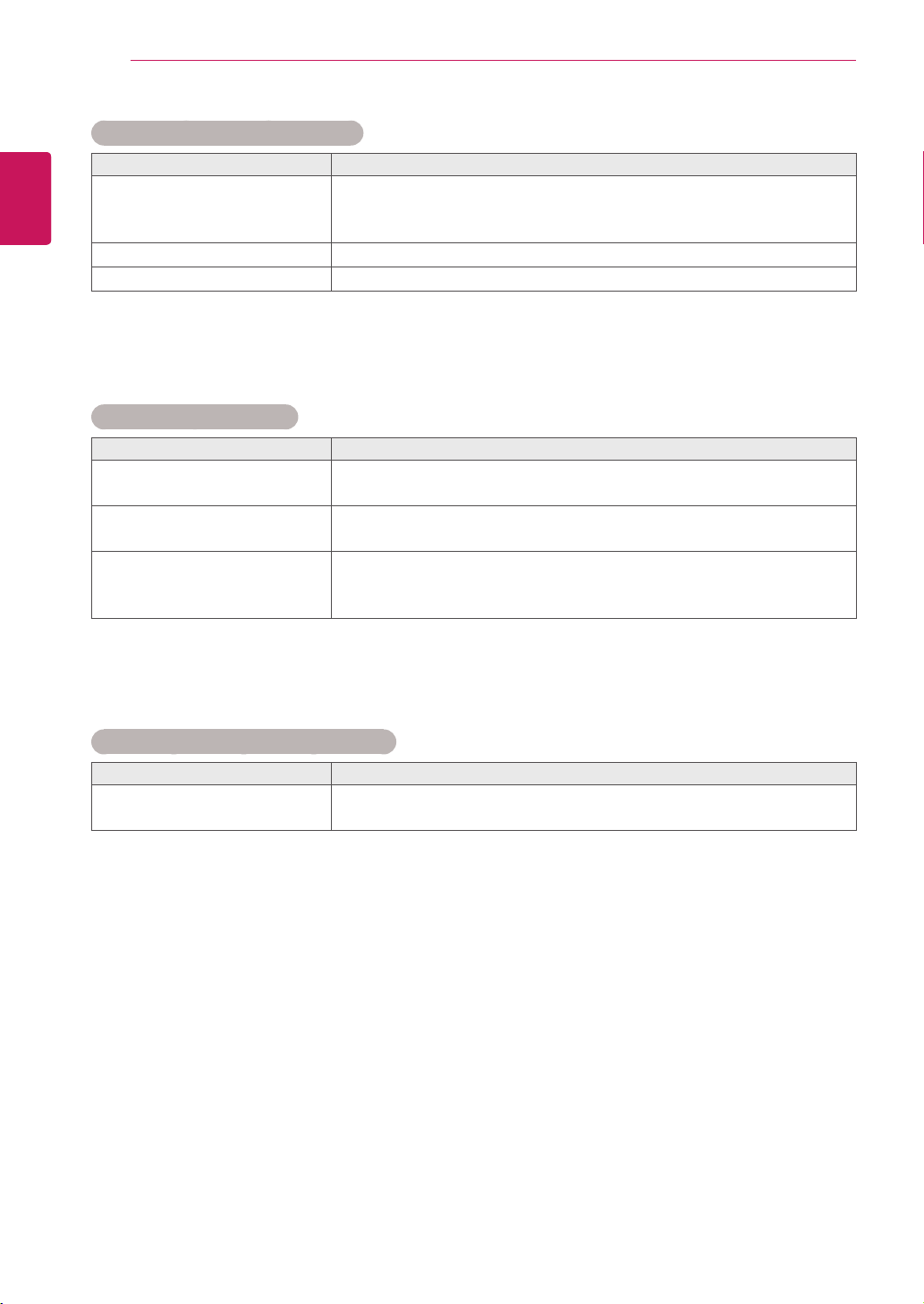
60
ENG
ENGLISH
TROUBLESHOOTING
Screen color is abnormal.
Problem Resolution
Screenhaspoorcolorresolution
(16colors).
Setthenumberofcolorstomorethan24bits(truecolor)Select
ControlPanel-Display-Settings-ColorTablemenuinWindows.
Screencolorisunstableor
mono-colored.
Checktheconnectionstatusofthesignalcable.Or,re-insertthePC
videocard.
Doblackspotsappearonthe
screen?
Severalpixels(red,green,whiteorblackcolor)mayappearonthe
screen,whichcanbeattributabletotheuniquecharacteristicsofthe
LCDpanel.ItisnotamalfunctionoftheLCD.
The operation does not work normally.
Problem Resolution
Thepowersuddenlyturnedoff.
Isthesleeptimerset?
Checkthepowercontrolsettings.Powerinterrupted.
The audio function does not work.
Problem Resolution
Nosound?
Seeiftheaudiocableisconnectedproperly.
Adjustthevolume.
Seeifthesoundissetproperly.
Soundistoodull.
Selecttheappropriateequalizesound.
Soundistoolow.
Adjustthevolume.
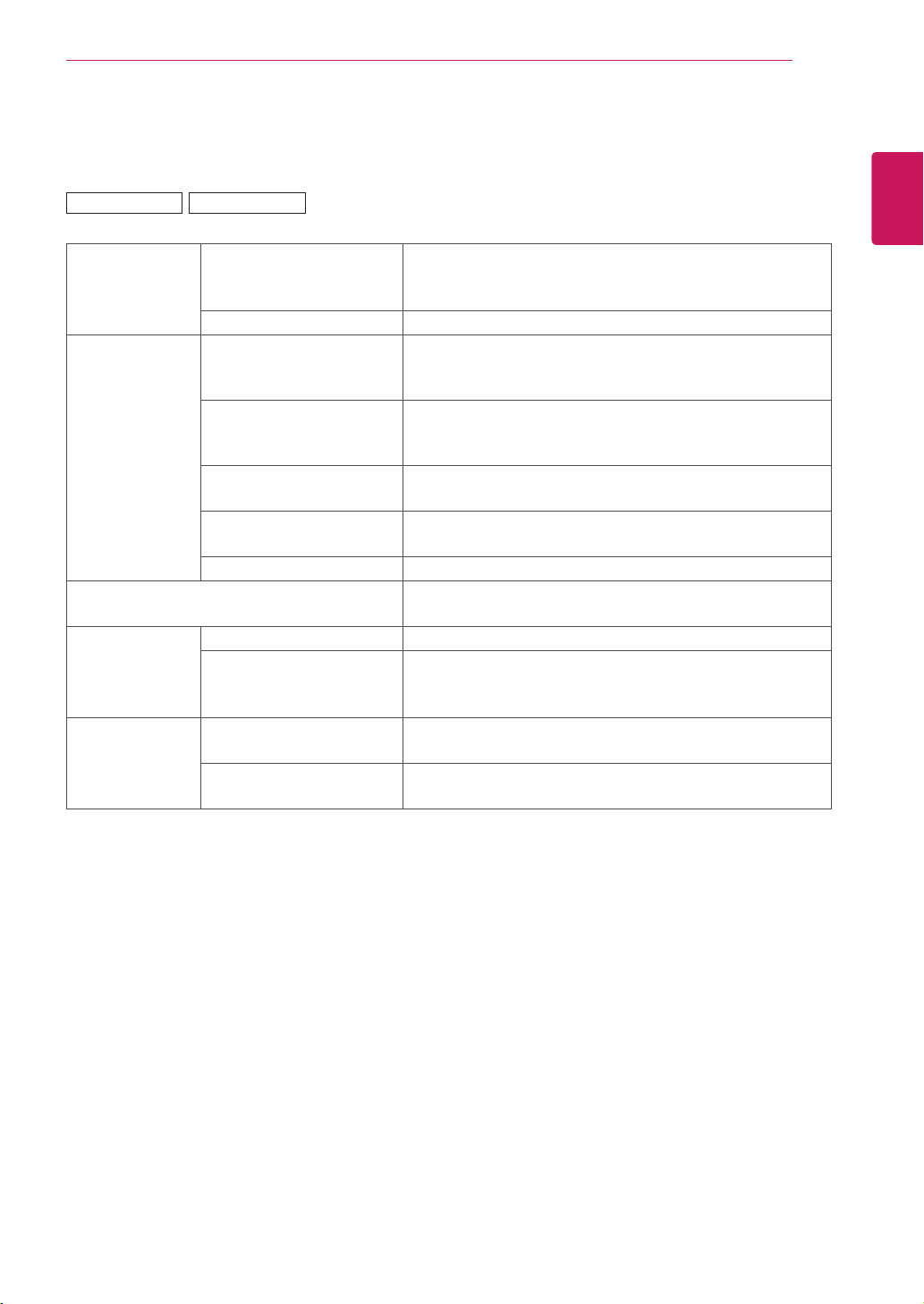
61
ENG
ENGLISH
SPECIFICATIONS
SPECIFICATIONS
LCDPanel ScreenType 1067.31mmWide(42inch)TFT(ThinFilmTransistor)
LCD(LiquidCrystalDisplay)Panel.
Visiblediagonalsize:1067.31mm
PixelPitch 0.4845mm(H)x0.4845mm(V)
VideoSignal Max.Resolution RGB:1920x1080@60Hz
HDMI/DVI/DP:1920x1080@60Hz
-ItmaynotbesupporteddependingontheOSorvideocardtype.
RecommendedResolution RGB:1920x1080@60Hz
HDMI/DVI/DP:1920x1080@60Hz
-ItmaynotbesupporteddependingontheOSorvideocardtype.
HorizontalFrequency RGB:30kHzto83kHz
HDMI/DVI/DP:30kHzto83kHz
VerticalFrequency RGB:56Hzto75Hz
HDMI/DVI/DP:56Hzto60Hz
SynchronizationType SeparateSync,CompositeSync,Digital
InputConnector 15-pinD-Subtype,HDMI(digital),RS-232C,LAN,DVI,
Displayport,USB
Power RatedVoltage AC100-240V~50/60Hz2.2A
PowerConsumption OnMode:170WTyp.
SleepMode:≤1W
OffMode:≤0.5W
Environmental
conditions
OperatingTemperature
OperatingHumidity
0°Cto40°C
10%to80%
StorageTemperature
StorageHumidity
-20°Cto60°C
5%to95%
Productspecificationsshownabovemaybechangedwithoutpriornoticeduetoupgradeofproduct
functions.
42VS20 42VX30MS
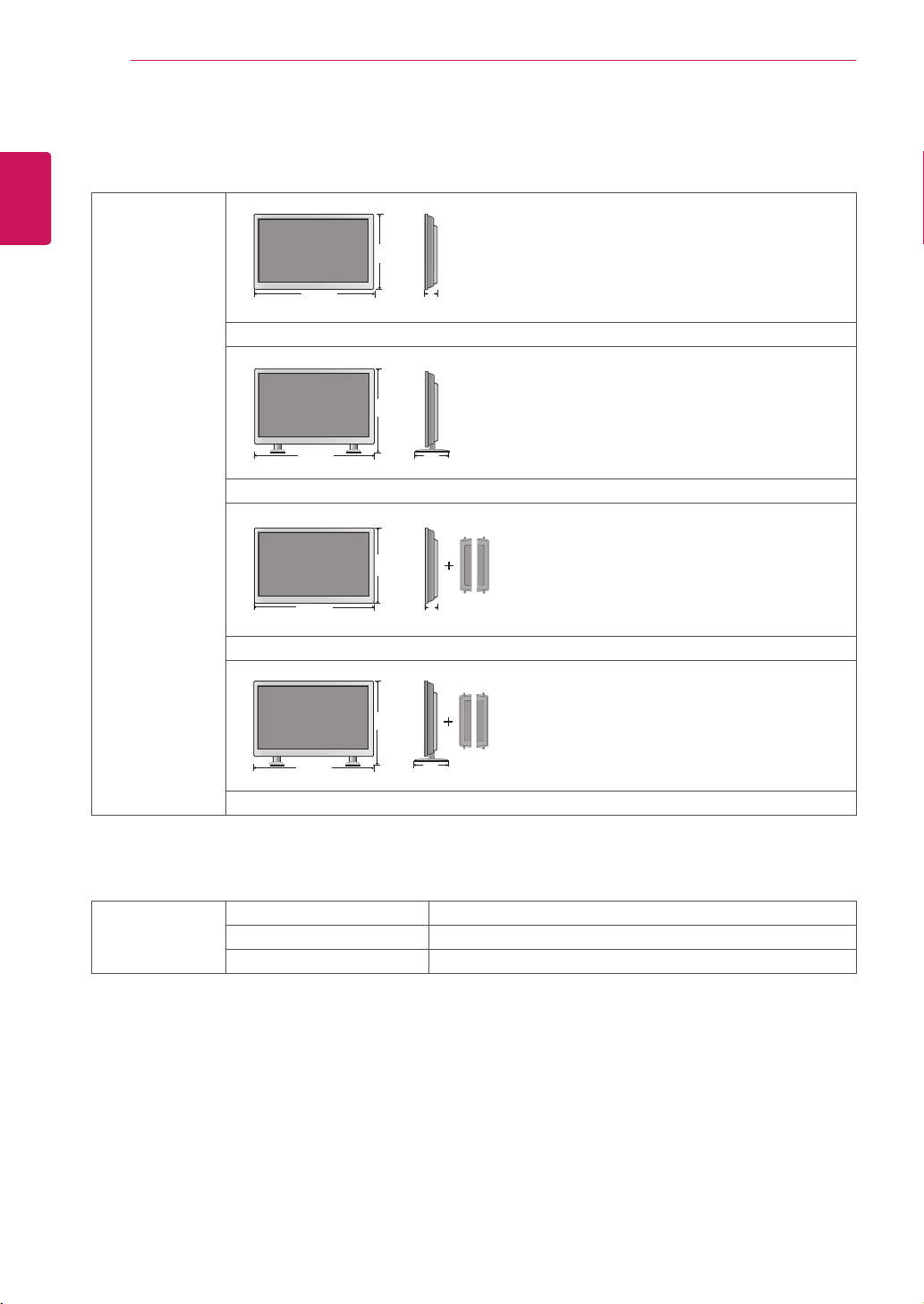
62
ENG
ENGLISH
SPECIFICATIONS
Dimensions
(WidthxHeightx
Depth)/Weight
967mmx561mmx125mm/17.5kg
967mmx633mmx259mm/18.8kg
967mmx561mmx126.5mm/18.25kg
967mmx633mmx259mm/19.55kg
* Applicable only for models that support the speakers
Audio RMSAudioOutput 10W+10W(R+L)
InputSensitivity 0.7Vrms
SpeakerImpedance 8Ω
Productspecificationsshownabovemaybechangedwithoutpriornoticeduetoupgradeofproduct
functions.
W
H
D
W
H
D
W
H
D
W
H
D
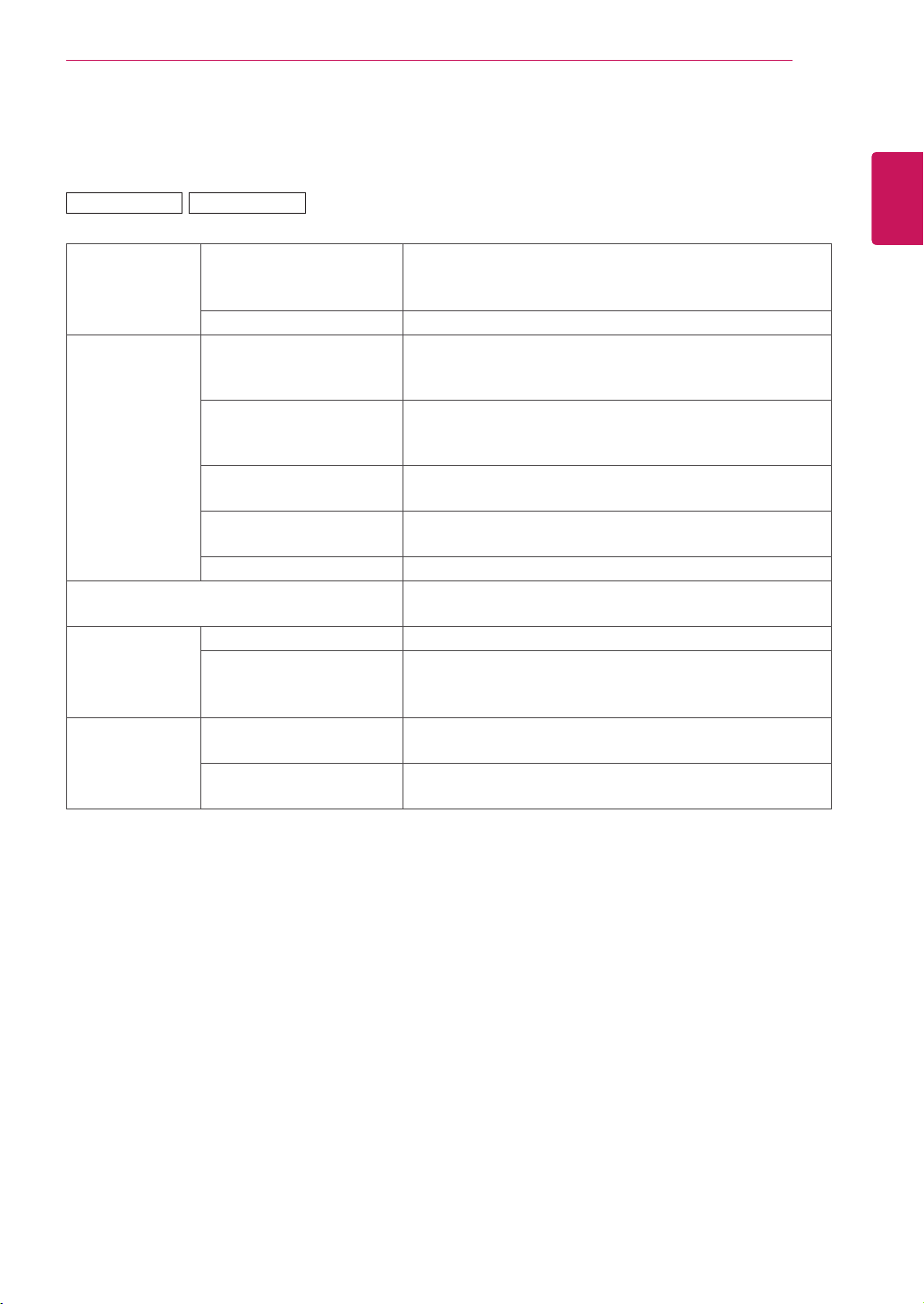
63
ENG
ENGLISH
SPECIFICATIONS
LCDPanel ScreenType 1192.87mmWide(47inch)TFT(ThinFilmTransistor)
LCD(LiquidCrystalDisplay)Panel.
Visiblediagonalsize:1192.87mm
PixelPitch 0.5415mm(H)x0.5415mm(V)
VideoSignal Max.Resolution RGB:1920x1080@60Hz
HDMI/DVI/DP:1920x1080@60Hz
-ItmaynotbesupporteddependingontheOSorvideocardtype.
RecommendedResolution RGB:1920x1080@60Hz
HDMI/DVI/DP:1920x1080@60Hz
-ItmaynotbesupporteddependingontheOSorvideocardtype.
HorizontalFrequency RGB:30kHzto83kHz
HDMI/DVI/DP:30kHzto83kHz
VerticalFrequency RGB:56Hzto75Hz
HDMI/DVI/DP:56Hzto60Hz
SynchronizationType SeparateSync,CompositeSync,Digital
InputConnector 15-pinD-Subtype,HDMI(digital),RS-232C,LAN,DVI,
Displayport,USB
Power RatedVoltage AC100-240V~50/60Hz3.0A
PowerConsumption OnMode:180WTyp.
SleepMode:≤1W
OffMode:≤0.5W
Environmental
conditions
OperatingTemperature
OperatingHumidity
0°Cto40°C
10%to80%
StorageTemperature
StorageHumidity
-20°Cto60°C
5%to95%
Productspecificationsshownabovemaybechangedwithoutpriornoticeduetoupgradeofproduct
functions.
47VS20 47VX30AS
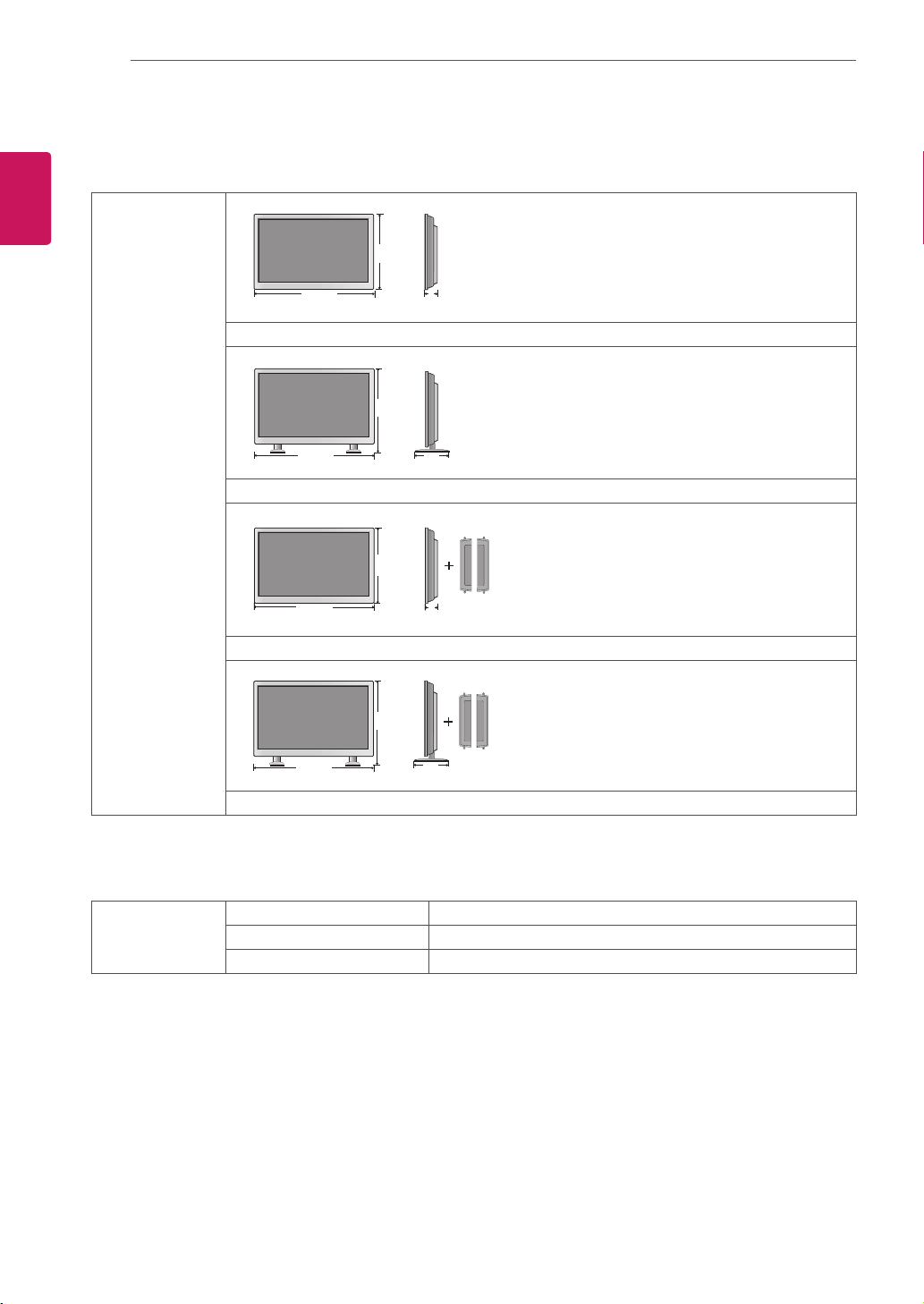
64
ENG
ENGLISH
SPECIFICATIONS
Dimensions
(WidthxHeightx
Depth)/Weight
1079.5mmx624.6mmx122.9mm/22.2kg
1079.5mmx697.7mmx298.3mm/23.6kg
1079.5mmx624.6mmx129.2mm/23.0kg
1079.5mmx697.7mmx298.3mm/24.4kg
* Applicable only for models that support the speakers
Audio RMSAudioOutput 10W+10W(R+L)
InputSensitivity 0.7Vrms
SpeakerImpedance 8Ω
Productspecificationsshownabovemaybechangedwithoutpriornoticeduetoupgradeofproduct
functions.
W
H
D
W
H
D
W
H
D
W
H
D
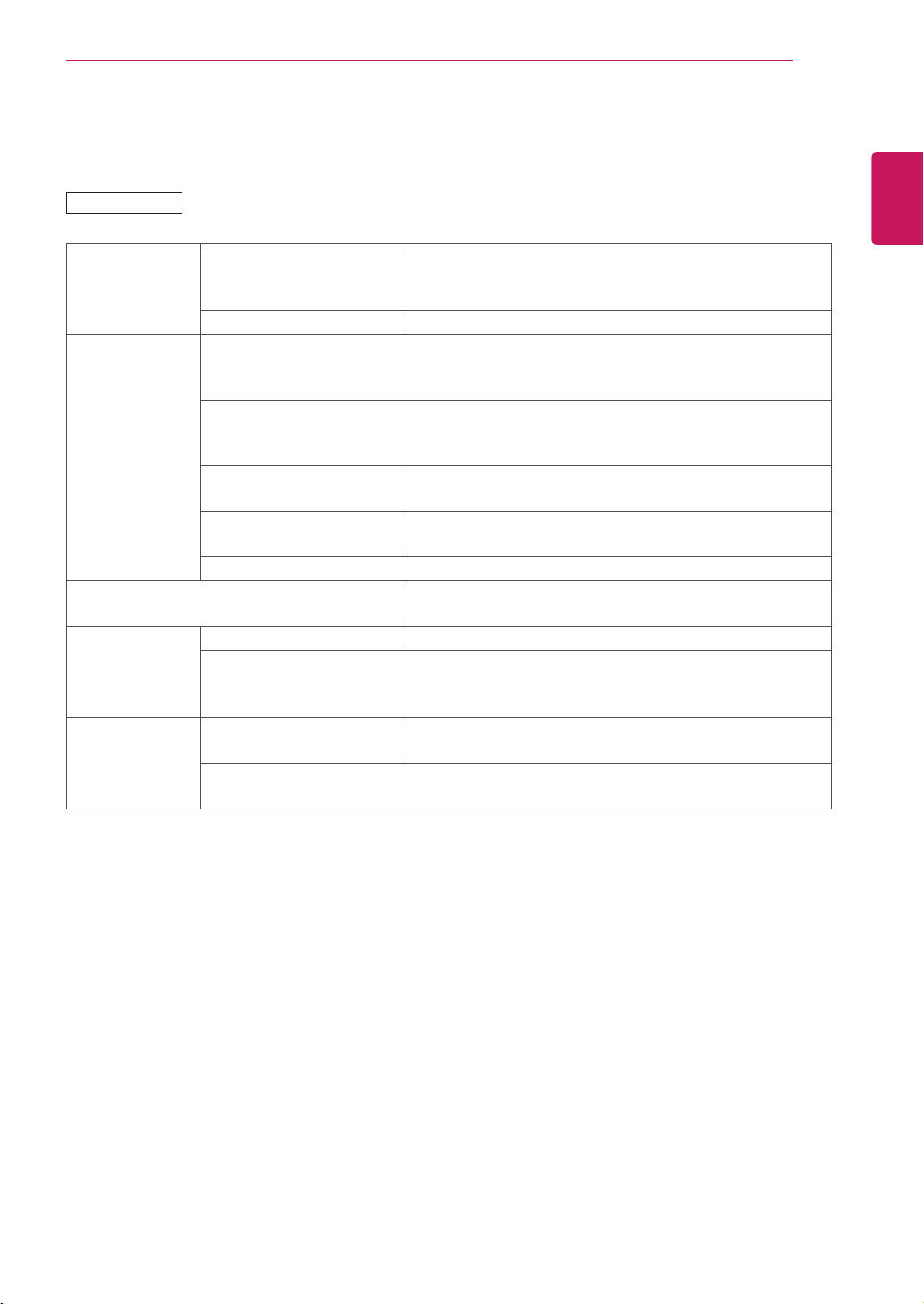
65
ENG
ENGLISH
SPECIFICATIONS
LCDPanel ScreenType 1192.87mmWide(47inch)TFT(ThinFilmTransistor)
LCD(LiquidCrystalDisplay)Panel.
Visiblediagonalsize:1192.87mm
PixelPitch 0.5415mm(H)x0.5415mm(V)
VideoSignal Max.Resolution RGB:1920x1080@60Hz
HDMI/DVI/DP:1920x1080@60Hz
-ItmaynotbesupporteddependingontheOSorvideocardtype.
RecommendedResolution RGB:1920x1080@60Hz
HDMI/DVI/DP:1920x1080@60Hz
-ItmaynotbesupporteddependingontheOSorvideocardtype.
HorizontalFrequency RGB:30kHzto83kHz
HDMI/DVI/DP:30kHzto83kHz
VerticalFrequency RGB:56Hzto75Hz
HDMI/DVI/DP:56Hzto60Hz
SynchronizationType SeparateSync,CompositeSync,Digital
InputConnector 15-pinD-Subtype,HDMI(digital),RS-232C,LAN,DVI,
Displayport,USB
Power RatedVoltage AC100-240V~50/60Hz3.0A
PowerConsumption OnMode:180WTyp.
SleepMode:≤1W
OffMode:≤0.5W
Environmental
conditions
OperatingTemperature
OperatingHumidity
0°Cto40°C
10%to80%
StorageTemperature
StorageHumidity
-20°Cto60°C
5%to95%
Productspecificationsshownabovemaybechangedwithoutpriornoticeduetoupgradeofproduct
functions.
47VX30AF
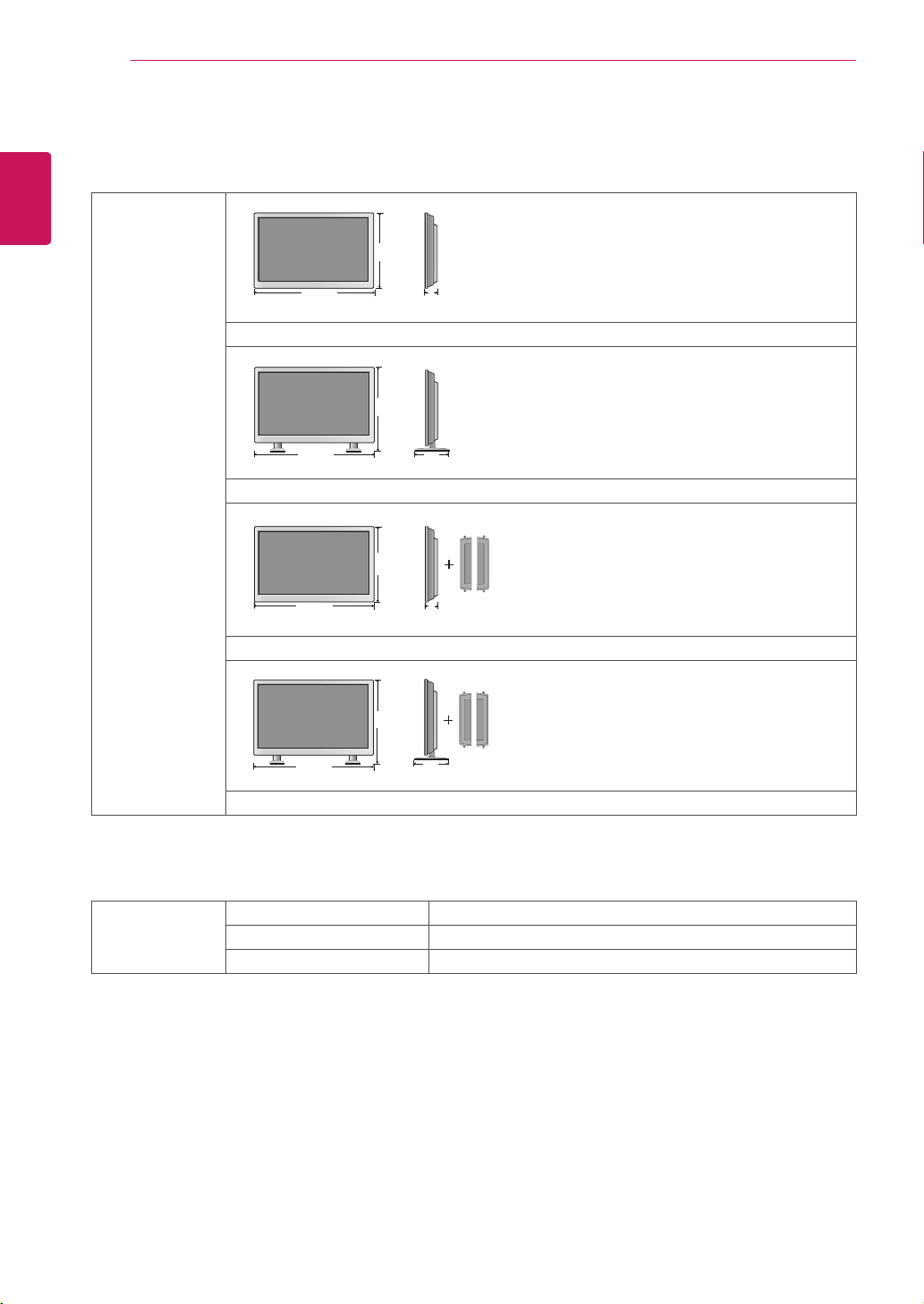
66
ENG
ENGLISH
SPECIFICATIONS
Dimensions
(WidthxHeightx
Depth)/Weight
1079.1mmx624.2mmx116.3mm/22.4kg
1079.1mmx697.5mmx298.3mm/23.8kg
1079.1mmx697.5mmx122.6mm/23.2kg
1079.1mmx697.5mmx298.3mm/24.6kg
* Applicable only for models that support the speakers
Audio RMSAudioOutput 10W+10W(R+L)
InputSensitivity 0.7Vrms
SpeakerImpedance 8Ω
Productspecificationsshownabovemaybechangedwithoutpriornoticeduetoupgradeofproduct
functions.
W
H
D
W
H
D
W
H
D
W
H
D
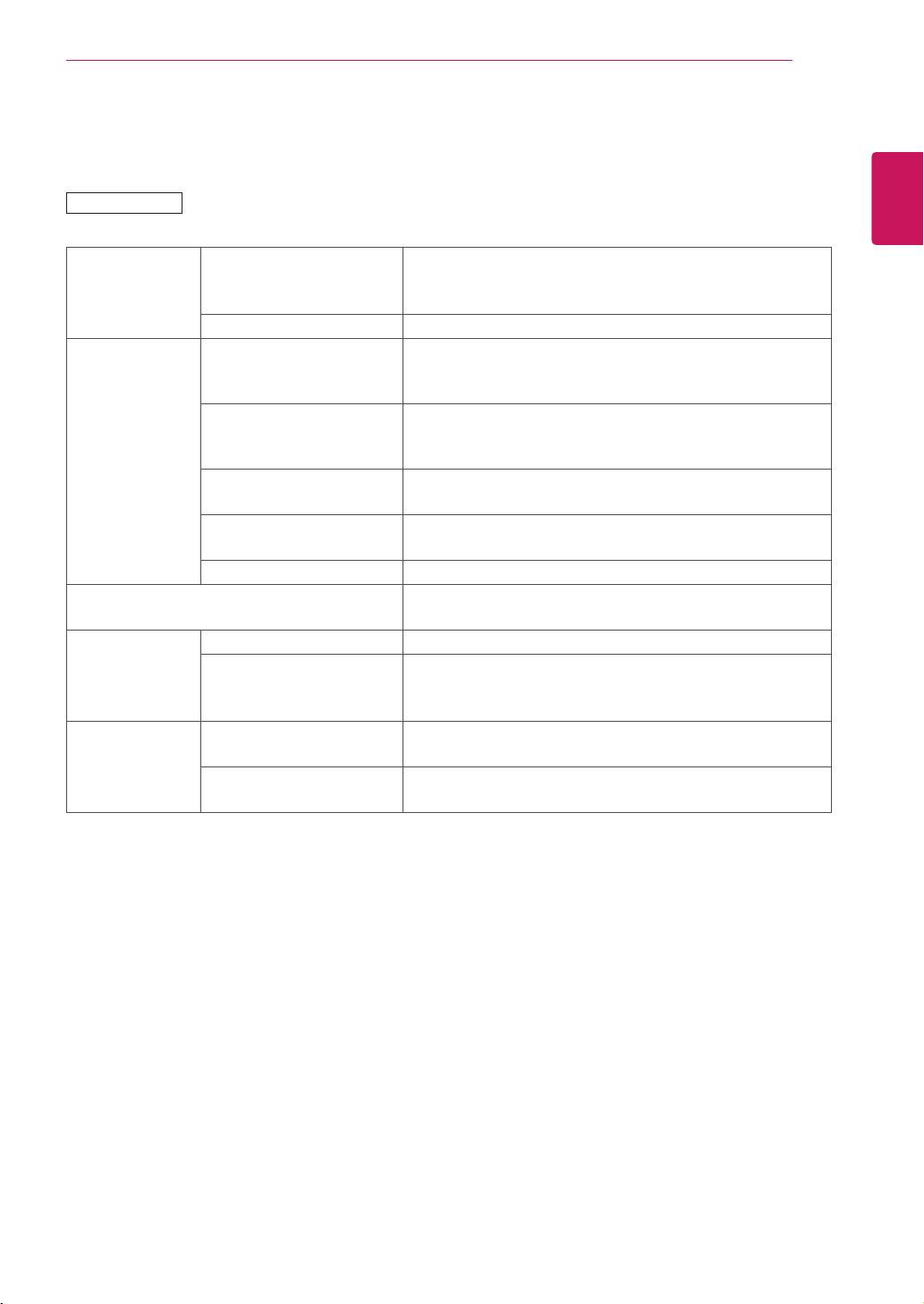
67
ENG
ENGLISH
SPECIFICATIONS
55VS20
LCDPanel ScreenType 1387.80mmWide(55inch)TFT(ThinFilmTransistor)
LCD(LiquidCrystalDisplay)Panel.
Visiblediagonalsize:1387.80mm
PixelPitch 0.630mm(H)x0.630mm(V)
VideoSignal Max.Resolution RGB:1920x1080@60Hz
HDMI/DVI/DP:1920x1080@60Hz
-ItmaynotbesupporteddependingontheOSorvideocardtype.
RecommendedResolution RGB:1920x1080@60Hz
HDMI/DVI/DP:1920x1080@60Hz
-ItmaynotbesupporteddependingontheOSorvideocardtype.
HorizontalFrequency RGB:30kHzto83kHz
HDMI/DVI/DP:30kHzto83kHz
VerticalFrequency RGB:56Hzto75Hz
HDMI/DVI/DP:56Hzto60Hz
SynchronizationType SeparateSync,CompositeSync,Digital
InputConnector 15-pinD-Subtype,HDMI(digital),RS-232C,LAN,DVI,
Displayport,USB
Power RatedVoltage AC100-240V~50/60Hz3.3A
PowerConsumption OnMode:260WTyp.
SleepMode:≤1W
OffMode:≤0.5W
Environmental
conditions
OperatingTemperature
OperatingHumidity
0°Cto40°C
10%to80%
StorageTemperature
StorageHumidity
-20°Cto60°C
5%to95%
Productspecificationsshownabovemaybechangedwithoutpriornoticeduetoupgradeofproduct
functions.
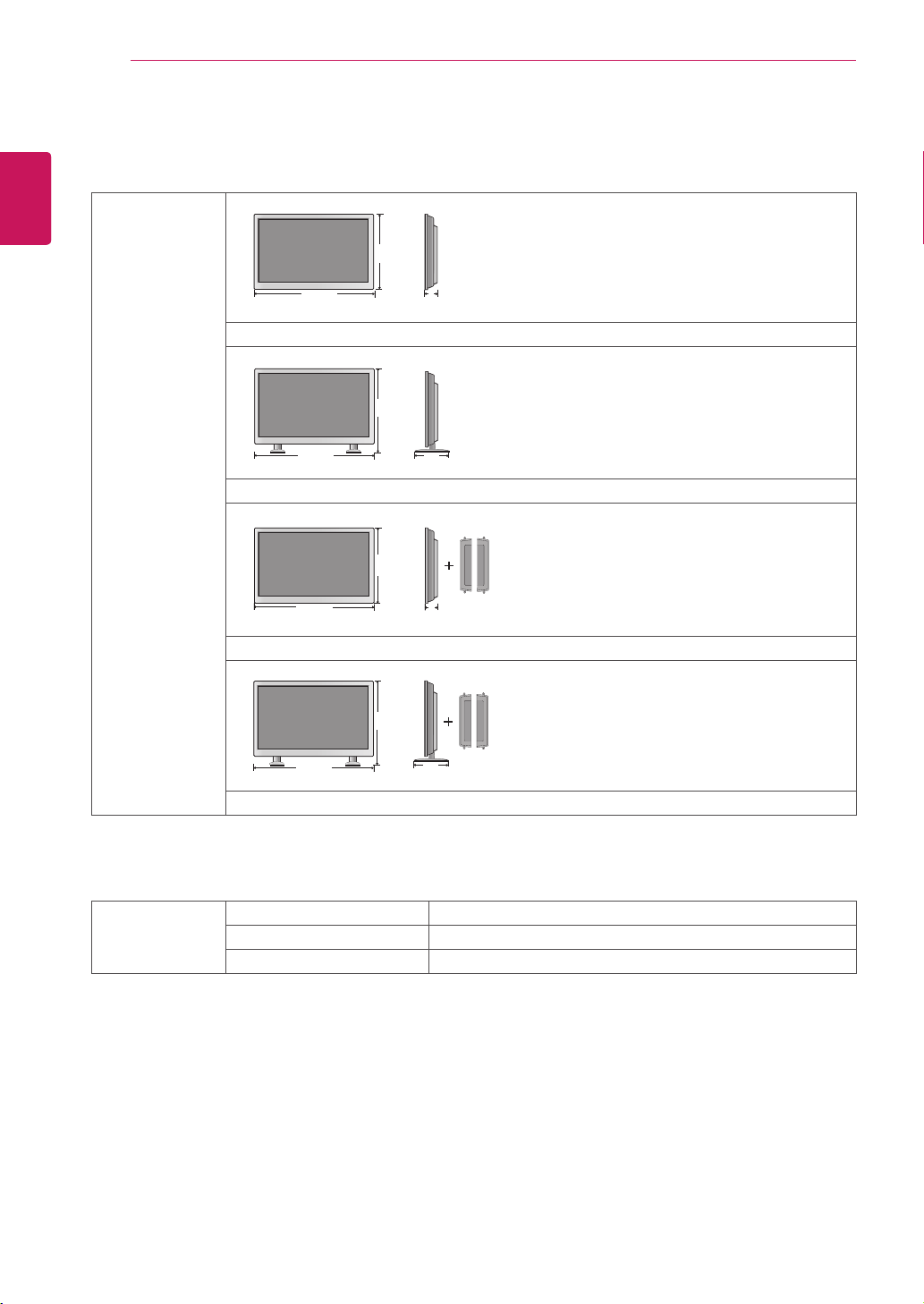
68
ENG
ENGLISH
SPECIFICATIONS
Dimensions
(WidthxHeightx
Depth)/Weight
1251mmx722mmx104mm/34.5kg
1251mmx795mmx298mm/35.9kg
1251mmx722mmx104mm/35.2kg
1251mmx795mmx298mm/36.6kg
* Applicable only for models that support the speakers
Audio RMSAudioOutput 10W+10W(R+L)
InputSensitivity 0.7Vrms
SpeakerImpedance 8Ω
Productspecificationsshownabovemaybechangedwithoutpriornoticeduetoupgradeofproduct
functions.
W
H
D
W
H
D
W
H
D
W
H
D
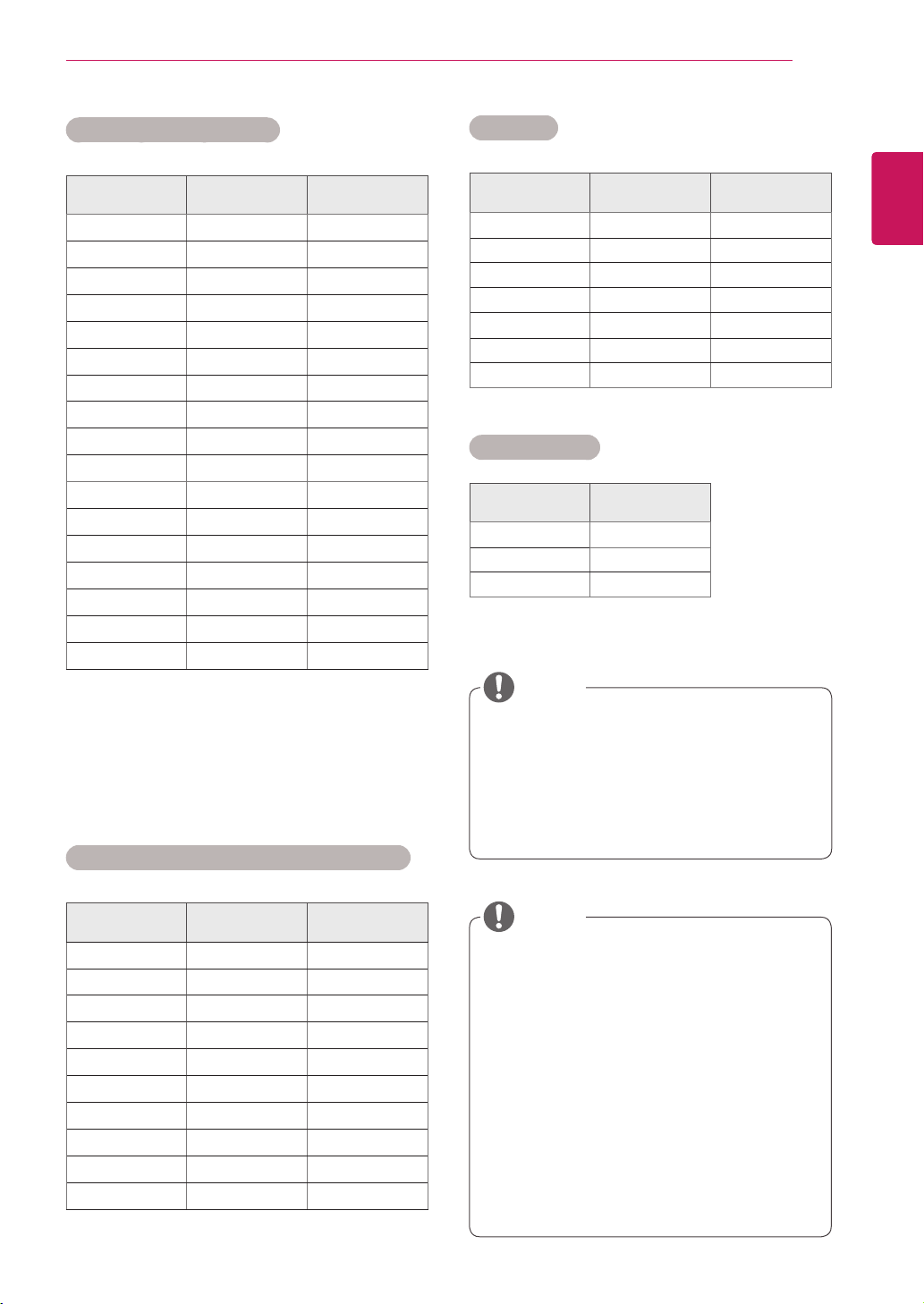
69
ENG
ENGLISH
SPECIFICATIONS
RGB (PC) supported mode
Resolution
Horizontal
Frequency(kHz)
Vertical
Frequency(Hz)
640x350
31.469 70.8
720x400
31.468 70.8
640x480
31.469 59.94
640x480
37.5 75
800x600
37.879 60.317
800x600
46.875 75
832x624
49.725 74.55
1024x768
48.363 60
1024x768
60.123 75.029
1280x720
44.772 59.855
1280x768
47.7 60
1360x768
47.72 59.799
1366x768
47.7 60
1280x1024
63.981 60.02
1280x1024
79.98 75.02
1680x1050
65.290 59.954
1920x1080
67.5 60
HDMI/DVI/Display Port(PC) supported mode
Resolution
Horizontal
Frequency(kHz)
Vertical
Frequency(Hz)
640x480
31.469 59.94
800x600
37.879 60.317
1024x768
48.363 60
1280x720
44.772 59.855
1280x768
47.7 60
1360x768
47.72 59.799
1366x768
47.7 60
1280x1024
63.981 60.02
1680x1050
65.290 59.954
1920x1080
67.5 60
PCresolutionsavailableastheinputlabel
optioninRGBandHDMI/DVIinputmode:
640x480/60Hz,1280x720/60Hz,1920
x1080/60HzandDTVresolutions:480p,
720p,1080p.
DTV Mode
Resolution Component
HDMI/DVI
(DTV)
480i o x
576i o x
480p o o
576p o o
720p o o
1080i o o
1080p o o
Power Indicator
Mode Product
OnMode blue
SleepMode Amber
OffMode -
NOTE
Verticalfrequency:Toenabletheuserto
watchtheproductdisplay,screenimage
shouldbechangedtensoftimesevery
secondlikeafluorescentlamp.Thevertical
frequencyorrefreshrateisthetimesof
imagedisplaypersecond.TheunitisHz.
Horizontalfrequency:Thehorizontalinterval
isthetimetodisplayoneverticalline.When
1isdividedbythehorizontalinterval,the
numberofhorizontallinesdisplayedevery
secondcanbetabulatedasthehorizontal
frequency.TheunitiskHz.
NOTE
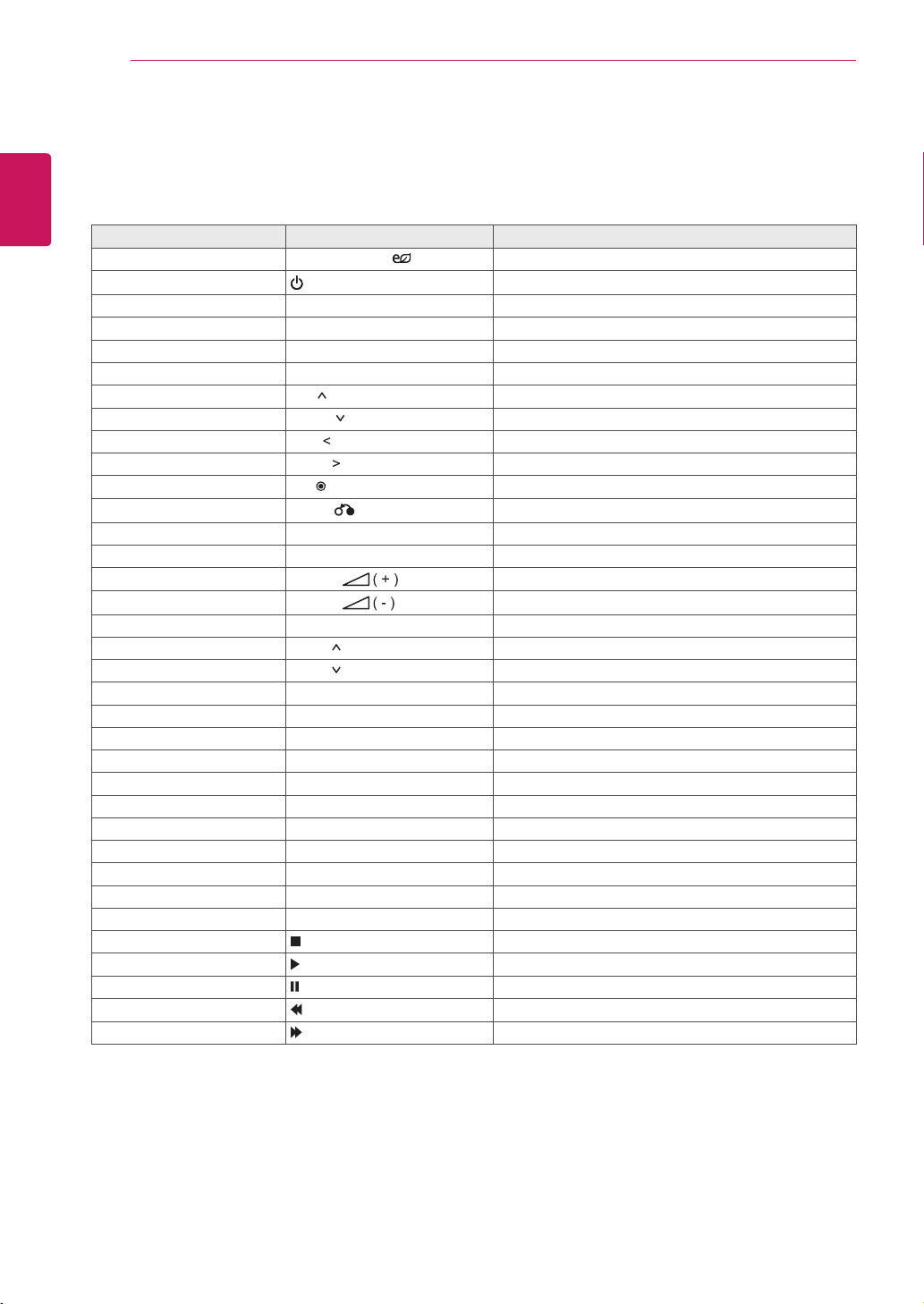
70
ENG
ENGLISH
IR CODES
Code (Hexa) Function Note
95 EnergySaving( ) R/CBUTTON
08
POWER
R/CBUTTON(ON/OFF)
0B INPUT R/CBUTTON
C4 MonitorOn R/CBUTTON
C5 MonitorOff R/CBUTTON
43 MENU R/CBUTTON
40 Up( ) R/CBUTTON
41 Down( ) R/CBUTTON
07 Left( ) R/CBUTTON
06 Right( ) R/CBUTTON
44 OK( ) R/CBUTTON
28
BACK( )
R/CBUTTON
5B EXIT R/CBUTTON
4D PSM R/CBUTTON
02
Volume
R/CBUTTON
03
Volume
R/CBUTTON
09 MUTE R/CBUTTON
E0 Bright (PageUP) R/CBUTTON
E1 Bright (PageDown) R/CBUTTON
10to19 NumberKey0to9 R/CBUTTON
72 RedKey(IDON) R/CBUTTON
71 GreenKey(IDOFF) R/CBUTTON
63 YellowKey R/CBUTTON
61 BlueKey R/CBUTTON
7B TILE R/CBUTTON
76 ARC(4:3) R/CBUTTON
77 ARC(16:9) R/CBUTTON
AF ARC(ZOOM) R/CBUTTON
79 ARC(MARK) R/CBUTTON
99 AutoConfig. R/CBUTTON
B1 R/CBUTTON
B0 R/CBUTTON
BA R/CBUTTON
8F R/CBUTTON
8E R/CBUTTON
IR CODES
AllmodelsdonotsupporttheHDMI/USBfunction.
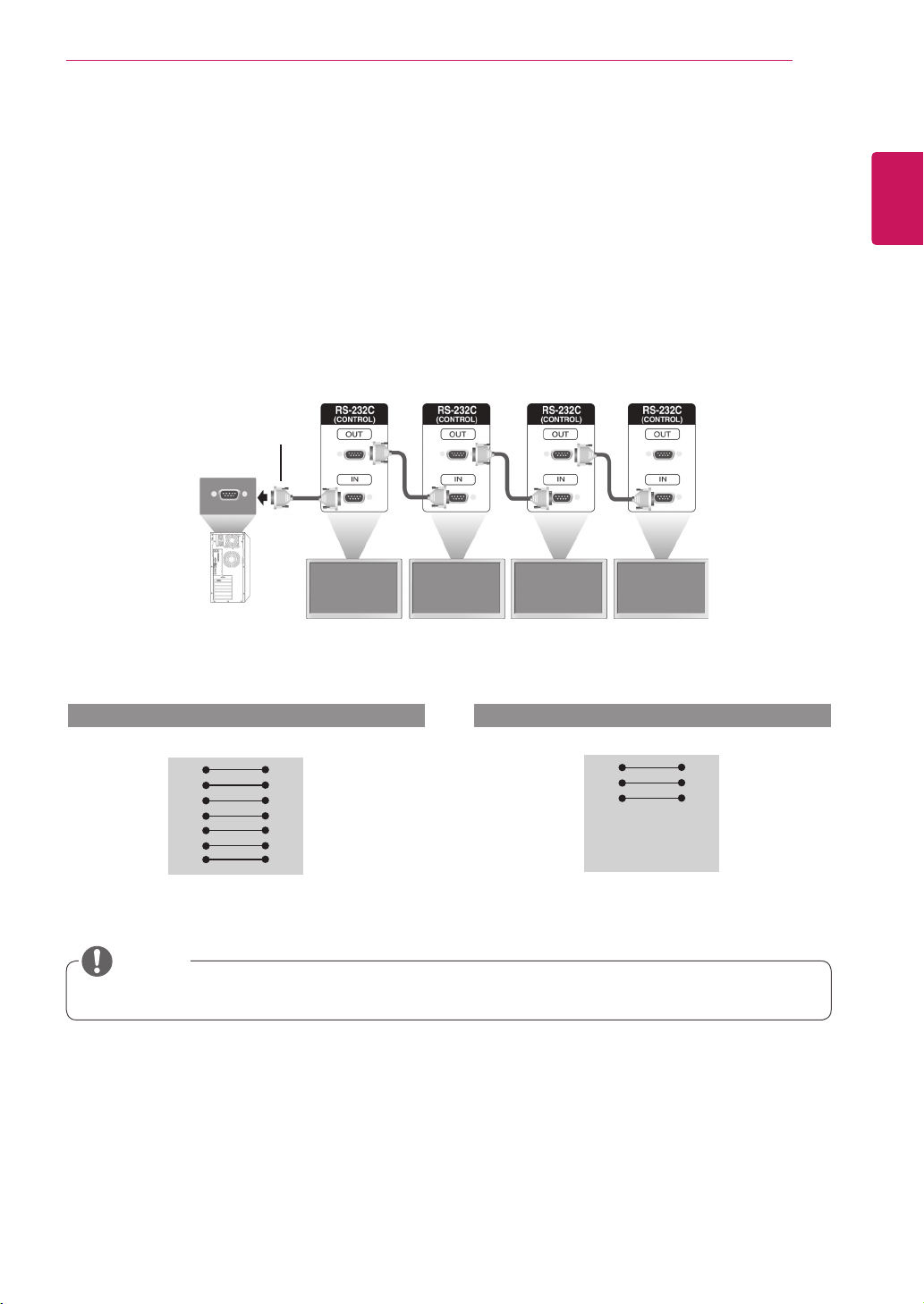
71
ENG
ENGLISH
CONTROLLING THE MULTIPLE PRODUCT
CONTROLLING THE MULTIPLE PRODUCT
UsethismethodtoconnectseveralproductstoasinglePC.Youcancontrolseveralproductsata
timebyconnectingthemtoasinglePC.
IntheOptionmenu,SetIDmustbebetween1and99withoutbeingduplicated.
Connecting the cable
ConnecttheRS-232Ccableasshowninthepicture.
TheRS-232CprotocolisusedforcommunicationbetweenthePCandproduct.Youcanturnthe
producton/off,selectaninputsourceoradjusttheOSDmenufromyourPC.
Communication Parameter
Monitor1 Monitor2 Monitor3 Monitor4
PC
RS-232CCable
(notincluded)
BaudRate:9600buadRate(UART)
DataLength:8bit
ParityBit:None
StopBit:1bit
FlowControl:None
CommunicationCode:ASCIIcode
Useacrossed(reverse)cable
RS-232C Configurations
RXD
TXD
GND
DTR
DSR
RTS
CTS
RXD
TXD
GND
DTR
DSR
RTS
CTS
TXD
RXD
GND
DSR
DTR
CTS
RTS
TXD
RXD
GND
DSR
DTR
CTS
RTS
PC Set PC Set
2
3
5
4
6
7
8
3
2
5
6
4
8
7
D-Sub 9 D-Sub 9
(Female) (Female)
D-Sub 9 D-Sub 9
(Female) (Female)
2
3
5
4
6
7
8
3
2
5
6
4
7
8
7-WireConfigurations(StandardRS-232Ccable)
3-WireConfigurations(NotStandard)
Whenusing3-wireconnections(non-standard),anIRdaisychaincannotbeused.
NOTE
72
ENG
ENGLISH
CONTROLLING THE MULTIPLE PRODUCT
Command reference list
COMMAND
DATA
(Hexadecimal)
1 2
01.Power k a 00Hto01H
02.InputSelect x b Referto‘02.InputSelect’
03.AspectRatio k c Referto‘03.AspectRatio’
04.EnergySaving j q Referto‘04.EnergySaving’
05.Picturemode d x 00Hto04H
06.Contrast k g 00Hto64H
07.Brightness k h 00Hto64H
08.Sharpness k k 00Hto64H
09.Color k i 00Hto64H
10.Tint k j 00Hto64H
11.ColorTemperature x u 00Hto64H
12.HPosition f q 00Hto64H
13.VPosition f r 23Hto41H
14.HSize f s 00Hto64H
15.Autoconfiguration j u 01H
16.Balance k t 00Hto64H
17.Soundmode d y 01Hto05H
18.Treble k r 00Hto64H
19.Bass k s 00Hto64H
20.Speaker d v 00Hto01H
21.VolumeMute k e 00Hto01H
22.VolumeControl k f 00Hto64H
23.Time1(Years/Months/Days) f a Referto‘23.Time1’
24.Time2(Hours/Minutes/Seconds) f x Referto‘24.Time2’
25.OffTimer(Repeatmode/Time) f d Referto‘25.OffTimer’
26.OnTimer(RepeatMode/Time) f e Referto‘26.OnTimer’
27.OnTimerInput f u Referto‘27.OnTimerInput’
28.SleepTime f f 00Hto08H
29.PowerOnDelay f h 00Hto64H
30.4HoursOff m n 00Hto01H
31.AutoOff f g 00Hto01H
32.Language f i Referto‘32.Language’
33.PowerIndicator(StandbyLight) f o 00Hto01H
34.PowerIndicator(PowerLight) f p 00Hto01H
35.ISMmode j p Referto‘35.ISMMethod’
36.Reset f k 00Hto03H
37.TileMode d d Referto‘37.Tilemode’
38.TileModeCheck d z FFH
73
ENG
ENGLISH
CONTROLLING THE MULTIPLE PRODUCT
COMMAND
DATA
(Hexadecimal)
1 2
39.TileID d i Referto‘39.TileID’
40.TileHPosition d e 00Hto64H
41.TileVPosition d f 23Hto41H
42.TileHSize d g 00Hto32H
43.TileVSize d h 00Hto32H
44.NaturalMode(InTilemode) d j 00Hto01H
45.DPMSelect f j 00Hto01H
46.RemoteLock/keyLock k m 00Hto01H
47.Key m c Referto‘47.Key’
48.OSDSelect k l 00Hto01H
49.Elapsedtimereturn d l FFH
50.SerialNo.Check f y FFH
51.S/WVersion f z FFH
Note:DuringUSBoperationssuchasDvixorEMF,allcommandsexceptPower(ka)andKey(mc)are
notexecutedandtreatedasNG.

74
ENG
ENGLISH
CONTROLLING THE MULTIPLE PRODUCT
Transmission
[Command1][Command2][][SetID][][Data][Cr]or
[Command1][Command2][][SetID][][Data1][][Data2][][Data3][Cr]
*[Command1]:Firstcommandtocontroltheset.
*[Command2]:Secondcommandtocontroltheset.
*[SetID]:SetIDwithwhichyouwanttocommunicate.Etner[SetID]=‘00(0x00’tocommunicatewithallsets
regardlessoftheirSetIDnumbers.
*[Data]:Informationpassedtotheset.
*[Data1]:Informationpassedtotheset.
*[Data2]:Informationpassedtotheset.
*[Data3]:Informationpassedtotheset.
*[Cr]:CarriageReturn.ASCIIcode‘0x0D’.
*[]:ASCIIcodespace‘0x20’
Acknowledgement
[Command2][][SetID][][OK/NG][Data][x]or
[Command2][][SetID][][OK/NG][Data1][Data2][Data3][x]
*Inalikemanner,ifotherfunctionstransmit‘FF’databasedonthisformat,Acknowledgementdatafeedback
presentsstatusabouteachfunction.
*Note:Inthismode,displaywillsendtheacknowledgementafterpoweronprocessingcompletion.
Theremightbeatimedelaybetweencommandandacknowledgement.
*Referto‘Realdatamapping’forhexadecimaldatatodecimaldata.
*Noacknowledgementsignalwillbesentfromdisplay,ifSetIDintransmissionsignalissetto‘00’(=0x00).
Transmission / Receiving protocol

75
ENG
ENGLISH
CONTROLLING THE MULTIPLE PRODUCT
04. Energy Saving (Command: j q)
Tocontroltheenergysavingfunction.
Transmission
[j][q][][SetID][][Data][Cr]
Data 00:Off
01:Minimum
02:Medium
03.Maximum
05.ScreenOff
Acknowledgement
[q][][SetID][][OK/NG][Data][x]
05. Picture Mode (Command: d x)
Toselectthepicturemode.
Transmission
[d][x][][SetID][][Data][x]
Data 00:Vivid
01:Standard
02.Cinema
03.Sport
04:Game
Acknowledgement
[x][][SetID][][OK/NG][Data][x]
06. Contrast (Command: k g)
Toadjustscreencontrast.
Transmission
[k][g][][SetID][][Data][Cr]
Data 00to64:Contrast0to100
Acknowledgement
[g][][SetID][][OK/NG][Data][x]
01. Power (Command: k a)
TocontrolpowerOn/Offthedisplay.
Transmission
[k][a][][SetID][][Data][Cr]
Data00:PowerOff
01:PowerOn
FF:Checkstatus
Acknowledgement
[a][][SetID][][OK/NG][Data][x]
*Inalikemanner,ifotherfunctionstransmit‘FF’
databasedonthisformat,Acknowledgementdata
feedbackpresentsstatusabouteachfunction.
*Note:Inthismodes,displaywillsendthe
acknowledgementafterpoweronprocessing
completion.Theremightbeatimedelaybetween
commandandacknowledgement.
*Theremightbesometimedelaysbetween
commandandacknowledgement.
02. Input Select (Command: x b)
Toselectinputsourcefordisplay.
Transmission
[x][b][][SetID][][Data][Cr]
Data 20:AV
40:Component
60:RGBPC
70:DVI-D
90:HDMI(DTV)
A0:HDMI(PC)
C0:DisplayPort(DTV)
D0:DisplayPort(PC)
Acknowledgement
[b][][SetID][][OK/NG][Data][x]
03. Aspect Ratio (Command: k c)
Toadjustthescreenformat.
Transmission
[k][c][][SetID][][Data][Cr]
Data 01:4:3
02:16:9
04:Zoom
09:Justscan(720pormore)
10to1F:CinemaZoom1to16
Acknowledgement
[c][][SetID][][OK/NG][Data][x]

76
ENG
ENGLISH
CONTROLLING THE MULTIPLE PRODUCT
07. Brightness (Command: k h)
To adjust screen brightness.
Transmission
[k][h][ ][Set ID][ ][Data][Cr]
Data 00 to 64: Brightness 0 to 100
Acknowledgement
[h][ ][Set ID][ ][OK/NG][Data][x]
08. Sharpness (Command: k k) (Video Timing only)
To adjust screen sharpness.
Transmission
[k][k][ ][Set ID][ ][Data][Cr]
Data 00 to 64: Sharpness 0 to 100
Acknowledgement
[k][ ][Set ID][ ][OK/NG][Data][x]
09. Color (Command: k i) (Video Timing only)
To adjust screen color.
Transmission
[k][i][ ][Set ID][ ][Data][Cr]
Data 00 to 64: Color 0 to 100
Acknowledgement
[i][ ][Set ID][ ][OK/NG][Data][x]
10. Tint (Command: k j) (Video Timing only)
To adjust screen tint.
Transmission
[k][j][ ][Set ID][ ][Data][Cr]
Data 00 to 64: Tint 0 to 100(R50 to G50)
Acknowledgement
[j][ ][Set ID][ ][OK/NG][Data][x]
11. Color Temperature (Command: x u)
To adjust color temperature.
Transmission
[x][u][ ][Set ID][ ][Data][Cr]
Data 00 to 64: Warm 50 to Cool 50
Acknowledgement
[u][ ][Set ID][ ][OK/NG][Data][x]
12. H Position (Command: f q)
To set the Horizontal position.
* Only available for Tile Off mode.
Transmission
[f][q][ ][Set ID][ ][Data][Cr]
Data 00 to 64: Left Min. -50 to Right Max. 50
Acknowledgement
[q][ ][Set ID][ ][OK/NG][Data][x]

77
ENG
ENGLISH
CONTROLLING THE MULTIPLE PRODUCT
13. V Position (Command: f r)
To set the Vertical position.
* Only available for Tile Off mode.
Transmission
[f][r][ ][Set ID][ ][Data][Cr]
Data 00 to 64: Bottom Min. -50 to Top Max. 50
* The operational range varies depending on the
RGB input resolution.
Acknowledgement
[r][ ][Set ID][ ][OK/NG][Data][x]
14. H Size (Command: f s)
To set the Horizontal size.
* Only available for Tile Off mode.
Transmission
[f][s][ ][Set ID][ ][Data][Cr]
Data 00 to 64: Size -50 to 50
Acknowledgement
[s][ ][Set ID][ ][OK/NG][Data][x]
15. Auto Configuration (Command: j u)
To adjust picture position and minimize image
shaking automatically.
* Only available for RGB input.
Transmission
[j][u][ ][Set ID][ ][Data][Cr]
Data 01 : Set
Acknowledgement
[u][ ][Set ID][ ][OK/NG][Data][x]
16. Balance (Command: k t)
To adjust balance.
Transmission
[k][t][ ][Set ID][ ][Data][Cr]
Data 00 to 64: Left 50 to Right 50
Acknowledgement
[t][ ][Set ID][ ][OK/NG][Data][x]
17. Sound Mode (Command: d y)
To select the sound mode.
Transmission
[d][y][ ][Set ID][ ][Data][x]
Data 01: Standard
02: Music
03: Cinema
04: Sport
05. Game
Acknowledgement
[y][ ][Set ID][ ][OK/NG][Data][x]
18. Treble (Command: k r)
To adjust treble.
Transmission
[k][r][ ][Set ID][ ][Data][Cr]
Data 00 to 64: Treble 0 to 100
Acknowledgement
[r][ ][Set ID][ ][OK/NG][Data][x]

78
ENG
ENGLISH
CONTROLLING THE MULTIPLE PRODUCT
22. Volume Control (Command: k f)
Toadjustvolume.
Transmission
[k][f][][SetID][][Data][Cr]
Data 00to64:Volume0to100
Acknowledgement
[f][][SetID][][OK/NG][Data][x]
23. Time 1(Year/ Month/ Day) (Command: f a)
TosettheTime1(Year/Month/Day)values.
Transmission
[f][a][][SetID][][Data1][][Data2][][Data3][Cr]
Data100to14:2010to2030
Data201to0C:JanuarytoDecember
Data301to1F:1to31
*Enter“fa[SetID]ff”forcheckingTime1values.
Acknowledgement
[a][][SetID][][OK/NG][Data1][Data2][Data3][x]
24. Time 2(Hour/ Minute/ Second) (Command: f x)
TosettheTime2(Hour/Minute/Second)values.
Transmission
[f][x][][SetID][][Data1][][Data2][][Data3][Cr]
Data1 00to17:00to23hours
Data2 01to3B:00to59minutes
Data3 01to3B:00to59seconds
*Enter“fx[SetID]ff”forcheckingTime2values.
**Thiscommandwon’tworkifTime1hasnotbeen
setinadvance.
Acknowledgement
[x][][SetID][][OK/NG][Data1][Data2][Data3][x]
19. Bass (Command: k s)
Toadjustbass.
Transmission
[k][s][][SetID][][Data][Cr]
Data 00to64:Bass0to100
Acknowledgement
[s][][SetID][][OK/NG][Data][x]
20. Speaker (Command: d v)
Toselectspeakeron/off.
Transmission
[d][v][][SetID][][Data][x]
Data00:SpeakerOff
01:SpeakerOn
Acknowledgement
[v][][SetID][][OK/NG][Data][x
21. Volume Mute (Command: k e)
Toselectscreenmuteon/off.
Transmission
[k][e][][SetID][][Data][Cr]
Data00:VolumeMuteOn(VolumeOff)
01:VolumeMuteOff(VolumeOn)
Acknowledgement
[e][][SetID][][OK/NG][Data][x]

79
ENG
ENGLISH
CONTROLLING THE MULTIPLE PRODUCT
25. Off Timer(Repeat Mode/ Time) (Command: f e)
TosettheOffTimer(Repeatmode/Time)function.
Transmission
[f][e][][SetID][][Data1][][Data2][][Data3][Cr]
Data100:RepeatOff
01:RepeatOnce
02.RepeatDaily
03:RepeatfromMondaytoFriday
04:RepeatfromMondaytoSaturday
05:RepeatfromSaturdaytoSunday
06.RepeatonSunday
Data201to17:00to23Hours
Data301to3B:00to59Minutes
*Enter“fe[SetID]ff”forcheckingOffTimer(Repeat
mode/Time)values.
*CheckifTime1andTime2havebeensetbefore
settingthisfunction.
Acknowledgement
[e][][SetID][][OK/NG][Data1][Data2][Data3][x]
26. On Timer(Repeat Mode/ Time) (Command: f d)
TosettheOnTimer(Repeatmode/Time)function.
Transmission
[f][d][][SetID][][Data1][][Data2][][Data3][Cr]
Data100:RepeatOff
01:RepeatOnce
02.RepeatDaily
03:RepeatfromMondaytoFriday
04:RepeatfromMondaytoSaturday
05:RepeatfromSaturdaytoSunday
06.RepeatonSunday
Data201to17:00to23Hours
Data301to3B:00to59Minutes
*Enter“fd[SetID]ff”forcheckingOnTimer(Repeat
mode/Time)values.
*CheckifTime1andTime2havebeensetbefore
settingthisfunction.
Acknowledgement
[d][][SetID][][OK/NG][Data1][Data2][Data3][x]
27. On Timer Input (Command: f u)
TosettheOnTimerInputfunction.
Transmission
[f][u][][SetID][][Data][Cr]
Data20:AV
40:Component
60.RGB
90:HDMI
70:DVI
C0:DISPLAYPORT
*CheckifTime1andTime2andOnTimer(Repeat
Mode/Time)functionshavebeensetbeforesetting
thisfunction.
Acknowledgement
[u][][SetID][][OK/NG][Data][x]
28. Sleep Time (Command: f f)
Tosetsleeptime.
Transmission
[f][f][][SetID][][Data][Cr]
Data 00:Off
01:10min.
02:20min.
03:30min.
04:60min.
05:90min.
06:120min.
07:180min.
08:240min.
Acknowledgement
[f][][SetID][][OK/NG][Data][x]
29. Power On Delay (Command: f h)
Tosetthescheduledelaywhenthepoweristurned
on(unit:second).
Transmission
[f][h][][SetID][][Data][Cr]
Data 00to64:0to100sec.
Acknowledgement
[h][][SetID][][OK/NG][Data][x]

80
ENG
ENGLISH
CONTROLLING THE MULTIPLE PRODUCT
30. 4 Hours Off (Command: m n)
Tosetthe4HoursOfffunction.
Transmission
[m][n][][SetID][][Data][Cr]
Data 00:4HoursOffOff
01:4HoursOffOn
Acknowledgement
[n][][SetID][][OK/NG][Data][x]
31. Auto Off (Command: f g)
TosettheAutoOfffunction.
Transmission
[f][g][][SetID][][Data][Cr]
Data 00:AutoOffOff
01:AutoOffOn
Acknowledgement
[g][][SetID][][OK/NG][Data][x]
32. Language (Command: f i)
TosetlanguageforOSD.
Transmission
[f][i][][SetID][][Data][Cr]
Data 00:Czech
01:Danish
02:German
03:English
04:Spanish(EU)
05:Greek
06:French
07:Italian
08:Dutch
09:Norwegian
0A:Portuguese
0B:Protuguese(BR)
0C:Russian
0D:Finnish
0E:Swedish
0F:Korean
10:Chinese(Mandarin)
11:Japanese
12:YueChinese(Cantonese)
Acknowledgement
[i][][SetID][][OK/NG][Data][x]
33. Power Indicator(Standby Light) (Command: f o)
TosetthePowerIndicator(StandbyLight)function.
Transmission
[f][o][][SetID][][Data][Cr]
Data 00:StandbyLightOff
01:StandbyLightOn
Acknowledgement
[o][][SetID][][OK/NG][Data][x]
34. Power Indicator(Power Light) (Command: f p)
TosetthePowerIndicator(PowerLight)function.
Transmission
[f][p][][SetID][][Data][Cr]
Data 00:PowerLightOff
01:PowerLightOn
Acknowledgement
[p][][SetID][][OK/NG][Data][x]
35. ISM mode (Command: j p)
ToselectISMmethodforavoidinghavingafixed
imageremainonscreen.
Transmission
[j][p][][SetID][][Data][Cr]
Data 01:Inversion
02:Orbiter
04:WhiteWash
08.Normal
Acknowledgement
[p][][SetID][][OK/NG][Data][x]

81
ENG
ENGLISH
CONTROLLING THE MULTIPLE PRODUCT
36. Reset (Command: f k)
ToexecutethePicture,Screen,AudioandFactory
resetfunction.
Transmission
[f][k][][SetID][][Data][Cr]
Data 00:PictureReset
01:ScreenReset
02:AudioReset
03:FactoryReset
Acknowledgement
[k][][SetID][][OK/NG][Data][x]
37. Tile Mode (Command: d d)
ToselectaTileModeOff/OnandTileRow/Column
size.
Transmission
[d][d][][SetID][][Data][Cr]
Data 00toFF:1stbyte-TileColumnvalue
2ndbyte-TileRowvalue
*00,01,10,11meansTileModeOff.
Acknowledgement
[d][][SetID][][OK/NG][Data][x]
38. Tile Mode Check (Command: d z)
TocheckTileModestatus.
Transmission
[d][z][][SetID][][Data][Cr]
Data FF:CheckTileModestatus
Acknowledgement
[z][][SetID][][OK/NG][Data1][Data2][Data3][x]
Data1 00:TileModeOff
01:TileModeOn
Data2 00to0F:TileColumeValue
Data3 00to0F:TileRowValue
39. Tile ID (Command: d i)
TosetTileID.
Transmission
[d][i][][SetID][][Data][x]
Data 01toE1: TileID01to225**
FF:ReadTileID
**Datacouldnotbesetover(TileRow)x(Tile
Column)
Acknowledgement
[i][][SetID][][OK/NG][Data][x]
*NGwillbereturnifdataisover(TileRow)x(Tile
Column),except0xFF.
40. Tile H Position (Command: d e)
TosettheTileHorizontalposition.
*OnlyavailablewhenTileNaturalModeisoff.
Transmission
[d][e][][SetID][][Data][Cr]
Data 00to32:Left(-50)toRight(0)
(*Left/RightvaluesdependonTileHsize.)
Acknowledgement
[e][][SetID][][OK/NG][Data][x]
41. Tile V Position (Command: d f)
TosettheTileVerticalposition.
*OnlyavailablewhenTileNaturalModeisoff.
Transmission
[d][f][][SetID][][Data][Cr]
Data 0to32:Bottom(0)toTop(50)
(*Bottom/TopvaluesdependonTileVsize.)
Acknowledgement
[f][][SetID][][OK/NG][Data][x]

82
ENG
ENGLISH
CONTROLLING THE MULTIPLE PRODUCT
42. Tile H Size (Command: d g)
TosettheTileHorizontalSize.
*SetTileHPositionto0x32(50)beforesettingTileH
Size.
*OnlyavailablewhenTileNaturalModeisoff.
Transmission
[d][g][][SetID][][Data][x]
Data 00to32:0to50
Acknowledgement
[g][][SetID][][OK/NG][Data][x]
43. Tile V Size (Command: d h)
TosettheTileVerticalsize.
*SetTileVPositionto0x00beforesettingTileV
Size.
*OnlyavailablewhenTileNaturalModeisoff.
Transmission
[d][h][][SetID][][Data][x]
Data 00to32:0to50
Acknowledgement
[h][][SetID][][OK/NG][Data][x]
44. Natural Mode (In Tile Mode) (Comman : d j)
TosettheTileNaturalmode.
Transmission
[d][j][][SetID][][Data][x]
Data 00:Off
01:On
Acknowledgement
[j][][SetID][][OK/NG][Data][x]
45. DPM Select (Command: f j)
TosettheDPM(DisplayPowerManagement)
function.
Transmission
[f][j][][SetID][][Data][x]
Data 00:DPMSelectOff
01:DPMSelectOn
Acknowledgement
[j][][SetID][][OK/NG][Data][x]
46. Remote Controller Lock/ Key Lock
(Command: k m)
Tolocktheremotecontrolandthefrontpanelcontrol
keysonthedisplay.
Transmission
[k][m][][SetID][][Data][Cr]
Data 00:Lockoff
01:Lockon
*Ifyouareintendednottousetheremotecontroller
andfrontpanelcontrolkeysonthedisplayforkindof
reasons,usethismode.RemotecontrollerLock/Key
Lockwillbereleasedautomaticallyafterdisplayis
rebooted.
*Displaywillnotbeturnedonbypoweronkeyof
remotecontrollerandfrontpanelcontrolkeys,ifkey
islockedoninstandbymode.
Acknowledgement
[m][][SetID][][OK/NG][Data][x]
47. Key (Command: m c)
TosendIRremotecontrolcode.
Transmission
[m][c][][SetID][][Data][Cr]
Data IR_KEY_CODE
Acknowledgement
[c][][SetID][][OK][Data][x]
Whendisplayisinthestandbymode,displaywillturn
onbyPowerbuttonofremotecontrolonly.

83
ENG
ENGLISH
CONTROLLING THE MULTIPLE PRODUCT
48. OSD Select (Command: k l)
ToselectOSD(OnScreenDisplay)on/off
Transmission
[k][l][][SetID][][Data][Cr]
Data 00:OSDOff
01:OSDOn
Acknowledgement
[l][][SetID][][OK/NG][Data][x]
49. Elapsed time return (Command: d l)
Toreadthepanelusedtime.
Transmission
[d][l][][SetID][][Data][x]
Data FF:Datashouldbealwaysffinhexadecimal.
Acknowledgement
[l][][SetID][][OK/NG][Data][x]
*Returneddatameansusedhoursinhexadecimal.
50. Serial No.Check (Command: f y)
Toreadtheserialnumbers.
Transmission
[f][y][][SetID][][Data][Cr]
Data FF:Datashouldbealwaysffinhexadecimal.
Acknowledgement
[y][][SetID][][OK/NG][Data][x]
51. S/W Version (Command: f z)
Toreadthesoftwareversion.
Transmission
[f][z][][SetID][][Data][Cr]
Data FF:Datashouldbealwaysffinhexadecimal.
Acknowledgement
[z][][SetID][][OK/NG][Data][x]
Make sure to read the Safety Precautions
before using the product.
Keep the Owner's Manual(CD) in an accessible
place for future reference.
The model and serial number of the SET is
located on the back and one side of the SET.
Record it below should you ever need service.
MODEL
SERIAL
Temporarynoiseis normalwhenpoweringONor
OFFthisdevice.
As an ENERGY STAR Partner LGE U. S. A.,Inc. has
determined that this product meets the ENERGY
STAR guidelines for energy efficiency.
ENERGY STA R is a s et of p ower-
saving guidelines issued by the U.S.
Environmental Protection Agency(EPA).
NOTE
ENERGYSTAR(EPA) can not be supported
in47VX30AFmodel.
ENERGY STAR(EPA)
support
42/47/55VS20 o
42VX30MS o
47VX30AS o
47VX30AF x