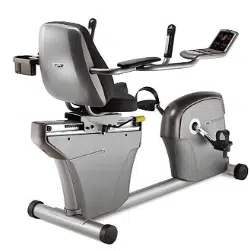
AIR RESISTANCE HYBRID BIKE
USER MANUAL
SF-B2618
IMPORTANT! Please retain owner’s manual for maintenance and adjustment instructions. Your satisfaction is very important to us. PLEASE DO NOT RETURN UNTIL YOU HAVE CONTACTED US: [email protected] or 1- 877 - 90SUNNY (877-907-8669).
We thank you for choosing our product. To ensure your safety and health. please use this equipment correctly. It is important to read this entire manual before assembling and using the equipment. Safe and effective use can only be achieved if the equipment is assembled. maintained. and used properly. It is your responsibility to ensure that all users of the equipment are informed of all warnings and precautions.
1. Before starting any exercise program. you should consult your physician to determine if you have
2. Be aware of your body’s signals. Incorrect or excessive exercise can damage your health. Stop
3. Keep children and pets away from the equipment. The equipment is designed for adult use only.
4. Use the equipment on a solid. flat level surface with a protective cover for your floor or carpet.
To ensure safety. the equipment should have at least 2 feet (60 CM) of free space all around it.
5. Ensure that all nuts and bolts are securely tightened before using the equipment. The safety of
6. Always use the equipment as indicated. If you find any defective components while assembling
7. Wear suitable clothing while using the equipment. Avoid wearing loose clothing that may become
8. Do not place fingers or objects into the moving parts of the equipment.
9. The maximum weight capacity of this unit is 220 pounds (100 KG).
10. The equipment is not suitable for therapeutic use.
11. To avoid bodily injury and/or damage to the product or property. proper lifting and moving are
12. Your product is intended for use in cool and dry conditions. You should avoid storage in extreme
13. This equipment is designed for indoor and home use only; it is not intended for commercial use.
HARDWARE PACKAGE
Ordering Replacement Parts (U.S. and Canadian Customers only) Please provide the following information in order for us to accurately identify the part(s) needed: ✓ The model number (found on cover of manual) ✓ The product name (found on cover of manual) ✓ The part number found on the “EXPLODED DIAGRAM” and “PARTS LIST” (found near the front
Please contact us at [email protected] or 1- 877 - 90SUNNY (877-907-8669).
BATTERY INSTALLATION & REPLACEMENT
BATTERY INSTALLATION: 1. Take out 2 AA batteries from computer box.
2. Press the buckle of battery cover on the Computer (No. 44). then remove battery cover.
3. Install 2 AA batteries into the battery case on the back of the Computer (No. 44). Pay
4. Press the buckle of battery cover. then put the battery cover back to the back of the Computer
(No. 44).
5. The installation is complete!
BATTERY REPLACEMENT: 1. Press the buckle of battery cover on the back of the Computer (No. 44). then remove battery
2. Remove the 2 old AA batteries in the battery case and install 2 new AA batteries into the
3. Press the buckle of battery cover. then put the battery cover back to the back of the Computer
(No. 44).
4. The replacement is complete!
Battery Cover
Battery
ADJUSTMENTS & USAGE GUIDE
TROUBLESHOOTING
PROBLEM SOLUTION
There is no display on the computer.
Remove the computer and verify the wire that comes from the computer is properly
Check if the batteries are correctly positioned and battery springs are in proper contact with batteries.
The batteries in the computer may be unresponsive. Change the batteries.
The bike wobbles when in use.
Turn the end cap on the rear stabilizer as needed to level the bike.
The bike makes squeaking noise when in use.
The bolts may have become loose on the bike.
Please inspect all the bolts and tighten any loose bolts.
ADJUSTING THE TENSION
Adjust the tension by rotating the Tension Control Knob (No. 45) clockwise to increase the level of resistance. Rotate the Tension Control Knob (No. 45) counter-clockwise to decrease the level of resistance.
MOVING THE BIKE
To move the bike. hold the Right & Left Handrail Arm (No. 13 & No. 14) and tilt the bike until the movable wheels located on the Front Stabilizer (No. 50) touch the ground. With the wheels on the ground. you can transport the bike to the desired location with ease.
CLEANING
The bike can be cleaned with a soft. clean. and damp cloth. Do not use abrasives or solvents on the plastic parts. Please wipe your perspiration off the bike after each use. Be careful not to get excessive moisture on the computer display panel as this might cause electrical hazard or electronics to fail.
Please keep the bike. especially the computer. out of direct sunlight to prevent screen damage.
Please inspect all assembly bolts and pedals on the bike for proper tightness every week.
STORAGE
Store the bike in a clean and dry environment. away from children.
EXERCISE COMPUTER
SPECIFICATIONS
KEY FUNCTIONS MODE: Press to select the desired function. (Time. Speed. Distance. Calorie).
Hold the MODE button for 3 seconds to reset Time. Distance and Calorie.
AUTO ON/OFF:
The computer will turn on when you start pedaling or when the MODE button is pressed. The computer will automatically turn off if the machine is inactive for about 4 minutes.
RESET:
Reset the computer by pressing and holding the MODE button for 3 seconds. Remove the batteries will also reset the computer and return all function settings back to zero.
MODE: To select the LOCK MODE setting. press the MODE button when the pointer on the function you wish to select begins to flash. Once locked. only the selected function will be displayed. Press the MODE button to choose another function.
FUNCTIONS
TIME: Counts the total exercise time from start to finish.
SPEED: Displays the current exercise speed.
DISTANCE: Counts the total exercise distance from start to finish.
CALORIE: Counts the total calories burned during an exercise from start to finish.
SCAN: Automatically displays functions in the following order: Time. Speed. Distance. Calorie (repeat).
BATTERY: This computer uses two AA batteries. If the display appears improper or becomes difficult to read. please try installing new batteries. Always change both batteries at the same time.
Do not mix battery types and do not mix old and new batteries. Dispose the batteries according to your state and regional guidelines.
Version:2.6