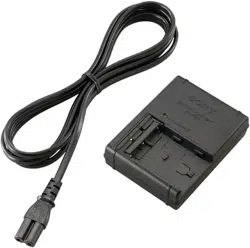
BC-TRW
©2013 Sony Corporation Printed in China
When a fully charged battery pack is installed, the CHARGE lamp ˎ
lights up once and then goes out.
A battery pack that has not been used for a long time may take longer ˎ
than usual to charge.
is unit supports worldwide voltages 100 V to 240 V.
Do not use an electronic voltage transformer, as this may cause a
malfunction.
Troubleshooting
When the CHARGE lamp blinks, check through the following chart.
The CHARGE lamp blinks in two ways.
Blinks slowly: Turns on and o repeatedly every 1.5 seconds
Blinks quickly: Turns on and o repeatedly every 0.15 seconds
e action to be taken depends on the way the CHARGE lamp blinks.
When the CHARGE lamp keeps blinking slowly
Charging is pausing. is unit is in the standby state.
If the room temperature is out of the appropriate temperature range,
charging stops automatically.
When the room temperature returns to the appropriate range, the
CHARGE lamp lights up and charging restarts.
We recommend charging the battery pack at 10 °C to 30 °C (50 °F to
86 °F).
When the CHARGE lamp keeps blinking quickly
When charging the battery pack for the rst time in one of the
following situations, the CHARGE lamp may blink quickly.
If this happens, remove the battery pack from this unit, reattach it and
charge it again.
When the battery pack is le for a long time
When the battery pack is le installed in the camera for a long time
Immediately aer purchase
If the CHARGE lamp keeps blinking quickly, check through the following
chart.
Please contact your nearest Sony dealer in connection with the product that may
have a problem.
Remove the battery pack that is being charged and then rmly attach the same
battery pack again.
The CHARGE lamp blinks again:
Install another battery pack.
The CHARGE lamp lights up and
does not blink again:
If the CHARGE lamp goes out
because the charging time has
passed, there is no problem.
The CHARGE lamp blinks again:
e problem is with this unit.
The CHARGE lamp lights up and
does not blink again:
If the CHARGE lamp goes out
because the charging time has
passed, the problem is with the
battery pack rst installed.
Specications
Input rating 100 V - 240 V AC 50 Hz/60 Hz
7 VA - 12 VA 6 W
Output rating Battery charge terminal:
8.4 V DC 400 mA
Operating temperature 0 °C to 40 °C (32 °F to 104 °F)
Storage temperature –20 °C to +60 °C (–4 °F to +140 °F)
Dimensions (Approx.) 42 mm × 35 mm × 79 mm (w/h/d)
(1 11/16 inches × 1 7/16 inches × 3 1/8 inches)
Mass Approx. 65 g (2.3 oz)
Included items Battery Charger (BC-TRW) (1)
Set of printed documentation
Design and specications are subject to change without notice.
Merci pour l’achat de ce chargeur de batterie Sony.
Avant d’utiliser ce chargeur de batterie, veuillez lire attentivement ce
manuel et le conserver pour toute référence future.
Aide-mémoire
Les numéros de modèle et de série se situent sous l’appareil. Prendre en
note le numéro de série dans l’espace prévu ci-dessous. Se reporter à ces
numéros lors des communications avec le détaillant Sony au sujet de ce
produit.
Modèle no BC-TRW No de série
La plaque signalétique indiquant la tension de fonctionnement, la
consommation, etc. se trouve sous l’appareil.
AVERTISSEMENT
Pour réduire les risques d’incendie ou d’électrocution,
1) n’exposez pas l’appareil à la pluie ou à l’humidité ;
2) ne placez pas d’objets remplis de liquides (vases, etc.) sur l’appareil.
N’exposez pas les piles à une chaleur excessive, notamment aux rayons
directs du soleil, à une amme, etc.
AVIS À LA CLIENTÈLE AUX ÉTATS-UNIS ET AU CANADA
IMPORTANTES
INSTRUCTIONS DE
SECURITE
- CONSERVEZ CES INSTRUCTIONS
DANGER
AFIN DE REDUIRE LE RISQUE
D’INCENDIE OU DE DECHARGE
ELECTRIQUE, SUIVEZ EXACTEMENT
CES INSTRUCTIONS
Si la forme de la che ne correspond pas à la prise secteur, utilisez un
adaptateur de che accessoire de conguration correcte pour la prise
secteur.
Les batteries pouvant être rechargées pour ce produit sont les
suivantes
Marque Sony
Type de batterie NP-FW50
Valeur nominale
(Capacité typique)
CC 7,2 V
7,3 Wh
(1 020 mAh)
ATTENTION
Utilisez une prise murale proche lorsque vous utilisez cet appareil. ˎ
Même lorsque le témoin CHARGE de cet appareil est éteint,
l’alimentation n’est pas coupée. Si un problème devait se produire
pendant l’utilisation de cet appareil, débranchez celui-ci de la prise
murale pour le mettre hors tension.
N’utilisez pas cet appareil dans un espace conné, comme entre un mur ˎ
et un meuble.
AVIS À LA CLIENTÈLE AUX ÉTATS-UNIS
AVERTISSEMENT
Par la présente, vous êtes avisé du fait que tout changement ou toute
modication ne faisant pas l’objet d’une autorisation expresse dans le
présent manuel pourrait annuler votre droit d’utiliser l’appareil.
Note
L’appareil a été testé et est conforme aux exigences d’un appareil
numérique de Classe B, conformément à la Partie 15 de la réglementation
de la FCC.
Ces critères sont conçus pour fournir une protection raisonnable contre
les interférences nuisibles dans un environnement résidentiel. L’appareil
génère, utilise et peut émettre des fréquences radio; s’il n’est pas installé
et utilisé conformément aux instructions, il pourrait provoquer des
interférences nuisibles aux communications radio. Cependant, il n’est
pas possible de garantir que des interférences ne seront pas provoquées
dans certaines conditions particulières. Si l’appareil devait provoquer des
interférences nuisibles à la réception radio ou à la télévision, ce qui peut
être démontré en allumant et éteignant l’appareil, il est recommandé à
l’utilisateur d’essayer de corriger cette situation par l’une ou l’autre des
mesures suivantes :
CAUTION
Use the nearby wall outlet (wall socket) when using this unit. ˎ
Even when the CHARGE lamp of this unit is o, the power is not
disconnected. If any trouble occurs while this unit is in use, unplug it
from the wall outlet (wall socket) to disconnect the power.
Do not use this unit in a narrow space such as between a wall and ˎ
furniture.
NOTICE FOR THE CUSTOMERS IN THE U.S.A.
CAUTION
You are cautioned that any changes or modications not expressly
approved in this manual could void your authority to operate this
equipment.
NOTE
is equipment has been tested and found to comply with the limits for a
Class B digital device, pursuant to Part 15 of the FCC Rules. ese limits
are designed to provide reasonable protection against harmful
interference in a residential installation. is equipment generates, uses,
and can radiate radio frequency energy and, if not installed and used in
accordance with the instructions, may cause harmful interference to radio
communications.
However, there is no guarantee that interference will not occur in a
particular installation. If this equipment does cause harmful interference
to radio or television reception, which can be determined by turning
the equipment o and on, the user is encouraged to try to correct the
interference by one or more of the following measures:
Reorient or relocate the receiving antenna. ˋ
Increase the separation between the equipment and receiver. ˋ
Connect the equipment into an outlet on a circuit dierent from that to ˋ
which the receiver is connected.
Consult the dealer or an experienced radio/TV technician for help. ˋ
Notes on Use
This unit does not have dust-proof, splash-proof or water-proof
specications.
Warranty for Recorded Content
Contents of the recording cannot be compensated if recording or
playback is not made due to a malfunction of the battery pack, battery
charger, etc.
Where not to place this unit
Do not place this unit in any of the following locations, whether it is in
use or in storage. Doing so may lead to a malfunction.
In direct sunlight such as on dashboards or near heating apparatus, as ˎ
this unit may become deformed or malfunction
Where there is excessive vibration ˎ
Where there is strong electromagnetism or radiant rays ˎ
Where there is excessive sand ˎ
In locations such as the seashore and other sandy areas or where dust
clouds occur, protect this unit from sand and dust. ere is a risk of
malfunction.
Precautions on Use
Attach the battery pack rmly to this unit when charging the battery ˎ
pack.
e battery terminal may be damaged if the battery pack is not attached ˎ
correctly.
To protect the battery pack, remove it from this unit when charging is ˎ
completed.
Do not drop or apply mechanical shock to this unit. ˎ
Keep this unit away from TVs or AM receivers. ˎ
Noise from this unit may enter a TV or radio if placed nearby.
Unplug this unit from the wall outlet (wall socket) aer use. Hold this ˎ
unit when you unplug it from the wall outlet (wall socket).
Be sure that nothing metallic comes into contact with the metal parts of ˎ
this unit. If it does, a short may occur and this unit may be damaged.
Do not connect this unit to a voltage adaptor (travel converter) for ˎ
overseas travel. is may result in overheating or another malfunction.
e battery pack and this unit can become warm during or ˎ
immediately aer recharging.
Maintenance
If this unit gets dirty, wipe it using a so dry cloth. ˎ
If this unit gets very dirty, wipe it using a cloth with a little neutral ˎ
solvent added, and then wipe it dry.
Do not use thinners, benzine, alcohol, etc., as they will damage the ˎ
surface of this unit.
When you use a chemical cleaning cloth, refer to its instruction ˎ
manual.
Using a volatile solvent such as an insecticide or keeping this unit ˎ
in contact with a rubber or vinyl product for a long time may cause
deterioration or damage to this unit.
To Charge the Battery Pack
e battery pack is charged by attaching it to this unit.
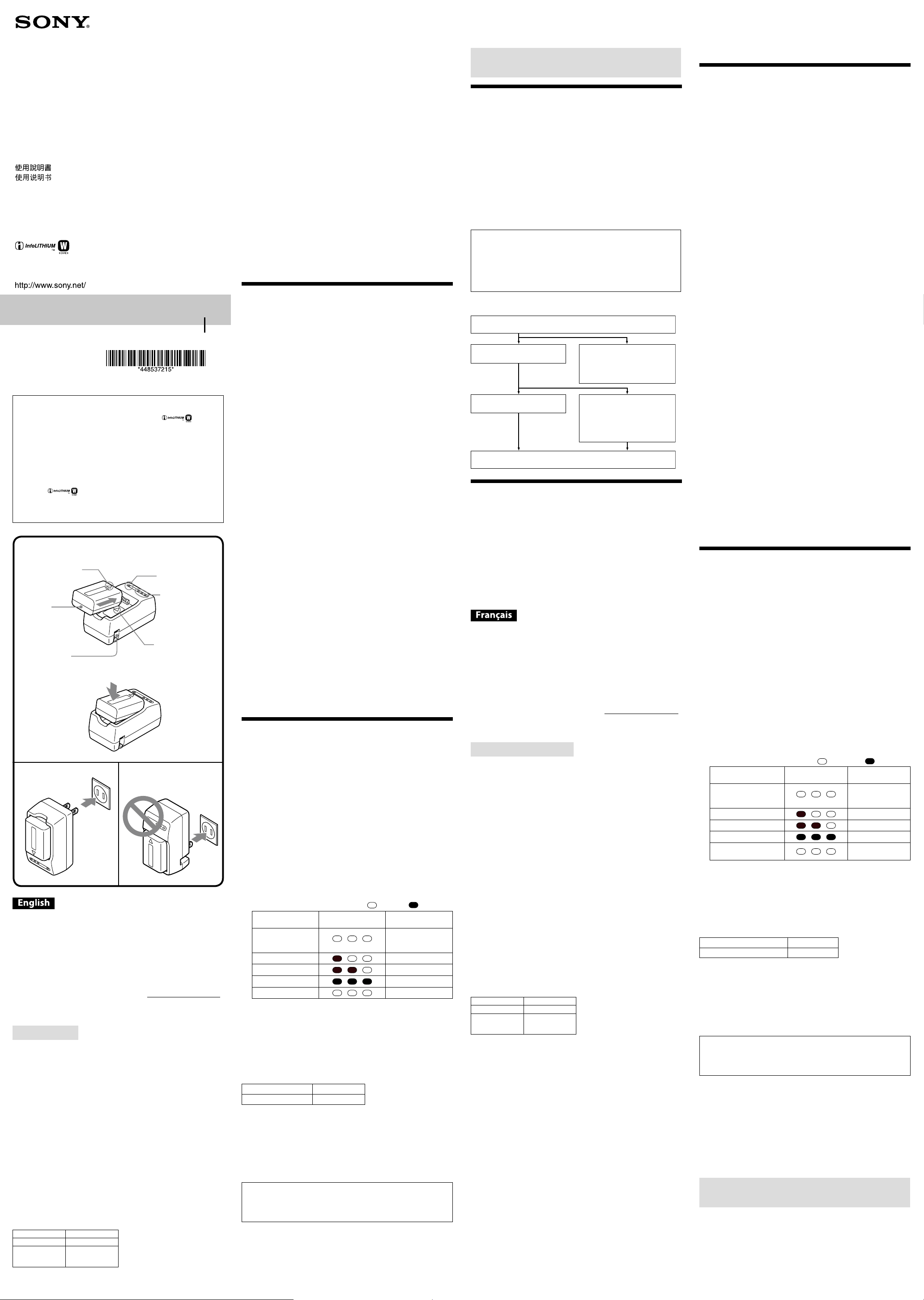
1 Attach the battery pack (See illustration ).
Align the battery mark in the direction of the charger mark and
insert it in the direction of the arrow.
Press the battery pack in the direction illustrated until it is at inside
this unit.
2 Pull the power plug up, and then connect it to a wall outlet
(wall socket).
Always connect the power plug with the prongs at the top (See
illustration ).
Do not connect the power plug with the prongs at the bottom (See
illustration ).
e CHARGE lamp (orange) lights up and charging begins.
When the CHARGE lamp goes out, normal charging is completed.
For a full charge, which allows you to use the battery pack longer than
usual, leave the battery pack in place for approximately another one
hour (Full charge).
You can check the charging status in more detail with the charging
status indicator lamp.
, ... O, , ... Lit up
Charging status
indicator lamp
CHARGE lamp
Immediately aer
attaching the battery
pack - 30 %
30 % - 60 %
60 % - 90 %
90 % - Full charge
Aer full charge
To remove the battery pack
Remove the battery pack by sliding it in the opposite direction to when
you attached it.
Charging time
e following table shows the charging time for a battery pack that is
completely discharged.
“InfoLITHIUM” battery pack W series
Battery pack NP-FW50
Full charging time 220
Approximate number of minutes to fully charge an empty battery pack ˎ
(Full charging time).
For more about the battery life, see the instruction manual of your ˎ
video camera.
e charging time may dier depending on the condition of the battery ˎ
pack or the ambient temperature.
e times shown are for charging an empty battery pack which has ˎ
been run down with a video camera, using this unit at an ambient
temperature of 25 °C (77 °F).
Charging temperature
e temperature range for charging is 0 °C to 40 °C (32 °F to 104 °F).
For maximum battery eciency, the recommended temperature
range when charging is 10 °C to 30 °C (50 °F to 86 °F).
To use the battery pack quickly
You can remove the battery pack from this unit and use it even if charging
is not completed. However, the charging time aects the time that the
battery pack can be used.
Notes
If the CHARGE lamp does not light up, check if the battery pack is ˎ
rmly attached to this unit.
e BC-TRW battery charger can only be used to charge ˎ
“InfoLITHIUM” battery packs W series.
“InfoLITHIUM” W series battery packs have the ˎ marks,
respectively.
is unit cannot be used to charge a nickel cadmium type or nickel ˎ
metal hydride type battery pack.
“InfoLITHIUM” is a trademark of Sony Corporation. ˎ
Le chargeur de batterie BC-TRW ne peut être utilisé que pour charger ˎ
les batteries InfoLITHIUM (série W).
Les batteries ˎ InfoLITHIUM série W portent respectivement les
marques
.
Cet appareil ne peut pas être utilisé pour charger une batterie ˎ
rechargeable nickel-cadmium ou nickel-hydrure métallique.
« InfoLITHIUM » est une marque commerciale de Sony Corporation. ˎ
Battery
mark
Repère de
la batterie
Battery
pack
Batterie
rechargeable
Power plug
Fiche
d’alimentation
CHARGE lamp
Témoin CHARGE
Charging status
indicator lamp
Témoin d’état de
charge
Charger mark
Repère du
chargeur
4-485-372-
15
(1)
Battery Charger
Chargeur de Batterie
電池充電器
电池
电池 标记
电源插头
电池充电器 标记
CHARGE 灯
切换杆
Operating Instructions
Mode d’emploi
Réorienter ou déplacer l’antenne réceptrice. ˋ
Augmenter la distance entre l’appareil et le récepteur. ˋ
Brancher l’appareil dans une prise ou sur un circuit diérent de celui ˋ
sur lequel le récepteur est branché.
Consulter le détaillant ou un technicien expérimenté en radio/ ˋ
téléviseurs.
Remarques concernant l’emploi
Cet appareil n’est pas étanche à la poussière, aux éclaboussures
d’eau ou à l’eau.
Garantie concernant les enregistrements
L’utilisateur ne pourra pas être dédommagé pour une absence
d’enregistrement ou de lecture due à une défectuosité de la batterie, du
chargeur de batterie, ou autre.
Où ne pas poser l’appareil
Ne posez pas cet appareil aux endroits suivants, ni pour la charge ni pour
l’entreposage. Ceci peut entraîner une panne.
À la lumière directe du soleil, comme sur le tableau de bord d’une ˎ
voiture ou à proximité d’un appareil de chauage, car l’appareil peut se
déformer ou tomber en panne.
À un endroit exposé à des vibrations excessives ˎ
À un endroit exposé à un électromagnétisme ou à des radiations ˎ
À un endroit où il y a beaucoup de sable ˎ
Au bord de la mer ou sur des sols sableux, où aux endroits où des
nuages de poussière sont fréquents, protégez l’appareil du sable ou de la
poussière. L’appareil risquerait sinon de tomber en panne.
Précautions d’emploi
Insérez bien la batterie rechargeable dans cet appareil avant de la ˎ
charger.
La borne de la batterie peut être endommagée si la batterie n’est pas ˎ
insérée correctement.
Pour protéger la batterie rechargeable, retirez-la de cet appareil lorsque ˎ
la charge est terminée.
Ne laissez pas tomber ou n’appliquez pas de choc mécanique à cet ˎ
appareil.
Gardez cet appareil à l’écart des téléviseurs ou récepteurs AM. ˎ
Placé près d’un téléviseur ou d’un poste de radio, cet appareil peut
causer du bruit.
Débranchez cet appareil de la prise murale après utilisation. Saisissez ˎ
cet appareil lorsque vous le débranchez de la prise murale.
Veillez à ne pas mettre d’objets métalliques au contact des pièces ˎ
métalliques de cet appareil. Ceci pourrait causer un court-circuit et
endommager l’appareil.
Ne branchez pas cet appareil sur un adaptateur de tension ˎ
(convertisseur de voyage) lorsque vous voyagez à l’étranger. Ceci
pourrait causer une surchaue ou une autre défaillance.
La batterie rechargeable et cet appareil peuvent devenir chauds pendant ˎ
ou immédiatement après la charge.
Entretien
Lorsque cet appareil est sale, essuyez-le avec un chion sec et doux. ˎ
Lorsque cet appareil est très sale, essuyez-le avec un chion et un peu ˎ
de solvant neutre puis séchez-le.
N’utilisez pas de diluants, benzine, alcool, etc. car ils endommageraient ˎ
la surface de cet appareil.
Si vous utilisez un tissu de nettoyage chimique, consultez son mode ˎ
d’emploi.
L’emploi d’un solvant volatil, comme un insecticide, ou la mise en ˎ
contact direct de cet appareil avec un produit en caoutchouc ou en
plastique pendant une longue période peut détériorer ou endommager
cet appareil.
Pour charger la batterie
rechargeable
La batterie rechargeable se charge lorsqu’elle est insérée dans cet appareil.
1 Insérez la batterie rechargeable (Voir l’illustration ).
Alignez le repère de la batterie dans la direction du repère du
chargeur et insérez la batterie dans le sens de la èche.
Appuyez sur la batterie dans le sens indiqué jusqu’à ce qu’elle soit à
plat dans cet accessoire.
2 Relevez la che d’alimentation, puis branchez-la sur une
prise murale.
Raccordez toujours la che d’alimentation avec les broches orientées
vers le haut (Voir l’illustration ).
Ne raccordez pas la che d’alimentation avec les broches orientées vers
le bas (Voir l’illustration ).
Le témoin CHARGE (orange) s’allume et la recharge commence.
Lorsque le témoin CHARGE s’éteint, la charge normale est terminée.
Pour une charge complète, qui permet d’utiliser la batterie
rechargeable plus longtemps que la normale, laissez la batterie
rechargeable en place pendant encore une heure environ (Charge
complète).
Vous pouvez avoir un aperçu plus exact de l’état de charge grâce au
témoin de charge.
, ... Éteint, , ... Éclairé
Témoin d’état de
charge
Témoin CHARGE
Immédiatement après
l’installation de la
batterie - 30 %
30 % - 60 %
60 % - 90 %
90 % - Charge complète
Après une charge
complète
Pour retirer la batterie rechargeable
Retirez la batterie en la faisant glisser dans le sens opposé de l’insertion.
Temps de charge
Le tableau suivant montre le temps de charge pour une batterie
rechargeable complètement déchargée.
Batterie « InfoLITHIUM » série W
Batterie rechargeable NP-FW50
Temps de charge complète 220
Nombre approximatif de minutes pour charger complètement une ˎ
batterie rechargeable vide (Temps de charge complète).
Pour de plus amples informations sur l’autonomie de la batterie, ˎ
reportez-vous au mode d’emploi de votre caméscope.
Le temps de charge peut être diérent selon l’état de la batterie ˎ
rechargeable ou la température ambiante.
Les temps indiqués correspondent à la charge d’une batterie ˎ
rechargeable vide, usée sur un caméscope, avec cet appareil à une
température ambiante de 25 °C (77 °F).
Température de charge
La température doit se situer entre 0 °C et 40 °C (32 °F à 104 °F) pour
la charge. Pour une ecacité maximale de la batterie, la température
conseillée pour la charge est de 10 °C à 30 °C (50 °F à 86 °F).
Pour utiliser rapidement la batterie rechargeable
Vous pouvez retirer la batterie rechargeable de cet appareil et l’utiliser
même si la charge n’est pas terminée. Cependant, le temps de charge a une
inuence sur l’autonomie de la batterie rechargeable.
Remarques
Si le témoin CHARGE ne s’allume pas, vériez si la batterie ˎ
rechargeable est bien insérée dans cet appareil.
Lorsqu’une batterie chargée est installée, le témoin CHARGE s’allume ˎ
une fois puis s’éteint.
Une batterie rechargeable qui n’a pas été utilisée pendant longtemps ˎ
peut être plus longue à charger que la normale.
Cet appareil supporte les tensions du monde entier, de 100 V à
240 V. N’utilisez pas un transformateur électronique de tension car
ceci pourrait provoquer un dysfonctionnement.
(Suite à la page arrière)
ank you for purchasing the Sony Battery charger.
Before operating this Battery charger, please read this manual thoroughly
and retain it for future reference.
Owner’s Record
e model and serial numbers are located on the bottom. Record the
serial number in the space provided below. Refer to these numbers
whenever you call upon your Sony dealer regarding this product.
Model No. BC-TRW Serial No.
e nameplate indicating operating voltage, power consumption, etc. is
located on the bottom.
WARNING
To reduce the risk of re or electric shock,
1) do not expose the unit to rain or moisture.
2) do not place objects lled with liquids, such as vases, on the apparatus.
Do not expose the batteries to excessive heat such as sunshine, re or the
like.
NOTICE FOR THE CUSTOMERS IN THE U.S.A. AND CANADA
IMPORTANT SAFETY
INSTRUCTIONS
SAVE THESE INSTRUCTIONS.
DANGER - TO REDUCE THE RISK
OF FIRE OR ELECTRIC SHOCK,
CAREFULLY FOLLOW THESE
INSTRUCTIONS.
If the shape of the plug does not t the power outlet, use an attachment
plug adaptor of the proper conguration for the power outlet.
Battery to be recharged for this product is follows
Brand Name Sony
Battery Type NP-FW50
Rating
(Typical Capacity)
DC 7.2 V
7.3 Wh
(1,020 mAh)
BC-TRW 充电器只能用于为“InfoLITHIUM”电池
(W 系列)充电。
“InfoLITHIUM”电池的 W 系列上相应地带有
标记。
本装置不能用于为镍镉电池或镍氢电池充电。
“InfoLITHIUM”是 Sony Corporation 的商标。
(Suite de la page avant)
En cas de problème
Lorsque le témoin CHARGE clignote, vériez les points du tableau
suivant.
Le témoin CHARGE clignote de deux façons.
Clignotement lent : S’allume et s’éteint toutes les 1,5 secondes de façon
répétée.
Clignotement rapide : S’allume et s’éteint toutes les 0,15 secondes de
façon répétée.
La mesure à prendre dépend de la façon dont le témoin CHARGE
clignote.
Lorsque le témoin CHARGE continue de clignoter lentement
La charge est en pause. Cet appareil est en attente.
Si la température de la pièce est hors de la plage de températures
appropriée, la charge s’arrête automatiquement.
Lorsque la température de la pièce revient dans la plage appropriée, le
témoin CHARGE s’allume et la charge redémarre.
Il est conseillé de charger la batterie rechargeable entre 10 °C et 30 °C
(50 °F et 86 °F ).
Lorsque le témoin CHARGE continue de clignoter rapidement
La première fois que vous chargez la batterie dans une des situations
suivantes, le témoin CHARGE peut clignoter rapidement.
Dans ce cas, retirez la batterie de cet appareil puis réinsérez-la et
chargez-la de nouveau.
Si la batterie est restée longtemps inutilisée
Si la batterie est restée longtemps dans l’appareil photo
Immédiatement après l’achat
Si le témoin CHARGE continue de clignoter rapidement, vériez les
points du tableau suivant.
Veuillez contacter le revendeur Sony le plus proche du produit présentant
éventuellement un problème.
Retirez la batterie rechargeable qui a été chargée et insérez-la de nouveau
fermement dans le chargeur.
Le témoin CHARGE clignote de
nouveau :
Installez une autre batterie.
Le témoin CHARGE s’allume et ne
clignote plus :
Si le témoin CHARGE s’éteint parce
que le temps de charge est dépassé, il
n’y a aucun problème.
Le témoin CHARGE clignote de
nouveau :
Le problème vient de cet appareil.
Le témoin CHARGE s’allume et ne
clignote plus :
Si le témoin CHARGE s’éteint parce
que le temps de charge est dépassé, le
problème vient de la première
batterie installée.
Spécications
Puissance nominale d’entrée 100 V - 240 V CA 50 Hz/60 Hz
7 VA - 12 VA 6 W
Puissance nominale de sortie Borne de charge de la batterie :
8,4 V CC 400 mA
Température de fonctionnement 0 °C à 40 °C (32 °F à 104 °F)
Température d’entreposage –20 °C à +60 °C (–4 °F à +140 °F)
Dimensions (environ) 42 mm × 35 mm × 79 mm (l/h/p)
(1 11/16 po. × 1 7/16 po. × 3 1/8 po.)
Poids environ 65 g (2,3 oz)
Articles inclus Chargeur de batterie (BC-TRW) (1)
Jeu de documents imprimés
La conception et les spécications peuvent être modiées sans préavis.
BC-TRW電池充電器僅適用於為“InfoLITHIUM”電池(W系
列)充電。
“InfoLITHIUM” W系列電池分別具有 標記。
本產品不適用充電鎳鎘電池或鎳氫電池。
“InfoLITHIUM”為 Sony Corporation 的商標。
电池 标记
電池 標示
电池
電池
CHARGE 灯
CHARGE 指示燈
充电状态指示灯
充電狀態指示燈
充电器 标记
充電器 標示
电源插头
電源插頭
中文(繁)
感謝您購買 Sony 充電器。
操作本充電器前,請詳閱本手冊並妥善保管以備將來參考。
標示有操作電壓、耗電量之銘牌,皆位於設備底部。
警告
為減少火災或觸電的風險,
1)請勿讓本裝置接觸到雨水或濕氣。
2)請勿把裝滿液體的物品放在本設備上,例如花瓶等。
切勿將電池放在過熱的地方,如陽光下、火裡或類似的地方。
注意
使用本產品時,請使用附近的電源插座。當本產品的 CHARGE
指示燈熄滅時,並不表示電源也同樣處於切斷狀態。若使用本產
品時出現任何問題,請立即將其從電源插座拔下,以切斷電源。
請勿將本產品放置在狹窄的地方,如牆壁與家具之間。
使用注意事項
本設備無防塵、防濺或防水規格。
錄製內容保固說明
若因電池、充電器等裝置故障而造成無法錄製或播放,將不提供錄
製內容的補償。
禁止放置本產品之地點
使用或存放本產品時,請勿將其放置在以下地點。否則可能造成故
障。
例如汽車儀表板上或加熱裝置附近等陽光直射處,否則可能造成
本產品變形或故障
震動強烈的地方
電磁波或輻射線過強的地方
沙塵過多的地方
在海岸、其他沙塵過多或出現塵雲的地區,請避免本產品暴露在
沙塵中,否則可能造成故障。
使用注意事項
充電時,請將電池確實裝入本產品內。
若未正確裝入電池,可能會使電池端受損。
為了保護電池的使用壽命,請在充電完畢後將電池取出。
請勿讓本產品掉落至地面或使其受到物理撞擊。
請將本產品放置在遠離電視或調幅收音機的地方。
若放置在附近,本產品產生的雜訊可能影響電視或收音機。
使用後,請將本產品從電源插座拔下。從電源插座拔下本產品時
請確實握穩。
請確定本產品的金屬部分,未接觸到任何金屬異物,否則可能會
造成短路及本產品受損。
出國旅行時,請勿將本產品連接至電壓轉接器(旅行用轉換器),
這樣會導致設備過熱或造成其他故障。
在充電時或充電完成後,電池和本產品的溫度會升高。
維護
若本產品沾上髒汙,請用柔軟的乾布擦拭。
若本產品過髒,請以清潔布沾取少量中性溶劑擦拭,然後將其擦
乾。
請勿使用稀釋劑、揮發油或酒精等溶劑,否則可能會使本產品表
面損傷。
使用化學清潔布前,請先閱讀使用說明書。
若使用殺蟲劑等揮發性溶劑,或長時間讓本產品接觸到橡膠或乙
烯基質料的產品,可能造成產品功能劣化或受損。
將電池充電
將電池裝入本產品後即可充電。
1 裝入電池(參見圖 )。
將電池的 標示對準充電器的 標示,然後依照箭頭的方向裝
入電池。依圖示方向按壓電池,直到電池平放於本產品內。
2 拿起電源插頭並將其連接至電源插座。
連接電源插頭時,務必保持插腳在上面(參見圖 )。
連接電源插頭時,勿使插腳位於下面(參見圖 )。
CHARGE 指示燈(橘色)會亮起,並開始充電。
當 CHARGE 指示燈熄滅時,即表示充電已完成。
完全充電可延長電池的使用時間;若要完全充電,請將電池充電
時間延長約一個小時(完全充電)。
您可利用充電狀態指示燈詳細檢查充電狀態。
, ... 關, , ... 亮起
充電狀態指示燈 CHARGE 指示燈
立即安裝電池後 -
30 %
30 % - 60 %
60 % - 90 %
90 % - 完全充電
完全充電後
拆下電池
已安裝電池時,請以相反方向滑動將電池取出。
充電時間
下表說明完全放電之電池的充電時間。
“InfoLITHIUM” 電池 W 系列
電池 NP-FW50
完全充電時間 220
無電力電池完全充電所需的約略時間(以分鐘計)。
有關電池使用壽命的資訊,請參閱攝影機的使用手冊。
充電時間會因電池狀況或周圍溫度而有差異。
表中顯示的時間是指在 25 ℃ 的周圍溫度下使用本產品充電,電
力被攝影機所用盡之電池所需的時間。
充電溫度
充電溫度範圍介於 0 ℃ 到 40 ℃ 之間,若要獲得最高的電池效
率,建議在 10 ℃ 到 30 ℃ 的溫度範圍內進行充電。
立即使用電池
即使未完成充電,也可以從充電器取出電池立即使用,但充電時間
會影響電池使用的時間長短。
備註
若 CHARGE 指示燈未亮起,請檢查電池是否確實裝入本產品
內。
裝入完全充電的電池後,CHARGE 指示燈會亮起一下隨即熄滅。
長時間未使用的電池,可能需要較長的充電時間。
本產品支援 100 V 至 240 V 的全球電壓。
請勿使用變壓器,因為這可能會造成故障。
故障排除
當 CHARGE 指示燈閃爍時,請按照下表進行檢查。
CHARGE 指示燈有兩種閃爍方式。
緩慢閃爍:每隔 1.5 秒亮起並熄滅
快速閃爍:每隔 0.15 秒亮起並熄滅
故障排除操作會因 CHARGE 指示燈的閃爍方式而異。
CHARGE 指示燈緩慢閃爍時
充電暫停中。本產品處於待命狀態。
若室內溫度超過適當的溫度範圍,將自動停止充電。
當室內溫度回到適當的範圍後,CHARGE 指示燈即會亮起並開始
充電。
建議在 10 ℃ 到 30 ℃ 的溫度範圍內進行充電。
CHARGE 指示燈快速閃爍時
首次在下列任一情況下對電池充電時,CHARGE 指示燈可能會
快速閃爍。
若發生此情形,請重新安裝電池,然後再充電一次。
長時間拿起電池時
電池長時間安裝在相機時
購買後立即充電時
若 CHARGE 指示燈持續快速閃爍,請按照下表進行檢查。
請就近向 Sony 經銷商洽詢,處理可能發生故障的產品。
取出正在充電的電池,然後將該電池重新裝好。
CHARGE 指示燈仍出現閃爍:
安裝其他電池。
CHARGE 指示燈亮起且不再閃爍:
若 CHARGE 指示燈熄滅是因已超
過充電時間,則表示問題解決。
CHARGE 指示燈仍出現閃爍:
問題出自本產品。
CHARGE 指示燈亮起且不再閃爍:
若 CHARGE 指示燈熄滅是因已超
過充電時間,則表示第一顆電池
有問題。
規格
額定輸入 100 V - 240 V AC 50 Hz/60 Hz
7 VA - 12 VA 6 W
額定輸出 電池充電端:
8.4 V DC 400 mA
操作溫度 0 ℃ 到 40 ℃
存放溫度 –20 ℃ 到 +60 ℃
尺寸(約) 42 mm × 35 mm × 79 mm(寬/高/深)
質量 約 65 g
所含物品 電池充電器 (BC-TRW) (1)
成套印刷文件
設計和規格有所變更時,恕不另行奉告。
僅適用於台灣
生產國別: 中國
製造廠商: SONY CORPORATION
進口商: 台灣索尼股份有限公司
地址: 台北市長春路145號5樓
諮詢專線: 4499111
中文(繁)
感謝您購買 Sony 充電器。
操作本充電器前,請詳閱本手冊並妥善保管以備將來參考。
標示有操作電壓、耗電量之銘牌,皆位於設備底部。
警告
為減少火災或觸電的風險,
1)請勿讓本裝置接觸到雨水或濕氣。
2)請勿把裝滿液體的物品放在本設備上,例如花瓶等。
切勿將電池放在過熱的地方,如陽光下、火裡或類似的地方。
注意
使用本產品時,請使用附近的電源插座。當本產品的 CHARGE
指示燈熄滅時,並不表示電源也同樣處於切斷狀態。若使用本產
品時出現任何問題,請立即將其從電源插座拔下,以切斷電源。
請勿將本產品放置在狹窄的地方,如牆壁與家具之間。
使用注意事項
本設備無防塵、防濺或防水規格。
錄製內容保固說明
若因電池、充電器等裝置故障而造成無法錄製或播放,將不提供錄
製內容的補償。
禁止放置本產品之地點
使用或存放本產品時,請勿將其放置在以下地點。否則可能造成故
障。
例如汽車儀表板上或加熱裝置附近等陽光直射處,否則可能造成
本產品變形或故障
震動強烈的地方
電磁波或輻射線過強的地方
沙塵過多的地方
在海岸、其他沙塵過多或出現塵雲的地區,請避免本產品暴露在
沙塵中,否則可能造成故障。
使用注意事項
充電時,請將電池確實裝入本產品內。
若未正確裝入電池,可能會使電池端受損。
為了保護電池的使用壽命,請在充電完畢後將電池取出。
請勿讓本產品掉落至地面或使其受到物理撞擊。
請將本產品放置在遠離電視或調幅收音機的地方。
若放置在附近,本產品產生的雜訊可能影響電視或收音機。
使用後,請將本產品從電源插座拔下。從電源插座拔下本產品時
請確實握穩。
請確定本產品的金屬部分,未接觸到任何金屬異物,否則可能會
造成短路及本產品受損。
出國旅行時,請勿將本產品連接至電壓轉接器(旅行用轉換器),
這樣會導致設備過熱或造成其他故障。
在充電時或充電完成後,電池和本產品的溫度會升高。
維護
若本產品沾上髒汙,請用柔軟的乾布擦拭。
若本產品過髒,請以清潔布沾取少量中性溶劑擦拭,然後將其擦
乾。
請勿使用稀釋劑、揮發油或酒精等溶劑,否則可能會使本產品表
面損傷。
使用化學清潔布前,請先閱讀使用說明書。
若使用殺蟲劑等揮發性溶劑,或長時間讓本產品接觸到橡膠或乙
烯基質料的產品,可能造成產品功能劣化或受損。
將電池充電
將電池裝入本產品後即可充電。
1 裝入電池(參見圖 )。
將電池的 標示對準充電器的 標示,然後依照箭頭的方向裝
入電池。依圖示方向按壓電池,直到電池平放於本產品內。
2 拿起電源插頭並將其連接至電源插座。
連接電源插頭時,務必保持插腳在上面(參見圖 )。
連接電源插頭時,勿使插腳位於下面(參見圖 )。
CHARGE 指示燈(橘色)會亮起,並開始充電。
當 CHARGE 指示燈熄滅時,即表示充電已完成。
完全充電可延長電池的使用時間;若要完全充電,請將電池充電
時間延長約一個小時(完全充電)。
您可利用充電狀態指示燈詳細檢查充電狀態。
, ... 關, , ... 亮起
充電狀態指示燈 CHARGE 指示燈
立即安裝電池後 -
30 %
30 % - 60 %
60 % - 90 %
90 % - 完全充電
完全充電後
拆下電池
已安裝電池時,請以相反方向滑動將電池取出。
充電時間
下表說明完全放電之電池的充電時間。
“InfoLITHIUM” 電池 W 系列
電池 NP-FW50
完全充電時間 220
無電力電池完全充電所需的約略時間(以分鐘計)。
有關電池使用壽命的資訊,請參閱攝影機的使用手冊。
充電時間會因電池狀況或周圍溫度而有差異。
表中顯示的時間是指在 25 ℃ 的周圍溫度下使用本產品充電,電
力被攝影機所用盡之電池所需的時間。
充電溫度
充電溫度範圍介於 0 ℃ 到 40 ℃ 之間,若要獲得最高的電池效
率,建議在 10 ℃ 到 30 ℃ 的溫度範圍內進行充電。
立即使用電池
即使未完成充電,也可以從充電器取出電池立即使用,但充電時間
會影響電池使用的時間長短。
備註
若 CHARGE 指示燈未亮起,請檢查電池是否確實裝入本產品
內。
裝入完全充電的電池後,CHARGE 指示燈會亮起一下隨即熄滅。
長時間未使用的電池,可能需要較長的充電時間。
本產品支援 100 V 至 240 V 的全球電壓。
請勿使用變壓器,因為這可能會造成故障。
故障排除
當 CHARGE 指示燈閃爍時,請按照下表進行檢查。
CHARGE 指示燈有兩種閃爍方式。
緩慢閃爍:每隔 1.5 秒亮起並熄滅
快速閃爍:每隔 0.15 秒亮起並熄滅
故障排除操作會因 CHARGE 指示燈的閃爍方式而異。
CHARGE 指示燈緩慢閃爍時
充電暫停中。本產品處於待命狀態。
若室內溫度超過適當的溫度範圍,將自動停止充電。
當室內溫度回到適當的範圍後,CHARGE 指示燈即會亮起並開始
充電。
建議在 10 ℃ 到 30 ℃ 的溫度範圍內進行充電。
CHARGE 指示燈快速閃爍時
首次在下列任一情況下對電池充電時,CHARGE 指示燈可能會
快速閃爍。
若發生此情形,請重新安裝電池,然後再充電一次。
長時間拿起電池時
電池長時間安裝在相機時
購買後立即充電時
若 CHARGE 指示燈持續快速閃爍,請按照下表進行檢查。
請就近向 Sony 經銷商洽詢,處理可能發生故障的產品。
取出正在充電的電池,然後將該電池重新裝好。
CHARGE 指示燈仍出現閃爍:
安裝其他電池。
CHARGE 指示燈亮起且不再閃爍:
若 CHARGE 指示燈熄滅是因已超
過充電時間,則表示問題解決。
CHARGE 指示燈仍出現閃爍:
問題出自本產品。
CHARGE 指示燈亮起且不再閃爍:
若 CHARGE 指示燈熄滅是因已超
過充電時間,則表示第一顆電池
有問題。
規格
額定輸入 100 V - 240 V AC 50 Hz/60 Hz
7 VA - 12 VA 6 W
額定輸出 電池充電端:
8.4 V DC 400 mA
操作溫度 0 ℃ 到 40 ℃
存放溫度 –20 ℃ 到 +60 ℃
尺寸(約) 42 mm × 35 mm × 79 mm(寬/高/深)
質量 約 65 g
所含物品 電池充電器 (BC-TRW) (1)
成套印刷文件
設計和規格有所變更時,恕不另行奉告。
僅適用於台灣
生產國別: 中國
製造廠商: SONY CORPORATION
進口商: 台灣索尼股份有限公司
地址: 台北市長春路145號5樓
諮詢專線: 4499111
中文(简)
感谢您购买 Sony 充电器。
操作本充电器之前,请全文阅读本说明书并加以妥善保存,
以备将来参考。
指示工作电压、能耗等事项的铭牌位于底部。
警告
为减少发生火灾或触电的危险,请勿让本装置淋雨或受潮。
为减少火灾或触电的危险,请勿在本装置上放置如花瓶等盛
有液体的物体。
切勿将电池暴露在阳光、火或类似的极热环境下。
为避免造成环境污染,请将废弃产品按照当地法规进行处
置。
注意
使用本装置时请使用附近的壁式插座。即使在本装置的
CHARGE 灯熄灭的情况下,也不表示电源已断开。如果
在本装置使用过程中出现任何故障,应将其从壁式插座上
拔下,从而断开电源连接。
请勿将装置放置于墙壁和家具之间等狭窄空间内使用。
使用须知
本装置不具备防尘、防溅湿或防水功能。
有关拍摄内容的担保
如果因电池、充电器等的故障而导致无法拍摄或播放,恕不
对拍摄内容做任何补偿。
禁放本装置的场所
请勿在以下场所中使用或存放本装置。否则可能会引起故
障。
有阳光直射(如汽车的仪表盘上)或靠近加热设备的地
方,否则可导致本装置发生故障或变形
有强烈震动的地方
有强电磁或强辐射线的地方
沙尘过多的地方
在海边和其他多沙区域或出现尘雾的地方,应对本装置采
取防沙尘措施,否则会有出现故障的危险。
使用前须知
为电池充电时,应将电池牢牢安装到本装置中。
如果电池安装不正确,可能会损坏电池端子。
为了保护电池,请在充电完毕后将其从本装置中取出。
请勿对本装置施加机械震动,同时防止其摔落。
应使本装置远离电视机或 AM 收音机。
如果靠得太近,本装置产生的噪音可能会干扰电视机或收
音机。
使用完毕后,请将本装置从壁式插座上拔下。从壁式插座
上拔下时,应握住本装置。
确保不会有任何金属物体接触到本装置的金属部分。否则
可能会发生短路,从而损坏本装置。
在国外旅行时,请勿将本装置连接到电压转换器(旅行转
换器)上。这样可能会导致过热或引起其他故障。
充电期间或充电刚结束时,电池及本装置都会变热。
保养
如果本装置被弄脏,请使用软的干布进行擦拭。
如果本装置太脏,请先用布蘸一点中性溶剂进行擦拭,然
后再将其擦干。
请勿使用稀释剂、汽油、酒精等制品,因为它们会损坏本
装置表面。
使用化学清洁布时,请参阅其使用说明书。
若使用挥发性溶剂(如杀虫剂)或使本装置长时间接触橡
胶或乙烯制品,可能会损坏本装置或导致其品质降低。
为电池充电
通过将电池安装至本装置,即可为其充电。
1 安装电池(参见图 )。
沿充电器 标记的方向对齐电池 标记,然后沿箭头方
向插入电池。沿图中所示的方向按压电池,直至其在本
装置内平直放好。
2 拉出电源插头,然后将其连接至壁式插座。
连接电源插头时,应始终让管脚位于上面
(参见图 )。
切勿让电源插头的管脚位于下面(参见图 )。
CHARGE 灯(橙色)亮起,充电开始。
当 CHARGE 灯熄灭时,表示完成标准充电。
如需进行完全充电(可延长电池使用时间),请让电池
继续充电约一小时(完全充电)。
通过充电状态指示灯可以更详尽地了解充电状态。
, ... 熄灭, , ... 点亮
充电状态指示灯 CHARGE 灯
安装电池后瞬间
- 30 %
30 % - 60 %
60 % - 90 %
90 % - 完全充电
完全充电之后
取出电池
沿安装电池时相反的方向滑动,将电池卸下。
充电时间
下表列出了完全放电后的电池的充电时间。
“InfoLITHIUM”电池 W 系列
电池 NP-FW50
完全充电时间 220
为放完电的电池完全充电所需的近似分钟数(完全充电时
间)。
有关电池寿命的更多信息,请参阅摄像机的使用说明书。
充电时间可能会因电池状况或环境温度而异。
所示的时间是指在环境温度为 25 ℃ 的情况下,用摄像机
耗尽电池电量后再为其充电所需的时间。
充电温度
充电的温度范围为 0 ℃ - 40 ℃。为发挥电池的最大效
能,建议充电时的温度范围介于 10 ℃ 至 30 ℃ 之间。
快速使用电池
即使在未充完电的情况下,也可以从本装置上取下电池并开
始使用。但是,充电时间会影响电池所能使用的时间。
注意
如果 CHARGE 灯未亮起,请检查电池是否在本装置中安
装牢固。
安装完全充电的电池时,CHARGE 灯会先亮一下,随即
熄灭。
为长期不用的电池充电时,充电时间可能会比正常情况下
长。
本装置支持 100 V 到 240 V 的全球通用电压。
请勿使用电子变压器,否则可能会引起故障。
故障排除
当 CHARGE 灯闪烁时,请对照以下图表进行检查。
CHARGE 灯有两种闪烁方式。
缓慢闪烁: 每隔 1.5 秒钟点亮、熄灭一次
快速闪烁: 每隔 0.15 秒钟点亮、熄灭一次
采取的措施与 CHARGE 灯的闪烁方式有关。
当 CHARGE 灯持续缓慢闪烁时
充电暂停。本装置处于待机状态。
如果室温超出适宜的温度范围,充电过程便会自动停止。
当室温恢复到正常范围以内时,CHARGE 灯亮起,并重新
开始充电。
建议在 10 ℃ 至 30 ℃ 的条件下为电池充电。
当 CHARGE 灯持续快速闪烁时
在下列情况下,第一次为电池充电时,CHARGE 灯可能
会快速闪烁。
此时,请从本装置上卸下电池,然后重新安装并对其充
电。
电池闲置时间较长时
电池安装在相机中的时间较长时
刚购买后
如果 CHARGE 灯持续快速闪烁,请对照以下图表进行检
查。
请联系与故障产品有关的就近的 Sony 经销商。
取出正在充电的电池,然后将此电池重新安装牢固。
CHARGE 灯再次闪烁:
安装另一块电池。
CHARGE 灯亮起且不再闪烁:
如果 CHARGE 灯因为达到充
电时间而熄灭,则说明没有
问题。
CHARGE 灯再次闪烁:
本装置有问题。
CHARGE 灯亮起且不再闪烁:
如果 CHARGE 灯因为达到充
电时间而熄灭,则说明原先
安装的电池有问题。
规格
额定输入 100 V - 240 V AC 50 Hz/60 Hz
7 VA- 12 VA 6 W
额定输出 电池充电端子:
8.4 V DC 400 mA
操作温度 0 ℃ - 40 ℃
储存温度 –20 ℃ - +60 ℃
尺寸(约) 42.0 mm×35.0 mm×79.0 mm
(宽/高/长)
质量 约 65 g
所含物品 充电器 (BC-TRW) (1)
成套印刷文件
设计或规格如有变动,恕不另行通知。
产品中有毒有害物质或元素的名称及含量
部件
名称
有毒有害物质或元素
铅
(Pb)
汞
(Hg)
镉
(Cd)
六价铬
(Cr(VI))
多溴联苯
(PBB)
多溴二苯醚
(PBDE)
内置线
路板
×○○ ○ ○ ○
外壳 × ○ ○ ○ ○ ○
附件 × ○ ○ ○ ○ ○
○ : 表示该有毒有害物质在该部件所有均质材料中的含量
均在 SJ/T11363-2006 标准规定的限量要求以下。
× : 表示该有毒有害物质至少在该部件的某一均质材料中
的含量超出 SJ/T11363-2006 标准规定的限量要求。
制造商: 索尼公司
总经销商: 索尼(中国)有限公司
地址: 北京市朝阳区
太阳宫中路12号楼
冠城大厦701
原产地: 中国(主机)
出版日期: 2014年1月
中文(简)
感谢您购买 Sony 充电器。
操作本充电器之前,请全文阅读本说明书并加以妥善保存,
以备将来参考。
指示工作电压、能耗等事项的铭牌位于底部。
警告
为减少发生火灾或触电的危险,请勿让本装置淋雨或受潮。
为减少火灾或触电的危险,请勿在本装置上放置如花瓶等盛
有液体的物体。
切勿将电池暴露在阳光、火或类似的极热环境下。
为避免造成环境污染,请将废弃产品按照当地法规进行处
置。
注意
使用本装置时请使用附近的壁式插座。即使在本装置的
CHARGE 灯熄灭的情况下,也不表示电源已断开。如果
在本装置使用过程中出现任何故障,应将其从壁式插座上
拔下,从而断开电源连接。
请勿将装置放置于墙壁和家具之间等狭窄空间内使用。
使用须知
本装置不具备防尘、防溅湿或防水功能。
有关拍摄内容的担保
如果因电池、充电器等的故障而导致无法拍摄或播放,恕不
对拍摄内容做任何补偿。
禁放本装置的场所
请勿在以下场所中使用或存放本装置。否则可能会引起故
障。
有阳光直射(如汽车的仪表盘上)或靠近加热设备的地
方,否则可导致本装置发生故障或变形
有强烈震动的地方
有强电磁或强辐射线的地方
沙尘过多的地方
在海边和其他多沙区域或出现尘雾的地方,应对本装置采
取防沙尘措施,否则会有出现故障的危险。
使用前须知
为电池充电时,应将电池牢牢安装到本装置中。
如果电池安装不正确,可能会损坏电池端子。
为了保护电池,请在充电完毕后将其从本装置中取出。
请勿对本装置施加机械震动,同时防止其摔落。
应使本装置远离电视机或 AM 收音机。
如果靠得太近,本装置产生的噪音可能会干扰电视机或收
音机。
使用完毕后,请将本装置从壁式插座上拔下。从壁式插座
上拔下时,应握住本装置。
确保不会有任何金属物体接触到本装置的金属部分。否则
可能会发生短路,从而损坏本装置。
在国外旅行时,请勿将本装置连接到电压转换器(旅行转
换器)上。这样可能会导致过热或引起其他故障。
充电期间或充电刚结束时,电池及本装置都会变热。
保养
如果本装置被弄脏,请使用软的干布进行擦拭。
如果本装置太脏,请先用布蘸一点中性溶剂进行擦拭,然
后再将其擦干。
请勿使用稀释剂、汽油、酒精等制品,因为它们会损坏本
装置表面。
使用化学清洁布时,请参阅其使用说明书。
若使用挥发性溶剂(如杀虫剂)或使本装置长时间接触橡
胶或乙烯制品,可能会损坏本装置或导致其品质降低。
为电池充电
通过将电池安装至本装置,即可为其充电。
1 安装电池(参见图 )。
沿充电器 标记的方向对齐电池 标记,然后沿箭头方
向插入电池。沿图中所示的方向按压电池,直至其在本
装置内平直放好。
2 拉出电源插头,然后将其连接至壁式插座。
连接电源插头时,应始终让管脚位于上面
(参见图 )。
切勿让电源插头的管脚位于下面(参见图 )。
CHARGE 灯(橙色)亮起,充电开始。
当 CHARGE 灯熄灭时,表示完成标准充电。
如需进行完全充电(可延长电池使用时间),请让电池
继续充电约一小时(完全充电)。
通过充电状态指示灯可以更详尽地了解充电状态。
, ... 熄灭, , ... 点亮
充电状态指示灯 CHARGE 灯
安装电池后瞬间
- 30 %
30 % - 60 %
60 % - 90 %
90 % - 完全充电
完全充电之后
取出电池
沿安装电池时相反的方向滑动,将电池卸下。
充电时间
下表列出了完全放电后的电池的充电时间。
“InfoLITHIUM”电池 W 系列
电池 NP-FW50
完全充电时间 220
为放完电的电池完全充电所需的近似分钟数(完全充电时
间)。
有关电池寿命的更多信息,请参阅摄像机的使用说明书。
充电时间可能会因电池状况或环境温度而异。
所示的时间是指在环境温度为 25 ℃ 的情况下,用摄像机
耗尽电池电量后再为其充电所需的时间。
充电温度
充电的温度范围为 0 ℃ - 40 ℃。为发挥电池的最大效
能,建议充电时的温度范围介于 10 ℃ 至 30 ℃ 之间。
快速使用电池
即使在未充完电的情况下,也可以从本装置上取下电池并开
始使用。但是,充电时间会影响电池所能使用的时间。
注意
如果 CHARGE 灯未亮起,请检查电池是否在本装置中安
装牢固。
安装完全充电的电池时,CHARGE 灯会先亮一下,随即
熄灭。
为长期不用的电池充电时,充电时间可能会比正常情况下
长。
本装置支持 100 V 到 240 V 的全球通用电压。
请勿使用电子变压器,否则可能会引起故障。
故障排除
当 CHARGE 灯闪烁时,请对照以下图表进行检查。
CHARGE 灯有两种闪烁方式。
缓慢闪烁: 每隔 1.5 秒钟点亮、熄灭一次
快速闪烁: 每隔 0.15 秒钟点亮、熄灭一次
采取的措施与 CHARGE 灯的闪烁方式有关。
当 CHARGE 灯持续缓慢闪烁时
充电暂停。本装置处于待机状态。
如果室温超出适宜的温度范围,充电过程便会自动停止。
当室温恢复到正常范围以内时,CHARGE 灯亮起,并重新
开始充电。
建议在 10 ℃ 至 30 ℃ 的条件下为电池充电。
当 CHARGE 灯持续快速闪烁时
在下列情况下,第一次为电池充电时,CHARGE 灯可能
会快速闪烁。
此时,请从本装置上卸下电池,然后重新安装并对其充
电。
电池闲置时间较长时
电池安装在相机中的时间较长时
刚购买后
如果 CHARGE 灯持续快速闪烁,请对照以下图表进行检
查。
请联系与故障产品有关的就近的 Sony 经销商。
取出正在充电的电池,然后将此电池重新安装牢固。
CHARGE 灯再次闪烁:
安装另一块电池。
CHARGE 灯亮起且不再闪烁:
如果 CHARGE 灯因为达到充
电时间而熄灭,则说明没有
问题。
CHARGE 灯再次闪烁:
本装置有问题。
CHARGE 灯亮起且不再闪烁:
如果 CHARGE 灯因为达到充
电时间而熄灭,则说明原先
安装的电池有问题。
规格
额定输入 100 V - 240 V AC 50 Hz/60 Hz
7 VA- 12 VA 6 W
额定输出 电池充电端子:
8.4 V DC 400 mA
操作温度 0 ℃ - 40 ℃
储存温度 –20 ℃ - +60 ℃
尺寸(约) 42.0 mm×35.0 mm×79.0 mm
(宽/高/长)
质量 约 65 g
所含物品 充电器 (BC-TRW) (1)
成套印刷文件
设计或规格如有变动,恕不另行通知。
产品中有毒有害物质或元素的名称及含量
部件
名称
有毒有害物质或元素
铅
(Pb)
汞
(Hg)
镉
(Cd)
六价铬
(Cr(VI))
多溴联苯
(PBB)
多溴二苯醚
(PBDE)
内置线
路板
×○○ ○ ○ ○
外壳 × ○ ○ ○ ○ ○
附件 × ○ ○ ○ ○ ○
○ : 表示该有毒有害物质在该部件所有均质材料中的含量
均在 SJ/T11363-2006 标准规定的限量要求以下。
× : 表示该有毒有害物质至少在该部件的某一均质材料中
的含量超出 SJ/T11363-2006 标准规定的限量要求。
制造商: 索尼公司
总经销商: 索尼(中国)有限公司
地址: 北京市朝阳区
太阳宫中路12号楼
冠城大厦701
原产地: 中国(主机)
出版日期: 2014年1月