REFRIGERATOR
REFRIGERADOR
LSC27918**
Owner´s Manual
website: http://us.lge.com
1-800-243-0000
24 HOURS A DAY, 7 DAYS A WEEK FOR LG CUSTOMER SERVICE
para el servicio LG (Atención al Cliente) 24 horas al día, 7 días a la semana
2
Entry
Important Safety Instruction
Identification of Parts
Where to Install
Door Removal
Door Replacement
Water Pipe Installation
Water Connection Instruction Guide
Operation Instruction Guide
Height Adjustment
Starting
Adjusting the Temperatures and functions
(Dispenser/Automatic Icemaker)
Shelf
Location of Foods
Storing Foods
How to Dismantle Parts
General Information
Cleaning
Troubleshooting
Table of Contents
Introduction
Installation
Operation
Suggestion on
Food Storage
Care and
Maintenance
3
3
6
6
8
9
9
9
10
12
13
13
17
18
19
20
22
22
23
Introduction
3
the
i
4
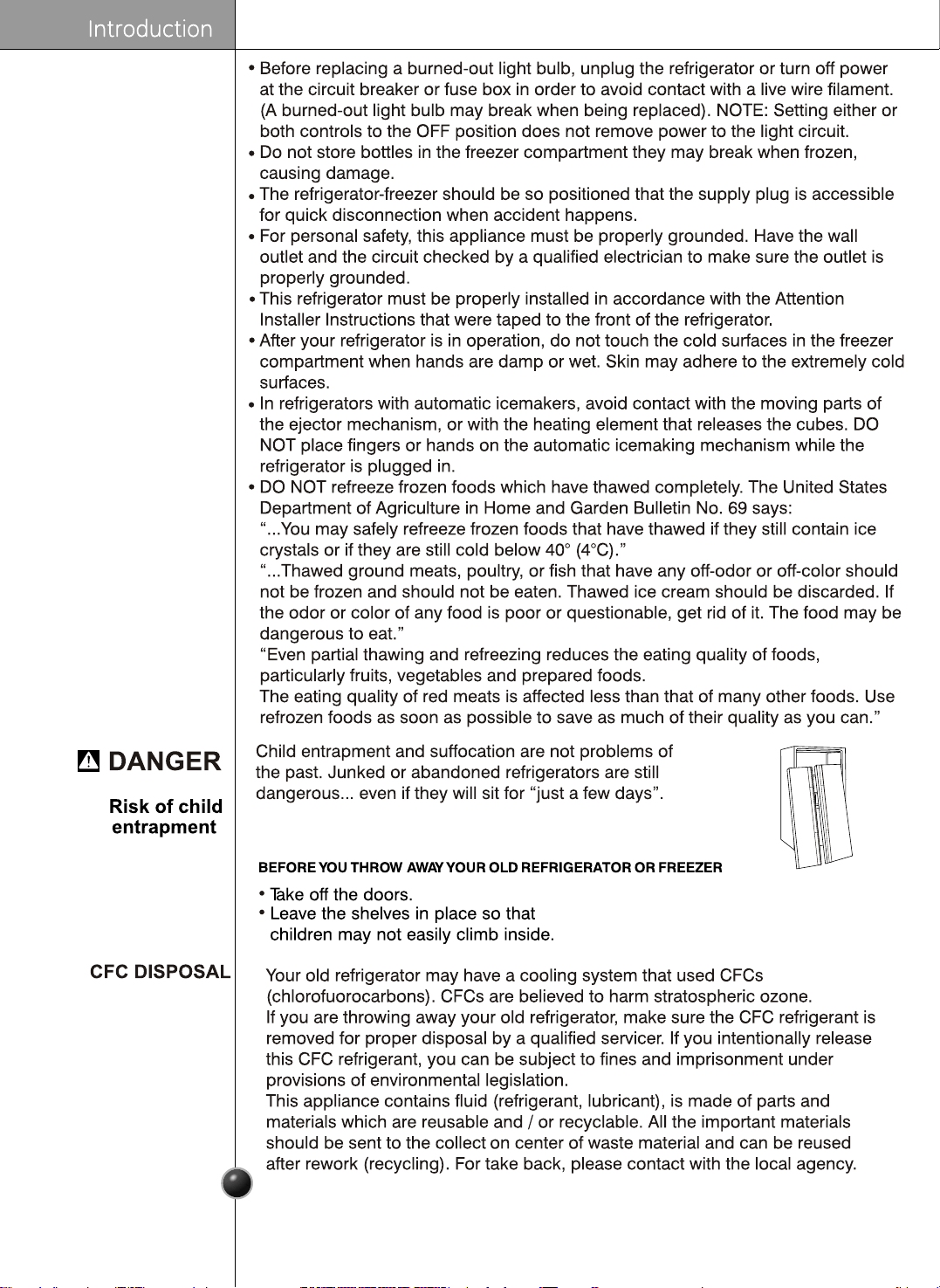
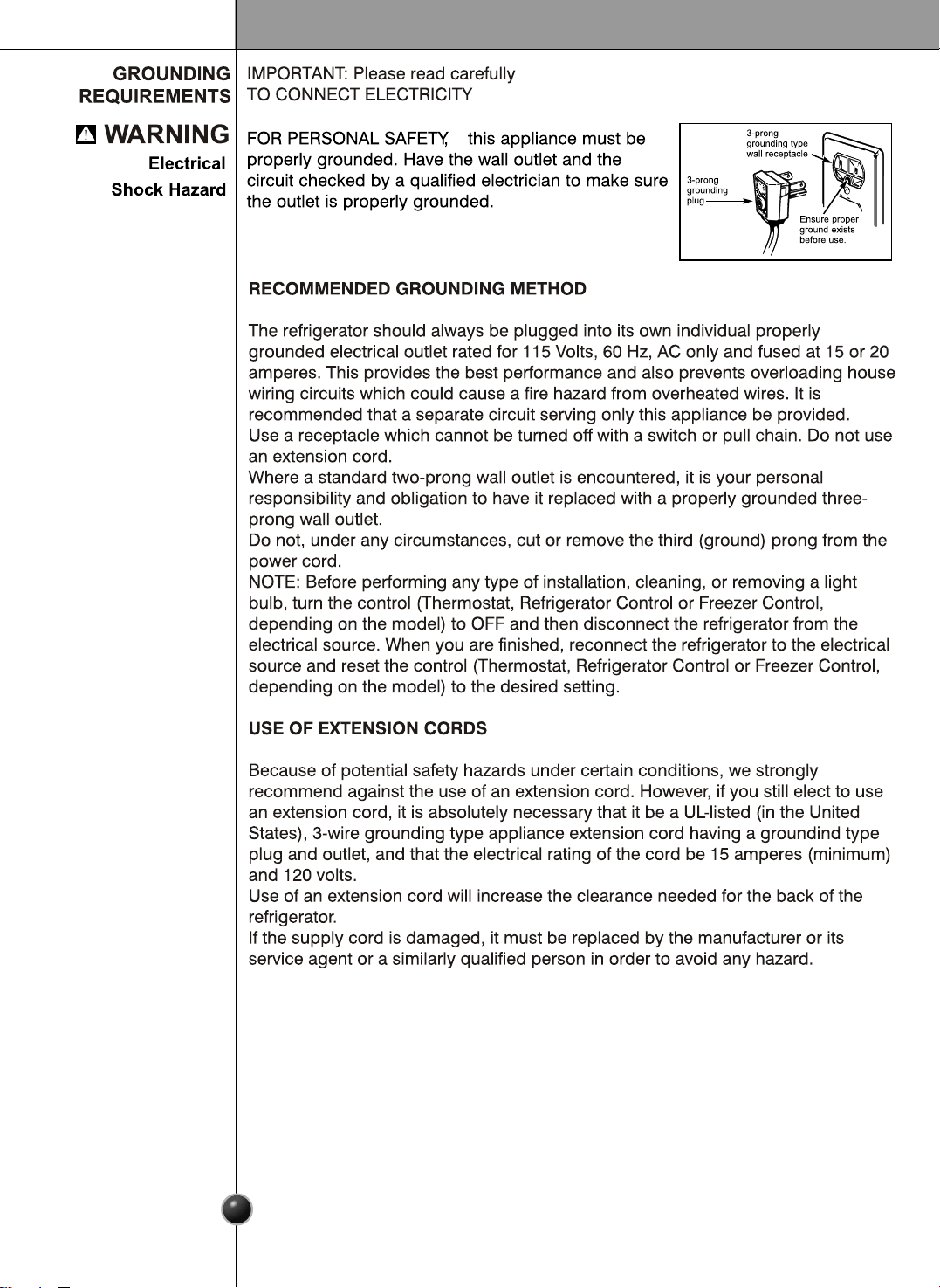
If you are getting rid of your old refrigerator, please follow
the instructions at right to help prevent accidents.
Introduction
5
Introduction
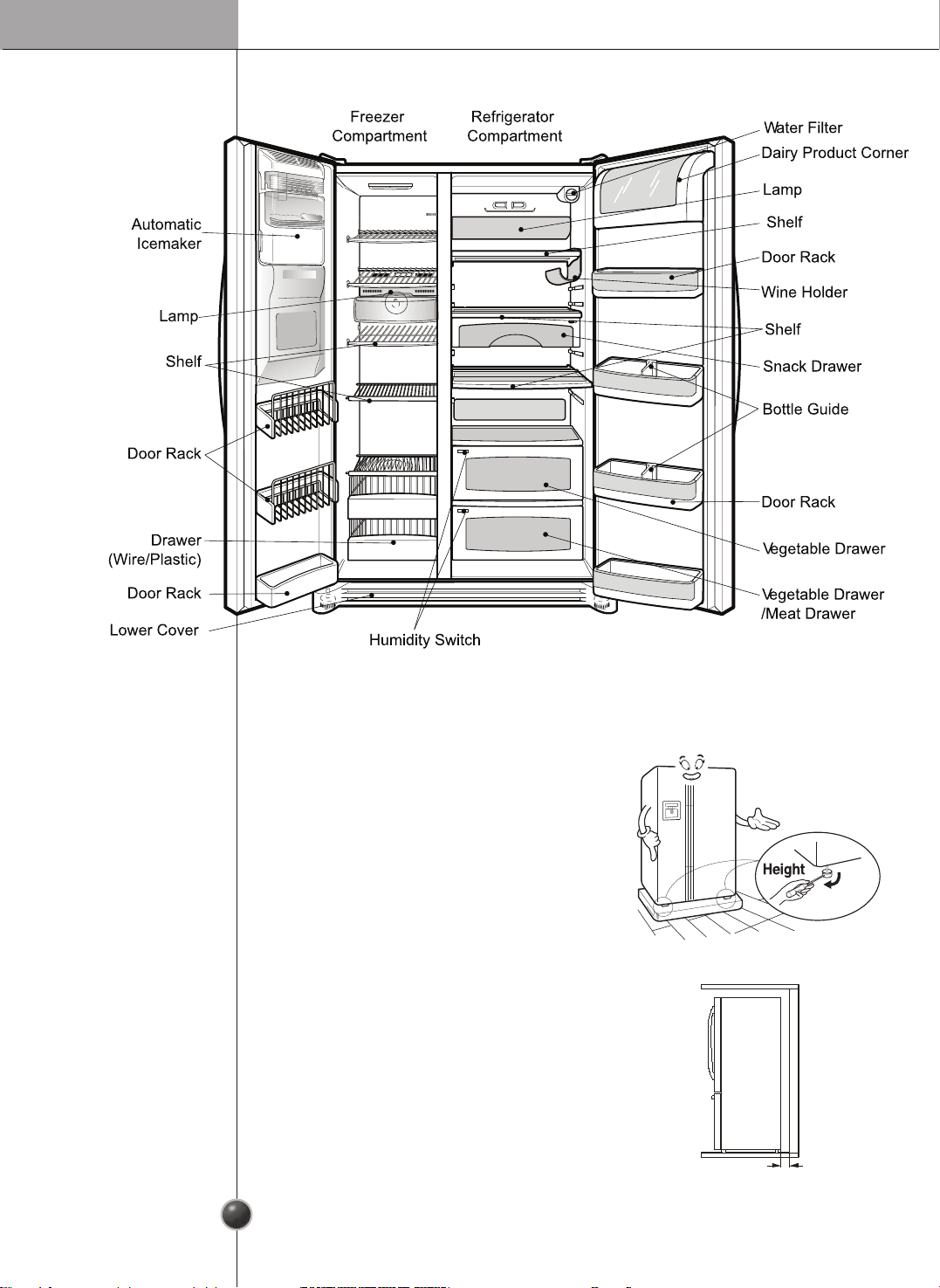
Identification of Parts
6
•
If you nd some parts missing from your
unit,
they may be parts only used in other models.
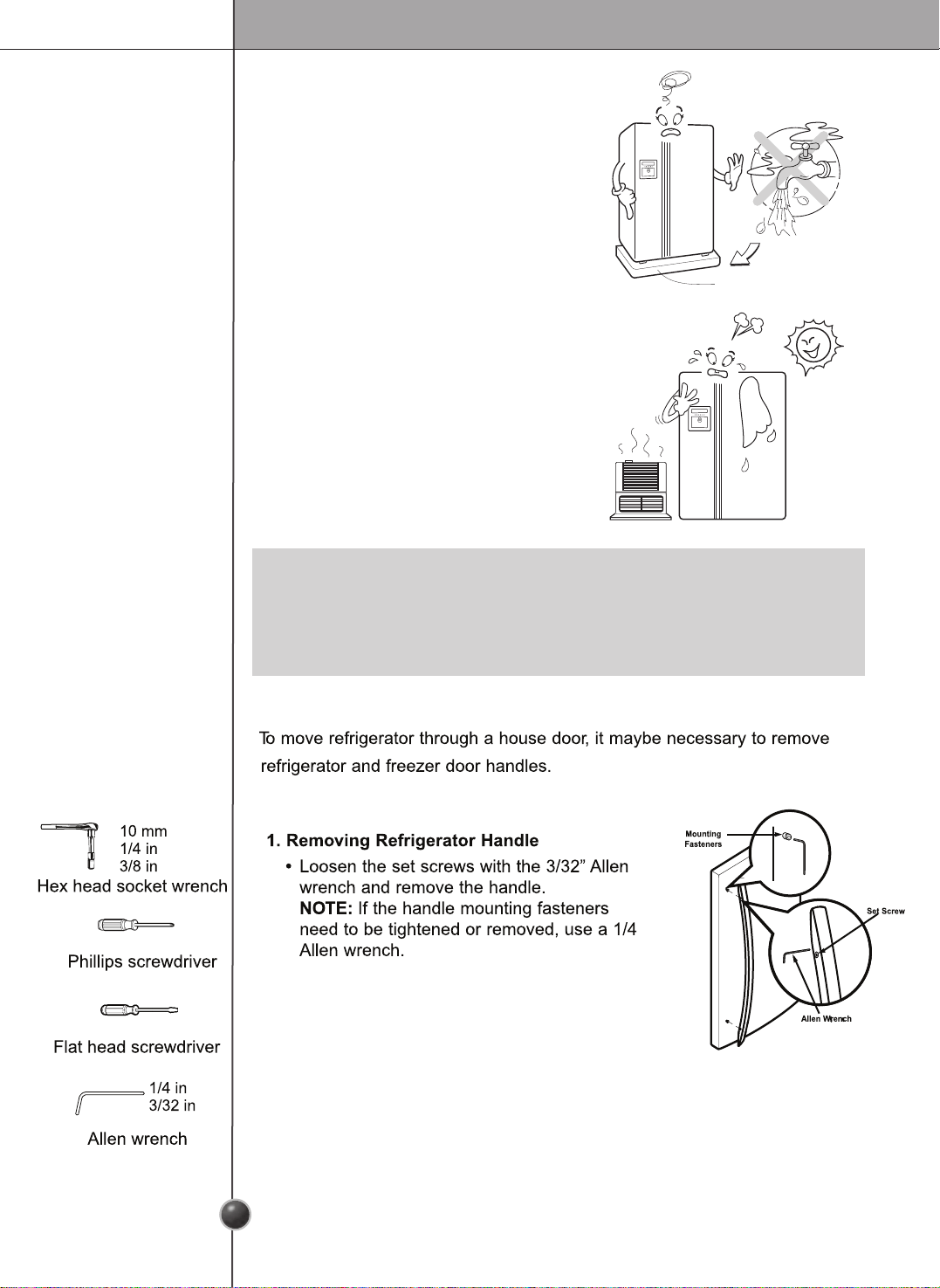
Where to install
Unstable installation may cause vibration and
noise. If the oor to install the refrigerator on
is not even, make the refrigerator level by
rotating the height adjusting screw. Carpet
or oor covering on which a refrigerator is
installed may be discolored by heat from the
bottom of the refrigerator.
If our refrigerator causes this kind of
damage, there is something wrong with it.
Customers will not stand for this.
Strong
and even floor
A proper
distance from
adjacent items
Please keep the refrigerator at a proper
distance from other things. Too small a
distance from adjacent items may result in
lowered freezing capability and increased
electricity consumption charges .
2” (5.08 cm )
Installation
Where water
supply can be
easily connected
in a dry place
Where it is free
from heat
Select a place where a water supply can be
easily connected between the automatic ice
maker and dispenser.
Installing the refrigerator in a wet or damp
area may cause rust and may be an electrical
hazard.
If this refrigerator is installed where the
ambient temperature is high, the freezing
capacity is deteriorated and the cost of
electricity used increases.
•
Install the refrigerator at a place where the ambient temperature is 5˚C ~ 43˚C
(41˚F
~
110˚F).
Ambient temperature outside this range may cause product malfunction. Also, the
tube between the dispenser and automatic ice maker may freeze.
NOTE
Bottom Pad
6
7
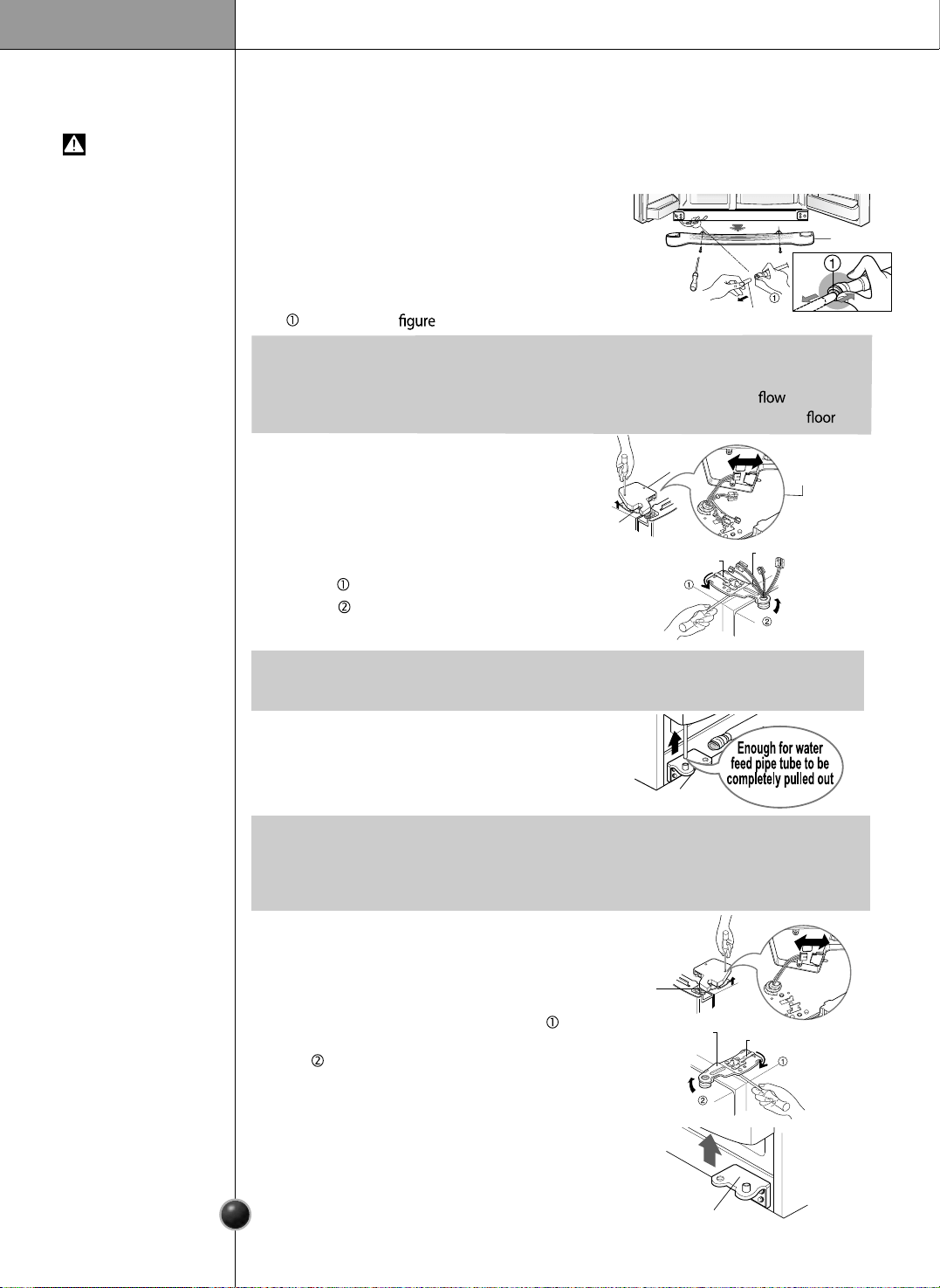
Tools Required
Door removal
Failure to do so could result in death or serious injury.
If your entrance door is too narrow for the
refrigerator to pass through, remove the
refrigerator door and pass the refrigerator laterally.
Electric Shock Hazard
Disconnect electrical supply to refrigerator before installing.
Remove the lower cover by lifting upward, and
then pull up the water feed tubes while pressing
area shown in the to the right.
Remove Lower
Cover and
Water Feed Tube
WARNING
Remove the
Freezer
Compartment
Door
Remove the
Refrigerator
Door
Installation
1) Remove the hinge cover by loosening the
screws. Disconnect all connections except
the ground line.
2) Remove the keeper by rotating it counter
clockwise and then lifting the upper
hinge up
.
3) Remove the freezer compartment door by
lifting it upward. This time, the door should
be lifted enough for the water feed tube to
be completely pulled out.
1) Loosen the hinge cover screws and remove
the cover. Remove connection wire.
2) Remove keeper by rotating it clockwise
and then remove the upper hinge by lifting
it up .
3) Remove the refrigerator compartment door
by lifting it up.
•
If a tube end is deformed or abraded, trim the part away.
Disconnecting the tube under the door causes about 1.5 litters water to out. Please
put a large container at end of tube to prevent water from draining on to the .
NOTE
•
When removing the upper hinge, be careful that the door does not fall forward .
NOTE
•
After removing the door, take it into the kitchen where you are installing the
refrigerator. Lay it down on a blanket and be careful to avoid damaging the water
feed tube.
NOTE
Lower Cover
Lower hinge
Lower Hinge
Keeper
Water Feed Tube
Connection
Wires
Connection
Wires
Hinge
Cover
Upper Hinge
Upper Hinge
Keeper
Upper Hinge
6
8
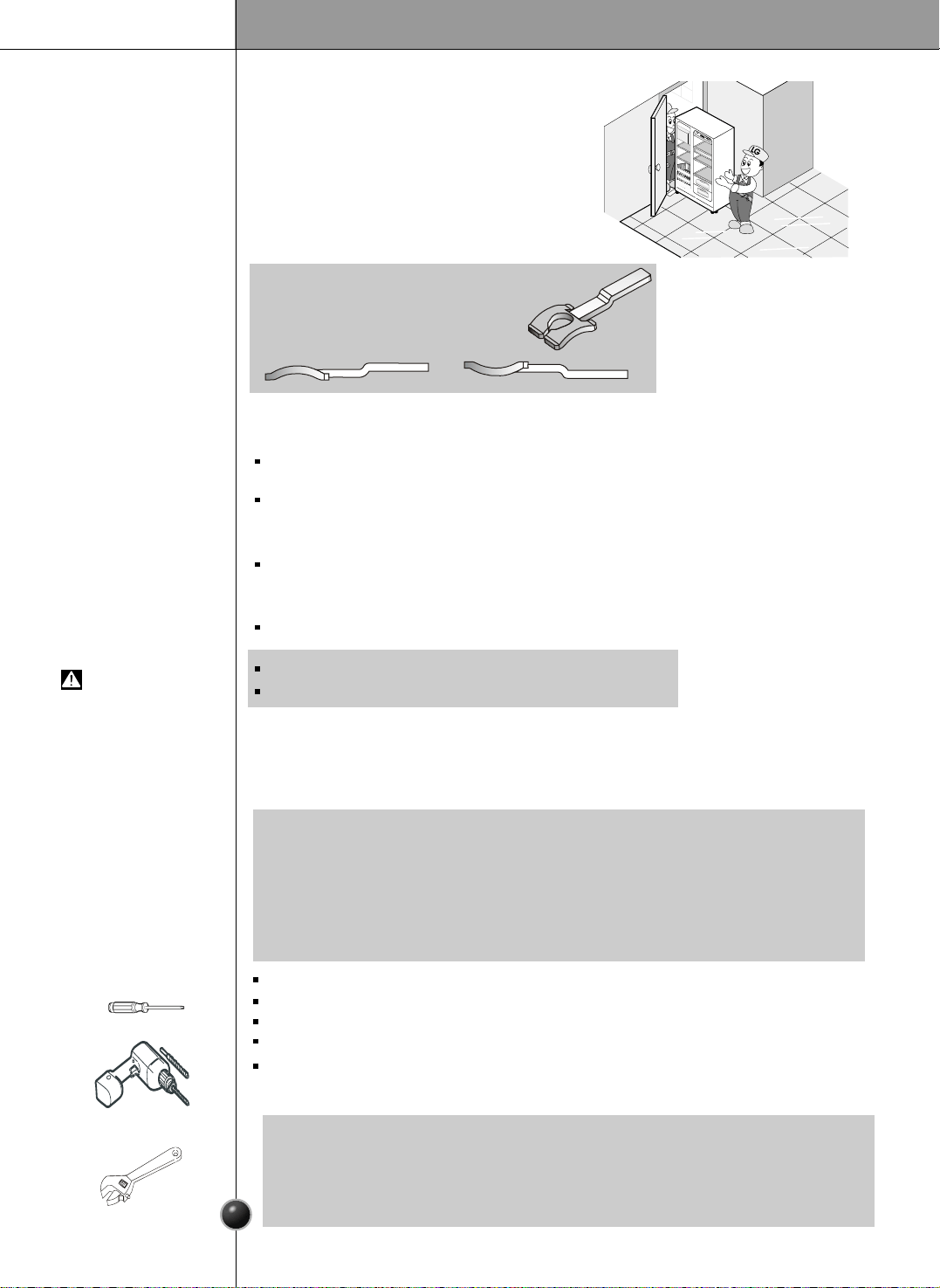
Door replacement
Feed water tube installation
Push the refrigerator sideways through the
entrance door as shown in the right picture.
Automatic icemaker operation needs water pressure of 21.3~121psi(lb/inch
2
) (That
is, a 7oz. paper cup will be lled within 3 sec.).
If water pressure does not reach the rated 21.3psi(lb/inch
2
) or below, it is necessary
to purchase a separate pressure pump for normal automatic icemaking and cool
water feed.
Keep the total length of the water feed tube within 40 feet and be careful not to
bend or kink the tube. If the tube is longer than 40 feet, the icemaker and water
dispenser will not operate properly.
Install the water feed tube at a place free from heat.
Connect to potable water supply only.
Refer to instructions with water lter kit for installation.
Mount the doors in the reverse order of
removal after the refrigerator is brought to
the installation area.
Move the
Refrigerator
Before
Installation
WARNING
Installation
9
Water Connection Instruction Guide
Read all directions carefully before you begin.
Connecting
the Refrigerator
to a Water Source
•
If operating the refrigerator before installing the water connection, turn icemaker
to theOFF position to prevent operation without water.
•
All installations must be in accordance with local plumbing code requirements.
•
Use copper tubing and check for leaks.
•
Install copper tubing only in areas where temperatures will remain above freezing.
•
It may take up to 24 hours for your icemaker to begin producing ice.
IMPORTANT
Standard screwdriver
7/16-inch and 1/2-inch open-end wrenches or two adjustable wrenches
1/4-inch nut driver
1/4-inch drill bit
Hand drill or electric drill (properly grounded)
Tools Required
•
Your refrigerator dealer has a kit available with a 1/4-inch saddle-type shut-o valve,
a union, and copper tubing. Before purchasing, make sure a saddle-type valve
complies with your local plumbing codes. Do not use a piercing-type or 3/16-inch
saddle valve which reduces water ow and clogs more easily.
NOTE
Screwdriver
Adjustable wrenches
Electric drill
NOTE:
Check the direction of the level hinge.
Correct
Incorrect
1. Unplug refrigerator or disconnect power.
2. Turn OFF main water supply. Turn on the nearest faucet to relieve the pressure on the
line. It may help to open an outside faucet to allow the water to drain from the line in
the house.
3. Find a 1/2-inch to 1-1/4-inch vertical COLD water pipe near the refrigerator.
Connect
the Tubing to
Water Line
•
Horizontal pipe will work, but the following precaution must be taken: Drill on the top of the pipe
not the bottom. This will help keep water away from the drill. This also keeps normal sediment
from collecting in the valve.
NOTE
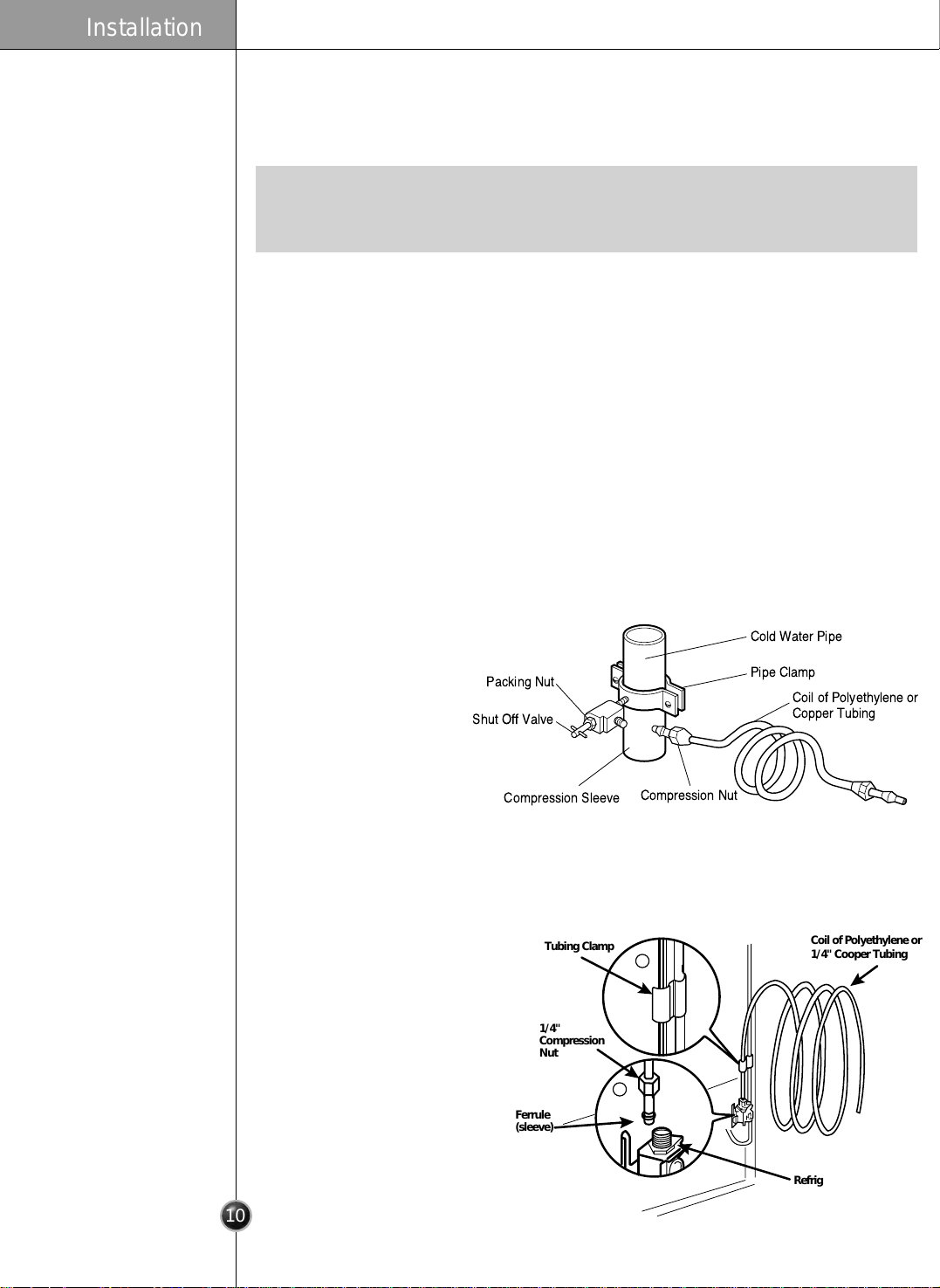
4. To determine the length of copper tubing you will need, measure from the connection
on the lower left rear of the refrigerator to the water pipe. Add 7 feet (2.1m) to allow
for moving refrigerator for cleaning. Use 1/4-inch O.D. (outside diameter) copper
tubing. Be sure both ends of copper tubing are cut square.
5. Using a drill, drill a 1/4-inch hole in the cold water pipe you have selected.
6. Fasten shut-off valve to cold water pipe with pipe clamp. Be sure outlet end is solidly
in the 1/4-inch drilled hole in the water pipe and that the washer is under the pipe
clamp. Tighten packing nut. Tighten the pipe clamp screws carefully and evenly so
washer makes a watertight seal. Do not overtighten or you may crush the cooper
tubing, especially if soft (coiled) copper tubing is used. Now you are ready to connect
copper tubing.
7. Slip compression sleeve and compression nut on copper tubing as shown. Insert end
of tubing into outlet end squarely as far as it will go. Screw compression nut onto
outlet end with adjustable wrench. Do not over tighten.
8. Place the free end of the tubing into a container or zinc, and turn ON main water
supply and flush out tubing until water is clear. Turn OFF shutoff valve on the water
pipe. Coil the copper tubing as shown below.
Cold Water Pipe
Pipe Clamp
Coil of Polyethylene or
Copper Tubing
Compression Nut
Compression Sleeve
Shut Off Valve
Packing Nut
Installation
6
10
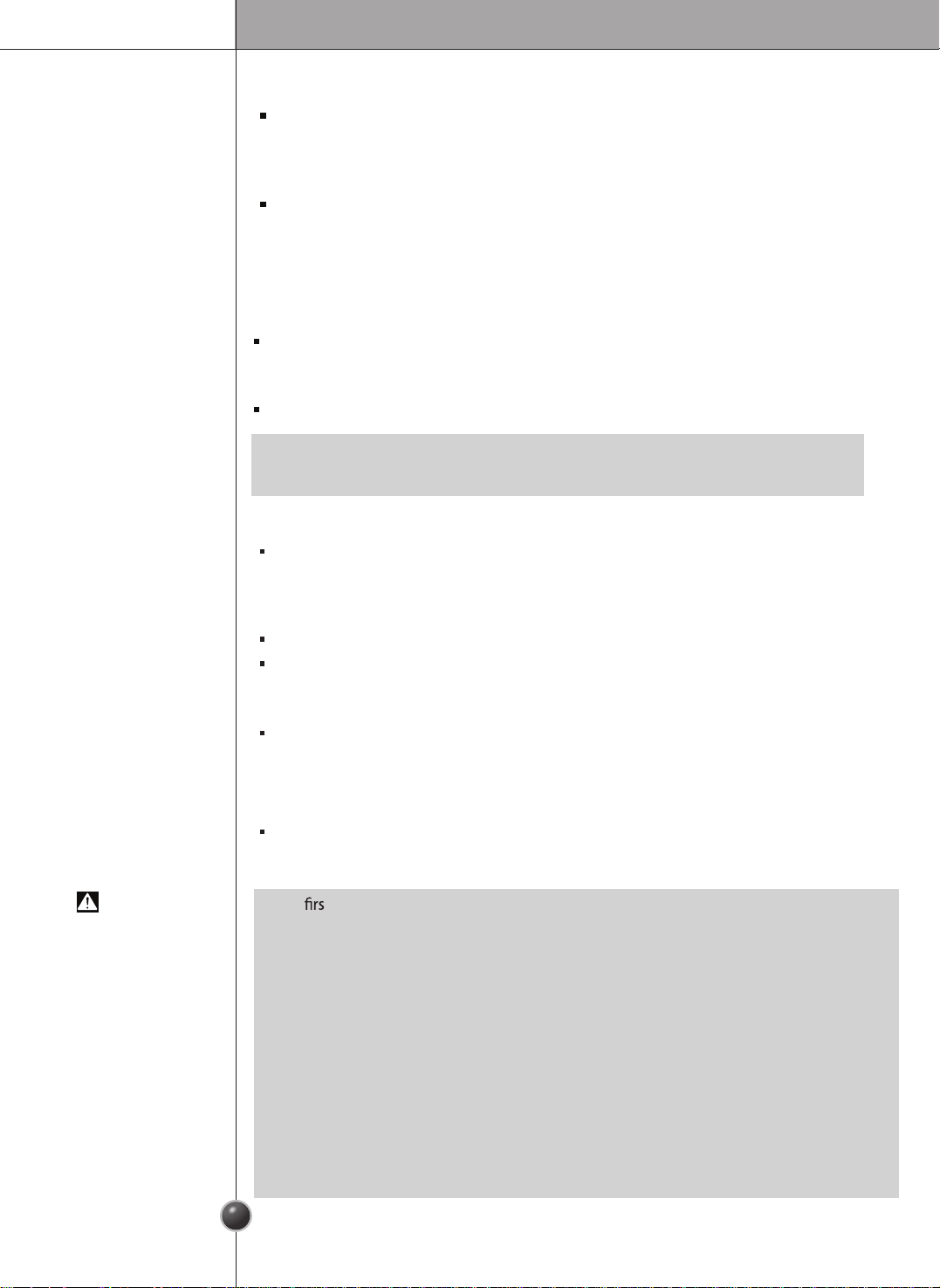
Coil of Polyethylene or
1/4" Cooper Tubing
Tubing Clamp
1/4"
Compression
Nut
Ferrule
(sleeve)
Refrigerator Connection
1
2
Operation Instruction Guide
Before making the connection to the refrigerator, be sure the refrigerator
power cord is not plugged into the wall outlet.
• If your refrigerator does not
have a water filter, we
recommend installing one. If
your water supply has sand or
particles that could clog the
screen of the refrigerator’s
water valve. Install the filter in
the water line near the
refrigerator.
1. Remove the plastic flexible
cap from the water valve.
2. Place the compression nut and
ferrule (sleeve) onto the end of
the tubing as shown.
3. Insert the end of the copper tubing into the connection as far as possible. While
holding the tubing, tighten the fitting.
Connect the Tubing
to the Refrigerator
- The t ice and water may include particles or odor from the feed water pipe or
feed water box. Throw away the ice.
This is also necessary if the refrigerator has not been used for a long time.
- Never store beverage cans or other foods in ice storage bin for the purpose of rapid
cooling. Such actions may damage the automatic ice maker.
- Never remove the icemaker cover.
- Shake the bin occasionally to cause the ice to settle.
- Ice may pile up just around the icemaker causing the icemaker to think that the ice
storage bin is full.
- If discolored ice is dispensed, contact an Authorized Service Center immediately.
Do not use the ice or water until the problem is corrected.
CAUTION
Installation
11
Plug In the Refrigerator
Arrange the coil of copper tubing behind the refrigerator so it does not vibrate
against the back of the refrigerator or against the wall. Push the refrigerator
back to the wall.
Start the lcemaker
Set the icemaking stop switch to the ON position. The icemaker will not begin
to operate until it reaches its operating temperature of 15 °F (-9 °C). It will then
begin operation automatically, if the icemaking stop switch is in the ON
position.
Turn the Water On at
the Shut off Valve
The automatic icemaker makes 6 cubes at a time, 90/110 pieces per day.
But these quantities may vary according to circumstance, including ambient
temperature, door openings, freezer load.etc.
The Icemaker stops when the bin is full.
Automatic Ice maker
•
It is normal to hear a noise when ice drops into the bin.
NOTE
Tighten any connections that leak.
Ice is lumped together
When ice is lumped together, take the ice lumps out of the ice storage bin,
break them into small pieces, and then place them into the ice storage bin
again.
When the icemaker produces too small or lumped ice, the amount of water
supplied to the ice maker must be adjusted. Contact the service center.
If ice is not used frequently, it may lump together.
Power failure
Water may drop into the freezer compartment. Take the ice storage bin out and
discard all the ice. Dry the bin and replace it.
The unit is newly installed
It takes about 12 hours for a newly installed refrigerator to make ice.
When Icemaker
Does Not Operate
Smoothly
12
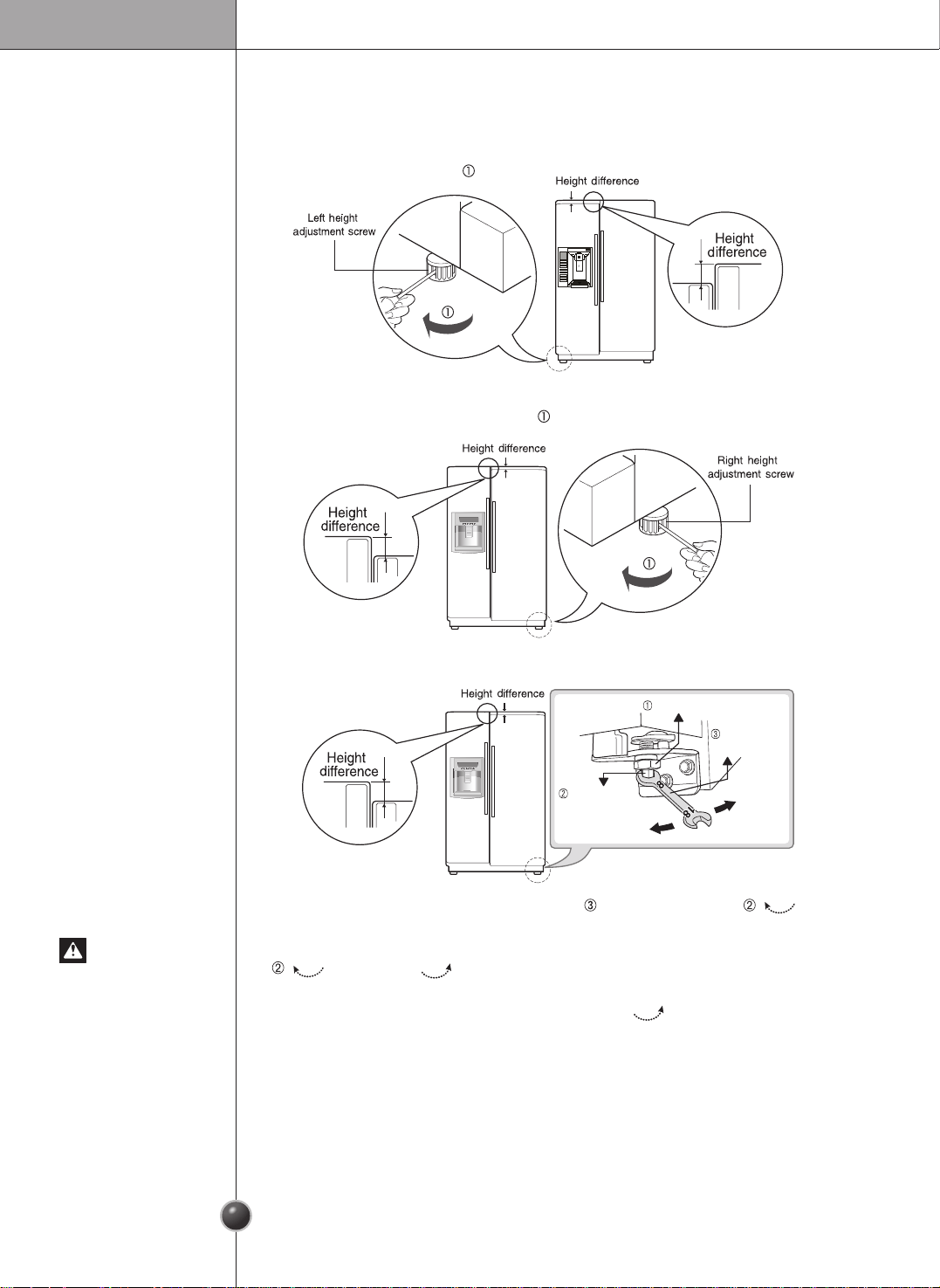
Height adjustment
Make them level by inserting at (
-
type) driver into the groove of the left height adjusting
screw and rotating it clockwise ( ).
Make them level by inserting at (
-
type) driver into the groove of the right height
adjusting screw and rotating it clockwise ( ).
The refrigerator door will close smoothly by raising the front side by adjusting the
height adjusting screw. If the door does not close properly because it is improperly
adjusted, the performance of the refrigerator will be aected.
If the freezer
compartment door
is lower than the
refrigerator
compartment door
If the freezer
compartment door
is higher than the
refrigerator
compartment door
- first method
After leveling the
door height
Do not force too hard to level the height. The hinge pin can be pulled out.
(Adjustable range of height is a maximum of ½” (1,27 cm).
Adjust the level when the refrigerator door is lower than the freezer door during the
use of the refrigerator.
1. Using the wide side of the tool for adjustment , turn the keeper nut ( )
clockwise to loosen the Keeper nut.
2. Using the narrow side of the tool for adjustment, turn the adjustment hinge pin
( ) clockwise or ( ) counterclockwise to level the refrigerator and
freezer door.
3. After setting the level of the door, turn the keeper nut( ) counterclockwise to
tighten.
If the freezer
compartment door
is higher than the
refrigerator
compartment door
- second method
Keeper nut
Adjustment
hinge pin
Tool for
adjustment
Up
Down
Installation
Starting
When your refrigerator is rst installed, allow it to stabilize at normal operating
temperatures for 2-3 hours prior to lling it with fresh or frozen foods.
If operation is interrupted, wait 5 minutes before restarting.
Operation
6
13
ICE OPTION
CRUSH
CUBE
ICE PLUS
HOLD
3 SECS
MONTH
ICE TYPE
CRUSH
CUBE
ICE PLUS
HOLD
3 SECS
MONTH
ICE TYPE
FREEZER
REFRIGERATOR
ICE PLUS
LIGTH/FILTER
ALARM/LOCK
3SECS
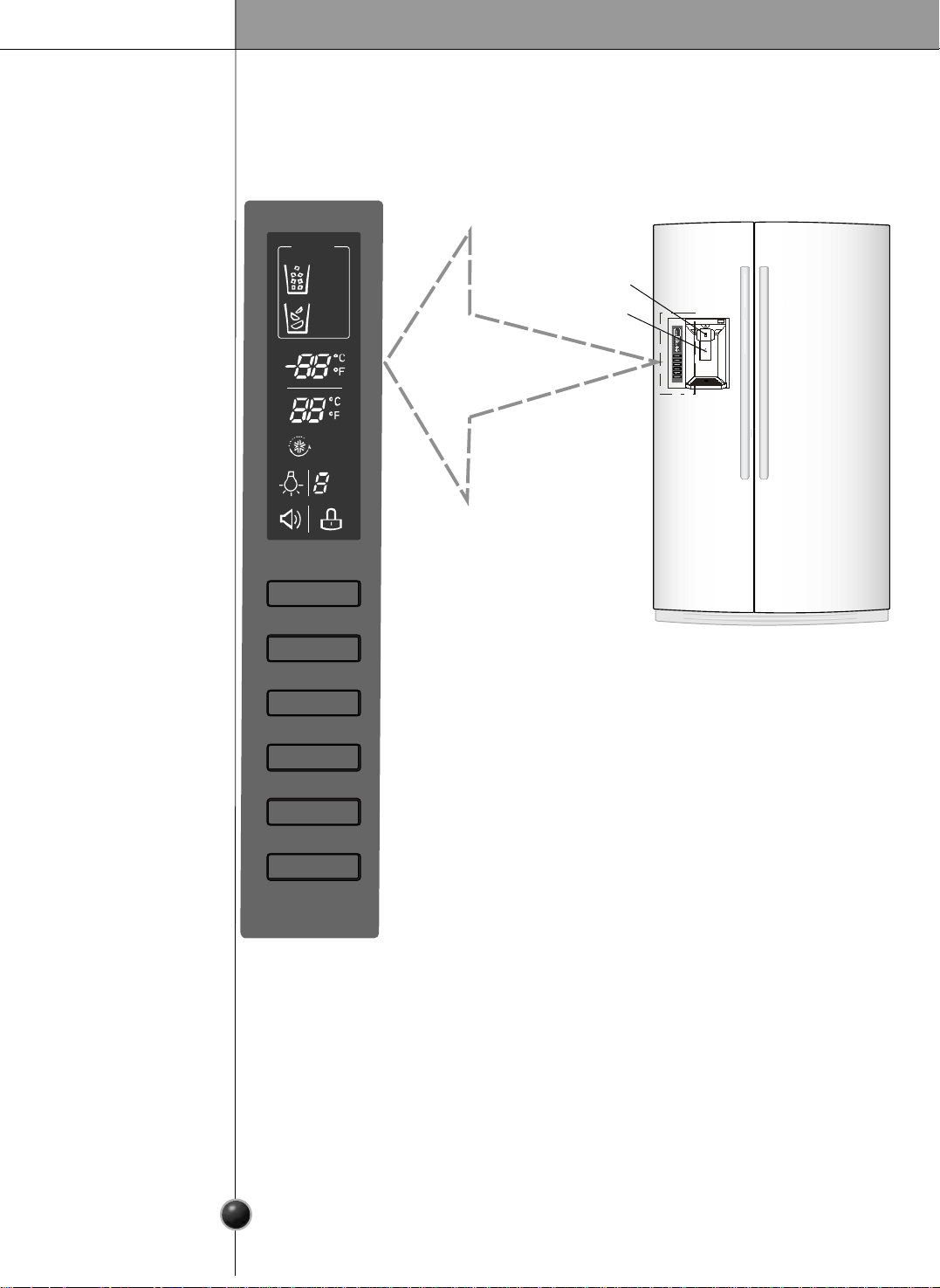
CONTROL PANEL FEATURES
Press the button for the desire function to review and select other
settings. For complete details on button function see pages 14-16.
• LED DISPLAY
The LED display shows the temperature settings, dispenser options,
and the water filter door alarm, and status messages.
Display Off Mode: To activate Display Off mode press and hold ICE PLUS and FREEZER
key over 5 seconds until the lights will turn on and after 20 seconds of iniactivity the lights will
turn off automatically. To exit Display OFF Mode press and hold ICE PLUS and FREEZER
key over 5 seconds until the lights tilt. Display Off Mode does not affect the
temperature control settings of the unit.
• LIGHT/FILTER
The LIGHT/F ILT E R button controls the lamp in the dispenser. The LIGHT/F ILT E R
button resets the water filter replacem ent indicator when the water filter has been replaced.
The ICE TYPE is used to select cube ice or crushed ice.
• ICE TYPE
Press the FREEZER button to adjust the temperature in the freezer
compartment.
• FREEZER
Press the REFRIGERATOR button to adjust the temperature in the refrigerator compartment.
NOTE: When pressed simultaneously with the FREEZER button for more than five
seconds, the temperature display will change from Fahrenheit to Celsius or vice versa.
• REFRIGERATOR
• ICE PLUS
Press this button to turn on the ICE PLUS. Feature, which increases ice making capabiliton
the increases ice making capabilities up to about 20 percent.
Press this button to control the door-open alarm. Press this button to lock
or unlock all the other function buttons on the control panel, including
operation of the dispenser.
• ALARM/LOCK
Adjusting the
temperatures and
Functions
Water switch
Ice switch
Operation
6
14
Settings the Control
Operating
the Dispenser
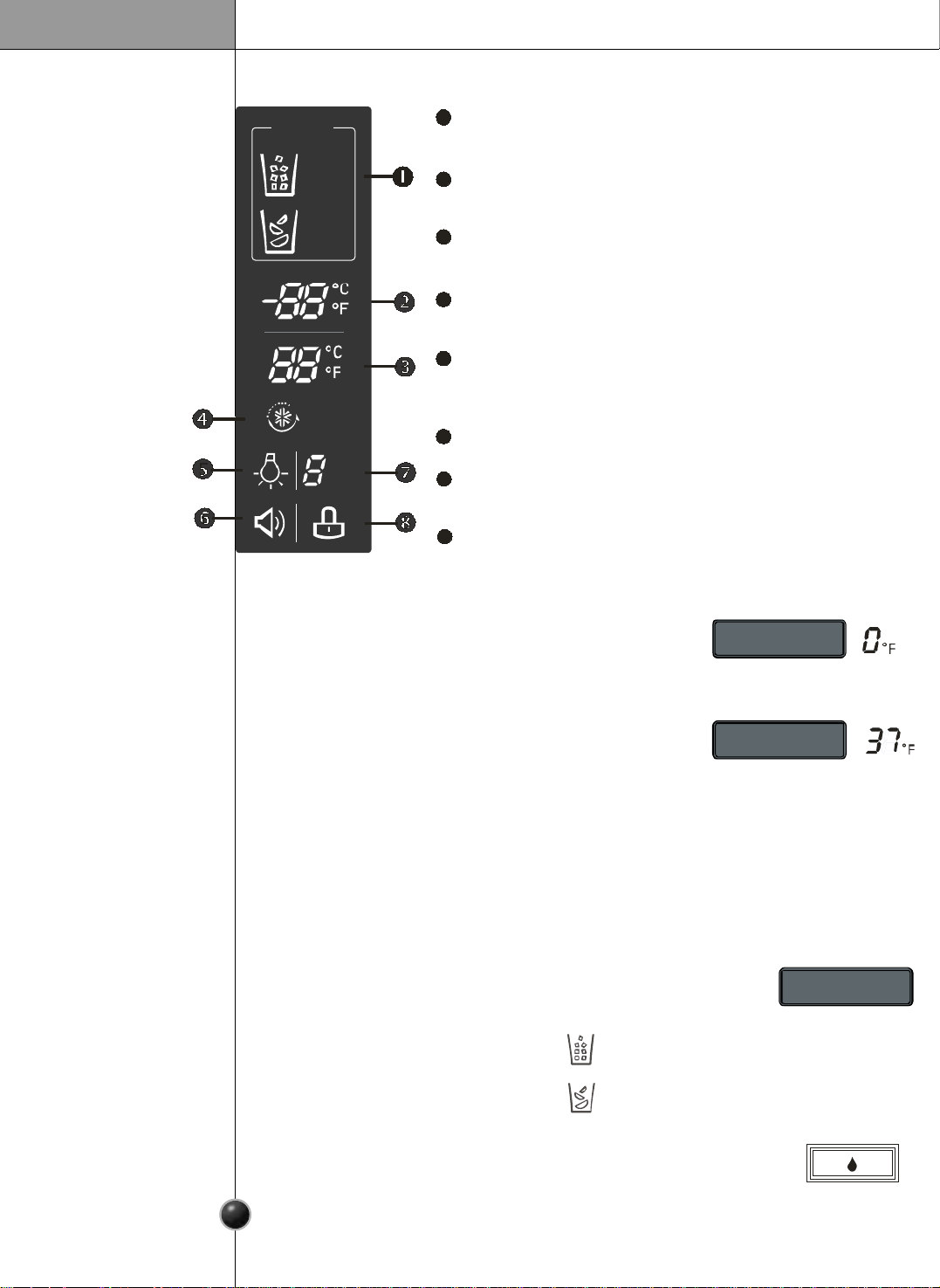
The LED display shows the temperature settings, dispenser options, and the water filter,
door alarm, and locking status messages.
Dispenser selection indicator
Freezer temperature
Refrigerator temperature
Ice Plus
Dispenser light indicator
Door alarm indicator
Water filter status
Lock status
Shows cubed ice or crushed ice selection that will be dispensed
when the push switch is pressed.
Indicates the set temperature of the freezer compartment in
Celsius or Fahrenheit.
When the ICE PLUS button is pressed, the display will
indicate the selected function has been activated.
When the LIGTH/FILTER button is pressed, the display will indicate
the selected function: The dispenser light is on, this indicator will
appear on the display panel.
This indicator shows that the door-open warning alarm is activated.
This indicator shows the current status for the water filter. See the
filter indicator.
This indicator shows the current status for the control panel
functions is set to LOCK.
Indicates the set temperature of the refrigerator compartment in
Celsius or Fahrenheit.
Adjust Freezer Temperature
To adjust the temperature in the freezer compartment, press
the FREEZER button to cycle through the range of available
settings.
NOTE: The actual inner temperature varies depending on the food status, since the indicated
temperature setting is the target temperature and not the actual temperature within the
refrigerator. Initially set the REFRIGERATOR CONTROL at 37 °F (3 °C). Leave it at this settings
for 24 hours (one day) to stabilize. Then adjust the compartment temperature as illustrates above.
Adjust Refrigerator Temperature
To adjust the temperature in the refrigerator compartment,
press the REFRIGERATOR button to compartment, press the
REFRIGERATOR button to cycle through the range of available
settings.
Temperature Display
To change the temperature display from Fahrenheit to Celsius:
• Simultaneously press and hold FREEZER and REFRIGERATOR buttons for more than 5 sec.
• Do the same to convert back to Fahrenheit.
Dispensing Crushed Ice
Press the ICE TYPE button to illuminate the the Crushed and Cubed Ice
icon.
Press the push switch with a glass or other
container and crushed ice will be dispensed.
Press the push switch with a glass or other
container and cubed ice will be dispensed.
NOTE: Hold the glass or other container in place
for a couple of seconds after dispensing ice or water
to catch the last few cubes or drops. The dispenser
is designed not to operate while either refrigerator
door is open.
Press the push water switch or activate water button with a glass or other
container and chilled water will be dispensed.
When the water switch or water button is pressed, the light will be illuminated.
1
2
3
4
5
6
7
Adjusting the
temperatures and
display
8
ICE TYPE
CRUSH
CUBE
ICE PLUS
HOLD
3 SECS
MONTH
ICE TYPE
FREEZER
REFRIGERATOR
Settings the
Functions
6
15
Automatic
Icemaker
Operation
Press the button for the desired function to view and select other settings.
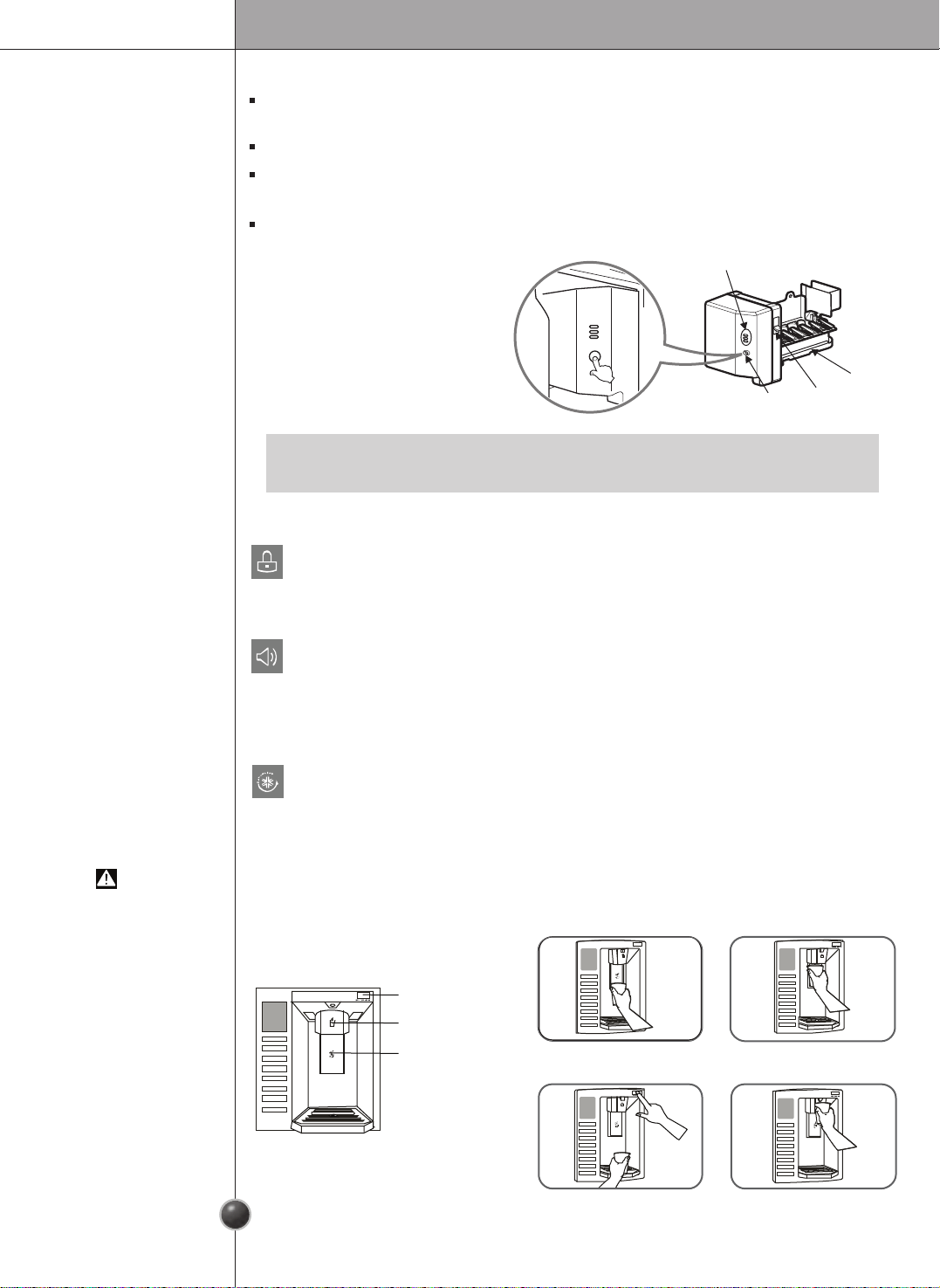
Press and hold the ALARM/LOCK button for 3 seconds to lock the dispenser and
all of the other control panel functions. Press and hold again for 3 seconds to unlock.
The ALARM/LOCK button also controls the door alarm that sounds three times
in 30 second intervals when a compartment door is left open for more than 60
seconds. The alarm stops sounding when the door is closed.
Press the ALARM/LOCK button once to activate or deactivate the door alarm
function.
Press the ICE PLUS button once to activate the ice plus function. The ICE PLUS
icon on the display panel will illuminate when activated. The ice plus function
runs the freezer compartment at the coldest setting for a 24-hour period to
increase ice making by up to about 20%, and then turn off automatically.
Press the button again to cancel the Ice Plus function.
When opening the container with the small opening, use it near the opening of the
water or ice dispenser as close as possible.
CAUTION
WATER BUTTON
WATER SWITCH
ICE SWITCH
Incorrect Correct
Incorrect Correct
•
It is normal that a noise is produced when ice drops into the ice storage bin.
NOTE
The automatic icemaker can automatically make 6 cubes at a time, 90~110 pieces per day. This
quantity may vary by circumstance, including ambient temperature, door opening, freezer load. etc.
Icemaking stops when the ice storage bin is full.
If you don't want to use the automatic icemaker, turn the icemaker switch to OFF. If you want to use
automatic icemaker again, change the switch to ON.
The water amount will vary depending on the water amount selection button. Setting, as well as the
water pressure of the connected water line.
Water Amount
Indicator Light
Power
Switch
Water Amount
Selection Button
Feeler Arm
Operation
The Other
Functions
Door open warning
A warning tone will sound 3 times at thirty-second intervals if the refrigerator or freezer
door is left open for more than sixty seconds.
Pleasecontact the local service center if warning tone continues to sound even after
closing the door.
Diagnosis (failure detection) function
Diagnosisfunction automatically detects failure during the normal use of refrigerator.
If your refrigerator fails, do not turn off the power. Instead, contact a local Authorized
service center or call our support line for assistance.Turning off the appliance will
make it more difficult for the servicetechnician to determine the problem.
Water is cooled while stored in the water tank in freezer door, and then sent to the
dispenser.
Ice is made in the automatic icemaker and sent to the dispenser divided into crushed
or cubed ice.
How Ice/Cold
Water is Supplied
6
16
How to Use
the Water Dispenser
Filter Condition
(filter replacement
cycle) Display
Function
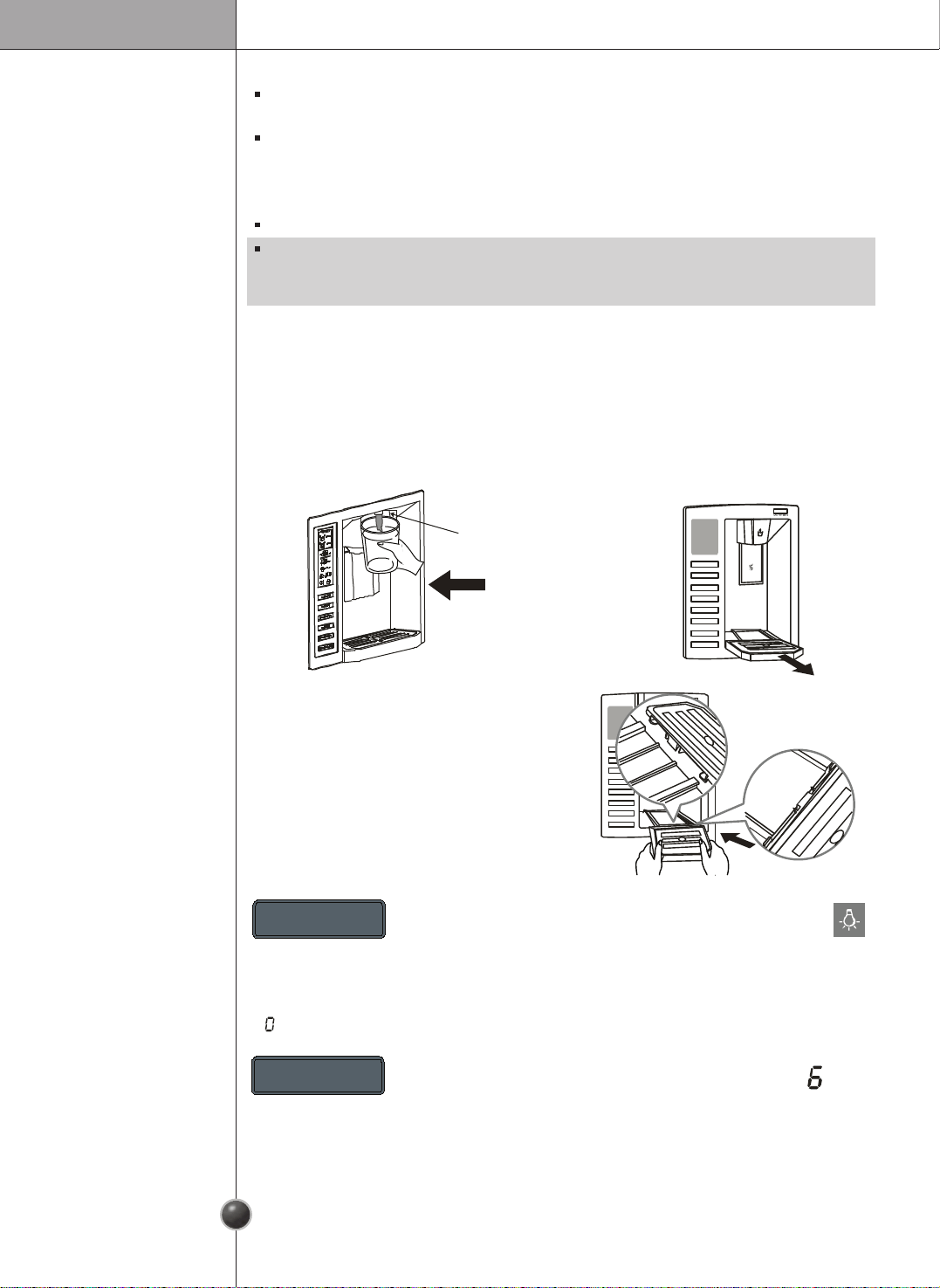
Push the dispenser pad with a glass until you hear a click to get cold water.
Dispenser Switch
Push
The dispenser drip tray has no
self-draining regularly. Remove
the cover by pressing and pulling
the tray. Dry it with a cloth. To
reinstall the tray, slightly tilt the
front of the tray and snap the ribs
into the holes.
Press and hold the LIGHT/FILTER button for more
than 3 seconds to reset the filter month indicator to
six after the water filter has been replaced.
Water filter needs replacement once every six months. Filter month indicator becomes
“ ” to let you know when to replace filter.
LIGHT / FILTER
Press the LIGHT/FILTER button to turn the dispenser
light on and off.
LIGHT / FILTER
HOLD 3SECS
MONTH
Operation
Throw away the ice (about 20 pieces) and water (about 7 glasses) rst made after
refrigerator installation.
This is also necessary when the refrigerator has not been used for a long time.
Keep children away from the dispenser.
Children may play with or damage the controls.
Be careful that food does not block the ice passage.
If foods are placed at the entrance of ice passage, the
dispenser may malfunction. The passage may also become
blocked with frost if only crushed ice is used. Remove the
frost that accumulates.
Storing cans or other items in the ice bin may damage
the icemaker or the container may burst.
Never use thin crystal glass or crockery to collect ice.
Such glasses or containers may break.
Put ice rst into a glass before lling water or other beverages.
Water may be splashed if ice is added to existing liquid in a glass.
Keep your hands and tools out of the ice door and passage.
You might break something or injure yourself.
Never remove the ice maker cover.
Shake the ice bin occasionally to level the ice in it.
Sometimes the ice piles up near the icemaker, causing the icemaker to misread the bin
level and stop producing ice.
If discolored ice or water is dispensed, contact an Authorized service center
immediately and discontinue use until the problem is corrected.
Never use too narrow or shallow glass.
Ice may be jammed in ice passage and, thus, the ice maker may fail.
Keep the glass at a proper distance from ice outlet.
A glass too close to the outlet may hinder ice from coming out.
CAUTIONS
6
17
•
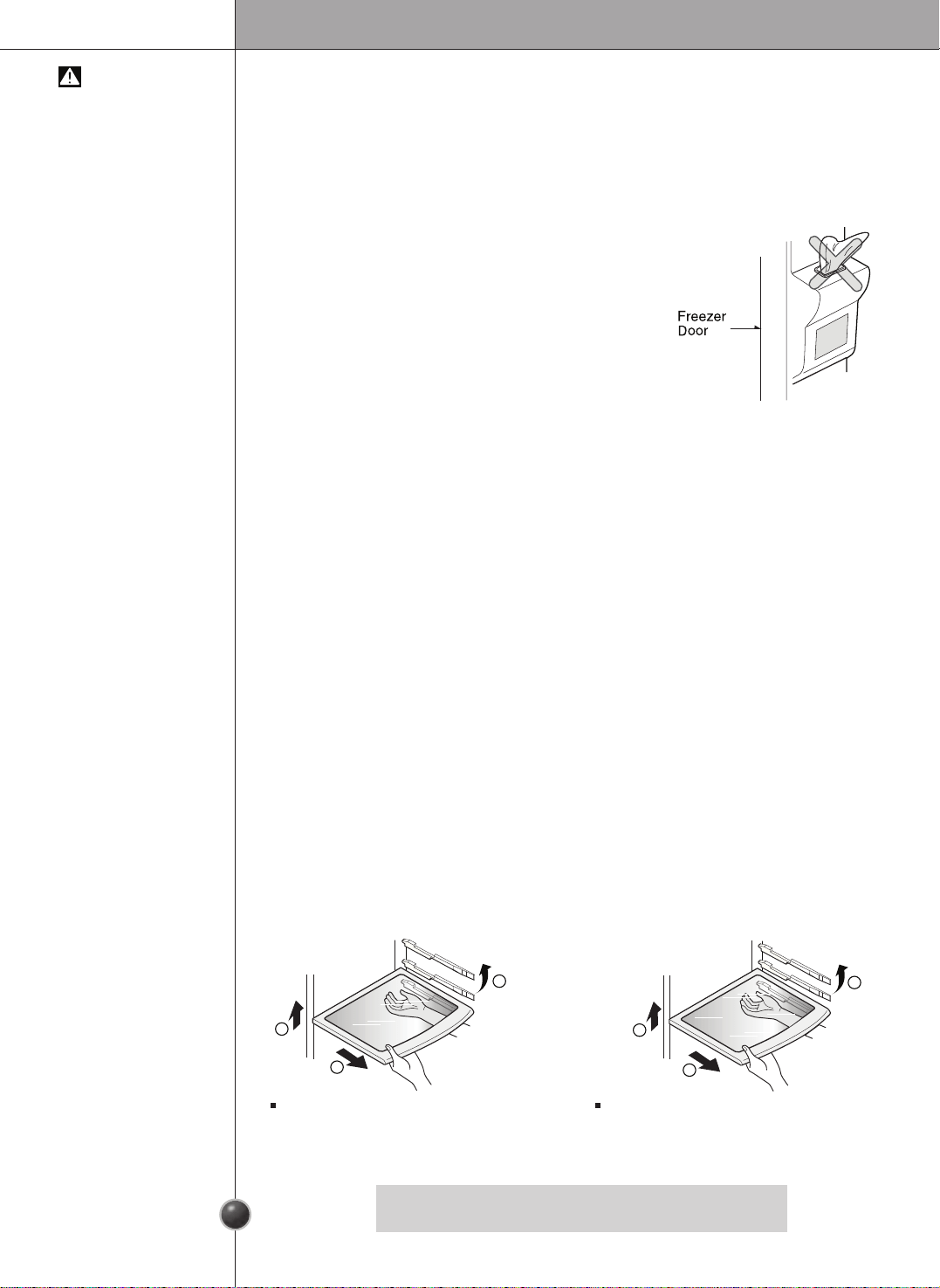
Make sure the shelf is horizontal. If not, it may drop.
NOTE
Shelf
The refrigerator compartment shelf is adjustable so that you can place it at a height
according to space requirement of foods.
Shelf Height
Adjustment
1
3
2
1
2
3
Fix Shelf
Lightly lift up the front part of shelf to pull it
ahead and then take it out while lifting the
rear part of shelf.
Slide Shelf
Pull the shelf ahead and take it out while
lifting both front and rear part.
S u g g e s t i o n o n F o o d S t o r a g e
Location of Foods
(Refer to Identication of Parts)
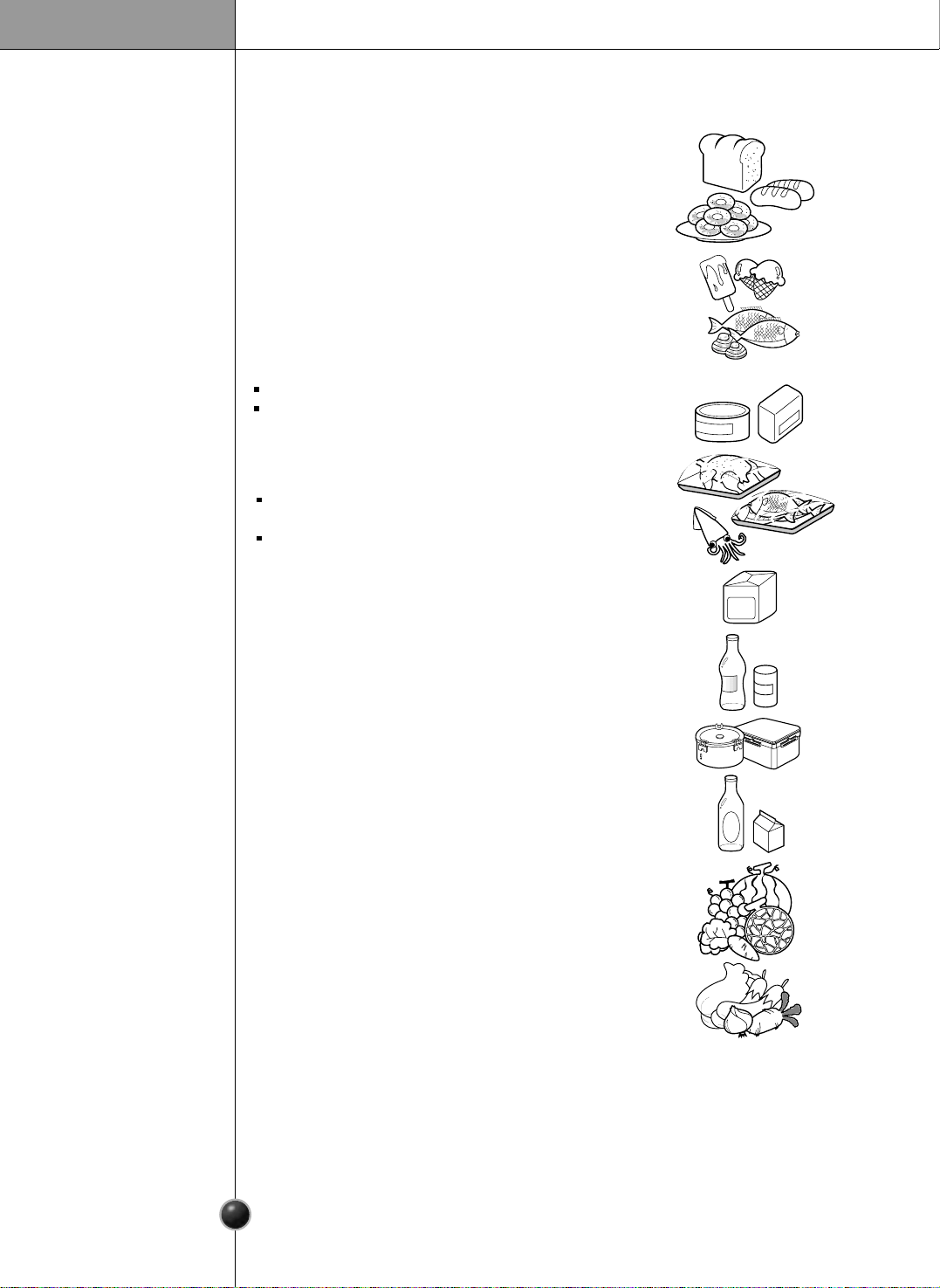
Store small foods such as bread, snacks, etc.
Store various frozen foods such as meat, sh,
ice cream, frozen snacks, etc.
Store small packed frozen food.
Temperature is likely to increase as door
opens.
So, do not store long-term food such
as ice cream, etc.
Snack
Drawer
Freezer
Compartment
Shelf
Freezer
Compartment
Door Rack
Freezer
Compartment
Drawer
Milk Product
Corner
Refreshment
Center
Refrigerator
Compartment
Shelf
Refrigerator
Compartment
Door Rack
Vegetable Drawer
Store meat, sh, chicken, etc. after
wrapping them with foil.
Store dry
.
Store milk products such as butter, cheese,
etc.
Store foods of frequent use such as beverage,
etc.
Store side dishes or other foods.
Store small packed food or beverages such
as milk, juice, beer, etc.
Store vegetables or fruits.
6
18
Suggestion on Food Storage
Storing Foods
Store fresh food in the refrigerator compartment. How food is frozen and thawed is an
important factor in maintaining its freshness and flavor.
Do not store food, which spoils easily, at low temperatures, such as bananas and
melons.
Allow hot food to cool prior to storing, placing hot food in the refrigerator could spoil
other food, and lead to higher energy consumption.
When storing the food, cover it with vinyl wrap or store in a container with a lid. This
prevents moisture from evaporating, and helps food to keep its taste and nutrients.
Do not block air vents with food. Smooth circulation of chilled air keeps refrigerator
temperatures even.
Do not open the door frequently. Opening the door lets warm air enter the refrigerator,
and cause temperatures to rise.
Never keep too much food in door rack because they may be pushed against the inner racks
and the door would not be fully closed.
Do not store bottles in the freezer compartment - they may break when frozen.
Do not refreeze food that has been thawed. This causes loss of taste and nutrient.
When storing frozen food like ice cream for a long period, place it on the freezer
shelf, not in the door rack.
Do not touch the cold foods or containers- especially made of metal -, with wet
hands and place glass products in the freezer compartment.
- That’s why you may have chilblains and they may be broken when their inner matters
are frozen, causing personal injury.
Avoid placing moist food in top refrigerator shelves, it could freeze from direct
contact with chilled air.
Always clean food prior to refrigeration. Vegetables and fruits should be washed and
wiped, and packed food should be wiped, to prevent adjacent food from spoiling.
When storing eggs in their storage rack or box, ensure that they are fresh, and always
store them in an upright position, which keeps them fresh longer.
Freezer
Compartment
Refrigerator
Compartment
•
If you keep the refrigerator in a hot and humid place, frequent opening of the door or
storing a lot of vegetables in it may cause condensation to form. Remove the
condensation with dust free cloth.
NOTE
6
19
Care and Maintenance
How to Dismantle Parts
Freezer
Compartment
Lamp
Freezer
Compartment
Shelf
Door Rack and
Support
Ice Storage Bin
After Dispenser
is used
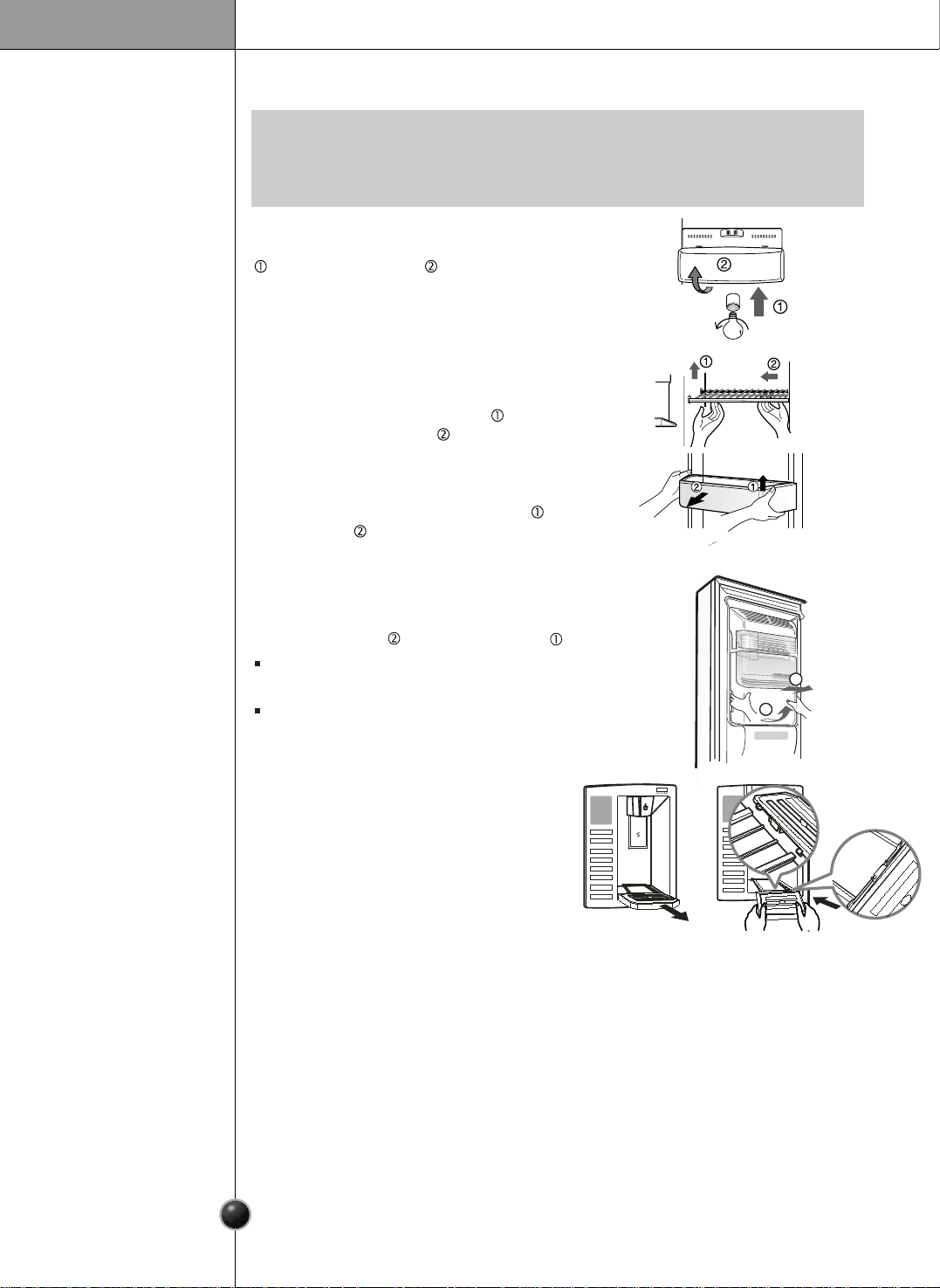
To remove a shelf, Lift the left part of the
shelf a bit. Lift it to the direction
, push the
right part to the direction
, and take it out.
Lift the door rack holding both sides and
pull it out to direction.
The water collector has no self-draining
function. It should be cleaned regularly.
Remove the cover by pulling the front
water collector cover and dry it
with a cloth.
•
Dismantling is done in the reverse sequence of assembly.
Be sure to unplug the power plug before dismantling and assembly.
Never apply severe force to dismantle parts. Parts may be damaged.
NOTE
Remove cover by pressing upward on bottom
and rotating outward .
Turn the bulb counterclockwise. Max. 40W
bulb
for refrigerator is used and can be purchased at
a service center.
6
20
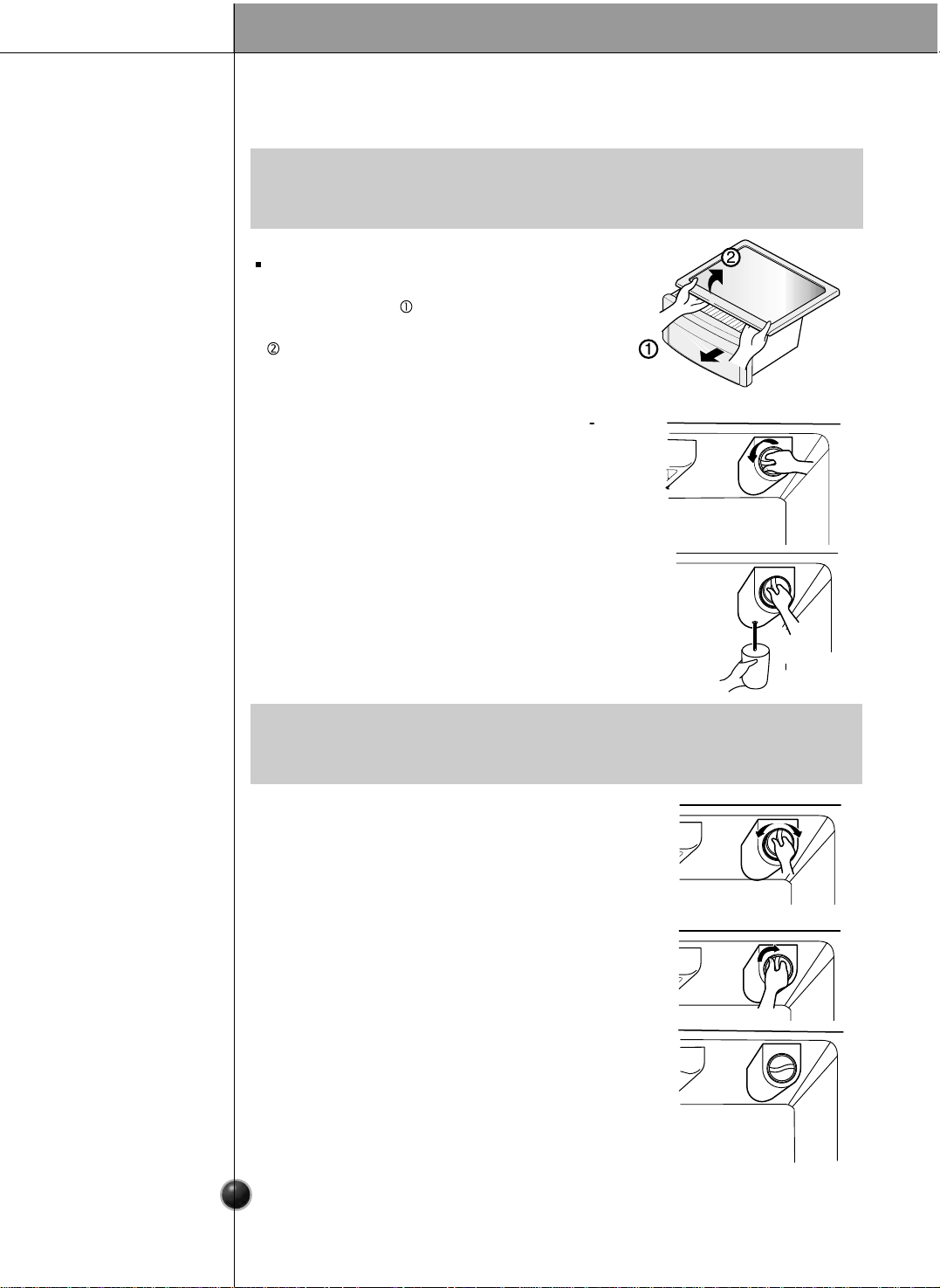
Hold the ice storage bin as shown in the right
gure and pull it out while slightly lifting it .
Do not dismantle the ice storage bin unless
it is necessary.
Use both hands to remove the ice bin to avoid
dropping it.
1
2
side of
6
21
Care and Maintenance
To remove the lamp cover, press the protrusionunder the lamp cover to the front and
then pull the lamp cover out.
Turn the bulb counterclockwise. Max. 40 W bulb for refrigerator is used and can be
purchased at a service center.
Lamp in
Refrigerator
Compartment
To remove the vegetable compartment
cover, pull out the vegetable compartment
a bit to the front , lift the front part of the
vegetable compartment cover as shown by
, and take it out.
Vegetable
Compartment
Cover
•
Be sure to remove parts from the refrigerator door when removing the vegetable
compartment,
snack drawer, and refreshment center cover.
NOTE
Filter
Replacement
•
Replacing lter causes small amount of water(around 25cc) to ow out.
Please put up a cup under the hole to prevent it.
NOTE
It is recommended that you replace the lter
when the water lter indicator light turns on or
your water dispenser or ice maker decreases
noticeably.
After changing the water lter cartridge, reset
the water lter status display and indicator light
by pressing and holding the BUTTON for 3
seconds.
1) Remove the old cartridge.
Rotate the knob of the cartridge counter clockwise.
When the cartridge is removed, you will feel it click
out of place.
Pull out the cartridge.
3) Flushing the Water System After Replacing Filter.
Dispense water through the water dispenser for 3
minutes to purge the system.
2) Replace with a new cartridge.
Take the new cartridge out of it's packaging and remove
protective cover from the o-rings. With cartridge knob in
the vertical position, push the new lter cartridge into
the cover until it stops.
If you can’t turn the lter from side to side, it isn’t fully
inserted. Push it in rmly and twist it into place. You will
hear the snap when it clicks into place. Using it's handle,
twist the cartridge clockwise about 1/4 turn. You will hear
the snap when it clicks into place.
Care and Maintenance
General Information
Cleaning
During average length vacations, you will probably nd it best to leave the refrigerator
in operation. Place freezable items in freezer for longer life.
When you plan to store the refrigerator, remove all food, disconnect the power cord,
clean the interior thoroughly, and Block the doors open to prevent mold and mildew.
Be certain the stored refrigerator does not present a child entrapment danger.
Vacation Time
Power Failure
If You Move
Anti-
Condensation
Pipe
Most power failures that are corrected in an hour or two will not aect your
refrigerator temperatures.
However, you should minimize the number of door openings while the power is o.
Remove or securely fasten down all loose items inside the refrigerator.
To avoid damaging the height adjusting screws, turn them all the way into the base.
The outside wall of the refrigerator cabinet may sometimes get warm, especially just
after installation.
Don’t be alarmed. This is due to the anti-condensation pipe, which pumps hot
refrigerant to prevent sweating on the outer cabinet wall.
Regular cleaning is recommended. Wash all compartments with a baking soda
solution or a mild detergent and warm water. Rinse and dry. If you use other substances
Please verify that the power cord is not damaged, power plug is not overheated, or
power plug is well inserted into the power socket.
Always remove power cord from the wall outlet prior to cleaning in the vicinity of
electrical parts (lamps, switches, controls, etc.).
Wipe up excess moisture with a sponge or cloth to prevent water or liquid from
getting into any electrical part and causing an electric shock.
Never use metallic scouring pads, brushes, coarse abrasive cleaners, strong alkaline
solutions, ammable or toxic cleaning liquids on any surface.
Do not touch frozen surfaces with wet or damp hands, because damp object will stick
or adhere to extremely cold surfaces.
It is important that your refrigerator be kept clean to prevent undesirable odors. Spilled
food should be wiped up immediately, since it may acidify and stain plastic surfaces if
allowed to settle.
Use a lukewarm solution of mild soap or detergent to clean the durable nish of your
refrigerator. Wipe with a clean damp cloth and then dry.
Exterior
Interior
After Cleaning
WARNING
6
22
for cleaning, your refrigerator could be damaged.
Care and Maintenance
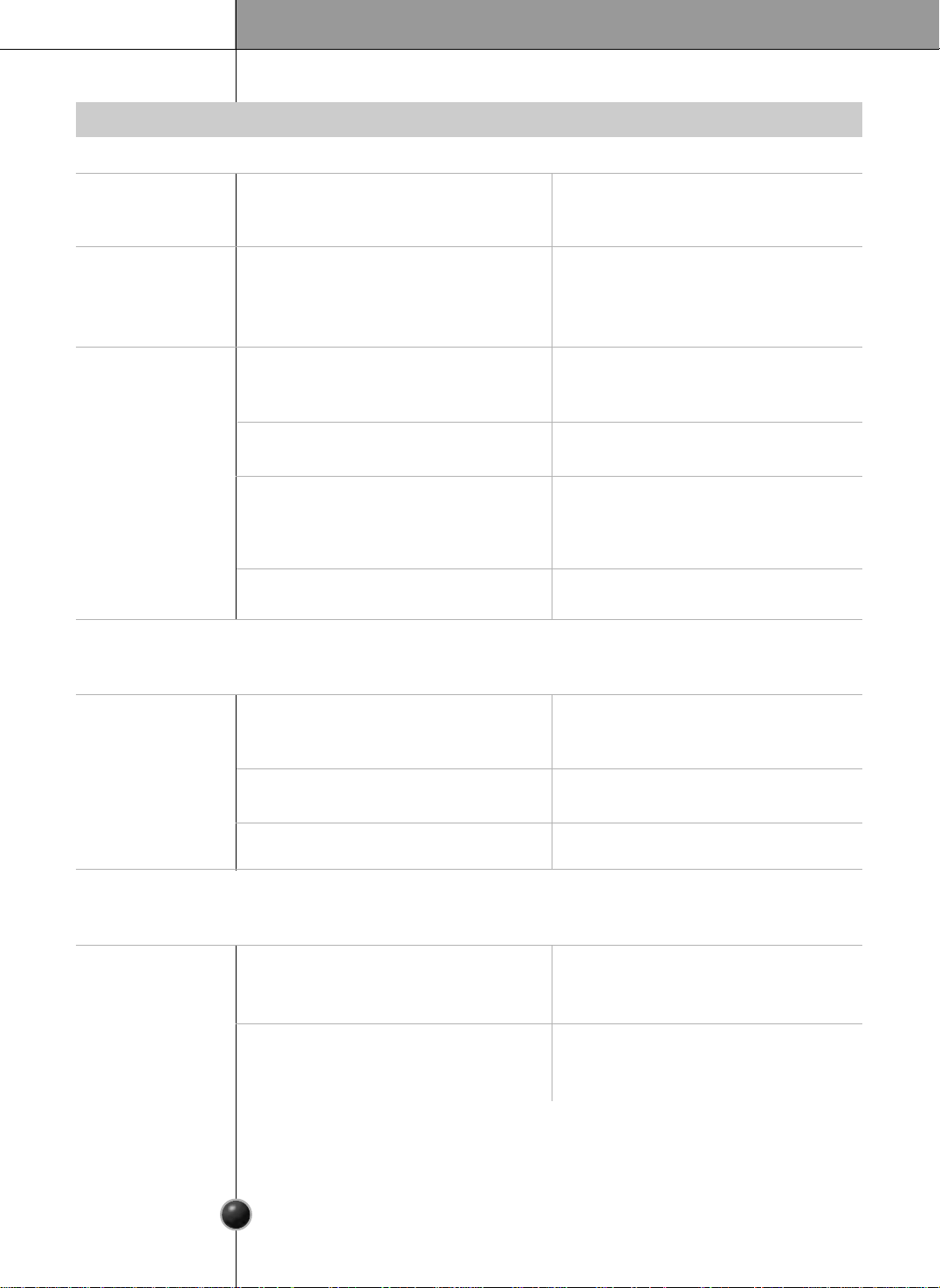
Troubleshooting
Before calling for service, review this list. It may save you both time and expense.
This list includes common occurrences that are not the result of defective
workmanship or materials in this appliance.
Possible cause
Refrigerator control is off.
Refrigerator is in defrost cycle.
Plug at wall outlet is disconnected.
Power outage. Check house lights.
Refrigerator is larger than the previous
one you owned.
Room or outside weather is hot.
Refrigerator has recently been
disconnected for a period of time.
Large amounts of warm or hot food
may have been stored recently.
Doors are opened too frequently or too
long.
Refrigerator or freezer door may be
slightly open.
Refrigerator control is set too cold.
Refrigerator or freezer gasket is dirty,
worn, cracked, or poorly fitted.
Solution
Set refrigerator control. See setting the
controls.
This is normal for a fully automatic
defrosting refrigerator. The defrost
cycle occurs periodically.
Make sure plug is tightly pushed into
outlet.
Call local electric company.
This is normal. Larger, more efficient
units run longer in these conditions.
It is normal for the refrigerator to work
longer under these conditions.
It takes some hours for the refrigerator
to cool down completely.
Warm food will cause the refrigerator to
run longer until the desired temperature
is reached.
Warm air entering the refrigerator
causes it to run longer. Open the door
less often.
Make sure the refrigerator is level.
Keep food and containers from
blocking door. See problem section.
OPENING/CLOSING of doors.
Set the refrigerator control to a
warmer setting until the refrigerator
temperature is satisfactory.
Clean or change gasket. Leaks in the
door seal will cause refrigerator to run
longer in order to maintain desired
temperatures.
Runing of refrigerator
Refrigerator
compressor
does not run.
Refrigerator
runs too often
or too long
Occurrence
6
23
Care and Maintenance
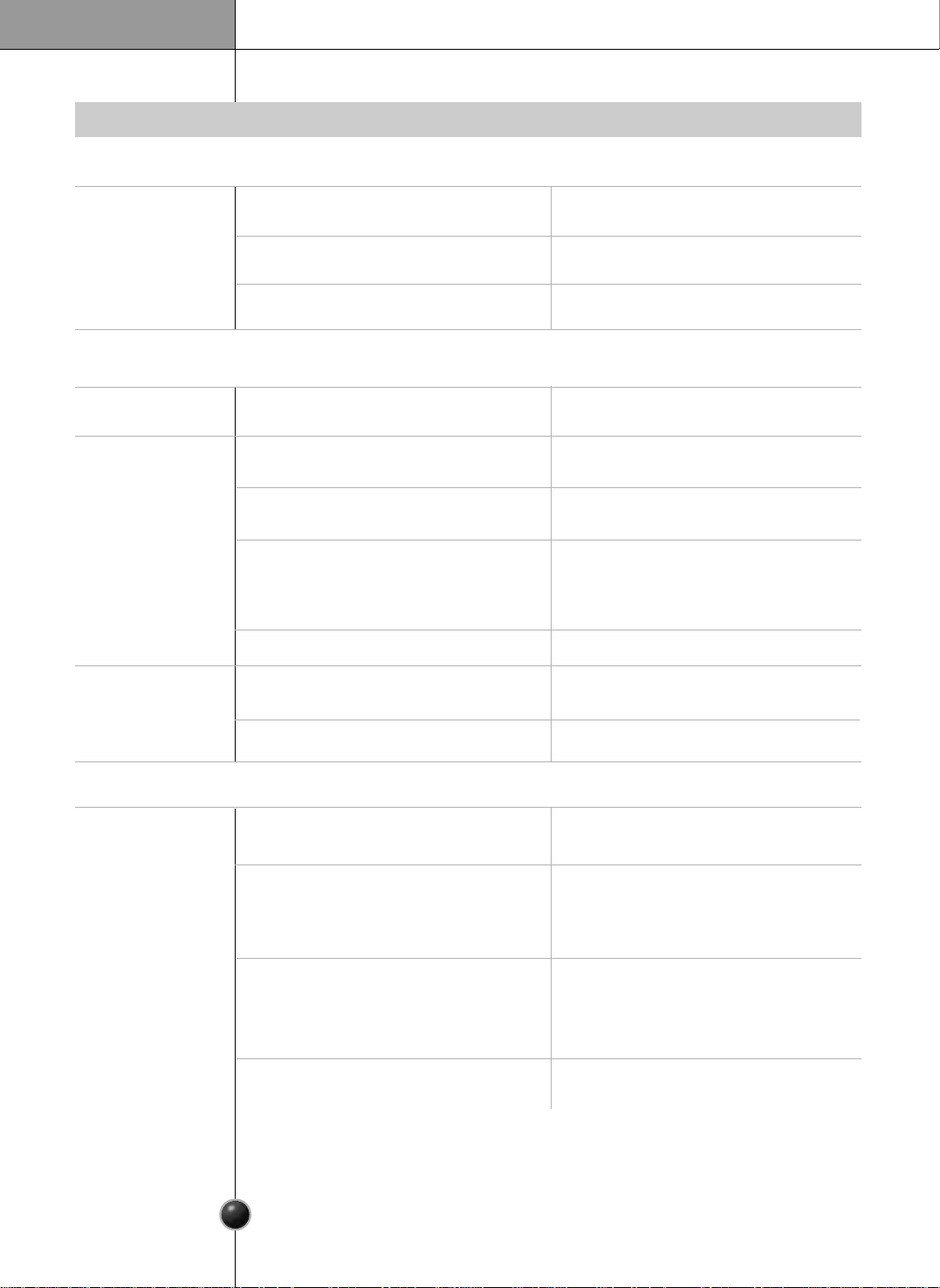
Occurrence
Temperature in the
freezer is too cold
but the refrigerator
temperature is
satisfactory.
Temperatures are too cold
Temperature in the
refrigerator
is too warm but
the freezer
temperature is
satisfactory.
Temperatures in
the refrigerator
or freezer are
too warm.
Temperatures are too warm
Food stored in
drawers freezes.
Possible cause
Doors are opened too frequently or too
long.
Door is slightly open.
Large amounts of warm or hot food
may have been stored recently.
Refrigerator has recently been
disconnected for a period of time.
Refrigerator control is set too warm.
Refrigerator control is set too warm.
Refrigerator control has some effect on
freezer temperature.
Freezer control is set too warm.
Refrigerator control is set too cold.
Freezer control is set too cold.
Refrigerator control is set too cold.
Solution
Set the refrigerator control to a colder
setting.
A refrigerator requires some hours to
cool down completely.
Wait until the refrigerator or freezer
has a chance to reach its selected
temperature.
Warm air enters the refrigerator/ freezer
whenever the door is opened.
Open the door less often.
Set the freezer or refrigerator control to a
colder setting until the freezer or
refrigerator temperature is satisfactory.
Set the freezer or refrigerator control to
a colder setting until the freezer or
refrigerator temperature is satisfactory.
Set the refrigerator control to a
warmer setting.
See above solution.
Set the freezer control to a warmer
setting until the freezer temperature is
satisfactory.
Close the door completely.
Temperature in the
refrigerator is too
cold and the
freezer
temperature
is satisfactory.
6
24
Care and Maintenance
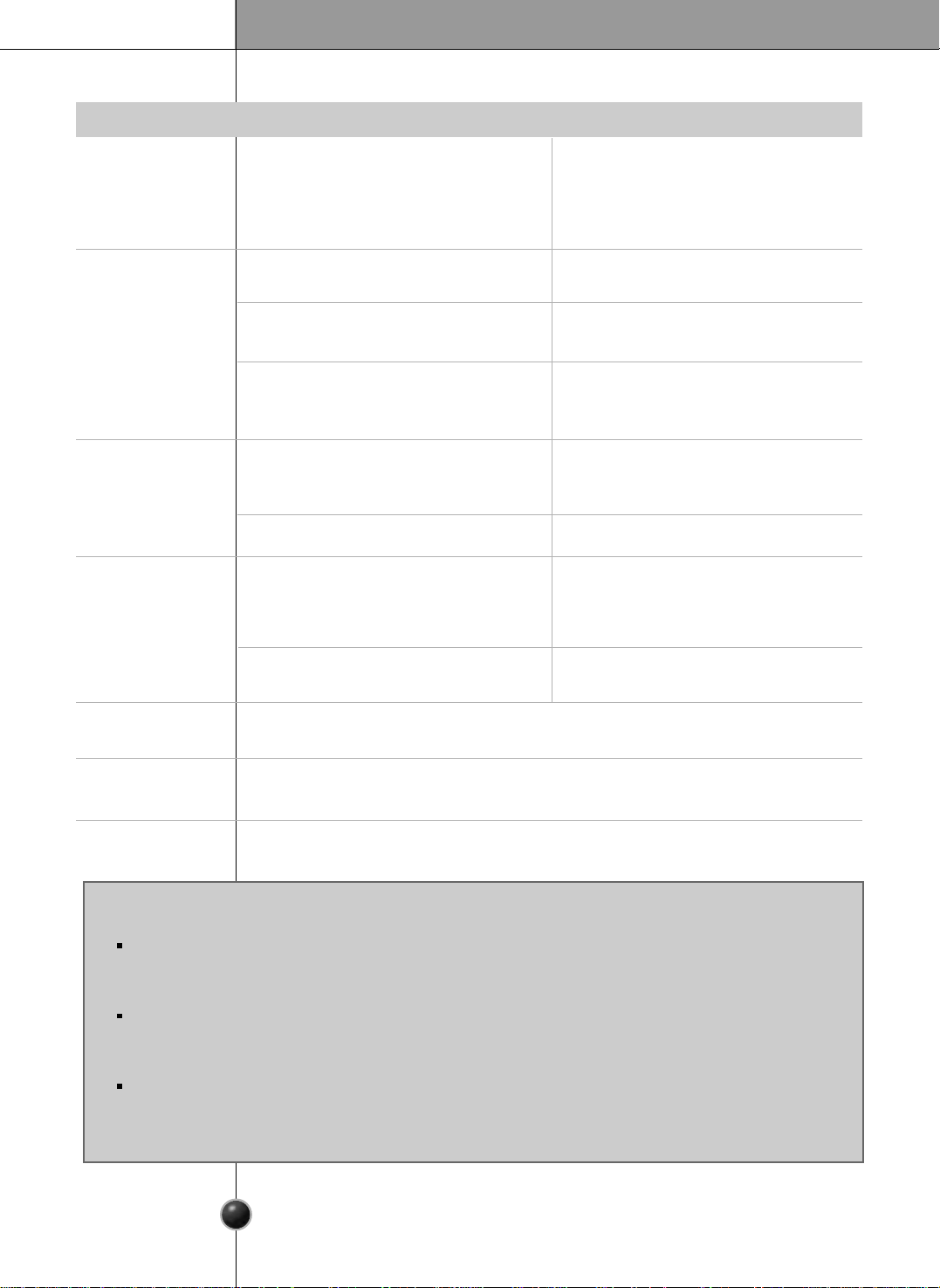
Sound and noise
Occurrence
Louder sound
levels when
refrigerator is on.
Louder sound
levels when
compressor
comes on.
Moisture collects
on the inside walls
of the refrigerator.
Moisture forms
on the outside of
the refrigerator
or between doors.
Water/Moisture/Ice outside refrigerator
Vibrating or
rattling noise.
Water/Moisture/Ice inside refrigerator
Possible cause
Today’s refrigerators have increased
storage capacity and maintain more
even temperatures.
Refrigerator is touching wall or cabinets.
The weather is hot and humid which
increases the rate of frost buildup
and internal sweating.
Door is slightly open.
Door is opened too often or too long.
Weather is humid.
Door is slightly open,causing cold air
from the inside the refrigerator to meet
warm air from the outside.
Floor is uneven or weak.
Refrigerator rocks on the floor when it is
moved slightly.
Refrigerator operates at higher pressures
during the start of the ON cycle.
Items placed on the top of the refrigerator
are vibrating.
Dishes are vibrating on the shelves in
the refrigerator.
Solution
This time, close the door completely.
This is normal in humid weather.
When humidity is lower, the moisture
should disappear.
See problem section opening/closing of
doors.
Move refrigerator so that it does not
touch the wall or refrigerator.
This is normal.
Move dishes slightly.
Make sure refrigerator is level and firmly
set on floor.
Be sure floor is level and solid and can
adequately support refrigerator.
Remove items.
It is normal for sound levels to be higher.
This is normal. The sound will level off as
the refrigerator continues to run.
Open the door less often.
6
25
Care and Maintenance
Odors in refrigerator
Occurrence
Door(s) will not
close.
Door(s) will not
close.
Drawers are
difficult to move.
Dispenser
Dispenser will not
dispense ice
Opening/Closing of doors/Drawers
Possible cause
Food is touching shelf on top of the
drawer
Track that drawer slides on is dirty.
Ice storage bin is empty.
Freezer temperature is set too warm.
Household water line valve is not open.
Refrigerator or freezer door is not
closed.
Refrigerator is not level. It rocks on the
floor when it is moved slightly.
Floor is uneven or weak.
Refrigerator rocks on the floor when it
is moved slightly.
Refrigerator is touching wall or cabinets.
Interior needs to be cleaned.
Food with strong odor is in the refrigerator.
Some containers and wrapping materials
produce odors.
Food package is keeping door open.
Door was closed too hard, causing other
door to open slightly.
Solution
Be sure both doors are closed.
Open household water line valve and
allow sufficient time for ice to be made.
When ice is made, dispenser should
operate.
Turn the freezer control to a higher
setting so that ice cubes will be made.
When the first supply of ice is made,
the dispenser should operate.
Clean drawer and track.
Be sure floor is level and can adequately
support refrigerator.
Contact carpenter to correct sagging or
sloping floor.
Move refrigerator.
.
Keep less food in drawer.
Adjust the height adjusting screw.
Use a different container or brand of
wrapping
materials
.
Move packages that keep door from
closing.
Close both doors gently.
Cover food completely.
Clean interior with sponge,warm water
and baking soda.
When the first supply of ice is dropped
into the bin, the dispenser should operate.
6
26
Care and Maintenance
Dispenser will
not dispense
ice.
Ice dispenser
is jammed.
Occurrence
Water has an
odd taste
and/or odor.
Dispenser will
not dispense
water.
Possible cause
Water has been in the tank for too long.
Unit not properly connected to cold
water line.
This sound is normally made when automatically made ice is dropped into ice storage
bin. Volume may vary according to refrigerator’s location.
This sound is normally made when ice maker is supplied with water after dropping
the automatically made ice.
Please thoroughly read Automatic icemaker and dispenser in this manual.
Ice cubes are frozen together.
Ice has melted and frozen around auger
due to infrequent use, temperature
fluctuations and/or power outages.
Ice cubes are jammed between the ice
maker arm and back of the bin.
Ice cubes that have been purchased or
made in some other way have been
used in the dispenser.
Household water line valve is not open.
See problem Icemaker is not making
any ice .
Refrigerator or freezer door is not closed.
Solution
Be sure both doors are closed.
Draw and discard 7 glasses of water
to freshen the supply. Draw and discard
an additional 7 glasses to completely rinse
out tank.
Connect unit to cold water line which
supplies water to kitchen faucet.
Open household water line valve.
Use the dispenser often so that cubes do
not freeze together.
Only the ice cubes made by the ice maker
should be used with the dispenser.
Remove the ice cubes that are jamming
the dispenser.
Remove ice storage bin, and thaw and
the contents. Clean bin, wipe dry and
replace in proper position.
When new ice is made, dispenser should
operate.
Sound of ice
dropping.
Sound of water
supply.
Other.
CUSTOMER ASSISTANCE NUMBERS:
To Prove Warranty Coverage
Retain your Sales Receipt to prove date of purchase.
A copy of your Sales Receipt must be submitted at the time warranty service is provided.
To Obtain Product, Customer or Service Assistance
Call Toll-free for Customer Service
Tel : 1-800-243-0000
To Obtain Nearest Authorized Service Center
Call 1-800-243-0000, push option #1, 24 hours a day, 7days per week.
Please have your product type (Monitor, TV, VCR, MWO, Refrigerator) and ZIP code ready.
http://www.lgservice.com
6
27
ONLY UNITED STATES
Visit our web site/http://www.lgservice.com
LG Electronics
United States of America
LG Electronics will repair or at its option replace, without charge, your product which proves to be defective
in material or workmanship under normal use during the warranty period listed below from the date of
original purchase.
This warranty is good only to the original purchaser of the product during the warranty period as long as it is
in the U.S. including Alaska, Hawaii, and U.S. Territories.
LG Refrigerator / Freezer Warranty Period
Product Parts Labor
Refrigerator / Freezer 1 year 1 year [In-Home Service (Except model GR-051)]
Seales System 7 years 1 year [In-Home Service (Except model GR-051)]
(Compressor, Condenser, Evaporator)
No other express warranty is applicable to this product. THE DURATION OF ANY IMPLIED WARRANTIES.
INCLUDING IMPLIED WARRANTY OF MERCHANTABILITY IS LIMITED TO THE DURATION OF THE
EXPRESS WARRANTY HEREIN. LG ELECTRONICS SHALL NOT BE LIABLE FOR THE LOSS OF USE OF
THE PRODUCT, INCONVIENCE, LOSS OR ANY OTHER DAMAGES, DIRECT OR CONSEQUENTIAL,
ARISING OUT OF THE USE OF OR INABLILITY TO USE, THIS PRODUCT OR FOR ANY BREACH OF ANY
EXPRESS OR IMPLIED WARRANTY, INCLUDING THE IMPLIED WARRANTY OF MERCHANTABILITY
APPLICABLE TO THIS PRODUCT.
Some states do not allow the exclusion or limitation of incidental or consequential damages or limitations on how
long an implied warranty lasts; so these limitations or exclusions may not apply to you. This warranty gives you
specific legal rights and you may also have other rigths which vary from state to state.
LIMITED WARRANTY
THE ABOVE WARRANTY DOES NOT APPLY TO:
1. Service trips to your home to deliver and pickup, install, instruct, or replace house fuses or correct house wiring or
plimbing, or correction of unauthorized repairs.
2. Damage to the product caused by accident, pests, fire, floods, or acts of God.
3. Repairs when your LG product is used in other than normal, single-family household use.
4. Damage resulting from accident, alteration, misuse, abuse, or improper installation.
Therefore, these costs are paid by the consumer.
If the product is installed outside the normal service area, any cost of transportation involved in the repair of the product, or the
replacement of defective parts, shall be borne by the owner.
CUSTOMER ASSISTANCE NUMBERS:
To obtain Warranty Coverage: Retain your Bill of Sale to prove date of purchase.
A Copy of your Sales Receipt must be submited at the at the time
warranty service is provided.
To obtain Product or Customer
(24 hrs a day, 7 days per week, 365 days per year)
Service Assistance: Press the appropiate menu option, and have your product type
(Refrigerator), model number, serial number, and ZIP/Postal
Code ready.
To obtain the nearest
Authorized Service Center:
Press the appropiate menu option, and have your product type
(Refrigerator), model number, serial number, and ZIP/Postal
Code ready.
(24 hrs a day, 7 days per week, 365 days per year)
Call 1-800-243-0000
Call 1-800-243-0000
Damages caused during and/or after delivery.
Display, discount, or refurbished units purchased with scratches, dents, or defects.
Proof of purchase is required and must be provided to lg in order to validate warranty.
5.
6.
http://www.lge.com
P/N: MFL48163802



