OWNER'S MANUAL
WASHING
MACHINE
Before beginning installation, read these instructions
carefully. This will simplify installation and ensure that the
product is installed correctly and safely. Leave these
instructions near the product after installation for future
reference.
EN ENGLISH
F4V7***TSE
MFL71724723
Rev.00_061220
www.lg.com
Copyright © 2020 LG Electronics Inc. All Rights Reserved.

TABLE OF CONTENTS
This manual may contain images or
content that may be different from the
model you purchased.
This manual is subject to revision by the
manufacturer.
SAFETY INSTRUCTIONS
READ ALL INSTRUCTIONS BEFORE USE...........................................................4
WARNING............................................................................................................4
CARING FOR THE ENVIRONMENT....................................................................9
INSTALLATION
Parts and Specifications ..................................................................................10
Installation Place Requirements ....................................................................12
Unpacking the Appliance ................................................................................14
Levelling the Appliance ...................................................................................15
Connecting the Water Supply Hose...............................................................16
Installing the Drain Hose ................................................................................18
OPERATION
Operation Overview.........................................................................................19
Preparing the Wash Load ...............................................................................20
Adding Detergents and Softeners .................................................................21
Control Panel ....................................................................................................24
Programme Table ............................................................................................27
Extra Options and Functions ..........................................................................32
SMART FUNCTIONS
LG ThinQ Application.......................................................................................35
Smart Diagnosis ...............................................................................................38
MAINTENANCE
Cleaning After Every Wash..............................................................................40
Cleaning the Appliance Periodically & Performing an Emergency Water
Evacuation.........................................................................................................41
TROUBLESHOOTING
Before Calling for Service................................................................................44
APPENDIX

4
SAFETY INSTRUCTIONS
EN
SAFETY INSTRUCTIONS
READ ALL INSTRUCTIONS BEFORE USE
The following safety guidelines are intended to prevent unforeseen
risks or damage from unsafe or incorrect operation of the appliance.
The guidelines are separated into ‘WARNING’ and ‘CAUTION’ as
described below.
Safety Messages
WARNING
WARNING
To reduce the risk of explosion, fire, death, electric shock, injury or
scalding to persons when using this product, follow basic precautions,
including the following:
Technical Safety
• This appliance can be used by children aged from 8 years and above
and persons with reduced physical, sensory or mental capabilities or
lack of experience and knowledge if they have been given supervision
or instruction concerning use of the appliance in a safe way and
understand the hazards involved. Children shall not play with the
appliance. Cleaning and user maintenance shall not be made by
children without supervision.
This symbol is displayed to indicate matters and operations
that can cause risk. Read the part with this symbol carefully
and follow the instructions in order to avoid risk.
WARNING
This indicates that the failure to follow the instructions can
cause serious injury or death.
CAUTION
This indicates that the failure to follow the instructions can
cause the minor injury or damage to the product.
5
SAFETY INSTRUCTIONS
EN
• Children of less than 3 years should be kept away unless continuously
supervised.
• If the power cord is damaged, it must be replaced by the
manufacturer, its service agent or similarly qualified persons in order
to avoid a hazard.
• Ventilation openings must not be obstructed by a carpet.
• This appliance is intended to be used in household only.
• Use a new hose or hose-set supplied with the appliance. Reusing old
hoses can cause a water leak and subsequent property damage.
• The water pressure must be between 50 kPa and 800 kPa.
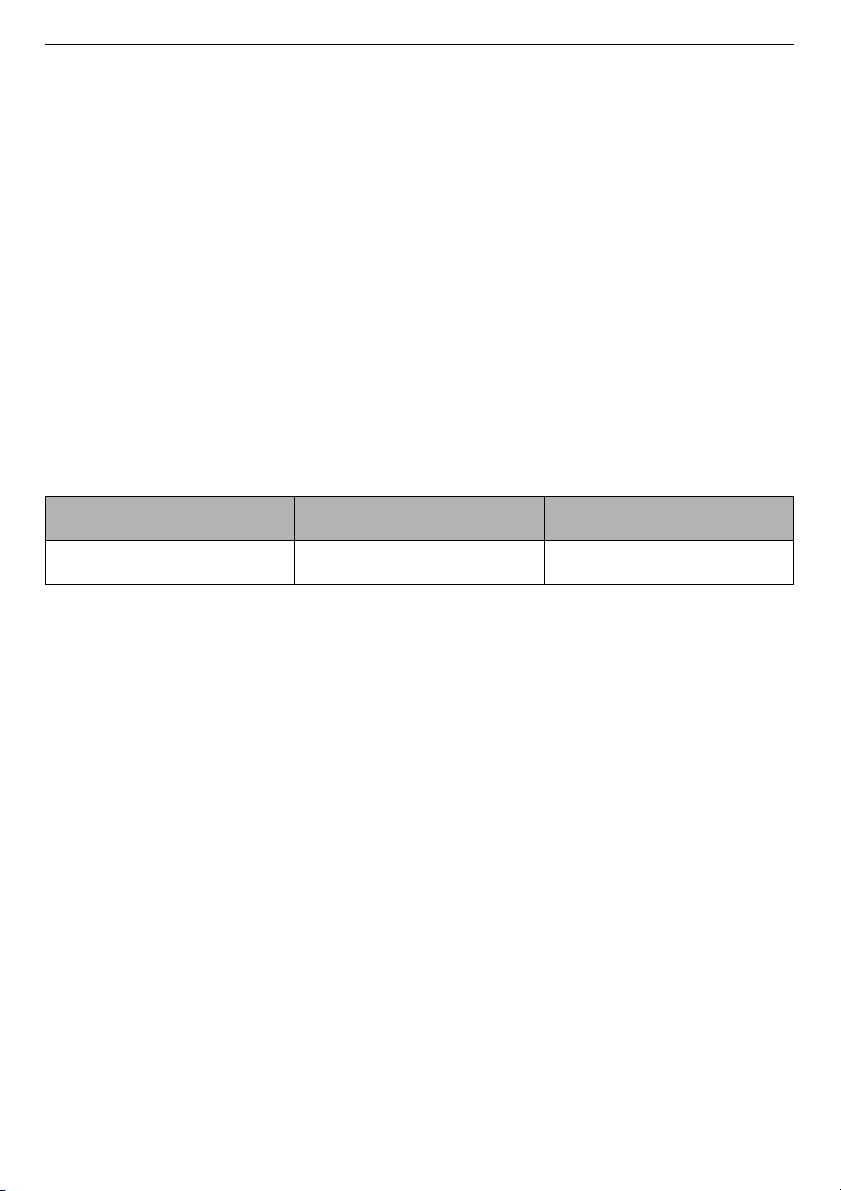
Maximum Capacity
The maximum capacity in some cycles for dry clothes to be washed is:
The recommended maximum capacity for each washing programme
may differ. To get good wash results, please refer to
Programme
Table
in
OPERATION
chapter for further details.
Installation
• Never attempt to operate the appliance if it is damaged,
malfunctioning, partially disassembled, or has missing or broken
parts, including a damaged cord or plug.
• This appliance should only be transported by two or more people
holding the appliance securely.
• Do not install the appliance in a damp and dusty place. Do not install
or store the appliance in any outdoor area, or any area that is subject
to weathering conditions such as direct sunlight, wind, rain, or
temperatures below freezing.
• Make sure the power plug is completely pushed into the power
outlet.
• Do not plug the appliance into multiple outlet sockets, power boards,
or an extension power cable.
F4V710*TSE F4V709*TSE F4V708*TSE
10.5 kg 9 kg 8 kg

6
SAFETY INSTRUCTIONS
EN
• Do not modify the power plug provided with the appliance. If it does
not fit the power outlet, have a proper outlet installed by a qualified
electrician.
• This appliance is equipped with a power cord having an equipment-
earthing / grounding conductor (earthing pin) and a grounding
power plug. The power plug must be plugged into an appropriate
outlet socket that is installed and earthed / grounded in accordance
with all local codes and ordinances.
• Improper connection of the equipment-grounding conductor can
result in risk of electric shock. Check with a qualified electrician or
service personnel if you are in doubt as to whether the appliance is
properly grounded.
• This appliance must not be installed behind a lockable door, a sliding
door or a door with a hinge on the opposite side to that of the
appliance, in such a way that a full opening of the appliance door is
restricted.
Operation
• Do not apply any sharp objects to the control panel in order to
operate the appliance.
• Do not attempt to separate any panels or disassemble the appliance.
• Do not repair or replace any part of the appliance. All repairs and
servicing must be performed by qualified service personnel unless
specifically recommended in this Owner's Manual. Use only
authorized factory parts.
• Do not push down the door excessively, when the appliance door is
open.
• Do not put animals, such as pets into the appliance.
• Do not wash rugs, mats, shoes or pet blankets, stuffed toys, or any
other items other than clothes or sheets, in this machine.
• Keep the area underneath and around the appliance free of
combustible materials such as lint, paper, rags, chemicals, etc.
• Do not leave the appliance door open. Children may hang on the door
or crawl inside the appliance, causing damage or injury.
• Do not put in, wash or dry articles that have been cleaned in, washed
in, soaked in, or spotted with combustible or explosive substances

7
SAFETY INSTRUCTIONS
EN
(such as waxes, wax removers, oil, paint, gasoline, degreasers,
drycleaning solvents, kerosene, petrol, spot removers, turpentine,
vegetable oil, cooking oil, acetone, alcohol, etc.). Improper use can
cause fire or explosion.
• Do not use or store flammable or combustible substances (ether,
benzene, alcohol, chemical, LPG, combustible spray, gasoline,
thinner, petroleum, insecticide, air freshener, cosmetics, etc.) near
the appliance.
• Never reach into the appliance while it is operating. Wait until the
drum has completely stopped.
• Do not touch the door during a high temperature programme.
• In case of a water leak from the appliance or flood, disconnect the
power plug and contact the LG Electronics customer information
centre.
• Turn off water taps to relieve pressure on hoses and valves and to
minimize leakage if a break or rupture should occur. Check the
condition of the fill hoses; they should be replaced after 5 years.
• If there is a gas leakage (isobutane, propane, natural gas, etc.) within
the home, do not touch the appliance or power plug and ventilate the
area immediately.
• If the drain hose or inlet hose is frozen during winter, use it only after
thawing.
• Keep all washing detergents, softener and bleach away from
children.
• Do not touch the power plug or the appliance controls with wet
hands.
• Do not bend the power cable excessively or place a heavy object on it.
• Avoid touching any water that is drained from the appliance during
the wash.
• Make sure that drainage is working properly. If water is not drained
properly, your floor may get flooded.
• When the air temperature is high and the water temperature is low,
condensation may occur and thus wet the floor.
• Wipe off dirt or dust on the contacts of the power plug.

8
SAFETY INSTRUCTIONS
EN
Maintenance
• Disconnect the appliance from the power supply before cleaning the
appliance. Setting the controls to the OFF or stand by position does
not disconnect this appliance from the power supply.
• Securely plug the power plug in the outlet socket after completely
removing any moisture and dust.
• Do not spray water inside or outside the appliance to clean it.
• Never unplug the appliance by pulling on the power cable. Always
grip the power plug firmly and pull straight out from the outlet
socket.
• Only qualified service personnel from LG Electronics service centre
should disassemble, repair, or modify the appliance. Contact an LG
Electronics customer information centre if you move and install the
appliance in a different location.
Disposal
• Before discarding an old appliance, unplug it. Cut off the cable
directly behind the appliance to prevent misuse.
• Dispose of all packaging materials (such as plastic bags and
styrofoam) away from children. The packaging materials can cause
suffocation.
• Remove the door before disposing of or discarding this appliance to
avoid the danger of children or small animals getting trapped inside.
9
SAFETY INSTRUCTIONS
EN
CARING FOR THE ENVIRONMENT
Disposal of Your Old Appliance
• This crossed-out wheeled bin symbol indicates that waste
electrical and electronic products (WEEE) should be
disposed of separately from the municipal waste stream.
• Old electrical products can contain hazardous substances
so correct disposal of your old appliance will help prevent
potential negative consequences for the environment and
human health. Your old appliance may contain reusable
parts that could be used to repair other products, and
other valuable materials that can be recycled to conserve
limited resources.
• You can take your appliance either to the shop where you
purchased the product, or contact your local government
waste office for details of your nearest authorised WEEE
collection point. For the most up to date information for
your country, please see www.lg.com/global/recycling.
10
INSTALLATION
EN
INSTALLATION
Parts and Specifications
NOTE
• Appearance and specifications may change without notice to improve the quality
of the appliance.
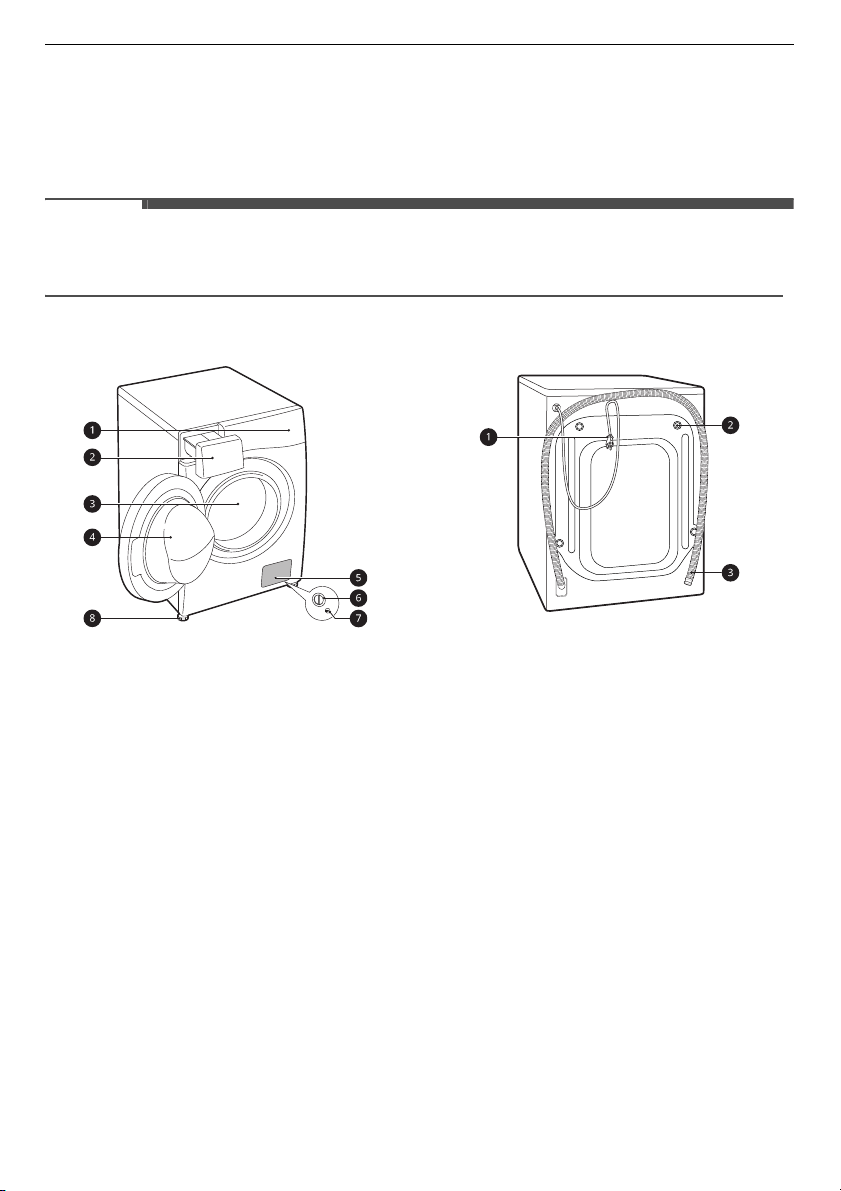
Front View
a
Control Panel
b
Detergent Dispenser Drawer
c
Drum
d
Door
e
Cover Cap
f
Drain Pump Filter
g
Drain Plug
h
Levelling Feet
Rear View
a
Power Plug
b
Transit Bolts
c
Drain Hose
11
INSTALLATION
EN
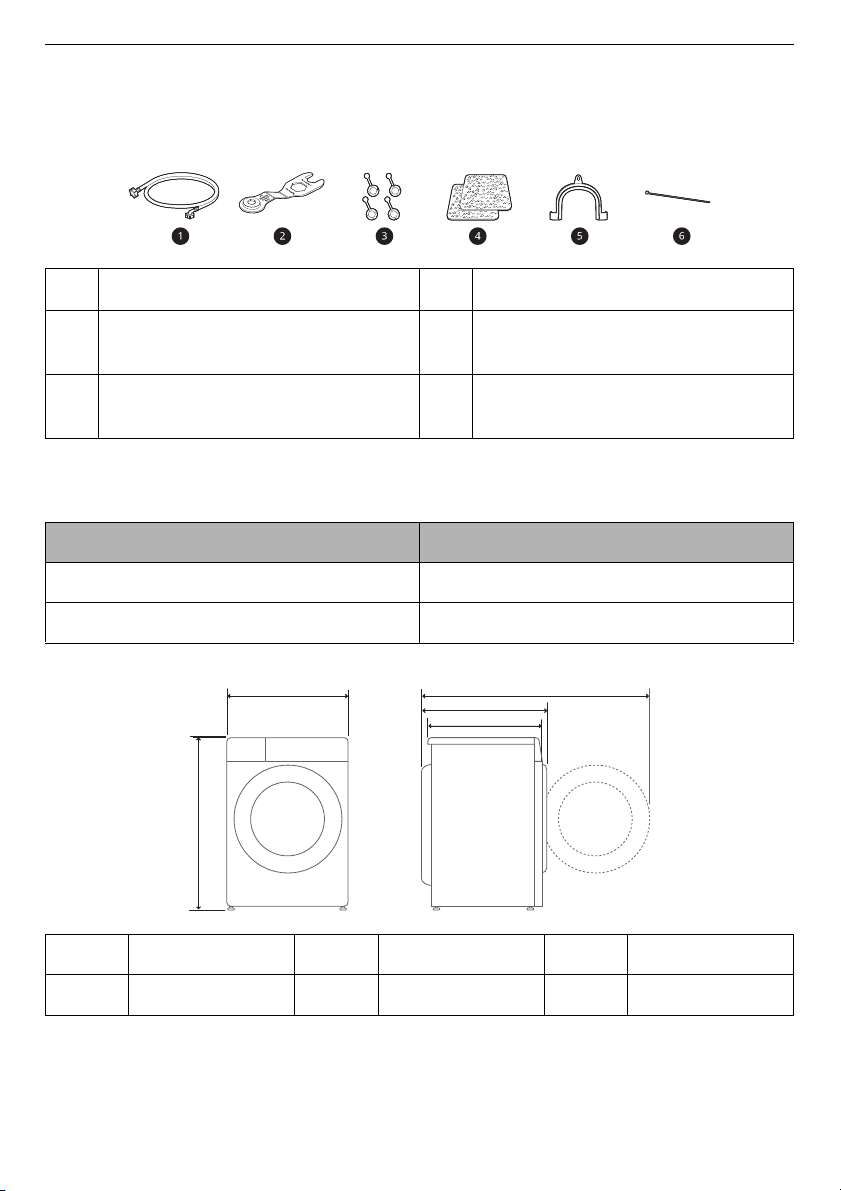
Accessories
*1 The included accessories vary depending on the model you purchased.
Specifications
Dimension(mm)
a
Cold Supply Hose
d
Anti–slip Sheets*1
b
Spanner
e
Elbow Bracket for Securing Drain
Hose
c
Caps for Covering Transit Bolt
Holes
f
Tie Strap
*1
Model
F4V7***TSE
Power Supply 220‒240 V~, 50 Hz
Product Weight 70 kg
A 600 mm C
565 mm
E 1100 mm
B 850 mm D
620 mm
B
A
E
D
C
12
INSTALLATION
EN
Installation Place
Requirements
Before installing the appliance, check the
following information to make sure that
the appliance should be installed in a
correct place.
Installation Location
• This appliance must be installed on
f
irm flooring to minimize vibratio
n
durin
g the spin cycle. Conc
rete
flo
oring is best, being far less pron
e to
v
ibration during the spin cycle
than
wo
oden floorboard
s or a carpeted
surfa
ce.
•
If it is impossible to avoid positionin
g
t
he appliance next to a gas cooker or
coal burning stove, an insulation (850 X
600 mm) covered with aluminum fo
il
on the side facing
the co
oker or stove
m
ust be inserted between the tw
o
appliances.
•
Ensure that when the applia
nce is
installed, it is easily accessible for an
e
ngineer in the event of a breakdown.
• When installing the appliance, adju
st
all four fe
et using the transit bo
lt
spa
nner provided to ensu
re the
appliance is stable.
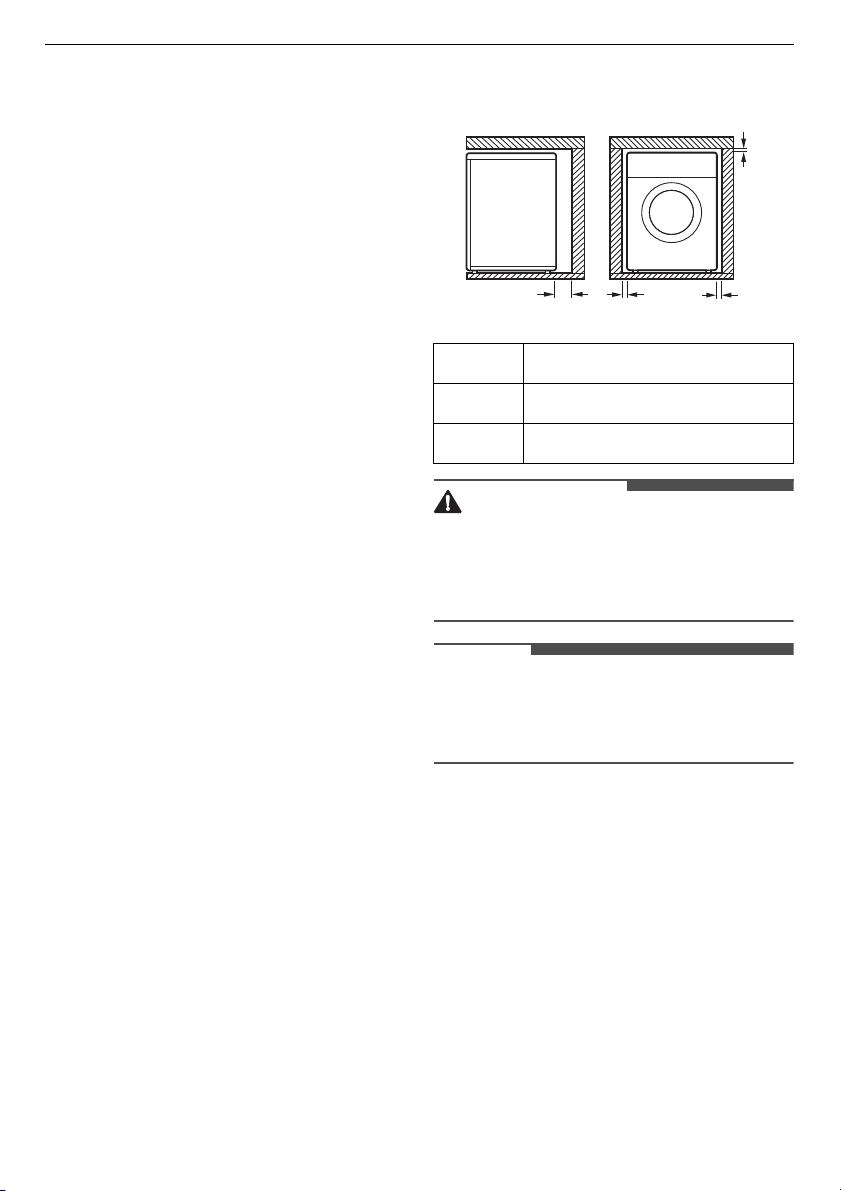
Floor Installation
To ensure sufficient clearance for water
inlet hoses, drain hose and airflow, allow
minimum clearances of at least 20 mm at
the sides and 100 mm behind the
appliance. Be sure to allow for wall, door,
or floor moldings that may increase the
required clearances.
WARNING
• This appliance must only be used for
domesti
c household purposes and
should not be used in mo
bile
applications.
NOTE
• Never try to level any uneven floor by
putti
ng pieces of wood, cardboar
d or
similar materials under the appliance.
Wooden Floors (Suspended
Floors)
When installing the appliance on
wooden floors, use rubber cups to
reduce excessive vibration and
unbalance. Timber or suspended type
flooring may contribute to excessive
A
100 mm
B
5 mm
C
20 mm
A
C
B
C
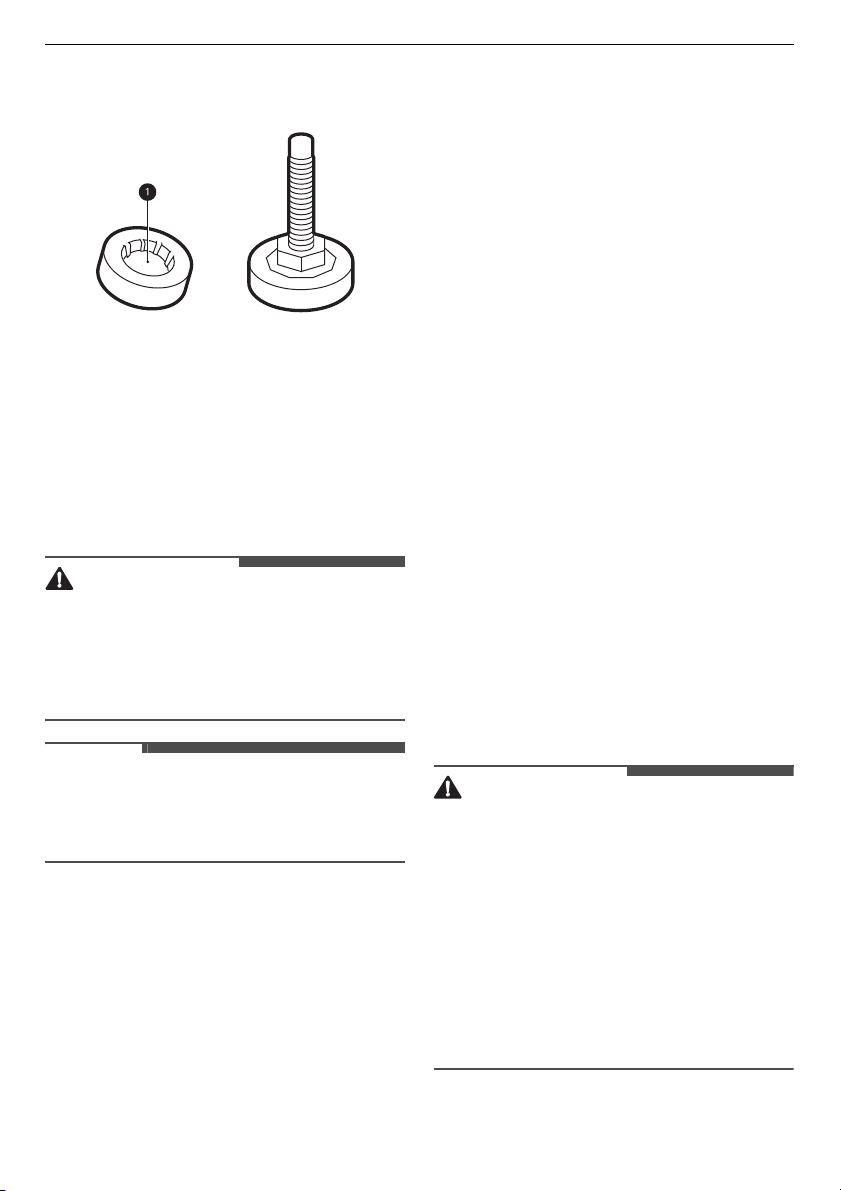
13
INSTALLATION
EN
vibration and unbalance, errors and
malfunction.
• To reduce vibration, we recomme
nd
pla
cing at least 15 mm thickness of
rubber cups
a
under each adjusting
foo
t of the appliance, secured to at
least two floor beams with screws.
• If possible, install the appliance in one
of the corners of the room, where
the
f
loor is more stable.
• Fit the rubber cups to reduce vibration.
CAUTION
• If the appliance is installed on the
unstable floor (e.g. w
ooden floor), the
warranty
does not cove
r any damages
and cost occur
red
due to the
installation on the unstable floor.
NOTE
• You can purchase rubber cups (part
No
.
4620ER4002B
) from the LG service
centre.
Ventilation
• Make sure that air circulation around
th
e appliance should not be impeded
by carpets, rugs, etc.
Ambient Temperature
• Do not install the appliance in rooms
where
freezing temperatures
may
oc
cur. Frozen hoses may burst un
der
p
ressure. The reliability of the
electronic control unit ma
y be
i
mpaired at temperatures belo
w
fre
ezing point.
• If the appliance is delivered in winter
and temperatures are below freezing,
place the appliance at room
temperature for a few hours befo
re
p
utting it into operation.
Electrical Connection
• Do not use an extension cord or
double adapter.
•
Alwa
ys unplug the appliance and turn
o
ff the water supply after use.
•
Connect the applia
nce to an earthed
so
cket in accordance with cu
rrent
w
iring regulations.
•
The appliance must be positioned so
that the plug is easily accessible.
• Power outlet must be within 1 meter of
either side of the appliance.
WARNING
• Repairs to the appliance must only be
carried out by qualified personne
l.
R
epairs carried out by inexperience
d
pers
ons may cause in
jury or serious
m
alfunctioning. Contact your lo
cal
au
thorised LG repairer.
• The power plug must be plugged
into
an
appropriate outlet socket th
at is
in
stalled and grounded/earthed
in
ac
cordance with all loca
l codes and
ordinances.
14
INSTALLATION
EN
Unpacking the
Appliance
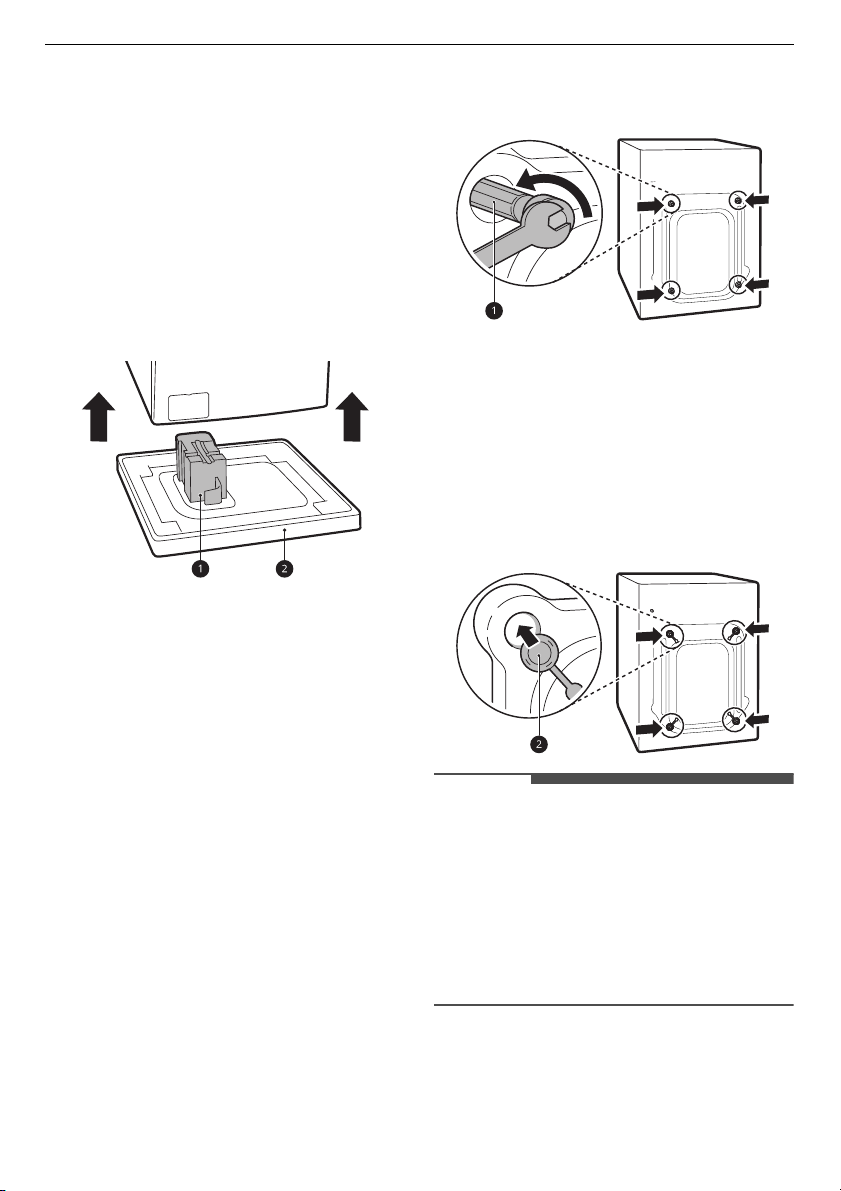
Lifting the Appliance Off the
Foam Base
* This feature may vary depending on
the model
purchased.
After removing the carton and shippi
ng
ma
terial,
lift the appliance off the foam
base.
•
Make sure the tub support
a
* comes
off w
ith the base and is not stuck to the
bottom of the appliance.
•
If you must lay the appliance down
to
re
move the carton base
b
, always
p
rotect the side of the appliance and
lay it carefully on its side. Do not lay the
appliance on its front or back.
Removing the Transit Bolt
Assemblies
To prevent the appliance from severe
vibration and breakage, remove transit
bolts and retainers.
1
Starting with the bottom two transit
bolts
a
, use the spanner (included) to
fully loosen all transit bolts by turning
them counterclockwise.
2
Remove the bolt assemblies by
wi
ggling them slightly while pulling
them out.
3
Install the hole caps.
•
Locate the hole caps
b
included in
the accessory pa
ck or attached on
the ba
ck.
NOTE
• Save the transit bolts and retainers for
future use.
•
Transport this appliance fo
r the
pre
vention of breakage as below:
-
The transit bolts are reinstalled.
-
The power cord is secu
red to the
back of the appliance.
*
15
INSTALLATION
EN
Levelling the Appliance
Checking the Level
When pushing down the edges of the
top plate diagonally, the appliance
should not move up and down at all
(check both directions).
•
If the appliance rocks when pushin
g
th
e top plate of the appliance
diagonally, adjust the feet again.
•
Check whether the appliance is
perfectly level after installation.
NOTE
• Timber or suspended type flooring
m
ay contribute to excessive vibratio
n
and unbala
nce. Reinforc
ement or
bracin
g of the timber floor may need
to be considered to stop or
reduce
excessive noise and vibration.
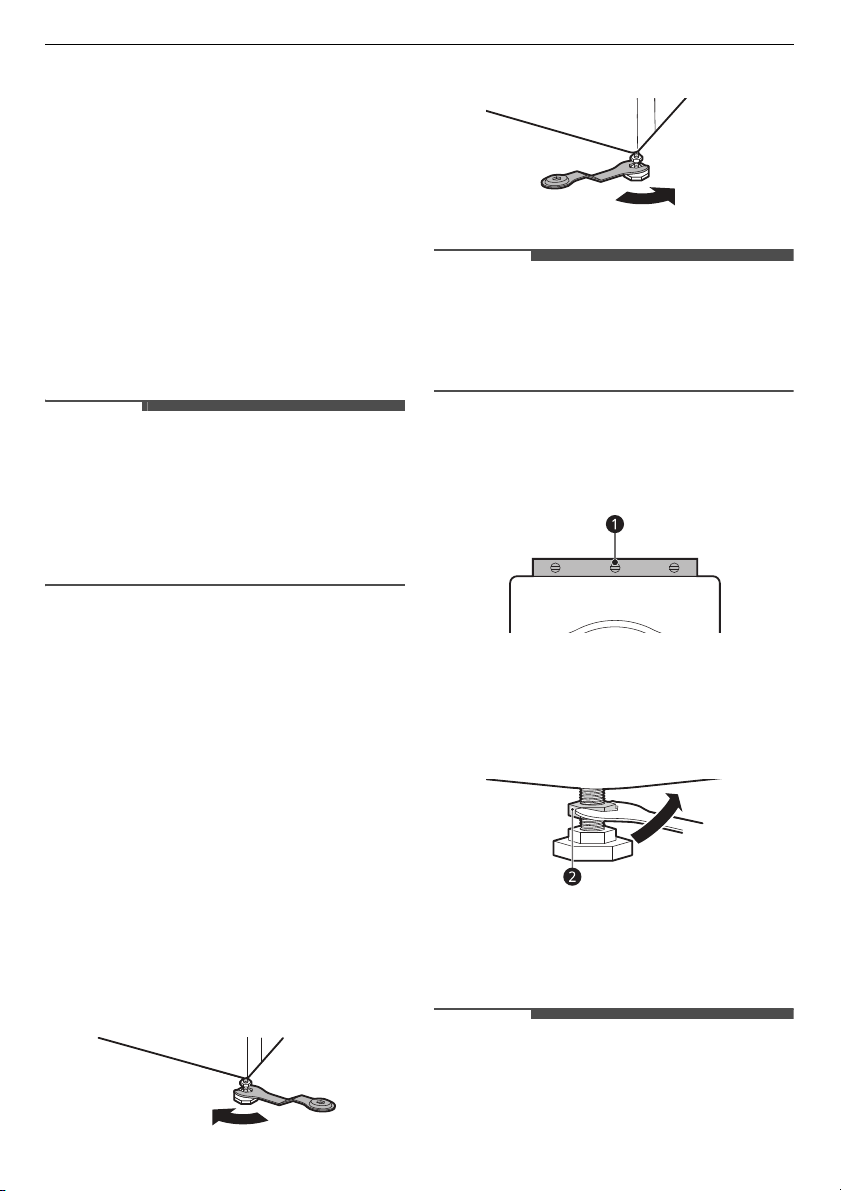
Adjusting and Levelling the
Feet
When installing the appliance, the
appliance should be aligned and
perfectly level. If the appliance is not
aligned and level properly, the appliance
may be damaged or may not operate
properly.
1
Turn the levelling feet as required if
the f
loor is uneven.
•
Do not insert pieces of wood
etc.
unde
r the feet.
•
Make sure that all four feet ar
e
s
table and resting on the floor.
NOTE
• Do not install the washing machine on
a pl
inth, stand or elevated surf
ace
un
less it is manufactured by LG
Electronics for use with this model.
2
Check if the appliance is perfectly
le
vel using a spirit level
a
.
3
Secure the levelling feet with the lock
nuts
b
by turning anti-clockwise
against the bottom of the appliance.
4
Check if all lock nuts at the bottom of
the
appliance are secured properly.
NOTE
• Proper placement and levelling of the
appliance will ensure long, regular,
and reliable operation.
16
INSTALLATION
EN
NOTE
• The appliance must be 100%
hori
zontal and stand firmly in positi
on
on a ha
rd flat floor.
•
It must not ‘Seesaw’ across corn
ers
under
the load.
•
Do not let the feet of the
appliance get
wet.
Failure to do so may ca
use
vibration or noise.
Using Anti-Slip Sheets
This feature may vary depending on the
model purchased.
If you install the appliance on a slippery
surface, it may move because of
excessive vibration. Incorrect levelling
may cause malfunction through noise
and vibration. If this occurs, install the
anti-slip sheets under the levelling feet
and adjust the level.
1
Clean the floor to attach the anti-slip
sh
eets.
•
Use a dry rag to remove and clean
foreign objects and moisture
. If
mo
isture remains, the an
ti-slip
s
heets may slip.
2
Adjust the level after placing the
appliance in the installation area.
3
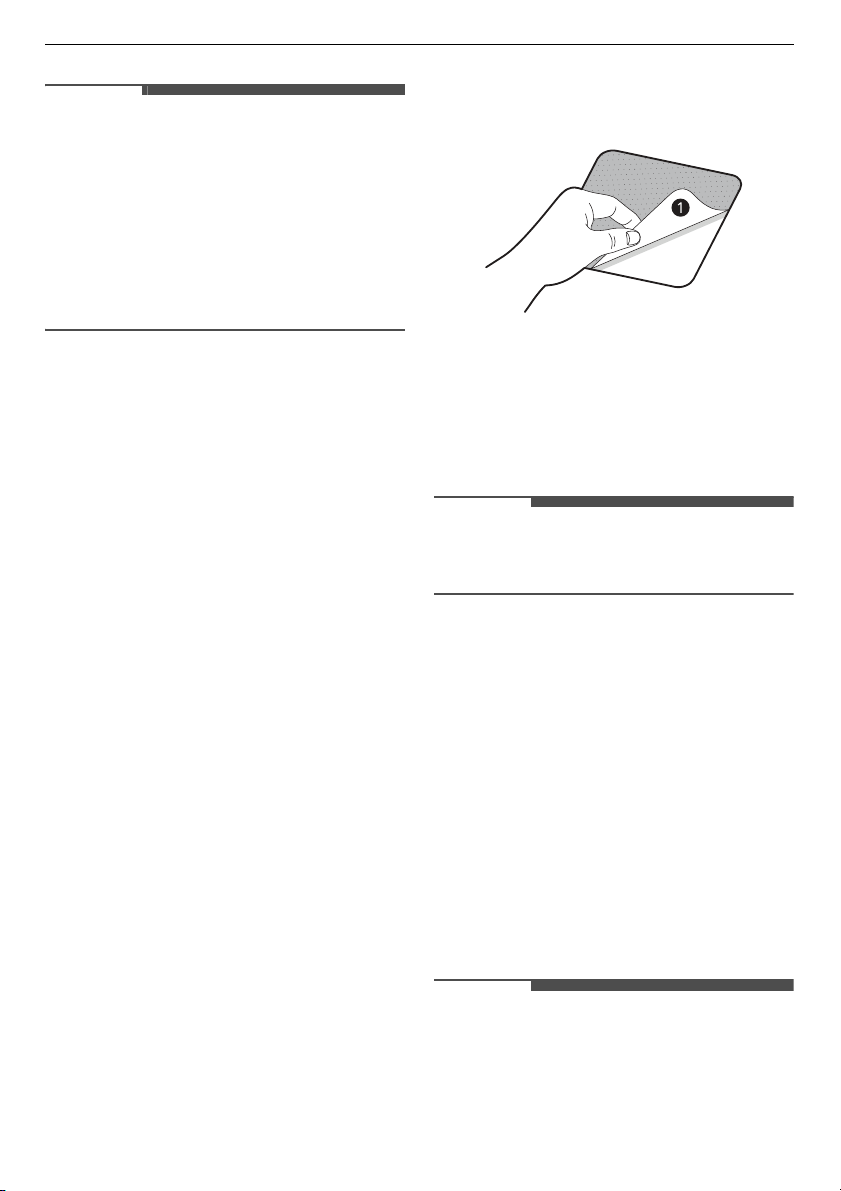
Place the adhesive side
a
of the anti-
slip sheets on the floor.
•
The most effective way is to in
stall
the anti-sl
ip sheets under the front
feet. If it is difficult to place the
sheets un
der the front feet of the
applian
ce, attach them under the
rear feet.
4
Put the appliance on the anti-slip
sheets.
•
Do not attach the adhesive side
a
of anti
-slip sheets to the feet of the
appliance.
NOTE
• Additional anti-slip sheets are available
at LG Electronics service centre.
Connecting the Water
Supply Hose
Note for Connection
• Water pressure must be between
50
kPa
and
800 kPa
(0.5‒8.0 kgf/cm²). If
the water pressure is more than
800
kPa
, a decompression device should
b
e installed.
•
Periodically check the condition of the
water supply hose and replace th
e
w
ater supply hose if necessary.
NOTE
• Do not overtighten the water supply
hose or use mechanical
devices to
tighten on
to the inlet valves.
17
INSTALLATION
EN
• No further backflow protection
required for connection to the wate
r
inlet.
Checking the Rubber Seal
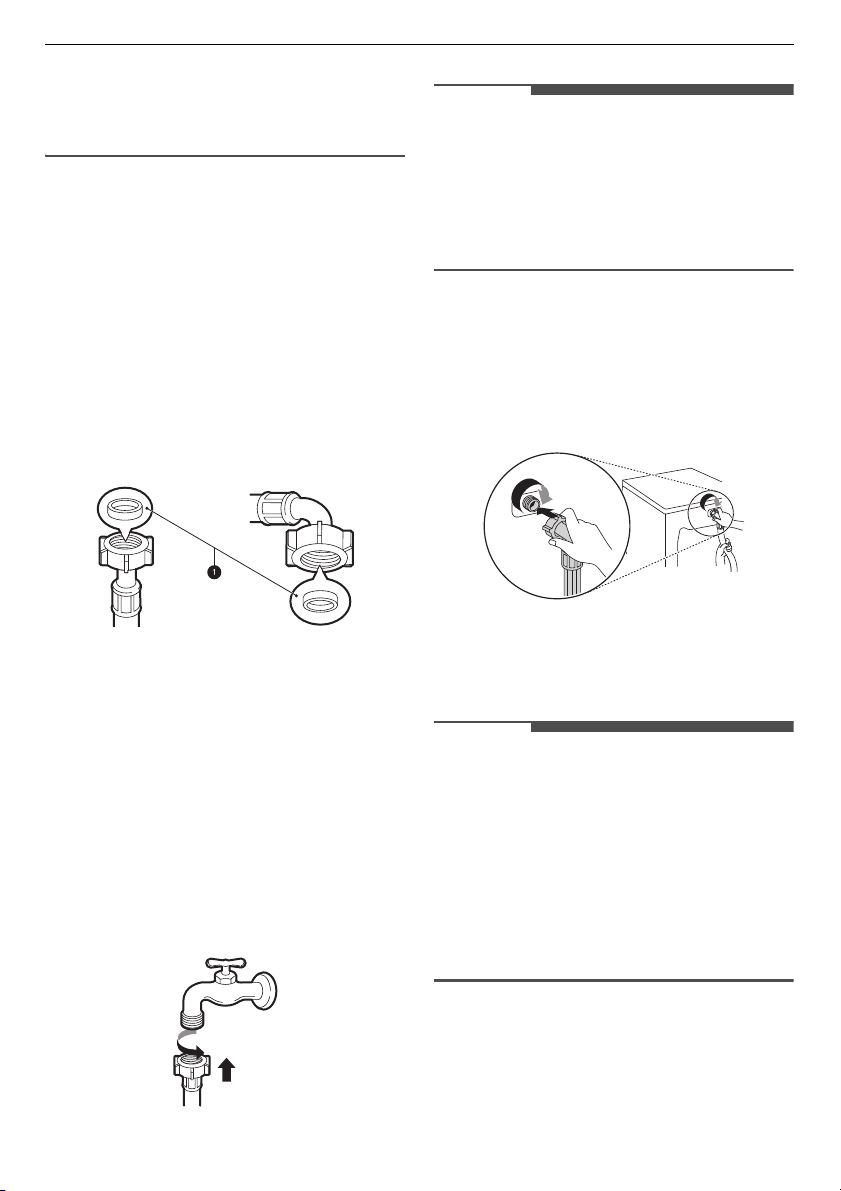
Two rubber seals
a
are supplied with
the water supply hose. They are used to
prevent water leaks. Connection to taps
is sufficiently tight.
• Do not use mechanical devices such as
multi grips to tighten the water supply
hose. Ensure that the curved en
d of
t
he water supply hose is connected to
the appliance.
Connecting the Hose to the
Water Tap
Connecting Screw-Type Hose to Tap
with Thread
Screw the supply hose connector onto
the water supply tap. Hand tighten only
with the aid of a soft cloth. Do not
overtighten the supply hose with any
mechanical device.
NOTE
• After connecting the water inlet hose
to the
water tap, turn on the water ta
p
to flush
out foreign subs
tances (dirt,
sa
nd, sawdust, and etc.) in the wa
ter
lines.
Let the water drain into a bucket,
and check the water temperature.
Connecting the Hose to the
Appliance
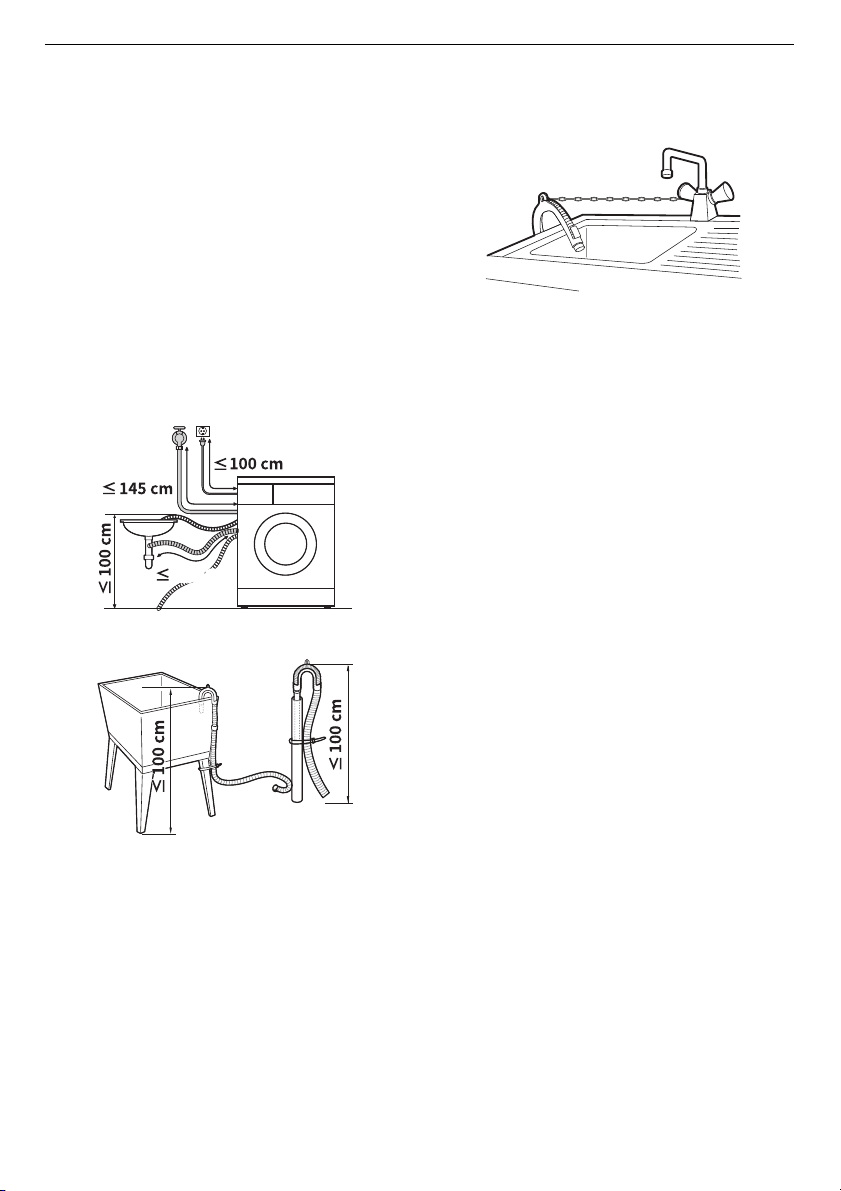
Screw the supply hose to the water inlet
valve on the back of the appliance.
•
Do not connect the ho
se to the hot
water
supply for models with one
water inlet. Connect to the cold wa
ter
su
pply only.
NOTE
• After completing connection, if water
leaks fro
m the hose, repeat the same
steps. Use the most conventional type
of tap for the water supply. In case that
the tap is square or too big, remove
the guide plate before insertin
g the
tap into
the adaptor.
•
Make sure that the hose should
not be
kinked or trapped.
18
INSTALLATION
EN
Installing the Drain
Hose
Installing the Drain Hose with
the Elbow Bracket
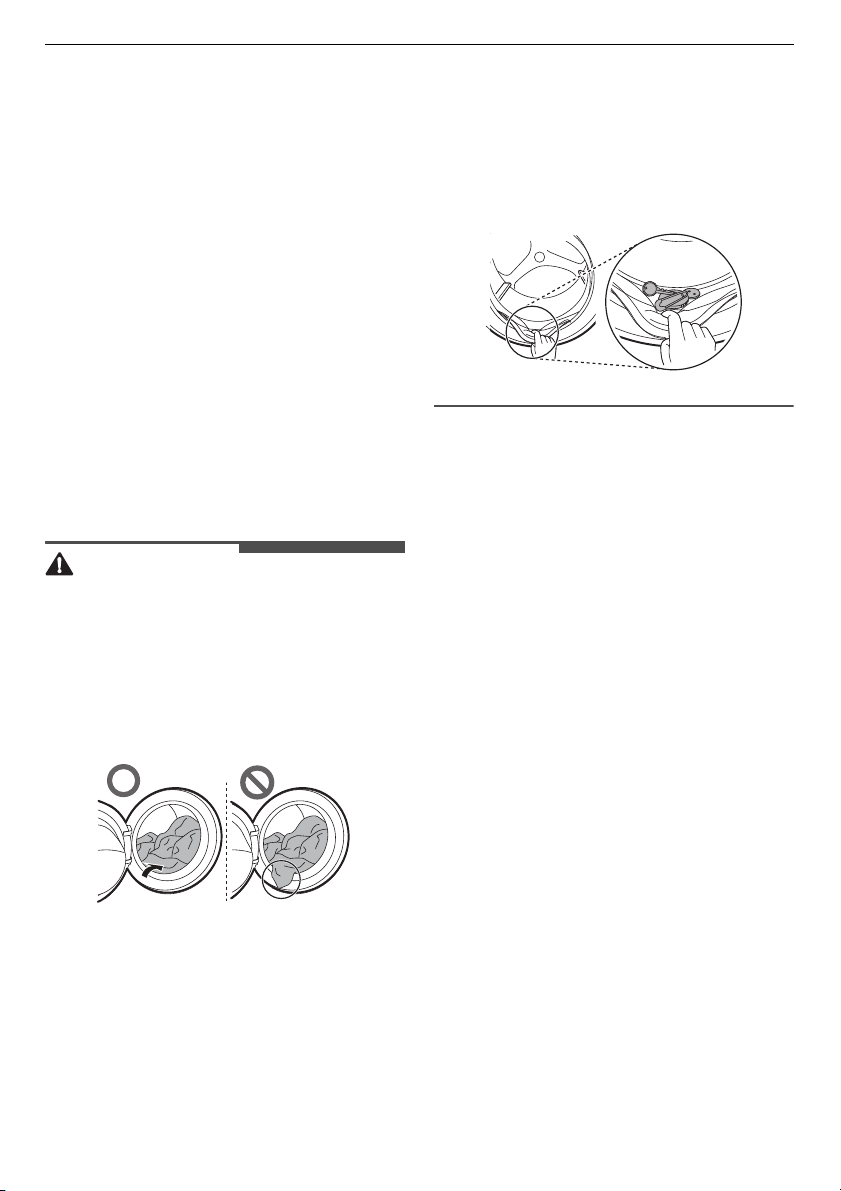
The drain hose should not be placed
higher than
100 cm
above the floor.
Water in the appliance may not drain or
may drain slowly.
•
Securing the drain hose correctly w
ill
protect the flo
or from damage du
e to
water leaka
ge.
•
If the drain hose is too long,
do not
f
orce it back into the appliance. This
will cause abnormal noise.
•
When installing the drain hose to
a
sink,
secure it tightly with string.
DN
19
OPERATION
EN
OPERATION
Operation Overview
Using the Appliance
Before the first wash, select the
Cotton
wash programme and add a half amount
of the detergent. Start the appliance
without clothes. This will remove
possible residues and water from the
drum that may have been left during
manufacturing.
1
Sort clothes and load items.
•
Sort clothes by fabric type, so
il
l
evel, colour and load size as
needed. Open the door and lo
ad
it
ems into the appliance.
CAUTION
• Before closing the door, ensure that all
clothes and item
s are inside the tub
and not over
hanging on the rubb
er
d
oor seal where they will be
come
caught when
the door is closed. Failing
to do so will cause damage to the door
seal and the clothes.
• Remove items from the flexible door
seal gasket to prevent clothing an
d
door seal dam
age.
2
Add cleaning products or detergent
and softener.
• Add the proper amount of
detergent to the detergen
t
di
spenser. If desired, add bl
each or
fabr
ic softener to the appropri
ate
areas of the d
ispenser.
3
Turn on the appliance.
• Press
the
Power
button to turn on
the app
liance.
4
Choose the desired cycle.
• Press the cycle button repeatedly or
turn the cycle selector knob un
til
the desired cycle is s
elected.
• Now select a wash temp
erature
and spin speed.
Pay attention to the
fabric care label of your clothes.
5
Begin cycle.
• Press
the
Start/Pause
button to
be
gin the cycle. The appliance will
agitate briefly without water to
measure the weight of the load. If
the
Start/Pause
button is not
press
ed wi
thin a certain time, the
20
OPERATION
EN
appliance will shut off and all
settings will be lost.
6
End of cycle.
• When the cycle is finished, a melody
will sound. Immediately remove
your clothing from the appliance to
reduce wrinkling. Check around the
door seal when remo
ving the load
for small items that may be caught
in the seal.
Preparing the Wash
Load
Sort the wash load for best washing
results, and then prepare the clothes
according to the symbols on their care
labels.
Sorting the Clothes
• For best washing results, sort your
clothes according to the care labe
l
stati
ng fabric type and washing
temperature. Adjust
the spin speed or
spin intensit
y in accordance
to the
f
abric type.
• Soil level (Heavy, Normal, Light):
Separate cloth
es according to
soil
le
vel. If possible, do not wash heav
ily
soile
d items with lightly soiled ones.
•
Colour (White, Lights, Darks): Wash
dark or dyed clothes se
parately from
whites or light colours. Mixing dyed
clothes w
ith light clothe
s can result in
d
ye transfer or discolouration of
lighter clothes.
•
Lint (Lint producers, Collectors): Wash
separately lint producing fabrics from
lint collecting fabrics. Lint produc
ers
can res
ult in pilling and linting on th
e
lint coll
ectors.
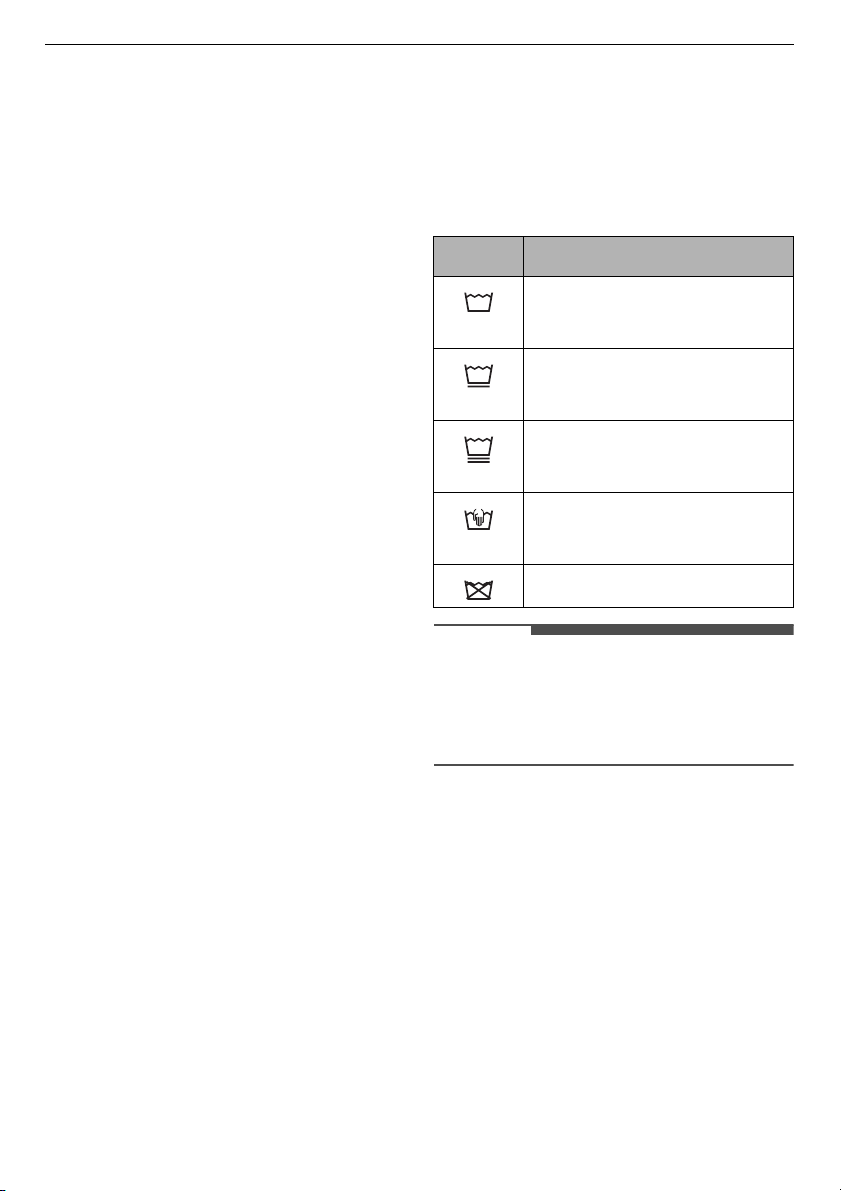
Checking the Clothes Care Label
The symbols tell you about the fabric
content of your garment and how it
should be washed.
Symbols on the Care Labels
NOTE
• The dashes under the symbol give you
in
formation about the type of
fabric
and
the maximum allo
wance of
mechanical stress.
Checking the Clothes before
Loading
• Combine large and small items in a
lo
ad. Load large items first.
•
Large items should not be mo
re than
ha
lf of the total wash load. Do no
t
w
ash single items. This may ca
use an
un
balanced load. Add one or two
similar items.
•
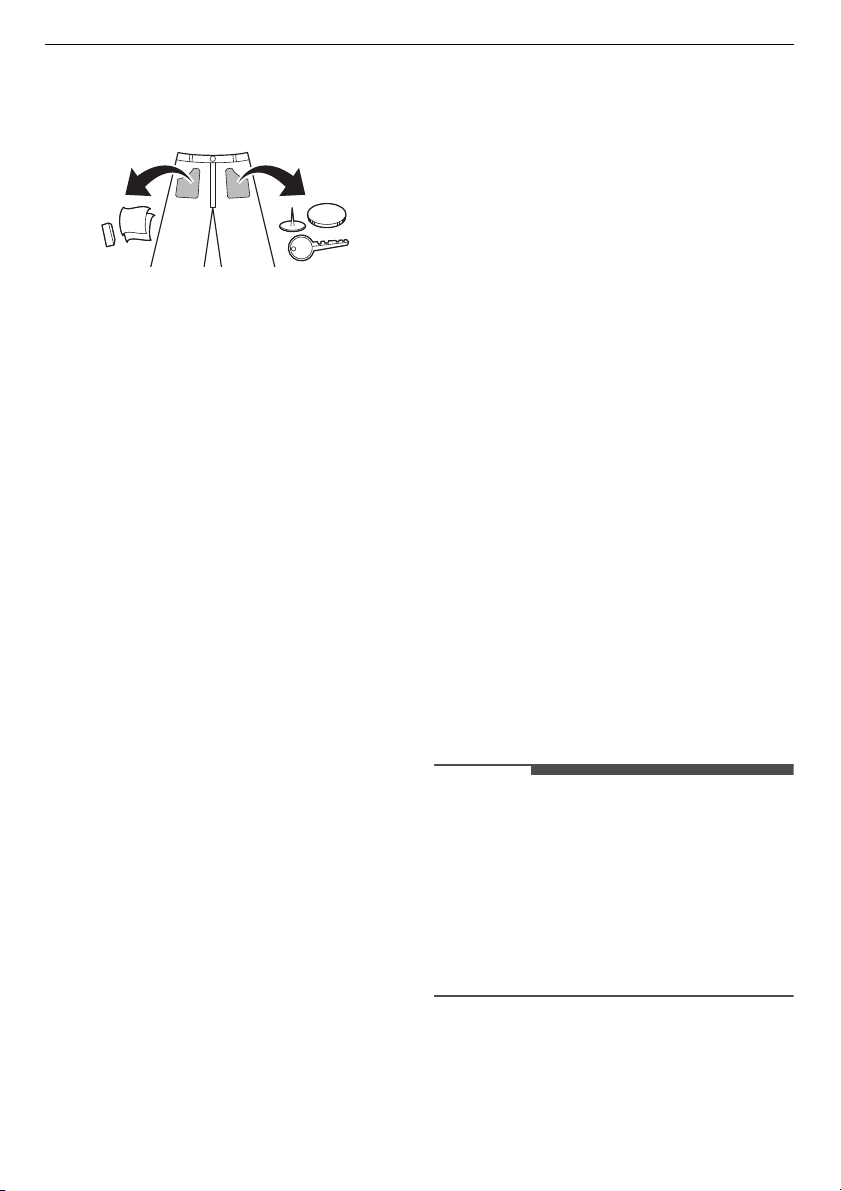
Check all pockets to make su
re that
they ar
e empty. Items such as nails
,
ha
ir clips, matches, pens, coin
s and
Symbol Wash / Fabric type
• Normal Wash
• Cotton, Mixed Fabrics
•
Easy
Care
•
S
ynthetic, Mixed Fabrics
•
Special Delicate Wash
• De
licates
•
Hand Wash Only
• W
ool, Silk
•
Do not wash
21
OPERATION
EN
keys can damage both your appliance
and clothes.
• Wash delicates (stockings, underwired
bras) in a wash net.
•
Close zippers, h
ooks and strings to
m
ake sure that these item
s do not
snag on o
ther clothes.
•
Pre-treat dirt and stains by brushi
ng a
sm
all amount of detergent diss
olved
water onto sta
ins to help lift dirt.
Adding Detergents and
Softeners
Detergent Dosage
• Detergent should be used according to
the instruction of
the detergent
manufacturer and se
lected
according
to type, col
our, soiling of the fabric and
the washing temperature. Use on
ly
detergents that a
re suitab
le for Drum
(fro
nt load) type washers.
•
If too many
suds occur, reduce the
detergent amo
unt.
•
If too much detergent is used, too
many suds can occur an
d this will
result
in poor washing results or cause
heavy load to the motor.
• If you wish to use liquid detergent,
f
ollow the guidelines provided
by the
detergent manu
facturer.
•
You ca
n pour liquid detergent directly
into the main
detergent drawer if yo
u
are starting the w
ash cy
cle
immediately.
•
Do not use liquid detergent if
you are
using the
Delay End
function, or if you
have selected
Pre Wash
option, as the
li
quid will dispense immediately and
may harden in the drawer or the tub.
• Detergent usage may need to
be
adju
sted for water temperature, water
hardness
, size and soil level of the
load. For best results, avoid
ove
rdosing the detergent. Failing to do
so will cause oversudsing.
• Refer to the label of the clothes, before
adding the detergent and choosing
the water temperature.
•
Use only suitable detergents for the
respective type of clothing:
- L
iquid detergent is often designed
for special applications, e.g.
for
c
oloured fabric, wool, delicat
e or
dark cl
othes.
-
Powdered detergent is suitable
for
a
ll types of fabric.
-
For better washing results of wh
ite
and p
ale garments, use powdered
detergent with bleach.
-
De
tergent is flushed from the
di
spenser at the beginning of
the
w
ash cycle.
NOTE
• Do not let the detergent harden. Doing
so may lead to blockages, poor
rinse
performanc
e or odour.
• Full load: According to manufacturer’s
recommendation.
•
Part load: 1/2 of the normal amount.
• Minimum load: 1/3 of full load.
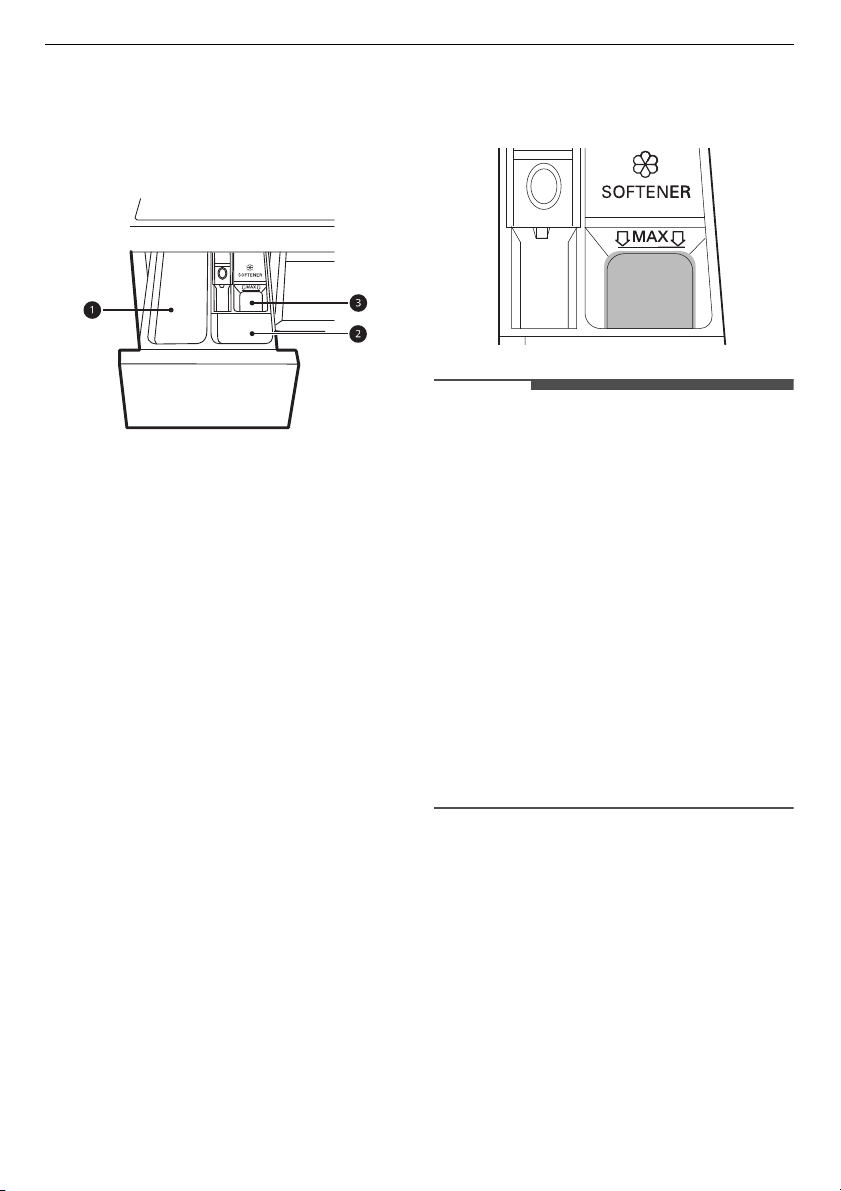
Using the Dispenser
To add detergent dosage to the
dispenser:
22
OPERATION
EN
1
Open the dispenser drawer.
2
Add the detergent and softener into
the appr
opriate compartments.
a
Main wash detergent
compartment
b
Pre-wash detergent compartment
c
Liquid fabric softener
compartment
3
Gently close the detergent dispenser
dr
awer before starting the cycle.
•
Slamming the drawer cl
osed may
result in the
detergent ov
erflowing
into ano
ther comp
artment or
dispensing
into the drum
earlier
than pr
ogrammed.
•
Be careful not to get a hand
caught
i
n the drawer while closing.
•
It is normal for a small amou
nt of
w
ater to remain in the dispen
ser
co
mpartments at the end of th
e
cycle.
Fabric Softener Compartment
This compartment holds liquid fabric
softener, which is automatically
dispensed during the final rinse cycle.
Either powdered or liquid fabric softener
may be used.
• Pour fabric softer to the maximum fill
line. Pouring excessive fabric soft
ener
ove
r the maximum fill line can cause
it
t
o dispense too early, which may stain
the clothes.
NOTE
• Do not pour fabric softener directly
on
to the clothes in the wash
drum,
doin
g so will cause dark staining on
the clothes that will be difficul
t to
remove
.
• Do not leave the fabric softener in the
detergent drawer for more than 1 day.
Fabric softener may harden. Soft
ener
m
ay remain in the dispenser if it is to
o
thick. The
softener should be diluted if
the consistency is too thick so that it
can flow easily.
• Do not open the drawer when water is
being supplied during the wash.
•
Solvents (benzene, etc.) must never be
used.
Adding Detergent Tablets
Detergent tablets can also be used when
washing.
1
Open the door and put detergent
tabl
ets into the drum before loading
the clothes.
2
Load the clothes into the drum and
close the door.

23
OPERATION
EN
NOTE
• Do not put tablets into the dispenser.
Adding Water Softener
A water softener, such as anti-limescale
can be used to cut down on the use of
detergent in areas with high water
hardness level.
•
First ad
d detergent, and then the
water
softener. Dispense according to
the amount specified on the
packaging.
24
OPERATION
EN
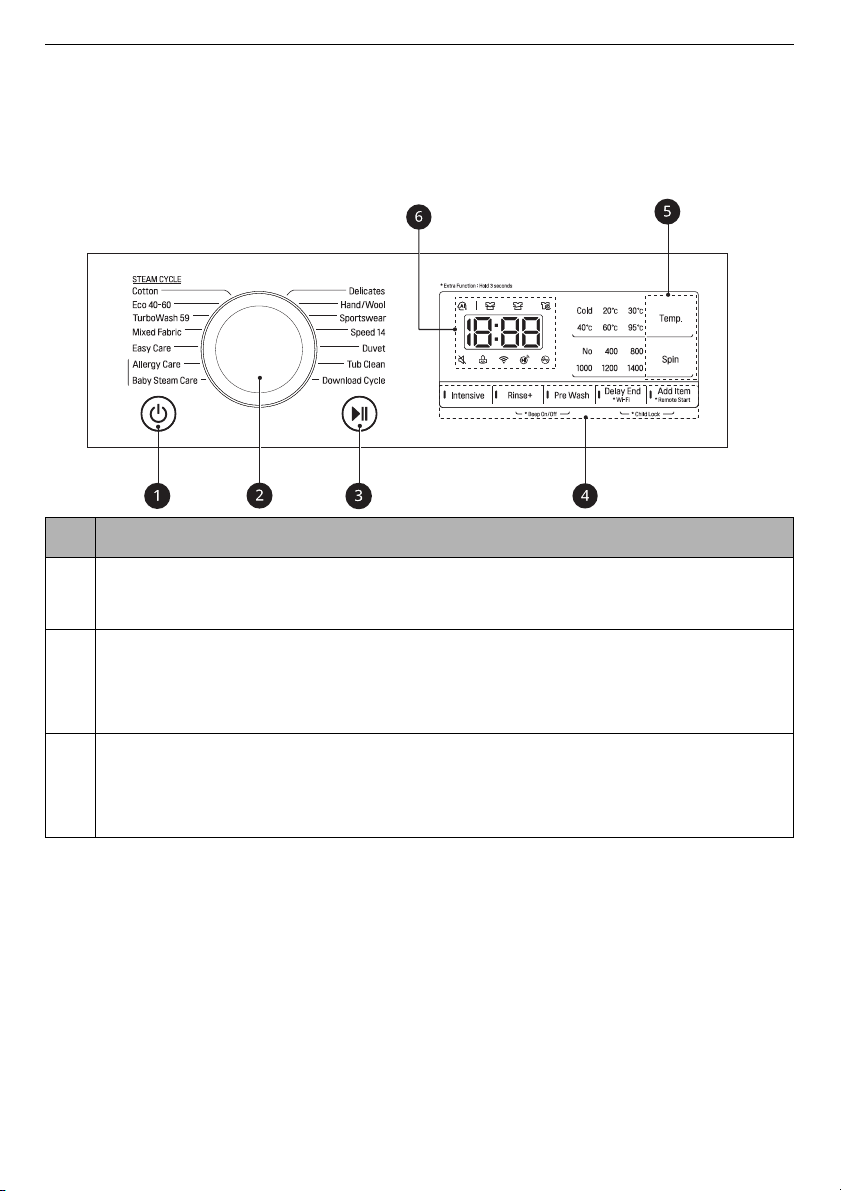
Control Panel
The actual control panel may differ from model to model.
Control Panel Features
Description
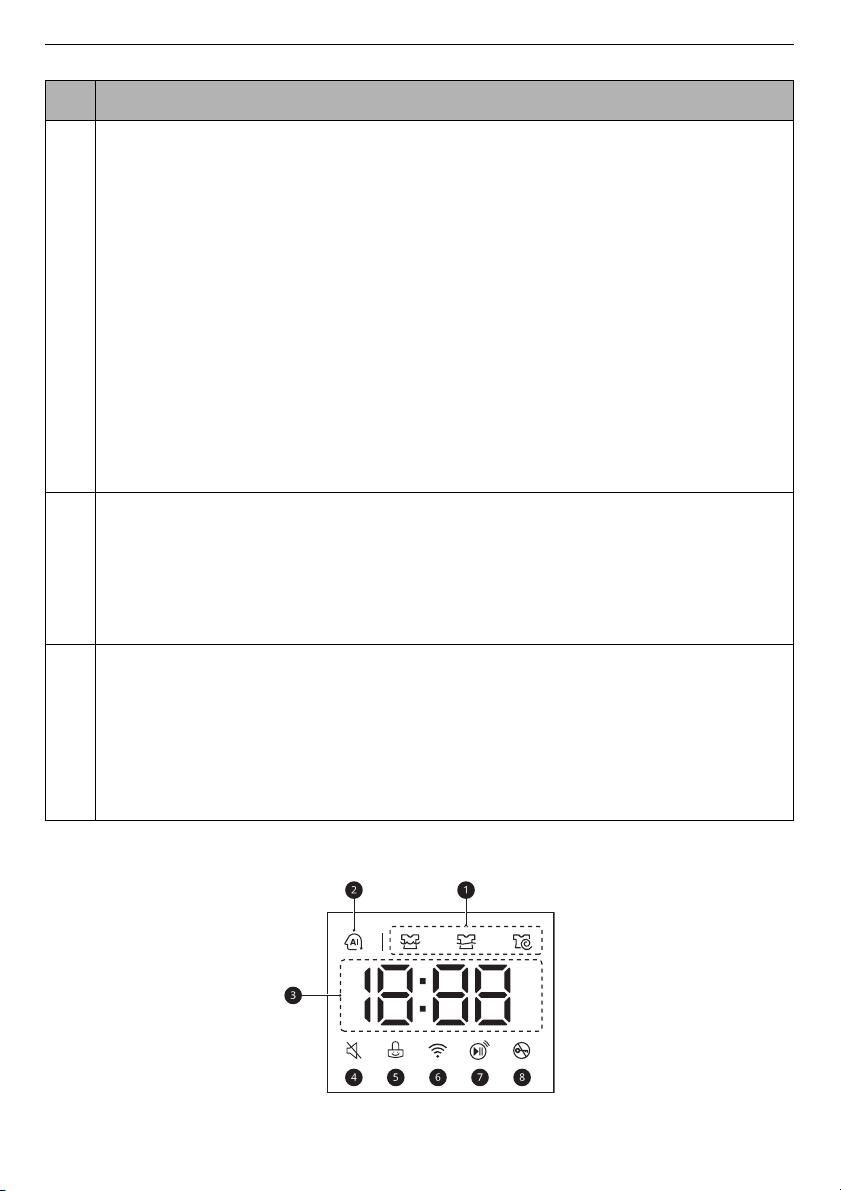
a
Power
On/Off Button
• Press this button to turn the washing machine on.
b
Programme Knob
• Programmes are available according to the clothes type.
• The lamp will light up to indicate the selected programme.
c
Start/Pause
Button
• This button is used to start the wash cycle or pause the wash cycle.
• If a temporary stop of the wash cycle is needed, press this button.
25
OPERATION
EN
Time and Status Display
d
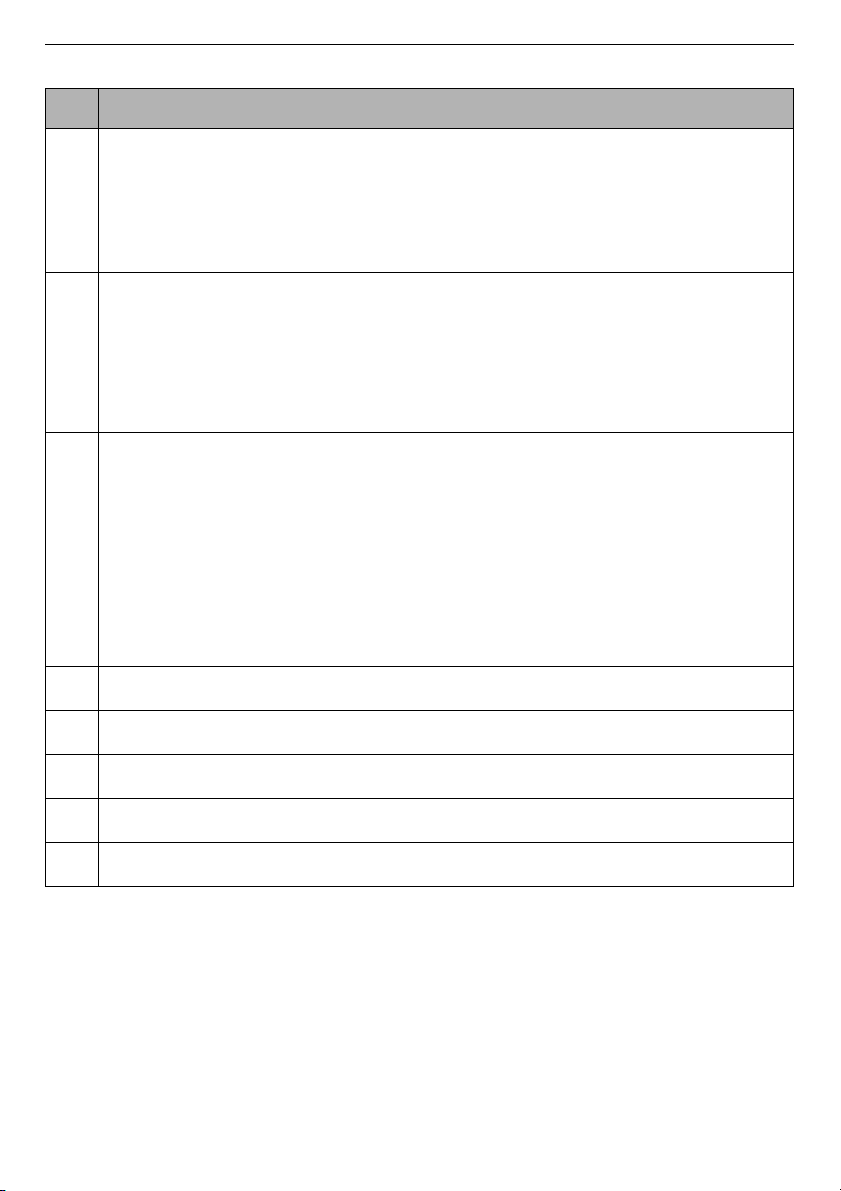
Extra Options and Functions
• To use the extra functions, press and hold the corresponding button for 3
se
conds. The corresponding symbol lights up in the display.
• This allows you to select an additional programmes and will light when
selected.
Remote Start
With the
LG ThinQ
app, you can use a smartphone to control your appliance
remotely.
•
In order to use this function, refer to
SMART FUNCTIONS
.
Wi-Fi
Press and hold the
Delay End
button for 3 seconds to initiate the connection
of the appliance to the
LG ThinQ
application.
e
Customizing Washing Programme Buttons
Use these buttons to adjust the water temperature or spin speed settings for
the selected programme.
•
The current settings are shown in the display.
•
Press the button for that option to select other settings.
f
Display
• The display shows the settings, estimated remaining time, options, and
s
tatus messages. When the appliance is turned on, the defa
ult settings in
th
e display will illuminate.
• While the load weight is sensed automatically, the display on the contro
l
pane
l blinks.
Description
26
OPERATION
EN
Description
a
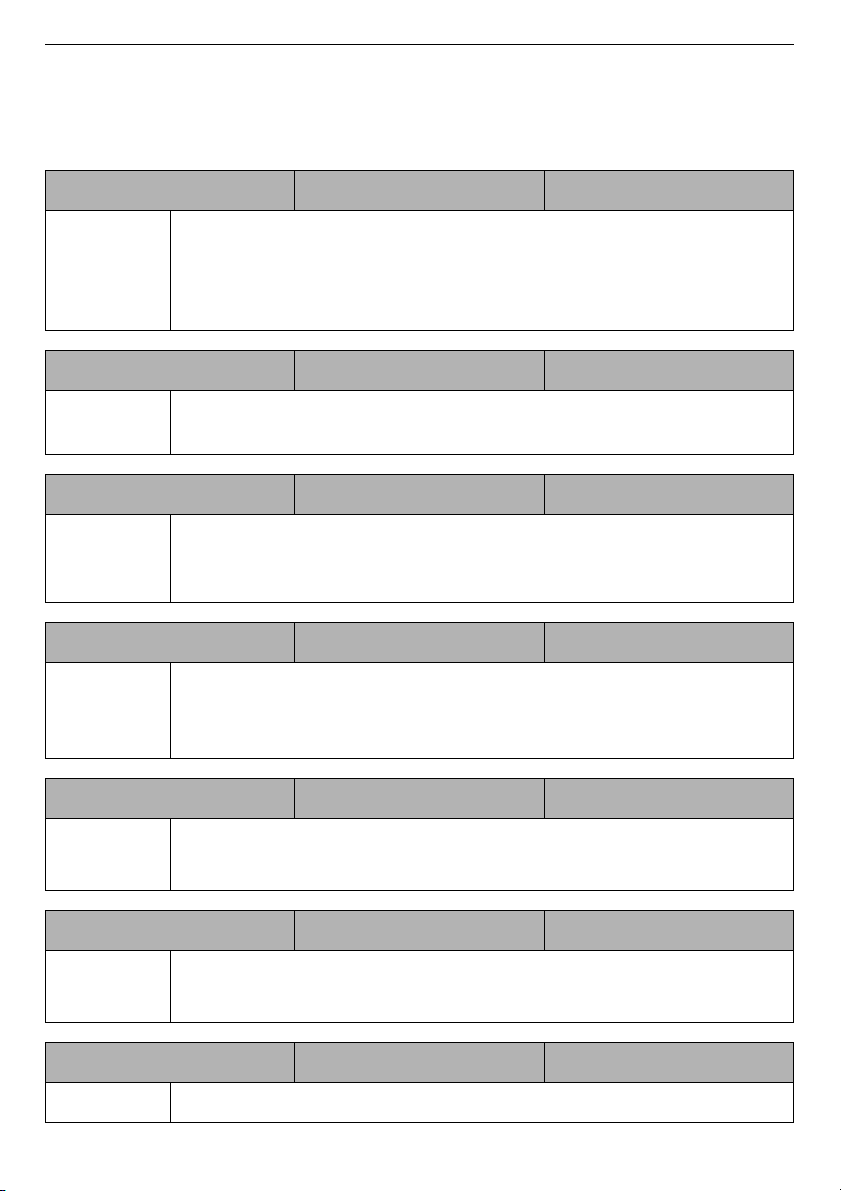
Programme Status Indicators
• When a washing programme is running, LED for the active stage will blink,
and the LEDs for the remaining stages will remain steady. Once a stage
is
complete,
the LED will turn off. If a cycle is paused, the active stage LED will
stop blinking.
b
AI DD
•
AI DD
M
provides the appropriate drum rotation actions after load sensing
is completed.
•
M
is activated when the
Cotton
,
Mixed Fabric
, and
Easy Care
program
mes are selected and operated.
c
Estimated Time Remaining
• When a washing programme is selected, the default time for that
programme is displayed. This time will change as options are selected.
•
If the display shows
---
, then the time will be displayed after the load
sensing has detected the load size. This is normal.
• The time shown is only an estimate. This time is based on normal operating
conditions. Several external factors (load weight, room temperature,
incoming water temperature, etc.) can affect the actual time.
d
q
lights up when the beep sound is turned off.
e
i
lights up when the control panel is locked except for the
Power
button.
f
f
lights up when the appliance is connected to Wi-Fi network at home.
g
w
lights up when the remote control feature is activated.
h
H
lights up when the programme starts and the door is locked.
27
OPERATION
EN
Programme Table
Washing Programme
Cotton 40 °C (Cold to 95 °C) Max. Load: Rating
Description Washes normally soiled clothes by combining various drum motions.
• Pressing
the
Start/Pause
button without selecting a programme
wil
l cause the
Cotton
programme to begin immediately, using the
default
settings.
Eco 40-60 40 °C (40 °C to 60 °C) Max. Load: Rating
Description Washes normally soiled cotton clothes declared to be washable at 40
°C or 60 °C.
TurboWash 59 40 °C (Cold to 60 °C) Max. Load 5 kg
Description With 4 water jets operating during the wash and rinse, this washing
machine can wash a half load of lightly soiled clothes for
approximately 59 minutes.
Mixed Fabric 40 °C (Cold to 60 °C) Max. Load 5 kg
Description Washes mixed fabrics simultaneously.
•
Use for various kind of fabrics except special garments (silk/
delicate, sports wear, dark clothes, wool, duvet/curtains).
Easy Care 40 °C (Cold to 60 °C) Max. Load 5 kg
Description Washes clothes that do not need ironing after washing.
• Use for Polyamide, acrylic, polyester.
Allergy Care 60 °C Max. Load 5 kg
Description Helps minimise substances that cause an allergic reaction.
•
Use for cotton, underwear, pillow covers, bed sheets, baby wear.
Baby Steam Care 60 °C Max. Load 5 kg
Description Helps wash food stains from baby clothes.
28
OPERATION
EN
NOTE
• The test results depend on water pressure, water hardness, water inlet
t
emperature, room temperature, type and amount of load,
degree of soiling
utiliz
ed detergent, fluctuations in the main electricity supply and chosen additional
options.
Delicates 20 °C (Cold to 40 °C) Max. Load 4 kg
Description Washes machine-washable lingerie, sheer and lacy clothes.
Hand/Wool 30 °C (Cold to 40 °C) Max. Load 2 kg
Description Washes hand-washable and machine-washable delicate clothes such
as washable wool, lingerie, dresses etc.
• Use detergent for machine washable woolens
Sportswear 40 °C (Cold to 40 °C) Max. Load 4 kg
Description Washes special garments like sports and outdoor wear.
•
Use for water-repellent fabric laminate used on clothing.
Speed 14 20 °C (20 °C to 40 °C) Max. Load 2 kg
Description Washes small loads of lightly soiled clothes for approximately 14
minutes.
Duvet Cold (Cold to 40 °C)
Max. Load 2.5 kg (1
down duvet)
Description Washes large items such as bed covers, pillows, sofa covers, etc.
Tub Clean - -
Description This function helps clean the inside of your appliance's tub.
Download Cycle - -
Description This programme allows you to download a new and special washing
programme to your appliance with a smartphone. The default
programme is
Rinse+Spin
.

29
OPERATION
EN
• Select the appropriate water temperature for chosen wash programme. Always
follow garment manufacturer’s care label or instructions when washing to avoi
d
da
mage to clothes.
•
Select the proper wash temperature and spin speed for the desired programmes.
•
Actual water temperature may differ from the declared cycle temperature.
• Neutral detergent is recommended.
30
OPERATION
EN
Extra Options
*1 This option is automatically inserted in the programme and can not be deselected.
NOTE
•
Rinse+
,
Delay End
and
Add Item
options can be selected for every washing
programme in this table.
Programme Intensive Pre Wash
Cotton
##
Eco 40-60
##
TurboWash 59
#
Mixed Fabric
##
Easy Care
##
Allergy Care
#
Baby Steam Care
#
Delicates
#
Hand/Wool
#
Sportswear
#
Speed 14
Duvet
#
31
OPERATION
EN
Selectable Maximum Spin Speed
NOTE
• Actual maximum spin speed may vary depending on the load
conditions.The values above are rounded to the nearest hundred.
Programme
Spin Speed
Default Available
Cotton
1400 rpm All
Eco 40-60
1400 rpm All
TurboWash 59
1200 rpm
400 to 1400 rpm
Mixed Fabric
1000 rpm All
Easy Care
1400 rpm All
Allergy Care
1400 rpm All
Baby Steam Care
1000 rpm Up to 1000 rpm
Delicates
800 rpm Up to 800 rpm
Hand/Wool
800 rpm Up to 800 rpm
Sportswear
800 rpm Up to 800 rpm
Speed 14
400 rpm All
Duvet
1000 rpm Up to 1000 rpm
32
OPERATION
EN
Consumption Data of Standard Programme
F4V710*TSE
F4V709*TSE
F4V708*TSE
Program
me
Temp.
(°C)
Load (kg)
Duration
(h:mm)
Water (L)
Energy
(kWh)
Residual
moisture
(%)
Eco 40-60
+
Intensive
60 10.5 4:52 50 0.670 44
60 5.25 4:18 41 0.630 44
40 5.25
4:08
41 0.560 44
Program
me
Temp.
(°C)
Load (kg)
Duration
(h:mm)
Water (L)
Energy
(kWh)
Residual
moisture
(%)
Eco 40-60
+
Intensive
60 9 4:27 46 0.620 44
60 4.5 4:14 39 0.560 44
40 4.5 4:04 39 0.460 44
Program
me
Temp.
(°C)
Load (kg)
Duration
(h:mm)
Water (L)
Energy
(kWh)
Residual
moisture
(%)
Eco 40-60
+
Intensive
60 8 4:27 46 0.570 44
60 4 3:34 37 0.470 44
40 4 3:34 36 0.410 44
33
OPERATION
EN
Extra Options and
Functions
You can use the extra options and
functions to customize the programmes.
Customising a Washing
Programme
Each programme has default settings
that are selected automatically. You may
also customise these settings using
these buttons.
Temp.
This button selects the wash
temperature for the selected
programme.
• Pre
ss the
Temp.
button until the
de
sired setting is lit.
•
Select the water temperature suitab
le
for the type o
f load you are washing.
Follow the garment fabric care labels
for best results.
Spin
The spin intensity level can be selected
by pressing this button repeatedly.
• Pre
ss the
Spin
button to select spin
sp
eed.
NOTE
• If
No
is selected by pressing the
Spin
butto
n, it will still rotate for a sh
ort
time to drain quickly.
Rinse+
This function is recommended for
people with detergent allergies.
• Pre
ss the
Rinse+
button for adding
rin
se once.
Intensive
This function is used to wash normal and
heavily soiled clothes.
• Press
the
Intensive
button.
Follow the next steps to customise a
washing programme:
1
Prepare the clothes and load the
drum
.
2
Press the
Power
button.
3
Add detergent.
4
Select a washing programme.
5
Customise the washing programme
(
Temp.
,
Spin
,
Rinse+
and
Intensive
)
as necessary.
6
Press the
Start/Pause
button.
Only Using a Spin Function
1
Prepare the clothes and load the
drum
.
2
Press the
Power
button.
•
Do not select a washin
g
pr
ogramme and do not ad
d a
de
tergent.
3
Press the
Spin
button.
4
Press the
Start/Pause
button.
NOTE
• If you select the washing programme,
y
ou will be unable to select a spin only.
34
OPERATION
EN
If this occurs, press
Power
button
twice to cycle the machine off and back
on.
Using Basic Options
You can customize the programmes by
using the following basic options:
Pre Wash
This option is recommended when
washing a heavily soiled load.
1
Press the
Power
button.
2
Select a washing programme.
3
Press the
Pre Wash
button as
necessary.
4
Press the
Start/Pause
button.
Add Item
You can use this option in order to add or
remove clothes after the washing
programme has started.
1
Press the
Power
button.
2
Select a washing programme.
3
Press the
Start/Pause
button.
4
Press the
Add Item
button as
necessary.
5
Open the door after it unlocks itself
and add or remove necessary
clothing items.
6
Close the door and press the
Start/
Pause
button.
NOTE
• For safety reasons, the door remains
lo
cked when the water level or
temperature inside of the drum is
high. It is not possible to add clothes at
this time.
Delay End
You can set this function so that the
appliance starts automatically and
finishes after a specified time interval.
1
Press the
Power
button.
2
Select a washing programme.
3
Press the
Delay End
button as
necessary.
4
Press the
Start/Pause
button.
NOTE
• The delay time is the time to the end of
the programme, not the start. Th
e
ac
tual running time may vary
due to
w
ater temperature, clothes and othe
r
factors.
•
To cancel the function, the
Power
button should
be pressed.
•
Avoid using liquid detergent for this
function.
Settings
Child Lock
Use this option to disable the controls.
This function can prevent children from
35
OPERATION
EN
changing cycles or operating the
appliance.
NOTE
• Once this function is set, all buttons
are locked except the
Power
button.
• When the controls are locked,
[L
and
th
e remaining time are alternativel
y
show
n on the display during the wa
sh
while
this function is engaged.
• Turning off the power will not rese
t
th
is function. You must deactivate this
function before you can access
any
other functions.
Locking the Control Panel
1
Turn on the power.
2
Press and hold the
Delay End
and
Add Item
buttons at the same time
for 3 seconds to activate this function.
•
A beeper will sound, and
CL
will
a
ppear on the display.
Unlocking the Control Panel
1
Turn on the power.
2
Press and hold the
Delay End
and
Add Item
buttons at the same time
for 3 seconds to deactivate this
function.
Beep On/Off
This appliance plays a melody when it
starts and stops.
•
Press and hold the
Rinse+
and
Pre
Wash
buttons simultaneously for 3
seconds to deactivate/activate th
is
fun
ction.
35
SMART FUNCTIONS
EN
SMART FUNCTIONS
LG ThinQ Application
The
LG ThinQ
application allows you to
communicate with the appliance using a
smartphone.
LG ThinQ Application Features
Communicate with the appliance from a
smartphone using the convenient smart
features.
Remote Start
It allows you to control the appliance
remotely from the
LG ThinQ
application.
Download Cycle
You can download new and special
cycles that are not included in the basic
cycles on the appliance.
A variety of specialty cycles specific to
the appliance can be downloaded to the
successfully registered appliances.
Once cycle download is completed in the
appliance, the appliance keeps the
downloaded cycle until a new cycle is
downloaded.
NOTE
• Only one downloaded cycle can be
stored on the appliance at a time.
Tub Clean Coach
This function shows how many cycles
remain before it is time to run the
Tub
Clean
function.
Energy Monitoring
This function checks the energy
consumption of the recently used cycles
and monthly average.
Smart Diagnosis
This function provides useful
information for diagnosing and solving
issues with the appliance based on the
pattern of use.
Settings
Allows you to set various options on the
appliance and in the application.
Push Alert
When the cycle is complete or the
appliance has problems, you have the
option of receiving push notifications on
a smartphone. The notifications are
triggered even if the
LG ThinQ
application is off.
NOTE
• If you change your wireless router,
Internet service provider, or password,
delete the registered appliance from
the
LG ThinQ
application and register
it again.
• The application is subject to change for
appliance improvement purposes
without notice to users.
• Functions may vary by model.
Before Using LG ThinQ
Application
1
Check the distance between the
appliance and the wireless router (Wi-
Fi network).
• If the distance between the
appliance and the wireless router is
too far, the signal strength
becomes weak. It may take a long
36
SMART FUNCTIONS
EN
time to register or installation may
fail.
2
Turn off the
Mobile data
or
Cellular
Data
on your smartphone.
3
Connect your smartphone to the
w
ireless router.
NOTE
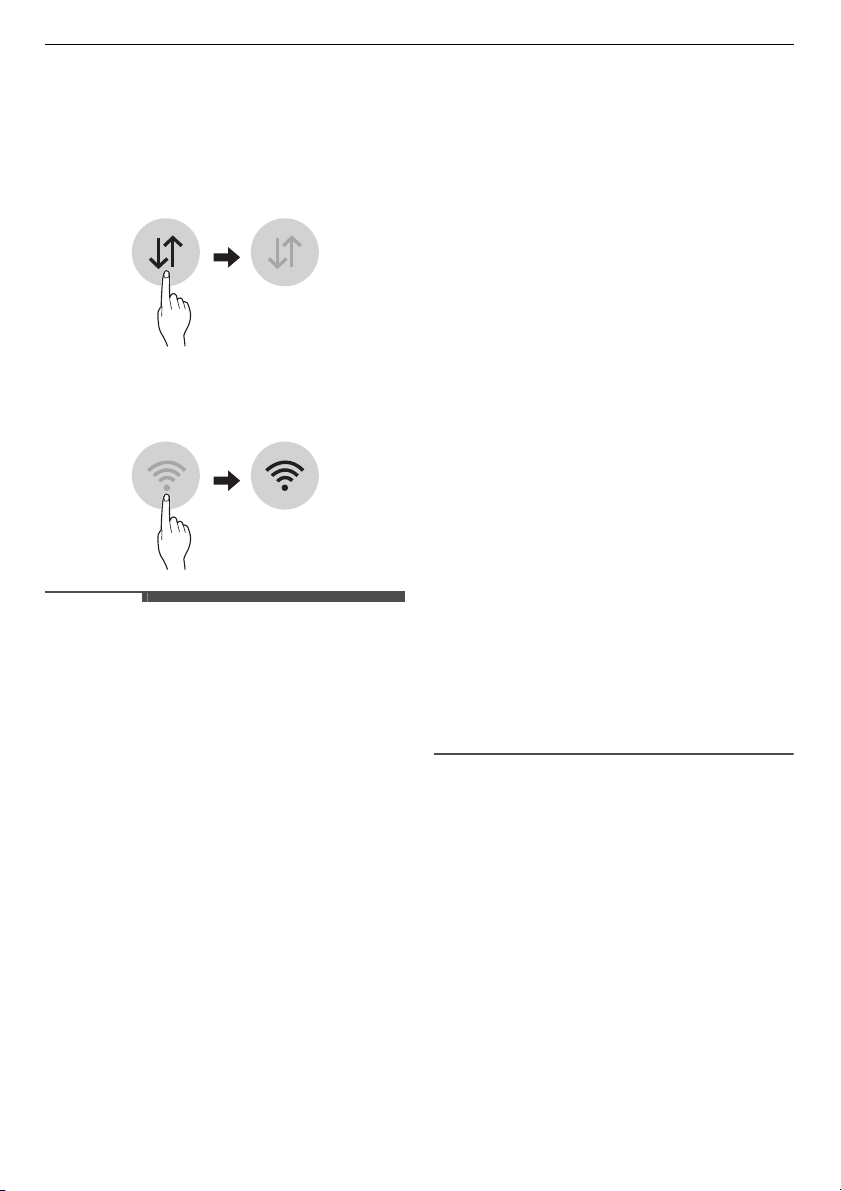
• To verify the Wi-Fi connection, check
th
at
f
icon on the control panel is lit.
•
The appliance supports 2.4 GHz Wi-Fi
networks only. To check your netw
ork
f
requency, contact your Internet
service provider or refer to
your
wireless router manua
l.
•
LG ThinQ
is not responsible for any
net
work connection problems or an
y
fau
lts, malfunctions, or errors ca
used
by n
etwork connection.
•
If the appliance is having trou
ble
co
nnecting to the Wi-Fi network, it may
be too far from the router. Purchase a
Wi-Fi repeater (range extender
) to
i
mprove the Wi-Fi signal strength.
•
The Wi-Fi connection may not conn
ect
or
may be interrupted be
cause of the
home netwo
rk environment.
• The network connection may not work
properly depending on the Internet
service provider.
• The surrounding wireless environment
can make the wireless network se
rvice
run slow
ly.
• The appliance cannot be registered
due to problems with the wireless
signal transmission. Unplug th
e
appl
iance and wait about a minute
before trying again.
• If the firewall on your wireless router is
enabled, disable the firewall or add
an
excepti
on to it.
•
The wireless network name (SSID)
should be a combination of Eng
lish
letters
and numbers. (Do no
t use
special c
haracters.)
•
Smartphone user interface (UI) ma
y
vary de
pending on the mobile
operating syst
em (OS) and the
ma
nufacturer.
• If the security protocol of the router is
set to
WEP
, you may fail to set up the
netw
ork. Please change it to ot
her
secu
rity protocols (
WPA2
is
recommended
) and regi
ster the
product again.
Installing the LG ThinQ
Application
Search for the
LG ThinQ
application
from the Google Play Store or Apple App
Store on a smartphone. Follow
instructions to download and install the
application.
37
SMART FUNCTIONS
EN
Using the Appliance Remotely
Remote Start
Use a smartphone to control your
appliance remotely. You can also
monitor your cycle operation so you
know how much time is left in the cycle.
Using this function
1
Put the clothes into the drum.
• If desired, add bleach or fabric
softener to the appropriate areas of
the dispenser.
2
Press the
Power
button.
3
Press and hold
Remote Start
button
for 3 seconds to enable the remote
control function.
4
Start a cycle from the
LG ThinQ
application on your smartphone.
NOTE
• Once this function is enabled, you can
only start a cycle from the
LG ThinQ
smartpho
ne application. If the cycle is
not started, the appliance will wa
it to
start the cycle until it is turned off
remotely from the application or this
function is disabled.
• If the door has been opened, you can
not start a cycle remotely.
Disable this function manually
When this function is activated, press
and hold the
Remote Start
button for 3
seconds.
Standby Power Consumption
Open Source Software Notice
Information
To obtain the source code under GPL,
LGPL, MPL, and other open source
licenses, that is contained in this
product, please visit http://
opensource.lge.com.
In addition to the source code, all
referred license terms, warranty
disclaimers and copyright notices are
available for download.
LG Electronics will also provide open
source code to you on CD-ROM for a
charge covering the cost of
performing such distribution (such as
the cost of media, shipping, and
handling) upon email request to
[email protected]. This offer is
valid for a period of three years after
our last shipment of this product.
This offer is valid to anyone in receipt
of this information.
Standby power consumption
0.5 W
Network standby power
consumption
2.0 W
The period of time after which
the power management
function, or a similar function,
switches the equipment
automatically into standby
and/or off mode and/or the
condition providing
networked standby
20
minu
tes
38
SMART FUNCTIONS
EN
Smart Diagnosis
This feature is only available on models
with the
c
or
d
logo.
Use this feature to help you diagnose
and solve problems with your
appliance.
NOTE
• For reasons not attributable to LGE’s
negligence, the service may not
operate due to external factors such
as, but not limited to, Wi-Fi
unavailability, Wi-Fi disconnection,
local app store policy, or app
unavailability.
• The feature may be subject to change
without prior notice and may have a
different form depending on where
you are located.
Using LG ThinQ to Diagnose
Issues
If you experience a problem with your
Wi-Fi equipped appliance, it can transmit
troubleshooting data to a smartphone
using the
LG ThinQ
application.
• Launch the
LG ThinQ
application and
select the
Smart Diagnosis
feature
inthe menu. Follow the instructions
provided in the LG ThinQ application.
Using Audible Diagnosis to
Diagnose Issues
Follow the instructions below to use the
audible diagnosis method.
• Launch the
LG ThinQ
application and
select the
Smart Diagnosis
feature in
the menu. Follow the instructions for
audible diagnosis provided in the
LG
ThinQ
application.
1
Press the
Power
button to turn on
the appliance.
• Do not press any other buttons.
2
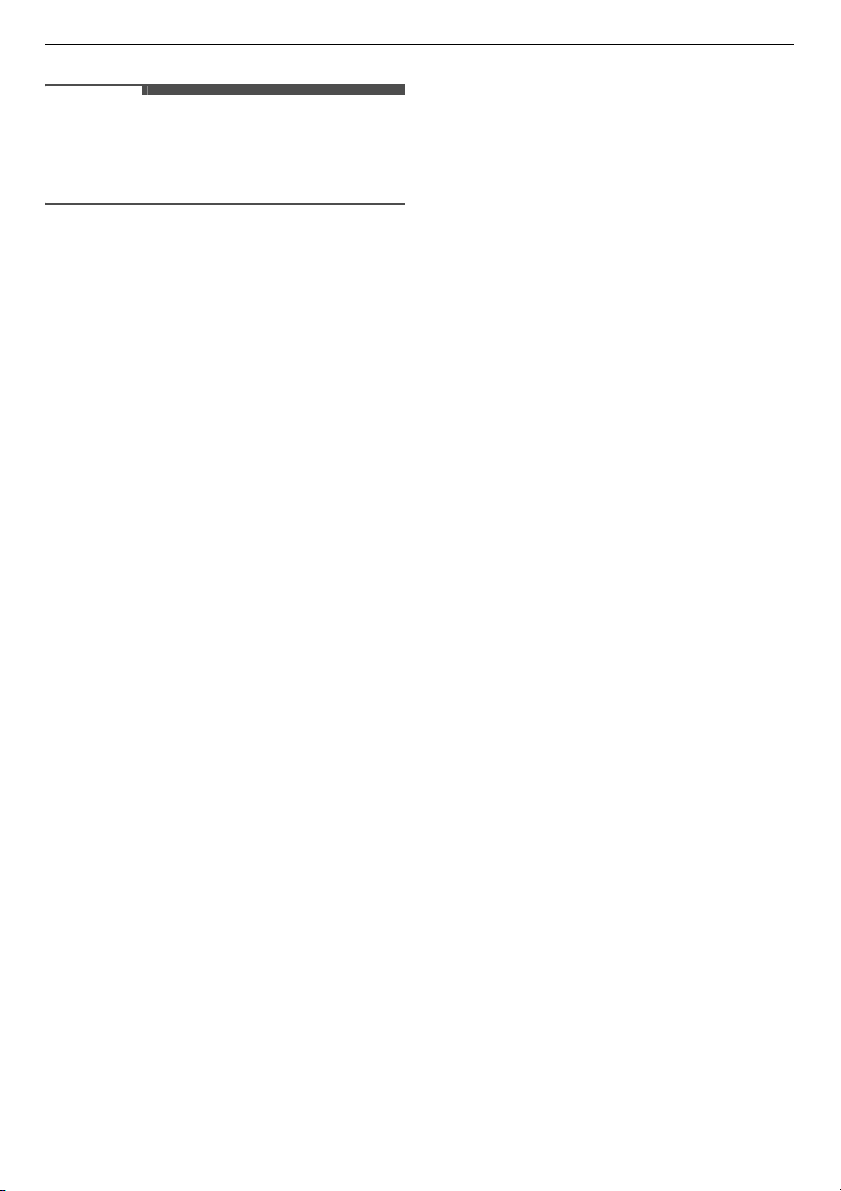
Place the mouthpiece of your
smartphone close to the
c
or
d
logo.
3
Press and hold the
Temp.
button for
3 seconds or longer while holding the
smartphone mouthpiece to the logo
until the data transfer is complete.
• Keep the smartphone in place until
the data transfer has finished. Time
remaining for data transfer is
displayed.
4
After the data transfer is complete,
the diagnosis will be displayed in the
application.
Max.
10 mm
Max.
10 mm
39
SMART FUNCTIONS
EN
NOTE
• For best results, do not move the
smartph
one while the tones
are being
transmitted.
40
MAINTENANCE
EN
MAINTENANCE
WARNING
• Unplug the appliance before cleaning to avoid the risk of electric shock. Failure to
follow
this warning may result in serious injury, fire, electric shock, or death.
•
Never use harsh chemicals, abrasive cleaners, or solvents to clean the applianc
e.
They may damage the finish.
Cleaning After Every
Wash
What to Clean
Always remove items from the washing
machine as soon as the cycle is
complete. Leaving damp items in the
washing machine can cause wrinkling,
colour transfer, and odour.
•
After the wash cycle is finish
ed, wipe
t
he door and door seal to
remove any
moi
sture.
•
Leave the door slightly open
to dry the
drum
.
•
Wipe the appliance with a dry
cloth to
r
emove any moisture.
WARNING
• Leave the door open to dry inside of
the
appliance only if the children are
supervised at home.
Cleaning the Exterior
Proper care of your appliance can extend
the service life.
Exterior
• Immediately wipe off any spills.
• Wipe with a damp cloth and then again
with a dry cloth ensuring there is no
moisture in cabinet joints or crevices.
•
Do not press on the surface or th
e
display
with sharp objects.
Door
• Wash with a damp cloth on the outside
and inside and then dry with a so
ft
clo
th.
WARNING
• Do not attempt to separate any panels
or disassemble the appliance. Do
not
appl
y any sharp objects to the control
panel in order to operate the
appliance.
41
MAINTENANCE
EN
Cleaning the Appliance
Periodically &
Performing an
Emergency Water
Evacuation
Tub Clean
This is a special function to help clean the
inside of the appliance by soaking,
washing, rinsing and spinning.
Run this function
once a month
(or
more often if needed) to reduce build-up
of detergent and softener and other
residue.
• If there is a bad smell or mildew inside
the appliance, run this function
once a
week for 3 weeks
in addition to the
r
egularly prompted intervals.
NOTE
• The
tcL
message will be displayed to
alert to the rec
ommendation
of
operating this function.
1
Remove any clothing or items from
the appl
iance and close the door.
2
Open the dispenser drawer and add
an
ti limescale powder to the main
wash compartment.
• Tablets can be placed directly in
to
the dru
m as an alternat
ive to
powde
r.
3
Close the dispenser drawer slowly.
4
Turn on the power, and then select
the
Tub Clean
.
5
Press the
Start/Pause
button to
start.
6
Leave the door open to dry the inside
of the appliance completely.
•
When the inside of the appliance
is
not dried comp
letely, it may cause a
bad smell or mildew.
WARNING
• Leave the door open to dry inside of
the
appliance only if the children are
supervised at home.
Cleaning the Water Inlet Filter
The water inlet filter collects lime or any
sediment that may be in water that is
supplied to the appliance. If the water is
very hard or contains traces of limescale,
the filter on the water inlet may clog
regularly.
•
Turn off the wa
ter supply taps to the
ap
pliance if the appliance is to be le
ft
for a certain period of time (e.
g
.
ho
liday), especially if there is no floo
r
d
rain (gully) in the immediate vicinity.
•
1E
error message will be displayed on
th
e control panel when the water is not
entering the detergent drawer.
1
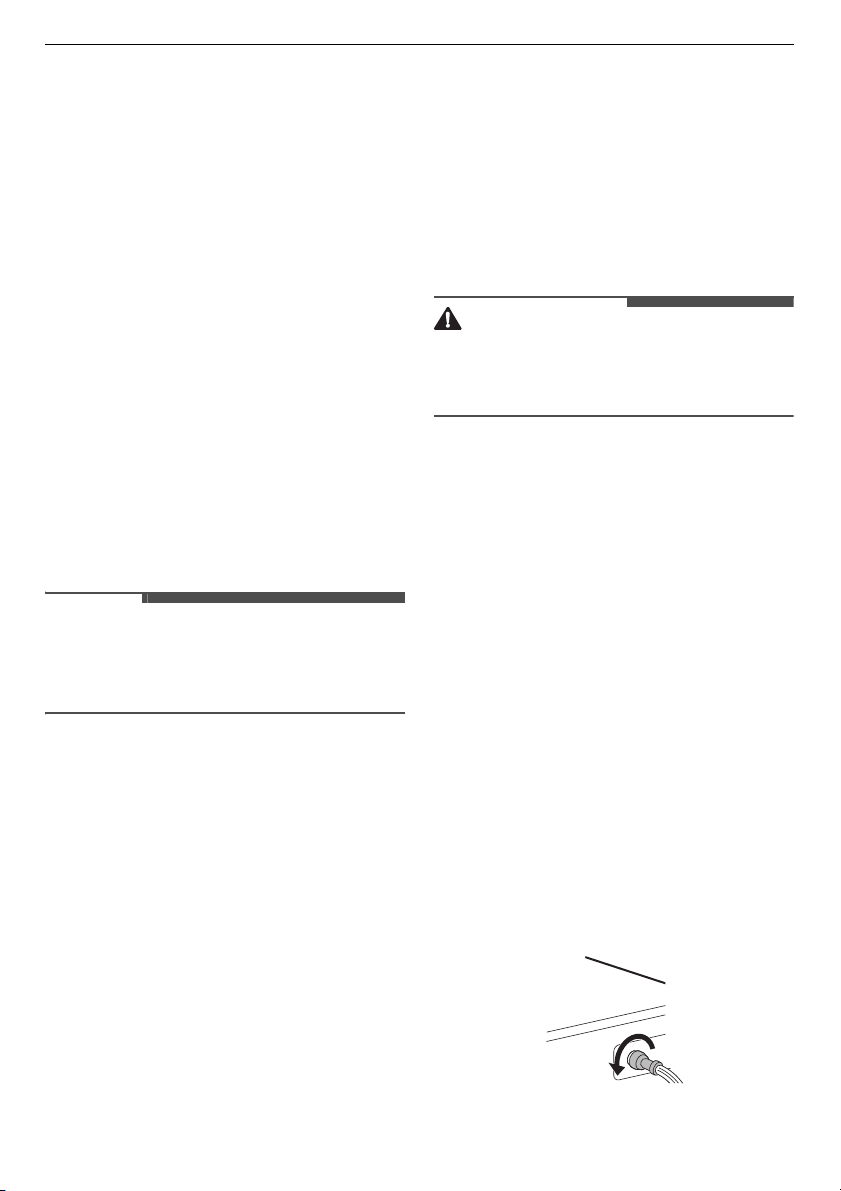
Turn off the power and the water tap
and then uns
crew the water inlet
hose.
42
MAINTENANCE
EN
2
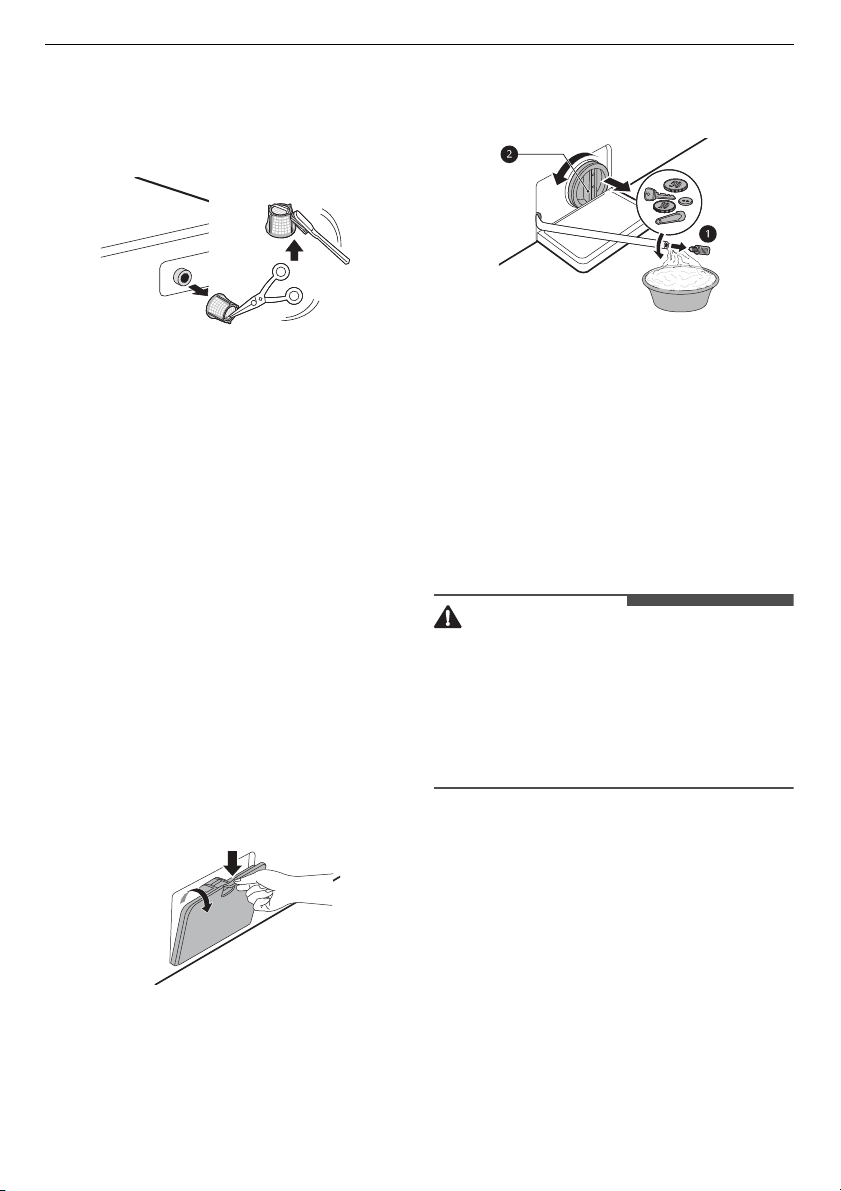
Remove the water inlet filter with
small pliers and then clean the filter
using a medium bristle tooth brush.
Cleaning the Drain Pump Filter
and Performing an Emergency
Water Evacuation
The drain filter collects threads and small
objects that may have been accidentally
left in the clothes. Check regularly that
the filter is clean to ensure smooth
running of your appliance.
Allow the water to cool before cleaning
the drain pump filter. Open the door in
an emergency or perform an emergency
water evacuation.
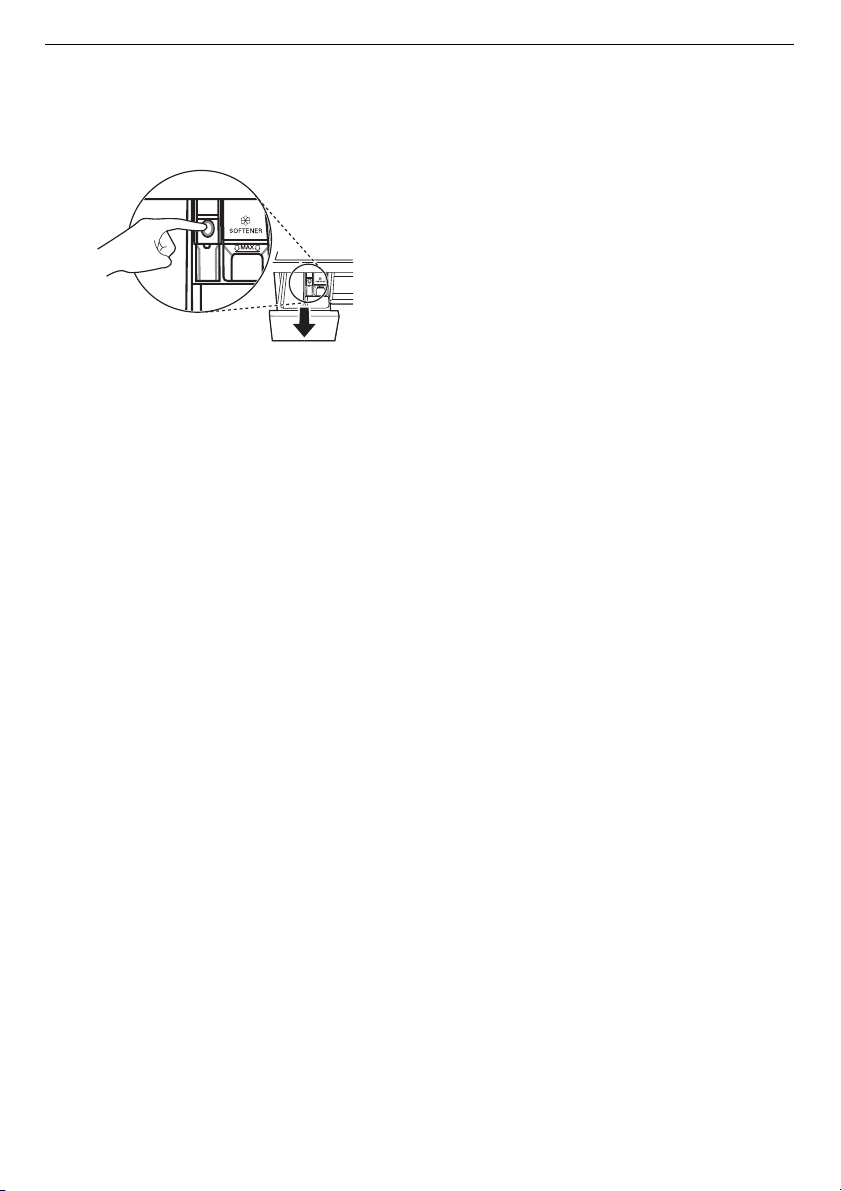
1
Unplug the appliance.
2
Open the cover cap and pull out the
drain tube.
3
Remove the drain plug from the drain
tube first
a
, and then drain the
water. Then slowly unscrew the drain
pump filter
b
to drain the remaining
water and then proceed to remove
any debris or objects from the filter.
4
After cleaning the drain pump filter,
carefully reinsert the filter and screw
the drain cap back in clockwise
carefully to avoid cross threading and
leakage. Reinsert the plug back into
the drain tube and place the tube into
its holder.
5
Close the cover cap.
CAUTION
• Be careful when draining, as the water
may be hot.
• Run the drum cleaning programme
once a month (or more often, as
needed) to remove excess detergent
and other debris.
Cleaning the Dispenser Drawer
Detergent and fabric softener can build
up in the dispenser drawer. Liquid
detergents can remain under the
dispenser drawer and not dispense
completely. Remove the drawer and
inserts and check for build-up of
cleaning products
once or twice a
month
.
1
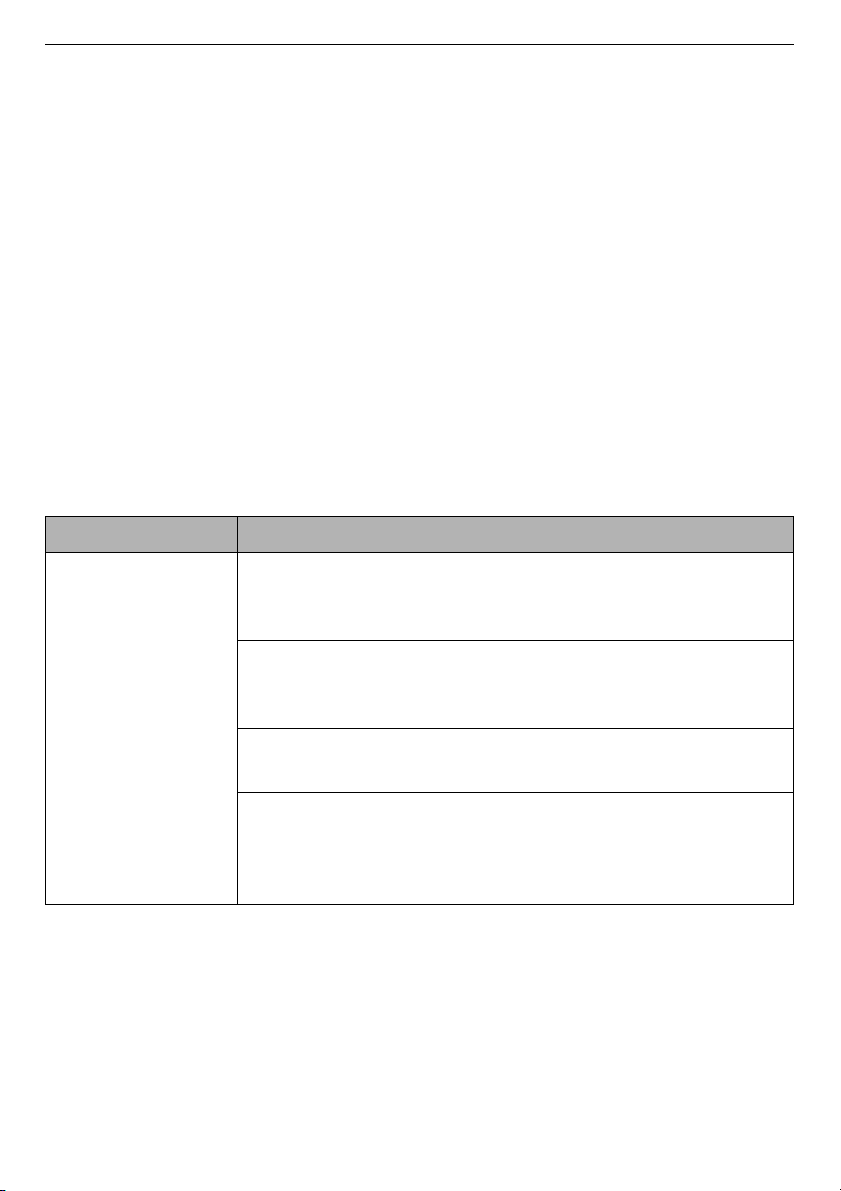
Remove the detergent dispenser
drawer by pulling the drawer straight
out until the drawer stops.
43
MAINTENANCE
EN
• Then gently pull the drawer
outward while pressing ha
rd the
di
sengage button.
2
Remove the build-up of detergent
and
softener.
•
Rinse the dr
awer and the
comp
onents of the drawer wi
th
w
arm water to remove the build-up
from detergent and softener.
Use
o
nly water to clean the dispense
r
draw
er. Dry the drawer and th
e
comp
onents of the drawer wi
th a
so
ft cloth or towel.
3
To clean the drawer opening, use a
clo
th or small, non-metal brush to
clean the recess.
• Remove all residue from the uppe
r
and
lower parts of the recess.
4
Wipe any moisture off the recess with
a soft cloth or towel.
5
Reassemble the components of the
dr
awer to the proper compartments
and insert the drawer.
44
TROUBLESHOOTING
EN
TROUBLESHOOTING
Operation of your appliance can lead to errors and malfunctions. The following tables
contain possible causes and notes for resolving an error message or malfunction. It
is recommended to read the tables carefully below in order to save your time and
money that may cost for calling to LG Electronics service centre.
Before Calling for
Service
Your appliance is equipped with an automatic error-monitoring system to detect and
diagnose problems at an early stage. If the appliance does not function properly or
does not function at all, check the following tables before calling to LG Electronics
service centre.
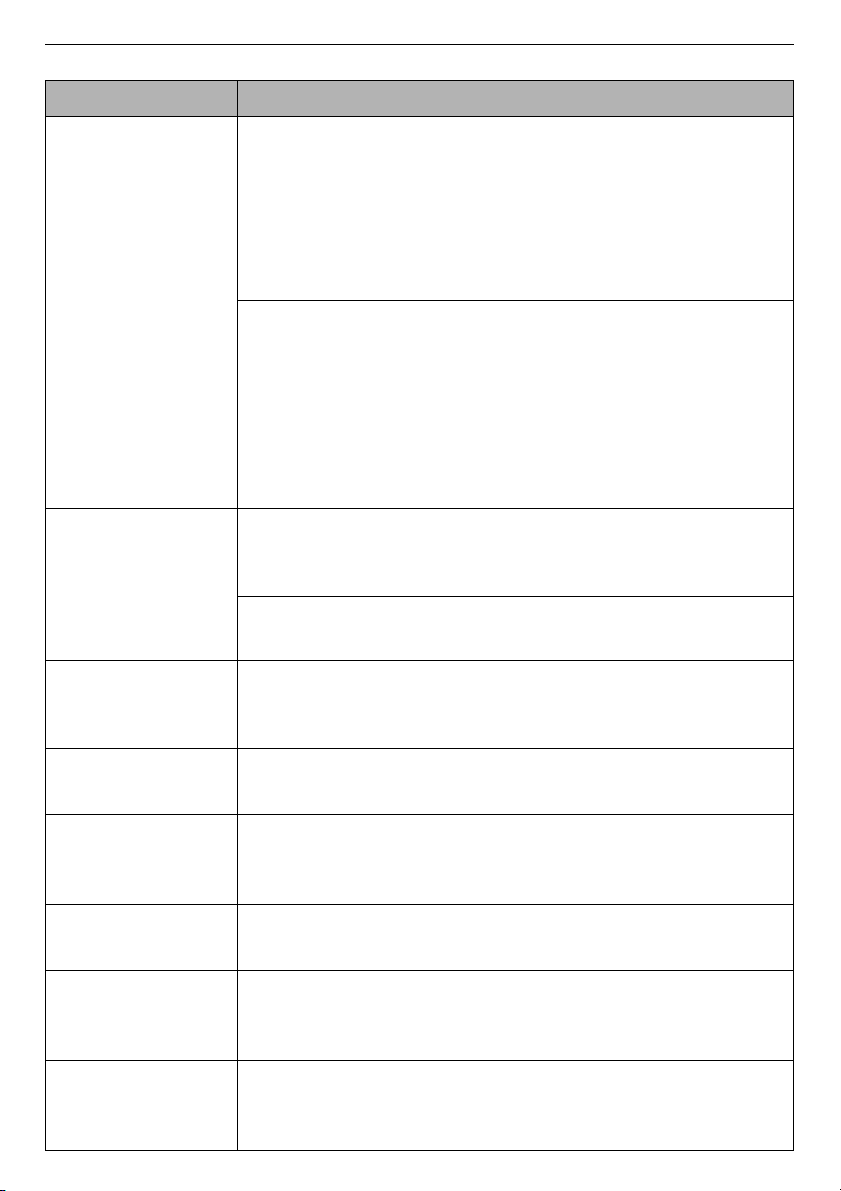
Error Messages
Symptoms Possible Cause & Solution
1E
INLET ERROR
Water supply is not adequate in that location. Water does
not enter appliance or it enters slowly.
• Check another tap in the house.
Water supply tap is not completely open. Water does not
enter the appliance or it enters slowly.
• Open fully tap.
Water supply hose(s) are kinked.
• Straighten hose or reinstall the water inlet hose
The filter of the supply hose(s) are clogged.
• Check and clean the inlet valve filter after turning off the
taps and remo
ving the hose connections to the washin
g
machine.
45
TROUBLESHOOTING
EN
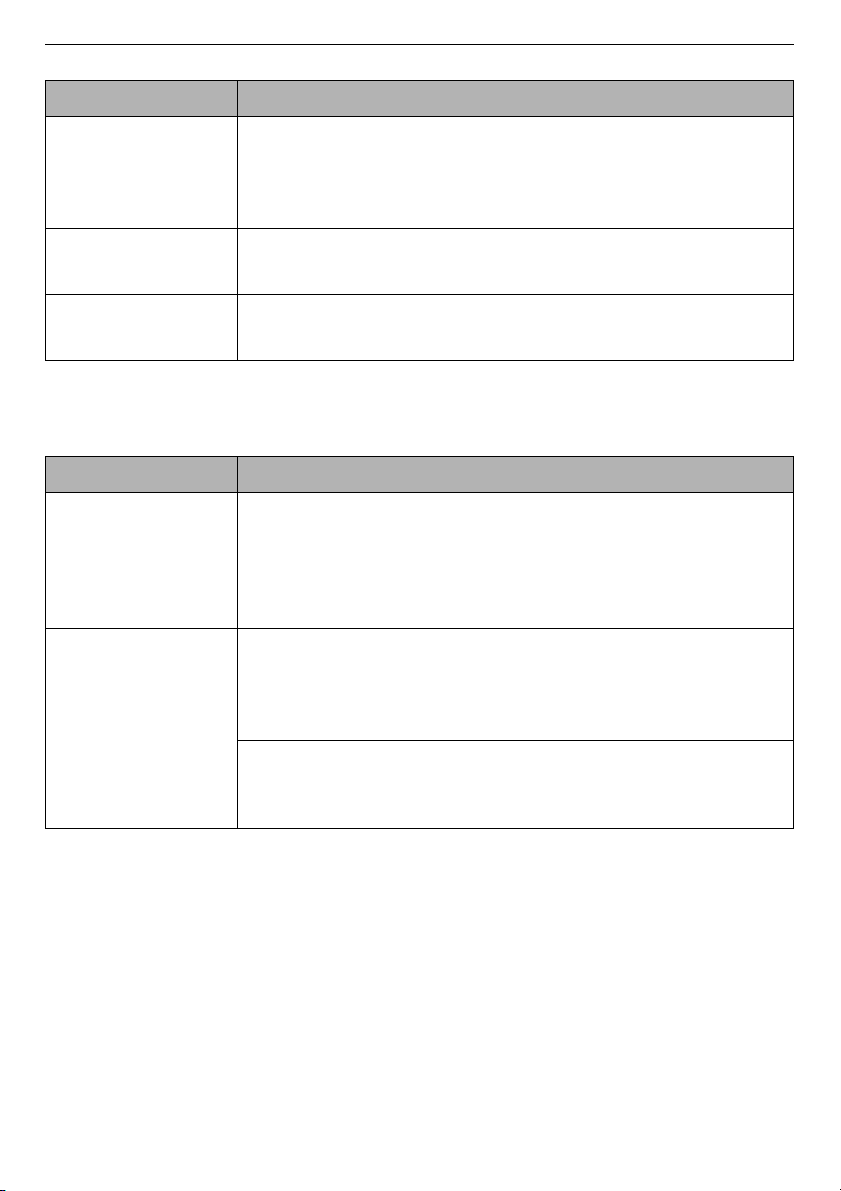
UE
UNBALANCE
ERROR
The appliance has a system which detects and corrects
the unbalance of the appliance.
• The clothes may be too wet at the end of the cycle,
rearrange the load to allow proper spinning. Close the door
and press
Start/Pause
button. It may take a few moments
before the appliance begins to spin. The door must be
locked before spin can be achieved.
Load is too small. This system may stop spinning or even
interrupt the spin cycle altogether if individual heavy
articles (e.g. bath mat, bath robe, etc.) are loaded.
• Add 1 or 2 similar items or smaller articles of clothes to help
balance the load. Close the door and press
Start/Pause
button. It may take a few moments before the appliance
begins to spin. The door must be locked before spin can be
achieved.
OE
WATER OUTLET
ERROR
Drain hose is kinked or clogged. Water in the appliance
does not drain or drains slowly.
• Clean and straighten the drain hose.
The drain filter is clogged.
• Check and clean the drain filter.
dE
dE1
dEz
dE4
DOOR ERROR
Door sensor malfunctions.
• Please call LG service centre. You can find your local LG
service centre phone number in the warranty card.
tE
CONTROL ERROR
This is a control error.
• Unplug the power plug and call for service.
LE
MOTOR LOCKED
ERROR
Over load in motor.
• Let the appliance wait for 30 minutes until the motor is
cooled down and then, restart the cycle.
FE
OVERFLOW ERROR
Water overfills due to a possible faulty water valve.
• Close the water tap. Unplug the power plug. Call for service.
PE
PRESSURE SENSOR
ERROR
Water level sensor malfunctions.
• Close the water tap. Unplug the power plug. Call for service.
vs
VIBRATION
SENSOR ERROR
Vibration sensor malfunctions.
• Call for service.
Symptoms Possible Cause & Solution
46
TROUBLESHOOTING
EN
Noises You Might Hear
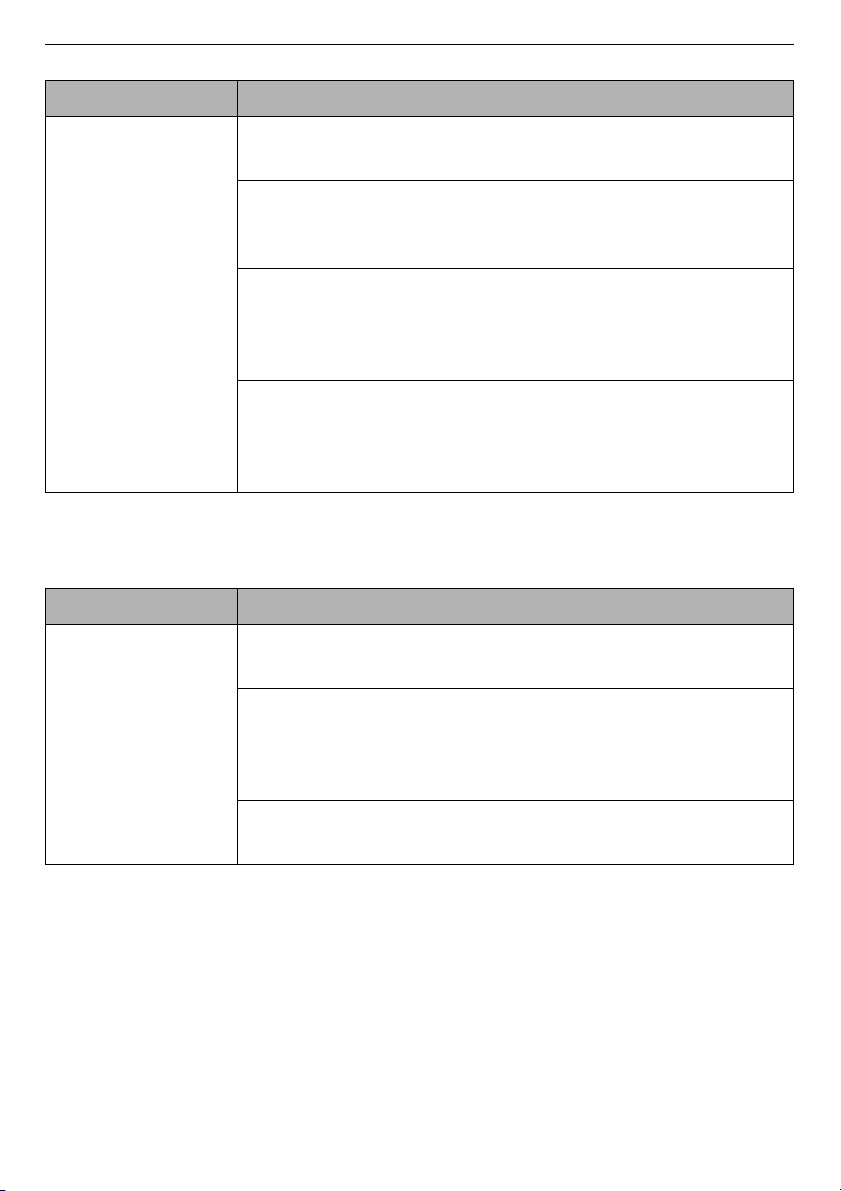
FF
FROZEN FAILURE
Is supply/drain hose or drain pump frozen?
• Supply warm water into the drum in order to unfreeze the
drain hose and the drain pump. Cover the supply hose with
wet and warm towel.
AE
WATER LEAKAGE
Water leaks.
• Call for service.
PF
POWER FAILURE
The appliance experienced a mains power failure.
• Restart the cycle.
Symptoms Possible Cause & Solution
Symptoms Possible Cause & Solution
Rattling and
clanking noise
Foreign objects, such as keys, coins, or safety pins may be
in the drum.
• Stop the appliance, check the drum for foreign objects. If
the noise continues after the appliance is restarted, call for
service.
Thumping sound Heavy clothes may produce a thumping sound. This is
usually normal.
• If the sound continues, the appliance is probably out of
balance. Stop and redistribute the clothes.
The clothes may be out of balance.
• Pause the programme and redistribute the clothes after
the door unlocks.
47
TROUBLESHOOTING
EN
Operation
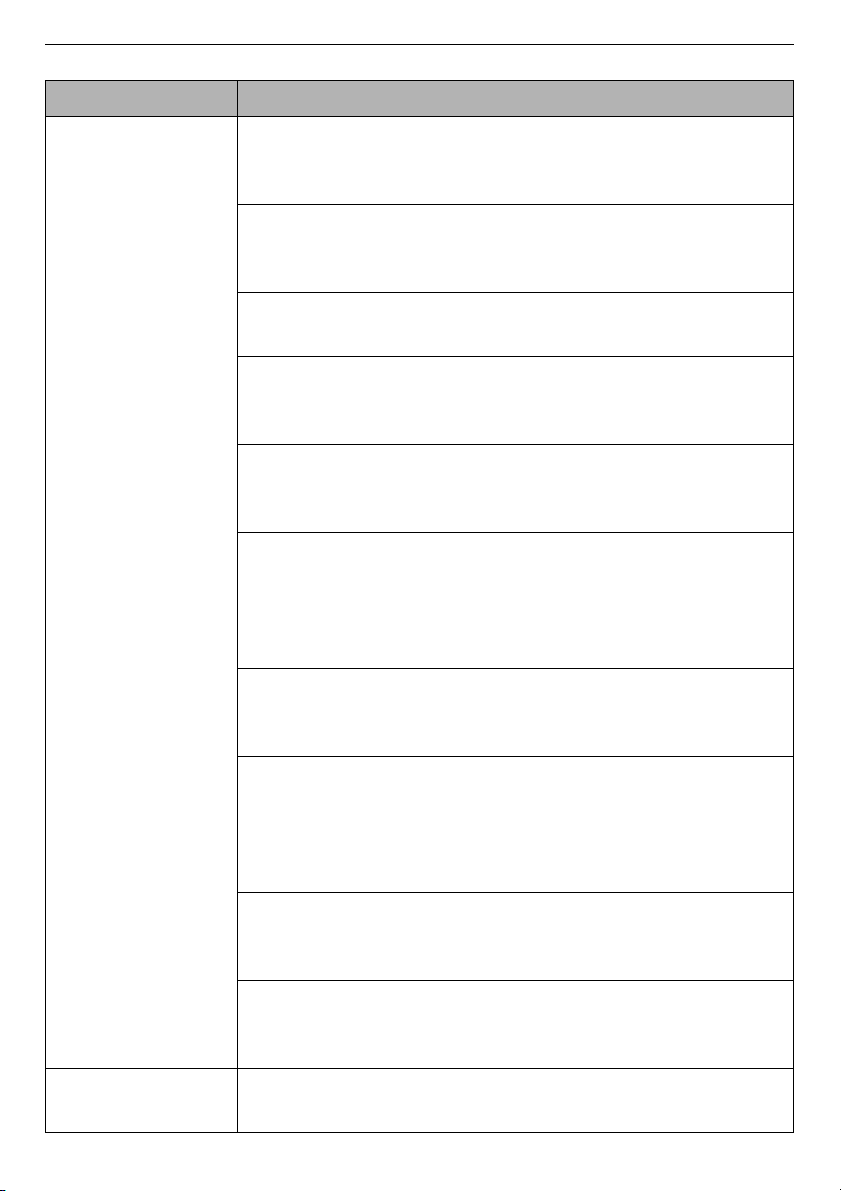
Vibrating noise Package materials are not removed.
• Remove package materials.
The clothes may be unevenly distributed in the drum.
• Pause the programme and redistribute the clothes after
the do
or unlocks.
Not all levelling feet are resting firmly and evenly on the
floor.
• See the
Levelling the Appliance
instruction to adjust the
le
velling of the appliance.
Floor not rigid enough.
• Check if the floor is sold and does not flex. See the
Installation Place Requirements
to select the proper
loca
tion.
Symptoms Possible Cause & Solution
Symptoms Possible Cause & Solution
Water is leaking. House drain pipes are clogged.
• Unclog waste pipes. Contact plumber if necessary.
Leakage is caused by improper installation of drain hose
or clogged drain hose.
• Clean and straighten the drain hose. Check and clean the
dr
ain filter regularly.
Drain pump filter cap is not fitted correctly.
• Refit the drain pump filter.
48
TROUBLESHOOTING
EN
Appliance does
not operate.
Control panel has powered off due to inactivity.
• This is normal. Press the
Power
button to turn the
appliance on
.
Appliance is unplugged.
• Make sure that the cord is plugged securely into a working
outlet.
Water supply is turned off.
• Turn the water supply tap completely.
Controls are not set properly.
• Make sure that the programme is correctly set. Close the
do
or and press the
Start/Pause
button.
Door is open.
• Close the door and make sure that nothing is caught under
the
door preventing it from closing completely.
Circuit breaker/fuse is tripped/blown.
• Check house circuit breakers/fuses. Replace fuses or reset
b
reaker. The appliance should be on a dedicated
branch
circuit.
The appliance will resume the programme where
it
stoppe
d once power is restored.
Control needs to be reset.
• Press the
Power
button, then reselect the desired
p
rogramme and press the
Start/Pause
button.
Start/Pause was not pressed after a programme was set.
• Press the
Power
button, then reselect the desired
p
rogramme and press the
Start/Pause
button. The
ap
pliance is turned off if the
Start/Pause
button is not
pressed wit
hin a certain time.
Extremely low water pressure.
• Check another tap in the house to make sure that
household water pressure is adequate.
Appliance is heating the water or making steam.
• The drum may stop operating temporarily during certain
cycles, w
hile water is safely heated to a set temperature.
Buttons may not
function properly.
The Child Lock option is activated.
• Deactivate the
Child Lock
option if necessary.
Symptoms Possible Cause & Solution
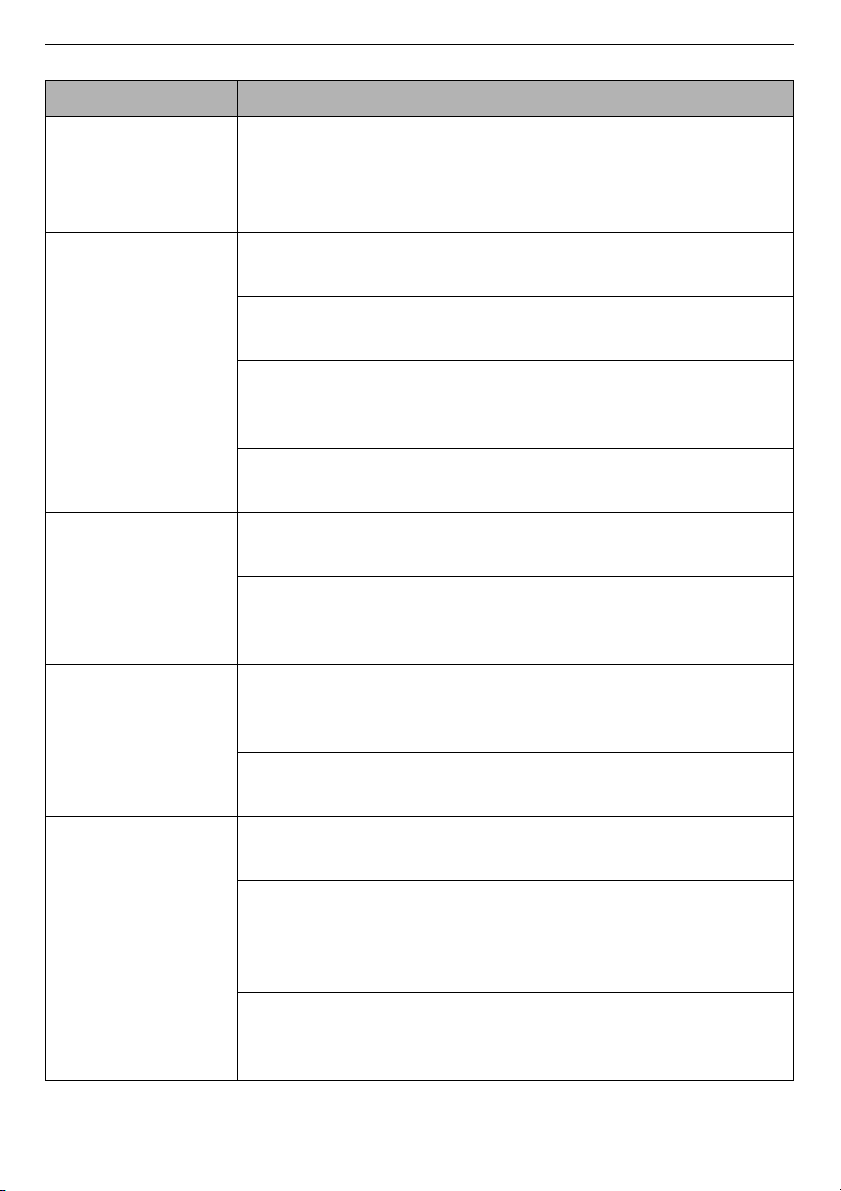
49
TROUBLESHOOTING
EN
Door does not
open.
The door cannot be opened for safety reasons once the
appliance starts.
• This is normal. You can safely open the door after
H
turns
off.
Appliance is not
filling properly.
Inlet filter clogged.
• Make sure the inlet filters on the fill valves are not clogged.
Inlet hoses may be kinked.
• Check that inlet hoses are not kinked or clogged.
Insufficient water supply.
• Make sure that both hot and cold water taps are turned on
all the way.
Hot and cold supply hoses are reversed.
• Check supply hose connections.
Appliance does
not drain water.
Kinked drain hose.
• Ensure that the drain hose is not kinked.
Drain located higher than 1.2 m above the floor.
• Make sure that the drain hose is no higher than 1.2 m above
the bottom of the appliance.
Detergent is not
dispensed
incompletely or
not dispensed at
all.
Too much detergent is used.
• Follow the guidelines provided by the detergent
manufacturer.
Drain Pump Filter may be blocked.
• Clean the Drain filter.
Cycle time is
longer than usual.
The load is too small.
• Add more items to allow the appliance to balance the loads.
Heavy articles are mixed with lighter items.
• Always try to wash articles with similar weight in order to
allow the appliance to evenly distribute the weight of the
load for spinning.
The load is out of balance.
• Manually redistribute the load if articles have become
tangled.
Symptoms Possible Cause & Solution
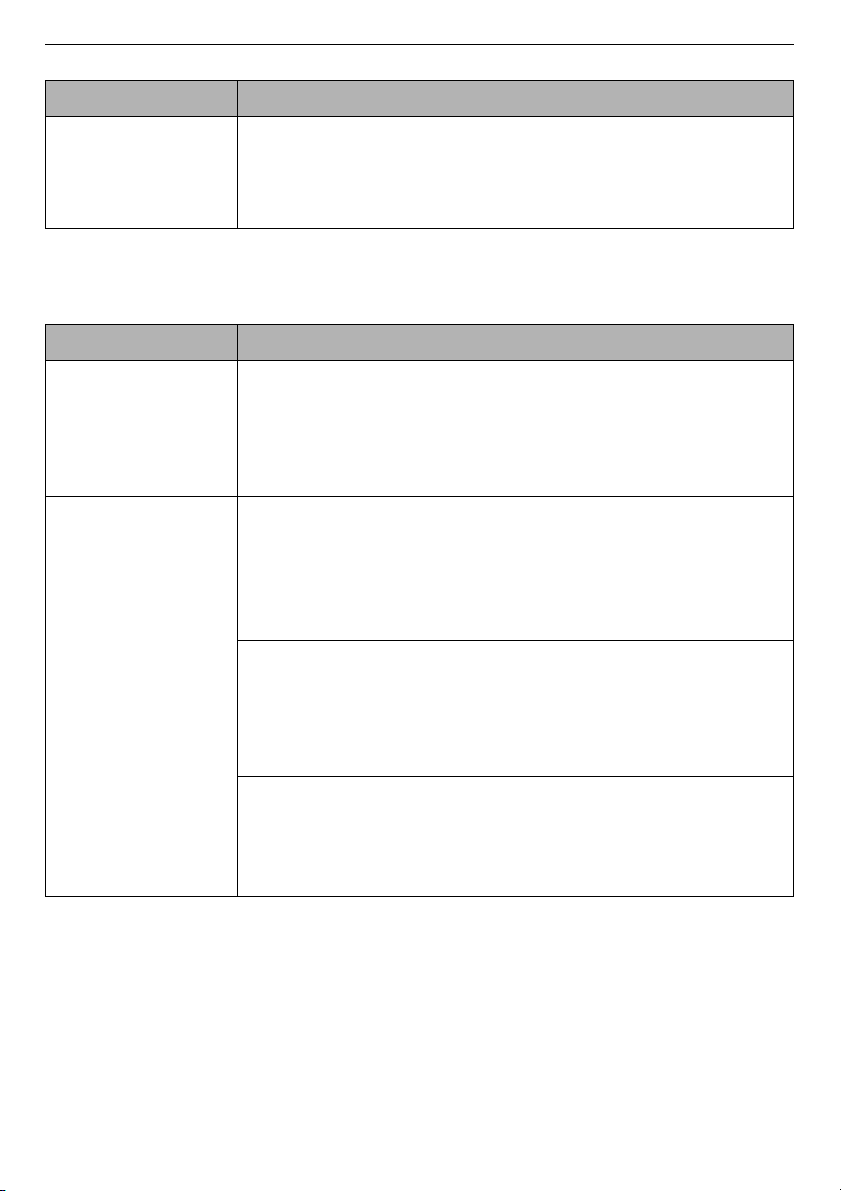
50
TROUBLESHOOTING
EN
Performance
Cycle end is
delayed
Unbalance is detected or suds removing programme is
on.
• This is normal. The time remaining shown on the display is
only
an estimated duration. Actual time may vary.
Symptoms Possible Cause & Solution
Symptoms Possible Cause & Solution
Poor stain
removal
Previously set stains.
• Articles that have been previously washed may have stains
whi
ch have been set. These stains may be difficul
t to
r
emove and may require hand washing or pre-treati
ng to
aid in stain remo
val.
Staining Bleach or softener is dispensed too soon.
• Dispenser compartment is overfilled. It makes bleach or
softe
r dispensed rapidly. Always measure bleach or
softener to prevent overfilling.
•
Close the detergent dispenser slowly.
Bleach or softener was added directly to the clothes in the
drum.
• Always use the detergent dispenser to ensure that bleach
or soften
er is properly dispensed at the right time
in the
p
rogramme.
Clothes were not properly sorted.
• Always wash dark colours separately from light colours and
whites to prevent discoloration.
•
Never wash heavily soiled items with lightly soiled items.
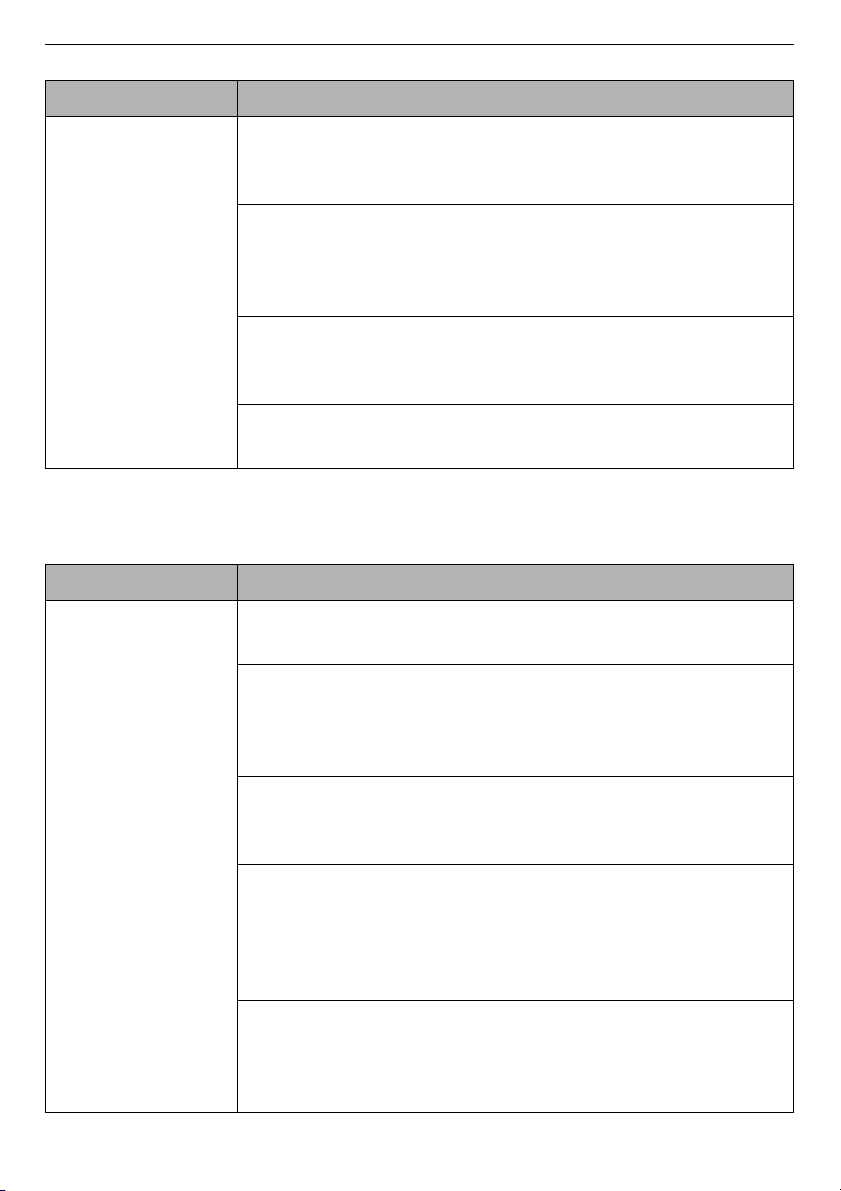
51
TROUBLESHOOTING
EN
Odour
Wrinkling Appliance is not unloaded promptly.
• Always remove items from the appliance as soon as the
p
rogramme is complete.
Appliance is overloaded.
• The appliance can be fully loaded, but the drum should not
b
e tightly packed with items. The door of the applia
nce
shou
ld be closed easily.
Hot and cold water supply hoses are reversed.
• Hot water rinse can set wrinkles in garments. Check the
supply ho
se connections.
Spin speed may be too high.
• Set the spin speed to suit the garment type.
Symptoms Possible Cause & Solution
Symptoms Possible Cause & Solution
Musty or mildewy
odour in appliance
Inside of drum is not cleaned properly.
• Run the
Tub Clean
function regularly.
The drain hose is not properly installed, causing
siphoning (water flowing back inside of the appliance).
• When installing the drain hose, make sure that it does not
ge
t kinked or blocked.
The detergent dispenser is not cleaned regularly.
• Remove and clean the detergent dispenser, especially the
top
and the bottom of the dispenser’s opening.
Odours can occur if the drain hose is not properly
installed, causing siphoning (water flowing back inside of
the appliance).
• When installing the drain hose, make sure that it does not
ge
t kinked or blocked.
If the detergent dispenser is not cleaned regularly,
odours can occur from mold or foreign substances.
• Remove and clean the detergent dispenser, especially the
top
and bottom of the dispenser’s opening.
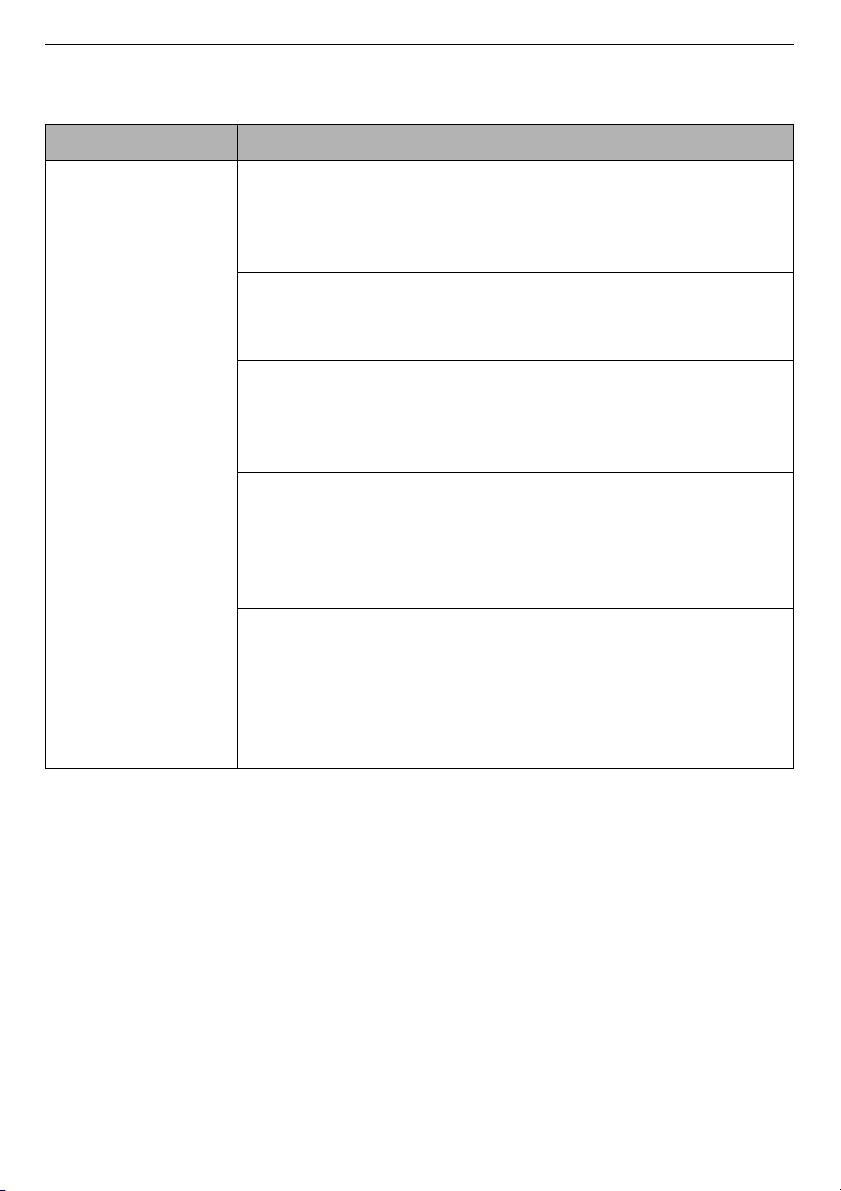
52
TROUBLESHOOTING
EN
Wi-Fi
Symptoms Possible Cause & Solution
Your home
appliance and
smartphone are
not connected to
the Wi-Fi network.
The password for the Wi-Fi that you are trying to connect
to is incorrect.
• Find the Wi-Fi network connected to your smartphone and
rem
ove it, then register your appliance on
LG ThinQ
.
Mobile data for your smartphone is turned on.
• Turn off the
Mobile data
of your smartphone and register
the
appliance using the Wi-Fi network.
The wireless network name (SSID) is set incorrectly.
• The wireless network name (SSID) should be a combination
of English letters and numbers. (Do no
t use special
characters).
The router frequency is not 2.4 GHz.
• Only a 2.4 GHz router frequency is supported. Set the
wireless router
to 2.4 GHz and connect the appliance
to the
wir
eless router. To check the router frequency, check with
your internet service provider or the router manufacturer.
The distance between the appliance and the router is too
far.
• If the distance between the appliance and the router is too
fa
r, the signal may be weak and the connection may no
t be
c
onfigured correctly. Move the location of the router so that
it is closer to the appliance.
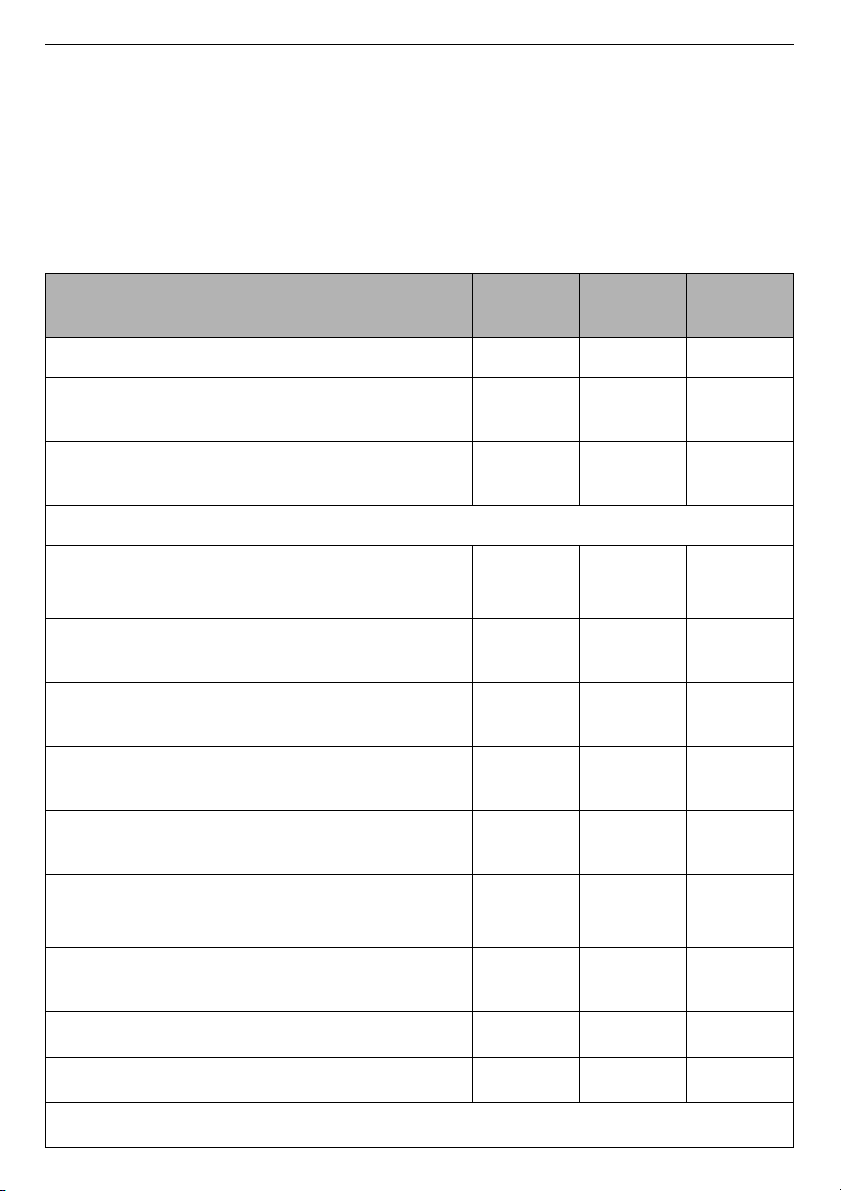
53
APPENDIX
EN
APPENDIX
Product Fiche
Commission Delegated Regulation (EU) No 1061/2010
Asterisk(s) means model variant and can be varied (0-9) or (A-Z).
LG
F4V710*T
SE
F4V709*T
SE
F4V708*T
SE
Rated capacity
10.5 kg 9 kg 8 kg
Energy efficiency class on a scale from D
(least efficient) to A+++ (most efficient).
A+++ A+++ A+++
Awarded an “EU Ecolabel award” under
regulation (EC) No 66/2010
No No No
Energy consumption
• Weighted annual energy consumption (AE
C
)
kWh per year (kWh/year)
*1
143 128 115
• The standard 60 °C cotton programme at
full load (kWh)
0.670 0.620 0.570
• The standard 60 °C cotton programme at
partial load (kWh)
0.630 0.560 0.470
• The standard 40 °C cotton programme at
partial load (kWh)
0.560 0.460 0.410
• Weighted power consumption of the off-
mode and of the left-on mode (W)
0.50 0.50 0.50
• Weighted annual water consumption (AW
C
)
in litres per year (litres/year)
*2
9900 9240 9020
Spin-drying efficiency class on a scale from
G (least efficient) to A (most efficient).
AAA
• Maximum spin speed (rpm)
*3
1360 1360 1360
• Remaining moisture
*3
44 % 44 % 44 %
• The standard cotton programmes
*4
:
Eco 40-60
+
Intensive
, 60 °C / 40 °C
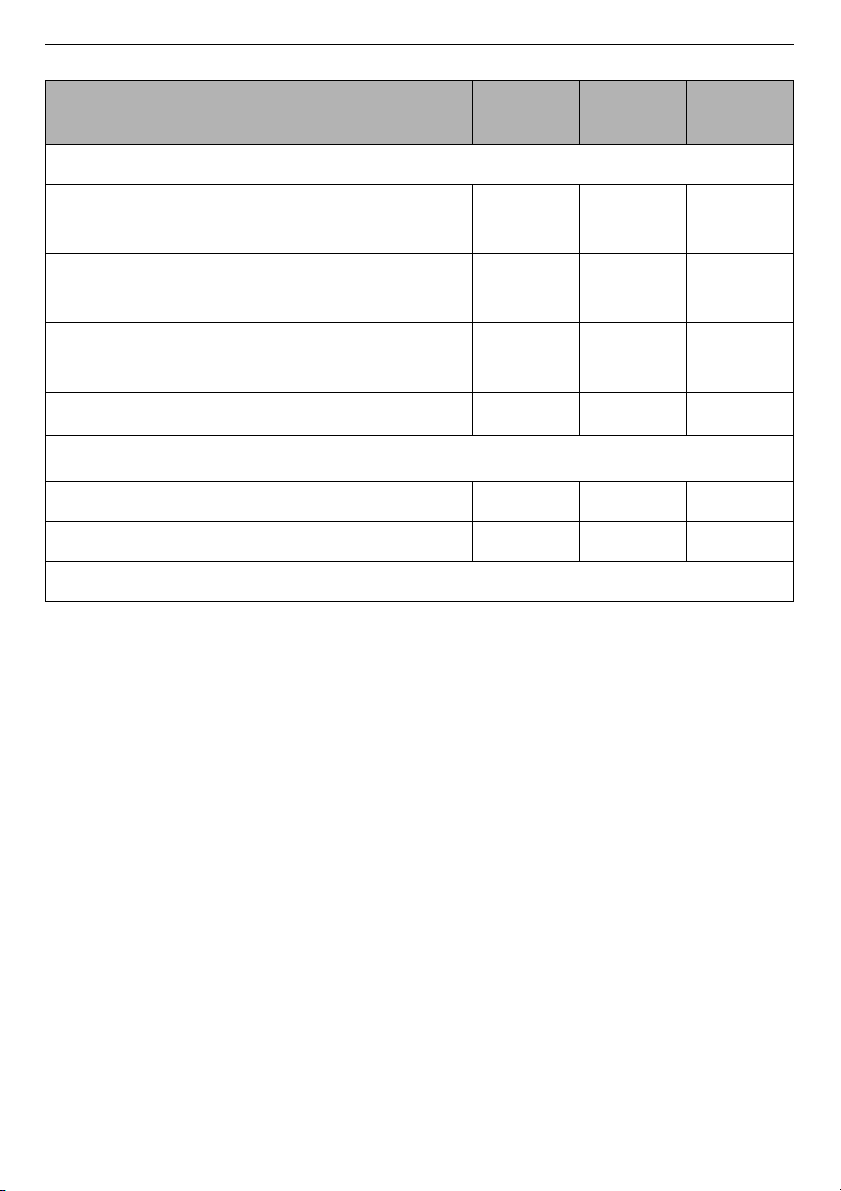
54
APPENDIX
EN
*1 Based on 220 standard washing cycles for cotton programmes at 60 °C and 40 °C
at full and partial load, and the consumption of the low-power modes. Actual
energy consumption will depend on how the appliance is used.
*2 Based on 220 standard washing cycles for cotton programmes at 60 °C and 40 °C
at full and partial load. Actual water consumption will depend on how the appliance
is used.
*3 Attained for the standard 60 °C cotton programme at full load or the standard 40
°C cotton programme at partial load, whichever is the lower, and remaining
moisture content attained for the standard 60 °C cotton programme at full load or
the standard 40 °C cotton programme at partial load, whichever is the greater.
*4 To which the information in the label and in the fiche relates, that these
programmes are suitable to clean normally soiled cotton laundry and that they are
the most efficient programmes in terms of combined energy and water
consumption.
*5 The standard cotton programme is
Eco 40-60
+
Intensive
, 60 °C full load,
Eco 40-
60
+
Intensive
, 60 °C half load, and
Eco 40-60
+
Intensive
, 40 °C half load in
accordance with Regulations
(EU) No. 1061/2010
and
EN 60456
.
*6 Expressed in dB(A) re 1 pW and rounded to the nearest integer during the washing
and spinning phases for the standard 60 °C cotton programme at full load.
Programme time of the standard programme
• The standard 60 °C cotton programme at
full load (min.)
*5
292 267 267
• The standard 60 °C cotton programme at
partial load (min.)
*5
258 254 214
• The standard 40 °C cotton programme at
partial load (min.)
*5
248 244 214
• The duration of the left-on mode (T
I
) (min.) 10 10 10
Airborne acoustical noise emissions
*6
• Washing in dB(A) re 1 pW 53 54 55
• Spinning in dB(A) re 1 pW
71 71 71
Free-Standing
LG
F4V710*T
SE
F4V709*T
SE
F4V708*T
SE
@
L
G
,UX;1)[YZUSKX,UX;1)[YZUSKX
);9:53+89+8</)+9:KR ;1
/+
2-+;19+8</)+=+(9/:+ ]]]RMIUS[Q