iPod Use
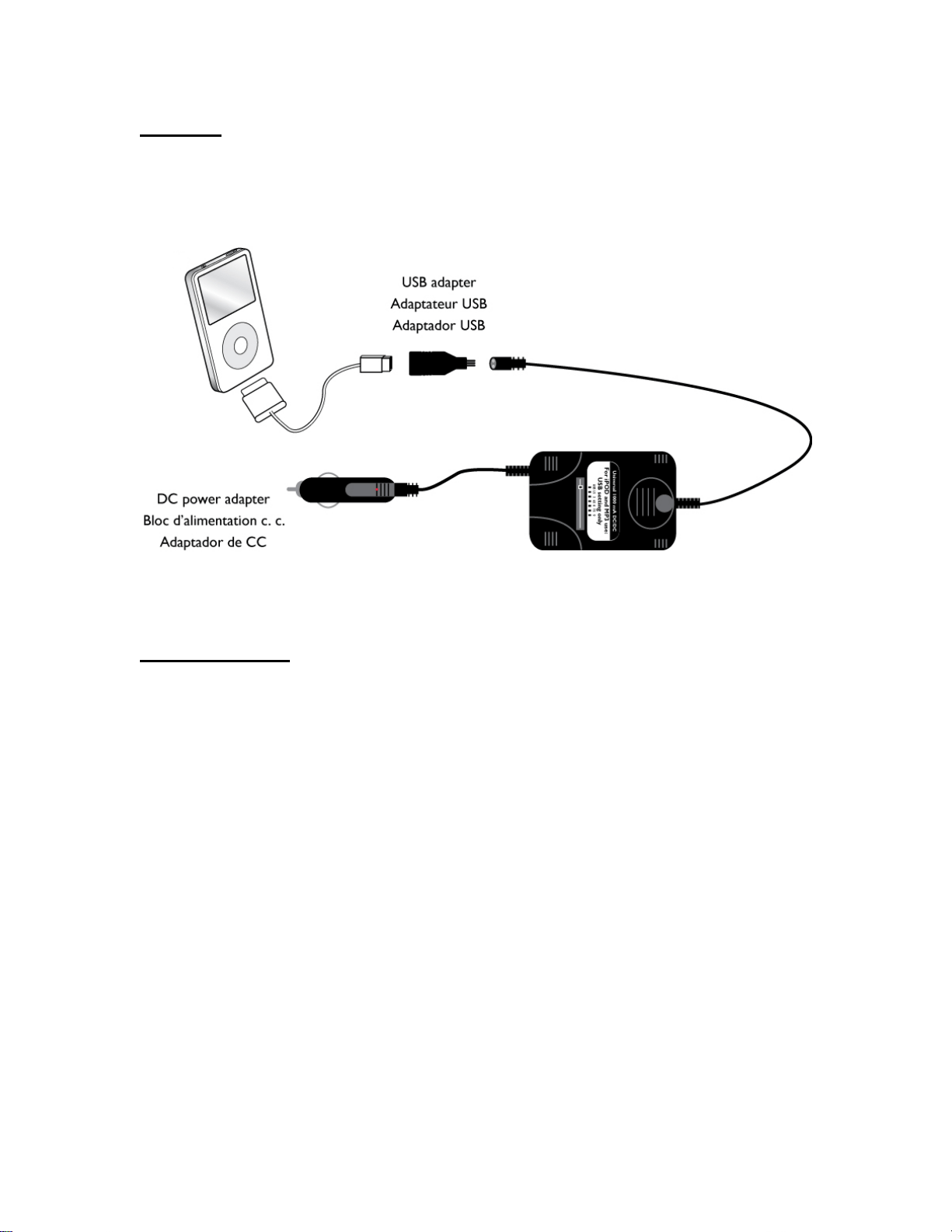
Make sure the portable CD power adapter is set to USB setting.
When using with iPod models the portable CD power adapter must be connected to the
iPod as shown below. Connect the USB adapter to the end of the portable CD power
adapter. Connect the USB cable supplied with your iPod as shown below.
Warning: Failure to follow the instructions above can cause your iPod to be damaged.
MP3 Player Use
Make sure the portable CD power adapter is set to USB setting.
Please consult your MP3 player’s user manual before connecting your MP3 player to the
portable CD power adapter. Please verify that your MP3 player can be charged via a USB
port. Not all MP3 players support USB charging. Once verified you will need to connect
the USB adapter to the end of the portable CD power adapter. Then connect the USB
cable supplied with your MP3 player to the USB adapter.
Warning: Failure to follow the instructions above can cause your MP3 player to be
damaged.
Note: Not for use with Digital Cameras.
Not for use with MP3 players that require more then 1000mA of current. Please consult
your MP3 player user manual to verify.