5-021-306-03(1)
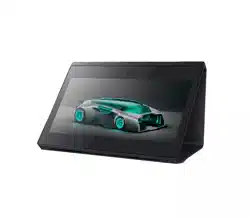
Spatial Reality Display
取扱説明書
Operating Instructions_____
Mode d’emploi____________
お買い上げいただきありがとうございます。
電気製品は安全のための注意事項を守らないと、
火災や人身事故になることがあります。
この「取扱説明書」には、事故を防ぐための重要な注意事項と製品の取り扱いかたを示してあります。
この「取扱説明書」をよくお読みのうえ、製品を安全にお使いください。お読みになったあとは、
いつでも見られるところに必ず保管してください。
ELF-SR1
© 2020 Sony Corporation
JP
2
日本語
目次
警告 ................................................................................4
注意 ...................................................................
.............6
使用上のご注意..............................................................
......8
設置について ........................................................................
................8
他機器との接続について .............................................................
8
画面について ........................................................................
................8
輝点・滅点について ......................................................................
..8
長時間の使用について...................................................................
8
結露................................................................................
..............................8
3D映像視聴について.....................................................................
..8
画面の取り扱いとお手入れについて ..................................8
輸送・持ち運びについて .............................................................9
廃棄するときは..........................................................................
.........9
視聴環境について.............................................................
10
接続するコンピューターと動作に必要なソフトウェアに
ついて ............................................................
.....
...............11
各部の名称と働き.............................................................
12
前面................................................................................
...........................12
後面................................................................................
...........................13
接続 ..................................................................
..................14
付属品を確かめる.....................................................................
......14
端子の位置や向きを確かめる................................................14
HDMIケーブルをつなぐ ...........................................................14
USBType-Cケーブルをつなぐ............................................14
ACアダプターをつなぐ.............................................................15
アクセサリーを取り付ける.....................................................15
コンテンツを視聴する .
....................................................16
電源を入れる ...
.....................................................................
.............16
メニューを使って調整する.....................................................16
メニュー項目 ...
.....................................................................
.............17
故障かな?と思ったら .....................................................17
サポートページで最新の情報を調べる .
.........................18
保証書とアフターサービス .............................................18
保証書...........................................................................
...........................18
アフターサービス.....................................................................
......18
主な仕様 ..................................................................
..........19
ソフトウェアに関する重要なお知らせ ..........................20
HDMI、High-DefinitionMultimediaInterface、および
HDMIロゴは、米国およびその他の国におけるHDMI
LicensingAdministrator,Inc.の商標または、登録商標
です。
USBType-C
TM
およびUSB-C
TM
は、USBImplementers
Forumの商標です。
3
JP
安全のために
ソニーの製品は正しく使用すれば事故が起きないように、
安全には充分配慮して設計されています。しかし、電気
製品はまちがった使いかたをすると、火災や感電などに
より死亡や大けがなど人身事故につながることがあり、
危険です。
事故を防ぐために次のことを必ずお守りください。
安全のための注意事項を守る
4〜7ページの注意事項をよくお読みください。製品全般
の安全上の注意事項が記されています。
8ページの「使用上のご注意」もあわせてお読みください。
定期点検をする
長期間安全に使用していただくために、定期点検を実施
することをおすすめします。
電源コードやプラグが異常な熱を持っていないか
異常な熱や煙が発生したり変な臭いや音(パチパチ)が
しないか
電源を入れても画像や音が出ないことがないか
故障状態のまま使用していないか
故障したら使わない
すぐに、電源プラグを抜いて使用を中止し、故障や事故
の防止のために、お買い上げ店またはソニーのご相談窓
口にご連絡ください。
万一、異常が起きたら
電源を切ります。
電源コードや接続コードを抜きます。
お買い上げ店またはソニーのご相談窓口までご相談く
ださい。
煙が出たら
異常な音、においがしたら
内部に水、異物が入ったら
製品を落としたり、キャビネットを破損したときは
警告表示の意味
この説明書および製品では、次のような表示をし
ています。表示の内容をよく理解してから本文を
お読みください。
この表示の注意事項を守らないと、火災や感電な
どにより死亡や大けが
など人身事故につながるこ
とがあります。
この表示の注意事項を守らないと、感電やその他
の事故によりけがをし
たり周辺の物品に損害を与
えたりすることがあります。
注意を促す記号
行為を禁止する記号
行為を指示する記号
JP
4
警告
雨のあたる場所、水のある場所、油
煙、湯気、湿気、ほこりの多い場所
では設置・使用しない
上記のような場所に設置すると、火災や感
電の原因となります。
取扱説明書に記されている使用条件以外の
環境での使用は、火災や感電の原因となり
ます。
電源コードのプラグ及びコネクター
は突き当たるまで差し込む
真っ直ぐに突き当たるまでさしこまないと、
火災や感電の原因となります。
電源コードや接続コードを傷つけな
い
電源コードや接続コードを傷つけると、火
災や感電の原因となることがあります。
設置時に、製品と壁やラック、棚などの
間に、はさみ込まない。
電源コードを加工したり、傷つけたりし
ない。
重いものをのせたり、引っ張ったりしな
い。
熱器具に近付けたり、加熱したりしない。
電源コードを抜くときは、必ずプラグを
もって抜く。
万一、電源コードが傷んだら、お買い上げ
店またはソニーのご相談窓口に交換をご依
頼ください。
内部を開けない
内部には電圧の高い部分があり、キャビ
ネットや裏蓋を開けたり改造したりすると、
火災や感電の原因となることがあります。
内部の調整や設定、点検、修理はお買い上
げ店またはソニーのご相談窓口にご依頼く
ださい。
ACパワーアダプターに布団などを
かけたり、上にものを置いたりした
状態で使わない
高温となるため、せまい空間での使用を避
けて、熱がこもらないよう充分なスペース
を空けてください。
正しい方法で運搬・移動する
誤った方法で運搬したり移動したりすると、
本機が落下して、けがの原因となることが
あります。
DCIN端子に規格以外の入力電圧を
かけない
DCIN端子に規格以外の入力電圧をかける
と火災や感電の原因となることがあります。
表示された電源電圧で使用する
製品の表示と異なる電源電圧で使用すると、
火災や感電の原因となります。
乗物の中や船舶の中などで使用しな
い
移動中の振動により、本機が転倒したり落
下したりして、けがの原因となることがあ
ります。
塩水をかぶると、発火や故障の原因となる
ことがあります。
5
JP
内部に水や異物を入れない
水や異物が入ると火災や感電の原因となる
ことがあります。
万一、水や異物が入ったときは、すぐに電
源を切り、電源コードや接続コードを抜い
て、お買い上げ店またはソニーのご相談窓
口にご相談ください。
不安定な場所に設置しない
ぐらついた台の上や傾いたところに設置す
ると、倒れたり落ちたりしてけがの原因と
なることがあります。
また、設置・取り付け場所の強度を充分に
お確かめください。
コード類は正しく配置する
電源コードや接続ケーブルは、足に引っか
けると本機の落下や転倒などによりけがの
原因となることがあります。
充分注意して接続・配置してください。
直射日光の当たる場所や熱器具の近
くに設置・保管しない
内部の温度が上がり、火災や故障の原因と
なることがあります。
ぬれた手で電源プラグをさわらない
ぬれた手で電源プラグを抜き差しすると、
感電の原因となることがあります。
電源プラグをつなぐのは、他機器と
の接続が終わってから
コンセントに差したまま他機器と接続した
りすると、感電の原因になることがありま
す。
他機器との接続が終わった後に、電源プラ
グを壁のコンセントに差してください。
お手入れの際は、電源を切って電源
プラグを抜く
電源を接続したままお手入れをすると、感
電の原因となることがあります。
移動の際は電源コードや接続コード
を抜く
コード類を接続したまま本機を移動させる
と、コードに傷がついて火災や感電の原因
となることがあります。
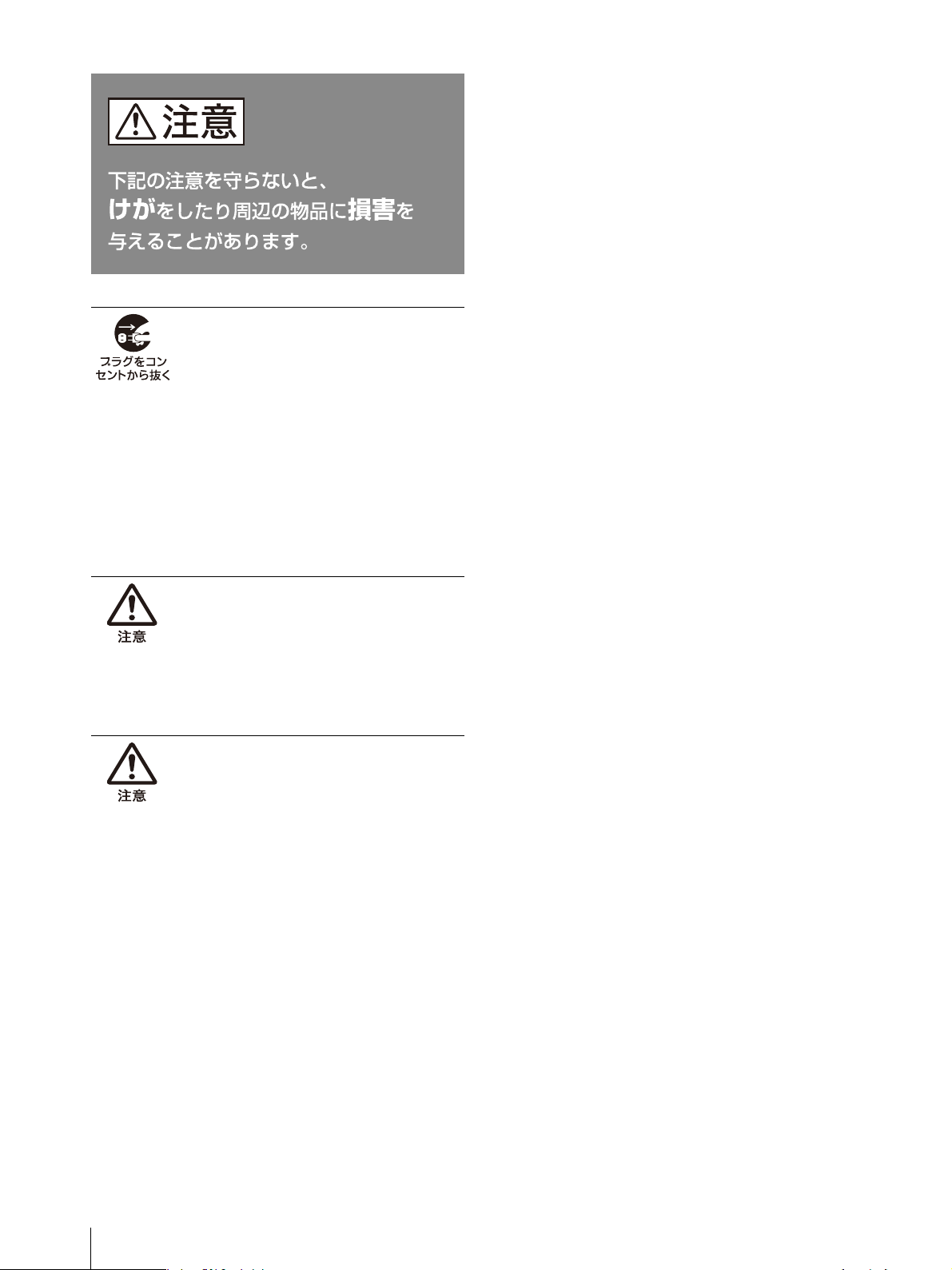
電源プラグは定期的にお手入れを
電源プラグとコンセントの間に、ゴミやほ
こりがたまって湿気を吸うと、絶縁低下を
起こして、火災の原因となります。
定期的に電源プラグをコンセントから抜き、
ゴミやほこりを取ってください。
付属の電源コード、ACアダプター、
接続ケーブルを使う
付属の電源コード、ACアダプター、接続
ケーブルを使わないと、火災や感電、故障
の原因となることがあります。
汚れ
JP
6
注意
旅行などで長期間、ご使用にならな
いときは、電源プラグを抜く
本機を長時間使用しないときは、安全のた
め、必ず電源プラグを抜いてください。
本機は電源スイッチを切っただけでは、完
全に電源からは切り離されておらず、常に
微弱な電流が流れています。
完全に電源から切り離すためには電源プラ
グをコンセントから抜く必要があります。
コンセントは製品の設置場所に一番近く、
抜き差しがしやすい場所を選んでください。
音量について
周辺の人の迷惑とならないよう適度の音量
でお楽しみください。特に、夜間での音量
は小さい音でも通りやすいので、窓を閉め
るなど、隣近所への配慮を充分にし、生活
環境を守りましょう。
密閉環境に設置する際は注意する
ディスプレイ周辺の通気が妨げられ動作温
度が上がり、故障や発熱の原因となる可能
性があります。
上に10cm以上の隙間をあけ、また周辺機器
との隙間を充分にとり、通気の確保の配慮
をしてください。
7
JP
警告
設置の際には、容易にアクセスできる固定配線内に専用
遮断装置を設けるか、使用中に、容易に抜き差しできる、
機器に近いコンセントに電源プラグを接続してください。
万一、異常が起きた際には、
専用遮断装置を切るか、電
源プラグを抜いてください。
警告
ぬれた手でACアダプターや電源プラグをさわらないでく
ださい。
感電の原因となることがあります。
警告
機器を水滴のかかる場所に置かないでください。また水
の入った物、花瓶などを機器の上に置かないでください
。
警告
本機を医療機関に設置しないでください。
医療機器の誤動作の原因となることがあります。
本機を医療機器に近づけないでください。本製品(付属
品を含む)は磁石を使用しているため、ペースメーカー、
水頭症治療用圧可変式シャントなどの医療機器に影響を
与える恐れがあります。本製品をこれらの医療機器をご
使用の方に近づけないでください。
これらの医療機器を
使用されている場合、本製品のご使用前に担当医師にご
相談ください。
警告
視聴時には、音量を上げすぎないようにご注意ください
。
耳を刺激するような大きな音量で長時間続けて聞くと、
聴力に悪い影響を与えることがあります。
注意
日本国内で使用する電源コードセットは、電気用品安全
法で定める基準を満足した承認品が要求されます。
本機に付属、または推奨の電源コードセットをご使用く
ださい。本機に電源コードセットが付属されている場合
、
その電源コードセットは、他の機器には使用しないでく
ださい。
注意
安全のために、周辺機器を接続する際は、
過大電圧を持
つ可能性があるコネクターを以下のポートに接続しない
でください。
通信制御用端子
この機器は子供がいる可能性のある場所での使用には適
していません。また、子供の手の届かない場所に保管し
てください。
設置時には、通気やサービス性を考慮して設置スペース
を確保してください。
通気のために、セット周辺に空間をあける。
作業エリアを確保するため、セット後方は、10cm以上
の空間をあける。
机上などの平面に設置する場合は、左側面および右側面
に10cm以上、上に10cm以上の空間をそれぞれ確保して
ください。
新聞、テーブルクロス、カーテンなどで本機をおおうな
ど、本機近傍を含む通気を妨げることをしないでくださ
い。
火を付けたろうそくなど、着火源となる裸火を機器の上
に置かないでください。
機銘板の位置
本機の型名、シリアルナンバーおよび定格は、本機底面
に記載されています。
ACアダプターのモデル名とシリアルナンバーはACアダ
プターの底面に記載されています。
この装置は、クラスB情報技術装置です。この装置は、
家庭環境で使用することを目的としていますが、この装
置がラジオやテレビジョン受信機に近接して使用される
と、受信障害を引き起こすことがあります。
取扱説明書に従って正しい取り扱いをして下さい。
VCCI-B
JP
8
使用上のご注意
設置について
設置時には、通気やサービス性を考慮して設置スペース
を確保してください。
側面および底面にある通気孔をふさがない。
通気のために、セット周辺に空間をあける。
作業エリアを確保するため、セット後方は、10cm以上
の空間をあける。
机上などの平面に設置する場合は、左側面および右側面
に10cm以上、上に10cm以上の空間をそれぞれ確保して
ください。
他機器との接続について
本機と他機器を接続するときは,本機および接続機器の
電源を切ってから接続してください。電源を入れたまま
接続すると,本機または接続機器の故障の原因となるこ
とがあります。
画面について
画面を太陽にむけたままにすると、画面を傷めてしまい
ます。窓際や室外に置くときなどはご注意ください。
画面を強く押したり、ひっかいたり、上にものを置いた
りしないでください。画面にムラが出たり、パネルの故
障の原因になります。
寒い所でご使用になると、横縞が見えたり、画像が尾を
引いて見えたり、画面が暗く見えたりすることがありま
すが、故障ではありません。温度が上がると元に戻りま
す。
使用中に画面があたたかくなることがありますが、故障
ではありません。
輝点・滅点について
本機のLCD(液晶)パネルは有効画素99.99%以上の非常
に精密度の高い技術で作られていますが、画面上に黒い
点が現れたり(画素欠け)、常時点灯している輝点(赤、
青、緑など)や滅点がある場合があります。また、LCD
(液晶)パネルの特性上、長期間ご使用の間に画素欠けが
生じることもあります。
これらの現象は故障ではありませんので、ご了承の上本
機をお使いください。
長時間の使用について
固定された画像や静止画などを長時間連続して表示した
場合や、高温環境下で連続運用した場合は、液晶パネル
の特性上、残像や焼き付き、しみ、すじ、輝度低下など
が発生することがあります。
特に、アスペクト変更や、画枠付きの画像などで表示エ
リアよりも狭いサイズで表示し続けた場合、上記症状の
進行が早まる恐れがあります。
静止画などの長時間連続表示、または密閉された空間や
空調機器の吹き出し口付近など高温多湿環境下における
連続運用を避けてください。
ディスプレイ使用時に輝度を少し下げたり、ディスプレ
イ未使用時に電源を切ったりするなどして、上記のよう
な現象を未然に防ぐことをおすすめします。
結露
本機を寒いところから急に暖かいところに持ち込んだと
きなど、機器表面や内部に水滴がつくことがあります。
これを結露といいます。結露が起きたときは電源を切り、
結露がなくなるまで放置し、結露がなくなってからご使
用ください。結露時のご使用は機器の故障の原因となる
場合があります。
3D映像視聴について
3D映像の視聴中や3D立体視ゲームのプレイ中に目の疲
労、疲れ、気分が悪くなるなどの不快な症状が出ること
があります。3D映像を視聴したり、3D立体視ゲームをプ
レイするときは、定期的に休憩をとることをおすすめし
ます。必要な休憩の長さや頻度は個人によって異なりま
すので、ご自身でご判断ください。不快な症状が出たと
きは、回復するまで3D映像の視聴や3D立体視ゲームのプ
レイをやめ、必要に応じて医師にご相談ください。本機
に接続する機器やソフトウェアの取扱説明書もあわせて
ご覧ください。最新情報については、ホームページ
(http://www.sony.jp/support/)をご覧ください。なお、
お子さま(特に6歳未満の子)の視覚は発達段階にありま
す。お子さまが3D映像を視聴したり、3D立体視ゲームを
プレイする前に、小児科や眼科などの医師にご相談いた
だくことをおすすめします。大人のかたは、お子さまが
上記注意点を守るよう監督してください。
画面の取り扱いとお手入れについて
画面には、反射による映りこみを抑えるため、特殊な表
面処理を施しています。誤ったお手入れをした場合、性
9
JP
能を損なうことがありますので、次のことを必ずお守り
ください。また、画面は傷つきやすいので固い物などで
こすったり、たたいたり、物をぶつけたりしないでくだ
さい。
画面の表面に物をぶつけないでください。
ガラスが割れ、飛び散ったガラスにより、けがの原因と
なります。
お手入れをする前に、必ず電源プラグをコンセントから
抜いてください。
画面には特殊な表面処理をしているので、シールなどの
粘着物は絶対に貼らないでください。
画面には特殊な表面処理をしているので、なるべく直接
手で触れないようにしてください。
画面の汚れは、クリーニングクロス(付属)でそっと拭
いてください。
画面の汚れがひどいときは、クリーニングクロス(付
属)に、水で薄めた中性洗剤を少し含ませて軽く拭いて
ください。
クリーニングクロス(付属)にゴミなどが付着したまま
強く拭くと、画面に傷が付くことがあります。
アルコールやベンジン、シンナー、酸性洗浄液、アルカ
リ性洗浄液、研磨剤入り洗浄液、化学ぞうきんなどは、
画面を傷めますので絶対に使用しないでください。
画面の表面からほこりを取り除くときは、ブロアーをお
使いください。
輸送・持ち運びについて
誤った方法で運搬したり移動したりすると、本機が落下
し、打撲や骨折をしたり、大けがをすることがありま
す。
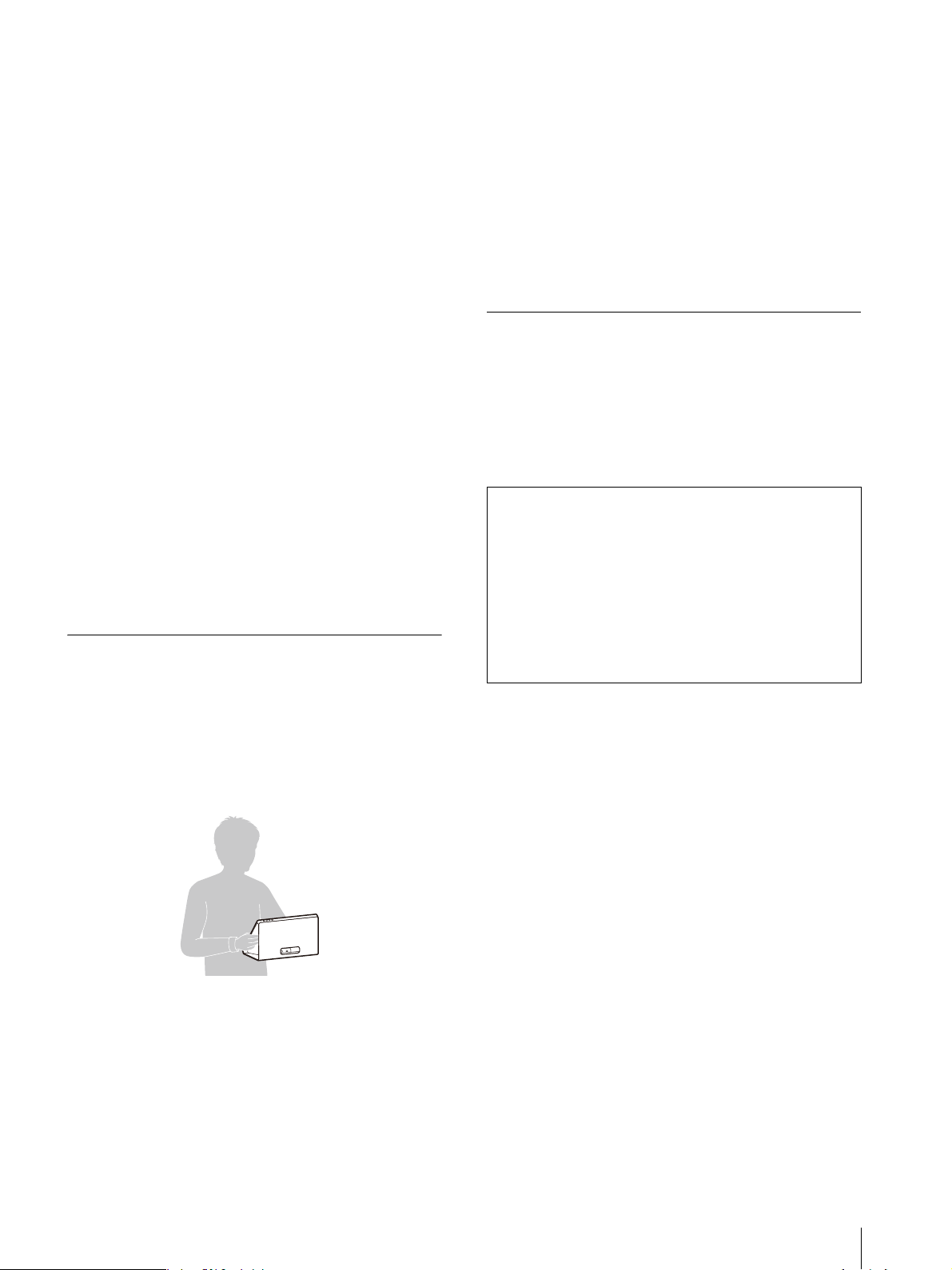
本機を持つときは、イラストのようにしっかりと持って
ください。
画面を押さえたり、強い力が加わる様な持ち方をしない
でください。
本機を運ぶときは、本機に接続されている電源プラグや
ケーブル等をすべてはずしてください。
電源プラグを差し込んだまま移動させると、電源コード
が傷つき、火災や感電の原因となることがあります。
修理や引っ越しなどで本機を運ぶ場合は、お買い上げ時
に本機が入っていた箱と、クッション材を使ってくださ
い。
強い振動や衝撃を与えないでください。強い振動や衝撃
により、内部構造または外観上の変形、パネル傷、内部
部品の故障など、本機が損傷を受けることがあります。
本機を貨物または手荷物として扱う輸送や運搬、例えば
トラック、船、航空機、キャスター付きキャリーバッグ
などを使った輸送中に、本機に強い振動や衝撃がかから
ないようご注意ください。
廃棄するときは
一般の廃棄物と一緒にしないでください。
ごみ廃棄場で処分されるごみの中にディスプレイを捨て
ないでください。
使用済みのディスプレイは、国または地域の法令に従っ
て廃棄してください。
お使いになる前に、必ず動作確認を行ってください。
故障その他に伴う営業上の機会損失等は保証期間中お
よび保証期間経過後にかかわらず、補償はいたしかね
ますのでご了承ください。
本製品を使用したことによるお客様、または第三者か
らのいかなる請求についても、当社は一切の責任を負
いかねます。
諸事情による本製品に関連するサービスの停止、中断
について、一切の責任を負いかねます。
JP
10
視聴環境について
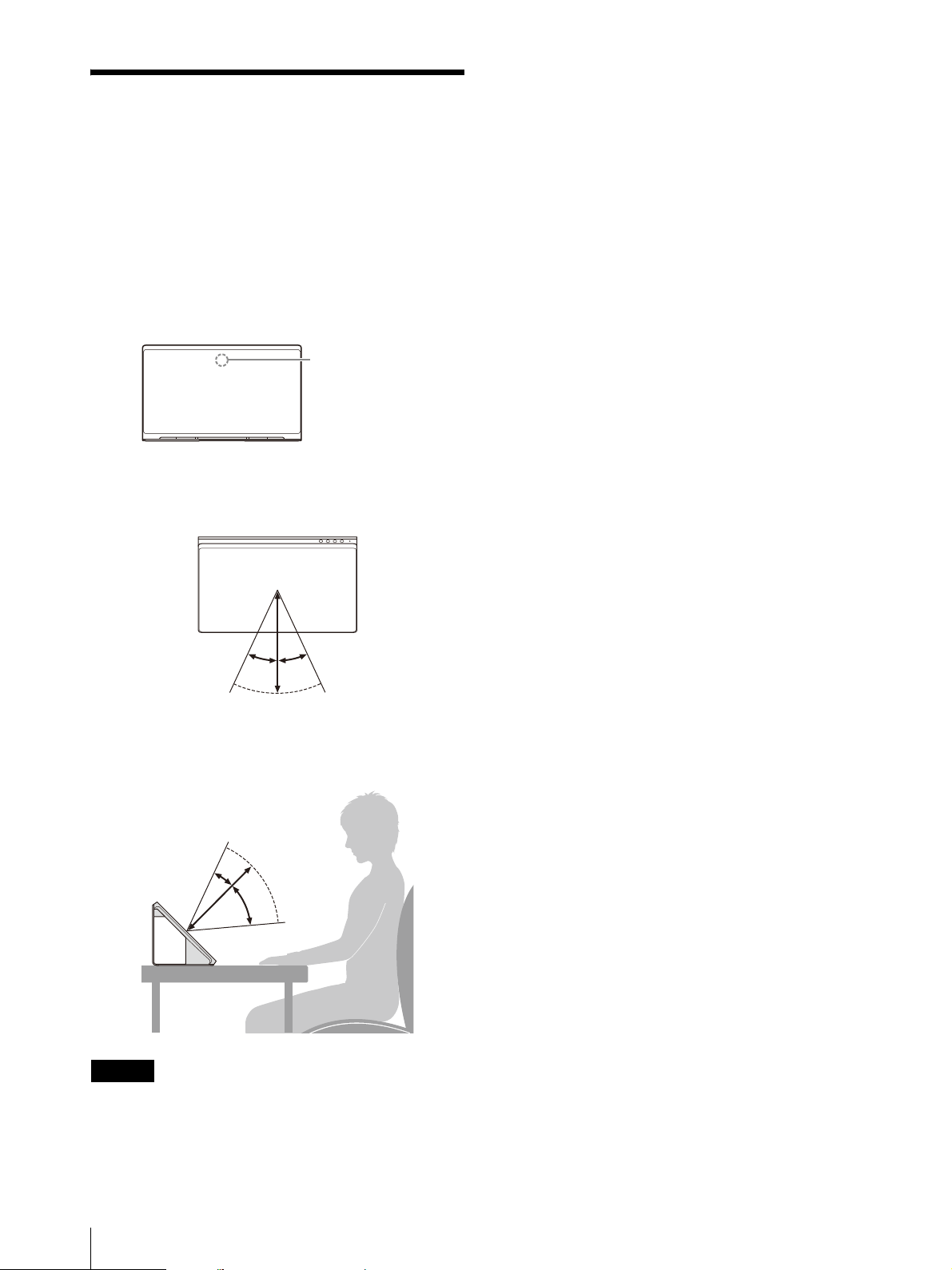
本機を使って3DCGなどの立体視コンテンツを、裸眼で立
体視することができます。本機をデスクトップに置いて、
以下の環境でお使いいただくとより快適に視聴できます。
周辺照度:100〜1,000lx程度かつ顔表面100lx以上
視聴距離:30
cm〜75cm
(推奨35cm〜50cm)
視聴範囲(水平):±25°
視聴範囲(垂直):−40°/+
20°
上から見た図
横から見た図
ご注意
周辺照度などの詳細は、開発者向けサポートページをご
覧ください。
https://www.sony.net/dev-srd
画面に直接外光があたらないようにして視聴してくださ
い。
画面に光が反射すると立体視体験を損なうことがありま
す。
視線認識センサーが光源に向けられた環境は避けてくだ
さい。
本製品では、視線認識センサーで視聴者の顔を検出した
うえで、視聴者の視線を認識し、最適化した映像を表示
します。視聴時はマスクや帽子をはずしてください。
本製品は、画面の向きを横にして視聴することを前提に
設計されています。縦向きでは3Dに見えません。
視聴時に表示される映像が安定しない場合は、設置を含
めて視聴環境を調整してください。
視線認識センサーによる認識をしづらくなっている可能
性があります。
ディスプレイ
視線認識センサー
25º 25º
20º
40º
11
JP
接続するコンピューター
と動作に必要なソフト
ウェアについて
推奨条件を備えたコンピューターをお使いください。ま
た、コンテンツを再生するために専用のソフトウェアが
必要です。
必要なソフトウェアを入手してお使いのコンピューター
にインストールしてください。コンピューターの推奨ス
ペックと動作環境の詳細な情報、専用ソフトウェアおよ
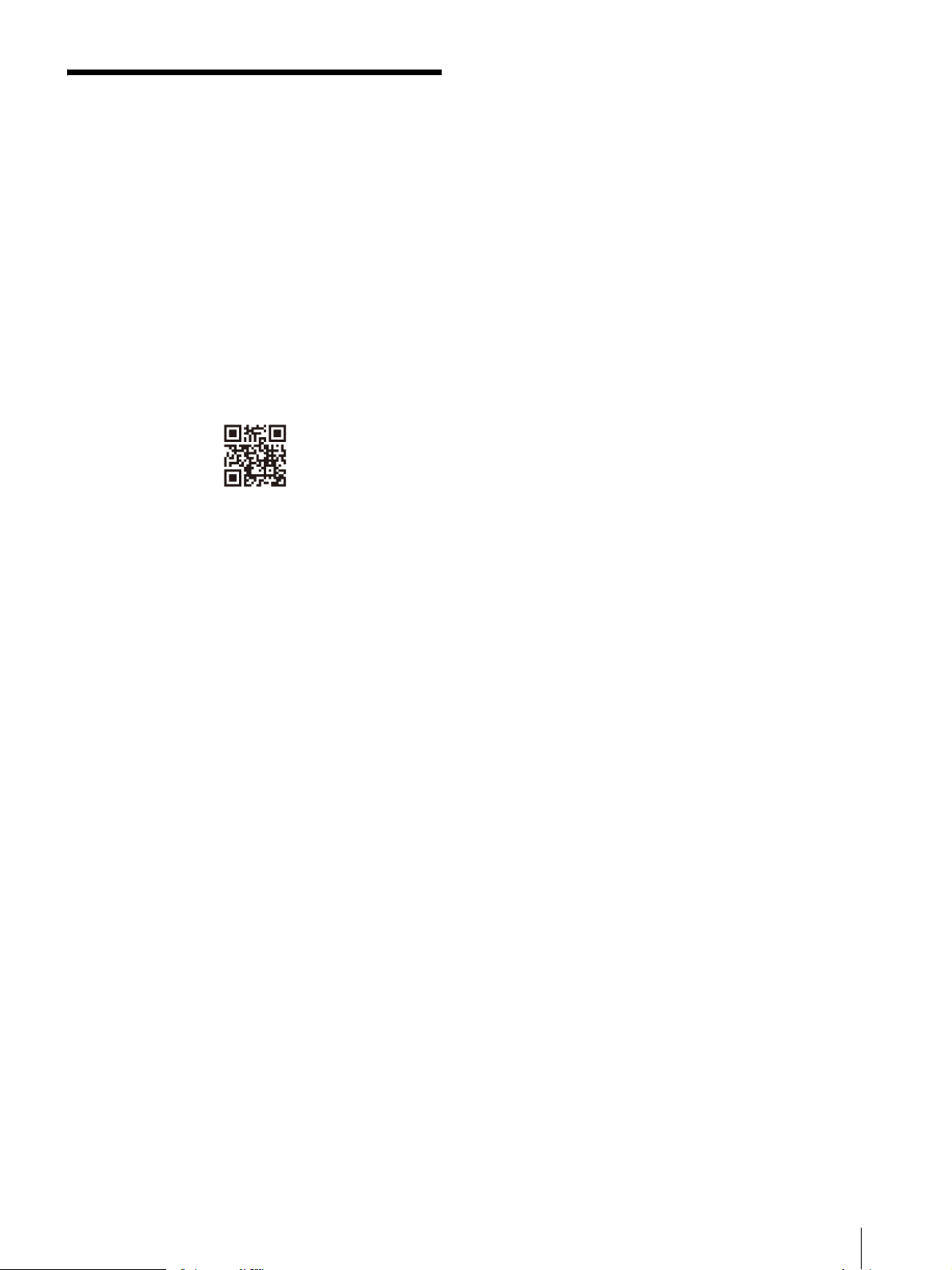
びマニュアルは、
以下のサイトから入手してください。
https://www.sony.net/dev-srd
13
JP
後面
スピーカー
音声を出力します。
(通信制御用)端子
付属のUSBType-Cケーブルをつなぎます。
(HDMI)入力端子
HDMI信号を入力します。
付属のHDMIケーブルを使ってお使いのコンピューターの
HDMI出力端子と接続します。
12V (DC入力)端子
付属のACアダプターのDCコネクターをつなぎます。
ɥ ɤ ɣ
ɢ
JP
14
接続
付属品を確かめる
接続をはじめる前に以下がそろっていることを確認して
ください。
あわせて接続する機器の取扱説明書もご覧ください。
ディスプレイ(1)
サイドパネル(2)(左右共用)
トップカバー(1)
ボトムスタンド(1)
USBType-Cケーブル(1)
HDMIケーブル(1)
ACアダプター(1)
電源コード(1)
取扱説明書(本書)(1)
クリーニングクロス(1)
端子の位置や向きを確かめる
本機の後面にある端子の位置や形状、向きを確認する。
参考
ケーブルは、本機の後面下側または底面にある穴から引
き出すこともできます。
HDMIケーブルをつなぐ
付属のHDMIケーブルを、本機のHDMI入力端子と、お使
いのコンピューターのHDMI出力端子につなぐ。
ご注意
接続には付属のHDMIケーブルを必ずご使用ください。
HDMIスイッチャーなどを使用せず、直接コンピュー
ターに接続してください。
接続するときは、端子とケーブルの位置や向きを合わせ
てから、端子にケーブルを差し込んでください。
本機で本来の映像を再生するために、お使いのコン
ピューターの対応HDMI端子(HDMI2.0対応以上必須)
を確認のうえ接続してください。
詳しくはお使いのコンピューターの取扱説明書をご覧く
ださい。
USBType-Cケーブルをつなぐ
付属のUSBType-Cケーブルを、本機の (通信制御
用)端子と、お使いのコンピューターのUSB端子につな
ぐ。
ご注意
接続には付属のUSBType-Cケーブルを必ずご使用くだ
さい。
ディスプレイ
ディスプレイ
ディスプレイ
HDMIケーブル(付属)
コンピューター
ディスプレイ
USBType-Cケーブル(付属)
コンピューター
15
JP
USBハブなどを使用せず、直接コンピューターに接続し
てください。
接続するときは、端子とケーブルの位置や向きを合わせ
てから、端子にケーブルを差し込んでください。
本機で本来の映像を再生するために、お使いのコン
ピューターの対応USB端子(USB3.2対応以上必須)を
確認のうえ接続してください。
詳しくはお使いのコンピューターの取扱説明書をご覧く
ださい。
ACアダプターをつなぐ
付属のACアダプターのDCコネクターを、本機の12V
(DC入力)端子にまっすぐ挿してつなぐ。
アクセサリーを取り付ける
アクセサリーを取り付けることで裸眼立体視が見やすく
なり、より没入感が高まります。
視聴時には必ず取り付けてください。
ご注意
ディスプレイを移動するときは、アクセサリーを取り外
してください。
サイドパネルを持って、ディスプレイを持ち上げたり、
移動させないでください。
1
ボトムスタンドを取り付ける。
本機底面の隙間にボトムスタンドのツメを差し込み、
止まるところまで押し込みます。
2
サイドパネルを取り付ける。
サイドパネルの保護フイルムをはがし、光沢面を内
側にして、図の位置に置きます。
サイドパネル底面にあるマグネットにより、ディス
プレイのパネル面に吸着されます。
ディスプレイ
ACアダプター(付属)
壁のコンセントへ
ボトムスタンド
ツメ
ディスプレイのパネル有効画面の端
ディスプレイのパネル面の端
サイド
パネル

JP
16
3
トップカバーを取り付ける。
サイドパネルとディスプレイのパネル面の隙間に、
図のように差し込みます。
ご注意
アクセサリーを取り外すときは、はじめにトップカバー
を取り外してください。
コンテンツを視聴する
電源を入れる
1
電源コードを電源コンセントに接続する。
2
本機の(電源)スイッチを押して電源を入れる。
参考
電源が入るとインジケーターが白色で点灯します。
メニューを使って調整する
本機では、画質調整や設定をメニュー画面で行います。
1
MENUボタンを押してメニューを表示させる。
現在選択されているメニューの項目が灰色で表示さ
れます。
トップカバー
17
JP
2
MENUボタンを押してメニュー項目を選ぶ。
MENUボタンを押すと、上から順番にメニューの項
目を選択していきます。
3
+/−ボタンを押して調整値や設定を変更する。
変更した調整値や設定は自動的に記憶されます。
数値を変更する項目の場合:
数値を大きくするときは、+ボタンを押す。
数値を小さくするときは、−ボタンを押す。
設定を選ぶ場合:
+/−ボタンを押して設定を選ぶ。
メニュー画面を消すには
一番下にあるメニュー項目を選択している状態でMENU
ボタンを押すと、「情報画面」が表示されます。
もう一度MENUボタンを押すと、表示が消えます。
また、しばらくメニューの操作をしないと、メニュー画
面の表示は自動的に消えます。
メニュー項目
故障かな?と思ったら
お買い上げ店などにご相談いただく前に、次の事項をご
確認ください。
画面や音が出ないインジケーターが橙色に点滅する
ときは、電源プラグを抜き、インジケーターの点滅が止
まるまでお待ちください。その後、電源プラグを再度つ
なぎ、本機の電源ボタンで電源を入れてください。
インジケーターの点滅が続く場合は、点滅回数をご確認
のうえ、ソニーのご相談窓口にお問い合わせください。
正しく表示されない視聴に適した環境を確認してく
ださい(10ページ)。
(一定時間がたつと)画面が暗くなる/映像が表示され
ないオートシャットオフが働いています。「オート
シャットオフ」の設定を確認してください(17ページ)。
「入力信号がありません」と表示される信号が入力
されていない状態です。
「この信号には対応していません」と表示される入
力信号によっては本機に対応しないものがあります。お
使いのコンピューターの対応信号を確認してください。
表示しているコンテンツの解像度が低いと感じる(「こ
の信号には対応していません」と表示されない)お
使いのコンピューターの解像度/対応信号の設定が
3840×2
160に設定されていることを確認してください。
お使いのコンピューターのGPUまたはOSの仕様によっ
ては、適切な設定である3840×2
160以外になっていて
も、本機で「この信号には対応していません」と表示さ
れません。お使いのコンピューターで、設定内容を確認
してください。
メニュー 設定
明るさ 明るさを調整します。(デフォルト値:30)
コン
トラスト コントラストを調整します。(デフォルト
値:30)
表示
言語 メニューやメッセージの表示言語を選択で
き
ます。
日本語(デフォルト値)
English
オートシャットオフ 信号入力が無い状態がしばらく続くと、自
動的に本機がスタンバ
イ状態になります。
入(デフォルト値)
切
参考
スタンバイ状態では画面は消画になり、イ
ンジケーターが橙色で点灯します。
情報画面 本機の情報を表示します。
モデル名
シリアルNo.
ソフトウェアバージョン
JP
18
サポートページで最新の
情報を調べる
開発者向けサポートページでは以下の情報を見ることが
できます。
https://www.sony.net/dev-srd
コンテンツの開発情報
困ったときは(Q&A)
ソフトウェアの更新情報
他機器との接続情報
推奨コンピューターのスペック情報
保証書とアフターサービ
ス
保証書
この製品には保証書が添付されていますので、お買い上
げの際お受け取りください。
所定事項の記載内容をお確かめのうえ、大切に保存して
ください。
保証期間は、お買い上げ日より1年間です。
アフターサービス
調子が悪いときはまずチェックを
本書の「故障かな?と思ったら」の項目を参考にして、
故障かどうかをお調べください。
それでも具合の悪いときはソニーご相談窓口へ
ソニーご相談窓口へお問い合わせください。
部品の交換について
この製品は、修理の際に交換した部品を再生、再利用す
る場合があります。その際、交換した部品は回収させて
いただきます。
保証期間中の修理は
保証書の記載内容に基づいて修理させていただきます。
詳しくは保証書をご覧ください。
保証期間経過後の修理は
修理によって機能が維持できる場合は、ご要望により有
料修理をさせていただきます。
部品の保有期間について
当社では補修用性能部品(製品の機能を維持するために
必要な部品)を、製造打ち切り後5年間保有しています。
ただし、故障の状況その他の事情により、修理に代えて
製品交換をする場合がありますのでご了承ください。
ご相談になるときは次のことをお知らせください。
型名:ELF-SR1
故障状態:できるだけ詳しく
購入年月日:
本機の型名、シリアルナンバーおよび定格は、本機底面
に記載されています。
19
JP
お使いのコンピューターについて:
メーカー、型名、スペック(CPU、GPU、RAM容量な
ど)
ThisproductisdesignedforuseinJapanonlyandcannot
beuse
dinanyothercountry.
主な仕様
パネルシステム マイクロオプティカルレンズ方式液晶パ
ネルモジュール
パネル型サイズ 15.6型
パネルアスペクト比
16:9
パネル画素数(H×V)
3,840×2,160ピクセル
実際の立体視の有効解像感は4K以下と
なります。
有効表示エリア
*1
(H×V)
341.4mm×190.7mm
音声出力 5.5W(1.5W+1.5W+2.5W)
(通信制御用)端子
USB3.2Gen1対応
HDMI入力端子 3840×2160p(60Hz)、7
20
×480p
(60Hz)
*2
、640×480p(60Hz)
*2
動作条件
温度 0℃〜40℃
推奨使用温度 20℃〜30℃
湿度 20%〜80%(結露のないこと)
高度 2,000m以下
保存・輸送条件
温度 −20℃〜+60℃
湿度 20%〜80%
消費電力 最大24W
最大外形寸法
*1
(最大突起部分を除く)(幅×高さ×奥行
き)
383mm×232mm×231mm
383mm×232mm×247mm(アクセサ
リー含む
*3
)
質量
*1
4.6kg
4.9kg(アクセサリー含む
*3
)
電源 DCIN:12V2.0A(ACアダプターから
供給)
*1 有効表示エリアおよび最大外形寸法と質量は、おおよその値
です。
*22D表示のみ
*3 アクセサリーのサイドパネル、ボトムスタンド、トップカ
バ
ーを含みます。
本機の仕様および外観は、改良のため予告なく変更する
ことがありますが、ご了承ください。
お買い上げ店
TEL.

JP
20
ソフトウェアに
関する重要なお
知らせ
ソフトウェア使用許諾契約
書
本契約は、ソニーホームエンタテイン
メント&サウンドプロダクツ株式会社
(以下「ソニー」とします)とお客様
及びお客様が代理する法人(以下、併
せて「お客様」とします)との間で
の、ソニーがお客様に対して、本製品
(以下「指定デバイス」といいます)
に組み込んで提供するソフトウェア
(コンピューターソフトウェア、マ
ニュアルなどの関連書類及び電子文書
並びにそれらのアップデート・アップ
グレード版を含みます)の使用権の許
諾に関する条件を定めるものです。許
諾ソフトウェアをご使用いただく前
に、本契約をお読み下さい。お客様に
よる許諾ソフトウェアの使用開始を
もって、本契約にご同意いただいたも
のとします。
なお、許諾ソフトウェアの中には、ソ
ニー以外のソフトウェアの権利者が定
める使用許諾条件(GNUGe
neral
Publiclicense(GPL)、Lesser/Library
GeneralPublicLicense(LGPL)を含み
ますが、これらに限られるものではあ
りません)を伴うソフトウェア(以下
「対象外ソフトウェア」とします)が
含まれている場合があります。対象外
ソフトウェアのご使用は、各権利者の
定める使用許諾条件に従っていただく
ものとします。
第1条(総則)
許諾ソフトウェアは、日本国内外の著
作権法並びに著作者の権利及びこれに
隣接する権利に関する諸条約その他知
的財産権に関する法令によって保護さ
れています。許諾ソフトウェアは、本
契約の条件に従いソニーからお客様に
対して使用許諾されるもので、許諾ソ
フトウェアの著作権等の知的
財産権は
お客様に移転いたしません。
第2条(使用権)
ソニーは、本契約に基づく条件及び許
諾ソフトウェアの使用に関す
るソニー
の指示(以下「取扱指示」とします)
に従って、許諾ソフトウェア
をお客様
の指定デバイス上で使用する、非独占
的且つ譲渡不能の権利をお客様に許諾
します。
第3条(権利の制限)
1.お客様は、許諾ソフトウェアの全部
又は一部を複製、複写、譲渡、販売し
たり、これに対する修正、追加等の改
変をすることはできないものとしま
す。また、許諾ソフトウェアに含まれ
るトレードマークやその他の
権利標記
等の表示を削除したり、外観の変更を
してはならないものとします。
2.お客様は、別途明示的に承諾されて
いる場合を除き、許諾ソフトウェアを
再使用許諾、貸与又はリースその他の
方法で第三者に使用させてはならない
ものとします。
3.お客様は、別途明示的に承諾されて
いる場合を除き、許諾ソフトウェアの
一部又はその構成部分を許諾ソフト
ウェアから分離して使用しないものと
します。
4
.お客様は、許諾ソフトウェアを用い
て、ソニー又は第三者の著作権等の権
利を侵害する行為を行ってはならない
ものとします。
5.
お客様は、許諾ソフトウェアに関し
リバースエンジニアリング、逆アセン
ブル、逆コンパイル等のソースコード
解析作業を行ってはならないものとし
ます。
6
.許諾ソフトウェアの使用に伴い、許
諾ソフトウェアが自動的に許諾ソフト
ウェアで用いるためのデータファイル
を作成する場合があります。この場
合、当該データファイルは許諾ソフト
ウェアと看做されるものとし
ます。
7.お客様は、取扱指示に反する態様
で、許諾ソフトウェアを使用
してはな
らないものとします。
8.
お客様は以下の行為を行ってはなら
ず、また、第三者に対して以下の行為
を指示、許容、要請、斡旋または当該
行為を可能にしてはならないものとし
ます。
(ア)本契約上の条件に反する目的また
は態様で、許諾ソフトウェアを使用す
ること
(
イ)許諾ソフトウェアに、バックドア、
ドロップデッドデバイス、時限爆弾、
トロイの木馬、ウイルス、ワーム、そ
の他これに類する許諾ソフトウェアや
お客様または第三者が保有または管理
するデバイスやシステムの稼働を阻害
し、停止させ、害し、またはその態様
に関わらず妨げることを目的とする
コードやファイル、スクリプト、エー
ジェント、プログラム、ルーチンまた
は指示(以下「悪意のあるコード」と
いいます)を取り込むこと
(ウ)許諾ソフトウェアの適切な稼働に
干渉すること
(エ)許諾ソフトウェアの以下の機能を
回避し、停止させ、または干渉するこ
と
(i)許諾ソフトウェアのセキュリティに
関する機能
(ii)許諾ソフトウェアの使用、許諾ソフ
トウェアへのアクセス、または許諾ソ
フトウェアの複製を阻止または制限す
るための機能
(iii)許諾ソフトウェアの使用に制限を
かける機能
(オ)許諾ソフトウェアに対して不合理
なまたは不相当に大きな負荷をかけ、
あるいはお客様の判断で当該負荷をか
けられるようにすること
第4条(許諾ソフトウェアの権利)
許諾ソフトウェアに関する著作権等一
切の権利は、ソニー、ソニーの関連会
社またはソニーが本契約に基づきお客
様に対して使用許諾を行うための権利
をソニーまたはソニーの関連会社に許
諾した原権利者(以下「原権利者」と
します)に帰属するものとし、お客様
は許諾ソフトウェアに関して本契約に
基づき許諾された使用権以外の権利を
有しないものとします。
第5条(オープンソースソフトウェ
ア)

21
JP
1.対象外ソフトウェアには、①ソース
コードの形式でまたは無償で公に入手
可能なソフトウェアを含むものまたは
その派生物であり、かつ②本契約の規
定と異なる定めの適用を受けるソフト
ウェア(対象となるソフトウェア及び
その派生物をソースコードの形式で開
示または頒布する義務、対象となるソ
フトウェアを任意の第三者に対して自
由に使用許諾させる義務等を含むがこ
れに限られない。また、これには
GNUGeneralPublicLicense(GPL)や
GNULesser/LibraryGeneralPublic
License(LGPL)に基づいてライセンス
されているソフトウェアを含むがこれ
に限らない。)(以下「オープンソース
ソフトウェア」とします)が含まれる
ことがあります。
2.ソニーが開示するオープンソース
ソフトウェアのソースコードは、
h
ttp://
www.sony.net/Products/Linux
またはその他ソニーの指定するサイト
にてご確認下さい。オープンソースソ
フトウェアには、それぞれのオープン
ソースソフトウェアに該当するライセ
ンス条件が、本契約の代わりに適用さ
れます。
第6条(責任の範囲)
1.ソニー、ソニーの関連会社及び原
権利者は、許諾ソフトウェアにエ
ラー、バグ等の不具合がないこと、
若
しくは許諾ソフトウェアが中断なく稼
動することまたは許諾ソフトウェアの
使用がお客様及び第三者に損害を与え
ないことを保証しません。但し、
ソ
ニー、ソニーの関連会社及び原権利者
は、当該エラー、バグ等の不具合に対
応するため、許諾ソフトウェアの一部
を書き換えるソフトウェア若しくは
バージョンアップの提供による許諾ソ
フトウェアの修補または当該エラー、
バグ等についての問い合わせ先の通知
を行うことがあります。本項に定める
ソフトウェア及びバージョンアップの
提供方法または問い合わせ先の通知方
法はソニー、ソニーの関連会社または
原権利者がその裁量により定めるもの
とします。また、ソニー、ソニー関連
会社及び原権利者は、許諾ソフトウェ
アが第三者の知的財産権を侵害してい
ないことを保証いたしません。
2.許諾ソフトウェアの稼動が依存する
可能性のある、許諾ソフトウェア以外
の製品またはソフトウェア(当該製品
またはソフトウェアは第三者が提供す
る場合に限られず、ソニー、ソニーの
関連会社または原権利者が提供する場
合も含みます)は、当該ソフトウェア
の提供者の判断で中止または中断する
場合があります。ソニー、ソニーの関
連会社及び原権利者は、許諾ソフト
ウェアの稼動が依存する可能性のある
これらの製品、ソフトウェアが中断な
く正常に作動すること、将来に亘って
正常に稼動すること、及び当該製品、
ソフトウェアのセキュリティに脆弱性
がないことを保証いたしません。
3.ソニーまたはソニーの指定する第三
者(ソニーの関連会社を含む)は、許
諾ソフトウェアをアップデートするこ
とがあります。お客様が、アップデー
トの実行を拒否した場合、当該許諾ソ
フトウェアの全部または一部の機能が
使用できない場合があります。これに
ついてソニーは何等の責任を負わない
ものとします。
4.ソニー、ソニーの関連会社及び原権
利者は、許諾ソフトウェアが稼働する
ソフトウェア、設備、システムまたは
ネットワーク(指定デバイスを含みま
す)が侵入や攻撃の対象となり得ない
ことを保証いたしません。
5.お客様に対するソニー、ソニーの関
連会社及び原権利者の損害賠償責任
は、当該損害がソニー、ソニーの関連
会社または原権利者の故意または重過
失による場合を除きいかなる場合に
も、お客様に直接且つ現実に生じた通
常の損害に限定され且つお客様が証明
する指定デバイスの購入代金を上限と
します。但し、かかる制限を禁止する
法律の定めがある場合はこの限りでは
ないものとします。
第7条(用途の限定)
許諾ソフトウェアは高度の安全性が要
求され、許諾ソフトウェアの不具合や
中断が生命、身体への危険、有体物ま
たは環境に対する重大な損害に繋がる
用途(例えば、原子力発電所を含む核
施設の制御、航空機の制御、通信シス
テム、航空管制、生命維持装置または
兵器)を想定しては設計されていませ
ん。ソニー、その関連会社及び原権利
者は、許諾ソフトウェアがこれら高度
の安全性が要求される用途に合致する
ことを一切保証しません。
第8条(第三者に対する責任)
法律上特に禁止されている場合を除
き、お客様が以下の事由に基づいて第
三者との間で紛争を生じたときは、お
客様自身が自らの費用で解決するもの
とし、ソニー、ソニーの関連会社及び
原権利者に一切の迷惑をかけないもの
とします。
(ア)お客様が許諾ソフトウェアまたは
指定デバイスを使用したことに関連し
て、第三者との間で紛争を生じたとき
(
当該使用によってセキュリティの脆
弱性を生じたことに関連する紛争や当
該使用による著作権、特許権その他の
知的財産権の侵害を理由とする紛争を
含み、これに限られません)
(イ)お客様が本契約に違反したり、本
契約上の義務を履行しなかったことに
関連して、第三者との間で紛争を生じ
たとき
第9条(著作権保護及びアップデー
ト)
1
.お客様は、許諾ソフトウェアの使用
に際し、日本国内外の著作権法並びに
著作者の権利及びこれに隣接する権利
に関する諸条約その他知的財産権に関
する法令に従うものとします。また、
許諾ソフトウェアのうち、著作物の複
製、保存及び復元等を伴う機能の使用
に際して、ソニーが必要と判断した場
合、ソニーが、当該著作物の著作権保
護のため、かかる許諾ソフトウェアに
よる複製、保存、復元等の頻度の記録
をとり、状態を監視し、さらに複製、
保存及び復元の拒否、本契約の解約を
含む、あらゆる措置をとる権利を留保
することに同意するものとします。
2.お客様は、許諾ソフトウェアのアッ
プデートに関して次の各号に同意する
ものとします。
(ア)当該許諾ソフトウェアのアップ
デートに伴い、許諾ソフトウェアの機

JP
22
能が追加、変更または削除されること
があること
(イ)アップデートされた許諾ソフト
ウェアについても本契約の各条項が適
用されること
第10条(契約の解約)
1.ソニーは、お客様が本契約に定め
る条項に違反した場合、直ちにお客様
による許諾ソフトウェアへのアクセス
または使用を停止させ、直ちに本契約
を解約し、またはそれらによって蒙っ
た損害の賠償をお客様に対し請求でき
るものとします。
2.前項またはその他の事由で本契約
が終了した場合でも、第4条乃至第13
条の規定は有効に存続するものとしま
す。
第11条(契約の改訂)
ソニーはお客様が登録した電子メール
アドレスへの電子メールの発信、ソ
ニー所定のサイトでの告知またはその
他ソニーが適切と判断する方法をもっ
てお客様に事前に通知することによ
り、本契約の条件を改訂することがあ
ります。お客様はかかる改訂に同意し
ない場合は、本契約の条件改定の発効
日前までに、ソニーにその旨を連絡す
るとともに直ちに許諾ソフトウェアの
使用を中止するものとします。本契約
の条件改訂の発効日以降のお客様によ
る許諾ソフトウェアの使用をもって、
お客様は改訂されたソフトウェア使用
許諾契約書に同意したものとします。
第12条(ユーザー登録の抹消)
1.お客様が、指定デバイスを譲渡ま
たは破棄する場合、または本契約が終
了した場合には、お客様は、指定デバ
イス内の許諾ソフトウェアを削除し、
指定デバイスを通じて取得したアカウ
ントを消去することによりユーザー登
録を抹消するものとします。
2.お客様は、指定デバイスを通じて
取得したアカウント、ユーザーネー
ム、パスワードに関する情報の秘密保
持について一切の責任を負うものとし
ます。
第13条(不可抗力)
天災、地変、その他自己の責に帰すべ
からざる事由に起因して、ソ
ニーによ
る本契約上の義務(金銭債務の支払い
義務を除く)の履行が不能となった場
合、ソニーは一切の責任を負わないも
のとします。
第14条(その他)
1.本契約は、日本国法に準拠するもの
とします。
2.お客様は、許諾ソフトウェアを日本
国外に持ち出して使用する場合、適用
ある輸出管理規制、法律、命令に従う
ものとします。
3.本契約は、消費者契約法を含む消費
者保護法規によるお客様の権利を不利
益に変更するものではありません。
4.本契約の一部条項が法令によって無
効となった場合でも、当該条項は法令
で有効と認められる範囲で依然として
有効に存続するものとします。
5.
本契約に定めなき事項または本契約
の解釈に疑義を生じた場合は、お客様
及びソニーは誠意をもって協議し、解
決するものとします。
以上

GB
2
English
Table of Contents
Precaution ......................................................... 7
On Safety ....................................................7
On Installation ............................................7
Connecting to Other Devices .....................7
Handling the Screen ...................................7
On a Long Period of Use .............................7
On Dew Condensation .............................. 8
On Watching 3D Video Images ................. 8
Handling and Maintenance of the
Screen ....................................................... 8
On Transportation of the Unit ................... 8
Disposal of the Unit ................................... 9
On the Viewing Environment ............................ 9
On the Connecting Computer and Software
Required for Operation ....................................10
Location and Function of Parts and Controls ... 11
Front........................................................... 11
Rear........................................................... 12
Connection .......................................................13
Checking the Supplied Accessories .........13
Checking the Position and Orientation of
Connectors ..............................................13
Connecting the HDMI Cable .....................13
Connecting the USB Type-C Cable ...........13
Connecting the AC Adaptor ......................14
Attaching Accessories ..............................14
Viewing the Content ........................................15
Turning on the Unit ...................................15
Using the Menu ........................................15
Menu items ...............................................16
Troubleshooting .............................................. 17
Checking the Latest Information on the Support
Site ...................................................................17
Specifications ...................................................18
NOTICES AND LICENSES FOR SOFTWARE USED IN
THIS PRODUCT ...................................................19
The terms HDMI and HDMI High-Definition
Multimedia Interface, and the HDMI Logo are
trademarks or registered trademarks of HDMI
Licensing Administrator, Inc. in the United
States and other countries.
TM
USB Type-C and USB-C
TM
are trademarks of
USB Implementers Forum.
3
GB
Before operating the unit, please read this
manual thoroughly and retain it for future
reference.
Read these instructions.
Keep these instructions.
Heed all warnings.
Follow all instructions.
Do not use this apparatus near water.
Clean only with dry cloth.
Do not block any ventilation openings.
Install in accordance with the manufacturer's
instructions.
Do not install near any heat sources such as
radiators, heat registers, stoves, or other
apparatus (including amplifiers) that produce
heat.
Do not defeat the safety purpose of the
polarized or grounding-type plug. A polarized
plug has two blades with one wider than the
other. A grounding-type plug has two blades
and a third grounding prong. The wide blade or
the third prong are provided for your safety. If
the provided plug does not fit into your outlet,
consult an electrician for replacement of the
obsolete outlet.
Protect the power cord from being walked on
or pinched particularly at plugs, convenience
receptacles, and the point where they exit from
the apparatus.
Only use attachments/accessories specified by
the manufacturer.
Use only with the cart, stand, tripod, bracket, or
table specified by the manufacturer, or sold
with the apparatus. When a cart is used, use
caution when moving the cart/apparatus
combination to avoid injury from tip-over.
Unplug this apparatus during lightning storms
or when unused for long periods of time.
Refer all servicing to qualified service
personnel. Servicing is required when the
apparatus has been damaged in any way, such
as power-supply cord or plug is damaged,
liquid has been spilled or objects have fallen
into the apparatus, the apparatus has been
exposed to rain or moisture, does not operate
normally, or has been dropped.
NOT FOR CANADIAN CUSTOMERS. NOT APPLICABLE IN
CA
NADA
, INCLUDING IN THE PROVINCE OF QUEBEC.
NE S’ADRESSE PAS AUX CONSOMMATEURS
CA
NADIENS.
NON APPLICABLE AU CANADA, Y
COMPRIS LA PROVINCE DE QUÉBEC.
Owner’s Record
The model and serial numbers are located at
the
bottom
of the unit. Record these numbers
in the space provided below. Refer to these
numbers whenever you call upon your Sony
dealer regarding this product.
Model No. _______________________
Serial No. _______________________
Important Safety Instructions

GB
4
WARNING
To reduce the risk of fire or electric shock, do
not ex
pose this apparatus to rain or moisture.
To avoid electrical shock, do not open the
c
abine
t. Refer servicing to qualified personnel
only.
WARNING
When installing the unit, incorporate a readily
a
cce
ssible disconnect device in the fixed wiring,
or connect the power plug to an easily accessible
socket-outlet near the unit. If a fault should occur
during operation of the unit, operate the
disconnect device to switch the power supply
off, or disconnect the power plug.
WARNING
Do not touch the AC adapter, AC power cord and
its p
lug with wet hand
s as it may cause electric
shock.
WARNING
The apparatus shall not be exposed to dripping
o
r spla
shing. No objects filled with liquids, such
as vases, shall be placed on the apparatus.
WARNING
Excessive sound pressure from speakers while
u
sing the pr
oduct can cause hearing loss.
In order to use this product safely, avoid
pr
olon
ged listening at excessive sound pressure
levels.
WARNING
Operation of this equipment in a residential
en
vir
onment could cause radio interference.
NOTE ON AC ADAPTER
Warning
To reduce the risk of fire or electric shock, do not
e
xpo
se this apparatus to rain or moisture.
To prevent fire or shock hazard, do not place
ob
ject
s filled with liquids, such as vases, on the
apparatus.
Do not install this equipment in a confined space,
su
ch
as a bookshelf or similar unit.
Please ensure that the AC outlet is installed
near the equipment and shall be easily
accessible.
Be sure to use the supplied AC adapter and AC
power cord.
Do not use any other AC adapter. It may cause
a malfunction.
Connect the AC adapter to an easily accessible
AC outlet.
Do not coil the AC power cord around the AC
adapter. The core wire may be cut and/or it
may cause a malfunction of the display.
Do not touch the AC adapter with wet hands.
If you notice an abnormality in the AC adapter,
disconnect it from the AC outlet immediately.
The set is not disconnected from the AC source
as long as it is connected to the AC outlet, even
if the set itself has been turned off.
CAUTION
For safety, do not connect the connector for
p
erip
heral device wiring that might have
excessive voltage to the following ports:
Communication control connector
This equipment is not suitable for use in
locat
ions where children are likely to be present.
Store the equipment away from children.
When installing the installation space must be
se
cur
ed in consideration of the ventilation and
service operation.
Leave a space around the unit for ventilation.
Leave more than 10 cm (4 in.) of space in the
rear of the unit to secure the operation area.
When the unit is installed on the desk or the like,
le
ave at le
ast 10 cm (4 in.) of space in the left and
right sides, 10 cm (4 in.) or more of space above
the unit.
The ventilation of the unit and its vicinity should
n
ot b
e impeded by covering the unit with items
such as newspapers, table cloths, curtains, etc.
No naked flame sources, such as lighted candles,
s
hou
ld be placed on the apparatus.
Location of the identification label
Labels for Model No., Serial No. and Power
Supply rating are located on the bottom of the
unit.
Labels for AC adapter Model No. and Serial No.
are located on the bottom of the AC adapter.
Optional Equipment
This equipment has been tested and found to
c
omply
with the limits set out in the EMC
standards using a connection signal cable
shorter than 3 meters.
5
GB
For the customers in the U.S.A.
NOT FOR CANADIAN CUSTOMERS. NOT APPLICABLE IN
CANADA
, INCLUDING IN THE PROVINCE OF QUEBEC.
NE S’ADRESSE PAS AUX CONSOMMATEURS CANADIENS.
N
ON APPLI
CABLE AU CANADA, Y COMPRIS LA PROVINCE
DE QUÉBEC.
FCC Related Information
Note: This equipment has been tested and found
t
o com
ply with the limits for a Class B digital
device, pursuant to Part 15 of the FCC Rules.
These limits are designed to provide reasonable
pr
otec
tion against harmful interference in a
residential installation. This equipment
generates, uses and can radiate radio frequency
energy and, if not installed and used in
accordance with the instructions, may cause
harmful interference to radio communications.
However, there is no guarantee that interference
will
not oc
cur in a particular installation. If this
equipment does cause harmful interference to
radio or television reception, which can be
determined by turning the equipment off and
on, the user is encouraged to try to correct the
interference by one or more of the following
measures:
Reorient or relocate the receiving antenna.
Increase the separation between the
equipment and receiver.
Connect the equipment into an outlet on a
circuit different from that to which the receiver
is connected.
Consult the dealer or an experienced radio/TV
technician for help.
Pursuant to FCC regulations, you are cautioned
that any changes or mo
difications not expressly
approved in this manual could void your
authority to operate this equipment.
For the customers in Canada
CAN ICES-3(B)/NMB-3(B)
INSTALLATION
The display should be installed near an easily
a
cces
sible AC power outlet.
Do not install the display face up or down,
upside down or on its side.
Do not install the display in hot, oily, humid, or
excessively dusty places.
Do not install the display in places subject to
extreme temperature, such as in direct
sunlight, near a radiator or a heating vent. The
display may overheat in such conditions which
can cause deformation of the enclosure and/or
display malfunction.
Do not install the display in a place exposed to
direct air conditioning; moisture may
condense inside and may cause display
malfunction.
Do not install the display where it may be
exposed to mechanical vibration.
Do not install the display where insects may
enter.
Do not install the display in a location where it
may protrude, such as on or behind a pillar, or
any place you might bump your head or
receive bodily injury.
To prevent fire keep flammable objects or
open flame (e.g. candles) away from the
display.
Do not place optional equipment on top of the
display.
Supplier’s Declaration of Conformity
Trade Name : SONY
Model : ELF-SR1
Responsible party : Sony Electronics Inc.
Address : 16535 Via Esprillo,
Sa
n Dieg
o, CA 92127
U.S.A.
Telephone Number : 858-942-2230
This device complies with part 15 of the FCC
R
ules. Ope
ration is subject to the following
two conditions: (1) This device may not cause
harmful interference, and (2) this device must
accept any interference received, including
interference that may cause undesired
operation.

GB
6
Prevent the display from toppling over
Take measures to prevent the display from
topp
ling over and causing injury or damage to
the display and property.
Never install the display on unstable and/or
uneven surfaces.
Do not install the display on furniture that can
easily be used as steps, such as a chest of
drawers.
Care should be taken to install the display
where it cannot be pushed, pulled over, or
knocked down.
Care should be taken to route all AC power
cords and connecting cables so that they
cannot be pulled or grabbed by curious
children.
Medical institutions
Do not place this display in a place where
me
dica
l equipment is in use.
It may cause a medical equipment malfunction.
Do not place this product close to medical
de
vices
.
This product (including accessories) has
ma
gnet
(s) which may interfere with pacemakers,
programmable shunt valves for hydrocephalus
treatment, or other medical devices. Do not
place this product close to persons who use such
medical devices. Consult your doctor before
using this product if you use any such medical
device.
Keep out of the reach of children or the
s
uper
vised individuals.
This product (including accessories) has
m
agnet(s).
Swallowing magnet(s) could cause
serious harm, such as choking hazard or
intestinal injuries. If magnets (or a magnet) were
swallowed, consult a doctor immediately.
Outdoor use
Do not install this display outdoors. The display
sh
ould
not be exposed to rain or direct sunlight
in order to avoid damage and possible fire or
electric shock.
Do not install this display in a vehicle, ship or other
ves
sel
Excessive bumping motion of a moving vehicle
or continuous swaying motion on a boat may
cause the display to fall down and cause injury.
Exposing the display to seawater may cause a
fire, electric shock or damage to your display.
Clean the AC power plug
Unplug the AC power plug and clean it
oc
casi
onally to avoid dust from accumulating.
While cleaning, look for signs of damage. A
damaged AC power cord should never be used.
SERVICING
Do not use the display if you suspect the display
i
s damag
ed or if the display is damaged.
Do not attempt to service the display yourself
since opening the cabinet may expose you to
dangerous voltage levels or other hazards.
Refer all servicing to qualified service
personnel.
If replacement parts are required, acquire a
written certification from the service technician
which states that adequate replacement parts
with the same or similar characteristics as the
original parts have been used. Unauthorized
substitutions may result in a fire, an electric
shock or other hazards.
Safety check
Upon completion of any display servicing or
r
epair
, ask the service technician to perform
routine safety checks as specified by Sony and to
certify that the display is safe to operate. Have a
qualified service technician dispose of the
display if it is not safe to operate.

7
GB
Precaution
On Safety
Operate the unit only with a power source as
specified in the “Specifications” section.
A nameplate indicating operating voltage, etc.,
is located on the bottom of the unit.
Should any solid object or liquid fall into the
cabinet, unplug the unit and have it checked by
qualified personnel before operating it any
further.
Do not drop or place heavy objects on the
power cord. If the power cord is damaged, turn
off the power immediately. It is dangerous to
use the unit with a damaged power cord.
Unplug the unit from the wall outlet if it is not
to be used for several days or more.
Disconnect the power cord from the AC outlet
by grasping the plug, not by pulling the cord.
The socket-outlet shall be installed near the
equipment and shall be easily accessible.
On Installation
Allow adequate air circulation to prevent
internal heat build-up.
Do not place the unit on surfaces (rugs,
b
lankets,
etc.) or near materials (curtains,
draperies) that may block the ventilation holes.
Do not install the unit in a location near heat
sources such as radiators or air ducts, or in a
place subject to direct sunlight, excessive dust,
mechanical vibration or shock.
When installing the installation space must be
se
cured
in consideration of the ventilation and
service operation.
Do not block the ventilation slots on the side
and bottom of the unit.
Leave a space around the unit for ventilation.
Leave more than 10 cm (4 in.) of space in the
rear of the unit to secure the operation area.
When the unit is installed on the desk or the like,
le
ave
at least 10 cm (4 in.) of space in the left and
right sides, 10 cm (4 in.) or more of space above
the unit.
Connecting to Other Devices
When connecting this unit to other devices, turn
off this unit and the other devices beforehand.
Connecting while turned on may cause a
malfunction to this unit and the other devices.
Handling the Screen
The LCD panel fitted to this unit is
manufactured with high precision technology,
giving a functioning pixel ratio of at least
99.99%. Thus a very small proportion of pixels
may be “stuck”, either always off (black),
always on (red, green, or blue), or flashing. In
addition, over a long period of use, because of
the physical characteristics of the liquid crystal
display, such “stuck” pixels may appear
spontaneously. These problems are not a
malfunction.
Do not leave the screen facing the sun as it can
damage the screen. Take care when you place
the unit by a window.
Do not push or scratch the display’s screen. Do
not place a heavy object on the display’s
screen. This may cause the screen to lose
uniformity.
If the unit is used in a cold place, horizontal
lines or a residual image may appear on the
screen. This is not a malfunction. When the
display becomes warm, the screen returns to
normal.
The screen may become warm during
operation. This is not a malfunction.
On a Long Period of Use
Due to an LCD’s panel structure and
characteristics of materials in its design,
displaying static images for extended periods, or
using the unit repeatedly in a high temperature/
high humidity environments may cause image
smearing, burn-in, areas of which brightness is
permanently changed, lines, or a decrease in
overall brightness.
In particular, continually displaying an image
sma
ller than
the displaying area, such as an
image in a different aspect ratio or with a frame,
may expedite the above issues.
Avoid displaying a still image for an extended
pe
riod, o
r using the unit repeatedly in a high
temperature/high humidity environment such
an airtight room, or around the outlet of an air
conditioner.
To prevent any of the above issues, we
r
eco
mmend reducing brightness slightly, and to
GB
8
turn off the power whenever the unit is not in
use.
On Dew Condensation
If the unit is suddenly taken from a cold to a
warm location, or if ambient temperature
suddenly rises, moisture may form on the outer
surface of the unit and/or inside of the unit. This
is known as condensation. If condensation
occurs, turn off the unit and wait until the
condensation clears before operating the unit.
Operating the unit while condensation is present
may damage the unit.
On Watching 3D Video Images
Some people may experience discomfort (such
as eye strain, fatigue, or nausea) while watching
3D video images or playing stereoscopic 3D
games. Sony recommends that all viewers take
regular breaks while watching 3D video images
or playing stereoscopic 3D games. The length
and frequency of necessary breaks will vary from
person to person. You must decide what works
best. If you experience any discomfort, you
should stop watching the 3D video images or
playing stereoscopic 3D games until the
discomfort ends; consult a doctor if you believe
necessary. You should also review (i) the
instruction manual of any other device or media
used with this product and (ii) our website
(http://www.sony.com/support) for the latest
info
rmation
. The vision of young children
(especially those under six years old) is still under
development.
Consult your doctor (such as a pediatrician or eye
d
oc
tor) before allowing young children to watch
3D video images or play stereoscopic 3D games.
Adults should supervise young children to
ensure they follow the recommendations listed
above.
Handling and Maintenance of the Screen
The surface of the screen is specially coated to
reduce image reflection. Make sure to observe
the following points as improper maintenance
procedures may impair the screen’s
performance. In addition, the screen is
vulnerable to damage. Do not scratch or knock
against it using a hard object.
Do not throw anything at the display as the
impact can cause the screen glass to crack,
break, or scatter.
Be sure to disconnect the AC power cord from
the AC outlet before performing maintenance.
The surface of the screen is specially coated.
Do not attach adhesive objects, such as
stickers, on it.
The surface of the screen is specially coated.
Do not touch the screen directly.
Wipe the screen surface gently with the
supplied cleaning cloth to remove dirt.
Stubborn stains may be removed with the
supplied cleaning cloth slightly dampened
with a mild detergent solution.
The screen may become scratched if the
supplied cleaning cloth is dusty.
Never use strong solvents such as alcohol,
benzene, thinner, acidic or alkaline detergent,
detergent with abrasives, or chemical wipe as
these may damage the screen.
Use a blower to remove dust from the screen
surface.
On Transportation of the Unit
If the unit is transported or moved in a wrong
way, the unit may fall over and cause an injury
such as a bruise or fracture.
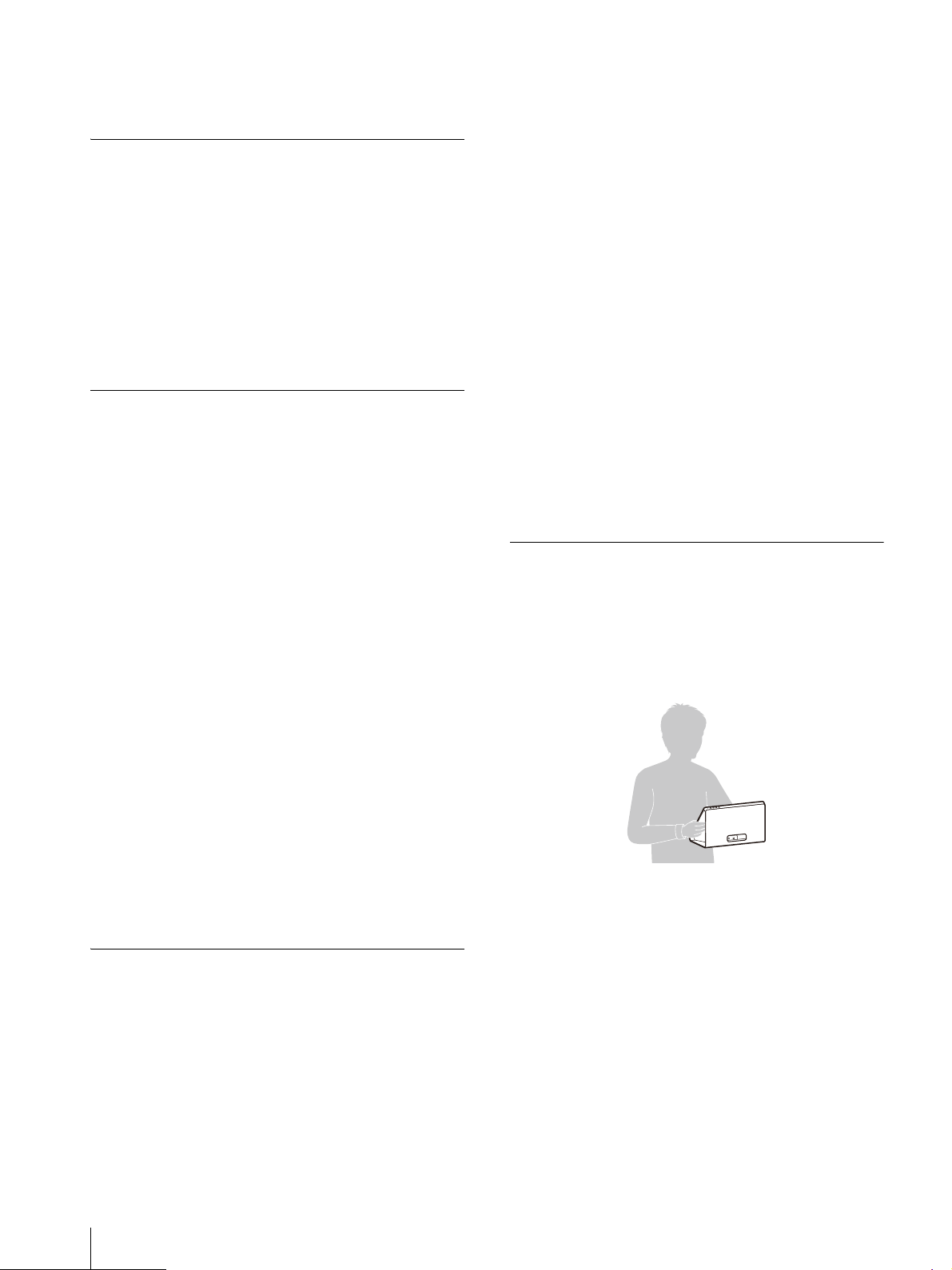
Hold the unit securely as seen in the following
illustration.
Do not press or put pressure on the screen
when holding the unit.
Disconnect the AC power cord and all cables
connected to the unit before transporting the
unit.
If the unit is transported with the AC power
co
rd co
nnected, the AC power cord may be
damaged and cause a fire and electrical shock.
When transporting the unit for repair or
moving, pack the unit using the original carton
box and packing materials.
Do not subject the unit to severe vibration or
high impact conditions during transportation.
Doing so may result in deformation of the
internal structure or exterior of the unit,
9
GB
damage of the screen, malfunction of the
internal parts, or other damage.
Make sure not to expose the unit to strong
vib
ration or high
impact when you transport
the unit as cargo by truck, ship, or air, or as
luggage with a rolling luggage bag.
Disposal of the Unit
Do not dispose of the unit with general waste.
Do not include the display with household
waste.
When you dispose of the display, you must
obey the law in the relative area or country.
On the Viewing Environment
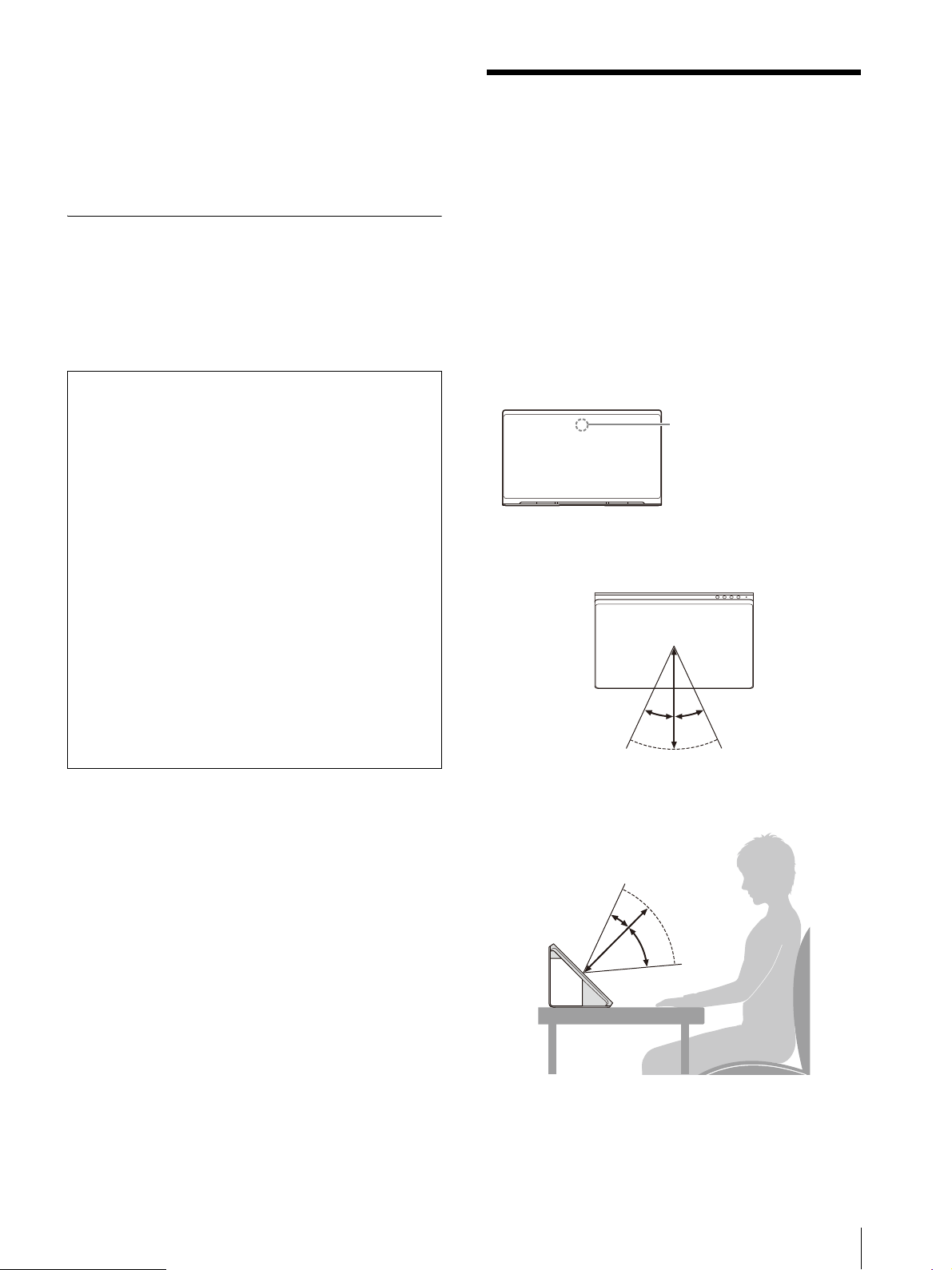
Stereoscopic content such as 3DCG can
stereoscopically be viewed with the naked eye
on the unit. Place the unit on the desk and enjoy
viewing it in the following environment.
Room illuminance:
Approx
. 100 to 1,000 lx and
100 lx and over for the surface of the face
Viewing distance:
30 cm t
o 75 cm (11
7
/
8
inches
to 29
5
/
8
inches)
(35 cm to 50 cm (13
7
/
8
inches to 19
3
/
4
inches)
recommended)
Viewing angle (horizontal): ±25°
Viewing angle (vertical): –
40°/+20°
Ov
erhead view
Side view
Notes
Always verify that the unit is operating
properly before use. SONY WILL NOT BE
LIABLE FOR DAMAGES OF ANY KIND
INCLUDING, BUT NOT LIMITED TO,
COMPENSATION OR REIMBURSEMENT ON
ACCOUNT OF THE LOSS OF PRESENT OR
PROSPECTIVE PROFITS DUE TO FAILURE OF
THIS UNIT, EITHER DURING THE WARRANTY
PERIOD OR AFTER EXPIRATION OF THE
WARRANTY, OR FOR ANY OTHER REASON
WHATSOEVER.
SONY WILL NOT BE LIABLE FOR CLAIMS OF
ANY KIND MADE BY USERS OF THIS UNIT OR
MADE BY THIRD PARTIES.
SONY WILL NOT BE LIABLE FOR THE
TERMINATION OR DISCONTINUATION OF
ANY SERVICES RELATED TO THIS UNIT THAT
MAY RESULT DUE TO CIRCUMSTANCES OF
ANY KIND.
Eye-sensing sensor
Display
25º 25º
20º
40º
GB
10
Notes
For details on room illuminance and other
information, see the following support site for
developers.
https://www.sony.net/dev-srd
View the unit avoiding direct outside light on
the display.
Stereoscopic images may not be viewable due
t
o
the light reflected on the display.
Do not place the unit in an environment where
the eye-sensing sensor is facing a light source.
The unit displays an optimized image by
detecting the viewer’s face and recognizing the
eye-gaze of the viewer with the eye-sensing
sensor. Take off masks and hats when viewing
the unit.
The unit has been designed for users to view
images by placing it horizontally. If the unit is
placed vertically, you cannot view images in 3D.
When the viewing image is unstable, adjust the
viewing environment including the installation
position.
The eye-sensing sensor may be having
d
ifficulty r
ecognizing your eye-gaze.
On the Connecting Computer
and Software Required for
Operation
Use a computer with the recommended
specifications. A dedicated software is required
to display the content.
Obtain the necessary software to install on your
com
p
uter. For details on the recommended
specifications and operating environment of the
computer, dedicated software, and manual, refer
to the following site.
https://www.sony.net/dev-srd
11
GB
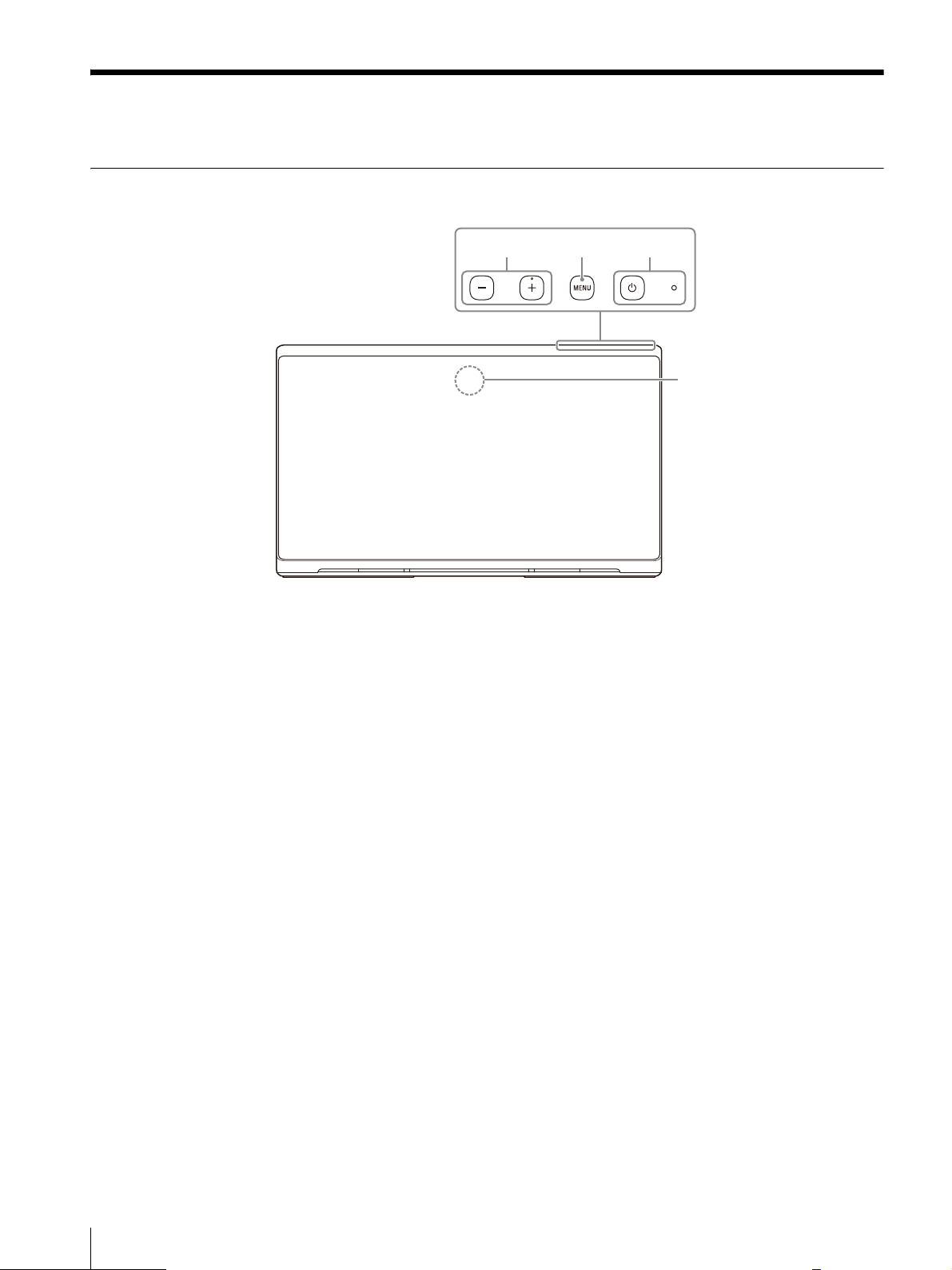
Location and Function of Parts and Controls
Front
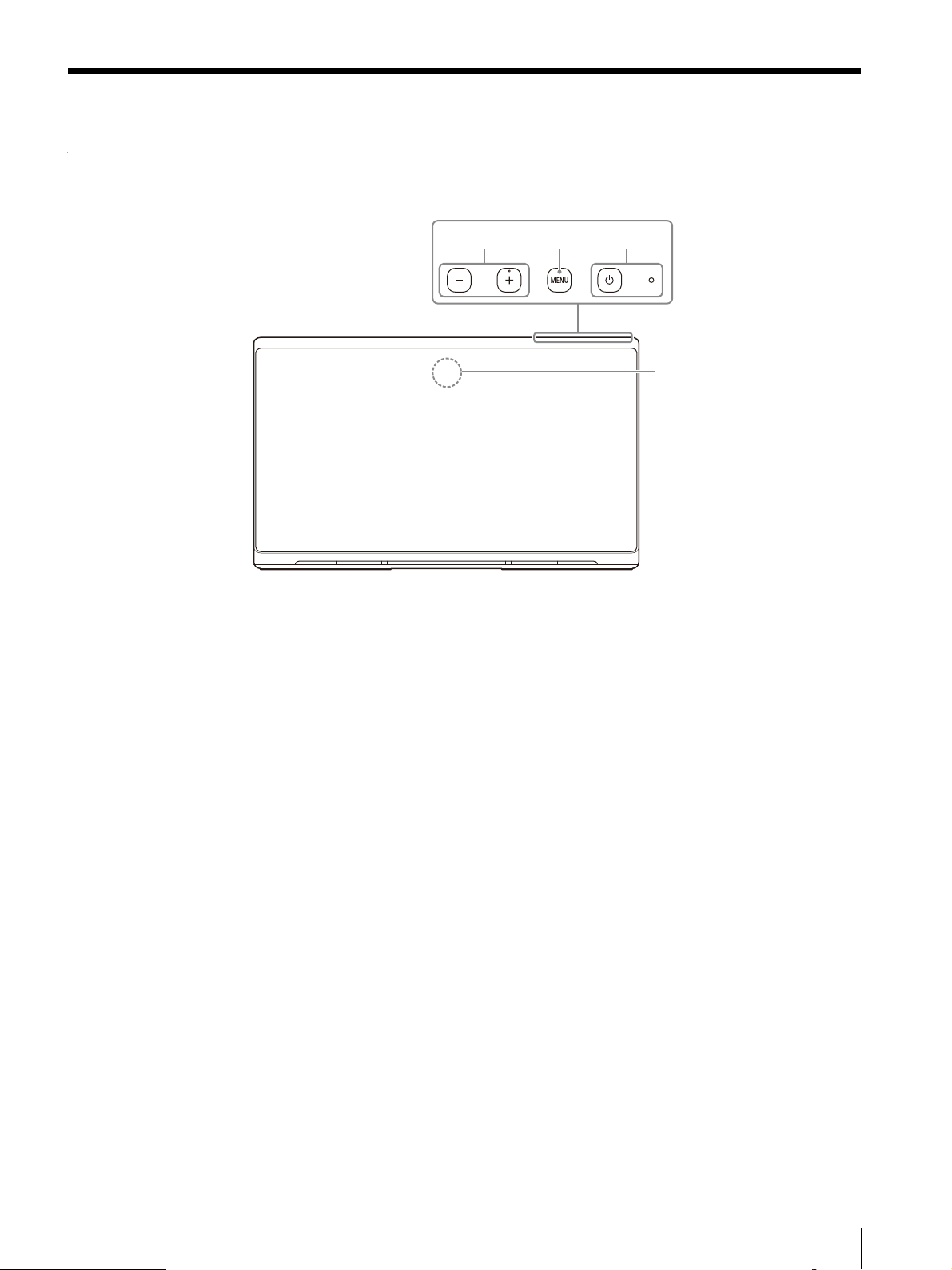
(Power) switch and indicator
Press to turn on the unit.
The indicator lights in white when the unit enters
t
he oper
ating state.
Press again to turn off the unit and indicator.
MENU button
Press to turn on/off the on-screen menu.
When the on-screen menu is displayed, press to
mov
e the
cursor to select a menu item.
+/– button
Press to adjust the volume.
When the on-screen menu is displayed, press to
cha
nge
the setting value of the menu item
(page 15).
Eye-sensing sensor
Detects the viewer’s face and recognizes the
ey
e-gaz
e of the viewer.
ɟɞ
ɡ
ɠ
GB
12
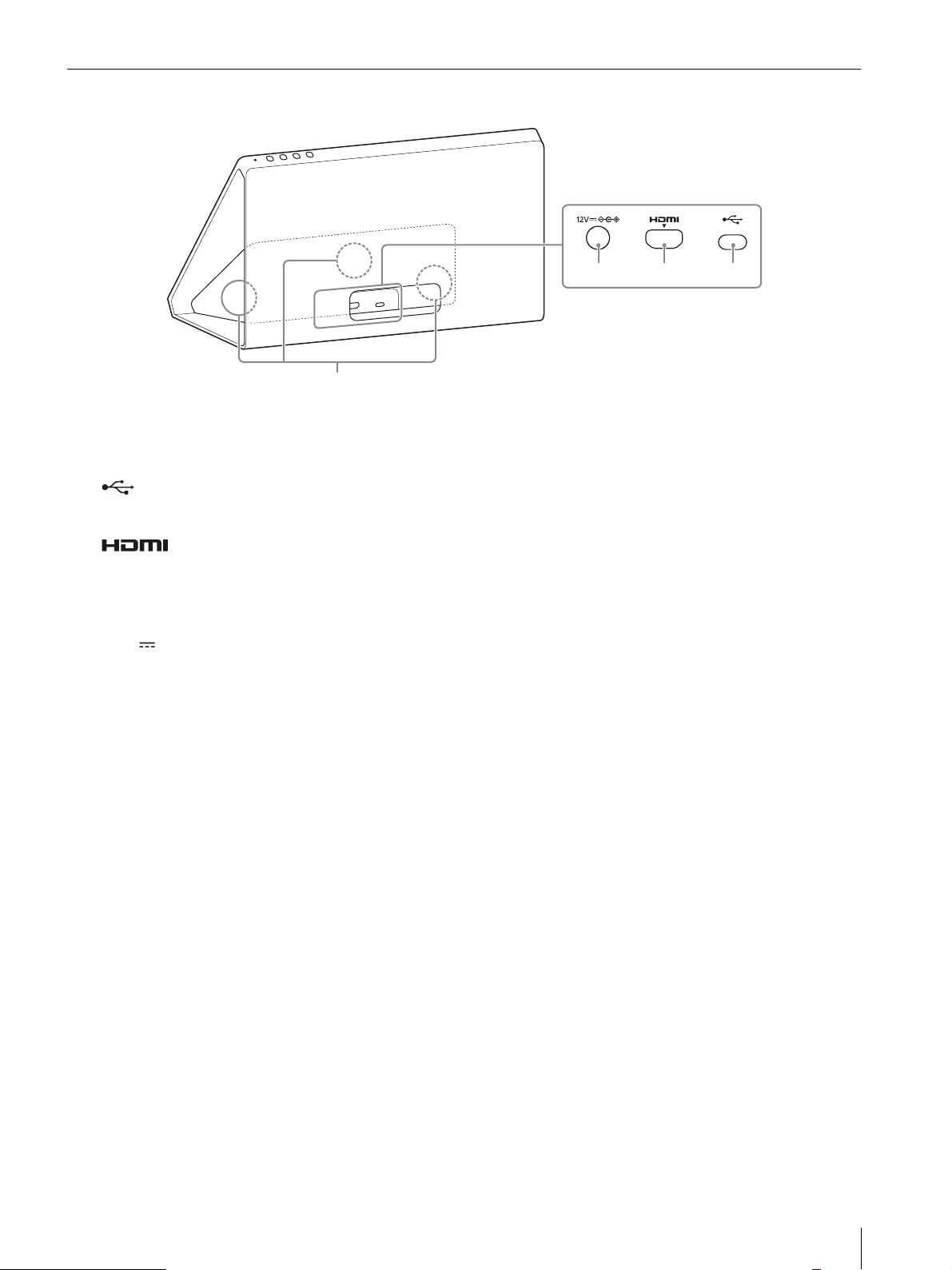
Rear
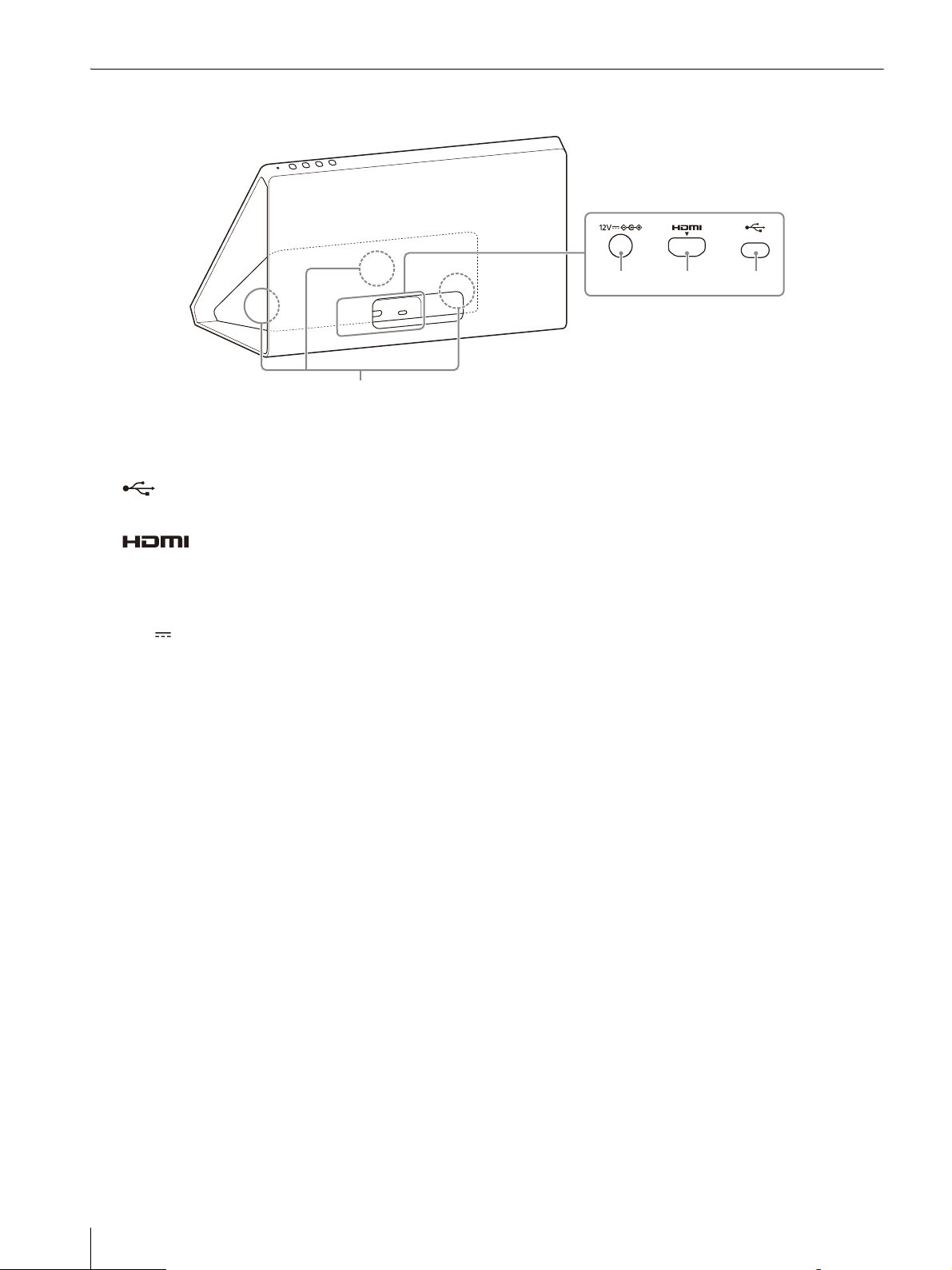
Speaker
Outputs audio.
(Communication control) connector
Connect the supplied USB Type-C cable.
(HDMI) input connector
Inputs the HDMI signal.
Connect to the HDMI output connector on the
c
omputer
with the supplied HDMI cable.
12V (DC input) connector
Connect the DC connector of the supplied AC
ad
aptor.
ɥ ɤ ɣ
ɢ
13
GB
Connection
Checking the Supplied Accessories
Check the following accessories before
connection.
Also, refer to the operation manual of the
c
onnecting devic
es.
Display (1)
Side panel (2) (Both can be used for either the
left or the right side)
Top flange (1)
Bottom stand (1)
USB Type-C cable (1)
HDMI cable (1)
AC adaptor (1)
AC power cord (1)
Operating Instructions (this manual) (1)
Cleaning cloth (1)
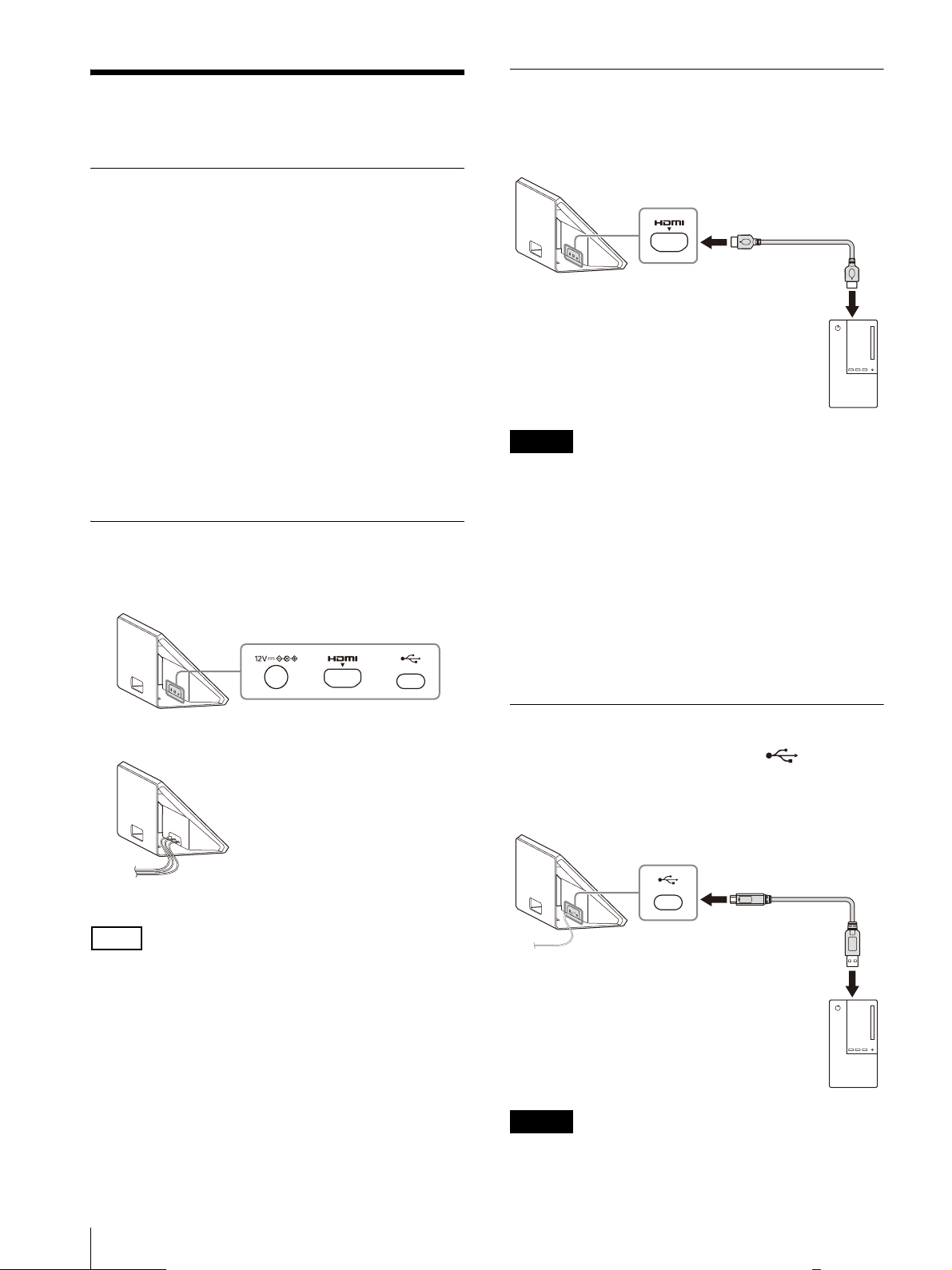
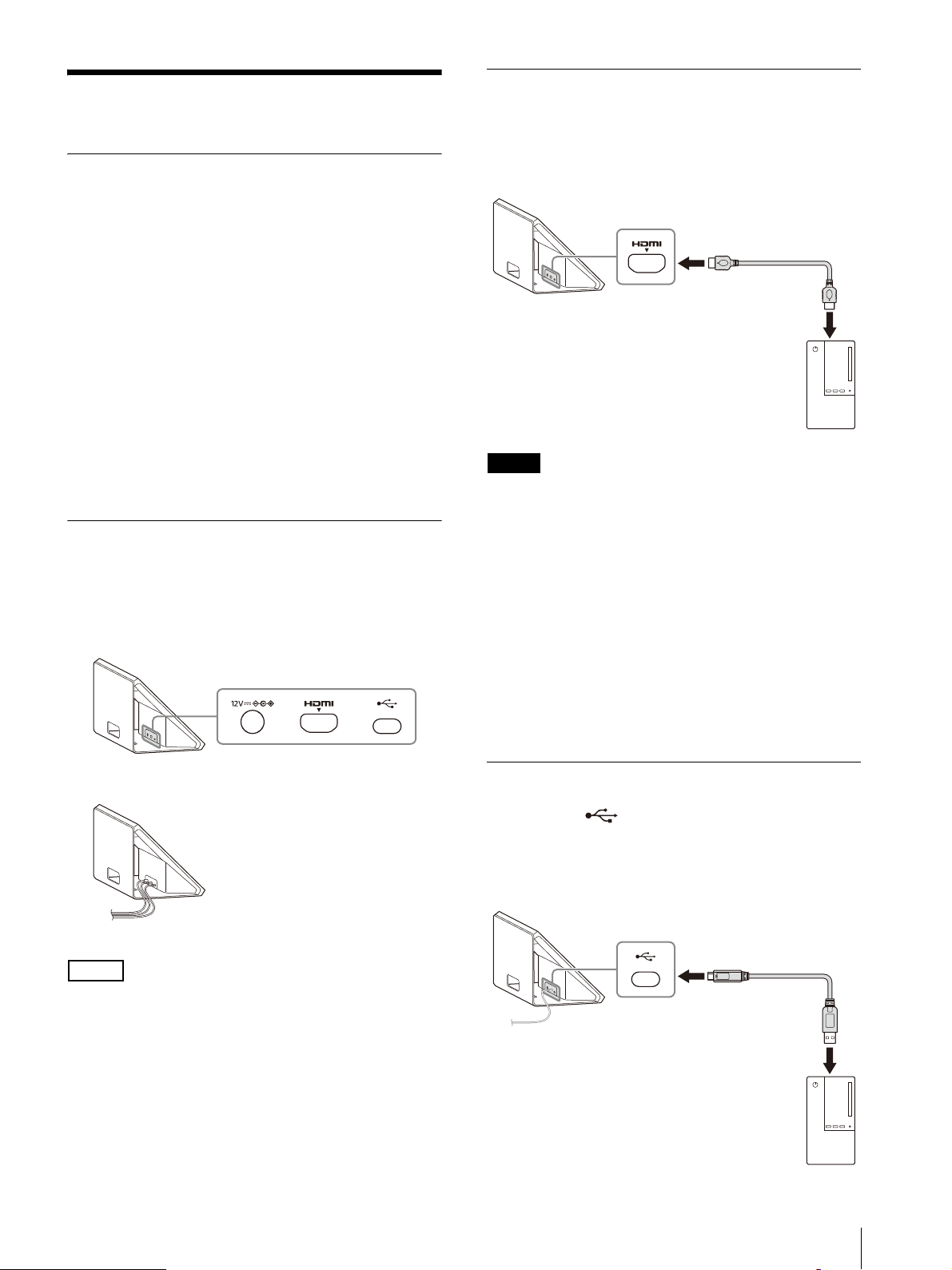
Checking the Position and Orientation of
Connectors
Check the position, shape, and orientation of
connectors on the rear of the unit.
Note
Cables can be pulled out from the hole at the
lower part of the rear of the unit or the bottom of
the unit.
Connecting the HDMI Cable
Connect the HDMI input connector of the unit
and the HDMI output connector of your
computer with the supplied HDMI cable.
Notes
Be sure to use the supplied HDMI cable for
connection.
Directly connect to the computer without using
an HDMI switcher or other devices.
Check the position and orientation of the
connector and cable before connecting the
cable to the connector.
Before connecting, make sure the HDMI
connector supported by your computer
supports HDMI 2.0 or higher to ensure the
original image can be displayed on the unit.
For details, see the operating instructions for
y
our compute
r.
Connecting the USB Type-C Cable
Connect the (Communication control)
connector of the unit and the USB connector of
your computer with the
supplied USB Type-C
cable.
Display
Display
Display
HDMI cable (supplied)
Computer
Display
USB Type-C cable (supplied)
Computer
GB
14
Notes
Be sure to use the supplied USB Type-C cable
for connection.
Directly connect to the computer without using
a USB hub or other devices.
Check the position and orientation of the
connector and cable before connecting the
cable to the connector.
Before connecting, make sure the USB
connector supported by your computer
supports USB 3.2 or higher to ensure the
o
riginal ima
ge can be displayed on the unit.
For details, see the operating instructions for
y
our com
puter.
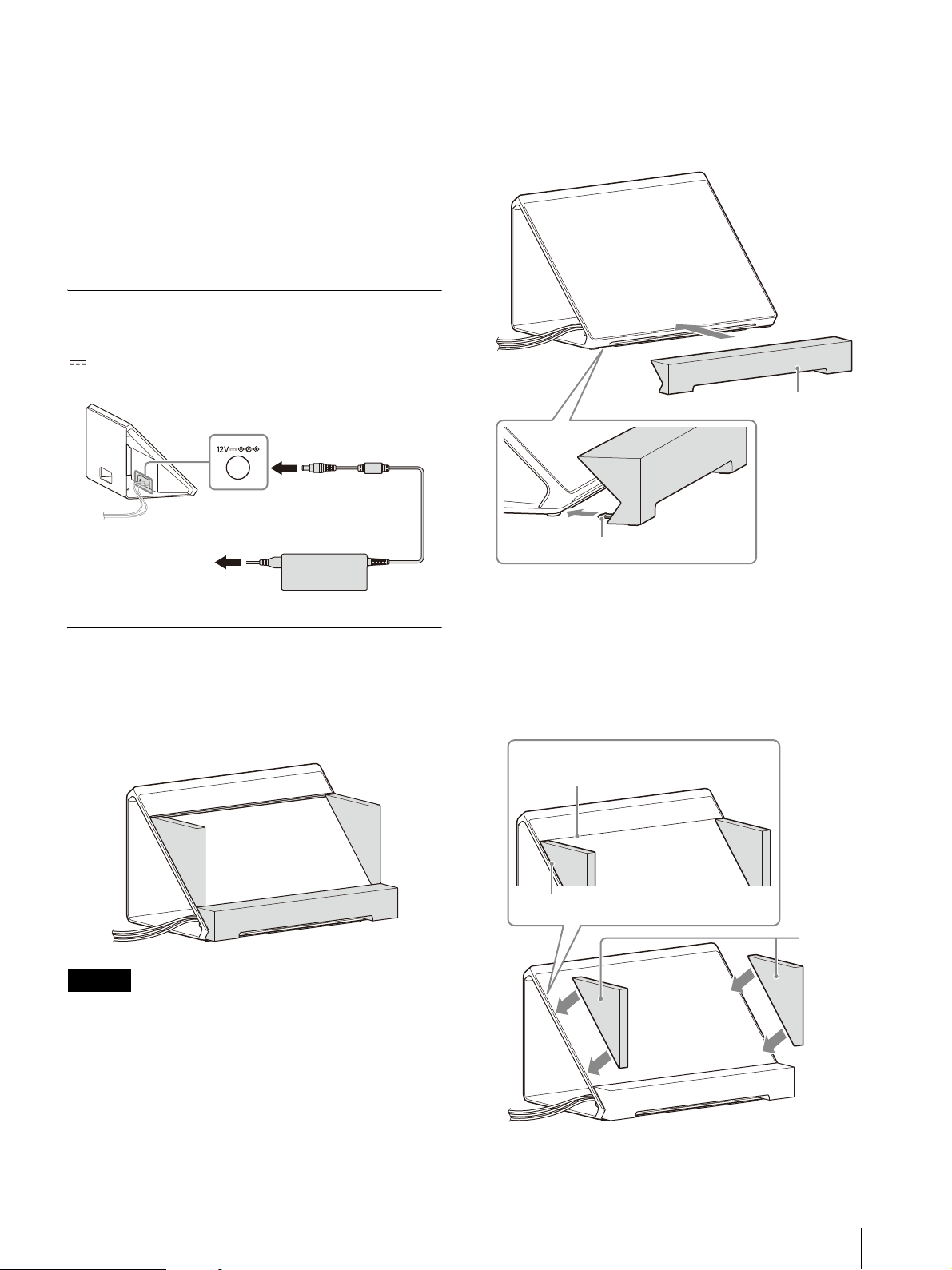
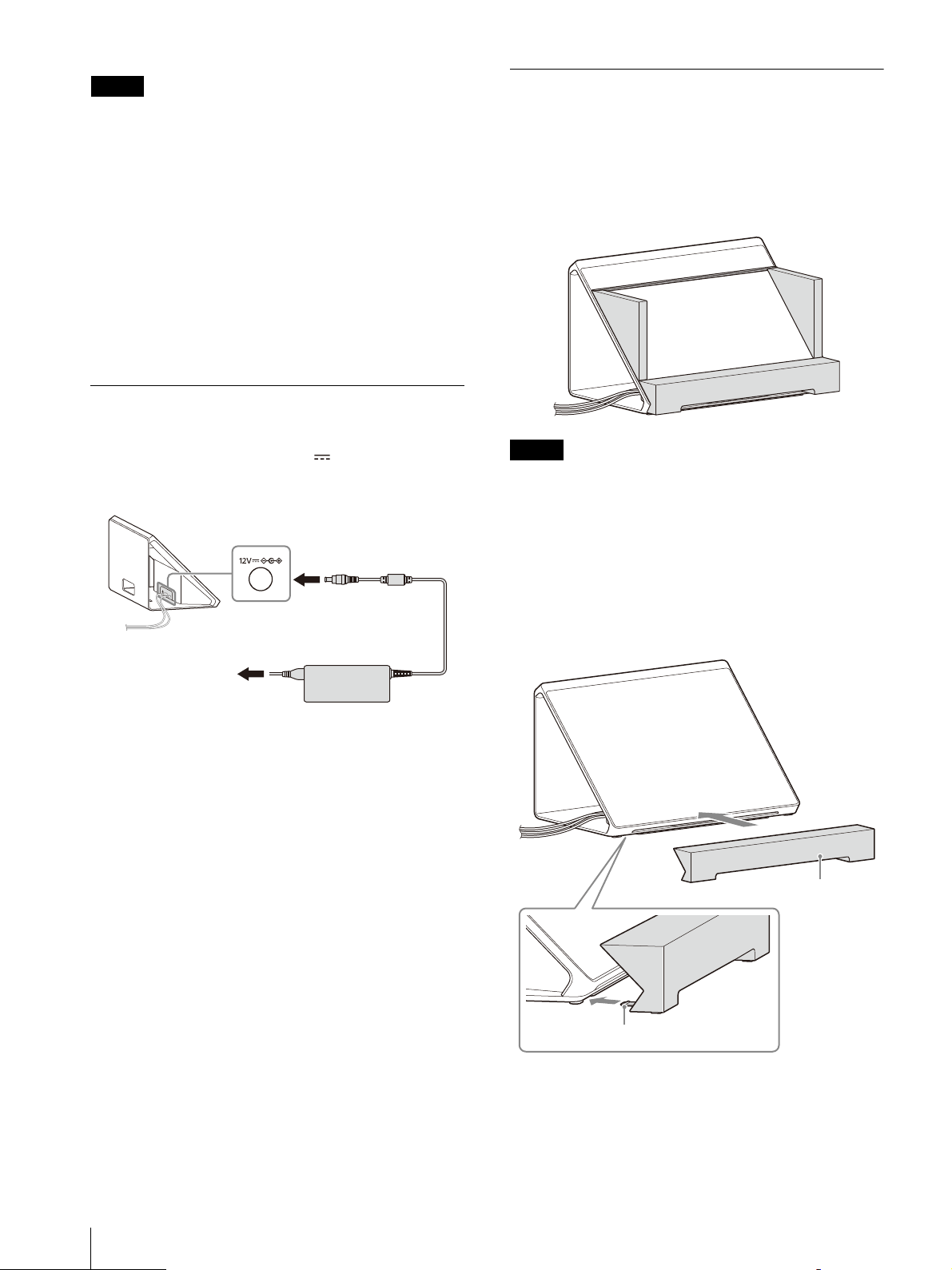
Connecting the AC Adaptor
Insert the DC connector of the supplied AC
adaptor straight into the 12V (DC input)
connector of the unit to connect them.
Attaching Accessories
Stereoscopic images can be viewed easily with
naked eyes by attaching accessories which may
bring about a stronger sense of immersion.
Make sure to attach accessories when viewing
th
e unit.
Notes
Remove accessories when moving the display.
Do not lift or move the display by holding the
side panels.
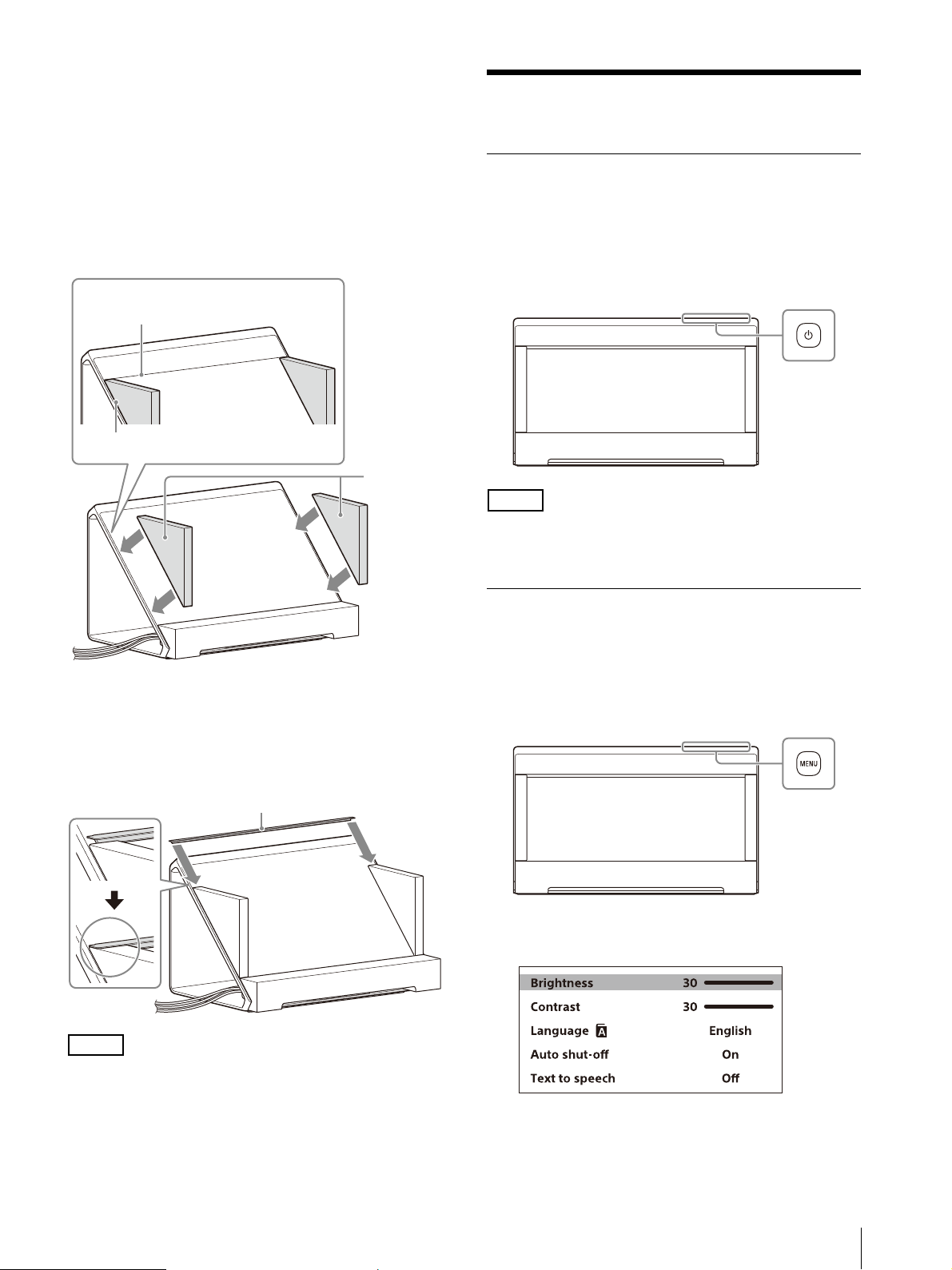
1
Attach the bottom stand.
Insert the tab of the bottom stand into the
space un
der the bottom of the unit and push
the bottom stand until it stops.
Display
AC adaptor (supplied)
to the wall outlet
Bottom stand
Tab
15
GB
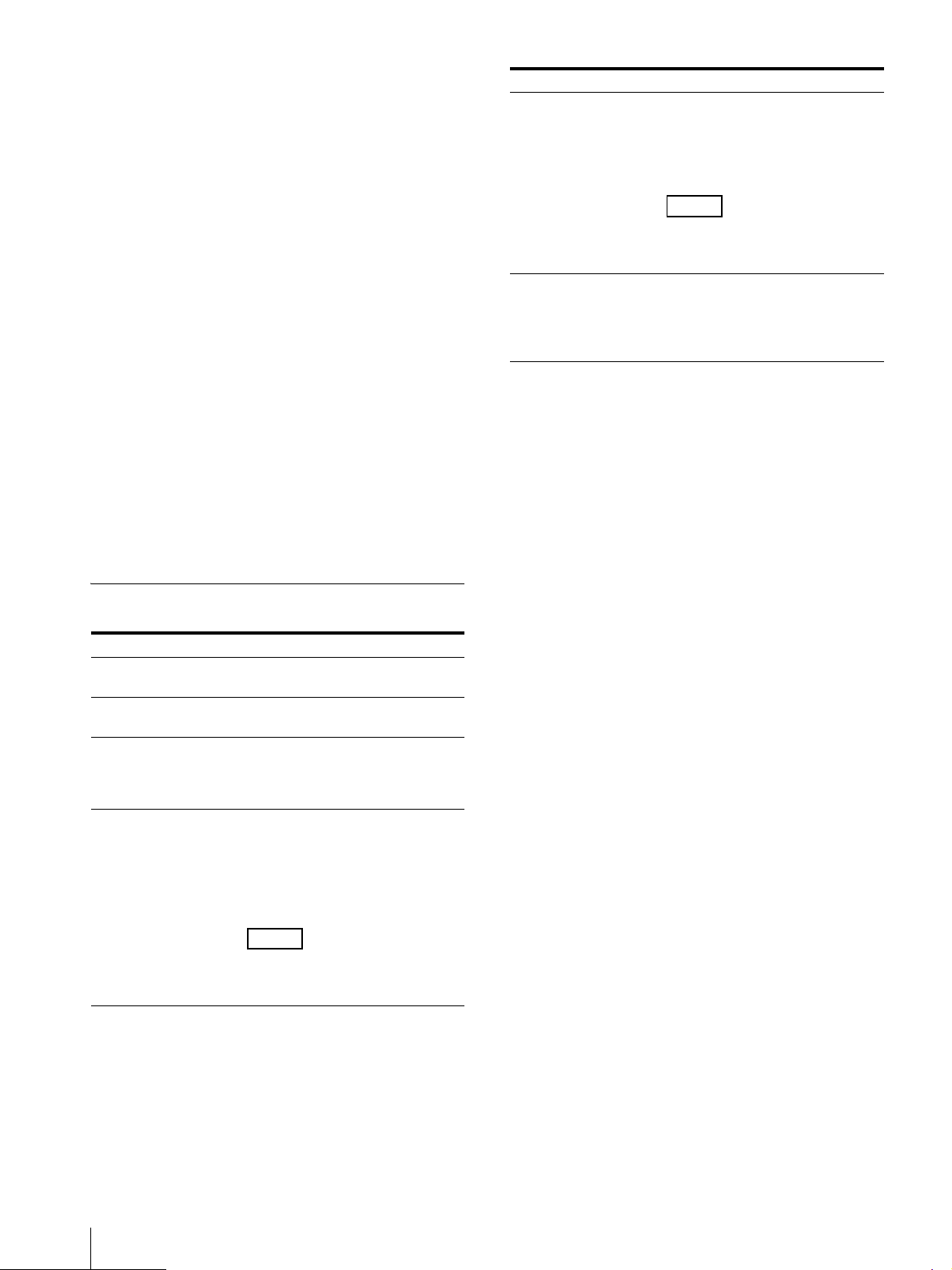
2
Attach the side panels.
Remove the protection film on the side
panels
, then place the side panels on the
display as seen in the following illustration
with the glossy side facing inward toward
the screen.
The side panels attach to the display panel
w
ith the
magnets on the bottom of the side
panels.
3
Attach the top flange.
Insert the top flange into the space between
the s
ide panel and display panel as seen in
the following illustration.
Note
To remove accessories, first remove the top
flange.
Viewing the Content
Turning on the Unit
1
Connect the AC power cord to the AC outlet.
2
Press the (Power) switch to turn on the
unit.
Note
The indicator lights in white when the unit is
turned on.
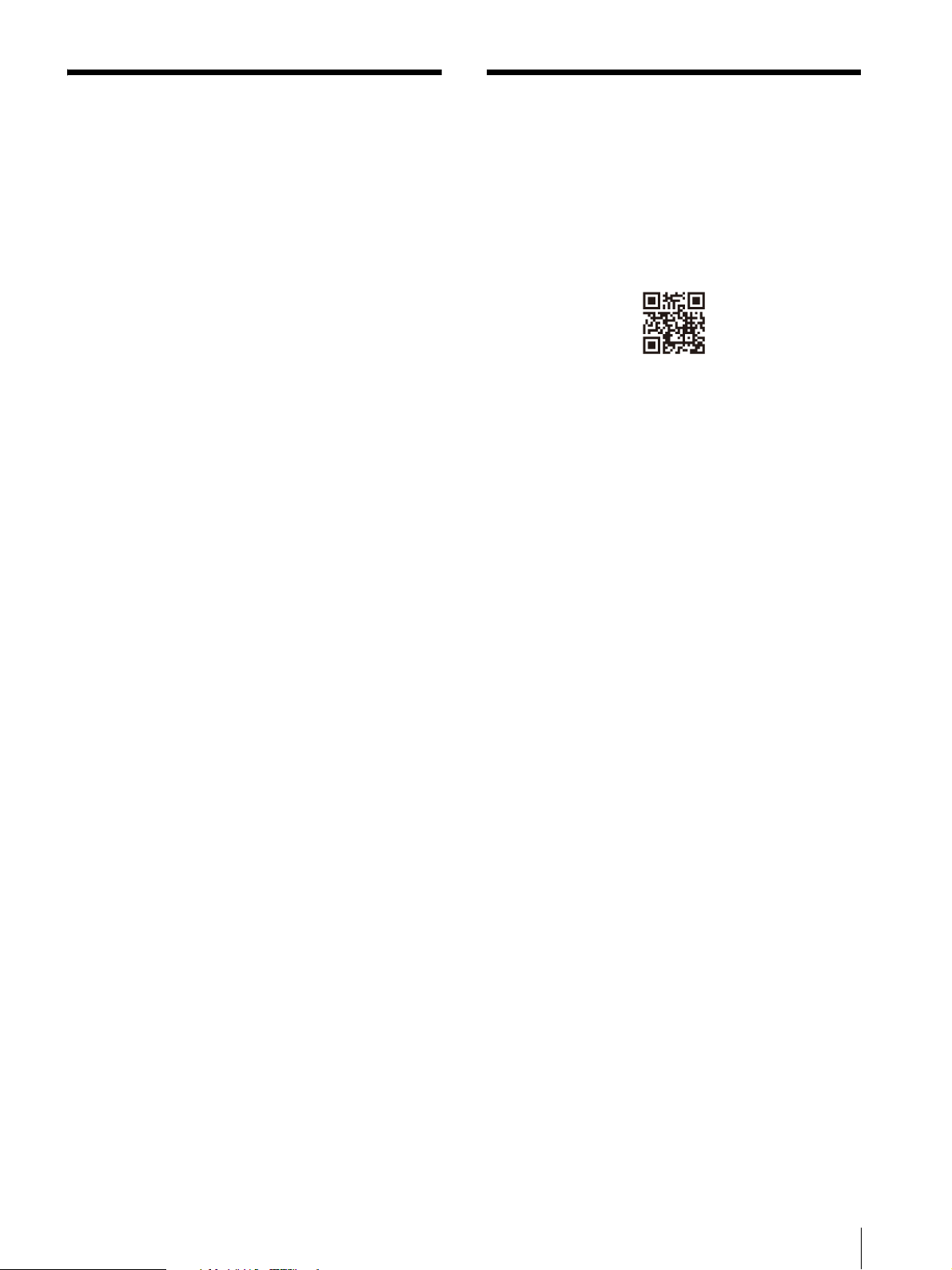
Using the Menu
Picture quality adjustment and settings can be
made on the menu screen of the unit.
1
Press the MENU button to display the menu.
The item currently selected on the menu is
shown in gray.
The end of the display panel
The end of the available screen of the
display panel
Side panel
Top flange
GB
16
2
Press the MENU button to select the menu
item.
The selected item goes down from the top
by pres
sing the MENU button.
3
Press the +/– button to change the values
and settings.
The adjusted values and settings are stored
automatica
lly.
When changing the value:
Press the + button to increase the value.
Press the – button to decrease the value.
When selecting the setting:
Press the +/– button to select the setting.
To clear the menu
If you press the MENU button while selecting the
menu item at the very bottom, “Information
screen” appears.
Press the MENU button again to clear the screen.
Also, the menu screen disappears automatically
i
f yo
u do no operate the menu for a while.
Menu items
Menu Setting
Brightness Adjusts brightness. (Default
valu
e: 30)
Contrast Adjusts contrast. (Default
valu
e: 30)
Language You can select the menu or
m
ess
age language.
English (Default setting)
Français
Auto shut-off The unit enters into standby
mode a
utomatically after a
certain period of no signal
input.
On (Default setting)
Off
Note
In standby mode, no image is
displayed on the screen and
the indicator lights in orange.
Text to speech Reads out the menu and
message displayed on the
screen.
On
Off (Default setting)
Note
This function is not available
when “Français” is selected in
“Language.”
Information screen Displays information of the
unit.
Model name
Serial No.
Software Version
Menu Setting
17
GB
Troubleshooting
This section may help you isolate the cause of a
problem and as a result, eliminate the need to
contact technical support.
No screen image or audio When the
indicator flashes in orange, unplug the AC
power cord and wait until the indicator stops
flashing. Then, plug the AC power cord again
and turn on the unit with the (Power) switch.
If the indicator is still flashing, check how many
time
s the
indicator flashes and consult
qualified Sony service personnel.
Image is not displayed correctly Check if
your environment is suitable for viewing the
unit (page 9).
The screen becomes dark/no image is
displayed (after a certain period passed)
“A
uto shut-off” is enabled. Check the “Auto
shut-off” setting (page 16).
“No signal” is displayed No signal is input
to the unit.
“Unsupported signal” is displayed Some
signals may not be supported on the unit
depending on the input signal. Check the
supported signal of your computer.
The content appears to be displayed in low
resolution (“Unsupported signal” is not
displayed) Check that your computer’s
r
e
solution/supported signal is set to 3840 ×
2160.
Depending on the specifications of your
c
o
mputer’s GPU or OS, “Unsupported signal” is
not displayed on the unit even when it is set to
a resolution/supported signal other than 3840
× 2160. Check the settings on your computer.
Checking the Latest
Information on the Support
Site
The following information can be found on the
support site for developers.
https://www.sony.net/dev-srd
Development information on content
Troubleshooting (Q & A)
Software update information
Connection information with other devices
Specification information on recommended
computers
Sony Customer Support
U.S.A.:
http://www.sony.com/support
Canada:
http://www.sony.ca/support
GB
18
Specifications
Panel system Micro optical lens LCD panel
module
Panel size (diagonal)
39.6 cm (15.6 inches)
Panel aspect ratio
16:9
Number of panel pixels (H × V)
3,840 × 2,160 pixels
The actual effective resolution for
th
e stereo
scopic view is 4K or
lower.
Effective picture size
*1
(H × V)
341.4 mm × 190.7 mm
(13
1
/
2
inches × 7
5
/
8
inches)
Audio output 5.5 W (1.5 W + 1.5 W + 2.5 W)
(Communication control) connector
USB 3.2 Gen1 correspondence
HDMI input connector
3840 × 2160p (60Hz), 720 × 480p
(60
Hz)
*2
, 640 × 480p (60Hz)
*2
Operating conditions
Temperature
0 °C to 40 °C (32 °F to 104 °F)
Recommended temperature
20 °C to 30 °C (68 °F to 86 °F)
Humidity 20% to 80% (no condensation)
Altitude 2,000 m (approx. 6,560 feet) and
lo
wer
Storage
and transport conditions
Temperature
–20 °C to +60 °C (–4 °F to +140 °F)
Humidity 20% to 80%
Power consumption
Max. 24 W
Maximum external dimensions
*1
(excluding the
projecting parts) (w/h/d)
383 mm × 232 mm × 231 mm
(15
1
/
8
inches × 9
1
/
4
inches ×
9
1
/
8
inches)
383 mm × 232 mm × 247 mm
(15
1
/
8
inches × 9
1
/
4
inches ×
9
3
/
4
inches) (including
accessories
*3
)
Mass
*1
4.6 kg (10.2 lb)
4.9 kg (10.8 lb) (including
accessori
es
*3
)
Power DC IN: 12 V 2.0 A (supplied from
the AC ad
aptor)
*1 Effective picture size, maximum external
dimensions, and mass are approximate values.
*2 For 2D display only
*3 Accessories (the side panels, bottom stand, and
top flange)
are included.
Design and specifications are subject to change
without notice.

19
GB
NOTICES AND
LICENSES FOR
SOFTWARE USED IN
THIS PRODUCT
END USER LICENSE AGREEMENT
IMPORTANT:
BEFORE USING THE SOFTWARE,
PLEASE RE
AD THIS END USER
LICENSE AGREEMENT (“EULA”)
CAREFULLY. BY USING THE
SOFTWARE YOU ARE AGREEING
TO BE BOUND BY THE TERMS OF
THIS EULA. IF YOU DO NOT
AGREE TO THE TERMS OF THIS
EULA, YOU MAY NOT USE THE
SOFTWARE.
This EULA is a legal agreement
b
etwe
en (i) you and any entity
you represent (“you”) and (ii)
Sony Electronics Inc. (“SONY”).
This EULA governs your rights
and obligations regarding the
software of SONY and/or its
third party licensors (including
SONY’s affiliates) and their
respective affiliates (collectively,
the “THIRD-PARTY SUPPLIERS”)
made available to you by SONY,
as embedded in certain device
(“DEVICE”), together with any
updates/upgrades provided by
SONY, any printed, on-line or
other electronic documentation
for such software, and any data
files created by operation of
such software (collectively, the
“SOFTWARE”).
Notwithstanding the foregoing,
a
ny softwa
re in the SOFTWARE
having a separate end user
license agreement (including,
but not limited to, GNU General
Public license and Lesser/
Library General Public License)
shall be covered by such
applicable separate end user
license agreement in lieu of the
terms of this EULA to the extent
required by such separate end
user license agreement
(“EXCLUDED SOFTWARE”).
SOFTWARE LICENSE
The SOFTWARE is licensed, not
so
ld. The SO
FTWARE is
protected by copyright and
other intellectual property laws
and international treaties.
COPYRIGHT
All right and title in and to the
S
OFTWA
RE (including, but not
limited to, any images,
photographs, animation, video,
audio, music, text, "applets" and
other content incorporated into
the SOFTWARE) is owned by
SONY or one or more of the
THIRD-PARTY SUPPLIERS.
GRANT OF LICENSE
SONY grants you a limited, non-
e
xcl
usive, personal, non-
transferable license to use the
SOFTWARE solely in connection
with your DEVICE solely in
accordance with this EULA and
the usage as intended in the
relevant instructions and
directions for use made
available to you by SONY
(“USAGE INSTRUCTIONS”). SONY
and the THIRD-PARTY
SUPPLIERS expressly reserve all
rights, title and interest
(including, but not limited to, all
intellectual property rights) in
and to the SOFTWARE that this
EULA does not specifically grant
to you.
REQUIREMENTS AND
LI
MITAT
IONS
You may not copy, publish,
a
dap
t, redistribute, attempt to
derive source code, modify,
reverse engineer, decompile, or
disassemble any of the
SOFTWARE, whether in whole or
in part, or create any derivative
works from or of the SOFTWARE
unless such derivative works are
intentionally facilitated by the
SOFTWARE. You may not modify
or tamper with any digital rights
management functionality of
the SOFTWARE. You may not
bypass, modify, defeat or
circumvent any of the functions
or protections of the SOFTWARE
or any mechanisms operatively
linked to the SOFTWARE. You
may not separate any individual
component of the SOFTWARE
for use on more than one
DEVICE unless expressly
authorized to do so by SONY.
You may not remove, alter,
cover or deface any trademarks
or notices on the SOFTWARE.
You may not share, distribute,
rent, lease, sublicense, assign,
transfer or sell the SOFTWARE.
You may not use the SOFTWARE
in any manner non-compliant
with the USAGE INSTRUCTIONS.
The software or other products
other than SOFTWARE upon
which the SOFTWARE’S
performance depends might be
interrupted or discontinued at
the discretion of the suppliers
(software suppliers or SONY).
SONY and such suppliers do not
warrant that the SOFTWARE or
other products will continue to
be available, or will operate
without interruption or
modification. You shall not, nor
shall you instruct or permit,
procure, enable or request any
third party (including your
users, third party personnel or
other personnel, staff or
contractors) to, take any action
designed or intended to: (i) use
the SOFTWARE (or any part
thereof) in any manner or for
any purpose that is inconsistent
with this EULA; (ii) introduce to
the SOFTWARE any “back door,”
“drop dead device,” “time
bomb,” “Trojan horse,” “virus,”
or “worm” (as such terms are
commonly understood in the
software industry) or any other
equivalent code, files, scripts,
agents, programs, software
routine or instructions designed
or intended to disrupt, disable,
harm or otherwise impede in
any manner the operation of the
SOFTWARE or any device or

GB
20
system owned or controlled by
you or any third party, or which
otherwise may damage or
destroy any data or file
(“Malicious Code”); (iii) interfere
with the proper working of the
SOFTWARE; (iv) circumvent,
disable, or interfere with
security-related features of the
SOFTWARE or features that
prevent or restrict use, access
to, or copying the SOFTWARE, or
that enforce limitations on use
of the SOFTWARE; or (v) impose
(or which may impose, in your
sole discretion) an
unreasonable or
disproportionately large load on
the SOFTWARE.
EXCLUDED SOFTWARE AND
OPEN
SOURCE COMPONENTS
Notwithstanding the foregoing
limit
ed lic
ense grant, you
acknowledge that the
SOFTWARE may include
EXCLUDED SOFTWARE. Certain
EXCLUDED SOFTWARE may be
covered by open source
software licenses (“OPEN
SOURCE COMPONENTS”), which
means any software licenses
approved as open source
licenses by the Open Source
Initiative or any substantially
similar licenses, including but
not limited to any license that,
as a condition of distribution of
the software licensed under
such license, requires that the
distributor make the software
available in source code format.
If and to the extent disclosure is
required, please visit
www.sony.net/Products/Linux
or other SONY-designated web
site for a list of applicable OPEN
SOURCE COMPONENTS
included in the SOFTWARE from
time to time, and the applicable
terms and conditions governing
its use. Such terms and
conditions may be changed by
the applicable third party at any
time without liability to you. To
the extent required by the
licenses covering EXCLUDED
SOFTWARE, the terms of such
licenses will apply in lieu of the
terms of this EULA. To the extent
the terms of the licenses
applicable to EXCLUDED
SOFTWARE prohibit any of the
restrictions in this EULA with
respect to such EXCLUDED
SOFTWARE, such restrictions
will not apply to such EXCLUDED
SOFTWARE. To the extent the
terms of the licenses applicable
to OPEN SOURCE COMPONENTS
require SONY to make an offer
to provide source code in
connection with the SOFTWARE,
such offer is hereby made.
USE OF SOFTWARE WITH
C
OPY
RIGHTED MATERIALS
The SOFTWARE may be capable
o
f be
ing used by you to view,
store, process and/or use
content created by you and/or
third parties. Such content may
be protected by copyright, other
intellectual property laws, and/
or agreements. You agree to
use the SOFTWARE only in
compliance with all such laws
and agreements that apply to
such content. You acknowledge
and agree that SONY may take
appropriate measures to
protect the copyright of content
stored, processed or used by
the SOFTWARE. Such measures
include, but are not limited to,
counting the frequency of your
backup and restoration through
certain SOFTWARE features,
refusal to accept your request to
enable restoration of data, and
termination of this EULA in the
event of your illegitimate use of
the SOFTWARE.
EXPORT AND OTHER
RE
GULA
TIONS
You agree to comply with all
e
xpo
rt and re-export
restrictions and regulations of
the Department of Commerce
and other United States
agencies and authorities, and
not to transfer, or authorize the
transfer, of the SOFTWARE to a
prohibited country or otherwise
in violation of any such
restrictions or regulations.
U.S. GOVERNMENT
RES
TRIC
TED RIGHTS
Use, duplication, or disclosure
by
the
United States
Government is subject to
restriction as set forth in
subparagraph (c) (1) and (2) of
the Commercial Computer
Software-Restricted Rights at 48
C.F.R. § 52.227-19, as applicable.
The manufacturer solely for
purposes of this section is Sony
Electronics Inc., 16535 Via
Esprillo, San Diego, CA 92127.
HIGH RISK ACTIVITIES
The SOFTWARE is not fault-
t
oler
ant and is not designed,
manufactured or intended for
use or resale as on-line control
equipment in hazardous
environments requiring fail-safe
performance, such as in the
operation of nuclear facilities,
aircraft navigation or
communication systems, air
traffic control, direct life support
machines, or weapons systems,
in which the failure of the
SOFTWARE could lead to death,
personal injury, or severe
physical or environmental
damage ("HIGH RISK
ACTIVITIES"). SONY, each of the
THIRD-PARTY SUPPLIERS, and
each of their respective affiliates
specifically disclaim any express
or implied warranty, duty or
condition of fitness for HIGH
RISK ACTIVITIES.
DISCLAIMER OF WARRANTIES
ON
SOFTWA
RE
You acknowledge and agree
that
use
of the SOFTWARE is at
your sole risk and that you are
responsible for use of the
SOFTWARE. The SOFTWARE is
provided "AS IS,” without
warranty, duty or condition of
any kind.

21
GB
SONY AND EACH OF THE THIRD-
PARTY SUPPLIERS (for purposes
of this Section, SONY and each
of the THIRD-PARTY SUPPLIERS
shall be collectively referred to
as “SONY”) EXPRESSLY
DISCLAIM ALL WARRANTIES,
DUTIES OR CONDITIONS,
EXPRESS OR IMPLIED,
INCLUDING, BUT NOT LIMITED
TO, THE IMPLIED WARRANTIES
OF MERCHANTABILITY,
NONINFRINGEMENT AND
FITNESS FOR A PARTICULAR
PURPOSE. SONY DOES NOT
WARRANT OR MAKE ANY
CONDITIONS OR
REPRESENTATIONS (A) THAT THE
FUNCTIONS CONTAINED IN ANY
OF THE SOFTWARE WILL MEET
YOUR REQUIREMENTS OR THAT
THEY WILL BE UPDATED, (B)
THAT THE OPERATION OF ANY
OF THE SOFTWARE WILL BE
CORRECT OR ERROR-FREE OR
THAT ANY DEFECTS WILL BE
CORRECTED, (C) THAT THE
SOFTWARE WILL NOT DAMAGE
ANY OTHER SOFTWARE,
HARDWARE OR DATA, (D) THAT
ANY SOFTWARE OR PRODUCTS
(OTHER THAN THE SOFTWARE)
UPON WHICH THE SOFTWARE’S
PERFORMANCE DEPENDS WILL
CONTINUE TO BE AVAILABLE,
UNINTERRUPTED, TIMELY,
SECURE OR UNMODIFIED, (E)
THAT THE SOFTWARE OR ANY
EQUIPMENT OR SYSTEM ON
WHICH THE SOFTWARE IS USED
(INCLUDING THE DEVICE) WILL
BE FREE OF VULNERABILITY TO
INTRUSION OR ATTACK AND (F)
REGARDING THE USE OR THE
RESULTS OF THE USE OF THE
SOFTWARE IN TERMS OF ITS
CORRECTNESS, ACCURACY,
RELIABILITY, OR OTHERWISE.
THE SERVICES MAY BE SUBJECT
TO DELAYS, CANCELLATIONS,
AND OTHER DISRUPTIONS.
SONY MAKES NO WARRANTY,
REPRESENTATION OR
CONDITION WITH RESPECT TO
THE SOFTWARE, INCLUDING
BUT NOT LIMITED TO, THE
QUALITY, EFFECTIVENESS,
REPUTATION, AND OTHER
CHARACTERISTICS OF THE
SERVICES.
NO ORAL OR WRITTEN
IN
FORMATION OR
ADVICE
GIVEN BY SONY OR AN
AUTHORIZED REPRESENTATIVE
OF SONY SHALL CREATE A
WARRANTY, DUTY OR
CONDITION OR IN ANY WAY
INCREASE THE SCOPE OF THIS
WARRANTY. SHOULD THE
SOFTWARE PROVE DEFECTIVE
YOU ASSUME THE ENTIRE COST
OF ALL NECESSARY SERVICING,
REPAIR OR CORRECTION. SOME
JURISDICTIONS DO NOT ALLOW
THE EXCLUSION OF IMPLIED
WARRANTIES, SO SOME OR ALL
OF THESE EXCLUSIONS MAY NOT
APPLY TO YOU.
LIMITATION OF LIABILITY
SONY AND EACH OF THE THIRD-
P
ARTY SUPPLIER
S (for purposes
of this Section, SONY and each
of the THIRD-PARTY SUPPLIERS
shall be collectively referred to
as “SONY”) SHALL NOT BE
LIABLE FOR ANY INDIRECT,
INCIDENTAL, SPECIAL,
EXEMPLARY OR
CONSEQUENTIAL DAMAGES
ARISING OUT OF OR IN
CONNECTION WITH THE
SOFTWARE AND/OR DEVICE,
INCLUDING FOR BREACH OF
ANY EXPRESS OR IMPLIED
WARRANTY, BREACH OF
CONTRACT, NEGLIGENCE,
STRICT LIABILITY OR UNDER
ANY OTHER LEGAL THEORY
RELATED TO THE SOFTWARE,
INCLUDING, BUT NOT LIMITED
TO, ANY DAMAGES ARISING OUT
OF LOSS OF PROFITS, LOSS OF
REVENUE, LOSS OF DATA, LOSS
OF USE OF THE SOFTWARE OR
ANY ASSOCIATED HARDWARE,
DOWN TIME AND USER’S TIME,
EVEN IF ANY OF THEM HAVE
BEEN ADVISED OF THE
POSSIBILITY OF SUCH
DAMAGES. IN ANY CASE, EACH
AND ALL OF THEIR AGGREGATE
LIABILITY UNDER ANY
PROVISION OF THIS EULA SHALL
BE LIMITED TO THE GREATER OF
THE AMOUNT ACTUALLY PAID
BY YOU FOR THE SOFTWARE OR
THE AMOUNT ACTUALLY PAID
FOR THE DEVICE. SOME
JURISDICTIONS DO NOT ALLOW
THE EXCLUSION OR LIMITATION
OF CERTAIN DAMAGES, SO
SOME OR ALL OF THE ABOVE
EXCLUSION OR LIMITATION MAY
NOT APPLY TO YOU.
INDEMNITY
Except as prohibited by
ap
plicable
law, you agree to
indemnify and hold harmless
SONY and the THIRD-PARTY
SUPPLIERS and their respective
subsidiaries, affiliates, officers
and employees, from any loss,
claim or demand, including
reasonable attorneys' fees,
made by any third party due to
or arising out of your use of the
SOFTWARE and/or the DEVICE
(including, without limitation,
any software vulnerability
caused by such use), your
violation of this EULA or your
failure to fulfill your
responsibility under this EULA.
UPDATE FEATURE
From time to time, SONY or the
T
HIRD-
PARTY SUPPLIERS may
update or otherwise modify the
SOFTWARE, including, but not
limited to, for purposes of
enhancement of security
functions, error correction and
improvement of functions. Such
updates or modifications may
delete or change the nature of
features or other aspects of the
SOFTWARE, including, but not
limited to, functions you may
rely upon. You acknowledge
and agree that such updates
may occur at SONY's sole
discretion and that SONY may
condition continued use of the
SOFTWARE upon your complete
installation or acceptance of
such update or modifications.
Any updates/modifications
shall be deemed to be, and shall

GB
22
constitute part of, the
SOFTWARE for purposes of this
EULA. By acceptance of this
EULA, you consent to such
update/modification.
FORCE MAJEURE
SONY shall not be liable for any
d
elay o
r failure to perform
resulting from causes outside its
reasonable control or any other
contingency beyond SONY's
control not herein enumerated,
including, but not limited to,
acts of God, war, epidemics,
pandemics, outbreaks,
terrorism, riots, embargos, acts
of civil or military authorities,
fire, floods, accidents, strikes or
shortages of transportation
facilities, fuel, energy, labor or
materials.
ENTIRE AGREEMENT, WAIVER,
SEV
ERABILI
TY
This EULA as amended and
mod
ified f
rom time to time,
together constitute the entire
agreement between you and
SONY with respect to the
SOFTWARE. The failure of SONY
to exercise or enforce any right
or provision of this EULA shall
not constitute a waiver of such
right or provision. If any part of
this EULA is held invalid, illegal,
or unenforceable, that provision
shall be enforced to the
maximum extent permissible so
as to maintain the intent of this
EULA, and the other parts will
remain in full force and effect.
The United Nations Convention
on Contracts for the
International Sale of Goods shall
not apply to the SOFTWARE or
this EULA. Furthermore, this
EULA will not be governed or
interpreted in any way by
referring to any law based on
the Uniform Computer
Information Transactions Act
(UCITA) or any other act derived
from or related to UCITA.
BINDING ARBITRATION
ANY “DISPUTE” THAT IS NOT
R
ESOL
VED THROUGH THE
INFORMAL NEGOTIATION
PROCESS DESCRIBED ABOVE
SHALL BE RESOLVED
EXCLUSIVELY THROUGH
BINDING ARBITRATION.
“DISPUTE” is defined as any
disagreement, cause of action,
claim, controversy, or
proceeding between you and
any Sony entity related to or
arising out of the SOFTWARE or
this EULA. DISPUTE is to be
given the broadest possible
meaning that will be enforced. If
a DISPUTE arises, you agree to
first give notice to SONY by
contacting Sony Electronics Inc.
at 16535 Via Esprillo, MZ 1105,
San Diego, CA 92127, Attn: Legal
Department, and engaging in
good faith negotiations to
attempt to resolve any DISPUTE
for at least 14 days, except that
you or Sony (or any of its
affiliates) may skip this informal
negotiation procedure for
DISPUTE enforcing, protecting,
or concerning the validity of
intellectual property rights.
ARBITRATION INSTRUCTIONS
To begin arbitration, either you
o
r SONY
must make a written
demand to the other for
arbitration. The arbitration will
take place before a single
arbitrator. It will be
administered in keeping with
the Expedited Procedures of the
Commercial Arbitration Rules,
and the Supplementary
Proceedings for Consumer-
Related disputes when
applicable ("Rules") of the
American Arbitration
Association ("AAA") in effect
when the claim is filed. You may
get a copy of AAA's Rules by
contacting AAA at (800) 778-
7879 or visiting www.adr.org.
The filing fees to begin and
carry out arbitration will be
shared between you and SONY,
but in no event shall your fees
ever exceed the amount
allowable by the special rules
for Consumers Disputes
provided for by AAA, at which
point SONY will cover all
additional administrative fees
and expenses. This does not
prohibit the arbitrator from
giving the winning party their
fees and expenses of the
arbitration when appropriate
pursuant to the Rules. Unless
you and SONY agree differently,
the arbitration will take place in
the county and state where you
live, and applicable federal or
state law shall govern the
substance of any DISPUTE. The
Federal Arbitration Act, 9 U.S.C.
§ 1, et seq., will govern the
arbitration itself and not any
state law on arbitration. The
arbitrator’s decision will be
binding and final, except for a
limited right of appeal under the
Federal Arbitration Act. The
arbitrator may award
declaratory or injunctive relief
only in favor of the party
seeking relief, and only to the
extent necessary to provide
relief warranted by that party’s
individual claim. Any court with
jurisdiction over the parties may
enforce the arbitrator’s
decision.
SMALL CLAIMS EXCEPTION
Despite the provisions set forth
a
bove
, you have the right to
litigate any DISPUTE in small
claims court or other similar
court of limited jurisdiction, to
the extent the amount at issue
does not exceed $15,000, and as
long as such court has proper
jurisdiction and all other
requirements (including
amount in controversy) are
satisfied.
CLASS ACTION WAIVER
YOU UNDERSTAND AND
AC
KNOW
LEDGE THAT BY
AGREEING TO BINDING
ARBITRATION, YOU ARE
GIVING UP THE RIGHT TO
LITIGATE (OR PARTICIPATE IN

23
GB
AS A PARTY OR CLASS
MEMBER) ANY DISPUTES IN
COURT BEFORE A JUDGE OR
JURY. ANY DISPUTE
RESOLUTION PROCEEDING
WILL BE CONDUCTED ONLY ON
AN INDIVIDUAL BASIS, AND
BOTH PARTIES AGREE NOT TO
HAVE ANY DISPUTE HEARD AS
A CLASS ACTION,
REPRESENTATIVE ACTION,
CONSOLIDATED ACTION, OR
PRIVATE ATTORNEY GENERAL
ACTION, UNLESS ALL PARTIES
INVOLVED IN THE DISPUTE
SPECIFICALLY AGREE TO DO SO
IN WRITING FOLLOWING
INITIATION OF THE
ARBITRATION.
OPT-OUT INSTRUCTIONS
IF YOU DO NOT WISH TO BE
BOUN
D BY T
HE BINDING
ARBITRATION PROVISION AND/
OR THE CLASS ACTION WAIVER
ABOVE, THEN: (1) YOU MUST
NOTIFY SONY IN WRITING
WITHIN 30 DAYS OF THE DATE
THAT YOU FIRST USE THE
SOFTWARE OR AGREE TO THIS
EULA, WHICHEVER OCCURS
FIRST; (2) YOUR WRITTEN
NOTIFICATION MUST BE MAILED
TO SONY ELECTRONICS INC.,
16535 VIA ESPRILLO, MZ 1105,
SAN DIEGO CA 92127, ATTN:
LEGAL DEPARTMENT; AND (3)
YOUR WRITTEN NOTIFICATION
MUST INCLUDE: (A) YOUR
NAME; (B) YOUR ADDRESS; (C)
THE DATE YOU FIRST USED THE
SOFTWARE OR AGREED TO THIS
EULA; AND (D) A CLEAR
STATEMENT THAT YOU DO NOT
WISH TO RESOLVE DISPUTES
WITH ANY SONY ENTITY
THROUGH ARBITRATION AND/
OR TO BE BOUND BY THE CLASS
ACTION WAIVER.
REJECTING CHANGES MADE TO
T
HE DISP
UTE PROCEDURES
Despite anything to the contrary
in this EUL
A, you may r
eject
changes made to the binding
arbitration provision and class
action waiver if: (1) you’ve
already begun authorized use
of the SOFTWARE at the time
the change was/is made; and
(2) you mail written notice to the
address in the immediately
preceding paragraph within 30
days after the particular change
was/is made. Should such a
situation arise, you will still be
bound by the DISPUTE
procedures you previously
agreed to and existing before
the change you rejected was
made.
MISCELLANEOUS
Any DISPUTE determined not
su
bjec
t to arbitration and not
initiated in small claims court
will be litigated by either party
in a court of competent
jurisdiction in either the
superior court for the County of
San Diego or in the United
States District Court for the
Southern District of California.
EQUITABLE REMEDIES
Notwithstanding anything
c
ontai
ned in this EULA to the
contrary, you acknowledge and
agree that any violation of or
non-compliance with this EULA
by you will cause irreparable
harm to SONY, for which
monetary damages would be
inadequate, and you consent to
SONY obtaining any injunctive
or equitable relief that SONY
deems necessary or appropriate
in such circumstances. SONY
may also take any legal and
technical remedies to prevent
violation of and/or to enforce
this EULA, including, but not
limited to, immediate
termination of your use of the
SOFTWARE, if SONY believes in
its sole discretion that you are
violating or intend to violate this
EULA. These remedies are in
addition to any other remedies
SONY may have at law, in equity
or under contract.
TERMINATION
Without prejudice to any of its
o
the
r rights, SONY may
terminate or suspend your
access or use of the SOFTWARE
and/or terminate this EULA if
you fail to comply with any of its
terms. In case of such
termination, you must: (i) cease
all use, and destroy any copies,
of the SOFTWARE; (ii) comply
with the requirements in the
section below entitled “Your
Account Responsibilities”.
AMENDMENT
SONY RESERVES THE RIGHT TO
AME
ND ANY O
F THE TERMS OF
THIS EULA AT ITS SOLE
DISCRETION BY POSTING
NOTICE ON A SONY
DESIGNATED WEB SITE, BY
EMAIL NOTIFICATION TO AN
EMAIL ADDRESS PROVIDED BY
YOU, AND/OR BY PROVIDING
NOTICE AS PART OF THE
PROCESS IN WHICH YOU OBTAIN
UPGRADES/UPDATES OR BY
ANY OTHER LEGALLY
RECOGNIZABLE FORM OF
NOTICE. If you do not agree to
the amendment, you should
promptly contact SONY for
instructions. Your continued use
of the SOFTWARE after the
effective date of any such notice
shall be deemed your
agreement to be bound by such
amendment.
THIRD-PARTY BENEFICIARIES
Each THIRD-PARTY SUPPLIER is
a
n e
xpress intended third-party
beneficiary of, and shall have
the right to enforce, each
provision of this EULA with
respect to the SOFTWARE of
such party.
YOUR ACCOUNT
R
ESPONS
IBILITIES
Should you return your DEVICE
t
o its pl
ace of purchase, sell or
otherwise transfer your DEVICE,
or if this EULA is terminated, you
are responsible for and must
uninstall the SOFTWARE from
the DEVICE and delete any and

GB
24
all accounts you may have
established on DEVICE or are
accessible through the
SOFTWARE. You are solely
responsible for maintaining the
confidentiality of any accounts
you have with SONY or third
parties and any usernames and
passwords associated with your
use of the DEVICE.
Should you have any questions
c
onc
erning this EULA, you may
contact SONY by writing to
SONY at: Sony Electronics Inc.,
16535 Via Esprillo, San Diego, CA
92127.
Copyright 2020 Sony Electronics
In
c. All r
ights reserved.

FR
2
Table des matières
Précautions ....................................................... 6
Sécurité ...................................................... 6
Installation ................................................. 6
Raccordement à d’autres appareils .......... 6
Manipulation de l’écran ............................. 6
Utilisation prolongée ..................................7
Condensation ..............................................7
Visionnement d’images vidéo 3D ..............7
Manipulation et entretien de l’écran ..........7
Transport de l’appareil ............................... 8
Mise au rebut de l’appareil ........................ 8
Environnement de visionnement .....................9
Raccordement d’un ordinateur et logiciel requis
pour le fonctionnement ...................................10
Emplacement et fonction des pièces et
commandes ...................................................... 11
Avant.......................................................... 11
Arrière ....................................................... 12
Raccordement ..................................................13
Vérification des accessoires fournis .........13
Vérification de la position et de l’orientation
des connecteurs .....................................13
Raccordement du câble HDMI ..................13
Raccordement du câble USB Type-C ........13
Raccordement de l’adaptateur CA ...........14
Fixation d’accessoires ...............................14
Visionnement de contenu ................................15
Mise en marche de l’appareil ...................15
Utilisation du menu ..................................15
Options de menu ......................................16
Guide de dépannage .......................................17
Vérification des plus récentes informations sur le
site d’assistance ...............................................17
Caractéristiques techniques .............................18
AVIS ET LICENCES POUR LE LOGICIEL UTILISÉ DANS
CE PRODUIT .......................................................19
Les termes HDMI et High-Definition Multimedia
Interface ainsi que le logo HDMI sont des
marques commerciales ou des marques
déposées de HDMI Licensing Administrator,
Inc. aux États-Unis et dans d’autres pays.
USB Type-C
TM
et USB-C
TM
sont des marques
commerciales d’USB Implementers Forum.
Français
Affichage de réalité spatiale
3
FR
Avant d’utiliser l’appareil, veuillez lire
attentivement ce manuel et le conserver pour
future référence.
Lisez ces instructions.
Conservez ces instructions.
Tenez compte de tous les avertissements.
Suivez toutes les instructions.
N’utilisez pas cet appareil à proximité d’eau.
Nettoyez cet appareil uniquement avec un
chiffon sec.
Ne bloquez aucun orifice de ventilation.
Installez cet appareil conformément aux
instructions du fabricant.
Ne l’installez pas à proximité de sources de
chaleur comme des radiateurs, des registres
de chaleur, des poêles ou d’autres appareils (y
compris des amplificateurs) produisant de la
chaleur.
Ne désactivez pas le dispositif de sécurité de la
fiche polarisée ou avec mise à la terre. Une
fiche polarisée possède deux lames dont l’une
est plus large que l’autre. Une fiche avec mise
à la terre possède deux lames et une troisième
broche de mise à la terre. La lame la plus large
et la troisième broche sont fournies pour votre
sécurité. Si la fiche fournie ne rentre pas dans
votre prise de courant, consultez un électricien
afin qu’il remplace la prise obsolète.
Protégez le cordon d’alimentation afin que
personne ne marche dessus et qu’il ne se
coince pas, en particulier au niveau de la fiche,
de la prise de courant et à l’endroit où il sort de
l’appareil.
N’utilisez que les fixations et accessoires
indiqués par le fabricant.
Utilisez l’appareil uniquement avec le chariot,
le support, le trépied ou la table indiqué par le
fabricant ou vendu avec l’appareil. Lorsque
vous utilisez un chariot, faites attention
lorsque vous déplacez le chariot et l’appareil
ensemble afin d’éviter de vous blesser en cas
de chute.
Débranchez cet appareil en cas d’orage ou
lorsqu’il n’est pas utilisé pendant de longues
périodes.
Faites appel à un technicien qualifié pour toute
réparation/entretien. L’entretien/réparation
est nécessaire lorsque l’appareil a été
endommagé de quelque façon que ce soit, par
exemple si le cordon ou la fiche d’alimentation
a été endommagé, si du liquide a été renversé
ou si des objets sont tombés dans l’appareil, si
l’appareil a été exposé à la pluie ou à
l’humidité, s’il ne fonctionne pas normalement
ou s’il a subi une chute.
AVERTISSEMENT
Afin de réduire les risques d’incendie ou
d’électrocution, ne pas exposer cet appareil à
la pluie ou à l’humidité.
Afin d’écarter tout risque d’électrocution,
garder le coffret fermé. Ne confier l’entretien
de l’appareil qu’à un personnel qualifié.
AVERTISSEMENT
Lors de l’installation de l’appareil, incorporer un
dispositif de coupure dans le câblage fixe ou
brancher la fiche d’alimentation dans une prise
murale facilement accessible proche de
l’appareil. En cas de problème lors du
fonctionnement de l’appareil, enclencher le
dispositif de coupure d’alimentation ou
débrancher la fiche d’alimentation.
AVERTISSEMENT
Ne touchez pas l’adaptateur CA, le cordon
d’alimentation CA ou sa fiche lorsque vous avez
les mains humides, car cela peut causer une
électrocution.
AVERTISSEMENT
Eviter d’exposer l’appareil à un égouttement ou à
des éclaboussures. Ne placer aucun objet rempli
de liquide, comme un vase, sur l’appareil.
AVERTISSEMENT
Une pression acoustique excessive en
provenance des haut-parleurs pendant
l’utilisation du produit peut provoquer une
baisse de l’acuité auditive.
Pour utiliser ce produit en toute sécurité, évitez
l’écoute prolongée à des pressions sonores
excessives.
AVERTISSEMENT
L’utilisation de cet appareil dans un
environnement domestique risque de provoquer
des interférences radio.
Consignes de sécurité importantes

FR
4
REMARQUE À PROPOS DE L’ADAPTATEUR CA
Avertissement
Pour réduire les risques d’incendie ou
d’électrocution, n’exposez pas cet appareil à la
pluie ou à l’humidité.
Pour prévenir les risques d’incendie ou
d’électrocution, ne posez aucun objet rempli de
liquide, tel qu’un vase, sur l’appareil.
N’installez pas cet équipement dans un espace
confiné, tel qu’une bibliothèque ou un
emplacement semblable.
Veuillez vous assurer que la prise de courant
CA se trouve à proximité de l’équipement et
qu’elle soit facilement accessible.
Assurez-vous d’utiliser l’adaptateur CA et le
cordon d’alimentation CA fournis.
N’utilisez aucun autre adaptateur CA. Cela
pourrait causer un problème de
fonctionnement.
Raccordez l’adaptateur CA à une prise de
courant CA facilement accessible.
N’enroulez pas le cordon d’alimentation CA
autour de l’adaptateur CA. Cela pourrait
entraîner un bris du fil central et/ou un
problème de fonctionnement de l’écran.
Ne touchez pas à l’adaptateur CA lorsque vous
avez les mains humides.
Si vous constatez que l’adaptateur CA ne
fonctionne pas normalement, débranchez-le
immédiatement de la prise de courant CA.
L’écran n’est pas déconnecté de la source
d’alimentation CA tant qu’il reste branché à la
prise de courant CA, même si l’écran a été
éteint.
ATTENTION
Par mesure de sécurité, ne raccordez pas le
connecteur pour le câblage de périphériques
pouvant avoir une tension excessive aux ports
suivants :
Connecteur de contrôle de communication
Cet équipement ne convient pas pour une
utilisation dans des endroits où se trouvent des
enfants. Rangez l’équipement hors de la portée
des enfants.
Lors de l’installation, l’espace d’installation doit
être sécurisé en tenant compte de la ventilation
et des opérations d’entretien.
Laissez un espace autour de l’appareil pour la
ventilation.
Laissez un espace de plus de 10 cm (4 po) à
l’arrière de l’appareil pour sécuriser la zone de
fonctionnement.
Lorsque l’appareil est installé sur un bureau ou à
un endroit similaire, laissez un espace d’au moins
10 cm (4 po) à gauche et à droite et 10 cm (4 po)
ou plus au-dessus de l’appareil.
La ventilation de l’appareil et sa périphérie ne
doit pas être empêchée par l’obstruction de
l’appareil au moyen d’articles tels que des
journaux, des nappes, des rideaux, etc.
Aucune source à flammes nues, telle que des
bougies allumées, ne doit être placée sur
l’appareil.
Emplacement de l’étiquette d’identification
Les étiquettes indiquant le numéro de modèle,
le numéro de série et la tension d’alimentation
sont apposées sur la partie inférieure de
l’appareil.
Les étiquettes indiquant le numéro de modèle
et le numéro de série de l’adaptateur CA sont
apposées sur la partie inférieure de
l’adaptateur CA.
Équipement optionnel
Cet équipement a été testé et déclaré conforme
aux limites définies dans les normes CEM pour
l’utilisation d’un câble de raccordement de
moins de 3mètres.
Pour les clients au Canada
CAN ICES-3(B)/NMB-3(B)
INSTALLATION
Installez l’écran près d’une prise de courant CA
facilement accessible.
N’installez pas l’écran vers le haut ou vers le
bas, ni à l’envers ou sur le côté.
N’installez pas l’écran dans des endroits
chauds, huileux, humides ou excessivement
poussiéreux.
N’installez pas l’écran dans des endroits sujets
à des extrêmes de température, par exemple à
la lumière directe du soleil ou encore près d’un
radiateur ou d’une bouche de chaleur. Dans de
telles conditions, l’écran pourrait surchauffer,
ce qui peut provoquer une déformation du
boîtier et/ou des problèmes de
fonctionnement de l’écran.
N’installez pas l’écran dans un endroit exposé
directement à l’air climatisé; de l’humidité
pourrait se condenser à l’intérieur de l’écran et
provoquer des problèmes de fonctionnement.
N’installez pas l’écran dans un endroit où il
peut être exposé à des vibrations mécaniques.
N’installez pas l’écran dans un endroit où
peuvent pénétrer les insectes.

5
FR
N’installez pas l’écran dans un endroit d’où il
dépasserait, par exemple sur ou derrière une
colonne, ou dans un endroit où vous pourriez
le heurter de la tête et vous blesser.
Pour éviter les risques d’incendie, tenez les
objets inflammables et la flamme nue (p. ex.
les bougies) à distance de l’écran.
Ne posez aucun appareil en option sur l’écran.
Prévenez le basculement de l’écran
Prenez les mesures nécessaires afin d’éviter que
l’écran ne bascule, ce qui pourrait provoquer des
blessures ou des dommages à l’écran ou à
d’autres objets.
N’installez jamais l’écran sur une surface
inégale et/ou instable.
N’installez pas l’écran sur un meuble qui peut
facilement être escaladé, par exemple une
commode à tiroirs.
Veillez à installer l’écran dans un endroit où il
ne risque pas d’être poussé, tiré ou renversé.
Veillez à acheminer tous les cordons
d’alimentation CA et câbles de raccordement
de manière à ce qu’ils soient hors de la portée
des enfants, qui pourraient les manipuler ou
les tirer par curiosité.
Établissements médicaux
N’installez pas cet écran dans un endroit où des
appareils médicaux sont utilisés.
Il pourrait entraîner des problèmes de
fonctionnement des appareils médicaux.
Ne placez pas ce produit près d’appareils
médicaux.
Ce produit (y compris les accessoires) comporte
un ou des aimants qui peuvent perturber les
stimulateurs cardiaques, les valves de dérivation
programmables pour le traitement de
l’hydrocéphalie ou d’autres appareils médicaux.
Ne placez pas ce produit près de personnes
utilisant ce type d’appareil médical. Consultez
votre médecin avant d’utiliser ce produit si vous
utilisez ce type d’appareil médical.
Conservez-le hors de la portée des enfants ou
des personnes encadrées.
Ce produit (y compris les accessoires) comporte
un ou des aimants. L’ingestion d’aimant(s) peut
présenter un grave danger comme un risque
d’étouffement ou des lésions intestinales. En cas
d’ingestion d’aimant(s), consultez
immédiatement un médecin.
Utilisation à l’extérieur
N’installez pas cet écran à l’extérieur. N’exposez
pas l’écran à la pluie ou à la lumière directe du
soleil pour éviter de l’endommager et de
provoquer des risques d’incendie ou
d’électrocution.
N’installez pas cet écran dans un véhicule ou sur un
bateau ou autre embarcation
Les sursauts excessifs d’un véhicule en
mouvement ou le mouvement de balancier
répété d’un bateau peuvent faire tomber
l’écran et entraîner des blessures.
L’exposition de l’écran à l’eau de mer peut
poser un risque d’incendie et d’électrocution
ou causer des dommages à l’écran.
Nettoyez la fiche du cordon d’alimentation CA
Débranchez la fiche du cordon d’alimentation CA
et nettoyez-la de temps à autre pour éviter
l’accumulation de poussière. Pendant le
nettoyage, vérifiez que le cordon est en bon état.
N’utilisez jamais un cordon d’alimentation CA
endommagé.
RÉPARATION
N’utilisez pas l’écran si vous constatez que
l’écran est endommagé ou croyez que l’écran est
endommagé.
Ne tentez pas de réparer l’écran vous-même,
car l’ouverture du boîtier pourrait vous exposer
à des zones de tension élevée et à d’autres
dangers. Pour toute réparation, adressez-vous
à un technicien qualifié.
Si des pièces doivent être remplacées,
demandez au technicien de certifier par écrit
que les pièces de rechange adéquates ont été
utilisées et que leurs caractéristiques sont
similaires ou identiques à celles des pièces
d’origine. Toute substitution non autorisée
pourrait causer un incendie, l’électrocution ou
d’autres dangers.
Révision de sécurité
Après toute réparation ou tout entretien de
l’écran, demandez au technicien d’effectuer une
vérification de routine, telle que spécifiée par
Sony, et de certifier que l’écran fonctionne en
toute sécurité. Si l’écran ne peut pas être utilisé
de façon sécuritaire, confiez sa mise au rebut à
un technicien qualifié.

FR
6
Précautions
Sécurité
Utilisez uniquement l’appareil avec une source
d’alimentation telle que spécifiée dans la
section « Caractéristiques techniques ».
Une plaque signalétique indiquant la tension
de fonctionnement, etc. est apposée sur la
partie inférieure de l’appareil.
Si du liquide ou un objet quelconque venait à
pénétrer dans le boîtier, débranchez l’appareil
et faites-le vérifier par un technicien qualifié
avant de le remettre en service.
Ne posez pas et ne laissez pas tomber des
objets lourds sur le cordon d’alimentation. Si le
cordon d’alimentation est endommagé,
éteignez immédiatement l’appareil. Il est
dangereux d’utiliser l’appareil avec un cordon
d’alimentation endommagé.
Débranchez l’appareil de la prise murale si vous
n’avez pas l’intention de l’utiliser pendant
plusieurs jours.
Débranchez le cordon d’alimentation de la
prise de courant CA en saisissant la fiche,
jamais en tirant sur le cordon.
La prise de courant doit se trouver à proximité
de l’équipement et être facilement accessible.
Installation
Assurez une circulation d’air adéquate afin
d’éviter toute surchauffe interne.
Ne placez pas l’appareil sur des surfaces (tapis,
couvertures, etc.) ou à proximité de matières
(rideaux, draperies) susceptibles d’obstruer les
orifices de ventilation.
N’installez pas l’appareil à proximité de sources
de chaleur comme des radiateurs ou des
conduits d’air ou dans des endroits exposés au
rayonnement direct du soleil, à une poussière
excessive, à des vibrations mécaniques ou à
des chocs.
Lors de l’installation, veillez à choisir un espace
d’installation permettant d’assurer une
ventilation convenable et d’effectuer l’entretien.
N’obstruez pas les fentes de ventilation sur le
côté et la partie inférieure de l’appareil.
Laissez un espace autour de l’appareil pour
permettre une ventilation convenable.
Laissez un espace de plus de 10 cm (4 po) à
l’arrière de l’appareil pour assurer un
fonctionnement adéquat.
Lorsque l’appareil est installé sur un bureau ou
meuble semblable, laissez un espace d’au moins
10 cm (4 po) sur les côtés gauche et droit, ainsi
qu’un espace de 10 cm (4 po) ou plus au-dessus
de l’appareil.
Raccordement à d’autres appareils
Lorsque vous raccordez cet appareil à d’autres
appareils, éteignez d’abord cet appareil et les
autres appareils. Le raccordement pendant qu’ils
sont en marche pourrait entraîner un problème
de fonctionnement de l’appareil et des autres
appareils.
Manipulation de l’écran
L’écran LCD intégré à cet appareil est fabriqué
avec une technologie de haute précision, ce
qui permet d’obtenir un taux d’au moins
99,99% de pixels qui fonctionnent. Ainsi, un
infime pourcentage de pixels peut être
« bloqué », c’est à dire toujours éteint (noir),
toujours éclairé (rouge, vert ou bleu), ou
clignotant. En outre, après une longue période
d’utilisation, en raison des caractéristiques
physiques de l’afficheur à cristaux liquides, de
tels pixels « bloqués » peuvent apparaître
spontanément. Ces problèmes ne sont pas
graves.
Ne laissez pas l’écran face au soleil, car cela
pourrait l’endommager. Faites attention si vous
placez l’appareil près d’une fenêtre.
Ne poussez ou ne rayez pas l’écran de
l’appareil. Ne posez pas d’objets lourds sur
l’écran de l’appareil. L’écran risquerait de ne
plus être uniforme.
En cas d’utilisation de l’appareil dans un
endroit froid, une image résiduelle ou des
lignes horizontales peuvent apparaître à
l’écran. Il ne s’agit pas d’un problème de
fonctionnement. Une fois l’écran réchauffé,
l’image redevient normale.
L’écran peut devenir chaud pendant
l’utilisation. Il ne s’agit pas d’un problème de
fonctionnement.

7
FR
Utilisation prolongée
En raison de la structure du panneau ACL et des
caractéristiques de ses matériaux de conception,
l’affichage prolongé d’images statiques ou
l’utilisation répétée de l’appareil dans des
environnements où la température/l’humidité
est élevée peuvent entraîner l’apparition de
taches, des images rémanentes, l’altération
irrémédiable de la luminosité de certaines zones,
la présence de lignes ou encore une réduction de
la luminosité générale.
En particulier, l’affichage continu d’une image de
taille inférieure à celle de la zone d’affichage,
notamment une image de proportions
différentes ou avec un cadre, peut accélérer
l’apparition des problèmes énumérés ci-dessus.
Évitez d’afficher une image fixe pendant une
période prolongée ou d’utiliser souvent
l’appareil dans un environnement très chaud/
très humide, notamment dans une pièce
étanche à l’air ou à proximité de l’évacuation
d’un climatiseur.
Pour éviter les problèmes énumérés ci-dessus,
nous vous conseillons de diminuer légèrement la
luminosité et d’éteindre l’appareil chaque fois
que vous ne l’utilisez pas.
Condensation
Si l’appareil est soudainement déplacé d’un
endroit froid à un endroit chaud, ou si la
température ambiante augmente brusquement,
de l’humidité peut se former sur la surface
externe de l’appareil et/ou à l’intérieur de
l’appareil. Ce phénomène est connu sous le nom
de condensation. Si de la condensation se
produit, mettez l’appareil hors tension et
patientez le temps que la condensation
disparaisse avant d’utiliser l’appareil. L’utilisation
de l’appareil avec de la condensation pourrait
endommager l’appareil.
Visionnement d’images vidéo 3D
Certaines personnes peuvent ressentir un
inconfort (comme une fatigue oculaire, de la
fatigue ou des nausées) en regardant des
images vidéo 3D ou en jouant à des jeux 3D
stéréoscopiques. Sony recommande à tous les
utilisateurs de prendre régulièrement des pauses
lorsqu’ils regardent des images vidéo 3D ou
qu’ils jouent à des jeux 3D stéréoscopiques. La
durée et la fréquence requises pour ces pauses
varient d’une personne à l’autre. C’est à vous de
juger de ce qui vous convient le mieux. En cas
d’inconfort, cessez de visionner des images
vidéo 3D ou de jouer à des jeux 3D
stéréoscopiques jusqu’à ce que les symptômes
disparaissent; consultez un médecin si vous
pensez que cela est nécessaire. Vous devez
également consulter (i) le mode d’emploi qui
accompagne tout autre appareil ou contenu
média utilisé avec ce produit, et (ii) notre site
Web (http://www.sony.com/support) pour
obtenir les plus récentes informations. Le
développement de la vision n’est pas encore
terminé chez les jeunes enfants (et tout
particulièrement chez ceux âgés de moins de six
ans).
Consultez votre médecin (comme un pédiatre ou
un ophtalmologiste) avant de permettre à de
jeunes enfants de regarder des images vidéo 3D
ou de jouer à des jeux 3D stéréoscopiques. Les
adultes doivent surveiller les jeunes enfants pour
s’assurer qu’ils respectent les recommandations
ci-dessus.
Manipulation et entretien de l’écran
La surface de l’écran est recouverte d’un
revêtement spécial qui réduit la réflexion de
l’image. Veillez à respecter les consignes
suivantes, car toute procédure d’entretien
incorrecte pourrait altérer les performances de
l’écran. De plus, l’écran est vulnérable aux
dommages. Évitez de le rayer ou de le cogner
contre un objet dur.
Ne lancez aucun objet sur l’écran, car l’impact
peut entraîner la fissuration, le bris ou la
dispersion du verre de l’écran.
Veillez à débrancher le cordon
d’alimentation CA de la prise de courant CA
avant de commencer tout entretien.
La surface de l’écran est recouverte d’un
revêtement spécial. N’y apposez pas d’objets
adhésifs tels que des autocollants.
La surface de l’écran est recouverte d’un
revêtement spécial. Ne touchez pas
directement l’écran.
Essuyez délicatement la surface de l’écran avec
le chiffon de nettoyage fourni pour éliminer les
saletés.
Éliminez les taches tenaces avec le chiffon de
nettoyage fourni légèrement imbibé d’une
solution détergente douce.
N’utilisez pas le chiffon de nettoyage fourni s’il
est sale, car vous risqueriez de rayer l’écran.
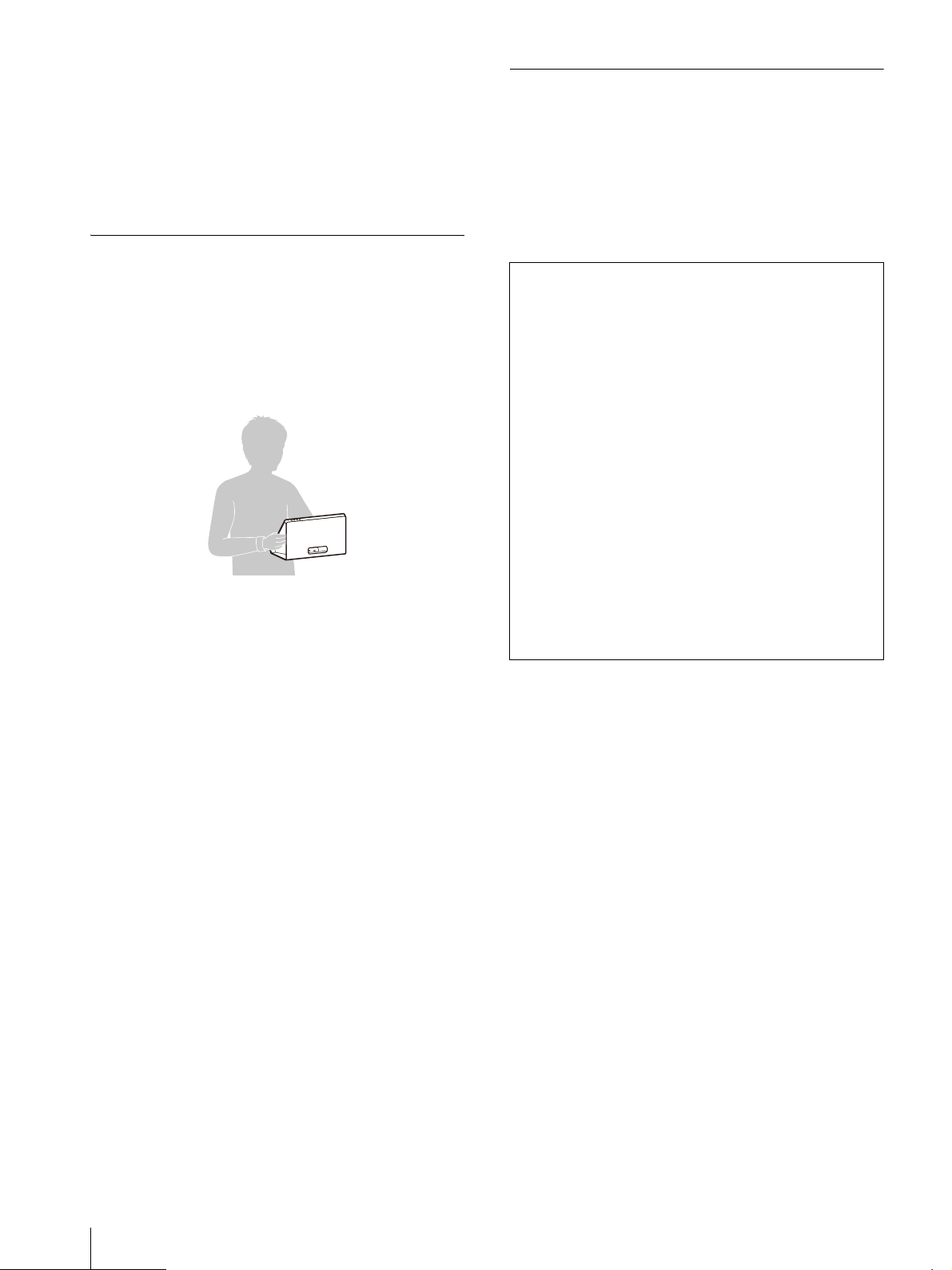
FR
8
N’utilisez jamais de solvants puissants tels que
l’alcool, le benzène, les diluants ou les
détergents acides, alcalins ou abrasifs, ni de
lingettes imbibées de produit chimique, car
cela pourrait endommager l’écran.
Utilisez un souffleur pour éliminer la poussière
sur la surface de l’écran.
Transport de l’appareil
Si l’appareil est transporté ou déplacé d’une
manière incorrecte, l’appareil peut tomber et
causer des blessures comme des ecchymoses
ou des fractures.
Tenez fermement l’appareil, comme indiqué
dans l’illustration suivante.
N’appuyez et n’appliquez aucune pression sur
l’écran pendant que vous tenez l’appareil.
Déconnectez le cordon d’alimentation CA et
tous les câbles connectés à l’appareil avant de
le transporter.
Si l’appareil est transporté avec le cordon
d’alimentation CA connecté, le cordon
d’alimentation CA pourrait être endommagé et
provoquer un incendie et une électrocution.
Lors du transport de l’appareil pour une
réparation ou un déplacement, emballez
l’appareil en utilisant la boîte et les matériaux
d’emballage d’origine.
Ne soumettez pas l’appareil à de fortes
vibrations ou à des conditions d’impacts
importants pendant le transport. Cela pourrait
entraîner la déformation de la structure interne
ou de l’extérieur de l’appareil, des dommages à
l’écran, un problème de fonctionnement des
pièces internes ou d’autres dommages.
Assurez-vous de ne pas exposer l’appareil à de
fortes vibrations ou des impacts importants
lors du transport de l’appareil comme
marchandise par camion, navire ou avion, ou
encore comme bagage dans une valise à
roulettes.
Mise au rebut de l’appareil
Ne mettez pas l’appareil au rebut avec les
déchets ordinaires.
Ne jetez pas l’écran avec les ordures
ménagères.
Lorsque vous mettez l’écran au rebut, vous
devez respecter la législation en vigueur dans
la région ou le pays.
Remarques
Vérifiez toujours que l’appareil fonctionne
correctement avant l’utilisation. Sony
n’assumera pas de responsabilité pour les
dommages de quelque sorte qu’ils soient,
incluant mais ne se limitant pas à la
compensation ou au remboursement, à
cause de la perte de profits actuels ou futurs
suite à la défaillance de cet appareil, que ce
soit pendant la période de garantie ou après
son expiration, ou pour toute autre raison
quelle qu’elle soit.
Sony n’assumera pas de responsabilité pour
les réclamations, quelle qu’elles soient,
effectuées par les utilisateurs de cet
appareil ou par des tierces parties.
Sony n’assumera pas de responsabilité pour
la cessation ou l’interruption de tout service
lié à cet appareil, résultant de quelque
circonstance que ce soit.
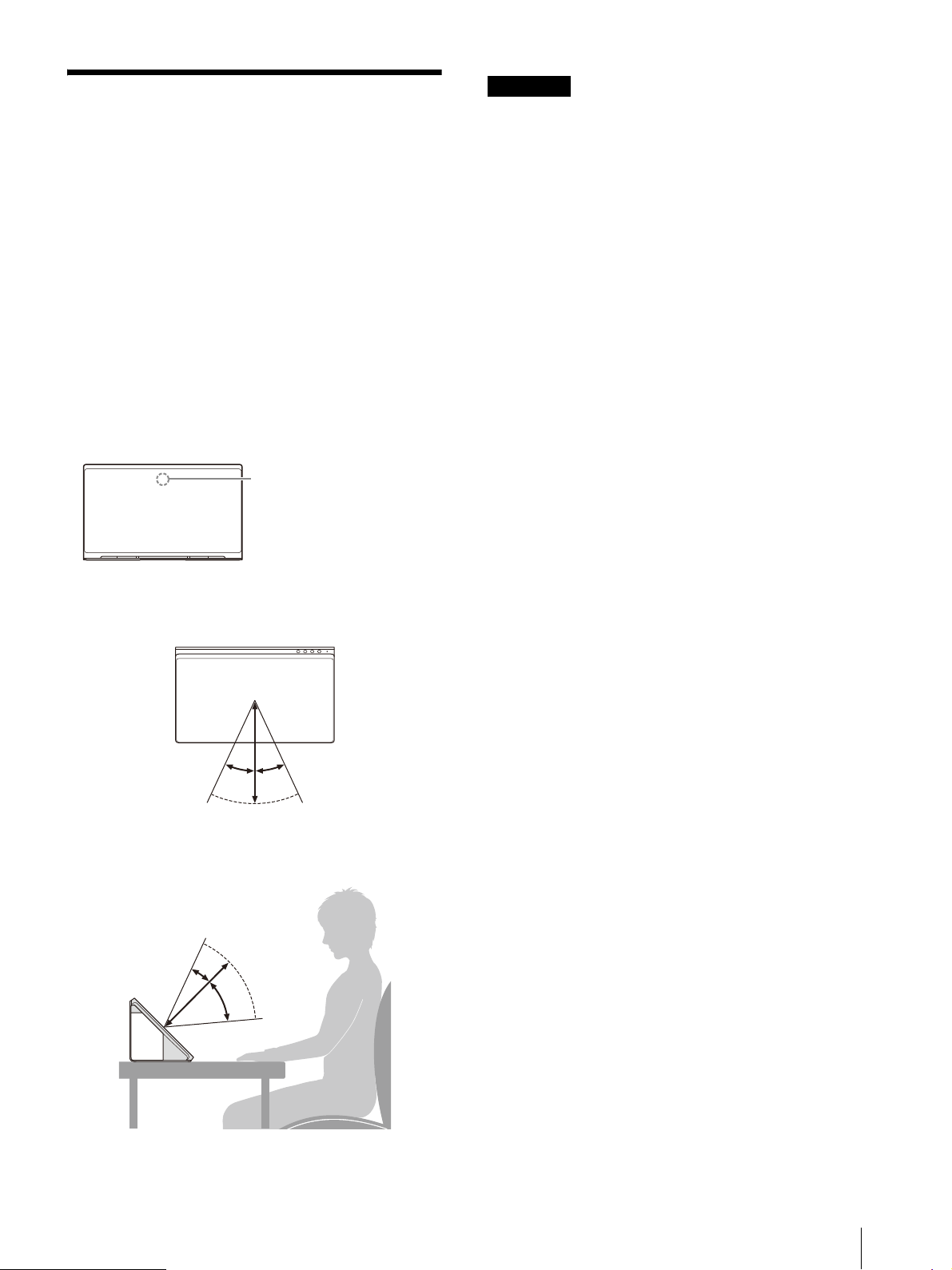
9
FR
Environnement de
visionnement
Les contenus en format stéréoscopique comme
3DCG peuvent être visionnés en stéréoscopie sur
l’appareil, à l’œil nu. Placez l’appareil sur votre
bureau et appréciez le visionnement dans
l’environnement suivant.
Éclairement de la pièce : Environ 100 à 1 000 lx
et 100 lx et plus pour la surface de la façade
Distance de visionnement : 30 cm à 75 cm
(11
7
/
8
pouces à 29
5
/
8
pouces)
(35 cm à 50 cm (13
7
/
8
pouces à 19
3
/
4
pouces)
recommandée)
Angle de visionnement (horizontal) : ±25°
Angle de visionnement (vertical) : –40°/+20°
Vue du dessus
Vue de côté
Remarques
Pour plus de détails sur l’éclairement de la
pièce et d’autres informations, consultez le site
d’assistance pour développeurs suivant.
https://www.sony.net/dev-srd
Effectuez le visionnement en évitant toute
lumière extérieure directe sur l’écran.
La lumière reflétée sur l’écran pourrait rendre
impossible le visionnement des images
stéréoscopiques.
Ne placez pas l’appareil dans un
environnement où le capteur de détection
oculaire serait face à une source de lumière.
L’appareil affiche une image optimisée en
détectant le visage de l’utilisateur et en
repérant son regard à l’aide du capteur de
détection oculaire. Retirez les masques et
chapeaux lors du visionnement sur cet
appareil.
L’appareil est conçu pour permettre aux
utilisateurs de visionner des images en le
plaçant à l’horizontale. Si l’appareil est placé à
la verticale, vous ne pouvez pas visionner
d’images en 3D.
Lorsque l’image visionnée est instable, ajustez
l’environnement de visionnement, y compris la
position d’installation.
Le capteur de détection oculaire pourrait avoir
de la difficulté à repérer votre regard.
Capteur de détection
oculaire
Écran
25º 25º
20º
40º
FR
10
Raccordement d’un
ordinateur et logiciel requis
pour le fonctionnement
Utilisez un ordinateur respectant les
spécifications recommandées. Un logiciel dédié
est requis pour afficher le contenu.
Procurez-vous le logiciel nécessaire pour
l’installer sur votre ordinateur. Pour plus de
détails sur les spécifications recommandées et
l’environnement d’exploitation informatique, le
logiciel dédié et le manuel, consultez le site
suivant.
https://www.sony.net/dev-srd
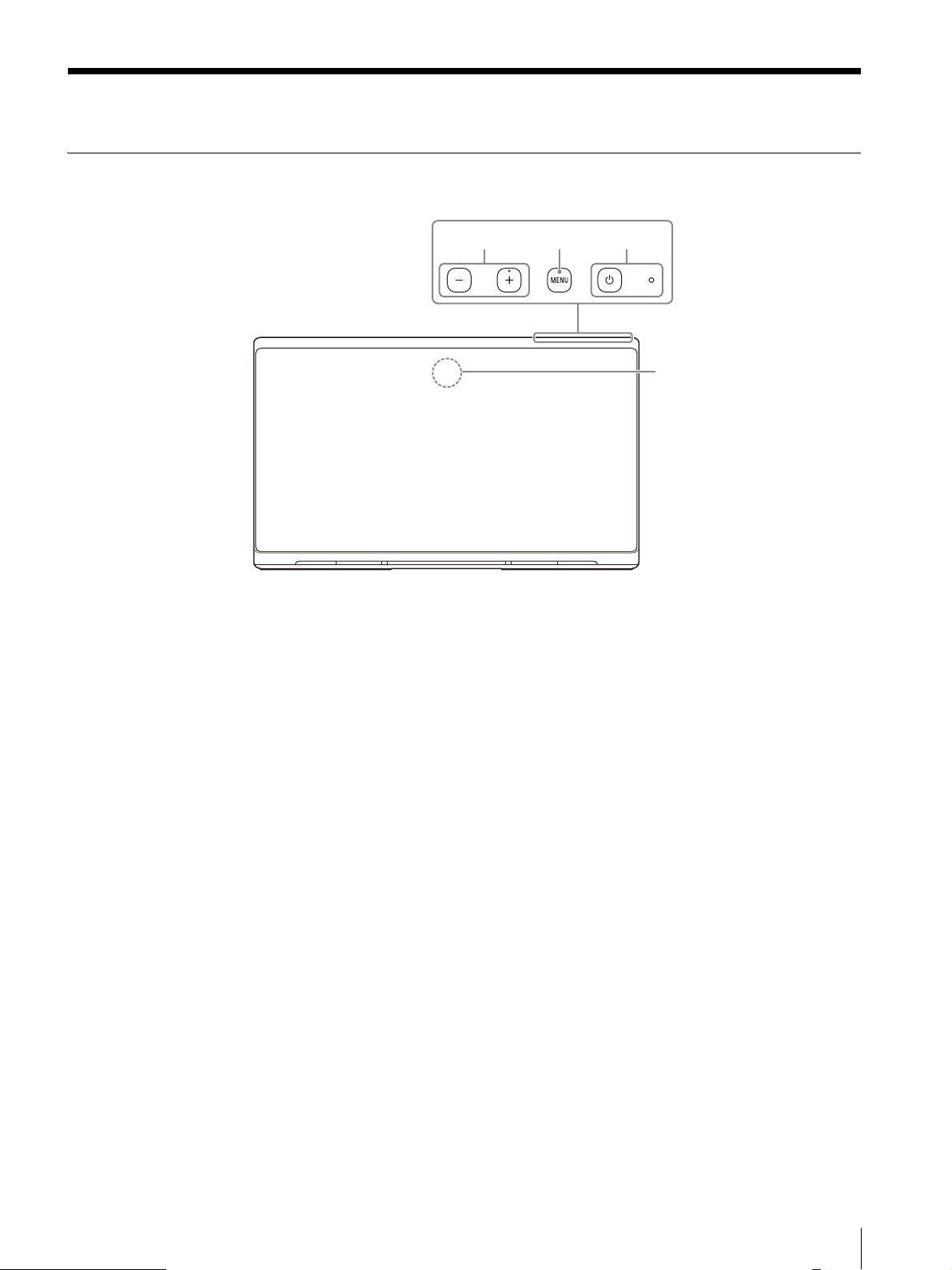
11
FR
Emplacement et fonction des pièces et commandes
Avant
Interrupteur et témoin (Alimentation)
Appuyez pour allumer l’appareil.
Le témoin s’allume en blanc lorsque l’appareil
passe à l’état de fonctionnement.
Appuyez de nouveau pour éteindre l’appareil et
le témoin.
Bouton MENU
Appuyez pour ouvrir/fermer le menu à l’écran.
Lorsque le menu à l’écran est affiché, appuyez
pour déplacer le curseur afin de sélectionner une
option de menu.
Bouton +/–
Appuyez pour régler le volume.
Lorsque le menu à l’écran est affiché, appuyez
pour modifier la valeur de réglage de l’option de
menu (page 15).
Capteur de détection oculaire
Détecte le visage de l’utilisateur et repère son
regard.
ɟɞ
ɡ
ɠ
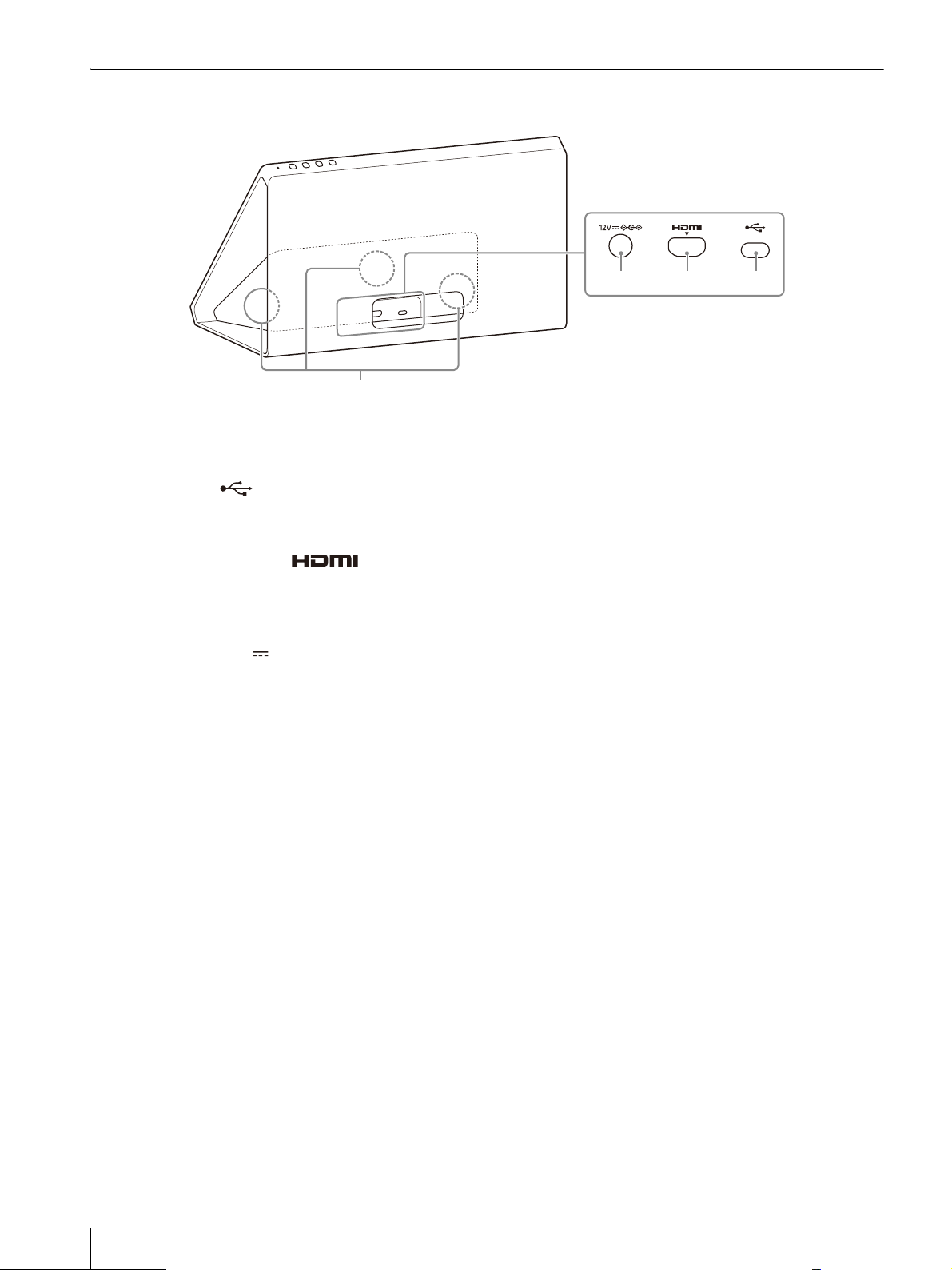
FR
12
Arrière
Haut-parleur
Émet l’audio.
Connecteur (Contrôle de
communication)
Connectez le câble USB Type-C fourni.
Connecteur d’entrée (HDMI)
Permet de recevoir le signal HDMI.
Connectez au connecteur de sortie HDMI de
l’ordinateur avec le câble HDMI fourni.
Connecteur 12V (entrée CC)
Connectez le connecteur CC de l’adaptateur CA
fourni.
ɥ ɤ ɣ
ɢ
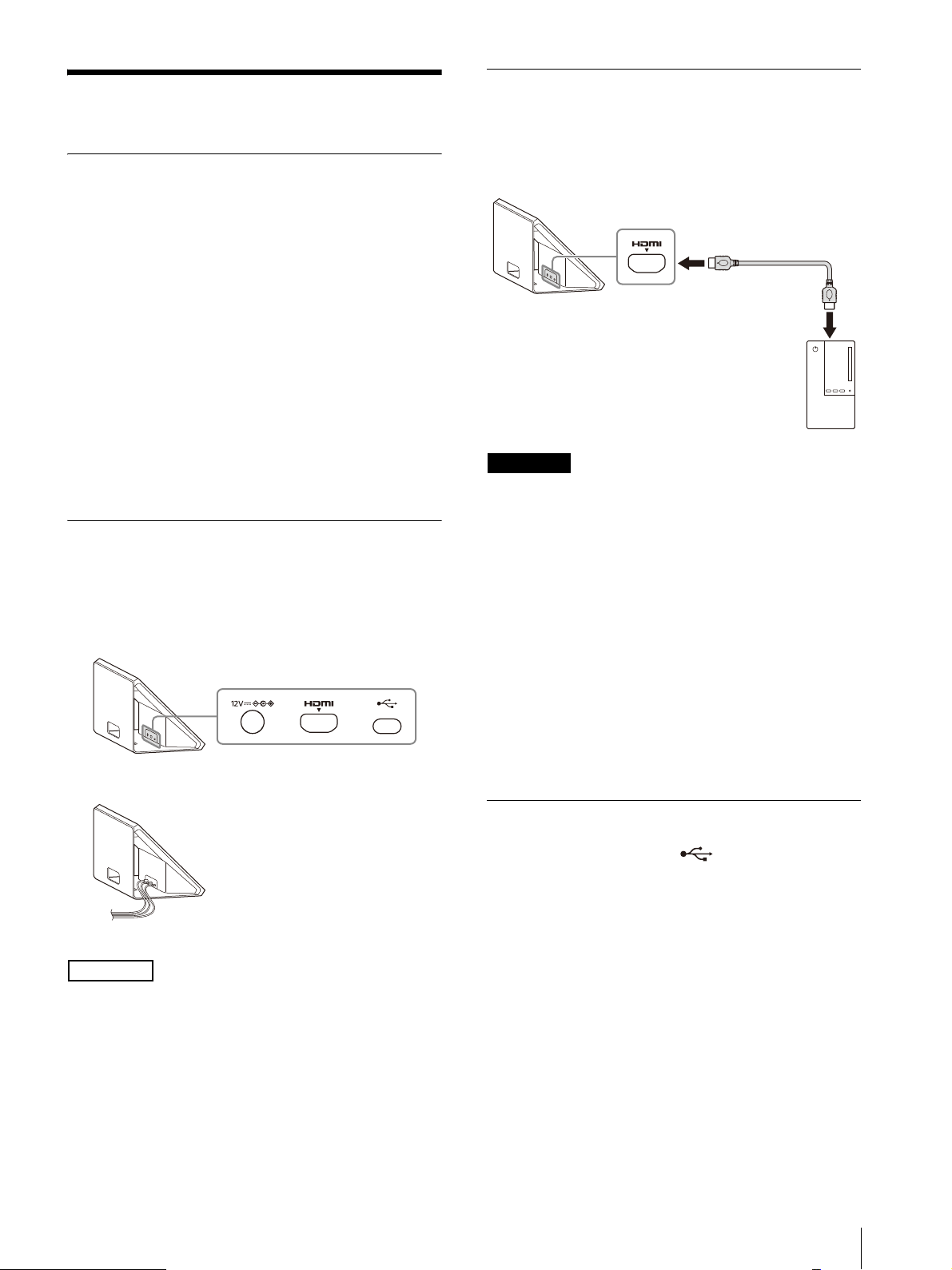
13
FR
Raccordement
Vérification des accessoires fournis
Vérifiez les accessoires suivants avant de
procéder au raccordement.
De plus, reportez-vous au mode d’emploi des
appareils raccordés.
Écran (1)
Panneau latéral (2) (Peuvent être utilisés sur le
côté gauche ou droit)
Barre supérieure (1)
Support inférieur (1)
Câble USB Type-C (1)
Câble HDMI (1)
Adaptateur CA (1)
Cordon d’alimentation CA (1)
Mode d’emploi (ce manuel) (1)
Chiffon de nettoyage (1)
Vérification de la position et de
l’orientation des connecteurs
Vérifiez la position, la forme et l’orientation des
connecteurs à l’arrière de l’appareil.
Remarque
Il est possible d’acheminer les câbles à travers
l’ouverture située dans la partie inférieure arrière
de l’appareil ou dans le bas de l’appareil.
Raccordement du câble HDMI
Raccordez le connecteur d’entrée HDMI de
l’appareil au connecteur de sortie HDMI de votre
ordinateur à l’aide du câble HDMI fourni.
Remarques
Assurez-vous d’utiliser le câble HDMI fourni
pour le raccordement.
Raccordez l’appareil directement à l’ordinateur,
sans utiliser de commutateur HDMI ou d’autres
appareils.
Vérifiez la position et l’orientation du
connecteur et du câble avant de raccorder le
câble au connecteur.
Avant le raccordement, vérifiez que le
connecteur HDMI pris en charge par votre
ordinateur est compatible HDMI 2.0 ou
supérieur pour vous assurer que l’image
d’origine puisse être affichée sur l’appareil.
Pour plus de détails, consultez le mode
d’emploi de votre ordinateur.
Raccordement du câble USB Type-C
Raccordez le connecteur (Contrôle de
communication) de l’appareil au connecteur USB
de votre ordinateur à l’aide du câble USB Type-C
fourni.
Écran
Écran
Écran
Câble HDMI (fourni)
Ordinateur
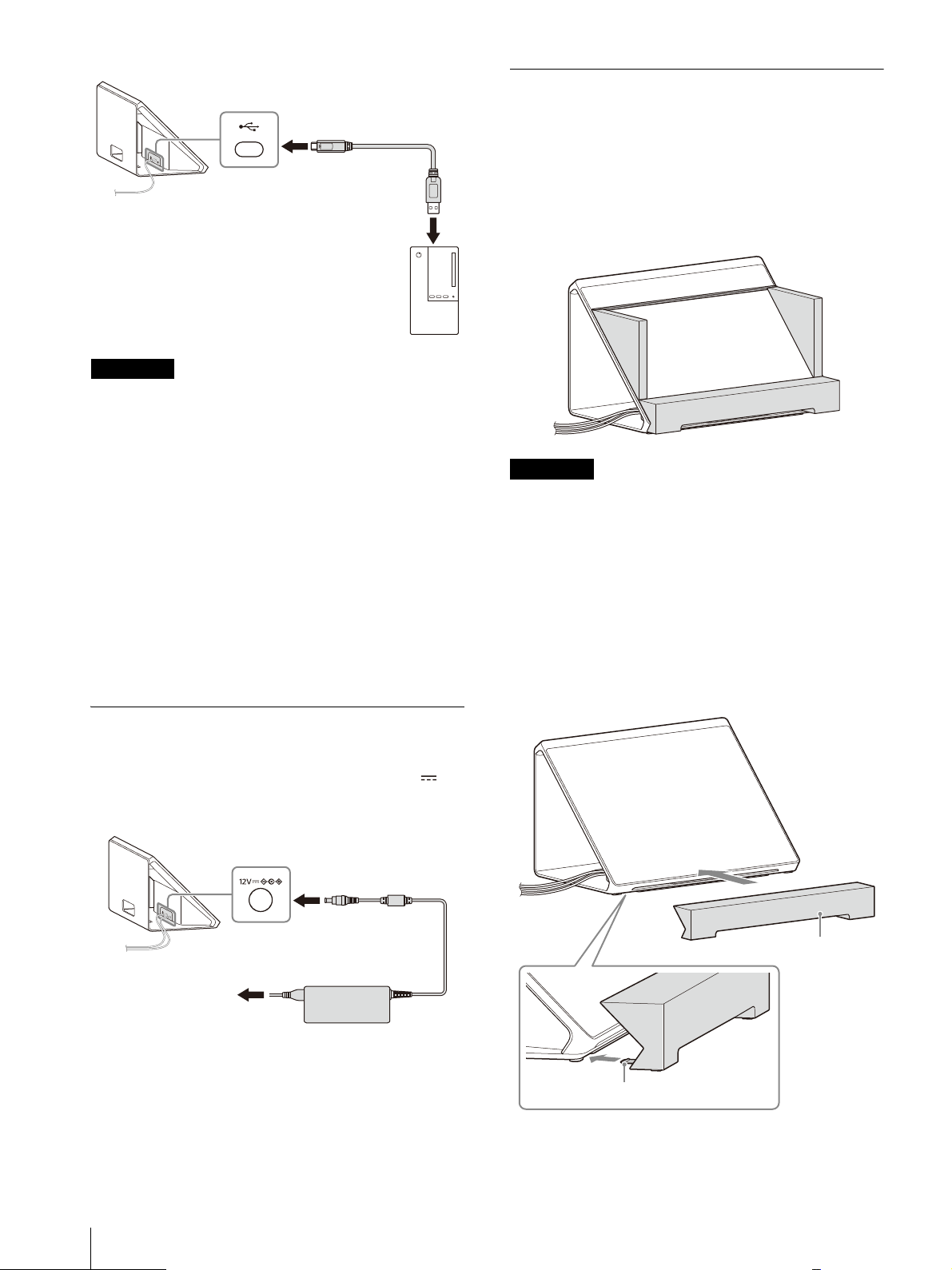
FR
14
Remarques
Assurez-vous d’utiliser le câble USB Type-C
fourni pour le raccordement.
Raccordez l’appareil directement à l’ordinateur,
sans utiliser de concentrateur USB ou d’autres
appareils.
Vérifiez la position et l’orientation du
connecteur et du câble avant de raccorder le
câble au connecteur.
Avant le raccordement, vérifiez que le
connecteur USB pris en charge par votre
ordinateur est compatible USB 3.2 ou supérieur
pour vous assurer que l’image d’origine puisse
être affichée sur l’appareil.
Pour plus de détails, consultez le mode
d’emploi de votre ordinateur.
Raccordement de l’adaptateur CA
Insérez le connecteur CC de l’adaptateur CA
fourni directement dans le connecteur 12V
(entrée CC) de l’appareil pour les raccorder.
Fixation d’accessoires
Vous pouvez facilement visionner des images
stéréoscopiques à l’œil nu en fixant des
accessoires qui peuvent procurer une plus
grande impression d’immersion.
Assurez-vous de fixer les accessoires lors du
visionnement sur l’appareil.
Remarques
Retirez les accessoires avant de déplacer
l’écran.
Ne soulevez ou déplacez pas l’écran en tenant
les panneaux latéraux.
1
Fixez le support inférieur.
Insérez la languette du support inférieur
dans l’espace sous la partie inférieure de
l’appareil, puis poussez le support inférieur
jusqu’à ce qu’il s’arrête.
Écran
Câble USB Type-C (fourni)
Ordinateur
Écran
Adaptateur CA (fourni)
vers la prise murale
Support inférieur
Languette
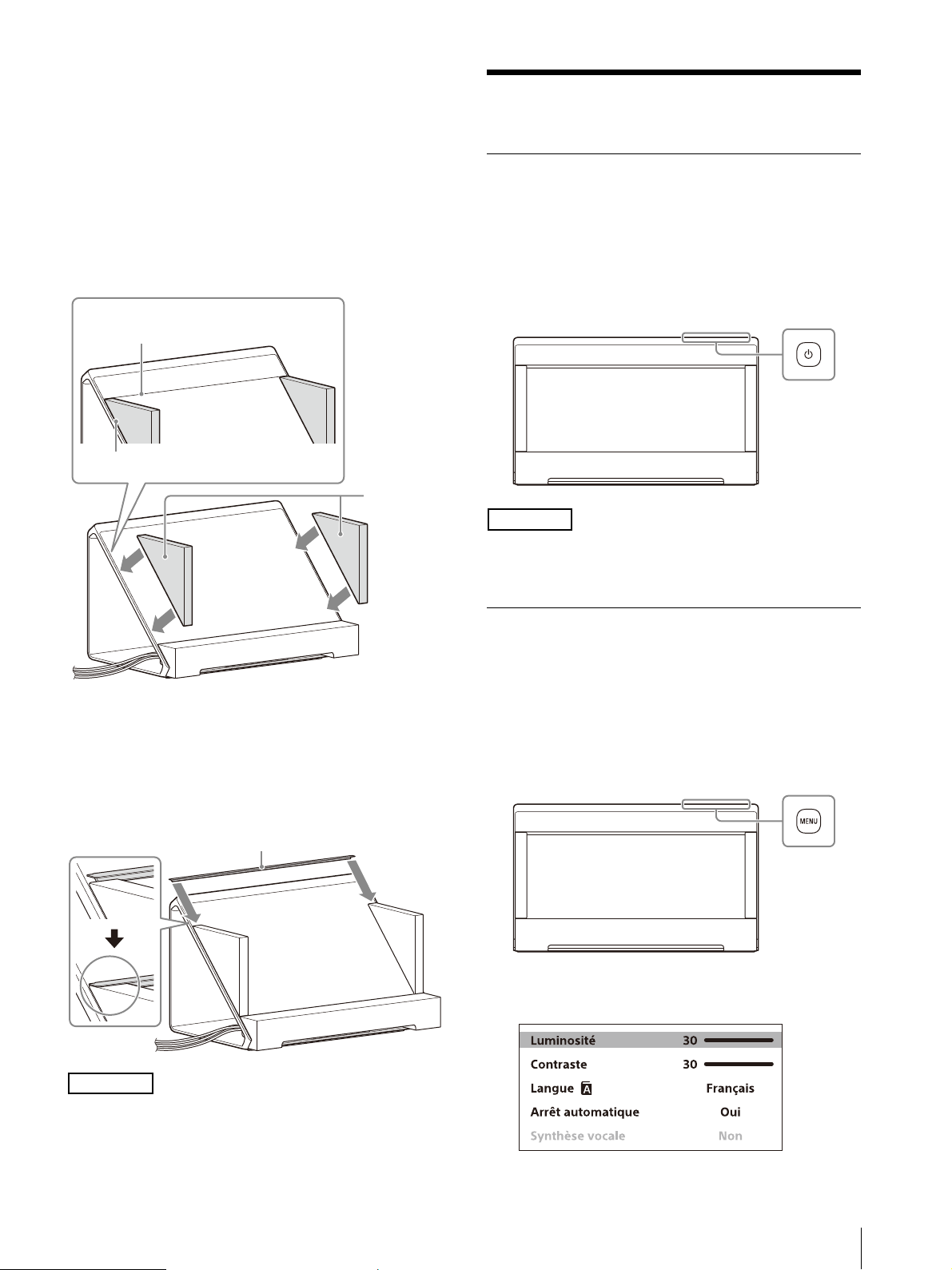
15
FR
2
Fixez les panneaux latéraux.
Retirez la pellicule de protection des
panneaux latéraux, puis placez les panneaux
latéraux sur l’écran comme indiqué dans
l’illustration suivante, avec le côté brillant
orienté vers l’intérieur, en direction de
l’écran.
Les panneaux latéraux sont fixés au panneau
d’affichage à l’aide des aimants sur la partie
inférieure des panneaux latéraux.
3
Fixez la barre supérieure.
Insérez la barre supérieure dans l’espace
entre le panneau latéral et le panneau
d’affichage, comme indiqué dans
l’illustration suivante.
Remarque
Pour retirer les accessoires, retirez d’abord la
barre supérieure.
Visionnement de contenu
Mise en marche de l’appareil
1
Raccordez le cordon d’alimentation CA à la
prise de courant CA.
2
Appuyez sur l’interrupteur (Alimentation)
pour allumer l’appareil.
Remarque
Le témoin s’allume en blanc lorsque l’appareil est
allumé.
Utilisation du menu
L’ajustement de qualité d’image et les réglages
peuvent être effectués sur le menu à l’écran de
l’appareil.
1
Appuyez sur le bouton MENU pour afficher le
menu.
L’option actuellement sélectionnée est
identifiée en gris.
L’extrémité du panneau d’affichage
L’extrémité de l’écran disponible sur le
panneau d’affichage
Panneau
latéral
Barre supérieure
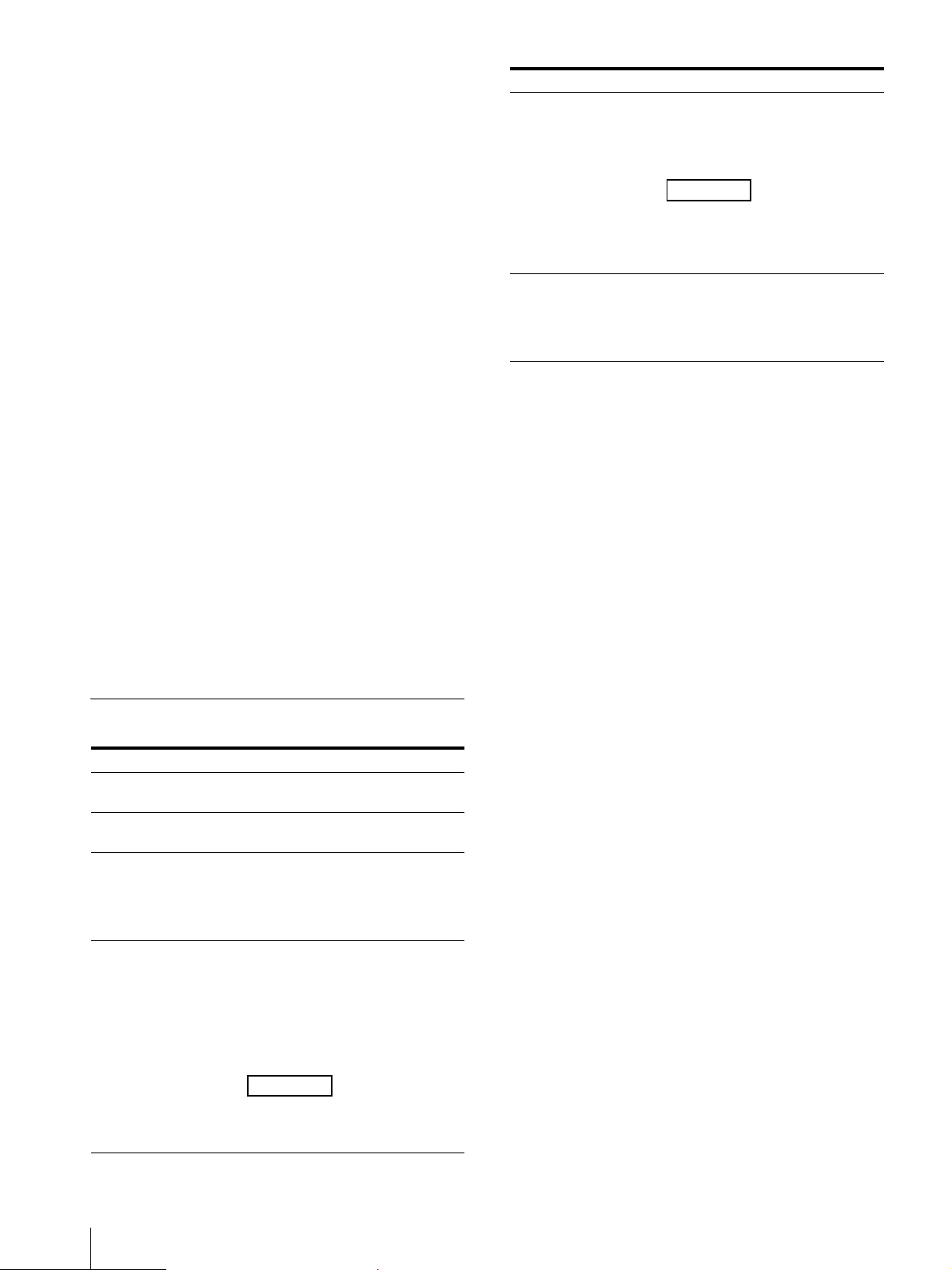
FR
16
2
Appuyez sur le bouton MENU pour
sélectionner une option de menu.
L’option sélectionnée défile du haut vers le
bas lorsque vous appuyez sur le bouton
MENU.
3
Appuyez sur le bouton +/– pour modifier les
valeurs et réglages.
Les valeurs et réglages modifiés sont
automatiquement enregistrés.
Pour modifier la valeur :
Appuyez sur le bouton + pour augmenter la
valeur.
Appuyez sur le bouton – pour diminuer la
valeur.
Pour sélectionner le réglage :
Appuyez sur le bouton +/– pour sélectionner
le réglage.
Pour fermer le menu
Si vous appuyez sur le bouton MENU pendant la
sélection de l’option de menu tout au bas,
« Écran d’informations » apparaît.
Appuyez de nouveau sur le bouton MENU pour
fermer le menu à l’écran.
De plus, l’écran de menu disparaît
automatiquement si vous n’utilisez pas le menu
pendant un certain temps.
Options de menu
Menu Réglage
Luminosité Règle la luminosité. (Valeur par
défaut : 30)
Contraste Règle le contraste. (Valeur par
défaut : 30)
Langue Vous pouvez sélectionner la
langue des menus ou
messages.
English (Réglage par défaut)
Français
Arrêt automatique L’appareil passe
automatiquement en mode de
veille lorsqu’aucun signal n’est
reçu en entrée pendant un
certain temps.
Oui (Réglage par défaut)
Non
Remarque
En mode de veille, aucune
image n’est affichée à l’écran et
le témoin s’allume en orange.
Synthèse vocale Effectue la lecture des menus
et messages affichés à l’écran.
Oui
Non (Réglage par défaut)
Remarque
Cette fonction n’est pas
disponible lorsque « Français »
est sélectionné dans
«Langue».
Écran d’informations Affiche les informations de
l’appareil.
Nom du modèle
Numéro de série
Version du logiciel
Menu Réglage
17
FR
Guide de dépannage
Cette section peut vous aider à déterminer la
cause d’un problème et, par conséquent, vous
éviter d’avoir à communiquer avec l’assistance
technique.
Aucune image à l’écran ou aucun son audio
Lorsque le témoin clignote en orange,
débranchez le cordon d’alimentation CA et
attendez que le témoin cesse de clignoter.
Ensuite, rebranchez le cordon
d’alimentation CA et allumez l’appareil avec
l’interrupteur (Alimentation).
Si le témoin clignote toujours, notez le nombre
de clignotements du témoin et communiquez
avec un technicien Sony qualifié.
L’image ne s’affiche pas correctement
Vérifiez si votre environnement convient au
visionnement sur l’appareil (page 9).
L’écran devient noir/aucune image ne
s’affiche (après un certain temps) La
fonction « Arrêt automatique » est activée.
Vérifiez le réglage « Arrêt automatique »
(page 16).
« Aucun signal » s’affiche Aucun signal
n’est reçu par l’appareil.
« Signal non compatible » s’affiche
Certains signaux pourraient ne pas être pris en
charge par l’appareil, selon le signal d’entrée.
Vérifiez le signal pris en charge par votre
ordinateur.
Le contenu semble affiché en basse
résolution (« Signal non compatible » ne
s’affiche pas) Vérifiez que le paramètre de
résolution/signal pris en charge de votre
ordinateur est réglé à 3 840 × 2 160.
Selon les caractéristiques du processeur
graphique ou du système d’exploitation de
votre ordinateur, « Signal non compatible »
pourrait ne pas s’afficher sur l’appareil même
s’il est réglé à un paramètre de résolution/
signal pris en charge autre que 3 840 × 2 160.
Vérifiez les réglages de votre ordinateur.
Vérification des plus récentes
informations sur le site
d’assistance
Vous trouverez les informations suivantes sur le
site d’assistance pour développeurs.
https://www.sony.net/dev-srd
Informations de développement sur les
contenus
Guide de dépannage (Q & R)
Informations de mise à jour du logiciel
Informations de raccordement avec d’autres
appareils
Informations de caractéristiques
recommandées pour les ordinateurs
Service à la clientèle Sony
Canada :
http://www.sony.ca/support
États-Unis :
http://www.sony.com/support

FR
18
Caractéristiques techniques
Système de panneau
Module de panneau ACL en verre
micro optique
Taille du panneau (diagonale)
39,6 cm (15,6 pouces)
Format du panneau
16:9
Nombre de pixels du panneau (H × V)
3 840 × 2 160 pixels
La résolution effective réelle pour
le visionnement
stéréoscopique est 4K ou
inférieure.
Taille d’image effective
*1
(H × V)
341,4 mm × 190,7 mm
(13
1
/
2
pouces × 7
5
/
8
pouces)
Sortie audio 5,5 W (1,5 W + 1,5 W + 2,5 W)
Connecteur (Contrôle de communication)
Correspondance USB 3.2 Gen1
Connecteur d’entrée HDMI
3 840 × 2 160p (60Hz), 720 × 480p
(60Hz)
*2
, 640 × 480p (60Hz)
*2
Conditions d’utilisation
Température
0 °C à 40 °C (32 °F à 104 °F)
Température recommandée
20 °C à 30 °C (68 °F à 86 °F)
Humidité 20 % à 80 % (sans condensation)
Altitude 2 000 m (environ 6 560 pieds) et
inférieure
Conditions de stockage et de transport
Température
–20 °C à +60 °C (–4 °F à +140 °F)
Humidité 20 % à 80 %
Consommation électrique
24 W max.
Dimensions externes maximales
*1
(excluant les
parties saillantes) (l/h/p)
383 mm × 232 mm × 231 mm
(15
1
/
8
pouces × 9
1
/
4
pouces ×
9
1
/
8
pouces)
383 mm × 232 mm × 247 mm
(15
1
/
8
pouces × 9
1
/
4
pouces ×
9
3
/
4
pouces) (incluant les
accessoires
*3
)
Poids
*1
4,6 kg (10,2 lb)
4,9 kg (10,8 lb) (incluant les
accessoires
*3
)
Alimentation Entrée CC : 12 V 2,0 A (fournie à
partir de l’adaptateur CA)
*1 La taille d’image effective, les dimensions externes
maximales et le poids sont des valeurs
approximatives.
*2 Pour l’affichage 2D uniquement
*3 Les accessoires (les panneaux latéraux, le support
inférieur et la barre supérieure) sont inclus.
La conception et les caractéristiques techniques
peuvent être modifiées sans préavis.

19
FR
AVIS ET LICENCES
POUR LE LOGICIEL
UTILISÉ DANS CE
PRODUIT
CONTRAT DE LICENCE
D’UTILISATEUR FINAL
IMPORTANT :
AVANT D’UTILISER LE LOGICIEL,
VEUILLEZ LIRE ATTENTIVEMENT
LE PRÉSENT CONTRAT DE
LICENCE D’UTILISATEUR FINAL
(« EULA »). EN UTILISANT LE
LOGICIEL, VOUS ACCEPTEZ DE
VOUS CONFORMER AUX
CONDITIONS DU PRÉSENT EULA.
SI VOUS N’ACCEPTEZ PAS DE
VOUS CONFORMER AUX
CONDITIONS DU PRÉSENT EULA,
VOUS NE POUVEZ PAS UTILISER
LE LOGICIEL.
Le présent EULA est un contrat
conclu entre (i) vous et toute
entité que vous représentez
(« vous ») et (ii) Sony Electronics
Inc. (« SONY »). Le présent EULA
régit vos droits et obligations
concernant le logiciel de SONY
et/ou de ses concédants de
licence tiers (y compris les
sociétés affiliées de SONY) et
leurs sociétés affiliées
respectives (collectivement
nommés les « FOURNISSEURS
TIERS ») mis à votre disposition
par SONY, tel qu’incorporé dans
un certain appareil
(« APPAREIL »), ainsi qu’à
l’égard de toute mise à jour/
mise à niveau fournie par SONY,
toute documentation imprimée,
en ligne ou électronique relative
à ce logiciel et tout fichier de
données créé en utilisant ce
logiciel (collectivement
nommés le « LOGICIEL »).
Nonobstant ce qui précède, tout
logiciel compris dans le
LOGICIEL auquel est associé un
contrat de licence d’utilisateur
final distinct (y compris, mais
non de façon limitative, une
Licence Publique Générale GNU
et une Licence Publique
Générale Limitée/pour
Bibliothèques) sera couvert par
les dispositions du contrat de
licence d’utilisateur final distinct
qui s’appliqueront en lieu et
place des conditions du présent
EULA dans la mesure précisée
par ledit contrat de licence
d’utilisateur final distinct
(« LOGICIELS EXCLUS »).
LICENCE D’UTILISATION DU
LOGICIEL
Le LOGICIEL est concédé sous
licence et n’est pas vendu. Le
LOGICIEL est protégé par les lois
relatives aux droits d’auteur et
autres droits de propriété
intellectuelle, ainsi que par des
traités internationaux.
DROITS D’AUTEUR
Tous les droits et titres afférents
et se rapportant au LOGICIEL (y
compris, mais non de façon
limitative, toute image, toute
photographie, toute animation,
toute vidéo, tout contenu audio,
toute musique, tout texte, tout
« applet » et tout autre contenu
intégrés au LOGICIEL) sont
détenus par SONY ou l’un ou
plusieurs des FOURNISSEURS
TIERS.
OCTROI DE LICENCE
SONY vous octroie une licence
limitée, non exclusive,
personnelle et non transférable
pour l’utilisation du LOGICIEL
exclusivement avec votre
APPAREIL et seulement selon
les modalités du présent EULA
pour l’utilisation prévue dans
les instructions et consignes
d’utilisation pertinentes mises à
votre disposition par SONY
(« INSTRUCTIONS
D’UTILISATION »). SONY et les
FOURNISSEURS TIERS se
réservent expressément
l’ensemble des droits, titres et
intérêts (y compris, mais non de
façon limitative, l’ensemble des
droits de propriété
intellectuelle) afférents et se
rapportant au LOGICIEL, qui ne
vous sont pas spécifiquement
octroyés aux termes du présent
EULA.
OBLIGATIONS ET LIMITES
Vous ne pouvez pas copier,
publier, adapter, redistribuer,
tenter de déterminer le code
source, modifier, procéder à
l’ingénierie inverse, décompiler
ou désassembler le LOGICIEL en
tout ou en partie, ni créer
d’œuvres dérivées du LOGICIEL,
sauf si de telles œuvres dérivées
sont intentionnellement
facilitées par le LOGICIEL. Vous
ne pouvez pas modifier ni
altérer la fonctionnalité de
gestion des droits numériques
du LOGICIEL. Vous ne pouvez
pas contourner, modifier,
empêcher ou circonvenir une
quelconque fonction ou
protection du LOGICIEL ou tout
mécanisme lié de manière
fonctionnelle au LOGICIEL. Vous
ne pouvez pas séparer un
composant individuel du
LOGICIEL afin de l’utiliser sur
plus d’un APPAREIL sans
l’autorisation expresse de SONY
à cet effet. Vous ne pouvez pas
supprimer, altérer, recouvrir ou
détériorer les marques de
commerce ou mentions
apposées sur le LOGICIEL. Vous
ne pouvez pas partager,
distribuer, louer, donner en
location, concéder en sous-
licence, céder, transférer ni
vendre le LOGICIEL. Vous ne
pouvez pas utiliser le LOGICIEL
d’une quelconque manière non
conforme aux INSTRUCTIONS
D’UTILISATION. Les logiciels ou
autres produits, autres que le
LOGICIEL et indispensables à
l’exécution du LOGICIEL,
peuvent être interrompus ou
suspendus à la discrétion des
fournisseurs (fournisseurs de
logiciels ou SONY). SONY et ces
fournisseurs ne garantissent

FR
20
pas que le LOGICIEL ou les
autres produits resteront
disponibles ou fonctionneront
sans interruption ni
modification. Vous ne devez en
aucun cas entreprendre, ni
mandater ou autoriser, amener,
habiliter ou demander à le faire
à toute tierce partie (y compris
vos utilisateurs, personnels tiers
ou autres personnels, employés
ou sous-traitants), toute action
destinée ou visant à : (i) utiliser
le LOGICIEL (ou toute partie de
celui-ci) d’une quelconque
manière ou à toute fin qui ne
serait pas conforme au présent
EULA; (ii) introduire dans le
LOGICIEL un(e) quelconque
« porte dérobée », « dispositif
d’arrêt immédiat », « bombe
logique », « cheval de Troie »,
« virus » ou « ver informatique »
(selon l’acception commune de
ces termes dans le secteur des
logiciels) ou tout autre code,
fichier, script, agent,
programme, instruction ou
programme logiciel équivalent
destiné ou visant à perturber,
désactiver, compromettre ou
autrement entraver d’une
quelconque manière le
fonctionnement du LOGICIEL ou
de tout appareil ou système
détenu ou contrôlé par vous ou
toute tierce partie, ou qui
autrement pourrait
endommager ou détruire toute
donnée ou tout fichier
(« Programme malveillant »);
(iii) interférer avec le
fonctionnement adéquat du
LOGICIEL; (iv) contourner,
désactiver ou interférer avec
des fonctionnalités liées à la
sécurité du LOGICIEL ou des
fonctionnalités empêchant ou
limitant l’utilisation, l’accès ou la
copie du LOGICIEL; ou (v)
imposer (ou pourrait imposer, à
votre discrétion exclusive) une
charge déraisonnable ou
disproportionnée au LOGICIEL.
LOGICIELS EXCLUS ET
COMPOSANTS LIBRES
Nonobstant cet octroi d’une
licence limitée, vous
reconnaissez que le LOGICIEL
peut inclure des LOGICIELS
EXCLUS. Certains LOGICIELS
EXCLUS peuvent être couverts
par des licences de logiciels
libres (« COMPOSANTS
LIBRES »), ce qui signifie que
toute licence de logiciel
approuvée comme licence libre
par l’Open Source Initiative ou
toute licence essentiellement
semblable, y compris, mais non
de façon limitative, les licences
qui, comme condition à la
distribution du logiciel couvert
par ce type de licence, exigent
que le distributeur rende
disponible le code source du
logiciel. Si et dans la mesure où
sa divulgation est requise,
veuillez visiter le site
www.sony.net/Products/Linux
ou tout autre site Web désigné
par SONY pour consulter la liste
des COMPOSANTS LIBRES
applicables inclus dans le
LOGICIEL de temps à autre, ainsi
que les modalités applicables
qui régissent leur utilisation. Ces
modalités peuvent être
modifiées par le tiers applicable
à tout moment sans
responsabilité envers vous.
Dans la mesure exigée par les
licences qui couvrent les
LOGICIELS EXCLUS, les
modalités de ces licences
s’appliqueront au lieu des
modalités du présent EULA.
Dans la mesure où les
conditions des licences
applicables aux LOGICIELS
EXCLUS interdisent les
restrictions du présent EULA
relatives aux LOGICIELS EXCLUS,
ces restrictions ne
s’appliqueront pas à ces
LOGICIELS EXCLUS. Dans la
mesure où les conditions des
licences applicables aux
COMPOSANTS LIBRES exigent
que SONY offre de fournir le
code source relatif au LOGICIEL,
cette offre est faite par la
présente.
UTILISATION DU LOGICIEL
AVEC DES CONTENUS
PROTÉGÉS PAR DROITS
D’AUTEUR
Il est possible que vous puissiez
utiliser le LOGICIEL pour
visualiser, stocker, traiter et/ou
utiliser le contenu créé par
vous-même et/ou par des tiers.
Ce contenu peut être protégé
par le droit d’auteur, d’autres
lois portant sur les droits de
propriété intellectuelle et/ou
des accords. Vous acceptez
d’utiliser le LOGICIEL
uniquement en conformité avec
la totalité de ces lois et accords
s’appliquant à ce contenu. Vous
reconnaissez et acceptez que
SONY puisse prendre des
mesures appropriées pour
protéger les droits d’auteur
relatifs au contenu stocké, traité
ou utilisé par le LOGICIEL. Ces
mesures comprennent, mais
non de façon limitative, le
décompte de la fréquence de
vos sauvegardes et
restaurations par certaines
fonctionnalités du LOGICIEL, le
refus de votre demande de
permission de restauration des
données et la résiliation du
présent EULA en cas
d’utilisation illégitime de votre
part du LOGICIEL.
RÉGLEMENTATIONS RELATIVES
AUX EXPORTATIONS ET
AUTRES
Vous acceptez de respecter
toutes les restrictions et
réglementations relatives aux
exportations et réexportations
du Département du Commerce
et des autres autorités et
organismes des États-Unis, et
de ne pas transférer ou
autoriser le transfert du
LOGICIEL vers un pays interdit
ou d’une autre manière
contrevenant à ces restrictions
ou réglementations.

21
FR
DROITS LIMITÉS DU
GOUVERNEMENT DES ÉTATS-
UNIS
L’utilisation, la duplication ou la
divulgation par le
gouvernement des États-Unis
sont soumises aux restrictions
énoncées dans les sous-
paragraphes (c) (1) et (2) des
Droits relatifs aux logiciels
informatiques commerciaux
dans 48 C.F.R. § 52.227-19, selon
le cas. Le fabricant aux seules
fins de la présente section est
Sony Electronics Inc., 16535 Via
Esprillo, San Diego, CA 92127.
ACTIVITÉS À HAUT RISQUE
Le LOGICIEL ne possède pas de
tolérance aux pannes et n’est
pas conçu, fabriqué ou prévu
pour l’utilisation ou la revente
comme équipement de contrôle
en ligne dans des
environnements dangereux
nécessitant des performances
sans failles, comme
l’exploitation d’installations
nucléaires, la navigation ou les
systèmes de communication
aériens, le contrôle du trafic
aérien, les appareils de
maintien des fonctions vitales
ou les systèmes d’armes, pour
lesquels toute panne du
LOGICIEL pourrait conduire à
des décès, à des lésions
corporelles ou à d’importants
préjudices physiques ou
environnementaux (« ACTIVITÉS
À HAUT RISQUE »). SONY,
chacun des FOURNISSEURS
TIERS et chacune de leurs
sociétés affiliées respectives
déclinent spécifiquement toute
garantie, obligation ou
condition d’adéquation aux
ACTIVITÉS À HAUT RISQUE,
qu’elle soit expresse ou tacite.
EXCLUSION DE GARANTIES
SUR LE LOGICIEL
Vous reconnaissez et acceptez
que vous utilisez le LOGICIEL à
vos propres risques et que vous
êtes responsable de l’utilisation
du LOGICIEL. Le LOGICIEL est
fourni « EN L’ÉTAT », sans
garantie, ni obligation ou
condition d’aucune sorte.
SONY ET CHACUN DES
FOURNISSEURS TIERS (aux fins
de la présente Section, SONY et
chacun des FOURNISSEURS
TIERS sont collectivement
nommés « SONY ») DÉCLINENT
EXPRESSÉMENT L’ENSEMBLE
DES GARANTIES, OBLIGATIONS
OU CONDITIONS, EXPRESSES OU
TACITES, Y COMPRIS, MAIS NON
DE FAÇON LIMITATIVE, LES
GARANTIES IMPLICITES DE
QUALITÉ MARCHANDE,
D’ABSENCE DE CONTREFAÇON
ET D’ADAPTATION À UN USAGE
PARTICULIER. SONY NE
GARANTIT PAS ET NE FORMULE
AUCUNE CONDITION NI NE FAIT
AUCUNE DÉCLARATION (A) QUE
LES FONCTIONS CONTENUES
DANS TOUT LOGICIEL
RÉPONDRONT À VOS
EXIGENCES OU QU’ELLES
SERONT MISES À JOUR, (B) QUE
LE FONCTIONNEMENT DE TOUT
LOGICIEL SERA ADÉQUAT OU
EXEMPT D’ERREURS NI QUE
TOUT DÉFAUT SERA CORRIGÉ,
(C) QUE LE LOGICIEL
N’ENDOMMAGERA PAS
D’AUTRES LOGICIELS,
MATÉRIELS OU DONNÉES, (D)
QUE TOUT LOGICIEL OU
PRODUIT (AUTRE QUE LE
LOGICIEL) INDISPENSABLE AU
FONCTIONNEMENT DU LOGICIEL
DEMEURERA DISPONIBLE,
ININTERROMPU, FIABLE,
SÉCURISÉ OU NON MODIFIÉ, (E)
QUE LE LOGICIEL OU TOUT
ÉQUIPEMENT OU SYSTÈME SUR
LEQUEL LE LOGICIEL EST UTILISÉ
(Y COMPRIS L’APPAREIL) NE
PRÉSENTE AUCUNE
VULNÉRABILITÉ AUX
INTRUSIONS OU ATTAQUES ET
(F) CONCERNANT L’UTILISATION
OU LES RÉSULTATS DE
L’UTILISATION DU LOGICIEL,
QUANT À SON EXACTITUDE, SA
PRÉCISION, SA FIABILITÉ OU
AUTRE. LES SERVICES PEUVENT
FAIRE L’OBJET DE DÉLAIS,
D’ANNULATIONS ET D’AUTRES
PERTURBATIONS. SONY NE
DONNE AUCUNE GARANTIE, NE
FAIT AUCUNE DÉCLARATION OU
NE FORMULE AUCUNE
CONDITION RELATIVEMENT AU
LOGICIEL, Y COMPRIS, MAIS
NON DE FAÇON LIMITATIVE, EN
CE QUI CONCERNE LA QUALITÉ,
L’EFFICACITÉ, LA RÉPUTATION ET
LES AUTRES CARACTÉRISTIQUES
DES SERVICES.
LES RENSEIGNEMENTS OU
CONSEILS ORAUX OU ÉCRITS
DONNÉS PAR SONY OU UN
REPRÉSENTANT AUTORISÉ DE
SONY NE CONSTITUENT PAS UNE
GARANTIE, OBLIGATION OU
CONDITION, OU N’ÉLARGISSENT
D’AUCUNE FAÇON LA PORTÉE DE
LA PRÉSENTE GARANTIE. SI LE
LOGICIEL DEVAIT S’AVÉRER
DÉFECTUEUX, VOUS
ASSUMEREZ L’INTÉGRALITÉ DU
COÛT DE TOUS LES SERVICES,
RÉPARATIONS OU
CORRECTIONS NÉCESSAIRES.
COMME CERTAINES
JURIDICTIONS NE PERMETTENT
PAS L’EXCLUSION DES
GARANTIES TACITES, UNE
PARTIE OU LA TOTALITÉ DE CES
EXCLUSIONS POURRAIT NE PAS
S’APPLIQUER À VOUS.
LIMITATION DE
RESPONSABILITÉ
SONY ET CHACUN DES
FOURNISSEURS TIERS (aux fins
de la présente Section, SONY et
chacun des FOURNISSEURS
TIERS sont collectivement
nommés « SONY »)
N’ASSUMENT AUCUNE
RESPONSABILITÉ POUR TOUT
DOMMAGE INDIRECT,
ACCESSOIRE, SPÉCIAL,
EXEMPLAIRE OU CONSÉCUTIF
DÉCOULANT DU LOGICIEL ET/
OU DE L’APPAREIL OU LIÉ À
CEUX-CI, Y COMPRIS LA
VIOLATION DE TOUTE GARANTIE
EXPRESSE OU TACITE, TOUT
MANQUEMENT CONTRACTUEL,
TOUTE NÉGLIGENCE, TOUTE
RESPONSABILITÉ STRICTE OU

FR
22
AU TITRE DE TOUTE AUTRE
THÉORIE JURIDIQUE RELATIVE
AU LOGICIEL, Y COMPRIS, MAIS
NON DE FAÇON LIMITATIVE,
TOUT DOMMAGE DÉCOULANT
DE LA PERTE DE PROFITS, LA
PERTE DE REVENUS, LA PERTE
DE DONNÉES, LA PERTE
D’UTILISATION DU LOGICIEL OU
DE TOUT MATÉRIEL ASSOCIÉ, DE
TOUT TEMPS D’ARRÊT ET TEMPS
DE L’UTILISATEUR, MÊME EN CAS
DE CONNAISSANCE PRÉALABLE
DE LA POSSIBILITÉ D’UN TEL
DOMMAGE. DANS TOUS LES
CAS, LA RESPONSABILITÉ
GLOBALE DE TOUT UN CHACUN
EN VERTU DE TOUTE
DISPOSITION DU PRÉSENT EULA
SE LIMITERA AU MONTANT LE
PLUS ÉLEVÉ ENTRE LE MONTANT
EFFECTIVEMENT PAYÉ POUR LE
LOGICIEL ET LE MONTANT
EFFECTIVEMENT PAYÉ POUR
L’APPAREIL. COMME CERTAINES
JURIDICTIONS NE PERMETTENT
PAS L’EXCLUSION OU LA
LIMITATION DE CERTAINS
DOMMAGES, UNE PARTIE OU LA
TOTALITÉ DE L’EXCLUSION OU
LA LIMITATION CI-DESSUS
POURRAIT NE PAS S’APPLIQUER
À VOUS.
INDEMNITÉ
Sauf dans la mesure où cela est
interdit par les lois en vigueur,
vous acceptez d’indemniser et
de dégager de toute
responsabilité SONY, les
FOURNISSEURS TIERS et leurs
sociétés affiliées, filiales,
dirigeants et employés de toute
perte, réclamation ou demande,
y compris des honoraires
d’avocat raisonnables, déposée
par toute tierce partie en raison
ou à la suite de votre utilisation
du LOGICIEL et/ou de
l’APPAREIL (y compris, sans
limitation, toute vulnérabilité
logicielle résultant d’une telle
utilisation), votre violation du
présent EULA ou votre
manquement à exercer vos
responsabilités en vertu du
présent EULA.
FONCTIONNALITÉ DE MISE À
JOUR
De temps à autre, SONY ou les
FOURNISSEURS TIERS peuvent
mettre à jour ou autrement
modifier le LOGICIEL, y compris,
mais non de façon limitative,
aux fins de l’amélioration des
fonctions de sécurité, de la
correction d’erreurs et de
l’amélioration des fonctions.
Ces mises à jour ou
modifications peuvent
supprimer ou changer la nature
des fonctionnalités ou d’autres
aspects du LOGICIEL, y compris,
mais non de façon limitative,
des fonctions sur lesquelles
vous pourriez compter. Vous
reconnaissez et acceptez que
ces mises à jour puissent être
réalisées à l’entière discrétion
de SONY et que SONY puisse
conditionner la poursuite de
l’utilisation du LOGICIEL à votre
installation ou acceptation
complète de telles mises à jour
ou modifications. Toute mise à
jour/modification sera
considérée comme faisant
partie du LOGICIEL et en
constituera une partie aux fins
du présent EULA. En acceptant
le présent EULA, vous acceptez
de telles mises à jour/
modifications.
FORCE MAJEURE
SONY ne sera aucunement
responsable de tout retard ou
manquement relatif à
l’exécution résultant de causes
hors de son contrôle
raisonnable ou de toute autre
situation imprévue échappant
au contrôle de SONY non
énumérée aux présentes, y
compris, mais non de façon
limitative, les cas fortuits,
guerres, épidémies,
pandémies, éclosions, actes de
terrorisme, émeutes, embargos,
actes d’autorités civiles ou
militaires, incendies,
inondations, accidents, grèves
ou pénuries d’installations de
transport, de carburant,
d’énergie, de main d’œuvre ou
de matériaux.
INTÉGRALITÉ DU CONTRAT,
RENONCIATION, DIVISIBILITÉ
Le présent EULA dans sa version
amendée et modifiée
périodiquement, constitue
l’intégralité du contrat intervenu
entre vous et SONY
relativement au LOGICIEL. Le fait
que SONY n’exerce pas ou ne
fasse pas valoir un droit ou une
disposition du présent EULA ne
constitue pas une renonciation
à ce droit ou à cette disposition.
Si une clause quelconque du
présent EULA est déclarée non
valable, illégale ou inapplicable,
cette disposition sera appliquée
dans toute la mesure permise
afin de préserver l’intention du
présent EULA et les autres
clauses demeureront
pleinement en vigueur. La
Convention des Nations Unies
sur les contrats de vente
internationale de marchandises
ne s’applique pas au LOGICIEL ni
au présent EULA. De plus, le
présent EULA ne sera en aucun
cas régi ni interprété en se
référant à toute loi fondée sur la
Loi sur l’uniformisation des
transactions informatiques
(UCITA) ou toute autre loi
dérivée ou reliée à l’UCITA.
ARBITRAGE EXÉCUTOIRE
TOUT « LITIGE » NON RÉSOLU
PAR LE PROCESSUS DE
NÉGOCIATION INFORMEL
DÉCRIT CI-DESSUS DOIT ÊTRE
RÉSOLU EXCLUSIVEMENT PAR
UN ARBITRAGE EXÉCUTOIRE.
« LITIGE » est défini comme un
désaccord, une cause d’action,
une réclamation, une
controverse ou une procédure
entre vous et toute entité de
Sony concernant ou découlant
du LOGICIEL ou du présent
EULA. LITIGE doit être entendu
dans sa plus large signification.
En cas de LITIGE, vous acceptez
d’informer SONY au préalable
en contactant Sony Electronics

23
FR
Inc. at 16535 Via Esprillo, MZ
1105, San Diego, CA 92127, Attn :
Legal Department, et d’engager
en toute bonne foi des
négociations afin d’essayer de
résoudre tout LITIGE pendant au
moins 14 jours; cependant, vous
ou Sony (ou l’une de ses filiales)
pouvez passer cette procédure
de négociation informelle en
cas de LITIGE concernant
l’application, la protection ou la
validité de vos droits de
propriété intellectuelle.
INSTRUCTIONS D’ARBITRAGE
Pour commencer un arbitrage,
vous ou SONY devez en faire
une demande écrite à l’autre
partie. L’arbitrage sera réalisé
devant un seul arbitre. Il sera
administré selon les Procédures
expéditives des Règles
d’arbitrage commercial, et les
Procédures supplémentaires
pour les litiges de
consommateur si applicables
(« Règles ») de l’American
Arbitration Association
(« AAA ») ayant effet lorsque la
réclamation est déposée. Vous
pouvez obtenir une copie des
Règles AAA en contactant l’AAA
au (800) 778-7879 ou en
consultant le site www.adr.org.
Les droits de dépôt pour lancer
et poursuivre l’arbitrage seront
partagés entre vous et SONY,
mais vos frais ne devront en
aucun cas excéder le montant
admissible par les règles
spéciales pour les Litiges de
consommateurs fournies par
l’AAA, et SONY couvrira alors
tous les frais et dépenses
administratives
supplémentaires. Cela n’interdit
pas à l’arbitre d’attribuer à la
partie gagnante les frais et
dépenses d’arbitrage si cela est
approprié selon les Règles. Sauf
si vous et SONY en convenez
autrement, l’arbitrage aura lieu
dans le comté et l’état de votre
résidence, et les lois fédérales
ou d’État applicables régiront le
fond de tout LITIGE. La Loi
américaine d’arbitrage fédéral,
9 U.S.C. § 1, et seq., régira
l’arbitrage en lui-même et non
une loi d’État sur l’arbitrage. La
décision de l’arbitre sera
exécutoire et finale, sauf en cas
de droit limité d’appel selon la
Loi américaine d’arbitrage
fédéral. L’arbitre peut accorder
des mesures injonctives ou de
redressement déclaratoire
uniquement en faveur de la
partie en ayant fait la demande,
et uniquement dans la mesure
nécessaire pour obtenir une
réparation garantie par cette
réclamation individuelle. Tout
tribunal compétent au regard
des parties peut appliquer la
décision de l’arbitre.
EXCEPTIONS APPLICABLES
AUX PETITES CRÉANCES
Malgré les dispositions
stipulées ci-dessus, vous avez le
droit d’intenter une action en
justice pour tout LITIGE auprès
de la cour des petites créances
ou d’une autre cour similaire à
juridiction limitée, dans la
mesure où le montant final ne
dépasse pas 15 000 $, et tant
que cette cour dispose des
compétences nécessaires et
que toutes les autres exigences
(y compris le montant de
controverse) sont respectées.
RENONCIATION
D’ENTREPRENDRE TOUT
RECOURS
VOUS COMPRENEZ ET
RECONNAISSEZ QU’EN
FAISANT APPEL À L’ARBITRAGE
EXÉCUTOIRE, VOUS RENONCEZ
À TOUT DROIT D’INTENTER
UNE ACTION EN JUSTICE (OU
DE PARTICIPER À TITRE DE
PARTIE OU MEMBRE DE
RECOURS COLLECTIF) POUR
TOUT LITIGE AUPRÈS DE LA
COUR, DEVANT UN JUGE OU
JURY. TOUT PROCESSUS DE
RÉSOLUTION DE LITIGES SERA
UNIQUEMENT MENÉ SUR UNE
BASE INDIVIDUELLE, ET LES
DEUX PARTIES ACCEPTENT DE
NE FAIRE INSTRUIRE AUCUN
LITIGE EN TANT QU’ACTION
COLLECTIVE, ACTION
REPRÉSENTATIVE, ACTION
CONSOLIDÉE OU ACTION
PRIVÉE DE PROCUREUR
GÉNÉRAL, SAUF SI TOUTES LES
PARTIES IMPLIQUÉES DANS LE
LITIGE ACCEPTENT
SPÉCIFIQUEMENT DE
PROCÉDER AINSI PAR ÉCRIT, À
LA SUITE DE LA MISE EN PLACE
DE LA PROCÉDURE
D’ARBITRAGE.
INSTRUCTIONS DE REFUS
SI VOUS NE SOUHAITEZ PAS
VOUS CONFORMER À LA CLAUSE
D’ARBITRAGE EXÉCUTOIRE ET/
OU LA RENONCIATION
D’ENTREPRENDRE TOUT
RECOURS CI-DESSUS : (1) VOUS
DEVEZ INFORMER SONY PAR
ÉCRIT DANS LES 30 JOURS
SUIVANT LA DATE DE VOTRE
PREMIÈRE UTILISATION DU
LOGICIEL OU DE VOTRE
ACCEPTATION DU PRÉSENT
EULA, SELON LA PREMIÈRE DE
CES ÉVENTUALITÉS; (2) VOTRE
DEMANDE PAR ÉCRIT DOIT ÊTRE
ENVOYÉE PAR LA POSTE À SONY
ELECTRONICS INC., 16535 VIA
ESPRILLO, MZ 1105, SAN DIEGO
CA 92127, ATTN : LEGAL
DEPARTMENT; ET (3) VOTRE
DEMANDE PAR ÉCRIT DOIT
INCLURE : (A) VOTRE NOM; (B)
VOTRE ADRESSE; (C) LA DATE DE
VOTRE PREMIÈRE UTILISATION
DU LOGICIEL OU DE VOTRE
ACCEPTATION DU PRÉSENT
EULA; ET (D) UNE DÉCLARATION
CLAIRE QUE VOUS NE
SOUHAITEZ PAS RÉSOUDRE DE
LITIGES AVEC TOUTE ENTITÉ DE
SONY PAR UN ARBITRAGE ET/
OU ÊTRE LIÉ PAR LA
RENONCIATION
D’ENTREPRENDRE TOUT
RECOURS.
REFUS DES CHANGEMENTS
APPORTÉS AUX PROCÉDURES
DE LITIGE
Sauf mention contraire dans le
présent EULA, vous pouvez

FR
24
refuser les changements
apportés à la clause d’arbitrage
exécutoire et la renonciation
d’entreprendre tout recours si :
(1) vous avez déjà commencé
l’utilisation autorisée du
LOGICIEL au moment où le
changement est/a été apporté;
et (2) vous envoyez une
notification écrite à l’adresse
indiquée dans le paragraphe
précédent dans les 30 jours
suivant le changement. Dans ce
cas, vous serez toujours lié aux
procédures de LITIGE que vous
avez préalablement acceptées
et existantes avant que le
changement que vous rejetez
soit effectué.
DIVERS
Tout LITIGE déterminé comme
non soumis à l’arbitrage et non
intenté en cour des petites
créances sera poursuivi en
justice par l’une des parties
dans un tribunal compétent,
soit au tribunal supérieur du
Comté de San Diego, soit au
Tribunal du district des États-
Unis pour le District Sud de
Californie.
RECOURS ÉQUITABLES
Nonobstant toute disposition
contraire du présent EULA, vous
reconnaissez et acceptez que
toute violation ou tout non-
respect du présent EULA de
votre fait causera un préjudice
irréparable à SONY, pour lequel
un dédommagement financier
serait inadéquat, et vous
acceptez que SONY obtienne
toute mesure injonctive ou
réparation que SONY juge
nécessaire ou appropriée dans
ces circonstances. SONY peut
également exercer tout recours
juridique ou technique pour
prévenir la violation du présent
EULA et/ou pour le faire
appliquer, y compris, mais non
de façon limitative, la résiliation
immédiate de votre utilisation
du LOGICIEL si SONY estime, à
son entière discrétion, que vous
contrevenez ou entendez
contrevenir au présent EULA.
Ces recours viennent s’ajouter
aux autres recours dont SONY
peut se prévaloir en droit, en
équité ou en vertu d’un contrat.
RÉSILIATION
Sans préjudice à aucun de ses
autres droits, SONY peut résilier
ou suspendre votre accès ou
utilisation du LOGICIEL et/ou
résilier le présent EULA si vous
contrevenez à l’une de ses
dispositions quelconques. En
cas d’une telle résiliation, vous
devez : (i) cesser toute
utilisation du LOGICIEL et
détruire toute copie de celui-ci;
(ii) satisfaire aux exigences de la
section ci-dessous intitulée
« Responsabilités concernant
vos comptes ».
MODIFICATION
SONY SE RÉSERVE LE DROIT DE
MODIFIER TOUTE DISPOSITION
DU PRÉSENT EULA À SON
ENTIÈRE DISCRÉTION EN
PUBLIANT UN AVIS
D’INFORMATION SUR UN SITE
WEB DÉSIGNÉ PAR SONY, PAR
UNE NOTIFICATION
ÉLECTRONIQUE ENVOYÉE À UNE
ADRESSE COURRIEL QUE VOUS
AVEZ FOURNIE, ET/OU SUR
REMISE D’UN AVIS DANS LE
CADRE DE LA PROCÉDURE VOUS
PERMETTANT D’OBTENIR DES
MISES À NIVEAU/MISES À JOUR
OU PAR TOUT AUTRE MOYEN
JURIDIQUEMENT RECONNU. Si
vous n’acceptez pas la
modification, vous devez
communiquer avec SONY dans
les meilleurs délais pour obtenir
des instructions. Toute
poursuite de l’utilisation du
LOGICIEL après la date d’entrée
en vigueur d’un tel avis sera
considérée comme
l’acceptation de votre part
d’être lié par cette modification.
TIERS BÉNÉFICIAIRES
Chaque FOURNISSEUR TIERS
constitue un tiers bénéficiaire
exprès des dispositions prévues
du présent EULA, ayant le droit
de faire appliquer chacune de
ces dispositions relativement à
son LOGICIEL.
RESPONSABILITÉS
CONCERNANT VOS COMPTES
Si vous retournez votre
APPAREIL à son lieu d’achat, si
vous vendez ou transférez
autrement votre APPAREIL ou si
le présent EULA est résilié, vous
devez et êtes responsable de
désinstaller le LOGICIEL de votre
APPAREIL et de supprimer tous
les comptes que vous êtes
susceptible d’avoir ouverts sur
l’APPAREIL ou qui sont
accessibles à partir du LOGICIEL.
Vous êtes seul responsable du
maintien de la confidentialité
des comptes que vous détenez
auprès de SONY ou de tierces
parties et de tous les noms
d’utilisateur et mots de passe
associés à votre utilisation de
l’APPAREIL.
Si vous avez des questions
concernant le présent EULA,
vous pouvez communiquer
avec SONY par écrit à l’adresse
de SONY : Sony Electronics Inc.,
16535 Via Esprillo, San Diego, CA
92127.
Droits d’auteur 2020 Sony
Electronics Inc. Tous droits
réservés.


Printed in Japan
