
1EN
Contents
Contents
1 Important 2
Notice 3
2 Your CD Soundmachine 5
Introduction 5
What's in the box 5
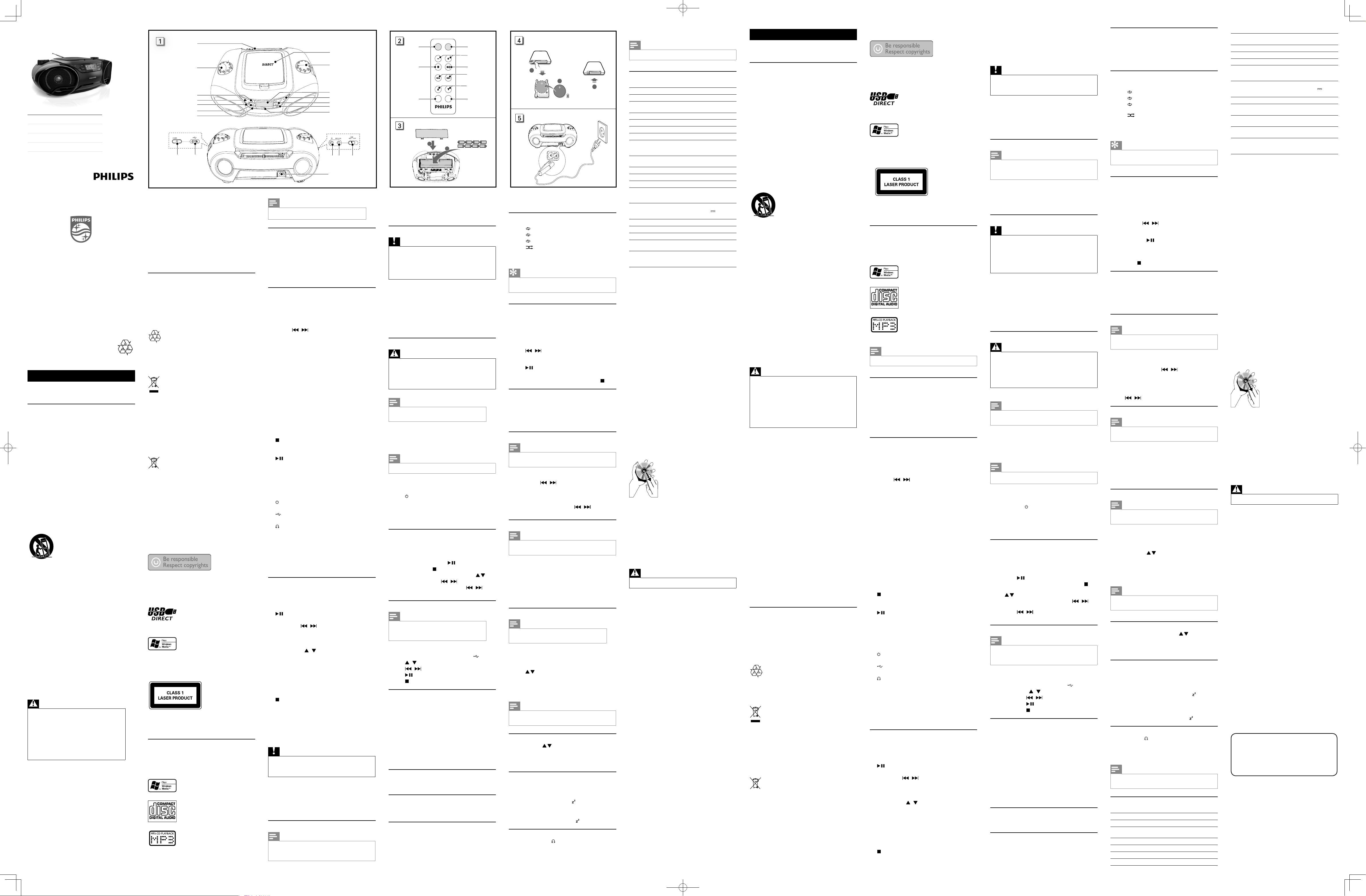
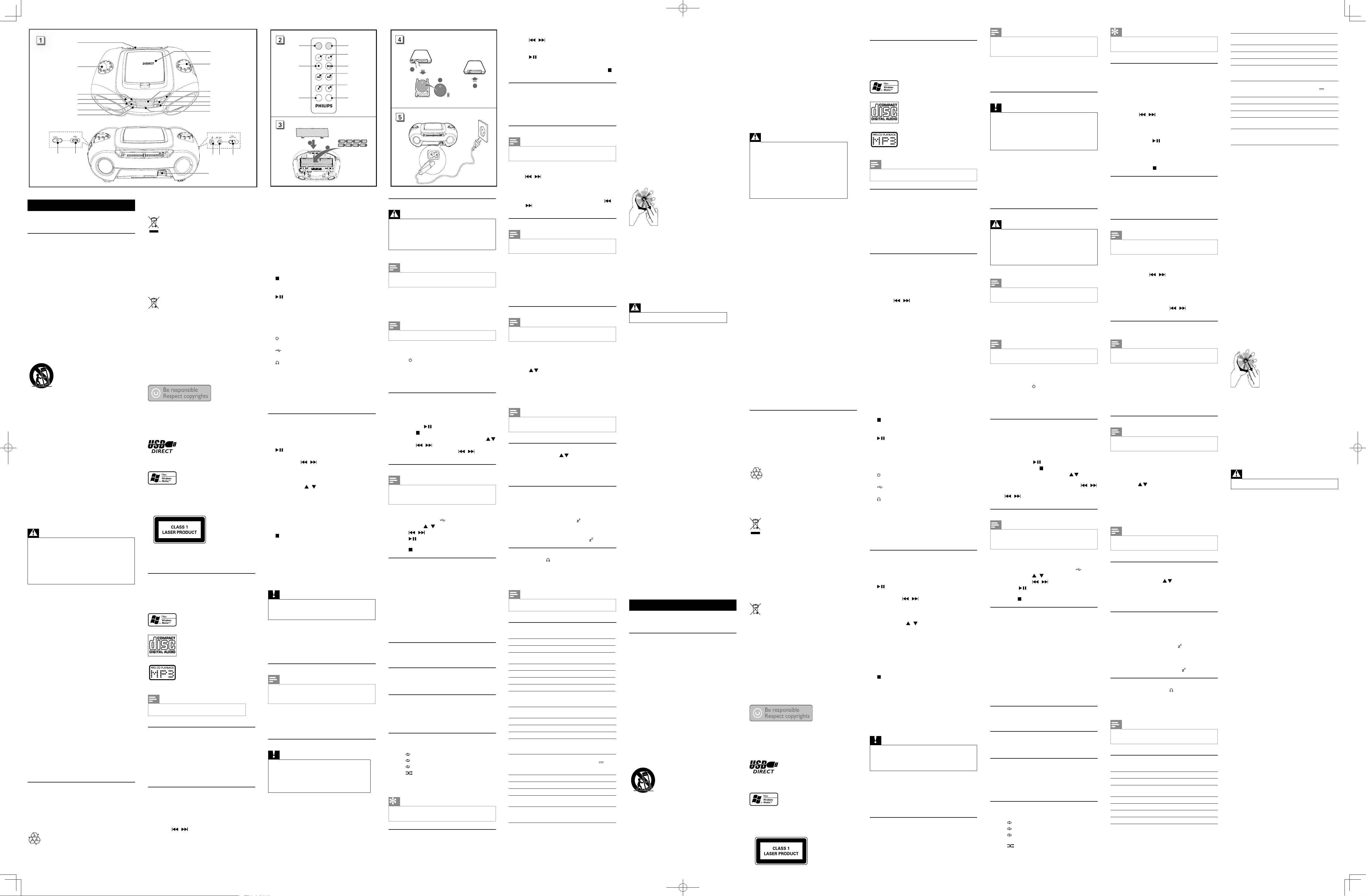
Overview of the main unit 6
Overview of the remote control 8
3 Get started 9
Install batteries 9
Prepare the remote control 9
Connect power 10
4 Play 11
Play CD 11
Play from USB devices 11
Listen to an external device 11
5 Adjust sound 12
Adjust volume level 12
Enhance bass 12
Mute sound 12
6 Play options 13
Select play modes 13
Program tracks 13
Display play information 13
7 Listen to the radio 14
Tune to a radio station 14
Program radio stations automatically 14
Program radio stations manually 14
Select a preset radio station 14
8 Other features 15
Set the sleep timer 15
Listen through the headphone 15
9 Product information 16
Specications 16
10 Troubleshooting 18
Troubleshooting 18
Downloaded from www.ManualsFile.com manuals search engine
2 EN
1 Important
Safety
Important Safety Instructions
a Read these instructions.
b Keep these instructions.
c Heed all warnings.
d Follow all instructions.
e Do not use this apparatus near water.
f Clean only with dry cloth.
g Do not block any ventilation openings.
Install in accordance with the
manufacturer's instructions.
h Do not install near any heat sources such
as radiators, heat registers, stoves, or
other apparatus (including ampliers) that
produce heat.
i Protect the power cord from being
walked on or pinched, particularly at
plugs, convenience receptacles, and the
point where they exit from the apparatus.
j Only use attachments/accessories
specied by the manufacturer.
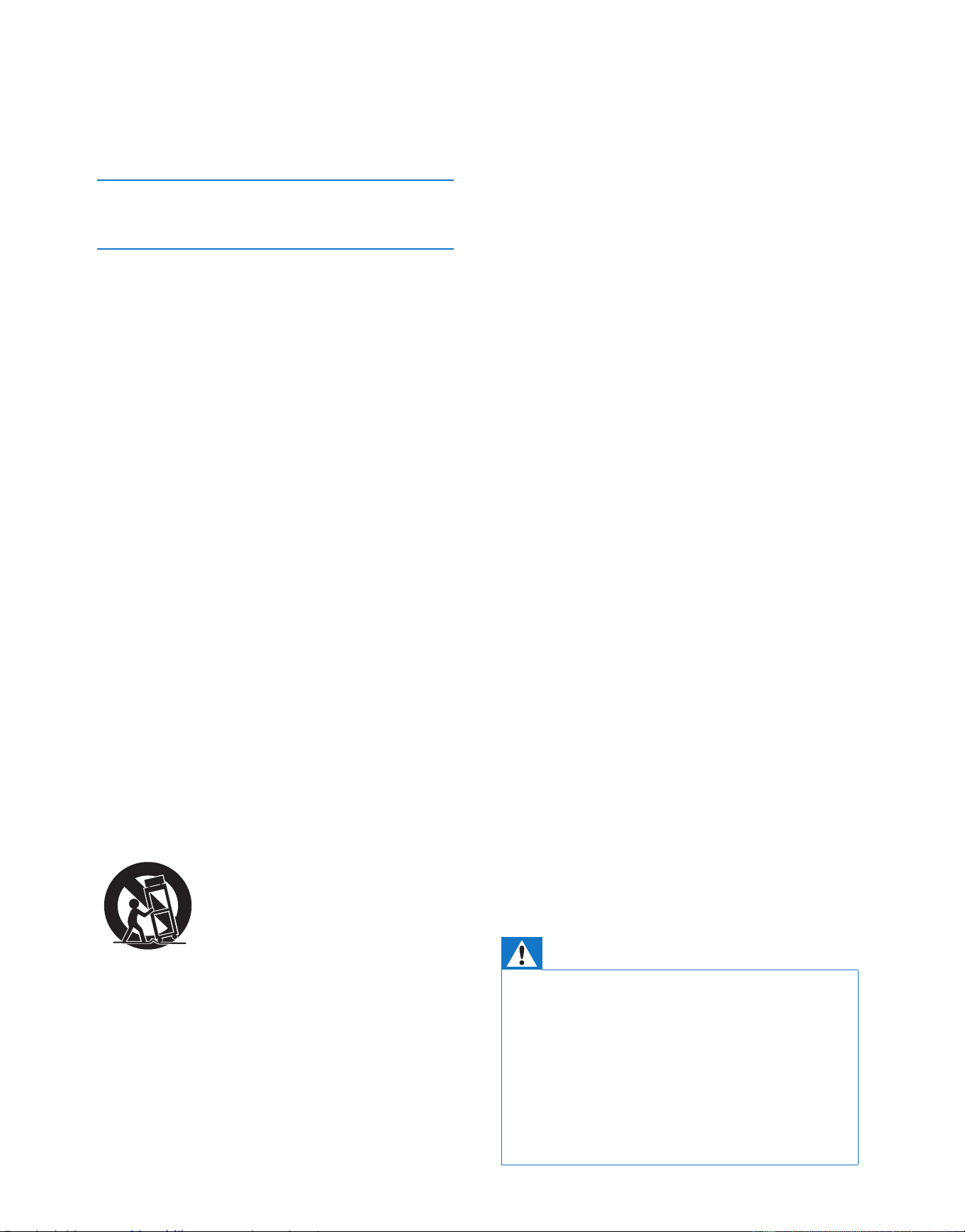
k Use only with the cart, stand, tripod,
bracket, or table specied by the
manufacturer or sold with the apparatus.
When a cart is used, use caution when
moving the cart/apparatus combination to
avoid injury from tip-over.
l Unplug this apparatus during lightning
storms or when unused for long periods
of time.
m Refer all servicing to qualied service
personnel. Servicing is required when
the apparatus has been damaged in any
way, such as power-supply cord or plug
is damaged, liquid has been spilled or
objects have fallen into the apparatus, the
apparatus has been exposed to rain or
moisture, does not operate normally, or
has been dropped.
n Battery usage CAUTION – To prevent
battery leakage which may result in bodily
injury, property damage, or damage to the
unit:
• Install all batteries correctly, + and - as
marked on the unit.
• Do not mix batteries (old and new or
carbon and alkaline, etc.).
• Remove batteries when the unit is not
used for a long time.
• The batteries shall not be exposed to
excessiveheatsuchassunshine,reor
the like.
o Apparatus shall not be exposed to
dripping or splashing.
p Do not place any sources of danger on
the apparatus (e.g. liquid lled objects,
lighted candles).
q Where the MAINS plug or an appliance
coupler is used as the disconnect device,
the disconnect device shall remain readily
operable.
Warning
• Never remove the casing of this apparatus.
• Never lubricate any part of this apparatus.
• Never place this apparatus on other electrical
equipment.
• Keep this apparatus away from direct sunlight, naked
amesorheat.
• Never look into the laser beam inside this apparatus.
• Ensure that you always have easy access to the power
cord, plug or adaptor to disconnect this apparatus from
the power.
Downloaded from www.ManualsFile.com manuals search engine
3EN
Hearing Safety
Listen at a moderate volume:
Using headphones at a high volume can impair
your hearing. This product can produce sounds
in decibel ranges that may cause hearing loss for
a normal person, even for exposure less than
a minute. The higher decibel ranges are offered
for those that may have already experienced
some hearing loss.
Sound can be deceiving. Over time your hearing
'comfort level' adapts to higher volumes of
sound. So after prolonged listening, what sounds
'normal' can actually be loud and harmful to
your hearing. To guard against this, set your
volume to a safe level before your hearing
adapts and leave it there.
To establish a safe volume level:
Set your volume control at a low setting.
Slowly increase the sound until you can hear it
comfortably and clearly, without distortion.
Listen for reasonable periods of time:
Prolonged exposure to sound, even at normally
'safe' levels, can also cause hearing loss.
Be sure to use your equipment reasonably and
take appropriate breaks.
Be sure to observe the following guidelines
when using your headphones.
Listen at reasonable volumes for reasonable
periods of time.
Be careful not to adjust the volume as your
hearing adapts.
Do not turn up the volume so high that you
can’t hear what’s around you.
You should use caution or temporarily
discontinue use in potentially hazardous
situations.
Do not use headphones while operating a
motorized vehicle, cycling, skateboarding, etc.; it
maycreateatrafchazardandisillegalinmany
areas.
Notice
Anychangesormodicationsmadetothis
device that are not expressly approved by
WOOX Innovations may void the user’s
authority to operate the equipment.
Anychangesormodicationsmadetothis
device that are not expressly approved by
Philips Consumer Lifestyle may void the user’s
authority to operate the equipment.
Recycling
Your product is designed and manufactured
with high quality materials and components,
which can be recycled and reused.
When you see the crossed-out wheel bin
symbol attached to a product, it means the
product is covered by the European Directive
2002/96/EC:
Never dispose of your product with other
household waste. Please inform yourself about
the local rules on the separate collection of
electrical and electronic products. The correct
disposal of your old product helps prevent
potentially negative consequences on the
environment and human health.
Your product contains batteries covered by the
European Directive 2006/66/EC, which cannot
be disposed of with normal household waste.
When you see the crossed-out wheel bin
symbol with the chemical symbol 'Pb', it means
that the batteries comply with the requirement
set by the directive for lead:
Please inform yourself about the local rules on
separate collection of batteries. The correct
disposal of batteries helps prevent potentially
negative consequences on the environment and
human health.
Downloaded from www.ManualsFile.com manuals search engine
4 EN
Recording and playback of material might
require consent. See Copyright Act 1956 and
The Performer’s Protection Acts 1958 to 1972.
Environmental information
All unnecessary packaging has been omitted.
We have tried to make the packaging easy to
separate into three materials: cardboard (box),
paper pulp (buffer) and polyethylene (bags,
protective foam sheet.)
Your system consists of materials which can
be recycled and reused if disassembled by
a specialized company. Please observe the
local regulations regarding the disposal of
packaging materials, exhausted batteries and old
equipment.
The making of unauthorized copies of copy-
protected material, including computer
programs,les,broadcastsandsound
recordings, may be an infringement of
copyrights and constitute a criminal offence.
This equipment should not be used for such
purposes.
Trademark notice
The USB-IF Logos are trademarks of Universal
Serial Bus Implementers Forum, Inc.
Windows Media and the Windows logo
are trademarks, or registered trademarks of
Microsoft Corporation in the United States
and/or other countries.
This apparatus includes this label:
Downloaded from www.ManualsFile.com manuals search engine
5EN
2 Your CD
Soundmachine
Introduction
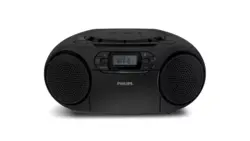
With this apparatus, you can enjoy music from
audio discs, external devices, and listen to radio
stations.
The apparatus offers you multiple sound effect
settings that enrich sound with Dynamic Bass
Boost (DBB).
The apparatus supports the following media
formats:
Note
• The type plate is located on the back of the apparatus.
What's in the box
Check and identify the contents of the package:
• Main unit
• AC power cord
• MP3 LINK cable
• Remote control
• User Manual
• Quick Start Guide
•
Downloaded from www.ManualsFile.com manuals search engine
6 EN
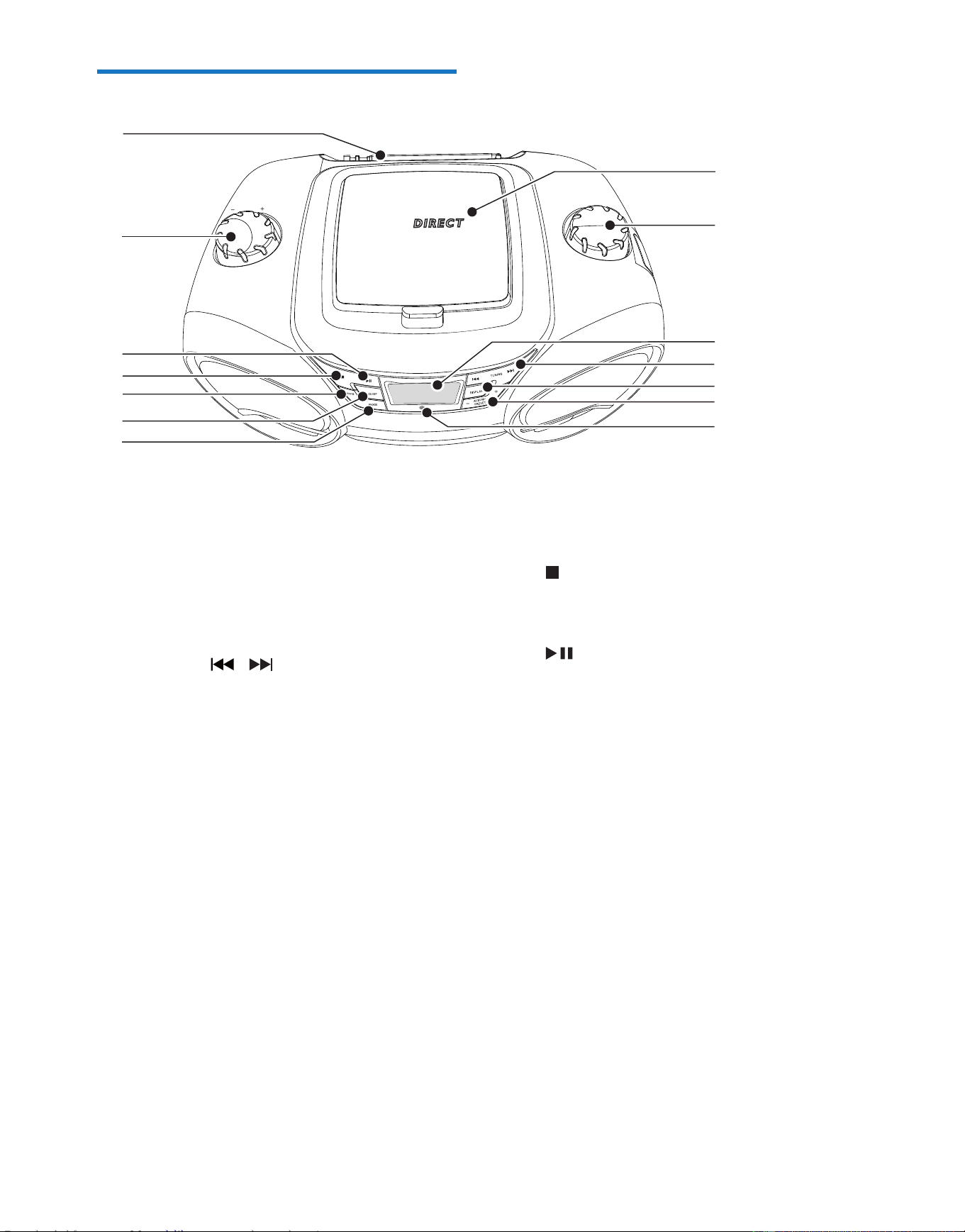
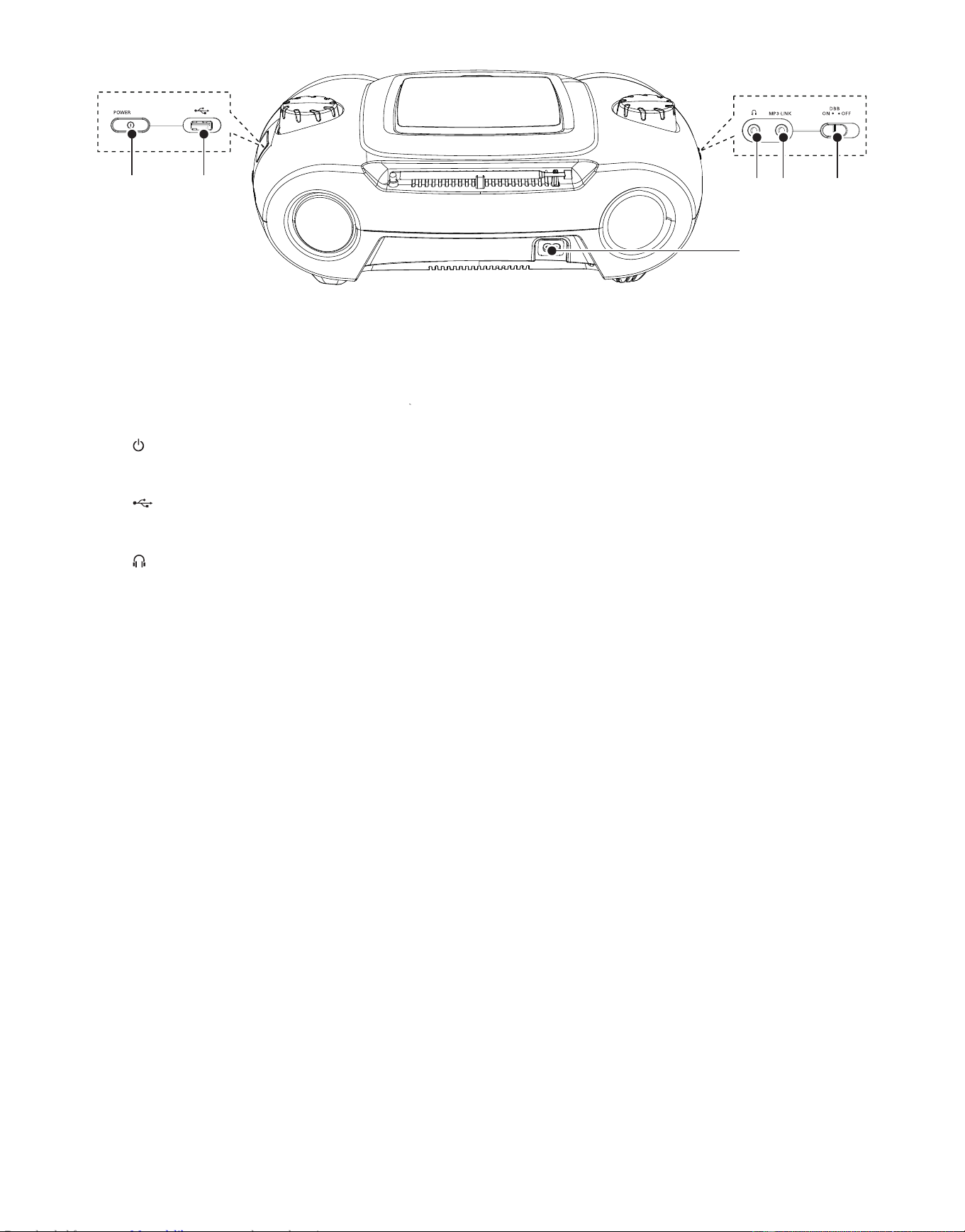
Overview of the main unit
a Disc compartment
b SOURCE
• Select a source (CD, USB, MP3-Link,
FM, MW).
c Display panel
• Display current status.
d TUNING /
• Tune to a radio station.
• Skip to the previous/next track.
• Search within a track.
e DISPLAY
• Change the display contents.
f ALBUM /PRESET+/-
• Skip to the previous/next album.
• Select a preset radio station.
g Remote control sensor
h MODE
• Select a play mode: REPEAT or
SHUFFLE.
i SLEEP
• Set the sleep timer.
• Turn on/off the timer.
VOLUME
U S B
CD SOUNDMACHINE AZ3831
SOURCE
a
b
c
d
e
f
g
h
i
j
k
l
m
n
j PROG
• Program tracks and browse the
program.
• Tuner AUTO SEARCH.
k
• Stop play.
• Erase a program.
l
• Start or pause play.
m - VOLUME +
• Adjust volume.
n FM ANTENNA
• Adjust FM reception.
Downloaded from www.ManualsFile.com manuals search engine
8 EN
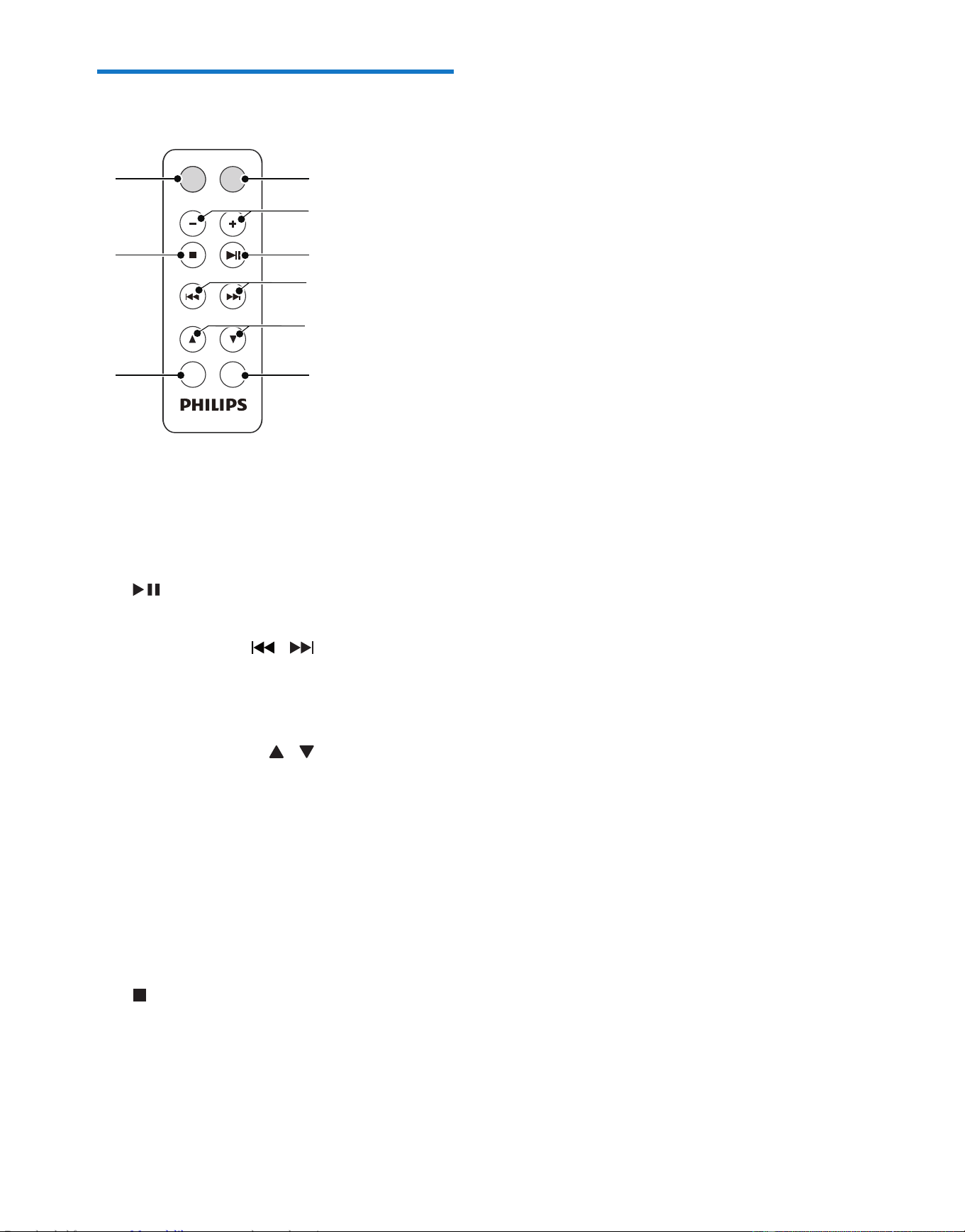
Overview of the remote
control
a MUTE
• Mute or restore volume.
b - VOLUME +
• Adjust volume.
c
• Start or pause play.
d TUNING/SKIP /
• Tune to a radio station.
• Skip to the previous/next track.
• Search within a track.
e ALBUM/PRESET/ /
• Skip to the previous/next album.
• Select a preset radio station.
f DISPLAY
• Change the display contents.
g PROG
• Program tracks and browse the
program.
• Tuner AUTO SEARCH.
h
• Stop play.
• Erase a program.
i SOURCE
• Select a source (CD, USB, MP3-Link,
FM, MW).
VOLUME
SOURCE
MUTE
PROG DISPLAY
TUNING/SKIP
ALBUM/PRESET
i
h
g
a
b
c
d
e
f
Downloaded from www.ManualsFile.com manuals search engine
9EN
3 Get started
Caution
• Use of controls or adjustments or performance of
procedures other than herein may result in hazardous
radiation exposure or other unsafe operation.
Always follow the instructions in this chapter in
sequence.
If you contact Philips, you will be asked for the
model and serial number of your apparatus. The
model number and serial number are on the
bottom of your apparatus. Write the numbers
here:
Model No. __________________________
Serial No. ___________________________
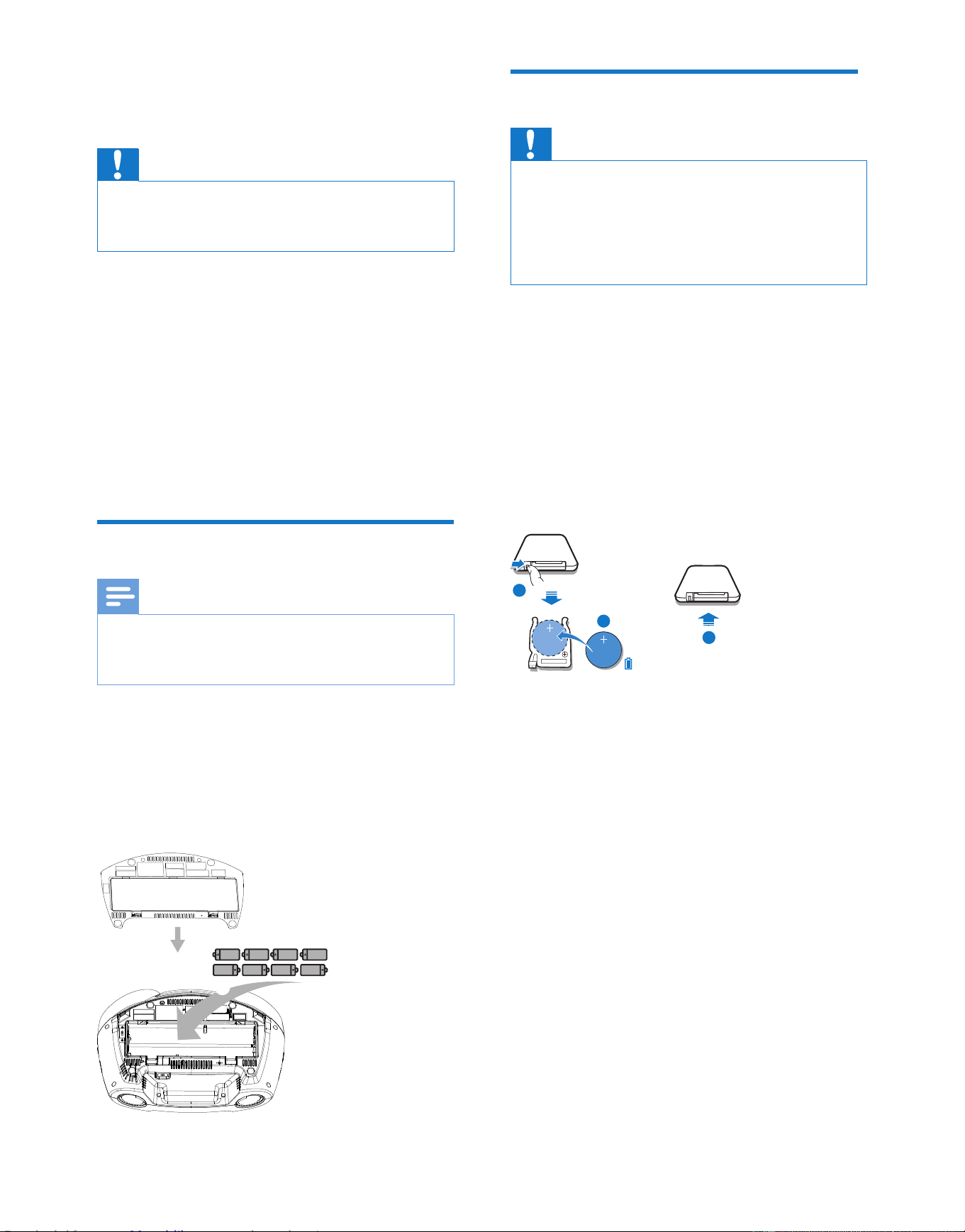
Install batteries
Note
• You can use both batteries and AC power as power
supply of this apparatus.
• Batteries are not supplied with the accessories.
1 Open the battery compartment.
2 Insert 8 batteries (type: R-20, UM-1 or
D-cells) with correct polarity (+/-) as
indicated.
3 Close the battery compartment.
a
b
Prepare the remote control
Caution
• Risk of explosion! Keep batteries away from heat,
sunshineorre.Neverdiscardbatteriesinre.
• Risk of decreased battery life! Never mix different
brands or types of batteries.
• Risk of product damage! When the remote control is
not used for long periods, remove the batteries.
For rst-time use:
1 Remove the protective tab to activate the
remote control battery.
To replace the remote control battery:
1 Open the battery compartment.
2 Insert 1 CR2025 battery with correct
polarity (+/-) as indicated.
3 Close the battery compartment.
1
2
3
1
2
3
Downloaded from www.ManualsFile.com manuals search engine
10 EN
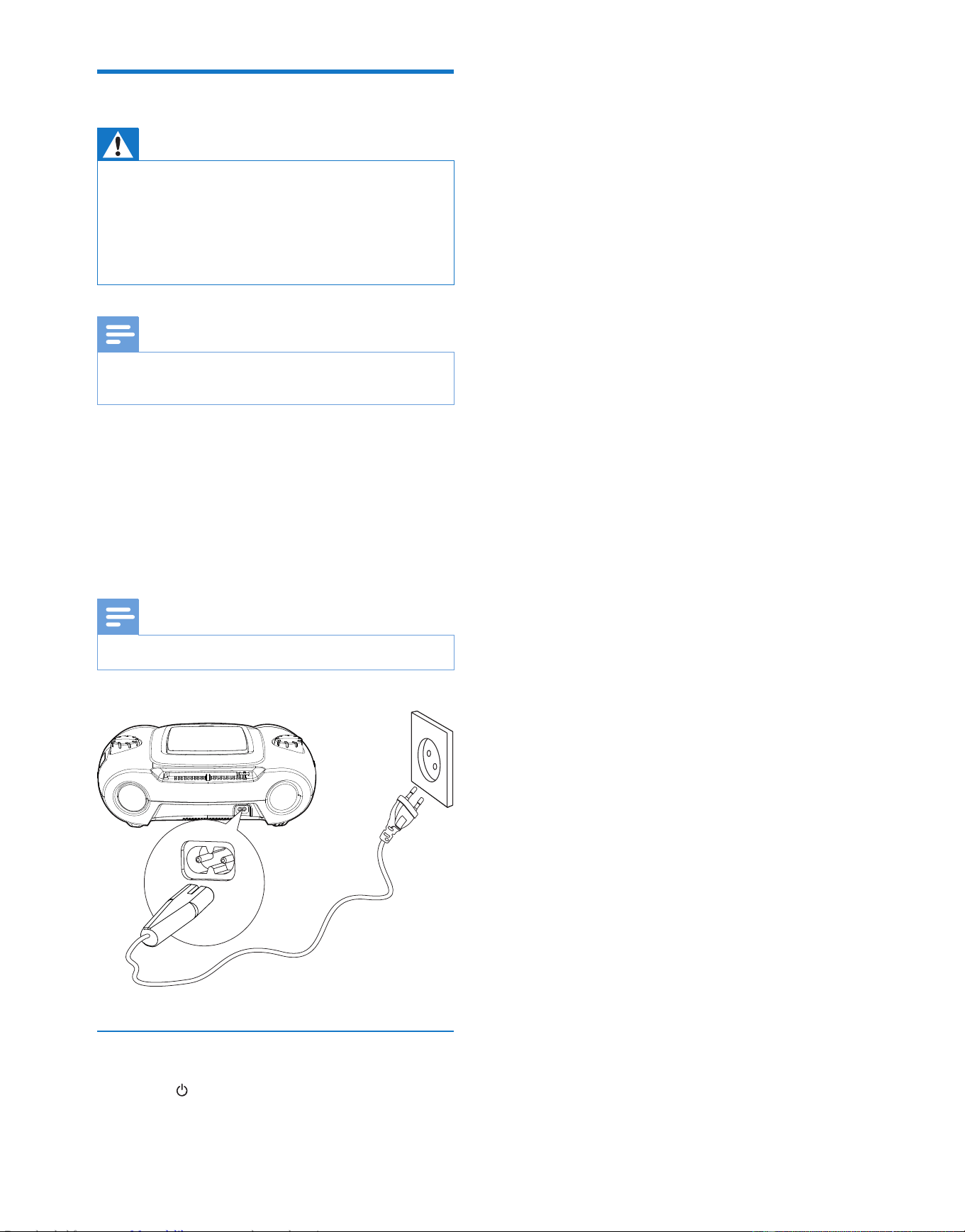
Connect power
Warning
• Risk of product damage! Ensure that the power supply
voltage corresponds to the voltage printed on the back
or the underside of the apparatus.
• Risk of electric shock! When you disconnect the AC
power, always pull the plug from the socket. Never pull
the cord.
Note
• Install the apparatus near the power supply socket and
where the power plug can be easily reached.
1 Connect the AC power cord to the AC
input jack on the apparatus and to the
power supply socket.
• To switch the apparatus off completely,
disconnect the AC power cord from
the power supply socket.
Note
• To save energy: after use, turn off the apparatus.
Turn on
1 Press .
» The unit switches to the last selected
source.
Downloaded from www.ManualsFile.com manuals search engine
11EN
4 Play
Play CD
1 Press SOURCE repeatedly to select the
CD source.
2 Open the disc compartment.
3 Insert a disc with the printed side facing up,
and then close the disc compartment.
• To pause/resume play, press .
• To stop play, press .
• ForMP3/WMAles:toselectan
album, press .
• To skip to a track, press / .
• To search within a track, press and hold
/ . Release to resume normal
play.
Play from USB devices
Note
• Ensure that the USB device contains playable audio
contents for supported formats.
• The USB terminal can be loaded with 700 mA.
1 Press SOURCE repeatedly to select the
USB source.
2 Insert the USB connector on the device
into the socket.
3 Press / unit to select a folder.
4 Press / toselectale.
5 Press to pause/resume play.
6 Press to stop play.
Listen to an external device
You can also listen to an external audio device
through this unit.
For an audio device with a headphone socket:
1 Press SOURCE repeatedly to select MP3
LINK source.
2 Connect the supplied MP3 LINK cable to
• the MP3 LINK socket on this unit.
• the headphone socket on an MP3
player.
3 Start to play the MP3 player. (See the user
manual of the MP3 player.)
Downloaded from www.ManualsFile.com manuals search engine

12 EN
5 Adjust sound
Adjust volume level
During play, press - VOLUME + to decrease/
increase the volume level.
Enhance bass
During play, turn on or off the DBB.
» If DBB is activated, DBB is displayed.
Mute sound
During play, press MUTE to mute or restore
volume.
Downloaded from www.ManualsFile.com manuals search engine
13EN
6 Play options
Select play modes
1 Press MODE repeatedly to select a play
mode:
• [ ] (repeat) – repeat a track
• [ ALB] (repeat album) – repeat an
album
• [ ALL] (repeat all) - repeat an entire
CD/program
• [ ](shufe)-playtracksrandomly
2 To return to normal play, press MODE
repeatedly until play mode icons are no
longer displayed.
Tip
• Shufeplaycannotbeselectedwhenyouplay
programmed tracks.
Program tracks
You can program a maximum of 20 tracks.
1 In CD/USB mode, at the stop position,
press PROG to activate the program
mode.
» [PROG] (program) starts to blinks.
2 For MP3/WMA tracks, press ALBUM/
PRESET +/- to select an album.
3 Press / to select a track number,
and then press PROGtoconrm.
4 Repeat steps 2 to 3 to program more
tracks.
5 Press to play the programmed tracks.
» During play, [PROG] (program) is
displayed.
• To erase the program, in the stop
position, press .
Display play information
During play, press DISPLAY repeatedly to select
different play information.
Downloaded from www.ManualsFile.com manuals search engine
14 EN
7 Listen to the
radio
Tune to a radio station
Note
• For optimal reception, fully extend and adjust the
position of the FM antenna.
1 Press SOURCE repeatedly to select FM
or MW.
2 Press and hold / for more than 2
seconds.
» The radio tunes to a station with
strong reception automatically.
3 Repeat step 2 to tune to more stations.
• To tune to a weak station, press /
repeatedlyuntilyoundoptimal
reception.
Program radio stations
automatically
Note
• You can program a maximum of 20 FM radio stations
and 20 MW radio stations.
In tuner mode, press and hold PROG for 2
seconds to activate automatic program mode.
» [AUTO] (auto) is displayed.
» All available stations are programmed
in the order of waveband reception
strength.
» Therstprogrammedradiostationis
broadcast automatically.
Program radio stations
manually
Note
• You can program a maximum of 20 FM radio stations
and 20 MW radio stations.
1 Tune to a radio station.
2 Press PROG to activate program mode.
» [PROG] (program) blinks on the
display.
3 Press to allocate a number (1 to 20
for FM and 1 to 20 for MW) to this radio
station, then press PROGtoconrm.
» The preset number and the frequency
of the preset station are displayed.
4 Repeat the above steps to program other
stations.
Note
• To overwrite a programmed station, store another
station in its place.
Select a preset radio station
In tuner mode, press to select a preset
number.
Downloaded from www.ManualsFile.com manuals search engine

15EN
8 Other features
Set the sleep timer
This unit can switch to standby automatically
after a set period of time.
1 When the unit is turned on, press SLEEP
repeatedly to select a set period of time
(in minutes).
» When sleep timer is activated, is
displayed.
To deactivate sleep timer
1 Press SLEEP repeatedly until [OFF] (off) is
displayed.
» When sleep timer is deactivated,
disappears.
Listen through the headphone
Plug a headphone into the socket on the unit.
Downloaded from www.ManualsFile.com manuals search engine
16 EN
9 Product
information
Note
• Product information is subject to change without prior
notice.
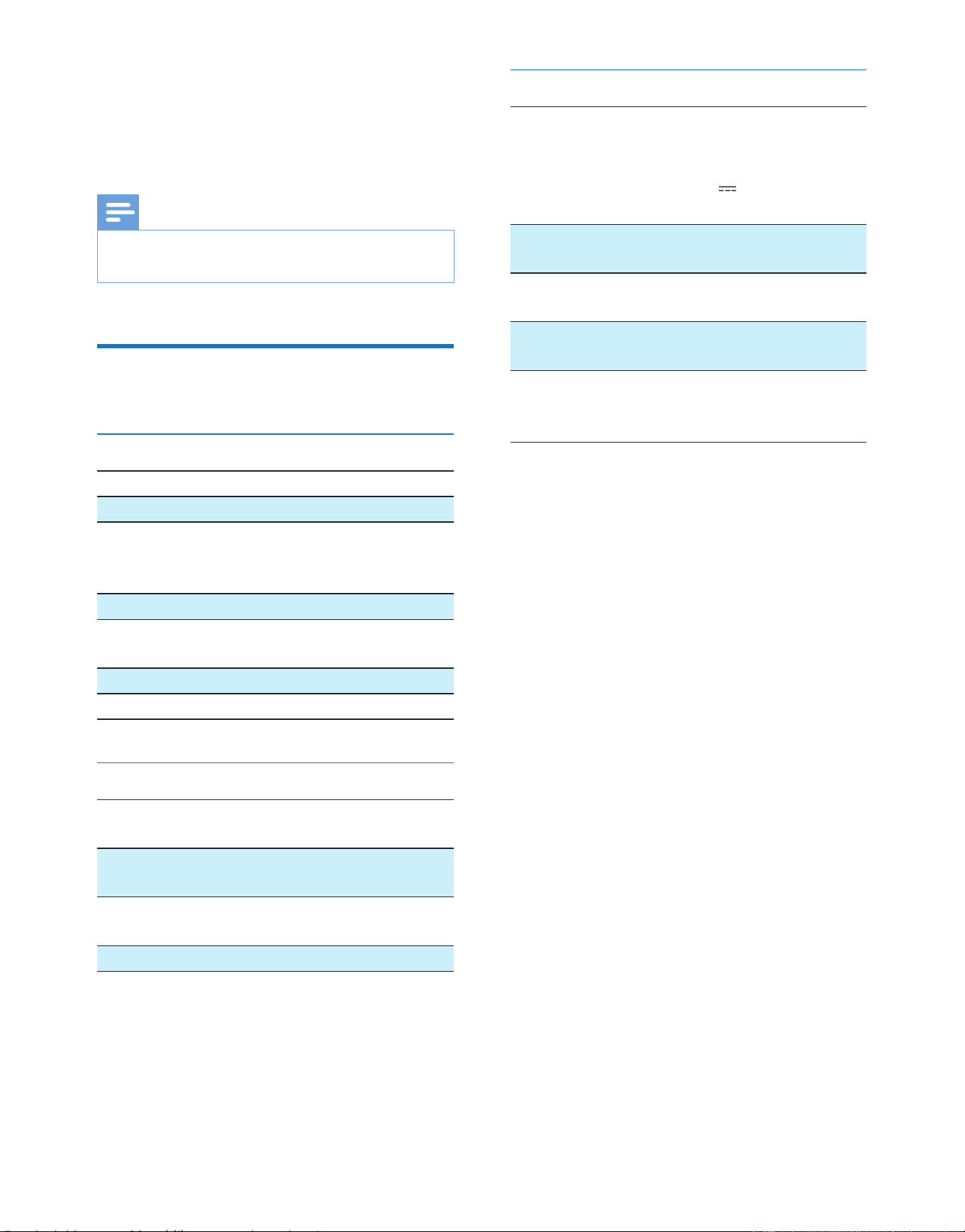
Specications
Disc
Laser Type Semiconductor
Disc Diameter 12 cm/8 cm
Support Disc CD-DA, CD-R,
CD-RW, MP3-CD,
WMA-CD
Audio DAC 24 Bits / 44.1 kHz
Total Harmonic
Distortion
<1%
Frequency Response 60 Hz -16 kHz
S/N Ratio >55 dB
Tuner
Tuning Range FM: 64 - 108 MHz;
MW: 531 - 1602 kHz
Tuning grid 50 kHz (FM); 9 kHz
(MW)
Total Harmonic
Distortion
<3%
Signal to Noise Ratio >50 dB
General
Power supply 220 - 240V~, 50 -
60 Hz;
or DC 8 X 1.5V
/ SIZE "D" / R20
CELL
Operation Power
Consumption
15 W
Standby Power
Consumption
<1 W
Dimensions
- Main Unit (W x H x D)
386 x 134 x 257
mm
Weight
- With Packing
- Main Unit
3.4 kg
2.5 kg
• ISO9660, Joliet
• Maximum title number: 999 (depending on
lenamelength)
• Maximum album number: 99
• Supported sampling frequencies: 32 kHz,
44.1kHz, 48 kHz
• Supported Bit-rates: 32~256 (kbps),
variable bit rates
Compatible USB devices:
• USBashmemory(USB1.1)
• USBashplayers(USB1.1)
• memory cards (requires an additional
card reader to work with this
apparatus)
Supported formats:
• USBormemoryleformatFAT12,
FAT16, FAT32 (sector size: 512 bytes)
• MP3 bit rate (data rate): 32-320 Kbps
and variable bit rate
• WMA v9 or earlier
• Directory nesting up to a maximum of
8 levels
• Number of albums/ folders: maximum
99
• Number of tracks/titles: maximum 999
• ID3 tag v2.0 or later
• File name in Unicode UTF8 (maximum
length: 16 bytes)
Downloaded from www.ManualsFile.com manuals search engine
17EN
Unsupported formats:
• Empty albums: an empty album is an
album that does not contain MP3/
WMAles,andisnotbeshowninthe
display.
• Unsupportedleformatsareskipped.
For example, Word documents (.doc)
orMP3leswithextension.dlfare
ignored and not played.
• AAC,WAV,PCMaudioles
• DRMprotectedWMAles(.wav,.m4a,
.m4p, .mp4, .aac)
• WMAlesinLosslessformat
Clean the cabinet
• Use a soft cloth slightly moistened with
a mild detergent solution. Do not use a
solution containing alcohol, spirits, ammonia
or abrasives.
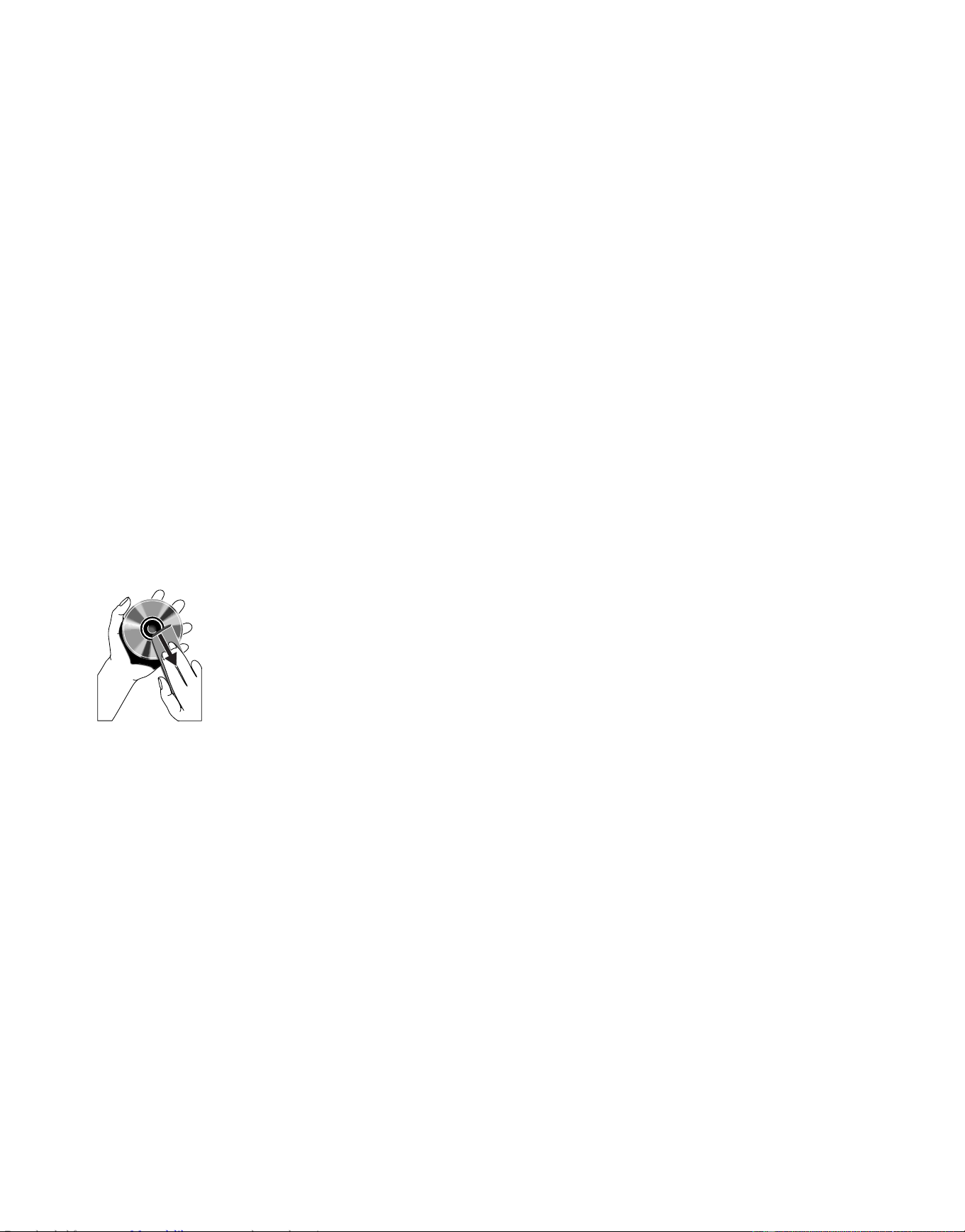
Clean discs
• When a disc becomes dirty, clean it with
a cleaning cloth. Wipe the disc from the
centre out.
• Do not use solvents such as benzene,
thinner, commercially available cleaners,
or antistatic spray intended for analogue
records.
Clean the disc lens
• After prolonged use, dirt or dust may
accumulate at the disc lens. To ensure good
play quality, clean the disc lens with Philips
CD lens cleaner or any commercially
available cleaner. Follow the instructions
supplied with cleaner.
Downloaded from www.ManualsFile.com manuals search engine

18 EN
10 Troubleshooting
Troubleshooting
Caution
• Never remove the casing of this apparatus.
To keep the warranty valid, never try to repair
the system yourself.
If you encounter problems when using this
apparatus, check the following points before
requesting service. If the problem remains
unsolved, go to the philips web site (www.
philips.com/support). When you contact philips,
ensure that your apparatus is nearby and the
model number and serial number are available.
No power
• Ensure that the Mains cord is connected
securely.
• Ensure that there is power at the AC
Mains.
• Ensure that the batteries are inserted
correctly.
No sound or poor sound
• Adjust the volume.
No response from the unit
• Disconnect and reconnect the AC power
plug, then turn on the system again.
• As a power-saving feature, the unit
switches off automatically 15 minutes after
track play reaches the end and no control
is operated.
Remote control does not work
• Beforeyoupressanyfunctionbutton,rst
select the correct source with the remote
control instead of the main unit.
• Reduce the distance between the remote
control and the unit.
• Insert the battery with its polarities (+/–
signs) aligned as indicated.
• Replace the battery.
• Aim the remote control directly at the
sensor on the front of the unit.
USB device not supported
• The USB device is incompatible with the
apparatus. Try another one.
No disc detected
• Insert a disc.
• Check if the disc is inserted upside down.
• Wait until the moisture condensation at
the lens has cleared.
• Replace or clean the disc.
• UseanalizedCDorcorrectformatdisc.
Poor radio reception
• Increase the distance between the unit and
your TV or VCR.
• Fully extend the FM antenna.
• Connect an outdoor FM antenna instead.
Downloaded from www.ManualsFile.com manuals search engine


Specifications are subject to change without notice.
2013 © WOOX Innovations Limited. All rights reserved.
This product was brought to the market by WOOX
Innovations Limited or one of its affiliates, further referred to in this
document as WOOX Innovations, and is the manufacturer of the product.
WOOX Innovations is the warrantor in relation to the product with
which this booklet was packaged. Philips and the Philips Shield Emblem
are registered trademarks of Koninklijke Philips N.V.
AZ3831_51_UM_V2.0
Downloaded from www.ManualsFile.com manuals search engine