US
How to Handle the Stand
Open the stand
ˎ
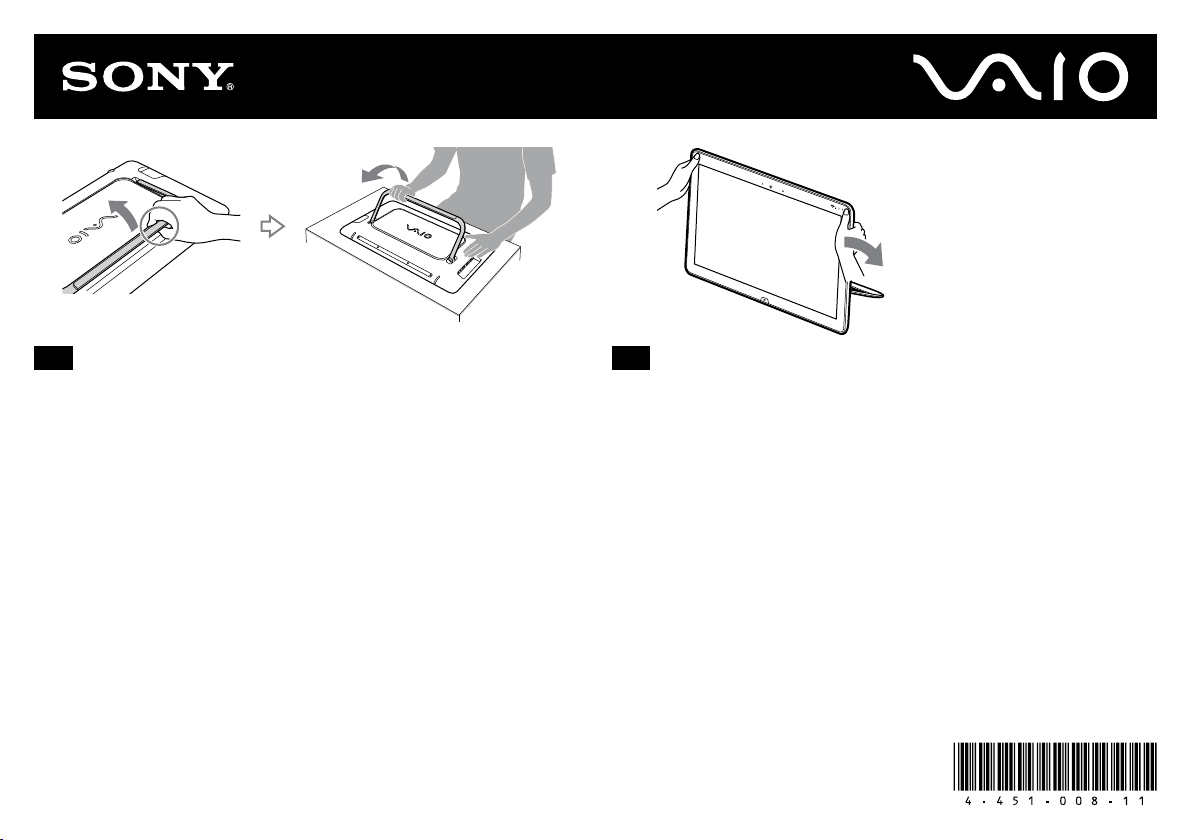
Face down your VAIO computer on the flat surface and open the stand as in
the illustration.
ˎ
Slide your fingers between the computer and the stand, then open the
stand.
ˎ
Do not use your VAIO computer in an unstable position, such as placed on
its side.
Close the stand
ˎ
Hold the screen as in the illustration, then press the screen down.
ˎ
The stand can be opened easily; however, when closing the stand,
additional pressure is required. Therefore, close the stand as in the
illustration.
ˎ
When the stand is closed, there is a space between the stand and
computer. This space helps you to open the stand easily.
FR
Manipulation du socle
Ouverture du socle
ˎ
Retournez votre ordinateur VAIO sur une surface plane et ouvrez le socle
comme illustré.
ˎ
Glissez vos doigts entre l'ordinateur et le socle, puis ouvrez ce dernier.
ˎ
N'utilisez pas votre ordinateur VAIO dans une position instable (posé sur
le côté, par exemple).
Fermeture du socle
ˎ
Maintenez l'écran comme illustré, puis appuyez sur l'écran.
ˎ
Le socle s'ouvre facilement, mais sa fermeture demande davantage de pression.
Fermez donc le socle comme illustré.
ˎ
Lorsque le socle est fermé, il existe un espace entre celui-ci et l'ordinateur.
Cet espace vous permet d'ouvrir facilement le socle.
© 2012 Sony Corporation / Printed in China4-451-008-11(1)
ES
Formas de manipular el soporte
Abra el soporte
ˎ
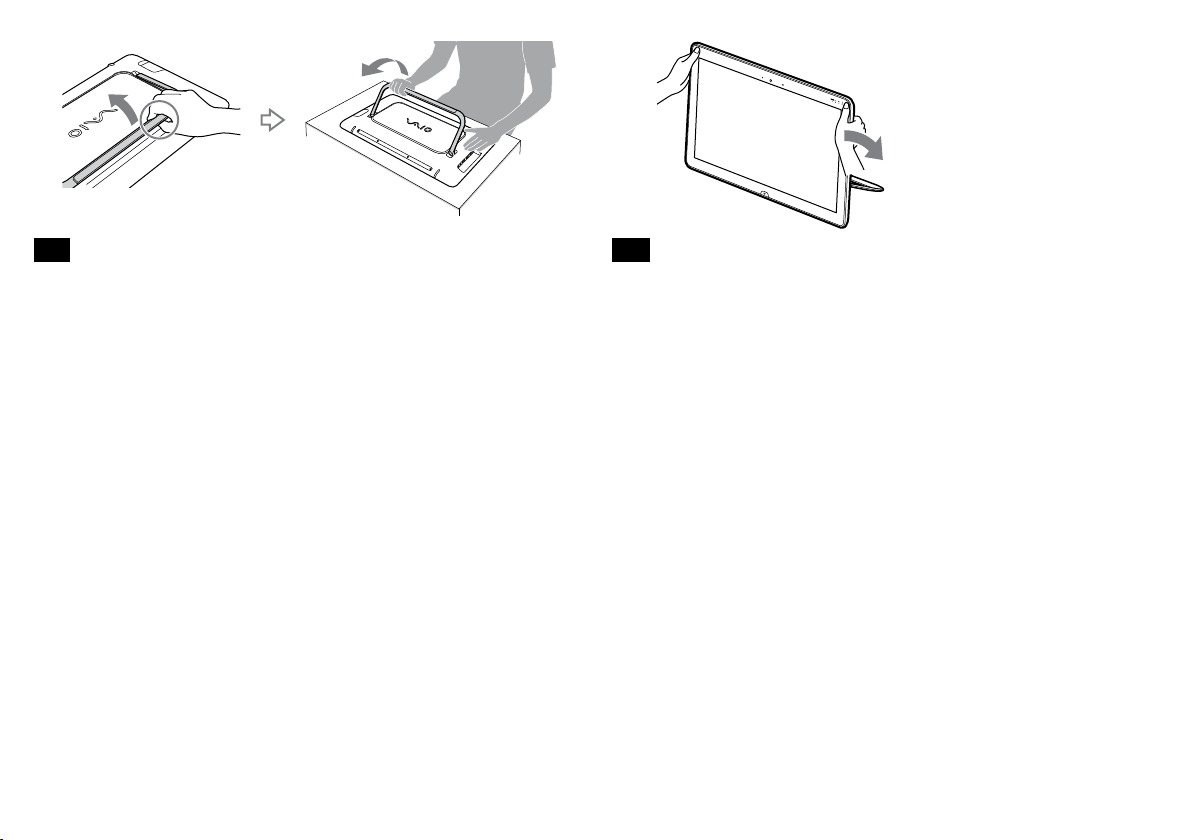
Coloque la computadora VAIO hacia abajo sobre una superficie plana y abra
el soporte como se muestra en la ilustración.
ˎ
Deslice sus dedos entre la computadora y el soporte. A continuación, abra
el soporte.
ˎ
No coloque la computadora VAIO en una posición inestable como, por ejemplo,
sobre uno de sus lados.
Cierre el soporte
ˎ
Sostenga la pantalla como se muestra en la ilustración y, a continuación,
presione la pantalla hacia abajo.
ˎ
El soporte se puede abrir fácilmente; no obstante, es necesario aplicar más
presión para cerrarlo. Por lo tanto, cierre el soporte como se muestra en la
ilustración.
ˎ
Al cerrar el soporte, queda un espacio entre el soporte y la computadora.
Este espacio permite abrir el soporte con facilidad.
PT
Como manusear o suporte
Abra o suporte
ˎ
Em uma superfície plana, coloque o computador VAIO virado para baixo e
abra o suporte conforme a figura.
ˎ
Deslize os dedos entre o computador e o suporte e depois abra o suporte.
ˎ
Não use o computador VAIO em uma posição instável, como colocá-lo de
lado.
Feche o suporte
ˎ
Segure a tela conforme a figura e depois feche-a pressionando.
ˎ
O suporte pode ser aberto facilmente; entretanto, ao fechá-lo, é necessário
pressioná-lo. Por isso feche o suporte conforme a figura.
ˎ
Quando o suporte está fechado, ficará um espaço entre ele e o computador.
Esse espaço facilita a abertura do suporte.