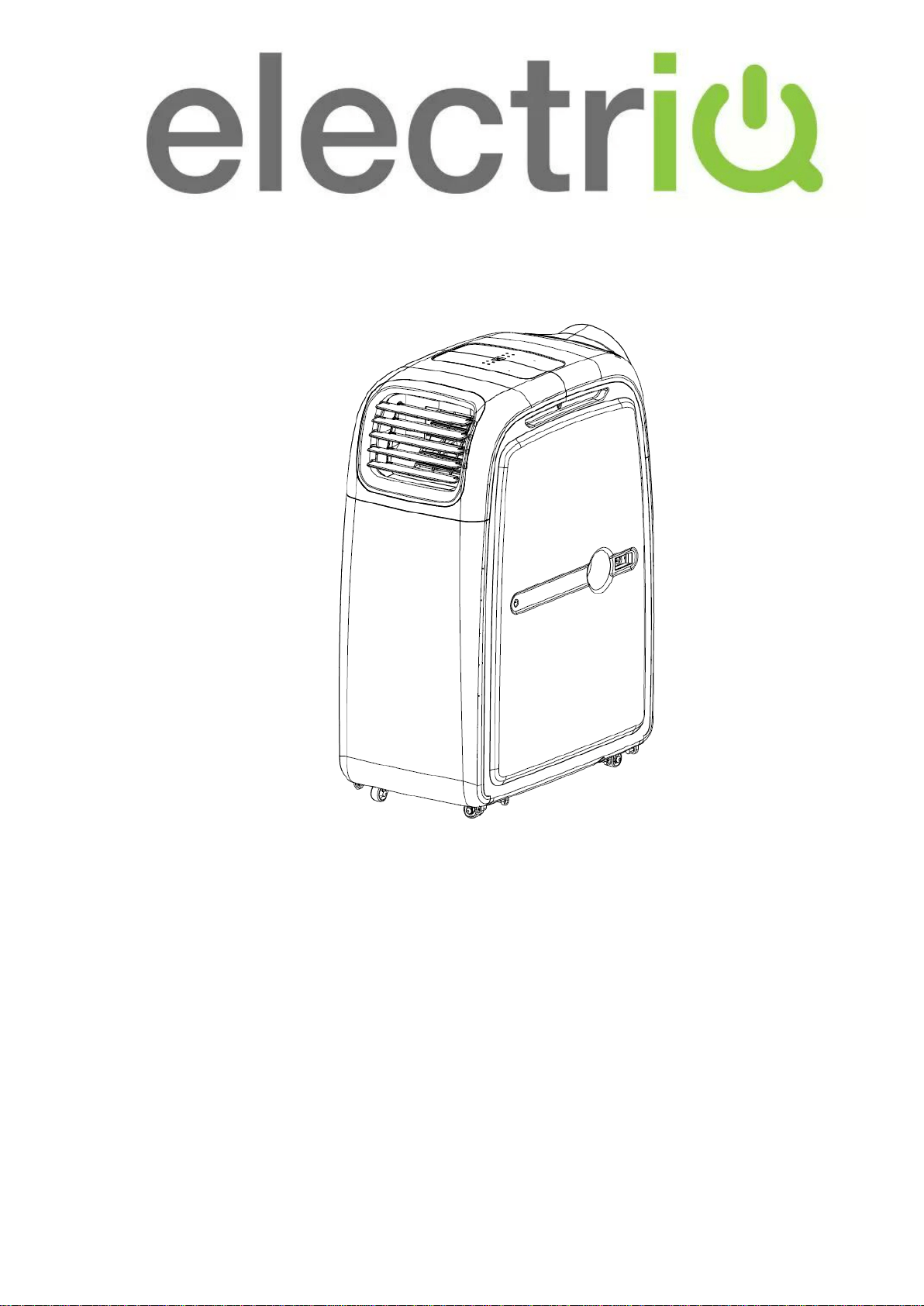
USER MANUAL
PORTABLE AIR CONDITIONER
WITH HEATPUMP
AIRFLEX15-V2
Thank you for choosing electriQ
Please read this user manual before using this innovative Air Conditioner and keep it
safe for future reference.
Visit our page www.electriQ.co.uk for our entire range of Intelligent Electricals

Page 2 of 23
CONTENTS
SAFETY INSTRUCTIONS
3
FEATURES AND PARTS LIST
5
INSTALLATION
6
CONTROL PANEL AND SETTINGS
9
OPERATION MODE
13
USING THE COMFORT KIT (AVAILABLE SEPERATELY)
17
DUAL DUCTING THE UNIT
18
WATER-DRAINAGE
19
MAINTENANCE
20
TROUBLESHOOTING
21
APPENDIX
22

Page 3 of 23
SAFETY INSTRUCTIONS
Important!
• Carefully read the instructions before operating the unit.
• This Air Conditioner has an IP24 rating. It is designed
mainly for indoor use but will stand up to outdoor use being
protected against light rain and splashing.
• Rating: This unit must be only connected to a 220-240 V / 50 Hz earthed outlet.
• Installation must be in accordance with regulations of the country where the unit is
used.
• If you are in any doubt about the suitability of your electrical supply have it checked
and, if necessary, modified by a qualified electrician.
• This air conditioner has been tested and is safe to use. However, as with any
electrical appliance - use it with care.
• Disconnect the power from the unit before dismantling, assembling or cleaning.
• Avoid touching any moving parts of the appliance.
• Never insert fingers, pencils or any other objects through the guard
• This appliance is not intended for use by persons (including children) with reduced
physical, sensory or mental capabilities. It is also not intended for use by those with
a lack of experience and knowledge, unless they have been given supervision or
instruction concerning the use of the appliance by a person responsible for their
safety.
• Do not leave children unsupervised with this appliance.
• Do not clean the unit by spraying it or immersing it in water.
• Never connect the unit to an electrical outlet using an extension cord. If an outlet is
not available, one should be installed by a qualified electrician.
• Never operate this appliance if the cord or plug is damaged. Ensure the power cord
is not stretched or exposed to sharp objects or edges.
• The power cord must not be immersed in water, as this could result in electric
shock.
• A damaged supply cord should be replaced by the manufacturer or a qualified
electrician in order to avoid a hazard.
• Any service other than regular cleaning or filter replacement should be performed
by an authorized service representative. Failure to comply could result in a voided
warranty.
• Do not use the appliance for any other purposes than its intended use.
• The air conditioner unit must always be stored and transported upright,
otherwise irreparable damage may be caused to the compressor; if in doubt
we suggest waiting at least 24 hours before starting the unit.
• Avoid restarting the air conditioning unit unless 3 minutes have passed since being
turned off. This prevents damage to the compressor.
• Never use the mains plug or an external plug in timer as a switch to start and turn
off the air conditioning unit. Use the provided ON/OFF switch located on the control
panel.

Page 4 of 23
• Always place the unit on a dry and stable surface.
• The appliance should not be installed in laundry or wet rooms
• The appliance must be placed in a room without sources of ignition (for example:
open flames, an operating gas appliance or an operating electric heater).
• R290 refrigerant gas complies with European environmental directives.
• R290 has a low GWP (Global Warming Potential) of 3.
• The air conditioner contains about 235 g of R290 refrigerant gas.
• Do not use or store in an unventilated space with an area smaller than 11.3m
2
per
unit. The room must be such as to prevent stagnation of possible leaks of
refrigerant gas as there could be a danger of fire or explosion hazard should the
refrigerant come into contact with electric heaters, stoves or other sources of
ignition.
• If the appliance is installed, used or stored in an unventilated room, the room must
be such as to prevent stagnation of possible leaks of refrigerant gas as there could
be a danger of fire or explosion should the refrigerant come into contact with electric
heaters, stoves or other sources of ignition.
• Refrigerant gas may be odourless.
• Do not use the product and contact the retailer for advice, if damage has occurred
to the unit which may have compromised the refrigerant system.
• Any repairs or maintenance must only be carried out on the unit by a suitably
qualified engineer. Before opening and servicing the unit the authorized engineer
must be in possession of a copy of the manufacturer’s service manual and must
follow the safety information contained within it to ensure all hazards are minimized.
• The refrigerant system should not be perforated or punctured.
Energy Saving and Unit Safety Protection Tips
• Do not cover or restrict the airflow from the outlet or inlet grills.
• For maximum performance the minimum distance from a wall or objects should be
50cm. The unit is fitted with a thermal cut off sensor that will prevent overheating.
• Keep the filters clean. Under normal conditions, filters should only need cleaning
once every three weeks (approximately). Since the filters remove airborne particles,
more frequent cleaning maybe necessary, depending on the air quality.
• For the initial startup set the fan speed to maximum and the thermostat to 4-5
degrees lower than the current temperature. After, set the fan switch to low and set
the thermostat to your desired setting.
• To protect the unit we recommend not using the cooling function when the ambient
temperature is higher than 35°C.
• To protect the unit we recommend not using the heating function when the ambient
temperature is lower than 7°C. Use alternative heating to raise the room
temperature to 10°C than start the air conditioner in heat mode and set it to the
desired temperature. Heating by heat pump will take longer but is much more
efficient than any other form of heating and ideal for maintaining a constant room
temperature.
Page 5 of 23
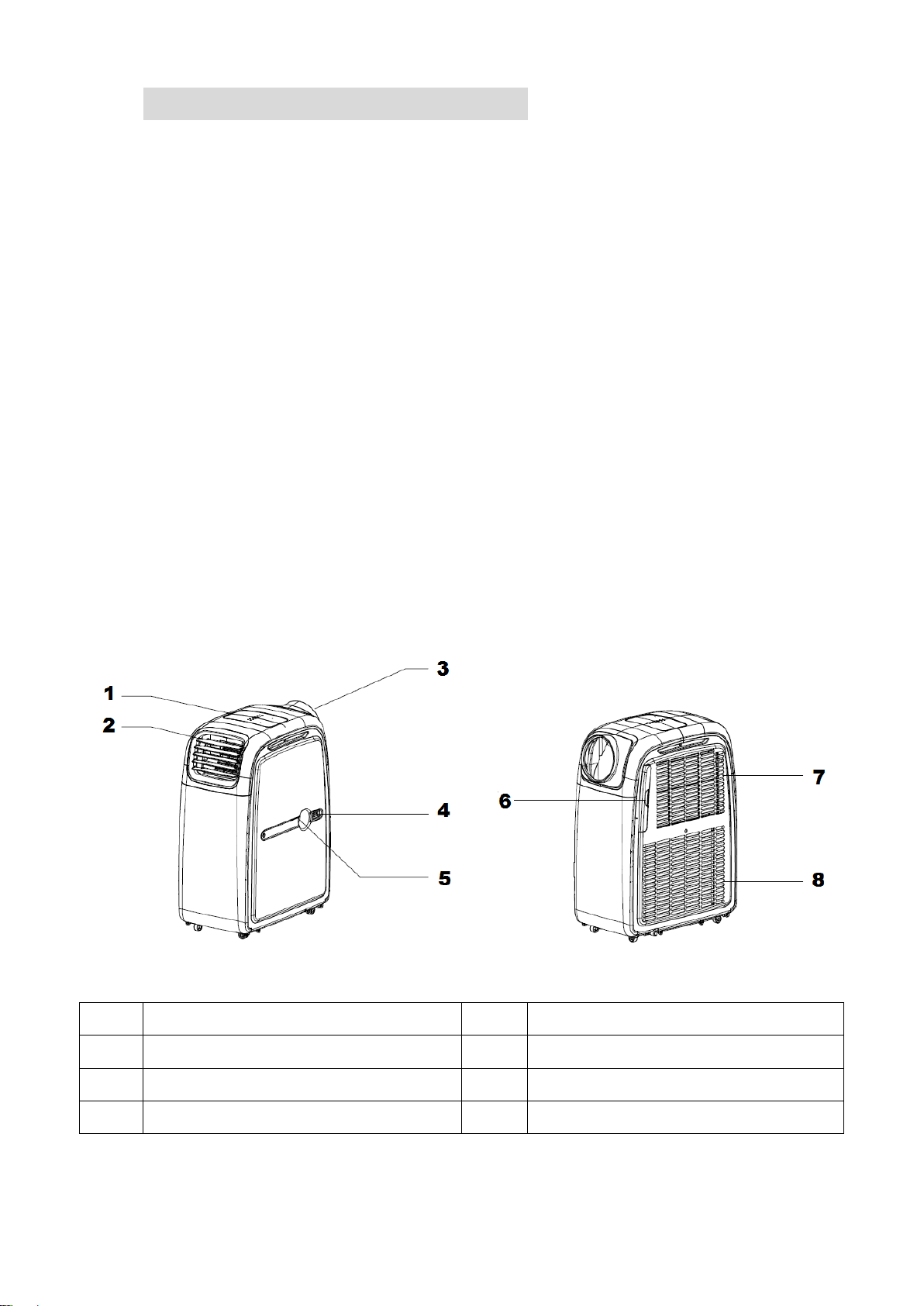
FEATURES AND PARTS LIST
FEATURES
⚫ Part of the electriQ
range of Intelligent Air Conditioning products
⚫ Cooling, Heating and Dehumidifying for use all year round.
⚫ Powerful and Flexible for both Domestic and Commercial use
⚫ Unique optional comfort kit with a wired remote control that enables the unit to be
situated outside the room, making it ideal for use in server rooms, offices, military tents
or barracks, marquees
⚫ Improves comfort and indoor air quality
⚫ Self-evaporative system - No external water tank needed
⚫ Compact, robust design
⚫ Digital Control Panel with IP 24 splash proof protection
⚫ Bright LED screen, indicates desired temperature and error codes
⚫ Remote control and 24 hours start / stop timer that can be used both in cooling / heating
or dehumidifier mode
⚫ The hot air outlet is positioned high on the unit – This allows for improved performance
with the use of a short hose
⚫ On/Off timer function – allows you to choose when the unit operates both in air
conditioning or dehumidifying mode
⚫ Advanced compressor protection technology
⚫ On castors for improved portability
PARTS LIST
1
Control Panel
5
Drain Hole
2
Cold Air Outlet
6
Filter
3
Hot Air Outlet
7
Cold air inlet
4
Comfort Kit Connector
8
Hot air inlet
Page 6 of 23
INSTALLATION
Warning:Before using this unit, please keep it upright for at least 3-4 hours.
This unit can easily be moved from one room to another.
While moving the unit please note that it must always be kept upright and then placed on an
even surface.
UNPACKING YOUR NEW AIR CONDITIONER
Open the box and remove the outer carton by sliding it upwards from the base.
Grip the unit by the carry handles located on either sides of the unit and carefully lift until it
slides out of the foam base
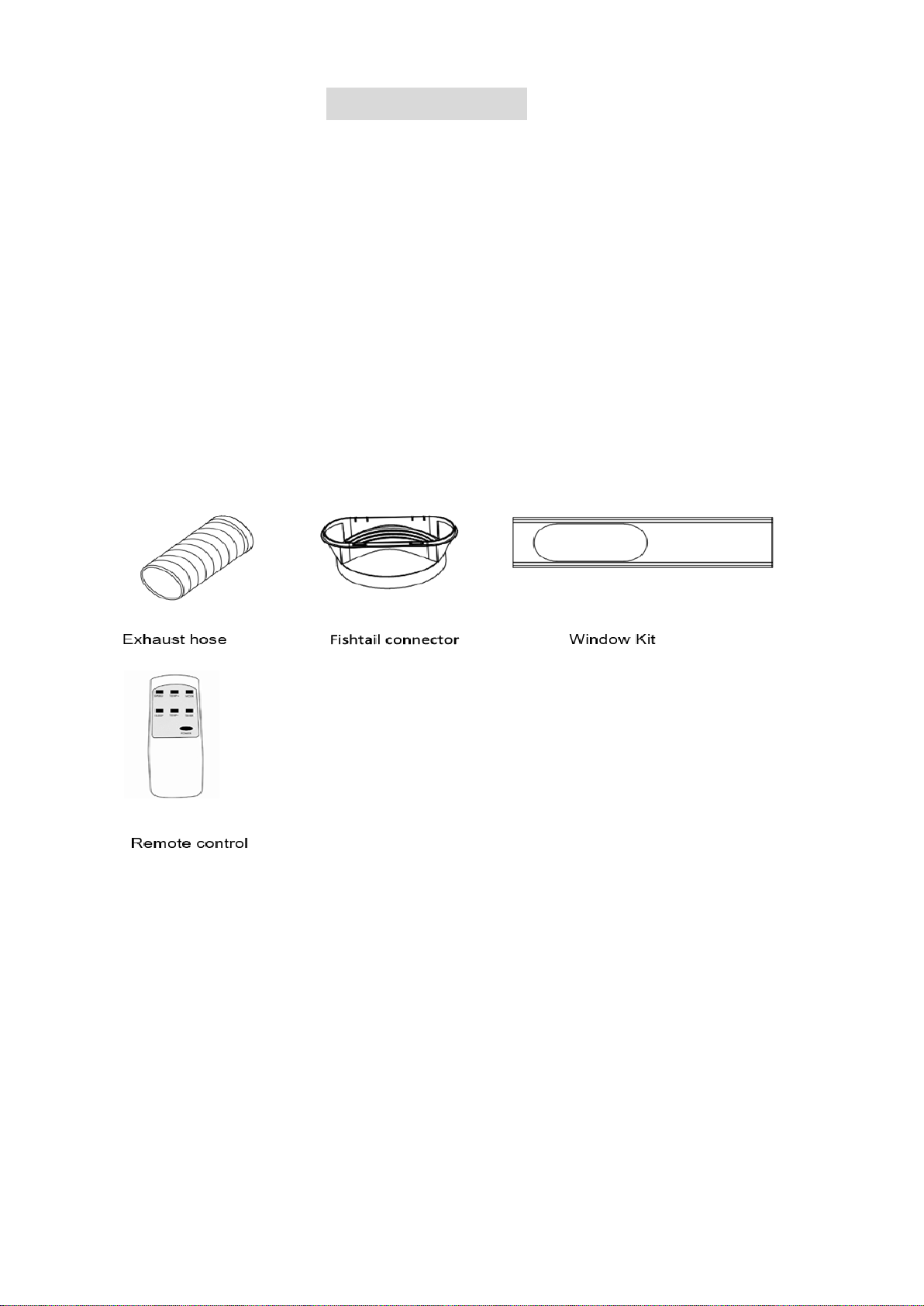
Install the exhaust hose on the unit before operating.
CONTENTS
Page 7 of 23
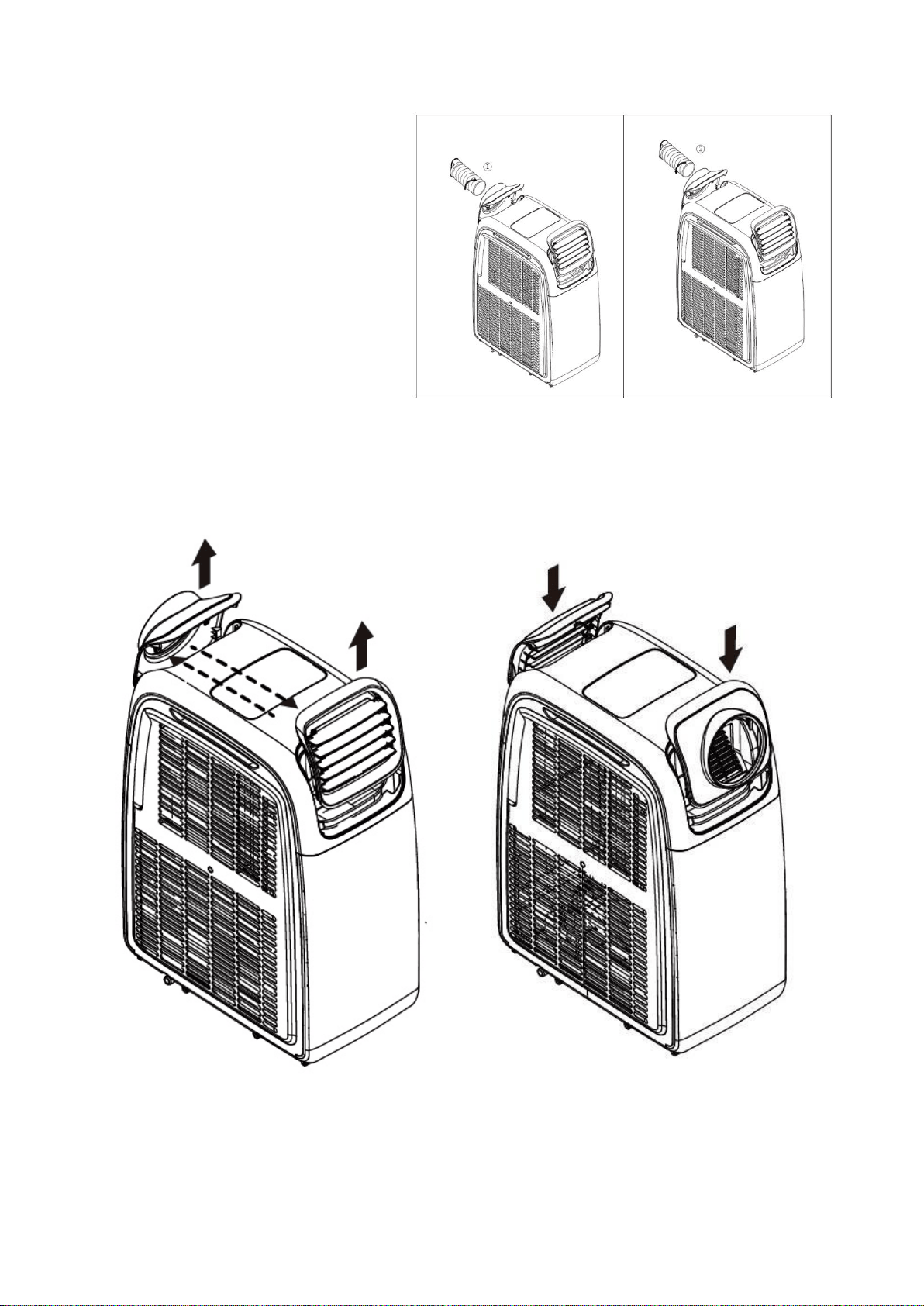
ATTACHING THE HOSE
1. Clip the hose connector and front
vent to the sides of the unit (after
removing the hose from storage)
2. Insert the hose and rotate it firmly
into the adapter
3. To remove the hose twist it in the
opposite direction.
Note: To install the hose for heat mode please remove the hose, the hose connector and
front vent from the unit and re fit on the opposite sides. The process should be reversed to
put the unit back in to cooling mode.
Page 8 of 23
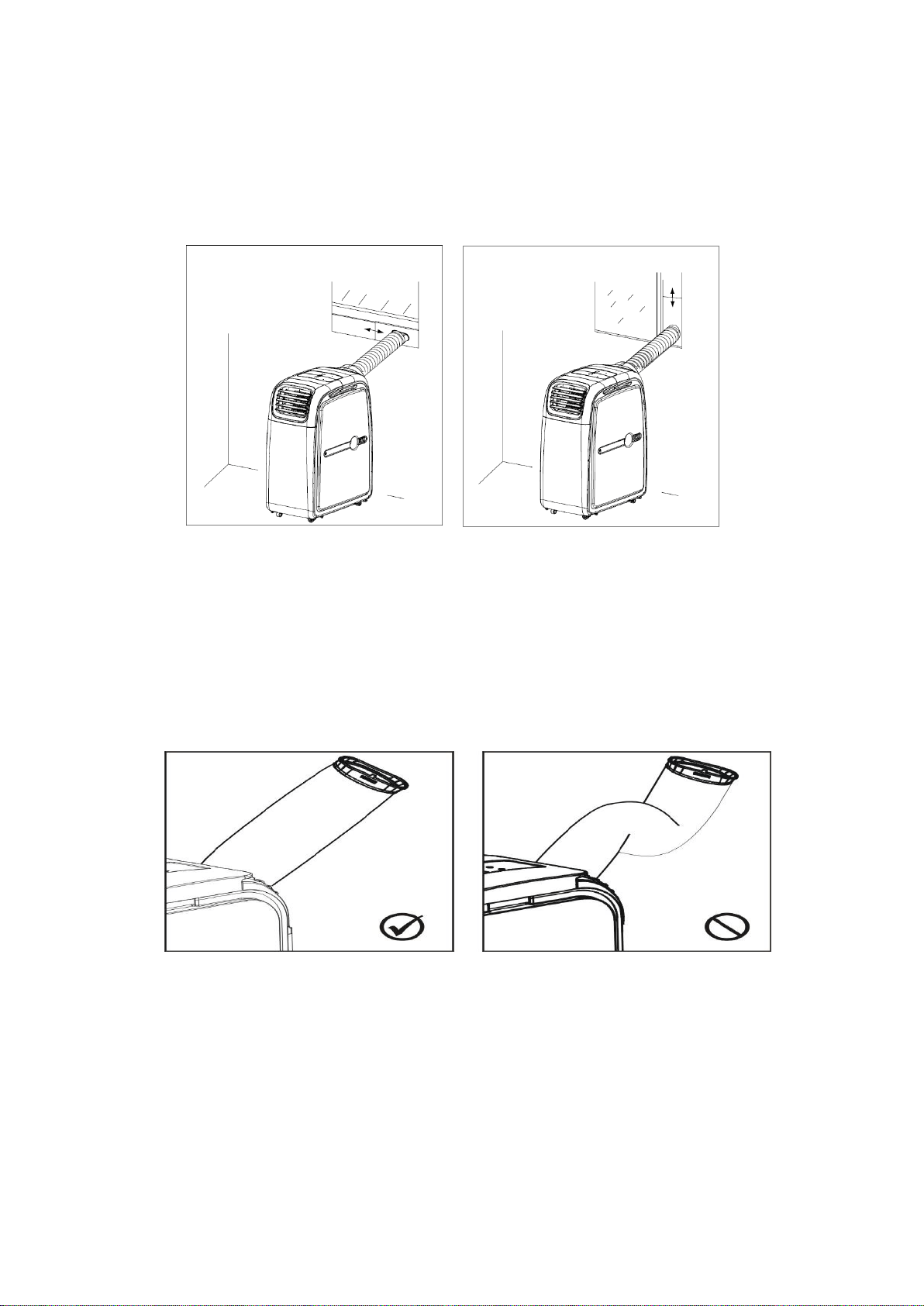
INSTALLATION OF WINDOW KIT
Partially open the window and then fix the window kit to the window horizontally or vertically.
Keep at least 50 cm from any objects and the air inlets grills on the side of the unit.
Clip the other end of the hose with the fishtail adapter to the air outlet of the window slider.
Make sure the unit is upright and there are no obstructions to the air inlet and outlet grills.
The window kit is only designed to be installed with sliding or sash windows and doors. The
window kit is not made to be used with any other style of window. However the fish tail
adaptor can be used without the slide bar on most windows and doors, but without sealing
the rest of the window opening the efficiency of the unit will be reduced. Ensure that the
opening left is as small as possible.
The best form of installation is through a wall duct.
Please note that the unit will still need to be vented in heating and cooling modes, ideally
through the wall.
Note:
Avoid bending the air hose more than 30 degrees!
IMPORTANT SAFEGUARDS
The soft hose will extend from 28 cm to 150 cm, and the unit will support hoses of upto
300cm. If hose is extended above this length the unit may malfunction and this can
invalidate the warranty. The shorter the hose the better the results; ideally for best
performance, do not extend the hose by more than 40 cm. The outlet vent must be well
ventilated and not obstructed as this will cause the unit to overheat.
Page 9 of 23
CONTROL PANEL AND SETTINGS
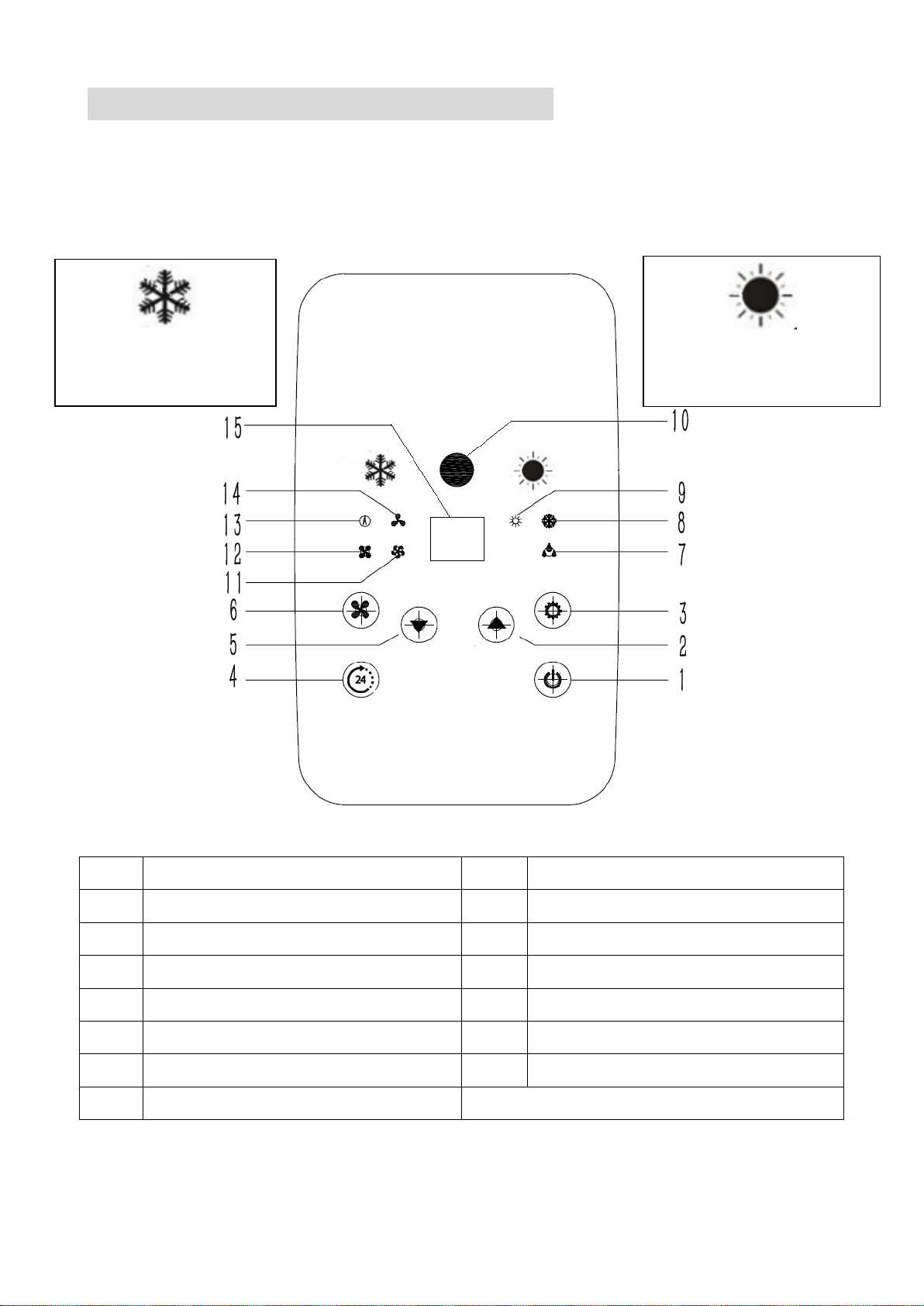
This portable air conditioner boasts the functions: cooling, heating, and dehumidify.
The fan has three speeds: high, medium and low
Temperature range settings are: 15 – 25
0
C in heating and 17 – 30
0
C in cooling mode.
The LED screen is able to display the temperature set, fault codes, diagnostic and
protective codes.
1
Standby Button
9
Heating Indicator
2
Temp + Button
10
IR Remote Sensor
3
Function Button
11
High Fan Speed Indicator
4
Timer Button
12
Medium Fan Speed Indicator
5
Temp - Button
13
Auto Fan Speed Indicator
6
Fan Speed Button
14
Low Fan Speed Indicator
7
Dehumidify Indicator
15
LED Display Panel
8
Cooling Indicator
When plugged in the unit will automatically enter standby status
Hot air
outlet side
Cold air
outlet side

Page 10 of 23
(1) STANDBY Button
Press this button to turn the unit on and enter cooling mode. Press again and the unit
will switch off.
(2) TEMP + Button
These are used to increase the desired temperature
In cooling mode, the temperature can be set between 17 – 30°C
In heating mode, the temperature can be set between 15 – 25°C
(3) FUNCTION Button
Press this button to choose between the Cooling, Heating, and Dehumidifying modes.
Please note when changing between heating and cooling modes, the exhaust hose
needs moving onto the appropriate air outlet. In dehumidifying mode, the exhaust
hose should not be connected, but the unit should be set up for continuous drainage.
(4) TIMER Button
The inbuilt timer will allow you to set the unit to turn on or turn off after a set period of time,
Please note only one timer can be used at any time.
ON TIMER
– The timer will turn on the unit automatically after the time set has elapsed.
1. When on standby, press the TIMER button, then set the number of hours time you
desire the unit to start by pressing the TEMP+ and TEMP- buttons.
2. Once the set time has elapsed, the unit will turn on automatically.
3. Press the POWER button before the time has elapsed and the unit will turn on as
normal and the timer will be cancelled
4. The function and fan speed can be set whilst setting the timer.
OFF TIMER
– The timer will turn off the unit automatically after the time set has elapsed.
1. While the unit is operating, press the TIMER button then set the number of hours
time you desire the unit to stop by pressing TEMP+ and TEMP- buttons.
2. Once the set time has elapsed, the unit will turn off automatically.
3. Press the POWER button before the time has elapsed, the timer will be cancelled
and the unit will turn off.
(5) TEMP – Button
This are used to reduce the desired temperature
In cooling mode, the temperature can be set between 17- 30°C
In heating mode, the temperature can be set between 15- 25°C
(6) FAN SPEED Button
Allows the fan speed to be changed between the following options:
HIGH→MEDIUM→LOW and AUTO
• If "AUTO" is selected during cooling function the fan speed will automatically be
adjusted to HIGH, MEDIUM or LOW according to the difference between the
desired temperature and the rooms ambient temperature.
• In Dehumidifying mode, the fan is pre-set to low speed
• In HEATING mode, the fan is pre-set to high speed
Page 11 of 23
(7) to (9) FUNCTION INDICATORS
An LED will illuminate to show which mode the unit is currently in. This can be changed
between Dehumidify (7), Cooling (8) and Heating (9) using the Function Button (3)
(10) IR REMOTE SENSOR
Receives infra red signals from the supplied remote control
(11) to (14) FAN SPEED INDICATORS
An LED will illuminate to show which fan speed the unit is currently set to. This can be
changed between High (11), Medium (12), Auto (13) and Low(14) using the fan speed
button (6).
(15) LED DISPLAY
Shows the set temperature or timer settings while in normal operation. When the set
temperature or the timer is adjusted, the new setting is shown on the display.
• When the TEMP+ or TEMP- buttons are pressed, the display will show the desired
temperature currently set.
• When the [TIMER] button is pressed the number of hours remaining will be shown until
function is achieved or deactivated.
• In the dehumidification function, “dH” or “CO” will be shown in the display (dependant on
model).
The LED display is also used to show error codes should a fault occur
E1
The room temperature sensor is open or of short
circuit.
E4
Water is full, need manual drainage
MULTI PROTECTIVE FUNCTION
ANTI-FREEZE PROTECTION CONTROL:
When the ambient temperature is low while in Cooling Mode, the compressor and water
pump will stop working if the copper coil temperature is too low. When the copper coil
temperature increases, the protection will be stopped automatically. While in this mode “Df”
will be displayed on the unit.
WATER-FULL PROTECTION:
When the water level in the internal water tank is above the maximum level, the unit will
alert automatically and E4 will be displayed on the LED screen. Please discharge the water
from the water tank by following the instructions in the “Water Drainage” section.
COMPRESSOR PROTECTION
The compressor has overheat protection which may stop the compressor to prevent
damage. The compressor also has a 3 minute delay protection function which delays the
start of the compressor, to help protect the compressor against repeated loss of power.
Page 12 of 23
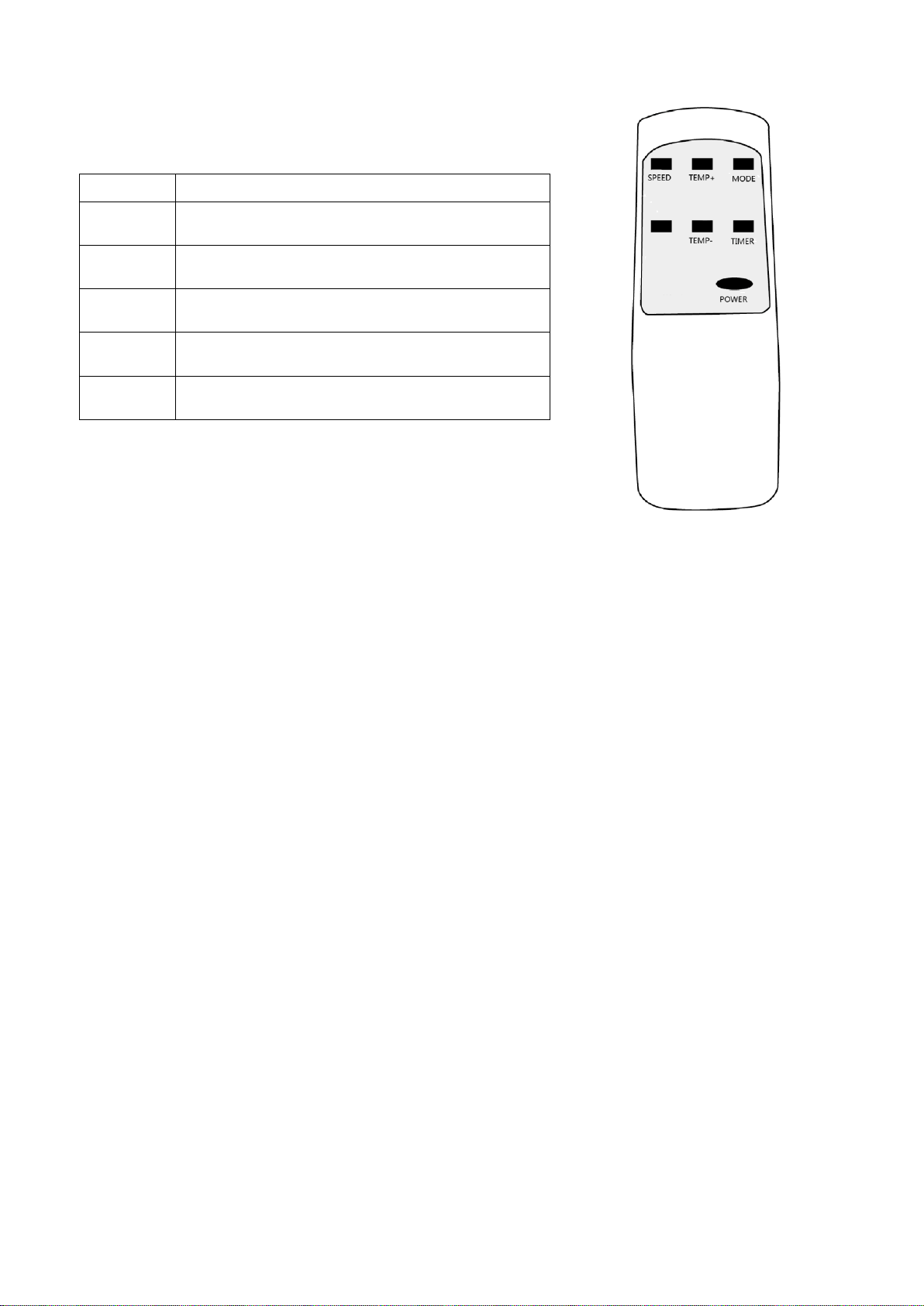
REMOTE CONTROL
Power
To enter / exit standby Mode.
Speed
Fan speed selection (N/A in
dehumidification mode)
Temp +
Increase desired temperature in 1 degree
increments
Temp -
Decrease desired temperature in 1 degree
increments
Mode
Change between Heating, Cooling,
Dehumidifying, fan and auto modes.
Timer
Set the timer. For more information see
the Timer section on Page 10.
Page 13 of 23
OPERATION MODES
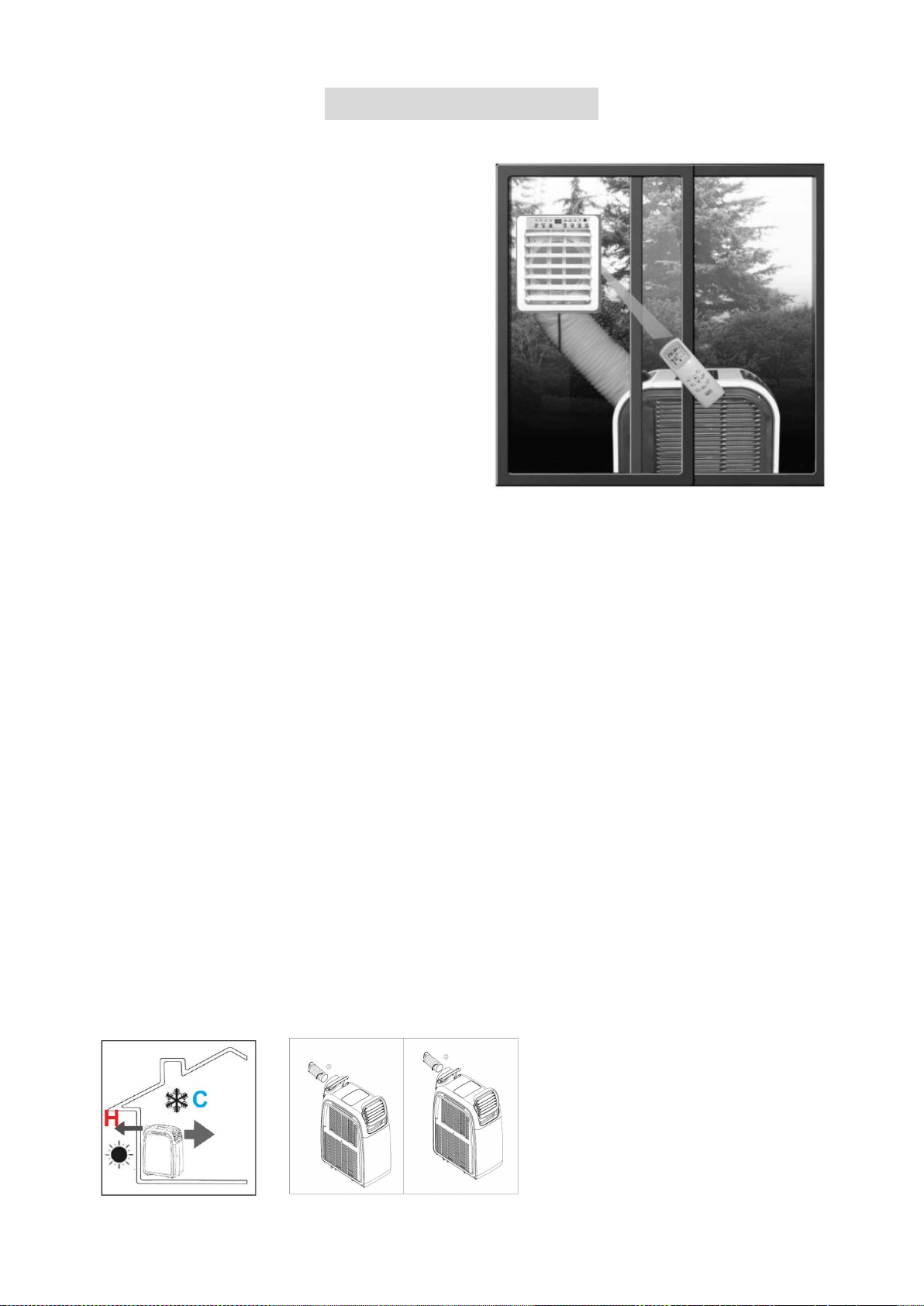
The electriQ Airflex 15 is the most flexible fully
featured air conditioner on the market. When
combined with the optional Comfort Kit, the air
conditioner can be used in spaces where there
is not enough space to fit a standard portable air
conditioner, making it the perfect choice for
Server Rooms, Small office spaces etc.
The Airflex 15 can be placed outside the room
to cool, on balconies, corridors, mezzanines
etc. The space can then be cooled or heated via
the Comfort Kit which also acts also as a wired
remote and remote extender for the original
remote.
In addition by moving the unit outside the room
the noise of the portable unit is significantly
decreased.
COOLING
On very warm days we recommend programming the unit to start early, before direct
sunlight hits the room, set it to a comfortable 20-22°C in cooling mode.
The electriQ Airflex 15 is a self-evaporating air conditioner, so under normal use there is
usually no need to empty the internal tank. However if there is a high amount of humidity in
the air or if the unit is not vented correctly, water will be collected in the internal tank.
If the unit operates in cooling mode for a longer period and especially at a time of year with
higher air humidity, the internal condensation tank may fill and an error E4 will be displayed
on the LED panel, which means the unit will require emptying as per the water drainage
section. In such instances it is recommended to use the permanent drainage.
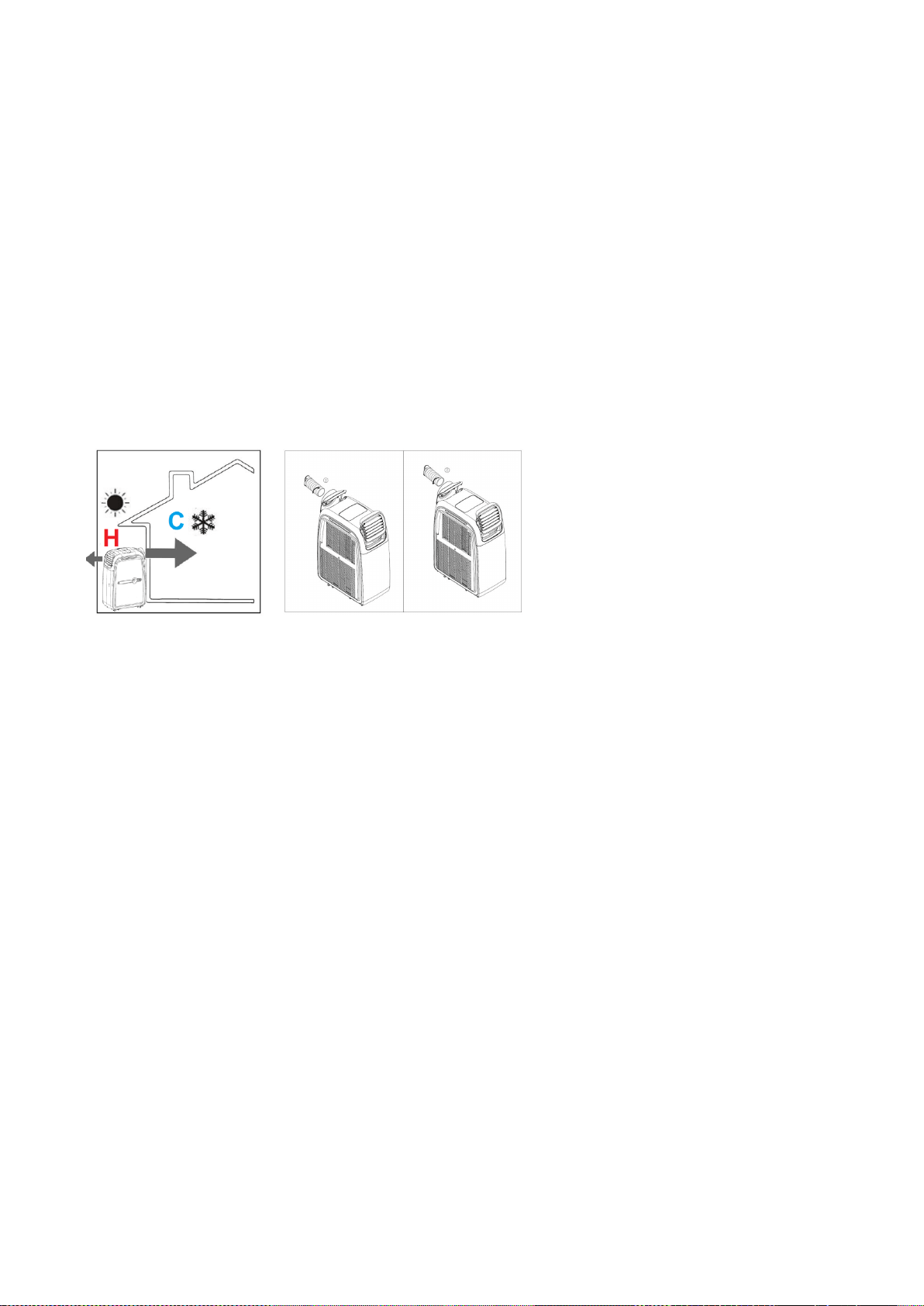
COOLING WHEN THE AIR CONDITIONER IS PLACED INDOORS
(NORMAL OPERATION)
The unit is placed in the room to be cooled.
Connect the hose to the hot air outlet of the air conditioner, after exchanging the grills if
necessary. The air hose will expel the hot air from the room outside while the front grills
produce cold air, to cool the room.
Page 14 of 23
The hose can be vented via a tilted window, a door or wall aperture. Make sure that no warm
air from outside can enter the room.
Set the function to “COOLING”. Set the target temperature using the temperature control.
The target temperature range is selectable between 17°C and 30°C. The unit must only be
used in an ambient temperature of up to 32°C.
Note: After switching on, the compressor will only start after a 3 minute delay. For full
cooling effect please allow a further 10 minutes of operation.
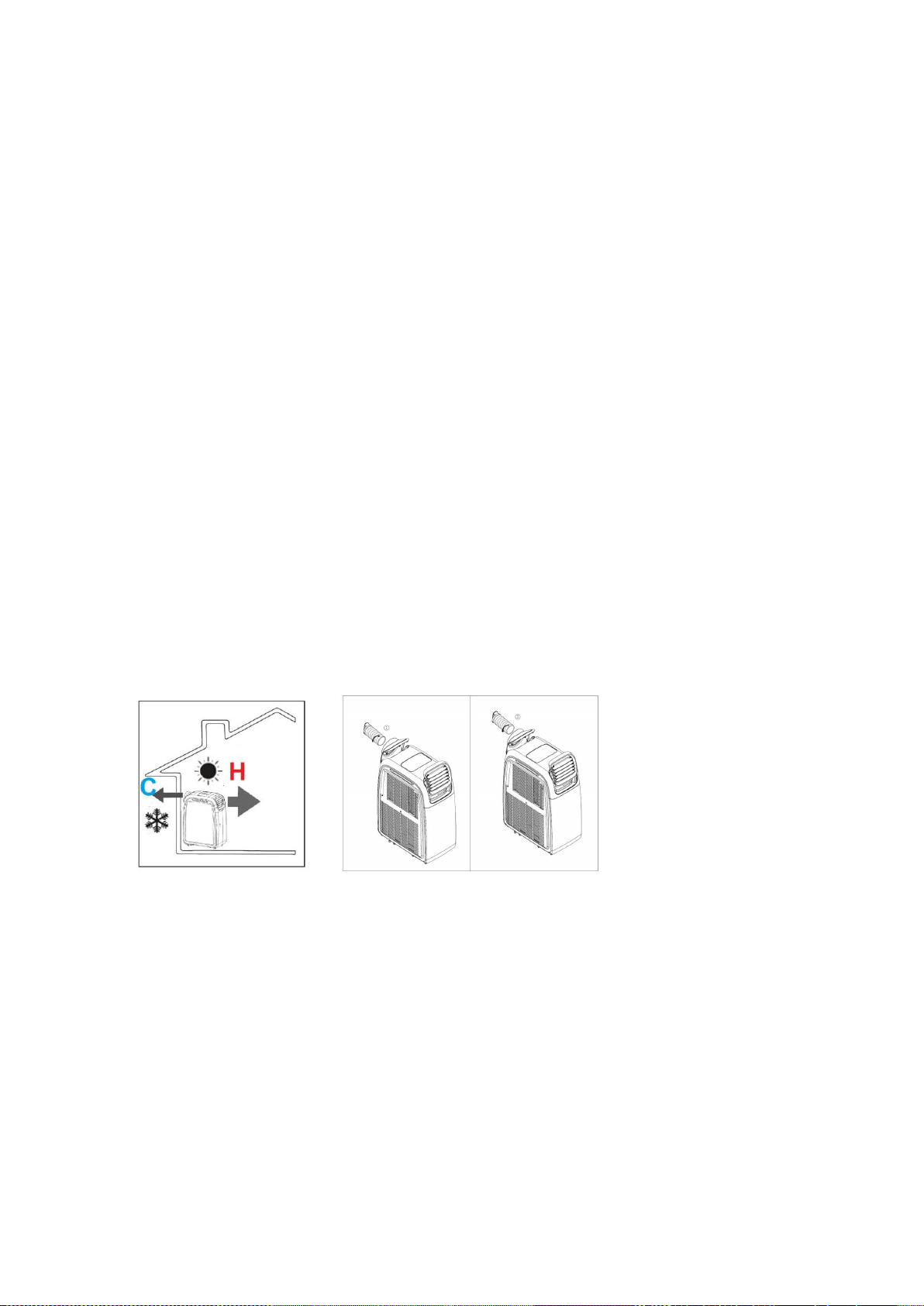
COOLING WHEN THE AIR CONDITIONER IS PLACED OUTDOORS
(DUCTING THE COLD AIR INTO THE ROOM)
Connect the hose to the cold air outlet of the air conditioner, after exchanging the grills if
necessary. The air hose will send cold air into the room, while the front grills will expel hot
air.
Place the unit in the shade if possible and in a cool, protected place in order to increase
efficiency and to avoid overheating. At an ambient temperature of over 32°C, the unit will
stop cooling to protect the compressor. If this become recurrent we recommend you use the
INDOOR COOLING OPERATION. To prevent interruptions in the units operation a drainage
hose for condensation water should be connected.
Set the function to “COOLING”. The temperature range is selectable between 17°C and
30°C. Fresh cooled air is led into the room via the air hose. The hose can be vented via a
tilted window, a door or wall aperture. Make sure that no warm air from outside can enter the
room.
Using the optional Airflex Comfort Kit will enable wired or wireless control of the air
conditioner from inside the room to be cooled.
Note: After switching on, the compressor will only start after a 3 minute delay. For full
cooling effect please allow a further 10 minutes of operation.
Page 15 of 23
HEATING
Be aware that on very cold days the unit should only be operated indoors. When the outside
temperature gets colder, it will take longer to heat the room. We recommend that when you
have achieved the desired temperature to leave the unit running on thermostatic control and
it will maintain the temperature set very economically.
To improve the heating effect we recommend you set the unit up for continuous drainage.
To do this remove the top drain port rubber plug to allow the condensation water to drain
from the unit using a drainage hose. Further details of this can be found in the water
drainage section. If the unit is not set up for continuous drainage, the water tank will require
emptying regularly and the E4 error (Water tank full) will be displayed, when the tank is full.
The operating range of the Heat pump is 7°C-23°C when placed indoors. It will work if the
outside temperature is less than 7°C but the indoor temperature should be higher than 7°C.
You may want to quickly heat the room to above 10°C with another form of heating and then
maintain the temperature achieved using the heat pump air conditioner, as this would be
more efficient.
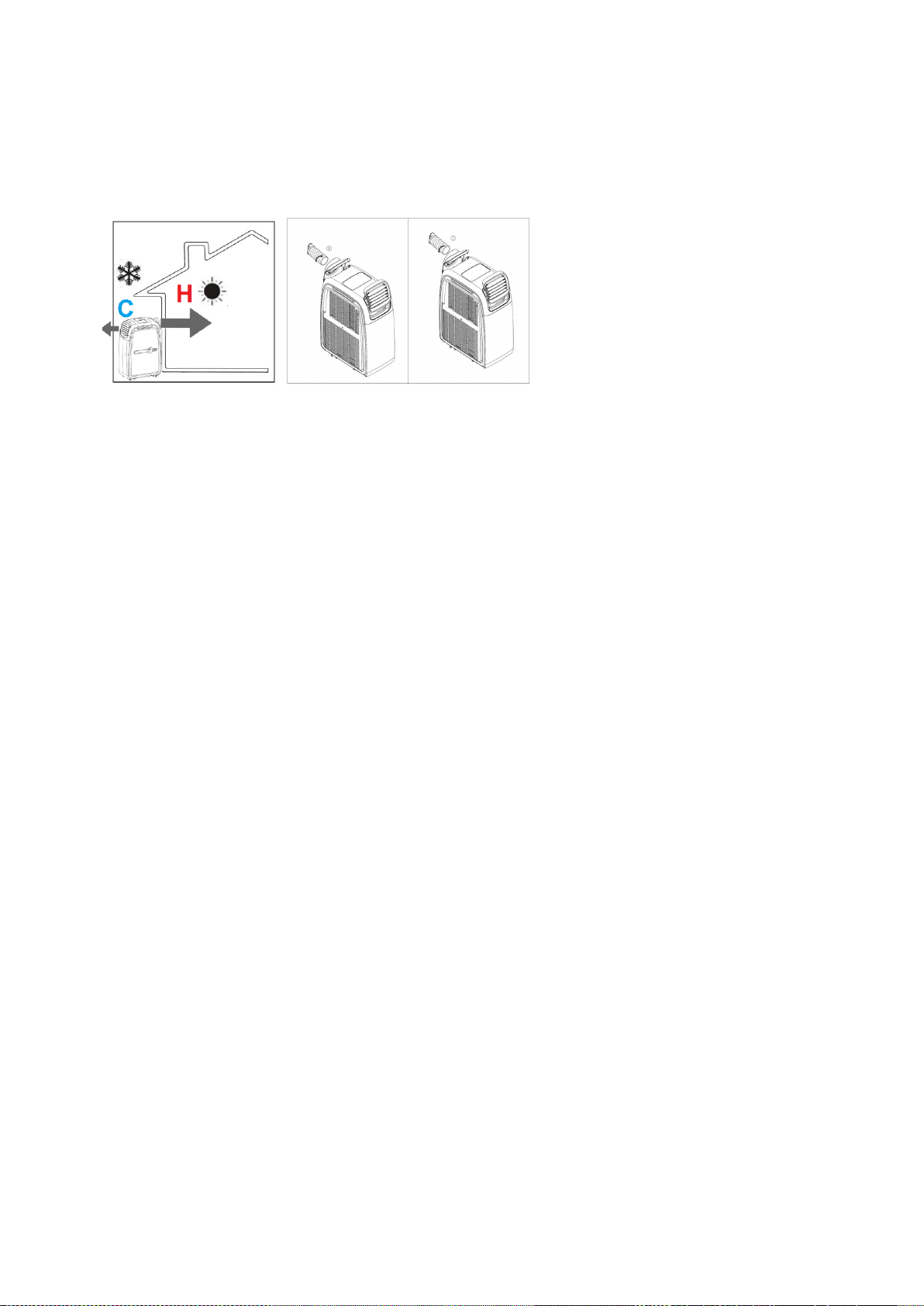
HEATING WHEN THE AIR CONDITIONER IS PLACED INDOORS
(NORMAL OPERATION)
Connect the air hose to the cold air outlet of the air conditioner after exchanging the grills if
necessary. The air hose will expel the cold air from the room outside while the front grills
produce hot air.
The hose can be vented via a tilted window, a door or wall aperture. Make sure that no cold
air from outside can enter the room. For effective heating, we recommend through the wall
venting.
Set the function to “Heating”. The temperature range is selectable between 15°C and 25°C.
Note: After switching on, the compressor will only start after a 3 minute delay. For full
heating effect please allow a further 10 minutes of operation.
Page 16 of 23
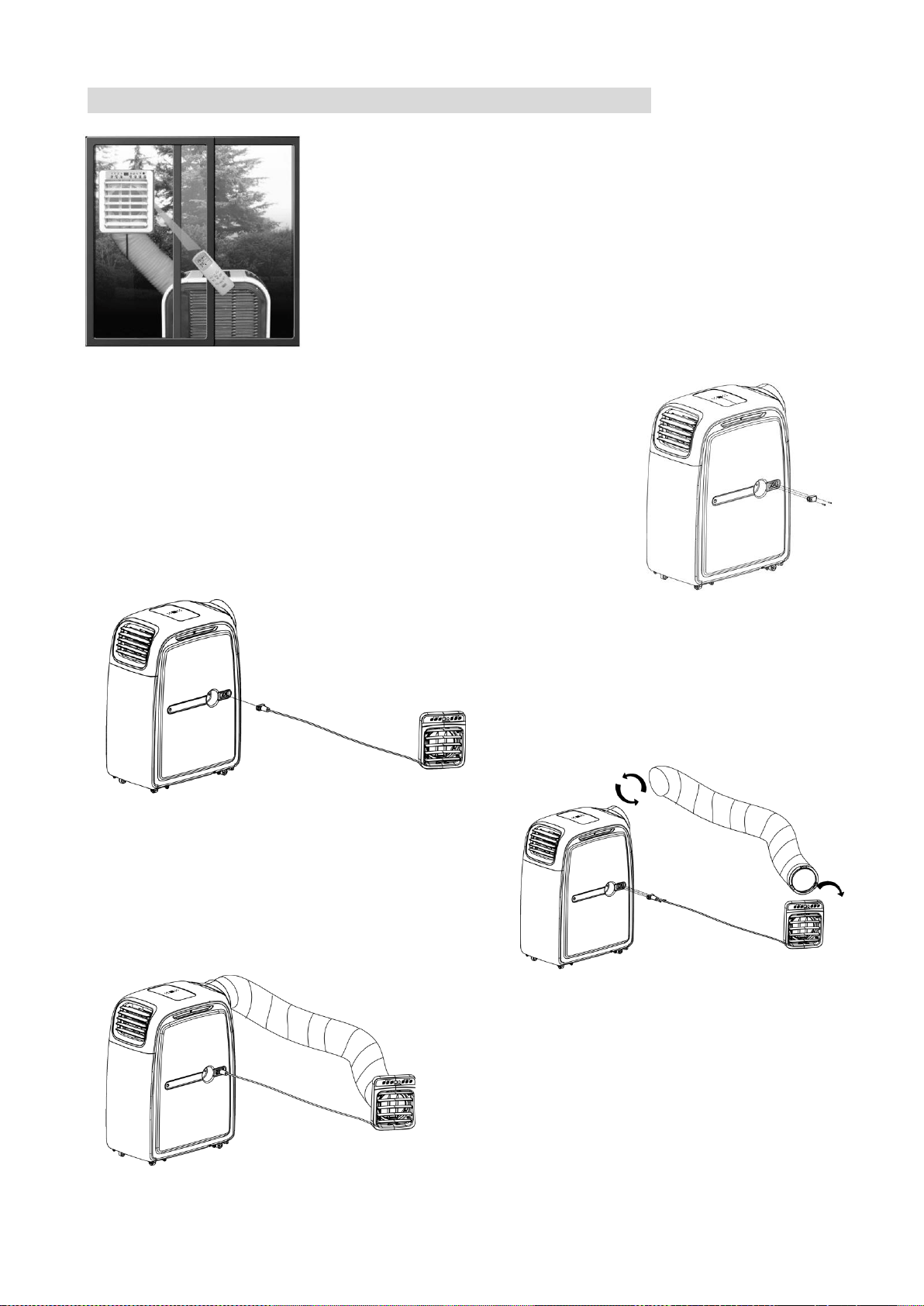
HEATING WHEN AC IS PLACED OUTDOORS
(DUCTING THE HOT AIR INTO THE ROOM)
Connect the air hose to the hot air outlet of the air conditioner after exchanging the grills if
necessary. The air hose will send hot air into the room, while the front grills will expel cold air.
The unit is placed outside the room to be heated. Outdoor operation is ideal for the autumn
period in which outside temperatures do no fall below 10°C. (If the outside temperature is
likely to fall below 10°C continuously, we would recommend indoor operation).
The hose can be vented via a tilted window, a door or wall aperture. Make sure that no cold
air from outside can enter the room. For effective heating, we recommend through the wall
venting. Set the function to “Heating”. The desired temperature range is selectable between
15°C and 25°C.
Note: After switching on, the compressor will only start after a 3 minute delay. For full
heating effect please allow a further 10 minutes of operation.
Using the Airflex Comfort Kit will enable wired or wireless control of the air conditioner from
within the room to be heated.
DEHUMIDIFICATION
The Airflex 15 is a powerful commercial grade dehumidifier with an extraction rate of 70 litres
per day at 80%RH. Humidity is extracted from the air, collected in the water tank and
discharged via a condensation drain pipe. We recommend using a large bucket or running
the condensate drain pipe to an external drain. Please note the condensate drain is gravity
fed, and so the pipe must run downhill for drainage to occur. Alternatively it is possible to
connect an inline pump for sending the condensate longer distances or uphill.
When using the air conditioner in dehumidify mode, the exhaust hose is not required. Set
the function to “
Dehumidify
”. As the unit does not have a humidistat we recommend
using the inbuilt timer to control the length of operation.
Page 17 of 23
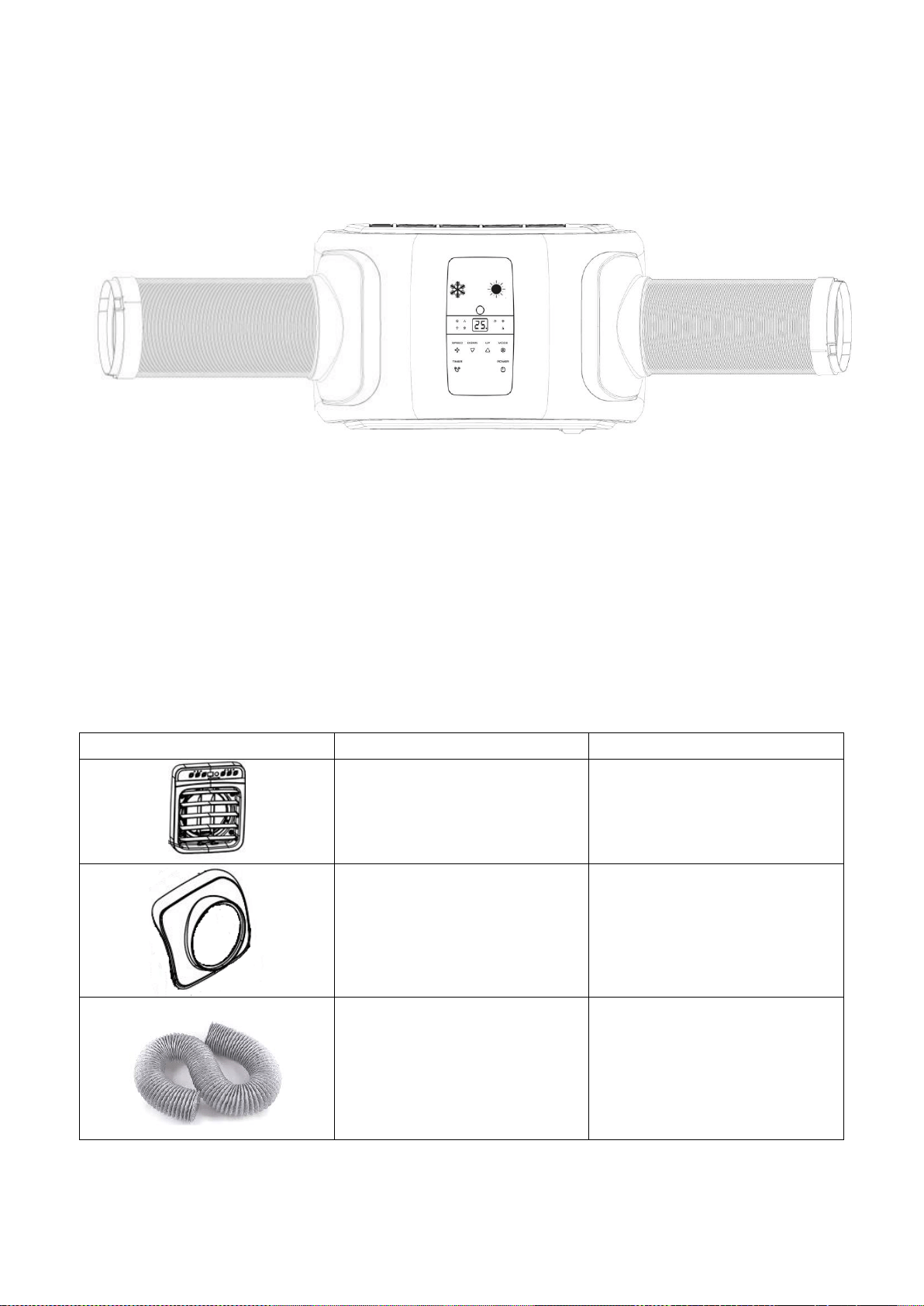
USING THE COMFORT KIT (AVAILABLE SEPERATELY)
The optional Comfort Kit allows the air conditioner to be used in
spaces where there is not enough space to fit a standard
portable air conditioner. It allows the Airflex 15 to be placed
outside the room to cool. The air conditioner can then cool or
heat the space via the Comfort Kit which acts also as a wired
remote and a remote extender for the original remote. By
moving the unit outside the room the noise of the portable unit is
significantly decreased.
The Comfort Kit is available from your original retailer and
manufacturer under stock code: AIRFLEX15V2-Comfortkit
CONNECTING THE COMFORT KIT
1. Remove the blanking plate from the side of the air
conditioner by removing the two screws holding it in place.
2. Attach the comfort kit in position in the room, ensuring there
is space behind, to allow both the vent pipe and
communication wire to be routed to the Airflex 15.
3. Attach the wire from Comfort Kit to
the side of the air conditioner. This
both provides power to the Comfort
Kit, and communicates when the
remote or buttons on the Comfort Kit
are used.
4. Attach one end of the exhaust hose onto the
back of the comfort kit by twisting it into
position. The opposite end of the hose
should then be attached to the Hot air outlet
on the air conditioner for heating, or the Cold
air outlet for cooling.
Your Comfort Kit is now ready to use. Both the
remote supplied with the air conditioner, and the
buttons on the Comfort Kit can be used to control
the operation of the air conditioner.
Note: We would advise for the unit to be situated
indoors when using the heating function, to
ensure efficient performance of the unit.
Page 18 of 23
DUAL DUCTING THE UNIT
The Airflex 15 also supports dual ducting in both cooling and heating modes. This means
the unit can operate with two hoses connected at the same time.
To do this the unit should be set up with the Comfort Kit or a compatible gravity flap for
sending cooled / heated air into the room, with a second pipe connected sending the waste
air outside. I.e. in the winter the unit could duct the hot air into the room while ducting cold air
outside, with the unit inside to increase performance.
This is perfect for classroom environments or similar, where during summer the unit can be
kept in a store room, ducting cold air into the classroom, while ducting the hot air outside.
This both minimises the noise in the classroom, and keeps the unit safe from tampering.
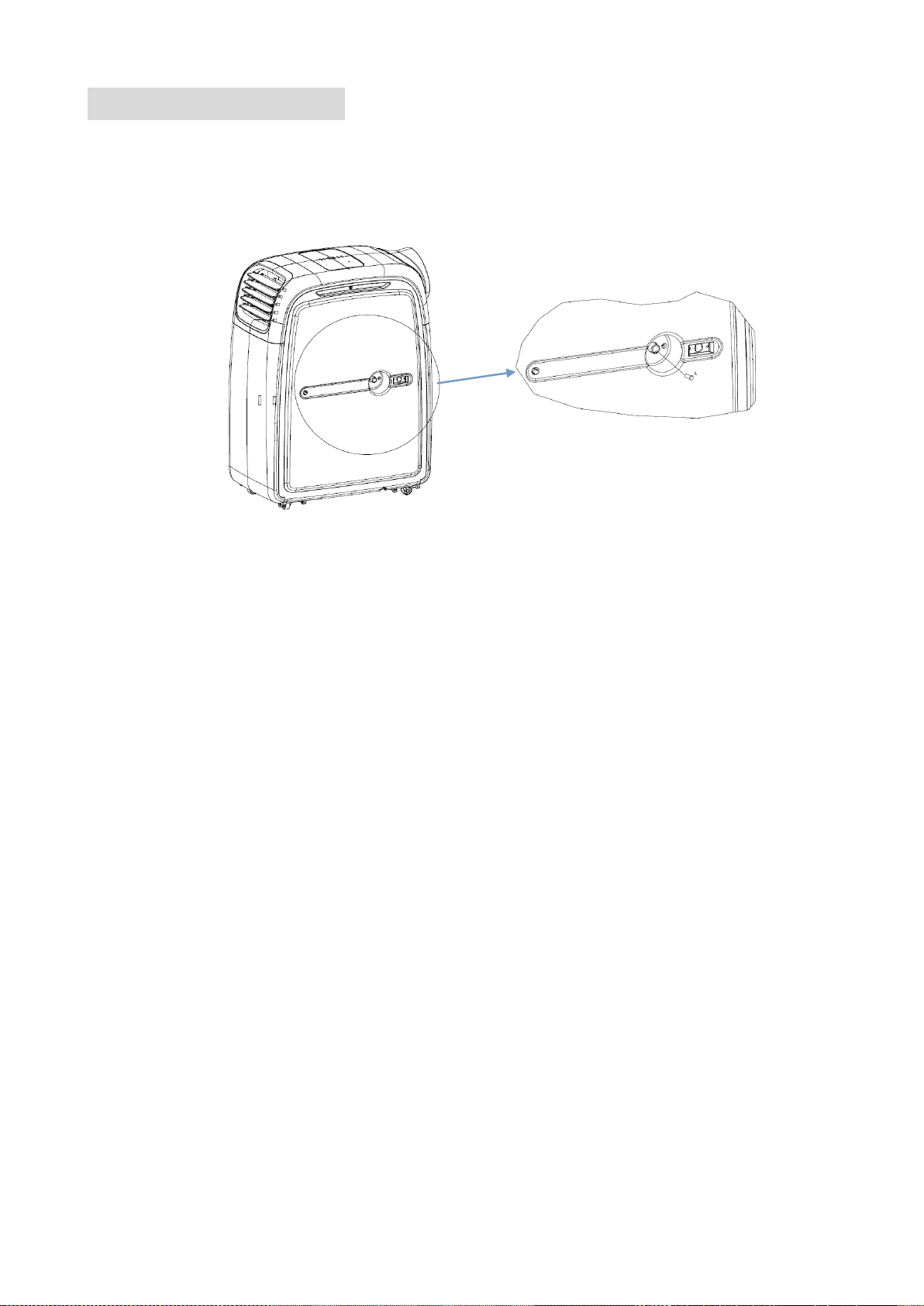
To set up the unit for dual ducting, a compatible twin duct adaptor and a second 150mm
diameter pipe should be purchased from the original retailer or manufacturer. Details can
be found below:
Diagram
Part Name
Stock Code
Comfort Kit
AIRFLEX15V2-Comfortkit
Twin Duct Adaptor
AIRFLEX15V2-TWD
Vent Pipe
1.5 Metre:
1.5M6INHOSE
3 Metre:
HOSE3M6IN
Page 19 of 23
WATER-DRAINAGE
This model is an advanced self-evaporative air conditioner, which reduces the need to
empty the water tank in cooling mode. If the unit is vented correctly most of the water is
reused to cool the condenser coils and any excess is evaporated. As such for cooling mode,
to ensure the unit runs at maximum efficiency, we would advise for continuous drainage not
to be used.
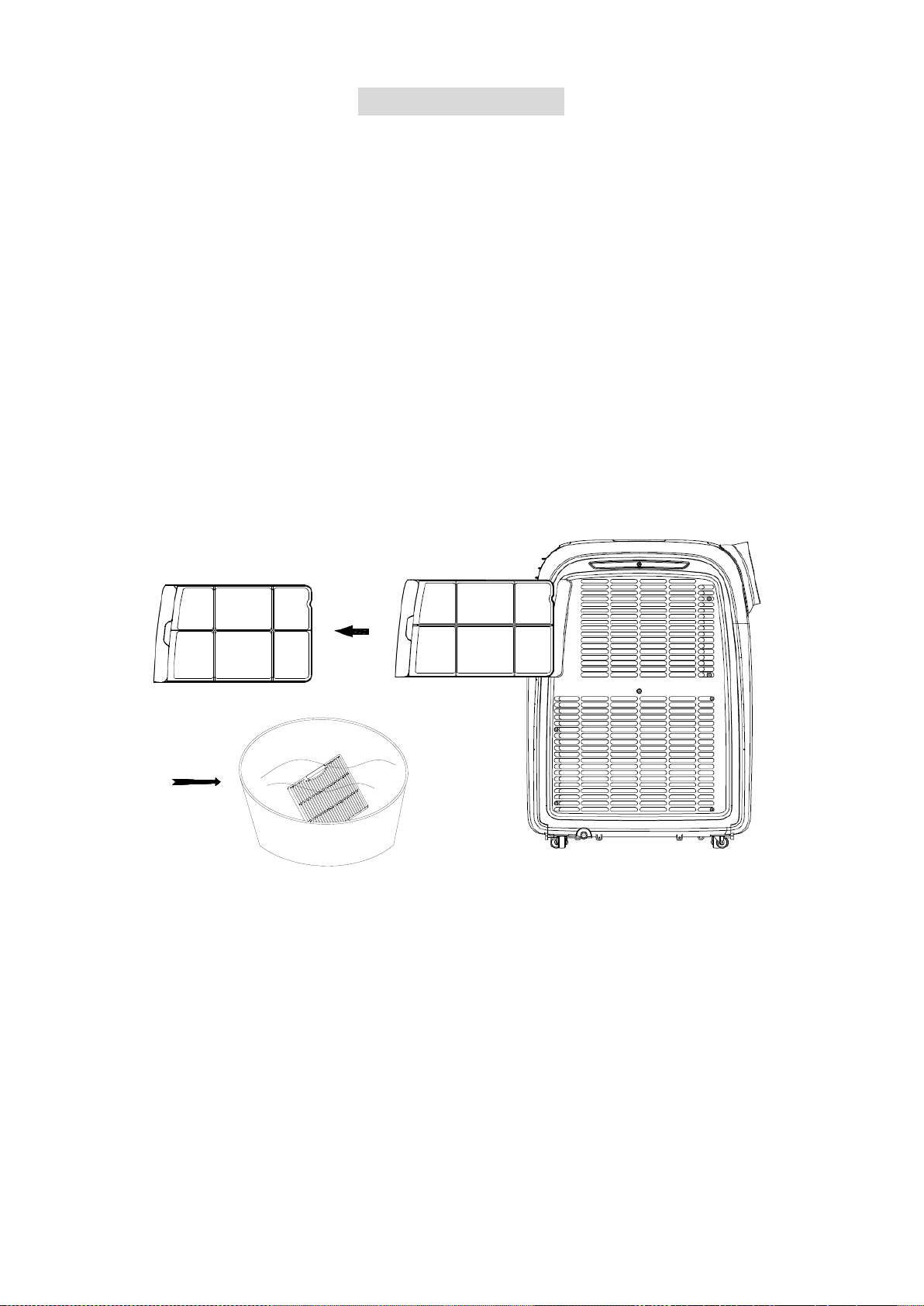
MANUAL DRAINAGE:
• When the internal water tank is full the unit will stop working, and the unit will display
“E4”
• Shut off the unit and unplug. Try not to move the model abruptly as this may cause
water to spill out from the internal water tank.
• Place a tray under the water plug.
• Remove the water plug and attach a drain pipe running to the water container - water
will drain from the internal container.
• Put the water plug back securely.
CONTINUOUS DRAINAGE:
• Remove the water plug
• Connect a water pipe to the water outlet.
• You can plumb this pipe into your current plumbing system, lead it outside or use a
water pump.
NOTE:
• Please make sure that the rubber bung or a drain pipe is in place when the unit is
running.
• When operating the heating function, a drain pipe should be installed in order to
improve the heating effect.
• When operating the dehumidifying function the unit must be used with a drain hose.
• When the water tank is full,"E4" will be displayed on the display panel. Please remove
the rubber bung from the drain port and remove the water collected. After the drainage
is completed, please restart the unit and then the unit can operate normally.
Page 20 of 23
MAINTENANCE
CLEANING
Please shut off the unit and unplug from the mains before cleaning or performing any
maintenance
CLEAN THE SURFACE
Clean the plastic housing with a duster or a soft wet cloth.
Do not use chemical solvents (such as benzene, alcohol or gasoline) as they may cause
irreversible damage.
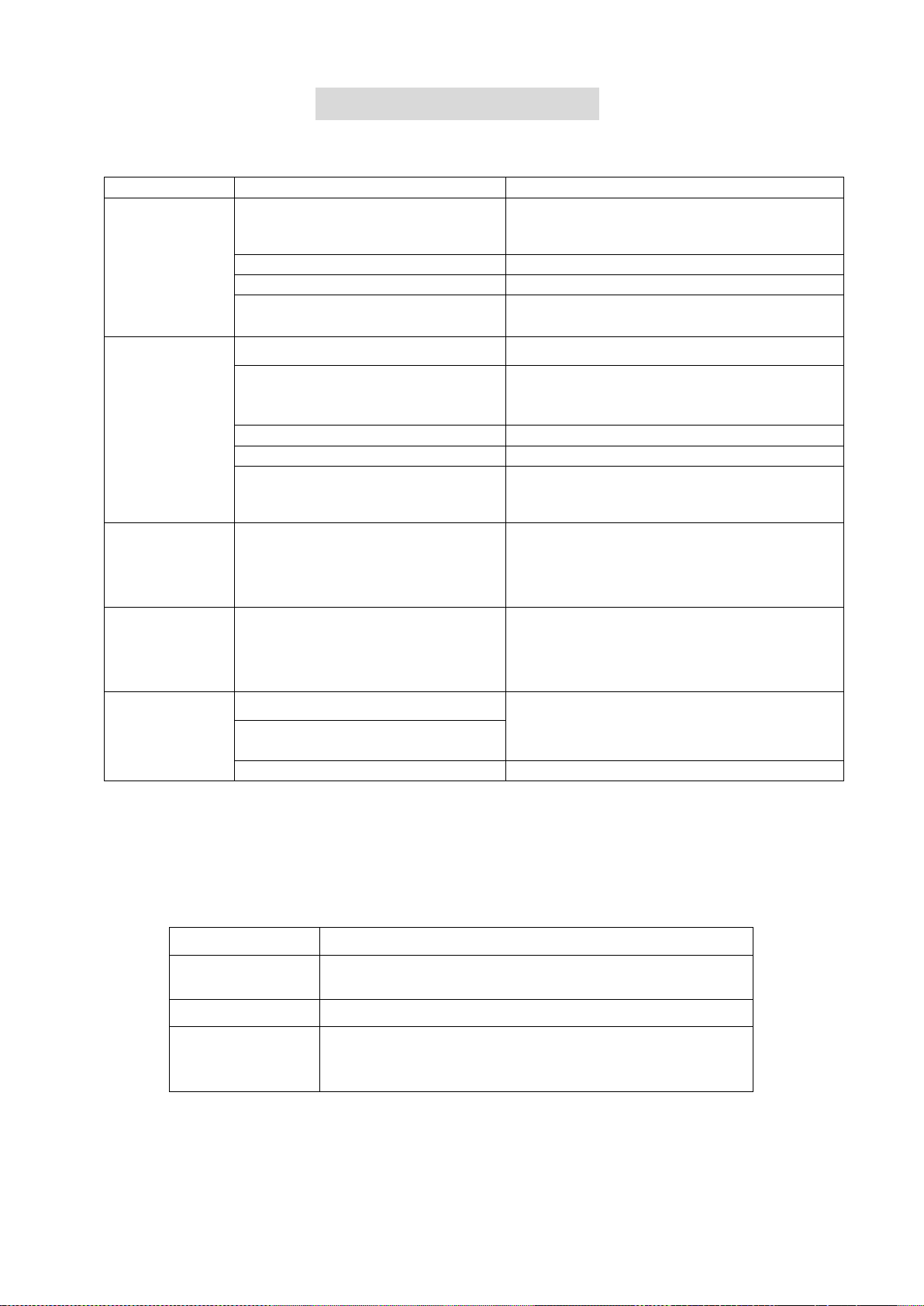
AIR FILTER CLEANING
a) Clean the air filter every 2 weeks. If the air filter is blocked with dust, the unit’s performance
will be significantly affected.
b) Pull out lightly the filter as shown below
c) Wash the air filter by immersing it in warm (about 40°C) water with a neutral detergent.
d) Rinse it and then dry it thoroughly.
e) Carefully re-install the air filter
END OF SEASON MAINTENANCE:
1. Pull out the plug from the drainage hole and empty the internal tank. You can also drain the
water by leaning the unit.
2. Then switch the unit to low fan mode in cooling mode with the desired room temperature
set above the rooms temperature.
3. Keep the unit in this mode for half day - until the conduit is dried. Doing this helps to keep
the inside of the unit dry and prevents mould developing
4. Turn off the unit and pull out the plug.
5. Separate the vent pipe and store it safely.
6. Cover the unit and keep it in a dry place.
7. Take the batteries out of remote control and store, or dispose of them safely
Page 21 of 23
TROUBLESHOOTING
Do not repair or disassemble the unit by yourself, unauthorized repair attempts will invalidate
the warranty and may cause bodily harm.
Problem
Reason
Solution
The unit does
not work
No power supply
Ensure the unit is plugged in and attempt
to turn on the unit.
Water-full indicator (E4)
Drain the internal water tank
Timer function is active
Cancel the Timer function
Room temperature too low or too
high
Use only in ambient temperatures
between 7 – 32°C
The unit does
not seem to
perform.
In direct sunlight
Draw the curtains, UV affects RC
Windows or doors open.
Large amount of people or a heat
source in the room.
Close windows and turn on another air
conditioner
Filter is very dirty
Clean or change the air filter
Air inlet or air outlet is blocked
Clear out debris
Room temperature is lower than
the temperature set
Change the set temperature
The unit is
loud
The unit is not on flat surface.
Put the unit on a flat surface. Carpet is
best for reducing vibrations from the
compressor
Compressor
does not work
Overheating protection is active
Check the vent is straight and un restricted
Restart the unit after 5 minutes when the
compressor has cooled
Remote
control doesn’t
work
Operating distance is too far.
Move remote control closer to the unit and
make sure it is aimed at the IR sensor
Control panel has not received
the signal from remote control.
The batteries are flat
Replace the batteries
Note: The mobile air conditioner is equipped with a 3 minute compressor-delay system to
protect the compressor and prolong the life of the unit. This affects the switching on of the
unit (POWER) as well as switching over from one function to the next, e.g. dehumidify to
cooling or heating.
SELF DIAGNOSTIC CODES
DISPLAY
AUTOMATIC DIAGNOSTICS
E1
The room temperature sensor is open or short
circuited.
E4
Water is full, need to be manually drained
DF
Antifreeze Protection – Normal operation, Once
the unit has defrosted the unit will resume normal
operation.
If the above solutions do not resolve the problem please contact the service centre.
Page 22 of 23
APPENDIX
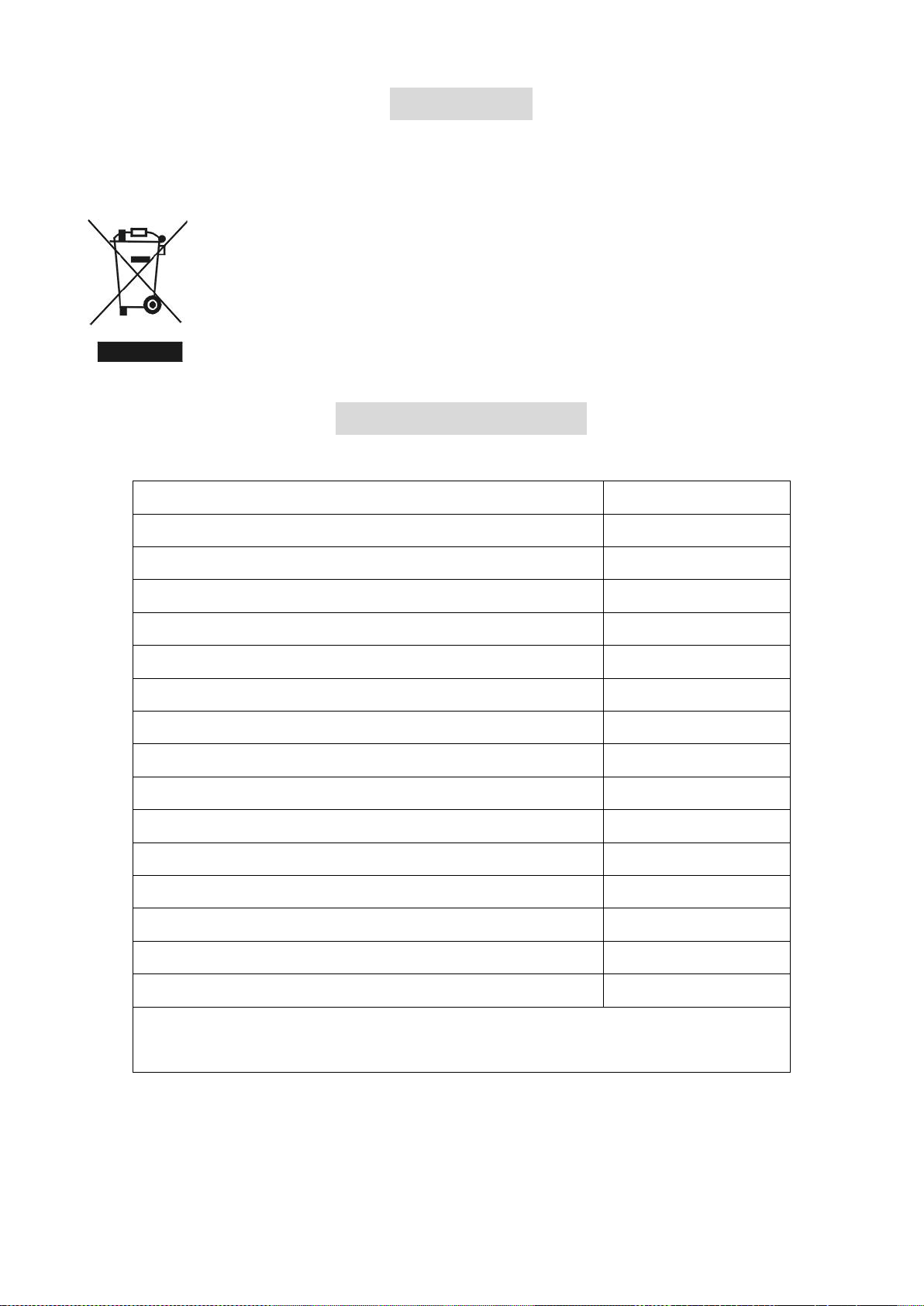
Disposal: Do not dispose this product as unsorted municipal waste. Collection of such
waste must be handled separately as special treatment is necessary.
Recycling facilities are now available for all customers at which you can
deposit your old electrical products. Customers will be able to take any old
electrical equipment to participating civic amenity sites run by their local
councils. Please remember that this equipment will be further handled during
the recycling process, so please be considerate when depositing your
equipment. Please contact the local council for details of your local household
waste recycling centres.
TECHNICAL DATA:
MODEL
Airflex15 V2
Capacity
Cooling: 4000 W
Heating: 3200 W
Rated Input (EN 60335)
Cooling: 1538 W
Heating: 1391 W
Running Current
Cooling: 7.0 A
Heating: 6.3 A
Max Noise Level (Sound Pressure)
≤65 dB(A)
Air Flow
450 m3/hr
Maximum Allowable Pressure
3.2/1.0 Mpa
Permitted Excessive Operating Pressure
2.6/1.0 MPa
Power Supply
220-240V/50Hz
Refrigerant
R290/235g
Net Weight
28 Kgs
Gross Weight
32 Kgs
Dimensions (L*D*H)
321x580x767 mm
Unit must be vented outside when in Air Cooling and Heating mode.
For the purposes of EU regulation EN12102 this is a local air conditioner and
produces less than 65dB(A) sound energy.

Page 23 of 23
WARNING
• Do not use means to accelerate the defrosting process or
to clean, other than those recommended by the
manufacturer.
• The appliance shall be stored in a room without
continuously operating ignition sources (For example:
open flames, an operating gas appliance or an operating
electric heater)
• Do not pierce or burn.
• Be aware that refrigerants may not contain an odour.
• Do not use or store in an unventilated space with an area smaller than 11.3m
2
per
unit. The room must be such as to prevent stagnation of possible leaks of
refrigerant gas as there could be a danger of fire or explosion hazard should the
refrigerant come into contact with electric heaters, stoves or other sources of
ignition.
electriQ UK SUPPORT
www.electriQ.co.uk/support
Please, for your own convenience, make these simple checks before calling the service
line.
If the unit still fails to operate call: 0330 390 3061 or complete the online form
1. Has the unit been standing upright for at least 2 hours?
2. Is the unit plugged into the mains?
3. Is the fuse OK?
4. Switch the unit off and wait three minutes to see if the issue is resolved. Restart the
unit.
5. Check if the water tank is full.
Office hours: 9AM - 5PM Monday to Friday
www.electriQ.co.uk
Unit J6, Lowfields Way
Elland, West Yorkshire
HX5 9DA