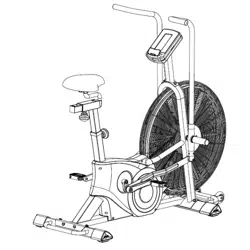
TORNADO LX AIR BIKE
SF-B2729
USER MANUAL
IMPORTANT! Please retain owner’s manual for maintenance and adjustment instructions.
Your satisfaction is very important to us. PLEASE DO NOT RETURN UNTIL YOU HAVE
CONTACTED US: [email protected] or 1-877-90SUNNY (877-907-8669).
We thank you for choosing our product. To ensure your safety and health. please use this equipment correctly. It is important to read this entire manual before assembling and using the equipment. Safe and effective use can only be assured if the equipment is assembled. maintained. and used properly.
It is your responsibility to ensure that all users of the equipment are informed of all warnings and precautions.
1. Before starting any exercise program. you should consult your physician to determine if you
2. Be aware of your body’s signals. Incorrect or excessive exercise can damage your health. Stop
3. Keep children and pets away from the equipment. The equipment is designed for adult use only.
4. Use the equipment on a solid. flat level surface with a protective cover for your floor or carpet. To
5. Ensure that all nuts and bolts are securely tightened before using the equipment. The safety of
6. Always use the equipment as indicated. If you find any defective components while assembling
7. Wear suitable clothing while using the equipment. Avoid wearing loose clothing that may
8. Do not place fingers or objects into the moving parts of the equipment 9. The maximum weight capacity of this unit is 330 pounds (150 KG).
10. The equipment is not suitable for therapeutic use.
11. To avoid bodily injury and/ or damage to the product or property. proper lifting and moving is
12. Your product is intended for use in cool. dry conditions. You should avoid storage in extreme
13. This equipment is designed for indoor and home use only! It is not intended for commercial use!
BATTERY INSTRUCTION
BATTERY INSTALLATION
The computer uses 2 AA batteries. Open the battery cover from the back of the computer. then put 2 batteries into the battery compartment. Make sure the (+) and (-) ends of the batteries are in the correct position. Put the battery cover back.
BATTERY REPLACEMENT
If there is a problem with the display. try changing the batteries first. Open the battery cover. remove the old batteries and replace with new batteries. Make sure the (+) and (-) ends of the batteries are in the correct position. Put the battery cover back.
When changing batteries. always replace both with new batteries. Do not mix old and new batteries.
EXERCISE COMPUTER INSTRUCTIONS
DISPLAY FUNCTIONS
FUNCTION DESCRIPTION
RPM Display the rotations per minute with range from 0 ~ 199.
SPEED Display current training speed. Maximum speed is 99.9 KM/H or ML/H.
TIME
Count up - Time will count up from 00:00 to maximum 1:59:59 in 1-minute increments.
Count down - The console will countdown from preset time to 00:00:00 in 1-minute increments.
DISTANCE
Records total distance from 0.0 up to 999.9 ML or count down from preset value. User may preset target distance value with UP/DOWN key. Each increment is 1.0KM or ML.
CALORIES
Records total calories burned or counts down during training from 0 to maximum 999 calories. User may preset target Calories with UP/DOWN key.
WATT Displays the power used during training.
Display Range: 0~1999.
PULSE
User may set up target pulse value from 0~30 to 230. The console buzzer will beep when the actual heart rate is over the target value during workout.
SETTINGS
Age — The first time you turn on the computer. AGE will flash. Use the arrow keys to set age. Press ENTER to confirm. The computer will be in standby mode.
Kilometer or Mile — press and hold START and ENTER key at the same time for 2 seconds. Press arrow key to select KM or M. Press ENTER to confirm.
OPERATING INSTRUCTIONS
1. Press START to start meter. Meter will be in standby mode.
2. Press START again to use Manual mode or press one of the preset function buttons: 3. TARGET DISTANCE. TARGET CALORIES. TARGET HEART RATE. and TARGET TIME.
INTERVAL 10/20. INTERVAL 20/10. and CUSTOM INTERVAL
4. Press STOP to pause workout. While the meter is paused. it will beep every 30 seconds. After 5
5. Press START to resume workout or STOP to clear data.
Reset – press and hold STOP for 2 seconds to reset meter.
Auto Reset –The computer will auto reset. clear all values and go into standby mode after 30 seconds of inactivity.
Pulse – To measure heart rate. a 5.3 KHz chest strap heart rate monitor (not included) is needed.
The computer will alternately display actual pulse. 65%. 85% MAX. This value cannot be used as the basis for medical treatment.
FUNCTION DESCRIPTION
START To start workout quickly or resume workout in STOP mode.
STOP
To stop/pause workout.
To clear up all settings.
Hold on this key for 2 seconds to reboot the console.
DOWN To adjust Distance. Calories. Heart-rate. Time. Age value down.
UP To adjust Distance. Calories. Heart-rate. Time. Age value up.
TARGET DISTANCE Fast access to Target Distance training mode.
TARGET CALORIES Fast access to Target Calories training mode.
TARGET HEART-RATE Fast access to Target Heart Rate training mode.
TARGET TIME Fast access to Target Time training mode.
INTERVAL There are 3 programs: INTERVAL 10/20. INTERVAL 20/10. and Custom.
ENTER To confirm settings or enter program.
FUNCTION MODES:
➢ MANUAL
Start pedaling. All functions will count up. Time will continue to count up even if you are not pedaling.
➢ COUNTDOWN
Press TARGET TIME. TARGET DISTANCE. TARGET CALORIES.
Use the arrow keys to set a value. Press ENTER.
Meter will start countdown. The display will alternate between the preset value and the actual workout value for 5 seconds each. When countdown reaches 0. meter will start counting from 0 again.
➢ TARGET HEART RATE
You must be wearing a chest strap heart rate monitor to use this function. Press Target Heart Rate.
Use arrow keys to set your age. Press ENTER to confirm.
During workout. display will switch between 65% and 85% heart rate. If heart rate goes below 65% or above 85%. meter will continue to beep until heart rate is between 65% and 85%.
➢ PRESET INTERVAL
Press 10/20 INTERVAL or 20/10 INTERVAL.
Meter will countdown for 3 seconds. WORK will flash and cycle time will countdown. Then REST will flash and beep. Meter displays number of cycles (starts with 01/08). WORK and REST will alternate. After 8 cycles. the workout will end.
➢ CUSTOM INTERVAL
Press CUSTOM INTERVAL. Use arrow keys to set number of cycles. Press ENTER.
Use arrow keys to set number of seconds in WORK. Press ENTER.
Use arrow keys to set number of seconds in REST. Press ENTER.
At the end of interval workout or if you press STOP. meter will display Total Time. Distance. Calories.
Watt. Speed and RMP. This will then switch to display Avg and Max values. each for 5 seconds.
BATTERY DISPOSAL: The meter uses 2 AA batteries. which are packed with the meter. Dispose of the batteries according to the laws and regulations of your local region. Some batteries may be recycled. When disposing or recycling. do not mix battery types.
Version 3.2