Operating and Installation Instructions
Oven
To prevent accidents and machine damage, read these instructions
befor
e installation or use.
en – US, CA M.-Nr. 09 786 760

Contents
2
IMPORTANT SAFETY INSTRUCTIONS................................................................. 5
Guide to the oven.................................................................................................
15
Oven controls .......................................................................................................
16
Mode selector ........................................................................................................ 17
Display ................................................................................................................... 17
Symbols in the display...................................................................................... 17
Rotary selector....................................................................................................... 18
Sensor buttons....................................................................................................... 19
Features ................................................................................................................
21
Model numbers ..................................................................................................... 21
Data plate .............................................................................................................. 21
Items included........................................................................................................ 21
Standard and optional accessories ....................................................................... 21
Shelf runners..................................................................................................... 22
Universal tray and Wire oven rack .................................................................... 22
FlexiClips with wire rack HFCBBR 30-2 ........................................................... 23
Oven controls ........................................................................................................ 26
Oven safety features.............................................................................................. 26
System lock for the oven
.............................................................................. 26
Cooling fan........................................................................................................ 26
Vented oven door.............................................................................................. 26
Safety Door Lock for Self Clean ....................................................................... 26
PerfectClean surfaces............................................................................................ 27
Self Clean ready accessories................................................................................. 27
Before using for the first time.............................................................................
28
Before using for the first time................................................................................. 28
Setting the time of day for the first time ............................................................... 28
Heating the oven.................................................................................................... 30
Settings.................................................................................................................
31
Changing the time of day....................................................................................... 31
Changing factory default settings.......................................................................... 32
System lock ......................................................................................................
35
Timer .....................................................................................................................
37
Setting the timer..................................................................................................... 37
At the end of the timer ...................................................................................... 38
Guide to the modes..............................................................................................
39

Contents
3
Operating the oven ..............................................................................................
41
Energy saving tips.................................................................................................. 41
Quick Guide ........................................................................................................... 42
Cooling fan ............................................................................................................ 42
Changing the temperature ..................................................................................... 43
Temperature indicator....................................................................................... 43
Turning a cooking program On / Off automatically................................................ 44
Setting the duration .......................................................................................... 45
Setting a cooking duration and finish time ....................................................... 45
At the end of the cooking duration ................................................................... 46
Changing the cooking duration......................................................................... 47
Deleting a cooking duration.............................................................................. 47
Deleting a finish time ........................................................................................ 48
Bake ......................................................................................................................
49
Roast .....................................................................................................................
51
Slow Roasting ......................................................................................................
52
Broil .......................................................................................................................
54
Defrost ..................................................................................................................
58
Canning................................................................................................................. 59
Dehydrate .............................................................................................................
60
Frozen food...........................................................................................................
61
Cakes, pies, pizza, baguettes........................................................................... 61
Gentle Bake ..........................................................................................................
62
Cleaning and care................................................................................................
63
Unsuitable cleaning agents.................................................................................... 63
Tips ........................................................................................................................ 64
Normal soiling ........................................................................................................ 64
Stubborn soiling..................................................................................................... 65
Cleaning the oven interior with Self Clean ......................................................
66
Preparing for the Self Clean program ............................................................... 66
Starting the Self Clean program ....................................................................... 67
At the end of the Self Clean program ............................................................... 68
The Self Clean program is canceled................................................................. 69
Removing the door ................................................................................................ 70
Reinstalling the door .............................................................................................. 71
Removing the shelf runners ................................................................................... 72

Contents
4
Frequently asked questions................................................................................
73
Technical Service .................................................................................................
78
Caring for the environment.................................................................................
79
Electrical connection........................................................................................... 80
Installation diagrams ...........................................................................................
81
Appliance and cut-out dimensions........................................................................ 81
Undercounter installation.................................................................................. 81
Installation into a tall cabinet ............................................................................ 82
Installing the oven................................................................................................
83

IMPORTANT SAFETY INSTRUCTIONS
5
When using the appliance, follow basic safety precautions, including the
following:
Read all instructions before installation and use of the oven to prevent
accidents and machine damage.
This appliance complies with current safety requirements.
Impr
oper use of the appliance can lead to personal injury and
material damage.
Read all instructions before installing or using the oven for the first
time. Only use the appliance for its intended purpose.
Keep these operating instructions in a safe place and pass them
on to any future user.
Use
This appliance
is intended for residential use only. Use only as
described in these operating instructions.
This applianc
e is not intended for outdoor use.
Only use this oven for r
esidential cooking, and the purposes
described in this manual.
Other uses are not permitted and can be dangerous.
Risk of Fir
e! Do not use this oven to store or dry flammable
materials.
P
ersons who lack physical, sensory or mental abilities, or
experience with the appliance should not use it without supervision
or instruction by a responsible person.

IMPORTANT SAFETY INSTRUCTIONS
6
Children
Chil
dren should not be left alone or unattended in an area where
an oven is in use. Never allow children to operate, sit or stand on
any part of the oven. Caution: Do not store items of interest to
children in cabinets above an oven. Children climbing on the oven to
reach these items could be injured.
Burn Hazar
d - Do not allow children to use the oven. Failure to do
so can result in severe burns or serious injury.
Dange
r of suffocation! Ensure that any plastic wrappings, bags,
etc. are disposed of safely and kept out of the reach of children.
Danger of burns. The oven gets hot at the oven door glass, the
vapor vent, the handle and the oper
ating controls. Do not allow
children to touch or play in, on or near the oven.
Danger of burns.
Chil
dren's skin is more sensitive to high temperatures than that of
adults. The oven becomes hotter during self-cleaning than it does in
normal use. Do not let children touch the oven while the Self Clean
program is running.
Technical safety
This applianc
e must be installed and connected in compliance
with the installation instructions.
Installatio
n, repair and maintenance work should be performed by
a Miele authorized service technician in accordance with national
and local safety regulations and the provided installation
instructions. Contact Miele’s Technical Service Department for
examination, repair or adjustment. Repairs and other work by
unauthorized persons could be dangerous and may void the
warranty.
Maint
enance by the user: Never repair or replace any part of the
appliance unless the instructions specifically recommend doing so.
Service work may only be performed by a qualified technician.

IMPORTANT SAFETY INSTRUCTIONS
7
Befor
e installing the oven, check for externally visible damage. Do
not operate a damaged appliance.
Reliable
and safe operation of the oven can only be guaranteed if
it is connected to the power supply.
To guarantee the electrical safety of this appliance, continuity
must exist between the appliance and an effective grounding
system. This appliance must be grounded. Connect only to properly
grounded outlet. See "Electrical connection - GROUNDING
INSTRUCTIONS". It is imperative that this basic safety requirement
be met. If there is any doubt, have the electrical system of the house
checked by a qualified electrician.
P
roper installation: Make sure that your appliance has been
installed correctly and that it has been grounded by a qualified
technician.
Befor
e installation, make sure that the voltage and frequency
listed on the data plate correspond with the household electrical
supply. This data must correspond to prevent injury and machine
damage. Consult a qualified electrician if in doubt.
Befor
e installation or service, disconnect the power supply to the
work area by
– removing the fuse,
– "tripping" the circuit breaker, or
– unplugging the unit. Pull the plug not the cord.
Ext
ension cords do not guarantee the required safety of the
appliance (e.g. danger of overheating). Do not use an extension cord
to connect this appliance to electricity.
The ove
n is not to be operated until it has been properly installed
within cabinetry.
Danger of electric shock!
Under no ci
rcumstances open the outer casing of the appliance.

IMPORTANT SAFETY INSTRUCTIONS
8
This applianc
e must not be used in a non-stationary location (e.g.
on a ship).
Do not r
epair or replace any part of the appliance unless
specifically recommended in the operating instructions. All other
servicing should be referred to a qualified technician.
Defective co
mponents should be replaced by Miele original parts
only. Only with these parts can the manufacturer guarantee the
safety of the appliance.
In or
der for the oven to function correctly, it requires an adequate
supply of cool air. Ensure that the air flow is not impaired (e.g.
insulation in the cabinetry). Also be sure that the cool air supply is
not heated by other sources nearby.
If
the oven is installed behind a cabinet door, do not close the
door while the oven is in operation. Heat and moisture can build up
behind the closed door and cause damage to the oven, cabinetry
and flooring. Do not close the door until the oven has completely
cooled down.

IMPORTANT SAFETY INSTRUCTIONS
9
Proper use
T
he oven becomes very hot while in use. Use caution to
ensure that you are not burned on the heating elements or interior
surfaces of the oven. Use pot holders when placing food in the
oven, adjusting the racks, etc. in a hot oven.
C
aution: Heating elements may be hot even though they are not
glowing. Interior surfaces of an oven become hot enough to cause
burns. External parts of the oven such as the door glass, vents, and
the control panel can become hot. During and after use, do not
touch, or let clothing or other flammable materials come into contact
with heating elements or interior surfaces of the oven until they have
had sufficient time to cool.
Do not let foo
d sit in the oven for more than one hour before or
after cooking. Doing so can result in food poisoning or sickness.
It
is important that the heat is evenly distributed throughout the
food being cooked. This can be achieved by stirring and/or turning
the food.
Use onl
y dry, heat-resistant potholders. Moist or damp potholders
used on hot surfaces may result in steam burns. Do not let
potholders come in contact with oil or grease. Do not substitute dish
towels or other bulky items for potholders. Do not let potholders
touch hot heating elements.
L
oose fitting or hanging garments present a fire hazard. Wear
proper apparel while operating the appliance.
Do not heat unopened containers of food in the oven, pressure
may cause the containers to burst and result in injury.
Never pour col
d water onto hot surfaces in a hot oven.
The steam created could cause serious burns or scalding and the
sudden change in temperature can damage the enamel in the oven.

IMPORTANT SAFETY INSTRUCTIONS
10
T
o prevent burns, always place oven racks at their desired height
while the oven is cool. If the rack must be moved while the oven is
hot, do not let pot holders touch hot heating elements.
Op
en the door carefully to allow hot air or steam to escape before
placing or removing food.
T
o prevent burns, allow the heating elements to cool before
cleaning by hand.
Do not leave the oven door open unnecessarily as someone may
trip over it or be injur
ed by it.
Never leave
the appliance unattended when cooking with oil or
fat. They can ignite if overheated. Do not use water on grease
fires.Turn off the oven immediately and suffocate the flames by
keeping the oven door closed.
Never st
ore flammable liquids and materials in, above or under an
oven, or near cooking surfaces.
Do not use the o
ven to heat the room. The high temperatures
radiated could cause objects near the oven to catch fire.
W
ARNING
NEVER use this appliance as a space heater to heat or warm the
r
oom. Doing so may result in carbon monoxide poisoning and
overheating of the oven.
WARNING
NEVER use this appliance as storage space. Doing so may result
i
n carbon monoxide poisoning and overheating of the oven.

IMPORTANT SAFETY INSTRUCTIONS
11
WARNING
NEVER cover any slots, holes or passages in the oven bottom or
co
ver an entire rack with materials such as aluminum foil. Doing
so blocks air flow through the oven and may cause carbon
monoxide poisoning. Aluminum foil linings may also trap heat,
causing a fire hazard.
Br
oiling food for an excessively long time can cause it to dry out
and may result in the food catching fire.
Do not exceed recommended broiling times.
Some foods dr
y out very quickly and can be ignited by high
broiling temperatures. Do not use broiling modes for crisping rolls or
bread, or to dry flowers or herbs. Instead use the Convection Bake
or Surround modes.
Use caution when using alcohol in your recipes. Alcohol
evaporates at high temperatures but may, in rare circumstances,
combust on the hot heating elements.
Plastic con
tainers, which are not heat-resistant, melt and may
ignite at high temperatures and can damage the oven. Use only
plastic containers that are indicated by the manufacturer as being
suitable for use in ovens.
When r
esidual heat is used to keep food warm, the high level of
humidity and condensation can cause damage in the oven. The
control panel, countertop or cabinetry may also be damaged.
Do not switch the oven off completely while food is inside it, but
select the lowest possible temperature for the oven mode you are
using. This will ensure the fan will automatically continue to run.
It
is recommended to cover all cooked food that is left in the oven
to be kept warm. This will prevent moisture from condensing on the
interior of the oven.

IMPORTANT SAFETY INSTRUCTIONS
12
T
o avoid damage, do not place aluminum foil, pots, pans or
baking sheets directly on the oven floor. This can cause a build up of
heat that will damage the oven floor.
Do not slide pots or pans on the oven
floor. This could scratch
and damage the surface.
The door can
support a maximum weight of 33 lbs (15 kg). Do not
sit on or lean against an open door, and do not place heavy objects
on it. Also make sure that nothing can get trapped between the door
and the oven cavity. The oven could get damaged.
This ove
n must only be used for cooking food. Fumes, vapors or
heat given off by glues, plastics or flammable liquids and materials
could be hazardous. Do not use it as a dryer, kiln, dehumidifier, etc.
Do not obstruct the flow of combustio
n and ventilation air.
Do not let metal objects (aluminum foil, pans) come in contact
with the heating element.
Mak
e certain that the power cords of small appliances do not
come in contact with or get caught in the oven door.
When baking fr
ozen pizzas or pies, place them on the wire rack
lined with parchment paper. Do not use the baking tray or the
roasting pan for frozen foods with a large surface area. The tray or
pan could become warped and difficult to remove from the oven
when hot. Frozen foods like french fries, chicken nuggets, etc. can
be baked on the baking tray.

IMPORTANT SAFETY INSTRUCTIONS
13
Cleaning and care
Do not use a st
eam cleaner to clean this oven.
Steam could penetrate electrical components and cause a short
circuit.
Only clean par
ts listed in these Operating and Installation
Instructions.
Scr
atches on the door glass can cause the glass to break.
Do not use abrasive cleaners, hard sponges, brushes or sharp metal
tools to clean the door glass.
The shel
f runners can be removed for cleaning purposes (see
"Cleaning and care"). Ensure they are correctly fitted after cleaning
and never operate the oven without the shelf runners inserted.
Ther
e is a seal around the oven interior which seals the inside of
the door. Take care not to rub, damage or move the gasket.
Do not use ove
n cleaners. Commercial oven cleaners or oven
liners of any kind should not be used in or around any part of the
oven.
Debris shoul
d be removed before running the Self Clean program.
If not removed this debris can smoke causing the self-cleaning
program to turn itself off.

IMPORTANT SAFETY INSTRUCTIONS
14
Accessories
Use only ge
nuine original Miele parts. If parts or accessories from
other manufacturers are used, the warranty will become void.
The hig
h temperatures used during self-cleaning will damage
accessories that are not designed for cleaning in the Self Clean
program. Please remove these accessories from the oven before
starting the Self Clean program. This also applies to accessories
purchased separately (see "Cleaning and care").
SAVE THESE INSTRUCTIONS AND REVIEW THEM PERIODICALLY
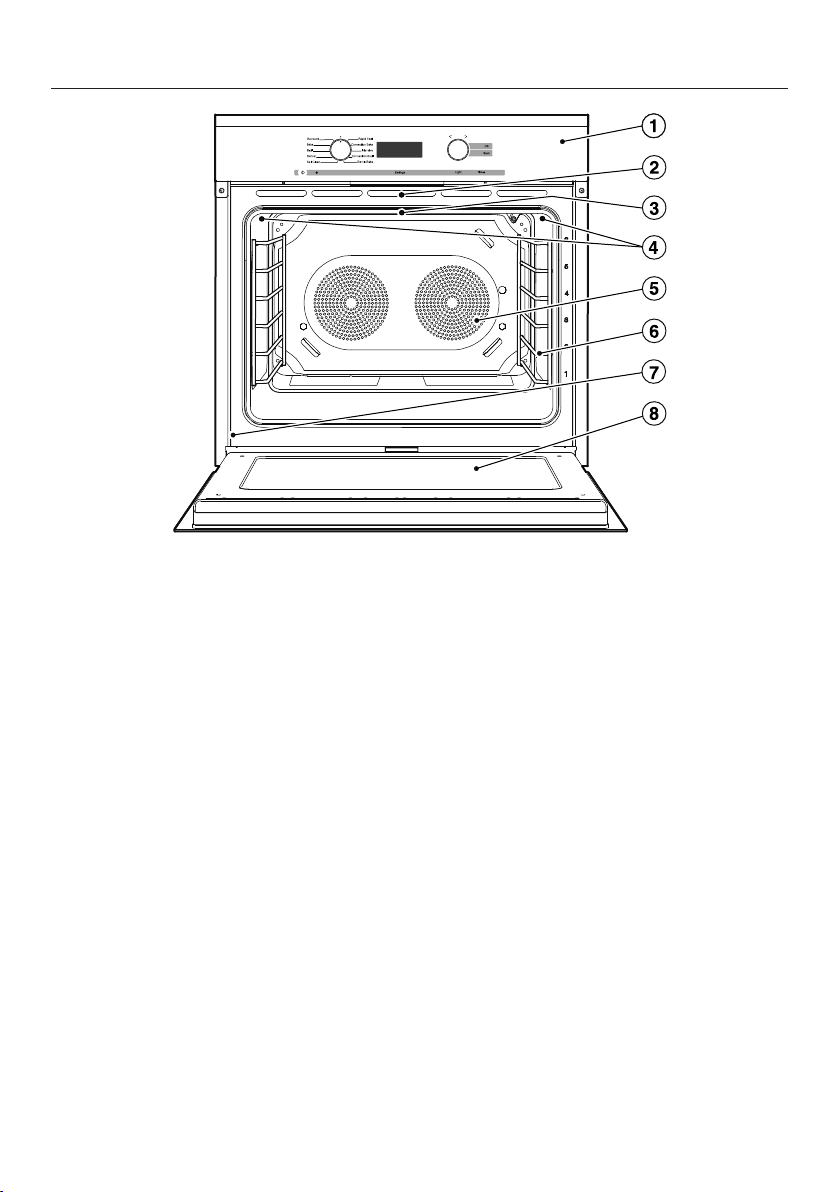
Guide to the oven
15
a
Control panel
b
Door with contact switch* and lock for Self Clean program
c
Browning/Broiling element
d
Oven interior lighting
e
Twin Power convection fans with heating element
f
Shelf runners with 6 levels
g
Data plate
h
Clean Glass door
* This switch ensures that the heating elements and the convection fans turn off
when the door is opened during use.
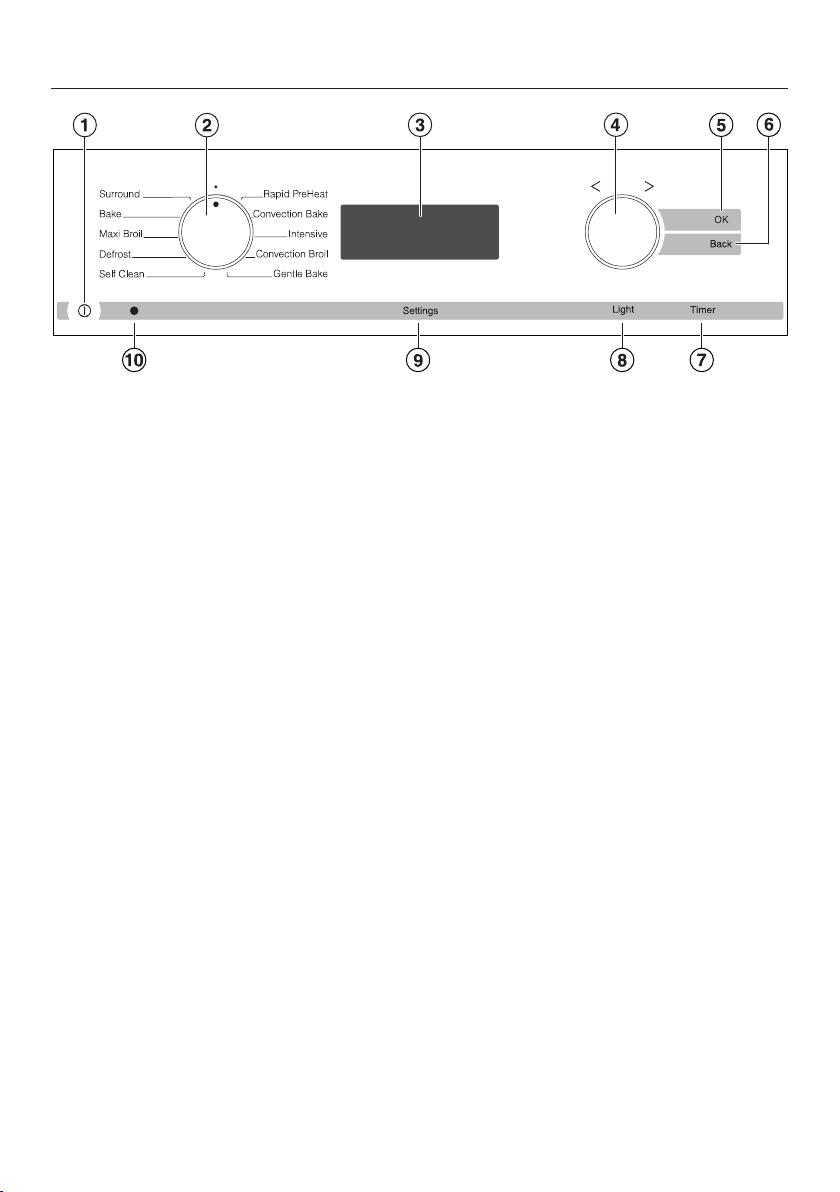
Oven controls
16
a
On / Off button
Turns the oven on and off
b
Mode selector
To select oven modes
c
Display
Displays the time of day and settings
d
Rotary selector
To select values
e
OK sensor button
Confirms settings and instructions
f
"Back" sensor button
To go back one step at a time
g
"Timer" sensor button
To set the timer
h
"Light" sensor button
To turn the oven cavity lighting on and off
i
"Settings" sensor button
To access settings
j
Optical interface
(for service technician use only)

Oven controls
17
Mode selector
To select an oven mode.
It can be turned clockwise or counter-
clockwise.
Oven modes
Surround
Bake
Maxi Broil
Defrost
Self Clean
Rapid PreHeat
Convection Bake
Intensive
Convection Broil
Gentle Bake
Display
The display shows the time of day or
your settings.
°C °F
h min
Symbols in the display
Depending on the position of the mode
select
or and/or which button is
pressed, the following symbols will
appear:
Symbol / Function
Timer Any
Temperature indicator
Oven
mode
Duration
Finish time
Temperature
Settings
Time of day
System lock
A function can only be set or changed if
the mode select
or is in the correct
position.

Oven controls
18
Rotary selector
Use the rotary selector t
o enter
temperatures and durations.
Turning it clockwise will increase the
value
s, and turning it counter-clockwise
will decrease them.
It can also be used to highlight a mode
by moving the in the display
.
It can be turned clockwise or counter-
clockwise.

Oven controls
19
Sensor buttons
The sensor buttons react to touch. Each touch is confirmed with an audible tone.
The t
one can be turned on or off by selecting the status in the settings (see
"Settings").
Sensor
b
utton
Function Notes
OK For accessing
functions and
saving settings
When functions are marked with a they can be
accessed by selecting OK. As long as the triangle
is flashing you can change the selected
function.
Press OK to save the change.
Back To go back a step
Timer For setting the
kitchen timer
If the time of day is visible, you can enter a timer
dur
ation at any time, e.g. when boiling eggs on the
cooktop.
If the display is turned off, the "Timer" button will
not r
eact until the oven is turned on.

Oven controls
20
Sensor
b
utton
Function Notes
Light For turning the
oven int
erior
lighting on and off
If the time of day display is turned on, the oven
int
erior lighting can be turned on and off by
touching the "Light" sensor button, for example
when cleaning the oven.
If the time of day display is turned off, the "Light"
sensor butt
on will not react until the oven is turned
on.
The oven interior lighting turns off after 15
seconds during co
oking or remains constantly
turned on, depending on the setting selected.
Settings To access
F
unctions
If the time of day is visible in the display and the
mode select
or is in the position, and selecting
the sensor button "Settings" the symbols for
Settings , Time of day , and System Lock
will appear.
If the display is turned off, the "Settings" button
will not r
eact until the oven is turned on.
When cooking you can set the button after
selectin
g the temperature , cooking time and
finish time .

Features
21
Model numbers
A list of the ovens described in these
oper
ating instructions can be found on
the back page.
Data plate
The data plate located on the front
fr
ame of the oven is visible when the
door is open.
Printed on the data plate are the model
number
, serial number and the
connection data (voltage/frequency/
maximum rated load) of the oven.
Have this information available when
conta
cting Miele Technical Service.
Items included
The following items are included with
this appliance:
– the operating and installation
instructions for using the oven,
– screws for securing your appliance
int
o the cabinetry, and
– various accessories.
Standard and optional
accessories
Accessories vary depending on
model. All o
vens are supplied with
shelf runners, a universal tray and a
wire oven rack. Depending on the
model, your oven may also come with
the additional accessories listed.
All accessories and cleaning and care
pr
oducts in these instructions are
designed to be used with Miele ovens.
They can be ordered from the
Miel
eusa.com website or Miele.
When ordering, please have ready the
model number of your oven and of the
desir
ed accessories.
Features
22
Shelf runners
The shelf runners are located on the
right and left-hand sides of the oven
with the leve
ls for inserting accessories.
The shelf level numbers are indicated
on the fr
ont of the oven frame.
Each level consists of a strut on which
you can
place the wire oven rack, for
example.
The runners can be removed for
cleaning purposes. See "Cleaning and
C
are".
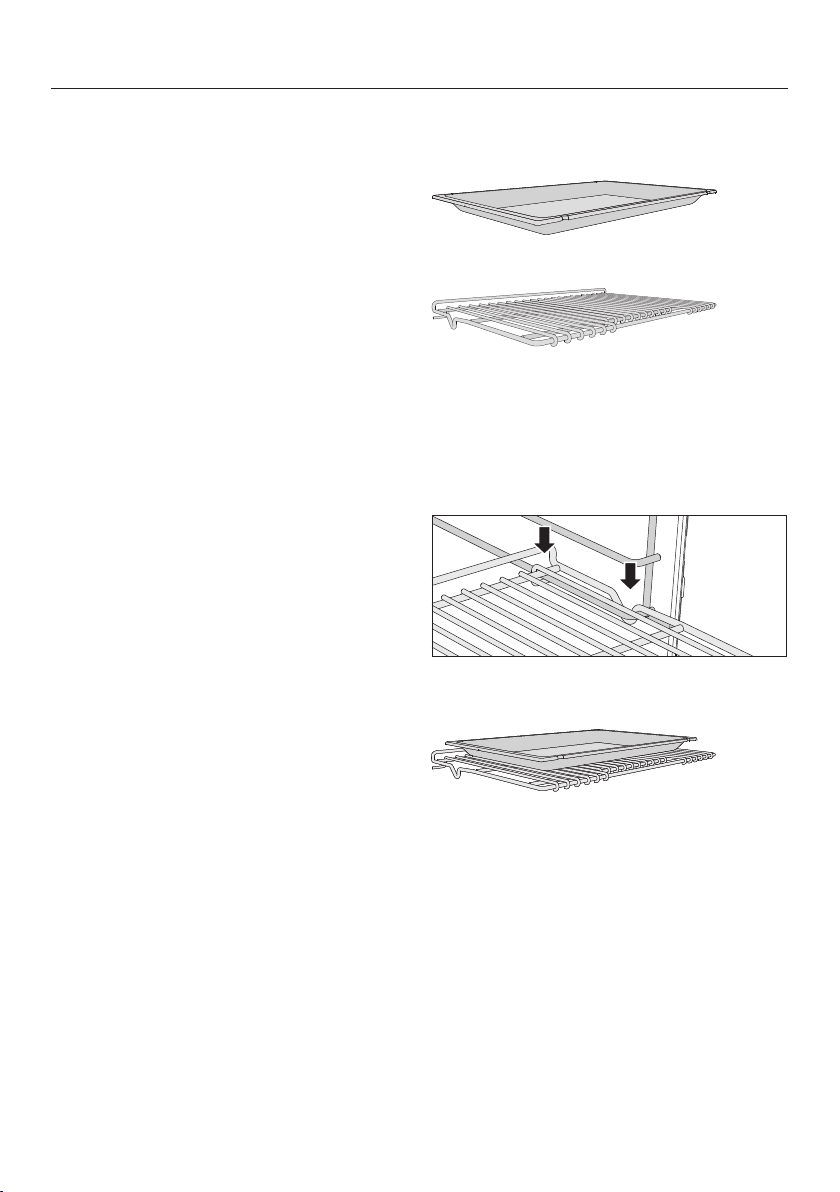
Universal tray and Wire oven rack
Universal tray HUBB 30-1
Wire oven rack HBBR 30-2
Non-tip safety notches are located on
the shor
ter sides of these
accessories.These prevent the trays
being pulled completely out of the side
runners when you only wish to pull
them out partially.
Always place the wire oven rack on the
runner with the notch facing down.
When using the universal tray, place it
dir
ectly on the wire oven rack.
Features
23
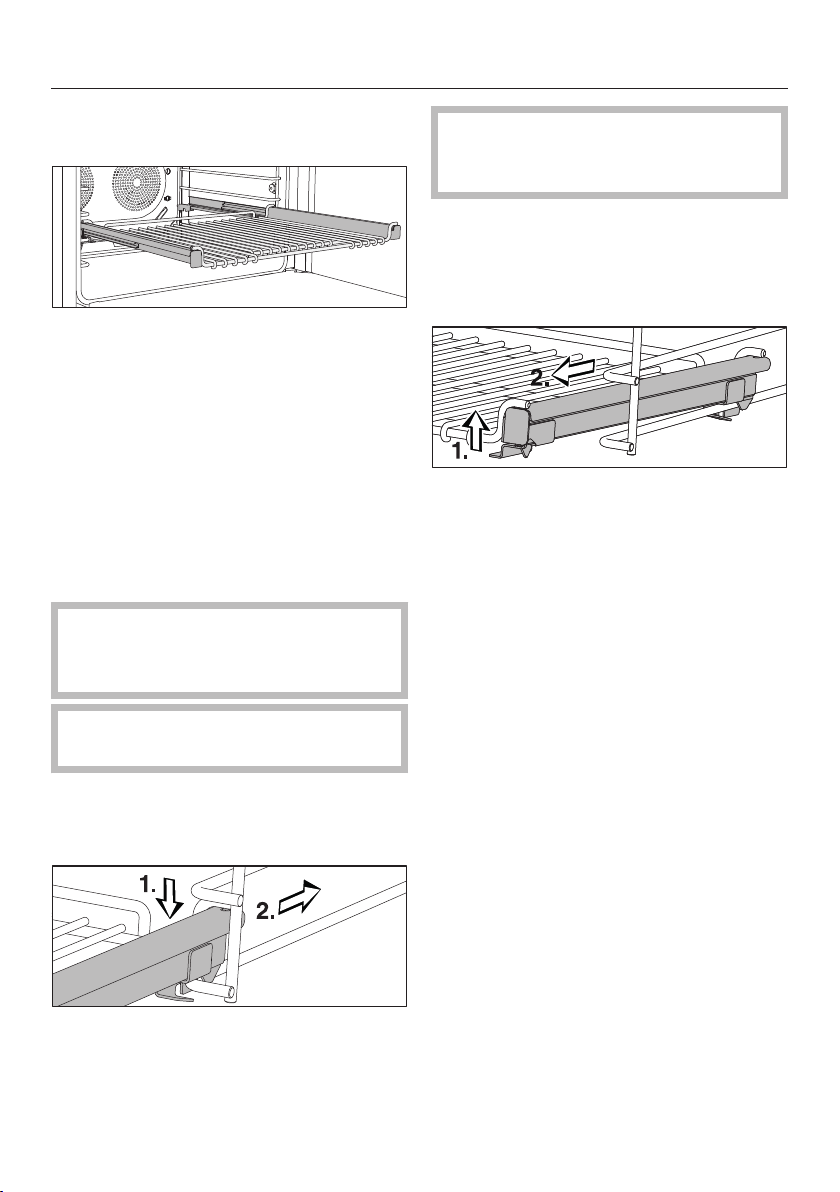
FlexiClips with wire rack
HFCBBR 30-2
The FlexiClips with wire rack can be
mo
unted on any shelf level and pulled
completely out of the oven This allows
you to see the food easily.
The FlexiClips with wire rack is pushed
in and
then locked onto a level.
The rack can hold a maximum of 33 lbs
(15 kg).
Installing and removing the FlexiClips
with
wire rack
Danger of burns! Mak
e sure the
heating elements are turned off and
that the oven cavity is cool.
Do not pull the Fl
exiClips apart
during installation or removal.
Ho
ld the FlexiClips with wire rack
with both hands and position it in
front of the desired level.
Inser
t the FlexiClips with wire rack
onto the level (1.) and slide it along
the struts of the level (2.) until it clicks
into place.
If the FlexiClips with wire rack jams
when sliding it onto the level, pull it
out using some force and reinsert.
To removing the FlexiClips with wire
r
ack:
P
ush the FlexiClips with wire rack in
all the way.
Usin
g both hands lift the front of the
FlexiClips with wire rack on both
sides (1.) and pull it out of the level
(2.).
Using the universal tray
When usin
g the universal tray, place
it directly on the FlexiClips with wire
rack.
Features
24
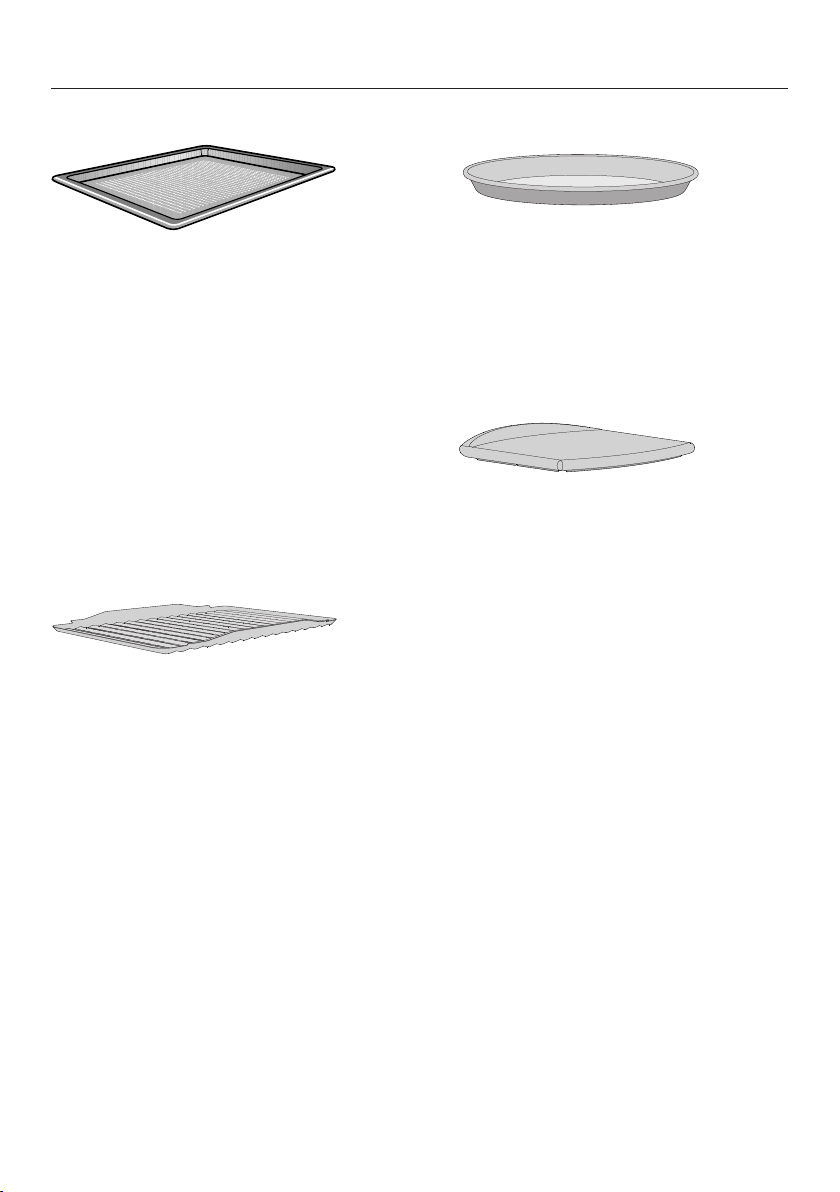
Perforated baking tray HBBL 71
The perforated baking tray has been
speciall
y developed for the preparation
of baked goods.
The tiny perforations assist in browning
the underside of baked goods.
The tray can also be used for
dehydrating or drying food.
The surface has been treated with
P
erfectClean enamel for easy cleaning.
The perforated baking tray can be
place
d on the rack.
Grilling and Roasting insert
HGBB 30-1
The grilling and roasting insert is placed
in t
he universal tray.
The drippings from the meat or poultry
are collected under the insert reducing
spattering in the oven. The drippings
can then be used for gravy and sauces.
The surface has been treated with
P
erfectClean enamel for easy cleaning.
Round baking form HBF 27-1
This circular form is suitable for cooking
fr
esh or frozen pizzas, flat cakes, tarts
and baked goods.
The surface has been treated with
P
erfectClean enamel.
Gourmet Baking Stone HBS 60
The baking stone is ideal for baking
d
ishes with a crisp bottom such as
pizza and bread.
The baking stone is made from a heat
retaining stone and is glazed. Place the
stone directly on the wire rack.
A wooden peel is supplied with it for
placing food on and off the stone.
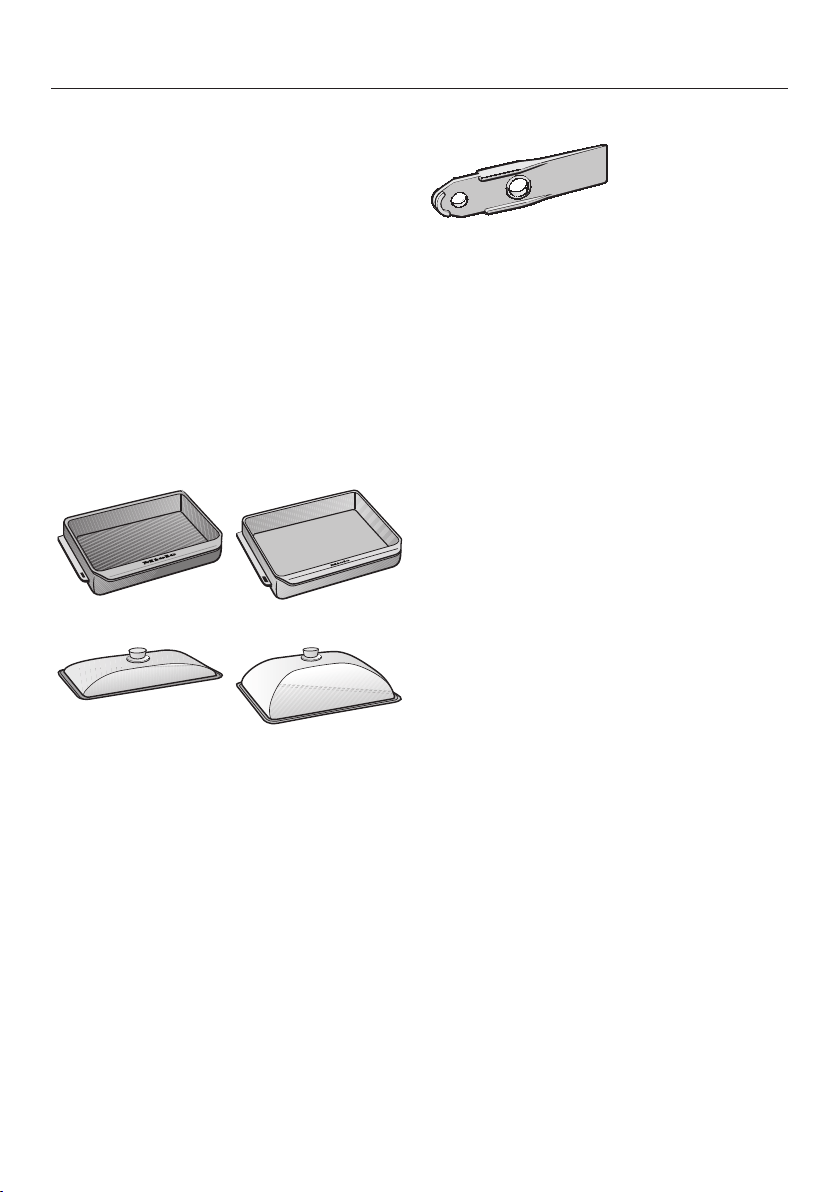
Features
25
Gourmet Casserole Dishes HUB and
Lids HBD
Miele Gourmet Casserole Dishes can
be place
d directly on the wire oven
rack. They have an anti-stick coating.
The oven dishes have depths of 8 1/2"
(22 cm) or 13 3/4" (35 cm). They have
the same width and height.
Matching lids are also available
separ
ately.
Depth: 8 1/2"
(22 cm)
Depth: 13 3/4"
(35 cm)
HUB 61-22 HUB 61-35
HBD 60-22 HBD 60-35
Opener
The opener allows you to open the
cover of the over light.
Miele Oven Cleaner
Miele oven cleaner is suitable for
r
emoving stubborn soiling. It is not
necessary to preheat the oven before
use.

Features
26
Oven controls
The oven controls enable you to use
the vario
us cooking functions to bake,
roast and broil.
It also allows you to access:
– the time of day display,
– a kitchen timer,
– a timer to automatically turn cooking
pr
ograms on and off,
– settings that can be customized.
Oven safety features
System lock for the oven
The system lock prevents the oven from
bei
ng used unintentionally (see "System
lock ").
The system lock will remain activated
even aft
er a power failure.
Cooling fan
The cooling fan comes on automatically
when a co
oking program is started. The
cooling fan mixes hot air from the oven
cavity with cool room air before venting
it out into the kitchen through vents
located between the appliance door
and the control panel.
The cooling fan will continue to run for
a whil
e after a program is complete to
prevent moisture from building up in the
oven, on the control panel or
surrounding cabinetry.
When the temperature in the oven has
fallen sufficiently, the cooling fan will
tur
n off automatically.
Vented oven door
The oven door is made of glass panes
that have a heat-
reflective coating on
part of their surface.
During operation, air is also circulated
thr
ough the door to keep the outer
panel cool.
The door can be removed and
disassembled for cleaning purposes
(see "Cleanin
g and care").
Safety Door Lock for Self Clean
For safety reasons, the door is locked
as soon
as the Self Clean program is
started. After the self-cleaning program
has finished, the door will remain
locked until the temperature in the oven
has fallen below 535°F (280°C).

Features
27
PerfectClean surfaces
The revolutionary PerfectClean finish is
a smooth, no
n-stick surface that is
exceptionally easy to clean.
Food and grime from baking or roasting
ar
e easily removed.
Do not use ceramic knives, as these
will
scratch the PerfectClean surface.
Follow the instructions in the "Cleaning
and C
are" section of this manual so the
anti-stick and easy cleaning properties
are retained.
The following have all been treated with
P
erfectClean:
– Universal tray
– Grilling and Roasting insert
– Perforated baking tray
– Round baking form
Self Clean ready accessories
The following accessories can be left in
the oven
during the Self Clean program.
– Shelf runners
– Wire oven rack
See "Cleaning and care" for more
information.

Before using for the first time
28
Before using for the first time
The oven must no
t be operated
until it has been properly installed
within cabinetry.
The time of day can only be changed
when the mode selec
tor is in the •
position.
Set the time of day
.
Setting the time of day for the
first time
The time of day is shown in 12 hour
clock format.
After connection the oven to the
electrical supply
will appear in the
display and a will flash under :
Use the r
otary selector to enter the
time of day.
Confirm with OK.
The time of day is now saved.
To change the time of day to a 24-
hour format setting, choose in the
Settings
menu (see "Settings").
During a power outage, the time of
day will be saved
for approx. 200
hours. If the power returns within this
period of time the current time of day
is displayed again. If the power is out
for an extended period of time the
time of day will need to be reset.
The time is day is turned off by default
(see "Settings - ").
The display will appear dark when the
oven is turned off. The time of day
conti
nues to run unseen in the
background.

Before using for the first time
29
Setting the voltage (electrical
version)
The voltage set must match that
o
f the house as to not damage the
oven.
Confirm the voltage before setting. In
in doubt contact a qualified
t
echnician.
Use the r
otary selector to select the
voltage for your power supply.
Confirm with OK.
The oven is now ready for use.

Before using for the first time
30
Heating the oven
New ovens may have a slight odor
during their first use. Heating up the
oven for at least one hour with nothing
in it will el
iminate the odor.
Ensure that the kitchen is well
venti
lated while the appliance is
being heated up for the first time.
Close doors to other rooms to
prevent the smell spreading
throughout the house.
Remo
ve any protective wrapping and
sticky labels from the oven.
T
ake all accessories out of the oven
and clean them (see "Cleaning and
care").
Befor
e heating the oven up, wipe the
interior with a damp cloth to remove
any dust or bits of packaging that
may have accumulated in the oven
cavity during storage and unpacking.
T
urn on the oven.
Select Convection Bake .
The default temperature appears in the
display and a flashes under :
°F
Use the r
otary selector to set the
maximum temperature possible.
Confirm with OK.
The oven heating will turn on.
Hea
t up the oven for at least an hour.
After at least an hour:
T
urn the mode selector to •.
After heating up for the first time
Danger of burns! Allow the oven
t
o cool before cleaning.
T
urn on the oven.
Selec
t Light to turn on the oven light.
T
ake all accessories out of the oven
and clean them by hand (see
"Cleaning and care").
Cle
an the oven interior with warm
water and liquid dish soap, applied
with a soft sponge or cloth.
Dr
y all surfaces with a soft cloth.
T
urn the lighting and the oven off.
Leave the oven door open until the
ove
n interior is completely dry.

Settings
31
Changing the time of day
The time of day can only be changed
when the oven is turned on and the
mode select
or is at the position.
Select "Settings".
Use the rotary selector to move the
until it appears under .
Confirm with OK.
The symbol will flash under .
Use the rotary selector to enter the
time of day.
Confirm with OK.
The time of day is now saved.
During a power failure, the time of day
will be saved for app
rox. 200 hours.
When the power returns within this
period of time the current time is
displayed again.
After an extended power failure, the
time of day will need t
o be reset.

Settings
32
Changing factory default
settings
The appliance is supplied with a
number of default settings (see the
"Settings over
view" chart).
A setting can be changed by altering its
status.
The settings can only be changed
when the oven is turned on and the
mode select
or is at the position.
Select "Settings".
If necessar
y, use the rotary selector
to move the symbol until it
appears under Settings.
Confirm with OK.
appears:
If you would lik
e to change another
setting, use the rotary selector to
select the appropriate number.
Confirm with OK.
The setting is selected and the current
status appears, e.g. .
To change the status:
Use the r
otary selector to select the
desired status.
Confirm with OK.
The status is saved and the setting
appears again.
If you would lik
e to change additional
settings, repeat the process.
If you do not wish to change the
setting shown and would like to move
to another setting select Back.
If you have complet
ed changing
settings, select Settings.
The settings will remain in memory
even in
the event of a power failure.

Settings
33
Settings overview
Setting Status
T
ime of day
display
* The time of day display is turned off.
The display is dark when the oven is turned off. The
time o
f day continues to run unseen in the background.
If you have selected status , the oven must be
turned on before it can be used. This also applies for
the Timer and Light.
The oven also switches off automatically if no settings
ar
e selected within a certain period of time (approx. 30
minutes).
The time of day display is turned on
a
nd is visible in the display.
Buzz
er
volume
The buzzer is Off.
t
o
*
The buzzer is On.
The
volume can be changed. The corresponding buzzer
will be heard when a status is selected.
K
eypad tone
The keypad tone is turned off.
* The keypad tone is turned on.
Clock format
The time of day is shown in a 24-hour format.
* The time of day is shown in the 12-hour format.
If you chang
e the clock after 1 pm (13:00) from a 12-
hour clock to a 24-hour clock, you will need to update
the hours for the time of day accordingly.
T
emperature
unit
°
The temperature is displayed in Celsius.
°
*
The temperature is displayed in Fahrenheit.
* Factory default

Settings
34
Setting Status
Display
brightness
t
o
,
*
Different levels of brightness can be selected for the
disp
lay.
: Minimum brightness
: Maximum brightness
Lighting
* The oven interior lighting is on for 15 seconds and then
turns off automatically.
The oven interior lighting is permanently turned on.
C
alibrate
temperature
*
to
The temperature can be modified so that it is slightly
higher or lower than shown.
The higher the level, the higher the cooking
t
emperature.
Electrical
V
ersion
Connection to a 208 V, 60 Hz power supply.
Connection to a 220 V, 60 Hz power supply.
Connection to a 230 V, 50 Hz power supply.
Connection to a 240 V, 60 Hz power supply.
Demo Mode
* Select and p
ress OK for approx. 4 seconds. When
appears in the display the demo mode is
deactivated.
Select and pr
ess OK for approx. 4 seconds. When
appears in the display the demo mode is active.
The oven can be operated, but the oven heating does
no
t work. For personal use you do not need this setting.
* Factory default

System lock
35
The system lock
prevents the oven
from being used unintentionally.
The system lock is set of off by default.
This can be changed by setting the
status :
– = Off
–
= On
The status of the system lock can only
be alt
ered when the oven is turned on
and the mode selector is at •.
To activate the system lock
Select "Settings".
Use the r
otary selector to move the
until it appears under .
Confirm with OK.
The currently set Status
appears:
Use the r
otary selector to set Status
.
Confirm with OK.
Select "Settings".
The current time of day appears.
T
urn the oven off.
The system lock is On.
When the appliance is turned on again,
the symbol will appear in the display
t
o remind you that the system lock has
been activated.
The system lock will remain activated
even aft
er a power failure.

System lock
36
Deactivating the system lock for a
cooking
process
T
urn on the oven.
The and symbols will appear
alon
g with the current time of day:
Press and hold OK until goes out.
The oven can now be used.
Deactivating the system lock
T
urn on the oven.
Press and hold OK until goes out.
Select "Settings".
Use the r
otary selector to move the
until it appears under .
Confirm with OK.
The currently set status appears.
Use the r
otary selector to set Status
.
Confirm with OK.
Select "Settings".
The system lock is Off.
The symbol disappears.

Timer
37
The timer can be used to time any
activity in the kitchen, e.g. boiling eggs.
The timer can also be used at the same
time as a coo
king program if a start and
finish time have been set, e.g. a
reminder to stir the dish or add
seasoning.
A maximum time of 99 minutes and 55
secon
ds can be set for the timer.
Setting the timer
Example: Boiling eggs and setting the
timer for 6 minu
tes and 20 seconds.
Selec
t "Timer".
If you have selected the " - "
setting for the time of day display, you
will nee
d to turn the oven on before
you can set a kitchen timer time.
will appear in the display with
flashing under :
min
Use the r
otary selector to set the
kitchen timer time desired.
min
Confirm with OK.
The timer settings are saved and will
count down in seconds:
min
The symbol indica
tes that the timer
has been set.

Timer
38
At the end of the timer
– flashes,
– the time starts counting upwards,
– a buzzer will sound if turned on (see
"Settings - ").
Selec
t "Timer".
The buzzer will turn off and the symbols
in the display will go out.
Resetting the timer
Selec
t "Timer".
The time previously set appears
Use the r
otary selector to change the
kitchen timer time.
Confirm with OK.
The changed time is saved and will
count down in seconds.
Canceling the timer
Selec
t "Timer".
Use the r
otary selector to reduce the
kitchen timer time to .
Confirm with OK.
The timer has been canceled.

Guide to the modes
39
The oven has a wide range of modes for preparing a variety of foods.
Due to country-specific preferences for preparation of food, default temperatures
and t
emperature ranges in °F and °C do not correspond. The temperature values
have been defined as given in the chart.
Mode Default
t
emperature
Temperature
r
ange
Surround
This premium baking mode uses heat from the
u
pper and lower elements to create perfect results
on all baking recipes.
350 °F (180 °C) 75–525 °F
(30–280 °C)
Bake
This mode uses traditional baking techniques to
per
fect pies and biscuits.
375 °F (190 °C) 200–525 °F
(100–280 °C)
Maxi Broil
For broiling meats e.g. steak, chops, kebabs, etc.
The entir
e Browning / Broiling element will glow
red to produce the required heat.
500 °F (240 °C) 400–575 °F
(200–300 °C)
Defrost
For the gentle defrosting of frozen food.
100 °F (25 °C) 75–150 °F
(25–50 °C)
Self Clean
During the Self Clean program, any soiling is
b
roken down into ash by the high temperatures.
– –

Guide to the modes
40
Mode Default
t
emperature
Temperature
r
ange
Rapid PreHeat
This mode allows the oven to be heated to the
desir
ed temperature quickly. Once the desired
temperature has been reached the oven mode
must be selected.
350 °F (160 °C) 200–475 °F
(100–250 °C)
Convection Bake
Use this mode for baking and roasting on several
levels at the same time. You can cook at lower
temperatures than with the Surround mode
because the fan distributes the heat evenly
throughout the cavity for a consistent baking
temperature.
350 °F (160 °C) 75–475 °F
(30–250 °C)
Intensive
This mode gently circulates heated air from the
lower heatin
g element using the fan to create a
brick oven environment. Ideal for baking pizza,
focaccia, pies and tarts that require a crisp base
and moist toppings.
400 °F (170 °C) 125–475 °F
(50–250 °C)
Convection Broil
This mode distributes hot air from the Browning/
Br
oiling element over the food using the fan. This
allows for a lower temperature to be used then
when using Broil . Ideal for broiling thicker
cuts of meat (e.g. chicken, roulades).
400 °F (200 °C) 200–500 °F
(100–260 °C)
Gentle Bake
A combination of different heating elements
ensur
es excellent baked good, gratins and
lasagna.
350 °F (190 °C) 200–475 °F
(100–250 °C)

Operating the oven
41
Energy saving tips
– Remove any accessories from the
oven
that you do not require for
cooking.
– Try not to open the door when
cooking.
– If a temperature range is given, it is
best t
o select the lower temperature
and check the food after the shortest
cooking time given.
– The factory default setting " – "
for the time of day display will
con
sume the least amount of energy.
– With the factory default setting "
–
" the oven interior lighting turns off
automatically after 15 seconds. It can
be turned on again at any time by
touching .
– When cooking with temperatures
above 285°F (140°C) and cooking
dur
ations longer than 30 minutes,
turn the temperature selector down
approx. 5 minutes before the end of
cooking. The oven heating elements
will turn off and the residual heat will
finish cooking the food.
– The oven turns off automatically if a
butt
on is not pressed to save power.
The amount of time before the oven
turns off depends on the selected
settings, e.g. oven mode,
temperature, cooking duration, etc.

Operating the oven
42
Quick Guide
T
urn on the oven.
Place the food in the oven.
Usin
g the mode selector select the
required oven mode.
The default temperature is displayed:
°F
The oven heating, lighting and cooling
fan will turn on.
Use the r
otary selector to change the
temperature if necessary.
The current temperature and
t
emperature indicator light appear
after a short time.
°F
You will see the temperature rising in
the display
. A buzzer will sound when
the oven temperature is reached if this
option is selected (see "Settings - ").
After the cooking process:
T
urn the mode selector to .
T
ake the food out of the oven.
T
urn the oven off.
Cooling fan
After the cooking process the cooling
fan will continue to run for a while after
a program is complete to prevent
moisture from building up in the oven,
on the control panel or surrounding
cabinetry.
When the temperature in the oven has
fallen sufficiently the cooling fan will
turn off aut
omatically.

Operating the oven
43
Changing the temperature
Example: You have selected
Con
vection Bake and 350°F
(175°C) and you can see the
temperature rising in this display.
°F
You would like to reduce the set
t
emperature to 310°F (155 °C).
Use the r
otary selector to reduce the
temperature.
The symbol will flash under and
the t
emperature is altered in 5°F (5°C)
increments.
°F
The altered target temperature is saved.
The ac
tual temperature is displayed.
Select "Settings" to toggle between
displaying the actual temperature and
the set temperature.
Temperature indicator
The temperature indicator light turns
on whenever the oven heating is turned
on.
Once the set temperature has been
r
eached:
– a buzzer will sound if turned on (see
"Settings - "),
– the temperature indicator light will
go out, and
– the oven heating will turn off.
The temperature regulator ensures that
the oven
heating and temperature
indicator light turn back on when the
oven temperature falls below the level
set.

Operating the oven
44
Rapid PreHeat
With Rapid PreHeat the pr
eheating
phase can be shortened.
Do not use Rapid PreHeat
when
baking pizza or delicate mixtures.
The tops of these items will brown
t
oo quickly.
Selec
t Rapid PreHeat .
Selec
t a temperature.
Set the desir
ed oven mode when the
temperature indicator light goes
out for the first time.
Place the food in the oven.
Turning a cooking program
On
/ Off automatically
You can set a cooking program to turn
on or off aut
omatically. First the mode
and cooking temperature must be
selected.
The maximum duration that can be set
for a cooki
ng program is 12 hours.
It It is recommended to use the
aut
omatic On/Off feature when
roasting. Do not delay the start of the
program for too long when baking.
Cake mixtures and doughs will dry out,
and the leavening agents will lose their
effectiveness.

Operating the oven
45
Setting the duration
Example: Baking a cake for 1 hour 5
minu
tes
Place the food in the oven.
Selec
t the required oven mode and
temperature.
The oven heating, lighting and cooling
fan will turn on.
Select "Settings".
°F
If necessary, use the rotary selector
to move the symbol until it
appears under .
Confirm with OK.
h will appear in the display along
with a flashing under .
h
Use the r
otary selector to select the
cooking duration ().
Confirm with OK.
The cooking duration is saved and then
coun
ts down in minutes, with the last
minute counting down in seconds.
The symbol indicat
es that a cooking
duration has been set.
Setting a cooking duration and finish
time
Example: The current time is 11:15, you
w
ould like a dish with a cooking
duration of 90 minutes to be ready at
1:30.
Place the food in the oven.
Selec
t the required oven mode and
temperature.
The oven heating, lighting and cooling
fan will turn on.
Set the cooking duration:
Select "Settings".
If necessar
y, use the rotary selector
to move the symbol until it
appears under .
Confirm with OK.
h will appear in the display along
with a flashing under .
Use the r
otary selector to select the
cooking duration ().
Confirm with OK.
The cooking duration is saved and
then co
unts down in minutes:
h

Operating the oven
46
Set the finish time:
Use
the rotary selector to move the
until it appears under .
appears:
Confirm with OK.
will appear in the display (current
time of day + cooking duration = +
).
Use the r
otary selector to enter the
finish time (1:30).
Confirm with OK.
The finish time is now saved.
The oven heating, lighting and cooling
fan will turn off.
As soon as the start time (1:30 pm -
1:30 = 12:00) has been r
eached, the
oven heating, lighting and cooling fan
will turn on.
At the end of the cooking duration
– appears in the display,
– flashes,
– the oven heating and lighting will turn
off,
– the cooling fan will continue to run,
and
– a buzzer will sound if turned on (see
"Settings - ").
T
urn the mode selector to .
T
ake the food out of the oven.
T
urn the oven off.
If the dish is not cooked to your liking,
you can
extend the cooking duration
by entering a new duration.

Operating the oven
47
Changing the cooking duration
Select "Settings".
If necessar
y, use the rotary selector
to move the symbol until it
appears under .
The cooking time remaining appears in
the display
.
Confirm with OK.
Use the rotary selector to adjust the
cooking duration.
Confirm with OK.
The changed cooking duration is now
saved.
Deleting a cooking duration
Select "Settings".
If necessar
y, use the rotary selector
to move the symbol until it
appears under .
Confirm with OK.
The symbol will flash under .
Use the r
otary selector to select the
cooking duration ().
Confirm with OK.
The cooking duration and finish time
ar
e deleted.
Select "Settings".
The current temperature will appear.
The o
ven heating remains turned on.
To complete the cooking program:
T
urn the mode selector to .
T
ake the food out of the oven.
T
urn the oven off.
If you turn the mode selector to
or
turn the oven off, the settings for the
cooking duration and the finish time
will be deleted.

Operating the oven
48
Deleting a finish time
Select "Settings".
If necessar
y, use the rotary selector
to move the symbol until it
appears under .
Confirm with OK.
The symbol will flash under .
Use the r
otary selector to enter the
finish time (1:30).
Confirm with OK.
The finish time is now deleted.

Bake
49
Eating food which has been cooked
correctly is important for good
health.
Only bake cakes, pizza, french fries,
etc. until they are golden brown. Do
not overcook them.
Oven modes
Depending on how you would like the
fo
od prepared, you can use Convection
Bake , Intensive , or Surround
.
Bakeware
The bakeware used depends on the
oven mode chosen and how the food is
pr
epared.
– Convection Bake , Int
ensive :
Baking tray, Roasting pan, any heat-
resistant baking dishes.
– Surround :
Dark metal, enamel or aluminum
baking
tins with a matte finish, as
well as heat-resistant glass, ceramic
and coated dishes can be used.
Avoid bright, shiny metal tins as they
result in uneven or poor browning,
and in some cases cakes might not
cook properly.
– Always place baking pans on the
wir
e rack.
Position rectangular pans with the
longer side across the width of the
rack. This will allow for optimum heat
distribution and even baking results.
– When baking cakes with fruit
t
oppings or deep cakes, place the tin
in the universal tray to catch any
spills.
Parchment paper / Greasing the pan
All Miele accessories (baking tray,
unive
rsal tray, perforated baking tray
and round baking dish) are treated with
PerfectClean finish.
Surfaces treated with PerfectClean
finish
generally do not need to be
greased or covered with parchment
paper.
Parchment paper is only needed with:
– anything with a high salt content (e.g.
pr
etzels, bread sticks), because
sodium can damage the
PerfectClean surface;
– meringues or dishes with a high egg-
whit
e content, because they are
more likely to stick,
– frozen food cooked on the wire oven
r
ack.

Bake
50
Temperature
Select the suggested temperature if
possible.
Choosing a baking temperature higher
than tho
se recommended may reduce
the cooking time, but will lead to
uneven browning, and unsatisfactory
cooking results.
Baking duration
Check if the food is cooked at the end
of the shor
test duration quoted. To
check if a cake is ready insert a
wooden skewer or toothpick into the
center, it should come out clean.
Shelf levels
The shelf level that you place the food
on for baking depends on the oven
mode and the number of tr
ays being
used.
– Convection Bak
e
1 Tray: Level 3
2 Trays: Level 1+3 / 2+4
3 Trays: Level 1+3+5
– Int
ensive Bake
1 Tray: Level 2 or 3
– Surr
ound
1 Tray: Level 3
Bake moist cakes and muffins on a
maximum of two levels at the same
time.

Roast
51
Always observe the USDA guidelines
for food safety
.
Oven modes
Depending on how you would like the
food prepared, you can use Convection
Bake or Surround .
Cookware
Any heat-resistant cookware can be
used:
Wire oven rack, grilling and roasting
inser
t (if available) on the universal tray,
roasting pans, heat-resistant glass/
earthen/cast iron dishes, roasting bags
Temperature
As a general rule, select a lower
t
emperature.
If higher temperatures are used, the
meat will brown on the outside, but will
not be properly cooked through.
When cooking with Convection Bake
, select a t
emperature 25°F (20°C)
lower than when using Surround .
Shelf levels
In most cases level 3 should be used.
W
ith large items, such as a turkey, use
level 1 or 2.
Tips
– Resting time: At the end of the
pr
ogram, take the roast out of the
oven, cover with aluminum foil and
let stand for about 10 minutes. This
helps retain the juices when the meat
is sliced.
– The larger the cut of meat, the lower
the temperature setting should be.
– Use a roast probe for accurate
coo
king temperatures and best
results.

Slow Roasting
52
This cooking method is ideal for
cooking beef, pork, veal or lamb when
a t
ender result is desired.
First, using a cooktop sear the meat on
all sides t
o seal in the juices.
Then place the meat in a preheated
oven. It will be cooked at a low
temperature for an extended time
allowing the meat to become very
tender.
The meat will rest and the juices start to
cir
culate evenly throughout.
This gives the meat a very tender and
juicy result.
Tips
– Use fresh, lean meat that has been
trimmed. Remove the bones befor
e
cooking.
– When searing, use a suitable cooking
oil or fat that can withstand high
t
emperatures (e.g. clarified butter,
vegetable oil).
– Do not cover the meat during
cooking.
Cooking will take approx. 2-4 hours,
depending on the siz
e and weight of
the meat, as well as the desired
degree of doneness and browning.
Operation
Place the roasting pan on the wire
r
ack.
Do not use Rapid PreHeat to
preheat the oven.
Place
the rack with the roasting pan
on shelf level 3.
Selec
t Surround and a
temperature of 265°F (130°C).
P
reheat the oven along with the
roasting pan and wire rack for
approx. 15 minutes.
While
the oven is preheating, sear the
meat on all sides on the cooktop.
Danger of burns!
When the oven is hot use pot
holders to insert, remove or turn the
food, or when adjusting the oven
shelves, etc.
Place
the seared meat on the wire
oven rack.
Reduce the t
emperature to 200°F
(100°C).
Continue cooking until the end of the
coo
king duration.
You can set the cooking process to
finish
automatically (see "Operation -
Setting the duration").

Slow Roasting
53
After cooking:
Because the cooking temperatures are
ver
y low:
– The meat can be carved immediately.
No
resting time is required.
– The cooking result will not be
affect
ed if the meat is left in the oven
after the program is complete. It can
be kept warm until you serve it.
– The meat is at an ideal temperature
t
o be eaten right away. Serve on pre-
warmed plates with a hot sauce or
gravy to keep warm.
Cooking duration
/ Core
temperatures
Always observe USDA food safety
guidelines.
Meat
[min]
[°F / °C] **
Beef Tenderloin 80–100 138 / 59
Sirloin
– rare
– medium
– well done
50–70
100–130
160–190
118 / 48
135 / 57
156 / 69
Pork Tenderloin 80–100 145 / 63
Smoked Pork
Chop *
140–170 154 / 68
Filet of Veal 80–100 140 / 60
Veal Loin * 100–130 145 / 63
Saddle of Lamb
*
50–80 140 / 60
*
boneless
**
I
f desired, use a meat thermometer to
monitor the core temperature.

Broil
54
Danger of burns!
Br
oil with the oven door closed. If
you broil with the door open the hot
air will escape from the oven before
it has been cooled by the cooling
fan.
The controls will get hot.
Oven modes
Maxi Broil
For broiling thin cuts of meat and
br
owning.
The entire Browning / Broiling element
w
ill get hot and glow red.
Convection Broil
For broiling thicker items, e.g. poultry or
L
ondon broil.
The Browning/Broiling element and the
fa
n switch on in alternating phases.
Cookware
Use the universal tray with the grilling
and roasting insert (if available), and
place the tray in the oven. The insert
prevents any collected meat juices from
burning, allowing them to be used for
gravy and sauces.
Temperature
As a general rule, select the default
t
emperature.
If higher temperatures are used, the
meat will brown on the outside, but will
not be properly cooked through.
Preheating
Always preheat the oven for about
5 mi
nutes with the door closed before
Broiling.

Broil
55
Shelf levels
Select the shelf level according to the
thickness of the food.
– Thin cuts: Shelf level 4 or 5
– Thick cuts: Shelf level 2 or 3
Broiling time
Flat pieces of fish and meat usually
tak
e 6–8 minutes per side.
When broiling thicker pieces, each side
will take a bit longer. Make sure that the
pieces have roughly the same thickness
so that their broiling times do not vary
too greatly.

Broil
56
Testing doneness
Always observe USDA food safety
guidelines.
Tip: If the surface of a thicker cut of
meat is browned but the center is still
raw, move the food to a lower level or
reduce the temperature and continue
cooking. This will stop the surface from
becoming too dark.
Preparing food for broiling
Rinse the meat under cold water and
pat d
ry. Do not season the meat with
salt before broiling, this will draw out
the juices.
Brush the meat with oil, if necessary.
Do not use other types of fat as they
can easi
ly burn and cause smoke.
Clean fish as usual. To enhance the
flavor
, salt or lemon can be added.

Broil
57
Broil
Place
the grilling and roasting insert
(if available) in the universal tray.
Place
the food on top.
Selec
t the required oven mode and
temperature.
P
reheat the Browning/Broiling
element for approx. 5 minutes with
the door closed.
Danger of burns!
When the oven is hot use pot
ho
lders to insert, remove or turn the
food, or when adjusting the oven
shelves, etc.
Place
the food on the appropriate
shelf level (see the "Broiling chart").
Clo
se the door.
T
urn the food halfway through
cooking.

Defrost
58
To gently defrost food use the Defrost
mode.
When this mode is selected, the fan
turns on an
d circulates the air around
the oven cavity.
Risk of salmonella poisoning!
Be
sure to strictly observe proper
hygiene rules when defrosting
poultry.
Do not use the liquid from the
defrosted poultry.
Tips
– Remove the packaging and place the
fr
ozen food on the universal tray or in
a suitable bowl or dish.
– When defrosting poultry, place it on
the wir
e oven rack and position the
rack on the universal tray so that the
poultry does not sit in the defrosting
liquid.

Canning
59
Always observe USDA food safety
guidelines.
Canning containers
Danger of inj
ury!
Do not use the appliance to heat up
or can food in sealed jars or
containers. Pressure will build up
inside them and they can explode
causing damage to the appliance, as
well as the risk of injury and
scalding.
Only use jars designed for canning:
– Canning jars,
– Jars with twist-off lids.
Canning fruit and vegetables
We recommend using the Convection
Bak
e mode.
The instructions below are for 6 one-
lit
er glass jars.
Slide the uni
versal tray onto shelf
level 3. Place the jars on the tray.
Selec
t the Convection Bake
mode and a temperature of
300-340°F (150–170 °C).
Wait until bubbles rise evenly in the
jars.
Then reduce the temperature to
avo
id a boil-over.
Fruit / Cucumbers
As soon as bubbles begin t
o rise
evenly in the jars, reduce the
temperature to the lowest setting.
Then, leave the jars in the warm oven
for an additional 25-30 minutes.
Vegetables
Reduce the t
emperature to 210°F
(100°C) as soon as bubbles begin to
rise evenly in the jars.
Aft
er the canning time has finished,
reduce the temperature to the lowest
setting and leave the jars in the oven
for an additional 25-30 minutes.
After canning
Danger of burns!
U
se pot holders when removing the
jars from the oven.
T
ake the jars out of the oven.
Co
ver the jars with a towel and leave
to set for approx. 24 hours.
Mak
e sure all jars are closed properly
when storing them.

Dehydrate
60
Dehydrating is a traditional method of
pr
eserving fruit, certain vegetables and
herbs.
It is important that fruit and vegetables
ar
e ripe and not bruised before they are
dehydrated.
P
repare the food for dehydrating.
– Peel and core apples, and cut into
slices 1/4" (.5 cm) thick.
– Core plums if necessary.
– Peel, core and cut pears into
wedges.
– Peel and slice bananas.
– Clean mushrooms, then either halve
or slice them.
– Remove parsley and dill from the
stem.
Distri
bute the food evenly over the
roasting pan.
Selec
t Convection Bake or
Surround .
Selec
t a temperature of 175-200°F
(80–100°C).
Place
the roasting pan on shelf level
3.
When using Convection Bake
you can dehydrate on levels 1+3 at
the same time.
Food Approx. dehydration
time
Fruit 2–8 hours
Vegetables 3–8 hours
Herbs* 50–60 minutes
*
Use
Surround when dehydrating
herbs.
Reduce the t
emperature if
condensation begins to form in the
oven.
Danger of burns!
U
se pot holders when removing the
dehydrated food from the oven.
Allo
w the fruit or vegetables to cool
down after dehydrating.
Dried fruit must be completely dry, but
also soft and elastic. Juice should not
escape when cut.
S
tore in sealed glass jars or tins.

Frozen food
61
Tips for pizza, French fries,
cr
oquettes and other similar
items
Cakes, pies, pizza, baguettes
– Bake frozen pizza on parchment
paper placed on the wir
e oven rack.
– Cook smaller frozen food items on
par
chment paper placed on a baking
tray or the universal tray.
– For smaller frozen food items, use the
lo
west temperature recommended on
the packaging.
– Turn small frozen food items several
times during cooking.
Preparation
Handling food carefully will help
pr
otect your health.
Select the oven mode and
t
emperatures recommended on the
food's packaging.
P
reheat the oven.
Place
the food in the preheated oven
on the shelf level recommended on
the packaging.
Check the food at the end of the
shor
test time recommended on the
packaging.

Gentle Bake
62
The Gentle Bake
mode is ideal for
casseroles and gratins which require a
crisp top.

Cleaning and care
63
Danger of burns!
Make sure the heating elements are
turne
d off and allowed to cool
completely.
Danger of inj
ury! The steam from
a steam cleaner could reach
electrical components and cause a
short circuit.
Do not use a steam cleaner to clean
this appliance.
All surfaces can discolor or be
damaged if unsuitable cleaning
ag
ents are used. The front of the
oven, in particular, will be damaged
by oven cleaners and descalers.
All surfaces are susceptible to
scr
atches. Scratches on glass
surfaces could cause a breakage.
Remove any cleaning agent residues
imme
diately.
Unsuitable cleaning agents
To avoid damaging surfaces when
cleaning, do not use:
– Cleaners containing soda, ammonia,
acids or chlorides
– Lime removers on the front of the
ovens
– Abrasive cleaning agents, such as
scou
ring powder, scouring cream,
pumice stones
– Solvent-based cleaners
– Stainless steel cleaners
– Dishwasher cleaners
– Glass cleaners
– Ceramic cooktop cleaners
– Hard, abrasive sponges and brushes,
such as pot scrubbers or used
spong
es that still contain traces of
abrasive cleaner
– Eraser sponges
– Sharp metal scrapers
– Steel wool
– Spot cleaners
– Oven cleaners*
– Stainless steel scouring pads*
* Can be used to remove very heavy
soilin
g from PerfectClean surfaces.

Cleaning and care
64
If stains and food residues are
allowed to remain on surfaces for a
longer period of time, it may no
longer be possible to remove them.
Continued use without cleaning will
make the oven much harder to clean.
Remove any soiling immediately.
The accessories are not dishwasher-
safe.
Tips
– Soiling caused by spilt juices and
cake mixtures is best removed while
the oven is still warm. Use caution
and make sure the oven is not too
hot - Danger of burns.
– To make cleaning easier you can
dismantle
the oven door, remove the
side runners and lower the Browning/
Broiling element.
Normal soiling
There is a seal around the oven
i
nterior which seals the inside of the
door.
Take care not to rub, damage or
move the gasket.
Re
move normal soiling immediately
using a clean sponge with warm
water and liquid dish soap applied
with a clean, damp microfiber cloth.
Aft
er cleaning, ensure that any
detergent residue is removed with
clean water.
This is particularly important when
cleaning surfaces treated with
PerfectClean enamel as detergent
residue can impair the non-stick
properties.
Aft
er cleaning, dry the surfaces with a
soft cloth.

Cleaning and care
65
Stubborn soiling
Spilt fruit and roasting juices may
permanen
tly discolor surfaces of the
oven. This discoloration is
permanent but will not affect the
performance of the oven. Do not use
force to remove these stains. Clean
using the instructions in this manual.
Bak
ed on deposits can be removed
with a glass scraper or a non-
abrasive stainless steel scrubbing
pad.
S
tubborn soiling on PerfectClean
surfaces can be cleaned using Miele
Oven Cleaner. It must only be applied
to cold surfaces in accordance with
the instructions on the packaging.
Non-Miele oven spray must only be
used in a cold oven and for no longer
than 10 mi
nutes.
If necessar
y, the rough side of a dish
sponge can be used to remove the
soiling.
Aft
er cleaning, remove all oven
cleaning agent residues thoroughly
with clean water, and dry with a soft
cloth.

Cleaning and care
66
Cleaning the oven interior with
Self Clean
Instead of cleaning the oven by hand,
you can use the Self Clean
p
rogram.
Any grime that has accumulated will be
br
oken down and burnt to ash as a
result of the high temperatures.
This oven has three Self Clean levels,
each with a different duration:
– Level 1 for light soiling
– Level 2 for heavier soiling
– Level 3 for very heavy soiling
Once the Self Clean program has
star
ted, the door will lock automatically.
It cannot be opened again until the
program has ended.
You can also set a delayed start time
for the Self Clea
n program, in order to
take advantage of off-peak electricity
rates, for example.
At the end of the Self Clean program,
any r
emaining residues (e.g., ash) can
be easily wiped away.
Preparing for the Self Clean program
The high temperatures used during
Self Clean will damage accessories
that ar
e not designed for cleaning in
the Self Clean program.
Please remove these accessories
from the oven before starting the Self
Clean program. This also applies to
accessories purchased separately.
The following accessories are suitable
for clean
ing in the Self Clean program
and can remain in the oven:
– Shelf runners
– Wire oven rack HBBR 30-2
T
ake all accessories out of the oven
that are not "Self Clean safe" out of
the oven.
Place
the wire oven rack on the top
shelf level.
If not removed, coarse soiling can
smok
e and cause the Self Clean
program to turn itself off.
Remo
ve any coarse soiling before
running the Self Clean program.

Cleaning and care
67
Starting the Self Clean program
Risk of burns!
When
Self Cleaning the front of the
oven becomes hotter than with
normal oven use.
Prevent children from touching the
oven during Self Clean.
Select Self Clean .
appears in the display. The number
flashes.
Use the rotary selector to select
between , or .
Select the level required.
Confirm with OK.
The Self Clean program will now start.
will appear in the display
.
will flash unti
l the door is locked.
The oven heating and the cooling fan
will then
turn on automatically.
The oven light will not turn on during
the Self Clea
n program.
To see how the Self Clean program is
pr
ogressing, highlight in the display.
Select "Settings".
If necessar
y, use the rotary selector
to move the symbol until it
appears under .
The time remaining for the Self Clean
program will appear in the display. The
duration cannot be altered.
If you have set a timer you will hear a
signal, will flash and the time will
coun
t down. Once you press OK, the
audible and visual signals will turn off.
and the number of the Self Clean
level chosen will reappear.

Cleaning and care
68
Delaying the start of the Self Clean
pr
ogram
Start the program as described and
then set the desir
ed finish time within
the first five minutes of starting the
program.
Select "Settings".
Move the symbol with the r
otary
selector until it is under .
appears in the display
.
Confirm with OK.
The display will then show the finish
time calc
ulated from the current time of
day plus the duration of the selected
Self Clean program.
Use the r
otary selector to select the
desired finish time.
Confirm with OK.
The finish time is now set and has been
saved.
The oven heating will turn off.
The finish time can be changed at any
time up until the star
t time for the
program.
As soon as the start time is reached,
the oven heating and the cooling fan
will turn on
. The duration will appear in
the display.
At the end of the Self Clean program
h
, and will appear in the
display
.
The door is locked as long as the
symbol is lit up. The symbol will star
t
flashing as soon as the door lock has
been deactivated.
When the door lock has been
deactivat
ed:
– goes out,
– flashes, and
– short beeps will sound if the buzzer
t
one is activated (see "Settings").
T
urn the mode selector to .
Acoustic and visual signals are turned
off.
Danger of burns!
Danger of burns! Wait until the oven
has co
oled down before removing
any residual soiling left in the oven
compartment from the Self Clean
program.
W
ipe any residues (e.g.ash) left
behind after the Self Clean program
out of the oven compartment and off
of any accessories. The amount of
ash will vary depending on how dirty
the oven was.

Cleaning and care
69
Most soiling can be easily removed
using a clean, soft sponge and a mild
solu
tion of warm water and liquid dish
soap.
Depending on the degree of soiling
befor
e cleaning, there may be a visible
layer of soiling across the inner glass
pane on the door. This should be
removed using the scouring side of a
dish sponge or with a stainless steel
spiral sponge and liquid dish soap.
Please note:
– There is a seal around the oven
int
erior which seals the inside of the
door. Take care not to rub, damage
or move the gasket.
– Spilt fruit juices may cause lasting
discoloration to enameled surfaces.
This discoloration is permanent but
will not affect the efficiency of the
enamel. Do not attempt to remove
these marks.
The Self Clean program is canceled
If the Self Clean program is canceled,
the oven
door will remain locked until
the temperature inside the oven drops
to below 535°F (280°C). The
symbol will light up until the
temperature has dropped below this
level.The door can be opened as soon
as the symbol starts flashing.
The following will cause the Self Clean
pr
ogram to cancel:
– Turn the mode selector to .
Once the door has been unlocked,
will go out and the time of day will
r
eappear in the display. If necessary,
start the Self Clean program again.
– Turning the mode selector to a
differ
ent mode.
and ap
pear in the display.
Once the door has been unlocked,
will go out and will flash.
– A power failure.
and ap
pear in the display.
Once the door has been unlocked,
will go out and will flash.
When the power is restored will
light in the display until the
t
emperature has dropped below
535°F (280°C). then appears in the
display. The door is unlocked and the
time of day is displayed.
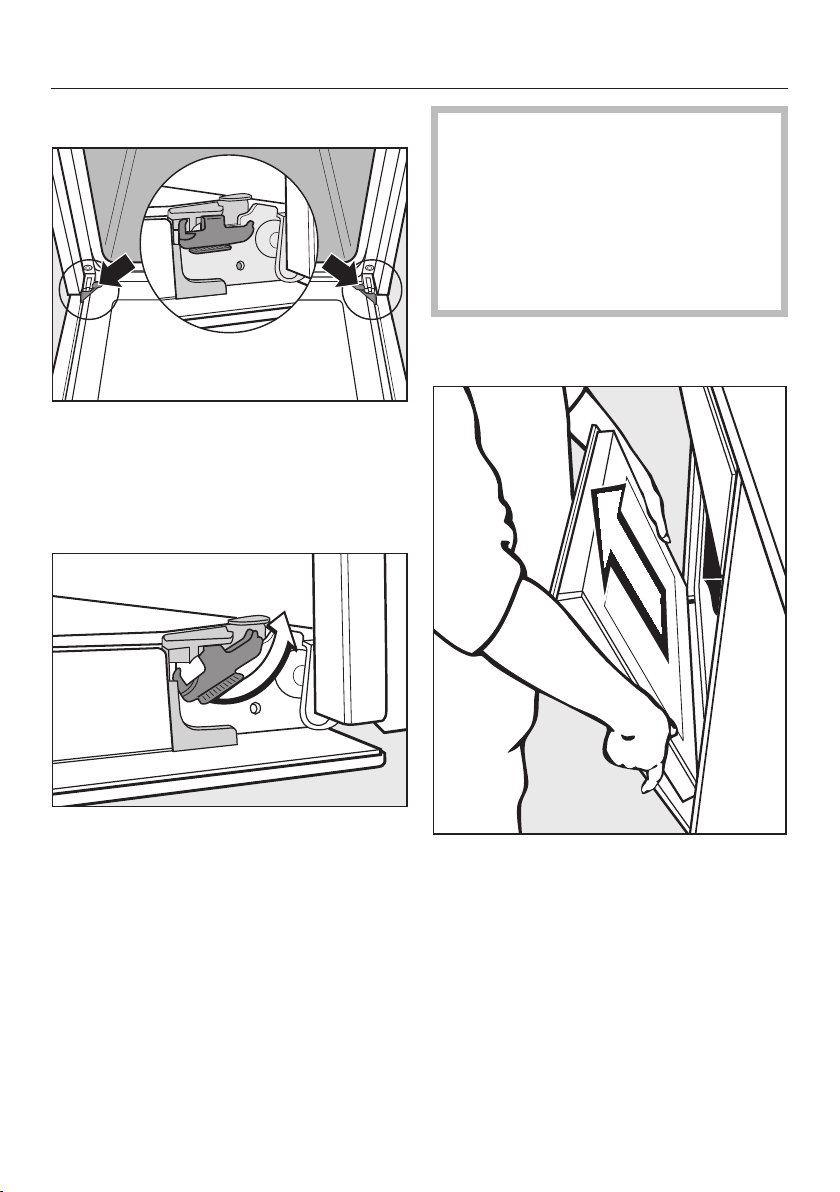
Cleaning and care
70
Removing the door
The door is connected with brackets on
each door hinge.
Befor
e the door can be removed the
hinges must first be unlocked.
Open the door fully
.
Release the locking clamps by
turning them as far as they will go.
Do not attempt to take the door off
the brackets when it is in the
horizontal position, the brackets will
spring back against the oven.
Do not use the handle to pull the
door off the brackets, the handle
could break.
Clo
se the door until it rests partially
open.
Ho
lding the door securely at both
sides, lift it straight upwards.
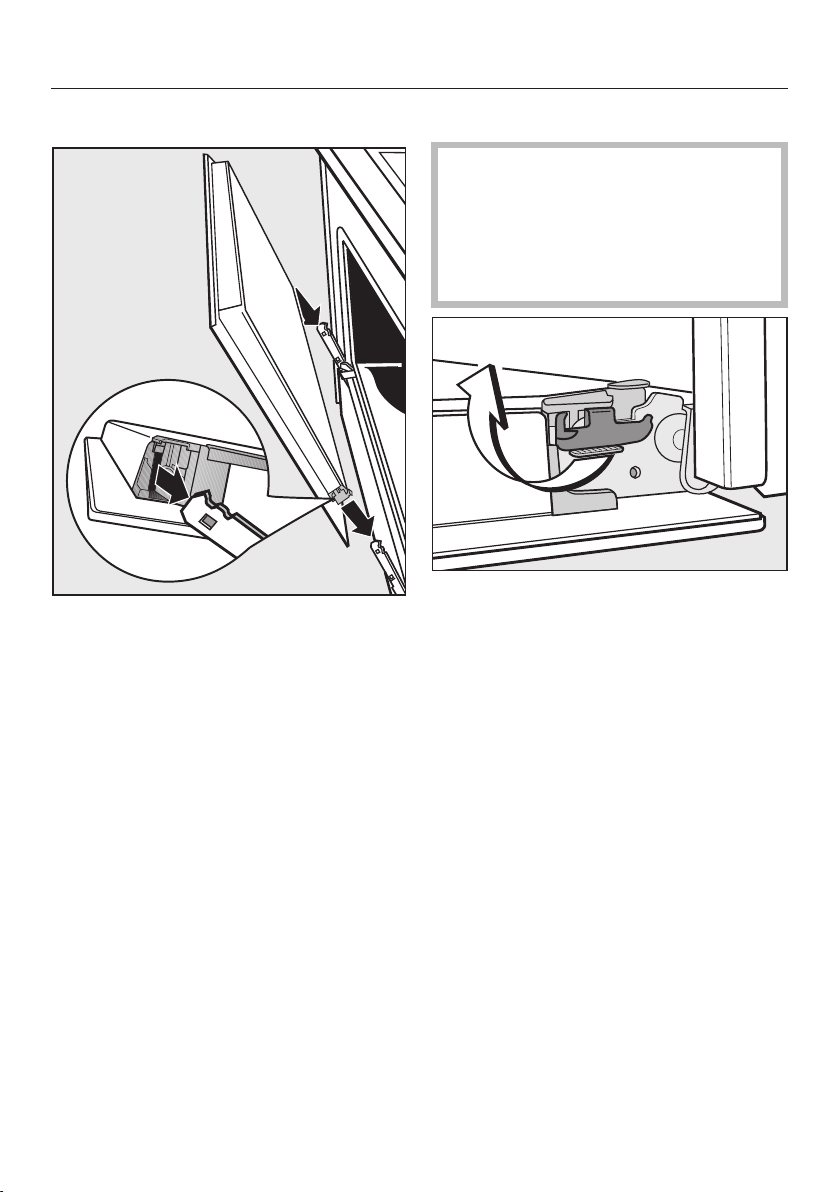
Cleaning and care
71
Reinstalling the door
Ho
ld both sides of the door securely
and carefully fit it onto the brackets of
the hinges.
Make sure that the door goes on
straight.
Open the door fully
.
If the locking clamps are not locked,
the door can easily become
detache
d from the brackets and be
damaged.
You must make sure that the locking
cla
mps are locked again.
T
o relock the locking clamps, turn
them back up to the horizontal
position as far as they will go.
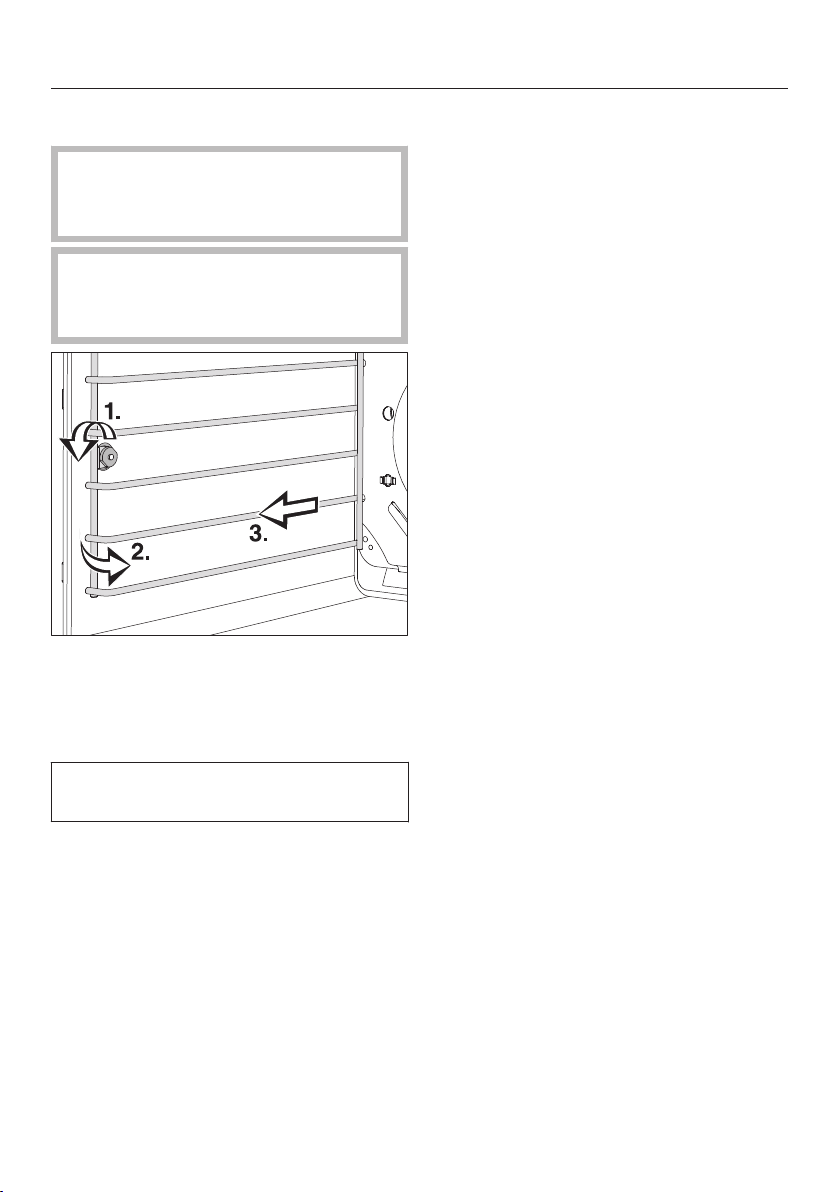
Cleaning and care
72
Removing the shelf runners
Dange
r of injury!
Do not use the oven without the
shelf runners correctly inserted.
Danger of burns! Mak
e sure the
heating elements are turned off and
that the oven cavity is cool.
L
oosen the screw (1.).
P
ull the runners out of the holder (2.)
at the front of the oven, and then pull
them out of the oven (3.).
The runners can be r
einstalled in the
reverse order.
Be sur
e that all parts are installed
correctly.

Frequently asked questions
73
The following faults can be corrected without contacting the Miele Service
Depar
tment. If in doubt, please contact Miele.
Danger of inj
ury! Repairs should only be carried out by a qualified and
trained professional in accordance with local and national safety regulations.
Unauthorized repairs could cause personal injury or machine damage.
Problem Possible cause and solution
This display is dark. The time of day display is deactivated, so when the
appliance is turned off, the time of day display is
turned off.
As soon as the oven is turned on, the time of day
w
ill appear. If you want it to be displayed
continuously, the setting to turn the time of day
display back on must be changed (see "Settings –
").
There is no power to the appliance.
Check if the cir
cuit breaker has tripped.
An oven mode has been
se
lected and the time of
day and the symbol
still appear in the
display.
The system lock is On.
T
urn off the system lock (see "System lock ").

Frequently asked questions
74
Problem Possible cause and solution
The oven does not heat
up.
Demo mode has been activated.
appears in the
display.
The oven can be operated but does not heat up.
Deac
tivate Demo mode (see "Settings – ").
An oven mode has been
se
lected but the oven is
not working.
There has been a power failure which has caused the
curr
ent cooking process to stop.
T
urn the mode selector to the • position and turn
the oven off. Start the cooking process again.
will appear in the
display with flashing
under :
The power supply was interrupted for longer than 200
hours.
Reset the time of day (
see "Before using for the
first time").
appears
unexpectedly in this
display and the
symbol flashes at the
same time. The buzzer
may also be sounding.
The oven has been operating for an unusually long
period of time, this has activated the "Safety cut-out
feature".
T
urn the mode selector to •. The oven is now
ready to use again immediately.
appears in the
display
.
The Self Clean program door lock is not locking.
T
urn the mode selector to the Self Clean program
• again.
If the problem persists, contact Miele Technical
Service.
appears in the
display
.
The door lock for the Self Clean program will not
deacti
vate.
T
urn the mode selector to the • position and turn
the oven off. If the problem persists, contact Miele
Technical Service.
appears in the
display
.
A fault has occurred that you cannot resolve.
Co
ntact Miele Technical Service.
A noise is heard after
the cooking
process is
complete.
The cooling fan has turned on.
When the temperature in the oven has fallen
sufficiently the
cooling fan will turn off automatically.
The oven has turned
itself off.
The oven turns off automatically if a button is not
pr
essed after a certain amount of time or after a
cooking program has ended to save power.
Turn the oven back on.

Frequently asked questions
75
Problem Possible cause and solution
Baked goods are not
cook
ed properly after
following the times
given in the chart.
A different temperature than that given in the recipe
was used.
Sel
ect the temperature required for the recipe.
The ingredient quantities are different from those
given
in the recipe.
Double che
ck the recipe. The addition of more
liquid or more eggs will make a wetter mixture
which will take longer to cook.
The browning is
uneven.
The wrong temperature or shelf level was selected.
Ther
e will always be a slight unevenness. If the
unevenness is great, check whether the correct
temperature and shelf level were selected.
The material or color of the bakeware is not suitable
for the oven mo
de selected.
When using
Surround use matte, dark colored
pans. Light colored, shiny pans will not produce
as desirable results.
The oven lighting turns
off a
fter a short time.
The oven is facotry set to turn off automatically after
15 seconds. This setting can be changed (see
"Settings").
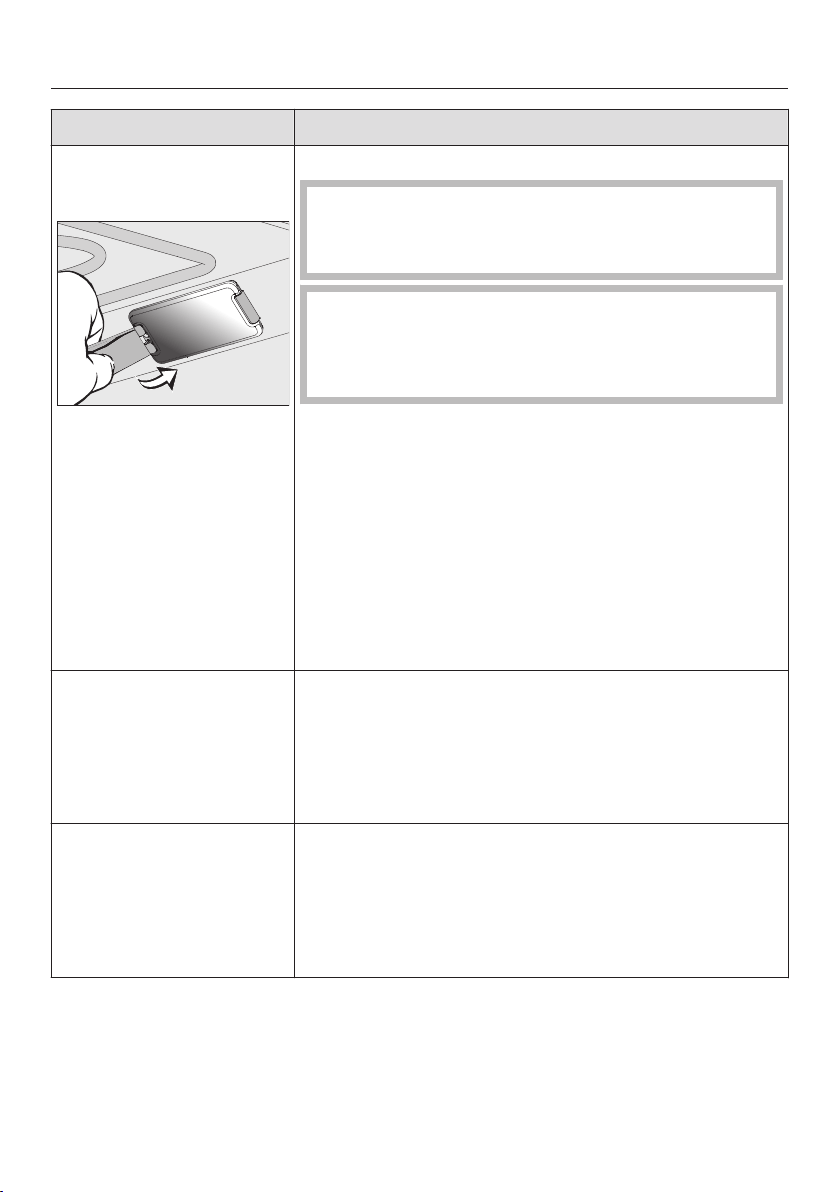
Frequently asked questions
76
Problem Possible cause and solution
The oven lighting does
not turn on.
The halogen bulb needs to be replaced.
Danger of burns!
Make sure the heating elements are turned off and
all
owed to cool completely.
The lamp cover may be damaged if it falls.
When removing the cover hold it firmly so that it
does no
t fall. Place a towel on the oven floor and
open door to avoid damage.
Discon
nect the appliance from the power supply.
L
oosen the bulb cover with the tool supplied at the
back of the frame.
Do not t
ouch the halogen bulb with bare fingers.
Observe the manufacturer's instructions.
Remove the halogen bulb.
Replace it with a new halogen bulb (Sylvania
66740, 120 V, 40 W, G9, FS1).
P
ress the bulb cover back into place.
Recon
nect the oven to the electrical supply.
There is soiling in the
over aft
er the Self Clean
program.
The Self Clean program burns off soiling in the oven
and leaves it as ash.
Using
a soft sponge, warm water and liquid dish
soap remove the ashes.
If coarse soiling remains, start the Self Clean
program again with a longer duration.
The oven door cannot
be closed.
As soon as the inner pane is damaged, a safety
mecha
nism blocks the oven door. The oven door
cannot be closed and the oven functions (oven
modes, special modes and self clean) cannot be
used.
Contac
t the Miele Service Department.

Frequently asked questions
77
Problem Possible cause and solution
The rack and other
acc
essories make a
noise when being
pushed into or pulled
out of the oven.
The heat resistant surface of the shelf runners creates
fri
ction when accessories are taken in and out of the
oven.
To reduce the friction, lubricate the runners with a
few drops of cooking oil applied with a paper
towel. Repeat this process after each Self Clean
program.

Technical Service
78
After sales service
In the event of a fault which you cannot
easil
y correct yourself, please contact:
– your Miele dealer, or
– the Miele Technical Service
Department.
See back cover for contact details.
Please quote the model and serial
number of your appliance when
contacting Miele.
This information is given on the data
plat
e, visible on the front frame of the
oven, with the door fully open.
Warranty
For further information, please refer to
your warr
anty booklet.

Caring for the environment
79
Disposal of the packing
mat
erial
The cardboard box and packing
mat
erials protect the appliance during
shipping. They have been designed to
be biodegradable and recyclable.
Ensure that any plastic wrappings,
bag
s, etc. are disposed of safely and
kept out of the reach of children.
Danger of suffocation!
Disposal of your old appliance
Old electrical and electronic appliances
oft
en still contain valuable materials.
However, they also contain harmful
substances that were essential for the
proper functioning and safe use of the
equipment. Handling these materials
improperly or disposing of them in your
household waste can be harmful to
your health and the environment.
Therefore, please do not dispose of
your old appliance with regular
household waste.
Old appliances may contain materials
that can be recycled. Please contact
your local recycling authority about the
possibility of recycling these materials.
Please be sure that your old appliance
do
es not pose a danger to children
while being stored for disposal.

Electrical connection
80
C
AUTION:
Before servicing, disconnect the
power supply b
y either removing the
fuse, shutting off the power main or
manually "tripping" the circuit
breaker.
Installation, repair and maintenance
work must be per
formed by a Miele
authorized service technician. Work
by unqualified persons could be
dangerous and may void the
warranty.
Before connecting the appliance to
the power supply, mak
e sure that the
voltage and frequency listed on the
data plate correspond with the
household electrical supply. This
data must correspond to prevent
machine damage. Consult an
electrician if in doubt.
Only operate the appliance after it
has been in
stalled into cabinetry.
The plug must be inserted into a
suitable outlet that has been
in
stalled and grounded in
compliance with all applicable local
regulations.
WARNING: THIS APPLIANCE MUST
BE GROUNDED
Installer: Please pass these
instructions
on to the customer.
Electrical connection
The oven is equipped with a power
cor
d approx. 5' 6" (1.7 m) in length with
a NEMA 14-30 P plug ready for
connection to the power supply:
– 120/208 V, 30 A, 60 Hz
or
– 120/240 V, 30 A, 60 Hz
The voltage can be adjusted (see
"Settings - ").
SAVE THESE INSTRUCTIONS FOR
THE ELEC
TRICAL INSPECTOR'S
USE.
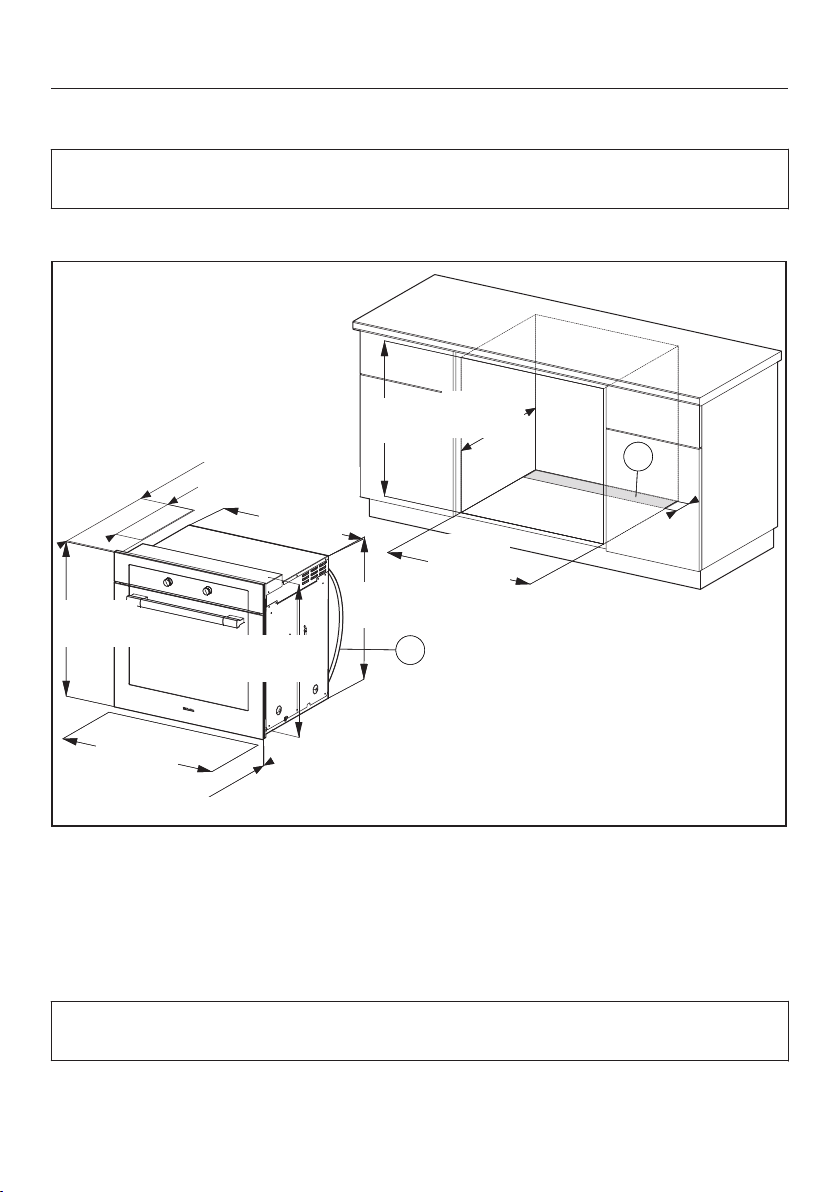
Installation diagrams
81
Appliance and cut-out dimensions
Miele ovens can be installed flush or proud. Discuss your installation
r
equirements with your architect, designer and installer.
Undercounter installation
BB
23 3/4" (603 mm)
16 15/16" (430 mm)
28 7/16"
(722 mm)
26 3/8"
(670 mm)
27 13/16"
(707 mm)
7/8" (22*/23** mm)
29 13/16"
(757 mm)
28 5/8"
(727 mm)
28 1/4"
(718 mm)
28 1/2"
(724 mm)
24"
(610 mm)
4"
(100 mm)
AA
Cut-out (4" x 28" / 100 mm x 720 mm) in the bottom of the cabinet for power
co
rd and ventilation
Power cord with plug
* Oven with glass front
** Oven with metal front
Depending on the model, the oven front may differ from the one shown the
dr
awing. Current specifications can be found on the Miele website.
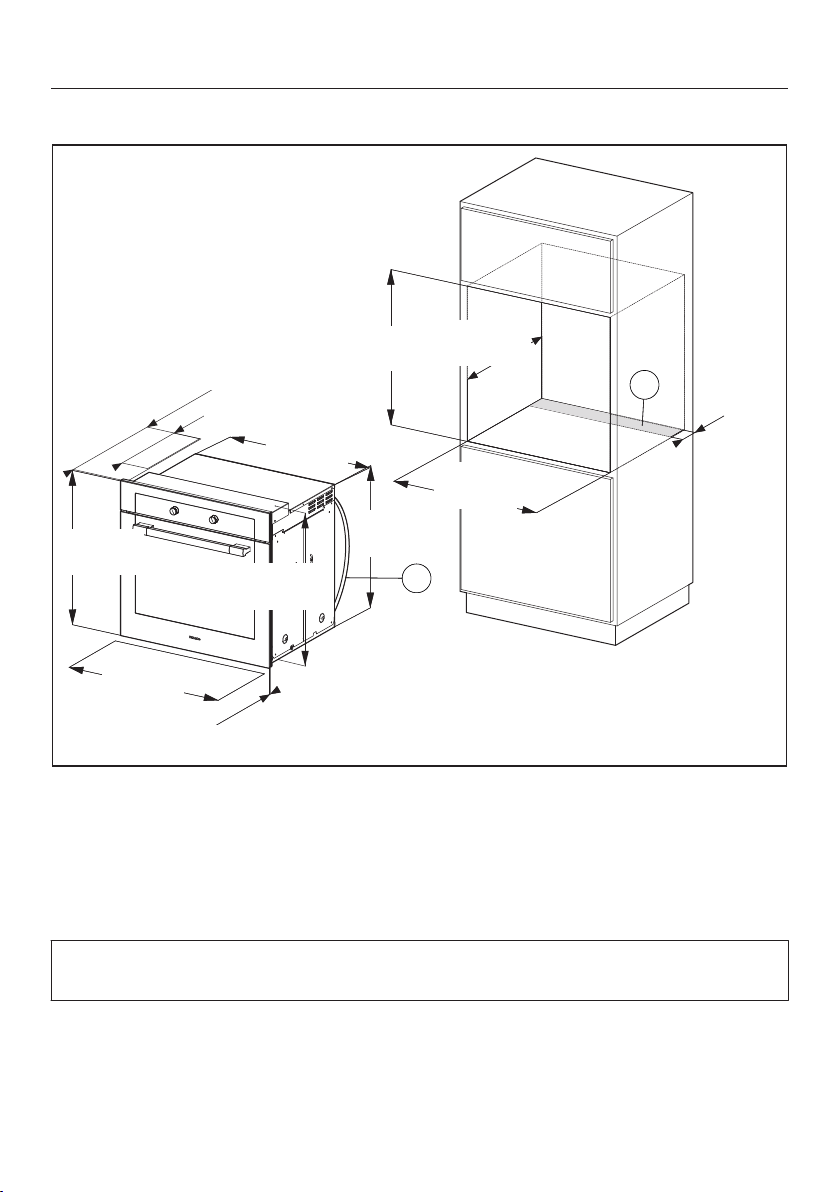
Installation diagrams
82
Installation into a tall cabinet
BB
23 3/4" (603 mm)
16 15/16" (430 mm)
28 7/16"
(722 mm)
26 3/8"
(670 mm)
27 13/16"
(707 mm)
7/8" (22*/23** mm)
29 13/16"
(757 mm)
28 5/8"
(727 mm)
28 1/4"
(718 mm)
28 1/2"
(724 mm)
24"
(610 mm)
AA
4"
(100 mm)
Cut-out (4" x 28" / 100 mm x 720 mm) in the bottom of the cabinet for power
cor
d and ventilation
Power cord with plug
* Oven with glass front
** Oven with metal front
Depending on the model, the oven front may differ from the one shown the
dr
awing. Current specifications can be found on the Miele website.
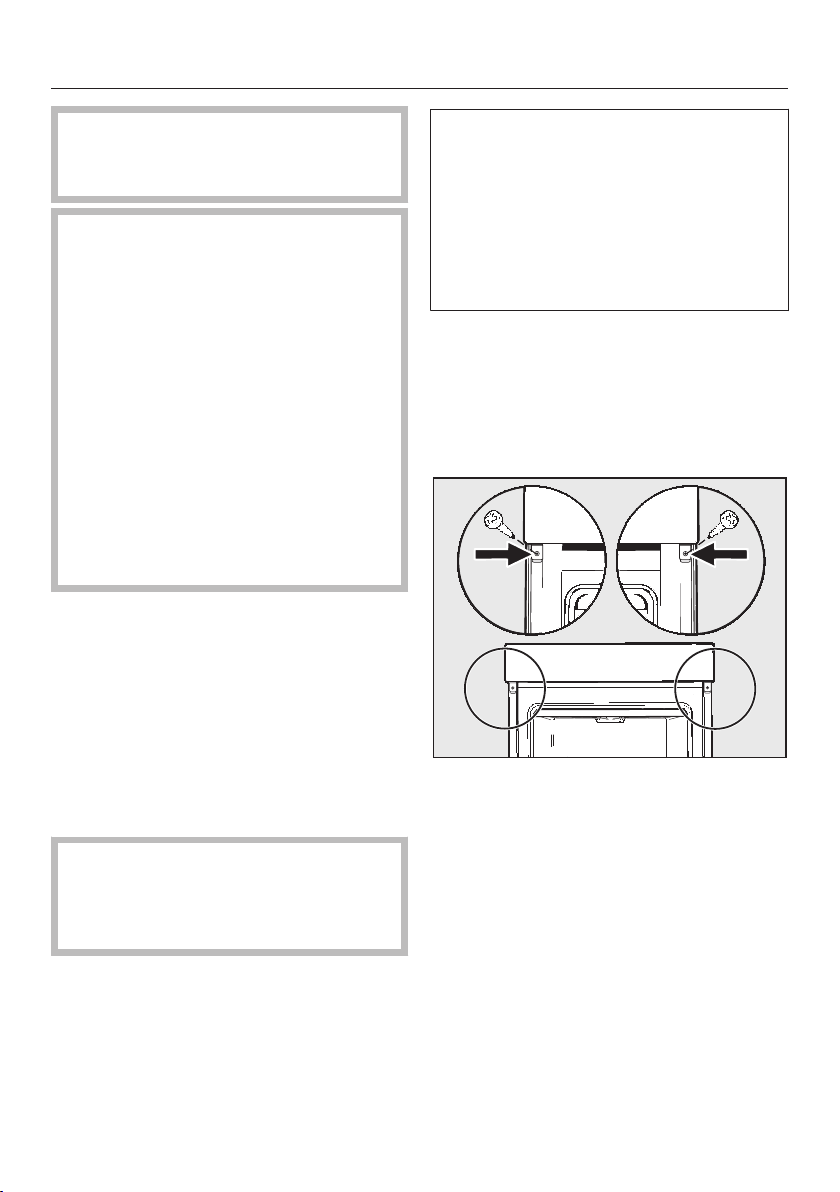
Installing the oven
83
The oven must no
t be operated
until it has been properly installed
within cabinetry.
The oven must have an adequate
supply of cool
air for proper
operation. The required air must not
be heated excessively by other heat
sources, e.g. wood burning stove.
Observe the following when
installing:
Build into cabinetry with no back
wall.
Make sure that the shelf that the
applianc
e sits on does not touch the
wall.
Do not install insulation strops on the
side walls of the cabinet housing.
Before installation
Before connecting the oven to the
power supply, first disconnect the
power supply from the oven isolator
switch.
Installing the oven
Co
nnect the power cord to the
electrical supply.
Do not carry the oven by the door
handle. The door can be damaged.
Use the handles on each side of the
ove
n to carry it.
It is recommended that you remove
the door befor
e installing the
appliance (see "Cleaning and Care -
Removing the door") and all oven
accessories from the cavity. This will
make for easier installation into the
niche and will not tempt you to use
the handle to carry it.
Remo
ve the side handles, if any.
P
ush the oven into the cabinetry and
align it.
Open the door (if it
was not removed
previously).
Use the supplied scr
ews to secure
the oven to the side walls of the
cabinetry through the holes in the
trim.
Rein
stall the door, if necessary (see
"Cleaning and care - Installing the
door").



9 Independence Way
Princeton, NJ 08540
Phone:
Fax:
www.mieleusa.com
U.S.A.
Miele, Inc.
National Headquarters
Please have the model and serial number
of your appliance available before
contacting Technical Service.
Canada
Importer
Miele Limited
Headquarters and Miele Centre
800-843-7231
609-419-4298
Technical Service & Support
Nationwide
Phone:
Fax:
161 Four Valley Drive
Vaughan, ON L4K 4V8
www.miele.ca
800-999-1360
888-586-8056
Customer Care Centre
Phone:
800-565-6435
905-532-2272
Germany
Manufacturer
Miele & Cie. KG
Carl-Miele-Straße 29
33332 Gütersloh
84

M.-Nr. 09 786 760 / 04en – US, CA
H6180BP; H6280BP