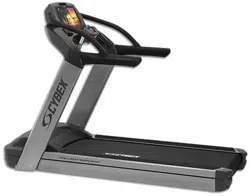
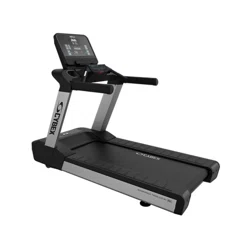
Cybex 525T Treadmill
Owner's Manual
Cardiovascular Systems
Part Number LT-24018-4 H
www.cybexintl.com

Table of Contents
Safety
Safety Guidelines and Practices.........................4
Power Cord Information......................................4
Voltage Information.............................................5
Important Safety Instructions..............................5
Warnings and Cautions......................................7
Label Placement.................................................8
Emergency Stop Key (e-stop)............................9
Assembly
Specifications - 525T........................................11
Choosing and Preparing a Site.........................12
Environment.....................................................13
Electrical Power Requirements........................13
Verify parts list shown below............................13
Tools Required..................................................15
Assembly Procedure........................................16
Setup................................................................26
A/V Configuration and FM Radio Presets.........29
E3 View Monitor Controls.................................34
E3 View Monitor Setup.....................................34
Testing Operation.............................................45
Operation
Intended Use....................................................47
Terms Used......................................................47
User Control Symbols Used.............................47
Console Display................................................48
User Controls....................................................49
Quick Operation Guide.....................................50
Detailed Operation Guide.................................50
Stopping the Treadmill......................................52
Safety Sentry....................................................52
Workout Selection............................................53
Data Readouts..................................................54
Heart Rate Indicator.........................................54
Meaning of % Grade.........................................55
E3 View Monitor Screen Options......................55
iPod/iPhone/iPad Functions.............................56
Maintenance
Warnings...........................................................57
Clean Unit.........................................................57
Vacuum Motor Bay...........................................58
Running Belt.....................................................60
Other Maintenance...........................................62
E3 View Monitor................................................63
Service Wheel (optional)..................................63
Service Schedule..............................................65
Customer Service
Product Registration.........................................67
Contacting Service...........................................67
Ordering Parts..................................................67
Return Material Authorization (RMA)................68
Damaged Parts.................................................68
Appendix - Workout Overviews
1 - Weight Loss.................................................69
2 - Rolling Hills..................................................70
3 - Hills..............................................................71
4 - Pikes Peak..................................................72
5 - Hill Interval 1:1.............................................73
6 - Hill Interval 1:2.............................................74
7 - Hill Interval 1:3.............................................75
8 - Cardio..........................................................76
9 - Heartrate Control (E3 View Monitor
Option).........................................................77
Cybex
®
and the Cybex logo are registered trademarks of Cybex International, Inc. Polar
®
is a registered trademark of Polar Electro Inc. iPod,
iPhone, and iPad are trademarks of Apple Inc., registered in the U.S. and other countries. Safety Sentry
™
is a registered trademark of Cybex
International, Inc.
DISCLAIMER: Cybex International, Inc. makes no representations or warranties regarding the contents of this manual. We reserve the right to
revise this document at any time or to make changes to the product described within it without notice or obligation to notify any person of such
revisions or changes.
©
Copyright 2015, Cybex International, Inc.
10 Trotter Drive, Medway, MA 02053 • 888-462-9239 • 508-533-4300 • FAX 508-533-5183
www.cybexintl.com • LT-24018-4 H • September 2015
Page 2 of 79
Cybex 525T Treadmill Part Number LT-24018-4 H

FCC Compliance Information
Changes or modifications to this unit not expressly approved by the party responsible for compliance
could void the user’s authority to operate the equipment.
This equipment has been tested and found to comply with the limits for a Class A digital device, pursuant
to part 15 of the FCC Rules. These limits are designed to provide reasonable protection against harmful
interference when the equipment is operated in a commercial environment. This equipment generates,
uses, and can radiate radio frequency energy and, if not installed and used in accordance with the
instruction manual, may cause harmful interference to radio communications. Operation of this equipment
in a residential area is likely to cause harmful interference in which case the user will be required to
correct the interference at his own expense.
Modifications not expressly approved by the manufacturer could void the user’s authority to operate the
equipment under FCC rules.
Page 3 of 79
Cybex 525T Treadmill Part Number LT-24018-4 H
Safety
Safety Guidelines and Practices
Read the Owner’s Manual carefully before assembling, servicing, or using the equipment. Owner
must comply with all safety guidelines in this manual. It is also the owner’s responsibility to instruct
users on the safe and proper operation of the equipment and to properly display any and all
warning labels and instructional placards. All users should read these labels and placards before
using equipment.
Serious injury or death could occur if the following safety precautions and
instructions are not followed.
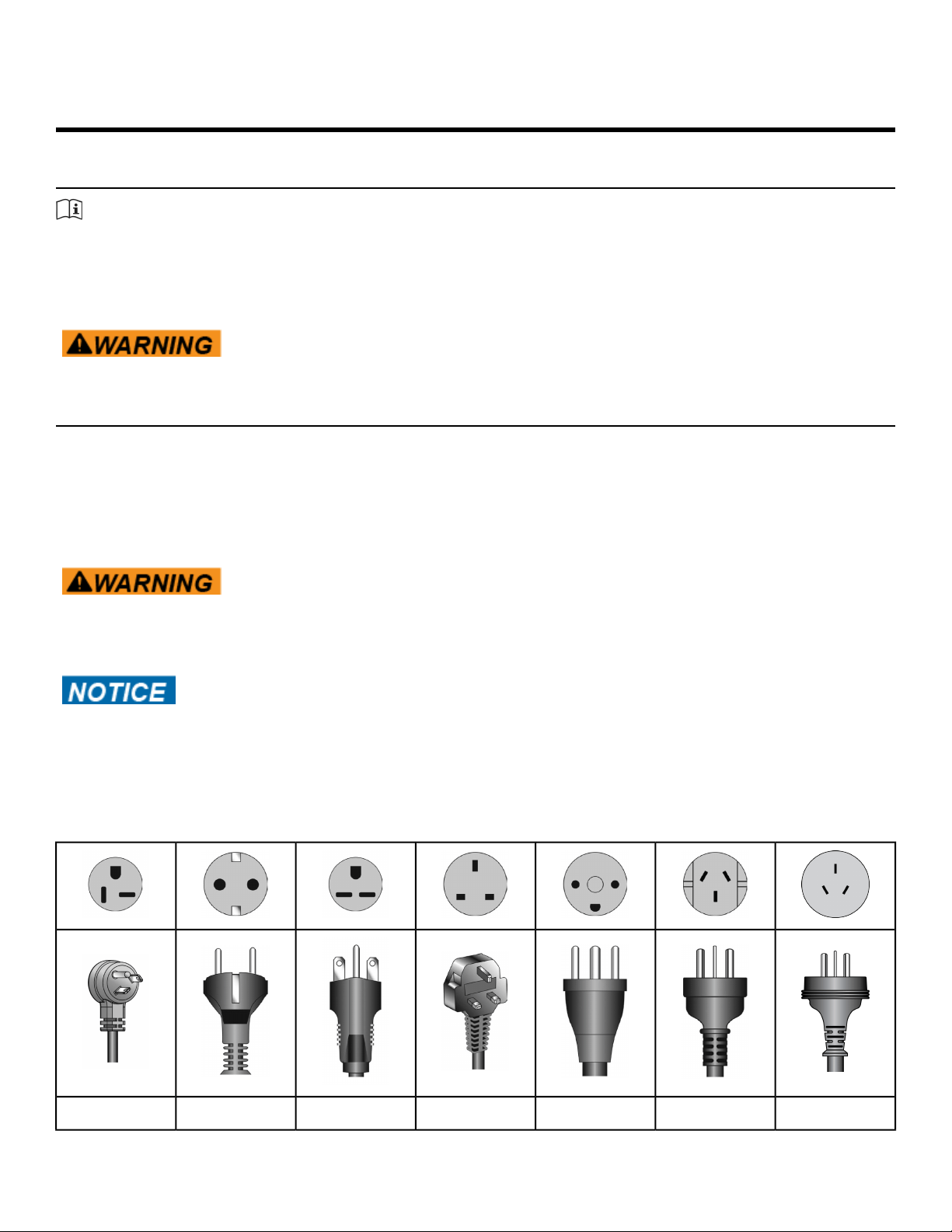
Power Cord Information
This treadmill must be grounded. If it should malfunction or break down, grounding provides a path of
least resistance for electric current to reduce the risk of electric shock. This product is equipped with a
cord having an equipment-grounding conductor and a grounding plug. The plug must be plugged into
an appropriate outlet that is properly installed and grounded in accordance with all local codes and
ordinances.
Shock and electrocution hazard.
• Connect unit to a grounded outlet.
• Do not use voltage adapter or extension cord.
Cybex is not responsible for injuries or damages as a result of cord or plug
modification.
• Verify voltage requirements of unit match local voltage requirements.
• Verify unit outlet is the same configuration as the plug.
Power cord configurations
ChineseAustraliaDanishUK 230 VAC220 VACEuro Plug115 VAC
Page 4 of 79
Cybex 525T Treadmill Part Number LT-24018-4 H
GB 2099-1
and GB
1002-1
AS/NZS 3112107-2-D1BS 1363NEMA 6-15CEE 7/7NEMA 5-20
Voltage Information
Before plugging the power cord into an electrical outlet, verify that the voltage requirements for the site
match the voltage of the treadmill that has been received. The power requirements for the unit include
a grounded, dedicated circuit, rated for one of the following:
• 100 VAC, 50/60 Hz, 20A
• 115 VAC, 50/60 Hz, 20A
• 208 VAC, 60 Hz, 15A
• 220 VAC, 60 Hz, 15A
• 230 VAC, 50 Hz, 13A, UK
See the front warning decal for the voltage requirements of the treadmill.
Important Safety Instructions
(Save These Instructions)
Shock and electrocution hazard.
• Unplug unit and let sit 10 minutes before cleaning or performing
maintenance.
• Electrical charge can remain in unit after unplugging.
• Keep water and liquids away from electrical parts.
User Safety Precautions
Prior to use:
• Obtain a medical exam before beginning any exercise program.
• Obtain instruction before using.
•
Read and understand warning labels.
• Read and understand emergency stop procedures.
• Maximum user weight is 350 lbs. (158 kg).
• Inspect unit. If damaged, notify floor staff. DO NOT USE.
• Place your feet on the two top steps when starting or stopping the treadmill.
• Clip E-STOP lanyard to clothing.
• Do not remove this label. Replace if damaged or illegible.
During use
• Do not use for stretching and do not attach straps or other devices.
• Do not allow children 12 or younger to be on or near machine.
• Stop exercise if feeling faint, dizzy, or have pain.
• Use the handrails for support and to maintain balance.
Page 5 of 79
Cybex 525T Treadmill Part Number LT-24018-4 H

• Keep all body parts, clothing, and accessories, clear of moving parts.
• Wait until running belt comes to a complete stop before getting off.
Facility Safety Precautions
• Instruct all users on how to clip the e-stop clip onto their clothing and carefully test it prior to using
the treadmill.
• Instruct all users to use caution when mounting and dismounting the treadmill.
• Use a dedicated line when operating the treadmill. A dedicated line requires one circuit breaker per
unit.
• Connect the treadmill to a properly grounded outlet only.
• DO NOT operate electrically powered treadmills in damp or wet locations.
• Keep the running belt clean and dry at all times.
• DO NOT leave the treadmill unattended when plugged in and running.
Note: Before leaving the treadmill unattended, always wait until the treadmill comes to a
complete stop and is level. Then, turn all controls to the STOP or OFF position and remove the
plug from the outlet. Remove the e-stop key from the treadmill.
• Immobilize the treadmill (when not in use) by removing the e-stop key.
• Inspect the treadmill for worn or loose components before each use. Do not use until worn or damaged
parts are replaced.
• Stop and place the treadmill at 0 degrees incline (level) after each use.
• Maintain and replace worn parts regularly. Refer to “Preventive Maintenance” section of Owner’s
Manual.
• DO NOT operate the treadmill if: (1) the cord is damaged; (2) the treadmill is not working properly or
(3) if the treadmill has been dropped or damaged. Seek service from a qualified technician.
• DO NOT place the cord near heated surfaces or sharp edges.
• DO NOT use the treadmill outdoors.
• DO NOT operate the treadmill around or where aerosol (spray) or where oxygen products are being
used.
• Read and understand the Owner’s Manual completely before using the treadmill.
• Ensure all users wear proper footwear on or around all Cybex equipment.
• Set up and operate the treadmill on a solid, level surface. Do not operate in recessed areas or on
plush carpet.
• Provide the following clearances: 19.7 inches (0.5 m) at each side, 79 inches (2.0 m) at the back and
enough room for safe access and passage at the front of the treadmill. Be sure your treadmill is clear
of walls, equipment and other hard surfaces.
• Disconnect power before servicing.
• DO NOT attempt repairs, electrical or mechanical.
Seek qualified repair personnel when servicing. If you live in the USA, contact Cybex Customer
Service at 888-462-9239. If you live outside the USA, contact Cybex Customer Service at
508-533-4300.
• Use Cybex factory parts when replacing parts on the treadmill.
• DO NOT modify the treadmill in any way.
• DO NOT use attachments unless recommended for the treadmill by Cybex.
• Ensure all User and Facility Safety Precautions are observed.
Page 6 of 79
Cybex 525T Treadmill Part Number LT-24018-4 H
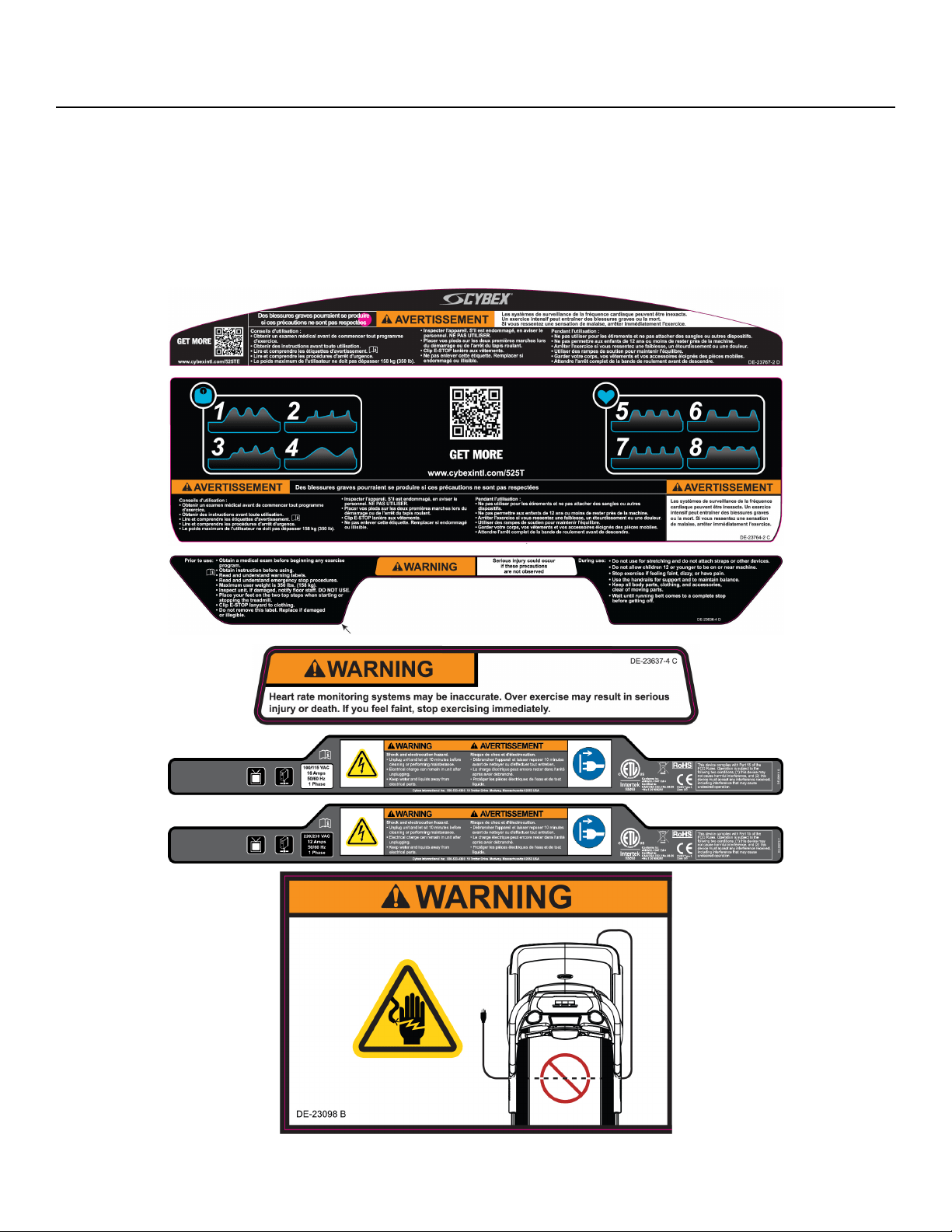
Warnings and Cautions
Warning labels indicate a potentially hazardous situation that could result in serious injury or death if
the precautions are not observed.
Caution labels indicate a potentially hazardous situation that could result in serious injury or damage to
machine if the precautions are not observed.
See Contacting Service to replace any worn or damaged labels.
Page 7 of 79
Cybex 525T Treadmill Part Number LT-24018-4 H
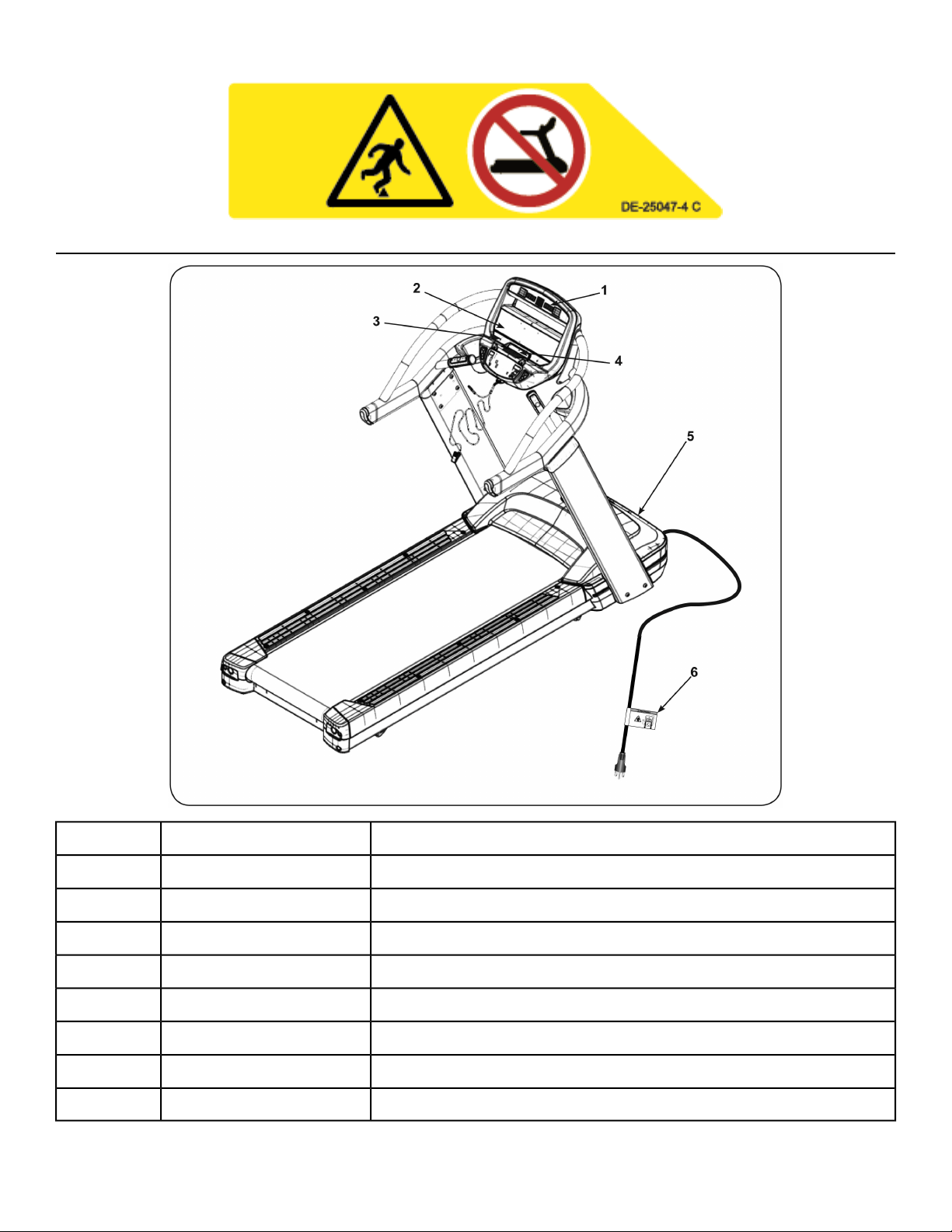
Label Placement
Decal, Warning, Upper Display, E3 View MonitorDE-237671
Decal, Warning, Upper Display, E3 View Monitor, CanadaDE-23767-21
Decal, CenterDE-23764-42
Decal, Center, CanadaDE-23764-22
Decal, Warning, MainDE-23636-X3
Decal, WarningDE-23637-X4
Decal, Motor Cover, 115 VACDE-229105
Decal, Motor Cover, 230 VACDE-230795
Decal, Power CordDE-230986
Page 8 of 79
Cybex 525T Treadmill Part Number LT-24018-4 H
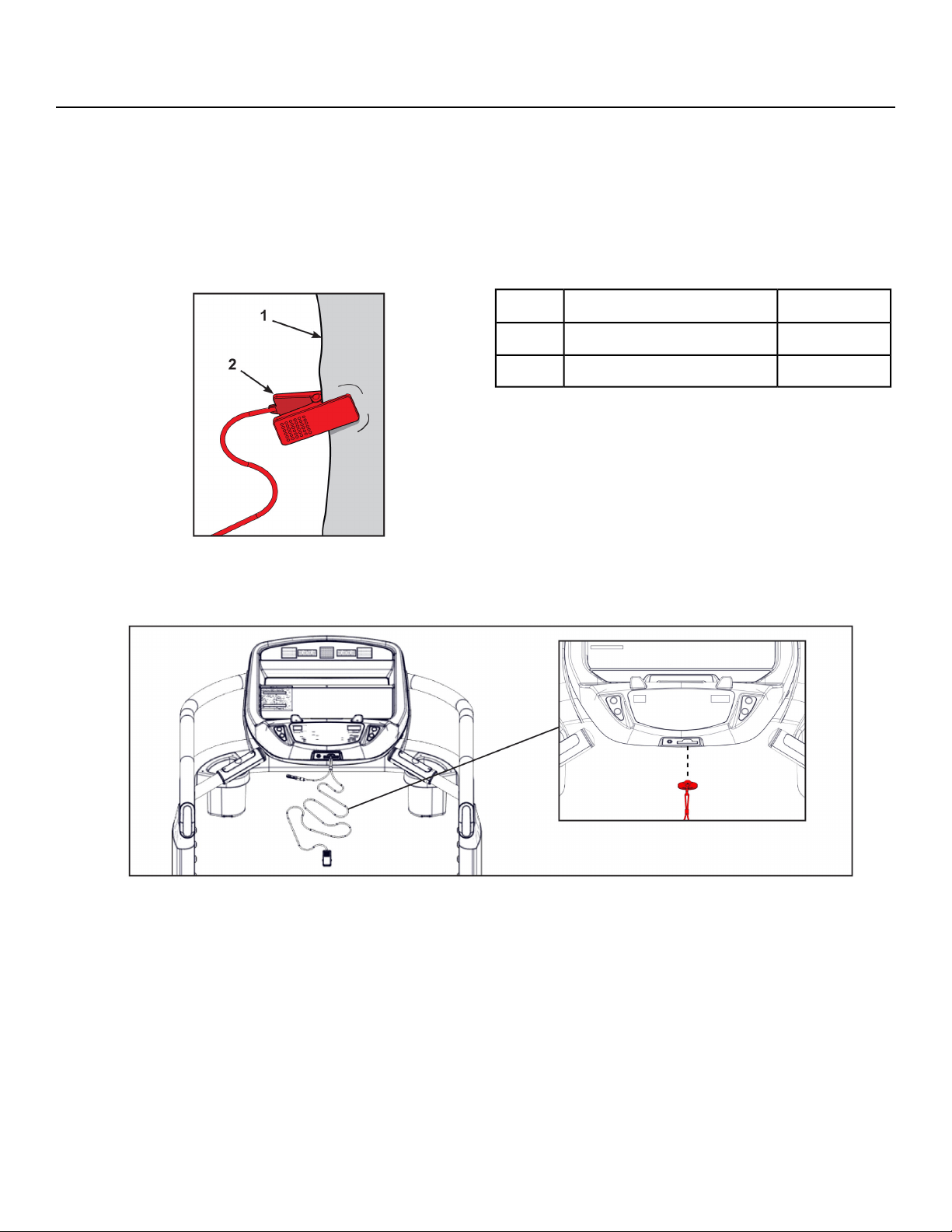
Emergency Stop Key (e-stop)
The e-stop key functions as an emergency stop. In an emergency situation, the e-stop key disengages
from the console and the treadmill will come to a stop. Before using the treadmill, clip the e-stop key as
described below.
1. Compress the spring and clip the e-stop clamp to your clothing.
Ensure the clip engages enough clothing so it does not fall off in an emergency situation. Be sure
the string is free of knots and has enough slack for you to workout comfortably with the e-stop key
in place.
Qty.Description
1Clothing1
1Clip2
2. Without falling off the treadmill, carefully step backward until the e-stop pulls out of the console.
If the e-stop clip falls off your clothing then the test has failed. Reclip the e-stop clip to your clothing
and repeat this step.
3. Replace the e-stop key.
4. The treadmill is now ready to be used. Ensure the e-stop clip is secured to your clothing at all times
during use.
Page 9 of 79
Cybex 525T Treadmill Part Number LT-24018-4 H
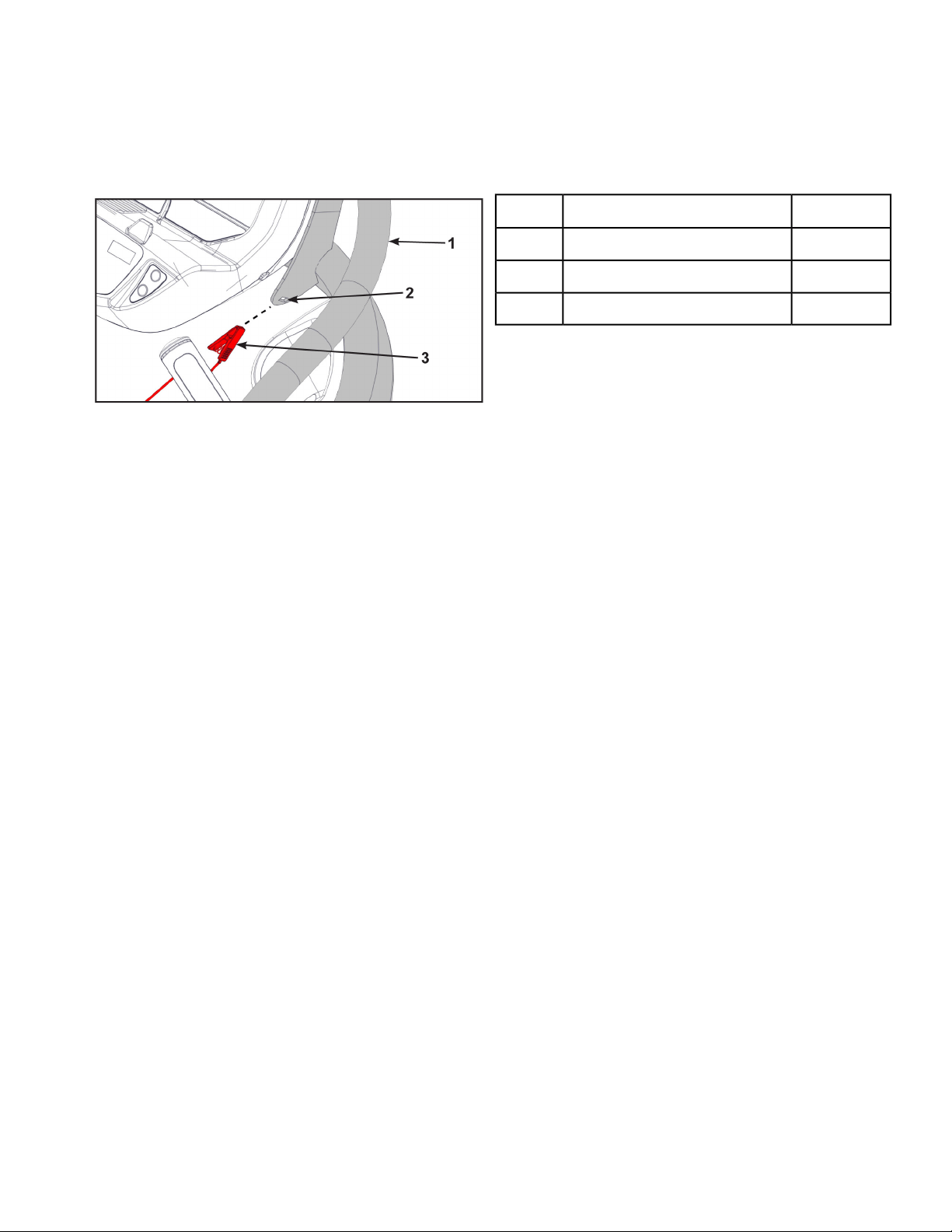
5. After use, remove the e-stop key from the treadmill.
The e-stop key can be removed to help prevent unauthorized use. Refer to the Stopping the Treadmill
section in the Operation chapter for more information about the e-stop key.
When not in use store the e-stop clip on the storage tab located on the left or right side of the handrail.
Qty.Description
1Handrail1
2Storage tab2
1E-Stop clip3
Page 10 of 79
Cybex 525T Treadmill Part Number LT-24018-4 H
Assembly
Specifications - 525T
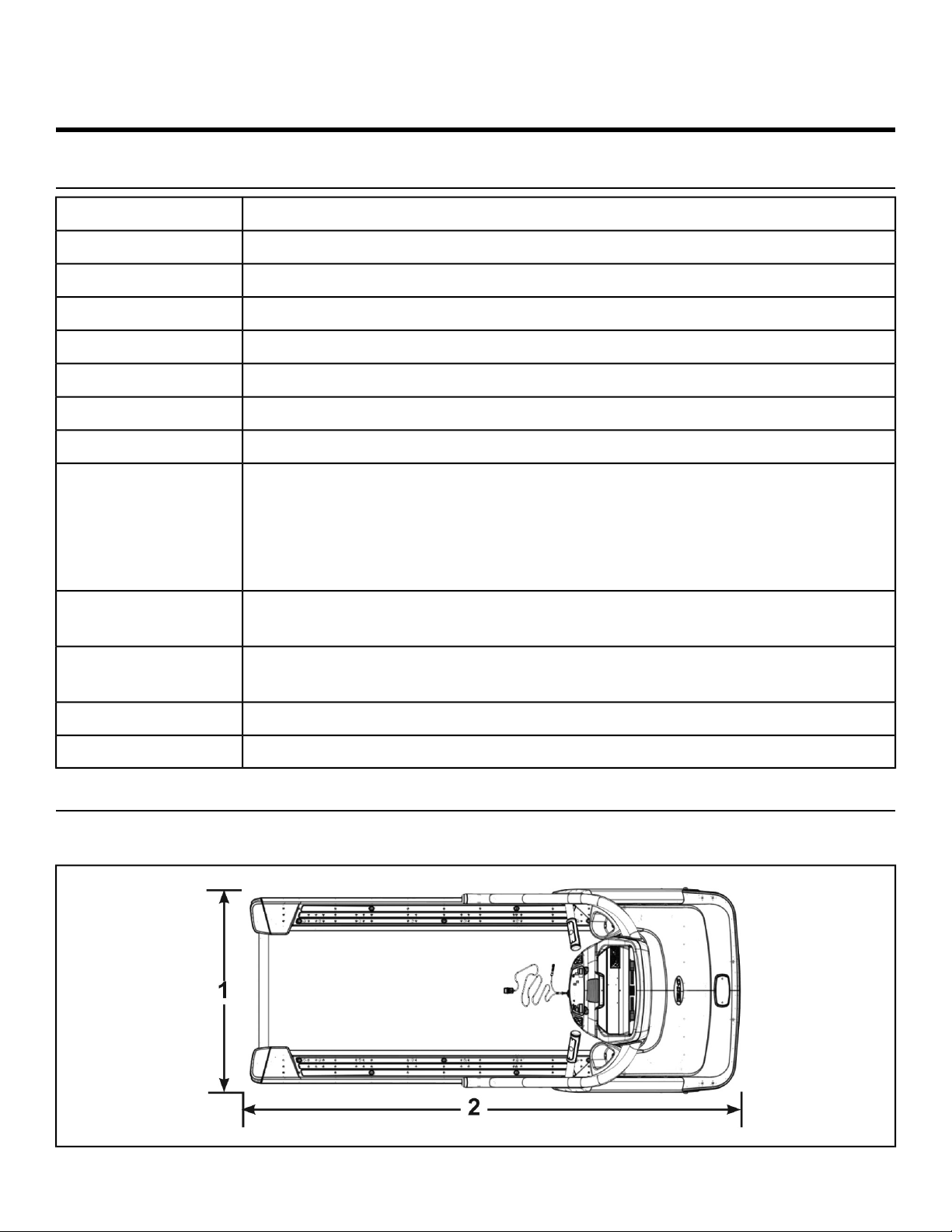
82” (208.3 cm)Assembled Length
34” (86.4 cm)Assembled Width
62.5”(159 cm)Assembled Height
400 lbs. (181 kg)Weight of Product
440 lbs. (200 kg)Shipping Weight
0-15 % gradeIncline Levels
0.5 to 12.4 mph (0.8 to 20.0 kph) in 0.1 mph or 0.1 kph incrementsSpeed Range
Quick Start and eight workoutsWorkouts
Upper console: LED or E3 View Monitor (Embedded Personal Entertainment
Monitor).
Displays - BPM, Calories, Cal/Hr, Distance, Time, and Weight.
Lower console: Two numeric displays for incline and speed. Accessory trays
and water bottle holder.
Console Features
Built-in 5 KHz wireless heart rate receiver (transmitter not included) and contact
heart rate monitoring.
Heart Rate Features
350 lbs. (158 kg)
Maximum User
Weight
115 VAC 50/60 Hz. or 220/230 VAC 50/60 Hz.Power Rating
E3 View Monitor, Wireless audio receiver, iPod/iPhone/iPad compatibility.Options
Top View 525T
Dimensions
Page 11 of 79
Cybex 525T Treadmill Part Number LT-24018-4 H
34” (86 cm)
1
82” (208 cm)2
Choosing and Preparing a Site
Before assembling the unit, verify the chosen site meets the following criteria:
• Area is well lit and well ventilated.
• Surface is structurally sound and properly leveled.
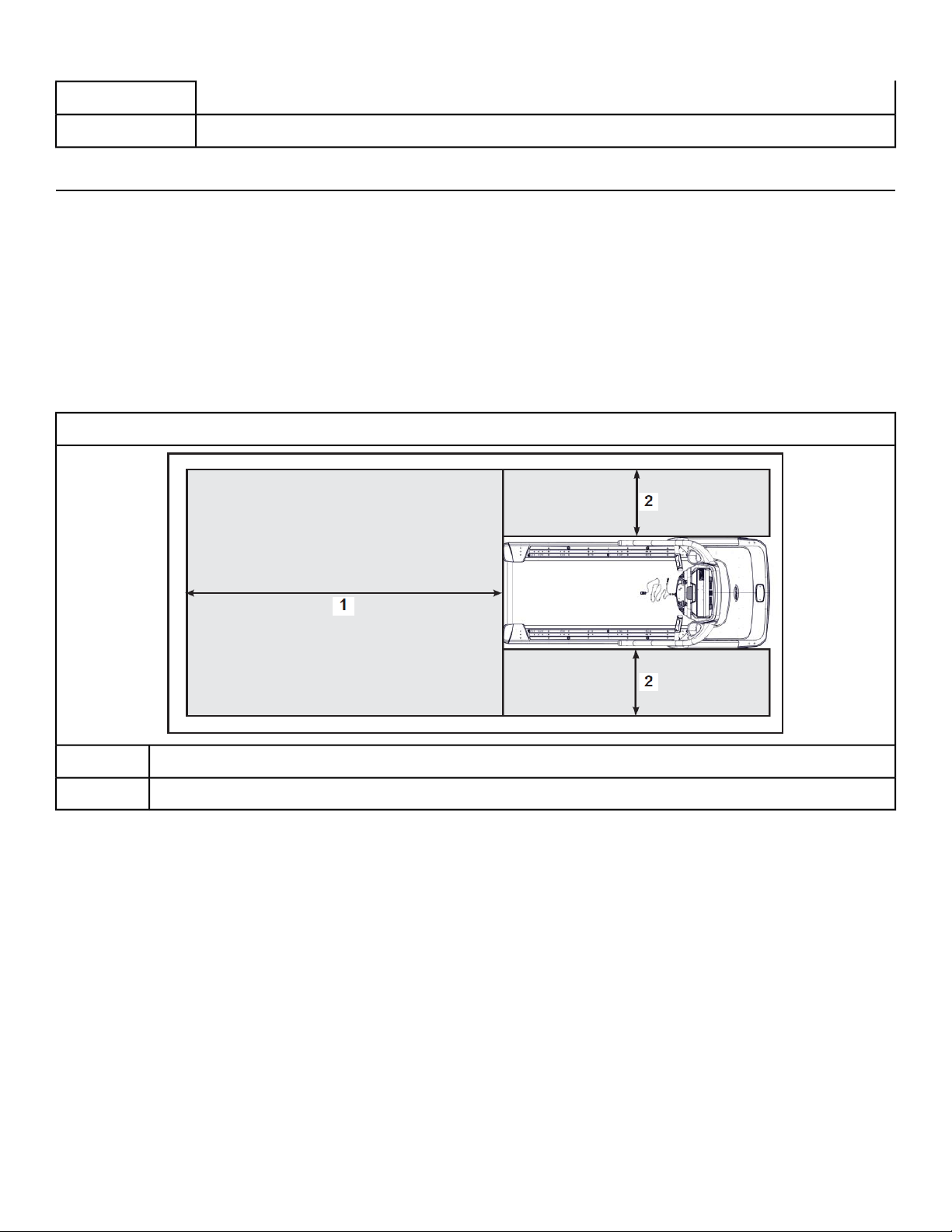
• Free area for access to unit and emergency dismount. Minimum clearance is 19.7 inches (0.5 meters)
on the sides of the unit and 78.7 inches (2.0 meters) behind the unit.
• Adjacent units may share the free area.
Free area
525T
78.7”, 2.0m
1
19.7”, 0.5m2
It is the responsibility of the facility owner/owner of the equipment to ensure that there is appropriate
clearance around each machine to allow for safe use and passage.
In compliance with the ADA (American Disabilities Act) there must be clear floor space of at least 30 by
48 inches and be served by an accessible route for at least one of each type of exercise equipment. If
the clear space is enclosed on three sides (e.g., by walls or the equipment itself), the clear space must
be 36 by 48 inches.
All other machines must have a clear floor space of 23" for all access point on the machine.
The dimensions stated in the assembly instructions of this manual include the maximum foot print (in
use) dimensions.
Minimum clearance of 12” (30 cm) between units for proper wireless heart rate signal operation.
Page 12 of 79
Cybex 525T Treadmill Part Number LT-24018-4 H
Environment
Humidity and Static Electricity
The unit is designed to function normally in an environment with a relative humidity range of 30% to
75%. The unit can be shipped and stored in a relative humidity range of 10% to 90%.
Climatic dry air may cause static electricity. During workout, user may experience a shock due to build
up of static electricity on the body and the discharge path of the unit. If static electricity is experienced,
increase humidity to a comfortable level through the use of a humidifier.
Do not install, use or store the unit in an area of high humidity, such as in the vicinity of a steam room,
sauna, indoor pool or outdoors. Exposure to extensive water vapor, chlorine and/or bromine could
adversely affect the electronics as well as other parts of the unit.
Temperature
The unit is designed to function normally in an environment with an ambient temperature range of 50°
F (10° C) to 104° F (40° C). The unit can be shipped and stored in an environment with an ambient
temperature range of 32° F (0° C) to 140° F (60° C).
Electrical Power Requirements
The power requirements for this treadmill are a grounded, dedicated circuit rated for one of the following:
• 100 VAC, 50/60 Hz, 20A
• 115 VAC, 50/60 Hz, 20A
• 208 VAC, 60 Hz, 15A
• 220 VAC, 60 Hz, 15A
• 230 VAC, 50 Hz, 13A, UK
Shock and electrocution hazard.
• Connect unit to a grounded outlet.
• Do not use voltage adapter or extension cord.
Verify the unit is connected to an outlet having the same configuration as the plug.
Verify connection is a grounded circuit. Do not use a ground-plug adapter to adapt the 3-prong power
cord to a non-grounded electrical outlet.
Verify power supply is compliant with local building codes.
Verify parts list shown below
DescriptionPart NumberQuantityItem
Base assemblyVaries11
Console assemblyVaries12
Upright, LeftPC-2359013
Page 13 of 79
Cybex 525T Treadmill Part Number LT-24018-4 H
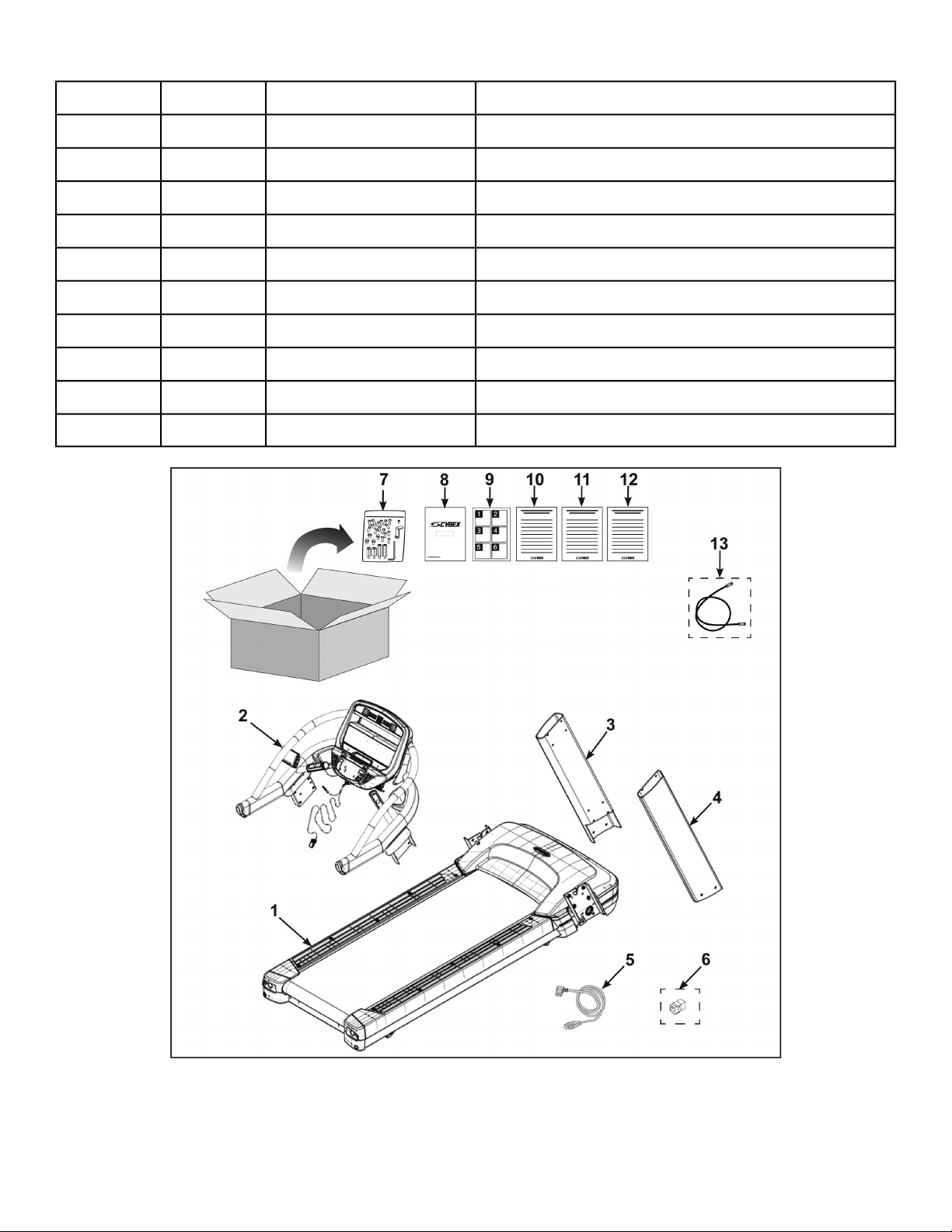
DescriptionPart NumberQuantityItem
Upright, RightPC-2359114
Power CordVaries15
CSAFE Coupler (optional)CN-2274716
Hardware packAX-2365517
Owner’s ManualLT-24018-X18
Assembly posterLT-2402019
Warranty sheet, ConsumerLT-24019-4110
Warranty sheet, Entry CommercialLT-24289-4111
Warranty sheet, Full CommercialLT-24290-4112
Cable, 6’, Coax (E3 View Monitor option)AW-23836113
Page 14 of 79
Cybex 525T Treadmill Part Number LT-24018-4 H
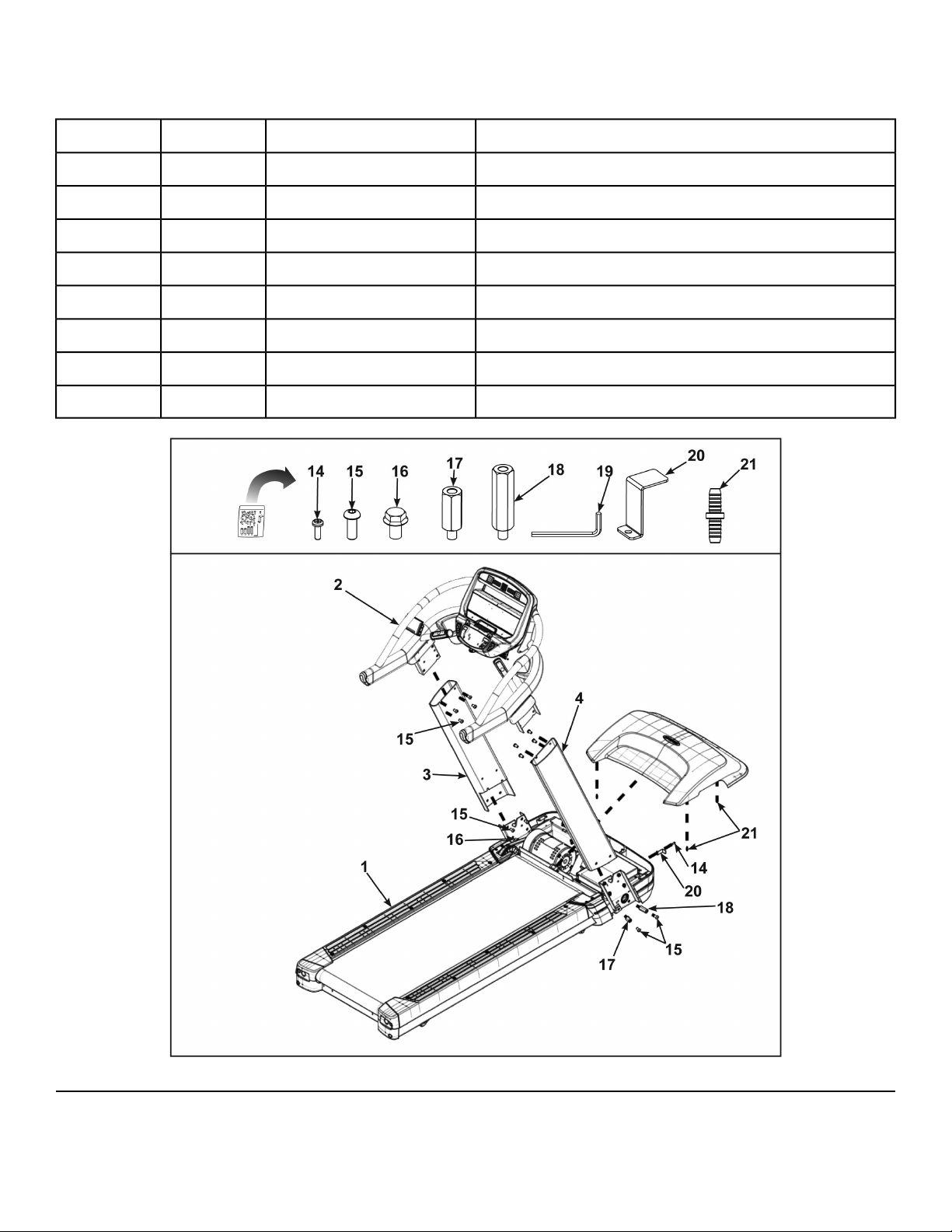
Hardware
DescriptionPart NumberQuantityItem
Screw, #8-32 x 1/2”HS-21672114
Bolt, 3/8-16 .75”, BHCS, ZNHS-226511615
Bolt, Whiz Lock, 3/8-16 x .625”, HXHDHS-16929416
Standoff, M-F, 3/8-16” Thread, ShortAX-23657217
Standoff, M-F, 3/8-16” Thread, LongAX-23656218
Allen wrench, 7/32”HX-00440119
Bracket, Power CordFS-23071120
Connector, PlasticHX-21519421
Tools Required
• Phillips screwdriver
Page 15 of 79
Cybex 525T Treadmill Part Number LT-24018-4 H

• 3/4” Open end wrench
• 7/32” Allen wrench (included)
• 9/16” Open end wrench
• 14 mm Open end wrench
Assembly Procedure
Two people will be required for this procedure.
Read and understand all instructions thoroughly before assembling this unit. Check all items
carefully. If there is damage, see the Customer Service section of this manual for proper procedure
to return, replace, or reorder parts.
The words "left" and "right" denote the user's orientation.
Verify you have received the correct package
1. Read box label to verify the model number and voltage (optional) match what was ordered.
2. Verify paint color matches what was ordered.
Lift and move the treadmill
Heavy equipment.
• At least two people must lift, move or assemble unit.
• Use safe lifting methods.
1. Take note of doorway widths in facility before assembly. The base is 32.5" (83 cm) wide. With uprights
installed the width is 35.6" (90.5 cm).
2. At least two people should lift and move the treadmill to a level location where you intend to leave
it. Use proper lifting methods.
Page 16 of 79
Cybex 525T Treadmill Part Number LT-24018-4 H
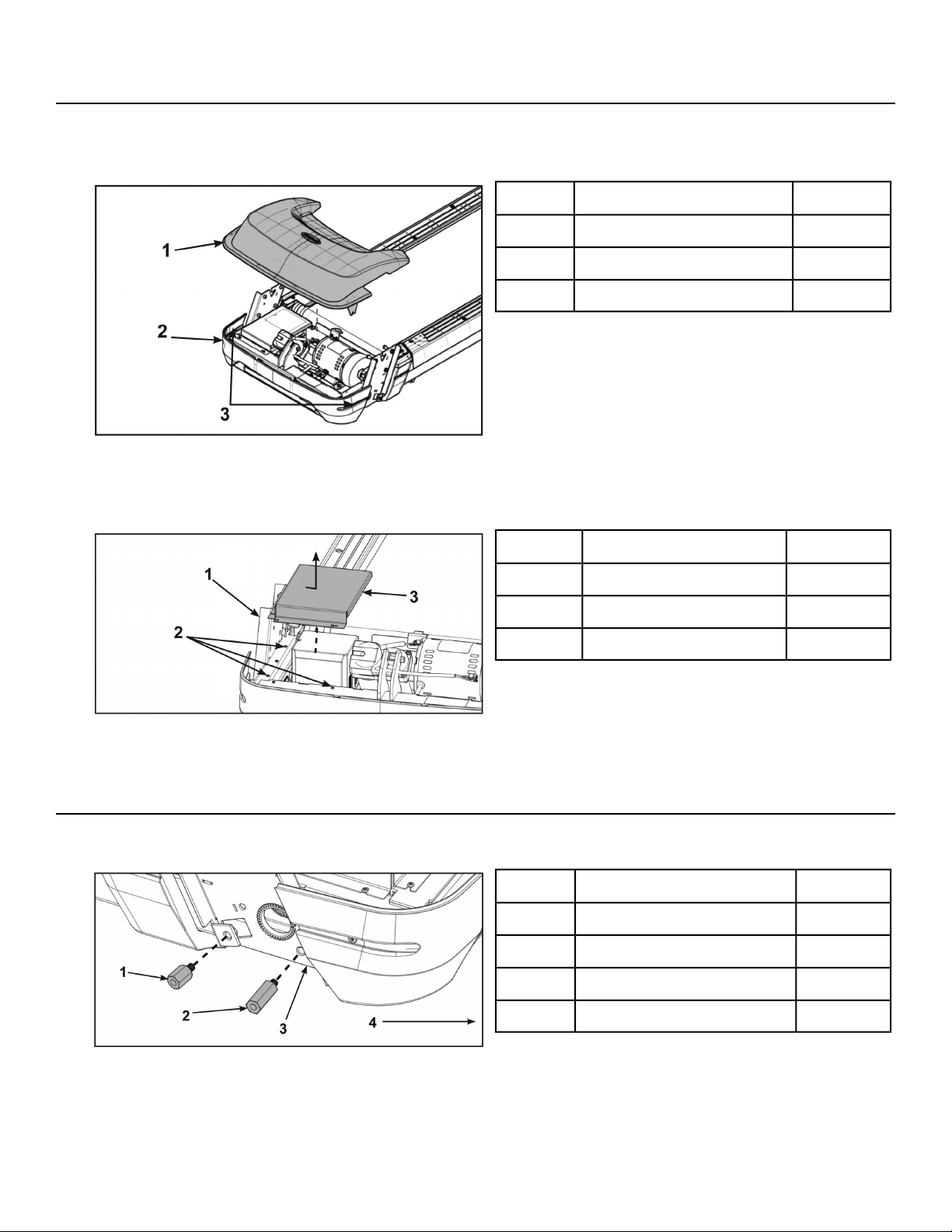
Remove shield
1. Loosen, but do not remove the two front cover screws securing the motor cover using a Phillips
screwdriver.
Qty.Description
1Motor cover1
1Front cover2
2Screws3
2. Remove motor cover by lifting vertically.
3. Loosen but do not remove the seven screws securing the shield to the base using a Phillips
screwdriver.
Qty.Description
1Base1
7Screws2
1Shield3
4. Remove shield by sliding sideways and then vertically off of base.
Install the uprights
1. Install the short and long standoffs to the right side of the base using a 3/4" open end wrench.
Qty.Description
1Standoff, short1
1Standoff, long2
1Base3
1Front of unit4
Page 17 of 79
Cybex 525T Treadmill Part Number LT-24018-4 H
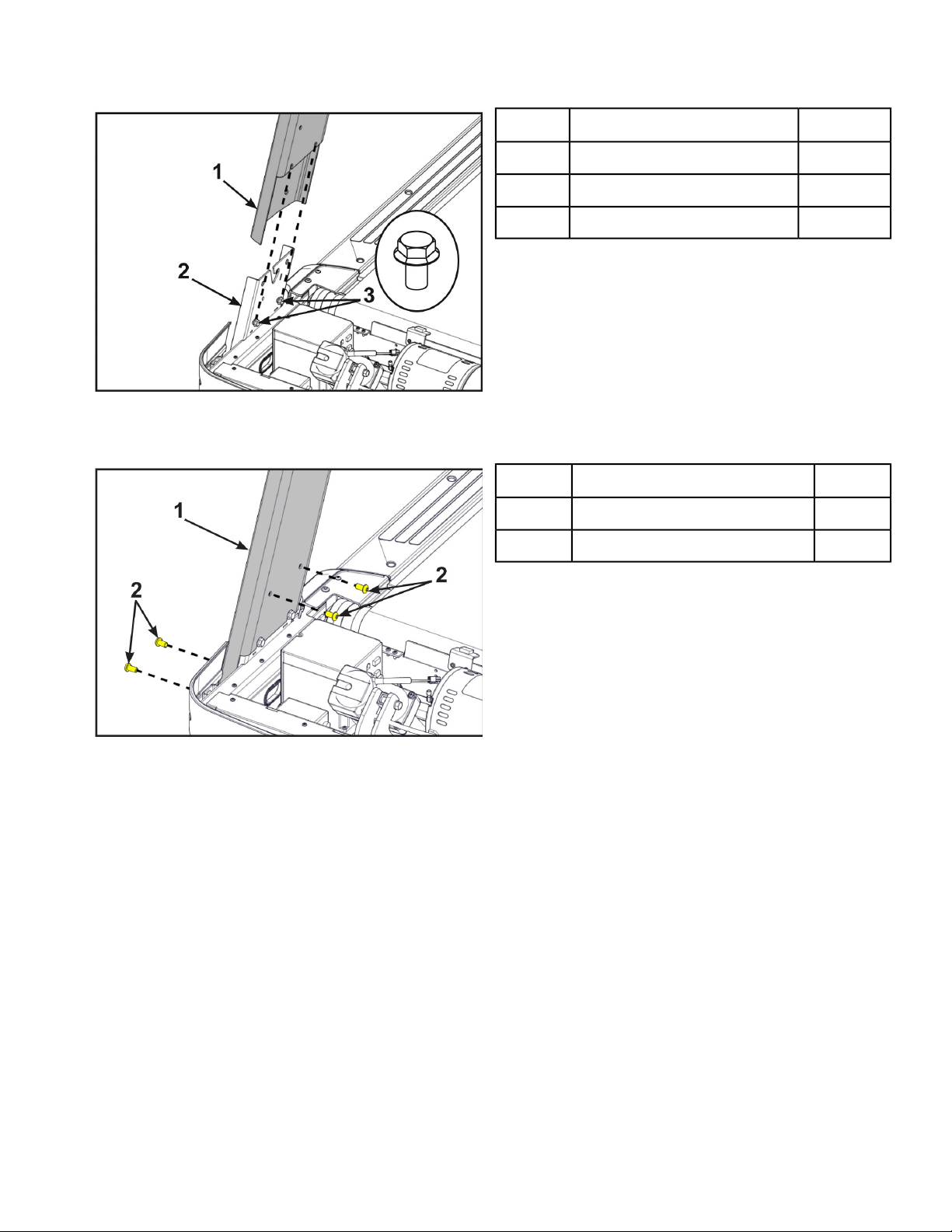
2. Thread two bolts into the base by hand. Do not fully thread bolts into the base.
Qty.Description
1Upright (Right shown)1
1Base2
2Bolt, Whiz lock3
3. Place the right upright onto the base assembly and the bolts installed in the previous step.
4. Thread four bolts into the right upright by hand.
Description
1Upright (Right shown)1
4Bolt2
5. Repeat steps 1 through 4 for the left upright.
Page 18 of 79
Cybex 525T Treadmill Part Number LT-24018-4 H
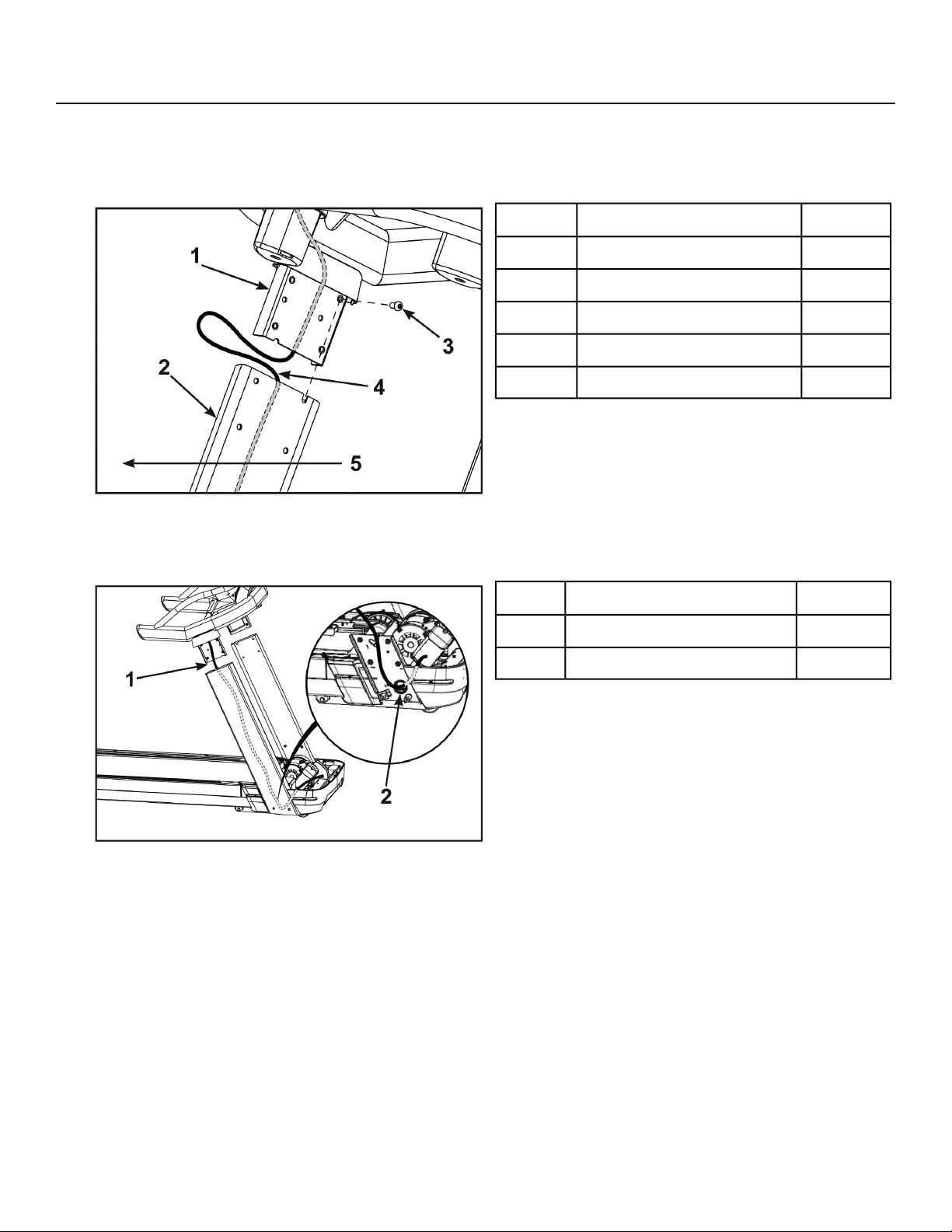
Install the console assembly to the uprights
If unit includes optional A/V or other cables, follow same display cable procedure.
1. Thread one bolt, into the top back hole for each side of the console assembly by hand. Do not fully
thread bolts into the console assembly.
Qty.Description
1Console1
1Upright (Right shown)2
1Bolt3
1Display cable4
1Front of unit5
Do not pinch or damage display cable when installing console assembly.
Two people are required for the following two steps.
2.
Qty.Description
1Insert display cable here1
1Hole2
3. Place the console assembly in position on the bolts installed in step 1 in the left and right uprights.
Page 19 of 79
Cybex 525T Treadmill Part Number LT-24018-4 H
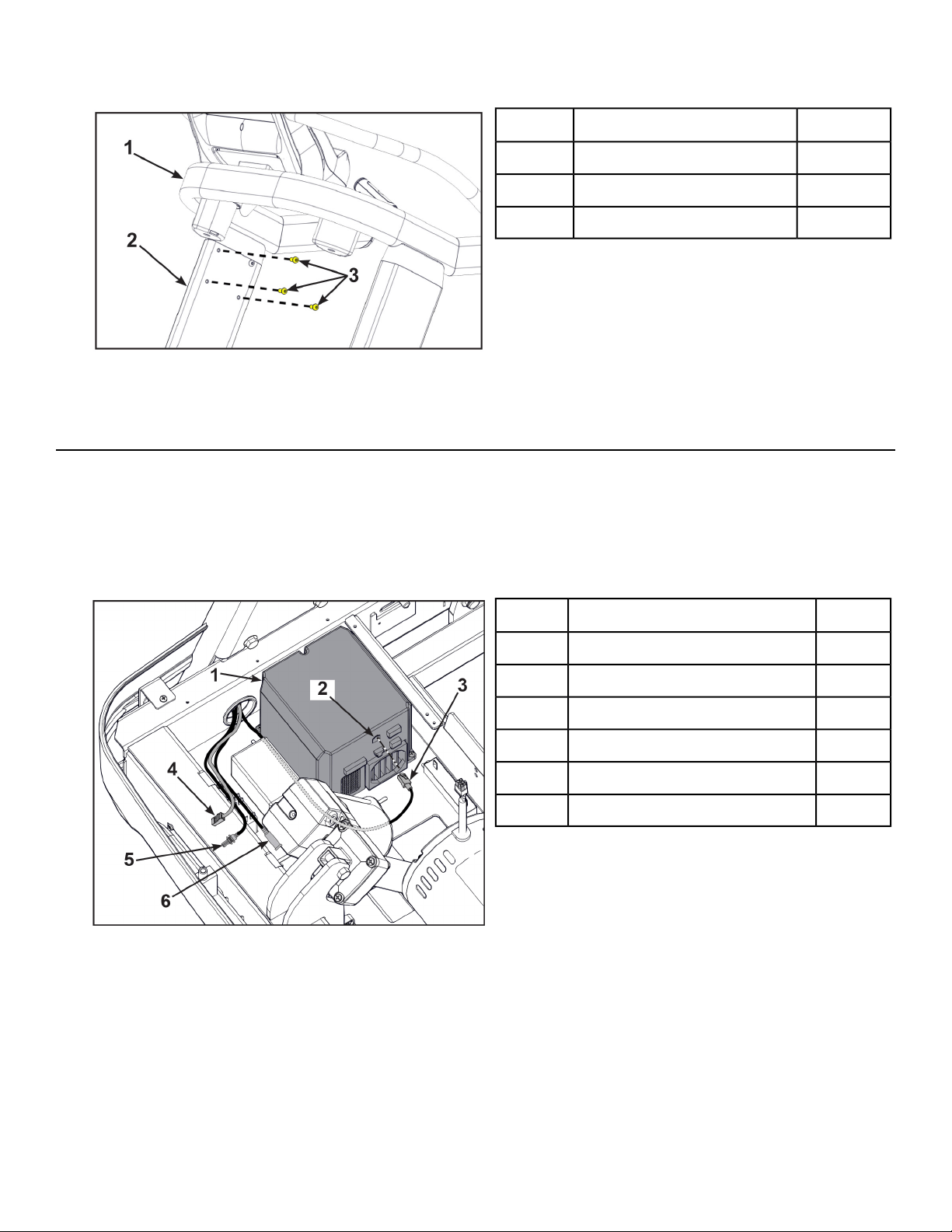
4. Thread six bolts into the remaining holes of the right upright and left upright.
Qty.Description
1Console1
1Upright (Right shown)2
3Bolt3
5. Tighten all of the bolts using a 7/32" Allen wrench and 9/16" open end wrench.
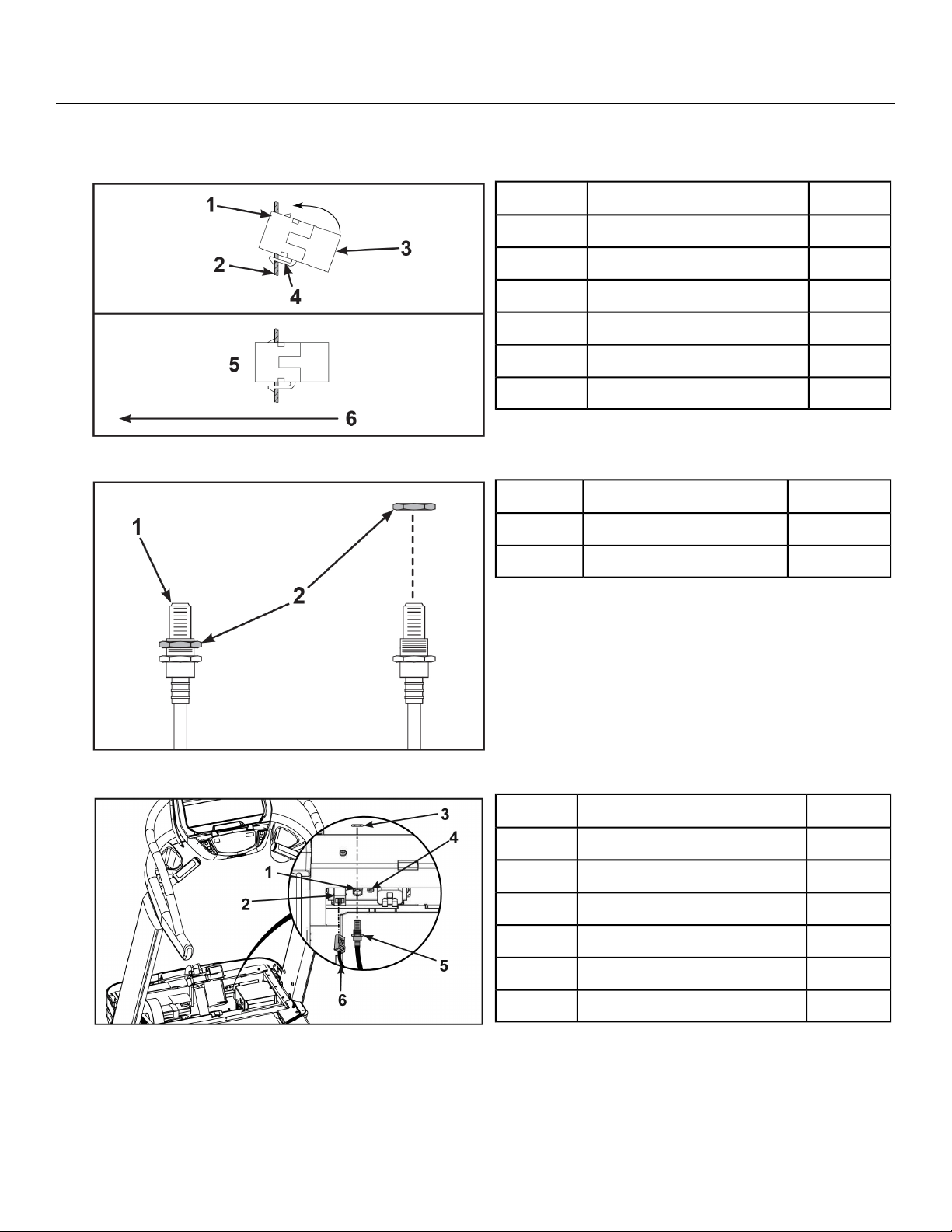
Connect Display Cable
The display cable and CSAFE cable have the same connectors. The display cable is black, the CSAFE
cable is red.
1. Route the cables under all other cables and towards the base plate.
2. Plug the display cable, located at the bottom of the upright assembly into the communication port
of the controller.
Qty.Description
1Controller1
1Communication port2
1Display cable, Black3
1CSAFE cable, Red (optional)4
1Coax cable (optional)5
1Power supply cable6
Page 20 of 79
Cybex 525T Treadmill Part Number LT-24018-4 H
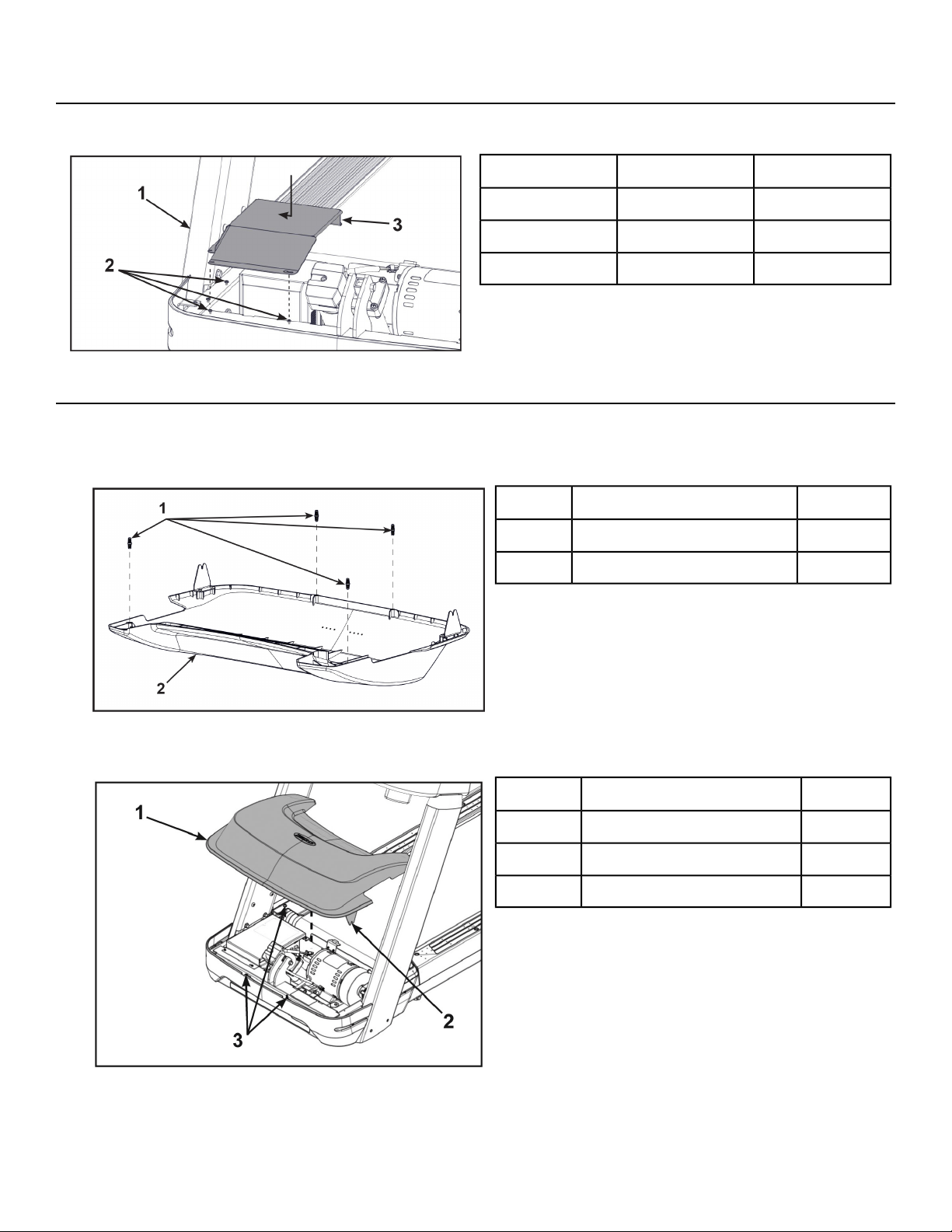
Install optional A/V or CSAFE cables
1. Insert the CSAFE coupler into the mounting plate by hooking the lower tab into the mounting plate
and snapping in the upper tab.
Qty.Description
1Upper tab1
1Mounting plate2
1CSAFE coupler3
1Lower tab4
1Installed5
1Front of unit6
2. Unthread the nut at the end of the A/V cable.
Qty.Description
1A/V cable1
1Nut2
3. Insert the A/V cable into the D-shaped hole in the mounting plate on the front of the unit.
Qty.Description
1A/V cable hole1
1CSAFE coupler2
1Nut3
1Mounting plate4
1A/V cable5
1CSAFE cable, Red6
4. Thread the nut removed in step 2 onto the A/V cable by hand.
5. Install the A/V cable to the mounting plate on the front of the unit using a 14 mm open end wrench.
6. Plug the CSAFE cable into the CSAFE coupler on the front of the unit.
Page 21 of 79
Cybex 525T Treadmill Part Number LT-24018-4 H
Install shield
Tighten the seven screws securing the shield to the base using a Philips screwdriver.
Qty.Description
1Base1
7Screws2
1Shield3
Install motor cover
1. Place motor cover on carpeting or other soft surface. Do not scratch top of hood cover.
2. Insert the four plastic connectors into the motor cover.
Qty.Description
4Plastic connectors1
1Motor cover2
3. Place the motor cover into position vertically by aligning the two tabs and four plastic connectors.
Two plastic connectors are mounted in the front cover and two in the motor cover.
Qty.Description
1Motor cover1
2Tabs2
1Plastic connectors3
If motor cover top does not fit properly, loosen the side screws on the front cover as needed.
Page 22 of 79
Cybex 525T Treadmill Part Number LT-24018-4 H
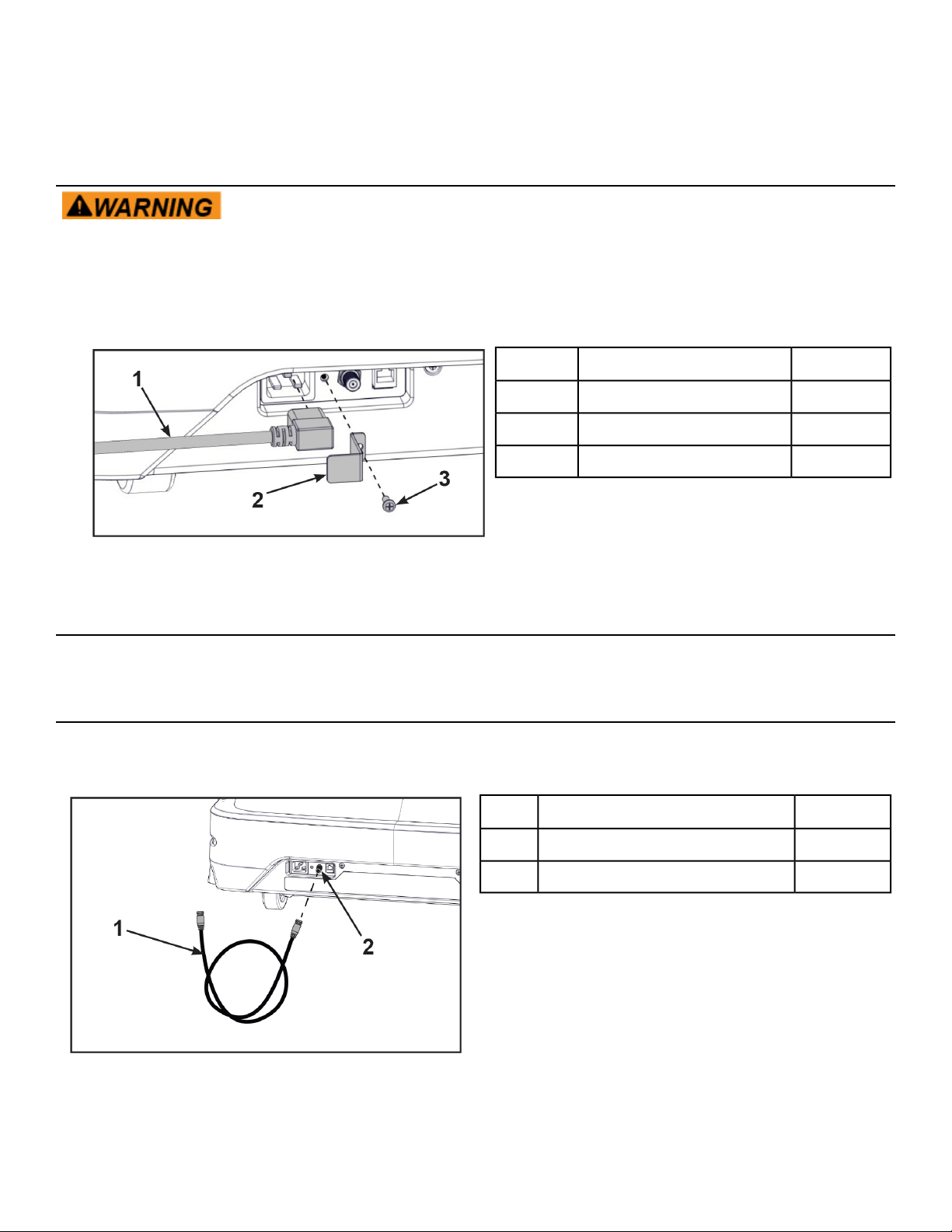
4. Using a Phillips screwdriver, finish tightening the four front cover screws. Be sure the screws are
securing the motor cover's tabs.
Install power cord
Shock and electrocution hazard.
• Route power cord so it does not become damaged.
• Do not allow cord to be pinched or interfere with movement of treadmill.
1. Plug the power cord into the base of the unit.
Qty.Description
1Power cord1
1Bracket2
1Screw3
2. Secure the power cord with the mounting bracket and mounting screw using a Phillips screwdriver.
Level treadmill
Confirm that the treadmill is on a level surface.
Install coax cable (E3 View Monitor option)
Install 6' coax cable to the coax cable connector in base of unit. Do not install if facility provides coax
cable to base of unit.
Qty.Description
16' Coax Cable1
1Coax Cable Connector2
Page 23 of 79
Cybex 525T Treadmill Part Number LT-24018-4 H
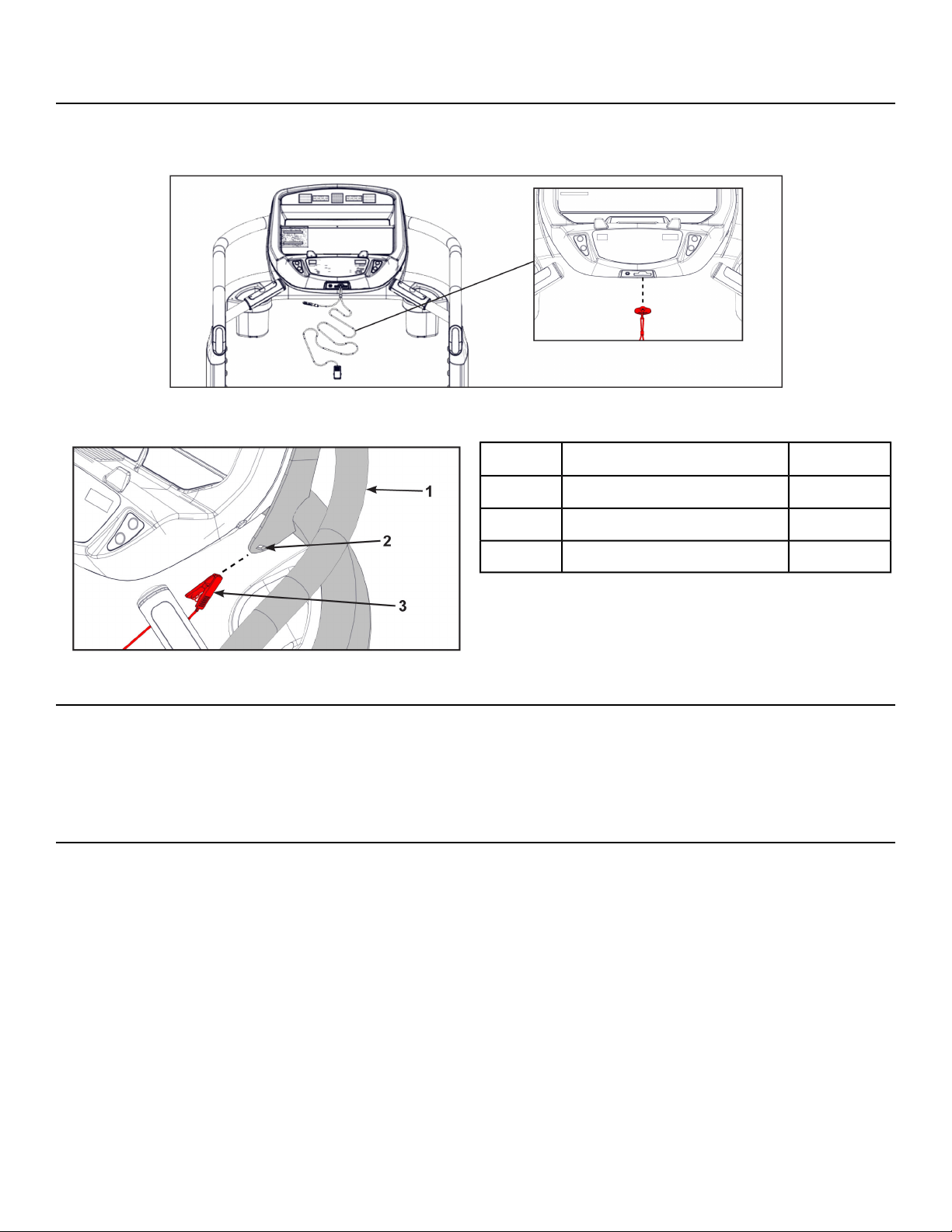
Install emergency stop key
Confirm that the emergency stop key is in place in the bottom of the console handrail. The treadmill will
not run without the key in place.
When not in use store the e-stop clip on the storage tab located on the left or right side of the handrail.
Qty.Description
1Handrail1
1Storage tab2
1E-Stop clip3
Visually inspect unit
1. Remove any packing material from unit.
2. Examine the unit to ensure that the assembly is correct and complete.
Power Cord Management
Power cord retaining brackets are located under the front end of the unit. This allows any extra length
of the power cord to be stored under the front end of the unit.
Tools Required
Wire tie (2)
1. Connect the main power cord into the power outlet.
2. Press Quick Start and raise the elevation to maximum incline.
Page 24 of 79
Cybex 525T Treadmill Part Number LT-24018-4 H
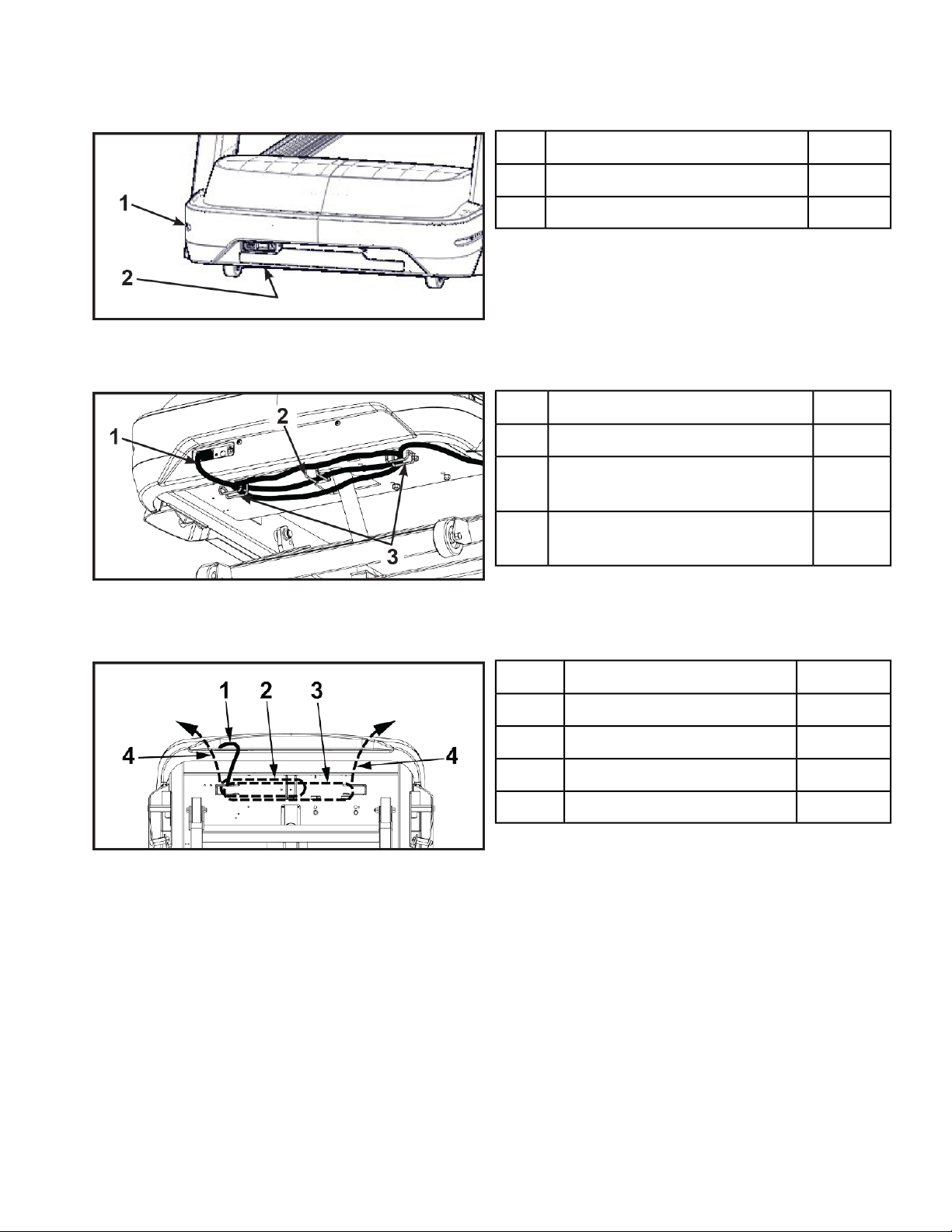
3. Toggle the on/off (I/O) power switch to the off (O) position.The on/off (I/O) power switch is located
under the front end of the unit, or on the front right side panel.
Qty.Description
1Front right side panel location1
1Under the front end location2
4. Unplug the main power cord from the power outlet.
5. Wrap the power cord around the outer power cord retaining brackets to desired length.
Qty.Description
1Power cord1
1
Power cord retaining bracket,
Inner
2
1
Power cord retaining brackets,
Outer
3
The power cord can be routed with full or half wraps around power cord retaining brackets. The
power cord can then exit to the left or right of the treadmill.
Qty.Description
1Power cord1
1Half wrap2
1Full wrap3
1Exit left or right4
6. Plug the main power cord into the power outlet.
7. Toggle the on/off (I/O) power switch to the on (I) position.
8. Press Quick Start and operate the elevation through full incline. If power cord is too short or interferes
with the movement of the treadmill, change the wrap of the power cord.
Page 25 of 79
Cybex 525T Treadmill Part Number LT-24018-4 H
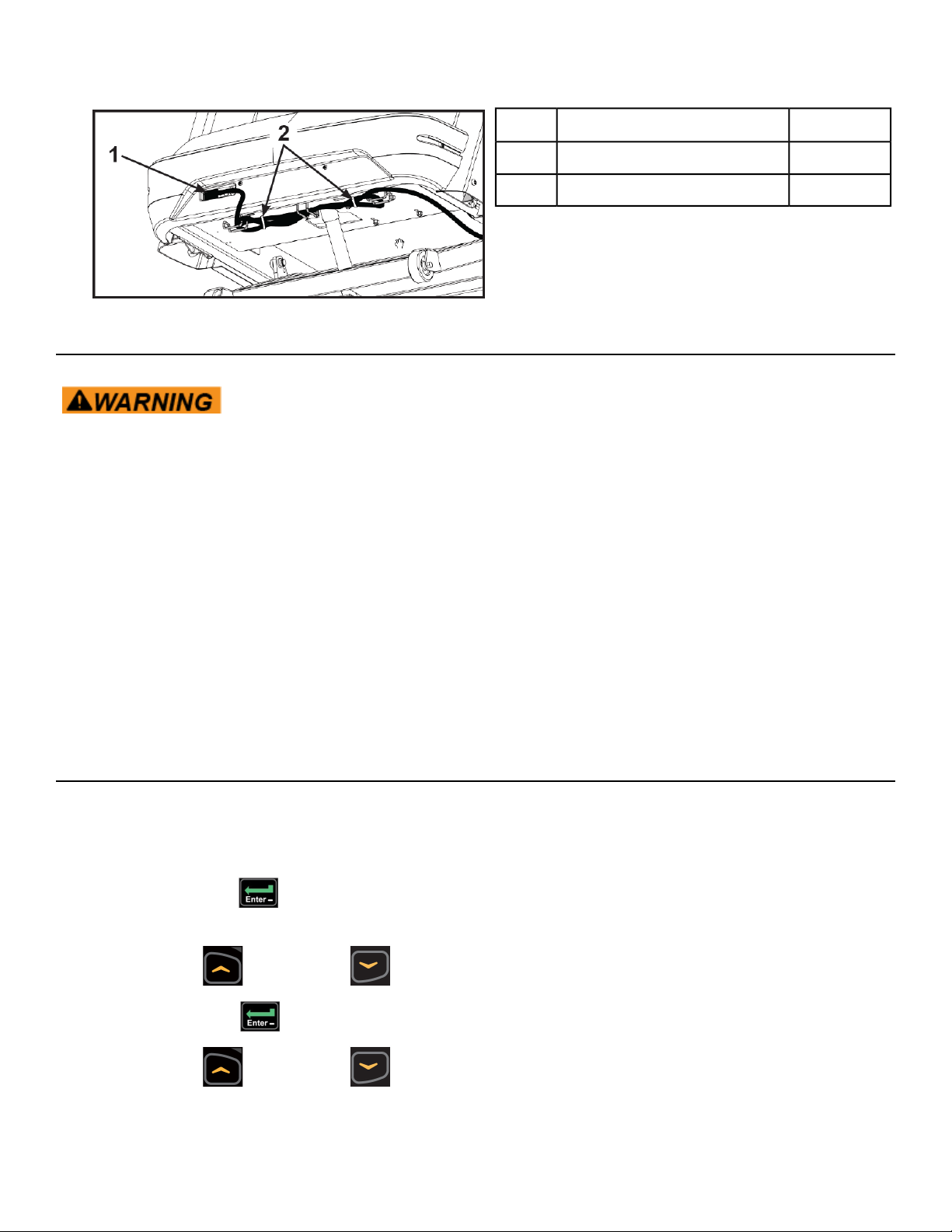
9. Secure the power cord with two wire ties.
Qty.Description
1Power cord1
1Wire ties (2)2
Setup
Use the following instructions to setup the unit.
Falling hazard. When starting unit
• Stand on two top steps.
• Do not stand on belt.
Cybex recommends that the treadmill be unplugged or the on/off (I/O) power switch turned off (O) when
it is not in use.
1. Without anyone on the treadmill, plug the power cord into a power outlet from a grounded, dedicated
circuit.
Ensure the power cord is not being pinched under the front of the treadmill.
2. Toggle the on/off (I/O) power switch to the on (I) position. The on/off (I/O) power switch is located
under the front end of the unit, or on the front right side panel.
3. The control panel will light up.
Time and Date confirmation
The first time the unit is turned on, it prompts the user to confirm the current Time and Date. Quick Start,
Workouts, Setup or Stop will skip this requirement but it will appear again the next time the unit is
powered up until the time and date are properly set.
1.
Press the ENTER key to begin editing the time, starting with the hours (HH) and then minutes
(MM) and then AM/PM/24.
2.
Press the UP and DOWN keys to select the hour.
3.
Press the ENTER key to accept and begin editing the minutes.
4.
Press the UP and DOWN keys to select the minutes.
Page 26 of 79
Cybex 525T Treadmill Part Number LT-24018-4 H
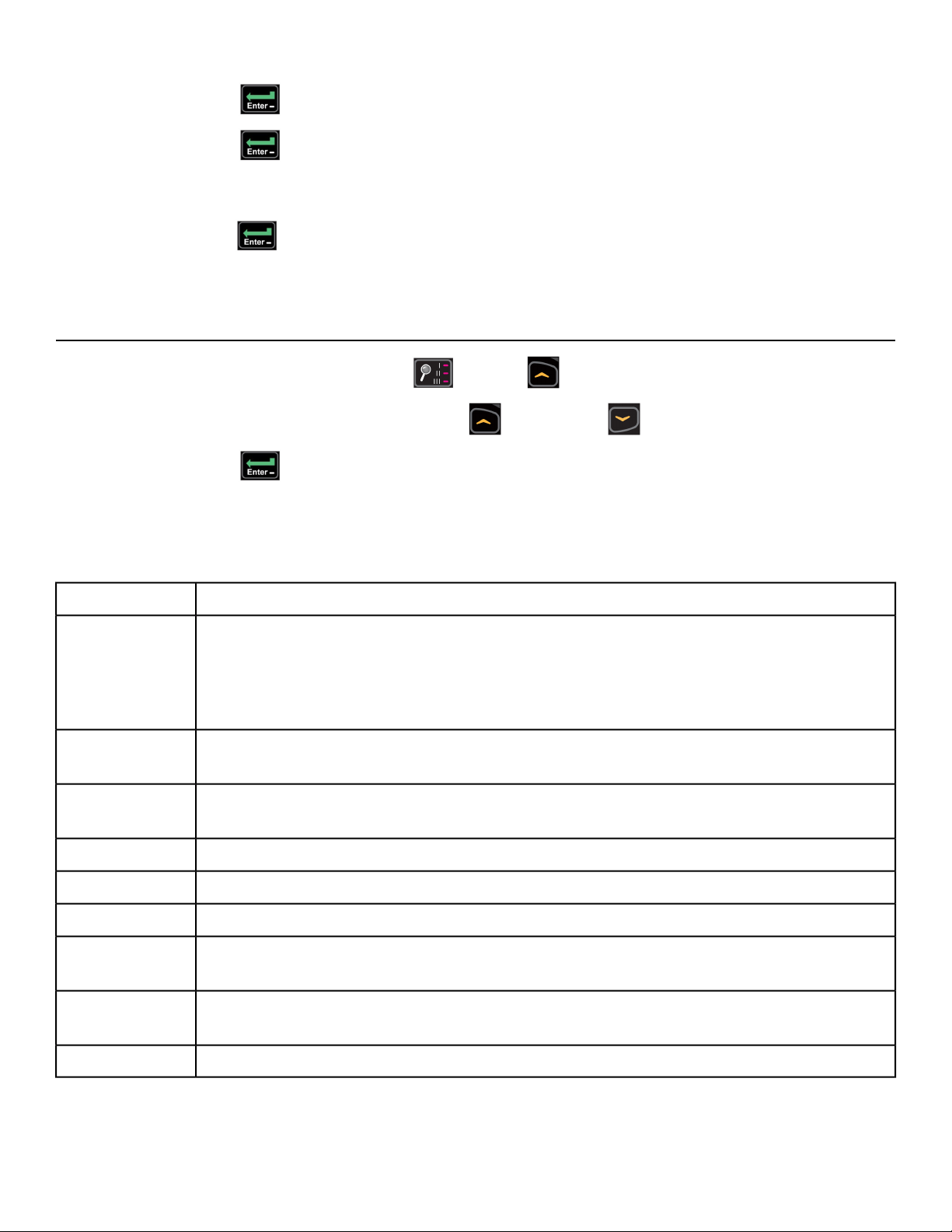
5.
Press the ENTER key to accept and begin editing the AM/PM/24 hour setting.
6.
Press the ENTER key to accept time.
Continue this procedure for the Date. Date format is [YYYY] [MM] [DD]. Y - Year, M - Month and D
- Day.
7.
Press the ENTER key after the final setting for Day. The opening screen will now be displayed.
Time and Date confirmation complete.
Setup options
1.
Press and the hold the Display option and UP keys for 3 seconds.
2.
Navigate through the setup menu with the UP and DOWN keys.
3.
Press the ENTER key once to enter setup values. Press again to save any changes and
advance forward in the menu.
Setup menu - LED console
Set time display format AM, PM, 12, or 24. Set time in Hours and Minutes HH:MM.Time
Year format is Y - Year [YYYY].
Month format is M - Month [MM].
Day format is D - Day [DD].
Date
LBS - Pounds, Kg - Kilograms or Ston - Stone. MI - Miles or KM - Kilometers.
Weight and
Distance Units
60 - 60Hz (Default) or 50 - 50Hz.
Line
Frequency
Set time length for Pause. OFF (Default), 1:00, 5:00 or 10:00 minutes.Pause
Set default workout time. 10, 20, 30 (Default), or 60.Default Time
Set maximum workout time. OFF (Unlimited), 30, 60 (Default), 90, or 120 minutes.Max Time
Maximum speed. Miles - 1 to 12.4 in one MPH increments. Kilometers - 1-10, 12, 16
or 20 KPH increments. Max speed is default.
Max Speed
Set A/V option. Choices are PEM, UHF, none, or FM (TF/M). See A/V Config and
FM Radio Presets for full configuration.
A/V
Toggle console beeper On (Default) or OFF. Some volume, range is 0-30, 10 is default.Beeper (Tone)
Page 27 of 79
Cybex 525T Treadmill Part Number LT-24018-4 H
Reset E3 View Monitor
1.
Press the Display Option key at the first setup option screen (Time).
The console will display RESET and Reset Defaults? NO.
To exit without resetting, press the ENTER key.
2.
Press the UP or DOWN keys to select YES.
3.
Press the ENTER key to reset the console to the default values.
The console will beep twice and return to setup mode.
Exit Set Up mode
Press the STOP key to exit Setup options.
A/V Configuration and FM Radio Presets
Perform this procedure if the unit includes the optional Wireless Audio Receiver Module.
Tools Required:
Headphones (not included)
Setting up the Cybex Wireless Audio Receiver Module requires four steps:
1. Determine the type of transmitter used (MYE 900MHz, Broadcast Vision 863MHz, etc. or TV FM).
2. Set A/V Device to Wireless TV.
3. Assign a TV channel number to each transmitter on the console.
4. Add FM radio station presets (optional).
Determine transmitter type
There are two types of transmitters UHF or TV FM.
• UHF transmitters will have TV's identified by number, example TV1.
• TV FM transmitters will have TV's identified with FM frequencies, example 93.1.
TV FM Transmitters
Follow procedure: Setup TV FM Transmitters
UHF Transmitters
Follow procedure: Setup UHF Transmitters
Page 29 of 79
Cybex 525T Treadmill Part Number LT-24018-4 H
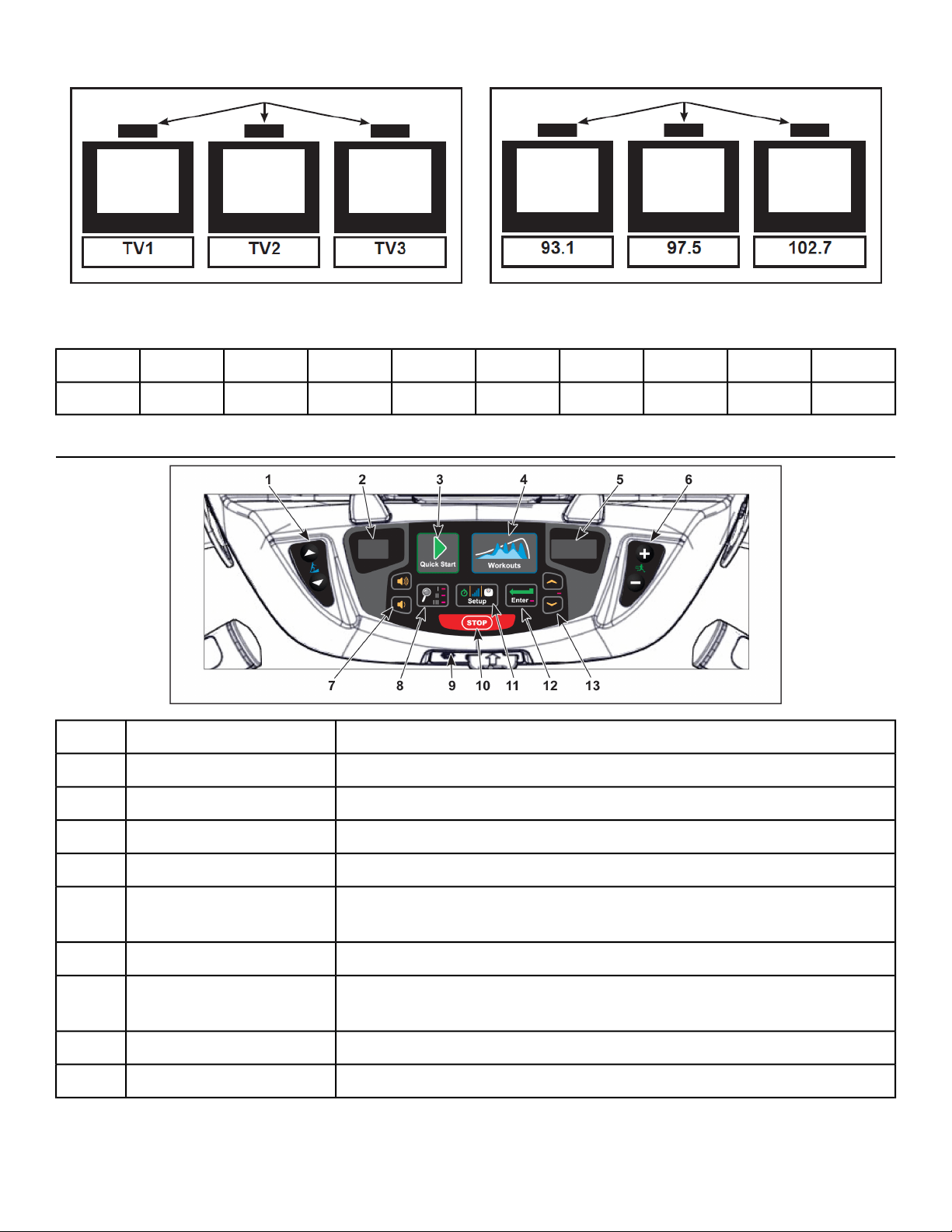
For TV FM transmitters, record FM frequencies for all TV's:
10987654321
User Controls
Navigates through all stored channels as in User ModeIncline keys1
Shows setting of receiver sensitivity as (n)ear or (F)arIncline display2
Selects transmitter type. Resets all stored TV channels when usedQuick Start key3
Toggles setup for FM presets and back to TV channel setupWorkouts key4
Shows FM when storing FM radio station presetsSpeed display5
Toggles the display for Adding new channels or Deleting stored
channels
Speed keys6
Increase or decrease volumeVolume keys7
Scans for available TV transmitters, or will seek the next strongest
FM station or FM transmitter frequency.
Display option key8
Plug in headphones to listen to channelsHeadphone jack9
Stores and exits setupSTOP key10
Page 30 of 79
Cybex 525T Treadmill Part Number LT-24018-4 H
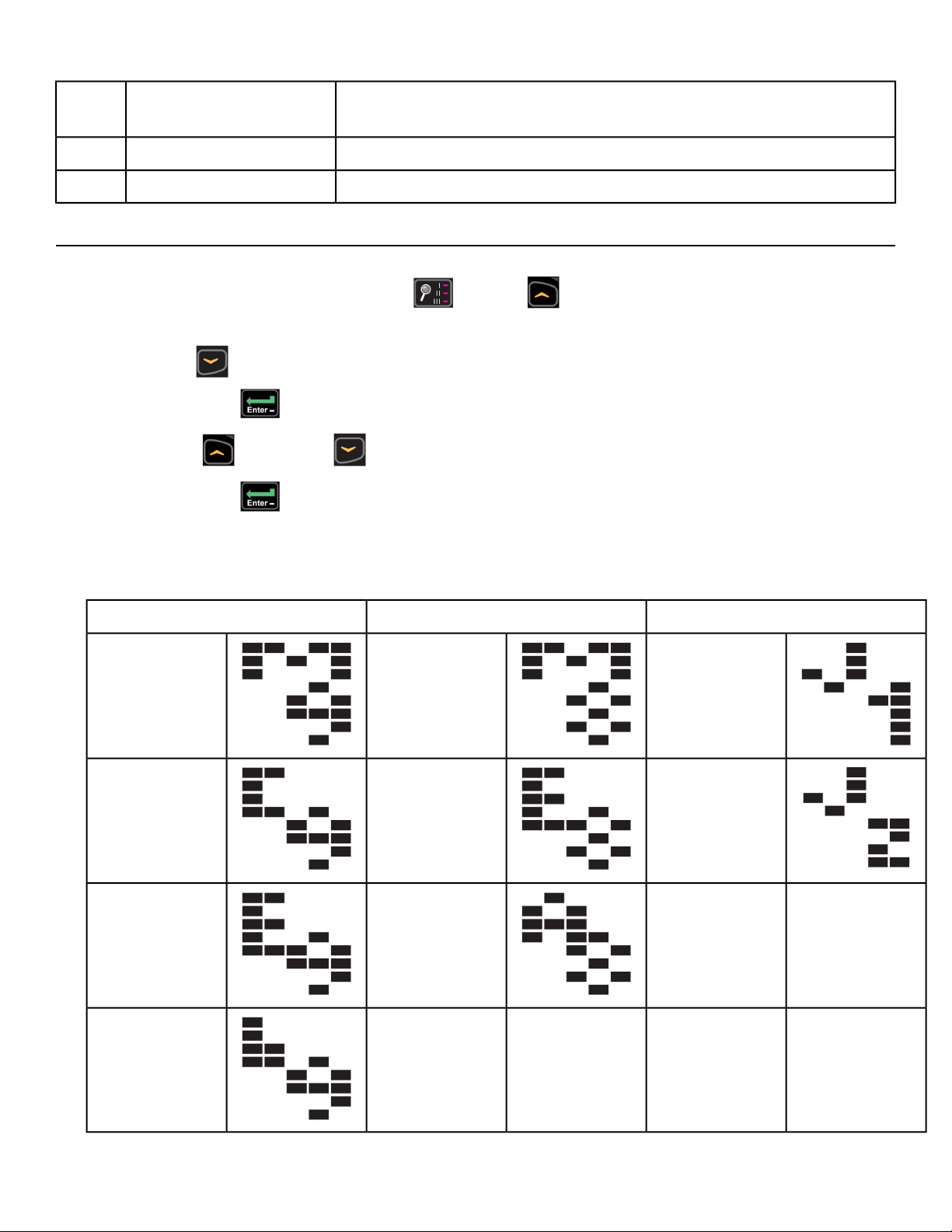
When storing FM presets, this button will clear all stored FM radio
presets. Toggles near/far for UHF receiver sensitivity.
Setup key11
Enters menu, accepts value shown, moves forward in menu.Enter key12
Navigates TV channels or manually tunes FM frequenciesUp/Down keys13
Setup UHF Transmitters
1.
Press and the hold the Display option and UP keys for 3 seconds.
Display will show time setup.
2.
Press Down to navigate to the A/V setup screen.
Press the ENTER key.
3.
Press the UP and Down keys to select UHF.
4.
Press the ENTER key.
5. Plug in headphones to listen for channels during setup.
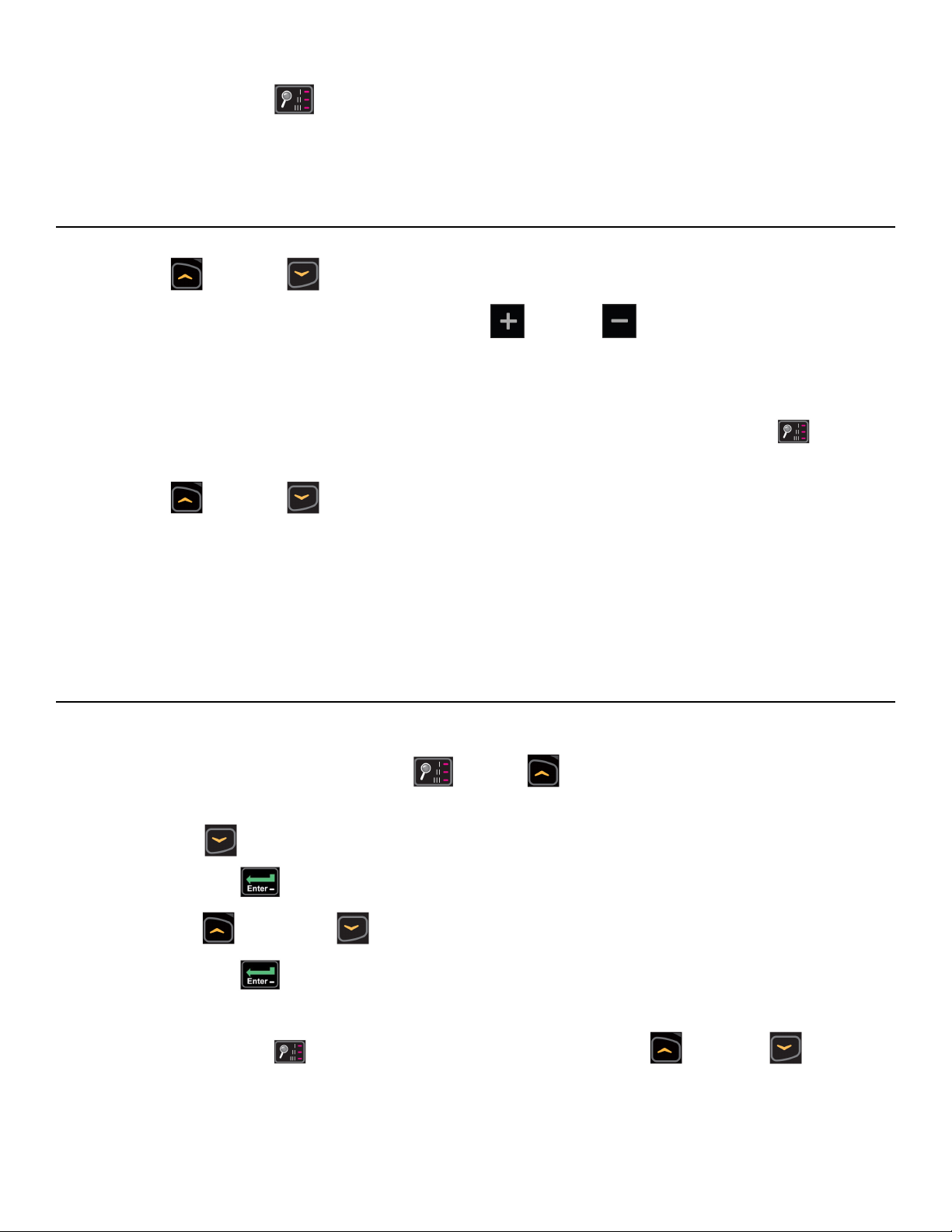
Transmitter type display for LED consoles
806 MHz System863 MHz System900 MHz System
“J1 806” Japan
14 channels
“M 863” MYE“M 900” MYE
“J2 806” Japan
30 channels
“E 863”
Enercise
“C 900” Cardio
Theater
“A 863” Audeon
“E 900”
Enercise
“B 900”
Broadcast
Vision
Page 31 of 79
Cybex 525T Treadmill Part Number LT-24018-4 H
6.
Press Display option key to scan for available channels.
The scan can take up to 10 seconds and then display channel number. Some of these channels
may not be signals from the TV transmitters and need to be deleted.
Review channels
1.
Press Up or Down to listen to available channels with the headphones.
2.
Delete unwanted channels by pressing Speed Up or Down to change the right LED window
to [dEL].
Press Enter to delete channel. Repeat process for additional unwanted channels.
3. Adjust the near/far setting if available channels are not showing.
Press Setup key to change the setting from F (Far) to n (Near). Press Display option to re-scan
for available channels.
4.
Press Up or Down to scroll through and verify all TV channels.
If all TV transmitters are stored, and they all correlate the TV number to the correct TV heard, setup
is complete. If not you may need to re-scan or adjust the transmitter codes (see documentation for
your transmitters to perform a code change).
5. Press STOP to exit setup. Transmitter setup complete.
6. Proceed to Add FM Radio Stations (optional).
Setup TV FM Transmitters
If your TV’s use FM transmitters, follow these instructions to assign a TV channel to each frequency.
1.
Press and the hold the Display option and UP keys for 3 seconds.
Display will show time setup.
2.
Press DOWN to navigate to the A/V setup screen.
Press the ENTER key.
3.
Press the UP and DOWN keys to select FM.
4.
Press the ENTER key.
5. Plug in headphones to listen for channels during setup.
6.
Press Display option to seek the next TV FM frequency or UP or DOWN to tune
manually.
Page 32 of 79
Cybex 525T Treadmill Part Number LT-24018-4 H
7.
Press Speed UP or DOWN keys to add [Add] a channel.
Press ENTER to save channel, std (stored) will be displayed.
8. Repeat steps 3 and 4 to add all TV FM channels.
9. Press Stop to exit setup when all the TV’s FM transmitter frequencies have a TV number.
Transmitter setup complete.
10. Proceed to Add FM Radio Stations (optional).
Add FM Radio Stations (optional)
If strong local FM Radio Stations are available in the area, you can set those as presets.
1. Enter A/V setup mode.
2. Press Workouts to display FM on the console.
The left numeric will display CH 1.
3.
Press Display option to seek the next TV FM frequency or UP or DOWN to tune
manually.
4.
Press Speed UP or DOWN keys to add [Add] a channel.
Press ENTER to save channel, std (stored) will be displayed.
5. Repeat steps 3 and 4 to save up to 32 FM radio stations.
6. Press Stop to exit setup when all FM radio stations are stored.
7.
Press UP or DOWN keys to scroll through and verify all FM radio stations.
Adjust sound volumes
After completing setup, the sound volume should be adjusted between the TV transmitters and the FM
radio stations. If FM radio stations are not set, adjust volume between all TV’s.
1.
Press Up or Down to select an FM radio station.
This volume is not adjustable and is the base volume.
2.
Press Up or Down to select a TV station.
3. Adjust the volume of each TV to match an FM Radio Station or each other using the TV’s remote
control.
The goal is for a volume setting of 10 on the treadmill to be the same for all TV and FM channels.
4. Repeat procedure for all TV’s.
Page 33 of 79
Cybex 525T Treadmill Part Number LT-24018-4 H
Setup Complete
E3 View Monitor Controls
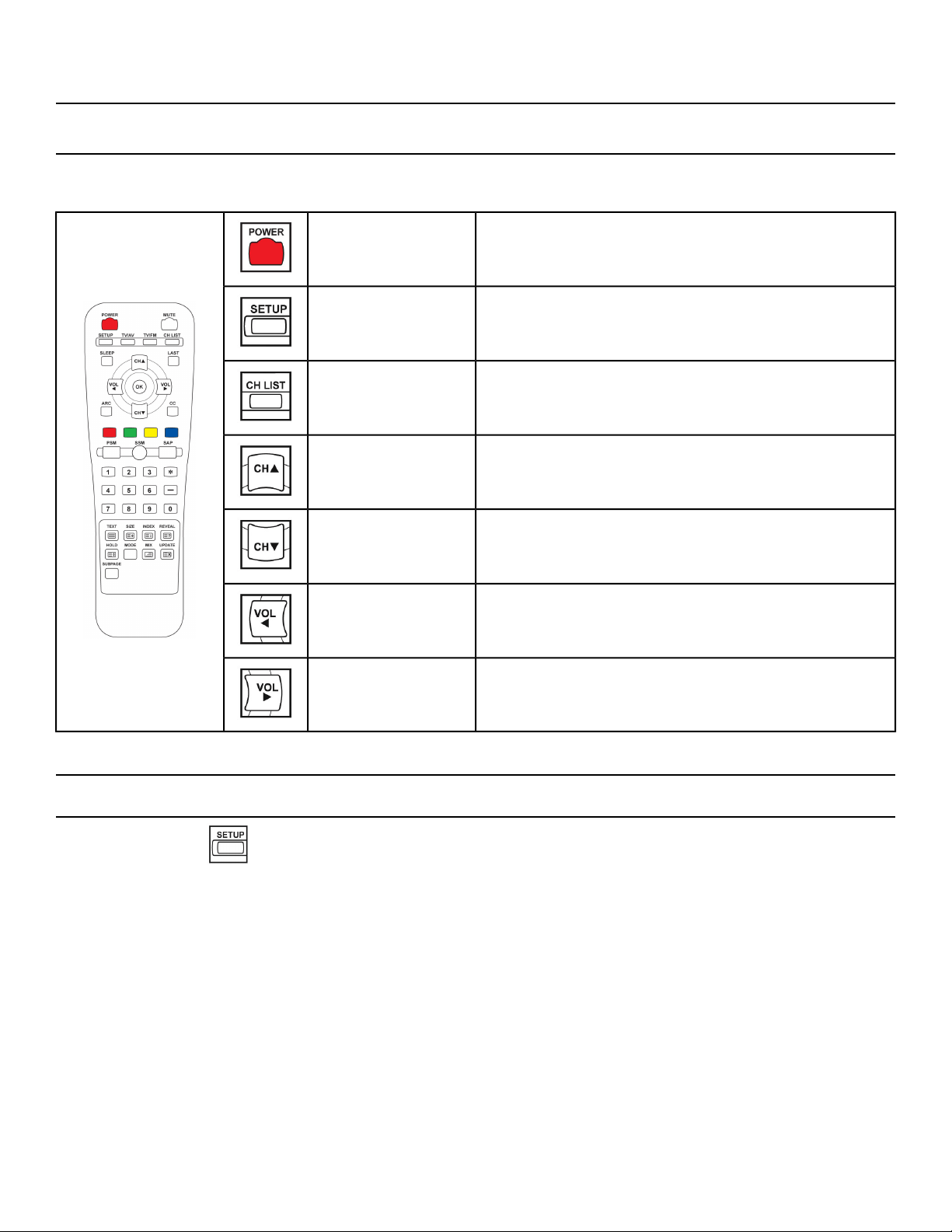
The remote control is used to perform all setup operations for the E3 View Monitor.
Turn the E3 View monitor on or offPOWER
Enter or exit the Setup home screenSETUP
Channel list - List all available channelsCH LIST
Channel up - Navigate up through the on-screen
menu
CH▲
Channel up - Navigate down through the on-screen
menu
CH▼
Volume left - Navigate left through the on-screen
menu
VOL◄
Volume right - Navigate right through the on-screen
menu
VOL►
E3 View Monitor Setup
Access Setup Screen
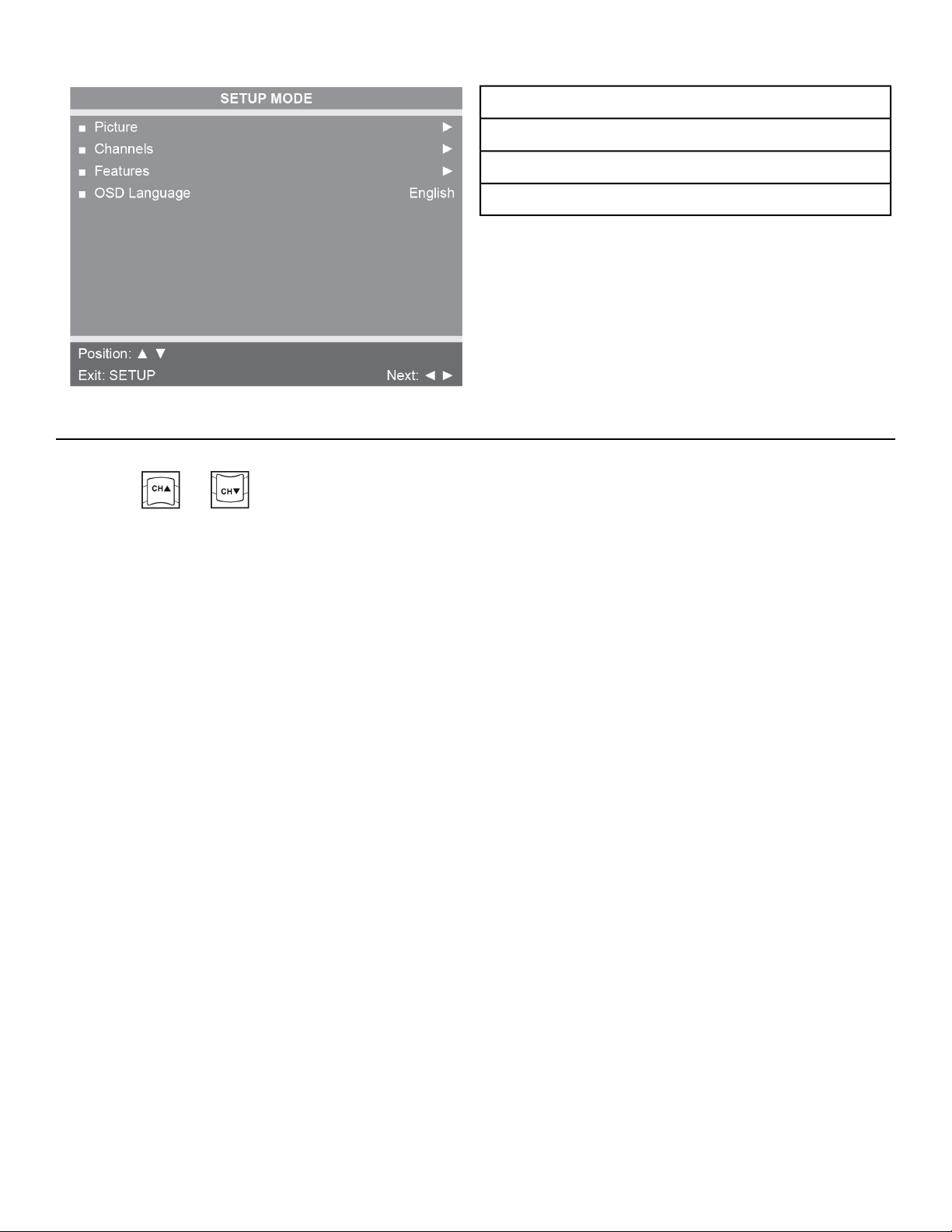
Press the SETUP button to display the SETUP MODE screen on the E3 View Monitor. Follow
procedure to setup the E3 View Monitor.
Page 34 of 79
Cybex 525T Treadmill Part Number LT-24018-4 H
Picture
Channels
Features
OSD Language
Picture
1.
Press or to select Picture.
Page 35 of 79
Cybex 525T Treadmill Part Number LT-24018-4 H
2.
Press to select access Picture menu.
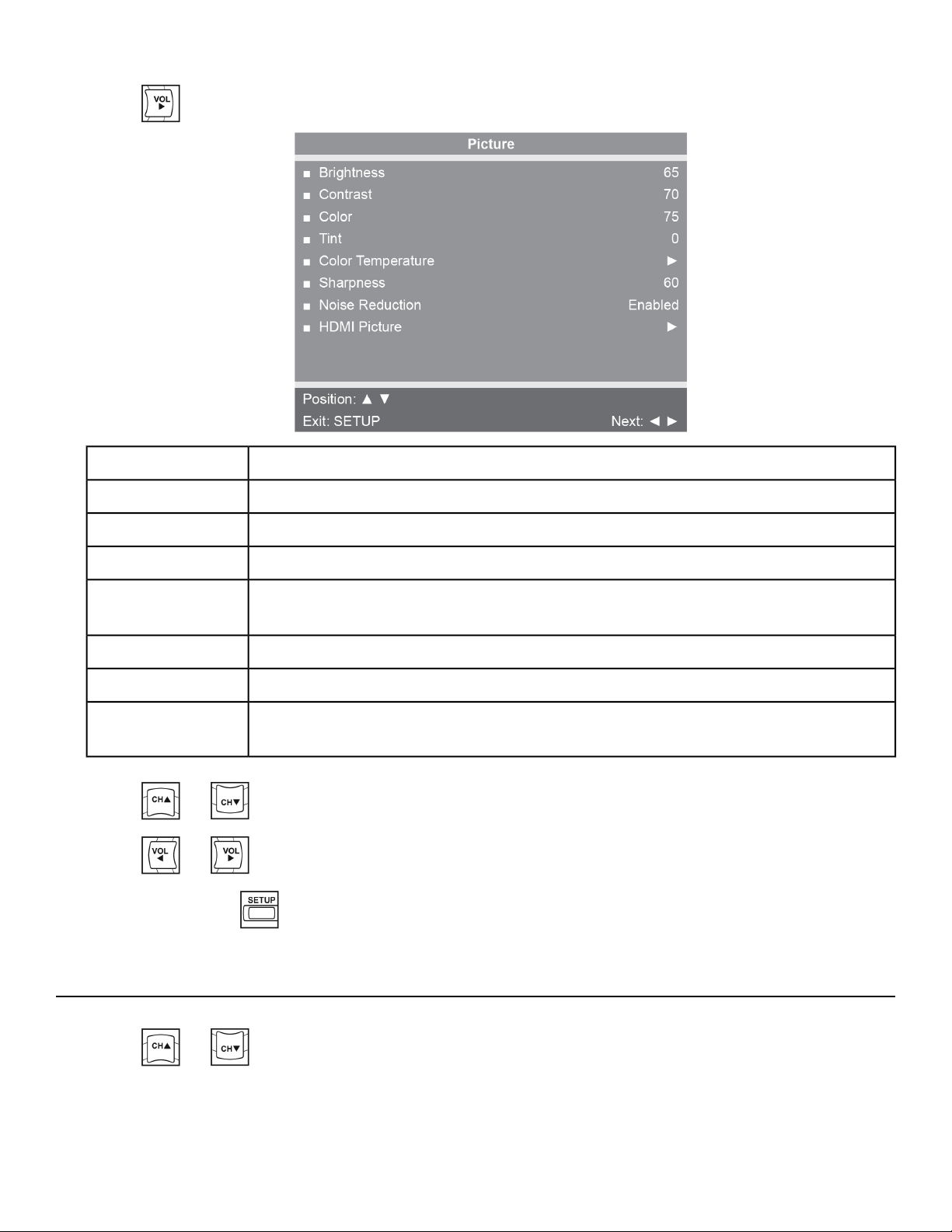
Adjust range from 1 to 100. Default is 65.Brightness
Adjust range from 1 to 100. Default is 70.Contrast
Adjust range from 1 to 100. Default is 75.Color
Adjust range from 1 to 100. Range is R50 to G50. Default is 0.Tint
Adjust color balance of Red, Green and Blue temperatures.
Color
Temperature
Adjust range from 1 to 100. Default is 60.Sharpness
Select Enabled (Default) or Disabled.Noise Reduction
Set to Auto or Adjust settings as needed. Available only when HDMI signal is
present.
HDMI Picture
3.
Press or to select settings.
4.
Press or to adjust settings.
5.
Press the SETUP button to return to SETUP MODE menu.
Channels
1.
Press or to select Channels.
Page 36 of 79
Cybex 525T Treadmill Part Number LT-24018-4 H
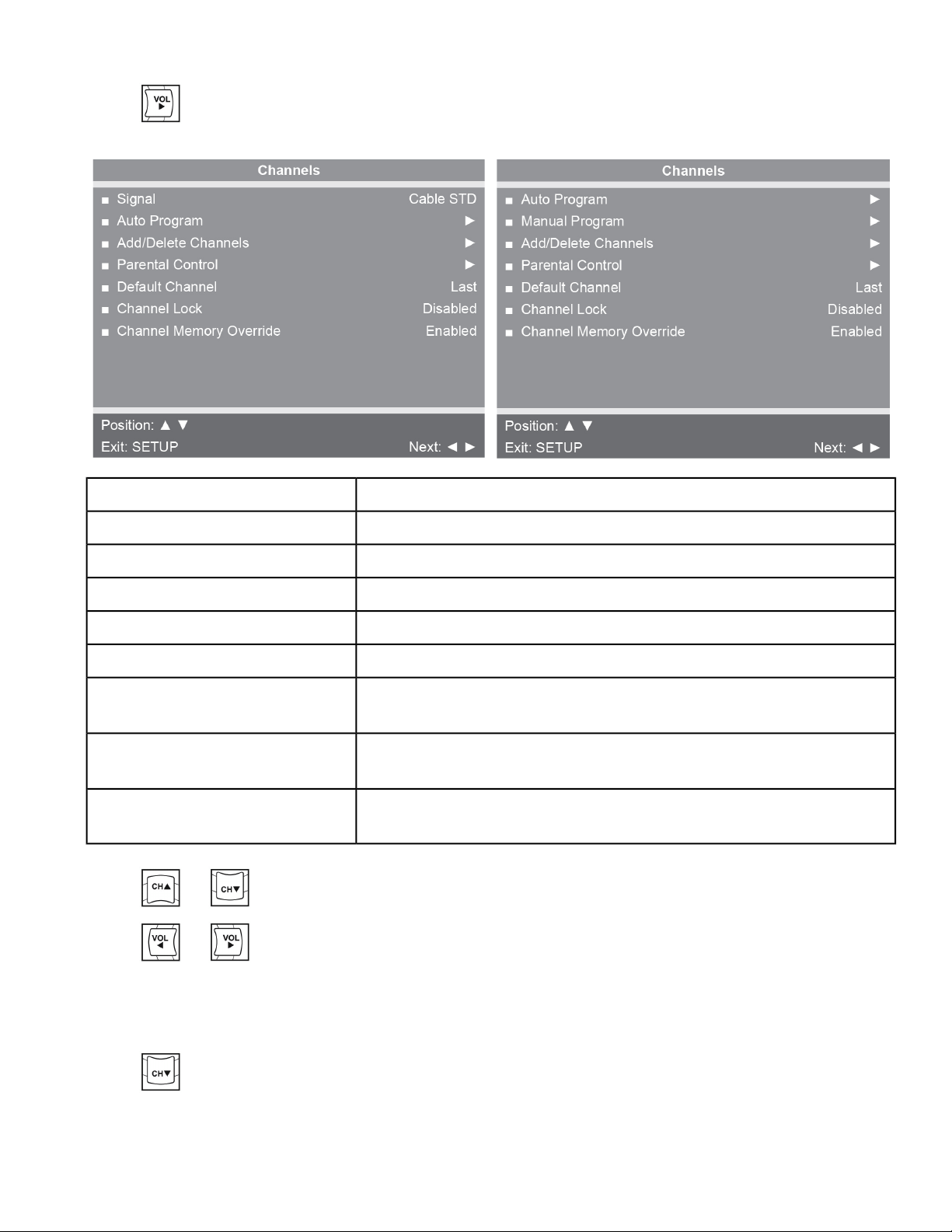
2.
Press to select access Channels menu.
DVB-T MonitorATSC Monitor
SettingsFeature
Select Air, Cable STD, Cable IRC, or Cable HRC.Signal (ATSC only)
See Below
Auto Program
See Below
Manual Program (DVB-T only)
See Below
Add/Delete Channels
Block channels based on TV ratings.Parental Control
Select channel to display on power up. Select from available
channels or last.
Default Channel
Select Enabled or Disabled. If enabled only one channel is shown,
user cannot change channels.
Channel Lock
Select Enabled or Disabled. If enabled allows user to select any
available channel.
Channel Memory Override
3.
Press or to select settings.
4.
Press or to adjust settings.
Auto Program (ATSC Monitor)
1.
Press to select Auto Program.
Page 37 of 79
Cybex 525T Treadmill Part Number LT-24018-4 H
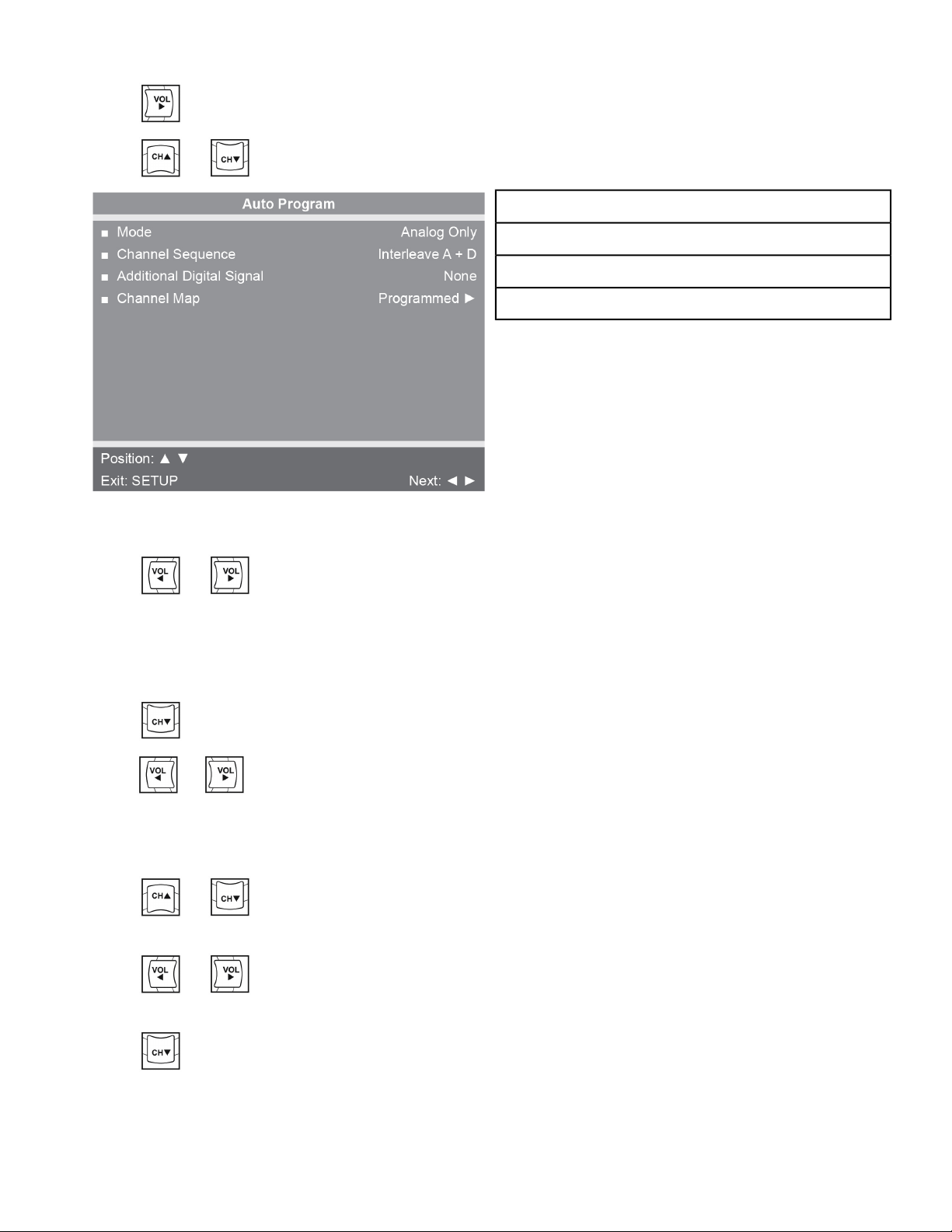
2.
Press to enter the menu.
3.
Press or to select Mode.
Mode
Channel Sequence
Additional Digital Signal
Channel Map
Figure 1: ATSC Monitor
4.
Press or to set the scope of channel scanning.
a) Analog Only (Default): TV searches for analog channels only.
b) Digital Only: TV searches for digital channels only.
c) Analog and Digital: TV searches for both analog and digital channels.
5.
Press to select Channel Sequence.
6.
Press or to set the Channel Sequence in which the channels are displayed after searching.
a) Interleave A+D: In the order of channel number regardless of the system.
b) All A then D: Digital channels are displayed after all analog channels.
7.
Press or to select Additional Digital Signal.
Not available when Mode is set to Analog Only.
8.
Press or to choose the Additional Digital Signal source.
Choices are: None, Air, Cable STD, Cable IRC, or Cable HRC.
9.
Press to select Channel Map.
Page 38 of 79
Cybex 525T Treadmill Part Number LT-24018-4 H
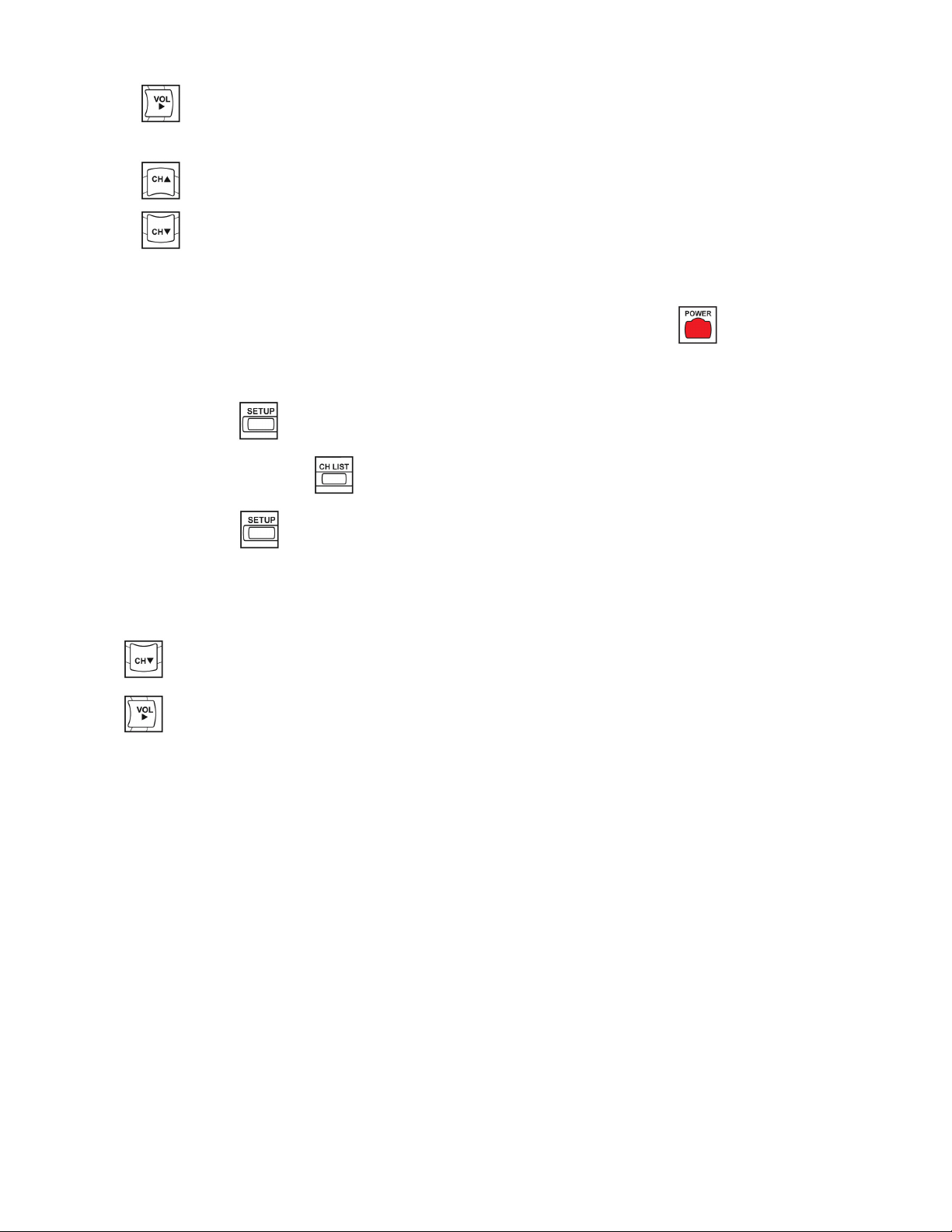
10.
Press to start auto programming.
A confirmation menu will appear before proceeding.
11.
Press (Yes) to start auto programming.
Press (No) button to cancel the operation. The TV will now search all available channels with
an on-screen progress percentage displayed. Any tuning Mode that includes Digital channels will
require several minutes to complete auto programming.
This may take 20 or more minutes. If screen shuts off, Press the POWER button to turn monitor
on.
12.
Press the SETUP button to return to normal TV viewing once auto programming is complete.
13.
Press the CHANNEL LIST button to list programmed channels.
14.
Press the SETUP button to return to SETUP MODE menu.
Auto Program (DVB-T Monitor)
1.
Tap to select Auto Program.
2.
Tap to enter the menu.
Page 39 of 79
Cybex 525T Treadmill Part Number LT-24018-4 H
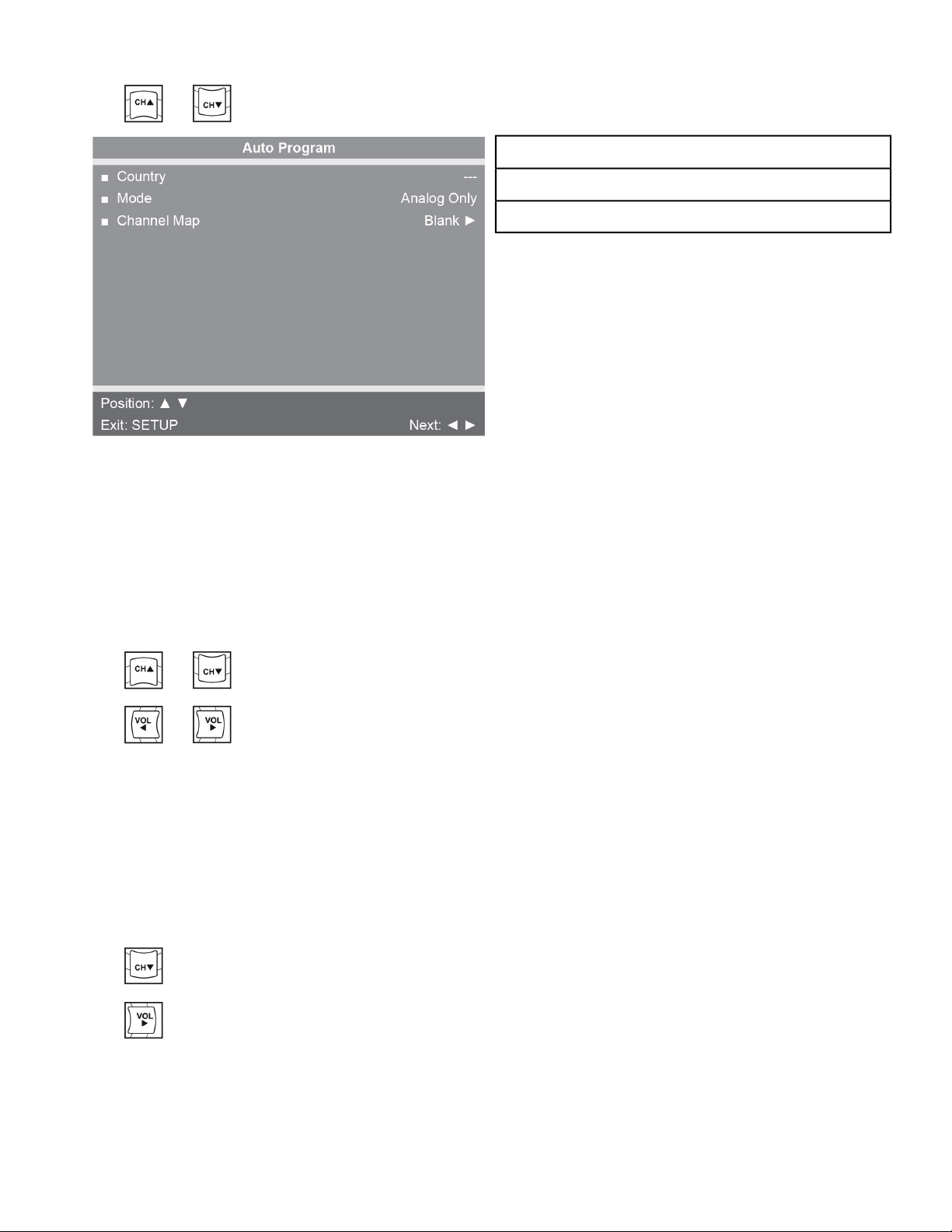
3.
Tap or to select Country.
Country
Mode
Channel Map
Figure 2: DVB-T Monitor
Available countries are:
Albania, Austria, Australia, Belgium, Bosnia, Bulgaria, China, Croatia, Czech, Denmark, Estonia,
Finland, France, Germany, Greece, Hungary, Ireland, Italy, Kazakhstan, Latvia, Lithuania,
Luxembourg, Morocco, Netherlands, Norway, Poland, Portugal, Romania, Russia, Serbia, Slovakia,
Slovenia, Spain, Sweden, Switzerland, Turkey, UK, and Ukraine.
4.
Tap or to select Mode.
5.
Tap or to set the scope of channel scanning.
DescriptionOption
TV searches for analog channels onlyAnalog Only
(Default)
TV searches for digital channels onlyDigital Only
TV searches for both analog and digital channelsAnalog and
Digital
6.
Tap to select Channel Map.
7.
Tap to start auto programming.
A confirmation menu will appear before proceeding.
Page 40 of 79
Cybex 525T Treadmill Part Number LT-24018-4 H
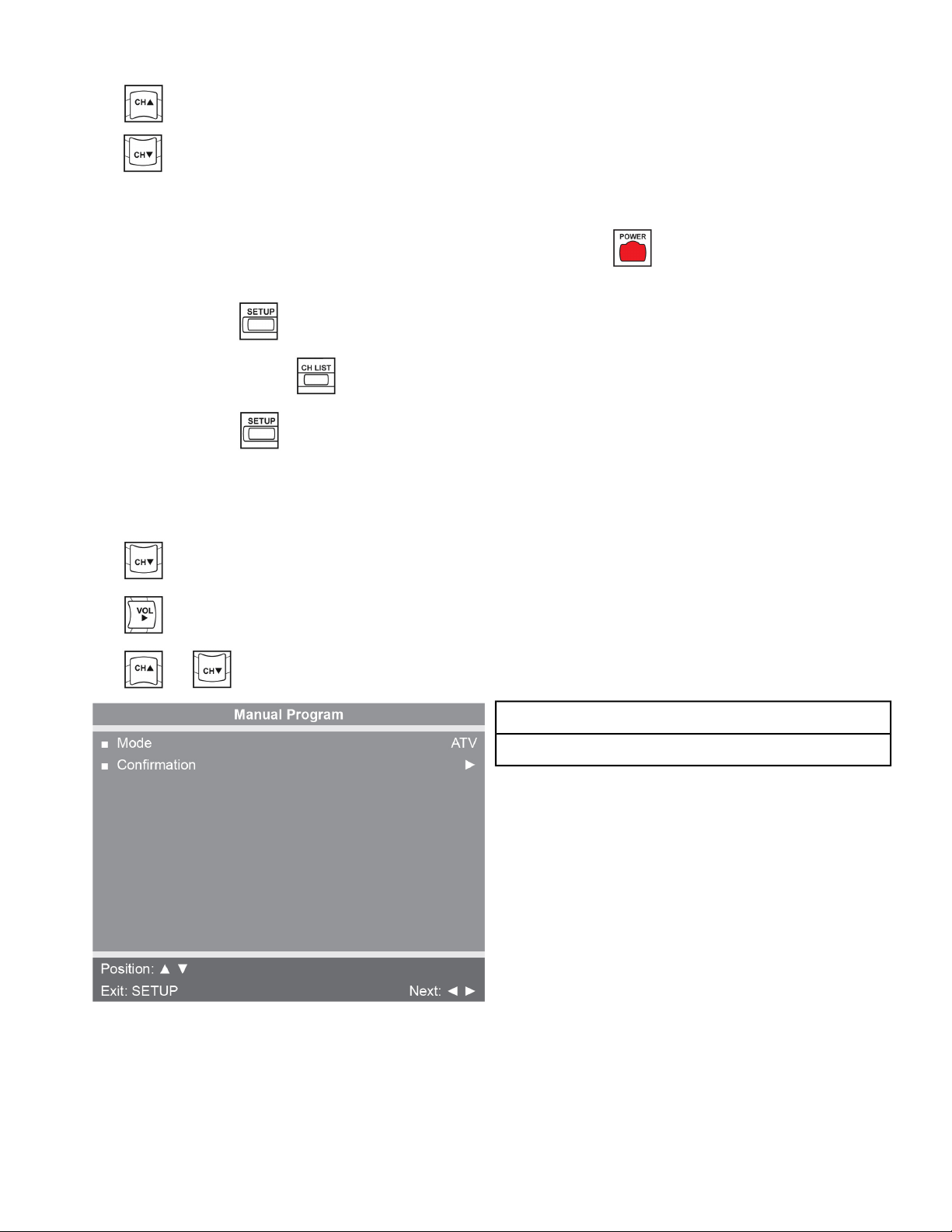
8.
Tap (Yes) to start auto programming.
Tap (No) button to cancel the operation. The TV will now search all available channels with an
on-screen progress percentage displayed. Any tuning Mode that includes Digital channels will require
several minutes to complete auto programming.
This may take 20 or more minutes. If screen shuts off, POWER button to turn monitor on.
9.
Press the SETUP button to return to normal TV viewing once auto programming is complete.
10.
Tap the CHANNEL LIST button to list programmed channels.
11.
Press the SETUP button to return to SETUP MODE menu.
Manual Program (ATSC and DVB-T)
1.
Tap to select Manual Program.
2.
Tap to enter the menu.
3.
Tap or to select Mode.
Mode
Confirmation
Page 41 of 79
Cybex 525T Treadmill Part Number LT-24018-4 H
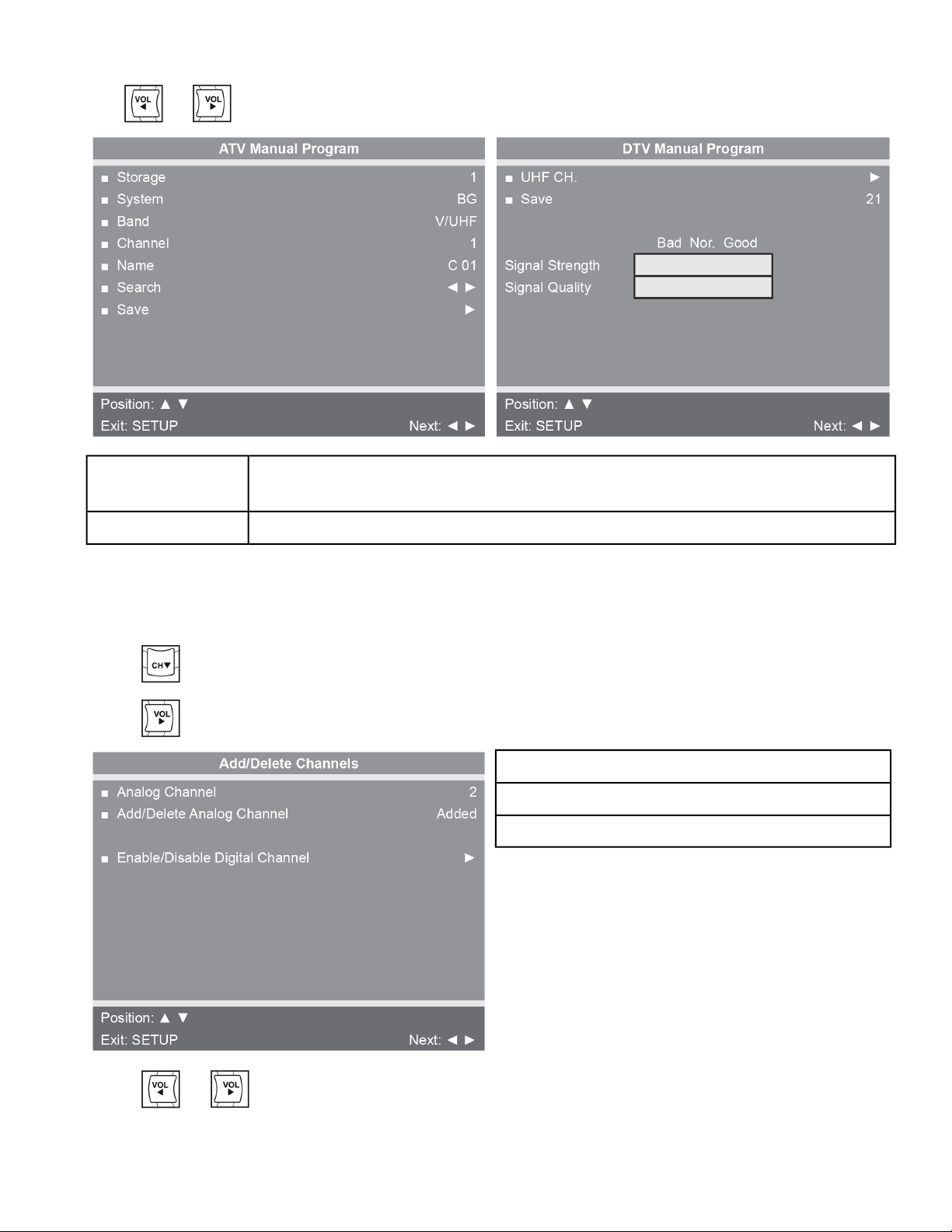
4.
Tap or to select ATV or DTV.
Adjust settings for Storage, System, Band, Channel, Name, or Search. Select
Save to save settings.
ATV Mode
Select UHF channel. Select Save to save settings.DTV Mode
Add/Delete Channels (ATSC and DVB-T)
1.
Press to select Add/Delete Channels.
2.
Press to enter the Add/Delete Channels menu.
Analog Channel
Add/Delete Analog Channel
Enable/Disable Digital Channel
3.
Press or to select the desired analog channel.
Page 42 of 79
Cybex 525T Treadmill Part Number LT-24018-4 H
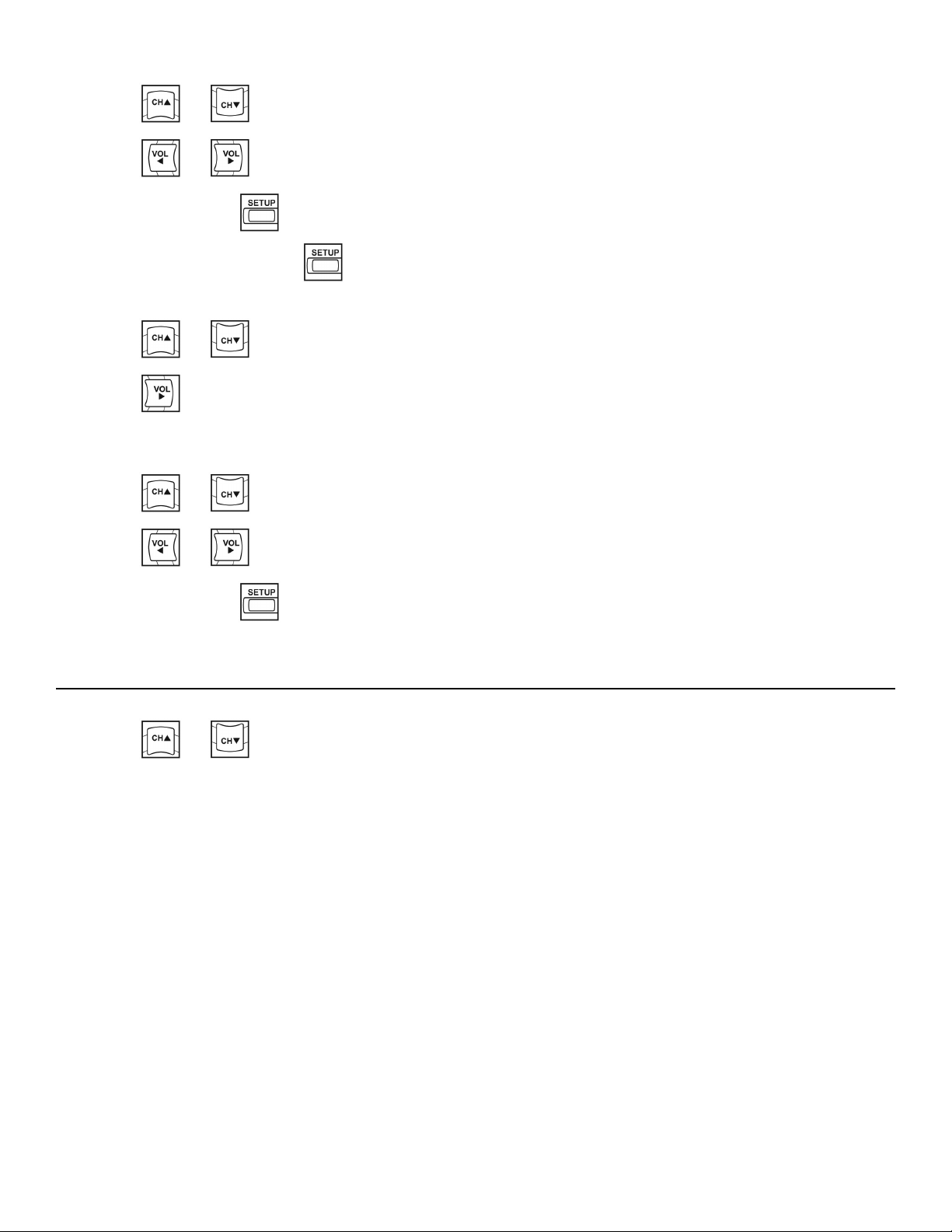
4.
Press or to highlight Add/Delete Analog Channel.
5.
Press or to select Added or Deleted.
6.
Press the SETUP button to return to the previous menu.
To exit, Press the SETUP button until the programming menus disappear. If there are more
analog channels to be added or deleted, repeat steps 3 through 5.
7.
Press or to highlight Enable/Disable Digital Channel.
8.
Press to select Enable/Disable Digital Channel.
If there are not any channels programmed in the Service Level, No Channels Present will appear
in the menu.
9.
Press or to highlight the digital channel that needs to be enabled or disabled.
10.
Press or to select Enable or Disable.
11.
Press the SETUP button to return to the previous menu.
Features
1.
Press or to select Features.
Page 43 of 79
Cybex 525T Treadmill Part Number LT-24018-4 H
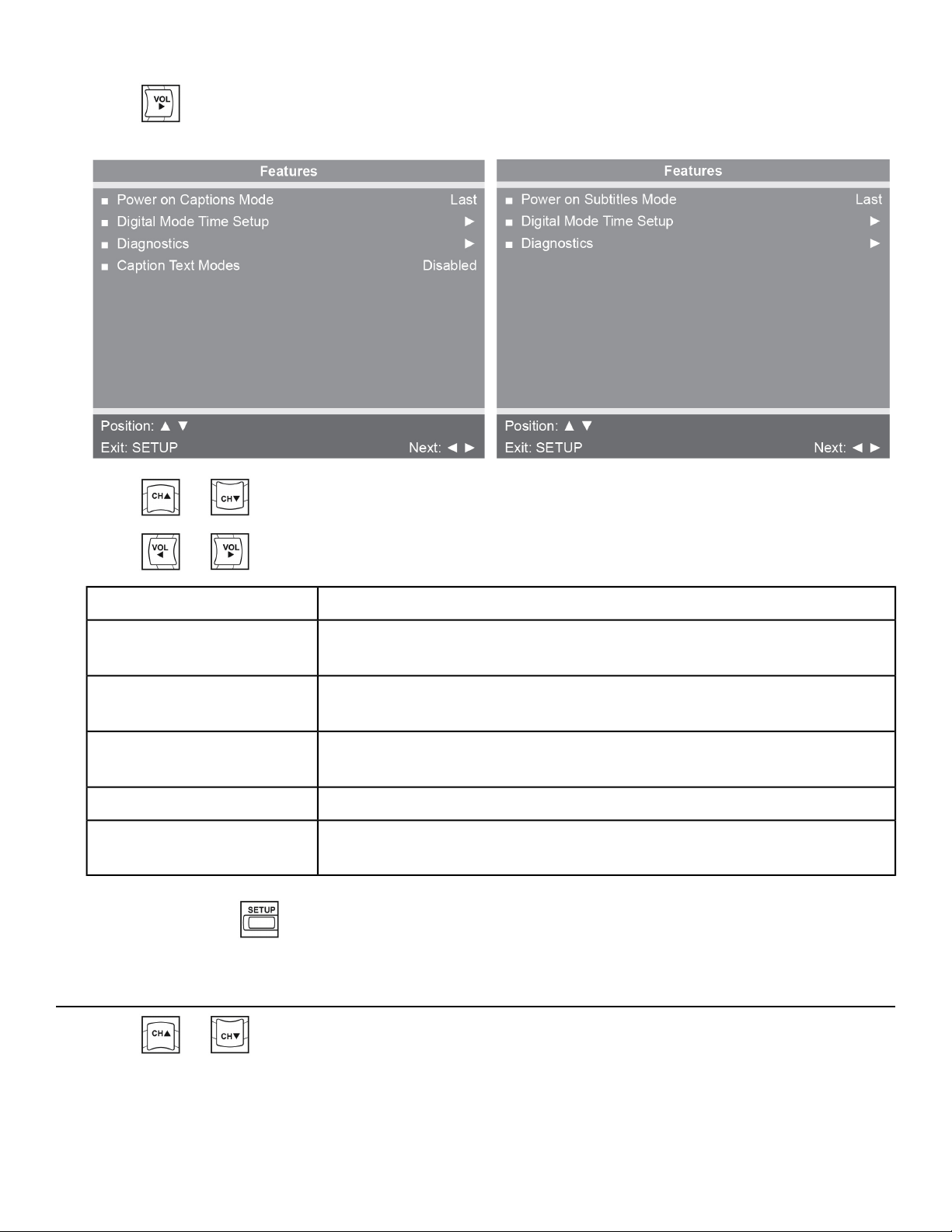
2.
Press to select access Features menu.
DVB-T MonitorATSC Monitor
3.
Press or to select settings.
4.
Press or to adjust settings.
SettingsFeature
Select Off or Last. Last will set caption mode to last used setting.
Power on Captions Mode
(ATSC only)
Select Off or Last. Last will set subtitle mode to last used setting.
Power on Subtitles Mode
(DVB-T only)
Set current time automatically from digital signal. Select time zone and
daylight savings time to Auto, On, or Off.
Digital Mode Time Setup
Provides diagnostic information only. Settings cannot be changed.Diagnostics
Select Enabled or Disabled.
Caption Text Modes
(ATSC only)
5.
Press the SETUP button to return to SETUP MODE menu.
OSD Language
1.
Press or to select OSD Language.
Page 44 of 79
Cybex 525T Treadmill Part Number LT-24018-4 H
2.
Press or to select language.
DescriptionOption
English, Français or Español.ATSC choices
English, Français, Español, Dutch, Danish, Russian, German, and Swedish.DVB-T choices
3.
Press the SETUP button to return to SETUP MODE menu.
Exit Set Up Mode by pressing the SETUP button.
Setup Complete
Testing Operation
Use the following instructions to test the full speed and incline range of the treadmill and to check the
belt for proper operation.
Falling hazard. When starting unit
• Stand on two top steps.
• Do not stand on belt.
1. Plug the power cord into a power outlet from a grounded, dedicated circuit without anyone on the
treadmill.
Ensure the power cord is not being pinched under the front of the treadmill.
2. Toggle the on/off (I/O) power switch to the on position (I). The on/off (I/O) power switch is located
under the front end of the unit, or on the front right side panel.
3. Press the Quick Start key.
The treadmill begins a countdown 3...2...1 and sounds a tone for each count. After it reaches one
(1), the treadmill gives a longer tone and then begins accelerating the belt to reach 0.5 mph (0.8
kph). The lower left display will show the incline and the lower right display will show the actual
speed.
4. Press and hold down the Speed + key until the treadmill reaches a speed of approximately 4 mph
(6.4 kph), as indicated on the display.
5. Observe the belt to see that it is running properly; it should stay centered in the middle of the deck.
If you have problems with the running belt operation, see Running Belt Adjustments in the
Maintenance chapter.
Page 45 of 79
Cybex 525T Treadmill Part Number LT-24018-4 H

6. Run the treadmill through its full speed range.
a) First press the Speed -+ key until the treadmill reaches its highest speed.
b) Then press the Speed - - key until the treadmill is back to 0.5 mph (0.8 kph).
Pressing the Incline ▲▼ or Speed -+ - keys will show the set incline or speed on the displays.
When the treadmill reaches the set incline and speed, the displays will remain steadily illuminated
to indicate that the desired settings have been reached.
7. Run the treadmill through its full % grade range.
a) Press the Incline ▲ key until the treadmill reaches its highest grade.
b) Then press the Incline ▼ key until the treadmill reaches 0% grade.
8. Press the STOP key once to stop the running belt and enter Review Mode.
9. Press the STOP key again to exit Review Mode and return the display to the opening screen.
Page 46 of 79
Cybex 525T Treadmill Part Number LT-24018-4 H
Operation
Intended Use
The intended commercial use of this machine is to aid exercise and improve general physical fitness.
Terms Used
Occurs when unit is plugged in and not in use.Dormant Mode
Active Mode is when the running belt is moving. Before Active Mode begins, a
three second countdown and 3...2...1 is displayed. Active Mode continues until
Active Mode
the preset time limit is reached, the e-stop key is pulled out or the STOP key is
pressed.
A reduction of work load for a short duration allows user to gently reduce heart
rate. Cool Down occurs two minutes prior to completion of the workout-controlled
workout sessions.
Cool Down
In this active mode the user sets a goal for Time. The user controls speed and
incline. Manual Mode continues until the goal is reached. Manual Mode is only
available during Active Mode.
Manual Mode
This begins by tapping the Quick Start key. Quick Start enters Active Mode at
minimum speed and 0% elevation with time counting up from 0:00.
Quick Start
Review of the accumulated workout data will happen at the end of each workout
session.
Workout Review
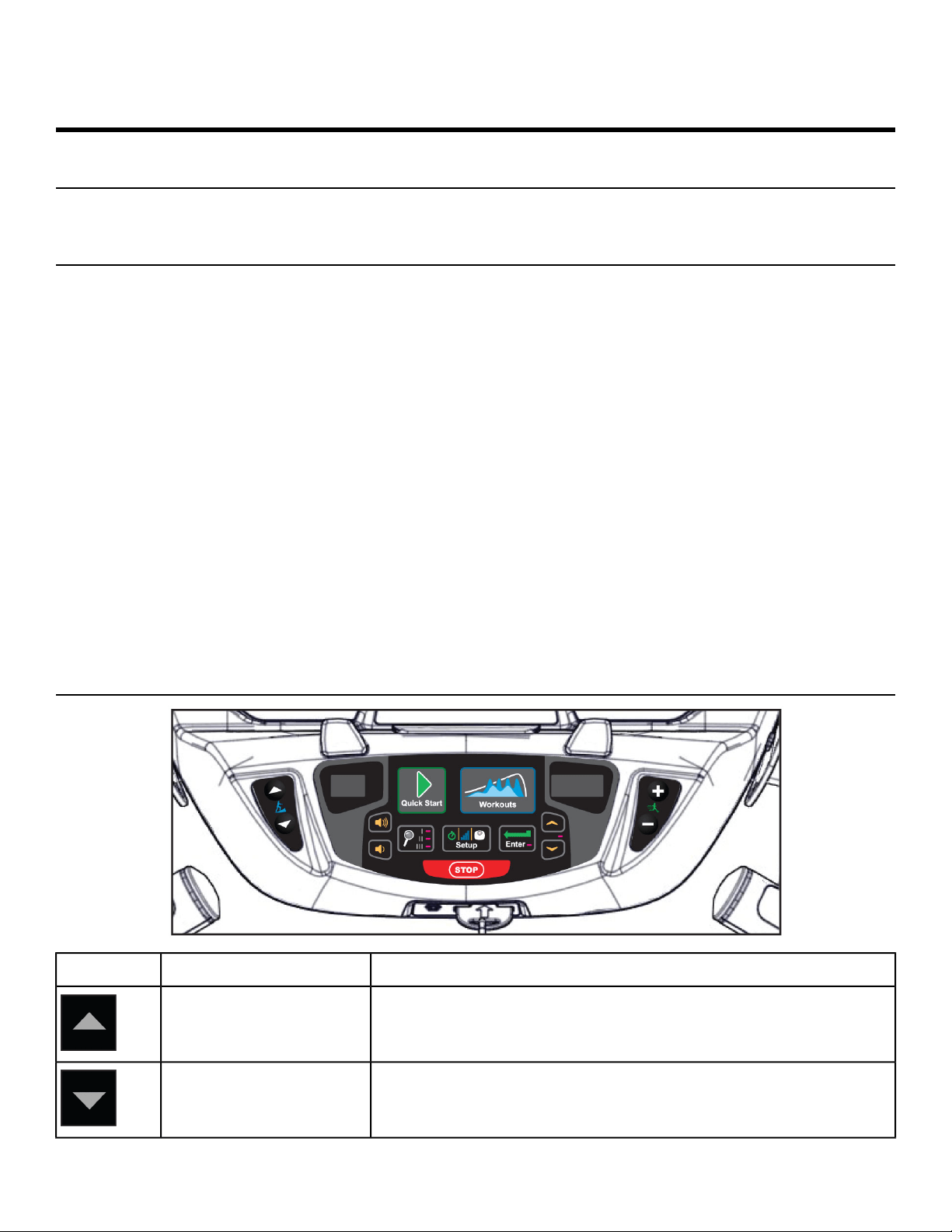
User Control Symbols Used
DescriptionControl NameControl
Adjust Incline up.INCLINE UP
Adjust Incline down.INCLINE DOWN
Page 47 of 79
Cybex 525T Treadmill Part Number LT-24018-4 H
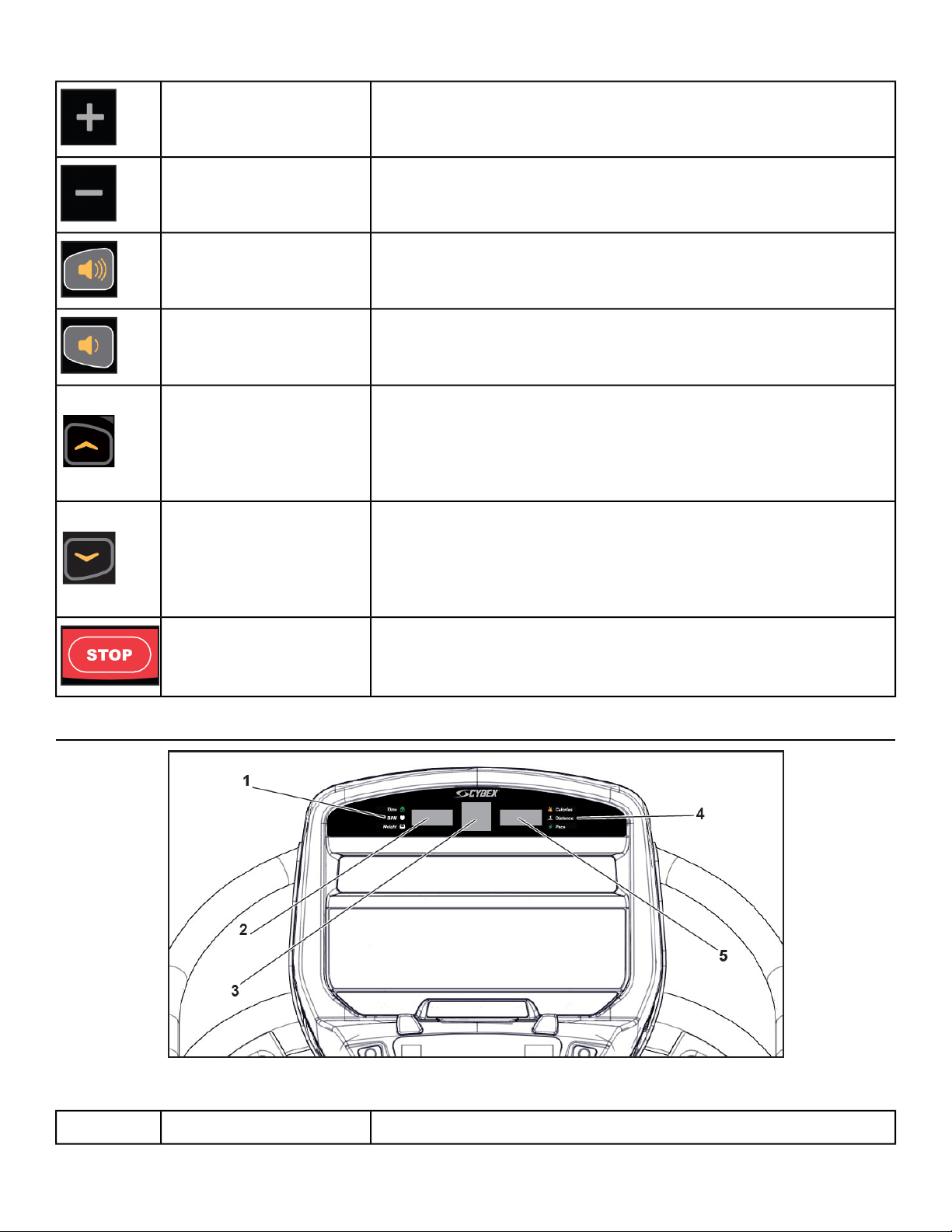
Adjust Speed up.SPEED UP
Adjust Speed down.SPEED DOWN
Adjust Volume up.VOLUME UP
Adjust Volume down.VOLUME DOWN
Adjust Time, Level, Weight, or Workout up
A/V - Channel UP
iPod/iPhone/iPad - NEXT track (option)
UP KEY
Adjust Time, Level, Weight, or Workout down
A/V - Channel DOWN
iPod/iPhone/iPad - PREVIOUS track (option)
DOWN KEY
Press STOP once to end the workout session and start the
Workout Review. Press STOP again to exit to Dormant Mode.
STOP
Console Display
Figure 3: LED Display
Displays Time, BPM, or Weight.Left enunciator1
Page 48 of 79
Cybex 525T Treadmill Part Number LT-24018-4 H
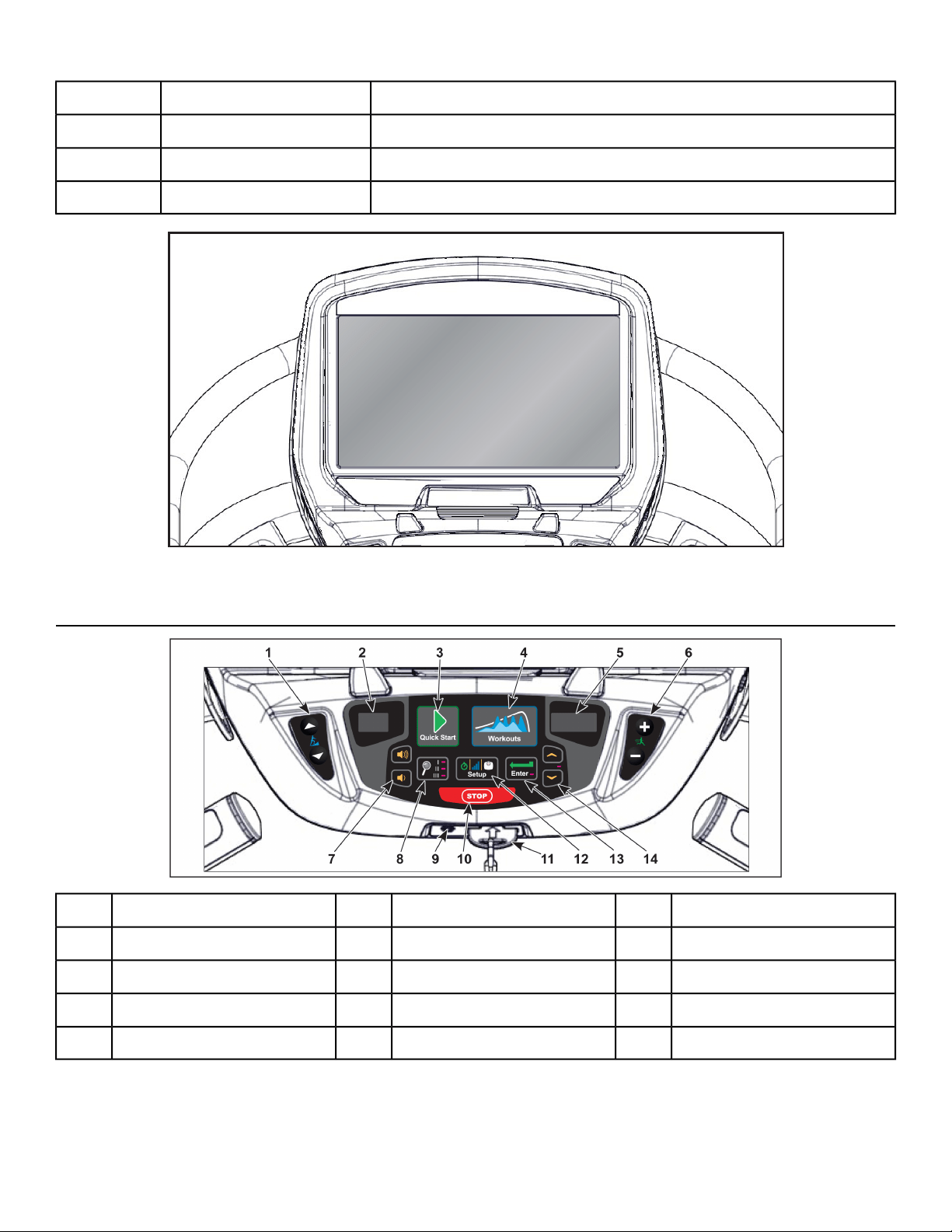
Displays value of Time, BPM, or Weight.Left data readout2
Displays workout profiles and setup options.Bar graph3
Displays Calories, Distance, or Pace.Right enunciator4
Displays value of Calories, Distance, or Pace.Right data readout5
Figure 4: E3 View Monitor
User Controls
E-Stop key11Speed keys6Incline keys1
Setup key12Volume keys7Incline display2
Enter key13Display option key8Quick Start key3
Up/Down keys14Headphone jack9Workouts key4
STOP key10Speed display5
Incline and speed are shown in the LED displays.Displays
Page 49 of 79
Cybex 525T Treadmill Part Number LT-24018-4 H
User controls for Incline, Quick Start, Workouts, Speed, Volume, Display option,
STOP, Setup, Enter and Up/Down.
Keys
Quick Operation Guide
Maximum user weight is 350 lbs. (158 kg).
The following is a quick overview of the operation. For more information see Detailed Operation Guide.
Falling hazard. When starting unit
• Stand on two top steps.
• Do not stand on belt.
1. Place your feet on the two top steps located on each side of the running belt.
2. Clip the e-stop clip onto your clothing and test it as described under Emergency Stop in the Safety
chapter.
3. Press the QUICK START key.
4. Press the Quick Start key.
5. The treadmill begins a countdown, 3...2...1 after which it accelerates the belt to 0.5 mph (0.8 kph)
and enters Active Mode.
6. Press the Incline ▲▼ keys to change the incline at any time.
The left display will show incline.
7. Press the Speed + – keys to change the belt speed at any time.
The right display will show the current speed.
8. Press the STOP key at any time to stop the running belt.
The running belt stops and the incline returns to 0%. If pause is enabled, Workout Review is displayed.
Detailed Operation Guide
Maximum user weight is 350 lbs. (158 kg).
Falling hazard. When starting unit
• Stand on two top steps.
• Do not stand on belt.
1. Place your feet on the two top steps located on each side of the running belt.
2. Clip the e-stop clip onto your clothing and carefully test the e-stop key to ensure it willactivate in
case of an emergency. See Emergency Stop Key (e-stop) in the Safety Chapter forproperly testing
the e-stop key. Also, see Stopping the Treadmill in this chapter for furtherinformation about the
e-stop key. Be sure the string is free of knots and has enough slack foryou to run comfortably with
the e-stop key in place.
Page 50 of 79
Cybex 525T Treadmill Part Number LT-24018-4 H
3. At the opening screen select the Quick Start or Workouts key.
If Quick Start is selected, The treadmill begins a countdown, 3...2...1 after which it accelerates the
belt to 0.5 mph (0.8 kph) and enters Active Mode.
If Workouts is selected, Select a workout and setup options.
a)
Select workouts 1 through 8 with the UP and DOWN keys.
b)
Press the ENTER key to advance to setup options.
Setup options:
Enter workout time.Time
Enter workout level.Level
Enter user weight.Weight
c)
Use the UP and DOWN keys to increase or decrease each of the setup options.
Press the ENTER key to advance to the next option.
For the most accurate resistance and calorie count, you must set your correct weight before
beginning your workout (including clothing).
When selecting a workout you must press the ENTER key after each adjustment of Time,
Level, or Weight.
After final selection has been made the console will countdown, 3...2...1 to signal start of workout,
and enter Active Mode.
4. Hold the handrails while you step onto the running belt and begin walking.
5. Observe the control panel.
The top center Bar Graph display shows a graphical representation of the relative incline changes,
and if in a workout, will show the relative intensity changes that are coming up. The left and right
Data Readouts will start showing the workout data such as Time, Heart rate (if available), Calories,
and Distance. The data displays will start by automatically shifting every 5 seconds.
When you adjust incline or speed in a workout, the change will affect only the current segment. The
workout control will resume starting with the next segment. To increase or decrease overall intensity,
adjust the speed and/or the workout level.
6. Press the Incline ▲▼ keys to change the incline at any time.
The left display will show the set incline.
7. Press the Speed + – keys to change the belt speed at any time.
The right display will show the set speed.
Page 51 of 79
Cybex 525T Treadmill Part Number LT-24018-4 H
8. Press the STOP key at any time to stop the running belt.
The running belt stops and the incline returns to 0%.
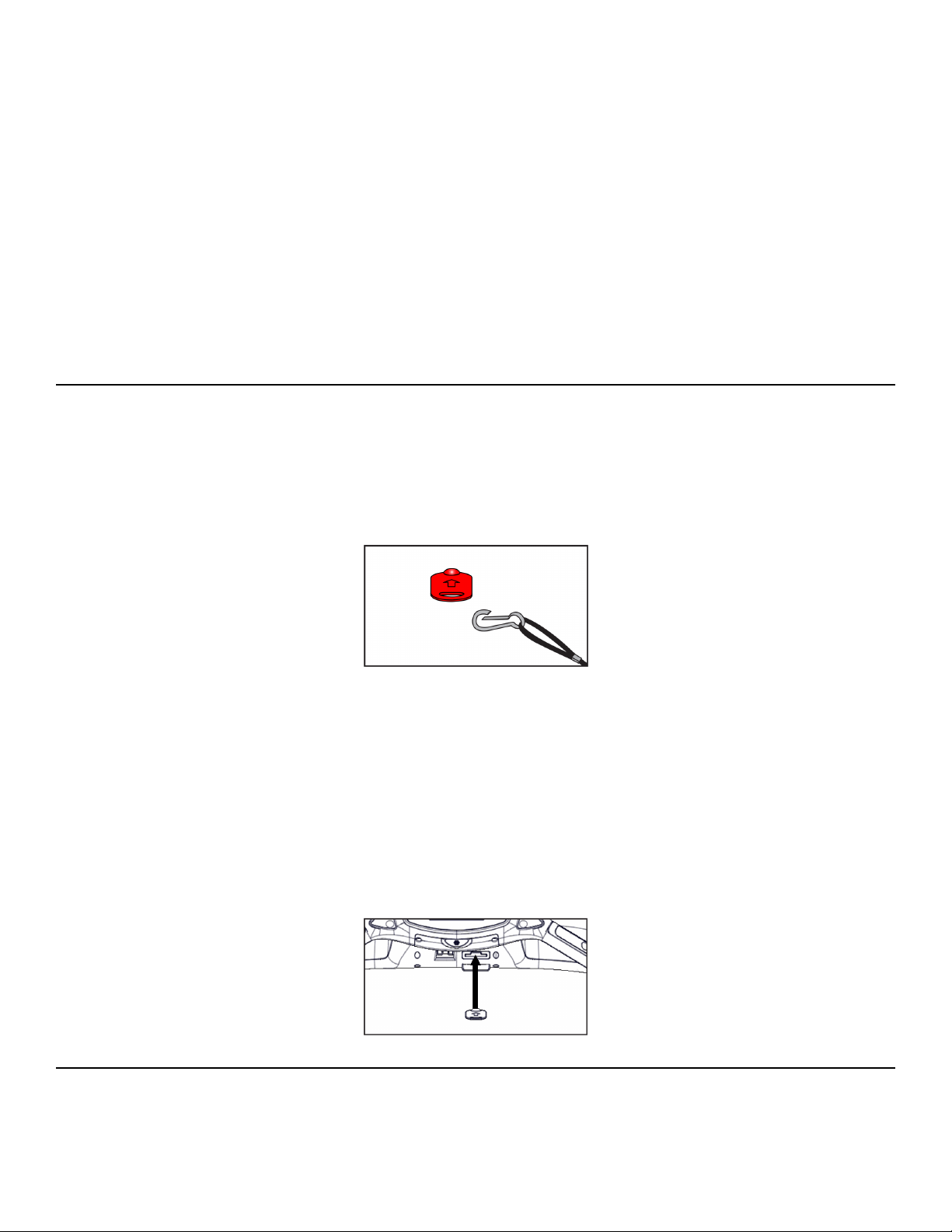
If the e-stop key is removed during a workout, the drive motor power shuts off immediately, causing
the belt to stop. E-Stop is displayed. Replacement of the e-stop key causes Workout Review to
begin.
When a workout is complete the treadmill begins a countdown, 3...2...1 and sounds a tone for each
count. The belt slows to a stop, the incline returns to 0% and Workout Review is displayed for the
preset time or until you press the STOP key.
The treadmill returns to Dormant Mode.
Stopping the Treadmill
Press STOP once to end the workout session and start the Workout Review. The treadmill will perform
a controlled belt stop and bring the incline to 0%. The accumulated data will be displayed for the duration
configured in Setup for Review Time. Press STOP again to exit to Dormant.
The function of the immobilization method: The purpose of immobilizing the treadmill is to prevent
unauthorized use. This can be accomplished by removing the e-stop key from the treadmill, un-clipping
it from the cord and putting it in a non-accessible place.
The emergency dismount: Follow the steps listed below if you experience pain, feel faint or need to
stop your treadmill in an emergency situation:
1. Grip handrails for support.
2. Step onto the top steps.
3. Pull the e-stop key off the console.
The function of the emergency stop: The e-stop key functions as the emergency stop. In an emergency
situation, remove the e-stop key from the treadmill and the running belt will come to a stop.
Safety Sentry
Safety Sentry uses display feedback to determine user presence. If a user is not detected within 10
seconds, the display beeps and inquires Run? (LED console) or Are you there? (E3 View console).
Page 52 of 79
Cybex 525T Treadmill Part Number LT-24018-4 H
The treadmill will use every sensor available to determine a user is still on the belt before asking if you
are present, then shutting it off. If the user is lighter than 100 lbs. (45 Kg), the motor drive may not be
able to determine they are on the belt. In this instance, the treadmill can only rely on the key inputs, or
the heart rate to establish your presence. It is advisable for lighter users to take advantage of the wireless
heart rate feature to avoid triggering the Safety Sentry.
An unattended, running treadmill can create an unsafe environment for a user. The Safety Sentry feature
is intended to allow the treadmill to stop the running belt when the treadmill is unattended. To avoid the
treadmill running unattended, follow these steps:
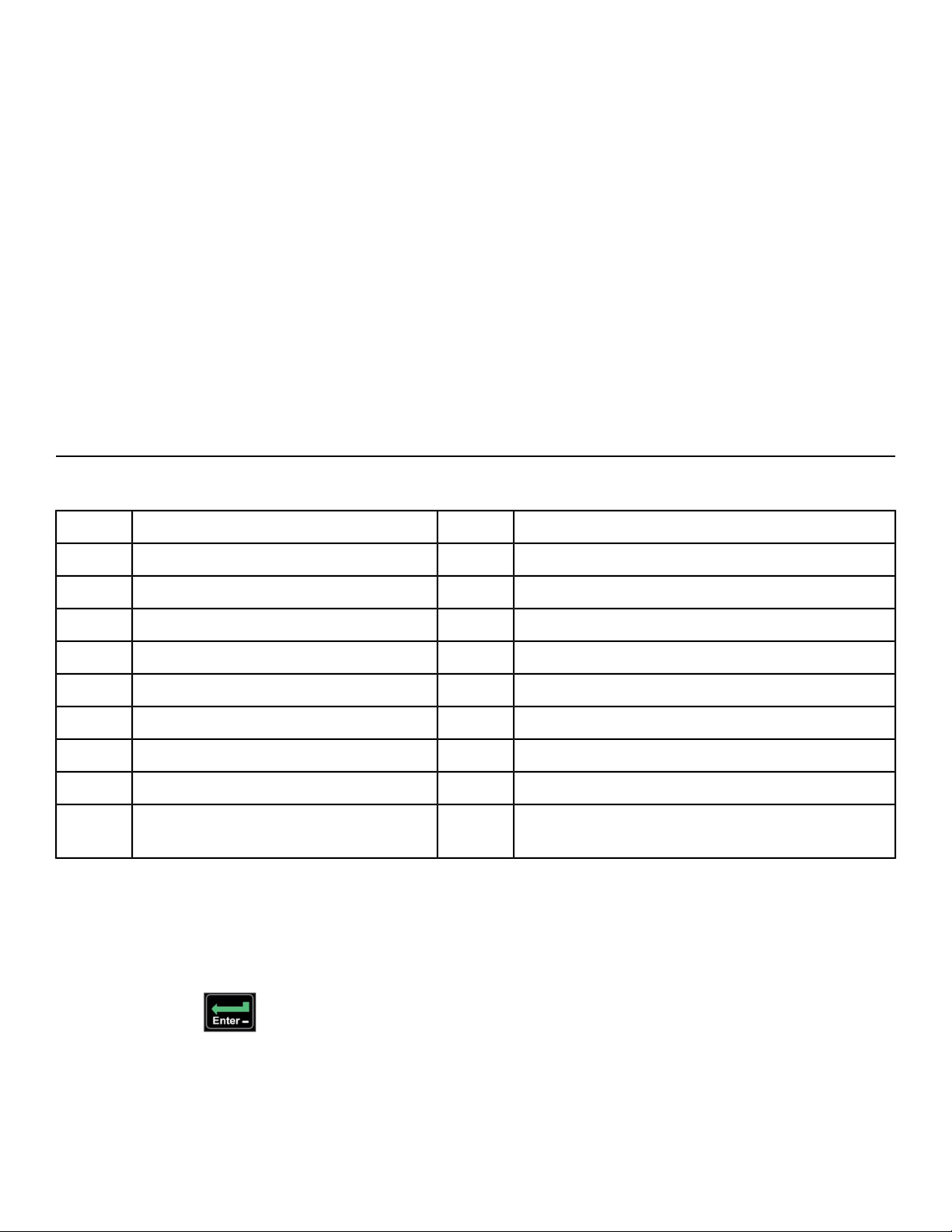
1. At the end of your workout, verify that the running belt is stopped by visually checking the Cybex
logo on the running belt, it should not be moving.
2. If the belt is moving, place feet on both sides of the top step and press STOP or remove the e-stop
key from the treadmill.
Workout Selection
Workout Choices:
SettingsLevelsWorkout
Select time, level and weight.10Weight Loss1
Select time, level and weight.10Rolling Hills2
Select time, level and weight.10Hills3
Select time, level and weight.10Pike’s Peak4
Select time, level and weight.10Hill Interval 1:15
Select time, level and weight.10Hill Interval 1:26
Select time, level and weight.10Hill Interval 1:37
Select time, level and weight.10Cardio8
Select time, age, target heart rate and weight.NA
Heart Rate Control (HRC) (E3 View
Monitor option)
9
Navigation
The keypad is active during the workout setup time to key in time, level and weight values. The
Resistance + - keys are also active to adjust the displayed workout value (up or down). Hold down key
to accelerate rate of increments.
Press the ENTER key after each step to accept values entered and to move forward in the setup
process.
Page 53 of 79
Cybex 525T Treadmill Part Number LT-24018-4 H
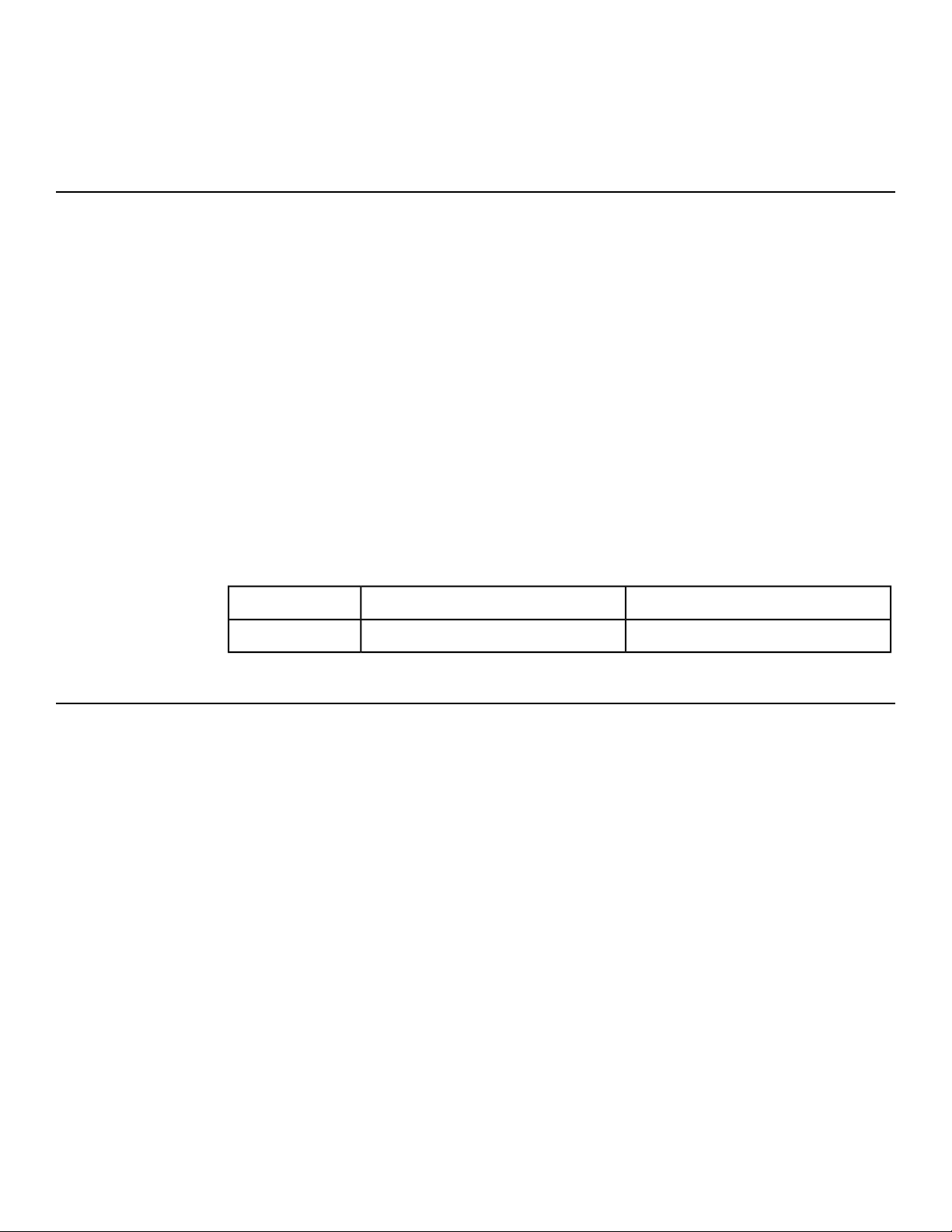
The Quick Start key may be pressed any time during this process to accept all workout defaults. If no
activity is performed after a workout is selected, the unit will default to the settings of the current workout
selected.
Data Readouts
As you exercise, the unit keeps track of the following data:
Your current heart rate. Heart rate will appear when a signal is introduced. Use
the hand grips for Contact Heart rate or wear a Polar
®
compatible heart rate chest
strap.
BPM (Beats Per
Minute)
The total accumulated calories burned during your workout. Your weight must be
correctly set before beginning your workout for this measurement to be most
accurate.
Calories
The total accumulated distance, in miles or kilometers, during your workout.
Depending on the defaults you've chosen this measurement will show in English
or Metric
Distance
At your current speed, how long it would take to cover a mile (or kilometer),
displayed in minutes:seconds.
Pace
The total time you've been working out or time remaining. Display time as
minutes:seconds.
Time
00:01 to 99:99Minutes:SecondsMM:SS
100 minutes or moreMinutesMMMM
Heart Rate Indicator
Lightly hold hand grips on the handlebar ensuring that hands are clean and contact
both the front and back sensors of each grip. A heart rate will display in typically
30 seconds or less.
Contact Heart
Rate
Factors that interfere with heart rate signal:
• hand lotions
• oils or body powder
• excessive dirt
• excessive movement
• body composition
• hydration
• too loose grip
• too tight grip
• resting or leaning on grips
To use this feature, a 5 KHz Polar
®
compatible heart rate transmitter belt (not
included) must be worn.
Wireless Heart
Rate
Page 54 of 79
Cybex 525T Treadmill Part Number LT-24018-4 H
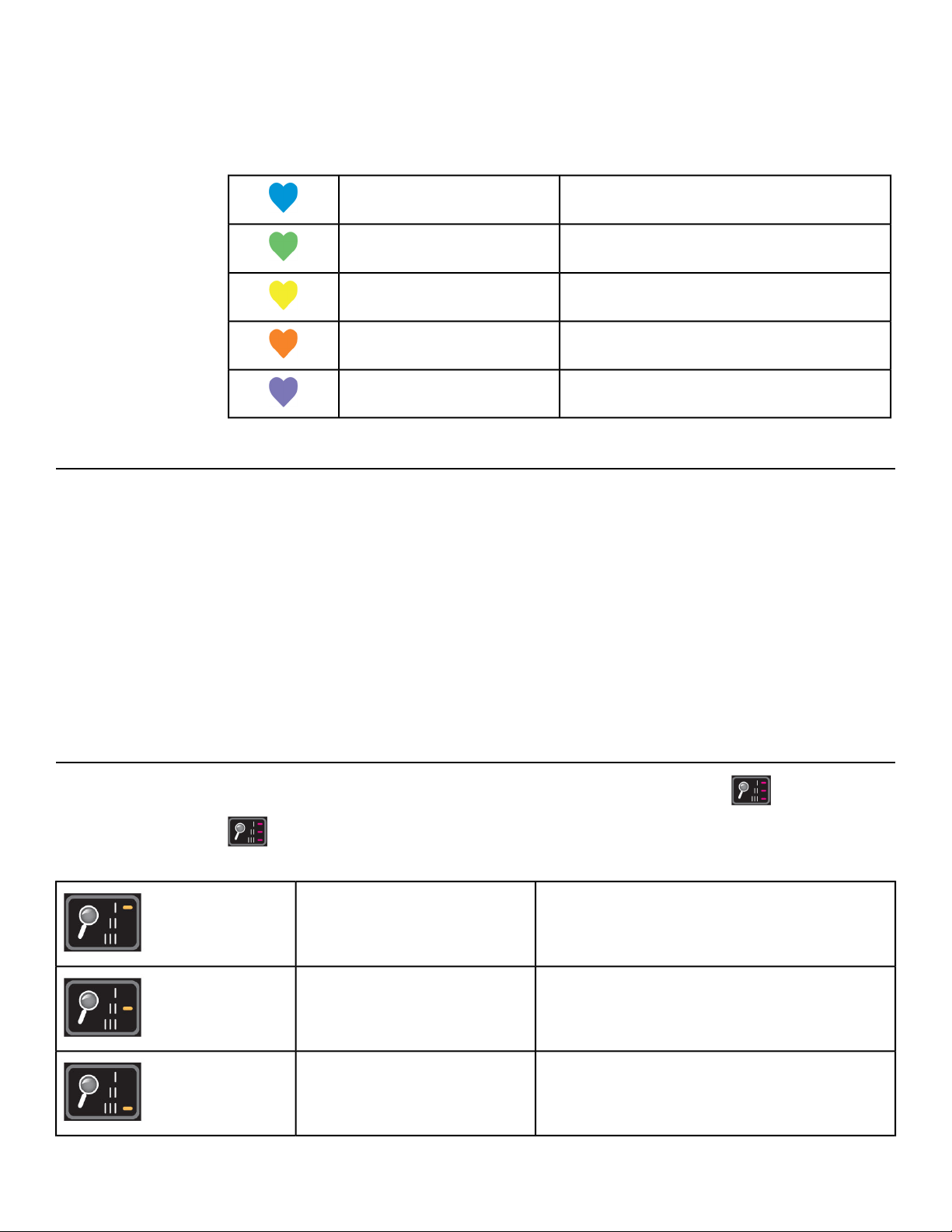
Once the actual heart rate is determined, the LED is blinking to the displayed BPM
and the Heart LED lights up. The color of the light represents a scale of low to
high target heart rate.
0 - 69 BPMBlue
70 - 93 BPMGreen
94 - 119 BPMYellow
120 - 169Dark Orange
170 and higherMagenta
Meaning of % Grade
A 1% grade is not the same as a 1 degree incline. The % grade is the relationship of the measurement
of rise over the measurement of run (also called slope). For example, a 1 foot (meter) rise in height over
a length of 100 feet (meters) is a 1% grade. Expressed as a mathematical formula, the grade is calculated
as follows: 1 ft. (m) / 100 ft. (m) = 0.01 = 1%
With respect to treadmills, the percent grade is roughly equal to the increase in height (rise) of the
treadmill divided by the length (run) of the treadmill.
The degree of incline can be related to % grade by taking the Arctangent of the grade. For instance,
15% grade is equal to 8.53 Degrees (ArcTan(.15)=8.53°). The opposite is true to determine % Grade
from Degree of incline (Tan (8.53°)=.15).
E3 View Monitor Screen Options
During operation four E3 View Monitor screen options are available. Press SCAN to change
screens. The SCAN LED’s will indicate display option.
Display video with data at bottom of screenTV + Data
LED I on
Display video onlyTV Only
LED II on
Display data onlyData Only
LED III on
Page 55 of 79
Cybex 525T Treadmill Part Number LT-24018-4 H
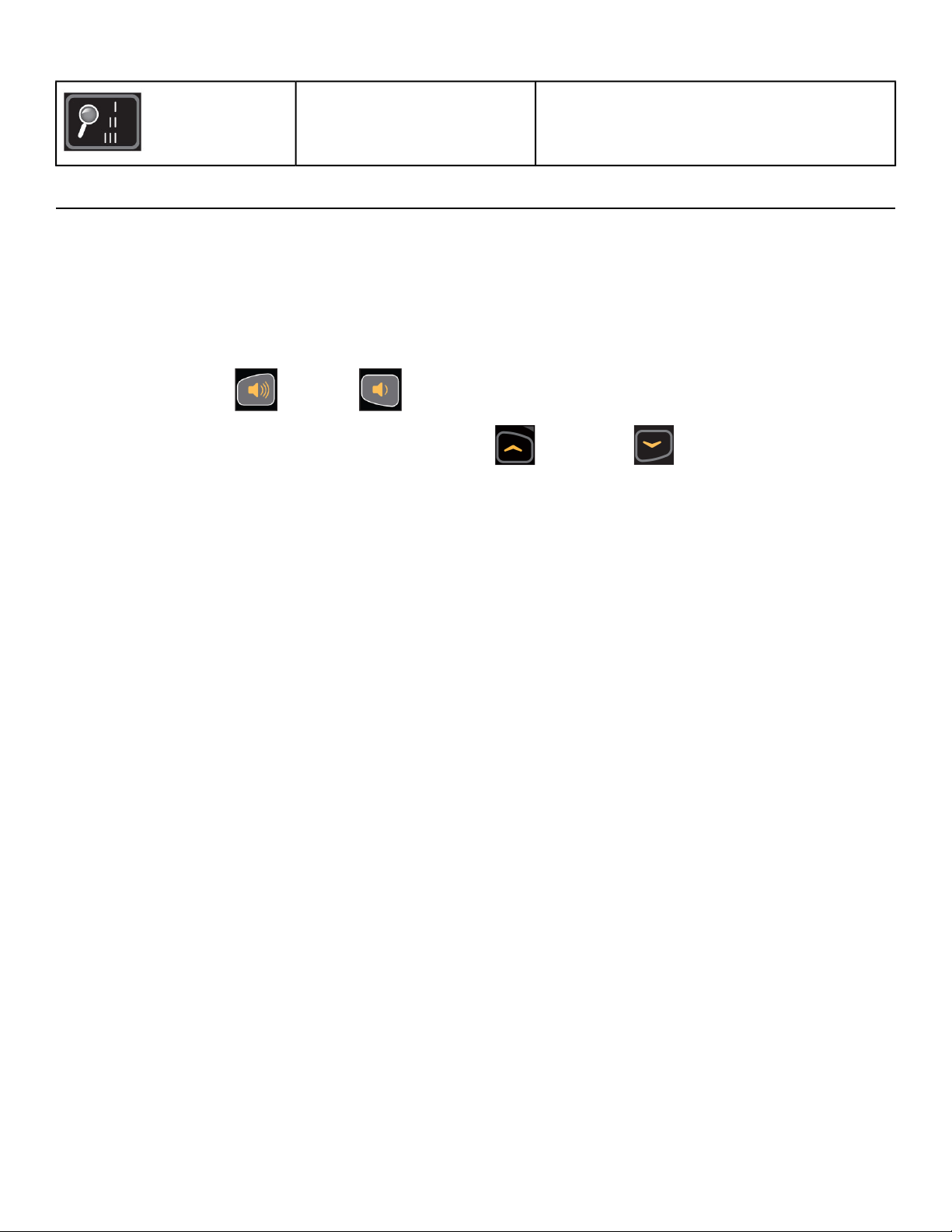
Screen is blank, video and data are not
displayed
Blank
No LED’s on
iPod/iPhone/iPad Functions
Connecting an iPod/iPhone/iPad allows some control through the keypad. The iPod/iPhone/iPad will
not be charged while connected.
1. Connect iPod/iPhone/iPad (not supplied) into the 30 pin connector.
2. Place iPod/iPhone/iPad onto the accessory tray.
3. Plug headphones (not supplied) into the console headphone jack.
4.
Press volume Up or Down to adjust volume.
5.
For non-E3 View Monitor consoles, press the Up and Down keys to change tracks.
Videos will not be displayed on the E3 View Monitor.
Page 56 of 79
Cybex 525T Treadmill Part Number LT-24018-4 H
Maintenance
All preventive maintenance activities must be performed on a regular basis. Performing routine preventive
maintenance actions can aid in providing safe, trouble-free operation of all Cybex equipment.
Cybex is not responsible for performing regular inspection and maintenance actions for your machines.
Instruct all personnel in equipment inspection and maintenance actions and also in accident reporting
and recording. Cybex representatives are available to answer any questions that you may have.
Warnings
Read all warnings in this chapter.
For maintenance, service and repair:
• Must be performed by trained service personnel only
• Use only Cybex replacement parts
• Unplug unit before working on it
• Keep water and liquids away from electrical parts.
Electrocution hazard. To avoid death or serious injury unplug unit when not
in use or when performing maintenance.
Equipment hazard. To avoid serious injury or death replace worn or damaged
components immediately and keep the equipment out of use until repair is
completed.
Clean Unit
Shock and electrocution hazard.
• Unplug unit and let sit 10 minutes before cleaning or performing
maintenance.
• Electrical charge can remain in unit after unplugging.
• Keep water and liquids away from electrical parts.
Tools Required
• Cleaning solution
• Rubbing alcohol
• Clean Cloth
• Vacuum
After Each Use
Wipe up any liquid spills immediately. After each workout, use a cloth to wipe up any remaining
perspiration from the handrails and painted surfaces.
Page 57 of 79
Cybex 525T Treadmill Part Number LT-24018-4 H

Be careful not to spill or get excessive moisture between the edge of the display panel and the console,
as this might create an electrical hazard or cause failure of the electronics.
As Needed
Vacuum any dust or dirt that might accumulate under or around the unit. Cleaning this area should be
done as often as indicated in the Service Schedule.
Clean Console
Do not spray cleaning solution directly on the console. Direct spraying could
cause damage to the electronics and may void the warranty.
• Spray a mild cleaning agent on a clean cloth.
• Clean the console, accessory tray, and cup holder with a damp cloth.
Clean Base
• Spray a mild cleaning agent on a clean cloth.
• Clean the base of the unit with a damp cloth.
Contact Heart Rate Grips
Clean the grips using a cloth dampened with a cleaning solution containing rubbing alcohol.
Contaminants, such as hand lotions, oils or body powder, may come off on the contact heart rate grips.
These can reduce sensitivity and interfere with the heart rate signal. It is recommended that the user
have clean hands when using the contact heart rate.
Vacuum Motor Bay
Tools Required
• Phillips screwdriver
• Clean Cloth
• Vacuum, with tip for small spaces
Page 58 of 79
Cybex 525T Treadmill Part Number LT-24018-4 H
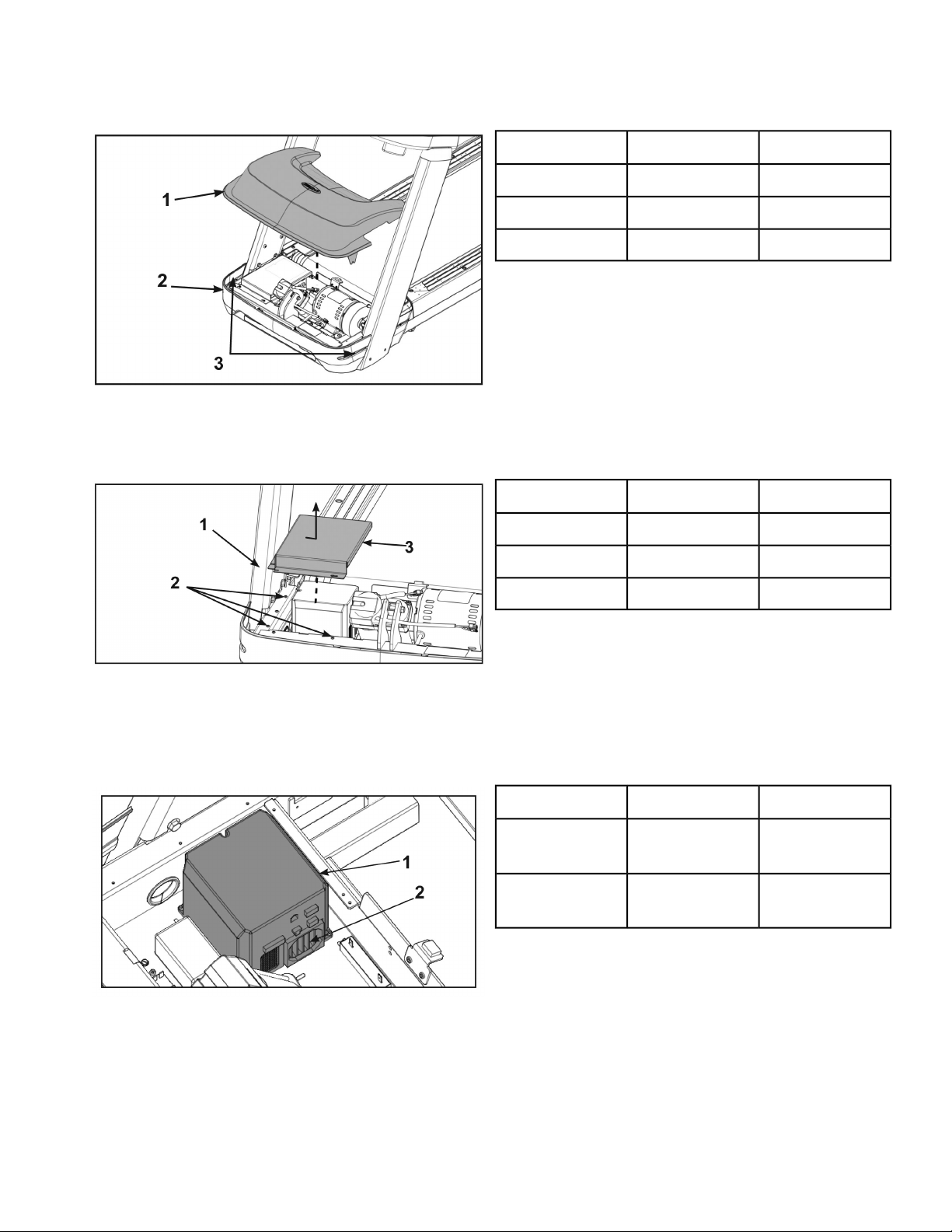
1. Loosen, but do not remove the two front cover screws securing the motor cover using a Phillips
screwdriver.
Qty.Description
1Motor cover1
1Front cover2
2Screws3
2. Remove motor cover by lifting vertically.
3. Loosen but do not remove the seven screws securing the sheild to the base using a Phillips
screwdriver.
Qty.Description
1Base1
7Screws2
2Shield3
4. Remove shield by sliding sideways and then vertically off of base.
5. Use a vacuum attachment or hand vacuum to clean the exposed elevation assembly, drive motor,
lower electronics and the surrounding areas.
6. Vacuum the fan and heat sink area of the motor controller.
Qty.Description
1
Motor
controller
1
1
Fan and
heatsink
2
7. Use a dry cloth for the areas that you can not reach with the vacuum cleaner. If the machine has
not been used for some time or is excessively dirty, use a dry cloth to wipe all exposed areas.
8. Raise the rear of the treadmill and roll it back from its present position to vacuum the floor area
underneath the unit. When finished, return the treadmill to its normal position.
Page 59 of 79
Cybex 525T Treadmill Part Number LT-24018-4 H
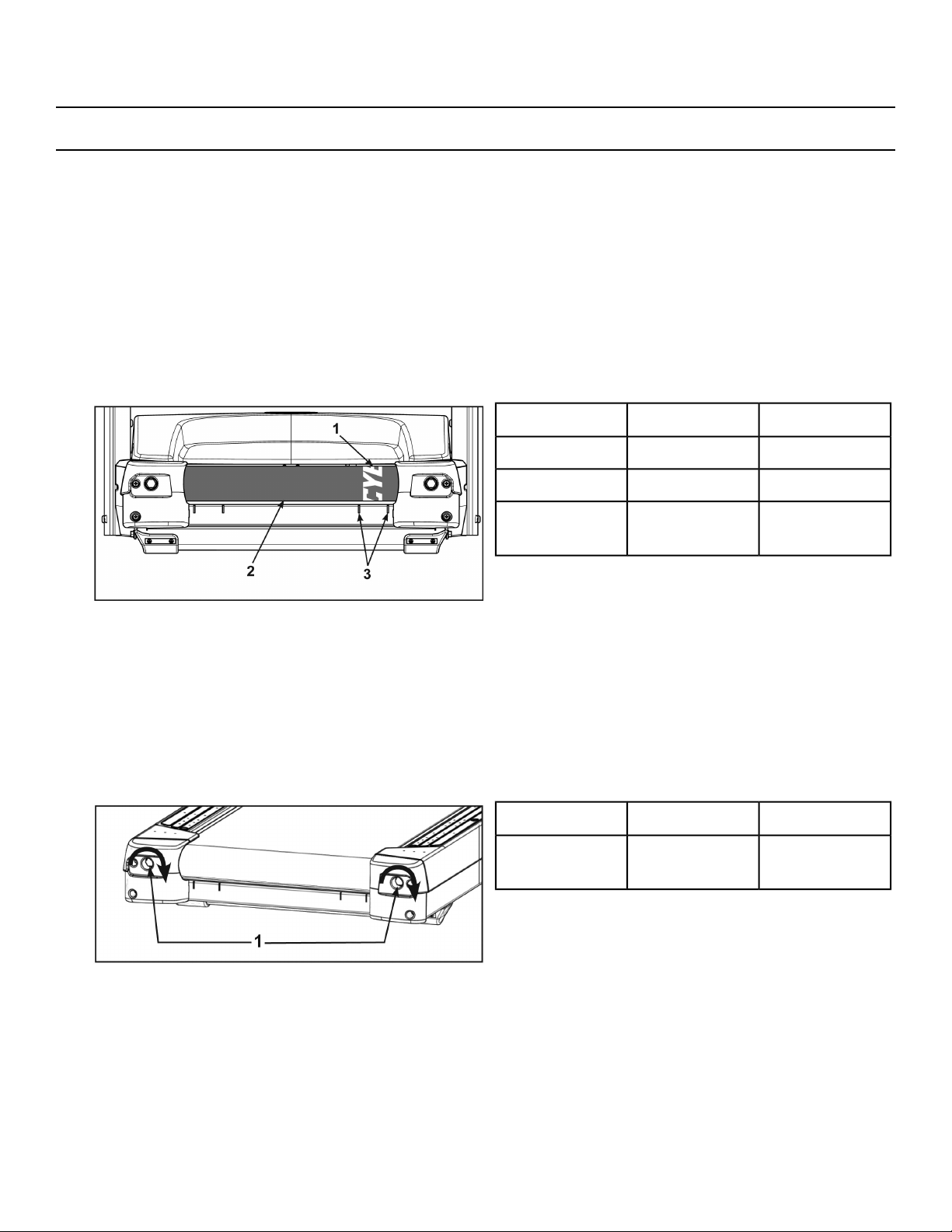
Running Belt
Center and tension the running belt
1. Plug the power cord into the power outlet.
2. Turn the main power switch to the on (I) position.
3. Press the Quick Start key.
4. Press the Speed + key to bring the speed up to 5 mph (8 kph). Allow the treadmill to run for a minute.
The lateral position of the running belt is correctly centered when the Cybex logo is centered between
the inside edges of the two belt tracking slots. If the Cybex logo is not centered between the belt
tracking slots, center the running belt with the following procedure.
5. Observe the Cybex logo position relative to the belt tracking slots with the treadmill running at 5 mph
(8 kph).
Qty.Description
1Cybex logo1
1Running belt2
2
Belt tracking
slots
3
While centering the running belt choose one bolt to adjust. Do not adjust both bolts.
6. Tighten the rear roller bolt on the side of the treadmill toward which the running belt is moving using
a 3/4" socket wrench.
For example: If the running belt moves to the right of the belt tracking slots, tighten the bolt on the
right side of the frame, tighten about 1/2 of a turn (clockwise) and wait 30 seconds. If the running
belt does not move back to the center of the belt tracking slots, make another adjustment to the
same bolt. Once the running belt has been adjusted closer to the center of the belt tracking slots,
use about 1/4 of a turn until the running belt has been stabilized.
Qty.Description
2
Rear roller
bolts
1
Page 60 of 79
Cybex 525T Treadmill Part Number LT-24018-4 H

7. Check the belt tension after the running belt has been centered.
Make sure the running belt tension is tight enough so that the running belt does not slip or hesitate
when stepped on. Walk on the treadmill at 3.5 - 4 mph (5.6 - 6.4 kph) and every 4th to 5th step throw
your weight into your step to feel if the running belt is slipping. If slipping is felt, confirm it is the
running belt slipping and not the drive belt. With the hood cover removed, observe movement at the
drive belt and front roller.
Do not over tighten the running belt. Over tightening the running belt can cause the belt to stretch
and require replacement. Continue procedure until running belt stops slipping.
8. Check running belt for centering position.
If running belt is not centered, perform steps 5 and 6.
Check Running Belt and Deck Surfaces
The running belt and deck should be checked periodically for any excessive wear. In an effort to make
sure that the running belt operates properly, visually inspect the belt often to make sure that there are
no tears or fraying in the belt material. The running belt should be replaced every 15,000 miles (24,140
km). The running deck should be flipped every 15,000 miles (24,140 km) and replaced every 30,000
miles (48,280 km). A service prompt will appear at this interval and the parts will need to be replaced.
Tools Required
Phillips screwdriver
Disconnect external power source
1. Toggle the on/off (I/O) power switch to the off (O) position. The on/off (I/O) power switch is located
under the front end of the unit, or on the front right side panel.
2. Unplug the treadmill from the power outlet.
Page 61 of 79
Cybex 525T Treadmill Part Number LT-24018-4 H
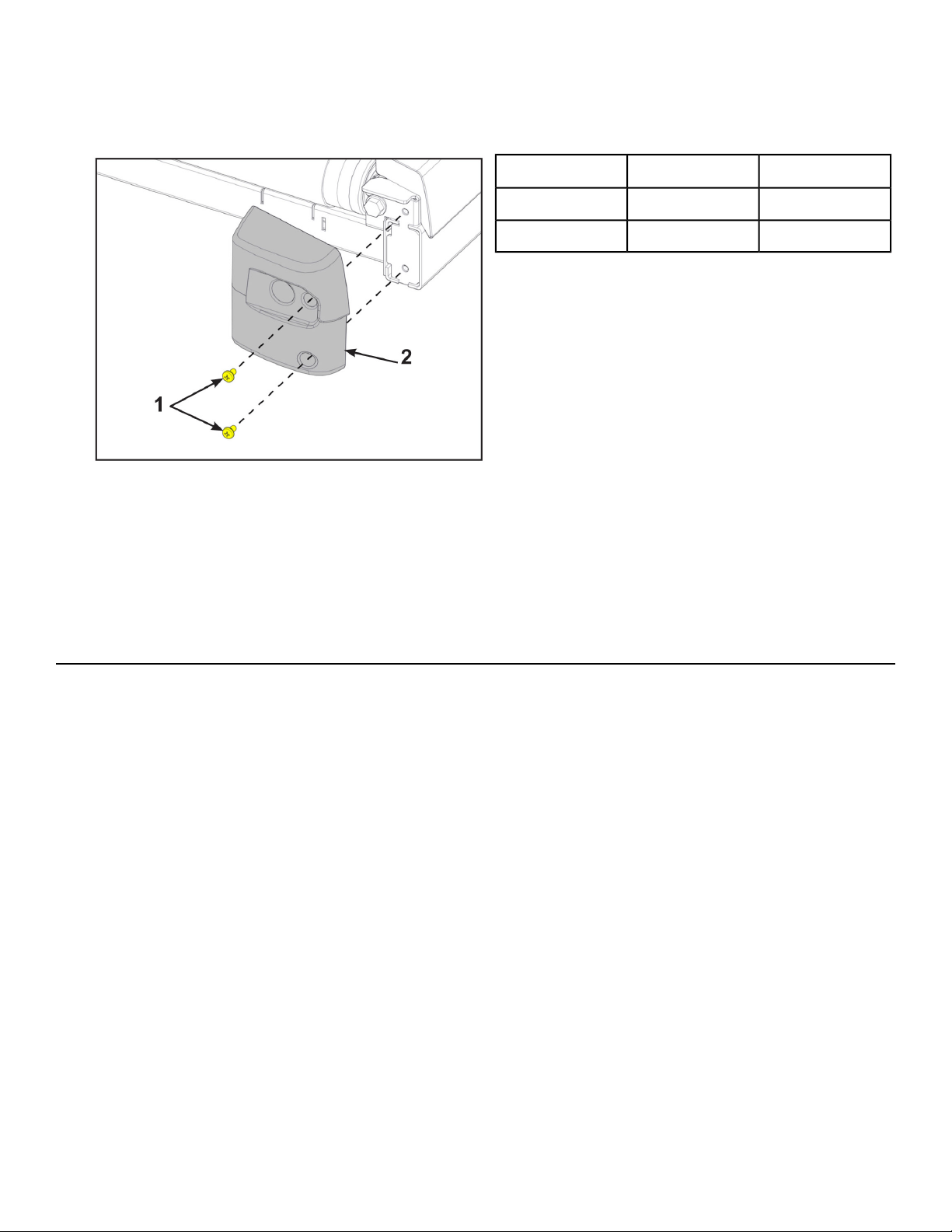
Check the running belt condition
1. Remove the two screws securing the right end cap using a Phillips screwdriver.
Qty.Description
2Screws1
1Right end cap2
2. Repeat step 1 for the left end cap.
3. Inspect the top surface, seam, and edges of the running belt while you roll it by hand.
If the belt has any rips or looks excessively worn the belt needs to be replaced.
If the running belt and deck need replacement refer to a qualified service technician.
4. Install the screws securing the end caps removed in steps 1 and 2 using a Phillips screwdriver.
Other Maintenance
Other preventive maintenance activities must be completed by a qualified service technician at the
recommended intervals listed in the Service Schedule at the end of this chapter. These activities include:
• Flipping or replacing the running deck
• Replacing the running belt
Elevation Motor Lubrication
In time the elevation motor pivot points or tube nut may develop a squeak. Lubricate the upper and
lower bolts and the spacers with a small amount of lithium grease. You can buy lithium grease at an
auto parts store.
Static Electricity
Depending upon where you live, you may experience dry air, causing a common experience of static
electricity. This may be especially true in the winter time. You may notice a static build-up just by walking
across a carpet and then touching a metal object. The same can hold true while working out on your
treadmill. You may experience a shock due to the build-up of static electricity on your body and the
discharge path of the treadmill. If you experience this type of situation, you may want to increase the
humidity to a comfortable level through the use of a humidifier.
Page 62 of 79
Cybex 525T Treadmill Part Number LT-24018-4 H
E3 View Monitor
Cleaning
• Clean with a dust free cloth. For further cleaning, use a soft cloth or paper towel dampened with
water. To avoid damage to the surface of the monitor, do not use abrasive or chemical cleaning
agents.
• Disinfecting: to avoid damage to the surface, test a small portion of the monitor’s cabinet with any
disinfectant to verify that the disinfectant will not discolor or soften the enclosure.
Storage or Long Non-Use Periods
When not using product for an extended period of time the product should be disconnected from the
Power Supply, TV/Cable Signal Feed, and any Peripheral Devices.
Pixels
Very small red, blue, white or green spots may be visible or may appear on the screen. This is a
characteristic of liquid crystal display panels and is not considered a defect for replacement. The liquid
crystal panel is built with very high precision technology giving fine picture details. Occasionally, a few
non-active pixels may appear on the screen as a fixed point. This does not affect the performance of
monitor or merit a warranty claim.
Maintenance
• It is very important to have the unit regularly examined by a qualified technician to ensure the product
is fit for use.
• If the unit malfunctions, please refer to a qualified technician for repair or replacement of defective
parts immediately. Do not attempt to use the monitor until it has been inspected and repaired by a
qualified technician.
• For inspection, installation and servicing, please consult qualified technician.
• Failure to use a manufacturer approved repair technician may void any warranty claims.
Service Wheel (optional)
A service wheel lever is located at the rear end of the unit. This lever will engage a wheel and elevate
the rear end of the unit. The treadmill can then be easliy moved for cleaning or servicing.
Shock and electrocution hazard.
• Unplug unit and let sit 10 minutes before cleaning or performing
maintenance.
• Electrical charge can remain in unit after unplugging.
• Keep water and liquids away from electrical parts.
Engage service wheel
1. Unplug power cord from power outlet.
Page 63 of 79
Cybex 525T Treadmill Part Number LT-24018-4 H
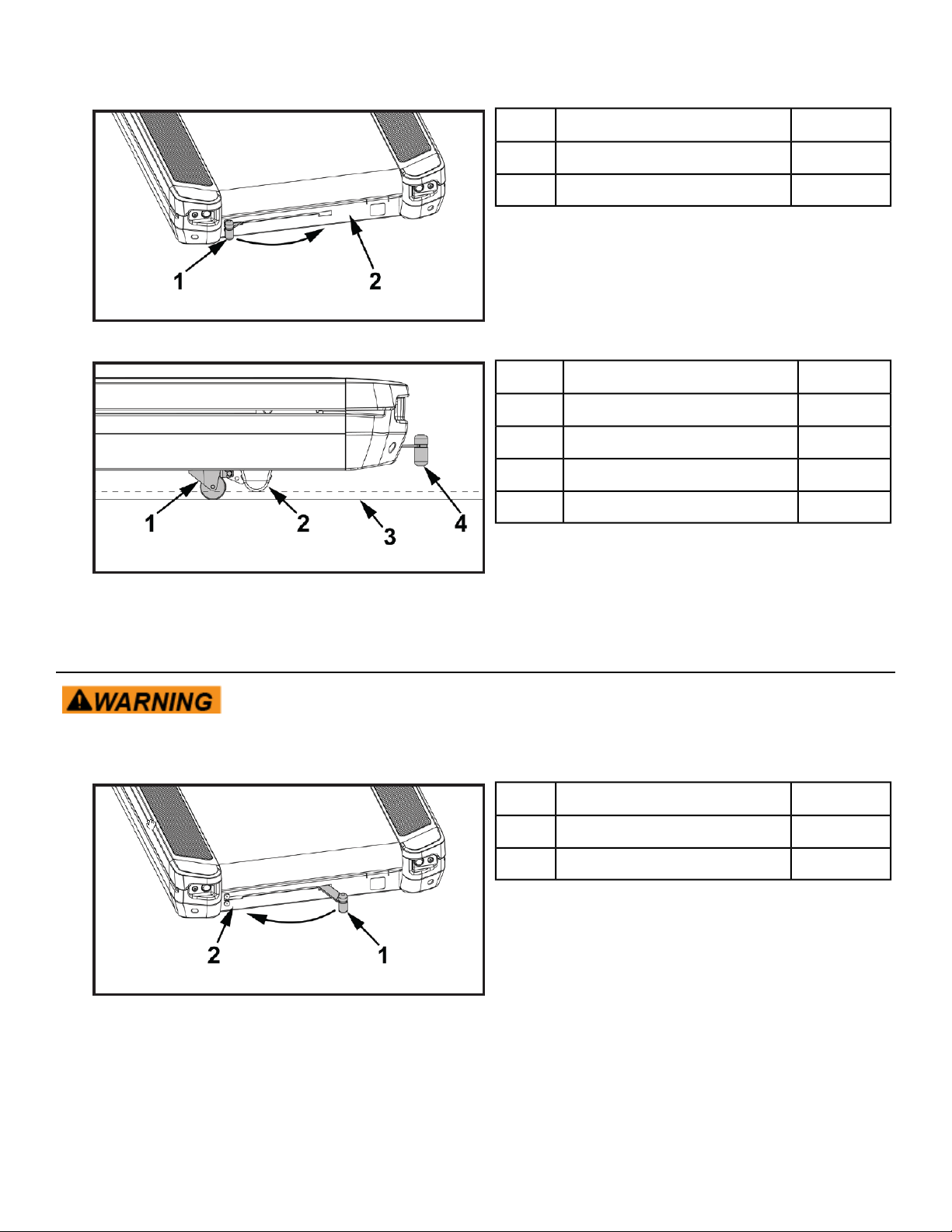
2. Grasp the service wheel lever and slide to the right and down to lock in place.
Qty.Description
1Service wheel lever1
1Frame2
The service wheel will lower and raise the rear foot off the floor.
Qty.Description
1Service wheel1
2Rear foot2
1Floor3
1Service wheel lever4
3. Move treadmill as needed.
Disengage service wheel
Trip and fall hazard. To avoid injury, make sure service wheel lever is not
engaged prior to use.
1. Grasp the service wheel lever and slide to the right, lift up, and slide to the left.
Qty.Description
1Service wheel lever1
1Frame2
2. Plug the power cord into the power outlet.
Page 64 of 79
Cybex 525T Treadmill Part Number LT-24018-4 H
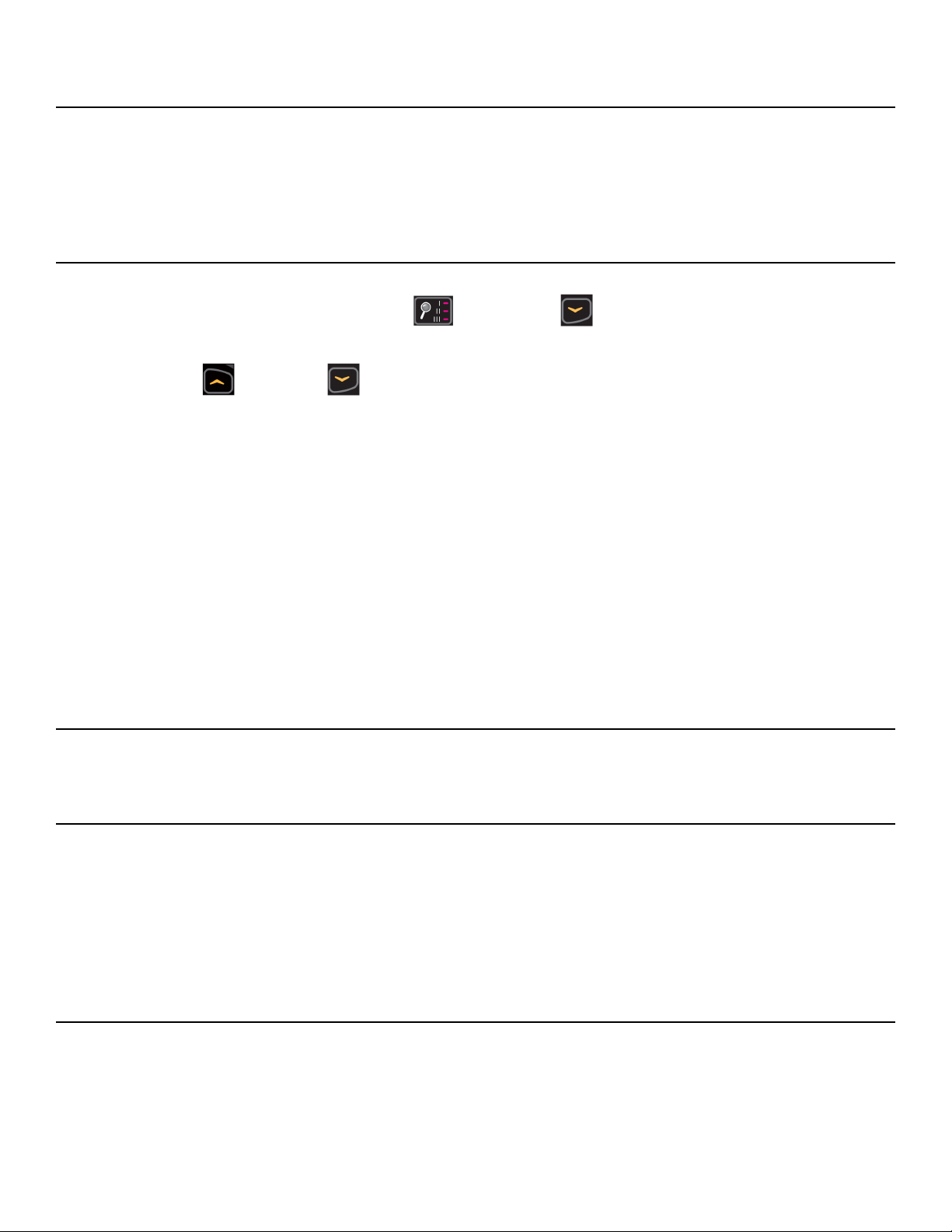
Service Schedule
All maintenance activities shall be performed by qualified personnel. Failure to do so could result in
serious injury.
This is the minimum recommended service.
Determine distance.
1.
Press and the hold the Display option and DOWN keys for 3 seconds.
A beep signifies the first screen of the Statistics menu.
2.
Press the UP or DOWN keys to scroll up and down in the statistics menu.
The Statistics menu includes: Miles/Km, Hours, Starts, and Error log.
3. The first menu item is Miles/Km.
4. Record Distance.
5. Navigate to menu item Hours.
6. Record Hours.
7. Navigate to menu item Starts.
8. Record Starts.
9. Navigate to menu item Error log.
10. Record Errors.
11. Exit Statistics menu by pressing the STOP key.
First 500 miles (800 km).
Check running belt tension and tracking.
Every 5,000 miles (8,000 km).
1. Check running belt tension and tracking.
2. Vacuum the fan and heat sink area of the motor controller.
3. Move treadmill and vacuum underneath.
4. Use Service wheel, or raise elevation to 15%, carefully roll the treadmill backwards to clean
underneath with a dry cloth and vacuum. Return to normal position when done.
Every 15,000 miles (24,140 km).
1. Replace running belt and flip deck.
2. Check elevation assembly and replace worn parts.
3. Lubricate elevation pivot points.
Page 65 of 79
Cybex 525T Treadmill Part Number LT-24018-4 H

Every 30,000 miles (48,280 km).
Replace running belt and deck.
Page 66 of 79
Cybex 525T Treadmill Part Number LT-24018-4 H

Customer Service
Product Registration
To register product do the following:.
1.
Visit www.cybexintl.com.
2. Locate Product Registration in the Support section.
3. Fill out form completely.
4. Click the Submit button to register product.
Contacting Service
Hours of phone service are Monday through Friday from 8:30 a.m. to 6:00 p.m. Eastern Standard Time.
For Cybex customers living in the USA, contact Cybex Customer Service at 888-462-9239.
For Cybex customers living outside the USA, contact Cybex Customer Service at 508-533-4300 or fax
Find information on the web at www.cybexintl.com.
To contact us online go to www.cybexintl.com.
Ordering Parts
To order parts online go to www.cybexintl.com.
To speak with a customer service representative, call 888-462-9239 (for customers living within the
USA) or 508-533-4300 (for customers outside the USA).
The following information located on the serial number decal will assist our Cybex representatives in
serving you.
• Unit Serial Number, Product Name and Model Number
• Part Description and Part Number if you have it. All parts can be found on the web at
www.cybexintl.com
• Shipping Address
• Contact Name
• Include a description of the problem.
In addition to your shipping address and contact name, your account number is helpful but not required.
You may also fax orders to 508-533-5183.
Page 67 of 79
Cybex 525T Treadmill Part Number LT-24018-4 H

Return Material Authorization (RMA)
The Return Material Authorization (RMA) system is used when returning material for placement, repair
or credit. The system assures that returned materials are properly handled and analyzed. Follow the
following procedures carefully.
Contact your authorized Cybex dealer on all warranty-related matters. Your local Cybex dealer will
request a RMA from Cybex, if applicable. Under no circumstances will defective parts or equipment be
accepted by Cybex without proper RMA and an Automated Return Service (ARS) label.
Please contact Cybex Customer Service for the return of any item that is defective.
Provide the technician with a detailed description of the problem you are having or the defect in the item
you wish to return. Provide the model and serial number of your Cybex equipment.
At Cybex’s discretion, the technician may request that you return the problem part(s) to Cybex for
evaluation and repair or replacement. The technician will assign you a RMA number and will send you
an ARS label. The ARS label and the RMA numbers must be clearly displayed on the outside of the
package that contains the item(s) to be returned. Include the description of the problem, the serial
number of the equipment and the name and address of the owner in the package along with the part(s).
Merchandise returned without an RMA number on the outside of the package or shipments sent COD
will not be accepted by the Cybex receiving department.
Damaged Parts
Materials damaged in shipment should not be returned for credit. Shipping damages are the responsibility
of the carrier (UPS, Federal Express, trucking companies, etc.)
Apparent Damage
Upon receipt of your shipment, check all items carefully. Any damage seen with a visual check must be
noted on the freight bill and signed by the carrier’s agent. Failure to do so will result in the carriers refusal
to honor your damage claim. The carrier will provide you with the required forms for filing such claims.
Concealed Damage
Damage not seen with a visual check upon receipt of a shipment but notices later must be reported to
the carrier as soon as possible. Upon discovery of the damage, a written or phone request to the carrier
asking them to perform an inspection of the materials must be made within ten days of the delivery date.
Keep all shipping containers and packing materials as they will be needed in the inspection process.
The carrier will provide you with an inspection report and the necessary forms for filing a concealed
damage claim. Concealed damage claim is the carrier’s responsibility.
Page 68 of 79
Cybex 525T Treadmill Part Number LT-24018-4 H
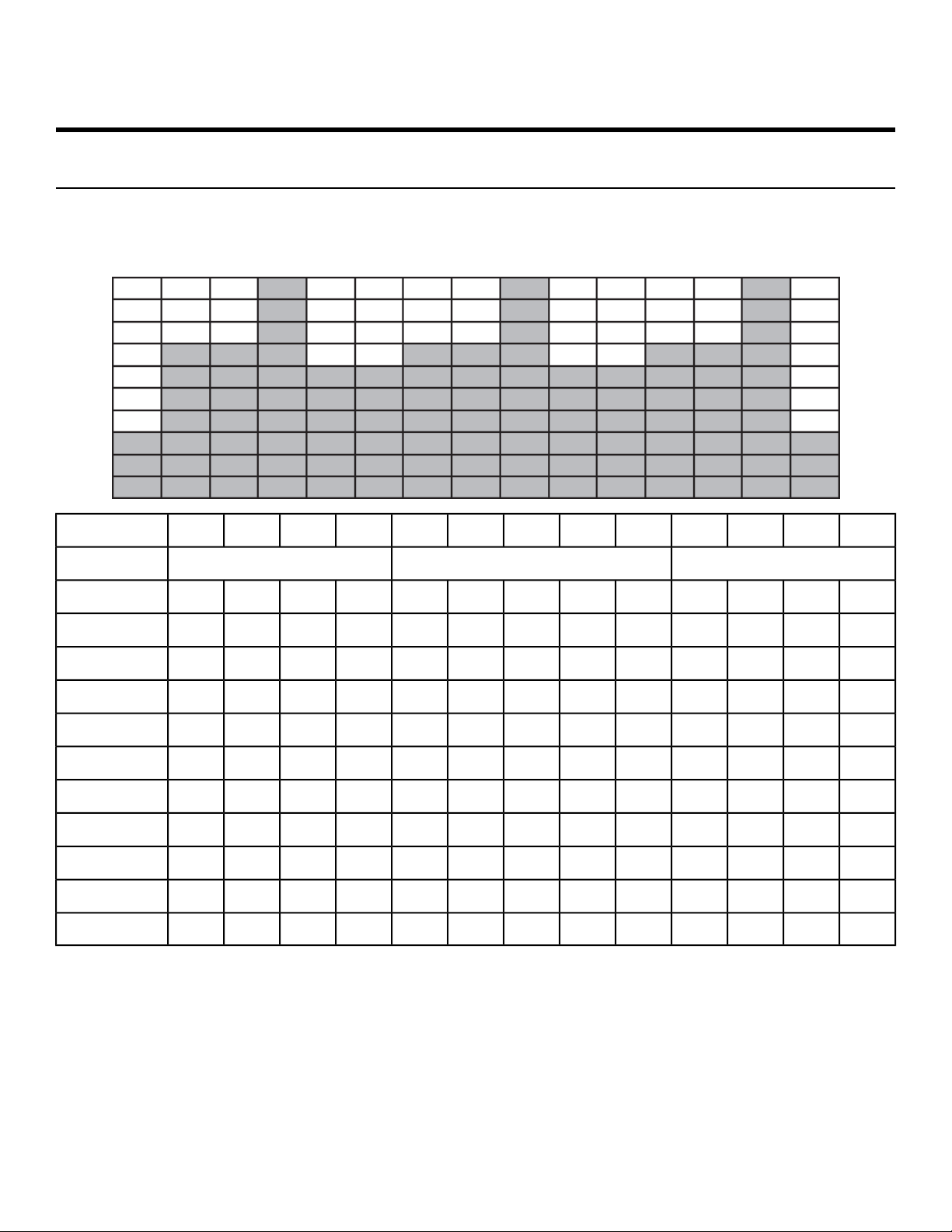
Appendix - Workout Overviews
1 - Weight Loss
This workout uses a series of relatively minor changes in its five-minute core to add an incremental
demand. The five-minute core utilizes a baseline incline for two minutes and then increases the incline
for added demand and then provides a slightly lower Incline for two-minutes for recovery.
:30:30:30:301:001:001:001:001:00:30:30:30:30Time
Cool DownCore SegmentsWarm Up
4321543214321Incline
000099141010533210
000088129953329
000077108843228
00006697743227
00005576632216
00004465532215
00003354422114
00002243322113
00001132221112
00000021121111
Page 69 of 79
Cybex 525T Treadmill Part Number LT-24018-4 H
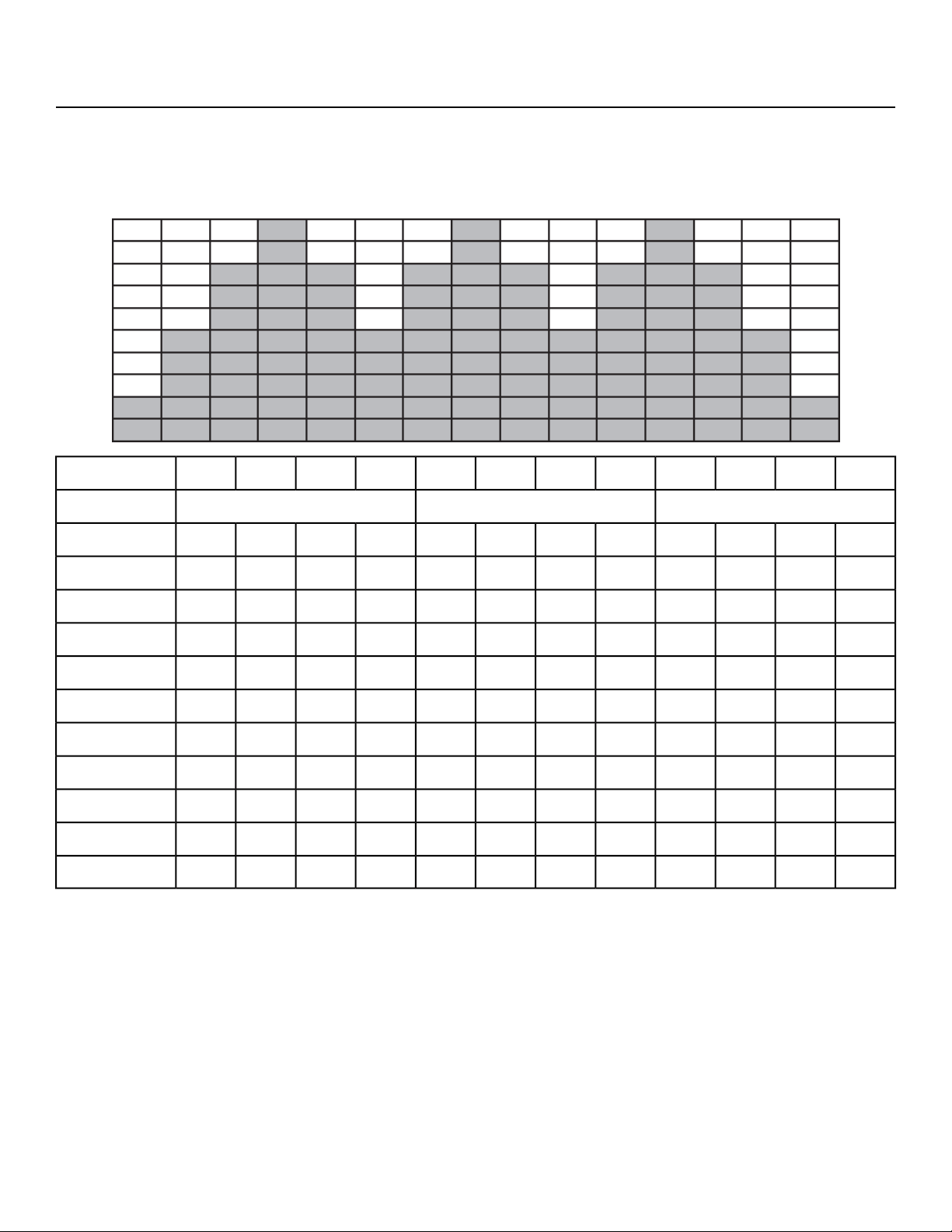
2 - Rolling Hills
This workout uses an eight minute core intended to mimic variety in terrain that might be found on a
hilly outdoor run. The eight minute core is composed of four segments. The baseline segment is two
minutes in length and is followed by two two-minute segments of increase Incline before returning to
the intermediate incline for two minutes.
:30:30:30:302:002:002:002:00:30:30:30:30Time
Cool DownCore SegmentsWarm Up
432143214321Incline
00006864322110
0000586322119
0000585322118
0000475221117
0000474221116
0000374111005
0000363111004
0000363000003
0000262000002
0000252000001
Page 70 of 79
Cybex 525T Treadmill Part Number LT-24018-4 H
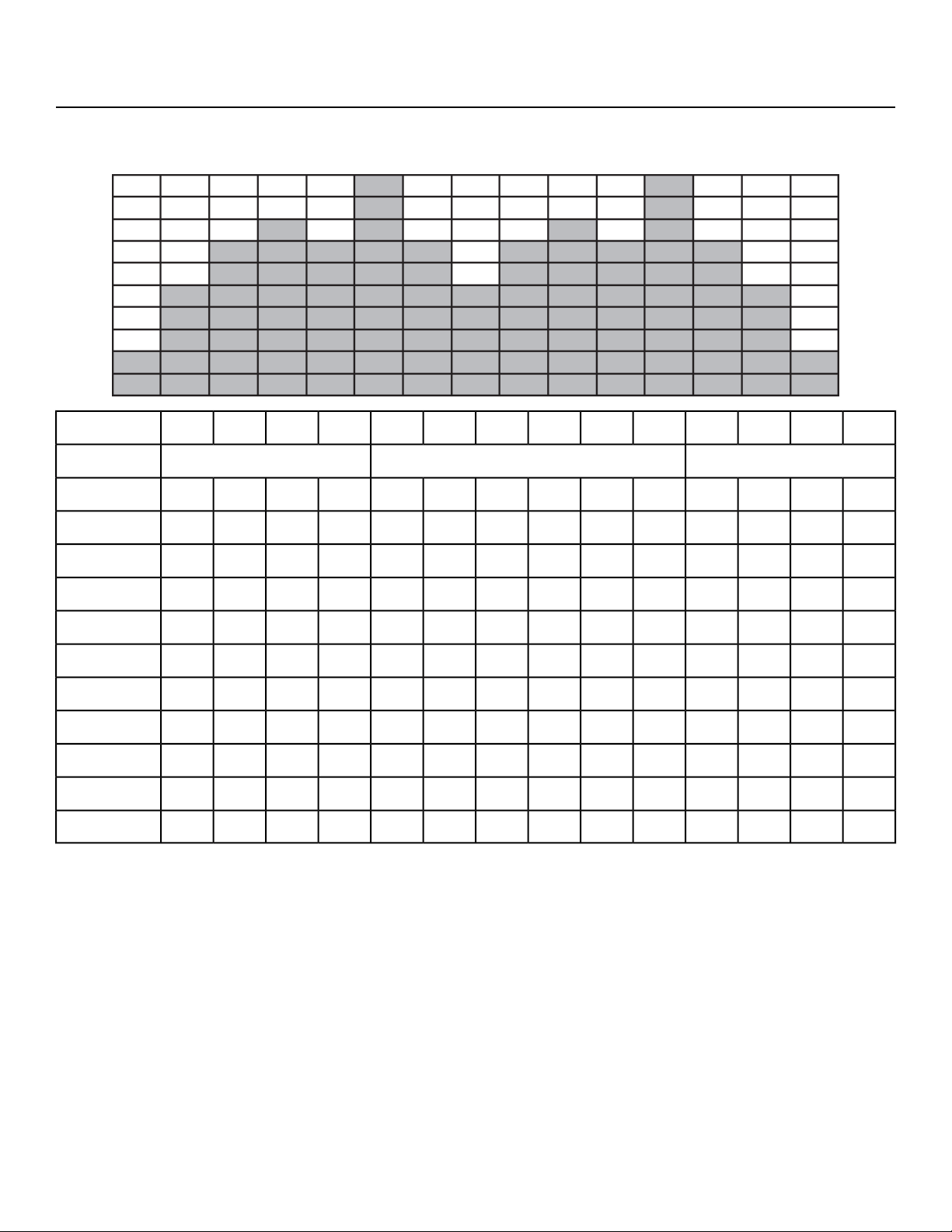
3 - Hills
This workout uses a six-minute core utilizing one minute segments with mild Incline changes and two
relative peak segments followed by relative rest segments.
:30:30:30:301:001:001:001:001:001:00:30:30:30:30Time
Cool DownCore SegmentsWarm Up
43216543214321Incline
000010151012108653310
00009149129754329
00008138118653328
00007127107543227
0000611696432216
0000510585322115
000049474221114
000038363111003
000037352000002
000026242000001
Page 71 of 79
Cybex 525T Treadmill Part Number LT-24018-4 H
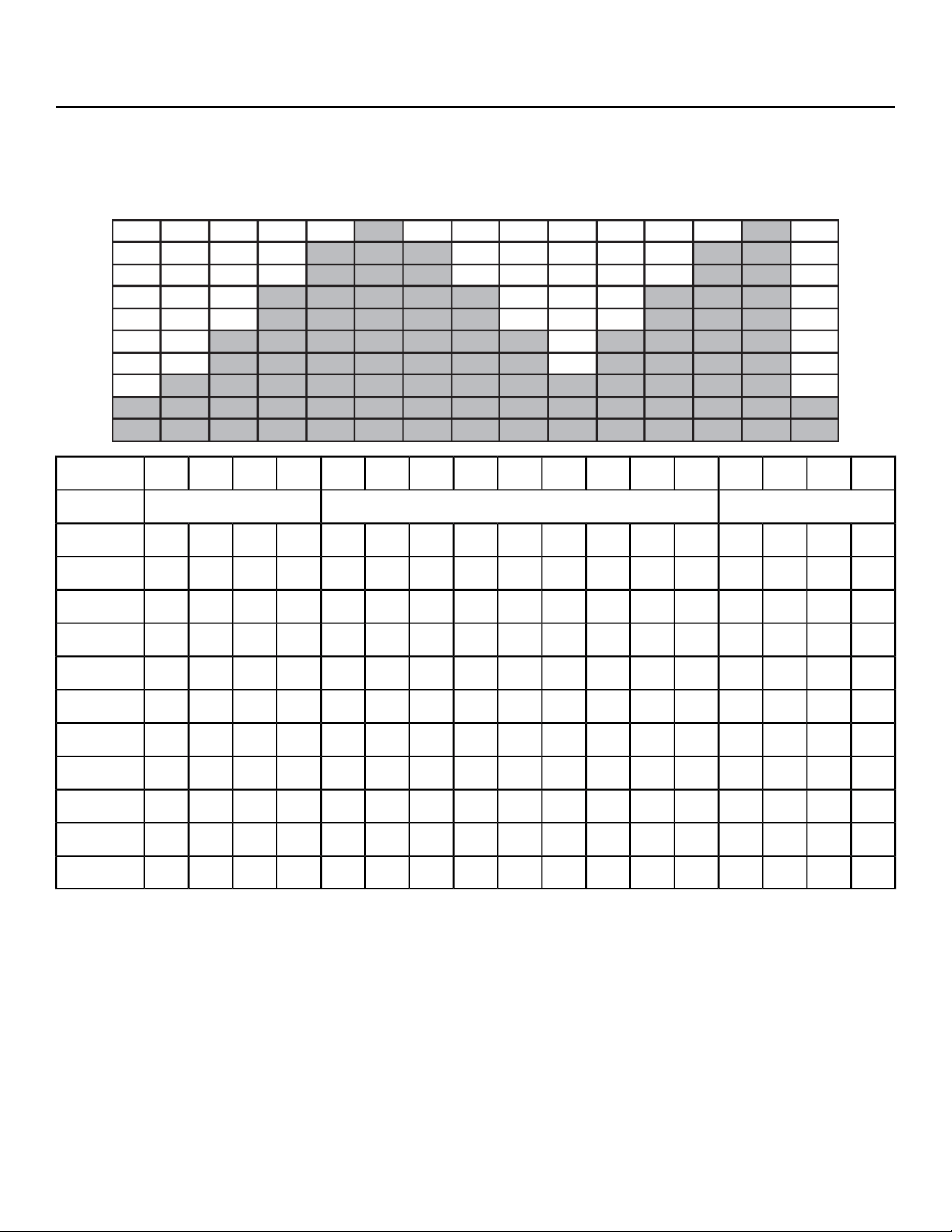
4 - Pikes Peak
This workout uses a nine minute core where the incline increases every minute for the first five minutes.
After the fifth minute of the core workout, the incline is reduced each minute. This workout uses continuous
and gradual changes to give the user time to acclimate to demand and recover without large perceived
changes in the effort required.
:30:30:30:301:001:001:001:001:001:001:001:001:00:30:30:30:30Time
Cool DownCore SegmentsWarm Up
43219876543214321Incline
000058111315131185432210
00004710121412107432219
000046911131196432218
000035810121085322117
0000357911975322116
0000246810864221115
000023579753221114
000023468643221113
000012357532111002
000001246421000001
Page 72 of 79
Cybex 525T Treadmill Part Number LT-24018-4 H
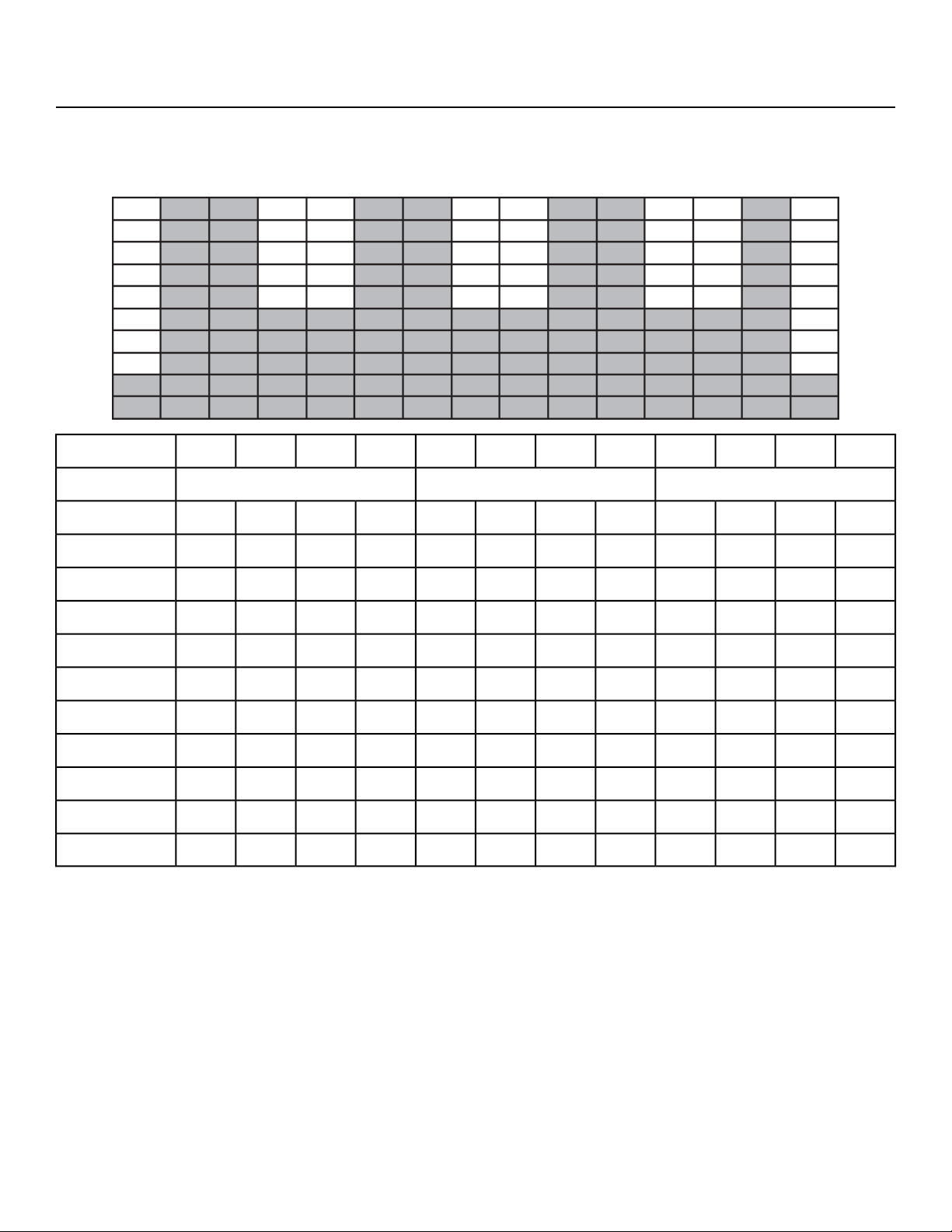
5 - Hill Interval 1:1
This workout is designed for to increase capability by alternating two minute work segments with two
minutes of relative rest. The intensity of rest periods is greater here than in Hill Interval 1:2 as is the
duration of the work interval making this workout more demanding than Hill Interval 1:2.
:30:30:30:301:001:001:001:00:30:30:30:30Time
Cool DownCore SegmentsWarm Up
432143214321Incline
0000661111865310
000055101086439
0000559975438
0000448865337
0000447754326
0000336653325
0000335543224
0000224432213
0000223322112
0000112221111
Page 73 of 79
Cybex 525T Treadmill Part Number LT-24018-4 H
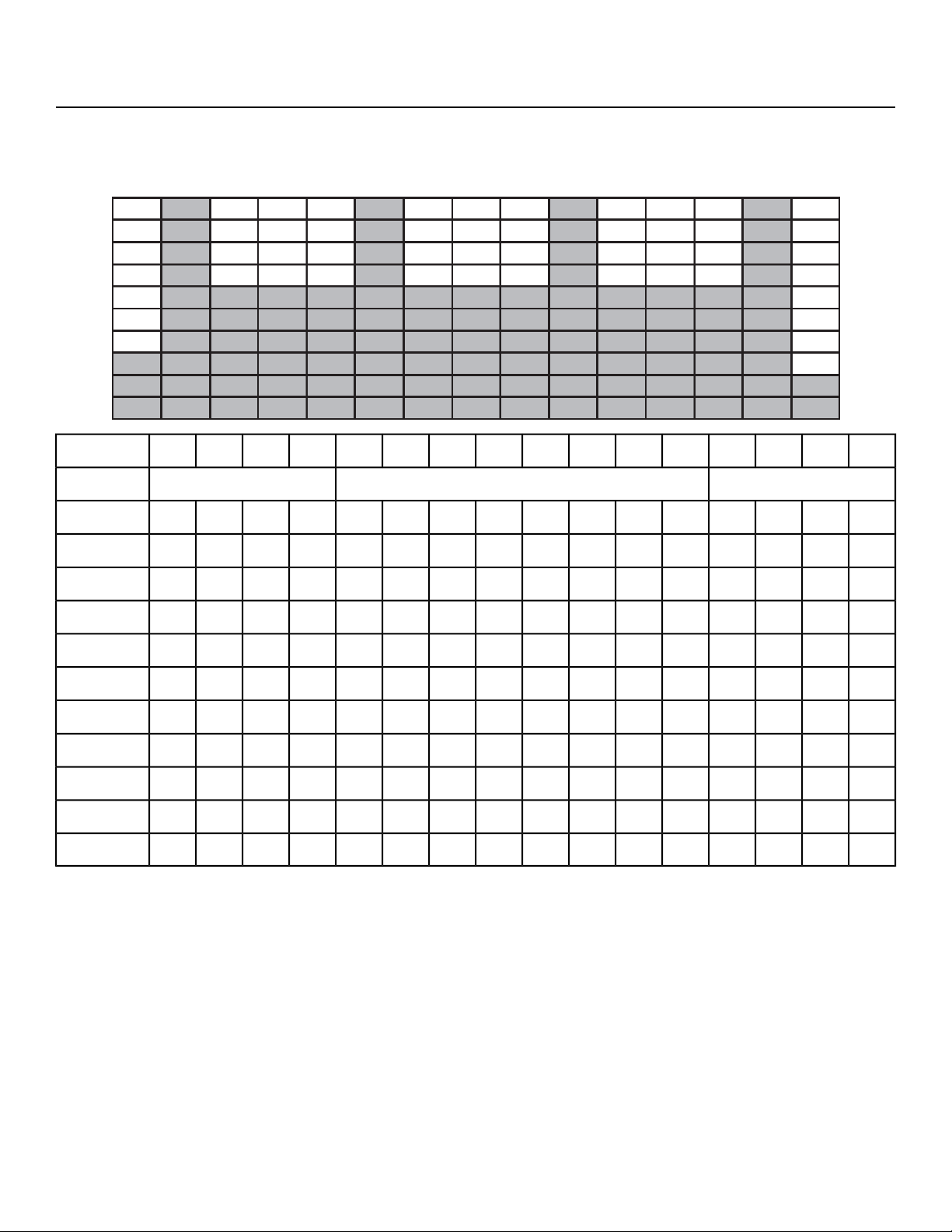
7 - Hill Interval 1:3
This workout utilizes a one minute work interval followed by a three minute rest interval. The rest intervals
are of a higher incline that those found in the other Hill Interval workouts, and therefore require a longer
recovery period.
:30:30:30:301:001:001:001:001:001:001:001:00:30:30:30:30Time
Cool DownCore SegmentsWarm Up
4321876543214321Incline
00007771177711865310
0000777107771086439
00006669666975438
00005558555865337
00005557555754326
00004446444653325
00003335333543224
00003334333432213
00002223222322112
00001112111221111
Page 75 of 79
Cybex 525T Treadmill Part Number LT-24018-4 H
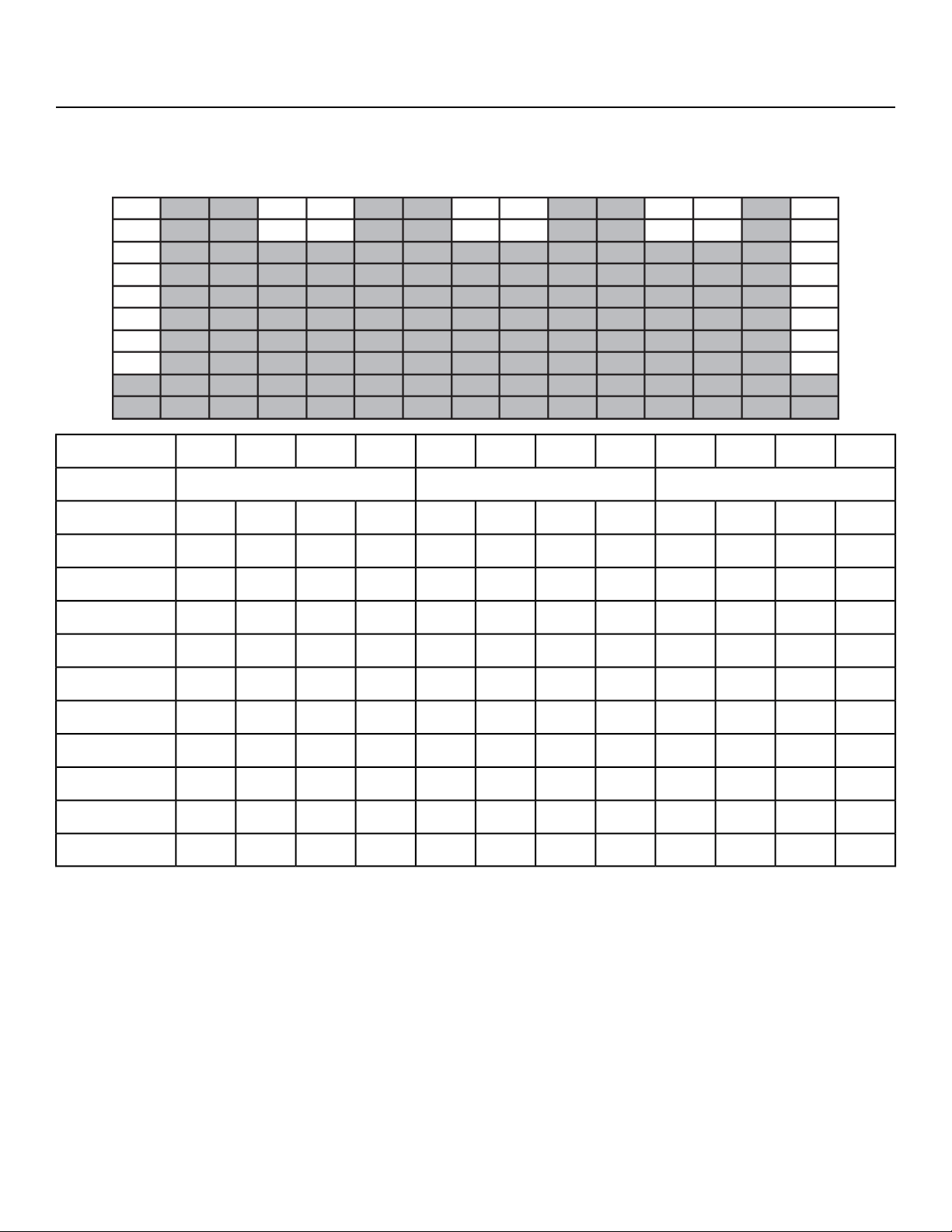
8 - Cardio
This workout is designed to maintain a high total demand using two four-minute segments of alternating
incline. This allows prolonged intervals that take advantage of long-term energy systems and total
aerobic capability when associated with speeds that require a high sustained cardiovascular demand.
:30:30:30:302:002:002:002:00:30:30:30:30Time
Cool DownCore SegmentsWarm Up
432143214321Incline
0000991111533210
000088101053329
0000779953328
0000668843227
0000557743226
0000446643225
0000335543224
0000224432213
0000113321002
0000002200001
Page 76 of 79
Cybex 525T Treadmill Part Number LT-24018-4 H

9 - Heartrate Control (E3 View Monitor Option)
Note: This workout requires the user to wear a 5 KHz Polar
®
or compatible heart rate transmitter
belt. The Heart Rate Control workout (HRC) cannot be selected on the control console unless it
detects a heart rate signal. The HRC workout will not work with the cardio touch contact heart
rate system.
After selecting the HRC workout, the treadmill will prompt you for workout time, weight, age, and target
heart rate. Your age is required to estimate the proper range of heart rates. The target heart rate is
calculated by the formula: 208 - (0.7 x Age). You will then have the option of adjusting the suggested
target heart rate selected either up or down. Select a target heart rate which will allow you to exercise
comfortably and safely while at the same time allowing you to reach your training goals. If you are unsure
of what to select as your target, consult your physician or a physical training professional, After starting
the HRC workout, the treadmill will attempt raise your heart rate to your target within 3 to 5 minutes.
The treadmill will emphasize using elevation of the treadmill deck first to achieve higher workloads and
thus higher heart rates; this is done to maximize the use of a walking gait, which is safer and more
comfortable for many users. As a result, many users will spend nearly the entire workout at elevation
up to 12% grade. After reaching your target, the treadmill will attempt to keep you there within 5 beats
per min. As you tire, the treadmill will compensate by reducing elevation, speed or both. A two-minute
cool-down is built in at the end of the workout.
Method of HRC workout:
User selects heart rate target in the initial start of workout or accepts the suggested target of the formula:
208 - (0.7 x Age). This target heart rate is extremely important for more reasons than just the
establishment of the target itself. It also makes an assumption of the general fitness level and controls
several aspects of how quickly the elevation and speed will be adjusted. As an example, the starting
speed for a selected target of 120 bpm (beats per minute) will be 2 mph. The starting speed for a selected
target of 140 bpm will be 3.5 mph. In between those selected targets the starting speed will be proportional
to the difference between 2 to 3.5. The workout will also be modified depending on what the selected
target is at the start of the workout. This means someone with a higher selected target will get faster
changes in speed and grade than someone with a lower target. This has the effect of getting the more
fit user to their selected target faster without overshooting the target for someone with a lower fitness
level. After the starting speed is attained by the treadmill, it will then increase the elevation every 15
seconds up to 12% grade or until the computer senses that the user is getting close to approaching
their target heart rate. Since the control is somewhat predictive in nature, it will leave ample room for
the user's heart rate to catch up to the increasing load. If the target heart rate is not attained at the load
level of the start speed at 12% grade, then the treadmill will start increasing speed every 15 seconds
up to 4 mph or until the computer senses that the user is getting close to approaching their target heart
rate. If the user is still not at the target, the treadmill will increase speed to 5 mph and drop the elevation
down to 8% grade. This is done because the speeds between 4 and 5 are difficult for the user because
it is too slow to jog and too fast for many to walk. The drop in elevation compensates somewhat for the
larger increase in speed. The system will then increase the speed of the belt every 15 seconds up to
the maximum speed of the treadmill or until the computer senses that the user is getting close to
approaching their target heart rate. At any time if the users heart rate exceeds the target, the load will
Page 77 of 79
Cybex 525T Treadmill Part Number LT-24018-4 H

be decreased in the same order it was increased to ensure that the rate is stabilized at or below the
target. When the time period is reached that is two minutes before the selected total time of the workout,
the system will go into the cool down mode. This cool down will be similar to the cool down protocols in
all the other workouts on the treadmill.
During the control period, the user has limited control over speed and elevation. Within the initial elevation
climb segment up to 12 % grade, the users may vary elevation but not speed. Within the other segments
the user can vary speed but not elevation. The user's selections are not persistent, however. At the next
15-second mark, the controller as described above will generally choose a new speed or elevation. The
user is in fact advancing or retarding the action of the servo.
If at any time the heart rate signal is lost, the system will make no changes in load until such time as
the HR signal is regained. If the heart rate signal continues to be lost (no stable HR) for a time period
exceeding one minute, then start the cool down profile regardless of what the time period is.
Page 78 of 79
Cybex 525T Treadmill Part Number LT-24018-4 H


10 Trotter Drive, Medway, MA 02053 • 888-462-9239 • 508-533-4300 • FAX 508-533-5183
www.cybexintl.com