FRCAMI
R89 Wifi Camera
User Manual
Support: [email protected]
(Note: Please charge the camera for 5-6 hours before use)
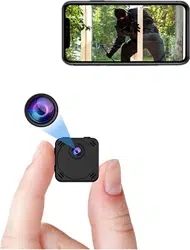
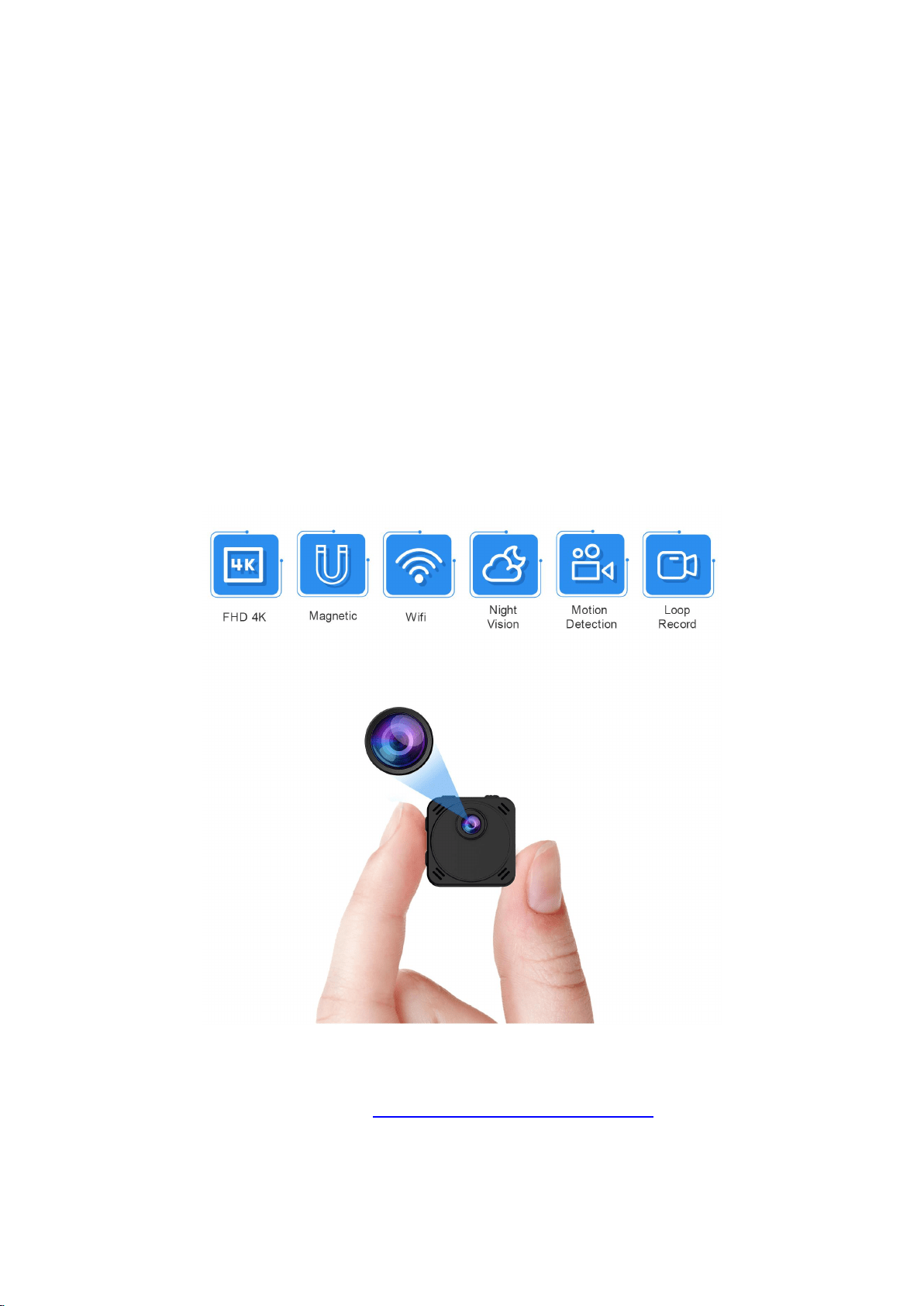
Thanks for choosing our 2020 Upgraded small wireless camera.
W
i
t
h
l
a
r
g
e
c
a
p
a
c
i
t
y
b
a
t
t
e
r
y
,
t
h
i
s
c
a
m
c
o
r
d
e
r
c
a
n
n
o
t
o
n
l
y
u
s
e
a
s
s
p
y
c
a
m
e
r
a
b
u
t
a
l
s
o
a
c
a
r
c
a
m
c
o
r
d
e
r
.
I
f
y
o
u
h
a
v
e
a
n
y
p
r
o
b
l
e
m
s
o
r
s
u
g
g
e
s
t
i
o
n
,
p
l
e
a
s
e
d
o
n
o
t
h
e
s
i
t
a
t
e
t
o
c
o
n
t
a
c
t
u
s
o
n
A
m
a
z
o
n
o
r
e
m
a
i
l
a
t
s
e
r
v
i
c
e
f
o
r
c
a
m
@
1
6
3
.
c
o
m
.
Ⅰ
.
P
r
o
d
u
c
t
D
e
s
c
r
i
p
t
i
o
n
FRCAMI

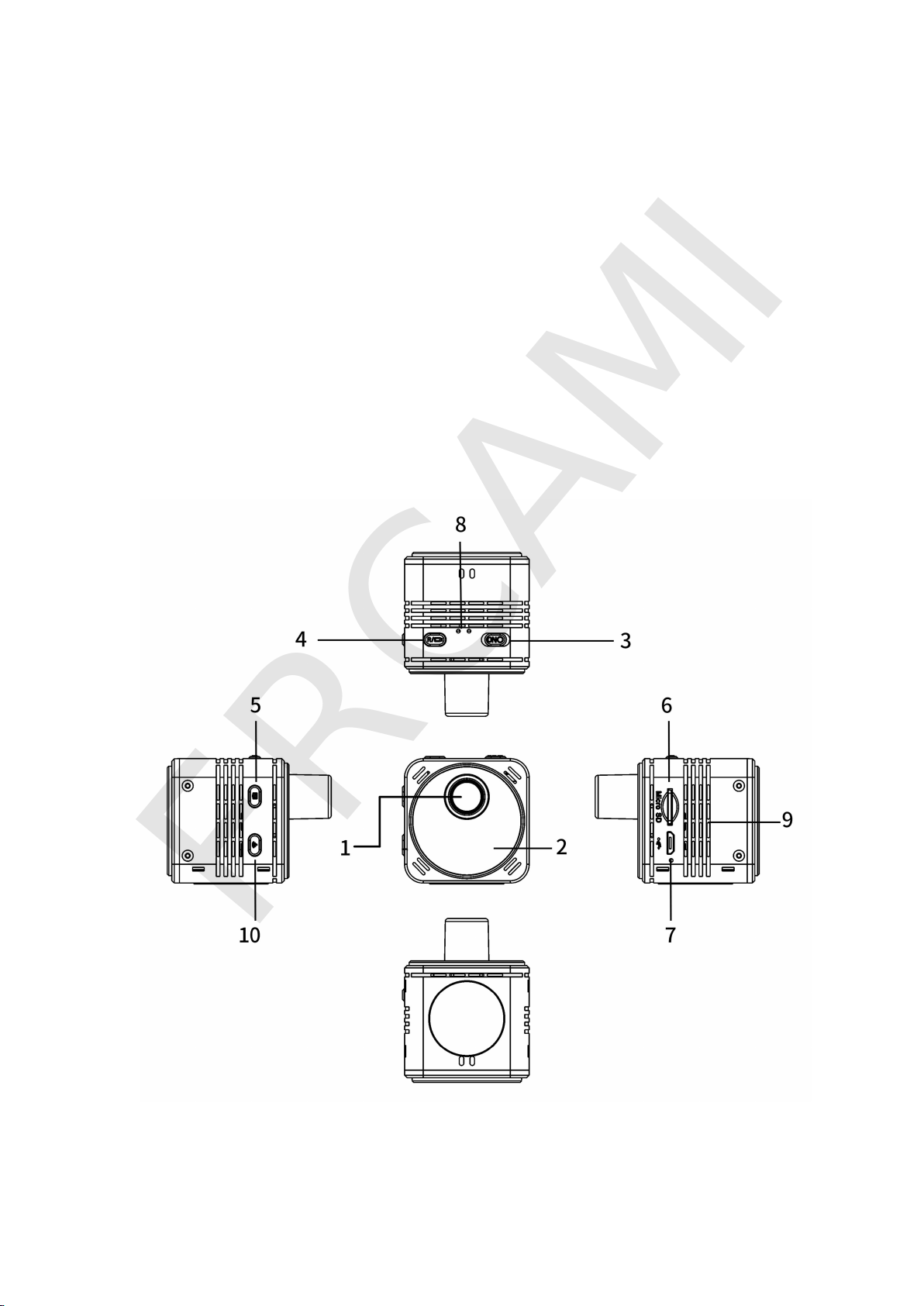
Button Description:
1. FHD 4K Len 2. Infrared Night LEDs 3. ON/OFF
4
.
V
i
d
e
o
/
R
e
s
e
t
(
L
o
n
g
p
r
e
s
s
f
o
r
6
s
e
c
o
n
d
s
)
5. Photo / Turn off Indicator Lights(Long press for 6 seconds)
6
.
M
i
c
r
o
S
D
C
a
r
d
P
o
r
t
7
.
U
S
B
C
h
a
r
g
e
P
o
r
t
8
.
I
n
d
i
c
a
t
o
r
L
i
g
h
t
s
9
.
R
a
d
i
a
t
i
n
g
V
e
n
t
s
1
0
.
W
i
f
i
O
N
/
O
F
F
More Details:
1
.
O
N
/
O
F
F
:
S
l
i
d
e
t
h
e
b
u
t
t
o
n
t
o
O
N
t
o
t
u
r
n
o
n
t
h
e
c
a
m
e
r
a
a
n
d
O
F
F
t
o
t
u
r
n
o
f
f
t
h
e
c
a
m
e
r
a
.
2
.
M
i
c
r
o
S
D
c
a
r
d
P
o
r
t
:
I
n
s
e
r
t
o
n
e
S
D
c
a
r
d
f
o
r
s
t
o
r
a
g
e
,
i
f
t
h
e
c
a
r
d
i
s
b
r
a
n
d
n
e
w
,
f
o
r
m
a
t
i
t
f
i
r
s
t
b
e
f
o
r
e
u
s
i
n
g
.
S
u
p
p
o
r
t
s
M
A
X
1
2
8
G
S
D
c
a
r
d
(
n
o
t
i
n
c
l
u
d
e
d
)
.
3
.
C
h
a
r
g
i
n
g
p
o
r
t
:
B
u
i
l
t
-
i
n
3
1
0
0
m
A
h
b
a
t
t
e
r
y
.
W
h
e
n
y
o
u
r
e
c
e
i
v
e
t
h
e
c
a
m
e
r
a
,
c
h
a
r
g
e
i
t
f
o
r
5
-
6
h
o
u
r
s
.
I
t
c
a
n
s
t
a
n
d
b
y
3
0
h
o
u
r
s
a
n
d
k
e
e
p
w
o
r
k
i
n
g
f
o
r
1
5
h
o
u
r
s
.
Y
o
u
c
a
n
c
h
a
r
g
e
i
t
w
h
i
l
e
r
e
c
o
r
d
i
n
g
.
4
.
W
i
f
i
O
N
/
O
F
F
:
W
i
f
i
m
o
d
e
i
s
t
h
e
c
a
m
e
r
a
d
e
f
a
u
l
t
m
o
d
e
.
I
f
y
o
u
n
e
e
d
NON-Wifi mode, you must insert a Micro SD card before use. Red and
B
o
o
t
B
l
u
e
a
n
d
r
e
d
l
i
g
h
t
t
u
r
n
o
n
L
o
c
a
l
h
o
t
s
p
o
t
c
o
n
n
e
c
t
i
o
n
R
e
d
l
i
g
h
t
f
l
a
s
h
e
s
,
B
l
u
e
l
i
g
h
t
’
s
a
l
w
a
y
s
o
n
W
i
f
i
r
e
m
o
t
e
c
o
n
n
e
c
t
i
o
n
B
l
u
e
a
n
d
r
e
d
l
i
g
h
t
s
a
r
e
a
l
w
a
y
s
o
n
N
o
n
-
W
i
f
i
M
o
d
e
B
l
u
e
l
i
g
h
t
’
s
a
l
w
a
y
s
o
n
FRCAMI

blue lights will flash in Wifi mode and press the button again then the
camera will be in Non-Wifi mode and the blue light will be always on.
5
.
P
h
o
t
o
:
T
u
r
n
o
n
t
h
e
c
a
m
e
r
a
,
p
r
e
s
s
t
h
e
W
i
f
i
O
N
/
O
F
F
b
u
t
t
o
n
t
o
s
t
a
n
d
b
y
condition that the blue light will be always on, then press once the Photo
b
u
t
t
o
n
a
n
d
t
h
e
c
a
m
e
r
a
w
i
l
l
t
a
k
e
a
p
i
c
t
u
r
e
(
P
l
e
a
s
e
i
n
s
e
r
t
a
M
i
c
r
o
S
D
c
a
r
d
)
.
T
u
r
n
o
f
f
t
h
e
I
n
d
i
c
a
t
o
r
L
i
g
h
t
s
:
L
o
n
g
p
r
e
s
s
t
h
e
P
h
o
t
o
b
u
t
t
o
n
f
o
r
6
s
e
c
o
n
d
s
t
o
t
u
r
n
o
f
f
t
h
e
i
n
d
i
c
a
t
o
r
l
i
g
h
t
s
.
6. Video: Turn on the camera, press the Wifi ON/OFF button to standby
c
o
n
d
i
t
i
o
n
t
h
a
t
t
h
e
b
l
u
e
l
i
g
h
t
w
i
l
l
b
e
a
l
w
a
y
s
o
n
,
t
h
e
n
p
r
e
s
s
o
n
c
e
t
h
e
V
i
d
e
o
b
u
t
t
o
n
,
t
h
e
b
l
u
e
l
i
g
h
t
w
i
l
l
f
l
a
s
h
t
h
e
n
t
h
e
c
a
m
e
r
a
w
i
l
l
s
t
a
r
t
r
e
c
o
r
d
i
n
g
v
i
d
e
o
s
;
p
r
e
s
s
a
g
a
i
n
t
o
s
t
o
p
r
e
c
o
r
d
i
n
g
(
P
l
e
a
s
e
i
n
s
e
r
t
a
M
i
c
r
o
S
D
c
a
r
d
)
.
R
e
s
e
t
:
L
o
n
g
p
r
e
s
s
t
h
e
v
i
d
e
o
b
u
t
t
o
n
f
o
r
6
s
e
c
o
n
d
s
u
n
t
i
l
t
h
e
i
n
d
i
c
a
t
o
r
l
i
g
h
t
g
o
e
s
o
f
f
t
o
r
e
s
e
t
t
h
e
c
a
m
e
r
a
t
o
f
a
c
t
o
r
y
s
e
t
t
i
n
g
s
.
Ⅱ. Product Features
1
.
W
i
f
i
C
a
m
e
r
a
:
T
h
i
s
c
a
m
e
r
a
o
n
l
y
s
u
p
p
o
r
t
s
2
.
4
G
n
e
t
w
o
r
k
h
o
t
s
p
o
t
a
n
d
W
i
f
i
c
o
n
n
e
c
t
i
o
n
.
2
.
W
i
d
e
F
i
e
l
d
:
B
u
i
l
t
i
n
1
7
0
°
w
i
d
e
a
n
g
l
e
l
e
n
s
.
3
.
H
i
g
h
D
e
f
i
n
i
t
i
o
n
:
U
s
e
F
H
D
4
K
c
a
m
e
r
a
l
e
n
s
.
4
.
N
i
g
h
t
V
i
s
i
o
n
:
C
a
p
t
u
r
e
s
g
r
e
a
t
a
n
d
c
l
e
a
r
i
m
a
g
e
s
a
n
d
v
i
d
e
o
s
a
t
l
i
g
h
t
w
i
t
h
b
u
i
l
t
-
i
n
4
I
R
n
i
g
h
t
L
E
D
s
.
5
.
M
i
c
r
o
S
D
C
a
r
d
S
a
v
i
n
g
:
S
u
p
p
o
r
t
M
a
x
1
2
8
G
S
D
c
a
r
d
(
N
O
T
i
n
c
l
u
d
e
d
)
t
o
save the recordings.
FRCAMI

6. Motion Detection: You can enable this function in APP Sancam. When
a moving object is detected, the camera will take a picture and push alerts
t
o
y
o
u
r
p
h
o
n
e
.
7. Loop Recording: When the SD card is full, it will auto overwrite the
o
l
d
e
s
t
f
i
l
e
s
a
n
d
s
a
v
e
n
e
w
r
e
c
o
r
d
i
n
g
s
.
8
.
P
h
o
n
e
A
P
P
S
u
p
p
o
r
t
:
F
R
E
E
a
n
d
s
a
f
e
A
P
P
S
a
n
c
a
m
,
y
o
u
c
a
n
d
o
w
n
l
o
a
d
f
r
o
m
i
O
S
A
P
P
S
t
o
r
e
o
r
A
n
d
r
i
o
d
G
o
o
g
l
e
P
l
a
y
.
Ⅲ
.
A
P
P
S
e
t
t
i
n
g
s
I
n
s
t
r
u
c
t
i
o
n
1
.
D
o
w
n
l
o
a
d
t
h
e
a
p
p
“
S
a
n
c
a
m
”
F
o
r
A
n
d
r
o
i
d
s
y
s
t
e
m
:
P
l
e
a
s
e
s
e
a
r
c
h
“
S
a
n
c
a
m
”
o
n
G
o
o
g
l
e
P
l
a
y
.
F
o
r
i
O
S
s
y
s
t
e
m
:
P
l
e
a
s
e
s
e
a
r
c
h
“
S
a
n
c
a
m
”
o
n
A
p
p
S
t
o
r
e
.
B
e
s
i
d
e
s
,
y
o
u
c
a
n
s
c
a
n
t
h
e
c
o
r
r
e
s
p
o
n
d
i
n
g
Q
R
c
o
d
e
b
e
l
o
w
t
o
d
o
w
n
l
o
a
d
i
t
.
A
n
d
r
o
i
d
S
y
s
t
e
m
i
O
S
S
y
s
t
e
m
2
.
T
u
r
n
o
n
t
h
e
c
a
m
e
r
a
:
S
l
i
d
e
O
N
/
O
F
F
t
o
O
N
a
n
d
w
a
i
t
1
-
2
m
i
n
u
t
e
s
.
W
h
e
n
t
h
e
b
l
u
e
a
n
d
r
e
d
i
n
d
i
c
a
t
o
r
l
i
g
h
t
s
a
r
e
o
n
,
t
h
e
c
a
m
e
r
a
w
i
l
l
a
u
t
o
m
a
t
i
c
a
l
l
y
t
r
a
n
s
m
i
t
W
i
f
i
h
o
t
s
p
o
t
.
U
s
u
a
l
l
y
t
h
e
p
r
o
c
e
s
s
m
a
y
t
a
k
e
1
-
3
m
i
n
u
t
e
s
d
u
e
t
o
t
h
e
s
i
g
n
a
l
strength, please keep your patience.
FRCAMI
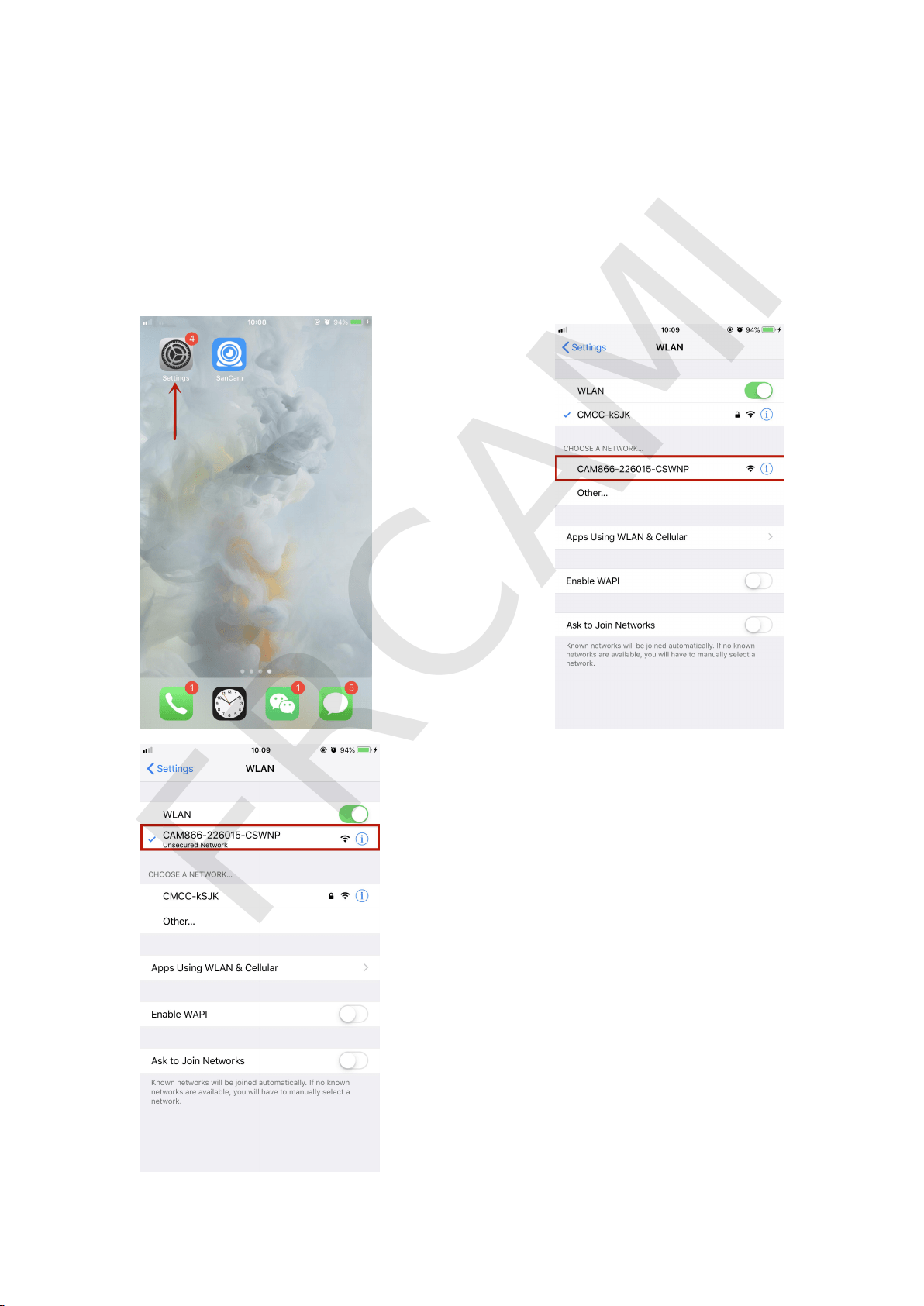
3. Connect the camera’s Wifi hotspot via your phone:
Tap the WLAN settings on your phone, search for this camera’s Wifi
h
o
t
s
p
o
t
(
n
a
m
e
d
w
i
t
h
t
h
e
U
I
D
s
t
i
c
k
e
d
a
t
t
h
e
b
a
c
k
o
f
c
a
m
e
r
a
)
,
t
h
e
n
c
l
i
c
k
i
t
to match your phone. Please refer to the below pics.
FRCAMI
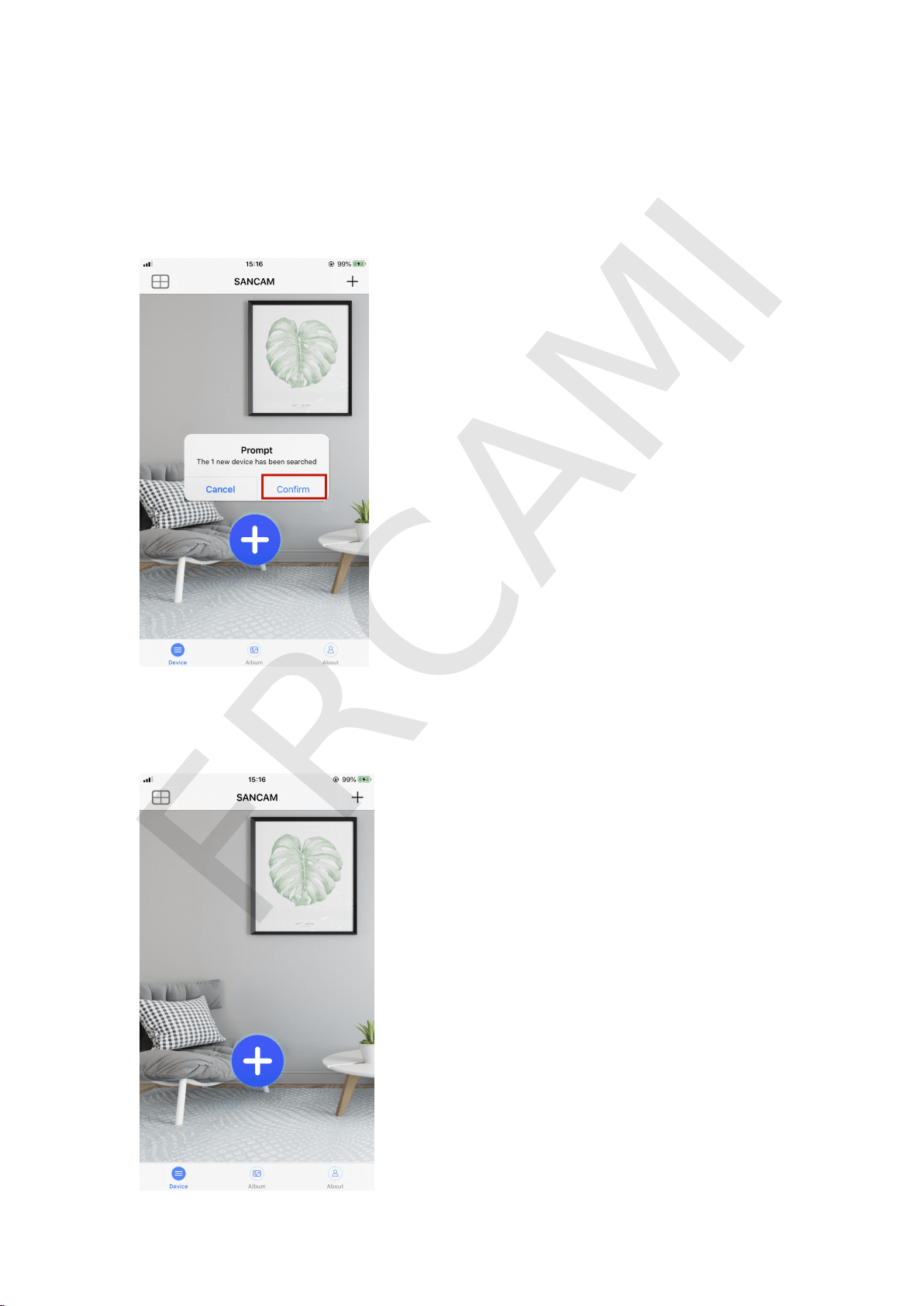
4. Set Local Connection (Point-to-Point live streaming mode):
4
.
1
O
p
e
n
t
h
e
“
S
a
n
c
a
m
”
A
P
P
,
i
t
w
i
l
l
a
u
t
o
m
a
t
i
c
a
l
l
y
s
e
a
r
c
h
t
h
e
c
a
m
e
r
a
a
n
d
t
h
e
n
t
a
p
C
o
n
f
i
r
m
t
o
c
o
n
n
e
c
t
i
t
a
n
d
m
a
k
e
i
t
o
n
l
i
n
e
.
I
f
i
t
d
o
e
s
n
’
t
a
u
t
o
m
a
t
i
c
a
l
l
y
a
d
d
t
h
e
c
a
m
e
r
a
,
p
l
e
a
s
e
t
a
p
t
h
e
“
+
”
i
c
o
n
i
n
A
P
P
S
a
n
c
a
m
f
o
r
m
a
n
u
a
l
a
d
d
i
n
g
.
P
l
e
a
s
e
r
e
f
e
r
t
o
t
h
e
b
e
l
o
w
p
i
c
t
u
r
e
.
FRCAMI
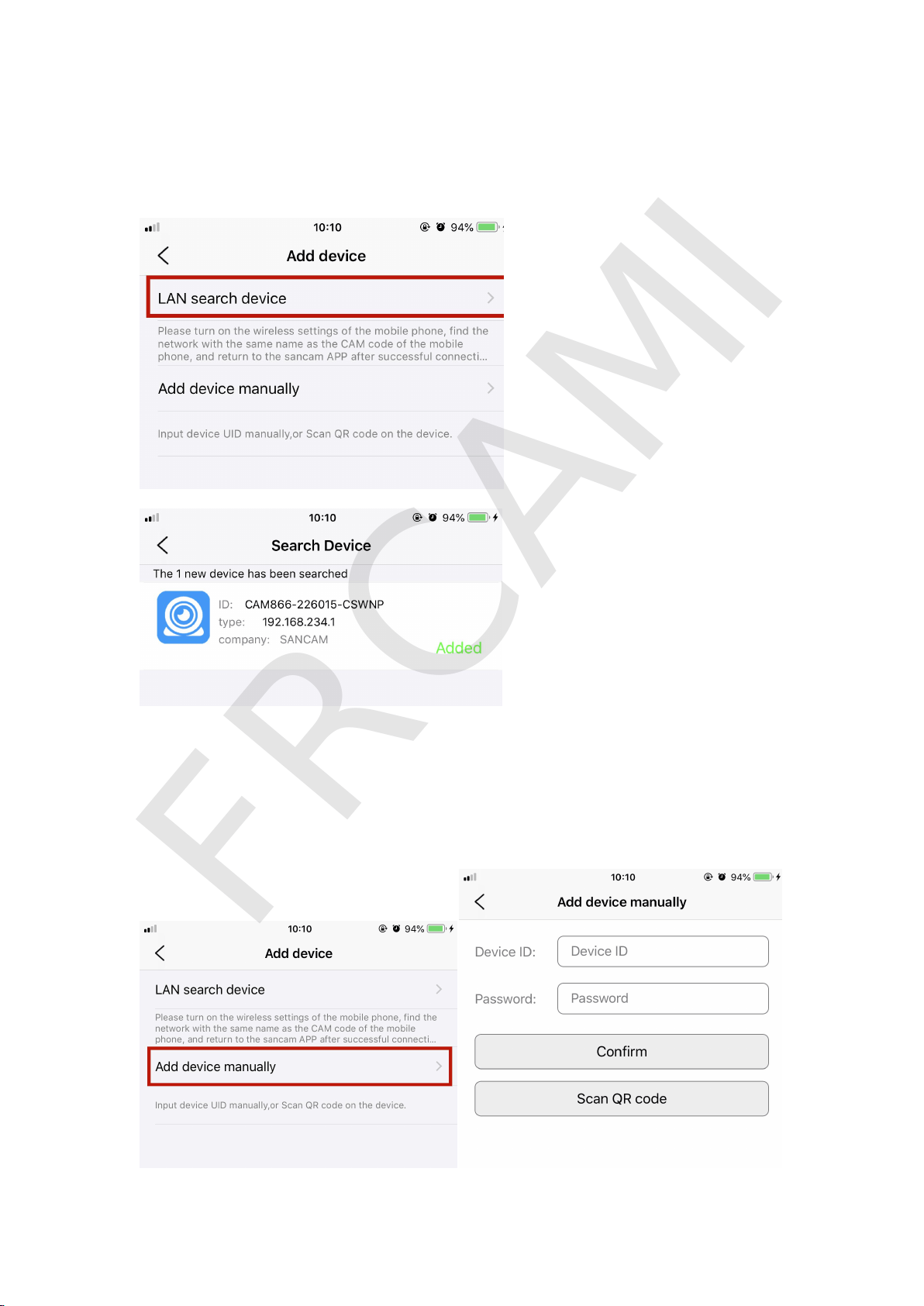
4.2 Click LAN search device to find the camera then tap
(
Add
)
to
e
n
t
e
r
n
e
x
t
s
t
e
p
.
P
l
e
a
s
e
r
e
f
e
r
t
o
t
h
e
b
e
l
o
w
p
i
c
t
u
r
e
.
4
.
3
O
r
y
o
u
c
a
n
a
d
d
t
h
e
d
e
v
i
c
e
m
a
n
u
a
l
l
y
b
y
e
n
t
e
r
i
n
g
t
h
e
d
e
v
i
c
e
I
D
a
n
d
d
e
f
a
u
l
t
p
a
s
s
w
o
r
d
8
8
8
8
(
y
o
u
c
a
n
c
h
a
n
g
e
t
h
e
p
a
s
s
w
o
r
d
i
n
a
p
p
s
e
t
t
i
n
g
)
.
FRCAMI
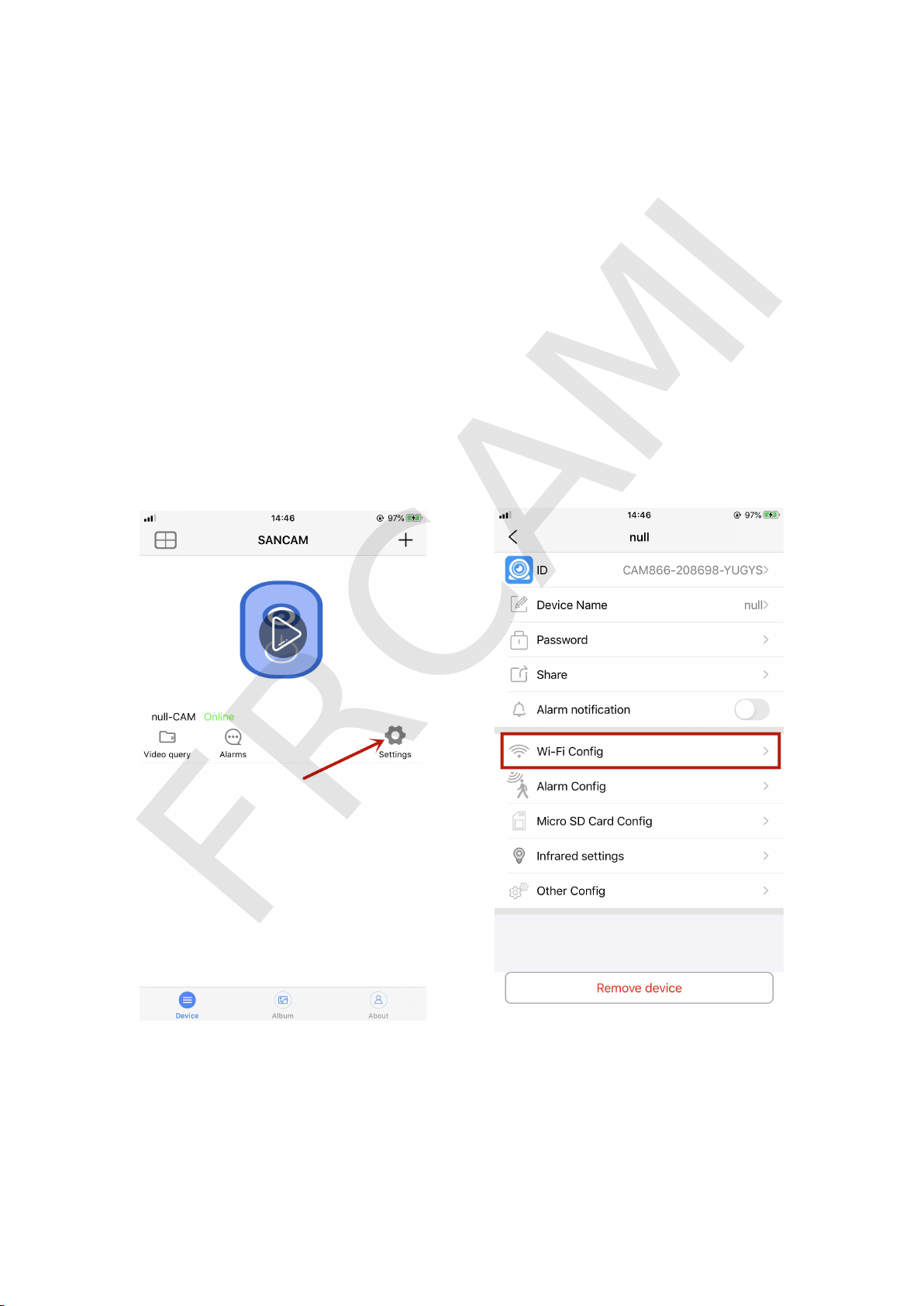
Tips: Under the local connection, the camera's WIFI hotspot is valid
w
i
t
h
i
n
1
0
m
e
t
e
r
s
.
W
h
e
n
y
o
u
r
p
h
o
n
e
i
s
o
u
t
o
f
t
h
e
r
a
n
g
e
,
i
t
w
i
l
l
d
i
s
c
o
n
n
e
c
t
a
n
d
y
o
u
w
i
l
l
n
o
t
b
e
a
b
l
e
t
o
w
a
t
c
h
t
h
e
l
i
v
e
v
i
e
w
.
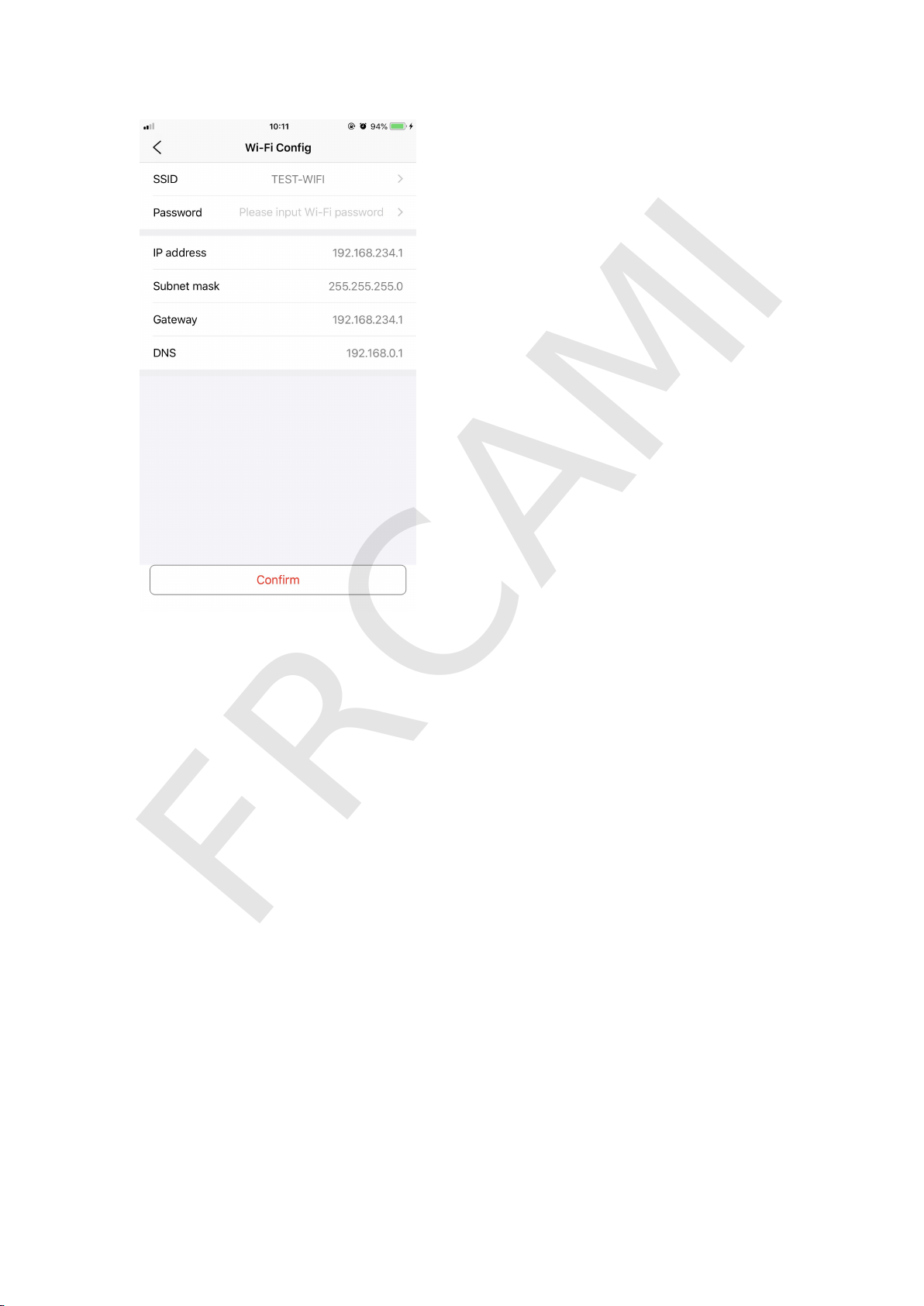
5. Set Remote Connection:
T
a
p
t
h
e
S
e
t
t
i
n
g
i
c
o
n
>
>
>
T
a
p
“
N
e
t
w
o
r
k
c
o
n
f
i
g
u
r
a
t
i
o
n
”
>
>
>
S
e
l
e
c
t
y
o
u
r
r
o
u
t
e
r
’
s
W
i
-
F
i
n
a
m
e
>
>
>
E
n
t
e
r
y
o
u
r
W
i
f
i
’
s
p
a
s
s
w
o
r
d
>
>
>
T
a
p
“Confirm” to finish setting remote connection. Please refer to the
below pics.
FRCAMI
6
.
M
o
t
i
o
n
D
e
t
e
c
t
i
o
n
O
p
e
n
t
h
e
“
S
a
n
c
a
m
”
a
p
p
o
n
y
o
u
r
p
h
o
n
e
>
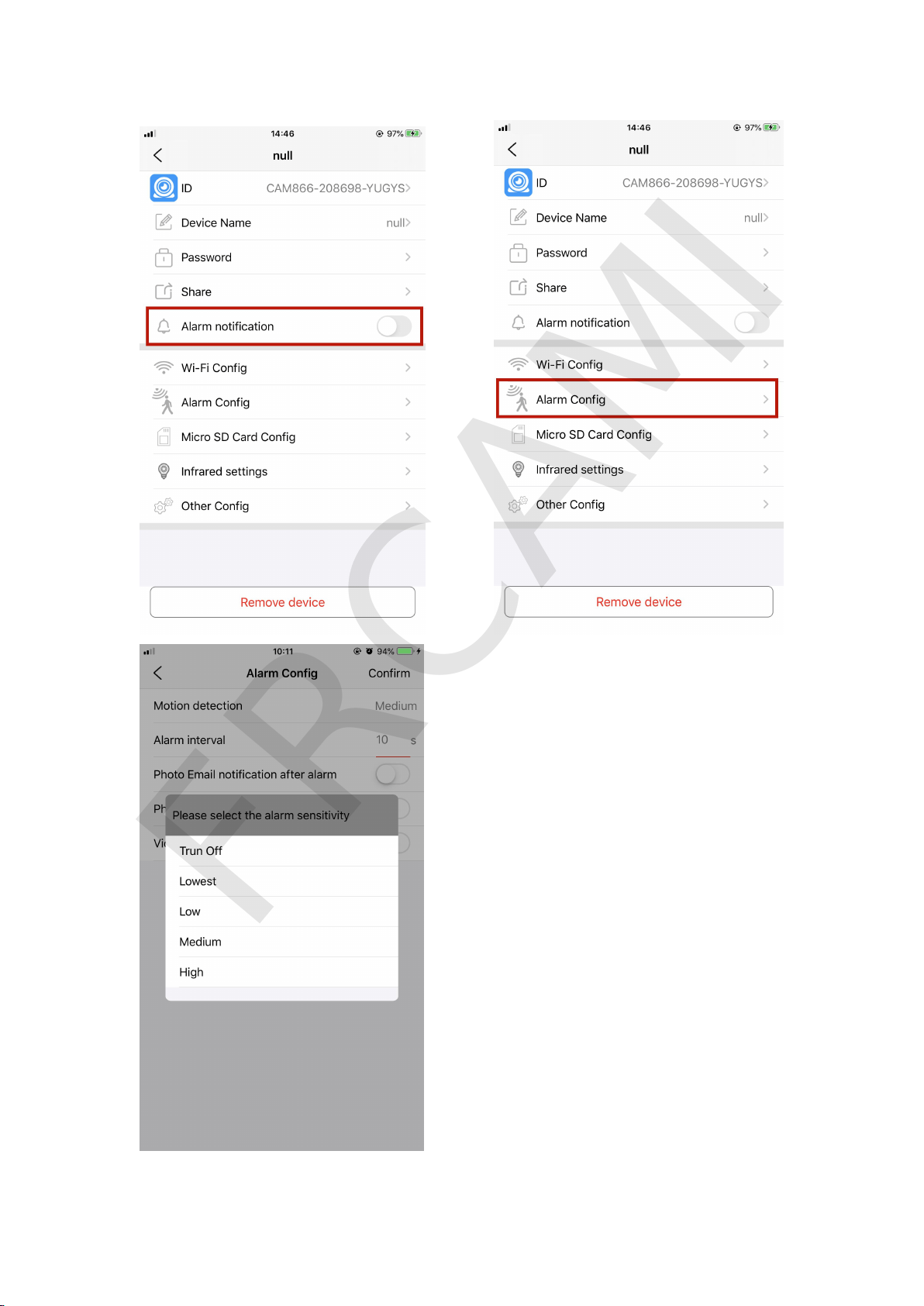
>
>
T
a
p
“
S
e
t
t
i
n
g
”
i
c
o
n
>
>
>
T
a
p
“
M
o
t
i
o
n
d
e
t
e
c
t
i
o
n
s
e
t
”
t
o
s
e
t
u
p
a
n
d
c
h
o
o
s
e
t
h
e
s
e
n
s
i
t
i
v
i
t
y
o
f
t
h
e
m
o
t
i
o
n
d
e
t
e
c
t
i
o
n
.
P
l
e
a
s
e
r
e
f
e
r
t
o
t
h
e
b
e
l
o
w
p
i
c
s
t
o
s
e
t
u
p
t
h
i
s
f
u
n
c
t
i
o
n
.
Y
o
u
c
a
n
a
l
s
o
s
e
t
a
l
a
r
m
i
n
f
o
r
m
a
t
i
o
n
.
FRCAMI
FRCAMI
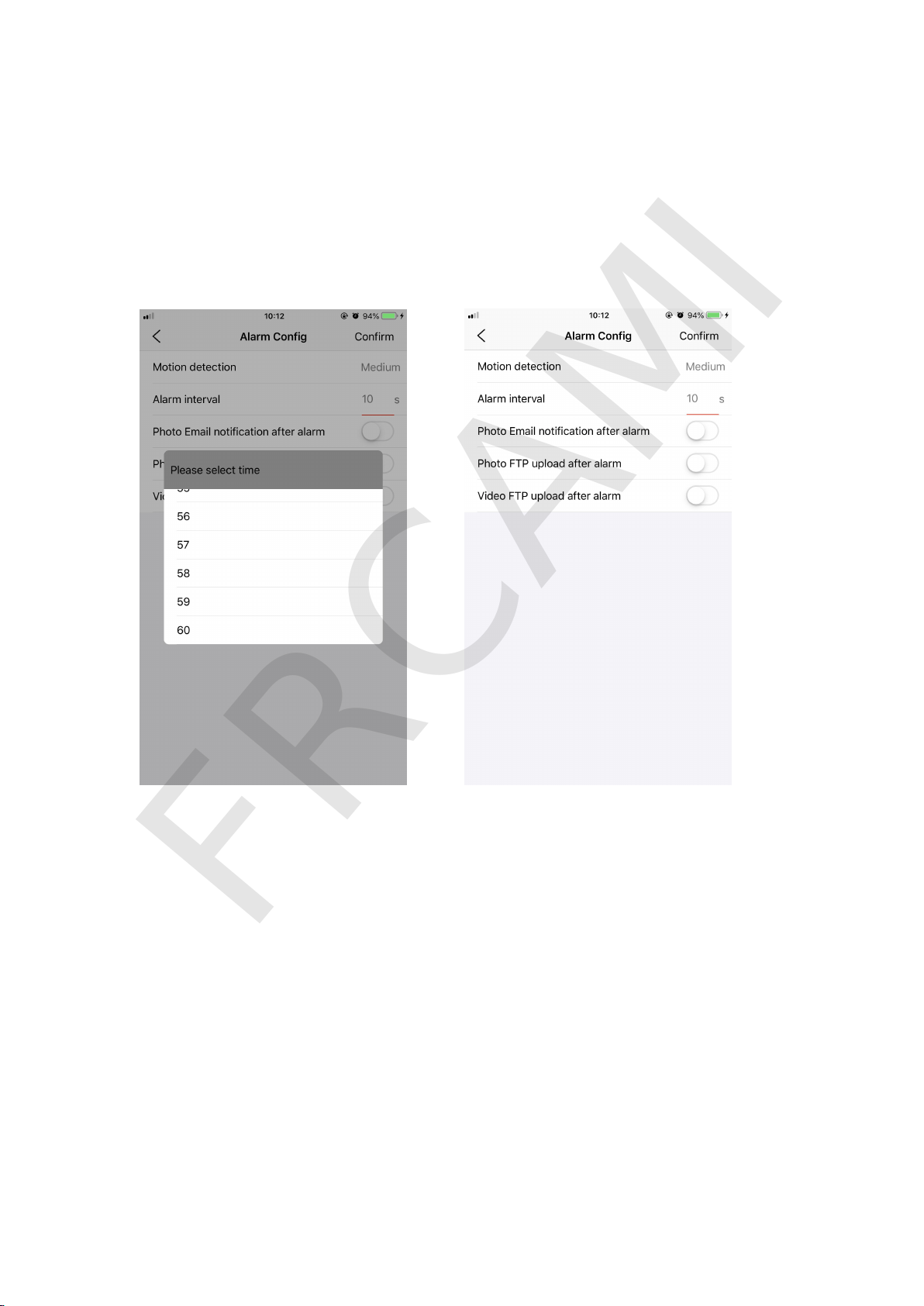
Motion detection interval alarm is 5-60 seconds, you can set the
i
n
t
e
r
v
a
l
a
l
a
r
m
t
i
m
e
b
y
y
o
u
r
s
e
l
f
.
A
f
t
e
r
t
u
r
n
i
n
g
o
n
t
h
e
M
o
t
i
o
n
D
e
t
e
c
t
i
o
n
f
u
n
c
t
i
o
n
,
y
o
u
c
a
n
a
l
s
o
s
e
t
t
o
P
u
s
h
n
o
t
i
f
i
c
a
t
i
o
n
,
U
p
l
o
a
d
FTP after alarm.
A
f
t
e
r
t
r
i
g
g
e
r
i
n
g
t
h
e
m
o
t
i
o
n
d
e
t
e
c
t
i
o
n
a
l
a
r
m
,
i
t
w
i
l
l
a
u
t
o
m
a
t
i
c
a
l
l
y
t
a
k
e
1
-
3
p
i
c
t
u
r
e
s
i
f
y
o
u
h
a
v
e
i
n
s
e
r
t
e
d
a
S
D
c
a
r
d
i
n
c
a
m
e
r
a
w
h
e
n
m
o
t
i
o
n
d
e
t
e
c
t
s
.
I
f
y
o
u
w
a
n
t
t
o
s
e
e
w
h
a
t
h
a
v
e
c
a
p
t
u
r
e
d
,
y
o
u
c
a
n
e
n
t
e
r
t
h
e
r
e
p
o
r
t
p
a
g
e
o
n
t
h
e
m
a
i
n
p
a
g
e
o
f
t
h
e
A
P
P
t
o
v
i
e
w
i
t
.
F
o
r
d
e
t
a
i
l
e
d
o
p
e
r
a
t
i
o
n
s
,
p
l
e
a
s
e
r
e
f
e
r
t
o
t
h
e
f
o
l
l
o
w
i
n
g
p
i
c
t
u
r
e
s
.
FRCAMI
7
.
M
i
c
r
o
S
D
c
a
r
d
s
e
t
t
i
n
g
I
n
t
h
i
s
s
e
t
t
i
n
g
,
i
f
y
o
u
h
a
v
e
i
n
s
e
r
t
e
d
a
S
D
c
a
r
d
i
n
t
h
e
c
a
m
e
r
a
,
y
o
u
w
i
l
l
f
i
n
d
t
h
e
c
a
p
a
c
i
t
y
o
f
t
h
e
c
a
r
d
.
I
f
t
h
e
c
a
r
d
y
o
u
u
s
e
i
s
N
E
W
,
p
l
e
a
s
e
r
e
m
e
m
b
e
r
t
o
f
o
r
m
a
t
i
t
b
e
f
o
r
e
u
s
e
.
B
e
s
i
d
e
s
,
y
o
u
c
a
n
a
l
s
o
s
e
t
t
h
e
c
a
m
e
r
a
S
t
o
p
r
e
c
o
r
d
i
n
g
(
t
h
e
c
a
r
d
w
o
n
’
t
s
a
v
e
a
n
y
r
e
c
o
r
d
i
n
g
f
i
l
e
s
)
,
o
r
y
o
u
c
a
n
s
e
t
F
u
l
l
t
i
m
e
r
e
c
o
r
d
i
n
g
,
A
l
a
r
m
r
e
c
o
r
d
i
n
g
a
n
d
S
h
o
r
t
v
i
d
e
o
.
P
l
e
a
s
e
r
e
f
e
r
t
o
t
h
e
b
e
l
o
w
p
i
c
s
t
o
s
e
t
u
p
t
h
i
s
f
u
n
c
t
i
o
n
.
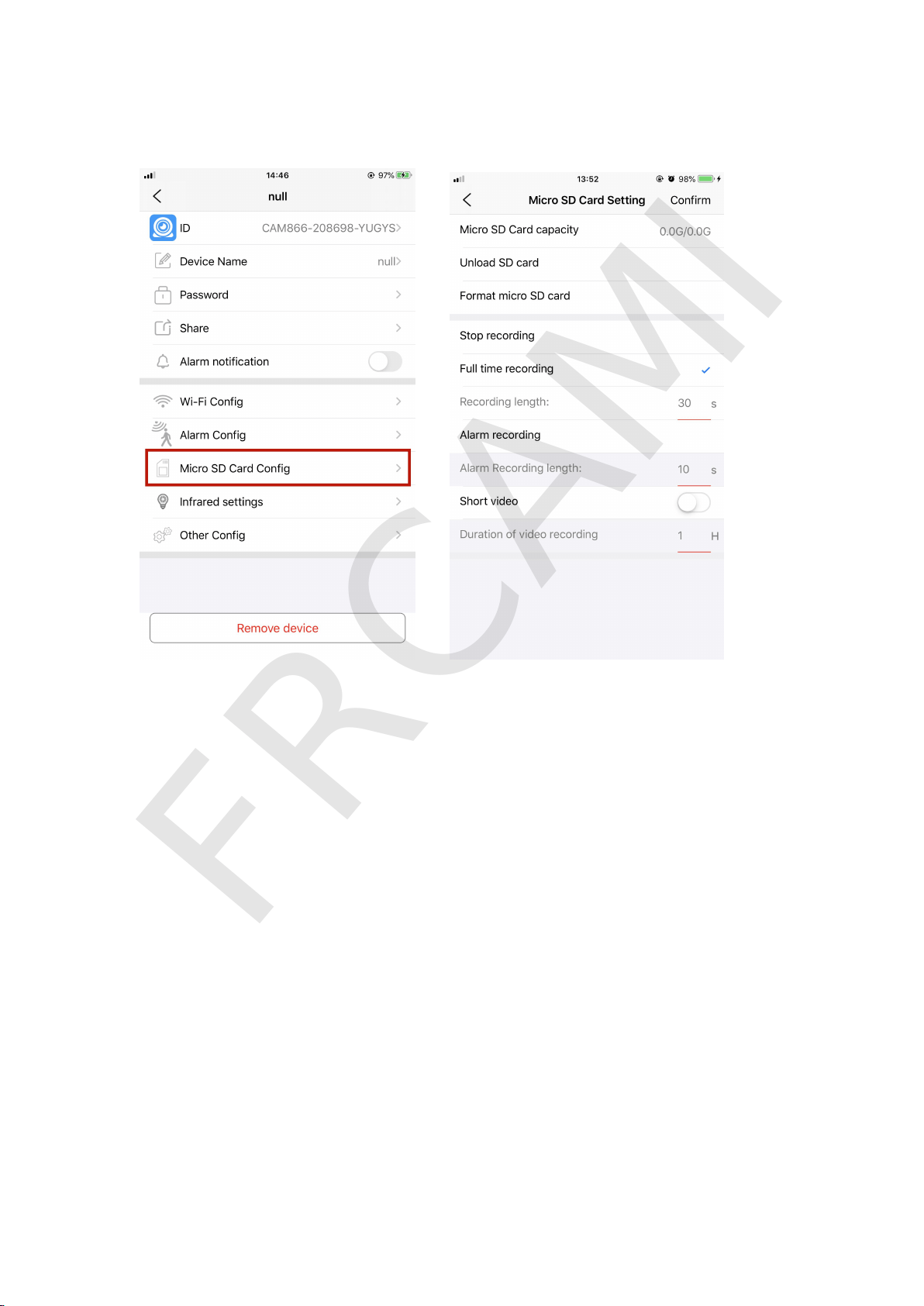
Full Time Recording: When you turn on the camera, it will auto start
r
e
c
o
r
d
i
n
g
.
A
l
a
r
m
R
e
c
o
r
d
i
n
g
:
W
h
e
n
y
o
u
t
u
r
n
o
n
M
o
t
i
o
n
d
e
t
e
c
t
i
o
n
f
u
n
c
t
i
o
n
a
n
d
s
e
t
t
h
e
a
l
a
r
m
s
e
t
t
i
n
g
s
,
t
h
e
c
a
m
e
r
a
w
i
l
l
s
t
a
r
t
r
e
c
o
r
d
i
n
g
o
n
l
y
w
h
e
n
i
t
r
e
c
e
i
v
e
s
a
l
a
r
m
a
l
e
r
t
.
FRCAMI
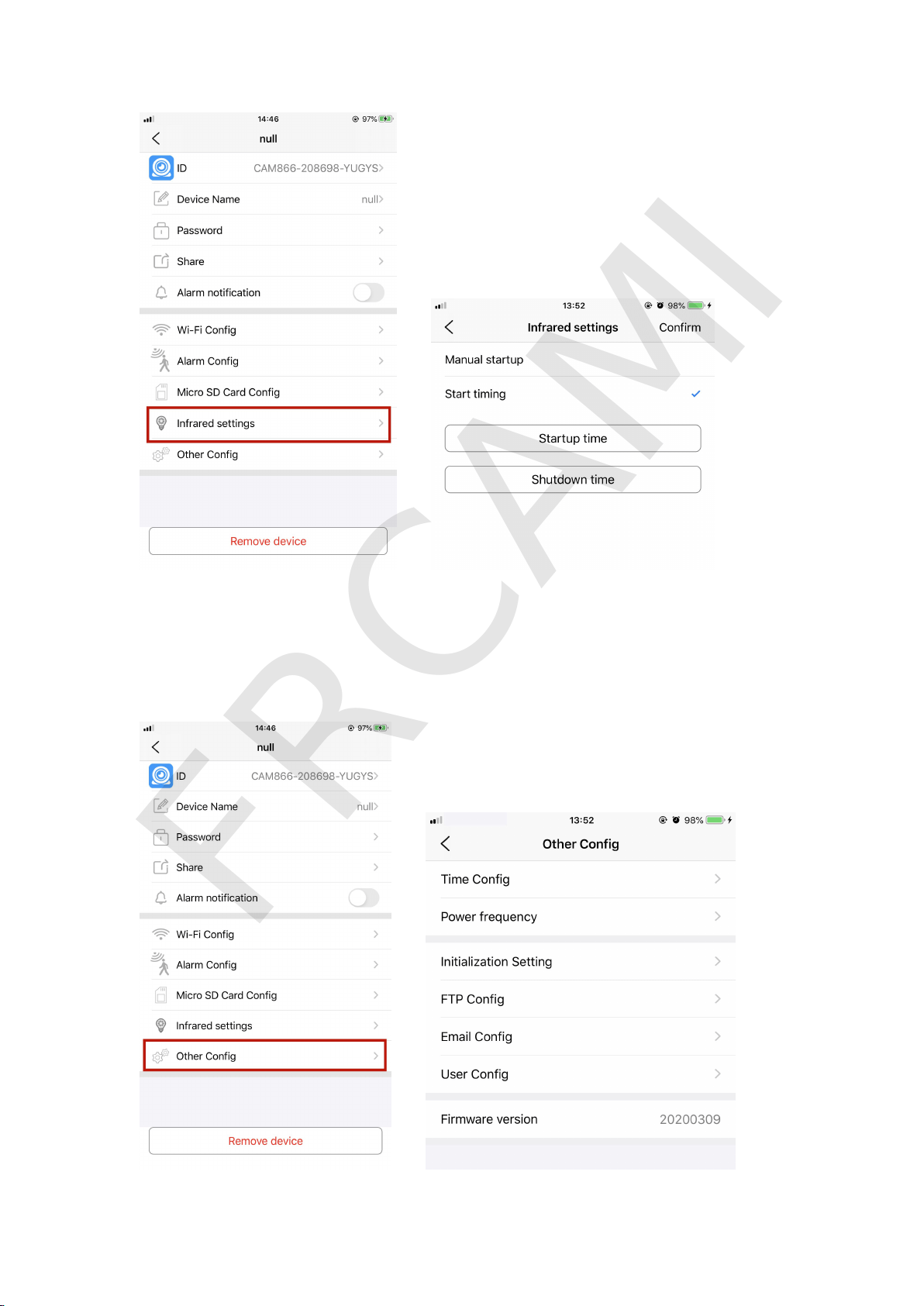
9
.
O
t
h
e
r
C
o
n
f
i
g
I
n
t
h
i
s
s
e
t
t
i
n
g
,
y
o
u
c
a
n
s
e
t
T
i
m
e
C
o
n
f
i
g
,
P
o
w
e
r
f
r
e
q
u
e
n
c
y
,
I
n
i
t
i
a
l
i
z
a
t
i
o
n
S
e
t
t
i
n
g
,
F
T
P
C
o
n
f
i
g
,
E
m
a
i
l
C
o
n
f
i
g
a
n
d
U
s
e
r
C
o
n
f
i
g
.
FRCAMI
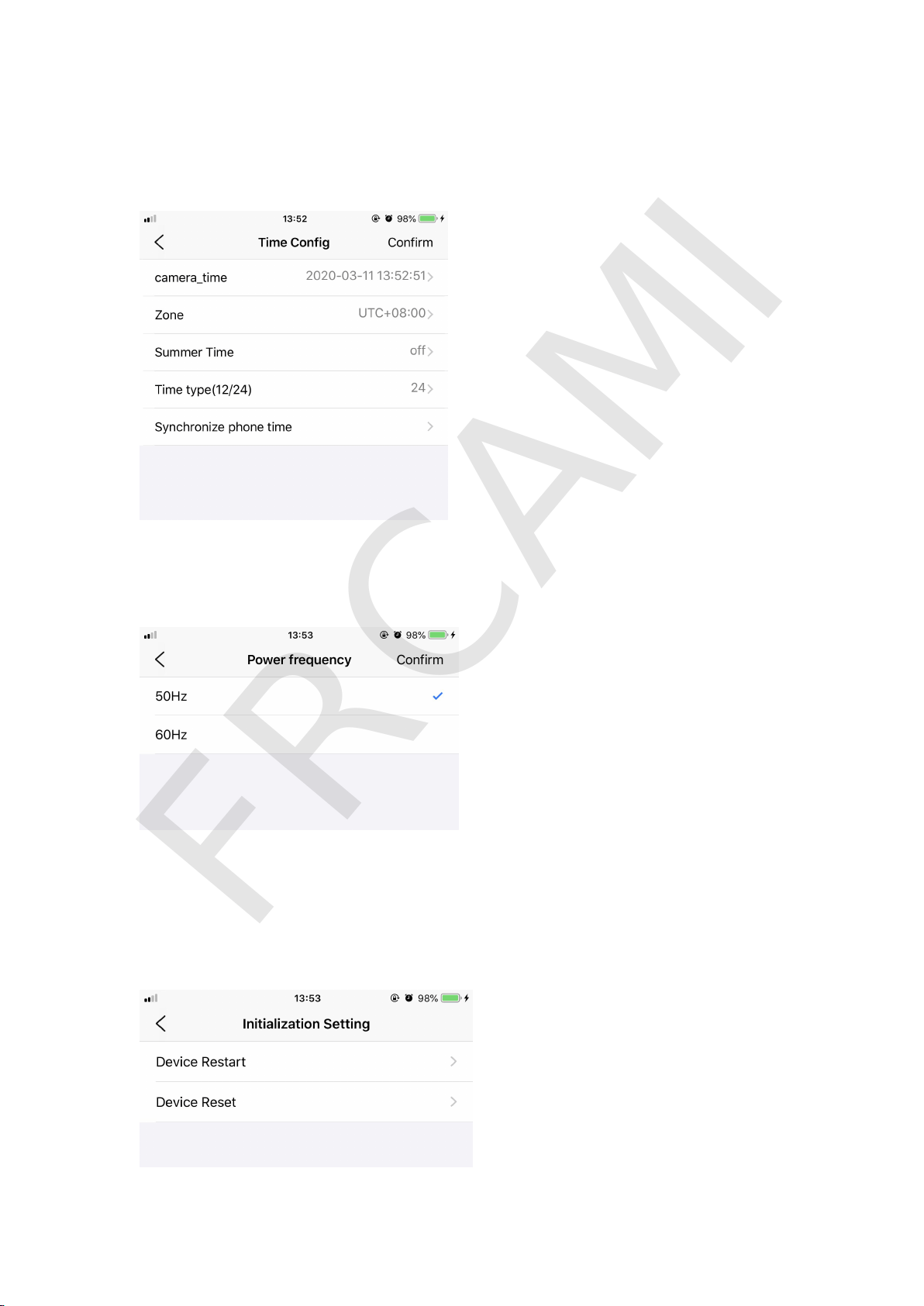
9.1 Time Config
Y
o
u
c
a
n
s
e
t
t
h
e
c
a
m
e
r
a
t
i
m
e
i
n
t
h
i
s
f
u
n
c
t
i
o
n
.
9
.
2
P
o
w
e
r
F
r
e
q
u
e
n
c
y
Y
o
u
c
a
n
c
h
o
o
s
e
5
0
H
z
o
r
6
0
H
z
i
n
t
h
i
s
s
e
t
t
i
n
g
.
9
.
3
I
n
i
t
i
a
l
i
z
a
t
i
o
n
S
e
t
t
i
n
g
Y
o
u
c
a
n
r
e
s
t
a
r
t
o
r
r
e
s
e
t
t
h
e
c
a
m
e
r
a
i
n
t
h
i
s
s
e
t
t
i
n
g
.
W
e
r
e
c
o
m
m
e
n
d
y
o
u
r
e
s
e
t
t
h
e
c
a
m
e
r
a
b
y
p
r
e
s
s
i
n
g
t
h
e
R
e
s
e
t
b
u
t
t
o
n
o
n
t
h
e
c
a
m
e
r
a
.
FRCAMI
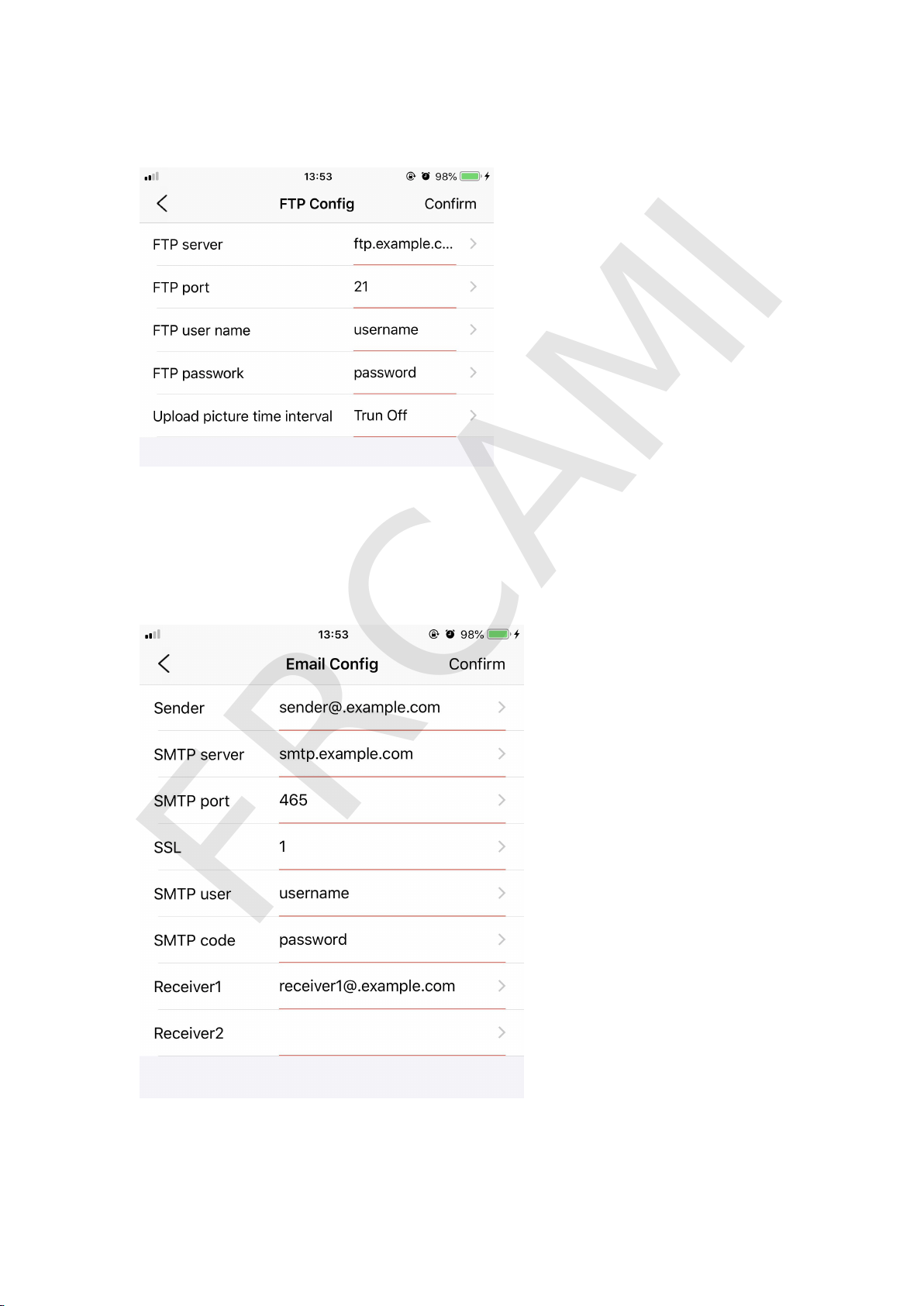
9.4 FTP Config
9
.
5
E
m
a
i
l
C
o
n
f
i
g
B
y
s
e
t
t
i
n
g
t
h
e
e
m
a
i
l
c
o
n
f
i
g
,
y
o
u
c
a
n
r
e
c
e
i
v
e
n
o
t
i
f
i
c
a
t
i
o
n
i
n
M
o
t
i
o
n
d
e
t
e
c
t
i
o
n
s
e
t
t
i
n
g
>
>
>
P
u
s
h
a
l
e
r
t
.
FRCAMI
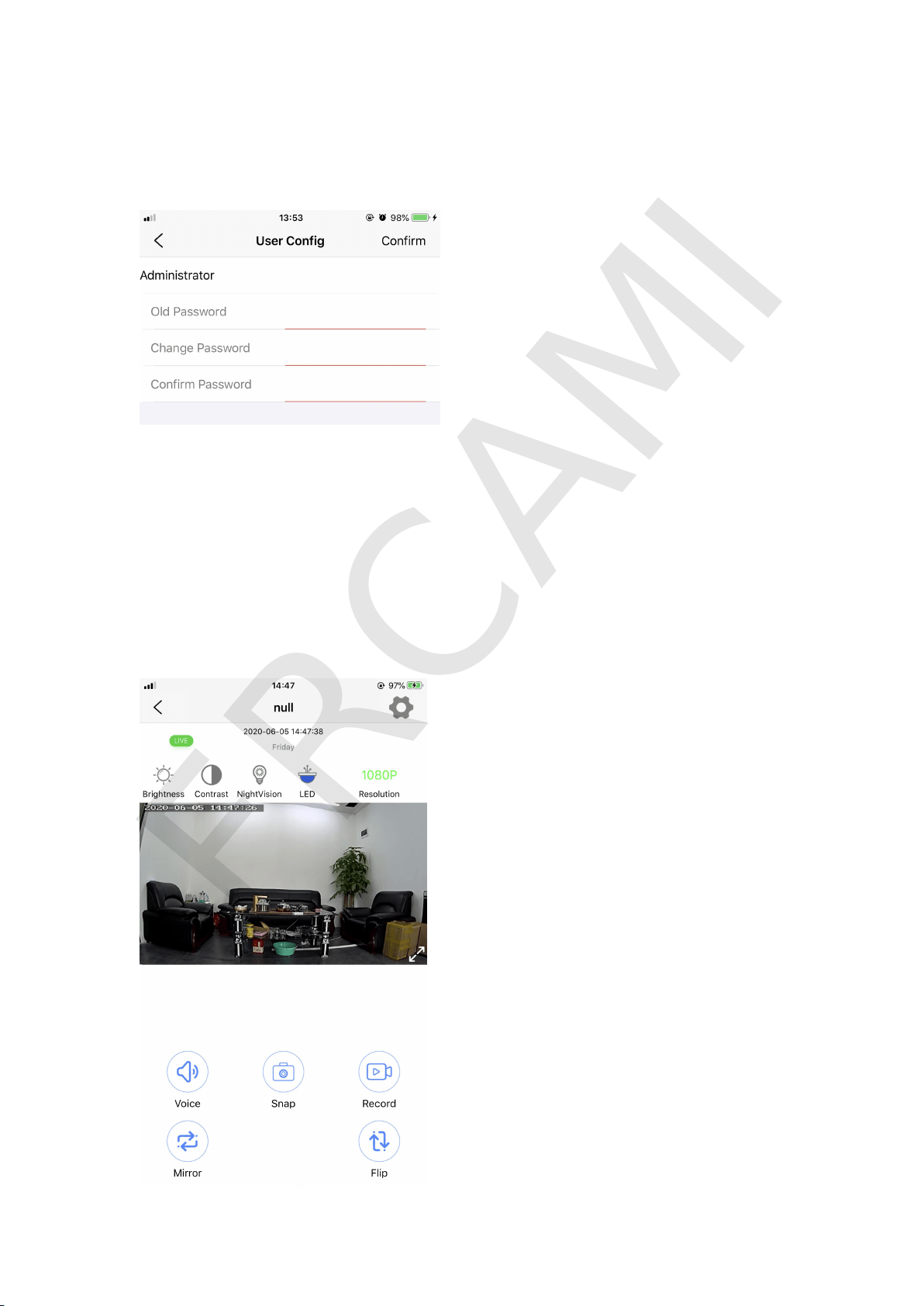
9.6 User Config
Y
o
u
c
a
n
c
h
a
n
g
e
p
a
s
s
w
o
r
d
i
n
t
h
e
s
e
t
t
i
n
g
(
d
e
f
a
u
l
t
p
a
s
s
w
o
r
d
i
s
8
8
8
8
)
.
10. APP icons instructions: Please refer to the below picture.
Y
o
u
c
a
n
a
d
j
u
s
t
B
r
i
g
h
t
n
e
s
s
,
I
m
a
g
e
C
o
n
t
r
a
s
t
a
n
d
R
e
s
o
l
u
t
i
o
n
,
t
u
r
n
o
n
/
o
f
f
N
i
g
h
t
V
i
s
i
o
n
,
I
n
d
i
c
a
t
o
r
L
i
g
h
t
s
,
A
u
d
i
o
.
Y
o
u
c
a
n
a
l
s
o
q
u
i
c
k
l
y
t
a
k
e
a
p
h
o
t
o
a
n
d
v
i
d
e
o
.
T
h
e
L
e
f
t
/
R
i
g
h
t
,
U
p
/
D
o
w
n
a
r
e
f
o
r
i
m
a
g
e
s
w
i
t
c
h
.
FRCAMI
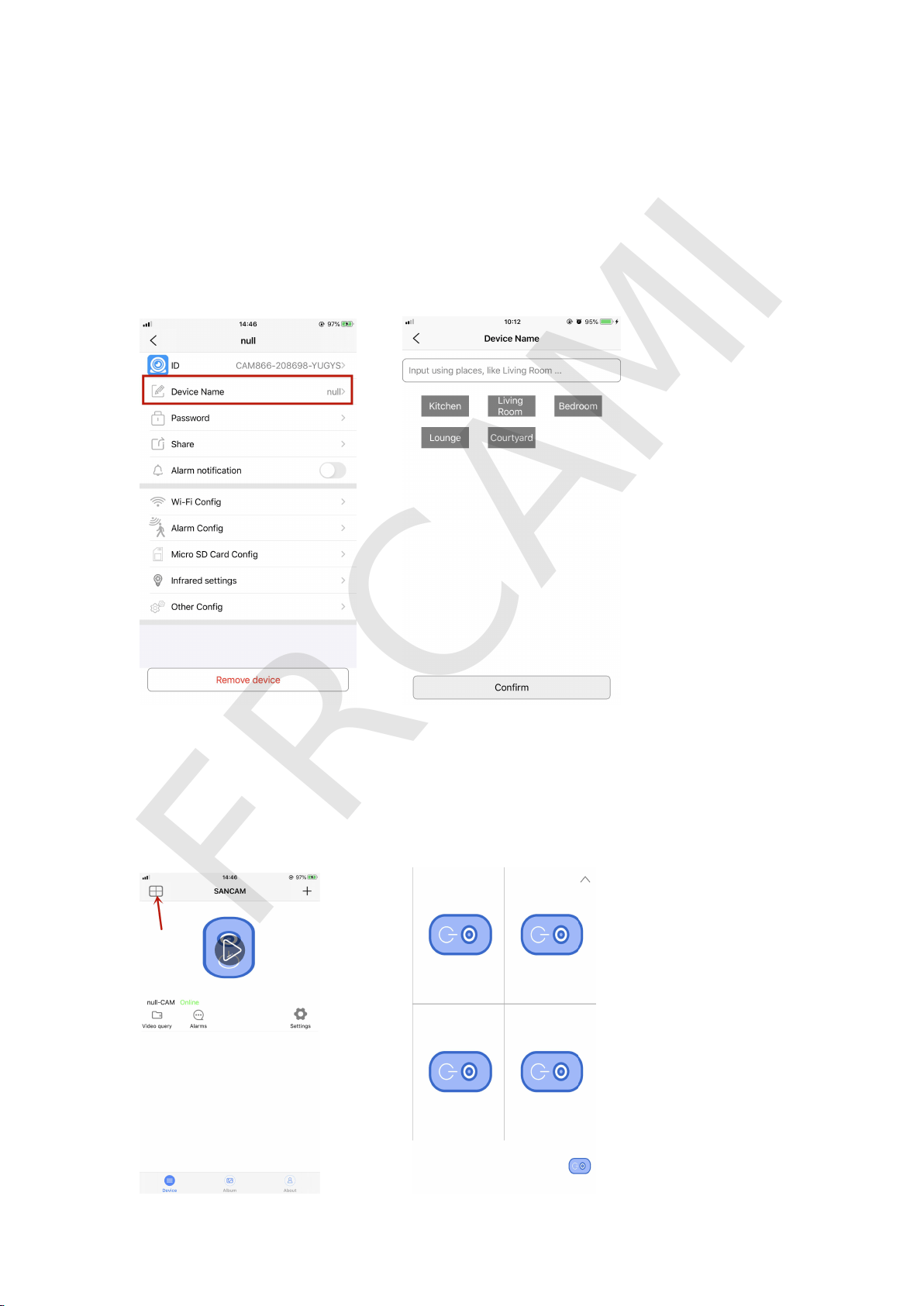
11. Muti-use requirement
I
n
t
h
e
s
e
t
t
i
n
g
,
y
o
u
c
a
n
e
d
i
t
t
h
e
d
e
v
i
c
e
n
a
m
e
f
o
r
d
i
f
f
e
r
e
n
t
c
a
m
e
r
a
s
,
s
e
t
t
h
e
p
a
s
s
w
o
r
d
,
a
n
d
t
h
e
n
s
h
a
r
e
i
t
w
i
t
h
Q
R
c
o
d
e
t
o
y
o
u
r
f
a
m
i
l
y
a
n
d
friends.
I
f
y
o
u
h
a
v
e
t
o
o
m
a
n
y
p
l
a
c
e
s
n
e
e
d
e
d
t
o
b
e
m
o
n
i
t
o
r
e
d
,
y
o
u
c
a
n
i
n
s
t
a
l
l
s
e
v
e
r
a
l
c
a
m
e
r
a
s
(
M
a
x
4
c
a
m
e
r
a
s
)
a
t
d
i
f
f
e
r
e
n
t
p
l
a
c
e
s
a
t
t
h
e
s
a
m
e
t
i
m
e
i
n
o
n
e
a
p
p
.
Y
o
u
c
a
n
w
a
t
c
h
4
l
i
v
e
c
a
m
e
r
a
m
e
a
n
w
h
i
l
e
o
n
t
h
e
a
p
p
.
FRCAMI
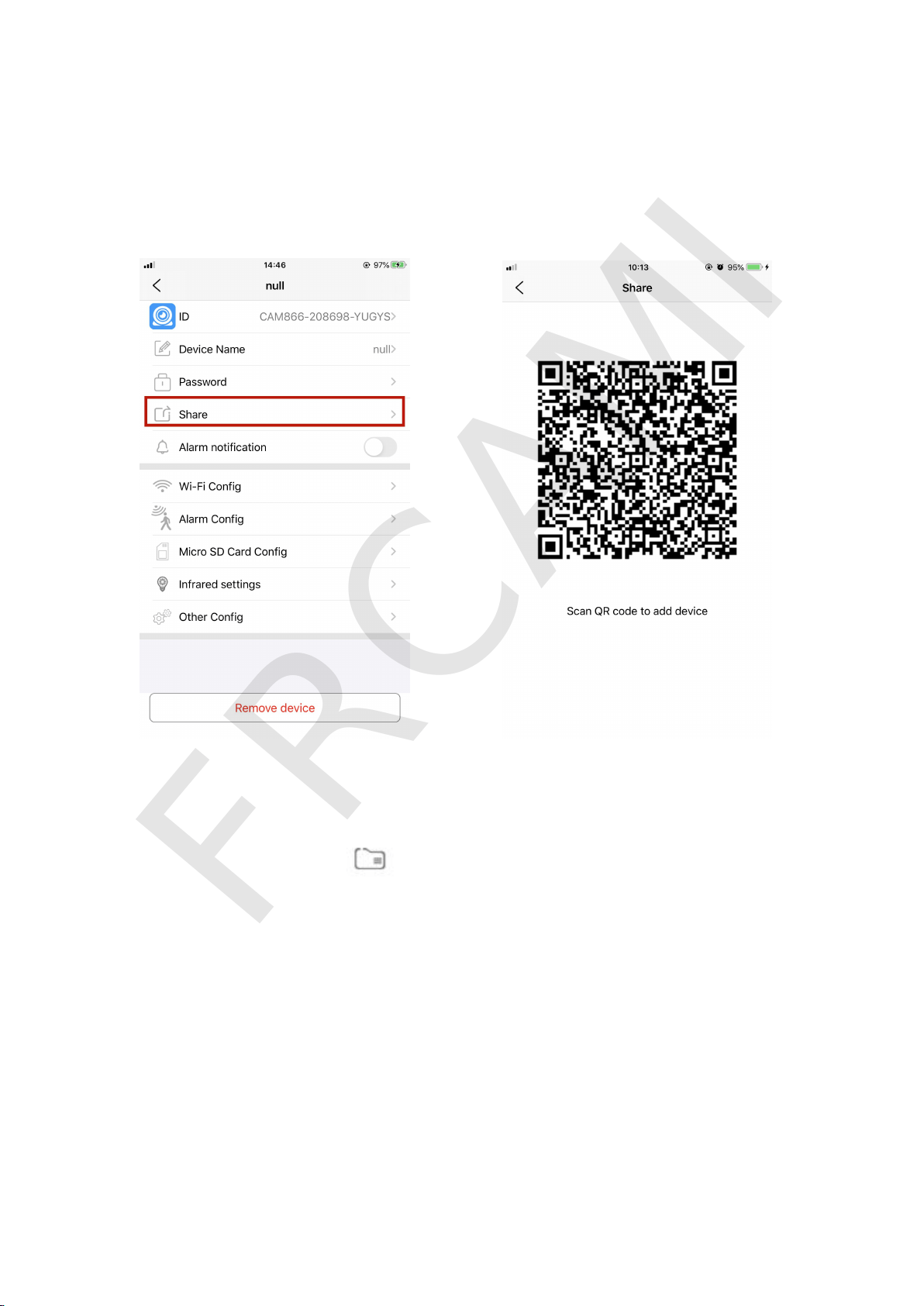
If you have other family or friends who need to get access to the
c
a
m
e
r
a
s
a
n
d
w
a
t
c
h
t
h
e
l
i
v
e
r
e
c
o
r
d
i
n
g
s
,
y
o
u
c
a
n
s
h
a
r
e
i
t
w
i
t
h
y
o
u
r
f
a
m
i
l
y
.
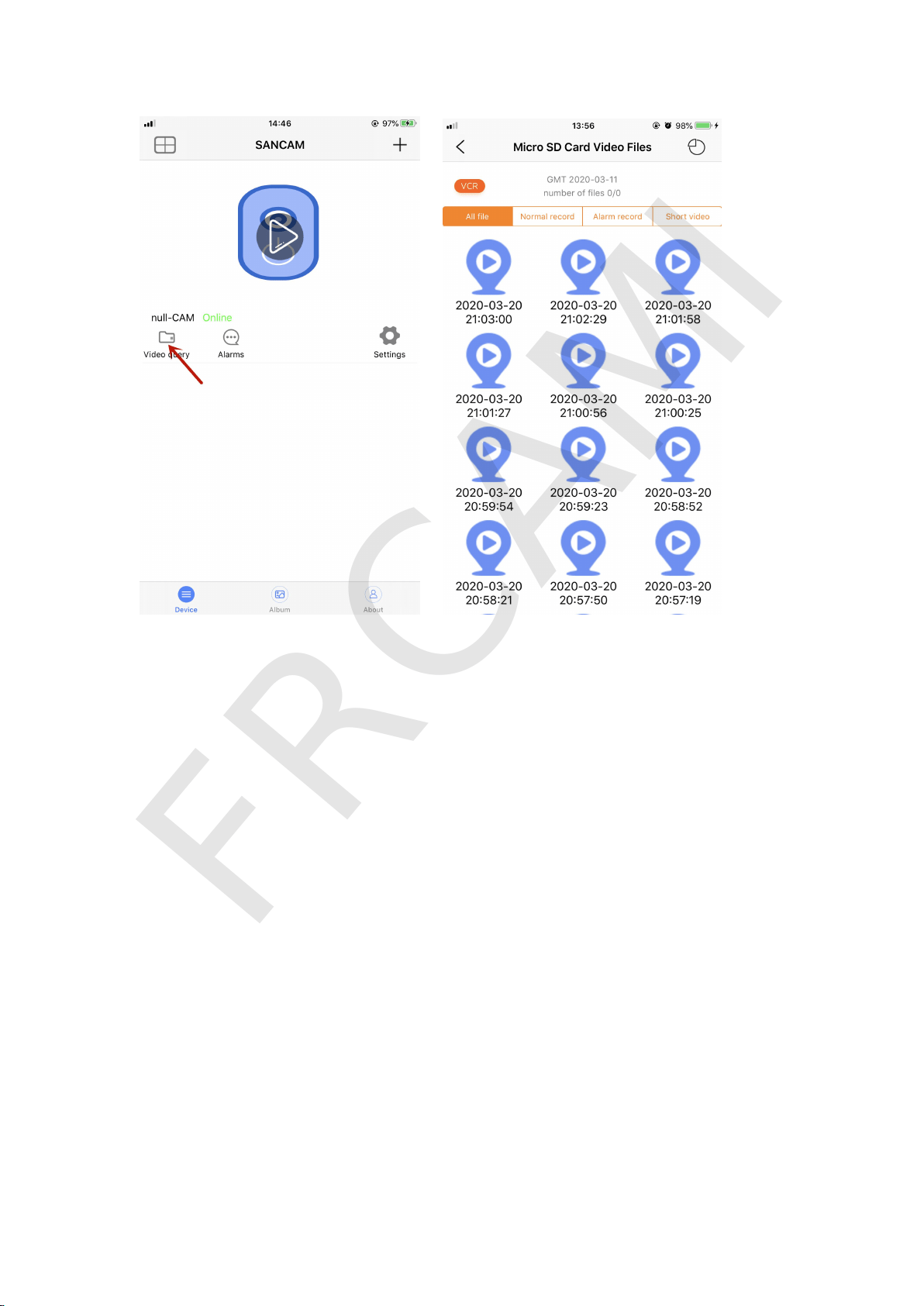
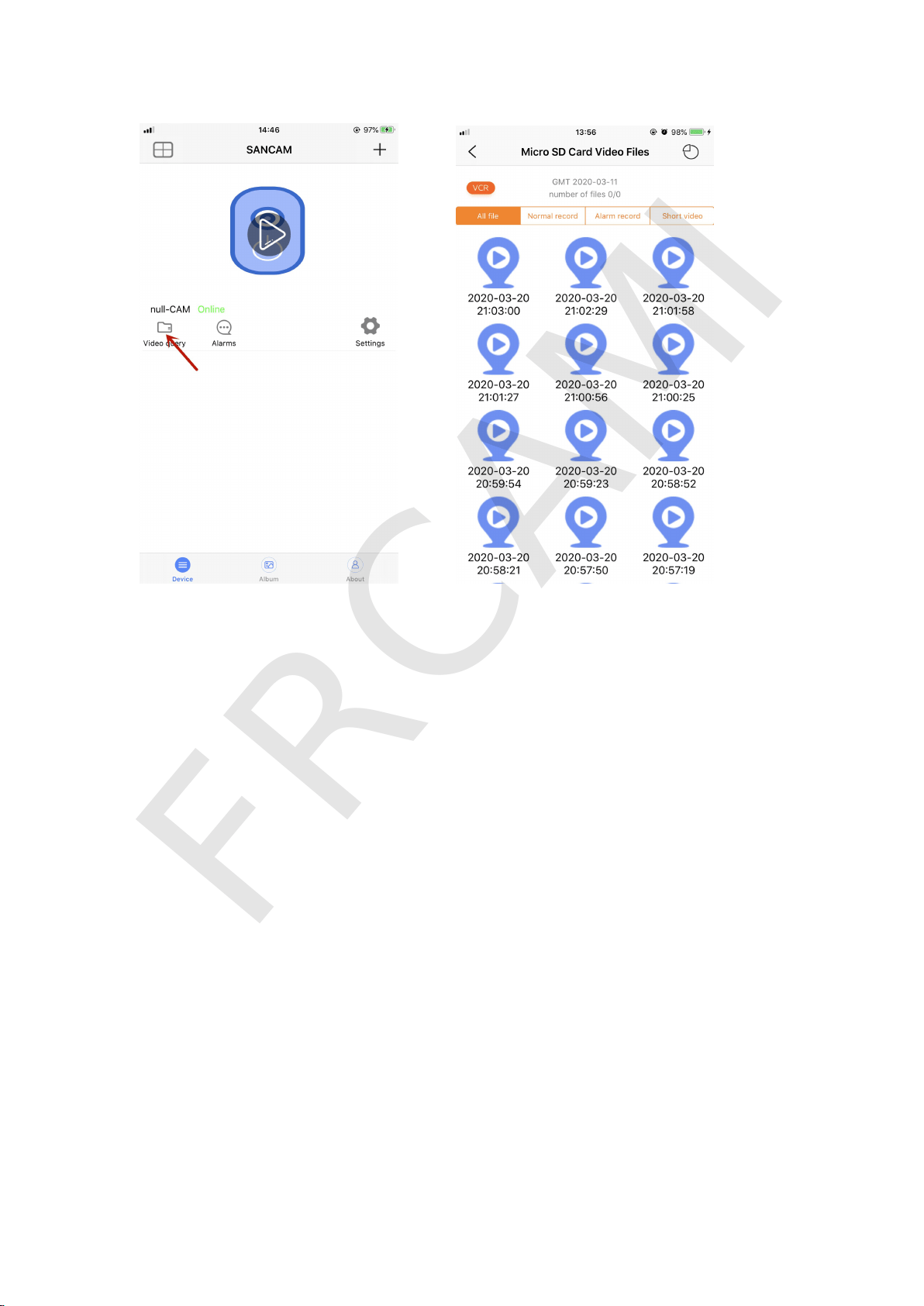
12. Playback and download files from memory card
:
T
a
p
t
h
e
h
o
m
e
p
a
g
e
“
”
i
c
o
n
a
n
d
s
e
l
e
c
t
t
h
e
v
i
d
e
o
s
y
o
u
n
e
e
d
t
o
w
a
t
c
h
o
r
d
o
w
n
l
o
a
d
.
Y
o
u
c
a
n
w
a
t
c
h
i
t
o
n
l
i
n
e
.
P
l
e
a
s
e
r
e
f
e
r
t
o
t
h
e
b
e
l
o
w
p
i
c
s
.
FRCAMI
Ⅳ
.
N
o
t
e
1
.
T
h
i
s
c
a
m
e
r
a
o
n
l
y
s
u
p
p
o
r
t
s
2
.
4
G
H
z
n
e
t
w
o
r
k
.
I
t
d
o
e
s
n
o
t
s
u
p
p
o
r
t
5
G
H
z
n
e
t
w
o
r
k
.
2
.
P
l
e
a
s
e
i
n
s
e
r
t
a
M
i
c
r
o
S
D
c
a
r
d
(
N
O
T
i
n
c
l
u
d
e
)
t
o
s
a
v
e
r
e
c
o
r
d
i
n
g
s
b
e
f
o
r
e
u
s
e
.
3
.
I
f
t
h
e
m
e
m
o
r
y
c
a
r
d
i
s
b
r
a
n
d
n
e
w
,
p
l
e
a
s
e
F
O
R
M
A
T
i
t
b
e
f
o
r
e
u
s
i
n
g
.
4
.
C
a
m
e
r
a
c
a
n
’
t
s
a
v
e
v
i
d
e
o
s
w
i
t
h
o
u
t
a
S
D
c
a
r
d
,
b
u
t
e
v
e
n
w
i
t
h
o
u
t
a
c
a
r
d
,
the camera can still work and record. It won’t affect other functions. The
o
n
l
y
d
i
f
f
e
r
e
n
c
e
i
s
t
h
a
t
t
h
e
S
D
c
a
r
d
c
a
n
s
a
v
e
t
h
e
r
e
c
o
r
d
i
n
g
s
.
5
.
W
h
e
n
y
o
u
t
u
r
n
o
n
t
h
e
c
a
m
e
r
a
,
i
t
w
o
u
l
d
t
a
k
e
1
-
2
m
i
n
u
t
e
s
t
o
w
a
i
t
f
o
r
i
t
t
o
s
t
a
r
t
u
p
w
i
t
h
W
i
f
i
s
i
g
n
a
l
.
FRCAMI

6. The camera is default to Wifi mode. Even without Wifi or any network,
the camera can still work. With network, you can see live videos. With
S
D
c
a
r
d
i
n
,
t
h
e
c
a
m
e
r
a
c
a
n
s
a
v
e
t
h
e
r
e
c
o
r
d
i
n
g
s
s
o
t
h
a
t
y
o
u
c
a
n
p
l
a
y
b
a
c
k
and never miss any seconds.
7
.
I
f
t
h
e
c
a
m
e
r
a
i
s
s
u
d
d
e
n
l
y
n
o
t
w
o
r
k
i
n
g
,
t
h
e
W
i
f
i
s
i
g
n
a
l
i
s
m
i
s
s
i
n
g
o
r
a
n
y
t
h
i
n
g
e
l
s
e
w
r
o
n
g
w
i
t
h
i
t
,
y
o
u
c
a
n
t
u
r
n
o
n
t
h
e
c
a
m
e
r
a
,
p
r
e
s
s
t
h
e
R
e
s
e
t
b
u
t
t
o
n
f
o
r
o
v
e
r
6
s
e
c
o
n
d
s
t
o
r
e
b
o
o
t
t
o
f
a
c
t
o
r
y
s
e
t
t
i
n
g
s
.
8. The camera will get hot when you have used it for a while. This is a
n
o
r
m
a
l
p
h
e
n
o
m
e
n
o
n
b
u
t
d
o
n
o
t
u
s
e
t
h
e
c
a
m
e
r
a
u
n
d
e
r
h
i
g
h
t
e
m
p
e
r
a
t
u
r
e
c
i
r
c
u
m
s
t
a
n
c
e
.
9
.
W
h
e
n
y
o
u
c
a
n
’
t
h
e
a
r
t
h
e
v
o
i
c
e
,
p
l
e
a
s
e
c
h
e
c
k
w
h
e
t
h
e
r
t
h
e
v
o
i
c
e
i
c
o
n
i
n
A
P
P
S
a
n
c
a
m
i
s
e
n
a
b
l
e
d
o
r
n
o
t
,
i
f
n
o
t
,
p
l
e
a
s
e
c
l
i
c
k
t
h
e
v
o
i
c
e
b
u
t
t
o
n
t
o
t
u
r
n
i
t
o
n
.
Ⅴ
.
P
r
o
b
l
e
m
s
a
n
d
S
o
l
u
t
i
o
n
s
P
r
o
b
l
e
m
s
S
o
l
u
t
i
o
n
s
C
a
n
’
t
t
u
r
n
o
n
t
h
e
c
a
m
e
r
a
B
a
t
t
e
r
y
p
o
w
e
r
i
s
e
x
h
a
u
s
t
e
d
,
p
l
e
a
s
e
c
h
a
r
g
e
i
t
U
n
a
b
l
e
t
o
r
e
a
d
m
e
m
o
r
y
c
a
r
d
P
l
e
a
s
e
f
o
r
m
a
t
t
h
e
S
D
c
a
r
d
b
e
f
o
r
e
u
s
i
n
g
C
a
m
e
r
a
c
a
n
'
t
o
p
e
n
o
n
l
i
n
e
v
i
d
e
o
C
h
e
c
k
y
o
u
r
n
e
t
w
o
r
k
c
o
n
n
e
c
t
i
o
n
/
r
e
s
t
a
r
t
t
h
e
r
o
u
t
e
r
Unable to operate remotely
Please make sure the Wifi password is correct
A
f
t
e
r
s
e
t
t
i
n
g
r
e
m
o
t
e
c
o
n
n
e
c
t
i
o
n
s
s
u
c
c
e
s
s
f
u
l
l
y
,
i
t
i
s
n
’
t
o
n
l
i
n
e
C
l
i
c
k
t
h
e
s
e
a
r
c
h
b
u
t
t
o
n
o
n
t
h
e
a
p
p
t
o
s
e
a
r
c
h
t
h
e
c
a
m
e
r
a
o
r
r
e
s
t
a
r
t
t
h
e
a
p
p
.
FRCAMI

Other problems and solutions:
1. Router account or password is wrong, please enter the right account or
p
a
s
s
w
o
r
d
.
2. The router has not been rebooted for too long to allocate IP address.
3
.
S
t
a
y
c
l
o
s
e
t
o
t
h
e
r
o
u
t
e
r
w
i
t
h
i
n
3
-
5
m
e
t
e
r
s
t
o
s
e
t
r
e
m
o
t
e
c
o
n
n
e
c
t
i
o
n
.
4
.
R
e
m
o
t
e
c
o
n
n
e
c
t
i
o
n
i
s
u
n
s
u
c
c
e
s
s
f
u
l
,
p
l
e
a
s
e
c
h
e
c
k
w
h
e
t
h
e
r
t
h
e
d
e
v
i
c
e
c
o
n
n
e
c
t
e
d
t
o
t
h
e
r
o
u
t
e
r
h
a
s
r
e
a
c
h
e
d
t
h
e
l
i
m
i
t
o
r
n
o
t
,
i
f
s
o
,
p
l
e
a
s
e
c
l
o
s
e
other devices and then re-connect this camera.
5
.
I
f
t
h
e
W
i
f
i
i
s
t
h
e
W
E
P
e
n
c
r
y
p
t
i
o
n
m
o
d
e
,
p
l
e
a
s
e
c
h
a
n
g
e
t
o
t
h
e
W
P
A
m
o
d
e
.
6
.
B
e
f
o
r
e
s
e
t
t
i
n
g
r
e
m
o
t
e
c
o
n
n
e
c
t
i
o
n
,
p
l
e
a
s
e
m
a
k
e
s
u
r
e
y
o
u
h
a
v
e
s
e
t
l
o
c
a
l
c
o
n
n
e
c
t
i
o
n
s
u
c
c
e
s
s
f
u
l
l
y
.
Ⅵ
.
P
r
o
d
u
c
t
P
a
r
a
m
e
t
e
r
V
i
d
e
o
R
e
s
o
l
u
t
i
o
n
4
K
/
1
9
2
0
*
1
0
8
0
P
/
1
2
8
0
*
7
2
0
P
O
p
t
i
o
n
a
l
Video Encoding
AVC1
R
e
s
o
l
u
t
i
o
n
4
K
S
D
C
a
r
d
R
e
s
o
l
u
t
i
o
n
1
2
8
0
*
7
2
0
P
F
r
a
m
e
r
a
t
e
1
5
F
P
S
—
3
0
F
P
S
O
p
t
i
o
n
a
l
S
e
n
s
o
r
C
M
O
S
S
t
o
r
a
g
e
S
u
p
p
o
r
t
S
D
c
a
r
d
M
A
X
1
2
8
G
(
N
O
T
i
n
c
l
u
d
e
d
)
S
u
p
p
o
r
t
S
y
s
t
e
m
W
i
n
d
o
w
s
/
I
O
S
/
A
n
d
r
o
i
d
Wide angle
170
C
h
a
r
g
i
n
g
V
o
l
t
a
g
e
D
C
-
5
V
/
1
A
B
a
t
t
e
r
y
c
a
p
a
c
i
t
y
3
1
0
0
m
A
h
S
t
a
n
d
b
y
t
i
m
e
3
0
h
o
u
r
s
C
h
a
r
g
i
n
g
t
i
m
e
5
-
6
h
o
u
r
s
FRCAMI

Ⅶ
.
W
a
r
n
i
n
g
s
1. Applicable Occasion
:
Please strictly abide by relevant national laws
a
n
d
r
e
g
u
l
a
t
i
o
n
s
.
2. Do not use the product illegally, otherwise the consequences are at
y
o
u
r
o
w
n
e
x
p
e
n
s
e
.
Ⅷ
.
W
a
r
r
a
n
t
y
1. Camera comes with 12-month Warranty and 30 days money back.
2
.
F
o
r
r
e
p
l
a
c
e
m
e
n
t
,
y
o
u
s
h
o
u
l
d
p
r
o
v
i
d
e
t
h
e
d
e
f
e
c
t
i
v
e
r
e
a
s
o
n
s
a
n
d
r
e
t
u
r
n
t
h
e
d
e
f
e
c
t
i
v
e
c
a
m
e
r
a
f
i
r
s
t
.
Y
o
u
r
O
r
d
e
r
I
D
a
n
d
r
e
t
u
r
n
t
r
a
c
k
i
n
g
n
u
m
b
e
r
a
r
e
r
e
q
u
i
r
e
d
.
3
.
W
e
e
n
c
o
u
r
a
g
e
y
o
u
t
o
l
e
a
v
e
y
o
u
r
c
o
m
m
e
n
t
s
a
n
d
s
u
g
g
e
s
t
i
o
n
o
n
t
h
e
p
r
o
d
u
c
t
.
I
f
y
o
u
h
a
v
e
a
n
y
q
u
e
s
t
i
o
n
s
a
b
o
u
t
t
h
e
p
r
o
d
u
c
t
,
p
l
e
a
s
e
f
e
e
l
f
r
e
e
t
o
c
o
n
t
a
c
t
u
s
a
t
s
e
r
v
i
c
e
f
o
r
c
a
m
@
1
6
3
.
c
o
m
o
r
o
n
a
m
a
z
o
n
.
O
u
r
s
e
r
v
i
c
e
t
e
a
m
w
i
l
l
h
e
l
p
y
o
u
a
n
d
s
o
l
v
e
t
h
e
c
a
s
e
w
i
t
h
i
n
1
2
h
o
u
r
s
o
n
w
o
r
k
i
n
g
d
a
y
s
.
FRCAMI