ENGLISH
ESPAÑOL
Please read the Important Safety Information for the proper
use of this product. After reading, store this User Manual in
an easily accessible place for all users.
NOTE:
Please read all information carefully prior to using the
headset in order to enjoy the best
performance and prevent
damage to the product.
Rev 1.0 US
HBS-FL7
www.lg.com
Copyright © 2019 LG Electronics Inc. All rights reserved.
USER MANUAL
Bluetooth® Wireless Stereo Headset

Contents
Safety Cautions ...............................................................................................................................1
Precautions When Using the Product .................................................................................2
HD Speaker ........................................................................................................................................ 2
Product Components ...................................................................................................................3
Product Description ......................................................................................................................4
Pairing and Connecting ............................................................................................................... 5
Indicator Lamp .................................................................................................................................6
Mobile Calling Functions .............................................................................................................6
Playing Music .................................................................................................................................... 7
The Google Assistant ................................................................................................................... 7
Battery Status ...............................................................................................................................11
UVnano Description ....................................................................................................................11
Out of Range ..................................................................................................................................11
LG Tone & Talk™ ...........................................................................................................................12
Troubleshooting ............................................................................................................................ 12
Specications and Features ................................................................................................... 13
Declaration of Conrmation .................................................................................................. 14
Additional Information ..............................................................................................................15
Limited Warranty .........................................................................................................................17
Important Safety Information .............................................................................................. 18
Open Source Software Notice ..............................................................................................18
ENGLISH

1
ENGLISH
LG TONE FREE(HBS-FL7) is wireless headset headset that uses Bluetooth technology.
This product can be used as an audio accessory for devices supporting either the A2DP or Hands-Free
Bluetooth Prole.
Safety Cautions
!
CAUTION
Do not disassemble, adjust, or repair the product arbitrarily.
Do not place the product near excessive heat or ammable material.
The product may be damaged if an incompatible charger is used.
Make sure that an infant or child does not swallow a magnet or a small component of the
product.
Make sure that foreign objects do not enter the charger’s connectors (charging port and power
plug). Failure to do so may result in re or electric shock.
If you have a medical device implanted, contact your doctor before using this device.
This product has a built-in battery, and the battery cannot be removed or replaced arbitrarily.
For your safety, do not remove the battery incorporated in the product.
If you arbitrarily replace the battery or don’t replace it correctly, it may explode.
The lithium-ion polymer battery is a hazardous component that can cause injury.
Battery replacement by an unqualied professional can cause damage to your device.
Do not discard the battery arbitrarily. Follow the local procedure for discarding batteries.
In order to prevent unnecessary energy consumption, disconnect the device when fully charged.
Always use an easily accessible power outlet for charging your device.
!
WARNING
Do not drop the product from a high place.
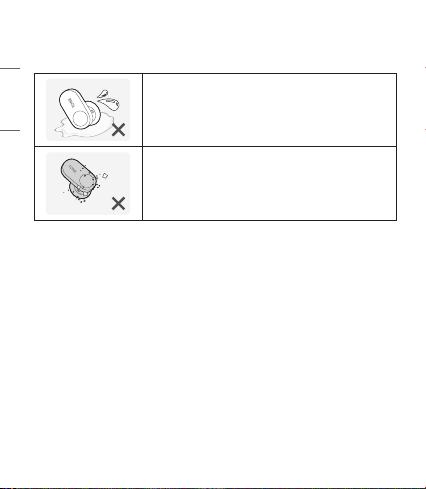
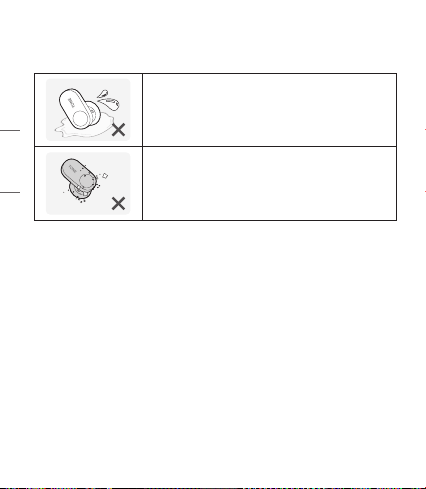
Make sure there is no water, alcohol, or benzene in contact with the product.
Do not store the product in a wet or dusty place.
Do not place heavy objects on the product.
This product is waterproof to the IPX4 level (daily life waterproof).
(The IPX4 waterproof rating applies to the earbud product only.)
Do not put the product under the water or use it in a humid location such as a bathroom.
2
ENGLISH
Precautions When Using the Product
Refer to the following to use the product for its normal life span.
If the product is exposed to excessive sweat, clean the product.
Keep the earbuds clean.
HD Speaker
If the communication network of the device you are connecting to supports HD Voice Calling,
you can enjoy making voice calls and listening to music in high denition.
3
ENGLISH
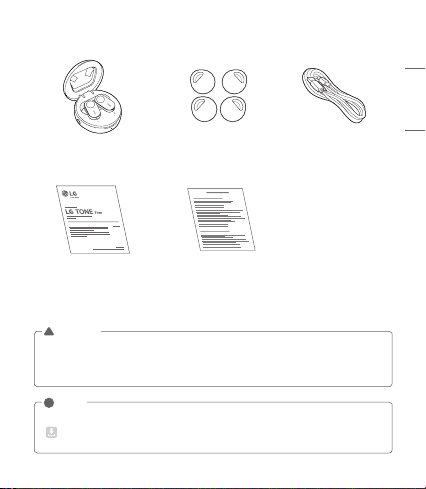
Product Components
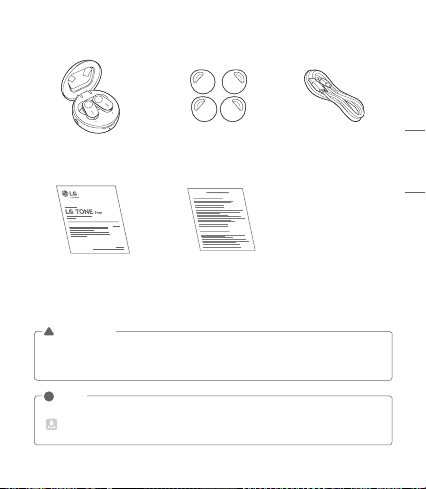
LG TONE Free™
Earbuds (small eargels installed)
UV Charging Case
Extra Eargels
(medium & large)
USB Type C™ Charging Cable
User Manual Warranty Card
NOTE: Actual product design may differ from images shown in manual.
Make sure authentic LG Electronics components are used. Using a non-authentic component
may damage the product and thus void the warranty.
Use the USB Type C™ cable provided with the product.
!
CAUTION
The complete manual is available for download from the LG Electronics website.
www.lg.com > Support > Manuals & Documents > Browse by Product > Mobile Devices >
LG Bluetooth Devices
!
NOTE
4
ENGLISH
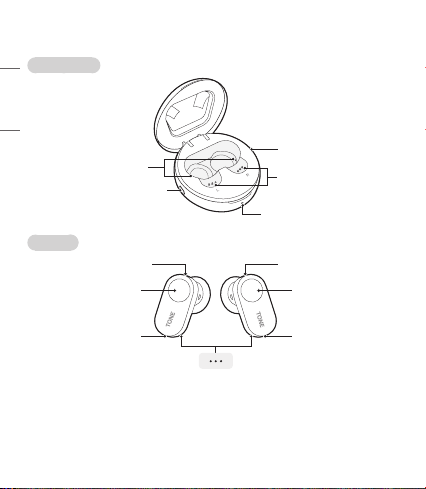
Product Description
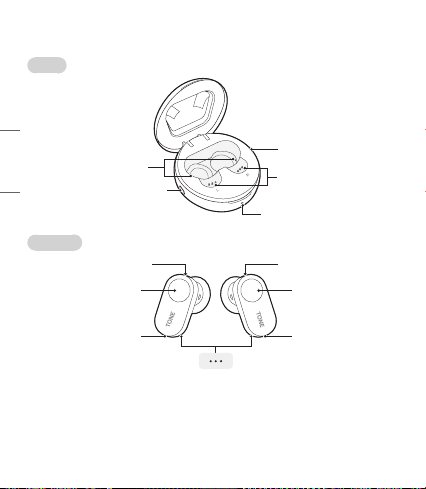
Charging Case
Earbuds
*The appearance and specications of the actual product may differ depending on the model.
NOTE: The left earbud is connected to the main (right) earbud and is used as a sub earbud.
Sub earbud (left) Main earbud (right)
Microphone Microphone
MicrophoneMicrophone
UV-C LED
Pairing / Battery check button
Charging port
Charging terminals
TouchpadTouchpad
Charging indicator lamp
Charging terminals
5
ENGLISH
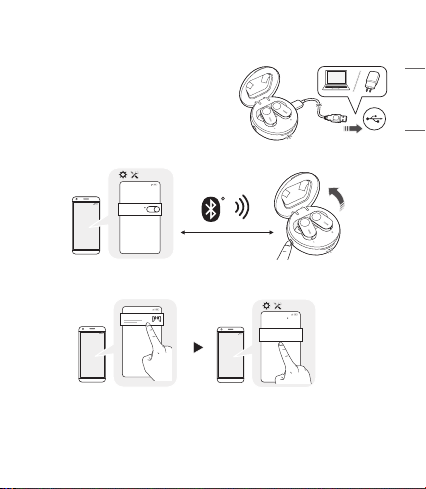
Pairing and Connecting
Initial Pairing
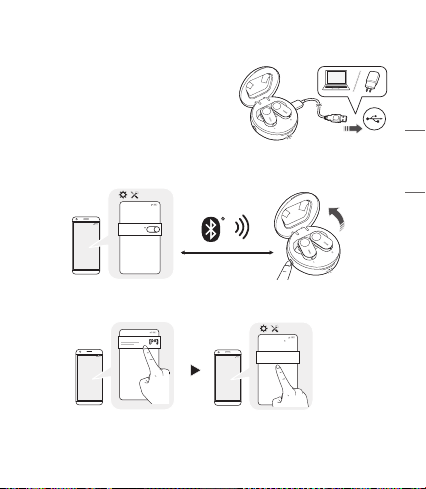
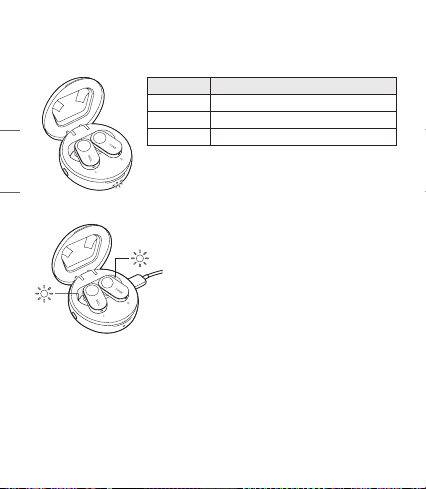
Open the charging case lid.
With the earbuds mounted on the charging case, plug a
type C™ cable into the charging port of the charging case
and connect it to a power source.
The earbuds enter pairing mode (The blue LED on the
charging case blinks).
* You need to plug a cable into the charging port and
connect it to a power source only for the initial pairing.
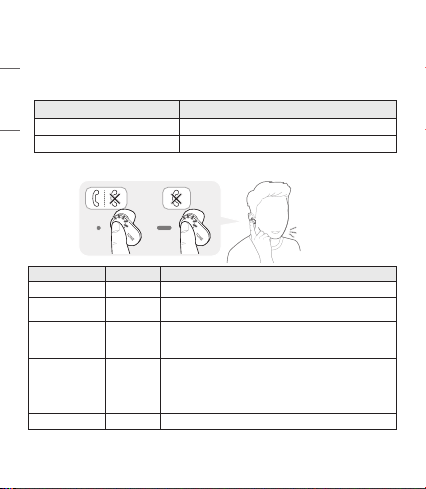
Fast Pair
-(
-(
#MVFUPPUI
0/
1 Activate Bluetooth on your phone or device.
2 While the earbud is mounted on the charging case, open the charging case lid and press the
pairing button until the blue indicator lamp blinks.
-(
-(
-()#4'-
-(
-(
-()#4'-
#MVFUPPUI
3 When the Fast Pair connection pop-up appears on the top area of the mobile phone screen,
tap it to connect.
4 If the pop-up does not appear, select [HBS-FL7] from the Bluetooth menu on the mobile phone
and connect it (for users of iOS or Android™ 5.0 or lower versions).
NOTE: If connecting for the rst time, follow the initial pairing instructions. It only supports
Android 5.0 or higher. Before connecting the headset, congure the mobile device or the device
to be connected to use the location information.
~39 inch, ~1m
6
ENGLISH
Automatic Reconnection
The earbuds are connected automatically when you open the cover of the charging case. If you close
the cover of the charging case with both earbuds mounted on the charging case, the earbuds are
disconnected.
Indicator Lamp
Status Description
Search Mode The blue status Indicator Lamp ashes.
When there is a problem while charging The red and blue status Indicator Lamps ash alternately.
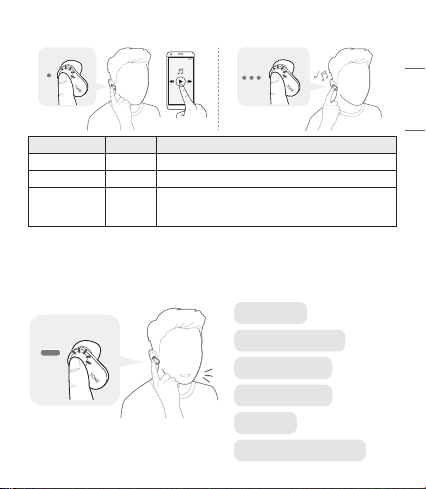
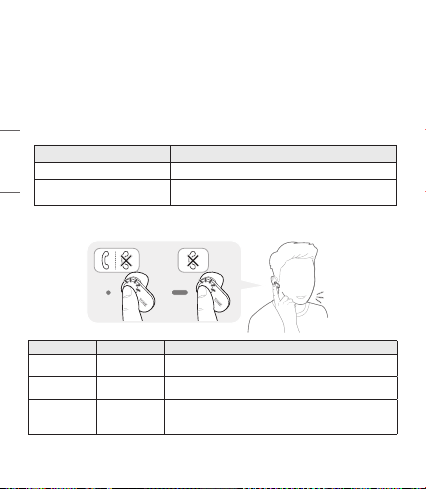
Mobile Calling Functions
Function Status Description
Answering Calls Ringing Touch the left or right earbud once.
Making Calls Idle
If you make a call using a mobile phone, the call is automatically
connected to the headset.
Voice Dial
Idle/
Music on
Touch the left or right earbud twice.
Note: To use this function, you need to deactivate the Google
Assistant settings.
Receiving Calls
while on the
Phone
Talking
If you touch the left or right earbud once, the current call will go
on hold, and you will be able to answer an incoming call.
If the previous call is on hold, you can nish the current call on
the mobile phone.
(It works differently depending on the mobile phone settings.)
Rejecting Calls Ringing Touch and hold the left or right earbud.
NOTE: The Voice Dial function works on the Main Connected Device or on the device on which you
made the last call. (The Voice Dial function may work differently depending on the mobile
phone being used.)
7
ENGLISH
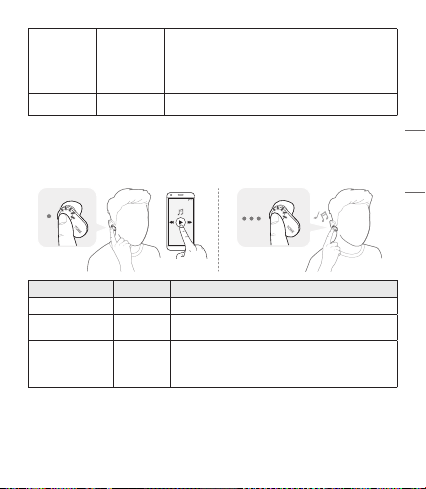
Playing Music
-(
Function Status Description
Play Idle Touch the left or right earbud once.
Pause Music on Touch the left or right earbud once.
Change Equalizer
Mode
Music on
Touch the left or right earbud three times quickly, and the sound
mode changes in the following order:
Normal (default setting) > Bass Boost > Flat Mode > Treble Boost
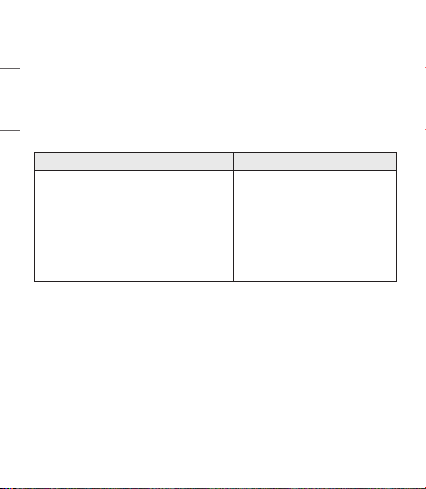
The Google Assistant
Using the touchpad of the earbud, you can do what you want quickly without looking at the screen of
your mobile or connected device.
The Google Assistant can perform various commands as follows:
Play some jazz
Text Mom, “see you in 5”
Tell me about my day
Set a 15 minute timer
Take a sele
Will I need an umbrella today?
8
ENGLISH
Installation and Usage Requirements of the Google Assistant
To use this feature, your device must be connected to the Internet and logged into your Google account.
The Google Assistant feature may not be supported for some countries and languages. Make sure you
are in a country where the Google Assistant is available.
The language that is set to your mobile device is set and used as the default language of the Google
Assistant.
NOTE: To learn more about the Google Assistant, visit: g.co/headphones/help
If you change the language that is used to speak to the Google Assistant, the language of your
mobile phone is also changed accordingly.
Android iOS
• Android 5.0 or higher
• On tablets, you need Android 6.0-7.0
• Google app 6.13 or higher
• Google Play services
(The latest version of the Google app)
• A Google account
• 1.4 GB of memory and 720p screen resolution
• iPhone with iOS 10 or higher
• Google Assistant app
• A Google account
• The latest version of the Google app
Set up the Google Assistant
1 Connect the device you want to connect to the headset.
2 Congure the Google Assistant using the mobile device or the device that is connected to.
- In the case of an Android device, the Google Assistant notication pop-up appears after the
connection is established for conguring the Google Assistant of the mobile device. Select the
pop-up and congure the Google Assistant according to the guideline on the screen.
- In the case of an iOS device, download and execute the latest version of the Google Assistant,
and then congure the headset according to the guideline on the screen.
9
ENGLISH
Using the Google Assistant
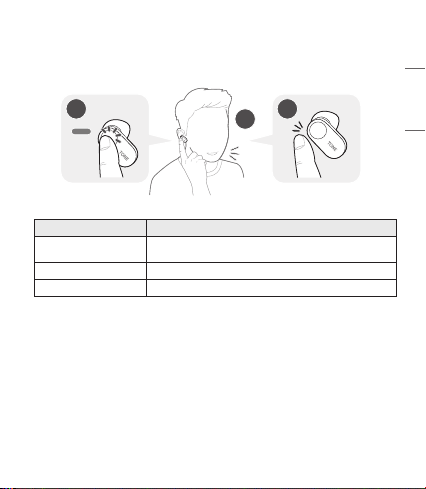
Once you set up Google Assistant, you can use the function by using the touchpad of the earbud.
NOTE: To learn more about the Google Assistant, visit: g.co/headphones/help
2
1
3
Function Usage Method
Talk to the Google Assistant
Touch and hold the left or right earbud, say "Tell me about my day",
and take your hand off the earbud.
Get your Notications Touch the left or right earbud twice.
Stop the Google Assistant Touch the left or right earbud once.
10
ENGLISH
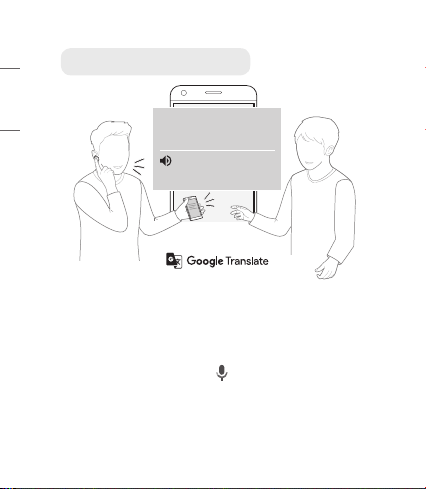
Using Google Translate through the Google Assistant
NOTE: To use the Conversation mode, install the Google Translate app rst.
1 Touch and hold the left or right earbud, say “Help me interpret Spanish”, and take your hand off
the earbud. The Google Translate app will open.
2 If you touch and hold the left or right earbud, speak, and take your hand off the earbud, the voice
that is translated will be played through the mobile device. (The contents that are spoken will be
displayed on your device’s screen.)
3 If your counterpart speaks while pressing the ( ) of the device, you can hear the translation
through the headset.
The language that is set to your mobile device is set and used as the default language of the Google
Assistant.
To learn more about Google Translate, visit: https://support.google.com/translate
¿Hay cafeterías
cerca de aquí?
Are there any coffee
shops nearby?
Are there any coee shops nearby?
11
ENGLISH
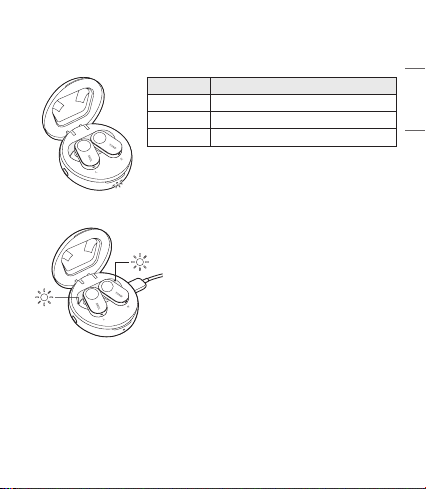
Battery Status
If earbuds are mounted in the charging case, the earbuds’ battery status is displayed.
Otherwise, the charging case's battery status is displayed.
Indicator Lamp Battery Status
Red Below 20% battery
Violet Between 20% and 90% battery
Blue Above 90% battery
NOTE: When the charging case cover is closed, charging case's battery
status is displayed. Since it is not possible to turn on/off the
earbuds if the charging case is fully discharged, please charge
the charging case.
UVnano Description
The charging case has a built-in UV-C LED, which reduces
bacteria on the earbud . (If you charge the charging case with
the earbuds mounted, the UV-C LED operates for 10 minutes.)
*UVnano is a compound word derived from the words UV and its
unit, nanometer.
NOTE: The UV-C LED operates only if the charging case lid
is closed.
According to independent testing conducted
10/2019, UV LED light built into charging case reduces
Staphylococcus aureus and Escherichia coli on tip of the
earbud closest to the ear canal.
CAUTION: Be aware that the temperrature of the earbuds may
rise while the UV-C LED is operating.
Avoid direct eye and skin exposure to UV light.
Keep out of reach of children.
Out of Range
If the device connected to the product is out of effective communication range, the communication
signal becomes weak and the communication is lost. The effective communication range may vary
depending on surrounding and other conditions.
If the device comes back within effective communication range, the product automatically reconnects
to the device. If the device is not automatically reconnected, touch the left or right earbud once to
connect them.
12
ENGLISH
LG Tone & Talk™
Tone & Talk supports various functions, including text & voice directions and
battery check of Earbud. To install Tone & Talk, scan the QR code to the right
or go to the Google Play store and search for “LG Tone & Talk.”
NOTE: Tone & Talk can be used on Android smartphones.
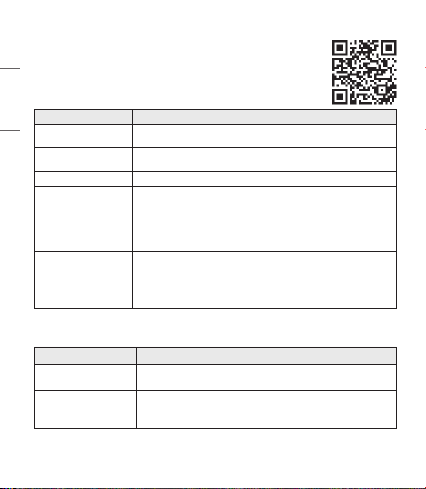
Function Description
Voice Notication
You can set the voice notication to ON/OFF in Notication Setting.
The function reads the SMS, MMS, and social media messages to the earbuds.
Change Equalizer Mode
In the EQ menu, you can change the equalizer mode.
Normal (default setting) > Bass Boost > Flat Mode > Treble Boost
Checking Earbud Battery You can check the battery level of both earbuds in the app screen.
Location of Last
Connection
The location of last connection to the main (right) earbud is recorded in the map
through the GPS function of the mobile phone.
The GPS (location data) function must be activated in the connected device, and
there can be a position error depending on the GPS performance.
(It provides information on the last connection position of the main (right)
earbud only.)
Find My Earbud
Click the Start button from the Find My Earbud app page, and your earbud will
sound an alarm.
(The function works only if the earbuds are connected to your mobile phone.)
* The alarm sound is loud. Do not activate the function while you are wearing
the earbuds in your ear.
Troubleshooting
Problem Solution
The power does not
turn on
Check the battery level and charge it.
If unable to make a call
with HBS-FL7
If the mobile phone does not support headset and hands-free functions,
you cannot use the calling features.
Check the battery level and charge it.
13
ENGLISH
If unable to register
HBS-FL7 to mobile
phone
Check whether HBS-FL7 is turned on.
Check if the charging case of HBS-FL7 is in search mode.
- Press the pairing button on the charging case to switch to search mode.
The Google Assistant is
not responding
Check the Installation and Usage Requirements of the Google Assistant that
are described in the Google Assistant.
Make sure you are in a country where the Google Assistant is available.
- For additional support, visit: g.co/headphones/help
Specications and Features
Item Comments
Bluetooth Specications V 5.0 (Headset/Hands-Free/A2DP/AVRCP)
Battery
Earbud : 3.7 V / 55 mAh, Lithium-ion
Charging case : 3.7 V / 410 mAh, Lithium-ion polymer
Talk Time
(Earbuds / With Charging case)
Up to 5 / 17 hours*
Music Play Time
(Earbuds / With Charging case)
Up to 6 / 21 hours*
Charging Time
Earbud : within an hour / Charging case : within 1.5 hours
※ At room temperature
Rated Input Voltage
Earbud : DC 4.6 V ~ 4.9 V, 110 mA
Charging case : DC 4.75 V ~ 5.3 V, 400 mA
Operating Temperature 0°C (+32°F) ~ +35°C (+95°F)
Dimensions (inch) /
Weight (oz)
Earbud : 0.71" (W) X 1.11" (L) X 0.90" (H) / 0.25 oz (One earbud)
Charging case : 2.36" (W) X 2.36" (L) X 1.08" (H) / 1.48 oz
Operating Frequency 2402 MHz to 2480 MHz
*Duration of use may vary depending on the connected mobile device, features being used, settings,
signal strength, operating temperature, frequency band, and other methods of use.

14
ENGLISH
Declaration of Conrmation
FCC NOTICE TO USERS:
This device complies with part 15 of the FCC Rules.
Operation is subject to the following two conditions:
(1) This device may not cause harmful interference, and
(2) This device must accept any interference received, including interference that may cause undesired
operation.
Changes or modications not expressly approved by the manufacturer (or party responsible) for
compliance could void the user’s authority to operate the equipment.
FCC Part 15.105 statement
This equipment has been tested and found to comply with the limits for a Class B digital device,
pursuant to Part 15 of the FCC Rules.
These limits are designed to provide reasonable protection against harmful interference in a residential
installation. This equipment generates, uses and can radiate radio frequency energy and, if not installed
and used in accordance with the instructions, may cause harmful interference to radio communications.
However, there is no guarantee that interference will not occur in a particular installation.
If this equipment does cause harmful interference to radio or television reception, which can be
determined by turning the equipment off and on, the user is encouraged to try to correct the
interference by one or more of the following measures:
- Reorient or relocate the receiving antenna.
- Increase the separation between the equipment and receiver.
- Connect the equipment into an outlet on a circuit different from that to which the receiver is
connected.
- Consult the dealer or an experienced radio/TV technician for help.
IMPORTANT NOTE:
To comply with the FCC RF exposure compliance requirements, no change to the antenna or the device
is permitted. Any change to the antenna or the device could result in the device exceeding the RF
exposure requirements and void the user’s authority to operate the device.

15
ENGLISH
Bluetooth® is a registered trademark of Bluetooth SIG, Inc. worldwide.
Google, Google Play, Google Translate, Android and other related marks and logos are trademarks of
Google LLC.
FCC ID: ZNFHBSFL7
Additional Information
1. Radio frequency exposure
This Bluetooth Wireless Stereo Headset is a radio transmitter and receiver. When in operation, it
communicates with a Bluetooth-equipped mobile device by receiving and transmitting radio frequency
(RF) electromagnetic elds (microwaves) in the frequency range 2.4 to 2.4835 GHz. Your Bluetooth
headset is designed to operate in compliance with the RF exposure guidelines and limits set by
national authorities and international health agencies when used with any compatible LG Electronics
mobile phone.
2.
Bluetooth
connection precautions
The following environments affect the range and reception of Bluetooth signals:
- When walls, metal, human bodies, or other obstacles exist between the Bluetooth device and the
connected device.
- When equipment that uses 2.4 GHz frequency signals (wireless LANs, wireless phones, microwave
ovens, etc.) is placed near the devices being used.
3. Potentially explosive atmosphere
Turn off your electronic device when in any area with a potentially explosive atmosphere. Although
this is uncommon, your electronic device could generate sparks. Sparks in such areas could cause
an explosion or re resulting in bodily injury or even death. Areas with a potentially explosive
atmosphere are often but not always clearly marked.

16
ENGLISH
4. Emergency calls
IMPORTANT!
This Bluetooth headset and the electronic device connected to the headset operate using radio
signals and mobile and landline networks as well as user-programmed functions, which cannot
guarantee connection under all conditions. Therefore, you should never rely solely upon any electronic
device for essential communications (e.g., medical emergencies). Remember, in order to make or
receive calls, the headset and the electronic device connected to the headset must be switched on
and in a service area with adequate mobile signal strength. Emergency calls may not be possible on all
mobile phone networks or when certain network services and/or phone features are in use.
Check with your local service provider.
5. Battery information
A rechargeable battery has a long service life if treated properly. A new battery or one that has not
been used for a long period of time could have reduced capacity the rst few times it is used.
Do not expose the battery to extreme temperatures, never above +50°C (+122°F) or below -10°C
(+14°F). For maximum battery capacity, use the battery at room temperature. If the battery is
used in low temperatures, the battery capacity will be reduced. The battery can only be charged in
temperatures between 0°C (+32°F) and +45°C (+113°F).
6. Recycling the battery in your
Bluetooth
headset
The battery in your Bluetooth headset must be disposed of properly and should never be placed
in municipal waste. The LG Electronics service partner that removes the battery will dispose of it
according to local regulations.
In case rechargeable battery is included in this product, the entire device should be recycled in
compliance with rechargeable battery recycling standards because of the internal battery.
To dispose of properly, call (800) 822-8837 or visit www.call2recycle.org.
7. Conditions
- The warranty is valid only if the original receipt issued to the original purchaser by the dealer,
specifying the date of purchase and serial number, is presented with the product to be repaired or
replaced. LG Electronics reserves the right to refuse warranty service if this information has been
removed or changed after the original purchase of the product from the dealer.
- If LG Electronics repairs or replaces the product, the repaired or replaced product shall be warranted
for the remaining time of the original warranty period or for ninety (90) days from the date of
repair, whichever is longer. Repair or replacement may involve the use of functionally equivalent
reconditioned units. Replaced parts or components will become the property of LG Electronics.

17
ENGLISH
- This warranty does not cover any failure of the product due to normal wear and tear, or due
to misuse, including but not limited to use in other than the normal and customary manner, in
accordance with instructions for use and maintenance of the product. Nor does this warranty
cover any failure of the product due to accident, modication or adjustment, acts of God,
or damage resulting from liquid.
- This warranty does not cover product failures due to improper repair installations, modications,
or service performed by a non-LG Electronics authorized person. Tampering with any of the seals
on the product will void the warranty.
- THERE ARE NO EXPRESS WARRANTIES, WHETHER WRITTEN OR ORAL, OTHER THAN THIS
PRINTED INCLUDING WITHOUT LIMITATION THE IMPLIED WARRANTIES OF MERCHANTABILITY
OR FITNESS FOR A PARTICULAR PURPOSE, ARE LIMITED TO THE DURATION OF THIS LIMITED
WARRANTY. IN NO EVENT SHALL LG ELECTRONICS OR ITS VENDORS BE LIABLE FOR INCIDENTAL
OR CONSEQUENTIAL DAMAGES OF ANY NATURE WHATSOEVER, INCLUDING BUT NOT LIMITED
TO LOST PROFITS OR COMMERCIAL LOSS, TO THE FULL EXTENT THOSE DAMAGES CAN BE
DISCLAIMED BY LAW.
- Some countries/states do not allow the exclusion or limitation of incidental or consequential
damages, or limitation of the duration of implied warranties, so the preceding limitations or
exclusions may not apply to you. The warranty provided does not affect the consumer’s statutory
rights under applicable national legislation in force, nor the consumer’s rights against the dealer
arising from their sales/purchase contract.
Limited Warranty
Subject to the conditions of this Limited Warranty, LG Electronics warrants this product to be free from
defects in design, material, and workmanship at the time of its original purchase by a consumer, and
for a subsequent period of one (1) year. Should your product need warranty service, please return it
to the dealer from whom it was purchased or contact your local LG Electronics contact center to get
further information.
18
ENGLISH
Important Safety Information
Avoiding hearing damage
Permanent hearing loss may occur if you use your headset at a high volume.
Set the volume to a safe level. Over time you can become accustomed to a higher volume that may
sound normal but can be damaging to your hearing.
If you experience ringing in your ears or mufed speech, stop listening and have your hearing checked.
The louder the volume, the less time that is required before your hearing could be affected.
Hearing experts suggest that to protect your hearing:
• Limit the amount of time you use the headset at a high volume.
• Avoid turning up the volume to block out noisy surroundings.
• Turn the volume down if you can’t hear people speaking near you.
Using headsets safely
Use of headsets to listen to music while operating a vehicle is not recommended and is illegal in some
areas. Be careful and attentive while driving. Stop using this device if you nd it disruptive or distracting
while operating any type of vehicle or performing any other activity that requires your full attention.
Open Source Software Notice
This product from LG Electronics, Inc. contains the open source software detailed below. Please refer to
the indicated open source licenses (as are included following this notice) for the terms and conditions
of their use.
Open Source License Copyright
fdk-aac 0.1.6
Software License for The Fraunhofer
FDK AAC Codec Library for Android
The source code for the above may be obtained free of charge of LG Electronics, Inc. at http://
opensource.lge.com. LG Electronics, Inc. will also provide open source code to you on CD-ROM for a
charge covering the cost of performing such distribution (such as the cost of media, shipping, and
handling) upon email request to opensour[email protected]. This offer is valid for a period of three years
after our last shipment of this product. This offer is valid to anyone in receipt of this information.
19
ENGLISH
Please be informed that LG Electronics, Inc. product may contain open source software listed in the
tables below.
Open Source License Copyright
CMSIS reference software 5.6.0 Apache-2.0 Copyright (c) 2009-2019 Arm Limited.
CMSIS reference software 4.5.0 BSD-3-Clause Copyright (c) 2012 ARM LIMITED
esp-idf 3.1 Apache-2.0
Copyright (c) 2015-2016 Espressif Systems
(Shanghai) PTE LTD
Apache-2.0
Apache License
Version 2.0, January 2004
http://www.apache.org/licenses/
TERMS AND CONDITIONS FOR USE, REPRODUCTION, AND DISTRIBUTION
1. Denitions.
"License" shall mean the terms and conditions for use, reproduction, and distribution as dened by
Sections 1 through 9 of this document.
"Licensor" shall mean the copyright owner or entity authorized by the copyright owner that is
granting the License.
"Legal Entity" shall mean the union of the acting entity and all other entities that control, are
controlled by, or are under common control with that entity. For the purposes of this denition,
"control" means (i) the power, direct or indirect, to cause the direction or management of such
entity, whether by contract or otherwise, or (ii) ownership of fty percent (50%) or more of the
outstanding shares, or (iii) benecial ownership of such entity.
"You" (or "Your") shall mean an individual or Legal Entity exercising permissions granted by this
License.
"Source" form shall mean the preferred form for making modications, including but not limited to
software source code, documentation source, and conguration les.
"Object" form shall mean any form resulting from mechanical transformation or translation of a
Source form, including but not limited to compiled object code, generated documentation, and
conversions to other media types.
"Work" shall mean the work of authorship, whether in Source or Object form, made available under
the License, as indicated by a copyright notice that is included in or attached to the work (an example
is provided in the Appendix below).

20
ENGLISH
"Derivative Works" shall mean any work, whether in Source or Object form, that is based on
(or derived from) the Work and for which the editorial revisions, annotations, elaborations, or other
modications represent, as a whole, an original work of authorship. For the purposes of this License,
Derivative Works shall not include works that remain separable from, or merely link (or bind by name)
to the interfaces of, the Work and Derivative Works thereof.
"Contribution" shall mean any work of authorship, including the original version of the Work and
any modications or additions to that Work or Derivative Works thereof, that is intentionally
submitted to Licensor for inclusion in the Work by the copyright owner or by an individual or Legal
Entity authorized to submit on behalf of the copyright owner. For the purposes of this denition,
"submitted" means any form of electronic, verbal, or written communication sent to the Licensor
or its representatives, including but not limited to communication on electronic mailing lists,
source code control systems, and issue tracking systems that are managed by, or on behalf of,
the Licensor for the purpose of discussing and improving the Work, but excluding communication
that is conspicuously marked or otherwise designated in writing by the copyright owner as "Not a
Contribution."
"Contributor" shall mean Licensor and any individual or Legal Entity on behalf of whom a
Contribution has been received by Licensor and subsequently incorporated within the Work.
2. Grant of Copyright License. Subject to the terms and conditions of this License, each Contributor
hereby grants to You a perpetual, worldwide, non-exclusive, no-charge, royalty-free, irrevocable
copyright license to reproduce, prepare Derivative Works of, publicly display, publicly perform,
sublicense, and distribute the Work and such Derivative Works in Source or Object form.
3. Grant of Patent License. Subject to the terms and conditions of this License, each Contributor
hereby grants to You a perpetual, worldwide, non-exclusive, no-charge, royalty-free, irrevocable
(except as stated in this section) patent license to make, have made, use, offer to sell, sell, import,
and otherwise transfer the Work, where such license applies only to those patent claims licensable
by such Contributor that are necessarily infringed by their Contribution(s) alone or by combination
of their Contribution(s) with the Work to which such Contribution(s) was submitted. If You institute
patent litigation against any entity (including a cross-claim or counterclaim in a lawsuit) alleging
that the Work or a Contribution incorporated within the Work constitutes direct or contributory
patent infringement, then any patent licenses granted to You under this License for that Work shall
terminate as of the date such litigation is led.
4. Redistribution. You may reproduce and distribute copies of the Work or Derivative Works thereof in
any medium, with or without modications, and in Source or Object form, provided that You meet
the following conditions:
(a) You must give any other recipients of the Work or Derivative Works a copy of this License; and
(b) You must cause any modied les to carry prominent notices stating that You changed the
les; and
(c) You must retain, in the Source form of any Derivative Works that You distribute, all copyright,

21
ENGLISH
patent, trademark, and attribution notices from the Source form of the Work, excluding those
notices that do not pertain to any part of the Derivative Works; and
(d) If the Work includes a "NOTICE" text le as part of its distribution, then any Derivative Works
that You distribute must include a readable copy of the attribution notices contained within such
NOTICE le, excluding those notices that do not pertain to any part of the Derivative Works, in
at least one of the following places: within a NOTICE text le distributed as part of the Derivative
Works; within the Source form or documentation, if provided along with the Derivative Works; or,
within a display generated by the Derivative Works, if and wherever such third-party notices normally
appear. The contents of the NOTICE le are for informational purposes only and do not modify the
License. You may add Your own attribution notices within Derivative Works that You distribute,
alongside or as an addendum to the NOTICE text from the Work, provided that such additional
attribution notices cannot be construed as modifying the License.
You may add Your own copyright statement to Your modications and may provide additional or
different license terms and conditions for use, reproduction, or distribution of Your modications,
or for any such Derivative Works as a whole, provided Your use, reproduction, and distribution of
the Work otherwise complies with the conditions stated in this License.
5. Submission of Contributions. Unless You explicitly state otherwise, any Contribution intentionally
submitted for inclusion in the Work by You to the Licensor shall be under the terms and conditions
of this License, without any additional terms or conditions. Notwithstanding the above, nothing
herein shall supersede or modify the terms of any separate license agreement you may have
executed with Licensor regarding such Contributions.
6. Trademarks. This License does not grant permission to use the trade names, trademarks, service
marks, or product names of the Licensor, except as required for reasonable and customary use in
describing the origin of the Work and reproducing the content of the NOTICE le.
7. Disclaimer of Warranty. Unless required by applicable law or agreed to in writing, Licensor provides
the Work (and each Contributor provides its Contributions) on an "AS IS" BASIS, WITHOUT
WARRANTIES OR CONDITIONS OF ANY KIND, either express or implied, including, without limitation,
any warranties or conditions of TITLE, NON-INFRINGEMENT, MERCHANTABILITY, or FITNESS FOR
A PARTICULAR PURPOSE. You are solely responsible for determining the appropriateness of using
or redistributing the Work and assume any risks associated with Your exercise of permissions under
this License.
8. Limitation of Liability. In no event and under no legal theory, whether in tort (including negligence),
contract, or otherwise, unless required by applicable law (such as deliberate and grossly negligent
acts) or agreed to in writing, shall any Contributor be liable to You for damages, including any
direct, indirect, special, incidental, or consequential damages of any character arising as a result of
this License or out of the use or inability to use the Work (including but not limited to damages for
loss of goodwill, work stoppage, computer failure or malfunction, or any and all other commercial
damages or losses), even if such Contributor has been advised of the possibility of such damages.
22
ENGLISH
9. Accepting Warranty or Additional Liability. While redistributing the Work or Derivative Works thereof,
You may choose to offer, and charge a fee for, acceptance of support, warranty, indemnity, or other
liability obligations and/or rights consistent with this License. However, in accepting such obligations,
You may act only on Your own behalf and on Your sole responsibility, not on behalf of any other
Contributor, and only if You agree to indemnify, defend, and hold each Contributor harmless for any
liability incurred by, or claims asserted against, such Contributor by reason of your accepting any
such warranty or additional liability.
END OF TERMS AND CONDITIONS
APPENDIX: How to apply the Apache License to your work.
To apply the Apache License to your work, attach the following boilerplate notice, with the elds
enclosed by brackets "[]" replaced with your own identifying information. (Don't include the brackets!)
The text should be enclosed in the appropriate comment syntax for the le format. We also
recommend that a le or class name and description of purpose be included on the same "printed
page" as the copyright notice for easier identication within third-party archives.
Copyright [yyyy] [name of copyright owner]
Licensed under the Apache License, Version 2.0 (the "License");
you may not use this le except in compliance with the License.
You may obtain a copy of the License at
http://www.apache.org/licenses/LICENSE-2.0
Unless required by applicable law or agreed to in writing, software
distributed under the License is distributed on an "AS IS" BASIS,
WITHOUT WARRANTIES OR CONDITIONS OF ANY KIND, either express or implied.
See the License for the specic language governing permissions and
limitations under the License.
BSD-3-Clause
Copyright (c) <year> <owner>. All rights reserved.
Redistribution and use in source and binary forms, with or without modication, are permitted provided
that the following conditions are met:
1. Redistributions of source code must retain the above copyright notice, this list of conditions and the
following disclaimer.
2. Redistributions in binary form must reproduce the above copyright notice, this list of conditions and
the following disclaimer in the documentation and/or other materials provided with the distribution.
3. Neither the name of the copyright holder nor the names of its contributors may be used to endorse
or promote products derived from this software without specic prior written permission.

23
ENGLISH
THIS SOFTWARE IS PROVIDED BY THE COPYRIGHT HOLDERS AND CONTRIBUTORS "AS IS"
AND ANY EXPRESS OR IMPLIED WARRANTIES, INCLUDING, BUT NOT LIMITED TO, THE IMPLIED
WARRANTIES OF MERCHANTABILITY AND FITNESS FOR A PARTICULAR PURPOSE ARE
DISCLAIMED. IN NO EVENT SHALL THE COPYRIGHT HOLDER OR CONTRIBUTORS BE LIABLE FOR
ANY DIRECT, INDIRECT, INCIDENTAL, SPECIAL, EXEMPLARY, OR CONSEQUENTIAL DAMAGES
(INCLUDING, BUT NOT LIMITED TO, PROCUREMENT OF SUBSTITUTE GOODS OR SERVICES;
LOSS OF USE, DATA, OR PROFITS; OR BUSINESS INTERRUPTION) HOWEVER CAUSED AND ON
ANY THEORY OF LIABILITY, WHETHER IN CONTRACT, STRICT LIABILITY, OR TORT (INCLUDING
NEGLIGENCE OR OTHERWISE) ARISING IN ANY WAY OUT OF THE USE OF THIS SOFTWARE,
EVEN IF ADVISED OF THE POSSIBILITY OF SUCH DAMAGE.
Software License for The Fraunhofer FDK AAC Codec Library for Android
1. INTRODUCTION
The Fraunhofer FDK AAC Codec Library for Android ("FDK AAC Codec") is software that implements
the MPEG Advanced Audio Coding ("AAC") encoding and decoding scheme for digital audio. This FDK
AAC Codec software is intended to be used on a wide variety of Android devices.
AAC's HE-AAC and HE-AAC v2 versions are regarded as today's most efcient general perceptual
audio codecs. AAC-ELD is considered the best-performing full-bandwidth communications codec by
independent studies and is widely deployed. AAC has been standardized by ISO and IEC as part of
the MPEG specications.
Patent licenses for necessary patent claims for the FDK AAC Codec (including those of Fraunhofer)
may be obtained through Via Licensing (www.vialicensing.com) or through the respective patent
owners individually for the purpose of encoding or decoding bit streams in products that are
compliant with the ISO/IEC MPEG audio standards. Please note that most manufacturers of Android
devices already license these patent claims through Via Licensing or directly from the patent owners,
and therefore FDK AAC Codec software may already be covered under those patent licenses when it
is used for those licensed purposes only.
Commercially-licensed AAC software libraries, including oating-point versions with enhanced sound
quality, are also available from Fraunhofer. Users are encouraged to check the Fraunhofer website for
additional applications information and documentation.
2. COPYRIGHT LICENSE
Redistribution and use in source and binary forms, with or without modication, are permitted
without payment of copyright license fees provided that you satisfy the following conditions:
You must retain the complete text of this software license in redistributions of the FDK AAC Codec
or your modications thereto in source code form.
You must retain the complete text of this software license in the documentation and/or other
materials provided with redistributions of the FDK AAC Codec or your modications thereto in binary
form. You must make available free of charge copies of the complete source code of the FDK AAC
Codec and your modications thereto to recipients of copies in binary form.

24
ENGLISH
The name of Fraunhofer may not be used to endorse or promote products derived from this library
without prior written permission.
You may not charge copyright license fees for anyone to use, copy or distribute the FDK AAC Codec
software or your modications thereto.
Your modied versions of the FDK AAC Codec must carry prominent notices stating that you
changed the software and the date of any change. For modied versions of the FDK AAC Codec,
the term "Fraunhofer FDK AAC Codec Library for Android" must be replaced by the term
"Third-Party Modied Version of the Fraunhofer FDK AAC Codec Library for Android."
3. NO PATENT LICENSE
NO EXPRESS OR IMPLIED LICENSES TO ANY PATENT CLAIMS, including without limitation the
patents of Fraunhofer, ARE GRANTED BY THIS SOFTWARE LICENSE. Fraunhofer provides no
warranty of patent non-infringement with respect to this software.
You may use this FDK AAC Codec software or modications thereto only for purposes that are
authorized by appropriate patent licenses.
4. DISCLAIMER
This FDK AAC Codec software is provided by Fraunhofer on behalf of the copyright holders and
contributors "AS IS" and WITHOUT ANY EXPRESS OR IMPLIED WARRANTIES, including but not
limited to the implied warranties of merchantability and tness for a particular purpose. IN NO
EVENT SHALL THE COPYRIGHT HOLDER OR CONTRIBUTORS BE LIABLE for any direct, indirect,
incidental, special, exemplary, or consequential damages, including but not limited to procurement of
substitute goods or services; loss of use, data, or prots, or business interruption, however caused
and on any theory of liability, whether in contract, strict liability, or tort (including negligence), arising
in any way out of the use of this software, even if advised of the possibility of such damage.
5. CONTACT INFORMATION
Fraunhofer Institute for Integrated Circuits IIS
Attention: Audio and Multimedia Departments - FDK AAC LL
Am Wolfsmantel 33
91058 Erlangen, Germany
www.iis.fraunhofer.de/amm
ESPAÑOL
Lea la Información Importante de Seguridad para poder
utilizar este producto correctamente. Después de leerla,
guarde este Manual del Usuario en un lugar al que todos los
usuarios puedan acceder fácilmente.
NOTA: Lea toda la información detenidamente antes de
utilizar los auriculares para obtener el mejor rendimiento y
evitar daños en el producto.
Rev 1.0 US
www.lg.com
Copyright © 2019 LG Electronics Inc. Todos los derechos reservados.
MANUAL DEL USUARIO
Auriculares Estéreo Inalámbricos con Bluetooth®
HBS-FL7

Contenido
Precauciones de Seguridad ....................................................................................................... 1
Precauciones de Uso del Producto .......................................................................................2
Altavoz HD ......................................................................................................................................... 2
Componentes del Producto ...................................................................................................... 3
Descripción del Producto ........................................................................................................... 4
Emparejamiento y Conexión .....................................................................................................5
Lámpara Indicadora .......................................................................................................................6
Funciones de Llamada con Dispositivo Móvil .................................................................. 6
Reproducción de Música ............................................................................................................. 7
Asistente de Google......................................................................................................................8
Estado de la batería ................................................................................................................... 12
Descripción de UVnano.............................................................................................................12
Fuera de Alcance ..........................................................................................................................12
LG Tone & Talk................................................................................................................................13
Solución de Problemas .............................................................................................................14
Especicaciones y Funciones ................................................................................................15
Aviso de Conformidad ...............................................................................................................16
Información Adicional ................................................................................................................17
Garantía Limitada ........................................................................................................................ 19
Información Importante de Seguridad ............................................................................. 20
ESPAÑOL
1
ESPAÑOL
Los LG TONE FREE(HBS-FL7) son unos audífonos inalámbricos que usan la tecnología Bluetooth.
Este producto se puede utilizar como un accesorio de audio para dispositivos que admiten perles A2DP
o manos libres Bluetooth.
Precauciones de Seguridad
!
PRECAUCIÓN
No desmonte, ajuste ni repare el producto arbitrariamente.
No ubique el producto cerca de calor excesivo o materiales inflamables.
El producto podría sufrir daños si se utiliza un cargador incompatible.
Asegúrese de que los bebés y los niños no se traguen imanes ni otros componentes pequeños
del producto.
Asegúrese de que no entren objetos extraños en los conectores del cargador (puerto de carga y
enchufe de alimentación). De lo contrario, podría provocar descargas eléctricas o incendios.
Si tiene un dispositivo médico implantado, póngase en contacto con su doctor o médico antes
de utilizar este producto.
Este producto tiene una batería incorporada, y la batería no puede ser removida o reemplazada
arbitrariamente.
Por su seguridad, no quite la batería que viene incorporada en el producto.
Si reemplaza la batería arbitrariamente o no la reemplaza correctamente, puede explotar.
La batería de polímero de iones de litio es un componente peligroso que puede causar lesiones.
Su dispositivo se puede dañar si el reemplazo de la batería lo realiza un profesional no calificado.
No descarte la batería arbitrariamente. Siga el procedimiento local para descartar las baterías.
Para prevenir un consumo innecesario de energía, desconecte el dispositivo una vez esté
totalmente cargado. Utilice siempre una base de toma de corriente cerca del equipo y fácilmente
accessible.
!
ADVERTENCIA
No deje caer el producto desde lugares altos.
Asegúrese de que el producto no entre en contacto con agua, alcohol ni benceno.
No guarde el producto en lugares húmedos o llenos de polvo.
No coloque objetos pesados sobre el producto.
Este producto es impermeable hasta el nivel IPX4 (impermeable de vida cotidiana).
(La clasificación de impermeabilidad IPX4 solo se aplica al producto audífono).
No coloque el producto bajo el agua ni lo use en lugares húmedos como un aseo.
2
ESPAÑOL
Precauciones de Uso del Producto
Consulte la siguiente información al utilizar el producto para que tenga una vida útil normal.
Si el producto está expuesto a sudor excesivo, límpielo.
Mantenga siempre limpia la almohadilla del auricular.
Altavoz HD
Si la red de comunicación del dispositivo que desea conectar admite llamadas de voz HD, podrá realizar
llamadas y escuchar música en alta denición.
3
ESPAÑOL
Componentes del Producto
LG TONE FREE HBS-FL7
(adaptadores para oído pequeños
instalados)
Adaptadores para oído adicionales
(medianos y grandes)
Cable de Carga USB Type C™
Manual del Usuario Documento de Garantía
NOTA: El diseño real del producto puede ser distinto de las imágenes que aparecen en este manual.
Utilice solo componentes LG Electronics genuinos. Si utiliza un componente que no es genuino,
se podría dañar el producto y, por lo tanto, se anularía la garantía.
Use el cable USB Type C™ que se incluye con el producto.
!
PRECAUCIÓN
El manual completo está disponible para descargar desde el sitio web de LG Electronics.
www.lg.com > Support > Manuals & Documents > Browse by Product > Mobile Devices >
LG Bluetooth Devices
!
NOTA
4
ESPAÑOL
Descripción del Producto
Base
Audífono
*La apariencia y las especicaciones del producto real pueden variar dependiendo del modelo.
NOTA: El audífono izquierdo está conectado al audífono principal (derecho) y se usa como audífono
secundario.
LED UV-C
Puerto de carga
Micrófono Micrófono
MicrófonoMicrófono
Panel táctil Panel táctil
Terminales de carga
Luz indicadora de carga
Terminales de carga
Botón Emparejamiento /
Comprobación de batería
Auricular secundario
(izquierdo)
Auricular principal
(derecho)
5
ESPAÑOL
Emparejamiento y Conexión
Emparejamiento inicial
Abra la tapa de la base.
Con los audífonos montados en la base, enchufe un cable
USB Tipo C™ al puerto de carga de la base y conéctela a
una fuente de corriente.
Los audífonos entrarán en el modo de emparejamiento
(el LED azul de la base parpadea).
* Tendrá que conectar un cable al puerto de carga y
conectar la base a una fuente de corriente solo para el
emparejamiento inicial.
Conexión Rápida
-(
-(
#MVFUPPUI
0/
1 Active Bluetooth en su teléfono o dispositivo.
2 Con el audífono montado en la base, abra la tapa de la base y pulse el botón de emparejamiento hasta
que la luz indicadora azul parpadee.
-(
-(
-()#4'-
-(
-(
-()#4'-
#MVFUPPUI
3 Cuando aparezca el emergente de conexión emparejado rápido en el área superior de la pantalla
del teléfono móvil, tóquelo para conectar.
4 Si el emergente no aparece, seleccione [HBS-FL7] desde el menú Bluetooth del teléfono móvil y
conéctelo (para usuarios de iOS o Android™ 5.0 o versiones inferiores).
~39 inch, ~1m
6
ESPAÑOL
NOTA: Si va a realizar la conexión por primera vez, siga las instrucciones de emparejamiento
iniciales. Solo es compatible con Android 5.0 o superiores. Antes de conectar los audífonos,
congure el dispositivo móvil o el dispositivo que desee conectar para utilizar la información
de ubicación. Se escuchará un mensaje de voz en el que se indica que la conexión se ha
establecido.
Reconexión Automática
Los audífonos conectan automáticamente cuando abre la cubierta de la base. Si cierra la cubierta de
la base con ambos audífonos montados en la base, los audífonos se desconectan.
Lámpara Indicadora
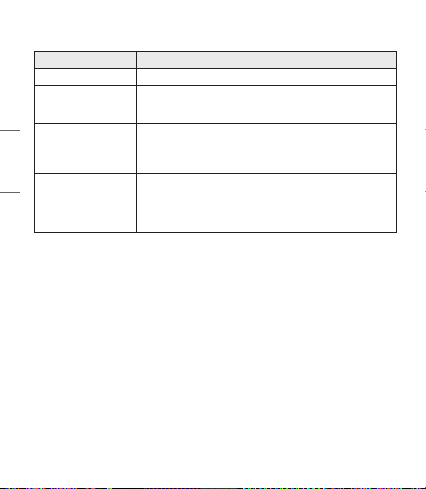
Estado Descripción
Modo de Búsqueda Parpadea la Lámpara Indicadora de estado azul.
Cuando hay un problema de carga
Las Lámpara Indicadora de estado roja y azul parpadean de
manera alterna.
Funciones de Llamada con Dispositivo Móvil
Función Estado Descripción
Responder una
Llamada
Suena Toque el audífono izquierdo o derecho una vez.
Hacer una
Llamada
Inactivo
Si realiza una llamada con un teléfono móvil, la llamada se conectará
automáticamente a los audífonos.
Marcación
por Voz
Inactivo/
Música Activada
Toque el audífono izquierdo o derecho dos veces.
NOTA: Para usar esta función, necesita desactivar los ajustes del
Asistente de Google.
7
ESPAÑOL
Recepción de una
Llamada
Mientras Habla
por Teléfono
Conversación
Si toca el audífono izquierdo o derecho una vez, la llamada actual se
pondrá en espera y podrá responder una llamada entrante.
Si la llamada anterior está en espera, puede nalizar la llamada actual
desde el teléfono celular.
(Funciona de forma diferente según la conguración del teléfono
celular).
Rechazar una
Llamada
Suena Mantenga pulsado el audífono izquierdo o derecho.
NOTA: La función de marcado por voz opera en el dispositivo principal conectado o en el dispositivo
en el que se hizo la última llamada. (La función de marcado por voz podría operar de forma
diferente según el teléfono celular que se utilice.)
Reproducción de Música
-(
Función Estado Descripción
Reproducir Inactivo Toque el audífono izquierdo o derecho una vez.
Pausar
Música
Activada
Toque el audífono izquierdo o derecho una vez.
Cambio de Modo del
Ecualizador
Música
Activada
Toque el audífono izquierdo o derecho tres veces rápidamente, y
el modo de sonido cambiará en el siguiente orden:
Normal (ajuste predeterminado) > Refuerzo de graves > Modo
plano > Refuerzo de agudos
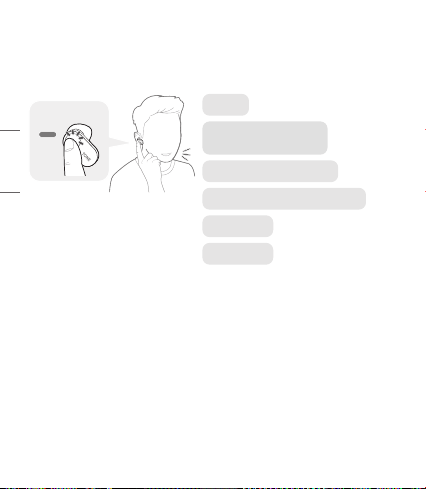
8
ESPAÑOL
Asistente de Google
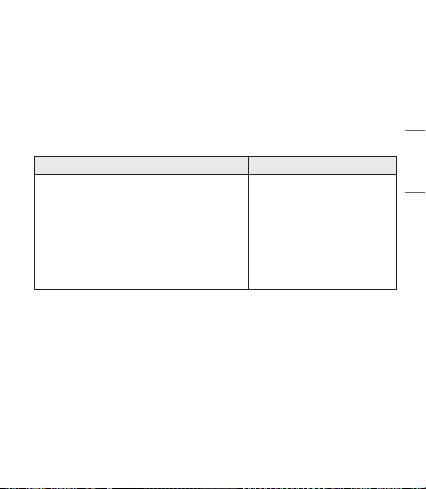
Con el panel táctil del audífono puede hacer rápidamente lo que quiera sin tener que mirar la pantalla
del celular o dispositivo móvil conectado.
El Asistente de Google puede realizar varios comandos:
Pon jazz
Dime qué tengo que hacer hoy
Ajusta un temporizador de 15 minutos
Toma un sele
¿Lloverá hoy?
Mándale a mamá el mensaje
"Llego en cinco minutos".
9
ESPAÑOL
Instalación y requisitos de uso del Asistente de Google
Su dispositivo debe estar conectado a Internet y debe haberse conectado a su cuenta de Google para
utilizar esta característica.
Es posible que algunos países e idiomas no sean compatibles con el Asistente de Google. Compruebe
que se encuentre en un país en el que esté disponible el Asistente de Google.
El idioma que haya establecido en su dispositivo móvil será el que establezca y utilice el Asistente de
Google por defecto.
NOTA: Si desea obtener más información acerca del Asistente de Google, visite g.co/headphones/help
Si cambia el idioma que se utiliza para dirigirse al Asistente de Google, el idioma de su teléfono
móvil también se cambiará.
Android iOS
• Android 5.0 o superior
• Si se utilizará en una tablet, necesita Android
6.0 o 7.0
• Aplicación Google 6.13 o superior
• Servicios Google Play
(La versión más reciente de la aplicación Google)
• Una cuenta de Google
• 1.4GB de memoria y una resolución de pantalla
de 720 p
• iPhone con iOS 10 o superior
• Aplicación Asistente de Google
• Una cuenta de Google
• La versión más reciente de la
aplicación Google
Instalación del Asistente de Google
1 Conecte el dispositivo que quiera a los audífonos.
2 Utilice el dispositivo móvil o el dispositivo al que están conectados para congurar el Asistente
de Google.
- En el caso de que sea un dispositivo Android, aparecerá una noticación emergente del Asistente
de Google después de que se haya establecido la conexión para congurar el Asistente de Google
en el dispositivo móvil. Seleccione la noticación emergente y congure el Asistente de Google
según las instrucciones que aparecen en la pantalla.
- En el caso de que sea un dispositivo iOS, descargue y ejecute la última versión del Asistente
de Google y, a continuación, congure los audífonos según las instrucciones que aparecen en
la pantalla.
10
ESPAÑOL
Uso del Asistente de Google
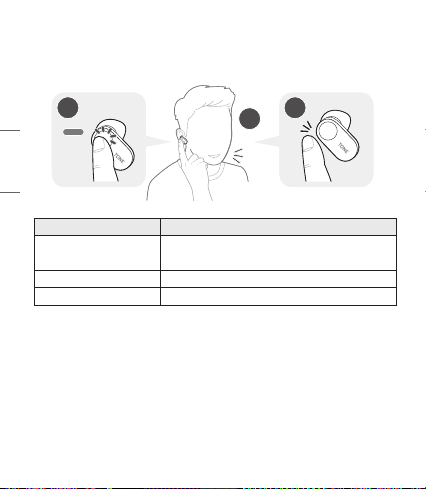
Luego de congurar el Asistente de Google, puede usar la función usando el panel táctil del audífono.
NOTA: Si desea obtener más información acerca del Asistente de Google, visite g.co/headphones/help
2
1
3
Función Método de uso
Hablar con su Asistente de Google
Para obtener ayuda del Asistente de Google, mantenga presionado
el audífono izquierdo o derecho, diga, por ejemplo, “Dime qué tengo
que hacer hoy”, y quite la mano del audífono.
Obtener sus Noticaciones Toque el audífono izquierdo o derecho dos veces.
Detener el Asistente de Google Toque el audífono izquierdo o derecho una vez.
11
ESPAÑOL
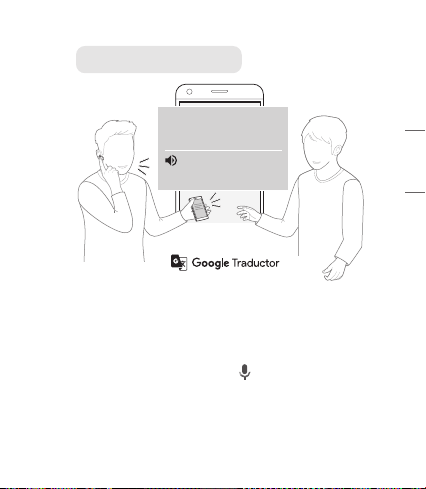
Uso de Traductor de Google a través del Asistente de Google
¿Hay cafeterías cerca de aquí?
Are there any coee
shops nearby?
¿Hay cafeterías cerca de
aquí?
NOTA : Para usar el modo Conversación, instale primero la aplicación Traductor de Google.
1 Mantenga presionado el audífono izquierdo o derecho, diga “Ayúdame a traducir al inglés”, y
quite la mano del audífono. Se abrirá la aplicación Traductor de Google.
2 Si mantiene presionados el audífono izquierdo o derecho, habla, y quita la mano del
audífono, la voz que se traduce se reproducirá a través del dispositivo móvil (el contenido que
se dice se muestra en la pantalla de su dispositivo).
3 Si otra persona habla al mismo tiempo que presiona ( ) en el dispositivo, podrá escuchar la
traducción a través de los audífonos.
El idioma que haya establecido en su dispositivo móvil será el que establezca y utilice el Asistente de
Google por defecto.
Para obtener más información sobre Traductor de Google, visite https://support.google.com/translate
12
ESPAÑOL
Estado de la batería
Si los audífonos están montados en la base, se visualiza el estado de la batería de los audífonos.
De lo contrario, se visualiza el estado de la batería de la base.
Luz indicadora Estado de la batería
Roja Menos del 20% de batería
Violeta Entre el 20% y el 90% de batería
Azul Más del 90% de batería
NOTA: Cuando la cubierta de la base está cerrada, se visualiza el
estado de la batería de la base. Como no es posible encender
o apagar los audífonos si la base está totalmente descargada,
cargue la base.
Descripción de UVnano
La base tiene un LED UV-C integrado que le permite usar
sus audífonos fácilmente (Si carga la base con los audífonos
montados, el LED UV-C opera por 10 minutos).
*UVnano es una palabra compuesta derivada de las palabras UV
y su unidad, nanómetro.
NOTA: El LED UV-C solo opera si la tapa de la base está cerrada.
De acuerdo con pruebas independientes realizadas en
octubre de 2019, el LED UV integrado en el estuche de
carga reduce el estalococo dorado y la escherichia coli
en la punta del audífono más próxima al canal auditivo.
PRECAUCIÓN: Tenga en cuenta que la temperatura de los
audífonos puede aumentar cuando el LED UV-C
está en operación.
Evitar la exposición directa de ojos y piel a la luz UV.
Manténgalo fuera del alcance de los niños.
Fuera de Alcance
Si el dispositivo conectado al producto está fuera del alcance efectivo de comunicación, disminuirá
la calidad de la señal y se perderá la comunicación. El alcance de comunicación efectivo puede variar
dependiendo del entorno y otras condiciones.
Si el dispositivo vuelve a estar dentro del alcance efectivo de comunicación, el producto se volverá a
conectar automáticamente al dispositivo. Si el dispositivo no se vuelve a conectar automáticamente,
toque el audífono izquierdo o derecho una vez para conectarlos.

13
ESPAÑOL
LG Tone & Talk
Tone & Talk soporta diversas funciones, incluyendo indicaciones de texto y voz y
comprobación de batería de los audífonos. Visite la tienda Google Play y busque
“LG Tone & Talk”, o bien, escanee el código QR que está a la derecha para instalarlo.
NOTA: Tone & Talk se puede utilizar en teléfonos inteligentes con Android.
Función Descripción
Noticación de Voz
Podrá congurar la activación y desactivación de las noticaciones de voz en
Conguración de noticación.
La función lee los mensajes SMS, MMS y de medios sociales a través de
los audífonos.
Cambio del Modo de
Ecualizador
En el menú del ecualizador puede cambiar el modo del ecualizador.
Normal (ajuste predeterminado) > Refuerzo de graves > Modo plano >
Refuerzo de agudos
Vericación de la batería
del audífono
Puede comprobar el nivel de batería de los audífonos en la pantalla de la
aplicación.
Ubicación de última
conexión
La ubicación de última conexión del audífono principal (derecho) se registra en
el mapa mediante la función GPS del celular.
La función del GPS (datos de ubicación) debe estar activada en el dispositivo
conectado y, dependiendo del desempeño del GPS, podría haber un error de
posicionamiento.
[Brinda únicamente información de la última posición de conexión del audífono
principal (el audífono derecho)].
Buscar mi audífono
Haga clic en el botón Iniciar desde la página de la aplicación Buscar mi
audífono, y el audífono emitirá una alarma.
(Esta opción solo funciona si los audífonos están conectados a su teléfono
celular).
* El sonido de la alarma es potente. No active la función mientras lleva los
audífonos puestos en los oídos.
14
ESPAÑOL
Solución de Problemas
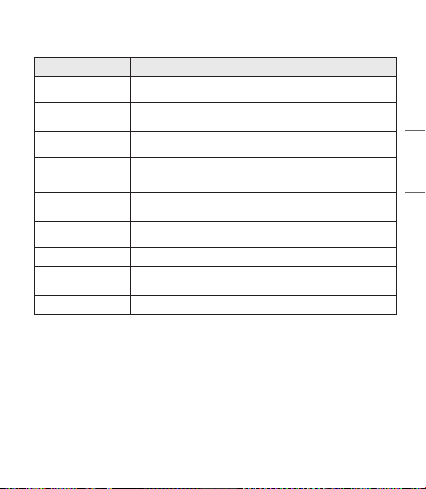
Problema Solución
El dispositivo no enciende Compruebe el nivel de carga de la batería y cárguela.
Si no puede hacer una
llamada con HBS-FL7
Si el teléfono celular no admite la función de manos libres, no podrá usar las
funciones de llamada.
Compruebe el nivel de carga de la batería y cárguela.
Si no puede registrar
los HBS-FL7 en el
teléfono celular
Compruebe que los HBS-FL7 estén encendidos.
Compruebe que la base de los HBS-FL7 se encuentre en modo de búsqueda.
- Pulse el botón de emparejamiento en la base para cambiar al modo de
búsqueda.
El Asistente de Google no
responde
Compruebe la instalación y los requisitos de uso del Asistente de Google que
se describen en dicha aplicación.
Compruebe que se encuentre en un país en el que esté disponible el Asistente
de Google.
- Si necesitas más ayuda, visite g.co/headphones/help
15
ESPAÑOL
Especicaciones y Funciones
Ítem Descripción
Especicaciones de la
Tecnología Bluetooth
V 5.0 (Auricular/Manos Libres/A2DP/AVRCP)
Batería
Audífono : Batería de iones de litio de 3,7 V / 55 mAh
Base : Batería de polímero de iones de litio de 3,7 V / 410 mAh
Tiempo de Conversación
(Audífono / Con base)
Hasta 5 / 17 horas*
Tiempo de Reproducción
de Música
(Audífono / Con base)
Hasta 6 / 21 horas*
Tiempo de Carga
Audífono : en una hora / Base : en 1,5 horas
※ A temperatura ambiente
Tensión Nominal de
Entrada
Audífono : 4,6 VCC ~ 4,9 VCC, 110 mA
Base : 4,75 VCC ~ 5,3 VCC, 400 mA
Temperatura Operativa 0 °C (+32 °F) ~ +35 °C (+95 °F)
Dimensiones (pulgadas)/
Peso (oz)
Audífono : 0,71" (ancho) X 1,11" (largo) X 0,90" (alto) / 0,25 oz (Un audífono)
Base : 2,36" (ancho) X 2,36" (largo) X 1,08" (alto) / 1,48 oz
Frecuencia Operativa De 2402 MHz a 2480 MHz
*El tiempo de uso puede variar dependiendo del dispositivo móvil conectado, las funciones utilizadas,
las conguraciones, la intensidad de la señal, la temperatura operativa, la banda de frecuencia y otros
métodos de uso.

16
ESPAÑOL
Aviso de Conformidad
AVISO DE LA FCC PARA LOS USUARIOS
Este dispositivo cumple con el artículo 15 de las Reglas de la FCC.
El funcionamiento está sujeto a las dos condiciones siguientes:
(1) Este dispositivo no puede causar interferencia nociva,
(2) Este dispositivo debe aceptar cualquier interferencia que reciba, incluso la que provoque un
funcionamiento no deseado.
Las modicaciones o los cambios que no estén expresamente aprobados por el fabricante
(o la parte responsable) del cumplimiento podrían anular la autoridad del usuario para utilizar el
producto.
Declaración del artículo 15.105
Este equipo ha sido evaluado y se ha comprobado que cumple con los límites para un dispositivo digital
clase B, conforme las secciones 15 de las Reglas de la FCC.
Estos límites han sido diseñados para brindar una protección razonable contra la interferencia nociva
en una instalación residencial. Este equipo genera, utiliza y puede irradiar energía de radiofrecuencia
y, si no se instala y utiliza de acuerdo con las instrucciones, podría causar interferencia nociva para las
comunicaciones radiales.
No obstante, no se garantiza la ausencia de interferencia en una instalación en particular.
Si este equipo causa interferencias con la señal de recepción de la radio o televisión, lo cual se verica
apagando y encendiendo el equipo, el usuario puede intentar corregir la interferencia tomando una o
más de las siguientes medidas:
- Reoriente o reubique la antena receptora.
- Aumente la distancia entre el equipo y el receptor.
- Conecte el equipo en un tomacorriente que no pertenezca al mismo circuito del tomacorriente en el
que está conectado el receptor.
- Consulte al distribuidor o a un técnico de radio/TV experimentado para obtener ayuda.
NOTA IMPORTANTE:
Para satisfacer los requisitos de exposición a la radiofrecuencia estipulados por la FCC, no se permite
alteración alguna de la antena o del dispositivo. Todo cambio realizado en la antena o el dispositivo
podría hacer que el dispositivo supere los requisitos de exposición a la radiofrecuencia; en consecuencia,
los derechos del usuario para utilizar el producto podrían quedar anulados.
17
ESPAÑOL
Bluetooth® es una marca registrada de Bluetooth SIG, Inc., en todo el mundo.
Google, Google Play, Google Translate, Android y otras marcas y logotipos relacionados son marcas
comerciales de Google LLC.
FCC ID: ZNFHBSFL7
Información Adicional
1. Exposición a la radiofrecuencia
Este auricular estéreo inalámbrico Bluetooth, es un transmisor y receptor de radio. Cuando está en
funcionamiento, se comunica con un dispositivo móvil compatible con Bluetooth mediante la recepción
y la transmisión de campos electromagnéticos (microondas) de radiofrecuencia (RF) en el rango de
2,4 a 2,4835 GHz. El auricular Bluetooth está diseñado para funcionar conforme a los lineamientos
y los límites de exposición a la radiofrecuencia establecidos por autoridades nacionales y organismos
internacionales de la salud pública, cuando se lo utiliza en conjunto con cualquier dispositivo móvil
compatible de LG Electronics.
2. Precauciones para la conexión
Bluetooth
Los siguientes entornos afectan el rango y la recepción de las señales Bluetooth:
- Cuando hay paredes, metales, cuerpos humanos u otros obstáculos entre el dispositivo Bluetooth y el
dispositivo conectado.
- Cuando se colocan equipos que
utilizan señales de frecuencia de 2,4 GHz (LAN inalámbricas, teléfonos
inalámbricos, hornos microondas, etc.) cerca de los d
ispositivos utilizados.
3. Atmósferas potencialmente explosivas
Cuando se encuentre en una atmósfera potencialmente explosiva, apague el dispositivo electrónico.
Aunque es poco frecuente, este dispositivo electrónico podría generar chispas. Las chispas en dichas
áreas pueden causar una explosión o un incendio y provocar lesiones personales o incluso la muerte.
Las zonas con riesgo de explosión suelen estar claramente señaladas, aunque no en todos los casos.

18
ESPAÑOL
4. Llamadas de emergencia
¡IMPORTANTE!
Este auricular Bluetooth y el dispositivo electrónico conectado a él funcionan con señales de
radio, redes terrestres y móviles, además de funciones programadas por el usuario, que no pueden
garantizar la conexión en todas las situaciones. Por lo tanto, nunca debe depender únicamente de
un dispositivo electrónico para casos de comunicaciones esenciales (por ej. emergencias médicas).
Recuerde que, para realizar o recibir llamadas, el auricular y el dispositivo electrónico conectado a él
deben estar encendidos y en un área de servicio con una señal móvil de buena potencia. Las llamadas
de emergencia no pueden hacerse en todas las redes de telefonía celular ni cuando están en uso
ciertos servicios de red o funciones del teléfono. Compruebe la disponibilidad con su proveedor de
servicio local.
5. Información sobre la batería
Las baterías recargables tienen una vida útil prolongada si reciben el tratamiento adecuado. Las
baterías nuevas o que no se hayan utilizado por mucho tiempo podrían tener una capacidad reducida
las primeras veces que se utilizan. No exponga la batería a temperaturas extremas, superiores a
+50 °C (+122 °F) o inferiores a -10 °C (+14 °F). Para obtener la máxima capacidad de la batería,
úsela a temperatura ambiente.
Si se utiliza la batería en condiciones de temperaturas bajas, la
capacidad se verá reducida. La batería solo puede cargarse a temperaturas entre 0 °C (+32 °F) y
+45 °C (+113 °F).
6. Reciclado de la batería del auricular
Bluetooth
La batería del auricular Bluetooth debe desecharse con el procedimiento adecuado y nunca debe
arrojarse al basurero municipal. Los encargados del servicio técnico de LG Electronics que extraigan
baterías las desecharán de acuerdo con las reglamentaciones locales.
En caso de que una batería recargable se incluya en este producto, todo el dispositivo se debe reciclar
de conformidad con las normas de reciclado de baterías recargables debido a la batería interna. Para
averiguar el método de eliminación apropiado, llame al (800) 822- 8837 o visite www.call2recycle.org.
7. Condiciones
- La garantía tiene validez únicamente si, junto con el producto que se va a reparar o reemplazar,
se presenta la factura original que el distribuidor le emitió al comprador original. LG Electronics se
reserva el derecho de denegar el servicio de garantía si no se presenta dicha información o si hubiera
habido modicaciones luego de la compra original del producto al distribuidor.

19
ESPAÑOL
- Si LG Electronics repara o reemplaza el producto, el plazo de garantía del producto reemplazado o
reparado equivaldrá al tiempo restante del plazo de la garantía original o noventa (90) días a partir
de la fecha de reparación, el período que sea mayor. La reparación o el reemplazo podrían implicar
el uso de unidades reacondicionadas con funciones equivalentes. Los componentes o las piezas
reemplazadas pasarán a ser propiedad de LG Electronics.
- La presente garantía no cubre fallas por desgaste natural ni uso indebido, entre otros casos, usos
fuera de lo normal y habitual, conforme a las instrucciones de uso y mantenimiento del producto.
La cobertura tampoco abarca fallas del producto que se deban a accidentes, modicaciones o
ajustes, caso fortuito o daño producido por algún líquido.
- La garantía no cubre fallas del producto a causa de instalaciones, reparaciones o modicaciones
incorrectas llevadas a cabo por personas que no estén autorizadas por LG Electronics. Todo indicio
de manipulación en cualquiera de los sellos del producto anulará la garantía.
- NO EXISTEN GARANTÍAS EXPRESAS, NI ORALES NI ESCRITAS, SALVO LAS QUE CONSTAN
EN EL PRESENTE DOCUMENTO, INCLUYENDO, ENTRE OTRAS, LAS GARANTÍAS IMPLÍCITAS
DE COMERCIALIZACIÓN O IDONEIDAD PARA UN FIN DETERMINADO. LA DURACIÓN DE
CUALQUIER GARANTÍA IMPLÍCITA SE LIMITA AL PLAZO DE LA PRESENTE GARANTÍA LIMITADA.
ASIMISMO, LG ELECTRONICS O SUS DISTRIBUIDORES NO SERÁN RESPONSABLES, EN NINGUNA
CIRCUNSTANCIA, POR DAÑOS FORTUITOS O EMERGENTES DE ÍNDOLE ALGUNA, INCLUYENDO,
ENTRE OTROS, PÉRDIDAS COMERCIALES O DE GANANCIAS, HASTA EL MÁXIMO DESCARGO DE
RESPONSABILIDAD PERMITIDO POR LA LEY.
- En algunos estados y países, no se permite la exclusión o la limitación de daños fortuitos y
emergentes, ni la limitación del plazo de las garantías implícitas. Por lo tanto, las exclusiones o
limitaciones de los párrafos anteriores podrían no aplicarse en su caso. La garantía provista no
afecta los derechos del consumidor establecidos por la legislación nacional pertinente en vigencia ni
los derechos del consumidor en relación con el distribuidor que surjan del contrato de compra-venta.
Garantía Limitada
Sujeta a las condiciones de la presente garantía limitada, LG Electronics garantiza que este producto
no presenta fallas de diseño, materiales ni mano de obra en el momento en que el consumidor realiza
la compra original, y que no las presentará por un período posterior de un (1) año. En caso de que el
producto requiera servicio técnico de garantía, sírvase llevarlo al establecimiento del distribuidor que
se lo vendió o comuníquese con el centro de contacto de LG Electronics de su región para obtener
más información.
20
ESPAÑOL
Información Importante de Seguridad
Reducción de la capacidad auditiva
Si utiliza el auricular con un nivel de volumen alto, podría sufrir hipoacusia permanente.
Congure el volumen en un nivel inocuo. Con el tiempo, podría acostumbrarse a un volumen de sonido
más alto que podría parecer normal, pero que podría dañar su capacidad auditiva.
Si le zumban los oídos o siente que los sonidos le llegan medio apagados, no utilice el dispositivo y
consulte a un otorrinolaringólogo. Cuanto más alto sea el volumen, más rápido podría verse afectada
su audición.
Algunos expertos en audición sugieren que, para proteger la audición, se debe:
• Limitar el tiempo de uso del auricular a volumen alto.
• Evitar subir el volumen para contrarrestar el exceso de ruido ambiental.
• Bajar el volumen si no oye a la gente que habla cerca de usted.
Uso seguro de los auriculares
No se recomienda utilizar auriculares para escuchar música mientras conduce un vehículo y, en algunas
zonas, es ilegal hacerlo. Sea precavido y cauto al conducir. No utilice el dispositivo si le resulta molesto
o lo distrae mientras maneja cualquier tipo de vehículo o realiza alguna otra actividad que requiera
toda su atención.
Any modications or changes to this manual due to typographical errors or inaccuracies of
stated information shall only be made by LG Electronics Inc.
Las modicaciones o cambios de este manual por errores tipográcos o de información serán
realizados exclusivamente por LG Electronics, Inc.
www.lg.com



