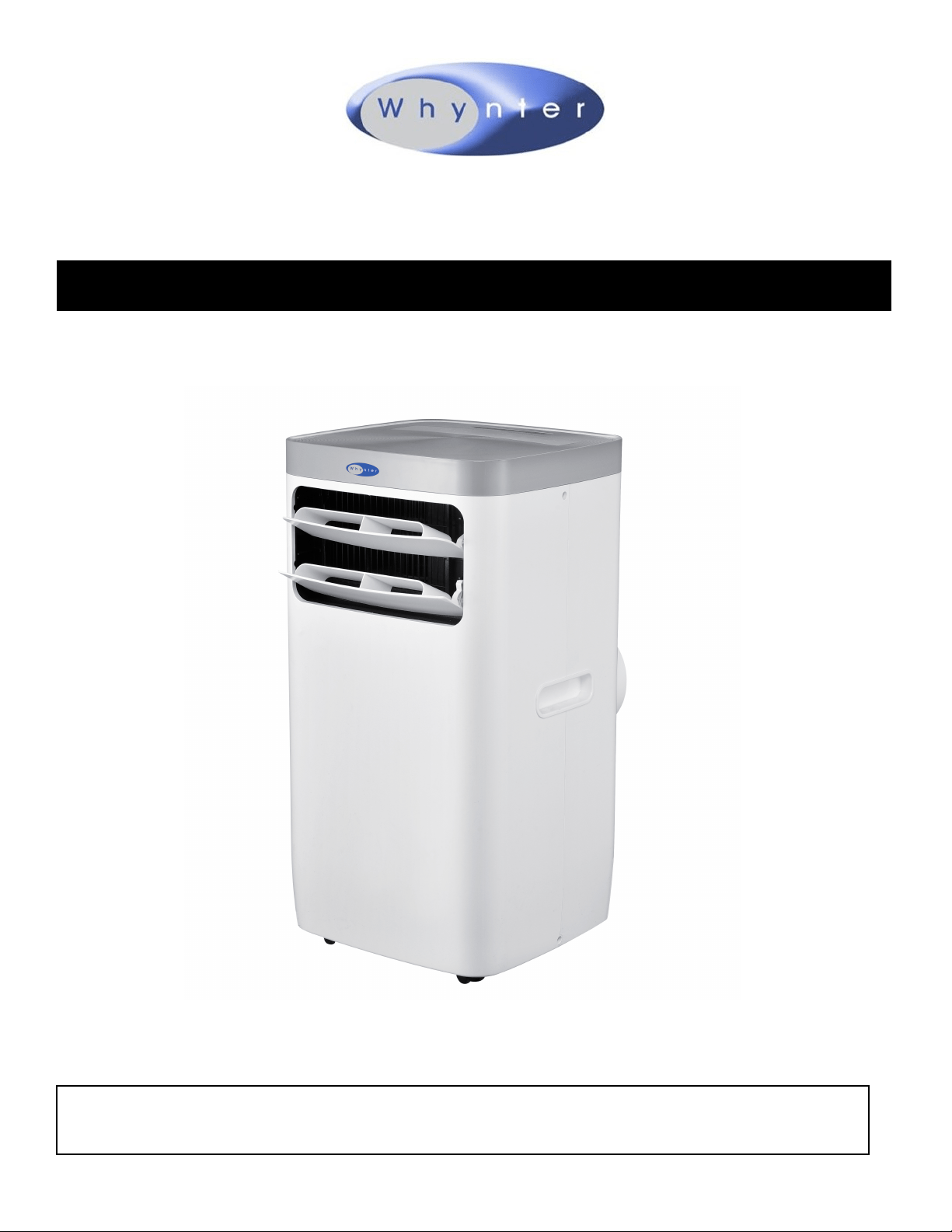
Whynter Compact Size 11,000 BTU Portable Air Conditioner
Model # : ARC-115WG
Congratulations on your new Whynter product. To ensure proper operation, please read this Instruction Manual carefully before
using this product. Keep this manual in a safe place for future reference.
Table of Contents
PAGE
SAFETY PRECAUTIONS
PREPARATION
DESIGN NOTICE
EXHAUST HOSE INSTALLATION
CHOOSING THE RIGHT LOCATION
AMBIENT TEMPERATURE RANGE FOR UNIT OPERATION
TECHNICAL DATA
ACCESSORIES
WINDOW KIT INSTALLATION
FILTER INSTALLATION AND DRAINAGE
CONTROL PANEL
OPERATION INSTRUCTIONS
REMOTE CONTROL
CARE AND MAINTENANCE
TIPS
TROUBLESHOOTING
3 - 4
5
5
5
5
6
6
7
7 - 8
8
9
9 - 11
11 - 12
12
13
13 - 14
WARRANTY
15

SAFETY PRECAUTIONS
To prevent death or injury to the user or other people and property damage, the following instrucons must be followed. Incorrect
operaon due to ignoring of instrucons may cause death, harm or damage.
• Installation must be performed according to the installation instructions. Improper installation can cause water leakage, elec-
trical shock, or fire.
• Use only the included accessories and parts, and specified tools for the installation. Using non-standard parts can cause water
leakage, electrical shock, fire, and injury or property damage. Make sure that the outlet you are using is grounded and has the
appropriate voltage.
• The power cord is equipped with a three-prong grounding plug to protect against shock.
• Voltage information can be found on the nameplate of the unit.
• Your unit must be used in a properly grounded wall receptacle. If the wall receptacle you intend to use is not adequately
grounded or protected by a time delay fuse or circuit breaker (the fuse or circuit breaker needed is determined by the maxi-
mum current of the unit. The maximum current is indicated on the nameplate located on unit), have a qualified electrician
install the proper receptacle.
• Install the unit on a flat, sturdy surface. Failure to do so could result in damage or excessive noise and vibration.
• The unit must be kept free from obstruction to ensure proper function and to mitigate safety hazards.
• Do not modify the length of the power cord or use an extension cord to power the unit.
• Do not share a single outlet with other electrical appliances. Improper power supply can cause fire or electrical shock.
• Do not install your air conditioner in a wet room such as a bathroom or laundry room. Too much exposure to water can cause
electrical components to short circuit.
• Ensure there is a minimum of 20" clearance around the unit and is clear from any combustible items such as propane, fire ex-
tinguishers, fuel, etc.
• The exhaust hose should always be used and should never be covered or blocked which can become a fire hazard.
• The unit has wheels to facilitate moving. Make sure not to use the wheels on thick carpet or to roll over objects, as these could
cause tipping.
• Do not operate a unit that it has been dropped or damaged.
• Do not place the portable air conditioner close to any other heat generating appliances.
• Do not touch the unit with wet or damp hands or when barefoot.
• If the air conditioner is knocked over during use, turn off the unit and unplug it from the main power supply immediately. Visu-
ally inspect the unit to ensure there is no damage. If you suspect the unit has been damaged, contact a technician or customer
service for assistance.
• In a thunderstorm, the power must be cut off to avoid damage to the machine due to lightning.
• Your air conditioner should be used in such a way that it is protected from moisture. e.g. condensation, splashed water, etc. Do
not place or store your air conditioner where it can fall or be pulled into water or any other liquid. Unplug immediately if it
occurs.
• All wiring must be performed strictly in accordance with the wiring diagram located inside of the unit.
• The unit's circuit board (PCB) is designed with a fuse to provide overcurrent protection. The specifications of the fuse are print-
ed on the circuit board, such as: T 3.15A/250V, etc.
• When the water drainage function is not in use, keep the upper and the lower drain plug firmly plugged into to the unit to
prevent a choking hazard by children.
CAUTION
• This appliance is not intended for use by persons (including children) with reduced physical, sensory or mental capabilies or
lack of experience and knowledge, unless they have been given supervision or instrucon concerning use of the appliance by a
person responsible for their safety. Children should be supervised to ensure that they do not play with the appliance.
• Children must be supervised around the unit at all mes.
• If the supply cord is damaged, it must be replaced by the manufacturer, its service agent or similarly qualied persons in order
to avoid a hazard.
• Prior to cleaning or other maintenance, the appliance must be disconnected from the supply mains.
• Do not remove any xed covers. Never use this appliance if it is not working properly, or if it has been dropped or damaged.
3
Read Safety Precautions Before Operation and Installation
CAUTION
• Never use this appliance if it is not working properly, or if it has been dropped or damaged.
• Do not run cord under carpeting. Do not cover cord with throw rugs, runners, or similar coverings. Do not route cord under
furniture or appliances. Arrange cord away from traffic area and where it will not be tripped over.
• Do not operate unit with a damaged cord, plug, power fuse or circuit breaker. Return to an authorized service facility for ex-
amination and/or repair.
• To reduce the risk of fire or electric shock, do not use this fan with any solid-state speed control device.
• The appliance shall be installed in accordance with national wiring regulations.
• Contact the manufacturer or authorized service technician for repair or maintenance information of this unit.
• Contact the manufacturer or authorized installer for installation questions of this unit.
• Do not cover or obstruct the inlet or outlet grilles.
• Do not use this product for functions other than those described in this instruction manual.
• Before cleaning, turn off the power and unplug the unit.
• Disconnect the power if strange sounds, smell, or smoke comes from it and contact the manufacturer or authorized service
technician for assistance.
• Do not press the buttons on the control panel with anything other than your fingers.
• Do not remove any fixed covers. Contact Whynter Customer Support if this unit if it is not working properly, or if it has been
dropped or damaged.
• Do not operate or stop the unit by inserting or pulling out the power cord plug.
• Do not use hazardous chemicals to clean or come into contact with the unit. Do not use the unit in the presence of inflamma-
ble substances or vapor such as alcohol, insecticides, petrol, etc. Always transport your air conditioner in a vertical position
and stand on a stable, level surface during use.
• Always contact Whynter Customer Support for replacement parts compatible with your unit.
• Turn off the product when not in use.
WARNING
• The appliance shall be stored in a room without continuously operating ignition sources (for example: open flames, an
operating gas appliance or an operating electric heater).
• Do not pierce or burn the unit.
• Be aware that the refrigerants may not contain an odor.
SAFETY COMPLIANCE
• Keep venlaon openings clear of obstrucon.
• The appliance shall be stored so as to prevent mechanical damage from occurring.
• A warning that the appliance shall be stored in a well-venlated area where the room size corresponds to the room area as
specied for operaon.
• Any person who is involved with working on or breaking into a refrigerant circuit should hold a current valid cercate from an
industry-accredited assessment authority, which authorizes their competence to handle refrigerants safely in accordance with
an industry recognized assessment specicaon.
• Servicing shall only be performed as recommended by the equipment manufacturer.
• Maintenance and repair requiring the assistance of other skilled personnel shall be carried out under the supervision of the
person competent in the use of ammable refrigerants.
• Please follow the instrucons carefully to handle, install, clear, and service the air condioner to avoid any damage or hazard.
Flammable Refrigerant R32 is used within air condioner. When maintaining or disposing the air condioner, the refrigerant
(R32) shall be recovered properly and shall not discharge to air directly.
• No any open re or device which may generate spark/arcing shall be around air condioner to avoid causing ignion of the
ammable refrigerant used.
• Please follow the instrucon carefully to store or maintain the air condioner to prevent mechanical damage from occurring.
• Flammable refrigerant R32 is used in air condioner. Please follow the instrucon carefully to avoid any hazard. For specic
informaon on the type of gas and the amount, please to the relevant label on the unit itself.
4
PREPARATION
All illustrations in the manual are for explanation purpose only. Your machine may be slightly different. The actual shape
shall prevail. The unit can be controlled by the unit control panel alone or with the remote controller.
DESIGN NOTICE
In order to ensure the optimal performance of our products, the design specifications of the unit and remote control are
subject to change without prior notice.
EXHAUST HOSE INSTALLATION
The exhaust hoses and adapter must be installed or removed in accordance with the usage mode. For COOL mode, the
adapter and exhausts must be installed. For FAN or DRY mode, the adapter and exhaust hoses can oponally be removed.
CHOOSING THE RIGHT LOCATION
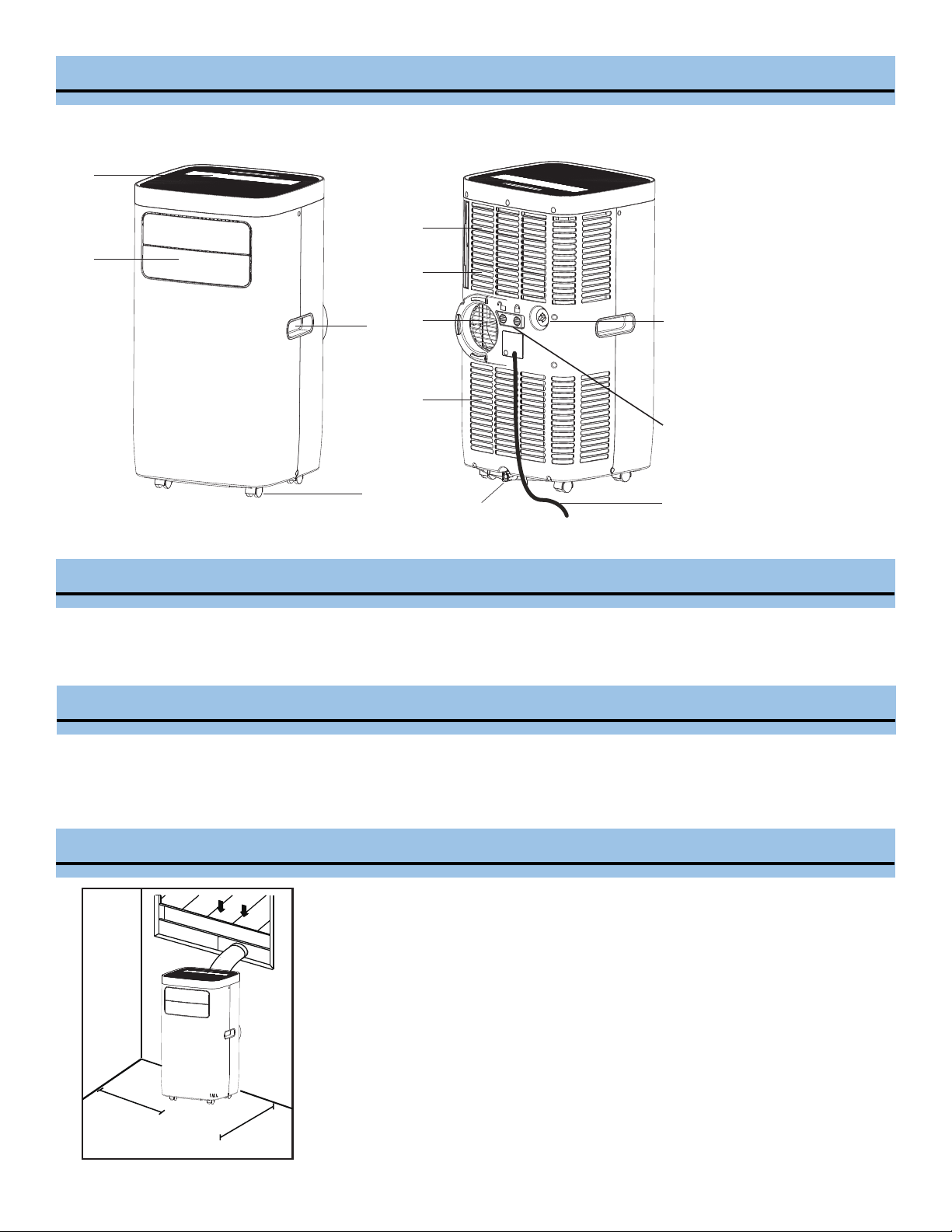
Your installaon locaon should meet the following requirements:
• Make sure that you install your unit on an even surface to minimize noise
and vibration.
• The unit must be installed near a grounded plug, and the lower manual
gravity drain port (found on the back of the unit) must be accessible.
• The unit should be located at least 20" from the nearest wall to en-sure
proper air conditioning. The horizontal louver blade should be at least 20"
away from obstacles.
• DO NOT cover any of the intake and exhaust vents or the remote signal
receptor of the unit, as this could cause damage to the unit.
1
2
3
4
5
6
7
8
10
11
9
1.
Control Panel
2.
Air Outlet
3.
Handle (both sides)
4.
Wheel Casters
5.
Air Filter
6.
Air Intake (Evaporator)
7.
Air Outlet/Exhaust (Heat
Exchange)
8.
Air Intake (Condenser)
9.
Power Supply Cord
10.
Lower Manual Drain Port
11.
Upper Gravity Drain Port
12.
Hose Lock Switch
20 inch
20 inch
5
12
AMBIENT TEMPERATURE RANGE FOR UNIT OPERATION
MODE
Cool
Dry
TECHNICAL DATA
Model
Cooling Capacity (SACC):
TEMPERATURE RANGE
61°F - 95°F (16°C - 35°C)
61-89°F | 16-32°C
ARC-115WG
Cool / Fan / Dry
ASHRAE: 11,000 BTU / SACC : 6,800 BTU
400 sq. ft.
Low, Medium, High
61-89°F
Up to 24 hours
R32
1050 W / 9.5 A
115V/60Hz
56.25 lbs
68 lbs
14.75" W x 28" H x 14" D
5.5" diameter, length up to 59"
5.5" diameter
6
Minimum length: 20" | Maximum length: 46”
Window Kit:
Coverage Area:
Fan Speed:
Temperature Range:
Timer:
Refrigerant:
Power Supply:
Net Weight:
Gross Weight:
Unit Dimensions:
Extendable Exhaust Hose:
Hose Connectors:
87 pints/day
Dehumidifying Capacity:
What should I look for first when purchasing a portable air conditioner?
The right air conditioner helps you cool a room efficiently. An undersized unit won't cool adequately while one that's too large
will not remove enough humidity, leaving the air feeling damp. To find the proper air conditioner, determine the square footage
of the room you want to cool by multiplying the room length by its width. You also need to know the air conditioner's BTU
(British Thermal Unit) rating, which indicates the amount of heat it can remove from a room. A higher Why is the cooling capacity
lower on newer models than on older units? number means more cooling power for a larger room. (Be sure you are comparing
only newer models to each other- older models may appear to have a higher capacity, but are actually the same). Be sure to “size
up” if your portable air conditioner will be placed in a very sunny room, in a kitchen, or in a room with high ceilings. After you’ve
found the right cooling capacity for your room, you can look at other features.
Why is the cooling capacity lower on newer models than on older units?
Federal regulations require manufacturers to calculate cooling capacity based on a specific test procedure, which was changed
just this year. Models manufactured before 2017 were tested under a different procedure and cooling capacity is measured
differently than in prior years’models. So, while the BTUs may be lower, the actual cooling capacity of the air conditioners has not
changed.
What is SACC ?
SACC is the representative value of Seasonally Adjusted Cooling Capacity, in Btu/h, as determined in accordance with the DOE
test procedure at title 10 Code of Federal Regulations (CFR) 430, subpart B, appendix CC and applicable sampling plans.
Operation Modes:
Power Supply:
Power Consumption:
ACCESSORIES
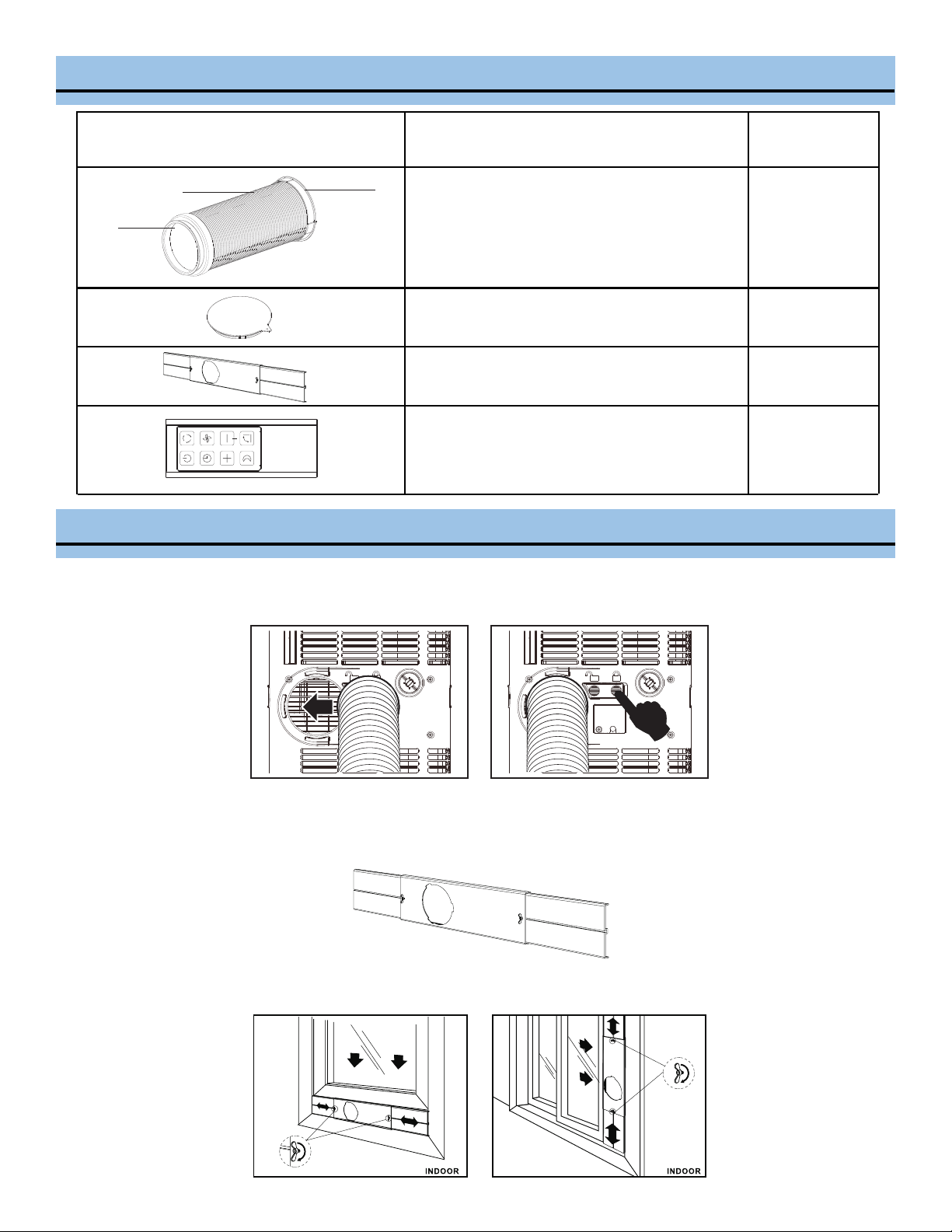
ACCESSORY IMAGE ACCESSORY DESCRIPTION
QUANTITY
1. Exhaust hose
2. Connector (to the window kit)
3. Connector (to the unit)
3 pieces
Cover
1 piece
Window slider kit with (2) screws and (2) nuts
1 set
1 3
2
B
A
C
1 piece
Remote Control
WINDOW KIT INSTALLATION
1. Slide the hose assembly with the exhaust connector to unit into the exhaust port of the rear panel and push the lock switch
to lock the hose assembly firmly in place.
2. Insert window panels B and C to each end of the main panel A with the exhaust port cut out. Adjust the length of the window
panel kit by using the screws and nuts mounted on the two ends of the main panel A.
C
A
B
3. Open the window and place the window panel kit into the window. Adjust the extension panels B and C to fit width or height
of window using the screw and nut sets mounted on the main panel A.
7
WINDOW KIT INSTALLATION
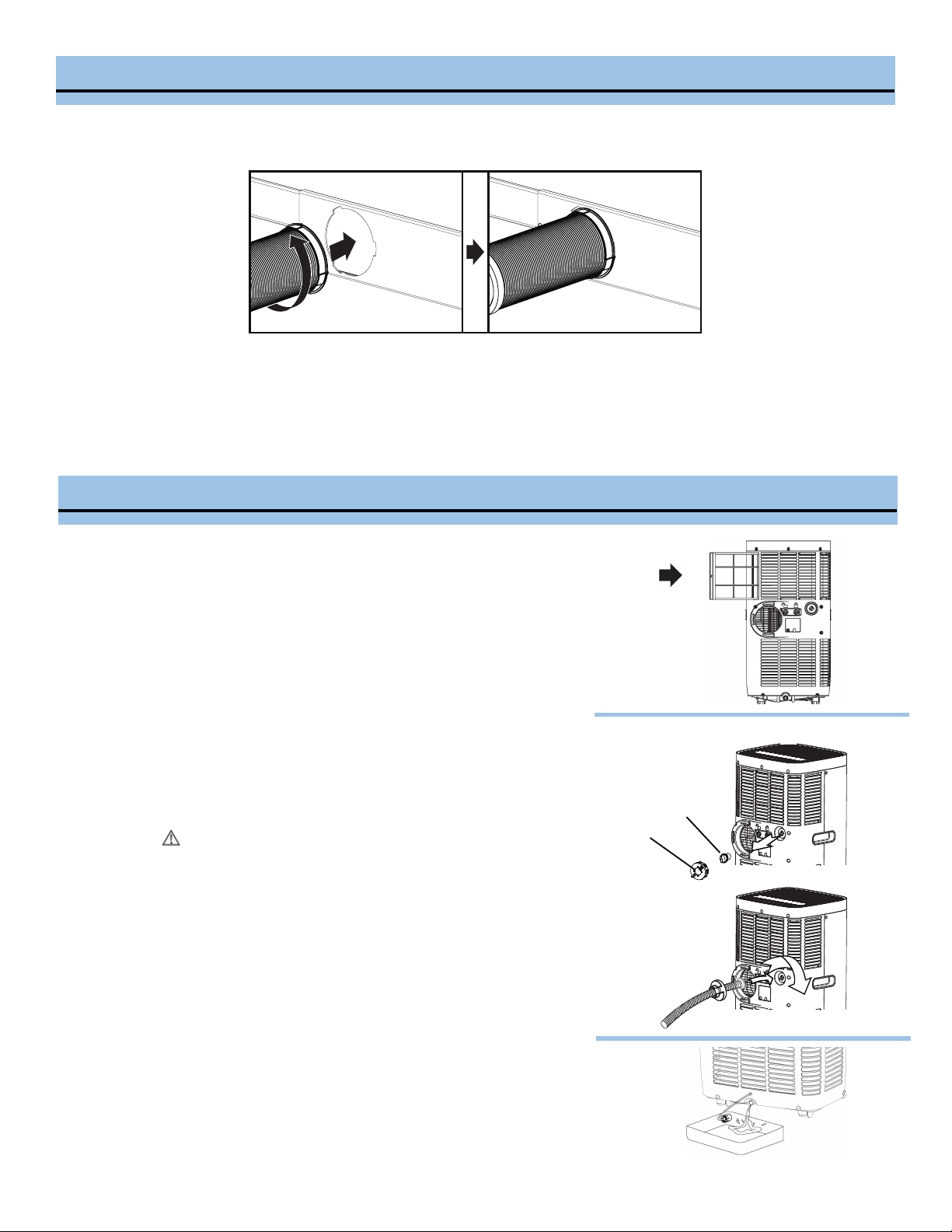
4. Insert the other end of exhaust hose assembly with the exhaust connector onto the window panel kit and turn
counterclockwise to secure.
5. Plug the power cord into the wall outlet and press the “Reset” button.
6. Please allow 20” of space around the unit for proper air circulation.
7. When removing the portable air conditioner for storage, the window panel may be left in place. Simply place the included
cover to cover the hole on the window panel.
FILTER INSTALLATION AND DRAINAGE
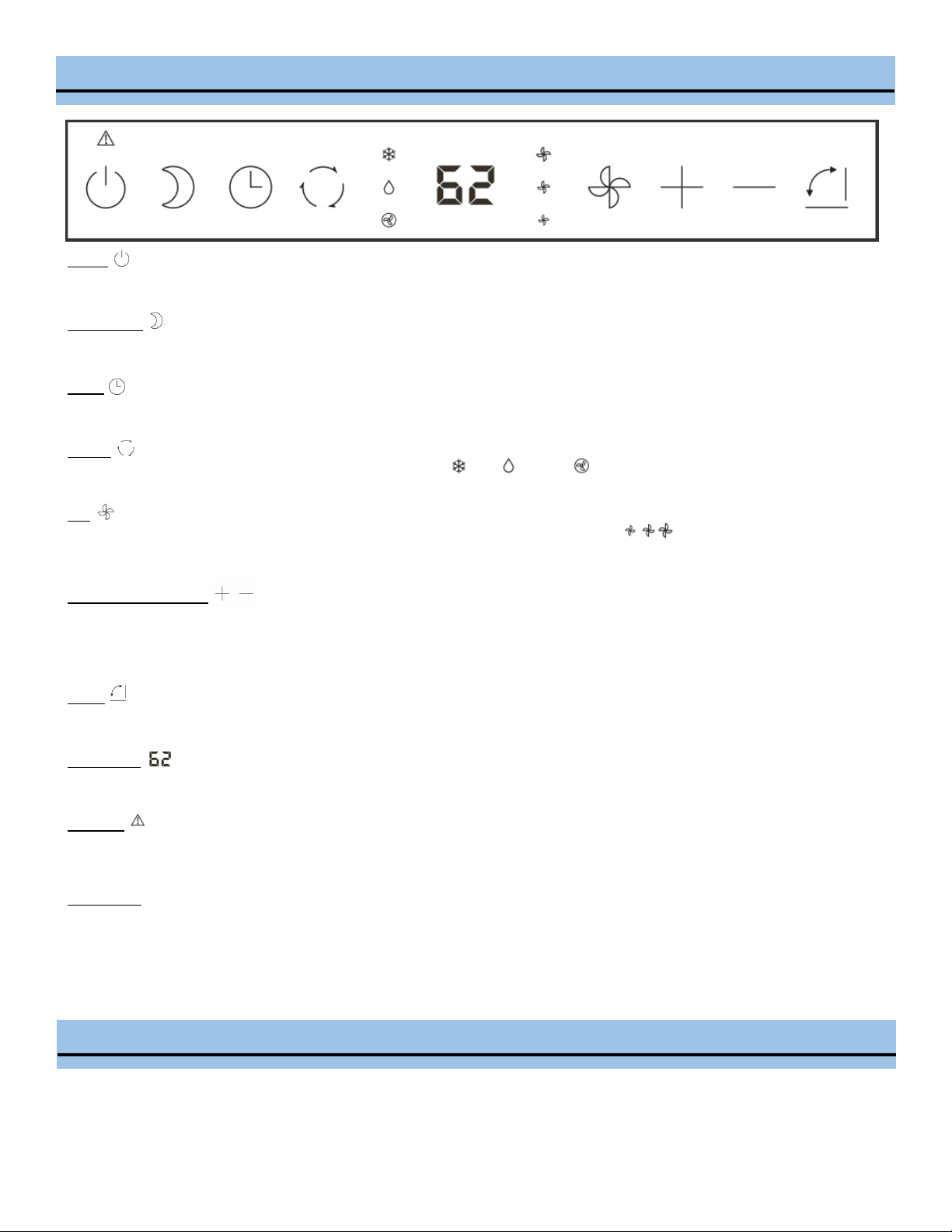
WARNING: NEVER OPERATE THE AIR CONDITIONER WITHOUT THE AIR
FILTER
Your Whynter portable air conditioner is equipped with a washable filter.
This washable filter removes large particles such as dust, pet hair and
dander.
WATER DRAINAGE
The dehumidifying capacity of this unit is 87 pints per day. The patented
self-evaporating function of the ARC-115WG unit fully exhausts all
condensation automatically in most en-vironments when humidity is less
than 70%. Areas with more than 70% humidity, the self-evaporating
function can still exhaust about 98% of the moisture and the remaining
2% of moisture will be collected in the water tank of the air conditioner.
When the water reservoir reaches its maximum level, the water full
indicator light will illuminate and all operation modes will be
disabled temporarily while the fan continuously runs. The water full
indicator light will disappear when the water is completely drained.
Continuous drainage (Fig. A) - optional
Remove the drain cover and soft rubber stopper from the upper drain
port. Install the drain hose (sold separately) through the driven cover.
Thread the drain cover onto the drain port. Place the open end of the
drain hose downward to an area appropriate for draining.
Manual drainage (Fig. B)
Carefully move the unit to a drain location or position a flat container,
dish or optional drain bucket accessory (sold separately) under the drain
area of the lower drain port. Remove the bottom drain plug and let the
water drain. Replace the drain plug and plug in to resume operation.
Drain hose
Drain cover
Soft rubber stopper
Fig. A
Fig. B
8
CONTROL PANEL
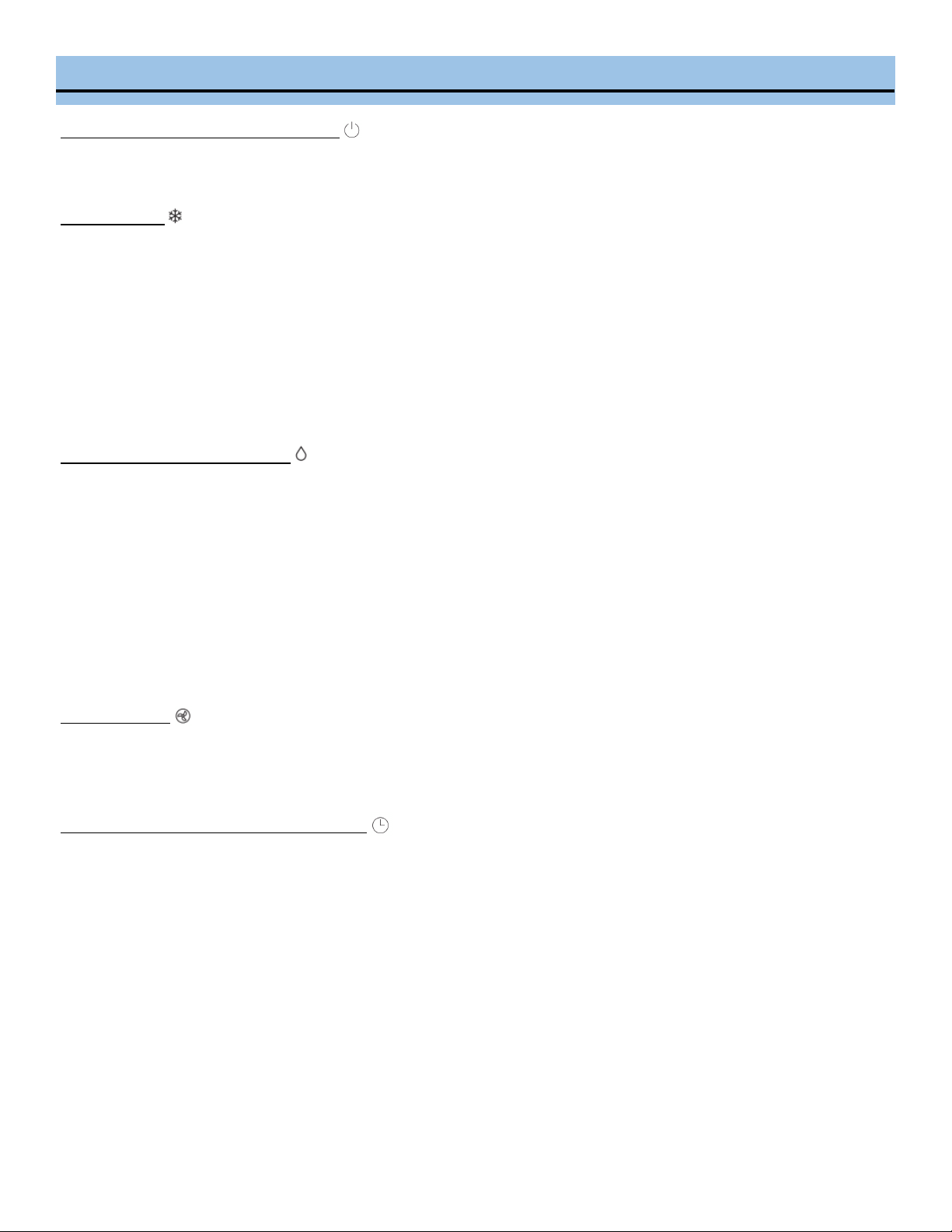
Power
Press to turn the air conditioner on and off.
Sleep Mode
Press to activate Sleep mode and the sleep light illuminates. Press SLEEP button again to stop the SLEEP operation.
Timer
Press to program timer delayed switch ON or OFF function.
Modes
Press to change modes. Controls the functions modes: COOL , DRY ,and FAN . See page 10.
Fan
Press to change fan speed. Controls the 3 fan speeds and mode: Low, Medium, and High .
The fan speed indicator lights illuminate to show the set fan speed/mode.
Up and Down buttons
Adjusts set temperature 1°F | 1°C increments or timer hours (0 - 24 hours).
NOTE: This unit is capable of displaying set temperature in Fahrenheit or Celsius. To convert from one to another, press and
hold the Up and Down buttons for 3 seconds.
Swing
Press to start the auto swing feature. When the operation is ON, press the SWING button to stop the louver at a desired angle.
LED Display
Shows the set temperature in °F or °C and the Auto-timer settings. While on FAN modes, it shows the room temperature.
Tank Full
If the internal condensation tank becomes full, the Tank Full light will turn RED and the unit will not operate until it has been
drained from the lower manual drain port.
Error Codes
E1 - Room temperature sensor error - Unplug unit and restart in 5 minutes
E2 - Evaporator sensor error - Unplug unit and restart in 5 minutes
Note: If any other error code appears on the display, unplug the air conditioner and allow it to sit undisturbed for 5 minutes. If
the error code persists when the unit is plugged back in, please contact Whynter Customer Support.
OPERATION INSTRUCTIONS
BEFORE USING YOUR APPLIANCE
• Remove the exterior and interior packing
• Before connecng the appliance to the power source, let it stand upright for approximately 4 hours. This will reduce the possi-
bility of a malfuncon in the cooling system from handling during transportaon
9
OPERATION INSTRUCTIONS
SWITCHING ON/OFF THE AIR CONDITIONER
The appliance can be switched ON or OFF by pressing the POWER button on the control panel or the ON/OFF button on the remote
control
COOLING MODE
In this mode, the air conditioner cools and dehumidifies the room. To activate this function mode, press the MODE
button until the COOL indicator light comes on. When the cooling mode is set, the compressor will start in approximately 3 minutes.
In cooling mode, hot air is exhausted from the outdoor exhaust port and the exhaust hose must be connected to exhaust out the
hot air. The temperature setting range of this air conditioner is from 61°F / 16°C to 89°F / 32°C. To set the temperature, press the +
or - buttons. This air conditioner has a 5°F temperature cushion which if the set temperature is within 5°F of the ambient
temperature, the unit runs on fan only mode. This saves energy and prolongs the life of the compressor of the air conditioner. To set
the fan speed, press the FAN button.
NOTE: In cooling mode, the difference in noise level between the fan speeds is not very noticeable when the compressor is on. Try
setting the unit to Fan only mode, you should be able to hear the difference between high and low fan speed settings.
DRY (DEHUMIDIFYING) ONLY MODE
In this mode, the air conditioner only dehumidifies the room, the compressor will activate intermittently depending on the ambient
temperature and the fan speed is set to LOW. To activate this function mode, press the MODE button until the DRY indicator light is
displayed. Please note that when switching function mode, there will be an approximately 3 minute transition time. In dehumidi-
fying mode, the exhaust hose does not need to be vented. If the exhaust hose is vented, the room will be cooled as it dehumidifies.
To prevent cooling, remove the exhaust hose from the window kit and allow the warm air from the rear to be recirculated into the
room. If room temperature is higher than 77°F, the fan speed can be adjusted. If room temperature is lower than 77°F, the fan
speed is set at Low.
NOTE: When using dehumidifying mode, venting the exhaust hose to the outside is not required. If vented, the warm air is exhaust-
ed to the outside and cooling within the room may occur. Additionally, if the exhaust hose is not vented, the unit may require more
frequent draining. Also, the air conditioner does not have a humidistat in which a specific humidity level can be set.
FAN ONLY MODE
In this mode, only the fan of the air conditioner runs and circulates the air in the room. To activate this function mode, press the
MODE button until the FAN indicator light comes on. In this function mode, the temperature cannot be set. Subsequently, set the
desired fan speed by pressing the FAN button. When using FAN only mode, venting the exhaust hose to the outside is optional.
TIMER (DELAYED SWITCH ON / OFF) FUNCTION
This function mode enables a delayed switch ON or delayed switch OFF of the air conditioner. The time (hours) delay can be set,
enabled and disabled.
SETTING SWITCH OFF TIMER
With the air conditioner operating in any function mode, press the TIMER button. The TIMER OFF light will come on. Then set
the desired time delay OFF hours by pressing the UP and DOWN buttons. The time increments are at 0.5 hour to up to 10 hours,
fol-lowed by 1 hour increment up to 24 hours. When the delay time set has elapsed, the air conditioner switches off. To cancel
the delayed switch off function, turn off the air conditioner or adjust the time setting to 0.0.
SETTING DELAYED SWITCH ON TIMER
With the air conditioner is off, press the TIMER button. The TIMER ON light will come on. Then set the desired time delay ON
hours by pressing the UP and DOW N buttons. The time increments are at 0.5 hour to up to 10 hours, followed by 1 hour
increment up to 24 hours. When the delay time set has elapsed, the air conditioner switches on. To cancel the delayed switch on
function, turn on the air conditioner or adjust the time setting to 0.0.
10
OPERATION INSTRUCTIONS
SLEEP MODE
In this mode, the air conditioner gradually increases the set temperature in cooling mode, decreases the noise level and conserves
energy. The temperature will then increase by another 1°C/ 1°F after an additional 30 minutes. This new temperature will remain
the same for 7 hours. To activate this function mode, press the SLEEP button until the SLEEP indicator light comes on.
AUTO RESTART
In the event of a power outage, the air conditioner restarts at the previously set function mode and settings when power is re-
stored.
CONTROLLING THE AIR FLOW DIRECTION
The louvers can be controlled to Auto-Swing or in a fixed direction. To control the air flow direction by Auto-Swing, press the
SWING button. To set the louvers in a fixed angle or direction, press SWING button while on Auto-Swing mode when desired angle
is chosen.
NOISE LEVEL
Portable air conditioners may make sounds that are not familiar to you. The sounds listed below are normal. Noise reflecting off
hard surfaces such as a floor or wall can make the sounds seem louder than they actually are.
• The compressor may make a pulsating or high-pitched sound
• Water running from the evaporator to the water tank may make a splashing sound
• Refrigerant flowing may make a gurgling sound
• Fan sound may come from front and back air vents
COMPRESSOR LOCK OUT
This portable air conditioner is optimized to operate in an ambient temperature of 61°F - 95°F (16°C - 35°C). The
compressor circuit has an automatic 3 minute time delayed start if the unit is turned off and on quickly. This prevents over-
heating of the compressor and possible circuit breaker tripping.
The portable air conditioner can be switched on by the remote control. To transmit signals from the remote control to the air
conditioner, point the front part of the remote handset towards the control panel on the air conditioner. Reception of the signal is
confirmed by a beep. The maximum signal transmission distance is approximately 8 meters / 26 feet.
• Other appliances in the same room controlled by a remote control (TV, radio, stereo, etc.), may cause interferences
• Electronic and fluorescent lamps may interfere with the signal transmissions between the remote control and the air conditioner
• Remove the batteries if the remote control is not used for long periods
REMOTE CONTROL
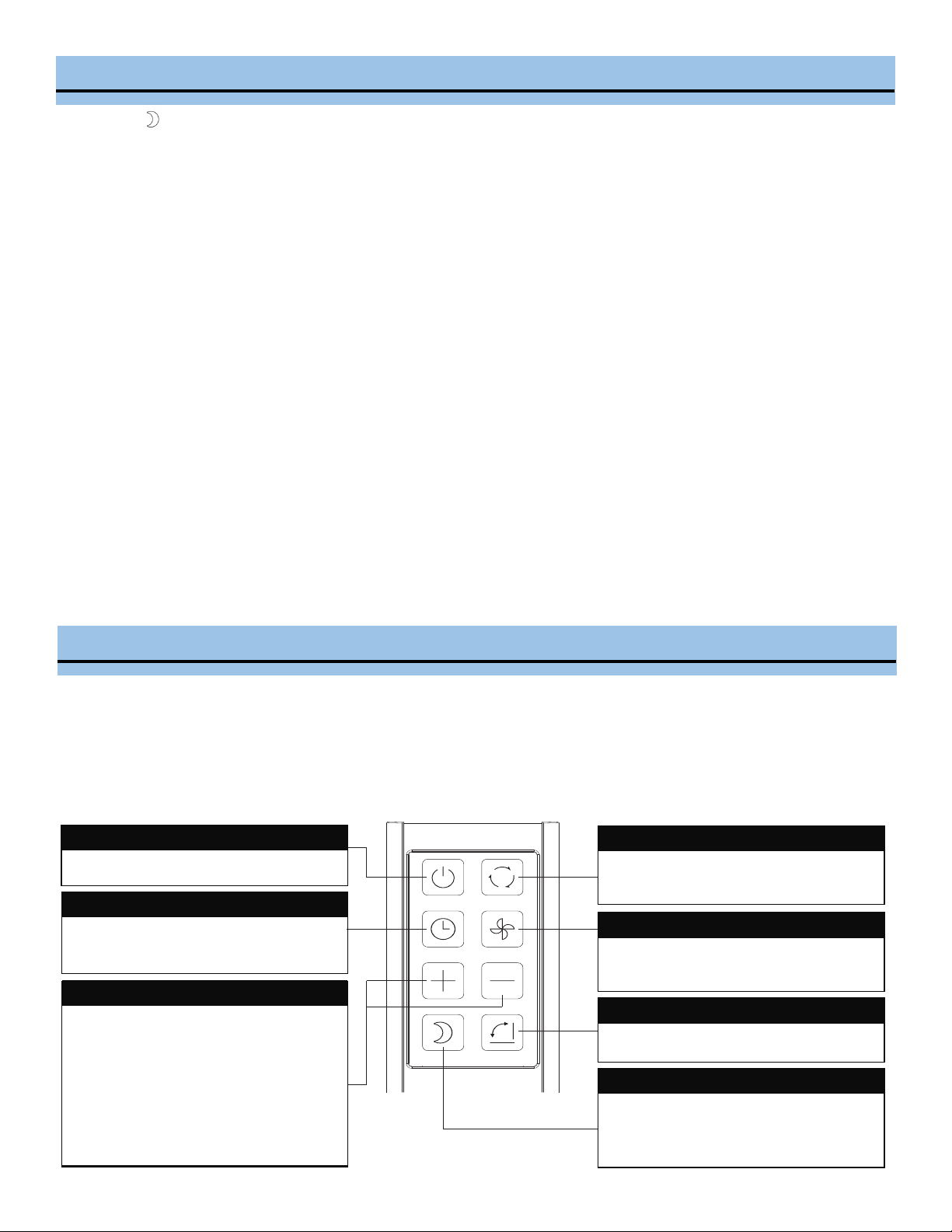
Power Button
Press to turn the air conditioner on and off
On / Off Timer Button
Press to program Timer Delayed Switch
ON or OFF function
Time / Temperature Set Control
● Used for adjusting the timer and
thermostat.
● The default display is room
temperature.
● When "+" or "-" button is
pressed, the set temperature is
displayed and may be adjusted.
After a few seconds, the display will
revert back to room temperature.
Mode Button
Press to change modes. Controls the
functions modes: COOL, DRY and FAN.
Fan Speed
Controls the 3 fan speeds and mode: Low,
Medium, and High
Swing Button
Press to adjust the air flow direction
Sleep Button
Press this button to gradually increase the
set temperature in cooling mode,
decreases the noise level and conserves
energy
11
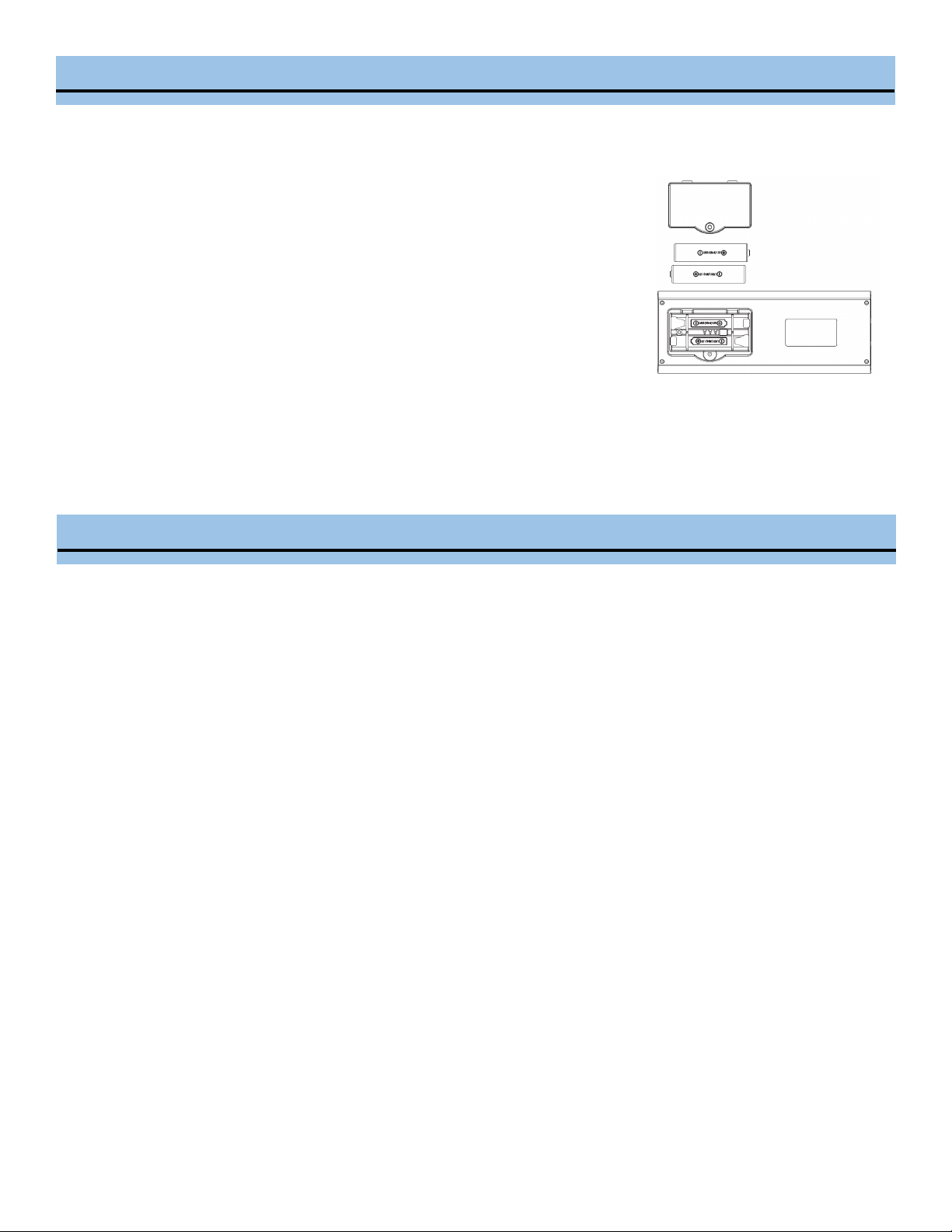
INSTALLING BATTERIES
To insert the batteries, open the flap on the back of the remote control by sliding if off. Strictly adhere to the polarity signs on
the bottom of the battery housing, close the flap once the batteries have been inserted.
REMOTE CONTROL
• Only use two dry LR03 AAA 1.5V Batteries (included) in the remote control
• Always change both batteries at the same time
REPLACING THE REMOTE BATTERIES
This air conditioner comes with two AAA batteries. Place the batteries in the remote control
before use.
1. Slide the back cover from the remote downward to expose the battery compartment.
2. Insert the batteries, ensure to match the (+) and (-) symbols on the ends of the
batteries with the symbols inside the battery compartment.
3. Slide the battery cover back into place.
Notes:
• The air conditioner will not respond if curtains, doors or other materials block the signal from the remote control to the unit.
• Prevent any liquid from contact with the remote control. Do not expose the remote control to direct sunlight or heat.
• If the infrared signal receiver on the indoor unit is exposed to direct sunlight, the air conditioner may not function properly.
Use curtains to prevent the sunlight from falling on the receiver.
• Do not mix old and new batteries or batteries of different types.
• Do not leave the batteries in the remote control if it is not going to be used for more than two months.
CARE AND MAINTENANCE
• Always unplug the unit before cleaning or servicing.
• DO NOT use ammable liquids or chemicals to clean the unit.
• DO NOT wash the unit under running water. Doing so causes electrical danger.
• DO NOT operate the portable air conditioner if the power supply was damaged during cleaning. A damaged power cord must
be replaced with a new cord. Contact Whynter Customer Support for more information.
AIR FILTER
The air filter should be cleaned every two weeks to ensure efficient performance. In households with animals, the air filters may
need to be cleaned more often and the external grills may need to be wiped to prevent blocked air flow.
1. Switch off the air conditioner.
2. Remove the washable filter from the unit.
3. Use a vacuum cleaner or tap lightly to remove loose dust and dirt.
4. Rinse the filter thoroughly under warm running water (no hotter than 100° F.)
5. Dry thoroughly before re-inserting the filter.
END OF SEASON STORAGE
1. Drain all water from the appliance.
2. Run the appliance on Fan mode for half a day in a warm room to dry the inside of the appliance and prevent mold
formation.
3. Turn off the appliance and unplug it, wrap the cord and bundle it with tape.
4. Remove the batteries from the remote control.
5. Clean the air filters and reinstall them.
6. Store the appliance in a cool, dark place. Prolonged exposure to direct sunlight or extreme heat can shorten the lifespan of
the appliance.
UNIT CLEANING
• Unplug the appliance before cleaning or servicing.
• Clean the housing with a lukewarm damp cloth and neutral detergent. Dry the housing with a lint-free dry cloth.
• Do not use gasoline, paint thinner or other chemicals to clean the appliance.
• Do not wash the appliance directly under a tap or using a hose. It may cause electrical damage.
DISPOSAL
This appliance should not be treated as regular household waste. Check for local regulatory compliance regarding the approved
and safe disposal of this appliance.
12
TROUBLESHOOTING
Many common portable air condioner problems are easily resolved. Try the troubleshoong suggesons below to see if
the problems can be resolved before having to contact the service department.
PROBLEM POSSIBLE CAUSES SOLUTIONS
The portable air condioner does not
turn on
• Power failure / outage
• The automatic switch, line fuse, or
breaker has been tripped
• The power supply voltage is too low
• The power cord is damaged
• The L.C.D.I. power plug for the unit is
tripped
• The internal water reservoir is full
• Restore the power supply
• Flip the switch / change the fuse /
turn the breaker back on. Also note
that you may have too many applianc-
es drawing power on one circuit, you
may need to move the other applianc-
es to another circuit
• Move the unit onto another circuit
with the correct voltage
• Call for service. Only authorized per-
sonnel should replace damaged power
cord or power plug
• Press the Reset buon on the L.C.D.I.
power plug
• Drain water from the air condioner
• Possible loose internal connecon.
• Please contact Whynter for service.
TIPS
1. Keep the exhaust hose as short and straight as possible.
The exhaust hose removes heat from the room. It should remain as short and straight as possible without sharp bends or
twists to maximize efficiency. If the exhaust hose must be extended, do not exceed 9'.
2. Turn the air conditioner on early.
Turning the air conditioner on early instead of waiting until the hottest point of the day will allow the unit to be more
effective. The air conditioner will not have to work as hard to cool the room down and maintain the set temperature.
3. Reduce heat sources.
Direct sunlight, televisions, computers, and other heat generating appliances work against the air conditioner by
introducing heat into the space.
- Close window curtains and blinds to keep direct sunlight out
- Close doors and windows
- Keep ovens and stoves off
- Turn off unused lights
- Add weather stripping around windows and doors
4. Keep the air filter clean.
Regular cleaning will help keep your air conditioner working properly. Dusty filters and vents greatly reduce the airflow
and efficiency of the unit.
- Clean the washable filter regularly
- Vacuum any accumulated dust from around all vents
13
The unit has worked for a long me, but
the room is not cold enough
• Windows or doors are open
• There are too many people in the
room
• There is direct sunshine into the room
• The room is a kitchen or with many
heat producing appliances
• There is a server in the room
• The room is too large
• Close all windows and doors
• You may need addional cooling or
another air condioner.
• Close curtains or blinds and try to
minimize the amount of direct sun-
light into the room.
• You may need addional cooling or
another air condioner.
The unit is very noisy
• The unit is not level
• The surface underneath the unit is
uneven
• Low power voltage
• Make sure the unit is on hard, level
and stable surface.
• Move the unit to a locaon with a
level and hard oor.
• Make sure the wall outlet and support
the required power consumpon of
the air condioner and do not use an
extension cord.
The unit leaks water
• The unit is lted or not leveled
• The water tank is full
• Make use the unit is leveled
• Drain water from the drain plug at the
back of the air condioner
Fan speed cannot be changed
• Fan speed dierences are not very
noceable
• The fan speed dierence is not very
noceable when the compressor is on.
Try seng the unit to Fan only mode,
you should be able to hear the dier-
ence between high and low fan speed
sengs.
The air coming out of the unit is
not very cold, or the airow
volume is weak
• The lters are dirty or obstructed
• The air intake or exhaust is obstructed
• The unit is set in DRY or FAN mode
• The unit is set to low fan speed
• Clean the air lters
• Make sure there is at least 20" of
clearance from the air intake. Make
the length of the exhaust hose is as
short as possible
• Set the unit to the cooling mode
• Set the unit to a higher fan speed
The unit turns on but the compressor
does not turn on (the fan runs but the
unit is not cooling)
• The room temperature is outside of
the operational tolerances of the unit
• The Cooling mode is not on
• The compressor has not turned on yet
because of its time delay
• The set temperature is too high
• The internal water reservoir is full
• This unit is designed to work in ambi-
ent temperatures of 61°F to 95°F.
• Press the MODE button until the
COOL light is shown on the display.
• Give the compressor 3 minutes to
turn on after the Cooling mode has
been selected.
• Set the air conditioner to a lower tem-
perature.
• It is recommended to set the temper-
ature to at least 5°F of the ambient
temperature.
• Either manually drain the water by
removing the drain plug or allow the
unit to exhaust the water itself by run-
ning the fan only mode. Then cooling
will resume.
• Possible loose internal connection.
• Please contact Whynter for service.
PROBLEM POSSIBLE CAUSES SOLUTIONS
14
ONE YEAR LIMITED PARTS WARRANTY
THREE YEAR WARRANTY ON COMPRESSOR
This WHYNTER product is warranted to the original owner, purchased from an authorized Whynter dealer within
the 48 U.S. connental states, for one year from the original purchase date against defects in material and work-
manship under normal residenal usage. Should your WHYNTER product prove defecve within one year from
the date of purchase, contact Whynter’s Customer Support team with the serial number and proof of purchase
to make a warranty claim. A Return Authorizaon number must be issued before returning any parts or prod-
ucts. Parts or products received without a Whynter issued Return Authorizaon number will be refused. Under
this warranty, Whynter will repair or replace any parts found defecve with new or remanufactured parts or ex-
change the defecve product with a new, refurbished, or remanufactured product at our discreon. All defecve
products and parts covered by this warranty will be repaired or replaced on a mail-in basis to Whynter’s Service
Center. This warranty is not transferable. Aer the expiraon of the warranty, the cost of labor and parts will be
the responsibility of the original owner.
Aer two months to one year, the customer will be responsible for the return freight cost to Whynter’s Service
Center. Please package the product carefully in its original packaging to avoid damage in transit. Whynter is not
responsible for damage resulng from shipper mishandling or improper packaging. Please retain the original box
and packaging materials.
THIS WARRANTY DOES NOT COVER:
• Acts of God, such as re, ood, hurricanes, earthquakes and tornadoes.
• Improper power supply such as power surge, low voltage, defecve household wiring or inadequate fuses.
• Use in commercial or industrial applicaons.
• Damage, accidental or otherwise, to the product while in the possession of a consumer not caused by a de-
fect in material or workmanship.
• Damage caused by consumer misuse, tampering, lack of maintenance or failure to follow the care and spe-
cial handling provisions in the instrucons.
• Damage to the nish of the case, or other appearance parts caused by wear.
• Damage caused by repairs or alteraons to the product by anyone other than authorized by the manufactur-
er.
• Removal, Replacement Packaging, Freight and Insurance cost for the warranty service.
• Products sold AS IS or from an unauthorized reseller.
• Products that have had their serial numbers removed or defaced.
DISCLAIMER OF IMPLIED WARRANTIES; LIMITATION OF REMEDIES
CUSTOMER'S SOLE AND EXCLUSIVE REMEDY UNDER THIS LIMITED WARRANTY SHALL BE PRODUCT REPAIR OR REPLACEMENT AS PROVIDED
HEREIN. CLAIMS BASED ON IMPLIED WARRANTIES, INCLUDING WARRANTIES OF MERCHANTABILITY OR FITNESS FOR A PARTICULAR PUR-
POSE, ARE LIMITED TO ONE YEAR OR THE SHORTEST PERIOD ALLOWED BY LAW, BUT NOT LESS THAN ONE YEAR. WHYNTER SHALL NOT BE
LIABLE FOR CONSEQUENTIAL OR INCIDENTAL DAMAGES SUCH AS PROPERTY DAMAGE AND INCIDENTAL EXPENSES RESULTING FROM ANY
BREACH OF THIS WRITTEN LIMITED WARRANTY OR ANY IMPLIED WARRANTY. SOME STATES AND PROVINCES DO NOT ALLOW THE EXCLU-
SION OR LIMITATION OF INCIDENTAL OR CONSE- QUENTIAL DAMAGES, OR LIMITATIONS ON THE DURATION OF IMPLIED WARRANTIES, SO
THESE LIMITATIONS OR EXCLUSIONS MAY NOT APPLY TO YOU. THIS WRITTEN WARRANTY GIVES YOU SPECIFIC LEGAL RIGHTS. YOU MAY
ALSO HAVE OTHER RIGHTS THAT VARY FROM STATE TO STATE.
To obtain service or informaon, contact
Whynter LLC via email at s[email protected]om or call
866-WHYNTER.
Product contents and specicaons may change without noce.
Copyright © 2021
WWW.WHYNTER.COM